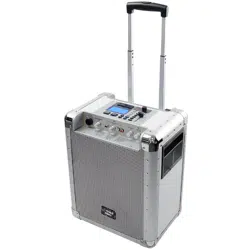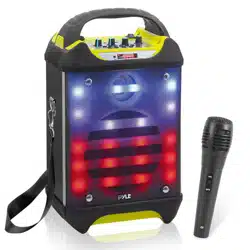

Flashing DJ Lights, Built-in Rechargeable Battery, Wireless Microphone,
Recording Ability, MP3/USB/SD/FM Radio
Portable Wireless BT Karaoke Speaker System
PWMA275BT

www.PyleUSA.com2
I. FEATURES
1. Ultra-large magnetic circuit high-sensitivity speaker with high penetrating power, low-frequency shock and
perfect medium-/high-frequency representation.
2. The latest decoding chips supporting stably playback of MP3 in up to 32GB U disk/SD card.
3. FM radio reception-high-quality digital radio with automatic channel search and storage of up to 60 channels.
4. 3. 5mm AUX audio input for each connection to a wide range of sound sources.
5. Built-in high-capacity battery for consecutive playback of up to 2 hours.
6. Connect the microphone, adjustable reverberation, voice and Karaoke function to present outstanding
performance.
7. Battery with built-in recharging protection to present a long and stable service life.
8. Built-in low battery and full recharging indication. Human-oriented use.
9. With belt/handle design for best choice of mobile speaker.
10. Outputs to earphone or external sound sources.
11. Record your favorite FM radio station or other AUX sound source to enjoy the music wherever you are.
12. Microphone input recording to act as your personal business assistant.
13. With Wireless BT function.
II. RECORDING
Recording via External Microphone:
Connect a storage device (USB/SD card) and short press RECORD key to start recording for a time depending on
the storage capacity. During recording, turn the “-ECHO+” knob to the minimum. It is best that the microphone
should have a proper distance away from the speaker to prevent any feedback.
NOTE: This product starts recording from the time as displayed on the LED screen.
III. WIRELESS BT PAIRING OPERATION
1. ON/OFF: switch the power to ON, press the key “MODE” to enter the Wireless BT mode, the display screen will
show “BLUE” indicating Wireless BT mode is active.
2. Make sure the Wireless BT function of the Mobile device is active and begin searching. Connect to mobile
device when “Pyle Audio” shows. Mobile device connections do not need password, however if prompted,
input “0000” to go on pairing. After a successful pairing, the speaker will send out a voice prompt indicating it
has successfully been paired with the mobile device.
3. Play the music from your mobile device directly and enjoy.

www.PyleUSA.com 3
IV. FUNCTIONAL OPERATIONS AND FEATURES
1. LED Screen
2. Master Volume: In MP3/FM/AUX mode, use it to regulate volume output from the speaker.
3. SD Port: Read audio les in MP3 format in SD card in capacity up to 32G (FAT32).
4. USB Port: Read audio les in MP3 format in USB storage device in capacity up to 32G (FAT32).
5. : In USB/Micro SD card reading mode, short press to go to the previous track, or press and hold to switch to
the previous folder. In FM receiving status, short press it to select the previous channel after a full station search
has been executed.
6. : In USB/SD card reading mode, short press it to play/pause, or press and hold to select one of four playback
sequencing modes (All - play all tracks in sequence; ONE - repeat one track). In FM receiving status, press and
hold to execute a full search (it is recommended to execute at least one full search before using radio receiving
function. All founded stations will be saved even in power-o). In AUX input / FM radio status, short press it to
toggle between mute and normal volume.
7. : In USB/SD card reading mode, short press it to go to the next track. In FM receiving status, short press it to
select the next channel after a full station search has been executed.
8. Mode/SHIFT: Short press it to toggle between USB/SD and FM receiving modes. Press and hold to toggle
between recording folder and MP3 folder.
9. Recording/DEL: Short press it to enable recording (USB/SD storage device need be connected rst).
During recording, reverberation should be tuned to the minimum. Press and hold to delete a recording le.
Recording in AUX or FM mode is available.
10. EAR MIC: Headphone/MIC Port
11. LINE IN: External sound source input port (plug-and-play).
12. TREBLE: The control knob of treble
13. Reverberation: Microphone reverberation regulating knob.
14. Microphone volume: Microphone volume regulating knob.
15. Power switch: “
- ” - ON; “ O ” - OFF.
www.PyleUSA.com4
1. Power Button: Short press to enter standby mode; short press it again to resume.
If no device is connected, the system goes to “-NO-”.
2. : Functions as “ ” on the master device.
3. : Functions as “ ” on the master device.
4. : Functions as “ ” on the master device.
5. Mode: Functions as “Mode” on the master device.
6. V + / V- Keys: In USB/SDF/FM/AUX mode, press them to volume up/down.
7. Numeric Keys 0~9: In USB/SD card reading status, to play Track 12, just input
numbers “1” and “2”, and in 2 seconds the system will go to Track 12 and start
playback. Any input of number larger than number of the total available tracks is
invalid. In FM status, to listen to channel 107.5MHZ, just input “1075”.
8. Environment Key: In USB/SD card reading status, short press it to toggle among
Square, Meeting, Home, Hall and Personal modes.
9. Sequencing Key: In USB/SD card reading status, short press it to toggle among
four playback sequencing modes (All - play all tracks in sequence; RAND - play in
random; ONE - repeat one track; FOL - repeat all tracks in a folder).
10. : In USB/SD/FM/AUX mode, short press it to mute the device.
11. 100+: Number selection key - in MP3 mode (USB/SD card), short press it to add
“100” to current track number.
What's in the Box:
•
Karaoke Speaker
• Wireless Handheld Microphone
• Detachable Carry Strap
• Power & Audio Cables
• Remote Control
16. DC 9V recharging: DC 9V recharging port.
17. Microphone input jack
18. Track selection via numeric key, used in the same way with 0~9 numeric keys on the remote control.
: Short Press “0” keys, choose the numeric key “0”; In MP3 mode, press and hold to toggle between 6
kinds of ash modes/the ash light switch. In FM/MIC IN mode, press and hold to control the ash light switch.
19. Recharging indicator light: When charger is connected, the red light turns on. When the device is fully
recharged, the blue light turns on.
NOTE: Please charge the speaker when the unit is o or lower the volume to avoid distortion.
V. REMOTE INSTRUCTIONS
Audio Recording:
• It's Easy: One Button Recording Activation
• Record Audio as Streamed through the Speaker System
• Ability to Record Vocals via Microphone
• Records to USB Flash or Micro SD Card
• Audio File Type Created: .MP3
• Easy Transfer to PC & Mac

www.PyleUSA.com 5
Features:
• Karaoke & Music Streaming Speaker System
• Compact, Portable & Powerful
• Wireless BT Audio Streaming
• Built-in Rechargeable Battery
• Flashing DJ Party Lights
• FM Radio with Digital LCD Display
• USB Flash & Micro SD Memory Card Readers
• MP3 Digital Audio File Compatibility
• Includes Handheld Wireless Microphone
• Audio File Recording Function
• Headphone Jack
• Aux (3.5mm) Input
• Microphone Input
• Connect & Stream From External Devices
• Full Range Stereo Sound Reproduction
• Impressive Bass Response
• Convenient Carry Handle
• Rugged & Heavy Duty Design
• Top Panel Button Control Center
Wireless BT Connectivity:
• Built-in BT for Wireless Streaming
• Works with All of Your Favorite Devices (Smartphone, Tablet, Laptop, Computer, etc.)
• Wireless BT Network Name: 'Pyle Audio’
• Wireless BT Password: '0000'
• Wireless BT Wireless Range: 65'+ Ft.
• Wireless BT Version: 2.0
Technical Specs:
• Sound System: 6.5'' Speaker, 2'' Tweeter
• Impedance: 4Ohm
• Frequency Response: 100-20kHz
• Sound Distortion: <1.0%
• S/N Ratio: 80dB
• Max. USB/SD Memory Card Support: 32GB
• Power: DC 9V
• Dimensions: 10.2'' x 7.3'' x 16.1''