FULL MANUAL
A
Regulatory Compliance Statements
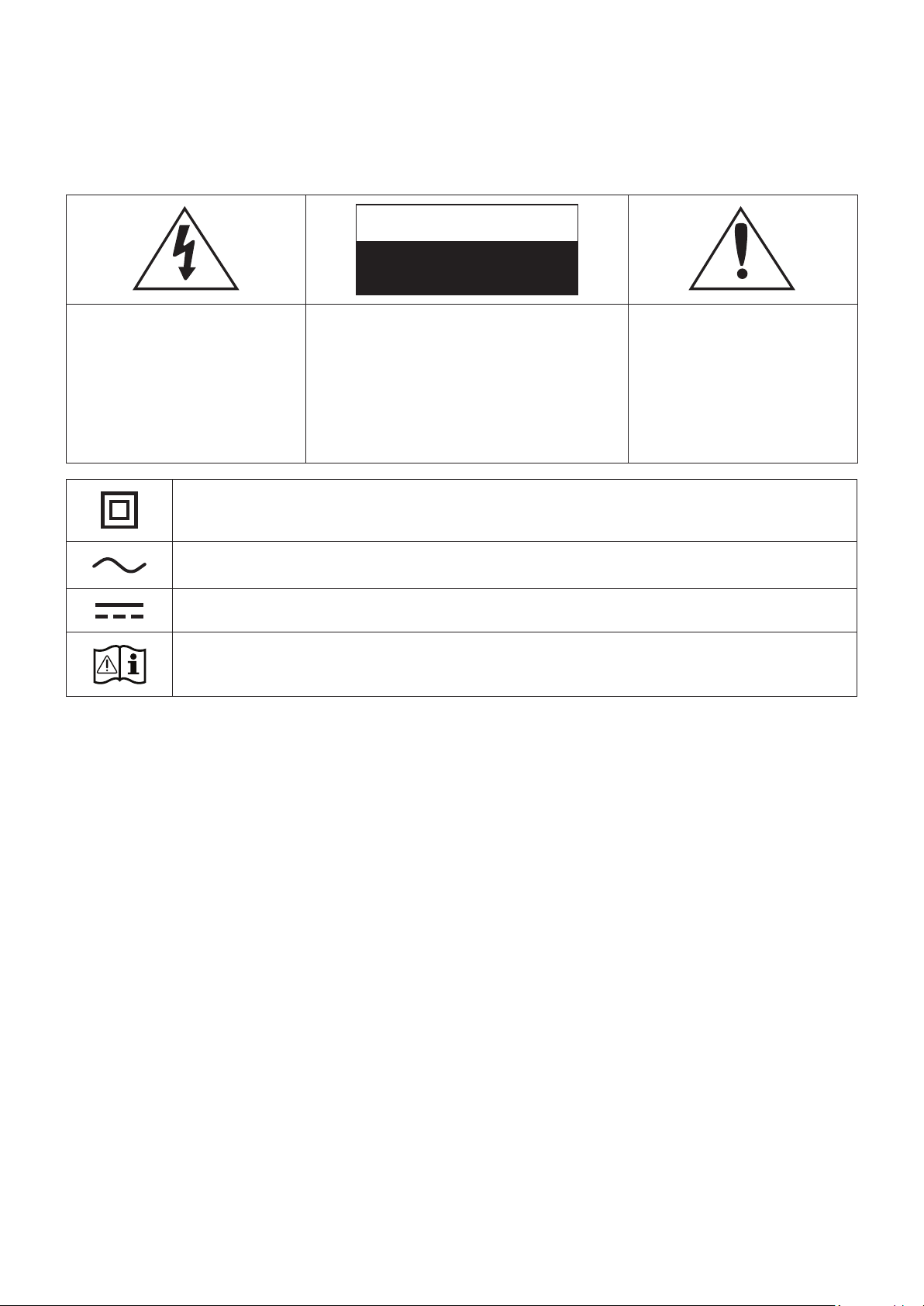
CAUTION
RISK OF ELECTRIC SHOCK.
DO NOT OPEN.
This symbol indicates that
high voltage is present
inside. It is dangerous to
make any kind of contact
with any internal part of
this product.
CAUTION: TO REDUCE THE RISK OF
ELECTRIC SHOCK, DO NOT REMOVE
THE COVER (OR BACK). NO USER
SERVICEABLE PARTS INSIDE. REFER
SERVICING TO QUALIFIED SERVICE
PERSONNEL.
This symbol indicates
that this product comes
with important literature
concerning operation and
maintenance.
Class II product : This symbol indicates that a safety connection to electrical earth
(ground) is not required.
AC voltage : Rated voltage marked with this symbol is AC voltage.
DC voltage : Rated voltage marked with this symbol is DC voltage.
Caution. Consult Instructions for use : This symbol instructs the user to consult the
user manual for further safety related information.
❚
WARNING
•
This product contains chemicals known to the State of California to cause cancer, birth defects,
or other reproductive harm.
•
To reduce the risk of re or electric shock, do not expose this appliance to rain or moisture.
•
Do not expose this apparatus to dripping or splashing.
Do not put objects lled with liquids, such as vases, on the apparatus.
•
To turn this apparatus off completely, you must pull the power plug out of the wall socket.
Consequently, the power plug must be easily and readily accessible at all times.
Safety Information
ENG - ii

❚
FCC Statement: (for U.S.A)
Federal Communication Commission Interference Statement
This equipment has been tested and found to comply with the limits for a Class B digital device,
pursuant to Part 15 of the FCC Rules. These limits are designed to provide reasonable protection
against harmful interference in a residential installation. This equipment generates, uses and can
radiate radio frequency energy and, if not installed and used in accordance with the instructions,
may cause harmful interference to radio communications. However, there is no guarantee that
interference will not occur in a particular installation. If this equipment does cause harmful
interference to radio or television reception, which can be determined by turning the equipment off
and on, the user is encouraged to try to correct the interference by one of the following measures:
•
Reorienting or relocating the receiving antenna.
•
Increasing the separation between the equipment and receiver.
•
Connecting the equipment to an outlet that is on a different circuit than the radio or TV.
•
Consulting the dealer or an experienced radio/TV technician for help.
FCC Caution: Any changes or modications not expressly approved by the party responsible for
compliance could void the user's authority to operate this equipment.
This device complies with Part 15 of the FCC Rules. Operation is subject to the following two
conditions: (1) This device may not cause harmful interference, and (2) this device must accept
any interference received, including interference that may cause undesired operation. For
products available in the US and Canadian markets, only channels 1~11 are available. You cannot
select other channels.
This device and it's antennas must not be co-located or operated in conjunction with any other
antenna or transmitter except in accordance with FCC multi-transmitter product procedures.
This device operates in the 5.15~5.25GHz frequency range. It is restricted to indoor environments
only.
IMPORTANT NOTE
FCC Radiation Exposure Statement
This equipment complies with FCC radiation exposure limits set forth for an uncontrolled
environment. This equipment should be installed and operated so there is at least
8 inches (20cm) between the radiator and your body. This device and its antenna(s) must not be
co-located or operated in conjunction with any other antenna or transmitter.
ENG - iii

❚
Important Safety Instructions
Read these operating instructions carefully before using the unit. Follow all the safety instructions
listed below.
Keep these operating instructions handy for future reference.
1
Read these instructions.
2
Keep these instructions.
3
Heed all warnings.
4
Follow all instructions.
5
Do not use this apparatus near water.
6
Clean only with dry cloth.
7
Do not block any ventilation openings. Install in accordance with the manufacturer's
instructions.
8
Do not install near any heat sources such as radiators, heat registers, stoves, or other
apparatus (including AV receivers) that produce heat.
9
Do not defeat the safety purpose of the polarized or grounding-type plug.
A polarized plug has two blades with one wider than the other. A grounding type plug has
two blades and a third grounding prong. The wide blade or the third prong are provided
for your safety. If the provided plug does not t into your outlet, consult an electrician for
replacement of the obsolete outlet.
10
Protect the power cord from being walked on or pinched particularly at plugs, convenience
receptacles, and the point where it exits the apparatus.
11
Only use attachments/accessories specied by the manufacturer.
12
Use only with the cart, stand, tripod, bracket, or table specied by the
manufacturer, or sold with the apparatus. When a cart is used, use caution
when moving the cart/apparatus combination to avoid injury from tip-over.
13
Unplug this apparatus during lightning storms or when unused for long periods
of time.
14
Refer all servicing to qualied service personnel. Servicing is required when the apparatus
has been damaged in any way, such as power-supply cord or plug is damaged, liquid has
been spilled or objects have fallen into the apparatus, the apparatus has been exposed to rain
or moisture, does not operate normally, or has been dropped.
ENG - iv
WARNING
To remove the battery, contact an authorized service center. To obtain battery removal instructions,
please visit samsung.com/global/ecodesign_energy
You must not remove (or attempt to remove) the battery incorporated in this product on your own.
FOR YOUR OWN SAFETY, DO NOT ATTEMPT TO REMOVE THE BATTERY ON YOUR OWN OR
DISPOSE OF IT IN A FIRE. DO NOT DISASSEMBLE, CRUSH, OR PUNCTURE THE BATTERY.
For battery recycling, go to call2recycle.org or call 1-800-822-8837
BC
A
Safety precautions
❚
Power Supply Precautions
•
Do not overload outlets or extension cords.
-
This may result in abnormal heat or re.
•
Do not plug in or unplug the power cord with wet hands.
•
Do not place the product near heating equipment.
•
To clean the power plug blades, remove the plug from the wall outlet and wipe the blades with
a dry cloth only.
•
Do not bend the power cord or pull it forcefully.
•
Do not put heavy objects on the power cord.
•
Do not plug the power cord's plug into a loose or damaged outlet.
•
Fully insert the power cord's plug into the wall outlet so that the plug is rmly attached to the
outlet.
-
If the connection is unstable, there is a risk of re.
•
Before connecting the AC power cord to the DC adaptor outlet, make sure the voltage
designation of the DC adaptor corresponds to the local electrical supply.
ENG - v

❚
Installation Precautions
•
Do not install the product near equipment or objects that generate heat or produce re (candles,
mosquito coils, heaters, radiators, etc.). Do not install in direct sunlight.
•
When moving the product, turn off the power and disconnect all cords (include the power cord)
from the unit.
-
A damaged cord may cause a re and poses a risk of electric shock.
•
Installing the product in environments with high heat or humidity, dust, or extreme cold, can
lead to quality problems or cause the product to malfunction. Before you install the product in
an environment that is outside the norm, please contact a Samsung dealer or service center for
additional information.
•
When placing the product on a shelf, cabinet, or desk, make sure the top panel faces upwards.
•
Do not place the product on an unstable surface (e.g. a shaky shelf, a tilted desk, etc.).
-
Dropping the product can cause it to malfunction and poses a risk of injury. Severe vibration
or impact can also cause the product to malfunction and lead to a re hazard.
•
Install your product with enough space around it for ventilation.
-
Leave at least 4 inches (10cm) at the rear of the product and more than 2 inches (5cm) on
each side of the product.
•
Keep the plastic packing materials out of reach of your children.
-
Children playing with the plastic packing materials run the risk of sufcation.
❚
Usage Precautions
•
Using for an extended time at high volume may cause serious damage to your hearing.
-
If you are exposed to sound louder than 85db for an extended time, you may adversely
affect your hearing. The louder the sound is, the more seriously damaged your hearing
may become. Note that an ordinary conversation is between 50 to 60 db and road noise is
approximately 80 db.
•
This product contains dangerous high voltage. Do not attempt to disassemble, repair, or modify
it yourself.
-
Contact a Samsung dealer or service center when your product is in need of repair.
•
Do not place any container that contains liquid on the product (e.g. a vase, beverages,
cosmetics, chemicals, etc.). Do do not allow any metal objects (e.g. coins, hair clips, etc.) or
ammable material (e.g. paper, matches, etc.) to enter the product (through the air vents, I/O
ports, etc.).
-
If any harmful material or liquid enters the product, turn off the product immediately, unplug
the power cord, and then contact a Samsung dealer or service center.
•
Do not drop the product. In case of a mechanical breakdown, disconnect the power cord and
contact a Samsung dealer or service center.
-
There is a risk of re or electric shock.
•
Do not hold or pull the product by the power cord or the signal cable.
-
A damaged cable can cause the product to malfunction, cause a re, and poses a risk of
electric shock.
ENG - vi

•
Do not use or keep ammable materials near the product.
•
If the product emits an abnormal sound or a burnt smell or smokes, unplug the power-cord
immediately and contact a Samsung dealer or service center.
•
If you smell gas, ventilate the room immediately. Do not touch the power plug of the product.
Do not turn the product off or on.
•
Do not strike or subject the product to a sudden shock. Do not pierce the product with a sharp
object.
•
This product can be moved and placed indoors only.
•
This product is not waterproof or dustproof.
•
Be careful when moving the product to avoid dropping it and possibly damaging it.
❚
Cleaning Precautions
•
Never use alcohol, solvents, waxes, benzene, thinners, air freshener, or lubricants to clean the
product, or spray insecticide on the product.
-
Using any of these materials can discolor the exterior coating or cause it to split or peel off, or
remove the labelling on the product.
•
To clean the product, unplug the power cord, and then wipe the product with a clean, dry, soft
cloth (Microber, cotton).
-
Avoid leaving dust on the product. Dust can scratch its surface.
ENG - vii

Contents
Safety Information
Regulatory Compliance Statements ...........ii
WARNING ..........................................................ii
FCC Statement: (for U.S.A) .........................iii
Important Safety Instructions ..................iv
Safety precautions..............................................v
Power Supply Precautions ..........................v
Installation Precautions ..............................vi
Usage Precautions ........................................vi
Cleaning Precautions ................................. vii
Getting Started
Checking the Components .............................2
Product Overview ...............................................3
Top / Front / Right Side of the Speaker ..... 3
Rear of the Speaker ........................................ 5
Using the Dial Controller .................................6
Top of the Dial Controller .............................6
Bottom of the Dial Controller ................... 8
Connecting the Dial Controller and
Speaker ...............................................................9
Connecting to Bluetooth
Connecting to Wi-Fi
Connecting to an External
Device
Connecting an external device via
an AUX cable ..................................................13
Additional Functions
Using the Mobile Device Voice
Recognition Service ........................................ 14
Using via Wi-Fi connection............................16
Using 2 speakers - Audio Group
function ............................................................16
Using 2 speakers - Stereo function
(For the VL350) ..............................................17
Connecting with a Samsung Smart TV .... 19
Connecting an Amazon product ............ 20
Installing the Wall Mount
Appendix
Troubleshooting ...............................................26
Open Source License Notice .......................29
Licenses ............................................................... 29
Specications .................................................... 29
Additional Information ...................................31
About the Network Connection ..............31
Works with SmartThings™ .......................31
Copyright .............................................................31
ENG - viii

Getting Started
A
Checking the Components
Check the components supplied with your speakers.
VL350
Speaker Dial Controller (AH59-02765A) AC/DC Adapter (BN44-00928A)
Quick Setup Guide
(AH68-03032A)
Regulatory Guide (AH68-03033A)
VL550
Speaker Dial Controller (AH59-02765A) AC/DC Adapter (BN44-00794E)
Power Cable (3903-001188) Quick Setup Guide (AH68-03032A) Regulatory Guide (AH68-03033A)
For the VL550, the power cord is a separate part and you must plug it into the adapter.
Make sure to rest the AC/DC Adapter at on a table or the oor. If you place the AC/DC Adapter so that it is
hanging with the AC cord input facing upwards, water or other foreign substances could enter the Adapter
and cause the Adapter to malfunction.
To purchase additional components or optional cables, contact a Samsung Service Center or Samsung
Customer Care.
CAUTION
9
Do not place any items on top of the speaker. Do not sit on the speaker.
9
Handle the product with care as it has sharp edges.
9
See the bottom of the speaker for important safety information.
ENG - 2
A
Product Overview
❚
Top / Front / Right Side of the Speaker
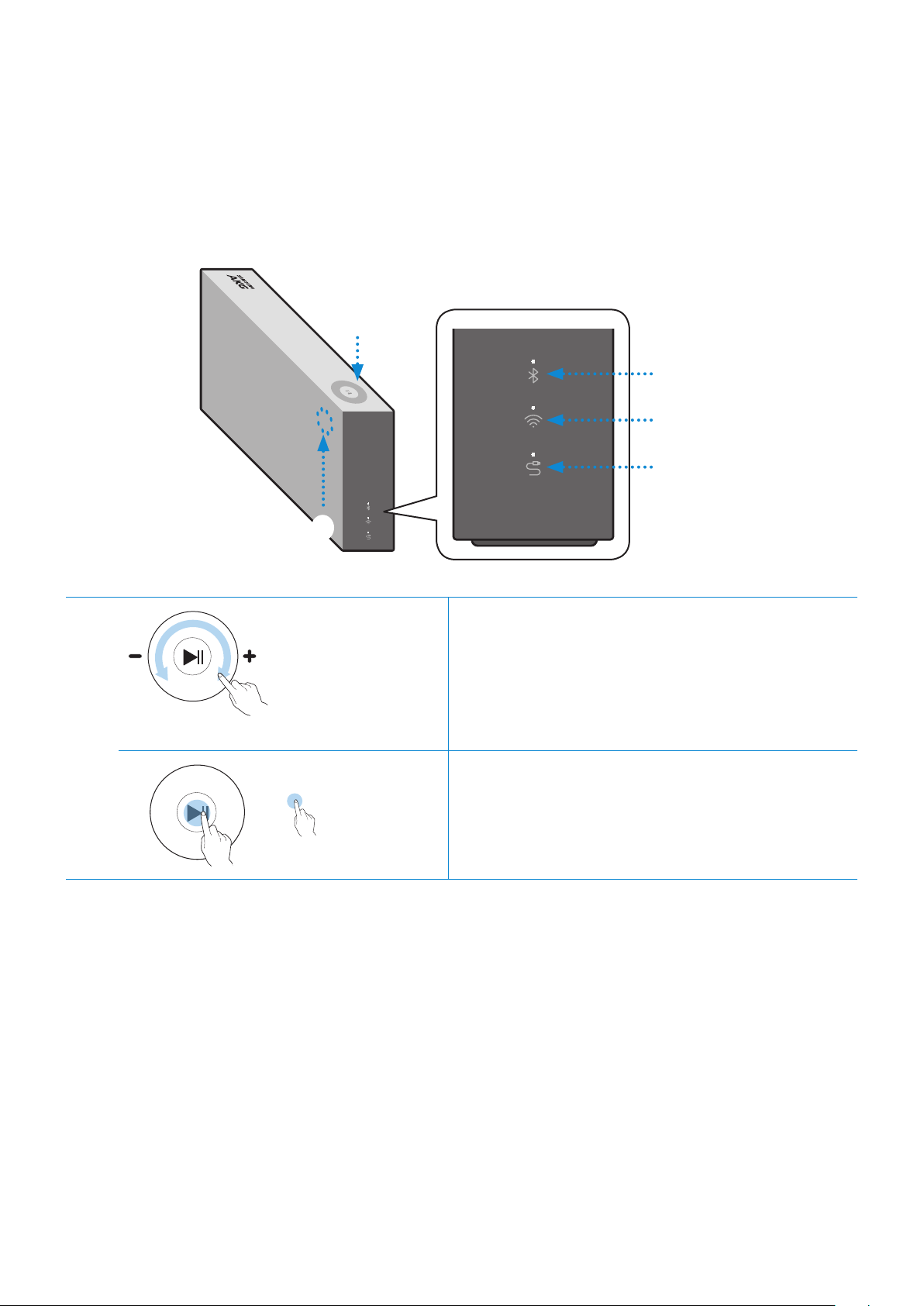
Bluetooth
Wi-Fi
AUX
1
2
1
Volume
adjustment
(Turning the
Touch-wheel)
Touch and drag the touch wheel clockwise to
increase the volume.
Touch and drag the touch wheel
counterclockwise to decrease the volume.
Play / Pause Touch
p
to play or pause music.
ENG - 3
2
LED
Display
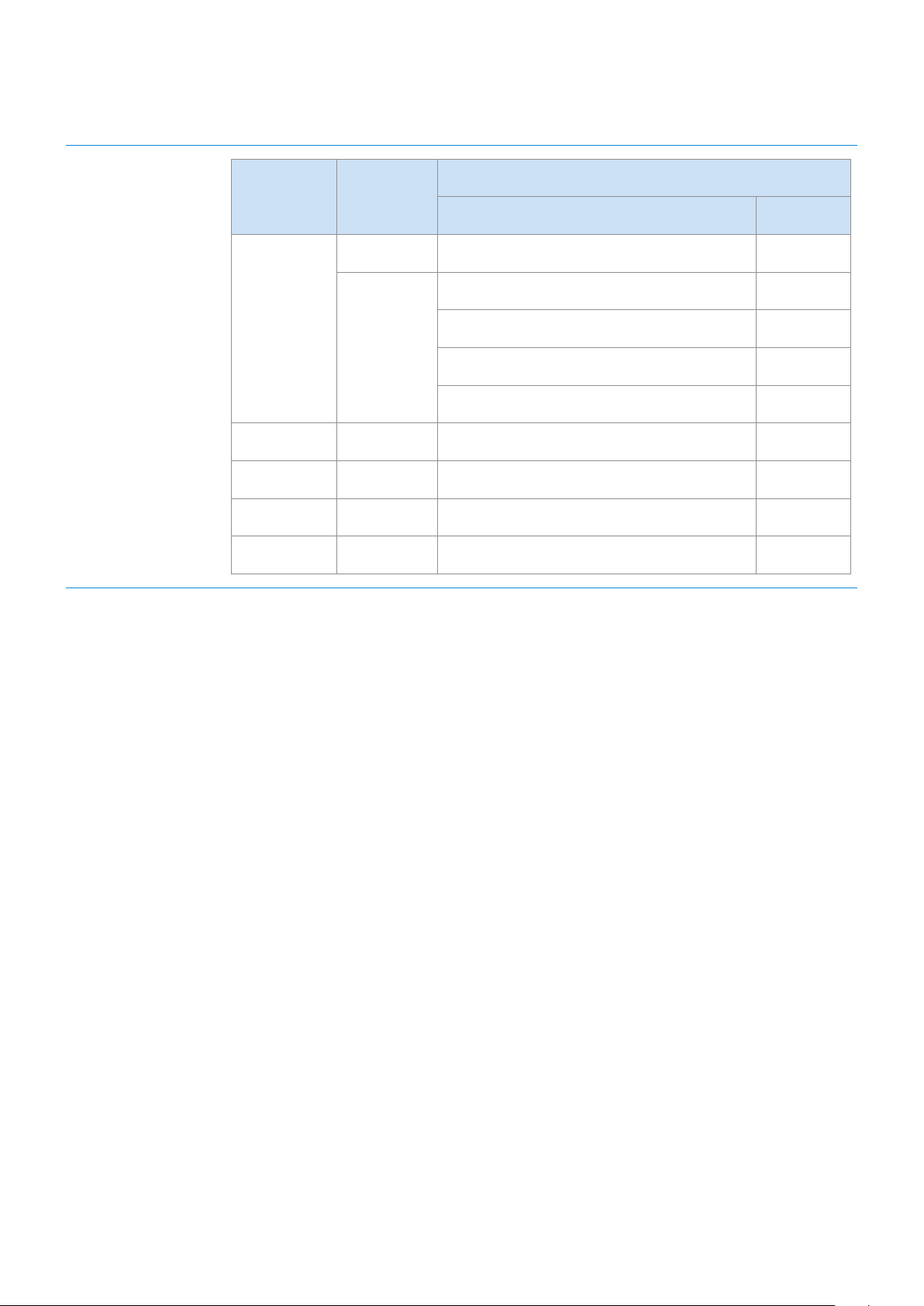
LED Status
Description
Operation Mode
White
On Connected / Normal operation -
Blinking
Booting -
Ready to connect to Dial Controller -
Updating the rmware -
Ready to connect to Wi-Fi Wi-Fi
Blue Blinking Waiting to connect the device Bluetooth
Red On Connection error -
Yellow Blink once When the volume is set to Min or Max -
Off Off Power saver -
If the speaker is not used for more than 5 minutes, the speaker's mode changes to Standby to decrease
energy consumption.
The Bluetooth / Wi-Fi / AUX button activates one function at a time.
Play / Pause and Skip features are not available in AUX mode.
Press the Bluetooth button for 5 seconds or more to set up the Bluetooth connection.
The mute / unmute feature can be used with the Play / Pause button while the speaker is in AUX mode or
Bluetooth mode (connected to a TV).
ENG - 4
❚
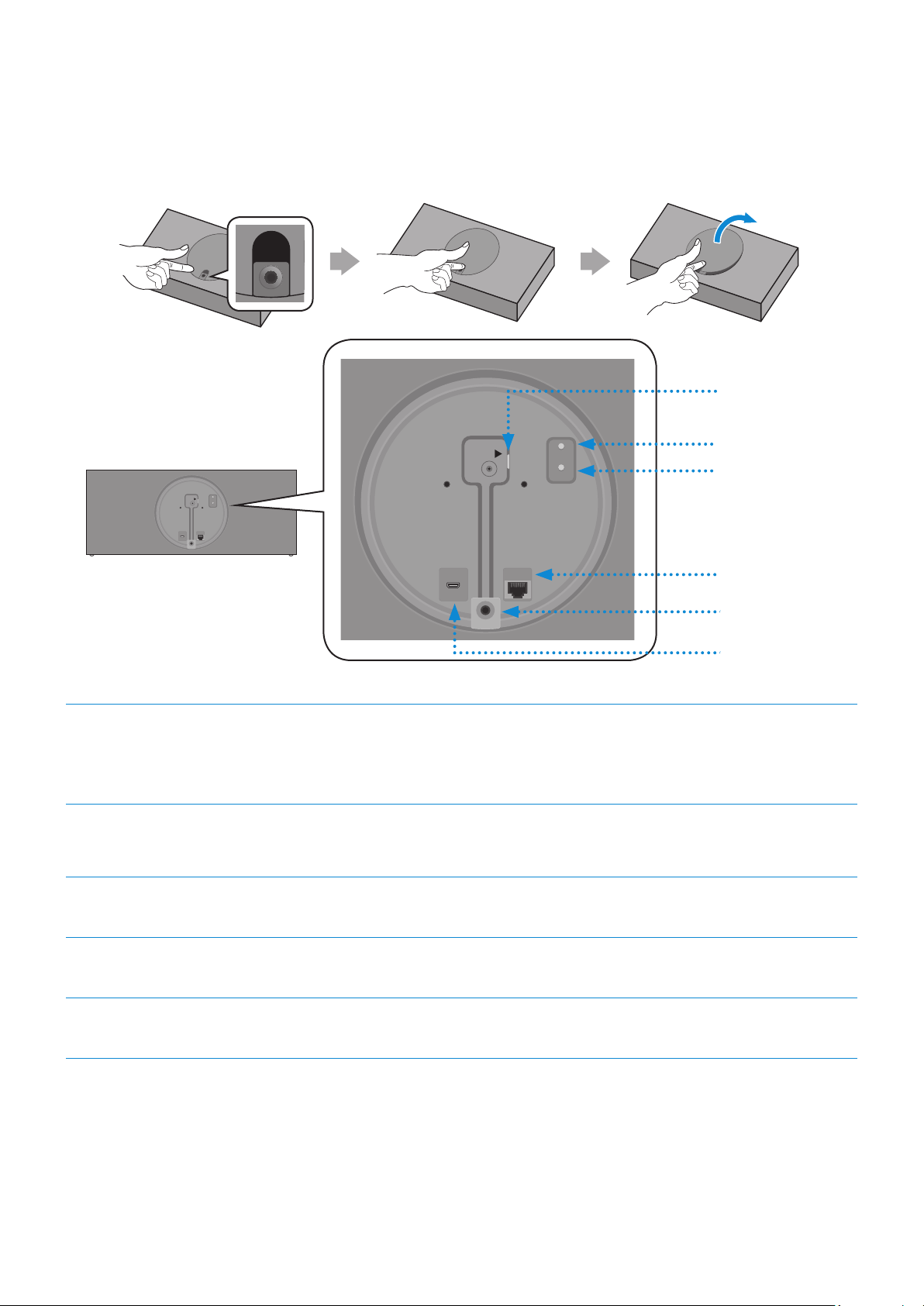
Rear of the Speaker
AUX IN
AUX IN
AUX IN
AUX IN
AUX IN
AUX IN
AUX IN
AUX IN
AUX IN
DC 24V
SERVICE
AUX IN
LAN
POWER
NETWORK
(DC IN)
POWER
SERVICE
AUX IN
LAN
RESET
CONNECT
RESET
CONNECT
(DC IN)
POWER
DC 24V
SERVICE
AUX IN
LAN
POWER
NETWORK
(DC IN)
POWER
SERVICE
AUX IN
LAN
RESET
CONNECT
RESET
CONNECT
(DC IN)
POWER
DC 24V
SERVICE
AUX IN
LAN
POWER
NETWORK
(DC IN)
POWER
SERVICE
AUX IN
LAN
RESET
CONNECT
RESET
CONNECT
(DC IN)
POWER
1
RESET Button
2
3
4
5
1
POWER (DC IN)
Jack
1. Connect the power cord to the AC/DC adapter. (For the VL550)
2. Connect the AC/DC adapter output power cord (round plug) to the
POWER (DC IN) jack on the speaker.
2
CONNECT
Button
Press to disconnect from or reconnect to the Dial Controller.
Long press for 5 seconds to initiate a Wi-Fi connection
3
LAN Jack Use to connect the speaker to a wired network.
4
AUX IN Jack Use to connect the speaker to an analog port on an external device.
5
SERVICE Jack Used by a service engineer to update the speaker rmware.
Use Cat 7 (*STP Type) cable for the LAN connection. (* Shielded Twisted Pair)
RESET button: When pressed, the power is turned off and then on. Used for Troubleshooting.
ENG - 5
A
Using the Dial Controller
❚
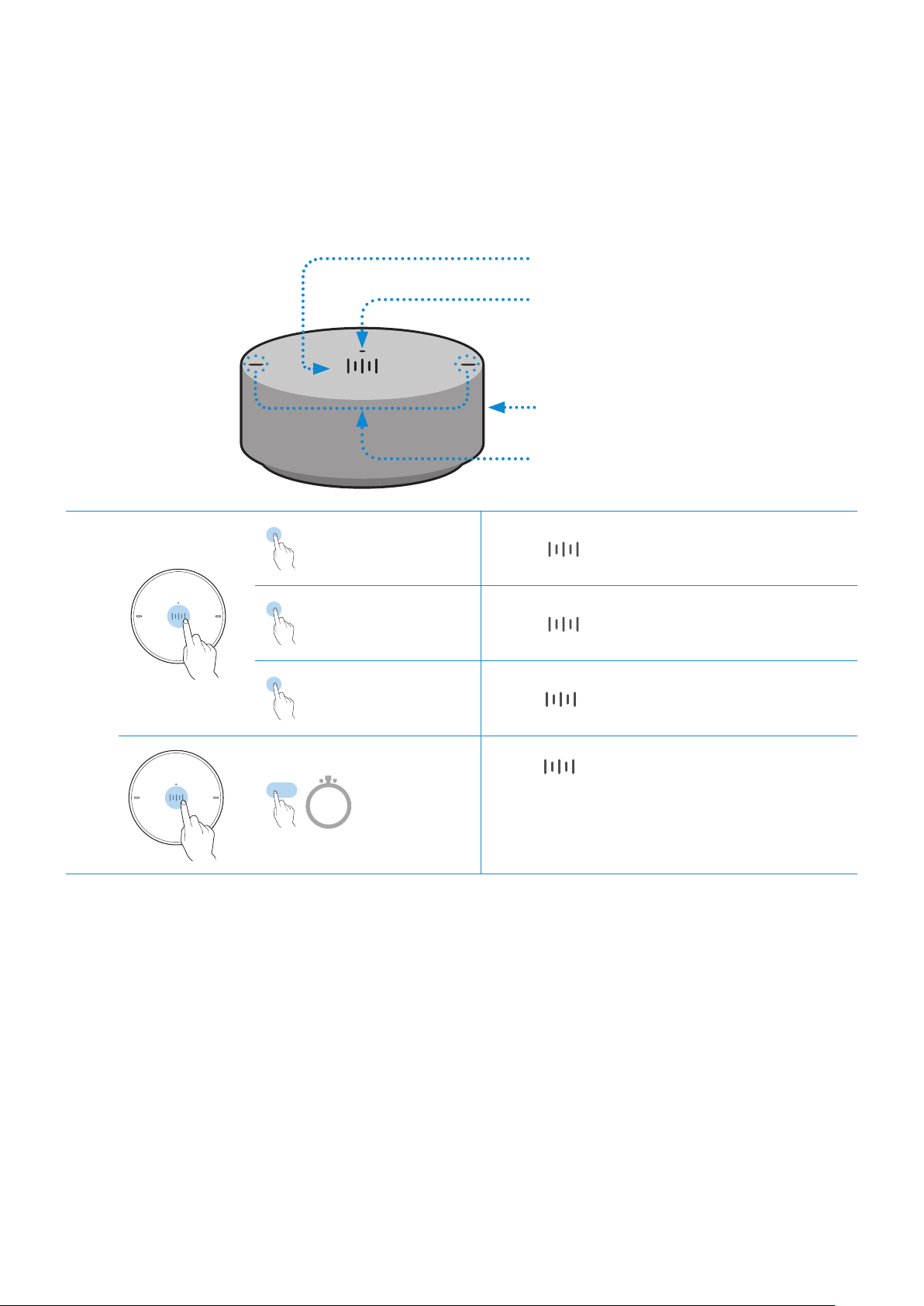
Top of the Dial Controller
1
Multi-Function Button
2
LED Display
3
Volume wheel
4
Voice MIC
1
X 1
Play / Pause Touch
X 1 to play or pause music.
X 2
Play the next
music le.
Touch
X 2 to play the next music le.
X 3
Play the previous
music le.
Touch
X 3 to play the previous music le.
2 Sec
Mobile
device voice
recognition
Press for 2 seconds to activate the
voice recognition service in your mobile
device.
•
Available only in Bluetooth mode.
ENG - 6
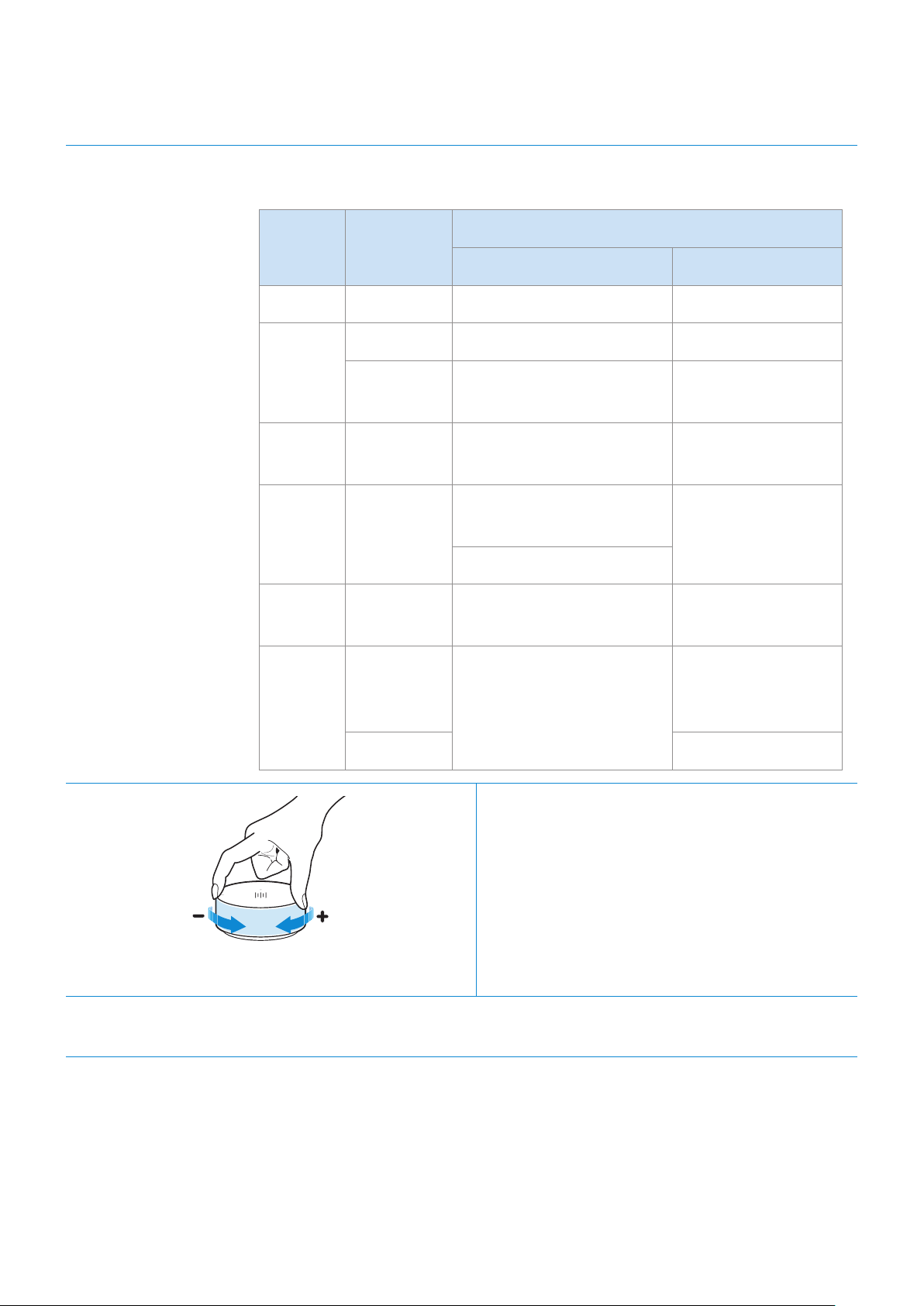
2
LED Display The indicator blinks, lights, or changes color depending on the speaker's
status.
LED Status
Description
Operation Battery
Off All Off Standby Battery discharged
White
On Normal operation Fully charged
Blinking
Waiting for connection to
the speaker
-
Cyan On
Mobile voice recognition
active (Bluetooth only)
-
Red On
Speaker connection
failure
-
Error
Yellow Blink once
When the volume is set to
Min or Max
-
Pink
Blink once
after button
use
-
Battery less than
10 %
On Currently charging
3
Volume
adjustment
(Turning the volume wheel)
Turn the volume wheel clockwise to increase
the volume.
Turn the volume wheel counterclockwise to
decrease the volume.
4
Voice MIC Used for mobile device voice recognition.
Play / Pause and Skip features are not available in AUX mode.
ENG - 7
❚
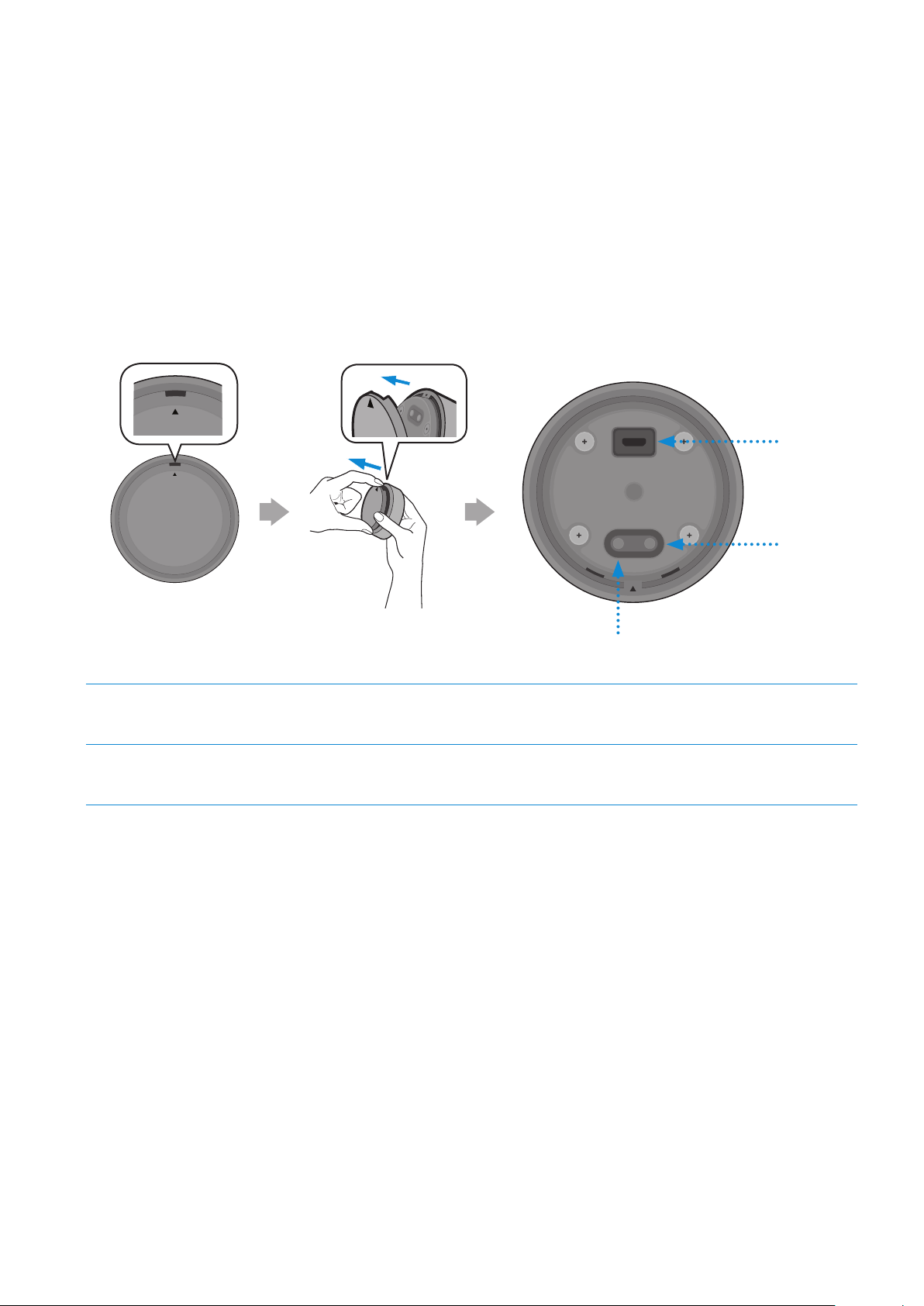
Bottom of the Dial Controller
To expose the bottom of the Dial Controller, remove the bottom cover.
•
Charge your Dial Controller before turning on the power.
•
To charge, connect the Dial Controller to a charger or a computer USB port using a Micro USB
cable (Micro USB to Standard USB - not supplied). The LED lights when the Dial Controller is
charging and turns white when the Dial Controller is charged. You can use the Dial Controller
while it is charging.
OPEN
OPEN
OPEN
OPEN
OPEN
OPEN
CONNECT
DC 5V
IN
RESET
1
2
OPEN
OPEN
CONNECT
RESET
OPEN
RESET Button
1
DC 5V IN Jack Connect the Micro USB cable to charge the Dial Controller
2
CONNECT Button Press to connect to the Speaker.
•
When the battery in the Dial Controller is low, the LED on the top of the controller will blink in pink.
Recharge the battery by connecting the Controller to a charger or computer USB port using a Micro
USB cable (not supplied). (For more information about the LED display, see page 7.)
It takes approximately 3 hours to fully charge the battery. A fully charged battery can last up to 90 days.
Battery life is subject to conditions of use and the environment.
RESET button: When pressed, the power is turned off and then on. Used for Troubleshooting.
ENG - 8
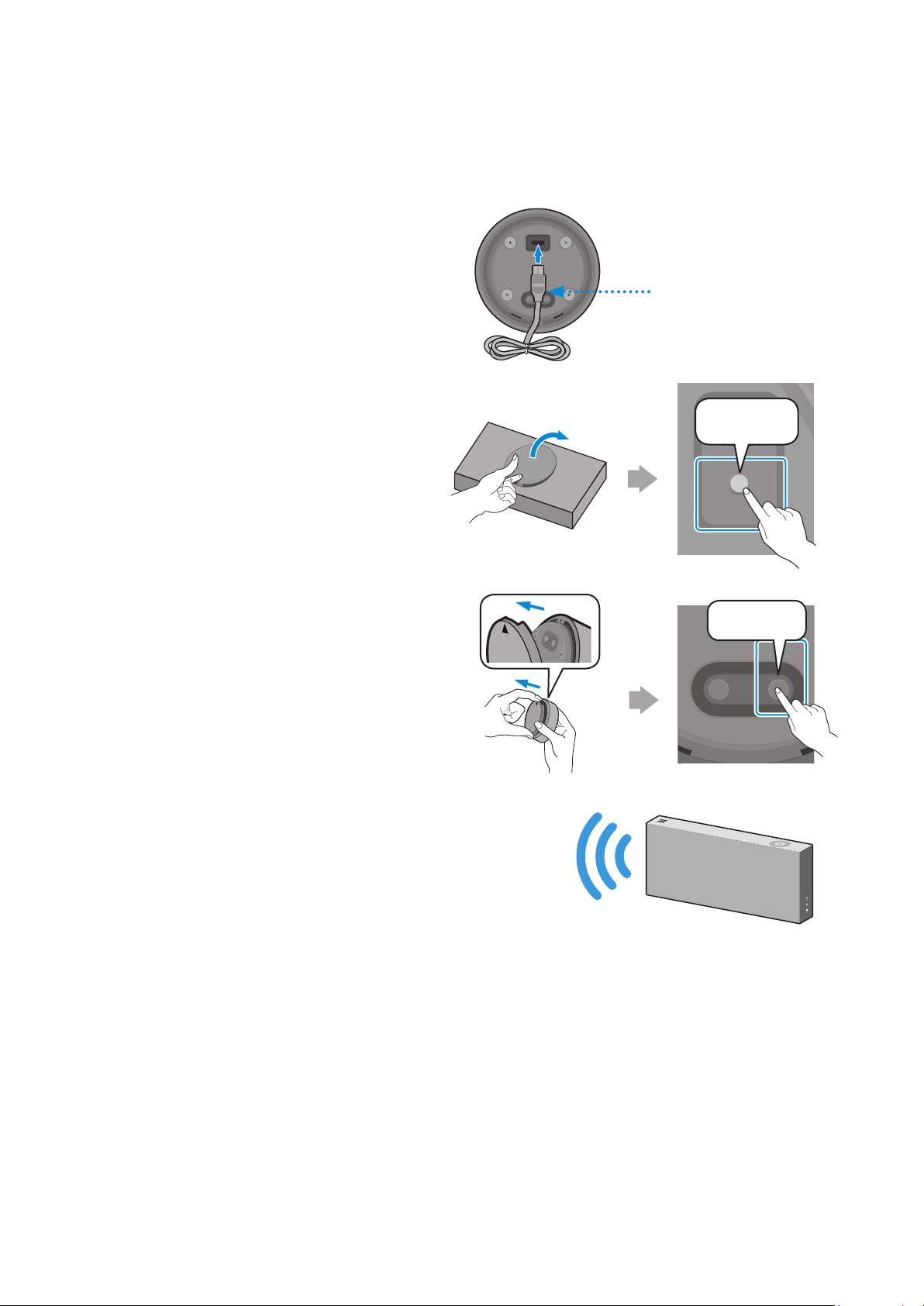
❚
Connecting the Dial Controller and Speaker
* Before use of the Dial Controller
Charge the Dial Controller until the LED lights.
(When fully charged, the LED changes to
white.)
CONNECT
DC 5V
IN
RESET
Charger with
Micro USB Cable
(not supplied)
1
Press the CONNECT button on
the rear of the speaker.
DC 24V
SERVICE
AUX IN
LAN
POWER
NETWORK
(DC IN)
POWER
SERVICE
AUX IN
LAN
RESET
CONNECT
RESET
CONNECT
(DC IN)
POWER
AUX IN
AUX IN
AUX IN
CONNECT
2
Press the CONNECT button on
the bottom of the Dial Controller.
OPEN
OPEN
OPEN
CONNECT
RESET
OPEN
CONNECT
DC 5V
IN
RESET
CONNECT
3
Once the Dial Controller and speaker are
connected, you will hear the voice message
"Pairing is complete." from the speaker. Re-attach
the Dial Controller's bottom cover.
ENG - 9
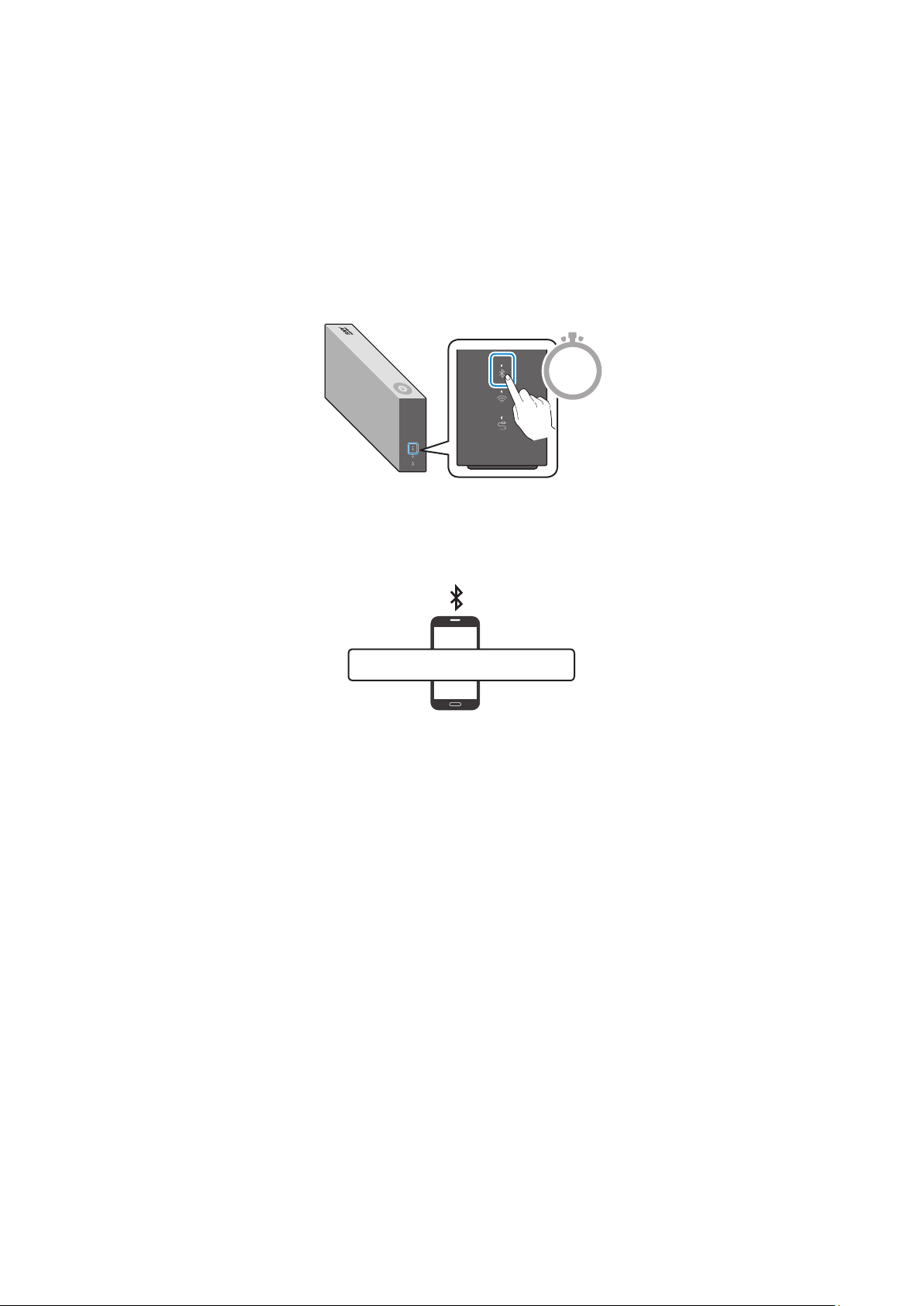
You can connect a mobile device via Bluetooth, and then play sound and music from the device
through the speaker.
* First time connection
1
Press the Bluetooth button on the right side of the speaker for 5 seconds or more.
5 Sec
2
Select the speaker from the Bluetooth list on your mobile device, and then connect it.
(e.g. [AV] Samsung AKG VL5)
Mobile device
“[AV] Samsung AKG VL*”
* Reconnection
Only Step 2 is required when reconnecting to mobile devices.
The Bluetooth connection allows you to use the voice recognition service on your mobile device.
Connecting to Bluetooth
ENG - 10
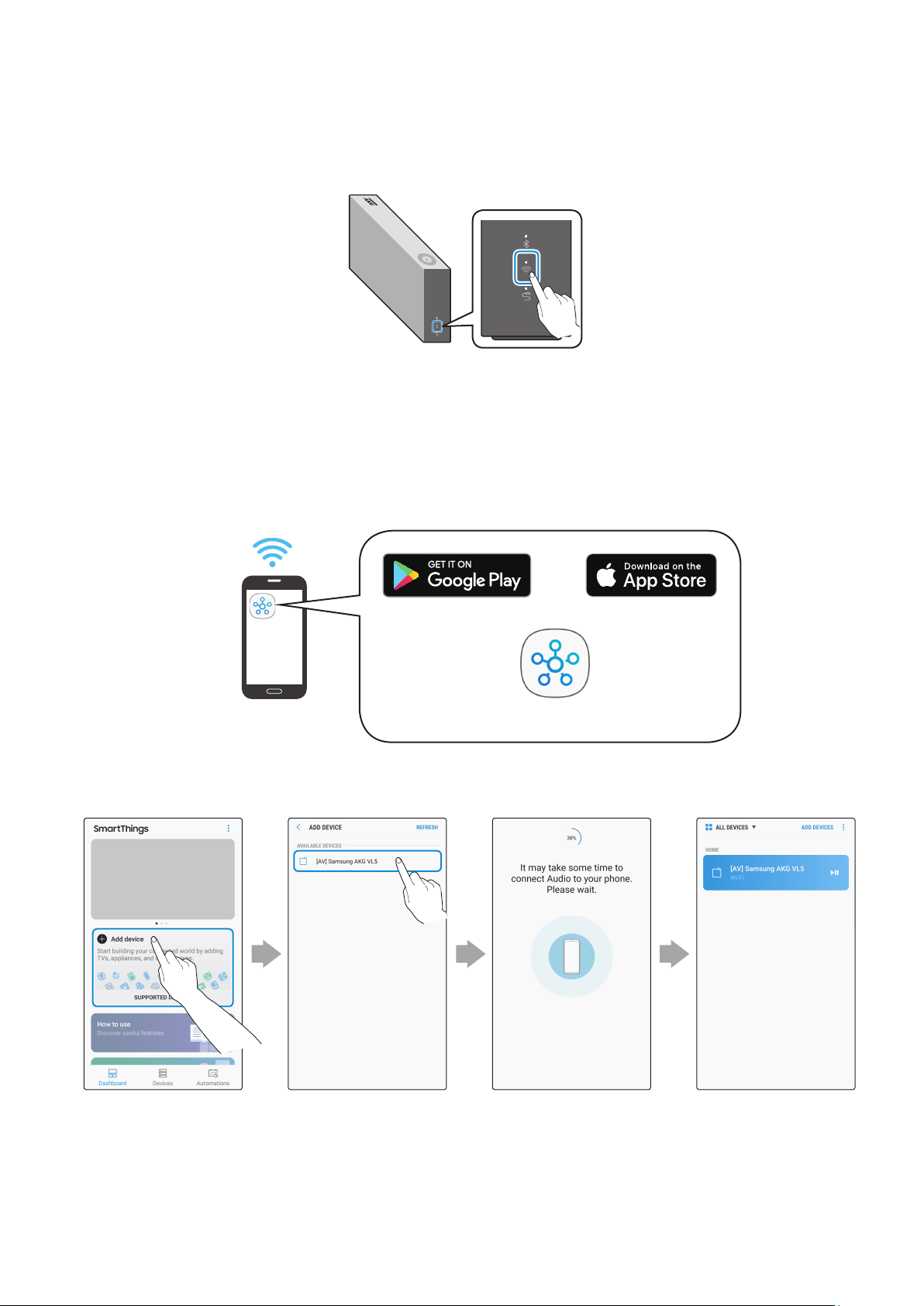
1
Press the Wi-Fi button on the right side of the speaker to switch to Wi-Fi mode.
2
Download the SmartThings app to your mobile device, and then launch it.
•
You cannot congure the settings for the devices that are not supported by the
SmartThings app.
•
SmartThings requirements : Android 6.0 or newer version / iOS 10.0 or newer version
•
To use the SmartThings app, a Samsung Account is required.
Mobile device
Android iOS
SmartThings app
3
Follow the instructions on the app screen to complete settings.
Standby to be
connected.
Connected.Select the device
to connect.
Touch “Add device”.
Connecting to Wi-Fi
ENG - 11
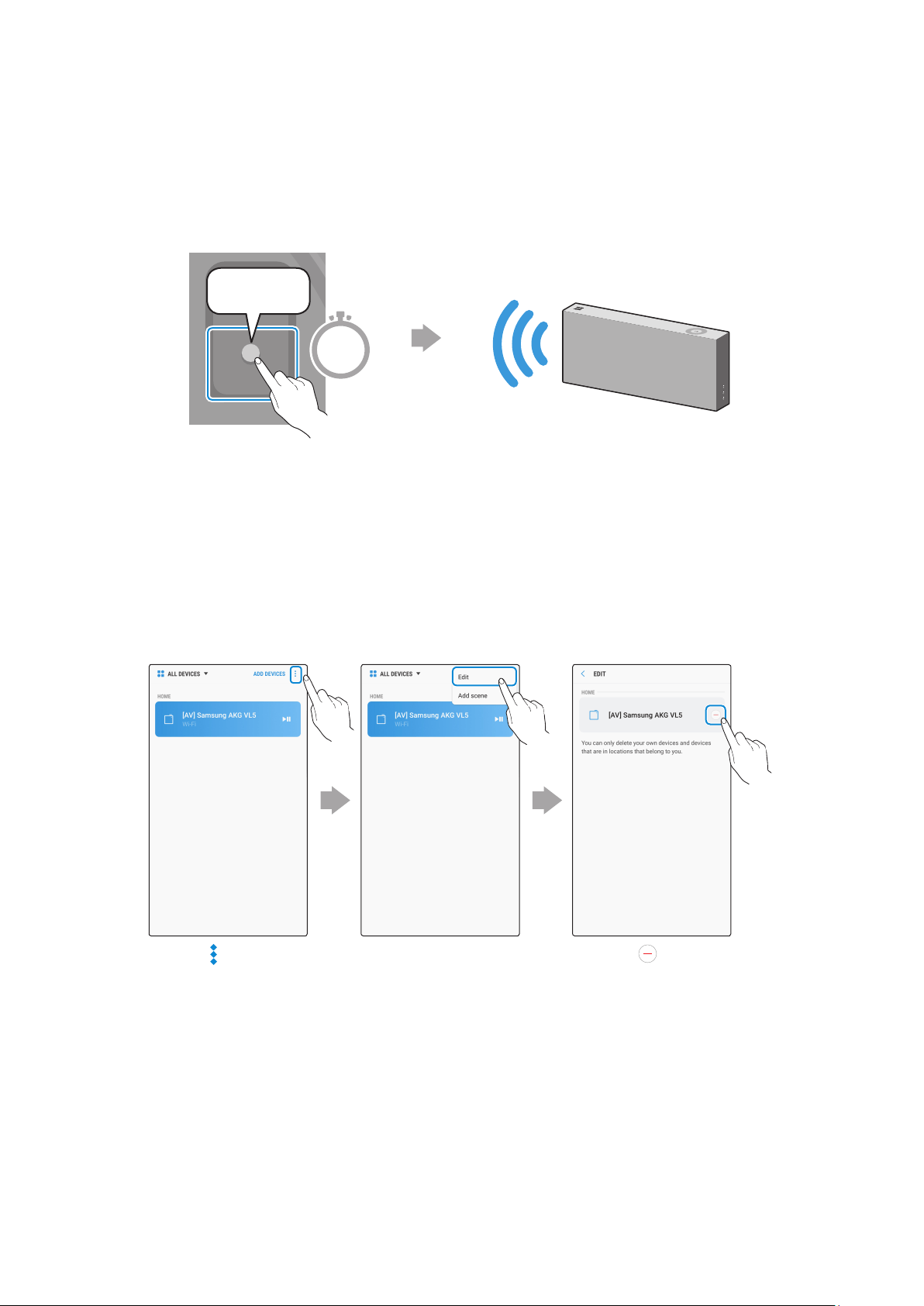
4
Repeat steps 1-3 to connect all speakers to the same wireless router.
•
Spotify Premium users can enjoy music by using the Spotify app.
5-1
Follow the instruction below to reconnect or connect to a new wireless router.
The speaker generates a voice
message notifying that it is now
in standby mode.
DC 24V
SERVICE
AUX IN
LAN
POWER
NETWORK
(DC IN)
POWER
SERVICE
AUX IN
LAN
RESET
CONNECT
RESET
CONNECT
(DC IN)
POWER
CONNECT
Press the CONNECT button
for 5 seconds.
5 Sec
5-2
Repeat step 3.
* Deleting a device from the SmartThings app
Touch in the top
right of the device.
Touch next to
the device to
remove.
Touch "Edit".
ENG - 12
❚
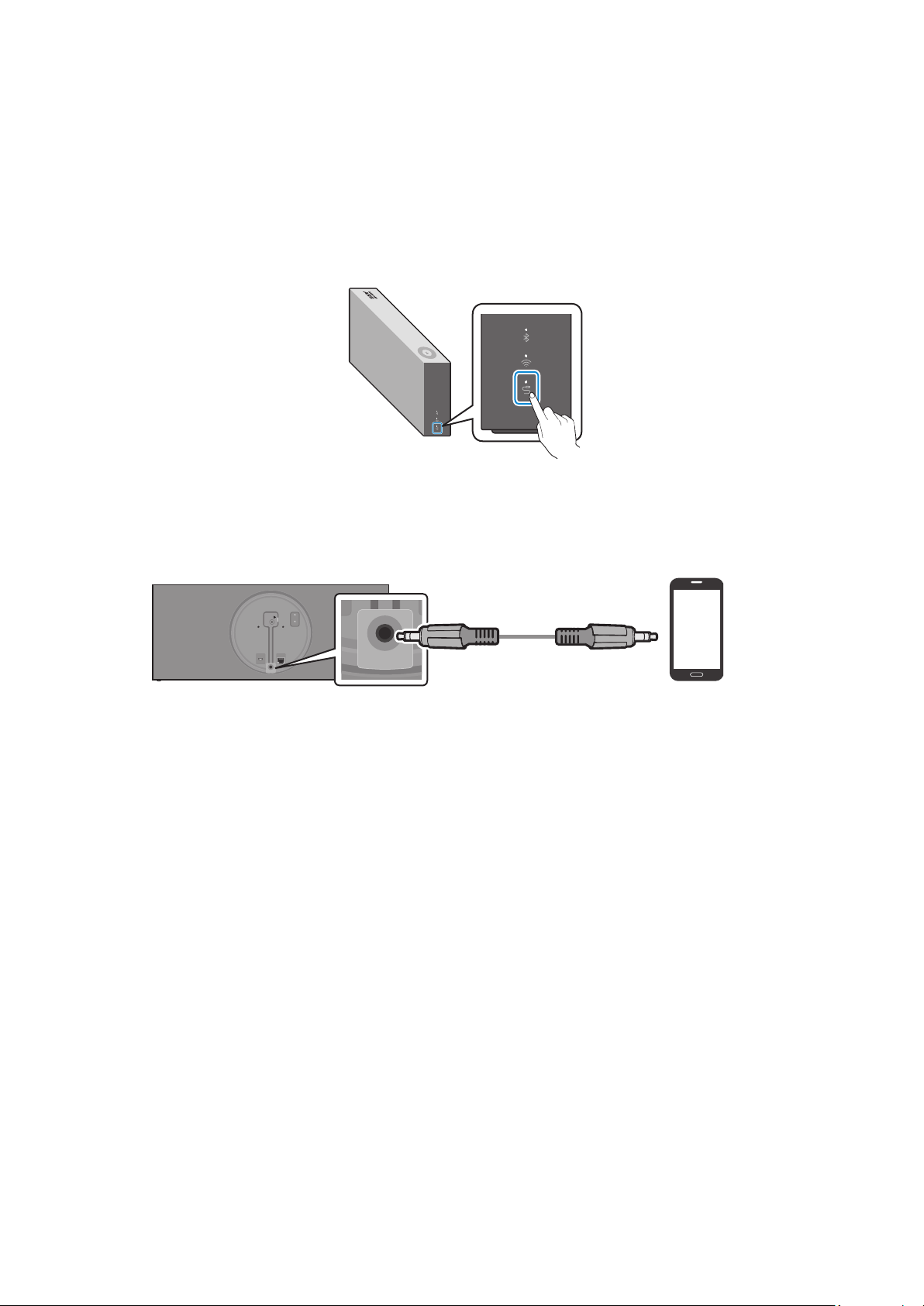
Connecting an external device via an AUX cable
You can connect a mobile device via an AUX cable, and then enjoy sound from the device through
the speaker.
1
Press the AUX button on the right side of the speaker to switch to AUX mode.
2
Connect the AUX IN port on the rear of the speaker to an external device via an AUX cable
(not supplied).
DC 24V
SERVICE
AUX IN
LAN
POWER
NETWORK
(DC IN)
POWER
SERVICE
AUX IN
LAN
RESET
CONNECT
RESET
CONNECT
(DC IN)
POWER
DC 24V
SERVICE
AUX IN
LAN
POWER
NETWORK
(DC IN)
POWER
SERVICE
AUX IN
LAN
RESET
CONNECT
RESET
CONNECT
(DC IN)
POWER
AUX Cable
(not supplied)
Rear of the speaker
External Device
(e.g. Mobile device)
Connecting to an External Device
ENG - 13
A
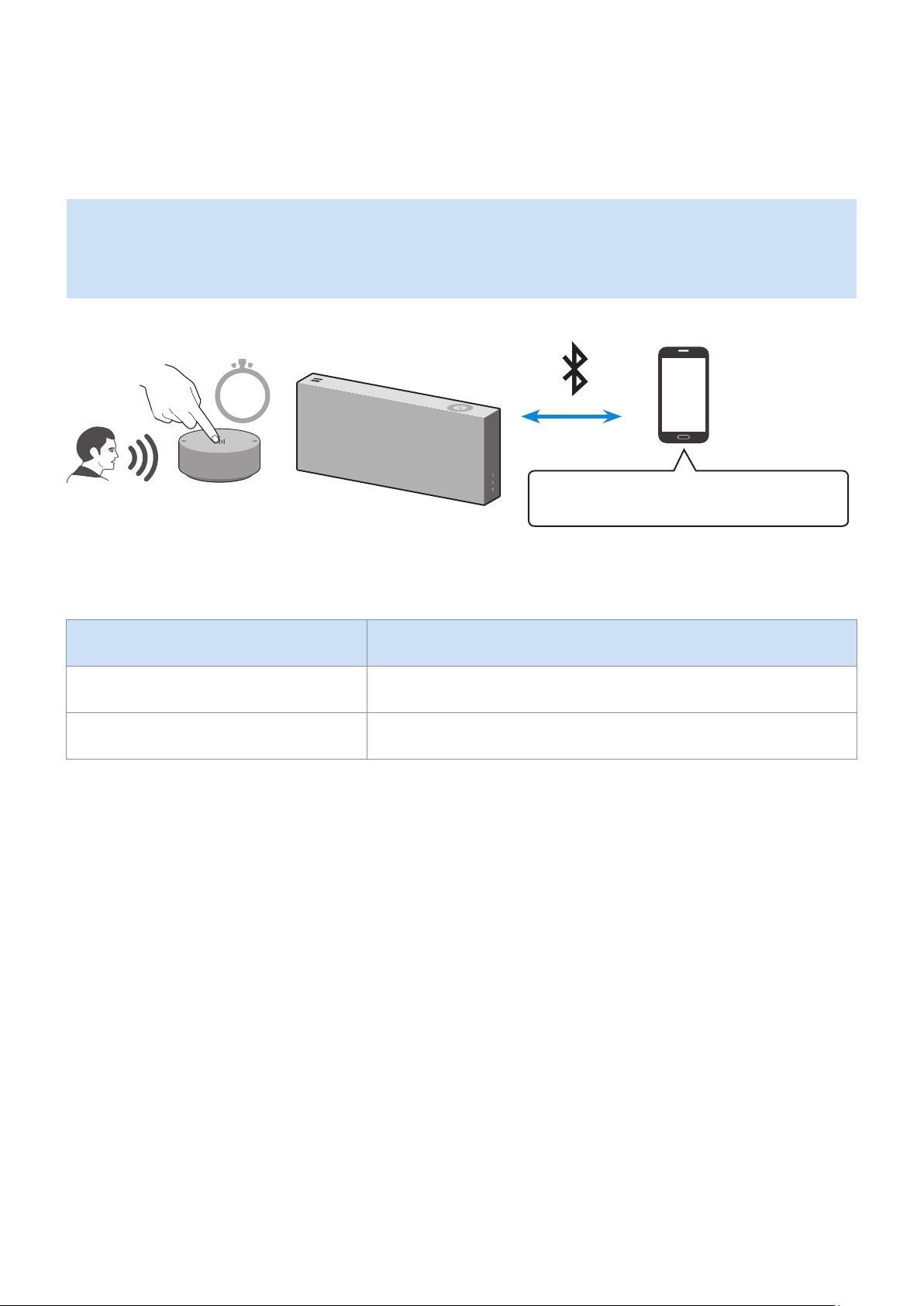
Using the Mobile Device Voice Recognition Service
Dedicated functions in Bluetooth mode
•
This function can be used only when a mobile device is connected via Bluetooth.
•
The operation may differ depending on the specications of the mobile device.
Mobile device Voice Recognition Service
2 Sec
Depending on the voice recognition service provided by your mobile device (e.g. Bixby, Siri, Google Assistant,
etc.), the availability and usage of this function may differ.
Function example Speaking example
Listening to music Play TOP 100.
Sending messages Forward my most recent text message to mom.
Additional Functions
ENG - 14
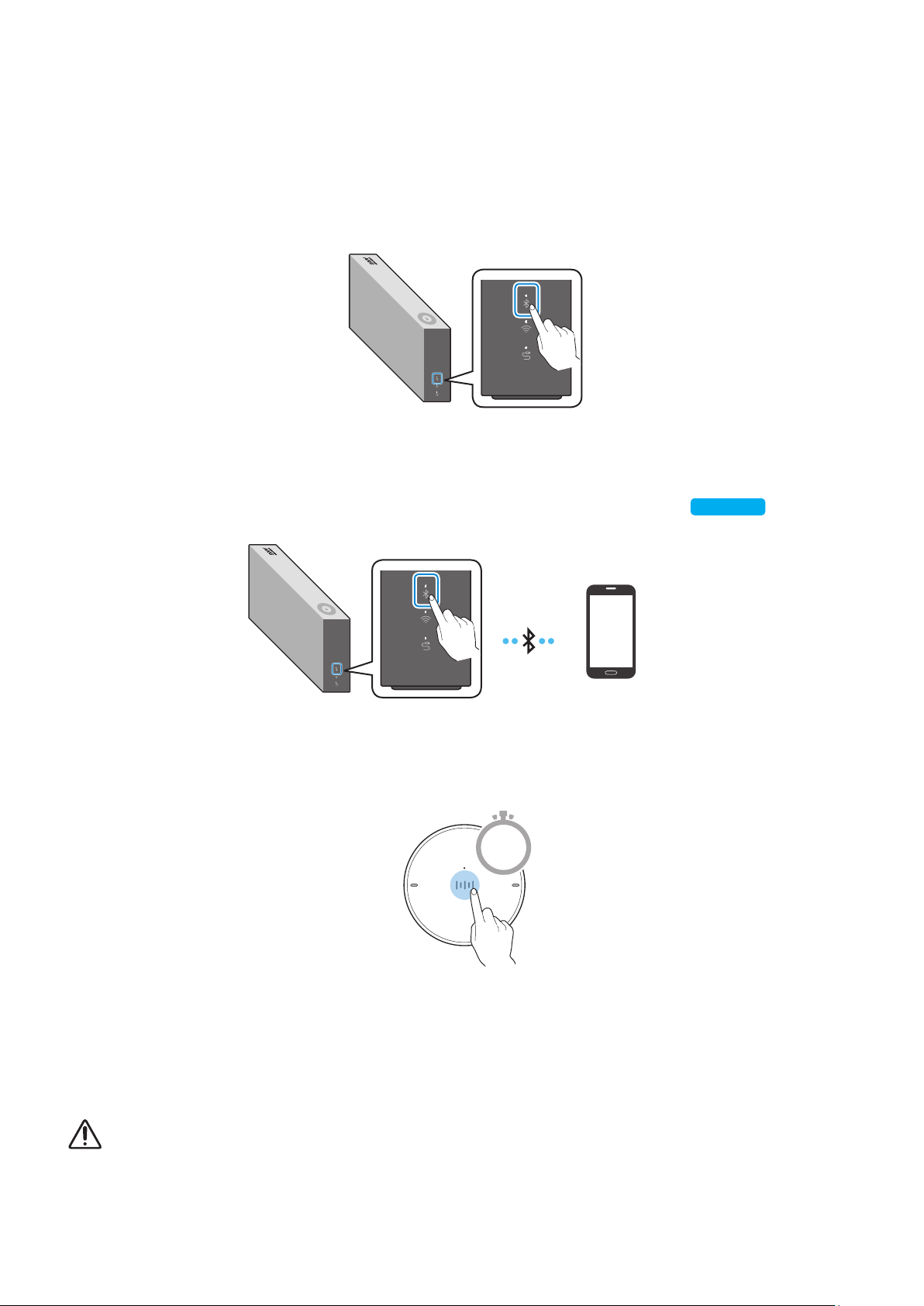
To activate voice recognition, follow these steps:
1
Press the Bluetooth button on the right side of the speaker to switch to Bluetooth
mode.
1-1
If you have not done so already, set up a Bluetooth connection between the speaker and
your mobile device.
•
To connect a mobile device, please see [Connecting to Bluetooth]
Click here.
.
Mobile device
2
Press and hold the Multi-Function button on the Dial Controller for 2 or more seconds
until the LED turns cyan (blue-green).
2 Sec
3
When the LED turns cyan, the device's voice recognition function is activated.
Speak directly into the Dial Controller to use the voice recognition service.
For S voice on Samsung Galaxy devices, be sure to release the lock pattern to use the function.
CAUTION
9
Maintain a distance of at least 0.6 inches between your face and the Dial Controller when using the voice recognition
service.
ENG - 15
A
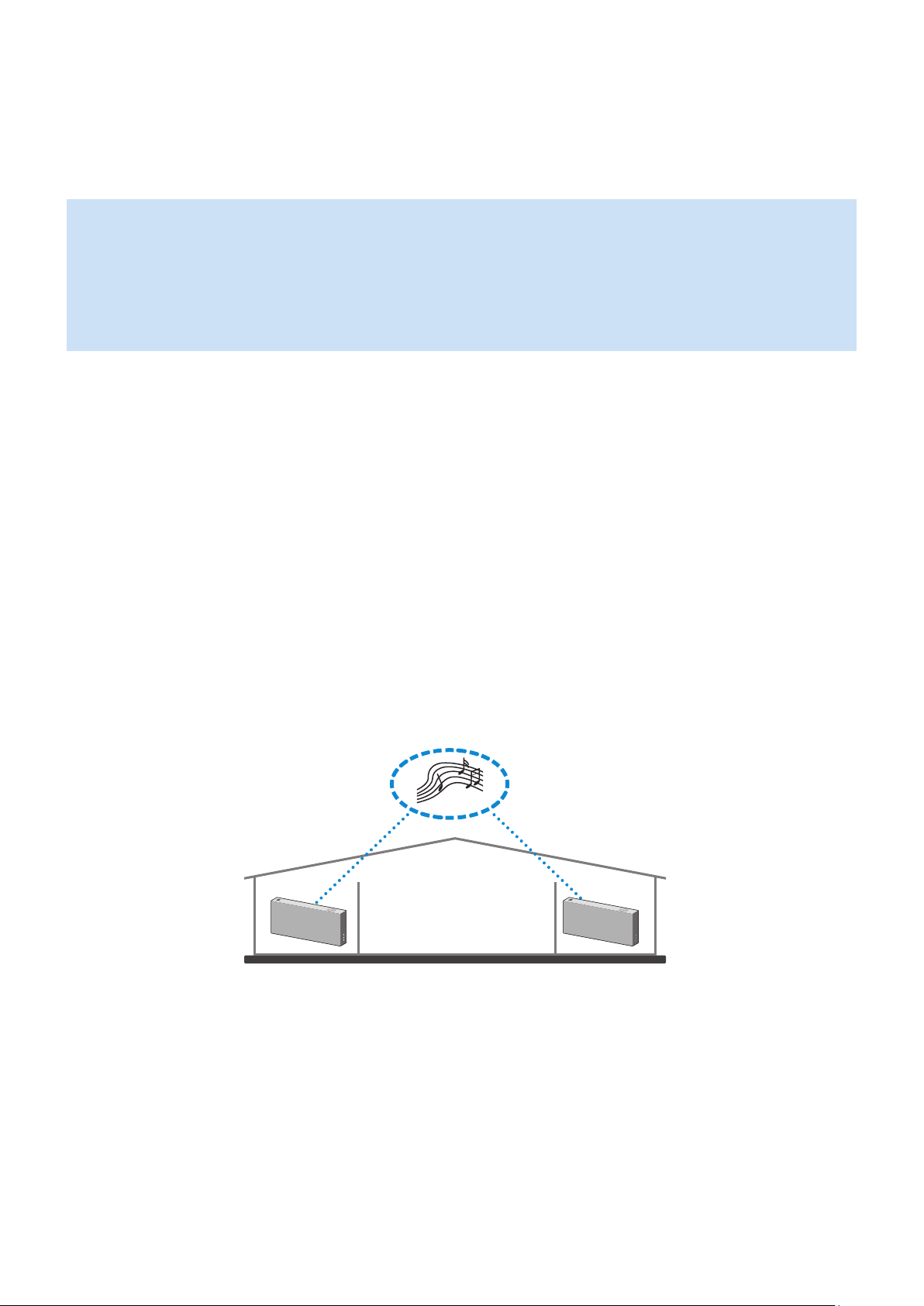
Using via Wi-Fi connection
Functions available with a Wi-Fi connection
•
Using 2 speakers - Audio Group function
•
Using 2 speakers - Stereo function (For the VL350)
•
Connecting with a Samsung Smart TV
•
Connecting an Amazon product
All speakers should be connected to the same wireless router.
5 GHz wireless connection is recommended when using two devices.
When using two devices, a time difference between the video output of the connected equipment and its
audio output may occur.
On rare occasions, there can be choppy audio or an interruption of the connection due to wireless interference
when used under some conditions.
❚
Using 2 speakers - Audio Group function
Use the SmartThings app to connect and enjoy two speakers as an Audio Group.
1
Make sure all the speakers you want to group are connected to the same wireless router.
ENG - 16
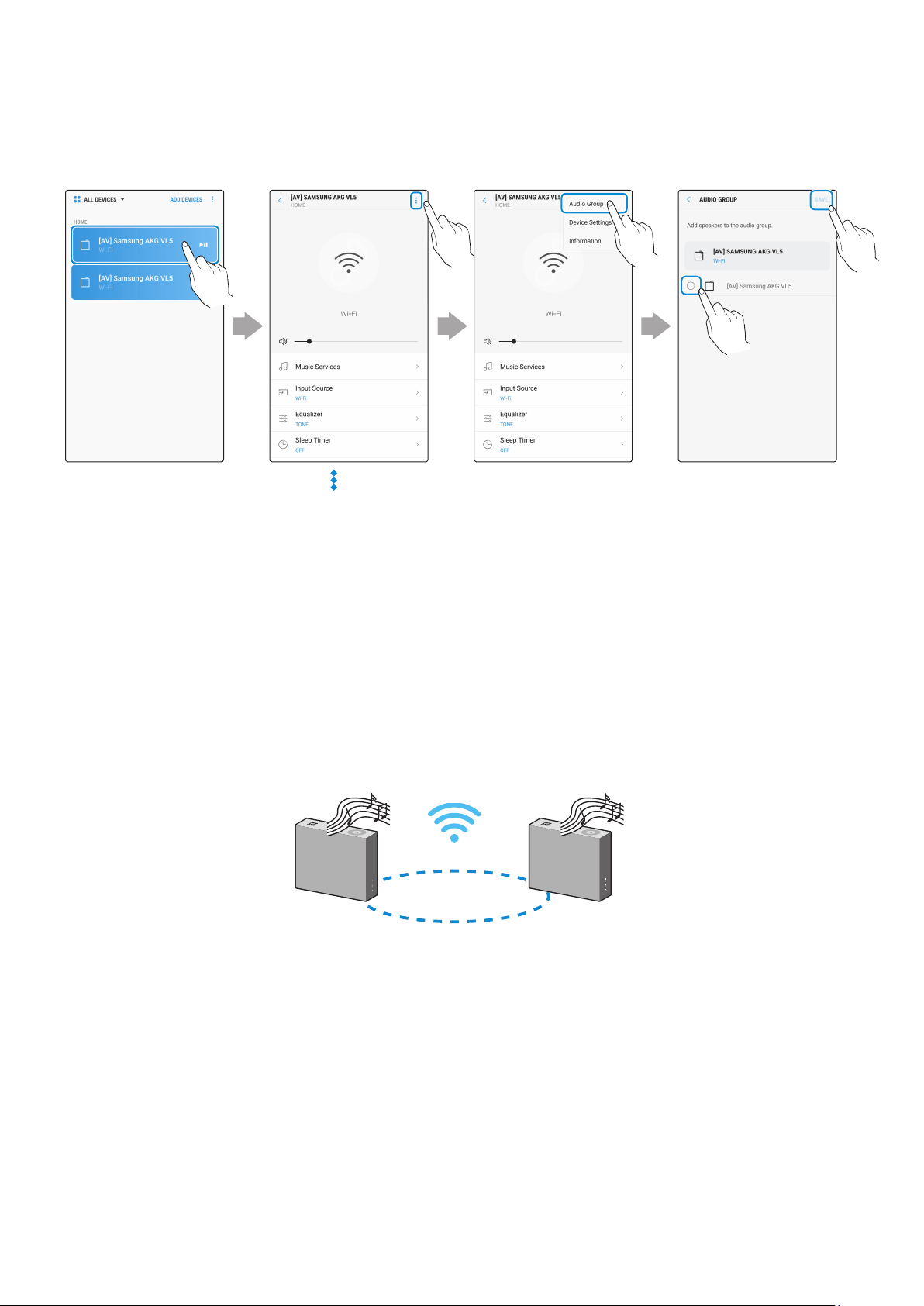
2
Select Audio Group in the SmartThings app.
Touch at the top
right.
Select from the
device list.
Touch "Audio
Group".
Select the second
speaker, and then
touch “SAVE”.
1
2
❚
Using 2 speakers - Stereo function (For the VL350)
Use the SmartThings app to connect and enjoy two speakers in Stereo.
1
Make sure all the speakers you want to group are connected to the same wireless router.
Left
Right
The VL550 is already a stereo device and automatically plays in stereo so it does not require the Stereo
Multiple function.
ENG - 17
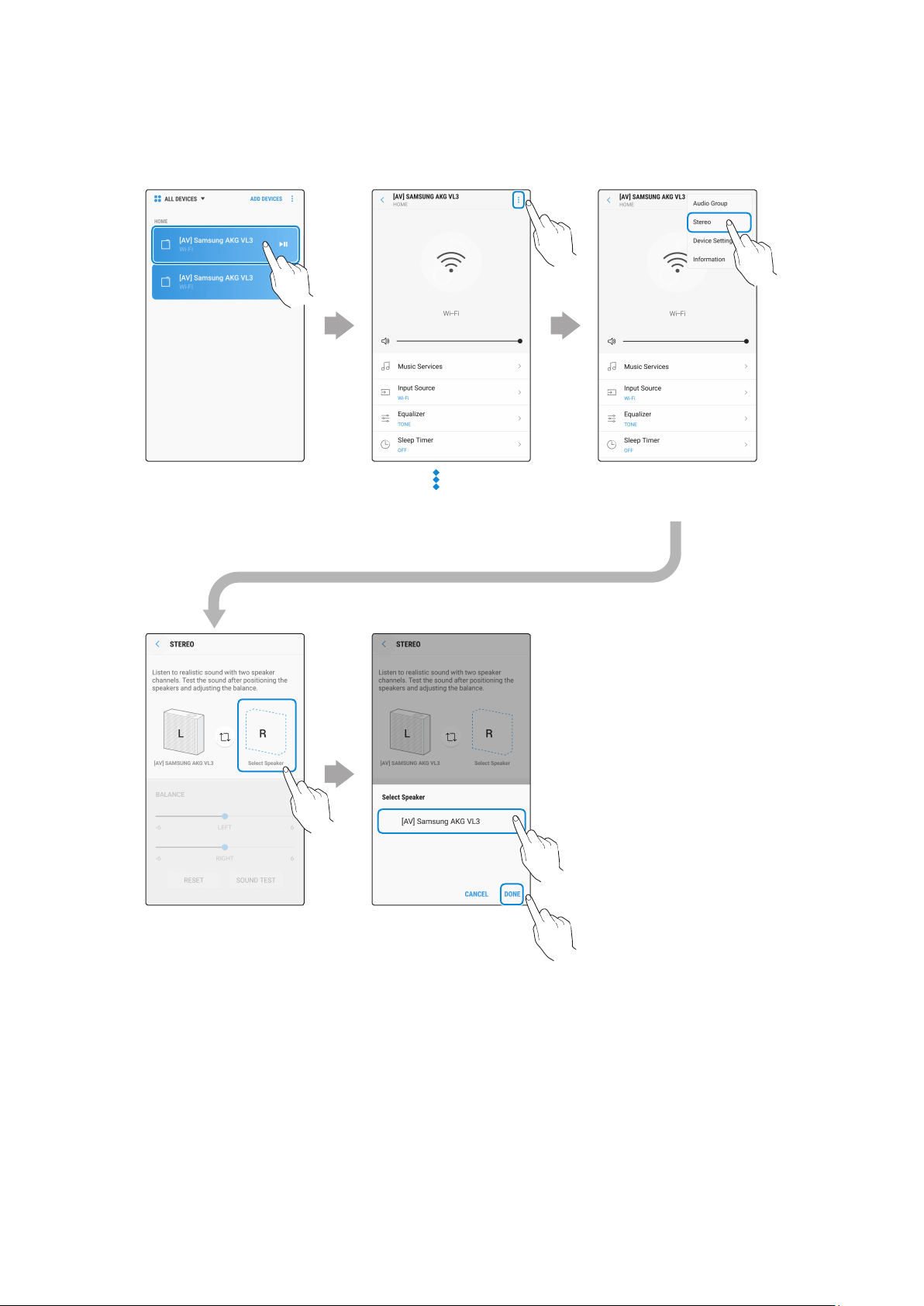
2
Select Stereo in the SmartThings app.
Touch at the top
right.
Select from the
device list.
Touch "Stereo".
Touch "Select
Speaker".
Select the second
speaker, and then
touch “DONE”.
1
2
ENG - 18
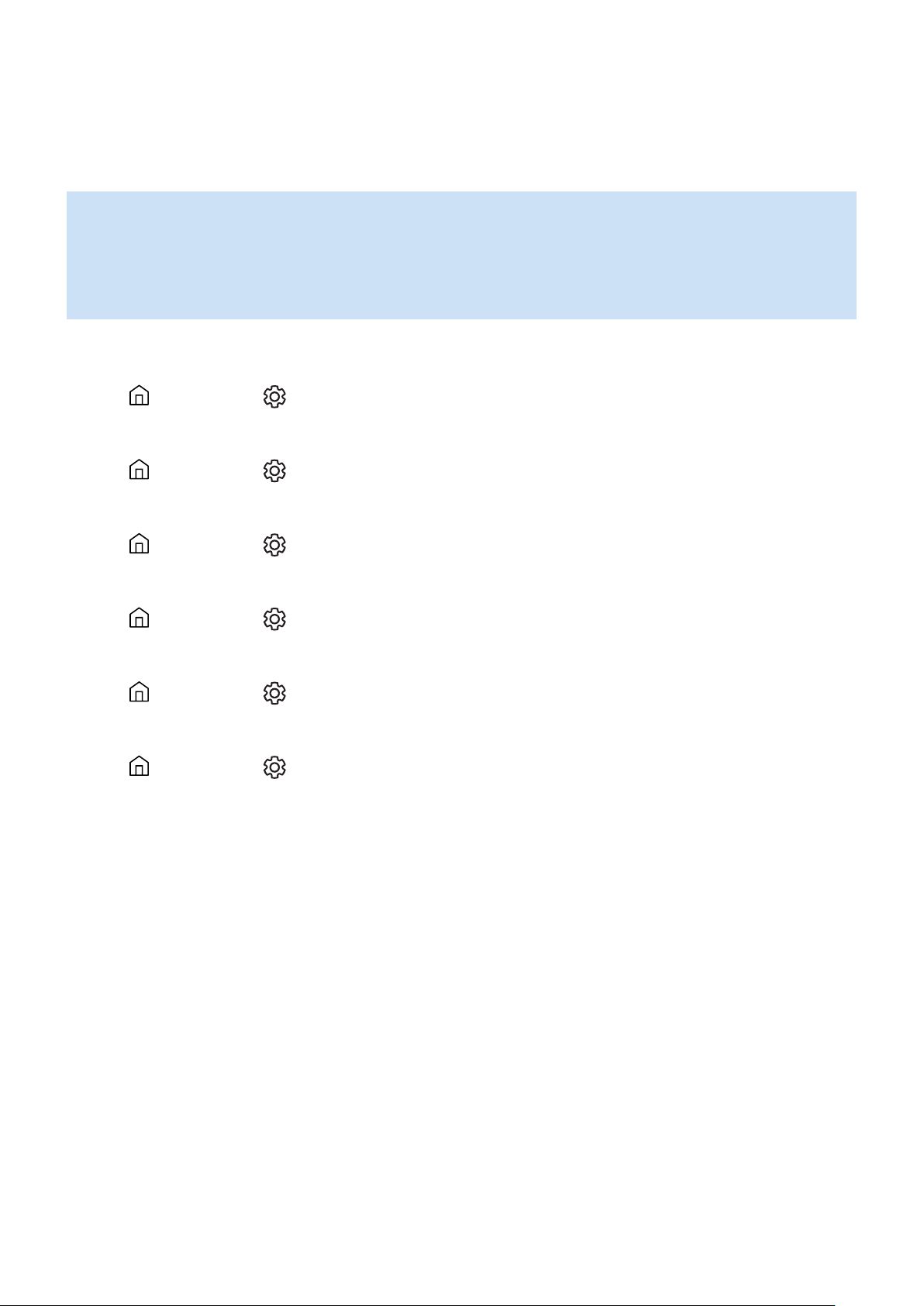
❚
Connecting with a Samsung Smart TV
1. This feature is available only for Samsung Smart TVs released in 2014 and later.
2. The TV must be connected to a wireless router.
3. Your Samsung speakers must be connected to the wireless router that your TV is connected
to. (Refer to the TV's user manual for connection details.)
`
Connecting 1 speaker to a Samsung Smart TV 2018
Home (
)
Settings ( )
Sound
Sound Output
[AV] Samsung AKG VL*(Wi-Fi)
`
Connecting 2 speakers to a Samsung Smart TV 2018
Home (
)
Settings ( )
Sound
Wi-Fi Speaker Surround Setup
`
Connecting 1 speaker to a Samsung Smart TV 2017
Home (
)
Settings ( )
Sound
Sound Output
[AV] Samsung AKG VL*(Wi-Fi)
`
Connecting 2 speakers to a Samsung Smart TV 2017
Home (
)
Settings ( )
Sound
Wi-Fi Speaker Surround Setup
`
Connecting 1 speaker to a Samsung Smart TV 2016
Home (
)
Settings ( )
Sound
Select Speaker
[AV] Samsung AKG VL*(Wi-Fi)
`
Connecting 2 speakers to a Samsung Smart TV 2016
Home (
)
Settings ( )
Sound
Expert Settings
Wireless Speaker Manager
`
Connecting 1 or 2 speakers to a 2015 Samsung Smart TV
Menu
Sound
Speaker List
`
Connecting 1 or 2 speakers to a 2014 Samsung Smart TV
Menu
Sound
Speaker Settings
Multiroom Link - Settings
Because the menus may differ depending on the year of manufacture, refer to your TV manual.
ENG - 19
❚
Connecting an Amazon product
•
This feature may not be available in some countries.
•
This service is provided by Amazon and can be terminated at any time. Samsung does not
assume responsibility for service availability.
`
Connect and use with an Amazon product (Amazon Echo)
Use an Amazon Echo product to control your Speaker and enjoy music services provided by
Amazon Echo.
Check if the Speaker is connected to Wi-Fi. [Connecting to Wi-Fi]
Click here.
1
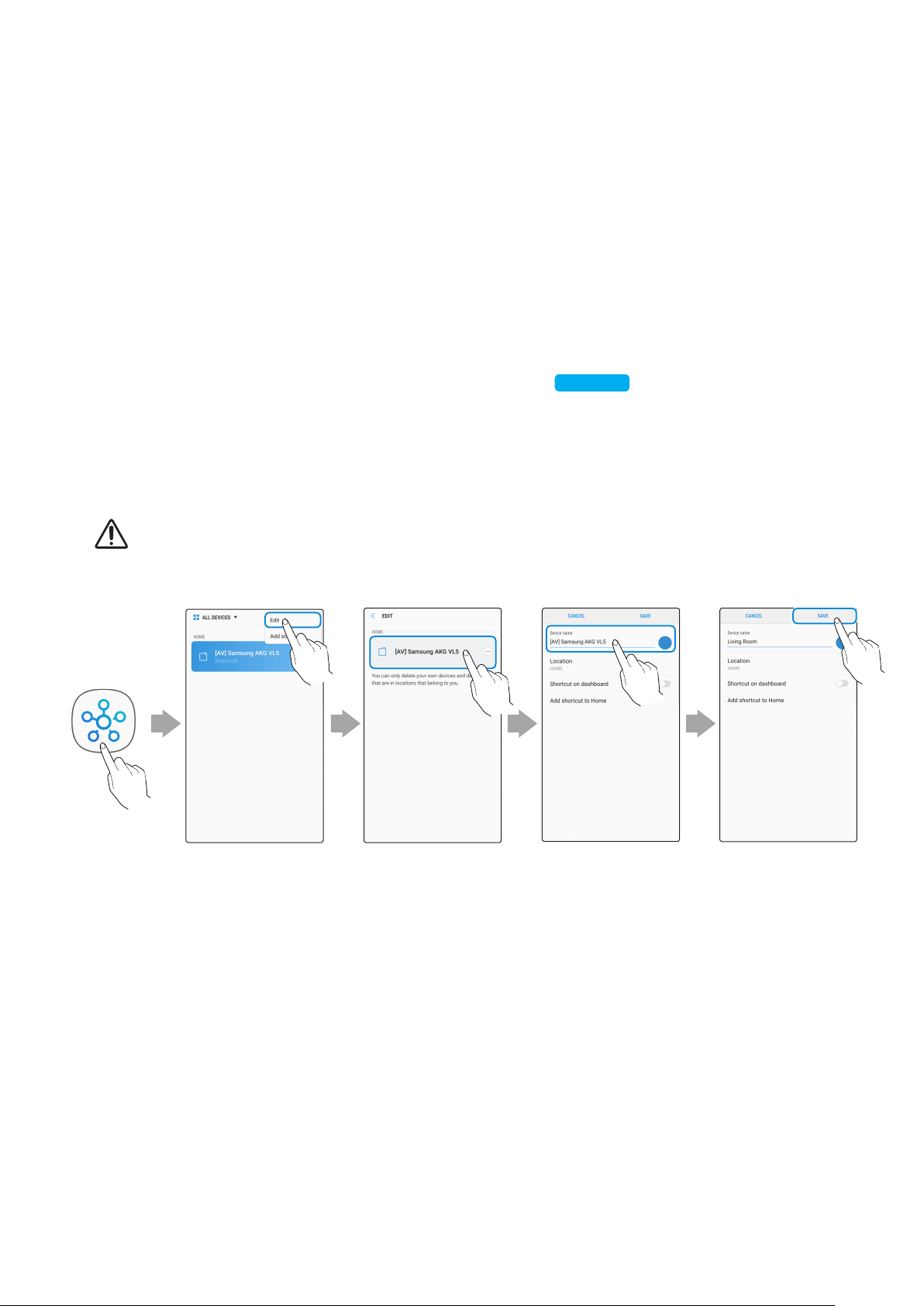
In the SmartThings app, change your Speaker’s name to one that can be recognized by
your Amazon device.
(Example: Samsung, Speaker, Living Room, Family Room, Bedroom, Ofce, etc.)
CAUTION
9
Amazon devices may not recognize names that contain elements such as special characters.
Select "Edit" Select speakers
Change name "SAVE"
ENG - 20
2
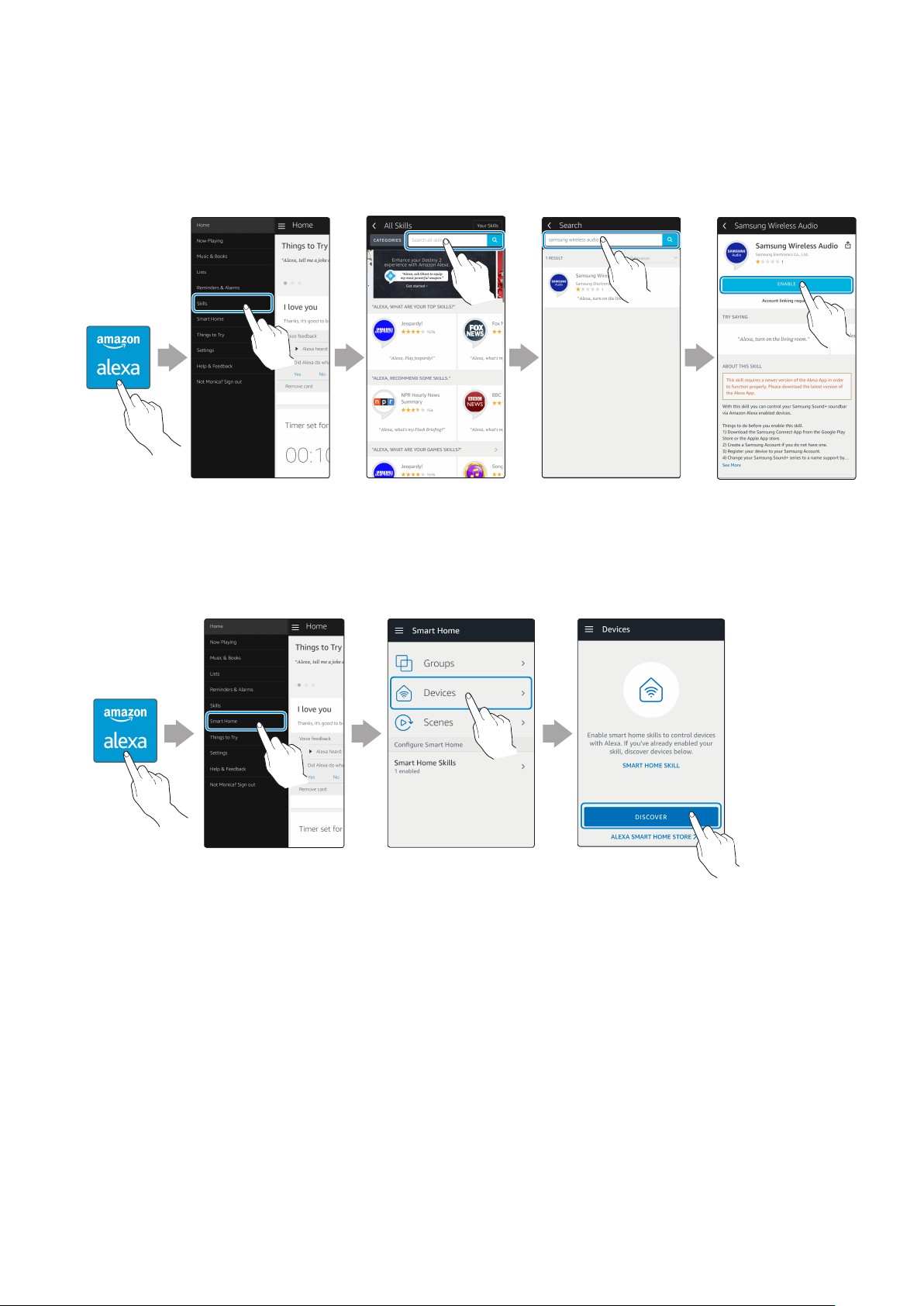
In the Alexa app, search “Samsung Wireless Audio” in Skills, and then select ENABLE.
•
Skip this step if you have Skills set up already.
Amazon Alexa
app
Select "Skills" Search "ENABLE"
3
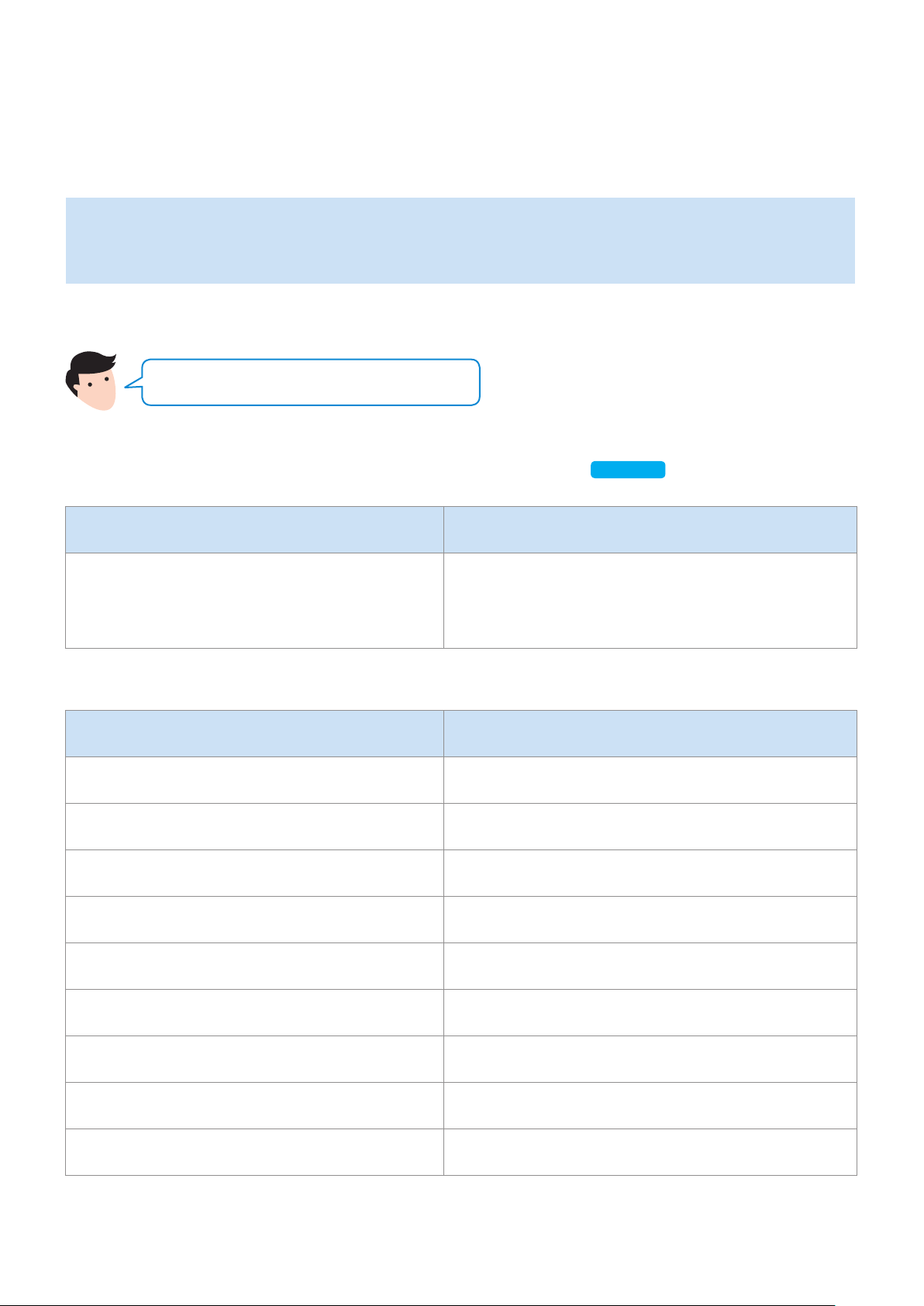
In the Alexa app, tap Smart Home → Devices → DISCOVER to complete the connection.
Amazon Alexa
app
Select
"Smart Home"
Select "Devices" "DISCOVER"
ENG - 21
`
Use voice commands to control the Speaker
•
The Amazon Echo service you can use with your Speaker is limited to music. Other services
provided by Amazon Echo, such as news and weather, can only be accessed through your
Amazon Echo product.
Trigger + Command + Speaker name
Use the Speaker name you changed in the SmartThings app.
[Connect and use with an Amazon product (Amazon Echo)]
Click here.
Action Voice Command
To search an audio device added to the
SmartThings account connected to the
Amazon Alexa account
"Alexa Discover devices"
* To use voice commands for the Speaker named "Living room"
Action Voice Command
To set the volume level to 20 "Alexa Set the volume to 20 on Living room"
To increase the volume level "Alexa Volume up on Living room"
To mute the sound "Alexa Mute on Living room"
To listen to a radio station named KISS FM "Alexa Play Kiss FM on Living room"
To play the next song "Alexa Next song on Living room"
To stop the audio "Alexa Stop on Living room"
To turn the audio on "Alexa Turn on Living room"
To turn the audio off "Alexa Turn off Living room"
To change the input source "Alexa Switch to Bluetooth on Living room"
ENG - 22
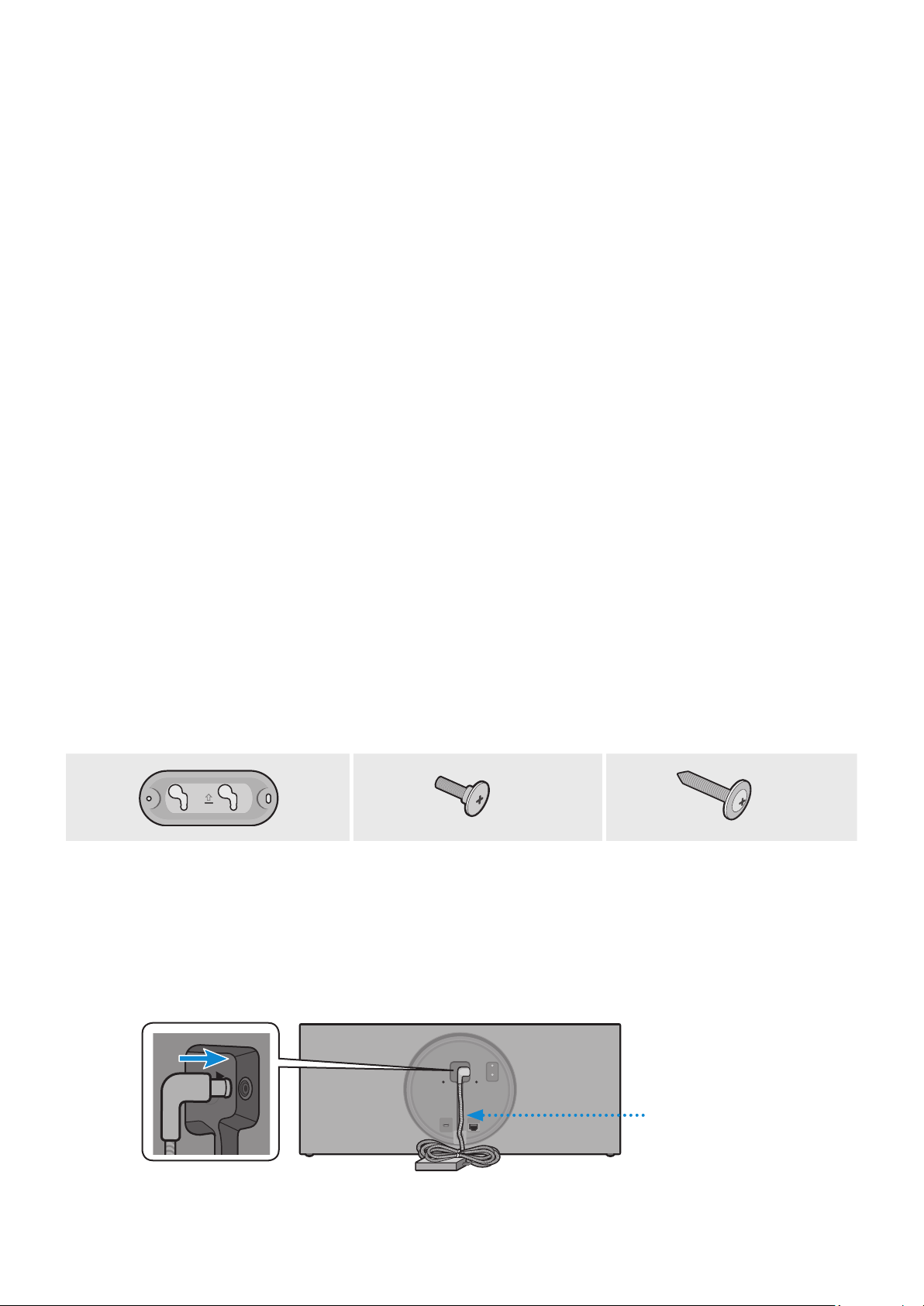
Purchase wall mounting screws according to the type and thickness of the wall you want to
mount the Speaker on.
•
Considerations for purchasing
-
Endurable load : VL350 : Above 18.5 Ibs (8.4 Kg)
VL550 : Above 39.7 Ibs (18.0 Kg)
-
Hole size : M5
Do not install in a place with high temperature or humidity.
Verify whether the wall is strong enough to support the product’s weight. If not, reinforce the wall or choose
another installation point.
Purchase and use the xing screws or anchors appropriate for the kind of wall you have (plaster board, iron
board, wood, etc.). If possible, x the support screws into wall studs. Install on a vertical wall only.
Make sure the unit is turned off and unplugged before you install it. Otherwise, it may cause an electric
shock.
Please have a qualied installer install the Wall Mount Bracket.
Ask a professional installation company to mount your product on the wall.
Samsung Electronics is not liable for any damage to the product due to the product being installed
inappropriately.
Do not install the speaker on its side or upside down.
Wall-Mount Components
x 2
x 2
Bracket-Wall (AH61-04214A) Bracket-Screw
(AH61-03164A)
Wall Fixing Screw
(not supplied)
1
Connect the AC/DC Adapter on the main unit before installation of the wall mount.
AC/DC Adapter
DC 24V
SERVICE
AUX IN
LAN
RESET
CONNECT
(DC IN)
POWER
DC 24V
SERVICE
AUX IN
LAN
RESET
CONNECT
(DC IN)
POWER
Installing the Wall Mount
ENG - 23
2
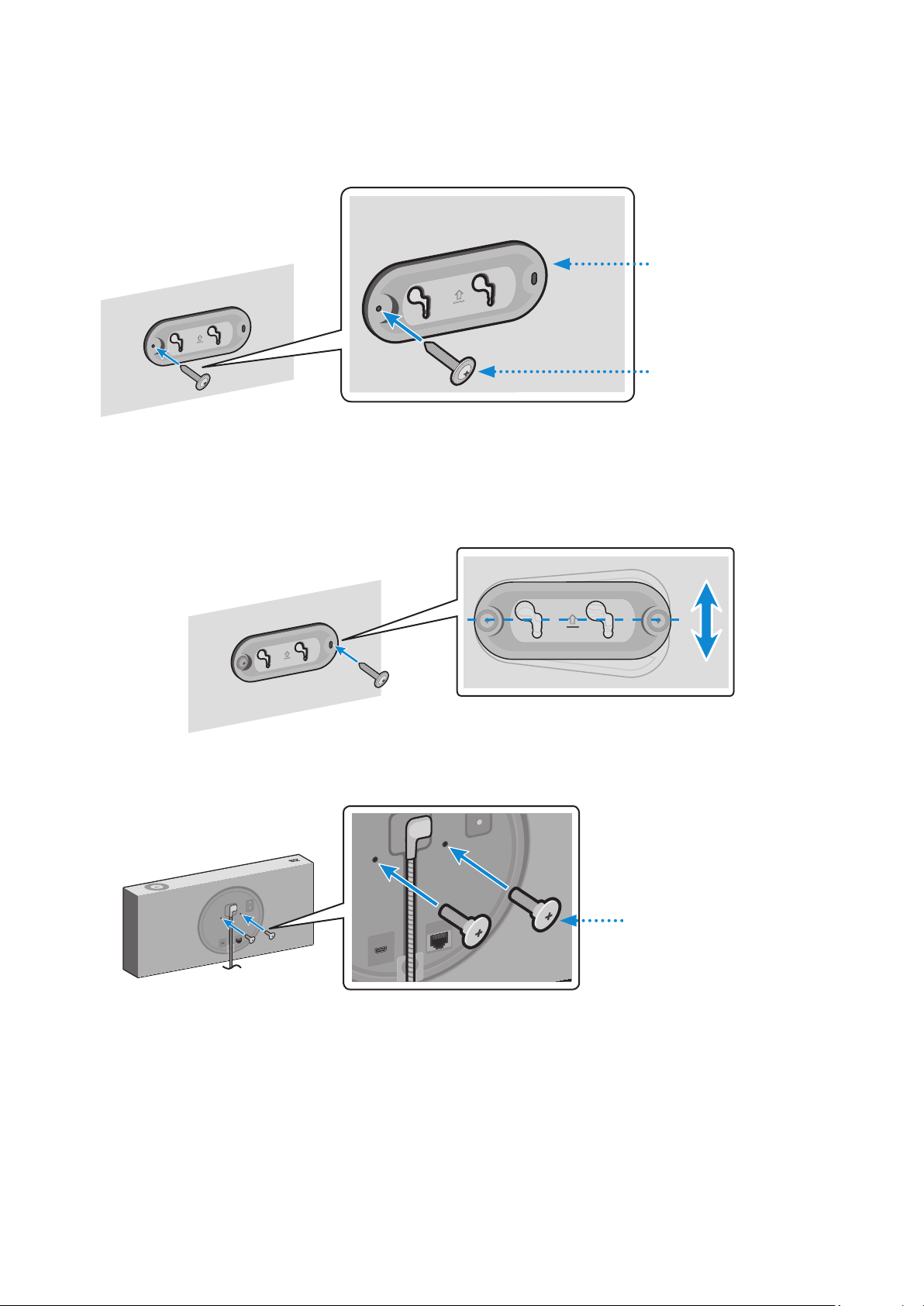
Fix the Bracket-Wall, and then fasten the Wall Fixing Screw from the left hole.
Wall
Bracket-Wall
Wall Fixing Screw
(not supplied)
3
Fasten the Wall Fixing Screw in the right hole.
•
When leveling is not made correctly, slightly unfasten the Wall Fixing Screw on the left
and then adjust the Bracket-Wall up or down for leveling.
4
Fasten two Bracket-Screw into the bracket hole on the rear of the main unit.
DC 24V
SERVICE
AUX IN
LAN
RESET
CONNECT
DC 24V
SERVICE
AUX IN
LAN
RESET
CONNECT
DC 24V
SERVICE
AUX IN
LAN
RESET
CONNECT
DC 24V
SERVICE
AUX IN
LAN
RESET
CONNECT
Bracket-Screw
ENG - 24
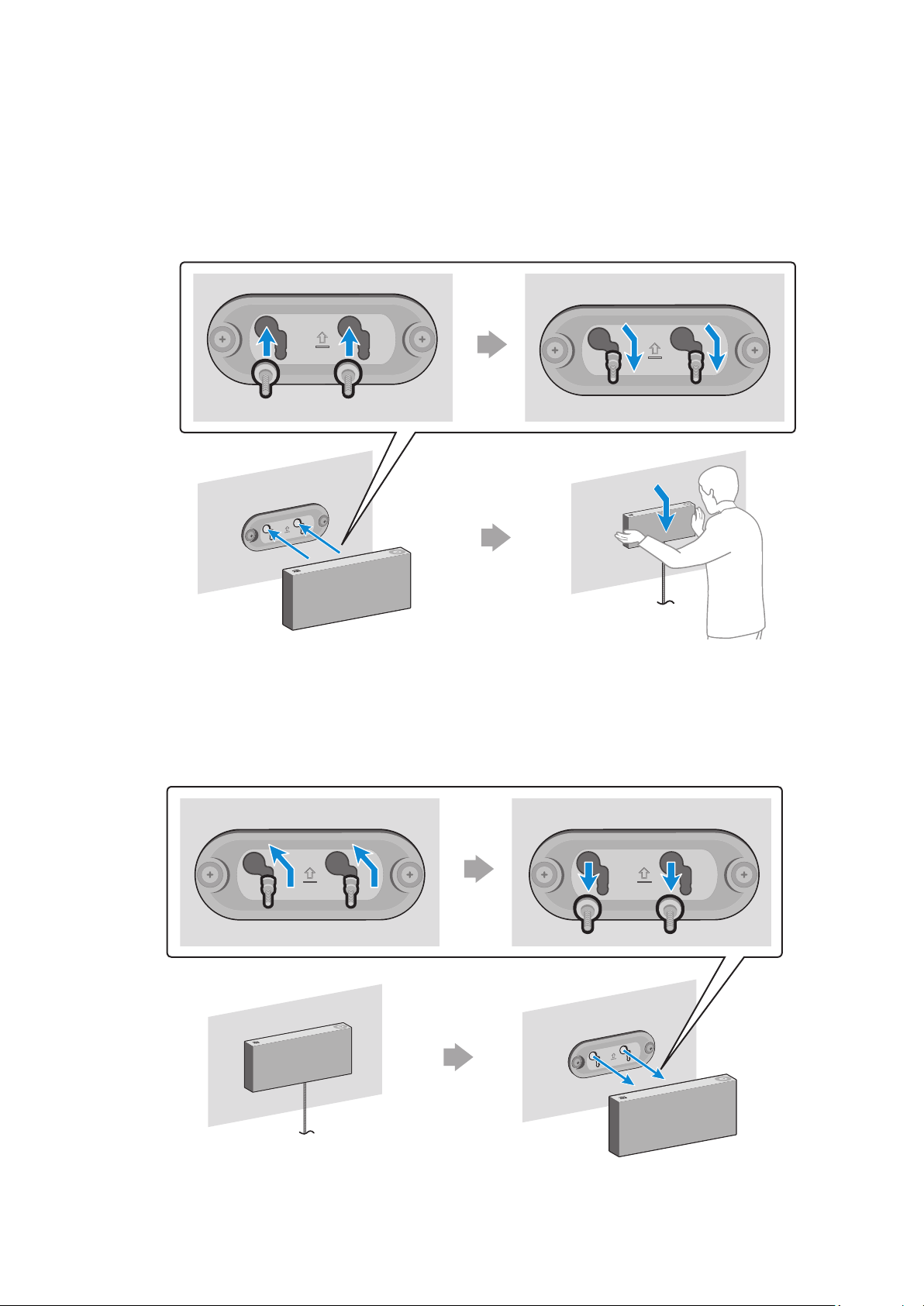
5
Align the Bracket-Screw on the main unit to t into the large groove of Bracket-Wall.
Slide it in the arrow direction until it is seated in the small groove.
•
Be sure to slide it in the arrow direction until it is seated in the small groove of the
Bracket-Wall.
* Removing the Wall Mount
Lift the main unit up until the Bracket-Screw is seated in the large groove of Bracket-Wall and
then pull out the main unit.
ENG - 25
Appendix
A
Troubleshooting
Refer to the table below when this product does not function properly. If the problem you are
experiencing is not listed below or if the instructions below do not help, turn off the product,
disconnect the power cord, and contact Samsung Electronics at 1-800-SAMSUNG (1-800-726-7864).
Symptom Check Remedy
The speaker does not turn
on.
•
Check if the power cord is
properly connected.
•
Plug in the power cord.
There is no response when
you press a button or
touch wheel area.
•
The button or touch wheel
area may be exposed to static.
•
Unplug the power cord and then
plug it in again.
There is no sound.
•
Is your speaker connected to
a power source?
•
The volume may be set to the
lowest level.
•
Check if the power cord of the
adapter is properly connected to
the wall outlet and if the power
cable is properly connected to
the speaker. If you have a VL550,
also make sure the power cable
is properly connected to the
adaptor.
•
Try adjusting the volume.
The Dial Controller does
not work.
•
The Dial Controller may not
have enough battery power.
•
The Dial Controller may be
out of operating range.
•
Check the connection
between the Dial Controller
and speaker.
•
Press the RESET button on the
bottom of the Dial Controller.
•
Charge the battery as instructed
in this manual.
•
Bring the Dial Controller closer to
the speaker.
•
Check “Connecting the Dial
Controller and Speaker”.
(9 page)
Click here.
ENG - 26
Symptom Check Remedy
Cannot connect the
speaker to a mobile device
or TV.
For a wired connection
•
Check the cable connection.
•
Check on the right side of the
speaker and make sure that
the speaker mode is set to
AUX mode.
•
Check the name of the port
and make sure that the cable is
connected to the right port.
•
See “Connecting to a Wired
Network”. (13 page)
Click here.
For a Bluetooth connection
•
Check on the right side of the
speaker and make sure that
the speaker mode is set to
Bluetooth mode.
•
Set the speaker to Bluetooth
mode and try searching for
the speaker on the mobile
device or TV again.
•
Press the Bluetooth button on
the right side of the speaker for
5 seconds or longer to enter the
standby mode, and then search
for the speaker on your mobile
device or TV.
See “Connecting to Bluetooth”.
(10 page)
Click here.
For a Wi-Fi connection
•
Check if your TV is a
supported model.
•
Make sure that your mobile
device or TV is connected to
the Wi-Fi network.
•
Make sure that your speaker
is connected to the Wi-Fi
network.
•
Check if your router is using
the DFS channel.
(DFS : Dynamic Frequency
Selection)
•
This feature supports Samsung
Smart TVs released in 2014 and
later.
•
If your TV is not connected to the
Wi-Fi network, use the network
menu on the TV to establish the
connection. (See the TV's manual.)
•
If the TV is already connected,
the speaker should appear in the
SmartThings app on your mobile
device (smartphones, tablets, etc.).
See “Using via Wi-Fi connection”.
(16 page)
Click here.
•
You may not be able to connect
the TV and speaker over Wi-Fi
if your wireless router uses a
DFS channel. For details, please
contact your Internet provider.
ENG - 27

Symptom Check Remedy
The audio stutters when
playing music or videos
on my mobile device over
Bluetooth.
•
Check if there are any
nearby devices that use radio
communications or may cause
interference.
•
Is your mobile device or any
radio communication devices
connected to 2.4 GHz
Wi-Fi network?
•
If you have any nearby devices that use
radio communications or may cause
interference, please turn them off.
•
See “Connecting to Bluetooth”.
(10 page)
Click here.
•
If your mobile device or other radio
communication devices are connected
to a 2.4 GHz Wi-Fi network, this may
cause interference. Try to connect your
mobile device to a 5 GHz network.
The audio stutters when
the speaker is connected
in Audio Group or Stereo
mode over Wi-Fi.
•
Are you using a 2.4 GHz Wi-Fi
network to connect your mobile
device and speaker?
•
Check the distance between
your wireless router and
speaker.
•
Check the distance between
the speakers.
•
Connect your mobile device and
speaker to a 5 GHz Wi-Fi network.
•
Make sure that your wireless router
and speaker are within operating
range of each other.
•
Try to power off your wireless router
and then restart it.
•
Make sure that your speakers are within
operating range of each other.
The speaker loses
connection or
stays disconnected
intermittently when
used in stereo mode
after connecting TV and
speakers via Wi-Fi.
•
Are you using a 2.4 GHz Wi-Fi
network to connect your TV
and speaker?
•
Check the distance between
the wireless router, TV, and
speaker.
•
Connect your TV and speaker to a
5 GHz Wi-Fi network.
•
If connected to a 5GHz network,
check for a DFS channel. If your router
is using a DFS channel, contact your
Internet provider.
•
Make sure that your wireless router,
TV, and speaker are all within
operating range.
The SmartThings app does
not show the speaker
on the list of available
devices when I try to
connect it over Wi-Fi.
•
Is your speaker connected to
a power source?
•
Is your mobile device
connected to a wireless
router?
•
Check if the speaker is properly
connected to the wall socket and the
adapter.
•
Connect your mobile device to the
wireless router.
•
Press the CONNECT button in the
back of the speaker for 5 seconds or
longer to enter standby mode and try
to connect again.
If the problem persists, contact the Samsung Call Center for troubleshooting.
ENG - 28
A
Open Source License Notice
•
For further information on Open Sources used in this product, please visit the website:
http://opensource.samsung.com
A
Licenses
•
The Spotify Software is subject to third party licenses found here :
www.spotify.com/connect/third-party-licenses
•
For more information about Spotify Connect, please visit
www.spotify.com/connect
A
Specications
Model Name VL350 VL550
Weight 4.6 Ibs (2.1 Kg) 10.1 Ibs (4.6 Kg)
Dimensions (W X H X D)
8.3 X 8.3 X 2.8 inches
(210.0 X 211.5 X 70.0 mm)
20.6 X 8.3 X 2.8 inches
(522.0 X 211.5 X 70.0 mm)
Speaker Woofer x1, Tweeter x 1, 4ohm Woofer x3, Tweeter x 2, 4ohm
Operating Temperature Range +41°F to +95°F (+5°C to +35°C)
Operating Humidity Range 10 % to 75 %
Wireless LAN Built-in
Security
WEP (OPEN/SHARED)
WPA-PSK (TKIP/AES)
WPA2-PSK (TKIP/AES)
•
Network speeds equal to or below 10Mbps are not supported.
•
Design and specications are subject to change without prior notice.
•
For more information about the power supply and power consumption, refer to the label
attached to the product. (Label : Bottom of the Speaker Main Unit)
•
Weight and dimensions are approximate.
•
Dispose unwanted electronics through an approved recycler.
To nd the nearest recycling location, go to our website: www.samsung.com/recyclingdirect or
call, (877) 278 - 0799.
•
For further details on using the speaker, visit www.samsung.com.
ENG - 29
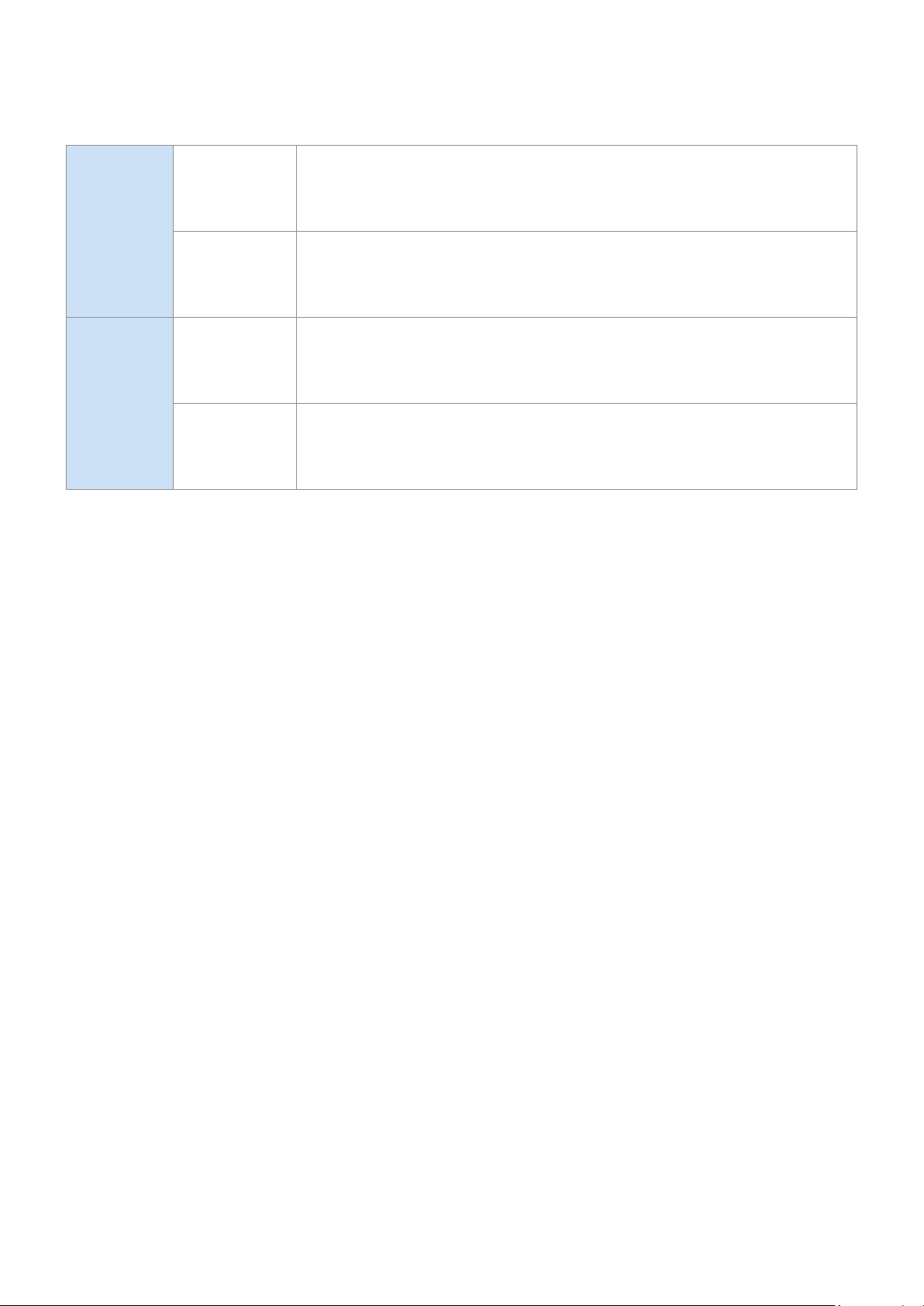
Wi-Fi
Disabling
Wi-Fi
In Wi-Fi mode, press the Play / Pause button (on the top side)
and the CONNECT button (in the rear) together, and then hold for
30 seconds or more to disable Wi-Fi.
Enabling
Wi-Fi
Press the Wi-Fi button on the right side of the speaker while Wi-Fi
is disabled, and then hold for 30 seconds or more to enable Wi-Fi
again.
Bluetooth
Disabling
Bluetooth
In Bluetooth mode, press the Play / Pause button (on the top side)
and the CONNECT button (in the rear) together, and then hold for
30 seconds or more to disable Bluetooth.
Enabling
Bluetooth
Press the Bluetooth button on the right side of the speaker while
Bluetooth is disabled, and then hold for 30 seconds or more to
enable Bluetooth again.
Wi-Fi and Bluetooth are enabled by default.
When Wi-Fi and Bluetooth are disabled, turning the product off and on does not enable them.
ENG - 30

A
Additional Information
❚
About the Network Connection
•
Depending on the wireless router used, some network operations may perform differently.
•
For detailed information on networking with a wireless router or modem, refer to the router's or
modem's documentation.
•
Select a wireless channel that is not in use. If the selected channel is also used by other
communication devices in close proximity, it may cause wireless interference which can
interrupt communications or cause choppy audio.
•
The speaker can experience choppy audio and interruptions of its wireless connection due to
wireless interference as the performance of wireless LANs are affected by the environment
and conditions of use including the router's performance, its distance from connected devices,
obstructions, and interference by other mobile devices.
•
WEP encryption does not work with WPS (PBC) / WPS (PIN).
❚
Works with SmartThings™
•
This product is compatible with SmartThings.
•
SmartThings service varies from country to country.
•
For more information, visit http://www.smartthings.com
Figures and illustrations in this Full Manual are provided for reference only and may differ from
actual product appearance.
A
Copyright
© 2018 Samsung Electronics Co.,Ltd. All rights reserved; No part or whole of this user's manual
may be reproduced or copied without the prior written permission of Samsung Electronics Co.,Ltd.
ENG - 31

Contact SAMSUNG WORLD WIDE
If you have any questions or comments relating to Samsung products, please contact the
SAMSUNG customer care center listed for your country.
Country Contact Center
Web Site
■
North America
U.S.A 1-800-SAMSUNG (726-7864) www.samsung.com/us/support
CANADA 1-800-SAMSUNG (726-7864)
www.samsung.com/ca/support (English)
www.samsung.com/ca_fr/support (French)
■
Latin America
MEXICO 01-800-SAMSUNG (726-7864) www.samsung.com/mx/support
BRAZIL
0800-124-421 (Demais cidades e regiões)
4004-0000 (Capitais e grandes centros)
www.samsung.com/br/support
COSTA RICA 00-800-1-SAMSUNG (726-7864)
www.samsung.com/latin/support (Spanish)
www.samsung.com/latin_en/support (English)
DOMINICAN
REPUBLIC
1-809-200-7264
ECUADOR 1-800-SAMSUNG (72-6786)
EL SALVADOR 8000-SAMSUNG (726-7864)
GUATEMALA 1-800-299-0033
HONDURAS 800-2791-9111
JAMAICA 1-800-SAMSUNG (726-7864) www.samsung.com/latin_en/support (English)
NICARAGUA 001-800-5077267
www.samsung.com/latin/support (Spanish)
www.samsung.com/latin_en/support (English)
PANAMA 800-0101
PUERTO RICO 1-800-682-3180
TRINIDAD &
TOBAGO
1-800-SAMSUNG (726-7864)
VENEZUELA 0-800-SAMSUNG (726-7864)
COLOMBIA
Bogotá en el 600 12 72
Sin costo en todo el pais 01 8000 112 112
Y desde tu celular #726
www.samsung.com/co/support
CHILE 800-SAMSUNG (726-7864)
www.samsung.com/cl/support
BOLIVIA 800-10-7260
PERU 080077708 Desde teléfonos fi jos, públicos o celulares www.samsung.com/pe/support
ARGENTINA 0800-555-SAMS (7267) www.samsung.com/ar
URUGUAY 0800-SAMS (7267) www.samsung.com/uy
PARAGUAY 0800-11-SAMS(7267) www.samsung.com/py
■
Europe
UK 0330 SAMSUNG (7267864) www.samsung.com/uk/support
IRELAND (EIRE) 0818 717100 www.samsung.com/ie/support
GERMANY 06196 77 555 77 www.samsung.com/de/support
FRANCE 01 48 63 00 00 www.samsung.com/fr/support
ITALIA 800-SAMSUNG (800.7267864) www.samsung.com/it/support
SPAIN 0034902172678 www.samsung.com/es/support
PORTUGAL 808 207 267 www.samsung.com/pt/support
LUXEMBURG 261 03 710 www.samsung.com/be_fr/support
NETHERLANDS 088 90 90 100 www.samsung.com/nl/support
BELGIUM 02-201-24-18
www.samsung.com/be/support (Dutch)
www.samsung.com/be_fr/support (French)
LIMITED WARRANTY TO ORIGINAL PURCHASER
This SAMSUNG brand product, as supplied and distributed by SAMSUNG and delivered new, in the original carton to the
original consumer purchaser, is warranted by SAMSUNG against manufacturing defects in materials and workmanship for a
limited warranty period of:
One (1) Year Parts and Labor*
(*90 Days Parts and Labor for Commercial Use)
This limited warranty begins on the original date of purchase, and is valid only on products purchased and used in the United States.
To receive warranty service, the purchaser must contact SAMSUNG for problem determination and service procedures. Warranty
service can only be performed by a SAMSUNG authorized service center. The original dated bill of sale must be presented upon
request as proof of purchase to SAMSUNG or SAMSUNG's authorized service center. Transportation of the product to and from the
service center is the responsibility of the purchaser.
SAMSUNG will repair or replace this product, at our option and at no charge as stipulated herein, with new or reconditioned parts
or products if found to be defective during the limited warranty period specied above. All replaced parts and products become
the property of SAMSUNG and must be returned to SAMSUNG. Replacement parts and products assume the remaining original
warranty, or ninety (90) days, whichever is longer.
SAMSUNG's obligations with respect to software products distributed by SAMSUNG under the SAMSUNG brand name are set forth
in the applicable end user license agreement. Non-SAMSUNG hardware and software products, if provided, are on an "AS IS" basis.
Non-SAMSUNG manufacturers, suppliers, publishers, and service providers may provide their own warranties.
This limited warranty covers manufacturing defects in materials and workmanship encountered in normal, and except to the
extent otherwise expressly provided for in this statement, noncommercial use of this product, and shall not apply to the following,
including, but not limited to: damage which occurs in shipment; delivery and installation; applications and uses for which this
product was not intended; altered product or serial numbers; cosmetic damage or exterior nish; accidents, abuse, neglect,
re, water, lightning or other acts of nature; use of products, equipment, systems, utilities, services, parts, supplies, accessories,
applications, installations, repairs, external wiring or connectors not supplied and authorized by SAMSUNG, or which damage this
product or result in service problems; incorrect electrical line voltage, uctuations and surges; customer adjustments and failure
to follow operating instructions, cleaning, maintenance and environmental instructions that are covered and prescribed in the
instruction book; product removal or reinstallation; reception problems and distortion related to noise, echo, interference or other
signal transmission and delivery problems. SAMSUNG does not warrant uninterrupted or error-free operation of the product.
THERE ARE NO EXPRESS WARRANTIES OTHER THAN THOSE LISTED AND DESCRIBED ABOVE, AND NO WARRANTIES WHETHER
EXPRESS OR IMPLIED, INCLUDING, BUT NOT LIMITED TO, ANY IMPLIED WARRANTIES OF MERCHANTABILITY OR FITNESS FOR
A PARTICULAR PURPOSE, SHALL APPLY AFTER THE EXPRESS WARRANTY PERIODS STATED ABOVE, AND NO OTHER EXPRESS
WARRANTY OR GUARANTY GIVEN BY ANY PERSON, FIRM OR CORPORATION WITH RESPECT TO THIS PRODUCT SHALL BE BINDING
ON SAMSUNG. SAMSUNG SHALL NOT BE LIABLE FOR LOSS OF REVENUE OR PROFITS, FAILURE TO REALIZE SAVINGS OR OTHER
BENEFITS, OR ANY OTHER SPECIAL, INCIDENTAL OR CONSEQUENTIAL DAMAGES CAUSED BY THE USE, MISUSE OR INABILITY TO
USE THIS PRODUCT, REGARDLESS OF THE LEGAL THEORY ON WHICH THE CLAIM IS BASED, AND EVEN IF SAMSUNG HAS BEEN
ADVISED OF THE POSSIBILITY OF SUCH DAMAGES. NOR SHALL RECOVERY OF ANY KIND AGAINST SAMSUNG BE GREATER IN
AMOUNT THAN THE PURCHASE PRICE OF THE PRODUCT SOLD BY SAMSUNG AND CAUSING THE ALLEGED DAMAGE. WITHOUT
LIMITING THE FOREGOING, PURCHASER ASSUMES ALL RISK AND LIABILITY FOR LOSS, DAMAGE OR INJURY TO PURCHASER AND
PURCHASER'S PROPERTY AND TO OTHERS AND THEIR PROPERTY ARISING OUT OF THE USE, MISUSE OR INABILITY TO USE THIS
PRODUCT SOLD BY SAMSUNG NOT CAUSED DIRECTLY BY THE NEGLIGENCE OF SAMSUNG. THIS LIMITED WARRANTY SHALL NOT
EXTEND TO ANYONE OTHER THAN THE ORIGINAL PURCHASER OF THIS PRODUCT, IS NONTRANSFERABLE AND STATES YOUR
EXCLUSIVE REMEDY.
Some states do not allow limitations on how long an implied warranty lasts, or the exclusion or limitation of incidental or
consequential damages, so the above limitations or exclusions may not apply to you. This warranty gives you specic legal rights,
and you may also have other rights which vary from state to state.
To obtain warranty service, please contact SAMSUNG customer care center.
The benets of this Limited Warranty extend only to the original purchaser of Samsung products from an authorized Samsung
reseller.
THIS LIMITED WARRANTY SHALL NOT APPLY TO ANY SAMSUNG PRODUCTS PURCHASED FROM UNAUTHORIZED RESELLERS OR
RETAILERS, EXCEPT IN STATES WHERE SUCH RESTRICTION MAY BE PROHIBITED.
For a list of Samsung authorized retailers, please go to: http://www.samsung.com/us/peaceofmind/authorized_resellers.html.
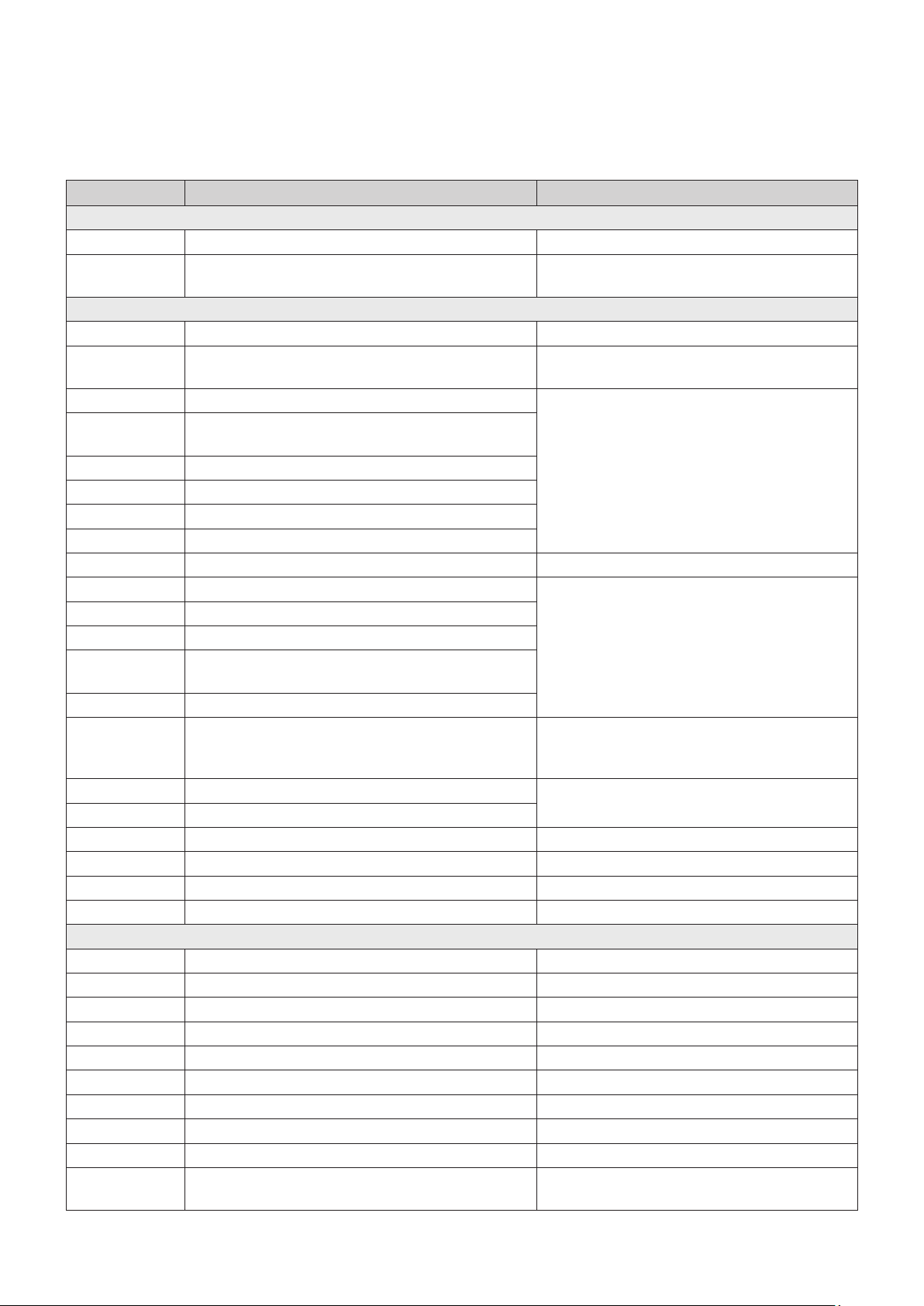
Contact SAMSUNG WORLD WIDE
If you have any questions or comments relating to Samsung products, please contact the
SAMSUNG customer care center listed for your country.
Country Contact Center
Web Site
■
North America
U.S.A 1-800-SAMSUNG (726-7864) www.samsung.com/us/support
CANADA 1-800-SAMSUNG (726-7864)
www.samsung.com/ca/support (English)
www.samsung.com/ca_fr/support (French)
■
Latin America
MEXICO 01-800-SAMSUNG (726-7864) www.samsung.com/mx/support
BRAZIL
0800-124-421 (Demais cidades e regiões)
4004-0000 (Capitais e grandes centros)
www.samsung.com/br/support
COSTA RICA 00-800-1-SAMSUNG (726-7864)
www.samsung.com/latin/support (Spanish)
www.samsung.com/latin_en/support (English)
DOMINICAN
REPUBLIC
1-809-200-7264
ECUADOR 1-800-SAMSUNG (72-6786)
EL SALVADOR 8000-SAMSUNG (726-7864)
GUATEMALA 1-800-299-0033
HONDURAS 800-2791-9111
JAMAICA 1-800-SAMSUNG (726-7864) www.samsung.com/latin_en/support (English)
NICARAGUA 001-800-5077267
www.samsung.com/latin/support (Spanish)
www.samsung.com/latin_en/support (English)
PANAMA 800-0101
PUERTO RICO 1-800-682-3180
TRINIDAD &
TOBAGO
1-800-SAMSUNG (726-7864)
VENEZUELA 0-800-SAMSUNG (726-7864)
COLOMBIA
Bogotá en el 600 12 72
Sin costo en todo el pais 01 8000 112 112
Y desde tu celular #726
www.samsung.com/co/support
CHILE 800-SAMSUNG (726-7864)
www.samsung.com/cl/support
BOLIVIA 800-10-7260
PERU 080077708 Desde teléfonos fi jos, públicos o celulares www.samsung.com/pe/support
ARGENTINA 0800-555-SAMS (7267) www.samsung.com/ar
URUGUAY 0800-SAMS (7267) www.samsung.com/uy
PARAGUAY 0800-11-SAMS(7267) www.samsung.com/py
■
Europe
UK 0330 SAMSUNG (7267864) www.samsung.com/uk/support
IRELAND (EIRE) 0818 717100 www.samsung.com/ie/support
GERMANY 06196 77 555 77 www.samsung.com/de/support
FRANCE 01 48 63 00 00 www.samsung.com/fr/support
ITALIA 800-SAMSUNG (800.7267864) www.samsung.com/it/support
SPAIN 0034902172678 www.samsung.com/es/support
PORTUGAL 808 207 267 www.samsung.com/pt/support
LUXEMBURG 261 03 710 www.samsung.com/be_fr/support
NETHERLANDS 088 90 90 100 www.samsung.com/nl/support
BELGIUM 02-201-24-18
www.samsung.com/be/support (Dutch)
www.samsung.com/be_fr/support (French)
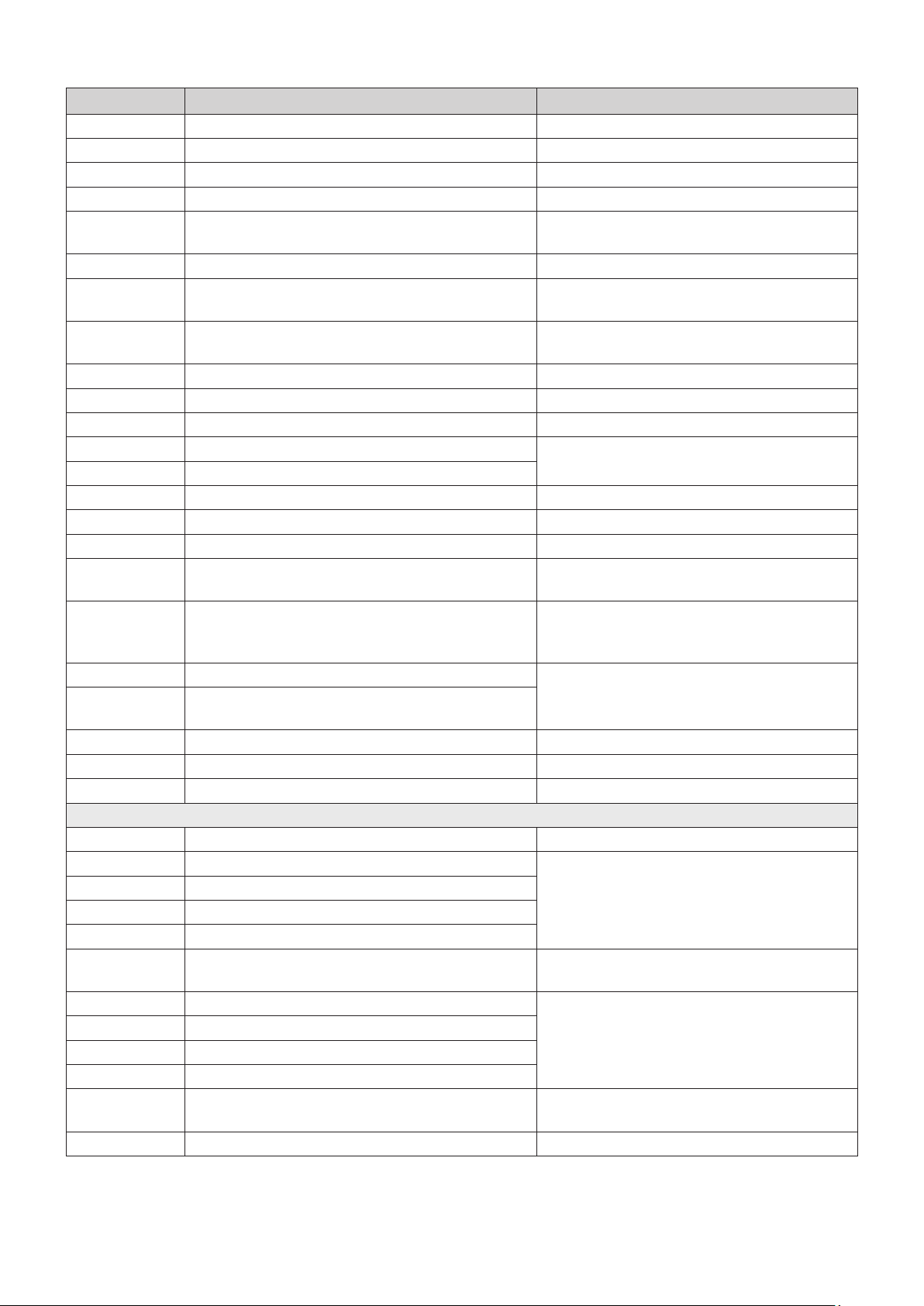
Country Contact Center
Web Site
■
Asia Paci c
CHINA 400-810-5858 www.samsung.com/cn/support
HONG KONG 3698 4698
www.samsung.com/hk/support (Chinese)
www.samsung.com/hk_en/support (English)
MACAU 0800 333 www.samsung.com/support
SINGAPORE 1800 7267864 | 1800-SAMSUNG www.samsung.com/sg/support
AUSTRALIA 1300 362 603 www.samsung.com/au/support
NEW ZEALAND
0800 726 786 (All Product)
0800 6 726 786
www.samsung.com/nz/support
VIETNAM 1800 588 889 www.samsung.com/vn/support
THAILAND
0-2689-3232
1800-29-3232 (Toll free)
www.samsung.com/th/support
MYANMAR +95-1-2399-888 www.samsung.com/mm/support
CAMBODIA
+855-23-993232
1800-20-3232 (Toll free)
www.samsung.com/th/support
LAOS +856-214-17333
MALAYSIA
1800-88-9999
+603-7713 7420 (Overseas contact)
www.samsung.com/my/support
INDONESIA
021-5699-7777
0800-112-8888 (All Product, Toll Free)
www.samsung.com/id/support
PHILIPPINES
1-800-10-726-7864 [ PLDT Toll Free ]
1-800-8-726-7864 [ Globe Landline and Mobile ]
02-422-2111 [ Standard Landline ]
www.samsung.com/ph/support
TAIWAN 0800-329-999 www.samsung.com/tw/support
INDIA
1800 40 SAMSUNG (1800 40 7267864)
(Toll-Free)
www.samsung.com/in/support
NEPAL
16600172667 (Toll Free for NTC Only)
9801572667
BANGLADESH
09612300300
08000300300 (Toll free)
SRI LANKA
+9411SAMSUNG (+94117267864)
+94117540540
+94115900000
■
Middle East
EGYPT
08000-7267864
16580
www.samsung.com/eg/support
IRAN 021-8255 [CE] www.samsung.com/iran/support
ISRAEL *6963 www.samsung.com/il/support/
SAUDI ARABIA (+966) 8002474357 (800 24/7 HELP)
www.samsung.com/sa/home
www.samsung.com/sa_en
PAKISTAN 0800-Samsung (72678) www.samsung.com/pk/support
U.A.E 800-SAMSUNG (800 - 726 7864)
www.samsung.com/ae/support (English)
www.samsung.com/ae_ar/support (Arabic)
OMAN 800-SAM CS (800-72627)
KUWAIT 183-CALL (183-2255)
BAHRAIN 8000-GSAM (8000-4726)
QATAR 800-CALL (800-2255)
TURKEY 444 77 11 www.samsung.com/tr/support
Country Contact Center
Web Site
NORWAY 815 56480 www.samsung.com/no/support
DENMARK 707 019 70 www.samsung.com/dk/support
FINLAND 030-6227 515 www.samsung.com/fi /support
SWEDEN 0771 726 786 www.samsung.com/se/support
POLAND
801-172-678* lub +48 22 607-93-33*
* (koszt połączenia według taryfy operatora)
http://www.samsung.com/pl/support/
HUNGARY 0680SAMSUNG (0680-726-7864) www.samsung.com/hu/support
AUSTRIA
0800-SAMSUNG (0800-7267864)
[Only for Dealers] 0810-112233
www.samsung.com/at/support
SWITZERLAND 0800 726 78 64 (0800-SAMSUNG)
www.samsung.com/ch/support (German)
www.samsung.com/ch_fr/support (French)
CZECH 800 - SAMSUNG (800-726786) www.samsung.com/cz/support
SLOVAKIA 0800 - SAMSUNG (0800-726 786) www.samsung.com/sk/support
CROATIA 072 726 786 www.samsung.com/hr/support
BOSNIA 055 233 999
www.samsung.com/support
MONTENEGRO 020 405 888
SLOVENIA 080 697 267 (brezplačna številka) www.samsung.com/si/support
SERBIA 011 321 6899 www.samsung.com/rs/support
ALBANIA 045 620 202 www.samsung.com/al/support
BULGARIA
*3000 Цена в мрежата
0800 111 31 , Безплатна телефонна линия
www.samsung.com/bg/support
ROMANIA
*8000 (apel in retea)
08008-726-78-64 (08008-SAMSUNG)
Apel GRATUIT
www.samsung.com/ro/support
CYPRUS 8009 4000 only from landline, toll free
www.samsung.com/gr/support
GREECE
80111-SAMSUNG (80111 726 7864) only from land line
(+30) 210 6897691 from mobile and land line
LITHUANIA 8-800-77777 www.samsung.com/lt/support
LATVIA 8000-7267 www.samsung.com/lv/support
ESTONIA 800-7267 www.samsung.com/ee/support
■
CIS
RUSSIA
8-800-555-55-55 (VIP care 8-800-555-55-88)
www.samsung.com/ru/support
BELARUS 810-800-500-55-500
www.samsung.com/support
GEORGIA 0-800-555-555
ARMENIA 0-800-05-555
AZERBAIJAN 0-88-555-55-55
KAZAKHSTAN
8-10-800-500-55-500
(GSM: 7799, VIP care 7700)
www.samsung.com/kz_ru/support
UZBEKISTAN 00-800-500-55-500 (GSM: 7799)
www.samsung.com/support
KYRGYZSTAN 00-800-500-55-500 (GSM: 9977)
TAJIKISTAN 8-10-800-500-55-500 (GSM: 8888)
MONGOLIA 1800-25-55
UKRAINE 0-800-502-000
www.samsung.com/ua/support (Ukrainian)
www.samsung.com/ua_ru/support (Russian)
MOLDOVA 0-800-614-40 www.samsung.com/support
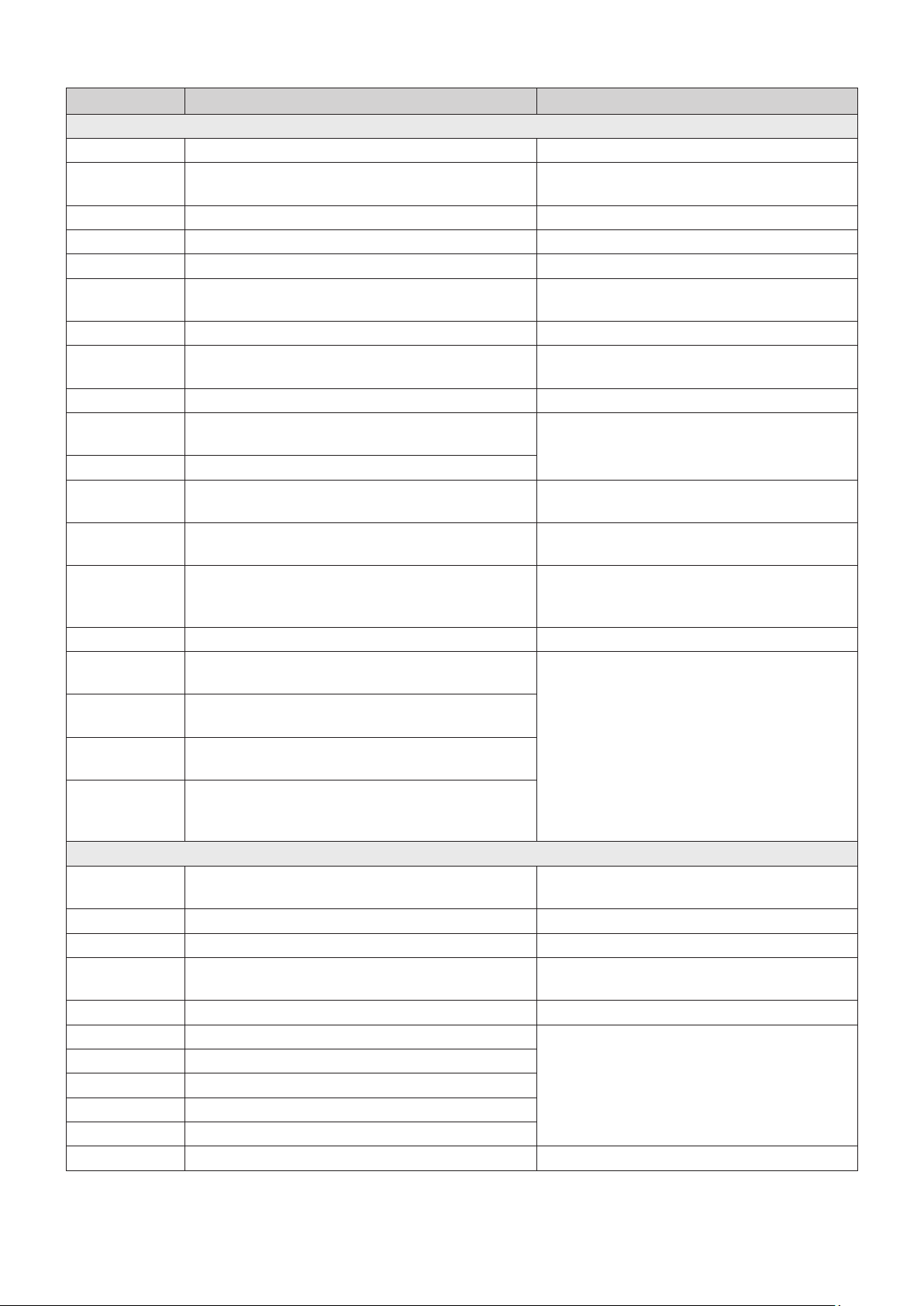
Country Contact Center
Web Site
■
Asia Paci c
CHINA 400-810-5858 www.samsung.com/cn/support
HONG KONG 3698 4698
www.samsung.com/hk/support (Chinese)
www.samsung.com/hk_en/support (English)
MACAU 0800 333 www.samsung.com/support
SINGAPORE 1800 7267864 | 1800-SAMSUNG www.samsung.com/sg/support
AUSTRALIA 1300 362 603 www.samsung.com/au/support
NEW ZEALAND
0800 726 786 (All Product)
0800 6 726 786
www.samsung.com/nz/support
VIETNAM 1800 588 889 www.samsung.com/vn/support
THAILAND
0-2689-3232
1800-29-3232 (Toll free)
www.samsung.com/th/support
MYANMAR +95-1-2399-888 www.samsung.com/mm/support
CAMBODIA
+855-23-993232
1800-20-3232 (Toll free)
www.samsung.com/th/support
LAOS +856-214-17333
MALAYSIA
1800-88-9999
+603-7713 7420 (Overseas contact)
www.samsung.com/my/support
INDONESIA
021-5699-7777
0800-112-8888 (All Product, Toll Free)
www.samsung.com/id/support
PHILIPPINES
1-800-10-726-7864 [ PLDT Toll Free ]
1-800-8-726-7864 [ Globe Landline and Mobile ]
02-422-2111 [ Standard Landline ]
www.samsung.com/ph/support
TAIWAN 0800-329-999 www.samsung.com/tw/support
INDIA
1800 40 SAMSUNG (1800 40 7267864)
(Toll-Free)
www.samsung.com/in/support
NEPAL
16600172667 (Toll Free for NTC Only)
9801572667
BANGLADESH
09612300300
08000300300 (Toll free)
SRI LANKA
+9411SAMSUNG (+94117267864)
+94117540540
+94115900000
■
Middle East
EGYPT
08000-7267864
16580
www.samsung.com/eg/support
IRAN 021-8255 [CE] www.samsung.com/iran/support
ISRAEL *6963 www.samsung.com/il/support/
SAUDI ARABIA (+966) 8002474357 (800 24/7 HELP)
www.samsung.com/sa/home
www.samsung.com/sa_en
PAKISTAN 0800-Samsung (72678) www.samsung.com/pk/support
U.A.E 800-SAMSUNG (800 - 726 7864)
www.samsung.com/ae/support (English)
www.samsung.com/ae_ar/support (Arabic)
OMAN 800-SAM CS (800-72627)
KUWAIT 183-CALL (183-2255)
BAHRAIN 8000-GSAM (8000-4726)
QATAR 800-CALL (800-2255)
TURKEY 444 77 11 www.samsung.com/tr/support
Country Contact Center
Web Site
NORWAY 815 56480 www.samsung.com/no/support
DENMARK 707 019 70 www.samsung.com/dk/support
FINLAND 030-6227 515 www.samsung.com/fi /support
SWEDEN 0771 726 786 www.samsung.com/se/support
POLAND
801-172-678* lub +48 22 607-93-33*
* (koszt połączenia według taryfy operatora)
http://www.samsung.com/pl/support/
HUNGARY 0680SAMSUNG (0680-726-7864) www.samsung.com/hu/support
AUSTRIA
0800-SAMSUNG (0800-7267864)
[Only for Dealers] 0810-112233
www.samsung.com/at/support
SWITZERLAND 0800 726 78 64 (0800-SAMSUNG)
www.samsung.com/ch/support (German)
www.samsung.com/ch_fr/support (French)
CZECH 800 - SAMSUNG (800-726786) www.samsung.com/cz/support
SLOVAKIA 0800 - SAMSUNG (0800-726 786) www.samsung.com/sk/support
CROATIA 072 726 786 www.samsung.com/hr/support
BOSNIA 055 233 999
www.samsung.com/support
MONTENEGRO 020 405 888
SLOVENIA 080 697 267 (brezplačna številka) www.samsung.com/si/support
SERBIA 011 321 6899 www.samsung.com/rs/support
ALBANIA 045 620 202 www.samsung.com/al/support
BULGARIA
*3000 Цена в мрежата
0800 111 31 , Безплатна телефонна линия
www.samsung.com/bg/support
ROMANIA
*8000 (apel in retea)
08008-726-78-64 (08008-SAMSUNG)
Apel GRATUIT
www.samsung.com/ro/support
CYPRUS 8009 4000 only from landline, toll free
www.samsung.com/gr/support
GREECE
80111-SAMSUNG (80111 726 7864) only from land line
(+30) 210 6897691 from mobile and land line
LITHUANIA 8-800-77777 www.samsung.com/lt/support
LATVIA 8000-7267 www.samsung.com/lv/support
ESTONIA 800-7267 www.samsung.com/ee/support
■
CIS
RUSSIA
8-800-555-55-55 (VIP care 8-800-555-55-88)
www.samsung.com/ru/support
BELARUS 810-800-500-55-500
www.samsung.com/support
GEORGIA 0-800-555-555
ARMENIA 0-800-05-555
AZERBAIJAN 0-88-555-55-55
KAZAKHSTAN
8-10-800-500-55-500
(GSM: 7799, VIP care 7700)
www.samsung.com/kz_ru/support
UZBEKISTAN 00-800-500-55-500 (GSM: 7799)
www.samsung.com/support
KYRGYZSTAN 00-800-500-55-500 (GSM: 9977)
TAJIKISTAN 8-10-800-500-55-500 (GSM: 8888)
MONGOLIA 1800-25-55
UKRAINE 0-800-502-000
www.samsung.com/ua/support (Ukrainian)
www.samsung.com/ua_ru/support (Russian)
MOLDOVA 0-800-614-40 www.samsung.com/support
Country Contact Center
Web Site
JORDAN
0800-22273
06 5777444
www.samsung.com/levant/support
SYRIA 962 5777444
LEBANON 1299
IRAQ 80010080
ALGERIA 3004
www.samsung.com/n_africa/supportTUNISIA 80 100 012
MOROCCO 080 100 22 55
■
Africa
SOUTH AFRICA 0860 SAMSUNG (726 7864)
www.samsung.com/support
NAMIBIA 08197267864
ZAMBIA 3434
MAURITIUS 800 2550
REUNION 0262 50 88 80
ANGOLA 917 267 864
ZIMBABWE 0808 0204
MOZAMBIQUE 847267864
NIGERIA 0800-726-7864
www.samsung.com/africa_en/support
GHANA 0800-100-077
COTE D’IVOIRE 8000-00-77
www.samsung.com/africa_fr/supportSENEGAL 800-00-0077
CAMEROON 67095-0077
KENYA 0800 545 545
www.samsung.com/support
UGANDA 0800 300 300
TANZANIA 0800 780 089
RWANDA 9999
BURUNDI 200
DRC 499999
SUDAN 1969
QUESTIONS OR COMMENTS?
COUNTRY CALL OR VISIT US ONLINE AT WRITE
IN THE US
1-800-SAMSUNG
(726-7864)
www.samsung.com/us/
support
Samsung Electronics America, Inc.
85 Challenger Road
Ridgeeld Park, NJ 07660
© 2018 Samsung Electronics Co., Ltd. All rights reserved.
The party responsible for product compliance:
Samsung Electronics Co., LTD.
America QA lab of Samsung
19 Chapin Rd. Building D,
Pine Brook, New Jersey 07058
Country Contact Center
Web Site
JORDAN
0800-22273
06 5777444
www.samsung.com/levant/support
SYRIA 962 5777444
LEBANON 1299
IRAQ 80010080
ALGERIA 3004
www.samsung.com/n_africa/supportTUNISIA 80 100 012
MOROCCO 080 100 22 55
■
Africa
SOUTH AFRICA 0860 SAMSUNG (726 7864)
www.samsung.com/support
NAMIBIA 08197267864
ZAMBIA 3434
MAURITIUS 800 2550
REUNION 0262 50 88 80
ANGOLA 917 267 864
ZIMBABWE 0808 0204
MOZAMBIQUE 847267864
NIGERIA 0800-726-7864
www.samsung.com/africa_en/support
GHANA 0800-100-077
COTE D’IVOIRE 8000-00-77
www.samsung.com/africa_fr/supportSENEGAL 800-00-0077
CAMEROON 67095-0077
KENYA 0800 545 545
www.samsung.com/support
UGANDA 0800 300 300
TANZANIA 0800 780 089
RWANDA 9999
BURUNDI 200
DRC 499999
SUDAN 1969