2
ENG
ENGLISH
CONTENTS
3 IMPORTANT PRECAUTIONS
3 Electrical Power Related Precautions
4 Precautions in installing the Product
4 Precautions in Moving the Product
5 Precautions in Using/Cleaning the
Product
5 On Disposal (Only, Hg lamp used LCD
Monitor)
6 INSTALLATION PREPARATION
6 Accessories
7 Mounting Holes
10 Portrait Layout
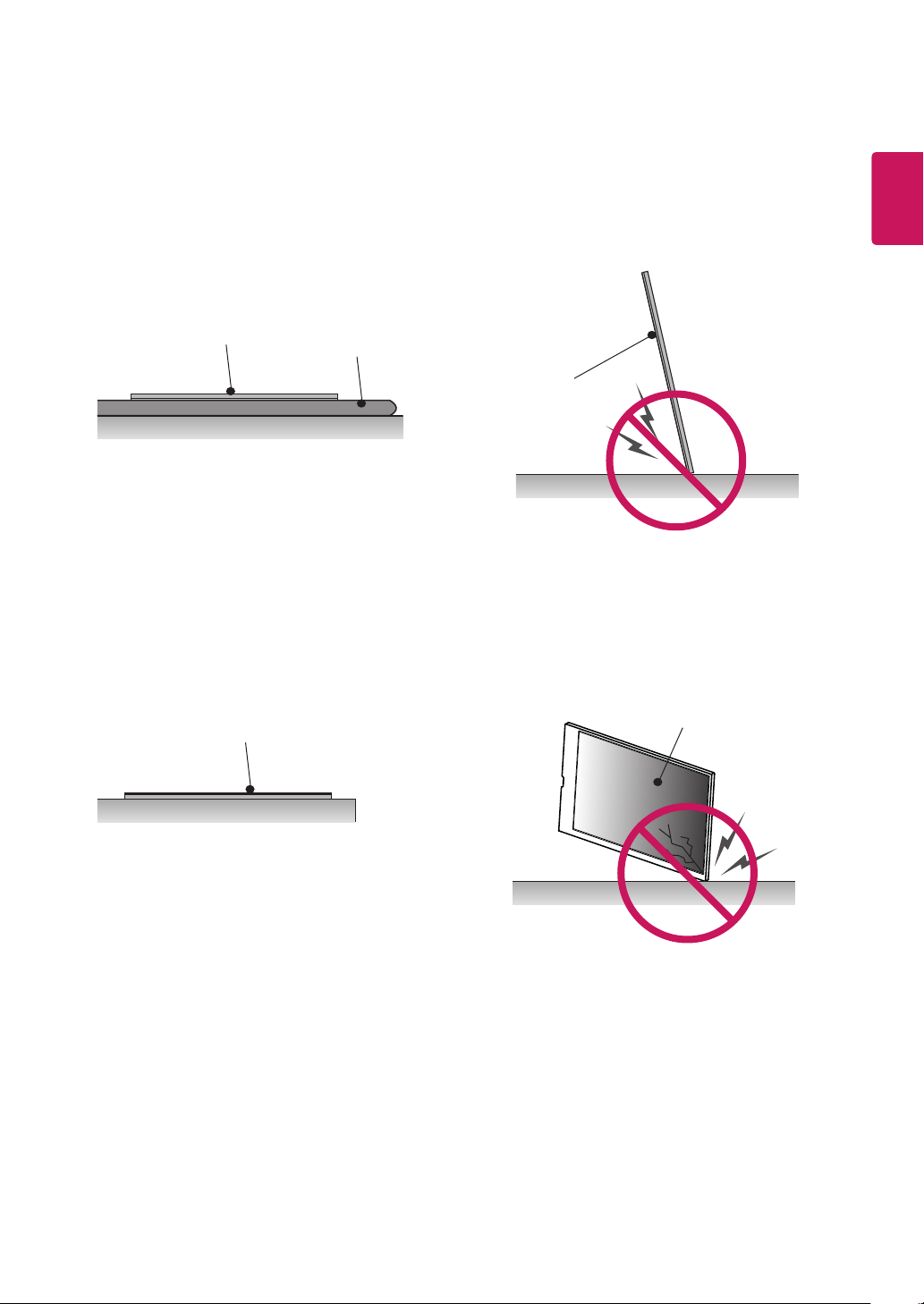
11 Storage Method for Panel Protection
11 - Correct Method
11 - Incorrect Method
12 PRODUCT INSTALLATION
12 Installing an LVDS Cable
13 47/55WFB LVDS connection
15 49WFB LVDS connection
17 TSP500-M/TSP510-M LVDS connection
19 Lighting Installation
20 Installation in Enclosure
21 Precaution
21 - Correct Method
21 - Incorrect Method
22 TROUBLESHOOTING
23 SPECIFICATIONS
26 LVDS PIN MAP GUIDE
The warranty will not cover any damages caused by using the product in an excessively dusty
environment.
NOTE
3
ENG
ENGLISH
IMPORTANT PRECAUTIONS
WARNING
• Indoor Use Only.
Please read these safety precautions carefully before using the product.
Electrical Power Related Precautions
• Use only the power cord supplied with the unit or another manufacturer's authorized cord.
►Failure to do so may result in fire or electrical shock or damage to the product.
• Use only a properly grounded plug and receptacle.
►If you do not you may be electrocuted or injured. Or the product might be damaged.
• Do not use a damaged or loose plug.
►This may cause electrical shock or fire.
• Operate the display only from a power source(i.e. voltage) indicated in the product specication.
►Otherwise the product can be damaged, fire can occur or you may be electrocuted. If you are not sure what type of
power supply you have, consult a certified electrician.
• In the presence of thunder and lightning, never touch the power cord and signal cable because it can be
very dangerous.
►It can cause electric shock.
• Do not connect several extension cords, electrical appliances or electrical heaters to a single outlet. Use a
power bar with a grounding terminal designed for exclusive use with the computer.
►A fire can break out due to overheating
.
• Do not touch the power plug with wet hands. Additionally, if the cord pin is wet or covered with dust, dry
the power plug completely or wipe dust off before plugging in the cord.
►You may be electrocuted due to excess moisture.
• If you don’t intend to use the product for a long time, unplug the power cable from the product.
►Covering dust can cause a fire, or insulation deterioration can cause electric leakage, electric shock or fire.
• Insert the power plug rm so it cannot come loose.
►A loose connection can cause fire.
• Hold the plug when pulling out the power cable. Do not pull the plug out by the wire. Do not bend the
power cord with excessive force or put heavy objects on the power cord.
►The power line can be damaged, which may cause electric shock or fire.
• Do not insert metal or other conductive materials into the product openings. Additionally, do not touch the
power cable right after plugging into the wall input terminal.
►You may be electrocuted.
• The appliance coupler is used as the disconnect device.
• Please make sure the device is installed near the wall outlet to which it is connected and that the outlet is
easily accessible.
• Do not unplug the power cord while the product is in use.
►Electrical shock can damage the product
.
• As long as this unit is connected to the AC wall outlet, it is not disconnected from the AC power source
even if the unit is turned off.
WARNING
WARNING
Failure to follow those warnings may result in
death, serious injury or damage to the product
or other property.

4
ENG
ENGLISH
Precautions in installing the Product
• Keep away from heat sources like heaters or open ames.
►Electrical shock, fire, malfunction or deformation may occur.
• Keep the packing anti-moisture material or vinyl packing out of the reach of children.
►Anti-moisture material is harmful if swallowed. If swallowed by mistake, force the patient to vomit and visit the nearest
hospital. Additionally, vinyl packing can cause suffocation. Keep it out of the reach of children.
• Do not put heavy objects on the product on sit upon it.
►If the product collapses or is dropped, you may be injured. Children must pay particular attention.
• Do not leave the power or signal cable where someone can trip over it.
►The passerby can falter, which can cause electrical shock, fire, product breakdown or injury.
• Install the product in a neat and dry place. Do not use near water.
►Dust or moisture can cause electrical shock, fire or product damage.
• Do not add accessories that have not been designed for this display.
• If you smell smoke or other odors or hear a strange sound from the product unplug the power cord and
contact LG Customer Service.
►If you continue to use without taking proper measures, electrical shock or fire can occur.
• If you dropped the product or the case is broken, turn off the product and unplug the power cord.
►If you continue to use without taking proper measures, electrical shock or fire can occur. Contact LG Customer Service.
• Do not drop an object on or apply impact to the product. Do not throw any toys or objects at the product.
►It can cause injury to humans, problems to the product and damage the display.
• Keep out of reach of children and do not place toys near the product.
• Make sure the product ventilation hole is not blocked. Install the product more than 10cm from the wall.
►If you install the product too close to the wall, it may be deformed or fire can break out due to internal heat build-up.
• Do not cover the product with cloth or other material (eg. plastic) while plugged in.
►The product can be deformed or fire can break out due to internal overheating.
• Place the product on a at and stable surface that is large enough to support the product.
►If the product is dropped, you may be injured or the product may be broken.
• Install the product where no Electromagnetic Interference occurs.
• Keep the product away from direct sunlight.
►The product can be damaged.
• Do not place the product on the oor.
►Small Children and others may trip over it.
• Do not install this product on a wall if it could be exposed to oil or oil mist.
►This may damage the product and cause it to fall.
• For displays with glossy bezels the user should consider the placement of the display as the bezel may
cause disturbing reections from surrounding light and bright surfaces.
Precautions in Moving the Product
• Make sure to turn off the product.
►You may be electrocuted or the product can be damaged.
• Make sure to remove all cables before moving the product.
►You may be electrocuted or the product can be damaged.
• When lifting or moving the product, do not hold it upside down while holding only the stand.
►This may cause the product to fall resulting in damage or injury.
• Do not shock the product when moving it.
►You may be electrocuted or the product can be damaged.
• Make sure the panel faces forward and hold it with both hands to move.
►If you drop the product, the damaged product can cause electric shock or fire.
• Do not place the product face down.
►This may damage the TFT-LCD screen.
WARNING
WARNING
5
ENG
ENGLISH
WARNING
Precautions in Using/Cleaning the Product
• Do not attempt to disassemble, repair or modify the product yourself.
►Fire or electric shock can occur.
►Contact LG Customer Service for repair.
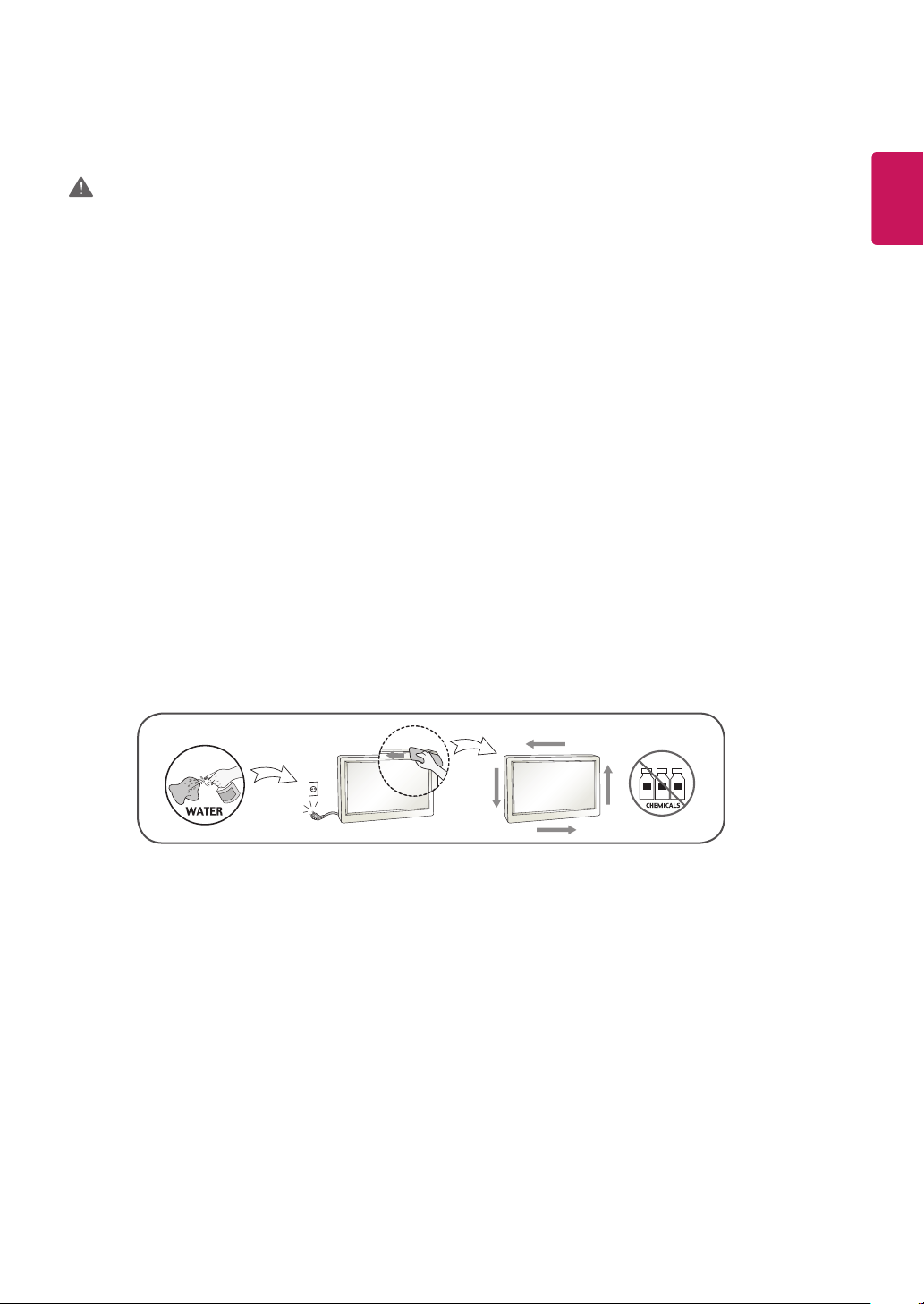
• When cleaning the product, unplug the power cord and scrub gently with a soft cloth to prevent scratching.
Do not clean with a wet cloth or spray water or other liquids directly onto the product. An electric shock
may occur. (Do not use chemicals such as benzene, paint thinners or alcohol)
• Keep the product away from water.
►Fire or electric shock accident can occur.
• Avoid high temperatures and humidity.
• Do not put or store ammable substances near the product.
►There is a danger of explosion or fire.
• Keep the product clean at all times.
• Take a comfortable and natural position when working with the product.
• Take a regular break when working with the product for a long time.
• Do not press on the panel with a hand or sharp object such as nail, pencil or pen, or make a scratch on it.
• Keep proper distance from the product and rest from time-to-time.
►Your vision may be impaired if you look at the product too closely or for too long.
• Set the appropriate resolution by referring to the User’s Guide.
• Keep small accessories out of the reach of children.
• Displaying a still image for long time on the monitor may leave persistent image or stain on the monitor
screen. To avoid this problem, use a screen saver and power off when this product is not used. Persistent
image or stain caused by long time usage are not covered by the warranty on this product.
• Do not use products using high voltage around the Monitor. (ex. Electrical Swatter)
►Monitor may have malfunction as its electrical shock.
• Spray water onto a soft cloth 2 to 4 times, and use it to clean the front frame;wipe in one direction only.
Too much moisture may cause staining.
On Disposal (Only, Hg lamp used LCD Monitor)
• The uorescent lamp used in this product contains a small amount of mercury.
• Do not dispose of this product with general household waste.
• Disposal of this product must be carried out in accordance to the regulations of your local authority.
6
ENG
ENGLISH
INSTALLATION PREPARATION
Accessories
Check your product box for the following items. If there are any missing accessories, contact the local
dealer where you purchased your product. The illustrations in this manual may differ from the actual product
and accessories.
Card and book
Do not use any unapproved or counterfeit parts or accessories to ensure the safety and product life
span.
Any damages or injuries by using unapproved items are not covered by the warranty.
The accessories provided with your product may vary depending on the model or region.
Product specifications or contents in this manual may be changed without prior notice due to upgrade
of product functions.
LVDS cable is optional and not provided with the product. Please refer to
LVDS Pin Map Guide
for
the LVDS cable assembly.
This product is used as a built-in product installed inside of an enclosure and cooler.
Long-term storage may cause staining on the extruded aluminum from oxidation.
NOTE
CAUTION
7
ENG
ENGLISH
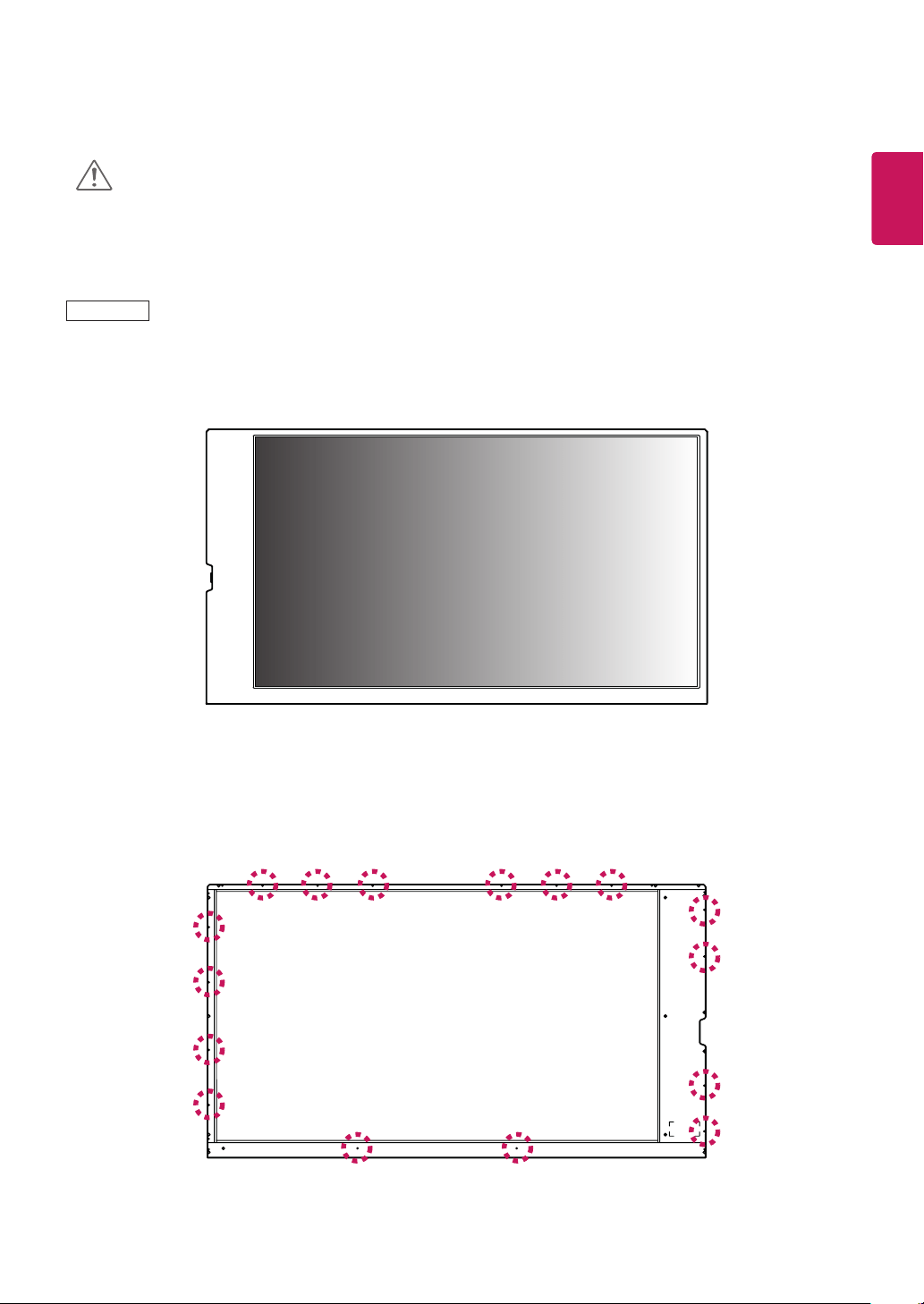
< Front of the product >
< Rear of the product >
This product has the front and back sides. Make sure the product is installed with the front side facing
forward.
Image is displayed reversely on the back side.
CAUTION
Mounting Holes
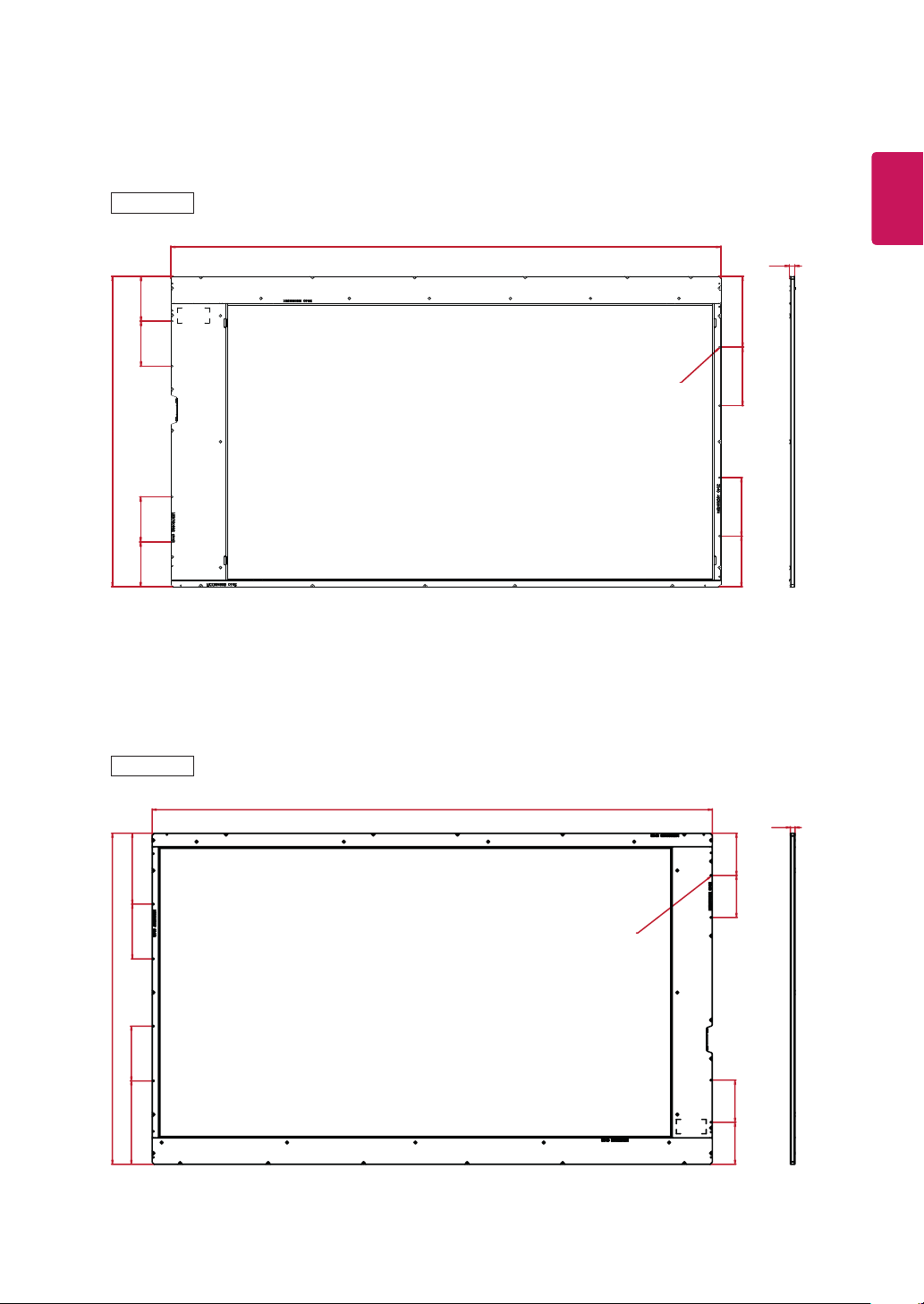
Use M3 screws to mount the monitor. There are 16 positions for screws on the rear side of the product.
47WFB

8
ENG
ENGLISH
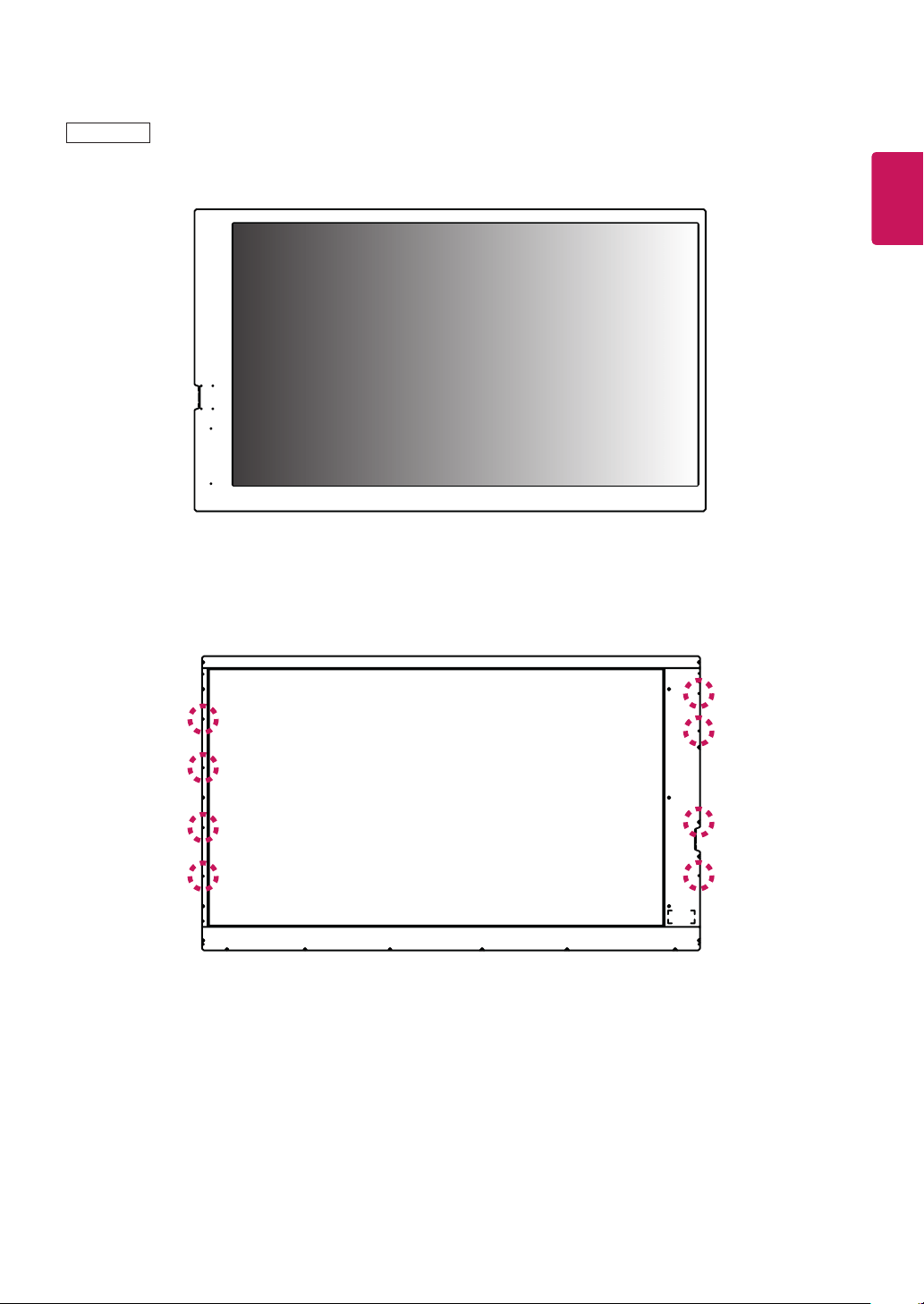
< Front of the product >
< Rear of the product >
Use M3 screws to mount the monitor. There are 8 positions for screws on the rear side of the product.
49WFB
9
ENG
ENGLISH
Use M3 screws to mount the monitor. There are 8 positions for screws on the rear side of the product.
< Front of the product >
< Rear of the product >
55WFB
10
ENG
ENGLISH
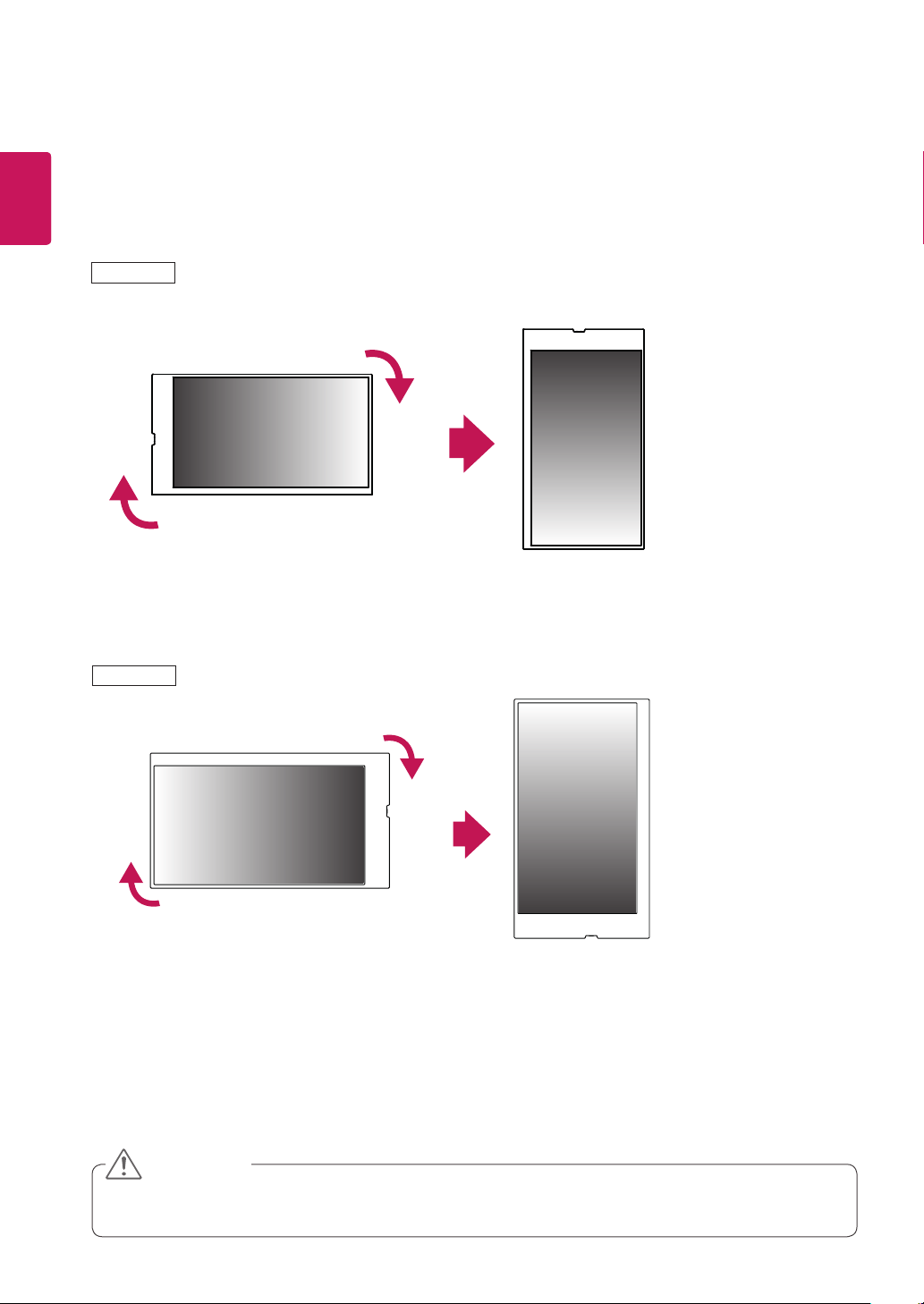
Portrait Layout
To install in portrait mode, rotate the set clockwise 90 degrees when looking at from the front.
The portrait mode is only available on the scaler board. (The scaler board should support portrait mode.)
The scaler board is optional and it is not part of the product.
47/55WFB
49WFB
CAUTION
11
ENG
ENGLISH
Correct Method Incorrect Method
Storage Method for Panel Protection
Panel
Cushion
When laying the product on a flat floor, pit it face
down on a cushion or blanket to prevent scratch-
ing and damage.
If there is no a cushion or a soft cloth available,
ensure the floor is clean. Then lay the product
down carefully with the panel facing either upward
or downward. At this time, make sure that no
object falls on the panel.
Panel
Panel
Panel
If the product is tilted onto the bezel, the bottom of
the panel may be damaged.
If the product is tilted onto the edge of the panel,
the panel may be damaged.
12
ENG
ENGLISH
PRODUCT INSTALLATION
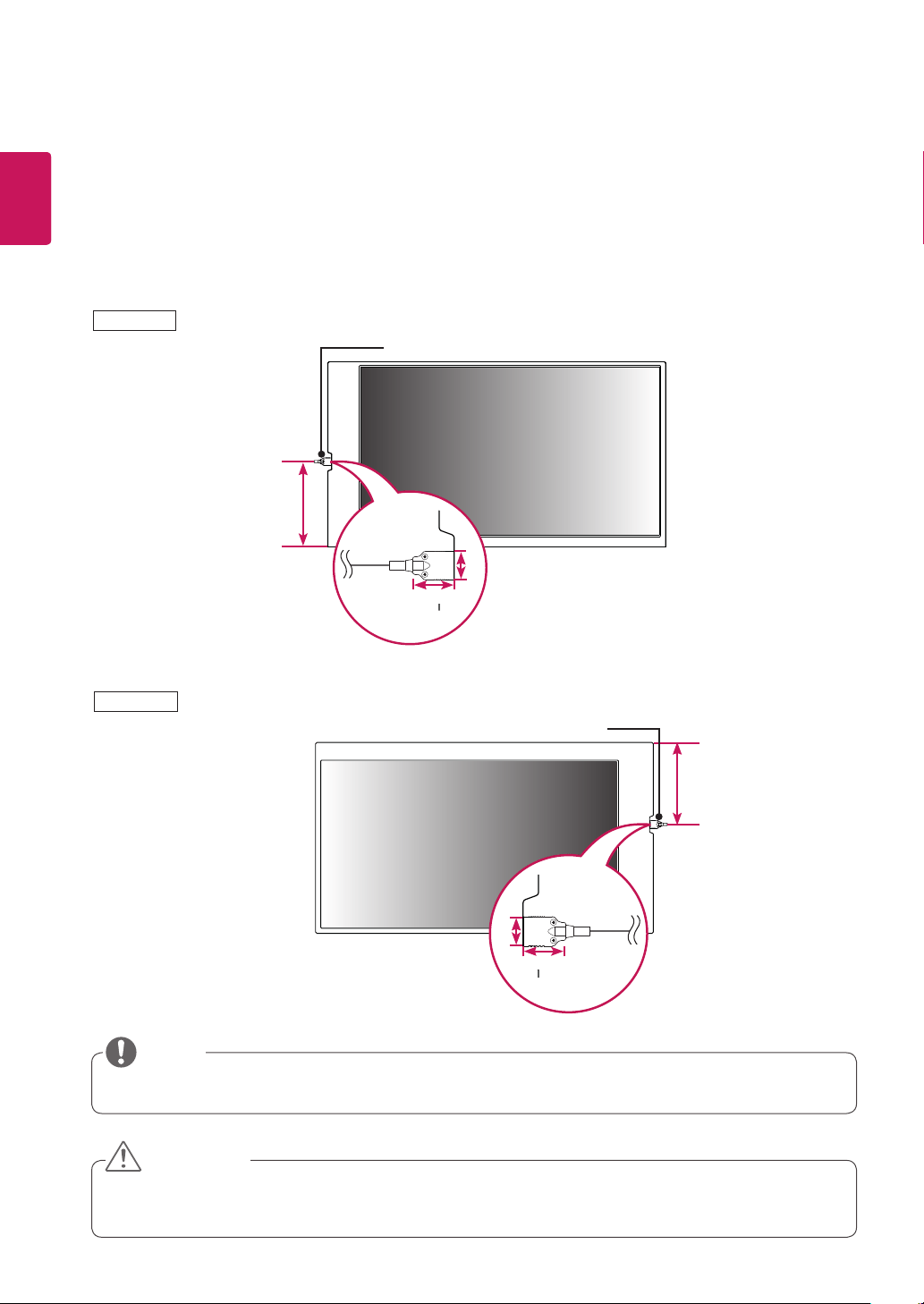
Installing an LVDS Cable
The LVDS cable port is located as shown in the figure below.
When installing the product, make sure there is enough space to install the LVDS cable.
LVDS cable is optional and not provided with the product.
Connect the cable when the scaler board is off.
Make sure to connect the cable correctly.
38 mm
26 mm
297 mm
38 mm
26 mm
297 mm
LVDS Cable (not included)
LVDS Cable (not included)
47/55WFB
49WFB
CAUTION
NOTE
13
ENG
ENGLISH
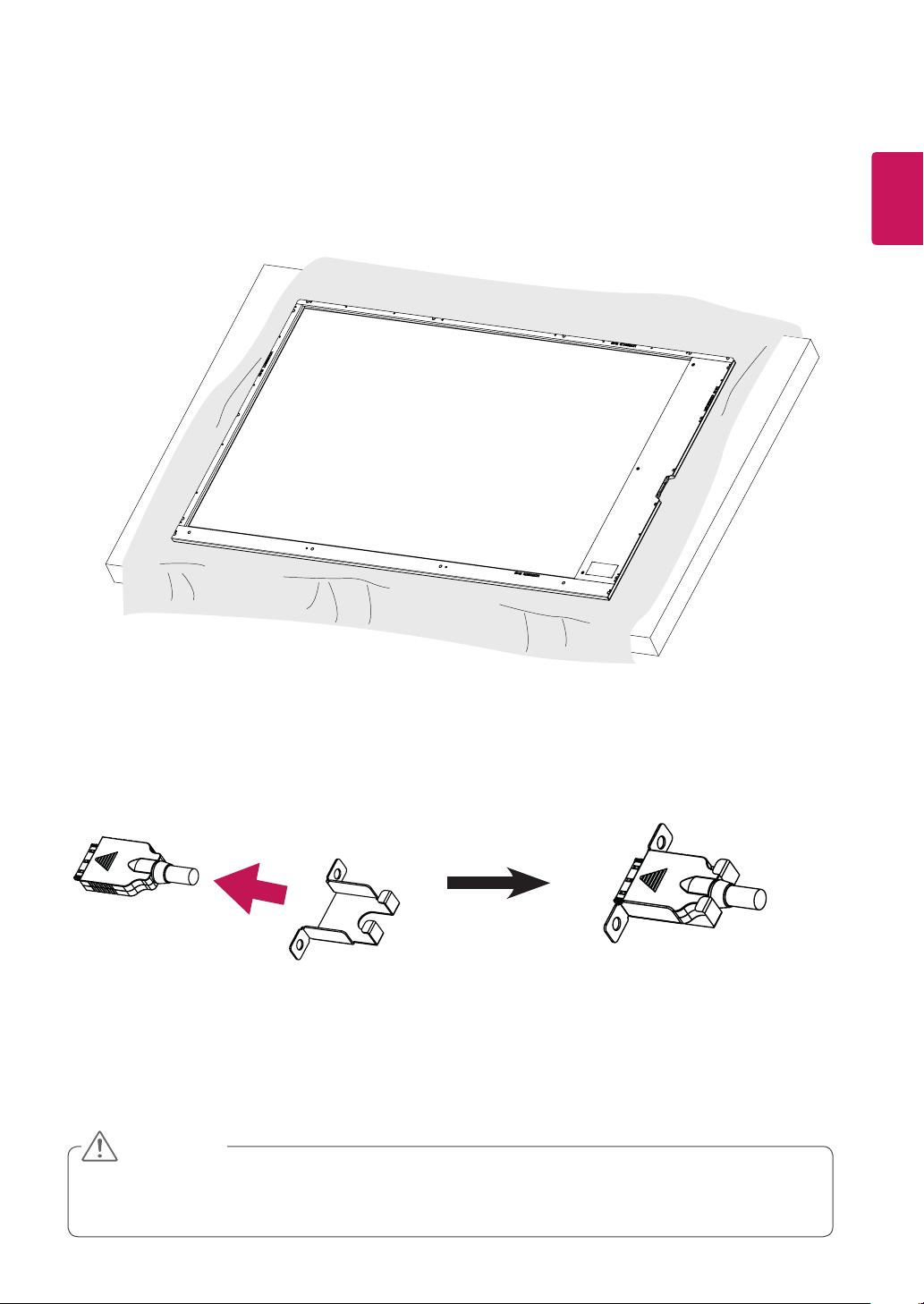
47/55WFB LVDS connection
1
Place a soft cloth on the table and put the set on it as illustrated.
2
Put a LVDS cable in a holder. Cable head has to be properly oriented.
To prevent the LVDS cable from being separated, you must use a LVDS holder.
Check the direction of the LVDS cable to prevent damage to the LVDS cable.
CAUTION

14
ENG
ENGLISH
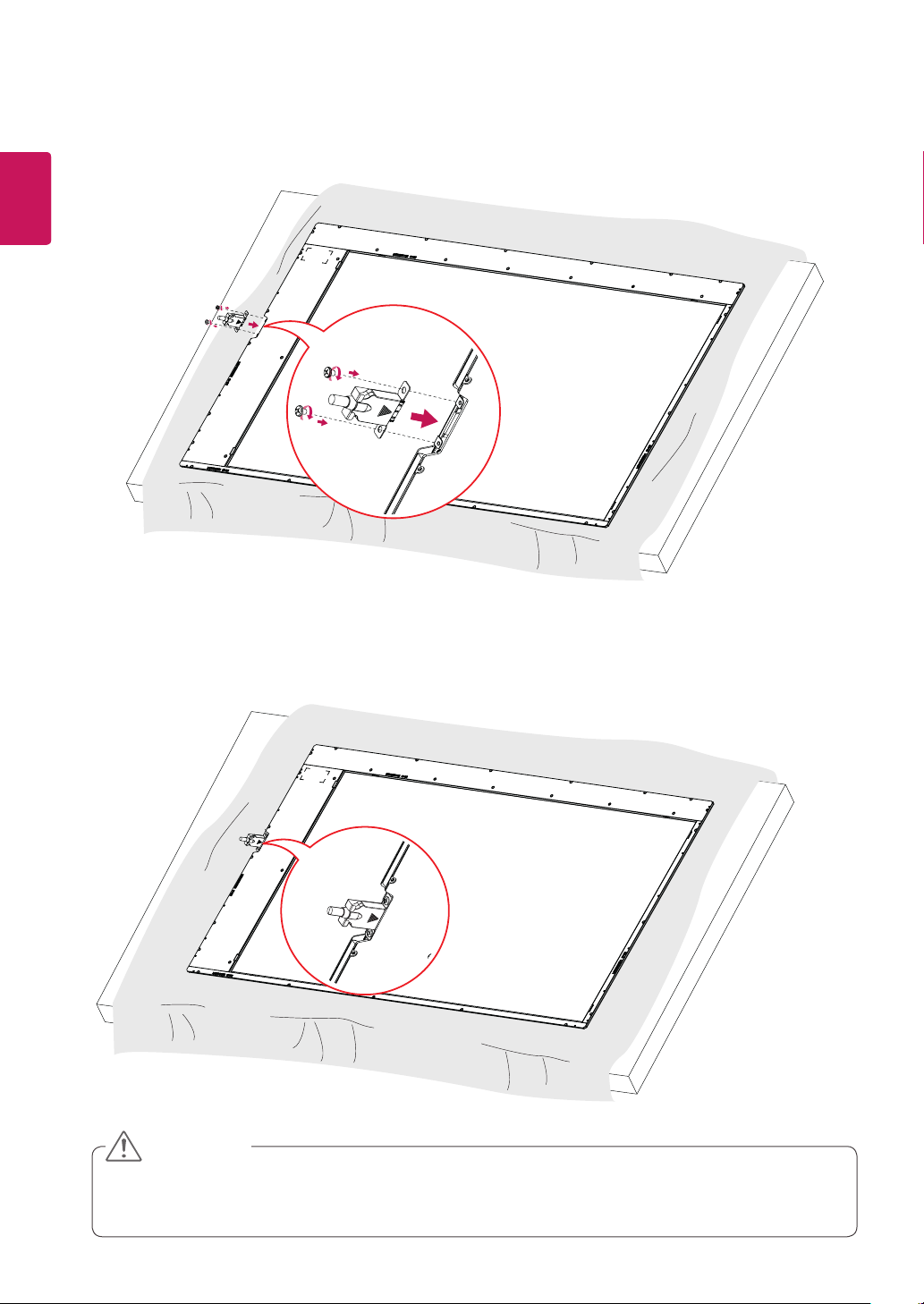
3
Attach LVDS cable and holder to the set with two screws. (These screws are included with TSP500-M/
TSP510-M.)
4
Cable head has to be toward set back. (Label is located on set back.)
To prevent the LVDS cable from being separated, you must use a LVDS holder.
Check the direction of the LVDS cable to prevent damage to the LVDS cable.
CAUTION

15
ENG
ENGLISH
49WFB LVDS connection
1
Place a soft cloth on the table and put the set on it as illustrated.
2
Put a LVDS cable in a holder. Cable head has to be properly oriented.
To prevent the LVDS cable from being separated, you must use a LVDS holder.
Check the direction of the LVDS cable to prevent damage to the LVDS cable.
CAUTION
16
ENG
ENGLISH
3
Attach LVDS cable and holder to the set with two screws. (These screws are included with TSP500-M/
TSP510-M.)
4
Cable head has to be toward set back. (Label is located on set back.)
To prevent the LVDS cable from being separated, you must use a LVDS holder.
Check the direction of the LVDS cable to prevent damage to the LVDS cable.
CAUTION
17
ENG
ENGLISH
TSP500-M/TSP510-M LVDS connection
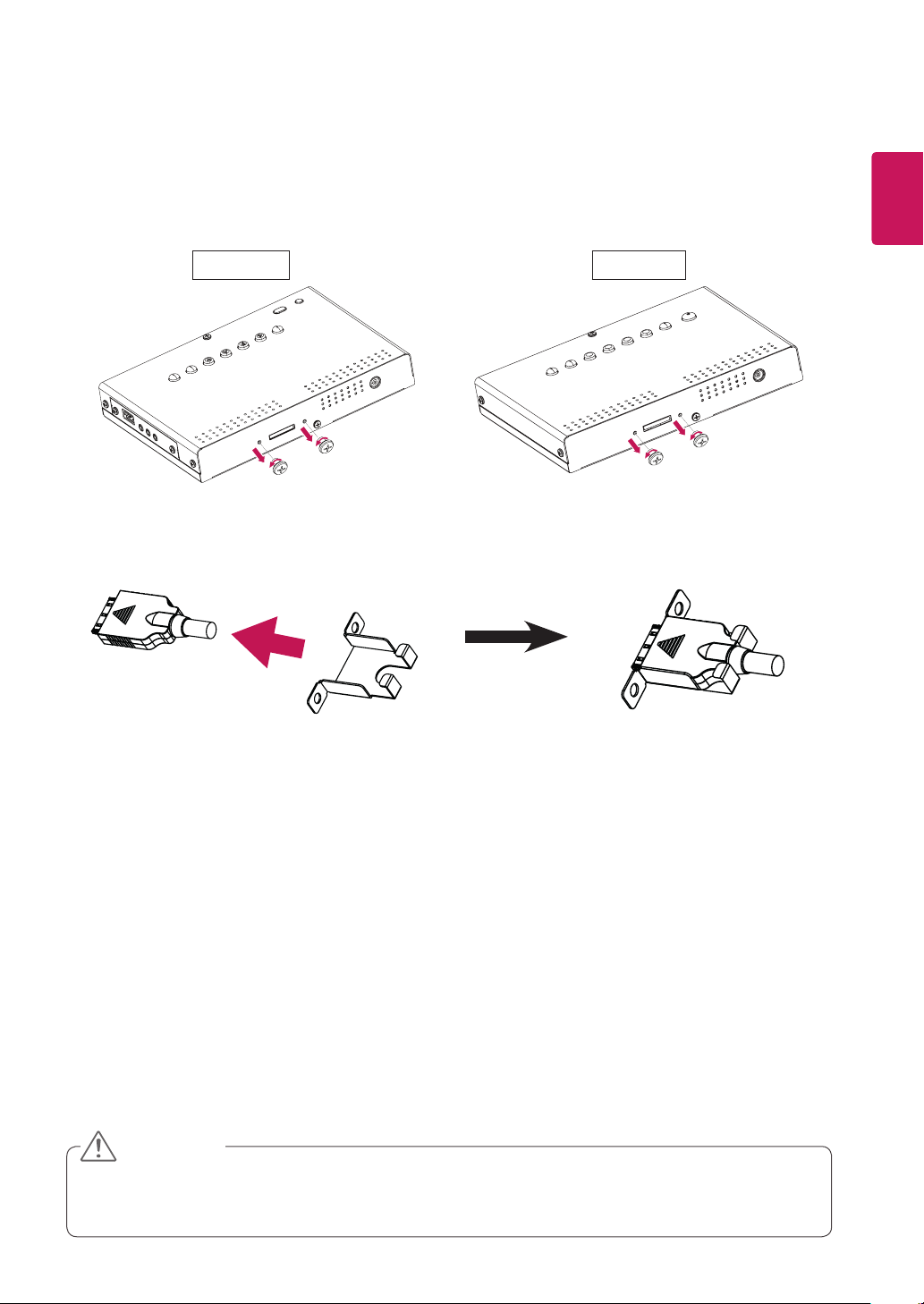
1
Unscrew two screws to assemble LVDS cable and holder. Don’t throw away the screws.
TSP500-M TSP510-M
2
Put a LVDS cable in a holder. Cable head has to be properly oriented.
To prevent the LVDS cable from being separated, you must use a LVDS holder.
Check the direction of the LVDS cable to prevent damage to the LVDS cable.
CAUTION
18
ENG
ENGLISH
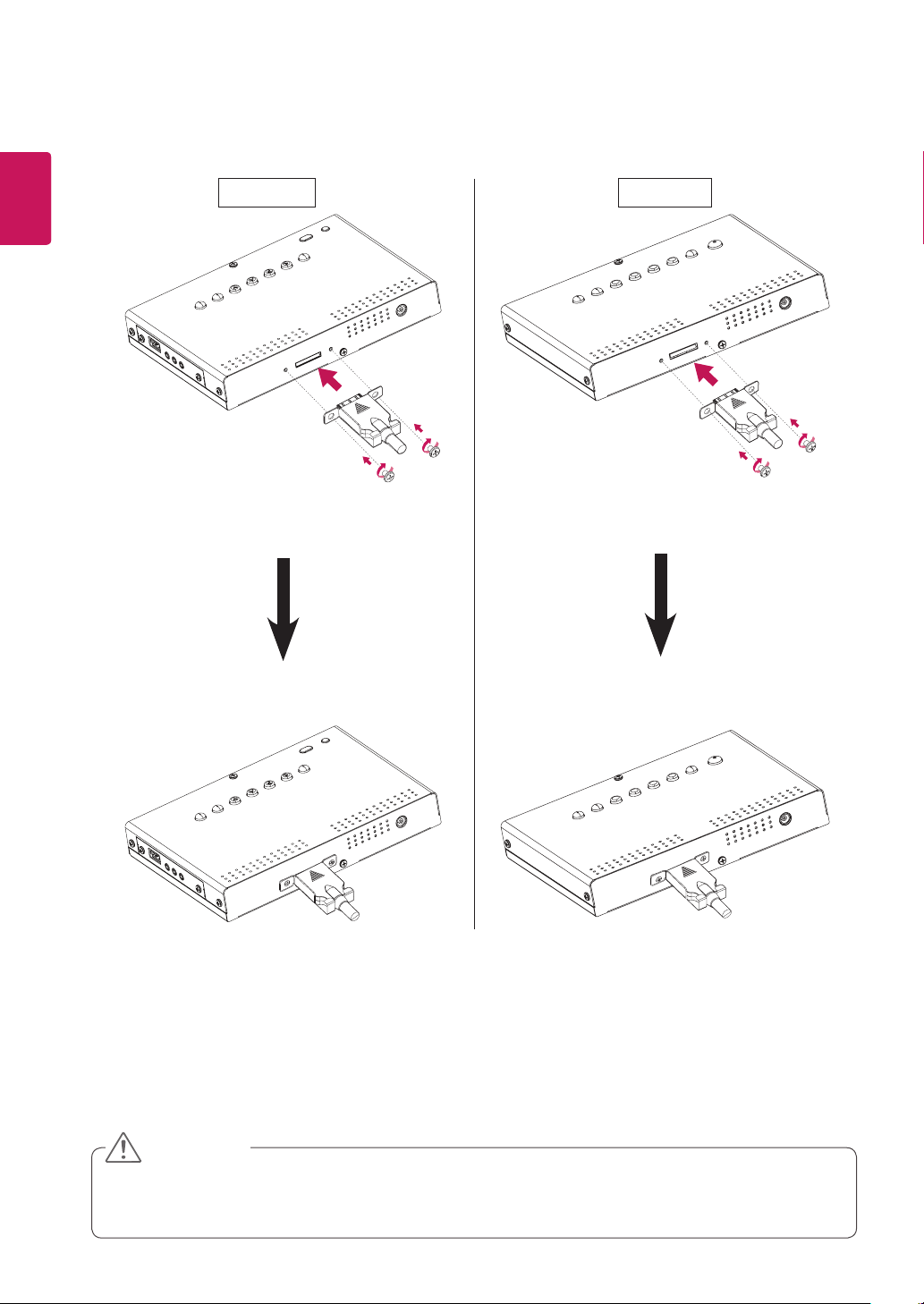
To prevent the LVDS cable from being separated, you must use a LVDS holder.
Check the direction of the LVDS cable to prevent damage to the LVDS cable.
CAUTION
3
Attach LVDS cable and holder to TSP500-M/TSP510-M with two screws saved in step 1.
TSP500-M TSP510-M

19
ENG
ENGLISH
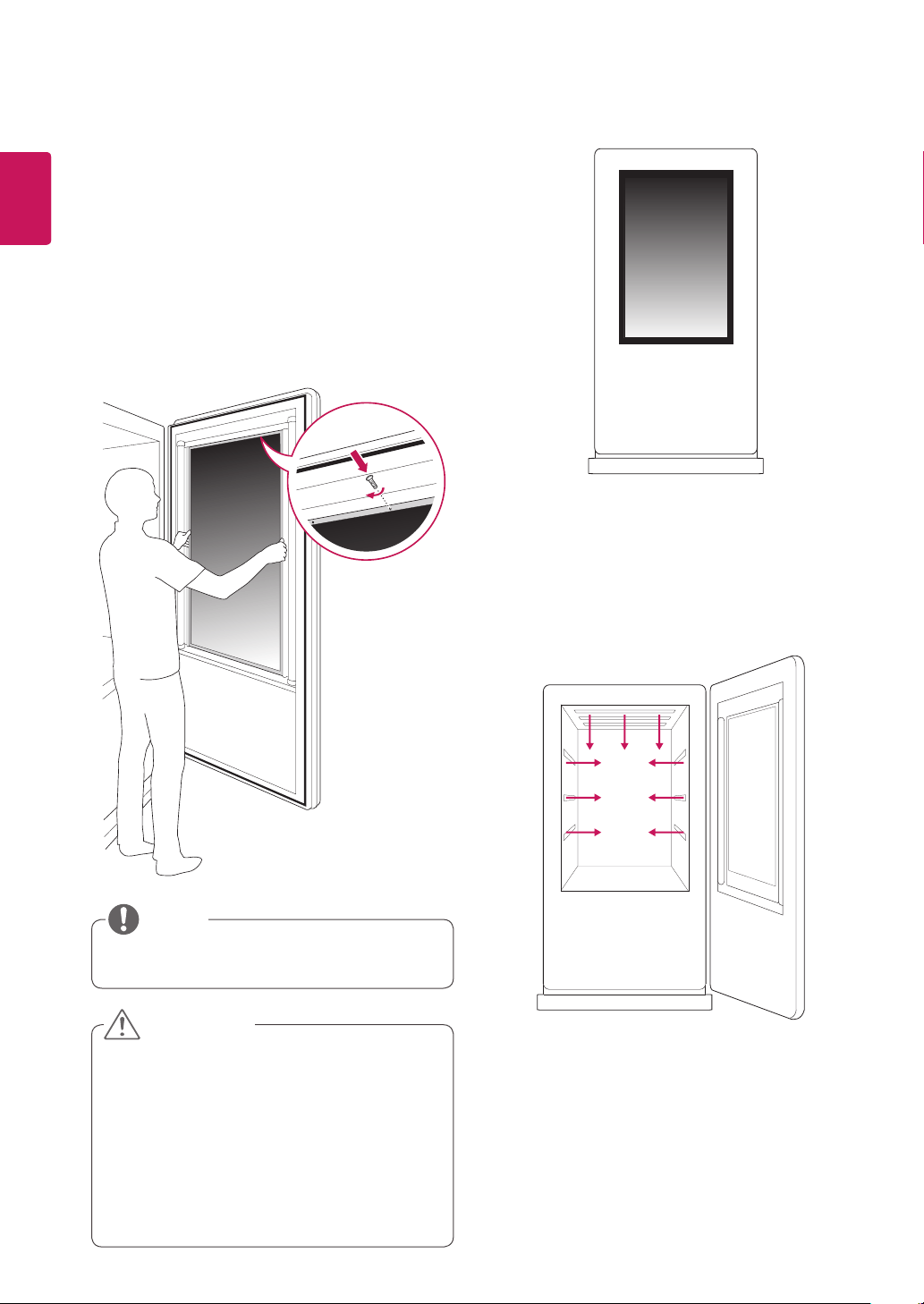
Lighting Installation
This product must be installed with backlighting.
Lighting must be installed behind the product so that the display can be seen clearly.
If something obstructs the backlighting, additional lighting may be required.
Lighting
Lighting
Additional lighting
Additional lighting
Object
600 lux or more
(When the Full Screen
is White.)
600 lux or more
(When the Full Screen
is White.)
20
ENG
ENGLISH
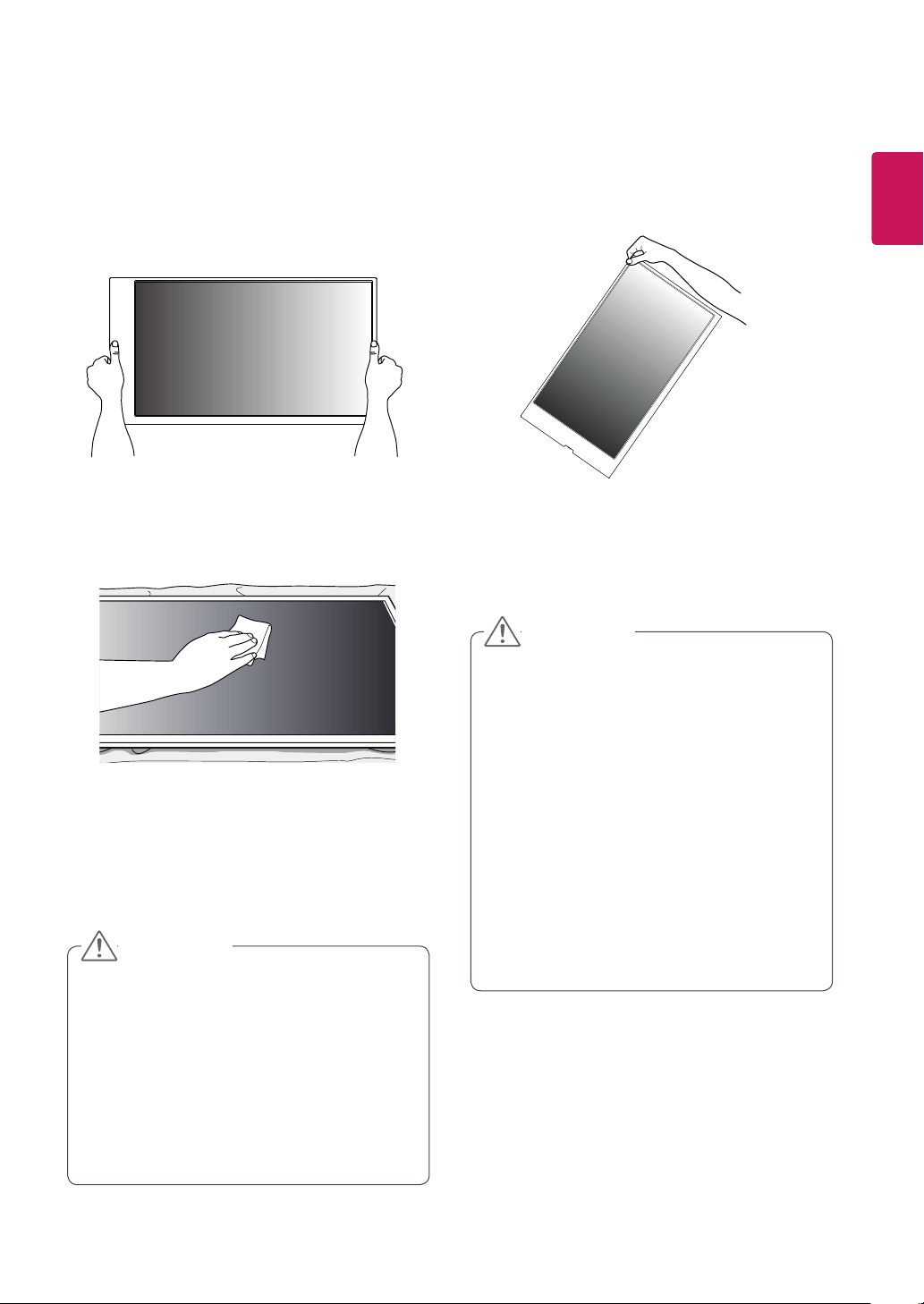
<Example of the product in the enclosure>
<Example of the lighting installation>
Lighting must be installed in the enclosure.
Installation in Enclosure
Install the product in the enclosure. Wear working
gloves when installing the product. Do not use
bare hands. Otherwise, it may cause personal
injury.
1
Place the product in the enclosure.
2
Attach the product using the prepared screw
holes and an additional enclosure guide frame.
This product can be installed in various
locations besides the enclosure.
The panel of this product is so thin that it can
be easily broken when it is exposed to the
outside. Use a clear protective cover to keep
the product from exposure to the elements.
When installing the product in its
housing,make sure that the framework of
the product is grounded. (This helps prevent
the product being damaged in the event of
thunder and lightning.)
CAUTION
NOTE
21
ENG
ENGLISH
Precaution
Do not lift up the product by holding a corner.Do not hold the screen area when holding the
product.
Use a soft cloth moistened with n-hexane to
remove dust or stains on the screen.
Correct Method Incorrect Method
Make sure the power is disconnected before
moving or installing the product. Otherwise
electric shock may occur.
Wear working gloves when installing the
product. Do not use bare hands. Otherwise,
it may cause personal injury.
If you install the product on a ceiling or
slanted wall, it may fall and result in severe
injury.
Do not fasten the screws too tightly; this may
cause damage to the product and void your
warranty.
Use M3 x L4 screws to mount the monitor.
Any damages or injuries caused by misuse
or use of improper accessories are not
covered by the warranty.
If a fixed image displays on the screen for a
long period of time, it will be imprinted and
become a permanent disfigurement on the
screen. This is image burn or burn-in and not
covered by the warranty.
To prevent image sticking, do not play a still
image for more than two hours.
Recommended operation time for optimum
performance and reliability is 12 hours or
less per day.
CAUTION
CAUTION
22
ENG
ENGLISH
TROUBLESHOOTING
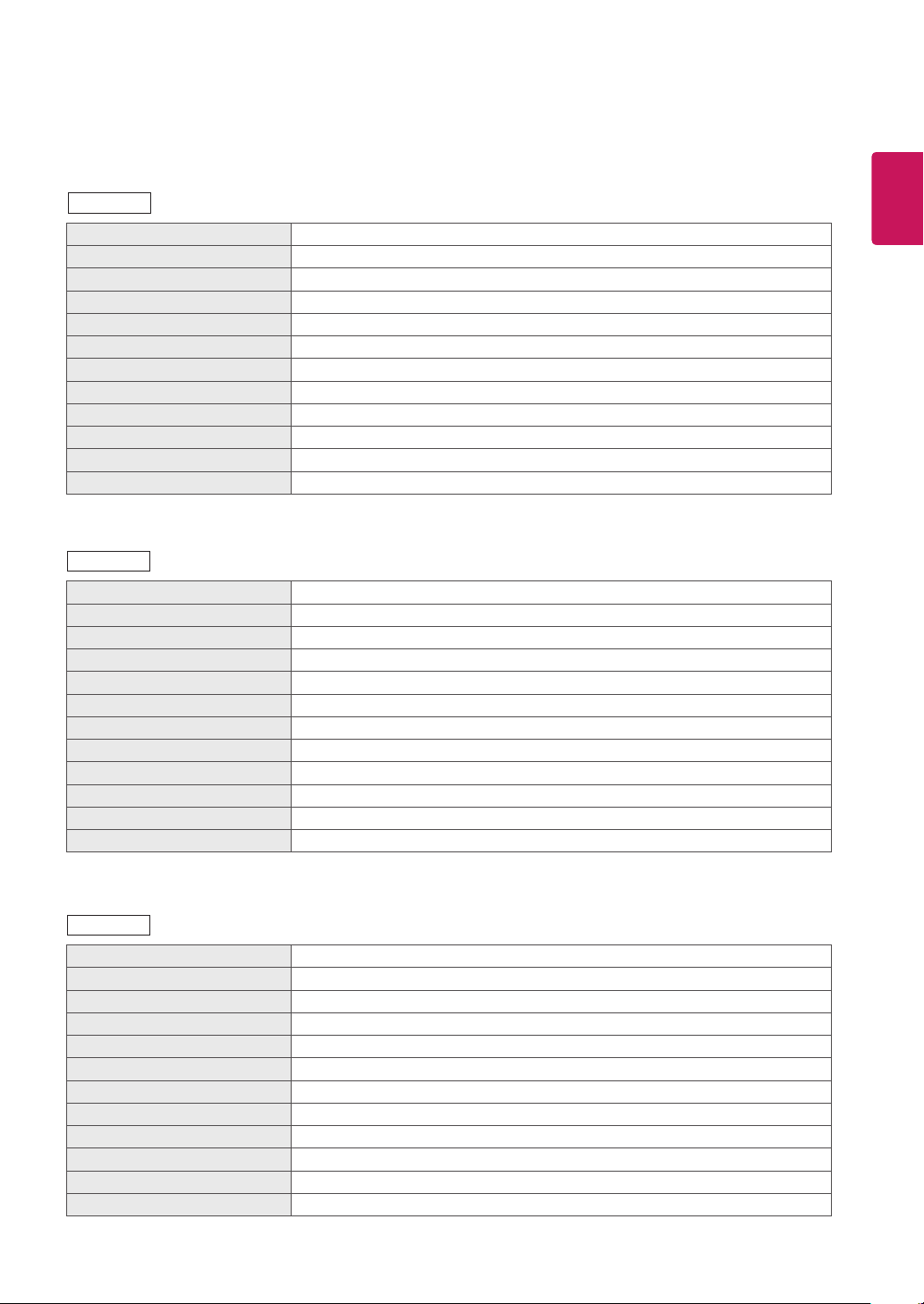
After-image appears on the product.
Problem Resolution
After-image appears when the
product is turned off.
If you use a fixed image for a long time, the pixels may be damaged
quickly. Use the screen-saver function.
When a dark image is displayed on the screen after an image with
high contrast (black and white or gray), this may cause image sticking.
This is normal for LCD screen.
Screen color is abnormal.
Problem Resolution
Screen color is unstable or
mono-colored.
Check the connection status of the LVDS cable.
Check whether the LVDS cable is connected correctly following the
LVDS Pin Map Guide.
Do black spots appear on the
screen?
Several pixels (red, green, white or black color) may appear on the
screen, which can be attributable to the unique characteristics of the
LCD panel. It is not a malfunction of the LCD.
23
ENG
ENGLISH
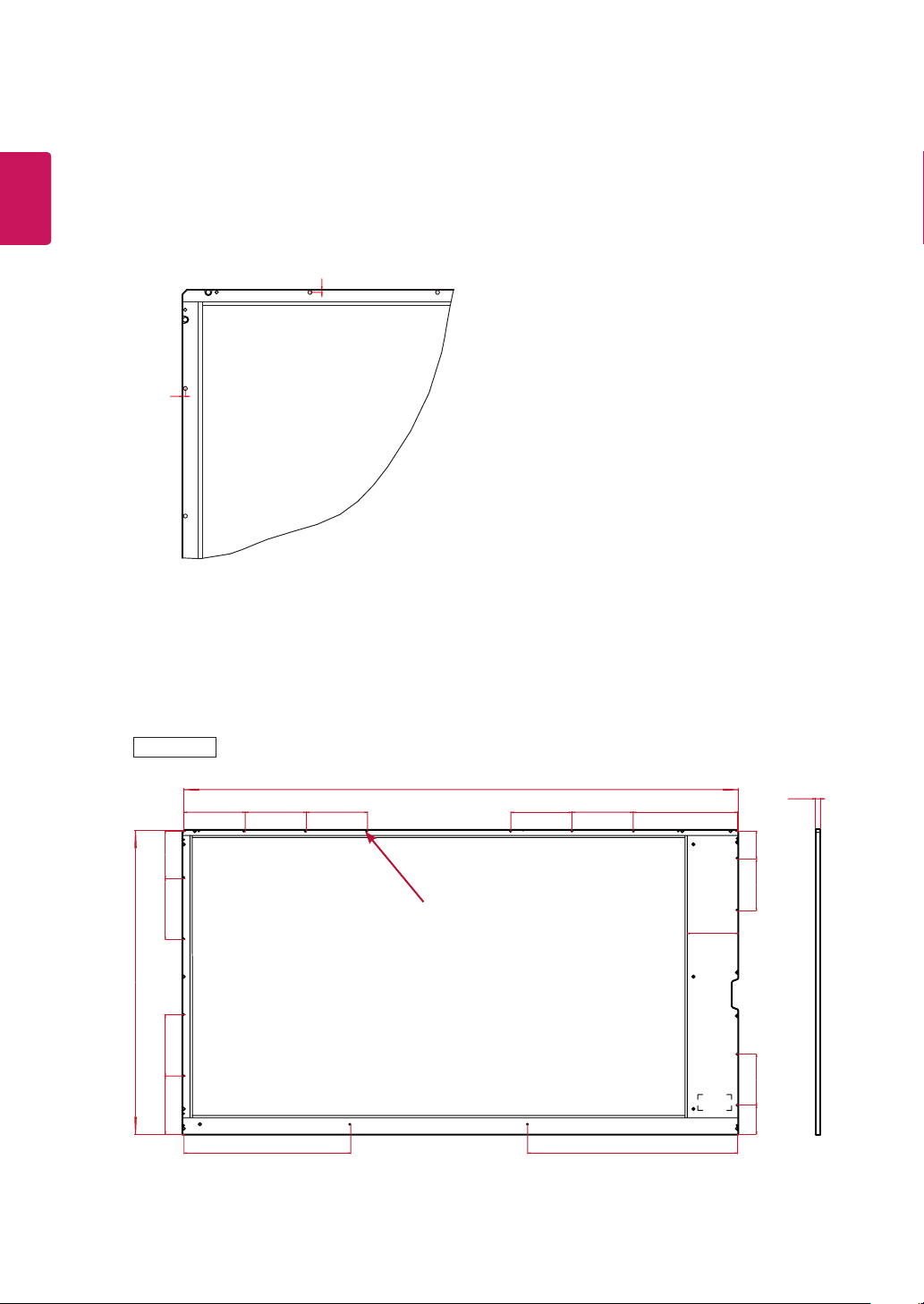
SPECIFICATIONS
Screen type Liquid Crystal Display (LCD) Screen
Dimension (W x H x D) 1176.58 mm x 645.02 mm x 11.2 mm (46.3 inches x 25.3 inches x 0.4 inches)
Pixel Pitch 0.5415 mm x 0.5415 mm
Pixel Format 1920 horiz. by 1080 vert. Pixels, RGB stripe arrangement
Color Depth 8Bit (D), 16.7 Million colors
Transmittance (With POL) 6.4 % (Typ.)
Viewing Angle (CR>10) Viewing angle free ( R/L 178 (Min.), U/D 178 (Min.))
Power Consumption Total 6.1 W (Typ.)
Weight (head) 4.5 kg (9.9 lbs)
Display Operating Mode Transmissive mode, Black screen by default
Surface Treatment (Top) Hard coating (3H), Anti-glare treatment (Reflectance < 2 %)
Possible Display Type Landscape and Portrait Enabled
Screen type Liquid Crystal Display (LCD) Screen
Dimension (W x H x D) 1222.34 mm x 690.8 mm x 11.2 mm (48.1 inches x 27.1 inches x 0.4 inches)
Pixel Pitch 0.5593 mm x 0.5593 mm
Pixel Format 1920 horiz. by 1080 vert. Pixels, RGBW stripe arrangement
Color Depth 10Bit (D): 1070 Million colors, 8Bit (D): 16.7 Million colors
Transmittance (With POL) 9.5 % (Typ.)
Viewing Angle (CR>10) Viewing angle free ( R/L 178 (Min.), U/D 178 (Min.))
Power Consumption Total 5.4 W (Typ.)
Weight (head) 5.4 kg (11.9 lbs)
Display Operating Mode Transmissive mode, Black screen by default
Surface Treatment (Top) Hard coating (2H), Anti-glare treatment (Reflectance < 2 %)
Possible Display Type Landscape and Portrait Enabled
Screen type Liquid Crystal Display (LCD) Screen
Dimension (W x H x D) 1331.1 mm x 786.7 mm x 11.2 mm (52.4 inches x 30.9 inches x 0.4 inches)
Pixel Pitch 0.210 mm x 0.630 mm
Pixel Format 1920 horiz. by 1080 vert. Pixels, RGBW stripe arrangement
Color Depth 8Bit (D), 16.7 Million colors
Transmittance (With POL) 10.0 % (Typ.)
Viewing Angle (CR>10) Viewing angle free ( R/L 178 (Min.), U/D 178 (Min.))
Power Consumption Total 5.52 W (Typ.)
Weight (head) 6.6 kg (14.5 lbs)
Display Operating Mode Transmissive mode, Black screen by default
Surface Treatment (Top) Hard coating (2H), Anti-glare treatment (Reflectance : 1.5 %)
Possible Display Type Landscape and Portrait Enabled
47WFB
49WFB
55WFB
24
ENG
ENGLISH
(Unit : mm)
16-M3 Tap Hole
60
100.91
110
130
108
130
62
124.11
130 222.1130 130130
354.24
130
446.34
1176.58
11.2
109.6
645.02
47WFB
3
3
25
ENG
ENGLISH
49WFB
55WFB
100
158130
100
130122.8
690.8
100100
1222.34
11.2
8-M3 Tap Hole
11.2
168.35130
786.7
130198.35
1331.1
100100100100
8-M3 Tap Hole

26
ENG
ENGLISH
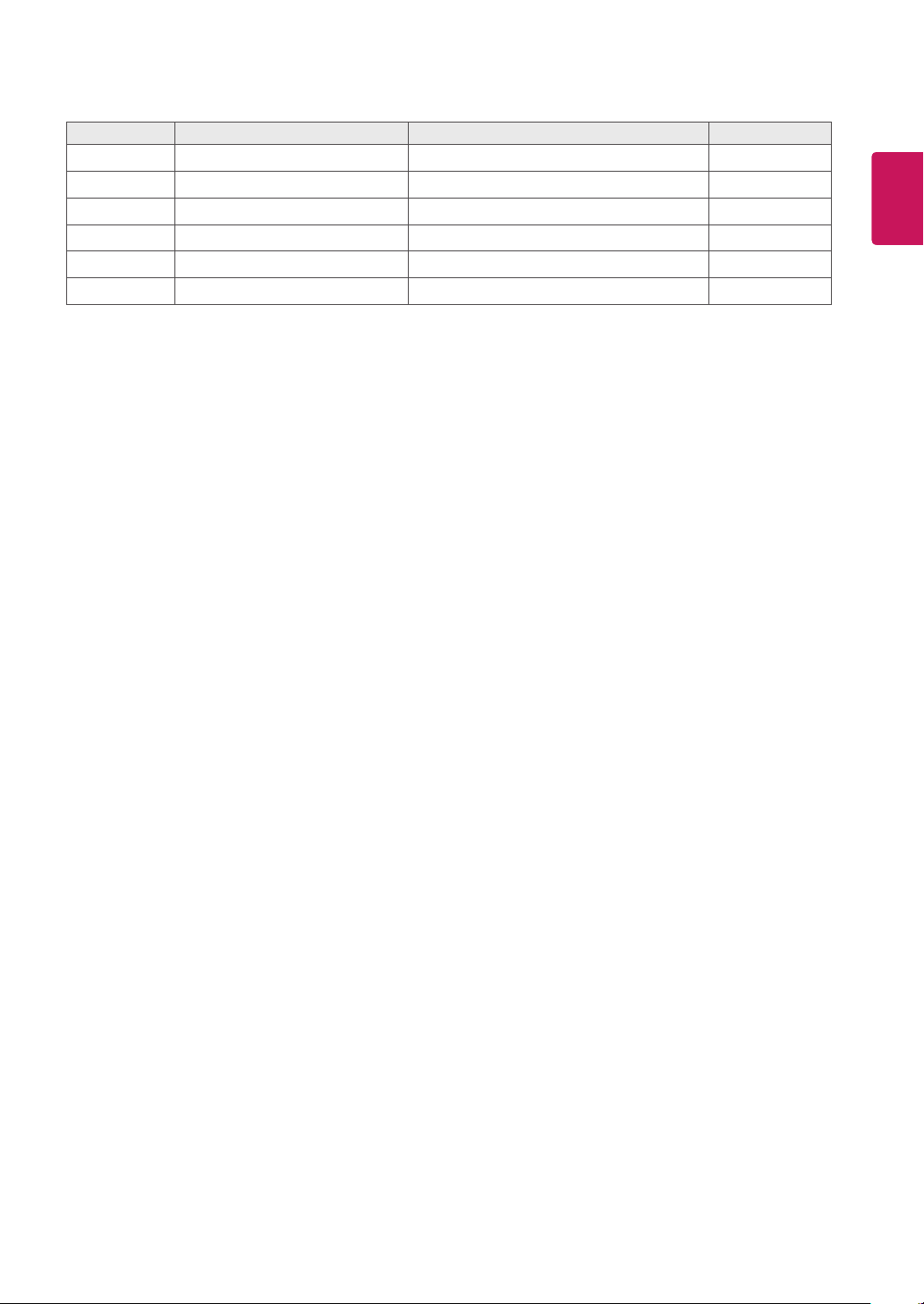
Pin No. Symbol Description NOTE
1 V
LCD
Power Supply+12.0V 1
2 V
LCD
Power Supply+12.0V 1
3 V
LCD
Power Supply+12.0V 1
4 V
LCD
Power Supply+12.0V 1
5 GND Ground
6 GND Ground
7 R2DP Second LVDS receiver signal (D+)
8 GND Ground
9 R2DN Second LVDS receiver signal (D-)
10 R2CLKP Second LVDS receiver clock signal (+)
11 GND Ground
12 R2CLKN Second LVDS receiver clock signal (-)
13 R2CP Second LVDS receiver signal (C+)
14 GND Ground
15 R2CN Second LVDS receiver signal (C-)
16 R2BP Second LVDS receiver signal (B+)
17 GND Ground
18 R2BN Second LVDS receiver signal (B-)
19 R2AP Second LVDS receiver signal (A+)
20 GND Ground
21 R2AN Second LVDS receiver signal (A-)
22 GND Ground
23 R1DP First LVDS receiver signal (D+)
24 GND Ground
25 R1DN First LVDS receiver signal (D-)
26 R1CLKP First LVDS receiver clock signal (+)
27 GND Ground
28 R1CLKN First LVDS receiver clock signal (-)
29 R1CP First LVDS receiver signal (C+)
30 GND Ground
31 R1CN First LVDS receiver signal (C-)
32 R1BP First LVDS receiver signal (B+)
33 GND Ground
34 R1BN First LVDS receiver signal (B-)
47/49/55WFB LVDS connector: DD4RA40JA1 or equivalent
LVDS cable connector: DD4PA40MA1 or equivalent
Cable specification: Coaxial cable or twisted pair cable 1 meter long or shorter
LVDS PIN MAP GUIDE
27
ENG
ENGLISH
Note: 1. All
V
LCD
(power input) pins should be connected together.
2. All Input levels of LVDS signals are based on the EIA 644 Standard.
Pin No. Symbol Description NOTE
35 R1AP First LVDS receiver signal (A+)
36 GND Ground
37 R1AN First LVDS receiver signal (A-)
38 GND Ground
39 NC No Connection
40 LVDS Select H' = JEIDA, 'L' = VESA
Make sure to read the Safety Precautions
before using the product.
The model and serial numbers of the SET are
located on the back and one side of the SET.
Record it below should you ever need service.
MODEL
SERIAL
Temporary noise is normal when powering ON or
OFF this device.