
OWNER’S MANUAL
MICROWAVE OVEN
Please read this owner’s manual thoroughly before operating.
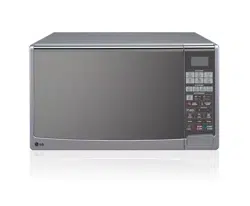
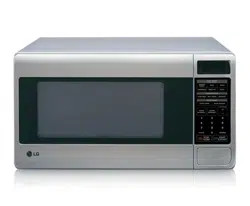
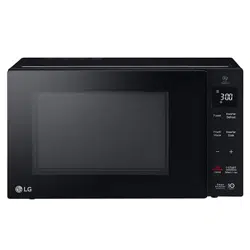
(optional, please check model specification)
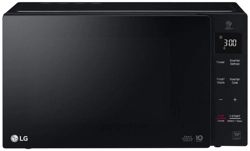
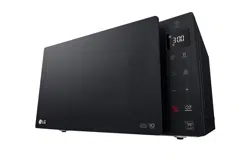
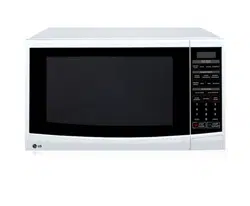
MS253
****
MS423
**** ****
MS363
****
MS233
MFL69675705_01
www.lg.com
Copyright © 2018 LG Electronics Inc. All Rights Reserved
CONTENTS
How the Microwave Function Works
Microwaves are a form of energy similar to radio,
television waves, and ordinary daylight. Normally,
microwaves spread outwards as they travel through the
This oven, however, has a magnetron that is designed
to make use of the energy in microwaves. Electricity,
supplied to the magnetron tube, is used to create
microwave energy.
These microwaves enter the cooking area through
openings inside the oven. A tray is located inside the
oven. Microwaves cannot pass through metal walls
of the oven, but they can penetrate such materials as
glass, porcelain and paper, the materials out of which
microwave-safe cooking dishes are constructed.
Microwaves do not heat cookware, though cooking
vessels will eventually get hot from the heat generated
by the food.
Your Microwave oven, is one of the safest
of all home appliances. When the door
is opened, the oven automatically stops
producing microwaves. Microwave energy
is converted completely to heat when it
enters food, leaving no “left over” energy
to harm you when you eat your food.
A very safe appliance
CONTENTS
8
BEFORE USE
8
Unpacking & Installing
10
Control Panel
10
Display Picto
11
Setting Clock
11
Quick Start
11
More/Less
11
Energy Saving
12
HOW TO USE
12
Timed Cooking
12
Microwave Power Levels
13
Child Lock
13
Reheat
13
Reheat Menu Instructions
14
14
18
Melt
Popular Menu
Popular Menu Instructions
18
Melt Menu Instructions
19
Proof
19
Proof Menu Instructions
20
Keep Warm
20
21
22
22
23
24
26
27
28
Inverter Defrost
Inverter Defrost Menu Instructions
3
IMPORTANT SAFETY INSTRUCTIONS
FOOD CHARACTERISTICS &
MICROWAVE COOKING
USING THE SMART DIAGNOSIS™
FUNCTION
26
TO CLEAN YOUR OVEN
QUESTIONS & ANSWERS
TECHNICAL SPECIFICATIONS
MICROWAVE-SAFE UTENSILS
Soften
Soften Menu Instructions
IMPORTANT SAFETY INSTRUCTIONS
READ CAREFULLY AND KEEP FOR FUTURE REFERENCE
4
-
5
6
his model doesn't provide a temperature probe.
S
Farm houses;
By clients in hotels, motels and other residential environments;
Bed and breakfast type environments.
T
36
When the symbol is used, It means that the surfaces are liable to get hot during use.
37
Do not place an object(a book, a box, etc.) on the product. The product may overheat or catch fire or the
object may fall, causing injury to persons.
Caution, hot surface
7
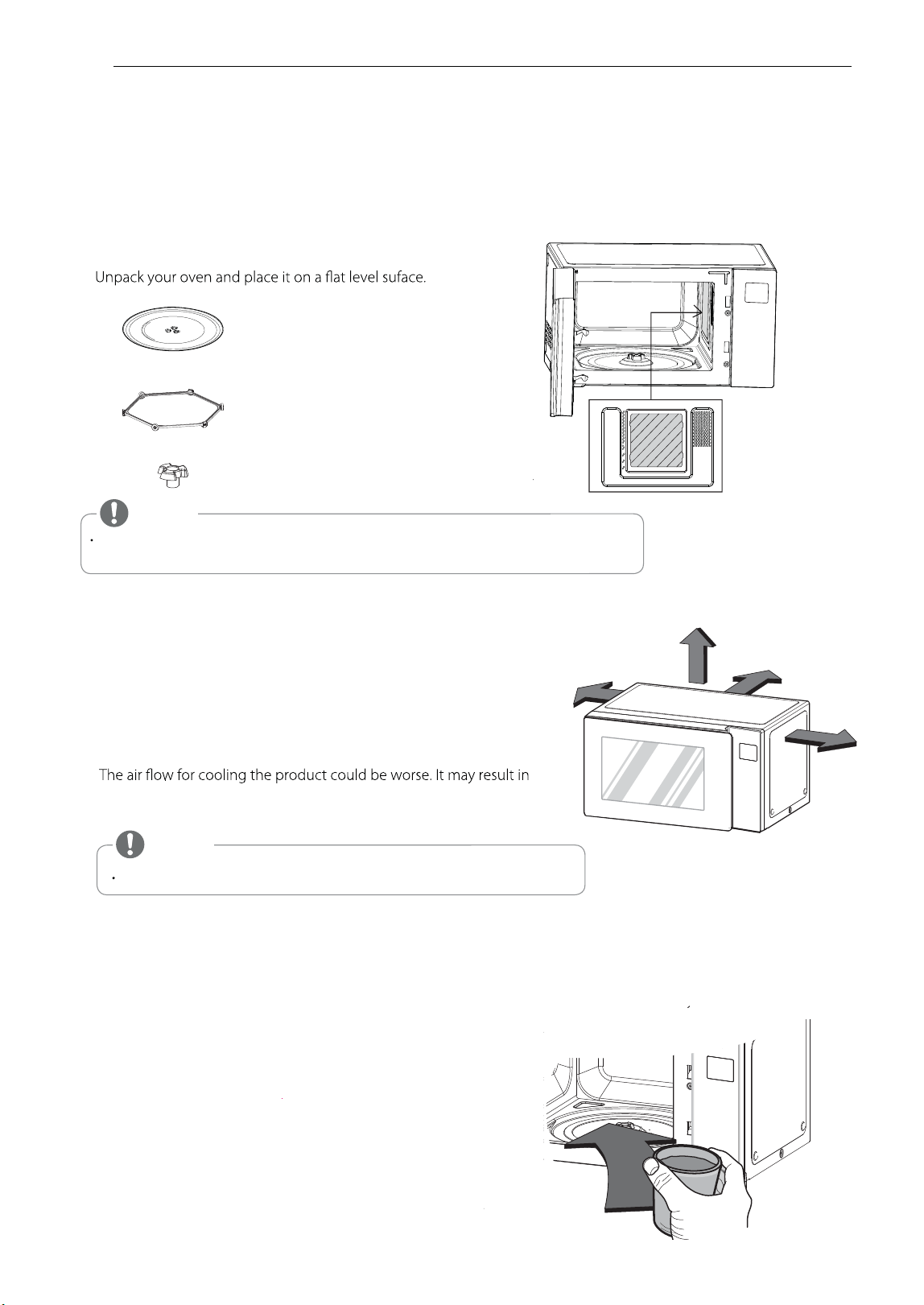
UNPACKING & INSTALLING
BEFORE USE
By following the basic steps on these two pages you will be able to quickly check that your oven is operating correctly.
Please pay particular attention to the guidelines on where to install your oven. When unpacking your oven make sure
you remove all accessories and packing materials. Check to make sure that your oven has not been damaged during
shipping.
1
2 Place the oven on the level location of your choice with more
than 85cm height but make sure there is at least 20 cm of space
on the top and 20 cm at the rear & left & right for proper
ventilation. The front of the oven should be at least 8 cm from
the edge of the surface to prevent tipping.
An exhaust outlet is located on bottom or side of the oven.
Blocking the outlet can damage the oven.
If you use the microwave oven in an enclosed space or cupboard,
lower performance and reduced service life. If possible, please use the
microwave oven in the counter top condition.
NOTE
THIS OVEN SHOULD NOT BE USED FOR COMMERCIAL CATERING PURPOSES.
3 Plug your oven into a standard household socket. Make sure your oven is the only appliance connected to the socket.
If your oven does not operate properly, unplug it from the electrical socket and then plug it back in.
4
Fill a microwave safe container with 300 ml (1/2 pint) of water.
Place on the glass tray and close the oven door.
If you have any doubts about what type of container to use
please refer to Microwave-safe utensils.
Open your oven door by pulling the door handle. Place the rotating ring inside the oven and place the glass tray on top.
5
GLASS TRAY
ROTATING RING
TURNTABLE SHAFT
8
BEFORE USE
NOTE
Do not remove the cavity Mica Sheet (silver plate) inside of oven.
The Mica Sheet is there to protect the microwave components from food spatters.
Mica Sheet
Mica Sheet
*Do Not Remove
Mica Sheet
20 cm
20 cm
20 cm
20 cm
6
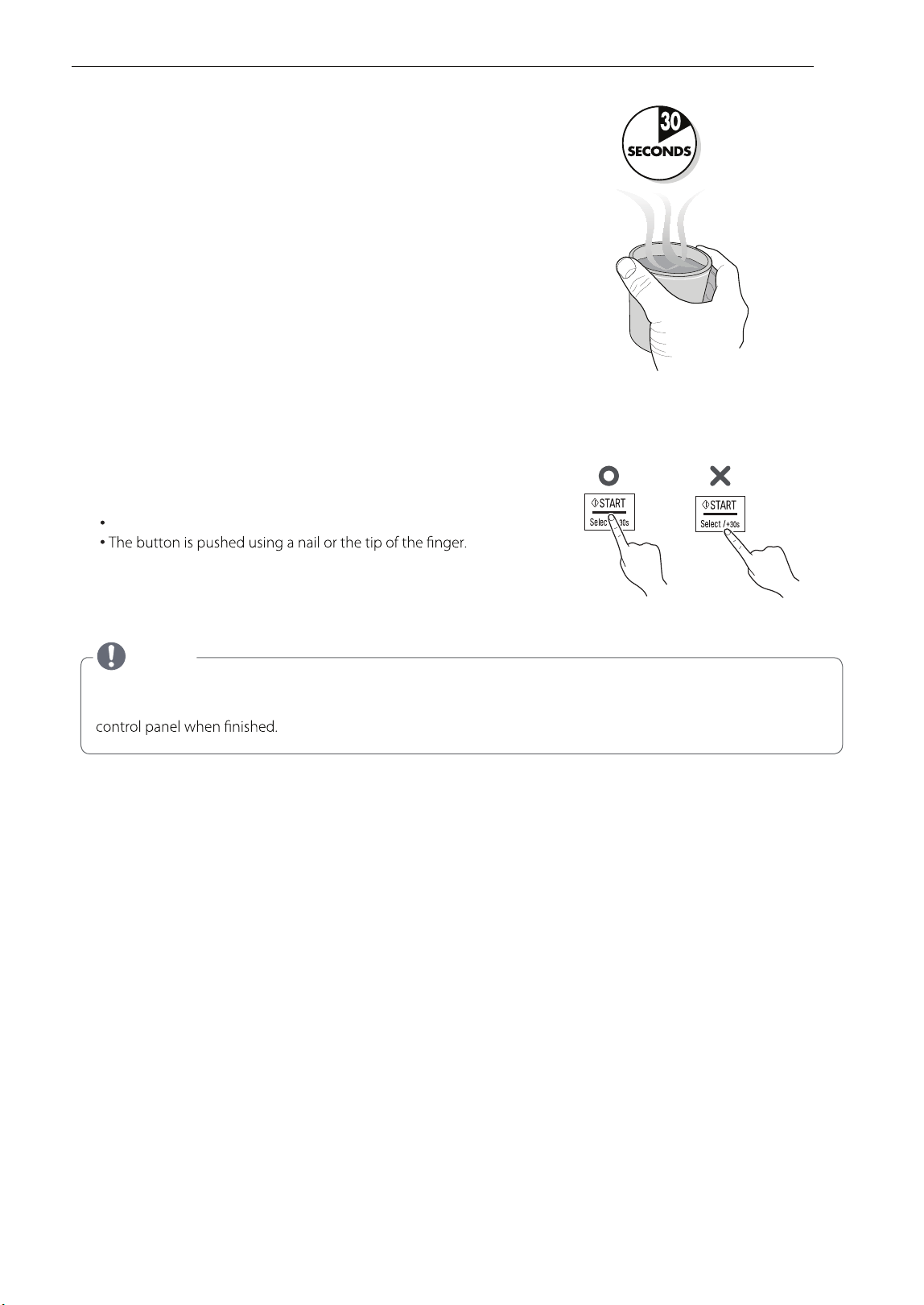
Press the STOP / Cancel button, and press the
START
button
one time to set 30 seconds of cooking time.
7 The DISPLAY will count down from 30 seconds.
When it reaches 0 it will sound BEEPS. Open the oven door
and test the temperature of the water.
If your oven is operating the water should be warm.
Be careful when removing the container it may be hot.
YOUR OVEN IS NOW INSTALLED
8
The contents of feeding bottles and baby food jars shall be stirred or shaken and the temperature checked before
consumption in order to avoid burns.
9
Button recognition may be hampered in the following circumstances:
Only the outside area of the button is pressed.
10
NOTE
Do not use rubber gloves or disposable gloves.
When wiping the touch control panel with a wet towel, remove moisture from the touch
The setting of the cooking time should be shorter than common microwave ovens (700 W, 800 W) due to
the relatively high output power of the product. Excessive heating with the product may cause moisture on the door.
BEFORE USE
9

CONTROL PANEL
POWER
See page 12 “Timed Cooking”
INVERTER DEFROST
See page 2
2
“Inverter Defrost”
PROOF / WARM
See page 20 “Proof”
See page 21 “Keep Warm”
INVERTERCOOK
Inverter Cook allows you to cook most of your
favorite food by selecting the food type and the
weight of the food.
See page 13 "Reheat"
See page 14 "Popular Menu"
See page 18 "Soften"
See page 19 "Melt"
MORE / LESS
Choose the cooking menu.
Set cooking time and weight.
While cooking with auto and manual function,
you can increase or decrease the cooking time
at any point by pressing the button (except
defrost mode).
STOP / CANCEL
top over and clear all entries except time of day.
START
I n order to start cooking which is selected,
press button one time.
tes ot uoy swolla erutaef trats kciuq eh T
30 seconds intervals of HIGH power cooking with a
press of the START button.
SMART DIAGNOSIS
Hold the mouthpiece of a phone up to this icon
when directed to by service centre personnel, to
help diagnose problems with the microwave oven
when calling for service.
DISPLAY PICTO
When operate Microwave, Show up
the icon on the display.
When operate Inverter Cook / Steam Cook,
Show up the icon on the display.
10
BEFORE USE
When operate Inverter Defrost, Show
up the icon on the display.
When you can set More/Less, Show
up the icon on the display.
When you can set Output Power,
Show up the icon on the display.
When you can Cook Start, Show up
the icon on the display.
When you can set Weight, Show up
the icon on the display.
Part
Icon
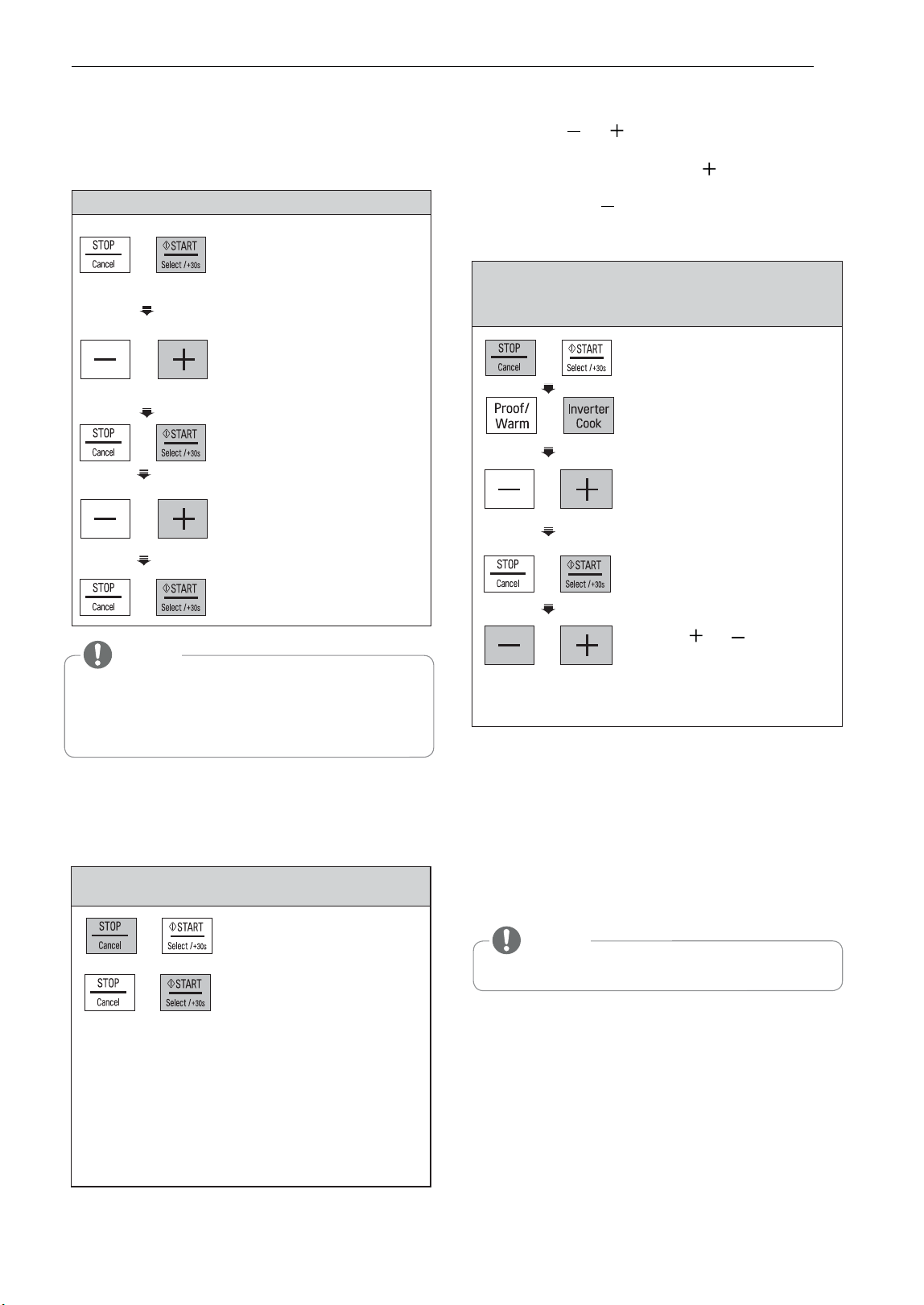
MORE/LESS
The QUICK START feature allows you to set 30
seconds intervals of HIGH power cooking with
a touch of the START.
Example: Set 2 minutes of cooking on high
power
Select 2 minutes
on
high power.
Press the START button four times
The oven will start before you have finished
the fourth press.
During QUICK START cooking, you can extend
the cooking time up to 99 minutes 59 seconds by
repeatedly pressing the START button.
QUICK START
1. Press STOP / CANCEL.
2. Press INVERTER COOK.
until display
shows ‘1’.
4
.
Press START
.
Example: To set 11:11
1. Press START to confirm
the 12H clock display.
(You can press + to
select for 24Hour mode)
3. Press START.
5. Press
1.
2.
START
.
SETTING CLOCK
When your oven is plugged in for the first time or
when power resumes after a power interruption,
the numbers in the display reset to
'
12H
'.
ENERGY SAVING
Energy saving means save energy by turning off
the display. This feature only operates when the
Microwave Oven standby and the display will go out.
Press
STOP / CANCEL.
Example: To adjust the Inverter Cook
(ex. Dinner Plate 1 Serve) cooking time for
a longer time, or for a shorter time
NOTE
When using clock mode, the display will remain on.
By using the or buttons, TIMED COOK
program can be adjusted to cook food for a
longer or shorter time. Pressing will increase
10 seconds to the cooking time each time you
press it. Pressing will decrease 10 seconds
of cooking time each time you press it. The max
Press
or .
Remaining time will
increase or decrease
by 10 seconds.
5
.
2. Press + until display
shows ‘11:’.
4. Press + until display
shows ‘11:11’.
time possible will be 99 minutes 59 seconds.
3. Press + until display
shows '1-3'.
BEFORE USE
11
NOTE
If you don’t want to use clock mode,
Press STOP/CANCEL button, after plugging in your oven.
If you want to set the clock again or change options,
you will need to unplug the power cord and reconnect.
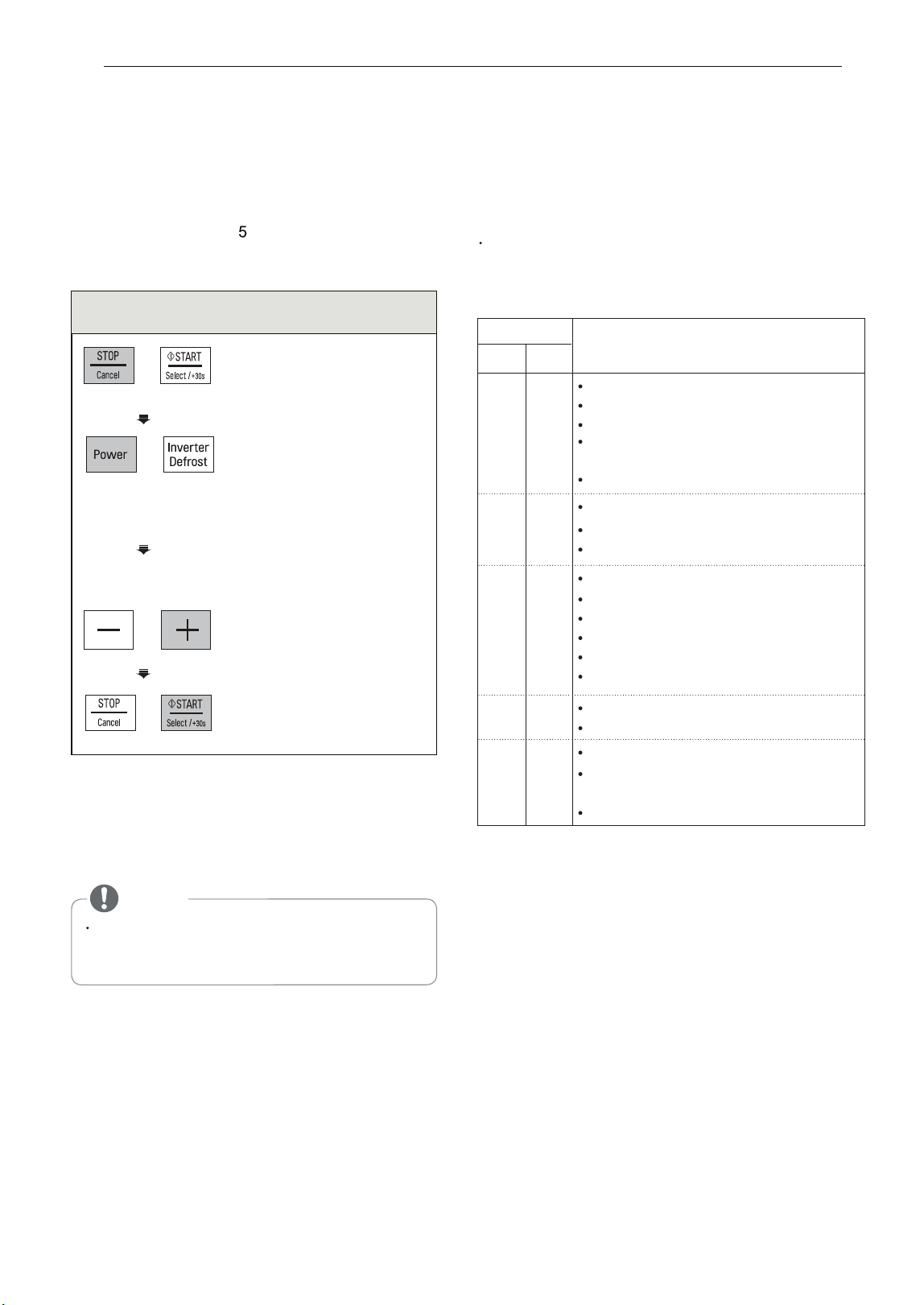
1.
Press STOP / CANCEL.
3. Enter 5 minutes 30 seconds
by pressing +
5:30 '.swohs '
2. Press POWER until display
shows
'800 W / 1000 W .
4.
Press
START
.
This function allows you to cook food for a
desired time. There are
power levels available.
The example below shows how to set 800 W /
1000 W power level for the desired time.
Example: To cook food on 800 W / 1000 W
Power for 5 minutes 30 seconds
(1st time 1000 W /1200 W
appears in the display.
This is to tell you that the
oven is set on 1000 W /
1200 W power unless a
different power setting is
chosen.)
MICROWAVE POWER LEVELS
Your microwave oven is equipped with five power
levels to give you maximum flexibility and control
over cooking. The adjacent table will give you
some idea of which foods are prepared at each of
the various power levels.
The adjacent chart shows the power level settings
for your oven.
MICROWAVE POWER LEVEL CHART
HOW TO USE
TIMED COOKING
(MANUAL COOKING)
When cooking is complete, Tip will sound. The word
End shows in the display window. 'End' remains in
the display and Tip will sound every minute until the
door is opened, or any button is pressed.
If you do not select the power level, the oven
will operate at power HIGH. To set HI-POWER
cooking, skip step 2 above.
NOTE
12
HOW TO USE
Power Level
MS253****
MS423****
MS363****
MS233****
Use
Boiling water.
High
Browning ground beef.
Making candy.
1000 W
Cooking poultry pieces,
fish & vegetables.
Cooking tender cuts of meat.
Reheating rice, pasta & vegetables.
800 W
Reheating prepared foods quickly.
Reheating sandwiches.
Cooking egg, milk and cheese dishes.
Cooking cakes and breads.
Melting chocolate.
600 W
Cooking veal.
Cooking whole fish.
Cooking puddings and custard.
Thawing meat, poultry and seafood.
400 W
Cooking less tender cuts of meat.
Taking chill out of fruit.
200 W
High
1200 W
1000 W
700 W
400 W
200 W
Keeping casseroles and main
dishes warm.
Softening butter and cream cheese.
'
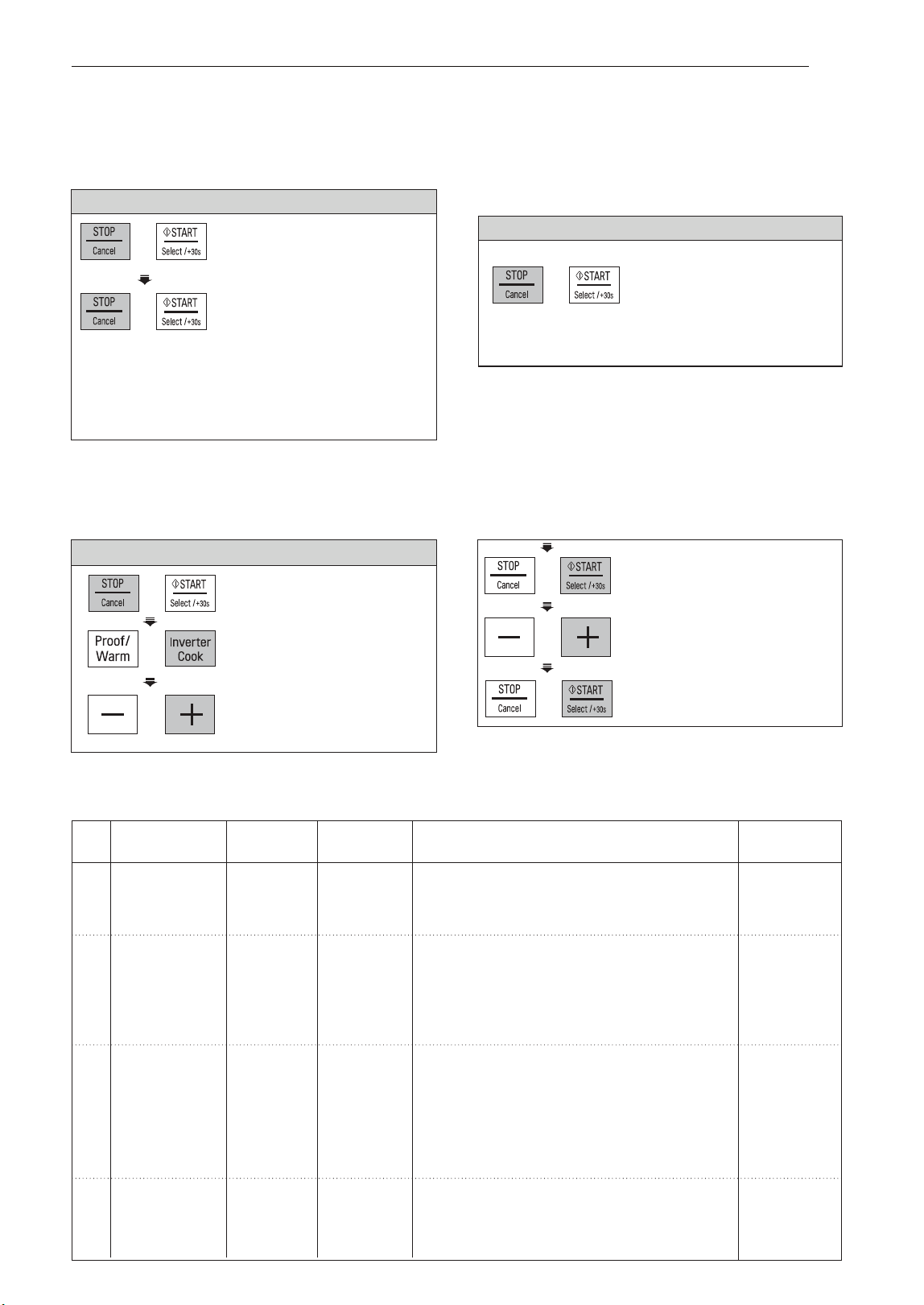
REHEAT
Your oven’s menu has been preprogrammed to automatically reheat food. Tell the oven what you want
and how many items there are. Then let your microwave oven reheat your selections.
Example: To reheat 0.3 kg Pizza
1.
Press
STOP / CANCEL.
5. Press
+
until display
shows ‘0.3 kg’.
6.
Press
START.
2. Press
INVERTER COOK.
until display shows ‘1’.
REHEAT MENU INSTRUCTIONS
Weight
Cod
e
Menu
Instructions
Ute
nsil
Limit
1-1
Beverage 1 - 2 cups
Room
1. Place food on a microwave-safe cup.
Microwave-
(1 cup /
200 ml)
2. Place food in the oven. Choose the menu and
safe cup
weight, press START.
1-2
Casserole 0.25 - 1.0 kg
Refrigerated
1
1. Place food on a microwave-safe bowl.
Microwave-
(250 g /
1 serving)
Cover with plastic wrap and vent.
safe bowl
2. Place food in the oven. Choose the menu and
weight, press START.
3. After cooking, stand covered for 3 minutes.
1. Place food (0.4 - 0.5 kg of meat, chicken,
1-3
Dinner Plate
Refrigerated
Microwave-
mashed potato, vegetable etc.) on a
safe dish
microwave-safe dish. Cover with plastic wrap
and vent.
2. Place food in the oven. Choose the menu,
press START.
3. After cooking, stand covered for 3 minutes.
1-4
Muffin 1 - 4 ea
Frozen 1. Place food on a microwave-safe dish.
Microwave-
(75 - 80 g /
1 muffin)
2. Place food in the oven. Choose the menu and
safe dish
weight, press START.
CHILD LOCK
This is a unique safety feature that prevents
If the CHILD LOCK was already set and you
unwanted oven operations. Once the CHILD
touch another pad, the word Loc shows in
LOCK is set, no cooking can take place.
the display. You can cancel the CHILD LOCK
according to below procedure.
Example: To set the CHILD LOCK
1.
Press STOP / CANCEL.
Example: To cancel the CHILD LOCK
2. Press and hold
Press and hold
STOP / CANCEL until 'Loc'
STOP / CANCEL
until 'Loc'
disappears in the display.
appears in the display
and tip are heard.
After the CHILD LOCK is turned off, the oven
will operate normally.
4.
Press START.
If the time of day wasalready set, the time of
day will appear on the display window after
1 second.
Initial
Temperature
HOW TO USE
13
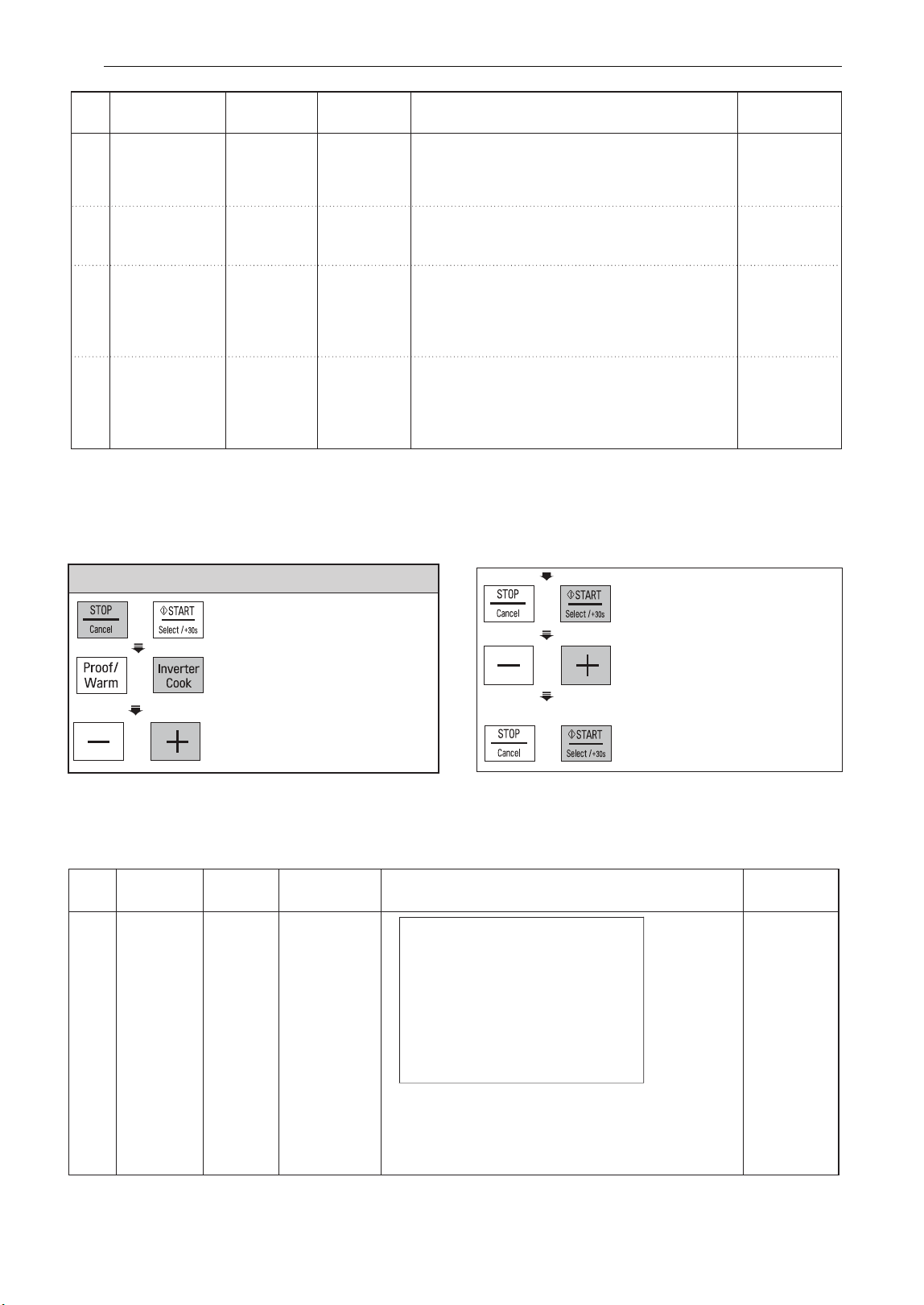
3. Press + until display
shows ‘1-6’.
1-5
Pie
0.2 - 0.6 kg
Refrigerated
1. Cut leftover pie into pieces.
2.
Place food on a microwave-safe dish.
Microwave-
(150 - 200 g
/ piece)
safe dish
3
. Place food in the oven. Choose the menu and
weight, press START.
1-6
Pizza
0.2 - 0.5 kg
Refrigerated
1. Place food on a microwave-safe dish.
Microwave-
2. Place food in the oven. Choose the menu and
safe dish
weight, press START.
1-7
Rice 0.1 - 0.3 kg
Refrigerated
1. Place food on a microwave-safe bowl.
Microwave-
Cover with plastic wrap and vent.
safe bowl
2. Place food in the oven. Choose the menu and
weight, press START.
3. After cooking, stand covered for 3 minutes.
1-8
Soup 0.25 - 1.0 kg
Room
1. Place food on a microwave-safe bowl.
Microwave-
(250 g
Cover with plastic wrap and vent.
safe bowl
1 serving)
2. Place food in the oven. Choose the menu and
weight, press START.
3. After cooking, stand covered for 3 minutes.
/
Weight
Code
Menu
Instructions
Ute
nsil
Limit
Initial
Temperature
14
HOW TO USE
POPULAR MENU
Your oven’s menu has been preprogrammed to automatically cook food. Tell the oven what you want
and how many items there are. Then let your microwave oven cook your selections.
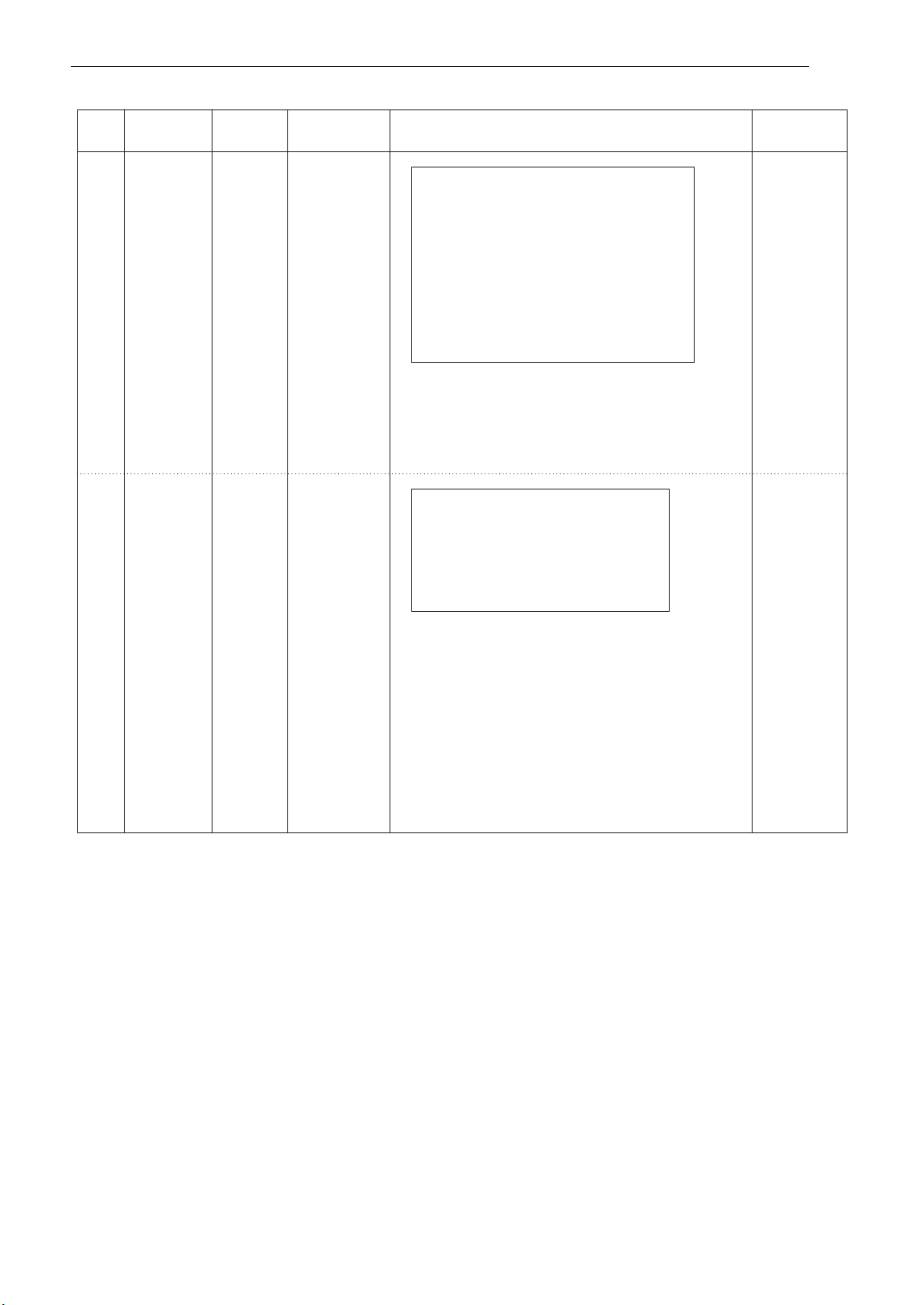
Example: To cook 0.3 kg Dum Aloo
3.
Press
+
until display
shows ‘2-4’.
POPULAR MENU INSTRUCTIONS
Weight Initial
Code Menu Instructions Utensil
Limit Temperature
Chicken
Clear
Soup
1.0 kg
Refrigerated
Ingredients
Microwave-
300 g chicken legs
½ carrot, peeled and large cut
1 potato, peeled and large cut
½ onion, large cut
2 celeries, cut 1 inch
3 cups chicken stock
½ teaspoon salt
¼ teaspoon pepper powder
safe bowl
1. Clean chicken legs, cut to large pieces and drain.
2. In a microwave-safe bowl, put the all ingredients.
3. Place food in the oven. Choose the menu,
press START.
1- 2
1.
Press
STOP / CANCEL.
2. Press
INVERTER COOK.
until display shows ‘2’.
5. Press
+
until display
shows ‘0.3 kg’.
6.
Press
START.
4.
Press START.
Weight Initial
Code Menu Instructions Utensil
Limit Temperature
Curry
2-2
1.5 kg
Room
Ingredients
Micreowave-
Chicken
400 g chicken breasts, cut into chunks /
safe bowl
¼ cup olive oil / 2 onions, chopped
4 garlic cloves, crushed /
1 ginger root, peeled /
1 cinnamon stick / 2 dried red chilies /
1 teaspoon turmeric powder /
400 g tomato sauce /
½ cup water or stock / ½ cup plain yogurt /
1 tablespoon lemon juice /
Salt and pepper to taste
1. Add all ingredients in a deep and large
microwave-safe bowl and mix well.
Cover with plastic wrap and vent.
2. Place food in the oven.
Choose the menu, press START.
3. Stir at least twice during cooking.
2-3
Dolma
1.0 kg
Room
Ingredients
Micreowave-
1 pot of grape leaves
safe bowl
200 g cooked rice
500 g ground beef
1 onion, chopped
Salt and pepper to taste
½ cup water
1. Add cooked rice, ground beef, onion, salt and
pepper in a bowl and mix well.
2
. Place grape leaves on a flat surface and place
1 ½ spoonfuls of the rice mixture in the center of
the leaf. Wrap rice mixture with leaf.
3
. Put all wrapped leaves in rows into a deep and
large microwave-safe bowl and add water.
Cover with plastic wrap and vent.
4. Place food in the oven. Choose the menu,
press START.
5. After cooking, serve with sour cream or as desired.
15
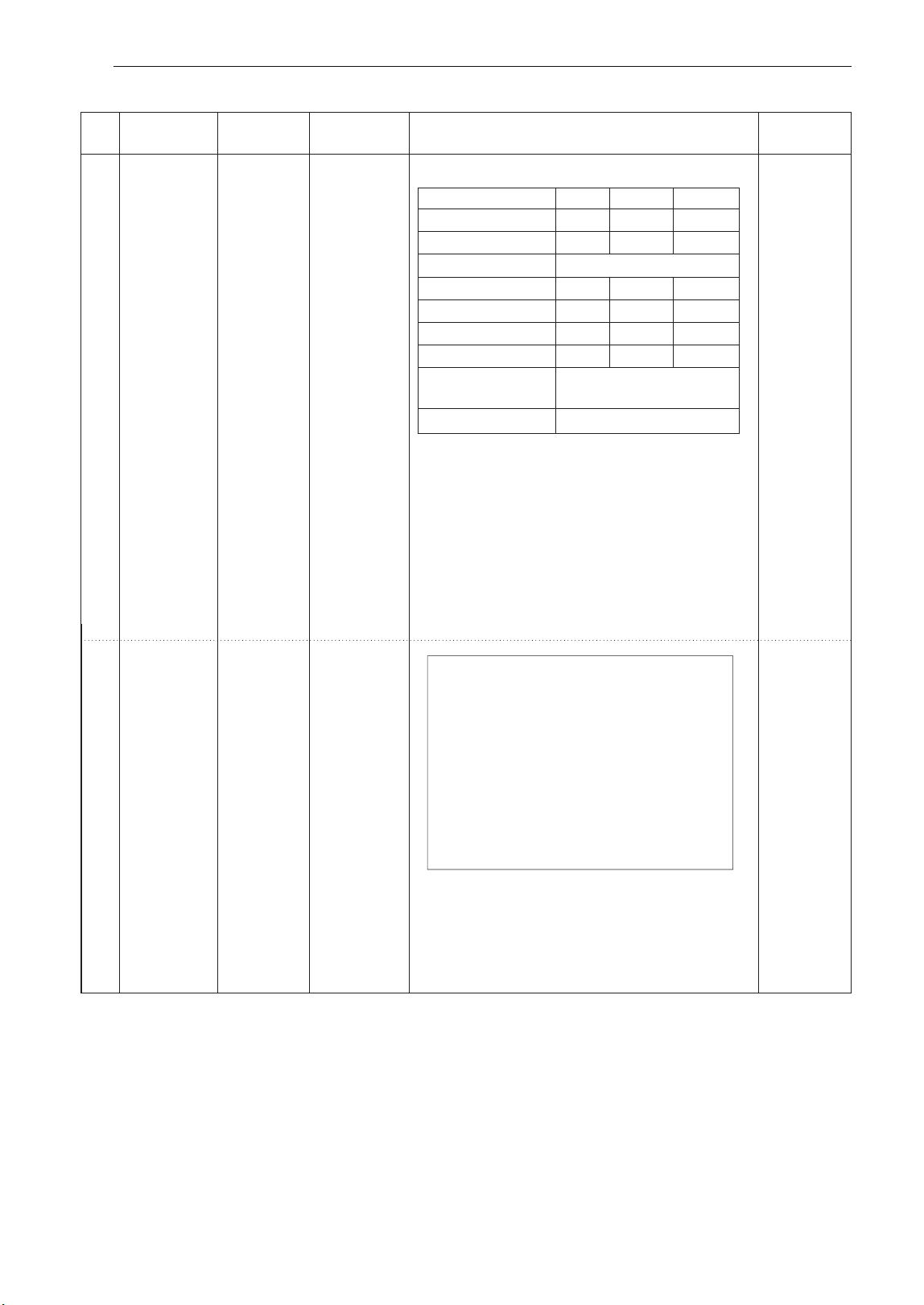
HOW TO USE
Weight
Initial
Code
Menu
Instructions
Utensil
Limit
Temperature
0.1 - 0.3 kg Room
Dum Aloo
Micreowave-
safe bowl
Aloo(small & pricked)
0.1 kg 0.3 kg0.2 kg
100 g 300 g200 g
2 tbsps 3 tbsps3 tbsps
1 tbsp 1 ½ tbsps1 ½ tbsps
1 tsp 1 ½ tsps1 ½ tsps
1 tbsp 3 tbsps2 tbsps
½ cup 1 cup1 cup
To taste
To garnish
Oil
Cumin, pepper, cloves
Onion paste
Ginger garlic paste
Tomato puree
Curd
Coriander leaves
Turmeric powder,
red chili powder, salt,
1. In a microwave-safe bowl, put small pricked potatoes
with oil(½ the amount mentioned per weight) and cover.
2. Choose the menu and weight, press START.
3. When BEEP, add oil(remaining half amount) cumin,
pepper, cloves, onion paste, ginger garlic paste,
tomato puree. And then press START to continue cooking.
4. When BEEP, add a curd, turmeric powder, red chili
powder, salt and coriander leaves. And then press
start to continue cooking.
5. After cooking, stand for 3 minutes.
Garnish with coriander leaves.
Ingredients
Fish ball and
Thai Herbs
Spicy Soup
1.0 kg
Room
Micreowave-
safe bowl
Ingredients
200 g featherback fish, minced
2 tablespoons curry paste
4 Thai eggplants, quarter
1 each red and yellow chili spur pepper, sliced
2 bunches fresh pepper corn
¼ cup krachai, thin sliced
5 kaffir lime leaves, teared
¼ cup holy basil
2 teaspoons fish sauce
1 teaspoon coconut sugar
3 cups water
1. Squeeze the featherback fish with a touch of salt
and water, until it becomes sticky. Set aside.
2. In a large microwave-safe bowl, put the fish ball
and all ingredients.
3. Place food in the oven. Choose the menu,
press START.
4- 2
5- 2
16
HOW TO USE
Weight
Initial
Code
Menu
Instructions
Utensil
Limit
Temperature
2 -6
2 -7
Room
Room
Stewed Pork
belly
1.2 kg
Stir-fried
Squid with
Curry
Powder
0.6 kg
Micreowave-
safe bowl
Micreowave-
safe dish
Ingredients
300 g squids
½ onion, sliced
2 red spur peppers, sliced
2 Chinese celeries, cut 2 inches
2 spring onions, cut 2 inches
2 tablespoons curry powder
1 egg
3 tablespoons unsweetened condensed milk
2 tablespoons oyster sauce
2 teaspoons sugar
2 tablespoons chili paste
2 tablespoons cooking oil
1. Remove the head, tentacles and ink-sac from the
squid. Pull off and discard the mottled skin.
Slice flesh to stripe and cut into cubes, drain.
2. Mix all the ingredients except vegetables and oil.
3. In a microwave-safe bowl, put the mixture,
vegetables, oil and squids.
4. Place food in the oven. Choose the menu,
press START. Stir at least twice during cooking.
300 g pork belly(less fat)
4 star anises
3 cinnamon sticks, cut 1 inch
5 garlics, crushed
2 teaspoons pepper corn
2 coriander roots, crushed
4 cups pork stock
2 tablespoons coconut sugar
2 tablespoons soy sauce
2 tablespoons dark soy sauce
2 tablespoons seasoning sauce
Cheesecloth for wrap the spices
1.Clean pork belly, cut into the pieces about 3 cm pieces.
2. In a large microwave-safe bowl, put the pork belly
and all ingredients.
3. Place food in the oven. Choose the menu,
press START.
Ingredients
Veg. Biryani
1.0 kg
Room
Micreowave-
safe bowl
Ingredients
1 ½ cups basmati rice / 400 g water /
2 cups chopped onions /1 tomato, chopped /
1 cup vegetables(carrot, beans, peas, potato),
chopped / 2 green chilies, chopped
1 teaspoon ginger garlic paste /
1 ½ teaspoon red chili powder /
1 teaspoon coriander powder /
1 teaspoon cumin powder /
1 tablespoon biryani masala /
1 cinnamon / 2 cardamoms
2 cloves / 2 small bay leaves
1 teaspoon fennel seeds /
A bunch of finely chopped coriander leaves
(cilantro) and mint leaves /
1 tablespoon oil /
2 tablespoons ghee or clarified butter /
Salt to taste
1.Cook all vegetables and spices in a lightly oiled frying
pan until lightly browned.
2.Place the cooked vegetable mixture into a deep and
large microwave-safe bowl and add rice and water.
Cover with plastic wrap and vent.
3.Place food in the oven. Choose the menu, press START.
Stir at least twice during cooking.
22 -8
17
HOW TO USE
SOFTEN
SOFTEN MENU INSTRUCTIONS
Butter
1 - 3 ea
(100 - 150 g
/ each)
Refrigerated
Cream
0.1 - 0.3 kg
Refrigerated
Cheese
Microwave-
safe dish
Microwave-
safe dish
1. Unwrap and place on a microwave-safe dish.
2. Place food in the oven. Choose the menu and weight,
press START.
3. Butter will be at room temperature and ready for use
in a recipe.
Ice
Cream
2 / 4 cups
Frozen
1. Unwrap and place on a microwave-safe dish.
2. Place food in the oven. Choose the menu and weight,
press START.
3.Cream cheese will be at room temperature and ready
for use in a recipe.
1. Remove lid and cover.
2. Place food in the oven. Choose the menu and weight,
press START.
3. Ice cream will be soft enough to make scooping easier.
Weight
Code
Menu
Instructions
Ute
nsil
Limit
Initial
Temperature
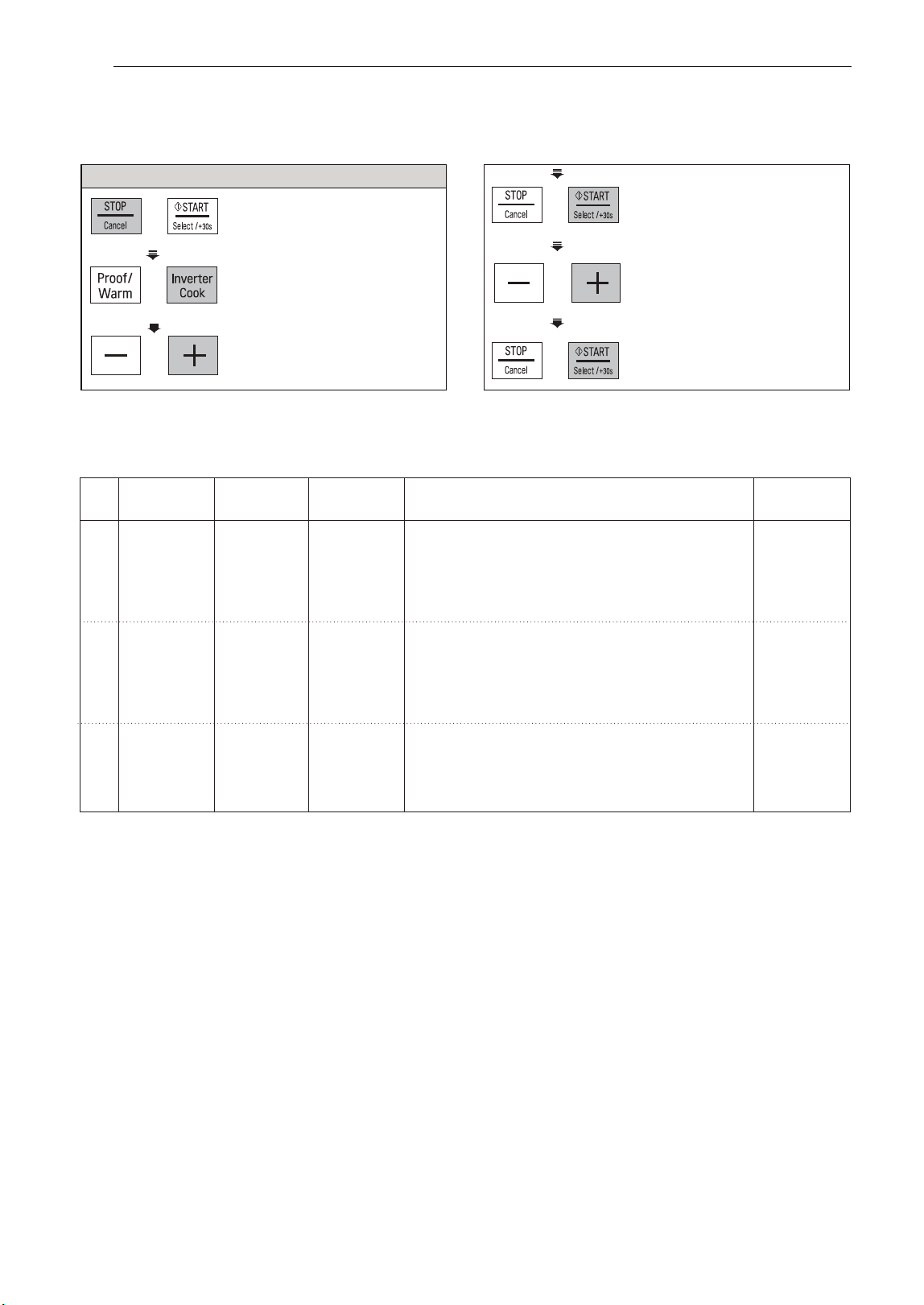
The oven uses low power to soften foods (butter, cream
cheese and ice cream) S
ee the following table.
3. Press + until display
show ‘3-2’.
Example: To Soften 0.2 kg Cream Cheese.
1.
Press
STOP / CANCEL.
2. Press INVERTER COOK
until display show ‘3’.
6.
Press
START.
4.
Press START.
5. Press + until display
show ‘0.2 kg’.
3-1
3-2
3-3
18
HOW TO USE

Weight
Code
Menu
Instructions
Ute
nsil
Limit
Initial
Temperature
MELT MENU INSTRUCTIONS
MELT
The oven uses low power to melt foods (butter, cheese and chocolate). See the following table.
Example: To Melt 0.2 kg Chocolate
Butter
1 - 3 ea
(100 - 150 g
/ each)
Refrigerated 1. Place on a microwave-safe bowl.
2. Place on a microwave-safe bowl.
2. Place food in the oven. Choose the menu and weight,
press START.
3. After cooking, stir to complete melting.
Cheese
0.2 - 0.4 kg
Refrigerated
1. Use processed cheese food only. Unwrap and cut into
Microwave-
cubes.
safe bowl
3. Place food in the oven. Choose the menu and weight,
press START.
4. After cooking, stir to complete melting.
Chocolate
0.1 - 0.3 kg
Room
1. Chocolate chips or squares of baking chocolate
Microwave-
may be used.
safe bowl
2. Unwrap and place on a microwave-safe bowl.
3. Place food in the oven. Choose the menu and weight,
press START.
4. After cooking, stir to complete melting.
Microwave-
safe bowl
1.
Press
STOP / CANCEL.
19
HOW TO USE
2. Press INVERTER COOK
until display show ‘4’.
6.
Press
START.
4.
Press START.
5. Press + until display
show ‘0.2 kg’.
3. Press + until display
show ‘4-3’.
4-1
4-2
4-3
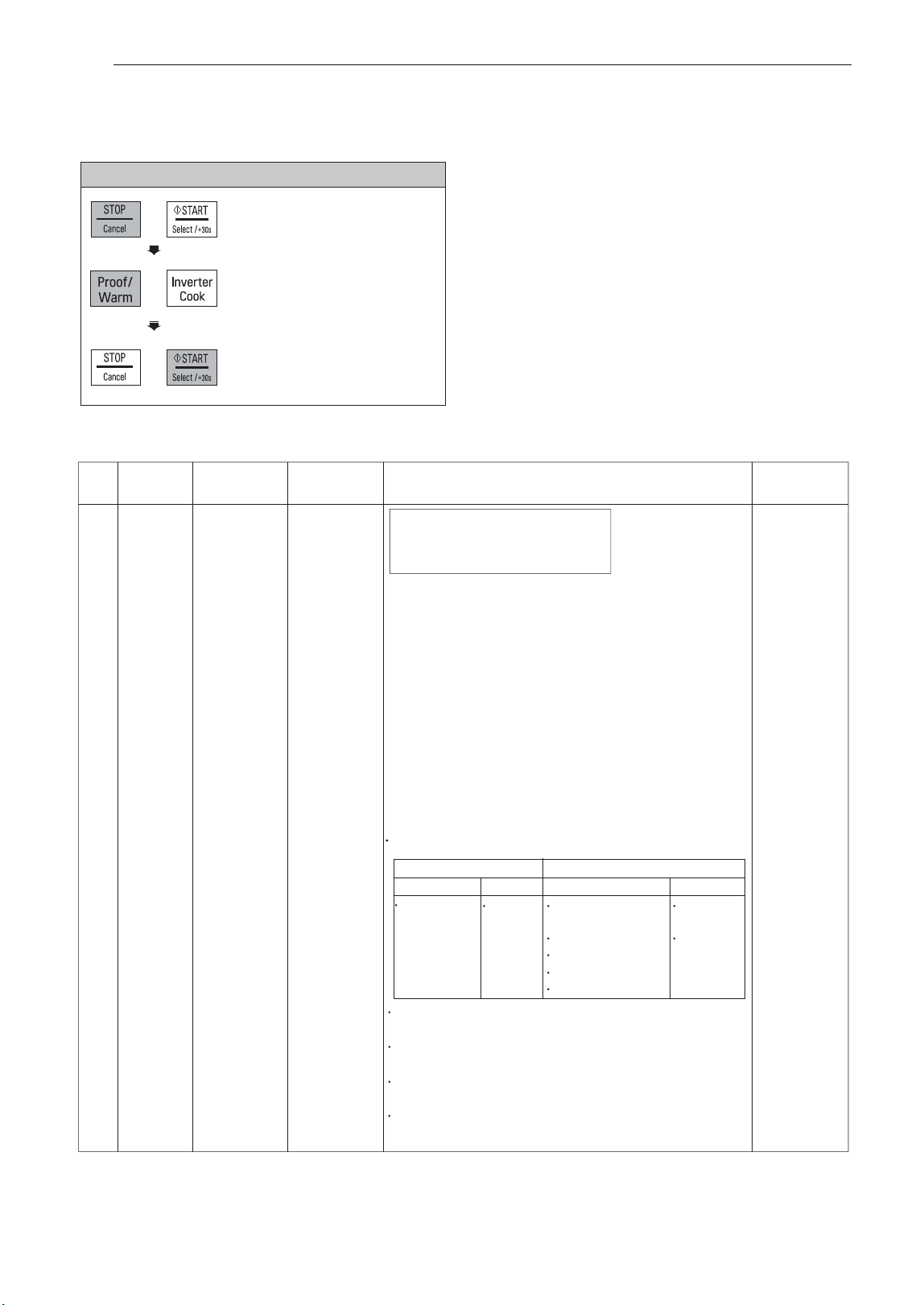
1.
Press
STOP / CANCEL.
2. Press PROOF / WARM
until display shows "1"
PROOF
This feature allows you to cook Yogurt by pressing Proof/Warm button.
3.
Press START.
‘5h00 ’ will show in the display.
Example: To Cook 0.6 kg Yogurt.
PROOF MENU INSTRUCTIONS
Weight
Initial
Code
Menu
Instructions
Ute
nsil
Limit
Temperature
1
Yogurt
0.6 kg Lukewarm
Ingredients
Microwave-
500 ml pasteurized whole milk
safe bowl
100 g natural plain yogurt
1.
Thoroughly wash the proper sized microwave-safe
bowl with hot water.
2. Pour 500 ml milk into the bowl.
3. Heat it about 1 minute 30 seconds - 2 minutes 30
seconds on high microwave power until 40 - 50 °C
temperature.
4. Add 100 ml yogurt into the bowl and stir well.
5. Cover with plastic wrap or lid and place food in the
oven. Choose the menu, press START.
6. After proofing, stand in the refrigerator for about 5
hours.
7. Taste nice with jam, sugar or fruits.
Note :
The following types of milk and yogurt may be used :
Do use
Do not use
Milk Yogurt
Milk
Yogurt
Pasteurized Natural
2 %, 1 % or
Leftover
whole milk plain
fat-free milk
yogurt
yogurt
High calcium milk
Expired
Soy milk
yogurt
Leftover milk
Expired milk
Thoroughly wash all utensils with hot water and dry
before proofing yogurt.
Make sure that the milk is lukewarm(40 - 50 °C)
before proofing.
Don’t shake or mix yogurt during proofingas this will
affect the firmness of the yogurt.
If the amount of ingredients are greater than
suggested, increase the proofing time.
HOW TO USE
2 0
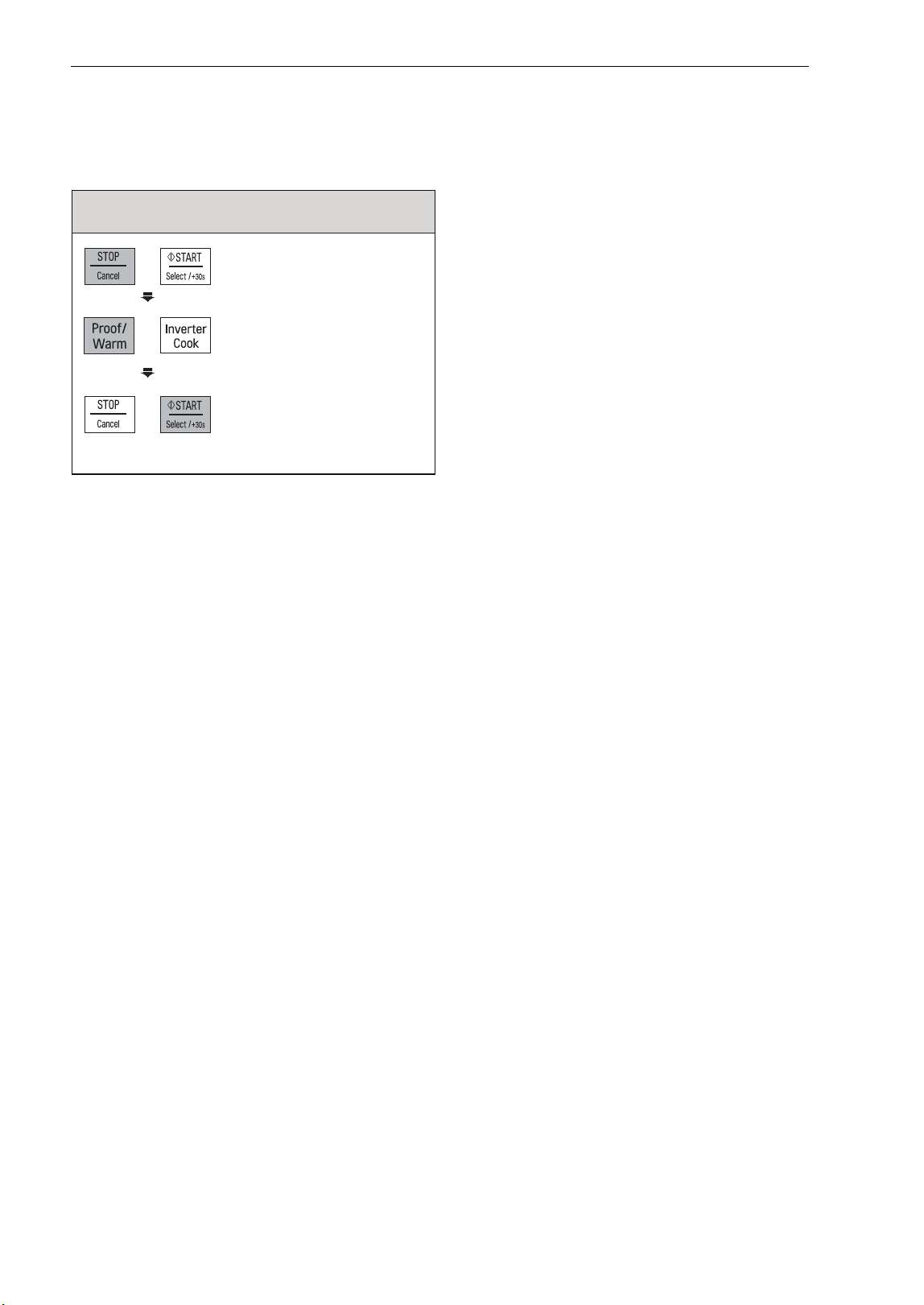
KEEP WARM
The Keep Warm function will keep hot, cooked food at serving temperature. Always start with hot food.
Use microwave-safe utensils.
Example: Keep warm manually
To warm food at high level in 90 minutes
3.
Press START.
'1h30' will show in the
display.
Notes :
Crisp foods (pastry, pies, turnovers, etc)
should be uncovered during keep warm.
Moist foods should be covered with plastic
wrap or microwave-safe lid.
The amount of keep warm food is suitable
for 1-3 servings.
1.
Press
STOP / CANCEL.
2. Press PROOF / WARM until
display shows "2"
HOW TO USE
21
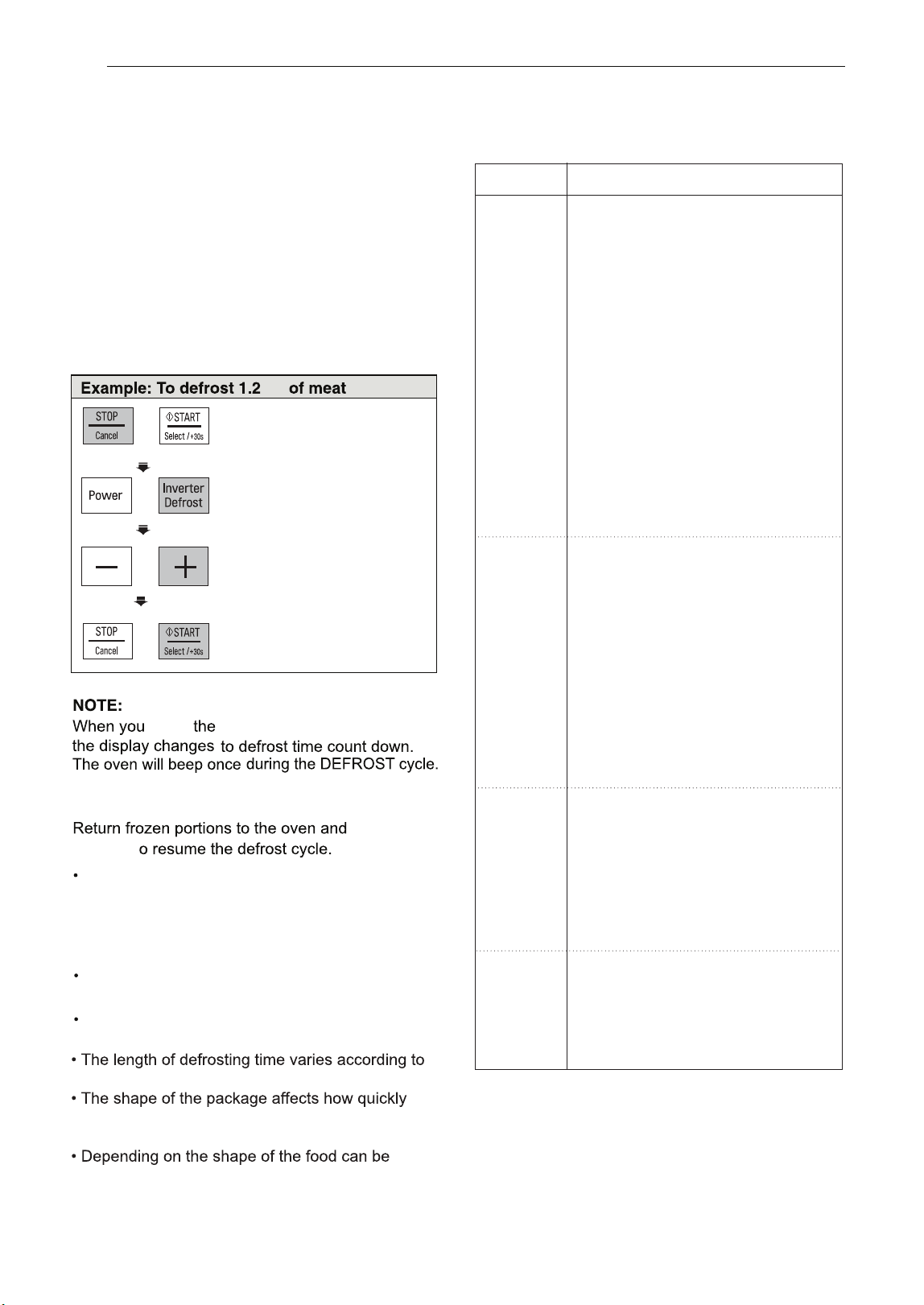
INVERTER
DEFROST
Four defrost sequences are preset in the oven.
The INVERTER DEFROST feature provides you
with the best defrosting method for frozen foods.
The cooking guide will show you which defrost
sequence is
recommended for the food you are
defrosting.
For added convenience, the INVERTER DEFROST
includes a built-in beep mechanism that reminds
you to check, turn over, separate, or rearrange
to getthe best defrost results. Four defrosting leve
is are provided.
(MEAT / POULTRY / FISH / BREAD)
INVERTER DEFROST
MENU INSTRUCTIONS
press
START
button,
At beep, open the door and remove any portions
that have thawed and turn.
press
START
t
Remove fish, meat, and poultry from
its original wrapping paper or plastic package.
Otherwise, the wrap will hold steam and juice
close to the foods, which can cause the outer
surface of the foods to cook.
Place foods in a shallow container or on a
microwave roasting rack to catch drippings.
Food should still be somewhat icy in the center
when removed from the oven.
how solidly the food is frozen.
food will defrost. Shallow packages will defrost
more quickly than a deep block.
defrosted more or less.
kg
1. Press STOP / CANCEL.
2.
Press INVERTER DEFROST
until display shows ‘dEF1’.
3.
Press
+
until display
shows ‘1.2 kg’.
4.
Press START.
HOW TO USE
2 22
Category
Food to be Defrosted
Beef
Ground beef, Round steak,
Cubes for stew, Tenderloin steak,
Pot roast, Rib roast, Rump roast,
Chuck roast, Hamburger patty
Remove any defrosted portion of
ground beef at the beeps.
MEAT
Lamb
(dEF1)
Chops, Rolled roast
Pork
0.1 - 4.0 kg
Chops
, Hot dogs,
Spareribs, Country-style ribs.
Rolled roast, Sausage
Veal
Cutlets (0.5 kg, 20 mm thick)
Turn food over at beep.
After defrosting, let stand for 5 - 15
minutes.
Poultry
Whole, Cut-up, Breast (boneless).
POULTRY
Rinse chicken cavity with tap
(dEF2)
water and let stand for 60 minutes
0.1 - 4.0 kg
for better performance.
Cornish Hens
Whole
Turkey
Breast
Turn food over at beep.
After defrosting, rinse with cold water
after 30 minutes, let stand for
60 minutes.
Fish
FISH
Fillets, Whole Steaks
(dEF3)
Shellfish
Crab meat, Lobster tails, Shrimp,
0.1 - 4.0 kg
Scallops
Turn food over at beep.
Seperate portions if needed.
After defrosting, let stand for 5 - 10
minutes.
Sliced bread, Buns, Baguette, etc.
BREAD
Separate slices and place between
(dEF4)
paper towel or flat plate.
0.1 - 0.5 kg
Turn food over at beep.
After defrosting, let stand for
1 - 2 minutes.

MICROWAVE-SAFE UTENSILS
23
MICROWAVE-SAFE UTENSILS
Never use metal or metal trimmed utensils in using microwave function
Dinner plates
Glassware
Paper
Plastic storage containers
Plastic cooking bags
Plastic microwave cookware
Pottery, stoneware and ceramic
Microwaves cannot penetrate metal. They will bounce off any metal object in the oven and cause arcing, an alarming
phenomenon that resembles lightning. Most heat resistant non metallic cooking utensils are safe for use in your
oven. However, some may contain materials that render them unsuitable as microwave cookware. If you have any
doubts about a particular utensil, there's a simple way to find out if it can be used in the microwave.
Place the utensil in question next to a glass bowl filled with water in using microwave function. Microwave at power
HIGH for 1 minute. If the water heats up but the utensil remains cool to the touch, the utensil is microwave-safe.
However, if the water does not change temperature but the utensil becomes warm, microwaves are being absorbed
by the utensil and it is not safe for use in using microwave function. You probably have many items on hand in your
kitchen right now that can be used as cooking equipment in the microwave. Just read through the following checklist.
Many kinds of dinnerware are microwave-safe. If in doubt consult the manufacturer's literature or perform the
microwave test. Do not heat dinner plates that use any painted on decorative as they will arc if the paint has metallic
content.
Glassware that is heat-resistant is microwave-safe. This would include all brands of oven tempered glass cookware.
However, do not use delicate glassware, such as tumblers or wine glasses, as these might shatter as the food warms.
These can be used to hold foods that are to be quickly reheated. However, they should not be used to hold foods that
will need considerable time in the oven as hot foods will eventually warp or melt plastic containers.
Paper plates and containers are convenient and safe to use in using microwave function, provided that the cooking
time is short and foods to be cooked are low in fat and moisture. Paper towels are also very useful for wrapping foods
and for lining baking trays in which greasy foods such as bacon are cooked. In general, avoid coloured paper
products as the colour may run. Some recycled paper products may contain impurities which could cause arcing or
fires when used in the microwave.
Provided they are made specially for cooking, cooking bags are microwave safe. However, be sure to make a slit in
the bag so that steam can escape. Never use ordinary plastic bags for cooking in using microwave function, as they
will melt and rupture.
A variety of shapes and sizes of microwave cookware are available. For the most part, you can probably use items
you already have on hand rather than investing in new kitchen equipment.
Containers made of these materials are usually fine for use in using microwave function, but they should be tested to
be sure.
CAUTION
Some items with high lead or iron content are not suitable as cooking utensils.
Utensils should be checked to ensure that they are suitable for use in the microwave.

24 FOOD
CHARACTERISTICS
&
MICROWAVE
COOKING
FOOD CHARACTERISTICS & MICROWAVE COOKING
Keeping an eye on things
Density of food
Height of food
Quantity of food
Shape of food
Covering
Moisture content of food
Bone and fat content of food
Factors affecting microwave cooking times
Always watch your food while it cooks. Your microwave function is equipped with a light that turns on automatically
when the oven is in operation so that you can see inside and check the progress of your food. Directions given in
recipes to elevate, stir, and the like should be thought of as the minimum steps recommended. If the food seems to be
cooking unevenly, simply make the necessary adjustments you think appropriate to correct the problem.
Many factors affect cooking times. The temperature of ingredients used in a recipe makes a big difference in cooking
times. For example, a cake made with ice-cold butter, milk, and eggs will take considerably longer to bake than one
made with ingredients that are at room temperature. Some of the recipes, particularly those for bread, cake, and
custards, recommend that food be removed from the oven when they are slightly undercooked.
This is not a mistake. When allowed to stand, usually covered, these foods will continue to cook outside of the oven as
the heat trapped within the outer portions of the food gradually travels inward. If the food is left in the oven until it is
cooked all the way through, the outer portions will become overcooked or even burnt. You will become increasingly
skillful in estimating both cooking and standing times for various foods.
Light, porous food such as cakes and breads cook more quickly than heavy, dense foods such as roasts and casseroles.
You must take care when microwaving porous food so that the outer edges do not become dry and brittle.
The upper portion of tall foods, particularly roasts, will cook more quickly than the lower portion.
Therefore, it is wise to turn tall food several during cooking.
Since the heat generated from microwaves causes moisture to evaporate, relatively dry food such as roasts and some
vegetables should either be sprinkled with water prior to cooking or covered to retain moisture.
Bones conduct heat and fat cooks more quickly than meat. Care must be taken when cooking bony or fatty cuts of meat
in order to prevent unevenly or overcooked meat.
The number of microwaves in your oven remains constant regardless of how much food is being cooked.
Therefore, the more food you place in the oven, the longer the cooking time. Remember to decrease cooking times by at
least one third when halving a recipe.
Microwaves penetrate only about 2 cm into food, the interior portion of thick foods are cooked as the heat generated on
the outside travels inward. Only the outer edge of food is cooked by microwave energy; the rest is cooked by conduction.
The worst possible shape for a food that is to be microwaved is a thick square.
The corners will burn long before the centre is even warm. Round thin foods and ring shaped foods cook most successfully
in the microwave.
A cover traps heat and steam which causes food to cook more quickly. Use a lid or microwave cling film with a corner
folded back to prevent splitting.

FOOD
CHARACTERISTICS
&
MICROWAVE
COOKING
25
FOOD CHARACTERISTICS & MICROWAVE COOKING
Browning
Covering with greaseproof paper
Arranging and spacing
Stirring
Turning over
Shielding
Elevating
Piercing
Testing if cooked
Standing time
Placing thicker portions facing outwards
Meats and poultry that are cooked fifteen minutes or longer will brown lightly in their own fat. Foods that are
cooked for a shorter period of time may be brushed with a browning sauce such as Worcestershire sauce, soy
sauce or barbecue sauce to achieve an appetizing colour. Since relatively small amounts of browning sauces
are added to food, the original flavour of the recipe is not altered.
It is a looser cover than a lid or cling film, the food may dry out slightly. But because it makes a looser cover
than a lid or clingfilm, it allows the food to dry out slightly.
Individual foods such as baked potatoes, small cakes and hors d'oeuvres will heat more evenly if placed in the
oven an equal distance apart, preferably in a circular pattern. Never stack foods on top of one another.
Stirring is one of the most important of all microwaving techniques. In conventional cooking, food is stirred for
the purpose of blending. Microwaved food, however, is stirred in order to spread and redistribute heat. Always
stir from the outside towards the centre as the outside of the food heats first.
Large, tall foods such as roasts and whole chickens should be turned so that the top and bottom will cook
evenly. It is also a good idea to turn cut up chicken and chops.
Since microwaves are attracted to the outside portion of food, it makes sense to place thicker portions of meat,
poultry and fish to the outer edge of the baking dish. This way, thicker portions will receive the most microwave
energy and the food will cook evenly.
Strips of aluminium foil (which block microwaves) can be placed over the corners or edges of square and
rectangular foods to prevent those portions from overcooking. Never use too much foil and make sure the foil
is secured to the dish or it may cause'arcing'in the oven especially if the foil passes too closely to the walls of
the oven during rotation.
Foods enclosed in a shell, skin or membrane are likely to burst in the oven unless they are pierced prior to
cooking. Such foods include yolks and whites of eggs, clams and oysters and whole vegetables and fruits.
Food cooks so quickly in a oven, it is necessary to test it frequently. Some foods are left in the microwave until
completely cooked, but most foods, including meats and poultry, are removed from the oven while still slightly
undercooked and allowed to finish cooking during standing time. The internal temperature of foods will rise
between 5°F (3°C) and 150°F (80°C) during standing time.
Foods are often allowed to stand for 3 to 10 minutes after being removed from the oven. Usually the foods are
covered during standing time to retain heat unless they are supposed to be dry in texture (some cakes and
biscuits, for example). Standing allows foods to finish cooking and also helps flavour blend and develop.
Thick or dense foods can be elevated so that microwaves can be absorbed by the underside and centre of the
foods.
26
TO CLEAN YOUR OVEN
USING THE SMART DIAGNOSIS™ FUNCTION
2.
3.
4.
Max
10 mm
TO CLEAN YOUR OVEN / USING THE SMART DIAGNOSIS™ FUNCTION
1 Keep the inside of the oven clean
2 Keep the outside of the oven clean
Food spatters or spilled liquids stick to oven walls and between the seal and door surfaces. It is best to wipe up
spillovers with a damp cloth right away. Crumbs and spillovers will absorb microwave energy and lengthen cooking
times and may even damage the oven. Use a damp cloth to wipe out crumbs that fall between the door and the
frame. It is important to keep this area clean to assure a tight seal. Remove greasy spatters with a soapy cloth then
rinse and dry. Do not use harsh detergent or abrasive cleaners. The metal tray can be washed by hand or in the
dishwasher.
Disconnect the mains plug from the power outlet before cleaning the oven to eliminate the possibility of electric
shock. Clean the outside of your oven with soap and water then with clean water and dry with a soft cloth or paper
towel.To prevent damage to the operating parts inside the oven, the water should not be allowed to seep into the
ventilation openings. To clean control panel, open the door to prevent the oven from accidentally starting, and wipe
a damp cloth followed immediately by a dry cloth. Press STOP after cleaning.
Use this function if you need an accurate diagnosis by an LG Electronics service centre when the product malfunctions
or fails. Use this function only to contact the service representative, not during normal operation
1. When instructed to do so by the call centre, hold the mouthpiece of your phone over the Smart Diagnosis™ logo on
the controller.
With the door closed, press and continue to hold the STOP/Clear button for 3 seconds so that 'Loc' appears on the
display. Continue to hold the STOP/Clear button for a further 5 seconds until '5' appears in the display, (so, the
STOP/Clear button will need to be held for 8 seconds continuously).
A tone will then emit from behind the Smart Diagnosis symbol.
Keep the phone in place until the tone transmission has finished. The display will count down the time.
Once the countdown is over and the tones have stopped, resume your conversation with the call center agent, who
will then be able to assist you in using the information transmitted for analysis.
If steam accumulates inside or around the outside of the oven door, wipe the panels with a soft cloth. Steam or
condensation build up inside the door is normal if foods are heated for a long period on higher power levels, this is
not a malfunction, the condensation will eventually evaporate. Try covering the food or vary the heating levels and
time to reduce any condensation forming in the door, this may also occur when the oven is operated under high
humidity conditions and in no way indicates a malfunction of the unit.
The door and door seals should be kept clean. Use only warm, soapy water, rinse then dry thoroughly.
DO NOT USE ABRASIVE MATERIALS, SUCH AS CLEANING POWDERS OR STEEL AND PLASTIC PADS.
Metal parts will be easier to maintain if wiped frequently with a damp cloth.
3
4
Do not touch any other buttons.
For best results, do not move the phone while the tones are being transmitted.
If the call center agent is not able to get an accurate recording of the data, you may be asked to
try again.
NOTE
NOTE
27
QUESTIONS & ANSWERS
FAQ Answer
What's wrong when the oven light will not glow?
Does microwave energy pass through the
viewing screen in the door?
Why does the BEEP tone sound when a button
on the control panel is touched?
Will the microwave function be damaged if it
operates empty?
Why do eggs sometimes pop?
Why is standing time recommended after
microwave cooking is over?
Why doesn’t my oven always cook as fast as the
cooking guide says?
There may be several reasons why the oven light will not glow.
Either the light bulb has blown or the electric circuit has failed.
No. The holes, or ports, are made to allow light to pass; they do not
let microwave energy through.
The BEEP tone sounds to assure that the setting is being properly
entered.
Yes. Never run it empty.
When baking, frying, or poaching eggs, the yolk may pop due to
steam build up inside the yolk membrane.To prevent this, simply
pierce the yolk before cooking. Never microwave eggs in the shell.
After microwave cooking is finished, food keeps on cooking during
standing time. This standing time finishes cooking evenly through-
out the food. The amount of standing time depends on the density
of the food.
Check your cooking guide again to make sure youVe followed
directions correctly, and to see what might cause variations in
cooking time. Cooking guide times and heat settings are sugges-
tions, chosen to help prevent overcooking, the most common
problem in getting used to this oven. Variations in the size, shape,
weight and dimensions of the food require longer cooking time.
Use your own judgment along with the cooking guide suggestions
to test food conditions, just as you would do with a conventional
cooker.
After cooking is complete, the fan may operate to cool the oven.
The display will show 'Cool'. If you open the door or press once
STOP/CLEAR before the cooking time is complete, the remaining
cooking time will show on the display. This is not a malfunction.
Why appears the word 'Cool' or remaining
cooking timein the display with fan noise after
microwave cooking is over?
When operating the microwave oven, If you use a product such as radio, TV, wireless LAN, Bluetooth, medical
equipment, wireless equipment etc Using the same frequency as the microwave oven, the product may receive interfer-
ence from these products. This interference does not indicate a problem of the microwave or the product and is not a
malfunction. Therefore, it is safe to use. However, medical equipment may receive interference as well, so use caution
when using medical equipment near the product.
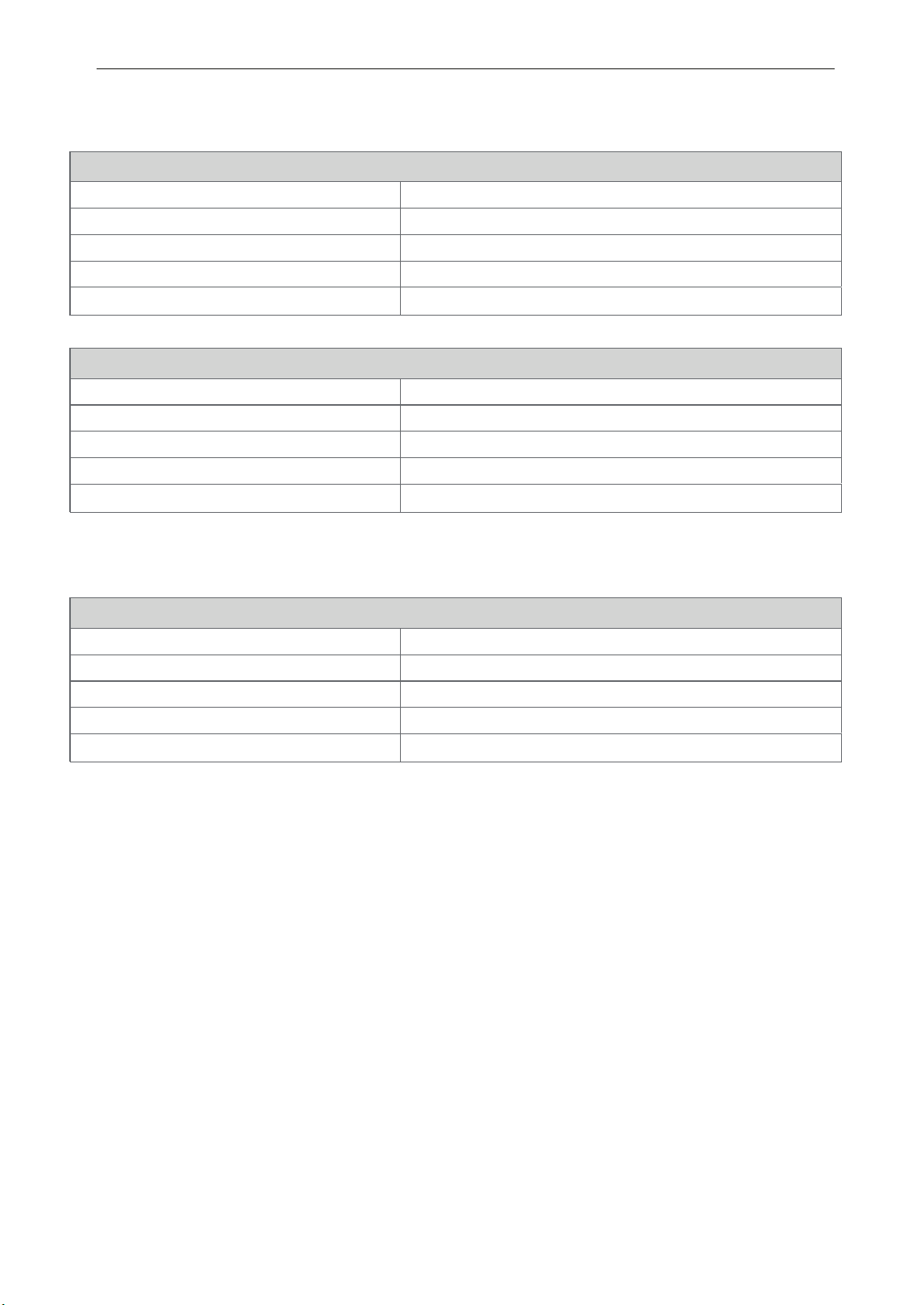
TECHNICAL SPECIFICATIONS
Power Input 230 V~ 50 Hz / 220 V~ 50 Hz
Microwave Output Power.
Max. 1000 Watt* (IEC60705 rating standard)
Microwave Frequency
2 450 MHz
Outside Dimension 476 mm(W) X 272 mm(H) X 368 mm(D)
Microwave
1150 Watt
*
In 1000 W and 800 W, output power will gradually be reduced to avoid overheating.
Microwave Frequency : 2450 MHz +/- 50 MHz (Group 2 / Class B)
Group 2 equipment: group 2 contains all ISM RF equipment in whi ch radio-frequency energy in the frequency
range 9 kHz to 400 GHz is intentionally generated and used or only used, in the form of electromagnetic
radiation, inductive and /or capacitive coupling, for the treat ment of material or inspection/analysis purposes.
Class B equipment is equipment suitable for use in domestic establishments and in establishments directly
connected to a low voltage power supply network which supplies buildings used for domestic purposes.
You can download a owner's manual at http://www.lg.com
TECHNICAL SPECIFICATIONS
****
MS253
Power Input 230 V~ 50 Hz / 220 V~ 50 Hz
230 V~ 50 Hz / 220 V~ 50 Hz
Microwave Output Power.
Max. 1000 Watt* (IEC60705 rating standard)
Microwave Frequency
2 450 MHz
Outside Dimension 476 mm(W) X 272 mm(H) X 346 mm(D)
Microwave
1150 Watt
****
MS233
Power Input
Microwave Output Power.
Max. 1200 Watt* (IEC60705 rating standard)
Microwave Frequency
2 450 MHz
Outside Dimension 544 mm(W) X 307 mm(H) X 439 mm(D)
Microwave
1350 Watt
*
In 1200 W and 1000 W, output power will gradually be reduced to avoid overheating.
****
MS423
****
MS363
28