Part Number: 73209-5
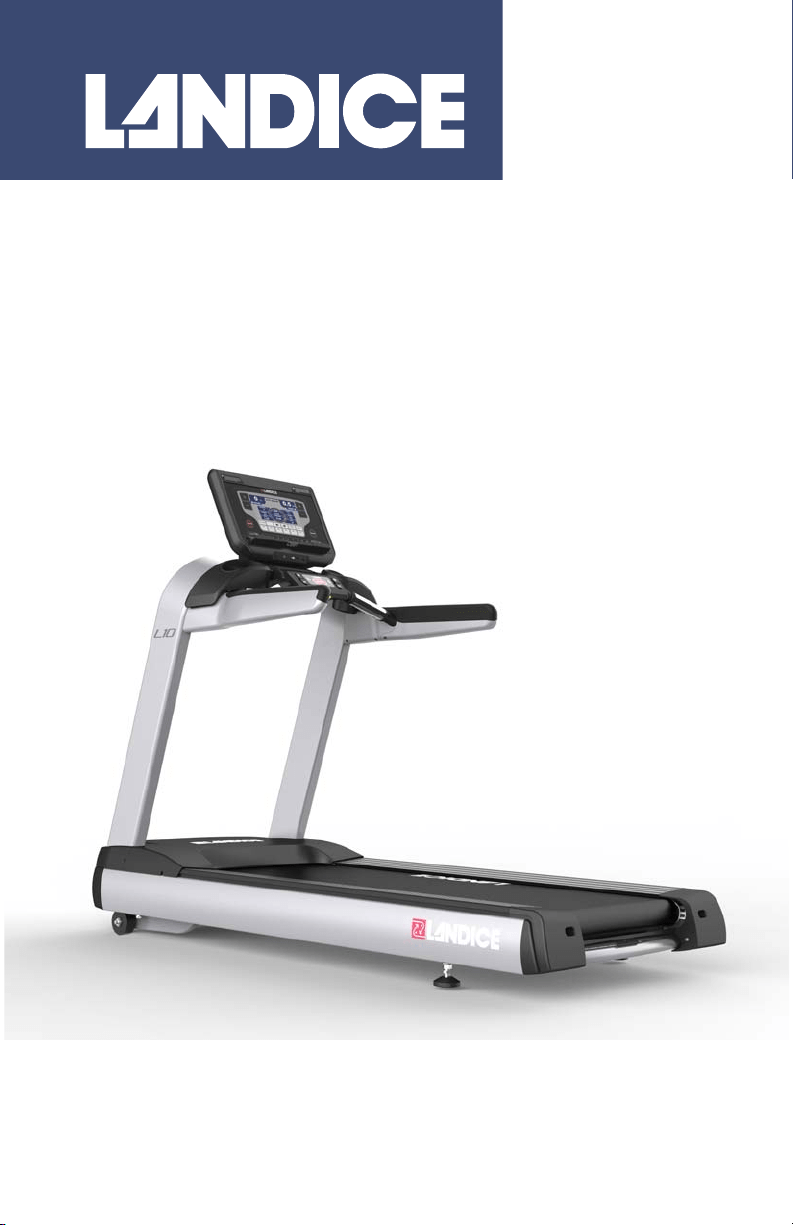
L10 Treadmill
90 Series
Owner’s Manual
Important Safety Instructions
2
Important Safety Instructions
Read all instructions before using the treadmill.
Save these instructions.
Veuillez lire toutes les instructions avant d'utiliser le tapis roulant.
VEUILLEZ CONSERVER CES INSTRUCTIONS.
WARNING
Keep Children under the age of 13 away
from machine.
AVERTISSEMENT
Garder les enfants de moins de 13 ans loin
de la machine.
WARNING
Heart rate monitoring systems may be
inaccurate. Over exercising may result in
serious injury or death. If you feel faint stop
exercising immediately.
AVERTISSEMENT
Les systèmes de surveillance de la
fréquence cardiaque peuvent être inexacts.
L'exercice excessif peut entraîner des
blessures graves ou la mort. Si vous vous
sentez faible, arrêtez de vous entraîner
immédiatement.

Important Safety Instructions
3
DANGER
To reduce the risk of electric shock: always
unplug the treadmill from the electrical outlet
immediately after using and before cleaning.
WARNING
To reduce the risk of burns, fire, electric shock or
injury to persons:
• An appliance should never be left unattended when
plugged in. Unplug from outlet when not in use, and
before putting on or taking off parts.
• Close supervision is necessary when the treadmill is
used by or near children or persons with disabilities.
• Use the treadmill only for its intended use as described
in this manual. Do not use attachments not
recommended by Landice.
• Never operate treadmill if it has a damaged cord or
plug, if it is not working properly, or if it has been
damaged. Call your dealer or certified service provider
immediately for examination and repair.
• Keep the power cord away from heated surfaces. Be
sure the cord has plenty of slack and cannot be
pinched under the treadmill when it elevates and de-
elevates.
• Never operate the treadmill with the motor cover air
openings blocked. Keep the air openings free of lint,
hair, dust, or debris.
• Do not drop or insert objects into any opening on the
treadmill. Be sure no objects are near or beneath the
treadbelt when you are using the treadmill.
• Do not use treadmill outdoors.
• Do not operate treadmill where aerosol (spray)
products are being used or where oxygen is being
administered.
• To disconnect, press STOP twice, pull the emergency
stop safety lanyard out, then remove plug from outlet.

Important Safety Instructions
4
DANGER
Pour réduire le risque d'électrocution :
toujours débrancher le tapis roulant de la
prise électrique immédiatement après son
utilisation et avant de le nettoyer.
AVERTISSEMENT
Pour réduire le risque de brûlure, d'incendie,
d'électrocution ou de blessure corporelle.
• Un appareil électrique ne doit jamais être laissé sans
surveillance lorsqu'il est branché. Débranchez-le
lorsque vous ne l'utilisez pas et avant d'y installer ou
d'en retirer des éléments.
• Une surveillance étroite est nécessaire lorsque le
tapis roulant est utilisé par des enfants, des
personnes invalides ou handicapées ou à leur
proximité.
• N'utilisez le tapis roulant que dans le cadre prévu et
décrit dans ce manuel. N'utilisez aucune pièce
supplémentaire non recommandée par Landice.
• N'utilisez jamais le tapis roulant si son câble ou sa
fiche électrique est abîmé(e), ne fonctionne pas
correctement ou a été endommagé(e). Appelez
immédiatement votre distributeur ou prestataire de
services certifié pour qu'il l'examine et le répare.
• Tenez le câble électrique éloigné des surfaces
chauffées. Assurez-vous que le câble ait
suffisamment de mou et ne puisse pas se coincer
sous le tapis roulant lorsqu'il s'élève ou s'abaisse.
• N'utilisez jamais le tapis roulant si les ouvertures
d'aération du capot de moteur sont obstruées. Ne
laissez pas de peluches, cheveux, poussières ou
débris bloquer les ouvertures d'aération.
• Ne faites pas tomber et n'insérez pas d'objet dans
une quelconque ouverture du tapis roulant. Assurez-
vous qu'aucun objet ne se trouve à proximité ou sous
la courroie lorsque vous utilisez le tapis roulant.
• N'utilisez pas le tapis roulant en extérieur.
• N'utilisez pas le tapis roulant lorsque des produits
aérosols (sprays) sont utilisés ou lorsque de
l'oxygène est administré.
• Pour déconnecter, appuyez deux fois sur STOP,
retirez la clé d'arrêt d'urgence puis débranchez la
prise du secteur.

Important Safety Instructions
5
WARNING
Failure to observe the following warning
statements can result in serious injury!
• Do not use this product without first consulting your
doctor if you suffer from any illness, condition, or
disability that affects your ability to run, walk or
exercise.
• Do not use this product without supervision present if
you are suffering from any illness, condition, or
disability which affects your ability to run, walk or
exercise. Failure to do so can result in serious injury
should you fall while the treadbelt is moving.
• Failure to leave ample clearance around the treadmill
could cause you to be trapped between the treadmill
and a wall if you fall, resulting in burns or other serious
injury from the moving treadbelt. Allow a minimum
clearance of 24 inches (61 cm) on each side of the
treadmill. Allow a minimum clearance of 6 feet (183
cm) at the rear of the treadmill, and 12 inches
(30 cm) from the wall/front of the unit.
• Never stand on the treadbelt when starting the
treadmill. A sudden start could cause you to lose your
balance. Always begin by placing your feet on the side
straddle covers, straddling the treadbelt, before turning
the treadmill on.
• Always wear the safety lanyard clip securely on your
clothing while exercising. Failure to do so can result in
severe injuries should you accidentally fall while
exercising.
• Test the emergency stop safety lanyard regularly by
pulling on the cord and ensuring that the treadbelt
comes to a complete stop when key is pulled.
• Familiarize yourself with this manual. Be sure you
understand operation of the treadmill before use.
• Always follow basic safety precautions when using an
electrical appliance.

Important Safety Instructions
6
AVERTISSEMENT
Le non-respect des avertissements qui
suivent peut entraîner de graves blessures !
• N'utilisez pas ce produit avant d'avoir consulté votre
médecin si vous souffrez de tout problème de santé,
maladie ou handicap pouvant affecter votre capacité
à courir, marcher ou faire de l'exercice.
• N'utilisez pas ce produit sans surveillance si vous
souffrez de tout problème de santé, maladie ou
handicap pouvant affecter votre capacité à courir,
marcher ou faire de l'exercice. Le non-respect de ces
recommandations peut entraîner des blessures
graves si vous chutez lorsque le tapis roulant est en
mouvement.
• Le fait de ne pas laisser suffisamment d'espace
dégagé autour du tapis roulant peut avoir comme
conséquence, en cas de chute, que vous soyez
immobilisé entre le tapis roulant et un mur, la courroie
en mouvement pouvant causer des brûlures ou
autres blessures. Laissez un espace dégagé d'au
minimum 61 cm de chaque côté du tapis roulant.
Laissez un espace dégagé d'au minimum 183 cm
à l'arrière du tapis roulant, et 130 cm du mur /
devant de l'unité.
• Ne vous tenez jamais debout sur le tapis roulant
lorsque vous le démarrez. Un démarrage brutal
pourrait vous faire perdre l'équilibre. Commencez
toujours par placer vos pieds sur les couvre-cheval
latérales entourant la courroie du tapis avant de
mettre en marche le tapis roulant.
• Veillez toujours à ce que le clip de la lanière de
sécurité soit attaché à vos vêtements lorsque vous
faites de l'exercice. Le non-respect de cette
recommandation peut entraîner de graves blessures
en cas de chute lorsque vous faites de l'exercice.
• Testez la lanière d'arrêt de sécurité régulièrement en
tirant sur le câble et en vérifiant que la courroie est à
l'arrêt complet lorsque la clé est retirée.
• Prenez connaissance du présent manuel. Veillez à
bien comprendre le fonctionnement du tableau de
commandes de votre tapis roulant avant de l'utiliser.
• Prenez toujours les précautions de sécurité de base
lorsque vous utilisez un appareil électrique.
Grounding Instructions
7
Grounding Instructions
This product must be grounded. If it should malfunction or break down,
grounding provides a path of least resistance for electric current to
reduce the risk of electric shock. The treadmill is equipped with a cord
having an equipment grounding conductor and a grounding plug. The
plug must be plugged into an appropriate outlet that is properly
installed and grounded in accordance with all local codes and
ordinances.
120-Volt Treadmills
Treadmills marked 120 VAC are intended for use with a grounding plug
in a nominal 120-volt circuit. Ensure the treadmill power cord is
connected to an outlet having the same configuration as the plug. No
adapter should be used with 120 VAC treadmills.
WARNING
Connect treadmill to a properly grounded,
dedicated electrical outlet only. See the
following Grounding Instructions.
AVERTISSEMENT
Ne branchez le tapis roulant que sur une
prise électrique raccordée à la terre et
exclusivement dédiée au tapis roulant. Voir
les instructions de mise à la terre qui
suivent.
WARNING
This product contains chemicals known to
the state of California to cause cancer and
birth defects or other reproductive harm.
AVERTISSEMENT
Ce produit contient des produits chimiques
reconnus par l’état de Californie comme
pouvant causer le cancer, des anomalies
congénitales ou d’autres troubles de la
reproduction.
DANGER
Improper connection of the grounding connector
can result in a risk of electric shock. Check with a
qualified electrician/service technician if you are
in doubt as to whether the treadmill is properly
grounded. Do not modify the plug provided with
the treadmill–if it will not fit the outlet, have a
proper outlet installed by a qualified electrician.
Grounding Instructions
8
220-Volt Treadmills
Treadmills marked 200 – 240V AC are intended for use on a circuit
having a nominal rating greater than 220V and are factory-equipped
with a specific power cord and plug to permit connection to a proper
electrical circuit. Ensure the treadmill power cord is connected to an
outlet having the same configuration as the plug. No adapter should be
used with 200 – 240 VAC treadmills.
If the treadmill must be configured for use on a different type of
electrical circuit, qualified service personnel should make the proper
connection.
Instructions de mise à la terre
Ce produit doit être mis à la terre. En cas de dysfonctionnement ou de
panne, la mise à la terre offre une voie de moindre résistance au
courant électrique, ce qui réduit de risque d'électrocution. Le tapis
roulant est équipé d'un câble électrique muni d'un fil conducteur de
mise à la terre et d'une fiche de mise à la terre. Cette fiche doit être
branchée sur une prise adaptée, correctement installée et raccordée à
la terre conformément à tous les codes et règlements locaux.
Tapis de course 120 VCA
Les tapis roulants marqués 120 VCA sont conçus pour être utilisés
avec une prise de terre dans un circuit nominal de 120 volts. Assurez-
vous que le cordon d’alimentation du tapis de course est branché sur
une prise ayant la même configuration que la prise. Aucun adaptateur
ne doit être utilisé avec les tapis roulants 120 VAC.
DANGER
Un mauvais raccordement à l'équipement de mise
à la terre vous expose à un risque d'électrocution.
Renseignez-vous auprès d'un électricien/
technicien de service qualifié en cas de doute sur
la mise à la terre correcte du tapis roulant. Ne
modifiez pas la fiche fournie avec le tapis roulant:
si elle ne convient pas à la prise, faites installer
une prise adaptée par un électricien qualifié.

Grounding Instructions
9
Tapis de course 220 VCA
Les tapis roulant sur lesquels est inscrit 200-240 CA (VAC) sont
destinés à une utilisation à une tension nominale supérieure à 220 V et
équipés en série d'un câble électrique et d'une fiche spécifiques pour
permettre le branchement sur une prise adaptée. Assurez-vous que le
cordon d’alimentation du tapis de course est branché sur une prise
ayant la même configuration que la prise. Aucun adaptateur ne doit
être utilisé avec les tapis roulants 200 - 240 VAC.
Si le tapis roulant doit être configuré pour une utilisation sur un type de
circuit électrique différent, il convient de faire appel à du personnel de
service qualifié pour installer le bon raccordement.
Treadmill Quick Start Guide
10
Treadmill Quick Start Guide
Before you Start the Treadmill: Safety
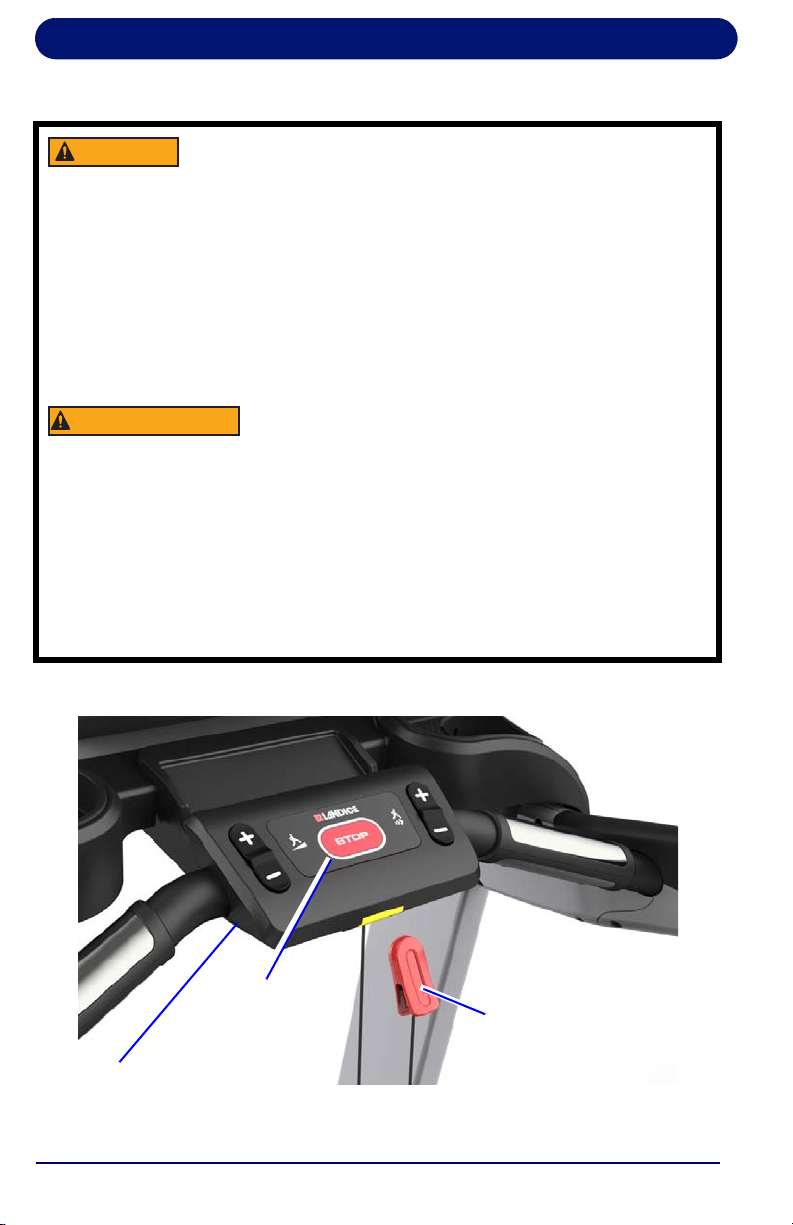
WARNING
The treadmill will not operate unless the
yellow emergency stop Safety Lanyard
Block is pushed in. During operation,
pulling the safety lanyard pulls the Safety
Lanyard Block out, stopping the treadmill.
To help prevent injury, always securely
attach the Safety Lanyard Clip to your
clothing while using the treadmill, to stop
the treadmill if you slip or fall during your
workout.
AVERTISSEMENT
Le tapis roulant ne fonctionnera pas tant
que la clé jaune d'arrêt d'urgence n'est pas
insérée. Durant le fonctionnement, le fait de
tirer sur la lanière retire la clé d'arrêt
d'urgence, éteignant le tapis roulant. Afin de
prévenir toute blessure, accrochez toujours
la lanière de la clé d'arrêt d'urgence à vos
vêtements lorsque vous utilisez le tapis
roulant, afin de l'arrêter en cas de dérapage
ou de chute durant votre séance d'exercice.
Lower Control Panel
Safety Lanyard Clip
Stop Button
Treadmill Quick Start Guide
11
Using the Control Panel
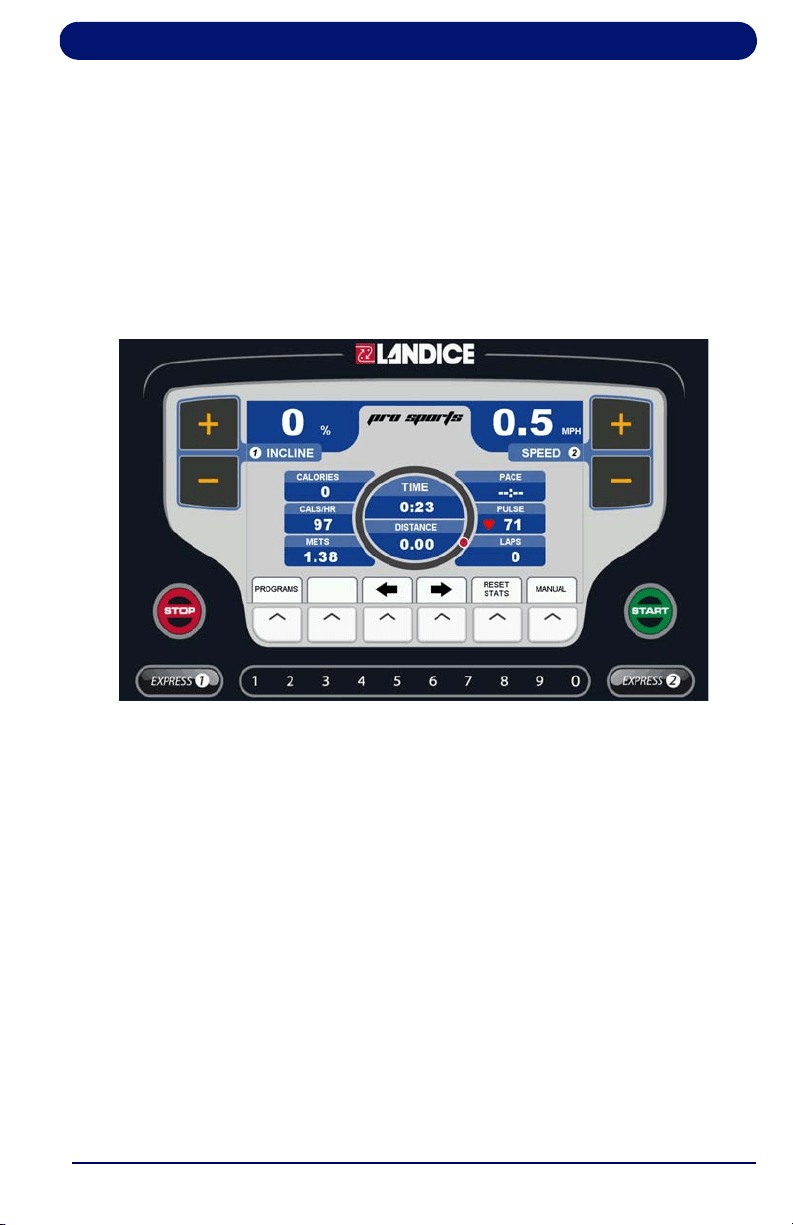
This manual covers Landice L10 treadmills with Pro Sports, Cardio,
and Landice Achieve consoles. Quick start instructions for each
console are included. For detailed instructions, read the chapter
specific to your console.
Pro Sports Treadmill Console
See “Pro Sports Treadmill Operation” on page 27 for complete
instructions.
Cardio Treadmill Console
See “Cardio Treadmill Operation” on page 37 for complete instructions.
Landice Achieve Quick Start Guide
12
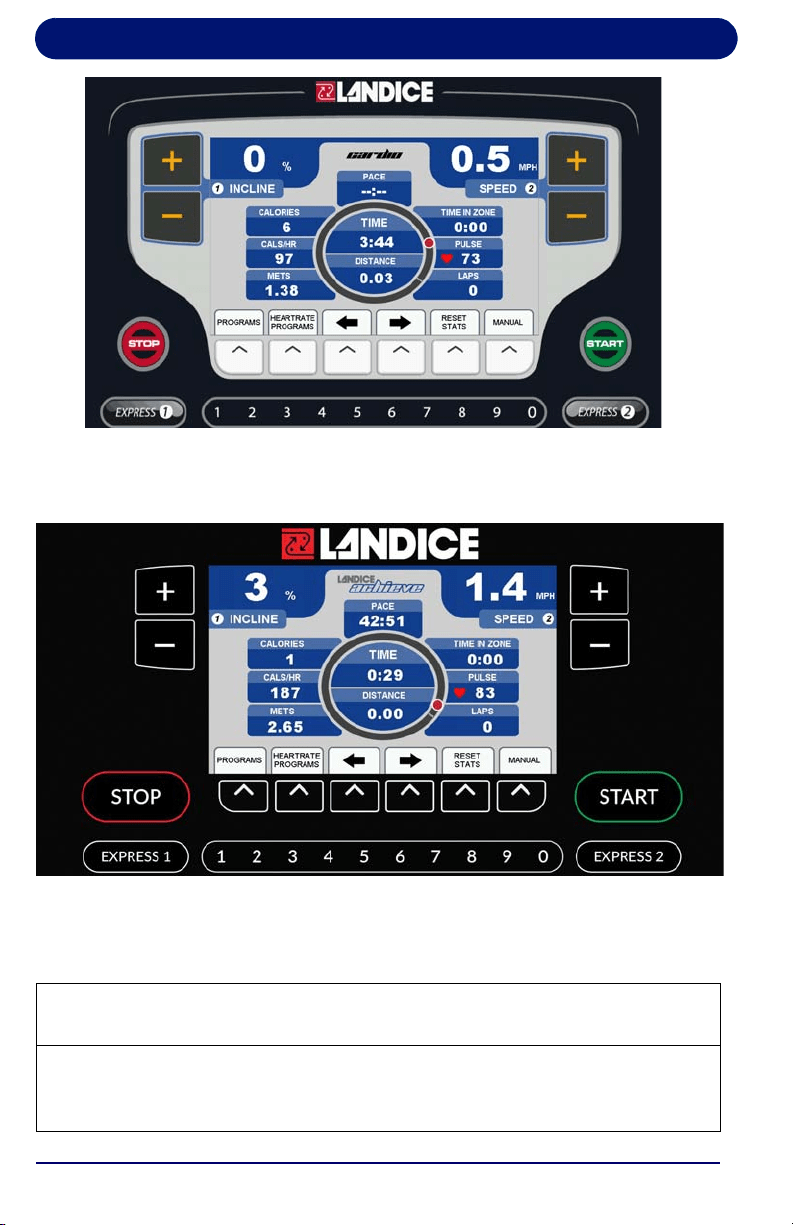
Landice Achieve Quick Start Guide
Landice Achieve Treadmill Console
See “Landice Achieve Treadmill Operation” on page 53 for complete
instructions.
A quick start guide for using the treadmill console controls is provided
in the following table. The controls are the same for both consoles.
Treadmill Controls: Quick Start Guide
To Start the Treadmill: Press START to power up treadmill. All displays
light and the treadbelt begins to move at 0.5 mph (0.8 km/hr in metric mode).
To Turn Off the Treadmill: Press STOP once to stop the treadbelt and put
the unit in pause mode. Press STOP twice to power down the treadmill. The
treadmill will shut off and all current statistical information will be cleared.

Landice Achieve Quick Start Guide
13
To Restart the Treadmill: Press START to power up the treadmill from
pause mode. All displays light and the treadbelt begins to move at 0.5 mph
(0.8 km/hr in metric mode). If you are in a program it will restart at the
paused speed.
To Change Treadbelt Speed:
Press and hold SPEED (+) to increase speed. Pressing for more than 2
seconds increases speed faster. Release (+) key when desired speed is
shown on SPEED display.
Press and hold SPEED (–) key to slow speed. Pressing for more than 2
seconds reduces speed more quickly. Release (–) key when desired speed
is shown on the SPEED display.
To Change Treadbelt Incline:
Press and hold INCLINE (+) key to increase incline. Pressing for more than
2 seconds raises incline faster. Release key when desired incline is shown
on INCLINE display.
Press and hold INCLINE (–) key to lower incline. Pressing for more than 2
seconds lowers incline faster. Release key when desired incline is shown on
INCLINE display.
Left and Right Arrows:
The left and right arrows move between the motivational screens.
EXPRESS KEYS:
Using the EXPRESS keys causes rapid changes in speed and incline.
Press EXPRESS (1) INCLINE to see the incline shortcut screen, which lets
you rapidly change incline level.
Press EXPRESS (2) SPEED to view the speed shortcut screen, which lets
you rapidly change to a different speed.
Treadmill Controls: Quick Start Guide (Continued)

Landice Achieve Quick Start Guide
14
Switching English/Metric Display Units
The treadmill display shows English units (mph for speed, lb for
weight) by default. To change to metric units (kilometers per hour for
speed and kilograms for weight):
• Ensure the treadmill is plugged in and powered off.
• Pro Sports and Cardio: press and hold 3, 9 and START
simultaneously while the treadmill is off, then release all. Use
the + or – keys to move up and down the list and select
Toggle Units. Then press the START button to select setting.
Press STOP to save and exit.
• Landice Achieve: press START then hold 3 and 9
simultaneously during the boot-up screen, then release all. Use
the + or – keys to move up and down the list and select
Toggle Units. Then press START to select the setting. Press
STOP to save and exit.
Repeat the same steps to return the display to English units if desired.

Contents
15
Contents
Before you Start the Treadmill: Safety................................................10
Using the Control Panel .......................................................................11
Switching English/Metric Display Units..............................................14
1. Introduction ..........................................................................................17
1.1. Before You Begin ......................................................................... 17
1.2. Heart Rate Monitoring .................................................................. 21
1.2.1. What is exercise intensity?.............................................. 21
1.2.2. What is maximum heart rate? ......................................... 21
1.2.3. Why should I monitor exercise intensity? ........................ 22
1.2.4. How do I determine my Target Heart Rate Zone? .......... 23
1.2.5. Contact Heart Rate Monitoring System........................... 24
1.3. Treadmill Program Capabilities .................................................... 25
2. Pro Sports Treadmill Operation .........................................................27
2.1. Pro Sports Control Panel.............................................................. 27
2.2. Display Features .......................................................................... 29
2.3. Using the Pro Sports Treadmill .................................................... 30
2.4. Using the Built-in Programs.......................................................... 30
2.4.1. Description ...................................................................... 30
2.4.2. Running a Built-In Program ............................................. 32
2.5. Pro Sports User Programs ........................................................... 33
2.5.1. Learn Mode ..................................................................... 34
2.6. Specific Goal Programs................................................................ 34
3. Cardio Treadmill Operation .................................................................37
3.1. Cardio Control Panel .................................................................... 37
3.2. Display Features .......................................................................... 40
3.3. Using the Cardio Treadmill........................................................... 42
3.4. Using the Built-in Programs.......................................................... 42
3.4.1. Description ...................................................................... 42
3.4.2. Running a Built-In Program ............................................. 44
3.5. Cardio User Programs.................................................................. 45
3.5.1. Learn Mode ..................................................................... 46
3.6. Specific Goal Programs................................................................ 47
3.7. Heart Rate Control Programs....................................................... 48
3.7.1. Built-in HRC Programs .................................................... 49
3.7.2. User-Defined Heart Rate Programs ................................ 50
4. Landice Achieve Treadmill Operation ................................................53
4.1. Landice Achieve Control Panel .................................................... 53
4.2. Display Features .......................................................................... 56
4.3. Using the Landice Achieve Treadmill ........................................... 58
4.4. Using the Built-in Programs.......................................................... 58
4.4.1. Description ...................................................................... 58

Contents
16
4.4.2. Running a Built-In Program ............................................ 60
4.5. Landice Achieve User Programs ................................................. 61
4.5.1. Learn Mode..................................................................... 63
4.6. Specific Goal Programs ............................................................... 64
4.7. Heart Rate Control Programs ...................................................... 65
4.7.1. Built-in HRC Programs ................................................... 66
4.7.2. User-Defined Heart Rate Programs................................ 67
5. Fitness Testing .................................................................................... 69
5.1. Introduction .................................................................................. 69
5.2. Army 2 Mile Fitness Test (Cardio, Landice Achieve)................... 69
5.3. Balke Fitness Test (Cardio and Landice Achieve)....................... 71
5.4. Firefighter (Gerkin) Fitness Test (Cardio and Landice Achieve).. 74
6. Maintenance and Troubleshooting .................................................... 77
6.1. Cleaning....................................................................................... 77
6.2. Lubrication ................................................................................... 78
6.3. Contact Landice........................................................................... 78
6.4. Hidden Menus.............................................................................. 79

17
1. Introduction
Landice has placed over 100,000 treadmills, ellipticals and
bikes in the harshest commercial environments around the
world, where our fitness equipment has proven its strength and
durability. Landice products are designed by a world-class
development team whose innovation defines the leading edge
of high-end fitness.
1.1. Before You Begin
Please do the following before you start to exercise on your
treadmill:
•
Register your treadmill. Landice backs your treadmill with a
strong warranty. For the factory to respond if your treadmill
has a problem, we need your warranty information on file.
Register online at the link below.
http://www.landice.com/support/product-registration
• Ensure that a suitable electrical outlet is available:
• 110VAC/15 amp dedicated circuit
• 220 – 240VAC/15 amp dedicated circuit
• Select the proper location. The treadmill should be installed in
a climate-controlled room.
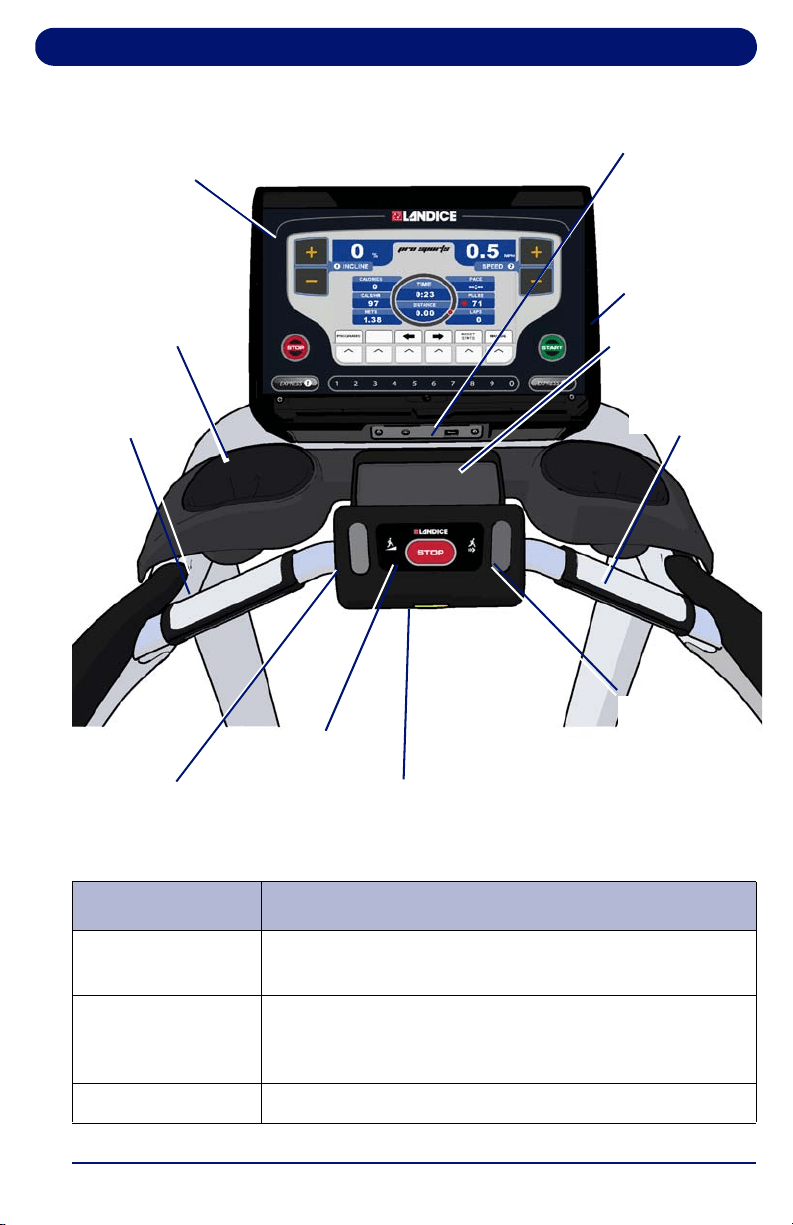
• Familiarize yourself with the features of the treadmill, shown
in the figure on page 19.
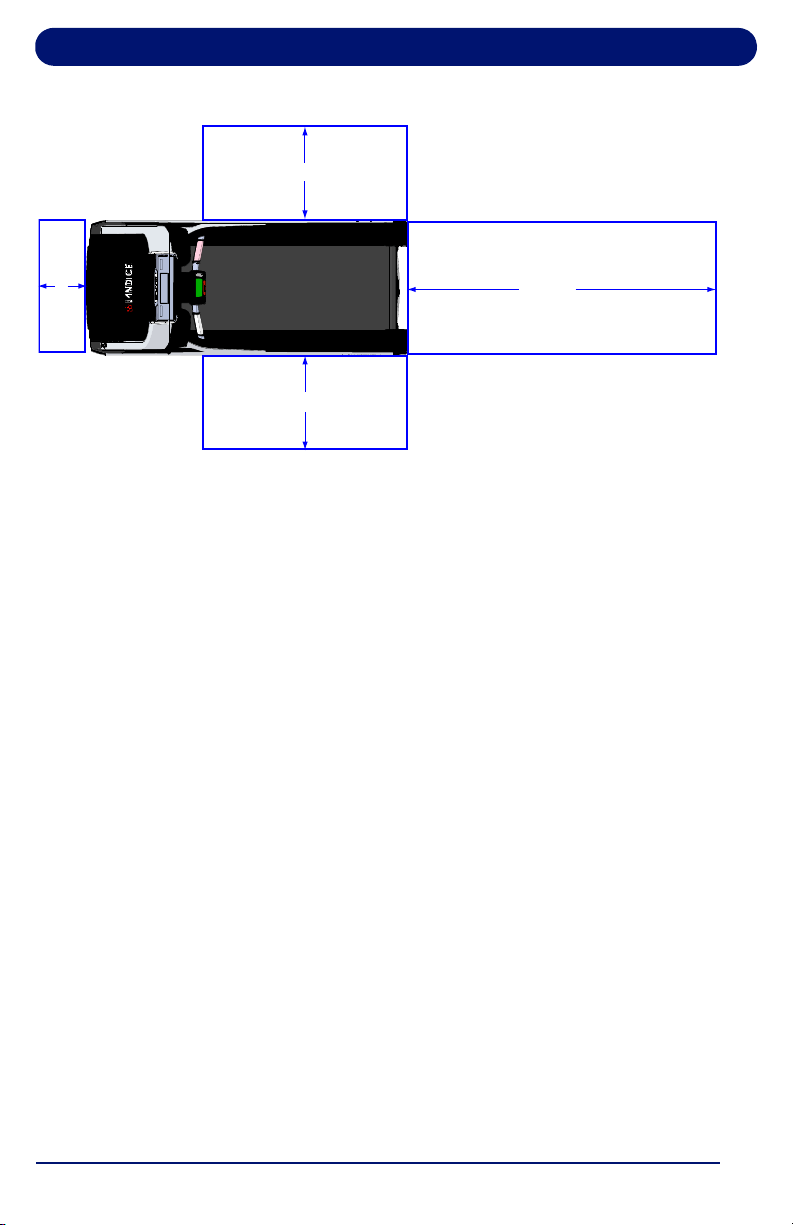
• Ensure that the location of your treadmill provides free space
of at least 79" (201 cm) immediately behind the treadmill for
its full width and at least 24" (61 cm) on each side of the
treadmill. See page 18. If the treadmill is used adjacent to
other treadmills then the side areas can be shared.
Introduction
18
Figure 1-1. Free Space Areas
Electrical Specifications:
110V AC 50/60Hz 18A 1980W
* Incline 0-15%, Speed: 0.5 to 12.5 MPH (0.80 - 20.1 KPH)
220-240V AC 50/60Hz 15A 3300W
• Incline: 0-15%, Speed: 0.5-15.5 MPH (1-25 KPH)
Running Surface: 22'' x 60'' (559 mm x 1524 mm)
Dimension of the boxed treadmill: 88" x 38" x 26"
(2235 mm x 965 mm x 660 mm)
Dimension of the fully-assembled L10 treadmill:
83" x 34" x 64" (2108 mm x 864 mm x 1626 mm)
Weight of fully assembled treadmill: 500 lb (226kg)
Manufacturer:
IMPULSE (QINGDAO) HEALTH TECH LTD.
No.369, Huashan 2 Road, Jimo, Qingdao,
P.R.China.
24” (0.6m)
24” (0.6m)
79” (2m)
12”
(0.3m)
Introduction
19
Figure 1-2. Treadmill Features and Controls
Safety Lanyard Block
Speed
Adjust
Incline Adjust
Pulse GripPulse Grip
Accessory
Tray
Bottle Holder
Control Panel
Stop Button
USB Port
(ProSports,
Cardio)
USB Port
(Landice
Achieve)
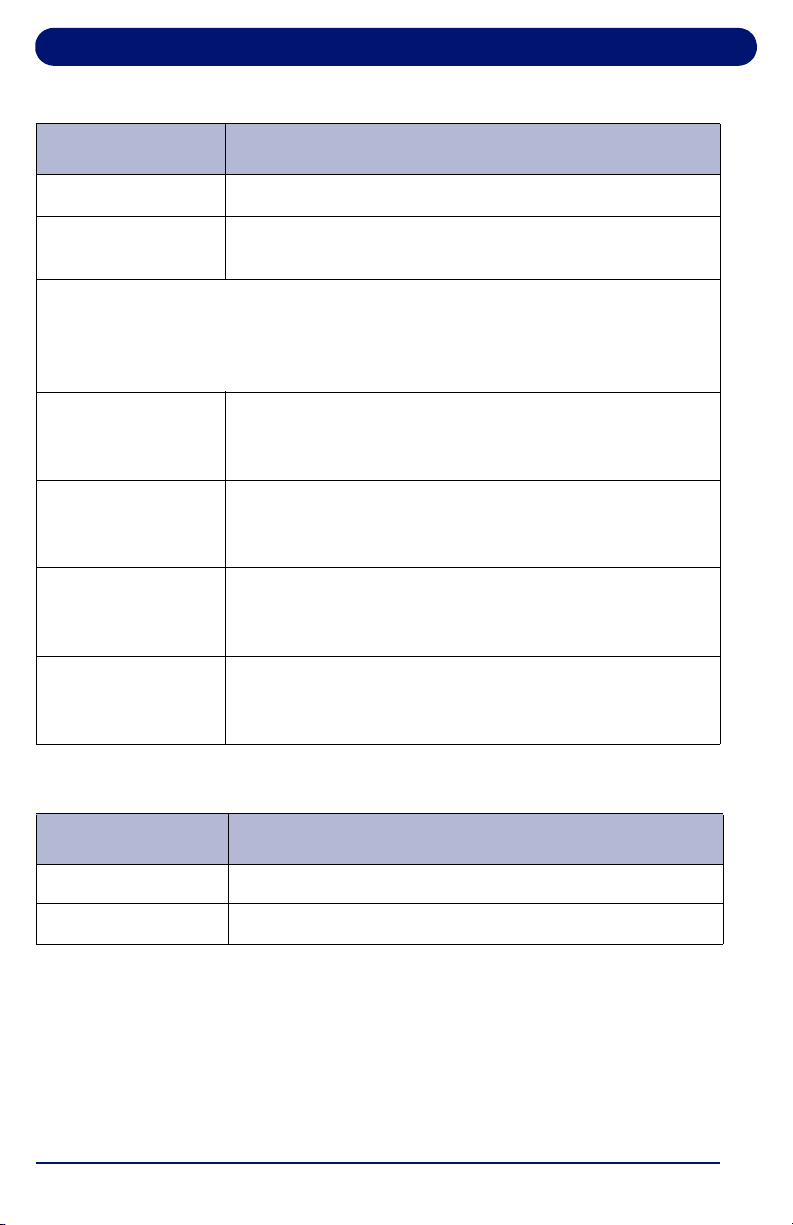
Table 1-1 Treadmill Features and Controls
Item Description
Control Panel Provides workout displays and controls. Control panels
vary by model.
USB Port Provides a charging port for devices up to 600mA.
Service use only: allows treadmill software to be
updated.
Accessory Tray Provides accessory storage.
Introduction
20
Bottle Holder
Holds bottles/cups.
Pulse Grips (2) Detects pulse when hands are placed on the grips,
allowing treadmill to calculate and display heart rate.
Lower Control Panel Controls
The lower control panel is located between the pulse grips. This area
provides easy-to-reach controls for stopping, resuming or changing speed or
incline during your workout.
Speed Adjustment Increases/decreases treadbelt speed when pressed
up/down. Performs the same function as the SPEED
(+/–) keys on the control panel.
STOP Button Press STOP once to pause the treadmill or twice to
turn it off. Statistical information is cleared when
treadmill is turned off.
Safety Lanyard
Block
Provides the connection for the safety lanyard. The
treadbelt will not move unless the safety lanyard block
is pushed in.
Incline Adjustment Raises/lowers the front of the treadbelt when pressed
up/down. Performs the same function as the INCLINE
(+/–) keys on the control panel.
Table 1-1 Treadmill Features and Controls (Continued)
Item Description
Table 1-2 Treadmill Connectors
Connector Description
HDMI For service use only
Coaxial OPTIONAL: Allows connection of an analog television

Introduction
21
1.2. Heart Rate Monitoring
This section provides basic concepts of heart rate monitoring
so you can better understand how to use it to reach the fitness
level you desire.
1.2.1. What is exercise intensity?
Exercise intensity is simply a measure of how hard you are
working at a given time during exercise. The ACSM, the world’s
leading medical and scientific authority on sports medicine and
fitness, recommends that every individual involved in an
exercise program know how hard his/her body is working
during exercise.
Your heart provides key information for determining how
intensely you are working during exercise. Your heart rate (how
many times your heart beats per minute) is really an efficiency
rating for your entire body. The number of times your heart
beats during each minute of exercise is a measurement of the
intensity of the exercise. If your heart rate is low, exercise
intensity is low; if your heart rate is high, your exercise intensity
is high.
1.2.2. What is maximum heart rate?
Maximum Heart Rate (MHR) is the maximum attainable heart
rate your body can reach before total exhaustion. True
maximum heart rate is measured during a fatigue or “stress”
test. This test must be done in a clinical setting and is not
practical or accessible for most people.
Introduction
22
Your maximum heart rate can be established with a high
degree of accuracy using the following simple formula:
Estimated Maximum Heart Rate = 220 minus your age.
If John is 35 years old, what is his estimated maximum heart
rate?
John’s estimated maximum heart rate is: 220 - 35 = 185
185 beats per minute is the estimated maximum number of
times John’s heart can beat before his body would fatigue or
“max out.” This number is extremely helpful because it
indicates the absolute highest exercise intensity John can
handle before his body wears out. The ACSM says that during
exercise, John should keep his heart rate below his maximum
so that he will not become exhausted and have to quit. In fact,
the ACSM gives John a specific percentage range of his
maximum heart rate to exercise in, known as his Target Heart
Rate Zone. (THRZ).
1.2.3. Why should I monitor exercise intensity?
Your heart is the most important muscle in your body and, like
all muscles, must be exercised regularly to remain strong and
efficient. According to fitness experts, exercise is more effective
when you work out in a specific heart rate range or zone. This
is referred to as your Target Heart Rate Zone (THRZ) and is
reflected by the number of heart beats per minute. This zone
can vary greatly depending on your age, fitness level and
WARNING
The use of this formula assumes no
underlying heart or respiratory disease or
other condition, which could be adversely
affected by exercise. Consult your doctor
before using this chart!
AVERTISSEMENT
L'utilisation de cet équipement implique
l'absence de maladie cardiaque ou
respiratoire ou autre problème de santé
susceptible d'être affecté par l'exercice
physique. Consultez votre médecin avant
d'utiliser cet équipement !

Introduction
23
various other factors. If your heart rate is too low during
exercise, your body reaps little or no benefit. This means you’re
not likely to see the results you want, like weight loss or
increased endurance. If your heart rate is too high during
exercise, you may tire too quickly, become fatigued or even run
the risk of injury.
Monitoring exercise intensity helps you to stay at a level of
exercise that allows you to accomplish your goals. In fact, the
ACSM recommends that, in order to get the most benefit from
your cardiovascular exercise, you should work within your
THRZ for at least 20 to 60 minutes per workout, 3 to 5 times per
week. Knowing your exercise intensity (THRZ) will allow you to
work at the right level of exercise to accomplish this.
1.2.4. How do I determine my Target Heart Rate Zone?
Your THRZ represents the minimum and maximum number of
times your heart should beat in one minute of exercise. The
ACSM recommends that all individuals should work within a
Target Heart Rate Zone of 60% to 85% of Maximum Heart
Rate. This means that your heart rate during exercise should
not fall below 60% or rise above 85% of your maximum heart
rate. Let’s look at John from our earlier example. John is 35
years old, so his estimated maximum heart rate is 220 minus
35, or 185 beats per minute (bpm). The ACSM
recommendation is that John should exercise between 60%
and 85% of 185 beats per minute to stay in his THRZ. Let’s
determine John’s THRZ:
• John’s estimated maximum heart rate: 185 bpm
• Lower target limit: 185 (MHR) X 0.6 111 bpm
• Upper target limit: 185 (MHR) X 0.85 157 bpm
• John’s target heart rate zone: 111-157 bpm
111-157 beats per minute is the range or zone for John’s heart
rate during exercise in order to achieve his goals. If John is a
beginning exerciser, he’ll want to stay at the low end of his
THRZ. If John is a more advanced exerciser, he may want to
work at the higher end of his THRZ to challenge himself more.

Introduction
24
The following list shows the different intensity levels within a
target heart rate zone:
• Beginner: 60% of MHR
• Weight Loss: 75% of MHR
• Aerobic: 85% of MHR
Exercising too hard can put you at a risk for injury. A heart rate
monitor reminds you of the safe and effective heart rate
intensity at which you should exercise and warns you if your
workouts go too far.
If you want to reach your exercise goals, it’s important to stay in
your THRZ during workouts. A heart rate monitor provides a
reminder of the intensity and quality of each workout session.
Heart rate monitors are built into the treadmill’s pulse grips, and
may be used to monitor your level of exercise intensity during
workouts.
1.2.5. Contact Heart Rate Monitoring System
The Contact Heart Rate Monitoring System is designed for use
at walking speeds. A natural running motion involves using
your arms to maintain balance. Because the Contact Heart
Rate Monitoring System requires your arms to remain
stationary, we recommend using the pulse grips at speeds of
less than approximately 4 mph (6.4 km/h) or the fastest speed
at which you are comfortable walking.
To use the Contact Heart Rate Monitoring System:
Grab the pulse grip portion of the center rail. When you place
your hands on the grips the display flashes. The pulse will
“beat” briefly and then display your heart rate. Your heart rate
will be continuously monitored while your hands remain on the
grips.

Introduction
25
1.3. Treadmill Program Capabilities
The treadmills have the following program capabilities:
• Built-in Programs: You enter the program’s maximum time,
speed and incline.
• Pro Sports: see page 30.
• Cardio: see page 42.
• Landice Achieve: see page 59.
• User-Defined Programs: A User-Defined Program looks
and runs exactly like a Built-In Program. The primary
difference between Built-In and User-Defined Programs is
customization. User-Defined Programs allow you to manually
edit individual segments.
• Pro Sports: see page 33.
• Cardio: see page 45.
• Landice Achieve: see page 62.
• Specific Goal Programs: The numeric keypad is used to
enter Time Goal, Distance Goal, and Calorie Goal.
• Pro Sports: see page 34.
• Cardio: see page 47.
• Landice Achieve: see page 65,
• Heart Rate Control (HRC) Programs: The heart rate
program will automatically vary the speed and incline based
upon your target heart rate. This target training maximizes
your workout performance while minimizing your workout
time.
• Pro Sports: Not available
• Cardio: see page 48.
• Landice Achieve: see page 66.
• User-Defined Heart Rate Control programs: The User-
Defined Heart Rate programs are designed to allow you to
set the target heart rate for up to 20 program segments.
• Pro Sports: Not available
• Cardio: see page 50.
• Landice Achieve: see page 62.

27
2. Pro Sports Treadmill Operation
2.1. Pro Sports Control Panel
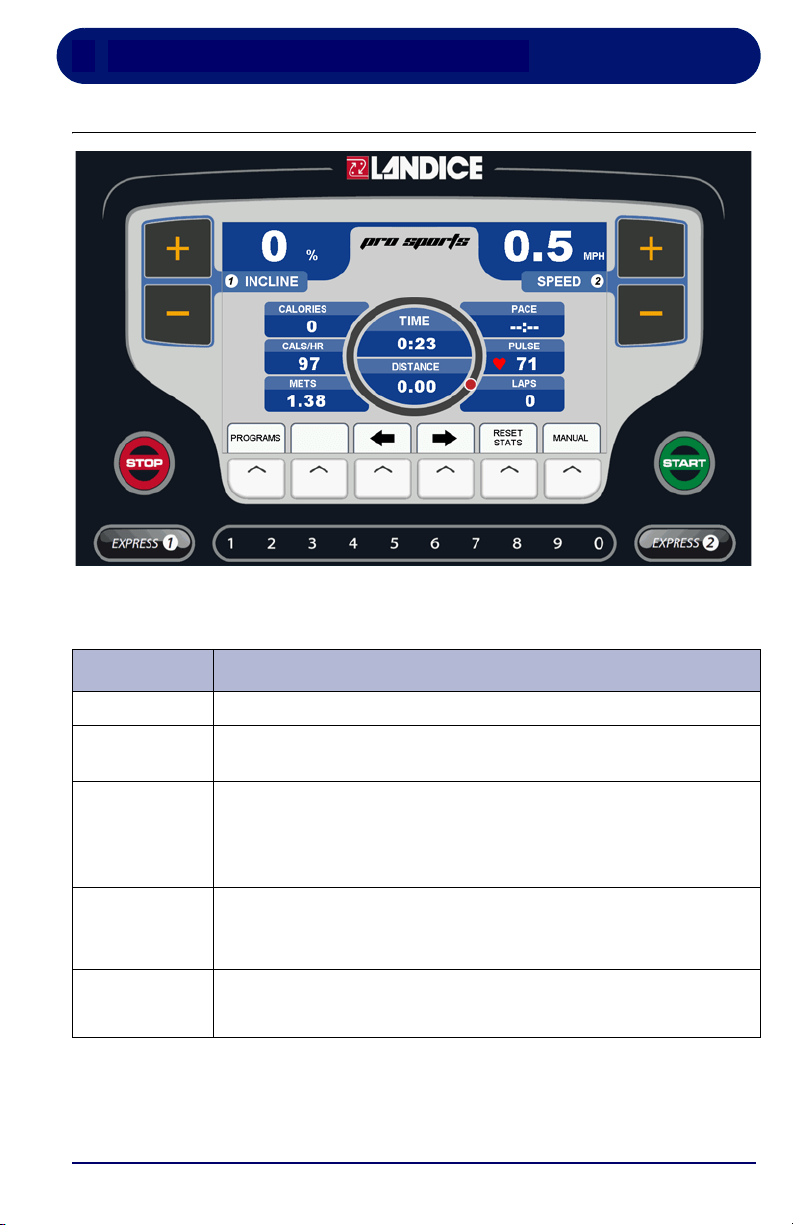
Table 2-1 Pro Sports Control Panel Functions
Function Description
INCLINE
Displays the incline of the treadmill in percent (%).
SPEED
Displays the current speed of the treadbelt in MPH
(km/hr in metric mode).
START
Powers up the treadmill. All displays light and the treadbelt
begins moving at 0.5 mph (0.8 km/hr in metric mode).
The
START button will also take the treadmill out of pause
mode and resume treadbelt movement.
STOP Press STOP once to pause the treadmill or twice to turn it
off. Statistical information is cleared when the treadmill is
turned off.
MANUAL
MODE
To manually control the speed and incline of the treadmill,
press the button below the word MANUAL
Pro Sports Treadmill Operation
28
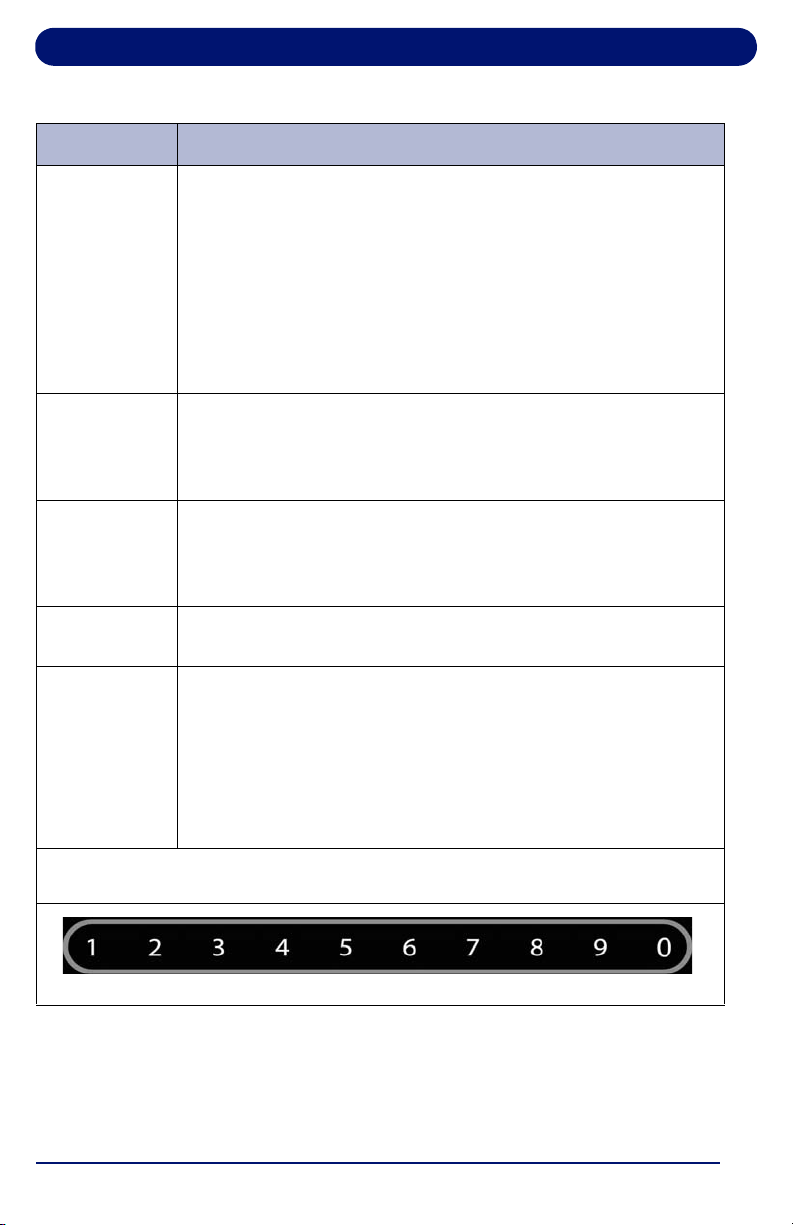
PROGRAMS
To use the built-in and user-defined workout programs:
Press the button below the word PROGRAMS at any time to
display the programs selection screen. Use arrow to scroll
through the built-in and user-defined program previews and
select the desired program by pressing
ENTER. You are
then prompted to enter the program’s specific parameters
(Maximum Speed, Incline, Time, etc.). Use the numeric
keypad or the arrow to select the desired values. Press
START to begin the program
PLUS KEY Press and hold the (+) to increase incline or speed. Pressing
for longer than 2 seconds causes the incline or speed to
increase at a faster rate. Release the key when the display
shows desired incline or speed.
MINUS KEY Press and hold to the (–) to decrease incline or speed.
Pressing for longer than 2 seconds causes the incline or
speed to decrease at a faster rate. Release the key when the
display indicates desired incline or speed.
ARROW
KEYS
The buttons below the left and right arrows move between
display sections or to set values.
EXPRESS 1
EXPRESS 2
EXPRESS 1 controls the Incline and EXPRESS 2 controls
the Speed. In conjunction with the numeric keypad this
allows you to directly enter a target speed or incline without
using the (
+/-) keys. Press EXPRESS 1 for Incline or
EXPRESS 2 for Speed, then enter the desired value using
the numeric keypad. Wait 3 seconds for the treadmill to
adjust to the new settings.
The numeric keypad is used to change speed and incline with the Express
keys, enter user settings, and configure programs.
Table 2-1 Pro Sports Control Panel Functions (Continued)
Function Description
Pro Sports Treadmill Operation
29
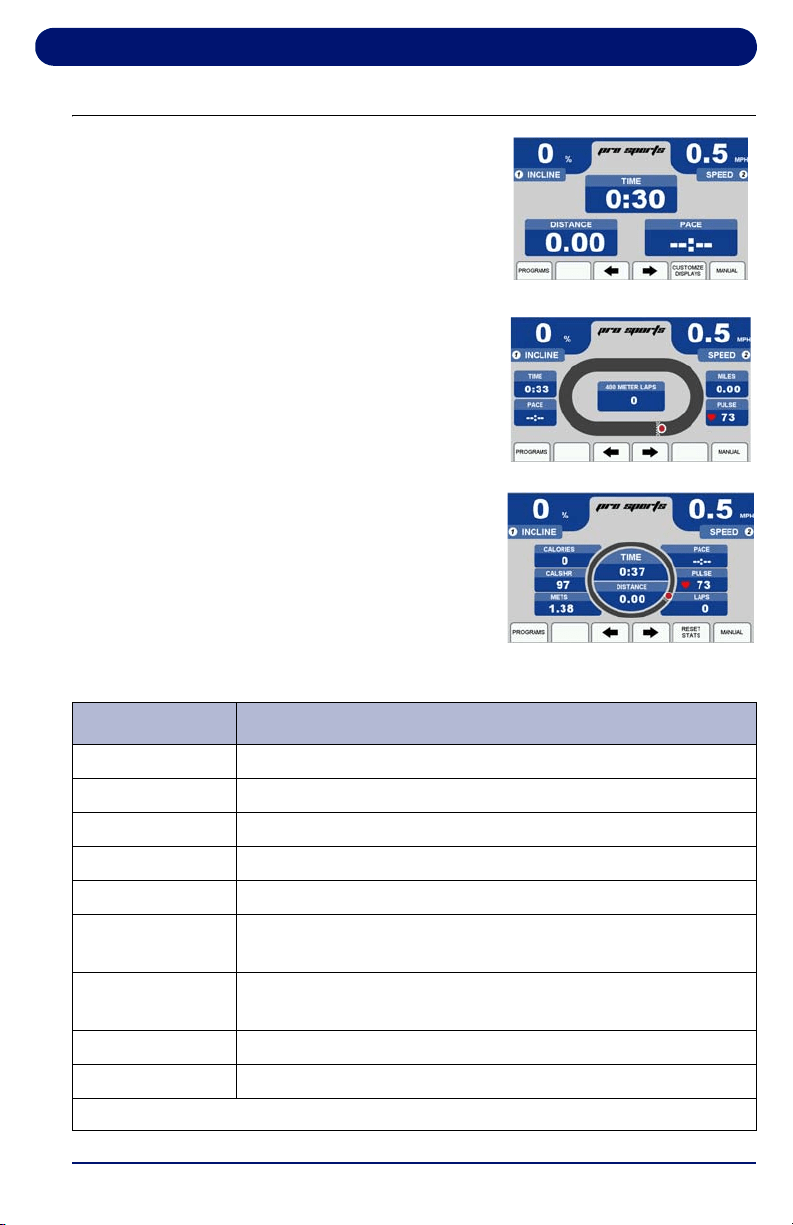
2.2. Display Features
The screens at right are the options
available for displaying workout
information. Table 2-2 provides
information about the available
options.
To toggle between these screens
during your workout, use the arrow
keys.
To customize the information
displayed on the Personalized
Stats screen, select “Customize
Display” to edit the screen. Use the
arrows to toggle through the
options and press ENTER to
confirm your selections.
Personalized Stats
Statistics Screen
Track Screen
Table 2-2 Display Features
Feature Description
TIME
Time logged on treadmill displayed as “Minutes: Seconds”
DISTANCE
Miles logged on treadmill (kilometers when in metric)
PACE
Time to complete 1 mile (1 kilometer when in metric)
CALORIES
Total calories burned, based on user weight
CALS/HR
Rate in calories/hour, based on user weight
LAP
(PROGRESS)
1/4-mile (400 meter in metric) track and Lap Indicator
LAP
(COUNTER)
Number of laps completed
PULSE
Current heart rate
METS*
Current MET level, based on user weight/incline/speed
*One MET is the energy consumed at rest by the average adult.

Pro Sports Treadmill Operation
30
2.3. Using the Pro Sports Treadmill
1. Make sure you have read and understand this owner’s
manual before beginning.
2. Plug the treadmill power cord into its outlet.
3. Straddle the treadbelt with one foot on each traction strip.
4. Press START. The power-up screen is displayed
5. After 3 seconds the treadbelt starts moving at 0.5 mph (0.8
km/h in metric mode).
6. Enter your weight using the numeric keypad and then press
ENTER or wait 3 seconds to advance to the first of the
motivational screens.
7. The treadmill is now ready to use. You can vary the speed
or incline as desired by using the SPEED (+/–) and
INCLINE (+/-) keys.
2.4. Using the Built-in Programs
2.4.1. Description
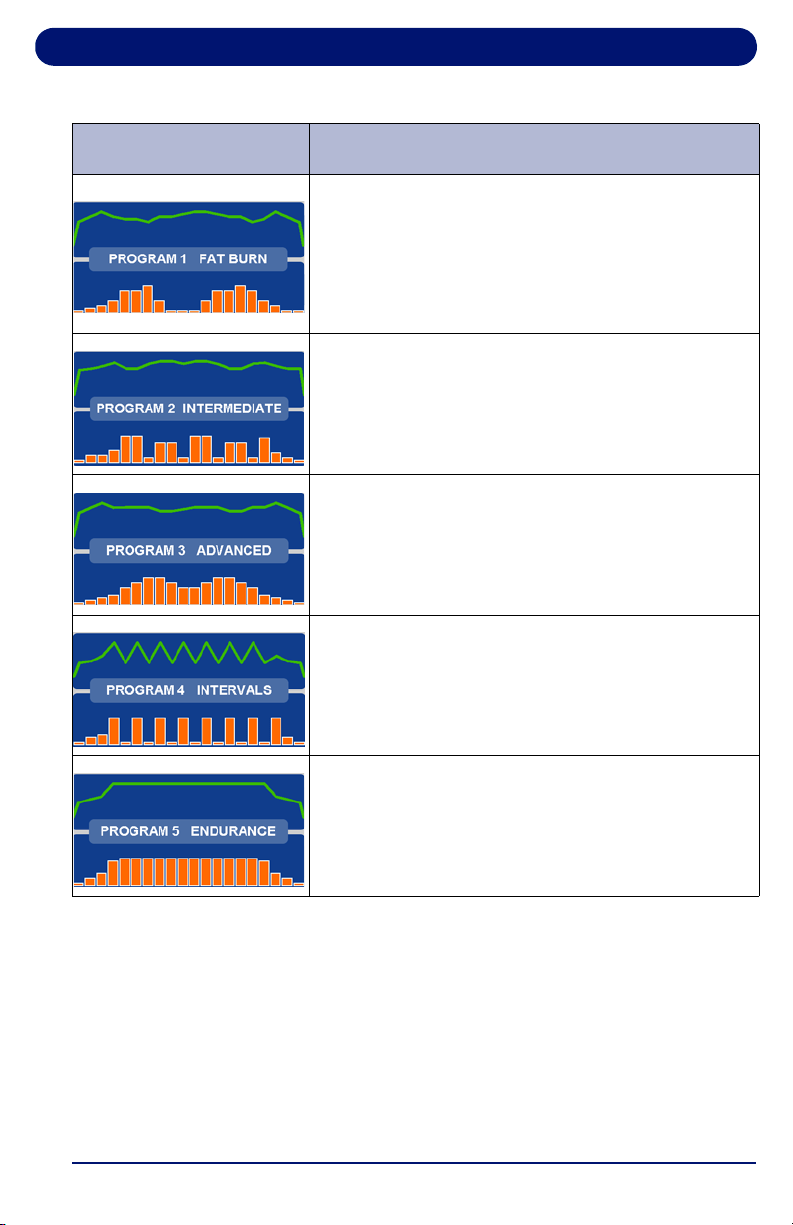
You can choose from 5 Built-in Programs. Each program lets
you select a maximum speed, incline and time, from 10 to 99
minutes. (Intervals Program requires a minimum speed and
incline). When set, the treadmill will not go above the maximum
number unless manually overridden. Each program has 20
segments of equal time, beginning with 3 warm-up segments
and ending with 2 cool-down segments. For example, a 40-
minute program contains 20 two-minute segments.
Pro Sports Treadmill Operation
31
Table 2-3 Pro Sports Built-In Programs
Screen Program Description
FAT BURN: This program features two elevation
peaks along with gradual changes in speed. The
overall goal is to raise heart rate, maintain the
raised heart rate for most of the workout, then
gradually bring heart rate down during the last 2
cool down segments.
INTERMEDIATE: This program features 5
elevation peaks matched to changes in speed.
The overall goal is to vary heart rate by elevating
and lowering it several times, providing a
challenging cardiovascular workout.
ADVANCED: This program features high
elevations combined with top speeds. The overall
goal is to raise heart rate using speed and
elevation for an advanced cardiovascular
workout.
INTERVALS: This program features high speeds
and elevations alternating with low speeds and
elevations. The overall goal is to vary your
workout, taking you from peak level to recovery 8
times throughout the workout.
ENDURANCE: This program features a
maximum speed with maximum elevation. The
overall goal is to raise heart rate with speed and
elevation for the ultimate cardiovascular workout.

Pro Sports Treadmill Operation
32
2.4.2. Running a Built-In Program
1. Start a workout as outlined in “Using the Built-in Programs”
on page 30.
2. Press PROGRAMS to display the Programs selection
screen.
3. Select a built-in program by using the arrow keys or press
the PROGRAMS button to scroll through the list, then press
ENTER. You are prompted to enter the following program
parameters:
• Maximum Speed: This scales the speed curve to the
maximum speed entered
.
• Maximum Incline: This scales the elevation curve to
the maximum incline entered.
• Program Time: Sets the total length of time you want
the program to run.
• Minimum Speed/Incline:
INTERVALS Program only.
4. Enter the Maximum Speed using the numeric keypad or the
arrow to select a value, then press ENTER or wait 3
seconds.
5. Enter the Maximum Incline using the numeric keypad or the
arrow to select a value, then press ENTER or wait 3
seconds.
6. Enter Program Time using the numeric keypad or the arrow,
then press ENTER or wait 3 seconds. The time should be
at least 10 minutes and not more than 99 minutes.
7. Press START to begin your workout. The Program
Progress Detail screen displays your current segment
speed, incline and remaining time.
8. To view all the other segments, press and hold ENTER for 3
seconds. Use the arrow keys to move left or right. To exit,
press ENTER.
9. Press ENTER or arrow keys at any time to view any of the
other motivational screens during your program, including
the Program Profile screen to see a program overview.
When viewing a motivational screen other than the
Program Progress Detail screen during a segment change,
Pro Sports Treadmill Operation
33
the display temporarily shows the Program Progress Detail
screen then returns to the original screen. During a
segment change, the speed and/or incline window will flash
if there is a change in either.
2.5. Pro Sports User Programs
Landice Pro Sports treadmills can store up to 5 individual,
modifiable user-defined program profiles.
A user-defined program looks and runs exactly like a built-in
program, but it can be customized to suit the user. Unlike the
built-in programs, user-defined programs allow editing of
individual segments as well as the number of segments.
1. Press PROGRAMS to display the Programs selection
screen.
2. Scroll through the program options by pressing
PROGRAMS or the arrow keys. When USER PROGRAM
PREVIEW is shown, press ENTER.The User Program
Preview Screen displays the program overview and total
program time.
3. Press ENTER or wait 3 seconds. The screen displays
PRESS START TO BEGIN OR ENTER TO EDIT.
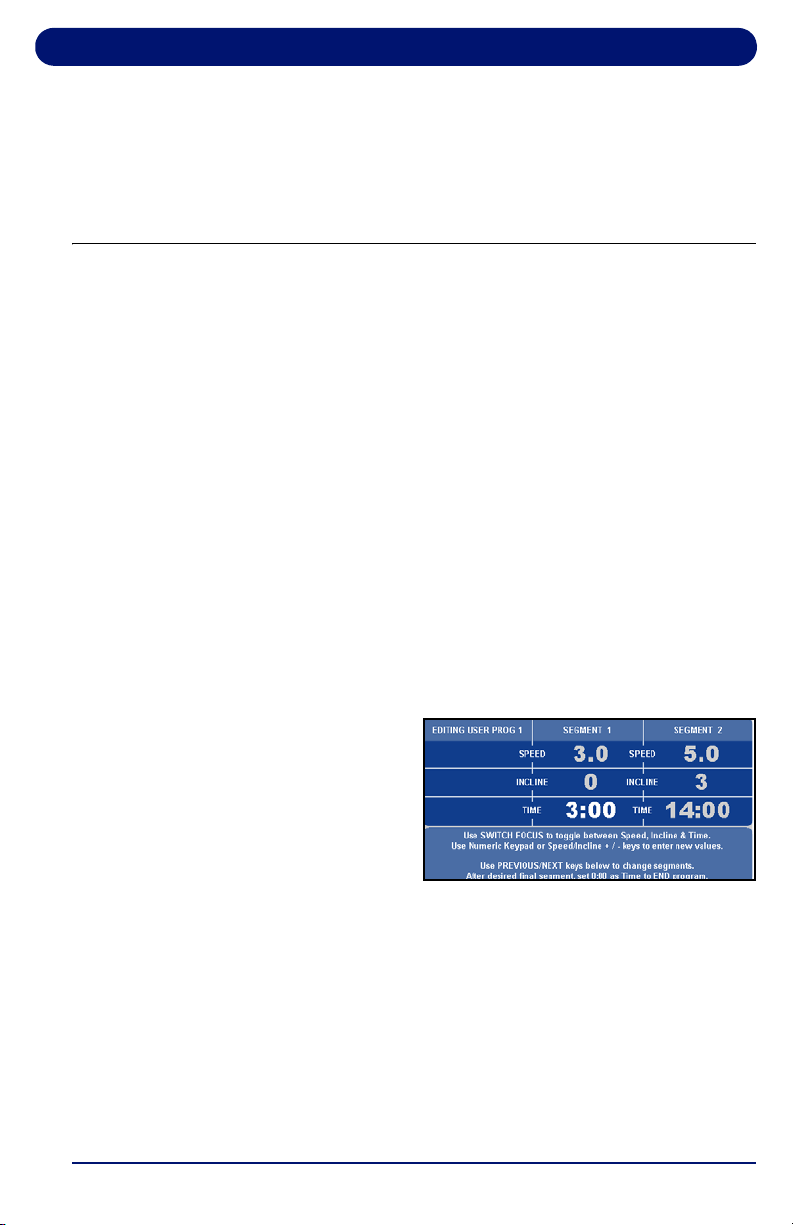
4. Press ENTER. EDIT
MODE requires a time
for segment 1 (area in
BOLD).
Note: Press SWITCH FOCUS to toggle between speed, incline
and time values for the current segment. To change
segments, press NEXT SEGMENT or PREVIOUS
SEGMENT. You can change segments in either the forward
or reverse direction.
5. Use the numeric keypad to change the value and press
SWITCH FOCUS. Continue to another segment by
pressing the next or previous segment keys.

Pro Sports Treadmill Operation
34
6. If you want a program to have less than 20 segments,
create the last segment with 0 in the time field. The time
reads END. The program ends when it reaches this
segment.
7. When you finish editing your User-Defined Program, you
can begin your program by pressing START or DONE.
Note: If you attempt to advance the cursor past the 20th
segment, you are prompted with PRESS START TO BEGIN
OR EDIT TO SET UP. You can also exit Edit Mode by
pressing MANUAL MODE or PROGRAMS at any time.
2.5.1. Learn Mode
When you run a User-Defined Program and the speed or
incline is adjusted, the treadmill saves the last change to the
current segment.
Note: Learn Mode allows you to adjust existing segments in your
user program, but you cannot add segments to it in Learn
Mode.
1. Start a workout, then press PROGRAMS to display the
Programs selection screen.
2. Scroll through the program options by pressing
PROGRAMS or use the arrow keys. When the USER
PROGRAM PREVIEW you desire is shown, press ENTER.
Press START to begin your program. When you begin, the
Program Progress Detail screen is displayed. The speed and
incline values of your current segment are displayed in the
center. To change the speed or incline of your current segment,
press the SPEED (+/–) or INCLINE (+/–) keys. The modified
segment is stored with these new settings for the next time you
run this program.
2.6. Specific Goal Programs
The Pro Sports Treadmill provides Specific Goal programs.
Whether you want to go for a 3-mile run, burn 1,000 calories, or
simply exercise for 15 minutes, the Goal Progress screen
Pro Sports Treadmill Operation
35
accurately assesses your progress with a variety of statistics.
During these programs you retain full manual control.
1. Start a workout as outlined in “Running a Built-In Program”
on page 32.
2. Press the arrow button under Programs to display the
Programs selection screen and select the goal program
that you want to run:
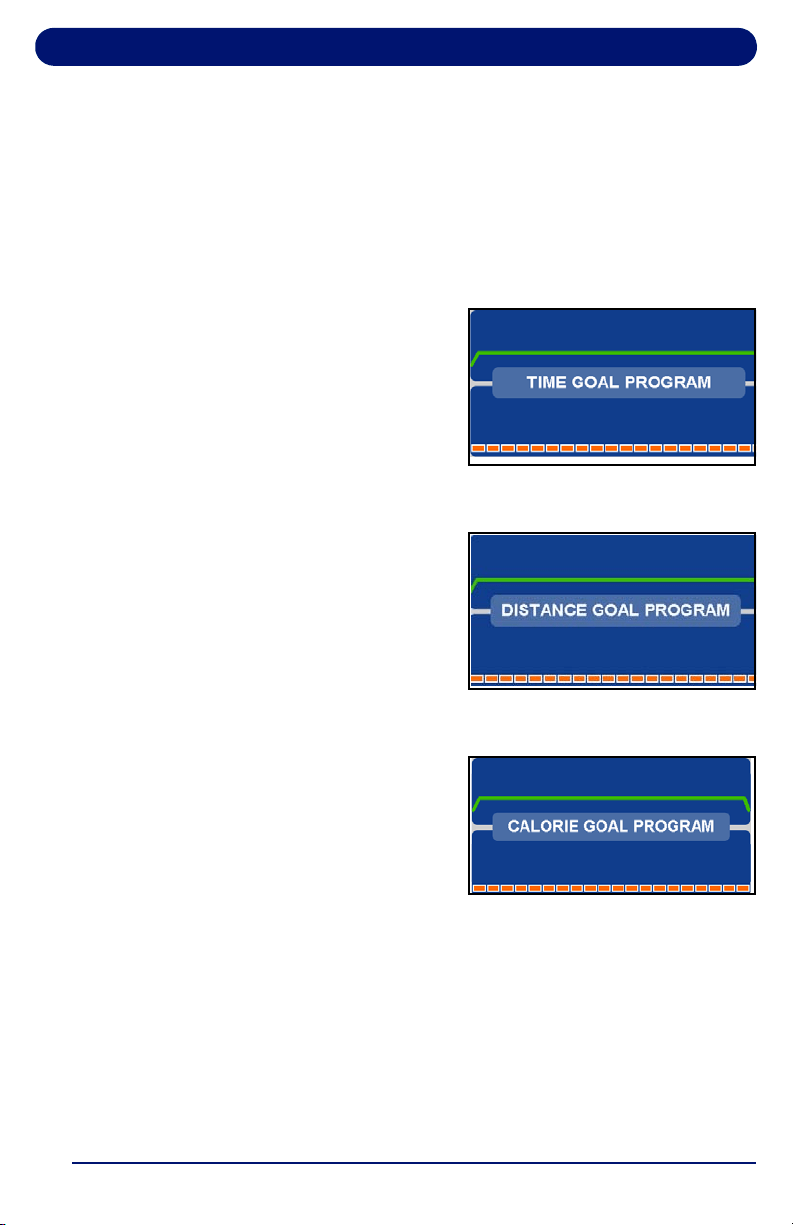
• For TIME GOAL
PROGRAM, set a
Program Time Goal
using the numeric
keypad or the arrow
keys. Enter a time from
10 to 99 minutes, then
press ENTER or wait 3
seconds.
• For DISTANCE GOAL
PROGRAM, set a
Program Distance Goal
using the numeric
keypad or arrow keys.
Enter a distance from
0.1 to 99.9 miles (km in
metric), then press
ENTER or wait 3 seconds.
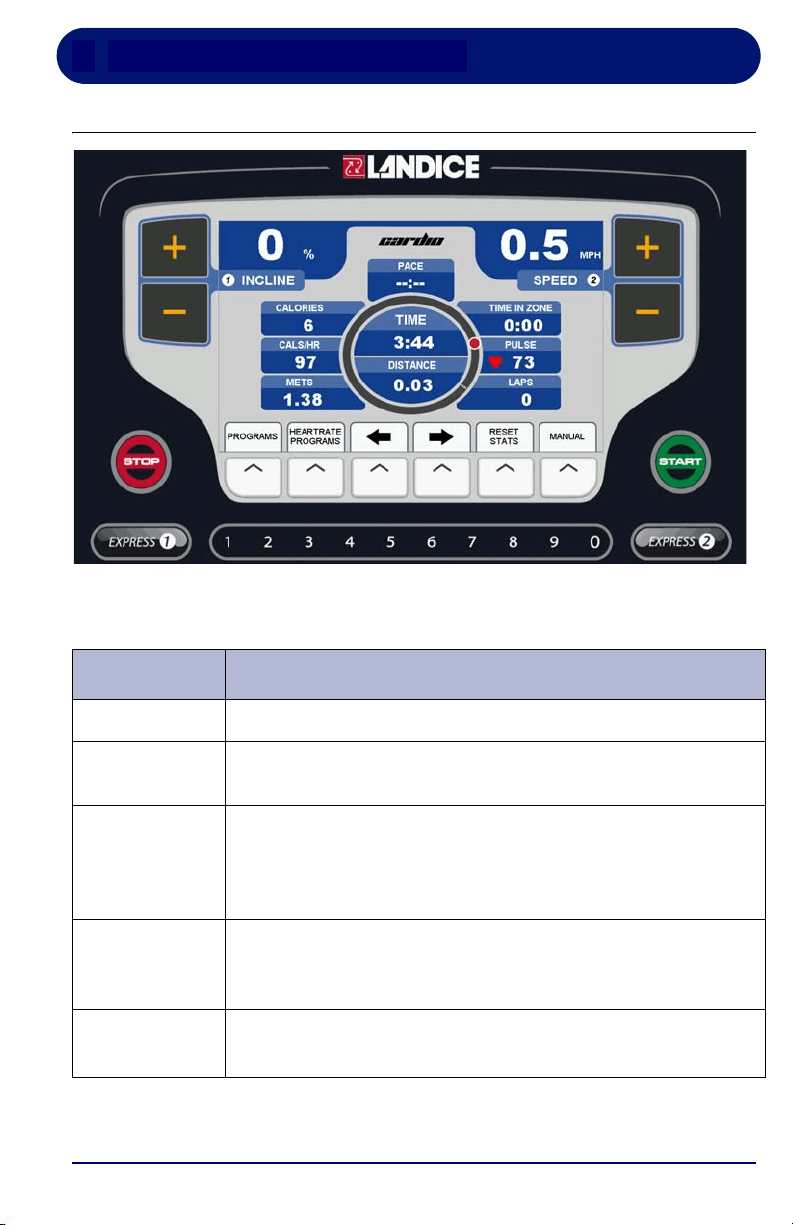
• For CALORIE GOAL
PROGRAM, set a
Program Calorie Goal
using the numeric
keypad or arrow keys.
Enter a calorie goal from
10 to 9,999 calories,
then press ENTER or wait 3 seconds.
3. Press START to begin.
The Goal Progress screen shows your Specific Goal (Time,
Distance or Calorie), counting down (noted by a negative
sign).
4. Press the arrows at any time to view any of the other
screens during your program.

Pro Sports Treadmill Operation
36
37
3. Cardio Treadmill Operation
3.1. Cardio Control Panel
Table 3-1 Cardio Control Panel Functions
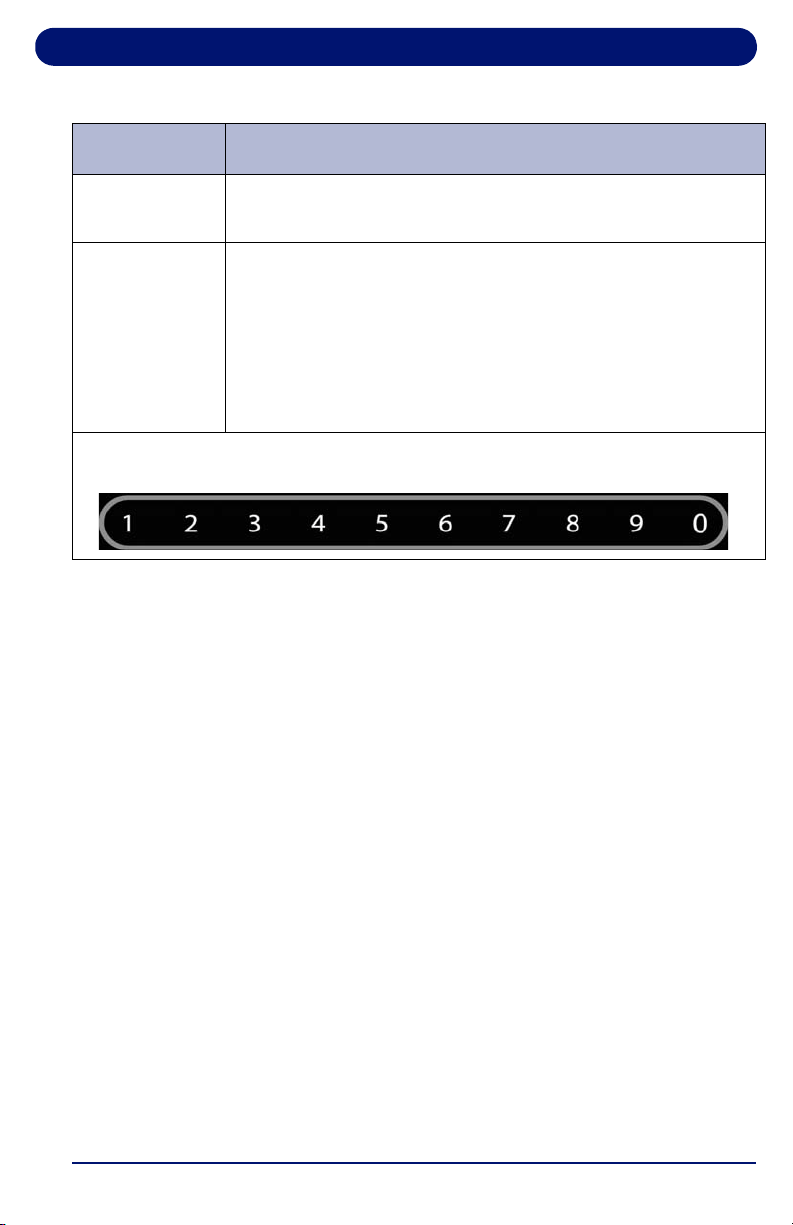
Function Description
INCLINE
Displays the incline of the treadmill in percent (%).
SPEED
Displays the current speed of the treadbelt in MPH
(km/hr in metric mode).
START
Powers up the treadmill. All displays light and the treadbelt
begins moving at 0.5 mph (0.8 km/hr in metric mode).
The
START button will also take the treadmill out of pause
mode and resume treadbelt movement.
STOP Press STOP once to pause the treadmill or twice to turn it
off. The statistical information is cleared when the treadmill
is turned off.
MANUAL
MODE
To manually control the speed and incline of the treadmill,
press the button below the word MANUAL.

Cardio Treadmill Operation
38
PROGRAMS
To use the built-in and user-defined workout programs:
Press the button below the word PROGRAMS at any time
to display the programs selection screen. Use arrow to
scroll through the built-in and user-defined program
previews and select the desired program by pressing
ENTER. You are then prompted to enter the program’s
specific parameters (Maximum Speed, Incline, Time, etc.).
Use the numeric keypad or the arrow to select the desired
values. Press
START to begin the program.
HEARTRATE
PROGRAMS
To use the Heart Rate Controlled programs:
Press the button below HEARTRATE PROGRAMS at any
time. Choose either a built-in or user-defined heart rate
program. Heart Rate Control programs automatically adjust
speed and incline in order to maintain a constant heart rate.
PLUS KEY Press and hold the (+) to increase incline or speed.
Pressing for longer than 2 seconds causes the incline or
speed to increase at a faster rate. Release the key when the
display shows desired incline or speed.
MINUS KEY Press and hold to the (–) to decrease incline or speed.
Pressing for longer than 2 seconds causes the incline or
speed to decrease at a faster rate. Release the key when
the display indicates desired incline or speed.
Table 3-1 Cardio Control Panel Functions (Continued)
Function Description
Cardio Treadmill Operation
39
ARROW
KEYS
The buttons below the left and right arrows move between
display sections or to set values.
EXPRESS 1
EXPRESS 2
EXPRESS 1 controls the Incline and EXPRESS 2
controls the Speed. In conjunction with the numeric keypad
this allows you to directly enter a target speed or incline
without using the (
+/-) keys. Press EXPRESS 1 for Incline
or
EXPRESS 2 for Speed, then enter the desired value
using the numeric keypad. Wait 3 seconds for the treadmill
to adjust to the new settings.
The numeric keypad is used to change speed and incline with the EXPRESS
keys, enter user settings, and configure programs.
Table 3-1 Cardio Control Panel Functions (Continued)
Function Description
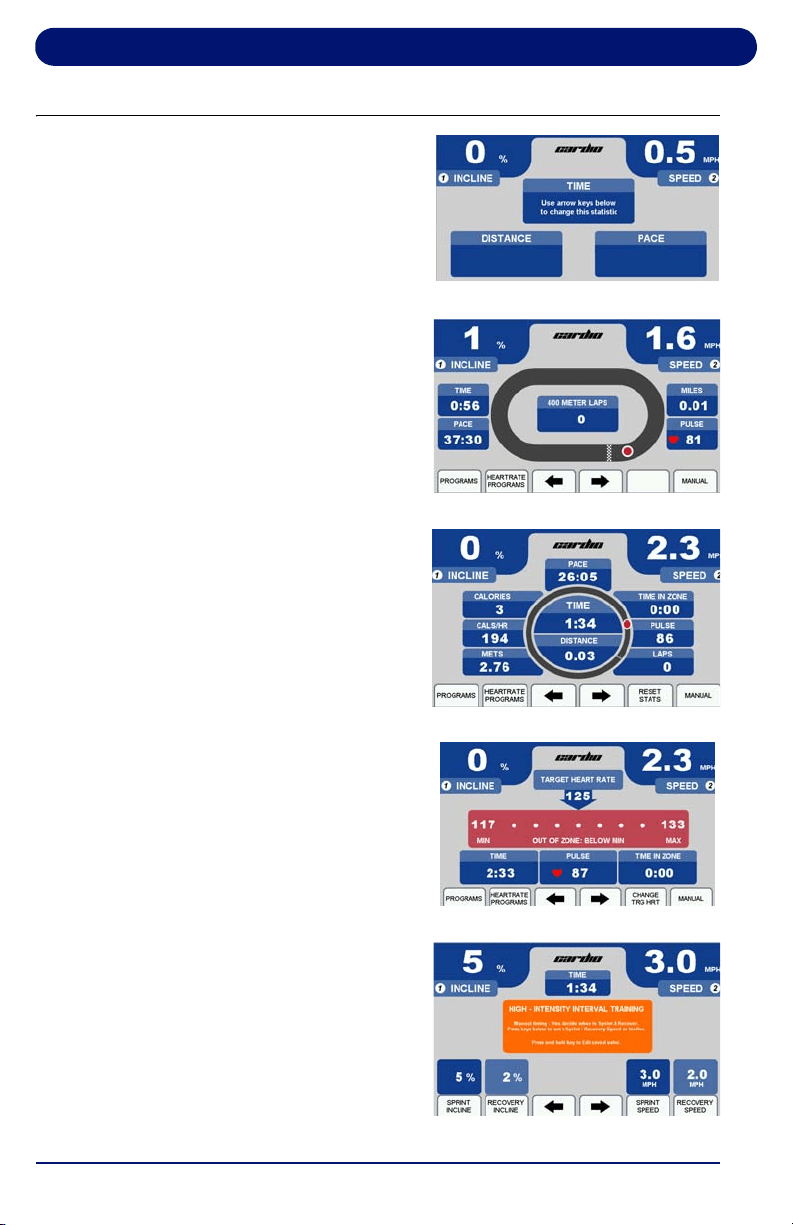
Cardio Treadmill Operation
40
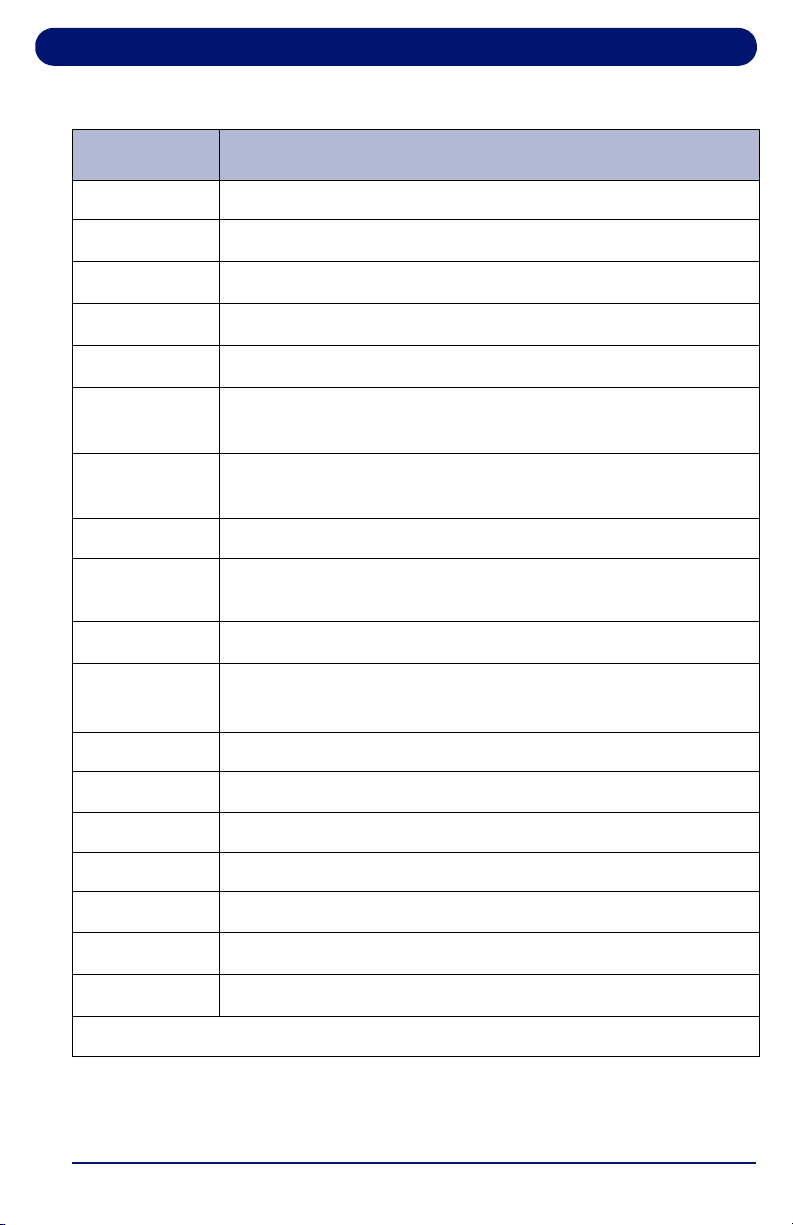
3.2. Display Features
The screens at right are the
options available for displaying
workout information. Table 3-2
provides information about the
available options.
To toggle between these
screens during your workout,
use the arrow keys.
To customize the information
displayed on the Personalized
Stats screen, select “Customize
Display” to edit the screen. Use
the arrows to toggle through the
options and press ENTER to
confirm your selections.
To modify the sprint and
recovery speed and incline
values on the HIIT Screen,
press and hold the button below
the item you would like to edit
for 5 seconds. A pop-up window
will appear. Use the arrow keys
or numeric keypad to select
your desired number.
Personalized Stats
Statistics Screen
Track Screen
Heart Rate Screen
HIIT Screen
Cardio Treadmill Operation
41
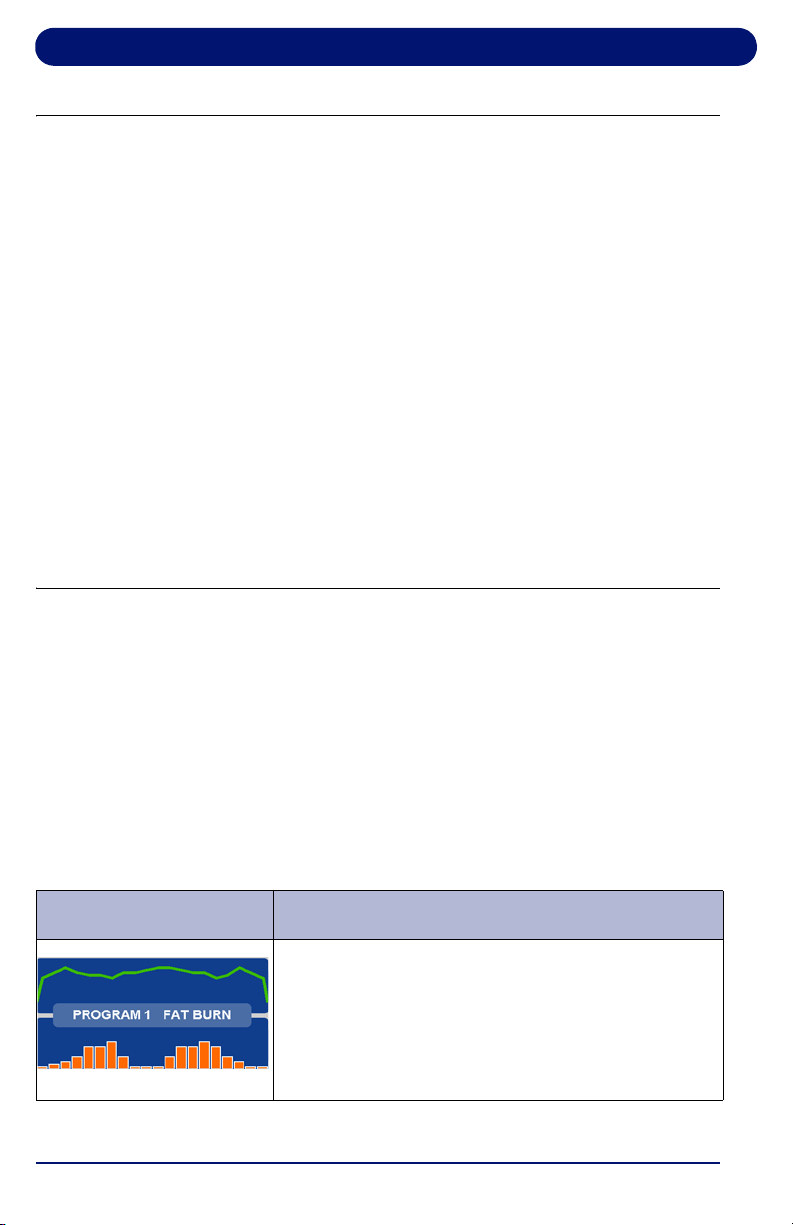
Table 3-2 Display Features
Feature Description
TIME Time logged on treadmill, displayed as Minutes:Seconds
DISTANCE
Miles logged on treadmill (kilometers when in metric)
PACE
Time to complete 1 mile (1 kilometer when in metric)
CALORIES
Total calories burned, based on entered user weight
CALS/HR
Approximate calories used per hour, based on user weight
LAP
(Progress)
1/4-mile (400 meter in metric) track and Lap Indicator
LAP
(Counter)
Number of laps completed
PULSE Current heart rate
TIME IN ZONE Time spent in zone. The zone is ± 8 beats from target heart
rate.
IN ZONE
User’s heart rate is within 8 beats of the target heart rate
OUT OF
ZONE
User’s heart rate is outside zone (more than 8 beats above
or below target heart rate)
ABOVE MAX User’s heart rate is above the maximum desirable heart rate
MAX Maximum allowable heart rate to remain in zone
TARGET HR Target heart rate (user-defined in Heart Rate Status screen)
MIN Minimum allowable heart rate to remain in zone
BELOW MIN User is below minimum allowable heart rate in zone
TOTAL TIME
The total time of the user’s workout
METS*
Current MET level, based on user weight / incline / speed
*One MET is the energy consumed at rest by the average adult.
Cardio Treadmill Operation
42
3.3. Using the Cardio Treadmill
1. Make sure you have read and understand this owner’s
manual before beginning.
2. Plug the treadmill power cord into its outlet.
3. Straddle the treadbelt with one foot on each traction strip.
4. Press START. The power-up screen is displayed.
5. After 3 seconds the treadbelt starts moving at 0.5 mph
(0.8 km/h).
6. Enter your weight using the numeric keypad or arrows.
Press ENTER or wait 3 seconds to advance to the first of
the motivational screens.
7. The treadmill is now ready to use. You can vary the speed
or incline, if desired, by using the SPEED (+/–) and
INCLINE (+/–) keys or EXPRESS 1 and EXPRESS 2 keys.
3.4. Using the Built-in Programs
3.4.1. Description
The Built-in Programs differ in speed and incline. Each lets you
select a maximum speed, incline, and time (10 to 99 minutes).
(Intervals and HIIT Programs require a minimum speed and
incline.) The treadmill will not go above the maximum number
unless manually overridden. Each program begins with 3
warm-up segments and ends with 2 cool-down segments.
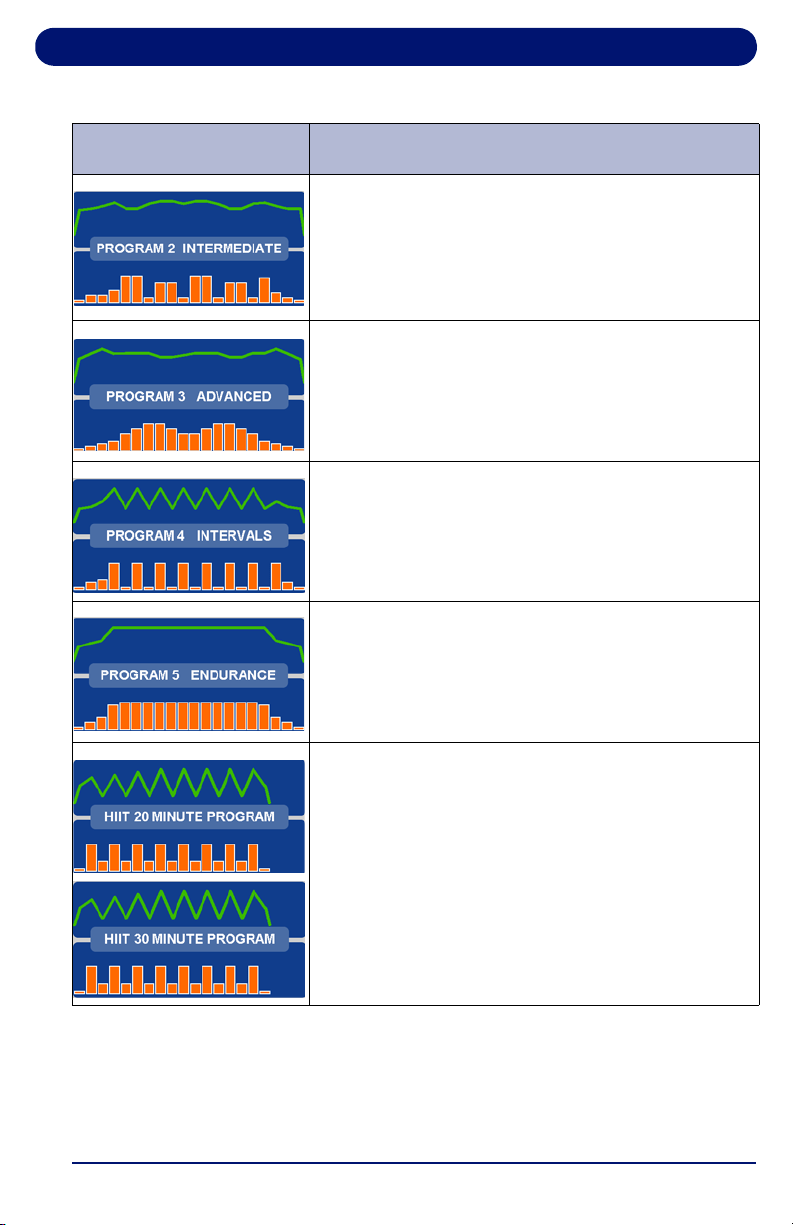
Table 3-3 Cardio Built-In Programs
Screen Program Description
FAT BURN: This program features two elevation
peaks along with gradual changes in speed. The
overall goal is to raise heart rate, maintain the
raised heart rate for most of the workout, then
gradually bring heart rate down during the last 2
cool down segments.
Cardio Treadmill Operation
43
INTERMEDIATE: This program features 5
elevation peaks matched to changes in speed.
The overall goal is to vary heart rate by elevating
and lowering it several times, providing a
challenging cardiovascular workout.
ADVANCED: This program features high
elevations combined with top speeds. The overall
goal is to raise heart rate using speed and
elevation for an advanced cardiovascular
workout.
INTERVALS: This program features high speeds
and elevations alternating with low speeds and
elevations. The overall goal is to vary your
workout, taking you from peak level to recovery 8
times throughout the workout.
ENDURANCE: This program features a
maximum speed with maximum elevation. The
overall goal is to raise heart rate with speed and
elevation for the ultimate cardiovascular workout.
HIIT20 and HIIT30: These programs feature
8 sprint phases alternated with 7 recovery
segments. Please note the maximum speed for
the sprint phases will differ between the two
programs due to the length of the sprint segment.
The overall goal of these programs is to provide a
combination of very high-intensity bursts of cardio
exercise followed by longer periods of recovery.
Table 3-3 Cardio Built-In Programs (Continued)
Screen Program Description

Cardio Treadmill Operation
44
3.4.2. Running a Built-In Program
1. Start a workout as outlined in “Using the Cardio Treadmill”
on page 42.
2. Press PROGRAMS to display the Programs selection
screen.
3. Select a built-in program by using the arrow to scroll
through the list, then press ENTER. You are prompted to
enter the following program parameters:
• Maximum Speed:
This scales the speed curve to the
maximum speed entered.
• Maximum Incline: This scales the elevation curve to the
maximum incline entered.
• Program Time: Sets the total length of time you want the
program to run. HIIT Programs have a fixed time.
• Minimum Speed/Incline: INTERVALS and HIITS
Programs only.
4. Enter the Maximum Speed using the numeric keypad or the
arrow to select a value, then press ENTER or wait 3
seconds.
5. Enter the Maximum Incline using the numeric keypad or the
arrow to select a value, then press ENTER or wait 3
seconds.
6. Enter Program Time using the numeric keypad or the arrow
keys, then press ENTER or wait 3 seconds. The time
should be at least 10 minutes and not more than 99
minutes.
7. Press START to begin your workout. The Program
Progress Detail screen displays your current segment
speed, incline and remaining time.
8. To view other segments, select the “View Other Segments”
button. Use the arrow keys to move left or right. To exit,
press DONE.
9. Press the buttons below the arrow keys at any time to view
any of the other motivational screens during your program,
including the Program Profile screen to see a program
overview. When viewing a motivational screen other than
Cardio Treadmill Operation
45
the Program Progress Detail screen during a segment
change, the display temporarily shows the Program
Progress Detail screen then returns to the original screen.
During a segment change, the speed and/or incline will
flash if there is a change in either.
3.5. Cardio User Programs
Cardio treadmills can store up to 5 individual, modifiable user-
defined program profiles.
A user-defined program looks and runs exactly like a built-in
program, but it can be customized to suit the user. Unlike the
built-in programs, user-defined programs allow editing of
individual segments as well as the number of segments.
1. Press the button below PROGRAMS to display the
Programs selection screen.
2. Scroll through the program options by pressing
PROGRAMS or use the arrow keys. When USER
PROGRAM PREVIEW is shown, press ENTER.
3. Press ENTER or wait 3 seconds. The screen displays
PRESS START TO BEGIN OR EDIT TO SET UP.
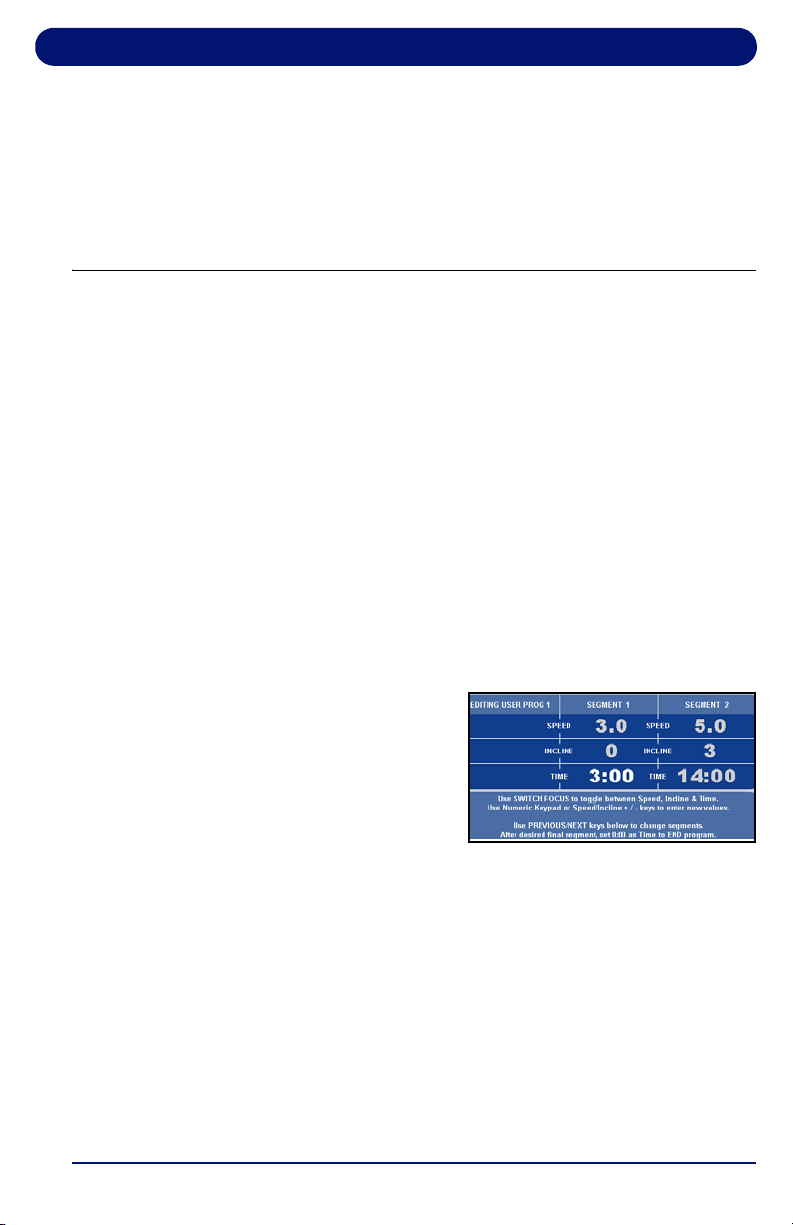
4. Press EDIT. EDIT MODE
requires a time for segment
1 (area in bold).
Note: Press SWITCH FOCUS to toggle between speed, incline
and time values for the current segment. To change
segments, press NEXT SEGMENT or PREVIOUS
SEGMENT. You can change segments in either the forward
or reverse direction.
5. Use the numeric keypad to change the value and press
SWITCH FOCUS. Continue to another segment by
pressing the next or previous segment keys.

Cardio Treadmill Operation
46
6. If you want a program to have less than 20 segments,
create the last segment with 0 in the time field. The time
reads END. The program ends when it reaches this
segment.
7. When you finish editing your User-Defined Program, you
can begin your program by pressing START or DONE.
Note: If you attempt to advance the cursor past the 20th
segment, you are prompted with PRESS START TO BEGIN
OR EDIT TO SET UP. You can also exit Edit Mode by
pressing MANUAL MODE or PROGRAMS at any time.
3.5.1. Learn Mode
When you run a User-Defined Program and the speed or
incline is adjusted, the treadmill saves the last change to the
current segment.
Note: Learn Mode allows you to adjust existing segments in your
user program, but you cannot add segments to it in Learn
Mode.
1. Start a workout, then press PROGRAMS to display the
Programs selection screen.
2. Scroll through the program options by pressing
PROGRAMS or use the arrow keys. When the USER
PROGRAM PREVIEW you desire is shown, press ENTER.
3. Press START to begin your program. When you begin, the
Program Progress Detail screen is displayed. The speed
and incline values of your current segment are displayed in
the center. To change the speed or incline of your current
segment, press the SPEED (+/–) or INCLINE (+/–) keys.
The modified segment is stored with these new settings for
the next time you run this program.
Cardio Treadmill Operation
47
3.6. Specific Goal Programs
The Cardio Treadmill provides Specific Goal programs.
Whether you want to go for a 3-mile run, burn 1,000 calories, or
simply exercise for 15 minutes, the Goal Progress screen
accurately assesses your progress with a variety of statistics.
During these programs you retain full manual control.
1. Start a workout as outlined in “Using the Cardio Treadmill”
on page 42.
2. Press the arrow button under Programs to display the
Programs selection screen and select the goal program
that you want to run:
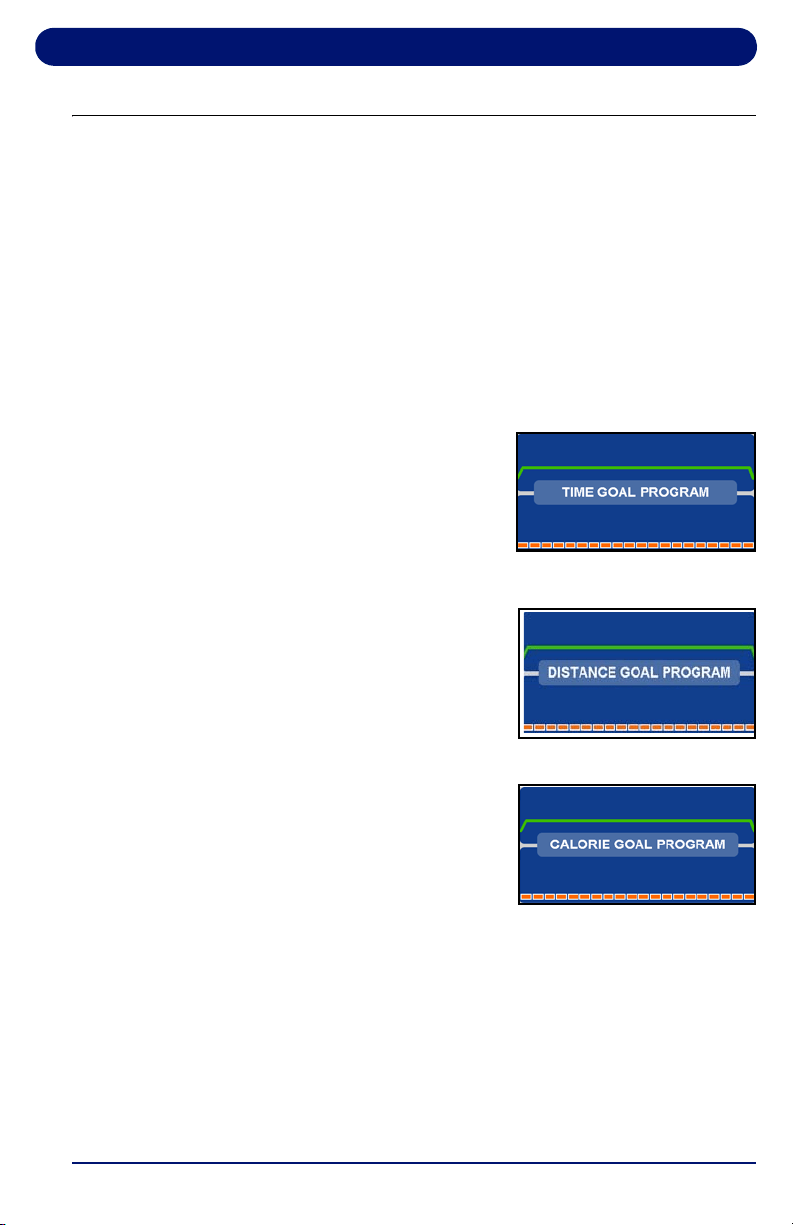
• For TIME GOAL PROGRAM,
set a Program Time Goal
using the numeric keypad or
the arrow keys. Enter a time
from 10 to 99 minutes, then
press ENTER or wait 3
seconds.
• For DISTANCE GOAL
PROGRAM, set a Program
Distance Goal using the
numeric keypad or arrow
keys. Enter a distance from
0.1 to 99.9 miles (km in
metric), then press ENTER or wait 3 seconds.
• For CALORIE GOAL
PROGRAM, set a Program
Calorie Goal using the
numeric keypad or arrow
keys. Enter a calorie goal
from 10 to 9,999 calories,
then press ENTER or wait 3 seconds.
3. Press START to begin.
The Goal Progress screen shows your Specific Goal (Time,
Distance or Calorie), counting down (noted by a negative
sign).
4. Press
the arrows at any time to view any of the other
screens during your program.
Cardio Treadmill Operation
48
3.7. Heart Rate Control Programs
Landice Cardio treadmills offer Heart Rate Control (HRC)
programs that display your heart rate and automatically vary
treadmill speed and elevation. HRC training allows you to
maximize your workout performance while minimizing your
workout time.
You must use the Pulse Grips or the Wireless Chest Strap
(optional) to detect your heart rate during the HRC programs.
There are 2 different 20-segment HRC programs:
• HRC varies treadmill speed and elevation to keep your heart
rate near the target heart rate for the entire workout.
• Interval HRC targets different heart rates. It alternates
between the target and 80% of the target.
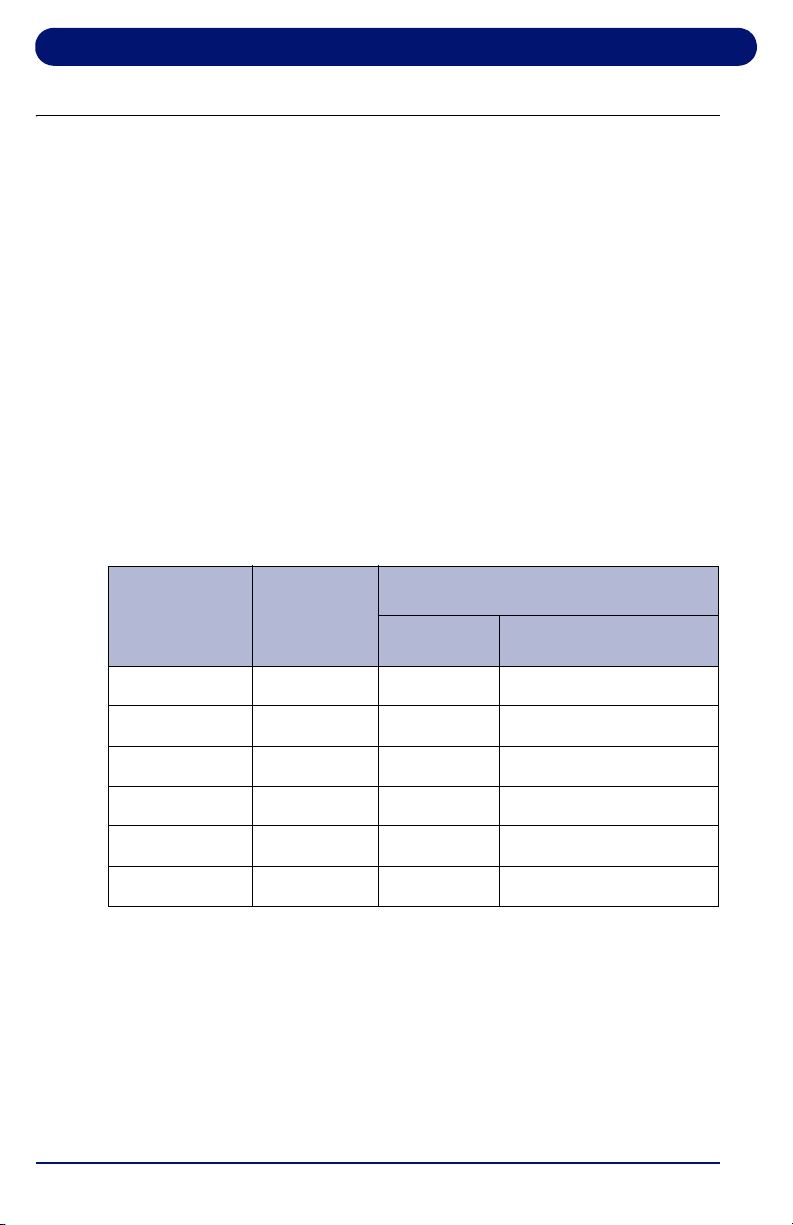
Table 3-4 Heart Rate Control Programs
Segment Stage
% of Target Heart Rate
HRC Interval HRC
1 Warm Up 70 70
2 Warm Up 80 80
3 Warm Up 90 90
4-18 Training 100 Alternating 80 & 100
19 Cool Down 90 90
20 Cool Down 80 80
Cardio Treadmill Operation
49
3.7.1. Built-in HRC Programs
1. If using a Cardio treadmill, press the HEARTRATE
PROGRAMS key. Press ENTER while the HR Control
program is displayed.
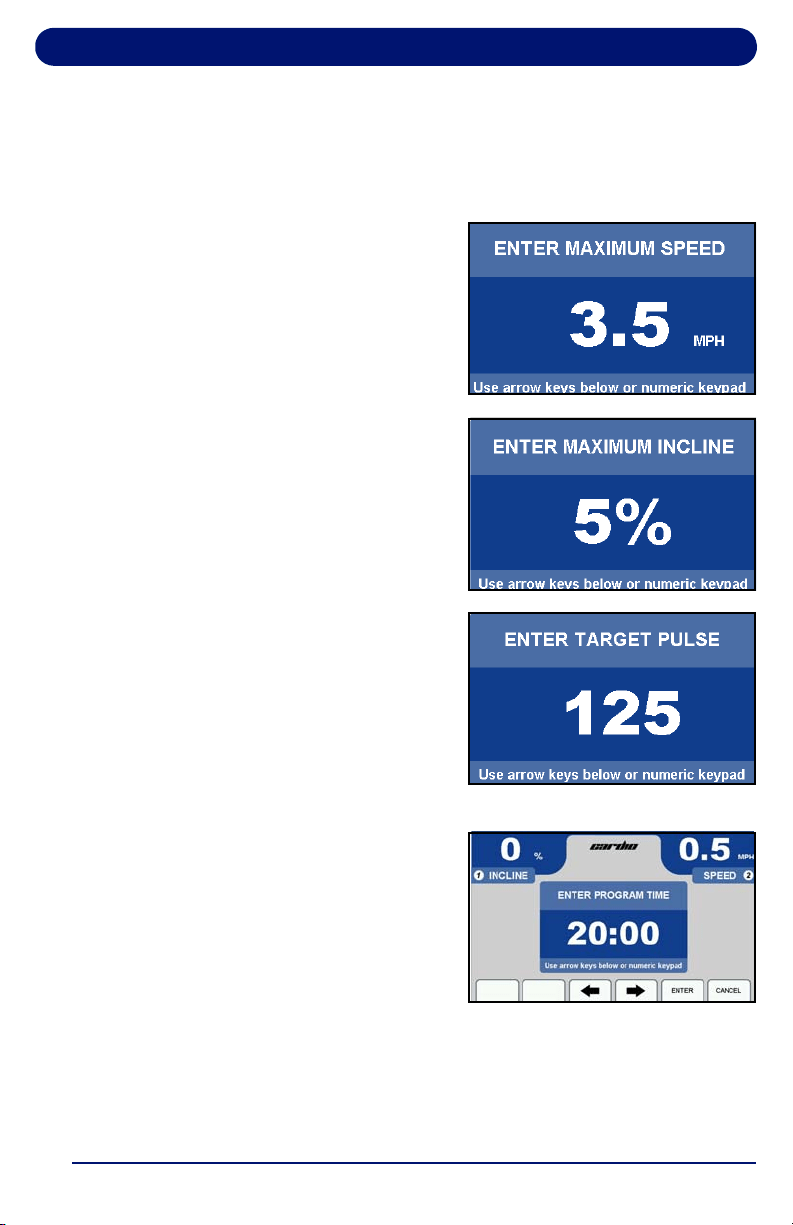
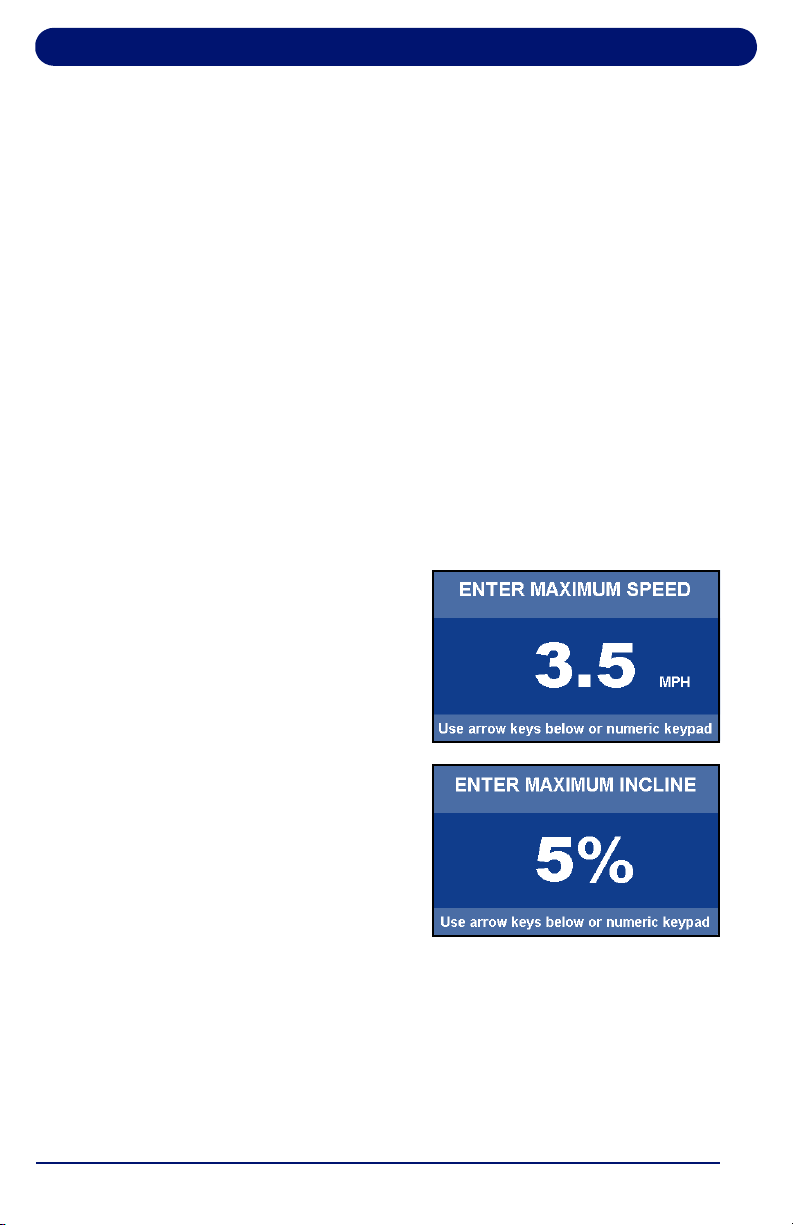
2. Using the numeric keypad
or arrow keys, select your
maximum speed. Press
ENTER or wait 3 seconds.
3. Use the numeric keypad or
arrow keys to select your
maximum incline. Press
ENTER or wait 3 seconds.
4. Use the numeric keypad or
arrow keys to enter your
target pulse. The treadmill
will vary the speed and
elevation in an effort to
make you reach this heart
rate. Press ENTER or wait 3
seconds.
5. The display prompts you to
set a Program Time using
the numeric keypad or
center arrow. For HRC,
enter a time between 20-99
minutes. This will scale the
20 segments of the program
equally throughout your
selected time. Press ENTER or wait 3 seconds.
6. Press START to begin.
Cardio Treadmill Operation
50
3.7.2. User-Defined Heart Rate Programs
The User-Defined Heart Rate Monitoring (HRC) programs are
designed to allow you to set the target heart rate for up to 20
program segments.
To customize a User-Defined HRC Program during your
workout, adjust your Target Heart Rate in the Heart Rate Status
screen by selecting Change TRG HRT button. Any Target
Heart Rate changes you make during your workout will be
saved in that User-Defined HRC Program.
If you want to edit your User-Defined HRC Program before your
workout, follow these steps:
1. To select an HR program to edit, press HEARTRATE
PROGRAMS. To scroll through the programs, either
continue pressing HEARTRATE PROGRAMS or use the
arrow keys. Select a User-Defined HRC Program to edit by
pressing ENTER.
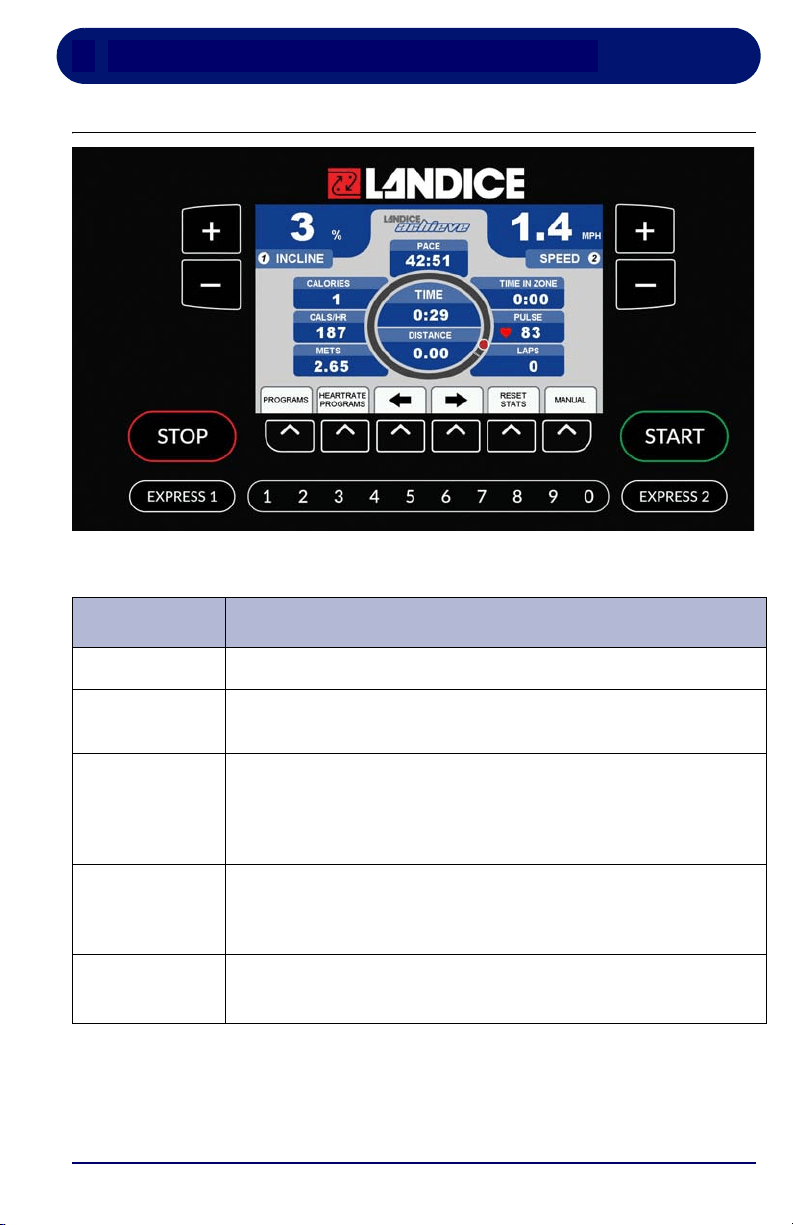
2. Select your maximum speed
using the numeric keypad or
arrow keys and press
ENTER, or wait 3 seconds.
3. Enter the maximum incline
using the numeric keypad or
arrow keys. Press ENTER
or wait 3 seconds.
4. The display prompts
PRESS START TO BEGIN
OR EDIT TO SET UP. Press
START to run the program or press EDIT to enter editing
mode and make changes if desired.
5. To change segments, press PREVIOUS or NEXT
SEGMENT buttons. You can change segments in either the
forward or reverse direction.

Cardio Treadmill Operation
51
6. The first display in EDIT MODE requires you to change the
time for segment 1 (area in bold). Use the keypad to
change the segment time length and press SWITCH
FOCUS to change the target heart rate.
7. If you want a program to have fewer than 20 segments,
create the last segment with 0 in the time field and press
DONE. The time reads END. The program ends when it
reaches this segment.
8. Use the SWITCH FOCUS button to toggle between Target
Heart Rate and Time values within a segment. Continue to
program subsequent segments by using the Previous and
Next Segment buttons to move from segment to segment.
9. When you finish editing your User-Defined HRC Program,
do one of the following:
•Press DONE to save the program or START to begin.
• Exit Edit Mode by pressing MANUAL, HRC, or
PROGRAMS at any time. Any edits you made in Edit
Mode are permanently saved in that User-Defined HRC
Program.
10. If you attempt to advance the cursor past the 20th segment,
you are prompted with PRESS START TO BEGIN OR EDIT
TO SET UP.
Note: To adjust the program’s target heart rate during your
workout, from the Heart Rate Status screen, select the
CHANGE TRG HRT button.

Cardio Treadmill Operation
52
53
4. Landice Achieve Treadmill Operation
4.1. Landice Achieve Control Panel
Table 4-1 Landice Achieve Control Panel Functions
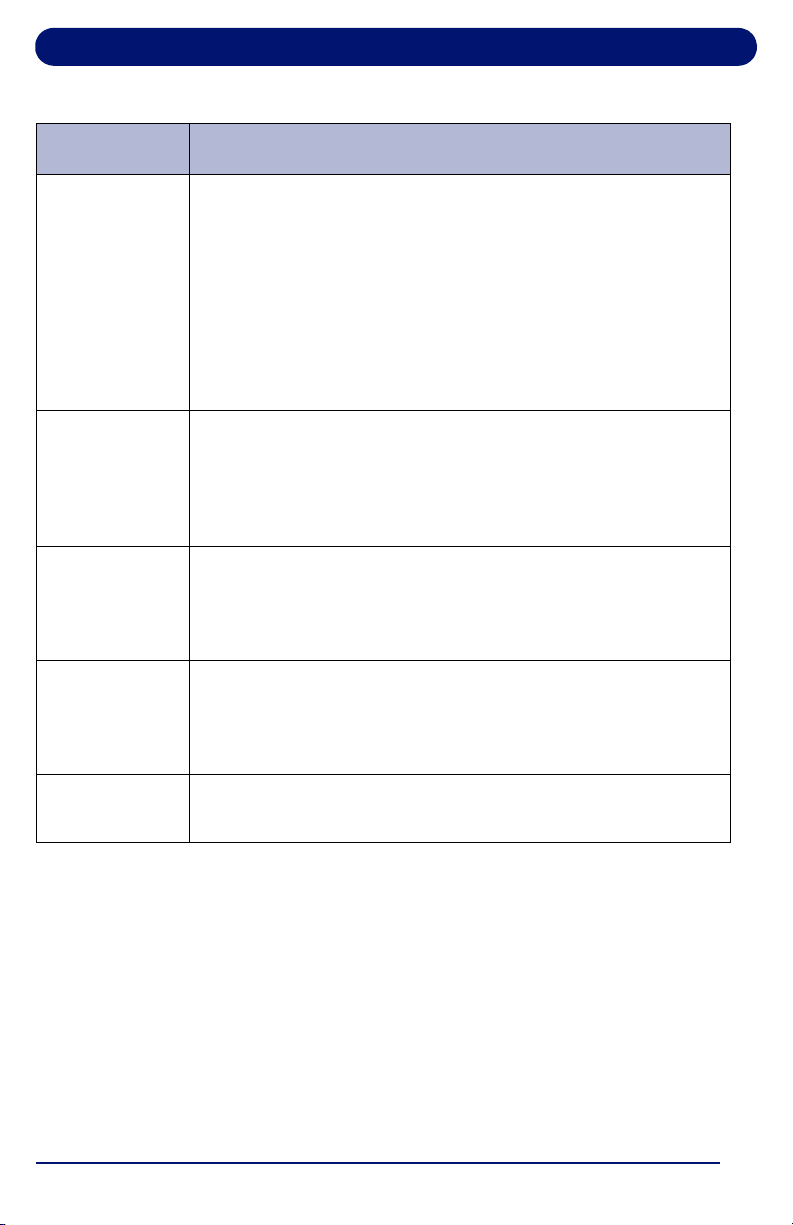
Function Description
INCLINE
Displays the incline of the treadmill in percent (%).
SPEED
Displays the current speed of the treadbelt in MPH
(km/hr in metric mode).
START
Powers up the treadmill. All displays light and the treadbelt
begins moving at 0.5 mph (0.8 km/hr in metric mode).
The START button will also take the treadmill out of pause
mode and resume treadbelt movement.
STOP Press STOP once to pause the treadmill or twice to turn it
off. The statistical information is cleared when the treadmill
is turned off.
MANUAL
MODE
To manually control the speed and incline of the treadmill,
press the button below the word MANUAL.
Landice Achieve Treadmill Operation
54
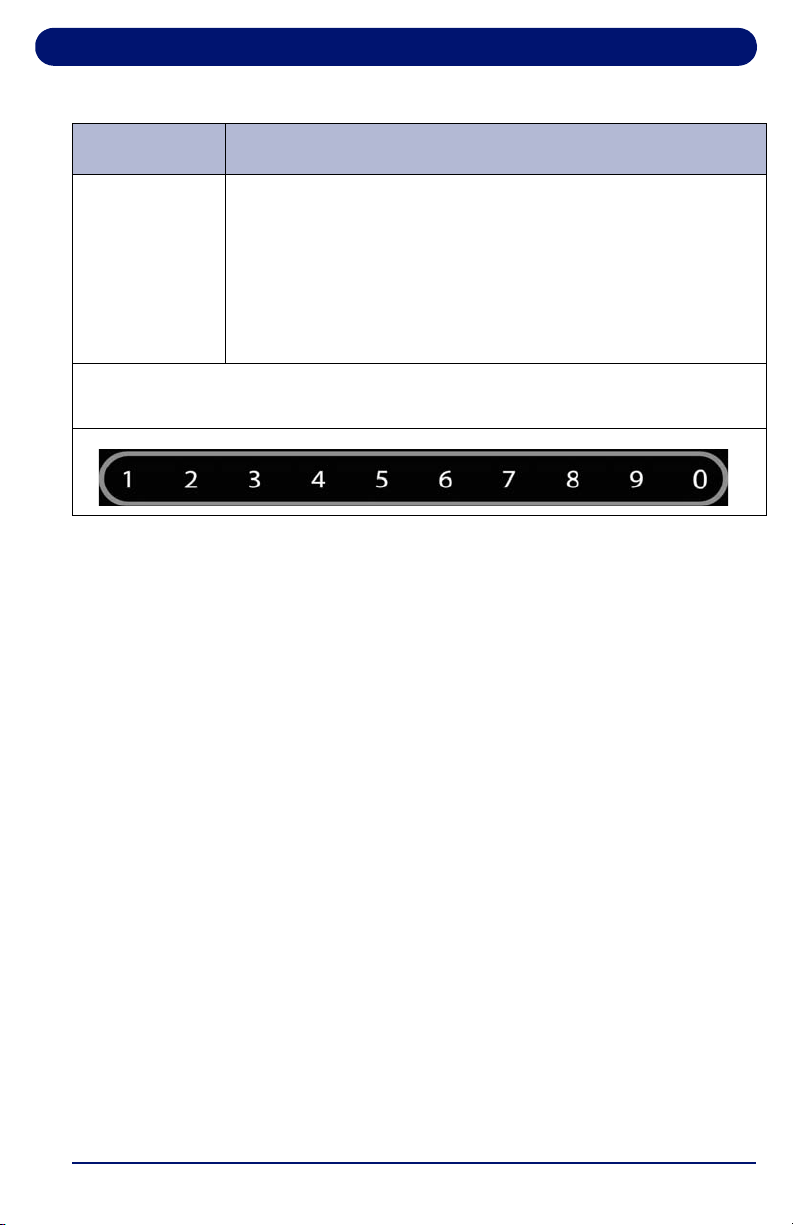
PROGRAMS
To use the built-in and user-defined workout programs:
Press the button below the word PROGRAMS at any time to
display the programs selection screen. Use arrow to scroll
through the built-in and user-defined program previews and
select the desired program by pressing
ENTER. You are
then prompted to enter the program’s specific parameters
(Maximum Speed, Incline, Time, etc.). Use the numeric
keypad or the arrow to select the desired values. Press
START to begin the program.
HEARTRATE
PROGRAMS
To use the Heart Rate Controlled programs:
Press the button below HEARTRATE PROGRAMS at any
time. Choose either a built-in or user-defined heart rate
program. Heart Rate Control programs automatically adjust
speed and incline in order to maintain a constant heart rate.
PLUS KEY Press and hold the (+) to increase incline or speed.
Pressing for longer than 2 seconds causes the incline or
speed to increase at a faster rate. Release the key when the
display shows desired incline or speed.
MINUS KEY Press and hold to the (–) to decrease incline or speed.
Pressing for longer than 2 seconds causes the incline or
speed to decrease at a faster rate. Release the key when
the display indicates desired incline or speed.
ARROW
KEYS
The buttons below the left and right arrows move between
display sections or to set values.
Table 4-1 Landice Achieve Control Panel Functions (Continued)
Function Description
Landice Achieve Treadmill Operation
55
EXPRESS 1
EXPRESS 2
EXPRESS 1 controls the Incline and EXPRESS 2
controls the Speed. In conjunction with the numeric keypad
this allows you to directly enter a target speed or incline
without using the (
+/-) keys. Press EXPRESS 1 for Incline
or
EXPRESS 2 for Speed, then enter the desired value
using the numeric keypad. Wait 3 seconds for the treadmill
to adjust to the new settings.
The numeric keypad is used to change speed and incline with the EXPRESS
keys, enter user settings, and configure programs.
Table 4-1 Landice Achieve Control Panel Functions (Continued)
Function Description
Landice Achieve Treadmill Operation
56
4.2. Display Features
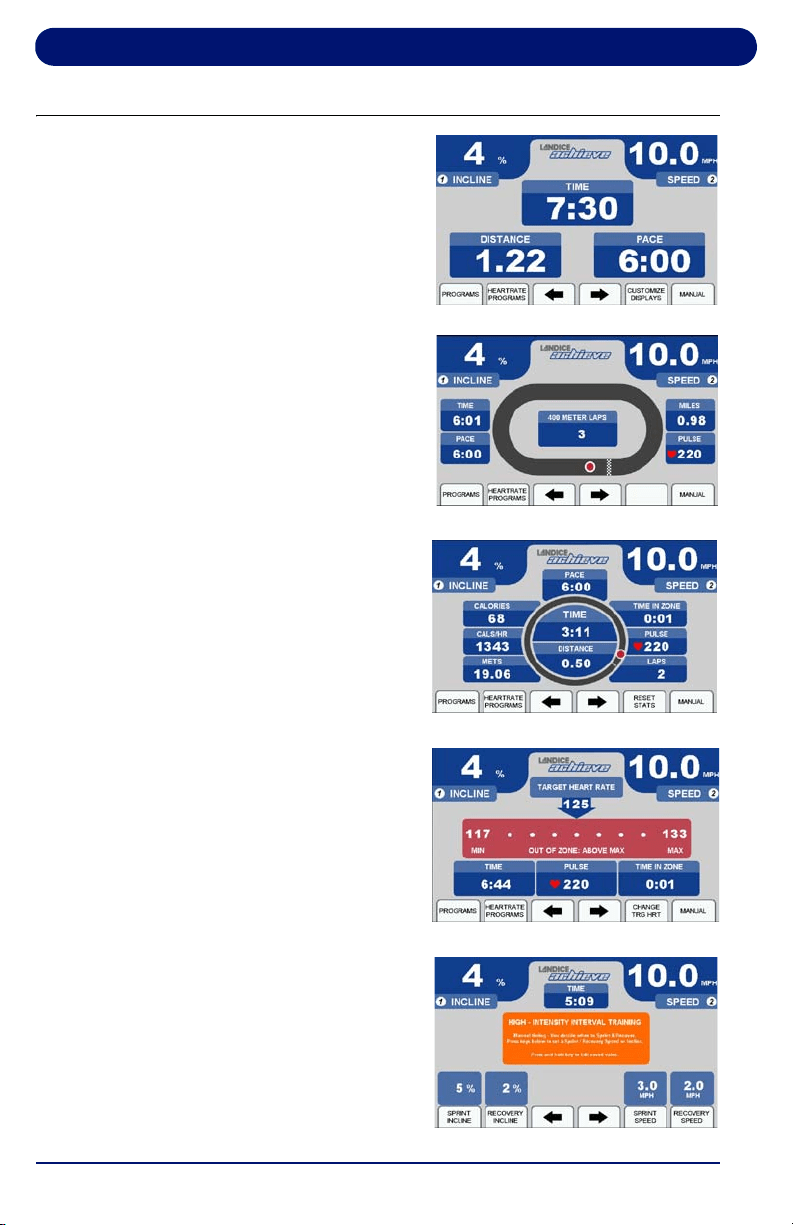
The screens at right are the
options available for displaying
workout information. Table 4-2
provides information about the
available options.
To toggle between these
screens during your workout,
use the arrow keys.
To customize the information
displayed on the Personalized
Stats screen, select “Customize
Display” to edit the screen. Use
the arrows to toggle through the
options and press ENTER to
confirm your selections.
To modify the sprint and
recovery speed and incline
values on the HIIT Screen,
press and hold the button below
the item you would like to edit
for 5 seconds. A pop-up window
will appear. Use the arrow keys
or numeric keypad to select
your desired number.
Personalized Stats
Statistics Screen
Track Screen
Heart Rate Screen
HIIT Screen
Landice Achieve Treadmill Operation
57
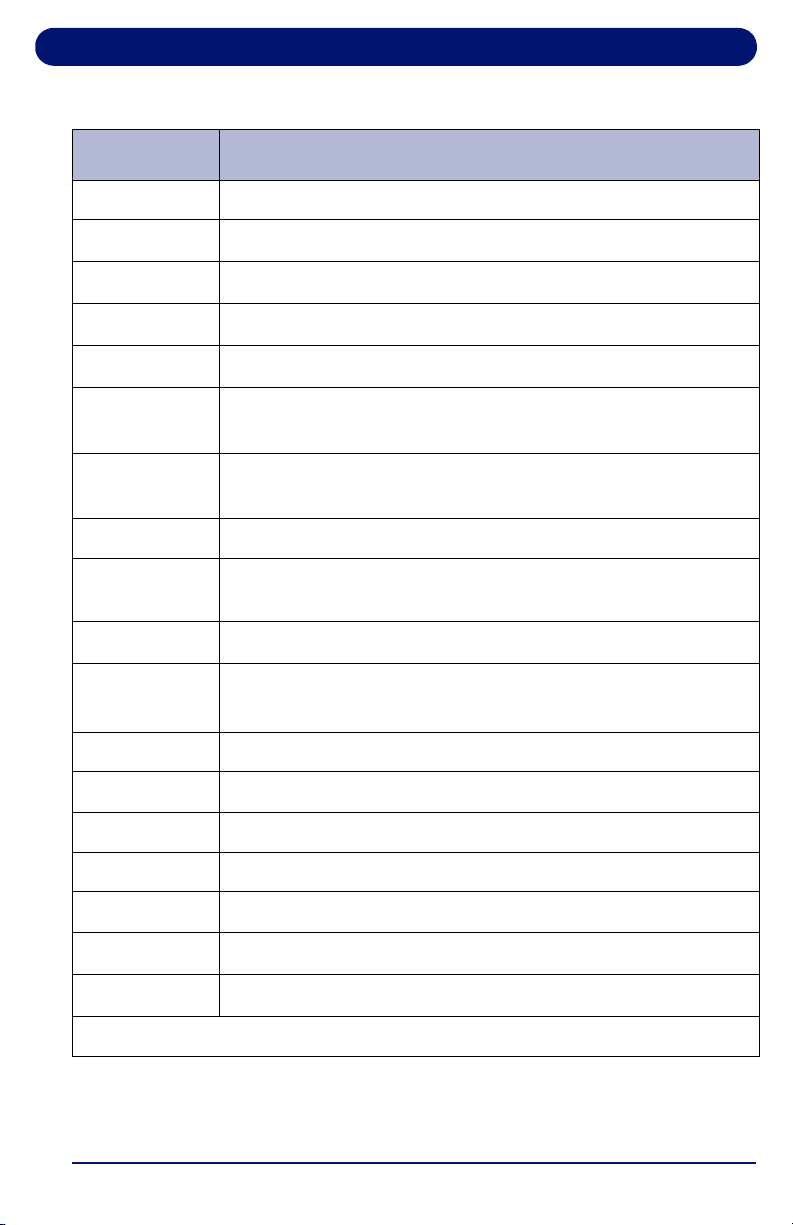
Table 4-2 Display Features
Feature Description
TIME Time logged on treadmill, displayed as Minutes:Seconds
DISTANCE
Miles logged on treadmill (kilometers when in metric)
PACE
Time to complete 1 mile (1 kilometer when in metric)
CALORIES
Total calories burned, based on entered user weight
CALS/HR
Approximate calories used per hour, based on user weight
LAP
(Progress)
1/4-mile (400 meter in metric) track and Lap Indicator
LAP
(Counter)
Number of laps completed
PULSE Current heart rate
TIME IN ZONE Time spent in zone. The zone is ± 8 beats from target heart
rate.
IN ZONE
User’s heart rate is within 8 beats of the target heart rate
OUT OF
ZONE
User’s heart rate is outside zone (more than 8 beats above
or below target heart rate)
ABOVE MAX User’s heart rate is above the maximum desirable heart rate
MAX Maximum allowable heart rate to remain in zone
TARGET HR Target heart rate (user-defined in Heart Rate Status screen)
MIN Minimum allowable heart rate to remain in zone
BELOW MIN User is below minimum allowable heart rate in zone
TOTAL TIME
The total time of the user’s workout
METS*
Current MET level, based on user weight / incline / speed
*One MET is the energy consumed at rest by the average adult.

Landice Achieve Treadmill Operation
58
4.3. Using the Landice Achieve Treadmill
1. Make sure you have read and understand this owner’s
manual before beginning.
2. Plug the treadmill power cord into its outlet.
3. Straddle the treadbelt with one foot on each traction strip.
4. Press START. The power-up screen is displayed.
5. After 3 seconds the treadbelt starts moving at 0.5 mph (0.8
km/h).
6. Enter your weight using the numeric keypad or arrows.
Press ENTER or wait 3 seconds to advance to the first of
the motivational screens.
7. The treadmill is now ready to use. You can vary the speed
or incline, if desired, by using the SPEED (+/–) and
INCLINE (+/–) keys or EXPRESS 1 and EXPRESS 2 keys.
4.4. Using the Built-in Programs
4.4.1. Description
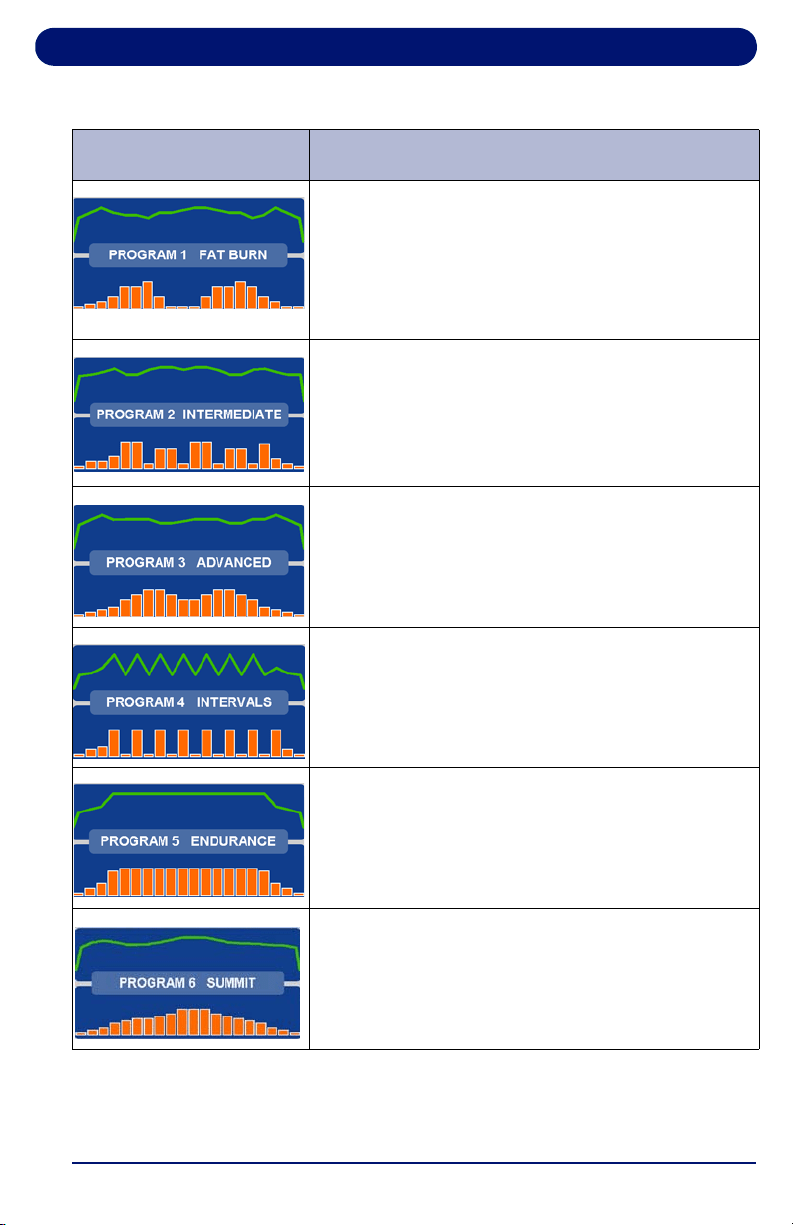
The 10 Built-in Programs differ in speed and incline. Each lets
you select a maximum speed, incline, and time (10 to 99
minutes). (Intervals Program requires a minimum speed and
incline and the HIIT programs have a fixed time.) The treadmill
will not go above the maximum number unless manually
overridden. Each program has 20 segments of equal time,
beginning with 3 warm-up segments and ending with 2 cool-
down segments. For example, a 40-minute program contains
20 2-minute segments.
Landice Achieve Treadmill Operation
59
Table 4-3 Landice Achieve Built-In Programs
Screen Program Description
FAT BURN: This program features two elevation
peaks along with gradual changes in speed. The
overall goal is to raise heart rate, maintain the
raised heart rate for most of the workout, then
gradually bring heart rate down during the last 2
cool down segments.
INTERMEDIATE: This program features 5
elevation peaks matched to changes in speed.
The overall goal is to vary heart rate by elevating
and lowering it several times, providing a
challenging cardiovascular workout.
ADVANCED: This program features high
elevations combined with top speeds. The overall
goal is to raise heart rate using speed and
elevation for an advanced cardiovascular
workout.
INTERVALS: This program features high speeds
and elevations alternating with low speeds and
elevations. The overall goal is to vary your
workout, taking you from peak level to recovery 8
times throughout the workout.
ENDURANCE: This program features a
maximum speed with maximum elevation. The
overall goal is to raise heart rate with speed and
elevation for the ultimate cardiovascular workout.
SUMMIT: This program allows the user to input
their maximum speed and elevation. The goal is
to gradually work your way up to maximum speed
and elevation with a steady decline.
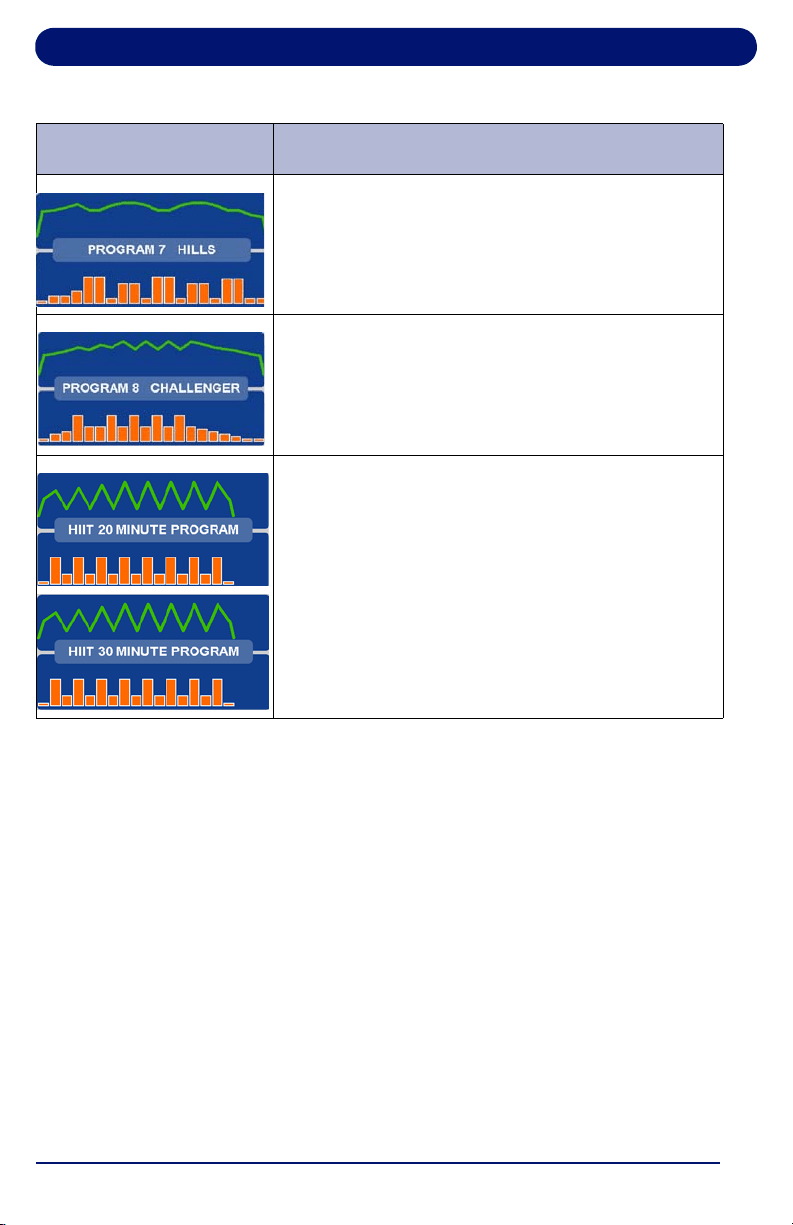
Landice Achieve Treadmill Operation
60
4.4.2. Running a Built-In Program
1. Start a workout as outlined in “Using the Landice Achieve
Treadmill” on page 58.
2. Press PROGRAMS to display the Programs selection
screen.
3. Select a built-in program by using the arrow to scroll
through the list, then press ENTER. You are prompted to
enter the following program parameters:
• Maximum Speed:
This scales the speed curve to the
maximum speed entered.
• Maximum Incline: This scales the elevation curve to the
maximum incline entered.
HILLS: This program features a maximum speed
and elevation with four series of hills. The goal is
to increase your cardiovascular while using
incline and speed.
CHALLENGER:
This program is designed to
increase your cardiovascular by reaching maximum
incline and speed several times throughout the
program. Maximum speed and elevation are set by
the user during program set-up
.
HIIT20 and HIIT30: These programs feature
8 sprint phases alternated with 7 recovery
segments. Please note the maximum speed for
the sprint phases will differ between the two
programs due to the length of the sprint segment.
The overall goal of these programs is to provide a
combination of very high-intensity bursts of cardio
exercise followed by longer periods of recovery.
Table 4-3 Landice Achieve Built-In Programs (Continued)
Screen Program Description

Landice Achieve Treadmill Operation
61
• Program Time: Sets the total length of time you want the
program to run. HIIT Programs have a fixed time.
• Minimum Speed/Incline: INTERVALS and HIIT
programs only.
4. Enter the Maximum Speed using the numeric keypad or the
arrow to select a value, then press ENTER or wait 3
seconds.
5. Enter the Maximum Incline using the numeric keypad or the
arrow to select a value, then press ENTER or wait 3
seconds.
6. Enter Program Time using the numeric keypad or the arrow
keys, then press ENTER or wait 3 seconds. The time
should be at least 10 minutes and not more than 99
minutes.
7. Press START to begin your workout. The Program
Progress Detail screen displays your current segment
speed, incline and remaining time.
8. To view other segments, select the “View Other Segments”
button. Use the arrow keys to move left or right. To exit,
press DONE.
9. Press the buttons below the arrow keys at any time to view
any of the other motivational screens during your program,
including the Program Profile screen to see a program
overview. When viewing a motivational screen other than
the Program Progress Detail screen during a segment
change, the display temporarily shows the Program
Progress Detail screen then returns to the original screen.
During a segment change, the speed and/or incline will
flash if there is a change in either.
4.5. Landice Achieve User Programs
Landice Achieve treadmills can store up to 6 individual,
modifiable user-defined program profiles.
A user-defined program looks and runs exactly like a built-in
program, but it can be customized to suit the user. Unlike the
built-in programs, user-defined programs allow editing of
individual segments as well as the number of segments.
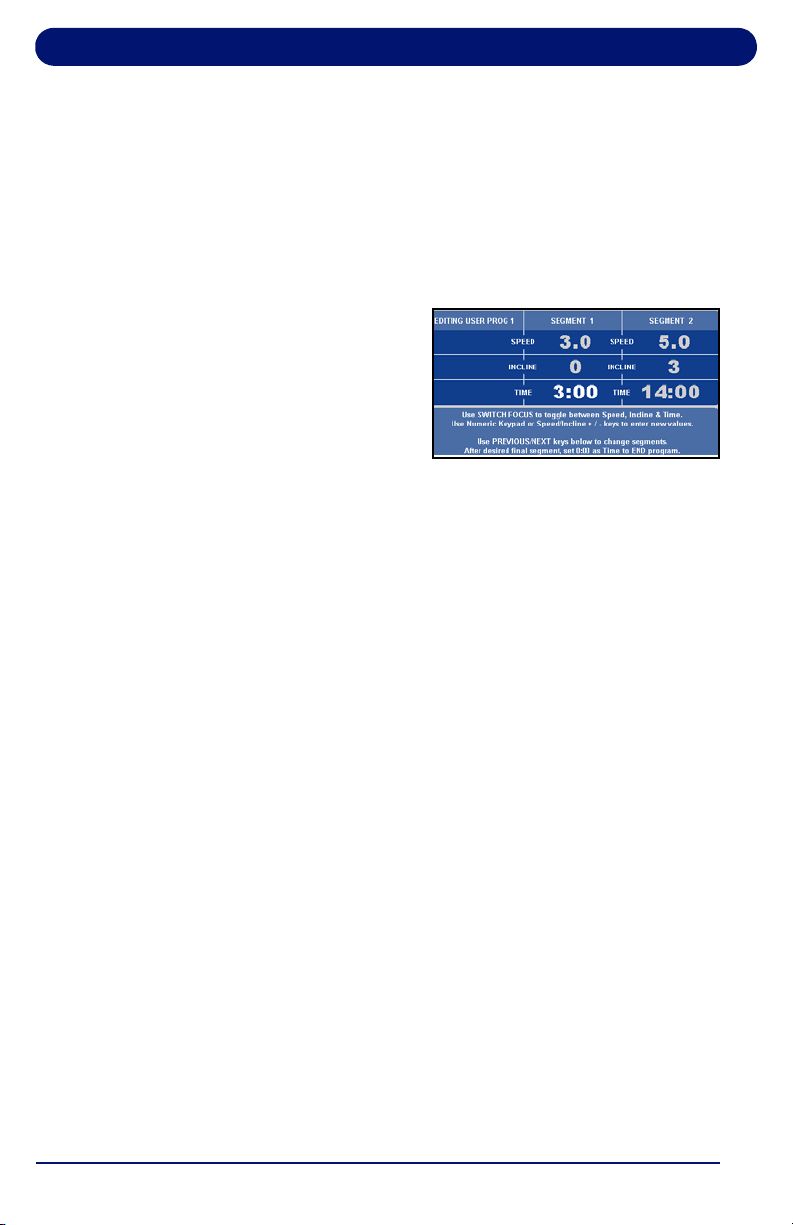
Landice Achieve Treadmill Operation
62
1. Press the button below PROGRAMS to display the
Programs selection screen.
2. Scroll through the program options by pressing
PROGRAMS or use the arrow keys. When USER
PROGRAM PREVIEW is shown, press ENTER.
3. Press ENTER or wait 3 seconds. The screen displays
PRESS START TO BEGIN OR EDIT TO SET UP.
4. Press EDIT. EDIT MODE
requires a time for segment
1 (area in bold).
Note: Press SWITCH FOCUS to toggle between speed, incline
and time values for the current segment. To change
segments, press NEXT SEGMENT or PREVIOUS
SEGMENT. You can change segments in either the forward
or reverse direction.
5. Use the numeric keypad to change the value and press
SWITCH FOCUS. Continue to another segment by
pressing the next or previous segment keys.
6. If you want a program to have less than 20 segments,
create the last segment with 0 in the time field. The time
reads END. The program ends when it reaches this
segment.
7. When you finish editing your User-Defined Program, you
can begin your program by pressing START or DONE.
Note: If you attempt to advance the cursor past the 20th
segment, you are prompted with PRESS START TO BEGIN
OR EDIT TO SET UP. You can also exit Edit Mode by
pressing MANUAL MODE or PROGRAMS at any time.

Landice Achieve Treadmill Operation
63
4.5.1. Learn Mode
When you run a User-Defined Program and the speed or
incline is adjusted, the treadmill saves the last change to the
current segment.
Note: Learn Mode allows you to adjust existing segments in your
user program, but you cannot add segments to it in Learn
Mode.
1. Start a workout, then press PROGRAMS to display the
Programs selection screen.
2. Scroll through the program options by pressing
PROGRAMS or use the arrow keys. When the USER
PROGRAM PREVIEW you desire is shown, press ENTER.
3. Press START to begin your program. When you begin, the
Program Progress Detail screen is displayed. The speed
and incline values of your current segment are displayed in
the center. To change the speed or incline of your current
segment, press the SPEED (+/–) or INCLINE (+/–) keys.
The modified segment is stored with these new settings for
the next time you run this program.
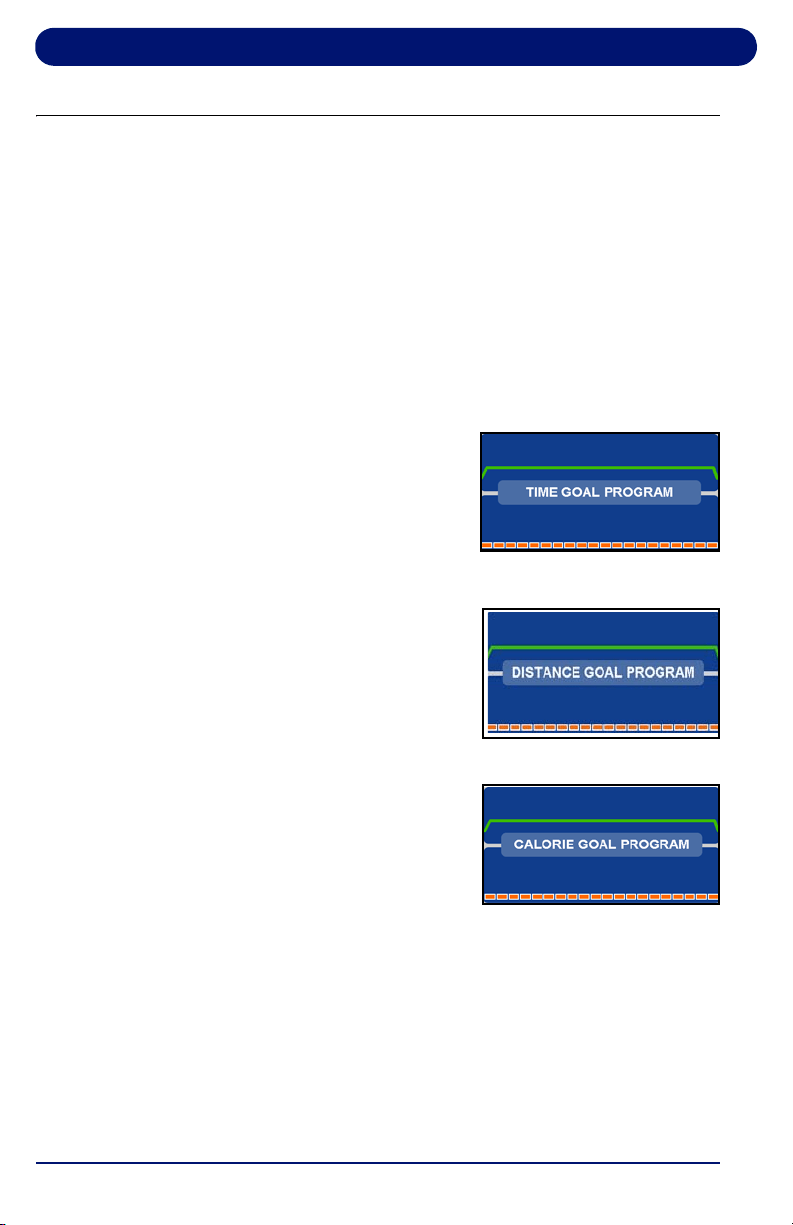
Landice Achieve Treadmill Operation
64
4.6. Specific Goal Programs
The Landice Achieve Treadmill provides Specific Goal
programs. Whether you want to go for a 3-mile run, burn 1,000
calories, or simply exercise for 15 minutes, the Goal Progress
screen accurately assesses your progress with a variety of
statistics. During these programs you retain full manual control.
1. Start a workout as outlined in “Using the Landice Achieve
Treadmill” on page 58.
2. Press the arrow button under Programs to display the
Programs selection screen and select the goal program
that you want to run:
• For TIME GOAL PROGRAM,
set a Program Time Goal
using the numeric keypad or
the arrow keys. Enter a time
from 10 to 99 minutes, then
press ENTER or wait 3
seconds.
• For DISTANCE GOAL
PROGRAM, set a Program
Distance Goal using the
numeric keypad or arrow
keys. Enter a distance from
0.1 to 99.9 miles (km in
metric), then press ENTER or wait 3 seconds.
• For CALORIE GOAL
PROGRAM, set a Program
Calorie Goal using the
numeric keypad or arrow
keys. Enter a calorie goal
from 10 to 9,999 calories,
then press ENTER or wait 3 seconds.
3. Press START to begin.
The Goal Progress screen shows your Specific Goal (Time,
Distance or Calorie), counting down (noted by a negative
sign).
4. Press
the arrows at any time to view any of the other
screens during your program.
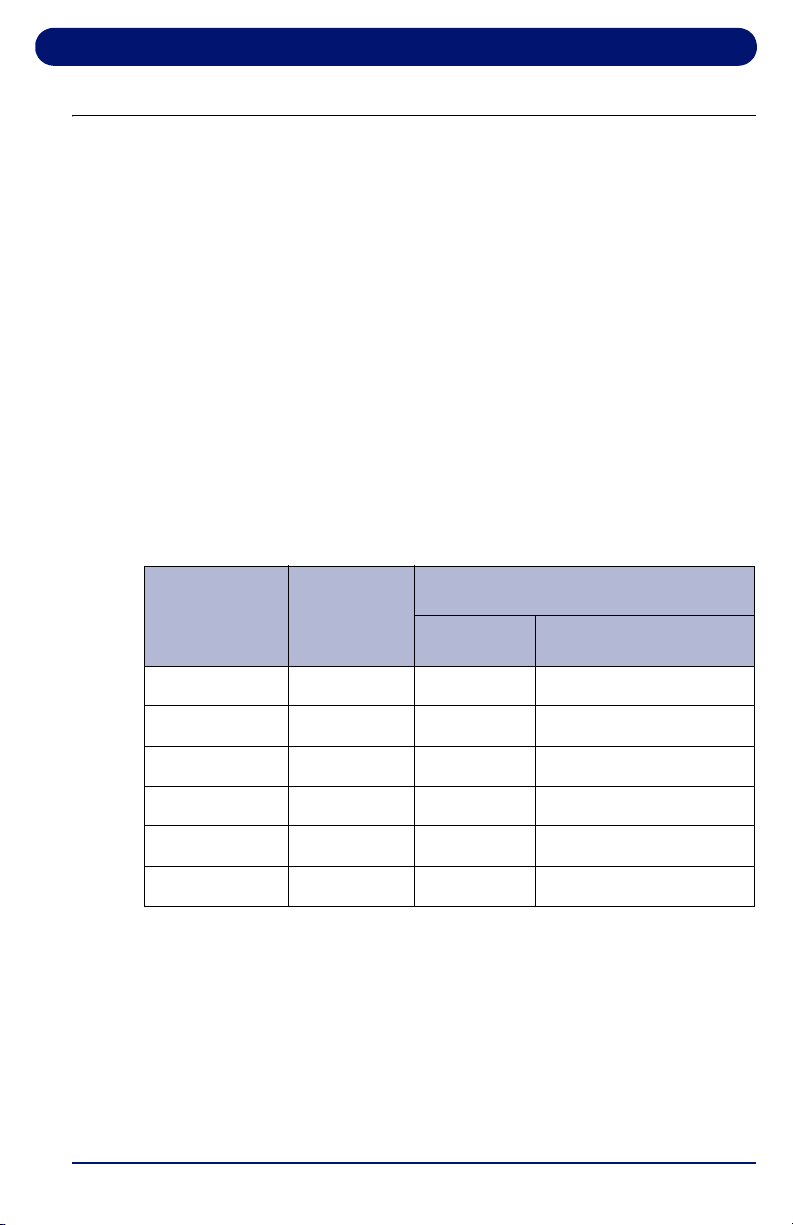
Landice Achieve Treadmill Operation
65
4.7. Heart Rate Control Programs
Landice Achieve treadmills offer Heart Rate Control (HRC)
programs that display your heart rate and automatically vary
treadmill speed and elevation. HRC training allows you to
maximize your workout performance while minimizing your
workout time.
You must use the Pulse Grips or the Wireless Chest Strap
(optional) to detect your heart rate during the HRC programs.
There are 2 different 20-segment HRC programs:
• HRC varies treadmill speed and elevation to keep your heart
rate near the target heart rate for the entire workout.
• Interval HRC targets different heart rates. It alternates
between the target and 80% of the target.
Table 4-4 Heart Rate Control Programs
Segment Stage
% of Target Heart Rate
HRC Interval HRC
1 Warm Up 70 70
2 Warm Up 80 80
3 Warm Up 90 90
4-18 Training 100 Alternating 80 & 100
19 Cool Down 90 90
20 Cool Down 80 80
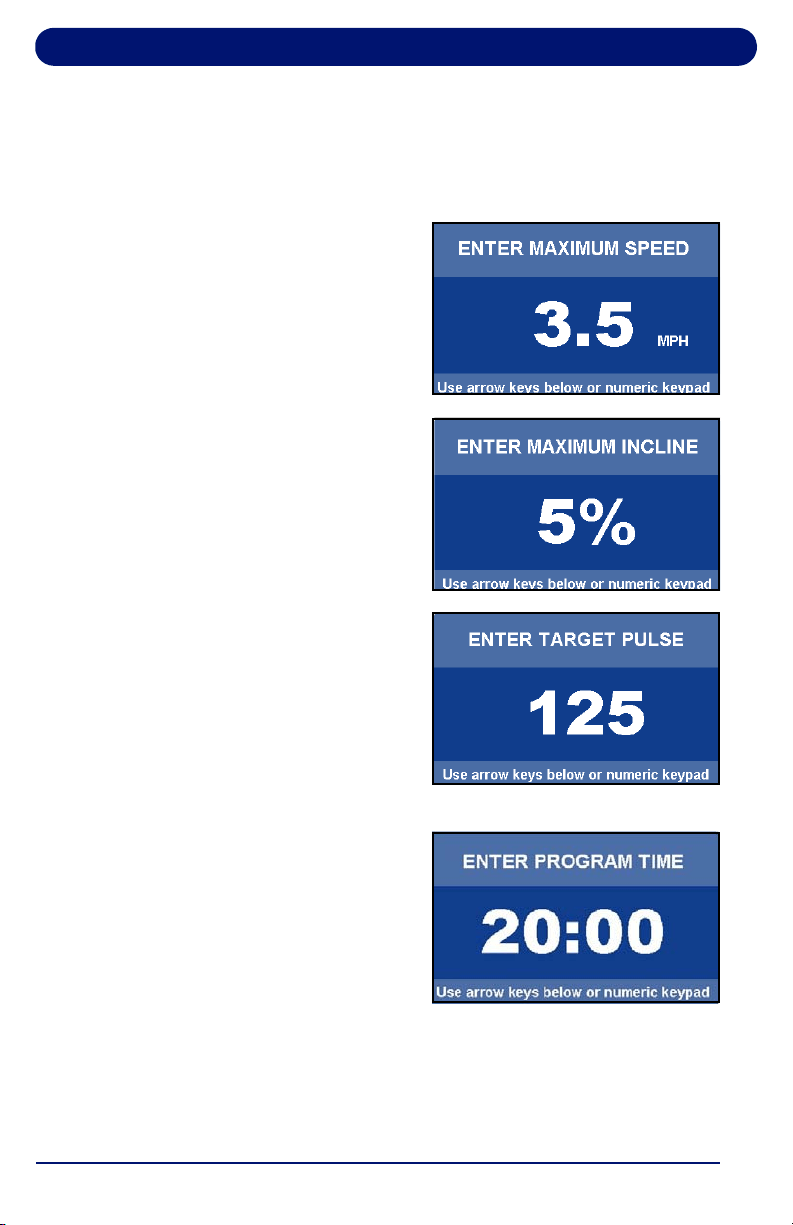
Landice Achieve Treadmill Operation
66
4.7.1. Built-in HRC Programs
1. If using a Landice Achieve treadmill, press the
HEARTRATE PROGRAMS key. Press ENTER while the
HR Control program is displayed.
2. Using the numeric keypad
or arrow keys, select your
maximum speed. Press
ENTER or wait 3 seconds.
3. Use the numeric keypad or
arrow keys to select your
maximum incline. Press
ENTER or wait 3 seconds.
4. Use the numeric keypad or
arrow keys to enter your
target pulse. The treadmill
will vary the speed and
elevation in an effort to
make you reach this heart
rate. Press ENTER or wait 3
seconds.
5. The display prompts you to
set a Program Time using
the numeric keypad or
center arrow. For HRC,
enter a time between 20-99
minutes. This will scale the
20 segments of the program
equally throughout your
selected time. Press ENTER or wait 3 seconds.
6. Press START to begin.
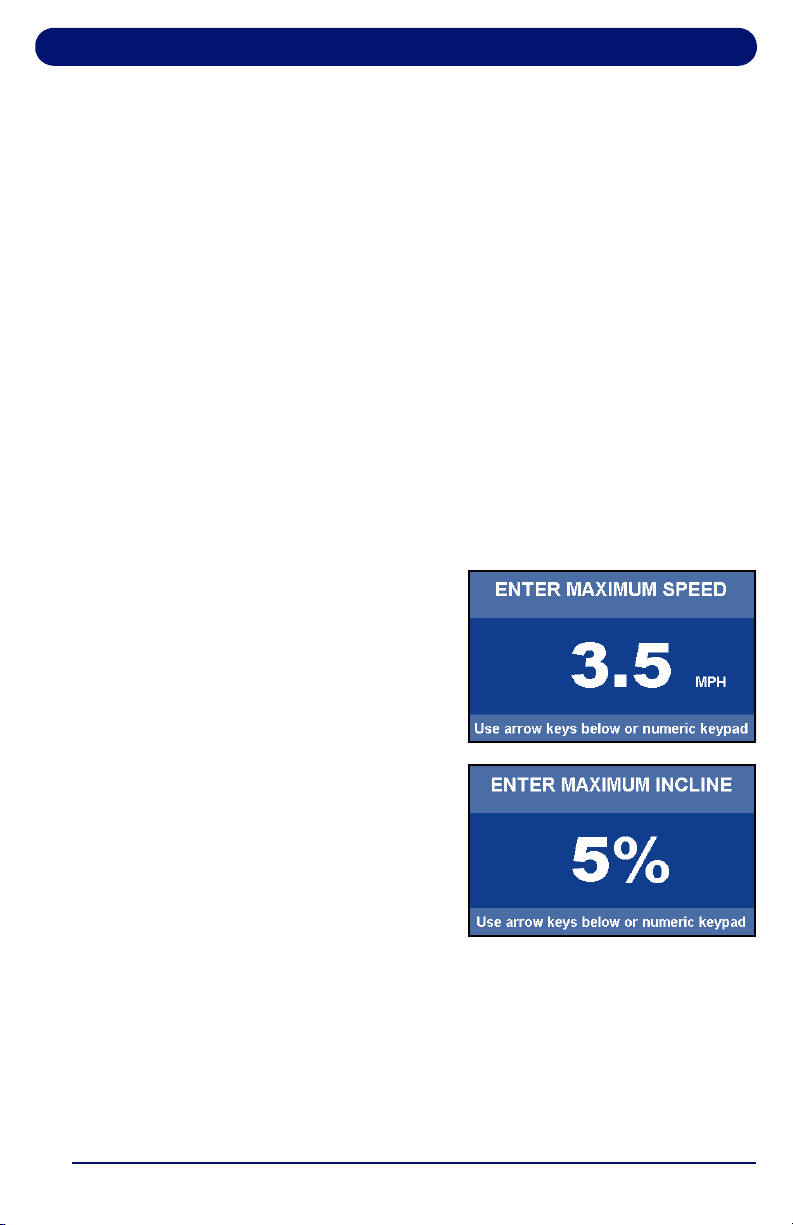
Landice Achieve Treadmill Operation
67
4.7.2. User-Defined Heart Rate Programs
The User-Defined Heart Rate Monitoring (HRC) programs are
designed to allow you to set the target heart rate for up to 20
program segments.
To customize a User-Defined HRC Program during your
workout, adjust your Target Heart Rate in the Heart Rate Status
screen by selecting Change TRG HRT button. Any Target
Heart Rate changes you make during your workout will be
saved in that User-Defined HRC Program.
If you want to edit your User-Defined HRC Program before your
workout, follow these steps:
1. To select an HR program to edit, press HEARTRATE
PROGRAMS. To scroll through the programs, either
continue pressing HEARTRATE PROGRAMS or use the
arrow keys. Select a User-Defined HRC Program to edit by
pressing ENTER.
2. Select your maximum speed
using the numeric keypad or
arrow keys and press
ENTER, or wait 3 seconds.
3. Enter the maximum incline
using the numeric keypad or
arrow keys. Press ENTER
or wait 3 seconds.
4. The display prompts
PRESS START TO BEGIN
OR EDIT TO SET UP. Press
START to run the program or press EDIT to enter editing
mode and make changes if desired.
5. To change segments, press PREVIOUS or NEXT
SEGMENT buttons. You can change segments in either the
forward or reverse direction.

Landice Achieve Treadmill Operation
68
6. The first display in EDIT MODE requires you to change the
time for segment 1 (area in bold). Use the keypad to
change the segment time length and press SWITCH
FOCUS to change the target heart rate.
7. If you want a program to have fewer than 20 segments,
create the last segment with 0 in the time field and press
DONE. The time reads END. The program ends when it
reaches this segment.
8. Use the SWITCH FOCUS button to toggle between Target
Heart Rate and Time values within a segment. Continue to
program subsequent segments by using the Previous and
Next Segment buttons to move from segment to segment.
9. When you finish editing your User-Defined HRC Program,
do one of the following:
•Press DONE to save the program or START to begin.
• Exit Edit Mode by pressing MANUAL, HRC, or
PROGRAMS at any time. Any edits you made in Edit
Mode are permanently saved in that User-Defined HRC
Program.
10. If you attempt to advance the cursor past the 20th segment,
you are prompted with PRESS START TO BEGIN OR EDIT
TO SET UP.
Note: To adjust the program’s target heart rate during your
workout, from the Heart Rate Status screen, select the
CHANGE TRG HRT button.
Note: See page 69 for Instructions on the Fitness Tests.

69
5. Fitness Testing
5.1. Introduction
Landice Cardio and Landice Achieve treadmills have built-in
tests that measure fitness level based on your age, gender, and
performance. Depending on the treadmill model, different
fitness test protocols are available.
A person’s fitness level can be measured by the amount of
oxygen their body can consume while exercising at maximum
capacity. The maximum amount of oxygen (in milliliters) an
individual can use in one minute per kilogram of body weight is
referred to as VO
2
Max.
When you perform one of the fitness tests described in this
section, the treadmill calculates approximate VO
2
Max and
provides a fitness evaluation.
Note: Scores may vary due to line voltages, component
tolerances, and individual capabilities. For a more
accurate VO
2
Max calculation, take the average of the
Balke and Firefighter Fitness Test scores.
5.2. Army 2 Mile Fitness Test (Cardio, Landice Achieve)
This test consists of a manually controlled, flat ground,
complete as fast as you can 2-mile run. Upon completion the
treadmill provides an assessment score of 0 to100.
Test Parameters
• Maximum Speed: Controlled by the user
• Maximum Incline: Set to 0%
To run the test:
1. Press PROGRAMS to view the programs selection screen
on the Cardio and Landice Achieve. To scroll through the
programs, either continue to press PROGRAMS or use the
arrow keys.
2. Select the Army 2 Mile Fitness Test by pressing ENTER.
3. Enter your age (10 to 99) using the keypad or the arrow
keys, then press ENTER or wait 3 seconds.
Fitness Testing
70
4. Enter your gender using the center arrow to toggle to MALE
or FEMALE. Press ENTER or wait 3 seconds.
5. Press START to begin.
6. Complete the 2-mile run as quickly as possible by manually
controlling your speed (incline is disabled for this test). To
stop the test at any time, press STOP, MANUAL, HR
PROGRAMS or PROGRAMS.
When you begin, the Goal Progress screen shows your
Specific Goal (Army 2 Mile Run), Time Remaining, Projected
Score and other statistics. The Distance counts down (noted by
negative sign).
When the test is complete, a US Army assessment rating
between 0-100 is displayed, based on your time, age and
gender.
Table 5-1 U.S. Army Fitness Assessment Ratings
Score Rating
85-100 Excellent
70-84 Good
32-69 Average
17-31 Fair
0-16 Low

Fitness Testing
71
5.3. Balke Fitness Test (Cardio and Landice Achieve)
Note: You must use the pulse grips or wireless chest strap
(residential models only) for this test.
This is a walking pace, variable incline fitness test. The test
increases in difficulty to raise your heart rate. Upon reaching
your Target Heart Rate, the test ends and the treadmill
calculates your fitness assessment. Parameters cannot be
modified. Your age determines the test’s target heart rate and
the scaling of the fitness assessment.
Test Parameters:
• Maximum Speed: 4.4 mph
• Maximum Incline: 15%
• Maximum Heart Rate: 80% of Maximum Heart Rate
(See Heart Rate Monitoring sections).
To run the test:
1. On the Cardio and Landice Achieve, press HEARTRATE
PROGRAMS to view the HRC programs selection screen.
To scroll through the programs, either continue to press
HEARTRATE PROGRAMS or use the arrow keys. Select
the Balke Fitness Test by pressing ENTER. To access this
program on the Landice Achieve, press PROGRAMS then
FITNESS TESTS.
2. Use the keypad or arrow to enter your age (10 to 99), then
press ENTER or wait 3 seconds.
3. Enter your gender using the center arrow to toggle to MALE
or FEMALE. Press ENTER or wait 3 seconds.
Note: The calculated target heart rate displayed before you start
the test is derived from statistical heart rate capacity
averages. (See “Heart Rate Monitoring” on page 15.) If you
are uncomfortable with the target heart rate displayed or
feel discomfort during the fitness test, stop the test.
Fitness Testing
72
Note: You must hold onto the pulse grips or wear the wireless
chest strap for the entire test. If the treadmill loses the
heart rate signal for more than 30 seconds the test is
terminated.
4. Press START to begin the test.
This automated test increases in difficulty from segment to
segment until you reach the target heart rate. When you reach
the target heart rate a 30-second countdown follows and ends
the test. If Speed or Incline buttons are engaged it will end the
program.
When you begin, the Heart Rate Status screen shows your
Target Pulse, Time, Heart Rate Status and Time in Zone.
Upon completion the treadmill displays your VO
2
Max score
and fitness assessment based on your performance. Use the
tables below to interpret your score based on your age and
gender.
Table 5-2 Men: VO
2
Max
Age
Rating
<20 20-29 30-39 40-49 50-59 60-69 >69
>65 >62 >58 >54 >52 >50 >48 Superior
57-65 54-62 50-58 46-54 44-52 42-50 40-48 Excellent
47-56 44-53 40-49 37-45 35-43 32-41 30-39 Good
37-46 35-43 32-39 28-36 26-34 24-31 22-29 Average
<37 <35 <32 <28 <26 <24 <22 Low

Fitness Testing
73
Table 5-3 Women: VO
2
Max
Age
Rating
<20 20-29 30-39 40-49 50-59 60-69 >69
>62 >58 >54 >51 >47 >44 >42 Superior
54-62 50-58 46-54 43-51 39-47 36-44 34-42 Excellent
42-53 39-38 35-45 32-42 29-38 25-35 23-33 Good
34-41 32-38 29-34 25-31 22-28 19-24 15-22 Average
<34 <352 <29 <25 <22 <19 <15 Low

Fitness Testing
74
5.4. Firefighter (Gerkin) Fitness Test (Cardio and
Landice Achieve)
This test requires the Wireless Chest Strap. It is a heart rate
controlled, variable speed and incline fitness test. The test
increases in difficulty to raise your heart rate. When you reach
your target heart rate, the test ends and the treadmill calculates
a fitness level based on your performance. Your age
determines the test’s target heart rate and the scaling of the
fitness assessment.
Test Parameters
• Maximum Speed: 7 mph
• Maximum Incline: 15% (cannot be modified)
• Maximum Heart Rate: 85% of Maximum Heart Rate
(See Heart Rate Monitoring sections).
To run the test:
1. On the Cardio or Landice Achieve, press HEARTRATE
PROGRAMS to view the HRC programs. To access this
program on the Landice Achieve, press PROGRAMS then
FITNESS TESTS.
2. Scroll through the programs using the arrow keys or by
continuing to press HEARTRATE PROGRAMS.
3. Press ENTER to select the Firefighter Fitness Test.
4. When prompted, use the keypad or arrow keys to enter
your age (10 to 99), then press ENTER or wait 3 seconds.
5. Enter your gender by using the arrow keys to toggle
between MALE and FEMALE. Press ENTER or wait 3
seconds.
Note: The calculated target heart rate is displayed before you
start the test. This heart rate is derived from statistical
heart rate capacity averages (see Heart Rate Monitoring
Section) If you are uncomfortable with the target heart rate
displayed or feel discomfort during the fitness test, stop
the test.
6. Press START to begin.
Fitness Testing
75
Note: You must wear the wireless chest strap or hold onto the
contact heart rate bars during the entire test. If the
treadmill loses the heart rate signal for more than
30 seconds the test is terminated.
This test increases in difficulty until you reach the target heart
rate, then a 30-second countdown follows and ends the test.
To end the program at any time press STOP.
Upon completion the treadmill displays a VO
2
Max score and
fitness assessment based on your performance compared to
the general population.
Table 5-4 Firefighter Fitness Test Score
VO2 Max Rating
>59 Superior
50-58 Excellent
40-49 Good
32-39 Average
<32 Low

Fitness Testing
76
77
6. Maintenance and Troubleshooting
6.1. Cleaning
It is recommended to clean the console and screen after each
workout.
General: Vacuum around and under the treadmill at least once
a month. Wipe any sweat from the treadmill after each workout.
Console and Display Screen: Wipe exposed console
surfaces with a microfiber cloth, dampened with a mixture of
30 parts water to 1 part Simple Green
®
cleaner.
www.simplegreen.com
Touch Screen Cleaning:
1. Turn your fitness equipment off. When cleaning a treadmill
please do not stand on the tread belt during the cleaning
process.
2. Spray/dampen a microfiber cloth with the cleaner and be
sure to wring out any excess liquid prior to cleaning the
screen.
3. Wipe the surface of the monitor gently in small circles, and
then allow it to dry.
IMPORTANT Avoid getting any cleaning liquids in the console
or other parts.
WARNING
Lethal voltages and moving parts capable of
causing serious injury are exposed when the
motor cover is removed. Under no
circumstances should the motor cover be
removed except by a Landice factory-
authorized technician.
AVERTISSEMENT
Des tensions létales et des pièces mobiles
susceptibles de causer des blessures
graves sont exposées lorsque le capot du
moteur est enlevé. En aucun cas, le capot du
moteur ne doit être enlevé, sauf par un
technicien habilité par usine de Landice.

Maintenance and Troubleshooting
78
6.2. Lubrication
Landice recommends lubricating the underside of the treadbelt
with Landice 100 Centistoke Silicone Oil every 3,000 miles.
See instructions included with lubricant.
6.3. Contact Landice
If you need technical support, you can contact Landice at:
973-927-9010 (in the U.S.)
(+1) 973-927-9010 (international)
Submit a question online at:
https://www.landice.com/support/technical-support-contact
Submit a question via email:

Maintenance and Troubleshooting
79
6.4. Hidden Menus
The Hidden Menus provide access to control the settings listed
below.To view the Hidden Menus:
• Pro Sports and Cardio: press and hold 3, 9 and START
simultaneously while the treadmill is off, then release all. Use
the + or – keys to move up and down the list. Then press to
select the option and press STOP to save and exit.
• Landice Achieve: press START then hold 3 and 9
simultaneously during the boot-up screen, then release all.
Use the + or – keys to move up and down the list. Then press
START to select the option and press STOP to save and exit.
Hidden Menu Options
• Error Logs: Records the number of times a specific
error code occurs.
• NV Init - Boot: Manufacturer's use ONLY
• Diagnostics: Provide technicians the ability to test
buttons and calibrate. Press and hold STOP to exit
diagnostic mode.
• Reprogram Firmware: Manufacturer's use ONLY
• Self-Diagnostics: Runs an automatic test of specific
components to assist service technicians with
diagnostics.
• Toggle Max Speed: Allows the maximum speed to be
adjusted to 12.5 mph for 110 volt and 15.5 for 220 volt
treadmills.
• Toggle Lockout Mode: Enables or disables use of a
code to operate the treadmill. When Lockout Mode is
enabled it provides the ability to set a personalized four-
digit code to use the treadmill. If the code is forgotten,
9010 will grant access.
• Toggle Units: Allows the measurement of units to
switch between English and Metric.
• Toggle Beeper: Enables or disables the ability to
control the beeping sound.
• Toggle User Presence: This feature will turn off the
treadmill if a user is not detected on the treadmill for 20
to 30 seconds.

111 Canfield Avenue, Suite A-1, Randolph, NJ 07869
U.S. Tel. (+1) 973-927-9010 · Fax (+1) 973-927-0630
International Tel. (+1) 973-927-9010
www.landice.com

