Digital Home
Receiver
TM
Hardware Setup Instructions
DHG-B45CV
©
2000 by Sony Corporation. Reproduction in whole or in
part without written permission is prohibited. All rights reserved.
CV.book Page i Thursday, November 30, 2000 2:31 PM

Sony Software License Agreement
ATTENTION: USE OF THE SOFTWARE IS SUBJECT TO THE
SONY SOFTWARE LICENSE TERMS SET FORTH BELOW. USING
THE SOFTWARE OR THE PRODUCT IN WHICH IT IS
INCORPORATED INDICATES USER’S ACCEPTANCE OF THESE
LICENSE TERMS. IF THE USER DOES NOT ACCEPT THESE
LICENSE TERMS, THE USER SHOULD IMMEDIATELY RETURN
THE ENTIRE PRODUCT IN ITS ORIGINAL PACKING IN ORDER
TO RECEIVE A FULL REFUND OF THE PURCHASE PRICE.
License and Restrictions
Sony Electronics Inc. (“Sony”) grants User a license to Use one
copy of the software which is provided to you as part of this Sony
product (“Software”). “Use” means storing, loading, installing,
executing or displaying the Software. User may not copy, modify
the Software or disable any licensing or control features of the
Software. No portion of the Software may be reproduced in any
form, or by any means, without prior written permission from
Sony. User is not permitted to modify, distribute, publish, transmit
or create derivative works of any Software included for any public
or commercial purposes. In consideration of this authorization,
User agrees that any copy of this Software which User makes shall
retain all copyright and other proprietary notices in the same form
and manner as on the original. Except as specified above, nothing
contained herein shall be construed as conferring by implication,
estoppel or otherwise any license or right under any patent,
trademark or copyright of Sony, its affiliates or any third party
licensor. User may not in any way sell, lease, rent, license,
sublicense or otherwise distribute the Software. The Software may
only be accessed by the functionality of the Sony product in which
the Software is incorporated by Sony (the “Product(s)”), and a User
shall not intentionally make the Software directly accessible to
others or to hardware other than the Products, or otherwise expose
an API. Nothing in this Agreement grants User any rights, license
or interest with respect to source code of the Software. User shall
not modify, translate, reverse engineer, decompile or disassemble
the Software or any part thereof or otherwise attempt to derive
source code or create derivative works therefrom, and shall not
authorize any third party to do any of the foregoing unless Sony's
prior written consent is obtained. Sony may elect to provide to
User updates and other support services for the licensed Software.
All updates provided to User shall constitute licensed Software
under this License, and such updates shall be governed by the
terms hereof.
Intellectual Property
The Software is owned and copyrighted by Sony, its affiliates or its
third party licensors. User’s license confers no title or ownership in
the Software and is not a sale of any rights in the Software. Sony's
affiliates and/or third party suppliers may protect their rights
directly in the event of any User’s violation of this Agreement. The
trademarks, tradenames, Product designation, logos and service
marks (“Marks”) displayed with this Software are the property of
Sony, its affiliates or third party licensors, and User shall acquire no
rights of any kind in or to any Mark under which the Software
and/or Products are marketed. User is not permitted to use these
Marks without the prior written consent of Sony, its affiliates or the
applicable third party licensor which may own the Mark. “Sony” is
a registered trademark of Sony Corporation. User agrees not to
remove, alter or destroy any patent, trademark or copyright
markings or notices placed upon or contained within the Software,
User Manuals or documentation. User further agrees to insert and
maintain with the Software and any documentation a copyright
notice in User’s name.
Termination
User’s license will automatically terminate upon any transfer of the
Product. Upon transfer, User must deliver the Software, including
any copies and related documentation, to the transferee. The
transferee must accept these License Terms as a condition to the
transfer. Otherwise, Sony does not authorize the transfer and the
User and transferee will be in violation of this Agreement should
the transferee use the Product. This license will automatically
terminate upon User’s failure to comply with any of these License
Terms. Upon termination, User must stop using the Product and
immediately destroy the Software, together with all copies,
adaptations and merged portions in any form and/or return it to
Sony.
Export Requirements and U.S. Government
Restricted Rights
User may not export or re-export the Software or any copy or
adaptation in violation of any applicable laws or regulations. The
Software and documentation have been developed entirely at
private expense and are provided as “Commercial Computer
Software – Restricted Rights” in accordance with FAR 52.227-19
(1987) or limited rights in technical data in accordance with FAR
52.227-14 (1987). User has only those rights provided for such
Software and documentation by the applicable FAR or DFARS
clause or this Sony Software License Agreement.
Limited Warranty
Sony warrants to User that the Software will not fail to execute its
programming instructions due to defects in material and
workmanship for a period equal to the warranty period provided
for the Product when properly installed and used. Warranty does
not apply to defects resulting from (a) improper or inadequate
maintenance, (b) software, interfacing, parts or supplies not
supplied by Sony, (c) unauthorized modification of the Software or
the Product, or (d) improper site preparation or maintenance. If
Sony receives notice of a covered defect(s) during the warranty
period, Sony will replace Software that does not execute its
programming instructions due to such defect(s). Sony does not
warrant that the operation of the Software and/or Product will be
uninterrupted or error free. If Sony is unable, within a reasonable
time, to repair or replace any Software to a condition as warranted,
User shall be entitled to a refund of the purchase price upon
prompt return of the Product. EXCEPT AS SPECIFICALLY
STATED ABOVE, THE SOFTWARE IS PROVIDED “AS IS”
WITHOUT WARRANTY AND SONY, IT S AFFILIATES AND
ITS THIRD PARTY LICENSORS DISCLAIM ANY IMPLIED
WARRANTY OF NONINFRINGEMENT, MERCHANTABILITY
OR FITNESS FOR A PARTICULAR PURPOSE. THE REMEDIES
IN THIS WARRANTY STATEMENT ARE USER’S SOLE AND
EXCLUSIVE REMEDIES. EXCEPT AS INDICATED ABOVE, IN
NO EVENT WILL SONY, ITS AFFILIATES OR ANY OF ITS
THIRD PARTY LICENSORS BE LIABLE FOR LOSS OF DATA
OR FOR DIRECT, INDIRECT, SPECIAL, INCIDENTAL,
CONSEQUENTIAL (INCLUDING LOST PROFIT),
EXEMPLARY, OR OTHER DAMAGE, WHETHER BASED IN
CONTRACT, TORT, OR OTHERWISE, EVEN IF SUCH PARTY
HAS BEEN ADVISED OF THE POSSIBILITY OF SUCH
DAMAGES. IN NO EVENT WILL SONY OR ANY OF ITS
AFFILIATES OR THIRD PARTY LICENSOR’S LIABILITY
UNDER AGREEMENT, WHETHER IN CONTRACT, TORT OR
OTHERWISE, EXCEED THE COST OF THE PRODUCT.
General
This Agreement shall be deemed to have been made and executed
in the State of California and both parties agree that any dispute
arising hereunder related to this Agreement or the Product will be
governed by laws of the State of California, exclusive of its conflicts
of law principles and that the courts in the County of San Diego,
California will have exclusive jurisdiction over all such disputes.
FURTHER THE PARTIES HEREBY WAIVE TRIAL BY JURY IN
CONNECTION WITH ANY ACTION OR SUIT ARISING UNDER
THIS AGREEMENT OR OTHERWISE ARISING FROM THE
RELATIONSHIP BETWEEN THE PARTIES HERETO. This
Agreement shall be binding upon the parties’ authorized successor
and assignees. Neither party’s waiver of any breach or failure to
enforce any of the provisions of this Agreement at any time shall in
any way affect, limit or waive such party’s right thereafter to
enforce and compel strict compliance with every other provision.
No modification of this Agreement shall be effective unless in
writing signed by both parties.
CV.book Page ii Thursday, November 30, 2000 2:31 PM
WARNING
To reduce the risk of fire or shock hazard, do not expose the unit to
rain or moisture.
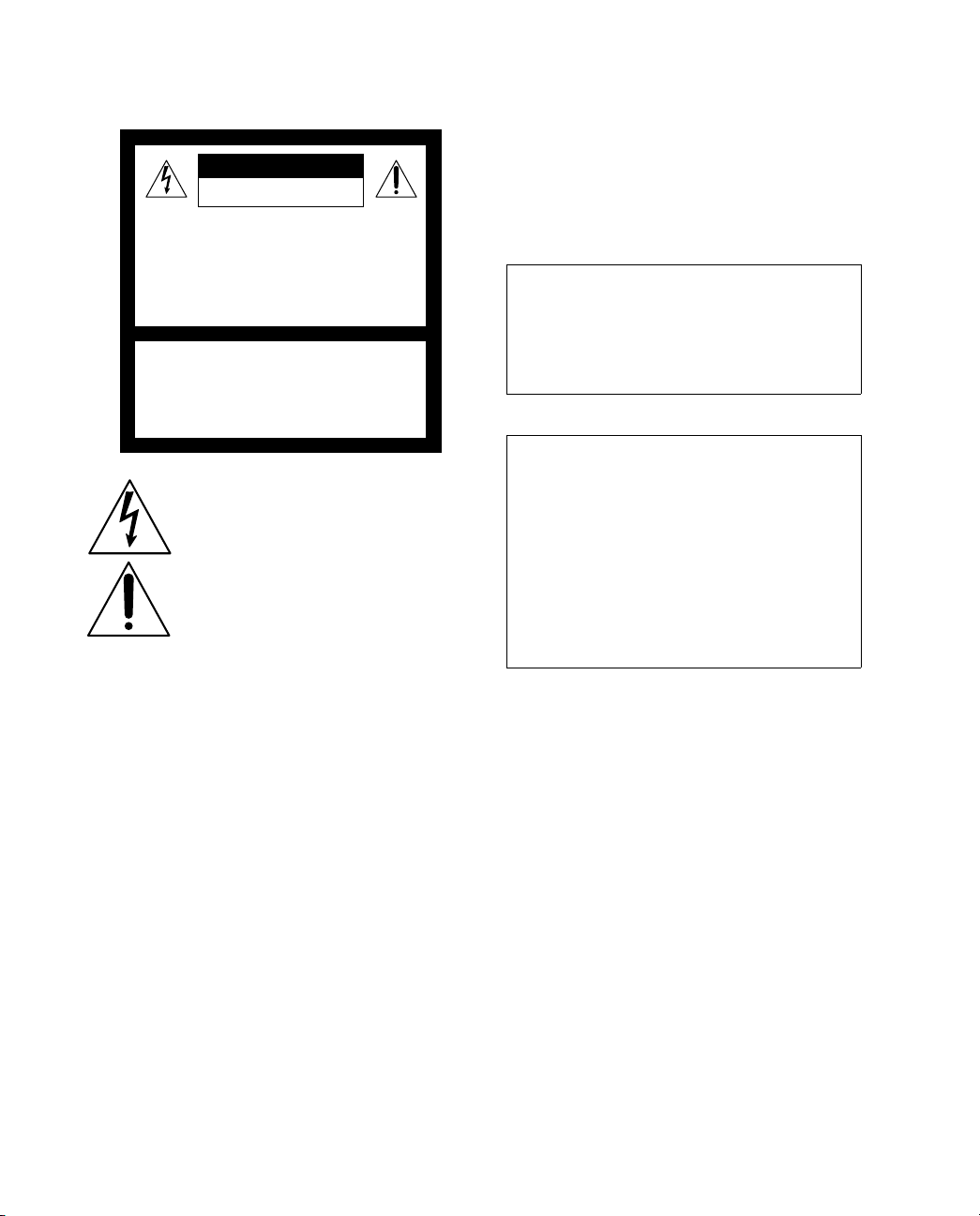
This symbol is intended to alert the user to the
presence of uninsulated “dangerous voltage”
within the product’s enclosure that may be of
sufficient magnitude to constitute a risk of
electric shock to persons.
This symbol is intended to alert the user to the
presence of important operating and maintenance
(servicing) instructions in the literature
accompanying the appliance.
CAUTION
TO PREVENT ELECTRIC SHOCK, MATCH WIDE BLADE OF
PLUG TO WIDE SLOT, FULLY INSERT.
Note on Cleaning the Unit
Clean the unit with a soft dry cloth. Never use strong solvents such
as thinner or benzine, which might damage the finish of the
cabinet.
Note to CATV System Installer
This reminder is provided to call the CATV system installer’s
attention to Article 820-40 of the NEC that provides guidelines for
proper grounding and, in particular, specifies that the cable ground
shall be connected to the grounding system of the building, as close
to the point of cable entry as practical.
Use of this television receiver for other than private viewing of
programs broadcast on UHF or VHF or transmitted by cable
companies for the use of the general public may require
authorization from the broadcaster/cable company and/or
program owner.
Trademark, Copyright, and License Information
All rights reserved. Reproduction in whole or in part without
written permission is prohibited. Sony, Digital Home Receiver, and
the Sony logo are trademarks of Sony. CABLEVISION and the
CABLEVISION logo are registered trademarks of CABLEVISION
SYSTEMS CORPORATION. Macrovision is a trademark of
Macrovision Corporation.
Macrovision
This product incorporates copyright protection technology that is
protected by U.S. patents and other intellectual property rights.
Use of this copyright protection technology must be authorized by
Macrovision, and is intended for home and other limited pay-per-
view uses only unless otherwise authorized by Macrovision.
Reverse engineering or disassembly is prohibited.
Features May Change
The features described in this manual may change due to
unscheduled automatic software upgrades activated by the service
provider without prior notice.
Regulatory Information
NOTIFICATION
This equipment has been tested and found to comply with the
limits for a Class B digital device pursuant to Part 15 of the FCC
Rules. These limits are designed to provide reasonable protection
against harmful interference in a residential installation. This
equipment generates, uses, and can radiate radio frequency energy
and, if not installed and used in accordance with the instructions,
may cause harmful interference with radio communications.
However, there is no guarantee that interference will not occur in a
particular installation. If this equipment does cause harmful
interference to radio or television reception, which can be
determined by turning the equipment off and on, the user is
encouraged to try to correct the interference by one or more of the
following measures:
❑
Ensure that the RF input connector is securely attached.
❑
Increase the separation between the equipment and receiver.
❑
Connect the equipment into an outlet on a circuit different
from that to which the receiver is connected.
Safety Instruction for Pluggable Equipment
The socket-outlet shall be installed near the equipment and shall be
easily accessible.
Safety
❑
Operate the unit only on AC 60 Hz 110-120 V.
❑
The plug is designed, for safety purposes, to fit into the wall
outlet only one way.
❑
If any liquid or solid object should fall inside the cabinet,
unplug the unit immediately and have it checked by
qualified service personnel before operating it further.
RISK OF ELECTRIC SHOCK
DO NOT OPEN
RISQUE DE CHOC ELECTRIQUE,
NE PAS OUVRIR
ATTENTION
CAUTION
PRECAUCION
RIESGO DE CHOQUE ELECTRICO
NO ABRIR
CAUTION: TO REDUCE THE RISK OF ELECTRIC SHOCK,
DO NOT REMOVE COVER (OR BACK).
NO USER-SERVICEABLE PARTS INSIDE.
REFER SERVICING TO QUALIFIED SERVICE PERSONNEL.
Customer Service
If you have any problems with this unit, please contact
the following:
CABLEVISION SYSTEMS CORPORATION
CUSTOMER SERVICE
TEL: (516) 802-DSTB (3782)
Declaration of Conformity
Trade Name: SONY
Model No.: DHG-B45CV
Responsible Party: Sony Electronics Inc.
Address: 1 Sony Drive
Park Ridge, NJ 07656
Telephone No: 201-930-6972
This device complies with Part 15 of the FCC rules.
Operation is subject to the two following conditions:
(1) This device may not cause harmful interference, and
(2) this device must accept any interference received,
including interference that may cause undesired
operation.
CV.book Page iii Thursday, November 30, 2000 2:31 PM

Installing
❑
To prevent internal heat buildup, do not block the ventilation
openings.
❑
Do not install the unit in a hot or humid place, or in a place
subject to excessive dust or mechanical vibration.
Owner’s Record
The model and serial numbers are provided on the front of this
instruction manual and at the bottom of the unit. Refer to them
whenever you call upon your Sony dealer regarding this product.
Important Safety Notice
For your protection, please read these instructions completely, and
keep this manual for future reference.
Carefully observe and comply with all warnings, cautions and
instructions placed on the set, or described in the operating
instructions or service manual.
WARNING
To guard against injury, the following basic safety precautions
should be observed in the installation, use, and servicing of the set.
Use
Power Sources
This set should be operated only from the type of power source
indicated on the serial/model plate. If you are not sure of the type
of electrical power supplied to your home, consult your local
power company.
Overloading
Do not overload wall outlets, extension cords or convenience
receptacles beyond their capacity, since this can result in fire or
electric shock.
Always turn the set off when it is not being used. When the set is
left unattended and unused for long periods of time, unplug it
from the wall outlet as a precaution against the possibility of an
internal malfunction that could create a fire hazard.
Object and Liquid Entry
Never push objects of any kind into the set through the cabinet
slots as they may touch dangerous voltage points or short out parts
that could result in a fire or electric shock. Never spill liquid of any
kind on the set.
Cleaning
Unplug the set from the wall outlet before cleaning or polishing it.
Do not use liquid cleaners or aerosol cleaners.
Use a cloth lightly dampened with water for cleaning the exterior
of the set.
Installation
Water and Moisture
Do not use power-line operated sets near water — for example,
near a bathtub, washbowl, kitchen sink, or laundry tub, in a wet
basement, or near a swimming pool, etc.
Accessories
Do not place the set on an unstable cart, stand, table or shelf. The
set may fall, causing serious injury to a child or an adult, and
serious damage to the set. Quick stops, excessive force, and uneven
surfaces may cause the appliance and cart combination to overturn.
Ventilation
The slots and openings in the cabinet and in the back or bottom are
provided for necessary ventilation. To ensure reliable operation of
the set, and to protect it from overheating, these slots and openings
must never be blocked or covered.
❑
Never cover the slots and openings with a cloth or other
materials.
❑
Never block the slots and openings by placing the set on a
bed, sofa, rug or other similar surface.
❑
Never place the set in a confined space, such as a bookcase, or
built-in cabinet, unless proper ventilation is provided.
❑
Do not place the set near or over a radiator or heat register, or
where it is exposed to direct sunlight.
Power-Cord Protection
Do not allow anything to rest on or roll over the power cord, and
do not place the set where the power cord is subject to wear or
abuse.
Lightning
For added protection for this receiver during a lightning storm, or
when it is left unattended and unused for long periods of time,
unplug it from the wall outlet and disconnect the cable. This will
prevent damage to the receiver due to lightning and power-line
surges.
Service
Damage Requiring Service
Unplug the set from the wall outlet and refer servicing to qualified
service personnel under the following conditions:
❑
When the power cord or plug is damaged or frayed.
❑
If liquid has been spilled into the set.
❑
If the set has been exposed to rain or water.
❑
If the set has been subject to excessive shock by being
dropped, or the cabinet has been damaged.
❑
If the set does not operate normally when following the
operating instructions. Adjust only those controls that are
specified in the operating instructions. Improper adjustment
of other controls may result in damage and will often require
extensive work by a qualified technician to restore the set to
normal operation.
❑
When the set exhibits a distinct change in performance — this
indicates a need for service.
Servicing
Do not attempt to service the set yourself since opening the cabinet
may expose you to dangerous voltage or other hazards. Refer all
servicing to qualified service personnel.
Safety Check
Upon completion of any service or repairs to the set, ask the service
technician to perform routine safety checks (as specified by the
manufacturer) to determine that the set is in safe operating
condition, and to so certify.
CV.book Page iv Thursday, November 30, 2000 2:31 PM

v
Contents
IIntroducing the Digital
Home Receiver
Unpacking........................................................... 1
Supplied Items .....................................................1
Items Supplied Separately by Cablevision............1
Front Panel ......................................................... 2
Front Panel Controls and Indicators.....................2
Rear Panel........................................................... 3
Using the Remote Control (RM-Y806)................. 4
Programming the Remote Control .......................5
Programming the Remote to
Control Volume Level...................................6
Replacing Batteries in the Remote.......................6
Remote Control Programmable Codes................ 7
TV Codes..............................................................7
VCR Codes...........................................................7
Connecting the Digital
Home Receiver
Overview ............................................................ 9
TV with RF Connector Only................................. 9
TV and VCR with RF Connectors Only............... 10
Other Information
Troubleshooting ............................................... 11
Changing the Digital Home
Receiver’s RF Output Channel ................... 12
Specifications.................................................... 13
Inputs and Outputs ........................................... 13
General ............................................................. 13
Accessories ....................................................... 13
Index ................................................................ 14
CV.book Page v Thursday, November 30, 2000 2:31 PM

CV.book Page vi Thursday, November 30, 2000 2:31 PM
1
Introducing the Digital Home Receiver
Unpacking
Supplied Items
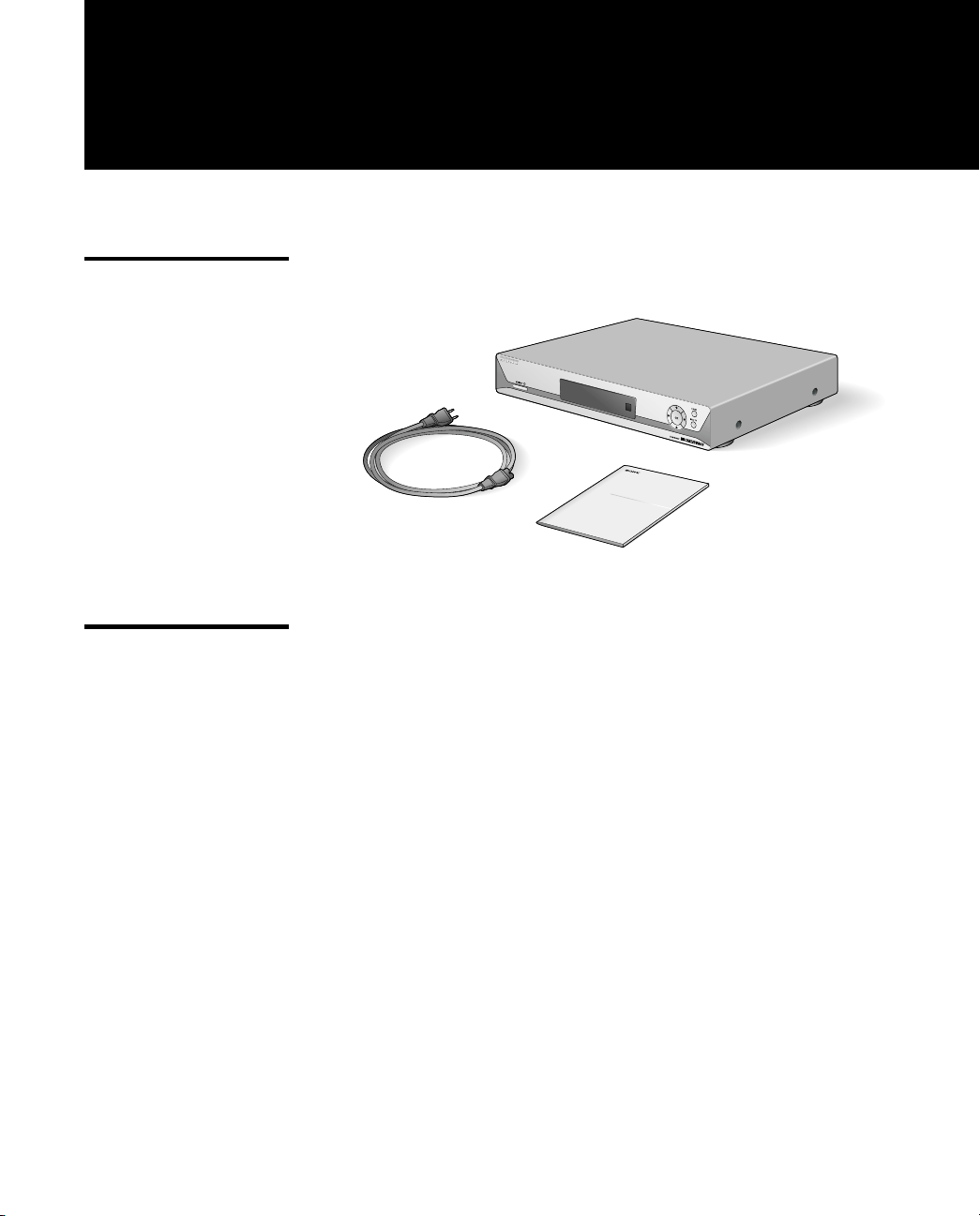
The following items are supplied:
Items Supplied
Separately by
Cablevision
The following items are supplied separately by Cablevision:
❑
Remote control
❑
Access card
❑
RF cable (to wall)
❑
Cablevision User Guide
Digital Network Receiver
Hardware Setup Instructions
cablevision
Digital Home
Hardware
AC Power Cord
Receiver (DHG-B45CV)
Setup Instructions
CV.book Page 1 Thursday, November 30, 2000 2:31 PM
Introducing the Digital Home Receiver
2
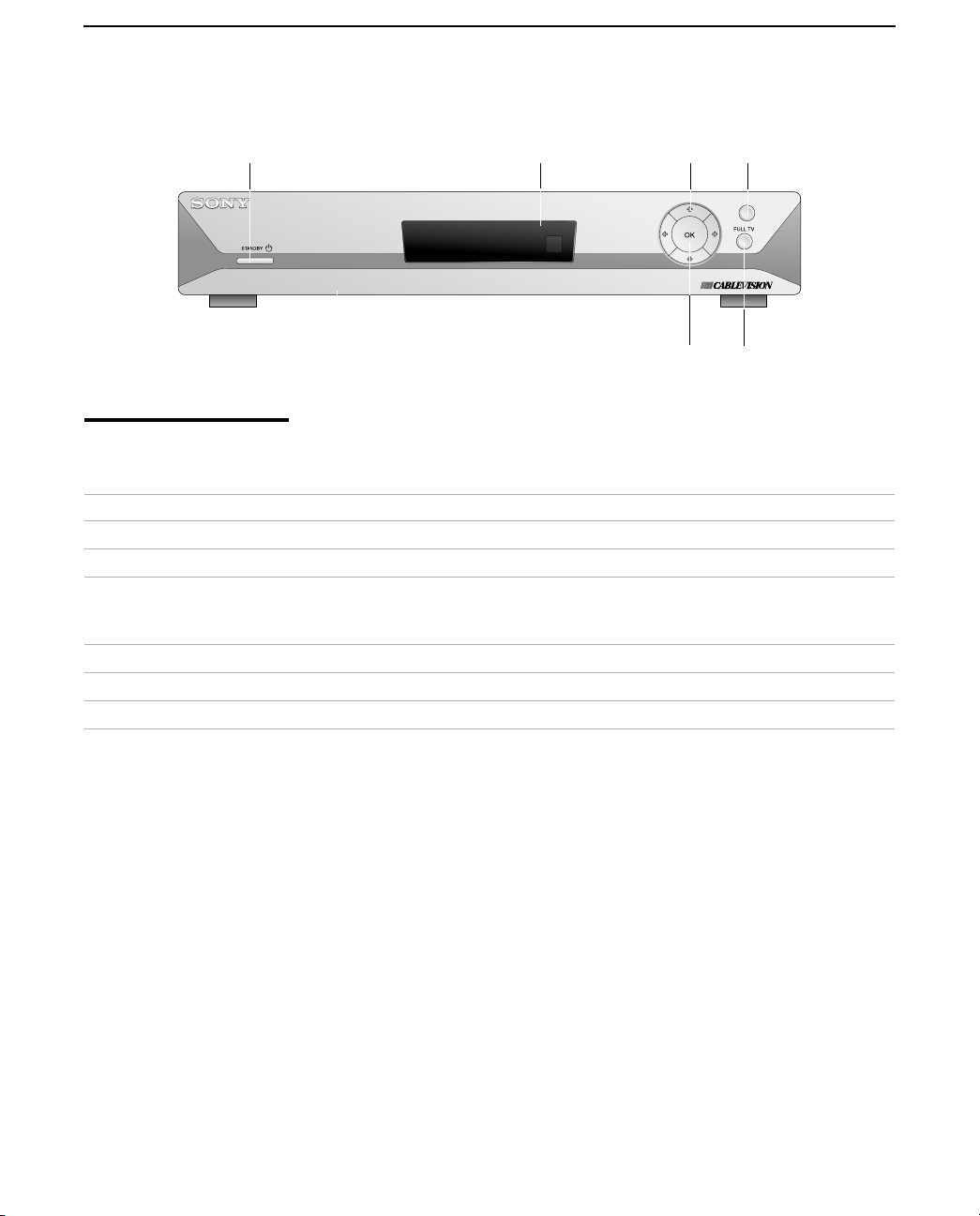
Front Panel
Front Panel Controls
and Indicators
MENU
1
4
2 3 5
6
Control or Indicator Description
1
STANDBY
1
Switches the Digital
Home Receiver
between active and standby modes.
2
Front Panel Display Provides channel number and current time.
3
Arrows (
G
g
F
f
) Moves the highlight within menus and guides. When watching TV in FULL TV
mode, the up and down arrows (
F f
)
change the channel. The left and right
arrows (
G
g
) decrease and increase the volume of the audio.
4
OK Selects the highlighted on-screen item.
5
MENU Displays the Menu screen (see the Cablevision user guide for details).
6
FULL TV Displays a full screen display of the last channel.
CV.book Page 2 Thursday, November 30, 2000 2:31 PM
Rear Panel
3
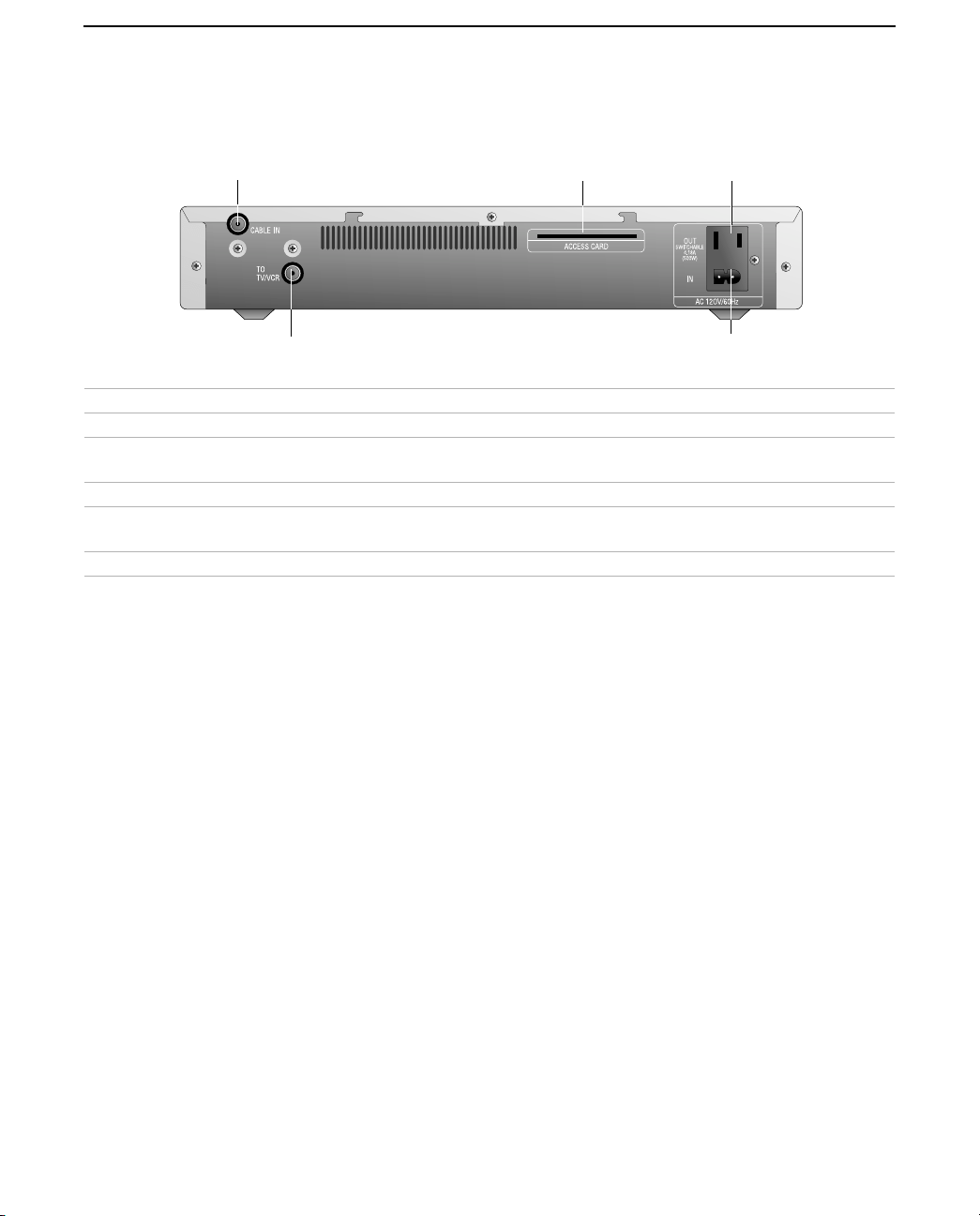
Rear Panel
Connection Description
1 CABLE IN Connects to Cablevision cable network signals using an RF coaxial cable.
2 TO TV/VCR Outputs audio (variable) and video signals to the VHF/UHF (or RF) input on your TV
or VCR using an RF coaxial cable.
3 ACCESS CARD Slot The slot in which the Access Card is inserted.
4 AC OUT AC power switchable outlet (AC, 60Hz, 120V, 4.16A approx. 500W), for connecting
your TV or VCR’s AC power cord (see the Cablevision user guide for details).
5 AC IN Inputs AC power from a power outlet using the AC power cord.
1
2
43
5
CV.book Page 3 Thursday, November 30, 2000 2:31 PM
Introducing the Digital Home Receiver
4
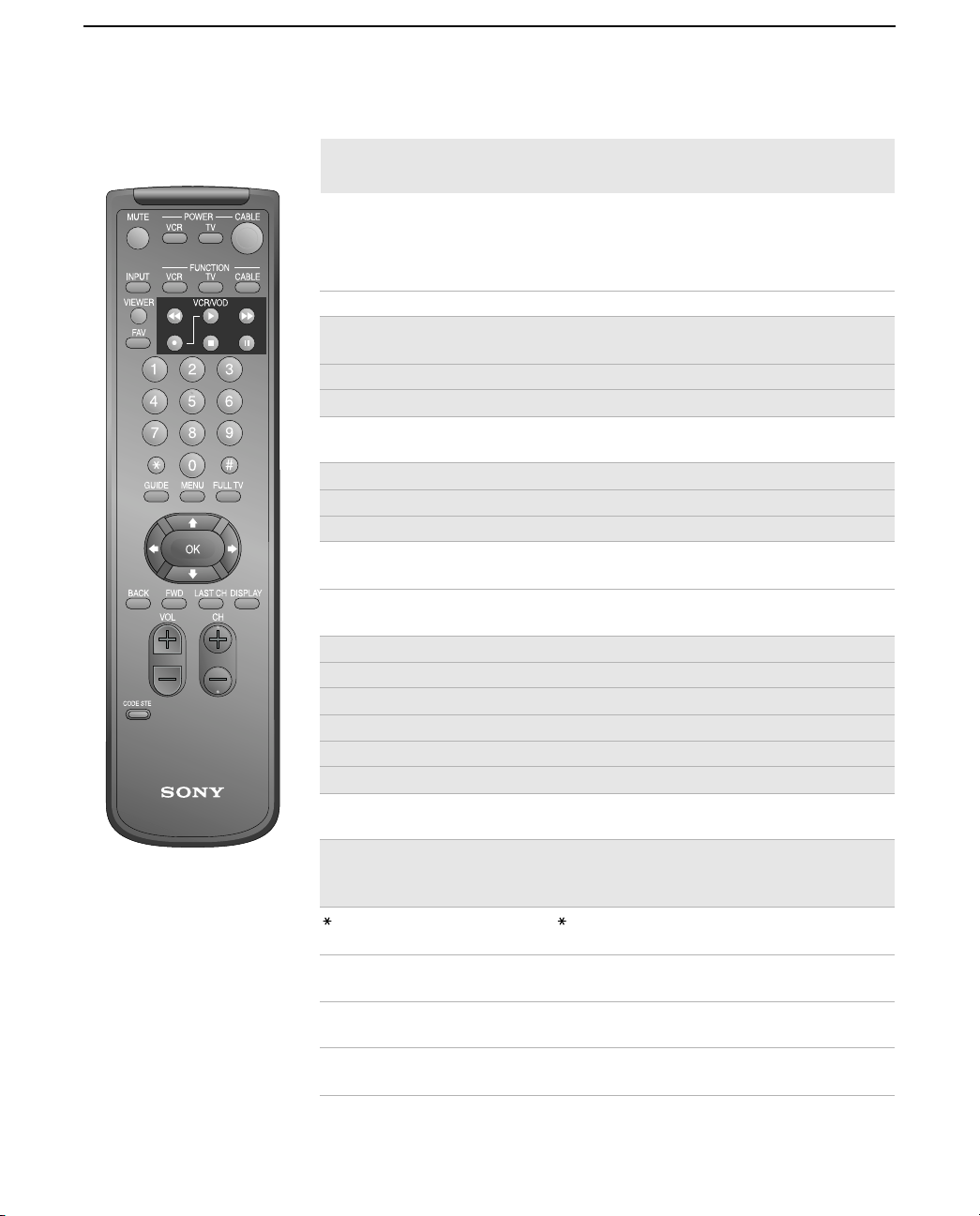
Using the Remote Control (RM-Y806)
Buttons that are highlighted below can also be used to operate your
TV and VCR after you’ve programmed the remote control. For
details, see “Programming the Remote Control” on page 5.
✍
The following describes the Sony RM-Y806 remote control. If Cablevision supplied you
with a different remote control, see the manual that came with that remote for details.
Button Description
MUTE
Mutes the sound. Press again or press
VOL
to restore the
sound.
VCR POWER
Turns the VCR on and off.
TV POWER
Turns the TV on and off.
CABLE POWER
Switches the Digital Home Receiver between active and
standby modes.
INPUT
Selects (toggles through) the video inputs.
VCR FUNCTION
Activates the remote control for use with a VCR.
TV FUNCTION
Activates the remote control for use with a TV.
CABLE FUNCTION
Activates the remote control for use with the Digital
Home Receiver.
VIEWER
Displays the Viewer screen (see the Cablevision user
guide for details).
m
Rewind video.
N
Play video.
M
Fast-forward video.
z
and
N
Record (press simultaneously).
x
Stop video.
X
Pause video.
FAV
Displays the Favorites screen (see the Cablevision user
guide for details).
0 – 9
Selects a channel number directly. For example, to select
channel 6, enter
006
. Or you can enter
6
and then
#
(the
ENTER button).
Selects the ”” indicated advertisement frame in the
displayed screen.
#
ENTER
button, used for confirming channel numbers (see
0-9
description above).
GUIDE
Displays the Guide screen (see the Cablevision user
guide for details).
MENU
Displays the Menu screen (see the Cablevision user
guide for details).
continued
CV.book Page 4 Thursday, November 30, 2000 2:31 PM
Using the Remote Control (RM-Y806)
5
Programming the
Remote Control
The remote control is preset at the factory to operate any Sony brand
TV and VCR. If you have any other brand of TV or VCR, use the
following procedures to program the remote to use the highlighted
buttons shown on pages 4 and 5.
To program the remote
1
Turn to “Remote Control Programmable Codes” on page 7, and
find the 3-digit code for your TV or VCR. If more than one code is
listed, use the number listed first to complete the following
procedures.
2
Press the
CODE SET
button.
3
Enter the 3-digit code using the 0-9 buttons.
4
Press the
#
button (located below the “
9
” button).
To check if the code works
1
Aim the remote control at the component you just programmed
(e.g. aim at the TV and press
TV POWER
).
2
If the component responds, try the
CH+
and
CH-
buttons. If the
component responds, you’re done.
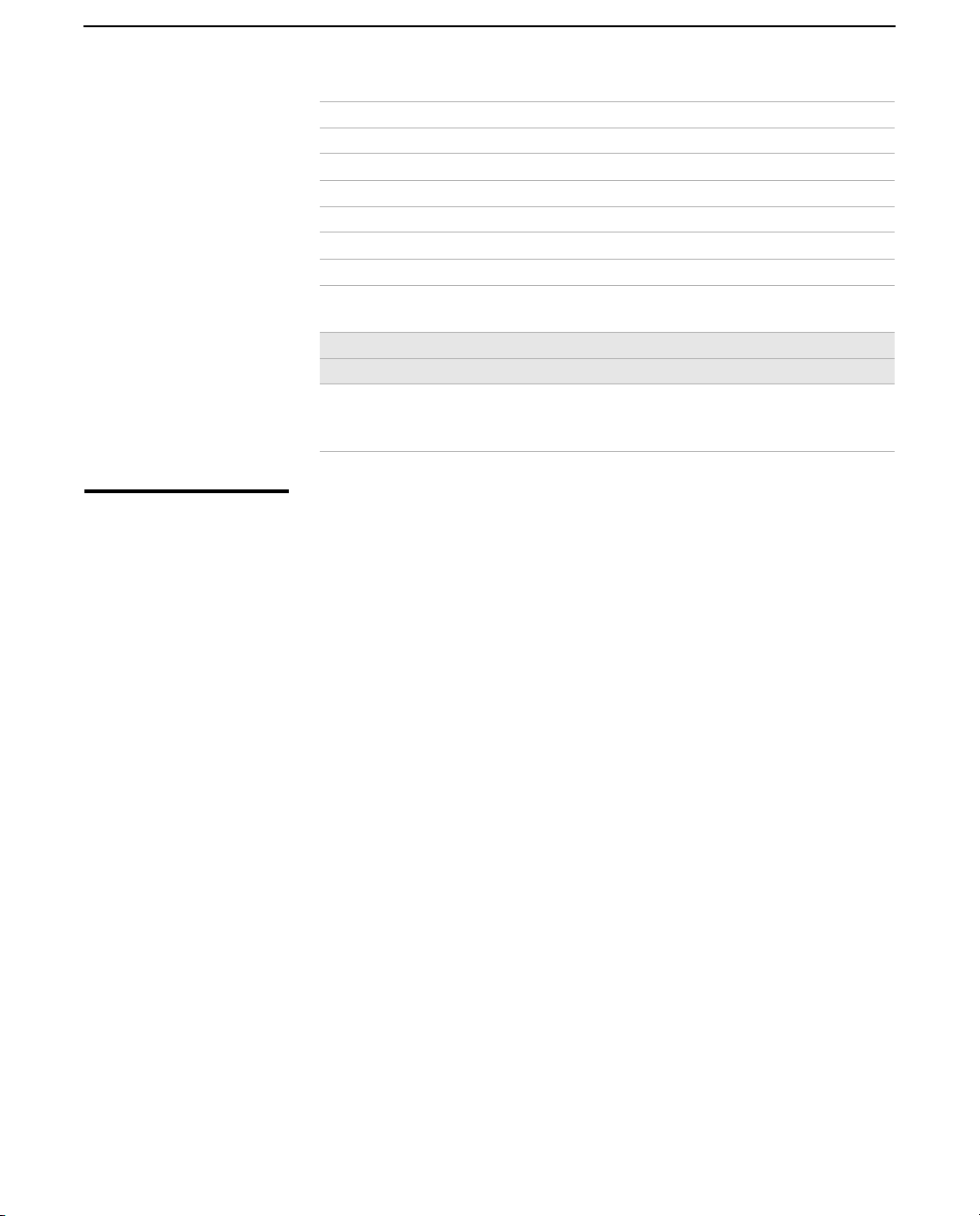
FULL TV
Displays a full screen display of the last channel.
Arrows (
G
g
F
f
)
Moves the highlight within menus and guides.
OK
Selects the highlighted item.
BACK
Displays the previous screen
.
FWD
Displays the next screen.
LAST CH
Toggles between the last and current channel.
DISPLAY
Displays the Title Bar (see the Cablevision user guide for
details).
VOL +/-
Adjusts the volume.
CH +/-
Changes the channel.
CODE SET
Used for programming the remote control to operate
non-Sony video equipment. For details, see
“Programming the Remote Control” on page 5.
Button Description
CV.book Page 5 Thursday, November 30, 2000 2:31 PM
Introducing the Digital Home Receiver
6
If the component does NOT respond
Try programming the remote using the other codes listed for your
brand. If you still cannot get your component to respond after trying
all the codes, your component may not be compatible with this
remote. If this happens, you must use your component’s remote to
operate it. Or, as an alternative, you can use the following
instructions to program the Digital Home Receiver’s remote to
control the volume level.
Programming the
Remote to Control
Volume Level
If you cannot successfully program the Digital Home Receiver’s
remote to control your TV (as described on page 5), you can still use
this remote to control the volume level (and
MUTE
) that is output from
the Digital Home Receiver’s
TO TV/VCR
jack.
To program the remote to control the volume level
1
Press the
CODE SET
button.
2
Enter
200
using the 0-9 buttons.
3
Press the
#
button (located below the “
9
” button).
To check if the code works
1
Aim the remote control at the Digital Home Receiver.
2
Press the
VOL+, VOL-,
or
MUTE
button. If the volume level responds,
you’re done.
If you replace the TV or purchase a new one
Try programming the remote control as described on page 5, or you
can continue to control only the volume level as described in this
section.
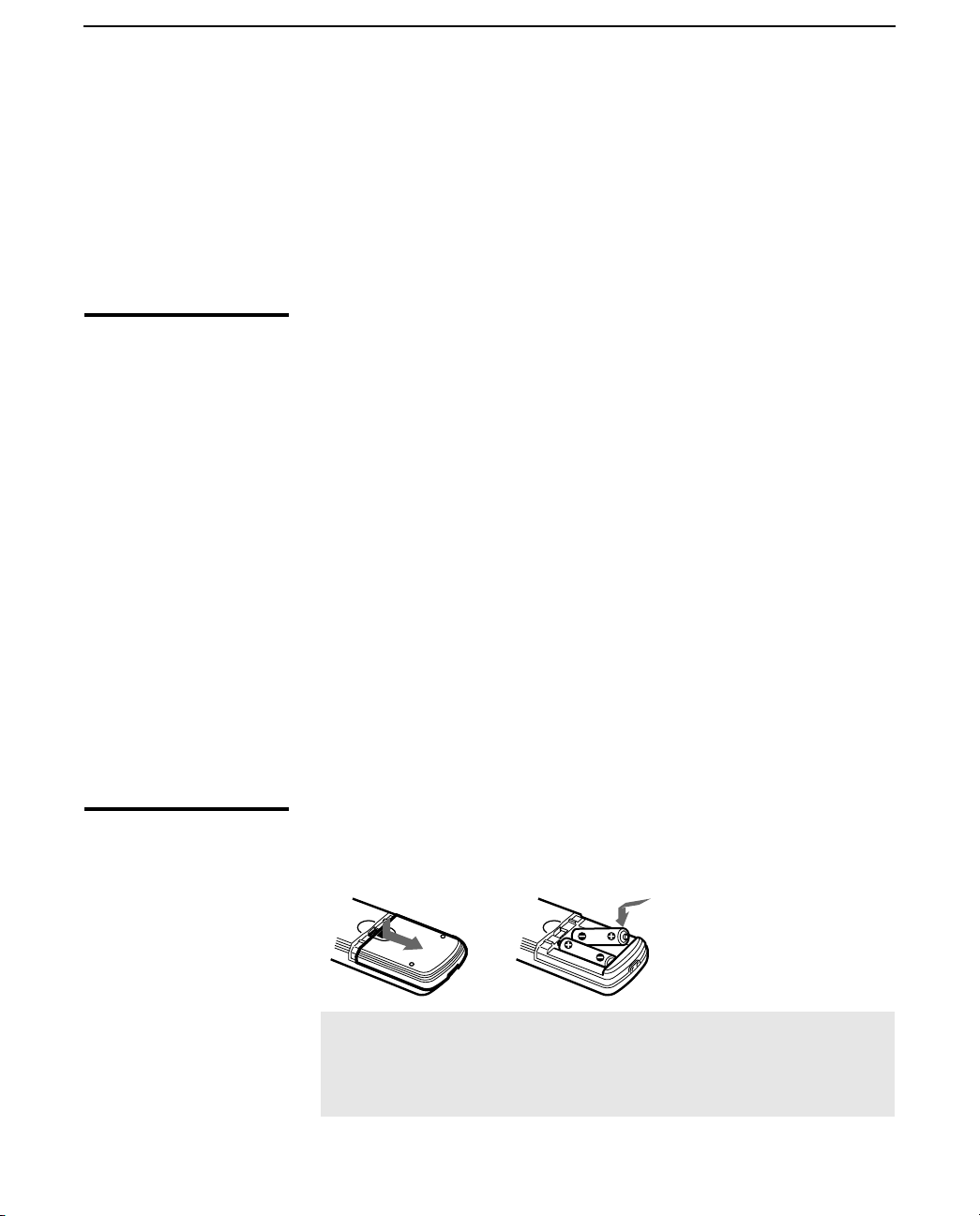
Replacing Batteries
in the Remote
When the batteries need to be replaced, insert two size AA batteries
by matching the + and
–
on the batteries to the diagram inside the
battery compartment.Then replace the battery compartment lid.
✍
Remove the batteries to avoid damage from possible battery leakage whenever you
anticipate that the remote control will not be used for an extended period.
Handle the remote control with care. Avoid dropping it, getting it wet, or placing it in
direct sunlight, near a heater, or where the humidity is high.
CV.book Page 6 Thursday, November 30, 2000 2:31 PM
Remote Control Programmable Codes
7
Remote Control Programmable Codes
TV Codes VCR Codes
Manufacturer Code Manufacturer Code
Sony 101 Sony VHS 301
Akai 103 Sony 8mm 302
Bell & Howell 138 Sony Beta 303
Centurion 112 Bell & How 343
Coronad 113 Daewoo 341
Daewoo 135, 136 Emerson 316, 317, 318, 319, 320
Emerson 120, 121, 122, 123 Fisher 330, 333, 334, 335
Fisher 125 General Electric 304, 329
General Electric 102, 118 Go Video 339, 340
Goldstar 130 Goldstar 332
Hitachi 131, 132 Hitachi 304, 305
JVC 128, 129 JVC 314
KTV 133, 134 Kenwood 314, 336, 332, 337
Magnavox 111 Magnavox 308, 309, 310
Marantz 124 Mitsubishi 323, 324, 325, 326
Panasonic 116, 117, 118 NEC 336, 337
Pioneer 137 Panasonic 306, 307
Radio Shack 115 Philips 310
RCA 102, 104, 105, 106, 107, 108 RCA 305
Samsung 126, 127 Samsung 313, 321, 322
Sears 119 Scott 312
Sharp 114 Sharp 327, 328
Symphonic 139 Shintom 315
Toshiba 119 Sympho 338
Zenith 109, 110 Teknica 342, 338
Tosh iba 311
Zenith 331
CV.book Page 7 Thursday, November 30, 2000 2:31 PM

CV.book Page 8 Thursday, November 30, 2000 2:31 PM
9
Connecting the Digital Home Receiver
Overview
This chapter includes illustrated instructions for setting up your
Digital Home Receiver:
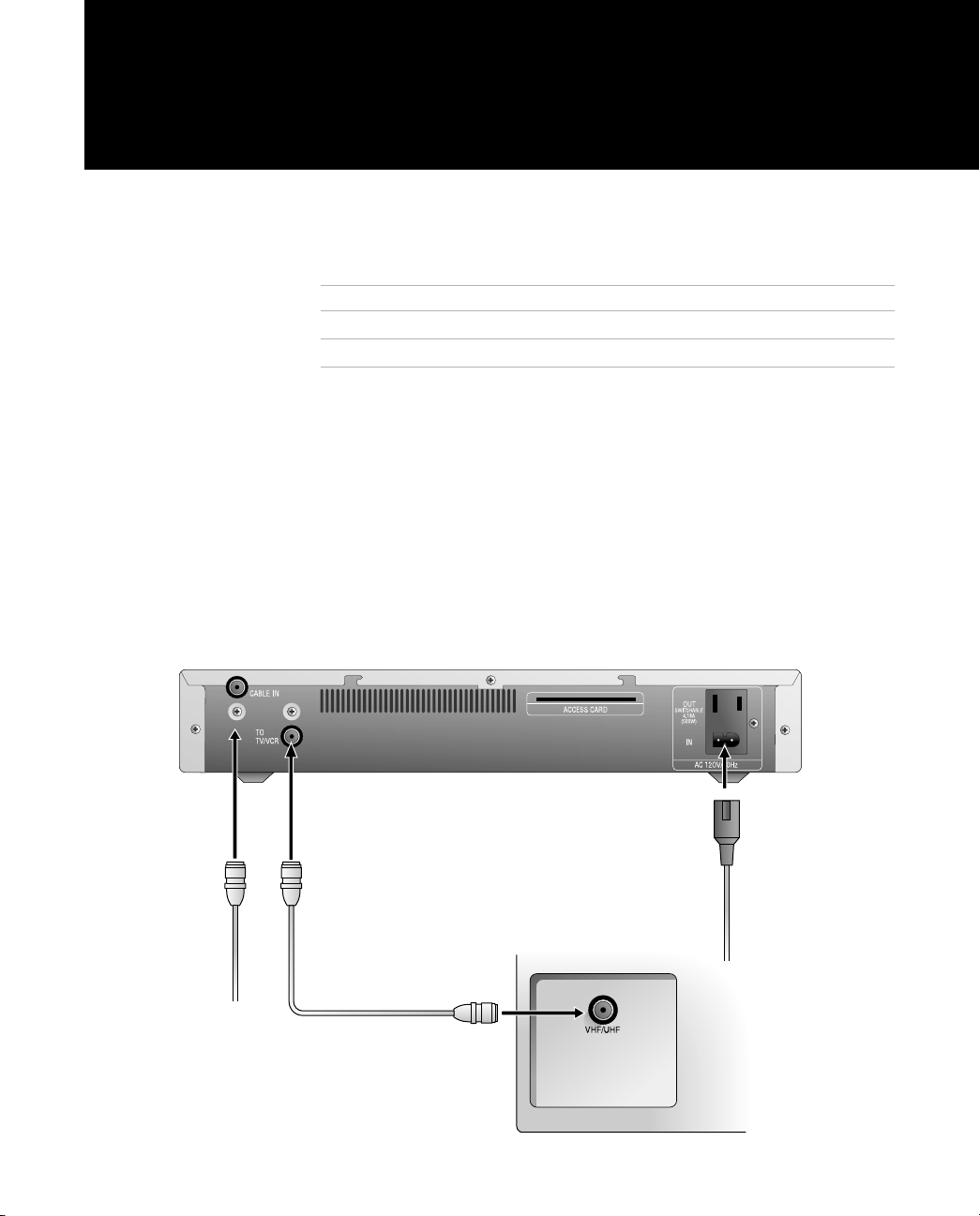
TV with RF Connector Only
1
Connect the coaxial cable from the wall outlet (Cablevision cable
network signal) to the Digital Home Receiver’s
CABLE IN
jack.
2
Connect the Digital Home Receiver’s
TO TV/VCR
jack to the TV’s
VHF/UHF IN (
or
RF IN
) jack.
3
Connect one end of the AC power cord to the Digital Home
Receiver’s
AC IN
jack, then connect the plug end to an AC outlet.
4
Tune to channel 3 on your TV to see cable channels.
To Connect See Page
TV with RF Connector Only 9
TV and VCR with RF Connectors Only 10
TV
AC cord
Coaxial cable
From
wall oulet
132
CV.book Page 9 Thursday, November 30, 2000 2:31 PM
Connecting the Digital Home Receiver
10
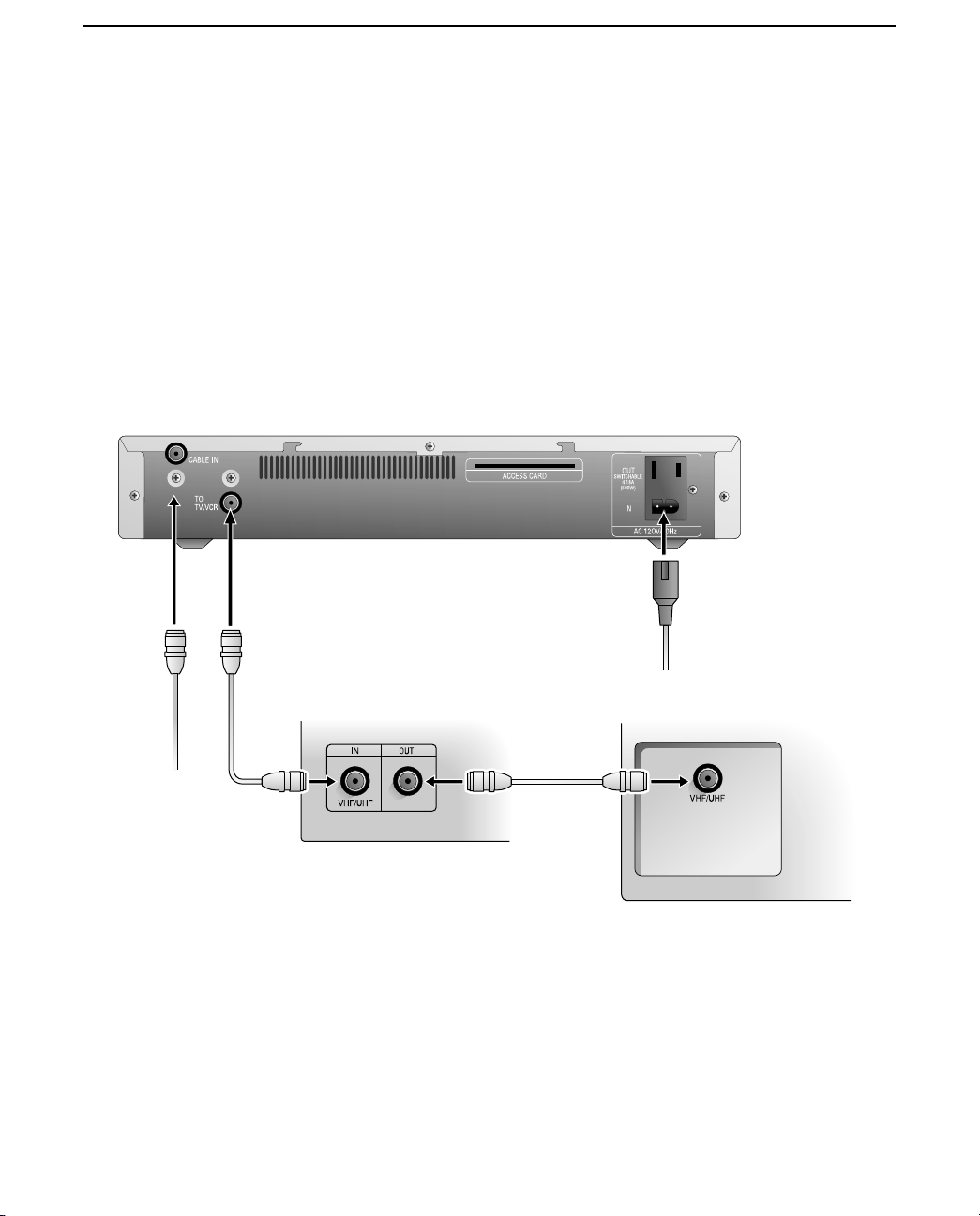
TV and VCR with RF Connectors Only
1
Connect the coaxial cable from the wall outlet (Cablevision cable
network signal) to the Digital Home Receiver’s
CABLE IN
jack.
2
Connect the Digital Home Receiver’s
TO TV/VCR
jack to the VCR’s
VHF/UHF IN
(or
RF IN
) jack.
3
Connect the VCR’s
VHF/UHF OUT
(or
RF OUT
) jack to the TV’s
VHF/UHF IN
(or
RF IN
) jack.
4
Connect one end of the AC power cord to the Digital Home
Receiver’s
AC IN
jack, then connect the plug end to an AC outlet.
5
Set your VCR’s channel switch (usually on the rear panel) to
channel 3.
AC cord
TV
VCR
Coaxial cable
From
wall oulet
4
21
3
CV.book Page 10 Thursday, November 30, 2000 2:31 PM
11
Other Information
Troubleshooting
Problem Possible Remedies
Cannot display cable
channels
If you connected the Digital Home Receiver to your TV with an RF connection
(as described on page 9) you need to tune your TV to channel 3 in order to see
cable channels.
If you connected the Digital Home Receiver to your VCR with an RF connection
(as described on page 10) you need to set your VCR’s RF channel switch
(usually on the rear panel) to channel 3 in order to see cable channels.
If channel 3 is not an empty channel in your channel line-up, you can set the TV
or VCR to channel 4, but you must also change the Digital Home Receiver’s RF
channel to channel 4 in order to see cable channels. For details see, “Changing
the Digital Home Receiver’s RF Output Channel” on page 12.
Sony remote control
(RM-Y806) does not
operate
❏
Batteries could be weak. Replace the batteries (see page 6).
❏
Check the orientation of the batteries (see page 6).
❏
Make sure you press the FUNCTION button (TV, VCR, CABLE) of the device you
want to control (see page 4).
❏
If you are trying to control a TV or VCR that is not a Sony brand, you must
first program the remote to operate these devices (see page 5).
❏
Locate the TV at least 3-4 feet away from fluorescent lights.
Vol ume p rob lems wh en
recording to VCR
If you connected your VCR to the Digital Home Receiver’s TO TV/VCR jack and
you programmed the remote to control the Digital Home Receiver’s volume as
described on page 6, be sure to do the following when recording:
❏
Maximize the Digital Home Receiver’s volume.
❏
Make sure MUTE is off.
❏
Make sure you do not change these volume controls while you are
recording.
CV.book Page 11 Thursday, November 30, 2000 2:31 PM
Other Information
12
Changing the Digital
Home Receiver’s RF
Output Channel
If you connected the Digital Home Receiver to your TV or VCR using
an RF connection (as described on pages 9 and 10), you need to set
the RF output channel of the Digital Home Receiver to match the RF
channel (channel 3 or 4) of the cable service provided in your area.
The Digital Home Receiver is shipped with its RF output channel set
to channel 3.
To set the RF output channel of the Digital Home Receiver
1
Using the buttons on the front panel, first press the
STANDBY
1
button to turn off the Digital Home Receiver, which puts the unit
in standby mode.
2
To set the Digital Home Receiver to channel 3 or 4:
3
Do one of the following:
❑
If you connected the Digital Home Receiver to your TV (as
described on page 9), tune your TV to channel 3 to see cable
channels.
❑
If you connected the Digital Home Receiver to your VCR (as
described on page 10), set your VCR’s RF channel switch
(usually on the rear panel) to channel 3 to see cable channels.
To Use RF Press These Front Panel Buttons Sequentially
Channel 3
F
(cursor up),
g
(cursor right),
f
(cursor down)
Channel 4
F
(cursor up),
g
(cursor right),
F
(cursor up)
CV.book Page 12 Thursday, November 30, 2000 2:31 PM
Other Information
13
Specifications
Inputs and Outputs
General
Accessories
Supplied
AC power cord (1)
Optional Sony Branded Digital Home Receiver Accessories
Remote Commander, RM-Y806 (includes AA batteries)
Cable In Input 75-ohm F-connector Female (1)
To TV/VCR Output 75-ohm F-connector Female (1)
AC Input Supplied AC power cord
Output AC 60 Hz, 120 V, 4.16A (approx.
500W) Switchable
Input frequency 54 MHz – 864 MHz
Output frequency 5 MHz – 42 MHz, 61 MHz – 72 MHz
Power requirements AC 60 Hz 120 V 0.6A
Power consumption 30W Typical, 120 V
Operating temperature 5°C to 35°C (35°F to 51°F)
Operating relative
humidity
45% to 85%
Dimensions Approx. 355 × 65 × 309 mm (w/h/d)
(Approx. 14 × 2-
9/16
× 12-
3/16
inches)
including projecting parts and controls
Mass Approx. 3.0 kg (6.5 lbs)
CV.book Page 13 Thursday, November 30, 2000 2:31 PM

Other Information
14
Index
# (ENTER),
4
0 – 9,
4
A
AC IN connector
3
AC OUT connector
3
ACCESS CARD slot
3
arrows,
5
B
BACK,
5
batteries
in remote control
6
inserting in remote
6
C
CABLE FUNCTION,
4
CABLE IN connector
3
CABLE POWER,
4
card slot, for Access Card
3
CH +/-,
5
changing channels,
5
channel 3 or 4, setting
11
,
12
channels, changing,
5
CODE SET,
5
,
6
connecting
TV and VCR with RF
connectors
10
TV with RF connector
9
D
DISPLAY,
5
F
FAST-FORWARD,
4
FAV,
4
front panel
2
illustrated
2
FULL TV, on front panel
2
FULL TV,
5
FWD,
5
G
GUIDE,
4
I
INPUT,
4
L
LAST CH,
5
M
MENU, on front panel
2
MENU,
4
MUTE,
4
O
OK,
5
P
PAUSE,
4
PLAY,
4
problems, correcting
11
problems, troubleshooting
11
programming
remote control
5
R
rear panel, illustrated
3
remote control
illustrated
4
inserting batteries
6
programmable codes
7
programming
5
replacing batteries
in remote control
6
REWIND,
4
RF channel, setting
11
,
12
S
setting, channel 3 or 4
11
,
12
slot, for connecting Access Card
3
STANDBY, on front panel
2
STOP,
4
T
TO TV/VCR connector
3
troubleshooting
11
CV.book Page 14 Thursday, November 30, 2000 2:31 PM


Printed in the USA
Sony Corporation
CV.book Page xvii Thursday, November 30, 2000 2:31 PM