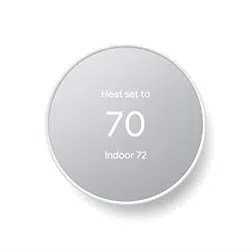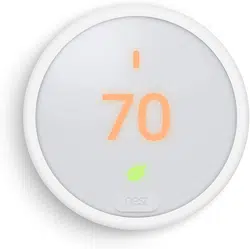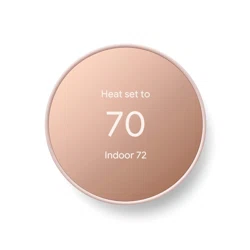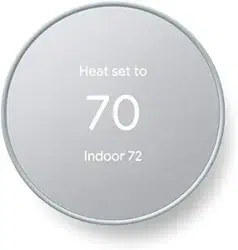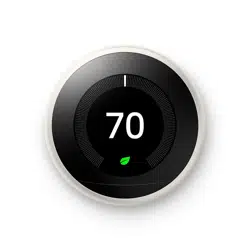

Learning Thermostat
™
Installation Guide

WE TAKE YOUR PRIVACY SERIOUSLY
We’re committed to being open and honest about
how we use data. We’ll always ask for permission
before sharing personally identifiable information
like your email address, and we keep your data safe
with industry standard security tools. To learn more
about our Privacy Policy, go to nest.com/privacy

Compatibility
Based on Nest’s online compatibility checker data, the Nest Thermostat works with
most 24V systems, including gas, electric, oil, forced air, variable speed, heat pump,
and radiant. It can control:
• Heating: one, two, and three stages (W1, W2, W3)
• Cooling: one and two stages (Y1, Y2)
• Heat pump: with auxiliary and emergency heat (O/B, AUX, E)
• Fan (G)
• Power (C, RH, RC)
• Humidifier or dehumidifier (HUM, DEHUM)
The Nest Thermostat’s
*
connector can accept only one of these wires:
W3, E, HUM or DEHUM.
The Nest Thermostat is designed to work even if your home doesn’t have a common (C) wire.
Rarely, installing a new C wire may be required.
Professional installation recommended for:
• Dual fuel systems (heat pump with furnace)
• Whole-home humidifiers and dehumidifiers
Watch the video
To see how it’s done, watch our installation video at support.nest.com/thermostat
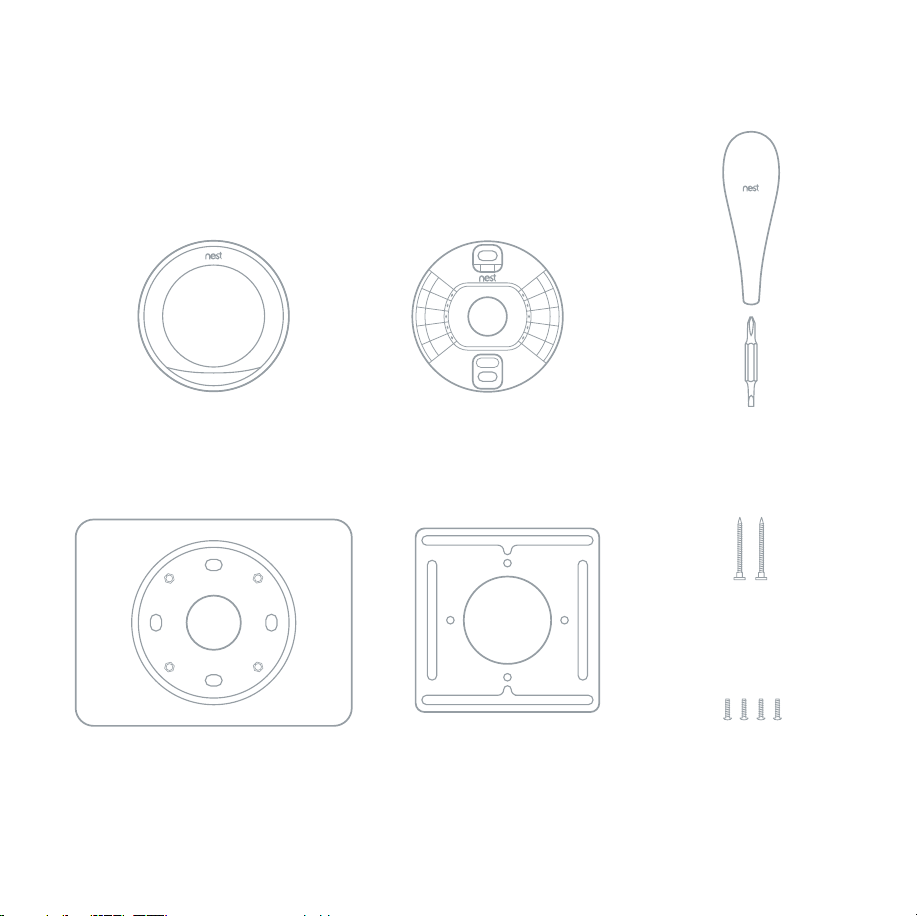
Contents
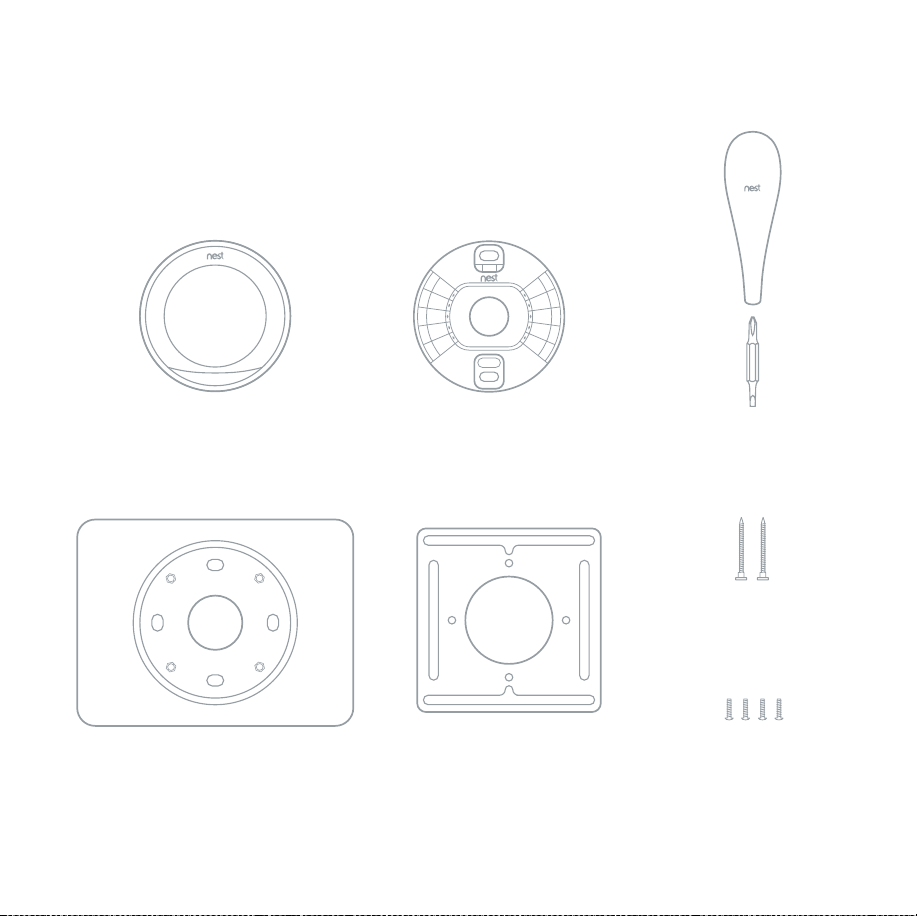
Display
Optional steel
plate screws
Screwdriver
Optional trim plate
Base
Optional steel plate
Wall screws
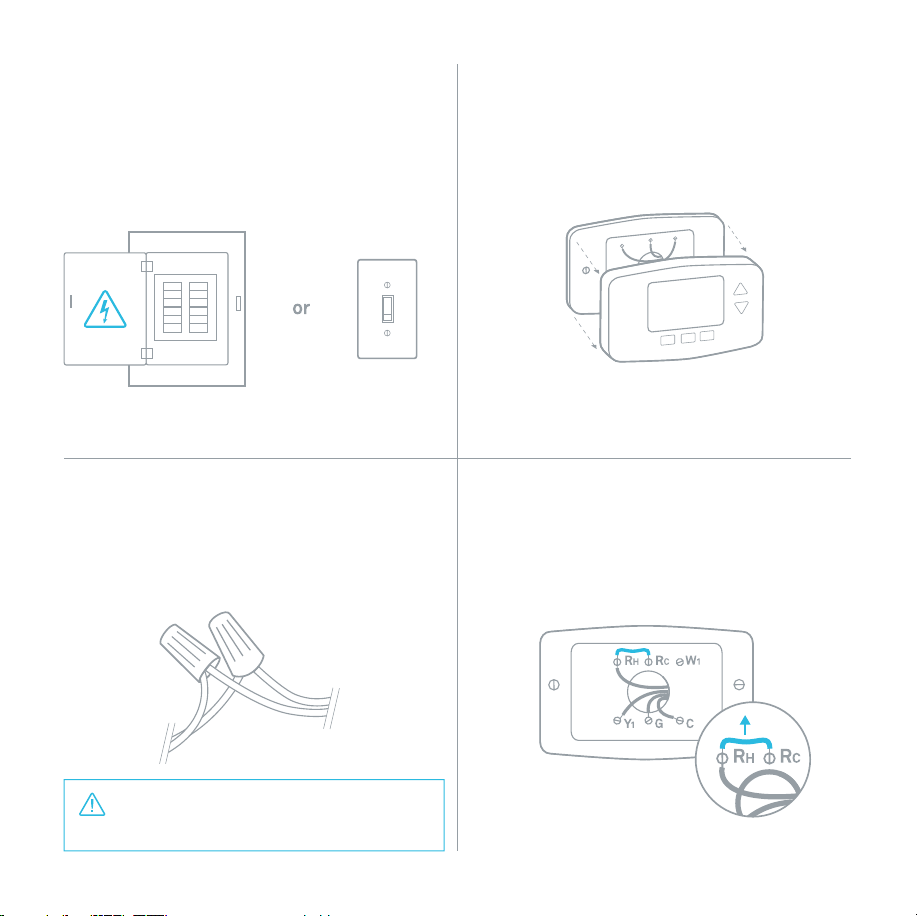
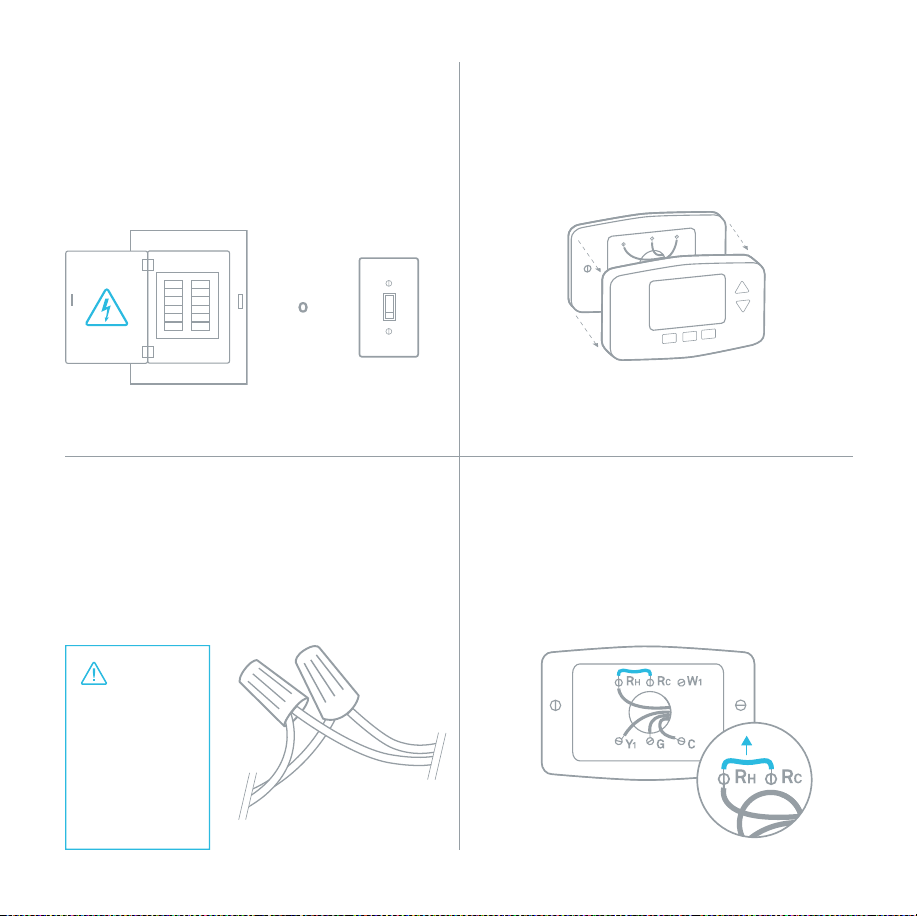
1. Switch off power
This protects you and avoids blowing a fuse
in your equipment. Adjust the temperature
on your old thermostat to make sure your
system is off.
2. Remove cover
Some covers pop off, while others need
to be unscrewed.
CAUTION: Do not connect Nest
to high voltage wires.
4. Remove any jumper wires
Jumper wires are short wires between two
connectors. You won’t need them. An R wire
can go into either RC or RH.
3. Check your system
If your old thermostat is labeled 120V or 240V
or has thick wires with wire nuts, your system
is high voltage. Not sure? Contact support.
Breaker box
Switch
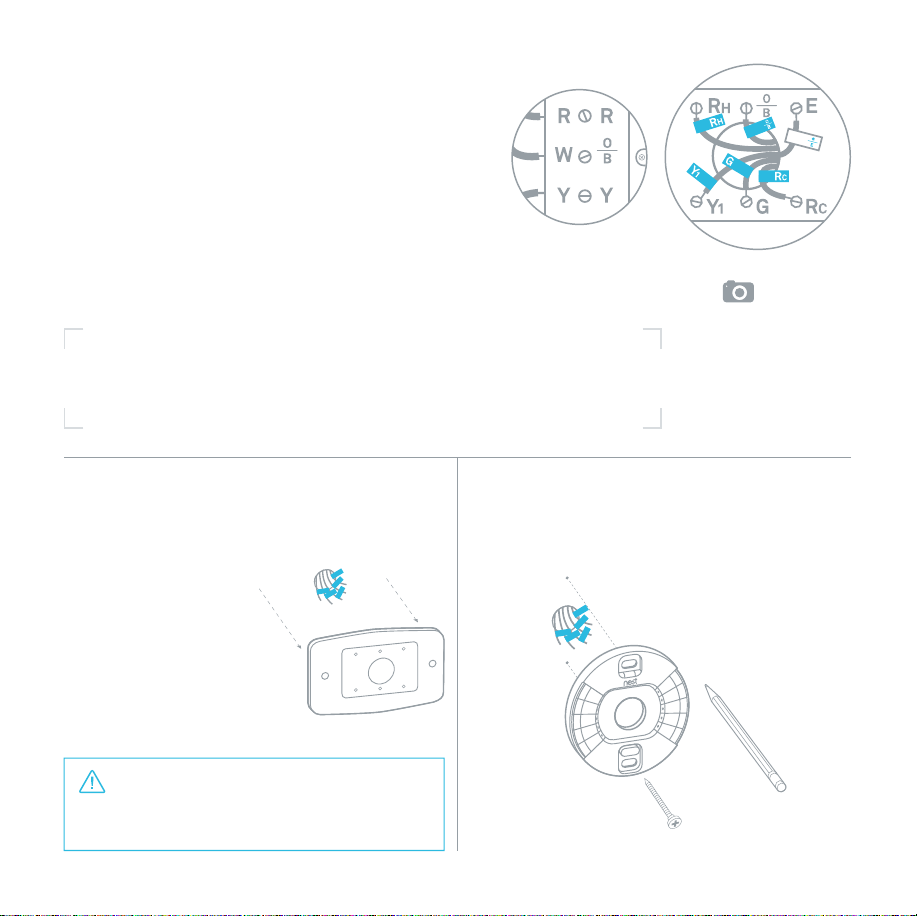
Remember, the power to your
HVAC system must be off to avoid
blowing a fuse in your equipment.
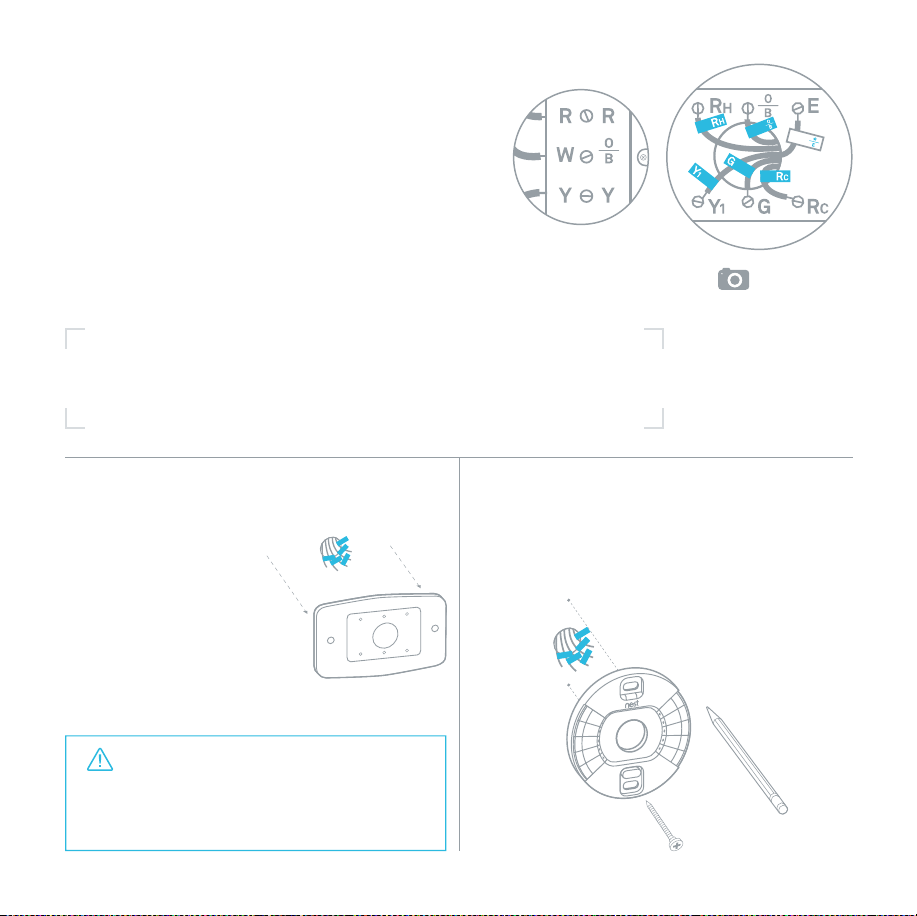
6. Disconnect wires and
remove base
After removing the
base, we recommend
gently wrapping the
wires around a pen or
pencil to ensure they
don’t fall back into
the hole in the wall.
7. Mark where screws will go
Use the bubble level to make sure the
Nest Thermostat is level.
5. Label wires
Peel off the labels below and attach them to the
thermostat’s matching wires.
Use the white labels for any W3, E, HUM or DEHUM
wires. The
*
connector can only connect to one
of these wires.
See two names for each connector on your old
thermostat’s backplate? Visit nest.com/2labels
for help.
Two labels
Tip: Take a
picture of the
wires on your
old thermostat
to help you
remember.
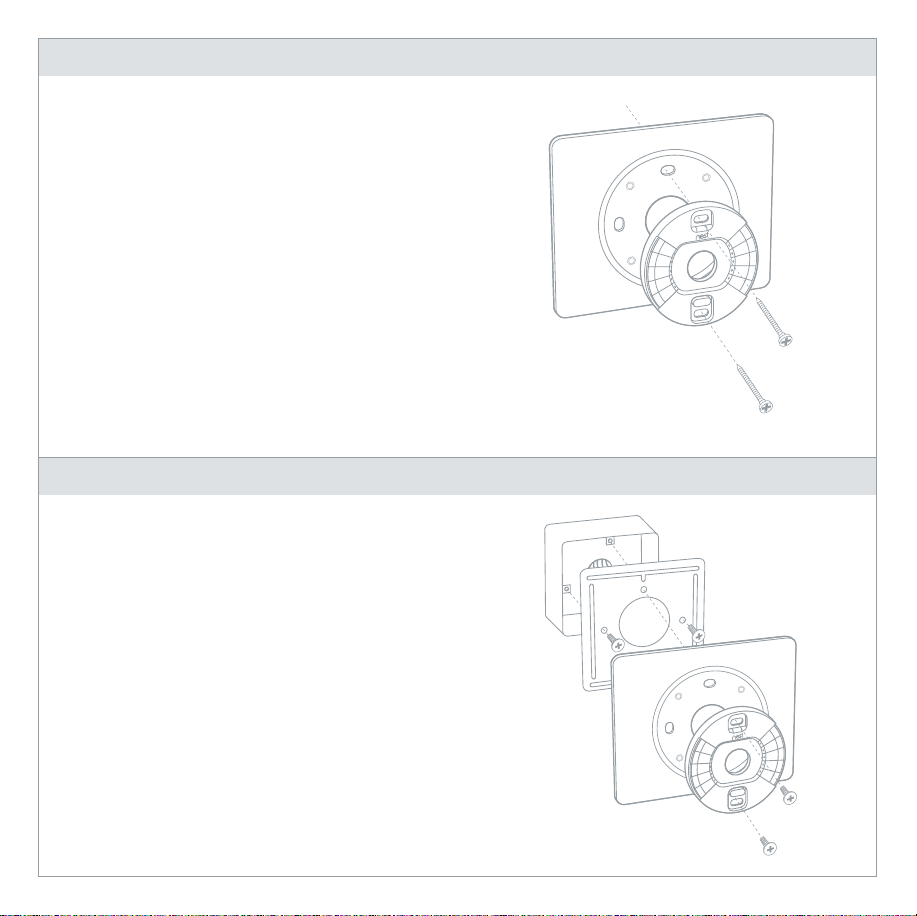
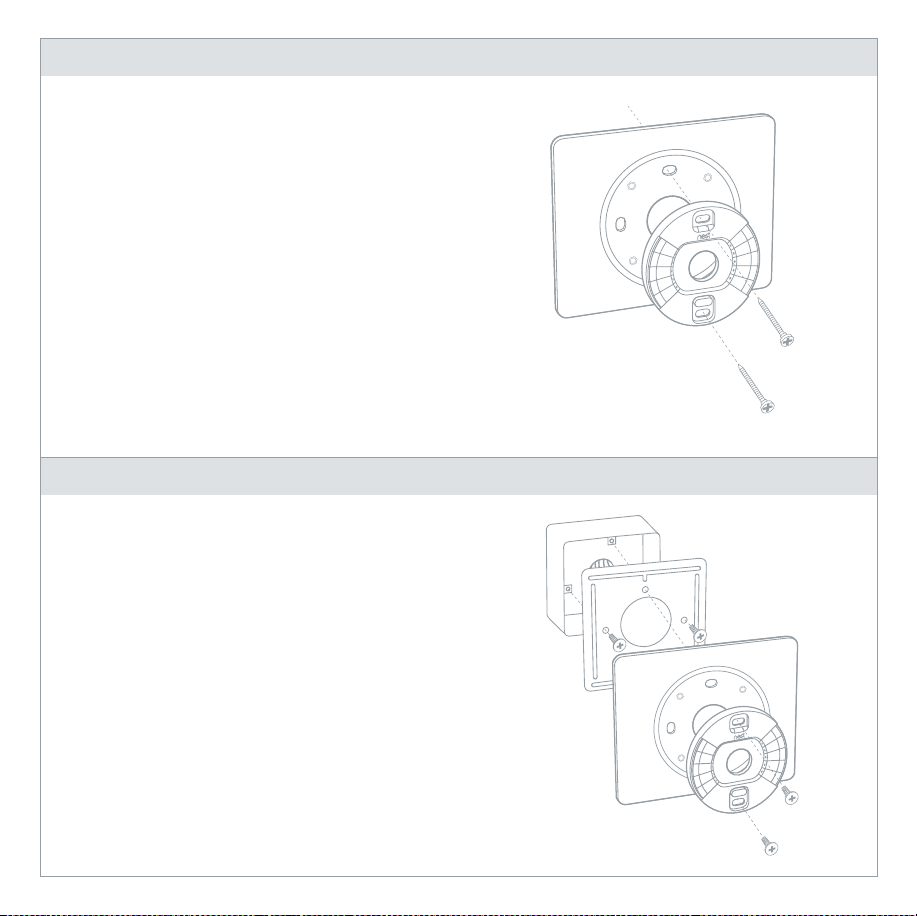
Use trim plate if needed
You can cover up holes or marks left
by your old thermostat with the optional
trim plate.
Snap the base and trim plate together,
then screw them to the wall.
You’ll find the trim plate in the bottom
of the box.
Mounting on an electrical box
Electrical boxes aren’t common, but if you
have one, secure the steel plate to the
electrical box with two of the short steel plate
screws. Insert the screws into the long slots
on the steel plate.
Use the other two short screws to attach the
Nest base and trim plate to the steel plate.
Optional in most homes
Optional in most homes
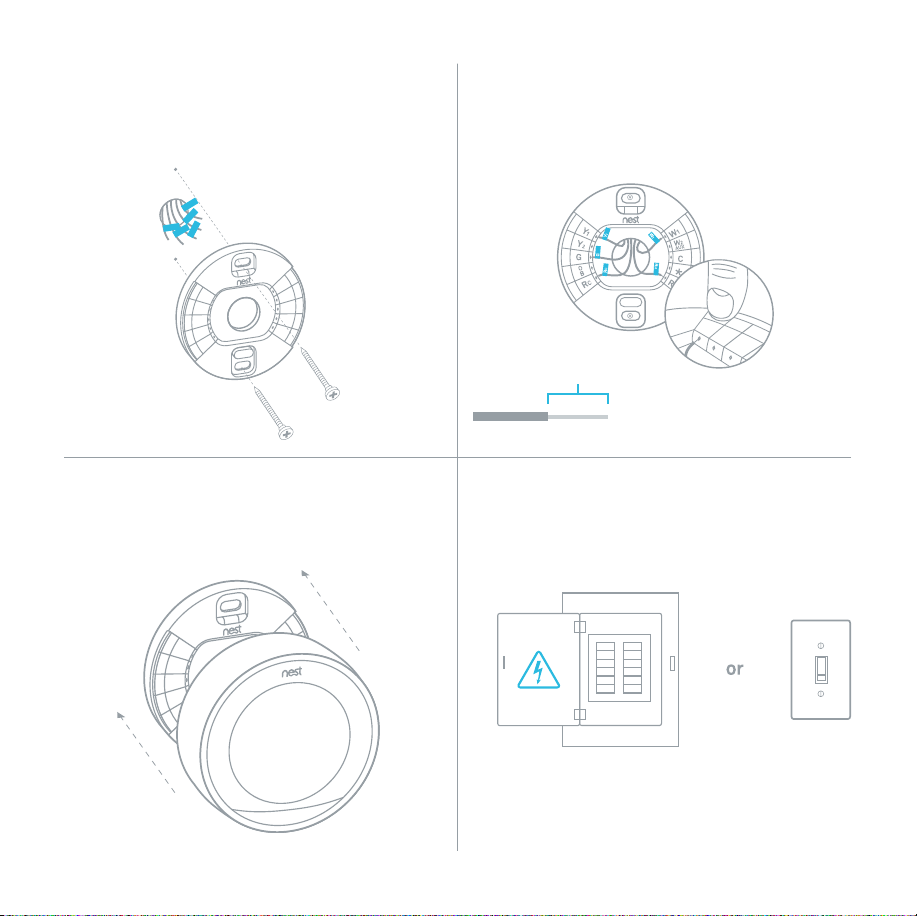
Breaker box
Switch
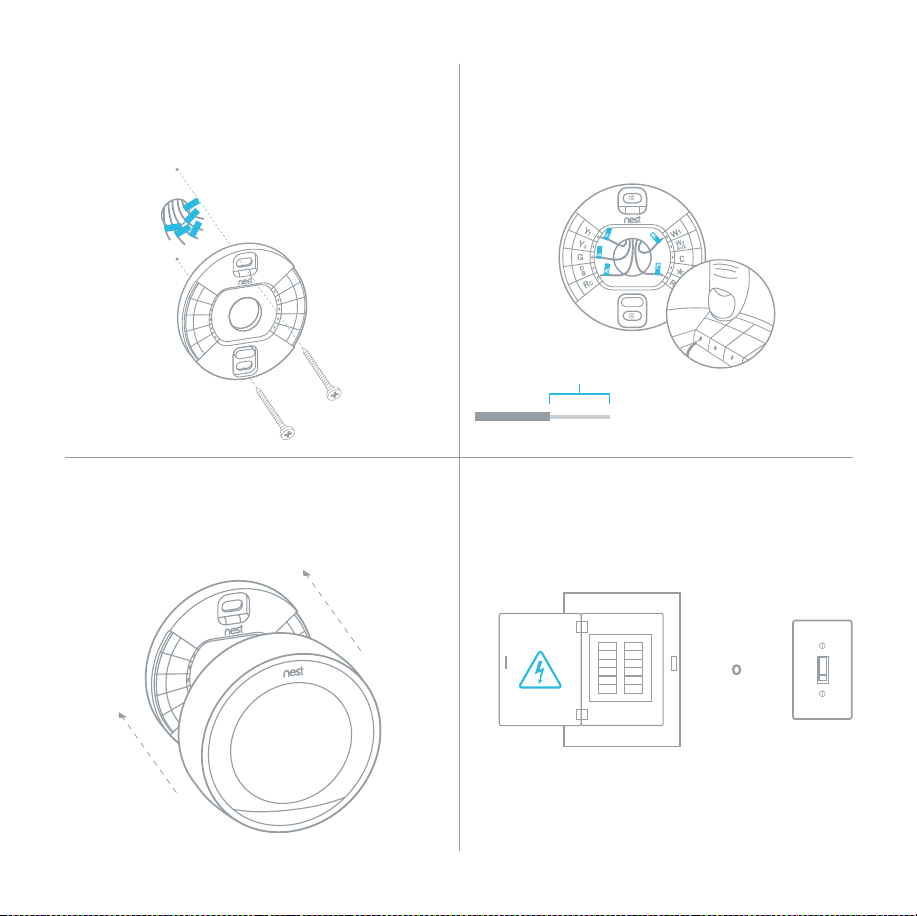
3/8 in
The exposed wire should be straight.
8. Attach the Nest base
Pull the wires through the center of the base,
then attach it to the wall with the screws.
10. Attach the display
Press the display onto the base until it clicks.
11. Switch the power back on
9. Connect wires
After all the wires are securely connected,
push them down to make sure they’re flush
with the base.
12. Setup and Nest Account
The Nest Thermostat will turn on and walk
you through setup. Just turn the ring and
press to select. During setup, you can connect
the thermostat to Wi-Fi.
Go to nest.com/account or download the
Nest app to create a Nest Account.
The app will show you how to connect your
Nest Account and thermostat.
Remember, you can download the free Nest app from the iTunes App Store
™
or Google Play
™
.
Questions about adding a thermostat to your Nest Account? Visit nest.com/pair
Nest Labs, Inc.
Limited Warranty
Learning Thermostat
™
THIS LIMITED WARRANTY CONTAINS IMPORTANT INFORMATION
ABOUT YOUR RIGHTS AND OBLIGATIONS, AS WELL AS
LIMITATIONS AND EXCLUSIONS THAT MAY APPLY TO YOU.
1. WHAT THIS LIMITED WARRANTY COVERS;
PERIOD OF COVERAGE
Nest Labs, Inc. (“Nest Labs”), 3400 Hillview Avenue, Palo Alto,
California USA, warrants to the owner of the enclosed product
that the product contained in this box (“Product”) will be free
from defects in materials and workmanship for a period of
two (2) years from the date of delivery following the original retail
purchase (the “Warranty Period”). If the Product fails to conform
to this Limited Warranty during the Warranty Period, Nest Labs
will, at its sole discretion, either (a) repair or replace any
defective Product or component; or (b) accept the return of the
Product and refund the money actually paid by the original
purchaser for the Product. Repair or replacement may be made
with a new or refurbished product or components, at Nest Labs’
sole discretion. If the Product or a component incorporated within
it is no longer available, Nest Labs may, at Nest Labs’ sole
discretion, replace the Product with a similar product of similar
function. This is your sole and exclusive remedy for breach of
this Limited Warranty. Any Product that has either been repaired
or replaced under this Limited Warranty will be covered by
the terms of this Limited Warranty for the longer of (a) ninety (90)
days from the date of delivery of the repaired Product or
replacement Product, or (b) the remaining Warranty Period.
This Limited Warranty is transferable from the original
purchaser to subsequent owners, but the Warranty Period will
not be extended in duration or expanded in coverage for any
such transfer.
2. TOTAL SATISFACTION RETURN POLICY
If you are the original purchaser of the Product and you are not
satisfied with this Product for any reason, you may return
it in its original condition within thirty (30) days of the original
purchase and receive a full refund.
3. WARRANTY CONDITIONS; HOW TO GET SERVICE IF YOU
WANT TO CLAIM UNDER THIS LIMITED WARRANTY
Before making a claim under this Limited Warranty, the owner
of the Product must (a) notify Nest Labs of the intention to
claim by visiting nest.com/support during the Warranty Period
and providing a description of the alleged failure, and (b) comply
with Nest Labs’ return shipping instructions. Nest Labs will have
no warranty obligations with respect to a returned Product if it
determines, in its reasonable discretion after examination of the
returned Product, that the Product is an Ineligible Product
Please recycle Nest’s 100% recyclable packaging.
RECYCLING AND DISPOSAL
Visit nest.com/recycle
For more information, visit nest.com
You can also find answers in the Nest Community
at nest.com/community
For FCC Compliance Statement, visit
nest.com/legal/fcc-compliance-notice

(defined below). Nest Labs will bear all costs of return shipping
to owner and will reimburse any shipping costs incurred by the
owner, except with respect to any Ineligible Product, for which
owner will bear all shipping costs.
4. WHAT THIS LIMITED WARRANTY DOES NOT COVER
This Limited Warranty does not cover the following (collectively
“Ineligible Products”): Products marked as “sample” or “Not
for Sale”, or sold “AS IS”; or Products that have been subject to:
(a) modifications, alterations, tampering, or improper maintenance
or repairs; (b) handling, storage, installation, testing, or use not
in accordance with the User’s Guide or other instructions provided
by Nest Labs; (c) abuse or misuse of the Product; (d) breakdowns,
fluctuations, or interruptions in electric power or the
telecommunications network; or (e) Acts of God, including but
not limited to lightning, flood, tornado, earthquake, or hurricane.
This Limited Warranty does not cover consumable parts,
including batteries, unless damage is due to defects in materials
or workmanship of the Product, or software (even if packaged
or sold with the product). Nest Labs recommends that you use
only authorized service providers for maintenance or repair.
Unauthorized use of the Product or software can impair the
Product’s performance and may invalidate this Limited Warranty.
5. DISCLAIMER OF WARRANTIES
EXCEPT AS STATED ABOVE IN THIS LIMITED WARRANTY, AND
TO THE MAXIMUM EXTENT PERMITTED BY APPLICABLE LAW,
NEST LABS DISCLAIMS ALL EXPRESS, IMPLIED, AND STATUTORY
WARRANTIES AND CONDITIONS WITH RESPECT TO THE PRODUCT,
INCLUDING THE IMPLIED WARRANTIES OF MERCHANTABILITY
AND FITNESS FOR A PARTICULAR PURPOSE. TO THE MAXIMUM
EXTENT PERMITTED BY APPLICABLE LAW, NEST LABS ALSO
LIMITS THE DURATION OF ANY APPLICABLE IMPLIED
WARRANTIES OR CONDITIONS TO THE DURATION OF THIS
LIMITED WARRANTY.
6. LIMITATION OF DAMAGES
IN ADDITION TO THE ABOVE WARRANTY DISCLAIMERS, IN NO
EVENT WILL NEST LABS BE LIABLE FOR ANY CONSEQUENTIAL,
INCIDENTAL, EXEMPLARY, OR SPECIAL DAMAGES, INCLUDING
ANY DAMAGES FOR LOST DATA OR LOST PROFITS, ARISING FROM
OR RELATING TO THIS LIMITED WARRANTY OR THE PRODUCT,
AND NEST LABS’ TOTAL CUMULATIVE LIABILITY ARISING FROM
OR RELATED TO THIS LIMITED WARRANTY OR THE PRODUCT
WILL NOT EXCEED THE AMOUNT ACTUALLY PAID FOR THE
PRODUCT BY THE ORIGINAL PURCHASER.
7. LIMITATION OF LIABILITY
THE NEST LABS ONLINE SERVICES (“SERVICES”) PROVIDE YOU
INFORMATION (“PRODUCT INFORMATION”) REGARDING YOUR
NEST PRODUCTS OR OTHER PERIPHERALS CONNECTED TO YOUR
PRODUCTS (“PRODUCT PERIPHERALS”). THE TYPE OF PRODUCT
PERIPHERALS THAT MAY BE CONNECTED TO YOUR PRODUCT
MAY CHANGE FROM TIME TO TIME. WITHOUT LIMITING THE
GENERALITY OF THE DISCLAIMERS ABOVE, ALL PRODUCT
INFORMATION IS PROVIDED FOR YOUR CONVENIENCE,“AS IS”,
AND “AS AVAILABLE”. NEST LABS DOES NOT REPRESENT,
WARRANT, OR GUARANTEE THAT PRODUCT INFORMATION WILL
BE AVAILABLE, ACCURATE, OR RELIABLE OR THAT PRODUCT
INFORMATION OR USE OF THE SERVICES OR PRODUCT WILL
PROVIDE SAFETY IN YOUR HOME. YOU USE ALL PRODUCT
INFORMATION, THE SERVICES, AND THE PRODUCT AT YOUR OWN
DISCRETION AND RISK. YOU WILL BE SOLELY RESPONSIBLE
FOR (AND NEST LABS DISCLAIMS) ANY AND ALL LOSS, LIABILITY,
OR DAMAGES, INCLUDING TO YOUR WIRING, FIXTURES,
ELECTRICTY, HOME, PRODUCT, PRODUCT PERIPHERALS,
COMPUTER, MOBILE DEVICE, AND ALL OTHER ITEMS AND PETS
IN YOUR HOME, RESULTING FROM YOUR USE OF THE PRODUCT
INFORMATION, SERVICES, OR PRODUCT. PRODUCT INFORMATION
PROVIDED BY THE SERVICES IS NOT INTENDED AS A SUBSTITUTE
FOR DIRECT MEANS OF OBTAINING THE INFORMATION. FOR
EXAMPLE, A NOTIFICATION PROVIDED THROUGH THE SERVICE
IS NOT INTENDED AS A SUBSTITUTE FOR AUDIBLE AND
VISIBLE INDICATIONS IN THE HOME AND ON THE PRODUCT,
NOR FOR A THIRD PARTY MONITORING SERVICE THAT
MONITORS ALARM STATE.
8. YOUR RIGHTS AND THIS LIMITED WARRANTY
This Limited Warranty gives you specific legal rights. You may
also have other legal rights that vary by state, province, or
jurisdiction. Likewise, some of the limitations in this Limited
Warranty may not apply in certain states. The terms of this
Limited Warranty will apply to the extent permitted by applicable
law. For a full description of your legal rights you should refer
to the laws applicable in your jurisdiction and you may wish
to contact a relevant consumer advisory service.
64-30-0032-ES-A


064-00011-ES-A
Learning Thermostat
™
Guía de instalación
Nest Labs, Inc.
Garantía Limitada
Learning Thermostat
™
ESTA GARANTÍA LIMITADA CONTIENE INFORMACIÓN
IMPORTANTE SOBRE SUS DERECHOS Y OBLIGACIONES,
AL IGUAL QUE LIMITACIONES Y EXCLUSIONES QUE
PUEDEN APLICARSE A USTED.
1. LO QUE CUBRE ESTA GARANTÍA LIMITADA;
PERÍODODECOBERTURA
Nest Labs, Inc. (en adelante,”Nest Labs”), 3400 Hillview Avenue,
Palo Alto, California USA, garantiza al propietario del producto
contenido en esta caja que dicho producto (en adelante, el
“Producto”) no tendrá defectos de materiales ni de fabricación
durante un período de dos (2) años contados desde la fecha
de entrega posterior a la compra minorista original (el “Período
de garantía”). Si el Producto no cumple con esta Garantía
limitada durante el Período de garantía, Nest Labs, según su
exclusivo criterio, (a) reparará o reemplazará cualquier Producto
o componente defectuoso; o bien (b) aceptará la devolución
del Producto y reembolsará el dinero pagado por su comprador
original. La reparación o el reemplazo se pueden efectuar con
productos o componentes nuevos o remanufacturados, según el
criterio exclusivo de Nest Labs. Si el Producto o un componente
que este contenga ya no está disponible, Nest Labs, según su
exclusivo criterio, puede reemplazar el Producto por uno similar
que tenga una función parecida. Esta es absolutamente la única
solución con la que usted cuenta en caso de incumplimiento
de esta Garantía limitada. Cualquier Producto que haya sido
reparado o reemplazado en el marco de esta Garantía limitada
contará con cobertura conforme a las condiciones de esta
Garantía limitada durante el período más largo entre (a) noventa
(90) días desde la fecha de entrega del Producto reparado
o el Producto de reemplazo, o (b) el resto del Período de garantía.
Esta Garantía limitada es transferible del comprador original
a los propietarios subsiguientes, pero el Período de garantía no
se extenderá en duración ni se ampliará en cobertura en ningún
caso de transferencia.
2. POLÍTICA DE DEVOLUCIÓN DE SATISFACCIÓN TOTAL
Si usted es el comprador original del Producto y no está conforme
con él por alguna razón, puede devolverlo en las condiciones
originales dentro de los treinta (30) días de la compra original
y recibirá un reembolso completo.
3. CONDICIONES DE LA GARANTÍA; CÓMO OBTENER SERVICIO
SI QUIERE HACER UNA RECLAMACIÓN EN EL MARCO DE ESTA
GARANTÍA LIMITADA
Antes de efectuar una reclamación en el marco de esta Garantía
limitada, el propietario del Producto debe (a) notificar a Nest
Labs de la intención de reclamar a través de nest.com/support
durante el Período de garantía y proporcionar una descripción
Por favor, recicla el empaque 100% reciclable de Nest.
RECICLAJE Y ELIMINACIÓN
Visita nest.com/recycle
Para obtener más información, visita nest.com
También puedes encontrar respuestas en Nest
Community: nest.com/community
Para ver la Declaración de cumplimiento con la FCC,
visita nest.com/legal/fcc-compliance-notice

NOS TOMAMOS MUY EN SERIO TU PRIVACIDAD
Hemos asumido el compromiso de ser abiertos
y sinceros contigo respecto a cómo usamos
los datos. Siempre te pediremos permiso antes de
compartir información que permita identificarte
personalmente, como tu dirección de correo
electrónico, y mantendremos tus datos seguros
con las herramientas de seguridad estándar de
la industria. Para obtener más información sobre
nuestra Política de privacidad, ve a nest.com/privacy

Compatibilidad
Según el comprobador de compatibilidad en línea de Nest, el termostato Nest funciona
con la mayoría de los sistemas de 24 V, incluidos los de gas, electricidad, aceite, aire forzado,
velocidad variable, bomba de calor y radiantes. Puede controlar:
• Calefacción: una, dos y tres etapas (W1, W2, W3)
• Enfriamiento: una y dos etapas (Y1, Y2)
• Bomba de calor: con calor auxiliar y de emergencia (O/B, AUX, E)
• Ventilador (G)
• Alimentación (C, RH, RC)
• Humidificador o deshumidificador (HUM, DEHUM)
El conector del termostato Nest
*
admite uno solo de estos cables:
W3, E, HUM o DEHUM.
El termostato Nest está diseñado para funcionar aunque tu casa no tenga instalado
un cable común (C). En raras ocasiones, puede ser necesario instalar un cable C nuevo.
Se recomienda la instalación por parte de un profesional para:
• Sistemas de combustible dual (bomba de calor con caldera)
• Humidificadores y deshumidificadores para toda la casa
Mira el video
Para ver cómo se hace, mira nuestro video de instalación en support.nest.com/thermostat
Contenido
Pantalla
Tornillos para la placa
de acero opcional
Destornillador
Placa de montaje
opcional
Base
Placa de acero
opcional
Tornillos para la pared
1. Corta la energía
Así te protegerás y evitarás quemar un fusible
de tu equipo. Ajusta la temperatura de tu
termostato viejo para asegurarte de que tu
sistema esté apagado.
2. Quita la tapa
Algunas tapas se quitan ejerciendo
presión, mientras que a otras hay
que desatornillarlas.
4. Quita cualquier puente
que haya
Los puentes son pequeños cables entre dos
conectores. No los necesitas. Un cable R
puede ir al RC o al RH.
3. Revisa tu sistema
Si tu viejo termostato tiene una etiqueta
de 120 V o 240 V o tiene cables gruesos con
conectores de torsión, tu sistema es de alto
voltaje. ¿No lo sabes con certeza? Comunícate
con el equipo de asistencia.
Caja de interruptores
Interruptor
PRECAUCIÓN:
No conectes
el Nest con
cables de alto
voltaje.
Recuerda que la alimentación
de tu sistema HVAC debe estar
desactivada para evitar quemar
un fusible de tu equipo.
6. Desconecta los cables
y retira la base
Después de retirar la
base, recomendamos
que enrolles con cuidado
los cables en un
bolígrafo o lápiz para
asegurarte de que no
vuelvan a meterse en el
agujero de la pared.
7. Marca el lugar donde
irán los tornillos
Usa un nivel de burbuja para asegurarte
de que el termostato Nest esté a nivel.
5. Etiqueta los cables
Despega las etiquetas de abajo y colócaselas a los
cables correspondientes del termostato.
Usa las etiquetas blancas para los cables W3,
E, HUM o DEHUM. El conector
*
solo se puede
conectar con uno de estos cables.
¿Ves dos nombres para cada conector del soporte
de montaje de tu anterior termostato? Para obtener
ayuda, visita nest.com/2labels.
Dos etiquetas
Consejo: Toma
una foto de
los cables de
tu anterior
termostato
para ayudarte
a recordar.
Usa una placa de montaje
si es necesario
Con la placa de montaje opcional, puedes
cubrir los orificios o las marcas que haya
dejado tu viejo termostato.
Encaja la base y la placa de montaje
y atorníllalas a la pared.
Encontrarás la placa de montaje en el fondo
de la caja.
Montaje en una caja eléctrica
Los montajes en cajas eléctricas no son
comunes, pero si tienes una, fija la placa
de acero a la caja eléctrica con dos de
los tornillos cortos para la placa de acero.
Inserta los tornillos en los orificios largos
de la placa de acero.
Usa los otros dos tornillos cortos para fijar
la base del Nest y la placa de montaje
a la placa de acero.
Opcional en la mayoría de las casas
Opcional en la mayoría de las casas
Caja de interruptores
Interruptor
3/8 in
El cable que se ve debe estar recto.
8. Fija la base del Nest
Pasa los cables por el centro de la base
y fíjala a la pared con los tornillos.
10. Fija la pantalla
Presiona la pantalla contra la base
hasta que encaje.
11. Vuelve a conectar la
alimentación eléctrica.
9. Conecta los cables
Una vez que los cables estén conectados de
manera segura, tira de ellos hacia abajo para
asegurarte de que estén alineados con la base.
12. Ajustes y cuenta de Nest
El termostato Nest se encenderá y te guiará
a través de la configuración. Solo gira el
anillo y presiona para hacer una selección.
Ve a nest.com/account o descarga
la aplicación Nest para crear una cuenta
de Nest. La aplicación te mostrará cómo
conectar tu cuenta de Nest con tu termostato.
Recuerda que puedes descargar la aplicación gratuita Nest desde App Store
™
de iTunes
o desde Google Play
™
.
¿Tienes dudas sobre cómo agregar un termostato a tu cuenta de Nest? Visita nest.com/pair.

de la supuesta falla y (b) cumplir con las instrucciones de envío
para la devolución de Nest Labs. Nest Labs no tendrá obligación
alguna en el marco de la garantía con respecto a un Producto
devuelto si determina, según un criterio razonable y después
de examinar el Producto devuelto, que el Producto no es elegible
(esto se define a continuación). Nest Labs se hará cargo
de todos los costos de envío para la devolución por parte del
propietario mediante reembolso, salvo que el Producto no
sea elegible, en cuyo caso el propietario tendrá que hacerse
cargo de todos los costos de envío.
4. LO QUE NO CUBRE ESTA GARANTÍA LIMITADA
Esta Garantía limitada no cubre lo siguiente (en conjunto,
“Productos no elegibles”): Productos identificados como “muestra”
o “No apto para la venta”, o aquellos vendidos “TAL CUAL” están;
o Productos que hayan sido objeto de: (a) modificaciones,
alteraciones, adulteraciones o mantenimiento o reparaciones
inapropiados; (b) manipulación, almacenamiento, instalación,
pruebas o uso no acorde con la Guía del usuario u otras
instrucciones proporcionadas por Nest Labs; (c) maltrato
o uso indebido del Producto; (d) averías, fluctuaciones
o interrupciones en el servicio de energía eléctrica o en la red
de telecomunicaciones; o (e) casos fortuitos, incluidos, entre
otros, rayos, inundaciones, tornados, terremotos o huracanes.
Esta Garantía limitada no cubre las piezas consumibles,
incluidas las baterías, a menos que se hayan dañado debido
a defectos de materiales o fabricación del Producto, ni el
software (aunque dichas piezas consumibles o software vengan
en el empaque del producto o se vendan con él). Nest Labs le
recomienda que solo use proveedores de servicios autorizados
para el mantenimiento o la reparación. El uso no autorizado
del Producto o el software puede afectar el rendimiento del
Producto e invalidar esta Garantía limitada.
5. EXCLUSIÓN DE GARANTÍAS
EXCEPT AS STATED ABOVE IN THIS LIMITED WARRANTY, A
EXCEPCIÓN DE LO ESTABLECIDO ANTERIORMENTE EN ESTA
GARANTÍA LIMITADA, Y EN LA MÁXIMA MEDIDA PERMITIDA
POR LA LEY VIGENTE, NEST LABS NO SE HARÁ RESPONSABLE
DE NINGUNA GARANTÍA NI CONDICIÓN EXPRESA, IMPLÍCITA
NI ESTATUTARIA CON RESPECTO AL PRODUCTO, INCLUIDAS LAS
GARANTÍAS IMPLÍCITAS DE COMERCIABILIDAD O APTITUD
PARA UN FIN DETERMINADO. EN LA MÁXIMA MEDIDA PERMITIDA
POR LA LEY VIGENTE, NEST LABS TAMBIÉN LIMITA LA
DURACIÓN DE CUALQUIER GARANTÍA O CONDICIÓN IMPLÍCITA
APLICABLE A LA DURACIÓN DE ESTA GARANTÍA LIMITADA.
6. LIMITACIÓN DE DAÑOS
ADEMÁS DE LAS EXCLUSIONES DE LAS GARANTÍAS
MENCIONADAS ARRIBA, NEST LABS EN NINGÚN CASO SE HARÁ
RESPONSABLE DE NINGÚN DAÑO INDIRECTO, FORTUITO,
TIPIFICADO O CUANTIFICABLE, INCLUIDO CUALQUIER DAÑO
POR PÉRDIDA DE DATOS O PÉRDIDA DE RENTABILIDAD QUE
SE DESPRENDA DE ESTA GARANTÍA LIMITADA O SE RELACIONE
CON ELLA O CON EL PRODUCTO. ADEMÁS, LA RESPONSABILIDAD
ACUMULADA TOTAL DE NEST LABS QUE SE DESPRENDA DE
ESTA GARANTÍA LIMITADA O SE RELACIONE CON ELLA O CON EL
PRODUCTO NO SUPERARÁ LA CANTIDAD REALMENTE PAGADA
POR EL PRODUCTO POR PARTE DEL COMPRADOR ORIGINAL.
7. LIMITACIÓN DE LA RESPONSABILIDAD
LOS SERVICIOS EN LÍNEA DE NEST LABS (EN ADELANTE, LOS
“SERVICIOS”) LE BRINDAN INFORMACIÓN (“INFORMACIÓN DEL
PRODUCTO”) RESPECTO A SUS PRODUCTOS NEST U OTROS
PERIFÉRICOS CONECTADOS A SUS PRODUCTOS (“PERIFÉRICOS
DE LOS PRODUCTOS”). EL TIPO DE PERIFÉRICOS DE LOS
PRODUCTOS QUE SE PUEDE CONECTAR A SU PRODUCTO PUEDE
CAMBIAR DE VEZ EN CUANDO. SIN LIMITAR LAS GENERALIDADES
DE LAS EXCLUSIONES ANTERIORES, TODA LA INFORMACIÓN
DE LOS PRODUCTOS SE PROPORCIONA PARA SU CONVENIENCIA
“TAL CUAL ESTÁ” Y “SEGÚN ESTÉ DISPONIBLE”. NEST LABS
NO MANIFIESTA, ASEGURA NI GARANTIZA QUE LA INFORMACIÓN
DE LOS PRODUCTOS ESTÉ DISPONIBLE NI QUE ESTA SEA PRECISA
NI CONFIABLE, NI QUE LA INFORMACIÓN DE LOS PRODUCTOS
O EL USO DE LOS SERVICIOS O DEL PRODUCTO PROPORCIONE
SEGURIDAD EN SU HOGAR. USTED USA TODA LA INFORMACIÓN
DE LOS PRODUCTOS, LOS SERVICIOS Y EL PRODUCTO POR CUENTA
Y RIESGO PROPIOS. USTED SERÁ EL ÚNICO RESPONSABLE
Y NEST LABS NO SE HARÁ CARGO DE NINGUNA PÉRDIDA,
OBLIGACIÓN O DAÑO, INCLUIDOS AQUELLOS QUE AFECTEN
A SU CABLEADO, SUS ARTEFACTOS, SUS INSTALACIONES
ELÉCTRICAS, SU CASA, SU PRODUCTO, SUS PRODUCTOS
PERIFÉRICOS, SU COMPUTADORA, SU DISPOSITIVO MÓVIL NI
NINGÚN OTRO ELEMENTO O MASCOTA DE SU CASA QUE
RESULTE DEL USO QUE USTED HAGA DE LA INFORMACIÓN DEL
PRODUCTO, LOS SERVICIOS O EL PRODUCTO EN SÍ. LA
INFORMACIÓN DEL PRODUCTO PROPORCIONADA POR LOS
SERVICIOS NO TIENE LA INTENCIÓN DE SER UN SUSTITUTO
DE LOS MEDIOS DIRECTOS DE OBTENER LA INFORMACIÓN. POR
EJEMPLO, UNA NOTIFICACIÓN SUMINISTRADA A TRAVÉS DEL
SERVICIO NO TIENE LA INTENCIÓN DE SER UN SUSTITUTO DE
LAS INDICACIONES AUDIBLES Y VISIBLES DE LA CASA Y DEL
PRODUCTO, NI DEL SERVICIO DE MONITOREO DE UN TERCERO
QUE CONTROLE EL ESTADO DE LA ALARMA.

8. SUS DERECHOS Y ESTA GARANTÍA LIMITADA
Esta Garantía limitada le otorga derechos legales específicos.
Usted también puede tener otros derechos legales que varían
en función del estado, la provincia o la jurisdicción. Asimismo,
es posible que algunas de las limitaciones de esta Garantía
limitada no se apliquen en ciertos estados. Las condiciones
de a esta Garantía limitada se aplicarán en la medida de lo
permitido por la ley vigente. Para obtener una descripción completa
de sus derechos legales, debe consultar las leyes vigentes en
su jurisdicción y quizás le convenga ponerse en contacto con
un servicio de asesoramiento al consumidor relevante.
64-30-0032-ES-A