Power
If you mount this TV on a wall, follow the instructions exactly as set out by the manufacturer. If it is not correctly mounted, the TV may slide or fall and cause serious injury to a child or adult and serious damage to the TV.
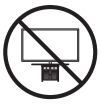
When installing a wall mount kit, we recommend you fasten all four VESA screws.
If you want to install a wall mount kit that attaches to the wall using two top screws only, be sure to use a Samsung wall mount kit that supports this type of installation. (You may not be able to purchase this type of wall mount kit, depending on the geographical area.)
Do not install your wall mount kit while your TV is turned on. This may result in personal injury from electric shock.
When you install your TV, maintain a distance of at least 10 cm between the TV and other objects (walls, cabinet sides, etc.) to ensure proper ventilation. Failing to maintain proper ventilation may result in a fire or a problem with the product caused by an increase in its internal temperature.

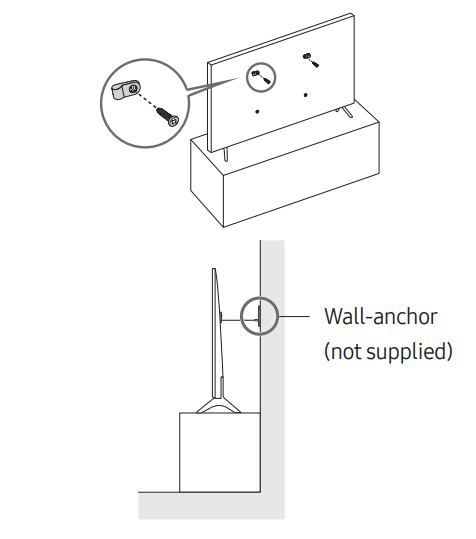
Caution: Pulling, pushing, or climbing on the TV may cause the TV to fall. In particular, ensure your children do not hang on or destabilise the TV. This action may cause the TV to tip over, causing serious injuries or death. Follow all safety precautions provided in the Safety Flyer included with your TV. For added stability and safety, you can purchase and install the anti-fall device, referring to "Preventing the TV from falling".
WARNING: Never place a television set in an unstable location. The television set may fall, causing serious personal injury or death. Many injuries, particularly to children, can be avoided by taking simple precautions such as:
If the existing television set is going to be retained and relocated, the same considerations as above should be applied.


Make sure the following items are included with your TV. If any items are missing, contact your dealer.
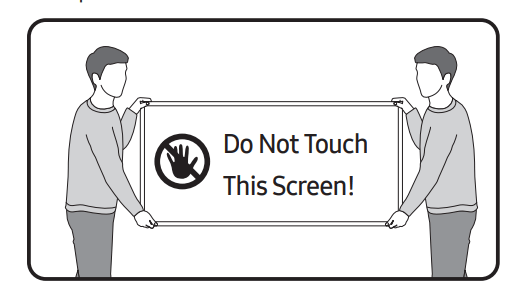
Warning: Screens can be damaged from direct pressure when handled incorrectly. We recommend lifting the TV at the edges, as shown. For more information about handling, refer to the Quick Setup Guide came with this product.

When you turn on your TV for the first time, it immediately starts the Initial Setup. Follow the instructions displayed on the screen and configure the TV's basic settings to suit your viewing environment.
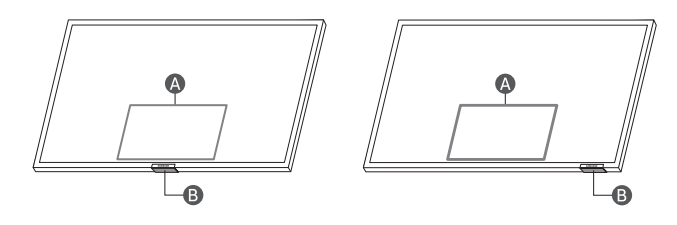
You can turn on the TV with the TV Controller button at the bottom of the TV, and then use the Control menu. The Control menu appears when the TV Controller button is pressed while the TV is On.

Control menu
TV Controller button / Remote control sensor
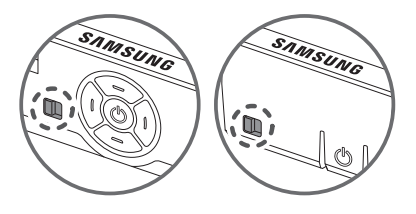
You can turn on or off the sound sensor by using its button at the bottom of the TV.
With the TV on, push the button to the left (or back) to turn the sound sensor on or to the right (or forward) to turn it off. See the pop-up window on the TV to check whether the sound sensor is turned on or off.
For more information, see "Troubleshooting" or "FAQ" in the e-Manual.
>
Settings > e-Manual > Troubleshooting or FAQ
If none of the troubleshooting tips apply, please visit "www. samsung.com" and click Support or contact the Samsung service centre.
>
Settings > Support > Software Update > Update Now or Auto update).The TV won’t turn on.
The remote control does not work.
+
buttons together for 10 seconds.Eco Sensor adjusts the brightness of the TV automatically. This feature measures the light in your room and optimises the brightness of the TV automatically to reduce power consumption. If you want to turn this off, go to >
>
Settings > General > Power and Energy Saving > Brightness Optimisation.
Display Resolution 3840 x 2160
Sound (Output)
AU7/AU8/AU9/Q6*A/Q7*A Series: 20 W
Q8*A Series (50"): 40 W
Q8*A Series (55"-85")/QN8*A Series: 60 W
QN9*A Series (43"): 20 W
QN9*A Series (50"): 40 W, QN9*A Series (55"-98"): 60 W
Operating Temperature
50 °F to 104 °F (10 °C to 40 °C)
Operating Humidity
10 %to 80 %, non-condensing
Storage Temperature
-4 °F to 113 °F (-20 °C to 45 °C)
Storage Humidity
5 % to 95 %, non-condensing
Notes
Decreasing power consumption
When you shut the TV off, it enters Standby mode. In Standby mode, it continues to draw a small amount of power. To decrease power consumption, unplug the power cord when you don't intend to use the TV for a long time.
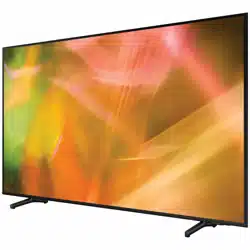
Reference file: Samsung UA75AU8000WXXY 75 Inch Crystal UHD 4K Smart TV
Additionally, the document applies to other Samsung models: UA43AU7000, UA50AU7000, UA55AU7000, UA58AU7000, UA65AU7000, UA70AU7000, UA75AU7000, UA43AU7100, UA50AU7100, UA55AU7100, UA58AU7100, UA65AU7100, UA75AU7100, UA43AU7200, UA50AU7200, UA55AU7200, UA58AU7200, UA65AU7200, UA75AU7200, UA43AU7500, UA50AU7500, UA55AU7500, UA65AU7500, UA43AU7700, UA50AU7700, UA55AU7700, UA65AU7700, UA70AU7700, UA75AU7700, UA43AU8000, UA50AU8000, UA55AU8000, UA60AU8000, UA65AU8000, UA70AU8000, UA75AU8000, UA85AU8000, UA50AU8080, UA55AU8080, UA65AU8080, UA43AU8100, UA50AU8100, UA55AU8100, UA60AU8100, UA65AU8100, UA70AU8100, UA75AU8100, UA85AU8100, UA43AU8200, UA55AU8200, UA65AU8200, UA75AU8200, UA43AU9000, UA50AU9000, UA55AU9000, UA65AU9000, UA75AU9000, UA43AU9070, UA55AU9070, UA65AU9070, UA43AUE60, UA50AUE60, UA55AUE60, UA58AUE60, UA65AUE60, UA43AUE70, UA50AUE70, UA55AUE70, UA58AUE70, UA65AUE70, QA43Q60A, QA50Q60A, QA55Q60A, QA65Q60A, QA75Q60A, QA85Q60A, QA43Q65A, QA50Q65A, QA55Q65A, QA65Q65A, QA75Q65A, QA85Q65A, QA55Q70A, QA65Q70A, QA75Q70A, QA85Q70A, QA50Q80A, QA55Q80A, QA65Q80A, QA55QN85A, QA65QN85A, QA75QN85A, QA85QN85A, QA55QS85A, QA65QS85A, QA75QS85A, QA85QS85A, QA43QN90A, QA50QN90A, QA55QN90A, QA65QN90A, QA75QN90A, QA85QN90A, QA98QN90A, UA43AU7000K, UA50AU7000K, UA55AU7000K, UA58AU7000K, UA65AU7000K, UA70AU7000K, UA70AU8000K, UA75AU7000K, UA43AU8000K, UA50AU8000K, UA55AU8000K, UA60AU8000K, UA65AU8000K, UA75AU8000K, UA85AU8000K, UA43AU8100K, UA50AU8100K, UA55AU8100K, UA60AU8100K, UA65AU8100K, UA70AU8100K, UA75AU8100K, UA85AU8100K, UA43AU9000K, UA50AU9000K, UA55AU9000K, UA65AU9000K, QA43Q60AAK, QA50Q60AAK, QA55Q60AAK, QA65Q60AAK, QA75Q60AAK, QA85Q60AAK, QA43Q60ABK, QA50Q60ABK, QA55Q60ABK, QA65Q60ABK, QA75Q60ABK, QA85Q60ABK, QA55Q70AAK, QA65Q70AAK, QA75Q70AAK, QA85Q70AAK, QA50Q80AAK, QA55Q80AAK, QA65Q80AAK, QA55QN85AAK, QA65QN85AAK, QA75QN85AAK, QA85QN85AAK, QA50QN90AAK, QA55QN90AAK, QA65QN90AAK, QA75QN90AAK, QA85QN90AAK, QA98QN90AAK