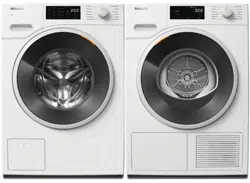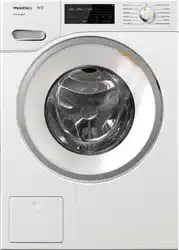

Operating and Installation Instructions
Washer
To prevent accidents and appliance damage, read these instructions
before installation or use.
en-US M.-Nr. 10 669 371

Contents
2
Caring for the environment .................................................................................. 6
IMPORTANT SAFETY INSTRUCTIONS ................................................................ 7
Guide to the washer ............................................................................................ 12
Control panel......................................................................................................... 12
Operating the sensor buttons................................................................................ 13
Display................................................................................................................... 14
Examples on how to operate the appliance.......................................................... 14
Environmentally friendly washing ...................................................................... 15
Before using for the first time ............................................................................ 16
1. Setting the display text...................................................................................... 17
2. Setting up Miele@home .................................................................................... 17
3. Removing the shipping struts ........................................................................... 19
4. Starting the calibration program........................................................................ 19
1. Prepare the laundry......................................................................................... 20
2. Selecting a program........................................................................................ 21
3. Loading the washing machine ....................................................................... 23
4. Selecting program settings ............................................................................ 24
Selecting a temperature/spin speed ..................................................................... 24
Selecting an extra option....................................................................................... 24
EcoFeedback ................................................................................................... 24
Level of soiling.................................................................................................. 25
Delay start/SmartStart ..................................................................................... 25
5. Adding detergent............................................................................................. 27
Detergent dispenser drawer .................................................................................. 27
Dispensing aids ................................................................................................ 27
Using chlorine bleach....................................................................................... 28
Using powder detergent................................................................................... 28
Using detergent tablets or pods....................................................................... 28
Using fabric softener and liquid starch ............................................................ 29
CapDosing............................................................................................................. 29
6. Start the program - Program end .................................................................. 32

Contents
3
Spin cycle ............................................................................................................. 33
Final spin speed in the wash program .................................................................. 34
Rinse-spin ........................................................................................................ 34
Omitting the final spin (Rinse hold)................................................................... 34
Deselecting the rinse-spin and final spin ......................................................... 34
Program guide ..................................................................................................... 35
Extra options........................................................................................................ 41
Pre-wash ............................................................................................................... 41
Buzzer.................................................................................................................... 41
Extra options can be selected using the “Options” sensor button ....................... 42
Gentle ............................................................................................................... 42
ExtraRinse ........................................................................................................42
The following extra options can be selected in addition to the programs ............ 43
Changing the program sequence ...................................................................... 44
Canceling a program ............................................................................................. 44
Interrupting a program........................................................................................... 44
Changing the program .......................................................................................... 44
Child lock............................................................................................................... 45
Adding or removing laundry .................................................................................. 45
Detergent ............................................................................................................. 46
Miele-recommended detergents ........................................................................... 46
General detergent recommendations.................................................................... 47
Cleaning and care ............................................................................................... 48
Cleaning the drum (Hygiene info) .......................................................................... 48
Cleaning the exterior and control panel ................................................................ 48
Cleaning the detergent dispensing drawer ........................................................... 48
Cleaning the water inlet filter................................................................................. 51
Frequently Asked Questions .............................................................................. 52
A wash program cannot be started....................................................................... 52
The following fault message appears in the display and the program
has been canceled ................................................................................................ 53
A message appears in the display at the end of the program or when
the appliance is switched on................................................................................. 54
General problems with the washer........................................................................ 55
Poor wash results.................................................................................................. 57
The drum door cannot be opened ........................................................................ 58
Opening the drum door during a power failure ..................................................... 59

Contents
4
Technical Service................................................................................................. 61
Contact in case of fault ......................................................................................... 61
Optional accessories............................................................................................. 61
Warranty ................................................................................................................ 61
Installation............................................................................................................ 63
Front view .............................................................................................................. 63
Rear view............................................................................................................... 64
Installation site....................................................................................................... 65
Transporting the washing machine to its installation site...................................... 65
Removing the shipping struts ............................................................................... 65
Refitting the shipping struts .................................................................................. 67
Leveling the machine............................................................................................. 68
Screwing out and adjusting the feet................................................................. 68
Additional installation requirements ...................................................................... 69
Installing under a worktop................................................................................ 69
Setting up the cabinet ...................................................................................... 69
For closets at room height................................................................................ 69
Product Dimensions .............................................................................................. 70
Dimensions....................................................................................................... 70
Installation on a plinth ...................................................................................... 70
Washer-dryer stack .......................................................................................... 70
The water protection system................................................................................. 71
Water intake .......................................................................................................... 72
Water drainage ...................................................................................................... 73
Electrical connection ............................................................................................. 74
Technical data...................................................................................................... 75
Settings ................................................................................................................ 76
Calling up settings................................................................................................. 76
Selecting settings.................................................................................................. 76
Changing a setting ................................................................................................ 76
Closing the Settings menu .................................................................................... 76
Language ........................................................................................................... 77
Buzzer volume....................................................................................................... 77
Keypad tone .......................................................................................................... 77
Welcome tone ....................................................................................................... 77
Code...................................................................................................................... 77
Unit ........................................................................................................................ 78
Brightness ............................................................................................................. 78

Contents
5
Display switch-off.................................................................................................. 79
Program info.......................................................................................................... 79
Memory ................................................................................................................. 79
Water intake .......................................................................................................... 79
Long p-wash Normal............................................................................................. 80
Soak duration ........................................................................................................ 80
Gentle action ......................................................................................................... 80
Temp. reduction..................................................................................................... 80
Maximum rinse level.............................................................................................. 81
Suds cooling.......................................................................................................... 81
Low water pressure ............................................................................................... 81
Anti-Crease............................................................................................................ 81
Miele@home .......................................................................................................... 82
Remote control...................................................................................................... 83
SmartGrid .............................................................................................................. 83
RemoteUpdate ...................................................................................................... 84
Running a RemoteUpdate................................................................................ 84
Bleach ................................................................................................................... 85
Optional accessories .......................................................................................... 86
Detergent............................................................................................................... 86
Speciality detergents............................................................................................. 86
Fabric care............................................................................................................. 87
Additive ................................................................................................................. 87
Machine care......................................................................................................... 87
Caring for the environment
6
Disposal of the packing mate-
rial
The cardboard box and packing materi-
als protect the appliance during ship-
ping. They have been designed to be
biodegradable and recyclable.
Ensure that any plastic wrappings,
bags, etc. are disposed of safely and
kept out of the reach of children. Dan-
ger of suffocation!
Disposal of your old appliance
Electrical and electronic appliances
contain valuable materials. They also
contain certain substances, compounds
and components which were essential
for the proper functioning and safe use
of the equipment. Handling these mate-
rials improperly by disposing of them in
your household waste can be harmful to
your health and the environment. There-
fore, please do not dispose of your old
appliance with regular household waste
and follow local regulations on proper
disposal.
Consult with local authorities, dealers or
Miele in order to dispose of and recycle
electrical and electronic appliances.
Miele assumes no responsibility for
deleting any personal data left on the
appliance being disposed. Please en-
sure that your old appliance is kept
away from children until removal. Ob-
serve safety requirements for appli-
ances that may tip over or pose an en-
trapment hazard.

IMPORTANT SAFETY INSTRUCTIONS
7
WARNING
To reduce the risk of fire, electric shock or injury to persons while
using your appliance follow basic safety precautions, including the
following:
Read all instructions before using the appliance.
GROUNDING INSTRUCTIONS
This appliance must be grounded. In the event of a malfunction or
breakdown, grounding will reduce the risk of electric shock by pro-
viding a path of least resistance for electric current. This appliance is
equipped with a cord having an equipmentgrounding conductor and
a grounding plug. The plug must be plugged into an appropriate out-
let that is properly installed and grounded in accordance with all lo-
cal codes and ordinances.
WARNING - Improper connection of the equipment-grounding
conductor may result in a risk of electric shock. Check with a quali-
fied electrician if you are in doubt as to whether the appliance is
properly grounded.
Do not modify the plug provided with the appliance - if it will not
fit the outlet, have a proper outlet installed by a qualified electrician.
Do not install or use a washer with visible damage.
Do not install or store this appliance where it will be exposed to
the weather.
Do not install your washing machine where temperatures below
freezing may occur. Frozen hoses may burst under pressure. The reli-
ability of the electronic control unit may be impaired at temperatures
below freezing.

IMPORTANT SAFETY INSTRUCTIONS
8
Before connecting the machine, ensure that the connection data
on the data plate (fusing, voltage and frequency) match the mains
electrical supply. If in doubt contact an electrician.
Do not use an extension cord to connect this appliance to the
power supply. Extension cords do not guarantee the required safety
of the appliance (e.g. danger of overheating).
This appliance is not designed for maritime use or for use in mo-
bile installations such as recreational vehicles or aircraft. However,
under certain conditions it may be possible for an installation in
these applications. Please contact the Miele Technical Service Dept.
with specific requirements.
Do not repair or replace any part of the appliance or attempt any
servicing unless specifically recommended in these operating in-
structions.
If the power cord is damaged it must only be replaced by a Miele
Service technician with a genuine Miele power cord.
Under certain conditions, hydrogen gas may be produced in a hot
water system that has not been used for 2 weeks or more. HYDRO-
GEN GAS IS EXPLOSIVE. If the hot water system has not been used
for such a period, turn on all hot water faucets and let the water flow
from each for several minutes before using the washing machine.
This will release any built-up hydrogen gas. Do not smoke or use an
open flame during this time, the gas is flammable.
Before the appliance is removed for service or discarded, remove
the door.

IMPORTANT SAFETY INSTRUCTIONS
9
Use
Do not allow children to play on or in the appliance. Close super-
vision is necessary when the appliance is used near children.
The drum door glass will be hot when washing at very high tem-
peratures. Do not touch the glass. Danger of burns! Keep children
away from the washer when in use.
Only use the washing machine to wash items which are specified
by the manufacturer to be machine washable on the fabric care la-
bel. Any other applications may be dangerous.
Do not wash articles that have been previously cleaned, washed,
soaked or spotted with gasoline, dry-cleaning solvents or other
flammable substances. These articles give off vapors that could ig-
nite or explode. Do not add these items to the wash load.
Do not add gasoline, dry-cleaning solvents, or other flammable or
explosive substances to the wash water. These substances give off
vapors which could ignite or explode.
Do not use cleaning solvents on or near the machine or the con-
trols. Contact with cleaning solvents will damage the surface..
Do not reach into the appliance if the drum is moving.
Do not tamper with the controls.
SAVE THESE INSTRUCTIONS

IMPORTANT SAFETY INSTRUCTIONS
10
Miele tumble dryers and Miele washing machines can be installed
as a washer-dryer stack. A Miele washer-dryer connection kit is re-
quired as an optional accessory for this. Please ensure that the
washer-dryer connection kit is suitable for the Miele tumble dryer
and the Miele washing machine.
If installing the machine on a Miele plinth (available as an optional
accessory), please make sure you order the correct one for this
washing machine.
Should detergent enter the eyes, rinse out immediately with plenty
of lukewarm water. If accidentally ingested, seek medical advice im-
mediately. People who have sustained damage to the skin or who
have sensitive skin should avoid contact with the detergent.
Be careful when opening the door following use of the steam
function. There is a danger of burning due to escaping steam and
the high temperature of the surface of the drum as well as the port-
hole glass. Step back and wait until the steam has dissipated.
The maximum dry laundry weight is 17.6 lb (8 kg). See the “Pro-
gram guide” for the maximum recommended loads for individual
programs.
This washing machine is supplied with a special lamp to cope
with particular conditions (e.g., temperature, moisture, chemical re-
sistance, abrasion resistance, and vibration). This special lamp must
only be used for the purpose for which it is intended. It is not suit-
able for room lighting. Replacement lamps may only be fitted by a
Miele authorized person or by Miele Technical Service.
This product may contain chemicals know to the state of Califor-
nia to cause cancer or birth defects or other reproductive harm.

IMPORTANT SAFETY INSTRUCTIONS
11
FCC Declaration of Conformity
These devices comply with FCC Rules Part15. This equipment
has been tested and found to be in compliance with the limits for a
ClassB digital device, pursuant to Part15 of the FCC Rules of Oper-
ation and is subject to the following conditions:
These devices may not cause harmful interference.
These devices must accept any interference received, including in-
terference that may cause undesired operation.
FCC Radiation Exposure Statement
This equipment complies with FCC radiation exposure limits set
forth for an uncontrolled environment. This equipment should be in-
stalled and operated with minimum distance 8“ (20cm) between the
radiator and your body.
Industry Canada Statement
This digital apparatus does not exceed the ClassB limits for Ra-
dio Noise Emissions from digital apparatus set out in the Radio Inter-
ference Regulations of the Canadian Department of Communica-
tions.
Complies with Canadian ICES-003 ClassB specifications.
Guide to the washer
12
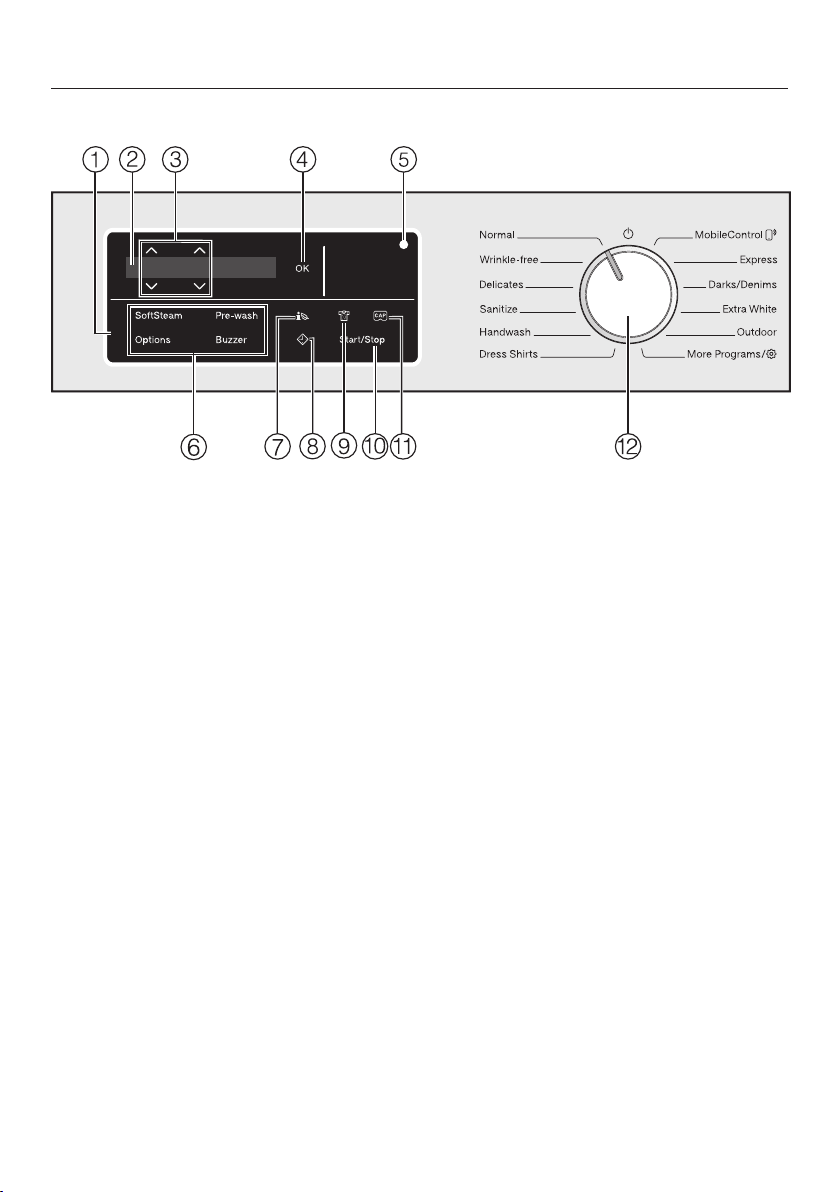
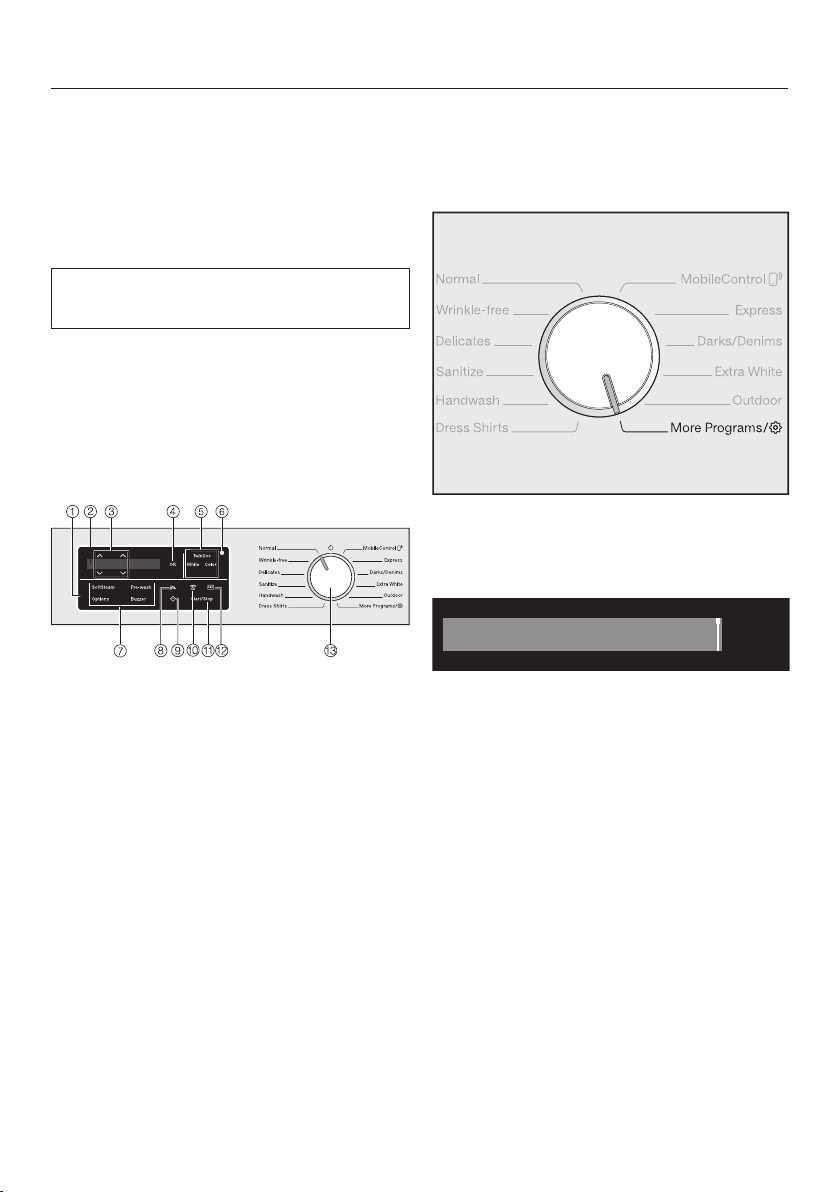
Control panel
a
Control field
The control field consists of a dis-
play and various sensor buttons. The
individual sensor buttons are ex-
plained in the following sections.
b
Display
The following values are displayed
and/or selected on the display:
1. The temperature, spin speed, and
time left for the selected wash
program.
2. The individual values of the selec-
tion lists for extras and settings.
c
Sensor buttons
The values in the display can be
changed with the sensor but-
tons. The sensor button increases
the value or moves the selection list
up; the sensor button decreases
the value or moves the selection list
down.
d
OK sensor button
Confirm the selected values, such as
temperature and spin speed, with
the OK sensor button.
e
Optical interface
This is used by the Service depart-
ment as a transmission point.
f
Sensor buttons for extra options
You can supplement the wash pro-
grams with extra options.
If a wash program has been se-
lected, the sensor buttons for the
possible extras light up dimly.
g
Sensor button
You can use the sensor button to
call up an energy and water con-
sumption forecast for the selected
wash program.

Guide to the washer
13
h
Sensor button
The sensor button starts the de-
lay start function. With the delay
start function, you can delay the
start of the program. The start of the
program can be delayed from 15
minutes up to a maximum of 24
hours.
Please see “Delay start” for more in-
formation.
i
Sensor button
You can specify the level of soiling of
the load in three settings.
– Light
– Normal
– Heavy
The wash program changes de-
pending on which level of soiling
is selected.
j
Start/Stop sensor button
Touching the Start/Stop sensor but-
ton starts the selected program or
cancels a program that has already
been started. The sensor button
flashes slowly as soon as it is possi-
ble for a program to be started and
then lights up constantly after the
program has started.
k
Sensor button
Activate detergent dispensing with a
capsule by using the sensor buttons.
l
Program selector
For selecting programs and for
switching off. The washing machine
is switched on when you select a
program, and switched off by turning
the program selector to the posi-
tion.
Operating the sensor buttons
The sensor buttons react to fingertip
contact. Selection is possible as long
as the respective sensor button is lit
dimly.
If a sensor button is dimly lit, this
means: selection possible
If a sensor button is brightly lit, this
means: currently selected
Guide to the washer
14
Display
The standard display shows the follow-
ing values from left to right:
1:26
Warm + Max
OK
– The selected wash temperature
– The selected spin speed
– The program duration
Examples on how to operate
the appliance
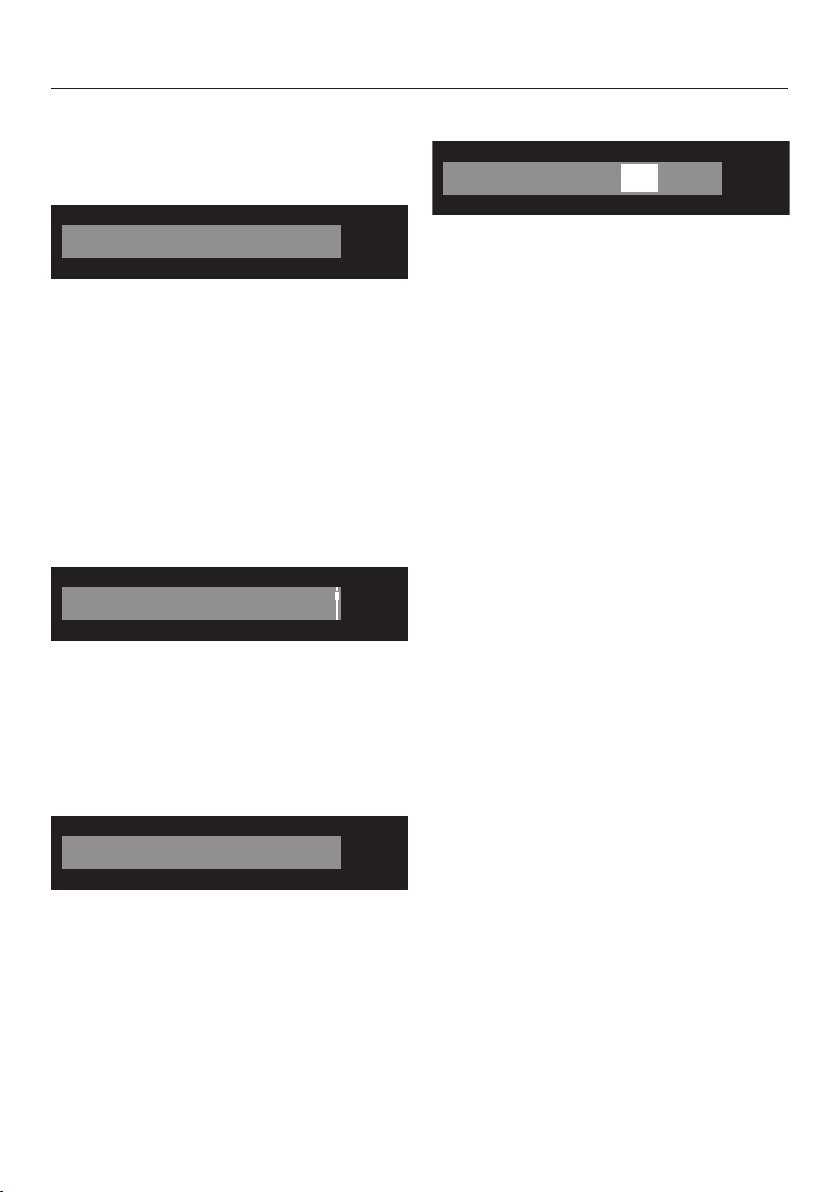
Scrolling through a list
The scroll bar in the display indicates
that a selection is available.
Language
OK
The list scrolls down when the sen-
sor button is touched. The list scrolls up
when the sensor button is touched.
The OK sensor button is used to acti-
vate the option in the display.
Identifying the selected option
Cap
OK
An activated option in a list will have a
check mark next to it.
Setting numerical values
Start in
OK
h:0000
The numerical value is highlighted in
white. Touching the sensor button
decreases the value. Touching the
sensor button increases the value. The
OK sensor button is used to activate
the value in the display.
Leaving a sub-menu
Select Back to exit a sub-menu.

Environmentally friendly washing
15
Energy and water consumption
– Make use of the maximum load of
the respective wash program.
The energy and water consumption
will then be the lowest in relation to
the size of the load.
– When smaller amounts of laundry are
washed, the washing machine's au-
tomatic load control system will re-
duce the amount of water and energy
used.
– Use the Express program for small,
lightly soiled loads.
– Modern detergents make it possible
to wash at lower temperatures (e.g.,
70°F/20°C). Using the corresponding
temperature settings will save energy.
– Washing at low temperatures and/or
using liquid detergents can cause
bacteria and odors to build up in the
washing machine. Miele therefore
recommends cleaning the washing
machine once every month.
The washing machine provides you
with a reminder with the message
Sanitize info: Run a high temp. program or
the "Clean Machine" program in the dis-
play.
Detergent consumption
– Do not exceed the amounts of deter-
gent recommended on the packag-
ing.
– Adjust the dosage to the level of soil-
ing of the laundry.
– Reduce the amount of detergent with
smaller loads (approx. ⅓ less than
the amount recommended can be
used when washing a half load).
– Only use highly efficient detergent
with the following label:
When drying with a tumble dryer
Select the highest possible spin speed
for the wash program to save energy in
the subsequent tumble dryer cycle.
Before using for the first time
16
Before initial commissioning, please
note the information in “Installation
and connection”.
Removing the protective foil
and stickers
Remove:
– The protective foil from the door
– Any stickers from the front and the lid
Please do not remove any labels
(e.g., the data plate) which are visible
when you open the door.
This washing machine has undergone
a complete functional test at the fac-
tory and some residual water will
therefore remain in the drum from this
process.
Remove the drain hose elbow
from the drum
An elbow piece for the drain hose is
stored in the drum.
Pull open the door.
Remove the elbow piece.
Shut the door.

Before using for the first time
17
Switching on the washing ma-
chine
Turn the program selector to the Nor-
mal program.
The welcome tone will sound and the
welcome screen will light up.
The display will guide you through the
4steps of the initial commissioning.
1. Setting the display text
You are requested to set the display
language. It is possible to change the
language at any time by setting the pro-
gram selector to the Additional pro-
grams/ position in the Settings sub-
menu.
english (USA)
OK
Touch the sensor buttons until
the language you want appears in the
display.
Confirm your language selection by
touching the OK button.
2. Setting up Miele@home
Your washing machine is equipped
with an integrated WiFi module. The
washing machine can be connected to
the household WiFi network.
You will then be able to operate the
washing machine via the Miele@mo-
bile app.
The following message appears in the
display:
Miele@home
Confirm with OK.
The following message appears in the
display:
Set up now
To set up Miele@home now: Touch
the OK sensor button.
To postpone setup until later: Touch
the sensor button until the follow-
ing appears in the display: Set up later
and press the OK button to confirm.
Select the required connection type
from the display.
1. Connect via WPS
2. Connect via App
Before installing the washing ma-
chine in its final location, ensure the
signal strength is sufficient for your
WiFi network.
Before using for the first time
18
Miele@mobile App
The Miele@mobile App is available to
download free of charge from the Apple
App Store
®
or from the Google Play
Store™.
Connecting with WPS
Your WiFi router must support WPS
(WiFi Protected Setup).
Follow the instructions in the display.
If the connection fails, you have proba-
bly not connected WPS to your router
quickly enough. Repeat the steps
above.
Tip: If your WiFi router does not support
WPS, please connect via the
Miele@mobile app.
Connecting via the app
The Miele@mobile app can be used to
connect to your network.
Install the Miele@mobile app on your
mobile device.
Follow the instructions in the app.
To log in you will need:
1. Your WiFi network password
2. Your washing machine password
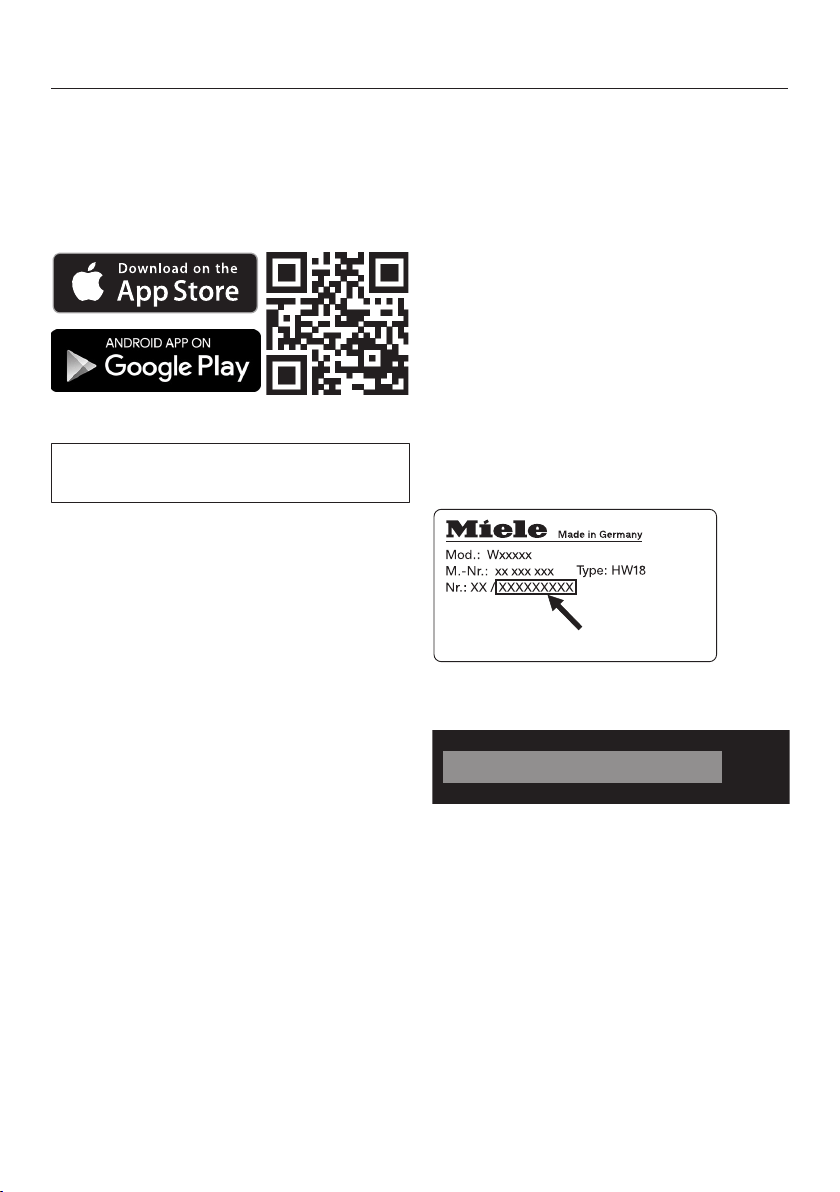
The password for your washing ma-
chine consists of the last nine digits on
the serial number. This can be found on
the appliance's data plate.
If the connection is successful, the fol-
lowing will appear in the display:
Connection OK
OK
Confirm with the OK sensor button.
Before using for the first time
19
3. Removing the shipping
struts
Failure to remove the shipping
struts can result in damage to the
washing machine and to adjacent
cabinetry or appliances.
Remove the shipping struts as de-
scribed in the “Installation” section.
The following message appears in the
display:
Remove shipping struts
Confirm with the OK sensor button.
4. Starting the calibration pro-
gram
For optimum water and energy con-
sumption and excellent wash results, it
is important to calibrate the washing
machine.
To do this, the Normal program must
be run without laundry and without de-
tergent.
No other programs can be started until
calibration has been carried out.
The following message appears in the
display:
Open and run "Normal" with "Hot Plus"
without laundry.
Touch the sensor button until the
OK sensor button lights up and con-
firm this with OK.
1:40
Hot +
OK
Max
Turn on the water supply.
Touch the Start/Stop sensor button.
The washing machine calibration pro-
gram has started. It will take approxi-
mately 2hours.
At the end of the program the following
message will appear in the display:
Set up complete
1. Prepare the laundry
20
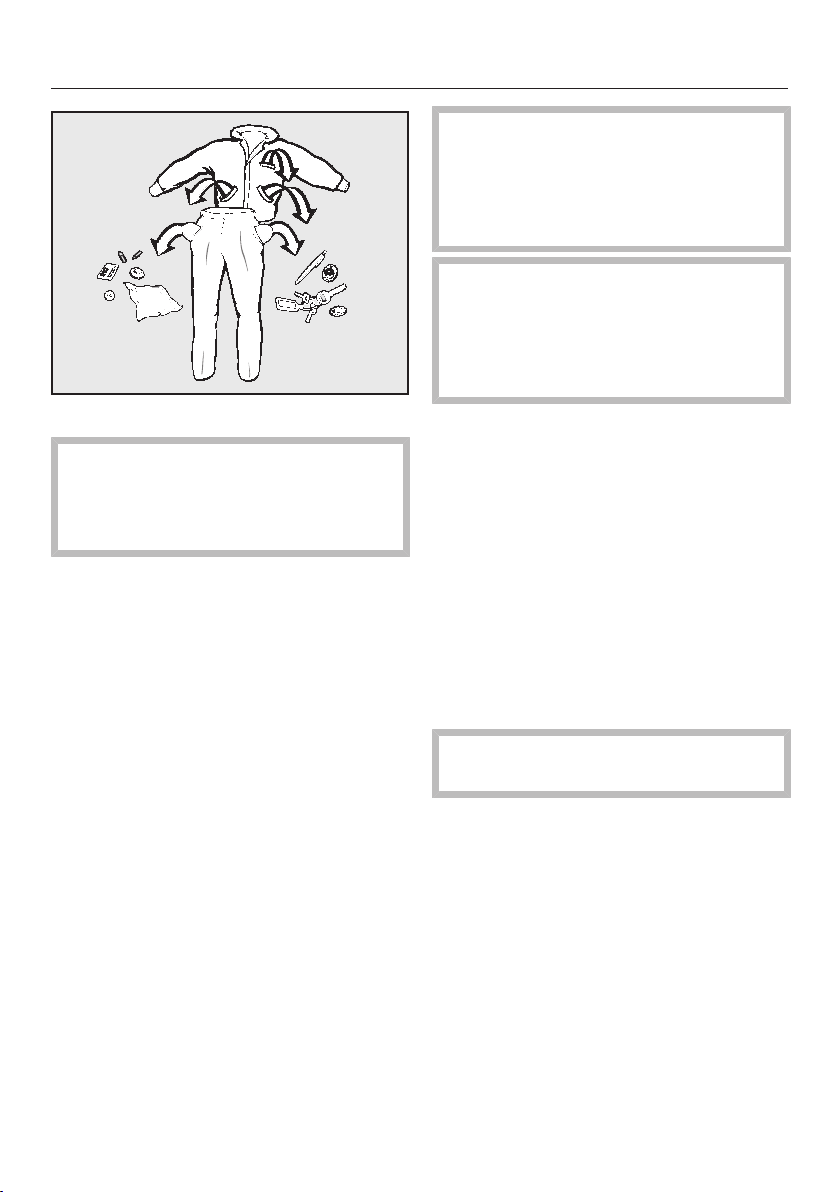
Empty all pockets.
Foreign objects left in pockets
(e.g. nails, coins, paper clips, etc.)
can cause damage to clothes and
the machine.
Sort the laundry
Only wash items that are labeled ma-
chine washable by the manufacturer.
Most garments have a fabric care label
in the collar or side seam.
Sort the laundry by care label and
color.
Tip: Dark fabrics often bleed the first
few times they are washed. They should
be washed separately several times be-
fore being included in a mixed load.
Pre-treating stains
Badly soiled areas, stains etc. should
be cleaned as soon as possible,
preferably while still fresh. Dab stains
with a damp light colored cloth. Do
not rub!
Solvent-based cleaners (e.g.,
benzene) can damage plastic parts.
When pre-treating a stain, make sure
that plastic parts do not come into
contact with cleaning agent.
Chemical (solvent-based) clean-
ing agents can cause damage in the
washing machine.
Never use such cleaning agents in
the washing machine!
General tips
– Curtains: Remove any lead weights
or strips before washing.
– Loose bra underwires should be re-
moved or sewn in place before wash-
ing.
– Close zippers, hooks and eyelets be-
fore washing.
– Comforter covers and pillowcases
should be fastened to prevent small
items from rolling inside of them.
Do not wash items with the sym-
bol on the fabric care label.
2. Selecting a program
21
Switching on the washing ma-
chine
Turn the program selector to a pro-
gram.
The interior drum lighting will come on.
The drum lighting will go out automati-
cally after five minutes.
Program selection
There are three possible ways to select
a program:
1. Selecting the standard programs
with the program selector dial
Turn the program selector to the re-
quired program.
The selected program will be shown in
the display. This will then be replaced
by the standard display.
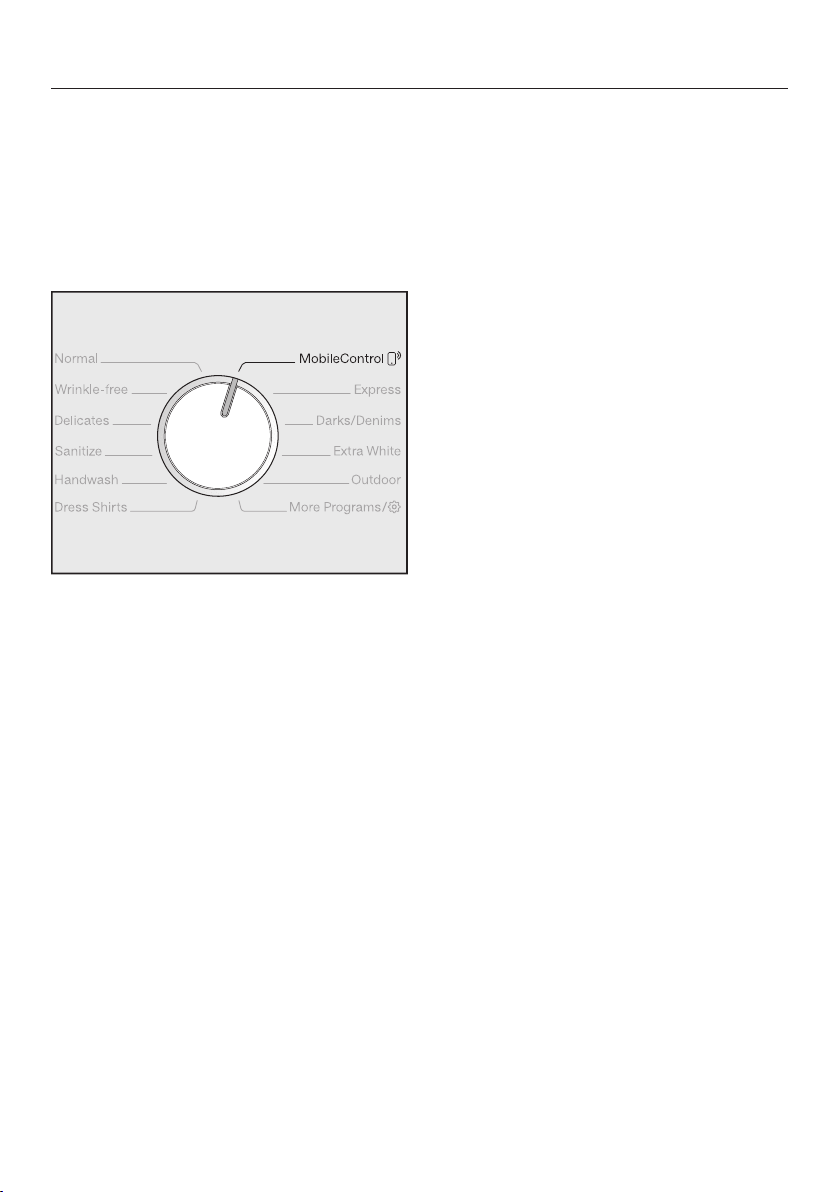
2. Selecting additional programs by
setting the program selector to the
“More programs/” position and the
display:
Turn the program selector to the More
programs/ position.
The following appears in the display:
Table Linens/Drapes
OK
Touch the sensor buttons until
the program you want appears in the
display.
Confirm the program with the OK
sensor button.
Preset program parameters will be dis-
played, depending on the program se-
lected.
2. Selecting a program
22
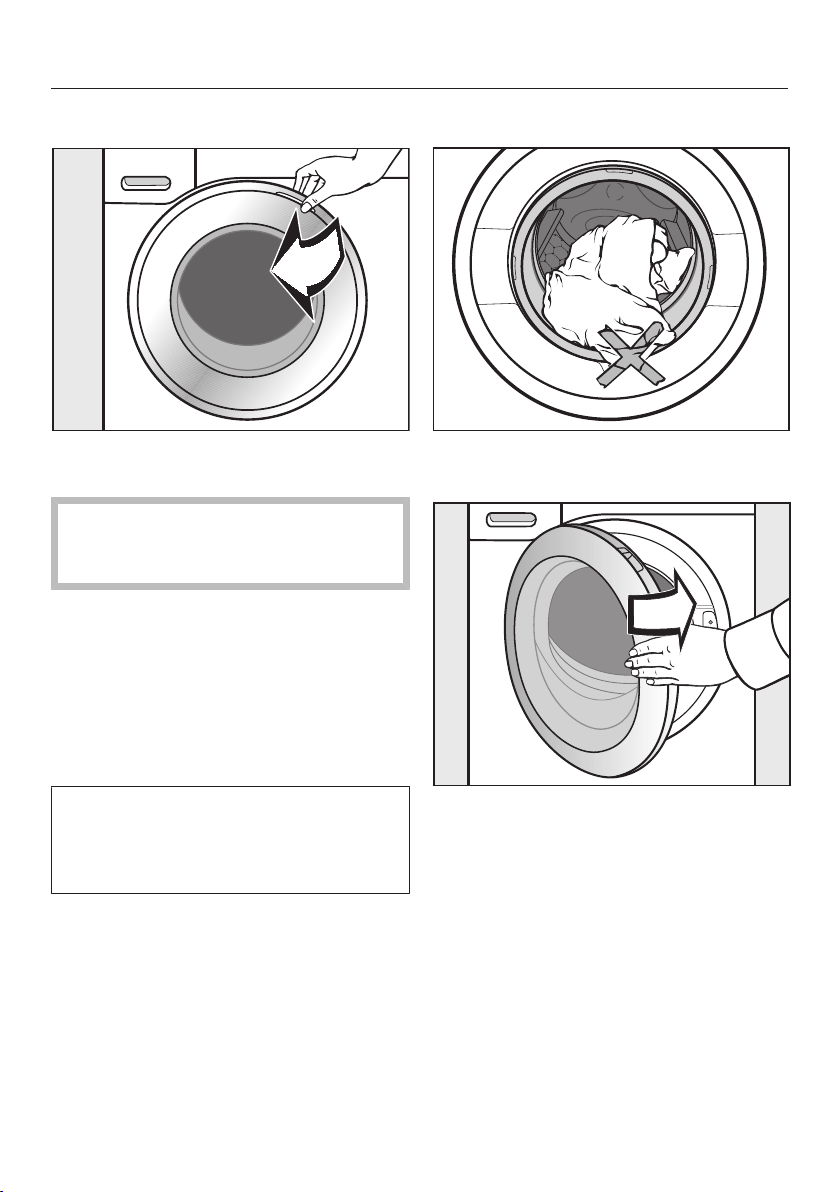
3. Selecting the programs via the Mo-
bileControl program selector posi-
tion and the Miele@mobile app
Tip: In order to use MobileControl ,
the washing machine must be logged
on to the WiFi network and the Remote
control must be switched on.
Turn the program selector to the Mo-
bileControl position.
The following appears in the display:
Load laundry, close the door and press
"Start". Appliance can be remotely con-
trolled
Follow the instructions in the display
and start the program.
The following appears in the display:
MobileControl
The washing machine can now be oper-
ated with the Miele@mobile app.
3. Loading the washing machine
23
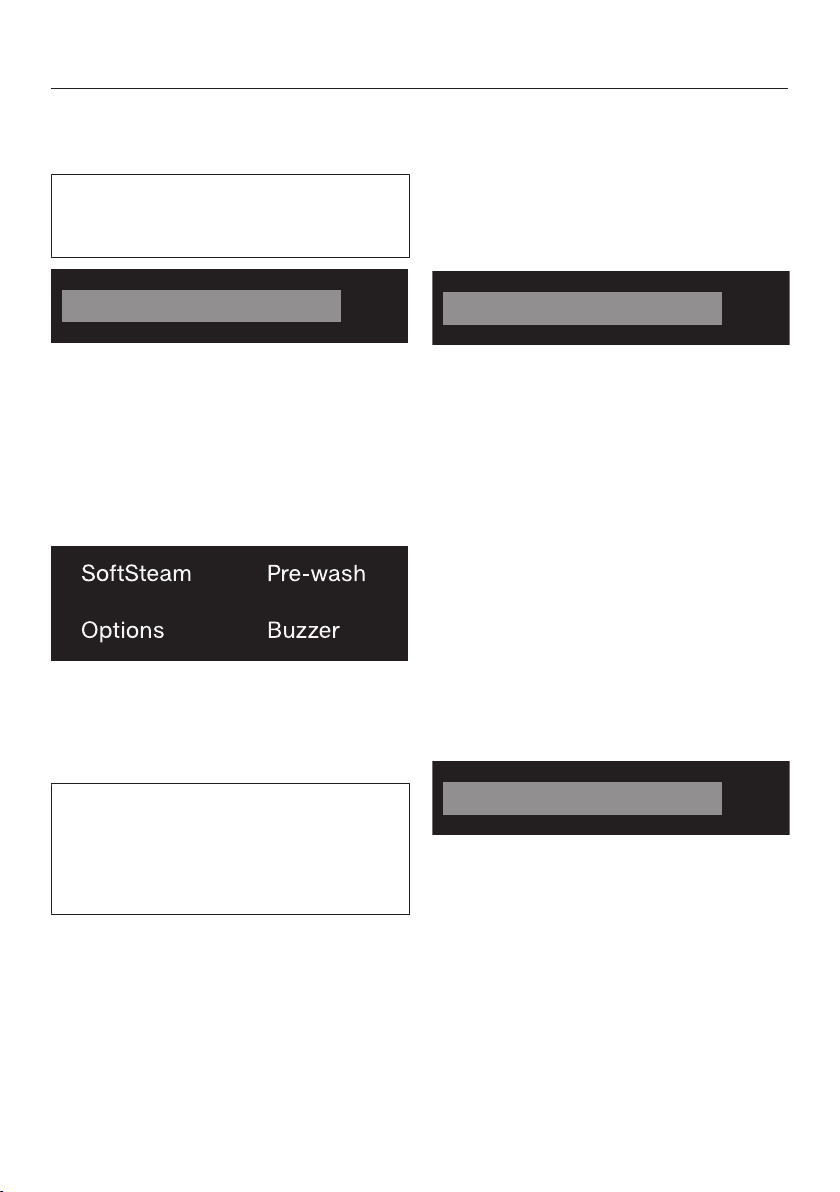
Opening the door
Take hold of the door and pull it
open.
Check the drum for pets or foreign
objects before loading it with laun-
dry.
The most efficient use of energy and
water is achieved when a full load is
washed. However, do not overload as
this reduces cleaning efficiency and
causes creasing.
Unfold the laundry and load loosely in
the drum.
Mixing both large and small items
gives better wash results and also
helps distribute the load evenly during
spinning.
Tip: Please note the maximum load for
different wash programs.
Closing the door
Make sure that no items are caught
between the door and the seal.
Shut the door with a gentle swing.
4. Selecting program settings
24
Selecting a temperature/spin
speed
You can alter the preset temperature/
spin speed of a wash program if this is
permitted by the program.
1:26
Warm + Max
OK
Touch the sensor buttons above
or below the temperature or spin
speed value in the display until the
temperature/spin speed you want ap-
pears in the display. Confirm with the
OK sensor button.
Selecting an extra option
Touch the sensor button for the extra
you want. It then lights up brightly.
Tip: You can select multiple extras for a
wash program.
Not all the extra options can be used
with every program. If an extra option
is not dimly lit, this option is not per-
mitted for the wash program (see “Ex-
tra options”).
Extras sensor button
You can select additional extras using
the Extras sensor button.
Touch the Extras sensor button.
The following appears in the display:
No Extras
OK
Touch the sensor buttons until
the extra option you want appears in
the display.
Confirm the extra option with the OK
sensor button.
EcoFeedback
You can use the sensor button to
call up an energy and water consump-
tion forecast for the selected wash pro-
gram.
Touch the sensor button.
The estimated energy and water con-
sumption levels will be displayed as a
bar chart.
OK
The more bars visible (), the higher the
energy or water consumption.
Touch the OK sensor button or wait
until the display automatically returns
to the standard display.

4. Selecting program settings
25
Level of soiling
You can specify the level of soiling of
the load.
– Light
No visible soiling or stains
– Normal
Visible soiling and/or a small number
of light stains visible
– Heavy
Soiling and/or stains clearly visible. A
pre-wash is automatically carried out
The following parameters will change,
depending on the level of soiling se-
lected:
– The detergent dosage amount with
automatic detergent dispensing
– With the Heavy level of soiling set-
ting, a pre-wash will be carried out
automatically (see “Options”).
– The adjustment of the rinse water
level
Delay start/SmartStart
Delay start
With the delay start function, you can
delay the start of the program.
This function is active when the set-
ting SmartGrid is switched off.
The hours can be set in the values from
00 to 24. The minutes can be set in 15-
minute increments from 00 to 45.
Setting the delay start time
Touch the sensor button.
The following will appear in the display:
Start in
OK
h:0000
Set the hours with the sensor
buttons. Confirm with the OK sensor
button.
The display will change:
Start in
OK
h0006:
Set the minutes with the sensor
buttons. Confirm with the OK sensor
button.
Tip: The values will count upwards and
downwards automatically if you keep
your finger on the sensor buttons.
Changing delay start
The selected delay start time can be
changed before the program start.
Touch the sensor button.
If desired, change the specified time
and confirm with the OK sensor but-
ton.
4. Selecting program settings
26
Canceling delay start
The selected delay start time can be
canceled before the program start.
Touch the sensor button.
The selected delay start time will ap-
pear in the display.
Set a time value of 00:00 h with the
sensor buttons. Confirm with
the OK sensor button.
The selected delay start time has been
canceled.
After the program start, the selected
delay start time can only be changed
or canceled by interrupting the pro-
gram.
SmartStart
The SmartStart function lets you de-
fine a time period during which your
washing machine will start automati-
cally. The start takes place via a sig-
nal, e.g., from your energy supplier,
that indicates that the electricity rate is
particularly economical. Please check
with your local utility provider for avail-
ability.
This function is active when the Smart-
Grid setting is switched on.
The time period can be defined be-
tween 15 minutes and 24 hours. During
this period, the washing machine waits
for the signal from the energy supplier.
If no signal is sent during the defined
period, the washing machine starts the
wash program.
Setting the timeframe
If you have activated the SmartGrid
function in Settings, SmartStart in in-
stead of Start in will appear in the dis-
play when you touch the sensor
button (see “Settings – SmartGrid”).
The procedure for setting this is the
same as for setting the time for delay
start.
Use the sensor buttons to enter
the hour and confirm your entry with
the OK sensor button.
The hour will be saved and the minute
numerical keypad will be highlighted.
Use the sensor buttons to enter
the minutes and confirm your entry
with the OK sensor button.
Press the Start/Stop sensor button to
start the wash program with Smart-
Start.
The following will appear in the display:
SmartStart
OK
5. Adding detergent
27
There are several options for adding de-
tergent to the washing machine.
Detergent dispenser drawer
This washing machine requires high ef-
ficiency detergent. Adhere strictly to the
dispensing amounts supplied by the
detergent manufacturer. The detergents
must be marked with the following la-
bel:
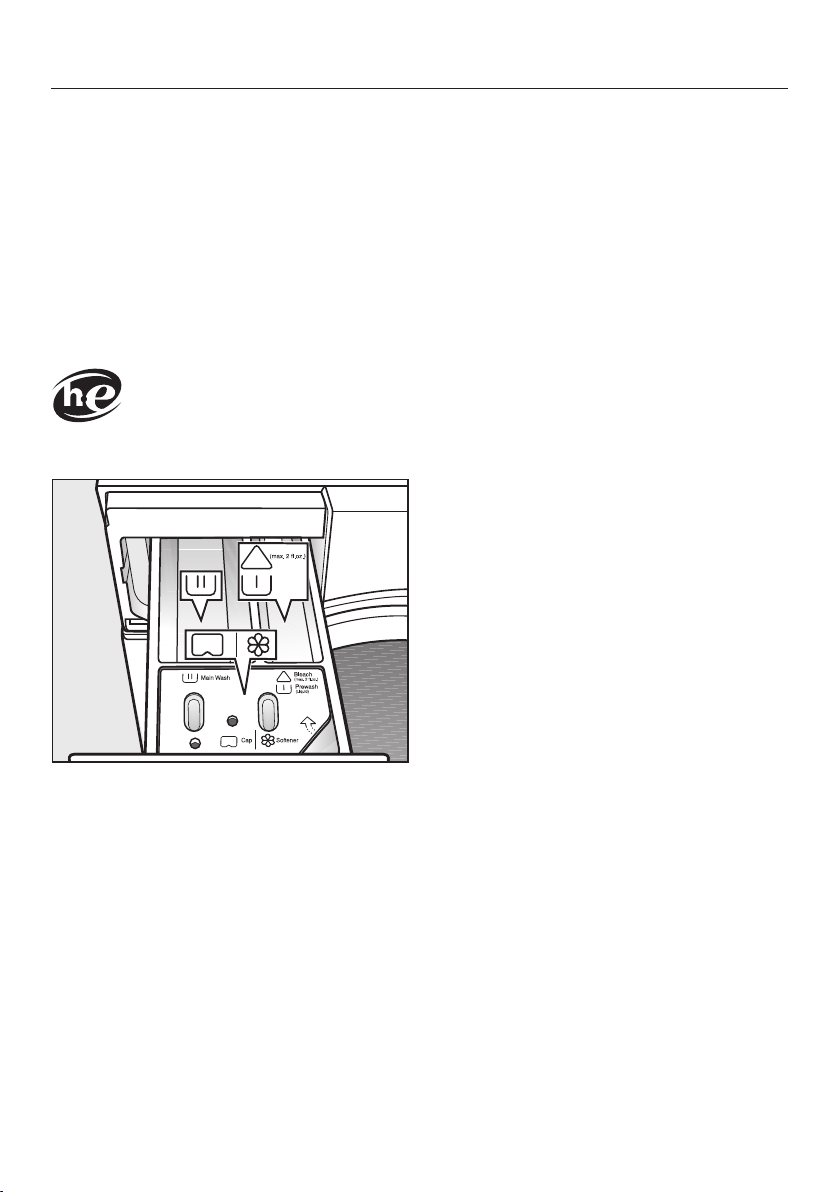
Filling with detergent
Pull out the detergent drawer and add
detergents to the compartments.
Chlorine bleach for removing
stains or liquid detergent for the
pre-wash
Detergent for the main wash and
soaking
Fabric softener, liquid starch, or
capsules
Tips for dispensing
Adjust the detergent dosage to the level
of soiling of the laundry and the maxi-
mum load. Reduce the amount of de-
tergent with smaller loads (e.g., reduce
the amount of detergent by ⅓ when
washing a half load).
Too little detergent:
– The laundry is not cleaned properly
and may become gray and hard to
the touch over time.
– Can lead to a build-up of mould in
the washing machine.
– Grease is not completely removed
from the laundry.
– Can lead to limescale deposits on the
heater elements.
Too much detergent
– Poor wash, rinse, and spin results.
– Causes higher water consumption as
an extra rinse cycle is automatically
activated.
– A greater burden on the environment.
Dispensing aids
Use dispensing aids (e.g., balls) if these
are supplied with the detergent, particu-
larly when using liquid detergent.
5. Adding detergent
28
Using chlorine bleach
Chlorine bleach is a very aggres-
sive substance.
It can cause damage to the colors
and fibers of textiles.
Only use chlorine bleach on suitable
textiles.
Chlorination must be activated in the
settings before chlorine bleach is first
used.
Chlorine bleach may be used in the
following programs:
– Normal
– Wrinkle-free
– Sanitize
– Dress Shirts
– Extra White
– Table Linens/Drapes
Dispensing chlorine bleach
Follow the manufacturer's instruc-
tions on the packaging.
The extra option pre-wash must not
be selected.
Pour max. ¼ cup (60ml) of chlorine
bleach into the chamber.
The chlorine bleach is added automati-
cally 10minutes before the end of the
main wash.
Using powder detergent
The detergent dispenser drawer con-
tains an insert for liquid detergent in the
compartment. This insert must be
removed to use powder detergent.
It is not possible to use powder de-
tergent in the compartment.
A pre-wash cannot be carried out
when using powder detergent.
Remove the detergent dispenser
drawer.
Remove the insert for liquid deter-
gents from the compartment.
Tip: Reinsert the insert into the deter-
gent dispenser drawer before next us-
ing liquid detergent.
Using detergent tablets or pods
Always put detergent tablets or pods
directly in the drum with the laundry.
They cannot be added via the detergent
dispenser drawer.
5. Adding detergent
29
Using fabric softener and liquid
starch
Fabric softeners
make garments soft to handle and help
prevent static cling when tumble drying.
Liquid starch
is synthetic and provides good stiffness
to fabric.
Natural starch
stiffens and gives body to fabric.
Add the fabric softener or the liquid
starch to the compartment. Do not
exceed the maximum level mark.
It will be automatically dispensed in the
final rinse cycle. At the end of the pro-
gram a small amount of water remains
in the compartment.
If starching frequently, clean the dis-
penser compartment, especially the
siphon tube, regularly.
CapDosing
Capsules contain corrosive in-
gredients and irritants.
Children could come into contact
with the ingredients or swallow them.
Keep capsules out of the reach of
children.
Three different types of capsule are
available:
= Fabric care (e.g., fabric soft-
ener, proofing agent)
= Additives (e.g., detergent en-
hancers)
= Detergent (for the main wash
only)
Each capsule contains the correct
amount for one wash cycle.
Capsules are available to order from
Miele's online store, Miele's customer
service, or from your Miele dealer.
Activating CapDosing
Touch the sensor button.
The following appears in the display:
OK
No Cap
Touch the sensor buttons until
the capsule you want appears in the
display.
Confirm the capsule with the OK sen-
sor button.
5. Adding detergent
30
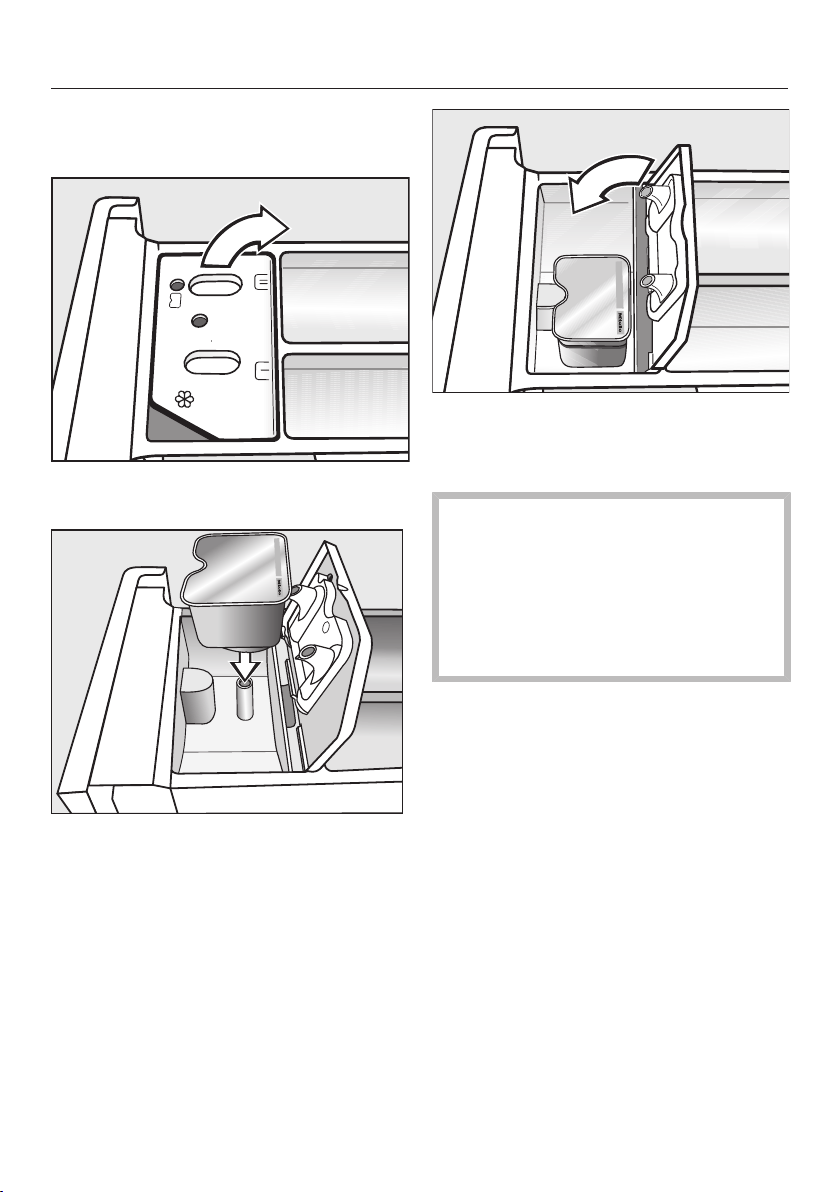
Inserting a capsule
Open the detergent dispenser drawer.
Open the lid of the / compart-
ment.
Press the capsule in firmly.
Close the lid and press it firmly shut.
Close the detergent dispenser
drawer.
The capsule is opened by the act of
inserting it in the detergent dispenser
drawer. The contents can run out of
the capsule if you then remove it
from the drawer before it is used.
In this case, dispose of the capsule
and do not re-use it.
5. Adding detergent
31
The contents of the capsule will be
added to the wash program at the cor-
rect time.
During CapDosing, water intake to
the compartment is solely via the
capsule.
No additional fabric softener may be
added to the compartment when
using a capsule.
Remove the empty capsule at the
end of the wash program.
For technical reasons, a small amount
of water will remain in the capsule.
Deactivating or changing CapDosing
CapDosing can only be deactivated or
changed prior to program start.
Touch the sensor button.
Select No Cap (deactivate) or a differ-
ent type of capsule (change).
Dyes / dye removers
Do not use dye removers in this
washer!
The use of dyes in the washer is recom-
mended only to a degree of usual
household use. The salt used for dying
may corrode the stainless steel with fre-
quent use.
Use only as directed by the manufac-
turer.
6. Start the program - Program end
32
Starting a program
Touch the flashing Start/Stop sensor
button.
The door will lock ( will appear in the
display to show this) and the wash pro-
gram will start.
If a delay start time has been selected,
then this will count down in the time
display. At the end of the delay start
time or immediately after the program
has started (if no delay start time has
been selected), the program duration
will appear in the time display.
Energy savings
After 10 minutes, the indicators dim.
The Start/Stop sensor button will light
up, flashing.
You can reactivate the indicators:
Touch the Start/Stop sensor button
(this does not have any effect on a
running program).
The drum lighting switches off once the
program has started.
Program end
The door is still locked during the Anti-
crease phase and the following will ap-
pear alternately in the display:
End/Anti-Crease
OK
and
Press Stop button
OK
Touch the Start/Stop sensor button.
The door will be unlocked.
Pull open the door.
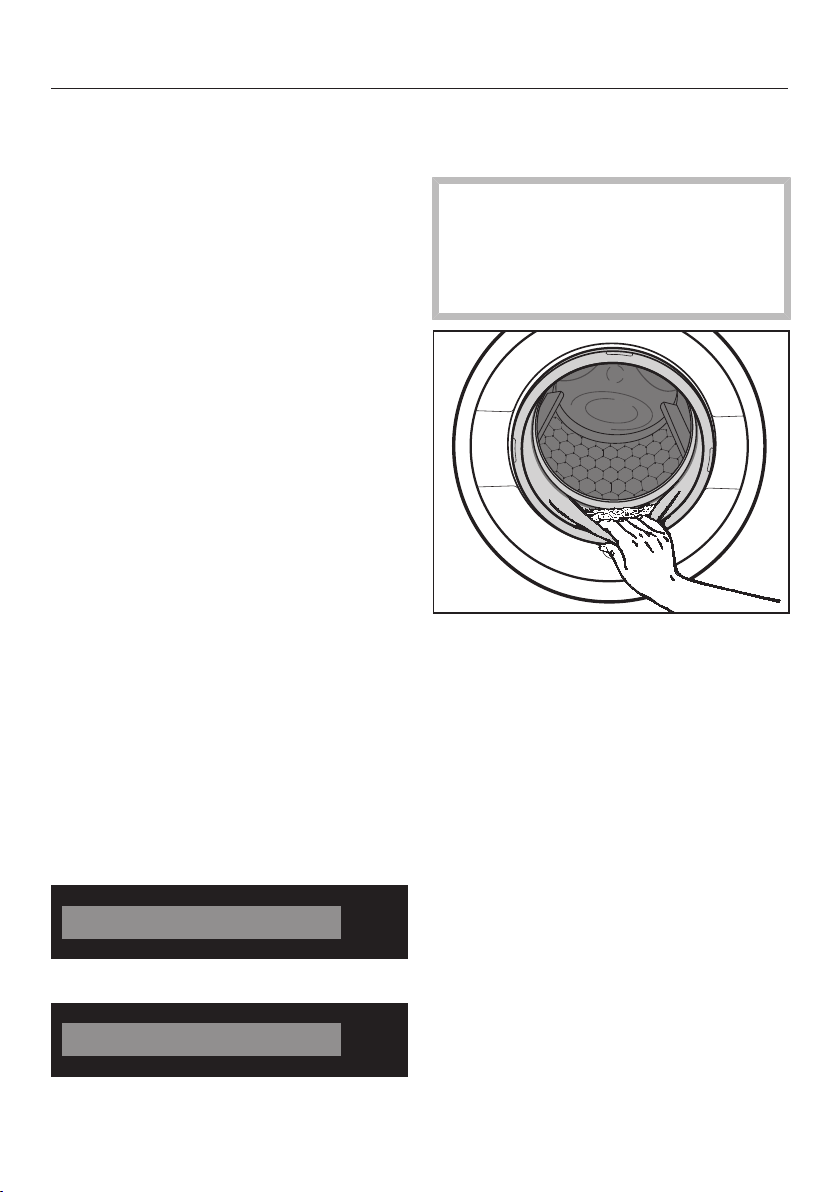
Remove the laundry.
Items left in the drum could discolor
other items in the next wash or be-
come discolored themselves.
Check that all items have been re-
moved from the drum.
Check the folds in the door seal for
any small articles.
Tip: Leave the door slightly open to al-
low the drum to dry.
Turn the program selector to the
position. This switches the washing
machine off.
If applicable, remove the used cap-
sule from the detergent dispenser
drawer.
Tip: Leave the detergent dispenser
drawer slightly open to allow it to dry.
Spin cycle
33
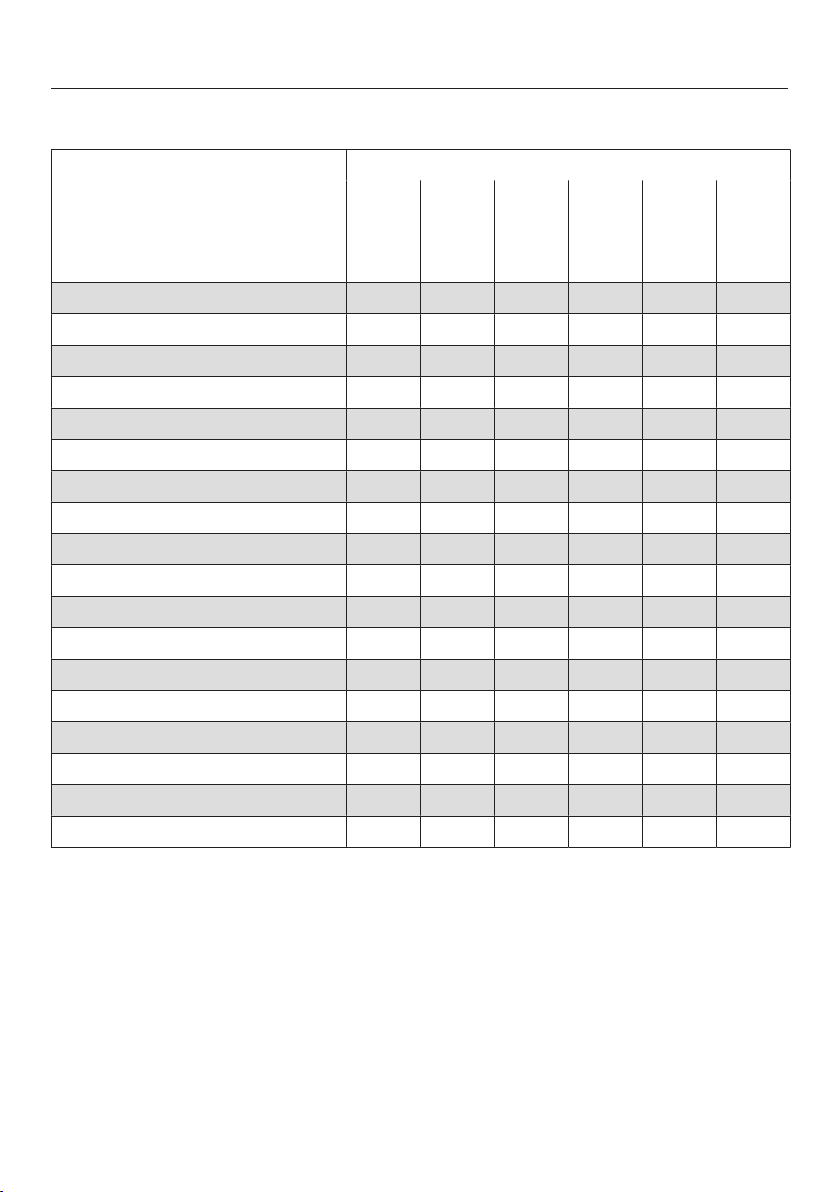
Final spin speeds
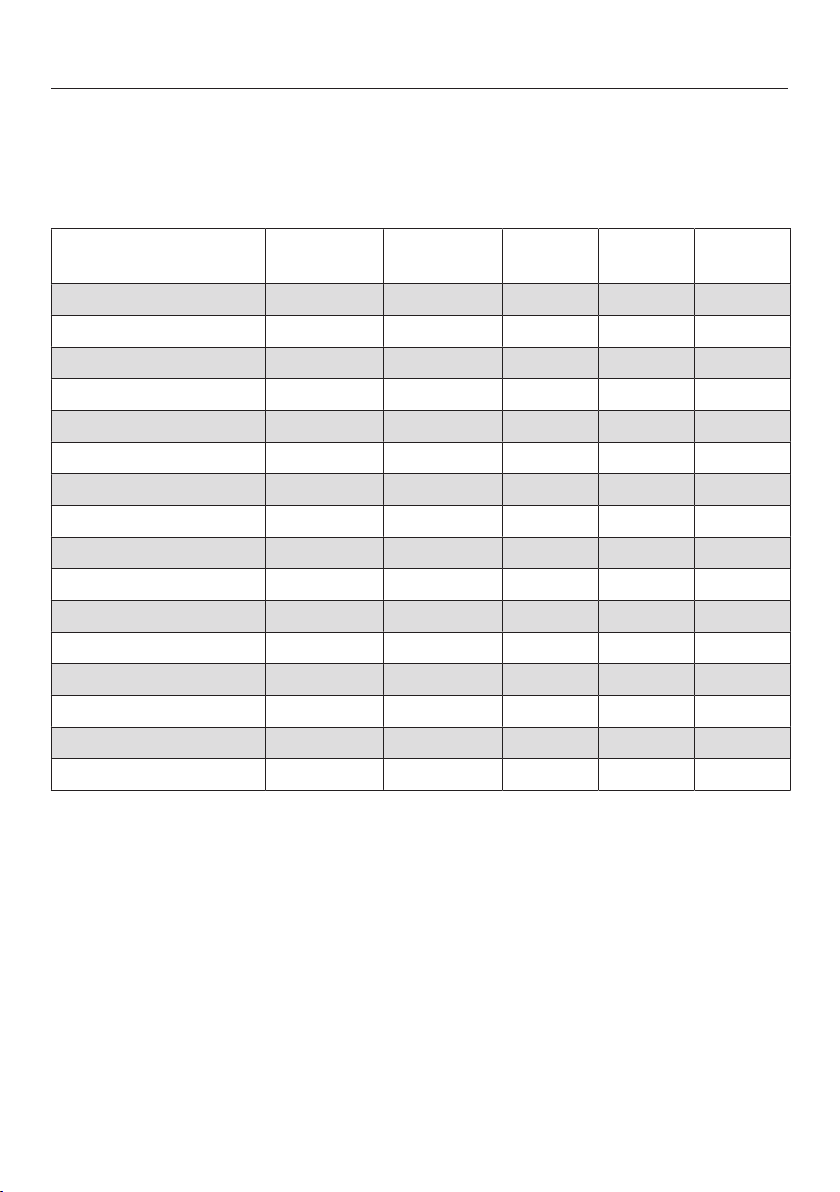
Program Selectable spin speeds in words and numbers
Max
1600 rpm
High
1200 rpm
Med
800 rpm
Slow
600 rpm
()
0 rpm
Normal – – – X X
Wrinkle-free – X X X X
Delicates – – X X X
Sanitize X – – X X
Handwash – X X X X
Dress Shirts – – X X X
Express X X X X X
Darks/Denims – X X X X
Extra White X – – X X
Outdoor – – X X X
Table Linens/Drapes – X X X X
Sportswear – X X X X
Woolens – X X X X
Silks – – – X X
Proofing – X X X X
Drain/Spin X X X – X
Separate rinse X X X X X
Clean Machine – – – – –
= optimum spin speed for program is pre-set
X = can be selected – = cannot be selected

Spin cycle
34
Final spin speed in the wash
program
When a program is selected, the opti-
mum spin speed for the wash program
is always shown in the display.
A faster spin speed can be selected for
certain wash programs.
The highest selectable spin speed is in-
dicated in the table.
Rinse-spin
There is a spin cycle after the main
wash and between the rinse cycles. A
reduction in the final spin speed will
also reduce the interim spin speed as
appropriate.
Omitting the final spin (Rinse hold)
If Rinse hold is selected, the laundry re-
mains in the water following the final
rinse cycle. This helps prevent creasing
if the laundry is not going to be re-
moved from the drum immediately after
the end of the program.
Set the spin speed ().
To start the final spin:
The washing machine will display the
maximum spin speed possible. You can
reduce the spin speed.
Touch the Start/Stop sensor button.
Ending the wash program
Use if you want to remove the laundry
when it is dripping wet and without
spinning.
Reduce the spin speed to (0rpm).
Touch the Start/Stop sensor button.
The water will be pumped away.
Deselecting the rinse-spin and final
spin
Before the start of the wash program,
reduce the spin speed to (0rpm).
Touch the Start/Stop sensor button.
After the last rinse cycle, the water will
be pumped away and the anti-crease
phase will switch on.
An additional rinse cycle is carried out
with this setting for certain wash pro-
grams.
Program guide
35
Programs on the program selector
The temperature marked with is pre-set.
Temperature
with garment care label sym-
bols
Item/Tip
Normal Full load (17.6lb/8kg)
Hot + 140°F/60°C Cotton, linen, and mixed fibre textiles made of
both cotton and linen.
Hot 120°F/50°C
Warm + 105°F/40°C
Warm 85°F/30°C
Cold Cold
USA test program in accordance with: DOE Federal Register 10 CFR Part 430
Appendix J2 to subpart B
Canada test program in accordance with: CAN/CSA-C360-13
Wrinkle-Free Half load (8.8lb/4kg)
Hot + 140°F/60°C Synthetic or mixed fibre fabric, or easy care
cotton.
Hot 120°F/50°C
Warm + 105°F/40°C
Warm 85°F/30°C
Cold Cold
Delicates Small load (6.6lb/3kg)
Hot + 140°F/60°C For fine textiles made from synthetic fibers.
Hot 120°F/50°C
Warm + 105°F/40°C
Warm 85°F/30°C
Cold Cold
Program guide
36
Temperature
with garment care label sym-
bols
Item/Tip
Sanitize Full load (17.6lb/8kg)
Sanitize 170°F/75°C Cotton or linen fabrics with direct skin contact
or for which special hygiene requirements ap-
ply.
Handwash Small load (4.4lb/2kg)
Warm + 105°F/40°C For fine textiles which are only suitable for hand
washing.
Warm 85°F/30°C
Cold Cold
Dress Shirts Small load (4.4lb/2kg)
Hot + 140°F/60°C Pre-treat collars and cuffs depending on the
level of soiling.
Wash silk shirts and blouses in the Silks
program.
Hot 120°F/50°C
Warm + 105°F/40°C
Warm 85°F/30°C
Cold Cold
MobileControl
The Miele@mobile app is used to select the programs and operate the appliance.
Express Half load (7.7lb/3.5kg)
Warm + 105°F/40°C Cotton textiles that have hardly been worn or
are only very lightly soiled.
Selecting the Light level of soiling will reduce
the washing time by 10minutes.
Warm 85°F/30°C
Cold Cold
Program guide
37
Temperature
with garment care label sym-
bols
Item/Tip
Darks/Denims Small load (4.4lb/2kg)
Warm + 105°F/40°C Black and dark garments made from cotton,
mixed fibers, and denim.
– Wash inside out.
– Denim often contains excess dye and may
run during the first few washes. Therefore,
wash light and colored items separately.
Warm 85°F/30°C
Cold Cold
Extra White Full load (17.6lb/8kg)
Hot + 140°F/60°C For white textiles made of cotton or linen with-
out special hygiene requirements.
Outdoor Small load (5.5lb/2.5kg)
Warm + 105°F/40°C Performance outerwear (e.g., jackets and
trousers) made from membrane fabric.
– Zip up or close any jackets with Velcro before
washing.
– Do not use fabric softener.
– If required, these garments can also be re-
proofed using the Proofing program. Reproof-
ing after each wash cycle is not recom-
mended.
Warm 85°F/30°C
Cold Cold
Program guide
38
Programs positioned on the More programs/ program selector
Temperature
with garment care label sym-
bols
Item/Tip
Table Linens/Drapes Full load (13.2lb/6kg)
Hot + 140°F/60°C Table Linens and drapes made of cotton and
linen.
Hot 120°F/50°C
Warm + 105°F/40°C
Warm 85°F/30°C
Cold Cold
Sportswear Half load (6.6lb/3kg)
Hot + 140°F/60°C Sportswear such as jerseys and leggings, as
well as microfiber and fleece garments.
– Do not use fabric softener.
– Observe the manufacturer's care label.
Hot 120°F/50°C
Warm + 105°F/40°C
Warm 85°F/30°C
Cold Cold
Woolens Small load (4.4lb/2kg)
Warm 85°F/30°C Wool or wool-blend textiles.
Reduce the final spin speed for items which
crease easily.
Cold Cold
Silks Very small load (2.2lb/1kg)
Warm 85°F/30°C Silks and other hand-washable textiles with no
wool content.
Place tights, bras, etc., in a washing bag.
Cold Cold
Program guide
39
Temperature
with garment care label sym-
bols
Item/Tip
Proofing Small load (5.5lb/2.5kg)
Warm + 105°F/40°C Treating microfiber fabric, ski wear, or Table
Linens made from mainly synthetic fibers to
provide a finish which is resistant to water and
dirt.
– The items should be freshly laundered and
spun or dried before proofing.
– For best results, the items should be heat-
treated afterwards, either in a tumble dryer or
by ironing.
Drain/Spin Full load (17.6lb/8kg)
– Drain only: Set spin speed to No .
– Make sure you select the appropriate spin
speed.
Separate rinse Full load (17.6lb/8kg)
For rinsing hand-washed items.
Reduce the final spin speed for items which
crease easily.
Program guide
40
Settings /maintenance
Settings
You can use the settings to alter the washing machine's electronics to suit chang-
ing requirements. See “Settings” for more detailed information.
Maintenance
The washing machine has a maintenance program.
Temperature
with garment care label sym-
bols
Item/Tip
Clean Machine Without load
With frequent washing at low temperatures
there is a danger of a build-up of bacteria in the
washing machine.
Cleaning the washing machine will significantly
reduce bacteria and prevent the build-up of un-
pleasant odors.
– Optimum results can be achieved by using
Miele machine cleaner. Alternatively, a univer-
sal powder detergent can be used.
– Dispense the machine cleaner or universal
detergent directly into the drum.
– Do not load machine. The drum must be
empty for the maintenance wash.
Extra options
41
You can supplement the wash pro-
grams with extra options.
Selecting extra options
Extra options are selected or dese-
lected using the sensor buttons in the
control field. Additional extra options
can be selected on the display using
the Extras sensor button.
Touch the sensor button for the extra
option you want.
The relevant button will light up brightly.
Not all the extra options can be used
with every program.
An extra option that is not permitted for
the wash program is not lit dimly and
cannot be activated by touch.
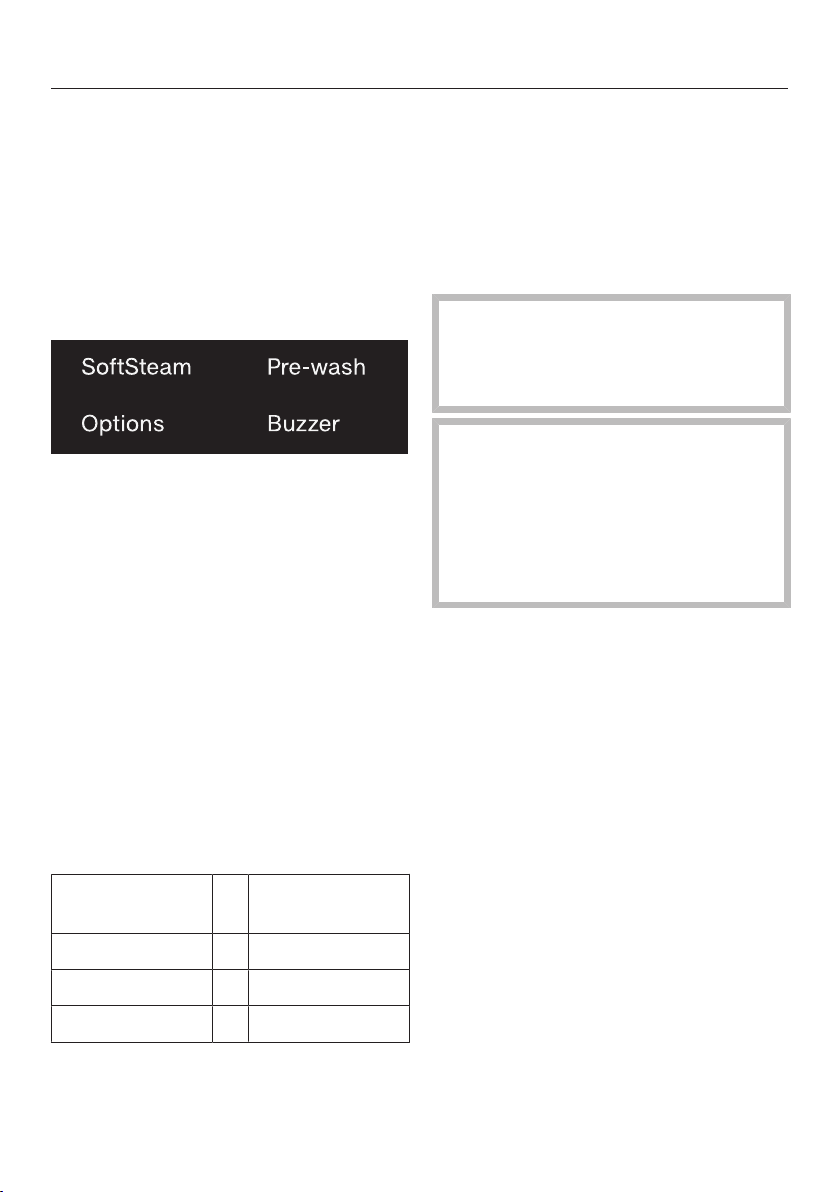
SoftSteam
In order to reduce creasing, the laundry
undergoes a smoothing process at the
end of the program. Reducing the maxi-
mum load by 50% will give a better re-
sult.
Without Soft-
Steam
With SoftSteam
Full load Half load
Half load Small load
Small load Very small load
Small loads give a better result.
The garments must be suitable for dry-
ing in a tumble dryer and suitable
for ironing .
Pre-wash
For laundry with large amounts of dirt,
e.g., dust and sand.
Pre-wash cannot be combined with
the use of chlorine bleach.
The chlorine bleach is added too
early.
Only liquid detergent may be added
to the chamber of the deter-
gent dispenser drawer.
Powder detergent clogs up the
chamber and water can es-
cape from the detergent dispenser
drawer.
Buzzer
A buzzer sounds at the end of the pro-
gram. The buzzer sounds until the
washing machine is switched off. The
volume of the buzzer can be changed,
see “Settings – Buzzer”.

Extra options
42
Extra options can be selected
using the “Options” sensor
button
Selecting extra options in the display
Touch the Options sensor button.
The first extra option which can be se-
lected appears in the display.
Touch the sensor buttons until
the extra option you want appears in
the display.
Confirm the extra option with the OK
sensor button.
The extra option has a next to it.
Deselecting an extra option
Touch the Options sensor button.
The first extra option which can be se-
lected appears in the display.
Touch the sensor buttons until
No Extras appears in the display.
Confirm No Extras with the OK sensor
button.
The previously selected extra option is
now deselected.
Soak
For heavily soiled textiles with protein
stains.
A duration of between 30 minutes and 6
hours can be chosen for the soak
process in 30-minute increments. See
“Settings” for more information.
The factory default setting is 30 min-
utes.
Gentle
Drum rotation and wash duration is re-
duced. Lightly soiled textiles are
washed more gently.
ExtraRinse
An additional rinse cycle can be acti-
vated to give a better wash result.
Extra options
43
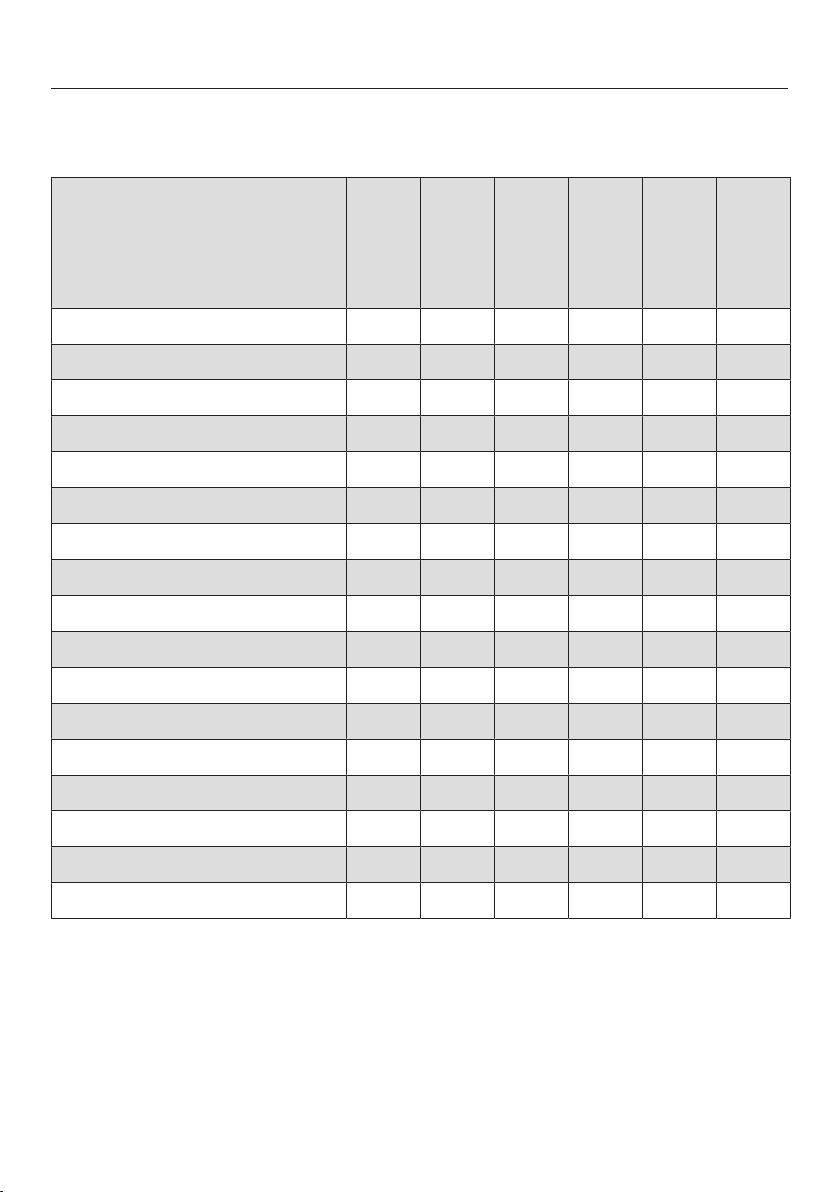
The following extra options can be selected in addition to the
programs
SoftSteam
Buzzer
Pre-wash
Soak
Gentle
ExtraRinse
Normal – X X X X X
Wrinkle-free X X X X X X
Delicates X X X X X X
Sanitize X X X X X X
Handwash – X – – – –
Dress Shirts X X X X X X
Express X X – – – –
Darks/Denims X X X X X X
Extra White X X X X X X
Outdoor – X X X – X
Table Linens/Drapes X X X X X X
Sportswear – X X X – X
Woolens – X – – – –
Silks – X – – – –
Proofing – X – – – –
Drain/Spin – X – – – –
Separate Rinse X X – – – –
X = can be selected – = cannot be selected

Changing the program sequence
44
Canceling a program
You can cancel a wash program at any
time after it has started.
Touch the Start/Stop sensor button.
The following will appear in the display:
Cancel Program
OK
Touch the OK sensor button.
The suds will be pumped away. The fol-
lowing will appear in the display:
Program Canceled
OK
Wait until the door unlocks.
Pull open the door.
Remove the laundry.
If you want to select a different pro-
gram
Close the door.
Select the desired program.
Add detergent to the detergent dis-
penser drawer, if necessary.
Touch the Start/Stop sensor button.
The new program will begin.
Interrupting a program
Turn the program selector to the
position.
The washing machine switches off.
To continue: Turn the program selec-
tor to the position of the wash pro-
gram that was started.
Tip: If Change not possible appears in
the display, the program selector is in
the incorrect position.
Changing the program
After a program has started, it is no
longer possible to select a different pro-
gram.
Changing the program sequence
45
Child lock
The wash program cannot be inter-
rupted unintentionally.
Activating the child lock
Touch the Start/Stop sensor button.
The following will appear in the display:
Cancel Program
OK
Scroll up the list with the sensor
buttons:
Activate lock
OK
Touch the OK sensor button.
Deactivating the child lock
Touch the Start/Stop sensor button.
The following will appear in the display:
Deactivate lock
OK
Touch the OK sensor button.
Adding or removing laundry
Laundry can only be added or re-
moved at the beginning of a wash pro-
gram.
If the following message no longer ap-
pears in the display then it is no longer
possible to add items of laundry.
Press the Start/Stop button.
The following will appear in the display:
Cancel Program
OK
Touch the sensor buttons until
the following appears in the display:
Add laundry
OK
Touch the OK sensor button.
The program will stop and the door will
unlock.
Pull open the door.
Add or remove items.
Close the door.
Touch the Start/Stop sensor button.
The wash program will continue.
Detergent
46
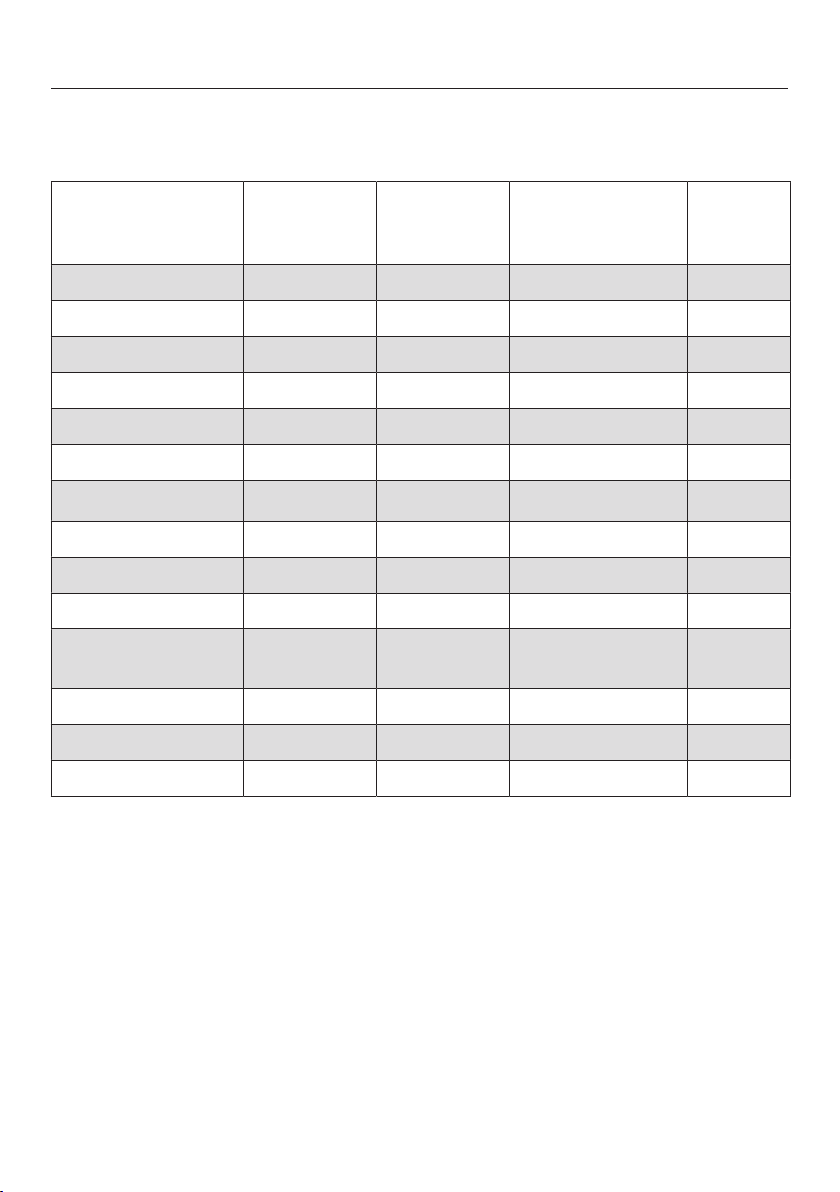
Miele-recommended detergents
The Miele detergents have been developed by Miele especially for the Miele wash-
ing machine. You can order the Miele detergents from Miele's online store or you
can purchase them from Miele's customer service, or your Miele dealer.
Miele
UltraWhite
Miele
UltraColor
Miele
Cap
Miele
Cap
Miele
Cap
Normal –
Wrinkle-free – –
Delicates – , , –
Sanitize – –
Handwash – – , , –
Dress Shirts –
Express – – –
Darks/Denims – – –
Extra White –
Outdoor – – – –
Table Linens/Drapes –
Sportswear – – – –
Woolens – – , – –
Silks – – – –
Proofing – – – –
Separate Rinse – – – –
Recommended Sport SilkCare
– Not recommended Downs Fabric softener
Outdoor Proofing
WoolCare Booster
Detergent
47
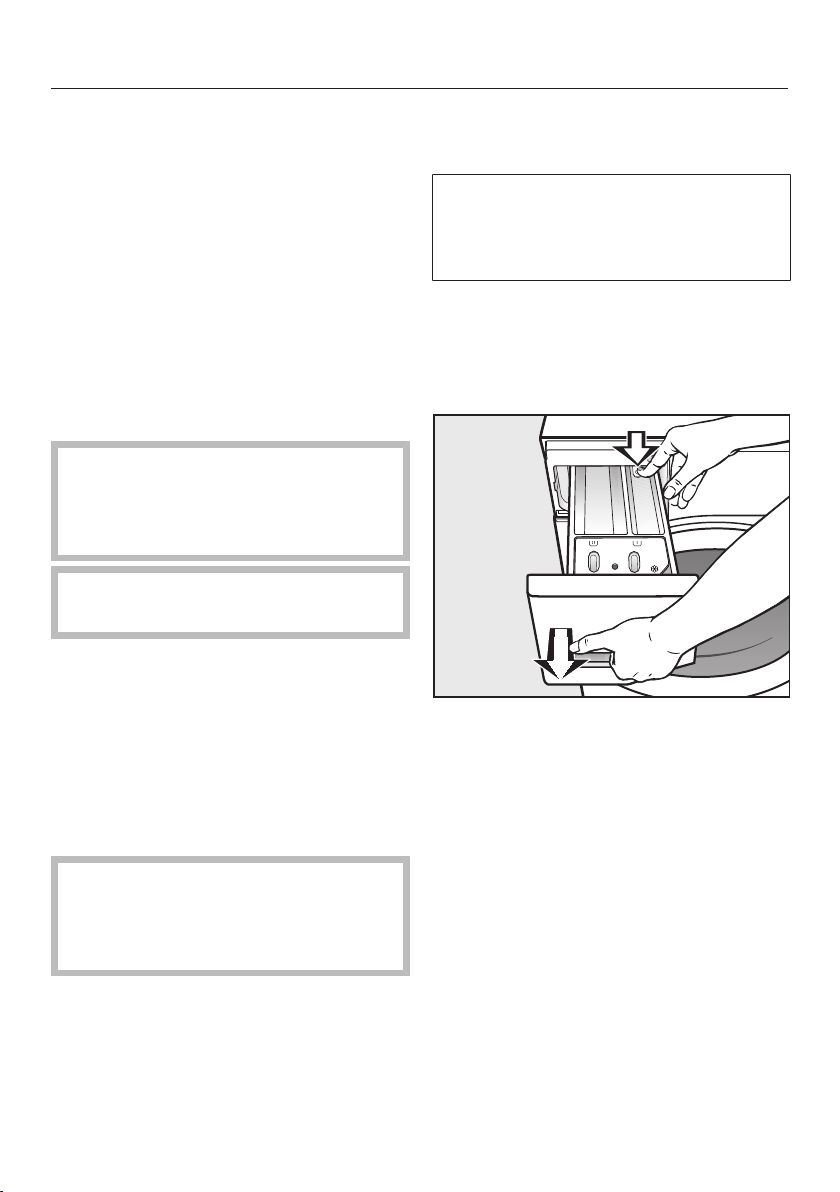
General detergent recommendations
The wash programs that are not listed do not have a detergent recommendation.
Universal
detergent
Color deter-
gent
Detergent for
Woolens and
delicates
Bleach
Normal –
Wrinkle-free –
Delicates – –
Sanitize –
Handwash – – –
Dress Shirts –
Express –
1)
– –
Darks/Denims – –
Extra White – –
Outdoor – – –
Table Linens/
Drapes
–
Sportswear – – –
Woolens – – –
Silks – – –
Recommended
1)
Liquid detergent
– Not recommended
Cleaning and care
48
Cleaning the drum
(Hygiene info)
Washing at low temperatures and/or us-
ing liquid detergents can cause bacteria
and odors to build up in the washing
machine. Use the Clean machine pro-
gram to clean the machine. Note the
message in the display:
Sanitize info: Run a high temp. program or
the "Clean Machine" program
Cleaning the exterior and con-
trol panel
Before cleaning or maintenance,
disconnect the power supply by un-
plugging the unit or manually “trip-
ping” the circuit breaker.
Do not use a hose to wash down
the washer.
Clean the exterior of the washer with
a mild solution of non-abrasive deter-
gent or soap and water, and wipe dry
with a soft cloth.
Clean the drum with a stainless steel
cleaner specially formulated for use in
a washing machine, available from
Miele.
Do not use chemical solvents,
abrasive cleaners, glass or all pur-
pose cleaners! They will damage the
surface.
Cleaning the detergent dis-
pensing drawer
Washing at low temperatures and the
use of liquid detergent can lead to a
build-up of bacteria in the detergent
dispenser drawer.
For hygiene reasons, clean the entire
drawer at regular intervals.
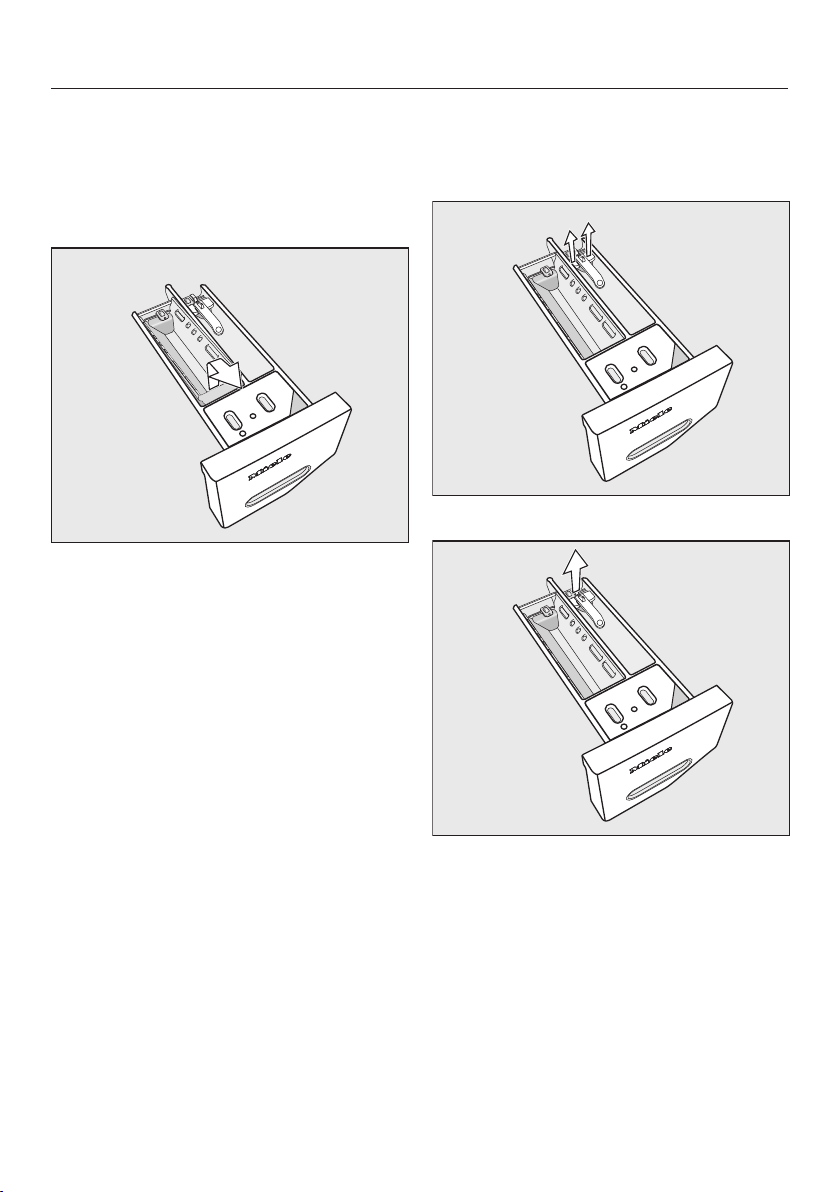
Removing the detergent dispenser
drawer
Pull out the detergent dispenser
drawer until a resistance is felt. Press
down the release button and at the
same time pull the drawer right out of
the machine.
Cleaning and care
49
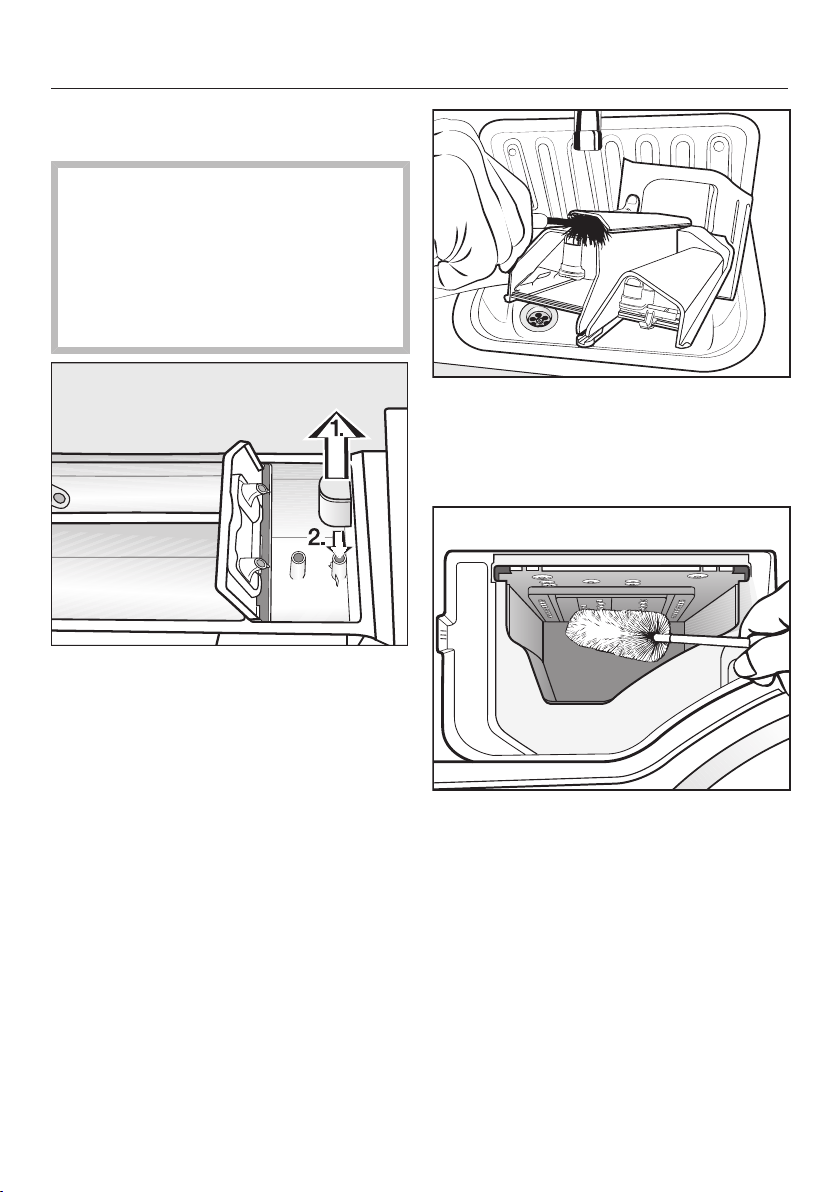
Removing and cleaning the insert for
liquid detergents
An insert for liquid detergents is located
in the compartment of the detergent
dispenser drawer.
Remove the insert. Clean the insert
thoroughly with warm water.
Cleaning the compartment
Compartment 1 has a siphon for better
dispensing of the chlorine bleach.
Remove the release catch.
Remove and clean the siphon.
Clean the and compart-
ments with warm water.
Cleaning and care
50
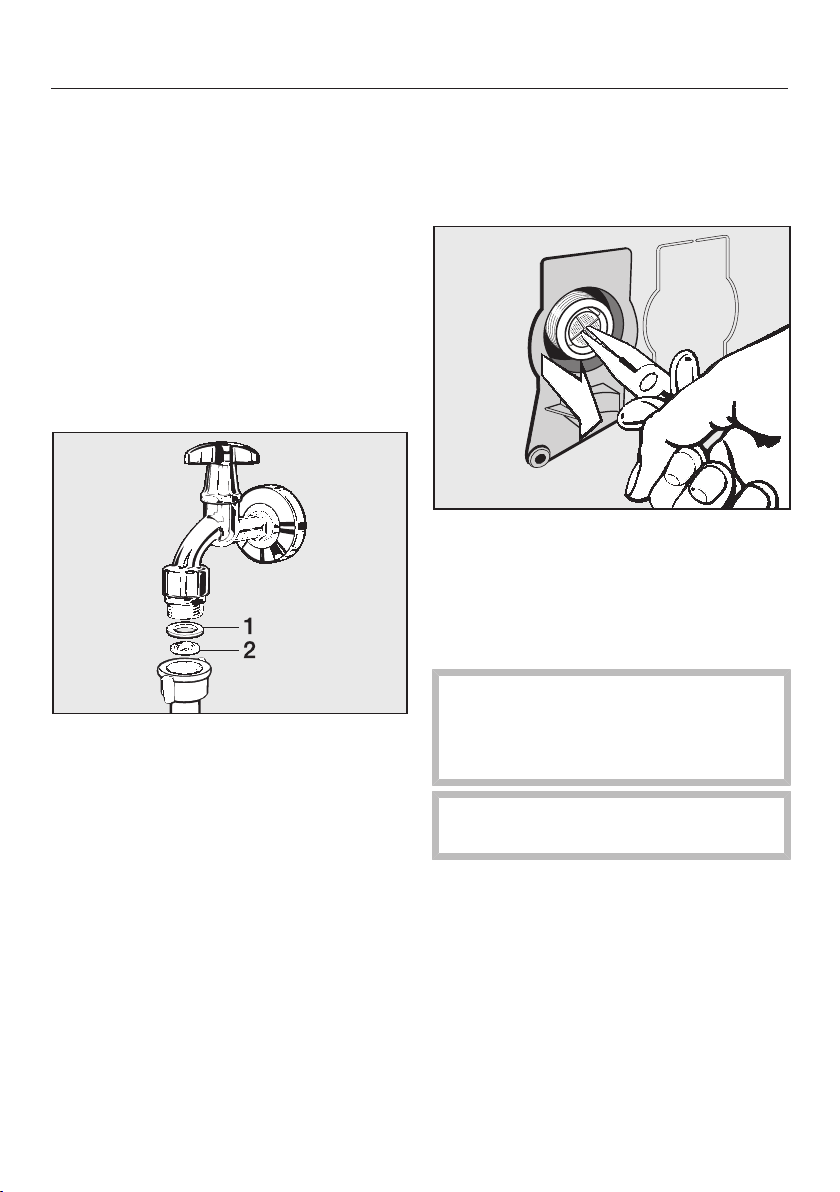
Cleaning the siphon and the /
compartment channel
Liquid starch results in clogging.
The siphon in the / compart-
ment no longer works and the com-
partment can overflow.
Clean the siphon particularly thor-
oughly after using liquid starch a few
times.
1. Remove the siphon from com-
partment and clean under warm run-
ning water. Clean the siphon tube in
the same way.
2. Refit the siphon.
Clean the fabric softener channel with
a brush and warm water.
Cleaning the detergent dispenser
drawer housing
Use a bottle brush to remove deter-
gent residues and limescale from the
jets inside the detergent dispenser
drawer housing.
Replace the detergent dispenser
drawer.
Tip: Leave the detergent dispenser
drawer slightly open to allow it to dry.
Cleaning and care
51
Cleaning the water inlet filter
The washing machine has two filters to
protect the inlet valve. You should in-
spect the filters approximately every six
months, or more often if there are fre-
quent interruptions to the external water
supply.
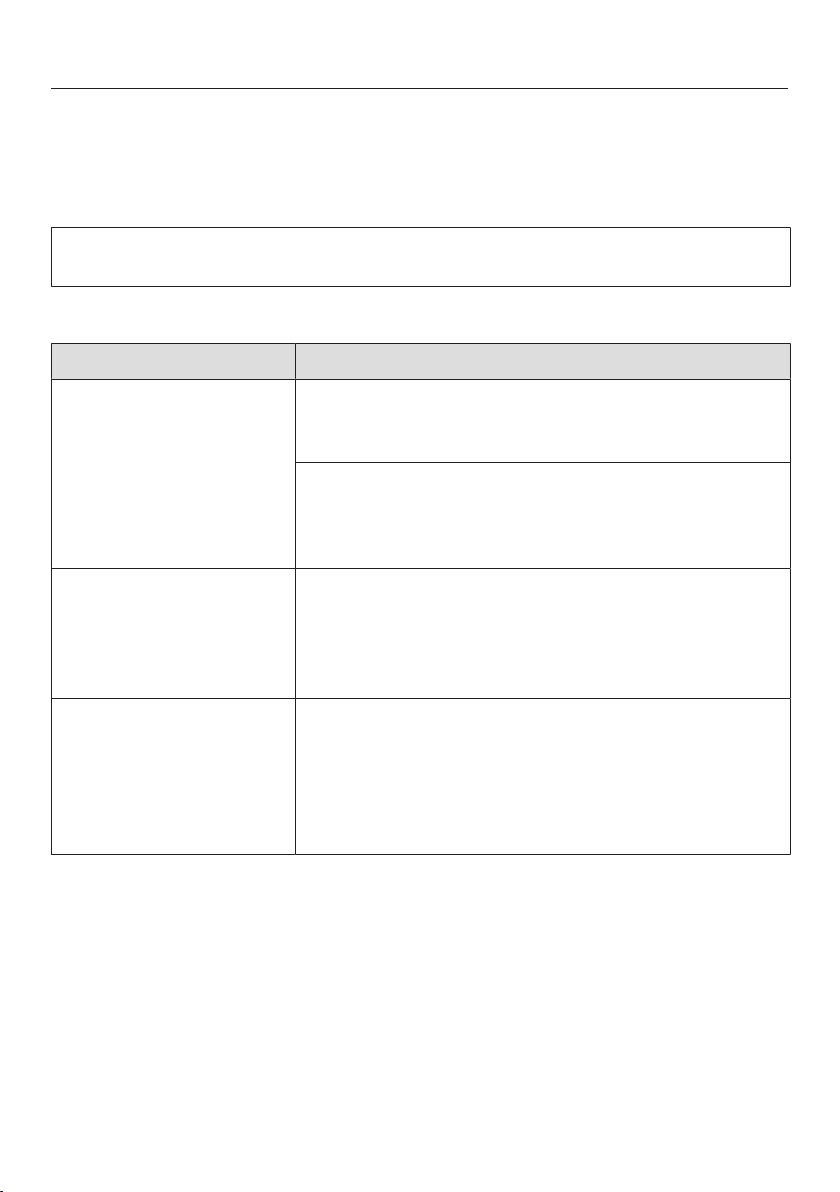
Cleaning the filter in the inlet hose
First turn off the faucet.
Unscrew the inlet hose from the
faucet.
Remove the rubber seal 1 from the
connector.
Using needle nose pliers, take hold of
the plastic filter bar 2 and remove it.
Clean the filter.
Reassemble the appliance in reverse
order.
Cleaning the filter in the inlet valve
Using pliers, carefully loosen the
ribbed plastic nut on the inlet valve
and unscrew.
Use needle nose pliers to withdraw
the filter by the bar.
Clean the filter.
Reassemble the appliance in reverse
order.
After cleaning, turn the faucet slowly
and make sure the screw connec-
tions are watertight. If water leaks,
tighten the screw connections.
The filters must be put back in place
after cleaning.
Frequently Asked Questions
52
With the help of the following guide minor faults in the performance of the ma-
chine, some of which may result from incorrect operation, can be remedied with-
out contacting the Service Department.
This guide may help you to find the reason for the fault, and how to correct it.
Some of the messages in the display are more than one line long. Touch the or
sensor button to read them in full.
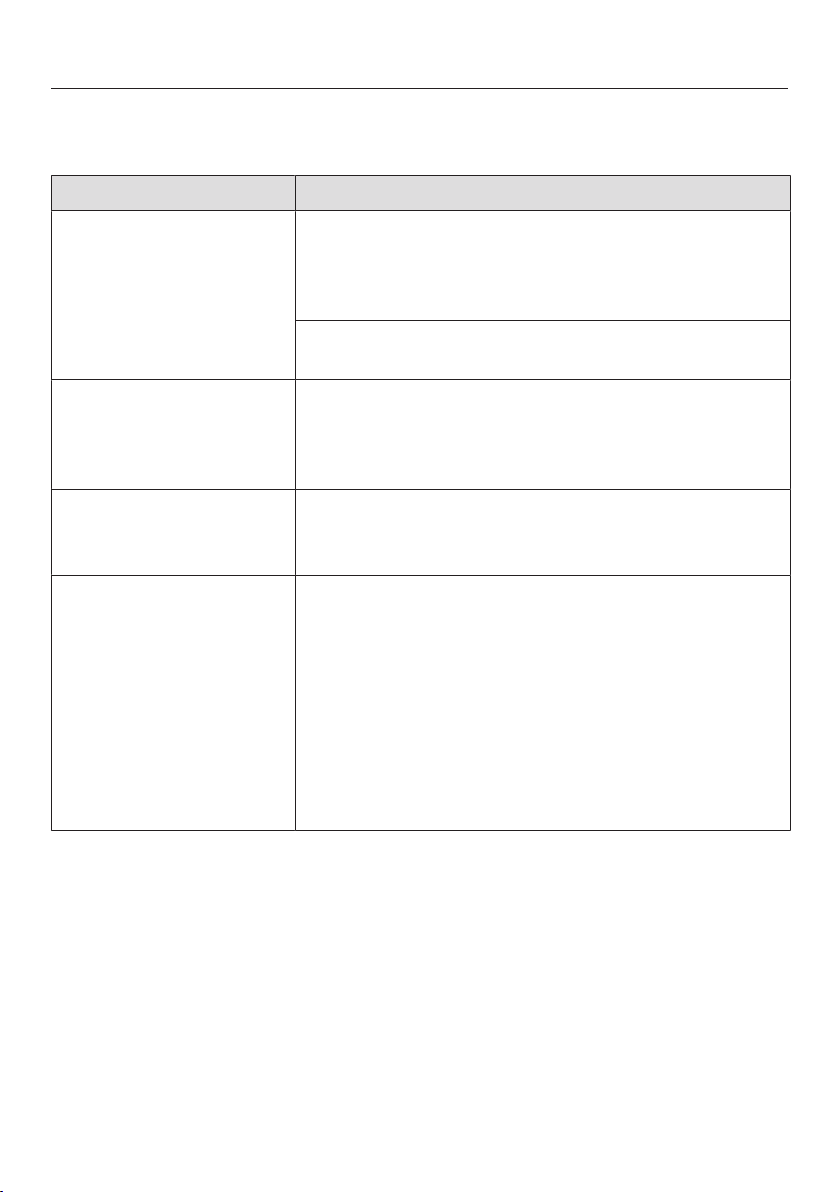
A wash program cannot be started
Problem Possible cause and solution
The display remains
dark, and the Start/Stop
sensor button does not
light up or flash.
There is no power to the machine.
Check whether the plug is plugged in.
Check whether the fuse has tripped.
The washing machine has switched off automatically
to save energy.
Turn the program selector to switch the washing
machine on again.
The display prompts
you to enter a code.
The PIN code is active.
Enter the code and confirm the entry. Deactivate
the PIN code if you do not wish this message to
appear in the display the next time the machine is
switched on.
The following appears
in the display:
Service Door lock
fault F34
The door is not closed properly. The door lock could
not engage.
Close the door again.
Start the program again.
If the fault message appears again, contact the
Service department.
Frequently Asked Questions
53
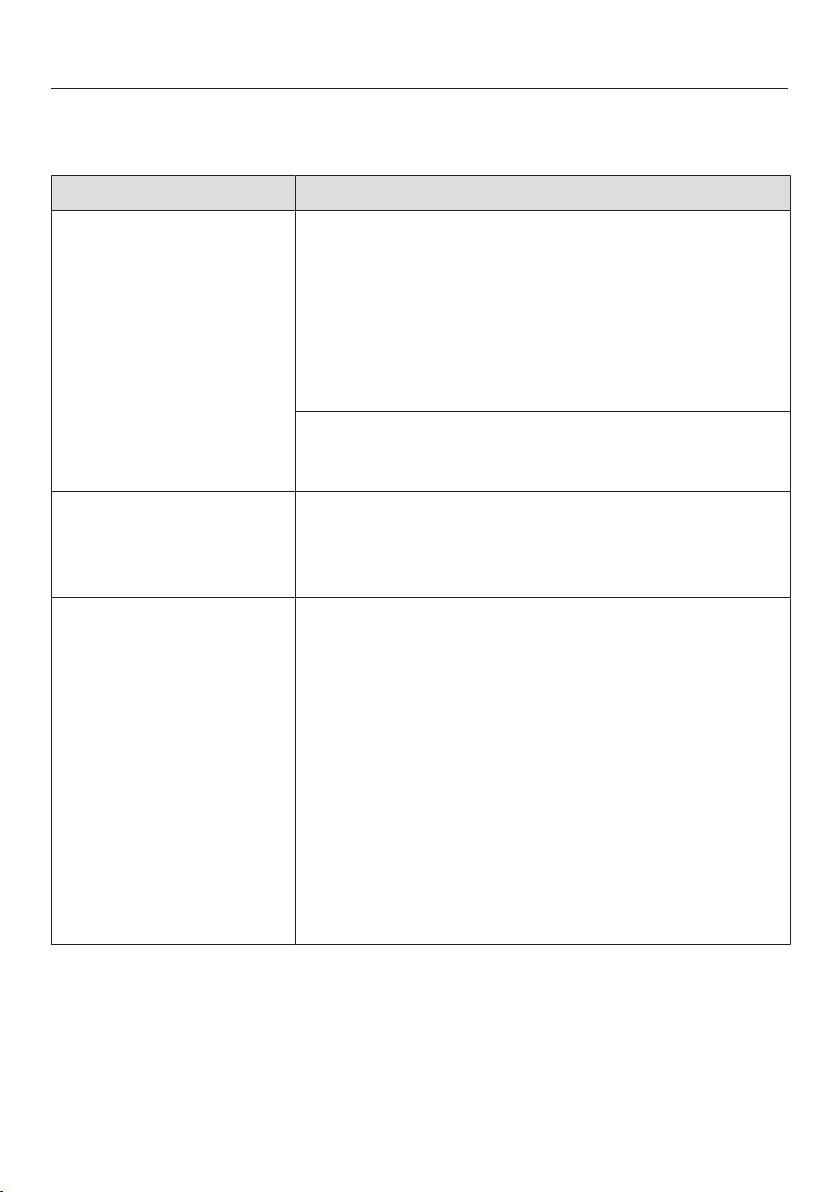
The following fault message appears in the display and the
program has been canceled
Message Possible cause and solution
Water intake See
The water inlet is blocked or restricted.
Check whether the faucet is turned on properly.
Check whether the inlet hose is kinked.
Check whether there is sufficient water pressure.
The filter in the water inlet is blocked.
Clean the filter.
Drainage See
The drain is blocked or restricted.
The drain hose has been fixed too high.
Clean the filter and the pump.
The maximum drain height is 39“ (1m).
Service Water-
proof syst.
The water protection system has activated.
Close the faucet.
Contact the Service department.
Service Fault F
There is a fault.
Disconnect the washing machine from the electric-
ity supply, either by withdrawing the plug from the
socket or by disconnecting it at the fuse.
Wait at least 2 minutes before reconnecting the
washing machine to the electricity supply.
Then switch the washing machine on again.
Restart the program.
If the fault message appears again, contact the
Service department.
To switch off the fault indicator: Turn the program selector to the position and
switch the washing machine off.
Frequently Asked Questions
54
A message appears in the display at the end of the program or
when the appliance is switched on
Message Possible cause and solution
Align the washing
machine
The smoothing process which the laundry undergoes
at the end of the program could not be carried out
properly.
Check whether the washing machine is aligned
correctly as described in “Installation and connec-
tion – Leveling the machine”.
Check whether the maximum delivery height of
39“ (1m) has been exceeded.
If the fault message appears again, contact the Ser-
vice department. The washing machine can still be
used but with reduced functionality.
Check dosage
Excessive foam has built up during washing.
Use less detergent next time and follow the manu-
facturer's instructions on dosage given on the
packaging.
Sanitize info: Run a
high temp. program
or the "Clean Ma-
chine" program
A wash program using a temperature above 140°F
(60°C), example Normal/Hot+, has not been run for a
long period of time.
Turn the program selector to More programs/.
Touch the sensor buttons until Mainentance
appears in the display.
Touch the OK sensor button to confirm.
The following appears in the display: Clean Machine
Touch the OK sensor button to confirm.
Run the Clean Machine program using the Miele
clean machine or a universal powder detergent.
The washing machine is cleaned which prevents bac-
teria and odor buildup.
The message which appears at the end of the program or when the washing ma-
chine is switched on must be confirmed with the OK sensor button.
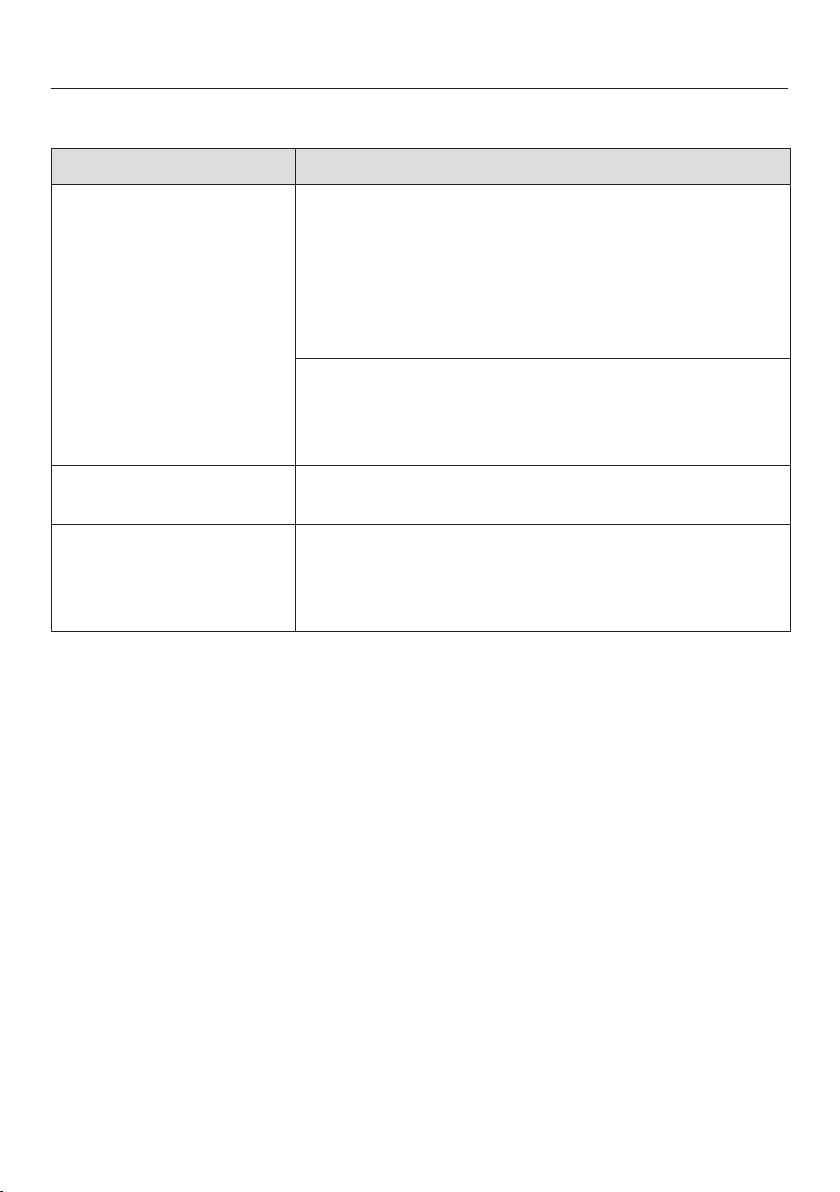
Frequently Asked Questions
55
General problems with the washer
Problem Possible cause and solution
The washing machine is
emitting an odor.
The hygiene info was not observed. A wash program
using a temperature above 140°F (60°C) has not been
run for a long period of time.
In order to prevent bacteria and unpleasant odors
building up in the machine, run the Clean machine
program using Miele clean machine or universal
powder detergent.
The door and detergent dispenser drawer were
closed after washing.
Leave the door and the detergent dispenser
drawer slightly open to allow them to dry.
The washer shakes dur-
ing the spin cycle.
The four feet are not resting evenly on the floor.
Level the machine (see “Leveling the washer”).
The laundry has not
been spun properly and
the laundry is still wet.
The machine detected an imbalance during the final
spin and reduced the spin speed automatically.
Wash large and small items together in order to
achieve a more even load distribution.
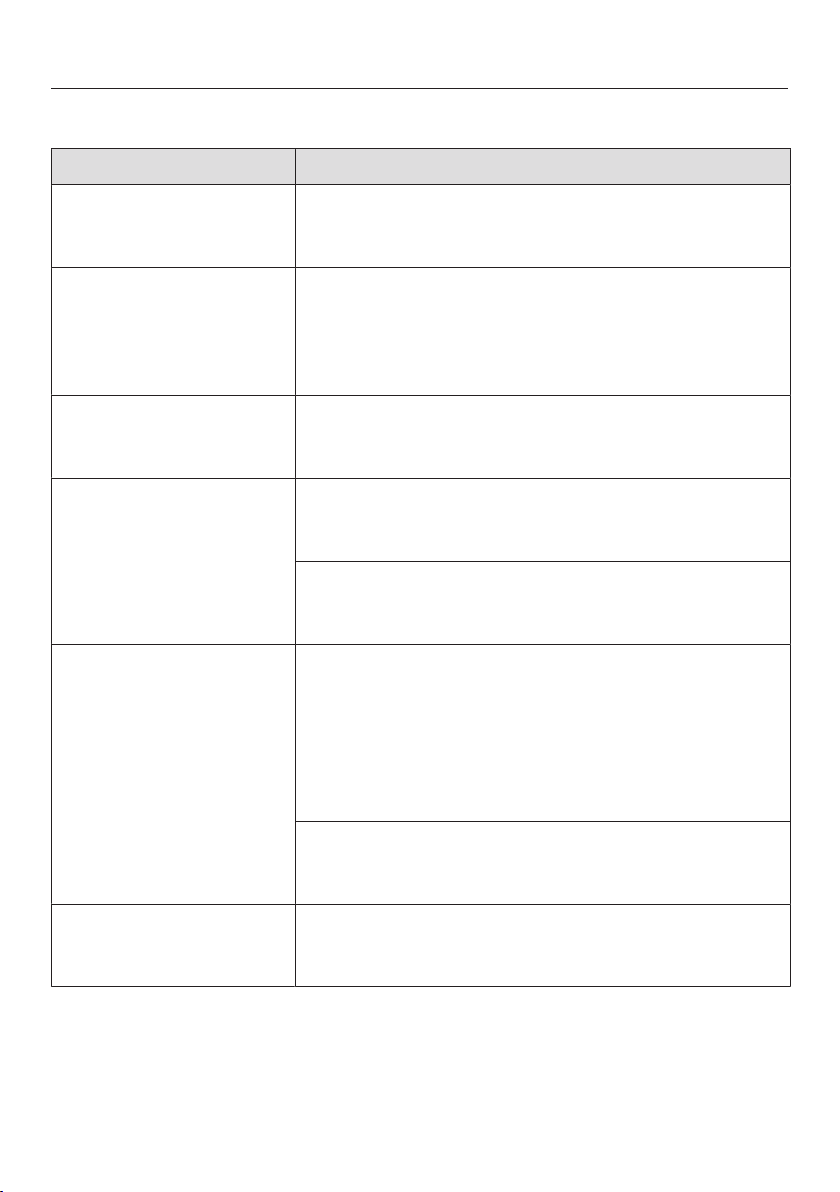
Frequently Asked Questions
56
General problems with the washing machine
Problem Possible cause and solution
There are unusual
sounds coming from
the drain pump.
There is no fault!
Lapping sounds at the beginning and end of the
drain process are normal.
The fabric softener is
not completely dis-
pensed or too much
water remains in the
compartment.
The siphon tube is either positioned incorrectly or
clogged.
Clean the siphon tube, see “Cleaning and care -
Cleaning the detergent drawer”.
The display is dark. The display has switched off automatically to save
energy (Standby mode).
Press any button. Standby will end.
At the end of the pro-
gram there is still liquid
in the capsule.
The small pipe in the detergent dispenser drawer onto
which the capsule is placed is blocked.
Clean the small pipe.
Not a fault.
For technical reasons, a small amount of water will
remain in the capsule.
There is water next to
the capsule in the fabric
softener compartment.
The sensor button was not activated or an empty
capsule was not removed at the end of the last wash
cycle.
Activate the sensor button when a capsule is
next used.
Remove and then dispose of the empty capsule at
the end of each wash cycle.
The small pipe in the detergent dispenser drawer onto
which the capsule is placed is blocked.
Clean the small pipe.
The display shows a
foreign language.
The display language was adjusted.
Select the display language. See “Setting the dis-
play language”.

Frequently Asked Questions
57
Poor wash results
Problem Possible cause and solution
Liquid detergent is not
achieving the required
results.
Liquid detergents do not usually contain bleaching
agents. Consequently, fruit, coffee, and tea stains
cannot always be removed.
Use powder detergent containing a bleaching
agent.
Use the appropriate capsule or add stain removers
to the compartment.
Never put stain removers and liquid detergent to-
gether in the detergent dispenser drawer.
Gray, greasy particles
cling to washed laundry.
Insufficient amounts of detergent were used. The
laundry was heavily soiled with grease (oils, oint-
ments).
Use more detergent or liquid detergent with this
type of soiled laundry.
Before washing the next load, run the Clean ma-
chine wash program using Miele clean machine or
a universal powder detergent.
White residues which
look like powder deter-
gent are seen on dark
textiles after washing.
The detergent contained compounds (zeolites) to aid
water softening which are not soluble in water. These
have ended up on the laundry.
Try and brush off the residues with a soft brush
once the laundry is dry.
In the future, wash dark textiles using a detergent
which contains no zeolites. Liquid detergents do
not usually contain zeolites.
Use the Darks/Denim program to wash the textiles.

Frequently Asked Questions
58
The drum door cannot be opened
Problem Possible cause and solution
The door cannot be
pulled open during a
program.
The door is locked during a program.
Touch the Start/Stop sensor button.
Select Cancel Program or Add laundry in the display
using the sensor buttons.
The door will unlock and you will be able to pull it
open.
There is still water in the drum and the machine is un-
able to drain.
Clean the drain filter and the drain pump as de-
scribed in “Opening the door in the event of a
blocked drain outlet and/or power cut”.
The water level in the drum is too high.
Cancel the program. The washing machine will
pump away the water.
Comfort Cooling
appears in the display
after a program has
been canceled.
To protect the user against scalding, the door cannot
be opened if the suds temperature is higher than
130°F (55°C).
Wait until the temperature in the drum has de-
creased and the message has gone out in the dis-
play.
The following appears
in the display:
Service Door release
fault F35
The door lock has jammed.
Contact the Service department.
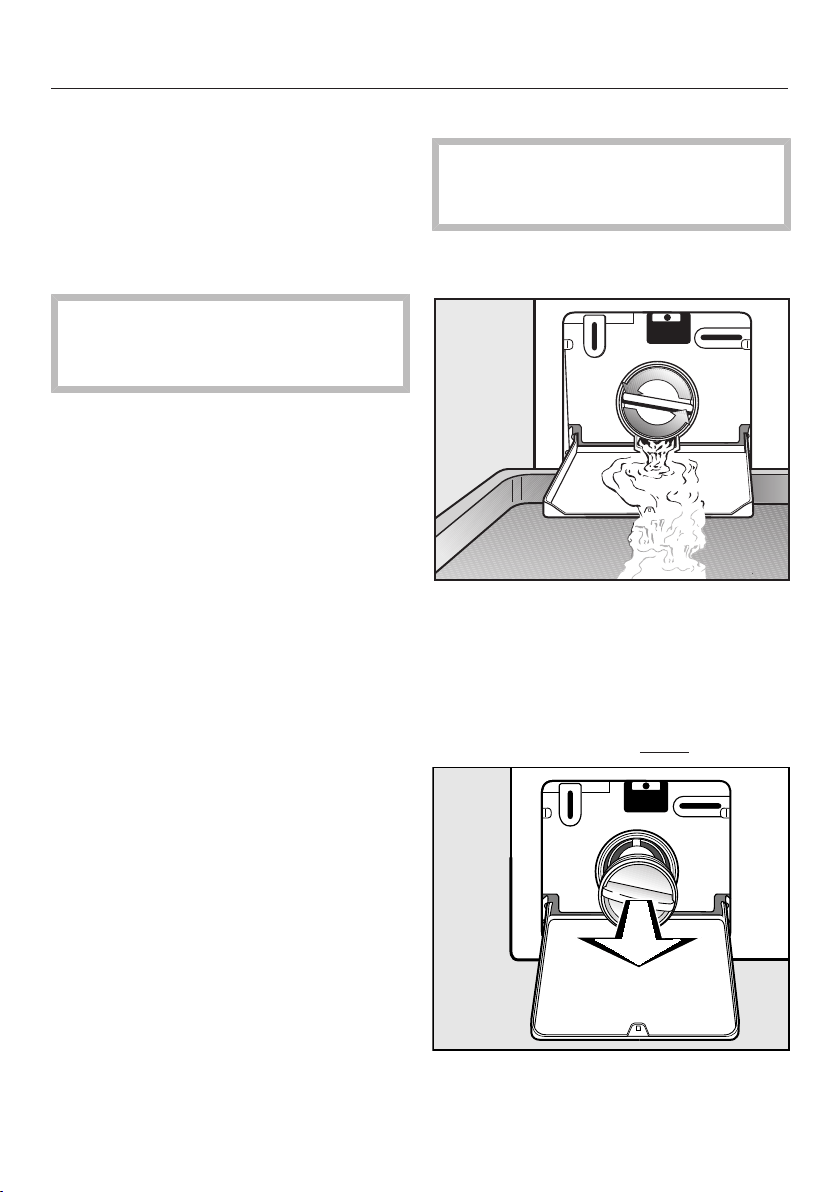
Frequently Asked Questions
59
Opening the drum door during
a power failure
Blocked drain outlet
If the drain outlet is blocked, a larger
quantity of water can remain in the
washing machine.
Danger of scalding if laundry has
been washed at a high temperature!
Be careful when draining the suds.
Draining the washing machine
When draining water from the ma-
chine, do not unscrew the drain filter
completely or take it right out.
Place a suitable container under the
flap, e.g., a bowl or dish.
Slowly unscrew the drain filter to let
the water out.
Tighten the drain filter back up again
if you need to interrupt the flow of
water.
Once the flow of water stops:
Remove the drain filter completely.
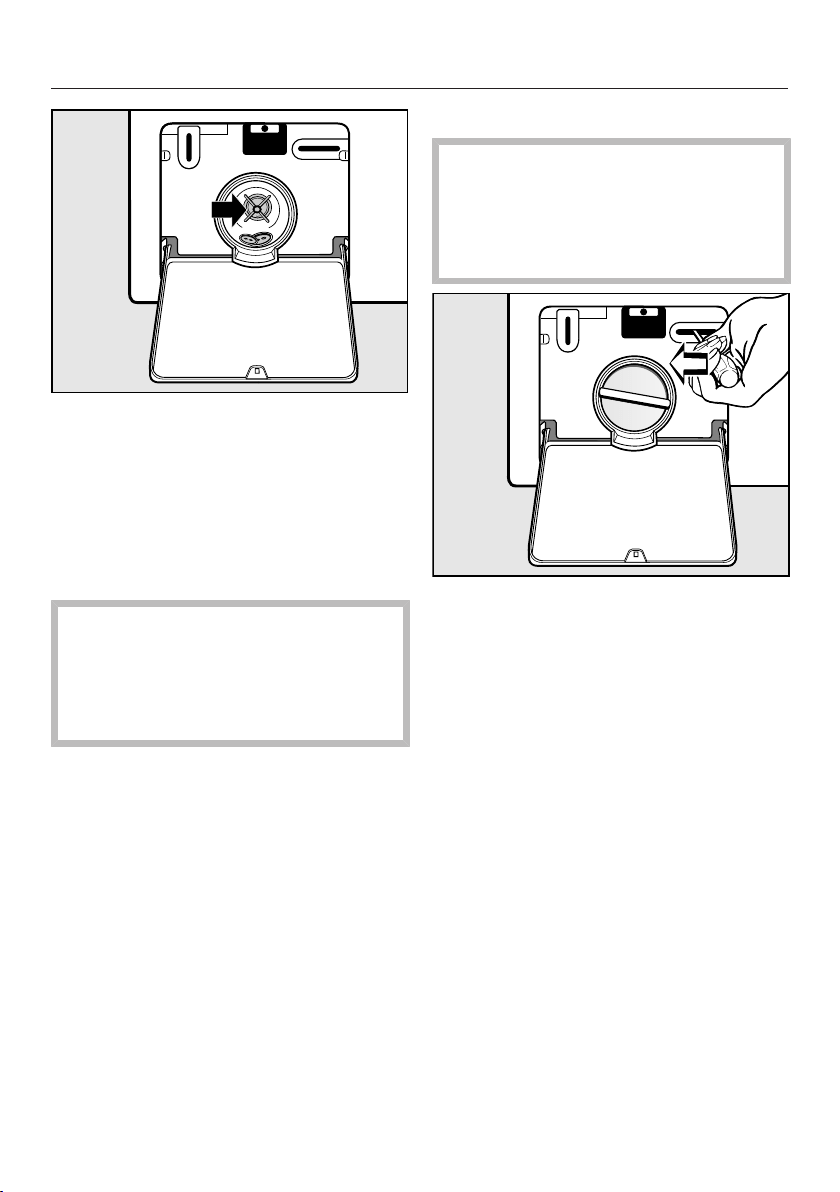
Frequently Asked Questions
60
Clean it thoroughly.
Remove any foreign objects (e.g.,
buttons, coins, etc.) and clean the in-
terior. Turn the impellers by hand to
check that they rotate freely.
Replace the drain filter correctly and
tighten it securely.
Overflowing water from the
washing machine can cause dam-
age.
Replace and tighten the drain filter
securely.
Opening the door
Reaching into a moving drum is
extremely dangerous.
Always make sure that the drum is
stationary before reaching in to re-
move laundry.
Use a screwdriver to unlock the door.
Pull open the door.
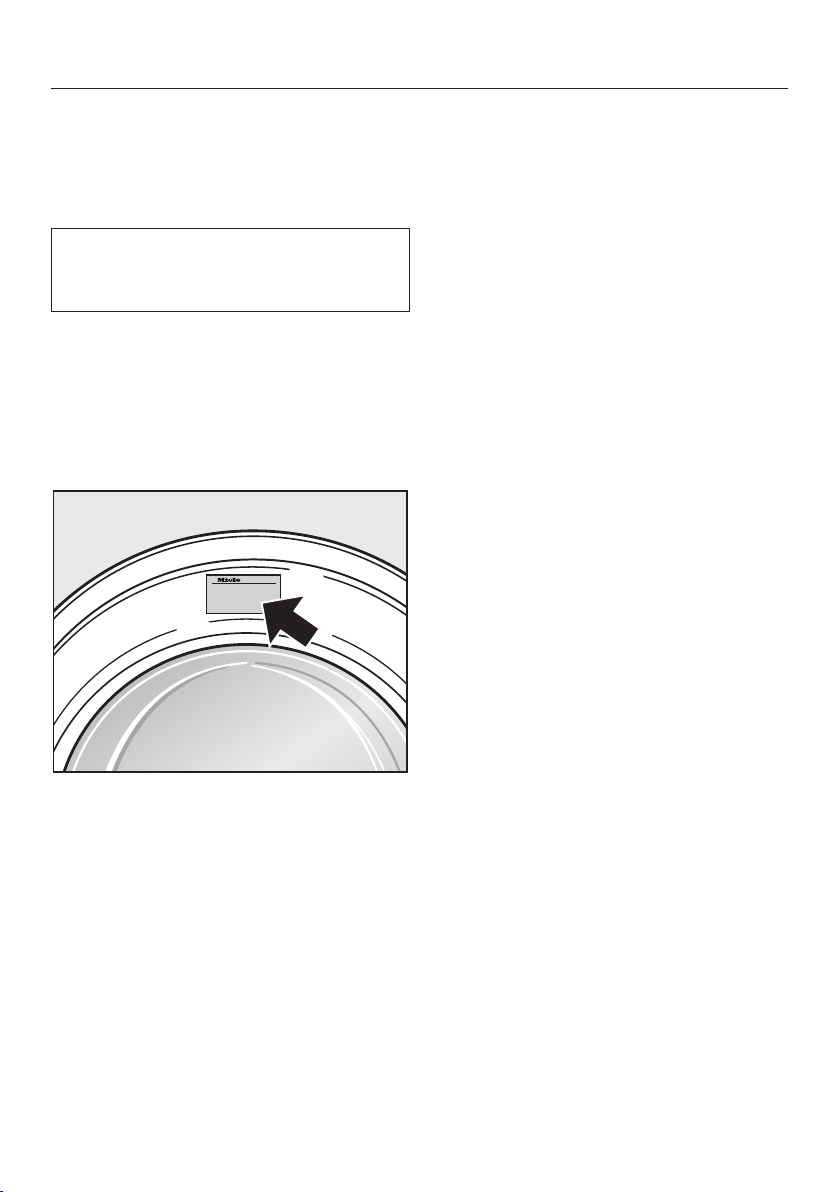
Technical Service
61
Contact in case of fault
In the event of a fault which you cannot
remedy yourself, please contact your
Miele dealer or Miele Technical Service.
Contact information for Miele Techni-
cal Service can be found at the end of
this document.
Please quote the model and serial num-
ber of your appliance when contacting
Miele. Both pieces of information can
be found on the data plate.
The data plate is found above the port-
hole glass when the door is opened.
Optional accessories
Optional accessories are available
through your Miele dealer or Miele.
Warranty
For further information, please refer to
your warranty booklet.
62
Installation instructions
Alteration rights reserved.
Visit our website for all the current product specifications, technical appliance
information, and warranty information.
To avoid accidents or damage to the appliance, please read these instructions
before installing and/or using it.
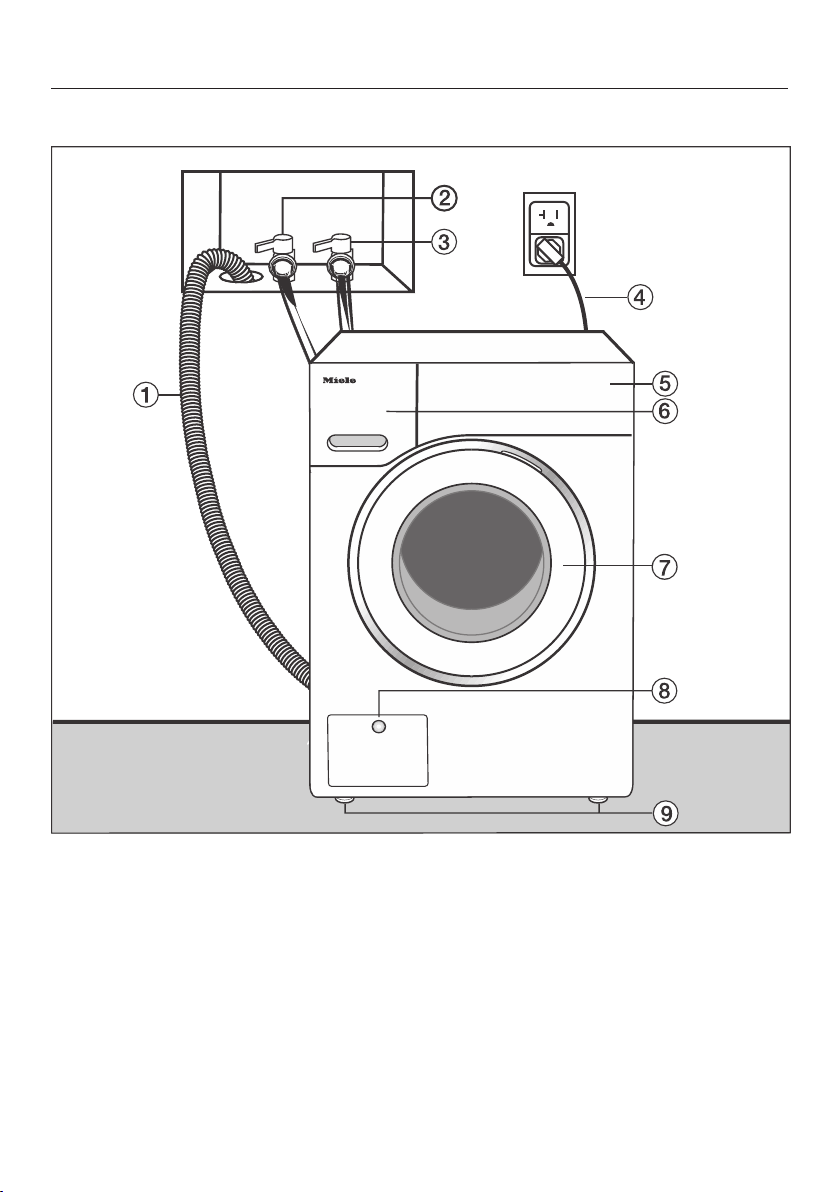
Installation
63
Front view
a
Drain hose
b
Hot-water inlet hose (pressure-proof
to 1,015 psi/7,000kPa)
c
Cold-water inlet hose (pressure-
proof to 1,015 psi/7,000kPa)
d
Electrical connection
e
Control panel
f
Detergent dispenser drawer
g
Door
h
Flap for drain filters, drain pump, and
emergency release
i
Four height-adjustable feet
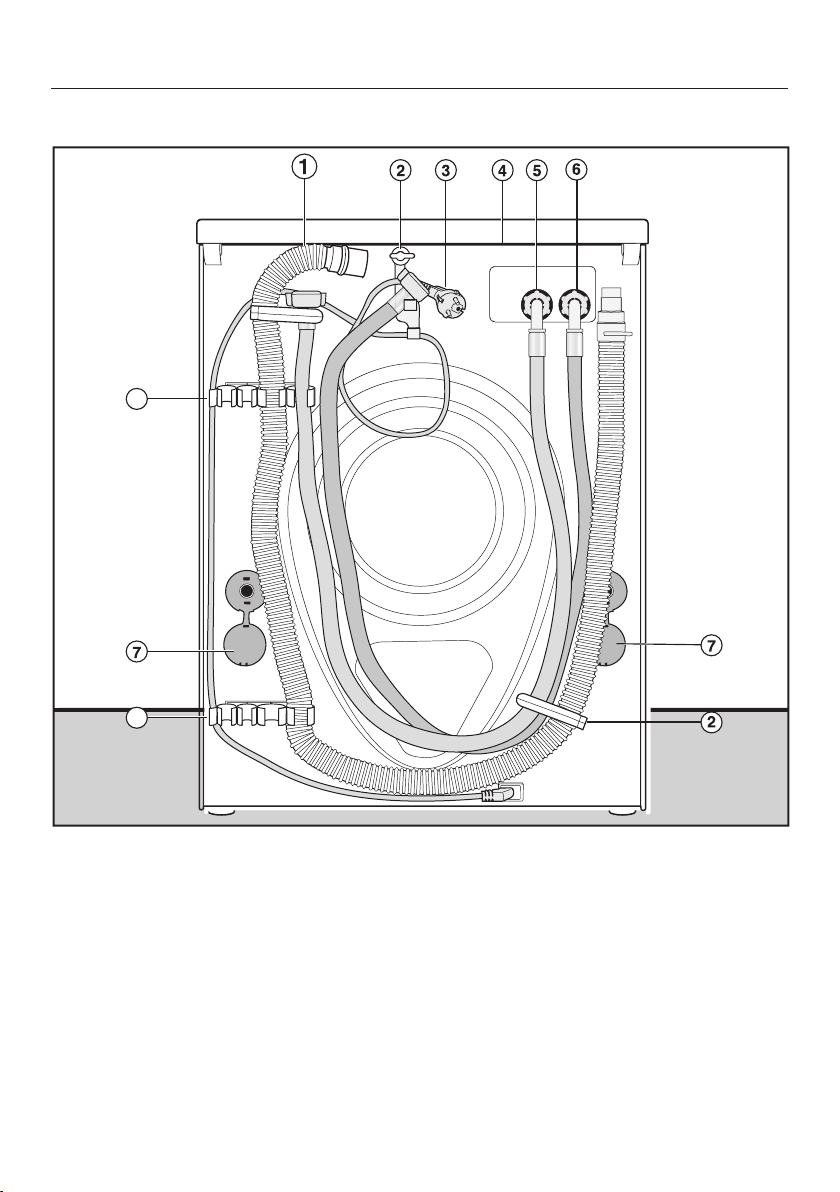
Installation
64
Rear view
8
8
a
Drain hose
b
Transport clips for inlet and drain
hoses and power cord
c
Electrical connection
d
Protruding lid for holding when mov-
ing the machine
e
Cold-water inlet hose (pressure-
proof to 1,015 psi/7,000kPa)
f
Hot-water inlet hose (pressure-proof
to 1,015 psi/7,000kPa)
g
Safety caps for shipping struts
h
Transport clips for inlet and drain
hoses and for storing shipping struts
when not in use

Installation
65
Installation site
A concrete floor is the most suitable
surface for the washer. Concrete floors
are less prone to vibration during the
spin cycle than wooden floors.
Note:
The machine must be leveled and se-
curely positioned.
To avoid vibration while spinning, the
machine should not be installed on
soft floor coverings.
If the installation must be performed on
a wooden floor:
Install the unit on a 2 ft. x 2 ft. x
1
3
/
16
“ (61 x 61 x 3 cm) plywood base.
Ideally the base should be large
enough to span several joists and
should be anchored to the joists and
not just the floor boards.
Tip: It is best to install the washer in the
corner of a room, where the stability of
the floor is at its greatest.
There is a risk of the washing
machine falling off a raised platform.
If the machine is installed on a raised
platform (concrete or masonry), it
must be secured in place using the
MTS floor mounting kit (available
from Miele).
Transporting the washing ma-
chine to its installation site
The fixings at the back of the lid
may become brittle due to external
circumstances.
There is a danger of the lid being
pulled off when carrying the appli-
ance.
Before carrying the appliance, check
that the lid is secure where it pro-
trudes at the back of the appliance.
Carry the washing machine by the
front feet and by the lid where it pro-
trudes at the back of the appliance.
Removing the shipping struts
Remove the left and right covers.
1. Pull off the shipping strut covers and
2. then use a screwdriver to release the
catches at the top and bottom.
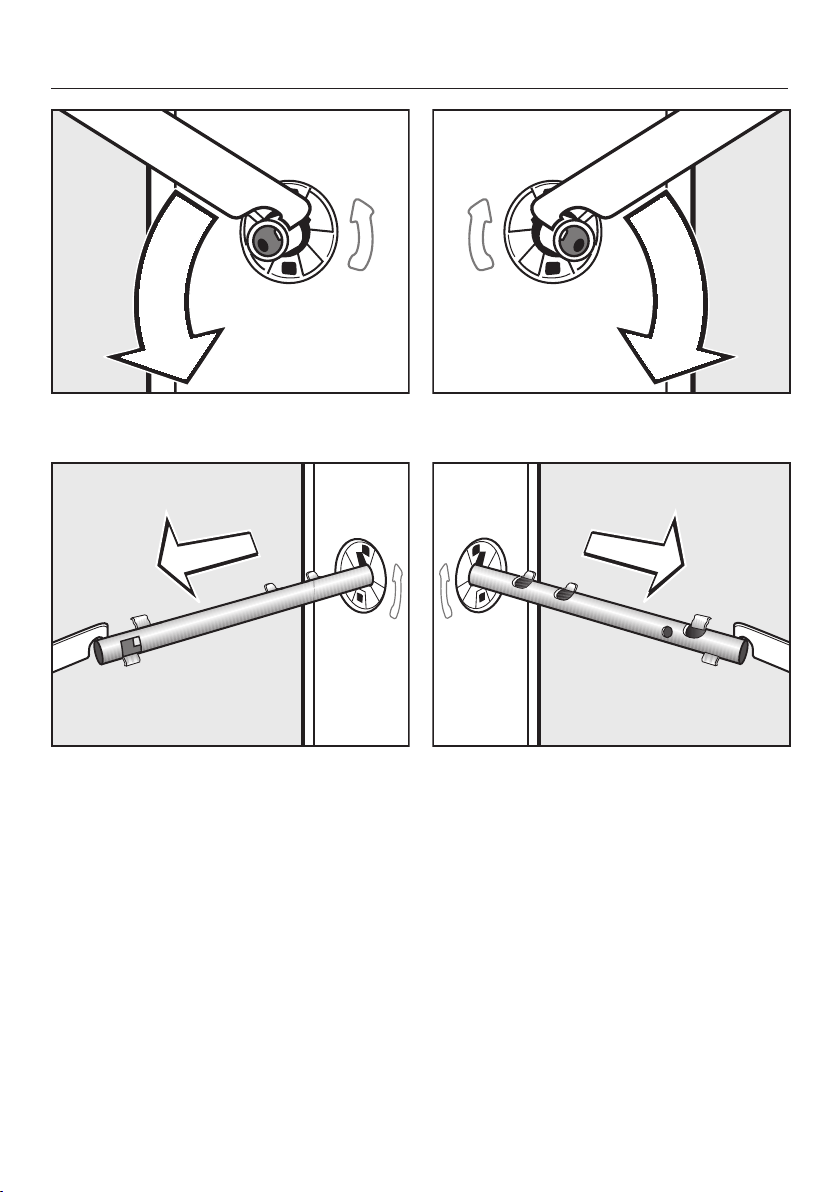
Installation
66
Using the wrench supplied, turn the
left-hand shipping strut 90°, then
withdraw the shipping strut.
Turn the right-hand shipping strut
90°, then
withdraw the shipping strut.
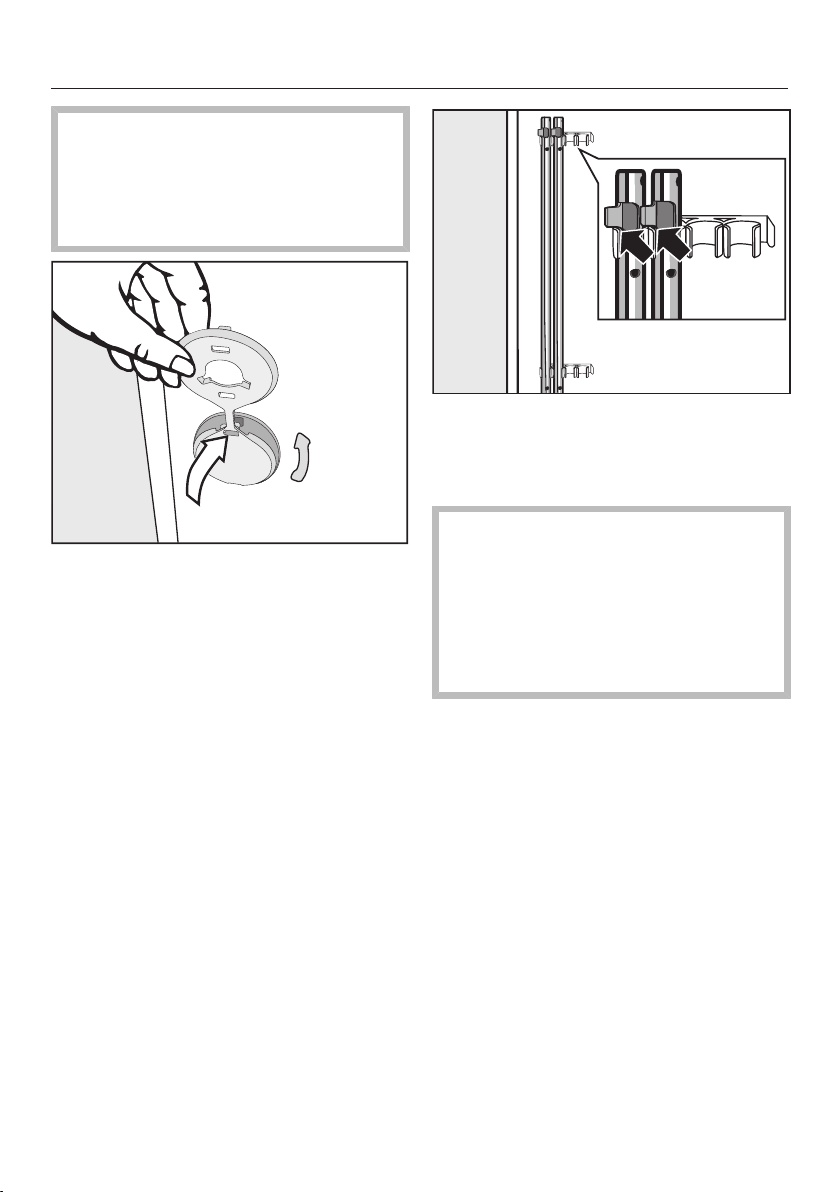
Installation
67
If the holes are not covered,
there is a risk of injury.
To avoid the risk of injury the holes
for the shipping struts must be cov-
ered after they have been removed.
Fit the covers onto the holes.
Secure the shipping struts to the
back of the washing machine. Make
sure the top catch is located above
the holder.
The washing machine must not
be moved without the shipping struts
in place.
Store the shipping struts. They must
be refitted if the machine is to be
moved again (e.g. when moving
house).
Refitting the shipping struts
Refitting is carried out by reversing the
procedure.
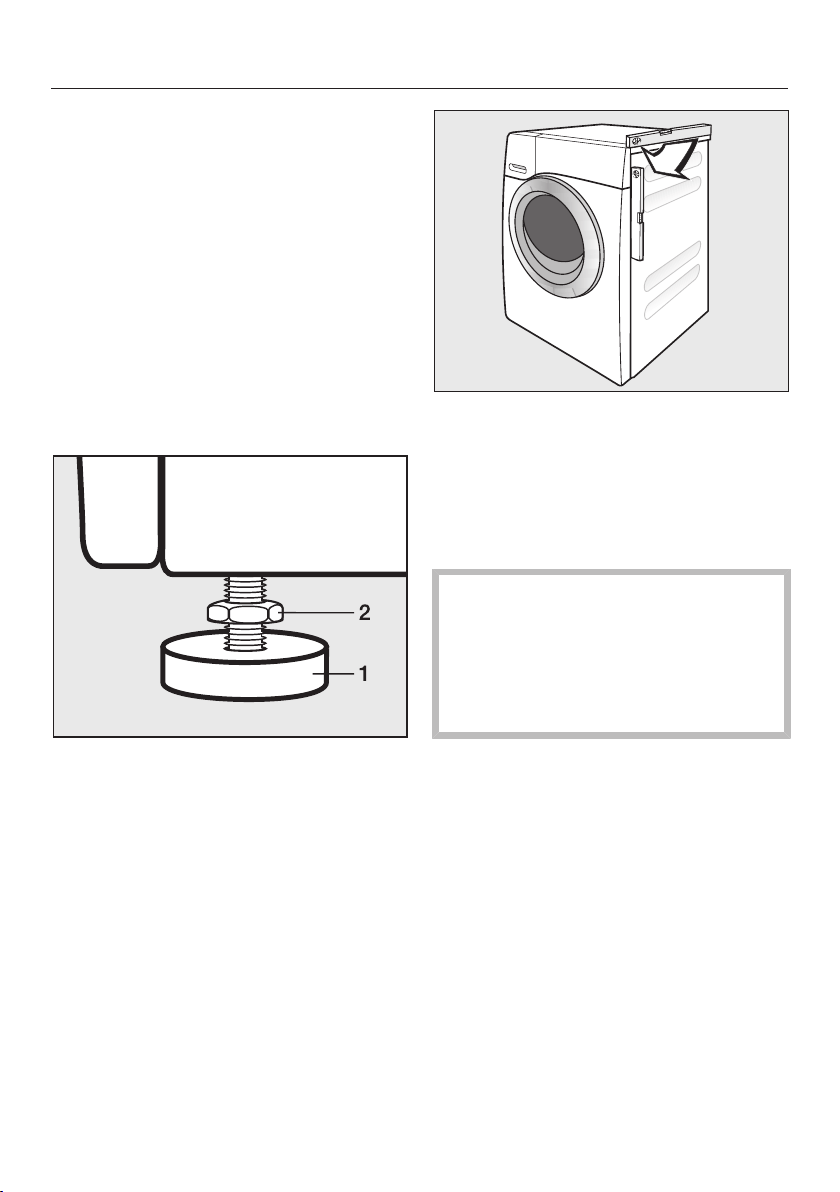
Installation
68
Leveling the machine
The washing machine must stand per-
fectly level on all four feet to ensure
safe and proper operation.
Incorrect installation may increase elec-
tric and water consumption and may
cause the machine to move about.
Screwing out and adjusting the feet
The four adjustable screw feet are used
to level the machine. All four feet are
screwed in when the machine is deliv-
ered.
Using the wrench supplied, turn
counter nut 2 in a clockwise direction.
Then turn counter nut 2 together with
foot 1 to unscrew.
Use a level to check that the washing
machine is standing level.
Hold foot 1 securely with a pipe
wrench. Turn counter nut 2 again us-
ing the wrench supplied until it sits
firmly up against the housing.
There is a danger of the washing
machine moving about.
All four counter nuts must be firmly
up against the housing. Please also
check this for the feet which did not
need adjustment.
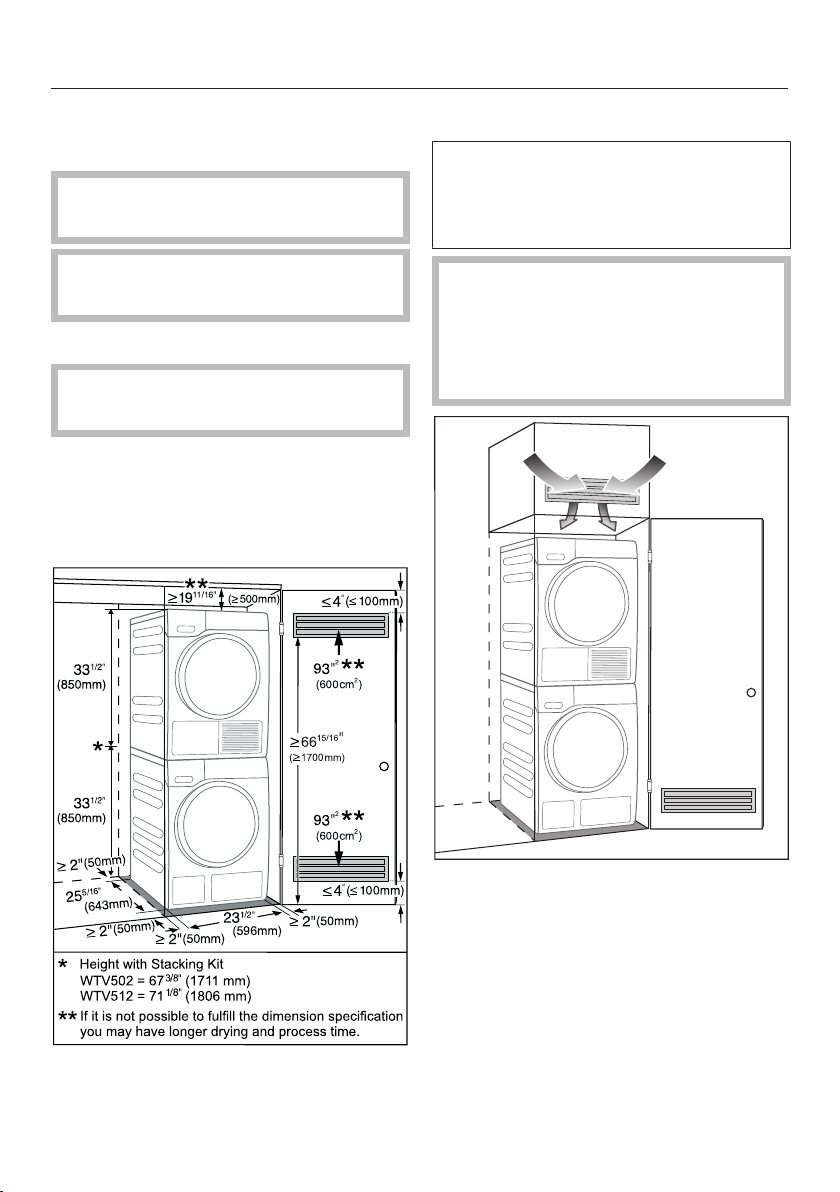
Installation
69
Additional installation require-
ments
All installations must be done in
accordance with local codes.
Remove transport struts in rear
of machine before installation.
Installing under a worktop
The machine lid cannot be re-
moved.
This washing machine (with lid intact)
can be pushed under a worktop if there
is space to do so.
Setting up the cabinet
For closets at room height
You can also insert a ventilation open-
ing at the top of the closet. In addition,
you must also provide an opening on
the bottom side of the door.
The air must be able to circulate
freely at the top of the closet.
The washing machine may overheat.
The air supply must not be hindered
by an additional closet or shelf.
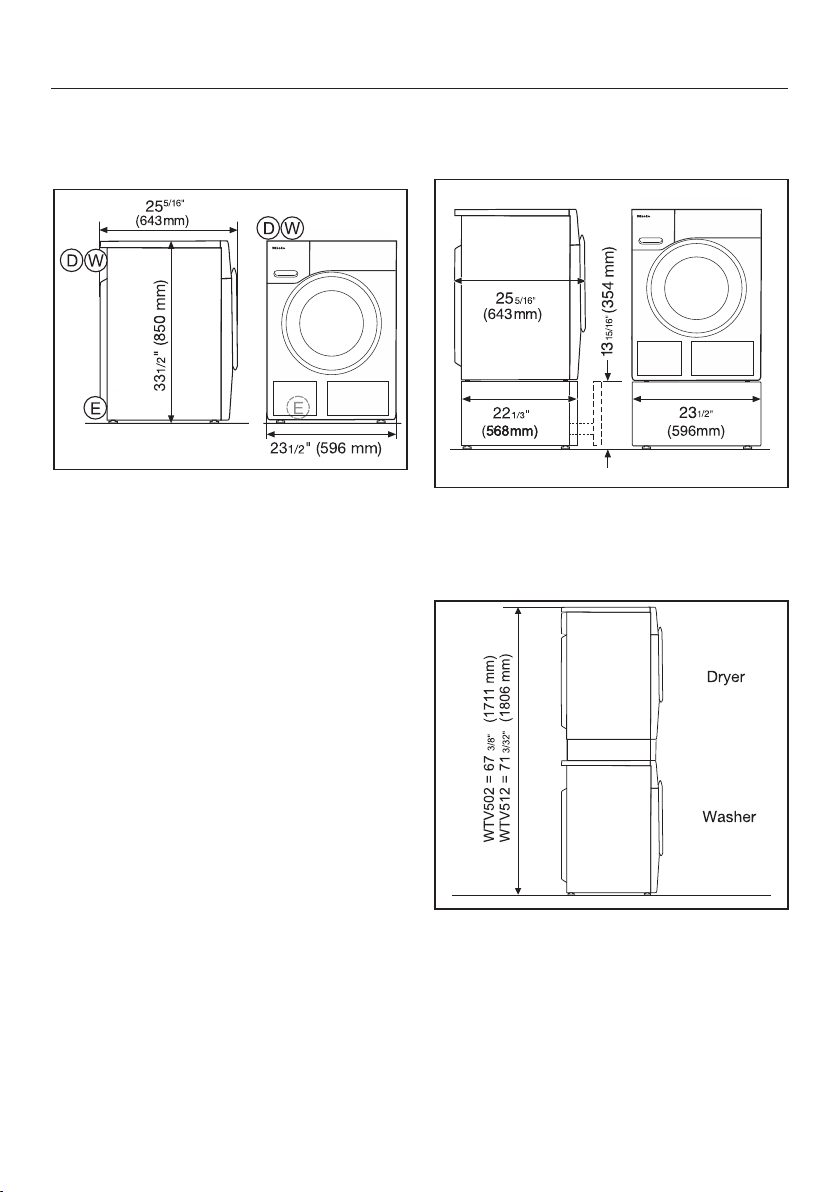
Installation
70
Product Dimensions
Dimensions
= 4.9 ft (1.50m) drain hose with
connection to the top left on the
rear
= 6.5 ft (2.00m) electrical cord
with plug for 120V, 15A (NEMA
5-15 configuration) to the top
left on the rear
= 5.2 ft (1.60m) warm and cold-
water intake hoses to the top
left on the rear
Installation on a plinth
– WTS 510 (only available in white)
Washer-dryer stack
– WTV 512 and WTV 502 washer-dryer
stacking kit

Installation
71
The water protection system
The Miele water protection system pro-
tects all parts of the washing machine
and its surroundings from water dam-
age.
The system consists of the following
main components:
– the inlet hose
– the electronic module and drainage
and overflow protection
– the drain hose
Inlet hoses
– Protection against the hoses bursting
The inlet hose can withstand pres-
sure of more than 7,000kPa /
1,015.26psi.
Electronic module and washing ma-
chine housing
– Sump: Any leaking water is collected
in a sump in the base of the machine.
A float switches off the water inlet
valves, preventing any more water
from flowing into the machine and
water in the suds container is
pumped away.
– Overflow protection: This prevents
the washing machine taking in too
much water. If the water level ex-
ceeds a certain level, the drain pump
switches on and pumps the excess
water away in a controlled way.
Drain hose
The drain hose is protected by a ventila-
tion system which prevents the washing
machine from being emptied com-
pletely.
Installation
72
Water intake
The washing machine can be con-
nected to a portable water supply. A
non-return valve is not needed unless
required by building code.
The washing machine has ½“ (13 mm)
pressure hoses with ¾” (19 mm) female
hose thread connections. If there is no
water hookup, contact a plumber to in-
stall a connection. Make sure that the
sealing ring is seated properly on the
hose connector.
Replace the hose only with a genuine
Miele hose, or with a hose able to with-
stand up to 145 psi (10.000 kPa) pres-
sure. The water valve connector must
also be able to withstand 145 psi
(10.000 kPa).
The bolted connection is under
water pressure. Open the water sup-
ply slowly to check for leaks. Adjust
the rubber seal and the bolted con-
nection if necessary.
To protect the inlet valve, the two fil-
ters (one at the pressure hose / valve
connection and one at the inlet con-
nection to the solenoid valve) must
not be removed.
Maintenance
Only use a genuine Miele hose that has
been tested to withstand pressure of at
least 1,015psi/7,000kPa should you
ever need a replacement.
A filter is located in the open end of
the inlet hose and another in the in-
take point to protect the inlet valve.
Neither filter may be removed.

Installation
73
Water drainage
The suds are drained through a drain
pump with a 3.2ft (1m) delivery head.
For the water to drain freely, the hose
must be installed free of kinks.
If required, the hose can be extended to
a length of up to 16.4ft (5m). Acces-
sories are available from your Miele
dealer or the Miele Technical Service.
Drainage options:
1. Directly into a sink: Lay the hose
around the edge of the sink and se-
cure the drain hose so that it does
not slip (e.g., by securing the drain
hose to the faucet).
2. In a standpipe: Insert the drain hose
into standpipe with dimensions of
1½“ (Ø 4cm). Secure the drain hose
carefully to make sure it cannot slip.
3. In a floor drain: The washing machine
is designed with a gap (anti-siphon
system) which means that a mini-
mum drain height is not required.

Installation
74
Electrical connection
GROUNDING INSTRUCTIONS
This appliance must be grounded. In
the event of a malfunction or break-
down, grounding will reduce the risk
of electric shock by providing a path
of least resistance for electric cur-
rent. This appliance is equipped with
a cord having an equipment-ground-
ing conductor and a grounding plug.
The plug must be plugged into an
appropriate outlet that is properly in-
stalled and grounded in accordance
with all local codes and ordinances.
WARNING – Improper connection of
the equipment-grounding conductor
can result in a risk of electric shock.
Check with a qualified electrician or
service representative if you are in
doubt as to whether the appliance is
properly grounded.
Do not modify the plug provided with
the appliance; if it will not fit the out-
let, have a proper outlet installed by
a qualified electrician.
ELECTRICAL INSTRUCTIONS
This installation should be performed by
an experienced and qualified techni-
cian, in accordance with local codes
and regulations.
The washing machine is supplied with a
5’3“ (1.6m) long, 3 wire cord, ending in
a NEMA 5-15P plug, ready for connec-
tion to a 120V, 15A, 60Hz, AC power
supply.
The proper outlet can be purchased
from an electrical supply dealer.

Technical data
75
Height 33 7/16" (850 mm)
Width 23 7/16" (596 mm)
Depth 25 1/16" (636 mm)
Depth with door open 41 1/2" (1054 mm)
Height for building under 32 5/16" (+5/16"/-1/16") (820 mm)
Width for building under 23 5/8" (600 mm)
Weight Approx. 220.5 lb (100 kg)
Capacity 17.6 lb (8 kg) dry laundry
Connection voltage See data plate
Power rating See data plate
Fuse See data plate
Minimum flow pressure 14.5psi (100kPa)
Maximum flow pressure 145psi (1,000kPa)
Water inlet hose length 63“ (1.6 m)
Drain hose length 59 1/16“ (1.5 m)
Power cord length 78 3/4“ (2 m)
Maximum drain pump head height 39 3/8“ ( 1 m)
Maximum drain hose length 196 7/8“ ( 5 m)
LEDs Class 1
Test certificates awarded See data plate
Frequency band 2.412GHz – 2.462GHz
Maximum transmitting power <100mW
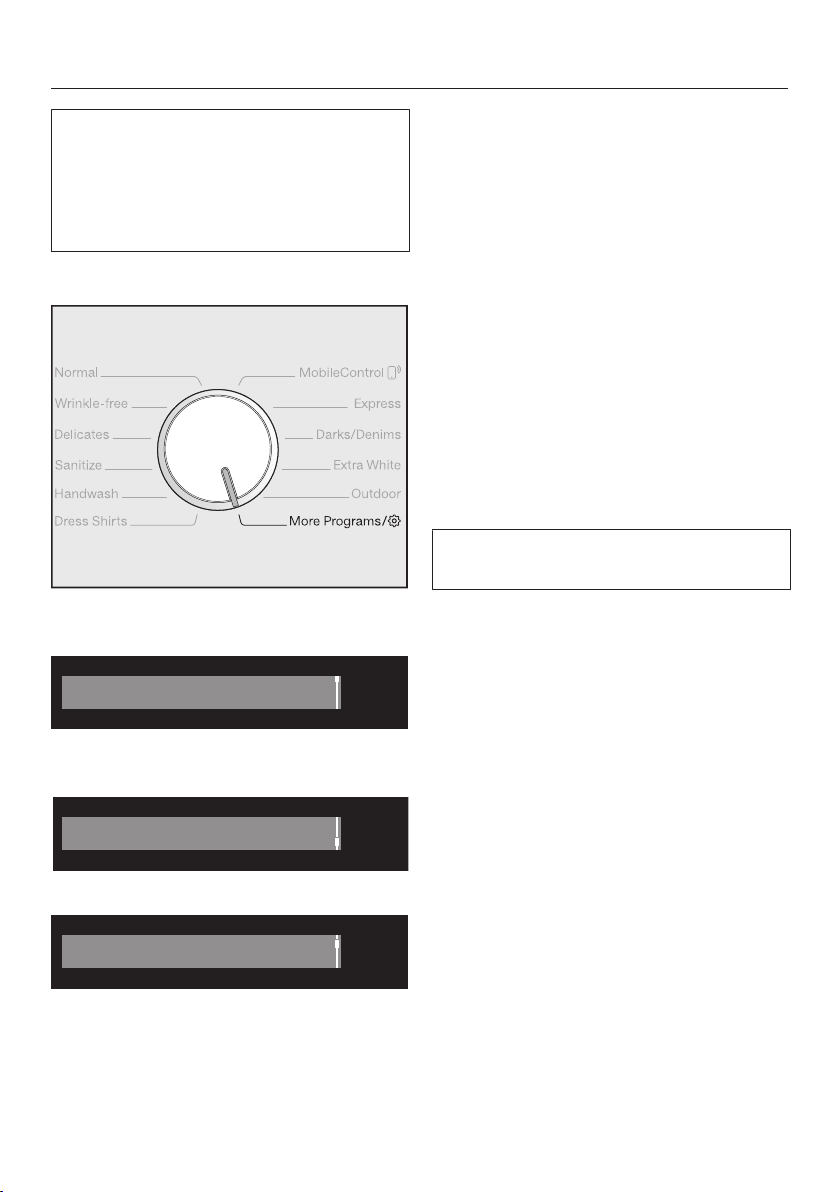
Settings
76
You can use the settings to alter the
washing machine's electronics to suit
changing requirements.
The settings can be altered at any
time.
Calling up settings
Turn the program selector to More
programs/.
Table Linens/Drapes
OK
Touch the sensor buttons until
the following appears in the display:
Settings
OK
Confirm with the OK sensor button.
Language
OK
You are now in the Settings submenu.
Selecting settings
Touch the sensor buttons until
the setting you want appears in the
display.
– The sensor button scrolls down
the list.
– The sensor button scrolls up the
list.
Touch the OK sensor button to select
the setting displayed.
Changing a setting
Touching the sensor buttons will
call up the different options for the
setting.
The option which is selected will have
a check next to it.
When the option you want appears in
the display, touch the OK sensor but-
ton to activate it.
Closing the Settings menu
Turn the program selector.
Settings
77
Language
The display can be set to appear in
one of several different languages.
The flag after the word Language acts
as a guide in case a language which is
not understood is set.
The language selected is saved to
memory.
Buzzer volume
The buzzer sounds to let you know the
program has finished. The buzzer can
be set to be louder or quieter.
Options
– Off
– (quiet)
– (loud) (default setting)
Keypad tone
Each touch of a sensor button is con-
firmed with an audible tone.
Options
– Off
– (quiet)
– (default setting)
– (loud)
Welcome tone
The volume for the greeting tone can
be set to one of seven different set-
tings.
Options
– Off
– (quiet)
– (default setting)
– (loud)
Code
The PIN code prevents the washing
machine being used without your
knowledge.
Options
– Activate
The code is 125 and can be acti-
vated.
When the code has been activated,
you have to enter a code after
switching the washing machine on.
Otherwise the washing machine can-
not be operated.
– Change
You can enter a code of your own.
– Deactivate
For using the washing machine with-
out entering the code. This only ap-
pears if the PIN code has been acti-
vated previously.
Make a note of the new PIN
code. If you forget the code, the
washing machine will need to be un-
locked by Miele Technical Service.

Settings
78
Unit
The temperature and spin speed can
be displayed in 3 different forms.
Options
– Clear text (default setting)
The values are displayed as words.
– °C + rpm
The values are displayed as figures in
the units °C and rpm.
– °F + rpm
The values are displayed as figures in
the units °F and rpm.
Brightness
You can set the brightness of the dis-
play, the sensor buttons, and the
dimmed sensor buttons.
Options
– Display
Controls the brightness of the dis-
play.
– (dark)
– (light) (default setting)
– Buttons active
Controls the brightness of the acti-
vated sensor buttons.
– (dark)
– (default setting)
– (light)
– Buttons inactive
Controls the brightness of the sensor
buttons that can be activated.
– (dark)
– (default setting)
– (light)
Tip: Ensure that there is a big difference
in brightness between the activated and
dimmed sensor buttons. This makes it
easier to operate the appliance.
Settings
79
Display switch-off
The display and the sensor button
lighting is switched off to save energy.
The Start/Stop sensor button flashes
slowly.
Options
– On
Lighting switches off after 10 min-
utes.
– On (not crnt prog) (default setting)
Lighting remains switched on
throughout the program. The lighting
switches off 10 minutes after the pro-
gram has ended.
– Off
The lighting remains switched on.
Program info
You can select the information that will
be displayed temporarily once a pro-
gram has been selected in the display.
Options
– Program name (default setting)
The program name is shown in the
display for several seconds.
– Prog. & Max load
The program name and the maximum
load is shown in the display for sev-
eral seconds.
– Off
Directly after the program has been
selected, the standard display is
shown with temperature, spin speed,
and program duration.
Memory
The washing machine will save the
last settings (temperature, spin speed,
and some of the extra options) se-
lected for a wash program after the
program has started.
When the program is chosen again, the
saved settings will appear in the dis-
play.
The memory function is switched off in
the default setting.
Water intake
You can program 3 options for the wa-
ter inlet. The water inlet is controlled
by the two inlet hoses.
Options
– Cold water
The washing machine will be oper-
ated with cold water only.
– Hot water (default setting)
Hot water is used in the main wash to
save energy.
You can heat up your water with
cheaper, primary energy sources,
e.g., gas, solar power, oil. The tem-
perature must be below 140°F (60°C.)
For technical reasons, the wash-
ing machine must always be con-
nected to cold water.
Settings
80
Long p-wash Normal
If you require a longer pre-wash, you
can extend the standard pre-wash
time of 25 minutes.
Options
– No increase (default setting)
25-minute pre-wash
– + 6 min
31-minute pre-wash
– + 9 min
34-minute pre-wash
– + 12 min
37-minute pre-wash
Soak duration
You can set a duration for the soak
process of between 30minutes and
6hours.
A duration can be selected in 30-minute
increments. When the Soak extra option
is selected, the laundry will be soaked
for the duration selected.
The machine is delivered with a dura-
tion of 0:30hours.
Gentle action
With gentle action activated, drum ro-
tation is reduced. In this way, lightly
soiled items can be washed more gen-
tly.
Gentle action can be activated for the
Normal and the Wrinkle-free programs.
Gentle action is switched off in the de-
fault setting.
Temp. reduction
At high altitudes water has a lower
boiling point. Miele recommends acti-
vating the reduce temperature setting
at altitudes of or above 6560ft
(2,000m) to prevent water from boil-
ing. The maximum temperature is re-
duced to 176°F (80°C), even if a higher
temperature is selected.
The temperature reduction setting is
switched off in the default setting.
Settings
81
Maximum rinse level
The water level in the rinse can be
permanently set to the highest value.
This function is important for allergy
sufferers as it achieves excellent wash
results. The water consumption will be
increased.
The function is switched off in the de-
fault setting.
Suds cooling
Additional water flows into the drum at
the end of the main wash to cool the
suds down.
Suds cooling takes place when a Nor-
mal program with a temperature setting
of Hot+ or higher is selected.
Suds cooling should be activated:
– To prevent the danger of scalding if
the drain hose is hooked over the
edge of a sink or basin.
– Where the drainage pipes do not
comply with DIN 1986.
Suds cooling is switched off in the de-
fault setting.
Low water pressure
If the water pressure is below 14.5 psi
(100kPa), the program will be can-
celed and the fault message Drainage
See will appear.
If the on-site water pressure cannot be
increased, activating this function will
prevent the program from being can-
celed.
Low water pressure is switched off in
the default setting.
Anti-Crease
The Anti-crease function helps prevent
creasing after the end of the program.
At the end of the program, the drum
continues to turn for up to 30 minutes.
The washing machine door can be un-
locked and then opened at any time by
touching the Start/Stop sensor button.
Anti-crease is switched on in the default
setting.

Settings
82
Miele@home
Control the networking of your wash-
ing machine with your WiFi network.
The following points may appear in the
submenu:
Set up
This message only appears if the wash-
ing machine has not yet been con-
nected to a WiFi network.
Please refer to “Initial set-up” to set up
the connection.
Deactivate (visible if Miele@home is acti-
vated)
Miele@home remains set up, the WiFi
function is switched off.
Activate (visible if Miele@home is deacti-
vated)
The WiFi function is reactivated.
Connection status (visible if Miele@home
is activated)
The following values are displayed:
– The WiFi reception quality
– The network name
– The IP address
Set up again (visible if set up)
Resets the WiFi login (network) to im-
mediately re-establish a new connec-
tion.
Reset (visible if set up)
– The WiFi is switched off.
– The WiFi connection will be reset to
the default setting.
Miele@home is no longer set up. A new
connection setup has to be carried out
in order to use the Miele@home setting
again.
Settings
83
Remote control
The Remote control setting is only visi-
ble if the Miele@home setting is set up
and activated.
Once the Miele@mobile app has been
installed on your mobile device, you
can check the status of your washing
machine from anywhere and start it re-
motely. You can also control it re-
motely via the MobileControl program.
You can switch off the Remote control
setting if you do not want to operate the
washing machine with your mobile de-
vice.
If Remote control is not switched on, the
app can cause the program to be can-
celed.
Use the “delay start” button to set a
time until you want to start the washing
machine and start the delay start (see
“Delay start/SmartStart”).
The washing machine will then start
within the timeframe specified when it
receives your signal.
If it has not received a start signal by
the latest start time set, the washing
machine will start automatically.
Remote control is switched on in the
default setting.
SmartGrid
The Remote control setting is only visi-
ble if the Miele@home setting is set up
and activated.
This function can be used for starting
your washing machine automatically
at a time when your energy supplier's
energy costs are most economical.
Activating SmartGrid gives the delay start
button a new function. You set the
SmartGrid via the “delay start” button.
The washing machine will then start
within the timeframe specified by you
when it receives a signal from your en-
ergy supplier.
If it has not received a signal from the
energy supplier by the latest start time
set, the washing machine will start au-
tomatically (see “Delay start”). Please
check availability with your local utility
provider for availability.
The SmartGrid function is switched off
in the default setting.
Settings
84
RemoteUpdate
The RemoteUpdate function updates
the software in your washing machine.
The RemoteUpdate function is deacti-
vated as standard.
If you do not install a RemoteUpdate,
you can continue to use your washing
machine in the usual way. However,
Miele recommends installing Remote-
Updates.
Activation
The RemoteUpdate menu option is
only displayed and can only be se-
lected if you have added your washing
machine to your WLAN network (see
“Miele@home” in the “Settings” chap-
ter).
Miele's RemoteUpdate function can
only be used if the washing machine is
connected to a WLAN network and you
have an account in the Miele@mobile
app. The washing machine must be
registered with your account in the app.
See the Miele@mobile app for terms
and conditions of use.
Some software updates can only be
carried out by Miele Service.
Running a RemoteUpdate
If a RemoteUpdate is available for your
washing machine, it will be displayed
automatically for you.
You can choose to start the RemoteUp-
date immediately or wait until later. If
you select “delay start”, the prompt to
run the RemoteUpdate will be displayed
again the next time you switch on your
washing machine.
The RemoteUpdate can take a few
minutes.
Please note the following information
about the RemoteUpdate function:
– You will only receive a message when
a RemoteUpdate is available.
– Once a RemoteUpdate has been in-
stalled, it cannot be undone.
– Do not switch off the washing ma-
chine during a RemoteUpdate. Other-
wise, the RemoteUpdate will be
aborted and will not be installed.

Settings
85
Bleach
You can activate the automatic addi-
tion of chlorine bleach at the end of
the main wash.
Chlorine bleach may only be used in
some programs. See “5. Adding deter-
gent – Using chlorine bleach” for more
detailed information.
Activating chlorine bleach extends the
program duration by approximately 10
minutes.
The washing machine is delivered with
the chlorine bleach setting deactivated.

Optional accessories
86
Detergent
UltraWhite
– Multi-purpose powder detergent
– For white and light-colored laundry
as well as heavily soiled cotton items
– Effective stain removal even at low
temperatures
UltraColor
– Liquid detergent for colored items
– For colored and dark textiles
– Protects bright colors from fading
– Effective stain removal even at low
temperatures
Wool and delicates detergent
– Liquid detergent for delicates
– Particularly suitable for woollen and
silk textiles
– Cleans at temperatures as low as
70°F (20°C), helps retain the shape of
delicate items and protect colors
Speciality detergents
Speciality detergents are available as
capsules in convenient single dose
amounts or in a handy bottle.
Outdoor
– Liquid detergent for outdoor and per-
formance clothing
– Cleans with care and is gentle on col-
ors
– With lanolin to care for and condition
membrane fabric
Sport
– Liquid detergent for sportswear and
fleece garments
– Neutralizes unpleasant odors
– Retains the shape of the textiles
Downs
– Liquid detergent suitable for pillows,
sleeping bags, and Down Filled Items
– Retains the elasticity of down and
feather-filled items
– Retains the breathability of Down
Filled Items
– Prevents down filling clumping to-
gether
WoolCare
– Liquid detergent for Woolens and
delicates
– Includes a special wheat protein con-
ditioning formula
– Helps prevent pilling
– Gentle on colors
– Only available as capsules
SilkCare
– Liquid detergent for silks
– Contains a special silk protein condi-
tioning formula
– Gentle on colors
– Only available as capsules

Optional accessories
87
Fabric care
Fabric care agents are available as cap-
sules in convenient single dose
amounts or in a handy bottle.
Proofing agent
– For reproofing microfiber textiles,
e.g., rain coats
– Retains the breathability of textiles
Fabric softener
– Fresh, natural fragrance
– Makes laundry soft to handle
Additive
Booster
– For removing stains
– For white and colored laundry
– Available as capsules in conve-
nient single dose amounts
Machine care
Detergent
– For cleaning the washing machine
thoroughly and effectively
– Removes grease, bacteria, and asso-
ciated unpleasant odors
– Use 1–3 times per year
Descaling agent
– Removes heavy lime scale deposits
– Mild and gentle with natural citric
acid
Water softener tablets
– Reduces quantities of detergent for
hard water
– Less detergent residue in textiles
– Less chemicals in waste water due to
reduced amount of detergent




9 Independence Way
Princeton, NJ 08540
Phone:
Fax:
www.mieleusa.com
U.S.A.
Miele, Inc.
National Headquarters
Please have the model and serial number
of your appliance available when
contacting Technical Service.
Canada
Importer
Miele Limited
Headquarters and Miele Centre
800-843-7231
609-419-4298
Technical Service & Support
Phone:
Fax:
161 Four Valley Drive
Vaughan, ON L4K 4V8
www.miele.ca
800-999-1360
888-586-8056
Customer Care Centre
Phone:
800-565-6435
905-532-2272
International Headquarters
Miele & Cie. KG
Carl-Miele-Straße 29
33332 Gütersloh
Germany

M.-Nr. 10 669 371 / 01en-US
WWF 060