Owner’s Guide
Brugervejledning
Bedienungsanleitung
Gebruikershandleiding
Guía del usuario
Käyttöohje
Notice d’utilisation
Manuale di istruzioni
Kezelési útmutató
Brukerveiledning
Podręcznik użytkownika
Manual do Proprietário
Bruksanvisning
BOSE
®
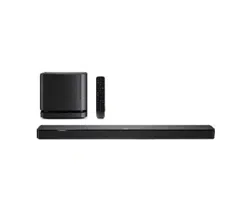
SOLO 5
TV SOUND SYSTEM
2 - ENGLISH
IMPORTANT SAFETY INSTRUCTIONS
Please read and keep all safety and use instructions.
Important Safety Instructions
1. Read these instructions.
2. Keep these instructions.
3. Heed all warnings.
4. Follow all instructions.
5. Do not use this apparatus near water.
6. Clean only with a dry cloth.
7. Do not block any ventilation openings. Install in accordance with the manufacturer’s instructions.
8. Do not install near any heat sources such as radiators, heat registers, stoves, or other apparatus
(including amplifiers) that produce heat.
9. Protect the power cord from being walked on or pinched, particularly at plugs, convenience receptacles, and the
point where they exit from the apparatus.
10. Only use attachments/accessories specified by the manufacturer.
11. Use only with the cart, stand, tripod, bracket, or table specified by the manufacturer, or sold with the
apparatus. When a cart is used, use caution when moving the cart/apparatus combination to avoid injury
from tip-over.
12. Unplug this apparatus during lightning storms or when unused for long periods of time.
13. Refer all servicing to qualified personnel. Servicing is required when the apparatus has been damaged in any way,
such as power-supply cord or plug is damaged, liquid has been spilled or objects have fallen into the apparatus, the
apparatus has been exposed to rain or moisture, does not operate normally, or has been dropped.
WARNINGS/CAUTIONS
This symbol on the product means there is uninsulated, dangerous voltage within the product enclosure that
may present a risk of electrical shock.
This symbol on the product means there are important operating and maintenance instructions in this guide.
Contains small parts which may be a choking hazard. Not suitable for children under age 3.
This product contains magnetic material. Consult your physician on whether this might aect your implantable
medical device.
• To reduce the risk of fire or electric shock, do not expose this product to rain or moisture.
• Do NOT expose this apparatus to dripping or splashing, and do not place objects filled with liquids, such as vases, on
or near the apparatus.
• Keep the product away from fire and heat sources. Do not place naked flame sources, such as lighted candles, on or
near the product.
• Do NOT make unauthorized alterations to the product.
• Do NOT use a power inverter with this product.
• Do NOT use in vehicles or boats.
• The speaker wire and interconnect cables included with this system are not approved for in-wall installation. Please
check your local building codes for the correct type of wire and cable required for in-wall installation.
• Use this product only with the power supply provided.
• Where the mains plug or appliance coupler is used as the disconnect device, the disconnect device shall remain
readily operable.

ENGLISH - 3
IMPORTANT SAFETY INSTRUCTIONS
• The batteries provided with this product may present a risk of fire or chemical burn if mishandled.
• Do NOT expose products containing batteries to excessive heat (e.g. from storage in direct sunlight, fire or the like).
• Only use the mounting hardware supplied with this product.
• Do NOT mount on surfaces that are not sturdy, or that have hazards concealed behind them, such as electrical wiring
or plumbing. If you are not sure about installing the bracket, contact a qualified professional installer. Ensure the
bracket is installed according to local building code.
• Due to ventilation requirements, Bose does not recommend placing the product in a confined space such as in a wall
cavity or in an enclosed cabinet.
Regulatory Information
NOTE: This equipment has been tested and found to comply with the limits for a Class B digital device, pursuant to
Part 15 of the FCC Rules. These limits are designed to provide reasonable protection against harmful interference in a
residential installation. This equipment generates, uses, and can radiate radio frequency energy and, if not installed and
used in accordance with the instructions, may cause harmful interference to radio communications. However, there is no
guarantee that interference will not occur in a particular installation. If this equipment does cause harmful interference
to radio or television reception, which can be determined by turning the equipment o and on, the user is encouraged
to try to correct the interference by one or more of the following measures:
• Reorient or relocate the receiving antenna.
• Increase the separation between the equipment and receiver.
• Connect the equipment into an outlet on a circuit dierent from that to which the receiver is connected.
• Consult the dealer or an experienced radio/TV technician for help.
Changes or modifications not expressly approved by Bose Corporation could void the user’s authority to operate
this equipment.
This device complies with part 15 of the FCC Rules and Industry Canada license-exempt RSS standard(s). Operation is
subject to the following two conditions: (1) This device may not cause harmful interference, and (2) this device must
accept any interference received, including interference that may cause undesired operation.
This Class B digital apparatus complies with Canadian ICES-003.
CAN ICES-3 (B) / NMB-3 (B)
This device complies with FCC and Industry Canada RF radiation exposure limits set forth for general population. It must
not be co-located or be operating in conjunction with any other antennas or transmitters.
This equipment complies with FCC/IC radiation exposure limits set forth for an uncontrolled environment. This
equipment should be installed and operated with minimum distance 20cm between the radiator and your body.
Management Regulation for Low-power Radio-frequency Devices
Article XII
According to “Management Regulation for Low-power Radio-frequency Devices” without permission granted by the
NCC, any company, enterprise, or user is not allowed to change frequency, enhance transmitting power or alter original
characteristic as well as performance to an approved low power radio-frequency devices.
Article XIV
The low power radio-frequency devices shall not influence aircraft security and interfere legal communications; If found,
the user shall cease operating immediately until no interference is achieved. The said legal communications means radio
communications operated in compliance with the Telecommunications Act.
The low power radio-frequency devices must be susceptible with the interference from legal communications or ISM
radio wave radiated devices.
4 - ENGLISH
REGULATORY INFORMATION
Bose Corporation hereby declares that this product is in compliance with the essential requirements and other
relevant provisions of Directive 2014/53/EU and all other applicable EU directive requirements. The complete
declaration of conformity can be found at: www.Bose.com/compliance
The product, in accordance with the Ecodesign Requirements for Energy Related Products Directive 2009/125/EC, is in
compliance with the following norm(s) or document(s): Regulation (EC) No. 1275/2008, as amended by Regulation (EU)
No. 801/2013.
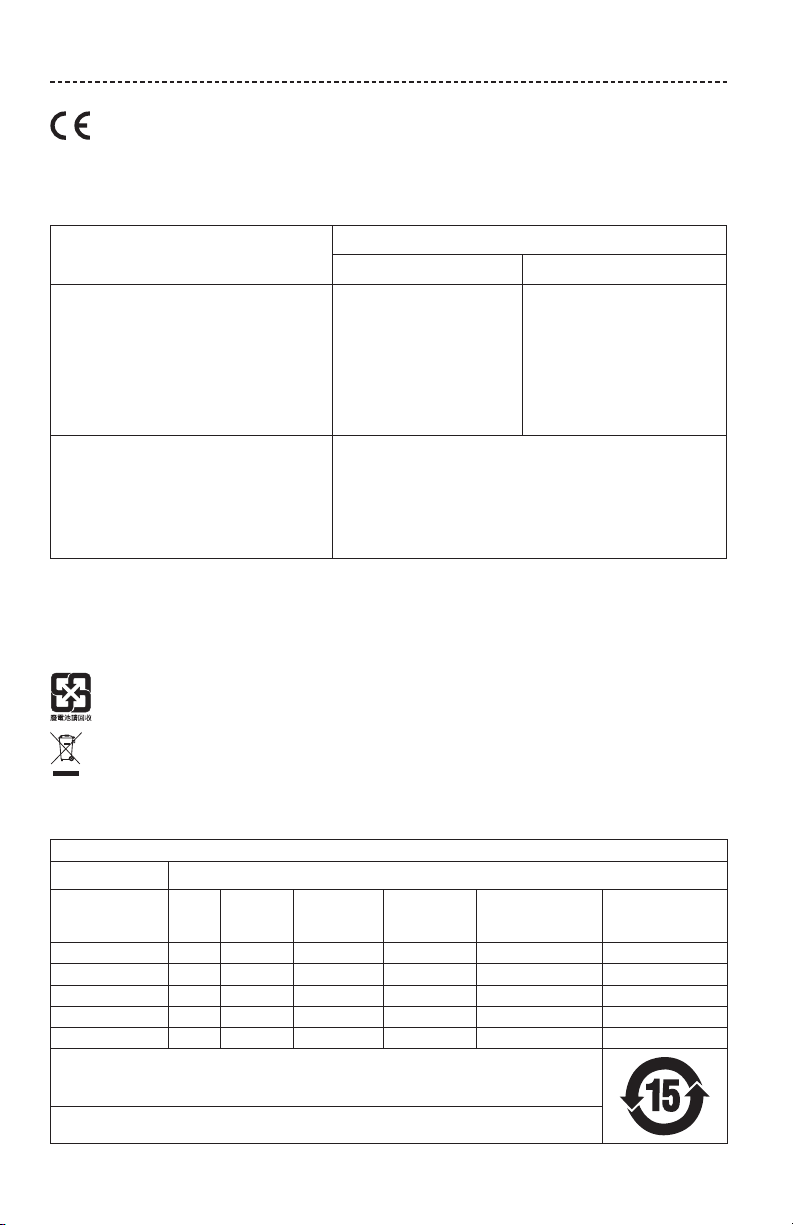
Required Power State Information
Power Modes
Standby Networked Standby
Power consumption in specified power mode, at
230V/50Hz input
≤
0.5 W N/A*
Time after which equipment is automatically
switched into mode
< 2.5 hours N/A*
Power consumption in networked standby if all wired
network ports are connected and all wireless network
ports are activated, at 230V/50Hz input
N/A N/A*
Network port deactivation/activation procedures.
Deactivating all networks will enable standby mode.
Bluetooth: Deactivate by clearing the pairing list by pressing and holding
the Bluetooth button for 10 seconds. Activate by pairing with a Bluetooth
source.
*product does not utilize a networked standby mode for a Bluetooth
®
connection and does not have the ability to be configured to a network via
Wi-Fi
®
or Ethernet
For Europe:
Frequency band of operation 2400 to 2483.5 MHz:
Bluetooth: Maximum transmit power less than 20 dBm EIRP.
Bluetooth Low Energy: Maximum power spectral density less than 10 dBm/MHz EIRP.
Please dispose of used batteries properly, following local regulations. Do not incinerate.
This symbol means the product must not be discarded as household waste, and should be delivered to an
appropriate collection facility for recycling. Proper disposal and recycling helps protect natural resources,
human health and the environment. For more information on disposal and recycling of this product, contact
your local municipality, disposal service, or the shop where you bought this product.
China Restriction of Hazardous Substances Table
Names and Contents of Toxic or Hazardous Substances or Elements
Toxic or Hazardous Substances and Elements
Part Name
Lead
(Pb)
Mercury
(Hg)
Cadmium
(Cd)
Hexavalent
(CR(VI))
Polybrominated
Biphenyl
(PBB)
Polybrominated
diphenylether
(PBDE)
PCBs X O O O O O
Metal Parts X O O O O O
Plastic Parts O O O O O O
Speakers X O O O O O
Cables X O O O O O
This table is prepared in accordance with the provisions of SJ/T 11364.
O: Indicates that this toxic or hazardous substance contained in all of the homogeneous materials for this part
is below the limit requirement of GB/T 26572.
X: Indicates that this toxic or hazardous substance contained in at least one of the homogeneous materials
used for this part is above the limit requirement of GB/T 26572.
ENGLISH - 5
REGULATORY INFORMATION
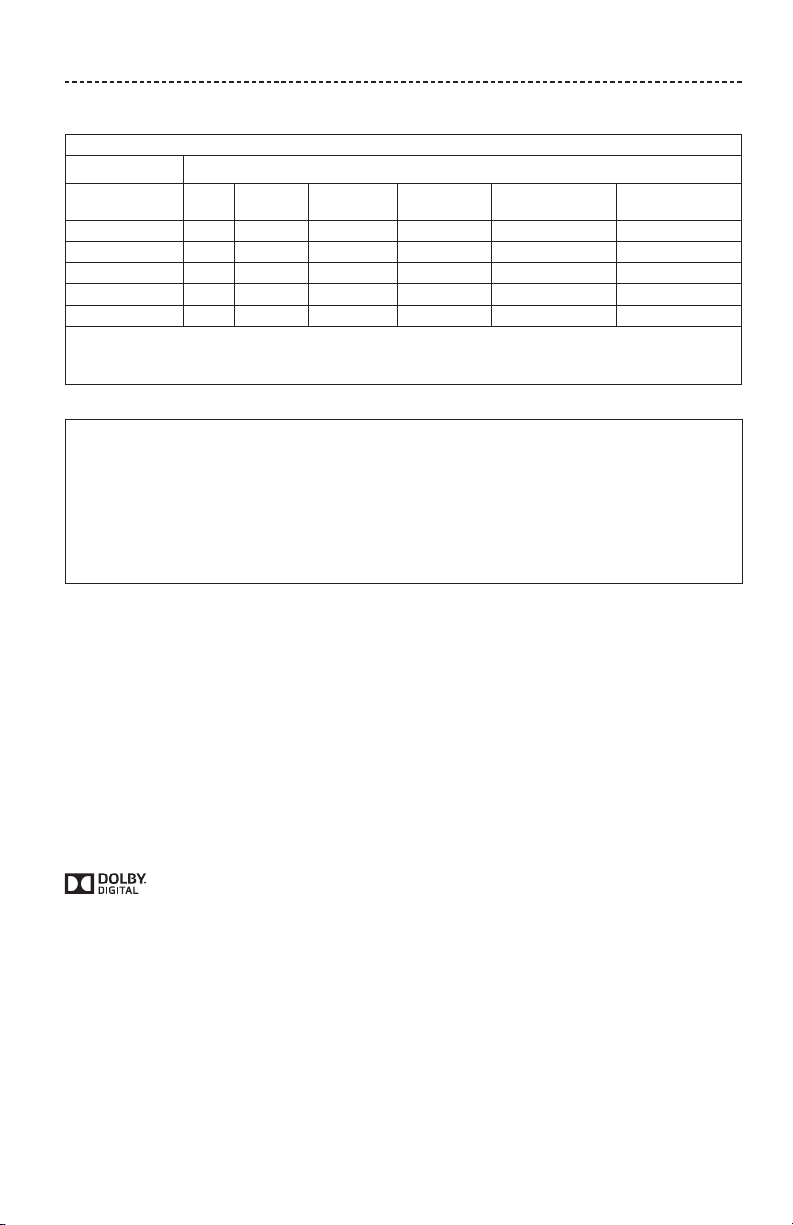
Taiwan Restriction of Hazardous Substances Table
Equipment name: Bose
®
Solo, Type designation: 410376
Restricted substances and its chemical symbols
Unit
Lead
(Pb)
Mercury (Hg) Cadmium (Cd)
Hexavalent
chromium (Cr+6)
Polybrominated
biphenyls (PBB)
Polybrominated
diphenyl ethers (PBDE)
PCBs
- ○ ○ ○ ○ ○
Metal Parts
- ○ ○ ○ ○ ○
Plastic Parts
○ ○ ○ ○ ○ ○
Speakers
- ○ ○ ○ ○ ○
Cables
- ○ ○ ○ ○ ○
Note 1: “○” indicates that the percentage content of the restricted substance does not exceed the percentage of reference value
of presence.
Note 2: The “−” indicates that the restricted substance corresponds to the exemption.
Please complete and retain for your records
The serial and model numbers are located on the bottom of the soundbar and on the packaging for the
remote control.
Serial number: ______________________________________________________________________
Model number: ______________________________________________________________________
Please keep your receipt with your owner’s guide. Now is a good time to register your Bose product.
You can easily do this by going to http://global.Bose.com/register
Date of Manufacture: The eighth digit in the serial number indicates the year of manufacture; “8” is 2008 or 2018.
China Importer: Bose Electronics (Shanghai) Company Limited, Part C, Plan 9, No. 353 North Riying Road, China
(Shanghai) Pilot Free Trade Zone
EU Importer: Bose Products B.V., Gorslaan 60, 1441 RG Purmerend, The Netherlands
Taiwan Importer: Bose Taiwan Branch, 9F-A1, No.10, Section 3, Minsheng East Road, Taipei City 104, Taiwan
Phone Number: +886-2-2514 7676
Mexico Importer: Bose de México, S. de R.L. de C.V. , Paseo de las Palmas 405-204, Lomas de Chapultepec, 11000
México, D.F. Phone Number: +5255 (5202) 3545
The Bluetooth
®
word mark and logos are registered trademarks owned by Bluetooth SIG, Inc. and any use of such marks
by Bose Corporation is under license.
Blu-ray Disc™ and Blu-ray™ are trademarks of the Blu-ray Disc Association.
Manufactured under license from Dolby Laboratories. Dolby and the double-D symbol are trademarks
of Dolby Laboratories.
Bose Corporation Headquarters: 1-877-230-5639
©2018 Bose Corporation. No part of this work may be reproduced, modified, distributed or otherwise used without prior
written permission.

6 - ENGLISH
CONTENTS
Introduction
About your TV sound system ....................................................................................... 8
System features .......................................................................................................... 8
Unpacking ............................................................................................................................. 9
Setting up the System
Placing the soundbar ....................................................................................................... 10
Sample soundbar placement ................................................................................ 10
Wall mounting the soundbar ......................................................................................... 10
Cable options ...................................................................................................................... 11
Connecting your TV .......................................................................................................... 11
Connecting the soundbar ............................................................................................... 12
Option 1: Optical cable (preferred) ..................................................................... 12
Option 2: Coaxial cable ........................................................................................... 13
Connecting to power ........................................................................................................ 14
Mounting ring .............................................................................................................. 14
Turning o your TV speakers ........................................................................................ 15
Powering on your soundbar .......................................................................................... 15
Confirming your TV speakers are o ................................................................. 15
Using the System
Remote control buttons .................................................................................................. 16
Programming the universal remote ............................................................................ 17
Customizing the power button ............................................................................ 18
Resyncing your cable/satellite box and TV ............................................................. 18
Switching between sources ........................................................................................... 19
Function buttons ................................................................................................................ 19
Adjusting the volume ....................................................................................................... 19
Adjusting the bass level .................................................................................................. 19
Resetting the bass level .......................................................................................... 20
Dialogue mode .................................................................................................................... 20
Auto-wake ............................................................................................................................ 20
Programming a non-Bose remote control ............................................................... 20

ENGLISH - 7
CONTENTS
Bluetooth®
Pairing a Bluetooth® device ............................................................................................ 21
Connecting to a paired Bluetooth® device ............................................................... 22
Switching between connected devices..................................................................... 22
Clearing the soundbar’s Bluetooth® pairing list ..................................................... 22
Getting System Information
Soundbar indicators ......................................................................................................... 23
Status indicator .......................................................................................................... 23
Bluetooth indicator ................................................................................................... 23
Alternate Setup
No sound from a source(s) connected to your TV ....................................... 24
No optical or coaxial connector on your TV ................................................... 24
Care and Maintenance
Troubleshooting ................................................................................................................. 30
Adjusting the audio for wall mounting.............................................................. 32
Replacing the remote batteries .................................................................................... 32
Cleaning ................................................................................................................................. 33
Customer service ............................................................................................................... 33
Limited warranty ................................................................................................................ 33
Technical Information ....................................................................................................... 33

8 - ENGLISH
INTRODUCTION
About your TV sound system
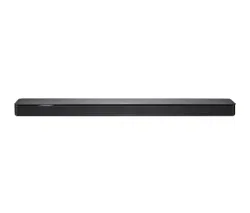
Your TV sound system provides clear, spacious sound from one compact soundbar.
System features
• Videostage® and TrueSpace® technologies deliver many of the benefits of a
five-speaker home theater in a single soundbar.
• Sleek and elegantly designed soundbar fits easily in front of your TV.
• Connects with just one audio cable for easy setup.
• Programmable universal remote powers on/o your TV, cable/satellite box and
system with the press of a single button.
• Stream music from Bluetooth® devices.
• Stores up to eight Bluetooth devices in its pairing list.
• Connects up to two Bluetooth devices for easy switching between devices.
• Mounting ring to hide the power supply behind your mounted TV.
• Soundbar can be mounted on the wall (kit available separately).
ENGLISH - 9
INTRODUCTION
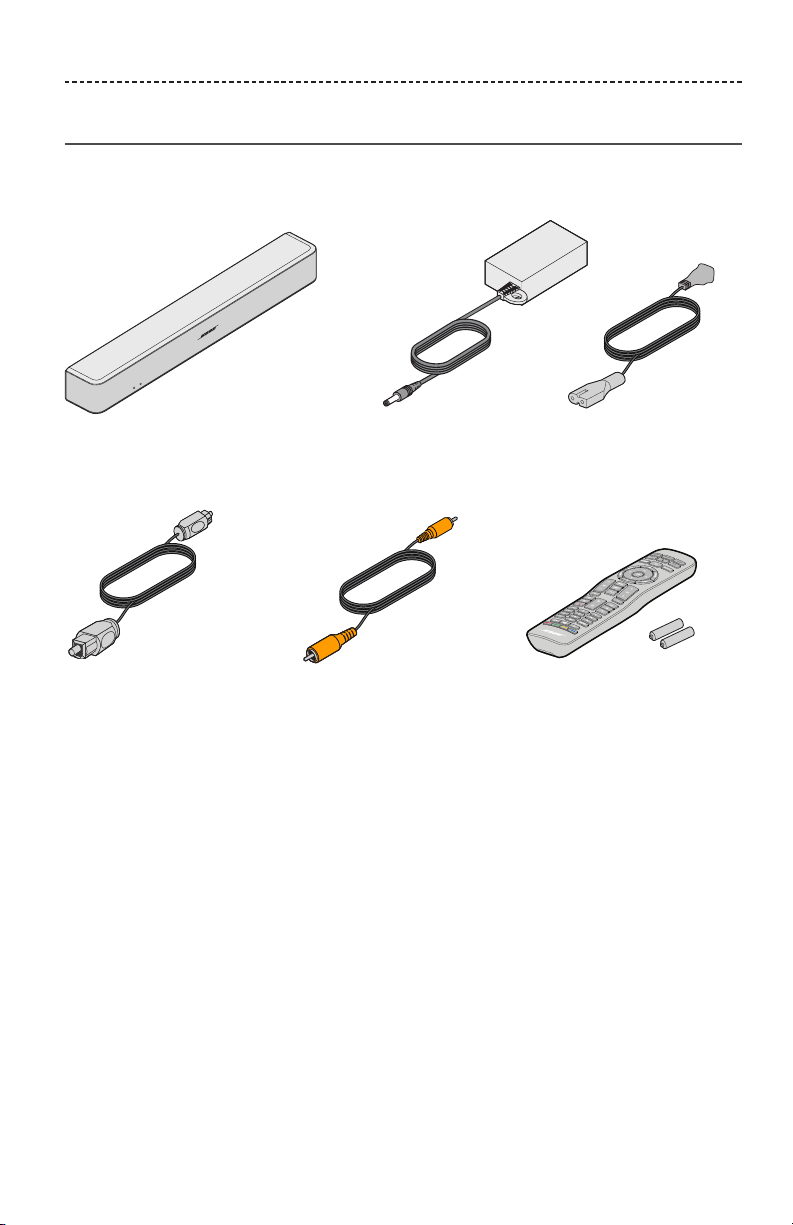
Unpacking
Carefully unpack the carton and confirm that the following parts are included:
Soundbar Power supply and cord*
Optical cable Coaxial cable
(Europe only)
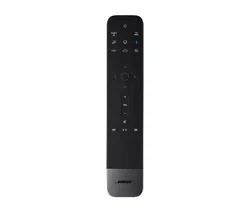
Universal remote control
(batteries provided)
*May ship with multiple power cords. The appropriate power cord for your region is
supplied.
Note: If part of the system is damaged, do not use it. Contact your authorized Bose®
dealer or Bose customer service. Refer to the contact sheet in the carton.
10 - ENGLISH
SETTING UP THE SYSTEM
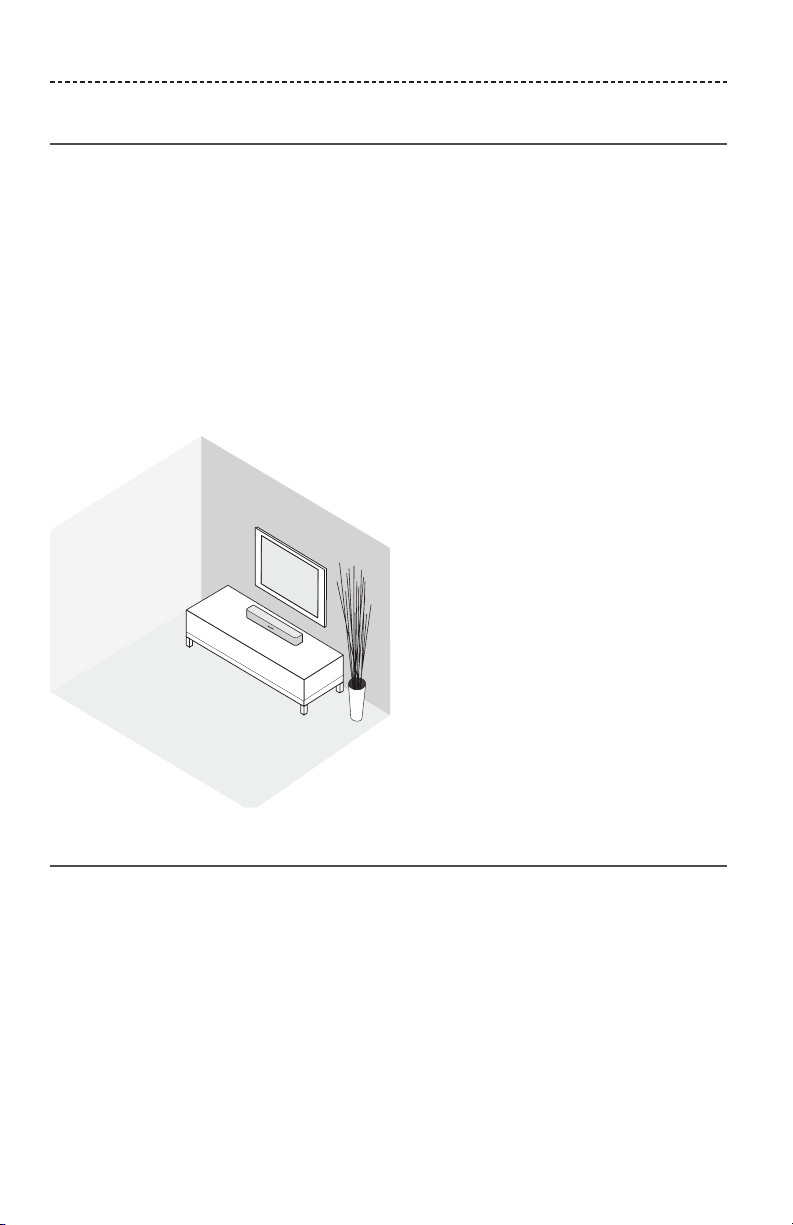
Placing the soundbar
• Stand the soundbar on its feet in front of your TV.
• Do not place your TV on the soundbar.
• Make sure there is an AC (mains) power outlet nearby.
To avoid wireless interference:
• Keep other wireless equipment away from the soundbar.
• Place the soundbar outside of and away from metal cabinets, other audio/video
components and direct heat sources.
Sample soundbar placement
Wall mounting the soundbar
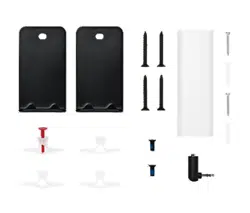
You can mount the soundbar on a wall. To purchase the WB-120 Wall Mount Kit, contact
your local Bose® dealer or visit www.Bose.com
After wall mounting and setting up the soundbar, adjust the audio for better bass sound
(see page 32).
CAUTION: Do not use any other hardware to mount the soundbar.
ENGLISH - 11
SETTING UP THE SYSTEM
Cable options
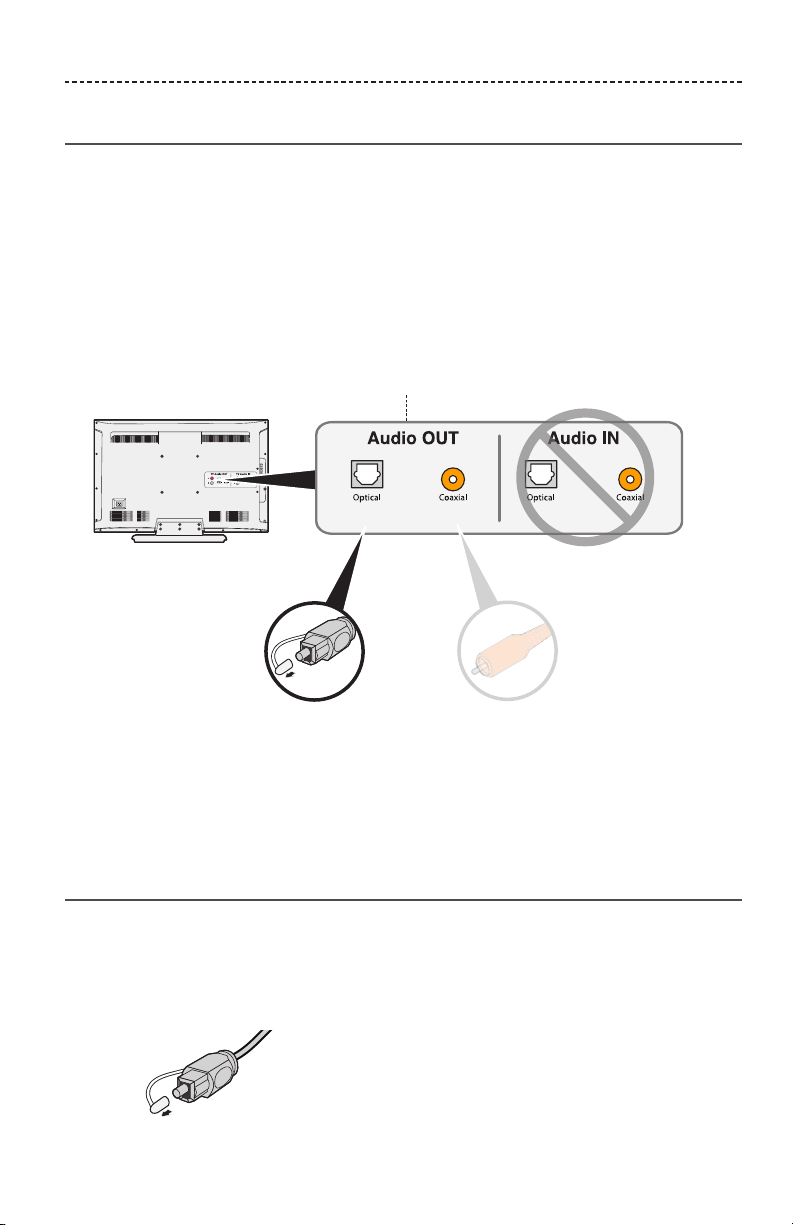
Connect your TV to the soundbar using one of the two digital cable options.
The optical cable is the preferred method for connection.
Note: If your TV does not have an optical or coaxial connector, see “Alternate Setup”
on page 24.
1. On the back of your TV, locate the Audio OUT (digital) connector panel.
Note: You must connect the audio cable through your Audio OUT
connector panel.
Option 1:
Optical cable (digital audio)
Preferred method for
connection.
Option 2:
Coaxial cable (digital audio)
Use if no optical output
is available.
Your TV's connector panel may not appear as shown.
Look for the shape or color (coaxial) of the connector.
2. Choose an audio cable.
Connecting your TV
Insert one end of the audio cable into the correct Audio OUT (digital) connector on
your TV.
CAUTION: If using an optical cable, remove the protective caps from both ends.
Inserting the plug in the wrong orientation can damage the plug and/or the
connector.
12 - ENGLISH
SETTING UP THE SYSTEM
Connecting the soundbar
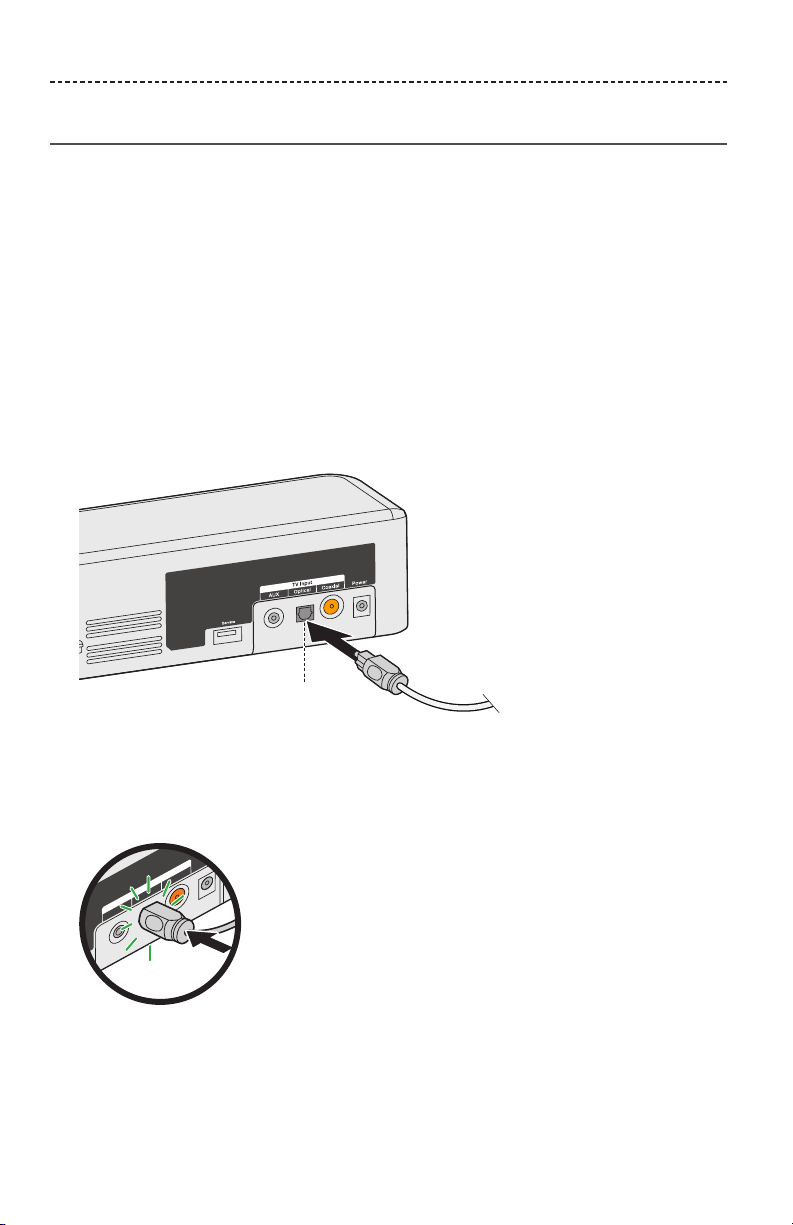
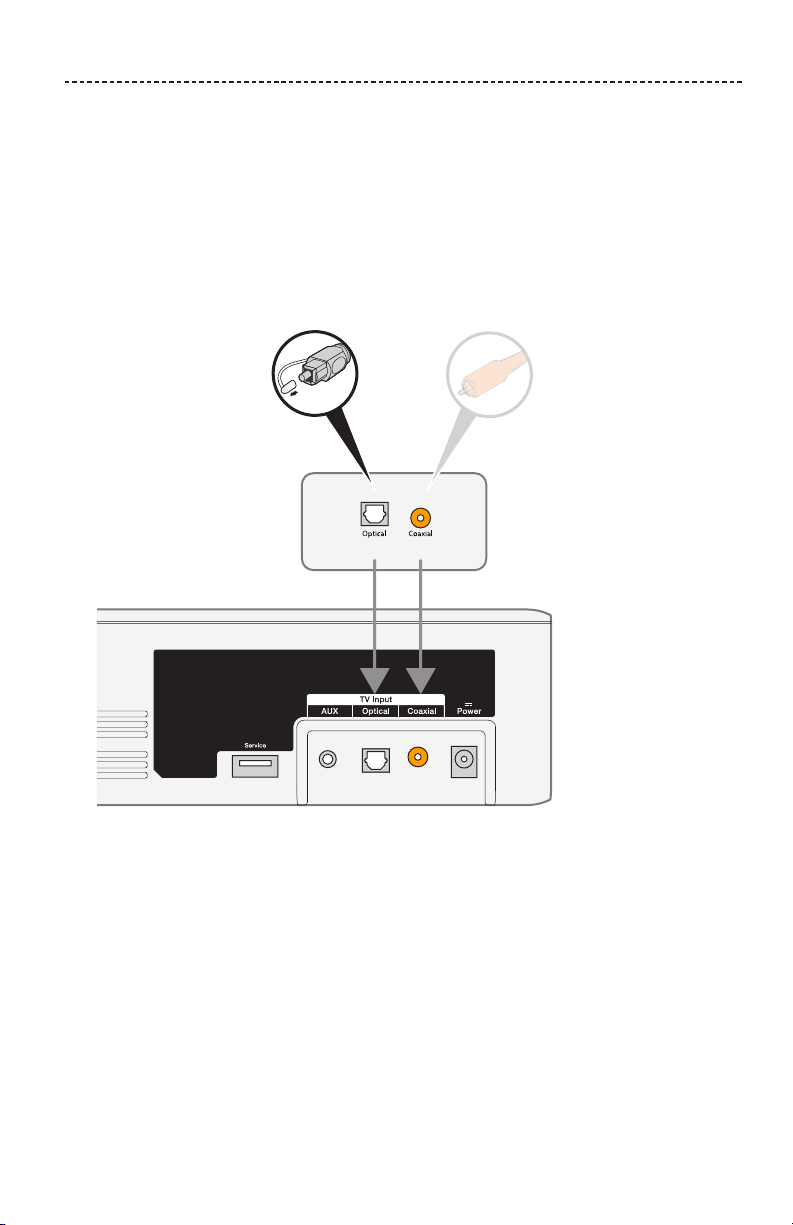
After connecting the audio cable to your TV, connect the other end to your soundbar.
Use only one audio cable.
For instructions on connecting a coaxial cable, see page 13.
Option 1: Optical cable (preferred)
CAUTION: Ensure you have removed the protective cap from both ends of the optical
cable. Inserting the plug in the wrong orientation can damage the plug
and/or the connector.
1. Hold the optical cable’s plug with the Bose logo facing down.
2. Align the plug with the Optical connector on the soundbar and insert the plug
carefully.
Hinged door
Note: The connector has a hinged door that swings inward when inserting
the plug.
3. Firmly push the plug into the connector until you hear or feel a click.
AUX Optical Coaxial
Power
TV Input

ENGLISH - 13
SETTING UP THE SYSTEM
Option 2: Coaxial cable
Insert the other end of the coaxial cable into the Coaxial connector on the soundbar.
14 - ENGLISH
SETTING UP THE SYSTEM
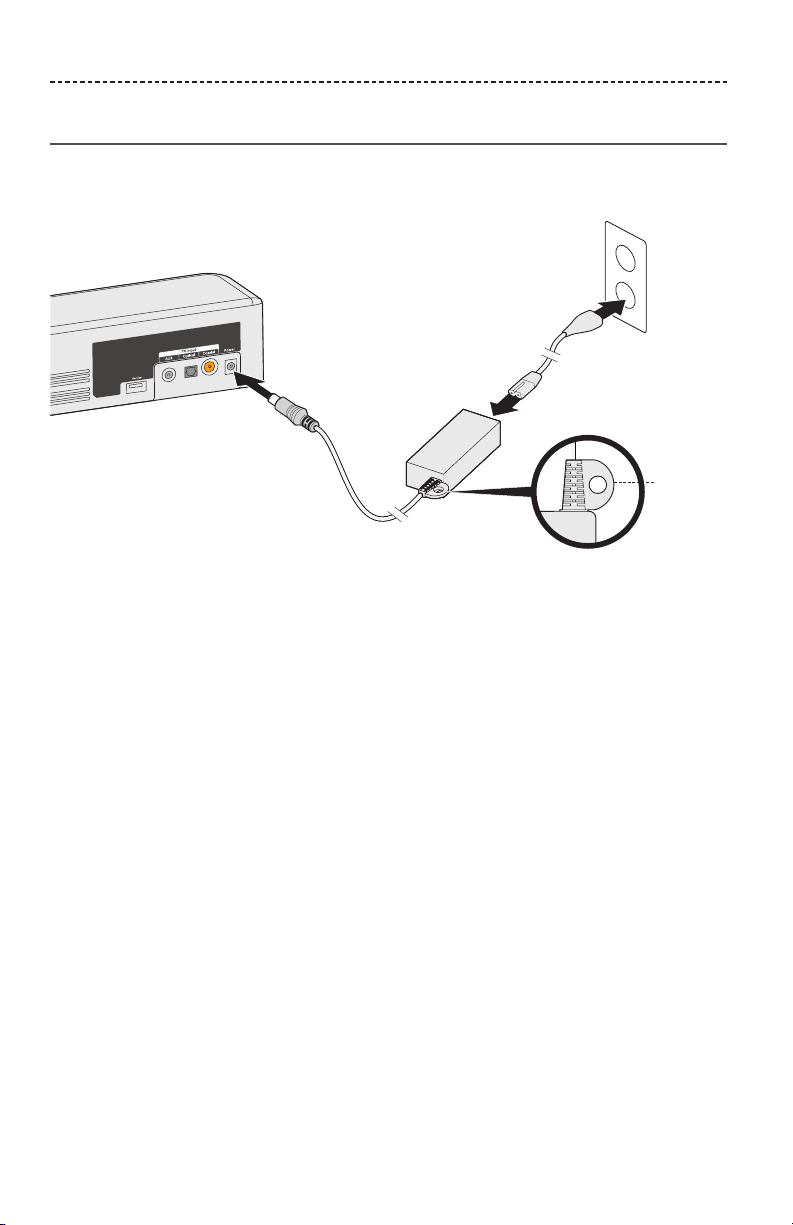
Connecting to power
1. Plug the power supply into the Power connector.
1
2
3
Mounting
ring
2. Plug one end of the power cord into the power supply.
3. Plug the other end into a live AC power (mains) outlet.
The soundbar emits a tone.
Mounting ring
To hide the power supply behind your mounted TV, use the mounting ring.
Attach the mounting ring to your TV’s wall mount using zip ties or bread ties
(not provided).
ENGLISH - 15
SETTING UP THE SYSTEM
Turning o your TV speakers
To avoid hearing distorted sound, turn o your TV speakers.
Refer to your TV’s owner’s guide for more information.
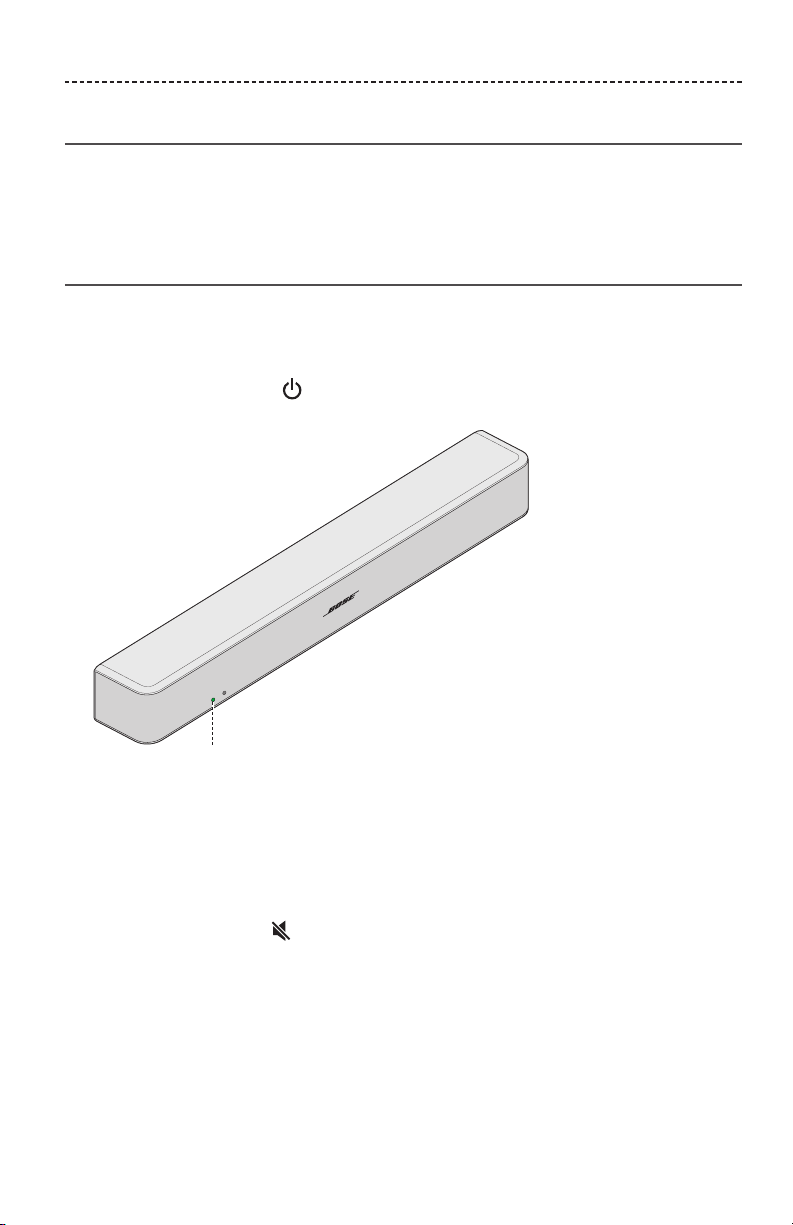
Powering on your soundbar
1. Power on your TV.
2. If you are using a cable/satellite box or other secondary source, power on the source.
3. Press the Power button ( ) on the remote control.
The status indicator glows green.
Status indicator
4. Check if sound is coming from the soundbar.
Note: If you do not hear sound coming from the soundbar, see
“Troubleshooting” on page 30.
Confirming your TV speakers are o
1. Press the Mute button ( ) on the soundbar’s remote control.
2. Check that no sound is coming from your TV.
Note: If you hear sound coming from your TV, see
“Troubleshooting” on page 30.
16 - ENGLISH
USING THE SYSTEM
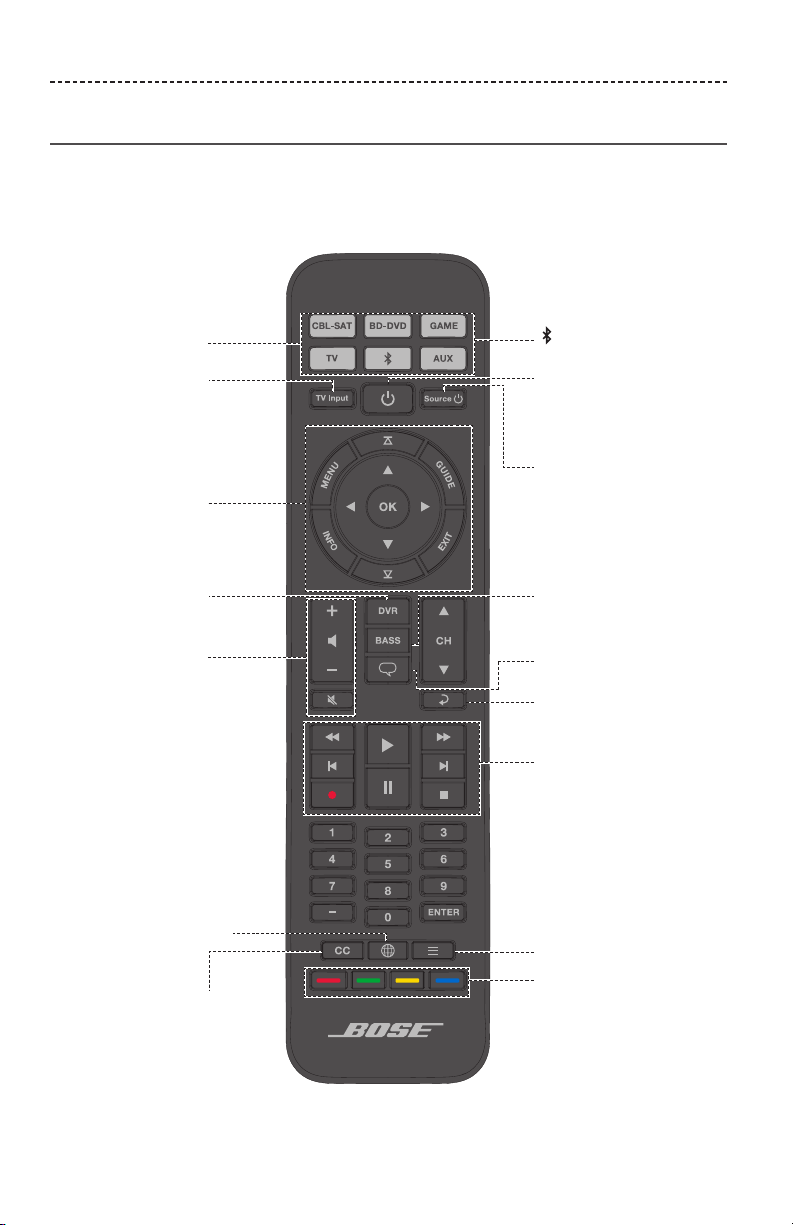
Remote control buttons
Use the remote to control sources connected to your system, adjust the system volume,
change channels, use playback functions, enable cable/satellite box functions and
navigate source menus.
Navigation pad
Source selection
Lists recorded
DVR programs
Displays the Internet
TV home page
Closed captioning
Selects a source
connected to
your TV
Function buttons
(see page 19)
Bass controls
Playback
controls
Powers on/o the
soundbar
Powers on/o a
selected source
Previous channel,
chapter or track
Teletext mode
Volume controls
Dialogue mode
controls the
Bluetooth® feature
ENGLISH - 17
USING THE SYSTEM
Programming the universal remote
You can program the universal remote to control your source, such as a TV,
DVD/Blu-ray Disc™ player, cable/satellite box, game system or DVR, by entering
the code for your source’s brand. There may be several codes for your source.
You may need to perform this procedure multiple times to locate the correct code.
Locate your source’s code
1. Power on your source.
2. Locate the code for your source’s brand in the Universal Remote Device Codes
book (provided).
Enter your source’s code
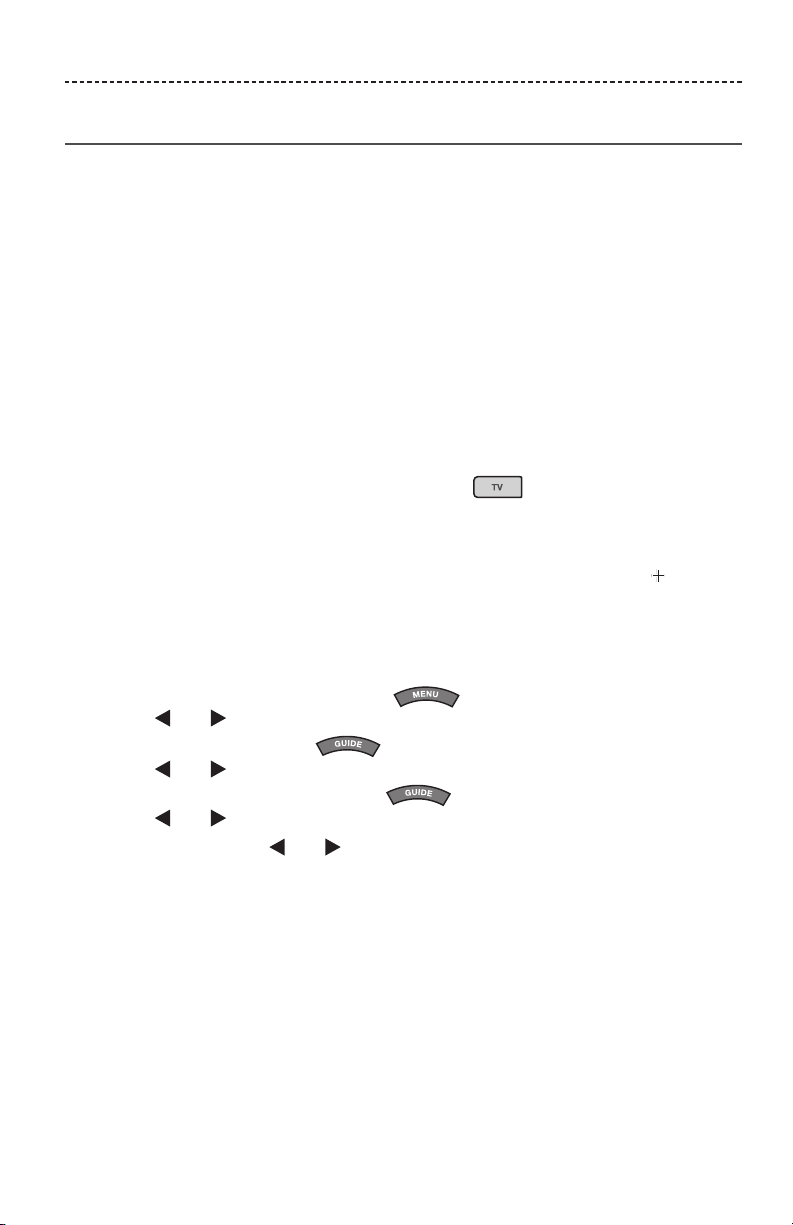
1. On the remote control, press and hold the appropriate source button until all six
source buttons glow, then release.
For example, to program your TV, press and hold until all six source buttons
glow, then release.
The appropriate source button continues to glow.
2. On the number keypad, enter the code for your source’s brand and press on the
volume button.
Test your source’s code
1. Test your source for basic functions. Follow the instructions for your source:
• TV: press the channel buttons. Press . The settings menu appears.
Press and to navigate.
• Cable/satellite box: press . The programming guide appears.
Press and to navigate.
• DVD or Blu-ray Disc™ player: press . The settings menu appears.
Press and to navigate.
• Game system: press and to navigate through your menu.
18 - ENGLISH
USING THE SYSTEM
2. Based on your source’s response to basic functions:
• Remote responds accurately: press to exit programming and save your
settings.
• Remote does not respond or does not respond accurately:
– If your source button glows: press on the volume button to move to the
next code. Repeat steps 1 - 2 in “Test your source’s code.” You may need to
repeat this procedure 30 or more times. If all six buttons blink three times, you
have cycled through all codes for your source.
– If your source button is o: your remote exited programming mode.
Repeat steps 1 - 2 in “Enter your source’s code” and steps 1 - 2 in
“Test your source’s code.”
Tip: After you exit programming mode, press the appropriate source button to use
your source.
Note: Your source may not be compatible with universal remote controls or may
not accept IR (infrared) signals. Refer to your source’s owner’s guide for
more information.
Customizing the power button
You can customize (power button) on your remote to power on/o your soundbar,
TV and cable/satellite box simultaneously.
1. Program your remote to control your TV and cable/satellite box (see page 17).
2. Press and simultaneously and hold for 10 seconds.
Both buttons flash three times.
Resyncing your cable/satellite box and TV
After customizing the power button, your cable/satellite box and TV may become out of
sync and not power on/o simultaneously. Use the following steps to resync
your soundbar.
1. Press the source button for the source that is out of sync.
2. Press to power on/o the source.
3. Press .
Your sources power on/o simultaneously.
ENGLISH - 19
USING THE SYSTEM
Switching between sources
You can switch from one source to another by pressing the appropriate source button
on the remote.
Note: Before you begin, ensure you have correctly programmed your sources.
1. Press the button for the source you want to control.
The source button glows.
2. Press .
The source powers on.
3. Press and select the correct input on your TV.
Function buttons
The red, green, yellow and blue buttons on the remote control correspond with the
color-coded function buttons on your cable/satellite box or teletext functions.
• Cable/satellite box functions: refer to your cable/satellite box’s owner’s guide.
• Teletext functions: correspond with color-coded page numbers, headings or shortcuts
on a teletext display.
Adjusting the volume
On the remote control:
Press to increase the volume.
Press to decrease the volume.
Press to mute or unmute the audio.
Note: If you hear sound coming from your TV, see “Troubleshooting” on page 30.
Adjusting the bass level
1. Press the Bass button ( ).
The status indicator blinks white three times.
2. On the remote control:
• Press to increase the bass.
• Press to decrease the bass.
20 - ENGLISH
USING THE SYSTEM
3. Press the Bass button ( ).
The status indicator blinks white three times and the soundbar saves your settings.
Note: For optimal sound quality for dialogue-only programs, such as news and talk
shows, see “Dialogue mode.”
Resetting the bass level
On the remote control, press and hold for five seconds to reset the bass level to
original factory settings.
The status indicator blinks white three times and remains solid white. The soundbar
returns to original factory settings.
Dialogue mode
Dialogue mode provides optimal sound quality for dialogue-only programs, such as
news and talk shows, by decreasing the soundbar’s bass settings.
Press the dialogue button ( ) to toggle between dialogue mode and your default audio
settings.
The status indicator glows amber when dialogue mode is enabled.
Auto-wake
You can set the soundbar to power on whenever a sound signal is received.
Note: The soundbar powers o after 60 minutes of inactivity.
Press and hold on the remote for five seconds until you hear a tone to toggle
between auto-wake and default power settings.
The status indicator glows dim amber when the soundbar is o and auto-wake
is enabled.
Programming a non-Bose remote control
You can program a non-Bose remote control, such as your cable/satellite box remote,
to control the soundbar. Refer to your non-Bose remote control’s owner’s guide or
cable/satellite website for instructions.
Once programmed, the non-Bose remote performs basic functions such as power on/o
and volume.
ENGLISH - 21
BLUETOOTH®
Pairing a Bluetooth
®
device
Bluetooth® wireless technology enables you to stream music from Bluetooth
smartphones, tablets, computers or other audio devices to the soundbar.
Before you can stream music from a Bluetooth device, you must pair your device with
the soundbar.
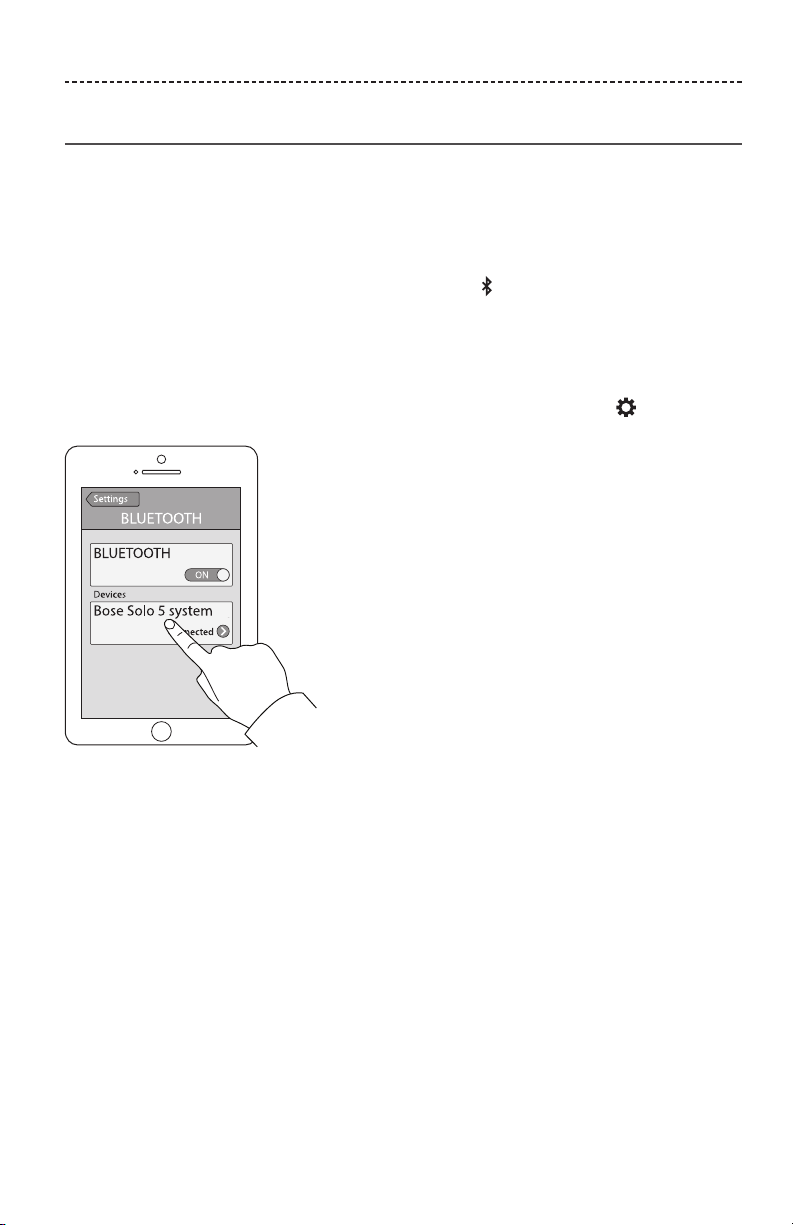
1. On the remote control, press the Bluetooth button until the Bluetooth indicator
blinks blue.
Make sure the Bluetooth indicator blinks blue before you pair your device.
2. On your Bluetooth device, turn on the Bluetooth feature.
Tip: The Bluetooth feature is usually found in Settings. A gear icon ( ) often
represents Settings on the Home screen.
3. Select Bose Solo 5 system from your device list.
Once paired, the Bose Solo 5 system appears connected in the device list.
4. On your Bluetooth device, play music to stream to your soundbar.
If you cannot pair your device
You may need to clear the soundbar’s Bluetooth pairing list (see page 22). After you
clear the list, try pairing again.
See “Troubleshooting” on page 30 for more information.

22 - ENGLISH
BLUETOOTH®
Connecting to a paired Bluetooth
®
device
You can stream audio from a Bluetooth device to the soundbar.
Note: If there are multiple devices stored in the soundbar’s pairing list, it may take
a minute or two for the paired device to connect. The soundbar’s Bluetooth
indicator shows connection status (see page 23).
1. On the remote control, press .
The soundbar connects to the last two devices that streamed to your soundbar.
2. Once connected, on the Bluetooth device, play music.
If you cannot stream audio from a paired device
The soundbar may have lost connection to your device. Check the soundbar’s Bluetooth
indicator. If the paired device is out of range of the soundbar, move your device
within range.
Switching between connected devices
The soundbar supports multi-point connectivity, which allows you to seamlessly switch
playing music between connected devices.
The last two devices that streamed to the soundbar remain connected. During playback,
you can pause audio on the streaming device, and then play music from another
connected device.
1. Pause music from the streaming device.
2. On another connected device, play music.
3. Repeat steps 1 and 2 to switch between connected devices.
Clearing the soundbar’s Bluetooth
®
pairing list
When you pair a Bluetooth® device to the soundbar, the connection is stored in the
soundbar’s pairing list. You may need to clear the pairing list if you cannot connect to a
device. Once you clear the list, you need to pair the device again.
1. Press and hold for 10 seconds, until the Bluetooth indicator blinks blue.
2. On your mobile device, delete Bose Solo 5 system from the Bluetooth menu.
The soundbar emits a tone and is ready to pair to a device (see page 21).
ENGLISH - 23
GETTING SYSTEM INFORMATION
Soundbar indicators
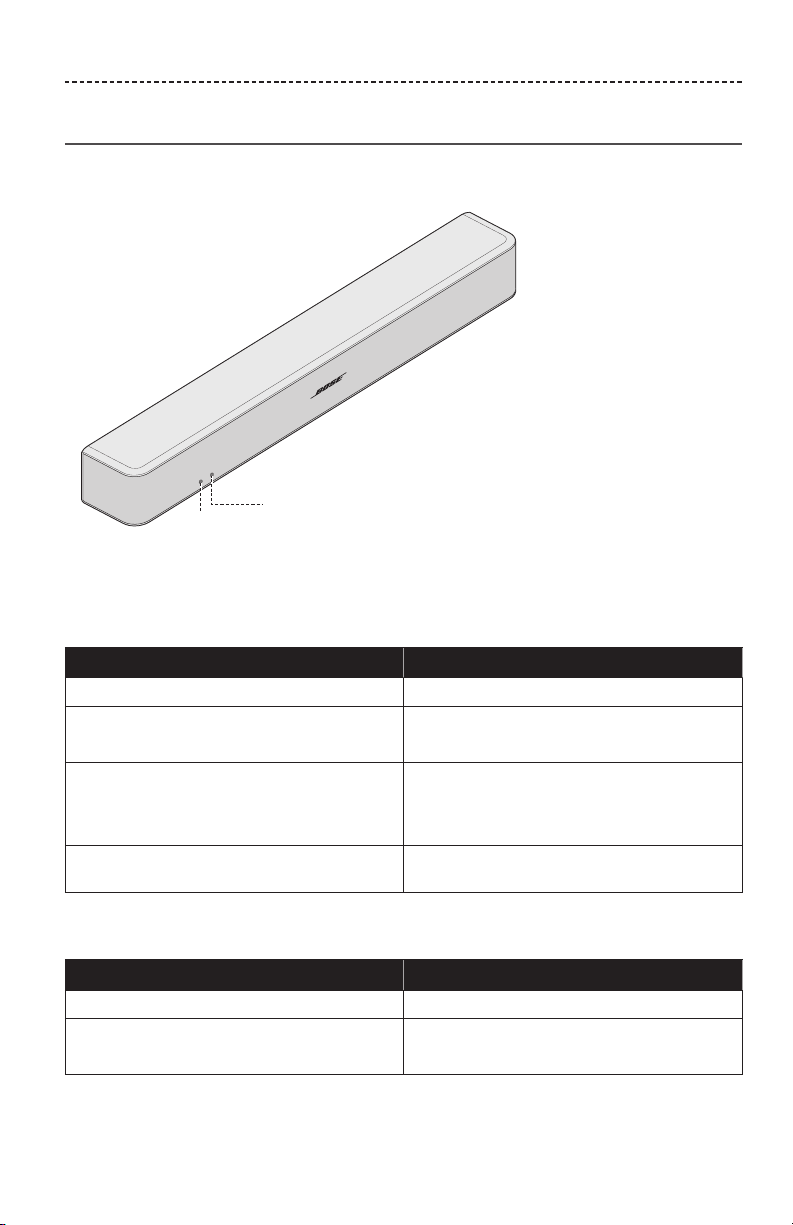
The status and Bluetooth® indicators on the front of the soundbar provide information
on soundbar activity.
Status
indicator
Bluetooth
®
indicator
Status indicator
Indicator activity System state
O
Soundbar o (standby)
Green
Solid: Soundbar is on
Blinking: Soundbar is muted
Amber
Dim: Standby, auto-wake is enabled
Solid: Dialogue mode
Blinking: Dialogue mode, Soundbar is muted
Red
System error: Call Bose Customer Service.
Refer to the contact sheet in the carton.
Bluetooth indicator
Indicator activity System state
Blue
Blinking: ready to pair
White
Blinking: Connecting
Solid: Connected
24 - ENGLISH
ALTERNATE SETUP
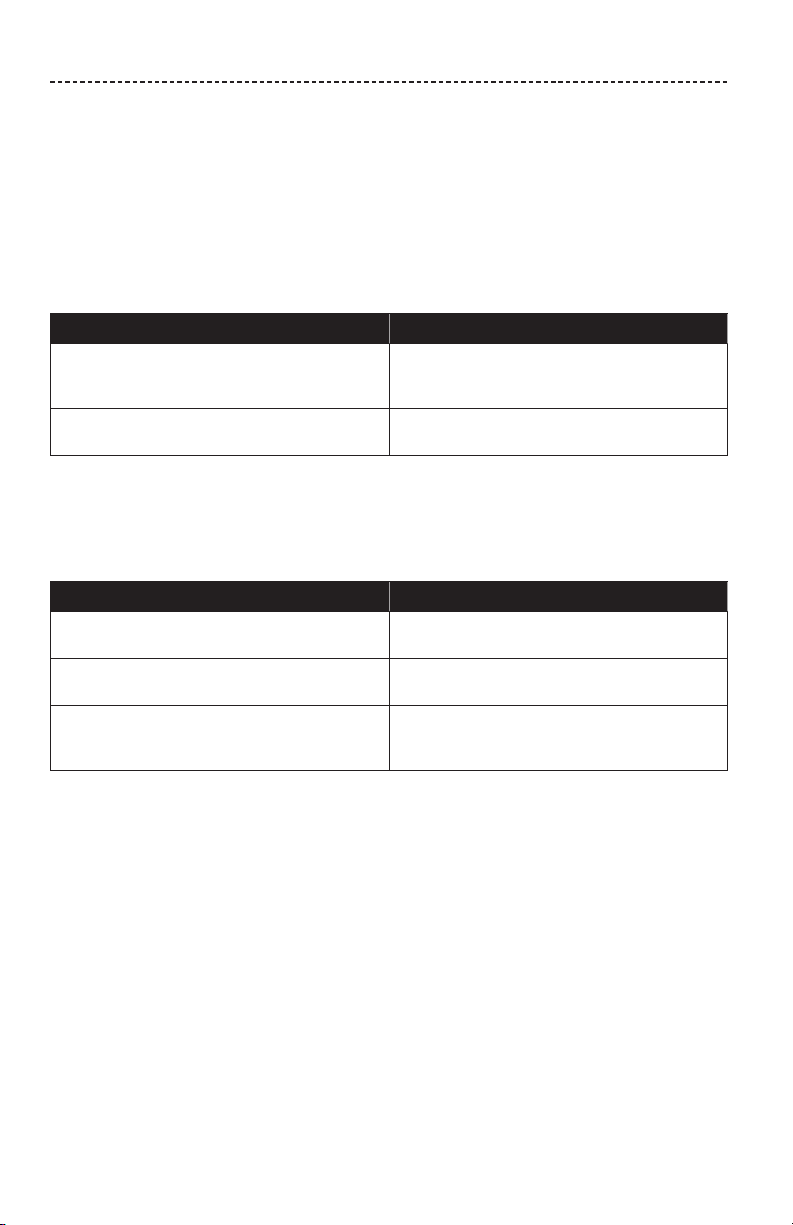
You may need to use an alternate setup method for the following reasons:
• No sound from a source(s) connected to your TV.
• No optical or coaxial connector on your TV.
No sound from a source(s) connected to your TV
Some TVs do not deliver sound from connected sources to the soundbar. Use an
alternate setup method to directly connect your source(s) to the soundbar.
Problem What to do
No sound from a source connected to your TV
Connect your source to the soundbar using
one of the two cable options.
(See page 25.)
No sound from two sources connected to
your TV
Connect your sources to the soundbar using
Option 1 or Option 2. (See page 27.)
No optical or coaxial connector on your TV
Some TVs do not have optical or coaxial connectors. Use an alternate setup method to
connect your TV to the soundbar.
Problem What to do
TV only has an analog connector
Connect your TV using a 3.5 mm to RCA stereo
cable (not provided). (See page 26.)
TV only has a headphones connector
Connect your TV using a 3.5 mm stereo cable
(not provided). (See page 29.)
TV has no audio outputs
Use the audio outputs on another source,
such as a cable/satellite box to connect to the
soundbar. (See page 25.)
ENGLISH - 25
ALTERNATE SETUP
Connecting a source to the soundbar
If you do not get sound from a source, such as a DVD/Blu-ray Disc™ player, cable/
satellite box, game system or DVR, connected to your TV, connect it to the soundbar.
Use only one audio cable.
CAUTION: If using an optical cable, remove the protective caps from both ends.
Inserting the plug in the wrong orientation can damage the plug and/or the
connector.
1. On the back of your source, locate the Audio OUT (digital) connector panel.
Soundbar connector panel
Audio OUT
Source connector panel
2. Choose an audio cable.
3. If you have not already, disconnect your TV from the soundbar.
4. Connect the audio cable from your cable/satellite box’s Audio OUT (digital)
connector panel to the soundbar.
Note: Do not disconnect your source’s video cable, such as an HDMI™ cable, from
your TV.
26 - ENGLISH
ALTERNATE SETUP
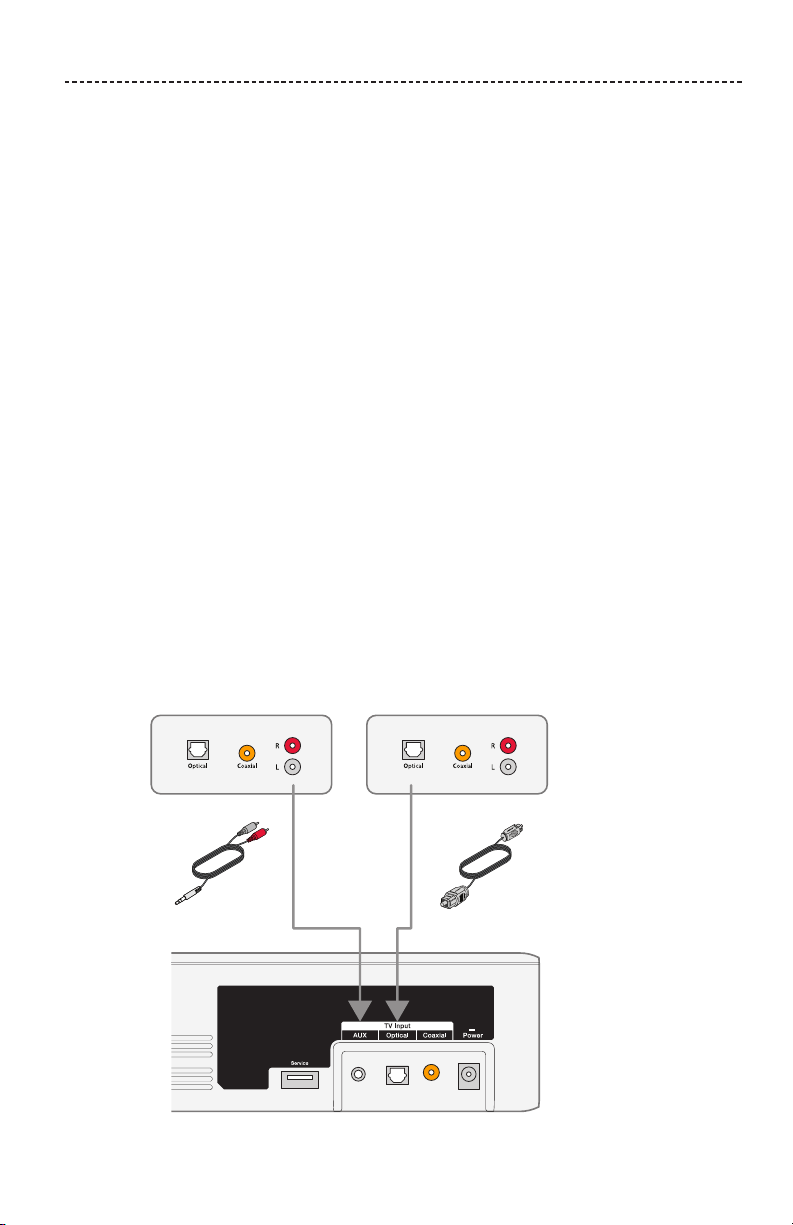
Connecting a source’s analog connector to the soundbar
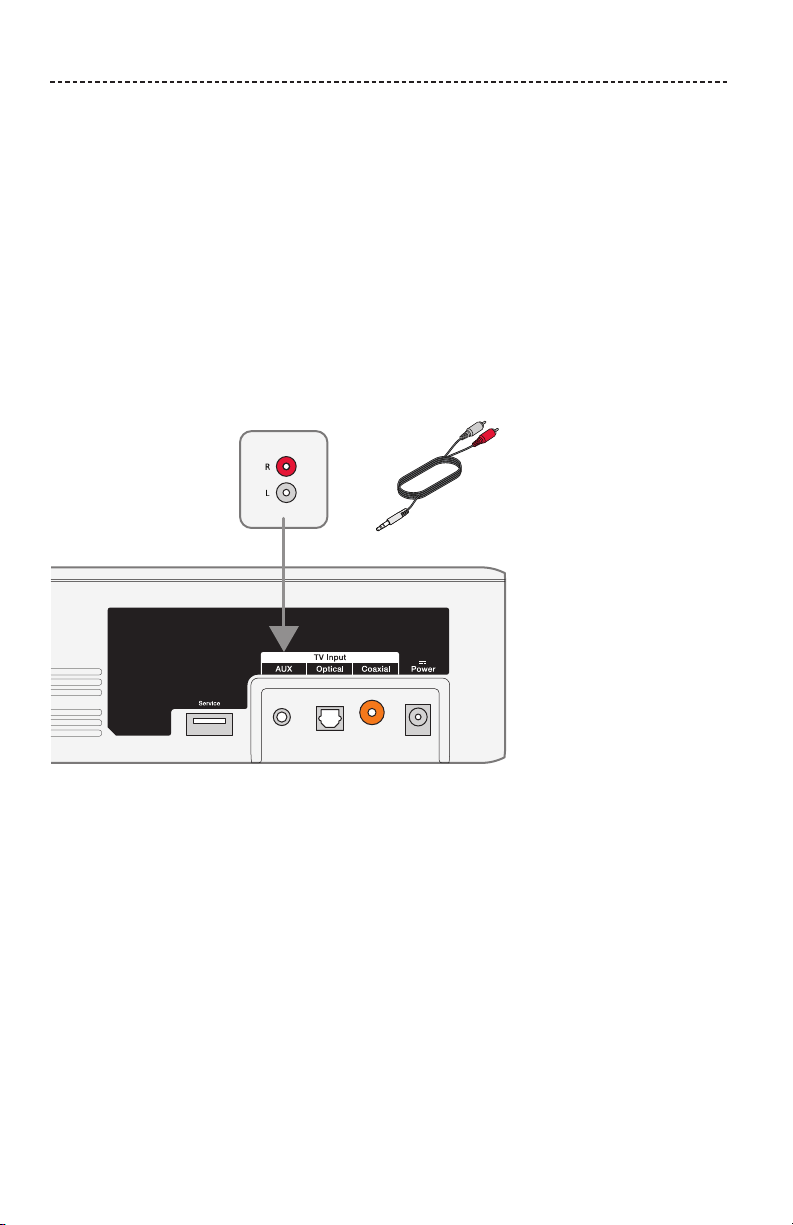
If your source does not have an optical or coaxial connector, and only has analog
connectors (red and white), use a 3.5 mm to RCA stereo cable (not provided) to connect
to the soundbar.
1. If you have not already, disconnect your TV from the soundbar.
2. Insert the RCA analog cable into the Audio OUT RCA (red and white) connectors on
your source.
3. Insert the stereo plug into the soundbar’s AUX connector.
3.5 mm to RCA
stereo cable
(not provided)
Soundbar connector panel
Audio OUT
Source connector panel
ENGLISH - 27
ALTERNATE SETUP
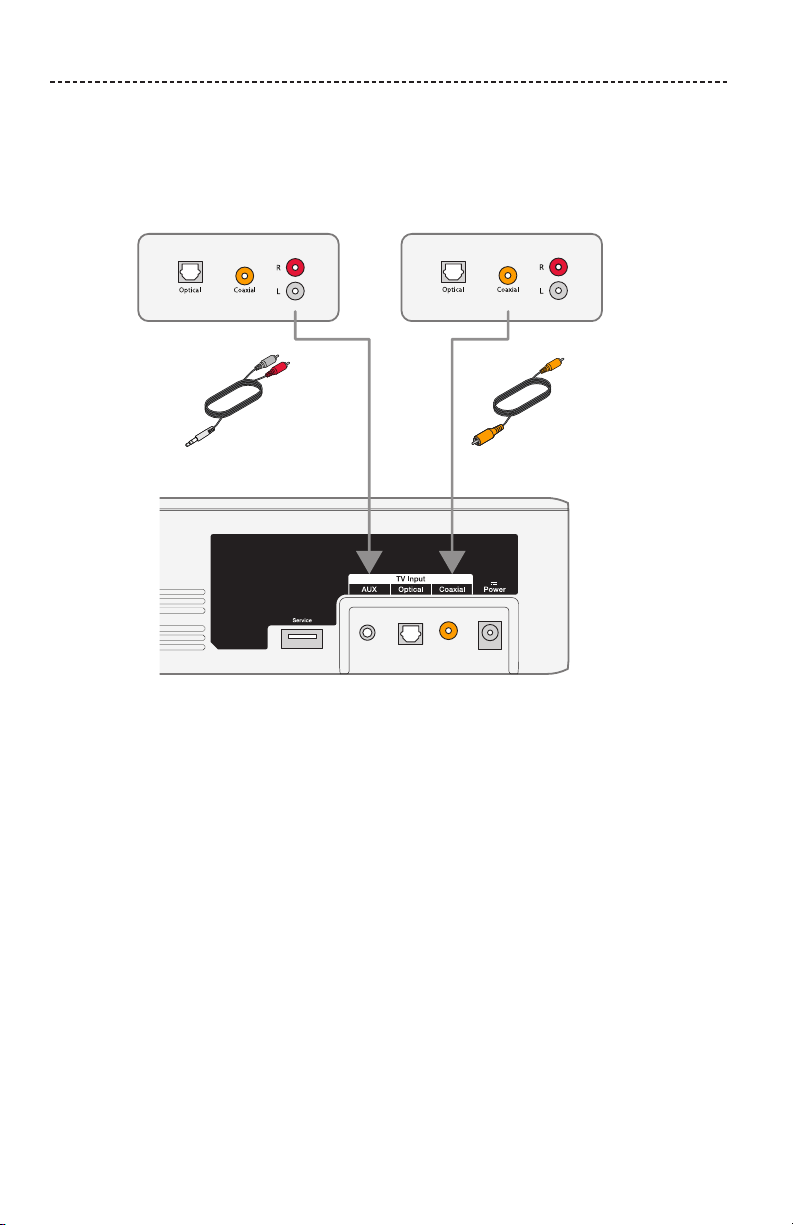
Connecting two sources to the soundbar
If you do not get sound from any source, such as a DVD/Blu-ray Disc™ player,
cable/satellite box, game system or DVR, connected to your TV, connect it to the
soundbar. Use only one audio cable for each source.
1. On the back of each source, locate the Audio OUT (digital) connector panel.
2. Choose a separate audio cable for each source using either Option 1 or Option 2
(see page 28).
Note: You MUST use either Option 1 or Option 2. Do not use the coaxial cable and
optical cable at the same time.
3. If you have not already, disconnect your TV from the soundbar.
4. Separately connect the chosen audio cable from each source’s Audio OUT (digital)
connector panel to the soundbar.
Note: Do not disconnect your source’s video cable, such as an HDMI™ cable, from
your TV.
Option 1
This figure shows two source connections using an optical cable and 3.5 mm to RCA
stereo cable (not provided).
CAUTION: If using an optical cable, remove the protective caps from both ends.
Inserting the plug in the wrong orientation can damage the plug and/or
the connector.
3.5 mm to RCA
stereo cable
(not provided)
Audio OUT Source 2
Audio OUT Source 1
Soundbar
connector panel
28 - ENGLISH
ALTERNATE SETUP
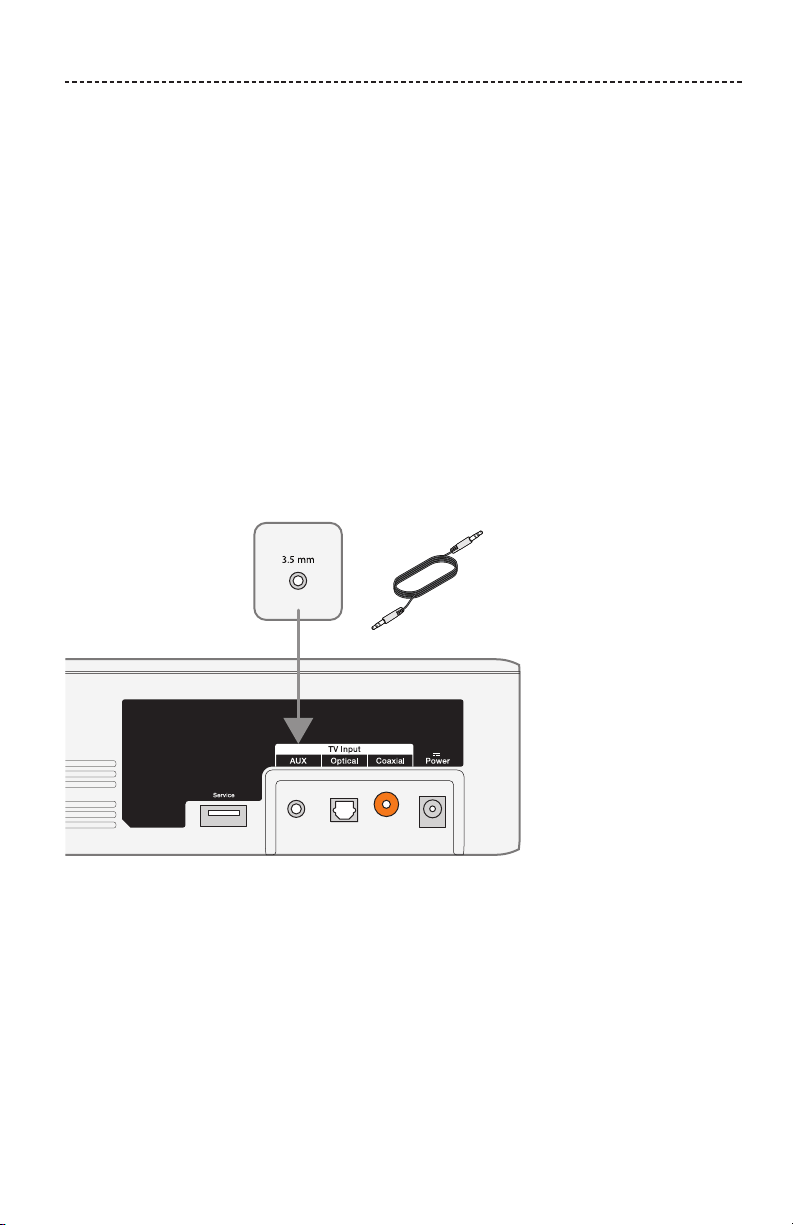
Option 2
This figure shows two source connections using a coaxial cable and 3.5 mm to RCA
stereo cable (not provided).
Audio OUT
Source 2
Audio OUT
Source 1
Soundbar connector panel
3.5 mm to RCA
stereo cable
(not provided)
Using two sources connected to the soundbar
Power o sources when not in use. In order for one source to deliver audio to the sound-
bar, your other source must be o.
ENGLISH - 29
ALTERNATE SETUP
Connecting a TV headphones connector to the soundbar
If your TV only has a headphones connector, use a 3.5 mm stereo cable (not provided)
to connect it to the soundbar.
1. Insert the stereo plug into the TV headphones connector.
2. Insert the other end of the cable into the AUX connector on your soundbar.
3. Ensure your TV speakers are on. Refer to your TV’s owner’s guide for
more information.
4. To ensure optimal volume control from your soundbar,
• Set your TV’s volume to 75 percent of maximum.
• Next, set the volume level of your soundbar using the remote control.
3.5 mm stereo cable
(not provided)
Soundbar connector panel
Audio OUT
TV headphones connector panel
(or other variable audio output)

30 - ENGLISH
CARE AND MAINTENANCE
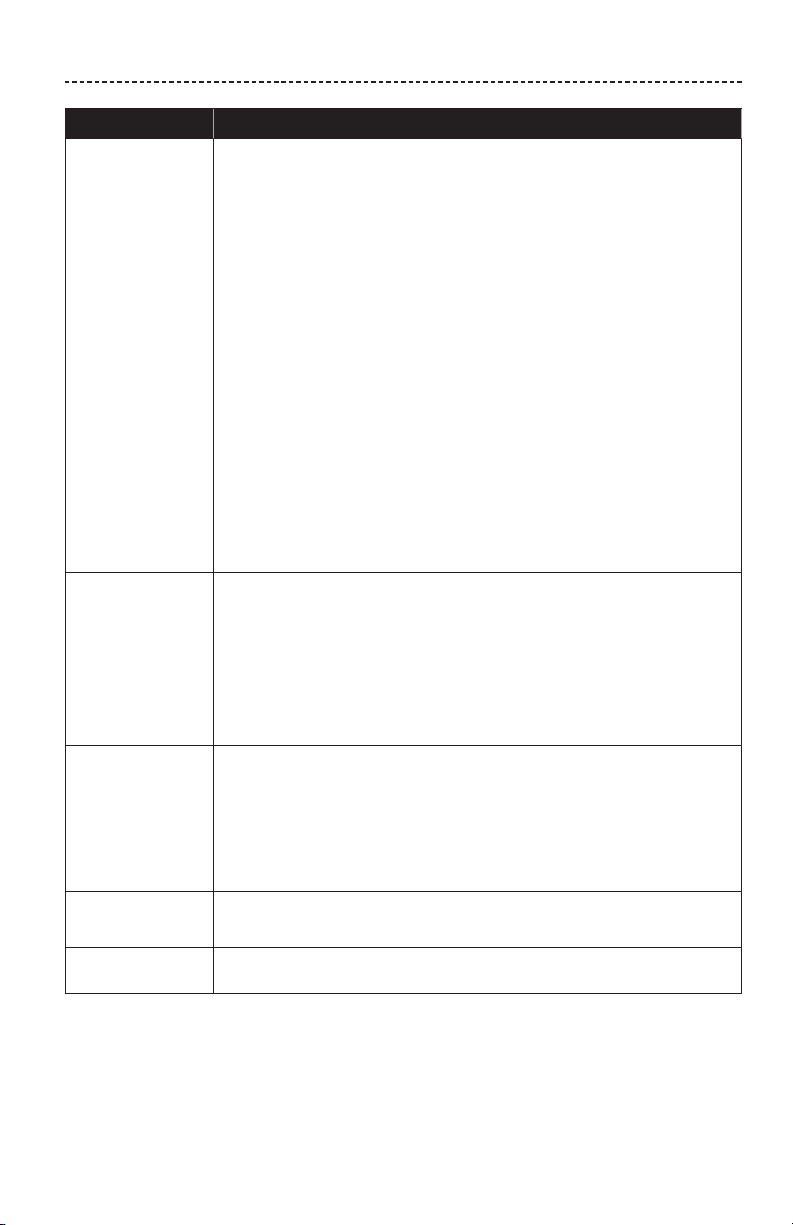
Troubleshooting
Problem What to do
No power
• Secure both ends of the power cord.
• Plug the power cord into a live AC (mains) outlet.
• Unplug the power cord for at least one minute and reconnect.
No sound
• Unmute the soundbar.
• Increase the volume.
• Plug the audio cable into a connector on your TV labelled Audio Output
or Audio OUT, not Audio Input or Audio IN.
• Use only one audio cable.
• Secure all cable connections and ensure they are correct.
• If you are using a cable/satellite box or other secondary source for
sound, select the correct TV input.
• Enable your TV’s audio output and select the correct setting, such as
such as Stereo or 5.1 Channel Audio. Refer to your TV’s owner’s guide
for more information.
• Use alternate setup (see page 24).
• If connecting to two sources:
- Power o the other source.
- Ensure that you are not using an optical cable and coaxial cable.
• If the soundbar is connected to a TV output labelled VARIABLE (VAR),
power o your TV speakers, set your TV volume to 75 percent of
maximum and unmute your TV.
• If connecting through a TV headphones output, increase your TV
volume to the maximum limit.
• Unplug the power cord for at least one minute and reconnect.
ENGLISH - 31
CARE AND MAINTENANCE
Problem What to do
Cannot play
Bluetooth
®
• On your soundbar:
- Pair a device (see page 21).
- Clear the soundbar’s pairing list (see page 22).
- Try pairing a dierent device.
• On your Bluetooth device:
- Turn o and on the Bluetooth feature.
- Remove the soundbar from the Bluetooth menu. Pair again.
- Use a dierent music source.
- Check your Bluetooth device for compatibility. Refer to your
Bluetooth device’s owner’s guide.
• Increase the volume on the soundbar, your mobile device and
music source.
• Ensure you are using the correct device.
• If more than one Bluetooth device is connected, pause your streaming
device first.
• Disconnect other Bluetooth devices when not in use.
• See “Distorted sound” or “No sound.”
Distorted sound
• Secure cable connections on the soundbar and TV (or other
connected sources).
• If the soundbar is connected to a TV output labelled VARIABLE (VAR),
reduce the TV volume.
• Use alternate setup (see page 24).
• If wall mounting the soundbar, adjust the audio (see page 32).
• Unplug the power cord for at least one minute and reconnect.
Remote control
is inconsistent or
does not work
• Check the batteries to see if they are installed properly or if they need to
be replaced (see page 32).
• Point the remote control directly at the soundbar.
• Check that the status indicator flashes when you press the remote
volume or mute button.
• Unplug the power cord for at least one minute and reconnect.
Sound is coming
from the TV
• Turn o your TV speakers (see page 15).
• Mute or decrease the volume your TV.
Status indicator
is red
System error: Call Bose Customer Service. Refer to the contact sheet in the
carton.
32 - ENGLISH
CARE AND MAINTENANCE
Adjusting the audio for wall mounting
After wall mounting the soundbar, adjust the audio for better bass sound.
Press and hold for five seconds.
Tip: If you remove the soundbar from the wall, repeat to return the soundbar to default
audio settings.
Replacing the remote batteries
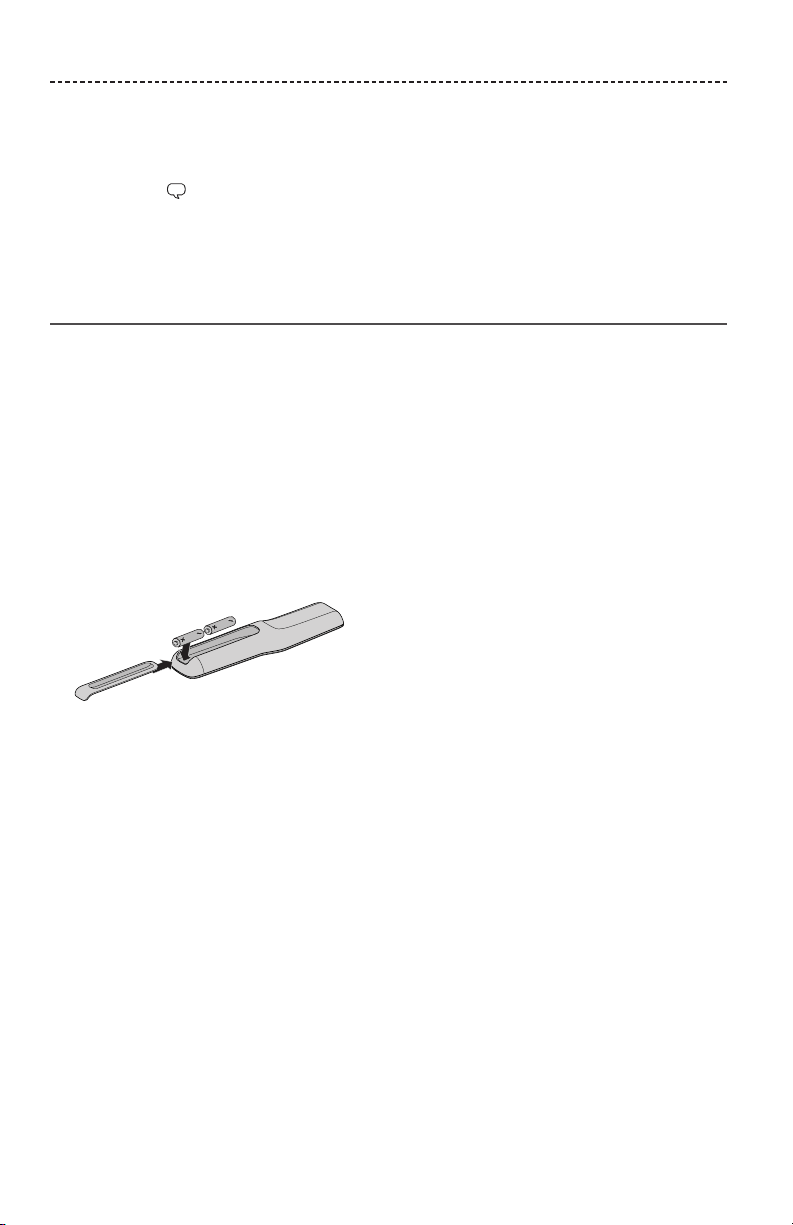
Replace both batteries when the remote control stops operating or its range seems
reduced. Use Alkaline batteries.
1. Slide open the battery compartment cover on the back of the remote.
2. Remove both batteries.
3. Dispose of the batteries according to the regulations in your area.
4. Insert two AA (IEC-LR6) 1.5V batteries or the equivalent. Match the + and – symbols
on the batteries with the + and – markings inside the compartment.
5. Slide the battery compartment cover back into place.

ENGLISH - 33
CARE AND MAINTENANCE
Cleaning
• Clean the surface of the system with a soft, dry cloth.
• Do not use any sprays near the system. Do not use any solvents, chemicals or cleaning
solutions containing alcohol, ammonia or abrasives.
• Do not allow liquids to spill into any openings.
Customer service
For additional help, contact Bose Customer Service. Refer to the contact sheet in
the carton.
Limited warranty
Your system is covered by a limited warranty. Visit our website at
global.Bose.com/warranty for details of the limited warranty.
To register your product, visit global.Bose.com/register for instructions. Failure to
register will not aect your limited warranty rights.
Technical Information
Input rating
Input: 20VDC, 30W MAX.
©2018 Bose Corporation, The Mountain,
Framingham, MA 01701-9168 USA
AM798493 Rev. 02