目 次
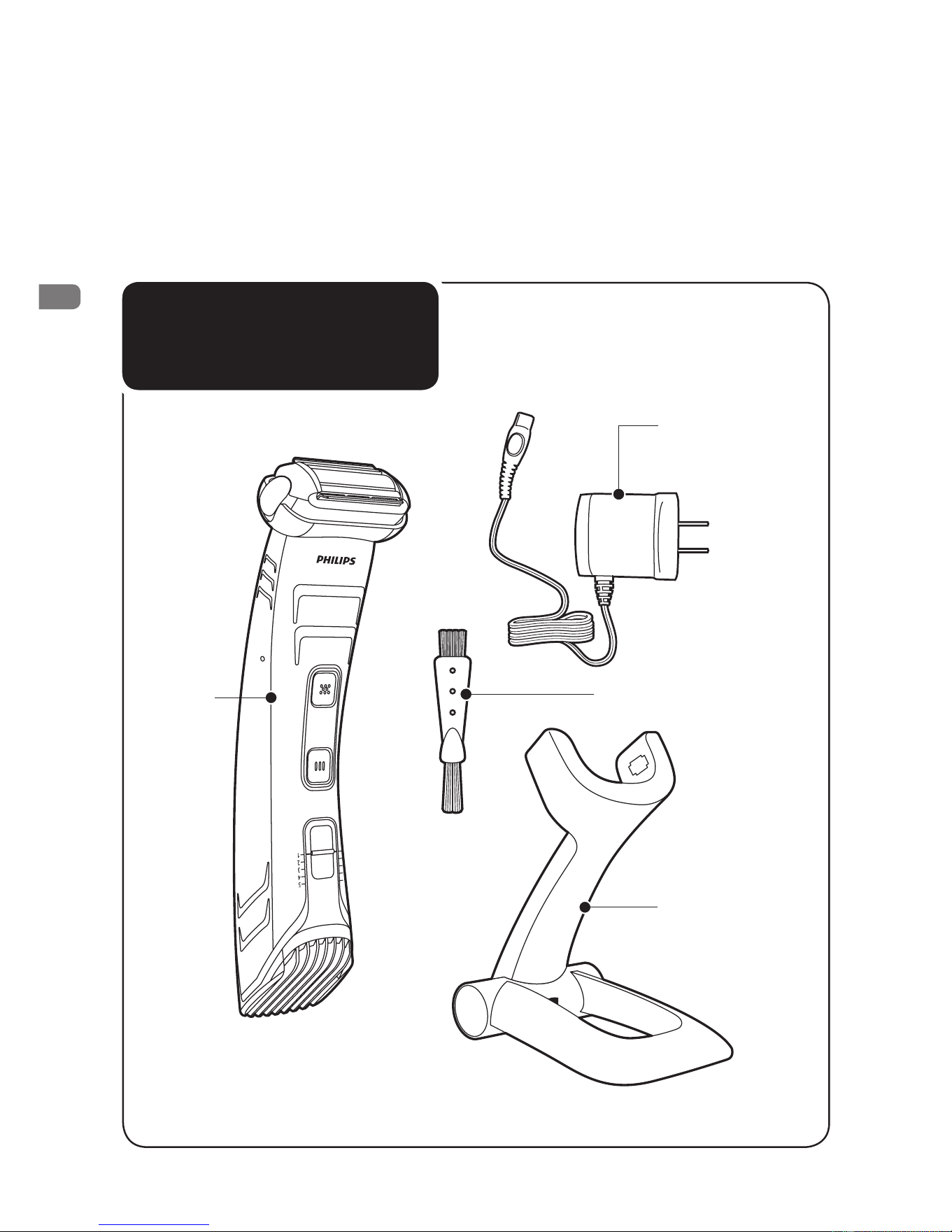
商品のご確認
…………………………………
1
目次
……………………………………………
2
必ずお守りください
………………………
3
・
4
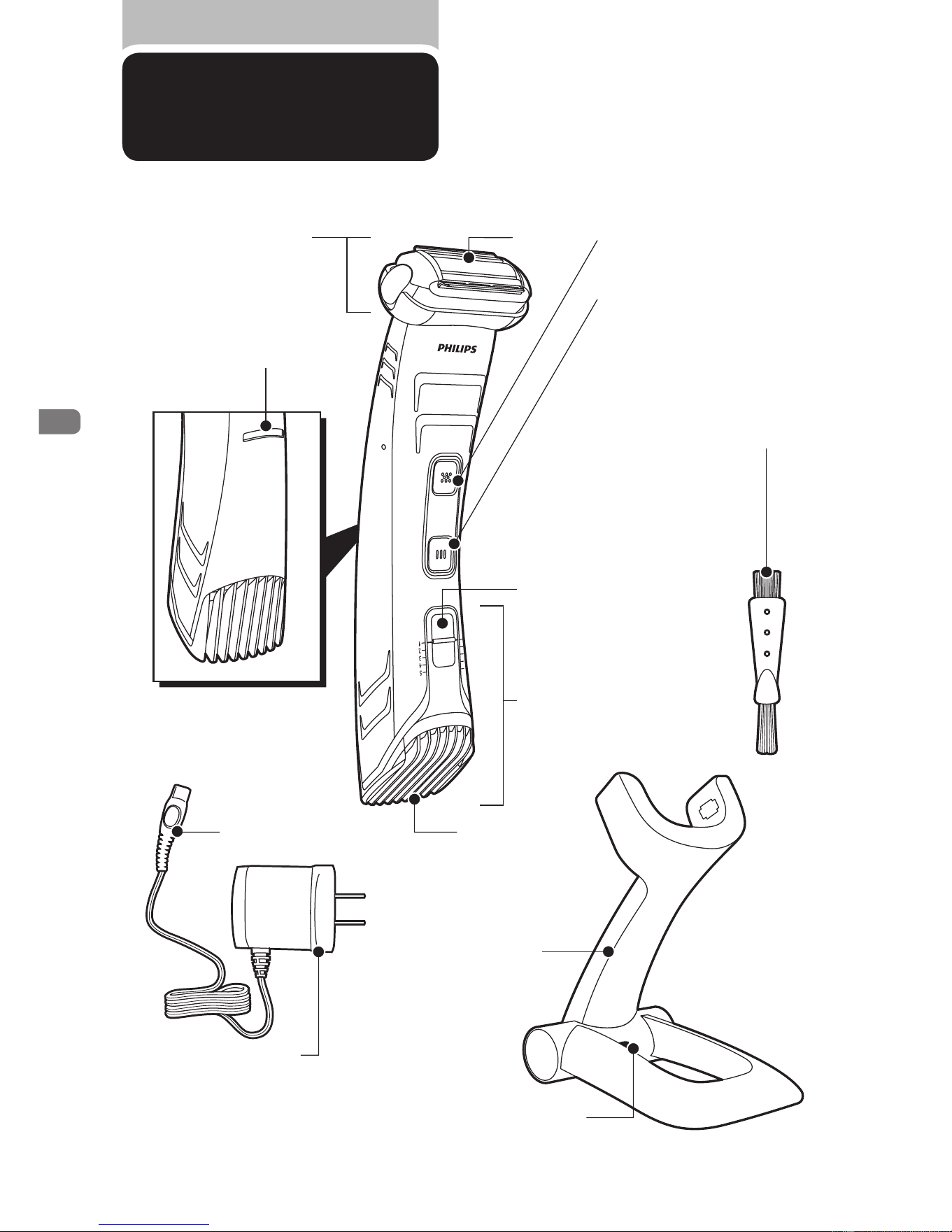
各部の名称
……………………………………
5
充電の仕方
……………………………………
6
基本的な使い方
……………………………
7
・
8
トリミングの仕方
/
シェービングの仕方
……
9
・
10
シェービングのコツ
…………………………
11
トリミング部/シェービング部のお手入れ方法
…
12
・
13
Guidance in English
………………
14
〜
24
製品を廃棄するとき
………………………
25
故障かな?と思ったら
………………………
26
保証とアフターサービス
……………………
27
仕様/お客様情報センター
………………
28
無料修理規定
………………………………
29
保証書
……………………………
最終ページ
●
●
●
●
●
●
は じ め に
ご 使 用 方 法
英 文 解 説
廃棄について
困 っ た と き
保
証
2
Downloaded from www.ManualsFile.com manuals search engine
必ずお守り
ください
安 全 上 の ご 注 意
●ここに示した注意事項は、安全に関する重要
な内容ですので、必ず守ってください。
●誤った取扱いをしたときに想定される内容を
「警告」と「注意」とに区分けしています。
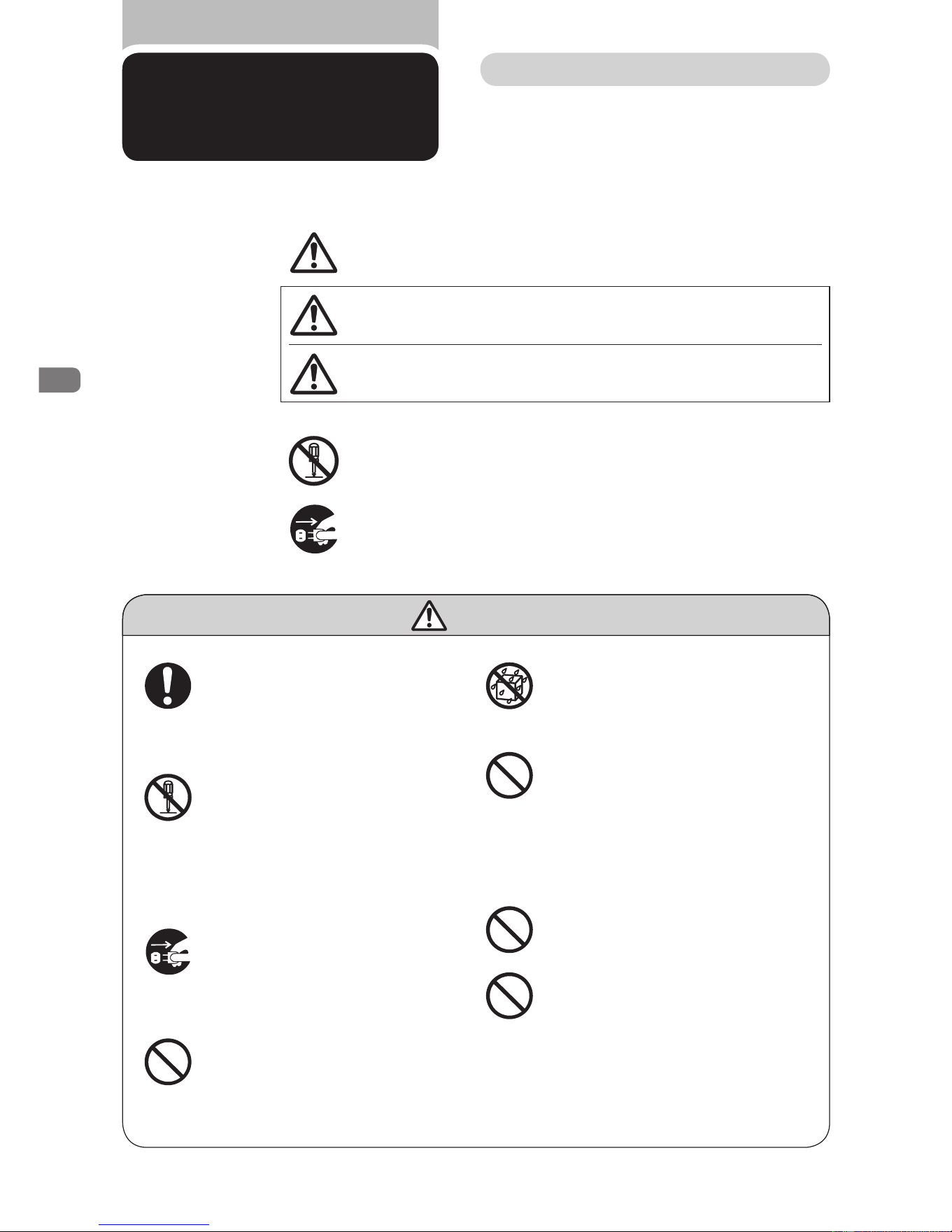
○絵表示について
記号は、「危険、警告、注意」を示します。
図の中や近くに具体的な注意内容を示します。
警 告
●本製品の電源を入れる前に、充電
アダプタ及び本体に表示されている
電圧が、ご使用になる地域の電圧に
適しているか確認してください。
●本体ならびに充電アダプタは改造し
ない。また、修理技術者以外の人は、
分解したり修理をしない。火災、感
電、ケガの原因となります。修理はお
買い上げの販売店または小泉成器
修理センターにご相談ください。
●お手入れの際は必ず充電アダプタ
の電源プラグをコンセントから抜く。
また、濡れた手で抜き差ししない。感
電やケガをすることがあります。
●充電アダプタが傷んだり、コンセント
の差込みが緩いときは使用しない。
感電・ショート・発火の原因になります。
●充電アダプタを水につけたり、水を
かけたりしない。故障や、ショート・
感電の原因になります。
●充電アダプタを傷 付けたり、電源
コードを無理に曲げたり、引っ張った
り、ねじったり、たばねたり、重い物を
載せたり、挟み込んだり、加工したり
しない。電源コードが破損し、火災・
感電の原因となります。
●乳幼児の手の届くところに本製品を
置かないでください。
●充電アダプタには変圧器が内蔵さ
れています。充電アダプタを切り離
して別のプラグに接続するのは危険
ですのでおやめください。
○絵表示の例
記号は、してはいけない「禁止」を示します。図の中や近くに
具体的な禁止内容(左図の場合は分解禁止)を示します。
記号は、必ずしていただく「強制」を示します。図の中や近くに
具体的な強制内容(左図の場合は電源プラグをコンセント
から抜くこと)を示します。
人が死亡または重傷を負う可能性が想定される内容。
人が傷害を負う可能性及び物的損害のみの発生が
想定される内容。
注意
警告
3
Downloaded from www.ManualsFile.com manuals search engine
1.
本製品は、人の首から下のムダ毛を処理するためのものです。ヒゲを剃ったり頭髪
を刈るなど、それ以外の目的で使用しないでください。
使 用 上 の ご 注 意
2.
本製品の使用、充電、保管は室温
5
℃〜
35
℃の環境下で行ってください。(尚、低温
や高温で充電すると、充電池の寿命が短くなります。)
3.
室温、気圧、湿度が急激に変化する状況でご使用になる場合は、本製品をその環境
下で
30
分ほど慣らしてからお使いください。
5.
刃の清掃やコームの着脱は必ずスイッチを切ってから行ってください。
6.
切れ味が衰えてきたり、刃やコームが破損した場合は、使用せず必ず新しい同型
部品と交換してください。
7.
極端に高温または低温の場所、直射日光の当たる場所には保管しないでください。
夏場、車の中に放置しないでください。
9.
本製品は、使用の都度、掃除をしてください。
10.
充電アダプタは付属の専用アダプタを使用してください。
11.
充電アダプタが破損、故障した場合は、事故を避けるために必ずフィリップス社製の
同型充電アダプタをお求めください。
8.
乳幼児の手の届かないところに保管してください。
4.
網刃は、薄く仕上げてありますので、刃部を強く押さえたり、硬いものに当てないよ
う、ていねいに扱ってください。
注 意
●充電アダプタの電源プラグを抜くと
きは、電源コード部を持たずに必ず
先端の電源プラグ部を持って引き
抜く。感電やショートして発火する
ことがあります。
●充電時以外は、充電アダプタをコン
セントから抜く。ケガややけど、絶縁
劣化による感電・漏電・火災の原因
となります。
●刃は強く押さえない。破損して皮膚
を傷つけることがあります。
●刃やコームが破損または故障した
場合は、本製品を使用しないでくだ
さい。ケガの原因になります。交換
の際には必ずフィリップス社 製の
同型部品とお取り替えください。
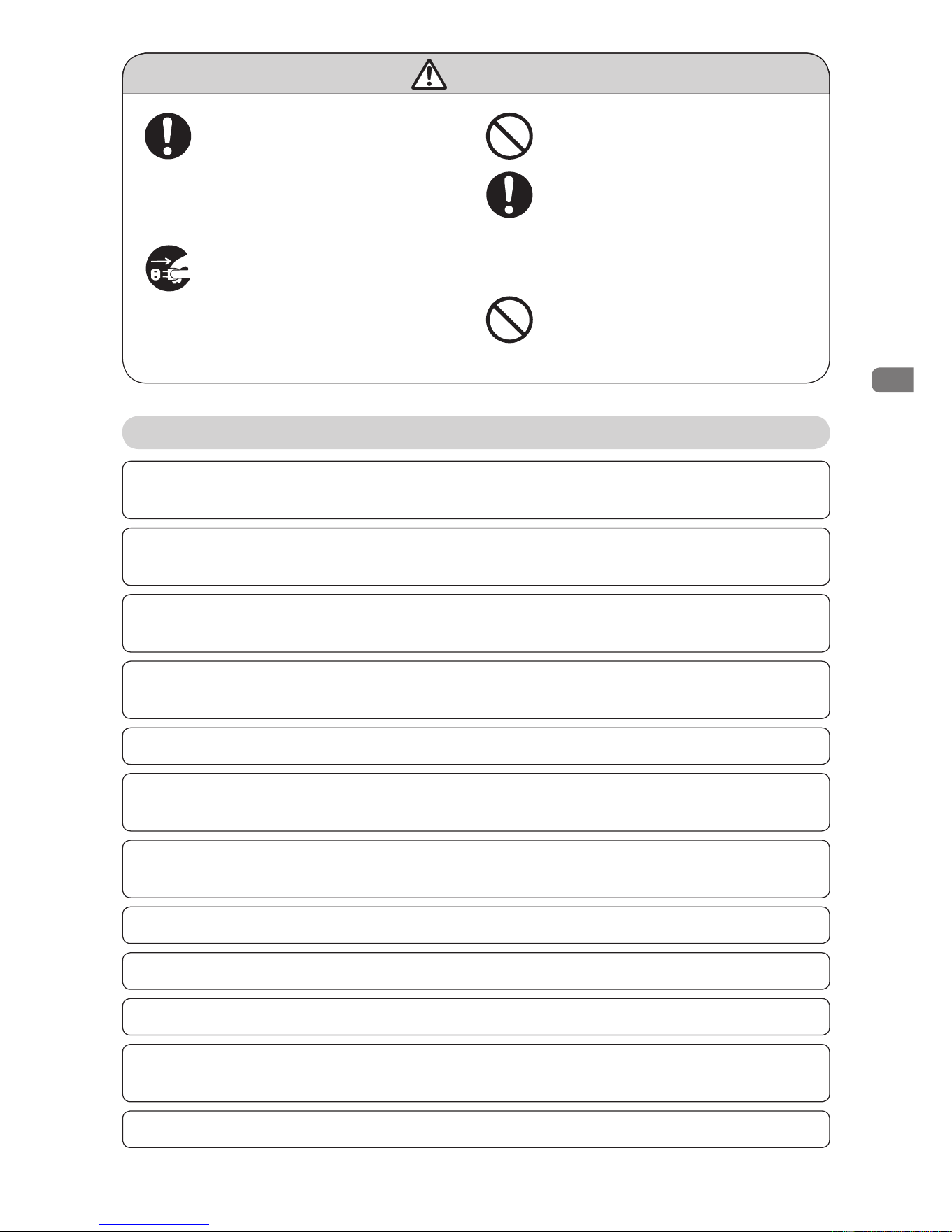
●電源コネクタ受部にピンやごみを
付着させない。感電・ショート・発火
の原因になります。
12.
本製品は防水加工をしておりますが、水や液体の中に浸けないでください。
4
Downloaded from www.ManualsFile.com manuals search engine
充電の仕方
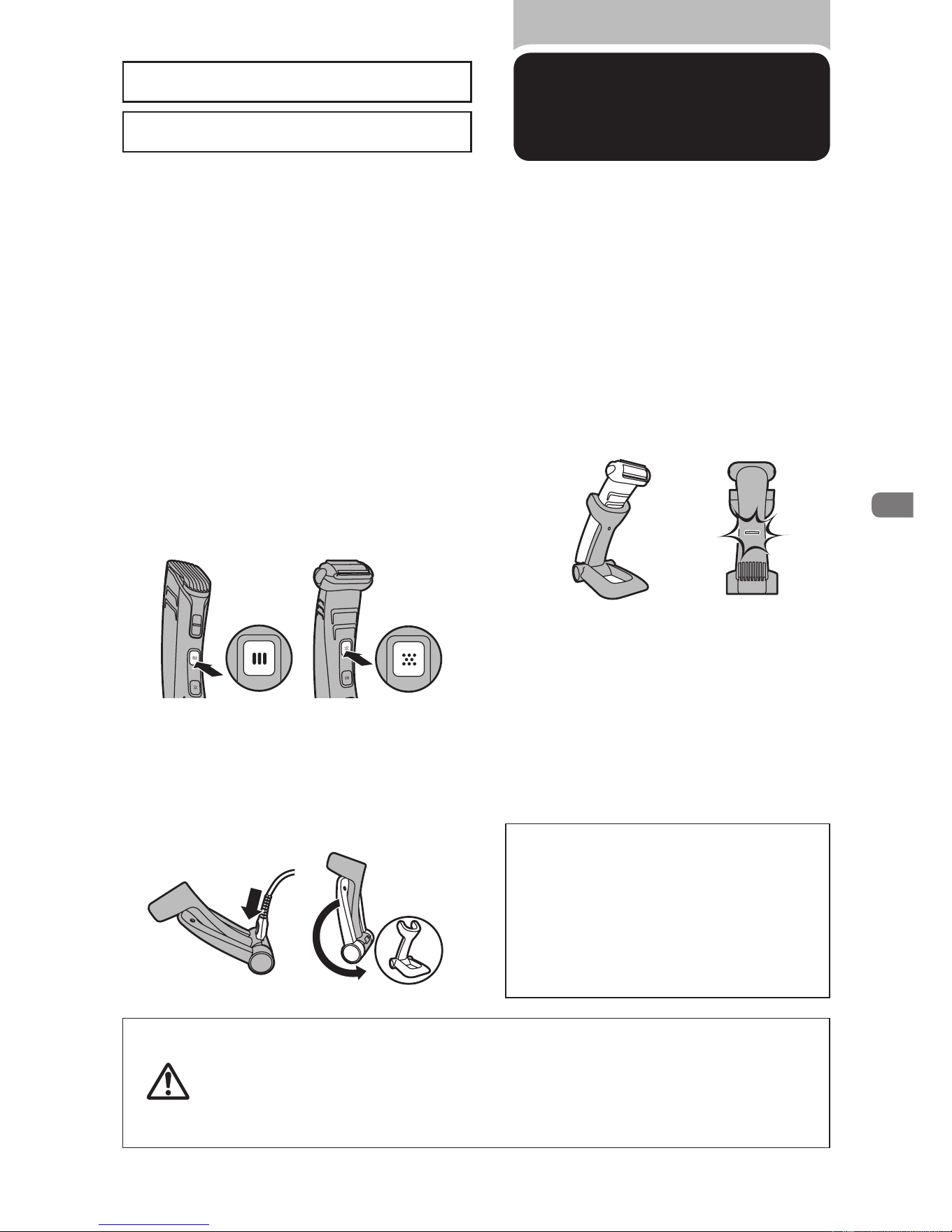
初めてお使いになるときや、長い間ご使用にならなかったときは、充電しないと使用できま
せん。ご使用前に充電してください。初めての充電時間は約
10
時間です。本製品は完全に
充電した状態で、約
50
分間コードレスでご使用になれます。
お客様による充電池の交換はできません。
この商品は通常約
8
時間充電です。
2
充電する際には、トリミング部、シェービ
ング部どちらのスイッチも必ず
OFF
に
してください。動作中はそれぞれの
スイッチを
1
回押すと
OFF
になります。
4
充電アダプタをコンセントに差し込み、
ボディーグルーマー本体を充電スタン
ドに置きます。(満充電になると充電
表示ランプが緑色に点灯し、約
50
分間
使用できます。)
3
充電スタンドを折りたたんだ状態で、
充電アダプタの電源コネクタ部を充電
スタンドに差し込んでください。その
後、カチッと音がするまで充電スタンド
を開きます。
※充電中は、本体の充電表示ランプが緑色に点滅
し、充電中であることを示します。
※
満充電になると充電表示ランプが緑色に点灯します。
※満充電後、約
30
分経過すると節電のため充電表
示ランプが消えます。
※
満充電後に本体を再び充電スタンドに置くと、充電
表示ランプが点滅しますが、故障ではありません。
※本体を水洗いした場合は、水分をふき取ってから
充電スタンドにセットしてください。
ポイント
●充電中、テレビ等に雑音が入る場合、別
のコンセントで充電してください。
●充電・ご使用中は本体・充電アダプタが多
少熱くなりますが、異常ではありません。
●充電池の寿命は使用・保管などの状態
により大きく変化します。
1
充電表示ランプがオレンジ色に点灯し
たら、充電が少なくなっています(残り
の使用時間は約
10
分です)ので、本製
品を充電する必要があります。
●過充電を防ぐため
24
時間以上の長時間充電はしないでください。
●つぎ足し充電を行うと充電池の寿命が短くなります。
●当社専用の充電アダプタ以外での充電はしないでください。
●長期間使用しない場合や、使ったり使わなかったりして保管しておくと
充電池が過放電や液漏れして使えなくなります。
注意
6
Downloaded from www.ManualsFile.com manuals search engine
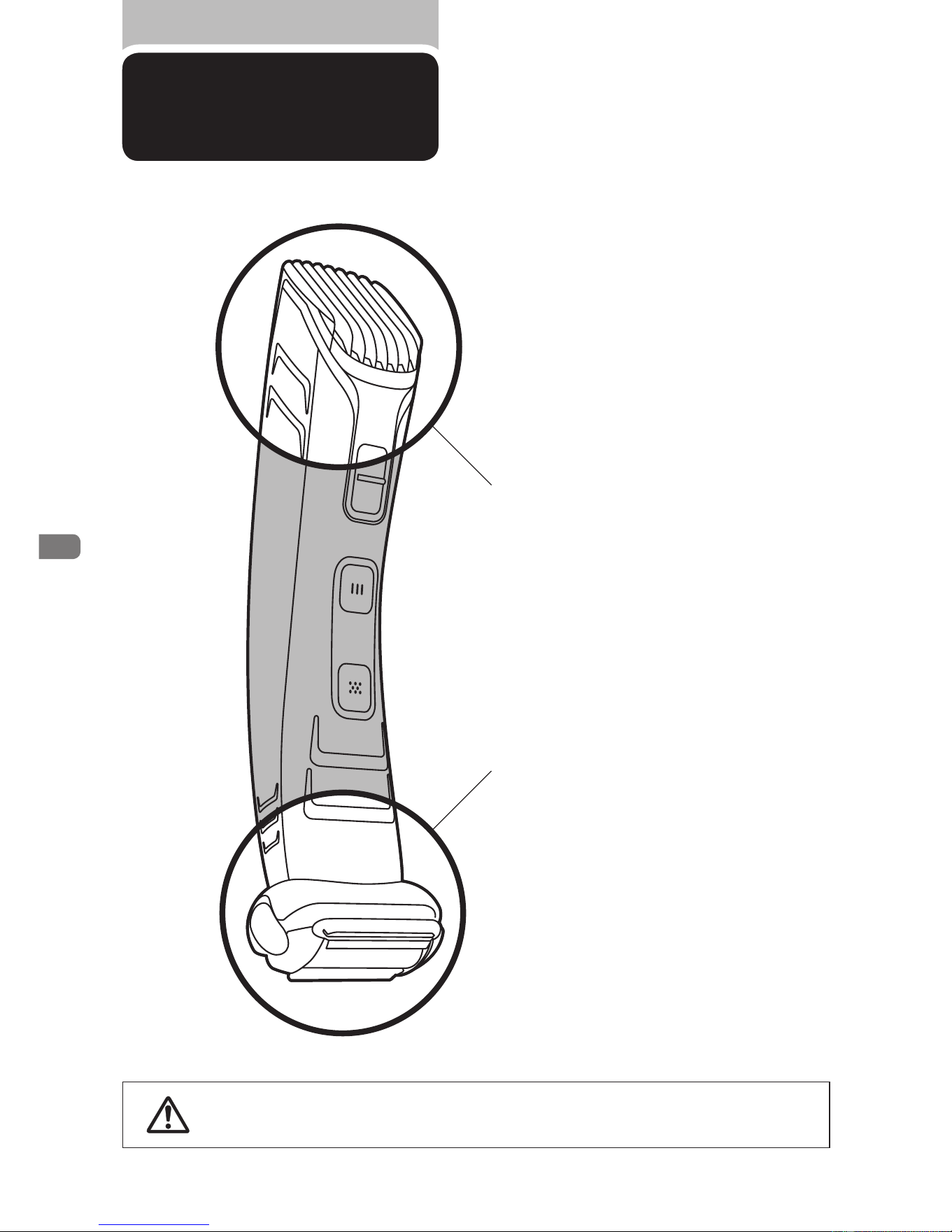
シェービング部
トリミング部
基本的な使い方
●ヒゲを剃ったり頭髪を刈るなど、本来の目的以外で使用しないでください。
注意
トリミングする時
体毛の長さを整える時は
トリミング部を使用します。
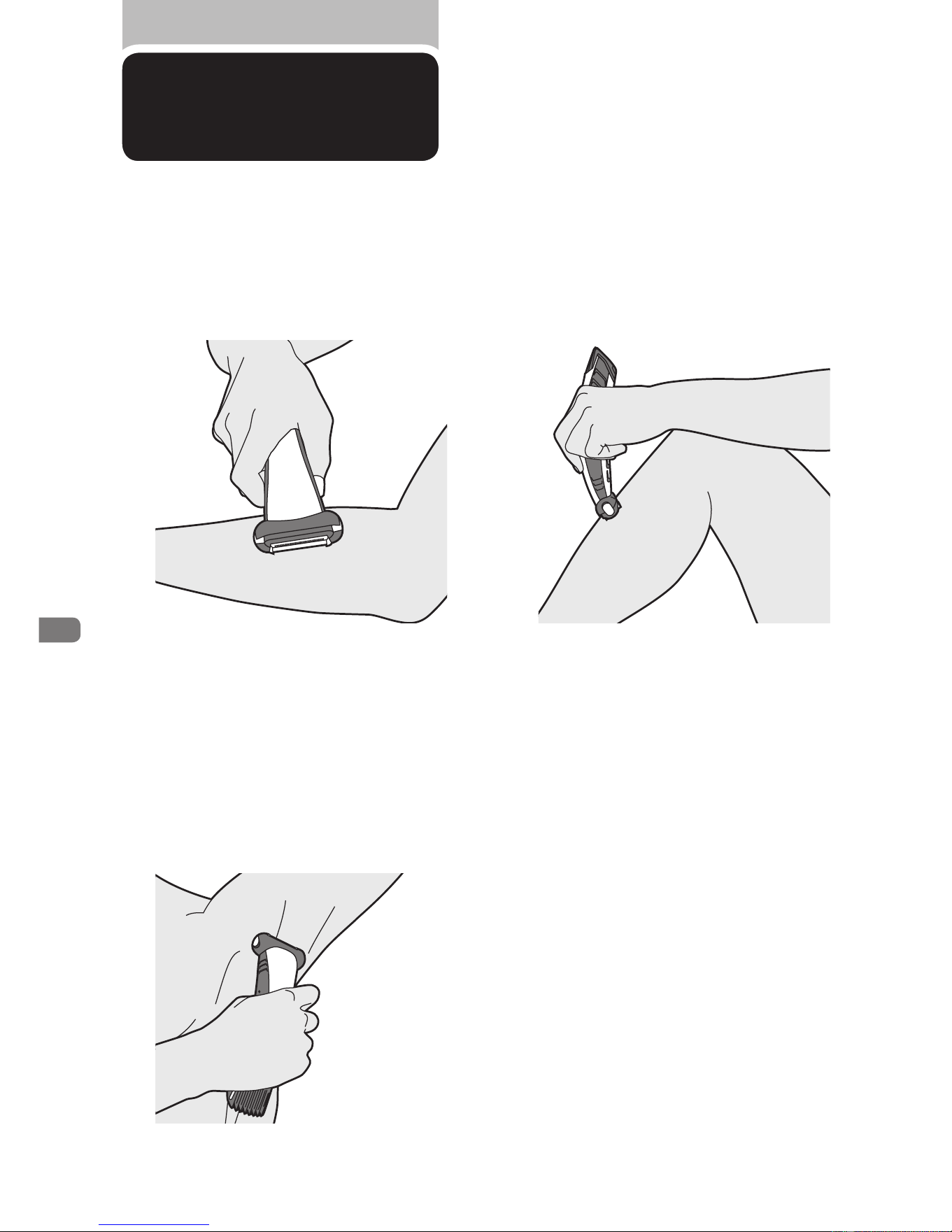
トリミングの仕方▶
P.9
●ボディーグルーマーは、首から下の体毛
(腕、足、ワキ、胸など)の長さを整えたり、
シェービングすることができます。
●本製品は、濡れている状態でも乾いている
状態でもお使いいただけます。
シェービングする時
体毛を残さずシェービングしたい時
はシェービング部を使用します。
シェービングの仕方▶
P.10
7
Downloaded from www.ManualsFile.com manuals search engine
トリミングの仕方
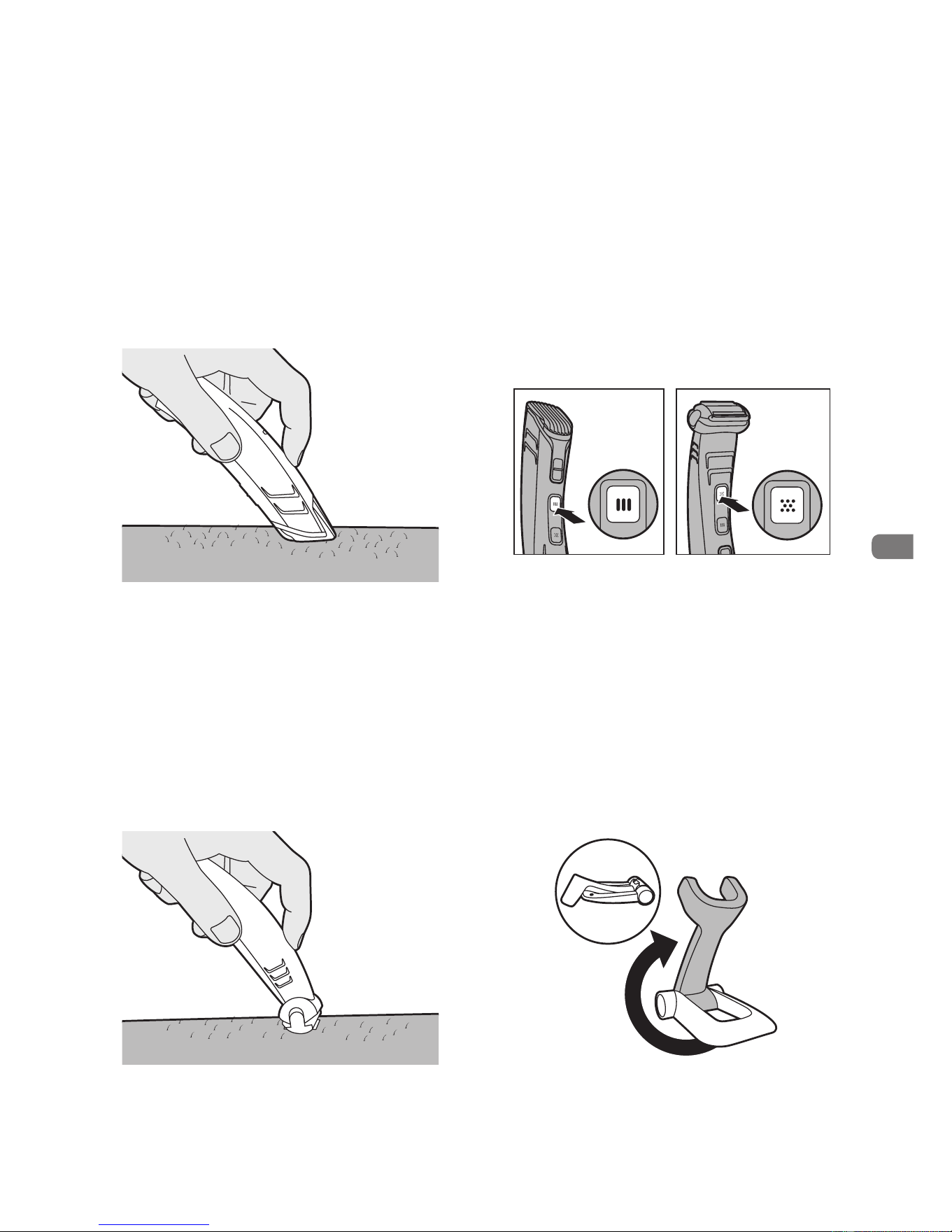
1
トリミング部が上に、シェービング部が
下にくるようにしてボディーグルーマー
を持ちます。
3
トリミング部の電源スイッチを
ON
に
します。
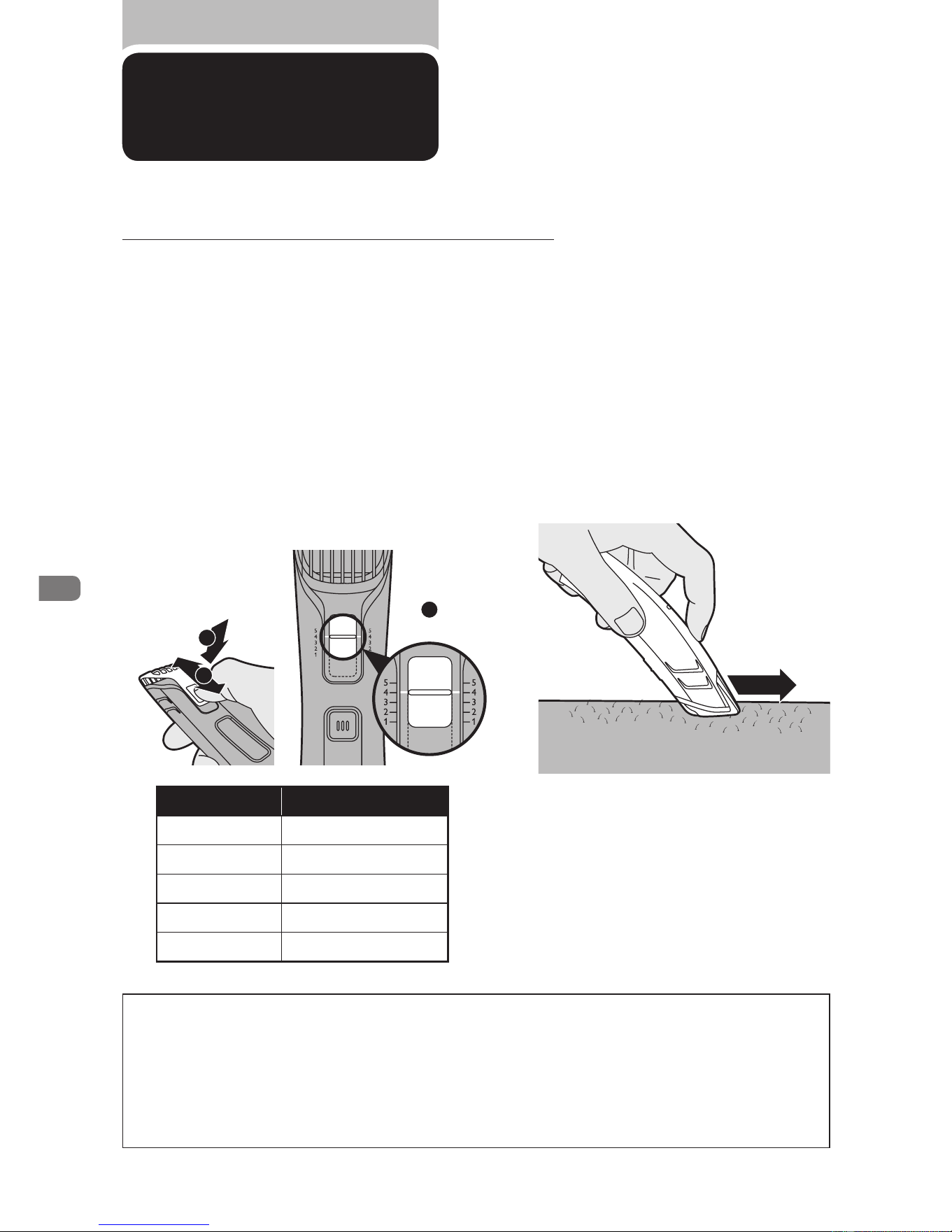
2
長さ調整ノブ①を押して、②コームをお
好みの長さ位置までスライドさせます。
仕上がりの長さ設定は③長さ調整ノブ
を本体の目盛に合わせます。コームを
使用した場合の仕上がりの長さは下の
表の通りです。
コームを使用し、カット後の仕上がり
の長さを
5
種類から選べます。
使い始めは、最も長い設定である
5
(
11mm
)に設定してください。
ポイント
●カットの仕上がりが均一になるように、コームの平らな部分を常に皮膚に密着させ、強く押し
つけず、すべらすように動かしてください。
●体毛は部位によって毛の向きが異なります。毛の向きに合わせて、カットする方向(上下・左右)
を変えてみてください。
●皮膚や体毛は、乾いている方がよりスムーズにトリミングできます。
長さ調整目盛 仕上がりの長さ
1 3mm
2 5mm
3 7mm
4 9mm
5 11mm
4
コームを体毛に当てたまま、ボディー
グルーマーをゆっくり動かします。コー
ムの先端は、ボディーグルーマーを動
かす方向に向けてください。
1
2
3
目盛
4
の場合
トリミングの際は必ずコームを付けてご使用ください。コームを装着せずにカットすると、
刃が触れた部分の体毛が短くカットされますのでご注意ください。
9
Downloaded from www.ManualsFile.com manuals search engine
シェービングの仕方
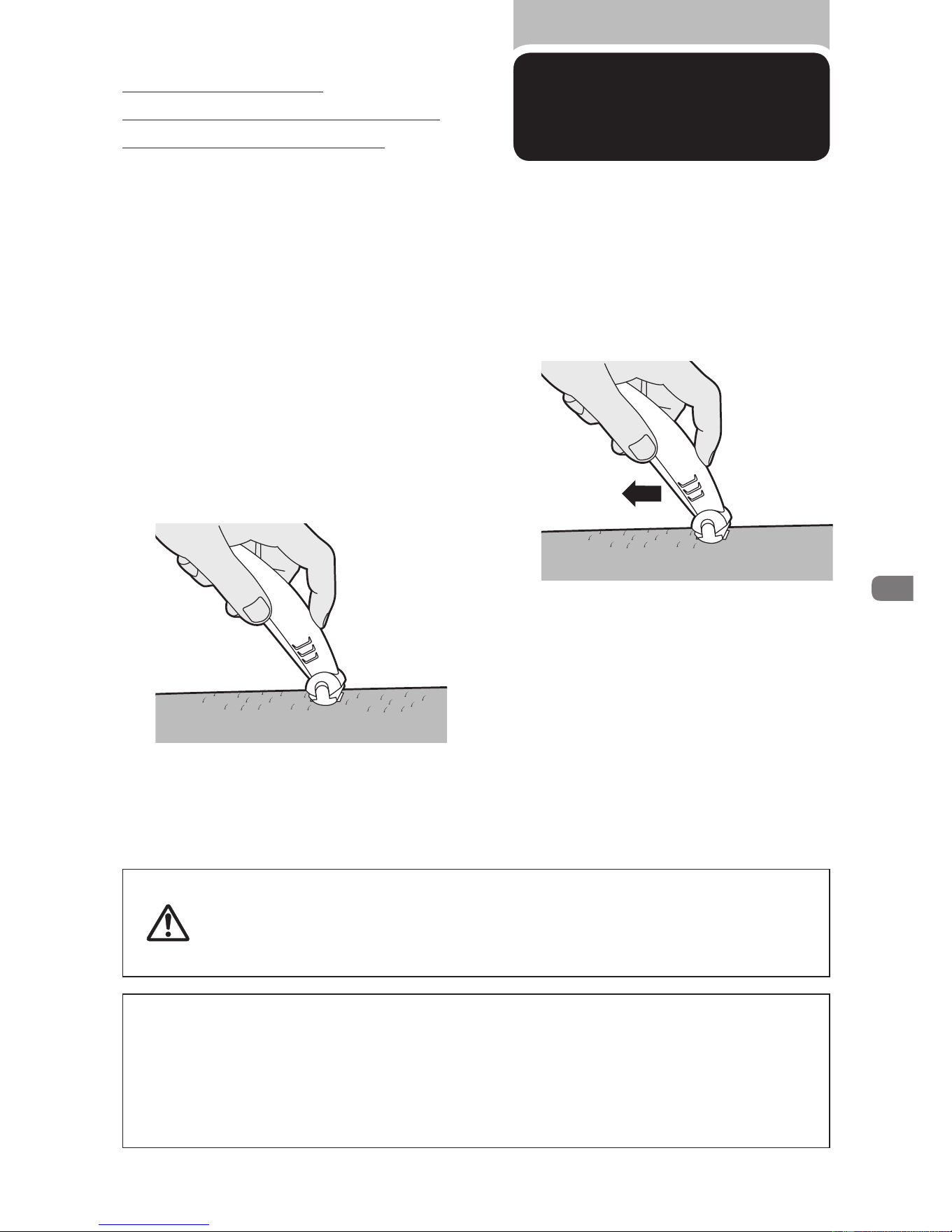
1
シェービング部が上に、トリミング部
が下にくるようにしてボディーグルー
マーを持ちます。
3
網刃を皮膚にあてます。
2
シェービ ング 部 の 電 源 ス イッチ を
ON
にします。
4
ボディーグルーマーを軽く押さえた
まま、体毛の流れに逆らうようにして
動かします。
※皮膚に強く押しつけないでください。
破損または故障の原因となります。
ポイント
●空いている方の手を使って皮膚を伸ばし、毛がまっすぐに立つようにします。
●刃が皮膚にぴったり触れるようにしてください。
●デリケートな部分を初めて剃る際には、ボディーグルーマーをゆっくり動かして様子をみてくだ
さい。肌が慣れるまでに、少し時間がかかります。
●
体毛の長さが
10mm
以上ある場合には、先にトリミングをしておくとシェービングがしやすくなります。
●シェービング部をご使用になる前に、網刃の損傷や消耗がないか必ず確認
してください。けがの原因になりますので、シェービング部や刃に損傷や消
耗がある場合は、シェービング部を使わないでください。刃に損傷が見ら
れる場合は、必ず新しい刃にお取り替えいただき安全にご使用ください。
注意
シェービングする際は、
ボディーグルーマーの網刃を皮膚に
強く押しつけないでください。
10
Downloaded from www.ManualsFile.com manuals search engine
トリミング部
/
シェービング部の
お手入れ方法
1
掃除をする前に、スイッチが
OFF
に
なっていることを確かめてください。
刃の取り替え
トリミング部の刃が破損・摩耗した場合は、販売店または小泉成器修理センターに刃の交換をご
依頼ください。持込み修理になります。また、シェービング部の網刃が破損・摩耗した場合は、必
ずフィリップス社製の同型部品とお取り替えください。
2
ボディーグルーマー本体を水で洗い
流します。
●ベンジン、ベンゾール、シンナー、ガソリンなどを使用しますと変形、
変色、変質の原因となりますので使用しないでください。
●本製品に潤滑剤を使う必要はありません。
注意
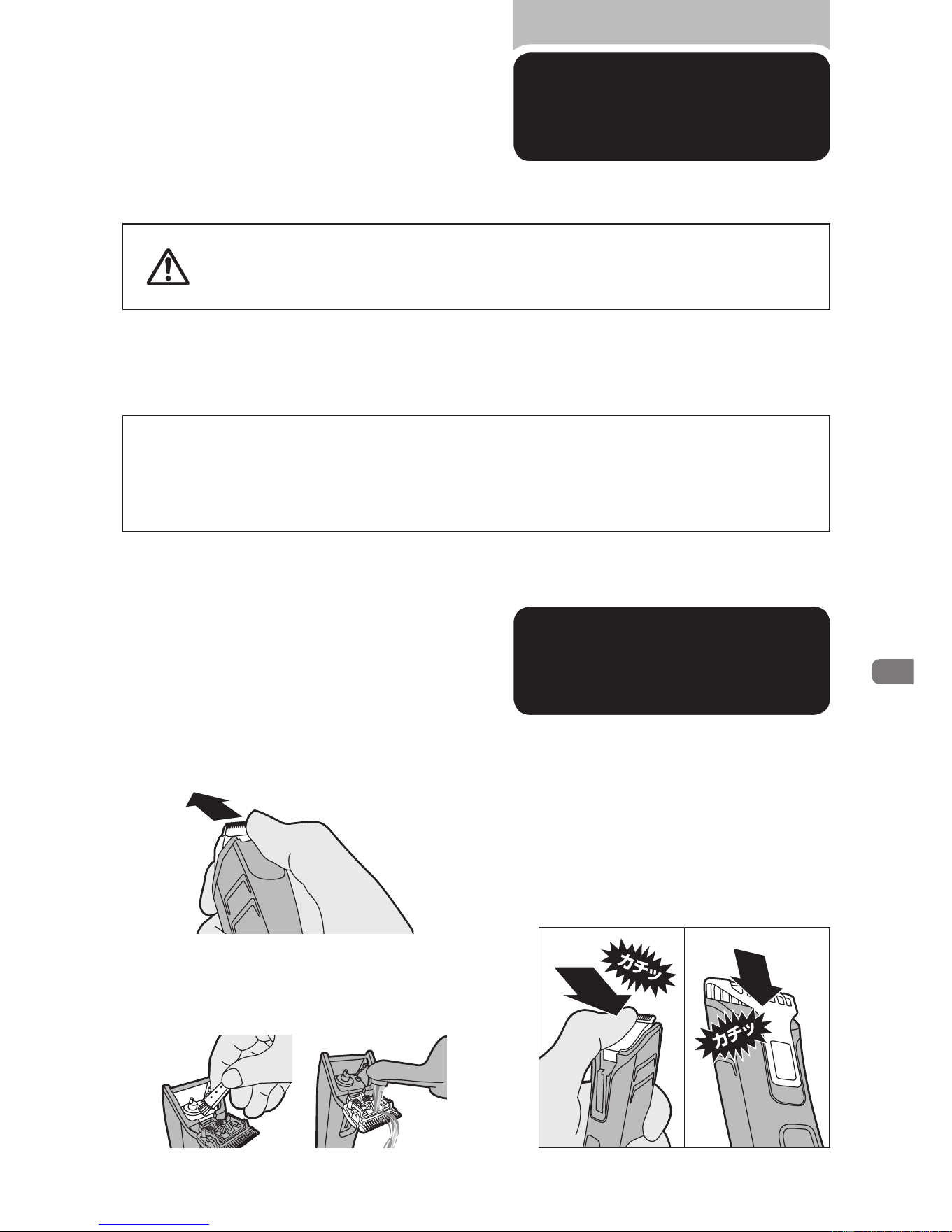
トリミング部
1
コームをスライドさせ、本体から取り
外します。
2
刃の中央部に親指を当てて刃を矢印
の方向に押して、開きます。
3
付属のクリーニングブラシで刃と本体
を掃除し、ぬるま湯で洗い流します。
4
刃と本体を充分に乾燥させた後、カ
チッと音がするまで刃を本体に押し込
み、元の状態に戻します。また、コーム
もカチッと音がするまで押し込み、装
着します。
※本製品はご使用のたびに掃除をしてください。
※トリミング部の刃とシェービング部の網刃の違いについては、各部の名称(
P.5
)をご参照ください。
12
Downloaded from www.ManualsFile.com manuals search engine
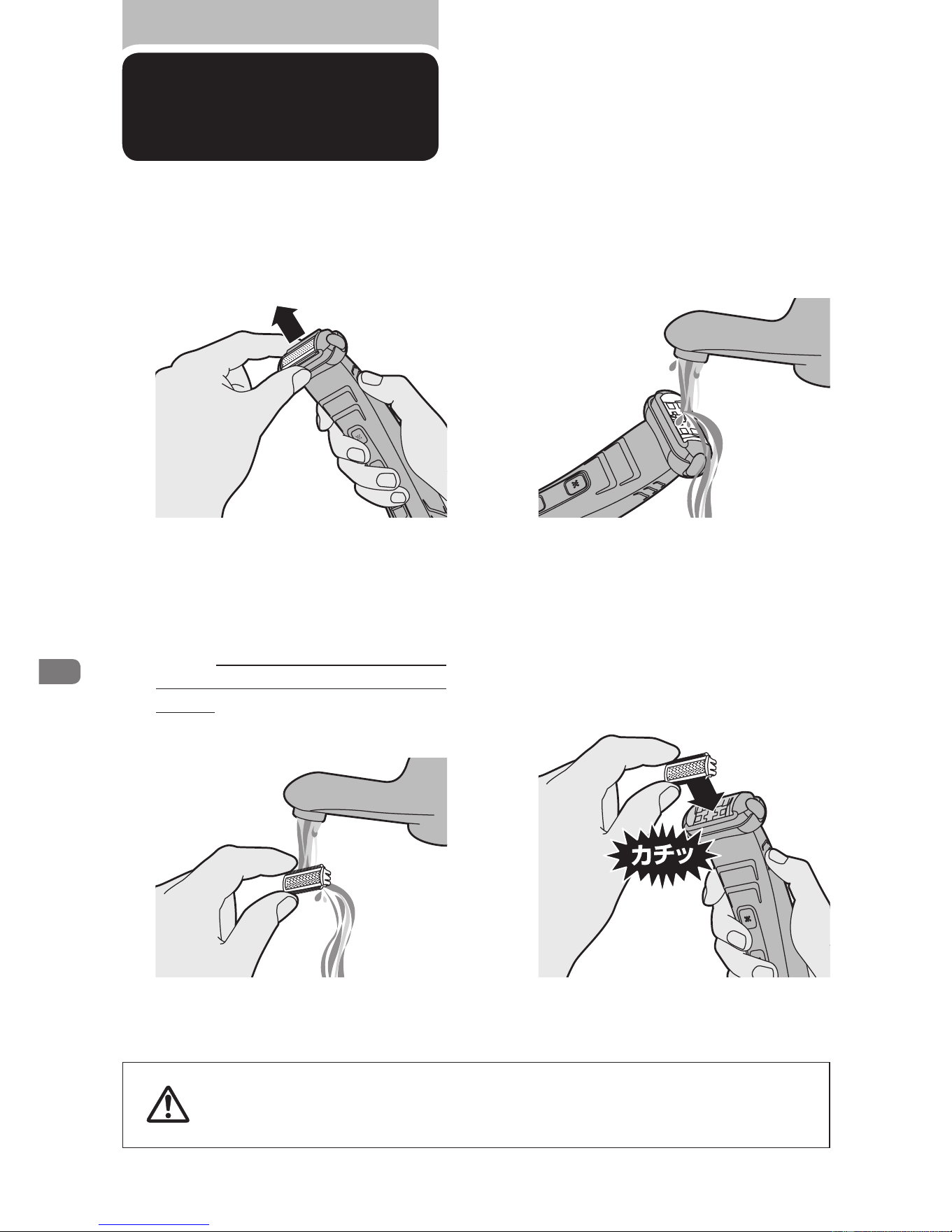
シェービング部
●網刃は非常に壊れやすいので、取扱いには充分ご注意ください。
●網刃が損傷している場合には、すぐに交換してください。刃の交換の手順
は上記
1
、
4
のとおりです。
注意
1
網刃を本体から取り外します。刃の上
下を持って引っ張ると簡単に外れます。
3
シェービング部をぬるま湯で洗い流
します。
4
網刃と本体を充分に乾燥させた後、カ
チッと音がするまで刃を本体に押し込
み、元の状態に戻します。
2
取り外した網刃をぬるま湯で洗い流
します。網刃を傷つけるおそれがある
ため、ブラシを使って掃除しないでく
ださい。
13
Downloaded from www.ManualsFile.com manuals search engine

introduction
Congratulations on your purchase and welcome to Philips! To fully benet
from the support that Philips offers, register your product at www.philips.
com/welcome.
The Philips Bodygroom offers you a safe, gentle, quick and smooth shave
for every body part below the neckline. This complete body-grooming
solution consists of a specially designed all-in-one shaving and trimming
system which gives you the most perfect body trim and shave. Even in the
sensitive zones. You can use it in the bath or shower, since it is 100%
waterproof.
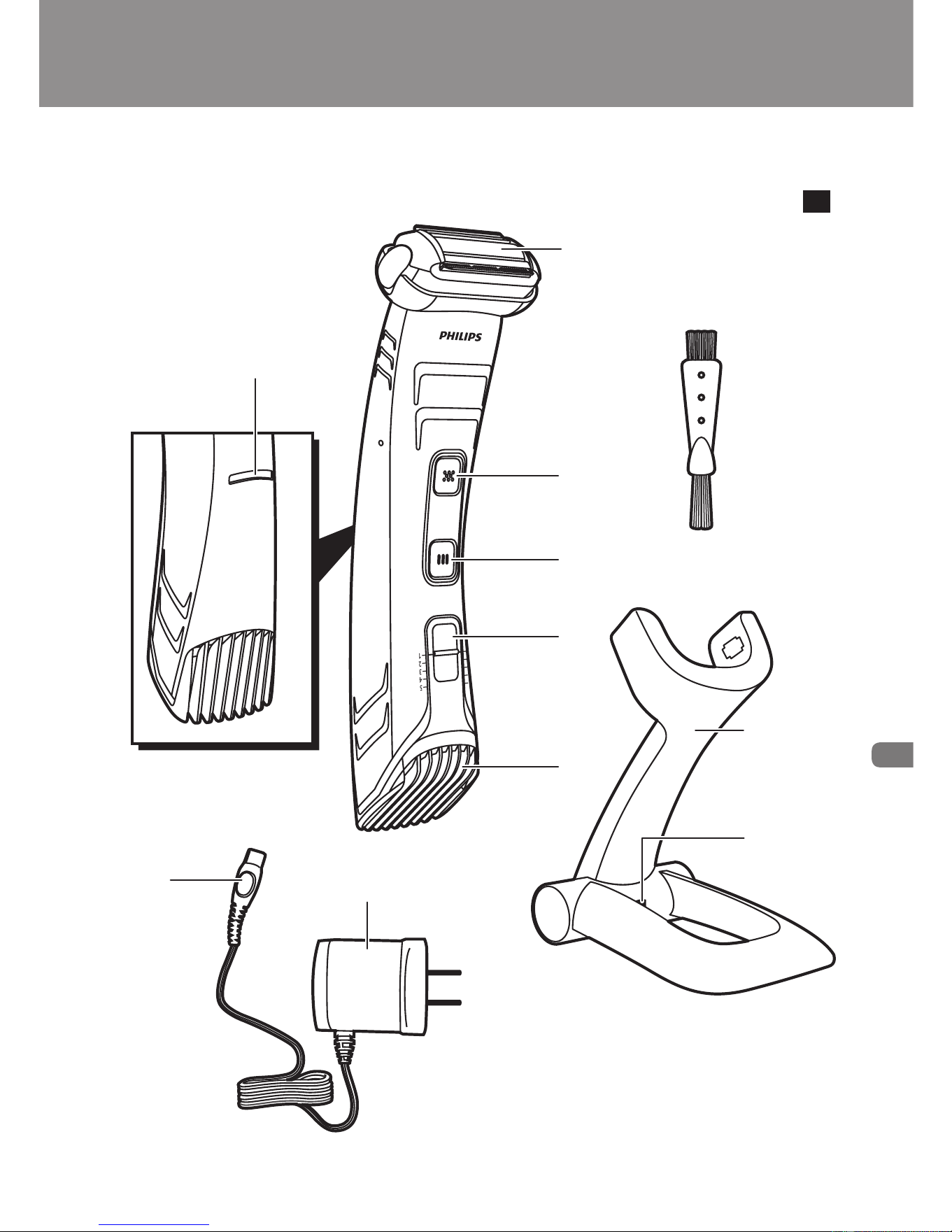
general description (Fig. 1)
A Charge indicator
B Shaving unit
C Shaving unit on/off button
D Trimming unit on/off button
E Hair length setting selector
F Trimming unit with comb
G Charger
H Socket for small plug
I Adapter
J Small plug
Note: To switch between trimming and shaving, turn the other side of the
appliance up.
important
Read this user manual carefully before you use the appliance and save it
for future reference.
Danger
Make sure the adapter does not get wet.
Warning
Check if the voltage indicated on the adapter corresponds to the
local mains voltage before you connect the appliance.
-
-
English
17
Downloaded from www.ManualsFile.com manuals search engine

The adapter contains a transformer. Do not cut off the adapter to
replace it with another plug, as this causes a hazardous situation.
This appliance is not intended for use by persons (including children)
with reduced physical, sensory or mental capabilities, or lack of
experience and knowledge, unless they have been given supervision
or instruction concerning use of the appliance by a person
responsible for their safety.
This appliance is not intended for use by children. Children should be
supervised to ensure that they do not play with the appliance.
Caution
Use, charge and store the appliance at a temperature between 5°C
and 35°C.
Only use the adapter and the charger supplied.
Never immerse the charger in water nor rinse it under the tap.
If the appliance is subjected to a major change in temperature,
pressure or humidity, let the appliance acclimatise for 30 minutes
before you use it.
If the adapter or charger is damaged, always have it replaced with one
of the original type in order to avoid a hazard.
Do not use the appliance when the shaving unit or the trimming
comb is damaged or broken, as this may cause injury.
This appliance is only intended for shaving and trimming body parts
below the neckline. Do not use it to shave or trim facial or scalp hair.
Compliance with standards
The appliance complies with the internationally approved IEC safety
regulations and can be safely used in the bath or shower (Fig. 2).
This Philips appliance complies with all standards regarding
electromagnetic elds (EMF). If handled properly and according to the
instructions in this user manual, the appliance is safe to use based on
scientic evidence available today.
Charging
Charge the appliance for at least 10 hours before you use it for the rst
time and after a long period of disuse.
Charging normally takes approx. 8 hours.
-
-
-
-
-
-
-
-
-
-
-
-
English
18
Downloaded from www.ManualsFile.com manuals search engine

When the appliance is fully charged, it has an operating time of up to 50
minutes.
When the charging light lights up orange, the battery is running low
(approx. 10 minutes of operating time left) and you need to recharge the
appliance.
Note: The appliance can only be charged in the charger.
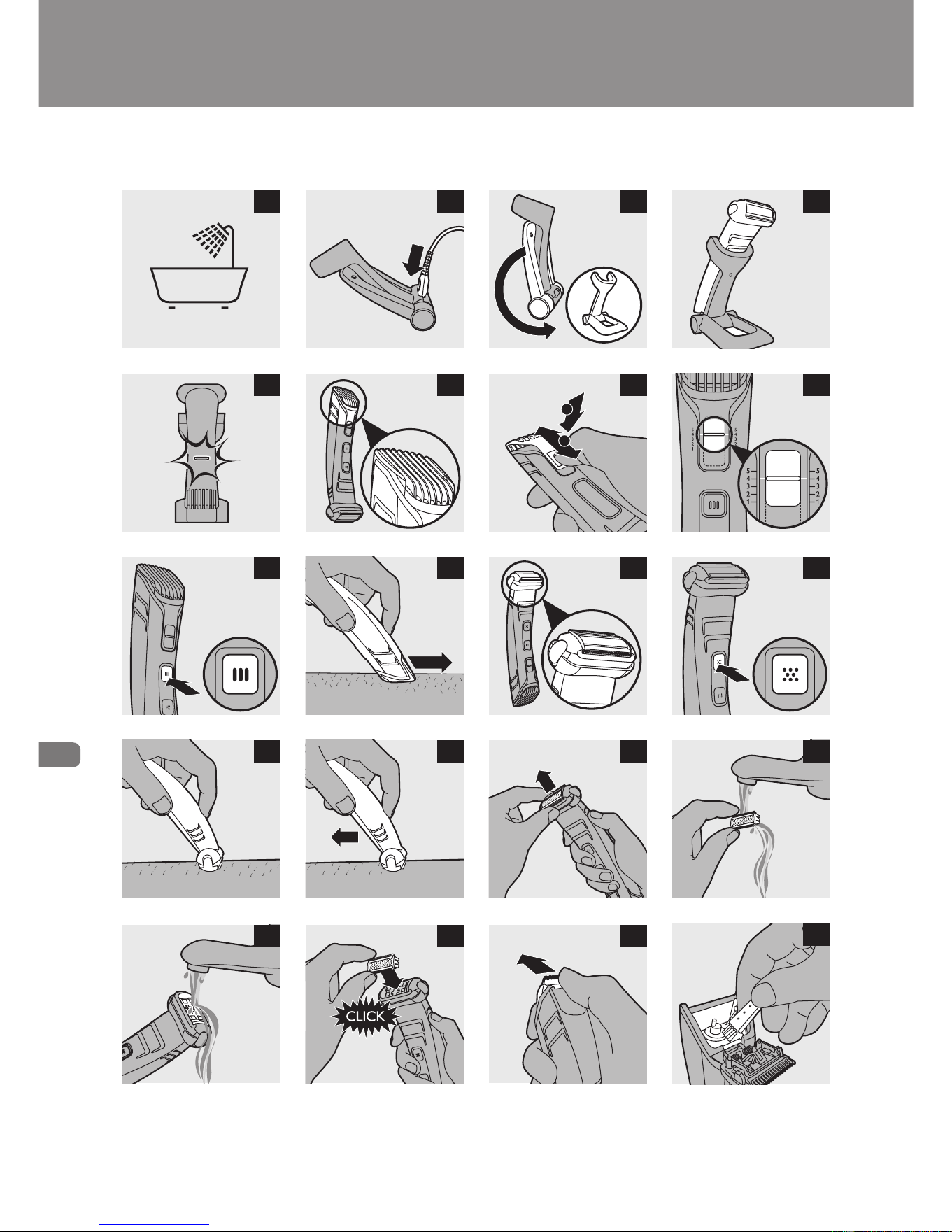
1 Switch off the appliance before you charge it.
2 Insert the small plug into the charger (Fig. 3).
Note: The small plug is easiest to insert when the charger is folded.
3 Unfold the charger (‘click’) (Fig. 4).
4 Put the adapter in the wall socket.
5 Put the appliance in the charger (Fig. 5).
The charging light starts to ash green to indicate that the
appliance is charging (Fig. 6).
When the battery is fully charged, the charging light lights up green
continuously.
After approx. 30 minutes the charging light goes out to save energy.
Optimising the lifetime of the rechargeable battery
Discharge the rechargeable battery completely twice a year by letting the
motor run until it stops. Then fully recharge the battery.
Using the appliance
You can use the appliance wet or dry to shave or trim hair on all parts of
the body below the neckline. Do not use this appliance to shave or trim
facial or scalp hair.
Tip: Take your time when you rst start to shave sensitive areas. You have to
acquire practice with the appliance. Your skin also needs some time to adjust
to the procedure.
Trimming
The trimming comb allows you to cut hair to 5 different lengths.
,
,
,
English
19
Downloaded from www.ManualsFile.com manuals search engine

Start with the highest setting (5) to acquire practice with this appliance.
Hair length setting Hair length after trimming
1 3mm
2 5mm
3 7mm
4 9mm
5 11mm
1 Hold the appliance in the trimming position, with the trimming unit
pointing upwards and the shaving unit pointing downwards (Fig. 7).
2 Press the hair length setting selector (1) and then move it up or
down (2) to select a setting (Fig. 8).
The two lines next to the setting selector show which setting you
have selected (Fig. 9).
3 Press the trimming unit on/off button once to switch on the
trimming unit (Fig. 10).
4 To trim the hair, move the trimming comb through the hair
slowly (Fig. 11).
Tips
Always make sure that the tips of the trimming comb point in the
direction in which you move the appliance.
Make sure that the at part of the trimming comb is always fully in
contact with the skin to obtain an even result.
Since all hair does not grow in the same direction, you need to move
the appliance in different directions (upward, downward or across).
Trimming is easier when the skin and hair are dry.
5 When you are nished, press the trimming unit on/off button again
to switch off the trimming unit (Fig. 10).
-
-
-
-
-
English
20
Downloaded from www.ManualsFile.com manuals search engine
shaving
Before you use the shaving unit, always check it for damage or wear. If
the shaving unit is damaged or worn, do not use it, as injury may occur.
Replace a damaged shaving unit before you use it again (see chapter
‘Replacement’).
1 Hold the appliance in the shaving position, with the shaving unit
pointing upwards and the trimming unit pointing
downwards (Fig. 12).
2 Press the shaving unit on/off button once to switch on the shaving
unit (Fig. 13).
3 Place the shaving unit on the skin (Fig. 14).
4 Move the appliance against the direction of hair growth while you
press it lightly (Fig. 15).
Tips
Stretch your skin with your free hand to make the hairs stand upright.
Make sure that the shaving unit is always fully in contact with the skin.
If the hairs are longer than 10mm, trim them rst to make shaving
easier.
5 To switch off the shaving unit after use, press the shaving unit on/off
button again (Fig. 13).
Cleaning and maintenance
Clean the appliance after every use.
Never use compressed air, scouring pads, abrasive cleaning agents or
aggressive liquids such as petrol or acetone to clean the appliance.
Note: The trimming unit and shaving unit do not need any lubrication.
1 Switch off the appliance.
2 Rinse the appliance under the tap.
-
-
-
English
21
Downloaded from www.ManualsFile.com manuals search engine

Cleaning the shaving unit
3 Pull the shaving unit off the appliance. (Fig. 16)
Note: The shaving unit is very delicate. Handle it carefully. Replace the
shaving unit if it is damaged.
4 Rinse the shaving unit with lukewarm water. (Fig. 17)
Do not clean the shaving unit with the brush, as this may cause damage.
5 Remove hairs from the hair chamber with the cleaning brush and/
or with lukewarm water (Fig. 18).
6 After cleaning, snap the shaving unit back onto the appliance
(‘click’) (Fig. 19).
Cleaning the trimming unit
7 Remove the trimming comb by sliding it off the appliance.
8 Push the middle part of the trimming unit upwards with your
thumb until it opens (Fig. 20).
9 Remove hairs from the hair chamber with the cleaning brush and/
or with lukewarm water. (Fig. 21)
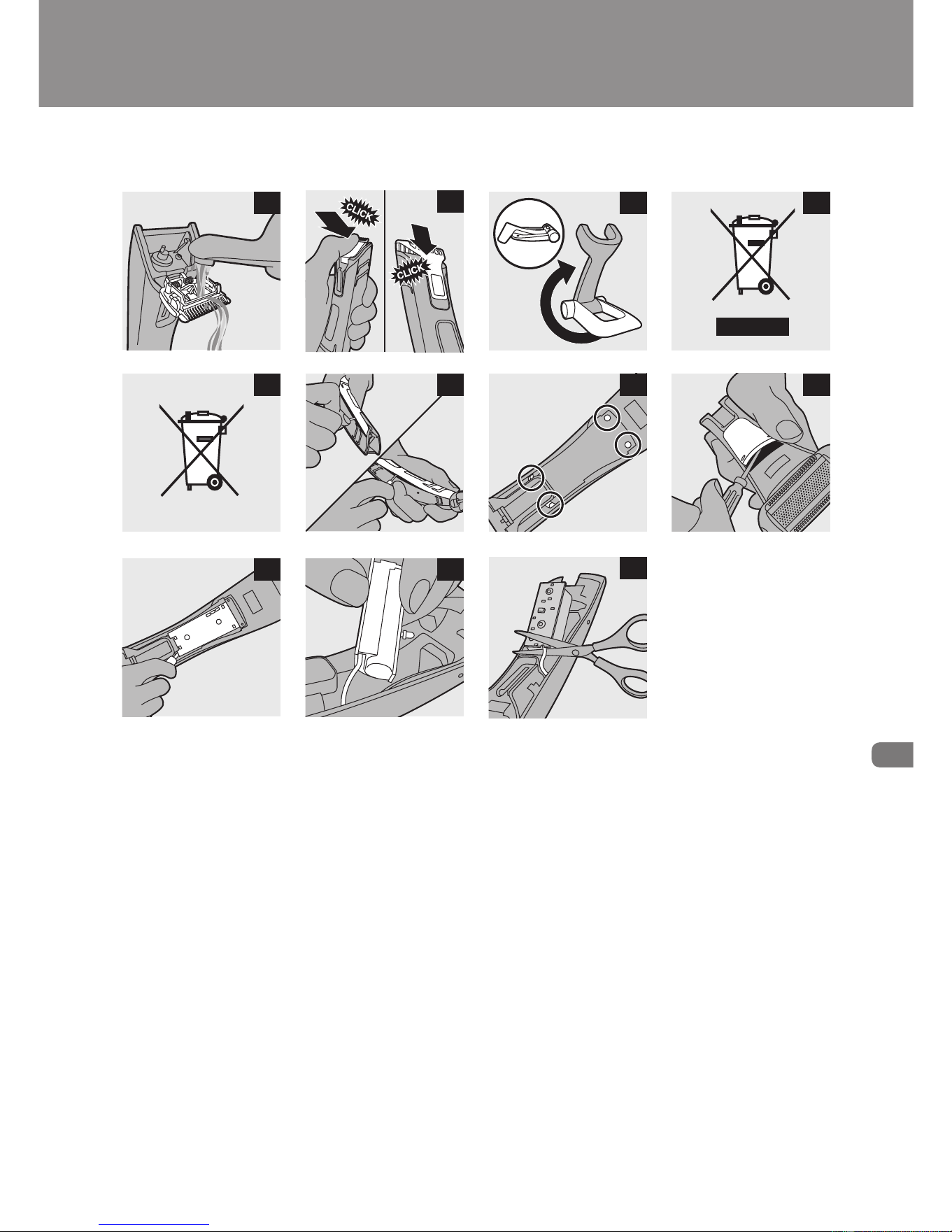
10 Rinse the trimming unit with lukewarm water (Fig. 22).
11 After cleaning, close the trimming unit and reattach the trimming
comb. (Fig. 23)
Replacement
In case of frequent use, replace the shaving unit (type number TT2000)
every year. Replace a damaged shaving unit immediately. To replace the
shaving unit:
1 Pull the shaving unit off the appliance. (Fig. 16)
2 Snap the new shaving unit onto the appliance (‘click’) (Fig. 19).
English
22
Downloaded from www.ManualsFile.com manuals search engine

storage
You can fold the charger for easy travelling or storage. To fold the charger:
1 Fold the base of the charger against the appliance holder (Fig. 24).
Environment
Do not throw away the appliance with the normal household waste
at the end of its life, but hand it in at an ofcial collection point for
recycling. By doing this, you help to preserve the
environment (Fig. 25).
The built-in rechargeable battery contains substances that may
pollute the environment. Always remove the battery before you
discard and hand in the appliance at an ofcial collection point.
Dispose of the battery at an ofcial collection point for batteries. If
you have trouble removing the battery, you can also take the
appliance to a Philips service centre. The staff of this centre will
remove the battery for you and will dispose of it in an
environmentally safe way. (Fig. 26)
Removing the rechargeable battery
1 Take the appliance out of the charger and let the motor run until
the battery is completely empty.
2 Remove the front panel from the appliance with a
screwdriver (Fig. 27).
3 Undo the four screws of the cover under the front panel with a
screwdriver. (Fig. 28)
4 Use a screwdriver to break open the cover and remove it. (Fig. 29)
Now you see the printed-circuit board to which the rechargeable
battery is attached (Fig. 30).
5 Lift the printed-circuit board with rechargeable battery out of the
appliance (Fig. 31).
6 Cut the wires to separate the printed-circuit board and the
rechargeable battery from the appliance (Fig. 32).
-
-
,
English
23
Downloaded from www.ManualsFile.com manuals search engine

guarantee and service
If you need service or information or if you have a problem, please visit
the Philips website at www.philips.com or contact the Philips
Consumer Care Centre in your country (you nd its phone number in
the worldwide guarantee leaet). If there is no Consumer Care Centre in
your country, go to your local Philips dealer.
guarantee restrictions
The shaving unit is not covered by the terms of the international
guarantee because it is subject to wear.
English
24
Downloaded from www.ManualsFile.com manuals search engine
ニッケル水素電池のリサイクルについて
充電池の取り外し方
この製品はニッケル水素電池を使用しています。ニッケル水素電池はリサイ
クル可能な貴重な資源です。ご使用済みの製品の廃棄に際しては、ニッケル
水素電池を取り出し、各自治体の処理方法に従いリサイクル協力店にお持ち
ください。 ※ご不明な場合は、お客様情報センター(
P.28
)までお問い合わせください。
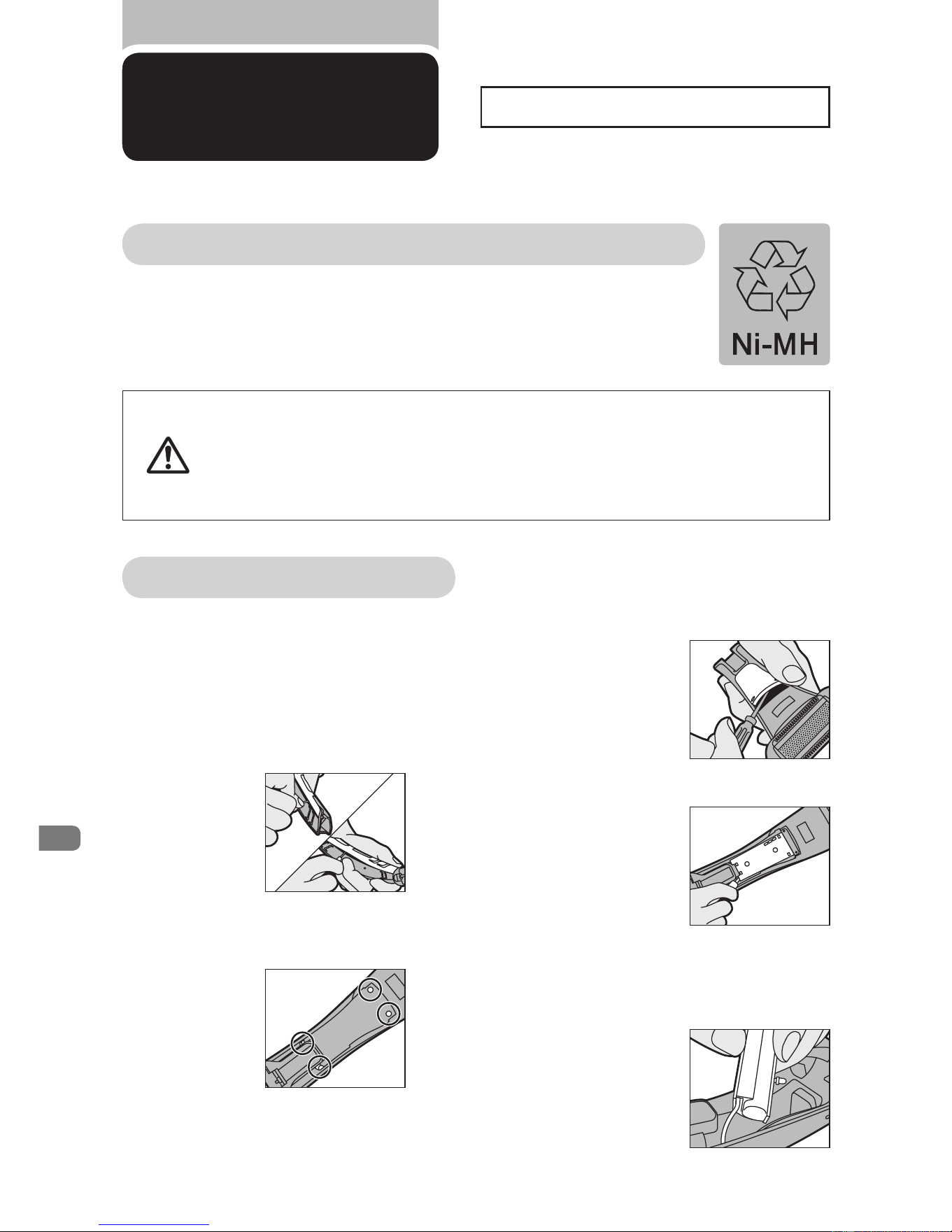
ボディーグルーマーを充電スタンドから外
し、モーターが自然に止まるまでボディー
グルーマーを作動させます。
1
前面カバーにドライバーをこじ
入れて取り外します。
2
ドライバーを使って
4
本のねじを
外します。
3
ドライバーをカバー部品にこじ入れて
取り外します。カバー部品を取り外す
と、電池ホルダーが見えます。
4
電池ホルダーを
持ち上げます。
5
工具を使って電池ホルダーのワイヤー
を切り離し、プリント回路基板から電池
を外します。
※充電池を取り外した後は、通電しないでください。
製品を廃棄
するとき
●製品を廃棄するとき以外は、絶対に本体を分解しないでください。
●充電池の取り外しは、充電池が完全に空の状態のときに行ってください。
●下記
1
〜
5
は製品廃棄の際の充電池の取り外し方の説明です。製品使用中
の充電池交換は、お買い求めの販売店に依頼してください。同型部品が
必要となりますので、お客様による充電池の交換はできません。
注意
お客様による充電池の交換はできません。
25
Downloaded from www.ManualsFile.com manuals search engine
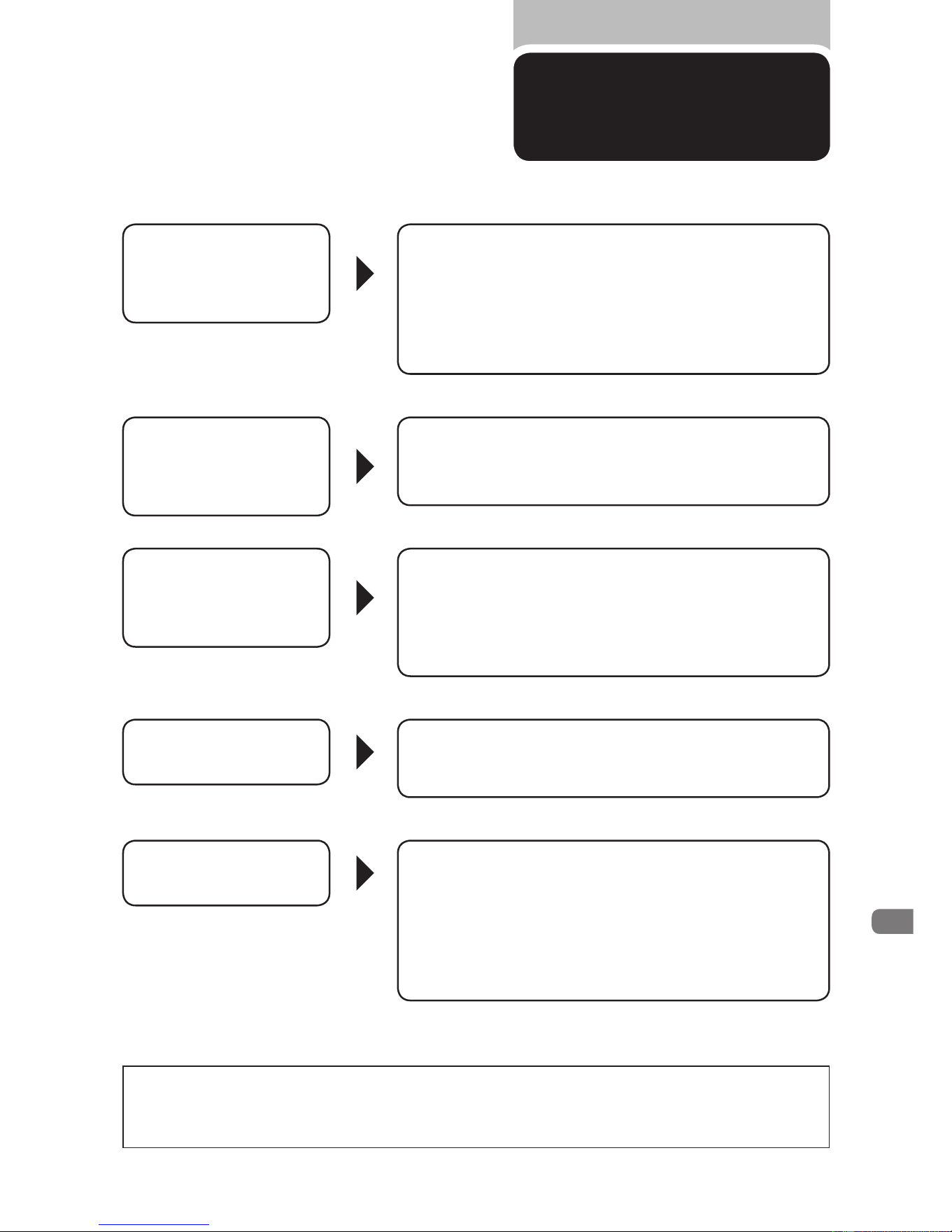
以上の点検により、正常な状態に戻らない場合は、
お買い求めの販売店か小泉成器修理センターへお問い合わせ願います。
充電しても使用
時間が極端に短い
だんだん切れ味が
悪くなった
スイッチを押しても
作動しない
異常な音がする
充電できない
故障かな?
と思ったら
故障かな?と思ったら、
お調べください。
●
刃の掃除はしていますか?
●
ボディーグルーマーが完全に止まるまで作動させ
てからもう一度約
8
時間充電してください。
●
それでも改善されないときは、充電池の寿命です。
(使用時間が
3
分の
2
程度になったら充電池交換が必要です。)
●
刃が損傷または摩耗していませんか?
(
刃の寿命は
1
回約
30
分、月
2
回の使用で約
5
年が
)
目安ですが使用時間・回数により異なります。
●
刃の掃除はしていますか?
●
充電はされていますか?
(約
8
時間、充電をしてください。)
●
刃と本体が正しくセットされていますか?
●
充電アダプタの電源コードが断線していませんか?
(新しい充電アダプタをお買い求めください。)
●
充電アダプタの電源プラグ部はコンセントに
きちんと差し込まれていますか?
(
充電スタンドに充電アダプタのコネクタ部がきちんと
)
差し込まれていますか?確認してください。
●
刃に傷が付いていませんか?
●
刃が正しくセットされていますか?
26
Downloaded from www.ManualsFile.com manuals search engine
保証書と修理サービスについて
(必ずお読みください)
保証
期間
お買い上げ日から
2
年間
対象
部分
本体(刃・クリーニングブラシ
・充電アダプタを除く)
保証と
アフターサービス
〈保証書・最終ページに付属〉
●
保証書は、必ず「お買い上げ日・販売店名」等の記入
をお確かめのうえ、販売店から受け取っていただき
内容をよくお読みのあと大切に保管してください。
【補修用性能部品の最低保有期間】
●
補修用性能部品の最低保有期間は製造打ち切り後
6
年です。
●
性能部品とは、その製品の機能を維持するために必要な部品です。
【ご不明な点や修理に関するご相談は】
●
修理に関するご相談ならびにご不明な点は、お買い上げの販売店または、
小泉成器修理センターにお問い合わせください。
【修理を依頼されるときは】
●
修理をご依頼される前に、この取扱説明書をよくお読みいただき、再度点検ください。
尚、異常のあるときはご使用を中止し、お買い上げの販売店へご依頼ください。
【保証期間中は】
●
製品に保証書を添えてお買い上げの販売店にご持参ください。
保証書の記載内容により無料修理いたします。
【保証期間が過ぎているときは】
●
修理によって商品の機能が維持できる場合は、ご希望により有料で修理させていただきます。
【海外での本製品の保証及びアフターサービスについて】
●
本製品の保証は海外においても有効です。
●
日本国以外のフィリップスサービス部門においても保証期間内及び保証期間の経過後の
アフターサービスを受けることができますが、この場合多少日数を要することもあります。
●
海外にてアフターサービスを受けられる場合は、現地のフィリップスサービス部門に
お問い合わせください。尚、お困りの点がございましたら下記までご連絡ください。
Philips Consumer Lifestyle Service Department P.O.Box 20100 9200 CA DRACHTEN
The Netherlands Fax:+31 51 259 2785
【お客様の個人情報のお取り扱いについて】
●
お受けしましたお客様の個人情報は、株式会社フィリップスエレクトロニクスジャパンのホー
ムページ
http://www.philips.co.jp/
に掲載されている「お客様の個人情報の取り扱いにつ
いての当社の方針」に基づき適切に管理いたします。
27
Downloaded from www.ManualsFile.com manuals search engine
●
本体にさわると時々電気を感じる。
●
こげくさい臭いがする。
●
電源コード部を動かすと通電したり、しなかったりする。
●
その他の異常、故障がある。
ご使用の時、このような症状はありませんか?
仕 様
●
フィリップス製品の修理受付はお買い上げの
販売店にお申し出ください。
●
修理サービス等についておわかりにならない
ことは、下記にお問い合わせください。
フィリップス
コンシューマー
ライフスタイル事業部
このような症状の時は、故障や事故防止のため、スイッチを
切り、充電アダプタをコンセントから外して、必ず販売店に
ご相談ください。
製品に関するお問い合わせ:
フィリップスお客様情報センター
0570
(
07
)
6666
ナビダイヤル
(全国共通番号)
修理に関するお問い合わせ:
小泉成器修理センター
0570
(
09
)
8888
ナビダイヤル
(全国共通番号)
部品に関するお問い合わせ:
小泉成器部品センター
0570
(
09
)
2222
ナビダイヤル
(全国共通番号)
06
(
6261
)
8230
受付時間:平日
9
:
00
〜
17
:
30
(土・日・祝日・夏期休暇・年末年始を除く)
小泉成器東日本修理センター
TEL 048
(
718
)
3340
〒
334-0127
埼玉県春日部市水角
1190
小泉成器西日本修理センター
TEL 06
(
6613
)
3145
〒
559-0033
大阪市住之江区南港中
1
丁目
3
番
98
号
■
ナビダイヤルにかからない時は
ホームページアドレス
http://www.philips.co.jp/
お買い上げ
店名
お買い上げ日 年
月
日
TEL.
(
)
便 利 メ モ
品 番
TT2040
電源方式 充電式(専用充電アダプタ使用)
消費電力
2W
定格電圧
AC100-240V
(
50/60Hz
)
本体質量 約
210g
(コーム付き)
充電時間
8
時間
28
Downloaded from www.ManualsFile.com manuals search engine

〈無料修理規定〉
1.
取扱説明書、本体貼付ラベル等の注意書に従った正常な使用状態で保証期間
内に故障した場合には、無料修理します。
2.
保証期間内に故障して無料修理をお受けになる場合には、商品と保証書をご
持参、ご提示のうえ、お買い上げの販売店にご依頼ください。なお、商品を直接
メーカーへ送付した場合の送料等はお客様の負担となります。
3.
ご贈答、ご転居でお買い上げの販売店に修理を依頼できない場合は、小泉
成器修理センターにご依頼ください。
4.
保証期間内でも次の場合には有料修理になります。
○
1
使用上の誤り及び不当な修理や改造による故障及び損傷。
○
2
お買い上げ後の輸送、移動、落下等による故障及び損傷。
○
3
火災、地震、水害、落雷、その他の天災地変、公害や異常電圧による故障及び損傷。
○
4
一般家庭以外(例えば、業務用の長時間使用)に使用された場合の故障及び損傷。
○
5
保証書の提示がない場合。
○
6
保証書にお買い上げ年月日、お客様名、販売店名の記入のない場合、或は字句を書き
換えられた場合。
※
保証書は、本書に明示した条件のもとにおいて無料修理をお約束するもの
です。従って保証書を発行している者(保証責任者)、及びそれ以外の事業者
に対するお客様の法律上の権利を制限するものではありません。
保証期間経過後の修理についてご不明の場合は、お買い上げの販売店または
小泉成器修理センターにお問い合わせください。
※
保証期間経過後の修理・補修用性能部品の保有期間について詳しくは取扱
説明書の保証とアフターサービスの項目をご覧ください。
※
お客様にご記入いただいた個人情報(保証書の控え)は、株式会社フィリップス
エレクトロニクスジャパンのホームページ
http://www.philips.co.jp/
に掲載
されている「お客様の個人情報の取り扱いについての当社の方針」に基づき
適切に管理いたします。
無料修理規定
29
Downloaded from www.ManualsFile.com manuals search engine

フィリップス
ボディーグルーマー
保証書
持込修理
C ERT I F I C AT E O F PU R C H A SE
この保証書は、「無料修理規定」記載内容で無料修理を行うことをお約束するものです。
お買い上げの日から下記期間中に故障が発生した場合は、本書をご提示のうえ、お買い
上げの販売店に修理をご依頼ください。
お客様にご記入いただいた個人情報(保証書の控え)は、株式会社フィリップスエレクトロ
ニクスジャパンのホームページ
http://www.philips.co.jp/
に掲載されている「お客様
の個人情報の取り扱いについての当社の方針」に基づき適切に管理いたします。
品 名 ボディーグルーマー
品 番
TT2040
保 証 期 間 お買い上げ日より
2
年
対 象 部 分 本体(刃・クリーニングブラシ・充電アダプタを除く)
お 買 い 上 げ 日
年 月 日
お 客 様
ご住所
〒
ご芳名
電話番号
★ 販 売 店
販売店名・住所・電話番号
★
保証書は再発行しませんので、大切に保管してください。
★
ご販売店様へ
この保証書はお客様へのアフターサービスの実施と責任を明確にする
ものです。贈答品、記念品の場合も含めて必ず記入捺印してお客様にお渡しください。
修理に関するお問い合わせ★
製品に関するお問い合わせ★
部品に関するお問い合わせ★
ナビダイヤルにかからない時は
TEL 06
(
6261
)
8230
FAX 06
(
6264
)
5170
フィリップスコンシューマーライフスタイル事業部
日本販売総代理店
小泉成器株式会社
〒
541-0051
大阪市中央区備後町
3-3-7
ナビダイヤルにかからない時は
TEL 06
(
6613
)
3211
ナビダイヤルにかからない時は
小泉成器東日本修理センター
TEL 048
(
718
)
3340
〒
334-0127
埼玉県春日部市水角
1190
小泉成器西日本修理センター
TEL 06
(
6613
)
3145
〒
559-0033
大阪市住之江区南港中
1
丁目
3
番
98
号
フィリップスお客様情報センター
ナビダイヤル(全国共通)
0570
(
07
)
6666
小泉成器部品センター
ナビダイヤル(全国共通)
0570
(
09
)
2222
小泉成器修理センター
ナビダイヤル(全国共通)
0570
(
09
)
8888
受付時間:平日
9
:
00
〜
17
:
30
(土・日・祝日・夏期休暇・年末年始を除く)
この印刷物は再生紙を使用しております。
4222.002.8099.1
Downloaded from www.ManualsFile.com manuals search engine