1800146938 / 01
INTENSE PURE AIR CONNECT
PU4085XX / PU6085XX
www.tefal.com
EN
ZH
2
A
D
E
F
G
H
I
F
1
B
C
7 8 9 10 11 12 13 14
2 43 5 6
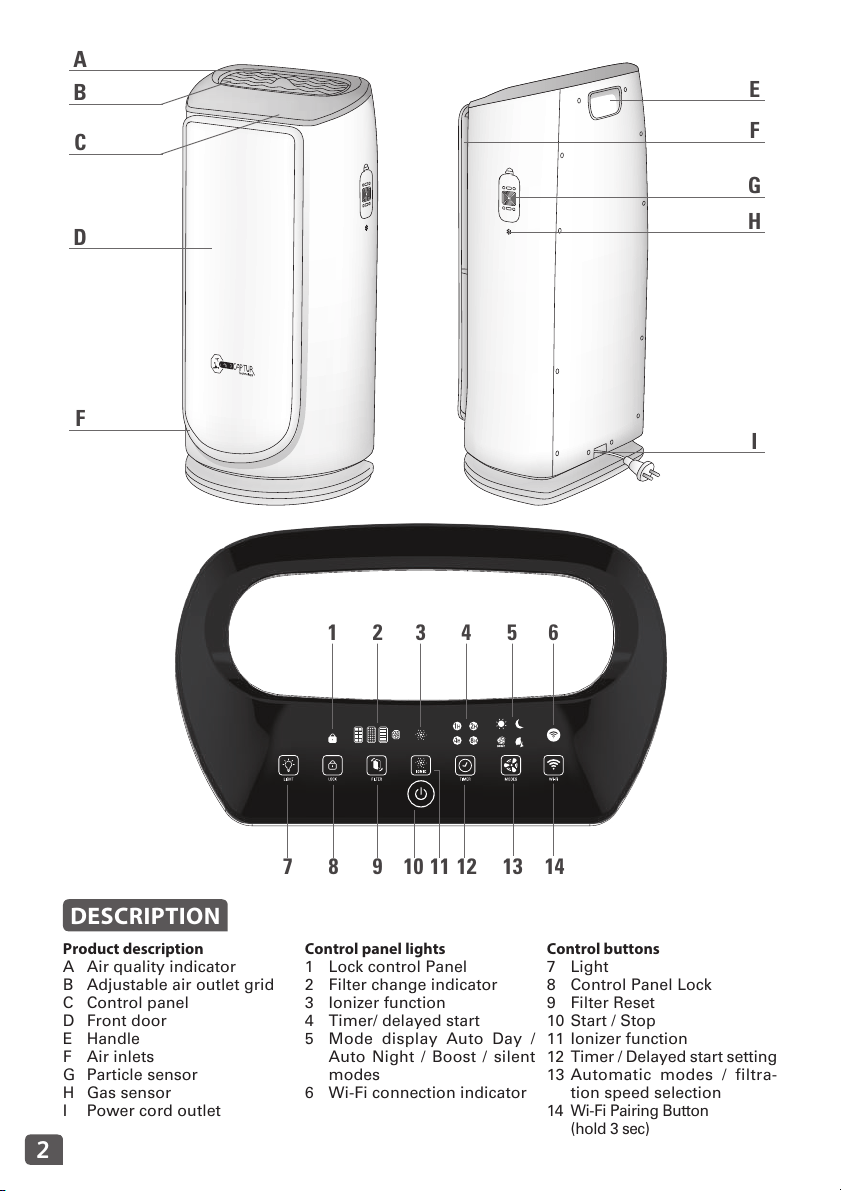
DESCRIPTION
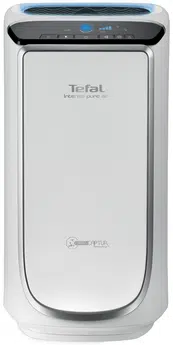
Product description
A Air quality indicator
B Adjustable air outlet grid
C Control panel
D Front door
E Handle
F Air inlets
G Particle sensor
H Gas sensor
I Power cord outlet
Control panel lights
1 Lock control Panel
2 Filter change indicator
3 Ionizer function
4 Timer/ delayed start
5 Mode display Auto Day /
Auto Night / Boost / silent
modes
6 Wi-Fi connection indicator
Control buttons
7 Light
8 Control Panel Lock
9 Filter Reset
10 Start / Stop
11 Ionizer function
12 Timer / Delayed start setting
13 Automatic modes / filtra-
tion speed selection
14 Wi-Fi Pairing Button
(hold 3 sec)
3
EN
1 2 3
6
54
CLICK !
CLICK !
CLICK !
CLICK !
CLICK !CLICK !
7 8 9
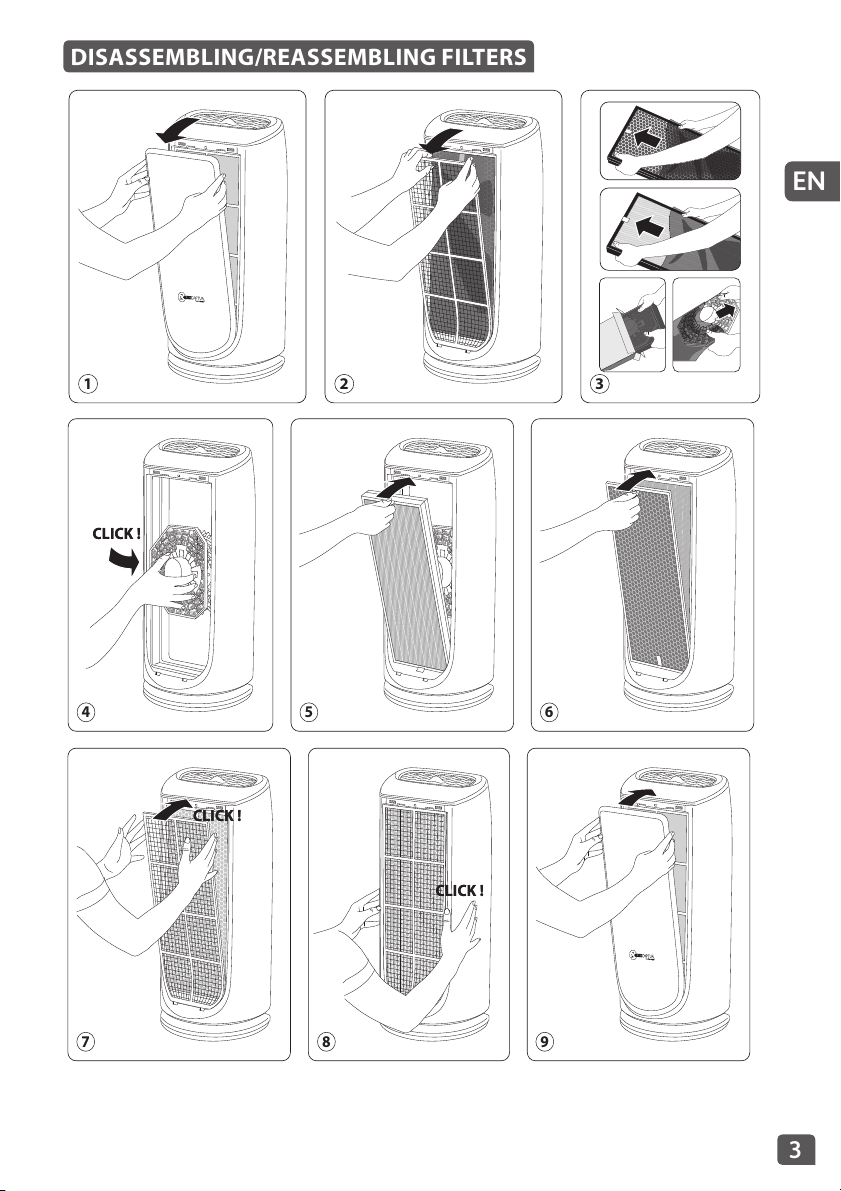
DISASSEMBLING/REASSEMBLING FILTERS

4
Please read the instruction manual and safety instructions
carefully before using the appliance and keep the instruc-
tion manual for reference. For your safety, this appliance
complies with all applicable standards and regulations
(Low Voltage, Electromagnetic Compatibility, Environmen-
tal directives etc.).
• Before use, always check that the appliance, plug and power
cord are in good condition.
• The appliance must be used in normal conditions of use as
defined in this notice.
• Never allow any liquid to get into the appliance.
• Do not touch the appliance with wet hands.
• Never insert objects into the appliance (e.g. needles, etc.).
• Do not cover your appliance.
• If the supply cord is damaged, it must be replaced by the ma-
nufacturer, its service agent or similarly qualified persons in
order to avoid a hazard.
• Your appliance must be unplugged before any maintenance.
• For maintenance and adjustment operations, please refer to
the “Maintenance” section.
• Ensure that the air purifier is switched off from the supply
mains before removing the guard.
• This appliance is not intended for use by persons (including
children) with reduced physical, sensory or mental capabili-
ties, or lack of experience and knowledge, unless they have
been given supervision or instruction concerning use of the
appliance by a person responsible for their safety.
• Children should be supervised to ensure that they do not play
with the appliance.
SAFETY INSTRUCTIONS

5
EN
The electrical facilities of the room, as well as the installa-
tion and use of the appliance must comply with the stan-
dards in force in your country.
Do not use your appliance near inflammable objects or
products. In general, you should always place the ap-
pliance at least 50 cm away from any object (walls, cur-
tains, aerosols, etc.).
Never place anything on the appliance.
Do not pull on the power cord or the appliance, even
when unplugging it from a wall socket.
This appliance is designed for indoor domestic household
use only. In case of
professional use, inappropriate use or failure to comply
with the instructions, the manufacturer accepts no res-
ponsibility and the guarantee does not apply.
Always unroll the power cord completely before use.
Do not use the appliance in a dusty room or a location
where there is a risk of fire.
This appliance must not be used in a humid environment.
Never use the appliance close to a heat source.
The warranty will be invalidated if damage occurs due to
incorrect use.
Do not cover the air inlets or the outlet grid.
Never use the appliance in an inclined or horizontal posi-
tion. Place the appliance on a flat, stable surface.
In the case of prolonged absence: switch the appliance
off using the button (10) and unplug it.
VERY IMPORTANT
6
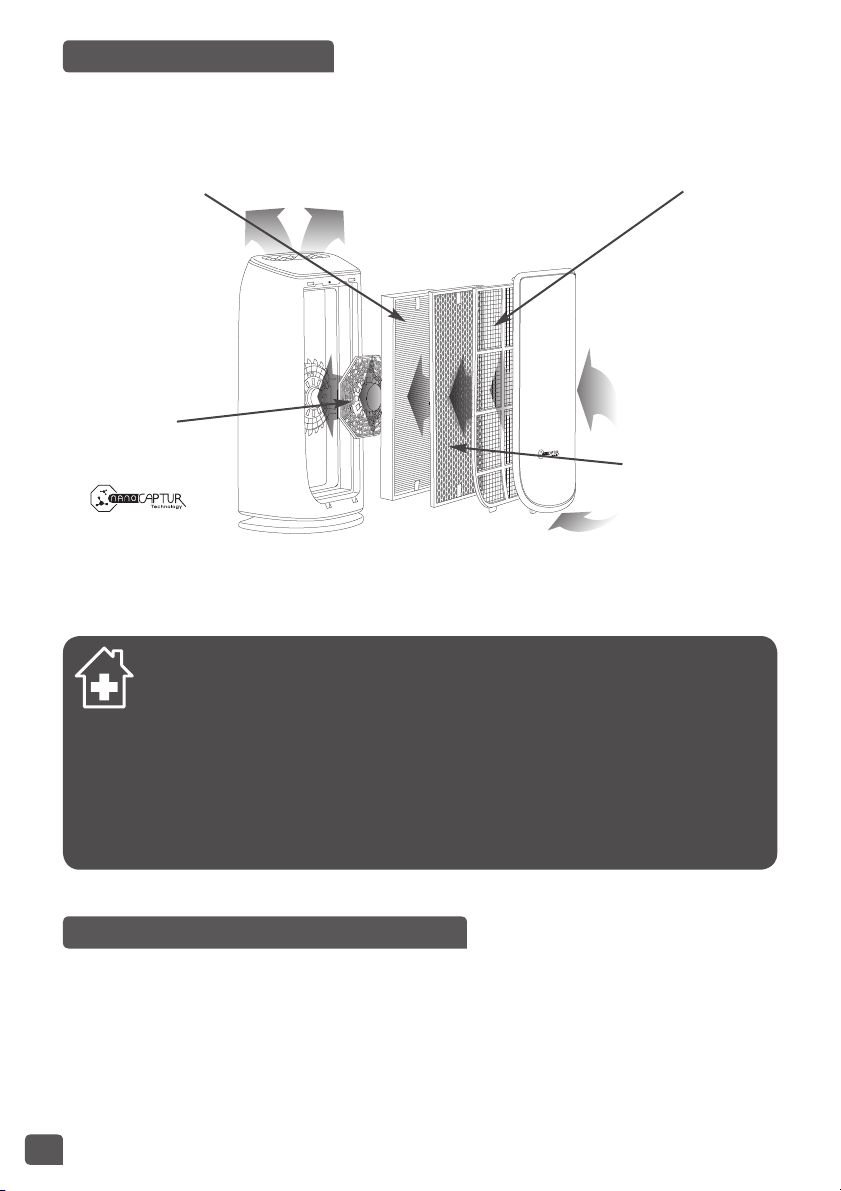
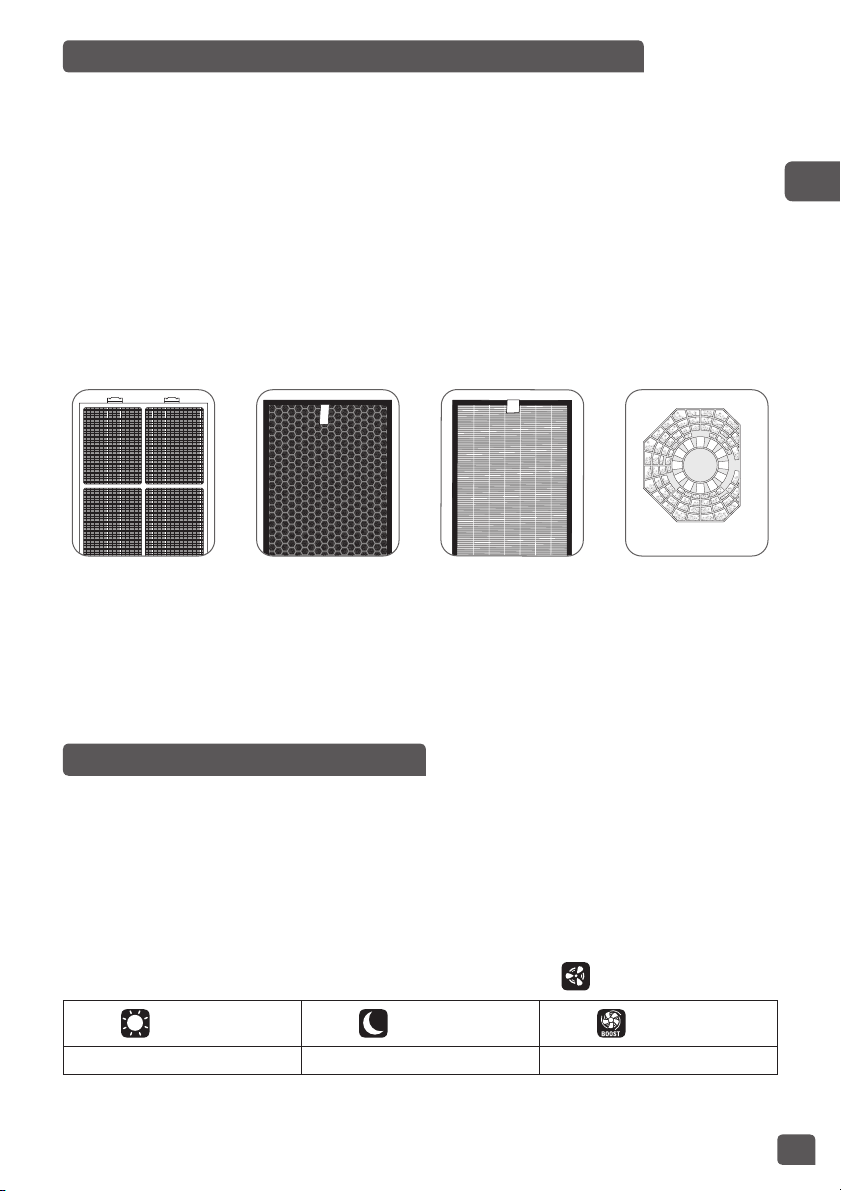
The new Intense Pure Air purifier from Tefal enables you to breathe up to 99.99% pure air in your
home and protect your health with 4 filtration levels as described below. Each level is essential
and traps characteristic pollutants:
« HOW TO ACHIEVE CLEANER INDOOR AIR »
In addition to using your Intense Pure Air purifier, here are some tips on how to im-
prove the quality of your indoor air:
• Ventilate the rooms for at least 10 min. every day, in summer and winter
• Maintain your ventilation system
• Limit the use of household products
• Do not smoke indoors
• Avoid home fragrances, incense sticks, scented candles, etc.
• Ventilate whenever any work is being conducted in your home and for several
weeks afterwards
• Avoid green plants that are allergenic or need frequent watering
WHERE TO INSTALL THE APPLIANCE
Place the purifier on a flat, stable surface in the room requiring treatment.
To allow the air to circulate freely, avoid placing the appliance behind curtains, below a window,
item of furniture or shelf unit, or close to any other obstacle, and leave at least 50 cm of free
space on each side of the appliance.
LEVEL 3:
TRUE HEPA
ALLERGY+ FILTER
• Fine particles
(PM2.5)
• Pollen
• Dust mites
• Animal allergens
• Mold
• Bacteria / viruses
LEVEL 4:
NANOCAPTUR
FILTER
• Formaldehyde
LEVEL 1:
PRE-FILTER
• Dust
• Hair
• Fur
• Lint
LEVEL 2:
ACTIVE CARBON
FILTER
• Volatile organic
components
(VOCs)
• Odors / gases
OPERATING PRINCIPLE
7
EN
BEFORE USING THE APPLIANCE FOR THE FIRST TIME
Make sure that the plastic packaging protecting the lters has been removed before using the appliance.
Also make sure that:
• The voltage of your electrical installation corresponds to the one indicated on the appliance.
• Your appliance can be used with a power plug without an earth connection. It is a class II ap-
pliance (double electrical insulation),
• The appliance is positioned in the house as described above,
• The air inlet and outlet grids are completely unobstructed,
• Ensure the 4 filters and front panel have been correctly installed (see section titled filter as-
sembly/dismantling paragraph).
This appliance is fitted with a device that automatically prevents it from operating if the front
door is not correctly assembled.
Inserting and replacing the filters
This appliance is equipped with 4 types of lters:
Pre-filter Active carbon
filter
NanoCaptur
filter
True HEPA
Allergy+ filter
NB: For optimum performance of the appliance, only use filters provided by TEFAL.
To replace the lters, follow the instructions in the section « Disassembling/Reassembling lters».
Please note: certain filters may emit a temporary slight odour, due to the transport and storage
conditions.
SWITCHING THE APPLIANCE ON
Setting the pollution sensors
The appliance is preset to medium sensitivity.
If the air quality indicator remains:
– poor after 2 hours in operation although the air seems to be purified
– excellent for more than 1 hour although the air seems to be polluted
you can adjust the sensor sensitivity as follows:
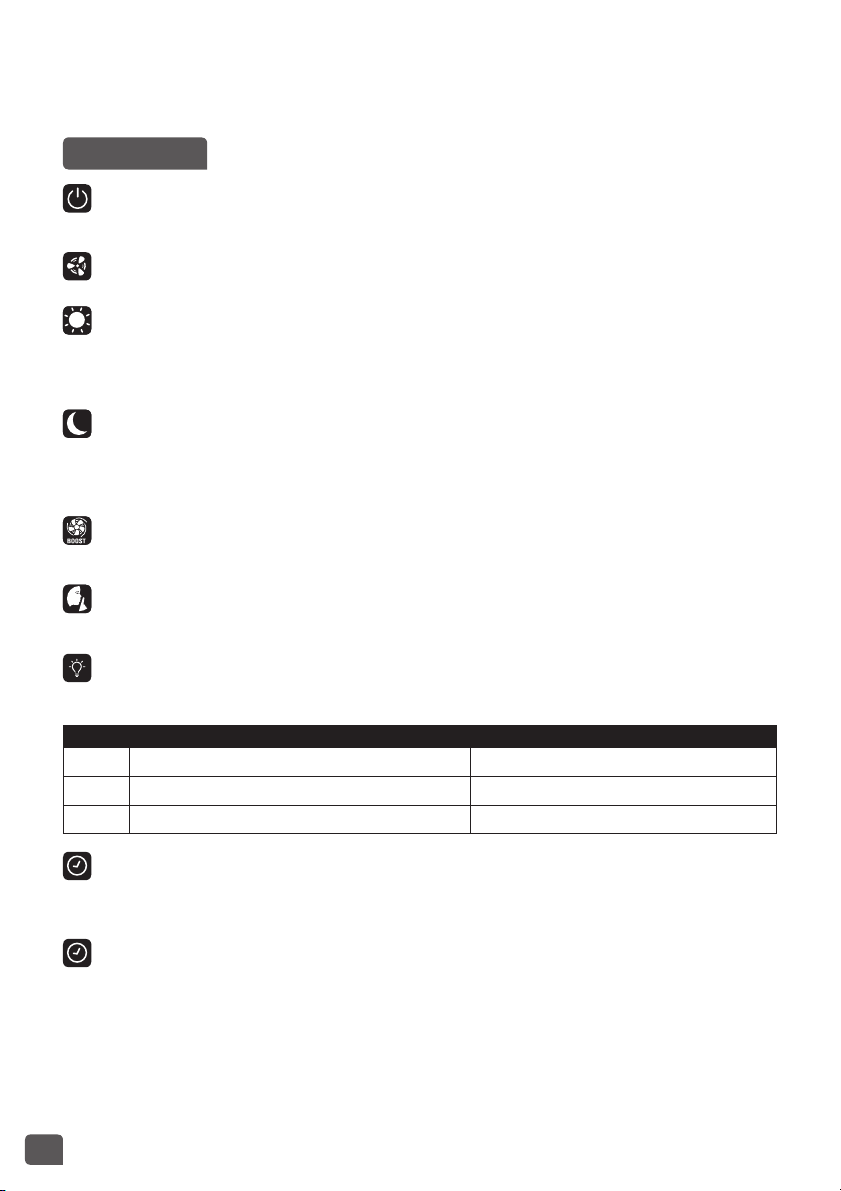
1. When the air purifier is off, hold down the mode setting button for 3 seconds:
2. Set the sensitivity by briefly pressing the mode setting button:
+ Blue + Purple + Red
Low sensitivity Medium sensitivity High sensitivity
• Select high sensitivity if the air purier indicates excellent air quality for more than 1 hour although the air
seems to be polluted.
8
• Select low sensitivity if the air purier continues to indicate poor air quality even though it has been
operating for more than 2 hours and the air seems suciently puried.
3. Press ‘Start/Stop’ button to validate the sensitivity setting.
OPERATION
Start
Briefly press this button to switch the air purifier on or off.
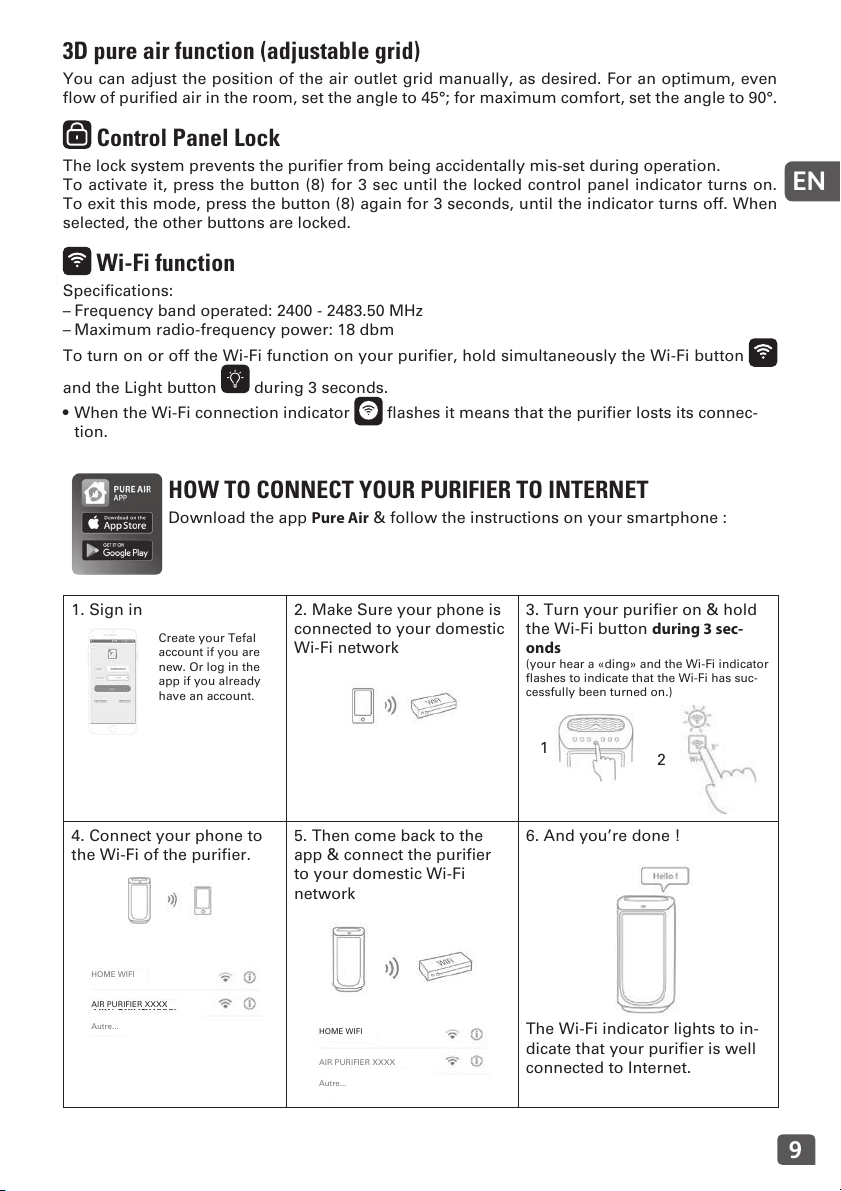
Mode / filtration speed selection
Auto day
Automatic: In this operating mode, the filtration speed automatically adjusts according to the
air quality detected by the particle sensor and the gas sensor. This mode is recommended for
general use.
Auto Night
The filtration speed of your appliance is adjusted for a whisper quiet air flow during the night.
The light intensity of the appliance is also reduced. If pollution is detected, the filtration speed
increases slightly to purify your air but remains quiet to avoid disturbing your sleep.
Boost mode
The highest speed level of filtration.
Silent mode
The whisper quiet speed.
Light
You can change the light intensity of the appliance as you wish or according to the time of day.
Press Air quality indicator Control panel
1 Light up Light up
2 Moderate light Moderate light
3 Off Moderate light
Ionizer function
– The ionizer function releases negative ions into the air. This function is switched off by de-
fault. To activate it, briefly press button 11.
Timer / delayed start
– Timer: When the appliance is on, you can use this button to define the operating duration.
Briefly press the button to select the number of operating hours desired (1, 2, 4 or 8) and the
appliance will automatically turn off at the end of the selected period.
– Delayed start: When the appliance is off, briefly press the button to set the appliance to turn
on in a certain number of hours (1, 2, 4 or 8).
9
EN
3D pure air function (adjustable grid)
You can adjust the position of the air outlet grid manually, as desired. For an optimum, even
flow of purified air in the room, set the angle to 45°; for maximum comfort, set the angle to 90°.
Control Panel Lock
The lock system prevents the purifier from being accidentally mis-set during operation.
To activate it, press the button (8) for 3 sec until the locked control panel indicator turns on.
To exit this mode, press the button (8) again for 3 seconds, until the indicator turns off. When
selected, the other buttons are locked.
Wi-Fi function
Specifications:
– Frequency band operated: 2400 - 2483.50 MHz
– Maximum radio-frequency power: 18 dbm
To turn on or off the Wi-Fi function on your purifier, hold simultaneously the Wi-Fi button
and the Light button during 3 seconds.
• When the Wi-Fi connection indicator flashes it means that the purifier losts its connec-
tion.
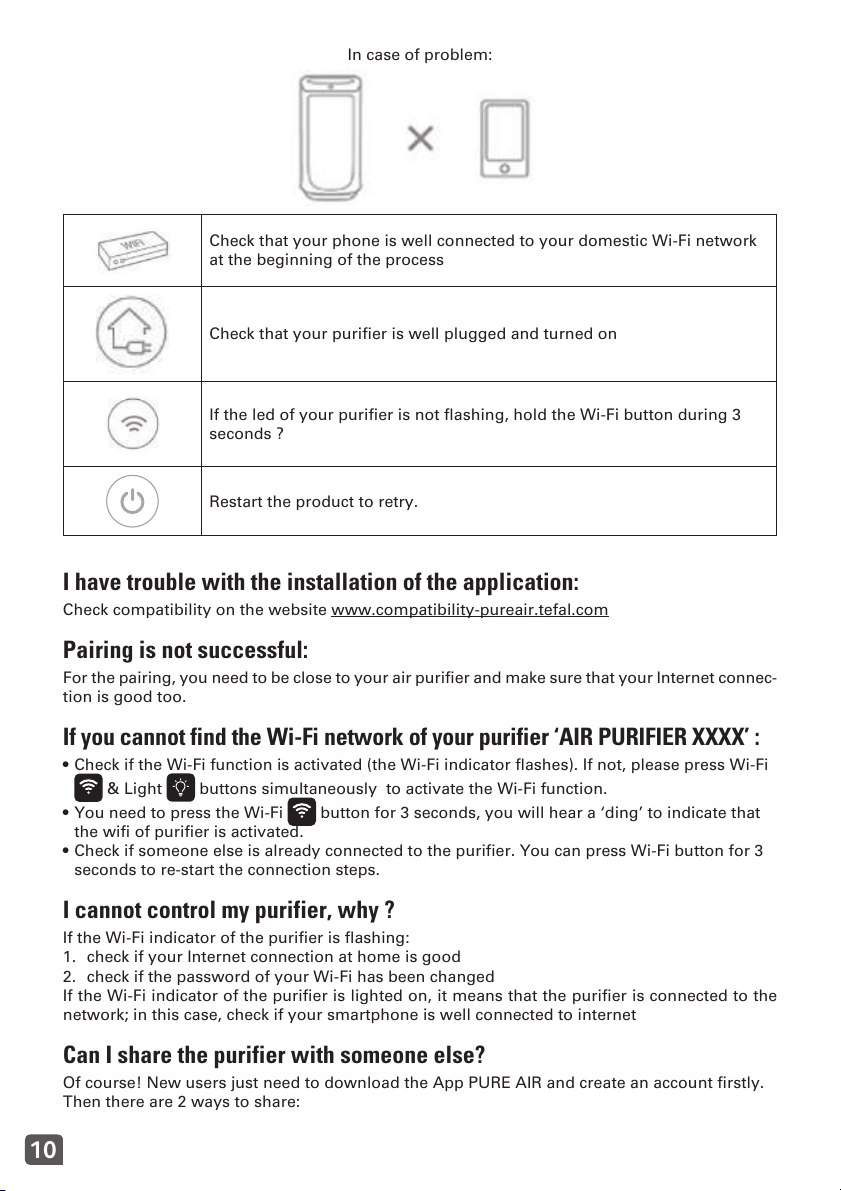
HOW TO CONNECT YOUR PURIFIER TO INTERNET
Download the app Pure Air & follow the instructions on your smartphone :
1. Sign in
Create your Tefal
account if you are
new. Or log in the
app if you already
have an account.
2. Make Sure your phone is
connected to your domestic
Wi-Fi network
3. Turn your purifier on & hold
the Wi-Fi button during 3 sec-
onds
(your hear a «ding» and the Wi-Fi indicator
flashes to indicate that the Wi-Fi has suc-
cessfully been turned on.)
1
2
4. Connect your phone to
the Wi-Fi of the purifier.
HOME WIFI
AIR PURIFIER XXXX
Autre...
5. Then come back to the
app & connect the purifier
to your domestic Wi-Fi
network
HOME WIFI
AIR PURIFIER XXXX
Autre...
6. And you’re done !
The Wi-Fi indicator lights to in-
dicate that your purifier is well
connected to Internet.
10
In case of problem:
Check that your phone is well connected to your domestic Wi-Fi network
at the beginning of the process
Check that your purifier is well plugged and turned on
If the led of your purifier is not flashing, hold the Wi-Fi button during 3
seconds ?
Restart the product to retry.
I have trouble with the installation of the application:
Check compatibility on the website www.compatibility-pureair.tefal.com
Pairing is not successful:
For the pairing, you need to be close to your air purifier and make sure that your Internet connec-
tion is good too.
If you cannot find the Wi-Fi network of your purifier ‘AIR PURIFIER XXXX’ :
• Check if the Wi-Fi function is activated (the Wi-Fi indicator flashes). If not, please press Wi-Fi
& Light buttons simultaneously to activate the Wi-Fi function.
• You need to press the Wi-Fi button for 3 seconds, you will hear a ‘ding’ to indicate that
the wifi of purifier is activated.
• Check if someone else is already connected to the purifier. You can press Wi-Fi button for 3
seconds to re-start the connection steps.
I cannot control my purifier, why ?
If the Wi-Fi indicator of the purifier is flashing:
1. check if your Internet connection at home is good
2. check if the password of your Wi-Fi has been changed
If the Wi-Fi indicator of the purifier is lighted on, it means that the purifier is connected to the
network; in this case, check if your smartphone is well connected to internet
Can I share the purifier with someone else?
Of course! New users just need to download the App PURE AIR and create an account firstly.
Then there are 2 ways to share:
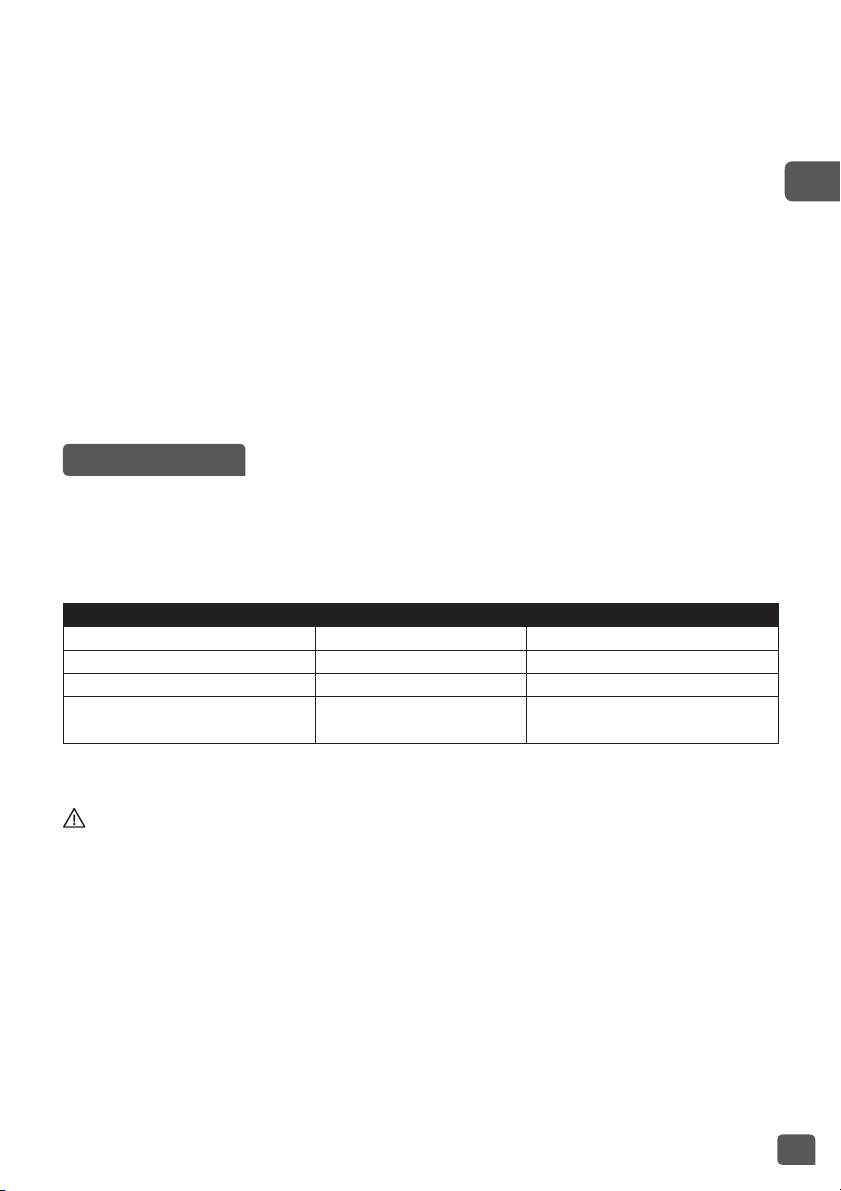
11
EN
1. You need to enter in ‘My Devices’ , choose the purifier that you want to share, click on
‘share by email’. Enter the email of the new user, click on ‘OK’
2. You need to enter in ‘my devices’, choose the purifier that you want to share; you can see
the ‘QR code‘of your purifier.
The new user needs to enter in ‘my devices’, and click ‘+’ in order to add new product,
choose ‘scan the QR code’. To scan the ‘QR code ‘on your screen.
The scheduling does not work:
If the time slot is earlier than current time, by default the product will start next day.
Why the pairing does not work?
Supported encryption type : WPA_1/WPA_2, TIPK, PSK, AES,
Supported networks: 2.4 GHz (not 5Ghz)
I go on vacation and I let my purifier on. If my home Wi-Fi stops working
during this time, I can’t control my purifier via the app anymore.
Don’t worry. If the product lost Wi-Fi connection for longer than 24 hours, the appliance will
stop automatically.
MAINTENANCE
Always switch the appliance o with the button (10) and unplug it before conducting any maintenance
operation.
You can clean the appliance with a slightly damp cloth.
IMPORTANT: Never use abrasive products which could damage your appliance’s appearance.
FILTERS
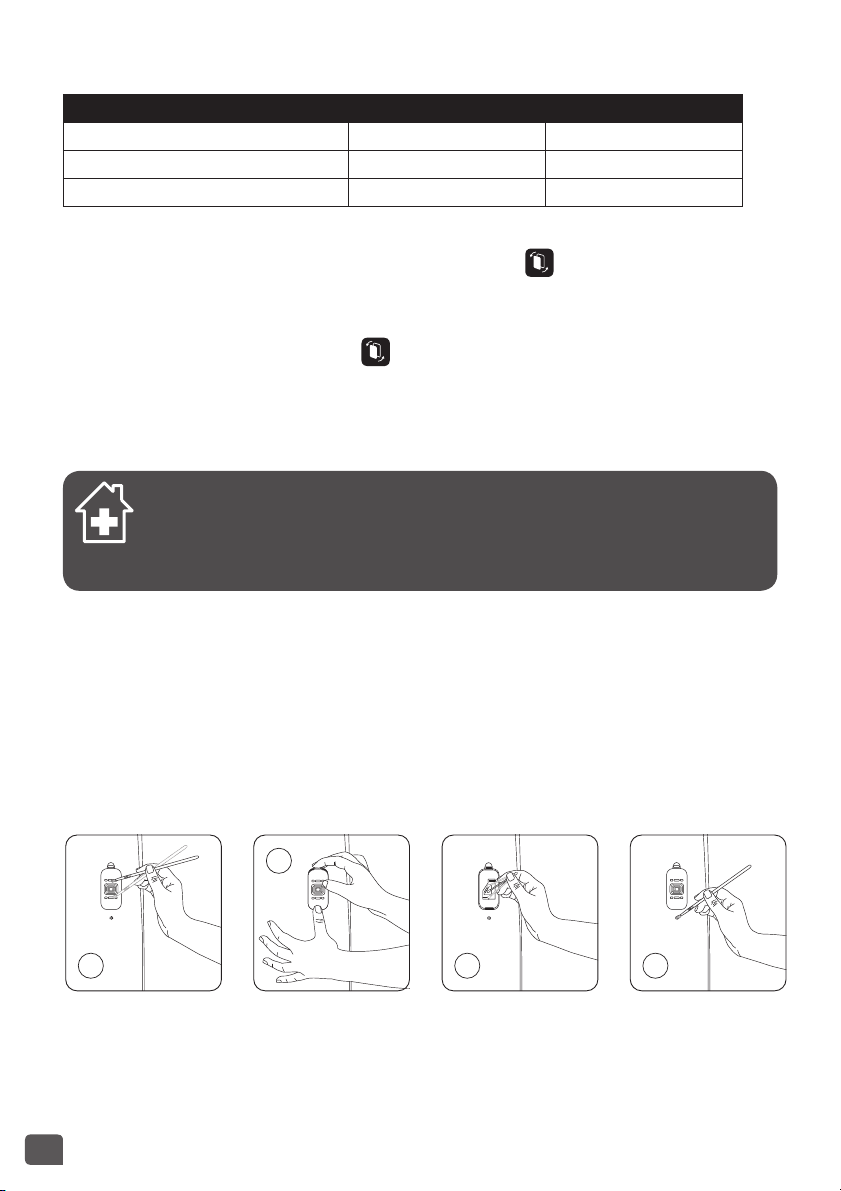
Filter Action Cycles
Pre-lter Clean Every 2 to 4 weeks
Active carbon lter Replace Every 12 months
True HEPA Allergy+ lter Replace Every 2 years
NanoCaptur lter Replace
Color changing
(see Color chart on filter)
This data is based on an average use in the appliance of 8 hours per day at the lowest speed of
AutoDay mode.
The recommended frequency for cleaning and replacing the filters may vary depending on
the duration of use and the operating environment.
• A light indicates when a filter needs to be replaced (control panel light 2).
• The NanoCaptur filter contains translucent granules which change color according to the
formaldehyde absorption rate. Refer to the color chart on the sticker inside the front door or
the filter itself to establish the filter saturation rate.Once the saturation rate has reached its
maximum, the filter must be replaced. You have to check the filter saturation rate every six
months.
• The pre-filter can be re-used: remove the dust using a vacuum cleaner or wash with water.
CAUTION:
• The appliance’s efficiency can be reduced if the pre-filter is not cleaned regularly.
• Never use a pre-lter that is still damp.
• The pre-lter is the only lter which can be re-used and washed with water. The particle, Nano-
Captur and active carbon filters cannot be cleaned and re-used. Never wash with water.
12
• To replace the lters, follow the instructions in the section « Disassembling/Reassembling lters».
Your replacement filters are available under the following codes:
Filtre Code PU4085 Code PU6085
True HEPA Allergy+ lter XD6074 XD6077
Active carbon lter XD6060 XD6061
Nanocaptur lter XD6080 XD6081
IMPORTANT: Resetting the lters
The reset light flashes when a filter needs to be replaced or cleaned (Prefilter). Once the filter
has been replaced, hold down the reset button for 3 seconds. .
Forced reset:
If you have replaced a filter before its end of life, force the reset of the filter replacement cycle:
1. Hold the reset button for 3 seconds. .
2. Press the reset button briefly to select the filter you have changed.
3. After selecting the filter to reset, hold the reset button for 3 seconds. The new filter life is
then reset.
4. If the reset filter button is not is activated for 10 seconds in forced reset mode, the reset
mode is canceled.
« TIPS FOR CHANGING FILTERS »
• Avoid handling used filters if you suffer from allergies or asthma.
• Wear gloves when changing the filters, or wash your hands well afterwards.
• Put used filters directly into a closed, air-tight bag before throwing them away to
avoid spreading pollutants.
POLLUTION SENSORS
The particles sensor and gas sensor (model PU6085 only) need to be cleaned regularly (every
2 months) and appropriately.
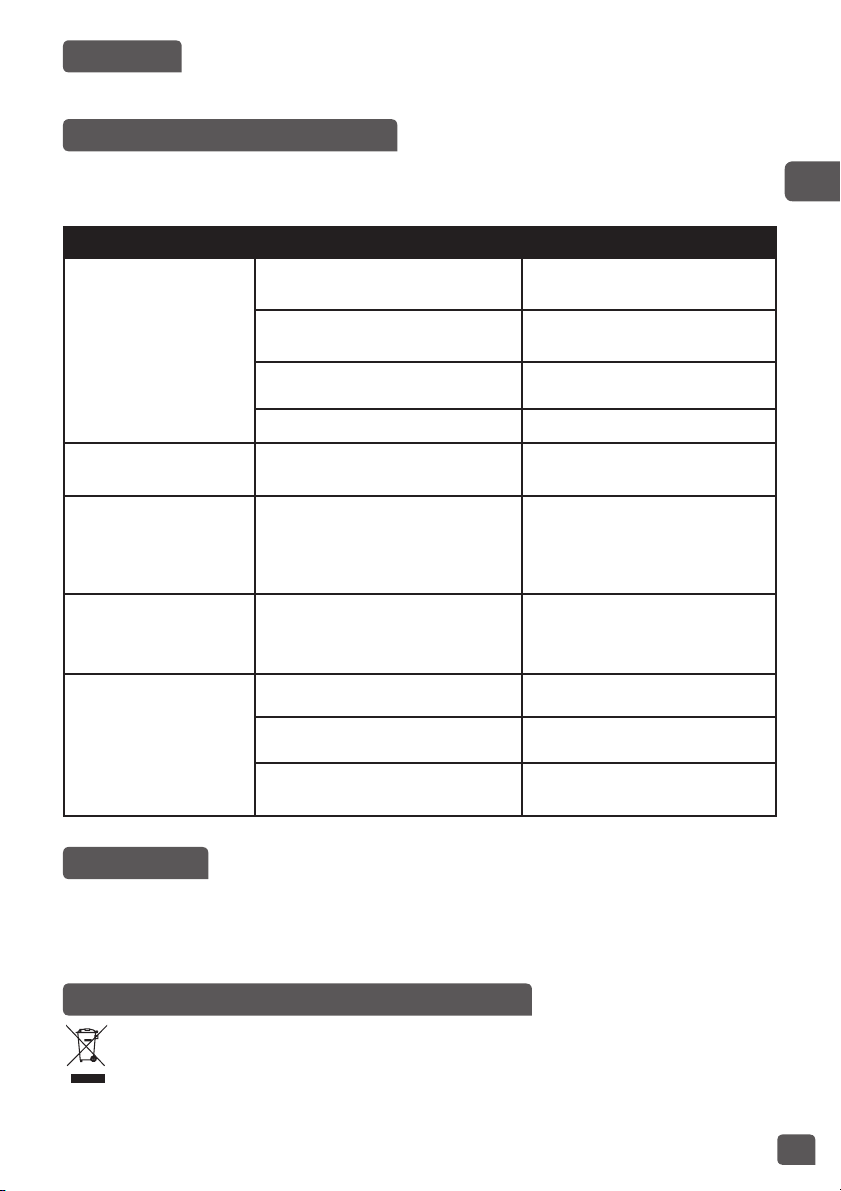
Make sure you turn o and unplug the appliance before cleaning the pollution sensors and follow the
recommendations below:
1. Clean the air inlet and outlet using a soft brush or cloth.
2. Open the sensor cover located on the right-hand side of the appliance.
3. Lightly wet a cotton swab and remove any dust from the lens and the inlet/outlet. Wipe
using a dry cotton swab.
4. Clean the gas sensor using a soft brush or vacuum cleaner.
1
2
3 4
IMPORTANT:
• Never use a detergent or metal object to clean the sensors.
• The efficiency of the sensors may be reduced if not cleaned regularly.
• Cleaning frequency varies depending on the operating environment of the appliance. If it is
used in a dusty environment, clean the sensors more frequently.
13
EN
STORAGE
When you are not using the appliance, store it in a cool, dry place.
IN THE EVENT OF A PROBLEM
• Never dismantle your appliance yourself. A poorly repaired appliance can cause risks for the
user.
• Check the troubleshooting table below before contacting an approved Service Center:
Problem Check Solution
The appliance will not
switch on.
Is the power cord connected?
Connect the power cord to a
plug with the correct voltage.
Are all the display elements off?
Press the start button and select
the required function.
Is there a power outage?
You can use your purifier once
the power turns on again.
Is the front door closed? Close the front door properly.
The air ow does not
change automatically.
Is the appliance in silent or boost
mode?
Select the correct operating
mode AutoDay or Auto Night.
The ow is a lot weaker
than before.
Does the filter need to be cleaned
or replaced?
Check the filter cleaning and
replacement frequencies and
clean/replace the filter(s) if ne-
cessary.
There is an unpleasant
smell coming from the
air outlet.
Does the filter need to be cleaned
or replaced?
Check the filter cleaning and
replacement frequencies and
clean/replace the filter(s) if ne-
cessary.
The air quality light does
not change color.
Is the sensor lens covered with
dust?
Clean the sensor lens.
Does the light still indicate poor
air quality?
Set the sensor sensitivity to
«low» or «medium».
Does the light still indicate ex-
cellent air quality?
Set the sensor sensitivity to
“high” or “medium”.
WARRANTY
Contact an approved Service Center if:
• your appliance has been dropped
• your appliance or its power cord is damaged
• your appliance is not working properly
LET’S HELP PROTECT THE ENVIRONMENT!
Your appliance contains valuable materials which can be recovered or recycled.
Leave it at a local waste collection point or take to an approved service center so that
it can be processed.
14
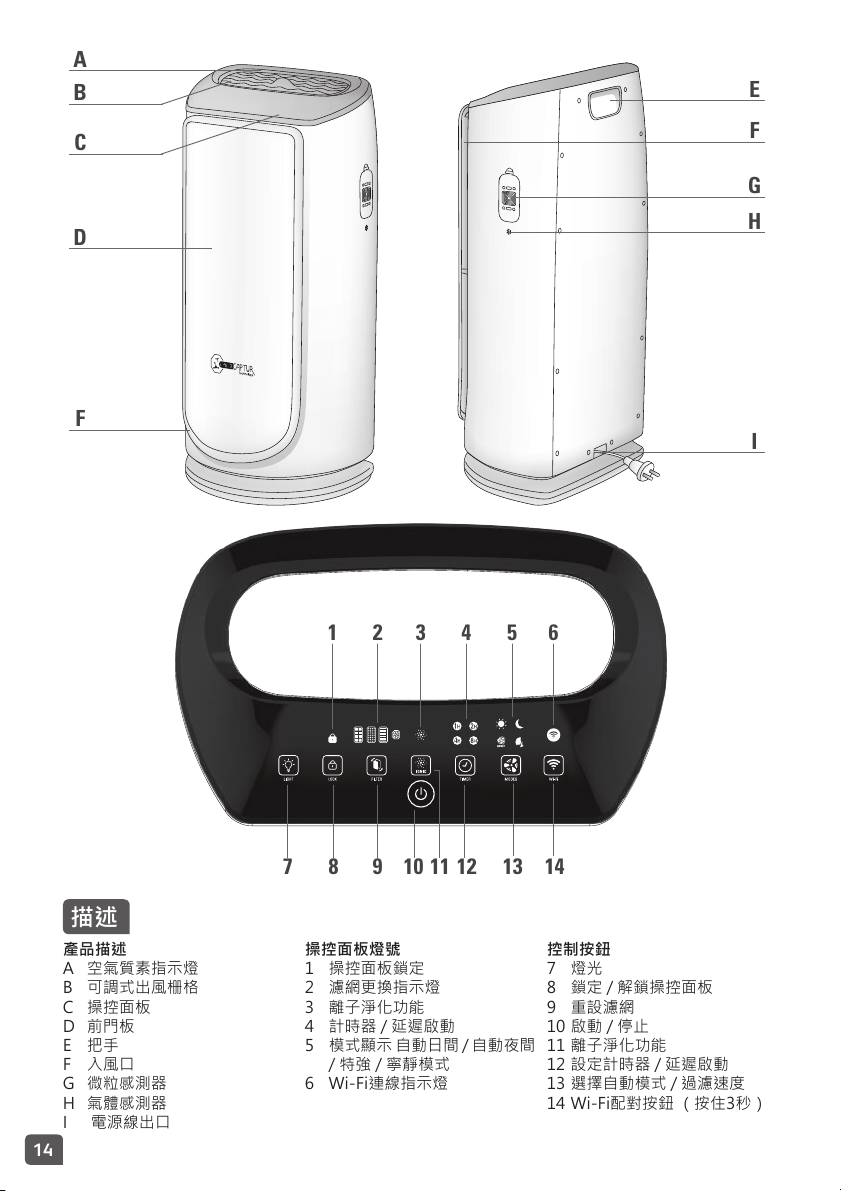
A
D
E
F
G
H
I
F
1
B
C
7 8 9 10 11 12 13 14
2 43 5 6
描述
產品描述
A 空氣質素指示燈
B 可調式出風栅格
C 操控面板
D 前門板
E 把手
F 入風口
G 微粒感測器
H 氣體感測器
I 電源線出口
操控面板燈號
1 操控面板鎖定
2 濾網更換指示燈
3 離子淨化功能
4 計時器/延遲啟動
5 模式顯示自動日間/自動夜間
/特強/寧靜模式
6 Wi-Fi連線指示燈
控制按鈕
7 燈光
8 鎖定/解鎖操控面板
9 重設濾網
10啟動/停止
11離子淨化功能
12設定計時器/延遲啟動
13選擇自動模式/過濾速度
14Wi-Fi配對按鈕(按住3秒)
ZH
15
1 2 3
6
54
CLICK !
CLICK !
CLICK !
CLICK !
CLICK !CLICK !
7 8 9
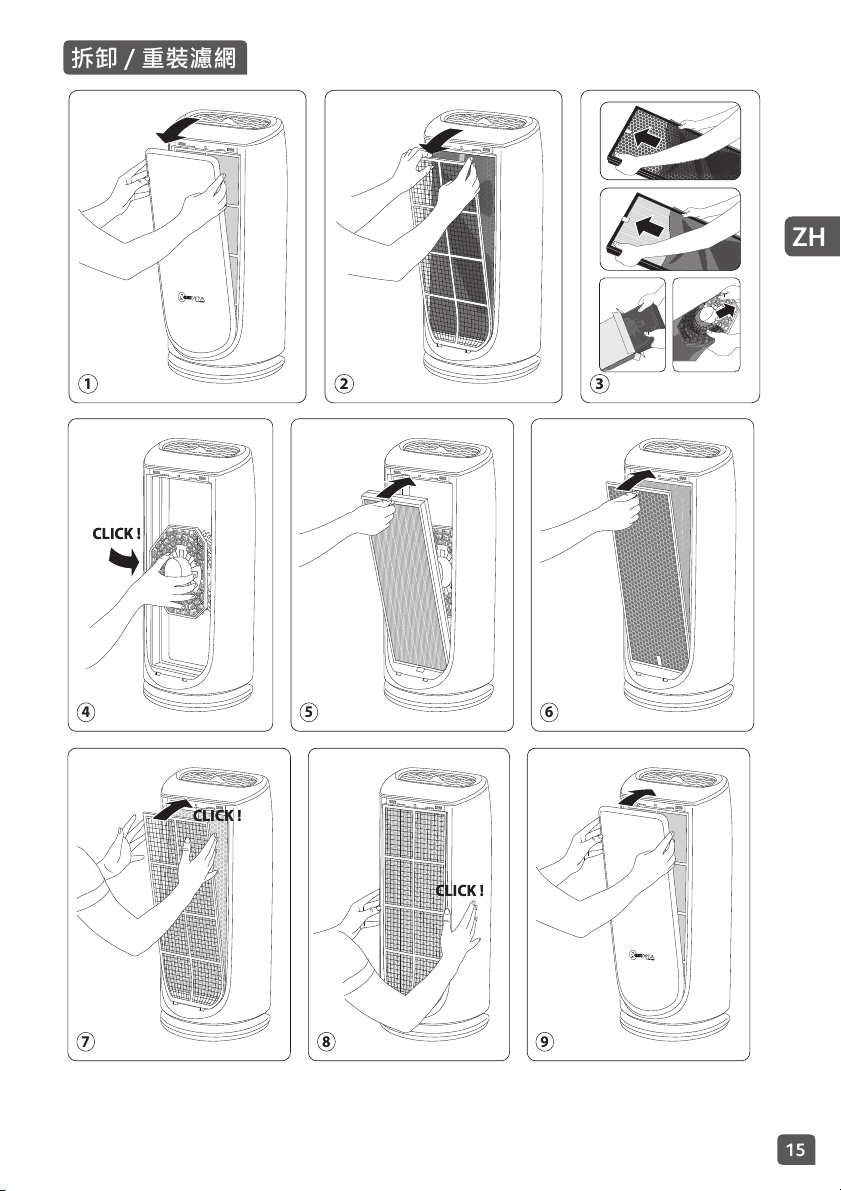
拆卸 / 重裝濾網

16
使用本電器前,請詳閱本說明書和安全須知,並妥善保管本說
明書以備查閱。為保障您的安全,本電器符合所有現行的標準
及規章條例(低壓、電磁兼容性、環保指令等)。
• 使用前,請務必檢查電器、插頭和電源線是否處於良好狀態。
• 本電器須在本通知所說明的正常使用條件下使用。
• 禁止任何液體進入本電器。
• 手濕時切勿觸摸電器。
• 切勿將外物插入電器中(例如:針等)。
• 切勿遮蓋電器。
• 如果電源線損壞,則必須交由製造商、其服務代理商或具有同等資
格的人士更換,以免發生危險。
• 在進行保養之前,必須拔掉電器的電源插頭。
• 有關保養及調整的操作,請參閱「保養」一節。
• 在拆下護罩之前,請確保本空氣淨化機已斷開電源。
• 對於肢體、感官或心智不健全,或缺少經驗和知識的人士(包括兒
童),除非負責其安全的人士從旁監督或指導如何使用本電器,否
則均不適宜使用本電器。
• 務必監督兒童以確保他們不會把玩本電器。
安全須知
房間的電力設施以及本電器的安裝和使用須符合您所在國家/地
區的現行標準。
切勿在易燃物體或產品附近使用本電器。一般而言,本電器應
時刻放置在距離任何物體(牆壁、窗簾、噴霧器等)至少50厘
米遠的地方。
切勿在本電器上放置任何物體。
即使從牆上插座拔下電源插頭時,也不要拉扯電源線或電器。
本電器僅供室內家居使用。如因
商業用途、不當使用或未遵照說明操作而引致損壞,製造商概
不負責,電器亦無法享用保用服務。
使用前請務必先將電源線全部鋪開。
切勿在多塵的房間或有火災風險的地方使用本電器。
本電器不得在潮濕的環境中使用。
切勿在靠近熱源的地方使用本電器。
如因使用不當而造成損壞,則保用會作廢。
切勿遮蓋入風口或出風栅格。
切勿將電器打斜或橫放使用。請將本電器放在平坦、穩固的表
面。
長時間不使用時:使用(10)按鈕關閉電器並拔掉電源插頭。
重要注意事項
ZH
17
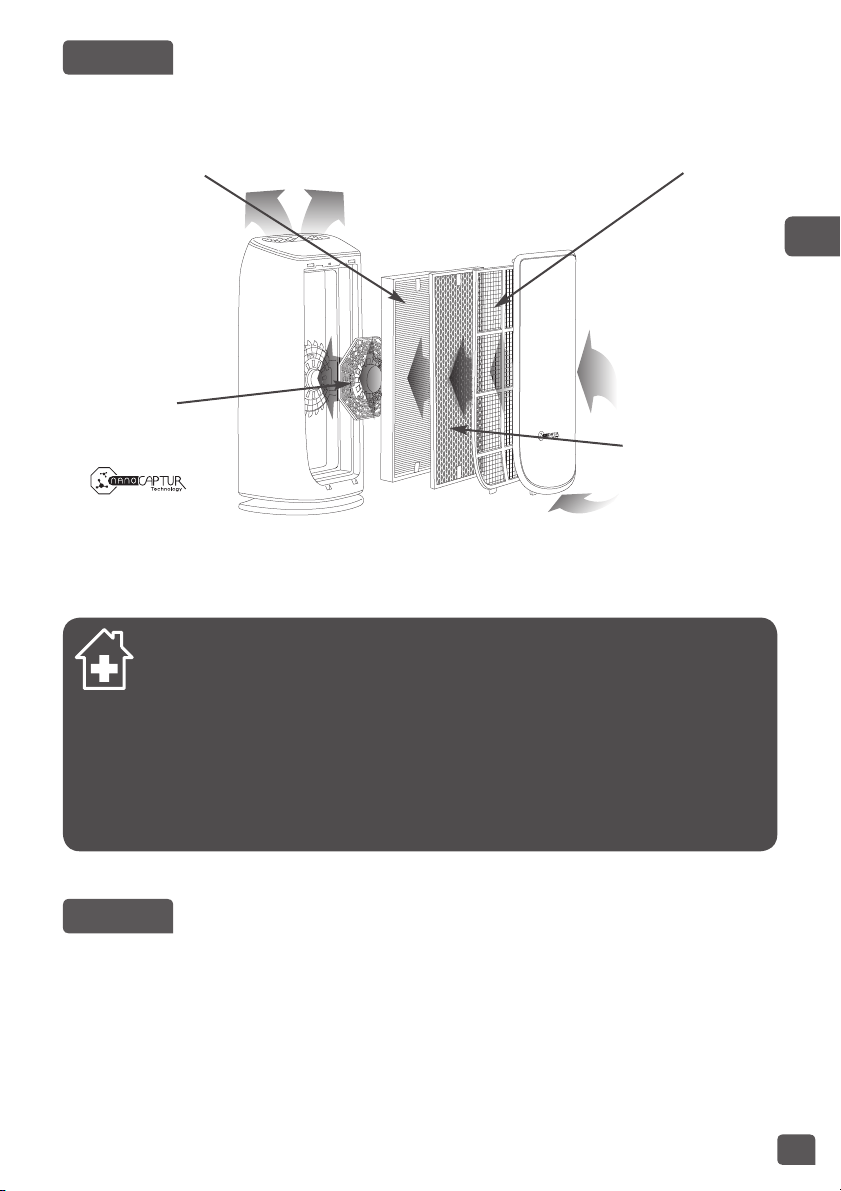
全新的特福IntensePureAir空氣淨化機能讓閣下在家中呼吸到99.99%純淨的空氣,保障閣下健康。其
具備以下四層過濾保護,每一層都至關重要,能困住不同的污染物:
「如何令室內空氣更潔淨」
除了使用Intense Pure Air空氣淨化機外,還可參考以下建議,以改善室內空氣質素:
• 在冬夏季節,每天讓房間通風至少10分鐘
• 妥善保養通風系統
• 限制使用家居產品
• 不要在室內吸煙
• 避免使用家居香薰、香蠋、香氛蠟燭等。
• 每次為家居裝修時及於其後數週內保持通風
• 避免擺放致敏或需要經常灌溉的綠色植物
安裝地點
請將本空氣淨化機置於所用房間的平穩表面上。
為令空氣能充分循環,請避免將本電器置於窗簾之後、窗戶或家具櫃架之下,或任何其他障礙物附近,
並於電器兩旁各預留至少50厘米空間。
第三層:
TRUEHEPA
ALLERGY+濾網
• 微細懸浮粒子
(PM2.5)
• 花粉
• 塵蟎
• 動物過敏原
• 霉菌
• 細菌/病毒
第四層:
NANOCAPTUR
濾網
• 甲醛
第一層:
前層濾網
• 灰塵
• 頭髮
• 動物毛髮
• 絨毛
第二層:
活性碳濾網
• 揮發性有機化合物
(VOC)
• 氣味/氣體
運作原理
18
首次使用前
在使用本電器之前,請確保已移除保護濾網的塑料包裝。
並且確定:
• 電源電壓與本電器所標示的電壓相符。
• 您的電器可使用無接地的插頭。本電器屬於第II類產品(雙重絕緣);
• 電器已按照上文所述在家居放置好;
• 入風口及出風栅格完全暢通無阻;
• 確保已正確安裝4個瀘網及前面板(參閱「拆卸/重裝濾網」一節)。
本電器配備一個裝置,可在前面板未正確組裝時,自動禁止電器運行。
放置及更換濾網
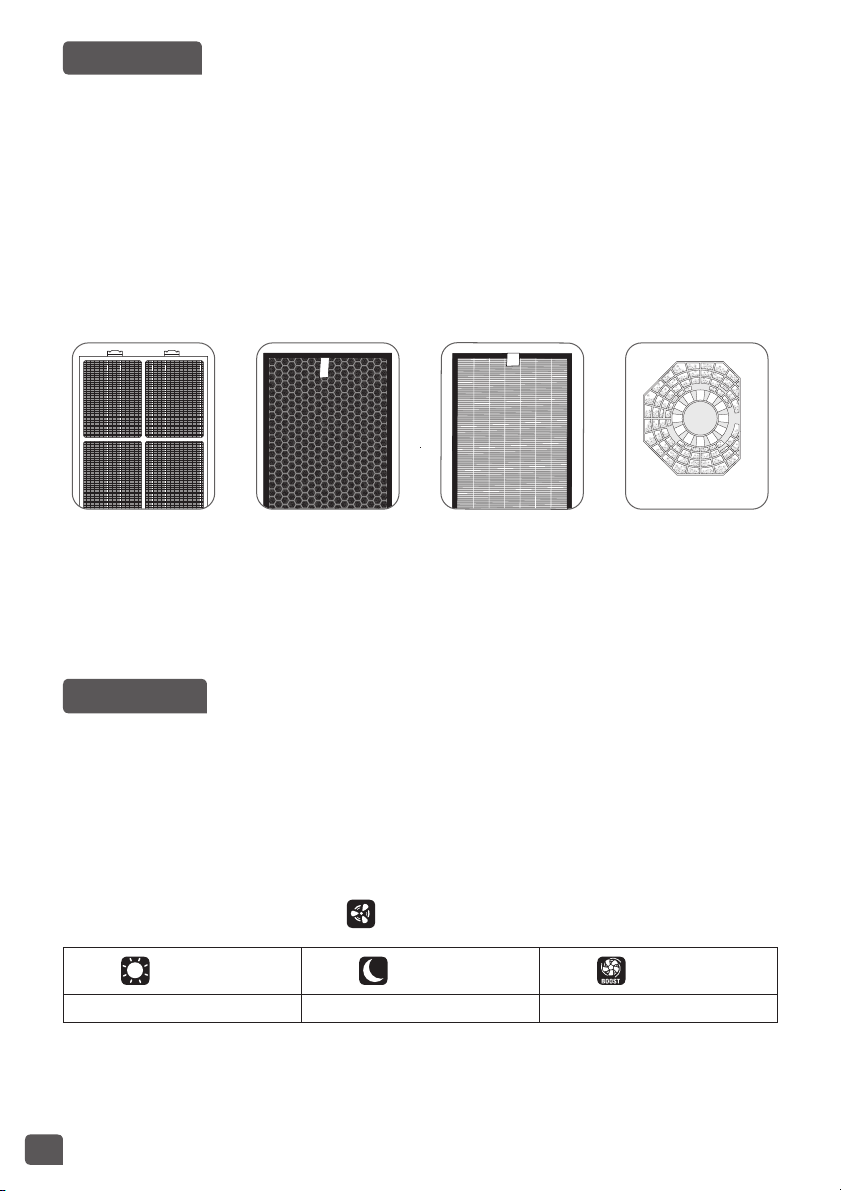
本電器具備4種濾網:
前層濾網 活性碳濾網 NanoCaptur
濾網
TrueHEPA
Allergy+濾網
註:為使本電器能發揮最佳效能,請使用由特福提供的濾網。
如需更換濾網,請遵循「拆卸 / 重裝濾網」一節的指示。
請注意:視乎運輸及保存情況,某些濾網可能會短暫發出少量異味。
啟動本產品
設定污染感測器
本電器的靈敏度預設為中度。
如遇以下情況:
– 運行兩小時後,空氣似乎有所淨化,但所示的空氣質素仍然欠佳
– 所示的空氣質素維持在極佳水平逾一小時,但空氣似乎污濁不清
則可如下設定感測器靈敏度:
1. 關閉空氣淨化機,並按住模式設定按鈕3秒:
2. 輕按模式設定按鈕,以設定靈敏度:
+藍色 +紫色 +紅色
低靈敏度 中靈敏度 高靈敏度
• 如空氣淨化機所示的空氣質素維持在極佳水平逾一小時,但空氣似乎污濁不清,請選擇高靈敏度。
• 如空氣淨化機在運行逾兩小時後,空氣似乎已充分淨化,但所示的空氣質素持續欠佳,請選擇低靈
敏度。
3. 按下「啟動/停止」按鈕,使靈敏度設定生效。
ZH
19
操作
啟動
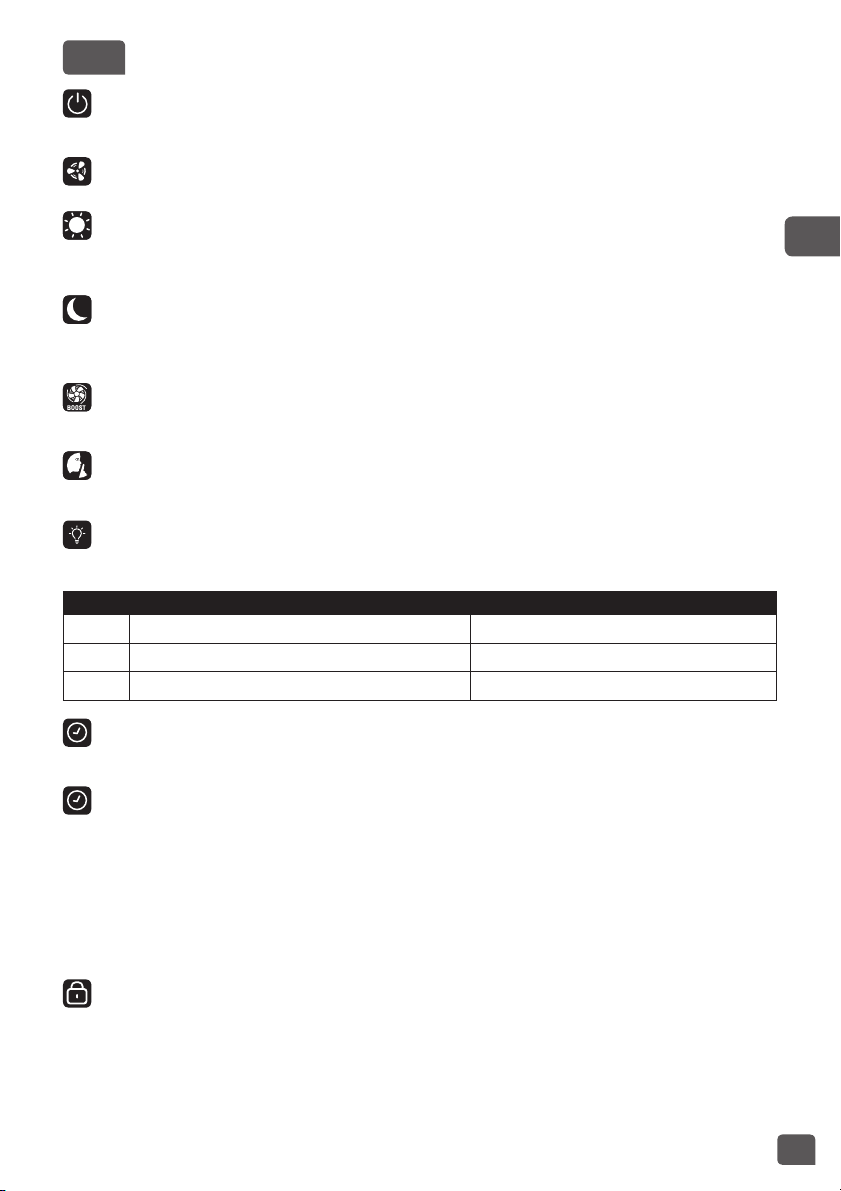
輕按此按鈕,以啟動/關閉空氣淨化機。
選擇模式 / 過濾速度
自動日間
自動:在此操作模式下,過濾速度將因應微粒感測器和氣體感測器所測得的空氣質素自動進行調節。建
議在一般情況下使用此模式。
自動夜間
空氣淨化機的過濾速度將有所調節,為晚間提供寧靜氣流。燈光的亮度亦有所減弱。如偵測到污染,過
濾速度將稍為增加,在淨化空氣的同時保持寧靜,以免打擾您安睡。
特強模式
最高的過濾速度水平。
寧靜模式
寧靜的風速模式。
燈光
您可隨意或因應一天的不同時間改變燈光強度。
輕按 空氣質素指示燈 操控面板
1 亮起 亮起
2 中光 中光
3 熄滅 中光
離子淨化功能
– 離子淨化功能會釋放負離子到空氣中。本功能預設為關閉。如要啟動此功能,請輕按11按鈕。
計時器 / 延遲啟動
– 計時器:空氣清新機已啟動時,您可以按此按鈕制定運行時間。輕按此按鈕,以選取所需的運行時
數(1、2、4或8小時)。空氣清新機將於所選時數屆滿時自動關閉。
– 延遲啟動:空氣清新機已關閉時,可輕按此按鈕,以設定空氣清新機於特定的時數(1、2、4或
8小時)後啟動。
立體淨化空氣功能(可調式栅格)
您可隨意手動調校出風栅格的角度。45度能令房間享有最均勻的潔淨空氣,90度送風則最舒適。
鎖定 / 解鎖操控面板
鎖定系統可避免清新機受運行過程中的意外錯誤操作所影響。
如要啟動此功能,請按住(8)按鈕3秒,直至操控面板鎖定指示燈亮起。如要退出此模式,請再次按住(8)
按鈕3秒,直至指示燈熄滅。在此功能下,其他按鈕均被鎖定。
20
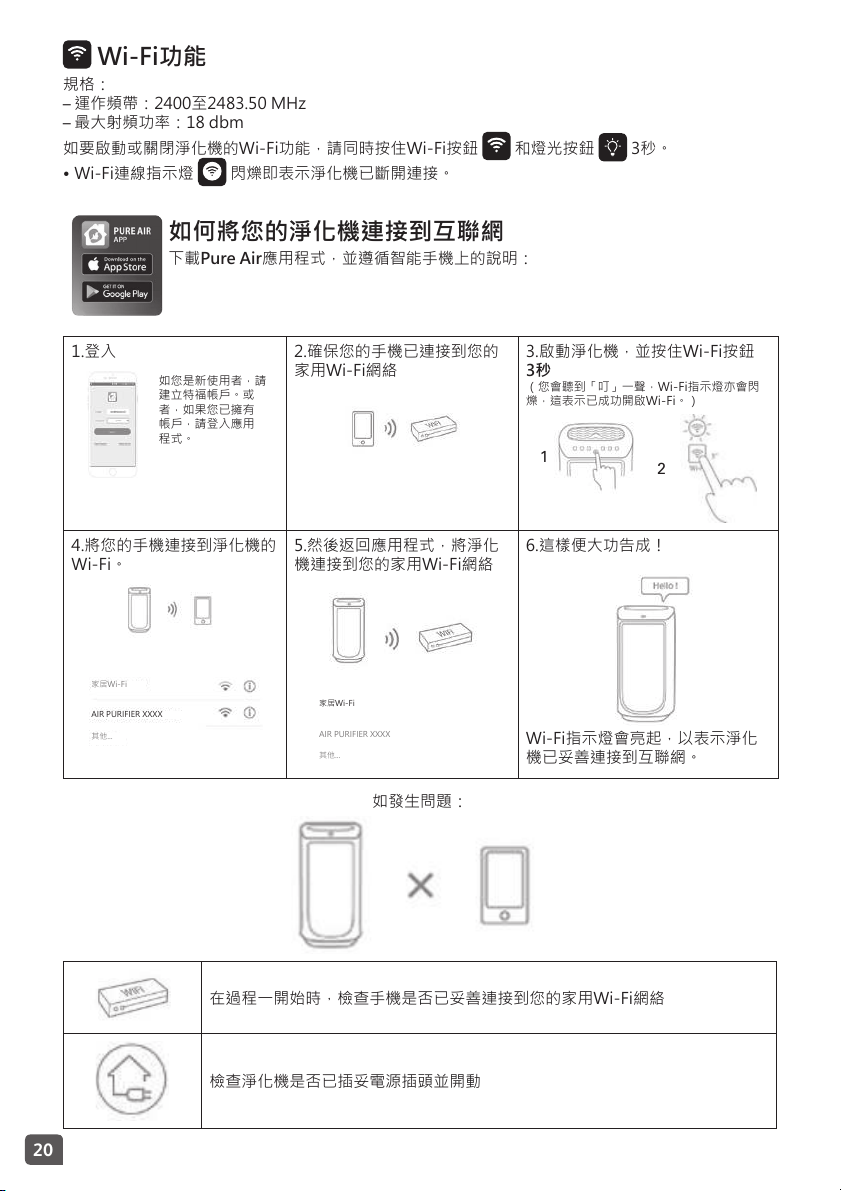
Wi-Fi功能
規格:
– 運作頻帶:2400至2483.50MHz
– 最大射頻功率:18dbm
如要啟動或關閉淨化機的Wi-Fi功能,請同時按住Wi-Fi按鈕 和燈光按鈕 3秒。
• Wi-Fi連線指示燈 閃爍即表示淨化機已斷開連接。
如何將您的淨化機連接到互聯網
下載Pure Air應用程式,並遵循智能手機上的說明:
1.登入
如您是新使用者,請
建立特福帳戶。或
者,如果您已擁有
帳戶,請登入應用
程式。
2.確保您的手機已連接到您的
家用Wi-Fi網絡
3.啟動淨化機,並按住Wi-Fi按鈕
3秒
(您會聽到「叮」一聲,Wi-Fi指示燈亦會閃
爍,這表示已成功開啟Wi-Fi。)
1
2
4.將您的手機連接到淨化機的
Wi-Fi。
家居Wi-Fi
AIRPURIFIERXXXX
其他...
5.然後返回應用程式,將淨化
機連接到您的家用Wi-Fi網絡
家居Wi-Fi
AIRPURIFIERXXXX
其他...
6.這樣便大功告成!
Wi-Fi指示燈會亮起,以表示淨化
機已妥善連接到互聯網。
如發生問題:
在過程一開始時,檢查手機是否已妥善連接到您的家用Wi-Fi網絡
檢查淨化機是否已插妥電源插頭並開動
ZH
21
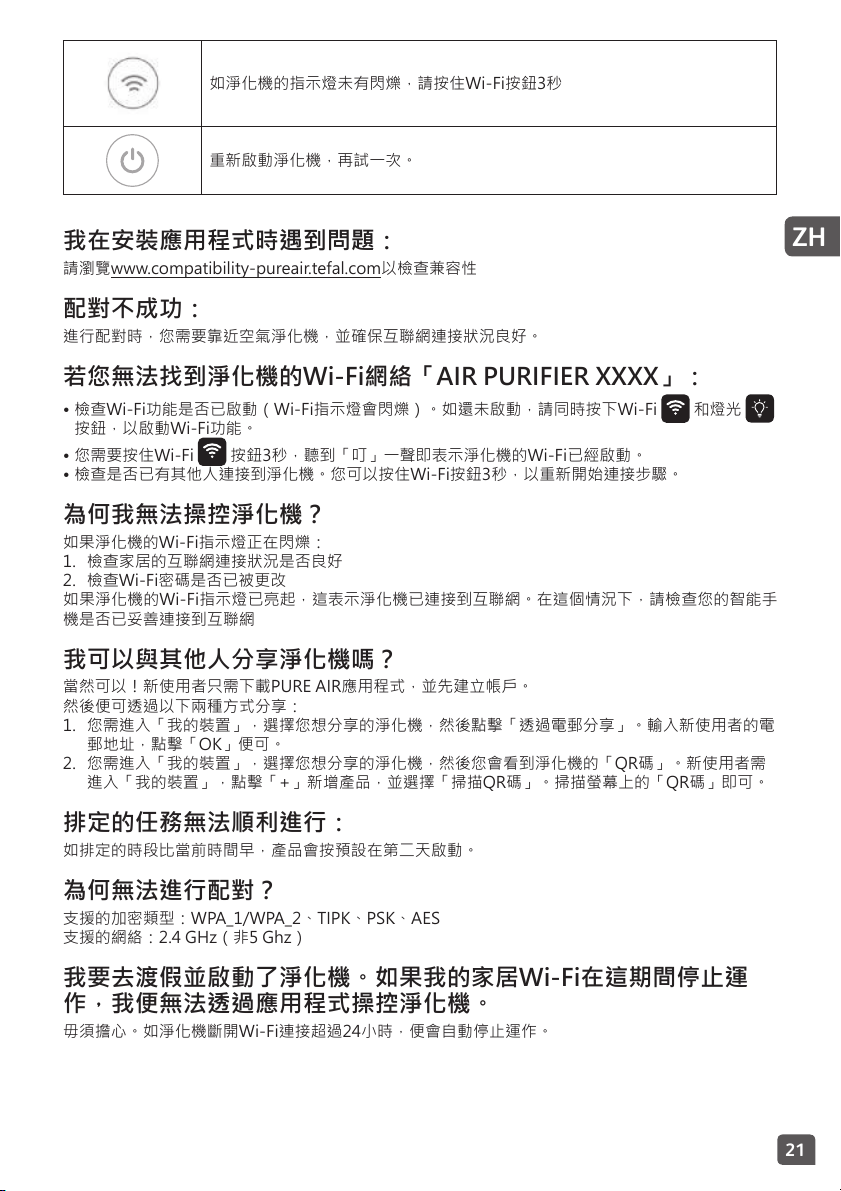
如淨化機的指示燈未有閃爍,請按住Wi-Fi按鈕3秒
重新啟動淨化機,再試一次。
我在安裝應用程式時遇到問題:
請瀏覽www.compatibility-pureair.tefal.com以檢查兼容性
配對不成功:
進行配對時,您需要靠近空氣淨化機,並確保互聯網連接狀況良好。
若您無法找到淨化機的Wi-Fi網絡「AIR PURIFIER XXXX」:
• 檢查Wi-Fi功能是否已啟動(Wi-Fi指示燈會閃爍)。如還未啟動,請同時按下Wi-Fi 和燈光
按鈕,以啟動Wi-Fi功能。
• 您需要按住Wi-Fi 按鈕3秒,聽到「叮」一聲即表示淨化機的Wi-Fi已經啟動。
• 檢查是否已有其他人連接到淨化機。您可以按住Wi-Fi按鈕3秒,以重新開始連接步驟。
為何我無法操控淨化機?
如果淨化機的Wi-Fi指示燈正在閃爍:
1. 檢查家居的互聯網連接狀況是否良好
2. 檢查Wi-Fi密碼是否已被更改
如果淨化機的Wi-Fi指示燈已亮起,這表示淨化機已連接到互聯網。在這個情況下,請檢查您的智能手
機是否已妥善連接到互聯網
我可以與其他人分享淨化機嗎?
當然可以!新使用者只需下載PUREAIR應用程式,並先建立帳戶。
然後便可透過以下兩種方式分享:
1. 您需進入「我的裝置」,選擇您想分享的淨化機,然後點擊「透過電郵分享」。輸入新使用者的電
郵地址,點擊「OK」便可。
2. 您需進入「我的裝置」,選擇您想分享的淨化機,然後您會看到淨化機的「QR碼」。新使用者需
進入「我的裝置」,點擊「+」新增產品,並選擇「掃描QR碼」。掃描螢幕上的「QR碼」即可。
排定的任務無法順利進行:
如排定的時段比當前時間早,產品會按預設在第二天啟動。
為何無法進行配對?
支援的加密類型:WPA_1/WPA_2、TIPK、PSK、AES
支援的網絡:2.4GHz(非5Ghz)
我要去渡假並啟動了淨化機。如果我的家居Wi-Fi在這期間停止運
作,我便無法透過應用程式操控淨化機。
毋須擔心。如淨化機斷開Wi-Fi連接超過24小時,便會自動停止運作。
22
保養
在進行保養之前,必須先按下(10)按鈕關閉本產品,並拔掉電源插頭。
您可以使用一塊微濕的布清潔本產品。
重要事項:切勿使用粗糙的物品擦拭,否則可能會損害本產品的外觀。
濾網
濾網 行動 週期
前層濾網 清潔 每2至4週一次
活性碳濾網 更換 每12個月一次
True HEPA Allergy+濾網 更換 每2年一次
NanoCaptur濾網 更換 待顏色轉變(見濾網顏色對應表)
以上數據乃基於每天平均8小時以自動日間模式的最低速度運行。
清潔及更換濾網的建議頻率可能會因使用時間的長短及操作環境而有所差異。
• 當濾網需要更換時,指示燈會亮起。(控制面板指示燈2)
• NanoCaptur濾網內含半透明顆粒,會因應甲醛的吸收率而改變顏色。請參閱前門板內側或濾網上的
顏色對應表,以判斷濾網的飽和狀況。濾網如已完全飽和,則必須更換。建議每六個月檢查一次濾
網的飽和度。
• 前層濾網可清洗再用:可使用吸塵機去除塵埃,或用水清洗。
注意:
• 如未有定期清潔前層濾網,可能會導致本產品效能減弱。
• 前層濾網如未乾透,切勿使用。
• 只有前層濾網可用水清洗並重用。TrueHEPAAllergy+濾網、NanoCaptur及活性碳濾網均不可清潔
及重用。切勿用水清洗。
• 如需更換濾網,請遵循「拆卸 / 重裝濾網」一節的指示。
可供更換的濾網型號如下:
濾網 PU4085型號 PU6085型號
True HEPA Allergy+濾網 XD6074 XD6077
活性碳濾網 XD6060 XD6061
Nanocaptur濾網 XD6080 XD6081
重要事項:重設濾網
當濾網需要更換或清潔,重設燈號會閃爍(前層濾網)。更換濾網後,請按住重設按鈕3秒。
強制重設:
如在濾網壽命屆滿前已進行更換,請如下強制重設濾網的更換週期。
1. 按住重設按鈕3秒。
2. 輕按重設濾網,以選取已更換之濾網。
3. 選取需進行重設的濾網後,按住重設按鈕3秒便能重設新濾網的壽命。
4. 在強制重設模式中,如十秒內仍未啟動重設濾網按鈕,則將取消重設。
「更換濾網提示」
• 如有過敏或哮喘情況,請避免接觸已用過的濾網。
• 更換濾網時請戴上手套,或在更換完畢後徹底洗手。
• 請將已用過的濾網直接置於密封的袋子中丟棄,以免散播污染物。
ZH
23
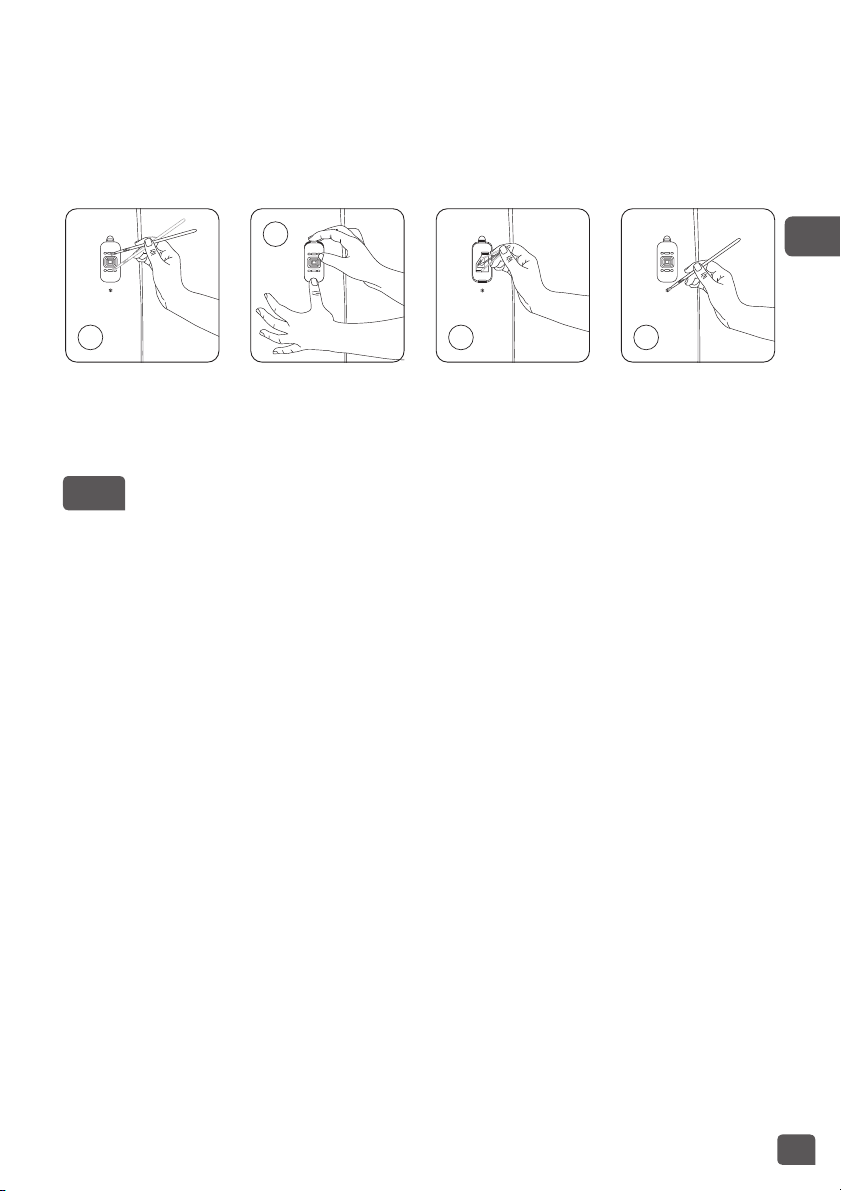
污染感測器
微粒及氣體感測器(僅限於PU6065型號)須定期(每兩個月)妥善清潔。
在清潔污染感測器前,請確保您已關閉本產品和拔除電源插頭,並遵循以下建議:
1. 以軟刷或軟布清潔入風口及出風口。
2. 將空氣淨化機右方的感測器蓋掩打開。
3. 稍微沾濕棉花棒,用以清除鏡片及入/出風口上的塵埃,再以乾棉花棒擦拭。
4. 使用軟刷或吸塵機清潔氣體感測器。
1
2
3 4
重要事項:
• 切勿用清潔劑或金屬物品清潔感測器。
• 感應器須定期清潔,否則效能會降低。
• 清潔頻率會因應產品的操作環境而有所差異。如在多塵的環境中使用本產品,請加緊清潔感測器。
保存
不使用本產品時,請將其置於陰涼乾燥的地方。
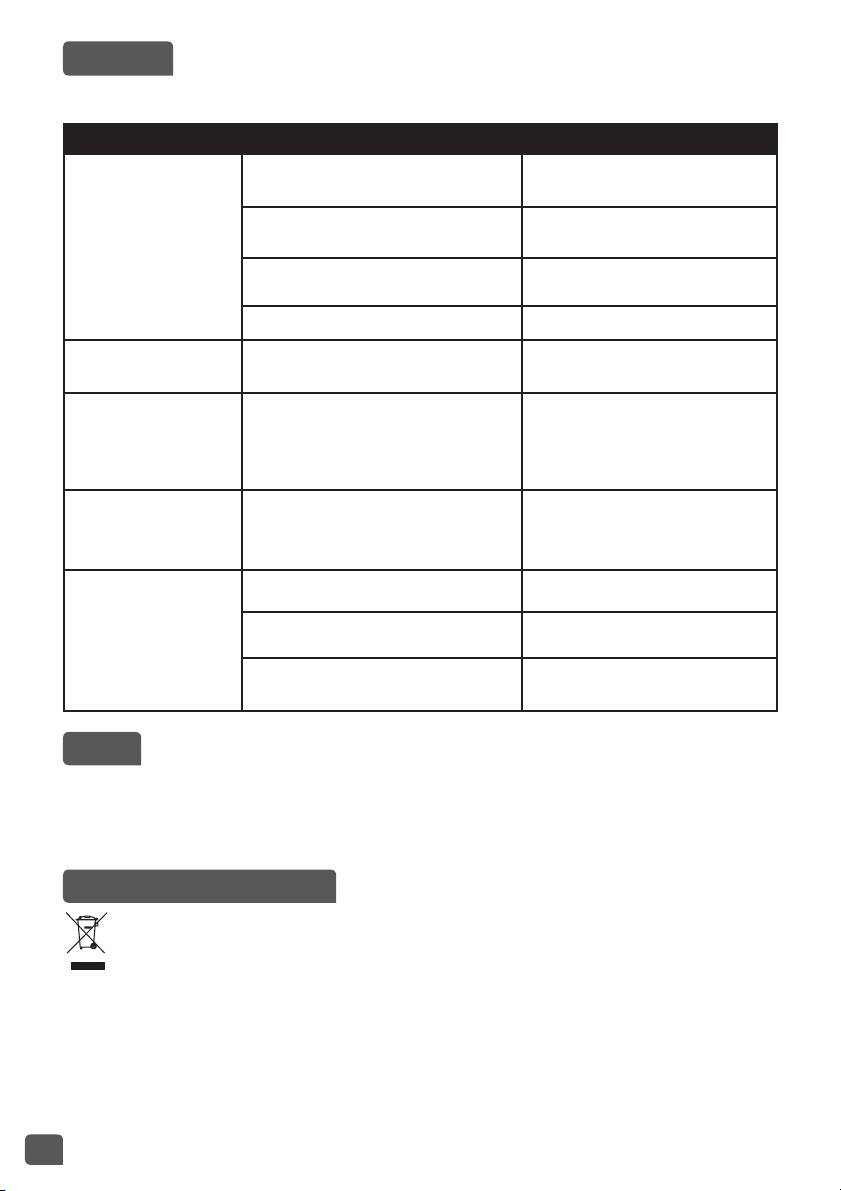
24
疑難排解
• 切勿擅自拆開電器。本產品若維修不當可為使用者帶來危險。
• 在聯絡經核准的服務中心前,請參閱以下疑難排解表格:
問題 檢查 解決方案
產品未能啟動。
電源線有否接上?
將電源線連接至能提供合適電壓
的插座。
指示燈是否均未有亮起?
按下啟動按鈕,並選取所需的功
能。
是否有停電的狀況?
電力恢復時,即可使用空氣淨化
機。
前門板是否已關上? 請妥善地關好前門板。
氣流並未自動改變。 空氣清新機是否處於寧靜或特效模式?
選取正確的操作模式-自動日間或
自動夜間模式。
氣流遠較以前弱。 濾網是否需要清潔或更換?
檢查濾網的清潔及更換頻率,並按
需要進行清潔/更換。
出氣口傳出難聞氣味。 濾網是否需要清潔或更換?
檢查濾網的清潔及更換頻率,並按
需要進行清潔/更換。
空氣質素指示燈的顏色
無變化。
感測器鏡片是否蒙上了灰塵? 清潔感測器鏡片。
指示燈總是顯示空氣質素欠佳?
將感測器靈敏度設定為「低」或
「中」。
指示燈總是顯示空氣質素極佳?
將感測器靈敏度設定為「高」或
「中」。
保用
如遇以下情況,請聯絡經核准的服務中心:
• 您的電器曾摔落地
• 您的電器或電源線已損壞
• 您的電器無法正常運作
為保護環境出一分力!
本電器包含可回收或循環再用的珍貴物料。
將其送至本地的廢物收集站或經核准的服務中心,以便處理。