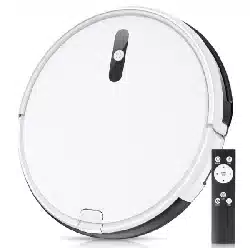
Install 2 AAA batteries before using the remote control for the first time. Make sure the positive and negative ends are facing the correct polarity direction as marked in the battery compartment.
Attention
Considerations
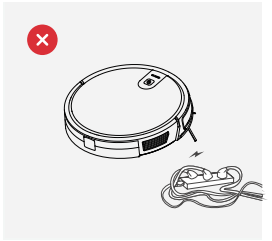
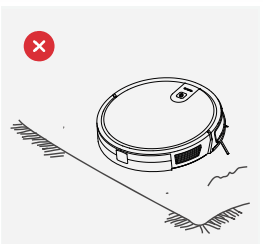
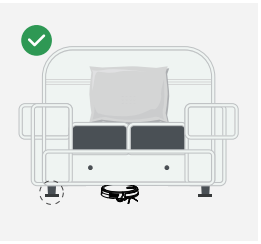
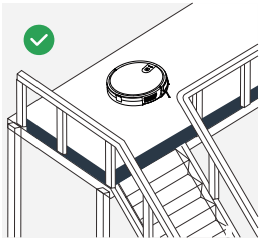
Please refer to the following guidelines to check the cleaning area before the cleaner works.
1. Power lines and other debris scattered on the ground may trip up product must be removed.
2. Please roll the carpet tassels or work on short-hair rugs.
3. A gap of less than 8 cm on the bottom of the furniture may catch the product. If you need to clean it, please remove the furniture.
4. A guardrail should be placed at the edge of the duplex to ensure safe operation of the product.
Rapid Operation
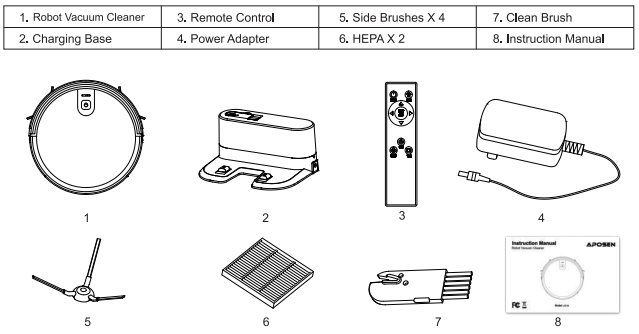
Install The Side Brushes
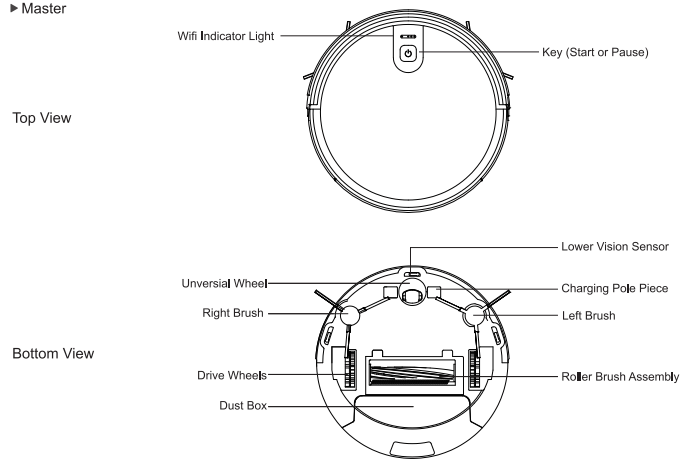
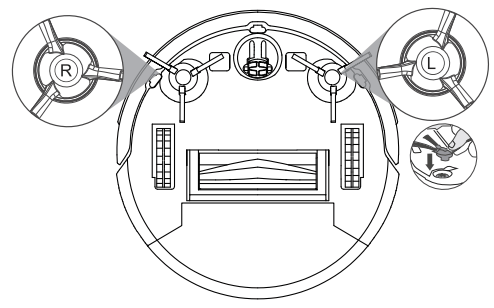
Please install the right brush into the right bottom mounting port of the machine, the left brush into the left bottom mounting port of the machine, and ensure that the two side brushes are in place.
Charging Operation
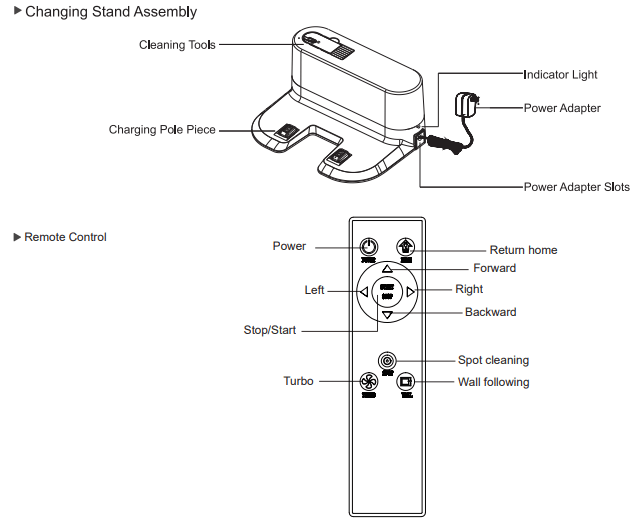
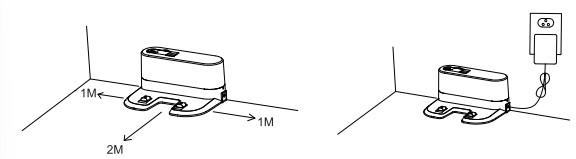
1. Connect the adapter to the charging stand.
Place the charging stand flat against the wall. Do not place objects in the left and right 1M and the front 2M,and do not have objects with strong reflection surfaces such as mirrors.
2. Turn On The Master
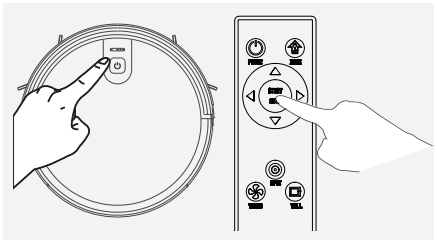
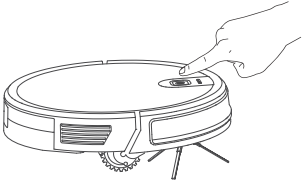
Please press the start/pause key to turn on the master. It is recommended to keep the master in the charging stand after each time use instead of shutting it down instantly to make sure it can perform well next time.
Master Charge
Place the master in the charging stand and pay attention to the charging pole piece.
Turn on the power switch, the robot will enter standby mode.
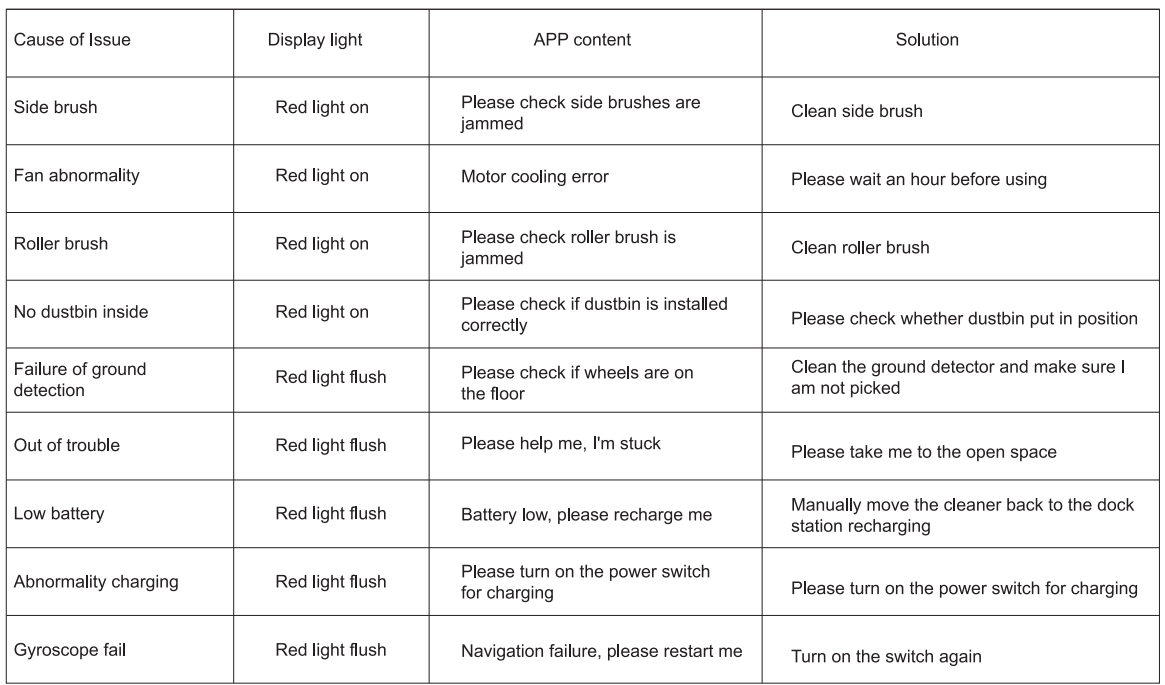
Red light flashes indicates that the battery need to be charged.
Blue light breathing light flashes indicate charging.
When the blue light is off means charging is completed.
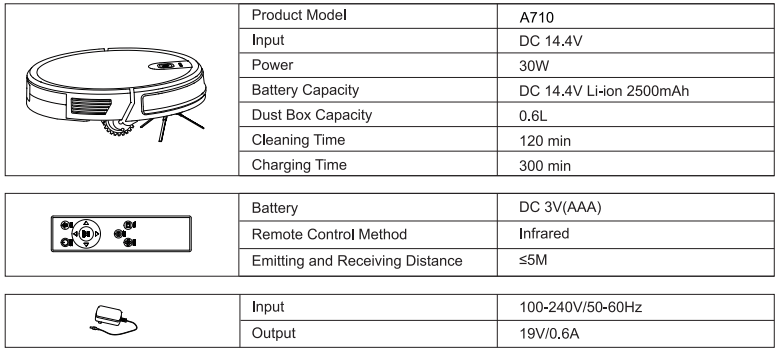
For the first use, please charge continuously for more than 6 hours.
Note: Please match the charging pole piece.
Start/Stop Cleaning
1. Start or stop by pressing the master's key or the remote control's / key.
Note: Before starting the mode, make sure that the outer ring of the key is blue and the master is in the state of being awakened. If the master does not wake up, short press the master to wake it up.
The master enters the sleep state after 10 minutes of standby, and the key light is off.
2. If you need to select another mode, please refer to the(Mode Selection)section.
Mode Selection
In order to adapt to different ground conditions and achieve deep cleaning, this product has a variety of cleaning modes, which can be selected by remote control as needed.
The remote control can switch any mode directly.
Before starting the mode, make sure that the outer ring of the key is blue and the master is in the state of being awakened. If the master does not wake up, short press the master to wake it up.
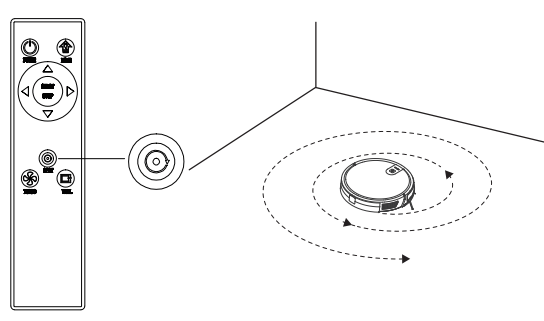
Fixed-point Mode
It is suitable for the ground environment where the garbage is concentrated. The master centralized cleaning in the designated area, and master centralized cleaning with the "spiral"route.
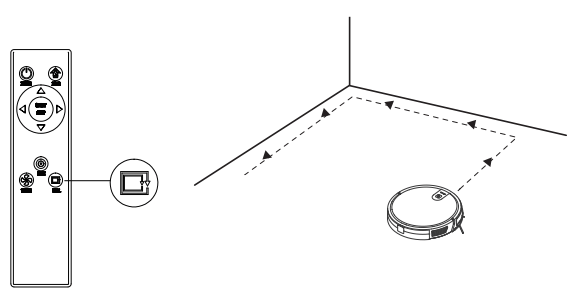
Edge Mode
It is suitable for cleaning at the corners of the room. The master is cleaned around the periphery of a fixed object (such as a wall) and cleaned back to the charging stand.
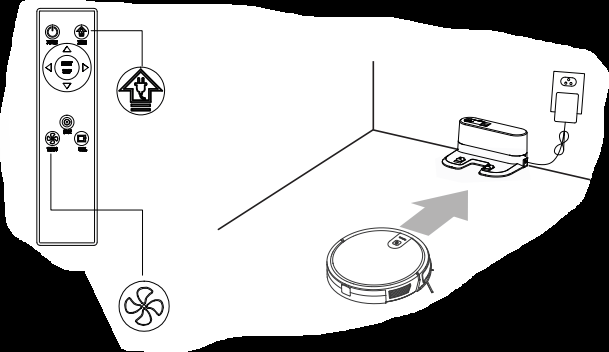
Return Charging Mode
During the cleaning process, the master can sense that its power is insufficient, and automatically find the charging stand for charging.
You can press the “home” button or press the “power” button twice to make the master return to the charging stand for charging.
Suction Power Setting
Press the “Turbo” button on the remote control.
With three modes of suction power(Max/Standard/Low). Standard mode can be used for daily cleaning while the Max mode would increase the suction and Low mode would lower the noise.
Roller Brush Assembly and Cleaning
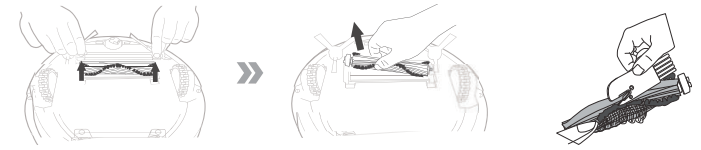
Remove the roller brush brush cover plate, remove the roller brush, cut off the hair wound on it and then use the cleaning brush to clean it.
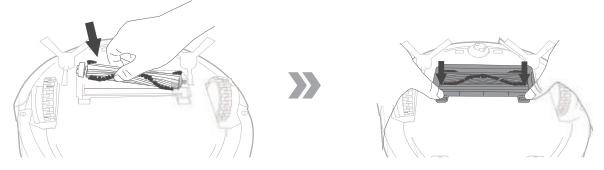
Set roller brush assembly: take out sucking assembly first, set the roller brush, cover the board and press it to lock.
Maintenance
Dust Box and Filter
When cleaning and maintaining the master and its accessories, turn off the master and unplug the charging stand.
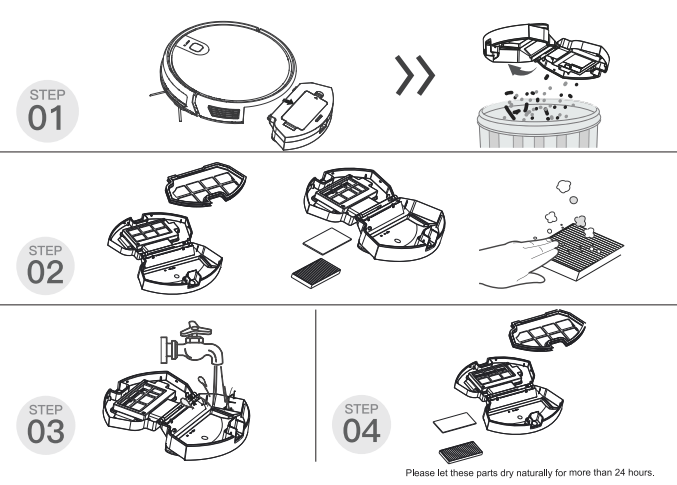
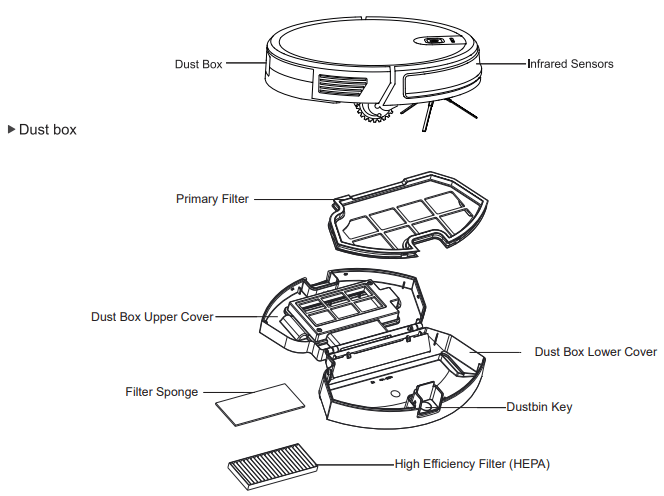
Remove the dust box, open the dust box cover, and clean the garbage.
Remove dust filter. HEPA is not recommended for washing. Please pat and remove ash.
Flush the dust box and the primary filter.
Dry the dust box and the dust filter assembly and keep it dry to ensure its service life.
Side Brushes
Cleaning Side Brushes
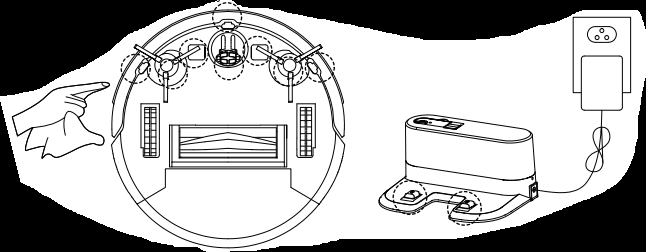
Pull out the side brush and wipe it with a clean rag.
Other Assembly
Cleaning the universal wheel to reduce hair entangle.
Clear down the sensor to ensure the sensitivity of the sensor.
To clean the charging pole pieces, use a dry rag to clean the charging poles on the bottom of the master or the charging stand.
If you will not use the product for a long time, please remove the battery and keep it in a safe place. If the battery leaks, remove the battery and wipe the battery compartment clean.
This product uses a high-life battery and does not require frequent replacement. If you need to replace, you can contact our company for after-sales service replacement.
Alarm Tips
FAQ
Please install the right brush into the right bottom mounting port of the machine, the left brush into the left bottom mounting port of the machine, and ensure that the two side brushes are in place.
Q : What should I do when it can not work on the carpet ?
A: We don’t suggest you make it clean the carpet. It’s better for you to set the barrier around the carpet on the app.
Q : What if the strength of vacuuming is weak?
A: Fist of all, check whether the dust bin is full and the robot is full charged. If it does,you can try to switch it to the higher mode. For litter which is difficult to collector, try to clean it with Spot Cleaning Mode.
Q: What if my charger has difficulties charging the robot?
A: Please make sure you turn on the charging stand before charging and check if the electrical sheet is connected to the charging stand( Put it back manually or press the Power button when the robot is 1 meter in front of the charging stand.)
Q : What if the robot can not find the charging stand?
A: The charging stand should be placed against the wall with at least 1 meter clearance each side and 2 meters in front .Sometimes you can just put it back manually.
Q: What should I do if the remote control is out of order?
A: 1. The remote control has an effective control distance of 5 meters. Please make sure that the remote point to the master.
2. Replace the battery with a new one if the battery has run out capacity.
3. Please make sure the master power switch is turned on and has sufficient power to complete the operation.
4. Please wipe the infrared emitter of the remote control and the infrared receiver of the master with clean towel.
Q: Why does the master return to charging after cleaning?
A: The working time of the master varies depending on the complexity of the room, the amount of garbage and the cleaning mode.
Customer Service
CUSTOMER CARE
The 1-year Limited Warranty is valid for products purchased from our APOSEN only, starting from the date of the original retail purchased. We will provide customer service for any defects in quality or materials under normal, non-commercial use.
1.According to the requirements outlined in this instruction manual, the warranty is subject to the following conditions and exclusions.
2.This warranty provides, at no extra cost to you all labor and parts necessary to ensure your machine is in proper operating condition during the warranty period.
3.We provide the repair or replacement of your APOSEN appliance if your APOSEN appliance is found to be defective due to faulty materials, workmanship function within 1 year of purchase or delivery. ( If any part is no longer available or out of manufacture, we will replace it with a functional replacement part).
WHAT IS NOT COVERED
1.Under your APOSEN guarantee, APOSEN shall not be liable for costs of repair or replacement of a product incurred as a result of: Accidental damage, faults caused by negligent use or care, misuse, neglect, careless operation or handling of the APOSEN appliance which is not in accordance with this APOSEN Instruction Manual.
2.Machines purchased from an unauthorized dealer.
3.Use of parts and accessories other than those produced or recommended by APOSEN.
4.Repairs or alterations carried out by unauthorized parties or agents.
5.Use of the machine other than for normal domestic purpose, e.g. for commercial or rental purposes.
6.Reduction in battery run time due to battery age or use.
 Red light flashes indicates that the battery need to be charged.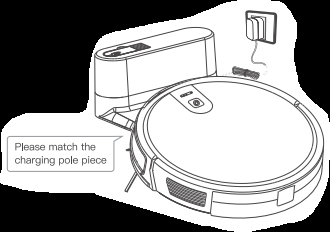
 key.
key.