www.lg.com
MFL68930601 (1.0)
ENGLISH
LG-H950
USER GUIDE

•Someofthecontentsinthismanualmaydifferfromyourphonedependingonthesoftware
versionofthephone,OSversionoryourserviceprovider,andaresubjecttochangewithout
priornotice.
•AlwaysusegenuineLGaccessories.Thesupplieditemsaredesignedonlyforthisdeviceand
maynotbecompatiblewithotherdevices.
•Thisdeviceisnotsuitableforpeoplewhohaveavisualimpairmentduetothetouchscreen
keyboard.
•Allscreenshotsinthisguidearesimulated.
•Actualdisplaysandthecolorofthephonemayvary.

1. WHAT THIS WARRANTY COVERS:
LGoffersyoualimitedwarrantythattheenclosedsubscriberunitanditsenclosedaccessories
willbefreefromdefectsinmaterialandworkmanship,accordingtothefollowingtermsand
conditions:
(1)ThelimitedwarrantyfortheproductextendsforTWELVE(12)MONTHSbeginningon
thedateofpurchaseoftheproductwithvalidproofofpurchase,orabsentvalidproofof
purchase,FIFTEEN(15)MONTHSfromdateofmanufactureasdeterminedbytheunit's
manufacturedatecode.
(2)Thelimitedwarrantyextendsonlytotheoriginalpurchaseroftheproductandisnot
assignableortransferabletoanysubsequentpurchaser/enduser.
(3)Thiswarrantyisgoodonlytotheoriginalpurchaseroftheproductduringthewarranty
periodaslongasitisintheU.S.,includingAlaska,Hawaii,U.S.TerritoriesandCanada.
(4)Theexternalhousingandcosmeticpartsshallbefreeofdefectsatthetimeofshipment
and,therefore,shallnotbecoveredundertheselimitedwarrantyterms.
(5)UponrequestfromLG,theconsumermustprovideinformationtoreasonablyprovethedate
ofpurchase.
(6)ThecustomershallbearthecostofshippingtheproducttotheCustomerService
DepartmentofLG.LGshallbearthecostofshippingtheproductbacktotheconsumerafter
thecompletionofserviceunderthislimitedwarranty.
2. WHAT THIS WARRANTY DOES NOT COVER:
(1)Defectsordamagesresultingfromuseoftheproductinotherthanitsnormaland
customarymanner.
(2)Defectsordamagesfromabnormaluse,abnormalconditions,improperstorage,exposureto
moistureordampness,unauthorizedmodifications,unauthorizedconnections,unauthorized
repair,misuse,neglect,abuse,accident,alteration,improperinstallation,orotheracts
LIMITED WARRANTY STATEMENT

whicharenotthefaultofLG,includingdamagecausedbyshipping,blownfuses,spillsof
foodorliquid.
(3)Breakageordamagetoantennasunlesscauseddirectlybydefectsinmaterialor
workmanship.
(4)ThattheCustomerServiceDepartmentatLGwasnotnotifiedbyconsumerofthealleged
defectormalfunctionoftheproductduringtheapplicablelimitedwarrantyperiod.
(5)Productswhichhavehadtheserialnumberremovedormadeillegible.
(6)Thislimitedwarrantyisinlieuofallotherwarranties,expressorimpliedeitherinfactorby
operationsoflaw,statutoryorotherwise,including,butnotlimitedtoanyimpliedwarranty
ofmarketabilityorfitnessforaparticularuse.
(7)DamageresultingfromuseofnonLGapprovedaccessories.
(8)Allplasticsurfacesandallotherexternallyexposedpartsthatarescratchedordamaged
duetonormalcustomeruse.
(9)Productsoperatedoutsidepublishedmaximumratings.
(10)Productsusedorobtainedinarentalprogram.
(11)Consumables(suchasfuses).
3. WHAT LG WILL DO:
LGwill,atitssoleoption,eitherrepair,replaceorrefundthepurchasepriceofanyunitthatis
coveredunderthislimitedwarranty.LGmaychooseatitsoptiontousefunctionallyequivalent
re-conditioned,refurbishedornewunitsorpartsoranyunits.Inaddition,LGwillnotre-install
orback-upanydata,applicationsorsoftwarethatyouhaveaddedtoyourphone.Itistherefore
recommendedthatyouback-upanysuchdataorinformationpriortosendingtheunittoLGto
avoidthepermanentlossofsuchinformation.
LIMITED WARRANTY STATEMENT

4. STATE LAW RIGHTS:
Nootherexpresswarrantyisapplicabletothisproduct.THEDURATIONOFANY
IMPLIEDWARRANTIES,INCLUDINGTHEIMPLIEDWARRANTYOFMARKETABILITY
ORMERCHANTABILITYORFITNESSFORAPARTICULARPURPOSE,ISLIMITEDTOTHE
DURATIONOFTHEEXPRESSWARRANTYHEREIN.LGSHALLNOTBELIABLEFORTHELOSS
OFTHEUSEOFTHEPRODUCT,INCONVENIENCE,LOSSORANYOTHERDAMAGES,DIRECT
ORCONSEQUENTIAL,ARISINGOUTOFTHEUSEOF,ORINABILITYTOUSE,THISPRODUCT
ORFORANYBREACHOFANYEXPRESSORIMPLIEDWARRANTY,INCLUDINGTHEIMPLIED
WARRANTYOFMARKETABILITYORMERCHANTABILITYORFITNESSFORAPARTICULAR
PURPOSEAPPLICABLETOTHISPRODUCT.
Somestatesdonotallowtheexclusivelimitationofincidentalorconsequentialdamagesor
limitationsonhowlonganimpliedwarrantylasts;sotheselimitationsorexclusionsmaynot
applytoyou.Thiswarrantygivesyouspecificlegalrightsandyoumayalsohaveotherrights
whichvaryfromstatetostate.
5. HOW TO GET WARRANTY SERVICE:
Toobtainwarrantyservice,pleasecallorfaxtothefollowingtelephonenumbersfrom
anywhereinthecontinentalUnitedStates:
Tel. 1-800-793-8896 or Fax. 1-800-448-4026
Orvisithttp://us.lgservice.com.Correspondencemayalsobemailedto:
LGElectronicsService-MobileHandsets,P.O.Box240007,Huntsville,AL35824
DO NOT RETURN YOUR PRODUCT TO THE ABOVE ADDRESS.Pleasecallorwrite
forthelocationoftheLGauthorizedservicecenternearestyouandfortheproceduresfor
obtainingwarrantyclaims.

7.11 Warranty Laws
Thefollowinglawsgovernwarrantiesthatariseinretailsalesofconsumergoods:
X TheCaliforniaSong-BeverlyConsumerWarrantyAct[CC§§1790etseq],
X TheCaliforniaUniformCommercialCode,DivisionTwo[ComC§§2101etseq],and
X ThefederalMagnuson-MossWarrantyFederalTradeCommissionImprovementAct[15
USC§§2301etseq;16CFRParts701–703].AtypicalMagnuson-MossActwarrantyisa
writtenpromisethattheproductisfreeofdefectsorawrittenpromisetorefund,repair,or
replacedefectivegoods.[See15USC§2301(6).]Remediesincludedamagesforfailingto
honorawrittenwarrantyorservicecontractorforviolatingdisclosureprovisions.[See15
USC§2310(d).]Exceptforsomelabelinganddisclosurerequirements,thefederalActdoes
notpreemptstatelaw.[See15USC§2311.]
TheConsumerWarrantyActdoesnotaffecttherightsandobligationsofpartiesunderthe
stateUniformCommercialCode,excepttheprovisionsoftheActprevailoverprovisionsofthe
CommercialCodewhentheyconflict.[CC§1790.3.]
Forpurposesofsmallclaimsactions,thiscoursewillfocusonrightsanddutiesunderthestate
laws.
LIMITED WARRANTY STATEMENT

Table of Contents
Table of Contents .............................7
Important Notice ..............................9
Your Phone ......................................12
Getting Started ...............................15
InstallingtheSIMorUSIMcard.......15
Chargingthephone...........................17
Insertingamemorycard...................18
Unlockingthescreen.........................19
Your Home screen .........................20
Touchscreentips..............................20
Homescreen.....................................21
CustomizingtheHomescreen..........22
Returningtorecently-used
applications.......................................24
Noticationspanel............................24
On-screenkeyboard..........................27
Special Features ............................29
Gestureshot......................................29
GestureView.....................................30
GlanceView......................................31
KnockON............................................31
KnockCode........................................32
Dualwindow.....................................33
QSlide................................................36
QuickRemote.....................................37
Google Account Setup ..................38
Connecting to Networks and
Devices ............................................40
Wi-Fi..................................................40
Bluetooth...........................................41
Wi-FiDirect.......................................42
SmartShare.......................................43
TransferringdatabetweenaPCand
yourdevice........................................44
Calls .................................................45
Makingacall.....................................45
Callingyourcontacts.........................45
Answeringandrejectingacall.........45
Makingasecondcall........................45
Viewingyourcalllogs.......................46
Callsettings......................................46
Contacts...........................................47
Searchingforacontact.....................47
Addinganewcontact.......................47
Favoritescontacts.............................47
Creatingagroup................................48
JoiningandSeparatingContacts......49
AT&TAddressBook(AAB)................49
Messaging ......................................50
Sendingamessage...........................50

Conversationview.............................51
Changingyourmessagingsettings...51
Email ................................................52
Camera and Video .........................54
Cameraoptionsontheviewnder....54
Usingtheadvancedsettings.............55
Takingaphoto..................................55
Onceyouhavetakenaphoto............56
Recordingavideo..............................56
Afterrecordingavideo.....................57
Gallery...............................................60
Multimedia......................................64
Music.................................................64
Utilities ............................................67
Clock..................................................67
Calculator..........................................68
Calendar............................................69
VoiceSearch.....................................69
Downloads........................................69
LGSmartWorld..................................70
Browsing the Web .........................71
Browser.............................................71
Chrome..............................................73
Settings............................................74
Networkstab.....................................74
Soundtab..........................................77
Displaytab........................................79
Generaltab........................................81
PC software (LG PC Suite) ...........90
Software Update ............................93
PhoneSoftwareUpdate....................93
LGMobilePhoneSoftwareUpdate
viaOver-the-Air(OTA).......................93
Trademarks .....................................94
Trademarks........................................94
DivXHD.............................................94
DolbyDigitalPlus..............................94
Q&A ..................................................95
Accessories ....................................96
Troubleshooting .............................97
For Your Safety .............................101
ImportantInformation.....................101
BeforeYouStart..............................101
Table of Contents

9
Please read this before you start using your phone!
Pleasechecktoseewhetheranyproblemsyouencounteredwithyourphonearedescribedinthis
sectionbeforetakingthephoneinforserviceorcallingaservicerepresentative.
1. Phone memory
Whenthereislessthan10MBofspaceavailableinyourphonememory,yourphonecannot
receivenewmessages.Youmayneedtocheckyourphonememoryanddeletesomedata,such
asapplicationsormessages,tomakemorememoryavailable.
To uninstall applications:
1 Tap > > >General tab>Apps.
2 Onceallapplicationsappear,scrolltoandselecttheapplicationyouwanttouninstall.
3 TapUninstall>OK.
2. Optimizing battery life
Extendyourbattery'spowerbyturningofffeaturesthatyoudonotneedtorunconstantlyinthe
background.Youcanmonitorhowapplicationsandsystemresourcesconsumebatterypower.
Extending your phone's battery life:
•Turnoffradiocommunicationswhenyouarenotusing.IfyouarenotusingWi-Fi,Bluetooth
orLocationservices(includingGPS),turnthemoff.
•Reducescreenbrightnessandsetashorterscreentimeout.
•TurnoffautomaticsyncingforGmail,Calendar,Contactsandotherapplications.
Important Notice

10
Important Notice
NOTE:
X Someapplicationsyoudownloadmayconsumebatterypower.
X Whileusingdownloadedapplications,checkthebatterychargelevel.
3. Before installing an open source application and OS
WARNING
X IfyouinstallanduseanOSotherthantheoneprovidedbythemanufactureritmay
causeyourphonetomalfunction.Inaddition,yourphonewillnolongerbecoveredbythe
warranty.
X Toprotectyourphoneandpersonaldata,onlydownloadapplicationsfromtrustedsources,
suchasPlayStore™.Ifthereareimproperlyinstalledapplicationsonyourphone,thephone
maynotworknormallyoraseriouserrormayoccur.Youmustuninstallthoseapplications
andallassociateddataandsettingsfromthephone.
4. Using the Hard Reset (Factory Reset)
Ifyourphoneneedstoberestoredtoitsoriginalsettingsandcondition,useaHardReset(Factory
Reset).
1 Turnthepoweroff.
2 PressandholdthePower/Lock Key + Volume Down Keyonthebackofthephone.
3 ReleasethePower/Lock Keyonlywhenthebootlogoisdisplayed,thenimmediately
pressandholdthePower/Lock Keyagain.
4 ReleaseallKeyswhentheFactoryhardresetscreenisdisplayed.
5 PresstheVolume KeystohighlightYes,thenpressthePower/Lock Keytocontinue.
6 PresstheVolume KeystohighlightYesoncemore,thenpressthePower/Lock Key
toconrm.

11
Important Notice
WARNING
X IfyouperformaHardReset,alluserapplications,userdataandDRMlicenseswillbe
deleted.PleaseremembertobackupanyimportantdatabeforeperformingaHardReset.
5. Opening and switching applications
MultitaskingiseasywithAndroid;youcankeepmorethanoneapplicationrunningatthesame
time.Thereisnoneedtoquitanapplicationbeforeopeninganother.Useandswitchbetween
severalopenapplications.Androidmanageseachapplication,stoppingandstartingthemas
neededtomakesurethatidleapplicationsdon'tconsumeresourcesunnecessarily.
1 Tap .Apppreviewsofrecentlyusedapplicationswillbedisplayed.
2 Taptheapplicationyouwanttoaccess.Thisdoesnotstopthepreviousappfrom
runninginthebackground.Makesuretotap tobackoutofawindowafterusingit.
•Tocloseanappfromtherecentappslist,swipetheapppreviewtotheleftorright.Toclear
allapps,tapClear all.
6. If the screen freezes
If the screen freezes or the phone does not respond when you try to operate it:
PressandholdthePower/Lock KeyandVolume Down Keyforabout10secondstoresetyour
phone.Toturnyourphoneoff,pressandholdthePower/Lock KeyandtheVolume Down Key
forabout20seconds.Ifitstilldoesnotwork,pleasecontacttheservicecenter.
12
Your Phone
Front view
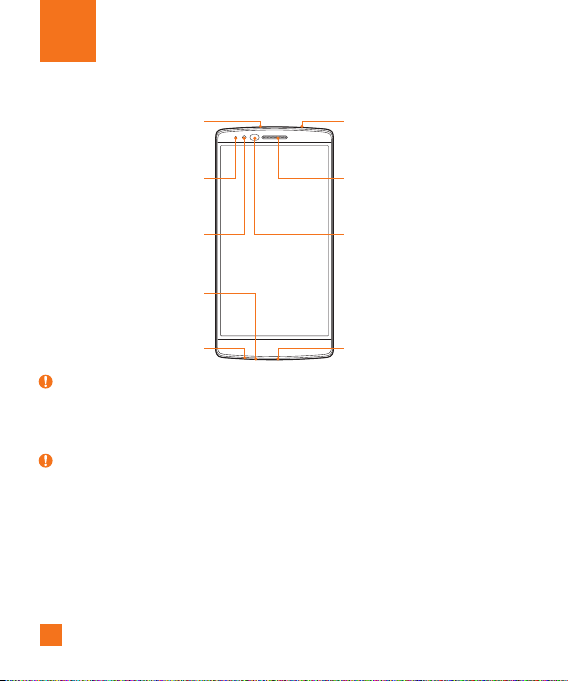
Notification LED
Front Camera Lens Proximity Sensor
Earpiece
Headset Jack
Microphone
Microphone
Charger/USB port
Infrared LED
NOTE : Proximity sensor
X
Whenreceivingandmakingcalls,theproximitysensorautomaticallyturnsthebacklightoff
andlocksthetouchscreenbysensingwhenthephoneisnearyourear.Thisextendsbattery
lifeandpreventsyoufromunintentionallyactivatingthetouchscreenduringcalls.
Warning
X
Placingaheavyobjectonthephoneorsittingonitcandamagethedisplayandtouchscreen
functions.Donotcovertheproximitysensorwithscreenprotectorsoranyothertypeof
protectivefilm.Thiscouldcausethesensortomalfunction.
13
Your Phone
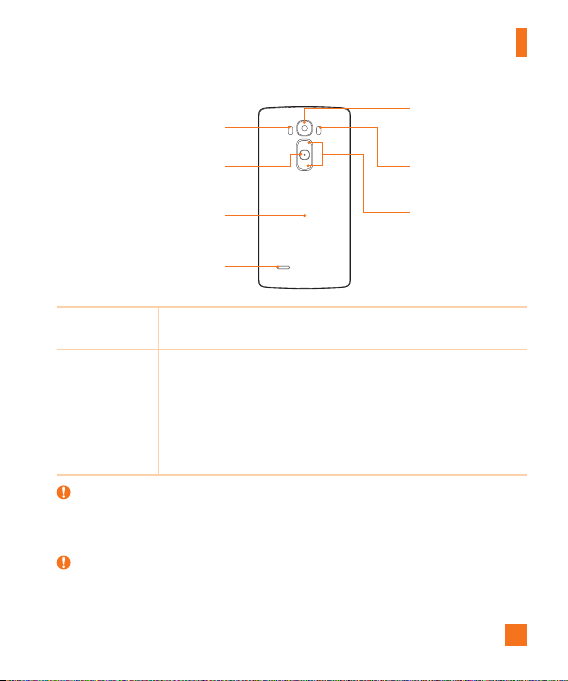
Volume Keys
Power/Lock Key
NFC Touch Point
Laser Detection AutoFocus
Speaker
Rear Camera Lens
Flash
Power/Lock Key
• Turnyourphoneon/offbypressingandholdingthiskey
• Pressoncequicklytolock/unlockthescreen
Volume Keys While the screen is off:
• PressandholdtheVolumeUpKeytolaunchQuickMemo+.
• PressandholdtheVolumeDownKeytolaunchthecamera.
While the screen is on:
• FromtheHomescreen,presstochangetheringertype.
• Whilelisteningtomusicoronacall,presstoadjustthevolume.
Warning
X BecarefulnottodamagetheNFCtouchpointonthephone,asthisispartoftheNFC
antenna.
NOTE
X Thebackcoverofthisproductappliesa“self-healing”technology,whichself-repairsminor
scratchesinjustafewminutes.Minorscratchesarethosecausebyordinaryandnormal

14
Your Phone
useofthephone.Scratchescausedbyabrasivesurface,misuse,includingbutnotlimited
tointentionalscratches,anddamagescausedbyafallordroppingtheproduct,maynot
disappear.The“self-healing”resultsmayvarydependingontheextentofthedamageas
wellasotherconditions.Anywarrantyonthe“self-healing”isherebyexpresslyexcluded.
X NOTE: LDAF Sensor (Laser Detection AutoFocus Sensor)
TheLaserDetectionAutoFocusSensordetectsthedistancebetweentherearcameralens
andnearbyobjectsusinglasertechnology.Thisfeaturehelpsthecameratofocusquickly
andaccuratelyatshortorlongdistances.
15
Installing the SIM or USIM card
Beforeyoucanstartexploringyournewphone,youneedtosetitup.
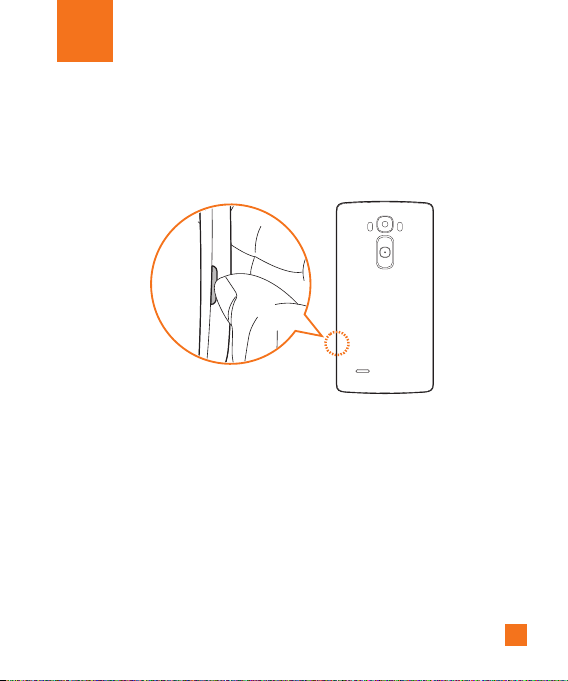
1 Toremovethebackcover,holdthephonermlyinonehand.Withyourotherhand,lift
offthebackcoverwithyourthumbnailasshowninthegurebelow.
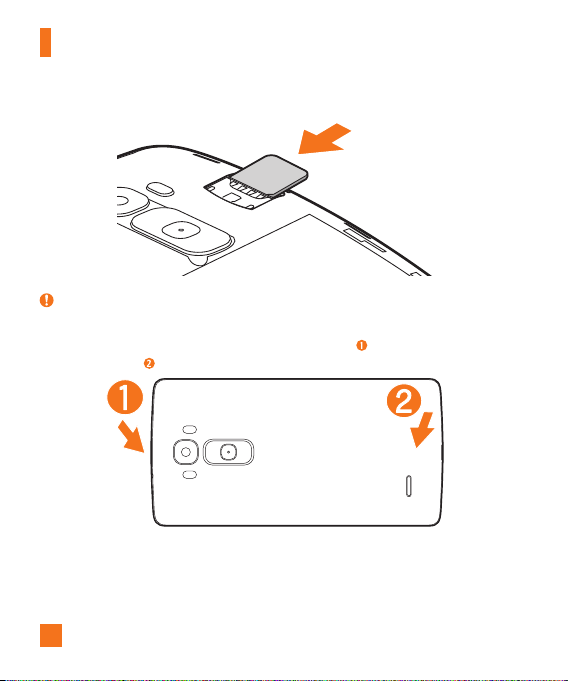
2 SlidetheSIMcardintothelowerslotfortheSIMcardasshowninthegure.Make
surethegoldcontactareaonthecardisfacingdownward.
Getting Started
16
Getting Started
NOTE:
X OnlymicroSIMcardsworkwiththisdevice.
3 Toreplacethecoverontothedevice,alignthebackcover
andpressitdownuntilit
clicksintoplace
.
17
Getting Started
Charging the phone
Chargethebatterybeforeusingitforfirsttime.Usethechargertochargethebattery.
WARNING
X UseonlyLG-approvedchargers,batteriesandcables.Ifyouuseunapprovedchargers,
batteriesorcables,itmaycauseabatterychargingdelayorpopupmessageregarding
slowcharging.Thiscanalsocausethebatterytoexplodeordamagethedevice,whichis
notcoveredbythewarranty.
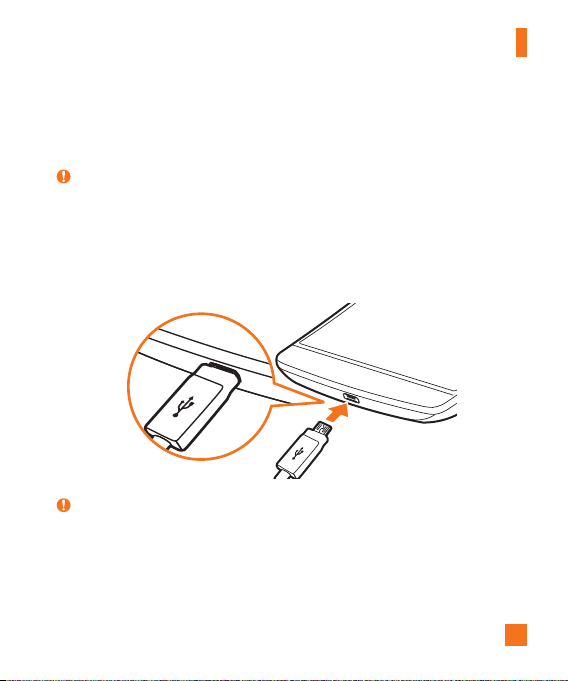
TheCharger/USBPortislocatedatthebottomofthephone.Insertthechargerandplugitintoa
poweroutlet.
NOTE:
X Donotopenthebackcoverwhileyourphoneischarging.
18
Getting Started
Inserting a memory card
Yourdevicesupportsuptoa2TBmicroSDcard.Dependingonthememorycardmanufacturerand
type,somememorycardsmaynotbecompatiblewithyourdevice.
WARNING
X Somememorycardsmaynotbefullycompatiblewiththedevice.Usinganincompatible
cardmaydamagethedeviceorthememorycard,orcorruptthedatastoredinit.
NOTE:
X Frequentwritinganderasingofdatashortensthelifespanofmemorycards.
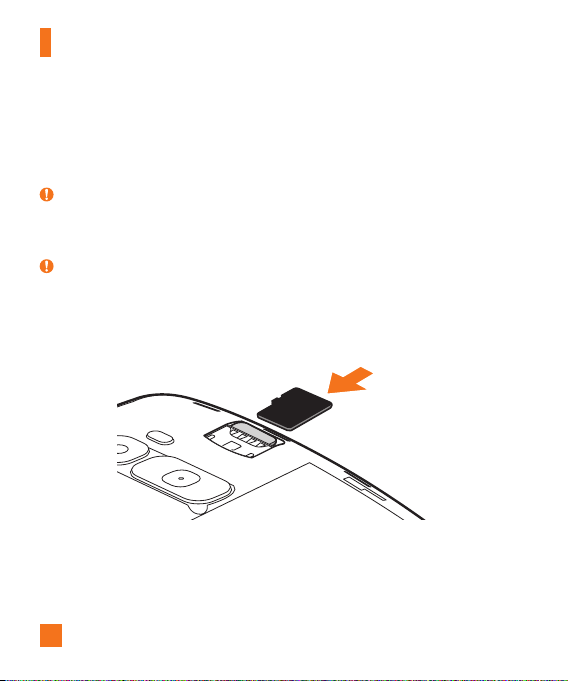
1 Removethebackcover.
2 Insertamemorycardwiththegold-coloredcontactsfacingdownwards.
3 Replacethebackcover.

19
Getting Started
Unlocking the screen
Bydefault,yourscreenwilllockafteraperiodofinactivity,thenturnoff.
Unlocking the screen
1 PressthePower/Lock Keyordouble-taponthescreen.
2 Swipethescreeninanydirectiontounlockit.
TIP! Smart Lock
X YoucanuseSmartLocktomakeunlockingyourphoneeasier.Youcansetittokeepyour
phoneunlockedwhenyouhaveatrustedBluetoothdeviceconnectedtoit,whenit'sina
familiarlocationlikeyourhomeorwork,orwhenitrecognisesyourface.
X
Setting up Smart Lock
1 Tap > > .
2 TapDisplaytab>Lock screen>Smart Lock.
3 Beforeyouaddanytrusteddevices,trustedplaces,ortrustedface,youneedtoset
upascreenlock(pattern,PIN,orpassword).

20
Touch screen tips
Herearesometipsonhowtonavigateonyourphone.
•Tap or touch–Asinglefingertapselectsitems,links,shortcutsandlettersonthe
on-screenkeyboard.
•Touch and hold–Touchandholdanitemonthescreenbytappingitandnotliftingyour
fingeruntilanactionoccurs.
•Drag–Touchandholdanitemforamomentandthen,withoutliftingyourfinger,moveyour
fingeronthescreenuntilyoureachthetargetposition.YoucandragitemsontheHome
screentorepositionthem.
•Swipe or slide–Toswipeorslide,quicklymoveyourfingeracrossthesurfaceofthe
screen,withoutpausingwhenyoufirsttapit(soyoudon’tdraganiteminstead).
•Double-tap–Double-taptozoomonawebpageoramap(ifthefeatureissupportedby
theapplication).
•Pinch-to-Zoom–Useyourindexfingerandthumbinapinchingorspreadingmotionto
zoominoroutwhenusingthebrowser,Maps,orwhenviewingpictures(ifthefeatureis
supportedbytheapplication).
•Rotate the screen–Frommanyapplicationsandmenus,thescreenorientationadjuststo
thedevice'sphysicalorientation.
NOTE:
X Donotpresstoohard;thetapscreenissensitiveenoughtopickupalight,yetfirmtap.
X Usethetipofyourfingertotaptheoptionyouwant.Becarefulnottotapanyother
buttons.
Your Home screen
21
Your Home screen
Home screen
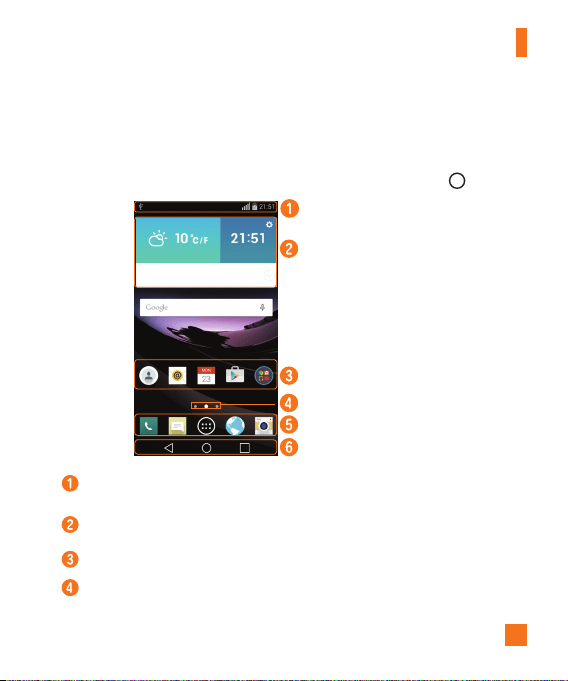
TheHomescreenisthestartingpointformanyapplicationsandfunctions.Itallowsyouto
additemslikeappshortcutsandGooglewidgetstogiveyouinstantaccesstoinformationand
applications.Thisisthedefaultcanvasandaccessiblefromanymenubytapping .
Status Bar
Widget
Application Icons
Location Indicator
Quick Button Area
Home Touch Buttons
Showsthephone’sstatusinformation,includingthetime,signalstrength,batterystatusand
notificationicons.
Widgetsareself-containedapplicationsthatcanbeaccessedthroughtheAppsdraweror
ontheHomescreen.Unlikeashortcut,aWidgetcanfunctionasanon-screenapplication.
Tapanicon(application,folder,etc.)toopenanduseit.
IndicateswhichHomescreencanvasyouarecurrentlyviewing.
22
Your Home screen
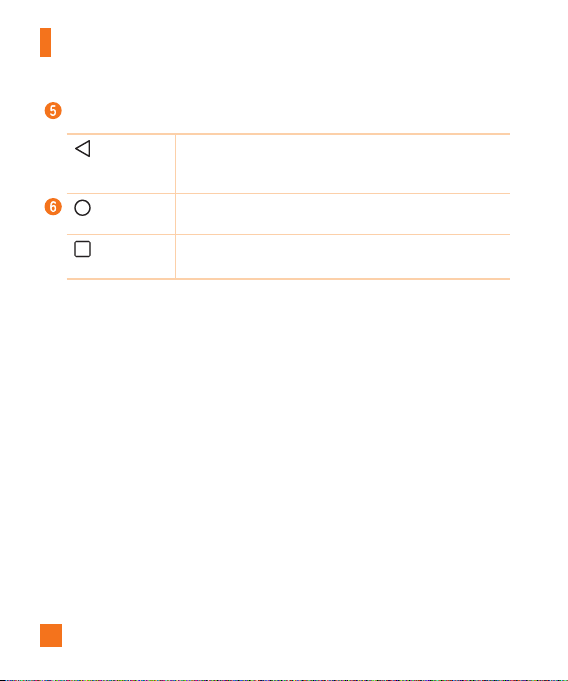
Providesone-touchaccesstothefunctionfromanyHomescreencanvas.
Back Button
Returnstothepreviousscreen.Alsoclosespop-upitems,suchas
menus,dialogboxesandtheon-screenkeyboard.Touchandholdit
toaccesstheDualwindow.
Home Button
ReturntotheHomescreenfromanyscreen.Touchandholdto
accessGoogleNow.
Recent Apps
Button
Displaysrecentlyusedapplications.Ifyoutouchandholdthis
button,itopensamenuofavailableoptions.
Extended Home screen
TheoperatingsystemprovidesmultipleHomescreencanvasestoprovidemorespaceforadding
icons,widgetsandmore.
•SlideyourfingerleftorrightacrosstheHomescreentoaccessadditionalcanvases.
Customizing the Home screen
YoucancustomizeyourHomescreenbyaddingappsandwidgetsandchangingwallpapers.
Adding items on your Home screen
1 TouchandholdtheemptypartoftheHomescreen.
2 TaptheWidgetstabandselecttheitemyouwanttoadd.Youthenseethisaddeditem
ontotheHomescreencanvas.
3 Dragittothedesiredlocationandliftyournger.
23
Your Home screen
TIP!
X ToaddanapplicationicontotheHomescreenfromtheAppsscreen,touchandholdthe
applicationyouwanttoadd.
Removing an item from the Home screen
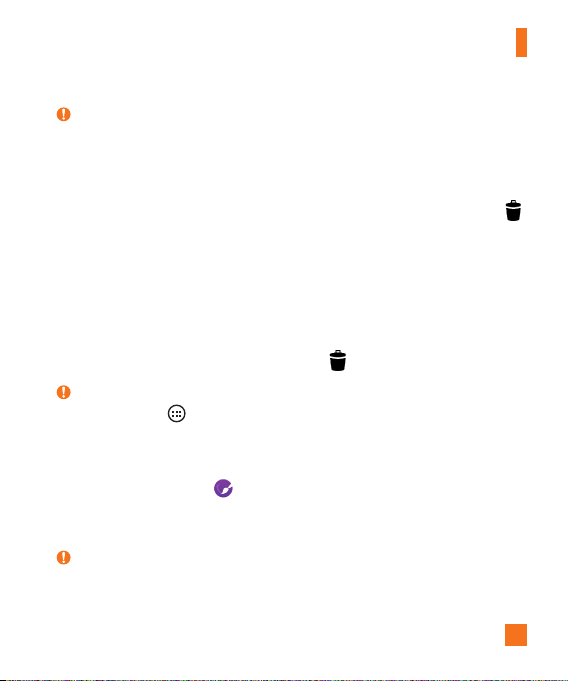
•WhileontheHomescreen,touchandholdtheiconyouwanttoremove,thendragitto
andreleaseit.
Adding an app to the Quick Button area
•FromtheAppsscreenorontheHomescreen,touchandholdanapplicationiconanddragit
totheQuickButtonarea.Thenreleaseitinthedesiredlocation.
Removing an app from the Quick Button area
•TouchandholdthedesiredQuickButton,dragitto ,andreleaseit.
NOTE:
X TheApps Button cannotberemoved.
Customizing app icons on the Home screen
1 Touchandholdanapplicationiconuntilitisunlockedfromitscurrentposition,then
releaseit.Theeditingicon willappearintheupperrightcorneroftheapplication.
2 Taptheapplicationiconagainandselectthedesiredicondesignandsize.
3 TapOKtosavethechange.
NOTE:
X YoucanalsotapAdd newtopersonalizeiconswithyourpictures.
24
Your Home screen
Returning to recently-used applications
1 Tap .Apppreviewsofrecentlyusedapplicationswillbedisplayed.
2 Tapanapppreviewtoopentheapplication.Ortap toreturntothepreviousscreen.
Notifications panel
Notificationsalertyoutothearrivalofnewmessages,calendareventsandalarms,aswellas
ongoingevents,suchaswhenyouareusingturn-by-turnnavigation.
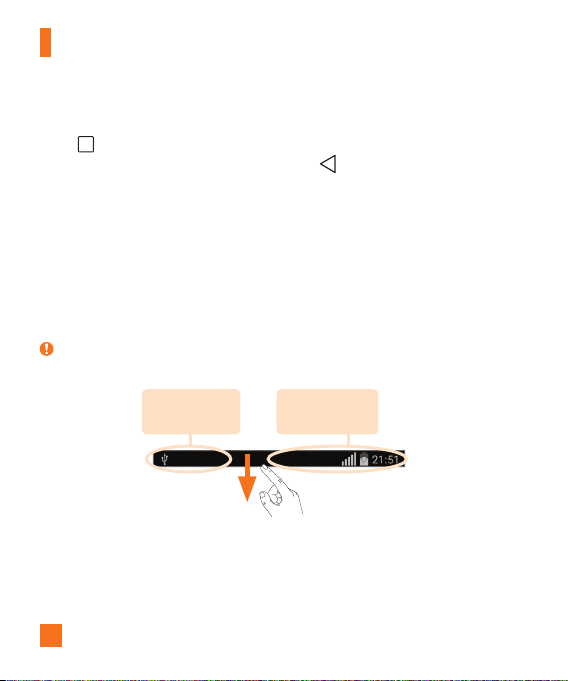
Whenanotificationarrives,itsiconappearsatthetopofthescreen.Iconsforpending
notificationsappearontheleft,andsystemicons,suchasWi-Fiandbatterystrengthareshown
ontheright.
NOTE:
X Theavailableoptionsmayvarydependingontheregionorserviceprovider.
Pending
notifications
System
notifications
25
Your Home screen
Opening the Notifications panel
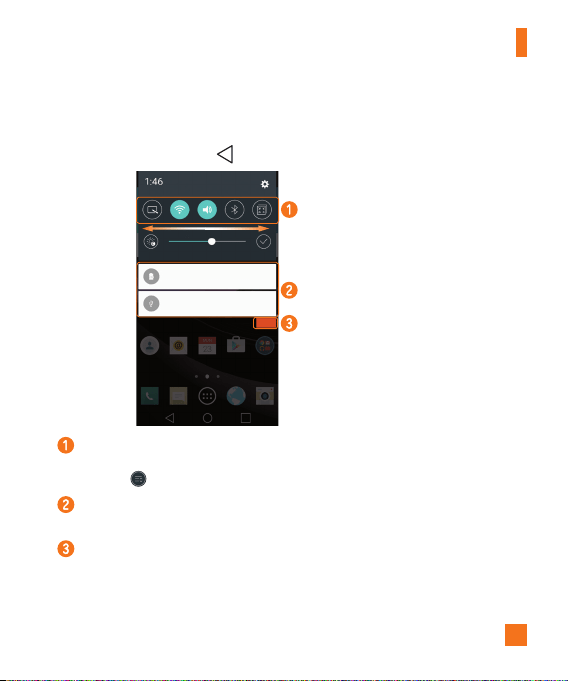
SwipedownfromtheStatusbartoopentheNotificationspanel.ToclosetheNotificationspanel,
swipethescreenupwardsortap .
Quick Settings Area
Notifications
Clear
Tapeachquicksettingbuttontotoggleiton/off.Touchandholdthedesiredbuttonto
directlyaccessthesettingsmenuforthefunction.Toseemoresettingbuttons,swipeleftor
right.Tap toremove,addorrearrangequicksettingbuttons.
Currentnotificationsarelisted,eachwithabriefdescription.Tapanotificationtoopenthe
correspondingapplicationthatmanagesit.
Taptoclearallofthenotifications.
26
Your Home screen
Indicator icons on the Status Bar
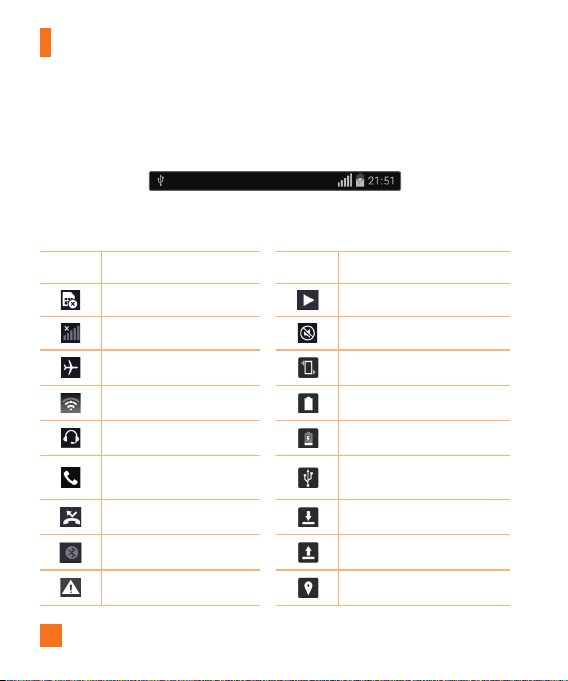
IndicatoriconsappearontheStatusbaratthetopofthescreentoreportmissedcalls,new
messages,calendarevents,devicestatusandmore.
Theiconsdisplayedatthetopofthescreenprovideinformationaboutthestatusofthedevice.
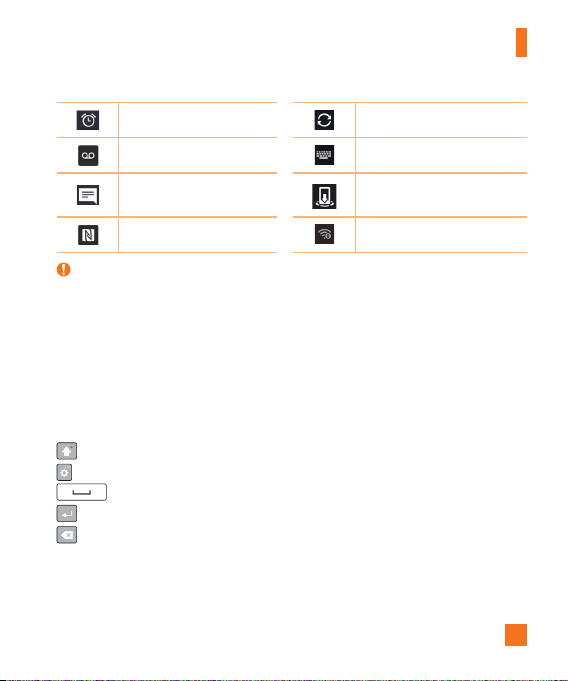
Theiconslistedinthetablebelowaresomeofthemostcommonones.
Icon Description Icon Description
NoSIMcardinserted Amediafileiscurrentlyplaying
Nonetworksignalavailable Silentmodeisenabled
Airplanemodeison Vibratemodeison
ConnectedtoaWi-Finetwork Batteryfullycharged
Wiredheadsetconnected Batteryischarging
Callinprogress
ThephoneisconnectedtoaPC
viaaUSBcable
Missedcall Downloadingdata
Bluetoothison Uploadingdata
Systemwarning
GPSison
27
Your Home screen
Analarmisset Dataissynchronizing
Newvoicemailavailable Chooseinputmethod
Newtextormultimedia
message
Mediaservercontentsharing
ison
NFCison Mobilehotspotisactive
NOTE:
X Theicon'slocationintheStatusbarmaydifferaccordingtothefunctionorservice.
On-screen keyboard
Youcanentertextusingtheon-screenkeyboard.Theon-screenkeyboardappearsonthescreen
whenyoutapanavailabletextentryfield.
Using the keypad and entering text
Taponcetocapitalizethenextletteryoutype.Taptwiceforallcaps.
Taptoaccessthekeyboard'sSettingsmenu.
Taptoenteraspace.
Taptocreateanewline.
Taptodeletethepreviouscharacter.

28
Your Home screen
Entering special characters
Theon-screenkeyboardallowsyoutoenterspecialcharacters.
Forexample,toinput"á",touchandholdthe"a"buttonuntilthepop-upappearsanddisplays
relatedspecialcharacters.Withoutliftingthefinger,dragyourfingertothedesiredspecial
character.Onceit'shighlighted,liftyourfinger.
NOTE:
X Asymbolatthetoprightcornerofakeyindicatesthatadditionalcharactersareavailable
forthatkey.
29
Gesture shot
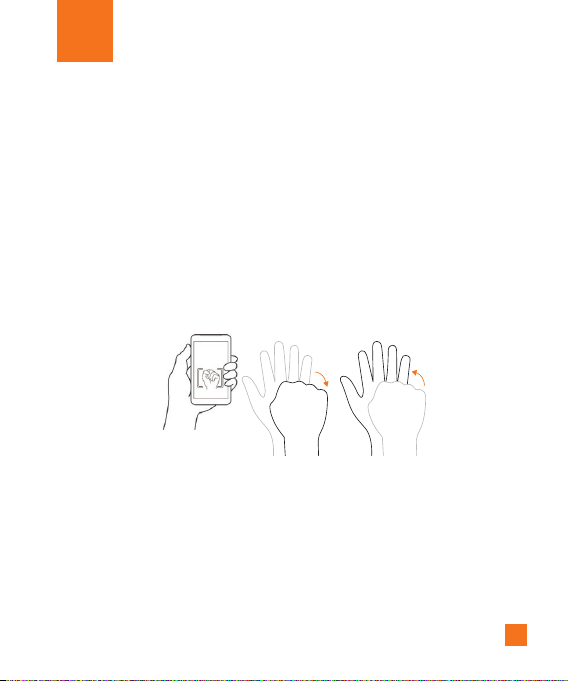
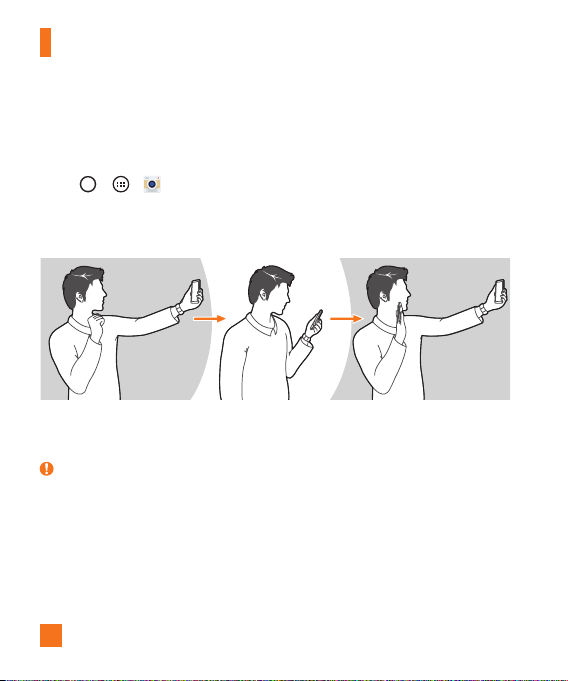
TheGestureshotfeatureallowsyoutotakeapicturewithahandgestureusingthefrontcamera.
To take photo
TherearetwomethodsforusingtheGestureshotfeature.
•Raiseyourhand,withanopenpalm,untilthefrontcameradetectsitandaboxappearson
thescreen.Thencloseyourhandintoafisttostartthetimer,allowingyoutimetogetready.
OR
•Raiseyourhand,inaclenchedfist,untilthefrontcameradetectsitandaboxappearson
thescreen.Thenunclenchyourfisttostartthetimer,allowingyoutimetogetready.
OR
Special Features
30
Special Features
Gesture View
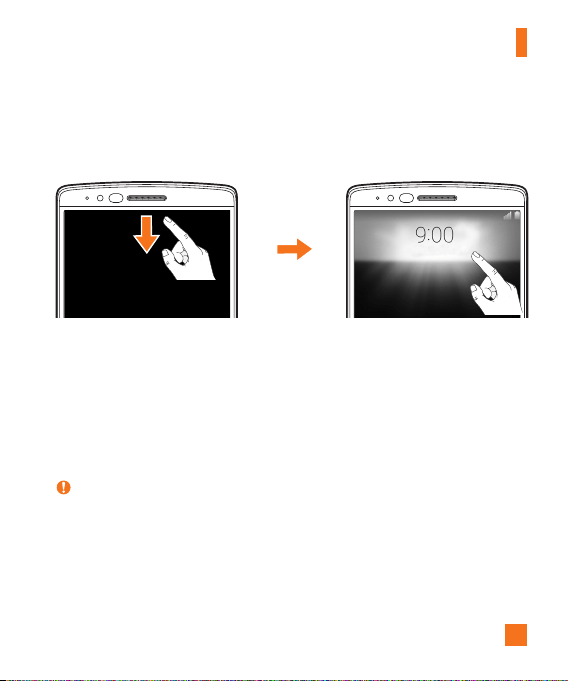
Aftertakingaphotowiththefrontcameralens,youcanautomaticallycheckthecapturedphoto
withthisgesture.
1 Tap > > .
2 Takeapicturewiththefrontcamera.
3 Aftertakingthepicture,bringthephoneclosetoyourface.Thecapturedphotowillbe
displayed.
Taking a picture Quick preview Returning front camera mode
NOTE:
X Dependingonthespeedandangleofthegesture,thisfeaturemaynotworkproperly.
X Whentheangleischangedafterthequickpreview,thedevicereturnstocameramode.You
mustaccesstheGallerytoviewthepictureagain.
31
Special Features
Glance View
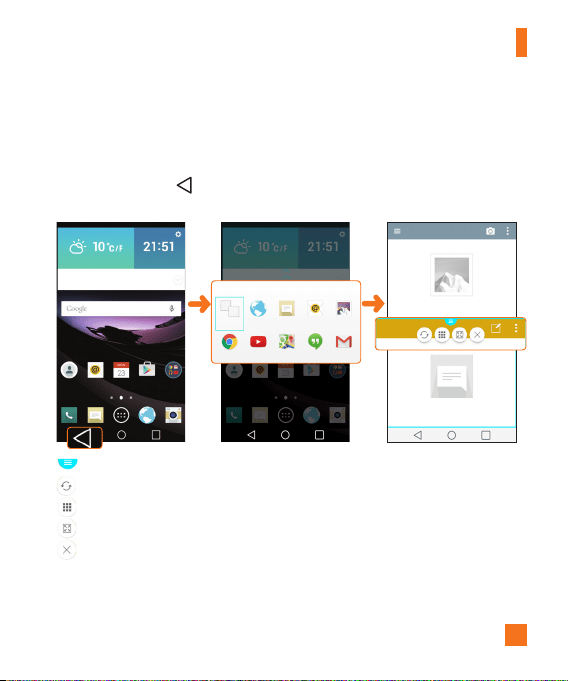
Whenthephonescreenisoff,youcanseetheStatusbar,timeanddatebydraggingyourfinger
downfromthetopofthescreen.
KnockON
Youcanwakeup,orturnoff,thescreenaseasilyasdouble-tappingthescreen.
Whilethescreenisoff,andidle,double-tapthecenterscreenquicklytowakethescreen.To
turnthescreenoff,double-taptheStatusbarinanyscreen(exceptonthecameraviewfinder)or
emptyareaontheHomescreen.
NOTE:
X WhenusingKnockOntowakethescreen,makesureyoudonotcovertheproximitysensor.
Doingsowillpreventthescreenfromturningon.Thisfeatureisdesignedtopreventthe
deviceturningoninadvertentlyinyourpocketorstoragelocation.

32
Special Features
Knock Code
TheKnockCodefeatureallowsyoutowakeandunlockthescreenwithyourownKnockCode
pattern.Whenenabled,KnockCodedividesthescreeninto4partsandusesyourunique
combinationoftapstosecureyourdevice.YoucandisablethisfeatureintheLockscreen
settings.
NOTE:
X IfyouenteranincorrectKnockCodecombination6times,itwillbenecessarytouseyour
GoogleaccountloginorbackupPIN.
X Usethefingertipinsteadoffingernailtotapthescreenforturningitonoroff.
X WhentheKnockCodeisnotinenabled,youcanuseKnockOnfunctionbytapingthe
screen.
1 Tap > > >Display tab>Lock screen>Select screen lock>Knock
Code.
2 Followtheon-screenstepstosetyourKnockCode.
Unlocking the screen using the Knock Code
YoucanwakeupandunlockthescreenbytappingtheKnockCode,setupintheprevioussection,
whenthescreenisoff.
33
Special Features
Dual window
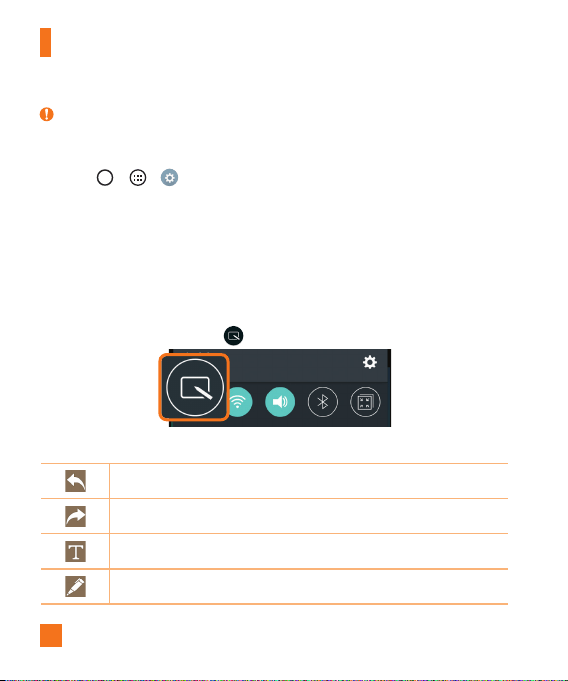
Thisfeatureallowsyoutomulti-taskbysplittingupthescreenintotwo,allowingyoutousetwo
compatibleapplicationsatthesametime.
1 Touchandholdthe tosplitthescreen.
2 Tapordragtheappiconforthecorrespondingapplicationyouwishtouse.
:TaptoviewtheDualwindowmenuoptions,ordragtoresizethesplitscreens.
:Switchthetwoscreens.
:Viewtheapplist.
:Changetheselectedwindowtofullscreen.
:Closethecurrentlyselectedappwindow.
34
Special Features
NOTE:
X Dualwindowisenabledbydefault.YoucanenableordisableDualwindowthroughthe
Settingsmenu.
1 Tap > > >General tab>Dual window.
2 SlidethetogglebuttontoOnorOff.
QuickMemo+
TheQuickMemo+featureallowsyoutocreatememosandcapturescreenshots.
YoucanuseQuickMemo+toeasilyandefficientlycreatememosduringacall,withasaved
pictureoronthecurrentphonescreen.
1 DragtheStatusbardownandtap .
2 Createamemousingthefollowingoptions:
Taptoundothemostrecentaction.
Taptoredothemostrecentlydeletedaction.
Taptoinserttextintoyourmemo.
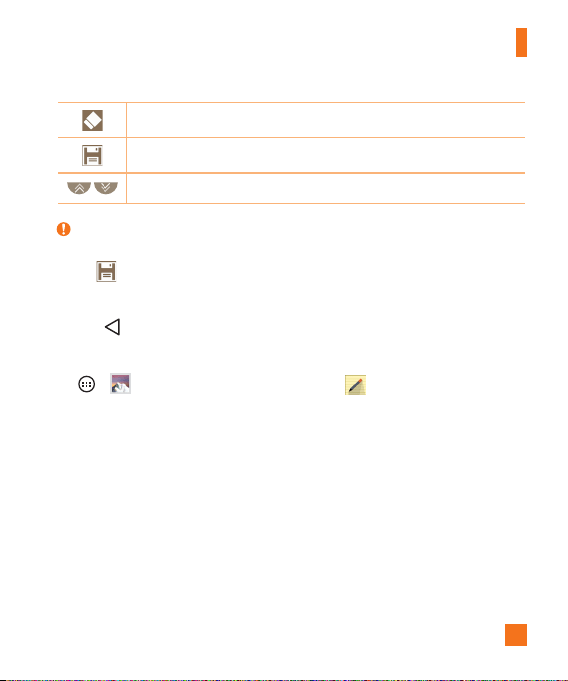
Taptoselectthepentypeandcolor.
35
Special Features
Taptousetheerasertoerasethepenmarksonthememo.
Taptosavethememoyou'vecreated.
Taptohideordisplaythetoolbar.
NOTE:
X PleaseuseafingertipwhileusingtheQuickMemo+feature.Donotuseyourfingernail.
3 Tap tosavethecurrentmemototheQuickMemo+ orGallery.
Discard Memos
•Tap .
View the Saved Memo
Tap > andselecttheQuickMemo+albumortap andselectthedesiredmemo.
36
Special Features
QSlide
Fromanyscreen,usetheNotificationspaneltoeasilyaccessandusetheCalendar,Calculator,
andmorewithQSlide.
OR
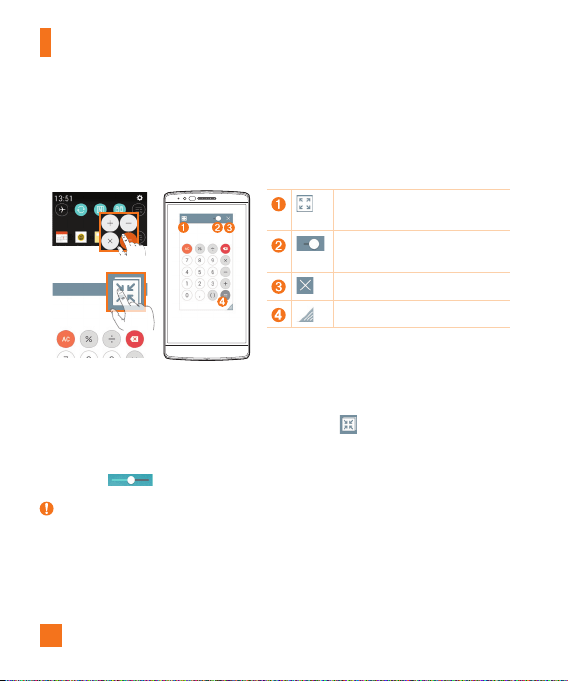
Taptoexpandthewindowtofull
windowsize.
Taptoadjustthewindow's
transparency.
TaptoclosetheQSlidewindow.
Dragtoadjustthesize.
1 SlidetheStatusbardownward,thentapQSlidetoviewtheavailableQSlideapps.
ThentapthedesiredappfromtheQSlideAppssection.
OR
Also,whileusingapplicationsthatsupportQSlide,tap .Thefunctionisdisplayedas
asmallwindowonyourscreen.
2 YoucanuseandtapthescreenundertheQSlidewindowswhenthetransparencybar
isnotfull .
NOTE:
X QSlidecansupportuptoonewindowatthesametime.
37
Special Features
QuickRemote
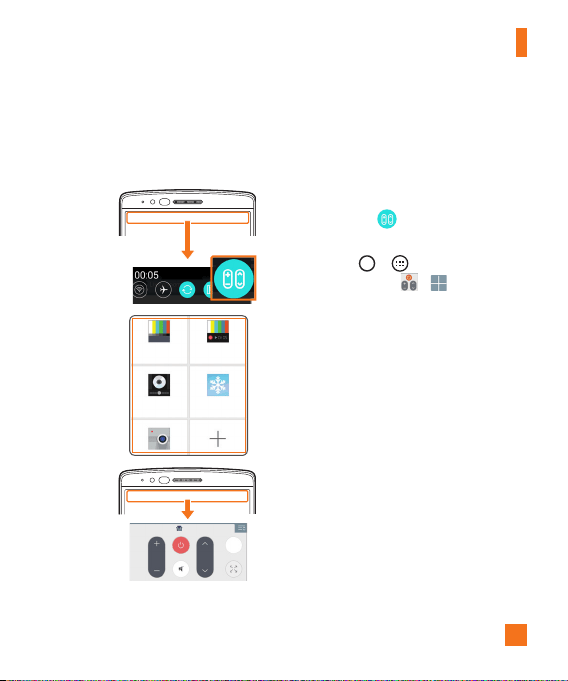
QuickRemoteturnsyourphoneintoaUniversalRemoteforyourhomeTV,set-topboxandaudio
system,andmore.
1 SlidetheStatusbardownward
andtap >ADD REMOTE.
OR
Tap > >Apps tab(if
necessary)> > .
2 Selectthetypeandbrandofthe
device,thenfollowtheon-screen
instructionstocongurethe
device.
3 Onceyouhavecompletedthe
initialsetup,youcaneasily
accesstheQuickRemotefrom
theNoticationspanel.Openthe
Noticationspanelandusethe
QuickRemotefunctions.
38
ThefirsttimeyouopenaGoogleapplicationonyourphone,youwillberequiredtosigninwith
yourexistingGoogleaccount.IfyoudonothaveaGoogleaccount,youwillbepromptedtocreate
one.
Creating your Google account
1 Tap >
.
2 Tap >Generaltab>Accounts & sync>Add account>Google>Create a
New Account.
3 Enteryourrstandlastname,thentapNext.
4 EnterausernameandtapNext.YourphonewillcommunicatewithGoogleserversand
checkforusernameavailability.
5 EnteryourpasswordandtapNext.
6 Followtheinstructionsandentertherequiredandoptionalinformationaboutthe
account.Waitwhiletheservercreatesyouraccount.
Signing into your Google account
1 Tap >
.
2 Tap >Generaltab>Accounts & sync>Add account>Google.
3 EnteryouremailaddressandtapNext.
4 OnceyouhavesetupyourGoogleaccount,yourphonewillautomaticallysynchronize
withyourGoogleaccountontheweb(ifadataconnectionisavailable).
Google Account Setup

39
Google Account Setup
Aftersigningin,yourphonewillsyncwithyourGoogleservices,suchasGmail,Contacts,and
GoogleCalendar.YoucanalsouseMaps,downloadapplicationsfromPlayStore,backupyour
settingstoGoogleservers,andtakeadvantageofotherGoogleservicesonyourphone.
IMPORTANT
X Someapplications,suchasCalendar,workonlywiththefirstGoogleAccountyouadd.If
youplantousemorethanoneGoogleAccountwithyourphone,besuretosignintothe
oneyouwanttousewithsuchapplicationsfirst.Whenyousignin,yourcontacts,Gmail
messages,Calendarevents,andotherinformationfromtheseapplicationsandserviceson
thewebaresynchronizedwithyourphone.Ifyoudon'tsignintoaGoogleAccountduring
setup,youwillbepromptedtosigninortocreateaGoogleAccountthefirsttimeyoustart
anapplicationthatrequiresone,suchasGmailorPlayStore.
X Ifyouhaveanenterpriseaccountthroughyourcompanyorotherorganization,yourIT
departmentmayhavespecialinstructionsonhowtosignintothataccount.
40
Wi-Fi
Youcanusehigh-speedInternetaccesswhilewithinthecoverageofthewirelessaccesspoint
(AP).
Connecting to Wi-Fi networks
1 Tap > > >Networks tab>Wi-Fi.
2 Tap toturnWi-FionandstartscanningforavailableWi-Finetworks.
3 Tapanetworktoconnecttoit.
•Ifthenetworkissecuredwithalockicon,youwillneedtoenterasecuritykeyorpassword.
NOTE:
X TheStatusbardisplaysiconsthatindicateWi-Fistatus.
X IfyouareoutoftheWi-FizoneorhavesetWi-FitoOFF,thedevicemayautomatically
connecttotheWebusingmobiledata,whichmayincurdatacharges.
TIP! How to obtain the phone's MAC address
X Tap >
> >Networks tab>Wi-Fi> >Advanced Wi-Fi>MAC address.
Connecting to Networks and Devices

41
Connecting to Networks and Devices
Bluetooth
Bluetoothisashort-rangecommunicationstechnologythatallowsyoutoconnectwirelesslyto
anumberofBluetoothdevices,suchasheadsetsandhands-freecarkits,andBluetooth-enabled
handhelds,computers,printers,andwirelessdevices.
NOTE:
X LGisnotresponsiblefortheloss,interceptionormisuseofdatasentorreceivedviathe
Bluetoothfeature.
X Alwaysmakesurethatyoushareandreceivedatawithdevicesthataretrustedand
properlysecured.
X Ifthereareobstaclesbetweenthedevices,theoperatingdistancemaybereduced.
X Somedevices,especiallythosethatarenottestedorapprovedbyBluetoothSIG,maybe
incompatiblewithyourdevice.
Pairing your phone with another Bluetooth device
1 Tap > > >Networks tab>Bluetooth.
2 Tap toturnBluetoothon.
3 TapSearch for devicestoviewthevisibledevicesinrange.
4 Choosethedeviceyouwanttopairwithfromthelistandfollowanysubsequent
instructionstocompletepairing.Oncetheparingissuccessful,yourphoneconnectsto
theotherdevice.
NOTE:
X Somedevices,especiallyheadsetsorhands-freecarkits,mayhaveadefaultBluetoothPIN,
suchas0000.
42
Connecting to Networks and Devices
Sending data via Bluetooth
1 Usinganapplicationthatsupportssharing,locatethedata,orle,thatyouwantto
share.
2 SelecttheShareoption.
3 SelectBluetooth.
4 SelectthepairedBluetoothdevice(orpairwithanewdevice).
NOTE:
X Themethodforselectinganoptionmayvarybydatatype.
Receiving data via Bluetooth
1 Tap > > >Networks tab>Bluetooth.
2 Tap toturnBluetoothon.
3 Youwillreceivearequesttoacceptapairingattemptfromthesendingdevice.Besure
toselectAccept.
Wi-Fi Direct
Wi-FiDirectprovidesadirectconnectionbetweenWi-Fienableddeviceswithoutrequiringan
accesspoint.
Turning on Wi-Fi Direct
1 Tap > > > Networks tab > Wi-Fi.
2 Tap > Advanced Wi-Fi > Wi-Fi Direct.
NOTE:
X Wheninthismenu,yourdeviceisvisibletoothervisibleWi-FiDirectdevicesnearby.

43
Connecting to Networks and Devices
SmartShare
SmartShareallowsyoutoreceivemultimediacontentviaLGphoneandtablets.
1 Whileviewingthecontentyouwanttoshare,tap or >SmartShare.
2 TapPlayorBeaminthepop-upthatisdisplayed.
•Play: YoucanstreamyourcontentviaaTV,Bluetoothspeaker,etc.
•Beam: YoucansendyourcontenttoBluetoothdevicesorviaSmartShareBeam*to
supportedLGphonesortablets.
*SmartShareBeamquicklytransfersmultimediacontentsthroughWi-FiDirect.
3 Tapthedeviceyouwanttosharefromthelist.
•Ifthedeviceisnotdisplayedonthelist,makesurethatWi-Fi,Wi-FiDirect,orBluetoothis
turnedon.ThentapRescan.
4 TapSend tosharetheles.
Enjoying content from nearby devices on your phone
1 Toconnectnearbydevicestoyourphone,taptheNearby devicesoptiononthe
GalleryandMusicapps.
•MakesurethatyourphoneandnearbydevicesareconnectedtothesameWi-Finetwork
andthattheDLNAserviceonthenearbydeviceisturnedon.
2 Tapthedeviceyouwishtoconnectto.
Ifthedeviceisnotlisted,tapSearch nearby devices.
3 Afteraconnectionisestablished,youcanenjoythecontentonyourphone.

44
Connecting to Networks and Devices
Transferring data between a PC and your device
YoucancopyormovedatabetweenaPCandthedevice.
Transferring data
1 ConnectyourdevicetoaPCusingtheUSBcablethatcamewithyourphone.
2 OpentheNoticationspanel,tapthecurrentUSBconnection,andselectMedia sync
(MTP).
3 Awindowwillpop-uponyourPC,allowingyoutotransferthedesireddata.
NOTE:
X TheLGUnitedMobileDriverisrequiredtobeinstalledonyourPCtobeabletodetectthe
phone.
X ChecktherequirementsforusingMedia sync (MTP).
Items Requirement
OS MicrosoftWindowsXPSP3,Vistaorhigher
WindowMediaPlayerversion WindowsMediaPlayer10orhigher
•Pleaserefertowww.android.com/filetransfer/#tipsinordertouseMTPontheMACOS.
45
Making a call
1 Tap toopenthedialer.
2 Enterthenumberusingthedialer.Todeleteadigit,tap .
3 Afterenteringthedesirednumber,tap toplacethecall.
4 Toendthecall,tap .
TIP!
X Toenter"+"tomakeinternationalcalls,touchandhold .
Calling your contacts
1 Tap toopenyourcontacts.
2 Scrollthroughthecontactlist.Youcanalsoenterthecontact'snameintheSearcheld
orscrollalongthealphabetlettersontherightedgeofthescreen.
3 Toplacethecall,tap nexttothecontactyouwanttocall.
Answering and rejecting a call
•Swipe inanydirectiontoa
nswerthecall.
•Swipe inanydirectiontod
eclinethecall.
Making a second call
1 Duringyourrstcall,tap >Add call andenterthenumber.
2 Tap toplacethecall.
Calls
46
Calls
3 Bothcallsaredisplayedonthecallscreen.Yourinitialcallislockedandputonhold.
4 Totogglebetweennumbers,tapthenumberdisplayedonthescreen.Youcanalsotap
tostartaconferencecall.
5 Toendallcalls,tap .
NOTE:
X Youarechargedforeachcallyoumake.
Viewing your call logs
Tap
andselectCall logstab.
Alistofalldialed,receivedandmissedcallsisdisplayed.
TIP!
X Tapanycalllogentrytoviewthedate,timeanddurationofthecall.
X Tap ,thentapDelete alltodeletealloftherecordeditems.
Call settings
Youcanconfigurephonecallsettings,suchascallforwarding,aswellasotherspecialfeatures
offeredbyyourcarrier.
1 Tap toopenthedialer.
2 Tap todisplaytheavailableoptions.
3 TapCall settingsandcongurethedesiredoptions.

47
AddcontactstoyourphoneandsynchronizethemwiththecontactsinyourGoogleaccountor
otheraccountsthatsupportcontactsyncing.
Searching for a contact
1 Tap toopenyourcontacts.
2 TapSearch contactsandenterthecontactnameusingthekeyboard.Youcanalso
scrollalongthealphabetlettersontherightedgeofthescreen.
Adding a new contact
1 Tap andenterthenewcontact'snumber.
2 Tap
New contact
.
3 Ifyouwanttoaddapicturetothenewcontact,taptheimageicon.
ChooseTake photoorSelect from Gallery.
4 Enterthedesiredinformationforthecontact.
5 TapSave.
Favorites contacts
Youcanclassifyfrequentlycalledcontactsasfavorites.
Adding a contact to your favorites
1 Tap toopenyourcontacts.
2 Tapacontacttoviewitsdetails.
3 Tapthestaratthetoprightcornerofthescreen.Thestarturnsgold.
Contacts

48
Contacts
Removing a contact from your favorites list
1 Tap toopenyourcontacts.
2 TaptheFavoritestabandchooseacontacttoviewitsdetails.
3 Tapthegoldstaratthetoprightcornerofthescreen.Thestarturnsadarkcolorand
thecontactisremovedfromyourfavorites.
Creating a group
1 Tap toopenyourcontacts.
2 TapGroups> >New group.
3 Enteranameforthenewgroup.Youcanalsosetadistinctringtoneforthenewly
createdgroup.
4 TapAdd memberstoaddcontactstothegroup.
5 TapSavetosavethegroup.
NOTE:
X Ifyoudeleteagroup,thecontactsassignedtothatgrouparenotlost.Theyremaininyour
contactlist.
49
Contacts
Joining and Separating Contacts
Whenyouhavetwoormoreentriesforthesamecontact,youcanjointhemintoasingle
entry.Youcanalsoseparatecontactsthatwerejoined.
1 Tap
>
> .
2 Tap >Manage contacts>Join contacts.
3 Selectatabatthetopofthescreen.
•TapJoin suggestiontoselectentriesyouwanttojoin.
•Tap
Joined
contacts
toselectentriesyouwanttoseparate.
4 Checkmarktheentry(orentries)youwanttojoinorseparate,thentaptheJoin or
Separatebutton.
AT&T Address Book (AAB)
AT&TAddressBook(AAB)isanapplicationthatautomaticallysyncsyourcontactstoanonline
addressbookforsafekeeping!WhenyoufirstturnonthephoneorchangeyourSIMcardand
openContacts,theAABapplicationisdisplayed.
Aftersigningupforthisservice,yourinformationissyncedonaregularbasis.
Youcanfindmoreinformationonthisserviceandaccessyouronlineaddressbookatwww.att.
com/addressbook.Youcanfindthesynchronizationmenufortheservicebytapping >
>
>Generaltab>Accounts & sync>AT&T Address Book.

50
Yourphonecombinestextandmultimediamessagesintooneintuitive,easy-to-usemenu.
Sending a message
1 Tap andtap tocreateanewmessage.
2 EnteracontactnameorcontactnumberintotheToeld.Asyouenterthecontact
name,matchingcontactsappear.Youcantapasuggestedrecipientandaddmorethan
onecontact.
NOTE:
X Youmaybechargedforeachtextmessageyousend.Pleaseconsultwithyourservice
provider.
3 Tapthetexteldandbegincomposingyourmessage.
4 Tap toopenthemessagingoptions.
TIP!
X Youcantap toattachafilethatyouwanttoshare.
5 TapSendtosendyourmessage.
TIP!
X The160-characterlimitmayvaryfromcountrytocountry,dependingonthelanguageand
howthetextmessageiscoded.
X Ifanimage,videooraudiofileisaddedtoatextmessage,itisautomaticallyconvertedinto
amultimediamessageandyoumaybechargedaccordingly.
Messaging

51
Messaging
Conversation view
Textandmultimediamessagesexchangedwithanotherpartyaredisplayedinchronologicalorder
sothatyoucanconvenientlyseeandfindyourconversations.
Changing your messaging settings
Yourphone'smessagingsettingsarepredefinedtoallowyoutosendmessagesimmediately.You
canchangethesettingsbasedonyourpreferences.
•OpentheMessagingappandtap >Settings.
52
YoucanusetheEmailapplicationtoreademailfromprovidersotherthanGmail.TheEmail
applicationsupportsthefollowingaccounttypes:POP3,IMAPandMicrosoftExchange(for
Enterpriseusers).
Managing email accounts
To open the Email application
Tap > > .
ThefirsttimeyouopentheEmailapplication,asetupwizardopenstohelpyouaddanemail
account.
Adding another email account:
•Tap > > > >Settings > Add account.
Changing the email general settings:
•Tap > > > >Settings>General settings.
Deleting an email account:
•Tap > > > >Settings> >Remove account>Selecttheaccountto
delete>Remove>Yes.
Email

53
Email
Working with account folders
Tap > > > >Folders.
EachaccounthasInbox,Outbox,SentandDraftsfolders.Dependingonthefeaturessupportedby
youraccount'sserviceprovider,youmayhaveadditionalfolders.
Composing and sending email
1 Inthe application,tap tocreateanewemail.
2 Enteranaddressforthemessage'sintendedrecipient.Asyouentertext,matching
addresseswillbeofferedfromyourcontacts.Separatemultipleaddresseswith
semicolons.
3 TaptheCc/Bcceldtocopyorblindcopytoothercontacts/emailaddresses.
4 Tapthetexteldandenteryourmessage.
5 TapAttachtoattachtheleyouwanttosendwithyourmessage.
6 TapSendtosendthemessage.
54
Camera and Video
Camera options on the viewfinder
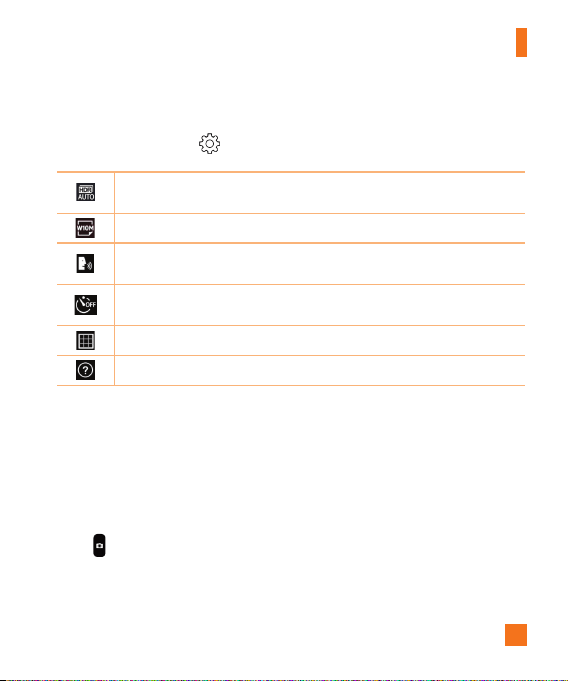
ToopentheCameraapplication,
tap >
> .
Youcanusethecameraorcamcordertotakeandsharepicturesandvideos.
1
6
9
2
7
8
3
4
5
Hide/Display Options–Taptohide/displaythecameraoptionsontheviewfinder.
Flash–Allowsyoutomanagethecamera'sflash.ChoosefromOff ,On ,Auto
.
Swap camera–Taptoswapbetweentherearcameraandthefrontcamera.
Shot mode–Allowsyoutoselecttheshotmodeforthepicture.ChoosefromAuto,
Panorama or Dual.
Settings–Taptoadjustthecameraandvideosettings.
Gallery–Taptoviewthelastphotoorvideoyoucaptured.
Record–Taptostartrecordingavideo.
Capture –Taptotakeaphoto.
Exit –Taptoexitthecamera.
55
Camera and Video
Using the advanced settings
Inthecameraviewfinder,tap toaccessthecamerasettingsbelow.
Combinesphotostakenatmultipleexposuresintooneoptimalphototogetabetter
photoindifficultlightingsituations.
Selectsthephotoandvideoresolution.
Allowsyoutosayavoicecommandtotakepictures.YoucansayLG,Cheese,Smile,
oranyothersupportedcommand.
Setsadelayafterthecapturebuttonispressed.Thisisidealifyouwanttobein
thephotoorvideo.
Displaysgridlinestohelpyoualignyourpicturesandvideos.
OpenstheHelpguidetoshowhowtouseafunction.
Taking a photo
1 OpentheCameraapplicationandpointthelenstowardthesubjectyouwantto
photograph.
2 Focusindicatorswillappearinthecenteroftheviewnderscreen.Youcanalsotap
anywhereonthescreentofocusonthatspot.
3 Whenthefocusindicatorsturnblue,thecamerahasfocusedonyoursubject.
4 Tap tocapturethephoto.
56
Camera and Video
Once you have taken a photo
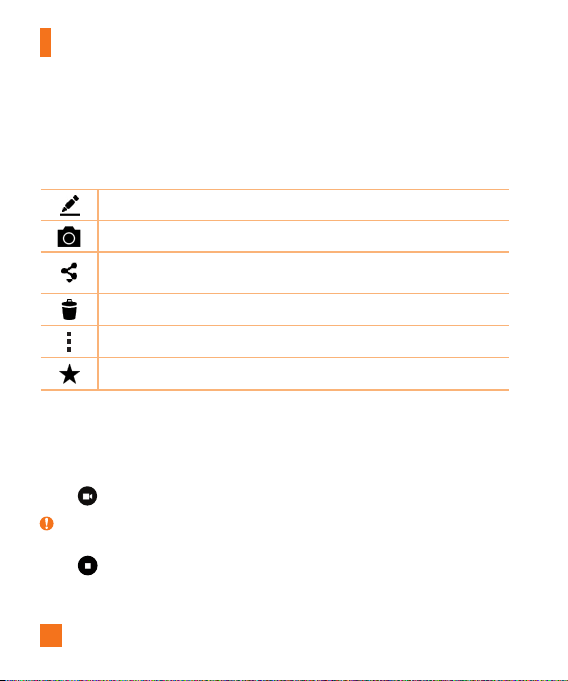
Taptheimagethumbnailonthescreentoviewthelastphotoyoutook.Thefollowingoptionsare
available.
Taptoeditthephoto.
Taptotakeanotherphotoimmediately.
Taptosendyourphototoothersorshareitinviaanyavailablesocialnetwork
services.
Taptodeletethephoto.
Taptoaccessadditionaloptions.
Taptoaddthephototoyourfavorites.
Recording a video
1 OpentheCameraapplicationandpointthelenstowardthesubjectyouwantto
captureinyourvideo.
2 Tap oncetostartrecording.
NOTE:
X Thetimerwillbedisplayedonthescreen.
3 Tap tostoprecording.
57
Camera and Video
TIP!
X
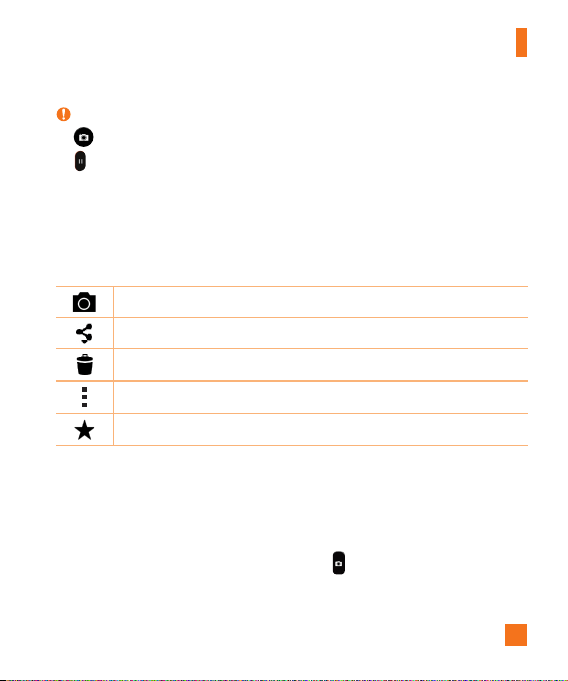
–Taptocaptureascreenshotwhilerecordingavideo.
X
–Taptopausetherecording.
After recording a video
Tapthevideothumbnailonthescreentoviewthelastvideoyourecorded.Thefollowingoptions
areavailable.
Taptorecordanothervideoimmediately.
Taptosendyourvideotoothersorshareitviaanyavailablesocialnetworkservices.
Taptodeletethevideo.
Taptoaccessadditionaloptions.
Taptoaddthevideotoyourfavorites
Multi-point Auto Focus
Whenyoutakeapicture,theMulti-pointAutoFocus(AF)functionoperatesautomaticallyand
allowsyoutoseeaclearimage.
Burst shot
Allowsyoutotakemultipleshotsquickly.Touchandhold .
58
Camera and Video
Panorama mode
Allowsyoutotakeapanoramicpicture.
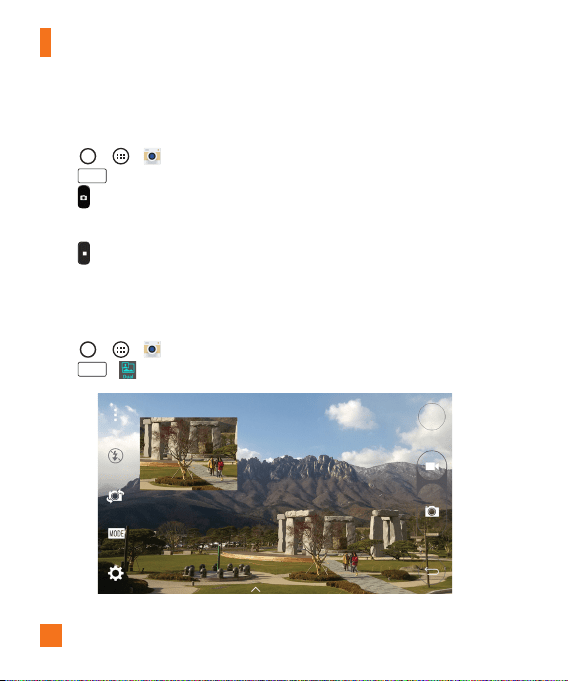
1 Tap > > .
2 Tap
MODE
>Panorama.
3 Tap tostarttakingthepanoramicpicture.
4 Panyourphoneslowlyinonedirection.
5 Makesurethatthefocusareaalignswiththeblueguidelinewhiletakingthephoto.
6 Tap tostoptakingthepanoramicpicture.
Dual
TheDualfeatureallowsyoutotakeapictureorrecordvideowiththefrontandrearcamerasat
thesametime.
1 Tap > > .
2 Tap
MODE
> .
59
Camera and Video
NOTE:
X Dragthesmallscreentomoveittoyourdesiredlocation.Touchandholdthesmallscreen
toresizeit.Taponthesmallscreentoalternatebetweenthetwocameras.
3 Tap tostopdualrecording.
8X Zooming
Whenusingtherearcameralens,youcanzoominoroutto8x.
NOTE:
X Useasteadyhand.ThisfeaturedoesnotworkwithsomefunctionsObjectsmaybe
overlappedwhentakingapictureoffast-movingsubjects.
Live Zoom
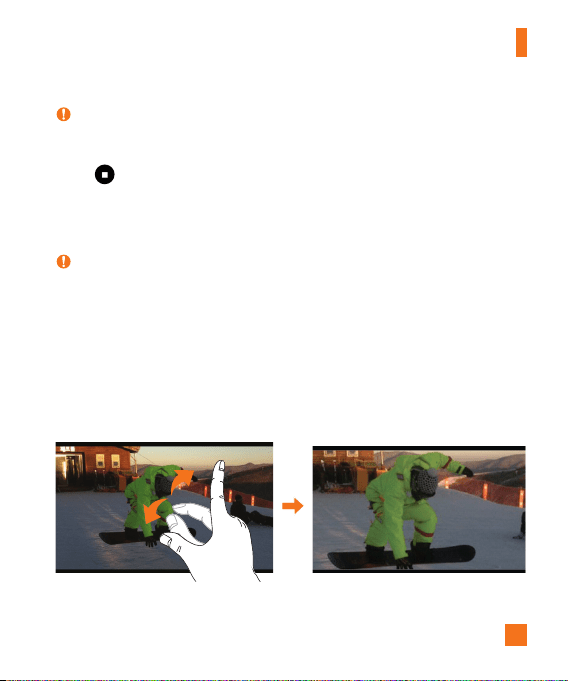
LiveZoomallowsyoutozoominoroutonaportionofavideothatisbeingplayedtomakethe
desiredsectionappearlargerorsmaller.
Whenviewingavideo,useyourindexfingerandthumbinapinchingorspreadingmotiontozoom
inorout.

60
Camera and Video
NOTE:
X Donotpresstoohard;thetouchscreenissensitiveenoughtopickupalight,butfirm
touch.
Dual Play
DualPlay(wiredorwirelessconnectiontotwodisplays)canberunonadifferentscreen.
NOTE:
X Connecttwodevicesusingawired(Slimport-HDMI)cableorwirelessly(Miracast).The
connectabledevicecanbeaTVoramonitorsupportedbyanHDMIcableorMiracast.The
GalleryandVideoappsaresupportedonDualPlay.Tap oncewhentwodisplaysarea
differentstatus(i.e.themonitorisplayingavideoandyourphone’svideoappisdisplaying
anemptyscreen),thenDualPlaywillstart.NotallvideosaresupportedbyDualPlay.Dual
Playoperatesat1280X720orhigherdisplayresolution.
Gallery
TheGalleryallowsyoutoviewandmanageallofyourpicturesandvideos.
•Tap >
> .
NOTE:
X Dependingonthesoftwareinstalled,somefileformatsmaynotbesupported.
X Somefilesmaynotplayproperlyduetotheirencoding.
61
Camera and Video
Viewing pictures
TheGallerydisplaysyourpicturesinfolders.Whensomeappssaveapicture,afolderis
automaticallycreatedtocontainthepicture.
Picturesaredisplayedinafolderbythedatetheywerecreated.Selectapicturetoviewitfull
screen.Scrollleftorrighttoviewthenextorpreviousimage.
Zooming in and out
Useoneofthefollowingmethodstozoominandoutonanimage:
•Double-tapanywheretozoominandout.
•Spreadtwofingersapartonanyplaceinthepicturezoomin.Pinchintozoomout.
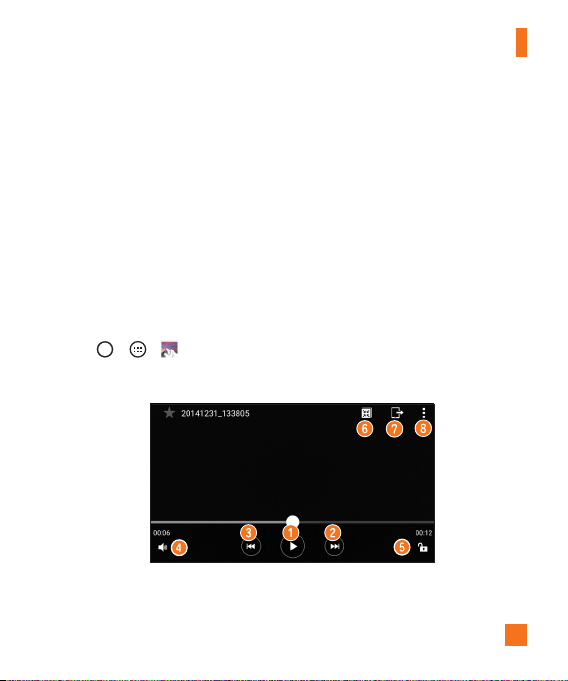
Video options
1 Tap > > .
2 Selectthevideoyouwanttowatch.
Thefollowingoptionsareavailable.
62
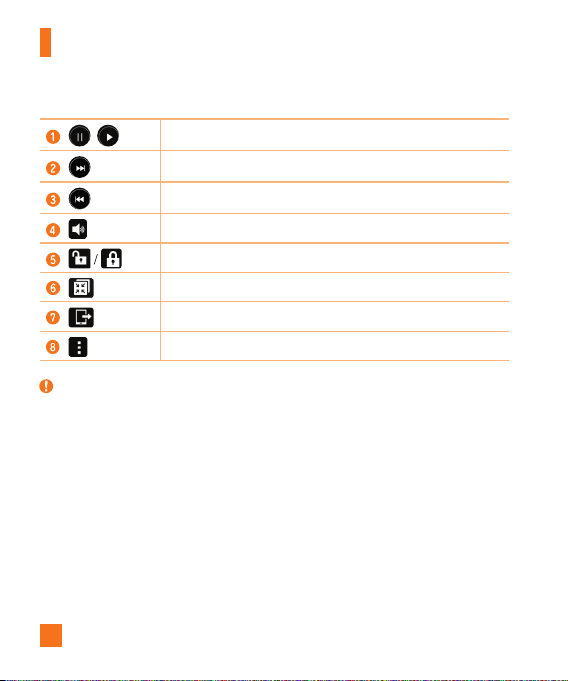
Camera and Video
/
Touchtopause/resumevideoplayback.
Touchtofast-forward10seconds.
Touchtorewind10seconds.
Touchtoadjustthevideovolume.
Touchtolock/unlockthescreen.
TouchtouseQSlidefortheVideosapp.
TaptoshareyourvideousingtheSmartSharefunction.
Taptoaccessadditionaloptions.
NOTE:
X Whileavideoisplaying,thefollowingoptionsareavailable:
• Slidetherightsideofthescreenupordowntoadjustthesound.
• Slidetheleftsideofthescreenupordowntoadjustthebrightness.
• Slideyourfingerfromlefttoright(orviceversa)tofast-forwardandrewind.
• Tapapointonthevideotimelinetopreviewthatportionofthevideoviaasmall
screen.Tapthesmallscreentojumptothatpartofthevideo.
63
Camera and Video
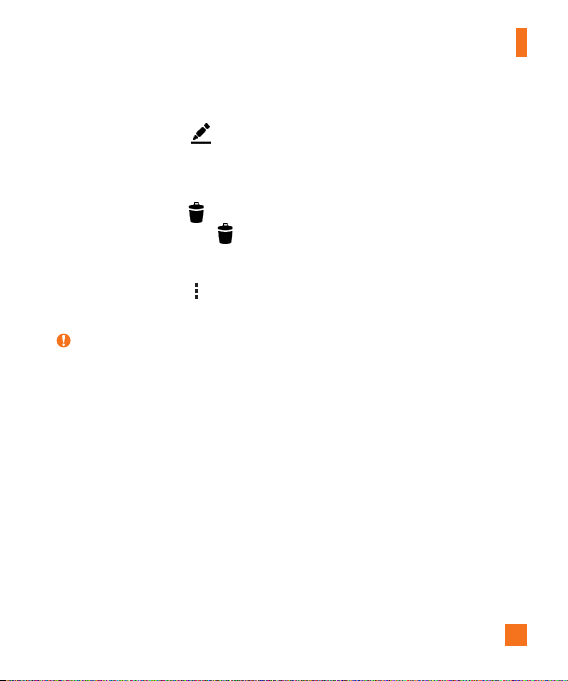
Editing photos
Whileviewingaphoto,tap .
Deleting photos/videos
Useoneofthefollowingmethods:
•Whileinafolder,tap ,selectthephotos/videosyouwanttodelete.ThentapDelete.
•Whileviewingaphoto,tap .
Setting wallpaper
Whileviewingaphoto,tap >Set image astosettheimageaswallpaperorassignittoa
contact.
NOTE:
X Dependingonthesoftwareinstalled,somefileformatsmaynotbesupported.
X Ifthefilesizeexceedstheavailablememory,anerrorcanoccurwhenyouopenfiles.
64
Multimedia
Music
Yourphonehasamusicplayerthatletsyouplayallyourfavoritetracks.
Playing a song
1 Tap > > .
2 TaptheSongstab.
3 Selectthesongyouwanttoplay.
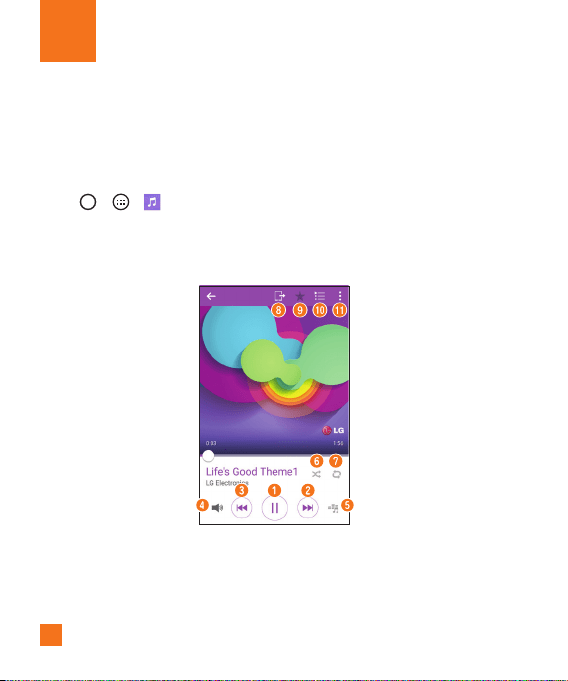
4 Thefollowingoptionsareavailable.
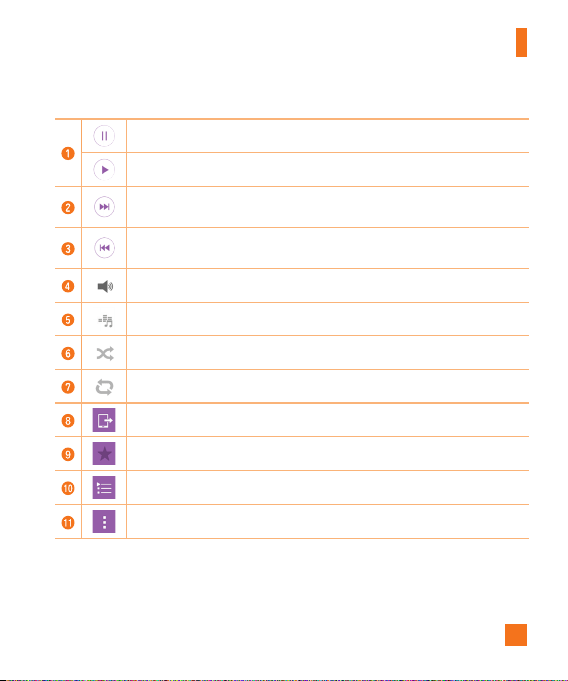
65
Multimedia
Taptopauseplayback.
Taptoresumeplayback.
Taptoskiptothenexttrackinthealbum,playlistorshufflelist.Touchandhold
tofast-forward.
Taptorestartthecurrenttrackorskiptotheprevioustrackinthealbum,playlist
orshufflelist.Touchandholdtorewind.
Taptoadjustthevolume.
Taptosetaudioeffects.
Taptoplaythecurrentplaylistinshufflemode(tracksareplayedinrandomorder).
Taptotogglethroughrepeatallsongs,repeatcurrentsongandrepeatoff.
TaptoshareyourmusicusingtheSmartSharefunction.
Taptoaddthesongtoyourfavorites.
Taptoopenthecurrentplaylist.
Taptoaccessadditionaloptions.

66
Multimedia
NOTE:
X Dependingonthesoftwareinstalled,somefileformatsmaynotbesupported.
X Ifthefilesizeexceedstheavailablememory,anerrorcanoccurwhenyouopenfiles.
X Musicfilecopyrightsmaybeprotectedbyinternationaltreatiesandnationalcopyright
laws.Therefore,itmaybenecessarytoobtainpermissionoralicensetoreproduceorcopy
music.Insomecountries,nationallawsprohibitprivatecopyingofcopyrightedmaterial.
Beforedownloadingorcopyingthefile,checkthenationallawsoftherelevantcountry
concerningtheuseofsuchmaterial.
67
Clock
TheClockappgivesyouaccesstotheAlarms,Timer,WorldclockandStopwatchfunctions.
Accessthesefunctionsbytappingthetabsacrossthetopofthescreenorswipinghorizontally
acrossthescreen.
Tap >
> .
Alarms
TheAlarmstaballowsyoutosetalarms.
1 Openthe app,thenselecttheAlarmstab.
2 Tap toaddanewalarm.
3 AdjustthesettingsasnecessaryandtapSave.
NOTE:
X Youcanalsotapanexistingalarmtoeditit.
Timer
TheTimertabcanalertyouwithanaudiblesignalwhenasetamountoftimehaspassed.
1 Openthe app,thenselecttheTimertab.
2 Setthedesiredtimeonthetimer.
3 TapStarttostartthetimer.
4 TapStoptostopthetimer.
Utilities
68
Utilities
World clock
TheWorldclocktaballowsyoutoeasilycheckthecurrenttimeinothercitiesaroundtheworld.
1 Openthe app,thenselecttheWorld clocktab.
2 Tap andselectthedesiredcity.
Stopwatch
TheStopwatchtaballowsyoutouseyourphoneasastopwatch.
1 Openthe app,thenselecttheStopwatchtab.
2 TaptheStartbuttontoinitiatethestopwatch.
•TaptheLapbuttontorecordlaptimes.
3 TaptheStopbuttontostopstopwatch.
Calculator
TheCalculatorappallowsyoutoperformmathematicalcalculationsusingastandardcalculator
orascientificcalculator.
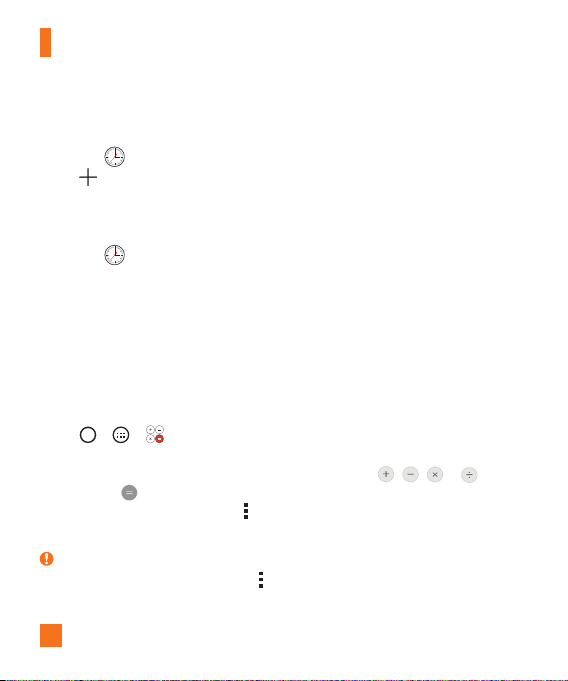
1 Tap > > .
2 Tapthenumberkeystoenternumbers.
3 Forsimplecalculations,tapthefunctionyouwanttoperform( , , or )
followedby .
4 Formorecomplexcalculations,tap >Scientific calculatorandselectthedesired
function.
NOTE:
X Tocheckthehistoryofcalculations,tap >Calculation history.
69
Utilities
Calendar
TheCalendarappallowsyoutotrackyourscheduleofevents.
1 Tap > > .
2 Tapthedateyouwanttoaddaneventto.Thentap .
3 EntertheeventdetailsandtapSavetosavetheevent.
Voice Search
Usethisapplicationtosearchthewebusingyourvoice.
1 Tap > >Google folder > .
2 SayakeywordorphrasewhenSpeak nowappearsonthescreen.Selectoneofthe
suggestedkeywordsthatappear.
NOTE:
X Thisapplicationmaynotbeavailabledependingontheregionorserviceprovider.
Downloads
Usethisapplicationtoseewhatfileshavebeendownloadedthroughyourapplications.
• Tap >
> .
NOTE:
X Thisapplicationmaynotbeavailabledependingontheregionorserviceprovider.
70
Utilities
LG SmartWorld
LGSmartWorldoffersanassortmentofexcitingcontent–fonts,themes,games,applications.
How to Get to LG SmartWorld from Your Phone
1 Tap > > .
2 TapSign inandenteryourusernameandpassword.Ifyouhavenotsignedupyet,tap
Registertocreateanaccount.
3 Browseanddownloadthecontentyouwant.
NOTE:
X YoumayincurdatafeechargeswhenusingyourmobilenetworktoaccessLGSmartWorld.
X LGSmartWorldmaynotbeavailableforallcarriersorinallcountries.
X What if there is no LG SmartWorld icon?
1 UsingamobileWebbrowseronyourdevice,accessLGSmartWorld(www.lgworld.
com)andselectyourcountry.
2 DownloadtheLGSmartWorldApp.
3 Runandinstallthedownloadedle.
4 AccessLGSmartWorldbytappingthe icon.
X Special benefits available for LG SmartWorld
• Personalizeyourdevicewithhomethemes,keyboardthemes,andfonts.
• EnjoyspecialpromotionsonlyofferedonLGSmartWorld.
• NotethatLGSmartWorldisonlyavailableforcertaindevices.Pleasecheckthe
www.lgworld.comformoreinformation.
71
Browsing the Web
Browser
UsethisapplicationtobrowsetheInternet.TheBrowsergivesyouafast,full-colorworldof
games,music,news,sports,entertainmentandmuchmore,rightonyourmobilephone.
NOTE:
X Additionalchargesapplywhenconnectingtotheseservicesanddownloadingcontent.
Checkdatachargeswithyournetworkprovider.
•Tap > > .
Using the Browser toolbar
Scrolltowardsthetopofthewebpagetoaccessthebrowsertoolbar.
Taptogobackonepage.
Taptogoforwardonepage.
TaptogototheHomepage.
Taptoopenanewwindow.
Taptoaccessyourbookmarks.
Viewing webpages
Taptheaddressfield,enterthewebaddressandtapGoonthekeyboard.
72
Browsing the Web
Opening a page
Togotoanewpage,tap > .
Togotoanotherwebpage,tap ,scrollupordown,andtapthepagetoselectit.
Searching the web by voice
Inthebrowser,taptheaddressfieldandthentap .Whenprompted,sayakeywordandselect
oneofthesuggestedkeywordsthatappear.
NOTE:
X Thisfeaturemaynotbeavailabledependingontheregionorserviceprovider.
Bookmarks
Tobookmarkthecurrentwebpage,tap >Add to bookmarks>OK.
Toopenabookmarkedwebpage,tap andselectthedesiredbookmark.
History
Tap >Historytoopenalistofrecentlyvisitedwebpages.Toclearallofyourhistory,tap
>Yes.
Using QSlide with the Browser
Usethisfeaturetomulti-taskwhilebrowsingtheinternet.
Toviewthebrowserinfullscreen,tap .
Toclosethebrowser,tap .
73
Browsing the Web
Chrome
UseChrometosearchforinformationandbrowsewebpages.
•Tap >
> .
NOTE:
X Thisapplicationmaynotbeavailable,dependingonyourregionandserviceprovider.
Viewing webpages
IntheChromebrowser,taptheaddressfield,andthenenterawebaddressorsearchcriteria.
Opening a page
Toopenanewpage,tab >New tab.
Togotoanotherwebpage,tap (iftabsaremergedwithapps)or atthetoprightcornerof
thebrowser(iftabsarenotmergedwithapps).Thentapthedesiredpagetoviewit.

74
Thissectionprovidesanoverviewofitemsyoucanchangeusingyourphone’sSystemSettings
menus.
Accessing the Settings menu:
•Tap >
touchandhold >All settings.
-or-
•Tap >
> .
Networks tab
Airplane mode
AirplaneMode(flightmode)allowsyoutousemanyofyourphone'sfeatures,suchasgames,and
music,whenyouareinanareawheremakingorreceivingcallsordatauseisprohibited.When
yousetyourphonetoAirplaneMode,itcannotsendorreceiveanycallsoraccessonlinedata.
Wi-Fi
AllowsyoutomanageyourWi-FiconnectionsandconnecttoavailableWi-Finetworks.
Bluetooth
AllowsyoutomanageyourtheBluetoothwirelessfeature.
Data Manager
Displaysthedatausageandallowsyoutosetapersonalizedmobiledatausagelimit.
Call
Thismenuallowsyoutoconfigurevariouscallsettings.
Settings

75
Settings
•Voicemail –Allowsyoutoselectyourcarrier’svoicemailservice.
•Fixed dialing numbers–Allowsyoutomanageandcompilealistofnumbersthatcan
becalledfromyourphone.YouneedyourPIN2,whichisavailablefromyouroperator.If
activated,onlynumbersinthefixeddiallistcanbecalledfromyourphone.
•Caller ID–Allowsyoutochoosehowtodisplayyournumberinoutgoingcalls.
•Incoming voice call pop-up–Displaysapop-upforanincomingcallwhenanappisinuse.
•Call reject–Allowsyoutosetthecalldeclinefunction.
•Decline with message–Whenyouwanttodeclineacall,youcansendaquickmessage
usingthisfunction.Thisisusefulifyouneedtodeclineacallduringameeting.
•Auto answer–Setsthetimebeforeaconnectedhands-freedeviceautomaticallyanswers
anincomingcall.
•Connection vibration–Vibratesyourphonewhentheotherpartyanswersthecall.
•TTY mode–AllowsyoutoactivateTTYmode.
•Hearing aids–Allowsyoutoturnonhearingaidcompatibility.
•Noise suppression –Suppressesbackgroundnoiseonyourdeviceduringacall.
•Voice clarity –Enhancesvoicequalityinnoisyenvironmentssoyoucanhearmoreclearly.
•Power key ends call–AllowsyoutousethePowerkeytoendcalls.
•Call duration–Allowsyoutoviewthecalldurationforvarioustypesofcalls.
•Sound settings–Allowsyoutocontrolthesoundsonthephone.
•Additional settings–Allowsyoutochangethefollowingsettings.
Share & connect
•NFC–YourphoneisanNFC-enabledcellmobilephone.NFC(NearFieldCommunication)is
awirelessconnectivitytechnologythatenablestwo-waycommunicationbetweenelectronic
devices.Itoperatesoveradistanceofafewcentimeters.Youcanshareyourcontentwith

76
Settings
anNFCtagoranotherNFCsupportdevicebysimplytappingitwithyourdevice.Ifyoutap
anNFCtagwithyourdevice,itdisplaysthetagcontentonyourdevice.
•Android Beam–Whenthisfeatureisturnedon,youcantransferappcontenttoanother
NFC-capabledevicebyholdingthedevicesclosetogether.Justbringthedevicetogether
(typicallybacktoback)andthentapyourscreen.Theappdetermineswhatgetsbeamed.
•SmartShare Beam–AllowsyoutoreceivemultimediacontentviaLGphonesandtablets.
•Media server–Allowsyoutosharethephone'sdisplayandsoundonyourTV.
•Miracast–AllowsyoutowirelesslymirrorthephonescreenandsoundontoaMiracast
dongleorTV.
•LG PC Suite–ConnectLGPCSuitewithyourphonetoeasilymanagemultimediacontent
andapps.
Tethering & networks
•USB tethering–AllowsyoutosharetheinternetconnectionwithyourcomputerviaaUSB
cable.
•Mobile Hotspot–Allowsyoutocreateahotspotandshareyourconnection.
•Bluetooth tethering–AllowsyoutoconnecttootherdevicesviaBluetooth.
•Help–DisplaysHelpinformationaboutUSBtethering,Mobilehotspot,andBluetooth
tethering.
•Mobile networks–Thismenuallowsyoutoconfigurevariousmobilenetworksettings.
•VPN–Fromyourphone,youcanadd,setup,andmanagevirtualprivatenetworks(VPNs)
thatallowyoutoconnectandaccessresourcesinsideasecuredlocalnetwork,suchasyour
corporatenetwork.

77
Settings
NOTE:
X YoumustsetascreenlockbeforeyoucanuseVPN.
•Emergency alerts-Ifemergencyalertsareissued,thosealertswillappearonthisscreen.
Sound tab
Sound profile
Allowsyoutosetyourphone'ssoundprofile.ChoosefromSound,Vibrate onlyandDo not
disturb.
Volume
Adjustthephone’svolumesettingstosuityourneedsandenvironment.
Vibration strength
Allowsyoutosetthevibrationstrengthforcalls,notificationsandtouchfeedback.
Ringtone
Allowsyoutosettheringtonesforcalls.Youcanalsoaddaringtonebytapping intheupper-
rightcornerofthescreen.
Default notification sound
Allowsyoutosetthenotificationsound.Youcanalsoaddanotificationsoundbytapping in
theupper-rightcornerofthescreen.
Sound with vibration
Checkmarktosetthephonetovibrateinadditiontotheringtonewhenyoureceivecalls.

78
Settings
Vibration type
Allowsyoutochoosethetypeofvibration.
Do not disturb
Allowsyoutosetaschedulewhentopreventinterruptionsfromnotifications.Youcansetto
allowcertainfeaturestointerruptwhenPriorityonlyisset.
Lock screen
Allowsyoutochooseifyouwanttoshoworhidenotificationsonthelockscreen.
Apps
Allowsyoutopreventappsfromdisplayingnotificationsorsetappstoshownotificationswith
prioritywhenDonotdisturbissettoPriorityonly.
Vibrate on tap
CheckmarktovibratewhentappingtheHometouchbuttonsandduringotherUIinteractions.
Sound effects
Taptosetthedialpadtouchtones,touchsoundsandscreenlocksound.
•Dialpad touch sounds –Checkmarktoplaytoneswhileusingthedialpad.
•Touch sound –Checkmarktoplayasoundwhenmakingascreenselections.
•Screen lock sound –Checkmarktoplayasoundwhenlockingandunlockingthescreen.
Message/call voice notifications
Tap toggleitOnorOff.Onallowsyourdevicetoreadoutincomingcallsandmessage
eventsautomatically.

79
Settings
Display tab
Home screen
•Select Home –SetHome(basiclayoutandsettingsforappsandwidgets)orEasyHome
(easierinterfaceforbeginnerswithasimplerlayoutandlargerfontsize)asthedefault
home.
•LG Health–AllowsyoutosetanadditionalHomescreenshowinghealthinfo.
•Theme –Setsthescreenthemeforyourdevice.YoucandownloadnewthemesfromLG
SmartWorld.
•Wallpaper –AllowsyoutosetthedesiredwallpaperforyourHomescreen.
•Screen swipe effect –Choosethedesiredtypeofeffecttodisplaywhenyouswipefrom
oneHomescreencanvastothenext.
•Allow Home screen looping –Displaysthefirstscreenafterthelastscreenwhen
scrollingtheHomescreen.
•Home backup & restore –Youcanbackupandrestoreapp/widgetlayoutsandtheHome
screenwallpaper.
Lock screen
•Select screen lock–Allowsyoutosetascreenlocktosecureyourphone.
•Smart Lock–SetstokeepyourphoneunlockedwhenyouhaveatrustedBluetoothdevice
connectedtoit,whenit'sinafamiliarlocationlikeyourhomeorwork,orwhenitrecognizes
yourface.
•Screen swipe effect–Setstheeffectusedwhenswipingthelockscreen.
•Wallpaper–AllowsyoutosetyourLockscreenwallpaper.
•Shortcuts–Allowsyoutochoosetheshortcutsavailableonthelockscreen.

80
Settings
•Weather animation–Checkmarktoshowweatheranimationonthelockscreenforthe
currentlocation.
•Contact info for lost phone–Allowsyoutodisplaytheownerinformationonthelock
screenincasethephoneislost.
•Lock timer–Setstheamountoftimebeforethescreenautomaticallylocksafterthe
screenhastimedout.
•Power button instantly locks–CheckmarktoinstantlylockthescreenwhenthePower/
LockKeyispressed.ThissettingoverridestheSecuritylocktimersetting.
Home touch buttons
SettheHometouchbuttonsdisplayedatthebottomofallscreens.Setwhichbuttonsare
displayed,theirpositiononthebarandwhattheylooklike.
Font type
Setsthetypeoffontusedforthephoneandmenus.
Font size
Setsthesizeofthefontdisplayedinthephoneandmenus.
Brightness
Adjuststhebrightnessofthescreen.Forbestbatteryperformance,usethedimmestcomfortable
brightness.
Notification LED
TaptheswitchtotoggleitOnorOff.OnactivatestheLEDlightforthenotificationsyouselect,in
thecoloryousetforeach.

81
Settings
Auto-rotate screen
Checkmarktosetthephonetoautomaticallyrotatethescreenbasedonthephoneorientation
(portraitorlandscape).
Screen timeout
Setsthedesiredscreentimeoutoption.
Screen mode
Allowsyoutosetthedesiredscreenmode.ChoosefromStandard,VividandNatural.
Screen-off effect
Selectthescreen-offeffectwhenlockingandturningoffthescreen.ChoosefromBlack hole,
Retro TV and Fade out.
Daydream
TaptheDaydreamswitchtotoggleitOnorOff.Onallowstosetascreensavertobedisplayed
whenthephoneissleepingwhiledockedand/orcharging.
Auto-adjust screen tone
Checkmarktoadjustthescreenbrightnessautomaticallywithananalysisofimagecolor.
General tab
Language & input
UsetheLanguage&inputsettingstoselectthelanguageforthetextonyourphoneandto
configuretheon-screenkeyboard,includingwordsyouaddedtoitsdictionary.

82
Settings
•Language –Setsthelanguagetouseonyourphone.
•Spelling correction–Allowsspellingcorrectionwhenusingtheon-screenkeyboard.
•Default –Allowsyoutosetthedefaultkeyboardtousewhenenteringtext.
•Android Keyboard (AOSP)-CheckmarktoselecttheAndroidKeyboardtoentertext.Tap
tochangethekeyboard'ssettings.
•Google voice typing –CheckmarktoselectGooglevoicetypingtoentertext.Tap to
changetheGooglevoicesettings.
•Keeper FastFill–Thisfeatureallowsyoutomanageandsecureyourpasswordandprivate
information.
•LG Keyboard–CheckmarktoselecttheLGKeyboardtoentertext.Taptochangethe
keyboard'ssettings.
•Voice Search–Setsvoicesearchoptions.
•Text-to-speech output –Setsthepreferredspeechengineandspeechrate(veryslowto
veryfast).Alsoplaysashortdemonstrationofspeechsynthesis.
•Pointer speed –Allowsyoutosetthepointerspeedusingaslidebar.
Location
AllowsyoutomanagelocationsservicestodetermineyourapproximatelocationusingGPS,Wi-Fi
andmobilenetworks.
•Mode –AllowsyoutochoosealocationmodefromHigh accuracy (GPS and networks),
Battery saving (Networks only) and Device sensors only (GPS only).
•Recent Location Request–Displaysapplicationsandservicesthathaverecently
requestedyourlocationinformation.
•Camera –Checkmarktotagphotosorvideoswiththelocationtheyweretakenat.
•Google Location History –AllowsyoutoviewandmanageyourGooglelocationhistory.

83
Settings
Accounts & sync
Permitsapplicationstosynchronizedatainthebackground,whetherornotyouareactively
workinginthem.DeactivatingtheAuto-sync dataoptioncansavebatterypowerandlower(but
noteliminate)datausage.
Accessibility
UsetheAccessibilitysettingstoconfigureaccessibilityplug-insyouhaveinstalledonyourphone.
•TalkBack–AllowsyoutosetuptheTalkBackfunction,whichassistspeoplewithimpaired
visionbyprovidingverbalfeedback.Tap totoggleitOnorOff.TapSettingsatthe
bottomofthescreentoadjusttheTalkBacksettings.
•Font size–Allowsyoutochangethefontsize.
•Invert colors–Allowsyoutoinvertthescreenandcontentcolors.
•Color adjustment–Allowsyoutoviewthescreenwithgreatercolorcontrast.Toadjust
thecontrastandhue,activatethefeatureanddragyourfingeracrossthescreen.
•Touch zoom–Allowsyoutotriple-tapthescreentozoominandout.
•Message/call voice notifications–Tap totoggleitOnorOff.Onallowsyour
devicetoreadoutincomingcallsandmessagesautomatically.
•Screen shade–Checkmarktodimthescreen'sbacklightforadarkercontrast.
•Accessibility shortcut –Tap totoggleitOnorOff.Onquicklyenablesaccessibility
features.
•Text-to-speech output–Setsthetext-to-speechpreferredengineandspeechratesetting.
Alsoplaysashortdemonstrationofspeechsynthesis.Text-to-speechoutputprovidesan
audiblereadoutoftext,forexample,thecontentsoftextmessages,andtheCallerIDfor
incomingcalls.
•Audio type–Setstheaudiotype.ChooseMono orStereo.

84
Settings
•Sound balance–Routesthesoundthroughboththerightandleftchannelwhenaheadset
isconnected.Tomanuallysettheaudioroute,movetheslideronthesoundbalancebarto
setit.
•Notification LED–AllowsyoutoturnonLEDlightforincomingcallsandnotifications.
•Flash alerts–Checkmarktoallowaflashtoblinkforincomingcallsandnotifications.
•Turn off all sounds–Checkmarktoturnoffallsounds.
•Captions–Tap totoggleitOnorOff.Oncustomizescaptionsettingsforthosewith
hearingimpairments.SetLanguage, Font size,andCaption style.
•Touch feedback time–Setsthetouchandfeedbacktime.ChoosefromShort, Medium,
orLong.
•Touch assistant–Tap totoggleitOnorOff.Onallowsyoutoreplacethehardware
keyswithaTouchassistantboardthatisdisplayedonthescreen.Tap toaccessPower
button,Homebutton,Volume downbutton,Volume upbutton,andthe1/2(page)button
(Screen capturebutton,Accessibilitybutton,Voice Matebutton,andPinchbutton).
Drawa"C"ontheboardtoautomaticallydisplaytheDialtab.Drawan"M"ontheboardto
automaticallydisplaytheMessagingapp.Drawa"W"ontheboardtoautomaticallylaunch
thebrowserapp.Drawan"S"ontheboardtoautomaticallydisplaythesettingsapp.Draw
an"L"ontheboardtolockthescreen.Drawa"e"ontheboardtoaccesstheEmailapp.
•Screen timeout–Setsthescreentimeout.Choosefrom15 sec, 30 sec, 1 min, 2 min, 5
min, and10 min.
•Touch control areas–Tap totoggleitOnorOff.Onallowsyoutoselectanareaof
thescreentolimittouchcontrol.PresstheVolumeDownKeyandtaptheHomeButtonat
thesametimetoactivateanddeactivatethisfeature.
•Auto-rotate screen–Checkmarktoallowthephonetorotatethescreendependingonthe
physicalphoneorientation(portraitorlandscape).
•Password voice confirmation–Checkmarktoallowvoiceconfirmationofcharacters
whenenteringpasswords.

85
Settings
•Power key ends call–CheckmarksothatyoucanendvoicecallsbypressingthePower/
LockKey.
•Accessibility settings shortcut–Setsquick,easyaccesstoselectedfeatureswhenyou
triple-taptheHomeButton.ChoosefromOff, Show all, TalkBack, Invert colors, Touch
assistant,andAccessibility settings.
•One-touch input –Checkmarktoenableone-touchinput.Itallowseachfingertouchto
enteraletterorcharacterontheLGkeyboard.
•Switch access –Allowsyoutointeractwithyourdeviceusingoneormoreswitchesthat
worklikekeyboardkeys.Thismenucanbehelpfulforuserswithmobilitylimitationsthat
preventthemfrominteractingdirectlywiththeyourdevice.TapSettingsatthebottomof
thescreentoadjusttheSwitchaccesssettings.
•Keeper FastFill–AllowsyoutoturntheKeeperFastFillfeatureon,whichsecurelyand
quicklyauto-fillsyourlogincredentialsonyourwebsitesandmobileapps.
One-handed operation
•Dial keypad –Checkmarktoenableyoutomovethedialkeypadtotherightorleftsideof
thedevice.Simplytapthearrowtomoveittoonesideortheother.
•LG keyboard –Checkmarktoenableyoutomovethekeyboardtotherightorleftsideof
thedevice.Simplytapthearrowtomoveittoonesideortheother.
•Lock screen –CheckmarktoenableyoumovethePINLockscreenkeypadtotherightor
leftsideofthephone.Simplytapthearrowtomoveittoonesideortheother.
•Help –Displaysinformationregardingone-handedoperation.
Shortcut key
GetquickaccesstoappsbypressingandholdingtheVolumeKeyswhenthescreenisoffor
locked.Taptheswitch intheupper-rightcornerofthescreentotoggleitOnorOff.

86
Settings
Security
•Lock screen–Allowsyoutosetyourlockscreensettings.
•Content lock –SelectlocktypestolockfilesinGallery.ChoosefromPasswordor
Pattern.
•Encrypt phone–Allowsyoutoencryptdataonthephoneforsecurity.Youwillberequired
toenteraPINorpasswordtodecryptyourphoneeachtimeyoupoweriton.
•Encrypt SD card storage –AllowsyoutoencrypttheSDcardandmakedataunavailable
tootherdevices.
•Set up SIM card lock-AllowsyoutosetaPINtoberequiredtousethephone.Youcan
alsochangethePINaftersettingit.
•Password typing visible –Checkmarktobrieflyshoweachcharacterofpasswordsasyou
enterthemsothatyoucanseewhatyouenter.
•Phone administrators –Allowsyoutoviewordeactivatephoneadministrators.
•Unknown sources –Allowsyoutoinstallnon-Playstoreapplications.
•Verify apps –Disalloworwarnbeforeinstallationofappsthatmaycauseharm.
•Storage type –Displaysthestoragetypeforcredentials.
•Trusted credentials –DisplaystrustedCAcertificates.
•Install from storage –Allowsyoutoinstallencryptedcertificates.
•Clear credentials –Deletesallsecurecertificatesandrelatedcredentialsanderasesthe
securestorage'sownpassword.
•Trust agents –ViewordeactivateTrustagents.
•Screen pin –Thisfeatureallowsyoutolockyourdevicesothatthecurrentusercanonly
accessthepinnedapp.Thisisusefulforuserswithchildren.

87
Settings
Gestures
•Answer an incoming call –Checkmarktoenableyoutobringthephonetoyourearto
automaticallyanswertheincomingcall.
•Fade out ringtone –Checkmarktoallowyoutopickupthephonefromtheflatsurfaceto
fadeouttheincomingcallringtone.
•Silence incoming calls –Checkmarktoallowyoutoflipthephonetosilenceincoming
calls.
•Snooze or stop alarm –Checkmarktoallowyoutosimplyflipthephonetosnoozeorstop
thealarm.
•Pause video –Checkmarktoallowyoutosimplyflipthephonetopausethecurrently
playingvideo.
•Help –DisplaysaHelpguideonhowtousetheGesturesfeaturesofyourphone.
•Motion sensor calibration –Allowsyoutoimprovetheaccuracyofthetiltandspeedof
thesensor.
QuickCircle case
Thismenuallowsyoutoselectappstobeuseddirectlyonthecoverinsmallviewusing
QuickCircle.
Dual window
AllowsyoutoconfiguretheDualWindowfeature.
•Split view –Checkmarktoallowyoutotapalinkonthefullscreenorattachmentsfrom
emailstoopenDualwindow.
•Help –DisplaytipsforusingDualwindow.

88
Settings
Date & time
UsetheDate×ettingstosethowdateswillbedisplayed.Youcanalsousethesesettings
tosetyourowntimeandtimezoneratherthanobtainingthecurrenttimefromthemobile
network.
Storage
•Internal Storage–Allowsyoutoviewinformationabouttheinternalstorageusage.
•SD Card–AllowsyoutoviewinformationaboutstorageuseontheSDcard.
Battery
•Battery information –TheBatterychargeinformationisdisplayedonabatterygraphic
alongwiththepercentageoftheremainingchargeanditsstatus.
•Battery usage –Displaysthebatteryusagelevelandbatteryusedetails.Taponeofthe
itemstoseemoredetailedinformation.
•Battery percentage on status bar –Checkmarktodisplaythebatterylevelpercentageon
theStatusbarnexttotheBatteryicon.
•Battery saver –TaptheBatterySaverswitch totoggleitOnorOff.Youcanalsoset
whentoturnbatterysaveron.
•Help –DisplayshelpinformationfortheBatterysaverfeature.
Smart cleaning
Allowsyoutomanageunusedappsanddata.
Apps
Viewandmanageyourapplications.

89
Settings
Default message app
Thismenuallowsyoutosetyourdefaultmessagingappasdesired.
Backup & reset
Thismenuallowsyoutoback-upyourdata,automaticallyrestoredata,anderaseallthedataon
yourphone.
•Back up my data –AllowsyoutobackupyoursettingsandapplicationdatatotheGoogle
server.
•Backup account –Allowsyoutobackupyouraccount.
•Automatic restore –Allowsyoutorestoreyoursettingsandapplicationdatawhenthe
applicationsarereinstalledontoyourdevice.
•LG Backup service –Backsupallinformationonthedeviceandrestoresitintheeventof
datalossorreplacement.
•Factory data reset –Resetyoursettingstothefactorydefaultvaluesanddeleteallyour
data,includinguserdatasuchaspicturesandvideos.
Printing
•Cloud Print–AllowsyoutomanageyourGoogleCloudPrintsettingsandprintjobs.
About phone
Displayinformationaboutthenetwork,phoneidentity,battery,hardware,software,legal,and
regulationsandsafety.

90
For Windows OS
LGPCSuitehelpsyoumanagemediacontentsandapplicationsinyourphonebyallowingyouto
connecttoyourphonetoyourPC.
With the LG PC Suite software, you can...
•Manageandplayyourmediacontents(music,movie,pictures)onyourPC.
•Sendmultimediacontentstoyourdevice.
•Synchronizesdata(schedules,contacts,bookmarks)inyourdeviceandPC.
•Backuptheapplicationsinyourdevice.
•Updatethesoftwareinyourdevice.
•PlaymultimediacontentsofyourPCfromotherdevice
NOTE:
X Somefunctionsmaynotbeavailable,dependingonthemodel.
X YoucanusetheHelpmenufromtheapplicationtofindouthowtousetheLGPCSuite
software.
Installing the LG PC Suite Software
TodownloadtheLGPCSuitesoftware,pleasedothefollowing:
1 Gotowww.lg.com.
2 GotoSUPPORT>MOBILE SUPPORT>PC Sync.
3 SelectthemodelinformationandclickGO.
4 Scrolldown,selectthePC SYNC tab> Windows > DOWNLOAD todownloadLGPC
Suite.
PC software (LG PC Suite)

91
PC software (LG PC Suite)
System Requirements for LG PC Suite software
•OS:WindowsXP(Servicepack3)32bit,WindowsVista,Windows7,Windows8
•CPU:1GHzorhigherprocessors
•Memory:512MBorhigherRAMs
•Graphiccard:1024x768resolution,32bitcolororhigher
•HDD:500MBormorefreeharddiskspace(Morefreeharddiskspacemaybeneeded
dependingonthevolumeofdatastored.)
•Requiredsoftware:LGUniteddrivers,WindowsMediaPlayer10orlater.
NOTE: LG United USB Driver
X TheLGUnitedUSBdriverisrequiredtoconnectanLGdeviceandPC.Itisinstalled
automaticallywhenyouinstalltheLGPCSuitesoftwareapplication.
For Mac OS
With the LG PC Suite software, you can...
•Manageandplayyourmediacontents(music,movie,pictures)onyourPC.
•Sendmultimediacontentstoyourdevice.
•Synchronizesdata(schedules,contacts,bookmarks)inyourdeviceandPC.
NOTE:
X Somefunctionsmaynotbeavailable,dependingonthemodel.
X YoucanusetheHelpmenufromtheapplicationtofindouthowtousetheLGPCSuite
software.

92
PC software (LG PC Suite)
Installing the LG PC Suite Software
TodownloadtheLGPCSuitesoftware,pleasedothefollowing:
1 Gotowww.lg.com.
2 GotoSUPPORT>MOBILE SUPPORT>PC Sync.
3 SelectthemodelinformationandclickGO.
4 Scrolldown,selectthePC SYNCtab>Mac OS>DOWNLOADtodownloadLGPC
Suite.
System Requirements for LG PC Suite software
•OS:MacOSX(10.6.8)orhigher
•Memory:2GBRAMorhigher
•Graphicscard:1024x768screenresolutionorhigherand32-bitcolor
•Harddisc:Storageof500MBorhigher(Additionalspacemayberequiredfordata)
•Requiredsoftware:LGUnitedMobiledriver
NOTE: LG United USB Driver
X TheLGUnitedUSBdriverisrequiredtoconnectanLGdeviceandPC.Itisinstalled
automaticallywhenyouinstalltheLGPCSuitesoftwareapplication.
93
Phone Software Update
Thisfeatureallowsyoutoupdatethefirmwareofyourphonetothelatestversion
convenientlyfromtheinternetwithouttheneedtovisitaservicecenter.
Formoreinformationonhowtousethisfunction,pleasevisit:
http://www.lg.com/common/index.jsp.
Asthemobilephonefirmwareupdaterequirestheuser’sfullattentionfortheduration
oftheupdateprocess,pleasemakesuretocheckallinstructionsandnotesthatappear
ateachstepbeforeproceeding.PleasenotethatremovingtheUSBcableduringthe
upgrademayseriouslydamageyourmobilephone.
LG Mobile Phone Software Update via Over-the-Air (OTA)
Thisfeatureallowsyoutoupdatethefirmwareofyourphonetothenewerversion
convenientlyviaOTAwithoutconnectingtheUSBcable.Thisfeatureisonlyavailableif
andwhenLGmakesthenewerversionofthefirmwareavailableforyourdevice.
First,youcancheckthesoftwareversiononyourmobilephone:
Tap > >
>Generaltab>About phone>Software info.
Toperformthephonesoftwareupdate,
tap > >
>Generaltab>About
phone >Update Center
>
Software Update
>
Update now.
NOTE
X Yourpersonaldata—includinginformationaboutyourGoogleaccountandanyother
accounts,yoursystem/applicationdataandsettings,anydownloadedapplicationsand
yourDRMlicence—mightbelostintheprocessofupdatingyourphone'ssoftware.
Therefore,LGrecommendsthatyoubackupyourpersonaldatabeforeupdatingyour
phone'ssoftware.LGdoesnottakeresponsibilityforanylossofpersonaldata.
Software Update

94
Trademarks
Trademarks
•Copyright2015LGElectronics,Inc.Allrightsreserved.LGandtheLGlogoareregistered
trademarksofLGGroupanditsrelatedentities.
•Bluetooth
®
isaregisteredtrademarkoftheBluetoothSIG,Inc.worldwide.
•Wi-Fi
®
,theWi-FiCERTIFIEDlogo,andtheWi-FilogoareregisteredtrademarksoftheWi-Fi
Alliance.
•Allothertrademarksandcopyrightsarethepropertyoftheirrespectiveowners.
DivX HD
ThisDivXCertified
®
devicehaspassedrigoroustestingtoensureitplaysDivX
®
video.
ToplaypurchasedDivXmovies,firstregisteryourdeviceatvod.divx.com.Findyourregistration
codeintheDivXVODsectionofyourdevicesetupmenu.
DivX Certified
®
to play DivX
®
video up to HD 720p, including premium content.
DivX
®
, DivX Certified
®
and associated logos are trademarks of DivX, LLC and are used
under license.
NOTICE
•Wi-Fi
®
andWi-FiProtectedAccess®areregisteredtrademarksoftheWi-FiAlliance.
Dolby Digital Plus
ManufacturedunderlicensefromDolbyLaboratories.Dolbyandthedouble-Dsymbol
aretrademarksofDolbyLaboratories.

95
Pleasechecktoseeifanyproblemsyouhaveencounteredwiththephonearedescribedinthis
sectionbeforetakingthephoneinforaserviceorcallingtheCustomerServiceCenter.
Q&A
Q
HowdoIviewthelistofoutgoingcalls,incomingcallsandmissedcalls?
A
TapthePhone Button andtapthe
Call logs
tab.
Q
Whyistheconnectioninconsistentornotaudibleincertainareas?
A
Whenthefrequencyenvironmentisunstableinacertainarea,connectionmaybeinconsistent
andinaudible.Relocatetoanotherareaandtryagain.
Q
Whyistheconnectioninconsistentorabruptlydisconnectsevenwhenestablished?
A
Whenfrequencyisunstableorweak,oriftherearetoomanyusers,aconnectionmaybecut
offevenafteritwasestablished.Pleasetryagainlaterorattemptagainafterrelocatingto
otherareas.
Q
Whydoesthephoneheatup?
A
Thephonemaygethotwhenthereisaverylongcallduration,whengamesareplayedor
evenwhensurfingtheInternetforalongtime.Thishasnoeffectuponthelifeoftheproduct
orperformance.
Q
Whydoesthebatteryrunoutsoquicklyduringnormaluse?
A
Thismaybeduetotheuserenvironment,alargenumberofcallsoraweaksignal.
Q
WhyisnonumberdialedwhenanAddressBookentryisrecalled?
A
CheckthatthenumberhasbeenstoredcorrectlybyusingtheAddressbookSearchfeature.
Re-storethem,ifnecessary.
Q
Thescreengotfrozen.HowcanIsolvethisproblem?
A
PressandholdthePower/Lock Key andVolume Down Keyforabout10secondstoreset
yourphone.Toturnyourphoneoff,pressandholdthePower/Lock Key andtheVolume
Down Keyforabout20seconds.Ifitstilldoesnotwork,pleasecontacttheservicecenter.

96
Thereareavarietyofaccessoriesavailableforyourmobilephone,someofwhichmaybesold
separately.Youcanselecttheseoptionsaccordingtoyourpersonalcommunicationrequirements.
VisityourlocalAT&Tstoreorwww.att.com/wirelessaccessoriesforspecificofferings.
NOTE
X AlwaysusegenuineLGaccessories.Failuretodothismayinvalidateyourwarranty.
X Accessoriesmaybedifferentindifferentregions;pleasecheckwithourregionalservice
companyoragentforfurtherenquiries.
Accessories

97
Troubleshooting
Thischapterlistssomeproblemsyoumightencounterwhenusingyourphone.Someproblems
requireyoutocallyourserviceprovider,butmostareeasytofixyourself.
Message Possible causes Possible corrective measures
SIMorUSIM
carderror
ThereisnoSIMorUSIM
cardinthephoneoritis
insertedincorrectly.
MakesurethattheSIMcardiscorrectly
inserted.
Nonetwork
connection/
Dropped
network
Signalisweakoryou
areoutsidethecarrier
network.
Movetowardawindoworintoan
openarea.Checkthenetworkoperator
coveragemap.
Operatorappliednew
services.
CheckwhethertheSIMcardismorethan
6~12monthsold.Ifso,changeyourSIM
cardatyournetworkprovider’snearest
branch.Contactyourserviceprovider.
Codesdonot
match
Tochangeasecurity
code,mustconfirmthe
newcodebyre-entering
it.
Ifyouforgetthecode,contactyour
serviceprovider.
Thetwocodesyou
entereddonotmatch.

98
Troubleshooting
Message Possible causes Possible corrective measures
Noapplications
canbeset
Notsupportedbyservice
providerorregistration
required.
Contactyourserviceprovider.
Callsnot
available
Dialingerror Newnetworknotauthorized.
NewSIMorUSIMcard
inserted.
Checkfornewrestrictions.
Pre-paidchargelimit
reached.
Contactserviceproviderorresetlimit
withPIN2.
Phonecannot
beturnedon
On/Offkeypressedtoo
briefly.
PresstheOn/Offkeyforatleasttwo
seconds.
Batteryisnotcharged.
Chargebattery.Checkthecharging
indicatoronthedisplay.
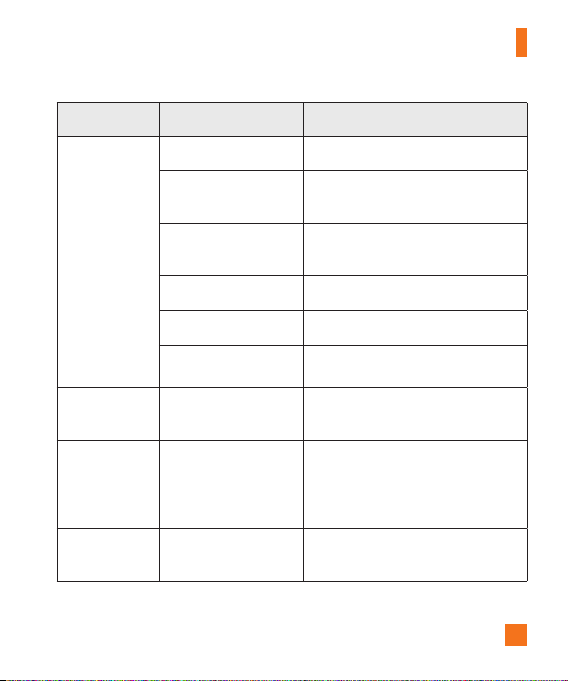
99
Troubleshooting
Message Possible causes Possible corrective measures
Chargingerror
Batteryisnotcharged. Chargebattery.
Outsidetemperatureis
toohotorcold.
Makesurephoneischargingatanormal
temperature.
Contactproblem
Checkthechargeranditsconnectionto
thephone.
Novoltage Plugthechargerintoadifferentoutlet.
Chargerdefective Replacethecharger.
Wrongcharger UseonlyoriginalLGaccessories.
Numbernot
allowed.
TheFixeddialingnumber
functionison.
ChecktheSettingsmenuandturnthe
functionoff.
Impossibleto
receive/send
textmessages
&photos
Memoryfull Deletesomemessagesfromyourphone.
Filesdonot
open
Unsupportedfileformat Checkthesupportedfileformats.

100
Troubleshooting
Message Possible causes Possible corrective measures
Thescreendoes
notturnon
whenIreceive
acall.
Proximitysensorproblem
Ifyouuseaprotectiontapeorcase,make
sureithasnotcoveredtheareaaround
theproximitysensor.Makesurethatthe
areaaroundtheproximitysensorisclean.
Nosound Vibrationmode
Checkthesettingsstatusinthesound
menutomakesureyouarenotin
vibrationorsilentmode.
Hangsupor
freezes
Intermittentsoftware
problem
Trytoperformasoftwareupdatethrough
thewebsite.
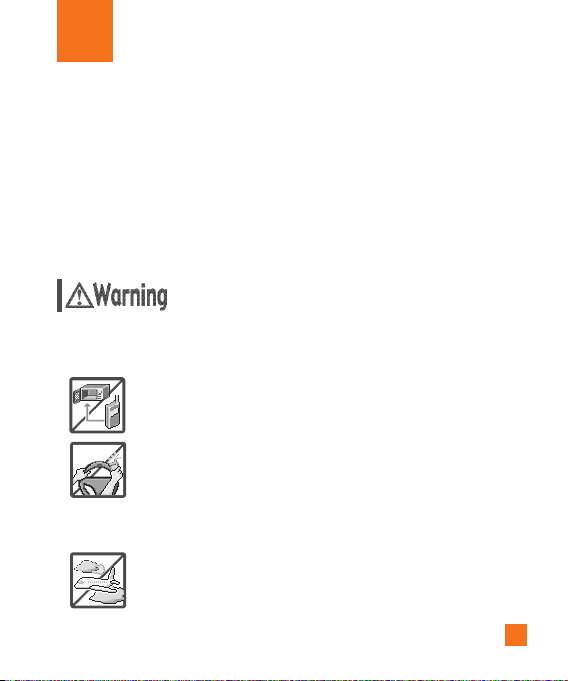
101
For Your Safety
Important Information
Thisuserguidecontainsimportantinformationontheuseandoperationofthisphone.Pleasereadall
theinformationcarefullyforoptimalperformanceandtopreventanydamagetoormisuseofthephone.
Anychangesormodificationsnotexpresslyapprovedinthisuserguidecouldvoidyourwarrantyforthis
equipment.Anychangesormodificationsnotexpresslyapprovedbythemanufacturercouldvoidthe
user’sauthoritytooperatetheequipment.
Before You Start
Violationoftheinstructionsmaycauseseriousinjuryordeath.
WARNING:ThisproductcontainschemicalsknowntotheStateofCaliforniatocausecancerandbirth
defectsorotherreproductiveharm.
Wash hands after handling.
X
Neverplaceyourphoneinamicrowaveovenasitwillcausethebattery
toexplode.
X
Whenridinginacar,donotleaveyourphoneorsetupthehands-free
kitneartheairbag.Ifwirelessequipmentisimproperlyinstalledand
theairbagisdeployed,youmaybeseriouslyinjured.
X
Yourphonecontainsaninternalbattery.Donotdisposeofyourphone
nearfireorwithhazardousorflammablewaste.Youshoulddisposeof
yourphoneinaccordancewithallapplicablelaws.
X
Donotusethephoneinareaswhereitsuseisprohibited.(Forexample:
aircraft)
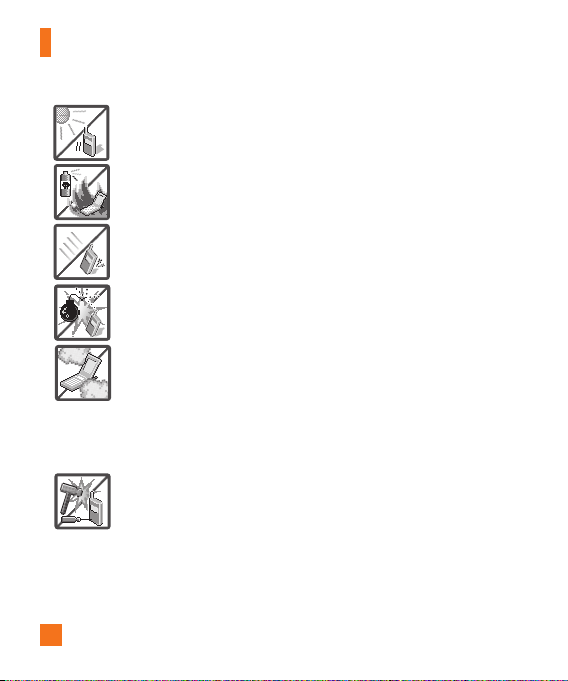
102
For Your Safety
X
Donotexposethebatterychargeroradaptertodirectsunlightoruseit
inplaceswithhighhumidity,suchasabathroom.
X
Donotuseharshchemicals(suchasalcohol,benzene,thinners,etc.)or
detergentstocleanyourphone.Thiscouldcauseafire.
X
Donotdrop,strike,orshakeyourphoneseverely.Itmayharmthe
internalcircuitboardsofthephone.
X
Donotuseyourphoneinhighexplosiveareasasthephonemay
generatesparks.
X
Donotdamagethepowercordbybending,twisting,pulling,orheating.
Donotusetheplugifitislooseasitmaycauseelectricshockorfire.
X
Donotplaceanyheavyitemsonthepowercord.Donotallowthe
powercordtobecrimpedasitmaycauseelectricshockorfire.
X
Donothandlethephonewithwethandswhileitisbeingcharged.It
maycauseanelectricshockorseriouslydamageyourphone.
X
Donotdisassemblethephone.
X
Donotplaceoranswercallswhilechargingthephoneasitmayshort-
circuitthephoneand/orcauseelectricshockorfire.
X
Donotattempttorepairormodifythedeviceyourself.Yourdevice
isequippedwithaninternalrechargeablebatterywhichshouldbe
replacedonlybyLGoranauthorizedLGrepaircenter.
Youshouldneverattempttoopenordisassemblethisdeviceyourself
anddoingsomaycausedamagethatvoidsyourwarranty.
103
For Your Safety
X
Makesurethatnosharp-edgeditems,suchasanimal’steethornails,
comeintocontactwiththebattery.Thiscouldcauseafire.
X
Becarefulthatchildrendonotswallowanyparts(suchasearphone,
connectionpartsofthephone,etc.)Thiscouldcauseasphyxiationor
suffocationresultinginseriousinjuryordeath.
X
Unplugthepowercordandchargerduringlightningstormstoavoid
electricshockorfire.
X
OnlyusechargersprovidedbyLG.Thewarrantywillnotbeappliedto
productsprovidedbyothersuppliers.
X
Onlyauthorizedpersonnelshouldservicethephoneanditsaccessories.
Faultyinstallationorservicemayresultinaccidentsandconsequently
invalidatethewarranty.
X
Anemergencycallcanbemadeonlywithinaservicearea.Foran
emergencycall,makesurethatyouarewithinaserviceareaandthat
thephoneisturnedon.
X
Yourphoneisanelectronicdevicethatgeneratesheatduringnormal
operation.Extremelyprolonged,directskincontactintheabsenceof
adequateventilationmayresultindiscomfortorminorburns.Therefore,
usecarewhenhandlingyourphoneduringorimmediatelyafter
operation.
X
Useandstoreyourphoneintemperaturesbetween0°C/32°Fand
45°C/113°F,ifpossible.Exposingyourphonetoextremelyloworhigh
temperaturesmayresultindamage,malfunction,orevenexplosion.

104
For Your Safety
X
Thebackcoverofthisproductappliesa“self-healing”technology,
whichself-repairsminorscratchesinjustafewminutes.Minor
scratchesarethosecausedbyordinaryandnormaluseofthephone.
Scratchescausedbyabrasivesurface,misuse,includingbutnotlimited
tointentionalscratches,anddamagescausedbyafallordropping
theproduct,maynotdisappear.The“self-healing”resultsmayvary
dependingontheextentofthedamageaswellasotherconditions.Any
warrantyonthe“self-healing”isherebyexpresslyexcluded.
X
Theflexibilityofthisproductislimitedtowithstandordinaryandnormal
use.Thisphonemaybebentflatupto180degreesforalimitedperiod
oftimebutshouldnotbebentinward.Damagescausedbymisuse,
includingbutnotlimitedtointentionallybendingorcontinuallyexerting
forceontheproduct,mayleadtopermanentdamagetothedisplayand/
orotherpartsandfunctionsofthephone.

105
For Your Safety
HAC statement
Thisphonehasbeentestedandratedforusewithhearingaidsforsomeofthewireless
technologiesthatituses.However,theremaybesomenewerwirelesstechnologiesusedin
thisphonethathavenotbeentestedyetforusewithhearingaids.Itisimportanttotrythe
differentfeaturesofthisphonethoroughlyandindifferentlocations,usingyourhearingaidor
cochlearimplant,todetermineifyouhearanyinterferingnoise.Consultyourserviceprovider
orthemanufacturerofthisphoneforinformationonhearingaidcompatibility.Ifyouhave
questionsaboutreturnorexchangepolicies,consultyourserviceproviderorphoneretailer.
FCC RF Exposure Information
WARNING! Read this information before operating the phone.
InAugust1996,theFederalCommunicationsCommission(FCC)oftheUnitedStates,
withitsactioninReportandOrderFCC96-326,adoptedanupdatedsafetystandardfor
humanexposuretoRadioFrequency(RF)electromagneticenergyemittedbyFCCregulated
transmitters.Thoseguidelinesareconsistentwiththesafetystandardpreviouslysetby
bothU.S.andinternationalstandardsbodies.Thedesignofthisphonecomplieswiththe
FCCguidelinesandtheseinternationalstandards.
Body-worn Operation
Thisdevicewastestedfortypicalusewiththebackofthephonekept0.39inches(1.0
cm)fromthebody.TocomplywithFCCRFexposurerequirements,aminimumseparation
distanceof0.39inches(1.0cm)mustbemaintainedbetweentheuser’sbodyandthe
backofthephone.Anybelt-clips,holsters,andsimilaraccessoriescontainingmetallic
componentsmaynotbeused.Avoidtheuseofaccessoriesthatcannotmaintain0.39
inches(1.0cm)distancebetweentheuser’sbodyandthebackofthephoneandhavenot
beentestedforcompliancewithFCCRFexposurelimits.

106
For Your Safety
Caution
Useonlythesuppliedantenna.Useofunauthorizedantennas(ormodificationstothe
antenna)couldimpaircallquality,damagethephone,voidyourwarrantyand/orviolateFCC
regulations.
Don'tusethephonewithadamagedantenna.Adamagedantennacouldcauseaminorskin
burn.Contactyourlocaldealerforareplacementantenna.
Consumer Information About Radio Frequency Emissions
Your wireless phone, which contains a radio transmitter and receiver, emits radio frequency
energy during use. The following consumer information addresses commonly asked
questions about the health effects of wireless phones.
Are wireless phones safe?
Scientificresearchonthesubjectofwirelessphonesandradiofrequency(“RF”)energyhas
beenconductedworldwideformanyyears,andcontinues.IntheUnitedStates,theFood
andDrugAdministration(“FDA”)andtheFederalCommunicationsCommission(“FCC”)
setpoliciesandproceduresforwirelessphones.TheFDAissuedawebsitepublication
onhealthissuesrelatedtocellphoneusagewhereitstates,“Thescientificcommunity
atlarge…believesthattheweightofscientificevidencedoesnotshowanassociation
betweenexposuretoradiofrequency(RF)fromcellphonesandadversehealthoutcomes.
Stillthescientificcommunitydoesrecommendconductingadditionalresearchtoaddress
gapsinknowledge.ThatresearchisbeingconductedaroundtheworldandFDAcontinues
tomonitordevelopmentsinthisfield.YoucanaccessthejointFDA/FCCwebsiteathttp://
www.fda.gov(under“c”inthesubjectindex,selectCellPhones>Research).Youcanalso
contacttheFDAtoll-freeat(888)463-6332or(888)INFO-FDA.InJune2000,theFDA
enteredintoacooperativeresearchanddevelopmentagreementthroughwhichadditional
scientificresearchisbeingconducted.TheFCCissueditsownwebsitepublicationstating
that“thereisnoscientificevidencethatprovesthatwirelessphoneusagecanleadto
canceroravarietyofotherproblems,includingheadaches,dizzinessormemoryloss.”This
publicationisavailableathttp://www.fcc.gov/cgb/cellular.htmlorthroughtheFCCat(888)
225-5322or(888)CALL-FCC.

107
For Your Safety
What does “SAR” mean?
In1996,theFCC,workingwiththeFDA,theU.S.EnvironmentalProtectionAgency,and
otheragencies,establishedRFexposuresafetyguidelinesforwirelessphonesinthe
UnitedStates.Beforeawirelessphonemodelisavailableforsaletothepublic,itmust
betestedbythemanufacturerandcertifiedtotheFCCthatitdoesnotexceedlimits
establishedbytheFCC.OneoftheselimitsisexpressedasaSpecificAbsorptionRate,or
“SAR.”SARisameasureoftherateofabsorptionofRFenergyinthebody.TestsforSAR
areconductedwiththephonetransmittingatitshighestpowerlevelinalltestedfrequency
bands.Since1996,theFCChasrequiredthattheSARofhandheldwirelessphonesnot
exceed1.6wattsperkilogram,averagedoveronegramoftissue.
AlthoughtheSARisdeterminedatthehighestpowerlevel,theactualSARvalueofa
wirelessphonewhileoperatingcanbelessthanthereportedSARvalue.Thisisbecause
theSARvaluemayvaryfromcalltocall,dependingonfactorssuchasproximitytoacell
site,theproximityofthephonetothebodywhileinuse,andtheuseofhands-freedevices.
FormoreinformationaboutSARs,seetheFCC’sOETBulletins56and65athttp://www.fcc.
gov/Bureaus/Engineering_Technology/Documents/bulletinsorvisittheCellularTelecom-
municationsIndustryAssociationwebsiteathttp://www.ctia.org/consumer_info/index.cfm/
AID/10371.Youmayalsowishtocontactthemanufacturerofyourphone.
Can I minimize my RF exposure?
IfyouareconcernedaboutRF,thereareseveralsimplestepsyoucantaketominimize
yourRFexposure.Youcan,ofcourse,reduceyourtalktime.Youcanplacemoredistance
betweenyourbodyandthesourceoftheRF,astheexposureleveldropsoffdramatically
withdistance.TheFDA/FCCwebsitestatesthat“hands-freekitscanbeusedwithwireless
phonesforconvenienceandcomfort.ThesesystemsreducetheabsorptionofRFenergy
intheheadbecausethephone,whichisthesourceoftheRFemissions,willnotbe
placedagainstthehead.Ontheotherhand,ifthephoneismountedagainstthewaistor
otherpartofthebodyduringuse,thenthatpartofthebodywillabsorbmoreRFenergy.
WirelessphonesmarketedintheU.S.arerequiredtomeetsafetyrequirementsregardless
ofwhethertheyareusedagainsttheheadoragainstthebody.Eitherconfigurationshould
resultincompliancewiththesafetylimit.”Also,ifyouuseyourwirelessphonewhilein
acar,youcanuseaphonewithanantennaontheoutsideofthevehicle.Youshouldalso
readandfollowyourwirelessphonemanufacturer’sinstructionsforthesafeoperationof
yourphone.

108
For Your Safety
Do wireless phones pose any special risks to children?
TheFDA/FCCwebsitestatesthat“thescientificevidencedoesnotshowadangertousers
ofwirelesscommunicationdevices,includingchildren.”TheFDA/FCCwebsitefurtherstates
that“somegroupssponsoredbyothernationalgovernmentshaveadvisedthatchildren
bediscouragedfromusingwirelessphonesatall”.Forexample,theStewartReportfrom
theUnitedKingdom[“UK”]madesucharecommendationinDecember2000.Inthisreport
agroupofindependentexpertsnotedthatnoevidenceexiststhatusingacellphone
causesbraintumorsorotherilleffects.[TheUK’s]recommendationtolimitcellphoneuse
bychildrenwasstrictlyprecautionary;itwasnotbasedonscientificevidencethatany
healthhazardexists.AcopyoftheUK’sleafletisavailableathttp://www.dh.gov.uk(search
“mobile”),oryoucanwriteto:NRPB,Chilton,Didcot,OxonOX11ORQ,UnitedKingdom.
CopiesoftheUK’sannualreportsonmobilephonesandRFareavailableonlineatwww.
iegmp.org.ukandhttp://www.hpa.org.uk/radiation/(search“mobile”).Parentswhowishto
reducetheirchildren’sRFexposuremaychoosetorestricttheirchildren’swirelessphone
use.
Where can I get further information about RF emissions?
Forfurtherinformation,seethefollowingadditionalresources(websitescurrentasofApril
2005):
U.S. Food and Drug Administration
FDAConsumermagazine
November-December2000
Telephone:(888)INFO-FDA
http://www.fda.gov(Under“c”inthesubjectindex,selectCellPhones>Research.)
U.S. Federal Communications Commission
44512thStreet,S.W.
Washington,D.C.20554
Telephone:(888)225-5322
http://www.fcc.gov/oet/rfsafety
Independent Expert Group on Mobile Phones
http://www.iegmp.org.uk

109
For Your Safety
Royal Society of Canada Expert Panels on Potential Health Risks of Radio Frequency Fields
from Wireless Telecommunication Devices
283SparksStreet
Ottawa,OntarioK1R7X9
Canada
Telephone:(613)991-6990
http://www.rsc.ca/index.php?page=Expert_Panels_RF&Lang_id=120
World Health Organization
AvenueAppia20
1211Geneva27
Switzerland
Telephone:01141227912111
http://www.who.int/mediacentre/factsheets/fs193/en/
International Commission on Non-Ionizing Radiation Protection
c/oBundesamtfurStrahlenschutz
IngolstaedterLandstr.1
85764Oberschleissheim
Germany
Telephone:0114918883332156
http://www.icnirp.de
American National Standards Institute
1819LStreet,N.W.,6thFloor
Washington,D.C.20036
Telephone:(202)293-8020
http://www.ansi.org
National Council on Radiation Protection and Measurements
7910WoodmontAvenue,Suite800
Bethesda,MD20814-3095
Telephone:(301)657-2652
http://www.ncrponline.org

110
For Your Safety
Engineering in Medicine and Biology Society, Committee on Man and Radiation (COMAR) of
the Institute of Electrical and Electronics Engineers
http://ewh.ieee.org/soc/embs/comar/
Consumer Information on SAR
(Specific Absorption Rate)
Thismodelphonemeetsthegovernment'srequirementsforexposuretoradiowaves.
Yourwirelessphoneisaradiotransmitterandreceiver.Itisdesignedandmanufactured
nottoexceedtheemissionlimitsforexposuretoRadioFrequency(RF)energysetbythe
FederalCommunicationsCommissionoftheU.S.Government.Theselimitsarepartof
comprehensiveguidelinesandestablishpermittedlevelsofRFenergyforthegeneral
population.Theguidelinesarebasedonstandardsthatweredevelopedbyindependent
scientificorganizationsthroughperiodicandthoroughevaluationofscientificstudies.The
standardsincludeasubstantialsafetymargindesignedtoassurethesafetyofallpersons,
regardlessofageandhealth.
Theexposurestandardforwirelessmobilephonesemploysaunitofmeasurementknown
astheSpecificAbsorptionRate,orSAR.TheSARlimitsetbytheFCCis1.6W/kg.Testsfor
SARareconductedusingstandardoperatingpositionsspecifiedbytheFCCwiththephone
transmittingatitshighestcertifiedpowerlevelinalltestedfrequencybands.AlthoughSAR
isdeterminedatthehighestcertifiedpowerlevel,theactualSARlevelofthephonewhile
operatingcanbewellbelowthemaximumvalue.Becausethephoneisdesignedtooperate
atmultiplepowerlevelstouseonlythepowerrequiredtoreachthenetwork,ingeneral,
thecloseryouaretoawirelessbasestationantenna,thelowerthepoweroutput.
Beforeaphonemodelisavailableforsaletothepublic,itmustbetestedandcertified
totheFCCthatitdoesnotexceedthelimitestablishedbythegovernment-adopted
requirementforsafeexposure.Thetestsareperformedinpositionsandlocations(e.g.,at
theearandwornonthebody)asrequiredbytheFCCforeachmodel.
ThehighestSARvaluesare:
*Head:0.86W/kg
*Body(Body-worn/Hotspot):0.79W/kg
(Bodymeasurementsdifferamongphonemodels,dependinguponavailableaccessoriesand
FCCrequirements).

111
For Your Safety
WhiletheremaybedifferencesbetweenSARlevelsofvariousphonesandatvarious
positions,theyallmeetthegovernmentrequirementforsafeexposure.
TheFCChasgrantedanEquipmentAuthorizationforthismodelphonewithallreportedSAR
levelsevaluatedasincompliancewiththeFCCRFemissionguidelines.SARinformationon
thismodelphoneisonfilewiththeFCCandcanbefoundundertheDisplayGrantsection
ofhttp://www.fcc.gov/oet/fccidaftersearchingonFCCIDZNFH950.Additionalinformation
onSpecificAbsorptionRates(SAR)canbefoundontheCellularTelecommunications
IndustryAssociation(CTIA)websiteathttp://www.ctia.org/.
*IntheUnitedStatesandCanada,theSARlimitformobilephonesusedbythepublic
is1.6watts/kg(W/kg)averagedoveronegramoftissue.Thestandardincorporatesa
substantialmarginofsafetytogiveadditionalprotectionforthepublicandtoaccountfor
anyvariationsinmeasurements.
FCC Hearing-Aid Compatibility (HAC) Regulations for Wireless
Devices
OnJuly10,2003,theU.S.FederalCommunicationsCommission(FCC)ReportandOrder
inWTDocket01-309modifiedtheexceptionofwirelessphonesundertheHearingAid
CompatibilityActof1988(HACAct)torequiredigitalwirelessphonesbecompatible
withhearing-aids.TheintentoftheHACActistoensurereasonableaccessto
telecommunicationsservicesforpersonswithhearingdisabilities.
Whilesomewirelessphonesareusednearsomehearingdevices(hearingaidsand
cochlearimplants),usersmaydetectabuzzing,humming,orwhiningnoise.Somehearing
devicesaremoreimmunethanotherstothisinterferencenoise,andphonesalsovaryinthe
amountofinterferencetheygenerate.
Thewirelesstelephoneindustryhasdevelopedaratingsystemforwirelessphones,to
assisthearingdeviceuserstofindphonesthatmaybecompatiblewiththeirhearing
devices.Notallphoneshavebeenrated.Phonesthatareratedhavetheratingontheirbox
oralabellocatedonthebox.
Theratingsarenotguarantees.Resultswillvarydependingontheuser'shearingdevice
andhearingloss.Ifyourhearingdevicehappenstobevulnerabletointerference,youmay
notbeabletousearatedphonesuccessfully.Tryingoutthephonewithyourhearingdevice
isthebestwaytoevaluateitforyourpersonalneeds.
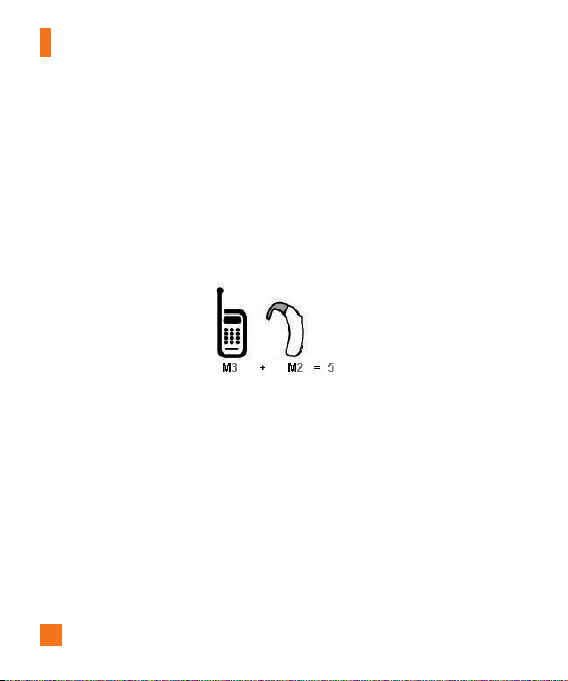
112
For Your Safety
M-Ratings:PhonesratedM3orM4meetFCCrequirementsandarelikelytogenerateless
interferencetohearingdevicesthanphonesthatarenotlabeled.M4isthebetter/higherof
thetworatings.
T-Ratings:PhonesratedT3orT4meetFCCrequirementsandarelikelytogenerateless
interferencetohearingdevicesthanphonesthatarenotlabeled.T4isthebetter/higherof
thetworatings.
Hearingdevicesmayalsoberated.Yourhearingdevicemanufacturerorhearinghealth
professionalmayhelpyoufindthisrating.Higherratingsmeanthatthehearingdeviceis
relativelyimmunetointerferencenoise.Thehearingaidandwirelessphoneratingvalues
arethenaddedtogether.Asumof5isconsideredacceptablefornormaluse.Asumof6is
consideredforbestuse.
Intheaboveexample,ifahearingaidmeetstheM2levelratingandthewirelessphone
meetstheM3levelrating,thesumofthetwovaluesequalM5.Thisshouldprovidethe
hearingaiduserwith“normalusage”whileusingtheirhearingaidwiththeparticular
wirelessphone.“Normalusage”inthiscontextisdefinedasasignalqualitythat’s
acceptablefornormaloperation.
TheMmarkisintendedtobesynonymouswiththeUmark.TheTmarkisintendedtobe
synonymouswiththeUTmark.TheMandTmarksarerecommendedbytheAlliancefor
TelecommunicationsIndustriesSolutions(ATIS).TheUandUTmarksarereferencedin
Section20.19oftheFCCRules.TheHACratingandmeasurementprocedurearedescribed
intheAmericanNationalStandardsInstitute(ANSI)C63.19standard.
ToensurethattheHearingAidCompatibilityratingforyourphoneismaintained,secondary
transmitterssuchasBluetoothandWLANcomponentsmustbedisabledduringacall.

113
For Your Safety
For information about hearing aids and digital wireless phones
Wireless Phones and Hearing Aid Accessibility
http://www.accesswireless.org/
Gallaudet University, RERC
http://tap.gallaudet.edu/Voice/
FCC Hearing Aid Compatibility and Volume Control
http://www.fcc.gov/cgb/dro/hearing.html
The Hearing Aid Compatibility FCC Order
http://hraunfoss.fcc.gov/edocs_public/attachmatch/FCC-03-168A1.pdf
Hearing Loss Association of America [HLAA]
http://hearingloss.org/content/telephones-and-mobile-devices
Caution:
Avoid potential hearing loss.
Prolongedexposuretoloudsounds(includingmusic)isthemostcommoncauseof
preventablehearingloss.Somescientificresearchsuggeststhatusingportableaudio
devices,suchasportablemusicplayersandcellulartelephones,athighvolumesettings
forlongdurationsmayleadtopermanentnoise-inducedhearingloss.Thisincludestheuse
ofheadphones(includingheadsets,earbudsandBluetooth®orotherwirelessdevices).
Exposuretoveryloudsoundhasalsobeenassociatedinsomestudieswithtinnitus(a
ringingintheear),hypersensitivitytosoundanddistortedhearing.Individualsusceptibility
tonoise-inducedhearinglossandotherpotentialhearingproblemsvaries.
Theamountofsoundproducedbyaportableaudiodevicevariesdependingonthenature
ofthesound,thedevice,thedevicesettingsandtheheadphones.Youshouldfollowsome
commonsenserecommendationswhenusinganyportableaudiodevice:
X
Setthevolumeinaquietenvironmentandselectthelowestvolumeatwhichyoucan
hearadequately.
X
Whenusingheadphones,turnthevolumedownifyoucannothearthepeoplespeaking
nearyouorifthepersonsittingnexttoyoucanhearwhatyouarelisteningto.

114
For Your Safety
X
Donotturnthevolumeuptoblockoutnoisysurroundings.Ifyouchoosetolistentoyour
portabledeviceinanoisyenvironment,usenoise-cancellingheadphonestoblockout
backgroundenvironmentalnoise.
X
Limittheamountoftimeyoulisten.Asthevolumeincreases,lesstimeisrequired
beforeyourhearingcouldbeaffected.
X
Avoidusingheadphonesafterexposuretoextremelyloudnoises,suchasrockconcerts,
thatmightcausetemporaryhearingloss.Temporaryhearinglossmightcauseunsafe
volumestosoundnormal.
X
Donotlistenatanyvolumethatcausesyoudiscomfort.Ifyouexperienceringinginyour
ears,hearmuffledspeechorexperienceanytemporaryhearingdifficultyafterlistening
toyourportableaudiodevice,discontinueuseandconsultyourdoctor.
TIA Safety Information
ThefollowingisthecompleteTIASafetyInformationforwirelesshandheldphones.
Exposure to Radio Frequency Signal
Yourwirelesshandheldportablephoneisalowpowerradiotransmitterandreceiver.When
ON,itreceivesandsendsoutRadioFrequency(RF)signals.
InAugust,1996,theFederalCommunicationsCommissions(FCC)adoptedRFexposure
guidelineswithsafetylevelsforhandheldwirelessphones.Thoseguidelinesareconsistent
withthesafetystandardspreviouslysetbybothU.S.andinternationalstandardsbodies:
ANSIC95.1(1992)*
NCRPReport86(1986)
ICNIRP(1996)
*AmericanNationalStandardsInstitute;NationalCouncilonRadiationProtectionand
Measurements;InternationalCommissiononNon-IonizingRadiationProtection
Thosestandardswerebasedoncomprehensiveandperiodicevaluationsoftherelevant
scientificliterature.Forexample,over120scientists,engineers,andphysiciansfrom
universities,governmenthealthagencies,andindustryreviewedtheavailablebodyof
researchtodeveloptheANSIStandard(C95.1).

115
For Your Safety
ThedesignofyourphonecomplieswiththeFCCguidelines(andthosestandards).
Antenna Care
Useonlythesuppliedoranapprovedreplacementantenna.Unauthorizedantennas,
modifications,orattachmentscoulddamagethephoneandmayviolateFCCregulations.
TipsonEfficientOperation
For your phone to operate most efficiently:
Don’ttouchtheantennaunnecessarilywhenthephoneisinuse.Contactwiththeantenna
affectscallqualityandmaycausethephonetooperateatahigherpowerlevelthan
otherwiseneeded.
Electronic Devices
MostmodernelectronicequipmentisshieldedfromRFsignals.However,certainelectronic
equipmentmaynotbeshieldedagainsttheRFsignalsfromyourwirelessphone.
Pacemakers
TheHealthIndustryManufacturersAssociationrecommendsthataminimumseparationof
six(6)inchesbemaintainedbetweenahandheldwirelessphoneandapacemakertoavoid
potentialinterferencewiththepacemaker.Theserecommendationsareconsistentwiththe
independentresearchbyandrecommendationsofWirelessTechnologyResearch.Persons
withpacemakers:
X
ShouldALWAYSkeepthephonemorethansix(6)inchesfromtheirpacemakerwhenthe
phoneisturnedON;
X
Shouldnotcarrythephoneinabreastpocket;
X
Shouldusetheearoppositethepacemakerto
minimizethepotentialforinterference;

116
For Your Safety
X
ShouldturnthephoneOFFimmediatelyifthereisanyreasontosuspectthat
interferenceistakingplace.
Hearing Aids
Somedigitalwirelessphonesmayinterferewithsomehearingaids.Intheeventofsuch
interference,youmaywanttoconsultyourserviceprovider(orcallthecustomerservice
linetodiscussalternatives).
Other Medical Devices
Ifyouuseanyotherpersonalmedicaldevice,consultthemanufacturerofyourdeviceto
determineifitisadequatelyshieldedfromexternalRFenergy.Yourphysicianmaybeable
toassistyouinobtainingthisinformation.
Health Care Facilities
TurnyourphoneOFFinhealthcarefacilitieswhenanyregulationspostedintheseareas
instructyoutodoso.Hospitalsorhealthcarefacilitiesmayuseequipmentthatcouldbe
sensitivetoexternalRFenergy.
Vehicles
RFsignalsmayaffectimproperlyinstalledorinadequatelyshieldedelectronicsystemsin
motorvehicles.Checkwiththemanufactureroritsrepresentativeregardingyourvehicle.
Youshouldalsoconsultthemanufacturerofanyequipmentthathasbeenaddedtoyour
vehicle.
Posted Facilities
TurnyourphoneOFFinanyfacilitywherepostednoticessorequire.
Aircraft
FCCregulationsprohibitusingyourphonewhileintheair.SwitchOFFyourphonebefore
boardinganaircraft.

117
For Your Safety
Blasting Areas
Toavoidinterferingwithblastingoperations,turnyourphoneOFFwhenina“blastingarea”
orinareasposted:“Turnofftwo-wayradio”.Obeyallsignsandinstructions.
Potentially Explosive Atmosphere
TurnyourphoneOFFwheninanyareawithapotentiallyexplosiveatmosphereandobey
allsignsandinstructions.Sparksinsuchareascouldcauseanexplosionorfireresultingin
bodilyinjuryorevendeath.
Areaswithapotentiallyexplosiveatmosphereareoften,butnotalwaysmarkedclearly.
Potentialareasmayinclude:fuelingareas(suchasgasolinestations);belowdeckonboats;
fuelorchemicaltransferorstoragefacilities;vehiclesusingliquefiedpetroleumgas(such
aspropaneorbutane);areaswheretheaircontainschemicalsorparticles(suchasgrain,
dust,ormetalpowders);andanyotherareawhereyouwouldnormallybeadvisedtoturn
offyourvehicleengine.
For Vehicles Equipped with an Air Bag
Anairbaginflateswithgreatforce.DONOTplaceobjects,includingeitherinstalledor
portablewirelessequipment,intheareaovertheairbagorintheairbagdeploymentarea.
Ifin-vehiclewirelessequipmentisimproperlyinstalledandtheairbaginflates,serious
injurycouldresult.
Part 15.19 statement
Thisdevicecomplieswithpart15oftheFCCrules.Operationissubjecttothefollowing
twoconditions:
(1)Thisdevicemaynotcauseharmfulinterference,and
(2)Thisdevicemustacceptanyinterferencereceived,includinginterferencethatmaycause
undesiredoperation.

118
For Your Safety
Part 15.21 statement
Changesormodificationsthatarenotexpresslyapprovedbythemanufacturerfor
compliancecouldvoidtheuser’sauthoritytooperatetheequipment.
Part 15.105 statement
ThisequipmenthasbeentestedandfoundtocomplywiththelimitsforaclassB
digitaldevice,pursuanttoPart15oftheFCCrules.Theselimitsaredesignedtoprovide
reasonableprotectionagainstharmfulinterferenceinaresidentialinstallation.This
equipmentgenerates,uses,andcanradiateradiofrequencyenergyand,ifnotinstalled
andusedinaccordancewiththeinstructions,maycauseharmfulinterferencetoradio
communications.However,thereisnoguaranteethatinterferencewillnotoccurina
particularinstallation.Ifthisequipmentdoescauseharmfulinterferencetoradioor
televisionreception,whichcanbedeterminedbyturningtheequipmentoffandon,theuser
isencouragedtotrytocorrecttheinterferencebyoneormoreofthefollowingmeasures:
X
Reorientorrelocatethereceivingantenna.
X
Increasetheseparationbetweentheequipmentandreceiver.
X
Connecttheequipmentintoanoutletonacircuitdifferentfromthattowhichthe
receiverisconnected.
X
Consultthedealeroranexperiencedradio/TVtechnicianforhelp.

119
For Your Safety
Safety Information
Pleasereadandobservethefollowinginformationforsafeandproperuseofyourphone
andtopreventdamage.
Violation of the instructions may cause minor or serious damage to the product.
X
Donotdisassembleoropencrush,bendordeform,punctureorshred.
X
Donotmodifyorremanufacture,attempttoinsertforeignobjectsintothebattery,
immerseorexposetowaterorotherliquids,exposetofire,explosionorotherhazard.
Suchconditionsmaypresenttheriskoffireorexplosion.
X
Onlyusethebatteryforthesystemforwhichitisspecified.
X
Onlyusethebatterywithachargingsystemthathasbeenqualifiedwiththesystem
perCTIACertificationRequirementsforBatterySystemCompliancetoIEEE1725.Useof
anunqualifiedbatteryorchargermaypresentariskoffire,explosion,leakage,orother
hazard.
X
Replacethebatteryonlywithanotherbatterythathasbeenqualifiedwiththesystem
perthisstandard,IEEE-Std-1725.Useofanunqualifiedbatterymaypresentariskof
fire,explosion,leakageorotherhazard.Onlyauthorizedserviceprovidersshallreplace
battery(Ifthebatteryisnon-userreplaceable).
X
Batteryusagebychildrenshouldbesupervised.
X
Avoiddroppingthephone.Ifthephoneisdropped,especiallyonahardsurface,andthe
usersuspectsdamage,takeittoaservicecenterforinspection.
X
Atleast,oneoftheAuthenticationmethodsmaybeimplemented.(e.g.H/W,S/W,
Mechanical,Hologram,etc.)
X
Improperbatteryusemayresultinafire,explosionorotherhazard.

120
For Your Safety
Charger and Adapter Safety
X
Thechargerandadapterareintendedforindooruseonly.
X
Insertthebatterychargerverticallyintothewallpowersocket.
X
OnlyusetheLG-approvedbatterycharger.Otherwise,youmaycauseseriousdamageto
yourphone.
X
Usethecorrectadapterforyourphonewhenusingthebatterychargerabroad.
Battery Information and Care
X
Alwaysunplugthechargerfromthewallsocketafterthephoneisfullychargedtosave
unnecessarypowerconsumptionofthecharger.
X
Pleasereadthemanualofspecifiedchargeraboutchargingmethod.
X
Donotdamagethepowercordbybending,twisting,orheating.Donotusetheplugifit
islooseasitmaycauseelectricshockorfire.
X
Donotplaceanyheavyitemsonthepowercord.Donotallowthepowercordtobe
crimpedasitmaycauseelectricshockorfire.
X
Unplugthepowercordpriortocleaningyourphone,andcleanthepowerplugpinwhen
it’sdirty.Whenusingthepowerplug,ensurethatit’sfirmlyconnected.Ifnot,itmay
causeexcessiveheatorfire.Ifyouputyourphoneinapocketorbagwithoutcovering
thereceptacleofthephone(powerplugpin),metallicarticles(suchasacoin,paperclip
orpen)mayshort-circuitthephone.Alwayscoverthereceptaclewhennotinuse.
X
Rechargethebatteryafterlongperiodsofnon-usetomaximizebatterylife.Batterylife
willvaryduetousagepatternandenvironmentalconditions.
X
PleaseuseonlyanapprovedchargingaccessorytochargeyourLGphone.Improper
handlingofthechargingport,aswellastheuseofanincompatiblecharger,maycause
damagetoyourphoneandvoidthewarranty.
X
Chargingtemperaturerangeisregulatedbetween0°C/32°Fand45°C/113°F.Do
notchargethebatteryoutofrecommendedtemperaturerange.Chargingoutof
recommendedrangemightcausethegeneratingheatorseriousdamageofbattery.And
also,itmightcausethedeteriorationofbattery'scharacteristicsandcyclelife.

121
For Your Safety
X
Donotuseorleavethebatteryundertheblazingsunorinheatedcarbysunshine.The
batterymaygenerateheat,smokeorflame.Andalso,itmightcausethedeteriorationof
battery’scharacteristicsorcyclelife.
X
Thebatterypackhasprotectioncircuittoavoidthedanger.Donotusenearbytheplace
wheregeneratesstaticelectricitymorethan100Vwhichgivesdamagetotheprotection
circuit.Iftheprotectioncircuitwerebroken,thebatterywouldgeneratesmoke,rupture
orflame.
X
Iftheskinorclothissmearedwithliquidfromthebattery,washwithfreshwater.Itmay
causetheskininflammation.
X
Pleasetakeyourphonetoanauthorizedservicecenterimmediatelyifthisoccurs.
X
Donothandlethephonewithwethandswhileitisbeingcharged.Itmaycausean
electricshockorseriouslydamageyourphone.
X
Donotplaceoranswercallswhilechargingthephoneasitmayshort-circuitthephone
and/orcauseelectricshockorfire.
X
Thechargerandadapterareintendedforindooruseonly.
X
Talkingonyourphoneforalongperiodoftimemayreducecallqualityduetoheat
generatedduringuse.
Explosion, Shock, and Fire Hazards
X
Donotputyourphoneinaplacesubjecttoexcessivedustandkeeptheminimum
requireddistancebetweenthepowercordandheatsources.
X
Unplugthepowercordpriortocleaningyourphone,andcleanthepowerplugpinwhen
it’sdirty.
X
Whenusingthepowerplug,ensurethatit’sfirmlyconnected.Ifnot,itmaycause
excessiveheatorfire.
X
Ifyouputyourphoneinapocketorbagwithoutcoveringthereceptacleofthephone
(powerplugpin),metallicarticles(suchasacoin,papercliporpen)mayshort-circuitthe
phoneandmaycauseanexplosion.Alwayscoverthereceptaclewhennotinuse.

122
For Your Safety
General Notice
X
Donotplaceitemscontainingmagneticcomponentssuchasacreditcard,phonecard,
bankbook,orsubwayticketnearyourphone.Themagnetismofthephonemaydamage
thedatastoredinthemagneticstrip.
X
Talkingonyourphoneforalongperiodoftimemayreducecallqualityduetoheat
generatedduringuse.
X
Whenthephoneisnotusedforalongperiodtime,storeitinasafeplacewiththe
powercordunplugged.
X
Usingthephoneinproximitytoreceivingequipment(i.e.,TVorradio)maycause
interferencetothephone.
X
Donotusethephoneiftheantennaisdamaged.Ifadamagedantennacontactsskin,it
maycauseaslightburn.PleasecontactanLGAuthorizedServiceCentertoreplacethe
damagedantenna.
X
Donotimmerseyourphoneinwater,liquid,orexposetohighhumidity.Immediately,
takeittoanLGAuthorizedServiceCenter.
X
Donotpaintyourphone.
X
Thedatasavedinyourphonemightbedeletedduetocarelessuse,repairofthephone,
orupgradeofthesoftware.Pleasebackupyourimportantphonenumbers.(Ringtones,
textmessages,voicemessages,pictures,andvideoscouldalsobedeleted.)The
manufacturerisnotliablefordamageduetothelossofdata.
X
Whenyouusethephoneinpublicplaces,settheringtonetovibrationsoyoudon't
disturbothers.
X
Donotturnyourphoneonoroffwhenputtingittoyourear.
X
Useaccessories,suchasearphonesandheadsets,withcaution.Ensurethatcablesare
tuckedawaysafelyanddonottouchtheantennaunnecessarily.

123
For Your Safety
FDA Consumer Update
TheU.S.FoodandDrugAdministration’sCenterforDevicesandRadiologicalHealth
ConsumerUpdateonMobilePhones:
1. Do wireless phones pose a health hazard?
Theavailablescientificevidencedoesnotshowthatanyhealthproblemsareassociated
withusingwirelessphones.Thereisnoproof,however,thatwirelessphonesareabsolutely
safe.WirelessphonesemitlowlevelsofRadioFrequency(RF)energyinthemicrowave
rangewhilebeingused.TheyalsoemitverylowlevelsofRFwheninstandbymode.
WhereashighlevelsofRFcanproducehealtheffects(byheatingtissue),exposuretolow
levelRFthatdoesnotproduceheatingeffectscausesnoknownadversehealtheffects.
ManystudiesoflowlevelRFexposureshavenotfoundanybiologicaleffects.Somestudies
havesuggestedthatsomebiologicaleffectsmayoccur,butsuchfindingshavenotbeen
confirmedbyadditionalresearch.Insomecases,otherresearchershavehaddifficultyin
reproducingthosestudies,orindeterminingthereasonsforinconsistentresults.
2. What is the FDA's role concerning the safety of wireless phones?
Underthelaw,theFDAdoesnotreviewthesafetyofradiation-emittingconsumerproducts
suchaswirelessphonesbeforetheycanbesold,asitdoeswithnewdrugsormedical
devices.However,theagencyhasauthoritytotakeactionifwirelessphonesareshownto
emitRadioFrequency(RF)energyatalevelthatishazardoustotheuser.Insuchacase,the
FDAcouldrequirethemanufacturersofwirelessphonestonotifyusersofthehealthhazard
andtorepair,replace,orrecallthephonessothatthehazardnolongerexists.
AlthoughtheexistingscientificdatadonotjustifyFDAregulatoryactions,theFDAhas
urgedthewirelessphoneindustrytotakeanumberofsteps,includingthefollowing:
X
SupportneededresearchintopossiblebiologicaleffectsofRFofthetypeemittedby
wirelessphones;
X
DesignwirelessphonesinawaythatminimizesanyRFexposuretotheuserthatisnot
necessaryfordevicefunction;and

124
For Your Safety
X
Cooperateinprovidingusersofwirelessphoneswiththebestpossibleinformationon
possibleeffectsofwirelessphoneuseonhumanhealth.
TheFDAbelongstoaninteragencyworkinggroupofthefederalagenciesthathave
responsibilityfordifferentaspectsofRFsafetytoensurecoordinatedeffortsatthefederal
level.Thefollowingagenciesbelongtothisworkinggroup:
X
NationalInstituteforOccupationalSafetyandHealth
X
EnvironmentalProtectionAgency
X
OccupationalSafetyandHealthAdministration
X
NationalTelecommunicationsandInformationAdministration
TheNationalInstitutesofHealthparticipatesinsomeinteragencyworkinggroupactivities,
aswell.
TheFDAsharesregulatoryresponsibilitiesforwirelessphoneswiththeFederal
CommunicationsCommission(FCC).AllphonesthataresoldintheUnitedStatesmust
complywithFCCsafetyguidelinesthatlimitRFexposure.TheFCCreliesontheFDAand
otherhealthagenciesforsafetyquestionsaboutwirelessphones.
TheFCCalsoregulatesthebasestationsthatthewirelessphonenetworksrelyupon.While
thesebasestationsoperateathigherpowerthandothewirelessphonesthemselves,the
RFexposuresthatpeoplegetfromthesebasestationsaretypicallythousandsoftimes
lowerthanthosetheycangetfromwirelessphones.Basestationsarethusnotthesubject
ofthesafetyquestionsdiscussedinthisdocument.
3. What kinds of phones are the subject of this update?
Theterm“wirelessphone”refersheretohandheldwirelessphoneswithbuilt-inantennas,
oftencalled“cell”,“mobile”,or“PCS”phones.Thesetypesofwirelessphonescanexpose
theusertomeasurableRadioFrequency(RF)energybecauseoftheshortdistancebetween
thephoneandtheuser’shead.
TheseRFexposuresarelimitedbyFCCsafetyguidelinesthatweredevelopedwiththe
adviceoftheFDAandotherfederalhealthandsafetyagencies.Whenthephoneis
locatedatgreaterdistancesfromtheuser,theexposuretoRFisdrasticallylowerbecause
aperson'sRFexposuredecreasesrapidlywithincreasingdistancefromthesource.The
so-called“cordlessphones,”whichhaveabaseunitconnectedtothetelephonewiringina

125
For Your Safety
house,typicallyoperateatfarlowerpowerlevels,andthusproduceRFexposuresfarbelow
theFCCsafetylimits.
4. What are the results of the research done already?
Theresearchdonethusfarhasproducedconflictingresults,andmanystudieshavesuffered
fromflawsintheirresearchmethods.Animalexperimentsinvestigatingtheeffectsof
RadioFrequency(RF)energyexposurescharacteristicofwirelessphoneshaveyielded
conflictingresultsthatoftencannotberepeatedinotherlaboratories.Afewanimal
studies,however,havesuggestedthatlowlevelsofRFcouldacceleratethedevelopment
ofcancerinlaboratoryanimals.However,manyofthestudiesthatshowedincreased
tumordevelopmentusedanimalsthathadbeengeneticallyengineeredortreatedwith
cancer-causingchemicalssoastobepre-disposedtodevelopcancerintheabsenceof
RFexposure.OtherstudiesexposedtheanimalstoRFforupto22hoursperday.These
conditionsarenotsimilartotheconditionsunderwhichpeopleusewirelessphones,so
wedonotknowwithcertaintywhattheresultsofsuchstudiesmeanforhumanhealth.
ThreelargeepidemiologystudieshavebeenpublishedsinceDecember2000.Between
them,thestudiesinvestigatedanypossibleassociationbetweentheuseofwirelessphones
andprimarybraincancer,glioma,meningioma,oracousticneuroma,tumorsofthebrainor
salivarygland,leukemia,orothercancers.Noneofthestudiesdemonstratedtheexistence
ofanyharmfulhealtheffectsfromwirelessphoneRFexposures.However,noneofthe
studiescananswerquestionsaboutlong-termexposures,sincetheaverageperiodofphone
useinthesestudieswasaroundthreeyears.
5. What research is needed to decide whether RF exposure from wireless phones poses a
health risk?
Acombinationoflaboratorystudiesandepidemiologicalstudiesofpeopleactuallyusing
wirelessphoneswouldprovidesomeofthedatathatareneeded.Lifetimeanimalexposure
studiescouldbecompletedinafewyears.However,verylargenumbersofanimals
wouldbeneededtoprovidereliableproofofacancerpromotingeffectifoneexists.
Epidemiologicalstudiescanprovidedatathatisdirectlyapplicabletohumanpopulations,
buttenormoreyearsfollow-upmaybeneededtoprovideanswersaboutsomehealth
effects,suchascancer.Thisisbecausetheintervalbetweenthetimeofexposuretoa
cancer-causingagentandthetimetumorsdevelop—iftheydo—maybemany,many
years.Theinterpretationofepidemiologicalstudiesishamperedbydifficultiesinmeasuring
actualRFexposureduringday-to-dayuseofwirelessphones.Manyfactorsaffectthis

126
For Your Safety
measurement,suchastheangleatwhichthephoneisheld,orwhichmodelofphoneis
used.
6. What is the FDA doing to find out more about the possible health effects of wireless phone
RF?
TheFDAisworkingwiththeU.S.NationalToxicologyProgramandwithgroupsof
investigatorsaroundtheworldtoensurethathighpriorityanimalstudiesareconductedto
addressimportantquestionsabouttheeffectsofexposuretoRadioFrequency(RF)energy.
TheFDAhasbeenaleadingparticipantintheWorldHealthOrganizationInternational
ElectroMagneticFields(EMF)Projectsinceitsinceptionin1996.Aninfluentialresultof
thisworkhasbeenthedevelopmentofadetailedagendaofresearchneedsthathasdriven
theestablishmentofnewresearchprogramsaroundtheworld.Theprojecthasalsohelped
developaseriesofpublicinformationdocumentsonEMFissues.
TheFDAandtheCellularTelecommunications&InternetAssociation(CTIA)haveaformal
CooperativeResearchAndDevelopmentAgreement(CRADA)todoresearchonwireless
phonesafety.TheFDAprovidesthescientificoversight,obtaininginputfromexpertsin
government,industry,andacademicorganizations.CTIA-fundedresearchisconducted
throughcontractswithindependentinvestigators.Theinitialresearchwillincludeboth
laboratorystudiesandstudiesofwirelessphoneusers.TheCRADAwillalsoinclude
abroadassessmentofadditionalresearchneedsinthecontextofthelatestresearch
developmentsaroundtheworld.
7. How can I find out how much Radio Frequency energy exposure I can get by using my
wireless phone?
AllphonessoldintheUnitedStatesmustcomplywithFederalCommunicationsCommission
(FCC)guidelinesthatlimitRadioFrequency(RF)energyexposures.TheFCCestablished
theseguidelinesinconsultationwiththeFDAandtheotherfederalhealthandsafety
agencies.TheFCClimitforRFexposurefromwirelessphonesissetataSpecificAbsorption
Rate(SAR)of1.6wattsperkilogram(1.6W/kg).TheFCClimitisconsistentwiththesafety
standardsdevelopedbytheInstituteofElectricalandElectronicEngineering(IEEE)andthe
NationalCouncilonRadiationProtectionandMeasurement.Theexposurelimittakesinto
considerationthebody’sabilitytoremoveheatfromthetissuesthatabsorbenergyfrom
thewirelessphoneandissetwellbelowlevelsknowntohaveeffects.Manufacturersof
wirelessphonesmustreporttheRFexposurelevelforeachmodelofphonetotheFCC.

127
For Your Safety
TheFCCwebsite(http://www.fcc.gov/oet/rfsafety)givesdirectionsforlocatingtheFCC
identificationnumberonyourphonesoyoucanfindyourphone’sRFexposurelevelinthe
onlinelisting.
8. What has the FDA done to measure the Radio Frequency energy coming from wireless
phones?
TheInstituteofElectricalandElectronicEngineers(IEEE)isdevelopingatechnicalstandard
formeasuringtheRadioFrequency(RF)energyexposurefromwirelessphonesandother
wirelesshandsetswiththeparticipationandleadershipofFDAscientistsandengineers.
Thestandard,“RecommendedPracticeforDeterminingtheSpatial-PeakSpecificAbsorption
Rate(SAR)intheHumanBodyDuetoWirelessCommunicationsDevices:Experimental
Techniques”,setsforththefirstconsistenttestmethodologyformeasuringtherateat
whichRFisdepositedintheheadsofwirelessphoneusers.Thetestmethodusesatissue-
simulatingmodelofthehumanhead.StandardizedSARtestmethodologyisexpectedto
greatlyimprovetheconsistencyofmeasurementsmadeatdifferentlaboratoriesonthe
samephone.SARisthemeasurementoftheamountofenergyabsorbedintissue,either
bythewholebodyorasmallpartofthebody.Itismeasuredinwatts/kg(ormilliwatts/g)
ofmatter.Thismeasurementisusedtodeterminewhetherawirelessphonecomplieswith
safetyguidelines.
9. What steps can I take to reduce my exposure to Radio Frequency energy from my wireless
phone?
Ifthereisariskfromtheseproducts—andatthispointwedonotknowthatthereis—it
isprobablyverysmall.Butifyouareconcernedaboutavoidingevenpotentialrisks,you
cantakeafewsimplestepstominimizeyourexposuretoRadioFrequency(RF)energy.
Sincetimeisakeyfactorinhowmuchexposureapersonreceives,reducingtheamountof
timespentusingawirelessphonewillreduceRFexposure.Ifyoumustconductextended
conversationsbywirelessphoneeveryday,youcouldplacemoredistancebetweenyour
bodyandthesourceoftheRF,sincetheexposureleveldropsoffdramaticallywithdistance.
Forexample,youcoulduseaheadsetandcarrythewirelessphoneawayfromyourbody
oruseawirelessphoneconnectedtoaremoteantenna.Again,thescientificdatadoes
notdemonstratethatwirelessphonesareharmful.ButifyouareconcernedabouttheRF
exposurefromtheseproducts,youcanusemeasureslikethosedescribedabovetoreduce
yourRFexposurefromwirelessphoneuse.

128
For Your Safety
10. What about children using wireless phones?
Thescientificevidencedoesnotshowadangertousersofwirelessphones,including
childrenandteenagers.IfyouwanttotakestepstolowerexposuretoRadioFrequency(RF)
energy,themeasuresdescribedabovewouldapplytochildrenandteenagersusingwireless
phones.Reducingthetimeofwirelessphoneuseandincreasingthedistancebetweenthe
userandtheRFsourcewillreduceRFexposure.
Somegroupssponsoredbyothernationalgovernmentshaveadvisedthatchildrenbe
discouragedfromusingwirelessphonesatall.Forexample,thegovernmentintheUnited
KingdomdistributedleafletscontainingsucharecommendationinDecember2000.They
notedthatnoevidenceexiststhatusingawirelessphonecausesbraintumorsorother
illeffects.Theirrecommendationtolimitwirelessphoneusebychildrenwasstrictly
precautionary;itwasnotbasedonscientificevidencethatanyhealthhazardexists.
11. What about wireless phone interference with medical equipment?
RadioFrequency(RF)energyfromwirelessphonescaninteractwithsomeelectronic
devices.Forthisreason,theFDAhelpeddevelopadetailedtestmethodtomeasure
ElectroMagneticInterference(EMI)ofimplantedcardiacpacemakersanddefibrillators
fromwirelesstelephones.Thistestmethodisnowpartofastandardsponsoredbythe
AssociationfortheAdvancementofMedicalInstrumentation(AAMI).Thefinaldraft,ajoint
effortbytheFDA,medicaldevicemanufacturers,andmanyothergroups,wascompletedin
late2000.Thisstandardwillallowmanufacturerstoensurethatcardiacpacemakersand
defibrillatorsaresafefromwirelessphoneEMI.
TheFDAhastestedhearingaidsforinterferencefromhandheldwirelessphonesand
helpeddevelopavoluntarystandardsponsoredbytheInstituteofElectricalandElectronic
Engineers(IEEE).Thisstandardspecifiestestmethodsandperformancerequirementsfor
hearingaidsandwirelessphonessothatnointerferenceoccurswhenapersonusesa
“compatible”phoneanda“compatible”hearingaidatthesametime.Thisstandardwas
approvedbytheIEEEin2000.
TheFDAcontinuestomonitortheuseofwirelessphonesforpossibleinteractionswith
othermedicaldevices.Shouldharmfulinterferencebefoundtooccur,theFDAwillconduct
testingtoassesstheinterferenceandworktoresolvetheproblem.
12. Where can I find additional information?
Foradditionalinformation,pleaserefertothefollowingresources:

129
For Your Safety
FDAwebpageonwirelessphones
(http://www.fda.gov/cellphones/)
FederalCommunicationsCommission(FCC)RFSafetyProgram
(http://www.fcc.gov/oet/rfsafety)
InternationalCommissiononNon-lonizingRadiationProtection
(http://www.icnirp.de)
WorldHealthOrganization(WHO)InternationalEMFProject
(http://www.who.int/emf)
NationalRadiologicalProtectionBoard(UK)
(http://www.hpa.org.uk/radiation/)
Driving
Checkthelawsandregulationsontheuseofwirelessphonesintheareaswhereyou
driveandalwaysobeythem.Also,ifusingyourphonewhiledriving,pleaseobservethe
following:
X
Givefullattentiontodriving--drivingsafelyisyourfirstresponsibility;
X
Usehands-freeoperation,ifavailable;
X
Pullofftheroadandparkbeforemakingoransweringacallifdrivingconditionsorthe
lawrequireit.
10 Driver Safety Tips
Yourwirelessphonegivesyouthepowerfulabilitytocommunicatebyvoicealmost
anywhere,anytime.Animportantresponsibilityaccompaniesthebenefitsofwireless
phones,onethateveryusermustuphold.
Whenoperatingacar,drivingisyourfirstresponsibility.Whenusingyourwirelessphone
behindthewheelofacar,practicegoodcommonsenseandrememberthefollowingtips:
1.Gettoknowyourwirelessphoneanditsfeaturessuchasspeeddialandredial.Carefully
readyourinstructionmanualandlearntotakeadvantageofvaluablefeaturesmost
phonesoffer,includingautomaticredialandmemory.Also,worktomemorizethephone

130
For Your Safety
keypadsoyoucanusethespeeddialfunctionwithouttakingyourattentionofftheroad.
2.Whenavailable,useahands-freedevice.Anumberofhands-freewirelessphone
accessoriesarereadilyavailabletoday.Whetheryouchooseaninstalledmounteddevice
foryourwirelessphoneoraspeakerphoneaccessory,takeadvantageofthesedevices
ifavailabletoyou.
3.Makesureyouplaceyourwirelessphonewithineasyreachandwhereyoucanreachit
withoutremovingyoureyesfromtheroad.Ifyougetanincomingcallataninconvenient
time,ifpossible,letyourvoicemailansweritforyou.
4.Suspendconversationsduringhazardousdrivingconditionsorsituations.Lettheperson
youarespeakingwithknowyouaredriving;ifnecessary,suspendthecallinheavytraffic
orhazardousweatherconditions.Rain,sleet,snow,andicecanbehazardous,butsois
heavytraffic.Asadriver,yourfirstresponsibilityistopayattentiontotheroad.
5.Don’ttakenotesorlookupphonenumberswhiledriving.Ifyouarereadinganaddress
bookorbusinesscard,orwritinga“to-do”listwhiledrivingacar,youarenotwatching
whereyouaregoing.Itiscommonsense.Donotgetcaughtinadangeroussituation
becauseyouarereadingorwritingandnotpayingattentiontotheroadornearby
vehicles.
6.Dialsensiblyandassessthetraffic;ifpossible,placecallswhenyouarenotmovingor
beforepullingintotraffic.Trytoplanyourcallsbeforeyoubeginyourtriporattemptto
coincideyourcallswithtimesyoumaybestoppedatastopsign,redlight,orotherwise
stationary.Butifyouneedtodialwhiledriving,followthissimpletip--dialonlyafew
numbers,checktheroadandyourmirrors,thencontinue.
7.Donotengageinstressfuloremotionalconversationsthatmaybedistracting.Stressful
oremotionalconversationsanddrivingdonotmix;theyaredistractingandeven
dangerouswhenyouarebehindthewheelofacar.Makepeopleyouaretalkingwith
awareyouaredrivingandifnecessary,suspendconversationswhichhavethepotential
todivertyourattentionfromtheroad.
8.Useyourwirelessphonetocallforhelp.Yourwirelessphoneisoneofthegreatesttools
youcanowntoprotectyourselfandyourfamilyindangeroussituations--withyour
phoneatyourside,helpisonlythreenumbersaway.Dial911orotherlocalemergency
numberinthecaseoffire,trafficaccident,roadhazard,ormedicalemergency.
Remember,it’safreecallonyourwirelessphone!

131
For Your Safety
9.Useyourwirelessphonetohelpothersinemergencies.Yourwirelessphoneprovides
youaperfectopportunitytobea“GoodSamaritan”inyourcommunity.Ifyouseeanauto
accident,crimeinprogressorotherseriousemergencywherelivesareindanger,call911
orotherlocalemergencynumber,asyouwouldwantotherstodoforyou.
10.Callroadsideassistanceoraspecialwirelessnon-emergencyassistancenumberwhen
necessary.Certainsituationsyouencounterwhiledrivingmayrequireattention,butare
noturgentenoughtomeritacallforemergencyservices.Butyoucanstilluseyour
wirelessphonetolendahand.Ifyouseeabroken-downvehicleposingnoserious
hazard,abrokentrafficsignal,aminortrafficaccidentwherenooneappearsinjured
oravehicleyouknowtobestolen,callroadsideassistanceorotherspecialnon-
emergencywirelessnumber.
Theabovetipsaremeantasgeneralguidelines.Beforedecidingtouseyourmobiledevice
whileoperatingavehicle,itisrecommendedthatyouconsultyourapplicablejurisdiction’s
locallawsorotherregulationsregardingsuchuse.Suchlawsorotherregulationsmay
prohibitorotherwiserestrictthemannerinwhichadrivermayusehisorherphonewhile
operatingavehicle.
Open Source Software Notice Information
ToobtainthesourcecodeunderGPL,LGPL,MPL,andotheropensourcelicenses,thatis
containedinthisproduct,pleasevisithttp://opensource.lge.com.
Inadditiontothesourcecode,allreferredlicenseterms,warrantydisclaimersandcopyright
noticesareavailablefordownload.
LGElectronicswillalsoprovideopensourcecodetoyouonCD-ROMforachargecovering
thecostofperformingsuchdistribution(suchasthecostofmedia,shipping,andhandling)
uponemailrequestto[email protected].Thisofferisvalidforthree(3)yearsfromthe
dateonwhichyoupurchasedtheproduct.
132
For Your Safety
Laser safety statement
CDRH Compliance
THISPRODUCTCOMPLIESWITHAPPLICABLEREQUIREMENTOFTHEDHHS
PERFORMANCESTANDARDFORLASERPRODUCT,21CFRSUBCHAPTERJ.
Caution!
ThisproductemploysaLasersystem.Toensureproperuseofthisproduct,
pleasereadthisowner'smanualcarefullyandretainforfuturereference.
Shouldtheunitrequiremaintenance,contactanauthorizedservicecenter.
Useofcontrols,adjustments,ortheperformanceofproceduresotherthan
thosespeciedhereinmayresultinhazardousradiationexposure.
Topreventdirectexposuretolaserbeam,donottrytoopentheenclosureor
makedirectcontactwiththelaser.