R
L
INPUT DVD
VCR TV
LINE IN
VIDEO
VIDEO
OUT
AUDIO
OUT
A/V
LINE IN
OUT
IN
LINE OUT
AUDIO
VIDEO
TV
DVD Player
VCR
RL
OUT
IN
Cable Box
Splitter
Cable
®
®
Setup Guide
Setting Up Your TV
Programming the Remote Control
4-097-808-22© 2003 Sony Corporation Printed in U.S.A.
For operating instructions, see the manuals that
came with your TV and A/V equipment
VCR Codes
Before You Get Started
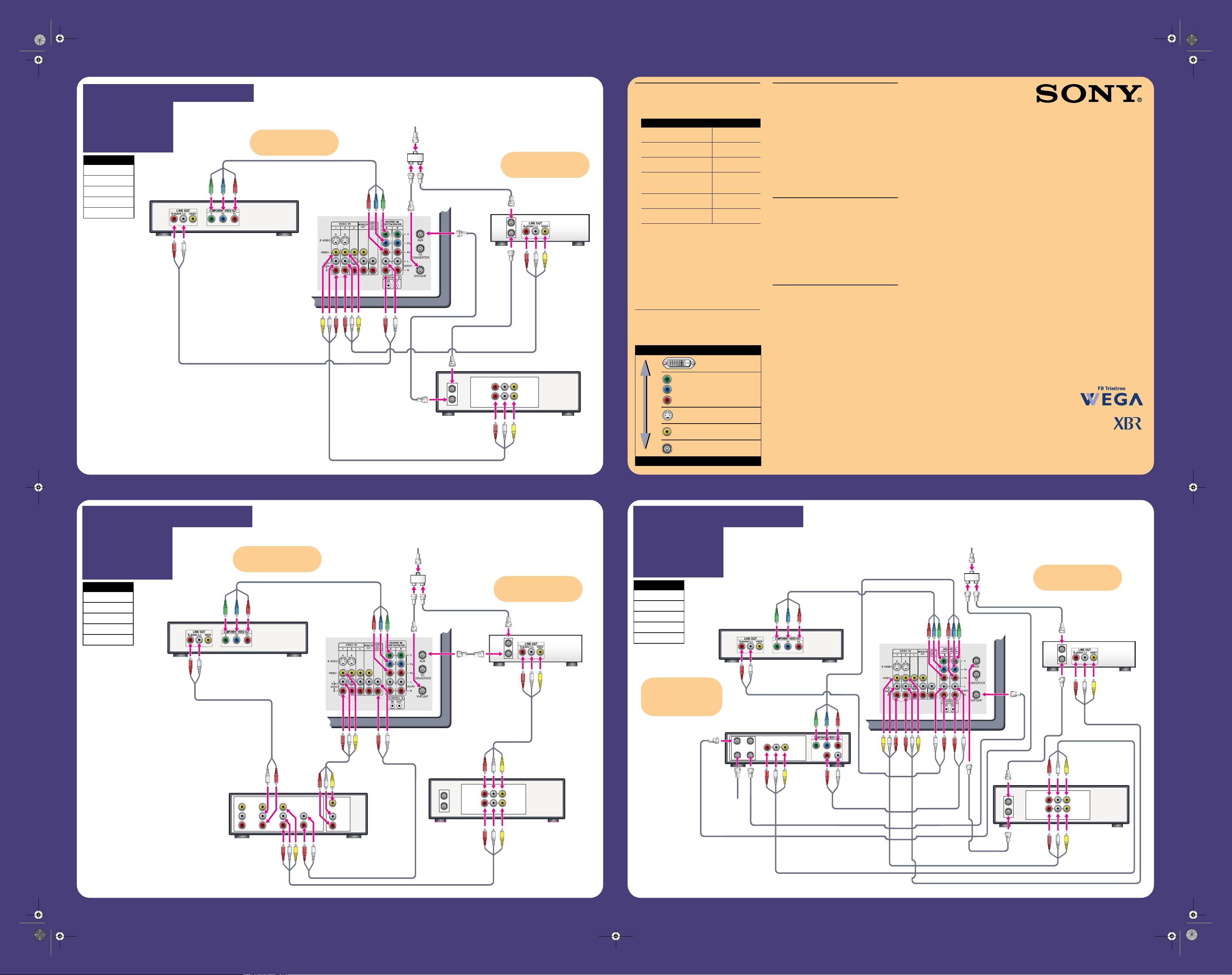
• Review the following chart to determine which
diagram to use to connect the components in your
system:
• See the “Cables Required” chart that appears with the
diagram to determine which cables you’ll need. You
may need to purchase extra accessories, such as cables
and splitters, depending on the components you plan
to connect.
• Turn off and unplug all components before making
connections.
• If you are connecting a digital cable box, you’ll need a
special bi-directional splitter that’s compatible with
your cable box. Contact your cable provider for details.
Making Video Connections
Your TV includes several types of video inputs. Use the
inputs that are available on your components that provide
the best video performance, as described below.
Additional Connections
For best audio performance, connect your digital audio
components using either digital optical or digital coaxial
audio connections.
Depending on which components are in your system, you
may need to complete additional connections. For
example, if you have a satellite receiver, you’ll need to
connect the satellite antenna. If you have an A/V receiver,
you’ll need to connect speakers.
Note: The connection diagrams shown here are
recommendations only; other possible solutions may
exist. Connections that include an A/V receiver can often
be very complex, so check your A/V receiver’s instruction
manual for additional details.
What’s Next?
After you’ve connected all the components:
1 Plug in all the AC power cords and turn on the TV
and all components.
2 Run the TV’s on-screen Auto Setup program, which
creates a list of receivable channels.
3 Follow the instructions under “Programming the
Remote Control” on the other side of this guide to
program the TV’s remote control to operate your
video components.
Selecting Components
The TV/VIDEO and ANT buttons on the remote control let
you switch the TV’s audio and video inputs to the
components that you have connected to the TV. For
example, if you connected your DVD player to the TV’s
VIDEO 5 inputs, press TV/VIDEO until “VIDEO 5” appears
on the TV.
For these components Use diagram
Cable/Cable Box, VCR,
DVD Player
Hookup 1
Cable/Cable Box, VCR,
DVD Player, A/V Receiver
Hookup 2
Cable/Cable Box, VCR,
DVD Player, Satellite Receiver
Hookup 3
Cable/Cable Box, VCR,
DVD Player, A/V Receiver,
Digital Recorder
Hookup 4
High Definition Cable Box,
VCR, DVD Player
Hookup 5
Cable/Cable Box, VCR,
Sony DVD Dream™ System
Hookup 6
Best Video Performance
DVI
Component
S VIDEO
Composite
RF/Coaxial
Good Video Performance
LINE IN
OUT
IN
LINE OUT
AUDIO
VIDEO
TV
DVD Player
VCR
RL
OUT
IN
Cable Box
Splitter
Cable
If you are not using a cable box,
connect your cable or antenna
to the VCR’s RF IN jack.
If your DVD player has a DVI
jack, use that instead of the
video connections shown here.
Cables Required
Splitter 1
Coaxial 4
Composite 2
Component 1
Audio 1
TV
DVD Player
LINE IN
OUT
IN
LINE OUT
AUDIO
VIDEO
VCR
RL
OUT
IN
Cable Box
LINE OUT
AUDIO
VIDEO
RL
Satellite
R
L
AUDIO
Splitter
SAT IN
ANT IN
CABLE IN
OUT TO TV
Cable
Sat
Antenna
Cable
If your DVD player or satellite
receiver has a DVI jack, use
that instead of the video
connections shown here.
■
Cable/Antenna
■
Cable Box
■
VCR
■
DVD Player
HOOKUP 1. Use this diagram if you have:
HOOKUP 2. Use this diagram if you have:
■
Cable/Antenna
■
Cable Box
■
VCR
■
DVD Player
■
A/V Receiver
HOOKUP 3. Use this diagram if you have:
■
Cable/Antenna
■
Cable Box
■
VCR
■
DVD Player
■
Satellite Receiver
If you are not using a cable box,
connect your cable or antenna
to the VCR’s RF IN jack.
If you are not using a cable box,
connect your cable or antenna
to the VCR’s RF IN jack.
FD Trinitron, WEGA, XBR, and DVD Dream are
trademarks of Sony Corporation
If your DVD player has a DVI
jack, use that instead of the
video connections shown here.
Cables Required
Splitter 1
Coaxial 3
Composite 3
Component 1
Audio 2
Cables Required
Splitter 1
Coaxial 5
Composite 3
Component 2
Audio 2
poster_2.fm Page 1 Friday, October 10, 2003 9:27 AM
VCR Codes
Manufacturer Code
Sony 301, 302, 303
Admiral
(M. Ward)
327
Aiwa 338, 344
Audio Dynamic 314, 337
Broksonic 319, 317
Canon 309, 308
Citizen 332
Craig 302, 332
Criterion 315
Curtis Mathes 304, 338, 309
Daewoo 341, 312, 309
DBX 314, 336, 337
Dimensia 304
Emerson 319, 320, 316, 317, 318, 341
Fisher 330, 335
Funai 338
General Electric 329, 304, 309
Go Video 322, 339, 340
Goldstar 332
Hitachi 306, 304, 305, 338
Instant Replay 309, 308
JC Penney 309, 305, 304, 330, 314, 336, 337
JVC 314, 336, 337, 345, 346, 347
Kenwood 314, 336, 332, 337
LXI (Sears) 332, 305, 330, 335, 338
Magnavox 308, 309, 310
Marantz 314, 336, 337
Marta 332
Memorex 309, 335
Minolta 305, 304
Mitsubishi/MGA 323, 324, 325, 326
Multitech 325, 338, 321
NEC 314, 336, 337
Olympic 309, 308
Optimus 327
Orion 317
Panasonic 308, 309, 306, 307
Pentax 305, 304
Philco 308, 309
Philips 308, 309, 310
Pioneer 308
Quasar 308, 309, 306
RCA/PROSCAN 304, 305, 308, 309, 311, 312, 313,
310, 329
Realistic 309, 330, 328, 335, 324, 338
Sansui 314
Samsung 322, 313, 321
Sanyo 330, 335
Scott 312, 313, 321, 335, 323, 324, 325, 326
Sharp 327, 328
Signature 2000 (M. Ward) 338, 327
SV2000 338
Sylvania 308, 309, 338, 310
Symphonic 338
Tashiro 332
Tatung 314, 336, 337
Teac 314, 336, 338, 337
Technics 309, 308
Toshiba 312, 311
Wards 327, 328, 335, 331, 332
Yamaha 314, 330, 336, 337
Zenith 331
Manufacturer Code
DVD Player Codes
Manufacturer Code
Sony 751
General Electric 755
Hitachi 758
JVC 756
Magnavox 757
Mitsubishi 761
Oritron 759
Panasonic 753
Philips 757
Pioneer 752
RCA/Proscan 755
Samsung 758
Toshiba 754
Zenith 760
Cable Box Codes
Satellite Receiver Codes
Manufacturer Code
Sony 230
Hamlin/Regal 222, 223, 224, 225, 226
Jerrold/G.I./
Motorola
201, 202, 203, 204, 205, 206, 207,
208, 218
Oak 227, 228, 229
Panasonic 219, 220, 221
Pioneer 214, 215
Scientific Atlanta 209, 210, 211
Tocom 216, 217
Zenith 212, 213
Manufacturer Code
Sony 801
Dish Network 810
Echostar 810
General Electric 802
Hitachi 805
Hughes 804
Mitsubishi 809
Panasonic 803
RCA/PROSCAN 802, 808
Toshiba 806, 807
4-097-808-22© 2003 Sony Corporation Printed in U.S.A.
7 If it responds, you are done. If not, try
using another code listed for that
manufacturer.
If more than one code number is listed, try
entering them one by one until you come to
the correct code for your equipment.
If you enter a new code number, the code
number you previously entered for that slide
switch position is erased.
R
L
INPUT DVD
VCR TV
LINE IN
VIDEO
VIDEO
OUT
AUDIO
OUT
LINE IN
OUT
IN
LINE OUT
AUDIO
VIDEO
RL
A/V
LINE IN
OUT
IN
LINE OUT
AUDIO
VIDEO
TV
DVD Player
VCR
RL
Digital Recorder
OUT
IN
Cable Box
Splitter
Cable
If your DVD player has a DVI
jack, use that instead of the
video connections shown here.
TV
DVD Player
LINE IN
OUT
IN
LINE OUT
AUDIO
VIDEO
VCR
RL
OUT
IN
High Definition
Cable Box
Splitter
Cable
If your DVD player has a DVI jack,
use that instead of the video
connections shown here.
If your cable box has a DVI jack,
use that instead of the video
connections shown here.
Dream
System
LINE IN
OUT
IN
LINE OUT
AUDIO
VIDEO
TV
VCR
RL
OUT
IN
Cable Box
VIDEO 1
COMPONENT VIDEO OUT
VIDEO 2
AUDIO OUT
AUDIO IN
LR
LR
LR
VIDEO OUT
VIDEO IN
VIDEO INAUDIO IN
Y P
B
/C
B
P
R
/C
R
Splitter
Cable
MONITOR OUT
S VIDEO
You can watch the VCR on
AUX 3 or 4 when not using the
DVD Dream System audio.
If you are not using a cable box,
connect your cable or antenna
to the VCR’s RF IN jack.
HOOKUP 4. Use this diagram if you have:
■
Cable/Antenna
■
Cable Box
■
VCR
■
DVD Player
■
A/V Receiver
■
Digital Recorder
HOOKUP 5. Use this diagram if you have:
■
Cable/Antenna
■
High Definition
Cable Box
■
VCR
■
DVD Player
HOOKUP 6. Use this diagram if you have:
■
Cable/Antenna
■
Cable Box
■
VCR
■
Sony DVD
Dream
™
System
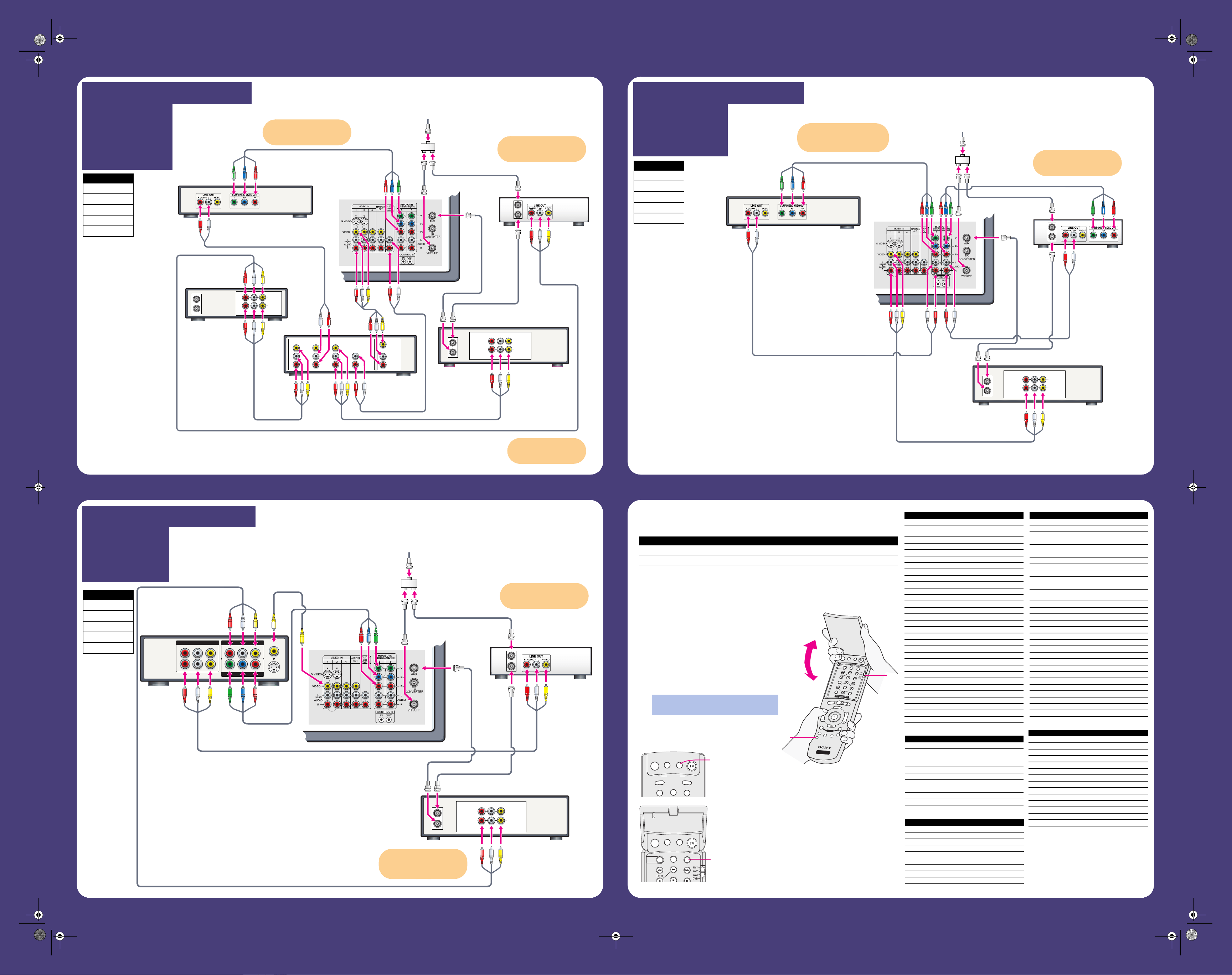
Programming the Remote Control
The remote control is preset to operate Sony brand video equipment.
If you have video equipment other than Sony brand that you want to control with the TV’s remote control,
use the following procedure to program the remote control.
1 Using the code list at right, find the three-digit code
number for the manufacturer of your equipment. (If
more than one code number is listed, use the
number listed first.)
2 Open the outside cover and set the A/V slide switch
to AV1, AV2, AV3, or DVD. Then close the cover.
3 Press the CODE SET button.
4 Using the 0-9 buttons, enter the three-digit
manufacturer’s code.
5 Press the ENTER button.
6 To check if the code number works, aim the TV’s
remote control at the equipment and press the
POWER button that corresponds with that
equipment.
Sony Equipment Switch Position on Remote Control Programmable Code Number
Beta, ED Beta VCRs AV1 303
8 mm VCR AV2 302
VHS VCR AV3 301
DVD player DVD 751
You must do step 5 within 10 seconds of
step 4, or you must redo steps 3 through 5.
D
R
C
M
O
D
E
P
A
L
E
T
T
E
M
E
M
O
R
Y
S
T
I
C
K
D
I
S
P
L
A
Y
R
E
S
E
T
G
U
ID
E
C
O
D
E
S
E
T
M
E
N
U
C
H
V
O
L
W
ID
E
M
O
D
E
I
N
D
E
X
E
N
T
E
R
J
U
M
P
A
N
T
T
V
/
V
I
D
E
O
P
IC
M
O
D
E
T
V
S
A
T
/
C
A
B
L
E
F
U
N
C
T
I
O
N
M
U
T
I
N
G
S
L
E
E
P
S
A
T
/
C
A
B
L
E
P
O
W
E
R
R
M
-
Y
1
8
8
T
W
I
N
V
I
E
W
TV
F
A
V
O
R
I
T
E
S
F
R
E
E
Z
E
D
IS
C
M
E
N
U
M
E
N
U
S
E
L
E
C
T
P
O
W
E
R
S
A
T
/
C
A
B
L
E
U
T
I
N
G
S
L
E
E
P
S
Y
S
T
E
M
O
F
F
2
3
ANT
TV/VIDEO PIC MODE
TV
SAT/CABLE
FUNCTION
MUTING
SLEEP
SAT/CABLE
POWER
SAT/CABLE POWER button
(outside cover)
MUTING
SLEEP
SAT/CABLE
POWER
TV/VCR
VCR/DVD
VCR/DVD POWER button
(inside cover)
If you are not using a cable box,
connect your cable or antenna
to the VCR’s RF IN jack.
You can watch the VCR on
AUX 3 or 4 when not using
the A/V Receiver.
Cables Required
Splitter 1
Coaxial 4
Composite 1
Component 2
Audio 2
Cables Required
Splitter 1
Coaxial 4
Composite 4
Component 1
Audio 2
Cables Required
Splitter 1
Coaxial 4
Composite 2
Component 1
Video 1
poster_2.fm Page 2 Friday, October 10, 2003 9:27 AM