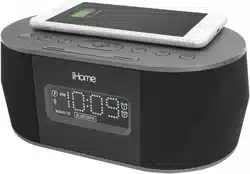
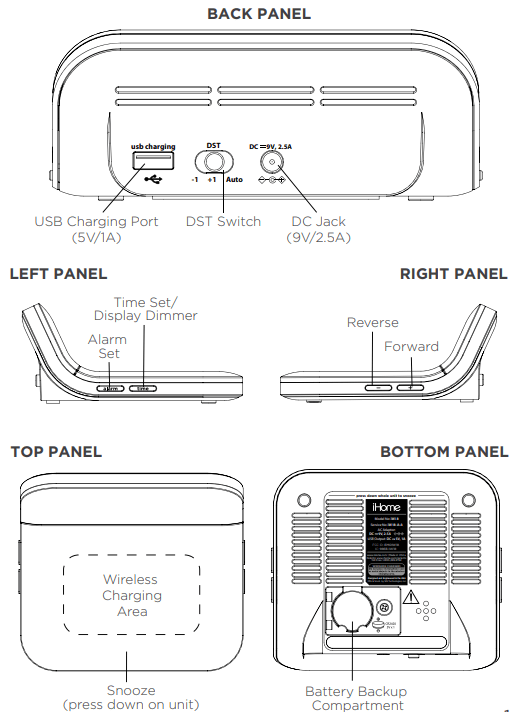
Before use, remove the battery pull tab from the bottom of the unit. Connect the included AC adapter to the DC jack located on the back of the unit and connect the other end to a working wall outlet.
Step Two
Setting Your Clock
Press and hold the Time Set Button until the display flashes.
Press the – or + Buttons to adjust selections and press Time Set to confirm.
Do this for time, year, month and date.
All done!
Daylight Savings Time (DST)
Switch: By default, the DST Switch is set to Auto and will automatically adjust the time each March and November.
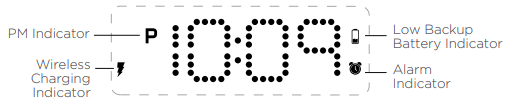
DISPLAY ICONS
To adjust the brightness of the display, press the Time Set Button repeatedly to cycle through brightness settings, including OFF
SETTING THE ALARM
Note: Each step must be completed while display is flashing or setting will time-out with any changes saved.
Press and hold the Alarm Button for 2 seconds until the alarm time display and alarm icon flash.
Press the – or + Buttons to adjust the alarm time to the desired time (hold for rapid setting). Make sure you set the correct AM/PM alarm time. The PM indicator appears to the left of the display.
Press the Alarm Button to confirm the alarm time setting. The alarm schedule will flash: 7 (every day), 5 (weekdays) or 2 (weekend only). Press the – or + Buttons to select the desired alarm schedule.
Press the Alarm Button to confirm the alarm schedule. 2 beeps will confirm alarm setting is complete. The alarm icon will remain on the display, indicating the alarm is armed.
To turn off a sounding alarm and reset it to come on the next day at the same time, press the Alarm Button to reset alarm.
PREVIEWING THE ALARM
Press and release the desired Alarm Button as needed to preview the alarm and to toggle the alarm ON (indicated by the alarm icon) or OFF (no alarm icon).
PROGRAMMABLE SNOOZE
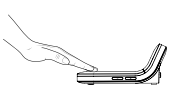
To program Snooze, press down on the front of the unit for 2 seconds during normal operation (when no alarm is sounding).
Press the – or + Buttons to select a snooze time (between 01 and 29 minutes).
Press down and release the front of the unit to confirm setting. While the alarm is sounding, press down on the front of the unit to temporarily silence the alarm (9 minutes is the default). Snooze can be used several times during the one hour alarm cycle
WIRELESS CHARGING
Supports:
Qi compatible phones (also works with plastic cases up to 3mm thick)
AirPods with wireless charging case
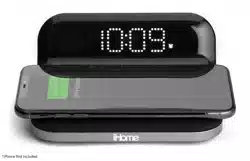
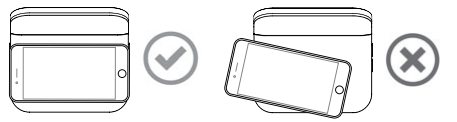
Place Qi compatible device face up on the charging rest as pictured below
Check the lightning icon on the iW18 display for charging status:
Slow blinking icon: Device is charging properly.
Solid icon: Device is charged.
Rapid blinking icon: Device is not charging properly. Reposition device.
Note: The lightning icon may continue to blink slowly when iOS devices are fully charged.
CAUTION:
Remove metal protective or magnetic case from phone before charging. When charging phone, do not place magnetic-striped or other metal objects on the charger. Doing so could damage the object or this unit. Qi compatible phones with metallic looking finishes will charge normally.
USB CHARGING
Connect the standard size end of a USB cable (not included) to the USB port on the back of the unit and connect the other end to the charging port on your device. (Make sure the unit is plugged into a working outlet in order to charge devices.)
BATTERY BACK-UP
The unit comes with a CR-2450 back-up battery installed to provide continuous alarm operation and clock settings in the event of a temporary power failure. Remove the battery pull tab before use. When the battery icon on the clock display is flashing, it is time to replace the back-up battery. The battery compartment is located on the bottom of the unit.
Make sure the AC adapter is connected, or you will lose your time and alarm settings during battery replacement.
Use a Phillips screwdriver to open the battery compartment door.
Remove the exhausted battery from the compartment and insert 1CR-2450 battery, checking that the + side is facing you. Replace the compartment door. Do not overtighten.
IMPORTANT SAFETY INSTRUCTIONS
When used in the directed manner, this unit has been designed and manufactured to ensure your personal safety. However, improper use can result in potential electrical shock or fire hazards. Please read and follow all safety and operating instructions carefully before installation and use, and keep these instructions handy for future reference. Take special note of all warnings listed in these instructions and on the unit.
1. Water and Moisture – The unit should not be used near water. For example: near a bathtub, washbowl, kitchen sink, laundry tub, swimming pool or in a wet basement.
2. Ventilation – The unit should be situated so that its location or position does not interfere with its proper ventilation. For example, it should not be situated on a bed, sofa, rug or similar surface that may block ventilation openings. Also, it should not be placed in a built-in installation, such as a bookcase or cabinet, which may impede the flow of air through the ventilation openings.
3. Heat – The unit should be situated away from heat sources such as radiators, heat registers, stoves or other appliances (including amplifiers) that produce heat.
4. Power Sources – The unit should be connected to a power supply only of the type described in the operating instructions or as marked on the appliance. Only use the AC adapter that came with the unit.
5. Power-Cable Protection – Power supply cables should be routed so that they are not likely to be walked on or pinched by items placed upon or against them. It is always best to have a clear area from where the cable exits the unit to where it is plugged into an AC socket.
6. Cleaning – Clean only with dry cloth.
7. Objects and Liquid Entry – Care should be taken so that objects do not fall and liquids are not spilled into any openings or vents located on the product.
8. Attachments – Do not use attachments not recommended by the product manufacturer.
9. Lightning and Power Surge Protection – Unplug the unit from the wall socket and disconnect the antenna or cable system during a lightning storm or when it is left unattended and unused for long periods of time. This will prevent damage to the product due to lightning and power-line surges.
10. Overloading – Do not overload wall sockets, extension cords, or integral convenience receptacles as this can result in a risk of fire or electric shock.
11. Damage Requiring Service – The unit should be serviced by qualified service personnel when:
A. the power supply cable or plug has been damaged.
B. objects have fallen into or liquid has been spilled into the enclosure.
C. the unit has been exposed to rain. D. the unit has been dropped or the enclosure damaged.
E. the unit exhibits a marked change in performance or does not operate normally.
12. Periods of Nonuse – If the unit is to be left unused for an extended period of time, such as a month or longer, remove batteries before storage
13. Servicing – The user should not attempt to service the unit beyond those methods described in the user manual. Service methods not covered in the operating instructions should be referred to qualified service personnel.
14. Magnetic Interference: This product’s speakers contain powerful magnets which could cause interference or damage to sensitive equipment such as hard drives, CRT televisions and monitors, as well as medical, scientific, and navigational devices. Keep this unit away from these products at all times.
15. Only use attachments/accessories specified by the manufacturer. This product is suitable for use in tropical and/or moderate climates.
16. The unit should be serviced by qualified service personnel when the enclosure damaged or does not operate normally.
17. No naked flame sources, such as lighted candles, should be placed on the apparatus.
18. WARNING: To reduce the risk of fire or electric shock, do not expose this product to rain or moisture.
19. CAUTION – Danger of explosion if battery is incorrectly replaced. Replace only with the same or equivalent type.
20. Do not dispose of batteries in the household trash or fire
21. The mains plug of power adaptor is used as the disconnect device, it shall remain readily operable


 on the iW18 display for charging status: