WARNING Do not plug in your vacuum until you are familiar with all instructions and operating procedures.
NOTE: The Crevice Tool is stored inside the Extension Wand.
Assembly
The only tool you will need to assemble your vacuum is a Phillips-head screwdriver.
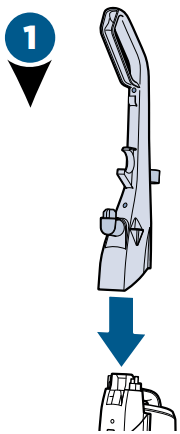
Place the upper handle onto the base and push it down. Then attach the handle with the 2 screws taped to the handle in a plastic bag.
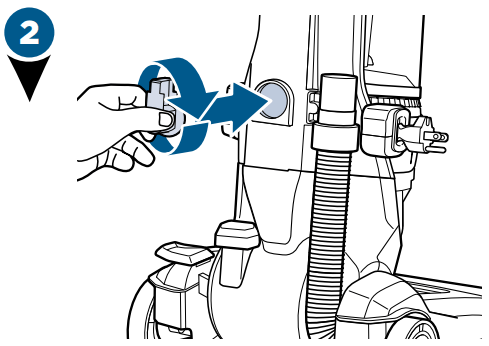
Insert the Extension Wand base and turn it to the right to lock in place.
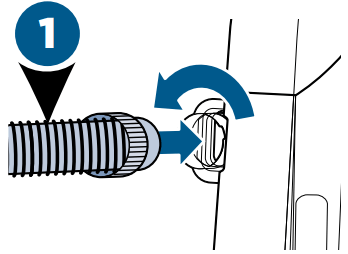
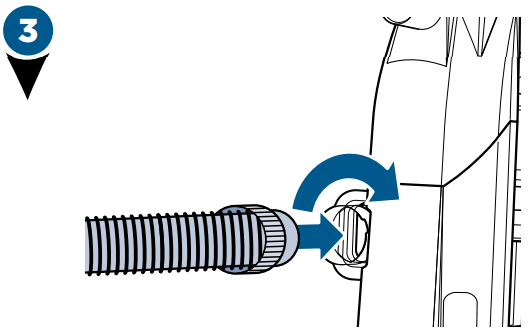
Insert the hose end into the back of the vacuum and twist right to lock in place.
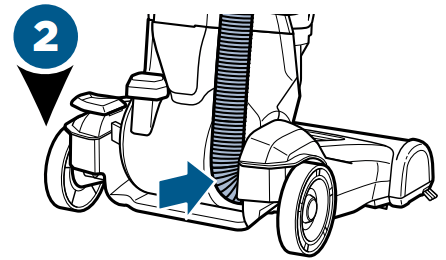
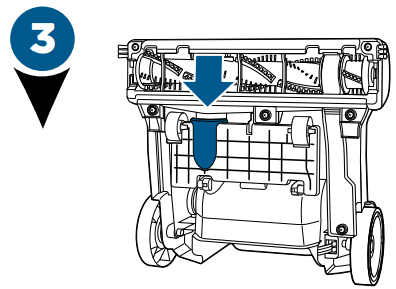
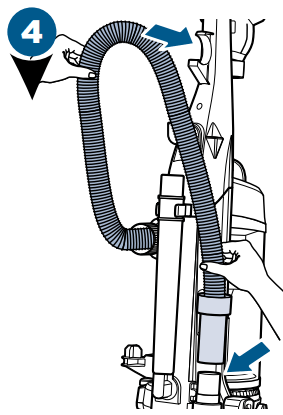
Wrap hose up and around the hose wrap on the handle. Slide end of hose into vacuum base.
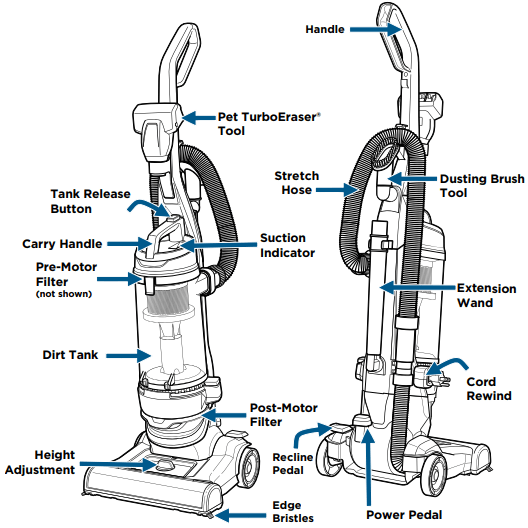
Now, put your accessory tools on the vacuum and you’re ready to go!
NOTE: The Powerfoot will not suction properly unless the hose is firmly attached.
Power ON & Settings
WARNING To reduce the risk of injury from moving parts while the vacuum is turned ON, always move the vacuum via the rolling wheels by using the upper handle at the back of the vacuum. Do not carry the vacuum while it is running. Always place vacuum on floor with handle in upright position when using tools.
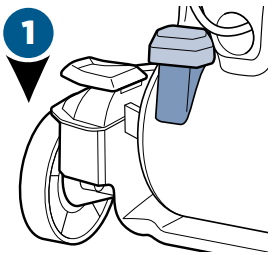
Press the red power button with your foot to turn the vacuum ON and once again to turn your vacuum OFF .
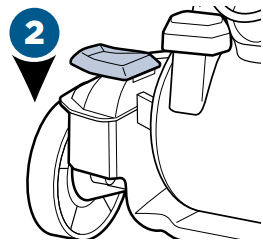
Press the recline pedal and pull handle back towards you.
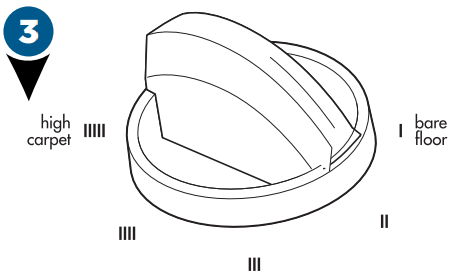
Turn the dial on the foot of the vacuum to the desired setting. If the dial is difficult to turn, tilt the vacuum back slightly to take the weight off the foot while turning.
Lowest setting – For low pile carpet or bare floors. To pick up debris, it may be necessary to move up one setting.
Medium setting – For medium pile carpet.
Highest setting – For high pile and most shag carpet.
TIP: For optimal carpet cleaning performance, adjust to the lowest practical setting. If your vacuum is difficult to push, adjust to the next higher setting.
Automatic Cord Rewind
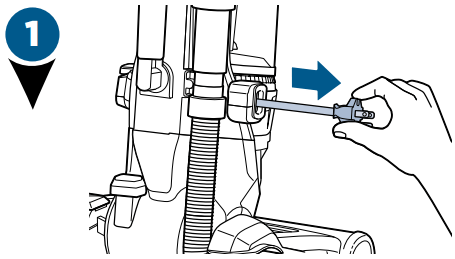
To plug your vacuum in, gently pull the cord out of the automatic cord rewind and stop at the yellow mark on the cord. Do not pull past the red mark. Once you have the desired amount of cord, plug it into the outlet.
When you finish using your vacuum, unplug it from the outlet. Hold onto the plug and press the automatic cord rewind button until it’s fully retracted. If the cord doesn’t fully retract on the first try, pull a little bit of cord out and press the rewind button again.
NOTE: Rotating floor brush continues to rotate while tools are in use. Never place fingers under the vacuum when it is running. Never place PowerFoot on furniture or uneven surfaces. Do not place vacuum close enough to objects to pull into rotating brush.
NOTE: Certain carpets and low humidity conditions may generate small static discharges. Static discharges are entirely harmless and are not associated in any way with the main power supply.
Empty the Dirt Tank
WARNING To reduce the risk of electric shock, turn power switch OFF and disconnect polarized plug from electrical outlet before performing maintenance or troubleshooting checks.
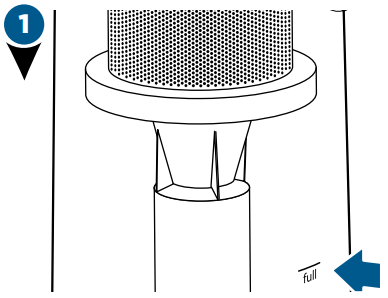
Empty once tank is full.
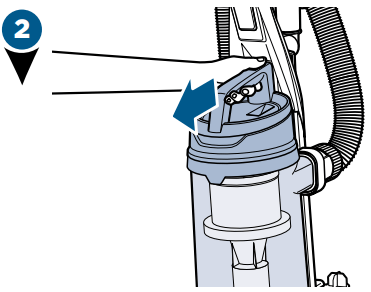
Press the tank release button and pull out to remove Dirt Tank.
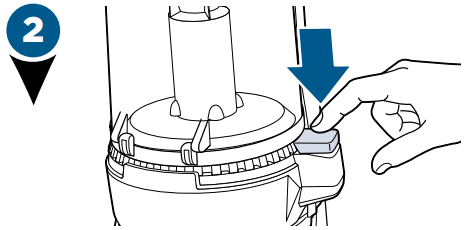
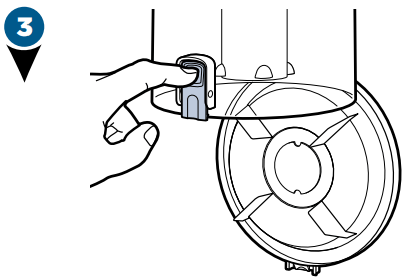
Hold the Dirt Tank over a trash container. Press the bottom release button to empty. Once empty, close the lid.
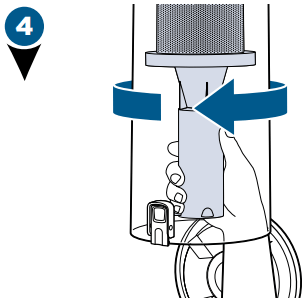
Twist cyclone left and pull down to remove from tank.
Clean cyclone with warm water and mild detergent. Let cyclone completely dry before replacing. To replace, fit into place and twist to the right.
After emptied, place tank back on vacuum and press firmly until you hear “click”.
NOTE: The Dirt Tank may be washed in warm water with a mild detergent. Make sure it is completely dry before replacing.
Clean the Pre-Motor Filter
WARNING
To reduce the risk of electric shock, turn power switch OFF and disconnect plug from electrical outlet before performing maintenance or troubleshooting checks.
Do not operate vacuum with damp or wet filters or without all filters in place.
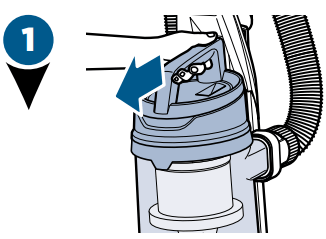
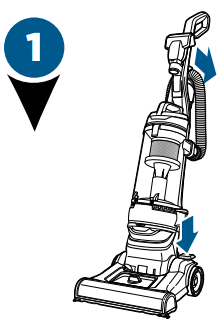
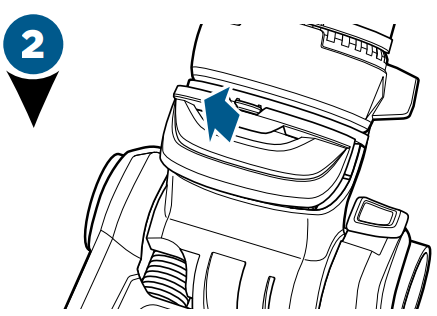
Press the tank release button and pull out to remove Dirt Tank.
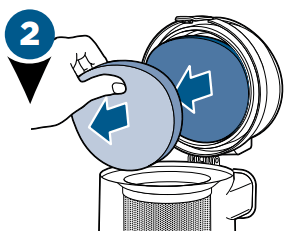
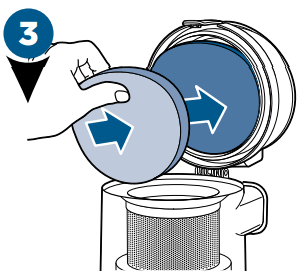
Remove carbon and foam filter from lid. Hand wash in warm water and rinse well; mild detergent may be used if desired.
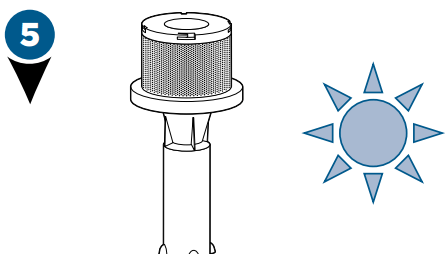
Allow filter to air dry completely before placing back into the tank lid. The carbon filter should be on top of the foam filter.
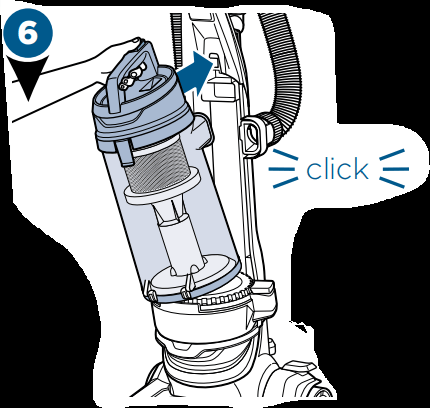
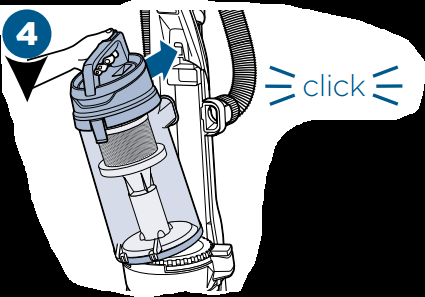
Return tank back on vacuum and press firmly until you hear a “click”.
NOTE: Replace filter every 3 to 6 months. Search BISSELL.com for Style 1214.
Maintain the Post-Motor Filter
Recline vacuum and lay back for easier filter access.
Located on the front of the vacuum above the foot height adjustment knob, remove the filter door by pushing down the latch and pulling the door out.
Remove the filter by grasping the sides of the filter and pulling out from the vacuum. Clean or replace filter as necessary.
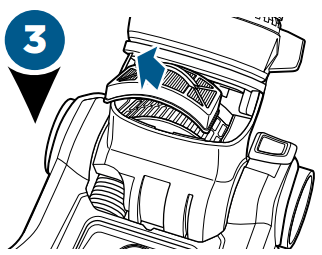
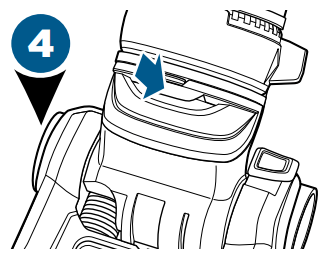
Replace filter in unit and replace filter door by lining up the sides of the door and sliding into place until you hear a “click”.
NOTE: Replace filter every 3 to 6 months. Search BISSELL.com for Style 1526.
NOTE: The pleated post-motor filter may NOT be washed with water or detergent. If dust and/or debris accumulates on filter, gently tap the filter on the side of a garbage container.
Maintain the TurboEraser® Tool
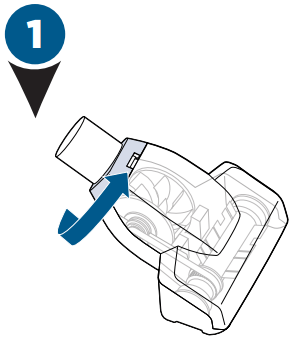
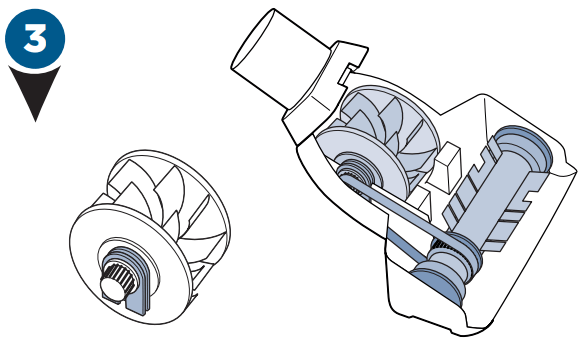
Twist gray collar counter-clockwise, until slot appears, then separate faceplate.
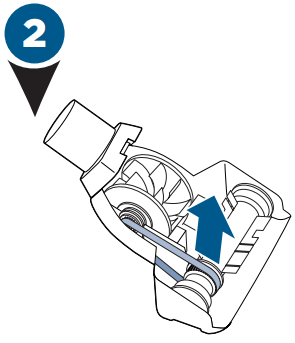
Remove Brush Roll, Belt, and Paddle Wheel. Inspect for damages and replace if necessary.
To reassemble, align two clips on each end of paddle wheel with Belt on and pop back into place. Place Brush Roll with Belt back in. Faceplate will not close properly if all parts are not aligned correctly.
Replace Brush & Belt
WARNING To reduce the risk of electric shock, turn power switch OFF and disconnect polarized plug from electrical outlet before performing maintenance or troubleshooting checks.
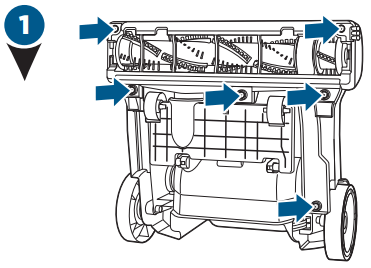
Unplug vacuum, turn over and unscrew six (6) Phillips-head screws to remove the bottom cover. Lift brush straight out.
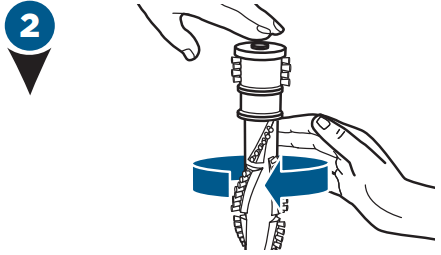
Clean debris from Brush Roll. Inspect by placing on its end and spin. The Brush Roll should spin freely, multiple times by one flick. If it doesn’t, replace Brush Roll. Check Belt for wear or cuts and replace if necessary.
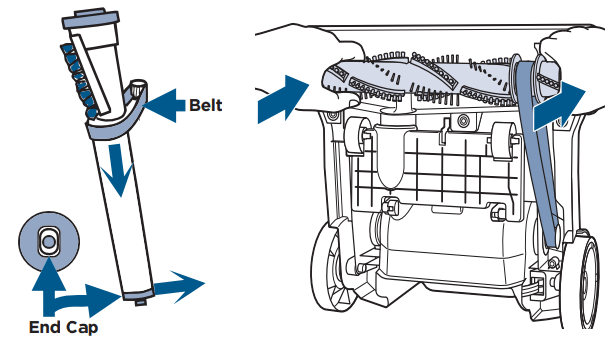
Replace the Brush Roll and Belt by looping the Belt over the motor shaft and the Brush Roll. Line up the end caps and pull the brush forward into place. This will stretch the Belt. Return bottom cover back on and replace the screws.
Clearing a Clog
WARNING To reduce the risk of electric shock, turn power switch OFF and disconnect polarized plug from electrical outlet before performing maintenance or troubleshooting checks.
Remove the hose from the back of the vacuum by twisting it to the left. Remove any debris that may have gotten clogged.
Check the foot hose on the back of your vacuum down towards the bottom. If necessary, remove the screw from the foot hose and check for clogs.
Check the air passageway on the bottom of your vacuum. Remove the bottom cover and the brush. Remove any debris.
Troubleshooting
Problem
Possible Causes
Remedies
Vacuum won’t turn on
Power cord not plugged in
Check electrical plug
Blown fuse/tripped breaker
Check/replace fuse or reset breaker
Vacuum won’t pick up dirt
Incorrect height adjustment
Adjust foot to correct height setting
Hose not attached to suction opening
Grasp the hose wand and firmly push into the hose wand base
Crack or hole in hose
Check hose and replace if needed
Broken or worn drive belt
Replace drive belt, see page 9
Brush Roll jammed
Remove brush and clean debris from brush ends, see page 9
Clog in vacuum
Check for debris build-up or clogs in the inner tank, hose and foot/lower hose; See online video for more help
Dirt Tank full
Empty Dirt Tank
Dirt Tank or upper tank not installed properly
Position correctly and lock in place, see page 7
Filters are dirty
Check and clean or replace pre-motor and post-motor filters, see page 8
Tool won’t pick up
Crack or hole in hose
Check hose and replace if needed
Clog in vacuum
Check for debris build-up or clogs in the inner tank, hose and foot/lower hose; See online video for more help
Dirt Tank full
Empty Dirt Tank
Dirt Tank or upper tank not installed properly
Position correctly and lock in place, see page 7
Filters are dirty
Check and clean or replace pre-motor and post-motor filters, see page 8
Vacuum difficult to push
ncorrect height adjustment
Adjust powerfoot to correct height setting, see page 6
Visible dirt escaping from vacuum
Dirt Tank full
Empty Dirt Tank
Filters missing or installed incorrectly
Check pre-motor and post-motor filters for correct installation, see page 8
Q: What I am vacuuming up from the floor is not making it into the canister , it is remaining on top of canister where the pre-motor filter is. Why ? Reply
 Now, put your accessory tools on the vacuum and you’re ready to go!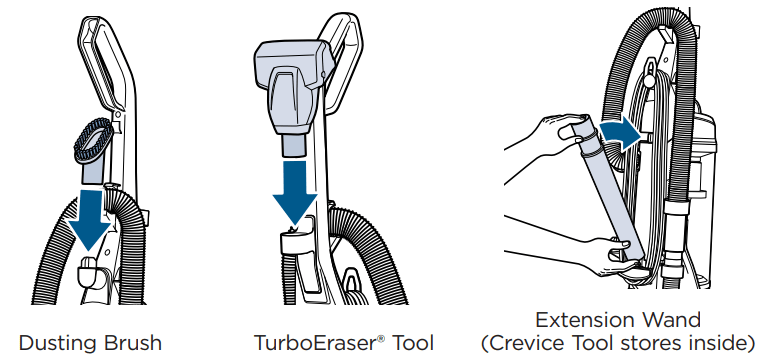
 and once again to turn your vacuum OFF