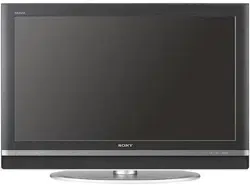
KDL-32S20L1
KDL-40S20L1
2-693-551-11(1)
Quick Setup Guide
For further information, see the operating instruction supplied with the TV.
Please retain this guide for your future reference.
Continued ,
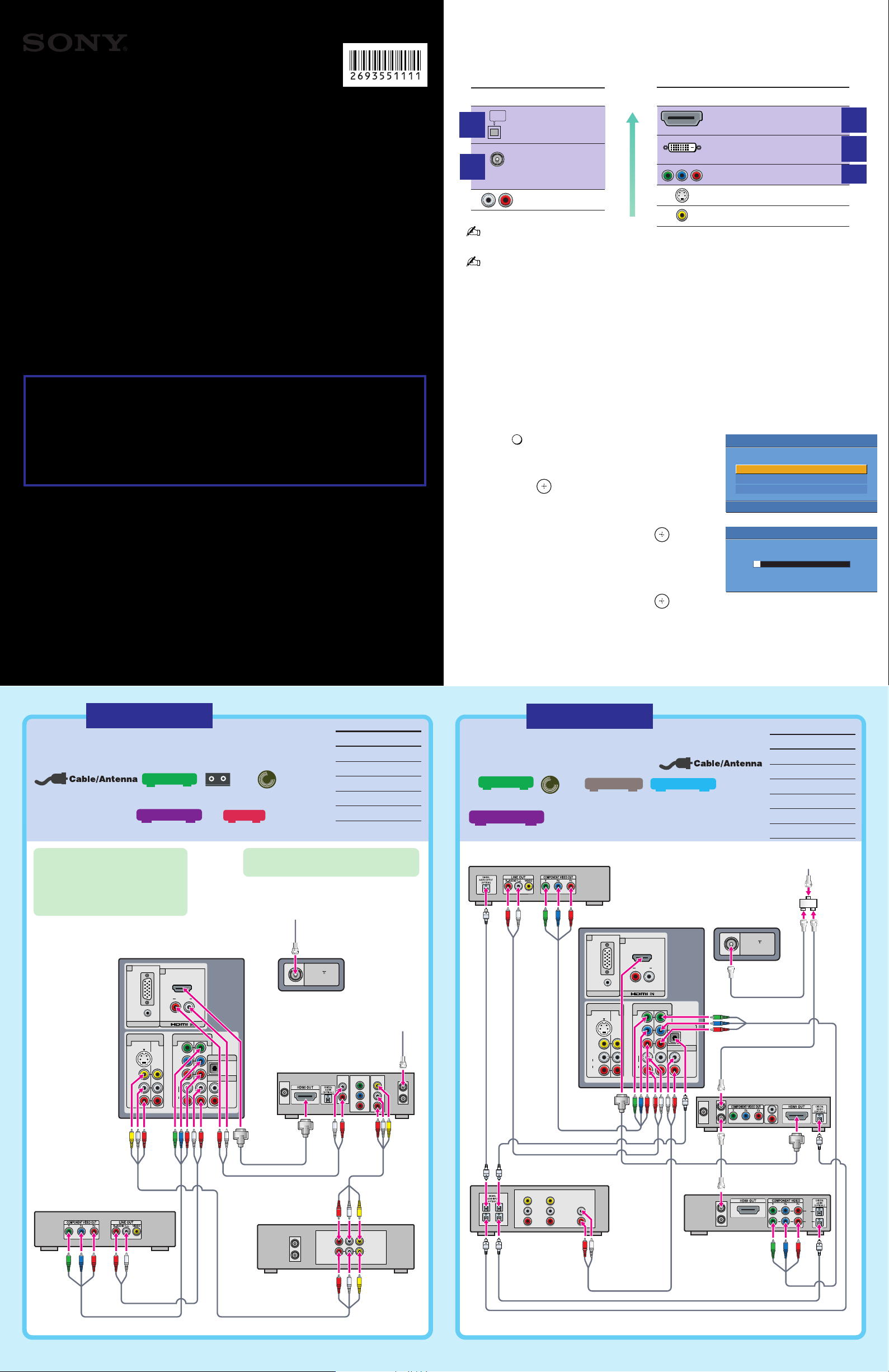
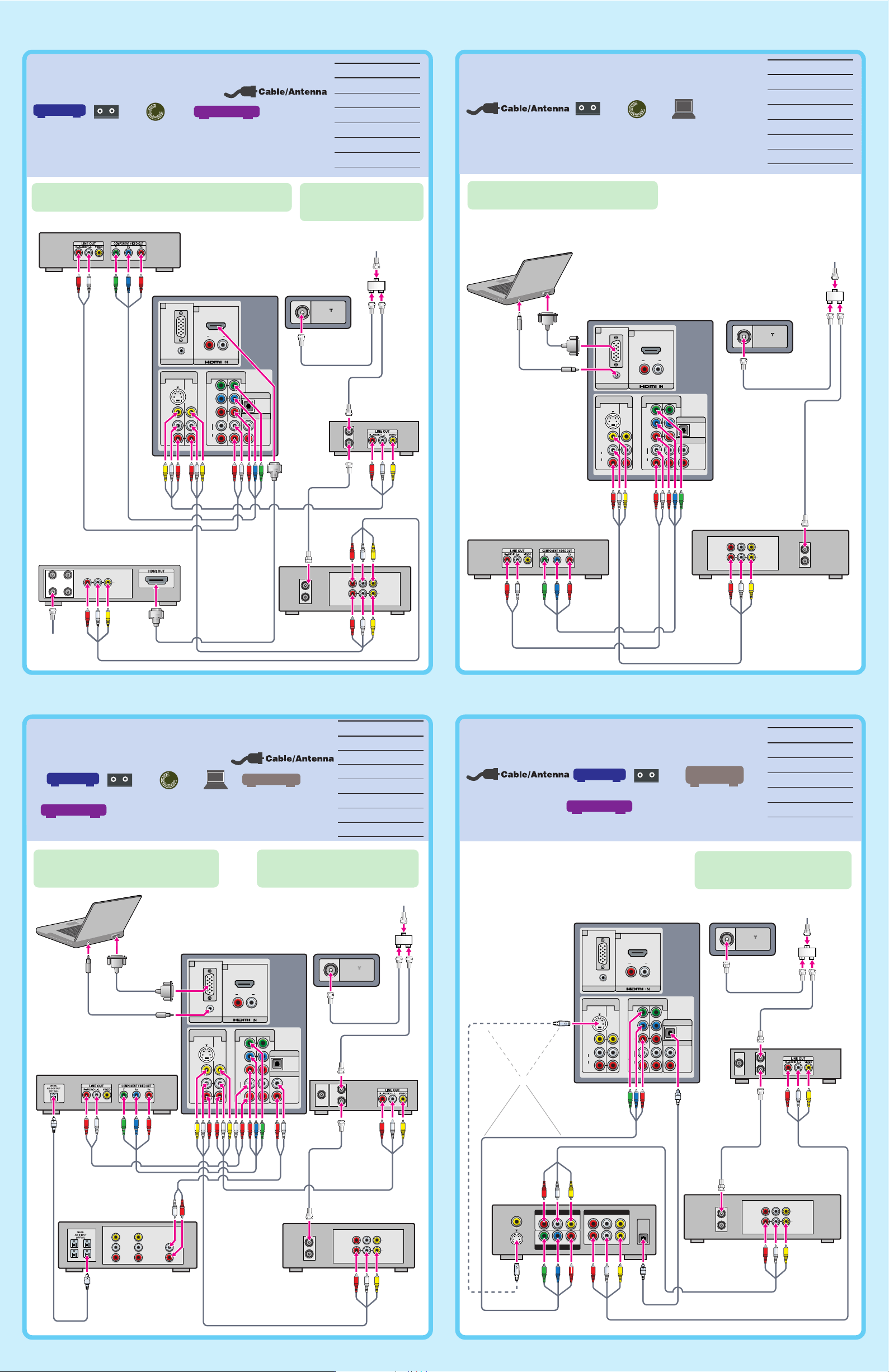
Making Audio/Video Connections
Your new TV includes various types of audio and video inputs. Use the outputs/inputs that are
available on your components that provide the best audio/video performance. The HDMI input
allows you to connect digital video and audio signals with a single cable:
The connection diagrams shown below and on the reverse side are recommendations only; other
possible solutions may exist. Connections that include an AV receiver can often be complex, so check
your AV receiver’s instruction manual for additional details.
See the “Cables Required” chart that appears with the diagram to determine which cables you will need.
Depending on the components you plan to connect, you may need to purchase extra cables.
Getting HD Programming
Contact your local cable or satellite TV provider for details on how to
upgrade to your High-Definition (HD) programming.
Additional equipment
and subscription fees may apply.
• For information on availability of HD programming using an antenna (HDTV with
integrated HD tuner required), visit www.antennaweb.org
• For an interactive guide on cable requirements and how to connect audio and video
devices, visit www.ceaconnectionsguide.com
Running Initial Setup
1 Press
POWER
to turn on the TV.
The Initial Setup screen appears.
2 Press V/v to highlight the on-screen display language.
Then press
.
The message “First please connect cable/antenna.
Do you want to start Auto Program?” appears.
3 Press B/b to highlight “OK” then press .
The message “Auto Program” appears. Then the
message “Continue programming digital channels?”
appears. This may require 50+ minutes for
completion.
4 Press B/b to highlight “OK” then press .
When Initial Setup is complete, the TV will display the total number of analog channels or the
total number of digital channels found.
To run Auto Program again at a later time
Refer to the manual on “Initial Setup” and “Auto Program” sections.
Video Connector Type
HDMI (High-Definition
Multimedia Interface)
DVI
(Digital Visual Interface)
Will require an adapter to connect to this TV.
Component video
S VIDEO
Composite video
Audio Connector Type
Digital Optical
Digital Coaxial
Will require an adapter
to connect to this TV’s
digital audio output.
Analog Audio
OPTICAL
OUT
Best
Audio/Video
Performance
DO NOT RETURN TO THE STORE
For service and technical assistance, contact our Customer Information Service Center:
http://www.sony.com/TVsupport
1-800-222-SONY(7669) US Residents
1-877-899-SONY(7669) Canadian Residents
Sony Corporation © 2006 Printed in Mexico
You MUST get HD programming to get an HD picture!
Upgrade your signal to high-definition programming to view
the same picture quality at home as you have seen in the
store. Contact your cable or satellite provider for upgrading to
high-definition TV for stunning detail and richer sound.
Initial Setup
English
Español
Français
Please select your language
Auto Program
Programmed Channel: 10
Now tuning
HD
HD
HD
HD
HD
Rear of TV
VHF/UHF
R AUDIO L
VIDEO
AUDIO
RGB
AUDIO
(MONO)
L
R
S VIDEO
AUDIO
L
Y
P
B
P
R
R
VIDEO IN
PC IN
HD/DVD IN
(1080i/720p/480p/480i)
7
6
134 5
OPTICAL OUT
AUDIO OUT
(VAR/FIX)
VCR
LINE IN
OUT
IN
LINE OUT
AUDIO
VIDEO
RL
DVD Player
HD Cable Box or
HD Satellite Receiver
or HD DVR
OUT
IN
SAT IN
COMPONENT
VIDEO OUTPUT
Y
P
B
P
R
VCR
AUDIO
OUT
Terrestrial
Antenna
Cable
For best results, check the cable box’s
manual for proper setup of the HD output.
If your HD Cable Box and DVD
player have HDMI jacks, use HDMI
with the HD Cable Box and
component video with the DVD
Player (as shown). This will give you
the best possible picture quality.
Cables Required
Coaxial 2
Composite 2
Component 1
Audio 2
HDMI 1
Use this diagram if you have;
HD Cable Box
VCR
Player
DVD
or
HD Sat Receiver
or
HD DVR
HD connection
Audio cables must be
connected for sound when
DVI connector is used.
Rear of TV
VHF/UHF
R AUDIO L
VIDEO
AUDIO
RGB
AUDIO
(MONO)
L
R
S VIDEO
AUDIO
L
Y
P
B
P
R
R
VIDEO IN
PC IN
HD/DVD IN
(1080i/720p/480p/480i)
7
6
134 5
OPTICAL OUT
AUDIO OUT
(VAR/FIX)
R
L
LINE IN
VIDEO
TVVCRDVD
Splitter
Digital
Recorder
IN
OUT
IN
OUT
A/V Receiver
HD Cable Box or
HD Satellite Receiver
OUT
IN
SAT IN
R
L
DVD Player
Cable
Cables Required
Splitter 1
Coaxial 4
Component 2
Audio 2
HDMI 1
Optical Audio 4
Use this diagram if you have;
HD Cable Box
Player
DVD
AV Receiver
Digital Recorder
or
HD Sat Receiver
HD connection
BA
E
C
Cables Required
Splitter 1
Coaxial 5
Composite 3
Component 1
Audio 1
HDMI 1
Use this diagram if you have;
Cable Box
VCR
Player
DVD
Satellite Receiver
F
Cables Required
Splitter 1
Coaxial 4
Composite 2
Component 1
Optical Audio 1
Use this diagram if you have;
Cable Box
VCR
Sony
Dream System
or
Satellite Receiver
D
Rear of TV
VHF/UHF
R AUDIO L
VIDEO
AUDIO
RGB
AUDIO
(MONO)
L
R
S VIDEO
AUDIO
L
Y
P
B
PR
R
VIDEO IN
PC IN
HD/DVD IN
(1080i/720p/480p/480i)
7
6
134 5
OPTICAL OUT
AUDIO OUT
(VAR/FIX)
OUT
IN
Cable Box
DVD Player
LINE OUT
AUDIO
VIDEO
RL
SAT IN
ANT IN
CABLE IN
OUT TO TV
Satellite
Receiver
VCR
LINE IN
OUT
IN
LINE OUT
AUDIO
VIDEO
RL
Splitter
Cable
Satellite
Antenna
Cable
Rear of TV
VHF/UHF
R AUDIO L
VIDEO
AUDIO
RGB
AUDIO
(MONO)
L
R
S VIDEO
AUDIO
L
Y
P
B
PR
R
VIDEO IN
PC IN
HD/DVD IN
(1080i/720p/480p/480i)
7
6
134 5
OPTICAL OUT
AUDIO OUT
(VAR/FIX)
VCR
LINE IN
OUT
IN
LINE OUT
AUDIO
VIDEO
RL
Splitter
OUT
IN
Cable Box or
Satellite Receiver
SAT IN
Sony Dream System
VIDEO 1
COMPONENT VIDEO OUT
VIDEO 2
AUDIO OUT
AUDIO IN
LR
LR
LR
VIDEO OUT
VIDEO IN
VIDEO INAUDIO IN
Y P
B
/C
B
P
R
/C
R
MONITOR OUT
S VIDEO
DIGITAL
AUDIO
(OPTICAL
IN)
or
CableCable
If you are not using a cable box,
connect your cable to the VCR’s
RF IN jack.
If you are not using a cable box or
satellite receiver, connect the cable to
the VCR’s RF IN jack.
If your DVD player or satellite receiver has an HDMI jack,
use that instead of the component/composite video connections.
Cables Required
Splitter 1
Coaxial 3
Composite 1
Component 1
Audio 2
HD15-HD15 1
Use this diagram if you have;
VCR
Player
DVD
PC
Rear of TV
VHF/UHF
R AUDIO L
VIDEO
AUDIO
RGB
AUDIO
(MONO)
L
R
S VIDEO
AUDIO
L
Y
P
B
P
R
R
VIDEO IN
PC IN
HD/DVD IN
(1080i/720p/480p/480i)
7
6
134 5
OPTICAL OUT
AUDIO OUT
(VAR/FIX)
DVD Player
VCR
LINE IN
OUT
IN
LINE OUT
AUDIO
VIDEO
RL
Splitter
Cable
PC
Rear of TV
VHF/UHF
R AUDIO L
VIDEO
AUDIO
RGB
AUDIO
(MONO)
L
R
S VIDEO
AUDIO
L
Y
P
B
PR
R
VIDEO IN
PC IN
HD/DVD IN
(1080i/720p/480p/480i)
7
6
134 5
OPTICAL OUT
AUDIO OUT
(VAR/FIX)
A/V Receiver
R
L
LINE IN
VIDEO
TVVCRDVD
VCR
LINE IN
OUT
IN
LINE OUT
AUDIO
VIDEO
RL
DVD Player
Cable Box or
Satellite Receiver
OUT
IN
SAT IN
Splitter
Cable
PC
If your DVD player has an HDMI jack, use that
instead of the video connections shown here.
If your DVD player or satellite receiver has an
HDMI jack, use that instead of the video
connections shown here.
If you are not using a cable box or
satellite receiver, connect your cable to
the VCR’s RF IN jack.
Cables Required
Splitter 1
Coaxial 4
Composite 2
Component 1
Audio 3
HD15-HD15 1
Optical Audio 1
Use this diagram if you have;
Cable Box
VCR
Player
DVD
PC
AV Receiver
or
Satellite Receiver