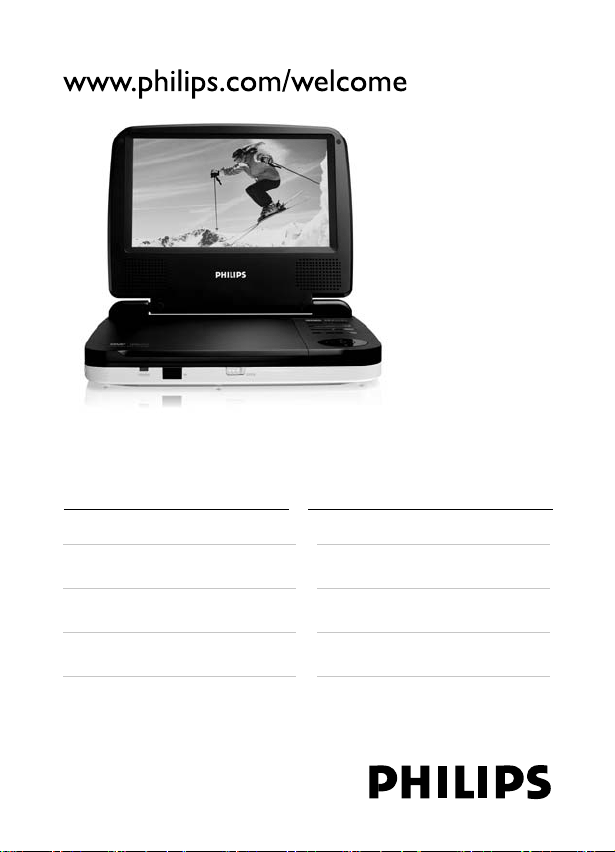
Register your product and get support at
EN User manual 2
DA Brugervejledning 35
DE Benutzerhandbuch 67
ES Manual del usuario 101
FR Mode d’emploi 135
IT Manuale utente 171
NL Gebruiksaanwijzing 205
SV Användarhandbok 237
PET716_12_Book 1.indd Sec3:1PET716_12_Book 1.indd Sec3:1 2008-08-08 4:25:32 PM2008-08-08 4:25:32 PM

2
Contents
1 Important
4
Important safety instructions 4
Notice 8
2 Your portable DVD player
11
Introduction 11
What’s in the box 12
Overview of the main unit 12
Overview of the remote control 15
3 Get started
17
Charge the battery 17
Install remote control battery 19
Connect headphones 20
Connect additional equipment 20
Select OSD language 21
4 Use your player
22
Turn on 22
Play discs 22
Adjust volume 22
Play options 23
5 Adjust settings
26
Select display ratio 26
Activate screen saver 26
Select picture contrast 27
Get DivX registration code 27
EN
PET716_12_Book 1.indd Sec3:2PET716_12_Book 1.indd Sec3:2 2008-08-08 4:25:37 PM2008-08-08 4:25:37 PM

3
Restrict access 28
Change password 29
Restore original settings 30
6 Troubleshooting
31
7 Product information
33
English
EN
PET716_12_Book 1.indd Sec1:3PET716_12_Book 1.indd Sec1:3 2008-08-08 4:25:37 PM2008-08-08 4:25:37 PM

4
1 Important
Important safety instructions
a Read these instructions.
b Keep these instructions.
c Heed all warnings.
d Follow all instructions.
e Do not use this apparatus near water.
f Clean only with dry cloth.
g Do not block any ventilation openings. Install in accordance
with the manufacturer’s instructions.
h Do not install near any heat sources such as radiators, heat
registers, stoves, or other apparatus (including amplifi ers) that
produce heat.
i For countries with a polarized mains, do not defeat the
safety purpose of the polarized or grounding-type plug. A
polarized plug has two blades with one wider than the other.
A grounding type plug has two blades and a third grounding
prong. The wide blade or the third prong are provided for
your safety. If the provided plug does not fi t into your outlet,
consult an electrician for replacement of the obsolete outlet.
Caution: To prevent electric shock, match the wide blade of
the plug to the wide slot, fully insert.
EN
PET716_12_Book 1.indd Sec1:4PET716_12_Book 1.indd Sec1:4 2008-08-08 4:25:38 PM2008-08-08 4:25:38 PM

5
j Protect the power cord from being walked on or pinched,
particularly at plugs, convenience receptacles, and the point
where they exit from the apparatus.
k Only use attachments/accessories specifi ed by the
manufacturer.
l Use only with the cart, stand, tripod, bracket, or table
specifi ed by the manufacturer or sold with the apparatus.
When a cart is used, use caution when moving the cart/
apparatus combination to avoid injury from tip-over.
m Unplug this apparatus during lightning storms or when unused
for long periods of time.
n Refer all servicing to qualifi ed service personnel. Servicing is
required when the apparatus has been damaged in any way,
such as power-supply cord or plug is damaged, liquid has been
spilled or objects have fallen into the apparatus, the apparatus
has been exposed to rain or moisture, does not operate
normally, or has been dropped.
o Battery usage CAUTION – To prevent battery leakage which
may result in bodily injury, property damage, or damage to the
unit:
Install all batteries correctly, + and - as marked on the unit.
Do not mix batteries (old and new or carbon and alkaline,
etc.).
Remove batteries when the unit is not used for a long
time.
•
•
•
English
EN
PET716_12_Book 1.indd Sec1:5PET716_12_Book 1.indd Sec1:5 2008-08-08 4:25:38 PM2008-08-08 4:25:38 PM
6
p Apparatus shall not be exposed to dripping or splashing.
q Do not place any sources of danger on the apparatus (e.g.
liquid fi lled objects, lighted candles).
r This product may contain lead and mercury. Disposal of
these materials may be regulated due to environmental
considerations. For disposal or recycling information, please
contact your local authorities or the Electronic Industries
Alliance: www.eiae.org.
Warning
Never remove the casing of this player.
Never lubricate any part of this player.
Never place this player on other electrical equipment.
Keep this player away from direct sunlight, naked fl ames or heat.
Never look into the laser beam inside the player.
Ensure that you always have easy access to the power cord, plug or adaptor to
disconnect the player from the power.
•
•
•
•
•
•
Norge
Typeskilt fi nnes på apparatens bakside.
Observer: Nettbryteren er sekundert innkoplet.
Den innebygde netdelen er derfor ikke fraktoplet nettet så lenge
apparatet er tilsluttet nettkontakten.
For å redusere faren for brann eller elektrisk støt, skal apparatet, ikke
utsettes for regn eller fuktighet.
Hearing safety
Listen at a moderate volume.
Using headphones at a high volume can impair your hearing.
This product can produce sounds in decibel ranges that may
cause hearing loss for a normal person, even for exposure less
•
EN
PET716_12_Book 1.indd Sec1:6PET716_12_Book 1.indd Sec1:6 2008-08-08 4:25:39 PM2008-08-08 4:25:39 PM

7
than a minute. The higher decibel ranges are offered for those
that may have already experienced some hearing loss.
Sound can be deceiving. Over time your hearing ‘comfort level’
adapts to higher volumes of sound. So after prolonged listening,
what sounds ‘normal’ can actually be loud and harmful to your
hearing. To guard against this, set your volume to a safe level
before your hearing adapts and leave it there.
To establish a safe volume level:
Set your volume control at a low setting.
Slowly increase the sound until you can hear it comfortably and
clearly, without distortion.
Listen for reasonable periods of time:
Prolonged exposure to sound, even at normally ‘safe’ levels, can
also cause hearing loss.
Be sure to use your equipment reasonably and take appropriate
breaks.
Be sure to observe the following guidelines when using your
headphones.
Listen at reasonable volumes for reasonable periods of time.
Be careful not to adjust the volume as your hearing adapts.
Do not turn up the volume so high that you can’t hear what’s
around you.
You should use caution or temporarily discontinue use in
potentially hazardous situations. Do not use headphones while
operating a motorized vehicle, cycling, skateboarding, etc.; it may
create a traffi c hazard and is illegal in many areas.
Caution
Use of controls or adjustments or performance of procedures other than herein
may result in hazardous radiation exposure or other unsafe operation.
•
•
•
•
•
•
•
•
•
•
English
EN
PET716_12_Book 1.indd Sec1:7PET716_12_Book 1.indd Sec1:7 2008-08-08 4:25:39 PM2008-08-08 4:25:39 PM
8
Notice
Any changes or modifi cations made to this device that are not
expressly approved by Philips Consumer Electronics may void the
user’s authority to operate the equipment.
Disposal of old equipment and Used batteries
Information for Users on Collection and Disposal of Old
Equipment and Used Batteries
These symbols on the products, batteries, packaging, and/or
accompanying documents mean that used electrical and electronic
products and batteries should not be mixed with general household
waste. For proper treatment, recovery and recycling of old products
and used batteries, please take them to applicable collection points,
in accordance with your national legislation and the Directives
2002/96/EC and 2006/66/EC.
By disposing of these products and batteries correctly, you will help
to save valuable resources and prevent any potential negative effects
on human health and the environment which could otherwise arise
from inappropriate waste handling.
For more information about collection and recycling of old products
and batteries, please contact your local municipality, your waste
disposal service or the point of sale where you purchased the items.
EN
PET716_12_Book 1.indd Sec1:8PET716_12_Book 1.indd Sec1:8 2008-08-08 4:25:40 PM2008-08-08 4:25:40 PM
9
Information on Disposal in other Countries outside the European
Union
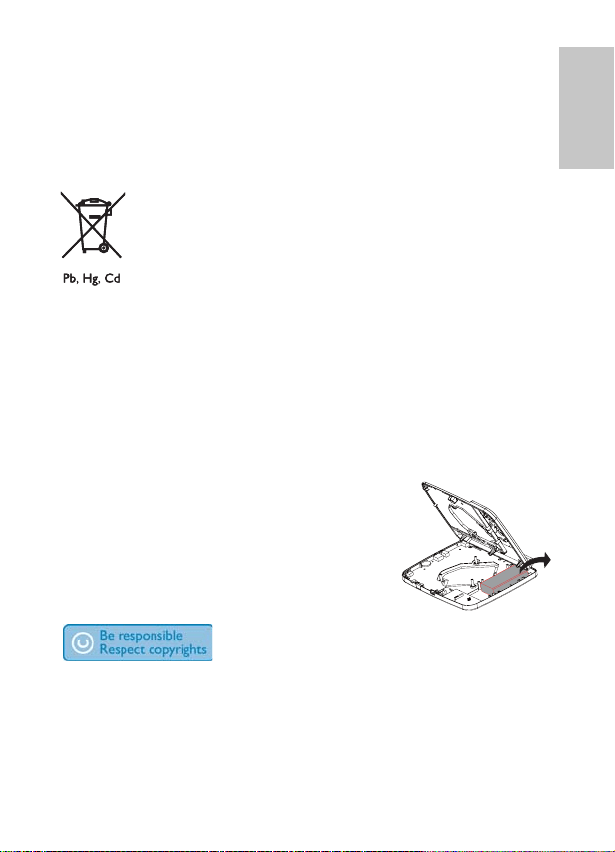
These symbols are only valid in the European Union. If you wish to
discard these items, please contact your local authorities or dealer
and ask for the correct method of disposal.
Note for the battery symbol
This symbol might be used in combination with a chemical symbol.
In this case it complies with the requirement set by the Directive for
the chemical involved.
Environmental information
All redundant packing material has been omitted. We have done our
utmost to make the packaging easily separable into mono materials.
Please observe the local regulations regarding the disposal of packing
materials.
Always bring your product to a professional to
remove/replace the battery.
The making of unauthorized copies of copy-protected material,
including computer programs, fi les, broadcasts and sound recordings,
may be an infringement of copyrights and constitute a criminal
offence. This equipment should not be used for such purposes.
English
EN
PET716_12_Book 1.indd Sec1:9PET716_12_Book 1.indd Sec1:9 2008-08-08 4:25:40 PM2008-08-08 4:25:40 PM

10
Recording and playback of material might require consent. See
Copyright Act 1956 and The Performer’s Protection Acts 1958 to
1972.
This player includes this label:
EN
PET716_12_Book 1.indd Sec1:10PET716_12_Book 1.indd Sec1:10 2008-08-08 4:25:41 PM2008-08-08 4:25:41 PM
11
2 Your portable DVD
player
Congratulations on your purchase, and welcome to Philips! To fully
benefi t from the support that Philips offers, register your product at
www.philips.com/welcome.
Introduction
Your portable DVD player plays digital video discs that conform
to the universal DVD Video standard. With it, you can play movies
with true cinema picture quality and stereo or multi-channel sound
(depending on disc and playback set-up).
You can also select sound track, subtitle languages, and different angle
of view (again depending on DVD disc). Besides, you can restrict the
play of discs that are not suitable for children.
You can play the following discs on the DVD player (including CD-R,
CD-RW, DVD±R and DVD±RW):
DVD-Video
Video CD
Audio CD
English
EN
PET716_12_Book 1.indd Sec1:11PET716_12_Book 1.indd Sec1:11 2008-08-08 4:25:42 PM2008-08-08 4:25:42 PM
12
MP3 CD
DivX
Discs with JPEG fi les
What’s in the box
Check and identify the contents of your package:
Portable DVD player
Remote control
AC power adaptor, DSA-9W-09 F (DVE) or AY4132 (Philips)
Car adaptor
AV cables
User Manual
Quick Start Guide
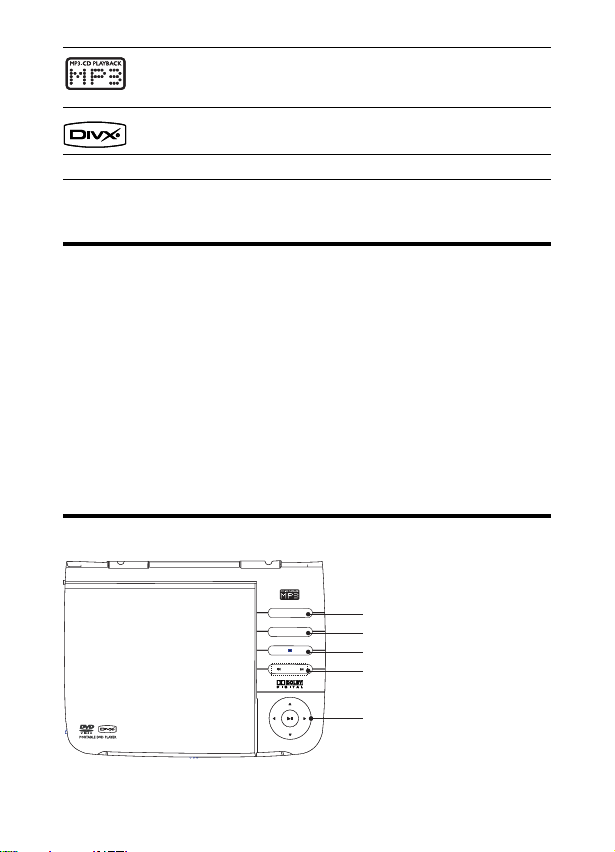
Overview of the main unit
•
•
•
•
•
•
•
a
b
c
d
e
MENU
DISPLAY MODE
a
b
c
d
e
MENU
DISPLAY MODE
EN
PET716_12_Book 1.indd Sec1:12PET716_12_Book 1.indd Sec1:12 2008-08-08 4:25:43 PM2008-08-08 4:25:43 PM
13
a DISPLAY MODE
Transmit video to the device connected to the AV OUT
jack.
b MENU
For DVD, access or exit disc menu.
For VCD, turn on or off PBC (Playback Control) mode.
c
Stop disc play.
d
,
Skip to the previous or next title/chapter/track.
e
, , ,
Move cursor up/down/left/right.
,
Search backward or forward at different speeds.
Confi rms an entry or selection.
Start or pause disc play.
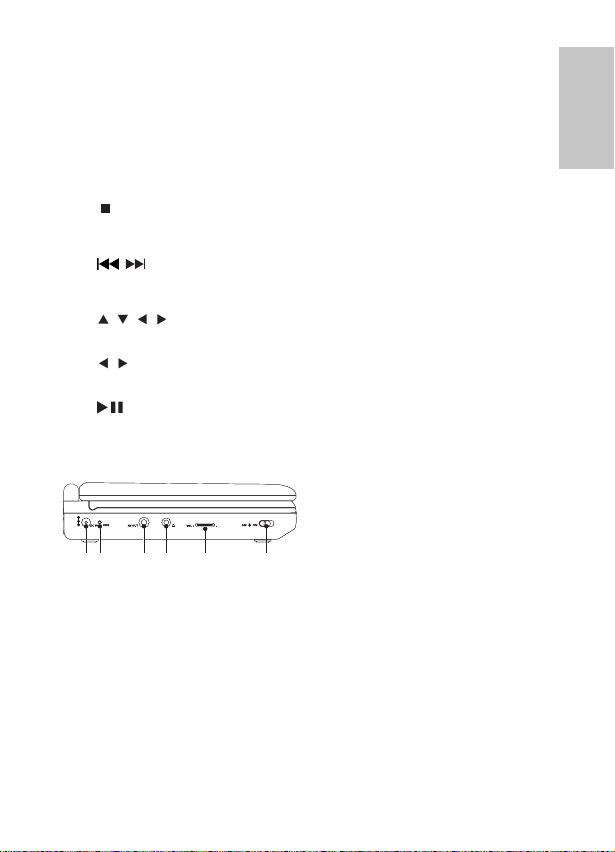
f DC 9V
Power supply socket.
g CHG
Charge indicator.
h AV OUT
Audio/video output jack.
•
•
•
•
•
•
•
•
•
•
•
•
ghfijkghfijk
English
EN
PET716_12_Book 1.indd Sec1:13PET716_12_Book 1.indd Sec1:13 2008-08-08 4:25:44 PM2008-08-08 4:25:44 PM
14
i
Headphone jack.
j VOL +/-
Adjust the volume level.
k OFF
ON
Turn DVD player on/off.
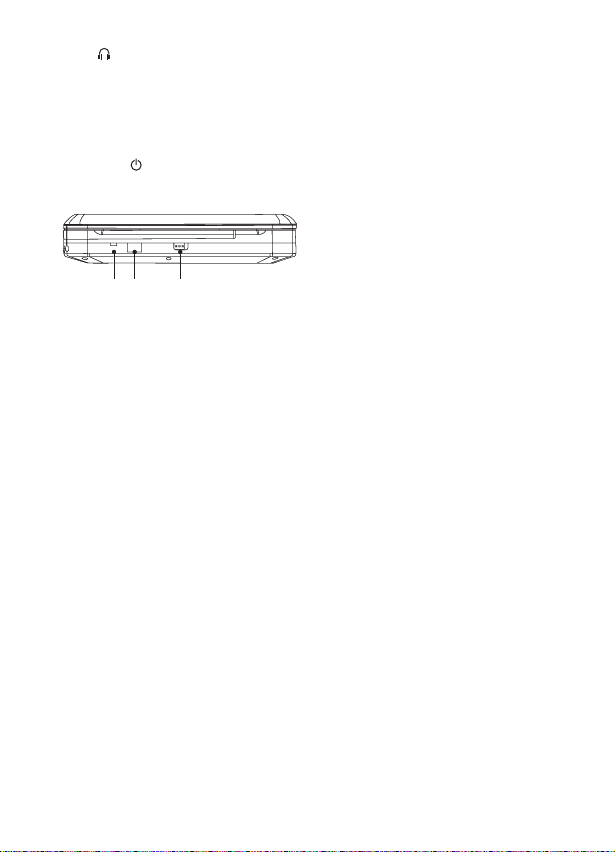
l POWER
Power indicator.
m IR
Remote control sensor.
n OPEN
Open the disc compartment.
•
•
•
•
•
•
l m
n
OPEN
IR
POWER
l m
n
OPEN
IR
POWER
EN
PET716_12_Book 1.indd Sec1:14PET716_12_Book 1.indd Sec1:14 2008-08-08 4:25:45 PM2008-08-08 4:25:45 PM
15
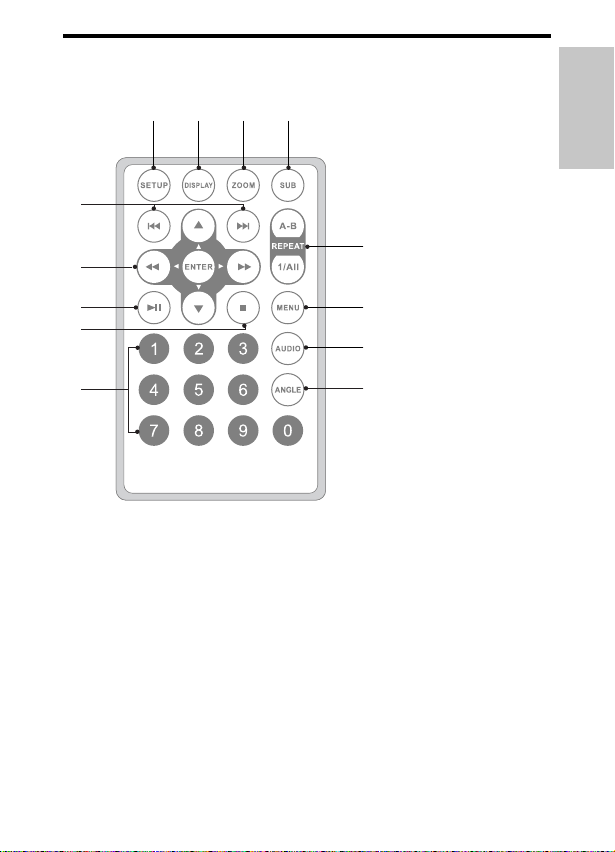
Overview of the remote control
a SETUP
Access or exit the setup menu.
b DISPLAY
Display play information.
c ZOOM
Zoom in or out.
d SUB
Select DVD subtitle language.
•
•
•
•
i
j
k
l
m
e
f
h
abcd
g
i
j
k
l
m
e
f
h
abcd
g
English
EN
PET716_12_Book 1.indd Sec1:15PET716_12_Book 1.indd Sec1:15 2008-08-08 4:25:46 PM2008-08-08 4:25:46 PM

16
e A-B REPEAT
Mark the section for repeat play.
REPEAT 1/ALL
Repeat a chapter/track/title.
f MENU
For DVD, access or exit disc menu.
For VCD, turn on or off PBC (Playback Control) mode.
g AUDIO
For DVD, select an audio language.
For VCD, select an audio mode.
h ANGLE
Select a different viewing angle of a DVD.
i Numeric Keypad 0 - 9
Input numbers.
j
Stop disc play.
k
Start or pause disc play.
l
, , ,
Move cursor up/down/left/right.
,
Search backward or forward at diffent speeds.
ENTER
Confi rms an entry or selection.
m
,
Skip to previous/next chapter, track or title.
•
•
•
•
•
•
•
•
•
•
•
•
•
•
EN
PET716_12_Book 1.indd Sec1:16PET716_12_Book 1.indd Sec1:16 2008-08-08 4:25:47 PM2008-08-08 4:25:47 PM
17
3 Get started
Caution
Use the controls only as stated in this user manual.•
Always follow the instructions in this chapter in sequence.
If you contact Philips, you will be asked for the model and serial number
of your player. Find the model number and serial number of this player
at the back or the bottom of your player. write these numbers here:
Model No. __________________________
Serial No. ___________________________
Charge the battery
Caution
Risk of product damage! Ensure that the power supply voltage corresponds to the
voltage printed on the back or the underside of the player.
The type plate is located on the bottom of the player.
Use only the supplied AC adaptor to charge the battery.
•
•
•
1 Slide the OFF ON switch to OFF position.
English
EN
PET716_12_Book 1.indd Sec1:17PET716_12_Book 1.indd Sec1:17 2008-08-08 4:25:48 PM2008-08-08 4:25:48 PM
18
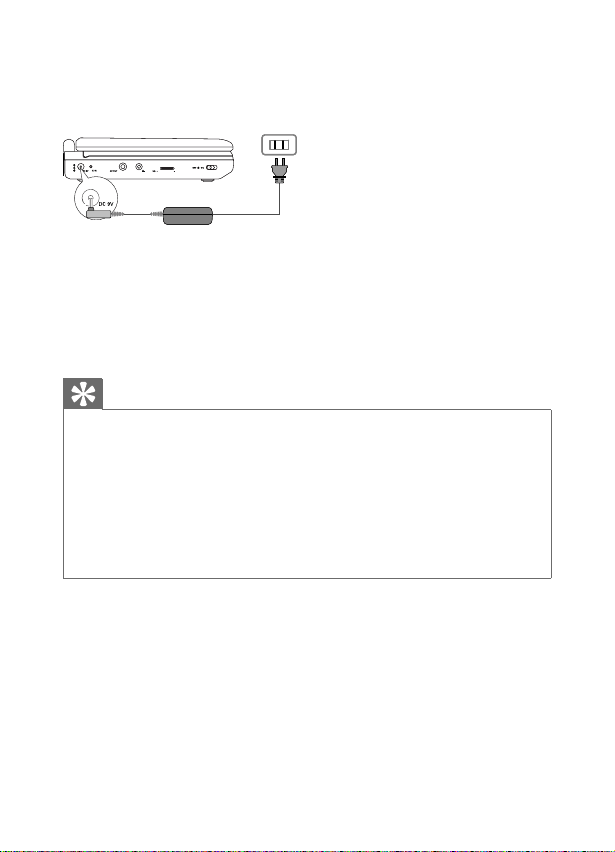
2 Connect the supplied AC adaptor to the player and to the AC
outlet.
The charge indicator turns on. It takes about 4.5 hours to
fully charge the battery.
When the battery is fully charged, the charge indicator turns
off.
Tip
You can only change the battery when the temperature is between 32°F (0°C)
and 95°F (35°C).
When headphones are connected to the DVD player, the fully charged battery
lasts about 2 hours.
When the power is low, the battery icon is shown on the upper-left corner of the
screen for warning.
To maximize battery life, recharge the battery immediately once the battery is fully
discharged. If you do not use the player for a long time, recharge the battery once
every two months.
•
•
•
•
»
»
EN
PET716_12_Book 1.indd Sec1:18PET716_12_Book 1.indd Sec1:18 2008-08-08 4:25:48 PM2008-08-08 4:25:48 PM
19
Install remote control battery
Caution
Risk of explosion! Keep batteries away from heat, sunshine or fi re. Never discard
batteries in fi re.
Risk of decreased battery life! Never mix different brands or types of batteries.
Risk of product damage! When the remote control is not used for long periods,
remove the batteries.
Perchlorate Material - special handling may apply. See www.dtsc.ca.gov/
hazardouswaste/perchlorate.
•
•
•
•
For fi rst-time use:
Remove the protective tab to activate the remote control
battery.
To replace the remote control battery:
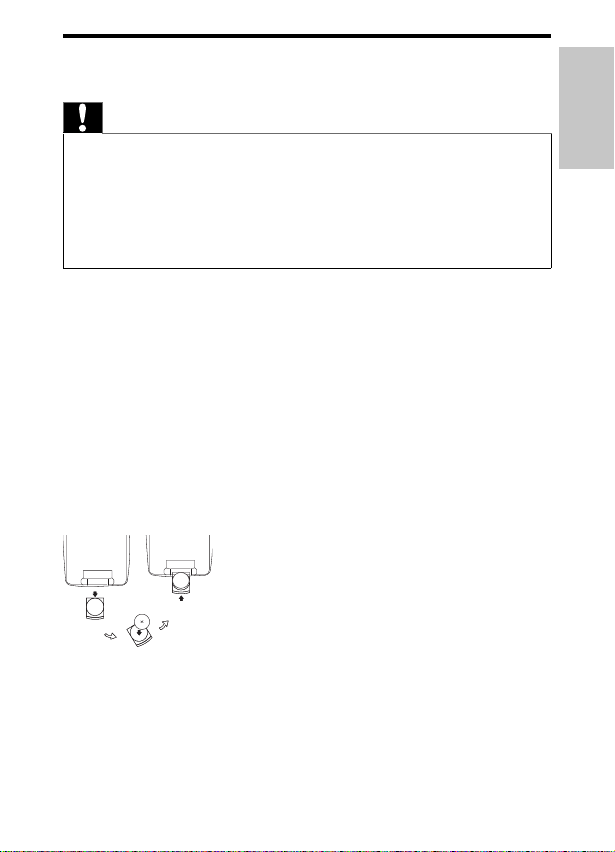
1 Open the battery compartment.
2 Insert 1 CR2025 battery with correct polarity (+/-) as indicated.
3 Close the battery compartment.
•
English
EN
PET716_12_Book 1.indd Sec1:19PET716_12_Book 1.indd Sec1:19 2008-08-08 4:25:49 PM2008-08-08 4:25:49 PM
20
Connect headphones
Plug the headphones into the jack of the player.
Connect additional equipment
Caution
Turn off your player before connecting to any additional equipment.•
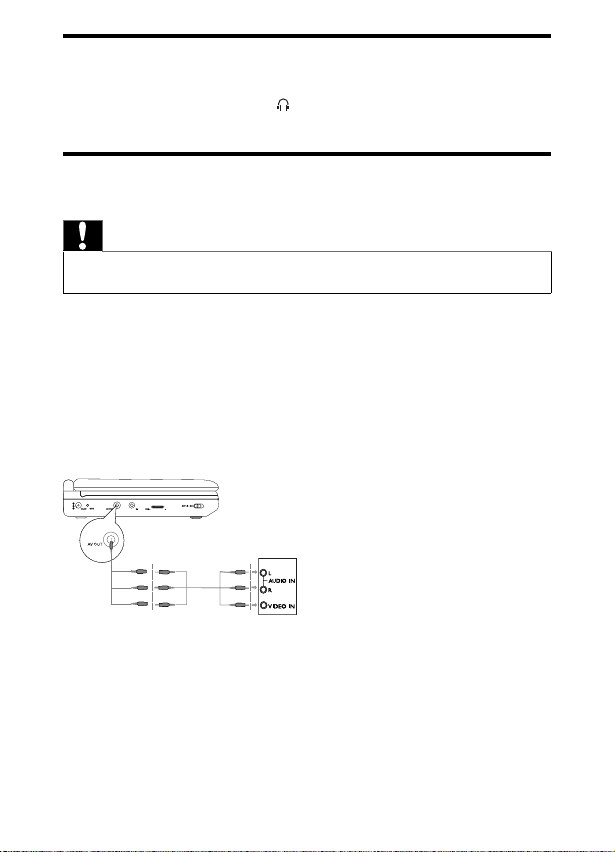
You can connect the player to a TV or an amplifi er to enjoy DVDs
or Karaoke.
Connect a TV
Match the color of the AV cables (not supplied) with the jacks: the
yellow cable is for the yellow video jack, the red/white cable is for
the red/white audio jacks.
•
TVTV
EN
PET716_12_Book 1.indd Sec1:20PET716_12_Book 1.indd Sec1:20 2008-08-08 4:25:50 PM2008-08-08 4:25:50 PM
21
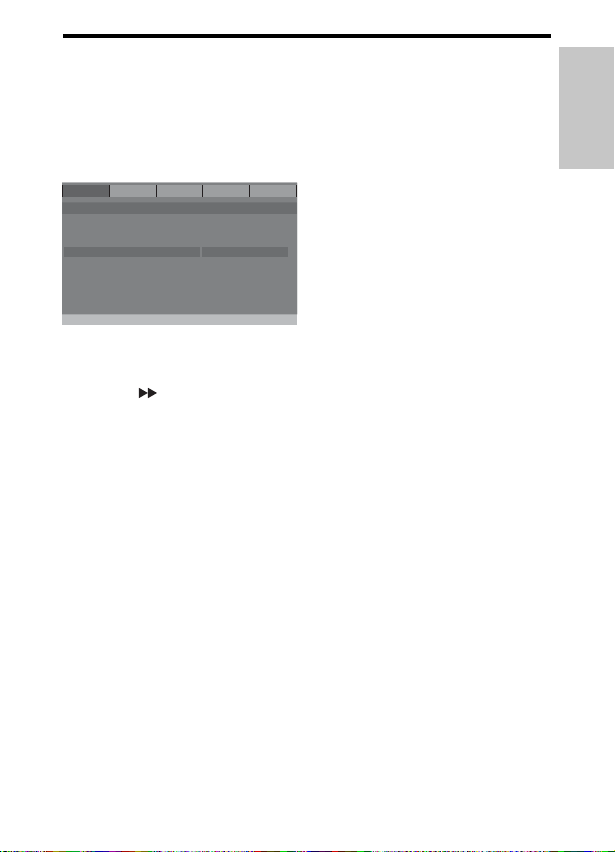
Select OSD language
You can choose a different language for the on-screen display text.
1 Press SETUP .
The setup menu is displayed.
2 Select [-- General Setup Page --] > [OSD Language] .
3 Press to select an option.
4 Press ENTER to confi rm.
5 Press SETUP to exit.
»
TV Displ ay
Angle Mark
OSD Language
Screen Saver
Last Memory
16:9
Off
Eng
On
On
English
Francais
Deutsch
General Video
Password Prefer
- - General Setup Page - -
Set OSD Language
Exit
TV Displ ay
Angle Mark
OSD Language
Screen Saver
Last Memory
16:9
Off
Eng
On
On
English
Francais
Deutsch
General Video
Password Prefer
- - General Setup Page - -
Set OSD Language
Exit
English
EN
PET716_12_Book 1.indd Sec1:21PET716_12_Book 1.indd Sec1:21 2008-08-08 4:25:50 PM2008-08-08 4:25:50 PM
22
4 Use your player
Turn on
Slide the OFF ON switch to the ON position.
The POWER indicator turns on.
Play discs
1
Press OPEN on the player.
2 Insert the disc with label side facing up.
3 Push down to close the disc compartment.
Play starts automatically. If not, press
.
If a menu appears, select an item, then press
to start play.
To pause, press
. Press again to resume play.
To view disc information, press DISPLAY .
To stop, press STOP
twice.
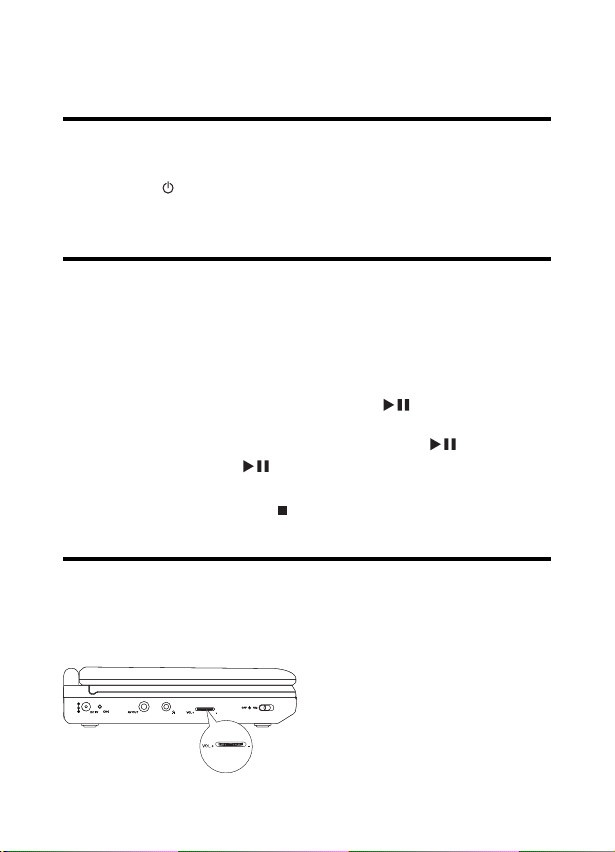
Adjust volume
Adjust the volume control on the left side of the player.
•
»
•
•
•
•
EN
PET716_12_Book 1.indd Sec1:22PET716_12_Book 1.indd Sec1:22 2008-08-08 4:25:51 PM2008-08-08 4:25:51 PM
23
Play options
Skip to a title/track/chapter
To select the previous/next title, track or chapter, press or
.
To skip directly to any title/track/chapter, enter the
corresponding number with the numerical keys (0-9), then
press ENTER .
Search
During play, press to select a search speed.
Press
or ENTER to resume normal play.
Select audio language
For DVDs that contain two or more audio languages.
During play, press AUDIO repeatedly until the language is
selected.
Select subtitle language
For DVDs that contain two or more subtitle languages.
During play, press SUB repeatedly until the language is selected.
Repeat
During play, press REPEAT 1/ALL repeatedly to select the
following repeat options:
For DVD
[
Chapter]
[
Title]
•
•
•
•
•
•
•
•
•
English
EN
PET716_12_Book 1.indd Sec1:23PET716_12_Book 1.indd Sec1:23 2008-08-08 4:25:52 PM2008-08-08 4:25:52 PM
24
[ ALL]
[Repeat Off]
For VCD
[
Track]
[
ALL]
[Repeat Off]
For CD/MP3/JPEG/DivX
[Repeat One]
[Repeat Folder]
[Repeat Off]
Tip
For VCDs, if PBC is on, you cannot repeat items.•
Repeat a section
You can repeat a specifi c section of audio/video within a title/
chapter/track (repeat A-B).
1 During play, at the chosen start point, press A-B REPEAT .
[
A] is displayed.
2 At the chosen end point, press A-B REPEAT again.
[
AB] is displayed.
The selected section plays repeatedly.
3 Press A-B REPEAT to cancel.
•
•
•
•
•
•
•
•
»
»
»
EN
PET716_12_Book 1.indd Sec1:24PET716_12_Book 1.indd Sec1:24 2008-08-08 4:25:53 PM2008-08-08 4:25:53 PM
25
Zoom
For DVDs, VCDs and JPEG CDs, you can zoom in and out for video
images or pictures.
1 Press ZOOM repeatedly to zoom in and out.
2 When the video image or picture is enlarged, press , , ,
to pan through it.
Select audio mode
When you play VCDs, you can select an audio mode.
Press AUDIO repeatedly to select audio channel: [Mono Left] ,
[Mono Right] , or [Stereo] .
Rotate pictures
For JPEG CDs only. While the JPEG is displayed:
Press
to rotate counter-clockwise.
Press
to rotate clockwise.
Press
to fl ip up/down.
Press
to fl ip left/right..
•
•
•
•
•
English
EN
PET716_12_Book 1.indd Sec1:25PET716_12_Book 1.indd Sec1:25 2008-08-08 4:25:54 PM2008-08-08 4:25:54 PM

26
5 Adjust settings
Select display ratio
1
Press SETUP .
2 Select [-- General Setup Page --] > [TV Display] .
3 Press to select an option.
[4:3 PS] : The top and bottom or the sides of the picture
are trimmed. The picture is not distorted.
[4:3 LB] : Black bars may appear on the top and bottom or
the sides of the picture. The picture is not distorted.
[16:9] : The picture is displayed in the original proportion of
images transmitted in 16:9 format and distorted.
4 Press ENTER to confi rm.
5 Press SETUP to exit.
Activate screen saver
If you do not press any buttons fi ve minutes after the play is stopped,
screen saver starts automatically.
1 Press SETUP .
2 Select [-- General Setup Page --] > [Screen Saver] .
3 Press to select an option:
[On] : Activate screen saver.
[Off] : Deactivate screen saver.
4 Press ENTER to confi rm.
5 Press SETUP to exit.
•
•
•
•
•
EN
PET716_12_Book 1.indd Sec1:26PET716_12_Book 1.indd Sec1:26 2008-08-08 4:25:54 PM2008-08-08 4:25:54 PM
27
Select picture contrast
1
Press SETUP .
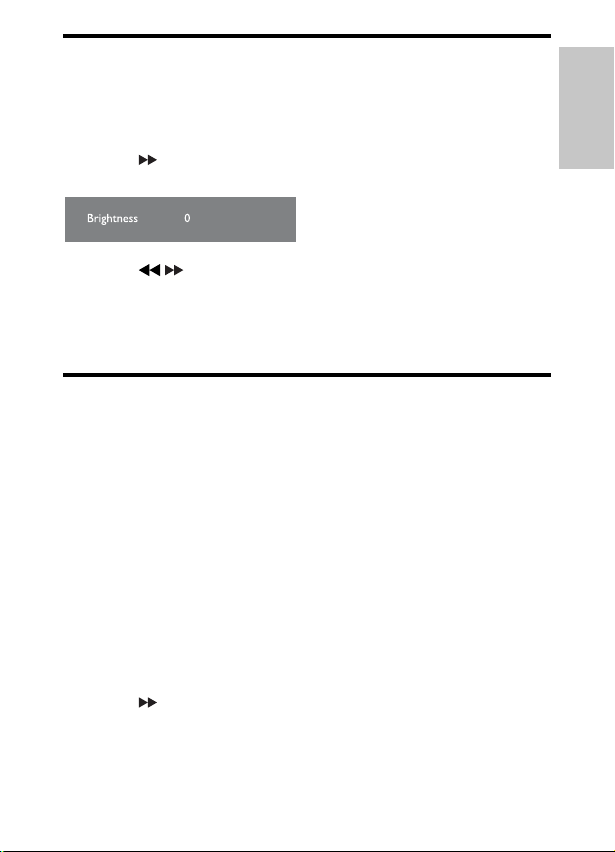
2 Select [-- Video Setup Page --] > [Brightness] or [Contrast] .
3 Press .
A confi rmation box is displayed.
4 Press to set brightness and contrast.
5 Press ENTER to confi rm.
6 Press SETUP to exit.
Get DivX registration code
DivX is a popular media technology created by DivX, Inc. DivX
media fi les contain highly compressed video with high visual quality
that maintains a relatively small fi le size. DivX fi les can also include
advanced media features like menus, subtitles, and alternate audio
tracks. Many DivX media fi les are available for download online,
and you can rent and purchase DivX videos with the DivX VOD
(Video on Demand) service. To use this service, you need the DivX
VOD registration code of this player. For more information and
instructions, visit www.divx.com/vod.
1 Press SETUP .
2 Select [-- Video Setup Page --] > [DivX VOD] .
3 Press to select [OK] .
4 Press ENTER .
The DivX registration code appears.
»
»
English
EN
PET716_12_Book 1.indd Sec1:27PET716_12_Book 1.indd Sec1:27 2008-08-08 4:25:55 PM2008-08-08 4:25:55 PM

28
5 Write down the number for future reference.
6 Press ENTER to exit.
“DivX, DivX” Certifi ed, and associated logos are trademarks of DivX,
Inc. and are used under license.
Offi cal DivX® Certifi ed product. Plays all versions of DivX® video
(including DivX® 6) with standard playback of DivX® media fi les.
Restrict access
Depending on the DVD, you may be asked to change the parental
level while playing the disc. The rating levels are from 1 to 8 and are
country dependent. You can prohibit the playing of certain discs that
are not suitable for your children, or have certain discs played with
alternative scenes.
1 Press SETUP .
2 Select [-- Preference Page --] > [Parental] .
3 Press to select an option:
[1 KID SAF] : Childsafe; acceptable for viewers of all ages.
[2 G] : General Audience; recommended as acceptable for
viewers of all ages.
[3 PG] : Parental Guidance suggested.
[4 PG 13] : Unsuitable for children under age 13.
[5 PGR] : Parental Guidance; recommended that parents
restrict children under 17 from viewing.
[6 R] : Restricted; recommended only when supervised by a
parent or adult guardian.
•
•
•
•
•
•
EN
PET716_12_Book 1.indd Sec1:28PET716_12_Book 1.indd Sec1:28 2008-08-08 4:25:56 PM2008-08-08 4:25:56 PM
29
[7 NC17] : No Children under age 17; not recommended
viewing for children under age 17.
[8 ADULT] : Mature Material; should be viewed only by
adults.
4 Press ENTER .
You are prompted to enter the password.
5 Press ENTER to confi rm.
6 Press SETUP to exit.
Tip
For how to change the password, see “Change password”.•
Change password
1
Press SETUP .
2 Select [-- Password Change Page --] > [Password] .
3 Press to select [Change] .
4 Press ENTER .
5 Enter the current password.
For the fi rst time, enter 3308 as the password.
6 Enter a new 4-digit password twice.
7 Press ENTER to confi rm.
8 Press SETUP to exit.
Tip
If you forget your password, enter 3308.•
•
•
»
•
English
EN
PET716_12_Book 1.indd Sec1:29PET716_12_Book 1.indd Sec1:29 2008-08-08 4:25:56 PM2008-08-08 4:25:56 PM

30
Restore original settings
1
Press SETUP .
2 Select [-- Preference Page --] > [Default] .
3 Press to select [Reset] .
4 Press ENTER to confi rm.
EN
PET716_12_Book 1.indd Sec1:30PET716_12_Book 1.indd Sec1:30 2008-08-08 4:25:57 PM2008-08-08 4:25:57 PM

31
6 Troubleshooting
Warning
Risk of electric shock. Never remove the casing of this player. •
To keep the warranty valid, never try to repair the system yourself.
If you encounter problems when using this player, check the following
points before requesting service. If the problem remains unsolved,
register your player and get support at www.philips.com/welcome.
No power
Ensure that both plugs of the mains cord are properly
connected.
Ensure that there is power at the AC outlet.
Check if the built-in battery is drained.
Distorted picture
Clean the disc. With a clean, soft, lint-free cloth, wipe the disc
outwards from the center.
Make sure that the video output format of the disc is
compatible with the TV.
Change the video output format to match your TV or program.
The LCD is manufactured using high precision technology. You
may, however, see tiny black points and/or bright points(red,
blue, green) that continuously appear on the LCD. This is a
normal result of the manufacturing process and does not
indicate a malfunction.
No sound
Ensure that the AV cable is connected correctly.
•
•
•
•
•
•
•
•
English
EN
PET716_12_Book 1.indd Sec1:31PET716_12_Book 1.indd Sec1:31 2008-08-08 4:25:58 PM2008-08-08 4:25:58 PM

32
Cannot play disc
Ensure the disc label is upwards.
Clean the disc. With a clean, soft, lint-free cloth, wipe the disc
outwards from the center.
Check if the disc is defective by trying another disc.
No response to the remote control
Ensure that the path between the remote control and the
player is clear from obstacles.
From a close distance, point the remote control directly at the
player.
Replace the remote control batteries.
The function does not work for this disc. Refer to the disc
instructions.
The player feels warm
When the player is in use for a long period of time, its surface
will be heated. This is normal.
•
•
•
•
•
•
•
•
EN
PET716_12_Book 1.indd Sec1:32PET716_12_Book 1.indd Sec1:32 2008-08-08 4:25:58 PM2008-08-08 4:25:58 PM
33
7 Product information
Note
Product information is subject to change without prior notice.•
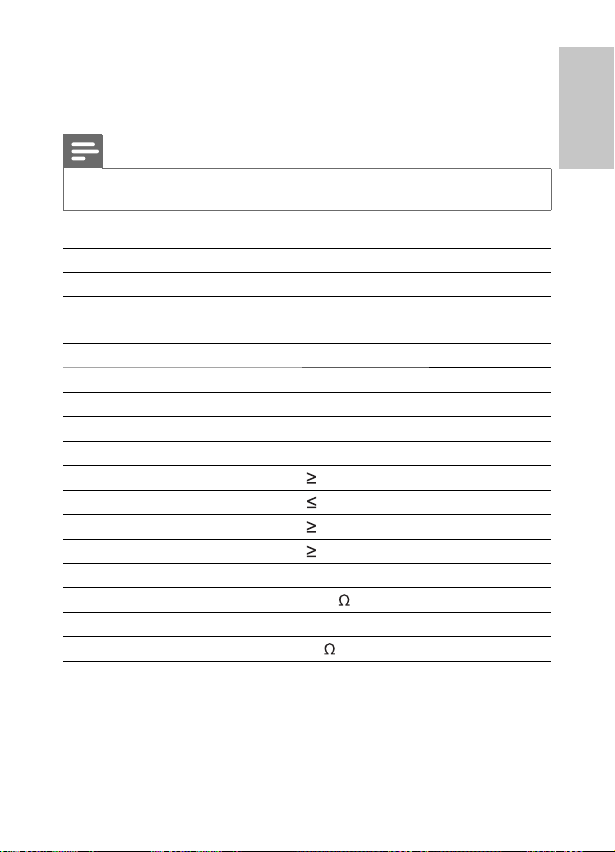
Dimensions 210 x 178 x 39 mm
Weight 0.79 kg/0.36 pounds
Power supply Input: 100-240V 50/60Hz 0.3A
Output: DC 9V 1A
Power consumption 9 W
Operating temperature range 0-45°C
Laser wavelength 650 nm
Video system PAL
Frequency response 20Hz-20KHz ± 1dB
Signal/noise ratio
80 dB
Audio distortion + noise
-80 (1KHz)
Channel separation
80 dB
Dynamic range
80 dB
Audio out (analog audio) Output level: 2V ± 10%
Load impedance 10 K
Video out Output level: 1Vp - p ± 20%
Load impedance 75
English
EN
PET716_12_Book 1.indd Sec1:33PET716_12_Book 1.indd Sec1:33 2008-08-08 4:25:59 PM2008-08-08 4:25:59 PM

© 2008 Koninklijke Philips Electronics N.V.
All rights reserved.
PET716_12_Book 2.indd Sec4:268PET716_12_Book 2.indd Sec4:268 2008-08-11 2:06:56 PM2008-08-11 2:06:56 PM