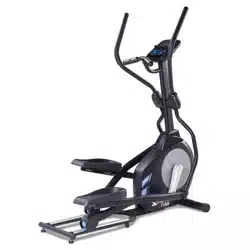
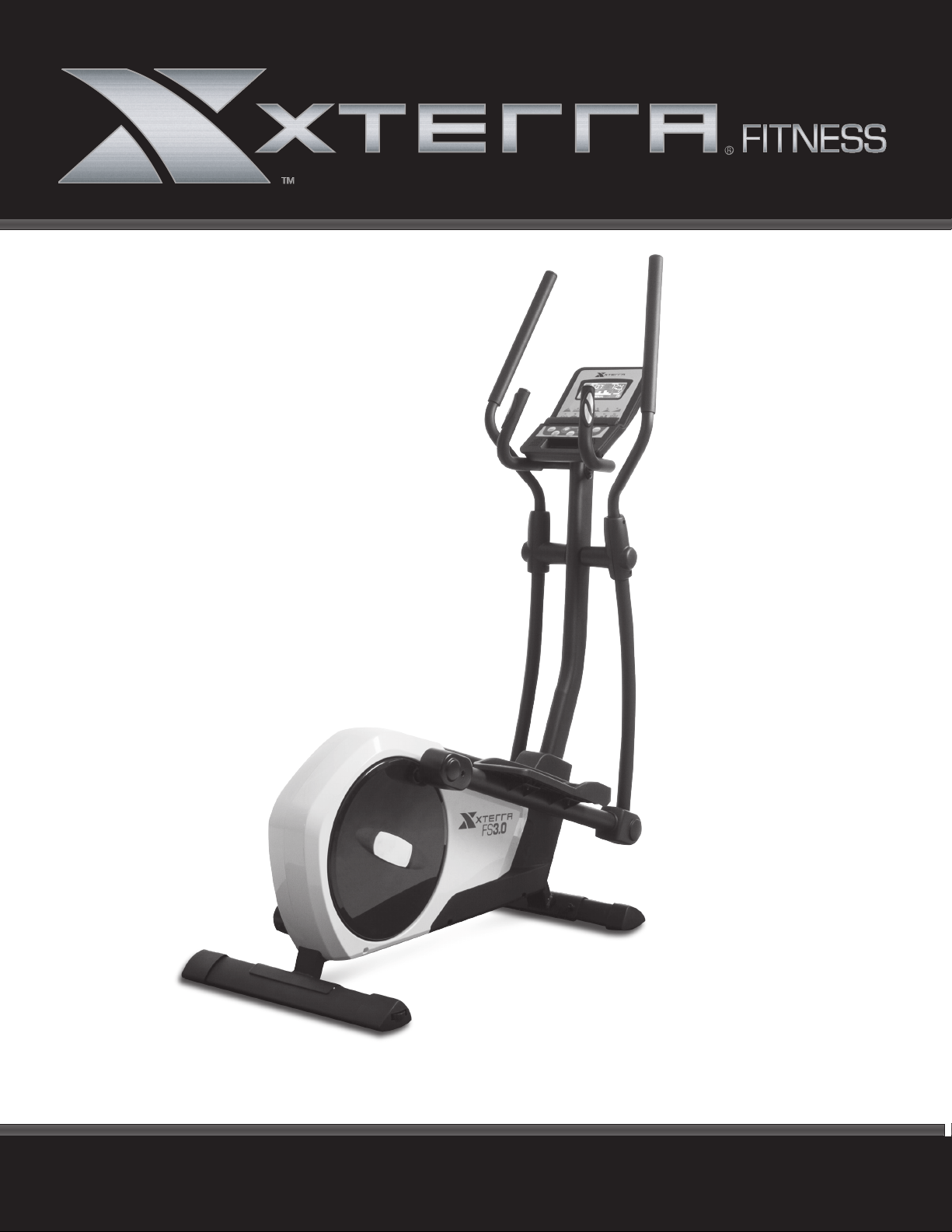
FS3.O ELLIPTICAL
OWNER’S MANUAL
PLEASE CAREFULLY READ THIS ENTIRE MANUAL BEFORE OPERATING YOUR NEW ELLIPTICAL

Table Of Contents
1
2
5
9
11
16
17
Product Registration
Important Safety Instructions
FS3.0 Assembly Instructions
Operation of Your Console
Program Operation
General Maintenance
Manufacturer’s Limited Warranty
Thank you for your purchase of this quality elliptical from XTERRA Fitness. Your new
elliptical has been manufactured by one of the leading tness manufacturers in the world.
XTERRA Fitness will do all we can to make your ownership experience as pleasant as
possible for many years to come. If you have questions, or if parts are missing or damaged,
or you require customer service, call (870) 336-4286. Please have your model number and
serial number handy when you call.
Please take a moment to record where you purchased your machine, as well as the date of
purchase for future reference. We appreciate your condence in XTERRA Fitness and we
will always remember that you are the reason that we are in business. Please complete and
mail your registration card today and enjoy your new elliptical.
Yours in Health,
XTERRA Fitness
Congratulations On Your New Elliptical and Welcome to the XTERRA Fitness Family!
FS3.0_20180821
FS3.0 Elliptical
1
ATTENTION
THIS ELLIPTICAL IS INTENDED FOR RESIDENTIAL USE ONLY AND IS WARRANTED FOR THE
APPLICATION. ANY OTHER APPLICATION VOIDS THIS WARRANTY IN ITS ENTIRETY.
Record Your Serial Number
Please record the Serial Number of this tness product
in the space provided below.
Serial Number
Register Your Purchase
The self-addressed product registration card must be completed in full and returned to
XTERRA Fitness. You can also go to www.xterratness.com/warrantyreg.html
to register online.
Product Registration
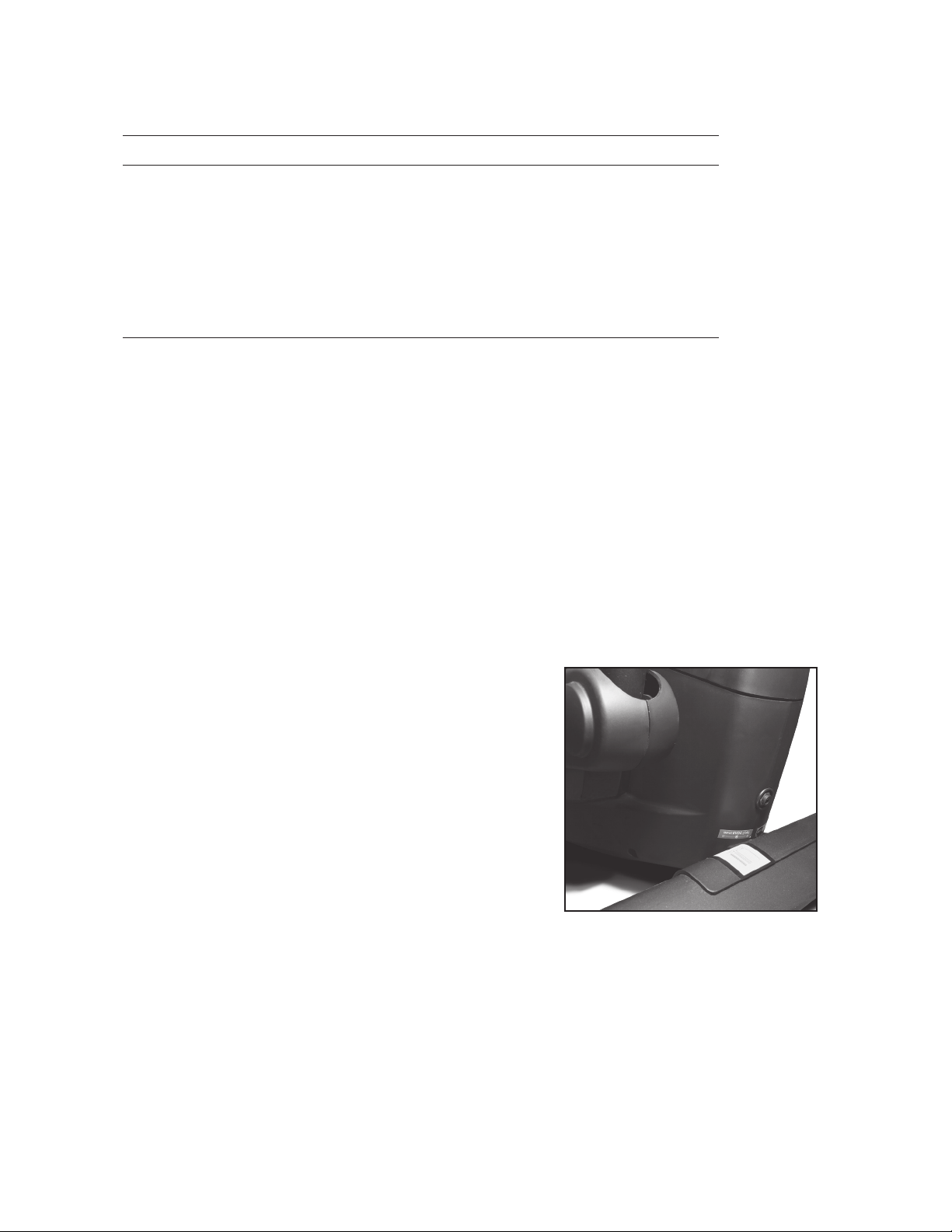
This product uses an external power supply. The
power supply must be plugged into the power jack,
located on the front of the unit near the stabilizer tube.
Next, plug the power supply into the appropriate wall
outlet. When not in use, it is recommended to unplug
the power supply from the wall outlet.
IMPORTANT: If the product has been exposed to cold
temperatures, allow the product sit in room tempera-
ture to warm up before plugging in the power supply.
Failure to do so may result in damage to the display or
electronic components.
IMPORTANT: Do not operate the product if the power supply, its plug, or its cord
has been damaged.
Power
Purchase Location
Purchase Date

2
FS3.0 Elliptical
• To disconnect, turn all controls to the off position, then remove the plug from the outlet.
• Do not operate equipment on deeply padded, plush or shag carpet. Damage to both carpet and
equipment may result.
• Before beginning this or any exercise program, consult a physician. This is especially important for
persons over the age of 35 or persons with pre-existing health conditions.
• Keep hands away from all moving parts.
• The pulse sensors are not medical devices. Various factors, including the user’s movement, may affect the
accuracy of heart rate readings. The pulse sensors are intended only as exercise aids in determining heart
rate trends in general.
• Do not attempt to use your equipment for any purpose other than for the purpose it is intended.
• Wear proper shoes. High heels, dress shoes, sandals or bare feet are not suitable for use on your
equipment. Quality athletic shoes are recommended to avoid leg fatigue.
Important Safety Instructions
When using an electrical appliance, basic precautions should always be followed, including the following:
Read all instructions before using this appliance.
DANGER - To reduce the risk of electric shock:
1. Always unplug this appliance from the electrical outlet immediately after using and before cleaning.
WARNING - To reduce the risk of burns, re electric shock, or injury to persons:
1. An appliance should never be left unattended when plugged in. Unplug from outlet when not in use, and
before putting on or taking off parts.
2. Do not operate under blanket or pillow. Excessive heating can occur and cause re, electric shock, or injury
to persons.
3. This exercise equipment is not intended for use by persons with reduced physical, sensory or mental capa-
bilities, or lack of experience and knowledge.
4. Use this appliance only for its intended use as described in this manual. Do not use attachments not
recommended by the manufacturer.
5. Never operate this appliance if it has a damaged cord or plug, if it is not working properly, if it has been
dropped or damaged, or dropped into water. Return the appliance to a service center for examination and
repair.
6. Do not carry this appliance by supply cord or use cord as a handle.
7. Keep the cord away from heated surfaces.
8. Never operate the appliance with the air openings blocked. Keep the air openings free of lint, hair, and the
like.
9. Never drop or insert any object into any opening.
10. Do not use outdoors.
11. Do not operate where aerosol (spray) products are being use or where oxygen is being administered.
12. Connect this appliance to a properly grounded outlet only.
13. The appliance is intended for household use.
SAVE THESE INSTRUCTIONS - THINK SAFETY!
Fitness Equipment Safety Instructions
CAUTION!! Please be careful when unpacking the carton.
Failure to follow all guidelines may compromise the effectiveness of the exercise experience, expose
yourself (and possibly others) to injury, and reduce the longevity of the equipment.
WARNING: This product can expose you to chemicals including Toluene and Acrylamide which are
known to the State of California to cause cancer and birth defects or other reproductive harm.
For more information go to www.P65Warnings.ca.gov
FS3.0 Elliptical
3
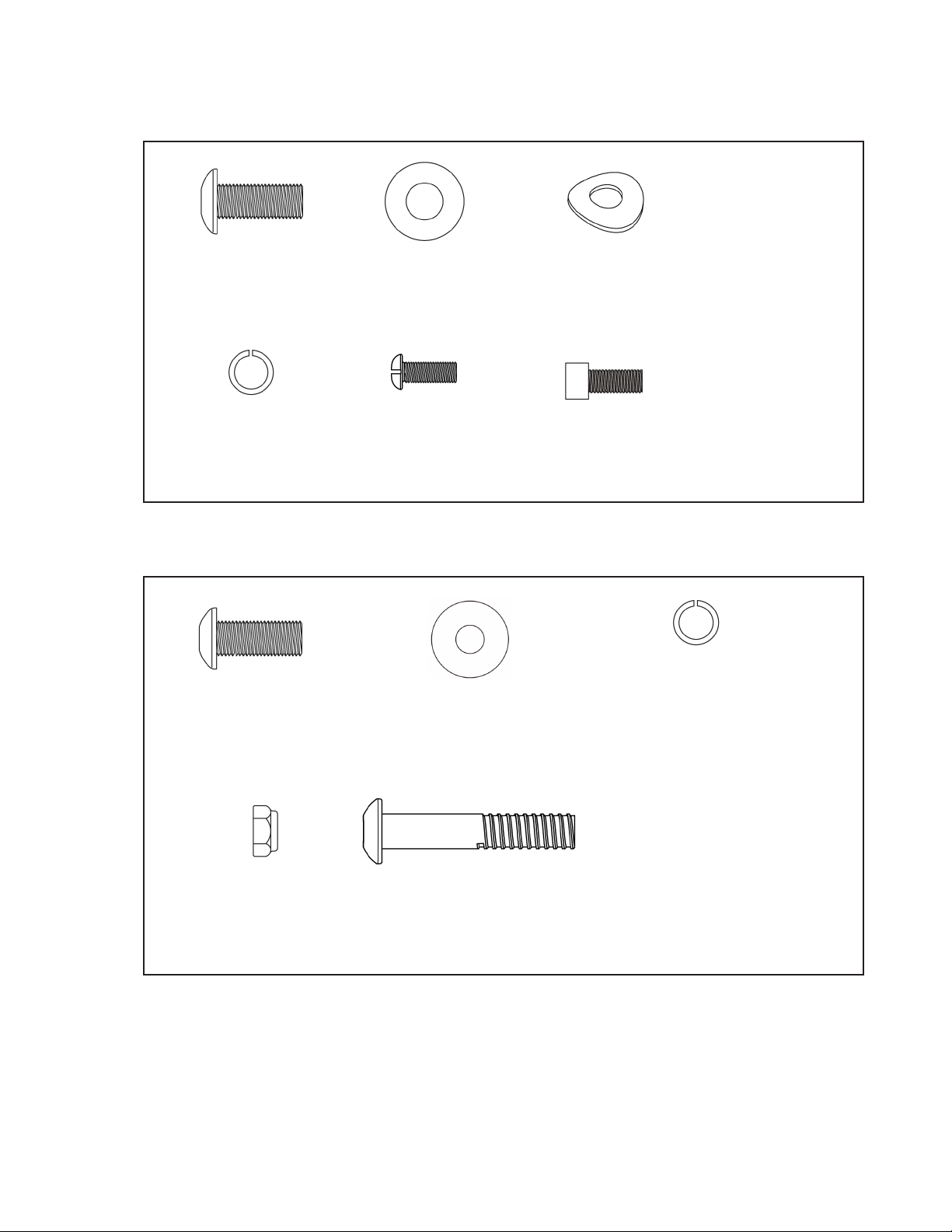
#100. 8.5 x 23 x 1.5T
Flat Washer
(1 pc)
#150. 5/16” x 3/4”
Button Head Socket
Bolt (1 pc)
FS3.0 Assembly Pack Checklist
Hardware Step 1
#44. 5/16”
Flat Washer
(8 pcs)
#43. 5/16” x 3/4”
Button Head Socket
Bolt (4 pcs)
Hardware Step 2
#45. 5/16”
Curved Washer
(1 pc)
#53. M5 x 12mm
Phillips Head
Screw (4 pcs)
#102. 5/16” x 3/4”
Socket Head Cap
Bolt (9 pcs)
#46. 5/16”
Split Washer
(9 pcs)
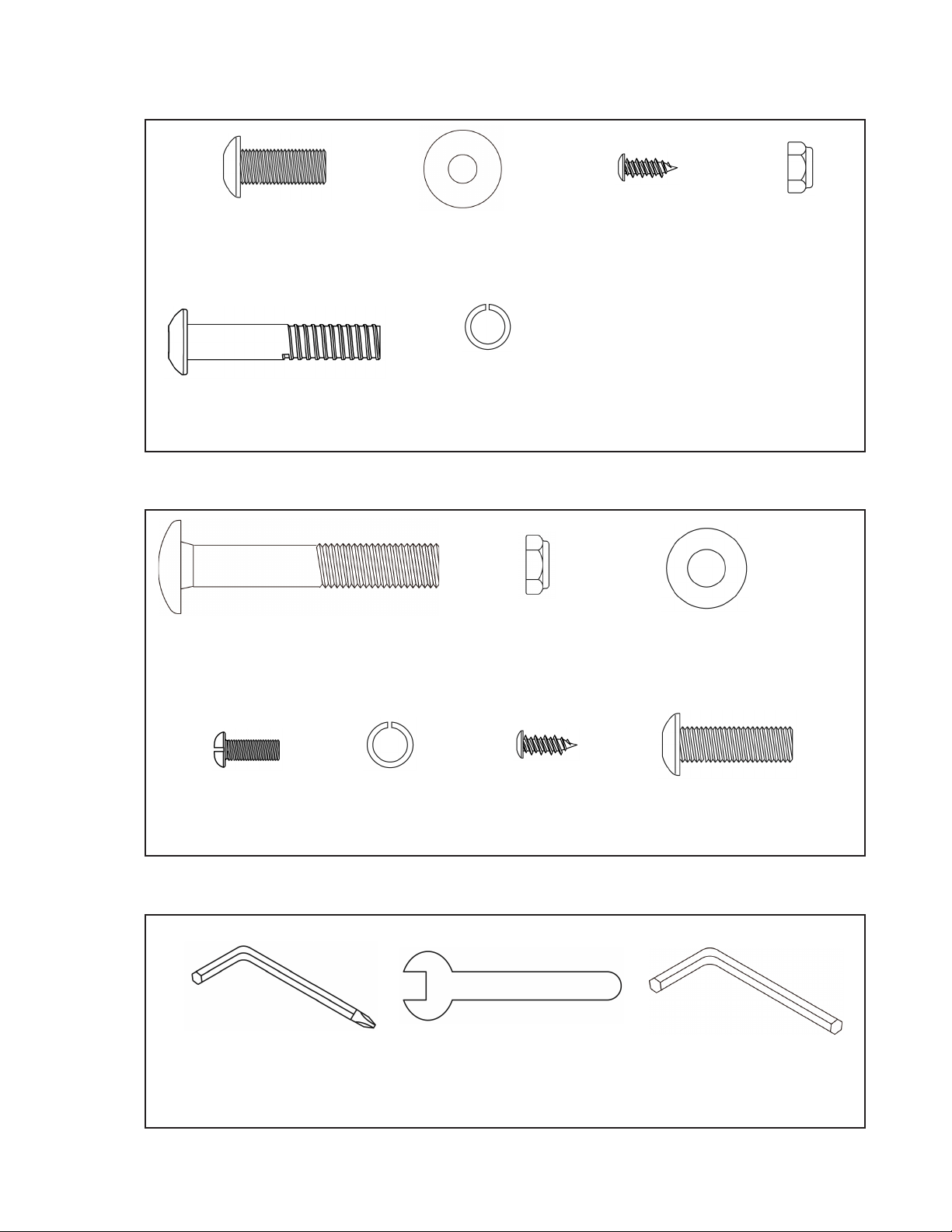
#55. 5/16”
Nyloc Nut
(2 pcs)
#56. 5/16” x 1-3/4”
Button Head Socket
Bolt (2 pcs)
#46. 5/16”
Split Washer
(1 pcs)
4
FS3.0 Elliptical
#68. Combination M5 Allen
Wrench & Phillips Head
Screw Driver (2 pcs)
#69. 19mm Wrench #103. L Wrench
Assembly Tools
#30. 1/2”
Nyloc Nut
(2 pcs)
#29. 1/2” x 70mm
Carriage Bolt
(2 pcs)
#44. 5/16”
Flat Washer
(2 pcs)
Hardware Step 4
#100. 8.5 x 23 x 1.5T
Flat Washer
(1 pc)
#150. 5/16” x 3/4”
Button Head Socket
Bolt (1 pc)
#52. 5 x 12mm
Sheet Metal Screw
(4 pcs)
Hardware Step 3
#56. 5/16” x 1-3/4”
Button Head Socket
Bolt (2 pcs)
#46. 5/16”
Split Washer
(2 pcs)
#52. 5 x 12mm
Sheet Metal Screw
(2 pcs)
#98. 5/16” x 1”
Button Head Socket
Bolt (2 pcs)
#55. 5/16”
Nyloc Nut
(2 pcs)
#53. M5 x 12mm
Phillips Head
Screw (2 pcs)
#46. 5/16”
Split Washer
(1 pcs)
FS3.0 Elliptical
5
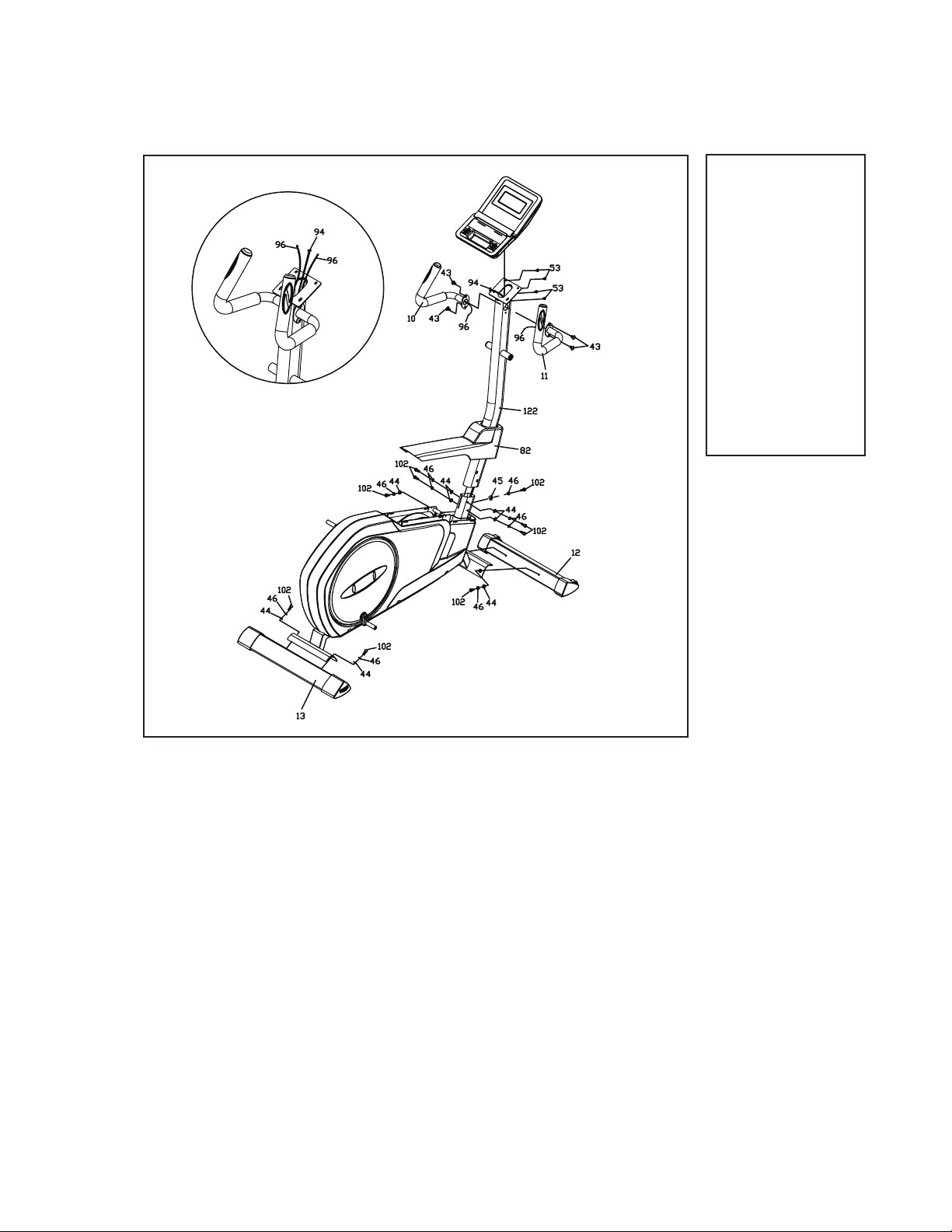
1. Locate the Console Mast (122) and slide on the Console Mast Cover (82). Make
sure the cover is facing the correct direction, as shown, before sliding onto
mast. Wrap the end of the wire tie that exits the bottom of the mast around Wire
Harness (94) that sits in the console mast frame bracket. Slowly pull the wire
tie and Wire Harness (94) up from the bottom of the mast through the top while
setting the mast into the console mast frame bracket. Be careful when installing
the console mast to the mainframe so as not to pinch or cut the wiring harness;
damage to the electronics may occur.
2. Install the console mast on the mainframe with ve Socket Head Cap Bolts
(102), four Flat Washers (44) ,one Curved Washer (45), and ve Split Washers
(46). Tighten using the Allen Wrench (103). Snap the Console Mast Cover (82) in
place against the plastic covers below.
3. Route the hand pulse wires (96) from the stationary handle bars (10, 11) through
the Console Mast (122) as shown below. Attach the handles to the Console Mast
(122) with four Button Head Socket Bolts (43). Use the M5 Allen Wrench (68) to
tighten.
4. Connect the cables (94 & 96) to the Console (58) and install console onto the
Mast (122) with four Phillips head screws (53). Tighten using the Phillips Head
Screw Driver (68).
5. Secure the Front Stabilizer (12) and Rear Stabilizer (13) with four Socket Head
Cap Bolts (102), four Split Washers (46) and four Flat Washers (44). Tighten us-
ing the M5 Allen Wrench (103).
FS3.0 Assembly Instructions
Hardware Step 1
Stabilizers, Console Mast & Console
#43. 5/16” x 3/4”
Button Head Socket
Bolt (4 pcs)
#44. 5/16” Flat
Washer (8 pcs)
#45. 5/16”
Curved Washer
(1 pc)
#46. 5/16”
Split Washer (9 pcs)
#53. M5 x 12mm
Phillips Head Screw
(4 pcs)
#102. 5/16” x 3/4”
Socket Head Cap Bolt
(9 pcs)
1
6
FS3.0 Elliptical
#150. 5/16” x 3/4”
Button Head Socket
Bolt (1 pc)
#46 5/16” Split
Washer (1pc)
#55. 5/16”
Nyloc Nut (2 pcs)
#56. 5/16” x 1-3/4”
Button Head Socket
Bolt (2 pcs)
#100. 8.5 x 23 x 1.5T
Flat Washer (1 pc)
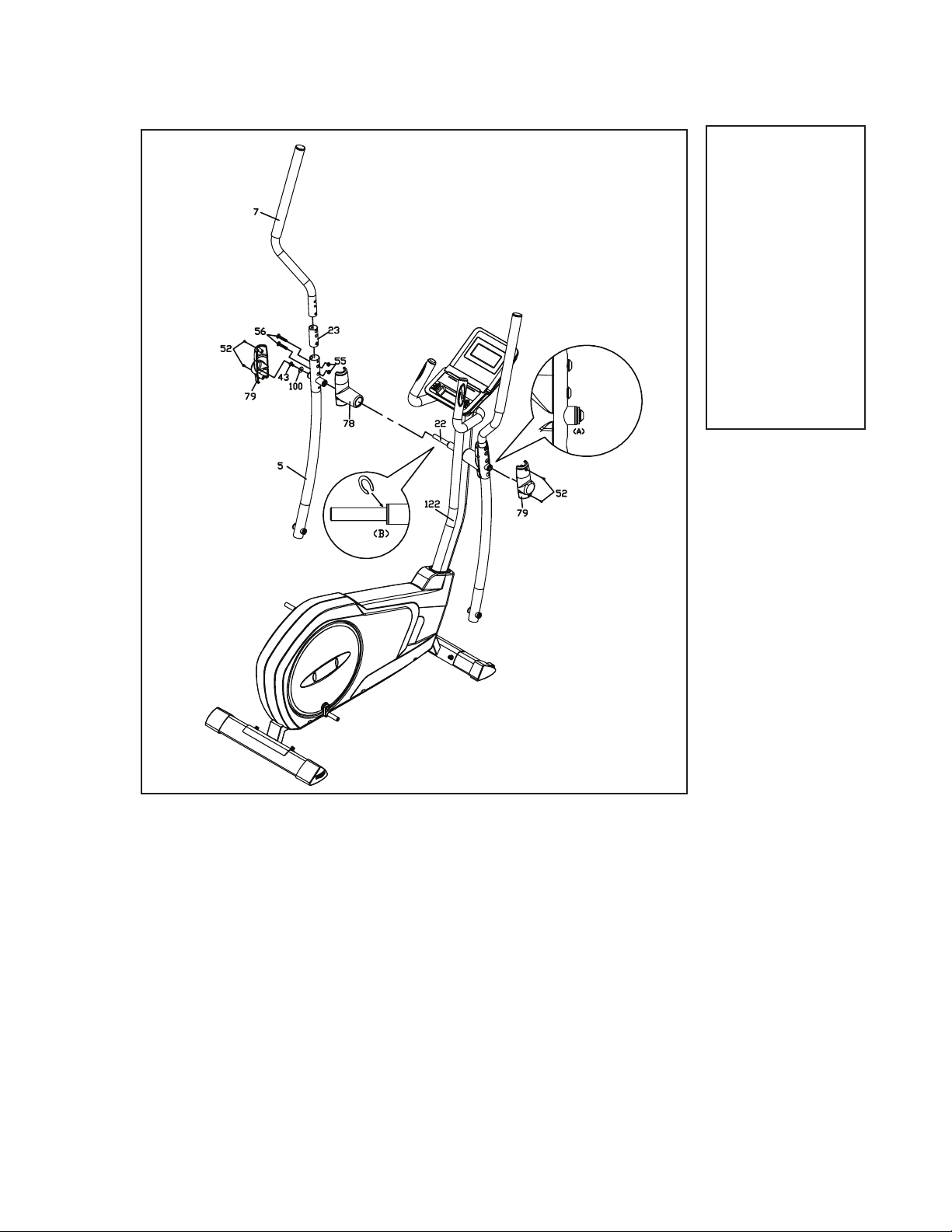
Right Swing Arm
2
Hardware Step 2
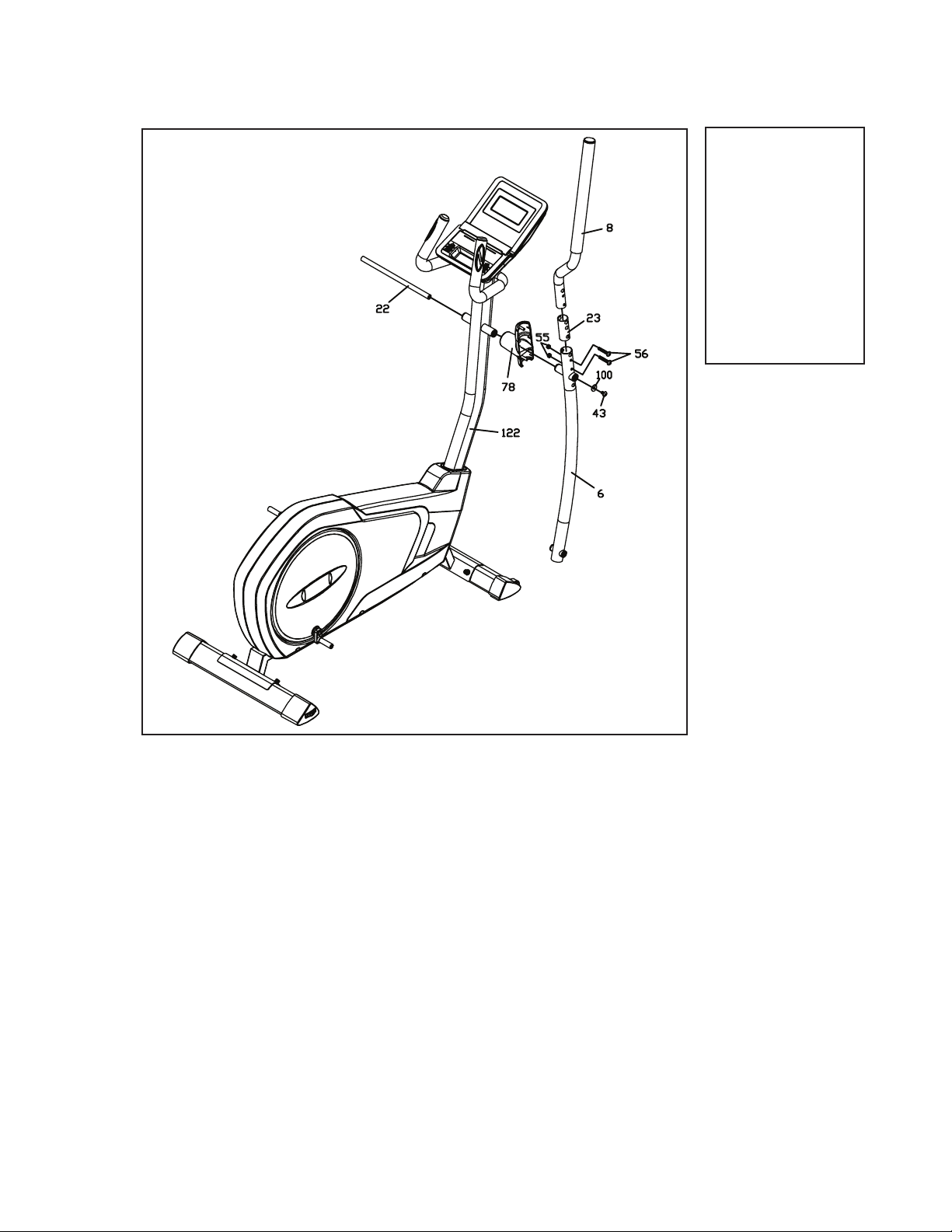
1. Locate the Right Swing Arm (Upper) (8) and slide it through the Swing
Arm Bushing (23); secure it to the Lower swing arm (6) with two Button
Head Socket Bolts (56) and two Nyloc Nuts (55). Tighten using M5 Allen
Wrench (68)
2. Slide the Swing Arm Axle (22) through the console mast bushings, then
through the Handle Bar Cover (78) and Lower swing arm (6). Attach with
one Button Head Socket Bolt (150), one Split Washer (46), and one Flat
Washer (100). Tighten using the M5 Allen Wrenches (68).
FS3.0 Elliptical
7
#46 5/16” Split
Washer (1pc)
#150. 5/16” x 3/4”
Button Head Socket
Bolt (1 pc)
#52. 5 x 12mm
Sheet Metal Screw
(4 pcs)
#55. 5/16”
Nyloc Nut (2 pcs)
#56. 5/16” x 1-3/4”
Button Head Socket
Bolt (2 pcs)
#100. 8.5 x 23 x 1.5T
Flat Washer (1 pc)
3
Hardware Step 3
Left Swing Arm
1. Locate the Left Swing Arm (Upper) (7) and slide it through the Swing
Arm Bushing (23); secure it to the Lower swing arm (5) with two Button
Head Socket Bolts (56) and two Nyloc Nuts (55). Tighten using M5 Allen
Wrench (68).
2. Slide the Handle Bar Cover (78) and Lower swing arm (5) over the
Swing Arm Axle (22). Attach with one Button Head Socket Bolt (150),
one Split Washer (46) and one Flat Washer (100). Tighten using the M5
Allen Wrenches (68).
Note: It is important to use two Wrenches (68), one on each end of the
Axle (22), when tightening the Bolts (150).
Note: If there is a gap after assembling the swing arm, please install a
C-ring at Location B as shown above.
3. Install the outer covers (79) with four Sheet Metal Screws (52). Tighten
using the Phillips Head Screw Driver (68).

8
FS3.0 Elliptical
#29. 1/2” x 70mm
Carriage Bolt (2 pcs)
#30. 1/2”
Nyloc Nut (2 pcs)
#44. 5/16” Flat
Washer (2 pcs)
#46. 5/16”
Split Washer (2 pcs)
#52. 5 x 12mm
Sheet Metal Screw
(2 pcs)
#53. M5 x 12mm
Phillips Head
Screw (2 pcs)
#98. 5/16” x 1”
Button Head Socket
Bolt (2 pcs)
Pedal Arms Assemblies
4
Hardware Step 4
1. Locate the Right side Pedal Arm Assembly (2) and install onto the
pedal axles’ large rotating wheel at the rear of the elliptical. Attach with
one Button Head Socket Bolt (98), one Split Washer (46) and one Flat
Washer (44). Use the M5 Allen Wrench (68) to tighten.
2. Locate the Carriage Bolt (29) and slide it through the bracket at the front
of the Pedal Arm Assembly (2) and Lower swing arm (6). Fasten a Nyloc
Nut (30) to the carriage bolt (29) with the 19mm Wrench (69).
3. Attach the Pedal Arm Covers (85, 86) onto the Pedal Arm Assembly (2)
with one Sheet Metal Screw (52). Tighten using the Phillips Head Screw
Driver (68).
4. Attach Rear Cover (125) onto the Pedal Arm Assembly (2) with one Phil-
lips Head Screw (53). Tighten with Phillips Head Screw Driver (68).
5. Repeat the steps above for the left side pedal arm assembly.
FS3.0 Elliptical
9
Operation of Your Console
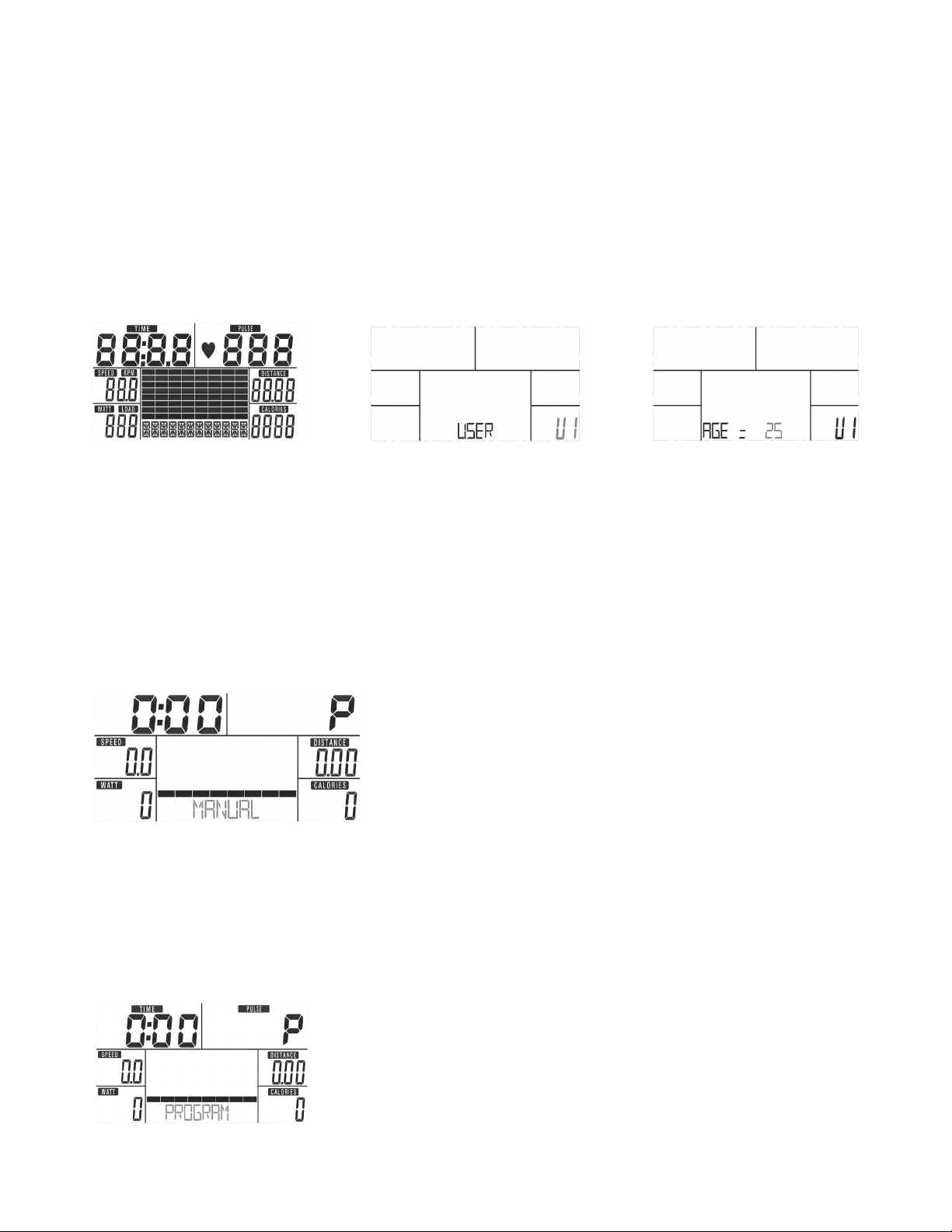
FS3.0 Console
MODE: Used during setup, MODE is to conrm/enter all exercise data settings, and enter into
the program.
RESET: Return to main function mode and reset all function values at zero.
START/STOP: To start or stop training.
RECOVERY: To test heart rate recovery status.
UP: To select training mode and adjust function value up.
DOWN: To select training mode and adjust function value down.
BODY FAT: For body fat measurement
Button Functions

10
FS3.0 Elliptical
Functions
TIME
Count up - No preset target. Time will count up from 00:00 to maximum 99:59 with
each increment is 1 second.
Count down - If training with a preset time, the time will count down from the preset to
00:00. Each preset segment is 1 minute between 1:00 to 99:00.
SPEED
Display current training speed from 0.0 to maximum 99.9 ML or KM.
RPM
Display current training revolutions per minute.
DISTANCE
Count up - No preset target, Distance will count up from 0.00 to maximum 99.90 with each
Increment 0.1 ML (mile) or KM (kilometer).
Count down - If training with preset target, Distance will count down from preset to 0.00.
Each preset increment is 0.1 ML (or KM) between 0.00 to 99.90.
CALORIES
Count up - No preset target, Calories will count up from 0 to maximum 990 with each 1
calorie increment.
Count down - If training with preset target, Calories will count down from preset to 0. Each
preset increment is 10 cal. from 0 to 990 cal.
PULSE
Displays the user’s Pulse. User may set the target Pulse. The computer will beep to indi-
cate the target has been reached.
WATT
Display current training Watt value (power output).
RECOVERY
After exercising for a period of time, keep holding on handgrips and press the “RECOV-
ERY” key. All function displays will stop, except for “TIME” which will start counting down
from 00:60 to 00:00.The screen will display your heart rate recovery status with the
F1,F2….to F6. F1 represents the most efcient heart rate recovery, while F6 represents the
most inefcient heart rate recovery. (Press the RECOVERY button again to return the main
display.)
FS3.0 Elliptical
11
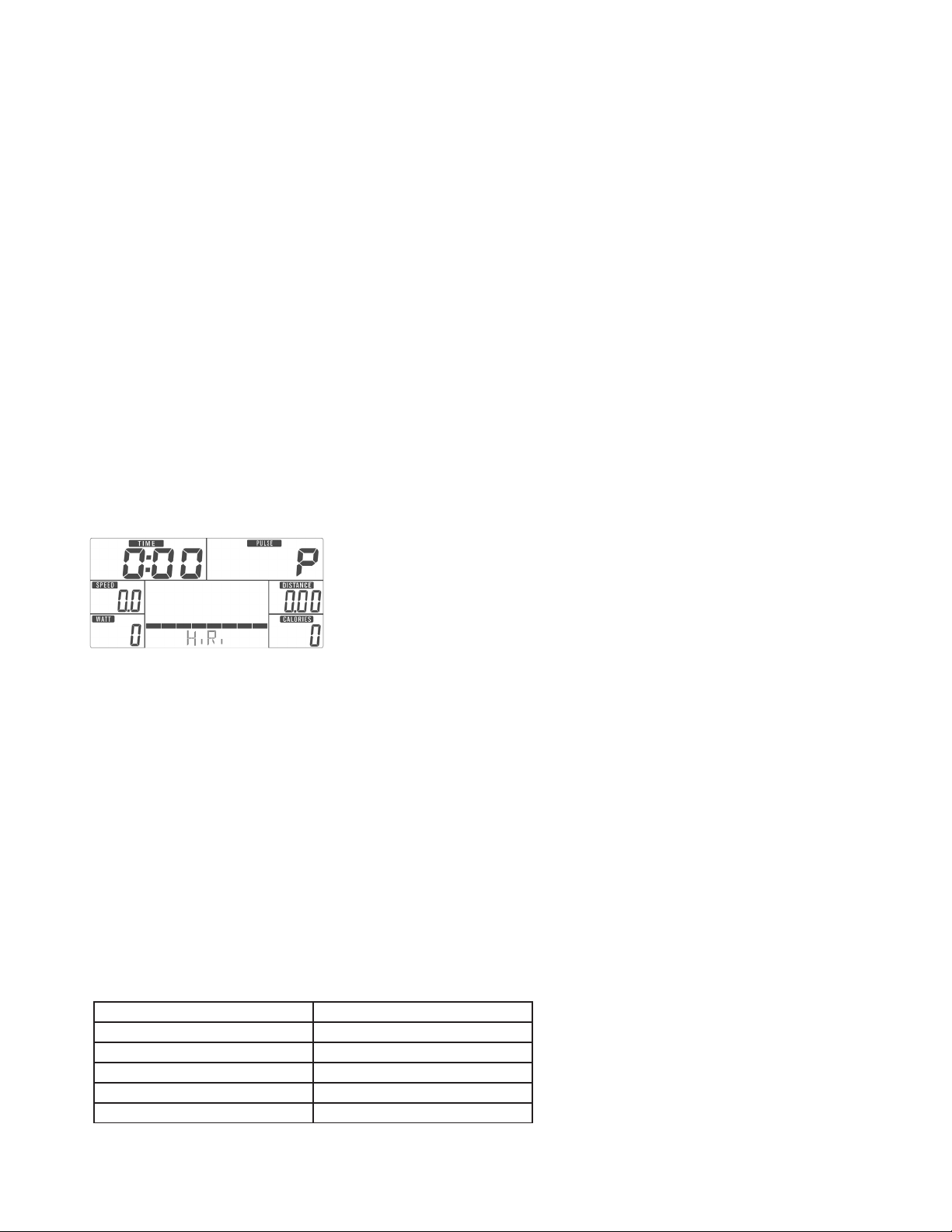
POWER ON
Plug in the power supply and the computer will power on and display all segments on the
LCD for 2 seconds. Enter into user data setting mode (Age, Gender, Height, and Weight).
After 4 minutes without pedaling or pulse input, the console will enter into power saving
mode.
Press any key to bring back the display.
Program Operation
Operation
1. Press START in main menu to start a workout in manual mode. Press MODE to enter.
2. Press 5/6 to select workout program. Choose Manual and press MODE
to enter.
3. Use 5/6 arrows to preset TIME, DISTANCE, CALORIES, PULSE and press MODE to
conrm.
4. Press the START/STOP key to start the workout. Press 5/6 to adjust the load level.
5. Press the START/STOP key to pause the workout. Press RESET to return to the
main menu.
Training in Manual mode
1. Use the5/6 arrows to select the workout program. Press to enter.
2. Use the 5/6 arrows to preset workout TIME.
3. Press the START/STOP key to start the workout. Press 5/6 to adjust load level.
4. Press the START/STOP key to pause the workout. Press RESET to return to the main
menu.
Training in Program mode
12
FS3.0 Elliptical
1. Use the 5/6 arrows to select the workout program. Choose User and press MODE to
enter.
2. Press the 5/6 arrows to set load level of each column, and press MODE enter and move
to the next column. (Total column = 20)
3. Hold the MODE key to nish or quit setting.
4. Use the 5/6 arrows to preset workout TIME.
5. Press the START/STOP key to start the workout. Press 5/6 to adjust the
load level.
6. Press the START/STOP key to pause the workout. Press RESET to return to main menu.
Training in User Program mode
1. Use the 5/6 arrows to select the workout program. Choose H.R. and press MODE
to enter.
2. Press 5/6 to select 55%, 75%, 90% or TAG (TARGET H.R.) (default: 100).
3. Use the 5/6 arrows to preset workout TIME.
4. Press the START/STOP key to start or stop the workout. Press RESET to return to
main menu.
Training in H.R. mode
1. Use the 5/6 arrows to select the workout program. Choose WATT and press MODE
to enter.
2. Press 5/6 to preset the WATT target. (default: 120)
3. Use the 5/6 arrows to preset workout TIME.
4. Press the START/STOP key to start or stop the workout. Press RESET to return to
main menu.
Training in Watt mode
1. Following your workout, press the RECOVERY key and hold on to the pulse hand grips.
2. TIME will display “0:60” (seconds) and count down.
3. After the countdown, the computer will show the results of your heart rate recovery status
with values F1 to F6.
Recovery mode
1.0 OUTSTANDING
1.0 < F < 2.0 EXCELLENT
2.0 < F < 2.9 GOOD
3.0 < F < 3.9 FAIR
4.0 < F< 5.9 BELOW AVERAGE
6.0 POOR
FS3.0 Elliptical
13
You may test BODY FAT when the computer is in the STOP mode. Please follow the steps
below:
Step I - Make sure the personal data has been input accurately.
Step II - Press the BODY FAT button, and hold the handgrips to start body fat testing.
Step III -The symbol “- - - - - - - - “ will display while testing for a period of 8 seconds. After 8
seconds, you will see alternating readouts for BODY FAT percentage and BMI (body mass
index). It is possible that you may see one of the following readouts:
1. “E-1” - When you see this indication, the grips did not get a consistent signal from your
grips. Please try again.
2. “E-4” - When you see this indication, it means the BODY FAT exceeds the limits of the
program.
After BODY FAT testing, press the BODYFAT button again to resume where you left off be-
fore testing. All the BMI & BODY FAT gures are estimates for your health. These gures are
not for medical purposes, or treatment.
Training in Body Fat mode
Note:
This product requires a 9V, 1000mA adaptor.
When the user stops pedaling for 4 minutes, the computer will enter into power save mode.
All user setting and exercise data will be stored until the user starts exercising again.
If the computer is acting abnormal, please unplug the adaptor and plug it in again.
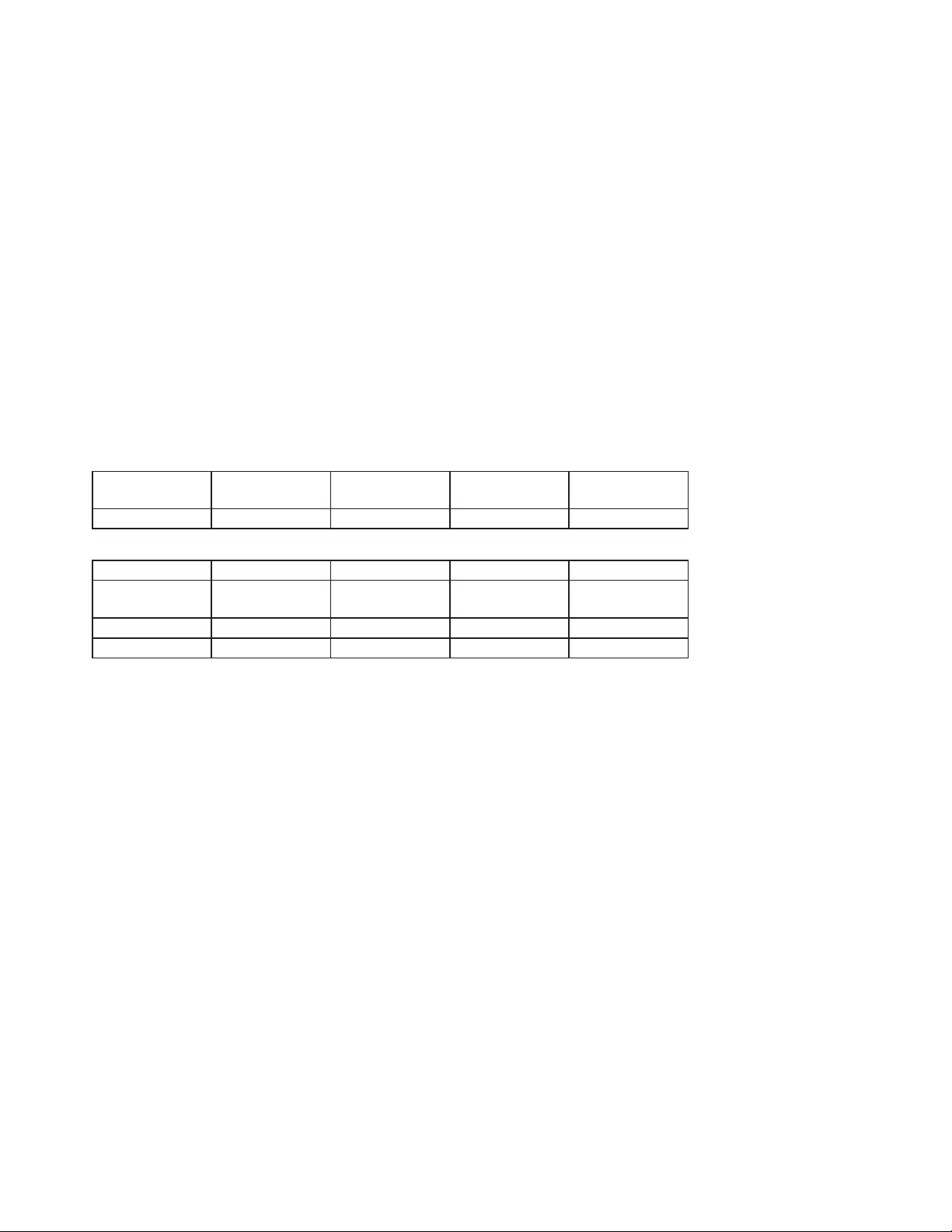
B.M.I
SCALE
LOW LOW/MED MEDIUM MED/HIGH
RANGE <20 20-24 24.1-26.5 26.5
SYMBOL – + ▲ *
Fat%
SEX
LOW LOW/MED MEDIUM MED/HIGH
MALE <13% 23%-25.9% 26.%-30% >30%
FEMALE <23% 23%-35.9% 36%-40% >40%
B.M.I (Body mass index) intergrated
BODY FAT
14
FS3.0 Elliptical
The old motto, “no pain, no gain”, is a myth that has been overpowered by the benets of
exercising comfortably. A great deal of this success has been promoted by the use of heart rate
monitors. With the proper use of a heart rate monitor, many people nd that their usual choice of
exercise intensity was either too high or too low and exercise is much more enjoyable by
maintaining their heart rate in the desired benet range.
To determine the benet range in which you wish to train, you must rst determine your predicted
Maximum Heart Rate. This can be accomplished by using the following formula: 220 minus your
age. This will give you the predicted Maximum Heart Rate (MHR) for someone of your age. To de-
termine the effective heart rate range for specic goals you simply calculate a percentage of your
MHR. Your heart rate training zone is 50% to 90% of your maximum heart rate. 60% of your MHR
is the zone that burns fat, while 80% is for strengthening the cardio vascular system. This 60% to
80% is the zone to stay in for maximum benet.
For someone who is 40 years old their
predicted target heart rate zone is calculated:
220 – 40 = 180 (maximum heart rate)
180 x .6 = 108 beats per minute
(60% of maximum)
180 X .8 = 144 beats per minute
(80% of maximum)
So for a 40 year old the training zone would be
108 to 144 beats per minute.
If you enter your age during programming the
console will perform this calculation automatically.
After calculating your MHR you can decide upon
which goal you would like to pursue.
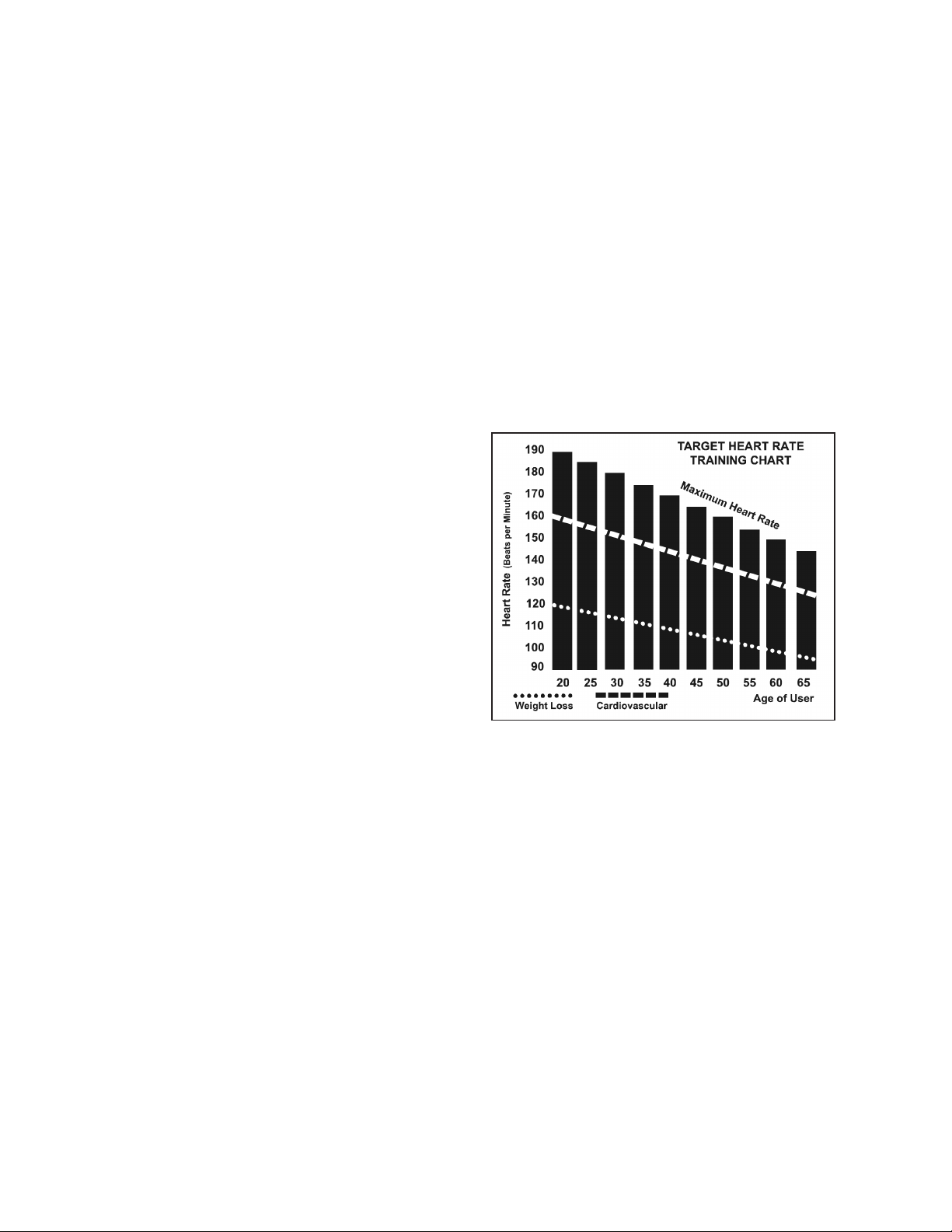
The two most popular reasons for, or goals, of exercise are cardiovascular tness (training for the
heart and lungs) and weight control. The black columns on the chart above represent the MHR for
a person whose age is listed at the bottom of each column. The training heart rate, for either
cardiovascular tness or weight loss, is represented by two different lines that cut diagonally
through the chart. A denition of the lines’ goal is in the bottom left-hand corner of the chart. If your
goal is cardiovascular tness or if it is weight loss, it can be achieved by training at 80% or 60%,
respectively, of your MHR on a schedule approved by your physician. Consult your physician
before participating in any exercise program.
Heart Rate

FS3.0 Elliptical
15
Heart rate is important but listening to your body also has a lot of advantages. There are
more variables involved in how hard you should workout than just heart rate. Your stress
level, physical health, emotional health, temperature, humidity, the time of day, the last
time you ate and what you ate all contribute to the intensity at which you should
workout. If you listen to your body it will tell you all of these things.
The rate of perceived exertion (RPE), also known as the Borg scale, was developed by
Swedish physiologist G.A.V. Borg. This scale rates exercise intensity from 6 to 20
depending upon how you feel or the perception of your effort.
The scale is as follows:
Rating Perception of Effort
6 Minimal
7 Very,very light
8 Very,very light +
9 Very light
10 Very light +
11 Fairly light
12 Comfortable
13 Somewhat hard
14 Somewhat hard +
15 Hard
16 Hard +
17 Very hard
18 Very hard +
19 Very,very hard
20 Maximal
You can get an approximate heart rate level for each rating by simply adding a zero to
each rating. For example a rating of 12 will result in an approximate heart rate of 120
beats per minute. Your RPE will vary depending on the factors discussed earlier. If your
body is strong and rested, you will feel strong and your pace will feel comfortable. When
your body is in this condition, you are able to train harder and the RPE will support this. If
you are feeling tired and sluggish, it is because your body needs a break. In this
condition, your pace will feel difcult. Again, this will show up in your RPE and you
will train at the proper level for that day.
Rate of Perceived Exertion

16
FS3.0 Elliptical
1. Wipe down all areas in the sweat path with a damp cloth after each workout.
2. If a squeak, thump, clicking or rough feeling develops, the main cause is most likely because the
hardware was not sufciently tightened during assembly. All bolts that were installed during assembly need
to be tightened as much as possible. It may be necessary to use a larger wrench than the one provided if
you cannot tighten the bolts sufciently. The majority of calls to the service department for noise issues can
be traced to loose hardware or the rear rails being dirty.
3. If squeaks or other noises persist, check that the unit is properly leveled before calling the service
department.
General Maintenance
Your new elliptical is engineered and manufactured to the strictest industry standards and tolerances. All ellipti-
cal trainers, no matter who the manufacturer, have a multitude of moving linkages and parts. Be aware that even
with the tightest mechanical tolerances there still could be a slight amount of play between some parts. This
inherent play can result in slight noises during use such as clicks and small thumps. Please expect that the
elliptical will not be completely silent.
Elliptical Noises

FS3.0 Elliptical
17
Manufacturer’s Limited Warranty
Effective August 21, 2018 - ELLIPTICAL LIMITED WARRANTY
XTERRA Fitness Inc. warrants all its home use elliptical parts for a period of time listed below, from the date of retail sale, as determined by
a sales receipt or in the absence of a sales receipt, eighteen (18) months from the original factory shipping date. XTERRA Fitness’s
responsibilities include providing new or remanufactured parts, at XTERRA Fitness’s option, and technical support to our independent
dealers and servicing organizations. In the absence of a dealer or service organization, these warranties will be administered by XTERRA
Fitness directly to a consumer. The warranty period applies to the following components:
Home Use Limited Warranty
NORMAL RESPONSIBILITIES OF THE CONSUMER
This warranty applies only to products in ordinary household use. The consumer is responsible for the items listed below:
1. The warranty registration card must be completed and returned to the address listed on the card within 10 days of the original purchase
to validate the manufacturer’s limited warranty or register online at http://www.xterratness.com/warrantyreg.html.
2. Proper use of the elliptical in accordance with the instructions provided in this manual, including maintenance.
3. Proper connection to a power supply of sufcient voltage, replacement of blown fuses, repair of loose connections or defects in house/
facility wiring.
4. Expenses for making the elliptical accessible for servicing, including any item that was not part of the elliptical at the time it was shipped
from the factory.
5. Damages to the elliptical nish during shipping, installation or following installation.
EXCLUSIONS
This warranty does not cover the following:
1. CONSEQUENTIAL, COLLATERAL, OR INCIDENTAL DAMAGES SUCH AS PROPERTY DAMAGE AND INCIDENTAL EXPENSES
RESULTING FROM ANY BREACH OF THIS WRITTEN OR ANY IMPLIED WARRANTY. Note: Some states do not allow the exclusion
or limitation of incidental or consequential damages, so this limitation or exclusion may not apply to you.
2. Damages caused by services performed by persons other than authorized XTERRA Fitness service companies, use of parts other than
original XTERRA Fitness parts, or external causes such as alterations, modications, abuse, misuse, accident, improper maintenance,
inadequate power supply, or acts of God.
3. Products with original serial numbers that have been removed or altered.
4. Products that have been; sold, transferred, bartered, or given to a third party.
5. Products that are used as store display models.
6. Products that do not have a warranty registration on le at XTERRA Fitness, Inc. XTERRA Fitness reserves the right to request proof of
purchase if no warranty record exists for the product.
7. Product use in any environment other than a residential setting.
8. THIS WARRANTY IS EXPRESSLY IN LIEU OF ALL OTHER WARRANTIES EXPRESSED OR IMPLIED, INCLUDING THE
WARRANTIES OF MERCHANTABILITY AND/OR FITNESS FOR A PARTICULAR PURPOSE.
SERVICE
Keep your bill of sale. Twelve (12) months from the date on the bill of sale or eighteen (18) months from the date of factory shipping as
determined by the serial number establishes the warranty period should service be required. If service is performed, it is in your best interest
to obtain and keep all receipts. This written warranty gives you specic legal rights. You may also have other rights that vary from state to
state. Service under this warranty must be obtained by following these steps, in order:
1. Contact your selling authorized XTERRA Fitness dealer. OR
2. Contact your local authorized XTERRA Fitness service organization.
3. If there is a question as to where to obtain service, contact our service department at (870) 336-4286.
4. XTERRA Fitness’s obligation under this warranty is limited to repairing or replacing, at XTERRA Fitness’s option, the product through
one of our authorized service centers. All repairs must be preauthorized by XTERRA Fitness. If the product is shipped to a service
center freight charges to and from the service center will be the customer’s responsibility. For replacement parts shipped while the
product is under warranty, the customer will be responsible for shipping and handling charges. The owner is responsible for adequate
packaging upon return to XTERRA Fitness. XTERRA Fitness is not responsible for damages in
shipping. Make all freight damage claims with the appropriate freight carrier. DO NOT SHIP ANY UNIT TO OUR FACTORY WITHOUT
A RETURN AUTHORIZATION NUMBER. All units arriving without a return authorization number will be refused.
5. For any further information, or to contact our service department by mail, send your correspondence to:
Product features or specications as described or illustrated are subject to change without notice. All warranties are made by
XTERRA Fitness, Inc. This warranty applies only in the 48 contiguous United States. NOTE: This does not apply to Alaska or Hawaii.
XTERRA Fitness, Inc.
P.O. Box 2037
Jonesboro, AR 72402-2037
Frame
5 Years
Parts
1 Year

18
FS3.0 Elliptical
www.xterrafitness.com
©2018 All RIghts Reserved. FS3.0 Owner’s Manual
3000 Nestle Road Jonesboro, AR 72401 - Phone:870-336-4286 - Fax:870-935-7611