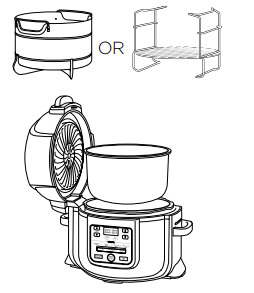
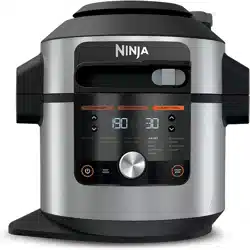
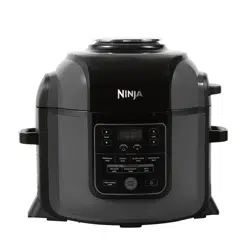
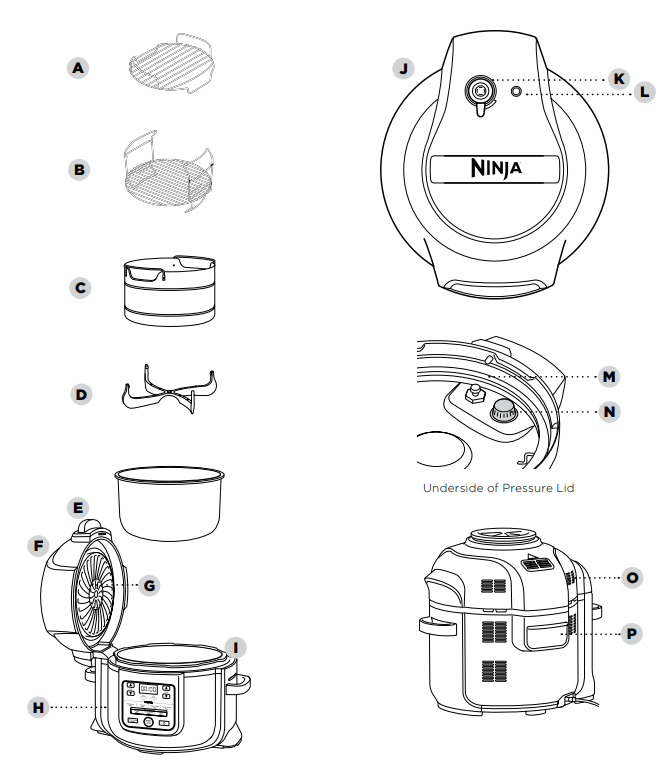
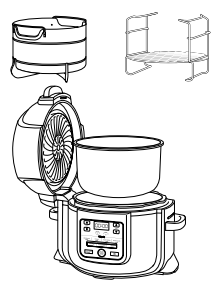
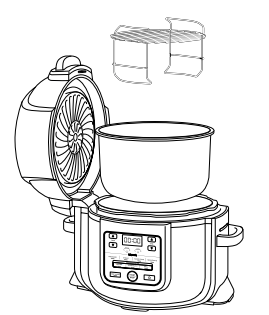
PARTS A Top Tier (Lower rack) B Reversible Rack C Cook & CrispTM Basket D Detachable Diffuser E 7.5L Removable Cooking Pot F Crisping Lid G Heat Shield H Control Panel I Cooker Base J Pressure Lid K Pressure Release Valve L Float Valve M Silicone Ring N Anti-Clog Cap O Air Outlet Vent P Condensation Collector
ACCESSORY ASSEMBLY INSTRUCTIONS
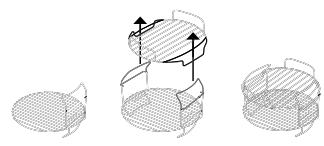
2 TIER REVERSIBLE RACK
1 Place the reversible rack in the pot in the lower position.
2 Drop the lower rack through the reversible rack handles.
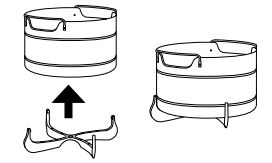
COOK & CRISPTM BASKET
1 To remove diffuser for cleaning, pull 2 diffuser fins off the groove on the basket, then pull down firmly.
2 To assemble the Cook & Crisp Basket, place basket on top of diffuser and press down firmly.
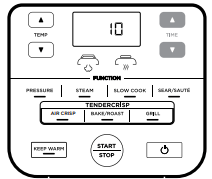
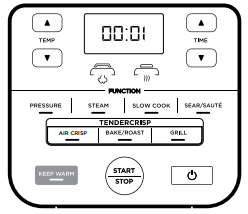
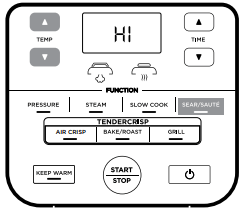
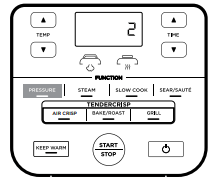
USING THE CONTROL PANEL
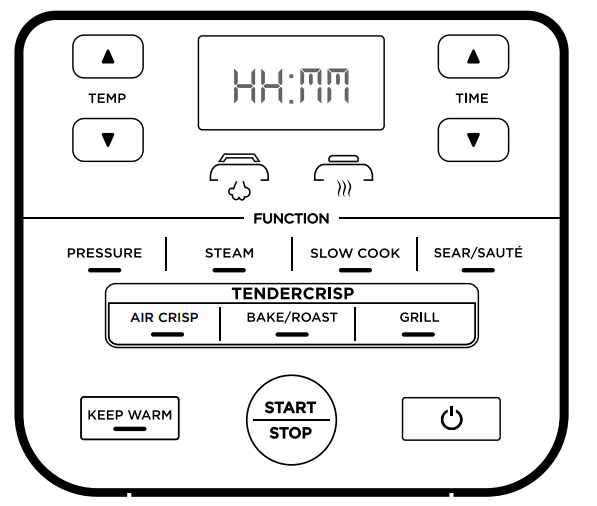
COOKING FUNCTIONS
PRESSURE: Use to cook food quickly while maintaining tenderness.
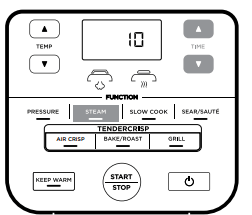
STEAM: Use to gently cook delicate foods at a high temperature.
SLOW COOK: Cook your food at a lower temperature for longer periods of time.
SEAR/SAUTÉ: To use the unit as a stovetop for browning meats, sautéing vegetables, simmering sauces and more.
AIR CRISP: Give foods crispiness and crunch with little to no oil.
BAKE/ROAST: Use the unit like an oven for tender meats, baked treats and more.
GRILL: Use high temperature to caramelise and brown your food
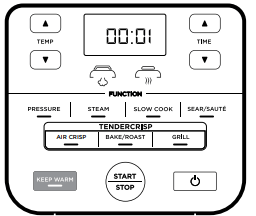
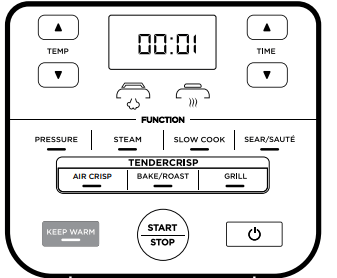
NOTE: If running for 1 hour or less, the clock will count down by minutes and seconds. If running for more than 1 hour, the clock will count down by minutes only.
OPERATING BUTTONS
TEMP: Use the up and down TEMP arrows to adjust the cook temperature and/or pressure level.
TIME: Use the up and down TIME arrows to adjust the cook time.
START/STOP button: After selecting your cooking temperature (or pressure) and cooking time. Press the START/STOP button to begin the cooking process. This can be stopped by pressing the button which the unit is in operation.
KEEP WARM: After pressure cooking, steaming, or slow cooking, the unit will automatically switch to Keep Warm mode and start counting up. Keep Warm will stay on for 12 hours, or you may press KEEP WARM to turn it off. Keep Warm mode is not intended to warm food from a cold state but to keep it warm at a food-safe temperature.
POWER: The Power button shuts the unit off and stops all cooking modes.
STANDBY mode: After 10 minutes with no interaction with the control panel, the unit will enter standby mode.
BEFORE FIRST USE
Remove and discard any packaging material, promotional labels, and tape from the unit.
Please pay particular attention to operational instructions, warnings, and important safeguards to avoid any injury or property damage.
Wash the pressure lid, silicone ring, removable cooking pot, Cook & Crisp™ Basket, reversible rack, and condensation collector in hot, soapy water, then rinse and dry thoroughly. NEVER clean the cooker base in the dishwasher. Inspect the pressure lid to ensure there is no debris blocking the valves.
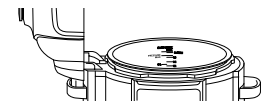
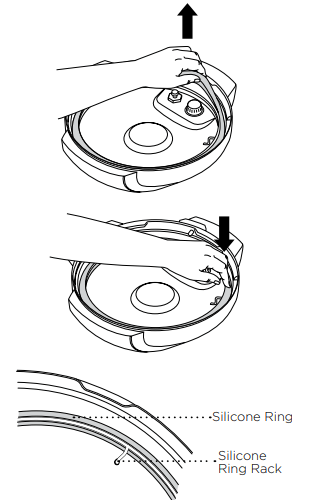
The silicone ring is reversible and can be inserted in either direction. Insert the silicone ring around the outer edge of the silicone ring rack on the underside of the lid. Ensure it is fully inserted and lies flat under the silicone ring rack.
INSTALLING THE CONDENSATION COLLECTOR
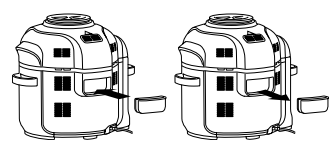
To install the condensation collector, slide it into the slot on the cooker base. Slide it out to remove it for hand-washing after each use.
REMOVING & REINSTALLING THE ANTI-CLOG CAP
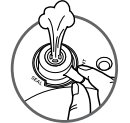
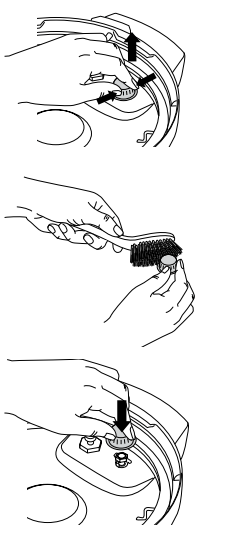
Make sure your anti-clog cap is in the correct position before using the pressure lid. The anti-clog cap protects the inner valve of the pressure lid from clogging and protects users from potential food splatters. It should be cleaned after every use with a cleaning brush. To remove hold the anti-clog cap between your thumb and bent index finger, then rotate your wrist clockwise to remove. To reinstall, position it in place and press down.
NOTE: Prior to each use, make sure the silicone ring is well seated in the silicone ring rack and the anti-clog cap is mounted properly on the pressure release valve.
USING YOUR FOODI® MULTI-COOKER®
SWAP THE TOP
The two lids allow you to seamlessly transition between all your favourite cooking methods. Use the pressure lid to tenderise, then use the crisping lid to crisp up your food.
USING THE CRISPING LID
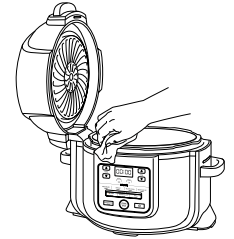
The crisping lid is attached to the unit and can be opened at any time to check on your food during the cooking process. When the lid is opened, the timer will pause, and the heating element will turn off. When the lid is closed, cooking will begin again and the timer will resume counting down.
USING THE COOKING FUNCTIONS WITH THE CRISPING LID
To turn on the unit, plug the power cord into a wall socket, then press the
Air Crisp
1 Place either the Cook & Crisp™ Basket or reversible rack in the pot. Basket should have diffuser attached.
2 Add ingredients to the Cook & Crisp Basket or reversible rack. Close the lid.
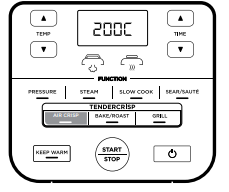
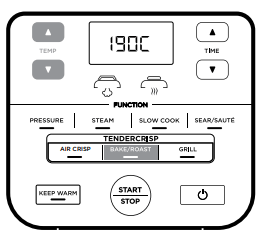
3 Press the Air Crisp button. The default temperature setting will display. Use the up and down TEMP arrows to choose a temperature between 150˚C and 200˚C
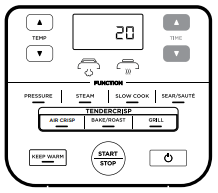
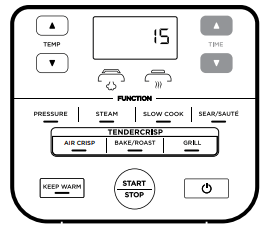
4 Use the up and down TIME arrows to set the cook time in minute increments up to 1 hour. Press START/STOP to begin cooking.
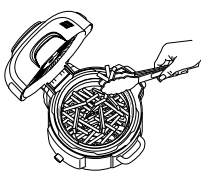
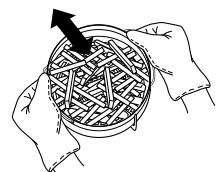
5 During cooking, you can open the lid and lift out the basket to shake or toss ingredients for even browning, if needed. When done, lower basket back into pot and close lid. Cooking will automatically resume after lid is closed.
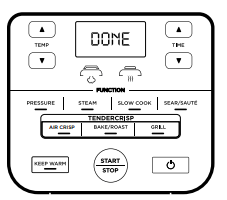
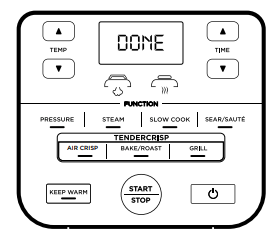
6 When cook time is complete, the unit will beep and display DONE.
Grill
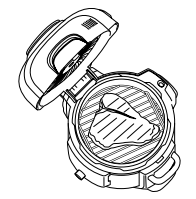
1 Place the reversible rack in the pot in the higher grill position or follow the directions in your recipe.
2 Place ingredients on the rack, then close the lid.
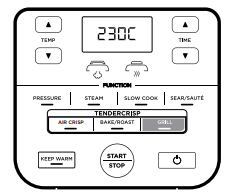
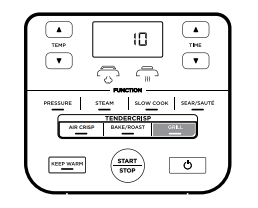
3 Press the GRILL button.
4 Use the up and down TIME arrows to set the cook time in minute increments up to 30 minutes.
5 Press START/STOP to begin cooking.
6 When cook time is complete, the unit will beep and display DONE.
WATER TEST: GETTING STARTED PRESSURE COOKING
It is recommended that first-time users do the water test to familiarise themselves with Pressure Cooking.
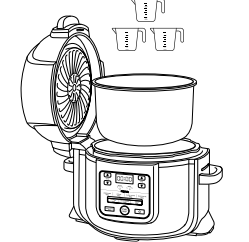
1 Place the pot in the cooker base and add 750ml of room-temperature water to the pot.
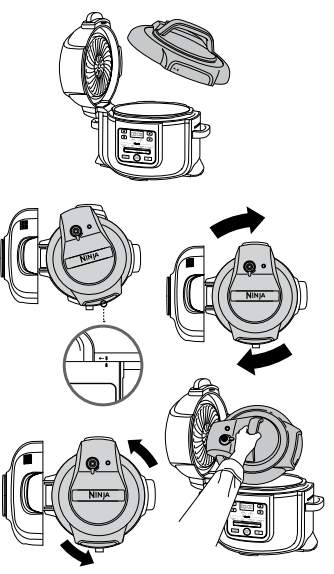
2 Assemble the pressure lid by aligning the arrow on the front of the lid with the arrow on the front of the cooker base. Then turn the lid clockwise until it locks into place.
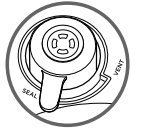
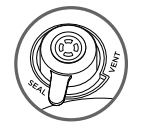
3 Make sure the pressure release valve is in the SEAL position.
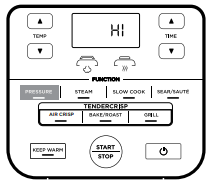
4 Turn the unit on. Press the PRESSURE button, the unit will default to high (HI) pressure. Set the time to 2 minutes. Press the START/STOP button to begin.
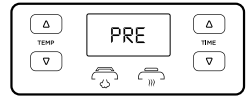
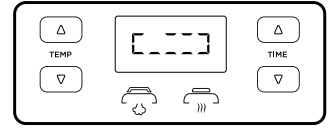
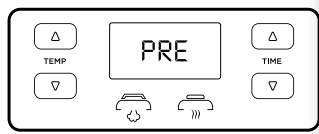
5 The display showing PRE and some steam release indicate pressure is building. When fully-pressurised, countdown will begin.
6 When the countdown is finished, the unit will beep and display DONE before automatically switching to KEEP WARM mode, and begin counting up.
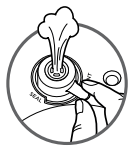
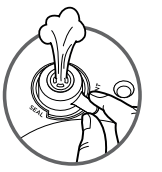
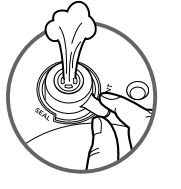
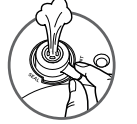
7 Turn the pressure release valve to the VENT position to quick release the pressurised steam. There will be a burst of steam from the pressure release valve. When steam is completely released, float valve will drop and the lid can be opened.
Bake/Roast
1 Add ingredients and any accessories to the pot. Close the lid.
2 Press the BAKE/ROAST button. The default temperature setting will display. Use the up and down TEMP arrows to choose a temperature between 150˚C and 200˚C.
3 Use the up and down TIME arrows to set the cook time in minute increments up to 1 hour, 5-minute increments from 1 hour to 4 hours.
4 When cook time is complete, the unit will beep and display DONE.
NATURAL PRESSURE RELEASE VS. QUICK PRESSURE RELEASE
Natural Pressure Release: When pressure cooking is complete, steam will naturally release from the unit as it cools down. This can take upwards of 20 minutes, depending on the amount of ingredients in the pot. During this time, the unit will switch to Keep Warm mode. Press KEEP WARM if you would like to turn Keep Warm mode off. When natural pressure release is complete, the float valve will drop down.
Quick Pressure Release: Use ONLY if your recipe calls for it. After pressure cooking and the KEEP WARM light comes on, turn the pressure release valve to the VENT position to quickly release the steam. Steam release will be accompanied by an audible hiss. Some steam will remain in the unit after pressure release and will escape when the lid is opened. Lift and tilt it away from you, making sure no condensation drips into the cooker base
PRESSURISING
As pressure builds in the unit, the control panel will display PRE. Time to pressure varies based on the amount and temperature of ingredients as well as liquid in the pot. For safety, the lid will lock as the unit pressurizes, and it will not unlock until pressure is released. Once the unit has reached full pressure, the cooking cycle will begin and the timer will start counting down.
INSTALLING & REMOVING THE PRESSURE LID
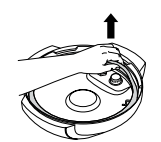
Place the pressure lid on top of the unit with the on the lid and the on the base lined up evenly. Turn the lid clockwise until it locks in place. To unlock the pressure lid, turn it counterclockwise. Lift the lid at an angle to prevent splatter. Do not lift the lid straight up.
USING THE COOKING FUNCTIONS WITH THE PRESSURE LID
To turn on the unit, plug the power cord into a plug socket, then press the
Pressure Cook
1 Place ingredients and at least 250ml of liquid in the pot, as well as any neccessary accessory. DO NOT fill the pot past the PRESSURE MAX line.
2 Install the pressure lid and turn the pressure release valve to the SEAL position.
3 Press the PRESSURE button. The default pressure level will display. Use the up and down TEMP arrows to select either HIGH or LOW
4 Use the up and down TIME arrows to set the cook time in minute increments up to 1 hour, and in 5-minute increments from 1 hour to 4 hours.
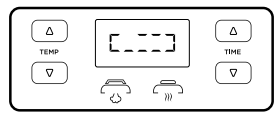
5 Press the START/STOP button. The display will show rotating lights during this time. When the unit reaches the proper temperature, the time you set will begin counting down.
6 When cooking is complete, the unit will beep, automatically switch to Keep Warm mode and begin counting up.
7 Let the unit naturally release pressure or, if the recipe instructs, turn the pressure release valve to the VENT position to quick release the steam.
Steam
1 Add 250ml of liquid (or recipe-specified amount) to the pot, then place the reversible rack or Cook & CrispTM Basket with ingredients in the pot.
2 Install the pressure lid and turn the pressure release valve to the VENT position.
3 Press the STEAM button. Use the up and down TIME arrows to set the cook time in minute increments up to 30 minutes.
4 Press the START/STOP button.
5 The unit will begin preheating to bring the liquid to a boil. The display will show rotating lights during this time. When the unit reaches the proper temperature, the time you set will begin counting down.
6 When cook time is complete, the unit will beep and automatically switch to Keep Warm mode and begin counting up. Ensure the float valve has dropped before opening the lid.
Slow Cook
1 Add ingredients to the pot. DO NOT fill the pot past the MAX line.
2 Install the pressure lid and turn the pressure release valve to the VENT position.
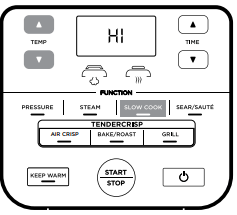
3 Press the SLOW COOK button. The default temperature setting will display. Use the up and down TEMP arrows to select either Slow Cook HIGH or LOW.
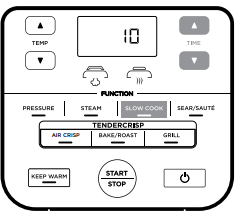
4 Use the up and down TIME arrows to set the cook time in 15-minute increments up to 12 hours.
5 Press START/STOP to begin cooking.
6 When cook time is complete, the unit will beep, automatically switch to Keep Warm mode, and begin counting up.
Sear/Sauté
1 Add ingredients to the pot.
2 Press the SEAR/SAUTÉ button. The default temperature setting will display. Use the up and down TEMP arrows to select one of the setting options: LO, LO:MD, MD, MD:HI or HI.
3 Press START/STOP to begin cooking.
4 Press START/STOP to turn off the SEAR/SAUTÉ function. To switch to a different cooking function, press the corresponding function button.
CLEANING & MAINTENANCE
Cleaning: Dishwasher & Hand-Washing
The unit should be cleaned thoroughly after every use.
Unplug the unit from the wall socket before cleaning.
To clean the cooker base and the control panel, wipe them clean with a damp cloth.
The pressure lid cooking pot, silicone ring, reversible rack, Cook & Crisp™ Basket and detachable diffuser can be washed in the dishwasher.
The pressure release valve and anti-clog cap, can be washed with water and dish soap.
To clean the crisping lid, wipe it down with a wet cloth or paper towel after the heat shield cools.
If food residue is stuck on the cooking pot, reversible rack, or Cook & Crisp Basket, fill the pot with water and allow to soak before cleaning. DO NOT use scouring pads. If scrubbing is necessary, use a non-abrasive cleanser or liquid dish soap with a nylon pad or brush.
Air-dry all parts after each use.
Removing & Reinstalling the Silicone Ring
To remove the silicone ring, pull it outward, section by section, from the silicone ring rack. The ring can be installed with either side facing up. To reinstall, press it down into the rack section by section. After use, remove any food debris from the silicone ring and anti-clog cap.
Keep the silicone ring clean to avoid odour
Washing it in warm, soapy water or in the dishwasher can remove odour. However, it is normal for it to absorb the smell of certain acidic foods. It is recommended to have more than one silicone ring at hand. You can purchase additional silicone rings on ninjakitchen.co.uk
NEVER pull out the silicone ring with excessive force, as this may deform it and the rack and affect the pressure-sealing function. A silicone ring with cracks, cuts, or other damage should be replaced immediately.
TROUBLESHOOTING GUIDE
Why is my unit taking so long to come to pressure?
Pressure build times may vary based on the selected temperature, current temperature of the cooking pot, and temperature or quantity of the ingredients.
Check to make sure your silicone ring is fully seated and flush against the lid. If installed correctly, you should be able to tug lightly on the ring to rotate it.
Check that the pressure lid is fully locked, and the pressure release valve is in the SEAL position when pressure cooking.
Why is the time counting down so slowly?
You may have set hours rather than minutes. When setting time, the display will show HH:MM and the time will increase/decrease in minute increments.
How can I tell when the unit is pressurising?
The rotating lights will display on the screen to indicate the unit is building pressure.
Lights are rotating on the display screen when using the Pressure or Steam function.
This indicates the unit is building pressure or preheating when using STEAM or PRESSURE. When the unit has finished building pressure, your set cook time will begin counting down.
There is a lot of steam coming from my unit when using the Steam function.
It’s normal for steam to release through the pressure release valve during cooking. Leave the pressure release valve in the VENT position for Steam, Slow Cook, and Sear/Sauté.
Why can’t I take the pressure lid off?
As a safety feature, the pressure lid will not unlock until the unit is completely depressurised. Turn the pressure release valve to the VENT position to quick release the pressurised steam. A quick burst of steam will spurt out of the pressure release valve. When the steam is completely released, the unit will be ready to open. Turn the pressure lid counterclockwise, then lift it up and away from you.
Is the pressure release valve supposed to be loose?
Yes. The pressure release valve’s loose fit is intentional; it enables a quick and easy transition between SEAL and VENT and helps regulate pressure by releasing small amounts of steam during cooking to ensure great results. Please make sure it is turned as far as possible toward the SEAL position when pressure cooking and as far as possible toward the VENT position when quick releasing.
The unit is hissing and not reaching pressure.
Make sure the pressure release valve is turned to the SEAL position. If you’ve done this and still hear a loud hissing noise, it may indicate your silicone seal is not fully in place. Press START/STOP to stop cooking, VENT as necessary, and remove the pressure lid. Press down on the silicone ring, ensuring it is fully inserted and lies flat under the ring rack. Once fully installed, you should be able to tug lightly on the ring to rotate it.
The unit is counting up rather than down.
The cooking cycle is complete and the unit is in Keep Warm mode.
How long does the unit take to depressurise?
Quick release is about 2 minutes or less. Natural release can take up to 20 minutes or more, depending on the type of food and/or the amount of liquid and food in the pot.
"POT” error message appears on display screen.
Cooking pot is not inside the cooker base. Cooking pot is required for all functions.
"LID” error message appears on display screen and lid icon flashes.
The incorrect lid is installed for your desired cooking function. Install the pressure lid to use the Pressure, Slow Cook, Steam, or Keep Warm functions.
"SHUT” error message appears on display screen.
The crisping lid is open and needs to be closed for the selected function to start.
"TURN” error message appears on display screen.
The pressure lid is not fully installed. Turn the pressure clockwise until it clicks to use thePressure, Slow Cook, Steam and Keep Warm functions.
"VENT” error message appears on display screen.
When set to Slow Cook or Sear/Sauté, and the unit senses pressure building up, this message indicates the pressure release valve is in the SEAL position.
Turn the pressure release valve to the VENT position and leave it there for the remainder of the cooking function.
If you do not turn the pressure release valve to the VENT position within 5 minutes, the program will cancel and the unit will shut off.
"WATR” error message appears on display screen when using the Steam function.
The water level is too low. Add more water to the unit for the function to continue.
"WATR” error message appears on display screen when using the Pressure function.
Add more liquid to the cooking pot before restarting the pressure cook cycle.
Make sure the pressure release valve is in the SEAL position.
Make sure the silicone ring is installed correctly.
"ERR” message appears.
The unit is not functioning properly. Please contact Customer Service at 0800 862 0453.
HELPFUL TIPS
For consistent browning, make sure ingredients are arranged in an even layer on the bottom of the cooking pot with no overlapping. If ingredients are overlapping, make sure to shake half way through the set cook time.
For smaller ingredients that could fall through the reversible rack, we recommend first wrapping them in a parchment paper or foil pouch.
When switching from pressure cooking to using the crisping lid it is recommended to empty the pot of any remaining liquid for best crisping results.
Use the Keep Warm mode to keep food at a warm, food-safe temperature after cooking. To prevent food from drying out, we recommend keeping the lid closed and using this function just before serving. To reheat food, use the Air Crisp function.
Press and hold down the TIME up or down arrow to get to your desired time faster
#1 Is this easy to use, due to disability with my back andbeing on my own. I struggle cooking on regular cooker withbending and lifting?
The foodi itself is quite heavy, but once positioned you shouldn't need to move it. and will work on any flat surface safely and at a level where you can lift out inner bowl, basket etc. I find it extremely easy to use and easy towash. I highly recommend this product.
#2 Does the lid get splattered with fat on the inside under thegrid and if so how to clean?
It does a little bit when using the grill in high position but just requires a wipe with damp cloth or you can remove it as it is held on by screws and wash in sink
It sure can. Cooks rice beautifully and quicker than a rice cooker.
#5 When making fresh battared chicken nuggets does itrotate inside as its cooking to stop them from all stickingtogether or do you just let them crisp?
No does not rotate I'm afraid but does crisp up food nicely.
The outside of the unit and stainless steel surface on the pressure lid will get hot during cooking, but the control panel, exterior handles, and handles on the pressure and crisping lids will remain safe to touch at any time during cooking.
After pressure cooking, steaming, or slow cooking, the unit will automatically switch to Keep Warm mode and start counting up. Keep Warm will stay on for 12 hours, or you may press KEEP WARM to turn it off. Keep Warm mode is not intended to warm food from a cold state but to keep it warm at a food‐safe temperature after cooking is complete.
Quick release is about 2 minutes or less. Natural release can take up to 20 minutes or more, depending on the type of food and/or the amount of liquid and food in the pot.
#9 Can I open the pressure lid at any time during cooking?
No, as the unit builds pressure, the float valve will rise, and the lid will lock as a safety measure. It will not unlock until pressure is released and the float valve drops down, signaling it is safe to open the lid.

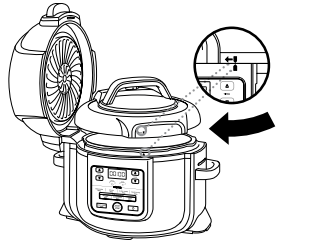
 on the lid and the
  on the base lined up evenly. Turn the lid clockwise until it locks in place. To unlock the pressure lid, turn it counterclockwise. Lift the lid at an angle to prevent splatter. Do not lift the lid straight up.