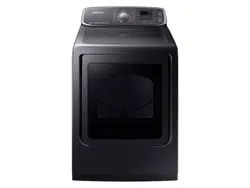
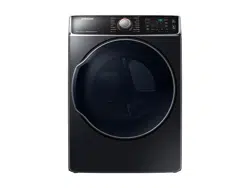
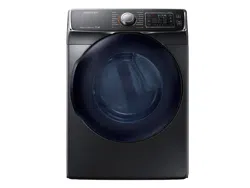
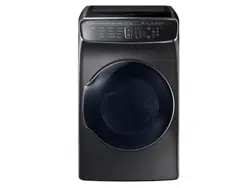
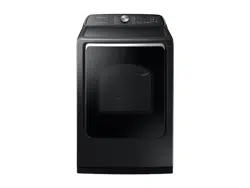
User manual Electric Dryer
Installation
STEP 1 Install the exhaust system
1. Select a location and move the dryer to the site. For easy access, we recommend you install the dryer in the same location as your washer.
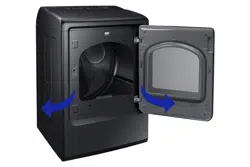
2. To change the door direction, see “Switching the door position”.
3. Install the exhaust system as instructed in the “Exhaust ducting guide” section.
NOTE
- To move the dryer easily, lay two of the carton cushion-from the packaging on the floor. Tip the dryer on its side so it lies across both cushion-tops. Push the dryer so that it is near its final location, and then set the dryer upright.
- Secure room around the dryer to facilitate ducting and wiring.
STEP 2 Connect the gas line First, read through the “Gas requirements” section, and follow these steps.
1. Remove the protective cap from the gas pipe.
2. Apply a LPG (Liquefied Petroleum Gas)-safe compound or 1.5 wraps of Teflon tape to all threaded connections.
3. Connect the gas supply to the dryer. An additional fitting is required to connect the 3/4” (1.9 cm) female thread end of a flexible connector to the 3/8” (1 cm) male threaded end on the dryer. Tighten up the fitting over all threads.
4. Turn on the gas supply, and check for any leaks using a soap solution. If a leak is found, tighten the connections and try again. DO NOT use an open flame to check for gas leaks.
STEP 3 Connect the electrical wiring
First, read through the “Electrical requirements” section, and follow these steps.
3-wire system
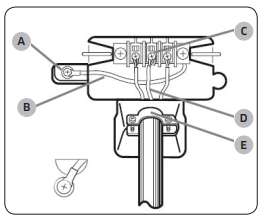
A. External ground connector
B. Neutral grounding wire (white)
C. Center silver-colored terminal block screw
D. Neutral wire (white or center wire)
E. 3/4” (1.9 cm) UL-listed strain relief
1. Loosen or remove the center terminal block.
2. Connect the neutral wire (white or center wire) of the power cable to the center, silver-colored terminal screw of the terminal block. Tighten the screws.
3. Connect the other wires to outer terminal block screws. Tighten the screws.
4. Tighten the strain relief screws.
5. Insert the terminal block cover into the rear panel of the dryer. Then, secure the cover with a hold-down screw.
CAUTION
- To convert from the 4-wire system to 3-wire system, connect the ground strap to the terminal block support to ground the dryer frame to the neutral conductor.
- Ring-type terminals are recommended. If using strap terminals, make sure they are tightened.
4-wire system
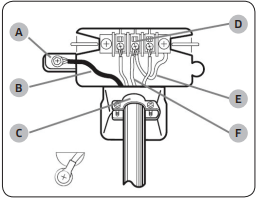
A. External ground connector
B. Green or bare copper wire of power cord
C. 3/4” (1.9 cm) UL-listed strain relief
D. Center silver-colored terminal block screw
E. Neutral grounding wire (white)
F. Neutral wire (white or center wire)
1. Remove the external ground connector’s screw, and connect the ground wire (green or unwrapped) of the power cable to the screw.
2. Loosen or remove the screws from the center terminal block.
3. Connect the neutral wire (white or center wire) and ground wire (white) to the center screw of the terminal block. Tighten the screw.
4. Connect the other wires to the outer terminal block screws. Tighten the screws.
5. Tighten the strain relief screws.
6. Insert the tab of the terminal block cover into the rear slot of the dryer. Secure the cover with a hold-down screw.
WARNING
- All U.S. models are designed for a 3-wire system connection. The dryer frame is grounded to the neutral conductor at the terminal block. A 4-wire system connection is required for new or remodeled construction, mobile homes, or if local codes do not permit grounding through neutral. If you use the 4-wire system, you cannot ground the dryer frame to the neutral conductor at the terminal block.
- Remove the terminal block cover plate. Insert the power cord with a UL-listed strain relief through the hole provided in the cabinet near the terminal block.
- A strain relief must be used. Do not loosen the nuts already installed on the terminal block. Be sure they are tight. Use a 3/8” (1 cm) deep well socket.
STEP 4 Connect the water hose
The dryer must be connected to a cold water tap using the provided water hoses.
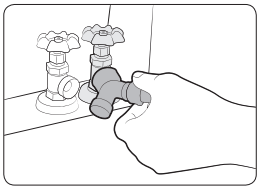
1. Close the cold water tap. If you have a washer cold water hose attached to the cold water faucet, unscrew and remove the hose. Then, connect the female end of the Y connector to the cold water tap.
2. Connect the straight end of the water hose to the Y connector.
3. Using pliers, tighten the coupling an additional two-thirds turn. Do not overtighten because the coupling may be damaged.
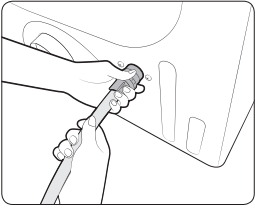
4. Connect the angled end of the water hose to the filling valve at the bottom of the rear frame. Turn the coupling manually until it is tight.
5. Using pliers, tighten the coupling an additional two-thirds turn. Do not overtighten because the coupling may be damaged.
6. If you detached the cold water hose from your washer, attach the hose to the open end of the Y connector, tighten the coupling until it is tight, and then, using a pliers, tighten an additional two-thirds turn.
7. Open the cold water tap, and then check for any leaks.
If the Y connector cannot be directly connected to the cold water tap, use the short hose as shown on the following page.
Using the short hose as an extension
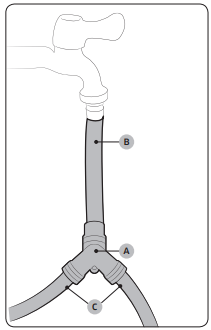
1. Close the cold water tap. If you have a washer cold water hose attached to the cold water faucet, unscrew and remove the hose. Then, connect the short hose (B) to the cold water tap. Turn the coupling manually until it is tight.
2. Using pliers, tighten the coupling an additional two-thirds turn. Do not overtighten because the coupling may be damaged.
3. Connect the Y connector (A) to the brass male end of the short hose. Turn the coupling manually until it is tight.
4. Using pliers, tighten the coupling an additional two-thirds turn. Do not overtighten because the coupling may be damaged.
5. Connect the angled end of the water hoses (C) to the filling valve at the bottom of the rear frame. Turn the coupling manually until it is tight.
6. Using pliers, tighten the coupling an additional two-thirds turn. Do not overtighten because the coupling may be damaged.
7. If you detached the cold water hose from your washer, attach the hose to the free end of the Y connector, tighten the coupling until it is tight, and then, using a pliers, tighten an additional two-thirds turn.
8. Open the cold water tap, and then check for any leaks.
STEP 5 Level the dryer
To ensure optimal performance, the dryer must be level.
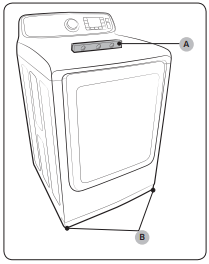
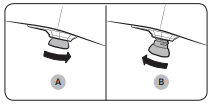
1. Using a level (A), check if the dryer is level side to side and then front to back. If the dryer is not level, adjust the leveling feet (B) at the bottom of the dryer. Then, check if the dryer is level again.
NOTE
- To set the dryer to the same height as your washer, fully retract (A) the leveling feet by turning them counterclockwise, then loosen (B) the feet by turning them clockwise. Once the dryer is the same height as the washer, follow the directions above to level the dryer.
- Adjust the leveling feet only as much as necessary to level the dryer. Extending the leveling feet more than necessary can cause the dryer to vibrate.
STEP 6 Power on (Gas models)
Make sure all gas connections, the exhaust line, and all wiring is connected correctly. Then, plug the power cord into a power source and check the dryer’s installation and operation using the final checklist in Step 7 below.
STEP 7 Final check
When installation is complete, confirm that:
- The dryer is plugged into an electrical outlet and grounded properly.
- The exhaust ductwork is connected and the joints are taped.
- You have used rigid or stiff-walled flexible metal duct material, not plastic flexible duct.
- The dryer is level and is sitting firmly on the floor.
- The dryer starts, runs, heats, and shuts off properly.
Before you start
Sort and load
- Put one wash load in the dryer at a time.
- Do not mix heavy and lightweight items together.
- To improve drying efficiency for one or two items, add a dry towel to the load.
- For best results, untangle items before inserting them into the dryer.
- Overloading reduces the tumbling performance, resulting in uneven drying and wrinkling.
- Unless recommended on the care label, do not dry woolens or fiberglass items.
- Avoid drying unwashed items.
- Do not dry items soiled with oil, alcohol, gasoline, etc.
Functional prerequisite
Lint filter
To prevent a risk of fire, make sure to clean the lint filter before or after every load.
1. Turn off the dryer.
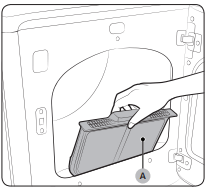
2. Open the door, and pull out the lint filter (A) from inside the tumbler.
3. Remove the lint that has accumulated, and then clean the lint filter.
4. Reinsert the lint filter, and then close the door.
CAUTION
- Do not operate the dryer without the lint filter in place.
- Do not use a damaged or broken lint filter. This may reduce performance and/or cause fire.
Operations
Feature panel
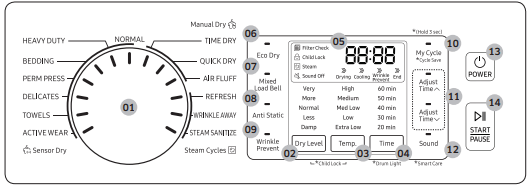
DVE(G)52M7750*
DVE(G)52M7755
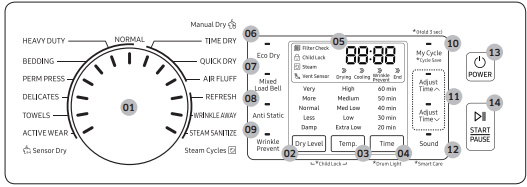
01 Cycle Selector
Turn the cycle selector to select a desired cycle. When a cycle is selected, the cycle indicator lights up.
02 Dry Level
Press to adjust the dryness in the Sensor Dry and Steam Cycles. The corresponding indicator turns on.
- Larger or bulkier loads may require Very Dry or More Dry for complete dryness.
- Less Dry is best suited for lightweight fabrics or for leaving some moisture in the clothing at the end of the cycle.
- Damp Dry is designed to partially dry items. Use for items that lay flat or hang to dry.
NOTE This option is not available with STEAM SANITIZE, and ACTIVE WEAR.
03 Temp.
Press to change the temperature of the current cycle.
- High: For sturdy cottons or those labeled Tumble Dry.
- Medium: For permanent press, synthetics, lightweight cottons, or items labeled Tumble Dry Medium.
- Med Low: For heat lower than Medium. Use to dry synthetic or washable knit fabrics.
- Low: For heat sensitive items labeled Tumble Dry Low or Tumble Dry Warm.
- Extra Low: Provides the lowest heated drying temperature possible.
04 Time
- Press to adjust the drying time for the Manual Dry cycles. This is not available with the Sensor Dry cycles because the dryer determines the drying time by sensing the current moisture level of the load.
05 Digital Graphic Display
Displays all cycle information, including the cycle time, information code, and operating status.
06 Eco Dry
This function is available with NORMAL and TIME DRY. With the Eco Dry activated, drying takes a longer time but the power consumption is reduced.
The drying time can be extended by up to 3 times depending on the temperature and load. The Eco Dry function is enabled by default.
07 Mixed Load Bell
The Mixed Load Bell notifies you when the average dry level in a load is damp dry (80 % dried). This lets you take items that you don’t want fully dried or that dry quickly out of the dryer early while letting others continue to dry.
You can select this option in all Sensor Dry cycles except for STEAM SANITIZE, and ACTIVE WEAR. Available dry levels are Normal Dry, More Dry, and Very Dry.
08 Anti Static
Reduces static electricity that occurs from clothing friction. This is done by spraying steam in a later stage of the drying cycle.
NOTE The Anti Static function is only available with NORMAL, HEAVY DUTY, PERM PRESS, DELICATES, and TIME DRY.
09 Wrinkle Prevent
Wrinkle Prevent provides approximately 180 minutes of intermittent tumbling in unheated air at the end of the cycle to reduce wrinkling. Press Wrinkle Prevent to activate this feature.
The load is dry, and can be removed at any time during the Wrinkle Prevent cycle.
10 My Cycle
Choose your favorite cycle including the cycle time, temperature, and dry level. See “My Cycle” for details.
11 Adjust Time
You can change the set time in the Manual Dry cycles (TIME DRY, QUICK DRY, or AIR FLUFF) and WRINKLE AWAY. To change the cycle time, press  or
or  until the desired time is displayed.
12 Sound
Press Sound to turn on or off the dryer’s notification beeps and melodies.
NOTE This function remains active even after you restart the dryer.
13 POWER
- Press to turn on/turn off the dryer.
14 START/PAUSE
- Press to start or stop operation.
Simple steps to start
- Press POWER to turn on the dryer.
- Turn the Cycle Selector to select a cycle.
- Change the cycle settings (Dry Level and Time) as necessary.
- Optionally, you can activate options available by pressing the relevant button (Mixed Load Bell, Anti Static, Wrinkle Prevent, and/or Eco Dry).
- Press START/PAUSE. The dryer indicator turns on with an estimated cycle time on the display.
To change the cycle during operation
- Press START/PAUSE to stop operation.
- Select a different cycle.
- Press START/PAUSE again to start the new cycle.
Steam Cycles
Use steam to reduce wrinkling and odors on items.
- REFRESH: Use to smooth out wrinkles and reduce odors in loads of one to four items. With this cycle selected, a small amount of water is sprayed into the dryer drum after several minutes of tumbling with heat. Confirm that the laundry load is dry.
- WRINKLE AWAY: For best results, load 2-3 items at once. You can extend the drying time by a minimum of 20 minutes, depending on the item type or load. Confirm that the laundry load is dry.
- STEAM SANITIZE: Use to sanitize items by applying steam and high-temperature heat to the fabric. This cycle can make items soft and reduce smells. Confirm that the laundry load is wet or partially wet.
Cycle guide
The best way to dry items is to follow the instructions on the care label. If no drying instructions are provided, see the following table for reference.
Bedspreads & Comforters
Follow the care label instructions or dry using BEDDING.
- Make sure the item is thoroughly dry before using or storing.
- May require repositioning in the drum to ensure even drying.
Blankets
Use NORMAL and dry only one blanket at a time for best tumbling action.
- Make sure blankets are is thoroughly dry before using or storing.
Curtains & Draperies
Use PERM PRESS and the Medium temperature setting to help minimize wrinkling.
- Dry curtains and draperies in small loads for best results and remove as soon as possible.
Cloth Diapers
Use NORMAL and the medium temperature setting for soft, fluffy diapers.
Down–filled Items (jackets, sleeping bags, comforters, etc.)
Use NORMAL and the Medium temperature setting.
- Add a couple of dry towels to absorb moisture and shorten drying time.
Foam Rubber (rug backs, stuffed toys, shoulder pads, etc.)
Foam Rubber (rug backs, stuffed toys, shoulder pads, etc.)
WARNING Drying a rubber item with heat may damage it or cause a fire.
Pillows
Use NORMAL.
- Add a couple of dry towels and a pair of clean sneakers to help the tumbling action and to fluff the items.
- Do not dry kapok or foam pillows using a heated drying cycle.
You can dry these items in the dryer only if you use AIR FLUFF.
Plastics (shower curtains, outdoor furniture covers, etc.)
Use AIR FLUFF or TIME DRY and the Low or Extra Low temperature settings depending on the care label instructions.
Special features
Child Lock 
Child Lock prevents children from playing with the dryer. When Child Lock is activated, all buttons except for the POWER button are disabled.
To activate/deactivate Child Lock, simultaneously press and hold Dry Level. and Temp. for 3 seconds.
NOTE Once Child Lock is activated, it will remain active even after you restart the dryer. If other buttons, except for the POWER button, do not respond, check the Child Lock indicator. If the indicator is on, follow the instructions above to turn Child Lock off
Drum Light
To turn on the drum light while the dryer is running, press and hold Time for 3 seconds.
NOTE After 5 minutes of inactivity, the drum light automatically turns off.
Sound On/Off
To turn off the dryer’s notification beeps and melodies, press and hold Sound button.
To unmute the dryer, press and hold Sound button.
NOTE This function remains active even after you restart the dryer.
My Cycle
You can create your own cycle that contains your preferred settings, and use it at your convenience.
1. Turn the Cycle Selector to select a cycle. The cycle indicator turns on.
2. Set or change the settings (Dry Level, Temp., Time, etc) and/or options as necessary. Each corresponding indicator blinks.
3. Press and hold My Cycle for 3 seconds. The dryer stores the selected cycle with its settings.
To use My Cycle, press and hold My Cycle for 3 seconds.
Smart Care
If the dryer displays an information code, you can use Smart Care to check the status of the dryer on a smartphone. To use Smart Care, you must have the Samsung Smart Care app installed on your smartphone.
NOTE Smart Care is optimized for Samsung Galaxy and Apple iPhones. (Not compatible with some models).
Download the Samsung Smart Care app from the Google Play Store or Apple App store (Search word: “Samsung Smart Washer/Dryer”), and install it on your smartphone.
If an information code appears on the dryer, follow these steps:
1. Press and hold Sound for 3 seconds to activate Smart Care. The Smart Care indicator turns on.
2. Open the Smart Care app on your smartphone.
3. Put the smartphone’s camera close to the display of the dryer. The app automatically recognizes the information code, and displays suggestions on your smartphone.
4. If the smartphone fails to recognize the information code more than twice, type the information code manually into the Smart Care app.
CAUTION
- If light is reflected on the display of the dryer, the smartphone may not recognize the information code.
- If you hold the smartphone at an angle to the dryer’s display, the dryer may not recognize the information code. For best results, hold the smartphone so that the front of the panel and the smartphone are parallel or nearly parallel.
- After you use this function, the dryer will delete delete the record of the information code from its code log
Maintenance
Cleaning
Feature panel
- Clean with a soft, damp cloth. Do not use abrasive substances.
- Do not spray liquid cleaning agents directly on the display of the dryer.
- Some laundry pre-treatment soil and stain removers may damage the feature panel.
- When using liquid cleaning agents, apply them to the cleaning cloth. Do not apply them directly to the dryer. Wipe up any spills or overspray immediately.
Tumbler
- Remove any stains from the tumbler with an all-purpose cleaner.
- Tumble old towels or rags to remove any remaining stains or cleaning substances. Stains may be still visible, but will not affect subsequent loads.
Powder coat tumbler
To clean the powder coat tumbler, use a damp cloth with a mild, non-abrasive cleaner suitable for easily marred surfaces. Remove cleaner residue and dry with a clean cloth.
Dryer exterior
- Clean with a soft, damp cloth. Do not use abrasive substances.
- Protect the surface from sharp objects.
- Do not place any heavy or sharp objects or a detergent container on the dryer. They can scratch or damage the top cover of the dryer.
- The dryer has a high-gloss finish on the entire surface. Be careful not to scratch or damage the surface.
Exhaust system
- Check and clean the exhaust system on a yearly or regular basis to maintain optimum performance.
- The external exhaust hood must be cleaned more frequently to ensure a proper air flow.
Checkpoints
If the dryer operates abnormally, first check the list of problems in the table below and try the suggested actions.
Does not run.
- Make sure the door is latched shut.
- Make sure the power cord is plugged into a live electrical outlet.
- Check your home’s circuit breakers or fuses.
- Press or tap START/PAUSE again if the door is opened during a cycle.
- Clean the lint filter.
Does not heat.
- Check your home’s circuit breakers or fuses.
- Some cycles do not require heating. Check the selected cycle again.
- For a gas dryer, make sure the gas supply is on.
- Clean the lint filter and exhaust duct.
- The dryer may have moved into the cool-down phase of the cycle.
Does not dry.
- Check all of the above, plus...
- Make sure the exhaust hood outside your home can open and close freely.
- Check the exhaust system for lint buildup. Ducting should be inspected and cleaned annually.
- Use a 4” rigid metal exhaust duct.
- Do not overload. 1 wash load = 1 dryer load.
- Dry heavy items and light weight items separately.
- Large, bulky items, such as blankets or comforters, may require repositioning to ensure even drying.
- Make sure that your washer is draining properly and extracting adequate water from the load.
- The load may be too small to tumble properly. Add a few towels and restart the dryer.
- The load may be too large to tumble properly. Remove some items and restart the dryer.
- Clean the lint filter.
Is noisy.
- Check the load for objects such as coins, loose buttons, nails, etc. Remove promptly.
- It is normal to hear the dryer gas valve or heating element cycle on and off during the drying cycle.
- Make sure the dryer is leveled properly as outlined in the installation instructions.
- It is normal for the dryer to hum due to the high velocity of air moving through the dryer drum, fan, or exhaust system.
Dries unevenly.
- Seams, pockets, and other similarly heavy areas may not be completely dry when the rest of the load has reached the selected dryness level. This is normal. You can choose a higher dryness level or a cycle that involves a higher dryness level.
- If one heavy item is dried with a light weight load, such as one towel with sheets, it is possible that the heavy item will not be completely dry when the rest of the load has reached the selected dryness level.
- For the best drying results, dry heavy items and light weight items separately.
Has odors.
- Household odors from paint, varnish, strong cleaners, etc. may enter the dryer with the surrounding room air. This is normal as the dryer draws the air from the room, heats it, pulls it through the tumbler, and exhausts it outside.
- When these odors linger in the air, completely ventilate the room before using the dryer.
- Use a cycle featuring the Refresh function. If odors persist, wash and dry the item again.
Lint on clothes.
- Make sure the lint filter is cleaned before every load. For clothes that naturally build up lint, clean the filter during the cycle.
- Some fabrics are lint producers (for example, a fuzzy white cotton towel) and they must be dried separately from clothes that are lint trappers (for example, a pair of black linen pants).
- Divide larger loads into smaller loads for drying.
- Check pockets thoroughly before drying, then dry clothes.
- Remove lint inside the drum before drying.
Items still wrinkled after WRINKLE PREVENT (WRINKLE-CARE, WRINKLE RELEASE).
- Small loads of 1 to 4 items work best.
- Load fewer items. Load similar-type items.
- Take out the items immediately after drying is complete.
Water drips from the nozzle when STEAM CARE starts.
- This is steam condensation. The dripping water will stop after a short time.
Sprayed water is not visible during STEAM CARE.
- Sprayed water is difficult to see when the door is closed.
Extended time.
- Sensor Dry automatically senses the moisture in the load and shuts the dryer off when the selected dryness level is reached. The drying time can change according to the type and amount of laundry. See the cycle chart for reference.
Information codes
If the dryer fails to operate, you may see an information code on the display panel. To determine what you should do, check the list codes in the table below and try the suggested actions.
dC
Operating the dryer with the door open.
- Make sure the door is properly closed.
- Make sure laundry is not caught in the door.
FC
Invalid power source frequency
- Try restarting the cycle.
- If this information code remains, contact a Samsung customer service center.
AC
Electronic control problem (Invalid Communication).
- Contact a Samsung a customer service center.
3C
Malfunction is detected in the motor relay circuit.
- Contact a Samsung customer service center.
HC
HC4
High temperature heating check
- Clean the lint filter.
- If this information code remains, contact a Samsung customer service center.(enter the line test mode)
9C1
The electronic control needs to be checked.
- Check if power is supplied properly.
- If the information code remains, contact a customer service center.
tC
The Thermistor1 resistance is very low or high.
- Check for a clogged lint screen
- Check if the vent system is restricted.
- If this information code remains, contact a Samsung customer service center.
tC5
The Thermistor2 resistance is very low or high.
- Check for a clogged lint screen.
- Check if the vent system is restricted.
- If this information code remains, contact a Samsung customer service center.
dF
Incorrect door switch.
- Contact a Samsung customer service center.