

en
2
Table of contents
1 Safety ............................................4
1.1 General information....................4
1.2 Intended use...............................4
1.3 Restriction on user group...........4
1.4 Safe installation ..........................5
1.5 Safe use .....................................7
1.6 Safe cleaning and mainten-
ance............................................9
2 Preventing material damage .....10
3 Environmental protection and
saving energy.............................11
3.1 Disposing of packaging ...........11
3.2 Save energy and conserve
resources..................................11
3.3 Energy saving mode ................11
4 Installation and connection.......12
4.1 Unpacking the appliance .........12
4.2 Contents of package................13
4.3 Requirements for the install-
ation location ............................13
4.4 Removing the transit bolts .......14
4.5 Connecting the appliance ........15
4.6 Aligning the appliance..............16
4.7 Connecting the appliance to
the electricity supply.................17
5 Familiarising yourself with
your appliance............................18
5.1 Appliance .................................18
5.2 Detergent drawer......................19
5.3 Controls ....................................19
6 Display ........................................20
7 Buttons .......................................22
8 Programmes ...............................24
9 Accessories................................32
10 Before using for the
first time....................................32
10.1 Starting an empty washing
cycle .......................................32
11 Laundry.....................................33
11.1 Preparing the laundry .............33
11.2 Sorting laundry .......................33
11.3 Degrees of soiling ..................34
11.4 Care symbols on the care
labels ......................................34
12 Detergents and care
products ...................................35
12.1 Detergent recommendation ...35
12.2 Detergent dosage ..................36
13 Basic operation ........................36
13.1 Switching on the appliance ....36
13.2 Setting a programme .............37
13.3 Adjusting the programme
settings ...................................37
13.4 Loading laundry......................37
13.5 Using a measuring aid for
liquid detergent ......................38
13.6 Use the measuring aid for
liquid detergent ......................38
13.7 Adding detergent and care
product ...................................39
13.8 Starting the programme .........39
13.9 Soaking laundry .....................39
13.10 Adding laundry .....................39
13.11 Cancelling the pro-
gramme ................................39
13.12 Resuming the programme
when the programme
status is Rinse Hold .............40
13.13 Unloading the laundry ..........40
13.14 Switching off the appli-
ance......................................40

en
3
14 Childproof lock.........................40
14.1 Activating the childproof
lock.........................................40
14.2 Deactivating the childproof
lock.........................................41
15 HomeConnect .........................41
15.1 HomeConnect settings..........41
15.2 Connecting the appliance
to a WLAN home network
(Wi-Fi) with WPS function .......41
15.3 Connecting the appliance
to a WLAN home network
(Wi-Fi) without WPS func-
tion..........................................42
15.4 Connecting your appliance
to the Home Connect app......43
15.5 Connecting the appliance
to the energy manager...........43
15.6 Activating Wi-Fi on the ap-
pliance ....................................44
15.7 Deactivating Wi-Fi on the
appliance................................44
15.8 Software update .....................44
15.9 Resetting the appliance
network settings .....................45
15.10 Remote diagnostics .............45
15.11 Data protection.....................45
16 Basic settings...........................46
16.1 Overview of basic settings .....46
16.2 Changing the basic set-
tings........................................47
17 Cleaning and servicing............47
18 Troubleshooting.......................55
19 Transportation, storage and
disposal ....................................63
19.1 Removing the appliance ........63
19.2 Inserting the transit bolts........63
19.3 Using the appliance again .....64
19.4 Disposing of old appliance ....64
20 Customer Service.....................65
21 Consumption values................66
22 Technical specifications..........67
23 Declaration of Conformity .......67
en Safety
4
1 Safety
Observe the following safety instructions.
1.1 General information
¡ Read this instruction manual carefully.
¡ Keep the instruction manual and the product information safe
for future reference or for the next owner.
¡ Do not connect the appliance if it has been damaged in transit.
1.2 Intended use
Only use this appliance:
¡ For washing machine-washable fabrics and hand-washable wool
in accordance with the care label.
¡ With tap water and commercially available detergents and care
products suitable for washing machines.
¡ In private households and in enclosed spaces in a domestic en-
vironment.
¡ Up to an altitude of max. 4000m above sea level.
1.3 Restriction on user group
This appliance may be used by children aged 8 or over and by
people who have reduced physical, sensory or mental abilities or
inadequate experience and/or knowledge, provided that they are
supervised or have been instructed on how to use the appliance
safely and have understood the resulting dangers.
Children must not play with the appliance.
Cleaning and user maintenance must not be performed by chil-
dren unless they are being supervised.
Keep children under the age of 3 years and pets away from the
appliance.

Safety en
5
1.4 Safe installation
Take note of the safety instructions when installing the appliance.
WARNING‒Risk of electric shock!
Improper installation is dangerous.
▶
Connect and operate the appliance only in accordance with the
specifications on the rating plate.
▶
Connect the appliance to a power supply with alternating cur-
rent only via a properly installed socket with earthing.
▶
The protective conductor system of the domestic electrical in-
stallation must be properly installed. The installation must have
a sufficiently large cross section.
▶
When using a residual current circuit breaker, only use a type
with the mark.
▶
Never equip the appliance with an external switching device,
e.g. a timer or remote control.
▶
When the appliance is installed, the mains plug of the power
cord must be freely accessible. If free access is not possible, an
all-pole isolating switch must be installed in the permanent elec-
trical installation according to the installation regulations.
▶
When installing the appliance, check that the power cable is not
trapped or damaged.
If the insulation of the power cord is damaged, this is dangerous.
▶
Never let the power cord come into contact with hot appliance
parts or heat sources.
▶
Never let the power cord come into contact with sharp points or
edges.
▶
Never kink, crush or modify the power cord.
WARNING‒Risk of fire!
It is dangerous to use an extended power cord and non-approved
adapters.
▶
Do not use extension cables or multiple socket strips.
▶
If the power cord is too short, contact Customer Service.
▶
Only use adapters approved by the manufacturer.

en Safety
6
WARNING‒Risk of injury!
The high weight of the appliance may result in injury when lifted.
▶
Do not lift the appliance on your own.
If this appliance is not correctly installed in a washer-dryer stack,
the installed appliance may fall.
▶
Only stack the dryer on a washing machine using the connec-
tion kit from the dryer manufacturer . No other installation
method is permitted.
▶
Do not install the appliance in a washer-dryer stack if the dryer
manufacturer does not offer a suitable connection kit.
▶
Do not install appliances from different manufacturers and with
varying depths and widths in a washer-dryer stack.
▶
Do not install a washer-dryer stack on a platform; the appli-
ances may tip over.
WARNING‒Risk of suffocation!
Children may put packaging material over their heads or wrap
themselves up in it and suffocate.
▶
Keep packaging material away from children.
▶
Do not let children play with packaging material.
CAUTION‒Risk of injury!
The appliance may vibrate or move when in use.
▶
Place the appliance on a clean, even, solid surface.
▶
Align the appliance using the appliance feet and a spirit level.
If hoses and power cords have been laid incorrectly, this causes a
tripping hazard.
▶
Lay hoses and power cords in such a way that there is no risk
of tripping.
If the appliance is moved by holding onto protruding components,
such as the appliance door, the parts may break off.
▶
Do not move the appliance by holding onto protruding parts.
CAUTION‒Risk of cutting!
Touching sharp edges on the appliance may lead to cuts.
▶
Do not touch the sharp edges on the appliance.

Safety en
7
▶
Wear protective gloves when installing and transporting the ap-
pliance.
1.5 Safe use
WARNING‒Risk of electric shock!
If the appliance or the power cord is damaged, this is dangerous.
▶
Never operate a damaged appliance.
▶
Never pull on the power cord to unplug the appliance. Always
unplug the appliance at the mains.
▶
If the appliance or the power cord is damaged, immediately un-
plug the power cord or switch off the fuse in the fuse box and
turn off the water tap.
▶
Call Customer Service. →Page65
▶
Repairs to the appliance should only be carried out by trained
specialist staff.
An ingress of moisture can cause an electric shock.
▶
Only use the appliance in enclosed spaces.
▶
Never expose the appliance to intense heat or humidity.
▶
Do not use steam- or high-pressure cleaners, hoses or sprays
to clean the appliance.
WARNING‒Risk of harm to health!
Children can lock themselves in the appliance, thereby putting
their lives at risk.
▶
Do not install the appliance behind a door as this may obstruct
the appliance door or prevent it from opening.
▶
With redundant appliances, unplug the power cord. Then cut
through the cord and damage the lock on the appliance door
beyond repair so that the appliance door will no longer close.
WARNING‒Risk of suffocation!
Children may breathe in or swallow small parts, causing them to
suffocate.
▶
Keep small parts away from children.
▶
Do not let children play with small parts.

en Safety
8
WARNING‒Risk of poisoning!
Detergents and care products may result in poisoning if con-
sumed.
▶
If accidentally swallowed, seek medical advice.
▶
Keep detergents and care products out of the reach of children.
WARNING‒Risk of explosion!
Laundry that has been pretreated with cleaning agents that con-
tain solvents may cause an explosion in the appliance.
▶
Rinse pretreated laundry thoroughly with water before washing.
CAUTION‒Risk of injury!
The covering plate may break if you stand on or climb onto the
appliance.
▶
Do not stand on or climb onto the appliance.
The appliance may tip over if you sit on or lean against the open
door.
▶
Do not sit on or lean against the appliance door.
▶
Do not place any objects on the appliance door.
Reaching into the drum while it is still turning may cause hand in-
juries.
▶
Wait for the drum to come to a complete stop before reaching
inside.
CAUTION‒Risk of burns!
When washing at high temperatures, the glass in the appliance
door becomes hot.
▶
Do not touch the appliance door when it is hot.
▶
Keep children away from the appliance door when it is hot.
CAUTION‒Risk of scalding!
When you wash at high temperatures, the detergent solution gets
hot.
▶
Do not touch the hot detergent solution.

Safety en
9
CAUTION‒Risk of chemical burns!
If the detergent drawer is opened, detergent and care products
may spray out from the appliance. Contact with eyes or skin may
cause irritation.
▶
Rinse eyes and/or skin thoroughly with clean water if they come
into contact with detergents or care products.
▶
If accidentally swallowed, seek medical advice.
▶
Keep detergents and care products out of the reach of children.
1.6 Safe cleaning and maintenance
Take note of the safety instructions when cleaning and performing
maintenance work on the appliance.
WARNING‒Risk of electric shock!
Improper repairs are dangerous.
▶
Repairs to the appliance should only be carried out by trained
specialist staff.
▶
Only use genuine spare parts when repairing the appliance.
▶
If the power cord of this appliance is damaged, it must be re-
placed by the manufacturer, the manufacturer's Customer Ser-
vice or a similarly qualified person in order to prevent any risk.
An ingress of moisture can cause an electric shock.
▶
Do not use steam- or high-pressure cleaners, hoses or sprays
to clean the appliance.
WARNING‒Risk of injury!
The use of non-original spare parts and non-original accessories
is dangerous.
▶
Only use the manufacturer's original spare parts and original ac-
cessories.
WARNING‒Risk of poisoning!
Poisonous fumes may be given off if you use cleaning agents that
contain solvents.
▶
Do not use cleaning agents that contain solvents.

en Preventing material damage
10
Preventing material damage
2 Preventing material
damage
Preventing material damage
Follow these instructions to avoid ma-
terial damage and damage to the ap-
pliance.
ATTENTION!
The functionality of the appliance
may be impaired if you use the
wrong quantity of fabric softener, de-
tergent, care product or cleaning
agent.
▶
Follow the dosage recommenda-
tions from the manufacturer.
Exceeding the maximum load capa-
city impairs the function of the appli-
ance.
▶
Observe the maximum load capa-
city →Page24 for each pro-
gramme and do not exceed it.
The appliance is secured for trans-
portation using transit bolts. Transit
bolts which have not been removed
may result in material damage and
damage to the appliance.
▶
Before starting up the appliance,
remove the transit bolts completely
and keep them in a safe place.
▶
Before transport, fit the transit bolts
fully in order to prevent damage in
transit.
Material damage may be caused if
the water inlet hose is connected in-
correctly.
▶
Tighten the screw connections on
the water inlet until they are hand-
tight.
▶
Ideally, connect the water inlet
hose directly to the water tap,
without any additional connecting
elements such as adapters, exten-
sions, valves or similar.
▶
Ensure that the inner diameter of
the water tap is at least 17 mm.
▶
Make sure that the length of the
thread on the connection to the
water tap is at least 10 mm.
If the water pressure is too high or
too low, the appliance may not be
able to operate properly.
▶
Make sure that the water pressure
in the water supply system is min.
100kPa (1bar) and max.
1000kPa (10bar).
▶
If the water pressure exceeds the
maximum value specified, a pres-
sure-reducing valve must be in-
stalled between the drinking water
connection and the hose set of the
appliance.
▶
Do not connect the appliance to
the mixer tap of an unpressurised
hot-water boiler.
Modified or damaged water hoses
may result in material damage and
damage to the appliance.
▶
Never kink, crush, modify or cut
through water hoses.
▶
Only use the water hoses supplied
with the appliance or genuine
spare hoses.
▶
Never re-use water hoses that
have been used before.
Operating the appliance using water
that is dirty or too hot may cause ma-
terial damage.
▶
Only operate the appliance with
cold mains water.
Unsuitable cleaning products may
damage the surfaces of the appli-
ance.
▶
Do not use harsh or abrasive de-
tergents.
▶
Do not use cleaning products with
a high alcohol content.
▶
Do not use hard scouring pads or
cleaning sponges.
▶
Clean the appliance with nothing
but water and a soft, damp cloth.
▶
Remove all detergent residue,
spray residue or other residues im-
mediately if they come into contact
with the appliance.

Environmental protection and saving energy en
11
Environmental protection and saving energy
3 Environmental protec-
tion and saving energy
Environmental protection and saving energy
3.1 Disposing of packaging
The packaging materials are environ-
mentally compatible and can be re-
cycled.
▶
Sort the individual components by
type and dispose of them separ-
ately.
3.2 Save energy and con-
serve resources
If you follow these instructions, your
appliance will use less electricity and
less water.
Choose programmes with low tem-
peratures and longer wash times and
use maximum load capacity
→Page24.
a
Energy consumption and water
consumption is most efficient.
Use the economy programme set-
tings.
a
If you adjust the programme set-
tings for a programme, the display
shows the expected consumption.
Add →Page36 detergent based on
the laundry's degree of soiling.
a
For light to normal soiling, a smal-
ler amount of detergent is suffi-
cient. Observe the dosage recom-
mendation from the detergent
manufacturer.
Reduce the washing temperature for
lightly and normally soiled laundry.
a
At low temperatures, the appliance
consumes less energy. For light to
normal soiling, lower temperatures
than indicated on the care label
are also sufficient.
Set the maximum spin speed if you
want to dry the laundry in a tumble
dryer afterwards.
a
The drier the laundry, the shorter
the programme duration when dry-
ing which, in turn, reduces energy
consumption. A higher spin speed
reduces the residual moisture in
the laundry and increases the
volume of the spin noise.
Wash the laundry without prewash.
a
Washing with prewash increases
the programme duration and in-
creases energy and water con-
sumption.
The appliance has a continuous
automatic load adjustment function.
a
Depending on the type of fabric
and load capacity, the continuous
automatic load adjustment func-
tion optimally adjusts the water
consumption and programme dur-
ation.
3.3 Energy saving mode
If you do not use the appliance for an
extended period, it automatically
switches to energy-saving mode. All
displays go out and Start/Reload
flashes.
Energy-saving mode ends when you
use the appliance again, e.g. if you
open or close the door.
If you do not use the appliance for an
extended period, the appliance
switches off automatically.

en Installation and connection
12
Note:If Wi-Fi is activated, the appli-
ance will not switch itself off automat-
ically.
Installation and connection
4 Installation and con-
nection
Installation and connection
4.1 Unpacking the appliance
Note:Please read the information in
the Safety →Page4 and Preventing
material damage →Page10 sections
to ensure that you use the appliance
safely.
ATTENTION!
Objects remaining in the drum that
are not designed for operation with
the appliance may cause material
damage and damage to the appli-
ance.
▶
Remove these objects, along with
all supplied accessories, from the
drum before starting the appliance.
1. Remove any packaging and pro-
tective covers completely from the
appliance.
For the environmentally friendly
disposal of the packaging materi-
als, observe the information on the
topic of
→"Disposing of packaging",
Page11.
2. Check the appliance for visible
damage.
3. Open the door.
→"Basic operation", Page36
4. Remove the accessory from the
drum.
5. Close the door.
Installation and connection en
13
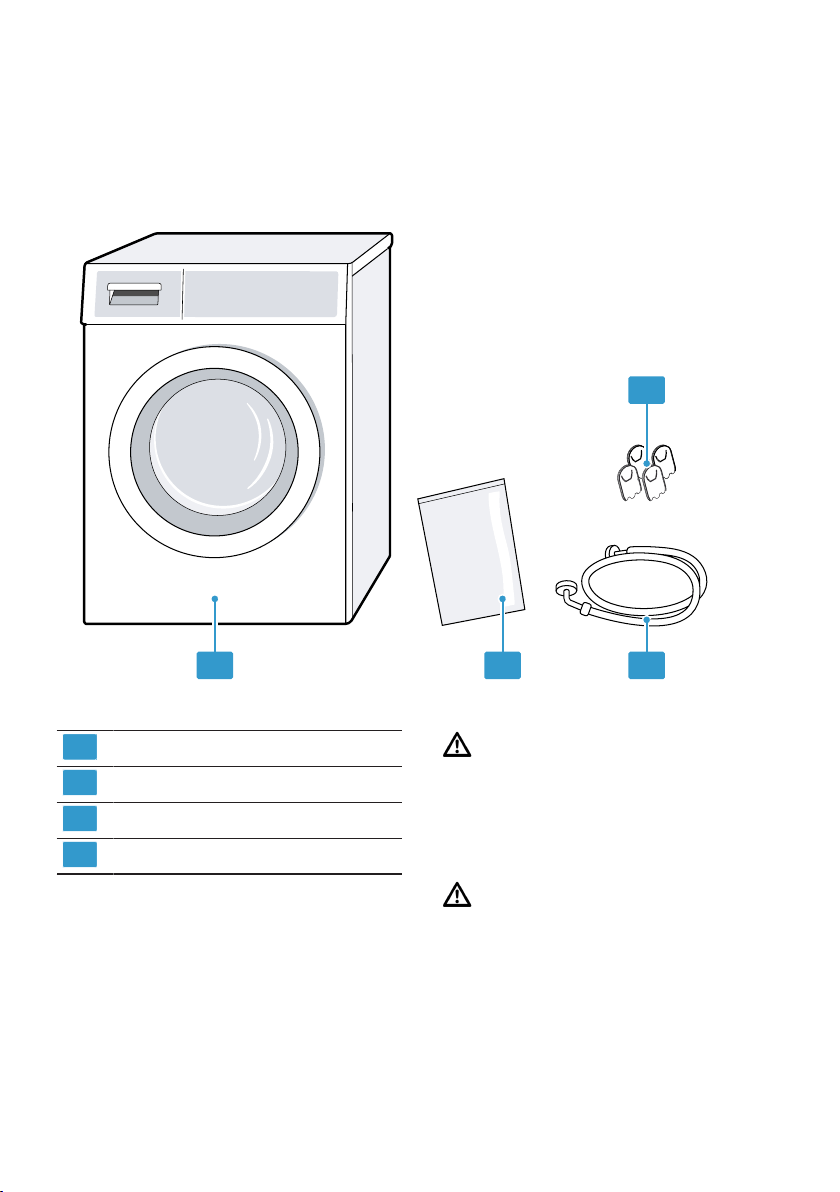
4.2 Contents of package
After unpacking all parts, check for any damage in transit and completeness of
the delivery.
1 2 3
4
1
Washing machine
2
Accompanying documents
3
Water inlet hose
4
Cover caps
4.3 Requirements for the in-
stallation location
Note:Please read the information in
the Safety →Page4 and Preventing
material damage →Page10 sections
to ensure that you use the appliance
safely.
WARNING
Risk of electric shock!
The appliance contains live parts.
Touching live parts is dangerous.
▶
Do not operate the appliance
without a cover cap.
WARNING
Risk of injury!
When using the appliance on a base,
the appliance may tip over.
▶
Always secure the feet of the appli-
ance to a base using the manufac-
turer's fixing brackets →Page32
before using the appliance for the
first time.
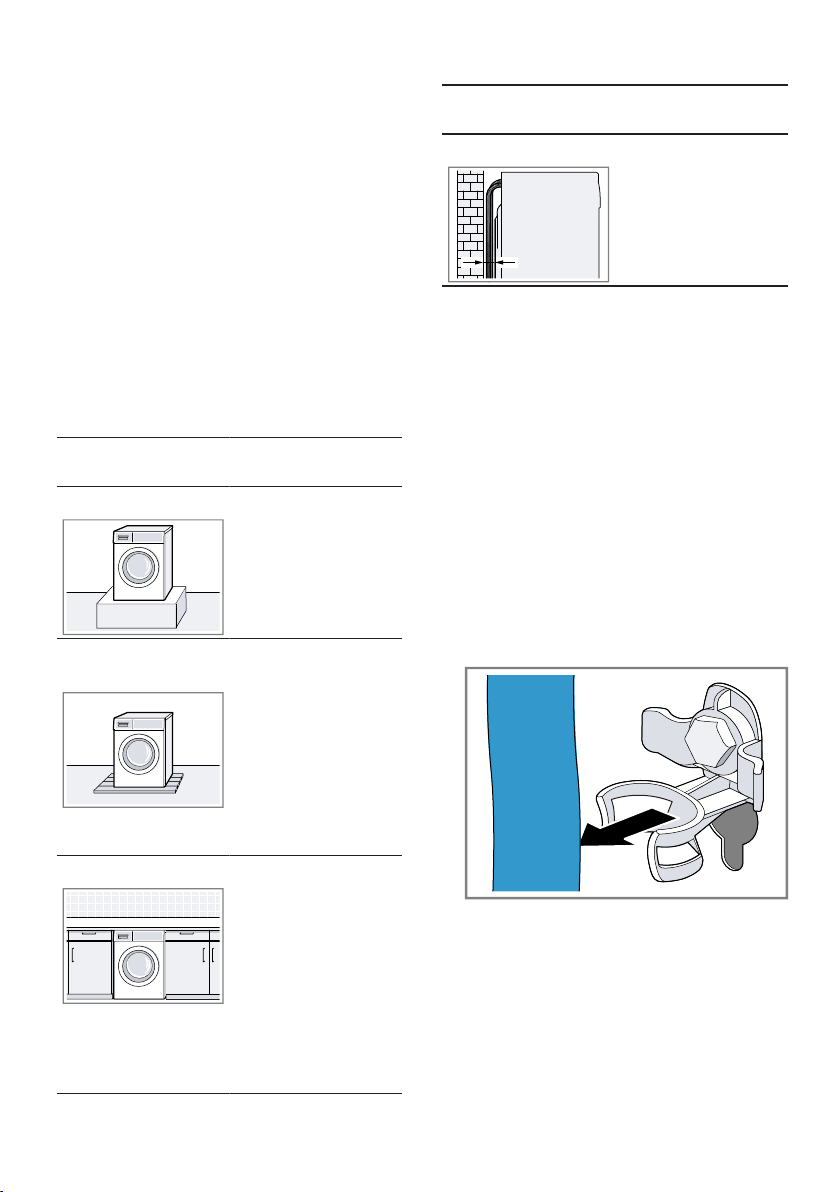
en Installation and connection
14
ATTENTION!
If the appliance is installed in areas
exposed to frost or outdoors, frozen
residual water may damage the appli-
ance and frozen hoses may crack or
split.
▶
Do not install or operate this appli-
ance anywhere that is liable to ex-
perience frost and/or outdoors.
The appliance underwent a function
test before leaving the factory and
may, therefore, contain residual wa-
ter. This residual water may leak out
if the appliance is tilted at an angle
greater than 40°.
▶
Tilt the appliance carefully.
Installation loca-
tion
Requirements
On a base Secure the appli-
ance with fixing
brackets
→Page32.
On a wooden
joist floor
Place the appli-
ance on a water-
resistant wooden
board which is
screwed tightly to
the floor. The
wooden board
should be at
least 30mm
thick.
In a kitchen unit ¡ A niche width
of 60cm is re-
quired.
¡ Only install the
appliance un-
derneath a
continuous
worktop that is
securely con-
nected to adja-
cent cabinets.
Installation loca-
tion
Requirements
On a wall Do not trap the
hoses between
the wall and the
appliance.
4.4 Removing the transit
bolts
The appliance is secured for trans-
portation using transit bolts on the
rear of the appliance.
Notes
¡ Please read the information in the
Safety →Page4 and Preventing
material damage →Page10 sec-
tions to ensure that you use the
appliance safely.
¡ Keep the transit bolts, screws and
sleeves in a safe place for future
transport →Page63.
1. Pull the hoses out of the holders.
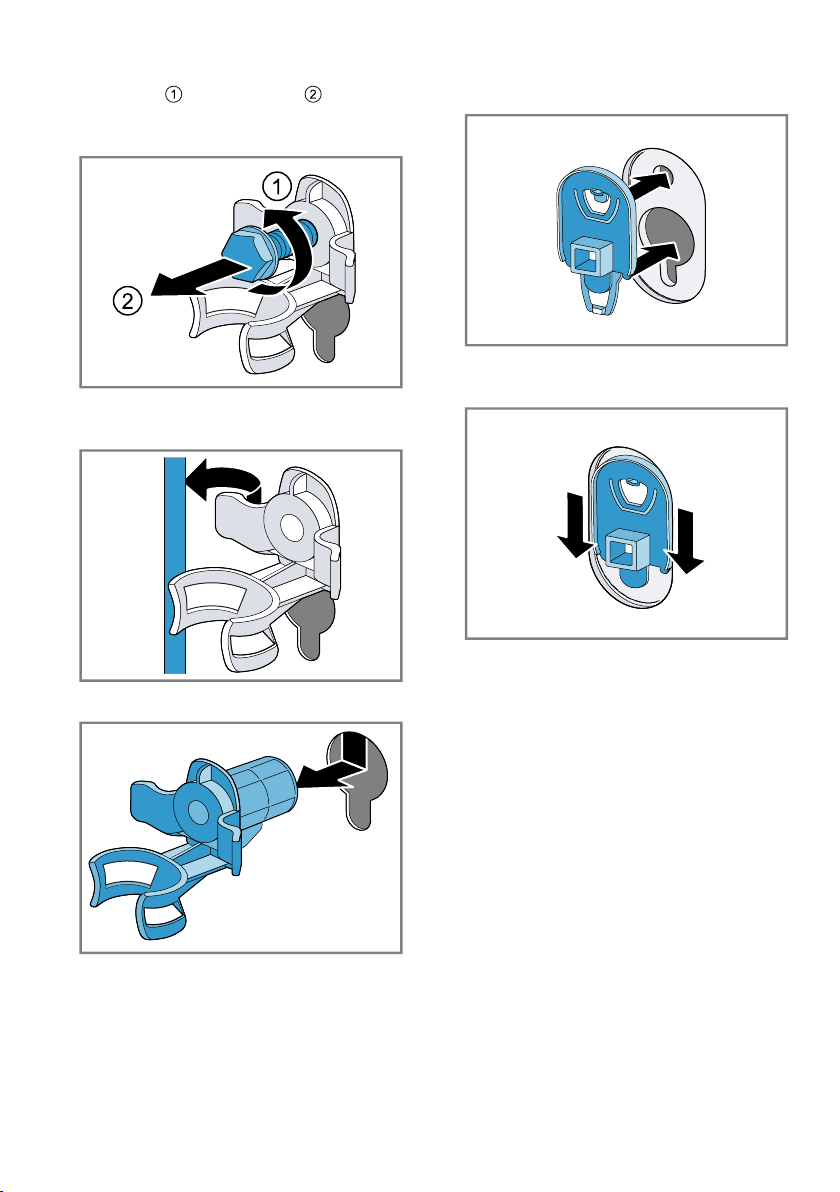
Installation and connection en
15
2. Unscrew and remove all four
screws for the transit bolts with a
WAF 13 wrench.
3. Pull the power cord out of the
holder.
4. Remove the four sleeves.
5. Put on the four cover caps.
6. Press down on the four cover
caps.
4.5 Connecting the appliance
Connecting the water inlet hose
Note
¡ Please read the information in the
Safety →Page4 and Preventing
material damage →Page10 sec-
tions to ensure that you use the
appliance safely.
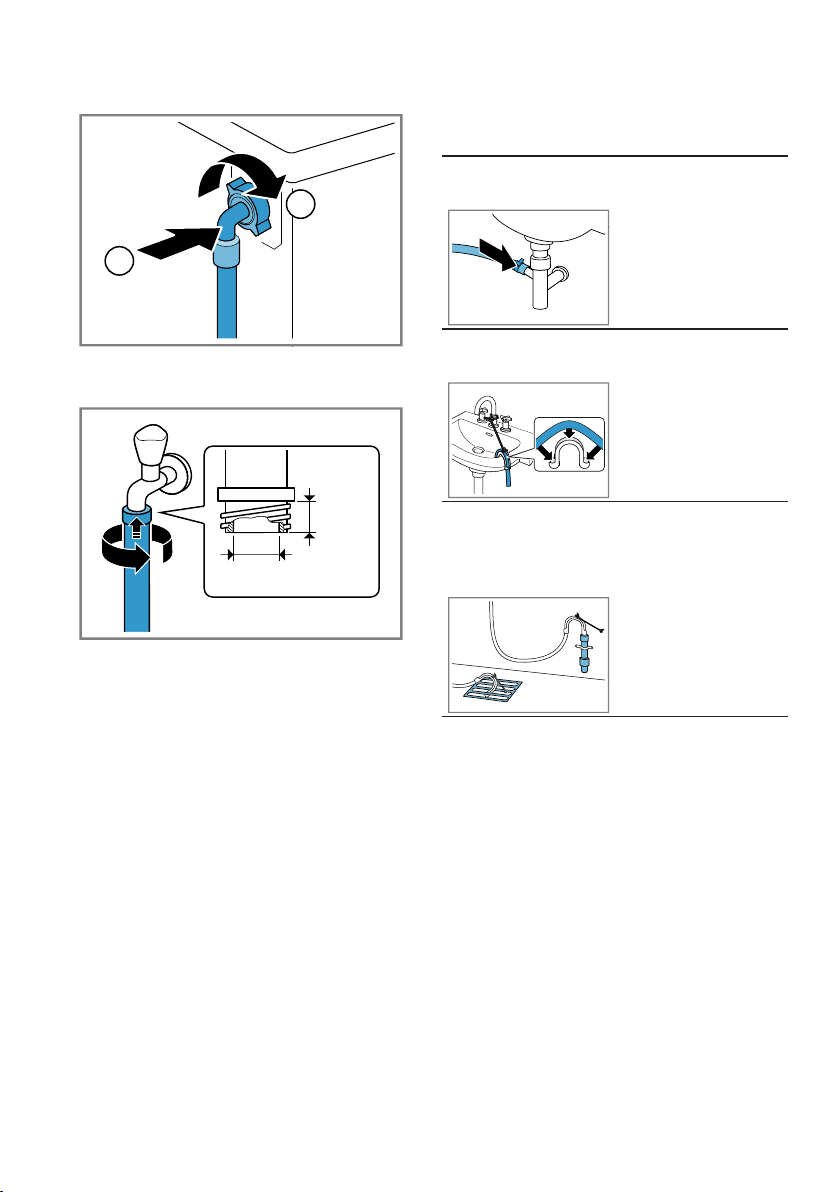
en Installation and connection
16
1. Connect the water inlet hose.
2
1
2. Connect the water inlet hose to a
tap (26.4mm=3/4").
¾˝
min.
min.
10 mm
17 mm
3. Open the water tap carefully and
check that the connection points
are tight.
Water outlet connection types
This information is intended to help
you to connect this appliance to the
water outlet.
Note:Please read the information in
the Safety →Page4 and Preventing
material damage →Page10 sections
to ensure that you use the appliance
safely.
ATTENTION!
When draining, the water outlet hose
is subject to water pressure and may
come loose from the installed con-
nection point.
▶
Secure the water outlet hose
against unintentional loosening.
Note:Observe the draining heights.
The maximum draining height is
100cm.
Drainage into a
siphon
Secure the con-
nection point with
a (24–40 mm)
hose clamp.
Drainage into a
washbasin
Fix and secure
the water outlet
using an elbow.
→Page32
Drainage into a
plastic pipe with
rubber sleeve or
into a gully.
Fix and secure
the water outlet
using an elbow.
→Page32
4.6 Aligning the appliance
In order to reduce noise and vibra-
tion and to prevent the appliance
from moving, align the appliance cor-
rectly.
Note:Please read the information in
the Safety →Page4 and Preventing
material damage →Page10 sections
to ensure that you use the appliance
safely.
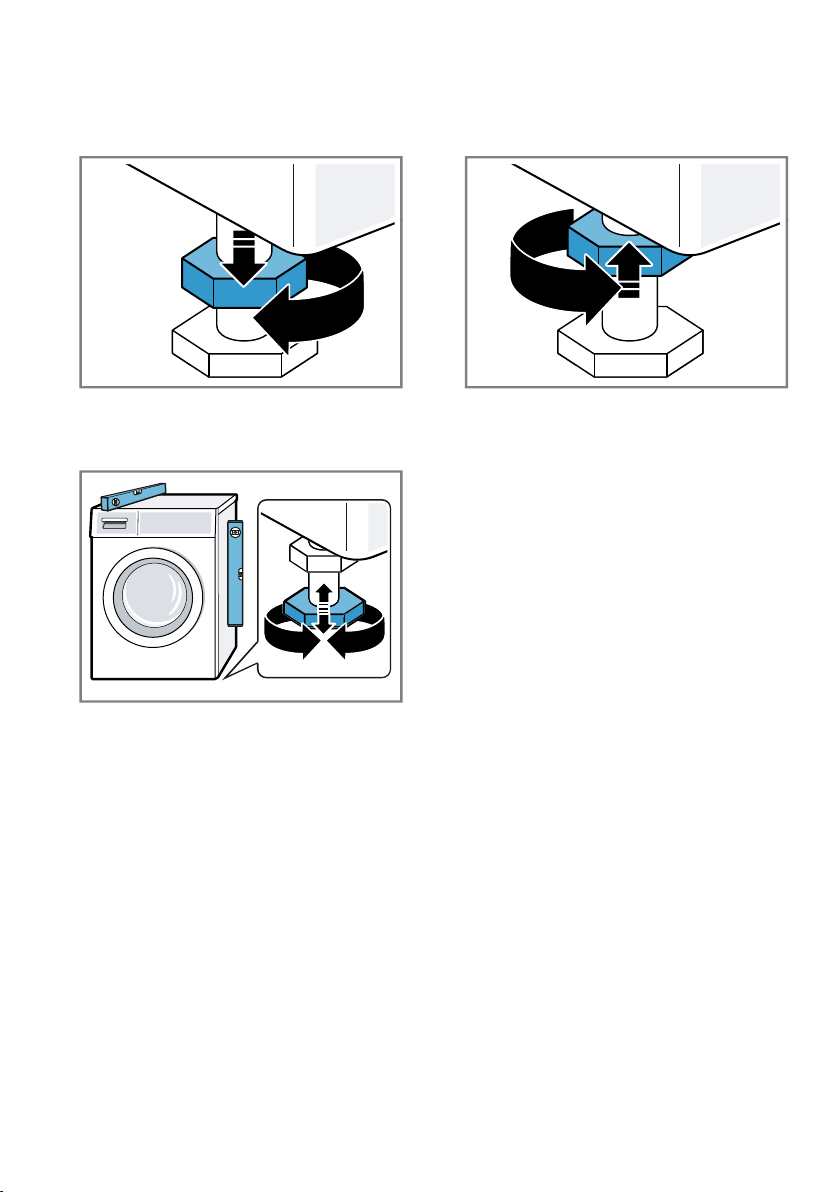
Installation and connection en
17
1. Loosen the lock nuts using a WAF
17 wrench by turning it in a clock-
wise direction.
2. To align the appliance, turn the ap-
pliance feet. Check that the appli-
ance is level using a spirit level.
All appliance feet must stand firmly
on the ground.
3. Screw the lock nuts tightly against
the housing using a WAF 17
wrench.
In doing so, hold the foot tight and
do not adjust its height.
4.7 Connecting the appliance
to the electricity supply
Note:Please read the information in
the Safety →Page4 and Preventing
material damage →Page10 sections
to ensure that you use the appliance
safely.
1. Insert the mains plug of the appli-
ance's power cable in a socket
nearby.
The connection details of the appli-
ance can be found under Tech-
nical data →Page67.
2. Check the mains plug is inserted
properly.
en Familiarising yourself with your appliance
18
Familiarising yourself with your appliance
5 Familiarising yourself with your appliance
Familiarising yourself with your appliance
5.1 Appliance
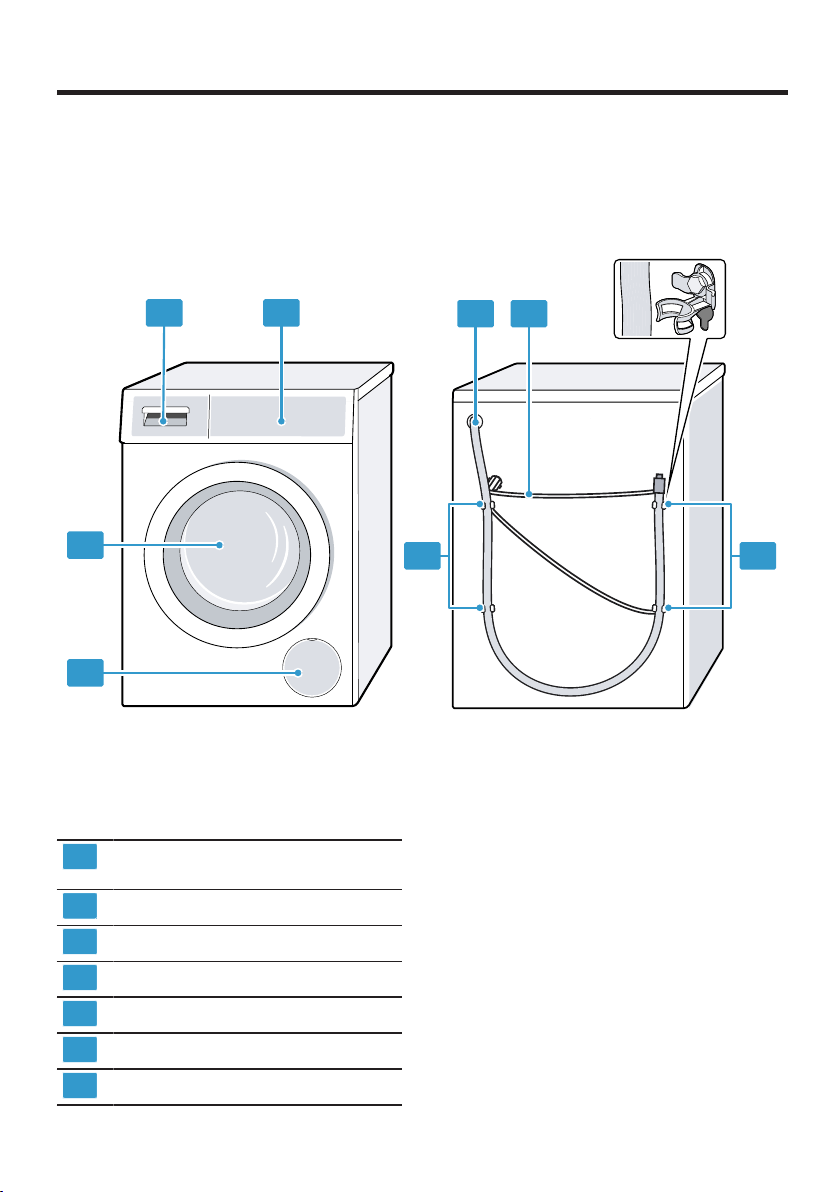
You can find an overview of the parts of your appliance here.
1
2
4
6
3
5
7
7
On certain models, specific details such as the colour and shape may differ
from those pictured.
1
Maintenance flap for the drain
pump →Page49
2
Door
3
Detergent drawer →Page19
4
Controls →Page19
5
Water outlet hose →Page16
6
Power cord →Page17
7
Transit bolts →Page14
Familiarising yourself with your appliance en
19
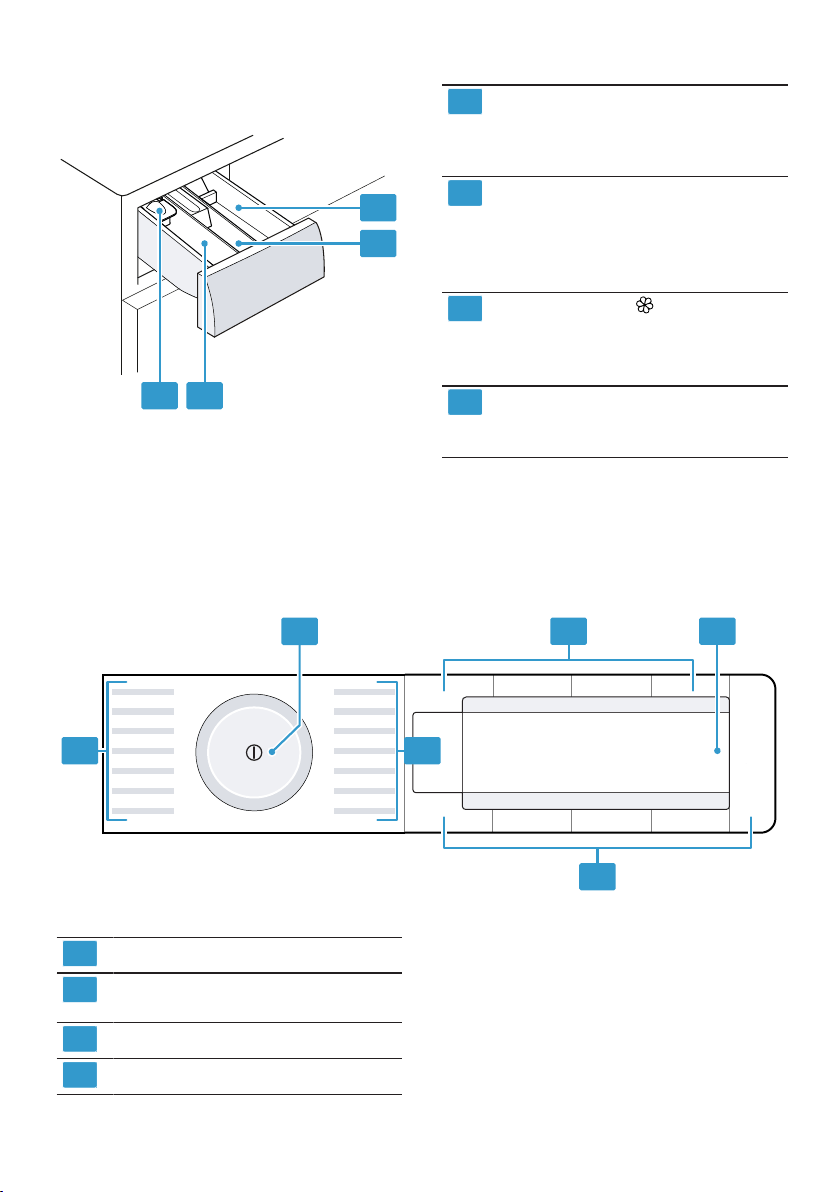
5.2 Detergent drawer
2
3
1
4
1
Measuring aid for liquid deter-
gent
→"Using a measuring aid for
liquid detergent", Page38
2
Compartment II:
¡ Detergent for main wash
¡ Water softener
¡ Bleach
¡ Stain remover
3
Compartment :
¡ Fabric softener
¡ Liquid starch
¡ Waterproofing agent
4
Compartment I:
¡ Detergent for prewash
¡ Hygiene detergent
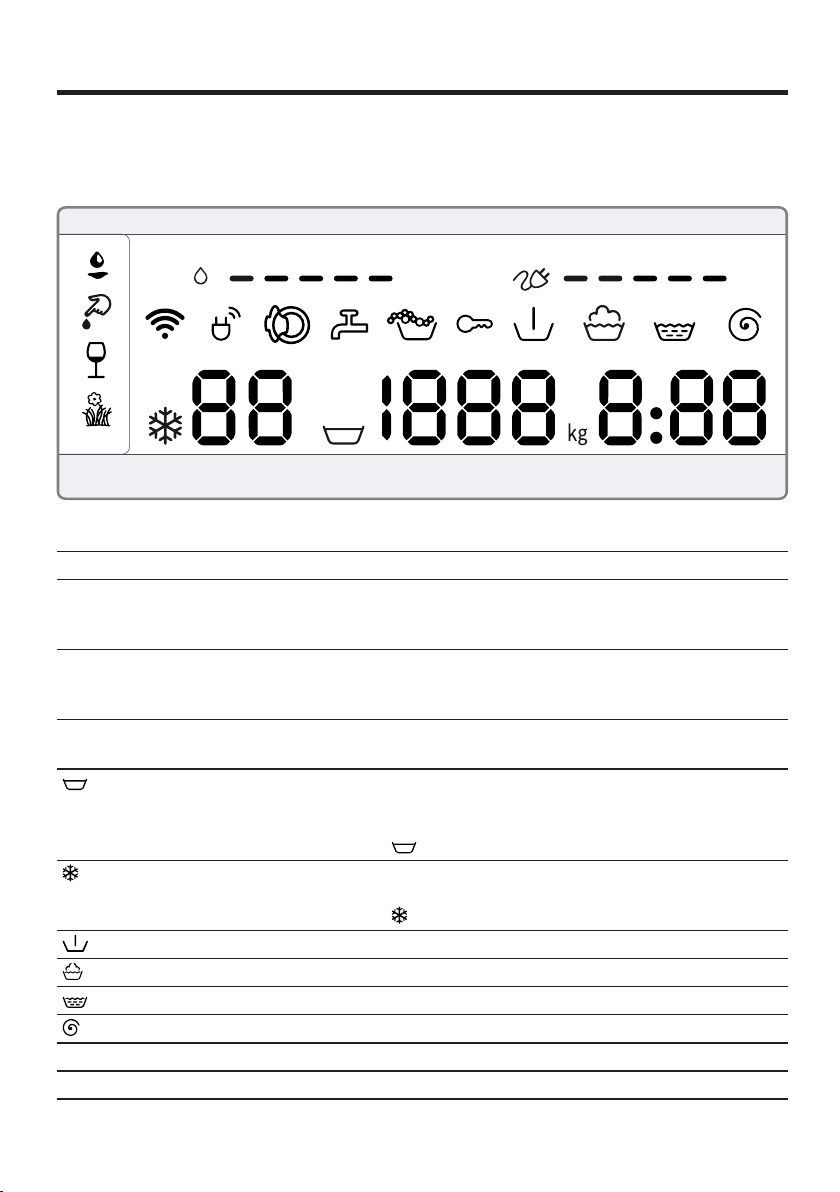
5.3 Controls
You can use the control panel to configure all functions of your appliance and
to obtain information about the operating status.
2
4
3
3
1 1
1
Programmes →Page24
2
Programme selector
→Page36
3
Buttons →Page22
4
Display →Page20
en Display
20
Display
6 Display
Display
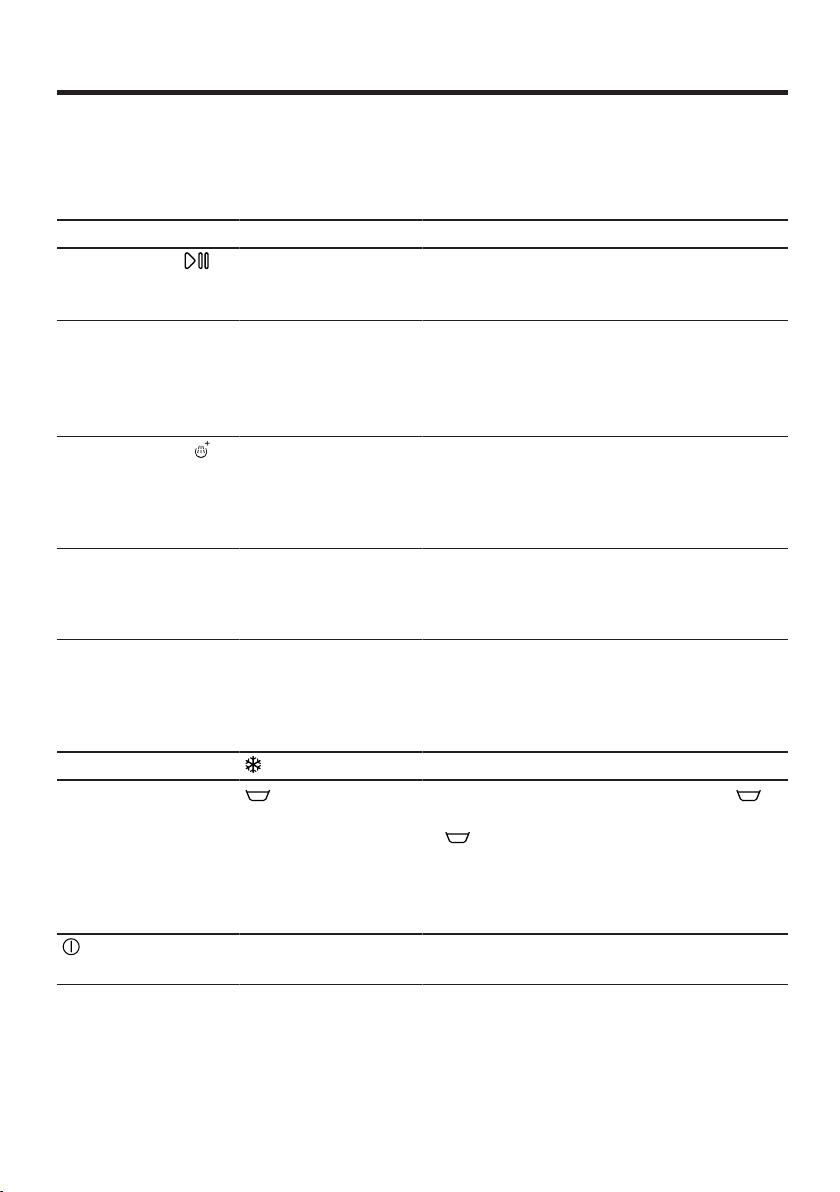
The display shows the current settings, options or relevant information.
Display Designation Description
0:40
1
Programme dura-
tion/programme
time remaining
Approximate expected programme dura-
tion or programme time remaining.
10h
1
"Ready in" time The programme end has been set and the
remaining number of hours is displayed.
→"Buttons", Page22
9 kg
1
Recommended
load
The maximum load capacity for the selec-
ted programme in kg.
- 1400 Spin speed Set spin speed in rpm.
→"Buttons", Page22
0= No final spin, only draining
: Rinse Hold, no draining
– 90 Temperature Set temperature in °C.
→"Buttons", Page22
(cold)
Prewash Programme status
Wash Programme status
Rinse Programme status
Spin Programme status
-P- Pause Programme status
1
Example
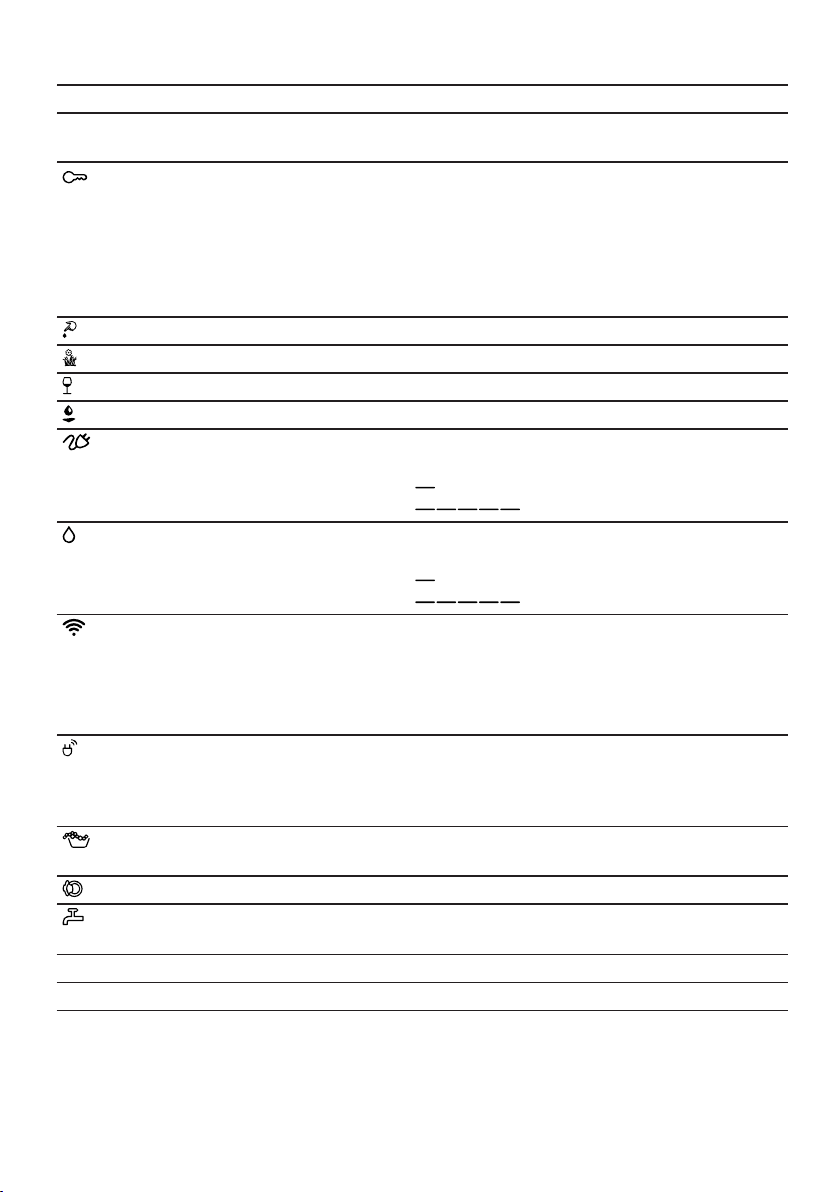
Display en
21
Display Designation Description
-0- End of pro-
gramme
Programme status
Childproof lock ¡ Lights up: The childproof lock is activ-
ated.
¡ Flashes: The childproof lock is active
and the programme selector has been
adjusted.
→"Deactivating the childproof lock",
Page41
Blood The stain type is activated.
Grass The stain type is activated.
Red Wine The stain type is activated.
Grease and oil The stain type is activated.
Energy consump-
tion
Energy consumption for the selected pro-
gramme.
¡ : Low energy consumption
¡ : High energy consumption
Water consump-
tion
Water consumption for the selected pro-
gramme.
¡ : Low water consumption
¡ : High water consumption
Wi-Fi ¡ Lights up: The appliance is connected
to your home network.
¡ Flashes: The appliance is trying to con-
nect to your home network.
→"HomeConnect ", Page41
Energy manager The appliance is connected to the smart
energy system (energy manager).
→"Connecting the appliance to the en-
ergy manager", Page43
Foam detection
system
The appliance has detected too much
foam.
Door The door is unlocked and can be opened.
Tap ¡ No water pressure.
¡ The water pressure is too low.
E:60 / -2B
1
Error Error code, error display, signal.
1
Example
en Buttons
22
Buttons
7 Buttons
Buttons
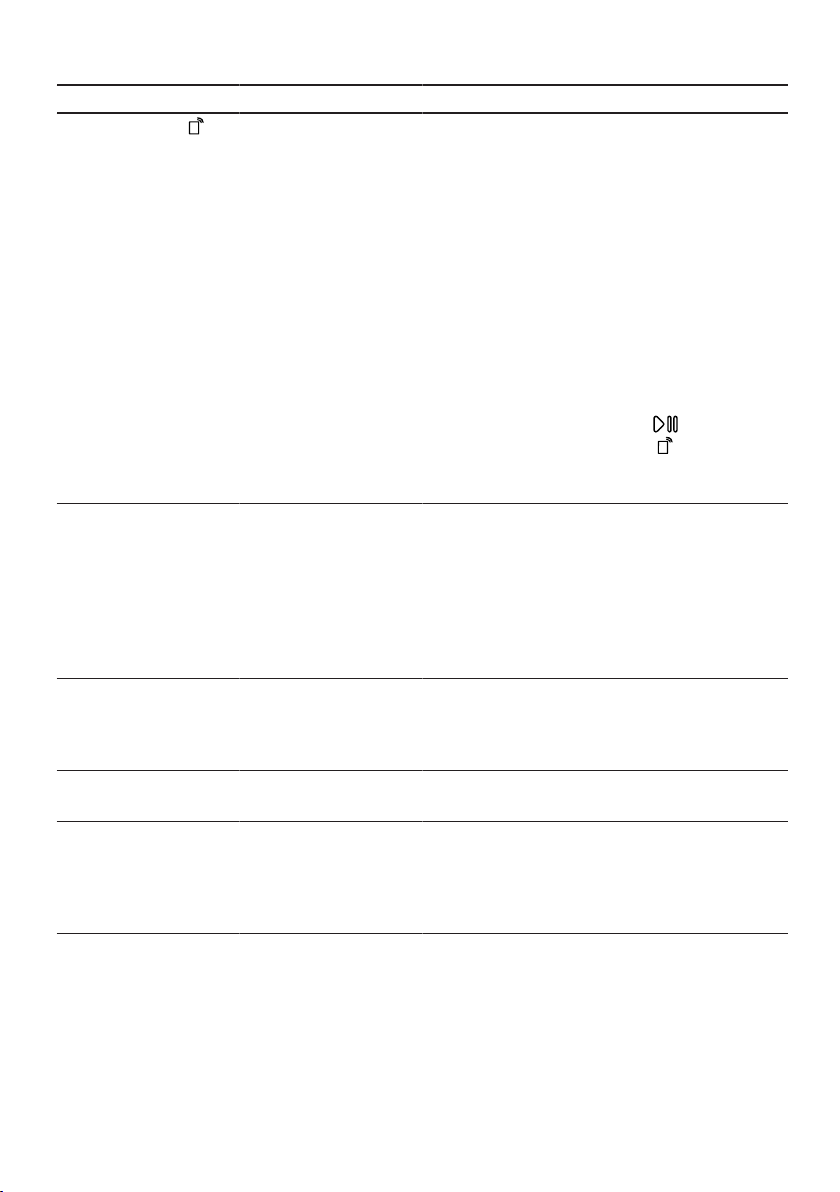
The selection of programme settings depends on the selected programme. You
can see the selection options for each programme in the overview for
→"Programmes", Page24.
Button Selection Description
Start/Reload ¡ Start
¡ Cancel
¡ Pause
Start, cancel or pause the pro-
gramme.
SpeedPerfect ¡ Activate
¡ Deactivate
Activate or deactivate a short washing
programme.
Note:Energy consumption increases.
The washing result is not affected by
this.
Intensive Plus ¡ Activate
¡ Deactivate
Activate or deactivate an extended
washing programme.
The programme duration is extended
by up to 30 minutes.
Suitable for heavily soiled laundry.
AntiStain Multiple selection Select the type of stain.
The temperature, drum movement and
soaking time are all adjusted to suit
the type of stain.
- Finish in + 1–24 hours Set the programme end.
The programme duration is already in-
cluded in the set number of hours.
Once the programme has started, the
programme duration is displayed.
Temperature – 90 °C Adjust the temperature in °C.
Spin Speed - 1400 Adjust the spin speed or activate
(Rinse Hold).
If is selected, the water is not
drained at the end of the washing
cycle and the spin cycle is deactiv-
ated. The laundry remains in the water
used for rinsing.
(mains switch) ¡ Switch on
¡ Switch off
Switch the appliance on or off.
Buttons en
23
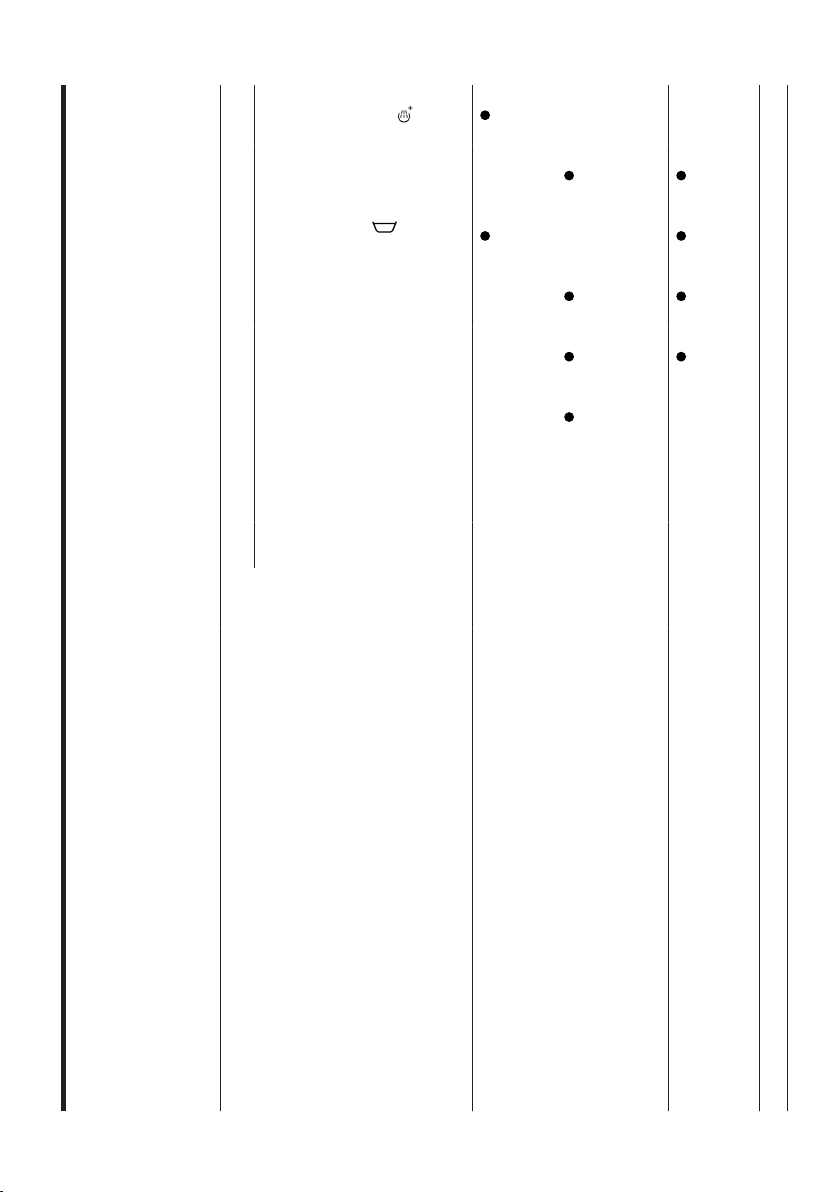
Button Selection Description
Remote Start ¡ Activate
¡ Deactivate
¡ Open the
HomeConnect
menu
If you briefly press the button, the ap-
pliance will be enabled for remote
start via the HomeConnect app
If you press the button for approx. 3
seconds, the HomeConnect menu
opens.
Notes
¡ For safety reasons, remote start
cannot be activated if the door is
open.
¡ Remote start is deactivated for
safety reasons in the following cir-
cumstances:
– Open the door.
– Press Start/Reload .
– Press Remote Start .
– Switch off the appliance.
– Following a power cut.
Child Lock push 3
sec.
¡ Activate
¡ Deactivate
Activate or deactivate the childproof
lock.
Disable the control panel to prevent
unwanted or accidental operation.
If the childproof lock is activated and
the appliance has been switched off,
the childproof lock remains activated.
→"Childproof lock", Page40
Spin Speed Basic settings Change the basic settings for the ap-
pliance.
→"Changing the basic settings",
Page47
Prewash ¡ Activate
¡ Deactivate
Activate or deactivate prewash, e.g.
for washing heavily soiled laundry.
Extra Rinse ¡ Activate
¡ Deactivate
Activate or deactivate an additional
rinse cycle.
Recommended for particularly sensit-
ive skin or in regions with very soft
water.
en Programmes
24
Programmes
8 Programmes
Programmes
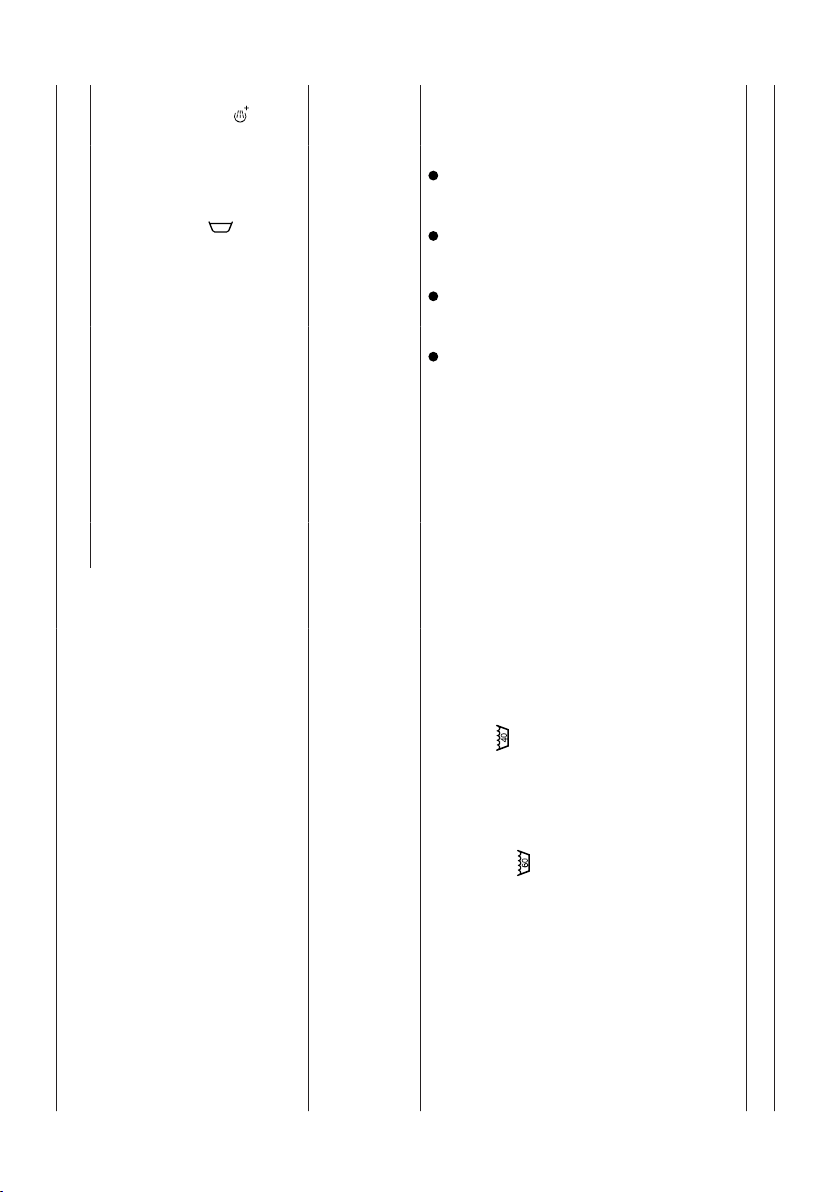
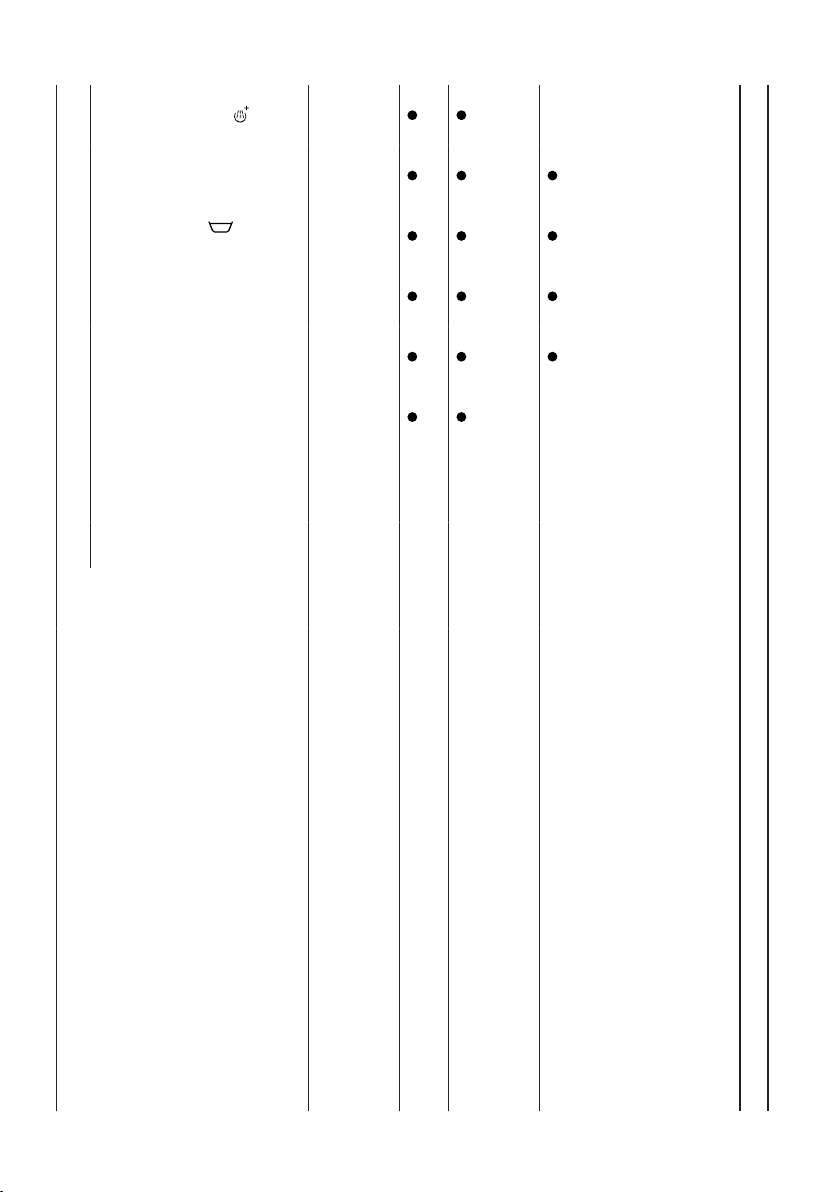
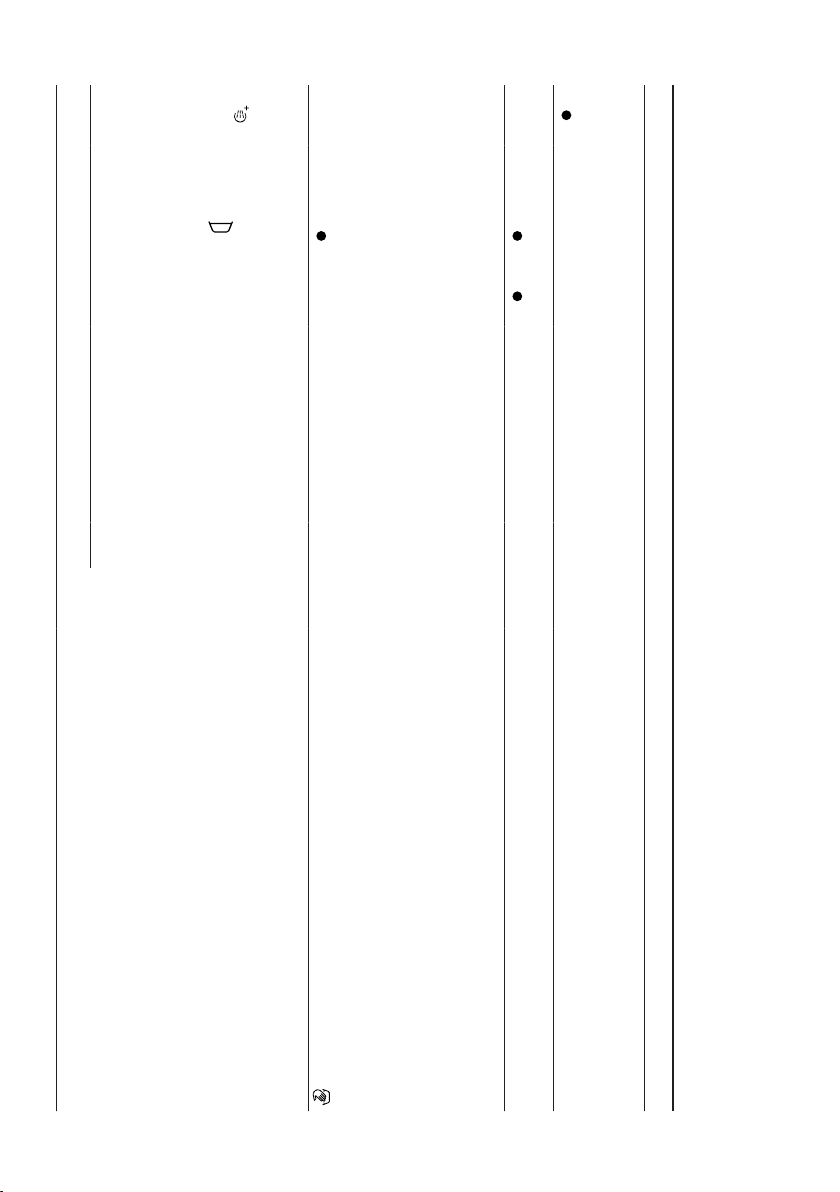
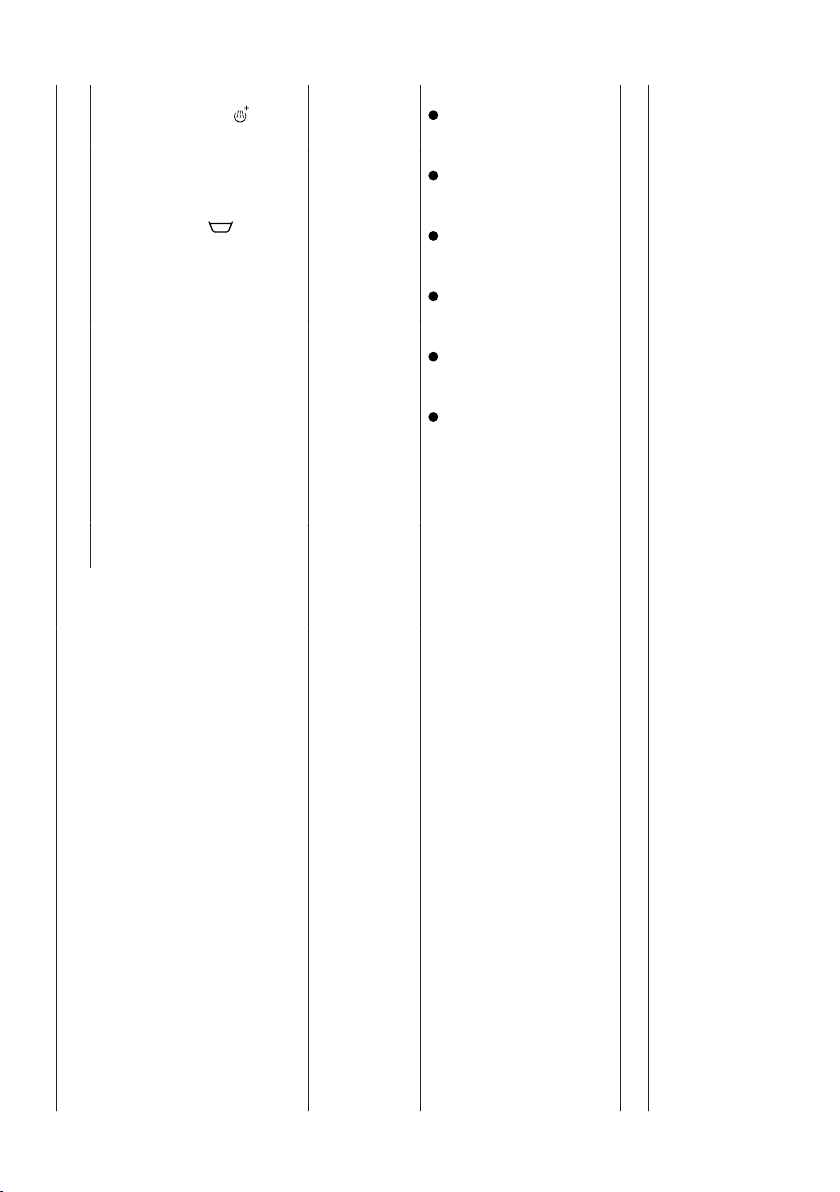
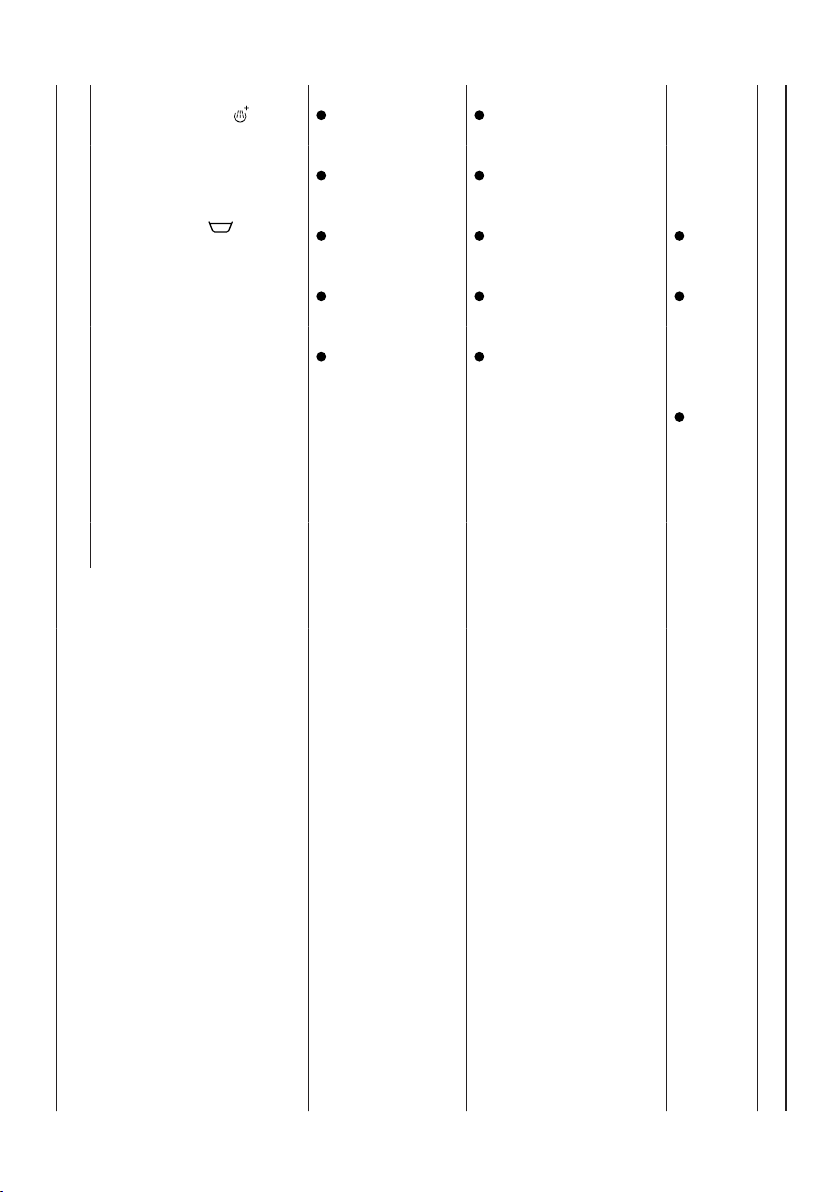
Below is an overview of the programmes. You can find information on the load and on the adjustable pro-
gramme options.
Tip:The laundry's care labels provide you with additional information on programme selection.
→"Care symbols on the care labels", Page34
Programme Description
Max. load (kg)
Programme settings
Max. temperature (°C)
Max. spin speed
(rpm)
1
SpeedPerfect
AntiStain
Extra Rinse
Spin Speed
(Rinse Hold)
Prewash
Intensive Plus
Cottons Wash hard-wearing items made
from cotton, linen or blended
fabrics.
Also suitable as a short pro-
gramme for normally soiled laun-
dry when you activate SpeedPer-
fect. If SpeedPerfect is activated,
the maximum load capacity is re-
duced to 5kg.
9 90 1400
Colour Wash hard-wearing items made
from cotton, linen or blended
fabrics.
Energy-saving programme.
9 90 1400
–
–
1
Programme setting
Programmes en
25
Programme Description
Max. load (kg)
Programme settings
Max. temperature (°C)
Max. spin speed
(rpm)
1
SpeedPerfect
AntiStain
Extra Rinse
Spin Speed
(Rinse Hold)
Prewash
Intensive Plus
Note:To save energy, the actual
washing temperature may devi-
ate from the set washing temper-
ature. The washing performance
meets legal requirements.
Eco40-60 Wash items made from cotton,
linen or blended fabrics.
Note:Textiles which can be
washed from 40°C up to
60°C as per the care sym-
bol can be washed together.
The washing performance cor-
responds to the best possible
washing performance class ac-
cording to the legal require-
ments.
For this programme, the washing
temperature is automatically ad-
justed depending on the load
size, in order to achieve the best
9 – 1400
–
–
1
Programme setting
en Programmes
26
Programme Description
Max. load (kg)
Programme settings
Max. temperature (°C)
Max. spin speed
(rpm)
1
SpeedPerfect
AntiStain
Extra Rinse
Spin Speed
(Rinse Hold)
Prewash
Intensive Plus
possible energy efficiency with
the best possible washing result.
You cannot change the washing
temperature.
Easy Care Wash items made from synthetic
or blended fabrics.
4 60 1200
Mixed Load Wash items made from cotton,
linen, or synthetic or blended
fabrics.
Suitable for lightly soiled laundry.
4 60 1400
Delicates/Silk Wash delicate, washable items
made from silk, viscose and syn-
thetics.
Use a detergent that is suitable
for delicates or silk.
Note:Wash especially delicate
items or items with hooks, eye-
lets or clips in a mesh laundry
bag.
2 40 800
– –
1
Programme setting
Programmes en
27
Programme Description
Max. load (kg)
Programme settings
Max. temperature (°C)
Max. spin speed
(rpm)
1
SpeedPerfect
AntiStain
Extra Rinse
Spin Speed
(Rinse Hold)
Prewash
Intensive Plus
Wool Hand- or machine-washable
items that are made from wool
or contain wool.
To prevent the laundry from
shrinking, the drum moves the
items very gently with long
pauses.
Use a detergent that is suitable
for wool.
2 40 800
– – – – –
Rinse Rinses and then spins the laun-
dry, and then drains the water.
– – 1400
– – – –
Spin/Drain Spins and drains the water.
If you only want to drain the wa-
ter, activate 0. The laundry is not
spun.
– – 1400
– – – – –
1
Programme setting

en Programmes
28
Programme Description
Max. load (kg)
Programme settings
Max. temperature (°C)
Max. spin speed
(rpm)
1
SpeedPerfect
AntiStain
Extra Rinse
Spin Speed
(Rinse Hold)
Prewash
Intensive Plus
Drum Clean Cleaning and caring for the
drum.
Use this programme in the fol-
lowing cases:
¡ Before using the appliance for
the first time
¡ If you regularly wash at tem-
peratures of 40°C or lower
¡ After a prolonged period of
non-use
Use washing powder or a deter-
gent containing bleach.
Halve the amount of detergent to
avoid foaming.
Do not use fabric softener.
Do not use liquid detergent or
detergent that is intended for
woollens or delicates.
– – 1200
– – – – – –
1
Programme setting
Programmes en
29
Programme Description
Max. load (kg)
Programme settings
Max. temperature (°C)
Max. spin speed
(rpm)
1
SpeedPerfect
AntiStain
Extra Rinse
Spin Speed
(Rinse Hold)
Prewash
Intensive Plus
Note:The drum cleaning indic-
ator will flash to remind you if
you have not used a programme
at 60 °C or higher for a long
time.
AllergyPlus Wash hard-wearing items made
from cotton, linen or blended
fabrics.
Suitable for allergy sufferers and
for strict hygiene requirements.
Note:Once the set temperature
has been reached, it remains
constant throughout the washing
process.
6,5 60 1400
1
Programme setting
en Programmes
30
Programme Description
Max. load (kg)
Programme settings
Max. temperature (°C)
Max. spin speed
(rpm)
1
SpeedPerfect
AntiStain
Extra Rinse
Spin Speed
(Rinse Hold)
Prewash
Intensive Plus
Shirts Wash non-iron shirts and
blouses made from cotton, linen,
synthetic or blended fabrics.
Note:Use the Delicates/Silkpro-
gramme to wash shirts and
blouses made from silk or delic-
ate fabrics.
2 60 800
–
Sportswear Wash sports and leisure items
made from synthetic fibres, mi-
crofibre or fleece.
Use a detergent that is suitable
for sports items.
Do not use fabric softener.
Tip:Use the Easy Carepro-
gramme to wash heavily soiled
laundry.
2 40 800
–
Super Quick
15'/30'
Wash items made from cotton,
synthetic or blended fabrics.
Short programme for small items
of lightly soiled laundry.
4 40 1200
–
– –
1
Programme setting

Programmes en
31
Programme Description
Max. load (kg)
Programme settings
Max. temperature (°C)
Max. spin speed
(rpm)
1
SpeedPerfect
AntiStain
Extra Rinse
Spin Speed
(Rinse Hold)
Prewash
Intensive Plus
The programme duration is ap-
prox. 30 minutes.
If you wish to reduce the pro-
gramme duration to 15 minutes,
activate SpeedPerfect. The max-
imum load is reduced to 2kg.
1
Programme setting
en Accessories
32
Accessories
9 Accessories
Accessories
Use original accessories. These have been made especially for your appliance.
Use Order number
Water inlet hose exten-
sion
Extend the water inlet
hose for cold water or
AquaStop (approx. 2.50
m).
WMZ2381
Fixing brackets Improves the stability of
the appliance.
WMZ2200
Elbow Secure the water outlet
hose in place.
00655300
Liquid detergent insert Measure liquid deter-
gent.
00605740
Before using for the first time
10 Before using for the
first time
Before using for the first time
Prepare the appliance for use.
10.1 Starting an empty wash-
ing cycle
Your appliance was inspected thor-
oughly before leaving the factory. To
remove any residual water, run the
first wash cycle without any laundry.
Note:Please read the information in
the Safety →Page4 and Preventing
material damage →Page10 sections
to ensure that you use the appliance
safely.
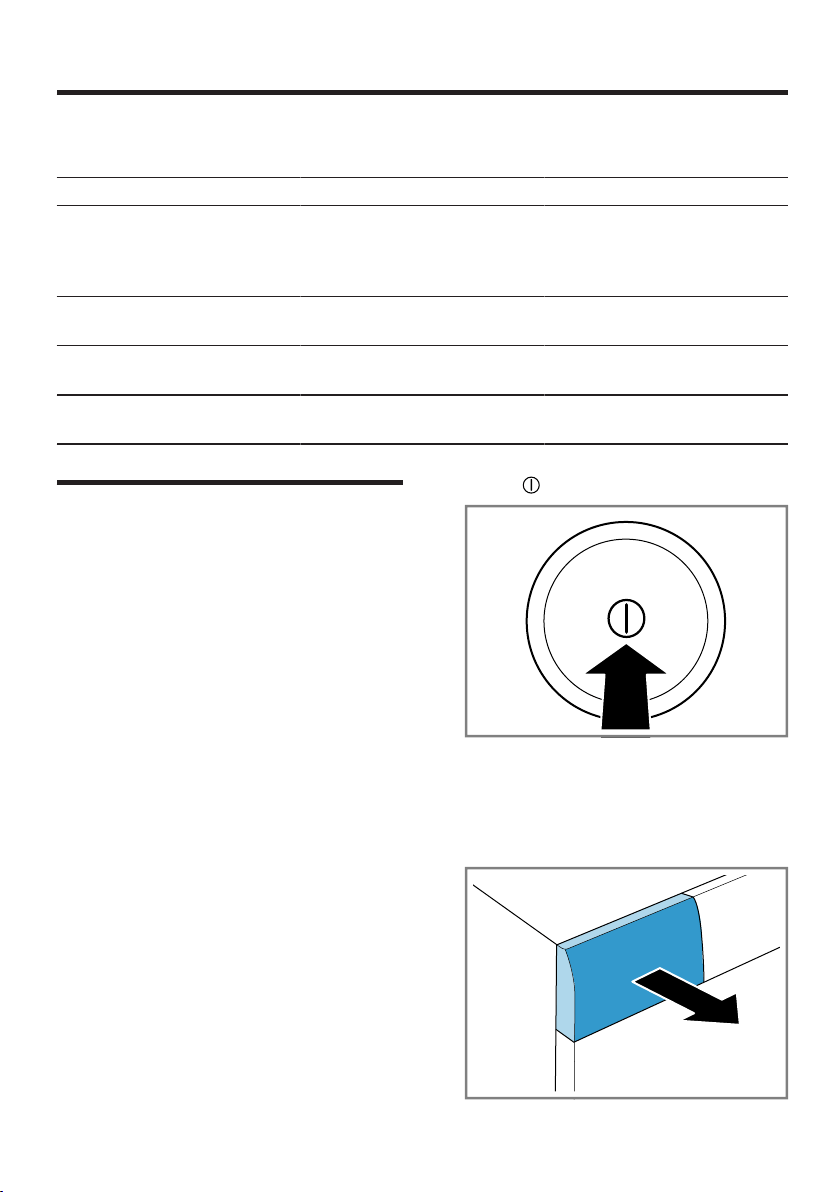
1. Press .
It may take a few seconds for the
appliance to switch on.
2. Set the Drum Clean programme.
3. Close the door.
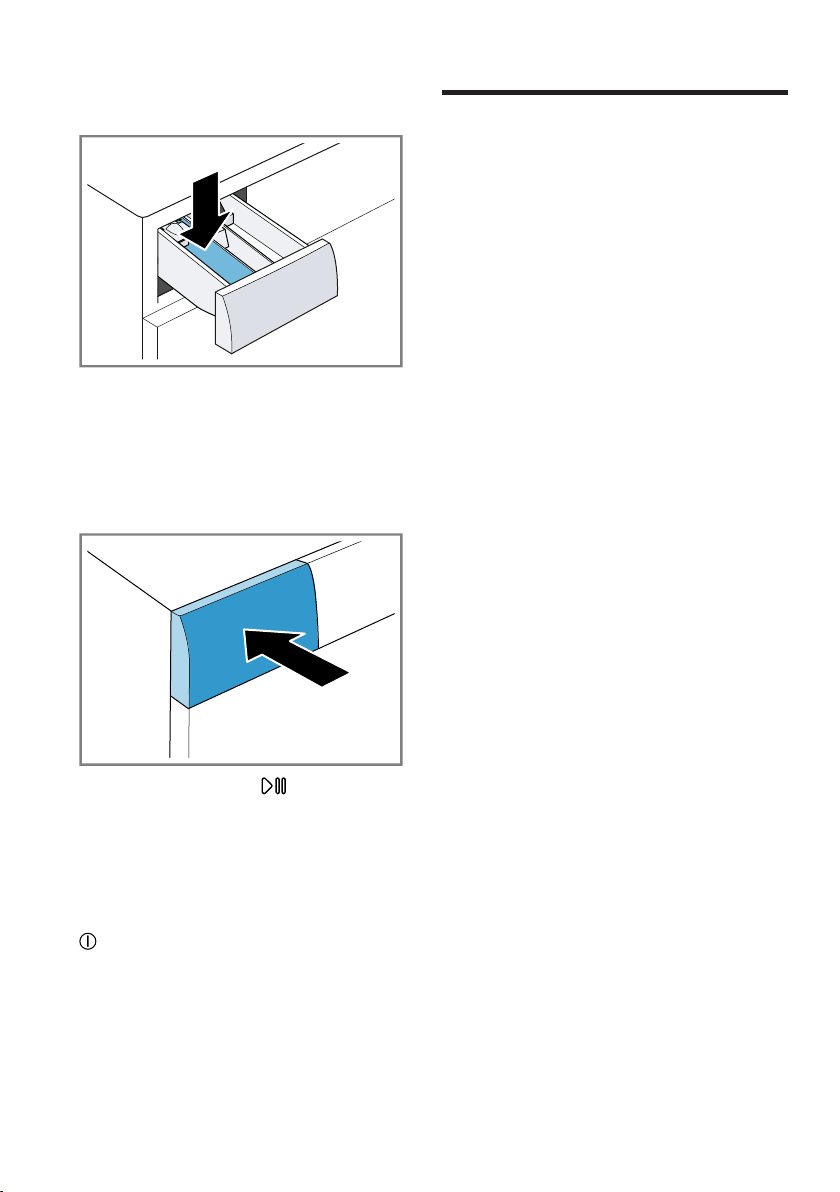
4. Pull out the detergent drawer.
Laundry en
33
5. Pour washing powder into com-
partmentII.
To prevent foaming, use only half
of the amount of detergent recom-
mended by the detergent manufac-
turer for light soiling. Do not use
detergent suitable for woollens or
delicates.
6. Push in the detergent drawer.
7. Press Start/Reload to start
the programme.
a The display shows the remaining
programme duration.
a After the programme has ended,
the display shows: -0- .
8. Start the first wash cycle or press
to switch off the appliance.
→"Basic operation", Page36
Laundry
11 Laundry
Laundry
11.1 Preparing the laundry
ATTENTION!
Objects remaining in the laundry may
damage the laundry and the drum.
▶
Remove all items from any pock-
ets in your laundry before using
the appliance.
▶
To protect your appliance and the
laundry, prepare the laundry be-
forehand.
– Empty all pockets
– Brush sand out of all collars and
pockets
– Close bed covers and cushion
covers
– Close all zips, Velcro fasteners,
hooks and eyes
– Tie cloth belts and apron strings
together or use a mesh laundry
bag
– Remove curtain hooks and lead
strips or use a mesh laundry
bag
– Use a mesh laundry bag for
small items of laundry such as
children's socks
– Separate items of laundry and
shake them out
– Wash large and small items of
laundry together
– Dab fresh stains with soapy wa-
ter (do not rub them)
– Some stubborn or dried-in stains
can be removed by washing
several times
11.2 Sorting laundry
Note:Please read the information in
the Safety →Page4 and Preventing
material damage →Page10 sections
to ensure that you use the appliance
safely.
en Laundry
34
▶
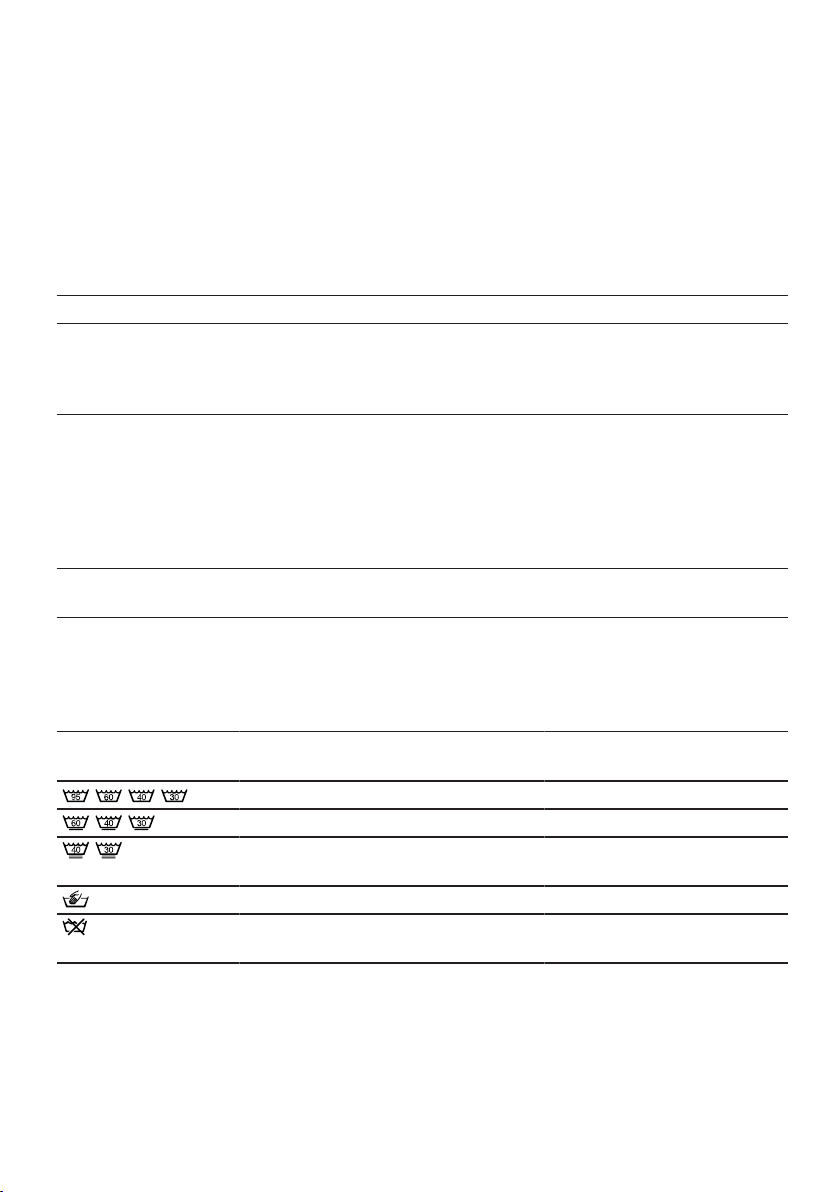
To improve washing results and
prevent discolouration, sort the
laundry according to the following
criteria before washing.
– Type of fabric and fibre type
– Whites
– Colours
Wash new coloured items
separately the first time you
wash them.
– Soiling →Page34
– Care symbols on the care labels
→Page34
11.3 Degrees of soiling
Degree of soiling Soiling Examples
Light ¡ No dirt or stains are vis-
ible
¡ Laundry has absorbed
odours
Light summer clothing or
sports clothing that has
been worn for a just a few
hours
Normal Dirt or light stains are vis-
ible
¡ T-shirts, shirts or blouses
are sweat-soaked or
have been worn a few
times
¡ Towels or bedding that
has been used for up to
one week
Heavy Dirt or stains are clearly
visible
Tea towels, baby items or
work clothing
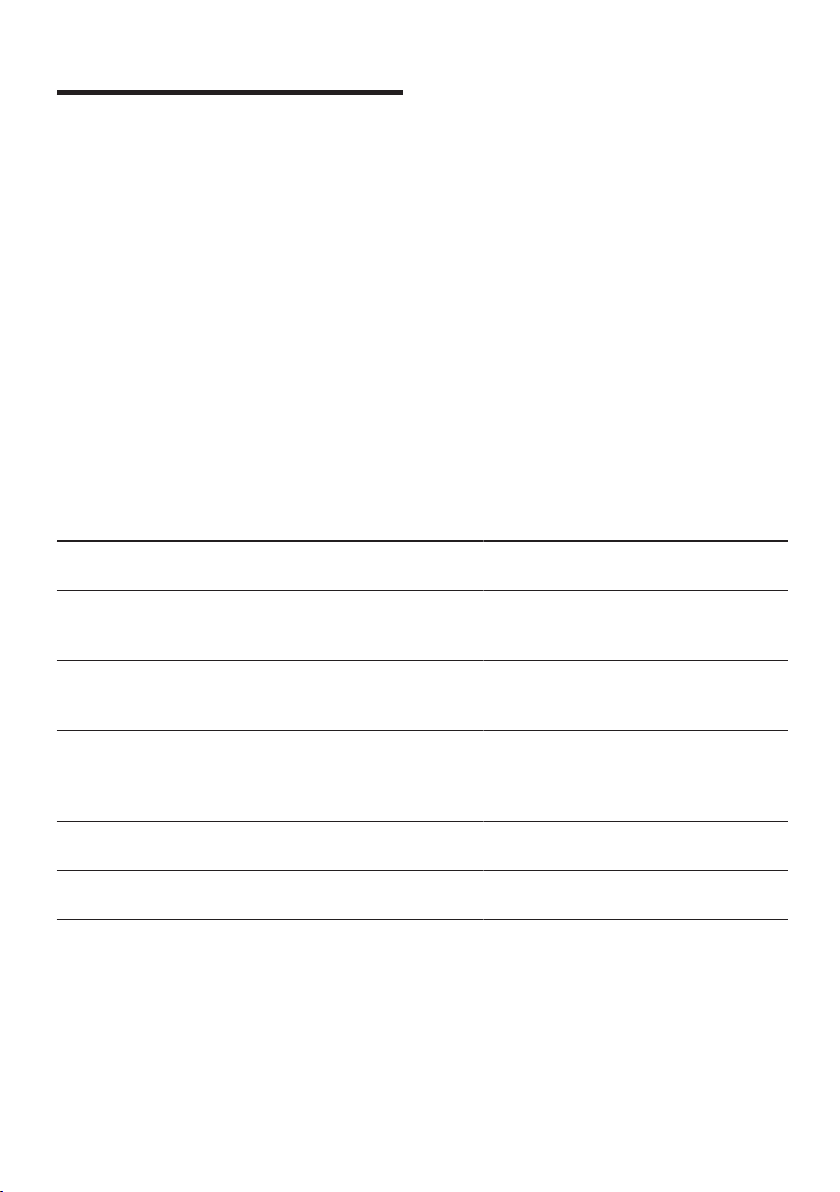
11.4 Care symbols on the care labels
The symbols indicate the recommended programme and the numbers in the
symbols indicate the maximum recommended washing temperature.
Symbol Washing process Recommended pro-
gramme
Normal Cottons
Gentle Easy Care
Particularly gentle Delicates/Silk for wash-
ing by hand
Hand wash Wool
Not suitable for machine-wash-
ing
–
Tip:You can find more information
about care symbols at www.gine-
tex.ch.
Detergents and care products en
35
Detergents and care products
12 Detergents and care
products
Detergents and care products
You can protect your appliance and
your laundry by selecting and using
the correct detergents and care
products. You can use all detergents
and care products which are suitable
for domestic washing machines.
Note:Please read the information in
the Safety →Page4 and Preventing
material damage →Page10 sections
to ensure that you use the appliance
safely.
The manufacturer's instructions for
use and dosage can be found on the
packaging.
Notes
¡ only use liquid detergents that are
self-flowing
¡ Do not mix different liquid deter-
gents
¡ Do not mix detergent and fabric
softener
¡ Do not use products that have ex-
pired or are highly congealed.
¡ Do not use products containing
solvents, caustic agents or volatile
substances (e.g. bleach)
¡ Use dyes sparingly as salt may
damage stainless steel
¡ Do not use bleaching agents in the
appliance
12.1 Detergent recommendation
Detergent Laundry Pro-
gramme
Temperature
Standard detergent
with optical brighten-
ers
Heat-resistant white
fabrics made from
cotton or linen
Cotton From cold up to
90 °C
Detergent for colours
without bleach or op-
tical brighteners
Coloured fabrics
made from linen or
cotton
Cotton From cold up to
60 °C
Detergent for col-
ours/delicates without
optical brighteners
Coloured fabrics
made from easy-care
fabrics or synthetic
materials
Easy Care From cold up to
60 °C
Detergent for delic-
ates
Delicate fine textiles,
silk or viscose
Delicates/
Silk
From cold up to
40 °C
Detergent for wool-
lens
Wool Wool From cold up to
40 °C
Tip:Visit www.cleanright.eu to find
further information on detergents,
care products and cleaning agents
for domestic use.
en Basic operation
36
12.2 Detergent dosage
The detergent dosage depends on:
¡ The amount of laundry
¡ Degree of soiling
¡ Water hardness
You can find out how hard your
water is from your local water com-
pany or measure it yourself using
a water hardness tester.
Water hardness
Hardness range Total hardness in mmol/
l
German degrees in °dH
soft (I) 0–1.5 0–8.4
medium (II) 1.5– 2.5 8.4–14
hard (III) over 2.5 over 14
Example of a manufacturer's
instructions for detergent
These example values refer to a
standard load of 4–5 kg.
Soiling Light Normal Heavy
Water hardness: Soft/medium 40ml 55ml 80ml
Water hardness: Hard/very
hard
55ml 80ml 105ml
The dosages can be found on the
manufacturer's packaging.
¡ Adjust the dosage to the actual
load.
Basic operation
13 Basic operation
Basic operation
13.1 Switching on the appli-
ance
▶
Press .
It may take a few seconds for the
appliance to switch on.
Basic operation en
37
Note:The drum is lit up after the
door is opened and closed and once
the programme has started. The light
goes out automatically.
13.2 Setting a programme
1. Set the programme selector to the
required programme →Page24.
2. If necessary, adjust the pro-
gramme settings →Page37.
13.3 Adjusting the pro-
gramme settings
Depending on the programme and
programme progress, you can adjust
or activate/deactivate the settings.
Note:Overview of all programme set-
tings:
→"Buttons", Page22
Requirement:A programme has
been set.
▶
Adjust the programme settings.
The programme settings are not
saved permanently for the pro-
gramme.
13.4 Loading laundry
Notes
¡ Please read the information in the
Safety →Page4 and Preventing
material damage →Page10 sec-
tions to ensure that you use the
appliance safely.
¡ To prevent creasing, take note of
the maximum load for the relevant
programme →Page24.
Requirement:Prepare and sort the
laundry.
→"Laundry", Page33
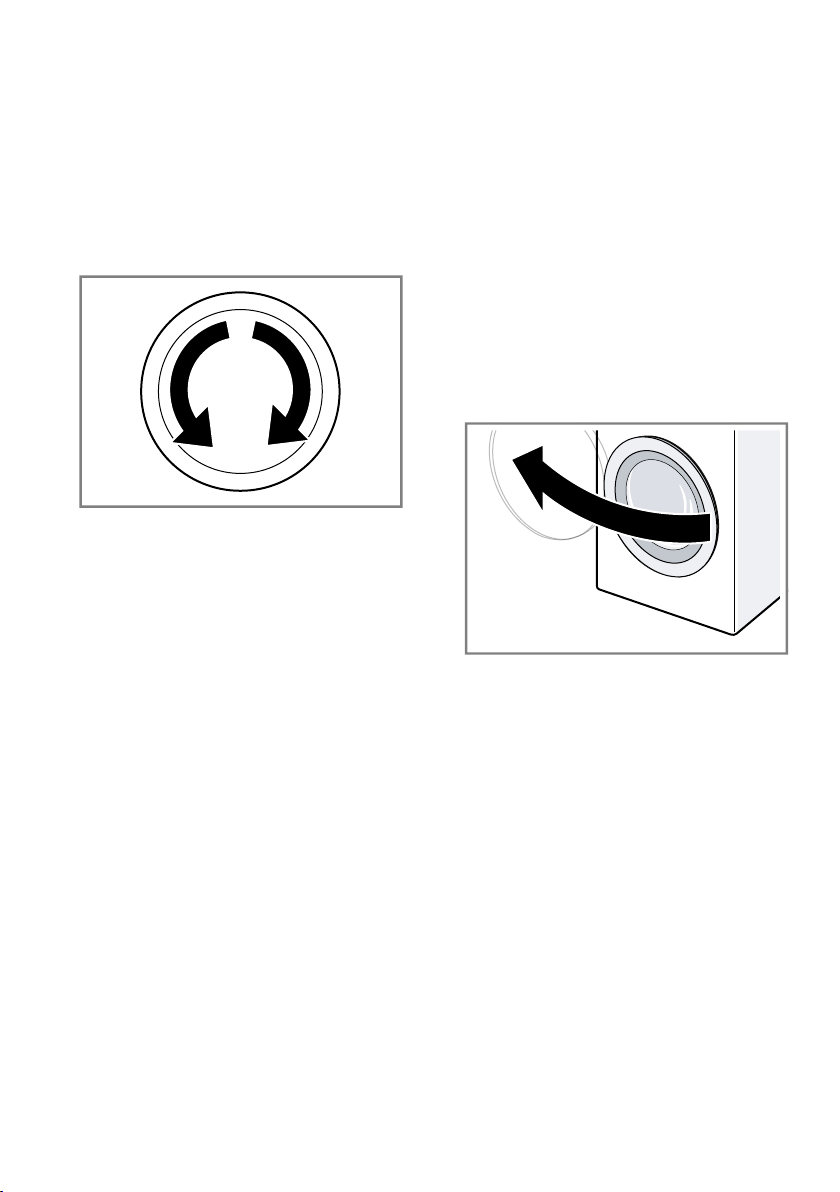
1. Open the door.
2. Ensure that the drum is empty.
3. Separate the laundry and place it
in the drum.
4. Note:Ensure that there is no laun-
dry trapped in the door.
Close the door.
en Basic operation
38
13.5 Using a measuring aid
for liquid detergent
If you order the measuring aid as an
accessory, you must use the measur-
ing aid.
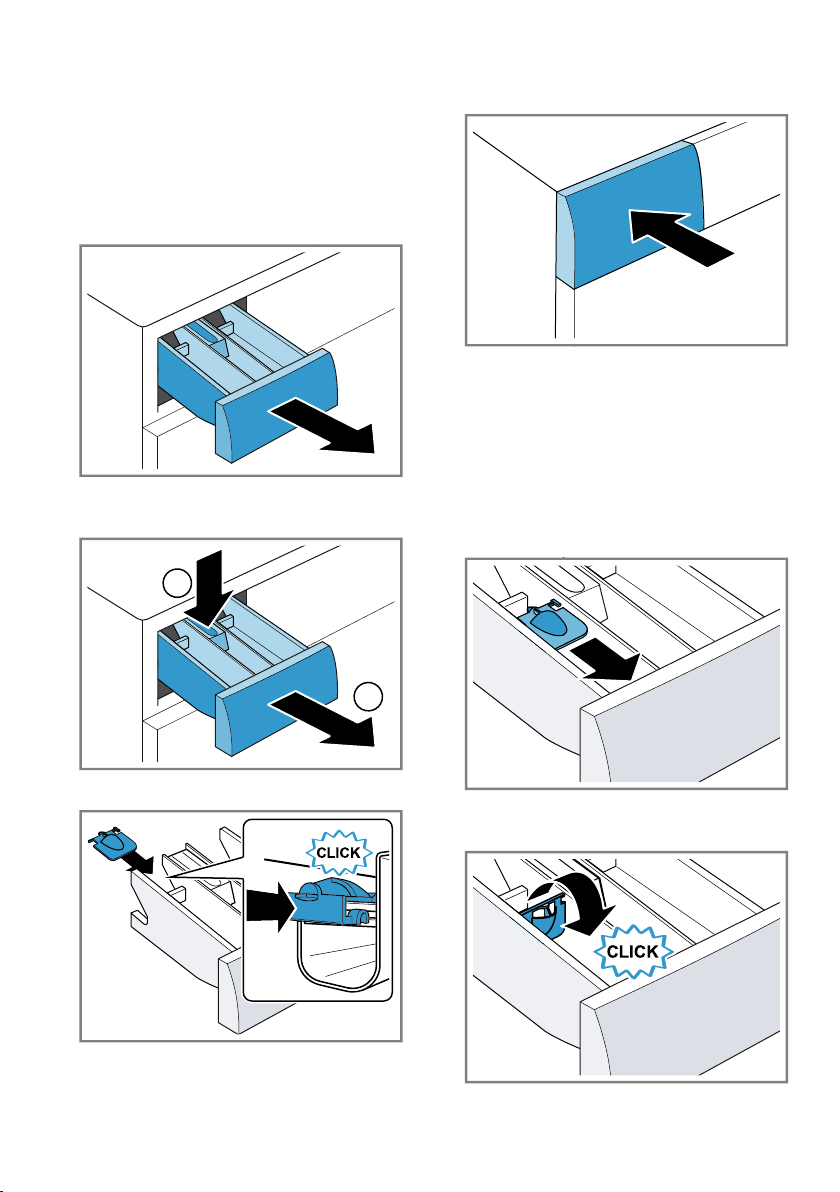
1. Pull out the detergent drawer.
2. Press down on the insert and re-
move the detergent drawer.
1
2
3. Insert the measuring aid.
4. Insert the detergent drawer.
13.6 Use the measuring aid
for liquid detergent
To add liquid detergent, you can use
a measuring aid in the detergent
drawer.
1. Pull out the detergent drawer.
2. Slide the measuring aid forwards.
3. Fold the measuring aid down and
click it into place.

Basic operation en
39
4. Push in the detergent drawer.
13.7 Adding detergent and
care product
Notes
¡ Please read the information in the
Safety →Page4 and Preventing
material damage →Page10 sec-
tions to ensure that you use the
appliance safely.
¡ Do not use the measuring aid for
liquid detergent for gel detergents,
washing powder, or if Prewash or
"Ready in" time are activated.
Requirement:Find out the optimum
dosage for detergent and care
product. →Page35
1. Pull out the detergent drawer.
2. Pour in detergent.
→"Detergent drawer", Page19
3. If required, add the care product.
4. Push in the detergent drawer.
13.8 Starting the programme
Note:If you want to change the time
until the programme ends, set the
"Ready in" time first.
▶
Press Start/Reload .
a The drum rotates and load detec-
tion takes place. This can take up
to 2 minutes, after which water
enters the drum.
a The display shows either the pro-
gramme duration or the "Ready in"
time.
a After the programme has ended,
the display shows: -0- .
13.9 Soaking laundry
You can soak the laundry before
washing in the appliance by pausing
the programme.
Note:No additional detergent is re-
quired. The washing solution is then
used for washing.
1. Start the programme.
2. To pause the programme, after ap-
prox. 10 minutes, press Start/Re-
load .
3. To resume the programme, after
the desired soaking time, press
Start/Reload .
13.10 Adding laundry
Note:Please read the information in
the Safety →Page4 and Preventing
material damage →Page10 sections
to ensure that you use the appliance
safely.
1. Press Start/Reload .
The appliance is paused and
checks whether it is possible to
add or remove laundry. Take note
of the programme status.
2. Add or remove laundry.
3. Close the door.
4. Press Start/Reload .
13.11 Cancelling the pro-
gramme
Once the programme has started,
you can cancel it at any time.
Note:Please read the information in
the Safety →Page4 and Preventing
material damage →Page10 sections
to ensure that you use the appliance
safely.
1. Press Start/Reload .
2. Open the door.
en Childproof lock
40
The appliance door remains
locked for safety reasons if the
temperature and water levels are
high.
– If the temperature is high, start
the Rinse programme.
– If the water level is high: Start
the Spin or Drain programme.
3. Remove the laundry.
13.12 Resuming the pro-
gramme when the pro-
gramme status is Rinse
Hold
1. Set the Spin or Drain programme.
2. Press Start/Reload .
13.13 Unloading the laundry
Note:Please read the information in
the Safety →Page4 and Preventing
material damage →Page10 sections
to ensure that you use the appliance
safely.
1. Open the door.
2. Remove the laundry.
13.14 Switching off the appli-
ance
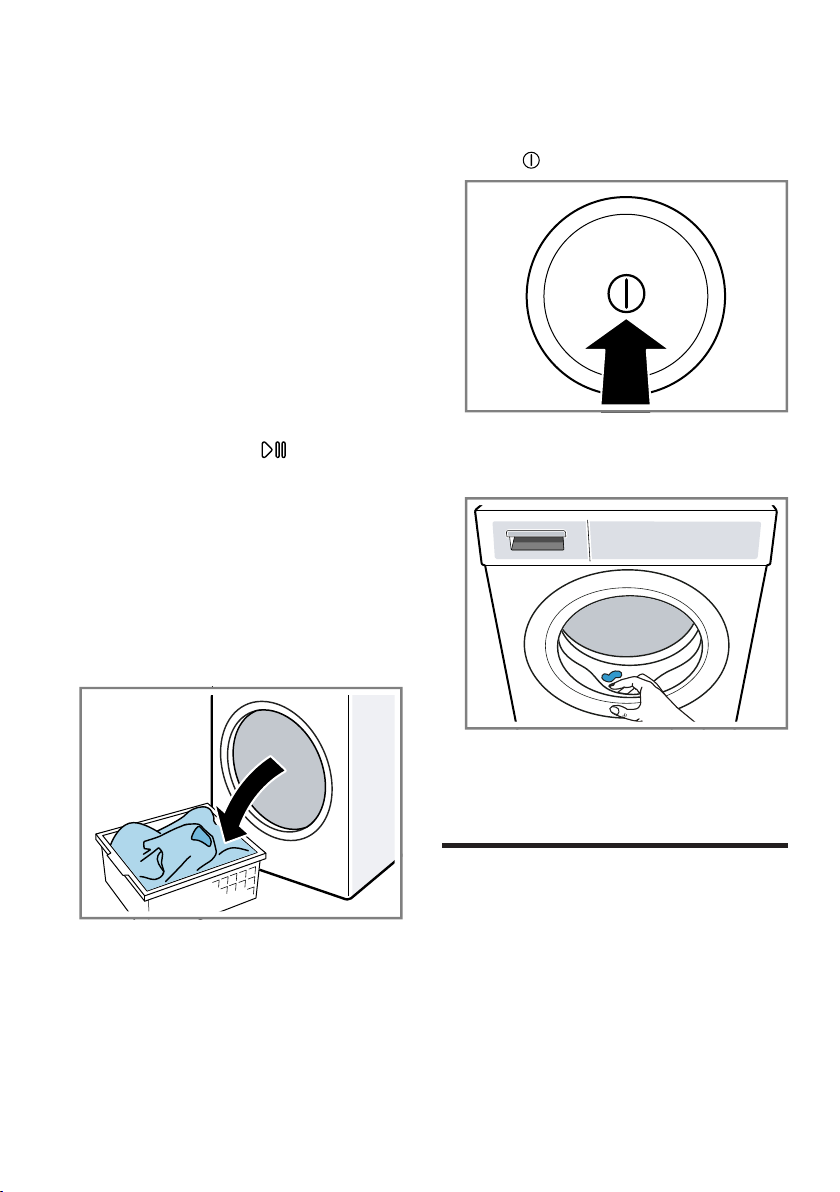
1. Press .
2. Turn off the tap.
3. Wipe the rubber gasket dry and re-
move any foreign objects.
4. Leave the door and detergent
drawer open so that residual water
can evaporate.
Childproof lock
14 Childproof lock
Childproof lock
Secure your appliance against being
operated unintentionally using the
controls.
14.1 Activating the childproof
lock
▶
Press and hold the two Child Lock
push 3 sec. buttons for approx.
3seconds.
HomeConnect en
41
a The display shows .
a The controls are locked.
a The childproof lock remains active
even after the appliance has been
switched off.
14.2 Deactivating the child-
proof lock
Requirement:To deactivate the
childproof lock, the appliance must
be switched on.
▶
Press and hold the two Child Lock
push 3 sec. buttons for approx.
3seconds.
So that the programme currently
running is not cancelled, the pro-
gramme selector must be set to
the initial programme.
a goes out in the display.
HomeConnect
15 HomeConnect
HomeConnect
This appliance is network-capable.
Connecting your appliance to a mo-
bile device lets you control its func-
tions via the HomeConnect app, ad-
just its basic settings and monitor its
operating status.
The HomeConnect services are not
available in every country. The avail-
ability of the HomeConnect function
depends on the availability of
HomeConnect services in your coun-
try. You can find information about
this at: www.home-connect.com.
¡ →"Connecting the appliance to a
WLAN home network (Wi-Fi) with
WPS function", Page41
¡ →"Connecting the appliance to a
WLAN home network (Wi-Fi)
without WPS function", Page42
The HomeConnect app guides you
through the entire login process. Fol-
low the instructions in the HomeCon-
nect app to configure the settings.
Tips
¡ Please consult the documents sup-
plied by HomeConnect.
¡ Please also follow the instructions
in the HomeConnect app.
Notes
¡ Please note the safety precautions
in this instruction manual and
make sure that they are also ob-
served when operating the appli-
ance via the HomeConnect app.
→"Safety", Page4
¡ Operating the appliance on the ap-
pliance itself always takes priority.
During this time it is not possible
to operate the appliance using the
HomeConnect app.
15.1 HomeConnect settings
Adapt HomeConnect to your needs.
You can find the HomeConnect set-
tings in the basic settings for your ap-
pliance. Which settings the display
shows will depend on whether
HomeConnect has been set up and
whether the appliance is connected
to your home network.
15.2 Connecting the appli-
ance to a WLAN home
network (Wi-Fi) with
WPS function
Using your router's WPS function is
the simplest way to connect the ap-
pliance to your home network.
Requirement:If your router has a
WPS function, you can connect the
appliance to your WLAN home net-
work (Wi-Fi) automatically.
1. Press and hold Remote Start for
approx. 3 seconds.
a The display shows Aut.
2. Press Start/Reload .
en HomeConnect
42
3. Press the WPS button on the
router within the next 2minutes.
Take note of the information in the
documents for your router.
a flashes in the display.
a The appliance attempts to connect
to your WLAN home network.
a If the display shows con and
lights up permanently, the appli-
ance is connected to the home
network.
4. If the display shows Err , the appli-
ance is not connected to the home
network.
‒ Check whether your appliance is
in range of your home network.
‒ Reconnect the appliance to the
WLAN home network (Wi-Fi)
with WPS function.
5. Connect your appliance to the
Home Connect app. →Page43
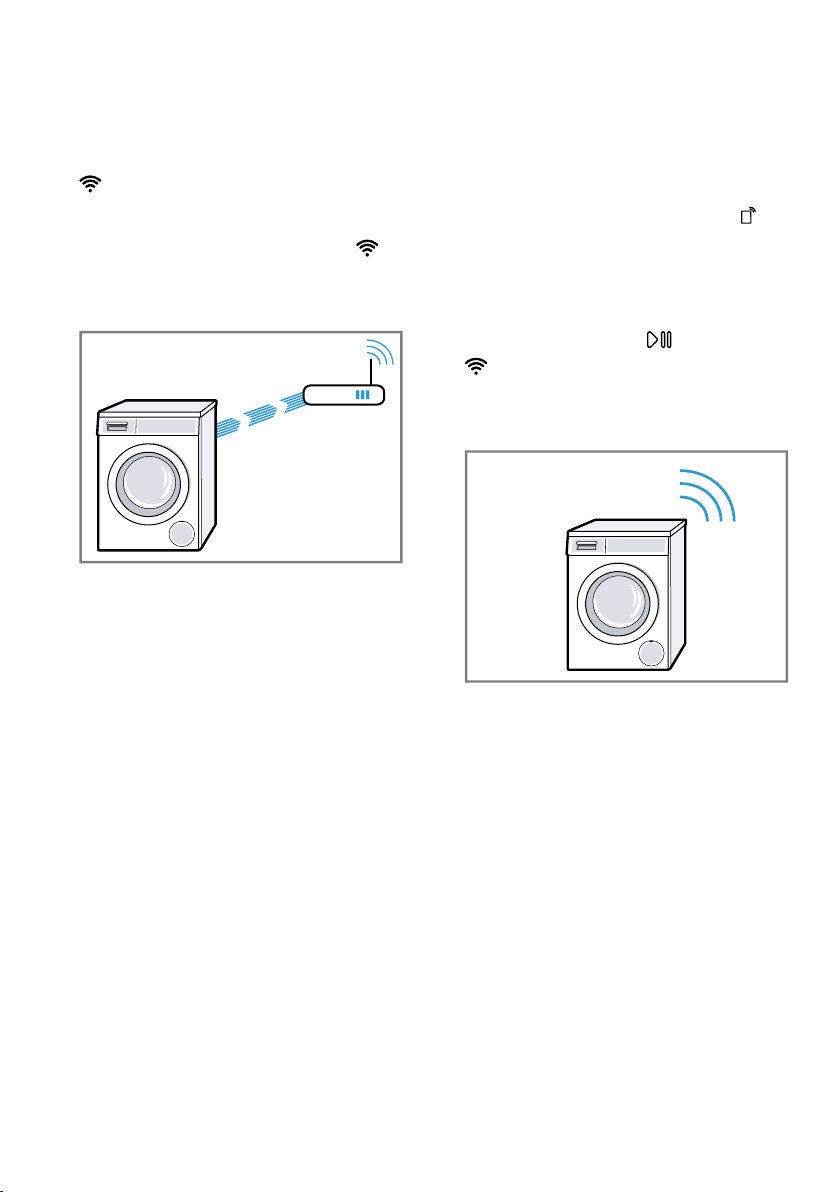
15.3 Connecting the appli-
ance to a WLAN home
network (Wi-Fi) without
WPS function
If your router does not have a WPS
function, you can connect the appli-
ance to your WLAN home network
(Wi-Fi) manually. The appliance
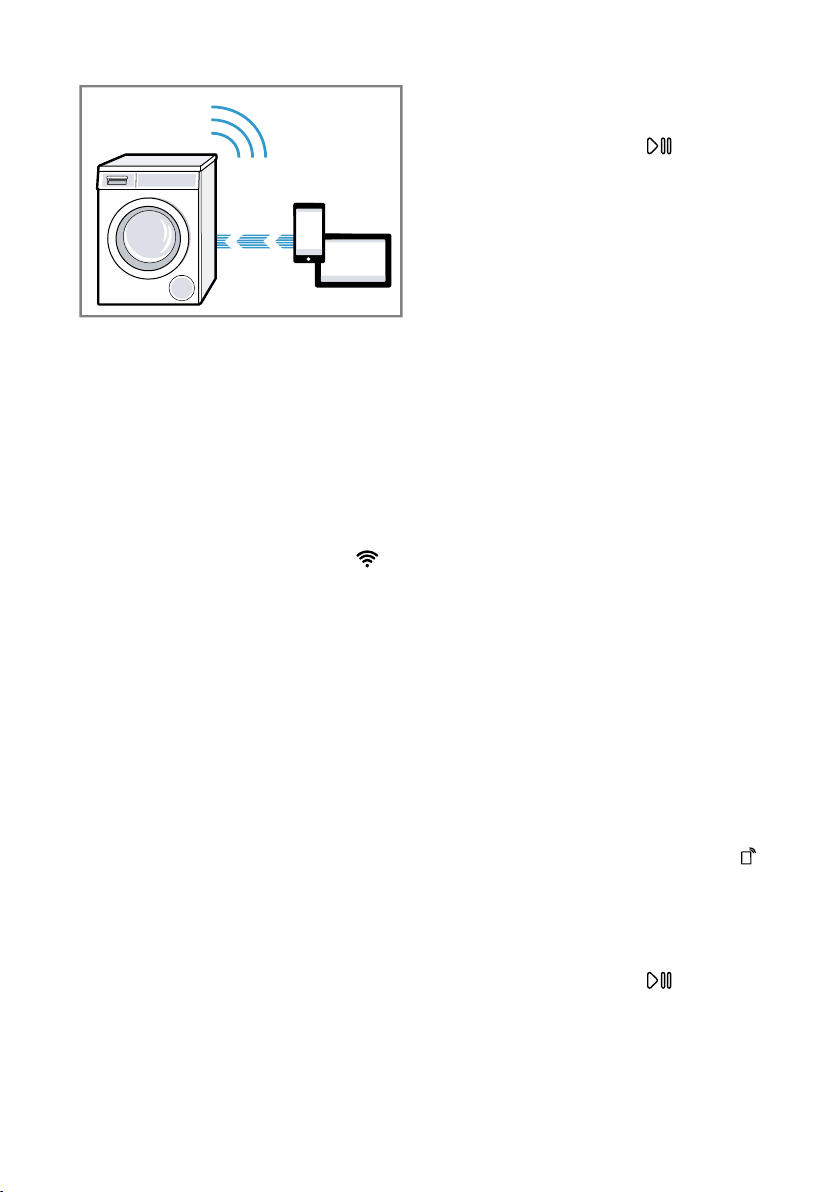
quickly sets up its own Wi-Fi network.
You can connect a mobile device to
the WLAN network and transfer the
network information for the WLAN
home network (Wi-Fi) to your appli-
ance.
Requirement:The HomeConnect
app is open and you have logged on.
1. Press and hold Remote Start for
at least 3seconds.
a The display shows Aut.
2. Set the programme to position2.
a The display shows SAP .
3. Press Start/Reload .
a flashes in the display.
a The appliance now sets up its own
Wi-Fi network with the name (SSID)
HomeConnect.
4. Call up the Wi-Fi settings on the
mobile device.
Connect the mobile device to the
Home Connect Wi-Fi network and
enter the password (key) Home-
Connect.
a Your mobile device now connects
to the appliance. The connection
process may take up to
60seconds.
HomeConnect en
43
5. Open the HomeConnect app on
your mobile device and carry out
the steps in the app.
6. In the HomeConnect app, enter
the network name (SSID) and
password (key) for your home net-
work.
7. Carry out the steps in the
HomeConnect app to connect the
appliance.
a If the display shows con and
lights up permanently, the appli-
ance is connected to the home
network.
8. If the display shows Err , the appli-
ance is not connected to the home
network.
‒ Check whether your appliance is
in range of your home network.
‒ Reconnect the appliance to the
WLAN home network (Wi-Fi)
with WPS function.
9. Connect your appliance to the
Home Connect app →Page43.
15.4 Connecting your appli-
ance to the Home Con-
nect app
Requirements
¡ The appliance is connected to the
WLAN home network (Wi-Fi).
¡ The HomeConnect app is open
and you have logged on.
1. Set the programme to position3.
a The display shows APP.
2. Press Start/Reload .
a The appliance connects to the
HomeConnect app.
3. Once your appliance is displayed
in the HomeConnect app, carry
out the last steps in the
HomeConnect app.
a If the display shows con , the ap-
pliance is connected to the
HomeConnect app.
15.5 Connecting the appli-
ance to the energy man-
ager
If you connect the appliance to the
smart energy system (energy man-
ager), you will optimise your energy
consumption. The appliance starts
only when your home photovoltaic
system can provide sufficient energy
or the energy tariff is good.
Requirements
¡ The smart energy system (energy
manager) must use the EEBus Initi-
ative communications standard.
¡ You have read about how to con-
nect your appliance to the smart
energy system (energy manager)
in the instruction manual for the
smart energy system (energy man-
ager).
1. Press and hold Remote Start for
approx. 3 seconds.
a The display shows Aut.
2. Set the programme to position7.
a The display shows EnG.
3. Press Start/Reload .
a The appliance is connected to the
smart energy system (energy man-
ager).
en HomeConnect
44
a If the appliance has connected to
the energy manager successfully,
the display shows con and .
4. Activate Flex Start if you want the
smart energy system (energy man-
ager) to start up your appliance.
→"Activate Flex Start", Page44
Activate Flex Start
Activate Flex Start to allow your smart
energy system (energy manager) to
start your appliance once your home
photovoltaic system is able to
provide sufficient energy or the en-
ergy tariff is good.
Requirement:The smart energy sys-
tem (energy manager) cannot start
your appliance until it is connected to
the appliance.
1. Set the programme you require.
2. Press - Finish in + to set the re-
quired time.
3. Press Start/Reload .
4. Press Start/Reload .
a The display shows and Flex
Start is activated. The appliance
waits to be started by the smart
energy system (energy manager).
a If the time changes on the display,
e.g. to 8 h, the smart energy sys-
tem (energy manager) has estab-
lished a time at which your appli-
ance can start.
a If the smart energy system (energy
manager) does not start the appli-
ance within the set time, the appli-
ance will start the programme itself
before the set time period ends.
The programme ends when the
time period ends.
Note
Flex Start is deactivated for safety
reasons in the following
circumstances:
¡ Press Start/Reload .
¡ Open the door.
¡ Switch off the appliance.
¡ Power failure.
15.6 Activating Wi-Fi on the
appliance
Note:When Wi-Fi is activated, the en-
ergy consumption increases in com-
parison to the values specified in the
consumption value table.
1. Press and hold Remote Start for
approx. 3 seconds.
2. Set the programme to position 4.
a The display shows Con .
3. Press Start/Reload repeatedly
until the display shows On .
a Wi-Fi is activated.
Notes
¡ If Wi-Fi is activated, the appliance
will not switch itself off automatic-
ally.
¡ If Wi-Fi is activated, the appliance
will not switch itself off automatic-
ally.
15.7 Deactivating Wi-Fi on the
appliance
1. Press and hold Remote Start for
at least threeseconds.
2. Set the programme to position 4.
a The display shows Con .
3. Press Start/Reload repeatedly
until the display shows OFF .
a Wi-Fi is deactivated.
Note:If Wi-Fi is switched off and your
appliance was previously connected
to your home network, this connec-
tion will be re-established automatic-
ally when Wi-Fi is switched back on.
15.8 Software update
Requirement:The display shows
UPd.

HomeConnect en
45
1. Press and hold Remote Start for
approx. 3 seconds.
2. Set the programme to position6.
a UPd appears on the display.
3. Press Start/Reload .
a The software update is installed.
a If End is shown on the display, the
software update is installed.
Note:The software update may take
several minutes. Do not switch off the
appliance while the software update
is in progress.
15.9 Resetting the appliance
network settings
1. Press and hold Remote Start for
at least 3seconds.
2. Set the programme to position5.
a The display shows rES.
3. Press Start/Reload .
a The display shows YES .
4. Press Start/Reload .
a The network settings are reset.
a If End is shown on the display, the
network settings are reset.
Tip:If you wish to operate your appli-
ance again via the HomeConnect
app, you will need to reconnect it to
the Wi-Fi and to the HomeConnect
app.
15.10 Remote diagnostics
Customer Service can use Remote
Diagnostics to access your appliance
if you contact them, have your appli-
ance connected to the HomeCon-
nect server and if Remote Dia-
gnostics is available in the country in
which you are using the appliance.
Tip:For further information and de-
tails about the availability of Remote
Diagnostics in your country, please
visit the service/support section of
your local website: www.home-con-
nect.com
15.11 Data protection
Please see the information on data
protection.
The first time your appliance is
registered on a home network
connected to the Internet, your
appliance will transmit the following
types of data to the HomeConnect
server (initial registration):
¡ Unique appliance identification
(consisting of appliance codes as
well as the MAC address of the
Wi-Fi communication module in-
stalled).
¡ Security certificate of the Wi-Fi
communication module (to ensure
a secure data connection).
¡ The current software and hardware
version of your appliance.
¡ Status of any previous reset to
factory settings.
This initial registration prepares the
HomeConnect functions for use and
is only required when you want to
use the HomeConnect functions for
the first time.
Note:Please note that the
HomeConnect functions can only be
utilised with the HomeConnect app.
Information on data protection can be
retrieved in the HomeConnect app.
en Basic settings
46
Basic settings
16 Basic settings
Basic settings
You can configure the appliance to meet your needs.
16.1 Overview of basic settings
Below is an overview of the basic settings on your appliance.
Basic setting Programme posi-
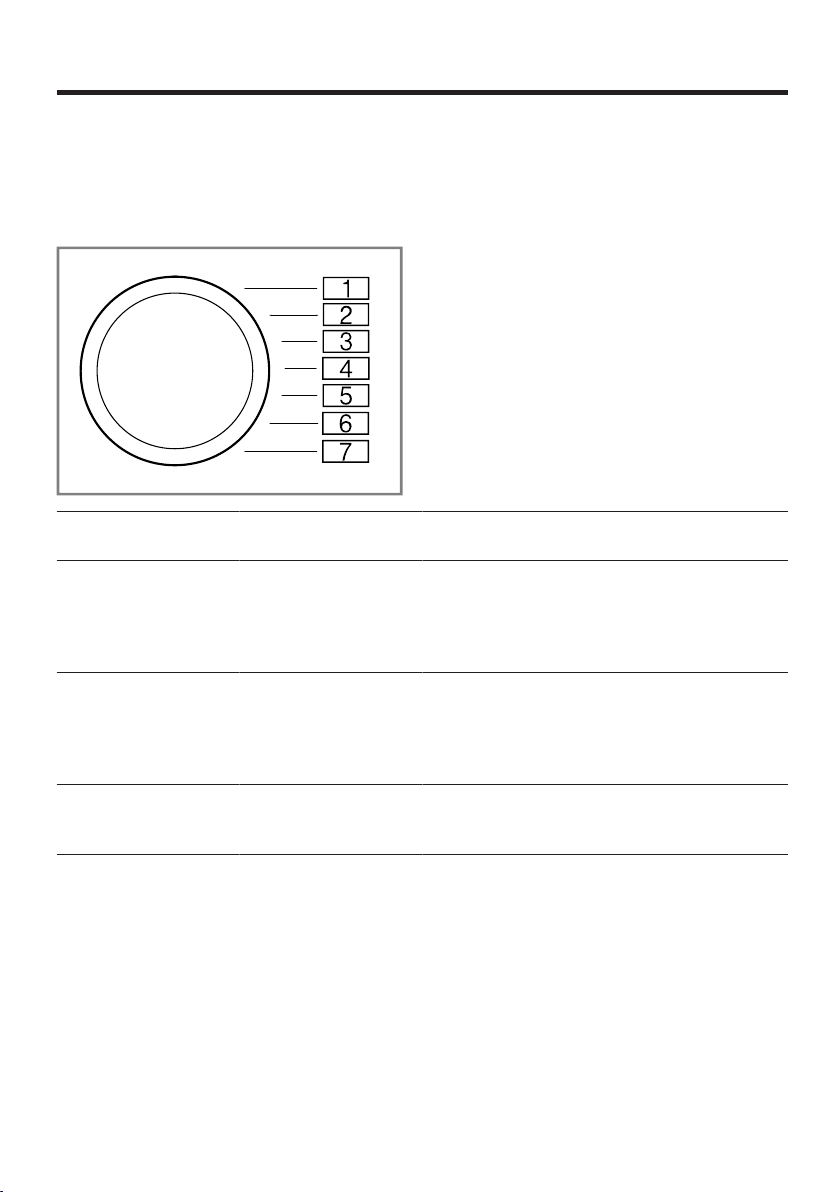
tion
Value Description
End signal 2 0 (off)
1 (quiet)
2 (medium)
3 (loud)
4 (very loud)
Set the volume of
the signal at the
end of the pro-
gramme.
Button signal 3 0 (off)
1 (quiet)
2 (medium)
3 (loud)
4 (very loud)
The volume of the
audible signal
emitted when the
buttons are
pressed.
Drum cleaning re-
minder
4 ON
OFF
Activate or deac-
tivate the reminder
to clean the drum.
Cleaning and servicing en
47
16.2 Changing the basic set-
tings
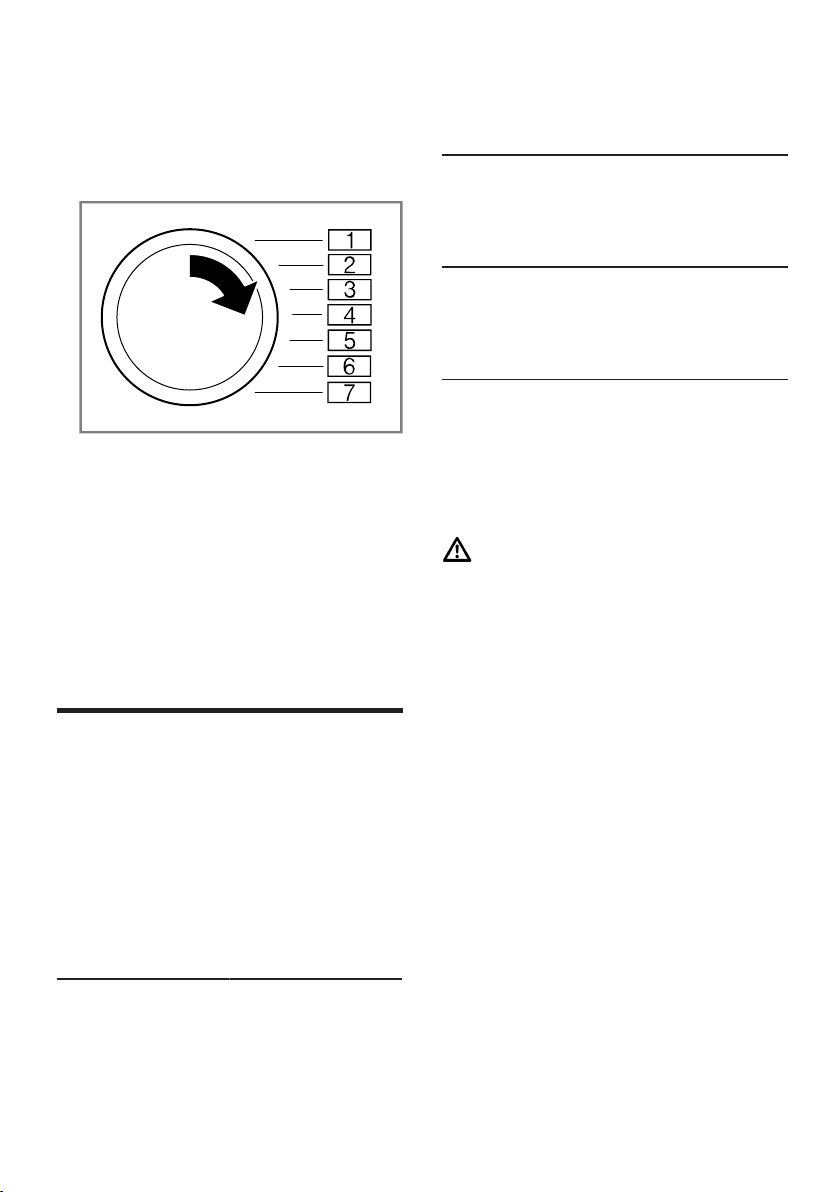
1. Set the programme selector to po-
sition 1.
2. Press Spin Speedand, at the
same time, turn the programme
selector to position2.
a The display shows the current
value.
3. Set the programme selector to the
required position.
4. To change the value, press -/ + .
5. To save the changes, switch off
the appliance.
Cleaning and servicing
17 Cleaning and servi-
cing
Cleaning and servicing
To keep your appliance working effi-
ciently for a long time, it is important
to clean and maintain it carefully.
17.1 Tips on appliance care
Follow the tips for appliance care to
ensure your appliance works cor-
rectly in the long term.
Wipe down the
housing and the
control panel
The appliance
parts remain
clean and hy-
gienic.
with nothing but
water and a
damp cloth.
Remove all de-
tergent residue,
spray residue or
other residues
immediately.
Fresh deposits
are easier to re-
move without
leaving any
residue.
Keep the appli-
ance door and
detergent drawer
open after use.
This allows the
residual water to
dry, reducing
odours in the ap-
pliance.
17.2 Cleaning the drum
If you often wash at a washing tem-
perature of 40°C and lower or the
appliance has not been used for a
long period, clean the drum.
CAUTION
Risk of injury!
Permanently washing at low temper-
atures and a lack of ventilation for
the appliance may damage the drum
and cause injury.
▶
Regularly run a programme for
cleaning the drum or wash at tem-
peratures of at least 60°C.
▶
Leave the appliance to dry after
every operation with the door
open, and leave the detergent
drawer to dry.
▶
Run the Drum Clean programme
without laundry.
Add washing powder.
17.3 Cleaning the detergent
drawer
Note:Please read the information in
the Safety →Page4 and Preventing
material damage →Page10 sections
to ensure that you use the appliance
safely.
en Cleaning and servicing
48
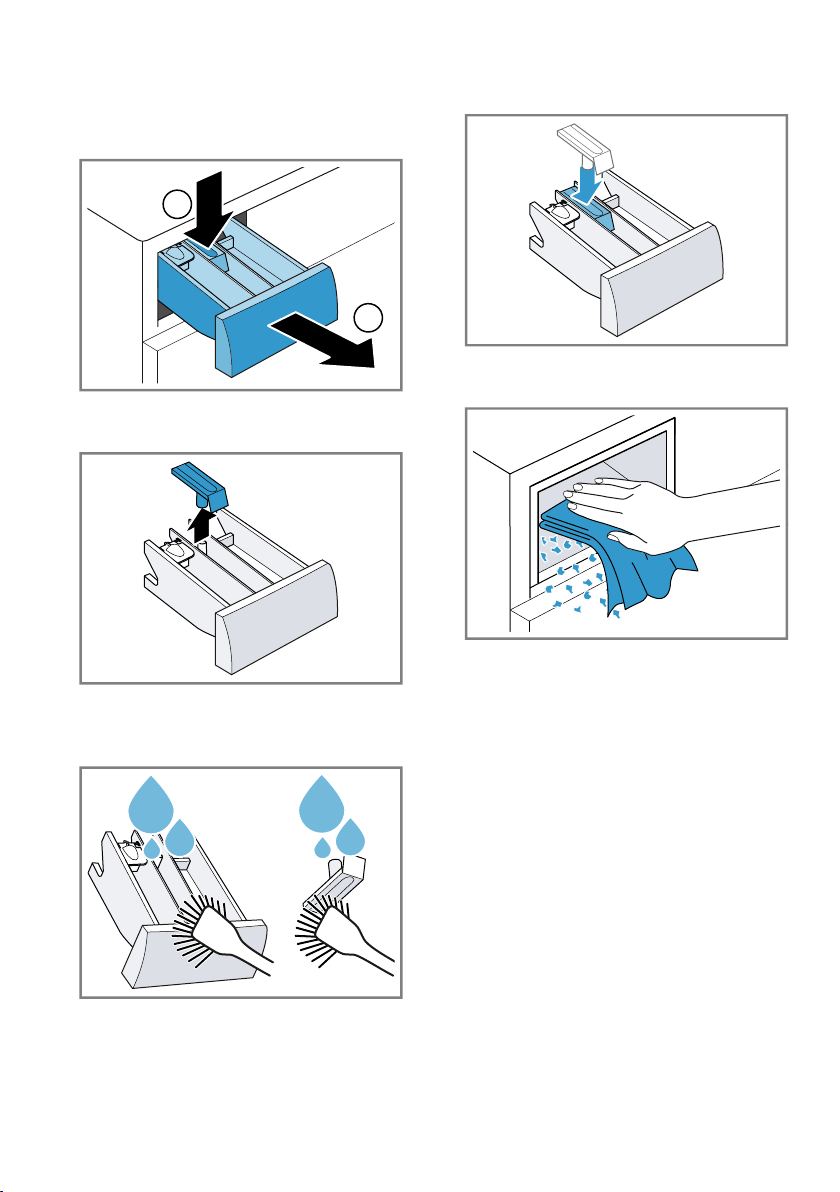
1. Pull out the detergent drawer.
2. Press down on the insert and re-
move the detergent drawer.
1
2
3. Press out the insert upwards from
below.
4. Clean the detergent drawer and in-
sert with water and a brush, and
then dry them.
5. Fit the insert and lock it into place.
6. Cleaning the opening for the deter-
gent drawer.
7. Push in the detergent drawer.
17.4 Descaling
If you add detergent correctly, you do
not need to descale your appliance.
If you still wish to use descaler, follow
the manufacturer's instructions for
use.
ATTENTION!
The use of unsuitable descaling
agents, e.g. for coffee machines, may
damage the appliance.
▶
For this appliance, only use de-
scaling agents that are available
from the manufacturer's website or
our after-sales service.
Cleaning and servicing en
49
17.5 Cleaning the drain pump
Clean the drain pump in the event of
faults, e.g. blockages or rattling
noises.
Emptying the drain pump
Note:Please read the information in
the Safety →Page4 and Preventing
material damage →Page10 sections
to ensure that you use the appliance
safely.
1. Turn off the water tap.
2. Switch off the appliance.
3. Disconnect the appliance's mains
plug from the power supply.
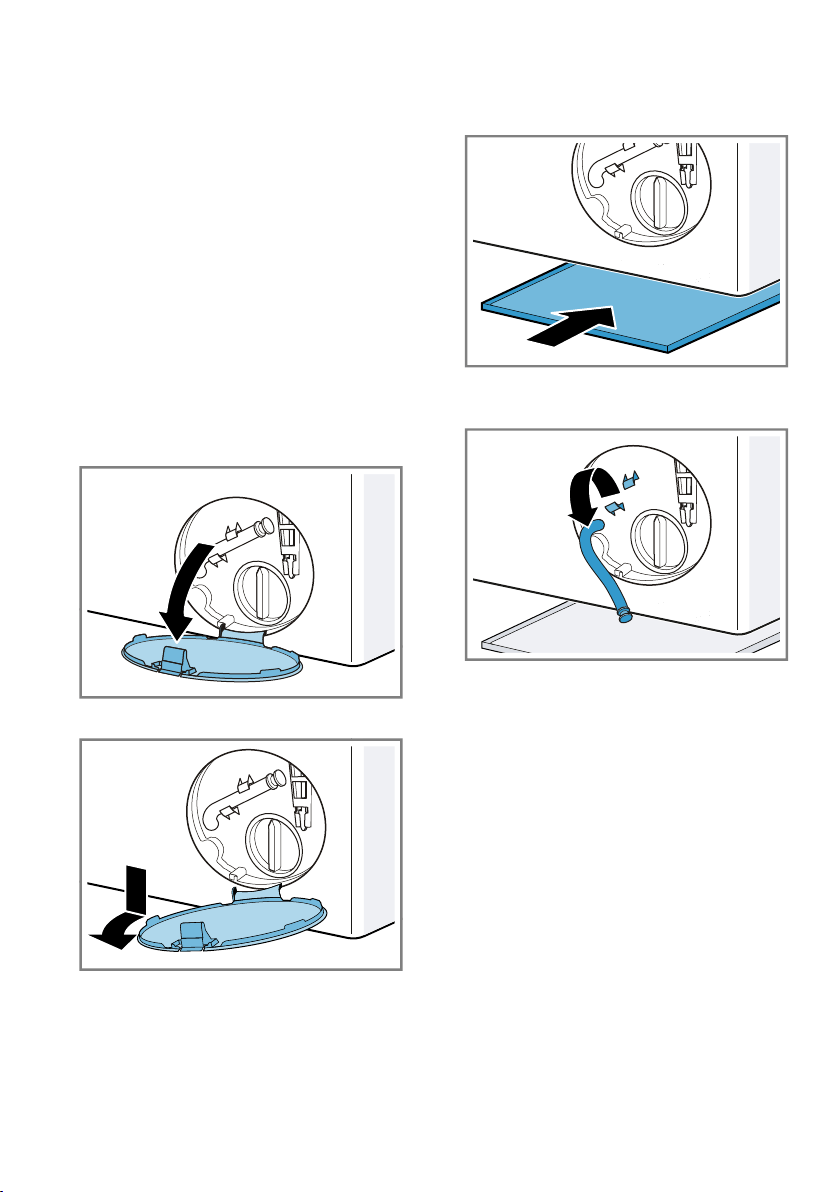
4. Open the maintenance flap.
5. Remove the maintenance flap.
6. Slide a sufficiently large receptacle
under the opening.
7. Take the drain hose out of the
holder.
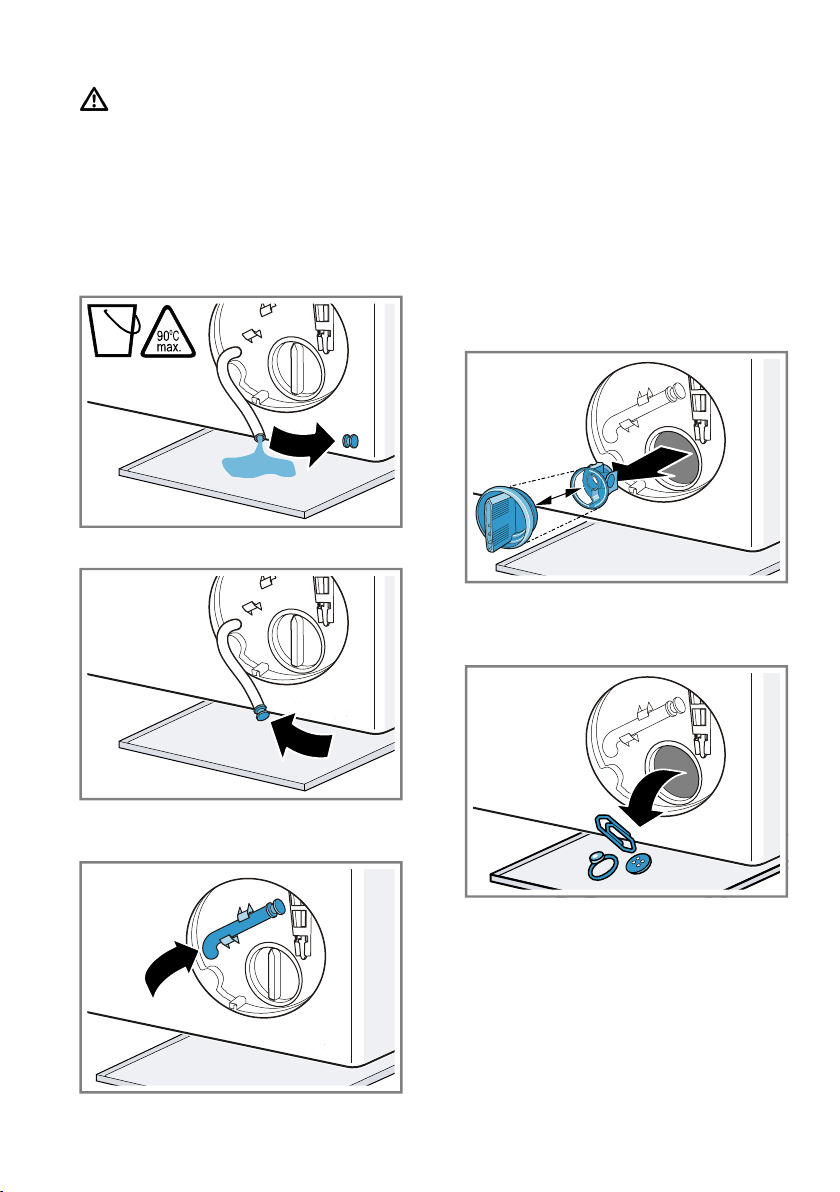
en Cleaning and servicing
50
8.
CAUTION-Risk of scalding!
When you wash at high temperat-
ures, the detergent solution gets
hot.
▶
Do not touch the hot detergent
solution.
To allow the detergent solution to
flow out into the container, remove
the sealing cap.
9. Firmly press on the sealing cap.
10. Insert the drain hose into the
holder.
Cleaning the drain pump
Note:Please read the information in
the Safety →Page4 and Preventing
material damage →Page10 sections
to ensure that you use the appliance
safely.
Requirement:The drain pump is
empty. →Page49
1. Since water may remain in the
drain pump, remove the pump cap
carefully.
2. Clean the interior, the thread on
the pump cap and the pump hous-
ing.
The pump cap is comprised of two
parts which can be taken apart for
cleaning.
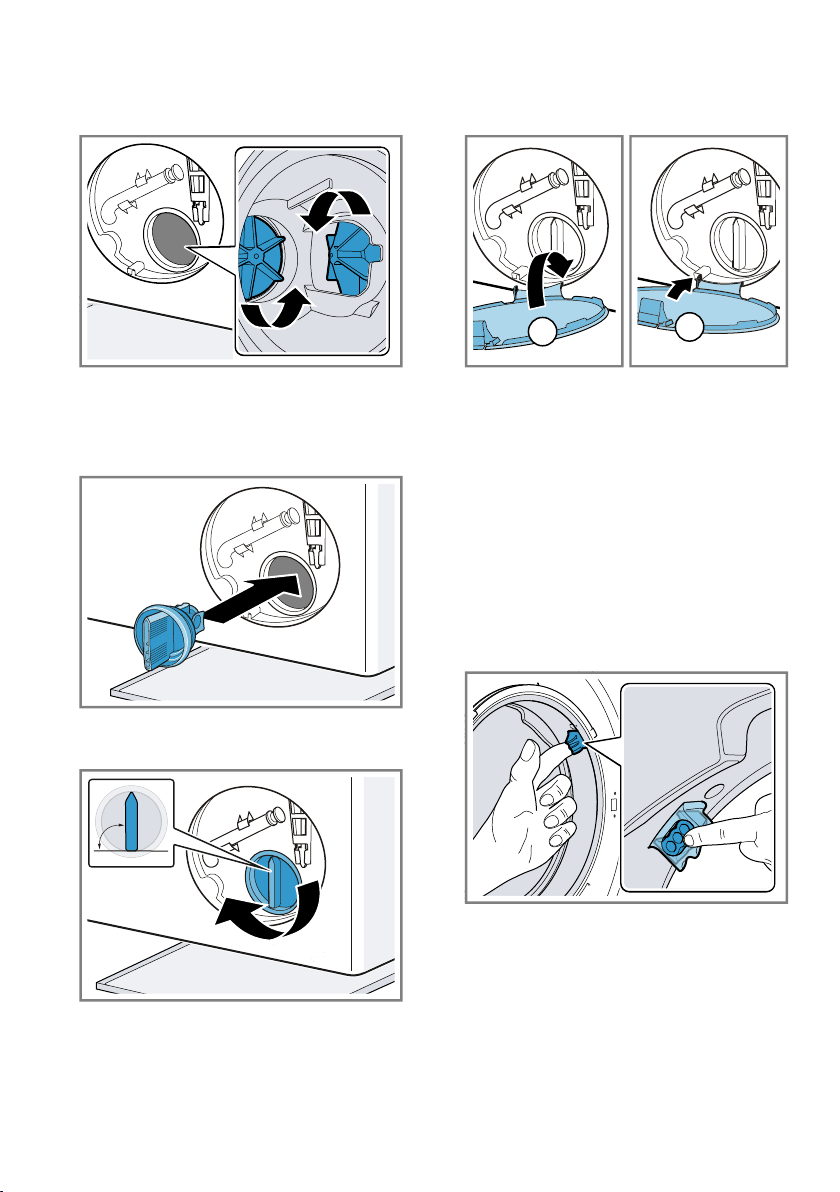
Cleaning and servicing en
51
3. Ensure that both impellers can
turn.
4. Insert the pump cap.
‒ Ensure that the parts of the
pump cap are correctly as-
sembled.
5. Insert the pump cap and screw it
on as far as it will go.
90°
The handle on the pump cap must
be in a vertical position.
6. Insert the maintenance flap and
lock it into place.
1
2
7. Close the maintenance flap.
17.6 Cleaning the intake
opening in the rubber
gasket
Regularly check the intake opening
in the rubber gasket for any block-
ages and clean the intake opening.
1. Open the door.
2. Check the intake opening for
blockages and remove any block-
ages.
Note:Do not use any sharp or poin-
ted objects.
en Cleaning and servicing
52
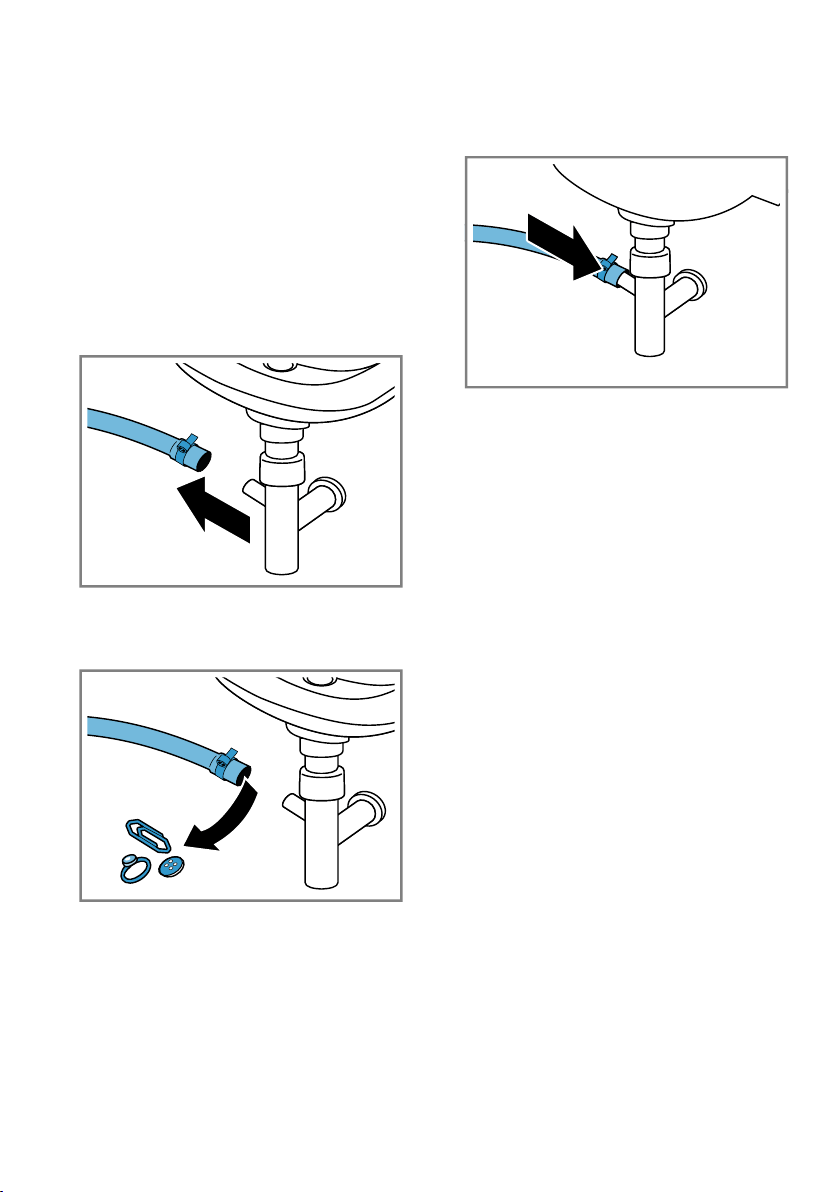
17.7 Cleaning the water outlet
hose at the siphon
If the water outlet hose at the siphon
is dirty or the detergent solution is
not being pumped out, you must
clean these.
1. Switch off the appliance.
2. Disconnect the appliance's mains
plug from the power supply.
3. Loosen the hose clamp and care-
fully remove the water outlet hose.
Residual water may leak out.
4. Clean the water outlet hose and si-
phon connecting piece.
5. Reattach the water outlet hose and
secure the connection point using
the hose clamp.
17.8 Clean the water inlet fil-
ters.
Emptying the water inlet hose
1. Turn off the tap.
2. Set a programme, except for
Rinse, Spin or Drain.
3. Start the programme and leave it
to run for approx. 40seconds.
4. Switch off the appliance.
5. Disconnect the appliance's mains
plug from the power supply.
Cleaning the filter on the tap
Note:Please read the information in
the Safety →Page4 and Preventing
material damage →Page10 sections
to ensure that you use the appliance
safely.
Requirement:The water inlet hose is
empty.
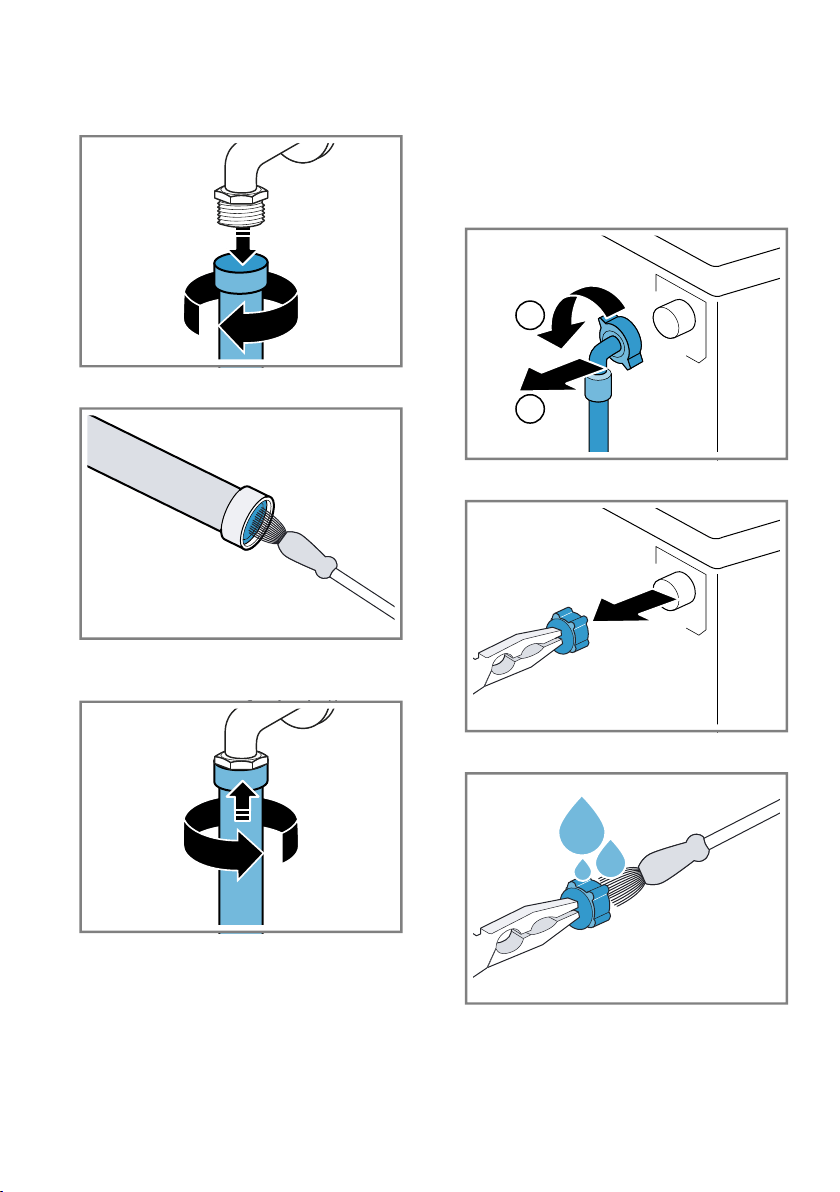
Cleaning and servicing en
53
1. Remove the water inlet hose from
the tap.
2. Clean the filter with a small brush.
3. Connect the water inlet hose and
check for leaks.
Cleaning the filter on the appliance
Note:Please read the information in
the Safety →Page4 and Preventing
material damage →Page10 sections
to ensure that you use the appliance
safely.
Requirement:The water inlet hose is
empty.
→"Emptying the water inlet hose",
Page52
1. Disconnect the hose from the rear
of the appliance.
1
2
2. Use pliers to remove the filter.
3. Clean the filter with a small brush.
4. Reinsert the filter.
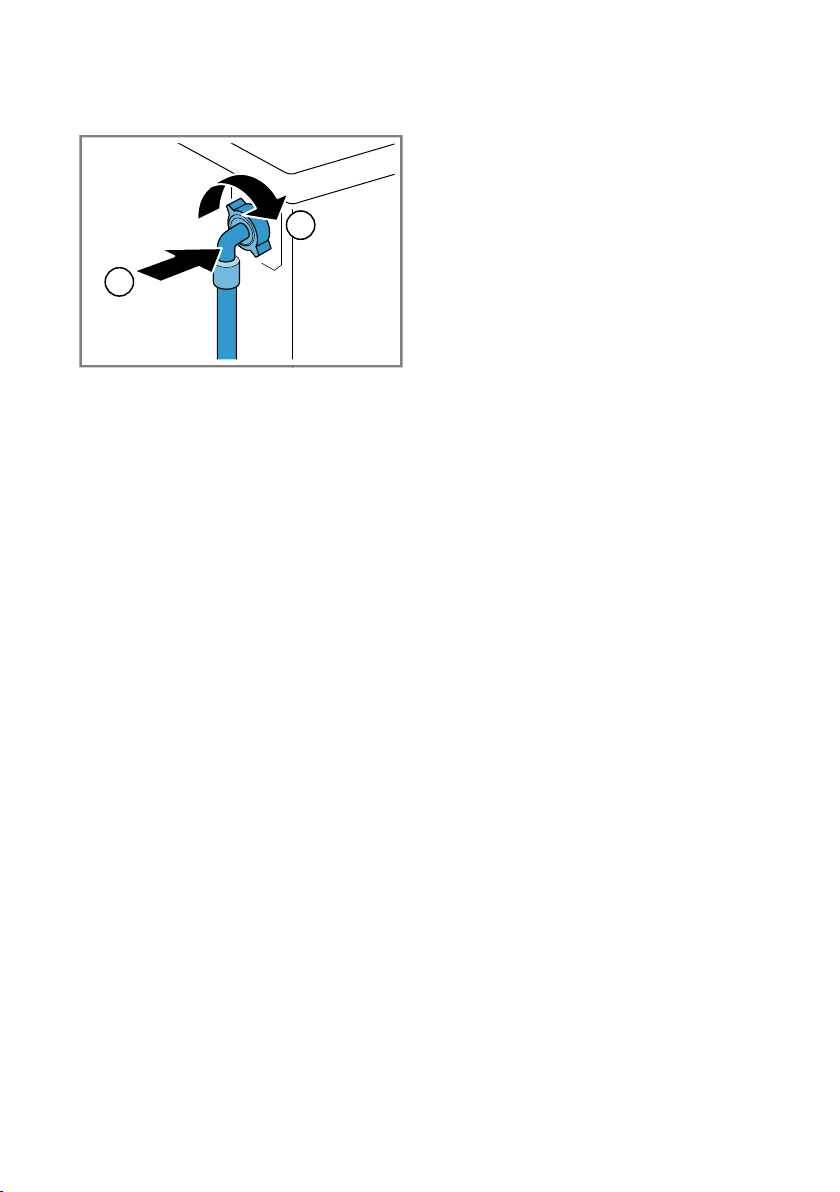
en Cleaning and servicing
54
5. Connect the hose and check for
leaks.
2
1
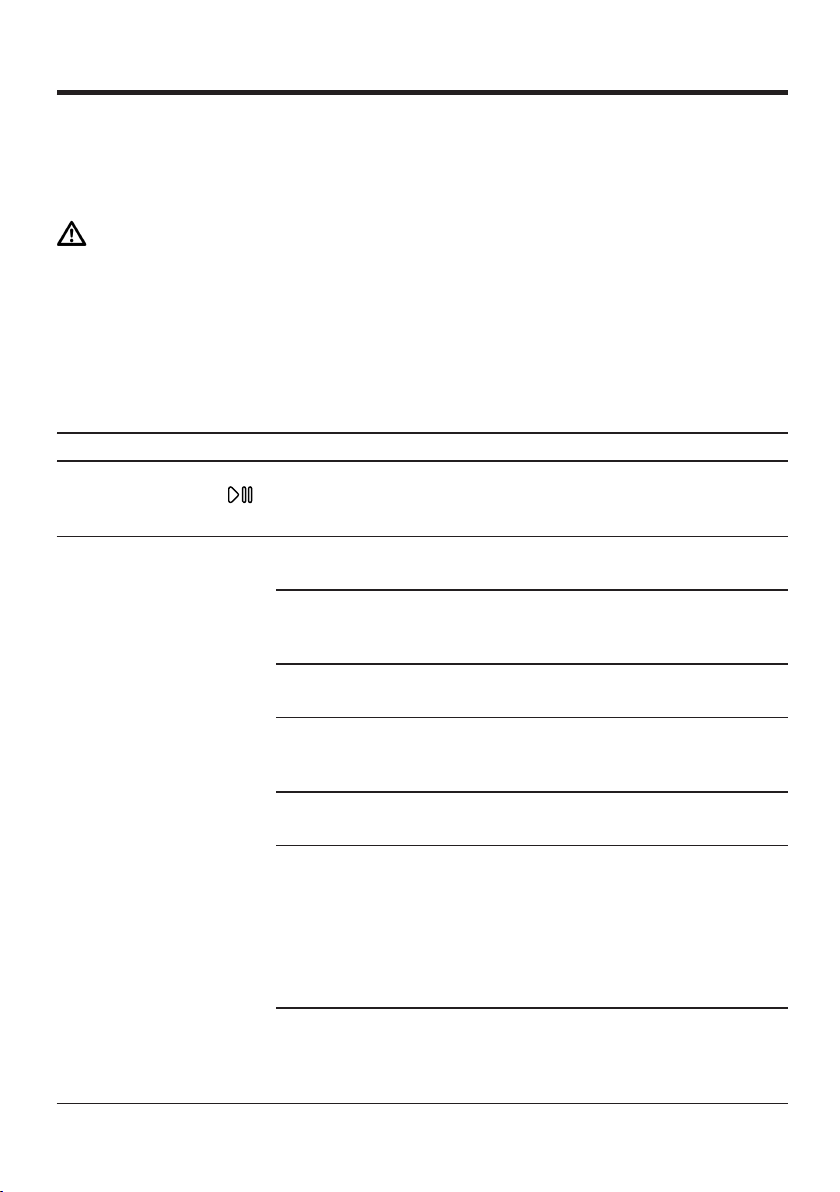
Troubleshooting en
55
Troubleshooting
18 Troubleshooting
Troubleshooting
You can rectify minor faults on your appliance yourself. Read the troubleshoot-
ing information before contacting after-sales service. This will avoid unneces-
sary costs.
WARNING
Risk of electric shock!
Incorrect repairs are dangerous.
▶
Repairs to the appliance should only be carried out by trained specialist
staff.
▶
Only use genuine spare parts when repairing the appliance.
▶
If the power cord of this appliance is damaged, it must be replaced by the
manufacturer, the manufacturer's Customer Service or a similarly qualified
person in order to prevent any risk.
Fault Cause and troubleshooting
The display goes out
and Start/Reload
flashes.
Energy-saving mode is active
▶
Press any button.
a The symbol lights up again.
"E:30 / -80" Drain pipe or water outlet hose is blocked.
▶
Clean the drain pipe and the water outlet hose.
Drain pipe or water drain hose is caught or jammed.
▶
Ensure that the drain pipe and water drain hose are
not kinked or trapped.
Drain pump is blocked.
▶
→"Cleaning the drain pump", Page49
The water outlet hose is connected too high.
▶
Install the water outlet hose at a maximum height of
1 metre.
Pump cover is not correctly assembled.
▶
Correctly assemble the pump cover.
Detergent dosage is too high.
▶
Immediate measure: Mix one tablespoon of fabric
softener with 0.5 litres of water and pour the mix-
ture into the left-hand compartment (not for outdoor
clothing, sportswear or items stuffed with down).
▶
Reduce the amount of detergent for the next wash-
ing cycle with the same load.
Unapproved extension installed on the water drain
hose.
▶
Remove any unapproved extensions from the water
hose. Connecting the appliance
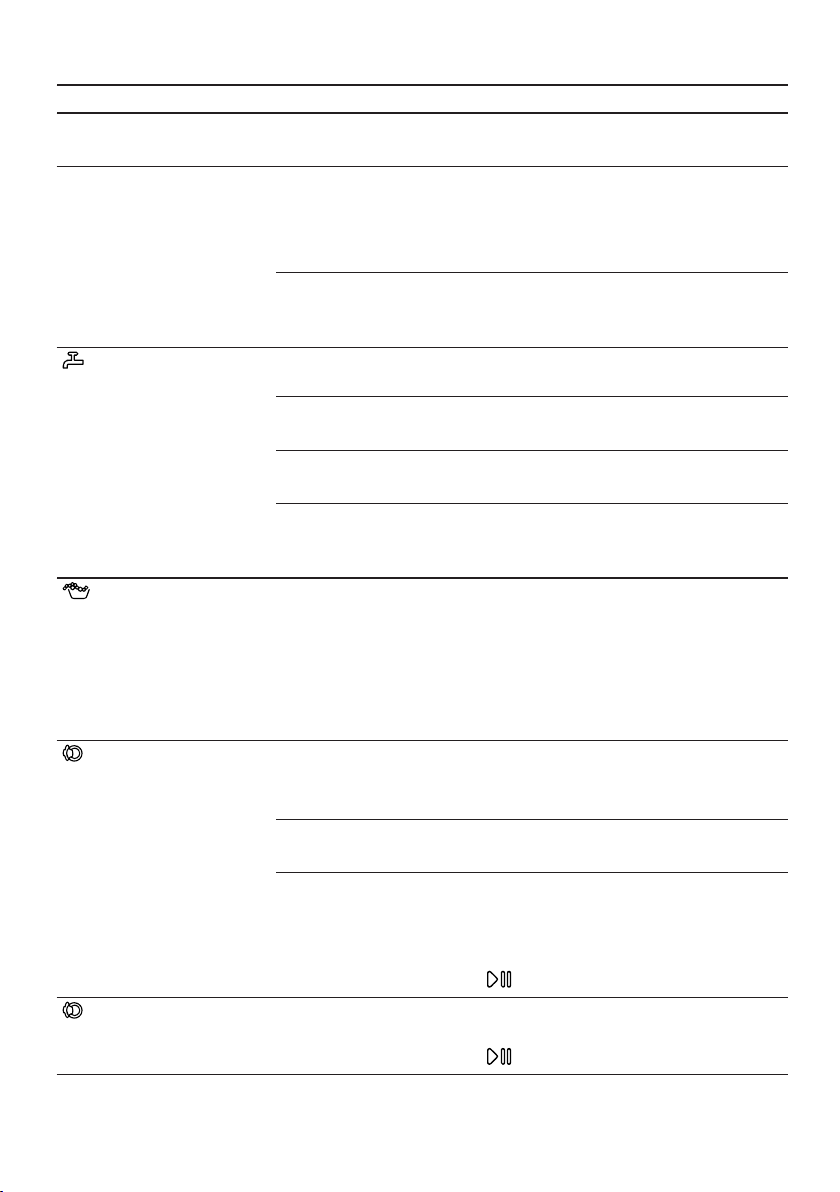
en Troubleshooting
56
Fault Cause and troubleshooting
"E:36 / -25 / -26" Drain pump is blocked.
▶
→"Cleaning the drain pump", Page49
"E:38 / -25 / -26" Drain pump is blocked.
▶
→"Cleaning the drum", Page47
if the fault is displayed again,
▶
→"Cleaning the drain pump", Page49
Inlet opening of the rubber gasket is blocked.
▶
→"Cleaning the intake opening in the rubber gas-
ket", Page51
The water pressure is low.
No remedial action possible.
The filters in the water inflow are blocked.
▶
Clean the filters in the water inflow →Page52.
The tap is turned off.
▶
Turn on the tap.
The water inlet hose is kinked or jammed.
▶
Ensure that the water inlet hose is not kinked or
jammed.
Detergent dosage is too high.
▶
Immediate measure: Mix one tablespoon of fabric
softener with 0.5 litres of water and pour the mix-
ture into the left-hand compartment (not for outdoor
clothing, sportswear or items stuffed with down).
▶
Reduce the amount of detergent for the next wash-
ing cycle with the same load.
lights up. The temperature is too high.
▶
Wait until the temperature has dropped.
▶
→"Cancelling the programme", Page39
Water level is too high.
▶
Start the Drainprogramme.
Laundry is caught in the door.
1. Open the door again.
2. Remove any trapped laundry.
3. Close the door.
4. Press Start/Reload to start the programme.
flashes. Door is not closed.
1. Close the door.
2. Press Start/Reload to start the programme.
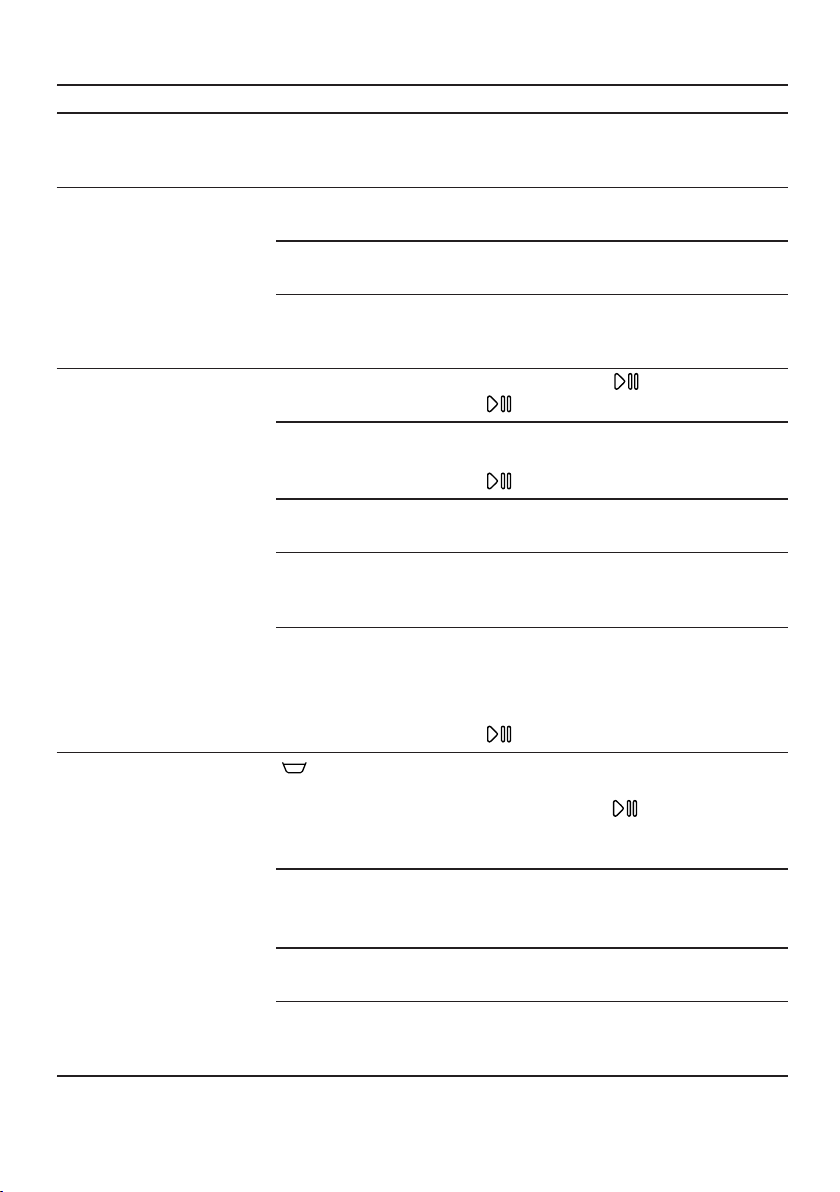
Troubleshooting en
57
Fault Cause and troubleshooting
All other error codes. Malfunction
▶
Call the after-sales service.
→"Customer Service", Page65
The appliance is not
working.
The mains plug of the power cord is not plugged in.
▶
Connect the appliance to the power supply.
The circuit breaker is faulty.
▶
Check the circuit breaker in the fuse box.
There has been a power cut.
▶
Check whether the lighting in your kitchen or other
appliances are working.
The programme does
not start.
You have not pressedStart/Reload .
▶
Press Start/Reload .
Door is not closed.
1. Close the door.
2. Press Start/Reload to start the programme.
Childproof lock is activated.
▶
→"Deactivating the childproof lock", Page41
- Finish in + is activated.
▶
Check whether - Finish in + is activated.
→"Buttons", Page22
Laundry is caught in the door.
1. Open the door again.
2. Remove any trapped laundry.
3. Close the door.
4. Press Start/Reload to start the programme.
The door cannot
beopened.
is activated.
▶
Continue the programme by selecting Spin or
Drain and pressing Start/Reload .
→"Resuming the programme when the programme
status is Rinse Hold", Page40
The temperature is too high.
▶
Wait until the temperature has dropped.
▶
→"Cancelling the programme", Page39
Water level is too high.
▶
Start the Drainprogramme.
Power failure.
▶
Open the door using the emergency release.
→"Emergency release", Page63
en Troubleshooting
58
Fault Cause and troubleshooting
The water is not drain-
ing.
Drain pipe or water outlet hose is blocked.
▶
Clean the drain pipe and the water outlet hose.
Drain pipe or water drain hose is caught or jammed.
▶
Ensure that the drain pipe and water drain hose are
not kinked or trapped.
Drain pump is blocked.
▶
→"Cleaning the drain pump", Page49
is activated.
▶
Continue the programme by selecting Spin or
Drain and pressing Start/Reload .
→"Resuming the programme when the programme
status is Rinse Hold", Page40
The water outlet hose is connected too high.
▶
Install the water outlet hose at a maximum height of
1 metre.
Pump cover is not correctly assembled.
▶
Correctly assemble the pump cover.
Detergent dosage is too high.
▶
Immediate measure: Mix one tablespoon of fabric
softener with 0.5 litres of water and pour the mix-
ture into the left-hand compartment (not for outdoor
clothing, sportswear or items stuffed with down).
▶
Reduce the amount of detergent for the next wash-
ing cycle with the same load.
Unapproved extension installed on the water drain
hose.
▶
Remove any unapproved extensions from the water
hose. Connecting the appliance
Water is not flowing
in. Detergent is not
being dispensed.
You have not pressedStart/Reload .
▶
Press Start/Reload .
The filters in the water inflow are blocked.
▶
Clean the filters in the water inflow →Page52.
The tap is turned off.
▶
Turn on the tap.
The water inlet hose is kinked or jammed.
▶
Ensure that the water inlet hose is not kinked or
jammed.
Troubleshooting en
59
Fault Cause and troubleshooting
The spin cycle runs
several times.
The unbalanced load detection system eliminates an
imbalance by repeatedly redistributing the laundry.
▶
Not a fault – no action required.
Note:When loading, where possible, place large and
small items of laundry together in the drum. Different
sized items of laundry distribute themselves better
during the spin cycle.
The programme dura-
tion changes during
the wash cycle.
The programme operation is optimised electronically.
This may change the programme duration.
▶
Not a fault – no action required.
The unbalanced load detection system eliminates an
imbalance by repeatedly redistributing the laundry.
▶
Not a fault – no action required.
Note:When loading, where possible, place large and
small items of laundry together in the drum. Different
sized items of laundry distribute themselves better
during the spin cycle.
Foam detection system switches on a rinse cycle if
foam build-up is too high.
▶
Not a fault – no action required.
No water is visible in
the drum.
Water is below the visible area.
▶
Not a fault – no action required.
▶
Do not add any extra water to the appliance while it
is operating.
Drum jerks after the
programme starts.
This is caused by an internal motor test.
▶
Not a fault – no action required.
Residual water is
present in the com-
partment .
Insert in compartment is blocked.
▶
→"Cleaning the detergent drawer", Page47
Vibrations and move-
ment of the appliance
whilst spinning.
Appliance is not correctly aligned.
▶
Aligning the appliance
The appliance feet are not fixed.
▶
Secure the appliance feet. Aligning the appliance
Transit bolts have not been removed.
▶
Removing the transit bolts
Drum does not turn,
water does not flow in.
Load detection is active.
▶
Not a fault – no action required.
Note:The load detection can take up to two minutes.
en Troubleshooting
60
Fault Cause and troubleshooting
Heavy foam build-up Detergent dosage is too high.
▶
Immediate measure: Mix one tablespoon of fabric
softener with 0.5 litres of water and pour the mix-
ture into the left-hand compartment (not for outdoor
clothing, sportswear or items stuffed with down).
▶
Reduce the amount of detergent for the next wash-
ing cycle with the same load.
High spin speed not
reached.
A low spin speed is selected.
▶
The next time you run a wash cycle, set a higher
spin speed.
Unbalance load detection system is using a reduced
spin speed to eliminate an unbalance.
▶
Redistribute the laundry in the drum.
Note:Where possible, mix large and small items in
the drum. Different sized items of laundry distribute
themselves better during the spin cycle.
▶
Start the Spinprogramme.
The spin programme
does not start.
Drain pipe or water outlet hose is blocked.
▶
Clean the drain pipe and the water outlet hose.
Drain pipe or water drain hose is caught or jammed.
▶
Ensure that the drain pipe and water drain hose are
not kinked or trapped.
The unbalanced load detection system has interrupted
the spin cycle because the laundry is unevenly distrib-
uted.
▶
Redistribute the laundry in the drum.
Note:Where possible, mix large and small items in
the drum. Different sized items of laundry distribute
themselves better during the spin cycle.
▶
Start the Spinprogramme.
Rushing, hissing
noise.
Water is flushed under pressure into the detergent
drawer.
▶
Not a fault – normal operating noise.
Loud noises during
the spin cycle.
Appliance is not correctly aligned.
▶
Aligning the appliance
The appliance feet are not fixed.
▶
Secure the appliance feet. Aligning the appliance
Transit bolts have not been removed.
▶
Removing the transit bolts
Troubleshooting en
61
Fault Cause and troubleshooting
Banging noises, rat-
tling in the drain
pump.
Foreign bodies have got into the drain pump.
▶
→"Cleaning the drain pump", Page49
Slurping, rhythmical
suction noise.
The drain pump is active, the detergent solution is
pumped out.
▶
Not a fault – normal operating noise.
Creasing. The spin speed is too high.
▶
The next time you run a wash cycle, set a lower
spin speed.
The load is too large.
▶
The next time you run a wash cycle, reduce the
amount of laundry being loaded.
The wrong programme is selected for the type of fab-
ric.
▶
Select the programmes that are suitable for the
type of fabric.
→"Programmes", Page24
Detergent or fabric
softener drips off the
seal and collects on
the door or in the seal
fold.
Too much detergent/fabric softener in the detergent
drawer.
▶
When dosing liquid detergent and fabric softener,
observe the marking in the detergent drawer and
do not dose above this.
The spin result is not
satisfactory. The laun-
dry is too wet/too
damp.
A low spin speed is selected.
▶
The next time you run a wash cycle, set a higher
spin speed.
▶
Start the Spinprogramme.
Drain pipe or water outlet hose is blocked.
▶
Clean the drain pipe and the water outlet hose.
Drain pipe or water drain hose is caught or jammed.
▶
Ensure that the drain pipe and water drain hose are
not kinked or trapped.
The unbalanced load detection system has interrupted
the spin cycle because the laundry is unevenly distrib-
uted.
▶
Redistribute the laundry in the drum.
Note:Where possible, mix large and small items in
the drum. Different sized items of laundry distribute
themselves better during the spin cycle.
▶
Start the Spinprogramme.
en Troubleshooting
62
Fault Cause and troubleshooting
The spin result is not
satisfactory. The laun-
dry is too wet/too
damp.
Unbalance load detection system is using a reduced
spin speed to eliminate an unbalance.
▶
Redistribute the laundry in the drum.
Note:Where possible, mix large and small items in
the drum. Different sized items of laundry distribute
themselves better during the spin cycle.
▶
Start the Spinprogramme.
Detergent residue on
the damp washing.
Detergents may contain water-insoluble substances
that deposit on the laundry.
▶
Start the Rinseprogramme.
Detergent residue on
the dry laundry.
Detergents may contain water-insoluble substances
that deposit on the laundry.
▶
Brush out the laundry after washing and drying.
HomeConnect is not
working correctly.
Different causes are possible.
▶
Go to www.home-connect.com.
No connection to the
home network.
Wi-Fi is switched off.
▶
→"Activating Wi-Fi on the appliance", Page44
Wi-Fi is activated but a connection to your home net-
work cannot be established.
1. Ensure that the home network is available.
2. Reconnect the appliance to the home network.
→"Connecting the appliance to a WLAN home net-
work (Wi-Fi) with WPS function", Page41
→"Connecting the appliance to a WLAN home net-
work (Wi-Fi) without WPS function", Page42
Water is leaking out at
the water inlet hose.
Water inlet hose is not correctly/securely connected.
1. Connect the water supply hose correctly. Connect-
ing the water inlet hose
2. Tighten the screw connection.
Water is leaking out at
the water outlet hose.
The water outlet hose is damaged.
▶
Replace the damaged water outlet hose.
Water outlet hose is not connected correctly.
▶
Connect the water outlet hose correctly. Water out-
let connection types
Odours have formed
in the appliance.
Humidity and detergent residue may promote the
formation of bacteria.
▶
→"Cleaning the drum", Page47
▶
If you are not using the appliance, leave the door
and detergent drawer open so that residual water
can evaporate.
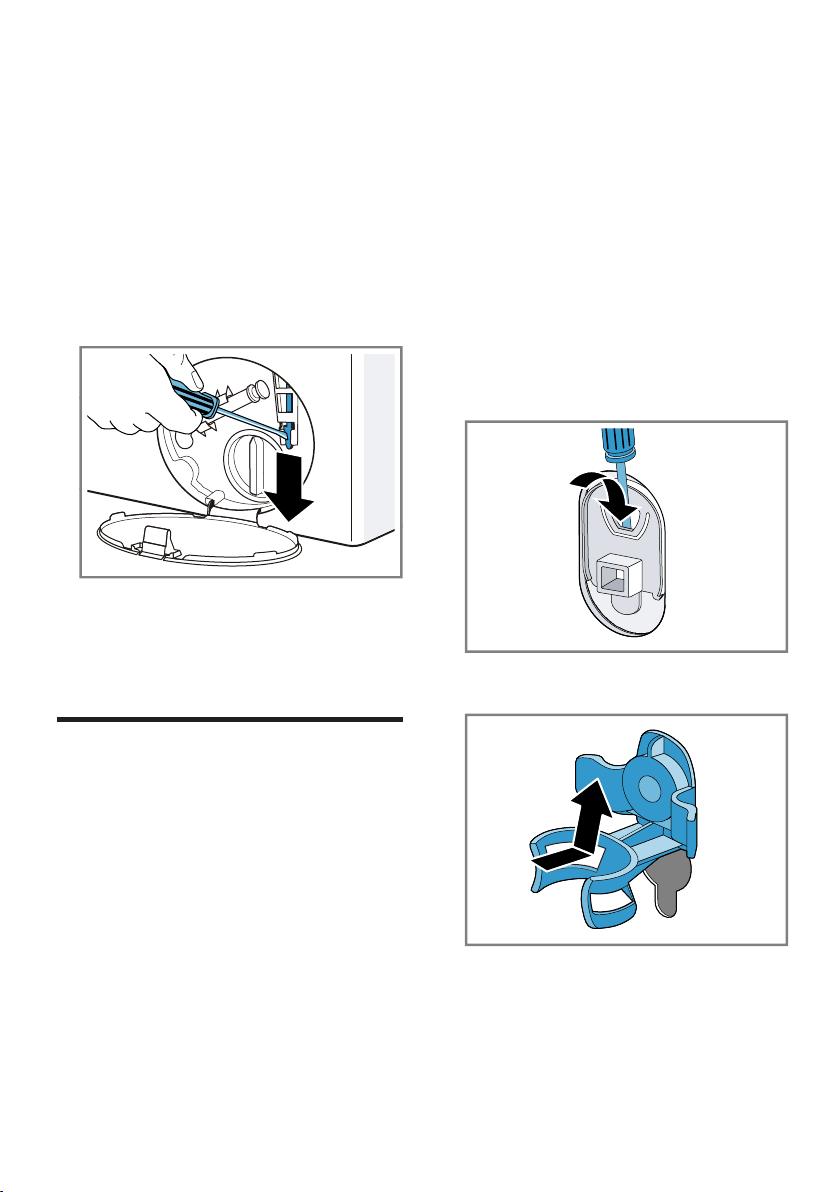
Transportation, storage and disposal en
63
18.1 Emergency release
Releasing the door
Requirement:The drain pump is
empty. →Page49
1. ATTENTION! Escaping water may
cause material damage.
▶
Do not open the door if you can
see water through the glass.
Pull the emergency release down-
wards with a tool and release.
a The door lock is released.
2. Insert the maintenance flap and
lock it into place.
3. Close the maintenance flap.
Transportation, storage and disposal
19 Transportation, stor-
age and disposal
Transportation, storage and disposal
You can find out here how to prepare
your appliance for transportation and
storage. You will also find out how to
dispose of old appliances.
19.1 Removing the appliance
1. Turn off the tap.
2.
→"Emptying the water inlet hose",
Page52.
3. Switch off the appliance.
4. Unplug the appliance's mains plug.
5. Drain the remaining detergent
solution.
→"Cleaning the drain pump",
Page49
6. Detach the hoses.
19.2 Inserting the transit
bolts
Secure the appliance for transporta-
tion using transit bolts in order to pre-
vent damage.
1. Remove the four cover caps.
‒ If necessary, use a screwdriver
to remove the cover caps.
Keep the cover caps.
2. Insert the four sleeves.
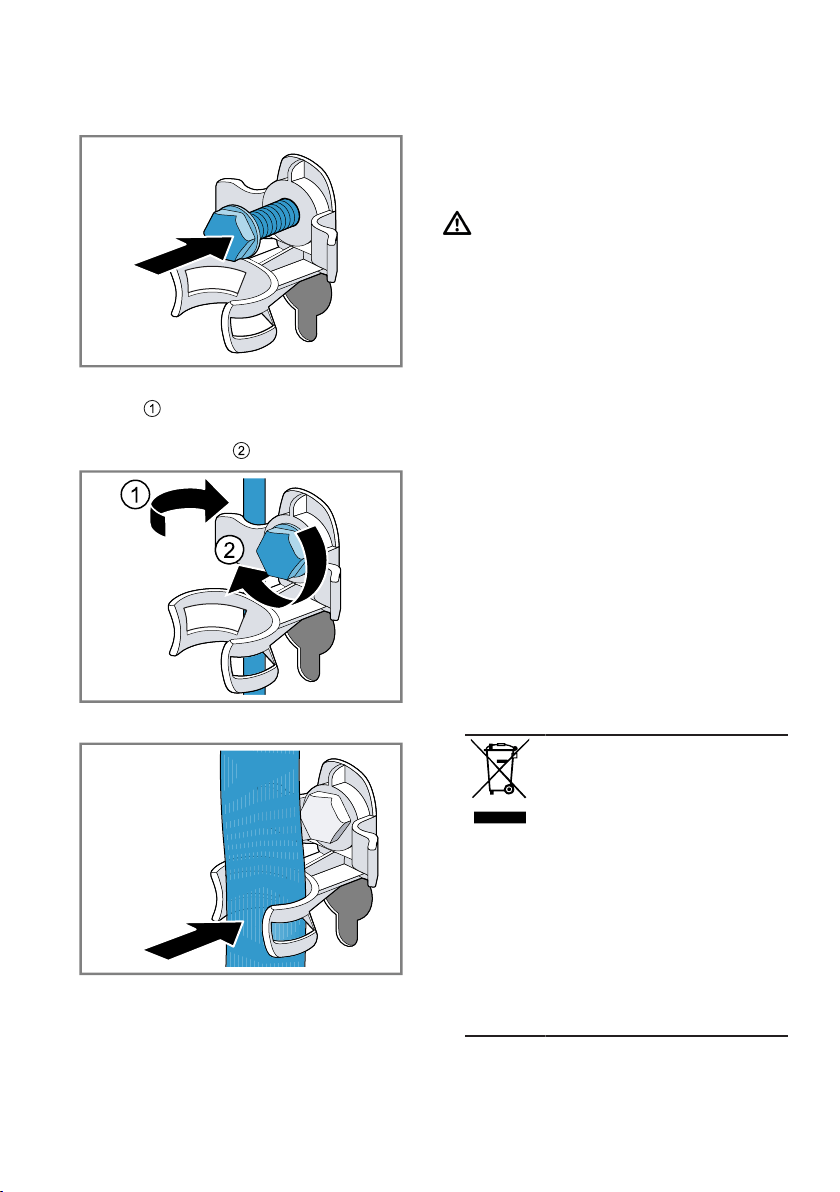
en Transportation, storage and disposal
64
3. Insert all screws into the four
transit bolts and tighten slightly.
4. Insert the power cord into the
holder and tighten all four
screws for the transit bolts with a
WAF 13 wrench .
5. Insert the hose into holder.
19.3 Using the appliance
again
▶
Remove the transit bolts.
19.4 Disposing of old appli-
ance
Valuable raw materials can be re-
used by recycling.
WARNING
Risk of harm to health!
Children can lock themselves in the
appliance, thereby putting their lives
at risk.
▶
Do not install the appliance behind
a door as this may obstruct the ap-
pliance door or prevent it from
opening.
▶
With redundant appliances, unplug
the power cord. Then cut through
the cord and damage the lock on
the appliance door beyond repair
so that the appliance door will no
longer close.
1. Unplug the appliance from the
mains.
2. Cut through the power cord.
3. Dispose of the appliance in an en-
vironmentally friendly manner.
Information about current disposal
methods are available from your
specialist dealer or local authority.
This appliance is la-
belled in accordance
with European Directive
2012/19/EU concerning
used electrical and elec-
tronic appliances (waste
electrical and electronic
equipment - WEEE).
The guideline determ-
ines the framework for
the return and recycling
of used appliances as
applicable throughout
the EU.

Customer Service en
65
Customer Service
20 Customer Service
Customer Service
If you have any queries on use, are
unable to rectify faults on the appli-
ance yourself or if your appliance
needs to be repaired, contact Cus-
tomer Service.
You can solve many problems your-
self by consulting the information on
troubleshooting in these instructions
or on our website. If this is not the
case, contact our after-sales service.
With any warranty claims, we will
make sure that your appliance is re-
paired by trained after-sales techni-
cians using genuine spare parts, in-
cluding after the manufacturer's war-
ranty has expired.
Function-relevant genuine spare parts
according to the corresponding Eco-
design Order can be obtained from
Customer Service for a period of at
least 10 years from the date on
which your appliance was placed on
the market within the European Eco-
nomic Area.
Note:Under the terms of the manu-
facturer's warranty the use of Cus-
tomer Service is free of charge.
Detailed information on the warranty
period and terms of warranty in your
country is available from our after-
sales service, your retailer or on our
website.
If you contact Customer Service, you
will require the product number (E-
Nr.) and the production number (FD)
of your appliance.
The contact details for Customer Ser-
vice can be found in the enclosed
Customer Service directory or on our
website.
20.1 Product number (E-Nr.)
and production number
(FD)
You can find the product number (E-
Nr.) and the production number (FD)
on the appliance's rating plate.
Depending on the model, the rating
plate is located:
¡ On the inside of the door.
¡ On the inside of the maintenance
flap.
¡ On the rear of the appliance.
Make a note of your appliance's de-
tails and the Customer Service tele-
phone number to find them again
quickly.
en Consumption values
66
Consumption values
21 Consumption values
Consumption values
The following information is provided in accordance with the EU Ecodesign
Regulation. The values given for programs other than the Eco40-60 are indicat-
ive only and were determined in accordance with the applicable standard
EN60456.
Programme Load
(kg)
Pro-
gramm
e dura-
tion
(hr:min
)
1
Energy
con-
sump-
tion
(kWh/
cycle)
1
Water
con-
sump-
tion (l/
cycle)
1
Max-
imum
temper-
ature
(°C) 5
mins
1
Spin
speed
(rpm)
1
Resid-
ual
mois-
ture
(%)
1
Eco40-60
2
9,0 3:40 1,010 67,0 40 1400 53
Eco40-60
2
4,5 2:50 0,504 44,0 31 1400 53
Eco40-60
2
2,5 2:30 0,240 34,0 24 1400 53
Cot-
tons20°C
9,0 3:05 0,380 90,0 22 1400 50
Cot-
tons40°C
9,0 3:20 1,080 90,0 42 1400 50
Cot-
tons60°C
9,0 3:20 1,750 100,0 42 1400 50
Cot-
tons40°C +
Prewash
9,0 3:39 1,150 100,0 42 1400 50
Easy
Care40°C
4,0 2:27 0,750 56,0 43 1200 30
Mixed
Load40°C
4,0 1:00 0,600 42,0 41 1400 55
Wool30°
C
2,0 0:41 0,200 40,0 25 800 25
1
Due to the influence of water pressure, hardness and inlet temperature, am-
bient temperature, type, amount and soiling of laundry, detergent used, fluc-
tuations in the power supply and the selected additional functions, the actual
values may deviate from the stated values.
2
Test programme in accordance with the EU Ecodesign Directive and the EU
Energy Labelling Regulation with cold water (15°C).
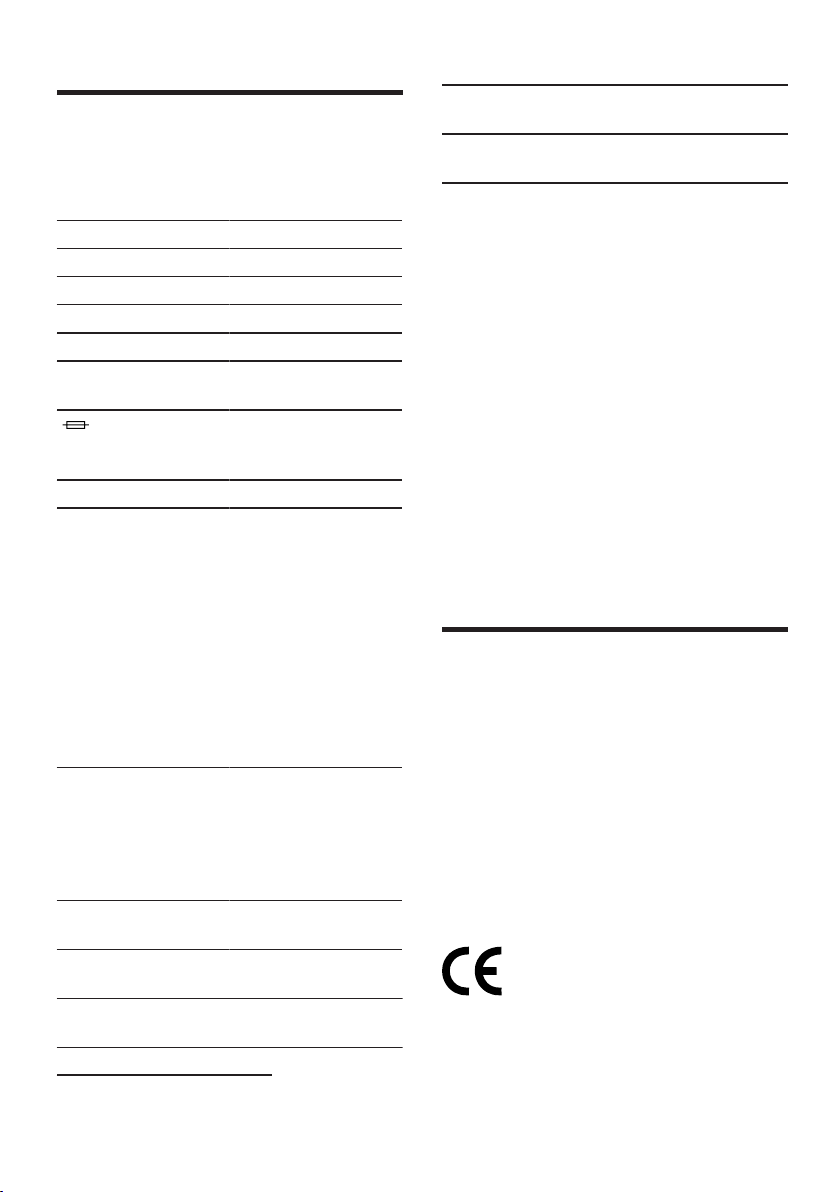
Technical specifications en
67
Technical specifications
22 Technical specifica-
tions
Technical specifications
Facts and figures for your appliance
can be found here.
Appliance height 85,0cm
Appliance width 60,0cm
Appliance depth 64,0cm
Weight 73kg
1
Maximum load 9kg
Mains voltage 220 - 240V,
50Hz
Minimum in-
stallation protec-
tion
10A
Rated power 2300W
Power consump-
tion
¡ Off mode:
0,10 W
¡ Left-on mode:
0,50W
¡ Time until the
networked
standby mode
is set (Wi-Fi):
5Min.
¡ Networked
standby mode
(Wi-Fi): 1,50W
Water pressure ¡ Minimum:
100kPa
(1bar)
¡ Maximum:
1000kPa
(10bar)
Length of the wa-
ter inlet hose
150cm
Length of the wa-
ter outlet hose
150cm
1
Depending on the appliance spe-
cifications
Length of the
power cord
210cm
1
Depending on the appliance spe-
cifications
This product contains light sources
from energy efficiency class F. These
light sources are available as a spare
part and must only be replaced by
trained specialist staff.
More information about your model
can be found online at https://en-
ergylabel.bsh-group.com
1
. This web
address is linked to the official EU
EPREL product database. At the time
of printing its web address had not
yet been published. Please then fol-
low the instructions on searching for
models. The model identifier is made
up of the characters before the slash
in the product number (E-Nr.) on the
rating plate. Alternatively you can
also find the model identifier in the
first line of the EU energy label.
Declaration of Conformity
23 Declaration of Con-
formity
Declaration of Conformity
Robert Bosch Hausgeräte GmbH
hereby declares that the appliance
with Home Connect functionality
meets the essential requirements and
other relevant provisions of the Dir-
ective 2014/53/EU.
A detailed RED Declaration of Con-
formity can be found online at
www.bosch-home.com among the
additional documents on the product
page for your appliance.
2.4GHz band: 100mW max.
5GHz band: 100mW max.
1
Only applies to countries in the European Economic Area

en Declaration of Conformity
68
BE BG CZ DK DE EE IE EL
ES FR HR IT CY LV LT LU
HU MT NL AT PL PT RO SI
SK FI SE UK NO CH TR
5GHz WLAN (Wi-Fi): For indoor use only.
Thank you for buying a
Bosch Home Appliance!
Register your new device on MyBosch now and profit directly from:
• Expert tips & tricks for your appliance
• Warranty extension options
• Discounts for accessories & spare-parts
• Digital manual and all appliance data at hand
• Easy access to Bosch Home Appliances Service
Free and easy registration – also on mobile phones:
www.bosch-home.com/welcome
Looking for help?
You'll find it here.
Expert advice for your Bosch home appliances, help with problems
or a repair from Bosch experts.
Find out everything about the many ways Bosch can support you:
www.bosch-home.com/service
Contact data of all countries are listed in the attached service direct-
ory.
*9001555425*
9001555425 (001111)
en
Robert Bosch Hausgeräte GmbH
Carl-Wery-Straße 34
81739 München
GERMANY
www.bosch-home.com