Anker Innovations Limited. All rights reserved. eufy Security and eufy Security Logo are
trademarks of Anker Innovations Limited, registered in the United States and other
countries. All other trademarks are the property of their respective owners.
51005002646 V01
QUICK
START GUIDE
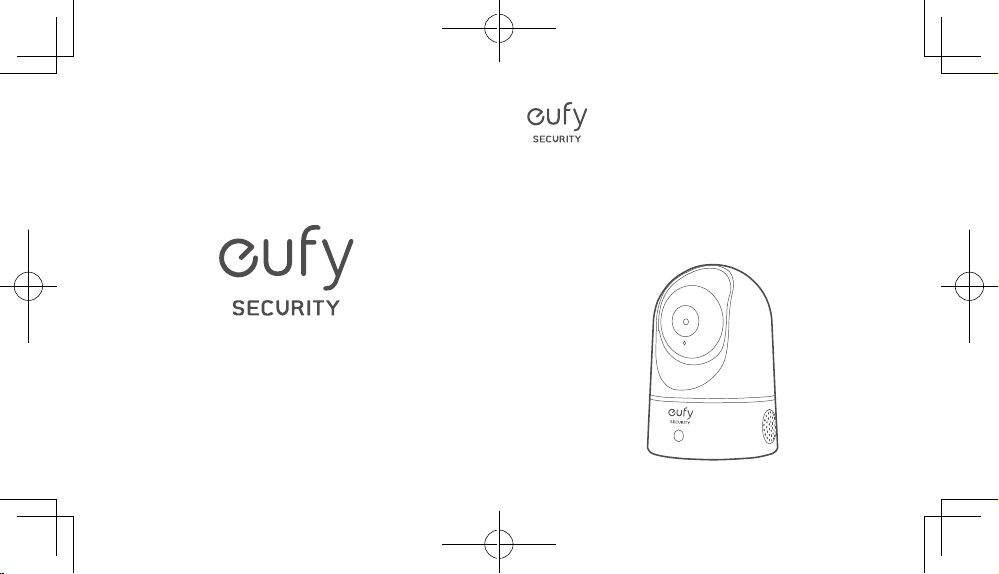
Indoor Cam 2K Pan & Tilt

Table of Contents
What’s included 01
Product overview 02
Setting up the system 03
Mounting the indoor cam 05
Powering on the indoor cam 10
HomeKit Statement 10
Notice 11
Customer service 16
English 01
Deutsch 17
Español 32
Français 47
Italiano 62
Nederlands 77
日本語
日本語
90
Português 101
ةي
ِ
ب
َ
ر
َ
عل
113

Table of Contents
What’s included 01
Product overview 02
Setting up the system 03
Mounting the indoor cam 05
Powering on the indoor cam 10
HomeKit Statement 10
Notice 11
Customer service 16
English 01
Deutsch 17
Español 32
Français 47
Italiano 62
Nederlands 77
日本語
日本語
90
Português 101
ةي
ِ
ب
َ
ر
َ
عل
113

English
0201
English
WHAT’S INCLUDED
Indoor Cam 2K Pan & Tilt
Model: T8410
Mounting Plate
USB Cable
USB Adapter
Mounting Screw Pack
microSD card (optional)
QSG
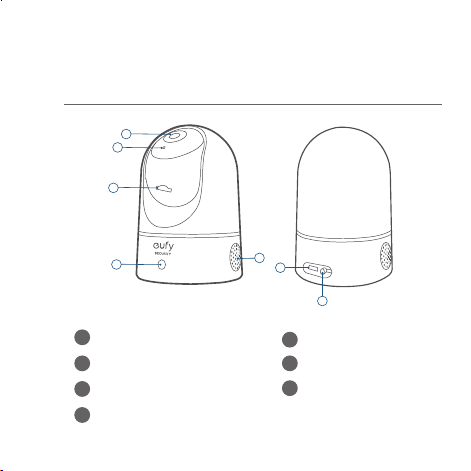
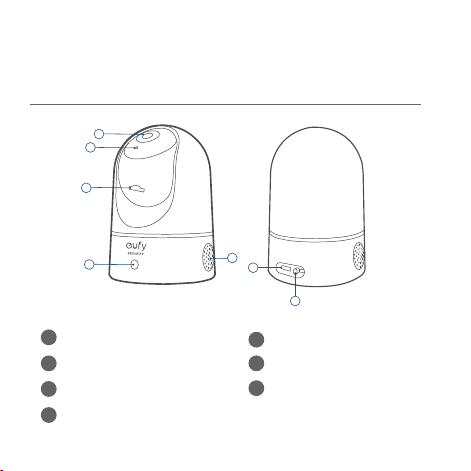
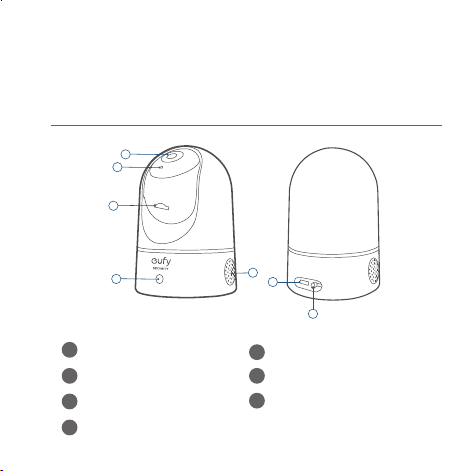
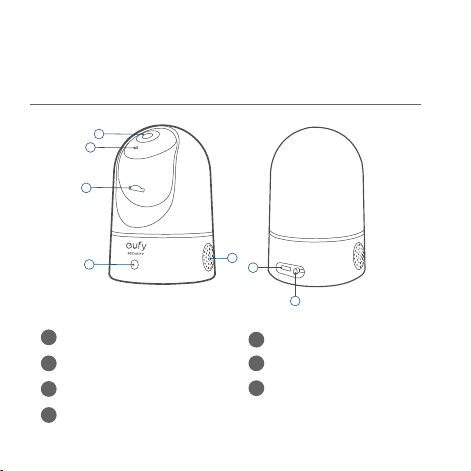
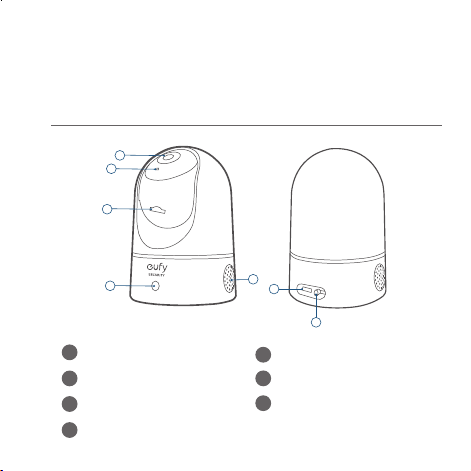
PRODUCT OVERVIEW
Indoor Cam 2K Pan & Tilt
1
2
3
4
5
6
7
1
Lens
5
Speaker
2
Microphone
6
Power input
3
SD card slot
7
SYNC button
4
Status LED
English
0201
English
WHAT’S INCLUDED
Indoor Cam 2K Pan & Tilt
Model: T8410
Mounting Plate
USB Cable
USB Adapter
Mounting Screw Pack
microSD card (optional)
QSG
PRODUCT OVERVIEW
Indoor Cam 2K Pan & Tilt
1
2
3
4
5
6
7
1
Lens
5
Speaker
2
Microphone
6
Power input
3
SD card slot
7
SYNC button
4
Status LED
English
0403
English
SETTING UP THE SYSTEM
1. Download the eufy Security app from the App Store
(iOS devices) or Google Play (Android devices).
2. Sign up a eufy Security account. Go to the app
homepage. Tap
Add Device
, and add the IndoorCam
Pan 2K to your system.
3. Follow the on-screen instructions to complete the
setup.
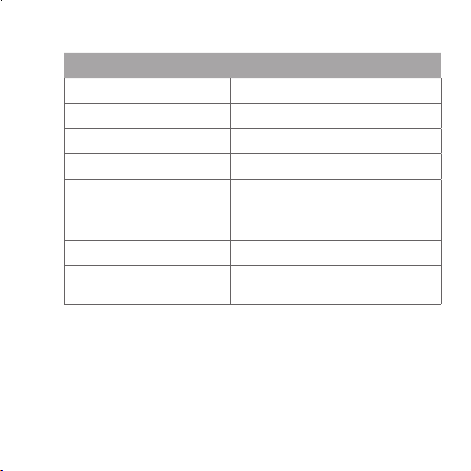
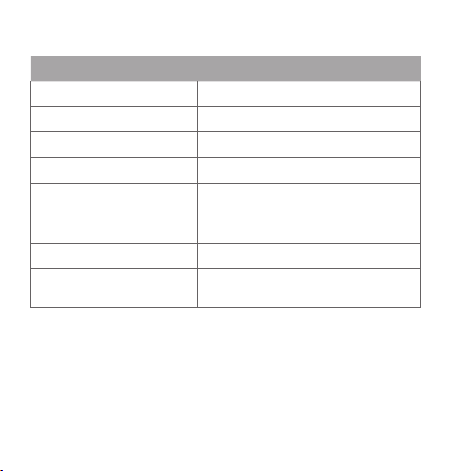
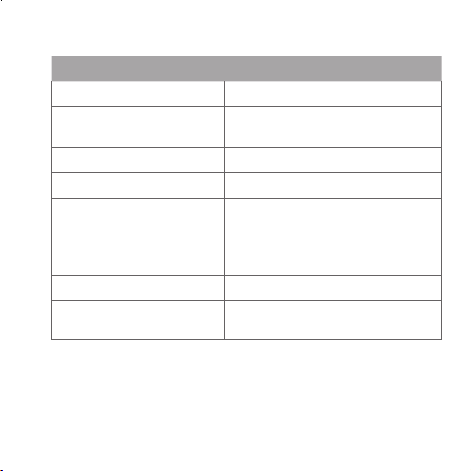
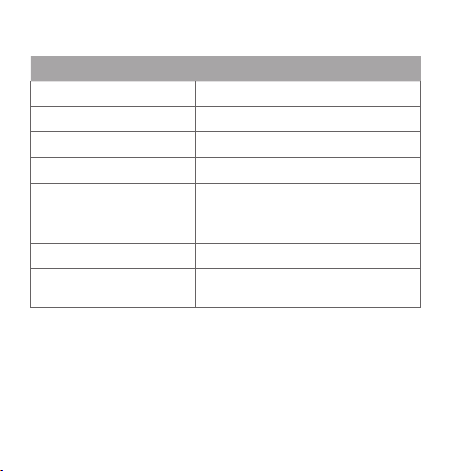
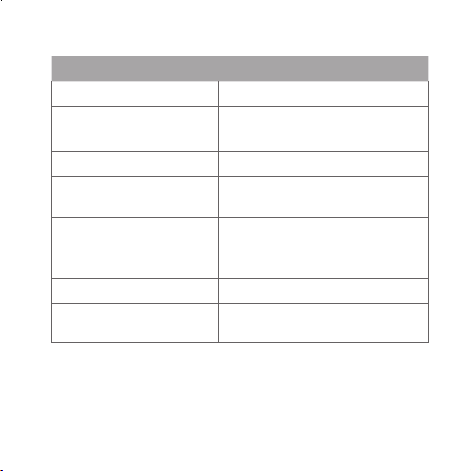
LED Status
LED Status Description
Breathing blue Ready for setup
Solid blue Powered on and working properly
Blinking red Disconnected from the internet
Blinking red once Motion or sound detected
Solid red
Working properly with someone
viewing the live stream or
recording event
Solid bluish violet System is initializing
Flashing blue and red
alternately
Firmware upgrade in progress
English
0403
English
SETTING UP THE SYSTEM
1. Download the eufy Security app from the App Store
(iOS devices) or Google Play (Android devices).
2. Sign up a eufy Security account. Go to the app
homepage. Tap
Add Device
, and add the IndoorCam
Pan 2K to your system.
3. Follow the on-screen instructions to complete the
setup.
LED Status
LED Status Description
Breathing blue Ready for setup
Solid blue Powered on and working properly
Blinking red Disconnected from the internet
Blinking red once Motion or sound detected
Solid red
Working properly with someone
viewing the live stream or
recording event
Solid bluish violet System is initializing
Flashing blue and red
alternately
Firmware upgrade in progress
English
0605
English
MOUNTING THE INDOOR CAM
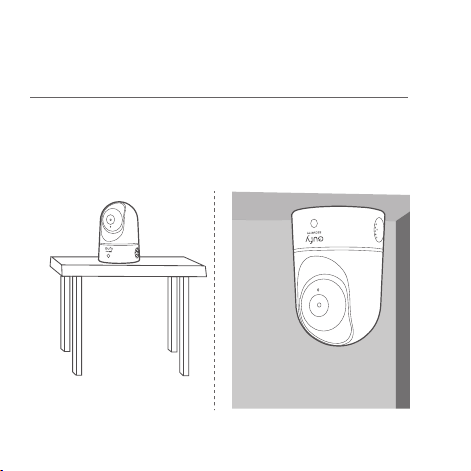
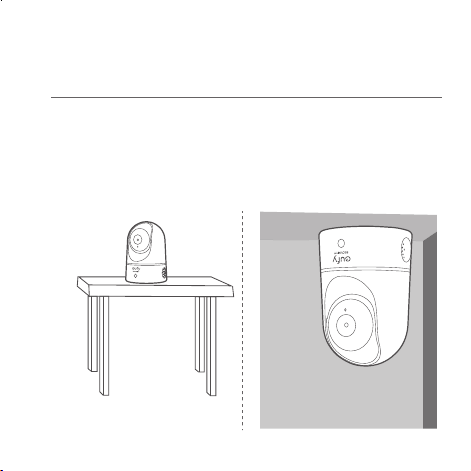
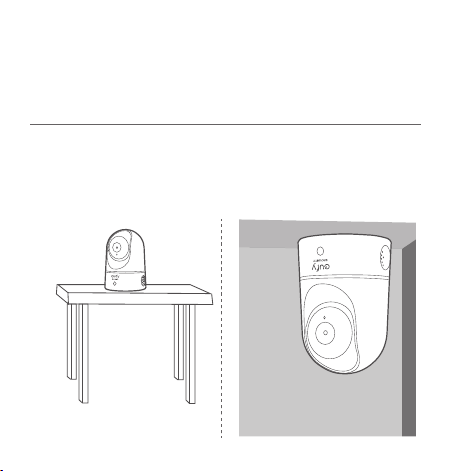
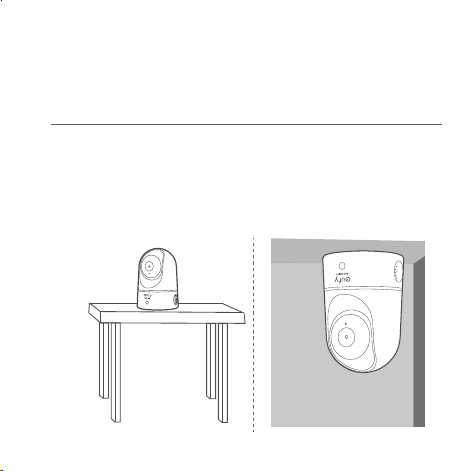
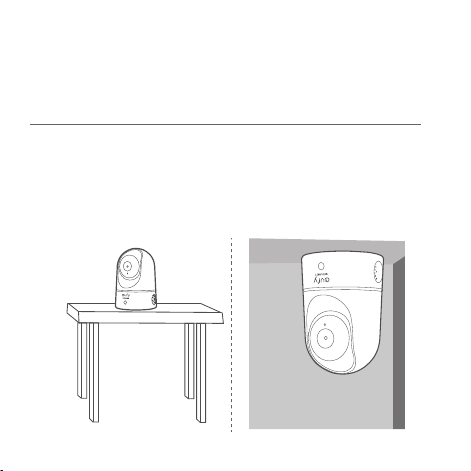
Select a Location for Mounting
The camera can be placed on a table, shelf, or can be mounted
on a wall or ceiling. Select a location and height where you can
get the desired view, and can reach a power outlet easily.
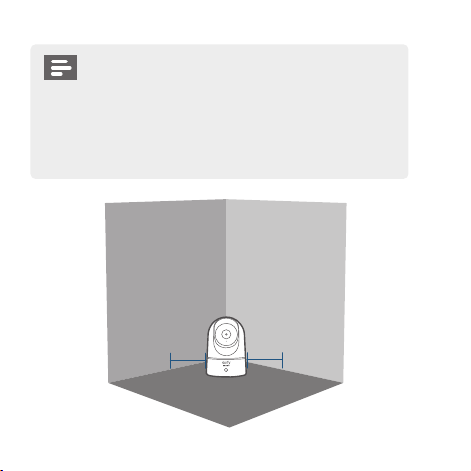
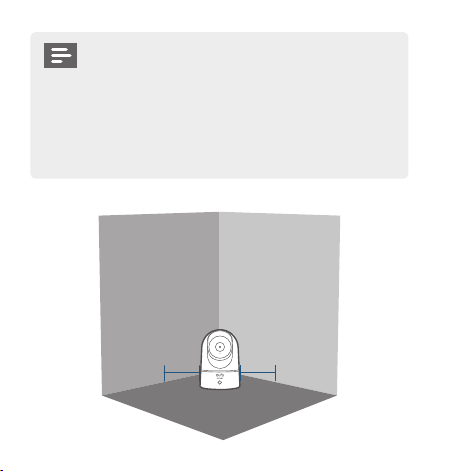
• Disconnect the Indoor Cam from the power
outlet before mounting.
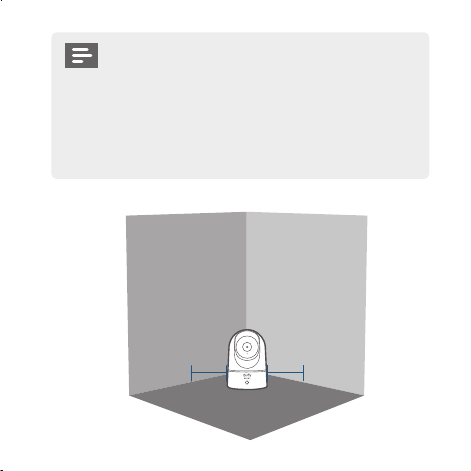
• Keep the Indoor Cam at least 0.7 ft / 20 cm away
from walls or anything that may obstruct the view.
Do this to avoid infrared reection which can have
a negative impact on the night vision performance.
> 20CM
> 20CM
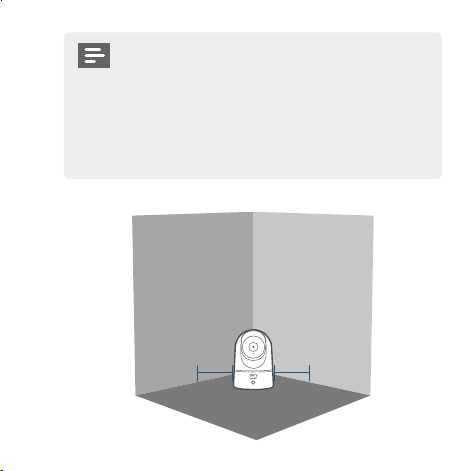
English
0605
English
MOUNTING THE INDOOR CAM
Select a Location for Mounting
The camera can be placed on a table, shelf, or can be mounted
on a wall or ceiling. Select a location and height where you can
get the desired view, and can reach a power outlet easily.
• Disconnect the Indoor Cam from the power
outlet before mounting.
• Keep the Indoor Cam at least 0.7 ft / 20 cm away
from walls or anything that may obstruct the view.
Do this to avoid infrared reection which can have
a negative impact on the night vision performance.
> 20CM
> 20CM
English
0807
English
Mount the Indoor Camera
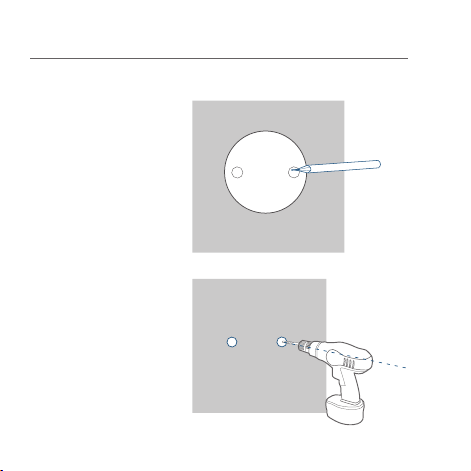
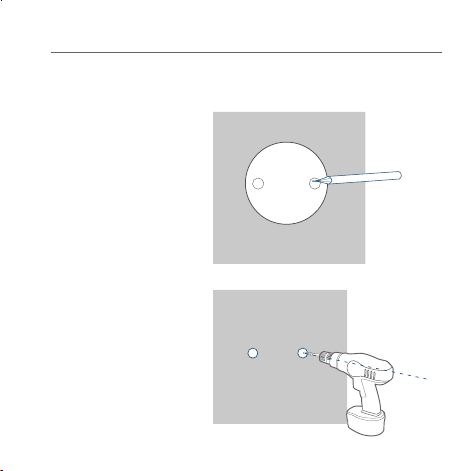
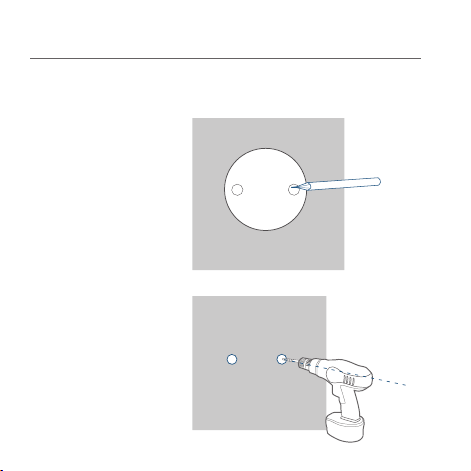
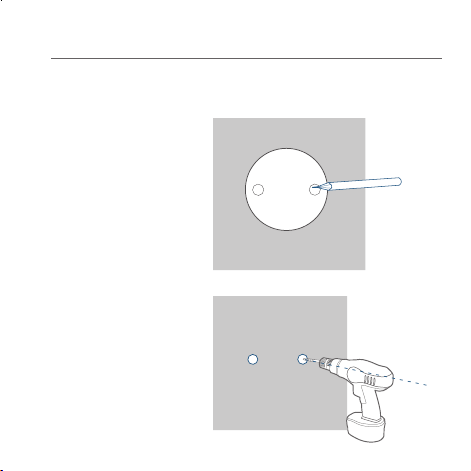
To mount the Indoor Cam on the ceiling, follow the steps below:
1. Place the positioning
card against the
ceiling and then
mark the points at
which drilling will be
required.
Ceiling
2. Drill holes with a
5/16” (8 mm) drill
bit.
Ceiling
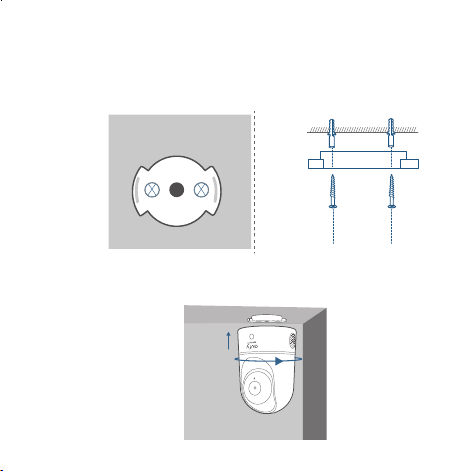
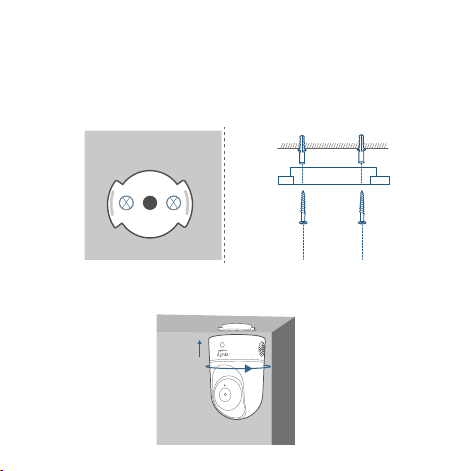
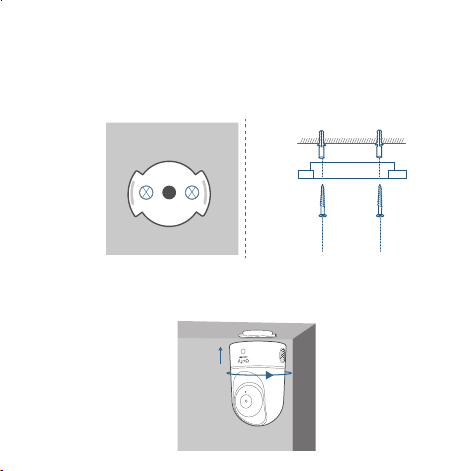
3. Align the holes on the mounting plate with those in the
ceiling. Insert the anchors into the holes; anchors are
necessary for walls that are made out of hard materials such
as concrete, brick, or stucco. Fix the screws with a Phillips-
head screwdriver to fasten the mounting plate to the ceiling.
Ceiling
Ceiling
4. Align the grooves with the mounting plate and rotate the
Indoor Cam clockwise until it clicks into place.
English
0807
English
Mount the Indoor Camera
To mount the Indoor Cam on the ceiling, follow the steps below:
1. Place the positioning
card against the
ceiling and then
mark the points at
which drilling will be
required.
Ceiling
2. Drill holes with a
5/16” (8 mm) drill
bit.
Ceiling
3. Align the holes on the mounting plate with those in the
ceiling. Insert the anchors into the holes; anchors are
necessary for walls that are made out of hard materials such
as concrete, brick, or stucco. Fix the screws with a Phillips-
head screwdriver to fasten the mounting plate to the ceiling.
Ceiling
Ceiling
4. Align the grooves with the mounting plate and rotate the
Indoor Cam clockwise until it clicks into place.
English
1009
English
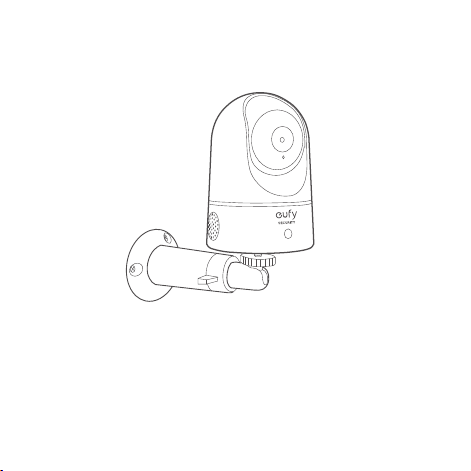
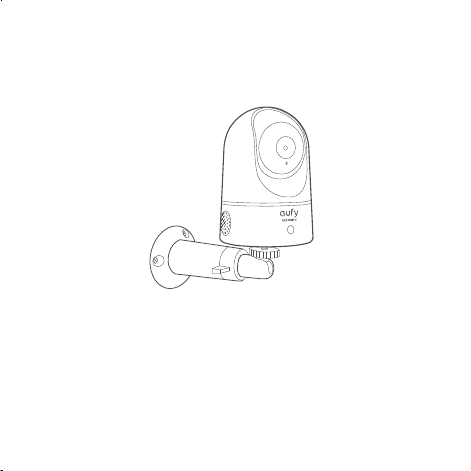
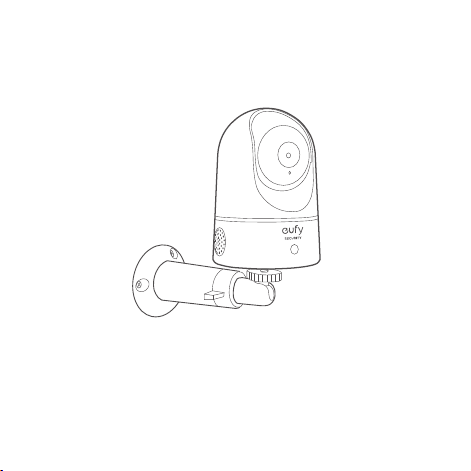
To mount the Indoor Cam on a wall, we recommend using the
mounting bracket (not provided) as the illustration below.
POWERING ON THE INDOOR CAM
Connect the Indoor Cam to a power outlet using the provided
USB cable and USB adapter. After being powered on, the Indoor
Cam will be connected to the system. When it is successfully
connected, the status LED will turn solid blue.
Rotate the Indoor Cam to adjust the view and check it using the
live stream which you can access in the eufy Security app. You
are now all set to use your Indoor Cam.
Tip:
For troubleshooting, check Help on the eufy Security app.
HomeKit Statement
Controlling this HomeKit-enabled accessory automatically and
away from home requires a HomePod, Apple TV, or iPad set up
as a home hub. It is recommended that you update to the latest
software and operating system.

English
1009
English
To mount the Indoor Cam on a wall, we recommend using the
mounting bracket (not provided) as the illustration below.
POWERING ON THE INDOOR CAM
Connect the Indoor Cam to a power outlet using the provided
USB cable and USB adapter. After being powered on, the Indoor
Cam will be connected to the system. When it is successfully
connected, the status LED will turn solid blue.
Rotate the Indoor Cam to adjust the view and check it using the
live stream which you can access in the eufy Security app. You
are now all set to use your Indoor Cam.
Tip:
For troubleshooting, check Help on the eufy Security app.
HomeKit Statement
Controlling this HomeKit-enabled accessory automatically and
away from home requires a HomePod, Apple TV, or iPad set up
as a home hub. It is recommended that you update to the latest
software and operating system.

English
1211
English
NOTICE
FCC Statement
This device complies with Part 15 of the FCC Rules. Operation
is subject to the following two conditions: (1) this device may
not cause harmful interference, and (2) this device must accept
any interference received, including interference that may cause
undesired operation.
Warning:
Changes or modications not expressly approved by the
party responsible for compliance could void the user's authority
to operate the equipment.
Note:
This equipment has been tested and found to comply
with the limits for a Class B digital device, pursuant to Part 15 of
the FCC Rules. These limits are designed to provide reasonable
protection against harmful interference in a residential installation.
This equipment generates uses and can radiate radio frequency
energy and, if not installed and used in accordance with
the instructions, may cause harmful interference to radio
communications. However, there is no guarantee that interference
will not occur in a particular installation. If this equipment does
cause harmful interference to radio or television reception, which
can be determined by turning the equipment off and on, the user
is encouraged to try to correct the interference by one or more
of the following measures: (1) Reorient or relocate the receiving
antenna. (2) Increase the separation between the equipment and
receiver. (3) Connect the equipment into an outlet on a circuit
different from that to which the receiver is connected. (4) Consult
the dealer or an experienced radio/ TV technician for help.
FCC Radio Frequency Exposure Statement
The device has been evaluated to meet general RF exposure
requirements. The device can be used in xed/mobile exposure
condition. The min separation distance is 20cm.
Notice: Shielded cables
All connections to other computing devices must be made using
shielded cables to maintain compliance with FCC regulations.
The following importer is the responsible party
Company Name: POWER MOBILE LIFE, LLC
Address: 400 108th Ave NE Ste 400, Bellevue, WA 98004-5541
Telephone:1-800-988-7973
This product complies with the radio interference
requirements of the European Community.
Declaration of Conformity
Hereby, Anker Innovations Limited declares that this device is in
compliance with the essential requirements and other relevant
provisions of Directive 2014/53/EU.For the declaration of
conformity, visit the Web site:https://uk.eufylife.com/
English
1211
English
NOTICE
FCC Statement
This device complies with Part 15 of the FCC Rules. Operation
is subject to the following two conditions: (1) this device may
not cause harmful interference, and (2) this device must accept
any interference received, including interference that may cause
undesired operation.
Warning:
Changes or modications not expressly approved by the
party responsible for compliance could void the user's authority
to operate the equipment.
Note:
This equipment has been tested and found to comply
with the limits for a Class B digital device, pursuant to Part 15 of
the FCC Rules. These limits are designed to provide reasonable
protection against harmful interference in a residential installation.
This equipment generates uses and can radiate radio frequency
energy and, if not installed and used in accordance with
the instructions, may cause harmful interference to radio
communications. However, there is no guarantee that interference
will not occur in a particular installation. If this equipment does
cause harmful interference to radio or television reception, which
can be determined by turning the equipment off and on, the user
is encouraged to try to correct the interference by one or more
of the following measures: (1) Reorient or relocate the receiving
antenna. (2) Increase the separation between the equipment and
receiver. (3) Connect the equipment into an outlet on a circuit
different from that to which the receiver is connected. (4) Consult
the dealer or an experienced radio/ TV technician for help.
FCC Radio Frequency Exposure Statement
The device has been evaluated to meet general RF exposure
requirements. The device can be used in xed/mobile exposure
condition. The min separation distance is 20cm.
Notice: Shielded cables
All connections to other computing devices must be made using
shielded cables to maintain compliance with FCC regulations.
The following importer is the responsible party
Company Name: POWER MOBILE LIFE, LLC
Address: 400 108th Ave NE Ste 400, Bellevue, WA 98004-5541
Telephone:1-800-988-7973
This product complies with the radio interference
requirements of the European Community.
Declaration of Conformity
Hereby, Anker Innovations Limited declares that this device is in
compliance with the essential requirements and other relevant
provisions of Directive 2014/53/EU.For the declaration of
conformity, visit the Web site:https://uk.eufylife.com/

English
1413
English
This product can be used across EU member states.
Due to the used enclosure material, the product shall only be
connected to a USB Interface of version 2.0 or higher.
The adapter shall be installed near the equipment and shall be
easily accessible.
Do not use the Device in the environment at too high or too low
temperature, never expose the Device under strong sunshine or
too wet environment.
The suitable temperature for T8410 and accessories is 0°C-40°C.
When charging, please place the device in an environment that has
a normal room temperature and good ventilation.
It is recommended to charge the device in an environment with a
temperature that ranges from 5°C~25°C
Please ensure to use only the charger offered by the manufacturer.
Using unauthorized charger may cause danger and violate the
authorization of the device and the guarantee article.
This charger is for indoor use only.
The charger type is TEKA012-0502000EU or TEKA-UCA20EU,
output voltage/current is 5Vdc/2A. The plug considered as
disconnect device of adapter.
RF exposure information: The Maximum Permissible Exposure
(MPE) level has been calculated based on a distance of d=20 cm
between the device and the human body. To maintain compliance
with RF exposure requirement, use product that maintain a 20cm
distance between the device and human body.
Wi-Fi Operating Frequency Range:2412~2472MHz ; Wi-Fi Max
Output Power:14.46dBm(ERIP)
Bluetooth Operating Frequency Range:2402~2480MHz; Bluetooth
Max Output Power:0.64dBm(EIRP)
Anker Innovations Deutschland GmbH I Georg-Muche-Strasse
3, 80807 Munich, Germany
Anker Technology (UK) Ltd | Suite B, Fairgate House, 205 Kings
Road, Tyseley, Birmingham, B11 2AA, United Kingdom
This product is designed and manufactured with high
quality materials and components, which can be recycled
and reused.
This symbol means the product must not be discarded
as household waste, and should be delivered to an
appropriate collection facility for recycling. Proper
disposal and recycling helps protect natural resources,
human health and the environment. For more information
on disposal and recycling of this product, contact your
local municipality, disposal service, or the shop where you
bought this product.
IC Statement
English
1413
English
This product can be used across EU member states.
Due to the used enclosure material, the product shall only be
connected to a USB Interface of version 2.0 or higher.
The adapter shall be installed near the equipment and shall be
easily accessible.
Do not use the Device in the environment at too high or too low
temperature, never expose the Device under strong sunshine or
too wet environment.
The suitable temperature for T8410 and accessories is 0°C-40°C.
When charging, please place the device in an environment that has
a normal room temperature and good ventilation.
It is recommended to charge the device in an environment with a
temperature that ranges from 5°C~25°C
Please ensure to use only the charger offered by the manufacturer.
Using unauthorized charger may cause danger and violate the
authorization of the device and the guarantee article.
This charger is for indoor use only.
The charger type is TEKA012-0502000EU or TEKA-UCA20EU,
output voltage/current is 5Vdc/2A. The plug considered as
disconnect device of adapter.
RF exposure information: The Maximum Permissible Exposure
(MPE) level has been calculated based on a distance of d=20 cm
between the device and the human body. To maintain compliance
with RF exposure requirement, use product that maintain a 20cm
distance between the device and human body.
Wi-Fi Operating Frequency Range:2412~2472MHz ; Wi-Fi Max
Output Power:14.46dBm(ERIP)
Bluetooth Operating Frequency Range:2402~2480MHz; Bluetooth
Max Output Power:0.64dBm(EIRP)
Anker Innovations Deutschland GmbH I Georg-Muche-Strasse
3, 80807 Munich, Germany
Anker Technology (UK) Ltd | Suite B, Fairgate House, 205 Kings
Road, Tyseley, Birmingham, B11 2AA, United Kingdom
This product is designed and manufactured with high
quality materials and components, which can be recycled
and reused.
This symbol means the product must not be discarded
as household waste, and should be delivered to an
appropriate collection facility for recycling. Proper
disposal and recycling helps protect natural resources,
human health and the environment. For more information
on disposal and recycling of this product, contact your
local municipality, disposal service, or the shop where you
bought this product.
IC Statement

English
1615
English
This device complies with Industry Canada licence-exempt RSS
standard(s). Operation is subject to the following two conditions:
(1) this device may not cause interference, and
(2) this device must accept any interference, including interference
that may cause undesired operation of the device."
Le présent appareil est conforme aux CNR d'Industrie Canada
applicables aux appareils radio exempts de licence. L'exploitation
est autorisée aux deux conditions suivantes:
(1) l'appareil nedoit pas produire de brouillage, et
(2) l'utilisateur de l'appareil doit accepter tout brouillage
radioélectrique subi, même si le brouillage est susceptible d'en
compromettre le fonctionnement."
This Class B digital apparatus complies with Canadian ICES-003.
Cet appareil numérique de la classe B est conforme à la norme
NMB-003 du Canada.
CUSTOMER SERVICE
• Warranty
12-month Limited Warranty
• Call Us
United States +1 (800) 988 7973 Mon-Fri 9AM-5PM (PT)
United Kingdom +44 (0) 1604 936 200 Mon-Fri 6AM-11AM
(GMT)
Germany +49 (0) 69 9579 7960 Mon-Fri 6:00-11:00
• Email Us
Customer Support: support@eufylife.com
Anker Innovations Limited
Room 1318-19,Hollywood Plaza,610 Nathan
Road,Mongkok,Kowloon,Hong Kong
IC RF Statement:
When using the product, maintain a distance of 20cm from the
body to ensure compliance with RF exposure requirements.
Lors de l'utilisation du produit, maintenez une distance de 20
cm du corps an de vous conformer aux exigences en matière
d'exposition RF.

English
1615
English
This device complies with Industry Canada licence-exempt RSS
standard(s). Operation is subject to the following two conditions:
(1) this device may not cause interference, and
(2) this device must accept any interference, including interference
that may cause undesired operation of the device."
Le présent appareil est conforme aux CNR d'Industrie Canada
applicables aux appareils radio exempts de licence. L'exploitation
est autorisée aux deux conditions suivantes:
(1) l'appareil nedoit pas produire de brouillage, et
(2) l'utilisateur de l'appareil doit accepter tout brouillage
radioélectrique subi, même si le brouillage est susceptible d'en
compromettre le fonctionnement."
This Class B digital apparatus complies with Canadian ICES-003.
Cet appareil numérique de la classe B est conforme à la norme
NMB-003 du Canada.
CUSTOMER SERVICE
• Warranty
12-month Limited Warranty
• Call Us
United States +1 (800) 988 7973 Mon-Fri 9AM-5PM (PT)
United Kingdom +44 (0) 1604 936 200 Mon-Fri 6AM-11AM
(GMT)
Germany +49 (0) 69 9579 7960 Mon-Fri 6:00-11:00
• Email Us
Customer Support: suppor[email protected]
Anker Innovations Limited
Room 1318-19,Hollywood Plaza,610 Nathan
Road,Mongkok,Kowloon,Hong Kong
IC RF Statement:
When using the product, maintain a distance of 20cm from the
body to ensure compliance with RF exposure requirements.
Lors de l'utilisation du produit, maintenez une distance de 20
cm du corps an de vous conformer aux exigences en matière
d'exposition RF.

17 Deutsch Deutsch 18
IM LIEFERUMFANG
Indoor Cam 2K Pan & Tilt
Modell:T8410
Montageplatte
USB-Ladekabel
USB-Netzteil
Paket Befestigungsschrauben
microSD-Karte (optional)
Benutzerhandbuch
Inhaltsverzeichnis
Im lieferumfang 18
Produktübersicht 19
Einrichten des systems 20
Montage der indoor cam 22
Einschalten der indoor cam 27
Hinweis 28
Kundendienst 31

17 Deutsch Deutsch 18
IM LIEFERUMFANG
Indoor Cam 2K Pan & Tilt
Modell:T8410
Montageplatte
USB-Ladekabel
USB-Netzteil
Paket Befestigungsschrauben
microSD-Karte (optional)
Benutzerhandbuch
Inhaltsverzeichnis
Im lieferumfang 18
Produktübersicht 19
Einrichten des systems 20
Montage der indoor cam 22
Einschalten der indoor cam 27
Hinweis 28
Kundendienst 31
19 Deutsch Deutsch 20
EINRICHTEN DES SYSTEMS
1. Laden Sie die eufy Security-App aus dem App Store
(iOS-Geräte) oder bei Google Play (Android) herunter.
2. Richten Sie ein eufy Security-Konto ein. Navigieren
Sie zur Startseite der App.Tippen Sie auf "Gerät
hinzufügen", und fügen Sie die IndoorCam Pan 2K zu
Ihrem System hinzu.
3. Befolgen Sie die Bildschirmanweisungen, um die
Einrichtung abzuschließen.
PRODUKTÜBERSICHT
Indoor Cam 2K Pan & Tilt
1
2
3
4
5
6
7
1
Objektiv
5
Lautsprecher
2
Mikrofon
6
Stromeingang
3
SD-Kartensteckplatz
7
SYNC-Taste
4
Status-LED
19 Deutsch Deutsch 20
EINRICHTEN DES SYSTEMS
1. Laden Sie die eufy Security-App aus dem App Store
(iOS-Geräte) oder bei Google Play (Android) herunter.
2. Richten Sie ein eufy Security-Konto ein. Navigieren
Sie zur Startseite der App.Tippen Sie auf "Gerät
hinzufügen", und fügen Sie die IndoorCam Pan 2K zu
Ihrem System hinzu.
3. Befolgen Sie die Bildschirmanweisungen, um die
Einrichtung abzuschließen.
PRODUKTÜBERSICHT
Indoor Cam 2K Pan & Tilt
1
2
3
4
5
6
7
1
Objektiv
5
Lautsprecher
2
Mikrofon
6
Stromeingang
3
SD-Kartensteckplatz
7
SYNC-Taste
4
Status-LED
21 Deutsch Deutsch 22
MONTAGE DER INDOOR CAM
Auswählen des Montageorts
Die Kamera kann auf einem Tisch oder in einem Regal aufgestellt
oder an der Wand oder Decke montiert werden. Wählen Sie einen
Standort nahe an einer Steckdose und eine Höhe aus, von wo aus
Sie die gewünschte Ansicht erhalten.
LED-Status
LED-Status Beschreibung
Blau an-/abschwellend Bereit zur Einrichtung
Leuchtet blau Eingeschaltet und in Funktion
Blinkt rot Vom Internet getrennt
Blinkt einmal rot Bewegung oder Geräusch erkannt
Leuchtet rot
In Funktion, Live-Stream oder die
Aufzeichnung eines Ereignisses wird
betrachtet
Leuchtet blau-violett System wird initialisiert
Blinkt abwechselnd blau
und rot
Firmware-Aktualisierung wird
durchgeführt
21 Deutsch Deutsch 22
MONTAGE DER INDOOR CAM
Auswählen des Montageorts
Die Kamera kann auf einem Tisch oder in einem Regal aufgestellt
oder an der Wand oder Decke montiert werden. Wählen Sie einen
Standort nahe an einer Steckdose und eine Höhe aus, von wo aus
Sie die gewünschte Ansicht erhalten.
LED-Status
LED-Status Beschreibung
Blau an-/abschwellend Bereit zur Einrichtung
Leuchtet blau Eingeschaltet und in Funktion
Blinkt rot Vom Internet getrennt
Blinkt einmal rot Bewegung oder Geräusch erkannt
Leuchtet rot
In Funktion, Live-Stream oder die
Aufzeichnung eines Ereignisses wird
betrachtet
Leuchtet blau-violett System wird initialisiert
Blinkt abwechselnd blau
und rot
Firmware-Aktualisierung wird
durchgeführt
23 Deutsch Deutsch 24
Montage der Indoor Cam
Um die Indoor Cam an der Decke zu montieren, führen Sie die
folgenden Schritte aus:
1. Halten Sie die
Montageschablone
gegen die Decke und
markieren Sie dann
die Punkte, an denen
gebohrt werden
muss.
Ceiling
2. Bohren Sie die
Löcher mit einem
8-mm-Bohrer.
Ceiling
• Trennen Sie die Indoor Cam vor der Montage von
der Steckdose.
• Halten Sie die Indoor Cam mindestens 20 cm von
Wänden oder allen anderen Objekten entfernt, die
die Sicht behindern könnten. Dies ist erforderlich,
um Infrarot-Reexionen zu vermeiden, die sich
negativ auf die Nachtsichtleistung auswirken können.
> 20CM
> 20CM
23 Deutsch Deutsch 24
Montage der Indoor Cam
Um die Indoor Cam an der Decke zu montieren, führen Sie die
folgenden Schritte aus:
1. Halten Sie die
Montageschablone
gegen die Decke und
markieren Sie dann
die Punkte, an denen
gebohrt werden
muss.
Ceiling
2. Bohren Sie die
Löcher mit einem
8-mm-Bohrer.
Ceiling
• Trennen Sie die Indoor Cam vor der Montage von
der Steckdose.
• Halten Sie die Indoor Cam mindestens 20 cm von
Wänden oder allen anderen Objekten entfernt, die
die Sicht behindern könnten. Dies ist erforderlich,
um Infrarot-Reexionen zu vermeiden, die sich
negativ auf die Nachtsichtleistung auswirken können.
> 20CM
> 20CM
25 Deutsch Deutsch 26
Zur Montage der Indoor Cam an einer Wand empfehlen wir die
Verwendung der Montagehalterung (nicht mitgeliefert) wie in der
Abbildung unten dargestellt.
3. Richten Sie die Löcher in der Montageplatte mit denen in der
Decke aus.Setzen Sie die Dübel in die Löcher ein. Dübel sind
für Wände erforderlich, die aus einem harten Material wie
Beton, Ziegel oder Gips bestehen. Ziehen Sie die Schrauben mit
einem Kreuzschlitzschraubendreher an, um die Montageplatte
an der Decke zu befestigen.
Ceiling
Ceiling
4. Richten Sie die Nuten mit der Montageplatte aus und drehen
Sie die Indoor Cam im Uhrzeigersinn, bis sie einrastet.
25 Deutsch Deutsch 26
Zur Montage der Indoor Cam an einer Wand empfehlen wir die
Verwendung der Montagehalterung (nicht mitgeliefert) wie in der
Abbildung unten dargestellt.
3. Richten Sie die Löcher in der Montageplatte mit denen in der
Decke aus.Setzen Sie die Dübel in die Löcher ein. Dübel sind
für Wände erforderlich, die aus einem harten Material wie
Beton, Ziegel oder Gips bestehen. Ziehen Sie die Schrauben mit
einem Kreuzschlitzschraubendreher an, um die Montageplatte
an der Decke zu befestigen.
Ceiling
Ceiling
4. Richten Sie die Nuten mit der Montageplatte aus und drehen
Sie die Indoor Cam im Uhrzeigersinn, bis sie einrastet.

27 Deutsch Deutsch 28
Hinweis
This product complies with the radio interference
requirements of the European Community.
Konformitätserklärung
Anker Innovations Limited erklärt hiermit, dass dieses Gerät
die grundlegenden Anforderungen und anderen relevanten
Bestimmungen der Richtlinie 2014/53/EG erfüllt.Die
Konformitätserklärung nden Sie auf der Website
https://uk.eufylife.com/
Dieses Produkt kann in den EU-Mitgliedstaaten verwendet werden.
Das Netzteil muss in der Nähe des Geräts installiert werden und
leicht zugänglich sein.
Verwenden Sie das Gerät nicht in Umgebungen mit zu hoher oder
zu niedriger Temperatur; setzen Sie das Gerät niemals starker
Sonneneinstrahlung oder einer zu feuchten Umgebung aus.
The suitable temperature for T8410 and accessories is 0°C-40°C.
Verwenden Sie ausschließlich das vom Hersteller angebotene
Ladegerät. Die Verwendung nicht autorisierter Ladegeräte kann zu
Gefahren führen und gegen die Autorisierung des Geräts und den
EINSCHALTEN DER INDOOR CAM
Schließen Sie die Indoor Cam mit dem mitgelieferten USB-
Kabel und dem USB-Adapter an eine Steckdose an. Nach dem
Einschalten wird die Indoor Cam mit dem System verbunden.
Wenn die Verbindung erfolgreich hergestellt wurde, leuchtet die
Status-LED blau.
Drehen Sie die Indoor Cam, um die Ansicht anzupassen und
überprüfen Sie die Einstellung im Live-Stream, auf den Sie in der
eufy Security App zugreifen können. Sie können Ihre Indoor Cam
nun verwenden.
Tipp:
Tipps zur Fehlerbehebung nden Sie in der Hilfe der eufy Security-
App.
27 Deutsch Deutsch 28
Hinweis
This product complies with the radio interference
requirements of the European Community.
Konformitätserklärung
Anker Innovations Limited erklärt hiermit, dass dieses Gerät
die grundlegenden Anforderungen und anderen relevanten
Bestimmungen der Richtlinie 2014/53/EG erfüllt.Die
Konformitätserklärung nden Sie auf der Website
https://uk.eufylife.com/
Dieses Produkt kann in den EU-Mitgliedstaaten verwendet werden.
Das Netzteil muss in der Nähe des Geräts installiert werden und
leicht zugänglich sein.
Verwenden Sie das Gerät nicht in Umgebungen mit zu hoher oder
zu niedriger Temperatur; setzen Sie das Gerät niemals starker
Sonneneinstrahlung oder einer zu feuchten Umgebung aus.
The suitable temperature for T8410 and accessories is 0°C-40°C.
Verwenden Sie ausschließlich das vom Hersteller angebotene
Ladegerät. Die Verwendung nicht autorisierter Ladegeräte kann zu
Gefahren führen und gegen die Autorisierung des Geräts und den
EINSCHALTEN DER INDOOR CAM
Schließen Sie die Indoor Cam mit dem mitgelieferten USB-
Kabel und dem USB-Adapter an eine Steckdose an. Nach dem
Einschalten wird die Indoor Cam mit dem System verbunden.
Wenn die Verbindung erfolgreich hergestellt wurde, leuchtet die
Status-LED blau.
Drehen Sie die Indoor Cam, um die Ansicht anzupassen und
überprüfen Sie die Einstellung im Live-Stream, auf den Sie in der
eufy Security App zugreifen können. Sie können Ihre Indoor Cam
nun verwenden.
Tipp:
Tipps zur Fehlerbehebung nden Sie in der Hilfe der eufy Security-
App.

29 Deutsch Deutsch 30
Garantie-Artikel verstoßen.
Das Ladegerät darf ausschließlich in Innenbereichen verwendet
werden.
Das Ladegerät ist vom Typ TEKA012-0502000EU /TEKA-
UCA20EU mit 5einer Ausgangsspannung/Stromstärke von
5V DC/2A
Zum Trennen des Adapters von der Stromversorgung
den Netzstecker ziehen.
Informationen zur HF-Belastung: Die maximal zulässige Belastung
wurde basierend auf einem Abstand von d=20 cm zwischen
dem Gerät und dem menschlichen Körper berechnet. Um die
Anforderungen in Bezug auf die HF-Belastung zu erfüllen, muss
zwischen dem Gerät und dem menschlichen Körper ein Abstand
von mindestens 20 cm bestehen.
WLAN-Betriebsfrequenzbereich: 2412~2472 MHz; max. WLAN
Ausgangsleistung: 14.46 dBm
Bluetooth-Betriebsfrequenzbereich: 2402~2480MHz; max.
Bluetooth-Ausgangsleistung: 0.64 dBm (EIRP)
Anker Innovations Deutschland GmbH I Georg-Muche-Straße 3,
80807 München, Deutschland
Anker Technology (UK) Ltd I Suite B, Fairgate House, 205 Kings
Road, Tyseley, Birmingham, B11 2AA, Großbritannien
Dieses Produkt ist mit hochwertigen Materialien und
Komponenten für Recycling und Wiederverwertung
konzipiert.
Dieses Symbol bedeutet, dass das Produkt nicht
als Hausmüll entsorgt werden darf, sondern einer
angemessenen Sammelstelle für das Recycling zugeführt
werden muss. Durch das ordnungsgemäße Entsorgen
und Recyceln tragen Sie zum Schutz natürlicher
Ressourcen und zur Vermeidung von Umwelt- und
Gesundheitsschäden bei. Weitere Informationen zum
Entsorgen und Recyceln dieses Produkts erhalten Sie
von Ihrer Gemeindeverwaltung, Ihrem zuständigen
Entsorgungsdienst oder dem Geschäft, in dem Sie
dieses Produkt erworben haben.
29 Deutsch Deutsch 30
Garantie-Artikel verstoßen.
Das Ladegerät darf ausschließlich in Innenbereichen verwendet
werden.
Das Ladegerät ist vom Typ TEKA012-0502000EU /TEKA-
UCA20EU mit 5einer Ausgangsspannung/Stromstärke von
5V DC/2A
Zum Trennen des Adapters von der Stromversorgung
den Netzstecker ziehen.
Informationen zur HF-Belastung: Die maximal zulässige Belastung
wurde basierend auf einem Abstand von d=20 cm zwischen
dem Gerät und dem menschlichen Körper berechnet. Um die
Anforderungen in Bezug auf die HF-Belastung zu erfüllen, muss
zwischen dem Gerät und dem menschlichen Körper ein Abstand
von mindestens 20 cm bestehen.
WLAN-Betriebsfrequenzbereich: 2412~2472 MHz; max. WLAN
Ausgangsleistung: 14.46 dBm
Bluetooth-Betriebsfrequenzbereich: 2402~2480MHz; max.
Bluetooth-Ausgangsleistung: 0.64 dBm (EIRP)
Anker Innovations Deutschland GmbH I Georg-Muche-Straße 3,
80807 München, Deutschland
Anker Technology (UK) Ltd I Suite B, Fairgate House, 205 Kings
Road, Tyseley, Birmingham, B11 2AA, Großbritannien
Dieses Produkt ist mit hochwertigen Materialien und
Komponenten für Recycling und Wiederverwertung
konzipiert.
Dieses Symbol bedeutet, dass das Produkt nicht
als Hausmüll entsorgt werden darf, sondern einer
angemessenen Sammelstelle für das Recycling zugeführt
werden muss. Durch das ordnungsgemäße Entsorgen
und Recyceln tragen Sie zum Schutz natürlicher
Ressourcen und zur Vermeidung von Umwelt- und
Gesundheitsschäden bei. Weitere Informationen zum
Entsorgen und Recyceln dieses Produkts erhalten Sie
von Ihrer Gemeindeverwaltung, Ihrem zuständigen
Entsorgungsdienst oder dem Geschäft, in dem Sie
dieses Produkt erworben haben.

Español 3231 Deutsch
Tabla de contenido
Contenido 33
Descripción del producto 34
Conguración del sistema 35
Instalación de la cámara de interior 37
Encendido de la cámara de interior 42
Aviso 43
Servicio de atención al cliente 46
KUNDENDIENST
• Garantie
12 Monate eingeschränkte Garantie
• Rufen Sie uns an
USA +1 800 988 7973, Mo-Fr 9.00-17.00 Uhr (PT)
Großbritannien +44 1604 936 200, Mo-Fr 06.00-11.00 Uhr (GMT)
Deutschland +49 69 9579 7960, Mo-Fr 6:00–11:00 Uhr
• Senden Sie uns eine E-Mail
Kunden-Support: suppor[email protected]

Español 3231 Deutsch
Tabla de contenido
Contenido 33
Descripción del producto 34
Conguración del sistema 35
Instalación de la cámara de interior 37
Encendido de la cámara de interior 42
Aviso 43
Servicio de atención al cliente 46
KUNDENDIENST
• Garantie
12 Monate eingeschränkte Garantie
• Rufen Sie uns an
USA +1 800 988 7973, Mo-Fr 9.00-17.00 Uhr (PT)
Großbritannien +44 1604 936 200, Mo-Fr 06.00-11.00 Uhr (GMT)
Deutschland +49 69 9579 7960, Mo-Fr 6:00–11:00 Uhr
• Senden Sie uns eine E-Mail
Kunden-Support: support@eufylife.com

33 Español Español 34
DESCRIPCIÓN DEL PRODUCTO
Cámara de interior 2K eufy con desplazamiento
vertical y lateral
1
2
3
4
5
6
7
1
Lente
5
Altavoz
2
Micrófono
6
Entrada de alimentación
3
Ranura para tarjetas SD
7
Botón Sincronizar
4
LED de estado
CONTENIDO
Cámara de interior 2K eufy con desplazamiento vertical y lateral
Model
o:
T8410
Placa de montaje
Cable USB
Adaptador USB
Paquete de tornillos de montaje
tarjeta microSD (opcional)
Manual del usuario
33 Español Español 34
DESCRIPCIÓN DEL PRODUCTO
Cámara de interior 2K eufy con desplazamiento
vertical y lateral
1
2
3
4
5
6
7
1
Lente
5
Altavoz
2
Micrófono
6
Entrada de alimentación
3
Ranura para tarjetas SD
7
Botón Sincronizar
4
LED de estado
CONTENIDO
Cámara de interior 2K eufy con desplazamiento vertical y lateral
Model
o:
T8410
Placa de montaje
Cable USB
Adaptador USB
Paquete de tornillos de montaje
tarjeta microSD (opcional)
Manual del usuario
35 Español Español 36
Estado de LED
Estado de LED Descripción
Parpadeo azul Listo para congurar
Azul jo
Encendido y en funcionamiento
correcto
Rojo intermitente Sin conexión a Internet
Rojo intermitente (una vez) Movimiento o sonido detectado
Rojo jo
Funcionamiento correcto con un
usuario visualizando las imágenes en
tiempo real o grabando un evento
Violeta jo Inicialización del sistema en curso
Parpadeo azul y rojo
alternativamente
Actualización de rmware en curso
CONFIGURACIÓN DEL SISTEMA
1. Descargue la aplicación eufy Security desde
la App Store (dispositivos iOS) o Google Play
(dispositivos Android).
2. Regístrese para crear una cuenta eufy Security. Vaya
a la página de inicio de la aplicación.Toque Añadir
dispositivo y añada la cámara de interior 2K al
sistema.
3. Siga las instrucciones en pantalla para completar la
conguración.
35 Español Español 36
Estado de LED
Estado de LED Descripción
Parpadeo azul Listo para congurar
Azul jo
Encendido y en funcionamiento
correcto
Rojo intermitente Sin conexión a Internet
Rojo intermitente (una vez) Movimiento o sonido detectado
Rojo jo
Funcionamiento correcto con un
usuario visualizando las imágenes en
tiempo real o grabando un evento
Violeta jo Inicialización del sistema en curso
Parpadeo azul y rojo
alternativamente
Actualización de rmware en curso
CONFIGURACIÓN DEL SISTEMA
1. Descargue la aplicación eufy Security desde
la App Store (dispositivos iOS) o Google Play
(dispositivos Android).
2. Regístrese para crear una cuenta eufy Security. Vaya
a la página de inicio de la aplicación.Toque Añadir
dispositivo y añada la cámara de interior 2K al
sistema.
3. Siga las instrucciones en pantalla para completar la
conguración.
37 Español Español 38
• Desconecte la cámara de interior de la toma de
corriente antes de proceder a la instalación.
• Mantenga la cámara de interior eufy a una distancia
mínima de 20 cm de paredes o cualquier objeto
que pueda obstruir la vista. Realice esto para evitar
el reejo infrarrojo, que puede tener un efecto
negativo sobre el rendimiento de visión nocturna.
> 20CM
> 20CM
INSTALACIÓN DE LA CÁMARA DE
INTERIOR
Seleccione una ubicación para la instalación
La cámara se puede colocar sobre una mesa o estantería, o
instalarse en la pared o en el techo. Seleccione una ubicación y
altura desde las que pueda obtener la vista deseada y alcanzar
una toma de corriente sin problemas.
37 Español Español 38
• Desconecte la cámara de interior de la toma de
corriente antes de proceder a la instalación.
• Mantenga la cámara de interior eufy a una distancia
mínima de 20 cm de paredes o cualquier objeto
que pueda obstruir la vista. Realice esto para evitar
el reejo infrarrojo, que puede tener un efecto
negativo sobre el rendimiento de visión nocturna.
> 20CM
> 20CM
INSTALACIÓN DE LA CÁMARA DE
INTERIOR
Seleccione una ubicación para la instalación
La cámara se puede colocar sobre una mesa o estantería, o
instalarse en la pared o en el techo. Seleccione una ubicación y
altura desde las que pueda obtener la vista deseada y alcanzar
una toma de corriente sin problemas.
39 Español Español 40
3. Alinee los oricios de la placa de montaje con los oricios
taladrados en el techo. Inserte los tacos dentro de los
oricios; es necesario utilizar los tacos en paredes que están
hechas con materiales duros, como hormigón, ladrillo o
estuco. Apriete los tornillos con un destornillador Phillips
para jar la placa de montaje al techo.
Ceiling
Ceiling
4. Alinee las ranuras de la placa de montaje y gire la cámara
de interior eufy en sentido de las agujas del reloj hasta que
encaje en su lugar.
Instale la cámara de interior
Para montar la cámara de interior eufy en el techo, siga los
pasos a continuación:
1. Coloque la tarjeta
de posicionamiento
contra el techo
y, a continuación,
marque los puntos
donde se deberán
taladrar los oricios.
Ceiling
2. Taladre los oricios
con una broca de
8 mm (5/16”).
Ceiling
39 Español Español 40
3. Alinee los oricios de la placa de montaje con los oricios
taladrados en el techo. Inserte los tacos dentro de los
oricios; es necesario utilizar los tacos en paredes que están
hechas con materiales duros, como hormigón, ladrillo o
estuco. Apriete los tornillos con un destornillador Phillips
para jar la placa de montaje al techo.
Ceiling
Ceiling
4. Alinee las ranuras de la placa de montaje y gire la cámara
de interior eufy en sentido de las agujas del reloj hasta que
encaje en su lugar.
Instale la cámara de interior
Para montar la cámara de interior eufy en el techo, siga los
pasos a continuación:
1. Coloque la tarjeta
de posicionamiento
contra el techo
y, a continuación,
marque los puntos
donde se deberán
taladrar los oricios.
Ceiling
2. Taladre los oricios
con una broca de
8 mm (5/16”).
Ceiling
41 Español Español 42
ENCENDIDO DE LA CÁMARA DE
INTERIOR
Conecte la cámara de interior eufy a una toma de corriente
mediante el uso del cable USB y el adaptador USB
suministrados. Una vez encendida, la cámara de interior
eufy se conectará al sistema. Cuando se haya conectado
correctamente, el LED de estado se iluminará en color azul jo.
Gire la cámara de interior eufy para ajustar la vista y
compruébela mediante las imágenes en tiempo real, que se
pueden visualizar a través de la aplicación eufy Security. Ya está
listo para utilizar la cámara de interior eufy.
Consejo:
Para solucionar problemas, consulte la sección Ayuda de la
aplicación eufy Security.
Para instalar la cámara de interior eufy en la pared, se
recomienda utilizar el soporte de montaje (no suministrado),
como se indica en la siguiente ilustración.

41 Español Español 42
ENCENDIDO DE LA CÁMARA DE
INTERIOR
Conecte la cámara de interior eufy a una toma de corriente
mediante el uso del cable USB y el adaptador USB
suministrados. Una vez encendida, la cámara de interior
eufy se conectará al sistema. Cuando se haya conectado
correctamente, el LED de estado se iluminará en color azul jo.
Gire la cámara de interior eufy para ajustar la vista y
compruébela mediante las imágenes en tiempo real, que se
pueden visualizar a través de la aplicación eufy Security. Ya está
listo para utilizar la cámara de interior eufy.
Consejo:
Para solucionar problemas, consulte la sección Ayuda de la
aplicación eufy Security.
Para instalar la cámara de interior eufy en la pared, se
recomienda utilizar el soporte de montaje (no suministrado),
como se indica en la siguiente ilustración.
43 Español Español 44
Aviso
This product complies with the radio interference
requirements of the European Community.
Declaración de conformidad
Por la presente, Anker Innovations Limited declara que
este dispositivo cumple los requisitos esenciales y otras
disposiciones pertinentes de la Directiva 2014/53/UE.Para
consultar la declaración de conformidad, visite el sitio web:
https://uk.eufylife.com/
Este producto se puede utilizar en los países miembros de la
UE.
El adaptador se debe instalar cerca del equipo y ser fácilmente
accesible.
No utilice el dispositivo en entornos con temperaturas
demasiado altas o bajas. Nunca exponga el dispositivo a la luz
solar intensa o a entornos demasiado húmedos.
La temperatura adecuada para T8410 y accesorios es 0°C-40°C.
Asegúrese de utilizar únicamente el cargador proporcionado
por el fabricante. El uso de un cargador no autorizado puede
conllevar riesgos y supone una infracción de la autorización del
dispositivo y la garantía.
Este cargador es solo para uso en interiores.
El tipo de cargador es TEKA012-0502000EU/TEKA-UCA20EU,
con5 una tensión de salida/corriente de 5V CC/2A. El enchufe
se considera un dispositivo de desconexión del adaptador.
Información sobre exposición a radiofrecuencia: El nivel del
exposición máxima permitida (MPE) se ha calculado basándose
en una distancia de d=20 cm entre el dispositivo y el cuerpo
humano. Para mantener la conformidad con los requisitos
de exposición a radiofrecuencia, mantenga el producto a una
distancia de 20 cm del cuerpo.
Intervalo de frecuencia de funcionamiento de Wi-Fi: 2412-
2472 MHz; potencia de salida máxima de Wi-Fi: 14.46 dBm
Intervalo de frecuencia de funcionamiento de Bluetooth: 2402-
2480 MHz; potencia de salida máxima de Bluetooth: 0.64 dBm
(EIRP)
Anker Innovations Deutschland GmbH I Georg-Muche-Strasse

43 Español Español 44
Aviso
This product complies with the radio interference
requirements of the European Community.
Declaración de conformidad
Por la presente, Anker Innovations Limited declara que
este dispositivo cumple los requisitos esenciales y otras
disposiciones pertinentes de la Directiva 2014/53/UE.Para
consultar la declaración de conformidad, visite el sitio web:
https://uk.eufylife.com/
Este producto se puede utilizar en los países miembros de la
UE.
El adaptador se debe instalar cerca del equipo y ser fácilmente
accesible.
No utilice el dispositivo en entornos con temperaturas
demasiado altas o bajas. Nunca exponga el dispositivo a la luz
solar intensa o a entornos demasiado húmedos.
La temperatura adecuada para T8410 y accesorios es 0°C-40°C.
Asegúrese de utilizar únicamente el cargador proporcionado
por el fabricante. El uso de un cargador no autorizado puede
conllevar riesgos y supone una infracción de la autorización del
dispositivo y la garantía.
Este cargador es solo para uso en interiores.
El tipo de cargador es TEKA012-0502000EU/TEKA-UCA20EU,
con5 una tensión de salida/corriente de 5V CC/2A. El enchufe
se considera un dispositivo de desconexión del adaptador.
Información sobre exposición a radiofrecuencia: El nivel del
exposición máxima permitida (MPE) se ha calculado basándose
en una distancia de d=20 cm entre el dispositivo y el cuerpo
humano. Para mantener la conformidad con los requisitos
de exposición a radiofrecuencia, mantenga el producto a una
distancia de 20 cm del cuerpo.
Intervalo de frecuencia de funcionamiento de Wi-Fi: 2412-
2472 MHz; potencia de salida máxima de Wi-Fi: 14.46 dBm
Intervalo de frecuencia de funcionamiento de Bluetooth: 2402-
2480 MHz; potencia de salida máxima de Bluetooth: 0.64 dBm
(EIRP)
Anker Innovations Deutschland GmbH I Georg-Muche-Strasse
45 Español Español 46
SERVICIO DE ATENCIÓN AL CLIENTE
• Garantía
Garantía limitada de 12 meses
• Contacto por teléfono
EE. UU.: +1 (800) 988 7973, de lunes a viernes, de 9:00 a 17:00 h (PT)
Reino Unido: +44 (0) 1604 936 200, de lunes a viernes, de 6:00 a
11:00 h (GMT)
Alemania: +49 (0) 69 9579 7960, de lunes a viernes, de 6:00 a 11:00 h
• Contacto por correo electrónico
Servicio de atención al cliente: support@eufylife.com
3, 80807 Múnich, Alemania
Anker Technology (UK) Ltd I Suite B, Fairgate House, 205 Kings
Road, Tyseley, Birmingham, B11 2AA, Reino Unido
Este producto se ha diseñado y fabricado con
materiales y componentes de gran calidad que pueden
reciclarse y reutilizarse.
Este símbolo indica que el producto no debe desecharse
como residuo doméstico, sino que debe depositarse
en unas instalaciones de recogida adecuadas para su
reciclaje. La eliminación y el reciclaje adecuados ayudan
a proteger los recursos naturales, la salud humana
y el medio ambiente. Para obtener más información
acerca de la eliminación y el reciclaje de este producto,
póngase en contacto con su ayuntamiento, servicio
de retirada de desechos o la tienda donde compró el
producto.

45 Español Español 46
SERVICIO DE ATENCIÓN AL CLIENTE
• Garantía
Garantía limitada de 12 meses
• Contacto por teléfono
EE. UU.: +1 (800) 988 7973, de lunes a viernes, de 9:00 a 17:00 h (PT)
Reino Unido: +44 (0) 1604 936 200, de lunes a viernes, de 6:00 a
11:00 h (GMT)
Alemania: +49 (0) 69 9579 7960, de lunes a viernes, de 6:00 a 11:00 h
• Contacto por correo electrónico
Servicio de atención al cliente: [email protected]
3, 80807 Múnich, Alemania
Anker Technology (UK) Ltd I Suite B, Fairgate House, 205 Kings
Road, Tyseley, Birmingham, B11 2AA, Reino Unido
Este producto se ha diseñado y fabricado con
materiales y componentes de gran calidad que pueden
reciclarse y reutilizarse.
Este símbolo indica que el producto no debe desecharse
como residuo doméstico, sino que debe depositarse
en unas instalaciones de recogida adecuadas para su
reciclaje. La eliminación y el reciclaje adecuados ayudan
a proteger los recursos naturales, la salud humana
y el medio ambiente. Para obtener más información
acerca de la eliminación y el reciclaje de este producto,
póngase en contacto con su ayuntamiento, servicio
de retirada de desechos o la tienda donde compró el
producto.

47 Français Français 48
CONTENU
Indoor Cam 2K Pan et incl.
Model:T8410
Support de xation
Câble USB
Adaptateur USB
Lot de vis de montage
carte microSD (en option)
Manuel utilisateur
Sommaire
Contenu 48
Présentation du produit 49
Conguration du système 50
Fixation de la caméra intérieure 52
Alimentation de la caméra intérieure 57
Avis
58
Service clientèle 61

47 Français Français 48
CONTENU
Indoor Cam 2K Pan et incl.
Model:T8410
Support de xation
Câble USB
Adaptateur USB
Lot de vis de montage
carte microSD (en option)
Manuel utilisateur
Sommaire
Contenu 48
Présentation du produit 49
Conguration du système 50
Fixation de la caméra intérieure 52
Alimentation de la caméra intérieure 57
Avis
58
Service clientèle 61
49 Français Français 50
CONFIGURATION DU SYSTÈME
1. Téléchargez l'application eufy Security sur l'App Store
(appareils iOS) ou Google Play (Android).
2. Inscrivez-vous à un compte eufy Security. Rendez-
vous sur la page d'accueil de l'application.Appuyez sur
Ajouter un appareil, puis ajoutez l'IndoorCam Pan 2K à
votre système.
3. Suivez les instructions à l'écran pour effectuer le
processus de conguration.
PRÉSENTATION DU PRODUIT
Indoor Cam 2K Pan et incl.
1
2
3
4
5
6
7
1
Objectif
5
Haut-parleur
2
Microphone
6
Entrée d'alimentation
3
Logement de carte SD
7
Bouton SYNC
4
LED d'état
49 Français Français 50
CONFIGURATION DU SYSTÈME
1. Téléchargez l'application eufy Security sur l'App Store
(appareils iOS) ou Google Play (Android).
2. Inscrivez-vous à un compte eufy Security. Rendez-
vous sur la page d'accueil de l'application.Appuyez sur
Ajouter un appareil, puis ajoutez l'IndoorCam Pan 2K à
votre système.
3. Suivez les instructions à l'écran pour effectuer le
processus de conguration.
PRÉSENTATION DU PRODUIT
Indoor Cam 2K Pan et incl.
1
2
3
4
5
6
7
1
Objectif
5
Haut-parleur
2
Microphone
6
Entrée d'alimentation
3
Logement de carte SD
7
Bouton SYNC
4
LED d'état
51 Français Français 52
FIXATION DE LA CAMÉRA
INTÉRIEURE
Trouver un emplacement pour le montage
La caméra peut être placée sur une table ou une étagère, ou être
xée sur un mur ou au plafond. Sélectionnez un emplacement et
une hauteur vous fournissant la vue de votre choix, à portée d'une
prise.
État LED
État LED Description
Bleu clignotant lentement Prêt pour la conguration
Bleu xe Allumé et fonctionne correctement
Rouge clignotant Déconnecté d'Internet
Rouge clignotant une fois Mouvement ou son détecté
Rouge xe
Fonctionne correctement, une
personne consulte le ux en direct
ou enregistre un événement
Bleu-violet xe Initialisation du système
Voyant clignotant en bleu
et rouge alternativement
Mise à niveau du rmware en cours
51 Français Français 52
FIXATION DE LA CAMÉRA
INTÉRIEURE
Trouver un emplacement pour le montage
La caméra peut être placée sur une table ou une étagère, ou être
xée sur un mur ou au plafond. Sélectionnez un emplacement et
une hauteur vous fournissant la vue de votre choix, à portée d'une
prise.
État LED
État LED Description
Bleu clignotant lentement Prêt pour la conguration
Bleu xe Allumé et fonctionne correctement
Rouge clignotant Déconnecté d'Internet
Rouge clignotant une fois Mouvement ou son détecté
Rouge xe
Fonctionne correctement, une
personne consulte le ux en direct
ou enregistre un événement
Bleu-violet xe Initialisation du système
Voyant clignotant en bleu
et rouge alternativement
Mise à niveau du rmware en cours
53 Français Français 54
Fixation de la caméra intérieure
Pour monter la caméra intérieure eufy au plafond, suivez les étapes
ci-dessous :
1. Placez la carte de
positionnement
au plafond, puis
marquez les points
où percer.
Ceiling
2. Percez des trous
avec une mèche de
8 mm (5/16 po).
Ceiling
• Déconnectez la caméra intérieure de la prise avant
de la xer.
• Maintenez une distance d'au moins 20 cm/0,7 pi
entre la caméra intérieure eufy et des murs
ou tout élément pouvant obstruer la vue. Cela
permet d'éviter toute réexion infrarouge qui
peut avoir un impact négatif sur les performances
de vision de nuit.
> 20CM
> 20CM
53 Français Français 54
Fixation de la caméra intérieure
Pour monter la caméra intérieure eufy au plafond, suivez les étapes
ci-dessous :
1. Placez la carte de
positionnement
au plafond, puis
marquez les points
où percer.
Ceiling
2. Percez des trous
avec une mèche de
8 mm (5/16 po).
Ceiling
• Déconnectez la caméra intérieure de la prise avant
de la xer.
• Maintenez une distance d'au moins 20 cm/0,7 pi
entre la caméra intérieure eufy et des murs
ou tout élément pouvant obstruer la vue. Cela
permet d'éviter toute réexion infrarouge qui
peut avoir un impact négatif sur les performances
de vision de nuit.
> 20CM
> 20CM
55 Français Français 56
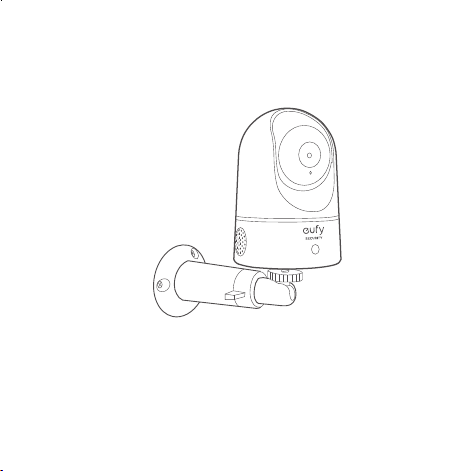
Pour monter la caméra intérieure eufy sur un mur, nous vous
recommandons d'utiliser le support de xation (non fourni)
comme illustré ci-dessous.
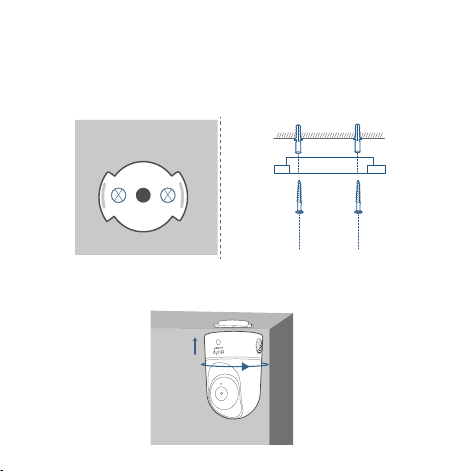
3. Alignez les trous sur la plaque de montage à ceux du plafond.
Insérez les ancrages dans les trous ; les ancrages sont
nécessaires pour les murs faits de matériaux durs tels que
le béton, la brique ou le stuc. Fixez les vis avec un tournevis
cruciforme pour xer la plaque de montage au plafond.
Ceiling
Ceiling
4. Alignez les rainures avec la plaque de xation et faites pivoter
la caméra intérieure eufy, jusqu'à ce qu'elle se clipse.
55 Français Français 56
Pour monter la caméra intérieure eufy sur un mur, nous vous
recommandons d'utiliser le support de xation (non fourni)
comme illustré ci-dessous.
3. Alignez les trous sur la plaque de montage à ceux du plafond.
Insérez les ancrages dans les trous ; les ancrages sont
nécessaires pour les murs faits de matériaux durs tels que
le béton, la brique ou le stuc. Fixez les vis avec un tournevis
cruciforme pour xer la plaque de montage au plafond.
Ceiling
Ceiling
4. Alignez les rainures avec la plaque de xation et faites pivoter
la caméra intérieure eufy, jusqu'à ce qu'elle se clipse.

57 Français Français 58
ALIMENTATION DE LA CAMÉRA
INTÉRIEURE
Branchez la caméra intérieure eufy à une prise de courant à l'aide
du câble et de l'adaptateur d'alimentation USB fournis. Une fois
allumée, la caméra intérieure eufy est connectée au système.
Lorsque la connexion est réussie, le voyant d'état devient bleu xe.
Faites pivoter la caméra intérieure eufy pour ajuster la vue
et vériez à l'aide de la diffusion en direct, accessible depuis
l'application eufy Security. Vous pouvez maintenant utiliser votre
caméra intérieure eufy.
Conseil :
Pour le dépannage, consultez « Aide » sur l'application eufy
Security.
Avis
This product complies with the radio interference·
requirements of the European Community.
Déclaration de conformité
Anker Innovations Limited déclare par le présent document
que cet appareil est conforme aux exigences essentielles et aux
autres dispositions pertinentes de la directive 2014/53/EU.Pour
lire la déclaration de conformité, accédez au site Web :https://
uk.eufylife.com/
Ce produit peut être utilisé dans tous les États membres de l'UE.
L'adaptateur doit être installé à proximité de l'équipement et
doit être facilement accessible.
Ne pas utiliser l'appareil dans un environnement où la
température est trop élevée ou trop basse, ne jamais exposer
l'appareil à la forte lumière du soleil ni à un environnement trop
humide.
La température appropriée pour T8410 et accessoires est0°C-
40°C.
Utilisez uniquement le chargeur fourni par le fabricant.
57 Français Français 58
ALIMENTATION DE LA CAMÉRA
INTÉRIEURE
Branchez la caméra intérieure eufy à une prise de courant à l'aide
du câble et de l'adaptateur d'alimentation USB fournis. Une fois
allumée, la caméra intérieure eufy est connectée au système.
Lorsque la connexion est réussie, le voyant d'état devient bleu xe.
Faites pivoter la caméra intérieure eufy pour ajuster la vue
et vériez à l'aide de la diffusion en direct, accessible depuis
l'application eufy Security. Vous pouvez maintenant utiliser votre
caméra intérieure eufy.
Conseil :
Pour le dépannage, consultez « Aide » sur l'application eufy
Security.
Avis
This product complies with the radio interference·
requirements of the European Community.
Déclaration de conformité
Anker Innovations Limited déclare par le présent document
que cet appareil est conforme aux exigences essentielles et aux
autres dispositions pertinentes de la directive 2014/53/EU.Pour
lire la déclaration de conformité, accédez au site Web :https://
uk.eufylife.com/
Ce produit peut être utilisé dans tous les États membres de l'UE.
L'adaptateur doit être installé à proximité de l'équipement et
doit être facilement accessible.
Ne pas utiliser l'appareil dans un environnement où la
température est trop élevée ou trop basse, ne jamais exposer
l'appareil à la forte lumière du soleil ni à un environnement trop
humide.
La température appropriée pour T8410 et accessoires est0°C-
40°C.
Utilisez uniquement le chargeur fourni par le fabricant.

59 Français Français 60
L'utilisation d'un chargeur non autorisé peut causer un danger
et annuler l'autorisation de l'appareil et la garantie.
Ce chargeur est destiné exclusivement à une utilisation en
intérieur.
Le chargeur est de type TEKA012-0502000EU/TEKA-
UCA20EU avec tension/courant de sortie 5Vdc/2A. La che est
considérée comme le dispositif de déconnexion de l'adaptateur.
Informations sur l'exposition aux radiofréquences : Le niveau
d'exposition maximale admissible (MPE) a été calculé sur la base
d'une distance de
d=20 cm entre l'appareil et le corps humain. Pour maintenir
la conformité aux exigences en matière d'exposition aux
radiofréquences, utiliser un produit qui maintient une distance
de 20 cm entre l'appareil et le corps humain.
Plage de fréquence de fonctionnement Wi-Fi :
2 412~2 472 MHz ; puissance de sortie maximale Wi-Fi : 14.46dBm
Plage de fréquence de fonctionnement Bluetooth : 2 402
à 2 480 MHz ; puissance de sortie maximale Bluetooth :
0.64dBm(EIRP)
Anker Innovations Deutschland GmbH I Georg-Muche-
Strasse 3, 80807 München, Allemagne
Anker Technology (UK) Ltd I Suite B, Fairgate House, 205 Kings
Road, Tyseley, Birmingham, B11 2AA, Royaume-Uni
Ce produit a été conçu et fabriqué avec des matériaux et
composants de haute qualité, qui peuvent être recyclés et
réutilisés.
Ce symbole signie que le produit ne doit pas être jeté
avec les déchets ménagers, mais doit être transmis à un
établissement de collecte adapté pour permettre son
recyclage. L'élimination et le recyclage appropriés aident
à protéger les ressources naturelles, la santé humaine et
l'environnement. Pour plus d'informations sur l'élimination
et le recyclage de ce produit, contactez votre municipalité
locale, le service de mise au rebut ou la boutique où vous
avez acheté ce produit.
59 Français Français 60
L'utilisation d'un chargeur non autorisé peut causer un danger
et annuler l'autorisation de l'appareil et la garantie.
Ce chargeur est destiné exclusivement à une utilisation en
intérieur.
Le chargeur est de type TEKA012-0502000EU/TEKA-
UCA20EU avec tension/courant de sortie 5Vdc/2A. La che est
considérée comme le dispositif de déconnexion de l'adaptateur.
Informations sur l'exposition aux radiofréquences : Le niveau
d'exposition maximale admissible (MPE) a été calculé sur la base
d'une distance de
d=20 cm entre l'appareil et le corps humain. Pour maintenir
la conformité aux exigences en matière d'exposition aux
radiofréquences, utiliser un produit qui maintient une distance
de 20 cm entre l'appareil et le corps humain.
Plage de fréquence de fonctionnement Wi-Fi :
2 412~2 472 MHz ; puissance de sortie maximale Wi-Fi : 14.46dBm
Plage de fréquence de fonctionnement Bluetooth : 2 402
à 2 480 MHz ; puissance de sortie maximale Bluetooth :
0.64dBm(EIRP)
Anker Innovations Deutschland GmbH I Georg-Muche-
Strasse 3, 80807 München, Allemagne
Anker Technology (UK) Ltd I Suite B, Fairgate House, 205 Kings
Road, Tyseley, Birmingham, B11 2AA, Royaume-Uni
Ce produit a été conçu et fabriqué avec des matériaux et
composants de haute qualité, qui peuvent être recyclés et
réutilisés.
Ce symbole signie que le produit ne doit pas être jeté
avec les déchets ménagers, mais doit être transmis à un
établissement de collecte adapté pour permettre son
recyclage. L'élimination et le recyclage appropriés aident
à protéger les ressources naturelles, la santé humaine et
l'environnement. Pour plus d'informations sur l'élimination
et le recyclage de ce produit, contactez votre municipalité
locale, le service de mise au rebut ou la boutique où vous
avez acheté ce produit.

Italiano 62
61 Français
Indice
Contenuto della confezione 63
Panoramica del prodotto 64
Congurazione del sistema 65
Montaggio della telecamera per interni 67
Alimentazione della telecamera per interni 72
Avviso 73
Servizio clienti 76
SERVICE CLIENTÈLE
• Garantie
Garantie limitée de 12 mois
• Par téléphone
États-Unis +1 (800) 988 7973 du lundi au vendredi 9 h-17 h
(heure du Pacique)
Royaume-Uni +44 (0) 1604 936 200 du lundi au vendredi
6 h-11 h (GMT)
Allemagne +49 (0) 69 9579 7960 du lundi au vendredi 6 h-11 h
• Par e-mail
Support client : suppor[email protected]

Italiano 62
61 Français
Indice
Contenuto della confezione 63
Panoramica del prodotto 64
Congurazione del sistema 65
Montaggio della telecamera per interni 67
Alimentazione della telecamera per interni 72
Avviso 73
Servizio clienti 76
SERVICE CLIENTÈLE
• Garantie
Garantie limitée de 12 mois
• Par téléphone
États-Unis +1 (800) 988 7973 du lundi au vendredi 9 h-17 h
(heure du Pacique)
Royaume-Uni +44 (0) 1604 936 200 du lundi au vendredi
6 h-11 h (GMT)
Allemagne +49 (0) 69 9579 7960 du lundi au vendredi 6 h-11 h
• Par e-mail
Support client : support@eufylife.com

Italiano 64
PANORAMICA DEL PRODOTTO
Telecamera per interni 2K con funzioni
panoramica e inclinazione
1
2
3
4
5
6
7
1
Obiettivo
5
Altoparlante
2
Microfono
6
Ingresso alimentazione
3
Slot per scheda SD
7
Pulsante SYNC
4
LED di stato
63 Italiano
CONTENUTO DELLA CONFEZIONE
Telecamera per interni 2K con funzioni panoramica e inclinazione
Model:T8410
Piastra di montaggio
Cavo USB
Adattatore USB
Confezione viti di montaggio
scheda microSD (opzionale)
Manuale utente
Italiano 64
PANORAMICA DEL PRODOTTO
Telecamera per interni 2K con funzioni
panoramica e inclinazione
1
2
3
4
5
6
7
1
Obiettivo
5
Altoparlante
2
Microfono
6
Ingresso alimentazione
3
Slot per scheda SD
7
Pulsante SYNC
4
LED di stato
63 Italiano
CONTENUTO DELLA CONFEZIONE
Telecamera per interni 2K con funzioni panoramica e inclinazione
Model:T8410
Piastra di montaggio
Cavo USB
Adattatore USB
Confezione viti di montaggio
scheda microSD (opzionale)
Manuale utente
Italiano 66
Stato LED
Stato LED Descrizione
Blu intermittente Pronto per la congurazione
Blu sso
Alimentata e propriamente
funzionante
Rosso lampeggiante Scollegato da Internet
Rosso lampeggiante una
volta
Movimento o suono rilevato
Rosso sso
Funziona correttamente con
qualcuno che visualizza lo streaming
live o che registra
l’evento
Viola bluastro sso Inizializzazione del sistema
Lampeggiamento blu e
rosso alternato
Aggiornamento del rmware in
corso
65 Italiano
CONFIGURAZIONE DEL SISTEMA
1. Scaricare l’app eufy Security dall’App Store (dispositivi
iOS) o da Google Play (dispositivi Android).
2. Registrarsi per creare un account eufy Security.
Accedere alla home page dell’app.Toccare Aggiungi
dispositivo e aggiungere la telecamera per interni eufy
2K con funzione panoramica al sistema.
3. Seguire le istruzioni visualizzate sullo schermo per
completare la congurazione.
Italiano 66
Stato LED
Stato LED Descrizione
Blu intermittente Pronto per la congurazione
Blu sso
Alimentata e propriamente
funzionante
Rosso lampeggiante Scollegato da Internet
Rosso lampeggiante una
volta
Movimento o suono rilevato
Rosso sso
Funziona correttamente con
qualcuno che visualizza lo streaming
live o che registra
l’evento
Viola bluastro sso Inizializzazione del sistema
Lampeggiamento blu e
rosso alternato
Aggiornamento del rmware in
corso
65 Italiano
CONFIGURAZIONE DEL SISTEMA
1. Scaricare l’app eufy Security dall’App Store (dispositivi
iOS) o da Google Play (dispositivi Android).
2. Registrarsi per creare un account eufy Security.
Accedere alla home page dell’app.Toccare Aggiungi
dispositivo e aggiungere la telecamera per interni eufy
2K con funzione panoramica al sistema.
3. Seguire le istruzioni visualizzate sullo schermo per
completare la congurazione.
Italiano 68
• Scollegare la camma interna dalla presa di corrente
prima del montaggio.
• Tenere la telecamera per interni ad almeno 20
cm dalle pareti o da qualsiasi oggetto che possa
ostruire la vista. Seguire questa indicazione per
evitare il riesso dei raggi infrarossi che può avere
un impatto negativo sulle prestazioni della visione
notturna.
> 20CM
> 20CM
67 Italiano
MONTAGGIO DELLA TELECAMERA
PER INTERNI
Selezionare una posizione per il montaggio
La telecamera può essere posizionata su un tavolo, uno scaffale o
può essere montata su una parete o sul softto. Selezionare una
posizione e un’altezza da cui è possibile ottenere la vista desiderata
e raggiungere facilmente una presa di corrente.
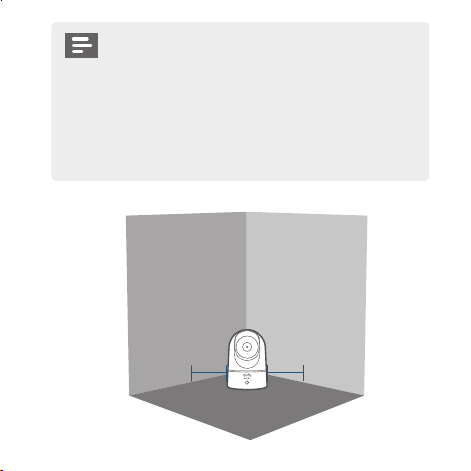
Italiano 68
• Scollegare la camma interna dalla presa di corrente
prima del montaggio.
• Tenere la telecamera per interni ad almeno 20
cm dalle pareti o da qualsiasi oggetto che possa
ostruire la vista. Seguire questa indicazione per
evitare il riesso dei raggi infrarossi che può avere
un impatto negativo sulle prestazioni della visione
notturna.
> 20CM
> 20CM
67 Italiano
MONTAGGIO DELLA TELECAMERA
PER INTERNI
Selezionare una posizione per il montaggio
La telecamera può essere posizionata su un tavolo, uno scaffale o
può essere montata su una parete o sul softto. Selezionare una
posizione e un’altezza da cui è possibile ottenere la vista desiderata
e raggiungere facilmente una presa di corrente.
Italiano 70
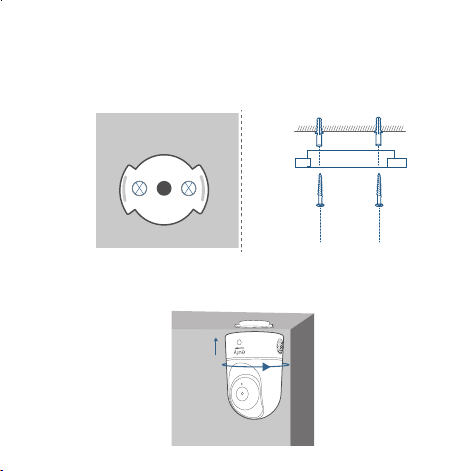
3. Allineare i fori sulla piastra di montaggio con quelli sul softto.
Inserire i tasselli all’interno dei fori, necessari nei casi in cui
le pareti siano in materiali duri come calcestruzzo, mattoni o
stucco. Fissare le viti con un cacciavite a stella per ssare la
piastra di montaggio al softto.
Ceiling
Ceiling
4. Allineare le scanalature con la piastra di montaggio e ruotare
la telecamera per interni in senso orario no a quando non
scatta in posizione.
69 Italiano
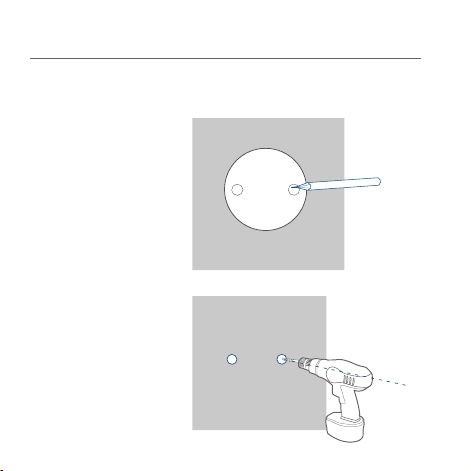
Montaggio della telecamera per interni
Per montare la telecamera per interni sul softto, attenersi alla
seguente procedura:
1. Posizionare
la scheda di
posizionamento
contro il
softto e quindi
contrassegnare i
punti in cui sarà
necessaria la
perforazione.
Ceiling
2. Praticare i fori
con una punta da
trapano da 5/16” (8
mm).
Ceiling
Italiano 70
3. Allineare i fori sulla piastra di montaggio con quelli sul softto.
Inserire i tasselli all’interno dei fori, necessari nei casi in cui
le pareti siano in materiali duri come calcestruzzo, mattoni o
stucco. Fissare le viti con un cacciavite a stella per ssare la
piastra di montaggio al softto.
Ceiling
Ceiling
4. Allineare le scanalature con la piastra di montaggio e ruotare
la telecamera per interni in senso orario no a quando non
scatta in posizione.
69 Italiano
Montaggio della telecamera per interni
Per montare la telecamera per interni sul softto, attenersi alla
seguente procedura:
1. Posizionare
la scheda di
posizionamento
contro il
softto e quindi
contrassegnare i
punti in cui sarà
necessaria la
perforazione.
Ceiling
2. Praticare i fori
con una punta da
trapano da 5/16” (8
mm).
Ceiling
Italiano 72
ALIMENTAZIONE DELLA
TELECAMERA PER INTERNI
Collegare la telecamera per interni a una presa di corrente
utilizzando il cavo USB e l’adattatore USB forniti. Dopo essere
stata accesa, la telecamera per interni verrà collegata al sistema. Se
collegata correttamente, il LED di stato diventerà blu.
Ruotare la telecamera per interni per regolare la vista e
controllarla con lo streaming live a cui è possibile accedere tramite
l’app Security. Ora è tutto pronto per usare la telecamera per
interni eufy.
Suggerimento:
Per la risoluzione dei problemi, consultare la Guida nell’app eufy
Security.
71 Italiano
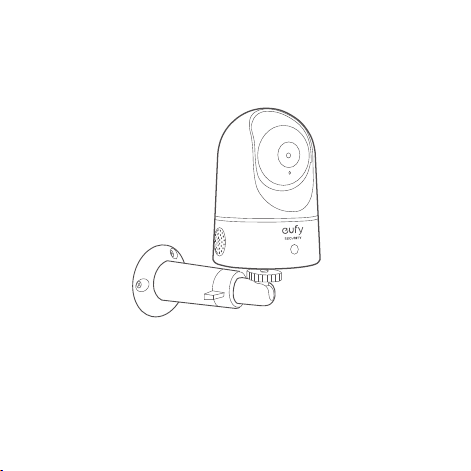
Per montare la telecamera per interni su una parete, si consiglia
di utilizzare la staffa di montaggio (non fornita) come nella gura
seguente.

Italiano 72
ALIMENTAZIONE DELLA
TELECAMERA PER INTERNI
Collegare la telecamera per interni a una presa di corrente
utilizzando il cavo USB e l’adattatore USB forniti. Dopo essere
stata accesa, la telecamera per interni verrà collegata al sistema. Se
collegata correttamente, il LED di stato diventerà blu.
Ruotare la telecamera per interni per regolare la vista e
controllarla con lo streaming live a cui è possibile accedere tramite
l’app Security. Ora è tutto pronto per usare la telecamera per
interni eufy.
Suggerimento:
Per la risoluzione dei problemi, consultare la Guida nell’app eufy
Security.
71 Italiano
Per montare la telecamera per interni su una parete, si consiglia
di utilizzare la staffa di montaggio (non fornita) come nella gura
seguente.
Italiano 7473 Italiano
Avviso
This product complies with the radio interference
requirements of the European Community.
Dichiarazione di conformità
Con il presente documento, Anker Innovations Limited dichiara
che questo dispositivo è conforme ai requisiti fondamentali e
alle altre disposizioni correlate previste dalla direttiva 2014/53/
UE.Per la dichiarazione di conformità, visitare il sito Web:
https://uk.eufylife.com/
Questo prodotto può essere utilizzato negli stati membri
dell’Unione europea.
L’adattatore deve essere installato vicino all’apparecchiatura e
deve essere facilmente accessibile.
Non utilizzare il dispositivo in un ambiente con temperatura
eccessivamente alta o bassa, non esporre il dispositivo alla luce
solare diretta o in un ambiente troppo umido.
La temperatura adatta per T8410 e accessori è 0°C-40°C.
Accertarsi di utilizzare solo il caricabatterie fornito dal
costruttore. L’utilizzo di un caricabatterie non autorizzato può
comportare rischi e violare l’autorizzazione del dispositivo,
oltre a invalidare la garanzia dell’articolo.
Questo caricabatterie è destinato esclusivamente all’uso in
ambienti interni.
Il caricabatterie è di tipo TEKA012-0502000EU/TEKA-
UCA20EU con 5valori di tensione/corrente di uscita in 5V
CC/2A. Per ragioni di sicurezza, è necessario rimuovere la
spina dalla presa di alimentazione per scollegare il dispositivo
dall’alimentazione.
Informazioni sull’esposizione alle radiofrequenze: il livello di
esposizione massima consentito (MPE) è stato calcolato in
base a una distanza di 20 cm tra il dispositivo e il corpo umano.
Per mantenere la conformità ai requisiti di esposizione alle
radiofrequenze, usare il prodotto in modo da mantenere una
distanza di 20 cm tra il dispositivo e il corpo umano.
Intervallo di frequenza operativa Wi-Fi: 2412~2472 MHz per
l’UE; max. potenza in uscita del Wi-Fi: 14.46 dBm

Italiano 7473 Italiano
Avviso
This product complies with the radio interference
requirements of the European Community.
Dichiarazione di conformità
Con il presente documento, Anker Innovations Limited dichiara
che questo dispositivo è conforme ai requisiti fondamentali e
alle altre disposizioni correlate previste dalla direttiva 2014/53/
UE.Per la dichiarazione di conformità, visitare il sito Web:
https://uk.eufylife.com/
Questo prodotto può essere utilizzato negli stati membri
dell’Unione europea.
L’adattatore deve essere installato vicino all’apparecchiatura e
deve essere facilmente accessibile.
Non utilizzare il dispositivo in un ambiente con temperatura
eccessivamente alta o bassa, non esporre il dispositivo alla luce
solare diretta o in un ambiente troppo umido.
La temperatura adatta per T8410 e accessori è 0°C-40°C.
Accertarsi di utilizzare solo il caricabatterie fornito dal
costruttore. L’utilizzo di un caricabatterie non autorizzato può
comportare rischi e violare l’autorizzazione del dispositivo,
oltre a invalidare la garanzia dell’articolo.
Questo caricabatterie è destinato esclusivamente all’uso in
ambienti interni.
Il caricabatterie è di tipo TEKA012-0502000EU/TEKA-
UCA20EU con 5valori di tensione/corrente di uscita in 5V
CC/2A. Per ragioni di sicurezza, è necessario rimuovere la
spina dalla presa di alimentazione per scollegare il dispositivo
dall’alimentazione.
Informazioni sull’esposizione alle radiofrequenze: il livello di
esposizione massima consentito (MPE) è stato calcolato in
base a una distanza di 20 cm tra il dispositivo e il corpo umano.
Per mantenere la conformità ai requisiti di esposizione alle
radiofrequenze, usare il prodotto in modo da mantenere una
distanza di 20 cm tra il dispositivo e il corpo umano.
Intervallo di frequenza operativa Wi-Fi: 2412~2472 MHz per
l’UE; max. potenza in uscita del Wi-Fi: 14.46 dBm

75 Italiano Italiano 76
SERVIZIO CLIENTI
• Garanzia
Garanzia limitata di 12 mesi
• Telefono
Stati Uniti +1 (800) 988 7973 lun-ven 9:00-17:00 (PT)
Regno Unito +44 (0) 1604 936 200 lun-ven 6:00-11:00 (GMT)
Germania +49 (0) 69 9579 7960 lun-ven 6:00-11:00
• E-mail
Servizio clienti: support@eufylife.com
Campo di frequenza per il funzionamento del Bluetooth:
2402~2480 MHz; max. potenza in uscita del Bluetooth:
0.64 dBm (EIRP)
Anker Innovations Deutschland GmbH I Georg-Muche-Strasse
3, 80807 Monaco, Germania
Anker Technology (UK) Ltd I Suite B, Fairgate House, 205 Kings
Road, Tyseley,
Birmingham, B11 2AA, Regno Unito
Il prodotto è progettato e realizzato con materiali e
componenti di alta qualità, riciclabili e riutilizzabili.
Questo simbolo indica che il prodotto non deve
essere smaltito tra i riuti domestici e deve essere
consegnato presso un centro di raccolta per il riciclo.
Uno smaltimento appropriato e il riciclo aiutano
a proteggere le risorse naturali, la salute umana e
l'ambiente. Per ulteriori informazioni sullo smaltimento
e sul riciclaggio di questo prodotto, contattare gli
ufci comunali preposti, il servizio per lo smaltimento,
oppure il negozio in cui è stato acquistato il prodotto.

75 Italiano Italiano 76
SERVIZIO CLIENTI
• Garanzia
Garanzia limitata di 12 mesi
• Telefono
Stati Uniti +1 (800) 988 7973 lun-ven 9:00-17:00 (PT)
Regno Unito +44 (0) 1604 936 200 lun-ven 6:00-11:00 (GMT)
Germania +49 (0) 69 9579 7960 lun-ven 6:00-11:00
• E-mail
Servizio clienti: [email protected]
Campo di frequenza per il funzionamento del Bluetooth:
2402~2480 MHz; max. potenza in uscita del Bluetooth:
0.64 dBm (EIRP)
Anker Innovations Deutschland GmbH I Georg-Muche-Strasse
3, 80807 Monaco, Germania
Anker Technology (UK) Ltd I Suite B, Fairgate House, 205 Kings
Road, Tyseley,
Birmingham, B11 2AA, Regno Unito
Il prodotto è progettato e realizzato con materiali e
componenti di alta qualità, riciclabili e riutilizzabili.
Questo simbolo indica che il prodotto non deve
essere smaltito tra i riuti domestici e deve essere
consegnato presso un centro di raccolta per il riciclo.
Uno smaltimento appropriato e il riciclo aiutano
a proteggere le risorse naturali, la salute umana e
l'ambiente. Per ulteriori informazioni sullo smaltimento
e sul riciclaggio di questo prodotto, contattare gli
ufci comunali preposti, il servizio per lo smaltimento,
oppure il negozio in cui è stato acquistato il prodotto.

77 Nederlands Nederlands 78
WAT ZIT ER IN DE DOOS?
Indoor Cam 2K Pan & Tilt
Model:T8410
Montageplaat
USB-kabel
USB-adapter
Montageschroefpakket
microSD-kaart (optioneel)
Gebruikershandleiding
Inhoudsopgave
Wat zit er in de doos? 78
Productoverzicht 79
Het systeem instellen 80
De indoor cam monteren 82
De indoor cam inschakelen 87
Klantenservice 89

77 Nederlands Nederlands 78
WAT ZIT ER IN DE DOOS?
Indoor Cam 2K Pan & Tilt
Model:T8410
Montageplaat
USB-kabel
USB-adapter
Montageschroefpakket
microSD-kaart (optioneel)
Gebruikershandleiding
Inhoudsopgave
Wat zit er in de doos? 78
Productoverzicht 79
Het systeem instellen 80
De indoor cam monteren 82
De indoor cam inschakelen 87
Klantenservice 89
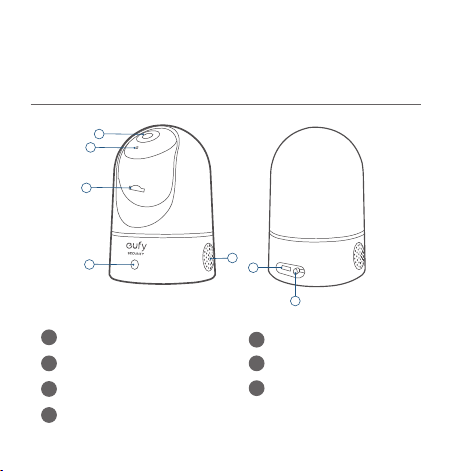
Nederlands 80
HET SYSTEEM INSTELLEN
1. Download de eufy Security-app uit de App Store (iOS-
apparaten) of Google Play (Android-apparaten).
2. Meld u aan voor een eufy Security-account. Ga naar de
startpagina van de app.Tik op Apparaat toevoegen en
voeg de Indoor Cam Pan 2K toe aan uw systeem.
3. Volg de instructies op het scherm om het instellen te
voltooien.
79 Nederlands
PRODUCTOVERZICHT
Indoor Cam 2K Pan & Tilt
1
2
3
4
5
6
7
1
Lens
5
Luidspreker
2
Microfoon
6
Voedingsingang
3
SD-kaartsleuf
7
SYNC-knop
4
Status-led
Nederlands 80
HET SYSTEEM INSTELLEN
1. Download de eufy Security-app uit de App Store (iOS-
apparaten) of Google Play (Android-apparaten).
2. Meld u aan voor een eufy Security-account. Ga naar de
startpagina van de app.Tik op Apparaat toevoegen en
voeg de Indoor Cam Pan 2K toe aan uw systeem.
3. Volg de instructies op het scherm om het instellen te
voltooien.
79 Nederlands
PRODUCTOVERZICHT
Indoor Cam 2K Pan & Tilt
1
2
3
4
5
6
7
1
Lens
5
Luidspreker
2
Microfoon
6
Voedingsingang
3
SD-kaartsleuf
7
SYNC-knop
4
Status-led
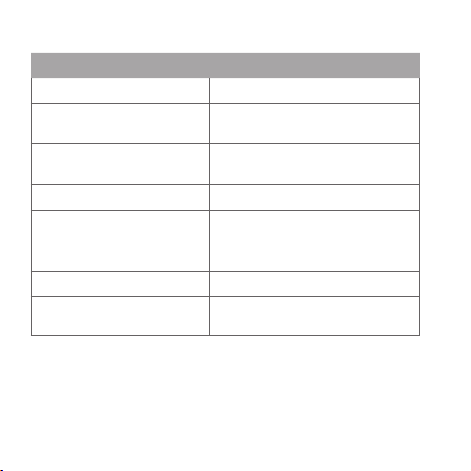
Nederlands 82
DE INDOOR CAM MONTEREN
Een geschikte montageplek kiezen
De camera kan op een tafel of plank worden geplaatst of aan een
muur of plafond worden gemonteerd. Kies een plek en hoogte
die u het gewenste zicht bieden en van waaruit u eenvoudig een
stopcontact kunt bereiken.
81 Nederlands
Led-status
Led-status Beschrijving
'Ademt' blauw Klaar voor installatie
Brandt blauw
Ingeschakeld en werkt naar
behoren
Knippert rood
Verbinding met het internet is
verbroken
Knippert één keer rood Beweging of geluid gedetecteerd
Brandt rood
Werkt naar behoren en iemand
bekijkt livestream of neemt
gebeurtenis op
Brandt blauwachtig violet Systeem wordt geïnitialiseerd
Knippert afwisselend blauw
en rood
Firmware-upgrade wordt
uitgevoerd
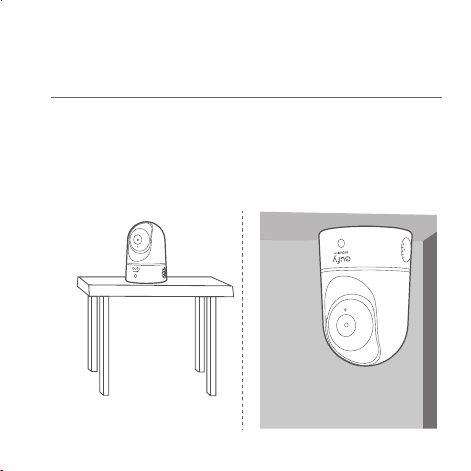
Nederlands 82
DE INDOOR CAM MONTEREN
Een geschikte montageplek kiezen
De camera kan op een tafel of plank worden geplaatst of aan een
muur of plafond worden gemonteerd. Kies een plek en hoogte
die u het gewenste zicht bieden en van waaruit u eenvoudig een
stopcontact kunt bereiken.
81 Nederlands
Led-status
Led-status Beschrijving
'Ademt' blauw Klaar voor installatie
Brandt blauw
Ingeschakeld en werkt naar
behoren
Knippert rood
Verbinding met het internet is
verbroken
Knippert één keer rood Beweging of geluid gedetecteerd
Brandt rood
Werkt naar behoren en iemand
bekijkt livestream of neemt
gebeurtenis op
Brandt blauwachtig violet Systeem wordt geïnitialiseerd
Knippert afwisselend blauw
en rood
Firmware-upgrade wordt
uitgevoerd
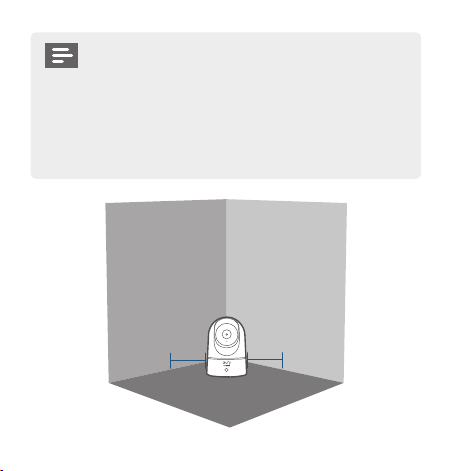
Nederlands 84
De Indoor Cam monteren
Volg onderstaande stappen om de Indoor Cam aan het plafond te
monteren:
1. Plaats de
positioneringskaart
tegen het plafond en
markeer vervolgens
de plaatsen waar
moet worden
geboord.
Ceiling
2. Boor gaten met een
boortje van 8 mm.
Ceiling
83 Nederlands
• Trek de stekker van de Indoor Cam uit het
stopcontact voordat u de camera monteert.
• Houd de Indoor Cam op minimaal 20 cm afstand
van wanden of andere voorwerpen die het zicht
kunnen belemmeren. Doe dit om infraroodreectie
te vermijden. Infraroodreectie kan de
nachtzichtprestaties negatief kan beïnvloeden.
> 20CM
> 20CM
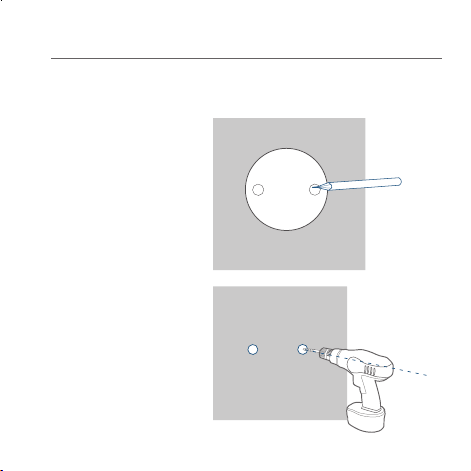
Nederlands 84
De Indoor Cam monteren
Volg onderstaande stappen om de Indoor Cam aan het plafond te
monteren:
1. Plaats de
positioneringskaart
tegen het plafond en
markeer vervolgens
de plaatsen waar
moet worden
geboord.
Ceiling
2. Boor gaten met een
boortje van 8 mm.
Ceiling
83 Nederlands
• Trek de stekker van de Indoor Cam uit het
stopcontact voordat u de camera monteert.
• Houd de Indoor Cam op minimaal 20 cm afstand
van wanden of andere voorwerpen die het zicht
kunnen belemmeren. Doe dit om infraroodreectie
te vermijden. Infraroodreectie kan de
nachtzichtprestaties negatief kan beïnvloeden.
> 20CM
> 20CM
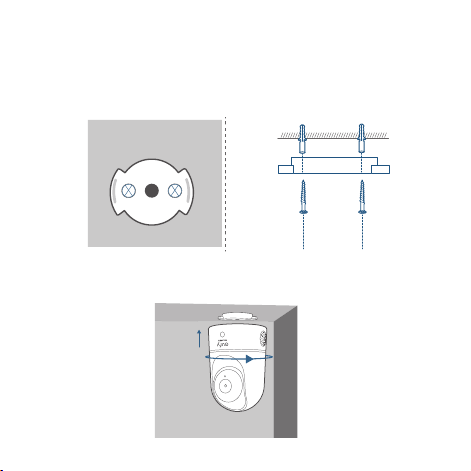
Nederlands 86
Als u de Indoor Cam aan de muur wilt monteren, raden we aan
om gebruik te maken van de montagebeugel (niet meegeleverd),
zoals in de onderstaande afbeelding.
85 Nederlands
3. Lijn de gaten op de montageplaat uit met de gaten in het plafond.
Inserire i tasselli all’interno dei fori, necessari nei casi in cui
le pareti siano in materiali duri come calcestruzzo, mattoni o
stucco. Gebruik een kruiskopschroevendraaier om de schroeven
vast te draaien en de montageplaat aan het plafond te bevestigen.
Ceiling
Ceiling
4. Lijn de groeven uit met de montageplaat en draai de Indoor
Cam met de klok mee totdat deze op zijn plaats klikt.
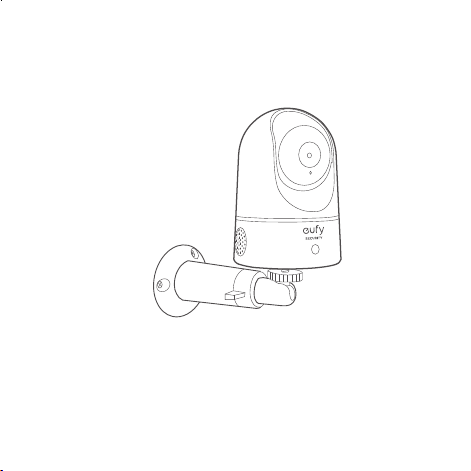
Nederlands 86
Als u de Indoor Cam aan de muur wilt monteren, raden we aan
om gebruik te maken van de montagebeugel (niet meegeleverd),
zoals in de onderstaande afbeelding.
85 Nederlands
3. Lijn de gaten op de montageplaat uit met de gaten in het plafond.
Inserire i tasselli all’interno dei fori, necessari nei casi in cui
le pareti siano in materiali duri come calcestruzzo, mattoni o
stucco. Gebruik een kruiskopschroevendraaier om de schroeven
vast te draaien en de montageplaat aan het plafond te bevestigen.
Ceiling
Ceiling
4. Lijn de groeven uit met de montageplaat en draai de Indoor
Cam met de klok mee totdat deze op zijn plaats klikt.

Nederlands 88
Dit product is ontworpen en gefabriceerd met materialen
en componenten van hoge kwaliteit die kunnen worden
gerecycled en hergebruikt.
Dit symbool betekent dat dit product niet mag worden
weggegooid als huishoudelijk afval en moet worden
ingeleverd bij een daarvoor bestemd inzamelpunt voor
recycling. Door het op de juiste manier weg te gooien en te
recyclen helpt u natuurlijke hulpbronnen, de gezondheid van
de mens en het milieu te beschermen. Voor meer informatie
over het weggooien en de recycling van dit product neemt
u contact op met uw gemeente, de afvalverwerkingsdienst
of de winkel waar u dit product hebt gekocht.
87 Nederlands
DE INDOOR CAM INSCHAKELEN
Sluit de Indoor Cam aan op een stopcontact met de meegeleverde
USB-kabel en USB-adapter. Nadat de Indoor Cam is ingeschakeld,
maakt deze verbinding met het systeem. Wanneer de camera met
succes is verbonden met het systeem, blijft de status-led blauw
branden.
Draai de Indoor Cam om het zicht aan te passen en controleer
het zicht met behulp van de livestream die u in de eufy Security-
app kunt bekijken. U bent nu helemaal klaar om uw Indoor Cam te
gebruiken.
Tip:
Problemen? Raadpleeg de Help van de eufy Security-app.
Nederlands 88
Dit product is ontworpen en gefabriceerd met materialen
en componenten van hoge kwaliteit die kunnen worden
gerecycled en hergebruikt.
Dit symbool betekent dat dit product niet mag worden
weggegooid als huishoudelijk afval en moet worden
ingeleverd bij een daarvoor bestemd inzamelpunt voor
recycling. Door het op de juiste manier weg te gooien en te
recyclen helpt u natuurlijke hulpbronnen, de gezondheid van
de mens en het milieu te beschermen. Voor meer informatie
over het weggooien en de recycling van dit product neemt
u contact op met uw gemeente, de afvalverwerkingsdienst
of de winkel waar u dit product hebt gekocht.
87 Nederlands
DE INDOOR CAM INSCHAKELEN
Sluit de Indoor Cam aan op een stopcontact met de meegeleverde
USB-kabel en USB-adapter. Nadat de Indoor Cam is ingeschakeld,
maakt deze verbinding met het systeem. Wanneer de camera met
succes is verbonden met het systeem, blijft de status-led blauw
branden.
Draai de Indoor Cam om het zicht aan te passen en controleer
het zicht met behulp van de livestream die u in de eufy Security-
app kunt bekijken. U bent nu helemaal klaar om uw Indoor Cam te
gebruiken.
Tip:
Problemen? Raadpleeg de Help van de eufy Security-app.

日本語
90
89 Nederlands
目次
パッケージ内容 91
製品概要 92
システムのセットアップ 93
本製品の設置方法 95
本製品の電源の入れ方 99
カスタマーサポート 100
KLANTENSERVICE
• Garantie
Beperkte garantie van 12 maanden
• Bel ons
Verenigde Staten +1 (800) 988 7973 ma.-vr. 9:00-17:00 (PT)
Verenigd Koninkrijk +44 (0) 1604 936 200 ma.-vr. 6:00-11:00
(GMT)
Duitsland +49 (0) 69 9579 7960 ma.-vr. 6:00-11:00
• Mail ons
Klantenondersteuning: support@eufylife.com

日本語
90
89 Nederlands
目次
パッケージ内容 91
製品概要 92
システムのセットアップ 93
本製品の設置方法 95
本製品の電源の入れ方 99
カスタマーサポート 100
KLANTENSERVICE
• Garantie
Beperkte garantie van 12 maanden
• Bel ons
Verenigde Staten +1 (800) 988 7973 ma.-vr. 9:00-17:00 (PT)
Verenigd Koninkrijk +44 (0) 1604 936 200 ma.-vr. 6:00-11:00
(GMT)
Duitsland +49 (0) 69 9579 7960 ma.-vr. 6:00-11:00
• Mail ons
Klantenondersteuning: support@eufylife.com

91
日本語 日本語
92
製品概要
IndoorCam2KPan&Tilt
1
2
3
4
5
6
7
1
レンズ
5
スピーカー
2
マイク
6
USB ポート
3
カードスロット
7
SYNC ( 同期 ) ボタン
4
LED インジケーター
パッケージ内容
IndoorCam 2K Pan & Tilt 本体
品番 : T8410
取り付けプレート
USB ケーブル
AC アダプタ
取り付けネジパック
位置決めカード
microSD カード(オプション)
クイックスタートガイド
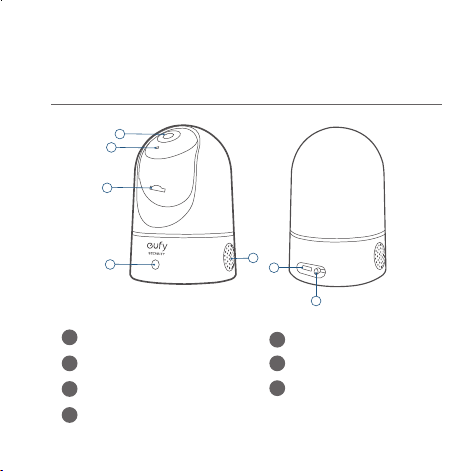
91
日本語 日本語
92
製品概要
IndoorCam2KPan&Tilt
1
2
3
4
5
6
7
1
レンズ
5
スピーカー
2
マイク
6
USB ポート
3
カードスロット
7
SYNC ( 同期 ) ボタン
4
LED インジケーター
パッケージ内容
IndoorCam 2K Pan & Tilt 本体
品番 : T8410
取り付けプレート
USB ケーブル
AC アダプタ
取り付けネジパック
位置決めカード
microSD カード(オプション)
クイックスタートガイド
93
日本語 日本語
94
LED 表示
LED 表示 説明
青色でゆっくりと点滅 セットアップ準備完了
青色で点灯 正常に動作中
赤色で点滅 ネットワーク接続解除済み
赤色で 1 回点滅 動体または音を感知
赤色で点灯
録画中またはライブストリーム視
聴中
青紫色で点灯 システムを初期化中
赤色と青色で交互に点
滅
ファームウェアアップデート中
システムのセットアップ
1.
App Store (iOS 機器 ) または Google Play (Android
機器 ) から Eufy Security アプリをインストールし
てください。
2.
Eufy Security アカウントに登録してください。ア
プリのホーム画面に移動してください。[ デバイス
の追加 ] をタップして、本製品をシステムに追加
してください。
3.
画面の指示に沿って、セットアップをしてくださ
い。
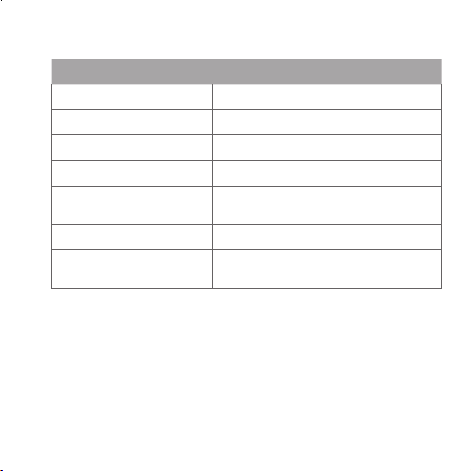
93
日本語 日本語
94
LED 表示
LED 表示 説明
青色でゆっくりと点滅 セットアップ準備完了
青色で点灯 正常に動作中
赤色で点滅 ネットワーク接続解除済み
赤色で 1 回点滅 動体または音を感知
赤色で点灯
録画中またはライブストリーム視
聴中
青紫色で点灯 システムを初期化中
赤色と青色で交互に点
滅
ファームウェアアップデート中
システムのセットアップ
1.
App Store (iOS 機器 ) または Google Play (Android
機器 ) から Eufy Security アプリをインストールし
てください。
2.
Eufy Security アカウントに登録してください。ア
プリのホーム画面に移動してください。[ デバイス
の追加 ] をタップして、本製品をシステムに追加
してください。
3.
画面の指示に沿って、セットアップをしてくださ
い。
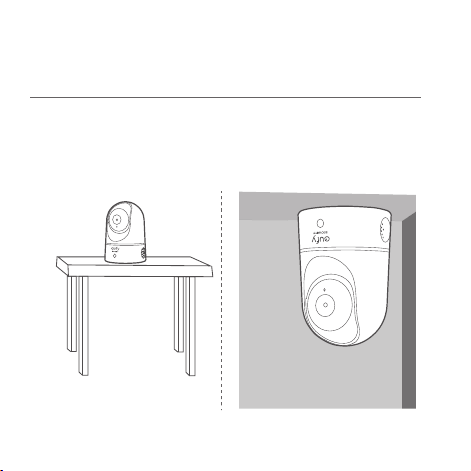
95
日本語 日本語
96
•
電源コンセントから抜いた状態で取り付けて
ください。
•
壁など、視界を妨げる可能性のあるものから
20cm 以上離してください。これは、暗闇で
の映像に悪影響を及ぼす可能性のある赤外線
反射を回避するために行います。
> 20CM
> 20CM
本製品の設置方法
取り付け場所を選択
本製品はテーブルや棚に設置したり、天井に取り付けること
ができます。撮りたい範囲が収まり、電源コンセントに余裕
をもって届く場所と高さに設置してください。
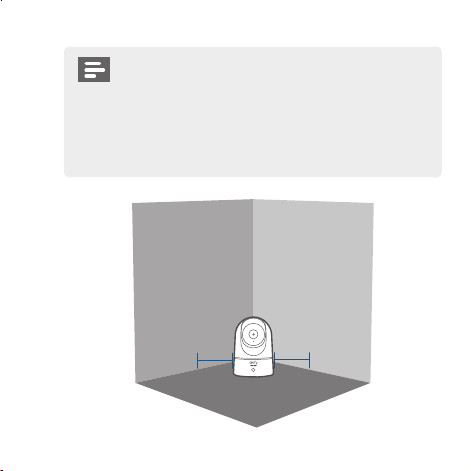
95
日本語 日本語
96
•
電源コンセントから抜いた状態で取り付けて
ください。
•
壁など、視界を妨げる可能性のあるものから
20cm 以上離してください。これは、暗闇で
の映像に悪影響を及ぼす可能性のある赤外線
反射を回避するために行います。
> 20CM
> 20CM
本製品の設置方法
取り付け場所を選択
本製品はテーブルや棚に設置したり、天井に取り付けること
ができます。撮りたい範囲が収まり、電源コンセントに余裕
をもって届く場所と高さに設置してください。
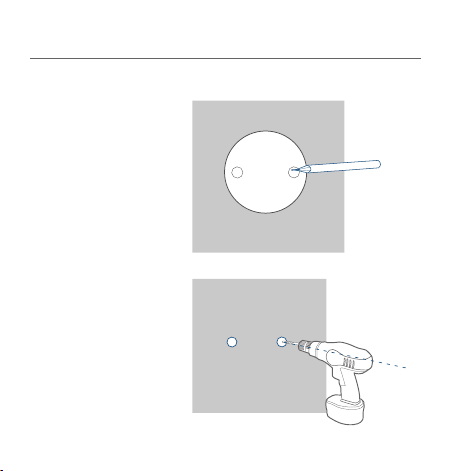
97
日本語 日本語
98
3.
取り付けプレートの穴を天井の穴に合わせてください。アン
カープラグを穴に挿入してください。アンカープラグは、コ
ンクリート、レンガ、漆喰などの硬い材料で作られた壁に必
要です。プラスドライバーでネジを固定して、取り付けプレ
ートを天井に取り付けてください。
Ceiling
Ceiling
4.
本体底面の溝を取り付けプレートに合わせ、カチッと所定の
位置に収まるまでカメラを時計回りに回転させてください。
本製品の天井や壁への設置方法
本製品を天井に取り付けるには、次の手順に従ってください。
1.
位置決めカードを
天井に当て、穴あ
けが必要になる位
置にマークを付け
てください。
Ceiling
2.
5/16 インチ (8mm)
のドリルビットで
穴を開けてくださ
い。
Ceiling
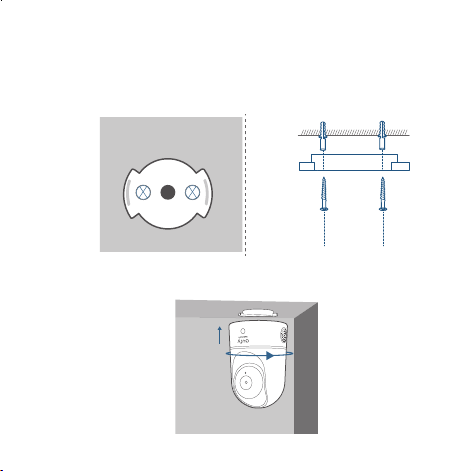
97
日本語 日本語
98
3.
取り付けプレートの穴を天井の穴に合わせてください。アン
カープラグを穴に挿入してください。アンカープラグは、コ
ンクリート、レンガ、漆喰などの硬い材料で作られた壁に必
要です。プラスドライバーでネジを固定して、取り付けプレ
ートを天井に取り付けてください。
Ceiling
Ceiling
4.
本体底面の溝を取り付けプレートに合わせ、カチッと所定の
位置に収まるまでカメラを時計回りに回転させてください。
本製品の天井や壁への設置方法
本製品を天井に取り付けるには、次の手順に従ってください。
1.
位置決めカードを
天井に当て、穴あ
けが必要になる位
置にマークを付け
てください。
Ceiling
2.
5/16 インチ (8mm)
のドリルビットで
穴を開けてくださ
い。
Ceiling

99
日本語 日本語
100
カスタマーサポート
•
保証
通常保証 18 ヶ月( 延長あり )
•
電話でのお問い合わせ
03-4455-7823
月
-
金
9:00-17:00
•
電子メール
support@anker.com
本製品の電源の入れ方
付属の USB ケーブルと AC アダプタを使用して、本体を電
源コンセントに接続してください。電源を入れると、本体が
システムに接続されます。接続に成功すると、LED インジケ
ーターが青色に点灯します。
カメラを回転させて、Eufy Security アプリでライブストリ
ーミングを確認してカメラの位置を調整してください。これ
で、本製品を使用する準備が整いました。
ヒント:
トラブルシューティングについては、Eufy Security アプリ
のヘルプをご覧ください。LED インジケータの状態について
は、アプリのページを参照してください。

99
日本語 日本語
100
カスタマーサポート
•
保証
通常保証 18 ヶ月( 延長あり )
•
電話でのお問い合わせ
03-4455-7823
月
-
金
9:00-17:00
•
電子メール
support@anker.com
本製品の電源の入れ方
付属の USB ケーブルと AC アダプタを使用して、本体を電
源コンセントに接続してください。電源を入れると、本体が
システムに接続されます。接続に成功すると、LED インジケ
ーターが青色に点灯します。
カメラを回転させて、Eufy Security アプリでライブストリ
ーミングを確認してカメラの位置を調整してください。これ
で、本製品を使用する準備が整いました。
ヒント:
トラブルシューティングについては、Eufy Security アプリ
のヘルプをご覧ください。LED インジケータの状態について
は、アプリのページを参照してください。

101 102
Português Português
ESTÁ INCLUÍDO
Câmara de interior 2K Pan & Tilt
Modelo: T8410
Placa de instalação
Cabo USB
Adaptador USB
Conjunto de parafusos de instalação
cartão microSD (opcional)
Manual do Utilizador
Índice
Está incluído 102
Descrição do produto 103
Congurar o sistema 104
Instalar a câmara de interior 106
Ligar a câmara de interior 111
Atendimento Ao Cliente 112

101 102
Português Português
ESTÁ INCLUÍDO
Câmara de interior 2K Pan & Tilt
Modelo: T8410
Placa de instalação
Cabo USB
Adaptador USB
Conjunto de parafusos de instalação
cartão microSD (opcional)
Manual do Utilizador
Índice
Está incluído 102
Descrição do produto 103
Congurar o sistema 104
Instalar a câmara de interior 106
Ligar a câmara de interior 111
Atendimento Ao Cliente 112
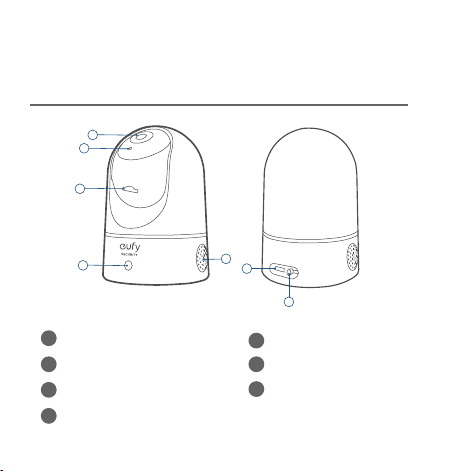
103 104
Português Português
CONFIGURAR O SISTEMA
1. Transra a aplicação Eufy Security a partir da
App Store (dispositivos iOS) ou da Google Play
(dispositivos Android).
2. Crie uma conta eufy Security. Aceda à página inicial da
aplicação.Toque em "Adicionar dispositivo" e adicione
a IndoorCam Pan 2K ao seu sistema.
3. Siga as instruções no ecrã para concluir a
conguração.
DESCRIÇÃO DO PRODUTO
Câmara de interior 2K Pan & Tilt
1
2
3
4
5
6
7
1
Lente
5
Altifalante
2
Microfone
6
Entrada de alimentação
3
Ranhura para cartões SD
7
Botão SYNC
4
LED de estado
103 104
Português Português
CONFIGURAR O SISTEMA
1. Transra a aplicação Eufy Security a partir da
App Store (dispositivos iOS) ou da Google Play
(dispositivos Android).
2. Crie uma conta eufy Security. Aceda à página inicial da
aplicação.Toque em "Adicionar dispositivo" e adicione
a IndoorCam Pan 2K ao seu sistema.
3. Siga as instruções no ecrã para concluir a
conguração.
DESCRIÇÃO DO PRODUTO
Câmara de interior 2K Pan & Tilt
1
2
3
4
5
6
7
1
Lente
5
Altifalante
2
Microfone
6
Entrada de alimentação
3
Ranhura para cartões SD
7
Botão SYNC
4
LED de estado
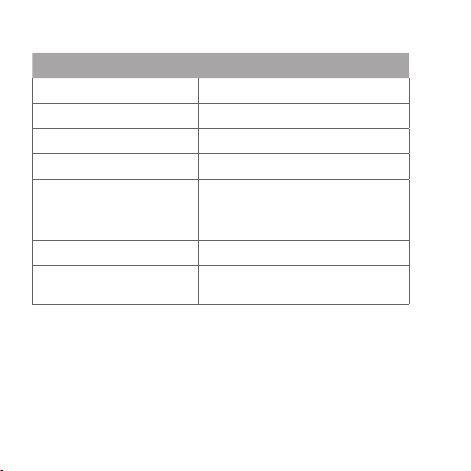
105 106
Português Português
INSTALAR A CÂMARA DE INTERIOR
Selecione um local para a instalação
A câmara pode ser colocada numa mesa, numa prateleira, ou
pode ser instalada numa parede ou no teto. Selecione um local e
uma altura adequadas à visualização pretendida, e de fácil acesso
a uma tomada elétrica.
Estado do LED
Estado do LED Descrição
Azul intermitente Pronto a congurar
Azul sólido Ligado e a funcionar corretamente
Vermelho intermitente Não ligado à Internet
Pisca uma vez a vermelho Movimento ou som detetado
Vermelho sólido
A funcionar corretamente com
alguém a ver a transmissão em
direto ou o evento de gravação
Roxo sólido O sistema está a iniciar
A piscar azul e vermelho
alternadamente
Atualização do rmware em curso
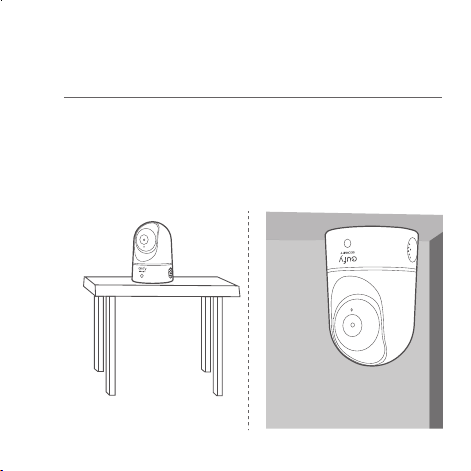
105 106
Português Português
INSTALAR A CÂMARA DE INTERIOR
Selecione um local para a instalação
A câmara pode ser colocada numa mesa, numa prateleira, ou
pode ser instalada numa parede ou no teto. Selecione um local e
uma altura adequadas à visualização pretendida, e de fácil acesso
a uma tomada elétrica.
Estado do LED
Estado do LED Descrição
Azul intermitente Pronto a congurar
Azul sólido Ligado e a funcionar corretamente
Vermelho intermitente Não ligado à Internet
Pisca uma vez a vermelho Movimento ou som detetado
Vermelho sólido
A funcionar corretamente com
alguém a ver a transmissão em
direto ou o evento de gravação
Roxo sólido O sistema está a iniciar
A piscar azul e vermelho
alternadamente
Atualização do rmware em curso
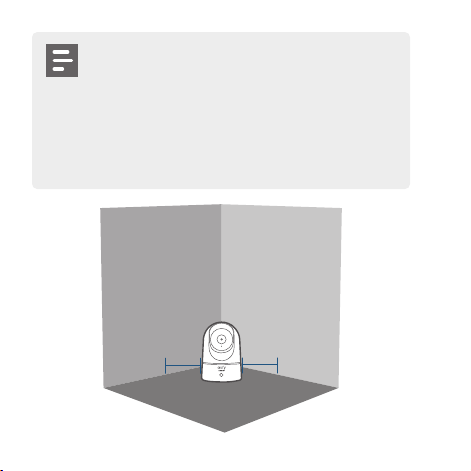
107 108
Português Português
Instalar a câmara de interior
Para instalar a Câmara de interior no teto, siga os passos abaixo:
1. Coloque o cartão
de posicionamento
no teto e marque
os pontos onde irá
perfurar.
Ceiling
2. Perfure os orifícios
com uma broca de
5/16" (8 mm).
Ceiling
• Desligue a Câmara de interior da tomada elétrica
antes de instalar.
• Mantenha a Câmara de interior a mais de 20
cm de distância de parede ou de algo que possa
obstruir a visualização. Faça isto para evitar a
reexão de infravermelhos, o que poderá ter
um impacto negativo no desempenho da visão
noturna.
> 20CM
> 20CM
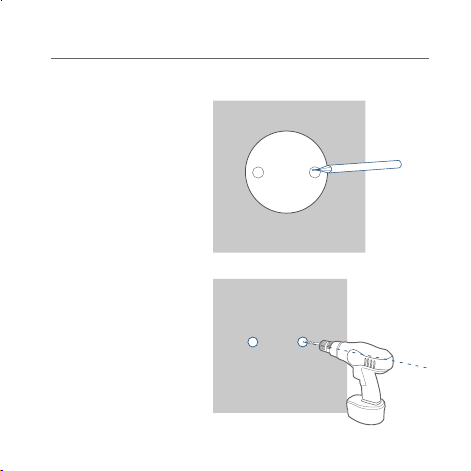
107 108
Português Português
Instalar a câmara de interior
Para instalar a Câmara de interior no teto, siga os passos abaixo:
1. Coloque o cartão
de posicionamento
no teto e marque
os pontos onde irá
perfurar.
Ceiling
2. Perfure os orifícios
com uma broca de
5/16" (8 mm).
Ceiling
• Desligue a Câmara de interior da tomada elétrica
antes de instalar.
• Mantenha a Câmara de interior a mais de 20
cm de distância de parede ou de algo que possa
obstruir a visualização. Faça isto para evitar a
reexão de infravermelhos, o que poderá ter
um impacto negativo no desempenho da visão
noturna.
> 20CM
> 20CM
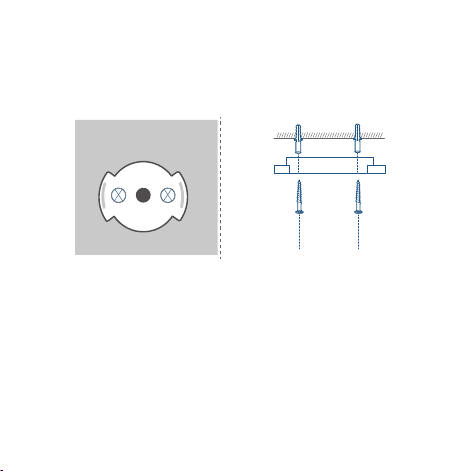
109 110
Português Português
Para instalar a câmara de interior numa parede, recomendamos
a utilização do suporte de instalação (não fornecido) como
ilustrado abaixo.
3. Alinhe os orifícios na placa de instalação com os no teto.Insira
as âncoras nos orifícios. São necessárias âncoras para paredes
feitas com materiais duros, tais como betão, tijolo ou estuque.
Aperte os parafusos com uma chave de parafusos Phillips para
apertar a placa de instalação ao teto.
Ceiling
Ceiling
4. Alinhe as ranhuras com a placa de instalação e rode a Câmara
de interior no sentido dos ponteiros do relógio até que se
encaixe no lugar.
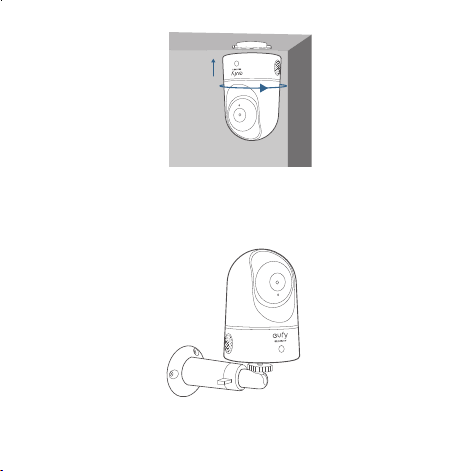
109 110
Português Português
Para instalar a câmara de interior numa parede, recomendamos
a utilização do suporte de instalação (não fornecido) como
ilustrado abaixo.
3. Alinhe os orifícios na placa de instalação com os no teto.Insira
as âncoras nos orifícios. São necessárias âncoras para paredes
feitas com materiais duros, tais como betão, tijolo ou estuque.
Aperte os parafusos com uma chave de parafusos Phillips para
apertar a placa de instalação ao teto.
Ceiling
Ceiling
4. Alinhe as ranhuras com a placa de instalação e rode a Câmara
de interior no sentido dos ponteiros do relógio até que se
encaixe no lugar.

111 112
Português Português
ATENDIMENTO AO CLIENTE
• Garantia
12 meses de garantia limitada
• Ligue para nós
United States +1 (800) 988 7973 Mon-Fri 9AM-5PM (PT)
United Kingdom +44 (0) 1604 936 200 Mon-Fri 6AM-11AM
(GMT)
Germany +49 (0) 69 9579 7960 Mon-Fri 6:00-11:00
• Envia-nos um email
Customer Support: support@eufylife.com
Anker Innovations Limited
Room 1318-19,Hollywood Plaza,610 Nathan
Road,Mongkok,Kowloon,Hong Kong
LIGAR A CÂMARA DE INTERIOR
Ligue a Câmara de interior a uma tomada elétrica com o cabo
USB e o adaptador USB fornecidos. Depois de ligada, a Câmara
de interior será ligada ao sistema. Quando tiver sido ligada com
sucesso, o LED de indicação de estado cará azul.
Rode a Câmara de interior para ajustar a visualização e
verique-a através da transmissão em direto que pode aceder
com a aplicação eufy Security. A sua Câmara de interior já está
pronta a utilizar.
Dica:
Para a resolução de problemas, consulte a secção Help na
aplicação eufy Security.

111 112
Português Português
ATENDIMENTO AO CLIENTE
• Garantia
12 meses de garantia limitada
• Ligue para nós
United States +1 (800) 988 7973 Mon-Fri 9AM-5PM (PT)
United Kingdom +44 (0) 1604 936 200 Mon-Fri 6AM-11AM
(GMT)
Germany +49 (0) 69 9579 7960 Mon-Fri 6:00-11:00
• Envia-nos um email
Customer Support: suppor[email protected]
Anker Innovations Limited
Room 1318-19,Hollywood Plaza,610 Nathan
Road,Mongkok,Kowloon,Hong Kong
LIGAR A CÂMARA DE INTERIOR
Ligue a Câmara de interior a uma tomada elétrica com o cabo
USB e o adaptador USB fornecidos. Depois de ligada, a Câmara
de interior será ligada ao sistema. Quando tiver sido ligada com
sucesso, o LED de indicação de estado cará azul.
Rode a Câmara de interior para ajustar a visualização e
verique-a através da transmissão em direto que pode aceder
com a aplicação eufy Security. A sua Câmara de interior já está
pronta a utilizar.
Dica:
Para a resolução de problemas, consulte a secção Help na
aplicação eufy Security.

113 114
لع
َ
ر
َ
ب
ِ
ية لع
َ
ر
َ
ب
ِ
ية
ةن
ّ
مضملا مزاوللا
Indoor Cam 2K Pan & Tilt اريماك
T8410 :ليدوملا
بيكرتلا حول
USB لباك
USB ل
ّ
وحم
بيكرتلا يغارب ةعومجم
)ةيرايتخا( microSD ةقاطب
مدختسملا ليلد
تايوتحملا لودج
114 ةن
ّ
مضملا مزاوللا
115 جتنملا ىلع ةماع ةرظن
116 ماظنلا دادعإ
118 ةيلخادلا اريماكلا بيكرت
123 ةيلخادلا اريماكلا ليغشت
124 ءمعلا ةمدخ

113 114
لع
َ
ر
َ
ب
ِ
ية لع
َ
ر
َ
ب
ِ
ية
ةن
ّ
مضملا مزاوللا
Indoor Cam 2K Pan & Tilt اريماك
T8410 :ليدوملا
بيكرتلا حول
USB لباك
USB ل
ّ
وحم
بيكرتلا يغارب ةعومجم
)ةيرايتخا( microSD ةقاطب
مدختسملا ليلد
تايوتحملا لودج
114 ةن
ّ
مضملا مزاوللا
115 جتنملا ىلع ةماع ةرظن
116 ماظنلا دادعإ
118 ةيلخادلا اريماكلا بيكرت
123 ةيلخادلا اريماكلا ليغشت
124 ءمعلا ةمدخ
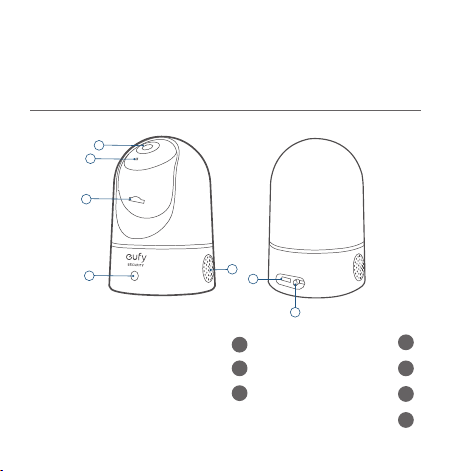
115 116
لع
َ
ر
َ
ب
ِ
ية لع
َ
ر
َ
ب
ِ
ية
ماظنلا دادعإ
يتلا ةزهجل( App Store نم eufy Security قيبطت ليزنت كنكمي .1
ماظنب لمعت يتلا ةزهجل( Google Play نم وأ )iOS ماظنب لمعت
.)Android
.ةيسيئرلا قيبطتلا ةحفص ىلإ لقتنا .eufy Security باسح ليجستب مق .2
ىلإ IndoorCam Pan 2K اريماك فضأو ،زاهج ةفاضإ ىلع رقنا
.كماظن
.دادعا لامك ةشاشلا ىلع تاميلعتلا عبتا .3
جتنملا ىلع ةماع ةرظن
Indoor Cam 2K Pan & Tilt اريماك
1
2
3
4
5
6
7
توص ربكم
5
ةسدعلا
1
ةقاطلا لاخدإ
6
نوفوركيم
2
ةنمازملا رز
7
SD ةقاطب ةحتف
3
ةلاحلل LED رشؤم
4
115 116
لع
َ
ر
َ
ب
ِ
ية لع
َ
ر
َ
ب
ِ
ية
ماظنلا دادعإ
يتلا ةزهجل( App Store نم eufy Security قيبطت ليزنت كنكمي .1
ماظنب لمعت يتلا ةزهجل( Google Play نم وأ )iOS ماظنب لمعت
.)Android
.ةيسيئرلا قيبطتلا ةحفص ىلإ لقتنا .eufy Security باسح ليجستب مق .2
ىلإ IndoorCam Pan 2K اريماك فضأو ،زاهج ةفاضإ ىلع رقنا
.كماظن
.دادعا لامك ةشاشلا ىلع تاميلعتلا عبتا .3
جتنملا ىلع ةماع ةرظن
Indoor Cam 2K Pan & Tilt اريماك
1
2
3
4
5
6
7
توص ربكم
5
ةسدعلا
1
ةقاطلا لاخدإ
6
نوفوركيم
2
ةنمازملا رز
7
SD ةقاطب ةحتف
3
ةلاحلل LED رشؤم
4
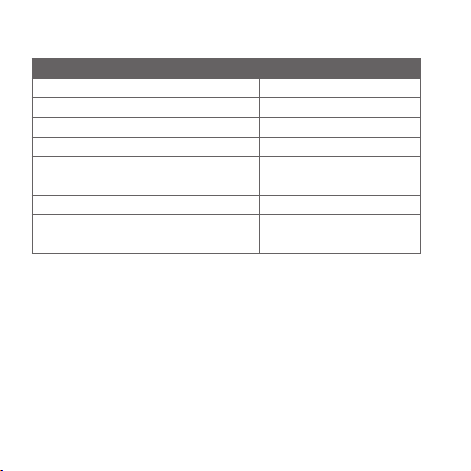
117 118
لع
َ
ر
َ
ب
ِ
ية لع
َ
ر
َ
ب
ِ
ية
ةيلخادلا اريماكلا بيكرت
بيكرتلل عقوم ديدحت
.فقس وأ طئاح ىلع اهتيبثت نكمي وأ ،فر وأ ةلواط ىلع اريماكلا عضو نكمي
،بولطملا ضرعلا ىلع لوصحلا امهلخ نم كنكمي ا
ً
عافتراو ا
ً
عقوم ددح
.ةلوهسب ةقاطلا سبقم ىلإ لوصولا ةيناكمإو
LED رشؤم ةلاح
فصولا LED رشؤم ةلاح
دادعل ةزهاج عطقتم قرزأ
حيحص لكشب لمعتو ليغشتلا ديق تباث قرزأ ءوض
تنرتناب ةلصتم ريغ ضماو رمحأ
توص وأ ةكرح فاشتكا )ةدحاو ةرم( ضماو رمحأ
ثبلا دهاشي صخش عم حيحص لكشب لمعت
ثدح ل
ّ
جس
ُ
ي وأ رشابملا
تباث رمحأ
ماظنلا ةئيهت ةيلمع ىرج
ُ
ت تباث قرزا ىلإ لئام يجسفنب
مدقتلا ديق تباثلا جمانربلا ةيقرت قرزا نينوللاب ضيمو
بوانتلاب رمحاو
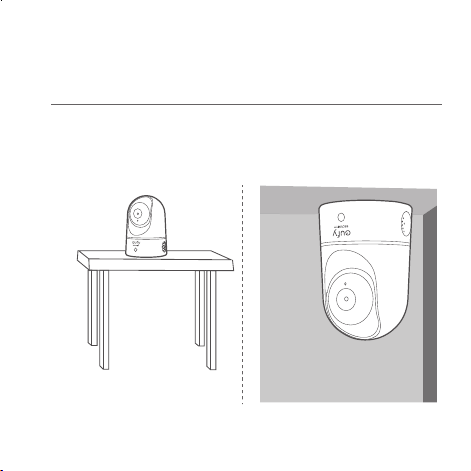
117 118
لع
َ
ر
َ
ب
ِ
ية لع
َ
ر
َ
ب
ِ
ية
ةيلخادلا اريماكلا بيكرت
بيكرتلل عقوم ديدحت
.فقس وأ طئاح ىلع اهتيبثت نكمي وأ ،فر وأ ةلواط ىلع اريماكلا عضو نكمي
،بولطملا ضرعلا ىلع لوصحلا امهلخ نم كنكمي ا
ً
عافتراو ا
ً
عقوم ددح
.ةلوهسب ةقاطلا سبقم ىلإ لوصولا ةيناكمإو
LED رشؤم ةلاح
فصولا LED رشؤم ةلاح
دادعل ةزهاج عطقتم قرزأ
حيحص لكشب لمعتو ليغشتلا ديق تباث قرزأ ءوض
تنرتناب ةلصتم ريغ ضماو رمحأ
توص وأ ةكرح فاشتكا )ةدحاو ةرم( ضماو رمحأ
ثبلا دهاشي صخش عم حيحص لكشب لمعت
ثدح ل
ّ
جس
ُ
ي وأ رشابملا
تباث رمحأ
ماظنلا ةئيهت ةيلمع ىرج
ُ
ت تباث قرزا ىلإ لئام يجسفنب
مدقتلا ديق تباثلا جمانربلا ةيقرت قرزا نينوللاب ضيمو
بوانتلاب رمحاو
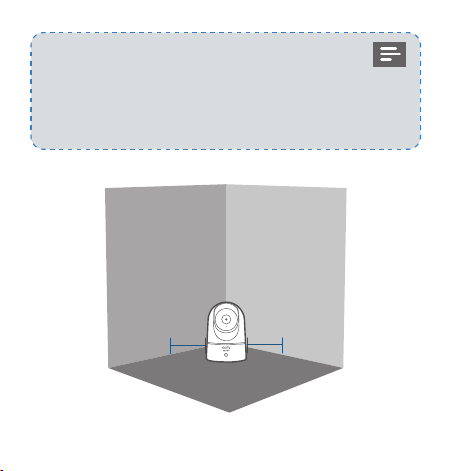
119 120
لع
َ
ر
َ
ب
ِ
ية لع
َ
ر
َ
ب
ِ
ية
ةيلخادلا اريماكلا بيكرت
:ةيلاتلا تاوطخلا عبتا ،فقسلا يف Indoor Cam اريماك بيكرتل
Ceiling
عضوملا ديدحت ةقاطب عض .1
ةمع عض مث فقسلا ىلع
بلطتتس يتلا طاقنلا ىلع
.بقثلا
Ceiling
بقثم ةمقلب تاحتفلا بقثب مق .2
8( ةصوب 61/5 ساقم
.)مم
.بيكرتلا لبق ةقاطلا سبقم نع ةيلخادلا اريماكلا لصفا •
اريماك نيب مس 20 / مدق 0,7 نع لقت ةفاسم ىلع ظفاح •
كلذب مق .ةيؤرلا قيعي دق ءيش يأ وأ طئاحلاو Indoor Cam
ىلع ا
ً
بلس رثؤي دق يذلا ءارمحلا تحت ةعشا ساكعنا يدافتل
.ةيليللا ةيؤرلا ءادأ
> 20CM
> 20CM
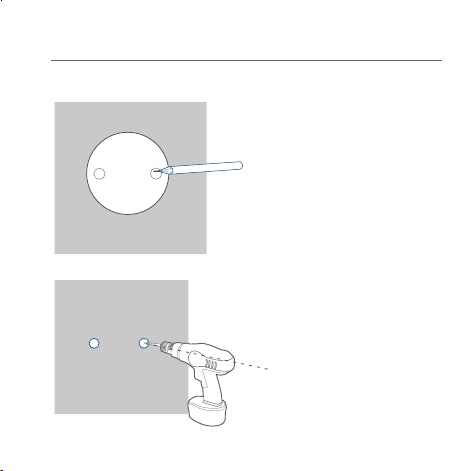
119 120
لع
َ
ر
َ
ب
ِ
ية لع
َ
ر
َ
ب
ِ
ية
ةيلخادلا اريماكلا بيكرت
:ةيلاتلا تاوطخلا عبتا ،فقسلا يف Indoor Cam اريماك بيكرتل
Ceiling
عضوملا ديدحت ةقاطب عض .1
ةمع عض مث فقسلا ىلع
بلطتتس يتلا طاقنلا ىلع
.بقثلا
Ceiling
بقثم ةمقلب تاحتفلا بقثب مق .2
8( ةصوب 61/5 ساقم
.)مم
.بيكرتلا لبق ةقاطلا سبقم نع ةيلخادلا اريماكلا لصفا •
اريماك نيب مس 20 / مدق 0,7 نع لقت ةفاسم ىلع ظفاح •
كلذب مق .ةيؤرلا قيعي دق ءيش يأ وأ طئاحلاو Indoor Cam
ىلع ا
ً
بلس رثؤي دق يذلا ءارمحلا تحت ةعشا ساكعنا يدافتل
.ةيليللا ةيؤرلا ءادأ
> 20CM
> 20CM
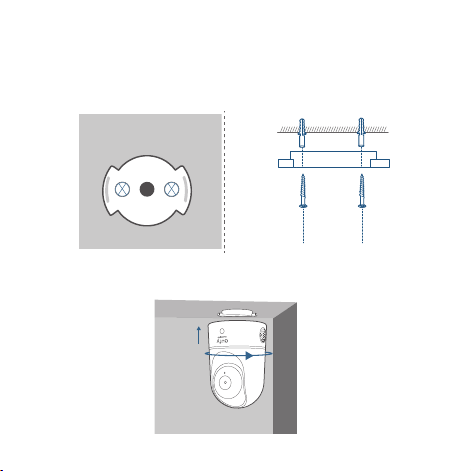
121 122
لع
َ
ر
َ
ب
ِ
ية لع
َ
ر
َ
ب
ِ
ية
بيكرتلا ةفيتك مادختساب حصنن ،طئاحلا ىلع Indoor Cam اريماك بيكرتل
.هاندأ ح
ّ
ضوم وه امك )ةقفرم ريغ(
ةدوجوملا تاحتفلا عم بيكرتلا حول ىلع ةدوجوملا تاحتفلا ةاذاحمب مق .3
ناردجلل
ً
ةيرورض تاتبثملا
ّ
دع
ُ
ت ؛تاحتفلا يف تاتبثملا لخدأ .فقسلا يف
يغاربلا ت
ّ
بث .صجلا وأ ،ديمرقلا وأ ،نوطابلا لثم ةبلص داوم نم ةعونصملا
.فقسلا يف بيكرتلا حول تيبثتل سبيليف عون نم كفم مادختساب
Ceiling
Ceiling
Indoor Cam اريماك ريودتب مقو بيكرتلا حول عم فيواجتلا ةاذاحمب مق .4
.اهناكم يف رقتست ىتح ةعاسلا براقع هاجتاب
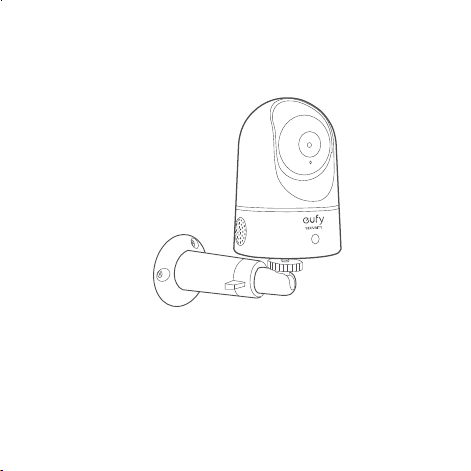
121 122
لع
َ
ر
َ
ب
ِ
ية لع
َ
ر
َ
ب
ِ
ية
بيكرتلا ةفيتك مادختساب حصنن ،طئاحلا ىلع Indoor Cam اريماك بيكرتل
.هاندأ ح
ّ
ضوم وه امك )ةقفرم ريغ(
ةدوجوملا تاحتفلا عم بيكرتلا حول ىلع ةدوجوملا تاحتفلا ةاذاحمب مق .3
ناردجلل
ً
ةيرورض تاتبثملا
ّ
دع
ُ
ت ؛تاحتفلا يف تاتبثملا لخدأ .فقسلا يف
يغاربلا ت
ّ
بث .صجلا وأ ،ديمرقلا وأ ،نوطابلا لثم ةبلص داوم نم ةعونصملا
.فقسلا يف بيكرتلا حول تيبثتل سبيليف عون نم كفم مادختساب
Ceiling
Ceiling
Indoor Cam اريماك ريودتب مقو بيكرتلا حول عم فيواجتلا ةاذاحمب مق .4
.اهناكم يف رقتست ىتح ةعاسلا براقع هاجتاب

123 124
لع
َ
ر
َ
ب
ِ
ية لع
َ
ر
َ
ب
ِ
ية
ءمعلا ةمدخ
نامضلا •
)ةدودحم
ً
ارهش 18 ةنامض
انب لصتا •
United States +1 (800) 988 7973 Mon-Fri 9AM-5PM (PT)
United Kingdom +44 (0) 1604 936 200 Mon-Fri 6AM-11AM
(GMT)
Germany +49 (0) 69 9579 7960 Mon-Fri 6:00-11:00
ينورتكلا ديربلاب انعم لصاوت •
Customer Support: support@eufylife.com
Anker Innovations Limited
Room 1318-19,Hollywood Plaza,610 Nathan
Road,Mongkok,Kowloon,Hong Kong
ةيلخادلا اريماكلا ليغشت
USB ل
ّ
وحمو لباك مادختساب ةقاط سبقمب Indoor Cam اريماك ليصوتب مق
.ماظنلاب Indoor Cam اريماك ليصوت متيس ،اريماكلا ليغشت دعب .ن
ّ
يقفرملا
قرزا نوللا ىلإ ةلاحلاب صاخلا LED رشؤم لوحتيس ،حاجنب لاصتا دنع
.تباثلا
رشابملا ثبلا مادختساب هنم ققحتلاو ضرعلا طبضل Indoor Cam ريودتب مق
نا زهاج ءيش لك .eufy Security قيبطت يف هيلإ لوصولا كنكمي يذلا
.Indoor Cam اريماك مادختس
:حيملت
eufy قيبطت يف "ةدعاسملا" نم ققحت ،اهحصإو ءاطخا فاشكتس
.LED رشؤم ةلاح ىلع عطل قيبطتلا ةحفص عجار .Security

123 124
لع
َ
ر
َ
ب
ِ
ية لع
َ
ر
َ
ب
ِ
ية
ءمعلا ةمدخ
نامضلا •
)ةدودحم
ً
ارهش 18 ةنامض
انب لصتا •
United States +1 (800) 988 7973 Mon-Fri 9AM-5PM (PT)
United Kingdom +44 (0) 1604 936 200 Mon-Fri 6AM-11AM
(GMT)
Germany +49 (0) 69 9579 7960 Mon-Fri 6:00-11:00
ينورتكلا ديربلاب انعم لصاوت •
Customer Support: [email protected]
Anker Innovations Limited
Room 1318-19,Hollywood Plaza,610 Nathan
Road,Mongkok,Kowloon,Hong Kong
ةيلخادلا اريماكلا ليغشت
USB ل
ّ
وحمو لباك مادختساب ةقاط سبقمب Indoor Cam اريماك ليصوتب مق
.ماظنلاب Indoor Cam اريماك ليصوت متيس ،اريماكلا ليغشت دعب .ن
ّ
يقفرملا
قرزا نوللا ىلإ ةلاحلاب صاخلا LED رشؤم لوحتيس ،حاجنب لاصتا دنع
.تباثلا
رشابملا ثبلا مادختساب هنم ققحتلاو ضرعلا طبضل Indoor Cam ريودتب مق
نا زهاج ءيش لك .eufy Security قيبطت يف هيلإ لوصولا كنكمي يذلا
.Indoor Cam اريماك مادختس
:حيملت
eufy قيبطت يف "ةدعاسملا" نم ققحت ،اهحصإو ءاطخا فاشكتس
.LED رشؤم ةلاح ىلع عطل قيبطتلا ةحفص عجار .Security

Anker Innovations Limited. All rights reserved. eufy Security and eufy Security Logo are
trademarks of Anker Innovations Limited, registered in the United States and other
countries. All other trademarks are the property of their respective owners.
51005002646 V01
QUICK
START GUIDE
Indoor Cam 2K Pan & Tilt