Register your product and get support at
www.philips.com/welcome
EN User manual 3
DE Benutzerhandbuch 25
ES Manual del usuario 47
FR Mode d’emploi 69
IT Manuale utente 93
NL Gebruiksaanwijzing 117
PT Manual do utilizador 141
SV Användarhandbok 163
DCM7005
DCM7005_12_UM_Book1_V4.0.indb 1 4/30/2014 10:22:24 AM
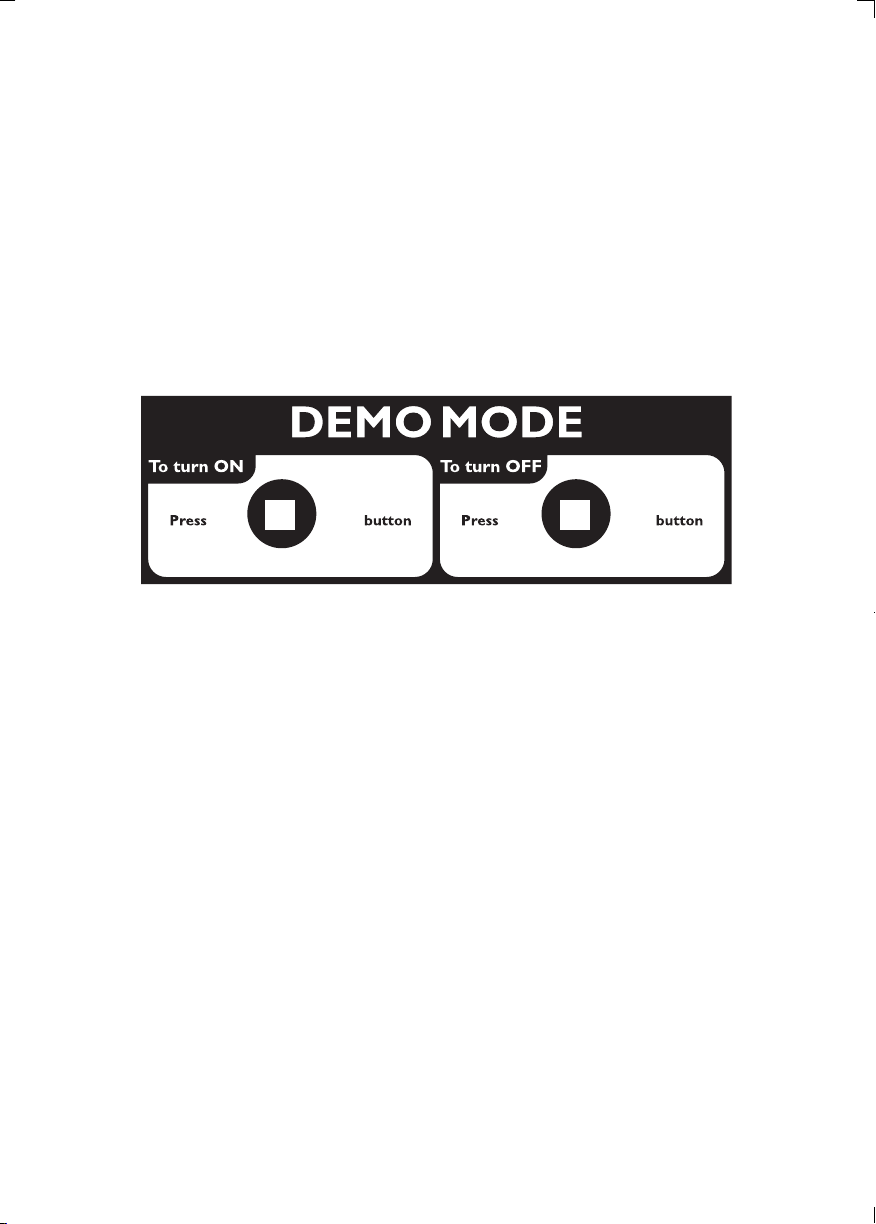
(in standby mode)
(in standby mode)
DCM7005_12_UM_Book1_V4.0.indb 2 4/30/2014 10:22:25 AM

3
English
EN
Contents
1 Important 4
Safety 4
Notice 5
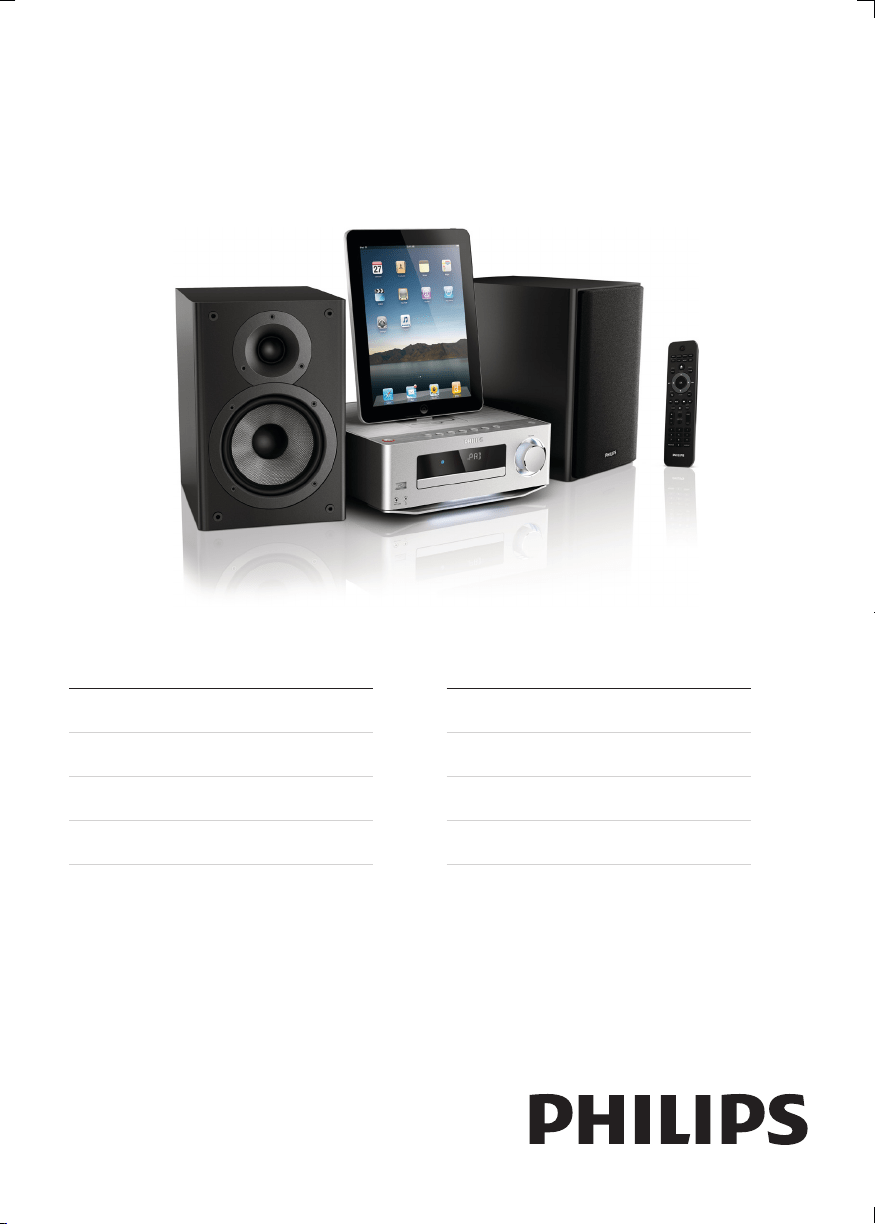
2 Your Micro Hi-Fi System 8
Introduction 8
What’s in the box 8
Product overview 9
3 Get started 12
Connect speakers 12
Connect FM antenna 12
Connect power 13
Prepare the remote control 13
Set clock 14
Turn on 14
Demonstrate the unit’s features 14
Adjust brightness of display panel 14
Turn on or off LED light 14
4 Play 15
Basic play operations 15
Play from disc 15
Play from USB 16
Adjust sound 16
5 Play from iPod/iPhone/iPad 17
Compatible iPod/iPhone/iPad 17
Listen to the iPod/iPhone/iPad 17
Charge the iPod/iPhone/iPad 17
Remove the iPod/iPhone/iPad 17
6 Listen to FM radio 18
Plug & Play Installation 18
Tune to FM radio stations 18
Program radio stations automatically 18
Program radio stations manually 18
Tune to a preset radio station 19
Show RDS information 19
7 Other features 20
Set alarm timer 20
Set the sleep timer 20
Listen to external audio device 20
Listen through headphone 21
8 Product information 22
Specications 22
USB playability information 23
Supported MP3 disc formats 23
9 Troubleshooting 24
DCM7005_12_UM_Book1_V4.0.indb 3 4/30/2014 10:22:25 AM
4
h Do not install near any heat sources
such as radiators, heat registers, stoves,
or other apparatus (including ampliers)
that produce heat.
i Protect the power cord from being
walked on or pinched, particularly at
plugs, convenience receptacles, and
the point where they exit from the
apparatus.
j Only use attachments/accessories
specied by the manufacturer.
k Use only with the cart, stand, tripod,
bracket, or table specied by the
manufacturer or sold with the apparatus.
When a cart is used, use caution when
moving the cart/apparatus combination
to avoid injury from tip-over.
l Unplug this apparatus during lightning
storms or when unused for long periods
of time.
m Refer all servicing to qualied service
personnel. Servicing is required when
the apparatus has been damaged in any
way, such as power-supply cord or plug
is damaged, liquid has been spilled or
objects have fallen into the apparatus,
the apparatus has been exposed to rain
or moisture, does not operate normally,
or has been dropped.
n Battery usage CAUTION – To prevent
battery leakage which may result in
bodily injury, property damage, or
damage to the unit:
• Install all batteries correctly, + and -
as marked on the unit.
• Do not mix batteries (old and new
or carbon and alkaline, etc.).
1 Important
Safety
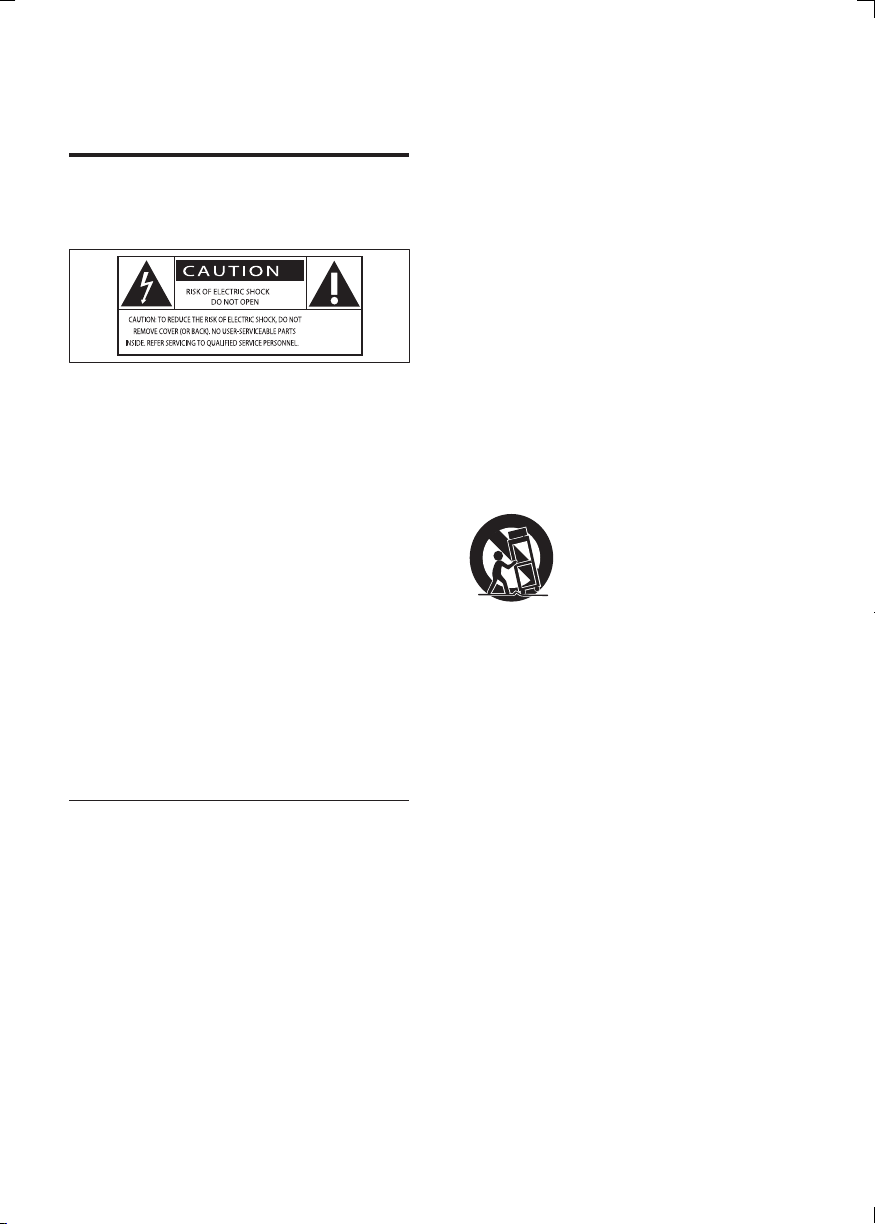
Know these safety symbols
This ‘bolt of lightning’ indicates uninsulated
material within your unit may cause an
electrical shock. For the safety of everyone
in your household, please do not remove
product covering.
The ‘exclamation mark’ calls attention to
features for which you should read the
enclosed literature closely to prevent
operating and maintenance problems.
WARNING:Toreducetheriskofreor
electric shock, this apparatus should not be
exposedtorainormoistureandobjectslled
with liquids, such as vases, should not be
placed on this apparatus.
CAUTION: To prevent electric shock, fully
insert the plug. (For regions with polarized
plugs: To prevent electric shock, match wide
blade to wide slot.)
Important Safety Instructions
a Read these instructions.
b Keep these instructions.
c Heed all warnings.
d Follow all instructions.
e Do not use this apparatus near water.
f Clean only with dry cloth.
g Do not block any ventilation openings.
Install in accordance with the
manufacturer’s instructions.
EN
DCM7005_12_UM_Book1_V4.0.indb 4 4/30/2014 10:22:25 AM
5
English
• Sound can be deceiving. Over time your
hearing ‘comfort level’ adapts to higher
volumes of sound. So after prolonged
listening, what sounds ‘normal’ can
actually be loud and harmful to your
hearing. To guard against this, set your
volume to a safe level before your hearing
adapts and leave it there.
To establish a safe volume level:
• Set your volume control at a low setting.
• Slowly increase the sound until you can
hear it comfortably and clearly, without
distortion.
Listen for reasonable periods of time:
• Prolonged exposure to sound, even
at normally ‘safe’ levels, can also cause
hearing loss.
• Be sure to use your equipment
reasonably and take appropriate breaks.
Be sure to observe the following guidelines
when using your headphones.
• Listen at reasonable volumes for
reasonable periods of time.
• Be careful not to adjust the volume as
your hearing adapts.
• Do not turn up the volume so high that
you can’t hear what’s around you.
• You should use caution or temporarily
discontinue use in potentially hazardous
situations. Do not use headphones while
operating a motorized vehicle, cycling,
skateboarding,etc.;itmaycreateatrafc
hazard and is illegal in many areas.
Notice
Anychangesormodicationsmadetothis
device that are not expressly approved by
WOOX Innovations may void the user’s
authority to operate the equipment.
• Remove batteries when the unit is
not used for a long time.
• Batteries (battery pack or batteries
installed) shall not be exposed to
excessiveheatsuchassunshine,re
or the like.
o Apparatus shall not be exposed to
dripping or splashing.
p Do not place any sources of danger on
the apparatus (e.g. liquid lled objects,
lighted candles).
q Where the MAINS plug or an appliance
coupler is used as the disconnect device,
the disconnect device shall remain
readily operable.
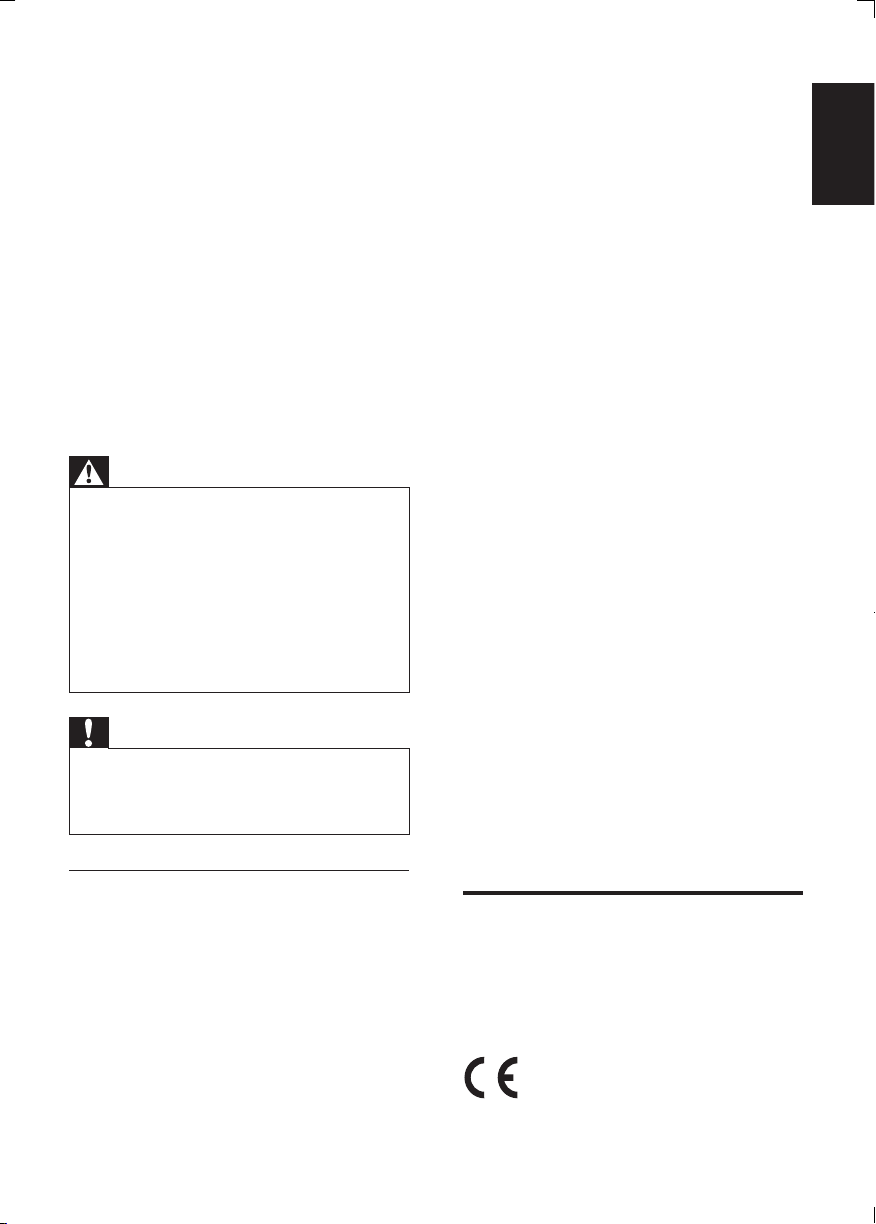
Warning
• Never remove the casing of this apparatus.
• Never lubricate any part of this apparatus.
• Never place this apparatus on other electrical
equipment.
• Keep this apparatus away from direct sunlight,
nakedamesorheat.
• Never look into the laser beam inside the
apparatus.
• Ensure that you always have easy access to the
power cord, plug or adaptor to disconnect the
apparatus from the power.
Caution
• Use of controls or adjustments or
performance of procedures other than herein
may result in hazardous radiation exposure or
other unsafe operation.
Hearing safety
Listen at a moderate volume.
• Using headphones at a high volume can
impair your hearing. This product can
produce sounds in decibel ranges that
may cause hearing loss for a normal
person, even for exposure less than a
minute. The higher decibel ranges are
offered for those that may have already
experienced some hearing loss.
EN
DCM7005_12_UM_Book1_V4.0.indb 5 4/30/2014 10:22:26 AM
6
Environmental information
All unnecessary packaging has been omitted.
We have tried to make the packaging easy to
separate into three materials: cardboard (box),
polystyrene foam (buffer) and polyethylene
(bags, protective foam sheet.)
Your system consists of materials which can
be recycled and reused if disassembled by
a specialized company. Please observe the
local regulations regarding the disposal of
packaging materials, exhausted batteries and
old equipment.
The making of unauthorized copies of
copy-protected material, including computer
programs,les,broadcastsandsound
recordings, may be an infringement of
copyrights and constitute a criminal offence.
This equipment should not be used for such
purposes.
“Made for iPod,” “Made for iPhone,” and
“Made for iPad” mean that an electronic
accessory has been designed to connect
specicallytoiPod,iPhone,oriPad,
respectively,andhasbeencertiedbythe
developer to meet Apple performance
standards. Apple is not responsible for the
operation of this device or its compliance
with safety and regulatory standards. Please
note that the use of this accessory with
iPod, iPhone, or iPad may affect wireless
performance.
iPod and iPhone are trademarks of Apple Inc.,
registered in the U.S. and other countries. iPad
is a trademark of Apple Inc.
This product complies with the radio
interference requirements of the European
Community.
Your product is designed and manufactured
with high quality materials and components,
which can be recycled and reused.
When this crossed-out wheeled bin symbol
is attached to a product it means that the
product is covered by the European Directive
2002/96/EC.
Please inform yourself about the local separate
collection system for electrical and electronic
products.
Please act according to your local rules and
do not dispose of your old products with your
normal household waste. Correct disposal of
your old product helps to prevent potential
negative consequences for the environment
and human health.
Your product contains batteries covered by
the European Directive 2006/66/EC, which
cannot be disposed with normal household
waste.Please inform yourself about the local
rules on separate collection of batteries
because correct disposal helps to prevent
negative consequences for the environmental
and human health.
EN
DCM7005_12_UM_Book1_V4.0.indb 6 4/30/2014 10:22:27 AM
7
English
This apparatus includes this label:
Class II equipment symbol:
CLASS II apparatus with double insulation,
and no protective earth provided.
Note
• The type plate is located at the rear of the
apparatus.
Norge
Typeskiltnnespåapparatensunderside.
Observer: Nettbryteren er sekundert innkoplet.
Den innebygde netdelen er derfor ikke
frakopletnettetsålengeapparatetertilsluttet
nettkontakten.
Foråreduserefarenforbrannellerelektrisk
støt, skal apparatet ikke utsettes for regn eller
fuktighet.
EN
DCM7005_12_UM_Book1_V4.0.indb 7 4/30/2014 10:22:27 AM
8
What’s in the box
Check and identify the contents of your
package:
• Main unit
• Loudspeaker boxes x 2
• AC power cord
• Speaker connection cables
• MP3 link cable
• FM antenna
• Remote control with 2 AAA batteries
• User manual
2 Your Micro Hi-
Fi System
Congratulations on your purchase, and
welcometoPhilips!Tofullybenetfromthe
support that Philips offers, register your product
at www.Philips.com/welcome.
Introduction
With this unit, you can:
• enjoy audio from discs, USB devices, iPod,
iPhone, iPad and other external devices
• listen to radio stations
You can enrich sound output with these sound
effects:
• Treble and Bass Control
• Loudness Control
The unit supports these media formats:
EN
DCM7005_12_UM_Book1_V4.0.indb 8 4/30/2014 10:22:27 AM
9
English
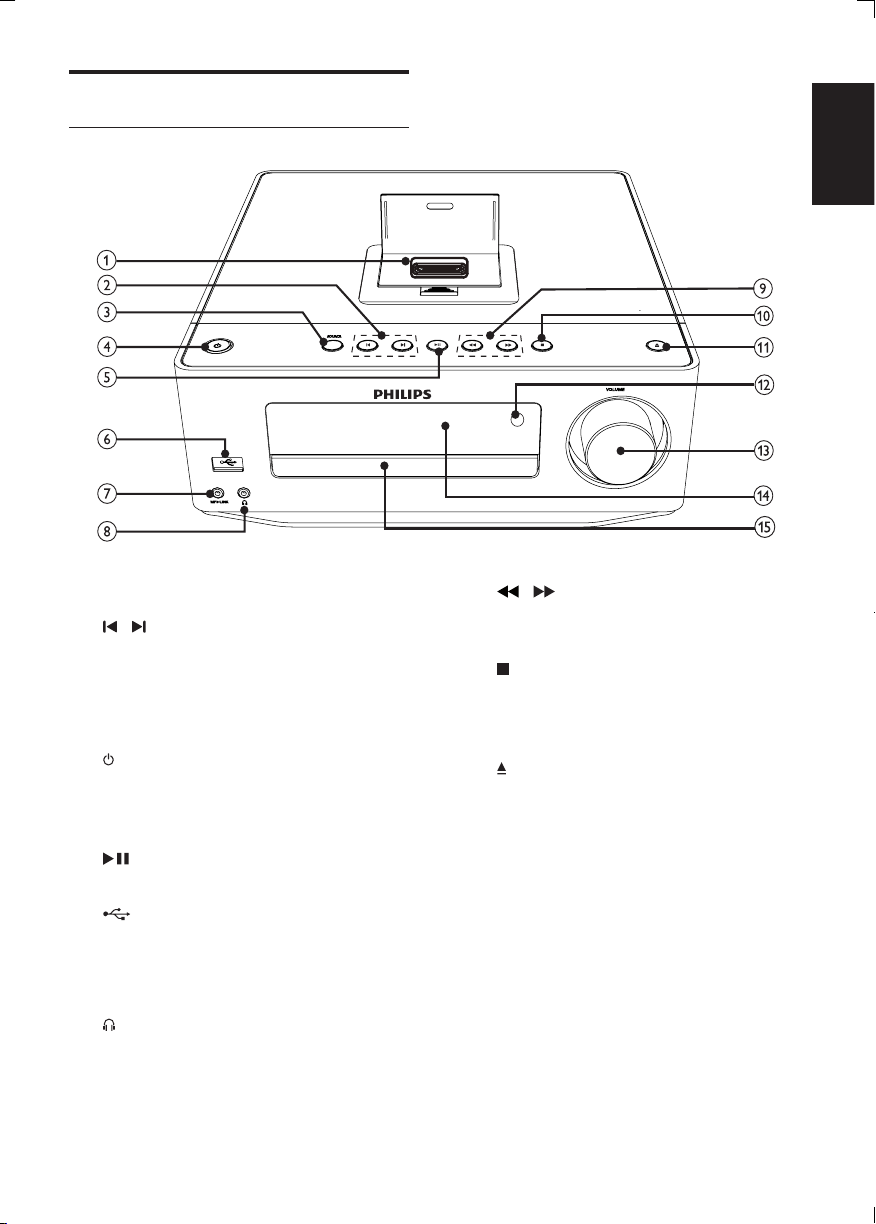
i /
• Search backward or forward.
• Search to a radio station.
j
• Stop play.
• (In standby mode) Turn on/off Demo
mode.
k
• Open or close the disc
compartment.
l IR sensor
• Detect signals from the remote
control. Always point the remote
control at the IR sensor.
m VOLUME
• Adjust volume.
• Adjust time.
n Display panel
o Disc compartment
Product overview
Main unit
a Dock of iPod, iPhone and iPad.
b /
• Skip to the previous/next track.
• Select a preset radio station.
c SOURCE
• Select a source.
d
• Turn on this product
• Switch to Eco Power standby or
standby mode.
e
• Start or pause play.
f
• ConnecttoaUSBashdrive.
g MP3 LINK
• Connect to an external audio device.
h
• Headphone socket.
EN
DCM7005_12_UM_Book1_V4.0.indb 9 4/30/2014 10:22:30 AM
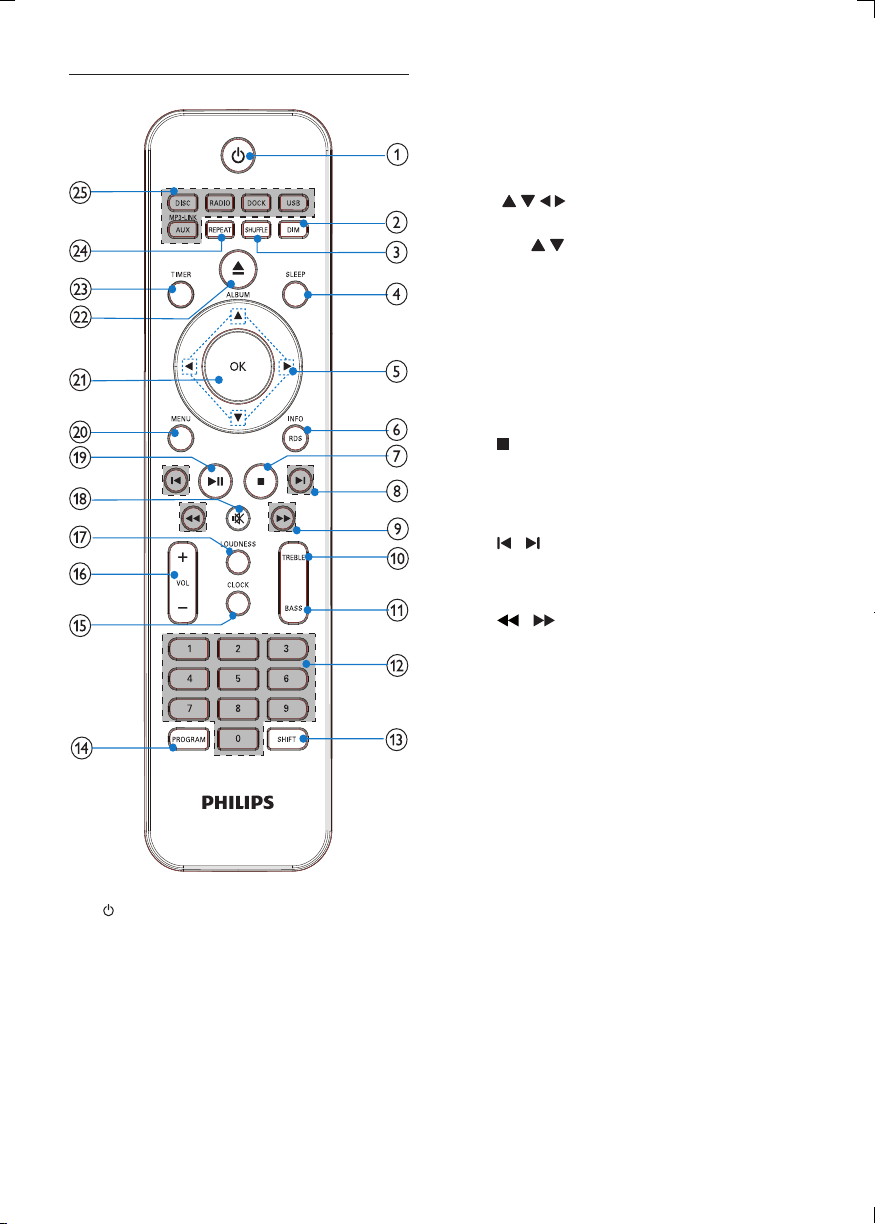
10
c SHUFFLE
• Play tracks randomly.
d SLEEP
• Set the sleep timer.
e
• Navigate through the menus.
• : Skip to previous/next album;
f RDS/INFO
• For selected FM radio stations:
display RDS information.
• Display the current status or the disc
information.
• Display the ID3 information (if
available) of MP3 tracks.
g
• Stop play.
• (In standby mode) Turn on/off Demo
mode.
h /
• Skip to the previous/next track.
• Select a preset radio station.
i /
• Search backward or forward.
• Search to a radio station.
j TREBLE
• Activate treble level
k BASS
• Activate bass level
l Numeric keypad
• Select a track directly.
m SHIFT
• Enter a two or three-digit number
(with the numeric keypad).
n PROGRAM
• Program radio stations.
o CLOCK
• Set the clock.
• Display the set clock.
Remote control
a
• Turn on this product.
• Switch to Eco Power standby or
standby mode.
b DIM
• Adjust brightness of display panel.
• (Press and hold) Turn on or off the
LED light at the bottom of the unit
and at the volume knob.
EN
DCM7005_12_UM_Book1_V4.0.indb 10 4/30/2014 10:22:31 AM

11
English
p VOL +/-
• Adjust volume.
• Adjust time.
q LOUDNESS
• Turn on or off automatic loudness
adjustment.
r
• Mute or restore volume.
s
• Start or pause play.
t MENU
• Access iPod/iPhone menu.
u OK
• Conrmanentryorselection.
v
• Open or close the disc
compartment.
w TIMER
• Set alarm timer.
x REPEAT
• Select a repeat play mode.
y Source buttons
• Select a source.
EN
DCM7005_12_UM_Book1_V4.0.indb 11 4/30/2014 10:22:31 AM
12
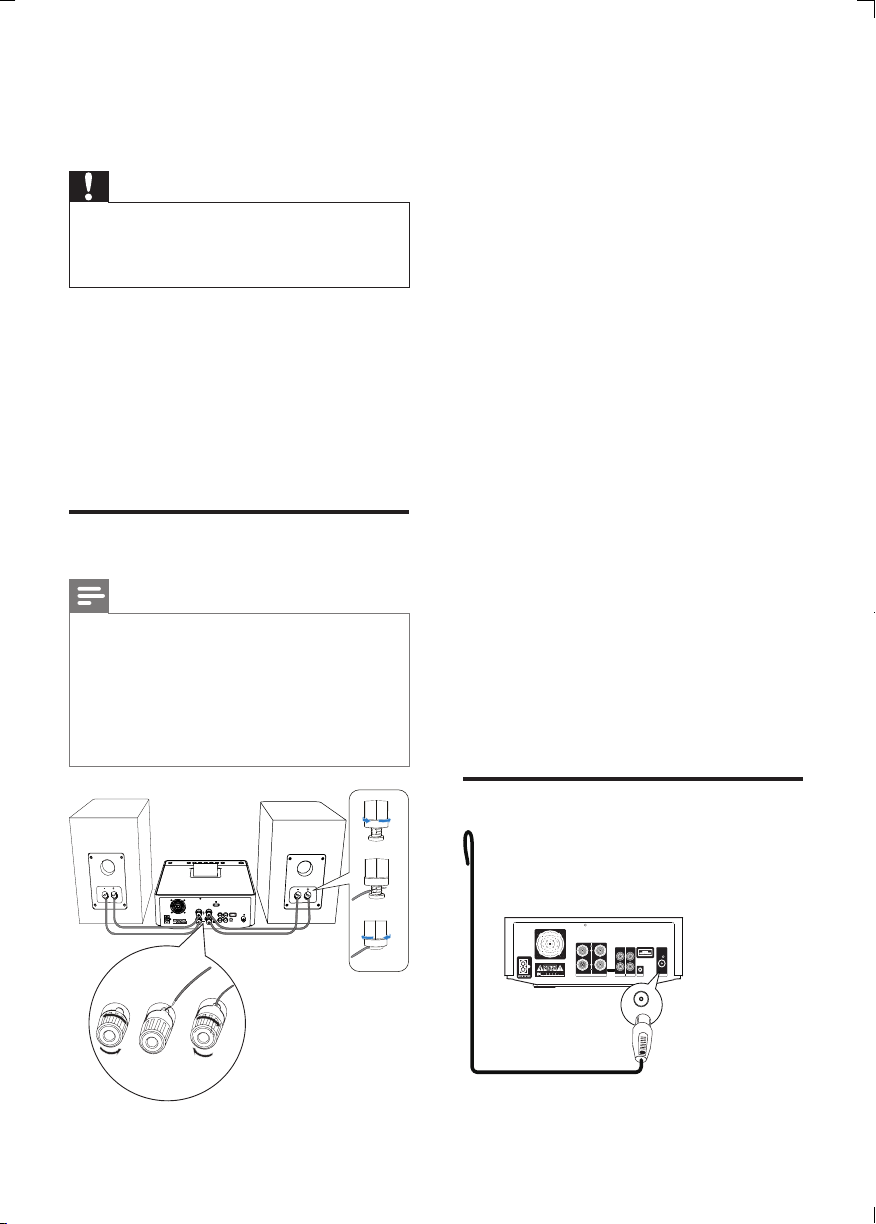
For the main unit side:
1 Unscrew the speaker connectors.
2 Insert fully the red end of a speaker cable
into the left red (+) connector.
3 Screw the left red (+) connector to
secure the cable.
4 Insert fully the silver end of a speaker
cable into the left black (-) connector.
5 Screw the left black (-) connector to
secure the cable.
6 Repeat steps 2-5 to insert the other
speaker cable into the right connectors.
For the speaker side:
1 Unscrew the speaker connectors.
2 For the left speaker, identify the speaker
cable that is connected to the left
connectors on the main unit.
3 Insert fully the red end of the speaker
cable into the red (+) connector.
4 Screw the red (+) connector to secure
the cable.
5 Insert fully the silver end of the speaker
cable into the black (-) connector.
6 Screw the black (-) connector to secure
the cable.
7 Repeat steps 2-6 for the right speaker.
Connect FM antenna
SPEAKER OUT
ANTENNA
FM
DEMO
RR
AUX INLINE OUT
LL
COAXIALVIDEO
R
L
FM
3 Get started
Caution
• Use of controls or adjustments or
performance of procedures other than herein
may result in hazardous radiation exposure or
other unsafe operation.
Always follow the instructions in this chapter in
sequence.
If you contact Philips, you will be asked for the
model and serial number of this apparatus. The
model number and serial number are on the
back of the apparatus. Write the numbers here:
Model No. __________________________
Serial No. ___________________________
Connect speakers
Note
• Ensure that the colors of the speaker wires and
terminals are matched.
• For optimal sound, use the supplied speakers
only.
• Connect only speakers with impedance that is
the same or higher than the supplied speakers.
RefertotheSpecicationssectionofthis
manual.
1
2
3
DEMO
d
e
f
EN
DCM7005_12_UM_Book1_V4.0.indb 12 4/30/2014 10:22:32 AM
13
English
Prepare the remote control
Caution
• Risk of explosion! Keep batteries away from
heat,sunshineorre.Neverdiscardbatteries
inre.
To insert the remote control battery:
1 Open the battery compartment.
2 Insert 2 AAA batteries with correct
polarity (+/-) as indicated.
3 Close the battery compartment.
Note
• If you are not going to use the remote control
for a long time, remove the batteries.
• Do not use old and new or different types of
batteries in combination.
• Batteries contain chemical substances, so they
should be disposed of properly.
a
b
c
Tip
• For optimal reception, fully extend and adjust
the position of the antenna.
• For better FM stereo reception, connect an
outdoor FM antenna to the FM ANTENNA
socket.
• The unit does not support MW radio
reception.
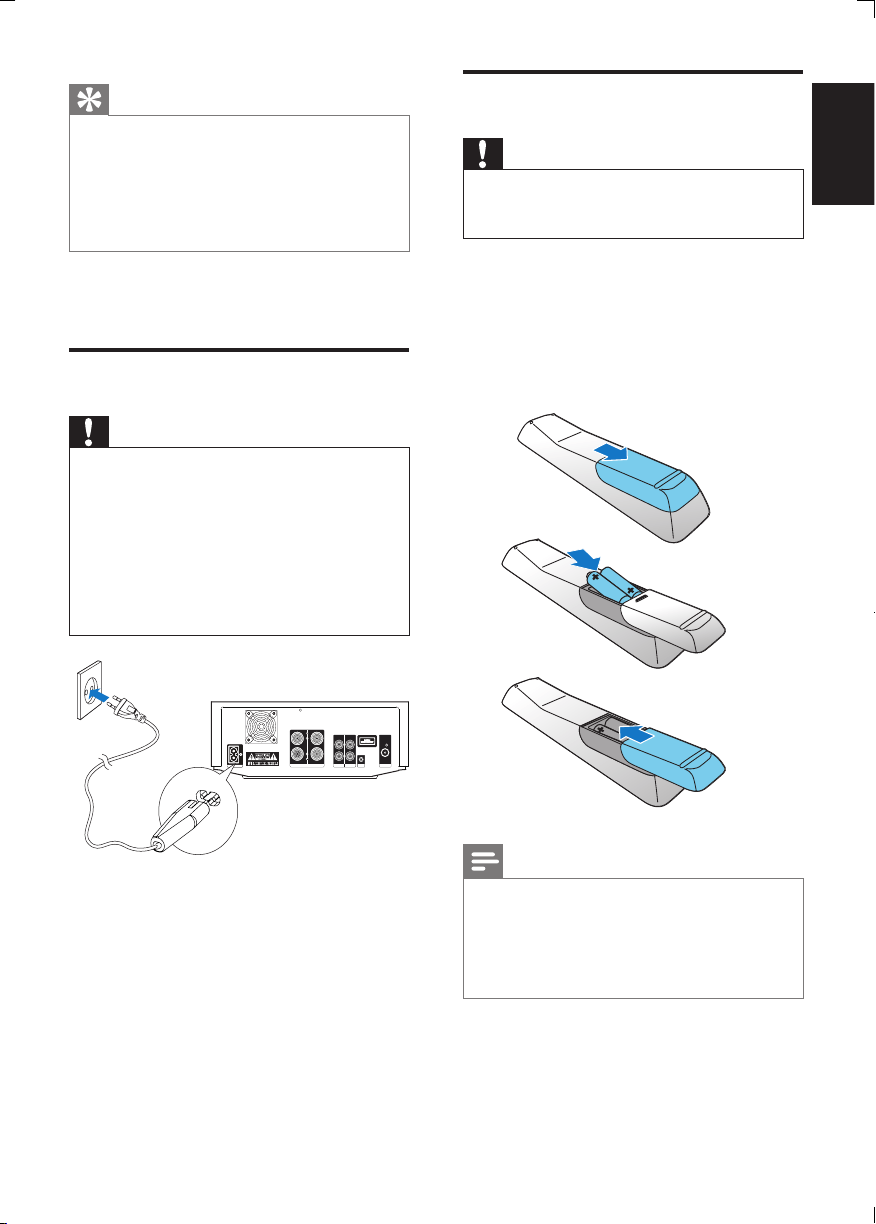
1 Connect the supplied FM antenna to the
FM ANTENNA socket on the main unit.
Connect power
Caution
• Risk of product damage! Ensure that the
power supply voltage corresponds to the
voltage printed on the back or the underside
of the unit.
• Risk of electric shock! When you unplug the
AC power cord, always pull the plug from the
socket. Never pull the cord.
• Before you connect the AC power cord,
ensure that you have completed all other
connections.
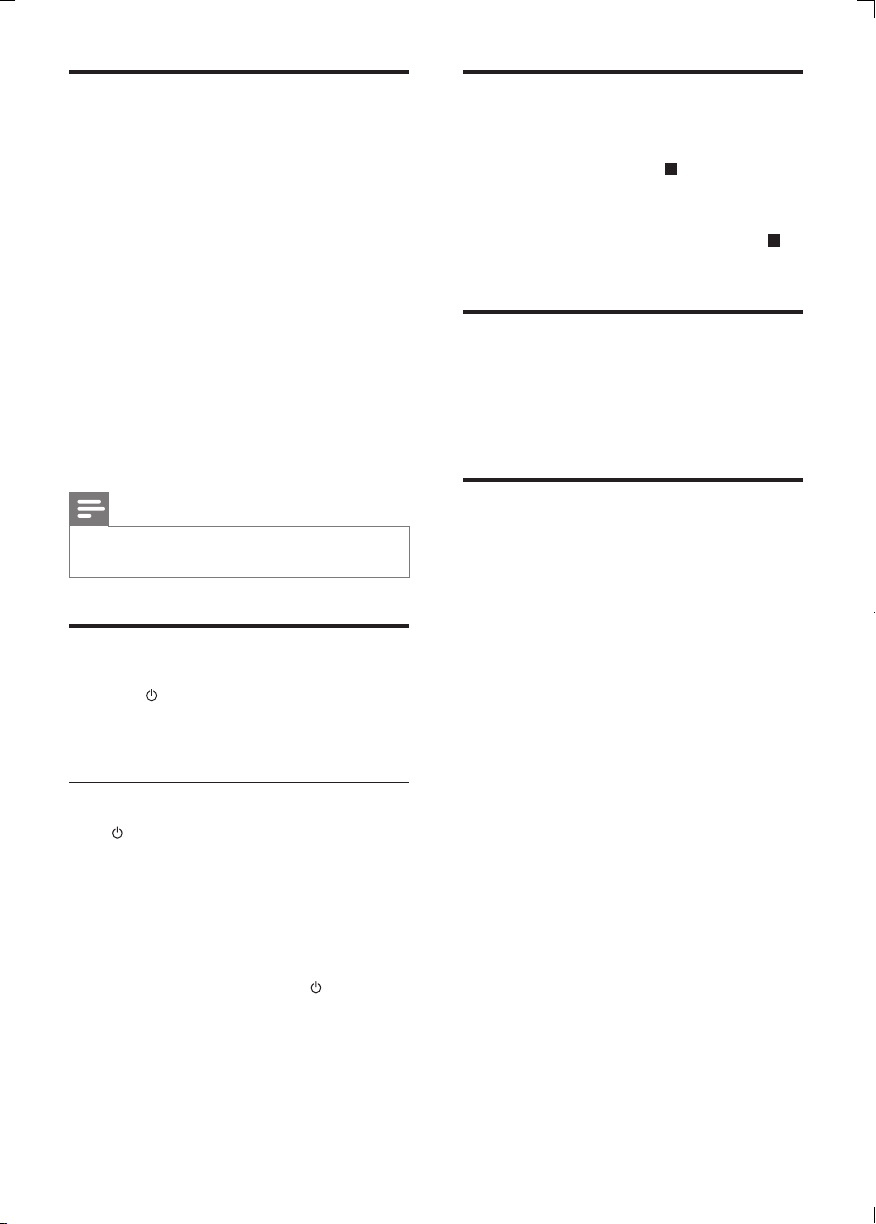
1 Connect the power cable to:
• the AC~ jack on the main unit.
• the wall socket.
SPEAKER OUT
ANTENNA
FM
DEMO
RR
AUX INLINE OUT
LL
COAXIALVIDEO
R
L
AC MAIN
~
EN
DCM7005_12_UM_Book1_V4.0.indb 13 4/30/2014 10:22:33 AM
14
Demonstrate the unit’s
features
In the standby mode, press until “DEMO
ON” is displayed.
» Available features are displayed one by one.
• To turn off the demonstration, press
again.
Adjust brightness of display
panel
Press DIM repeatedly to select different
brightness levels.
Turn on or off LED light
In power-on mode, press and hold DIM to
turn on or off the LED light at the bottom of
the unit and at the volume knob.
Set clock
1 In standby mode, press CLOCK for 3
seconds to activate clock setting mode.
» [CLOCK SET] scrolls on the display,
then the time format [24H] or [12H]
appears.
2 Press VOL +/- to select 24H or 12H, then
press CLOCKtoconrm.
» The hour digits begin to blink.
3 Press VOL +/- to set hour, then press
CLOCK again.
» The minute digits begin to blink.
4 Press VOL +/- to set minute.
5 Press CLOCKtoconrmtheclock
setting.
Note
• If no button is pressed in 90 seconds, the
system exits clock setting mode automatically.
Turn on
1 Press .
» The unit switches to the last selected
source.
Switch to standby mode
Press to switch the Hi-Fi system to standby
mode.
» The clock (if set) appears on the display
panel.
To switch the system to Eco Power Standby
mode:
In standby mode, press and hold for 2
seconds.
» [ECO POWER] (Eco power) scrolls on the
display, then the backlight turns off.
EN
DCM7005_12_UM_Book1_V4.0.indb 14 4/30/2014 10:22:33 AM
15
English
Play from USB
Warning
• Ensure that the USB device contains playable
audio contents for supported formats.
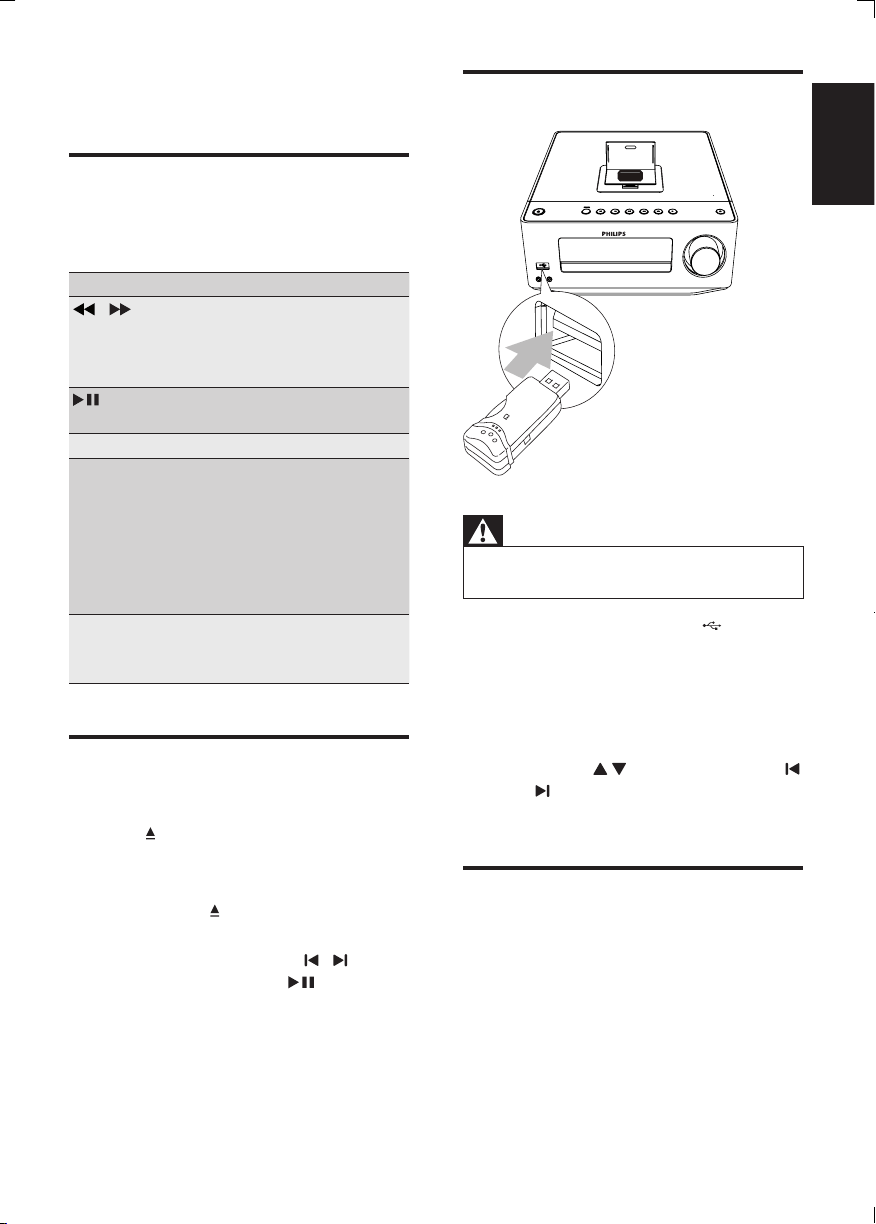
1 Flip open the cover marked on the
front panel.
2 Insert the USB device into the USB
socket.
3 Press USB to select the USB source.
» Play starts automatically. If not, press
ALBUM/ to select a folder and
/ toselectale.ThenpressOK to
start play.
Adjust sound
During play, you can adjust volume through
following operations.
4 Play
Basic play operations
You can control play through following
operations.
Key Function
/ Press and hold to fast-forward/
fast-reverse the track during
playback, then release to resume
play.
To pause/resume play during
playback.
INFO select different play information.
REPEAT To select a repeat play mode:
[REP] (repeat): play current track
repeatedly.
[REP ALL] (repeat all): play all
tracks repeatedly.
Press again to return to normal
play.
SHUFFLE To play tracks randomly.
Press again to return to normal
play.
Play from disc
1 Press DISC to select the CD source.
2 Press .
» The disc compartment opens.
3 Place a disc with the printed side facing
up, then press .
4 Play starts automatically.
• If play does not start, press / to
select a track, then press .
EN
DCM7005_12_UM_Book1_V4.0.indb 15 4/30/2014 10:22:34 AM

16
Key Function
VOL +/- To increase/decrease the
volume.
To mute/restore sound.
LOUDNESS To turn on/off automatic
loudness control.
BASS Press BASS to activate bass
level, and then adjust with
VOL +/-.
TREBLE Press TREBLE to activate
treble level, and then adjust
with VOL +/-.
EN
DCM7005_12_UM_Book1_V4.0.indb 16 4/30/2014 10:22:34 AM
17
English
• To pause/resume play, press .
• To skip to a track, press / .
• To search during play: press and hold
/ , then release to resume
normal play.
• To navigate the menu: press MENU
and / to select items, then press
OKtoconrm.
Note
• When iPod/iPhone/iPad source is selected, you
cannot enjoy audio through the headphone
socket.
Charge the iPod/iPhone/iPad
The docked iPod/iPhone/iPad begins to charge
as soon as the unit is connected to AC power.
Note
• iPod with color display, iPod classic, and iPod
with video are not compatible with dock
charging.
Remove the iPod/iPhone/iPad
1 Pull the iPhone/iPod/iPad off the dock.
2 Flip down the lid to hide the dock.
5 Play from iPod/
iPhone/iPad
You can enjoy audio from iPod/iPhone/iPad
through this unit.
Compatible iPod/iPhone/iPad
The unit supports the following iPod, iPhone,
and iPad models:
Made for.
• iPod nano (1st, 2nd, 3rd, 4th, 5th, and 6th
generation)
• iPod touch (1st, 2nd, 3rd and 4th
generation)
• iPod Mini
• iPhone
• iPhone 3G
• iPhone 3GS
• iPhone 4
• iPad
Listen to the iPod/iPhone/
iPad
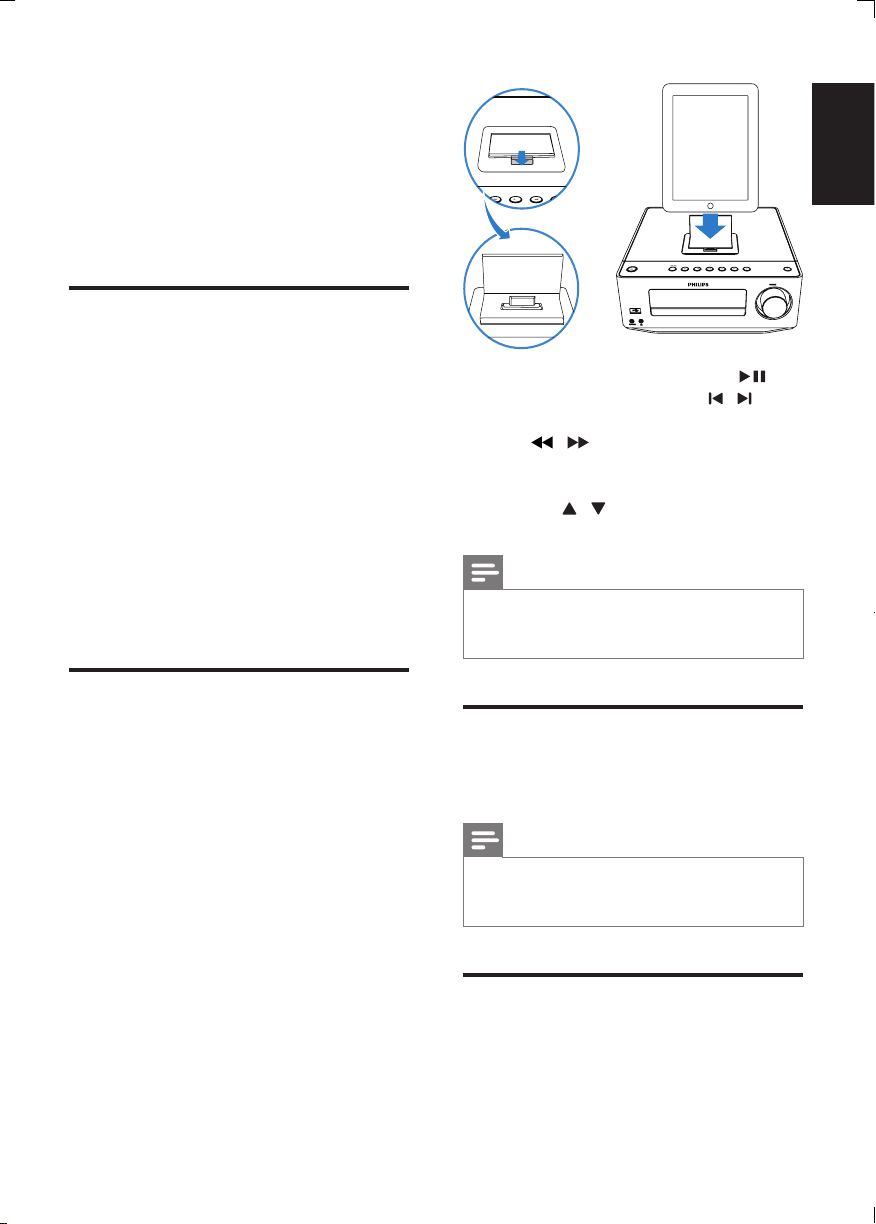
1 Press DOCK to select the iPhone/iPod/
iPad source.
2 Open the iPhone/iPod/iPad dock on the
top panel and place the iPhone/iPod/iPad
in the dock.
EN
DCM7005_12_UM_Book1_V4.0.indb 17 4/30/2014 10:22:35 AM
18
To tune to a weak station:
Press / repeatedlyuntilyoundoptimal
reception.
Tip
• [STEREO] is default setting for tuner mode.
• Under tuner mode, you can press OK
repeatedly to toggle between [STEREO] and
[MONO], and the unit memorizes your setting
even if you turn off the unit or turn to other
sources.
Program radio stations
automatically
Note
• You can program a maximum of 20 preset
radio stations.
1 In tuner mode, press and hold
PROGRAM for 2 seconds to activate
automatic program mode.
» [AUTO] (auto) is displayed and begins
to blink.
» Therstprogrammedradiostationis
broadcast automatically.
Program radio stations
manually
Note
• You can program a maximum of 20 preset
radio stations.
1 Tune to a radio station.
2 Press PROGRAM to activate
programming.
6 Listen to FM
radio
Plug & Play Installation
when the unit turn to Radio mode, and No
radio stations are stored, [AUTO INSTALL -
PRESS PLAY, STOP CANCEL] (to auto install,
press ; to cancel, press ) displays.
1 Press on the main unit to start
installation.
» The unit automatically stores radio
stationswithsufcientsignalstrength.
» When all the available radio stations
arestored,therstpresetradiostation
is broadcast automatically.
Toexit Plug and Play installation mode
2 press source keys or on the remote
control.
» The system switches to the designated
source mode or standby mode.
Tune to FM radio stations
Warning
• Ensure that you have connected and fully
extended the supplied FM antenna.
1 Press RADIO.
2 Press and hold / to search to a
radio station.
3 When the frequency starts to change,
release the button.
» The FM tuner tunes to a station with
strong reception automatically.
4 Repeat steps 2-3 to tune to more
stations.
EN
DCM7005_12_UM_Book1_V4.0.indb 18 4/30/2014 10:22:35 AM
19
English
Synchronize clock with RDS
You can synchronize time shown on the unit
with that on the RDS station.
1 Tune to a RDS radio station that
transmits time signals.
2 Press RDS for over 2 seconds.
» [CT SYNC] is displayed and the unit
reads RDS time automatically.
» If no time signal is received, [NO CT]
is displayed.
Note
• The accuracy of the transmitted time depends
on the RDS station that transmits the time
signal.
3 Press / to allocate a number from
1 to 20 to this radio station, then press
PROGRAMtoconrm.
» The preset number and the frequency
of the preset station are displayed.
4 Repeat the above steps to program other
stations.
Note
• To overwrite a programmed station, store
another station in its place.
Tune to a preset radio station
1 Press / to select a preset number
that you want.
Show RDS information
RDS (Radio Data System) is a service
that allows FM stations to show additional
information. If you tune to a RDS station, a RDS
icon and the station name are displayed.
1 Tune to a RDS station.
2 Press RDS repeatedly to scroll through
the following information (if available):
» Station name
» Program type such as [NEWS] (news),
[SPORT] (sport), [POP M] (pop
music)...
» RDS clock
» Frequency
EN
DCM7005_12_UM_Book1_V4.0.indb 19 4/30/2014 10:22:35 AM
20
Activate/deactivate alarm timer
1 In standby mode, press TIMER repeatedly
to activate or deactivate timer.
» If timer is activated, is displayed.
Tip
• Alarm timer is not available in MP3 LINK
mode.
• If CD/USB/iPod/iPhone source is selected,
yet no disc is placed or no USB/iPod/iPhone
connected, the system switches to the tuner
source automatically.
Set the sleep timer
This unit can switch to standby automatically
after a set period of time.
1 When the unit is turned on, press SLEEP
repeatedly to select a set period of time
(in minutes).
» When sleep timer is activated, the
display shows .
To deactivate sleep timer
1 Press SLEEP repeatedly until “SLEEP
OFF” is displayed.
» When sleep timer is deactivated,
disappears.
Listen to external audio
device
You can listen to an external audio device such
as MP3 player through this unit.
1 Connect the audio device.
• For audio device with red/white
audio output sockets:
Connect a red/white audio cable
(not supplied) to the AUX IN
sockets and to the audio output
sockets on the audio device.
7 Other features
Set alarm timer
This unit can be used as an alarm clock. You
can select CD, Dock, iPod/iPhone playlist, FM or
USB as alarm source.
Note
• Make sure that you have set the clock
correctly.
1 In standby mode, press and hold TIMER
until [TIMER SET] scrolls on the display.
2 Press source buttons on the remote
control to select a source: CD, FM, USB,
Dock or iPod/iPhone playlist.
• If iPod/iPhone playlist is selected
as alarm source, you need create a
playlist called “PHILIPS” in your iPod/
iPhone.
• If no playlist called “PHILIPS” is
created in the iPod/iPhone or no
track is stored in the playlist, the
unit switches to iPod/iPhone alarm
source.
3 Press TIMERtoconrm.
» The hour digits are displayed and begin
to blink.
4 Press VOL +/- repeatedly to set hour,
then press TIMERagaintoconrm.
» The minute digits are displayed and
begin to blink.
5 Press VOL +/- to set minute, then press
TIMERtoconrm.
» VOL (volume) is displayed and begins
to blink.
6 Press VOL +/- to adjust volume, then
press TIMERtoconrm.
EN
DCM7005_12_UM_Book1_V4.0.indb 20 4/30/2014 10:22:36 AM

21
English
• For audio device with headphone
sockets:
Connect the supplied MP3 Link cable
to the MP3 LINK socket and to the
headphone socket on the audio
device.
2 Select MP3 LINK/AUX source.
3 Play the device.
Listen through headphone
1 Plug a headphone into the socket on
the unit.
EN
DCM7005_12_UM_Book1_V4.0.indb 21 4/30/2014 10:22:36 AM
22
Tuner-Specs
Tuning Range FM: 87.5 -
108MHz
Tuning grid 50KHz
- Mono, 26dB S/N Ratio
- Stereo, 46dB S/N Ratio
<22 dBf
<43 dBf
Search Sensitivity <28dBf
Total Harmonic
Distortion
<2%
Signal to Noise Ratio >55dB
Speakers
Speaker
Impedance
6ohm
Speaker Driver 13 cm woofer + 2.5 cm
Dome tweeter
Sensitivity >86dB/m/W ± 4dB/m/W
General information
AC power 230V, 50Hz
Operation Power
Consumption
38W
Headphone output 2X15mW 32ohm
USB Direct version 2.0FS
Dimensions
- Main Unit
(W x H x D)
- Speaker Box
(W x H x D)
250 x 92 x 285mm
174 x 260 x 240mm
Weight
- With Packing
- Main Unit
- Speaker Box
10 kg
2.5 kg
6.1 kg
8 Product
information
Note
• Product information is subject to change
without prior notice.
Specications
Amplier
Rated Output
Power
2 X 50W RMS
Frequency
Response
20 - 20000 Hz, ±3dB
Signal to Noise
Ratio
>82dBA
Aux Input 1000 mV RMS 22kohm
Disc
Laser Type Semiconductor
Disc Diameter 12cm/8cm
Support Disc CD-DA, CD-R,
CD-RW, MP3-CD,
WMA-CD
Audio DAC 24Bits / 44.1kHz
Total Harmonic
Distortion
<0.8% (1kHz)
Frequency Response 4Hz -20kHz (44.1kHz)
S/N Ratio >82dBA
EN
DCM7005_12_UM_Book1_V4.0.indb 22 4/30/2014 10:22:36 AM

23
English
Supported MP3 disc formats
• ISO9660, Joliet
• Maximum title number: 512 (depending
onlenamelength)
• Maximum album number: 255
• Supported sampling frequencies: 32 kHz,
44.1kHz, 48 kHz
• Supported Bit-rates: 32~320 (kbps),
variable bit rates
USB playability information
Compatible USB devices:
• USBashmemory(USB2.0orUSB1.1)
• USBashplayers(USB2.0orUSB1.1)
• memory cards (requires an additional
card reader to work with this unit)
Supported formats:
• USBormemoryleformatFAT12,
FAT16, FAT32 (sector size: 512 bytes)
• MP3 bit rate (data rate): 32-320 Kbps and
variable bit rate
• WMA v9 or earlier
• Directory nesting up to a maximum of 8
levels
• Number of albums/ folders: maximum 99
• Number of tracks/titles: maximum 999
• ID3 tag v2.0 or later
• File name in Unicode UTF8 (maximum
length: 64 bytes)
Unsupported formats:
• Empty albums: an empty album is an
album that does not contain MP3/WMA
les,andisnotbeshowninthedisplay.
• Unsupportedleformatsareskipped.For
example, Word documents (.doc) or MP3
leswithextension.dlfareignoredand
not played.
• AAC,WAV,PCMaudioles
• DRMprotectedWMAles(.wav,.m4a,
.m4p, .mp4, .aac)
• WMAlesinLosslessformat
EN
DCM7005_12_UM_Book1_V4.0.indb 23 4/30/2014 10:22:36 AM

24
Remote control does not work
• Before you press any function button,
rstselectthecorrectsourcewiththe
remote control instead of the main unit.
• Reduce the distance between the remote
control and the unit.
• Insert the battery with its polarities (+/–
signs) aligned as indicated.
• Replace the battery.
• Aim the remote control directly at the
sensor on the front of the unit.
No disc detected
• Insert a disc.
• Check if the disc is inserted upside down.
• Wait until the moisture condensation at
the lens has cleared.
• Replace or clean the disc.
• UseanalizedCDorcorrectformatdisc.
Cannot display some les in USB device
• ThenumberoffoldersorlesintheUSB
device has exceeded a certain limit. This
phenomenon is not a malfunction.
• Theformatsoftheselesarenot
supported.
USB device not supported
• The USB device is incompatible with the
unit. Try another one.
Poor radio reception
• Increase the distance between the unit
and your TV or VCR.
• Fully extend the FM antenna.
• Connect an outdoor FM antenna instead.
Timer does not work
• Set the clock correctly.
• Switch on the timer.
Clock/timer setting erased
• Power has been interrupted or the power
cord has been disconnected.
• Reset the clock/timer.
9 Troubleshooting
Warning
• Never remove the casing of this apparatus.
To keep the warranty valid, never try to repair
the system yourself.
If you encounter problems when using this
apparatus, check the following points before
requesting service. If the problem remains
unsolved, go to the Philips web site (www.
philips.com/support). When you contact Philips,
ensure that the apparatus is nearby and the
model number and serial number are available.
No power
• Ensure that the AC power cord of the
unit is connected properly.
• Ensure that there is power at the AC
outlet.
• As a power-saving feature, the system
switches off automatically 15 minutes
after track play reaches the end and no
control is operated.
No sound or poor sound
• Adjust the volume.
• Disconnect the headphones.
• Check that the speakers are connected
correctly.
• Check if the stripped speaker wires are
clamped.
No response from the unit
• Disconnect and reconnect the AC power
plug, then turn on the unit again.
• As a power-saving feature, the system
switches off automatically 15 minutes
after track play reaches the end and no
control is operated.
EN
DCM7005_12_UM_Book1_V4.0.indb 24 4/30/2014 10:22:36 AM

Specications are subject to change without notice.
2014 © WOOX Innovations Limited. All rights reserved.
This product was brought to the market by WOOX
Innovations Limited or one of its afliates, further referred
to in this document as WOOX Innovations, and is the
manufacturer of the product. WOOX Innovations is the
warrantor in relation to the product with which this booklet
was packaged. Philips and the Philips Shield Emblem are
registered trademarks of Koninklijke Philips N.V.
DCM7005_12_UM_V4.0
DCM7005_12_UM_Book1_V4.0.indb 184 4/30/2014 10:24:04 AM