3-243-260-11 (1)
Specifications
Dimensions Approx. 55 × 53 × 55 mm
(w/h/d)
(2
1
/
4
× 2
1
/
8
× 2
1
/
4
in.)
Mass Approx. 55 g (2 oz.)
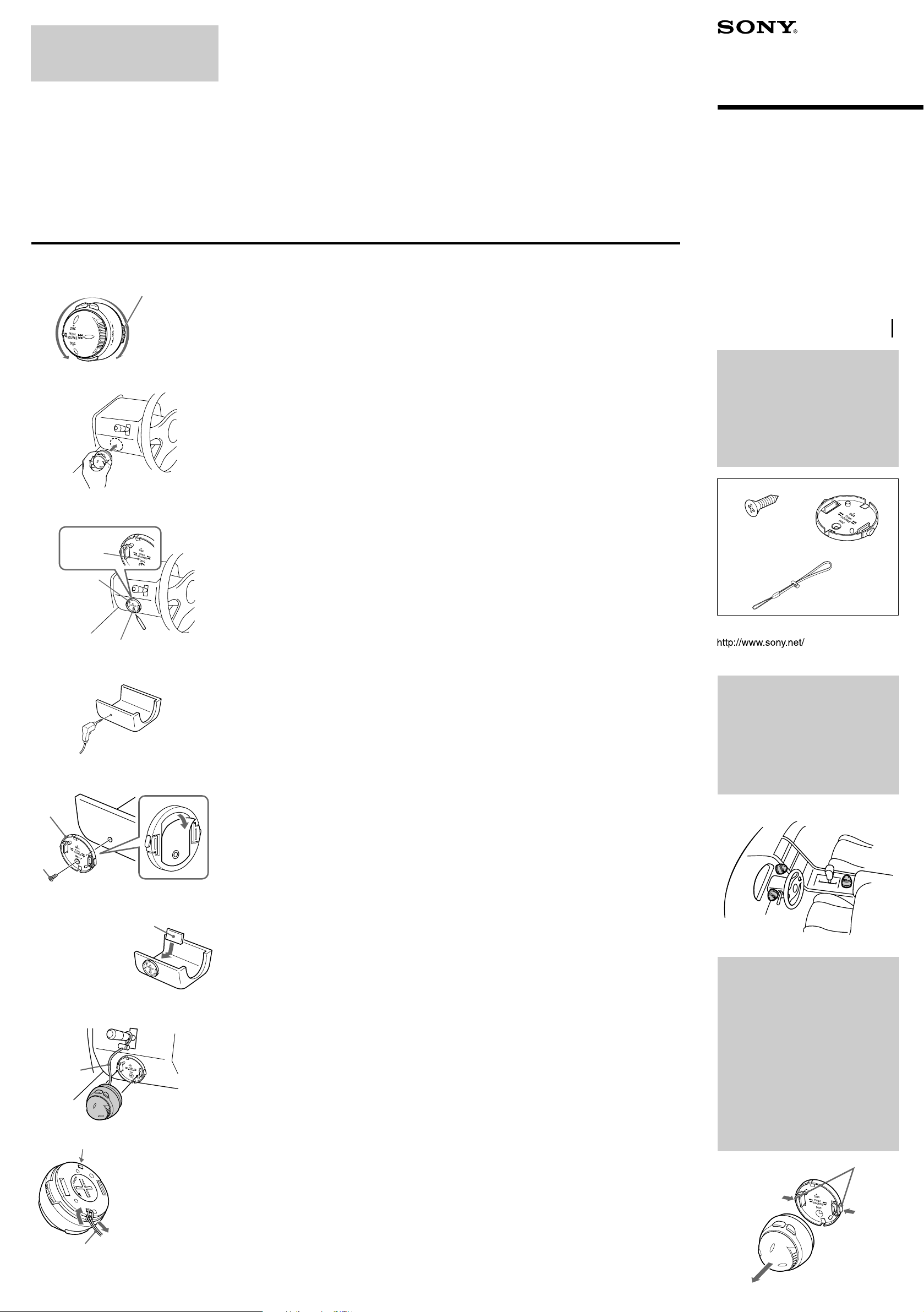
Supplied accessories Screw (1)
Mounting holder (1)
Strap (1)
Lithium battery CR2032 (1)
Technische Daten
Abmessungen ca. 55 × 53 × 55 mm (B/H/T)
Gewicht ca. 55 g
Mitgeliefertes Zubehö r
Schraube (1)
Montagehalterung (1)
Riemen (1)
CR2032-Lithiumbatterie (1)
Spé cifications
Dimensions Approx. 55 × 53 × 55 mm
(l/h/p)
(2
1
/
4
× 2
1
/
8
× 2
1
/
4
po.)
Masse Approx. 55 g (2 on.)
Accessoires fournis Vis (1)
Support de montage (1)
Courroie (1)
Pile au lithium CR2032 (1)
Specifiche
Dimensioni Circa. 55 × 53 × 55 mm
(l/a/p)
Peso Circa. 55 g
Accessori in dotazione Vite (1)
Supporto di montaggio (1)
Cordino (1)
Batteria al litio CR2032 (1)
Specificaties
Afmetingen Ong. 55 × 53 × 55 mm (b/h/d)
Gewicht Ong. 55 g
Meegeleverde accessoires
Schroef (1)
Houder (1)
Riem (1)
CR2032 lithiumbatterij (1)
Especificaciones
Dimensiones Aprox. 55 ×53 × 55 mm
(an/al/f)
Peso Aprox. 55 g
Accesorios suministrados
Tornillo (1)
Soporte de montaje (1)
Correa (1)
Pila de litio CR2032 (1)
× ×
Sony Corporation 2002 Printed in Japan
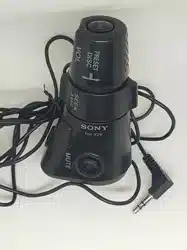
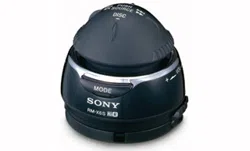
Wireless Rotary
Commander
Operating Instructions
Bedienungsanleitung
Mode d’emploi
Istruzioni per l’uso
Gebruiksaanwijzing
Manual de instrucciones
Voor de Klanten in Nederland
Gooi de batterij niet weg maar
lever deze in als klein chemisch
afval (KCA).
WARNING
This equipment has been tested and found
to comply with the limits for a Class B
digital device, pursuant to Part 15 of the
FCC Rules. The limits are designed to
provide reasonable protection against
harmful interference in a residential
installation. This equipment generates,
uses, and can radiate radio frequency
energy and, if not installed and used in
accordance with the instructions, may cause
harmful interference to radio
communications. However, there is no
guarantee that interference will not occur in
a particular television reception, which can
be determined by turning the equipment
off and on, the user is encouraged to try to
correct the interference by one or more of
the following measures:
— Reorient or relocate the receiving
antenna.
— Increase the separation between the
equipment and receiver.
— Connect the equipment into an outlet on
a circuit different from that to which the
receiver is connected.
— Consult the dealer or an experienced
radio/TV technician for help.
You are cautioned that any changes or
modifications not expressly approved in
this manual could void your authority to
operate this equipment.
THIS DEVICE COMPLIES WITH PART 15
OF THE FCC RULES. OPERATION IS
SUBJECT TO THE FOLLOWING
TWO CONDITIONS;
(1) THIS DEVICE MAY NOT CAUSE
HARMFUL INTERFERENCE, AND
(2) THIS DEVICE MUST ACCEPT ANY
INTERFERENCE RECEIVED, INCLUDING
INTERFERENCE THAT MAY CAUSE
UNDESIRED OPERATION.
VARNING
Explosionsfara vid felaktigt batteribyte.
Anvä nd samma batterityp eller en likvä rdig typ
som rekommenderas av apparattillverkaren.
Kassera anvä nt batteri enligt gä llande
fö reskrifter.
Entsorgungshinweis
Bitte werfen Sie nur entladene Batterien in die
Sammelboxen beim Handel oder den Kommunen.
Entladen sind Batterien in der Regel dann, wenn
das Gerä t abschaltet und signalisiert „Batterie
leer“ oder nach lä ngerer Gebrauchsdauer der
Batterien „nicht mehr einwandfrei funktioniert“.
Um sicherzugehen, kleben Sie die Batteriepole
z.B. mit einem Klebestreifen ab oder geben Sie
die Batterien einzeln in einen Plastikbeutel.
RM-X6S
Printed on 100 % recycled paper.
By pressing the control
Drü cken des Reglers
En appuyant sur la commande
(ATT)
(OFF)
(MODE)
3
SOURCE control
Regler SOURCE
Commande SOURCE
1
2
Features
•Viewless operation
•Installation flexibility
•Detachable for theft prevention
Only master units marked with are controllable with this rotary
commander. For details on available models of master unit, consult your
nearest Sony dealer.
Precautions
•Do not spray the rotary commander with deodorant, or the surface of the
rotary commander may be damaged.
•Do not cover the infrared emitter with your hand while operating the
rotary commander.
The functions of the master unit are controllable with identical
buttons and controls on the rotary commander corresponding to
the master unit. For details on these functions, refer to the
operating manual for the master unit.
Replacing the lithium battery
(
1
)
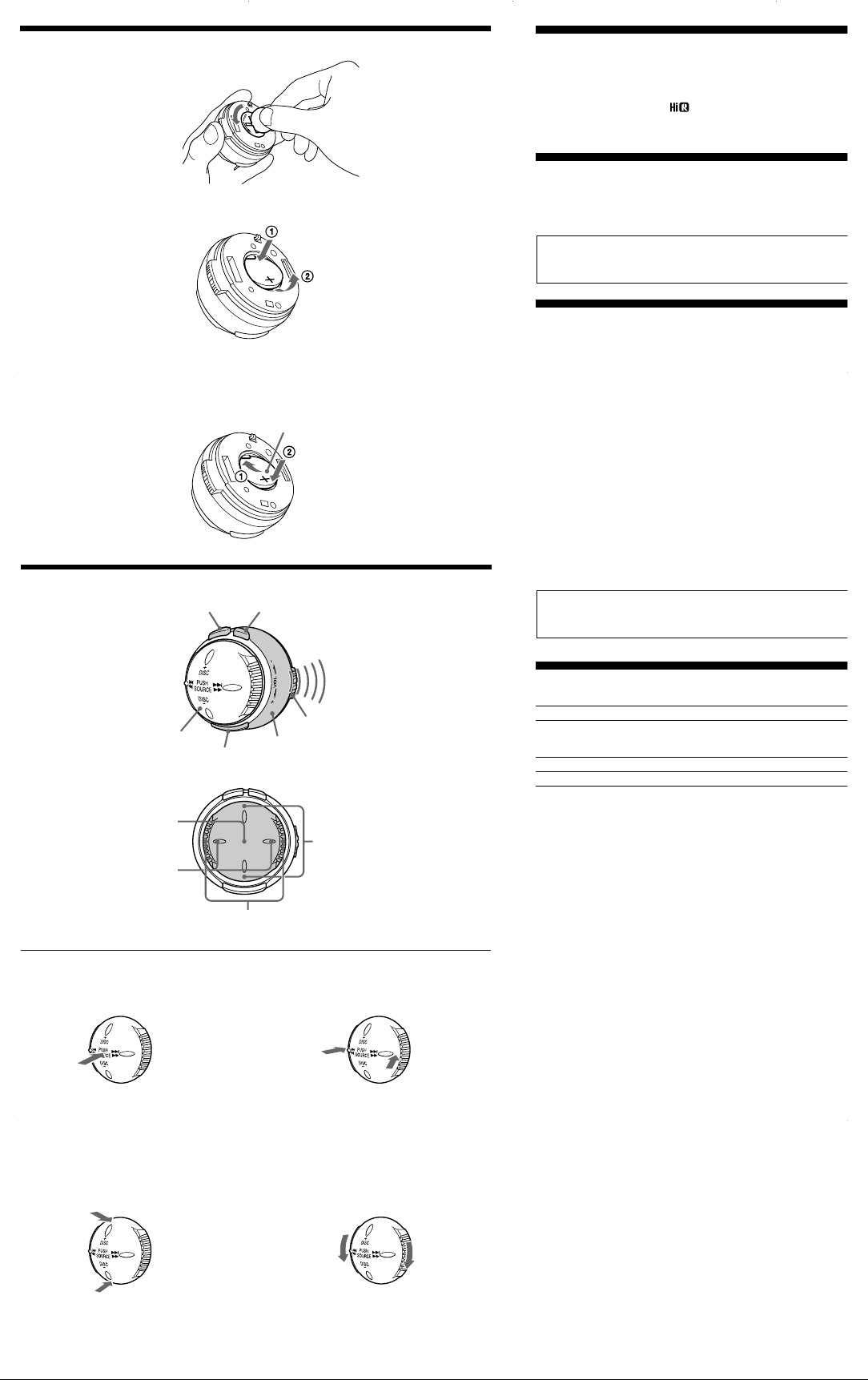
1 Opening the battery compartment lid
Hold the infrared adjusting dial and open the battery compartment lid
by rotating counter-clockwise with a coin.
2 Removing the battery
Press the side of the battery as illustrated, then remove.
3 Inserting the battery
Insert the battery as illustrated. Make sure the polarity of the battery is
oriented in the correct way.
Note on lithium battery life
• The battery will last for approximately 1 year in normal operation.
• When the battery becomes weak, you will not be able to operate the unit
with the rotary commander. Replace the battery as soon as possible with a
new CR2032 lithium battery.
Notes on lithium battery
• Keep the lithium battery out of the reach of children. Should the battery
be swallowed, immediately consult a doctor.
• Wipe the battery with a dry cloth to assure a good contact.
• Be sure to observe the correct polarity when installing the battery.
• Do not hold the battery with metallic tweezers, otherwise a short-circuit
may occur.
WARNING
Battery may explode if mistreated.
Do not recharge, disassemble, or dispose of in fire.
Location and Function of Controls
(
2
)
Press To
(MODE) Change operation
(Radio band/CD unit/MD unit
/Tape playback direction/TV
*
1
, etc.)
(ATT) Attenuate sound
(OFF)
*
2
Stop playback or radio reception
1 Infrared rays dial
Rotate the dial to change the direction of infrared rays.
2 Infrared emitter
The rotary commander emits infrared rays in the direction of the dial
setting.
Stick knob operation
3 SOURCE control
Press the control to change the source.
(Radio/CD/MD/Tape/TV*
1
/AUX, etc.)
4 ./> control
Press to:
— tune in stations automatically.
— skip tracks on the disc.
— locate the beginning of tracks on the tape.
Press and hold to:
— find a station manually.
— fast-forward/reverse a track.
— first-wind the tape.
5 DISC +/– control
Press to:
— receive preset stations.
— change the disc.
— change the album.
*
3
Press and hold to:
— change the album.
*
4
6 VOL control
Rotate the control to adjust the volume.
*
1
Only in the U.S.A. and Canada models.
*
2
If your car has no ACC (accessory) position on the ignition key switch, be
sure to press (OFF) for 2 seconds to turn off the clock indication after
turning off the ignition.
*
3
When an MP3 file is played back on an MP3 compatible master unit.
*
4
When an MP3 file is played back on a CD unit (MP3 compatible)
connected to the master unit.
+ side up
Seite + nach oben
Pô le + vers le haut
Stick knob
Joystick-Kopf
Molette
multidirectionnelle
4
./> control
Regler ./>
Commande ./>
5
DISC +/– control
Regler DISC +/–
Commande DISC +/–
By pressing the control
Drü cken des Reglers
En appuyant sur la commande
1
1
DISC
DISC
PUSH
SOURCE
+
-
m M
. >
2
3
4
5
2
3
6
By pressing the control
Drü cken des Reglers
En appuyant sur la commande
6
VOL control
Regler VOL
Commande VOL
By rotating the control
Drehen des Reglers
En tournant la commande
Direction of infrared signal
Richtung des Infrarotsignals
Direction du signal infrarouge
Caracté ristiques
• Utilisation par reconnaissance tactile
• Plusieurs options d'installation
• Amovible pour pré venir les risques de vol
Ce satellite de commande contrô le uniquement les appareils principaux
portant le symbole . Pour de plus amples informations concernant
les modè les d'appareils principaux en vente, contactez votre revendeur
Sony le plus proche.
Pré cautions
• Ne pas vaporiser de dé odorant sur le satellite de commande pour ne
pas endommager la finition.
• Ne pas couvrir l'émetteur à infrarouges avec la main pendant
l'utilisation du satellite de commande.
Les touches et les commandes du satellite de commande
permettent de commander les mê mes fonctions que les touches et
commandes de l'appareil principal. Pour de plus amples
informations sur ces fonctions, reportez-vous au mode d'emploi de
l'appareil principal.
Remplacement de la pile au lithium
(
1
)
1 Ouverture du couvercle du logement de la pile
Saisissez la molette de ré glage de direction des rayons infrarouges et
ouvrez le couvercle du logement de la pile en le faisant tourner dans le
sens contraire des aiguilles d'une montre avec une piè ce de monnaie.
2 Retrait de la pile
Appuyez sur le cô té de la pile comme indiqué , puis retirez-la.
3 Mise en place de la pile
Insé rez la pile comme indiqué dans l'illustration. Veillez à installer la
pile en respectant la polarité .
Remarques concernant la duré e de vie de la pile au lithium
• Dans les conditions d’utilisation normales, la pile dure environ 1 an.
• Lorsque la pile faiblit, il n'est plus possible de commander l'appareil avec
le satellite de commande. Remplacez la pile le plus tô t possible par une
nouvelle pile au lithium CR2032.
Remarques concernant la pile au lithium
• Gardez la pile au lithium hors de porté e des enfants. En cas d’ingestion
de la pile, consultez un mé decin sans tarder.
• Nettoyez la pile avec un chiffon sec afin d’assurer un contact optimal.
• Respectez la polarité lorsque vous installez la pile.
• Ne manipulez pas la pile avec des pinces mé talliques. Cette opé ration
pourrait provoquer un court-circuit.
ATTENTION
Utilisée de façon incorrecte, la pile peut exploser. Ne pas la recharger,
la dé monter ni la jeter au feu.
Emplacement et fonction des commandes
(
2
)
Appuyer sur Pour
(MODE) changer de fonction
(bande radio/lecteur CD/lecteur MD/sens de
lecture de la cassette/TV
*
1
, etc.)
(ATT) Atté nuer le son
(OFF)
*
2
Arrê ter la lecture ou l’é coute de la radio
1 Molette de ré glage des rayons IR
Tournez la molette pour modifier la direction des rayons infrarouges.
2 Emetteur à infrarouges
Le satellite de commande transmet des rayons infrarouges dans la
direction ré glé e avec la molette.
Fonctionnement de la molette multidirectionnelle
3 Commande SOURCE
Appuyez sur la commande pour changer de source.
(Radio/CD/MD/Cassette/TV*
1
/AUX, etc.)
4 Commande ./>
Appuyez sur cette commande pour :
— passer d’une plage à l’autre.
— rechercher des stations automatiquement.
— repé rer le dé but des pistes sur la bande.
Maintenez cette commande enfoncé e pour :
— trouver une station manuellement.
— avancer rapidement/revenir en arriè re dans une plage.
— rembobiner d’abord la bande.
5 Commande DISC +/–
Appuyez sur cette commande pour :
— é couter des stations pré dé finies.
— changer le disque.
— passer d'un album à l'autre.*
3
Maintenez cette commande enfoncé e pour :
— passer d'un album à l'autre.*
4
6 Commande VOL
Ré glez le volume en faisant tourner la commande.
*
1
Modè les pour les E-U et le Canada uniquement.
*
2
Si votre voiture ne dispose pas de position ACC (accessoires) au niveau
du contact, assurez-vous d'é teindre l’appareil en appuyant sur (OFF)
pendant 2 secondes afin d'é teindre l'affichage de l'horloge aprè s avoir
coupé le contact.
*
3
Lors de la lecture d'un fichier MP3 sur un appareil principal compatible
MP3.
*
4
Lors de la lecture d'un fichier MP3 sur un lecteur CD compatible MP3
raccordé à l'appareil principal.
Merkmale und Funktionen
•Bedienung ohne Sichtkontakt
•Mehrere Installationsmö glichkeiten
•Zum Schutz vor Diebstahl abnehmbar
Nur mit markierte Hauptgerä te lassen sich mit diesem Joystick
steuern. Weitere Informationen zu verfü gbaren Hauptgerä temodellen
erhalten Sie bei Ihrem Sony-Hä ndler.
Sicherheitsmaßnahmen
•Sprü hen Sie kein Deodorant auf den Joystick. Andernfalls kann die
Oberflä che des Joysticks beschä digt werden.
•Decken Sie den Infrarotsender nicht mit der Hand ab, wä hrend Sie den
Joystick bedienen.
Die Funktionen des Hauptgerä ts lassen sich mit den Tasten und
Reglern am Joystick steuern, die den Bedienelementen am
Hauptgerä t entsprechen. Nä heres zu diesen Funktionen finden Sie
in der Bedienungsanleitung zu dem Hauptgerä t.
Austauschen der Lithiumbatterie
(
1
)
1 Ö ffnen des Batteriefachdeckels
Halten Sie den Regler zum Einstellen der Infrarotstrahlen fest, und
ö ffnen Sie den Batteriefachdeckel, indem Sie ihn mit einer Mü nze gegen
den Uhrzeigersinn drehen.
2 Herausnehmen der Batterie
Drü cken Sie wie in der Abbildung dargestellt auf eine Seite der Batterie,
und nehmen Sie sie heraus.
3 Einlegen der Batterie
Legen Sie die Batterie wie in der Abbildung dargestellt ein. Achten Sie
dabei auf die richtige Polaritä t der Batterie.
Hinweise zur Lebensdauer der Lithiumbatterie
• Unter normalen Bedingungen halten die Batterien etwa 1 Jahr.
• Wenn die Batterie schwä cher wird, kö nnen Sie das Gerä t nicht mehr mit
dem Joystick steuern. Tauschen Sie die Batterie so bald wie mö glich
gegen eine neue CR2032-Lithiumbatterie aus.
Hinweise zur Lithiumbatterie
• Halten Sie die Lithiumbatterie von Kindern fern. Falls ein Kind die Batterie
verschluckt, bringen Sie es bitte sofort zu einem Arzt.
• Wischen Sie die Batterie mit einem trockenen Tuch ab, damit die Kontakte
sauber sind und gut funktionieren.
• Achten Sie beim Einlegen der Batterie auf die korrekte Polaritä t.
• Halten Sie die Batterie nicht mit einer Metallpinzette. Andernfalls kann es
zu einem Kurzschluß kommen.
VORSICHT
Die Batterie kann bei falscher Handhabung explodieren!
Auf keinen Fall darf sie aufgeladen, auseinandergenommen oder ins
Feuer geworfen werden.
Lage und Funktion der Teile und
Bedienelemente
(
2
)
Drü cken Sie Funktion
(MODE) Wechseln des Modus
(Radiofrequenzbereich/CD-Gerä t/MD-Gerä t/
Bandwiedergaberichtung/Fernsehgerä t
*
1
usw.
)
(ATT) Dämpfen des Tons
(OFF)
*
2
Stoppen der Wiedergabe oder des Radioempfangs
1 Regler fü r Infrarotstrahlen
Drehen Sie den Regler, um die Richtung der Infrarotstrahlen zu
ä ndern.
2 Infrarotsender
Der Joystick gibt die Infrarotstrahlen in der Richtung aus, die mit dem
Regler eingestellt ist.
Bedienen des Joystick-Kopfes
3 Regler SOURCE
Durch Drü cken des Reglers wechseln Sie die Tonquelle.
(Radio/CD/MD/Kassette/TV*
1
/AUX usw.)
4 Regler ./>
Drü cken Sie den Regler zum:
— automatischen Einstellen von Sendern.
— ü berspringen von Titeln.
— ansteuern des Anfangs von Titeln auf der Kassette.
Halten Sie den Regler gedrü ckt zum:
— manuellen Einstellen von Sendern.
— Vorwä rts-/Rü ckwä rtssuchen in einem Titel.
— spulen der Kassette.
5 Regler DISC +/–
Drü cken Sie den Regler zum:
— gespeicherte Sender einstellen.
— die CD/MD wechseln.
— Wechseln des Albums.*
3
Halten Sie den Regler gedrü ckt zum:
— Wechseln des Albums.*
4
6 Regler VOL
Stellen Sie durch Drehen des Reglers die Lautstä rke ein.
*
1
nur bei den Modellen fü r USA und Kanada.
*
2
Wenn Ihr Fahrzeug nicht ü ber ein Zü ndschloß mit Zubehö rposition (ACC
oder I) verfü gt, halten Sie unbedingt 2 Sekunden lang (OFF) gedrü ckt,
um die Uhrzeitanzeige auszuschalten. Andernfalls wird der Autobatterie
weiterhin Strom entzogen.
*
3
Wenn eine MP3-Datei auf einem MP3-kompatiblen Hauptgerä t
wiedergegeben wird.
*
4
Wenn eine MP3-Datei auf einem CD-Gerä t (MP3-kompatibel)
wiedergegeben wird, das an das Hauptgerä t angeschlossen ist.
Caratteristiche
•Funzionamento senza la necessità di distogliere lo sguardo dalla guida
•Flessibilità di installazione
•Telecomando estraibile per prevenirne eventuali furti
Mediante questo telecomando a rotazione è possibile controllare
esclusivamente le unità principali contrassegnate dal simbolo . Per
informazioni sui modelli di unità principali disponibili, rivolgersi al più vicino
rivenditore Sony.
Precauzioni
•Non spruzzare deodoranti sul telecomando a rotazione, onde evitare di
danneggiarne la superficie.
•Non coprire l'emettitore di infrarossi con la mano durante l'utilizzo del
telecomando.
È possibile controllare le funzioni dell'unità principale utilizzando i
corrispondenti tasti e comandi del telecomando a rotazione. Per
informazioni su tali funzioni, consultare le istruzioni per l'uso dell'unità
principale.
Sostituzione della batteria al litio
(
1
)
1 Apertura del coperchio dello scomparto batteria
Tenere la manopola di regolazione degli infrarossi e aprire il coperchio dello
scomparto batteria facendolo ruotare in senso antiorario con una moneta.
2 Rimozione della batteria
Premere un'estremità della batteria come illustrato, quindi rimuoverla.
3 Inserimento della batteria
Inserire la batteria come illustrato. Accertarsi che i poli della batteria siano
stati orientati nel modo corretto.
Note sulla durata della batteria al litio
• In condizioni normali, le batterie durano circa 1 anno.
• Quando la batteria si scarica, non sarà più possibile controllare l’unità principale con
il telecomando a rotazione. Sostituire la batteria con una nuova batteria al litio
CR2032.
Note sulle batterie al litio
• Tenere le batterie al litio fuori dalla portata dei bambini. Se venissero ingerite,
consultare immediatamente un medico.
• Pulire le batterie con un panno asciutto per assicurare un buon contatto.
• Durante l’installazione, assicurarsi di osservare la giusta polarità .
• Non maneggiare le batterie con pinze di metallo, potrebbero verificarsi cortocircuiti.
AVVERTENZA
La batteria può esplodere se usata scorrettamente. Pertanto, non dere essere
deve essere ricaricata, smontata o gettatela nel fuoco.
Localizzazione e funzione dei comandi
(
2
)
Premere Per
(MODE) Cambiare operazione (Banda radio/unità CD/unità MD/
direzione di riproduzione della cassetta/TV
*
1
e così via
)
(ATT) Attenuare l’audio
(OFF)
*
2
Arrestare la riproduzione o la ricezione della radio
1 Manopola raggi infrarossi
Ruotare la manopola per cambiare la direzione dei raggi infrarossi.
2 Emettitore di infrarossi
Il telecomando a rotazione emette i raggi infrarossi nella direzione
impostata mediante la manopola.
Funzionamento della manopola dei comandi
3 Comando SOURCE
Premere il comando per cambiare la sorgente.
(radio/CD/MD/nastro/TV
*
1
/AUX e così via)
4 Comando ./>
Premere per:
— sintonizzare automaticamente le stazioni.
— saltare i brani sul disco.
— localizzare l’inizio dei brani sulla cassetta.
Premere e tenere premuto per:
— trovare una stazione manualmente.
— avanzare/tornare indietro rapidamente all’interno di un brano.
— avvolgere il nastro fino all'inizio.
5 Comando DISC +/–
Premere per:
— ricevere le stazioni preimpostate.
— cambiare disco.
— cambiare l'album.*
3
Premere e tenere premuto per:
— cambiare l'album.*
4
6 Comando VOL
Ruotare il comando per regolare il volume.
*
1
Solo per i modelli degli Stati Uniti e del Canada.
*
2
Se l’auto è priva della posizione ACC per la chiave di avviamento, accertarsi di
premere (OFF) per due secondi per disattivare l’indicazione dell’orologio dopo
aver spento il motore.
*
3
Se viene riprodotto un file MP3 mediante un'unità principale compatibile con il
formato MP3.
*
4
Se viene riprodotto un file MP3 mediante un'unità CD (compatibile con il formato
MP3) collegata all'unità principale.
Kenmerken
• Blindelings te bedienen
• Makkelijk te installeren
• Afneembaar ter voorkoming van diefstal
Alleen hoofdtoestellen met de markering kunnen met deze
bedieningssatelliet worden bediend. Raadpleeg uw Sony dealer voor meer
details over hoofdtoestellen.
Voorzorgsmaatregelen
• Spuit geen deodorant op de afstandsbediening om te voorkomen dat het oppervlak
wordt beschadigd.
• Dek de infraroodzender niet af met de hand terwijl u de bedieningssatelliet
gebruikt.
De functies van het hoofdtoestel kunnen worden bediend met precies
dezelfde toetsen en regelaars op de bedieningssatelliet. Meer details vindt u
in de gebruiksaanwijzing van het hoofdtoestel.
Vervangen van de lithiumbatterij
(
1
)
1 Het deksel van de batterijhouder openen
Hou de infraroodregelknop vast en open het deksel van de batterijhouder
door met een munt linksom te draaien.
2 De batterij verwijderen
Druk op de zijkant van de batterij zoals afgebeeld en verwijder ze.
3 De batterij aanbrengen
Breng de batterij in zoals de afbeelding laat zien. Zorg ervoor dat de
batterijpolen in de juiste richting zitten.
Opmerking over de levensduur van een lithiumbatterij
• Normaal gaan de batterijen ongeveer 1 jaar mee.
• Wanneer de batterij uitgeput raakt, kunt u het toestel niet meer bedienen met de
bedieningssatelliet. Vervang de batterij dan zo snel mogelijk door een nieuwe
CR2032 lithiumbatterij.
Opmerking over de lithiumbatterij
• Hou de lithiumbatterij buiten het bereik van kinderen. Als de batterij wordt
ingeslikt, onmiddellijk een dokter raadplegen.
• Veeg de batterij schoon met een droge doek voor een goed contact.
• Plaats de batterij met de min- en plus-polen in de juiste richting.
• Hou de batterij niet vast met een metalen pincet, anders kan kortsluiting optreden.
WAARSCHUWING
Bij oneigenlijk gebruik kan de batterij ontploffen.
Probeer niet de batterij op te laden of te openen; werp ook een lege batterij
nooit in het vuur.
Positie en functie van de bedieningselementen
(
2
)
Druk op Om
(MODE) Van bediening te veranderen (radioband/CD-apparatuur/
MD-apparatuur/weergaverichting cassette /TV
*
1
, enz.)
(ATT) Het geluid te dempen
(OFF)
*
2
De weergave of de radio-ontvangst te stoppen
1 Knop infraroodstralen
Draai aan de knop om de richting van de infraroodstralen te wijzigen.
2 Infraroodzender
De bedieningssatelliet zendt infraroodstralen uit volgens de instelling van
de knop.
Knopbediening
3 SOURCE regelaar
Druk op de regelaar om van bron te veranderen.
(Radio/CD/MD/Cassette/TV
*
1
/AUX, enz.)
4 ./> regelaar
Indrukken om:
— automatisch af te stemmen op een zender.
— tracks over te slaan.
— het begin van tracks op de cassette te zoeken.
Ingedrukt houden om:
— handmatig een zender te zoeken.
— snel vooruit/achteruit naar een track te gaan.
— snel vooruit te spoelen.
5 DISC +/– regelaar
Indrukken om:
— voorinstelzenders te ontvangen.
— van disc te veranderen.
— van album te veranderen.
*
3
Ingedrukt houden om:
— van album te veranderen.
*
4
6 VOL regelaar
Draai aan de regelaar om het volume te regelen.
*
1
Enkel voor U.S.A. en Canada.
*
2
Indien uw auto niet is voorzien van een contactslot met ACC stand, moet u de
klokweergave afzetten door (OFF) 2 seconden lang in te drukken nadat u het
contact heeft afgezet.
*
3
Bij weergave van een MP3-bestand met een MP3-compatibel hoofdtoestel.
*
4
Bij weergave van een MP3-bestand met (MP3 compatibele) CD-apparatuur die is
aangesloten op het hoofdtoestel.
Características
•Funcionamiento sin visualizació n
•Flexibilidad de instalació n
•Extraíble para evitar el robo
Este mando giratorio permite controlar ú nicamente las unidades principales
con la marca . Si desea informació n adicional sobre los modelos de
unidades principales disponibles, pó ngase en contacto con su distribuidor Sony
má s cercano.
Precauciones
•No rocíe el mando giratorio con desodorantes en aerosol. De lo contrario, podría
dañ ar su superficie.
•No cubra el emisor de infrarrojos con la mano durante el funcionamiento del
mando giratorio.
Las funciones de la unidad principal se pueden controlar con los botones y
controles del mando giratorio que corresponden a los de la unidad principal.
Si desea obtener má s informació n sobre estas funciones, consulte el manual
de funcionamiento de la unidad principal.
Sustitució n de la pila de litio
(
1
)
1 Apertura de la tapa del compartimiento para pilas
Sujete el control de ajuste de infrarrojos y abra la tapa del compartimiento
para pilas nacié ndolo girar con una moneda en el sentido opuesto a las
agujas del reloj.
2 Extracció n de la pila
Haga presió n sobre el lateral de la pila segú n se indica y extrá igala.
3 Inserció n de la pila
Inserte la pila segú n se indica en la ilustració n. Compruebe que la
orientació n de la polaridad es la correcta.
Notas sobre la duració n de la pila de litio
• En condiciones normales, las pilas duran aproximadamente 1 añ o.
• Cuando la pila dispone de poca energía, no podrá utilizar la unidad con el mando a
distancia. Sustituya dicha pila por otra de litio CR2032 nueva.
Notas sobre la pila de litio
• Mantenga la pila fuera del alcance de los niñ os. En caso de ingestió n, pó ngase
inmediatamente en contacto con un mé dico.
• Limpie la pila con un pañ o seco para garantizar un contacto ó ptimo.
• Cuando instale la pila, insé rtela con la polaridad correcta.
• No maneje la pila con pinzas metá licas, ya que puede producirse un cortocircuito.
ADVERTENCIA
La pila puede explotar si no se emple adecuadamente.
No recargue la pila; tampoco la desmonte ni la arroje al fuego.
Localizació n y funció n de los controles
(
2
)
Pulse Para
(MODE) Cambiar la operació n
(banda de radio/unidad de CD/unidad de MD/TV
*
1
, etc.)
(ATT) Atenuar el sonido
(OFF)
*
2
Detener la reproducció n o la recepció n de la radio
1 Selector de rayos infrarrojos
Gire el selector para cambiar la direcció n de los rayos infrarrojos.
2 Emisor de infrarrojos
El mando giratorio emite rayos infrarrojos en la direcció n del ajuste del
selector.
Funcionamiento del botó n de palanca
3 Control SOURCE
Pulse el control para cambiar la fuente.
(Radio/CD/MD/Cinta/TV*
1
/AUX, etc.)
4 Control ./>
Pulse para:
— sintonizar emisoras automá ticamente.
— omitir pistas del disco.
— localizar el principio de las pistas de la cinta.
Pulse y mantenga pulsado para:
— encontrar una emisora manualmente.
— avanzar/retroceder rá pidamente una pista.
— bobinar la cinta rá pidamente.
5 Control DISC +/–
Pulse para:
— recibir emisoras memorizadas.
— cambiar el disco.
— cambiar el á lbum.*
3
Pulse y mantenga pulsado para:
— cambiar el á lbum.*
4
6 Control VOL
Gire el control para ajustar el volumen.
*
1
Solo modelos para EE.UU.y Canadá
*
2
Si el automó vil no dispone de posició n ACC (accesorio) en el interruptor de la llave
de encendido, asegú rese de presionar (OFF) durante 2 segundos para desactivar la
indicació n del reloj despué s de apagar el encendido.
*
3
Cuando se reproduce un archivo MP3 en una unidad principal compatible con MP3.
*
4
Cuando se reproduce un archivo MP3 en una unidad de CD (compatible con MP3)
conectada a la unidad principal.
•
•
•
•
•
(
1
)
1
2
3
•
•
•
•
•
•
(
2
)
(MODE)
*
1
(ATT)
(OFF)
*
2
1
2
3
*
1
4 ./>
—
—
—
—
—
—
5
—
—
— *
3
— *
4
6
*
1
*
2
*
3
*
4