
-
3
1
/
1
/
These instructions contain important information which will help you get best from your
equipment and ensure safe and correct assembly, use and maintenance.
If you need help or have damaged or missing parts, call the Customer Helpline: 0345 600 1714
or visit www.argos-support.co.uk
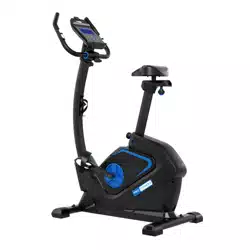
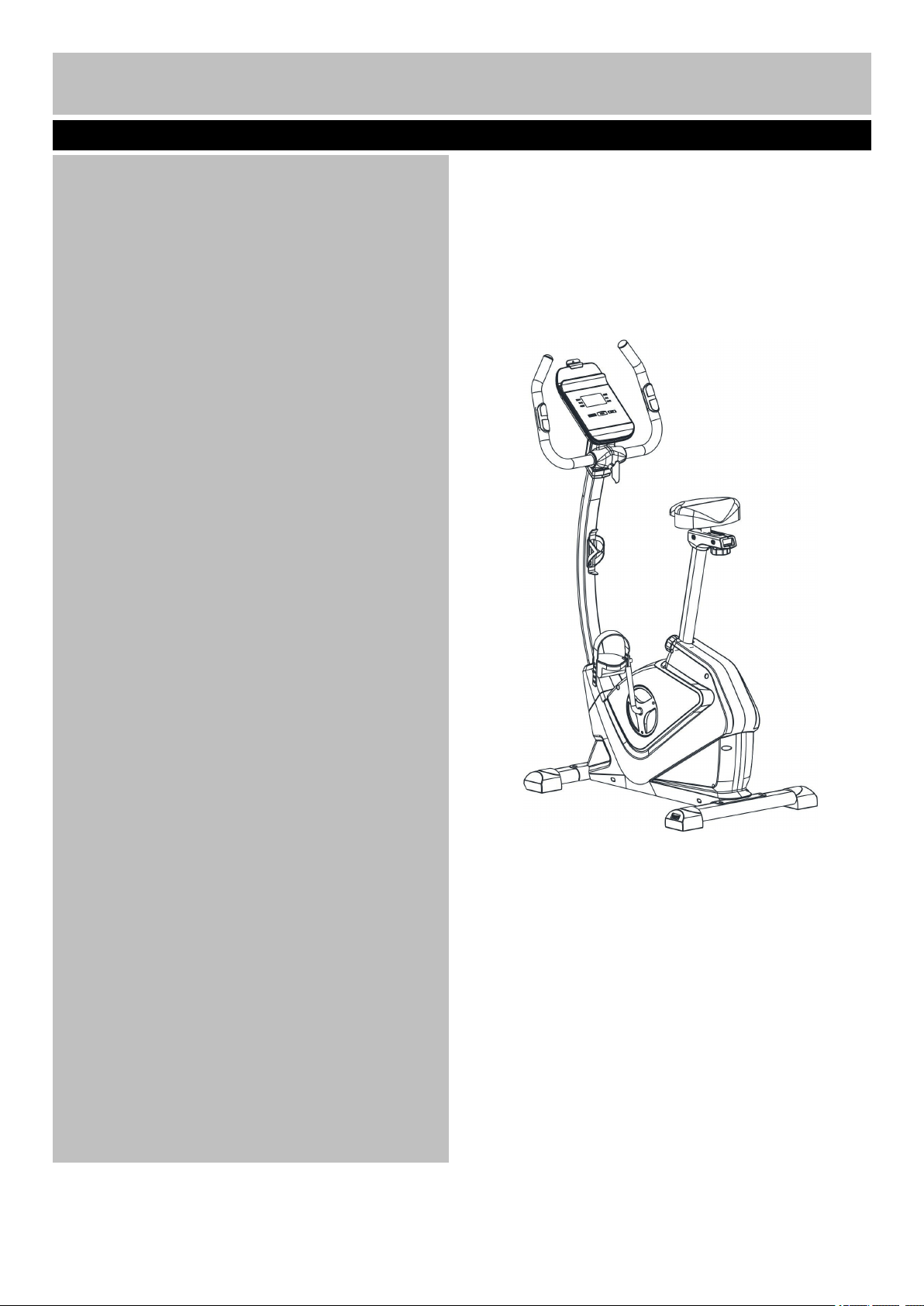
EB2000 Exercise Bike
Bike
Assembly & User’s Instructions- Please Keep for future reference
782/3792
Important – Please read these instructions fully before assembly or use
Contents
Safety Information
2-3
Components - Parts
4
Components – Fixings
5
Assembly Instructions
6-13
Workout Area
14
Exercise Information
15-27
* Before starting
15
* Muscle Chart
16
* Warming up and Cooling down
17-18
* Console Operation
19-27
*Adjustment of the seat
28
*Adjustment of the handle
28
Care and Maintenance
29
Exploded Parts Diagram
30
Parts List
31-32
1
、
This exercise equipment is built for optimum safety. However, certain precautions apply whenever you
operate a piece of exercise equipment. Be sure to read the entire manual before you assemble, operate or
use this equipment.
Assembly
• The product must be installed on a stable and
level surface. To protect the floor or carpet from
damage, place a mat under the exercise bike.
• Assemble the item as close to its final position
(in the same room) as possible.
• Make sure you have enough space to layout the
parts before starting.
• Dispose of all packaging carefully and responsibly.
• Check you have all the components and tools
listed in the parts list, bearing in mind that, for ease
of assembly, some components are pre-assembled.
• The assembly of this equipment is best carried out
by 2 people.
Use
• It is the responsibility of the owner to ensure that
all users of this product are properly informed as to
how to use this product safely.
• This product is intended for domestic use only.
Do not use in any commercial, rental, or institutional
setting.
• Use the equipment only for intended use, as
described in this manual. Do not use attachments
not recommended by the manufacturer.
• Keep this equipment indoors, away from moisture
and dust. Do not put the equipment in a garage,
outbuilding, covered patio, or near water.
• Your product is intended for use in clean dry
conditions. You should avoid storage in excessively
cold or damp places as this may lead to corrosion
and other related problems that are outside our
control.
• Keep unsupervised children away from the
equipment.
• Disabled persons should not use the equipment
without a qualified person or doctor in attendance.
• Always wear appropriate workout clothing when
exercising. Do not wear loose or baggy clothing, as
it may get caught in the equipment. Wear trainers to
protect your feet while exercising.
• Do not place any sharp objects around the
equipment.
• Keep hands away from all moving parts.
• If any of the adjustment devices are left projecting,
they could interfere with the user’s movement.
• Before using the equipment to exercise, always
perform stretching exercises to properly warm up.
• Only one person at a time should use the
equipment.
• If the user experiences dizziness, nausea, chest
pain, or other abnormal symptoms stop the workout
and seek immediate medical attention.
• Injuries to health may result from incorrect or
excessive training.
• This product is suitable for a maximum user
weight of: 120kg.
• This product conforms to: BS EN ISO 20957-1
and -5 Class (H) - Home Use - Class (C).
• This stationary training equipment is not suitable
for high accuracy purposes
• Always examine your exercise bike before use to
ensure all parts are in working order.
• Never insert any object or body parts into any
opening.
Important – Please read fully before assembly or use
Safety Information
2
、
Warning: Before beginning any exercise program, consult your Doctor. This is
especially important for persons over the age of 35 or persons with pre-existing health problems. You MUST
read all instructions before using any fitness equipment. Argos and its associates assumes no responsibility
for personal injury or property damage sustained by or through the use of this product. Over exercising may
result in serious injury or death. If you feel faint stop exercising immediately. Warning! Heart rate monitoring
systems may be inaccurate. For the most accurate heart rate measure, please hold both hand pulse sensors
continuously during any programme
3
Important – Please read fully before assembly or use
Safety Information
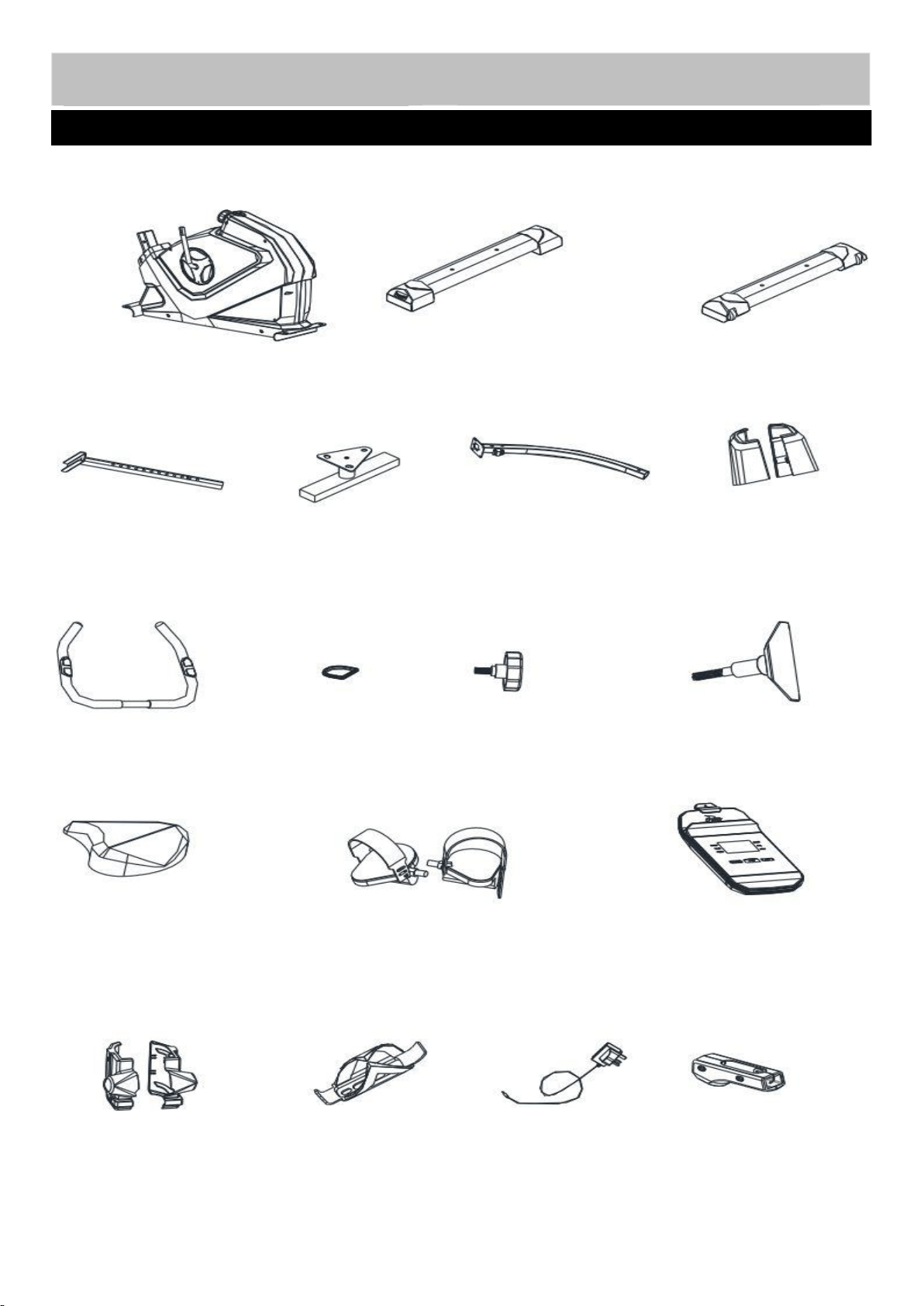
Note: Some of the smaller components may be pre-fitted to larger components. Please check carefully
before contacting Argos regarding any missing components.
Components - Parts
If you have damaged or missing parts, please call
the Customer Helpline: 0345 600 1714.
Please check you have all parts listed below
4
1. Main Frame
2. Rear Stabilizer
3. Front Stabilizer
4. Seat Post
5. Seat Bracket
6. Front Post
7. Handle
9. M10 Lock Knob
10. M8 T Lock Knob
11. Saddle
12. Pedal (Left/Right)
13. Console
15. Handle Cover (L/R)
16. Bottle Holder
68. Power Adaptor
38. Seat Bracket Cover
(
L&R)
33. Front L/R Post Cover
37. Front Post
Ring
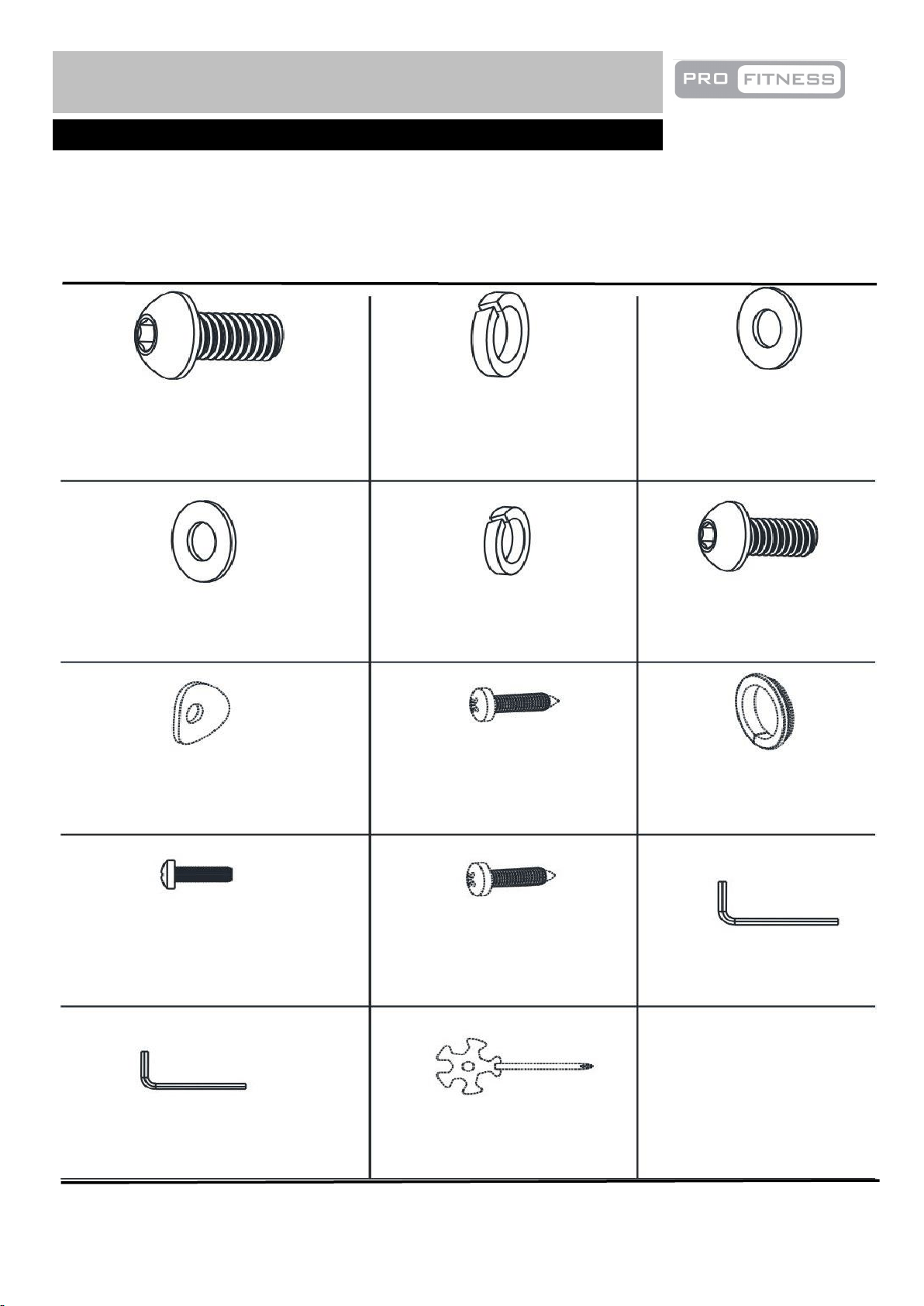
Note: The quantities below are the correct amount to complete the assembly. In some cases more
hardware may be supplied than are required. Some of the fixings are pre-fitted to the larger components.
Please check carefully before contacting Argos regarding any missing fixings.
Components - Fixings
Please check you have all parts listing below
5
M10x20mm Allen Bolt × 4
17
18
19
21
22
23
24
25
74
10mm Spring Washer × 4
10mm Washer × 4
8mm Washer × 2
8mm Spring Washer × 4
M8x15mm Allen Bolt × 4
8mm Arc Washer × 2
ST4.2x15mm Philips Screw × 3
5mm Allen Key × 1
6mm Allen Key × 1
Multi Wrench × 1
Joint Ring × 2
M5x5mm Philips Bolt × 4
77
ST4.2x15mm Philips Self-
drilling Screw × 2
34
`
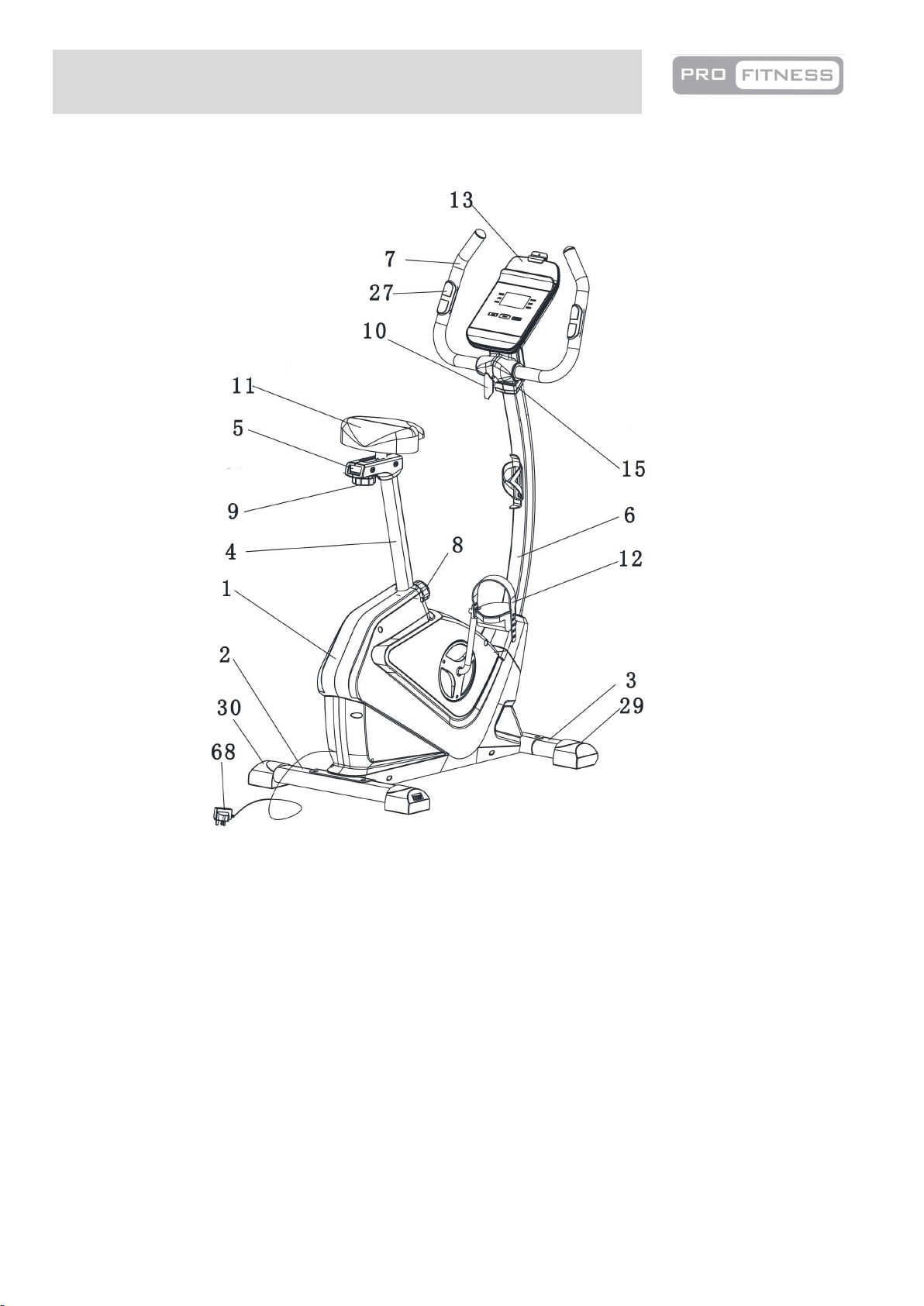
Total mass of the product is 28 kg. Total size of the equipment is (width) 56cm × (depth) 109cm × (height)
141 cm.
KEY
1 Main Frame
2 Rear stabilizer
3 Front Stabilizer
4 Seat Post
5 Seat Bracket
6 Front Post
7 Handle
8 M16 Lock Knob
9 M10 Lock Knob
10 M8 Lock Knob
11 Saddle
Assembly Instruction
12 Left & Right Pedal
13 Console
15 Left & Right Handle Cover
27 Hand Pulse Sensor
29 L&R Transport Wheel
30 Levelling Foot
68 Power Adaptor
6
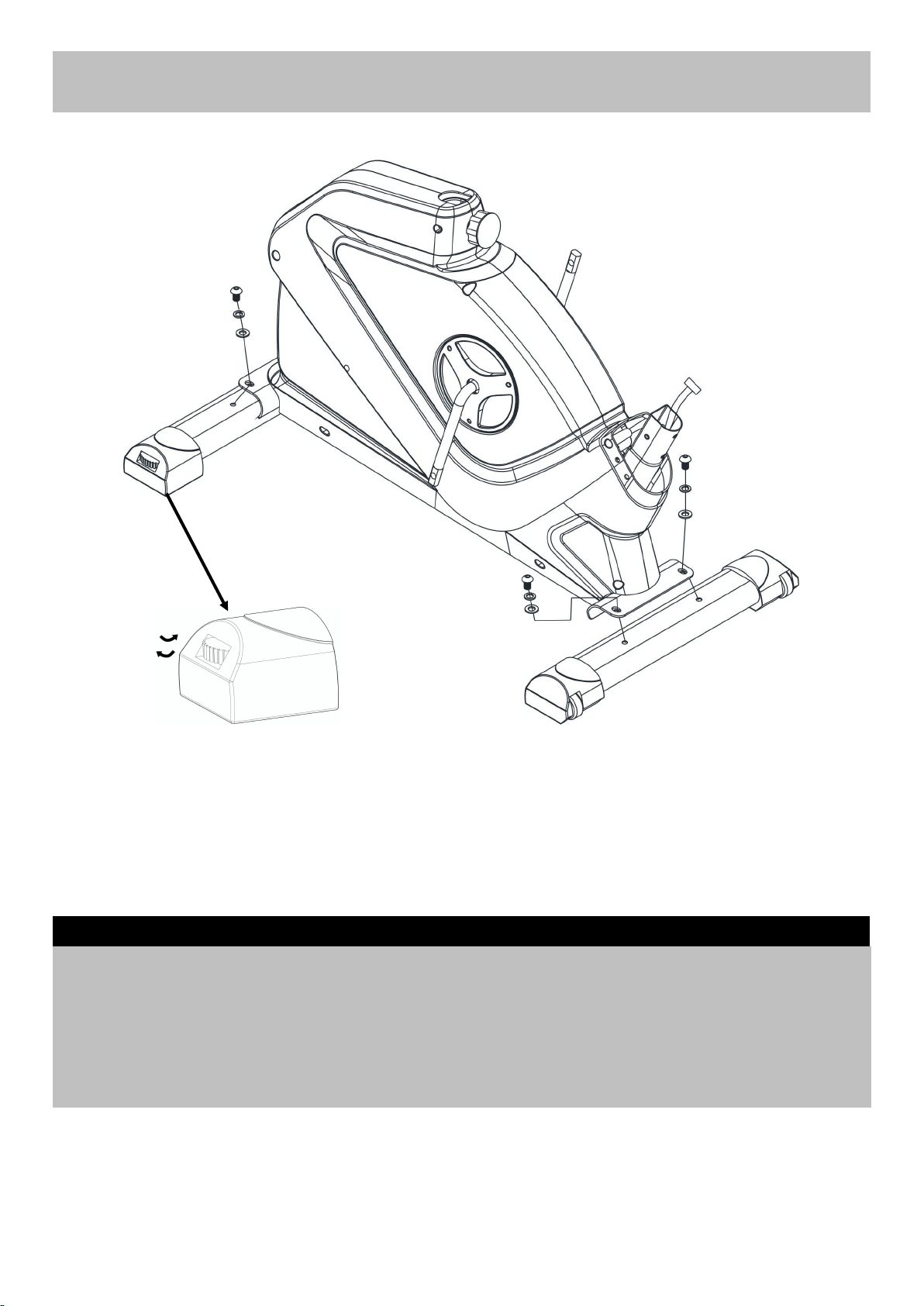
Assembly Instructions
A. Attach Front Stabilizer (3) to Main Frame (1) using 2 x M10x20MM Allen bolts (17), 2 x10MM Spring
Washers (18) and 2 x10MM Washers (19).
B. Attach Rear Stabilizer (2) to Main Frame (1) using 2 x M10x20MM Allen bolts (17), 2 x10MM Spring
Washers (18) and 2 x10MM Washers (19).
Note: The knob on the Levelling Feet (30) can be rotated to ensure the bike sit flat on the ground as
shown in the diagram. Turn it anti clockwise to increase height and turn it clockwise to decrease height.
Step 1
7
2
17
18
19
17
18
19
1
3
30
17
18
19
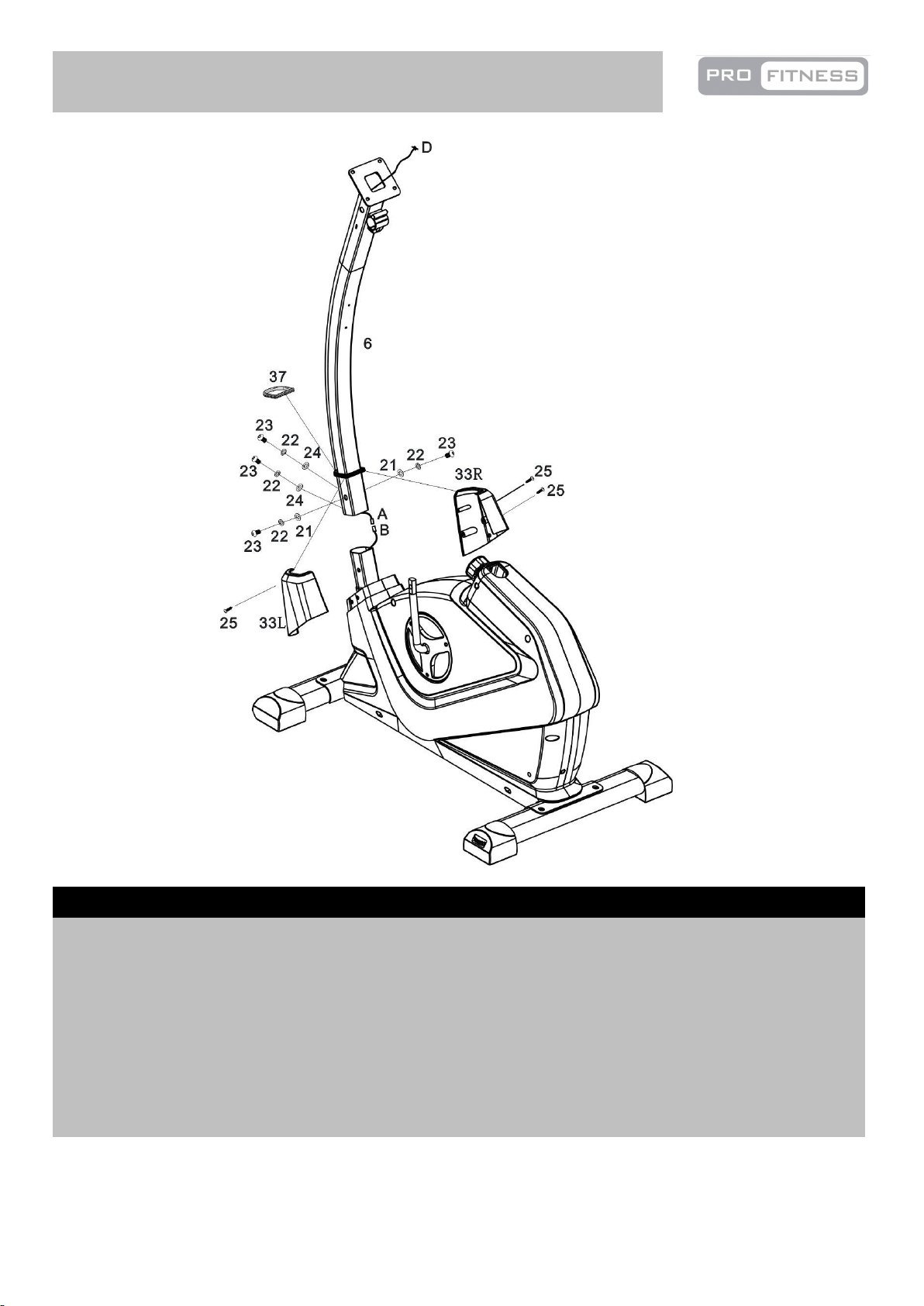
Assembly Instructions
A. Place the Front Post Ring (37) around the Front Post (6).
B. Connect the Main Wire A and B.
C. Fix the Front Post (6) to the Main Frame (1) and tighten with 4 x M8x15MM Allen bolts (23), 4 x
8MM Spring Washers (22), 2 x 8MM Washers (21) and 2 x 8MM Arc Washers (24).
D. Attach the Front Post Cover (33L/R) to the Main Frame (1) and the Front Post Ring (37) with 3 x
ST4.2 x 15mm Phillips Screws (25).
Step 2
8
1
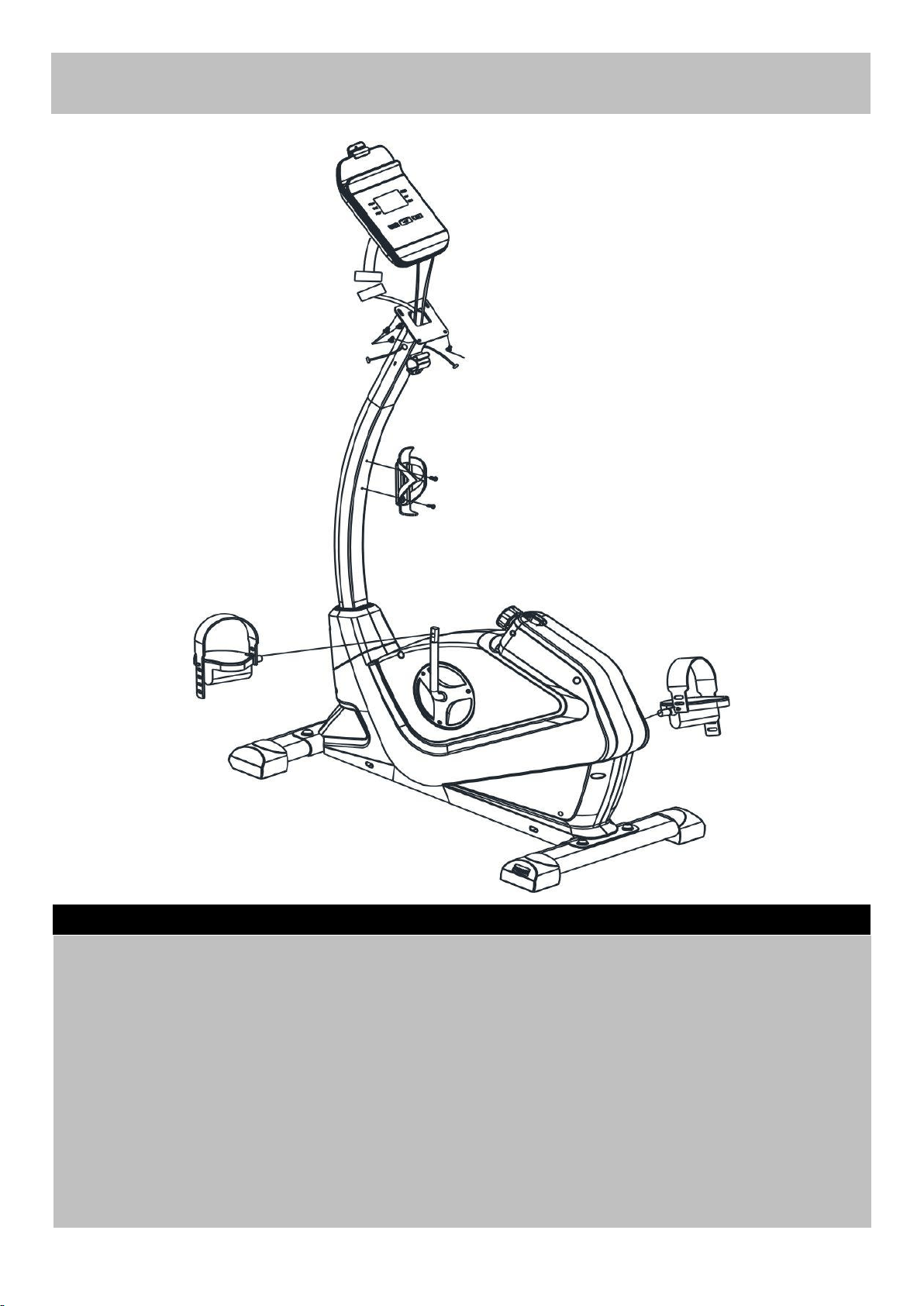
Assembly Instructions
A. Connect the Pedals (12 L&R) to Cranks (41 ) as shown.
Note: For the two foot pedals marked "L" and "R". Fasten the left pedal by turning anti-clockwise and
fasten the right pedal by turning clockwise. Attach the pedal straps to the pedals as shown in the
diagram, the tension for pedal strap is adjustable.
B. Fix the Bottle Holder (16) to the Front Post (6) with2 x ST4.2 x 15mm Philips Screw (34).
C. Connect the Main Wire C to D, then pass the two Console Pulse Sensor Wires E through the upper
openings of the Front Post (6) as shown in the diagram.
D. Attach the Console (13) onto the top of the Front Post (6) and secure with 4 x 8MM Dome Head
Philips Bolts (71).
Note: The 4 x 8MM Dome Head Philips bolts (71) are pre-fitted on the back of the Console (13).
Step 3
9
12R
12L
6
34
13
16
71
34
71
1
C
D
E
E
41
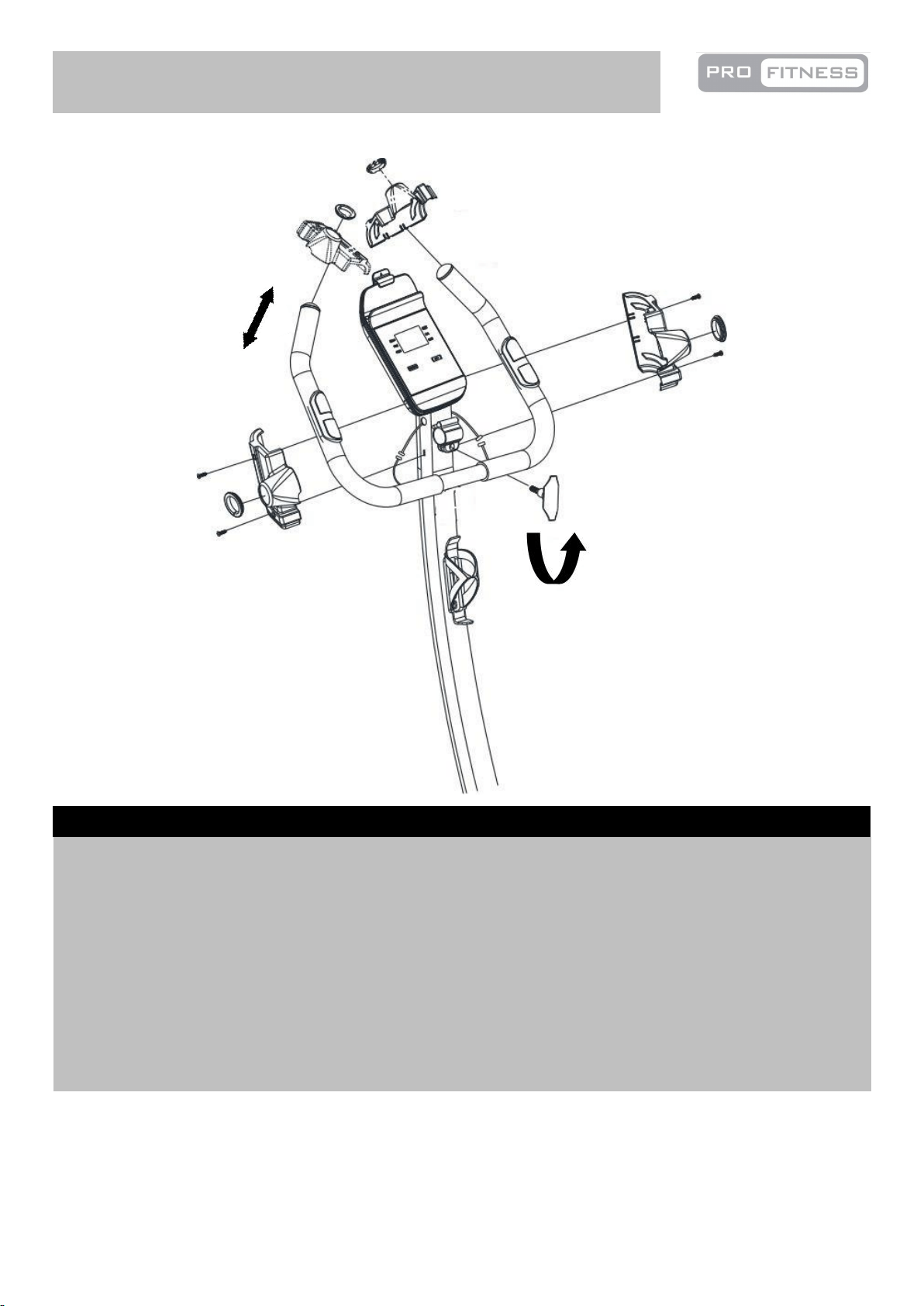
Assembly Instructions
A. Attach the Handle (7) to the bracket on the Front Post (6), and secure with M10 Lock knob (10).
Note: To adjust the position of the handle, turn the lock knob (10) anti clockwise to loose the handle
(7) as shown in the diagram, and adjust the handle (7) to your required position, then secure the lock
knob (10).
B. Connect the two signal Wires (E)from Front Post (6) to the two Wires(F) from Handle (7).
C. Fit the L&R Handle Cover (15) onto the Front Post (7) with 4 x ST4.2 x 15mm Phillips Self Tapping
Screw(63). Put the two Joint Rings (74) on the Handle (7) and push to the Handle Cover (15) as
shown in the diagram.
Step 4
10
74
15L
25
25
6
25
25
74
7
10
15R
E
E
F
F
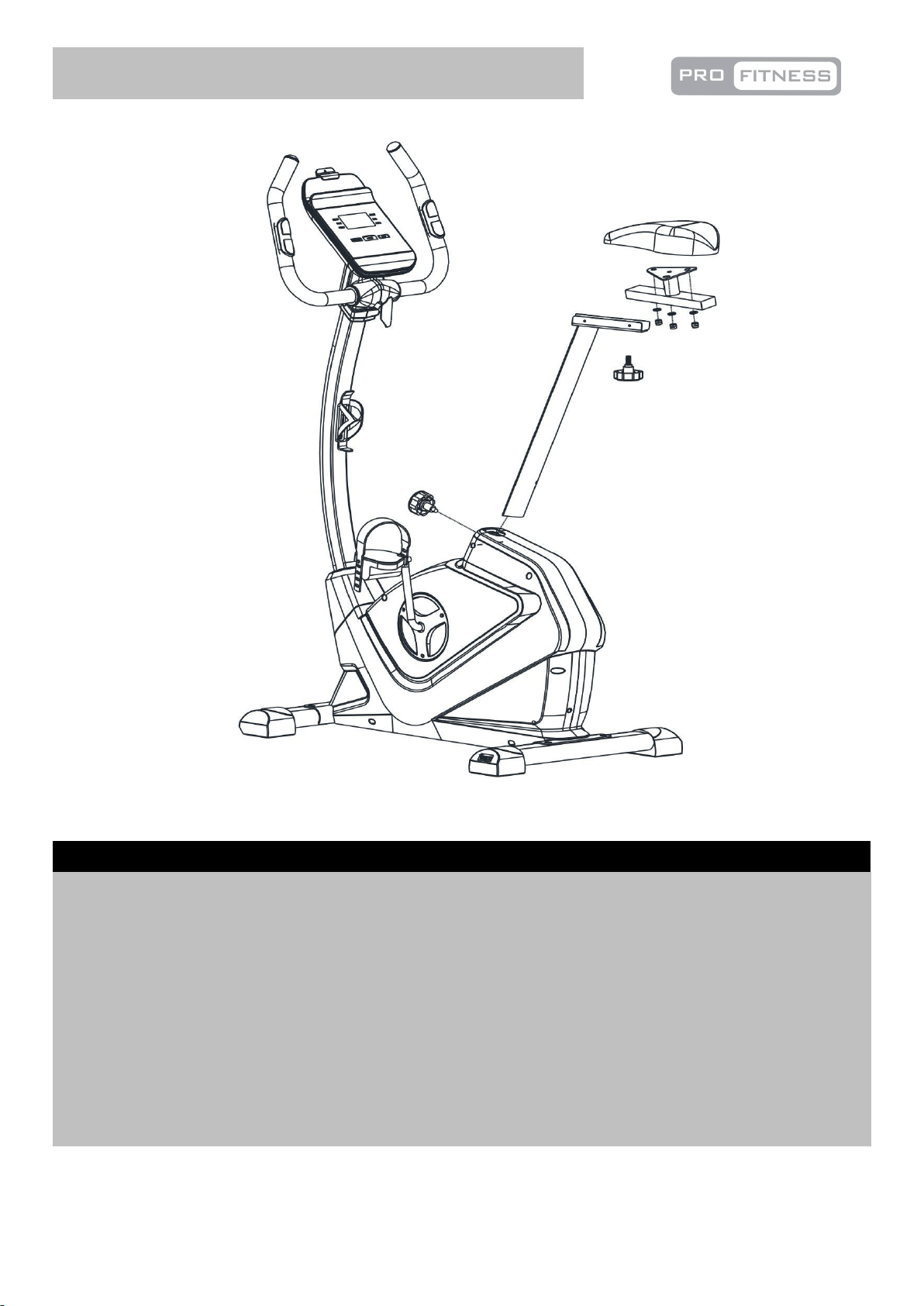
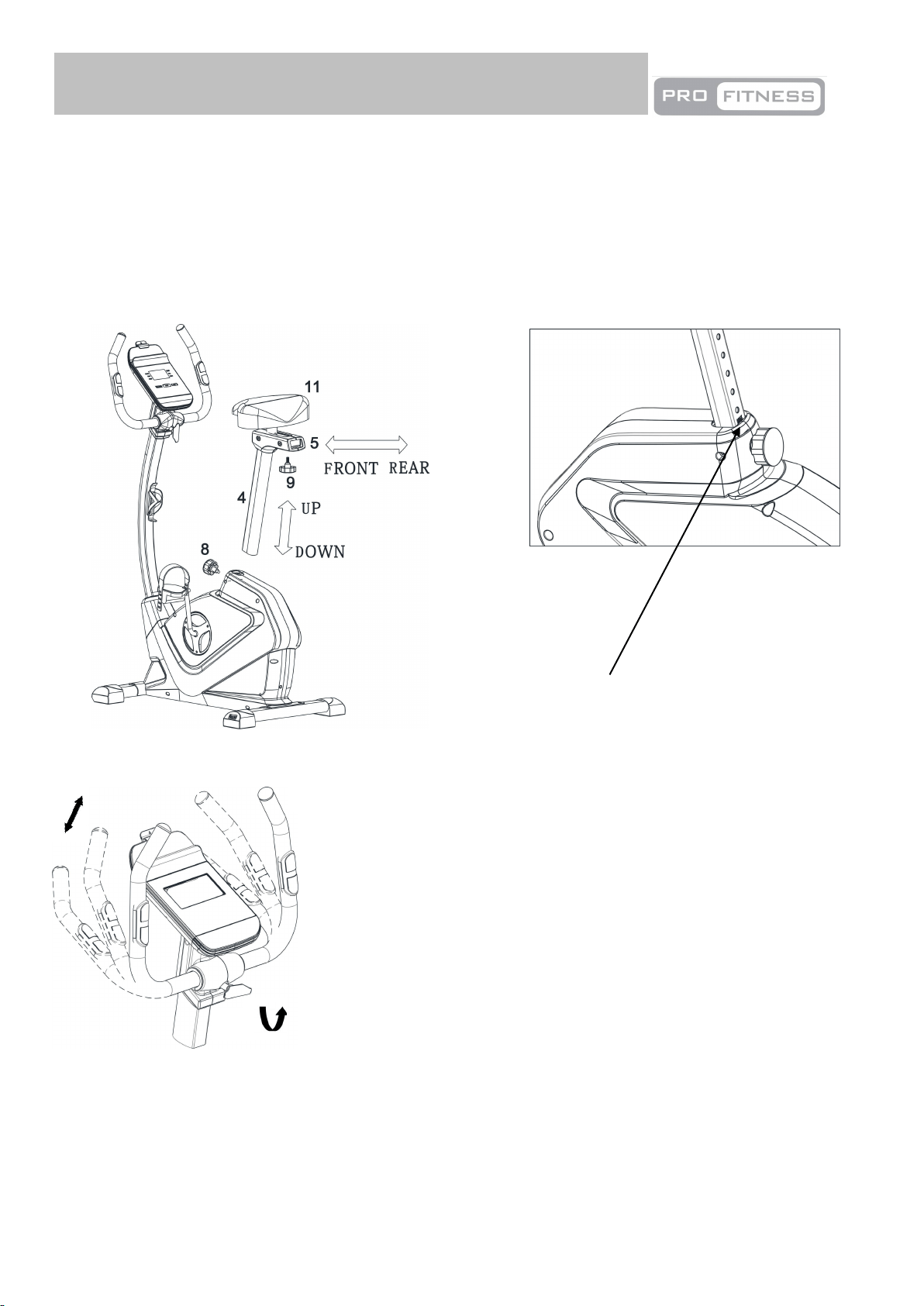
A. Fix the Saddle (11) to the Seat Bracket (5) using 3 x 8MM Washers (21) and 3 x 8MM Aircraft Nuts
(20). The washers and nuts are pre-assembled on the saddle.
Note: The fixings (20) and (21) have been pre-fitted to the Saddle (11).
B. Attach the Seat bracket (5) to the top of the Seat Post (4) using M10 Lock Knob (9).
Move the Saddle (11) forward or backward to a suitable position then tighten the M10 Lock Knob (9).
C. Insert the Seat Post (4) into the Main frame (1). Position the Seat Post (4) upward and downward at
your required and secure with the M16 Lock knob (8).
Note: The seat height is correct when the knee is slightly angled with the pedal vertically down and
the foot parallel to the floor. Please don't pull the Seat Post (4) out of the Main Frame (1) beyond the
Max mark on the Seat Post (4).
Step 5
11
Assembly Instructions
1
11
21
20
5
4
9
8
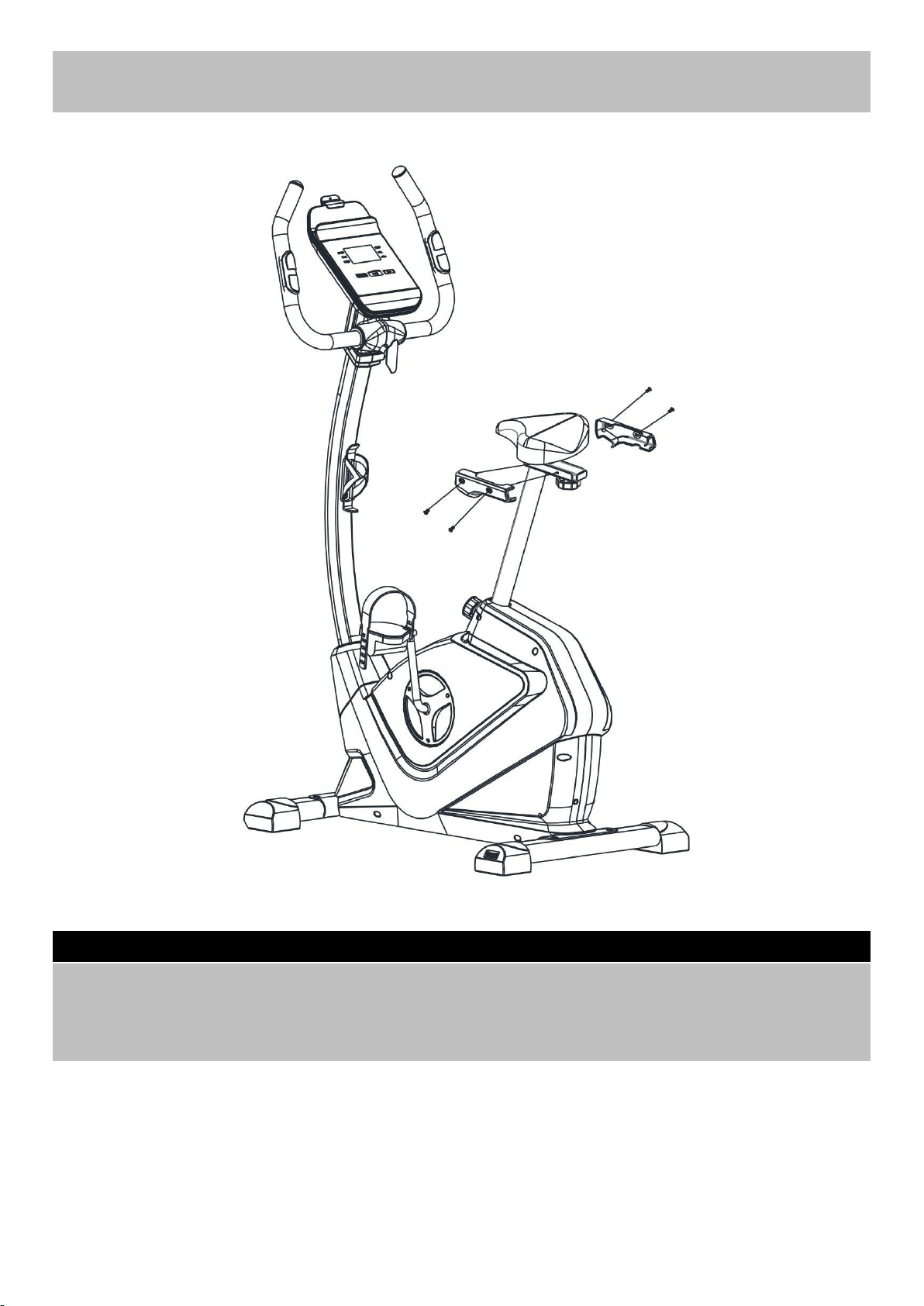
Assembly Instructions
Step 6
A. Fix the Saddle covers (38 L&R) to the Seat adjustable bracket (5) using M5 x 5mm Philips Screws
(77).
77
5
38L
38R
12
77
77
77
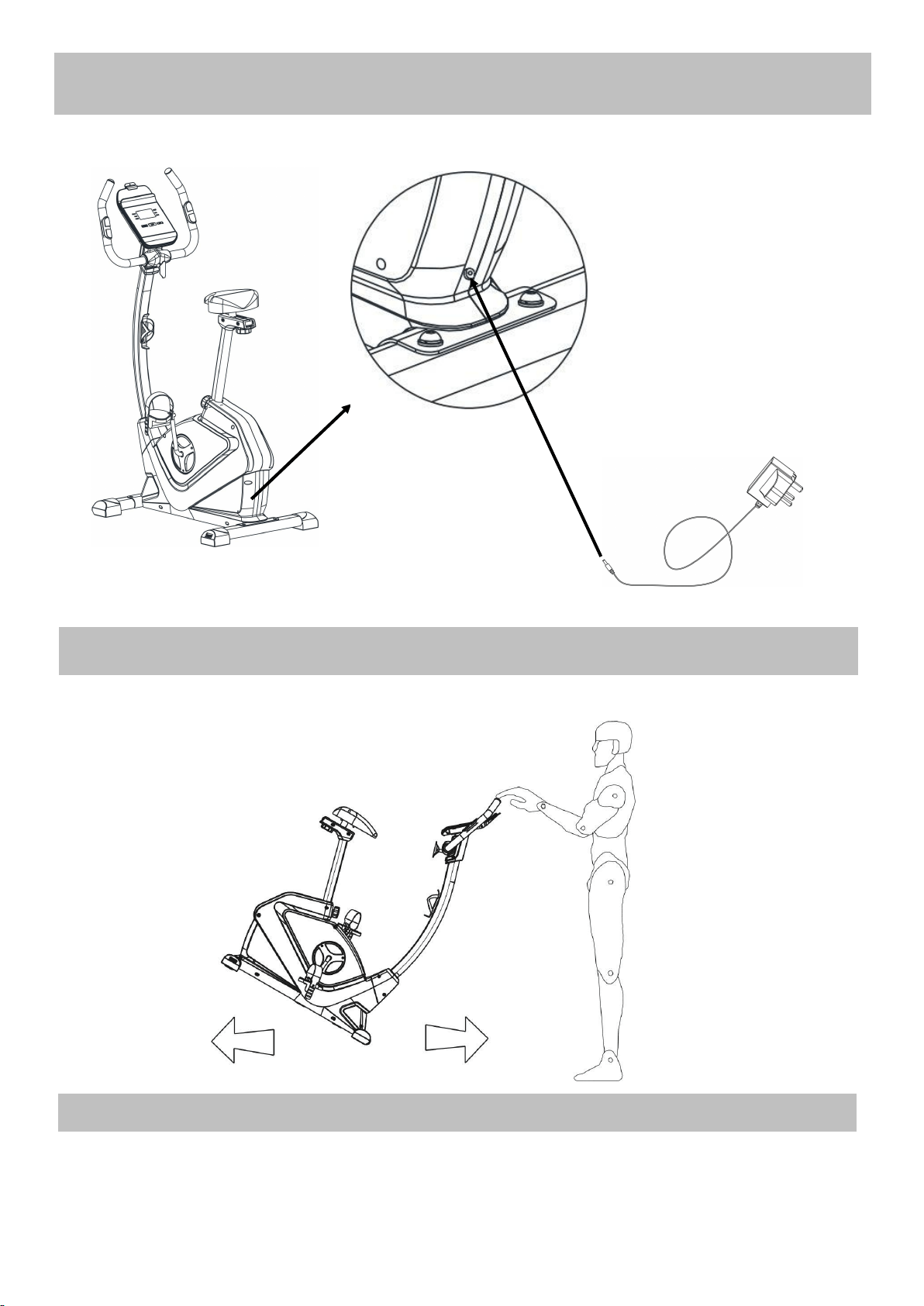
13
Assembly Instructions
Hold the handle to move the bike as shown in the diagram.
Insert the Power Adaptor (68) into the socket on the back of the Main Frame (1).
68
1
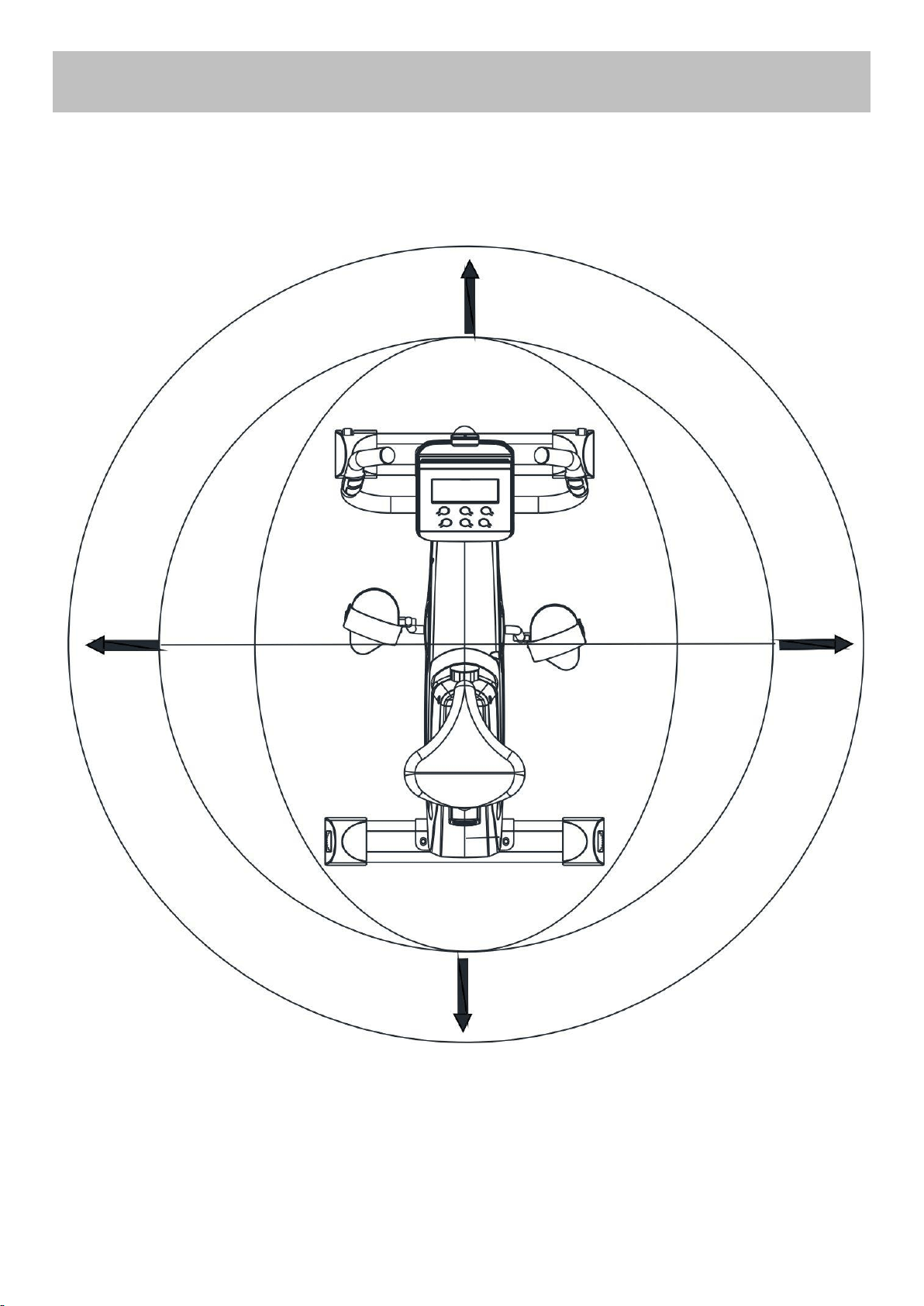
The free area must be at least 0.6m greater than the training area. This is a space where you can safely
dismount, without obstruction, in case of an emergency. Where two pieces of equipment are positioned
adjacent to each other the free area may be shared.
Only one person should be within the training area when the equipment is in use.
Workout area
Training area
1.2m
0.6m
(Free area)
0.6m
(Free area)
0.6m
(Free area)
0.6m
(Free area)
14

85% to Max
65% to 85%
55% to 65%
Up to 55%
Tailor your exercise program according to your physical condition. If you have been inactive for several
years, or are overweight, you must start slowly and increase your time on the equipment; a few minutes per
workout increase is advisable.
Initially, you may be able to exercise only for a few minutes in your target zone, however, your aerobic
fitness will improve over the next six to eight weeks. Don’t be discouraged if it takes longer. It’s important to
work at your own pace.
Please remember these essentials:
• Have your doctor review your training and diet programs to advise you of a workout routine you should
adopt.
• Begin your training program slowly with realistic goals.
• Monitor your pulse frequently. Establish your target heart rate based on your age and condition.
• Set up your equipment on a flat even surface with adequate training area, as prescribed in this manual.
Exercise intensity
To maximize the benefits of exercising, it is important to exercise at an appropriate intensity. The intensity
level can be found by using your heart rate as a guide. For effective aerobic exercise, your heart rate should
be maintained at a level between 65% and 85% of your maximum heart rate as you exercise. This is known
as your target zone. You can find your target zone in the table below.
200
180
160
140
120
100
80
25 30 35 40 45 50 55 60 70
Age
During the first few months of your exercise program, keep your heart rate near the low end of your target zone
as you exercise. After a few months, your heart rate can be increased gradually until it is near the middle of
your target zone as you exercise.
To measure your heart rate, stop exercising but continue moving your legs or
walking around and place two fingers on your wrist. Take a six-second heartbeat
count and multiply the results by 10 to find your heart rate. For example, if your
six-second heartbeat count is 14, your heart rate is 140 beats per minute.
(A six-seconds count is used because your heart rate will drop rapidly when you
stop exercising.) Adjust the intensity of your exercise until your heart rate is at the
required level.
Cardiovascular
performance
Intermediate aerobic
Effective fat burning
Exercise Information
Before starting
15
Beats per minutes (bpm)
Aerobic Exercise
Aerobic exercise improves the fitness of your lungs and heart - your body’s most important muscle.
Aerobic exercise is promoted by any activity that uses your large muscles (arms, legs, or buttock, for
example).
Weight Training
Along with aerobic exercising which helps get rid of and keep off the excess fat that our bodies can
store, weight training is an essential part of an exercise routine. Weight training helps tone, build and
strengthen muscle. If you are working above your target zone, you may want to do a lower number of
reps.
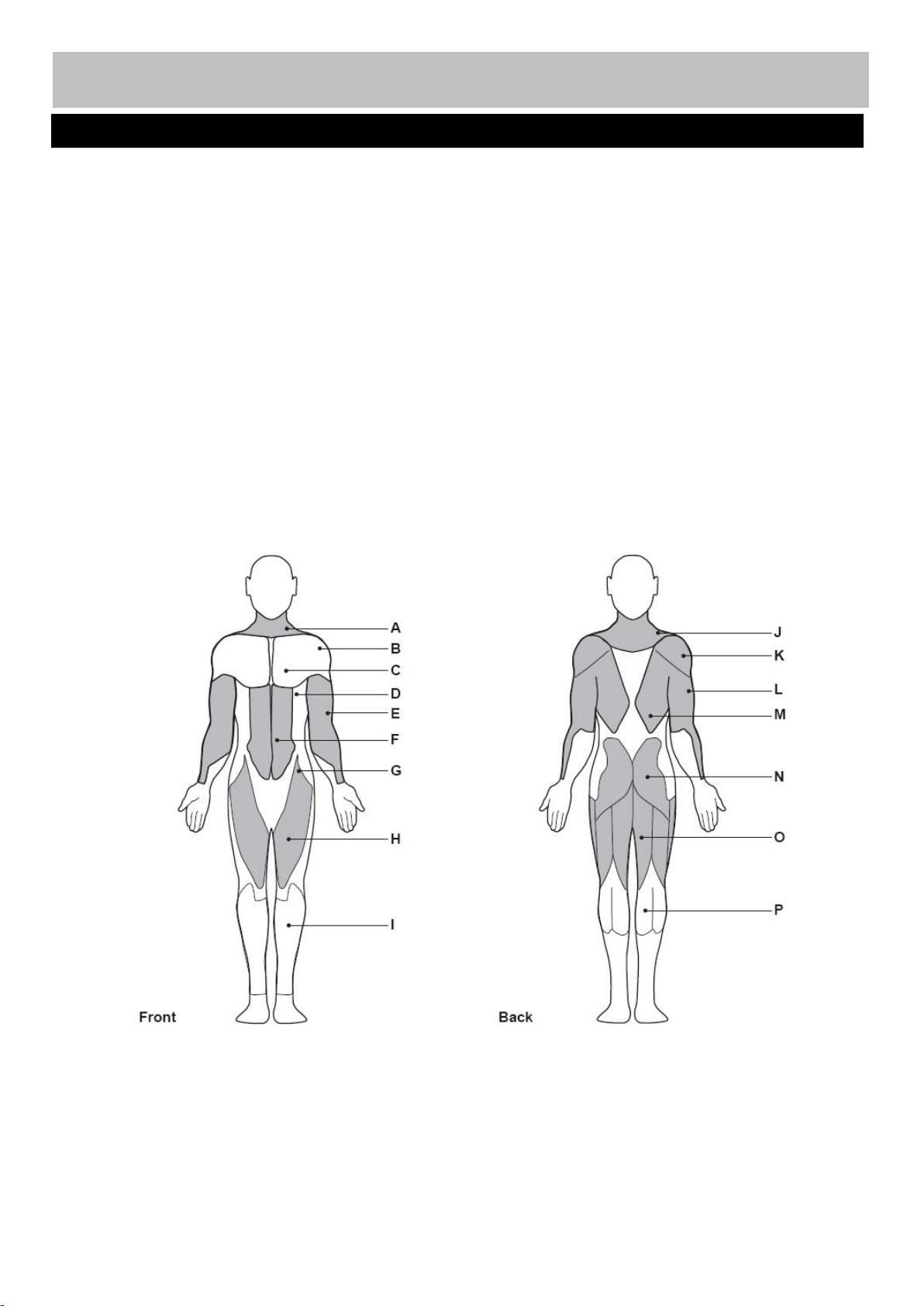
Targeted Muscle Groups
The exercise routine that is performed on the exercise bike will develop the lower body muscle groups.
These muscle groups are highlighted on the muscle chart below.
Muscle Chart
16
Exercise Information
A: Trapezius
B: Anterior Deltoid
C: Pectoralis Major
D: Serratus Anterior
E: Biceps
F: Abdominal
G: Sartorius
H: Quadriceps
I: Tibialis Anterior
J: Trapezius
K: Posterior Deltoid
L: Triceps
M: Latissimus Dorsi
N: Gluteals
O: Hamstrings
P: Gastrocnemiu
Each workout should include the following three parts:
1. A warm-up, consisting of 5 to 10 minutes of stretching and light exercise. A proper warm-up
increases your body temperature, heart rate, and circulation in preparation for exercise.
2. Training zone exercise, consisting of 20 to 30 minutes of exercising with your heart rate in your training
zone. (Note: During the first few weeks of your exercise program, do not keep your heart rate in your
training zone for longer than 20 minutes.)
3. A cool-down, with 5 to 10 minutes of stretching. This will increase the flexibility of your muscles and
will help to reduce post-exercise muscle soreness.
Exercise Frequency
To maintain or improve your condition, plan three workouts each week, with at least one day of rest
between workouts. After a few months of regular exercise, you may complete up to five workouts each
week, if desired. Remember, the key to success is make exercise a regular and enjoyable part of your
everyday life.
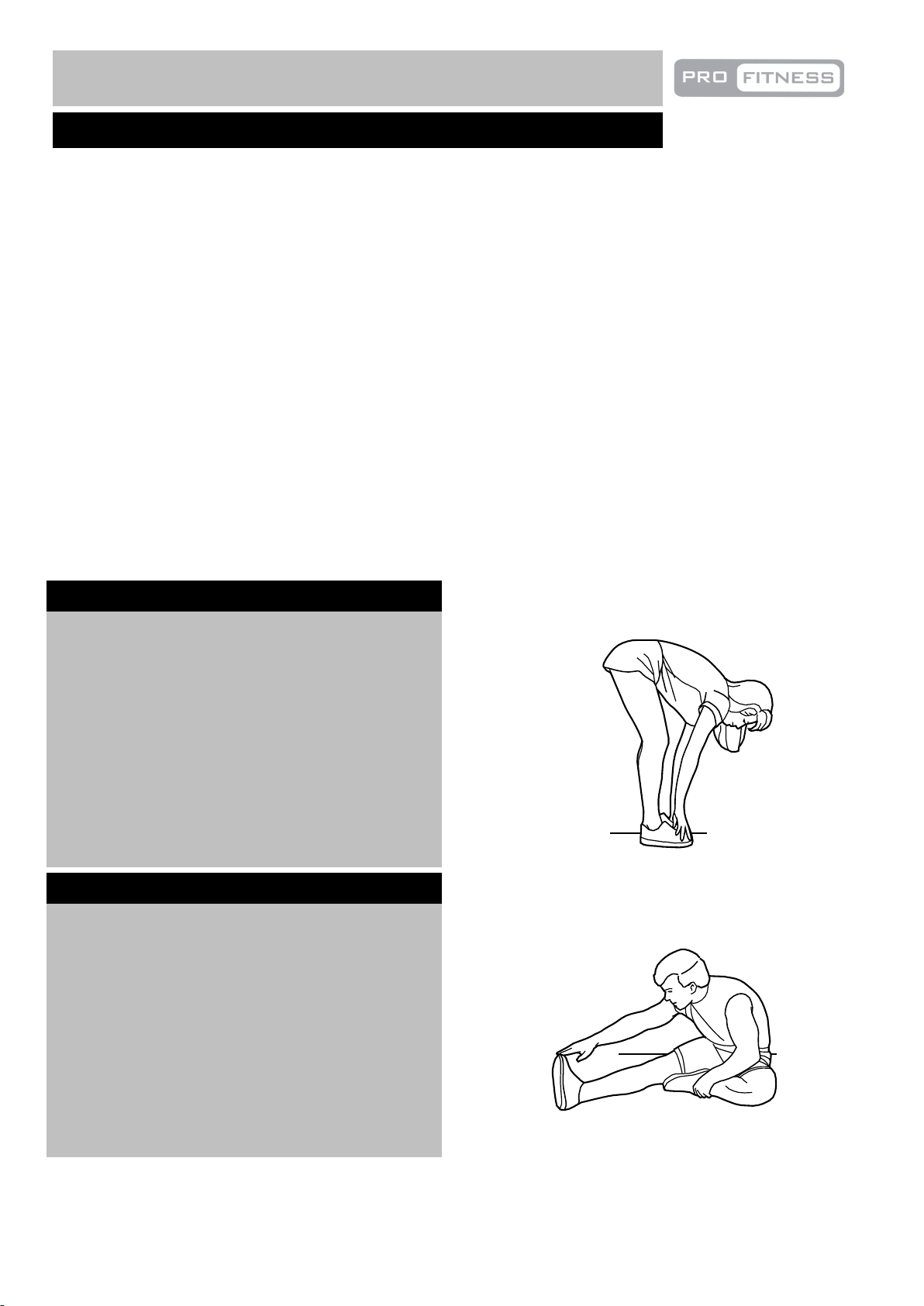
Suggested Stretches
Fora correct warmup, see the following basic stretching exercises. Move slowly as you stretch, never bounce.
Toe touch stretch
Stand with your knees bent slightly and
slowly bend forward from your hips.
Allow your back and shoulders to relax
as you reach down toward your toes as
far as possible.
Hold for 15 counts, then relax
Repeat 3 times.
Stretches: Hamstrings, back of knees and back.
Hamstring stretch
Sit with one leg extended. Bring the sole
of the opposite foot toward you and rest
it against the inner thigh of your
extended leg. Reach toward your toes
as far as possible.
Hold for 15 counts, then relax
Repeat 3 times for each
Stretches: Hamstrings, lower back and groin.
Warming up and Cooling down
17
Exercise Information
leg.
Inner thi
g
h stretch
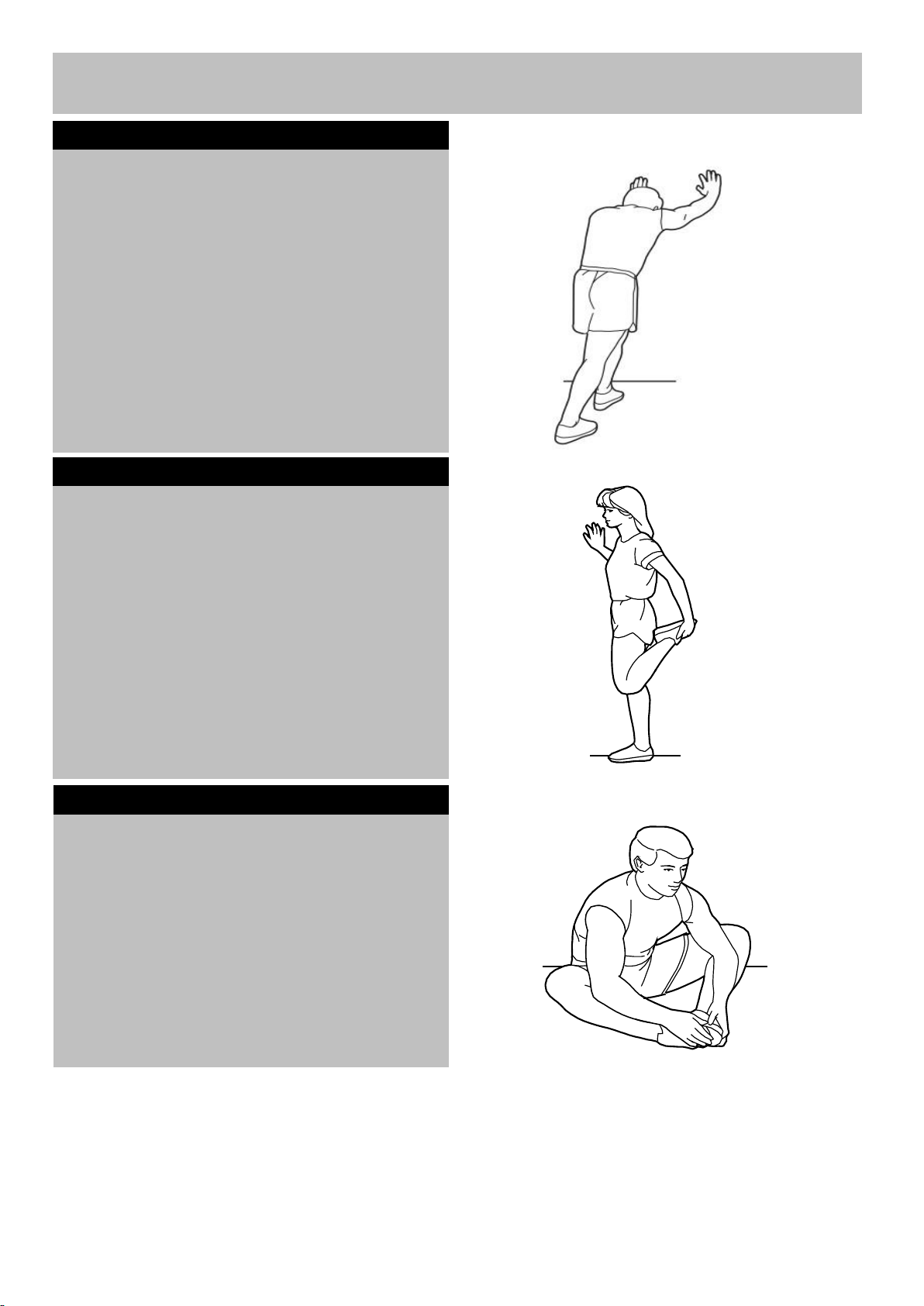
Calf/achilles stretch
With one leg in front of the other, reach
forward and place your hands against a wall.
Keep your back leg straight and your back
foot flat on the floor. Bend your front leg,
lean forward and move your hips toward the
wall.
Hold for 15 counts, then relax.
Repeat 3 times for each leg. To cause
further stretching of the achilles
tendons, bend your back leg as well.
Stretches: Calves, achilles tendons and ankles.
Quadriceps stretch
With one hand against the wall for
balance, reach back and grasp one foot
with your other hand. Keeping your bent
knee pointing directly downward towards
the floor, gentle pull your
heel towards your buttock until you feel a gentle
stretch in the target area.
Hold for 15 counts, then relax.
Repeat 3 times .
Stretches: Quadriceps and hip muscles.
Sit with the soles of your feet together
and your knees outward. Pull your feet
toward your groin area as far as possible.
Hold for 15 counts, relax.
Repeat 3 times.
Stretches: Quadriceps and hip muscles.
Exercise Information
18
leg.
Exercise Information
Console Operation
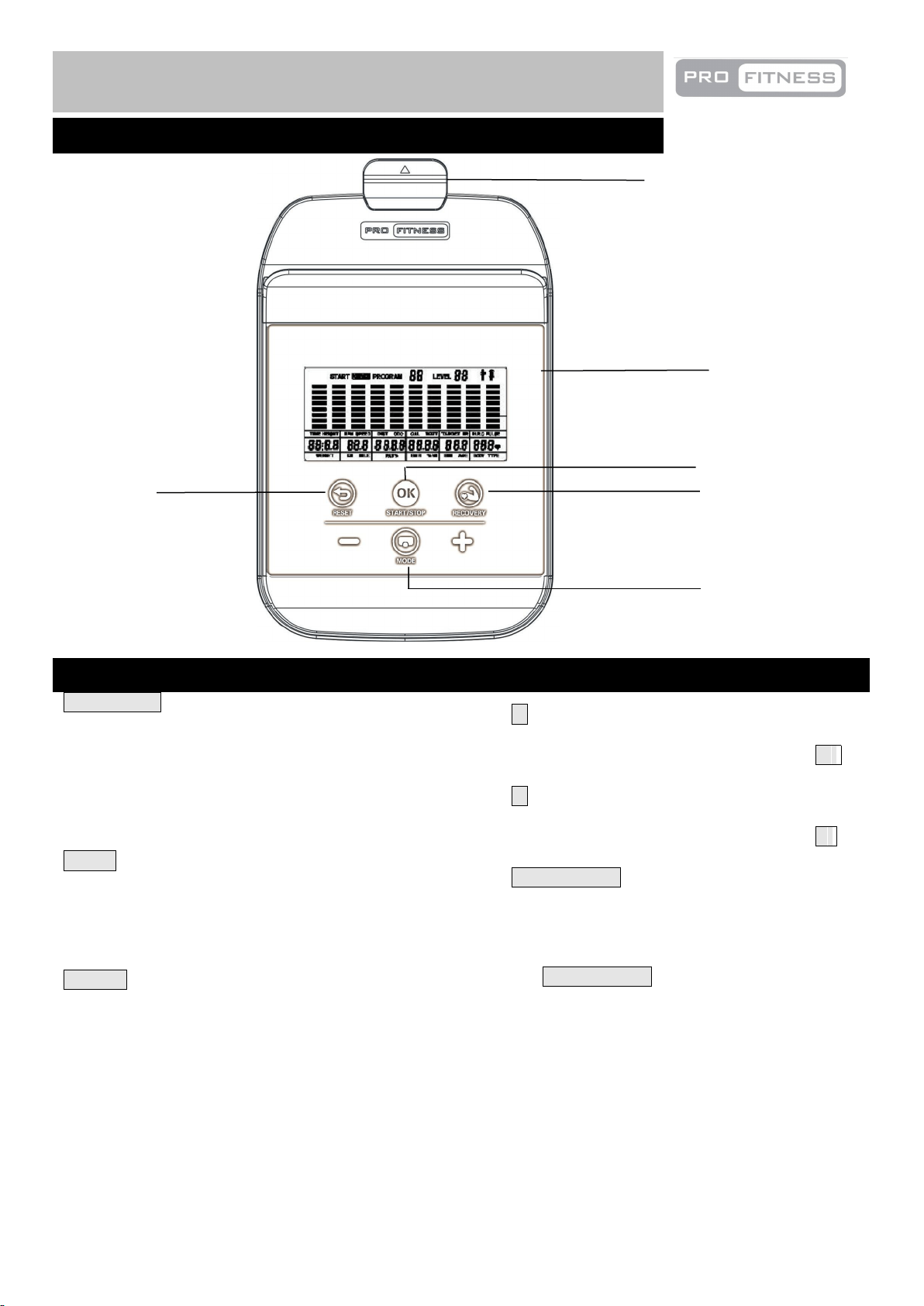
RECOVERY Key:
This function is used to test your recovery after workout.
Press this key and hold the hand pulse sensors. The
console will count down 60 seconds and a value of F1 to
F6 will be displayed. F1means good recovery.
Note: You need to have your pulse tested during the
workout before using this function. Otherwise this key will
not work.
MODE Key:
● Press to switch display from SPEED to RPM, to
DIST to ODO during workout.
●To switch the functions that need to input desired value
under workout mode
RESET Key
●Clear the value to zero when set up workout mode
+ Key:
● Increases value of selected workout
parameter. During the workout pressing +
will increase the resistance load.
- Key:
●Decrease value of selected workout
parameter. During the workout pressing -
will decrease the resistance load.
START/STOP Key:
● Start & Pause workouts.
● Start body fat measurement and quit the
body fat program.
● When off, press and hold the
START/STOP key for 3 seconds to reset
all functions.
Key Functions
Display
Mode
Start/Stop
Reset
Recovery
19
Mobile phone holder
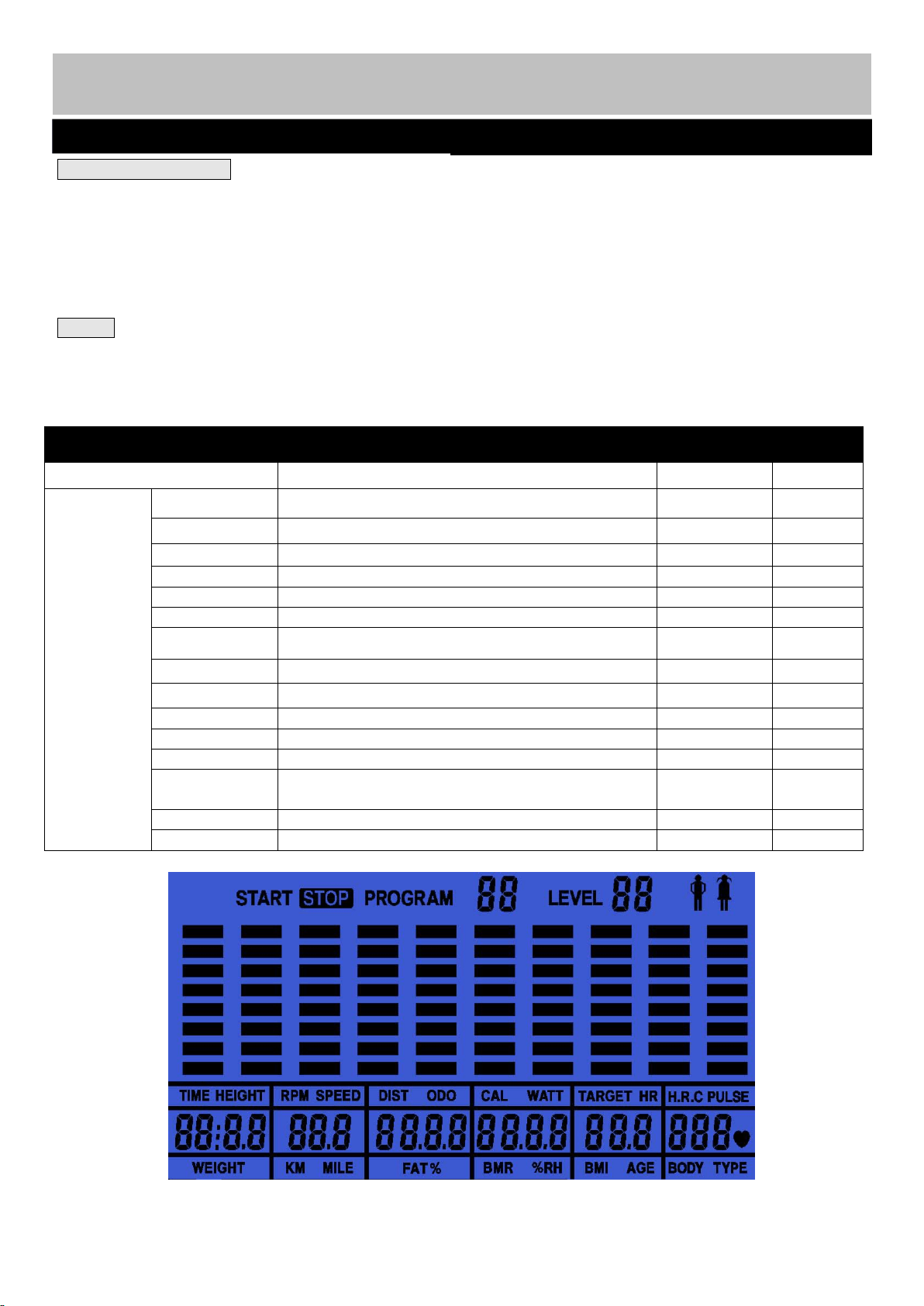
Specifications
Window
Display
Default
Stored
Functions
TIME
0:00 - 99:59 (minute : second)
0:00
No
DISTANCE
0.00- 999.9( Km)
0.00
No
CALORIES
0 - 9999(Cal)
0
No
AGE
10 - 99 years
30
No
GENDER
Male / Female
Male
No
WEIGHT
20 - 150(Kg)
70
No
HEIGHT
100 - 250(Cm)
175
No
SPEED
0.0 - 99.9(Km/hour)
0.0
No
PULSE
50 - 200 (BPM) –Non-contact magnetic type
0
No
RPM
0 - 250 RPM
0
No
PACE
0.0 – 99.9 (Average speed per hour)
0.0
No
BODY FAT
0% - 50%
0
No
TARGET
PULSE
60%,75%,85%
0
No
GRADE
L1–L16(Brake resistance level)
No
USER
USER (4 user programs)
U1
YES
12
Console Operation
Exercise Information
27
CONSOLE DISPLAY .
1. This is an LCD display showing TIME,
SPEED, DISTANCE, CALORIE, AGE and
PULSE.
2. Dot matrix display:
The LCD screen will have a single dot matrix
display with 8 rows and 10 columns to display
profile for the active program.
MODE.
1. POWER UP Mode: When the first turned on,
the bike will make a long beeping sound before
the computer enters manual mode. The console
will display calendar, time and
temperature.Press "MODE", "+" and "-" to setup
the calendar and time.
2. Sleep/Calendar Mode: After 4 minutes of
inactivity, the console will enter Sleep/Calendar
Mode.
3. WAKE UP Mode: Pedal the machine, or press
any key ,to start the machine when inactive
20
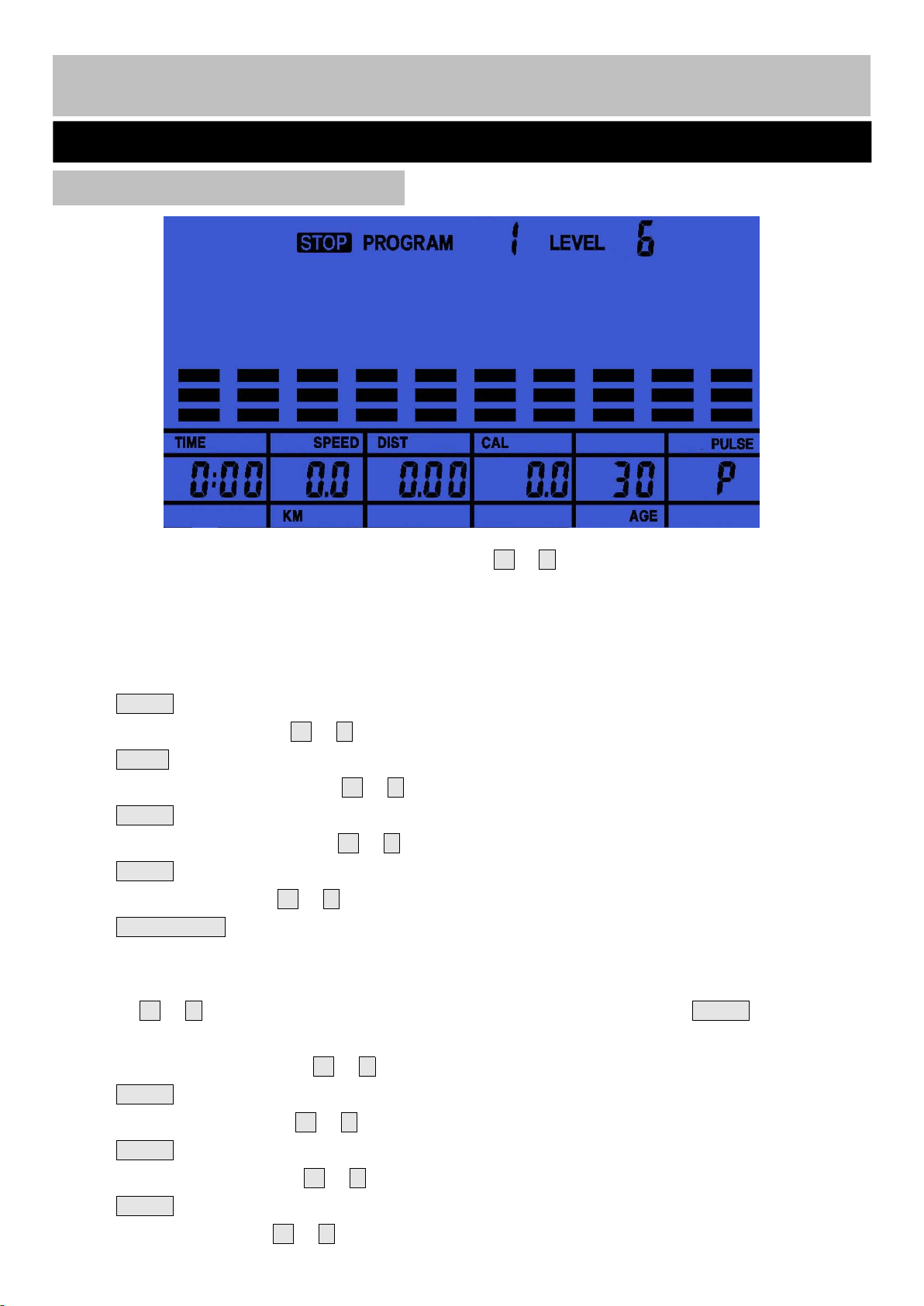
“PROGRAM 1” will be the default display. By pressing the + or - button to scroll, you can scroll through
the workout programmes in the following order:
P1(manual)→ P2...P13→ P14(FAT)→P15(THR)→P16(60%)→ P17(75%)→P18(85%)→P19(U1)→
P20(U2)→P21(U3) and P22(U4), then back to P1.
1. Manual (PROGRAM 1) And 12 Fixed Programmes (P2-P13):
● Press MODE to accept your choice of program; MANUAL (P1 or P2-P13).
“TIME” is flashing. Press the + or - button to adjust the TIME. (0:00-99:00 min/sec)
● Press MODE to accept the workout TIME.
“DISTANCE.” is flashing. Press the + or - button to adjust the DISTANCE. (0.00-999.0km)
● Press MODE to accept the workout DISTANCE.
“CALORIES” is flashing. Press the + or - button to adjust the CALORIES. (0.0-9950Kcal)
● Press MODE to accept the workout CALORIES.
“AGE” is flashing. Press the + or - button to adjust the users AGE. (10-99 years)
● Press START/STOP and begin your workout.
2. Body Fat (P14) Analysis:
● Press the + or - button to MODE the BODY FAT TEST programme (P14). Press MODE and proceed to
set GENDER, HEIGHT, WEIGHT and AGE.
“GENDER” is flashing. Press the + or - button to adjust the GENDER . (male or female)
● Press MODE to accept the user’s GENDER.
“HEIGHT” is flashing. Press the + or - button to adjust the HEIGHT. (100-250cm)
● Press MODE to accept the user’s HEIGHT.
“WEIGHT” is flashing. Press the + or - button to adjust the WEIGHT. (20-150kg)
● Press MODE to accept the user’s WEIGHT.
“AGE” is flashing. Press the + or - button to adjust the user’s AGE. (10-99 years)
Console Operation
Exercise Information
21
Choosing your workout program

● Press START/STOP button to begin the body fat test. This requires you to hold the hand pulse sensors
continuously until a result is given. Failure to hold the hand pulse sensors throughout the measurement will
result in “E4” Error.
●Your results should appear as follows:
● ERROR E4 will display if you fail to hold the hand pulse sensors throughout the body fat assessment.
● NOTE:
Body Types: There are 9 body types according to the FAT% calculated.
BMR: Basal Metabolism Ratio.
BMI: Body Mass Index.
Type 1: Ultra-athletic Type 2: Ideal-athletic Type 3: Ultra slim
Type 4: Athletic Type 5: Ideal-healthy Type 6: Healthy
Type 7: Fat Type 8: Too Fat Type 9: Excess Body Fat
● Press START/STOP to return the main Display.
3. TARGET HEART RATE Program
(P15)
● Press MODE to MODE Program 15.
“TIME” will be flashing. Press the + or - button to adjust the TIME. (0:00-99:00 min/sec)
● Press MODE to accept the workout TIME .
“DISTANCE” is flashing. Press the + or - button to adjust the DISTANCE. (0.00-999.0km)
● Press MODE to accept the workout DISTANCE.
“CALORIES” is flashing. Press the + or - button to adjust the CALORIES. (0.0-9950Kcal)
Exercise Information
Console Operation
22
● Press MODE to accept the workout CALORIES.
“TARGET HR” is displayed. Press the + or - to adjust the TARGET HEART RATE. (60-220BPM, default
90)
● Press START/STOP and begin your workout.
●If your pulse deviates ±5from the set TARGET H.R. then the computer will adjust the resistance
automatically to help you workout within your target zone. It will re-check your pulse every 20 seconds and
adjust your resistance accordingly.
(Note: Each resistance load represents 2 levels of loading)
Once one of the target workout parameters reaches zero, the product will beep and you will have reached
the end of your workout. Press START/STOP if you wish to continue the workout, enabling you to reach
one of the other pre-programmed workout parameters.
4. HEART RATE CONTROL Program 16 (P16-P18).
● There are 3 options for target pulse:
P16: 60% TARGET H.R.= 60% of (220-AGE)
P17: 75% TARGET H.R.= 75% of (220-AGE)
P18: 85% TARGET H.R.= 85% of (220-AGE)
● Press MODE to accept Program 16 (P16-P18).
“TIME” is flashing. Press the + or - button to adjust the TIME. (0:00-99:00 min/sec)
● Press MODE to accept the workout TIME .
“DISTANCE” is flashing. Press the + or - button to adjust the DISTANCE. (0.00-999.0km)
● Press MODE to accept the workout DISTANCE.
“CALORIES” is flashing. Press the + or - button to adjust the CALORIES. (0.0-9950Kcal)
● Press MODE to accept the workout CALORIES.
“AGE” is flashing. Press the + or - button to adjust the user’s AGE. (10-99 years)
● Press START/STOP and begin your workout.
●If your pulse deviates ±5 from the set TARGET H.R. then the computer will adjust the resistance
automatically to help you workout within your target zone. It will re-check your pulse every 20 seconds and
adjust your resistance accordingly.
(Note: Each resistance load represents 2 levels of loading)
Once one of the target workout parameters reaches zero, the product will beep and you will have reached
the end of your workout. Press START/STOP if you wish to continue the workout, enabling you to reach one
of the other pre-programmed workout parameters.
5. Program 19(P19-P22) Workout:
● Press MODE to accept USER Program 19 (P19-P22).
“TIME” is flashing. Press the + or - button to adjust the TIME. (0:00-99:00 min/sec)
● Press MODE to accept the workout TIME.
“DISTANCE.” is flashing. Press the + or - button to adjust the DISTANCE. (0.00-999.0km)
● Press MODE to accept the workout DISTANCE.
Exercise Information
Console Operation
23
“CALORIES” will be flashing. Press the + or - button to adjust the CALORIES. (0.0-9950Kcal)
● Press MODE to accept the workout CALORIES.
● “AGE” will be flashing. Press the + or - button to adjust the AGE(10-99 years). Press MODE to confirm,
then the first resistance column flashes, press the + or - button to set resistance, press MODE to confirm,
repeat the operation until all of 10 resistance columns are set.
● Press START and begin your workout.
6. RECOVERY TEST:
● Hold the handle grip sensors with your hands until the pulse window displays pulse value, then press the
RECOVERY within 5 seconds and hold the hand grip sensors with your hands again, after 59 seconds the
result will be shown in the following format:
Display
Figure
F1.0-F1.9
EXCELLENT
F2.0-F2.9
VERY GOOD
F3.0-F3.9
GOOD
F4.0-F4.9
FAIR
F5.0-F5.9
POOR
F6.0
VERY POOR
24
Console Operation
Exercise Information
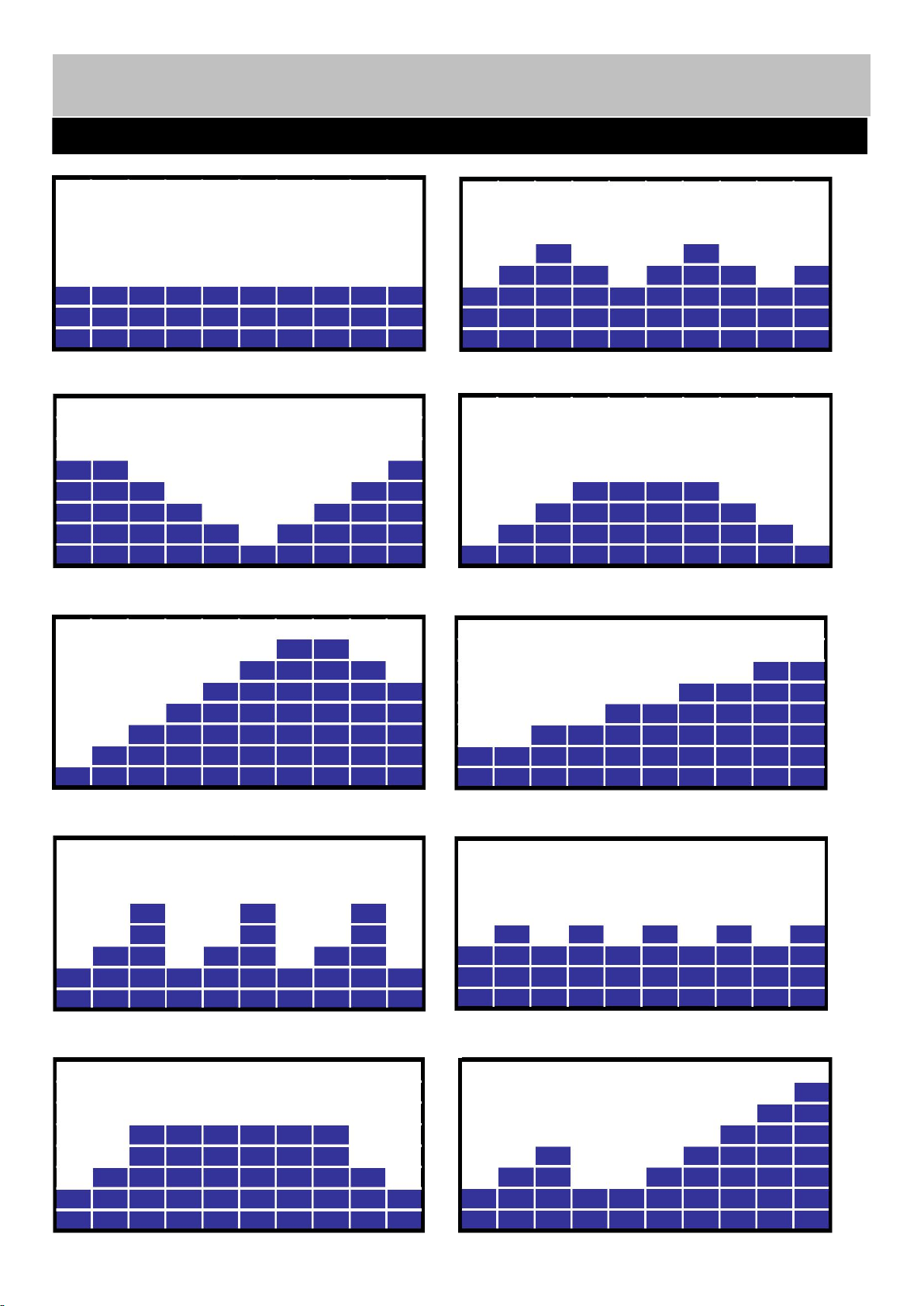
1. Program 1 (MANUAL) 2. Program 2
3.Program 3 4. Program 4
5.Program 5 6. Program 6
7. Program 7 8. Program 8
9. Program 9 10. Program 10
Exercise Information
Console Operation
25
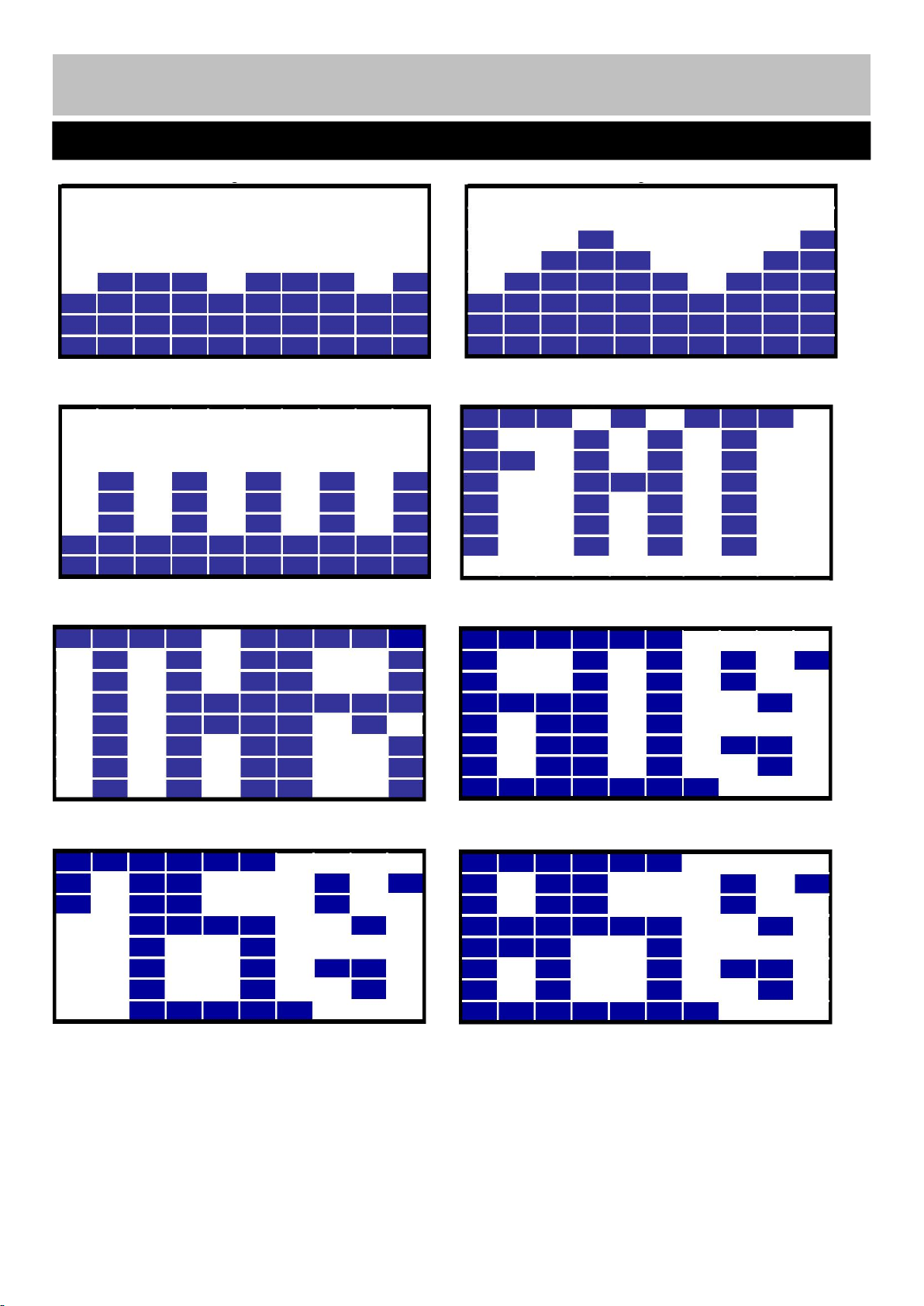
11. Program 11 12. Program 12
13. Program 13 14. Program 14 (BODY FAT)
15. Program 15 (TARGET H.R.) 16. Program 16 (60% MAX H.R)
17. Program 17 (75% MAX H.R) 18. Program 18 (85% MAX H.R)
Console Operation
Exercise Information
26
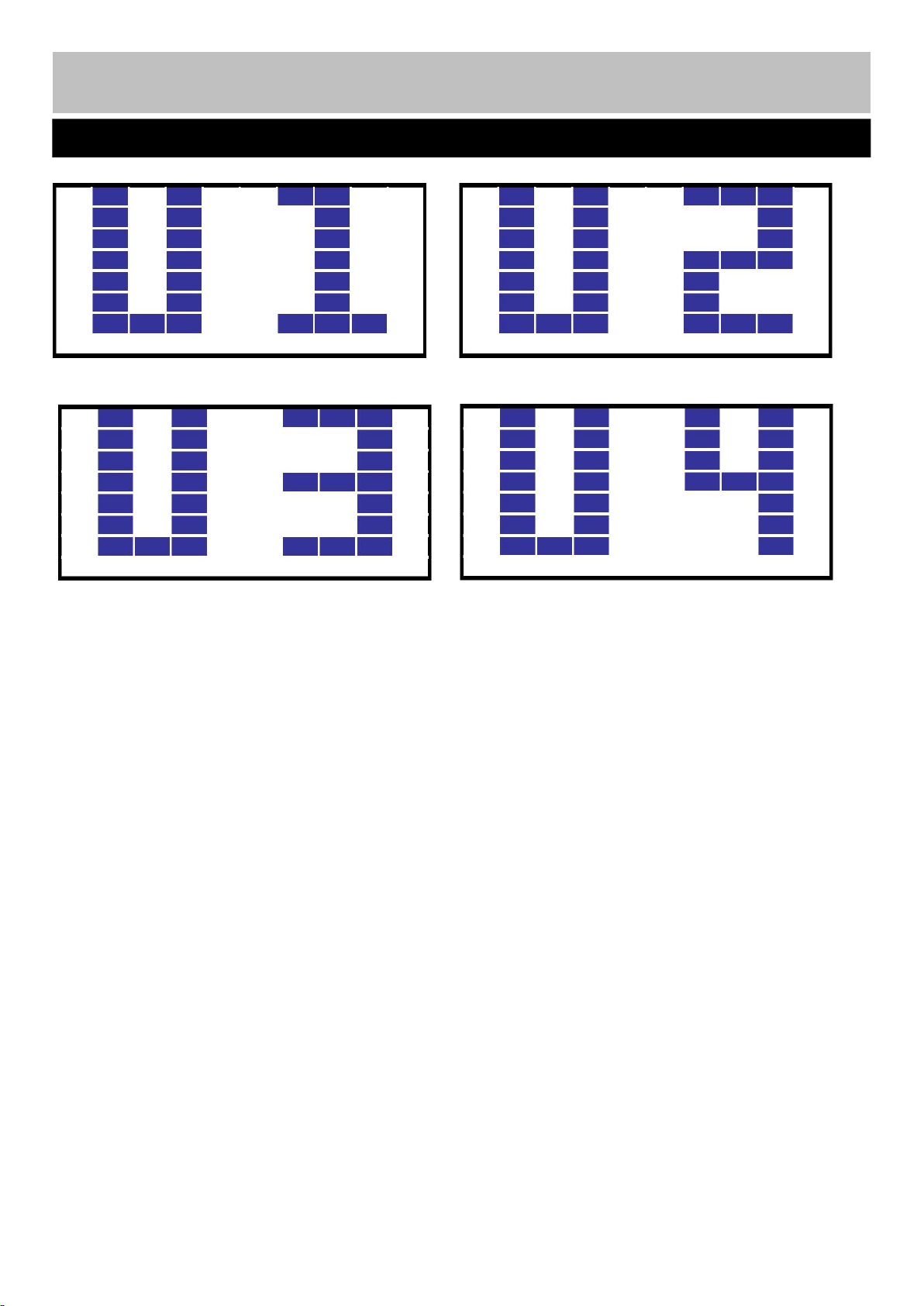
19. Program 19 (USER1) 22. Program 20 (USER2)
21. Program 21 (USER3) 22. Program 22 (USER4)
Console Operation
Exercise Information
27
`
•Adjustment of the seat
Unlock the M16 lock knob (8) and pull or push the seat post (4) to adjust the saddle(11) height .
Unlock the M10 lock knob (9) and pull or push the seat adjustment bracket (5) to adjust the saddle (11)
distance (front or rear).
Do not pull over the MAX mark for maximum height or push down below MIN mart for minimum
height.
•Adjustment of the handle
To adjust the position of the handle, turn the lock knob (10) anti clockwise to loose the handle (7) as
shown in the diagram, and adjust the handle (7) to your required position, then secure the lock knob (10).
Exercise Instruction
MAX
7
10
28
1. The safety level of the
equipment can only be
maintained if it is examined
regularly for damage and wear
e.g. ropes, pulleys and
connection points.
2. Lubricate moving parts with
light oil periodically to prevent
premature wear. To prevent
damage to the computer, keep
liquids away and keep it out of
direct sunlight.
3. Inspect and tighten all parts
before using the equipment.
Replace defective
components immediately
and/or keep the equipment out
of use until repair.
4. The equipment can be
cleaned using a damp cloth
and mild non-abrasive
detergent. Do not use solvents.
5. Do not attempt to repair
this equipment yourself.
Should you have any difficulty
with assembly, operation or
use of your exercise product or
if you think that you may have
parts missing, contact
Customer Helpline:
0345 600 1714
www.argos-support.co.uk
Guarantee:
For guarantee purposes,
please retain your purchase
receipt.
Error Code
Cause
Check and Solution
E1
E2
E3
Unable to operate
Replace the console
The wiring is broken or not
plugged in properly
A: Check if the wiring is broken or unplugged
B: Replace the wire or connect it
Motor or circuit error
A: Check the motor
B: replace the motor
Magnetic control stuck or too
heavy to drive the motor
Replace the Magnetic control system or
Assembly
E4
When testing Body Fat, no
heartbeat signal is input within 8
seconds
Please hold both hand pulse sensors continuously.
Information for Users on Disposal of old Equipment
These symbols indicate that equipment with these
symbols should not be disposed of as general
household waste. If you want to dispose of the product
or battery, please consider the collection systems or
facilities for appropriate recycling.
Always unplug the equipment before cleaning and/or
servicing. Service to this equipment should only be
performed by an authorized service representative,
unless authorized and/or instructed by the
manufacturer.
29
Care and Maintenance
Trouble Shooting
29
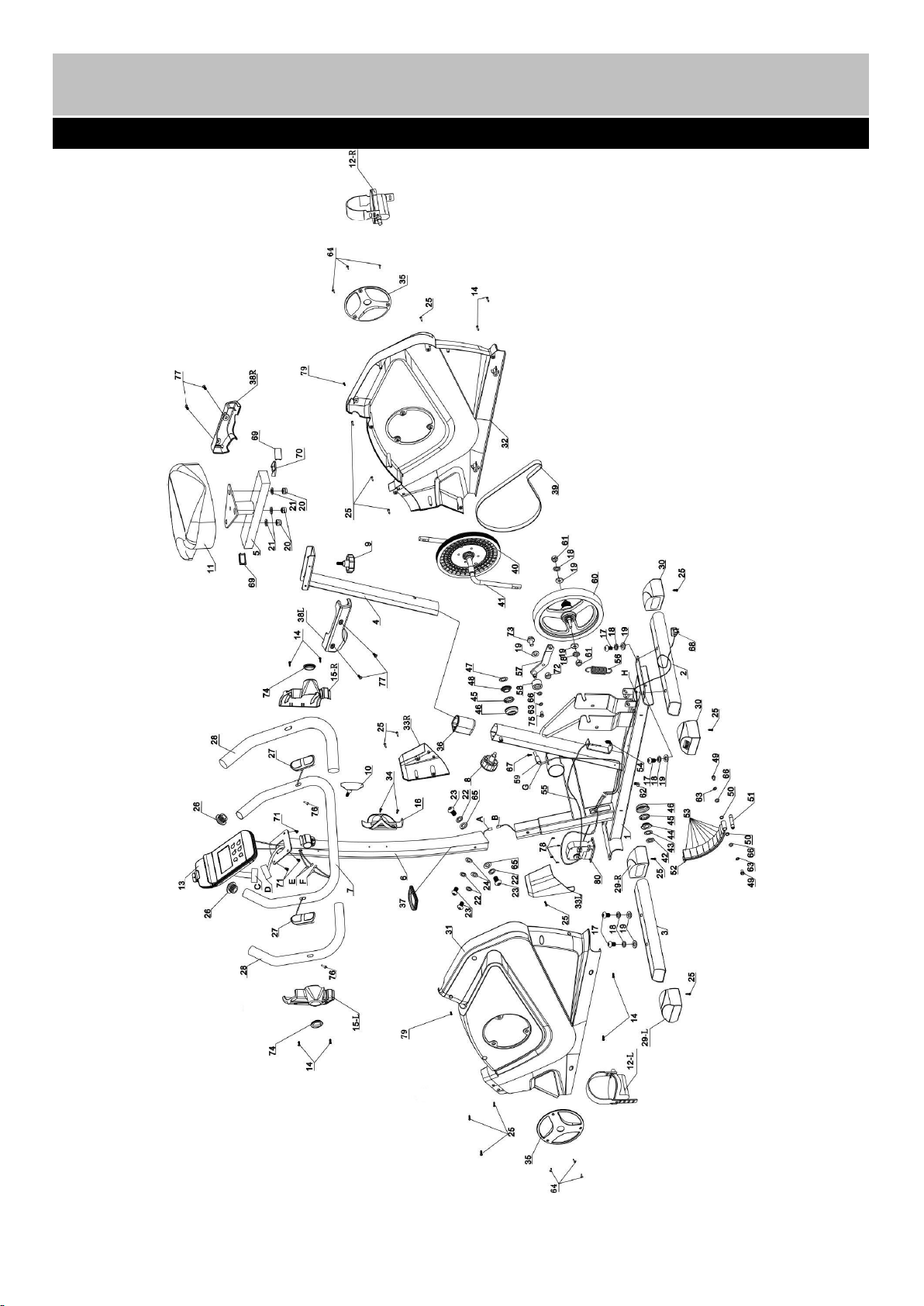
Exploded Parts Diagram
30
No.
Description
QTY
SIZE
CODE
1
Main Frame
1
2A1205897
2
Rear Stabilizer
1
2A1205892
3
Front Stabilizer
1
2A1205891
4
Seat Post
1
2A1205895
5
Seat Bracket
1
2A1205885
6
Front Post
1
2A1205898
7
Handle
1
2A1205894
8
Lock Knob
1
M16
3C51JBD00101
9
Lock Knob
1
M10
3C51JBD00028
10
Lock Knob
1
M8
3C51JBD00042
11
Saddle
1
3D71Q00024
12
Left & Right Pedal
2
3C51JBC00034
13
Console
1
3C300107
14
Philips Self -tapping &drilling Screw
8
ST4.2X15mm
3B55DDD00005
15L
Left Handle Cover
1
3C51JBG00016
15R
Right Handle Cover
1
3C51JBG00017
16
Bottle Holder
1
3D600024
17
Allen Bolt
4
M10X20mm
3B51DBD00205
18
Spring Washer
6
Φ10mm
3B53DIA00004
19
Washer
7
Φ10mm
3B53DIB00009
20
Nut (Zinc)
3
M8
21
Washer (Zinc)
3
Φ8mm
22
Spring Washer
4
Φ8mm
3B53DIA00009
23
Allen Bolt
4
M8X15mm
3B51DBD00203
24
Arc Washer
2
Φ8XR22mm
3B53DIC00014
25
Philips Screw
20
ST4.2X15mm
3B55DDA00009
26
Cone End Cap
2
Φ25mm
3C51JBB00141
27
Handle Pulse Sensor
2
3D23O00184
28
Handle Grip
2
Φ25X520mm
3C73K00041
29L
L Transport Wheel
1
3C51JBC00035
29R
R Transport Wheel
1
3C51JBC00036
30
Level Foot
2
3C51JBC00080
31
Left Cover
1
3C51JBG00666
32
Right Cover
1
3C51JBG00667
33L
Front L Post Cover
1
3C51JBG00668
33R
Front R Post Cover
1
3C51JBG00669
34
Philips Self-drilling Screw
2
ST4.2X15mm
3B55DDD00005
35
Crank Cover
2
3C59J00418
36
Sleeve
1
3C51JBE00056
37
Front Post Ring
1
3C51JBG00672
38L
Left Saddle Cover
1
3C51JBG00670
38R
Right Saddle Cover
1
3C51JBG00671
39
Belt
1
3D59P00001
40
Belt Pulley
1
3C59J00050
41
Crank
1
3D600007
42
Lock Nut
1
3D600008
43
C-Shaped Lock Ring
1
3D600008
44
Alex Sleeve
1
3D600008
45
Bearing
2
3D600008
Parts List
31

46
Bearing Chamber
2
3D600008
47
Lock Washer
1
3D600008
48
Right Bead Flange
1
3D600008
49
Hex Bolt
2
M6X15mm
3B51DBJ00083
50
Bead Flange
2
3B56D00014
51
Axle
1
3B67E00203
52
Magnet Bracket
1
2A1300077
53
Magnet
8
3F900023
54
Spring
1
36mm
3B61EJZ00004
55
Tension Adjustable Cable
1
3D22O00086
56
Spring
1
74mm
3B61EJA00005
57
Belt Tension Pulley
1
2A1205893
58
Tension Pulley Bracket
1
2A0600002
59
Reed Base
1
60
Fly Wheel
1
3D89R00005
61
M10 Nut
2
62
Clip
3
3C59J00052
63
Spring Washer
3
Φ6mm
3B53DIA00007
64
Philips Self Tapping Screw
6
ST2.9X10mm
3B55DDB00014
65
Washer
2
Φ8mm
3B53DIB00010
66
Washer
3
Φ6mm
3B53DIB00067
67
Philips Bolt
1
M4X10mm
3B55DDB00007
68
Charge
1
3D23O00185
69
End Cap
2
3C51JBB00138
70
U-Shaped Case
1
2A1300069
71
8MM Dome Head Philips bolt
4
72
Nut
1
M10
3B52DCC00007
73
Hex Bolt
1
M10 x 25mm
3B51DBJ00084
74
Joint Ring
2
3C59J00419
75
Hex Bolt
1
M6 x 10mm
3B51DBJ00124
76
Philips Self Tapping Screw
2
ST4.2X20mm
77
Philips Bolt
4
M5
×
5
3B51DBF00029
78
Philips Screw
4
ST4.8X15mm
3B55DDA00005
79
Philips Bolt
2
M5×10
3B51DBF00005
80
Motor
1
3D24O00005
A
Lower Main Sensor Wire
1
3D22O00094
B
Middle Main Sensor Wire
1
3D22O00096
C
Console Main Sensor Wire
1
D
Upper Main Sensor Wire
1
3D22O00094
E
Console Pulse Sensor Wire
2
F
Handle Pulse Sensor Wire
2
3D23O00184
G
Reed Base Sensor Wire
1
3D22O00091
H
Power Cord
1
3D22O00073
32
Guarantee
Product Guarantee
This product is guaranteed against manufacturing defects from a period of
This product is guaranteed for twelve months from the date of original
purchase. Any defect that arises due to faulty materials or workmanship
will either be replaced, refunded or repaired free of charge where possible
during this period by the dealer from whom you purchased the unit.
The guarantee is subject to the following provisions:
• The guarantee does not cover accidental damage, misuse, cabinet parts,
knobs or consumable items.
• The product must be correctly installed and operated in accordance with
the instructions contained in this manual.
• It must be used solely for domestic purpose.
• The guarantee will rendered invalided if the products is re-sold or has been
damaged by inexpert repair.
• Specifications are subject to change without notice.
• The manufacturer disclaims any liability for the incidental or consequential
damages.
• The guarantee is in addition to, and does not diminish your statutory or
legal right.
• In the event of problem with the product with in the guarantee period call
Customer Helpline: 0345 600 1714
Guarantor: Argos Ltd
489 – 499 Avebury Boulevard
Central Milton Keynes
MK9 2NW
Year