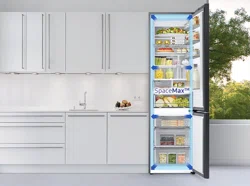
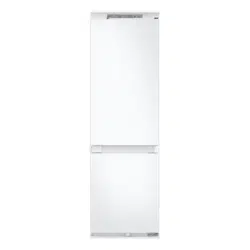
Follow these instructions carefully to ensure a proper installation of this refrigerator and to prevent accidents before using it.
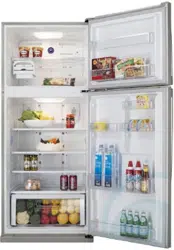
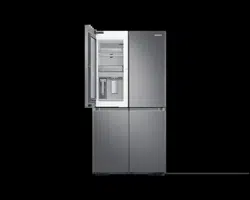
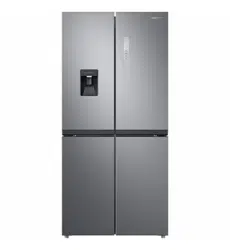
Refrigerator at a glance
The actual appearance of your refrigerator may differ, depending on the model and the country.
Normal models
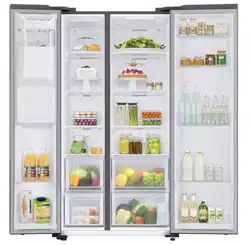
Dispenser-featured models
Step-by-step installation
STEP 1 Select a site
Site requirements:
Solid, level surface without carpeting or flooring that may obstruct ventilation
Away from direct sunlight
Adequate room for opening and closing the door
Away from a heat source
Room for maintenance and servicing
Temperature range: between 5 °C and 43 °C
Clearance
See the pictures and table below for space requirements for installation.
STEP 2 Spacing (applicable models only)
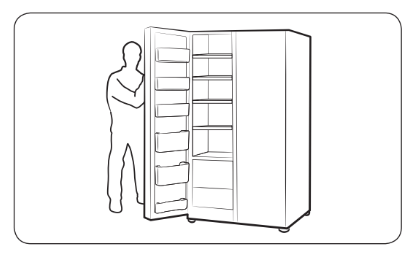
Open the door and locate the provided spacer.
Unpack the spacer and attach it to the rear of the refrigerator as shown. It helps ventilate air to the rear wall and save power consumption.
STEP 3 Flooring
The surface to install the refrigerator must support a fully loaded refrigerator.
To protect the floor, put a large piece of cardboard on each leg of the refrigerator.
Once the refrigerator is in its final position, do not move it unless necessary to protect the floor. If you have to, use a thick paper or cloth such as old carpets along the movement path.
STEP 4 Adjust the levelling feet
The refrigerator can be levelled using the front legs that have a special screw (leveller) for levelling purposes. Use a flat-head screwdriver for levelling.
To adjust the height of the freezer side:
Insert a flat-head screwdriver into the leveller of the freezer-side front leg. Turn the leveller clockwise to raise, or turn it counter clockwise to lower.
To adjust the height of the fridge side:
Insert a flat-head screwdriver into the leveller of the fridge-side front leg. Turn the leveller clockwise to raise, or turn it counter clockwise to lower.
STEP 5 Adjust the door height as well as the door gap
To adjust the height of a door
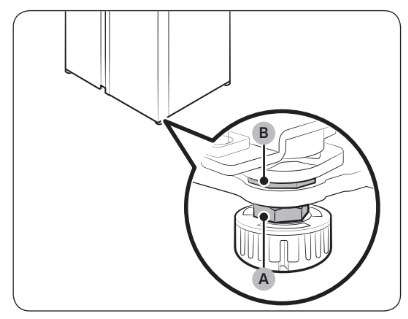
The height of a door can be adjusted using the clamp nut and the height nut on the front bottom of each door.
1. Open the door to adjust, and locate the two nuts (A) and (B) on the front bottom of the door.
2. With a 19 mm spanner (provided), turn the clamp nut (A) clockwise to loosen. Then, open the door, and do the following inside the door.
To raise the door, turn the height nut (B) counter clockwise.
To lower the door, turn the height nut (B) clockwise.
3. When complete, tighten the clamp nut (A) by turning it counter clockwise.
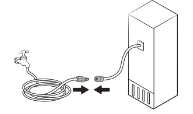
STEP 6 Connect the water dispenser line (applicable models only)
Installation (external dispenser line)
Assemble the water pipe line using couplers.
Close the main water supply, and then close the water tap.
Connect the coupler to the cold water tap.
STEP 7 Connect to a water source (applicable models only)
To connect the water filtering hose to the water line
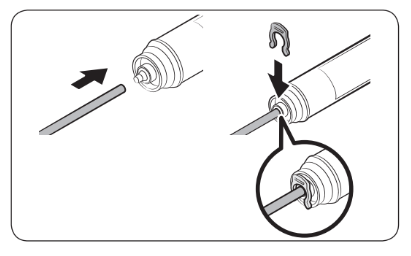
Loosen and remove the compression nut (a) from the water line of the refrigerator, and insert it to the water filtering hose.
Tighten up the compression nut (a) to connect the water filtering hose and the water line.
Open the main water valve and check for any leaks.
If there are no leaks, dispense about 10 litres of water or dispense the water for minutes before actually using the refrigerator to remove impurities inside the water filtering system.
Secure the water line to a sink or a wall using a clip.
NOTE: If you have to relocate the refrigerator after connecting the water line, make sure the joined section of the water line must is straight
To repair the water line
CAUTION
The water line must be repaired by a qualified professional. If you encounter a water leak, contact a local Samsung service centre or the installer of the water line.
Reverse osmosis water filtration system
The water pressure of the water supply system to a reverse osmosis water filtration system must be between 241 kPa and 827 kPa.
The water pressure of the reverse osmosis water filtration system to the refrigerator’s cold water line must be at least 276 kPa. If the water pressure is below the specified:
Check if the sediment filter in the reverse osmosis system is blocked. Replace the filter if necessary.
Refill the water tank in the reverse osmosis system with water.
If your refrigerator has a water filter, it may further reduce the water pressure when used in conjunction with a reverse osmosis system. Remove the water filter.
For more information or servicing, contact a licensed plumbing professional.
NOTE
WATER FILTER MUST BE INSTALLED.
Make sure to install a water filter.
Failing to install a water filter may allow fine foreign materials (sand, lime) in the water to continuously enter the water supply line and possible cause defects in the water supply system.
Ordering a new filter
To purchase a new water filter (part type: HAFEX/EXP), contact a local Samsung service centre.
To mount the water filter into place
Attach the lock clips (x2) to appropriate positions under the sink, for instance. Then, fix the lock clips firmly using screws.
Insert the water filter into the upper and lower clips in the correct direction. Make sure to check the vertical direction of the water filter.
CAUTION: Do not mount the water filter on any part of the refrigerator. This may damage the refrigerator.
Water filter replacement (applicable models only)
Shut off the main water supply.
Connect the water supply line to the inlet side of the filter to the end.
Connect the dispenser line to the outlet side of the filter.
Check if there is any leak. If not, fix the lines with the clips.
Put the water filter into place and fix it with the clips.
Reset the water filter replacement alarm. (For detailed instructions, see the "Resetting or dismissing the water filter replacement alarm".)
When replacing is complete, flush 10 litres of water (or dispense the water for 6 - 7 minutes) to remove impurities from the water line.
STEP 8 Initial settings
By completing the following steps, the refrigerator should be fully functioning.
Plug the power cord into the wall socket to turn the refrigerator on.
Open the door, and check if the interior light lights up.
Set the temperature to the coldest, and wait for about an hour. Then, the freezer will be slightly chilled, and the motor will run smoothly.
Wait until the refrigerator reaches the set temperature. Now the refrigerator is ready for use.
STEP 9 Final check
When installation is complete, confirm that:
The refrigerator is plugged into an electrical outlet and grounded properly.
The refrigerator is installed on a flat, level surface with a reasonable clearance from the wall or the cabinet.
The refrigerator is level and is sitting firmly on the floor.
The door opens and closes freely, and the interior light turns on automatically when you open the door.
Door removal for entrance
If the refrigerator cannot pass through the entrance due to its size, follow these instructions:
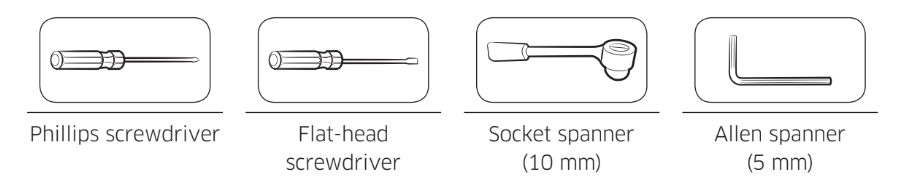
Tools required (not provided)
These tools are used for removing the doors.
Disconnect the water line
1. From the bottom rear side of the refrigerator, pull out the water line to the front.
NOTE
The refrigerator’s water line is a water circulation line that connects between the water pipe from the water source and the hoses from the water filtering system of the refrigerator.
2. To disconnect the hoses, press and hold the collet (A) and detach the water hose (B).
CAUTION
Do not apply excessive force to the coupler. It may break.
Detach the doors
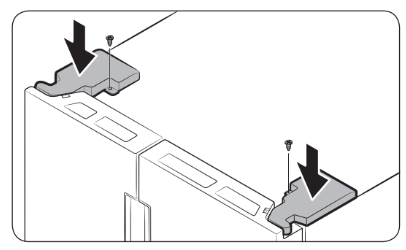
Use a Phillips screwdriver to unscrew the hinge covers (A) on the top of each door.
Open the doors to loosen the hinges and remove the hinge covers. Once the covers are removed, close the doors.
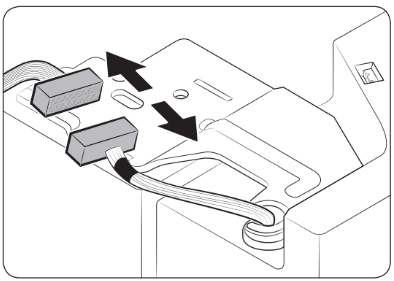
3. Disconnect the electrical harness.
4. Gently lift the clamp.
NOTE
To prevent damage to the clamp or injuries, do not lift the clamp forcefully.
5. Pull the clamp to remove.
6. Open the door by 90 degrees. While holding the door, remove the hinge.
Reconnect the water hoses
Once the refrigerator has passed through the entrance, reconnect the water hoses.
CAUTION
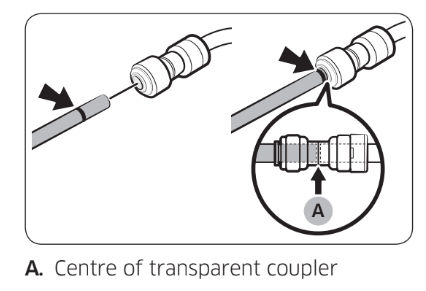
Make sure the water hoses are connected with matching colours.
To prevent water leaks, each water hose must be inserted fully to the centre of the transparent coupler.
After reconnecting the water hoses, push them under the cabinet and arrange them on the hook.
Reattach the doors
1. Hold the freezer door and hook to the hinge at the bottom of the refrigerator.
2. Put the hinge into its position, and then insert it into the hole on the door.
3. Insert the clamp in the arrow direction.
4. Press the clamp as shown.
5. Connect the electrical harness.
6. Insert the hinge covers with the front sides first, and then tighten the screws. Use a Phillips screwdriver for this step.
Operations
Feature panel
Setting the desired temperature or function
1. Tap any button (< , O , or >) to wake up the display.
This step may not apply to some models.
2. Tap O to select the fridge or freezer.
The selected compartment’s indicator blinks.
The degrees Celsius symbol (°C) does not blink.
3. Tap < or > to select the desired temperature or function.
Refer to the table for available selection for each compartment.
4. Wait for 5 seconds to confirm your selection.
The selected compartment’s indicator stops blinking.
Turning on or off the ice maker
You can turn on or off the auto ice maker in the freezer.
1. Tap any button ( < , O , or >) to wake up the display.
This step may not apply to some models.
2. Tap O until the Ice Maker indicator blinks.
3. Tap < or > to turn on or off the ice maker.
Tap < to turn it on.
Tap > to turn it off.
4. Wait for 5 seconds or tap O to confirm your selection.
The Ice Maker indicator stops blinking.
Resetting or dismissing the water filter replacement alarm
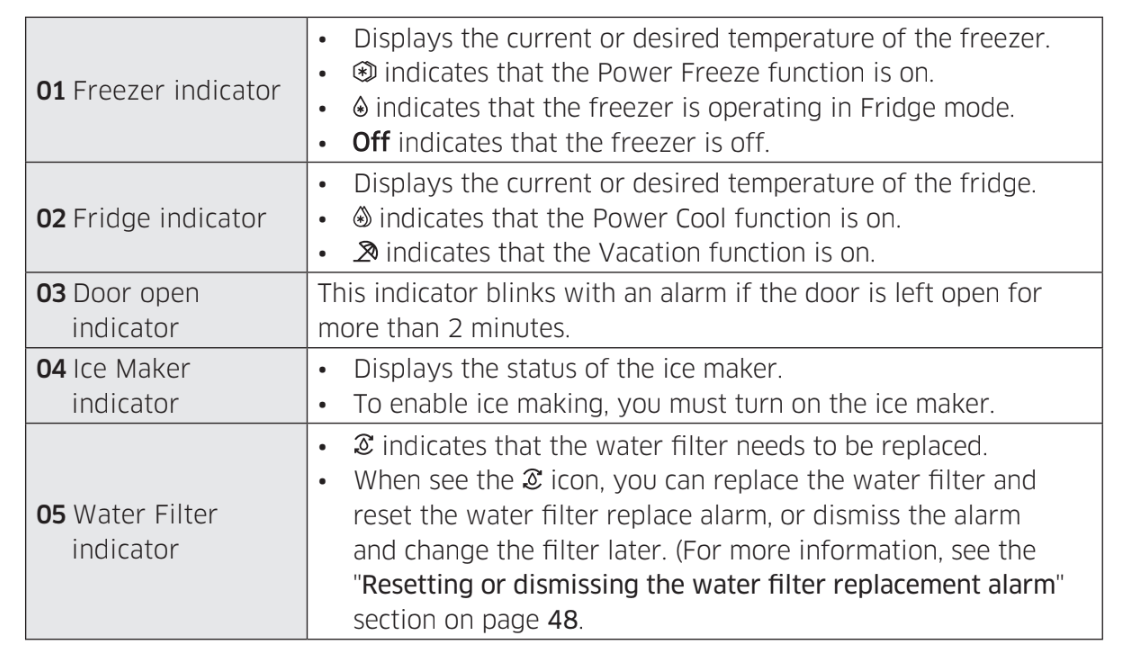
The water filter replacement icon ( ) blinks to alert the user that it is time to replace the water filter. You can replace the water filter immediately and reset the water filter replacement alarm, or dismiss the alarm if you want to change the water filter later.
1. Tap any buttons ( < , O , or >) to wake up the display.
This step may not apply to some models.
2. Tap O until the Water Filter indicator blinks.
3. Tap < or > to select Reset or Later.
If you have changed the water filter, tap to reset the water filter replacement alarm.
If you want to change the water filter later and dismiss the alarm, tap .
4. Wait for 5 seconds or tap O to confirm your selection.
The Water Filter indicator stops blinking.
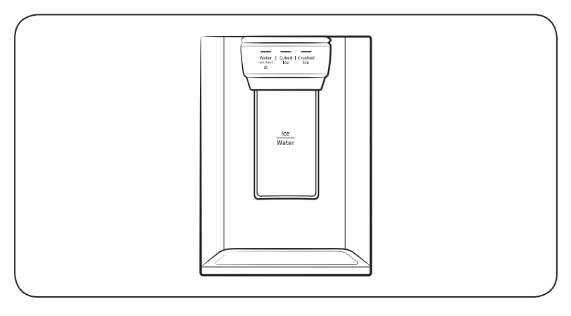
Dispenser panel (applicable models only)
01 Water / Lock (3 sec)
Water
To dispense chilled water, press Water. The corresponding indicator turns on.
Lock (Dispenser panel / Dispenser lever)
To prevent use of the dispenser panel buttons and the dispenser lever, press and hold Water for more than 3 seconds. If you press and hold the button again for more than 3 seconds, the dispenser lock will be deactivated.
NOTE
The Lock on the dispenser panel does not affect the controls on the main panel. To lock the main panel, use the Control Lock function on the main panel.
02 Cubed Ice
Cubed Ice
Press Cubed Ice to dispense cubed ice. The corresponding indicator turns on.
03 Crushed Ice
Crushed Ice
Press Crushed Ice to dispense crushed ice. The corresponding indicator turns on.
Special features
The refrigerator features user-oriented devices that you can use to benefit from.
Water/Ice dispenser (applicable models only)
Using the dispenser, you can dispense water with or without ice.
The water dispenser offers 3 options: chilled water, cubed ice, and crushed ice. To dispense chilled water, press Water on the dispenser panel. Put a water glass under the dispenser, and then push the dispenser lever.
To dispense water with ice
With the Ice Maker enabled, press Cubed Ice or Crushed Ice to select the ice type.
Put a water glass under the dispenser, and then push the dispenser lever with the glass. Ice will be dispensed from the dispenser.
Press Water to select water.
Push the dispenser lever with the glass. Water will be dispensed from the dispenser.
Ice maker (applicable models only)
The refrigerator has a built-in ice maker that automatically dispenses ice so that you can enjoy filtered water with cubed or crushed ice.
Ice making
After you have installed your refrigerator and plugged it in, follow these instructions to ensure proper ice making and to keep the ice bucket full of ice:
Let the refrigerator operate for at least 24 hours to ensure optimal performance.
Dispense the first 4 to 6 ice cubes into a glass.
Wait another 8 hours and dispense another 4 to 6 ice cubes.
Then, wait another 16 hours and dispense the first glass-full of ice.
To fill the water tank (applicable models only)
For first-time use, clean the inner side of the water tank and dry well.
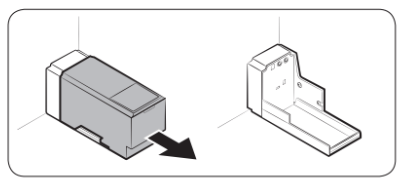
1. Hold both handgrips on the front of the tank, and slide out as shown.
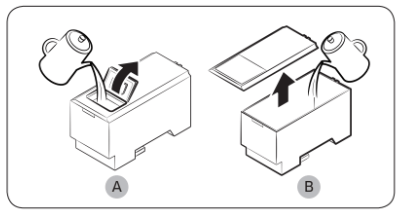
2. Open the front lid (A) of the cover or the entire cover (B) and fill the tank with a max of 5 litres water.
CAUTION: Do not exceed the max line. Water overflows. Fill with potable water only.
3. Reinsert the water tank and fit into the dispenser mechanism. Make sure the front side (with the front lid) of the tank faces to the front.
For first-time use
Push the dispenser lever for 10 seconds to emit air from the hoses of the water supply system.
Discard the first six glasses of water to remove impurities in the water supply system.
Ice making (applicable models only)
The refrigerator has a built-in ice maker that automatically dispenses ice so that you can enjoy filtered water with cubed or crushed ice to your preference.
If ice does not dispense, first check the ice maker if it makes ice properly.
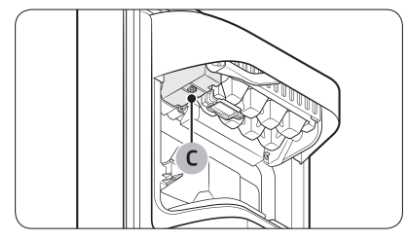
To check the ice maker
Gently hold the icemaker bucket (B) with both hands and remove it from the ice chute (A).
Check the icemaker bucket if it contains ice as appropriate.
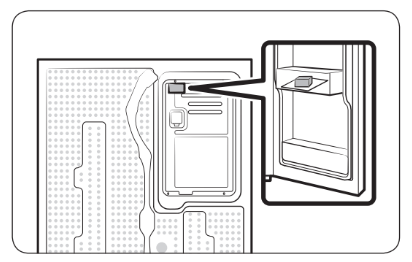
Press the button (C) on the bottom of the ice maker. You will hear a chime (ding-dong) at the press of the button.
You will hear another chime if the ice maker operates properly.
To secure more storage space (applicable models only)
If you do not use the ice maker and need more storage space, remove the icemaker bucket (A). Then, insert the Freezer guide (Optional) (B) into the icemaker bucket’s place.
To secure more space, remove the upper drawer (C), lower drawer (D), and lower drawer cover (E). Then, insert the provided bottom shelf (F).
For more space, remove the water tank and use the space to store more items.
Icemaker bucket
If you do not dispense ice for an extended period, ice may form clumps inside the bucket. If this happens, remove and empty the icemaker bucket.
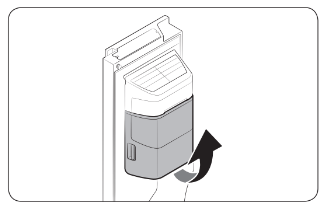
To remove the icemaker bucket, gently lift it up and pull out slowly while holding the handgrips with both hands.
Remove and empty the icemaker bucket.
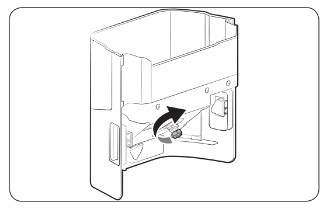
When done, turn the gear handle on the rear of the bucket by 90°, and then put the bucket back into position. Make sure the bucket is inserted properly until you hear a clicking sound.
CAUTION
Do not apply excessive force to the bucket cover. The cover may break.
Do not close the door hard. Water may spill over the ice maker.
To prevent injury, make sure to clean up any ice or water that has fallen on the floor.
To prevent accidents or injury, do not let children play with the water dispenser or the ice maker.
Do not put your hand or an object into the ice chute. This may cause physical injury or product damage.
Water pressure
If you want to check how much water flows into the ice tray, follow these steps.
Remove the ice bucket.
Press the button (A) on the bottom of the ice maker. Normally, the ice tray fills with water in a few minutes.
If the water level is lower than expected, check the water pressure of the water supply line from the water source. This is not a system failure.
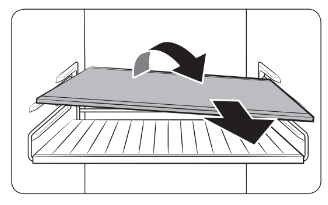
1. Pull out the shelf (or wine rack) a little. Then, while lifting the rear side, pull out.
2. Twist the shelf (or wine rack) diagonally to remove.
Door bins
To remove a door bin, hold the front sides of the bin and gently lift up to remove.
Drawers
Gently lift up the front of the drawer and slide out.
Vegetable / Dried food and meat storage drawer
To remove the vegetable drawer from the fridge or the dry drawer from the freezer: 1. First, remove surrounding multipurpose drawers if necessary.
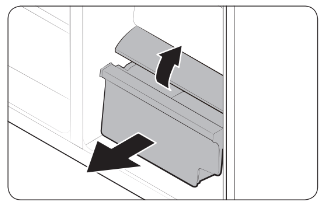
2. If your refrigerator has a cover (A) for the vegetable/dry drawer, remove it in the following method.
a. Pull the drawer halfway out.
b. Pull the cover while pressing the rear sides (as marked in the figure).
3. Gently pull out the vegetable/dry drawer.
Icemaker bucket
To remove the ice maker bucket, see the Icemaker bucket section on page 55.
Cleaning
Interior and exterior
Regularly use a dry cloth to remove all foreign substances such as dust or water from the power plug terminals and contact points.
Unplug the power cord.
Use a moistened, soft, lint-free cloth or paper towel to clean the refrigerator’s interior and exterior.
When done, use a dry cloth or paper towel to dry well.
Plug in the power cord.
Ice / Water dispenser (applicable models only)
NOTE
For hygienic purposes, frequently clean the dispenser area.
CAUTION
When crushed ice is selected, some residual ice chips may collect in the ice chute. To prevent this, remove the residual ice from the chute using a soft, clean cloth.
Rubber seals
If the rubber seals of a door become dirty, the door may not close properly and reducing refrigerator performance and efficiency. Use a mild detergent and damp cloth to clean the rubber seals. Then, dry well with a cloth.
Rear panel
To keep cords and exposed parts of the rear panel free of dirt, vacuum the panel once or twice a year.
Replacement
Lamps
The lamps are not user-serviceable. To replace the lamps of the refrigerator, contact a local Samsung service centre.
Troubleshooting
Before calling for service, review the checkpoints below. Any service calls regarding normal situations (No Defect Cases) will be charged to users.
Temperature
Symptom
Possible causes
Solution
Fridge/freezer does not operate. Fridge/freezer temperature is warm.
Power cord is not plugged in properly.
Properly plug in the power cord.
Temperature control is not set correctly.
Set the temperature lower.
Refrigerator is located near a heat source or direct sunlight.
Keep the refrigerator away from direct sunlight or a heat source.
Not enough clearance between refrigerator and nearby walls or cabinets.
We recommend that the gap between the refrigerator and nearby walls (or cabinets) is more than 50 mm.
The refrigerator is overloaded. Food is blocking the refrigerator vents.
Do not overload the refrigerator. Do not allow food to block vents.
Fridge/freezer is over-cooling.
Temperature control is not set correctly.
Set the temperature higher.
Interior wall is hot.
Refrigerator has heat-proof piping in the interior wall.
To prevent condensation from forming, the refrigerator has heat-proof piping in the front corners. If the ambient temperature rises, this equipment may not work effectively. This is not a system failure.
Odour
Symptom
Possible causes
Solution
Refrigerator has odours.
Spoiled food.
Clean the refrigerator and remove any spoiled food.
Food with strong odours.
Make sure strong smelling food is wrapped airtight.
Frost
Symptom
Possible causes
Solution
Frost around the vents.
Food is blocking the vents.
Make sure no food blocks the refrigerator vents.
Frost on interior walls.
Door is not closed properly.
Make sure food does not block the door. Clean the door gasket.
Condensation
Symptom
Possible causes
Solution
Condensation forms on the interior walls.
If door is left open, moisture enters the refrigerator.
Remove the moisture and do not leave a door open for extended periods of time.
Food with high moisture content.
Make sure food is wrapped airtight.
Water/ice (dispenser models only)
Symptom
Possible causes
Solution
Water flow is weaker than normal.
Water pressure is too low.
Make sure the water pressure is between 30 to 125 psi.
Ice maker makes a buzzing sound.
The ice maker function is activated, but the water supply to the refrigerator has not been connected.
Turn off the Ice maker.
Ice maker does not make ice.
Ice maker has just been installed.
You must wait for 12 hours for the refrigerator to make ice.
Freezer temperature is too high.
Set the freezer temperature below -18 °C (0 °F) or -20 °C (-4 °F) in warm ambient air.
Dispenser panel Lock is activated.
Deactivate dispenser panel Lock.
Ice maker is off.
Turn on the ice maker.
Ice does not dispense.
Ice may jam if the ice dispenser is not used for a long time (approx. 3 weeks).
If you won't be using the refrigerator for a long time, empty the ice bucket and turn off the ice maker.
Ice bucket is not properly inserted.
Make sure the ice bucket is properly inserted.
Water line is not connected properly or water supply is not on.
Check if the water line is installed correctly. Check if the water line stop cock is closed.
Water does not dispense.
Water line is not connected properly or water supply is not on.
Check if the water line is installed correctly. Check if the water line stop cock is closed.
Dispenser panel Lock is activated.
Deactivate dispenser panel Lock.
A third-party water filter was installed.
Use only Samsung-provided or approved filters.
Unapproved filters may leak and damage the refrigerator.
Do you hear abnormal sounds from the refrigerator?
Before calling for service, review the checkpoints below. Any service calls related to normal sounds will be charged to the user.
These sounds are normal.
When starting or ending an operation, the refrigerator may make sounds similar to a car engine igniting. As the operation stabilizes, the sounds will decrease.
While the fan is operating, these sounds may occur. When the refrigerator reaches the set temperature, no fan sound will occur.
During a defrost cycle, water may drip on the defrost heater, causing sizzling sounds.
As the refrigerator cools or freezes, refrigerant gas moves through sealed pipes, causing bubbling sounds.
As the refrigerator temperature increases or decreases, plastic parts contract and expand, creating knocking noises. These noises occur during the defrosting cycle or when electronic parts are working.
For ice maker models: When the water valve opens to fill the ice maker, buzzing sounds may occur.
Due to pressure equalizing when opening and closing the refrigerator door, whooshing sounds may occur.















 ) blinks to alert the user that it is time to replace the water filter. You can replace the water filter immediately and reset the water filter replacement alarm, or dismiss the alarm if you want to change the water filter later.