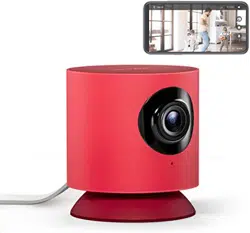

clever little helper
User Guide
CONTENTS
English
Francais
Italiano
Espanol
Deutsch
2
9
16
23
30
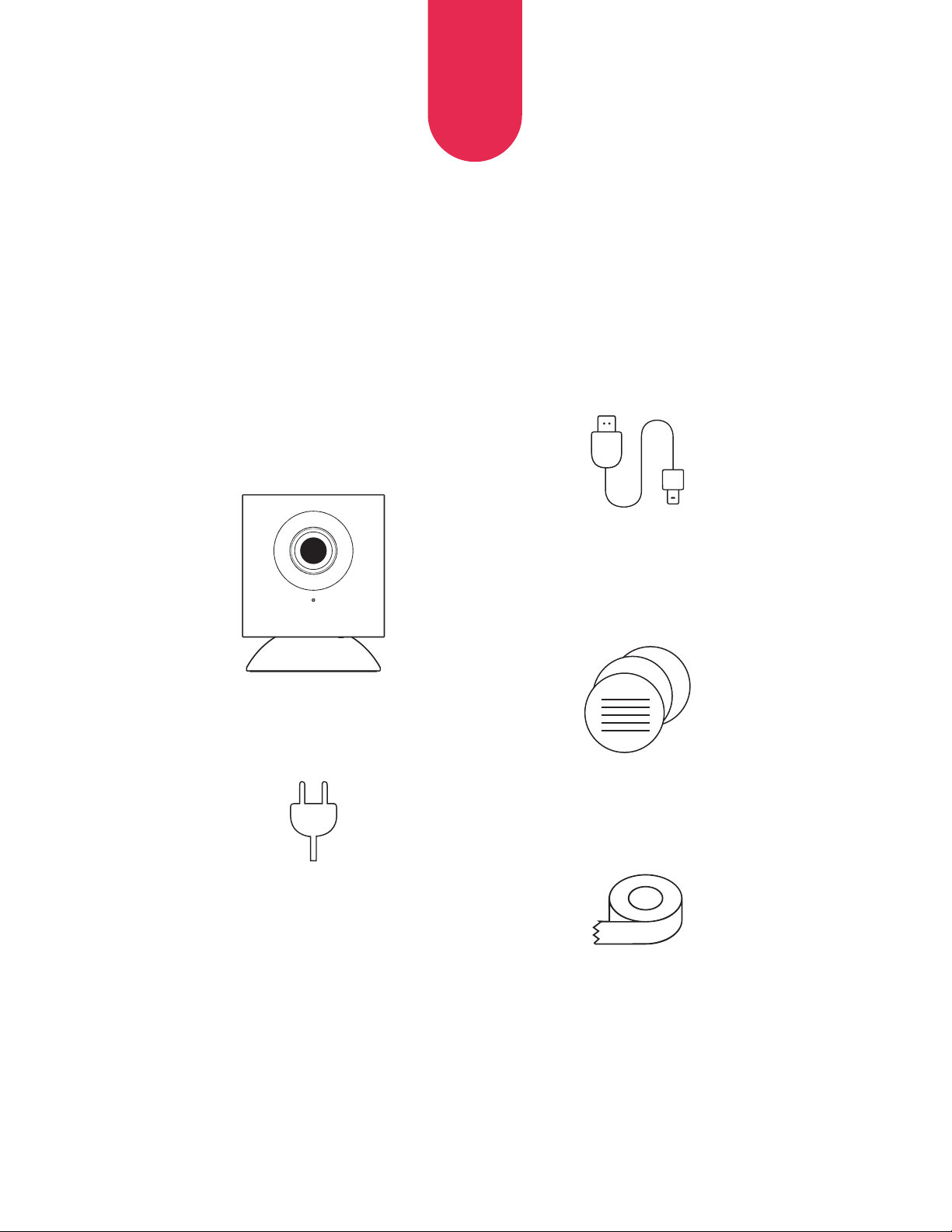
WHAT’S IN THE BOX?
2
EN
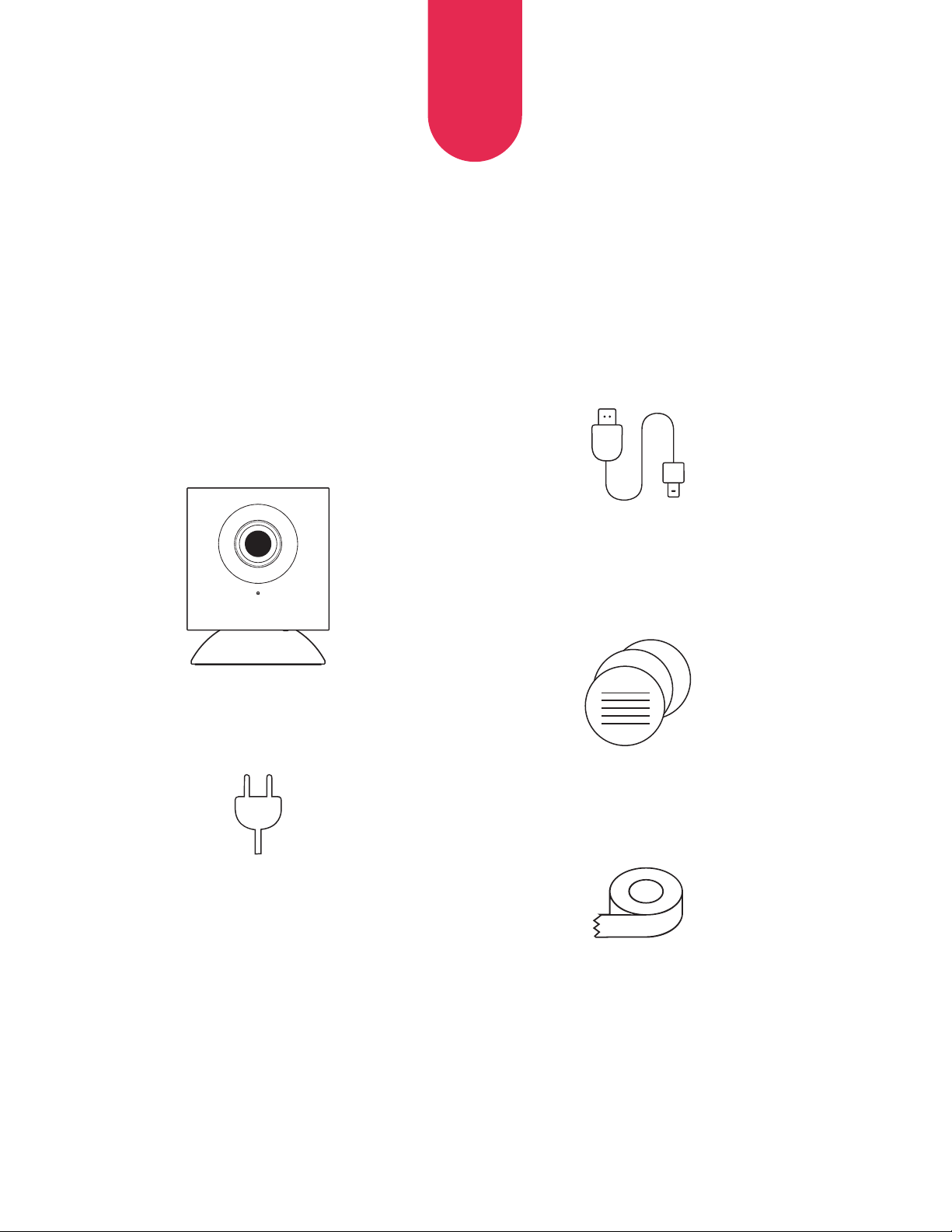
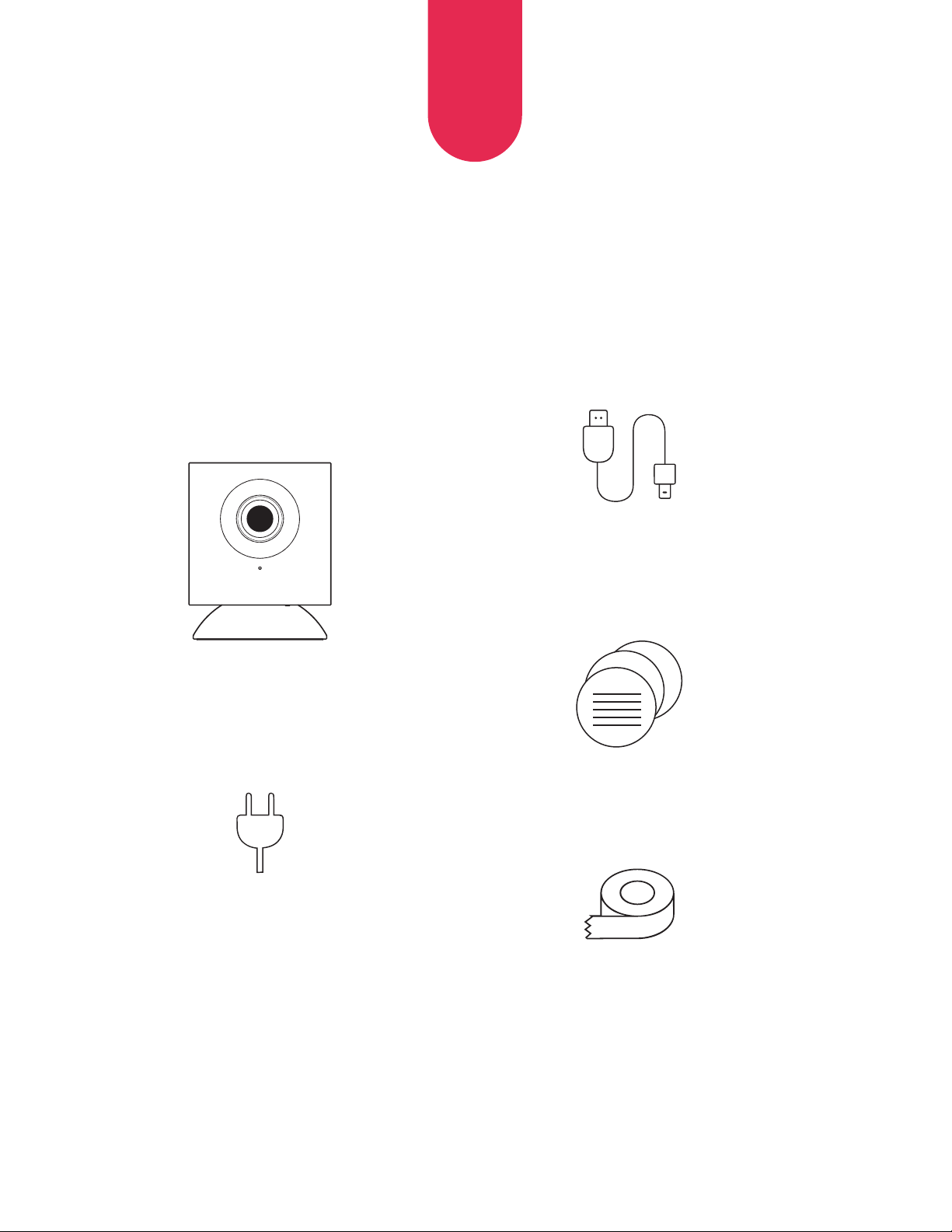
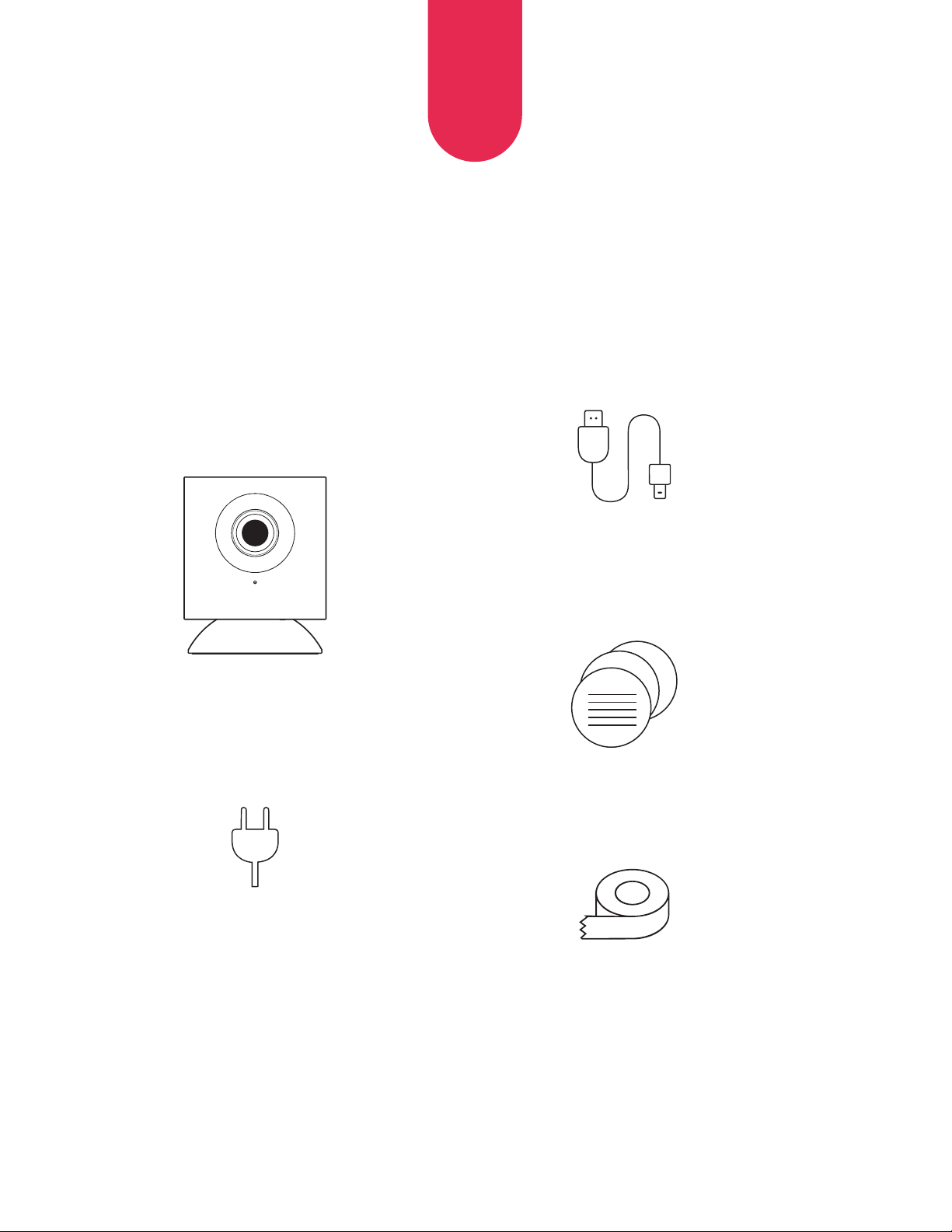
Hoop Camera (1)
Wall
Adapter (1)
Micro USB
Power Cable (1)
Quick Start
Guide (1)
Double-sided
Mounting Tape (3)
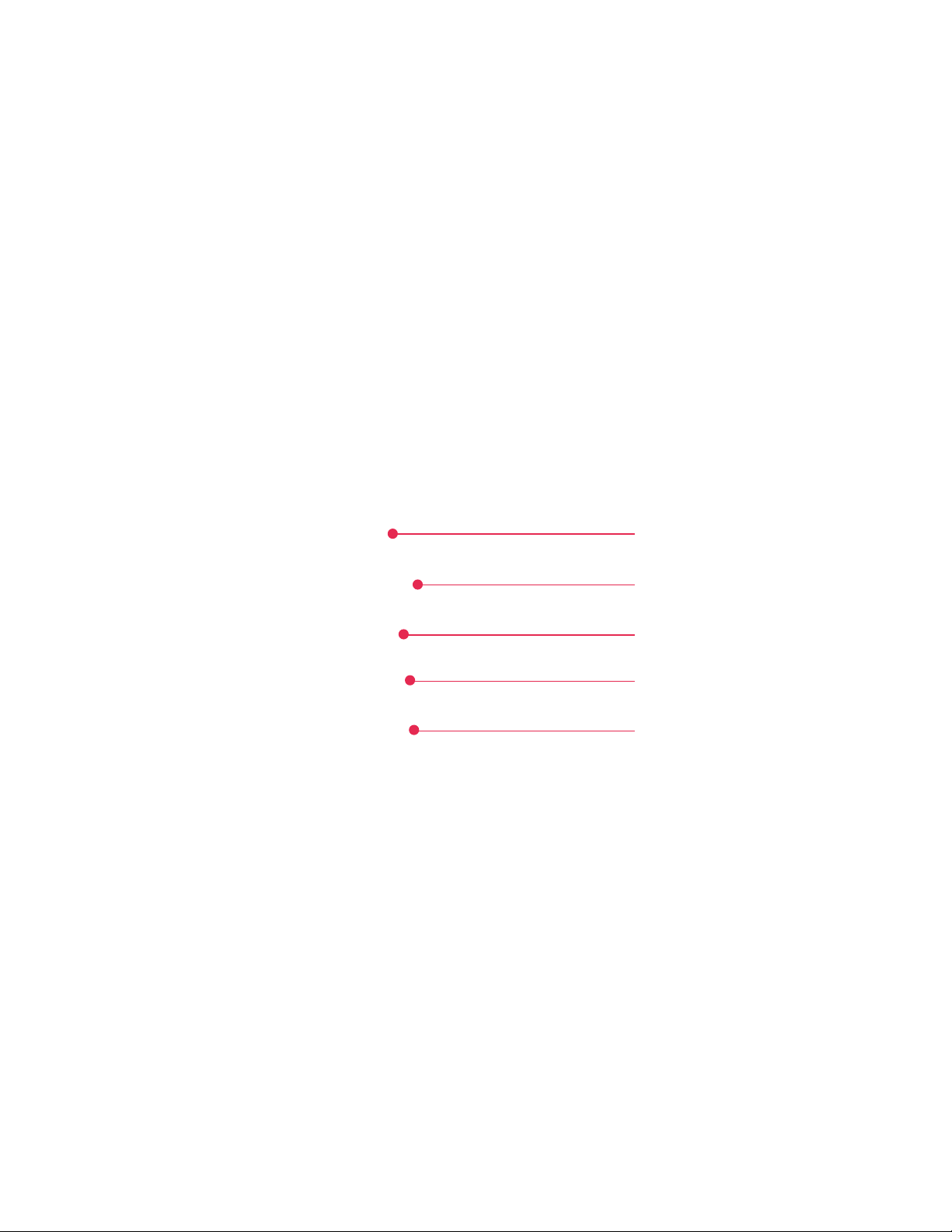
OVERVIEW
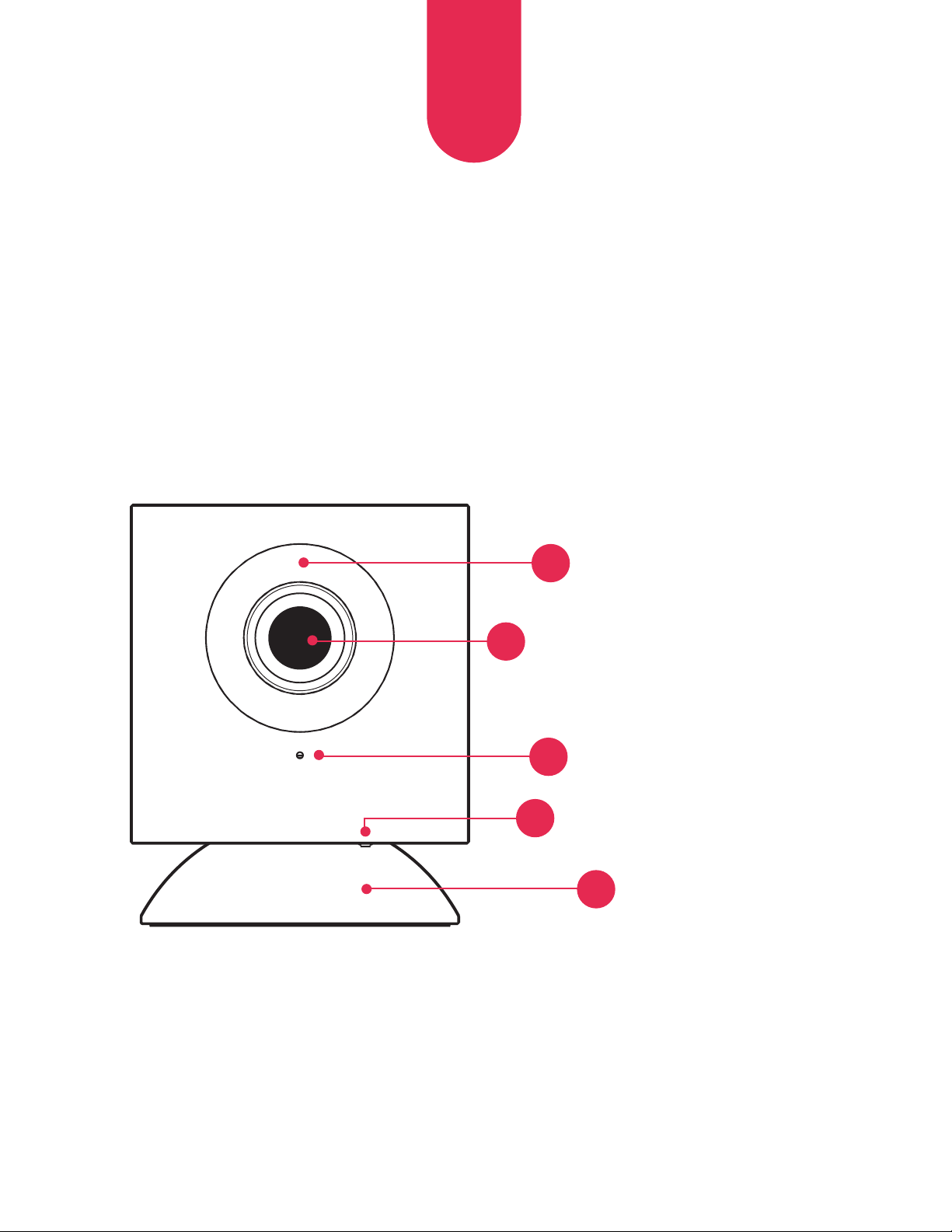
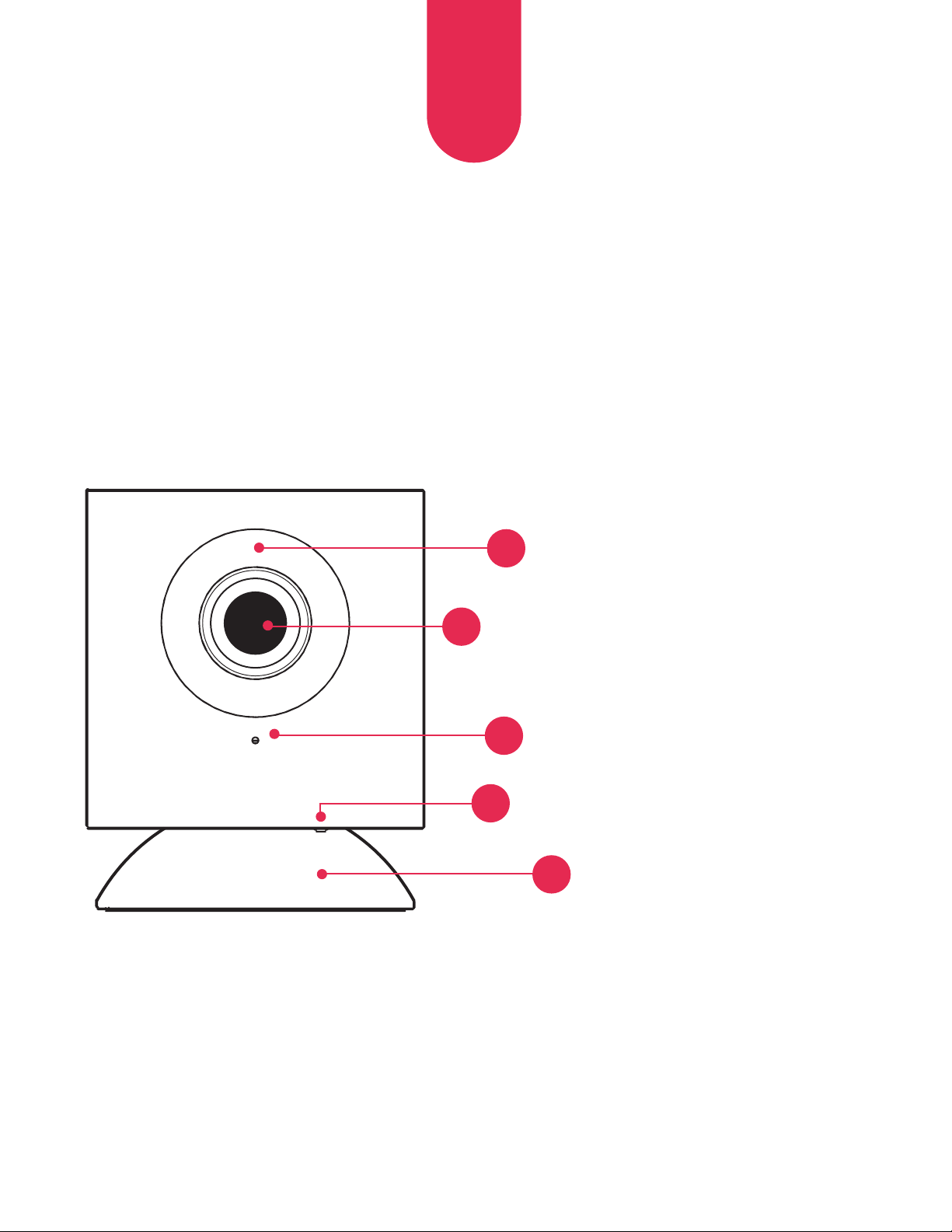
Front View
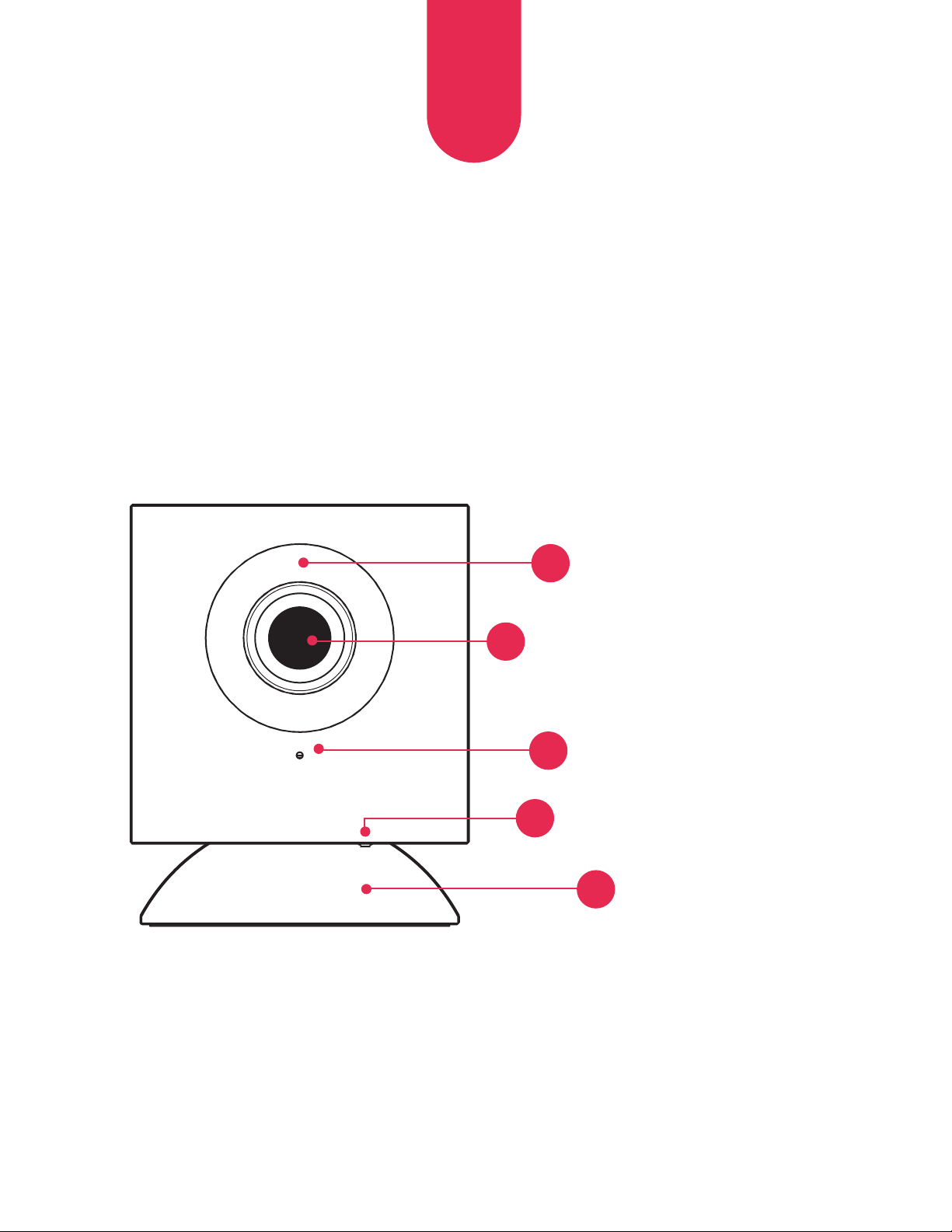
Microphone
Infrared LED ring
Lens
3
EN
4
Setup Button
3
2
1
Magnetic Base
5
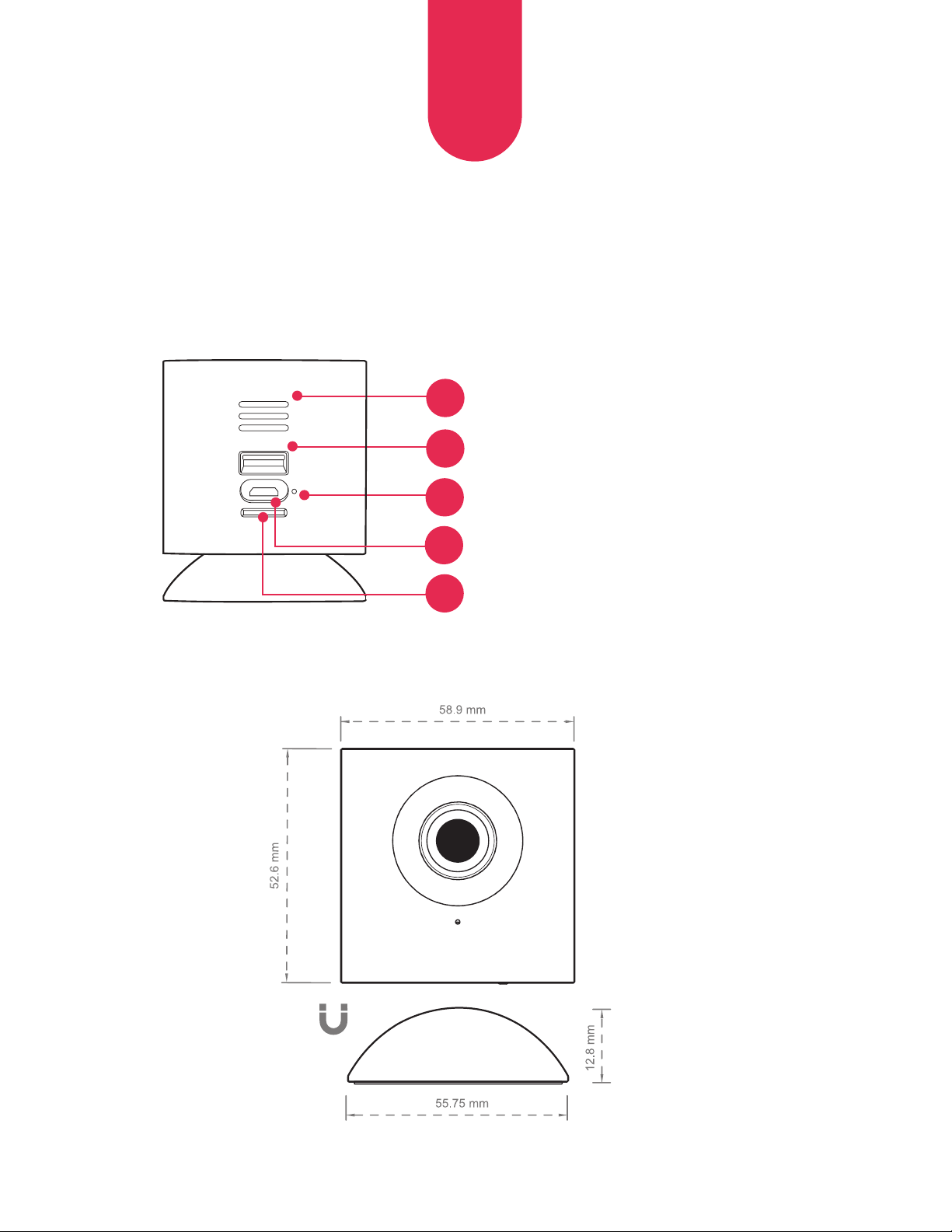
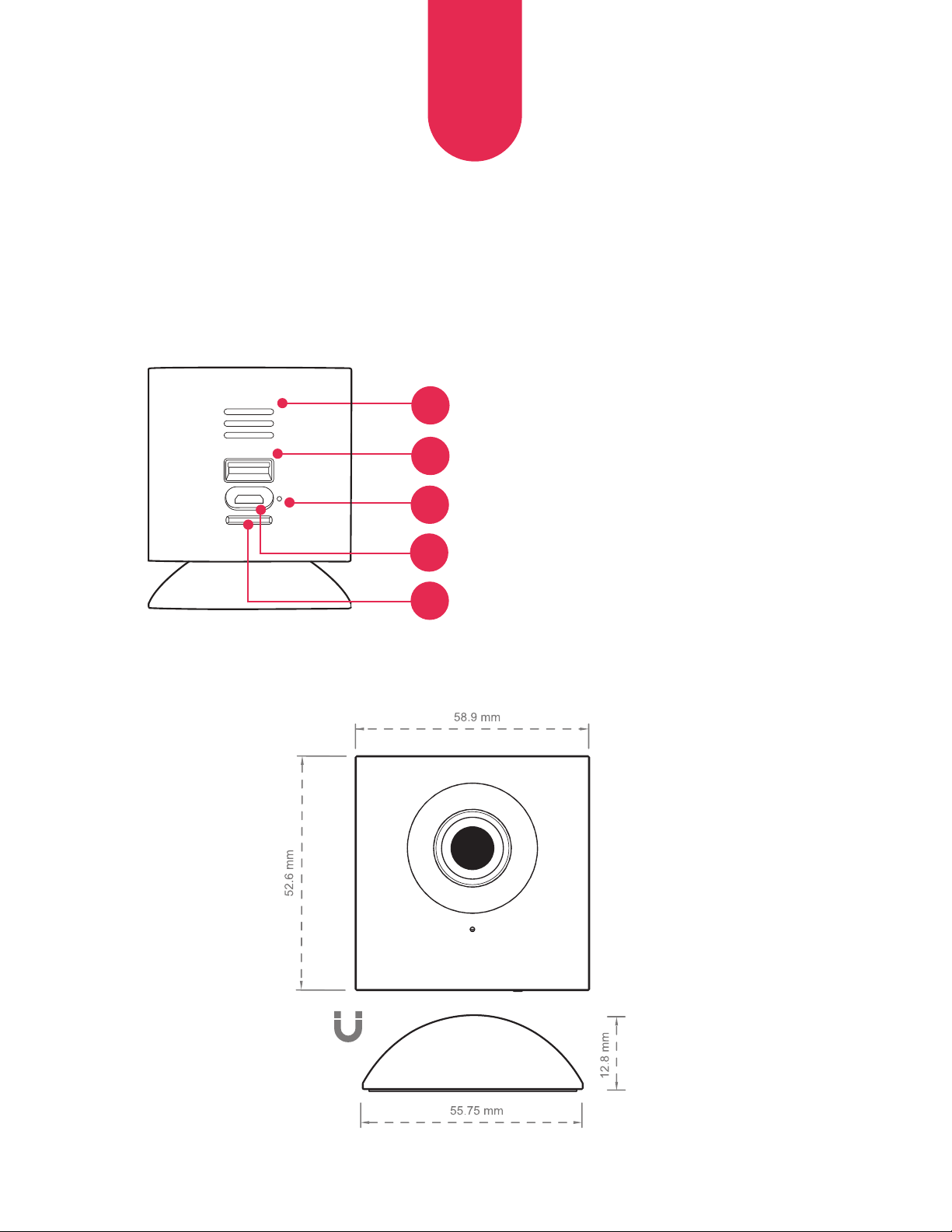
Rear View
4
EN
6
7
8
Speaker
USB Input
LED Status Indicator
Micro USB Port
9
MicroSD™ Card Slot
(SD Card not included)
10
5
EN
INITIAL SETUP
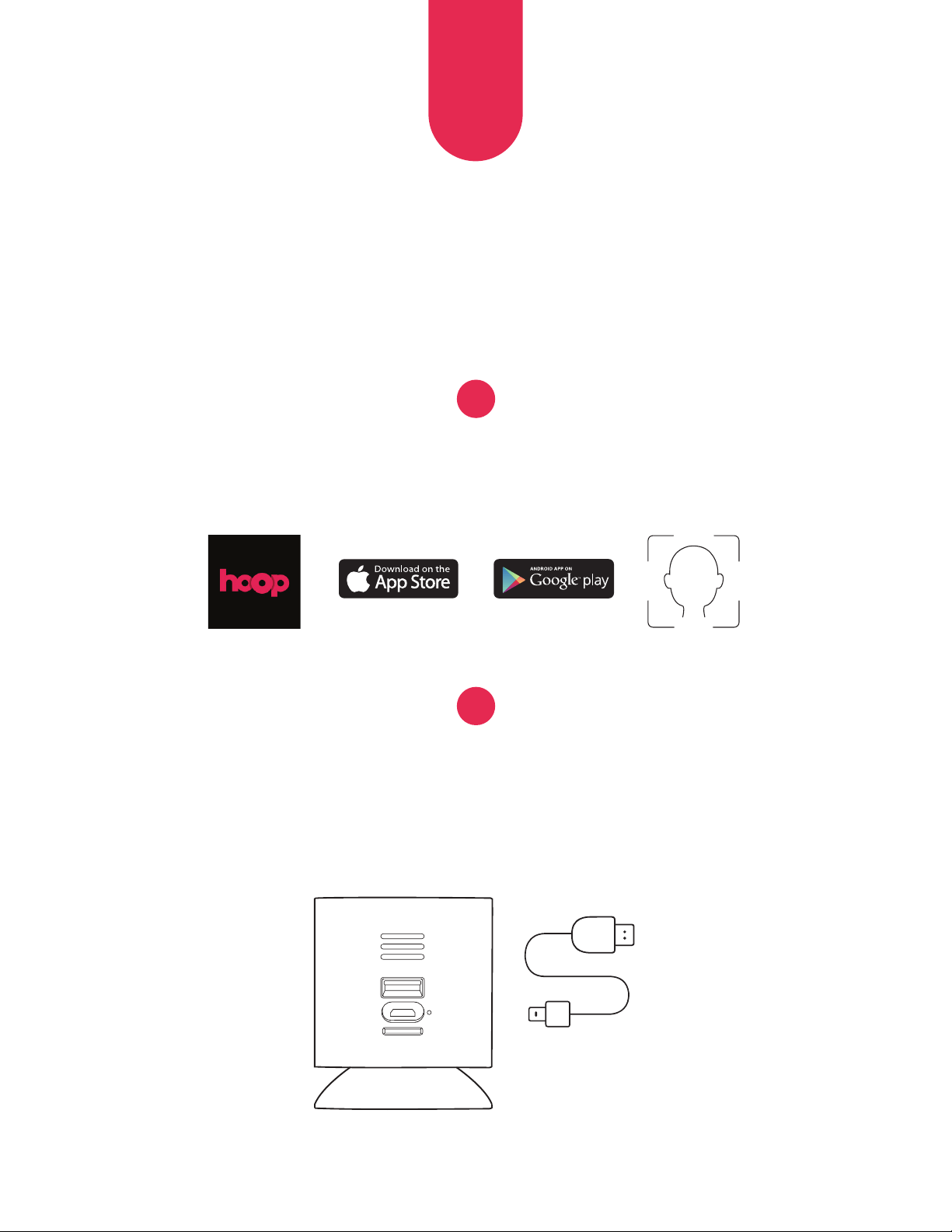
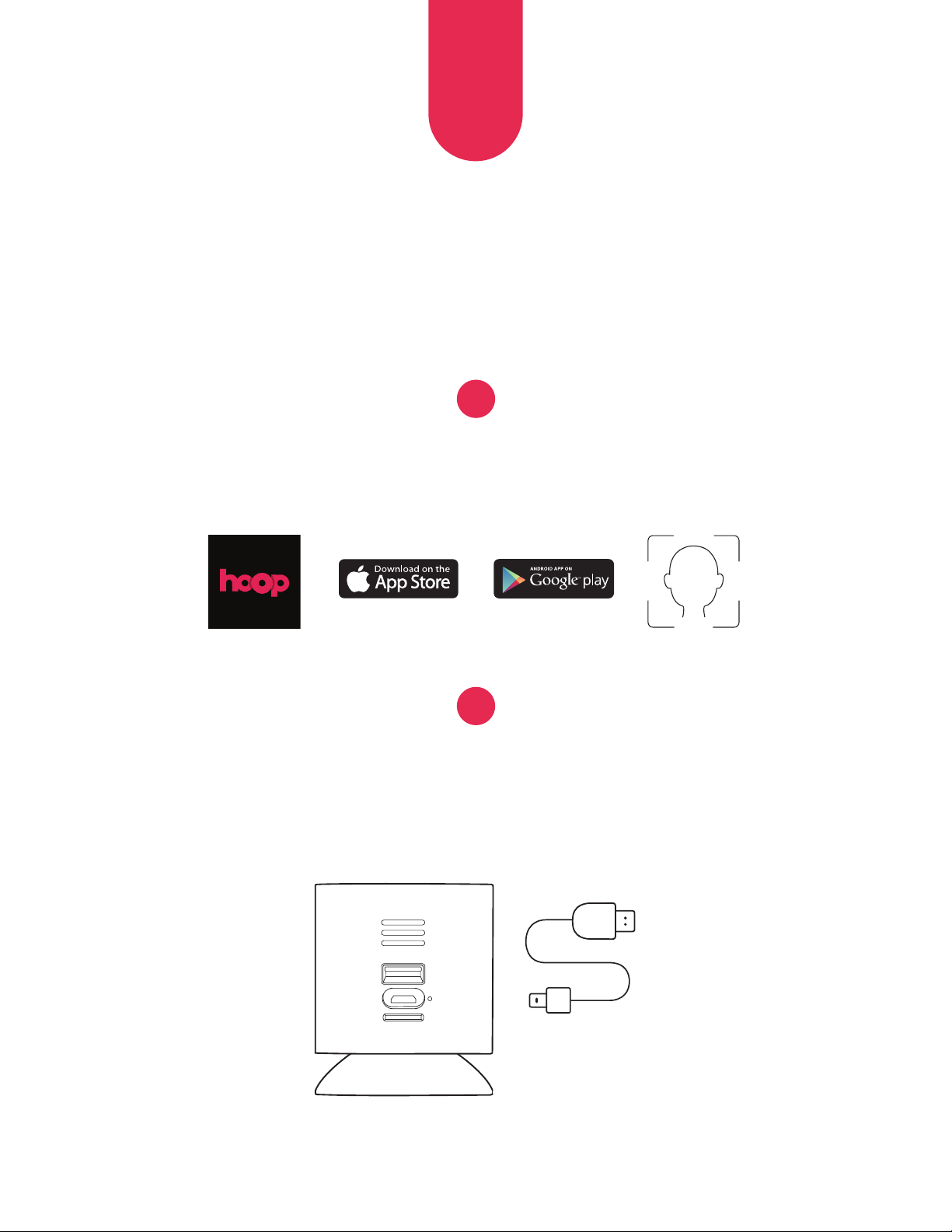
Download the myhoophome application
and create your profile.
Plug the power cable into the camera and the wall adapter.
Wait ~30s for the camera to perform a self-check.
The LED indicator will flash yellow.
1
2
6
EN
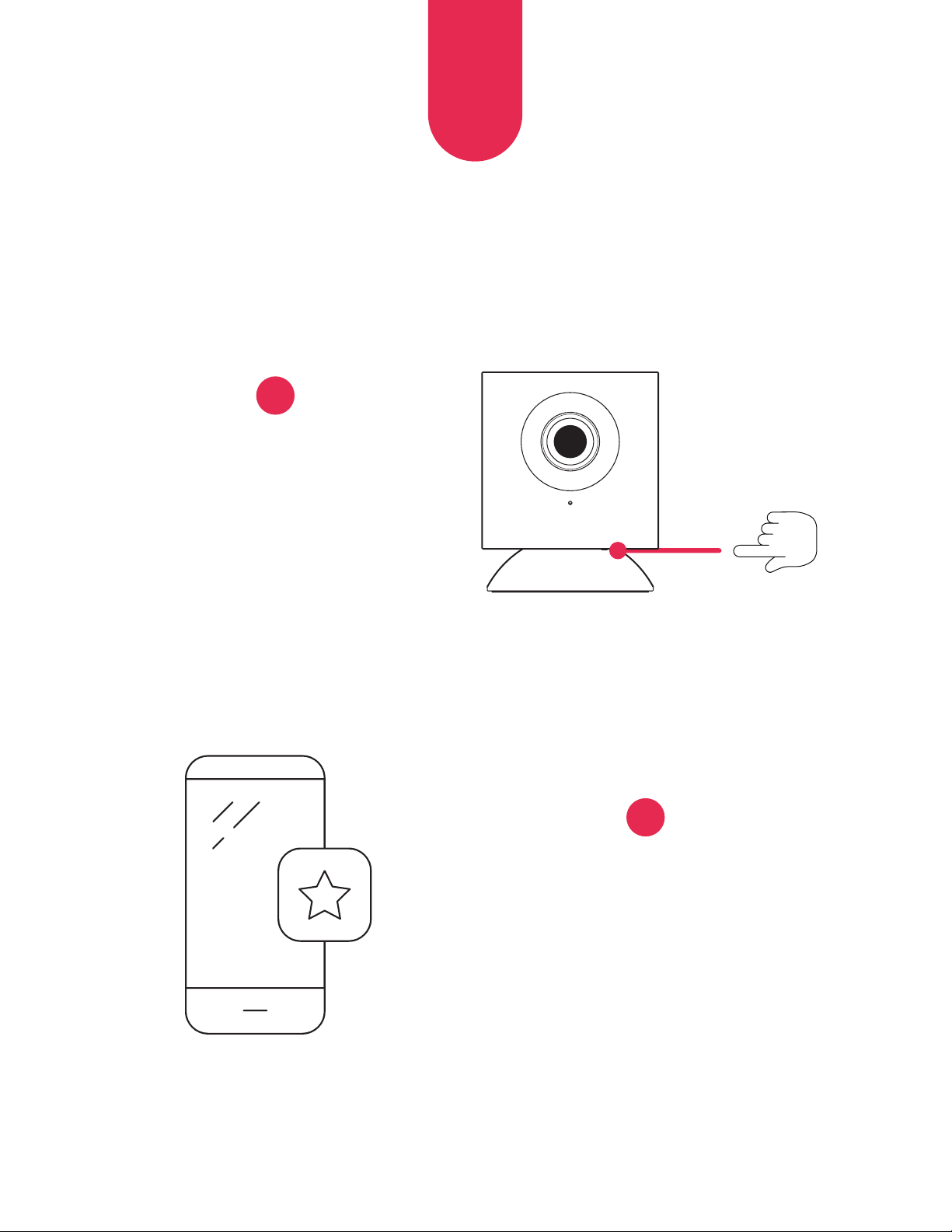
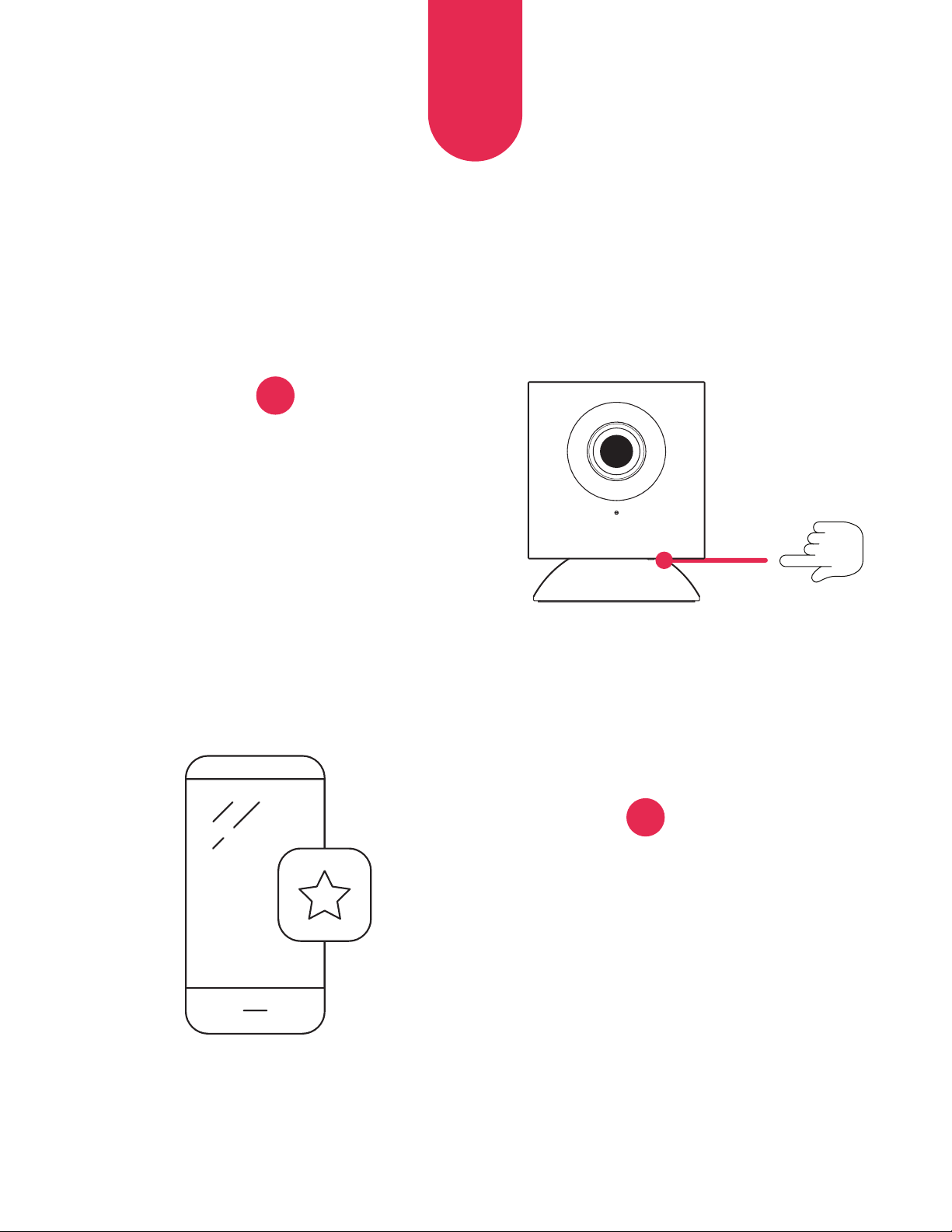
Press and hold the setup
button until you hear
a voice prompt.
Open the myhoophome
application and select ‘Add
a New Camera’. Follow the
prompts to complete the
setup process.
3
4
7
EN
LED INDICATOR KEY
Yellow (solid) Powered on, starting up
Yellow (flashing) Self-check completed, ready to connect
Yellow & Blue (flashing) Connecting to application
Blue (flashing) Connected, finishing setup process
Blue (solid) Setup complete, operating normally
8
EN
MORE INFO
Visit us at
www.hoophome.com
follow us
FAQS: www.hoophome.com/faq
Forums: www.hoophome.com/community
Contact Us
833-248-HOOP (4667)
support@myhoophome.com
Hoop is a trademark of C&A IP Holdings, LLC in the U.S. All other products, brand names, company
names, and logos are trademarks of their respective owners, used merely to identify their respective
products, and are not meant to connote any sponsorship, endorsement, or approval.
Distributed by: C&A Marketing, Inc., 114 Tived Lane East, Edison, NJ 08837, USA
C&A Marketing UK LTD, 167 Hermitage Road, Crusader Industrial Estate, London N4 1LZ, UK ©2019.
All Rights Reserved. Made in CHINA
FCC Warning:
Any Changes or modifications not expressly approved by the party responsible for compliance could
void the user’s authority to operate the equipment. This device complies with part 15 of the FCC
Rules. Operation is subject to the following two conditions: (1) This device may not cause harmful
interference, and (2) this device must accept any interference received, including interference that may
cause undesired operation.
FCC Radiation Exposure Statement:
This equipment complies with FCC radiation exposure limits set forth for an uncontrolled environment.
This equipment should be installed and operated with minimum distance 20cm between the radiator &
your body. This transmitter must not be co-located or operating in conjunction with any other antenna
or transmitter.
Google Play Store is a trademark of Google, LLC.
Apple and App Store are trademarks of Apple Inc.
in the U.S. and other countries.
MicroSD is a trademark of SD-3C, LLC.
CONTENU DE LA BOÎTE?
9
FR
Caméra Hoop (1)
Adaptateur
secteur (1)
Câble d’alimentation
micro USB (1)
Guide de
démarrage rapide (1)
Adhésif double-face
pour le montage (3)
VUE D’ENSEMBLE
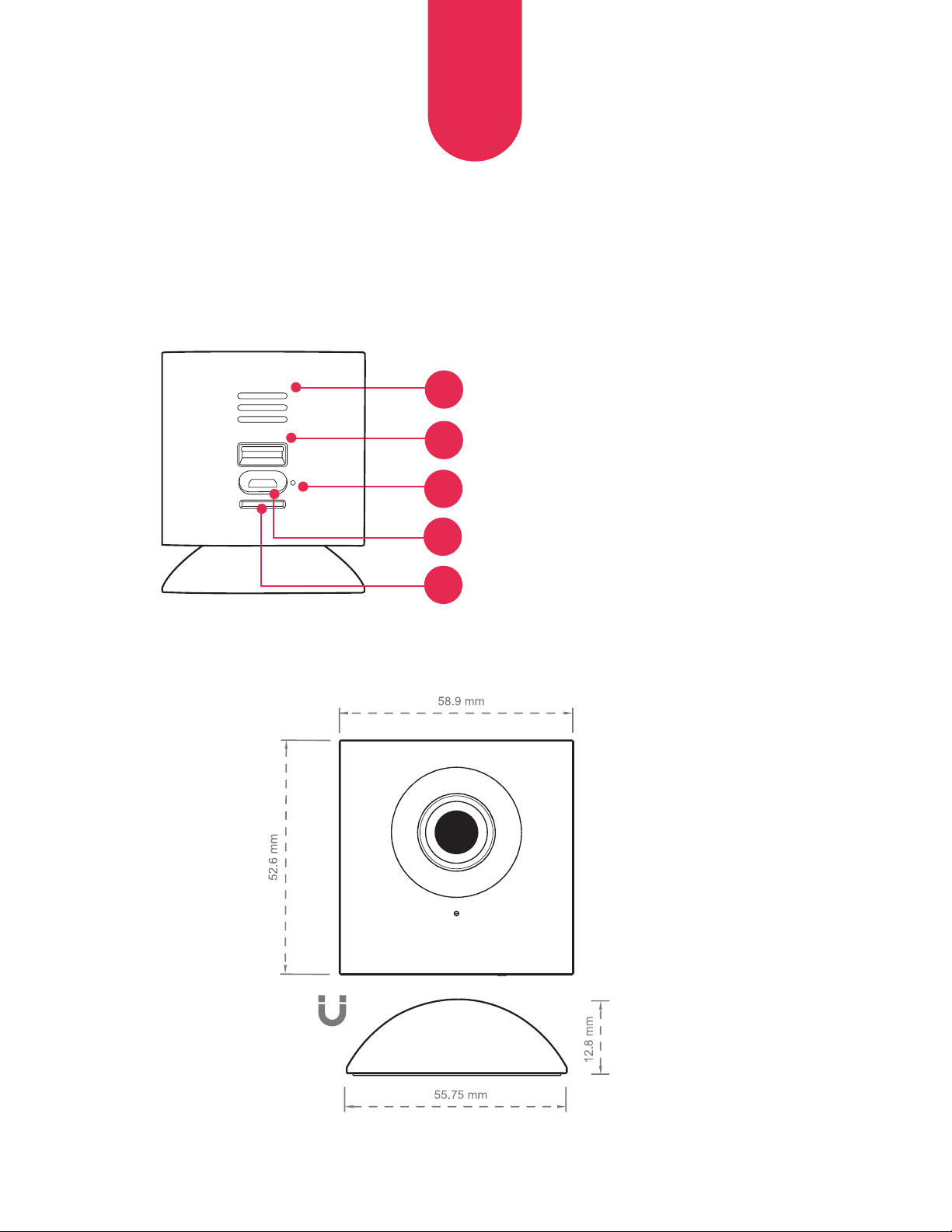
Vue avant
10
FR
Microphone
Anneau LED
Objectif
4
Bouton de
configuration
3
2
1
Base magnétique
5
11
FR
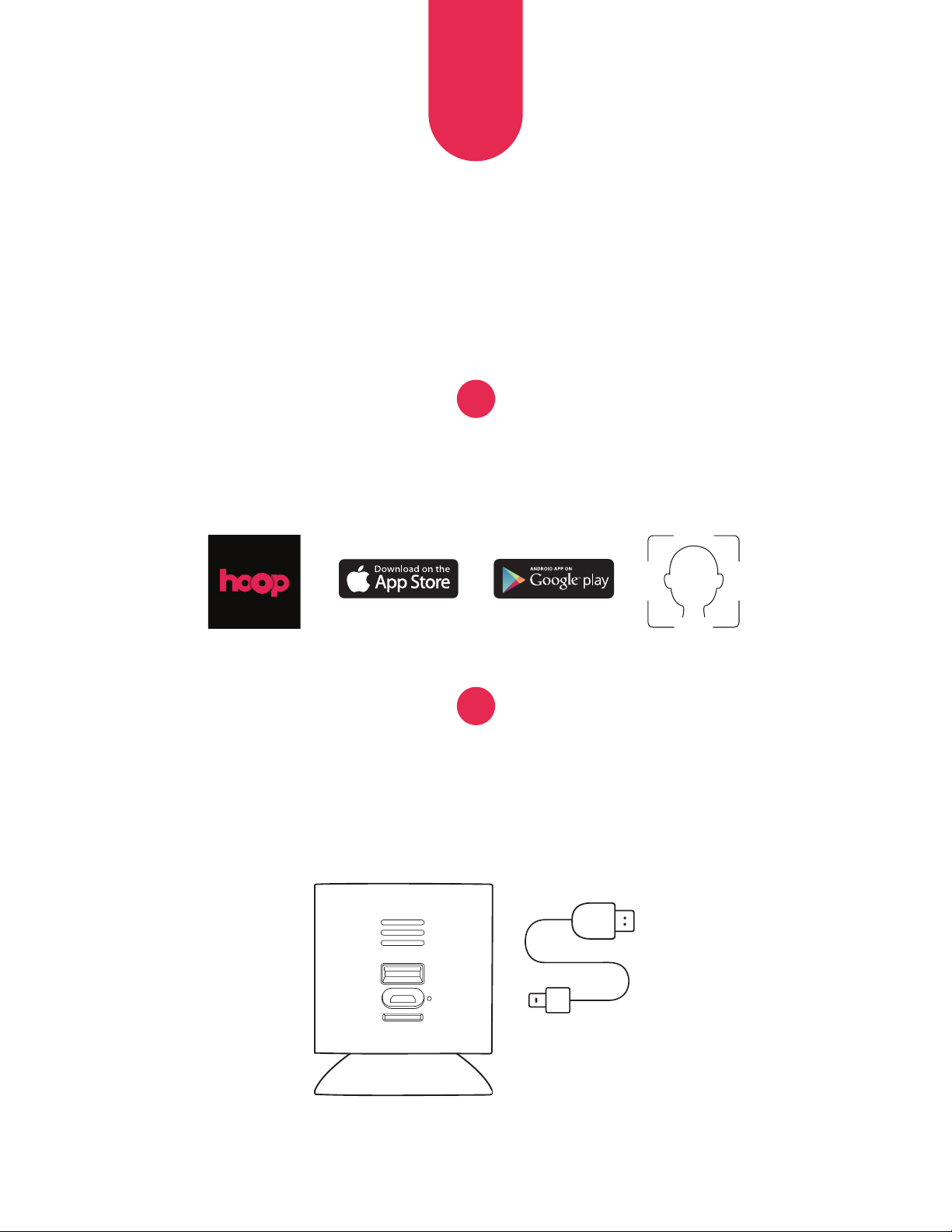
Rear View
6
7
8
Haut-parleur
Entrée USB
LED d’indication du statut
Port micro USB
9
Port pour carte
MicroSD™
(Carte SD non fournie)
10
12
FR
CONFIGURATION INITIALE
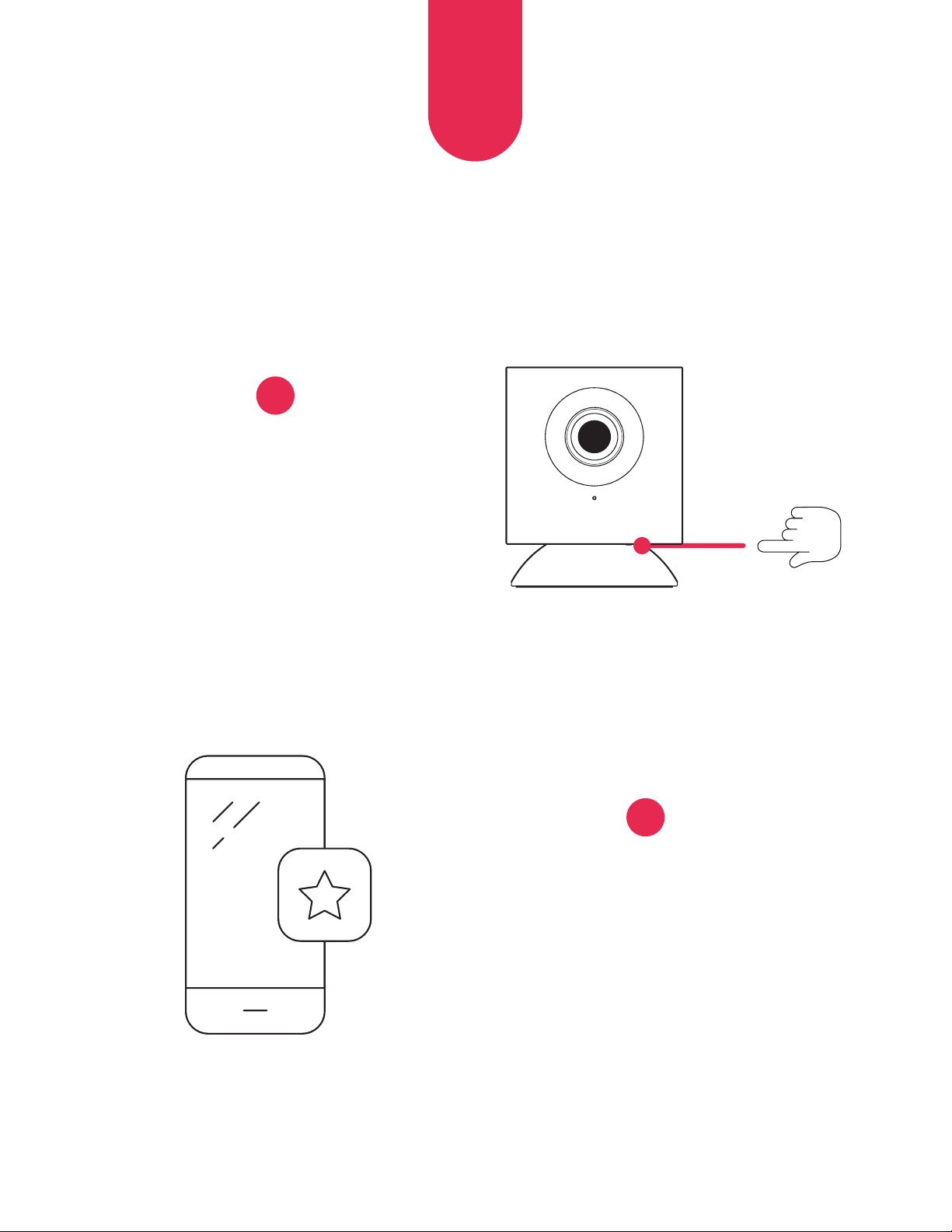
Téléchargez l’application myhoophome et
créez votre profil.
Branchez le câble d’alimentation sur la caméra et l’adaptateur secteur.
Patientez 30 sec. environ, pendant que la caméra effectue un autocontrôle.
L’indicateur LED clignotera en jaune.
1
2
13
FR
Maintenez l’appui sur bouton
de configuration jusqu’à
l’invite vocale.
Ouvrez l’application
myhoophome et sélectionnez
‘Ajouter une nouvelle caméra’.
Suivez les instructions pour
terminer la configuration.
3
4
14
FR
SIGNIFICATION DE
L’INDICATEUR LED
Jaune (fixe) Caméra sous tension, en cours de démarrage
Jaune (clignotant) Autocontrôle terminé, caméra prête pour
la connexion
Jaune et bleu (clignotant) Connexion à l’application
Bleu (clignotant) Caméra connectée, finalisation de la configuration
Bleu (fixe) Configuration terminée, fonctionnement normal
15
FR
PLUS D’INFORMATIONS
Consultez
www.hoophome.com
suivez-nous
FAQS: www.hoophome.com/faq
Forums: www.hoophome.com/community
Nous contacter
833-248-HOOP (4667)
support@myhoophome.com
Hoop est une marque déposée de C&A IP Holdings, LLC aux États-Unis. Tous les autres produits, noms
commerciaux, noms de sociétés et logos sont des marques déposées de leurs propriétaires respectifs,
utilisées uniquement à des fins d’identification de leurs produits respectifs, et ne suggèrent en aucun
cas un parrainage, un soutien ou une approbation.
Distribué par : C&A Marketing, Inc., 114 Tived Lane East, Edison, NJ 08837, USA C&A Marketing UK LTD,
167 Hermitage Road, Crusader Industrial Estate, London N4 1LZ, UK ©2019. Tous droits réservés.
Fabriqué en Chine
Avertissement de la FCC:
Tout changement ou modification non approuvé expressément par l’autorité responsable de la
conformité peuvent annuler l’autorisation accordée à l’utilisateur de faire fonctionner cet équipement.
Ce dispositif est conforme à la section 15 du règlement de la FCC. Le fonctionnement est soumis aux
conditions suivantes : (1) cet appareil ne peut causer d’interférences nuisibles, et (2) il doit accepter
toute interférence reçue, notamment celles pouvant entraîner un dysfonctionnement.
Déclaration de la FCC sur l’exposition aux rayonnements:
Cet équipement est conforme aux limites de radiation de la FCC comme indiquées pour un
environnement non contrôlé. Cet équipement doit être installé et utilisé en respectant une distance
minimale de 20 cm avec l’utilisateur. Cet émetteur ne doit pas être installé ou utilisé conjointement
avec d’autres antennes ou autres émetteurs.
Google Play Store est une marque déposée de Google, LLC.
Apple et App Store sont des marques déposées d’Apple Inc.
aux États-Unis et dans d’autres pays. MicroSD est une
marque déposée de SD-3C, LLC.
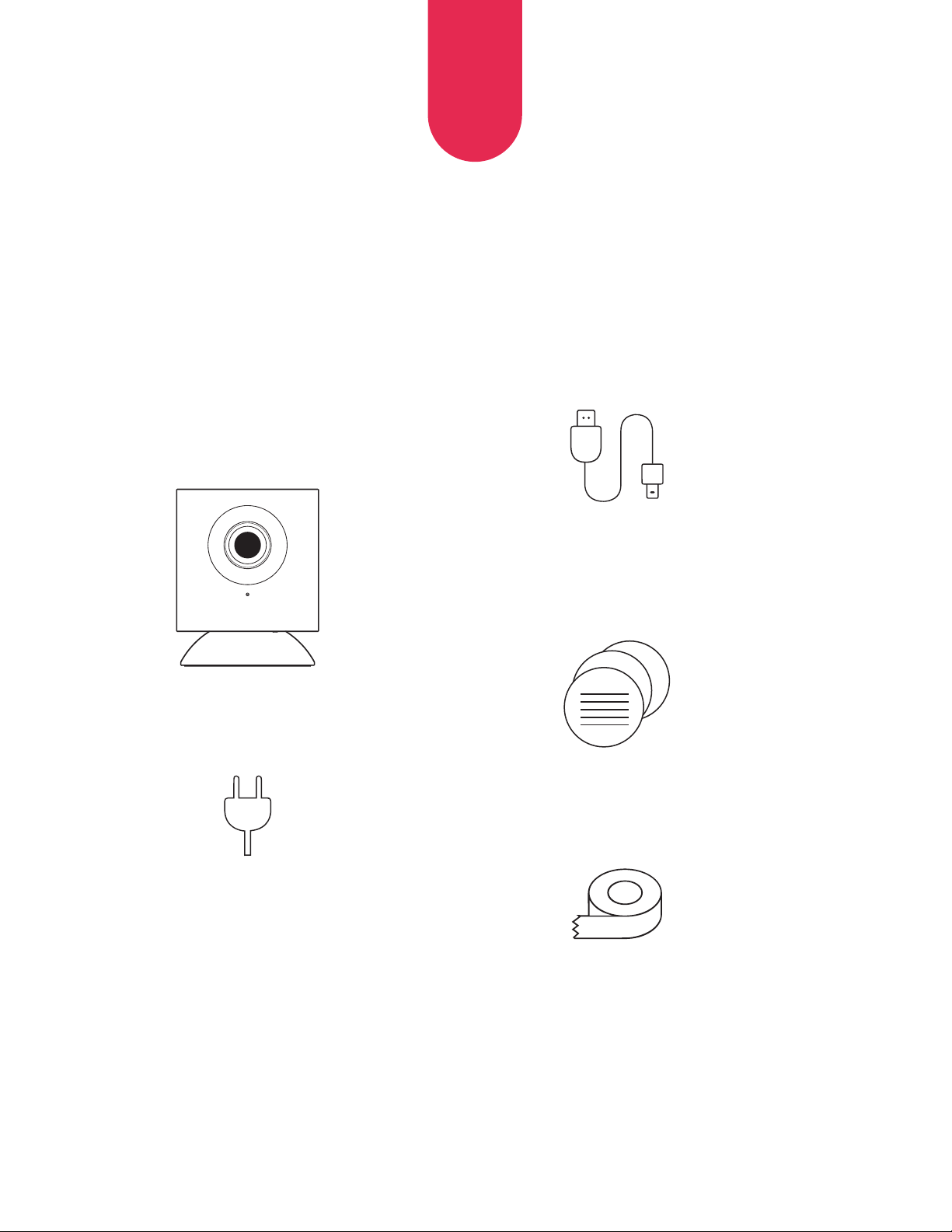
COSA C’È NELLA SCATOLA?
16
IT
Hoop cam (1)
Adattatore
da parete (1)
Cavo di alimentazione
micro USB (1)
Guida
rapida (1)
Nastro biadesivo
per il montaggio (3)
RIEPILOGO
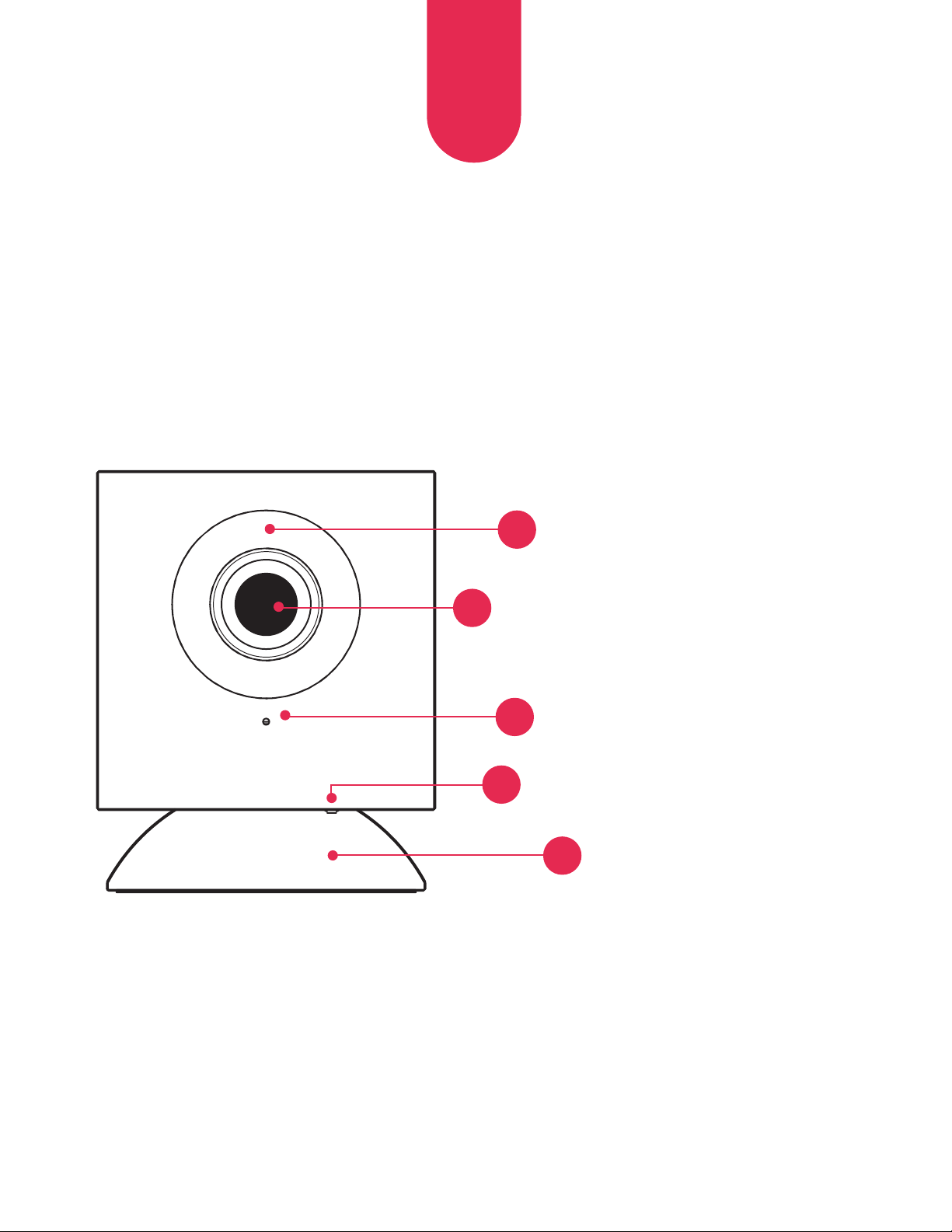
Visione anteriore
17
IT
Microfono
Anello LED a infrarossi
Lente
4
Pulsante di
configurazione
3
2
1
Base magnetica
5
18
IT
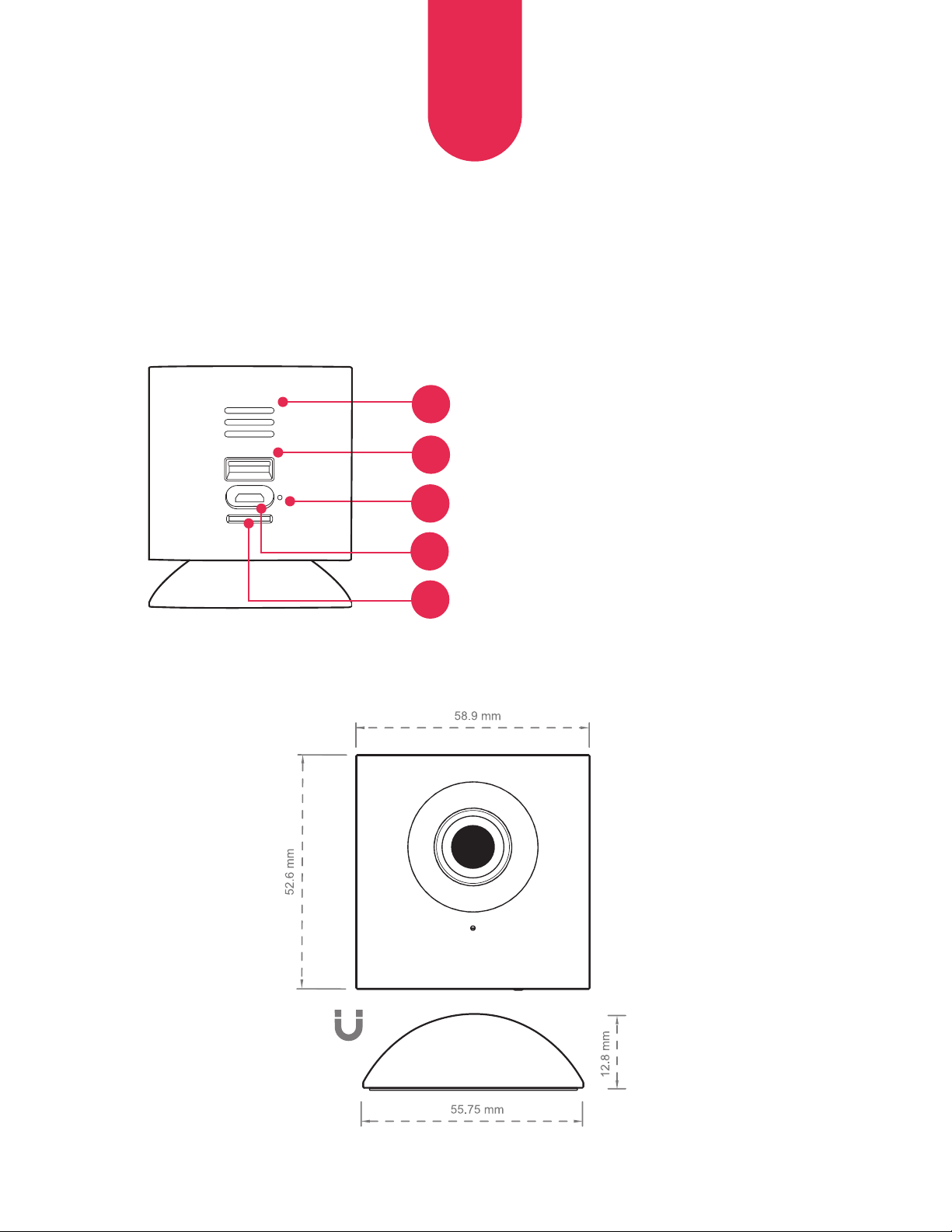
Rear View
6
7
8
Altoparlante
Input USB
Indicatore di stato LED
Porta micro USB
9
Slot per scheda
MicroSD™
(Scheda SD non inclusa)
10
19
IT
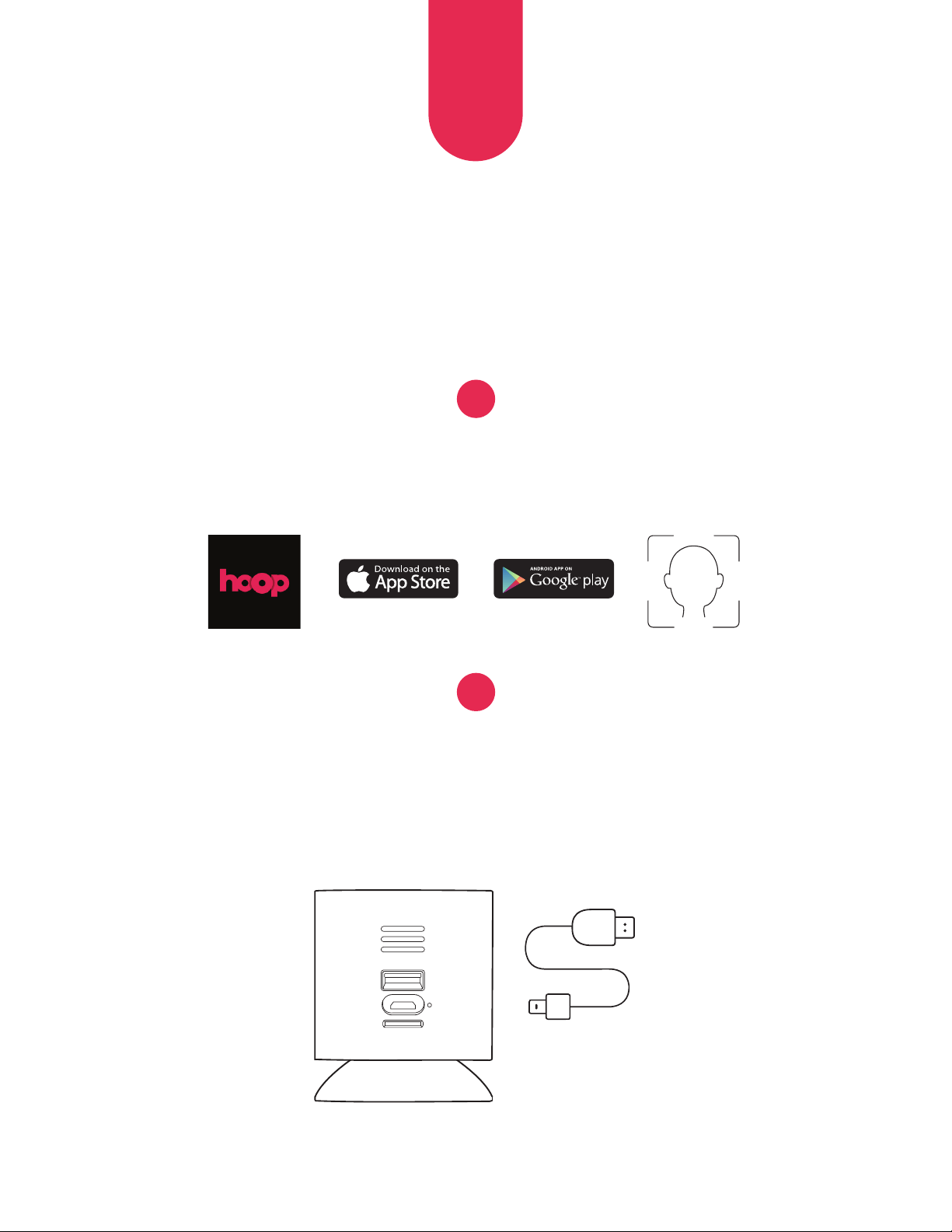
CONFIGURAZIONE INIZIALE
Scarica l’app myhoophome e
crea il tuo profilo.
Collega il cavo di alimentazione alla telecamera e all’adattatore
a parete. Aspetta circa 30 secondi per consentire alla telecamera
di effettuare l’autodiagnosi. L’indicatore LED emetterà una
luce gialla lampeggiante.
1
2
20
IT
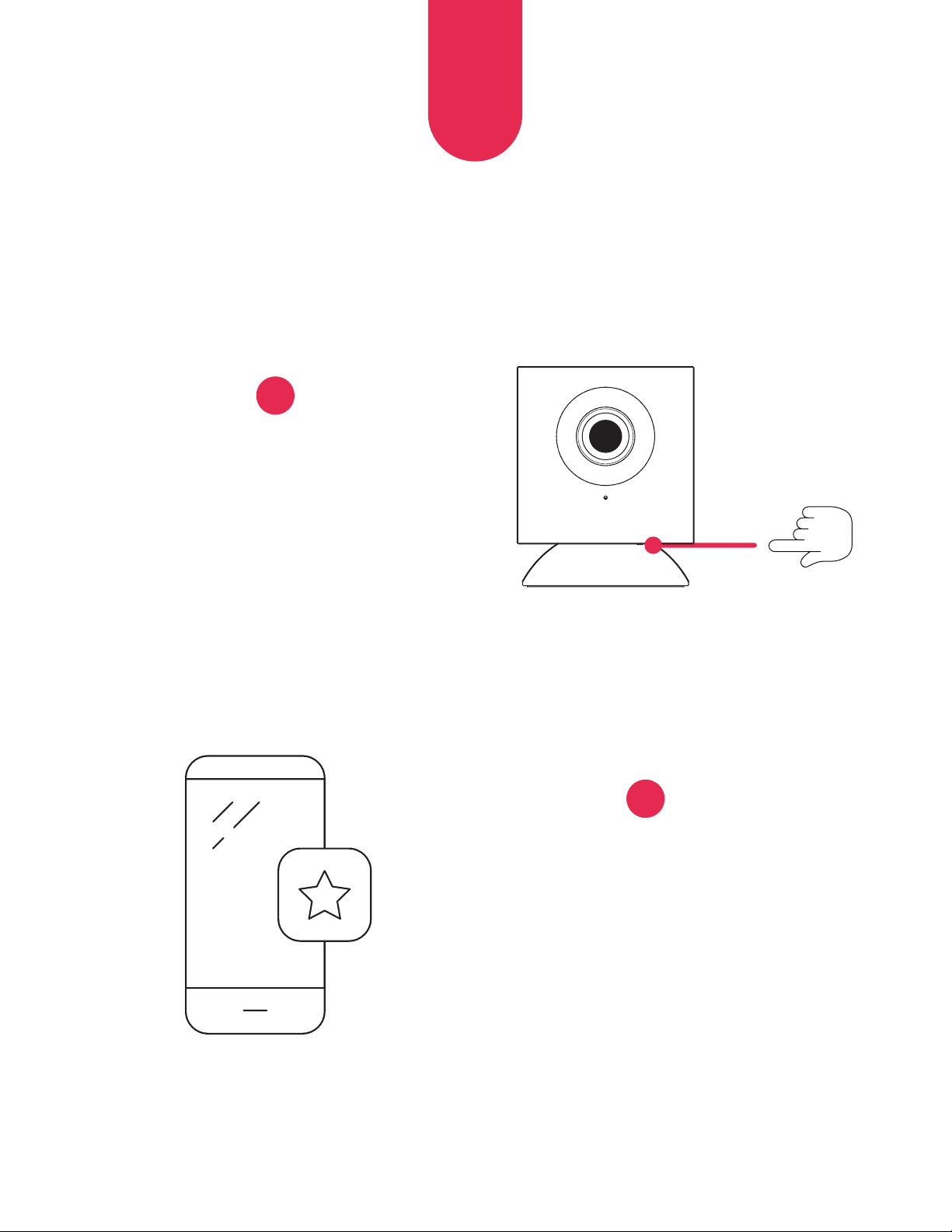
Premi e tieni premuto il pulsante
di configurazione finché senti
un comando vocale.
Apri l’applicazione
myhoophome e seleziona
‘Aggiungi una nuova
telecamera”. Segui i comandi
per completare il processo
di configurazione.
3
4
21
IT
LEGENDA INDICATORE LED
Luce gialla (fissa) Accesa e in avvio
Luce gialla (lampeggiante) Autodiagnosi completata, pronta
a connettersi
Luce gialla e blu (lampeggiante) Connessione all’applicazione in corso
Luce blu (lampeggiante) Connessa, processo di configurazione in
fase di ultimazione
Luce blu (fissa) Configurazione completata, funzionamento normale
22
IT
ULTERIORI INFORMAZIONI
Vieni a trovarci su
www.hoophome.com
seguici
DOMANDE FREQUENTI: www.hoophome.com/faq
Forums: www.hoophome.com/community
Contact Us
833-248-HOOP (4667)
support@myhoophome.com
Hoop è un marchio di C&A IP Holdings, LLC registrato negli Stati Uniti. Tutti gli altri prodotti, marchi,
denominazioni sociali e loghi sono marchi registrati dei rispettivi titolari, utilizzati esclusivamente
per identificare i rispettivi prodotti, senza implicare alcun rapporto di sponsorizzazione,
avallo o approvazione.
Distribuito da: C&A Marketing, Inc., 114 Tived Lane East, Edison, NJ 08837, USA
C&A Marketing UK LTD, 167 Hermitage Road, Crusader Industrial Estate, London N4 1LZ, UK ©2019.
Tutti i diritti riservati. Prodotto in CINA
Avvertenza ai sensi della normativa FCC:
Qualunque intervento o modifica non espressamente approvato dalla parte responsabile della
conformità potrebbe invalidare l’autorizzazione resa all’utente di utilizzare l’equipaggiamento. Questo
dispositivo è conforme alla Parte 15 delle Regole FCC. Il suo utilizzo è soggetto alle seguenti due
condizioni: (1) Il presente dispositivo non può causare interferenze dannose e (2) il presente dispositivo
deve accettare qualunque interferenza riceva, comprese le interferenze suscettibili di determinare un
utilizzo non desiderato.
Dichiarazione sull’esposizione alle radiazioni ai sensi della normativa FCC:
Il presente equipaggiamento è conforme ai limiti di esposizione alle radiazioni fissati dalla FCC per gli
ambienti non soggetti a controllo. Il presente equipaggiamento andrebbe installato e utilizzato a una
distanza minima di 20 cm fra il radiatore e il corpo. Il presente trasmettitore non deve essere collocato
sullo stesso luogo o utilizzato insieme con qualunque altra antenna o trasmettitore.
Google Play Store è un marchio di Google, LLC.
Apple e Apple Store sono marchi commerciali
di Apple Inc. registrati negli USA e in altri Paesi.
MicroSD è un marchio di SD-3C, LLC.
¿QUÉ CONTIENE LA CAJA?
23
ES
Una cámara
Hoop (1)
Un enchufe
adaptador (1)
Un cable de corriente
micro USB (1)
Una Guía de
inicio rápido (1)
Cinta de montaje
de doble cara (3)
RESUMEN
Vista frontal
24
ES
Microfono
Anello LED a infrarossi
Lente
4
Pulsante di
configurazione
3
2
1
Base magnetica
5
25
ES
Vista trasera
6
7
8
Altavoz
Entrada USB
Indicador LED del estado
Puerto micro USB
9
Ranura para
tarjeta MicroSD™
(Tarjeta SD, no incluida)
10
26
ES
PUESTA EN MARCHA INICIAL
Descargue la aplicación Myhoophome
y cree su perfil.
Enchufe el cable de corriente a la cámara y al enchufe
adaptador. Espere ~ 30 s para que la cámara se revise.
El indicador LED destellará en amarillo.
1
2
27
ES
Apriete y sostenga el botón de
configuración hasta que oiga una
indicación de voz.
Abra la aplicación
Myhoophome y seleccione
‘Añadir una nueva cámara”.
Siga las indicaciones para
completar el proceso de
la configuración.
3
4
28
ES
CLAVE DEL INDICADOR LED
Amarillo (sólido) Encendido, en proceso de puesta en marcha
(Destellos) amarillos Ha terminado su revisión, lista para conectarla
(Destello) amarillo y azul Conectando con la aplicación
(Destellos) azules Conectada, terminando el proceso de configuración
Azul (sólido) Configuración terminada, en funcionamiento normal
29
ES
MÁS INFORMACIÓN
Visítenos en
www.hoophome.com
síganos
Preguntas frecuentes: www.hoophome.com/faq
Foros: www.hoophome.com/community
Contacto
833-248-HOOP (4667)
support@myhoophome.com
Hoop es una marca comercial de C&A IP Holdings, LLC en los Estados Unidos. Todos los otros productos,
nombres de marcas, nombres de compañías y logotipos son marcas comerciales de sus respectivos
propietarios, usados solo para identificar sus correspondientes productos y no pretenden indicar ningún
patrocinio, respaldo o aprobación.
Distribuido por: C&A Marketing, Inc., 114 Tived Lane East, Edison, NJ 08837, Estados Unidos de América
C&A Marketing UK LTD, 167 Hermitage Road, Crusader Industrial Estate, Londres N4 1LZ, UK ©2019. Todos
los derechos reservados. Fabricada en China
Advertencia de la FCC:
Cualquier cambio o modificación que no haya sido aprobada expresamente por la parte responsable
del cumplimiento, podría anular el derecho del usuario a utilizar el equipo. Este dispositivo cumple
con la parte 15 de las Normas de la FCC. El uso está sujeto a las dos condiciones siguientes: (1) Este
dispositivo no puede causar una interferencia dañina y (2) este dispositivo debe de aceptar cualquier
interferencia recibida, incluso las interferencias que puedan dar lugar a un funcionamiento no deseado.
Declaración de exposición a la radiación de la FCC:
Este equipo cumple con los límites de exposición a la radiación de la FCC establecidos para un
ambiente sin control. Este equipo debe instalarse y utilizarse con una distancia mínima de 20 cm entre
el radiador y su cuerpo. Este transmisor no debe colocarse o utilizarse junto con
cualquier otra antena o transmisor.
Google Play Store es una marca registrada de Google, LLC.
Apple y App Store son marcas registradas de Apple Inc. en
los Estados Unidos y otros países. MicroSD es una marca
registrada de SD-3C, LLC..
WAS IST IN DER VERPACKUNG?
30
DE
Hoop-
Kamera (1)
Steckernetzteil (1)
Mikro-USB-
Stromkabel (1)
Kurzanleitung zur
Erstverwendung (1)
Doppelseitiges
Montageband (3)
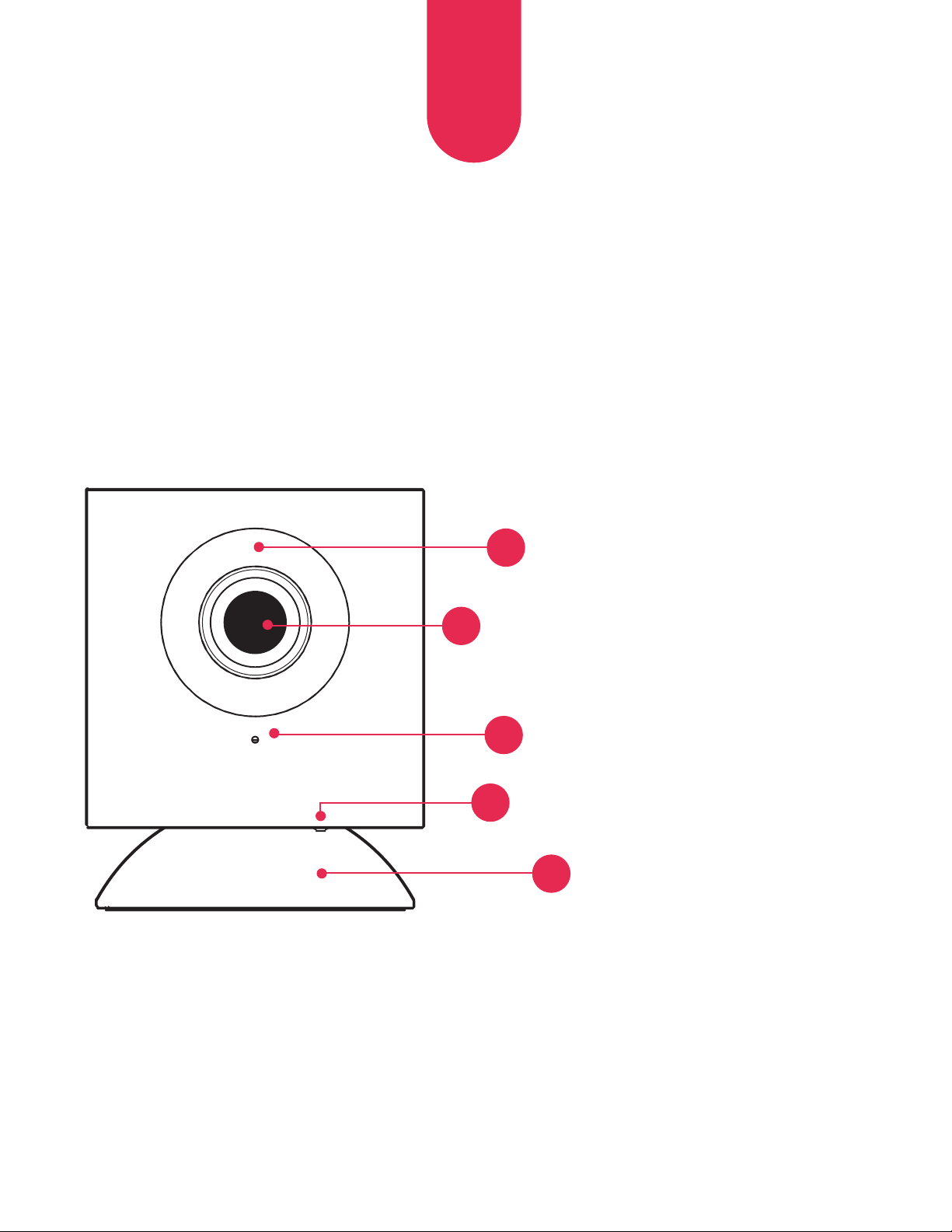
ÜBERBLICK
Vorderansicht
31
DE
Mikrofon
Infrarot-LED-Ring
Objektiv
4
Installationsknopf
3
2
1
Magnetischer
Standfuß
5
32
DE
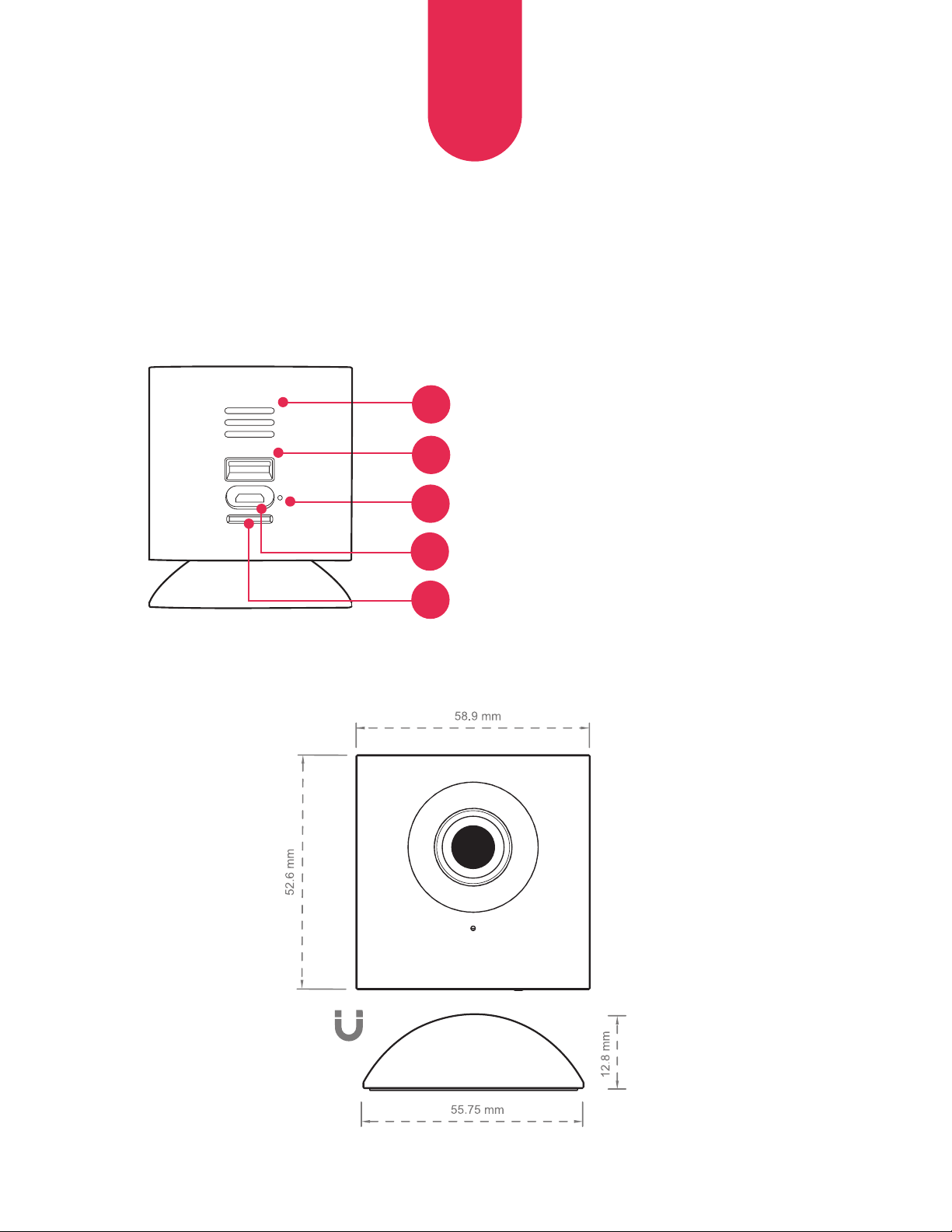
Rückansicht
6
7
8
Lautsprecher
USB-Anschluss
LED-Statusanzeige
Mikro-USB-Anschluss
9
MikroSD™-
Kartensteckplatz
(SD-Karte nicht inbegriffen)
10
33
DE
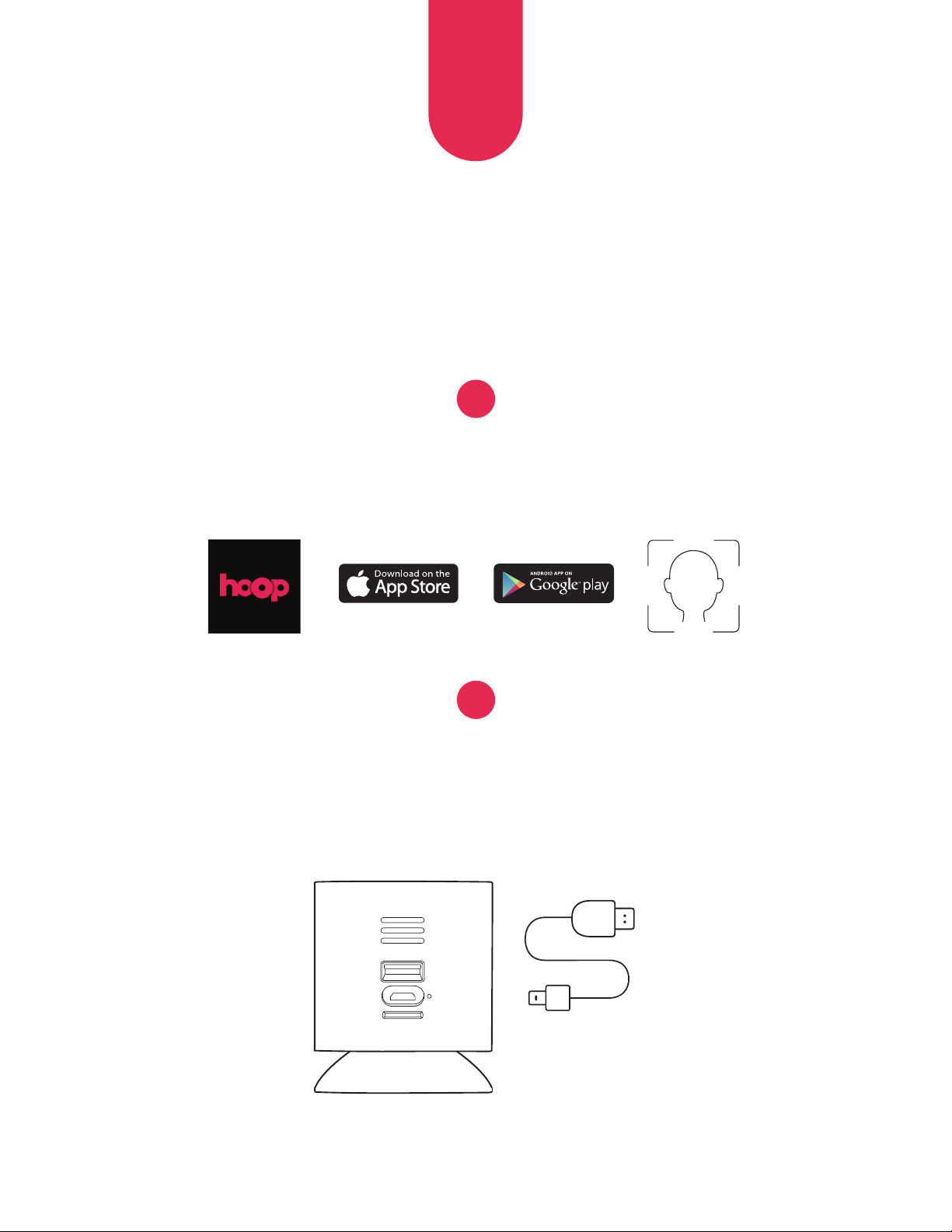
ERSTINSTALLATION
Laden Sie die Myhoophome-Anwendung
herunter und erstellen Sie Ihr Profil.
Stecken Sie das Stromkabel in die Kamera und das Steckernetzteil.
Warten Sie ~30 Sek., bis die Kamera eine Eigenkontrolle
vorgenommen hat. Die LED-Anzeige leuchtet gelb auf.
1
2
34
DE
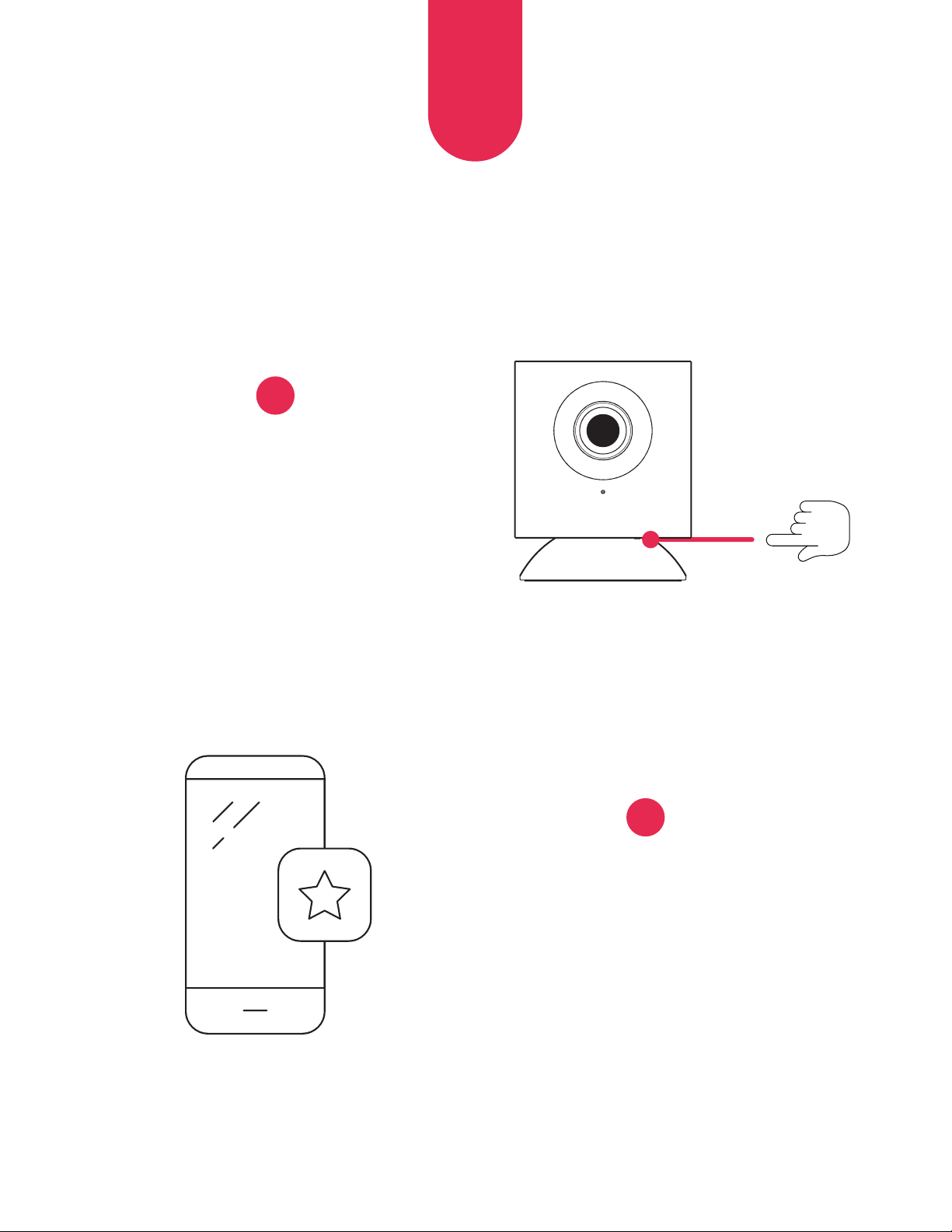
Drücken Sie den Installationsknopf
solange, bis Sie eine
Sprachansage hören.
Öffnen Sie die Myhoophome-
Anwendung und wählen Sie
‚Eine neue Kamera hinzufügen‘.
Befolgen Sie die Ansagen,
um das Installationsverfahren
abzuschließen.
3
4
35
DE
LED-ANZEIGENSCHLÜSSEL
Gelb (permanent) In Betrieb, schaltet sich ein
Gelb (blinkend) Eigenkontrolle beendet. Bereit zum Verbinden
Gelb und Blau (blinkend) Verbindung zur Anwendung wird hergestellt
Blau (blinkend) Verbunen. Installationsverfahren wird abgeschlossen
Blau (permanent) Installation ist abgeschlossen. Normalbetrieb
36
DE
WEITERE INFOS
Besuchen Sie uns auf
www.hoophome.com
folgen Sie uns
FAQs: www.hoophome.com/faq
Foren: www.hoophome.com/community
Kontaktieren Sie uns
833-248-HOOP (4667)
support@myhoophome.com
Hoop ist eine Handelsmarke von C&A IP Holdings, LLC in den U.S.A. Alle anderen Produkte, Handels-
sowie Firmennamen und Logos sind Marken ihrer jeweiligen Besitzer, die allein zur Bezeichnung der
entsprechenden Produkte verwendet werden. Sie sind nicht dazu bestimmt, einer Sponsorenschaft,
Billigung oder Zustimmung zum Ausdruck zu bringen.
Vertrieben von: C&A Marketing, Inc., 114 Tived Lane East, Edison, NJ 08837, USA C&A Marketing UK
LTD, 167 Hermitage Road, Crusader Industrial Estate, London N4 1LZ, UK ©2019. Alle Rechte vorbehalten.
Hergestellt in CHINA reservados. Fabricada en China
AFCC-Warnung:
Jegliche Änderungen oder Abwandlungen, die nicht ausdrücklich von der für die Compliance
verantwortliche Partei genehmigt wurden, kann die Berechtigung des Benutzers zum Betrieb des Geräts
möglicherweise auheben. Dieses Gerät entspricht Teil 15 der FCC-Vorschriften. Der Betrieb unterliegt
den beiden folgenden Bedingungen: (1) Dieses Gerät darf keine schädlichen Störungen verursachen und
(2) dieses Gerät muss jede empfangene Störung annehmen einschließlich solche, die zu unerwünschten
betrieblichen Vorkommnissen führen können.
FCC Strahlenschutzerklärung:
Diese Ausrüstung entspricht den von der FCC für eine unkontrollierte Umgebung festgelegten
Strahlungsschutzgrenzen. Sie sollte mit einem Mindestabstand von 20 cm zwischen der Strahlungsquelle
und Ihrem Körper installiert und betrieben werden. Der Transmitter darf nicht zusammen mit einer
anderen Antenne oder einem anderen Sender aufgestellt oder betrieben werden.
Google Play Store ist eine Marke von of Google, LLC.
Apple und App Store sind Marken von Apple Inc.
in den USA und anderen Ländern.
MicroSD ist eine Marke von SD-3C, LLC.