User Manual GAS COOKTOP
GAS COOKTOP MODELS
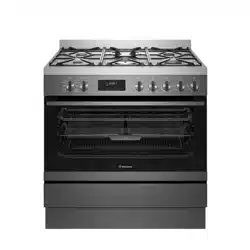
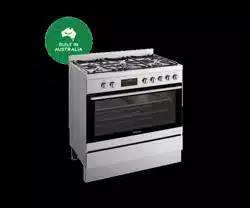
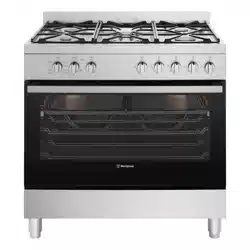
Freestanding cooker with flame safeguard gas cooktop and multi-function electric oven
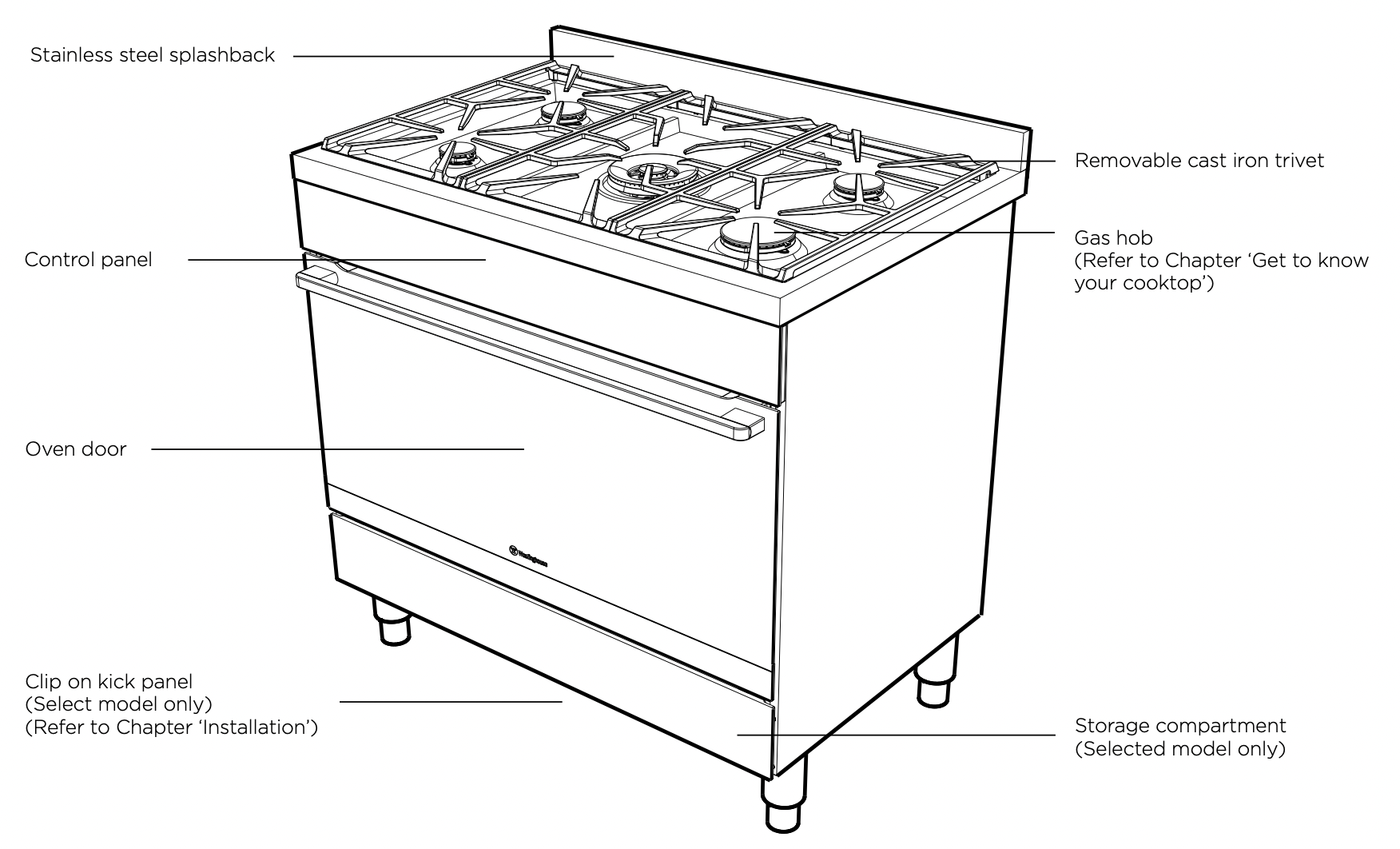
Control Panel
BEFORE OPERATING YOUR APPLIANCE FOR THE FIRST TIME
Preparing your appliance for the first time
- Please remove all internal boxes and bags from the oven before operation.
- Please wipe out the oven interior prior to operation with warm soapy water and polish dry with a soft clean cloth. Do not close the oven door until the oven is completely dry.
- New appliances can have an odour during first operation. It is recommended to ‘run in’ your oven before you cook for the first time. Run the oven at 180°C for 2 hours and ensure that the room is well ventilated.
- DO NOT line the oven with foil, it will damage the enamel.
- Prior to installing accessories, remove all packaging and remove plastic film from external panels.
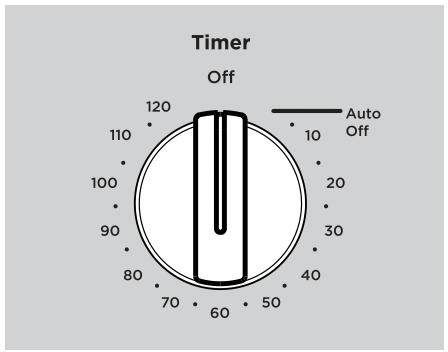
Auto Off timer
- If your appliance is fitted with a mechanical “Auto Off” timer, make sure it is set to “Off” marker for manual operation.
Setting the time
If you have purchased a model fitted with an electronic or programmable timer, you must set the time of day before you can operate your appliance.
After electrically connecting the appliance, you must set the time of the day before you can operate your oven.
Touch control electronic clock model (WFE915SD, and WFE916DSD)
- After the appliance has been electrically connected “12.00” will be displayed and the “clock” indicator will flash.
- To set the time of day, press or . 5 seconds after the last change, the “clock” indicator will disappear, confirming the time has been set.
NOTE: The clock has a 24-hour display.
GETTING TO KNOW YOUR COOKTOP
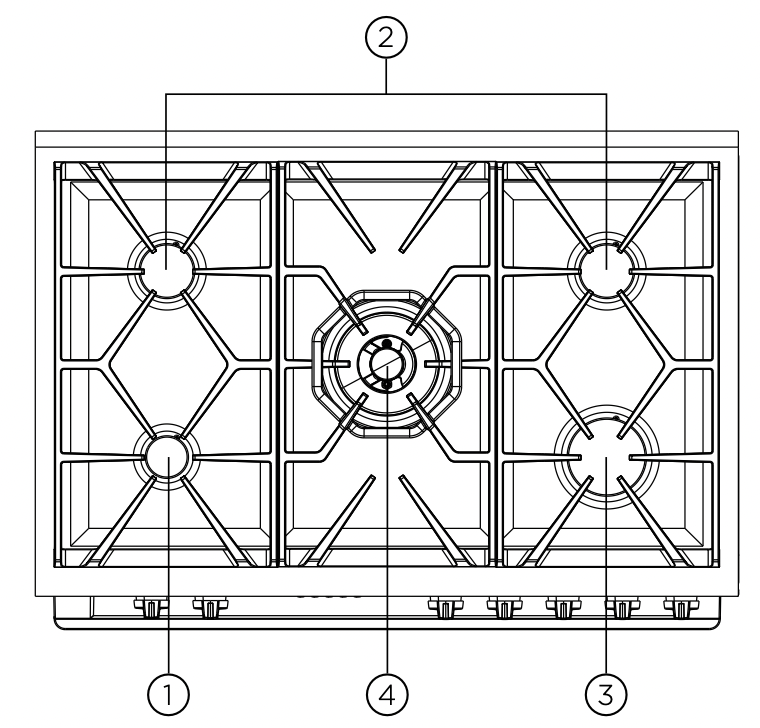
- Low heat burner (5.1MJ/h)
Used for simmering with small cookware items.
- Medium heat burner (9.0MJ/h)
Used for normal cooking and simmering with mid size cookware items.
- High heat burner (12.1MJ/h)
Used for fast heating with large size cookware items.
- Intense heat wok burner (19.0MJ/h)
Used for very fast heating with woks and other large size cookware items. Use wok trivet provided when cooking with a wok.
Using your gas hot plates (All gas hob model)
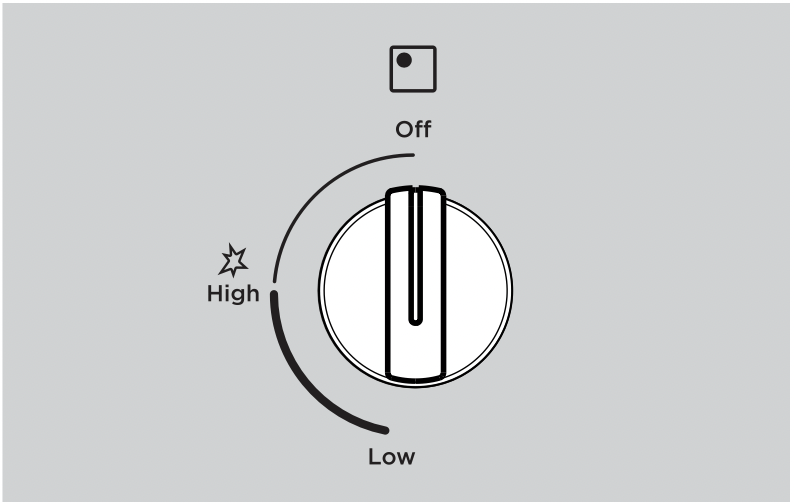
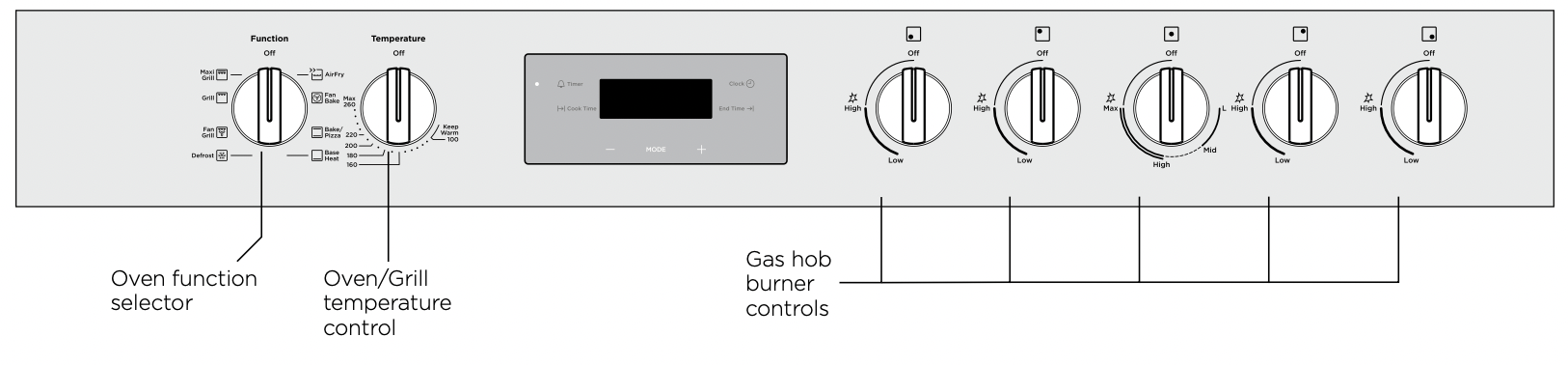
To light a burner with this knob, firstly depress and turn anti-clockwise to the ‘High’ flame position. The knob maybe released once the flame is established and turned further anti-clockwise to reduce the flame height as desired.
Note 1: Gas control has limited movement.
Note 2: If the flame goes out when either knob is released, simply depress the knob again, this time holding it down for approximately 5 seconds.
Using your dual flame wok hot plates (WFE916DSD & WFEP917DSD)
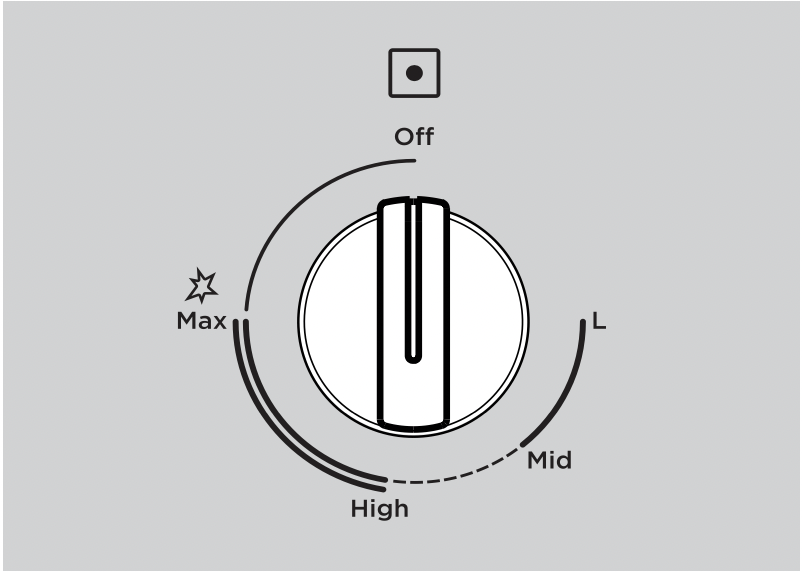
To light the wok burner, depress the knob and turn anti-clockwise to ignite the inner and outer burners. The knob may be released when both inside and outside flames are established. Turning the knob further anti-clockwise will reduce the height of the outer flame.
Turning the knob to ‘Mid’ and further will distinguish the outer flame and control the height of the inner flame.
Turning the knob back to ‘High’ will reignite the outer flame.
USING YOUR OVEN
Understanding your oven functions
 Rapid Heat
Heat comes from the element surrounding the fan as well as the smaller element above the food. This allows you to preheat your oven 30% quicker than the standard “Bake”. “Rapid Heat” is ideal for cooking frozen pre-cooked foods such as savoury pastries, pizzas, mini meals (TV dinners), meat pies and fruit pies. Simply place the food in the oven straight from the freezer and heat - ideal for busy people.
 AirFry
AirFry enables advanced convection cooking function without having to turn the food, giving crispy great tasting results in a shorter time without all the oil. This is suitable for french fries, chicken wings, nuggets and similar products
 Fan Bake / Fan forced
Heat comes from the elements surrounding the fans. The fans circulate the hot air around the oven cavity so that you can put your food in different places in the oven and still cook them at the same time. You can use the “Fan Bake” function for multi-shelf cooking, reheating cooked foods, pastries and complete oven meals. It will cook at a lower temperature and be faster than baking. Please note that some variation in browning is normal.
 EasyBake +Steam (WFEP917DSD model only)
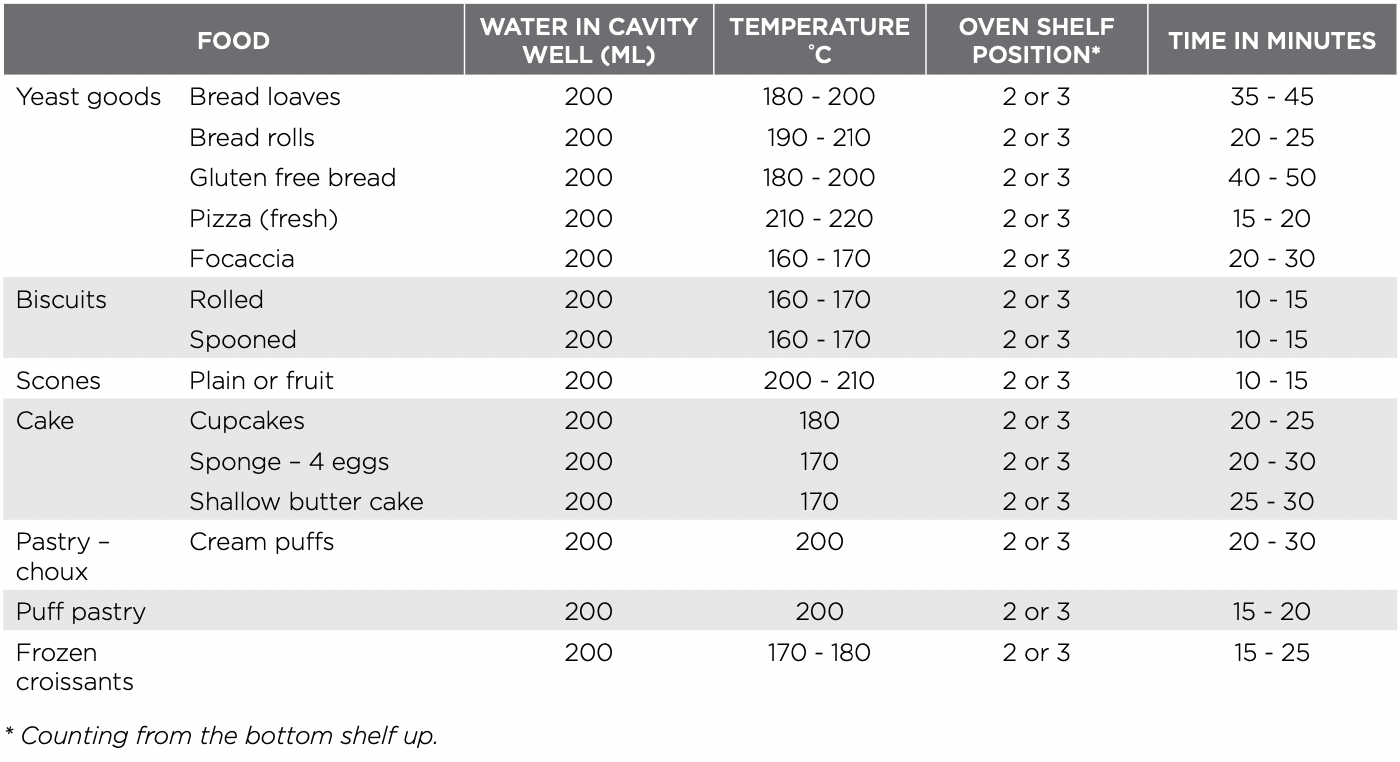
EasyBake +Steam” adds humidity at the beginning of the baking process. In bakery products, this allows the dough to rise and helps create a moist interior while obtaining a golden and crispy crust. Before preheating, when the oven is cold, add water to the cavity well. Refer to chapter “EasyBake +Steam” for more details. For best results preheat the empty oven for 10 minutes prior to inserting food.
 Bake/Pizza
Pizza” is a combination of “Base heat” and “Fan bake” and offers you the combined benefits of both functions. Heat comes from the element surrounding the fan as well as the clean heat element below the oven floor. The “Pizza” function is ideal for foods that require cooking and browning on the base. It is great for foods such as pizzas, quiches, meat pies and fruit pies. Simply place the food in the middle of the oven and set the desired temperature.
 Base Heat
Heat comes from the element below the floor of the oven. The Element is controlled by the thermostat and will turn on and off to maintain the set temperature. The “Base Heat” function can be used to add extra browning to the bases of pizzas, pies and pastries. Cook in the lower half of the oven when you are using only one shelf. For best results, use silver or shiny trays.
 Defrost
The “Defrost” function uses low temperature air that is circulated by the fans. You can defrost (thaw) your food before you cook it. You can also use “Defrost” to raise your yeast dough and to dry fruit, vegetables and herbs.
 Fan Grill
Fan Grill” offers you the benefits of both “Bake” and traditional “Grill” functions. The grill element turns on and off to maintain the set temperature while the fans circulate the heated air. The oven door remains closed for fan grill. You can use “Fan Grill” for large cuts of meat to give you a result that is similar to “rotisserie” cooked meat. Put your food on a shelf in the second lowest shelf position. Put the grill dish on the lowest shelf position to catch any spills. When using “Fan Grill” it is not necessary to turn the food over during the cooking cycle. Set the temperature to 180°C
 Grill
Grill
The “Grill” directs radiant heat from the powerful upper element onto the food. You can use the “Grill” function for tender cuts of meat, steak, chops, sausages, fish, cheese toasties and other quick cooking foods. Grill with the oven door closed. Preheat your grill for 3 minutes to get the best results. This will help seal in the natural juices of steak, chops etc. for a better flavour. You can slide your grill dish into either of the 2 spaces within the upper pairs of support rails.
-435579.png) Maxi Grill
Maxi Grill
Maxi Grill” directs radiant heat from 2 powerful upper elements onto the food. You can use the “Maxi Grill” function for tender cuts of meat, steak, chops, sausages, fish, cheese toasties and other quick cooking foods. Grill with the oven door closed. “Maxi Grill” allows you to take full advantage of the large grill dish area and will cook faster than normal “Grill”. For best results it is recommended to preheat your grill for 3 minutes. This will help seal in the natural juices of steak, chops etc. for a better flavour. You can slide your grill dish into either of the 2 spaces within the upper pairs of support rails.
Cooling/Venting fan
Your built-in appliance is fitted with a cooling fan. This prevents your kitchen cabinet from overheating and reduces the condensation inside the oven. It will operate whenever you are using your oven or grill and will blow warm air across the top of the oven door. In some appliances the cooling fan may continue to operate after the appliance is turned off. It will switch off by itself once oven is cool
Condensation
Excess condensation may fog the oven door. This may happen when you are cooking large quantities of food from a cold start. You can minimise condensation by:
- Keeping the amount of water used whilst cooking to a minimum.
- Making sure that the oven door is firmly closed.
- Baking custard in a baking dish that is slightly smaller than the water container.
- Cooking casseroles with the lid on.
NOTE: If you are using water in cooking, this will turn to steam and may condense outside your appliance. This is not a problem or fault with your oven.
Operating your oven temperature and function selectors (on selected models)
To set the oven, turn the function selector to the desired cooking function and then turn the temperature selector to the desired temperature. An indicator light above the temperature selector will come on. When the temperature is reached the heating source switches itself off and the indicator light goes out. When the oven temperature falls below the desired setting, the heating source switches on and the indicator light comes on again.
Once the food is cooked, turn the temperature selector off in an anti-clockwise direction. Do not force it right round in a clockwise direction as this will result in damage to the thermostat. Turn the multifunction selector off.
Preheating your oven with “Rapid Heat”
To preheat your oven select the “Rapid Heat” function.
This function allows your oven to reach the preset temperature quicker than any other cooking function.
- Turn the function selector to “Rapid Heat”.
- Set the desired preheat temperature, by rotating your oven temperature selector. When the indicator light above the temperature selector goes out, the oven has reached the desired temperature. Select the oven function you require for cooking or baking and place the food in the oven.
On completion of cooking
- The heat source will turn off, the timer will beep and the end time and/or cook time ‘indicators’ will flash.
- Even though the heating element turns off the oven will still retain substantial heat. This will continue to cook the food until it is removed or the oven cools down. If you do not plan on being present when the oven turns off, you should take this extra heating time into account.
- Turn the function and temperature controls to the off position.
- Press any button to stop the timer beeping.
120 minute “Auto off” timer
The 120 minute timer features an automatic oven cut off
This means that a cooking period of up to 120 minutes can be set. When the timer has counted back to “Auto off”, a bell will sound and the oven will automatically switch off.
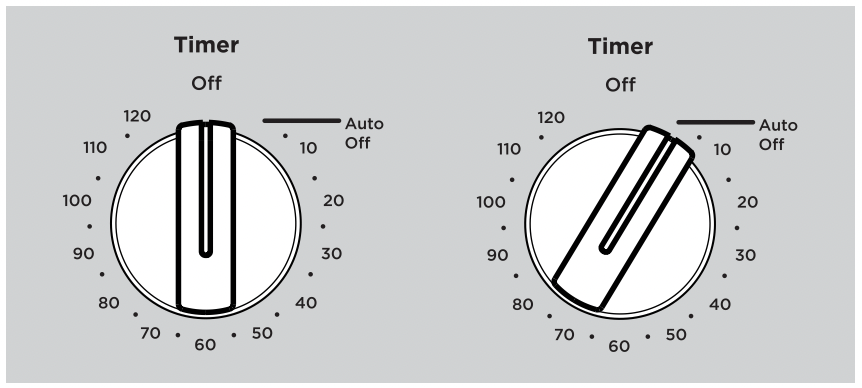
Once automatic baking is complete, return to manual operation by setting the timer to the “OFF” mark.
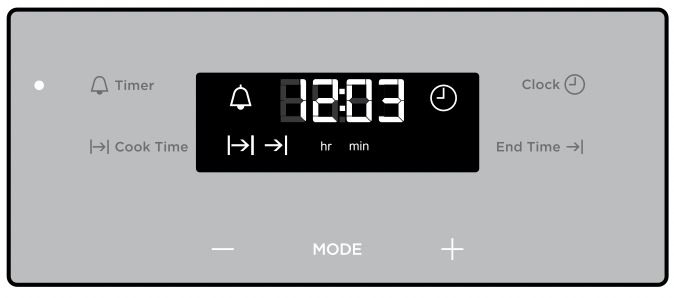
Operating the touch control clock models WFE915SD, WFE916DSD
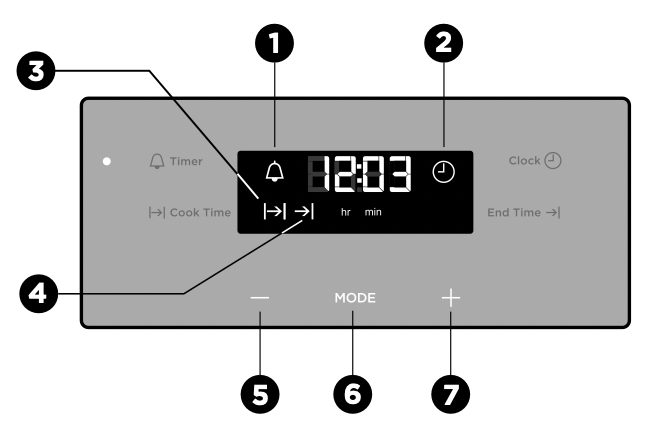
- On when timer is set
- Time of day icon
- Cook time icon
- End time icon
- Minus
- Touch to toggle through timer modes
- Plus
Setting the time of day
Before the appliance can be used, the time must be set.
After the appliance has been electrically connected, ‘12:00’ will be displayed and the clock  icon will flash.
To set the time of day in hours and minutes touch the - or + symbols. Refer to the diagram above.
5 seconds after the last change, the clock  icon will disappear, confirming the time has been set. Once the time has been entered, the clock advances minute by minute.
NOTE: The clock has a 24 hour display.
Change the time of day (Daylight saving)
- Press MODE until the clock
 icon begins flashing.
- Press - or + to change the time. 5 seconds after the last change, the clock
 icon will disappear, confirming the time has been set.
Setting the timer
- Touch the MODE symbol until the timer
 icon begins flashing.
- Set the countdown time you want by using - and +. 5 seconds after the last change the timer
 icon will stop flashing and the countdown will start in minutes.
- To stop the beeper, touch any symbol.
- Maximum countdown time is 2hrs 30mins.
Setting the cooking duration
- Check the clock displays the correct time of day.
- Select the desired oven function and temperature.
The oven indicator light will glow and the heating source will come on.
- Press MODE until the cook time
 icon begins flashing.
- Set the cooking duration you want by using - or + 5 seconds after the last change, the cook time
 icon will stop flashing, and the time of day will be displayed.
NOTE: Do not forget to add preheating time if necessary.
Setting the cooking end time
- Check the clock displays the correct time of day.
- Select the desired oven function and temperature.
The oven indicator light will glow and the heating source will come on.
- Touch the MODE symbol until the end time
 icon begins flashing.
- Enter the time of day you want the cooking to finish by using the or symbols. 5 seconds after the last change, the end time icon will stop flashing and the current time will be displayed.
NOTE: To stop the beeper, touch any symbol.
Setting the delayed start cooking time
- Program the cook time and end time as described in the relevant sections. Once both the cook time and end time have been set, the cook time and end time icons will stop flashing and the current time of day will be displayed.
To check or cancel settings
- To check settings, touch the symbol until the desired setting is displayed. The relevant icon will flash.
- To cancel ‘delayed start’ touch the symbol until the end time icon flashes. Touch and hold the symbol until the clock no longer reverses (a beep will be heard). If temperature and function knobs are still at a setting, the oven will start once the end time icon stops flashing.
- To cancel ‘auto shut off’, touch the symbol until the cook time icon flashes. Touch and hold the symbol until the clock no longer reverses (at 0:00 a beep will be heard). This automatically cancels ‘auto shut off’. If the temperature and function knobs are still at a setting, the oven will start once the cook time icon stops flashing. Because ‘auto off’ is cancelled the oven will continue to heat until it is manually turned off.
On completion of cooking
The oven will turn off, the timer will beep and the end time and/or cook time icons will flash.
- Turn the function and temperature controls to the off position.
- Press + or - or MODE to stop the timer from beeping.
Switching the clock display ON and OFF
- Press together + and - for 2 seconds to switch 'off' the display.
- Press together + and - for 2 seconds to switch the clock display ’on’ again.
NOTE: If a timer mode is set, then it is not possible to switch the display off.
Additional Functionality
Setting the countdown timer
Use this for timing any activity, for example baking bread.
- Touch the
 button, the display will flash.
- Set the countdown time you want by using + and -. Commence with setting the number of seconds first. The minutes and hours can then be set by subsequently pressing the
 button again and adjusting using + or -. 5 seconds after the last change the timer will stop flashing, confirming the timer has been set.
- To cancel the timer touch the
 button, the display will flash. Then touch and hold
  and TEMP buttons until the timer is cleared.
- To stop the beeper, touch any button.
NOTE: The clock display cannot be selected when the timer is operating.
Elapsed Time
When an oven function is selected (other than pyrolytic clean) an elapsed timer commences on the display.
To reset this timer touch and hold both the and TEMP buttons until the timer is reset.
Displaying the oven temperature
During operation of the oven the current oven temperature during pre-heating of the oven can be displayed by touching the button. During normal operation the set temperature can be reviewed by touching the button.
NOTE: this temperature will only be displayed for approximately 5 seconds.
Light operation
During operation of the oven the light can be switched off by touching and holding the button until the light turns off. Also the light can be turned on from the standby state by touching and holding the button until the light comes on.
Activating the child-proof lock
When the child lock is engaged, the oven cannot be operated and the door cannot be opened.
- Switch off the appliance using the function selector switch.
- Touch and hold the and buttons at the same time until the word ‘SAFE’ is displayed and a double beep is sounded. The word SAFE will be replaced by a padlock symbol on the display after 5 seconds.
Releasing the child-proof lock
Touch and hold the and buttons at the same time until a double beep is sounded. This will commence to unlock the door and after 5 seconds the oven is ready for use.
Activating the function lock
The active function can be locked so it is not changed unintentionally.
- The active function can be locked, to activate touch and TEMP together until ‘Loc’ is displayed.
- If the oven is switched-off while in ‘Loc’ it will switch into Child lock mode and the display will show ‘SAFE’.
- Oven can be released the same way as ‘Releasing the child proof lock’
Safety Cut-out feature
The oven automatically switches itself off if the temperature is not adjusted or the appliance is left operating after a period of time. The oven switches itself off after:
- 12.5 hours when the temperature is set less than 120°C.
- 8.5 hours when the temperature is set to 120°C or above, and below 200°C.
- 5.5 hours when the temperature is set to 200°C or above, and below 250°C.
- 3.0 hours when the temperature is set at 250°C.
DEMO Mode
The oven can be set to operate in a demo mode (e.g. in a retail store). In this mode the display works and functions can be set but the oven does not actually heat. When in this mode the text ‘DEMO’ will be lit. The following instructions show how to enter and exit ‘Demo’ mode.
- Ensure the oven is in the off state. Toggle and hold the selector to + until a beep sounds. The ‘DEMO’ text will begin to flash.
- Toggle the temperature selector to set the first digit of display to 2. Touch clock to set.
- Repeat step 2 until display shows 24:68. 3 beeps sound and DEMO will be shown.
To disable DEMO mode repeat steps 1 - 3.
COOKING TEST
Get to know your new oven with this ‘Simple Test Cake’
Although we strive for a perfect performing oven, it’s possible that there will be some variation in colour when baking. Therefore, we suggest this simple, easy and delicious to make Simple Test Cake, it can help you understand your new oven. All ovens do sometimes have hot or cold spots, therefore it is important to judge with your eye as you may require to rotate during baking.
‘Simple Test Cake’
125g butter, softened to room temperature
1 cup caster sugar
1 teaspoon pure vanilla essence
4 large eggs
2 cups self-raising flour pinch of salt
4 tablespoons (80ml) full-cream milk
Method:
- Butter base and sides of two 20cm straight-sided round or square cake pans. Then line the base with grease proof or baking paper.
- Preheat oven to moderate ‘180ºC’ (170ºC fan forced) and ensure oven shelf is in the centre position of oven.
- Cream softened butter and sugar until light in colour.
- Add vanilla essence.
- Then eggs one at a time, beating well after each addition.
- Sift flour and salt into the mixture and beat until well combined.
- Add milk and beat or stir to combine.
- Spoon mixture equally between prepared cake pans.
- Bake in preheated oven, middle shelf for about 25 to 35 minutes or until when tested with a fine cake skewer it comes out clean, or the edges of the cakes have come away slightly from the sides of the cake pans.
- Remove from oven to wire cake rack and rest for 5 minutes before removing from cake pans.
Cool completely.
To Serve: sandwich together with your favourite jam or conserve, and dust top with pure icing sugar.
NOTE: If desired substitute butter for either margarine or olive oil spread. Recipe is based on the Australian standard metric 250ml cup and 20ml tablespoon sets.
- For best baking results preheat oven for 30 minutes.
- Select the correct shelf location for food being cooked.
- The grill tray can be used in the oven as a baking dish, except in oven shelf location 1.
- Make sure dishes will fit into the oven before you switch it on.
- Keep edges of baking dishes at least 40mm from the side of the oven. This allows free circulation of heat and ensures even cooking.
- Do not open the oven door more than necessary.
- Do not place foods with a lot of liquid into the oven with other foods. This will cause food to steam and not brown.
- After the oven is turned off it retains the heat for some time. Use this heat to finish custards or to dry bread.
- Do not use a lot of cooking oil when roasting. This will prevent splattering oil on the sides of the oven and the oven door. Polyunsaturated fats can leave residue which is very difficult to remove.
- When cooking things which require a high heat from below (e.g. tarts), place the cooking dish on a scone tray in the desired shelf position.
- For sponges and cakes use aluminium, bright finished or non-stick utensils.
- Remove unnecessary trays or dishes when roasting or baking.
Oven shelf location
Your freestanding oven has 5 positions for mounting the shelves or grill dish carrier. These are numbered from 1 (the lowest shelf position) to 5 (the highest shelf position). See diagram.
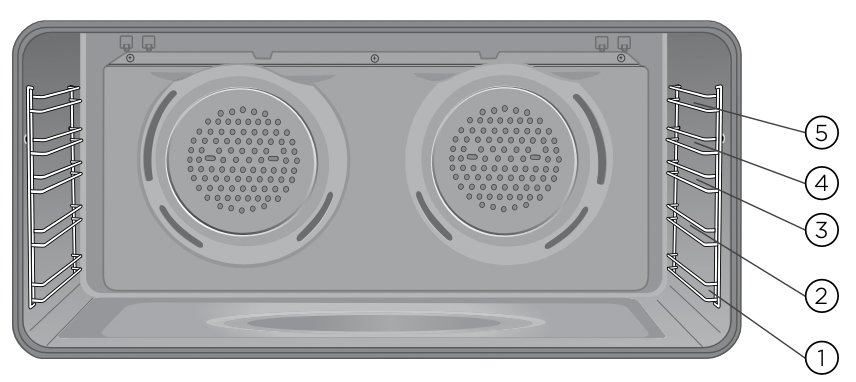
To give maximum space above and below the shelves, load them in this way:
- When cooking with 1 shelf, use position 2 or 3.
- When cooking with 2 shelves, use position 1 and 3.
- When grilling use position 4 or 5.
NOTE: Use the oven efficiently, by cooking many trays of food at the same time e.g. 2 trays of scones, small cakes or sausage rolls.
COOKING GUIDE
Choosing the best oven settings
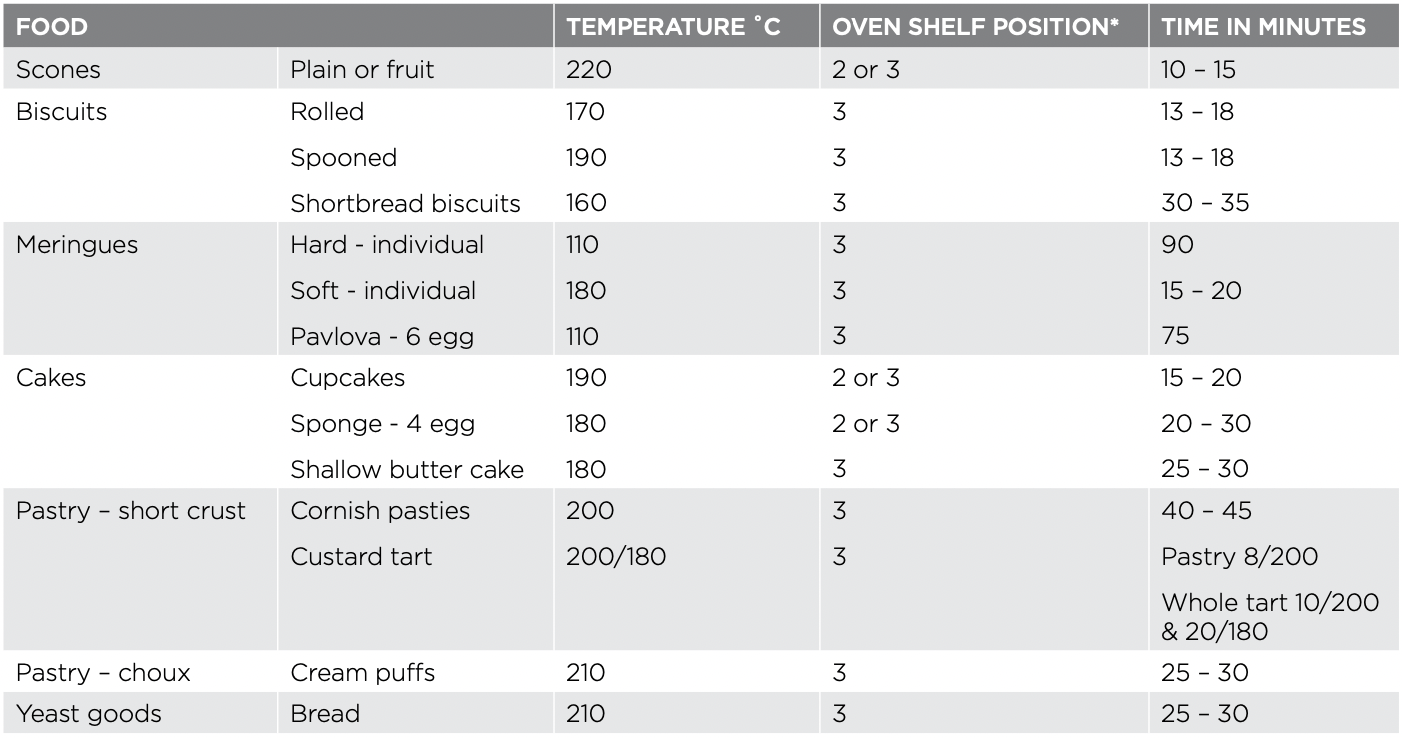
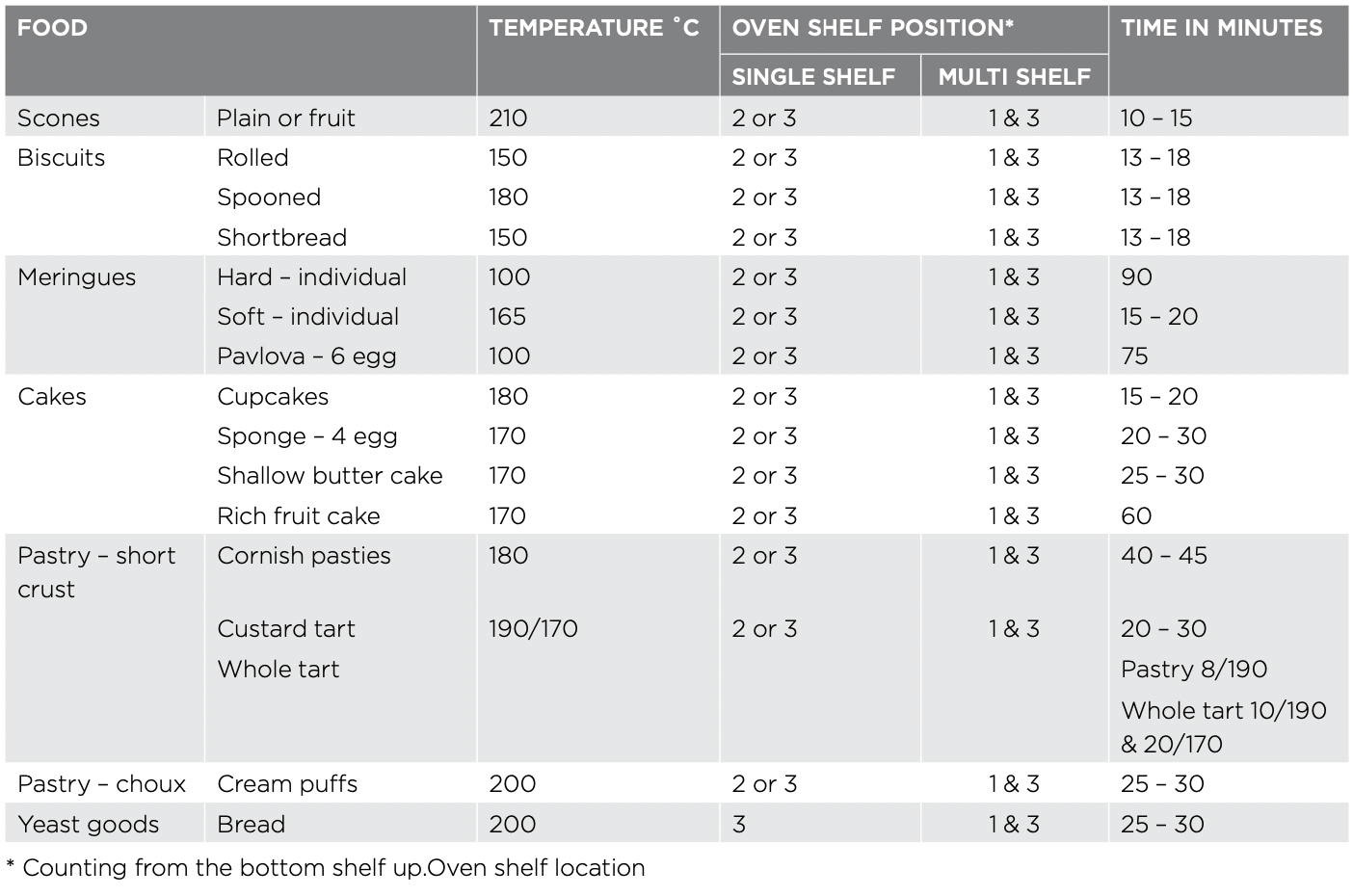
The following table is intended as a guide and experience may show some variation in cooking times necessary to meet individual requirements. We recommend that you preheat your oven for 30 minutes.
Modes without Oven Fan
Modes with Oven Fan
EasyBake + Steam function
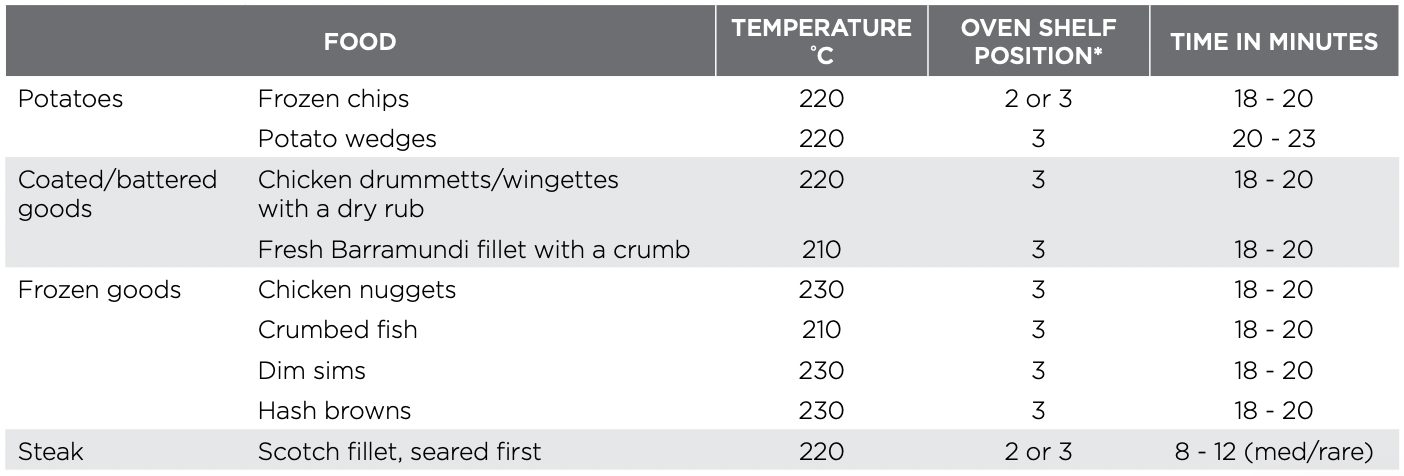
AirFry Cooking Guide
We recommend that you pre-heat the oven for 5 minutes for the best AirFry performance.
NOTES:
These were the foods that best performed using the AirFry tray.
A tray should be placed on the bottom shelf position covered with foil to catch any of the fat.
Grilling Guide
WARNING: Always clean the grill/oven dish after every use. Excessive fat build up may cause a fire.
Grilling is conducted with the oven door closed
As a method of cooking, grilling can be used to:
- Enhance the flavours of vegetables, fish, poultry and meat.
- Seal the surface of the food and retain the natural juices.
This table shows how to grill different types of meat:
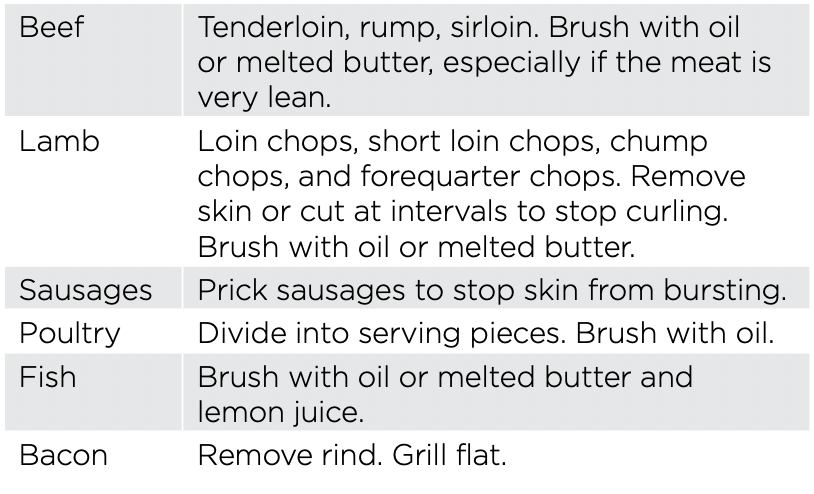
Guide to better grilling
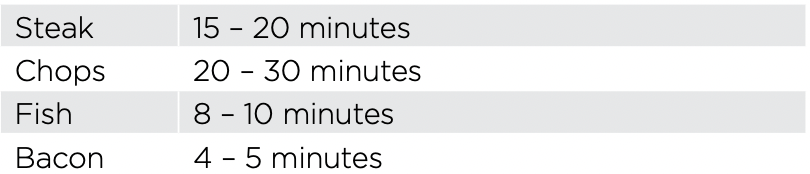
No definite times can be given for grilling because this depends on your own tastes and the size of the food. These times should only be used as a guide and remember to turn the food over halfway through the cooking process.
For better grilling results, follow these easy instructions:
- Preheat grill for at least 5 minutes.
- Choose only prime cuts of meat or fish. If the cut is less than 5mm thick it will dry out. If the cut is more than 40mm thick, the outside may burn whilst the inside remains raw.
- Do not place aluminium foil under the food as this prevents fats and oils from draining away, which could result in a fire.
- Baste the food during cooking with butter, olive oil or marinade. Grilled food is better if marinated before cooking.
- Use tongs to turn food as a fork pierces the surface and will let juices escape.
Fan Grill
The “Fan Grill” assists the grilling process by circulating the heat evenly around the food. The recommended temperature setting is 180°C for all fan grilling functions.
- Place the grill dish on the bottom rack.
- Place meat/poultry on an oven shelf above the grill dish.
WIPE OFF ANY OIL OR FAT WHICH SPATTERS WHILE THE OVEN IS STILL WARM.
DEALING WITH COOKING PROBLEMS
| PROBLEM |
CAUSES
|
REMEDIES |
| Uneven cooking |
- Incorrect shelf position.
- Oven tray too large.
- Trays not centralised.
- Air flow in oven uneven.
- Grill dish affecting thermostat.
|
- Select shelf that puts food in the centre of the oven.
- Experiment with other trays or dishes.
- Centre trays.
- Rotate food during cooking.
- Remove grill dish from oven on bake modes.
|
|
Baked products too brown on top
|
- Oven not preheated.
- Baking tins too large for the recipe.
- Baking tins not evenly spaced.
- Products not evenly sized or spaced on trays.
- Baking temperature too high.
|
- Preheat the oven.
- Use correct size tins.
- Stagger baking tins at least 3cm between tins and the oven walls.
- Make into same size and shape, & spread evenly over trays.
- Lower the temperature.
|
| Baked products too brown on bottom |
- Baking tins too large for the recipe.
- Baking tins are dark metal or glass.
- Food too low in the oven.
- Oven door opened too frequently during baking.
- Baking temperature too high.
- Grill dish affecting thermostat.
|
- Use correct size tins.
- Change to shiny, light tins or lower the temperature by 10°C.
- Cook one shelf higher.
- Don’t open the oven door until at least half the cooking time has passed.
- Lower the temperature.
- Remove grill dish from oven on bake modes.
|
|
Cakes have a cracked, thick crust
|
- Baking temperature too high.
- Food too high in oven.
- Cake batter over mixed.
- Pan too deep.
- Baking pans dark.
|
- Lower the temperature.
- Cook one shelf lower.
- Mix just long enough to combine ingredients.
- Check size of pan and use recommended size.
- Change to shiny pans.
|
| Baked products are pale, flat and undercooked |
- Baking temperature too low.
- Food too low in oven.
- Baking time too short.
- Incorrect tin size.
|
- Raise the temperature.
- Cook one shelf higher.
- Increase cooking time.
- Use correct size tin.
|
|
Cakes fallen in the centre
|
- Baking temperature too low.
- Baking time too short.
- Proportions of ingredients incorrect in the recipe.
- Opening door too early in baking.
|
- Raise the temperature.
- Increase cooking time.
- Check recipe.
- Do not open the door until the last quarter of cooking time.
|
| Roast meat and potatoes not browning in fan oven |
- Poor hot air circulation.
- Grill dish affecting thermostat.
|
- Elevate food onto a rack to allow air circulation.
- Remove grill dish from oven on bake modes.
|
|
Juices running out of meat
|
|
- Do not pierce meat with fork, turn with tongs.
|
|
Grilled meats overcooked on outside and raw in the centre
|
|
- Grill at lower insert position.
|
|
Grilled chops and steaks curling
|
|
- Cut into fat every 2cm (1/2”).
|
CLEANING YOUR OVEN
WARNING
- Always make sure that the oven is electrically isolated before cleaning. This can be done by the functional switch nearby.
- Do not line the bottom of the oven with foil or cookware.
- Do not use steam cleaners.
Stainless steel
WARNING
- The oven door trim, the control panel and the storage compartment are decorated with a special stainless steel that resists finger marks and should only be cleaned with warm water and a mild detergent. Do not use stainless steel cleaners, abrasive cleaners or harsh solvents on these parts.
NOTE: Make sure you follow the polish or brushing lines in the stainless steel.
- All grades of stainless steel can stain, discolour or become greasy. You must clean these regularly by following the procedures below if you want your appliance to look its best, perform well and have a long life.
- Care must be taken when wiping exposed stainless steel edges, they can be sharp!
- The stainless steel gas hob can be cleaned with stainless steel cleaners if it becomes soiled or discoloured.
- A suitable cleaner can be purchased from Electrolux Customer Care Centres.
Glass
- Glass surfaces on doors and control panels are best cleaned immediately after soiling.
- A damp cloth may help remove baked on food deposits.
WARNING
- The door glass on this appliance is made from a tough, durable material that withstands heating and cooling without breaking. However, it must be remembered that it is GLASS, it may break. Treat it accordingly! Should you have any questions about the glass in your new appliance, please contact the customer care centre by dialling 13 13 49.
- Do not use harsh abrasive cleaners or sharp metal scrapers to clean the oven door since they can scratch the surface, which may result in the shattering of glass.
Gas hotplate
- The trivets can be removed for cleaning by carefully lifting them from the hob
- Clean by washing with warm soapy water.
- The burner caps and crowns are also removable for cleaning.
- If the caps, crowns and cups are heavily soiled, use a non-abrasive cleaning compound.
- Flame port blockages should be removed by using a matchstick or brush.
- Do not clean them with abrasive or caustic type cleaners, or clean them in a dishwasher.
Oven
- Always keep your appliance clean. Ensure that fats and oils do not accumulate around elements, burners or fans.
- Always keep the oven dish, baking trays, grill dish and grill dish inserts clean, as any fat deposits may catch fire.
- Always wrap your meats in foil or an oven roasting bag to minimise cleaning. Any polyunsaturated fats can leave a varnish-like residue which is very difficult to remove.
Grill
- Always keep the grill dish and grill dish insert clean, as any fat deposits may catch fire.
Removing the trays and shelves from your appliance
- Slide the dish and grill tray towards you until they reach the front stop.
- Tilt them up at the front to clear the side supports, taking care not to spill the contents.
- Lift them clear.
- Wash the tray and shelves in hot soapy water.
- Reverse the above steps to put the grill tray and shelves back again.
- Ensure that they are placed between the 2 support wires.
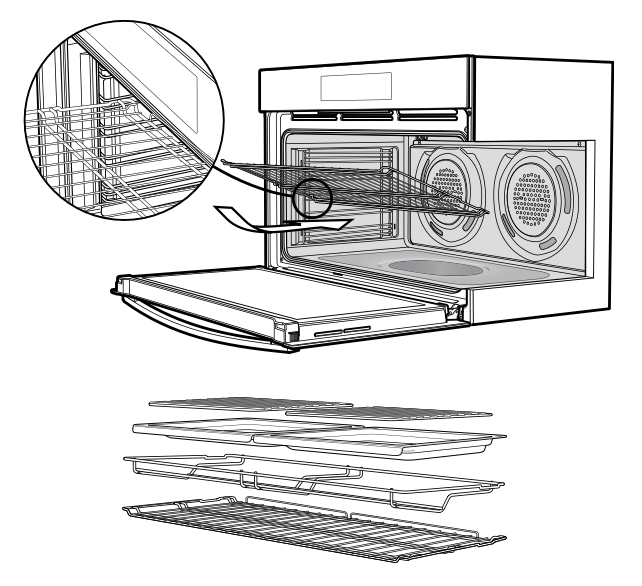
Removing the side racks or shelf supports
- Grasp the shelf support at the front.
- Pull it firmly inwards
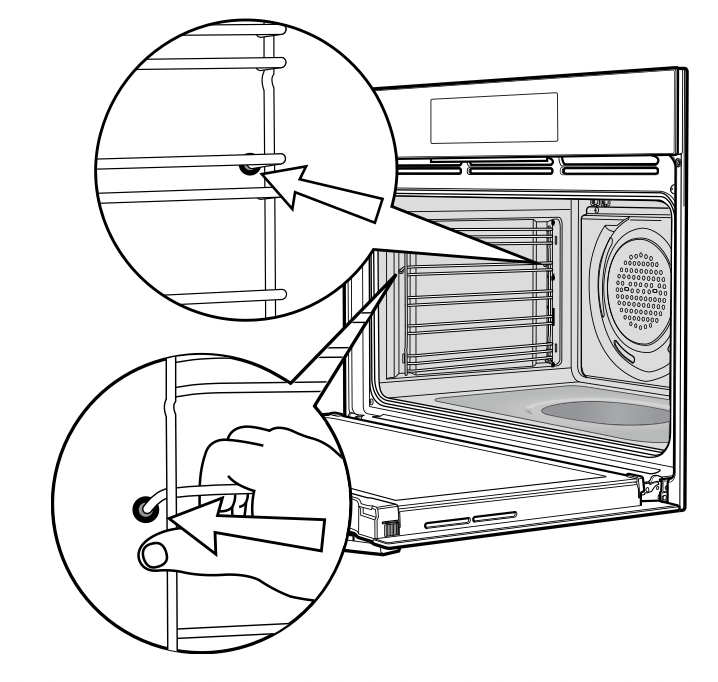
Cleaning your oven door
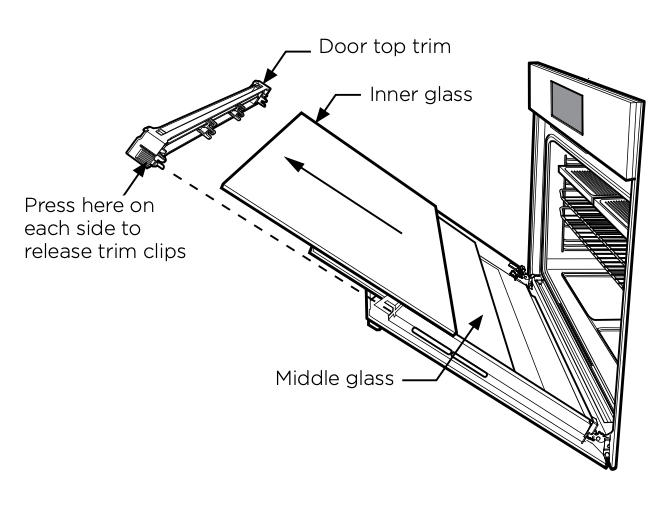
The oven door has been designed to allow the two inner door glasses to be removed for cleaning without removing the door from the product.
Removing the inner door glass for cleaning:
- Open the door fully to gain access to the hinges.
- Push down the hinge locking tab as shown in the diagram on both sides of door.
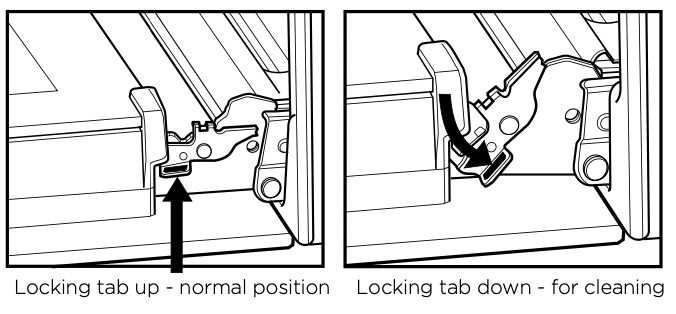
- Gently close the door until it stops in partially open position on the locking tab (the door will not fully close with the locking tab in the down position).
- In this position the top door trim can be removed by pushing each side on the serrated surface to release the clips and lift the trim away from the door.
- To remove the inner glass, tilt top of glass towards the oven and lift out.
- The middle glass is removed in the same way.
- The inner side of outer glass can be cleaned in-situ when inner and middle glass is removed.
- Clean glass using detergent and warm water, wipe clean and dry thoroughly.
Re-assembling the door glass panels:
- Replace the middle glass back to the door.
The middle glass is a clear pane and orientation of the glass is not important.
- Replace the inner glass back to the door, ensuring the side with black ceramic paint faces away from the oven cavity when door is closed.
- Fully open the door and return the locking tabs to their normal position and close the door.
Cleaning your oven door
WARNING
- DO NOT use the oven without the inner and middle door glass fitted.
- NEVER spray any caustic cleaners on any surface of the door or damage to the surface coatings will result.
- DO NOT use metal utensils, scrapers, scourers, or abrasive cleaners to clean the glass or any of the door trims. These will damage or scratch the surface coatings and degrade the finish and appearance.
- DO NOT place glass in dishwasher.
- Use only warm water and liquid detergent with a soft cloth to clean the glass or trims.
- Before refitting the glass panes to the door ensure they are dried with a soft cloth.
- The glass edges have been specially ground to remove any sharp edges. However it is glass, and should be handled carefully to avoid injury to your person and damage to the glass.
WARNING: Make sure the appliance power is switched off at the isolating switch before you remove or replace parts, to avoid the possibility of electric shock.
Changing the light globes
- There are 2 light globes located in the top of the oven cavity towards the front. The light globe glass is accessible between the passes of the upper element.
- To remove, turn oven light glass anti-clockwise.
- A special high temperature resistant globe should be used. This can be purchased from the customer care centre.
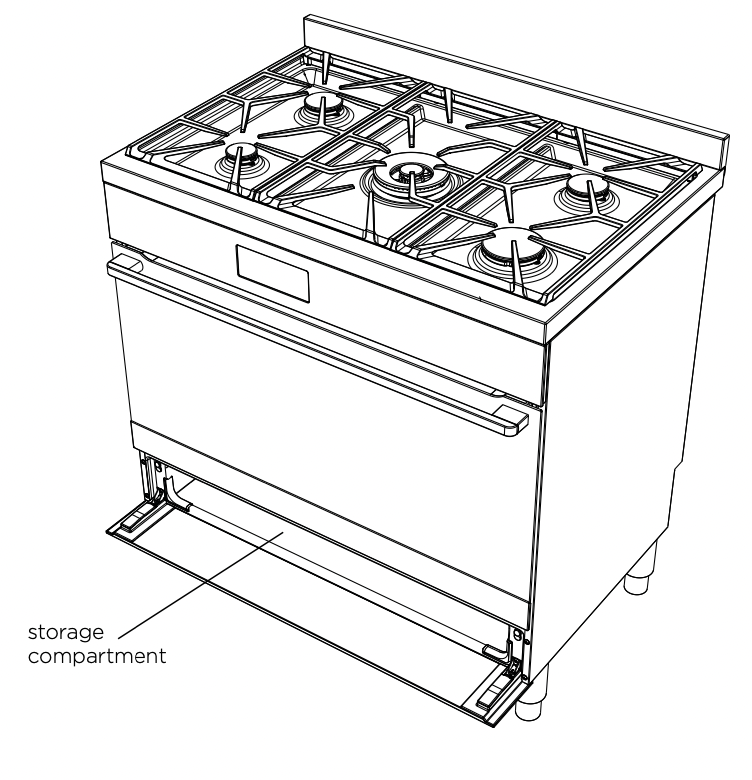
Storage compartment (selected models)
The storage compartment is accessible through the pivoting door.
Unused oven racks and grill dishes can be stored here.
WARNING: DO NOT store flammable or combustible items in the storage compartments. This is not a compartment for warming food.
TROUBLESHOOTING
Faults
If there is a problem with the oven and/or grill, please:
- Check the points listed below before calling for service.
It may be possible to avoid a call by fixing the problem yourself – and so continue cooking.
NOTE: We may charge for service even in the guarantee period if your problem is due to the causes listed below.
|
PROBLEM
|
POSSIBLE CAUSE |
WHAT TO DO |
| Oven or grill not working |
Power not turned on
Household fuse blown
Controls incorrectly set
Circuit breaker tripped
Clock not set
Demo Mode ‘ON’ (for WFE946, WVE916, WVEP916 & WFEP915)
Child Lock ‘ON’ (for WFE946 & WFE916)
|
Switch on electricity
Check fuses
Reset controls
Check circuit breaker
Set time of day on timer
Deactivate DEMO Mode. Refer to ‘Using your oven’
Deactivate Child Lock. Refer to ‘Using your oven’
|
|
Oven not heating enough
|
Foil or trays on bottom of oven
Oven not pre-heated
|
Remove foil or trays
Pre-heat oven for 30 mins
|
|
Light & fans on continuously
|
Timer not in manual mode
|
Set timer to manual mode
|
|
Oven not working
|
Timer not in manual mode
Household fuse blown
|
Set timer to manual mode
Check fuses
|
|
Oven light not working
|
Household fuse blown
Circuit breaker tripped
Lamp blown or loose in socket
|
Check fuses
Check circuit breaker
Replace or tighten lamp
|
|
Cooker smoking when first used
|
Protective oils being removed
|
Turn grill on high for 30 mins and then the oven on 220°C for 1 hour
|
|
Too much condensation building up when baking
|
Too much water used when cooking
|
Reduce amount of water
Leave oven door open after cooking
|
|
Smells when first using oven
|
Protective oils being removed
|
This is normal
|
|
Timer flashing
|
Power failure or interruption
|
Reset time of day
|
|
Burner will not light even though the sparker is working
|
Knob not held down long enough in ‘High’ position for flame safeguard (where fitted) to engage
Gas supply valve turned off
Wrong knob turned off
Port blockage in ignition area
Ignition spark plugs wet or dirty
|
Repeat lighting procedure and hold knob down for 5 seconds in ‘High‘ position
Turn on gas supply to appliance
Ensure the knob you are turning corresponds to the burner you wish to light
Ensure the ports in the ignition area are clean and dry
Dry or clean ignition spark plugs
|
|
No spark is obtained when control knob is activated
|
Electricity supply is disconnected or switched off
Ignition spark plugs wet ordirty
|
Switch on electricity or check fuses
Dry or clean ignition spark plugs
|
|
Flames uneven or tending to lift
|
Flame ports blocked or wet
Burner incorrectly fitted
|
Clean or dry flame ports
Ensure this component is fitted correctly
|
|
Flames not staying on when knob released
|
Knob not held down long enough in ‘High’ position for flame safeguard (where fitted) to engage
Knob not set between ‘High’ and ‘Low’
Dirt or spillage on flame safeguard sensor (where fitted)
|
Repeat lighting procedure and hold knob down for 5 seconds in ‘High‘ position
Knob MUST be set between these positions
Clean flameguard sensor tip
|
| Low heat, slow cooking |
Incorrect cooking pot or pan being used |
Refer to cooktop section for correct selection
|
|
Benchtop or knobs overheating
|
Incorrect cooking pot or pan being used
Pot or pan not located on burner properly
|
Refer to cooktop section for correct selection Ensure pot or pan is centrally located on burner |
| Shelf or telescopic runner slides out when door is opened |
Oven cavity is not level with the ground
|
Perform a check using a level to verify cause (refer to installation section).
If not level refer to installer
|
| Oven seal is loose |
The oven seal is only attached at each corner. It may seem like a loose fit but when the oven door is closed it will function correctly
|
No action necessary
|