OWNER’S MANUAL
COMMERCIAL WASHER
MODEL
GCWP1069CD/GCWP1069QD/GCWP1069LD
GCWP1069CD2/GCWP1069QD2/GCWP1069LD2
www.lg.com
Before beginning installation, read these instructions carefully. This will simplify
installation and ensure that the washer is installed correctly and safely.
Leave these instructions near the washer after installation for future reference.
P/No.: MFL67658510

2
PRODUCT FEATURES
PRODUCT FEATURES
DIRECT DRIVE SYSTEM
The advanced brushless DC motor drives the drum directly without using a belt and pulley.
TILTED DRUM AND EXTRA LARGE DOOR OPENING
The tilted drum and extra large opening make it possible to load and unload clothing more easily.
ULTRA CAPACITY
The larger drum enables more tumbling action and greater centrifugal force, but also less tangling
and wrinkling of the laundry. Heavier loads, such as king size comforters, blankets, and curtains can
be washed.
SEE-THROUGH DOOR AND BIG DOOR
You can see the laundry throughout the cycle.
MAGNETIC DOOR PLUNGER
Safely and conveniently secure the door slightly ajar with the magnetic door plunger. This will
promote air circulation and allow the interior of the machine to dry. To use this feature, after the load
has been removed, do not close the door completely. When the magnetic door plunger comes into
contact with the metal washer cabinet, it will secure the door slightly open allowing the interior of
the washer to dry.
STAINLESS STEEL DRUM
Stainless steel drum offers extreme durability.
TUB CLEAN
Regular cleaning of the tub on a monthly basis using TUB CLEAN can help keep the tub clean and
fresh.
3
IMPORTANT SAFETY INSTRUCTIONS
IMPORTANT SAFETY INSTRUCTIONS
READ ALL INSTRUCTIONS BEFORE USE
WARNING
For your safety, the information in this manual must be followed to minimize the risk of fire or
explosion, electric shock, or to prevent property damage, injury to persons, or death.
Your Safety and the safety of others are very important.
We have provided many important safety messages in this manual and on your appliance. Always
read and obey all safety messages.
This is the safety alert symbol.
This symbol alerts you to potential hazards that can kill or hurt you and others.
All safety messages will follow the safety alert symbol and either the word DANGER, WARNING,
CAUTION.
These words mean:
DANGER
You can be killed or seriously injured if you don’t immediately follow instructions.
WARNING
You can be killed or seriously injured if you don’t follow instructions.
CAUTION
You may be slightly injured or cause damage to the product if you do not follow instructions.
All safety messages will tell you what the potential hazard is, tell you how to reduce the chance of
injury, and tell you what can happen if the instructions are not followed.

4
IMPORTANT SAFETY INSTRUCTIONS
GROUNDING INSTRUCTIONS
This appliance must be grounded. In the event of malfunction or breakdown, grounding will reduce the risk
of electric shock by providing a path of least resistance for electric current. This appliance is equipped with
a cord having an equipment-grounding conductor and grounding plug. The plug must be plugged into an
appropriate outlet that is properly installed and grounded in accordance with all local codes and ordinances.
WARNING
Improper connection of the equipment-grounding conductor can result in risk of electric shock. Check with a
qualified electrician or servicer if you are in doubt as to whether the appliance is properly grounded. Do not
modify the plug provided with the appliance. If it does not fit the outlet, have a proper outlet installed by a
qualified electrician. Failure to follow these warnings can cause serious injury, fire, electric shock, or death.
BASIC SAFETY PRECAUTIONS
WARNING
To reduce the risk of fire, electric shock, or injury to persons when using this appliance, follow basic
precautions, including the following:
•
Before use, the washer must be properly installed
as described in this manual.
•
Do not wash articles that have been previously
cleaned in, washed in, soaked in, or spotted with
gasoline, dry cleaning solvents, or other flammable
or explosive substances,
as they give off vapors that
could ignite or explode.
•
Do not add gasoline, dry cleaning solvents, or other
flammable or explosive substances to the wash
water.
These substances give off vapors that could
ignite or explode.
• Under certain conditions, hydrogen gas may be
produced in a hot water system that has not been
used for 2 weeks or more. HYDROGEN GAS IS
EXPLOSIVE.
If the hot water system has not been
used for such a period, before using the washer,
turn on all hot water faucets and let the water flow
from each for several minutes.
This will release any
accumulated hydrogen gas. As the gas is flammable,
do not smoke or use an open flame during this time.
•
Do not allow children to play on or in the washer.
Close supervision of children is necessary when the
washer is used near children.
•
Before the washer is removed from service or
discarded, remove the door to prevent children
from climbing inside.
•
Do not install or store the washer where it will be
exposed to the weather or freezing temperatures.
•
Do not tamper with controls.
•
Do not repair or replace any part of the washer
or attempt any servicing other than as described
in this manual.
We strongly recommend that any
service be performed by a qualified technician.
•
See Installation Instructions for grounding requirements.
•
ALWAYS follow the fabric care instructions supplied
by the garment manufacturer.
•
Do not place items exposed to cooking oil in your
washer.
Items contaminated with cooking oils may
contribute to a chemical reaction that could cause a
load to catch fire.
•
Use fabric softeners or products to eliminate static
only as recommended by the manufacturer.
• This washer is not designed for maritime use or for
mobile installations such as in RVs, aircraft, etc.
•
Turn off the water faucets and unplug the washer if
the machine is to be left for an extended period of
time, such as during vacations.
•
Do not use to dry articles containing foam rubber
or similarly textured rubber-like materials.
• Packaging material can be dangerous for children.
There is a risk of suffocation!
Keep all packaging
from children.
•
Always check the inside of the washer for foreign
objects before loading laundry. Keep the door
closed when not in use.
•
Do not reach into the appliance if the tub or agitator
is moving.
• WARNING :
This product contains chemicals known
to the
State of California to cause cancer and birth
defects or other reproductive harm.
Wash hands
after handling.
IMPORTANT SAFETY INSTRUCTIONS
READ ALL INSTRUCTIONS BEFORE USE
WARNING
For your safety, the information in this manual must be followed to minimize the risk of fire or
explosion, electric shock, or to prevent property damage, injury to persons, or death.

5
IMPORTANT SAFETY INSTRUCTIONS
SAFETY INSTRUCTIONS FOR INSTALLATION
WARNING
To reduce the risk of fire, electric shock, or injury to persons when using this appliance, follow basic
precautions, including the following:
•
Refer to INSTALLATION INSTRUCTIONS for
detailed grounding procedures.
Installation
instructions are packed with the washer for
installer’s reference. If the washer is moved to a
new location, have it checked and reinstalled by a
qualified service technician. Failure to follow this
warning can cause serious injury, fire, electric shock,
or death.
•
Do not, under any circumstances, cut or remove
the third (ground) prong from the power cord.
Failure to follow this warning can cause serious
injury, fire, electric shock, or death.
•
For personal safety, this appliance must be properly
grounded.
Failure to follow this warning can cause
serious injury, fire, electric shock, or death.
•
The power cord of this appliance is equipped with
a 3-prong (grounding) plug which mates with a
standard 3-prong (grounding) wall outlet
to minimize
the possibility of electric shock from this appliance.
•
This washer must be plugged into a 120 VAC, 60 Hz
grounded outlet.
Failure to follow this warning can
cause serious injury, fire, electric shock, or death.
•
Have the wall outlet and circuit checked by a
qualified electrician to make sure the outlet is
properly grounded.
Failure to follow this warning
can cause serious injury, fire, electric shock, or
death.
•
Where a standard 2-prong wall outlet is
encountered, it is your personal responsibility
and obligation to have it replaced with a properly
grounded 3-prong wall outlet.
Failure to follow this
warning can cause serious injury, fire, electric shock,
or death.
•
Do not install on carpet. Install washer on a solid
floor.
Failure to follow this warning can cause
serious leak damage.
•
Do not remove ground prong. Do not use an
adapter or extension cord. Plug into a grounded
3-prong outlet.
Failure to follow these warnings can
cause serious injury, fire, electric shock, or death.
•
The washer should always be plugged into its own
individual electrical outlet which has a voltage rating
that matches the rating plate.
This provides the best
performance and also prevents overloading house
wiring circuits which could cause a fire hazard from
overheated wires.
•
Never unplug your washer by pulling on the power
cord.
Always grip plug firmly and pull straight out
from the outlet. Failure to follow this warning can
cause serious injury, fire, electric shock, or death.
•
Repair or immediately replace all power cords that
have become frayed or otherwise damaged. Do not
use a cord that shows cracks or abrasion damage
along its length or at either end.
Failure to follow
this warning can cause serious injury, fire, electric
shock, or death.
•
When installing or moving the washer, be careful
not to pinch, crush, or damage the power cord.
Failure to follow this warning can cause serious
injury, fire, electric shock, or death.
•
The washer must be installed and electrically
grounded by a qualified service person in
accordance with local codes
to prevent shock
hazard and assure stability during operation.
•
The washer is heavy. Two or more people may be
needed to install and move the appliance.
Failure to
do so can result in back or other injury.
•
Store and install the washer where it will not
be exposed to temperatures below freezing or
exposed to outdoor weather conditions.
Failure to
follow this warning can cause serious leak damage.
•
Do not install the washer in humid spaces to reduce
the risk of electric shock
. Failure to follow this
warning can cause serious injury, fire, electric shock,
or death.
•
To reduce the risk of injury to persons, adhere to all
industry recommended safety procedures including
the use of long sleeved gloves and safety glasses.
Failure to follow all of the safety warnings in this
manual could result in property damage, injury to
persons or death.
IMPORTANT SAFETY INSTRUCTIONS
READ ALL INSTRUCTIONS BEFORE USE
WARNING
For your safety, the information in this manual must be followed to minimize the risk of fire or
explosion, electric shock, or to prevent property damage, injury to persons, or death.

6
IMPORTANT SAFETY INSTRUCTIONS
SAFETY INSTRUCTIONS FOR USE, CARE, CLEANING, AND DISPOSAL
WARNING
To reduce the risk of fire, electric shock, or injury to persons when using this appliance, follow basic
precautions, including the following:
•
Unplug the washer before cleaning
to avoid
the risk of electric shock.
•
Never use harsh chemicals, abrasive cleaners,
or solvents to clean the washer.
They will
damage the finish.
•
Do not put oily or greasy rags or clothing on
top of the washer.
These substances give off
vapors that could ignite the materials.
•
Do not wash items that are soiled with
vegetable or cooking oil.
These items may
contain some oil after laundering. Due to the
remaining oil, the fabric may smoke or catch
fire by itself.
•
Disconnect this appliance from the
power supply before attempting any user
maintenance. Turning the controls to the OFF
position does not disconnect this appliance
from the power supply.
Failure to follow this
warning can cause serious injury, fire, electric
shock, or death.
•
Do not combine laundry products for use in
one load unless specified on the label.
•
Do not mix chlorine bleach with ammonia
or acids such as vinegar. Follow package
directions when using laundry products.
Incorrect usage can produce poisonous gas,
resulting in serious injury or death.
•
Do not reach into the washer while parts are
moving. Before loading, unloading, or adding
items, press the START/PAUSE button and
allow the drum to coast to a complete stop
before reaching inside.
Failure to follow this
warning can cause serious injury, fire, electric
shock, or death.
•
Do not allow children to play on or in the
washer. Close supervision of children is
necessary when the washer is used near
children. As children grow, teach them the
proper, safe use of all appliances.
Failure to
comply with these warnings could result in
serious injury to persons or death.
•
Destroy the carton, plastic bag, and other
packing materials after the washer is
unpacked. Children might use them for play.
Cartons covered with rugs, bedspreads, or
plastic sheets can become airtight chambers.
Failure to comply with these warnings could
result in serious injury to persons or death.
•
Keep laundry products out of children’s reach.
To prevent injury to persons, observe all
warnings on product labels.
Failure to comply
with these warnings could result in serious
injury to persons or death.
•
Remove the door to the washing compartment
to avoid the danger of children or small
animals getting trapped inside before your
washer is removed from service or discarded.
Failure to do so can result in serious injury to
persons or death.
IMPORTANT SAFETY INSTRUCTIONS
READ ALL INSTRUCTIONS BEFORE USE
WARNING
For your safety, the information in this manual must be followed to minimize the risk of fire or
explosion, electric shock, or to prevent property damage, injury to persons, or death.
SAVE THESE INSTRUCTIONS

7
TABLE OF CONTENTS
TABLE OF CONTENTS
2 PRODUCT FEATURES
3
IMPORTANT SAFETY INSTRUCTIONS
3 BASIC SAFETY PRECAUTIONS
4 GROUNDING INSTRUCTIONS
5
SAFETY INSTRUCTIONS FOR INSTALLATION
6 SAFETY INSTRUCTIONS FOR USE,
CARE, CLEANING, AND DISPOSAL
8
PARTS AND ACCESSORIES
8 Parts
8 Accessories
9
CONTROL PANEL FEATURES
9 Coin / Card type
10 OPL type
12
INSTALLATION INSTRUCTIONS
12 Checking and choosing the proper location
13 Unpacking and removing shipping bolts
14 Connecting the water lines
15 Connecting the drain line
16 Leveling the washing machine
17 PREPARATION
17
Precautions for fabric care before wash cycle
18 Fabric Care Labels
18 Sorting laundry
19 Using detergent/fabric softener
19 - Recommended detergent
19 - About the dispenser
20 - Loading the dispenser
21 OPERATING YOUR WASHER
22 PROGRAMMING MODE
23 Card / Coin type
24 OPL type
25 Programming mode - Setup Mode
25 - 1. How to change regular price.
26 - 2. How to change regular delicates price.
27 - 3. How to change regular warm & cold
price
28 - 4. How to change regular hot price
29 - 5. How to change special price
30 - 6. How to change special delicates price
31 - 7. How to change special warm & cold
price
32 - 8. How to change special hot price
33 - 9. How to change add super wash price
34 - 10. How to change add super wash type
35 - 11. How to enter the
36 - 11-1. Special price day setup
37 - 11-2. Non-stop rinse
38 - 11-3. Add super wash setup
39 - 11-4. Vend type setup - card type or coin
type setup
40 - 11-5. Pre-wash set up
41 - 11-6. Twin spray set up
42 - 12. How to enter the special price day
43 - 12-1. How to change to Sunday
44 - 13. Special price beginning time setup
45 - 14. Special price ending time setup
46 - 15. Washing time set up
47 - 16. Rinsing times per cycle
48 - 17. Rinsing time setup
49 - 18. Top spin speed – final spin time
depends on RPM
50 - 19. Value of coin 1
51 - 20. Value of coin 2
52 - 21. Penny increment pricing offset
53 - 22. How to change the water level
54 - 23. Beep volume
55 - 24. Time to keep the coin (Use only for
coin type)
56 - 25. How to setting drop count
57 - 26. How to setting rinse spin enable
58 - 27. How to enter the
59 Programming Mode - Test mode
59 - 1.
60 - 2. Factory reset -
61 - 3. Time set up
62 - 4. Courtesy cycle
63 - 5. Cycle Kill
64 - 6. Password -
65 - 7. Tub clean -
66 Programming Mode - Collect mode
67 Collect Mode Data lists
68 MAINTENANCE
68 Care after wash
68 - Storing the Washer
68 - Cleaning the Dispenser
69 - Cleaning the water inlet filters
70 - Cleaning the drain pump filter
71 - Cleaning the door seal
71 - Clean the drum, TUB CLEAN
72 ERROR MODE
73 POWER FAIL RECOVERY
73 DEFAULT WASHER SETTINGS
73 SPECIFICATIONS
8
PARTS AND ACCESSORIES
PARTS AND ACCESSORIES
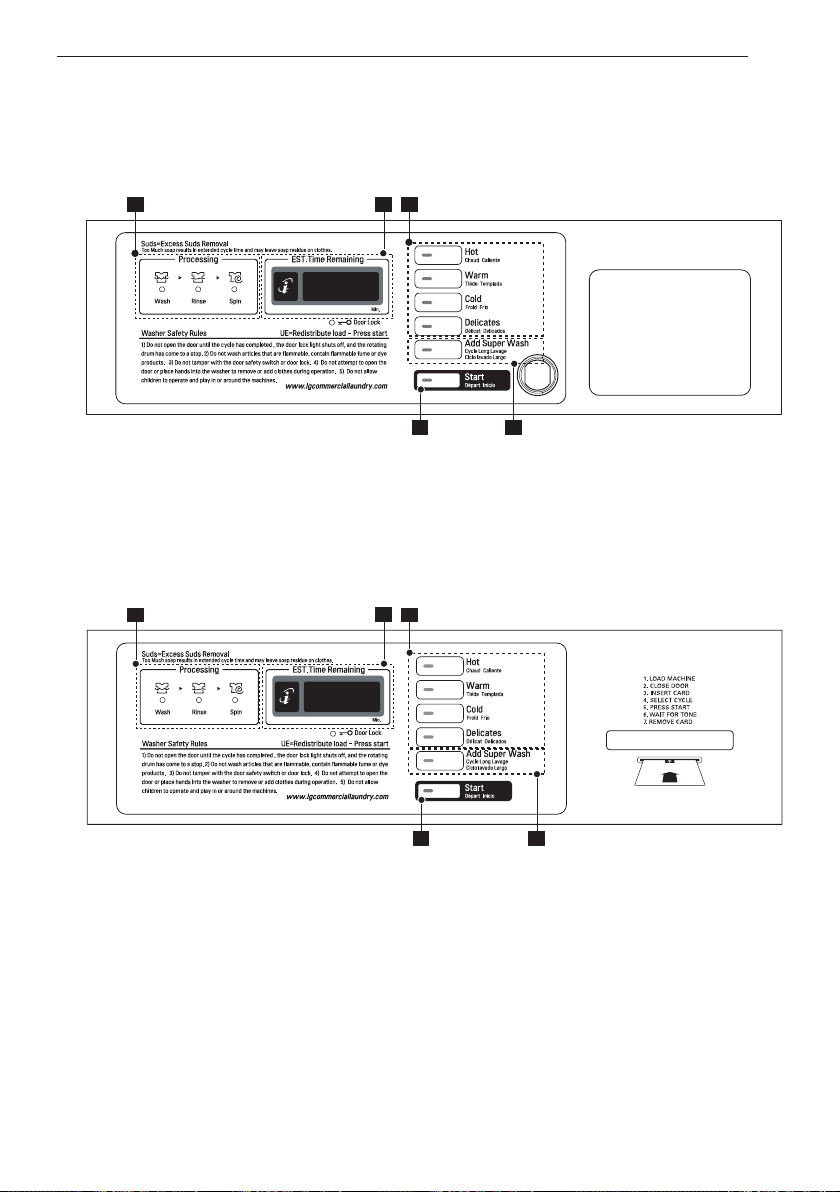
Parts
Accessories
Detergent
dispenser
drawer
Door
Magnet Door
Plunger
(see page 2)
Control
panel
Door seal
Tub
Leveling
feet
Drain pump filter cover
Drain pump filter
Drain hose
Water
inlets
Shipping
bolts
Power cord
Drain hose
Hot and Cold
Water Hoses
Non-skid pads
Caps (4)
(for covering shipping bolt holes)
Wrench
(for removing
shipping bolts and
adjusting leveling feet)
Tie Strap
(for securing drain hose)
Elbow Bracket
(for securing drain hose)
9
CONTROL PANEL FEATURES
4 3
1 25
1 25
1 25
4 3
1 25
4
3
1 25
4 3
Optional function button
CONTROL PANEL FEATURES
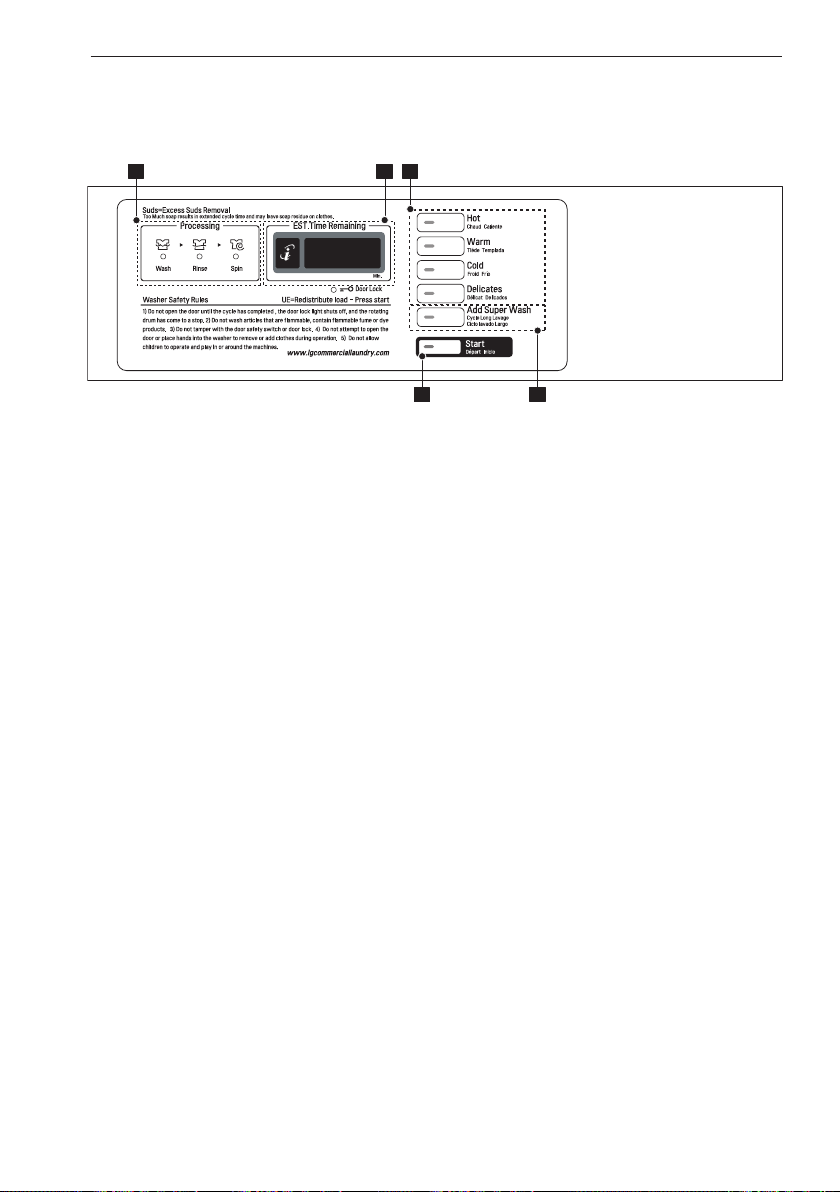
Coin type (GCWP1069QD / GCWP1069QD2)
Card type (GCWP1069CD / GCWP1069CD2)
4 3
1 25
1 25
1 25
4 3
1 25
4
3
1 25
4 3
Optional function button
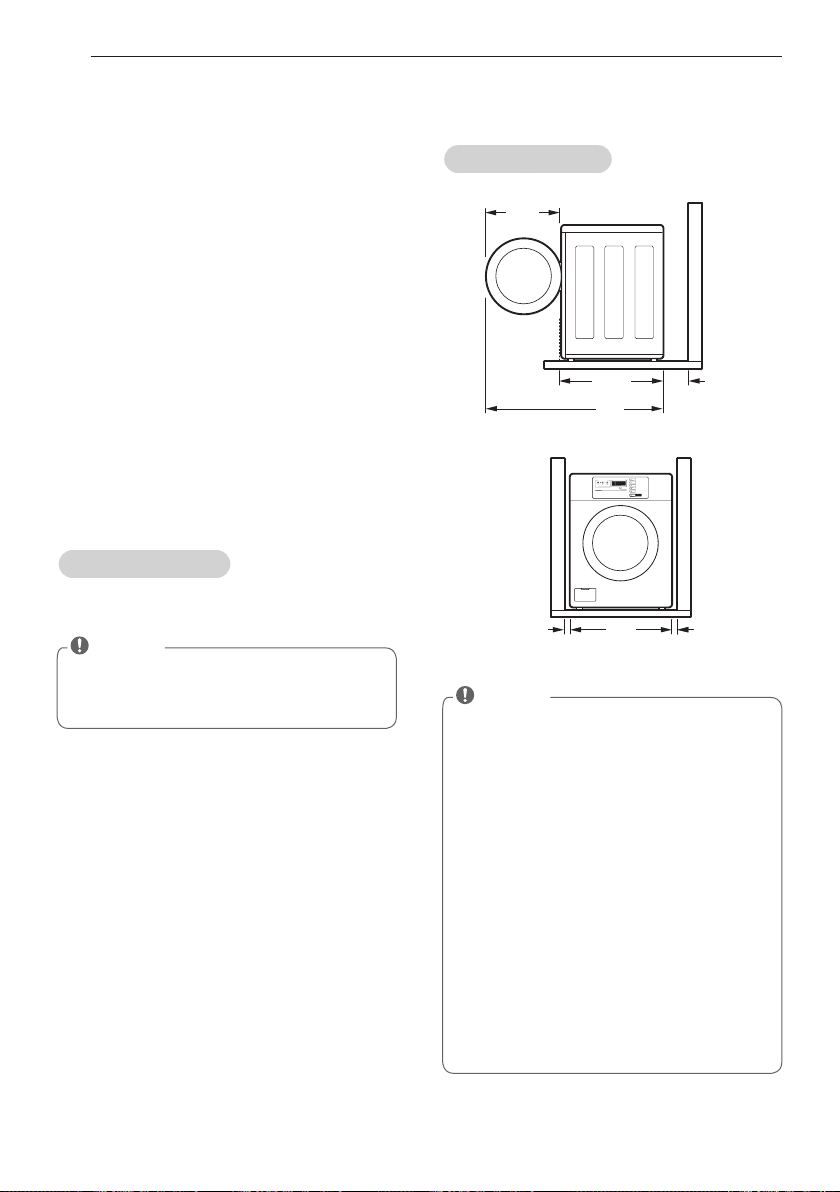
1. Display LED
2. Cycle button
3. Optional cycle button
4. Start button
5. Status LED
10
CONTROL PANEL FEATURES
4 3
1 25
1 25
1 25
4 3
1 25
4
3
1 25
4 3
Optional function button
OPL type (GCWP1069LD / GCWP1069LD2)
1. Display LED
2. Cycle button
3. Optional cycle button
4. Start button
5. Status LED

11
CONTROL PANEL FEATURES
Display LED
The display shows the vend price and
remaining time and programming options. Error
codes are also displayed here.
Optional function button
Wash time or rinse cycle can be added when
additional coin is inserted or a valid cash card is
entered.
Start button
The START LED flashes when the full vend
price has been satisfied and the cycle has been
chosen.
Status LED
Cycle button
Press the CYCLE button to select the desired
cycle based on laundry types and conditions.
Hot
Use for hot washing for heavy fabrics, such as
white clothes, table linens, and heavily soiled
clothes.
Warm
Use for warm washing for heavy fabrics, such
as jeans, corduroys, or work clothes.
Cold
Use for cold washing for sturdy fabrics, such
as casual work.
Delicates
Use for cold washing for synthetic fabrics,
such as washable knit fabric and no-iron
finishes.
Start button
Display LEDStatus LED Cycle button
Optional function button
LED Description
LED flashes whenever the
washing cycle is in operation.
LED flashes whenever the
Rinsing cycle is in operation.
LED flashes whenever the
Spining cycle is in operation.
LED flashes whenever the
door lock is activated.
12
INSTALLATION INSTRUCTIONS
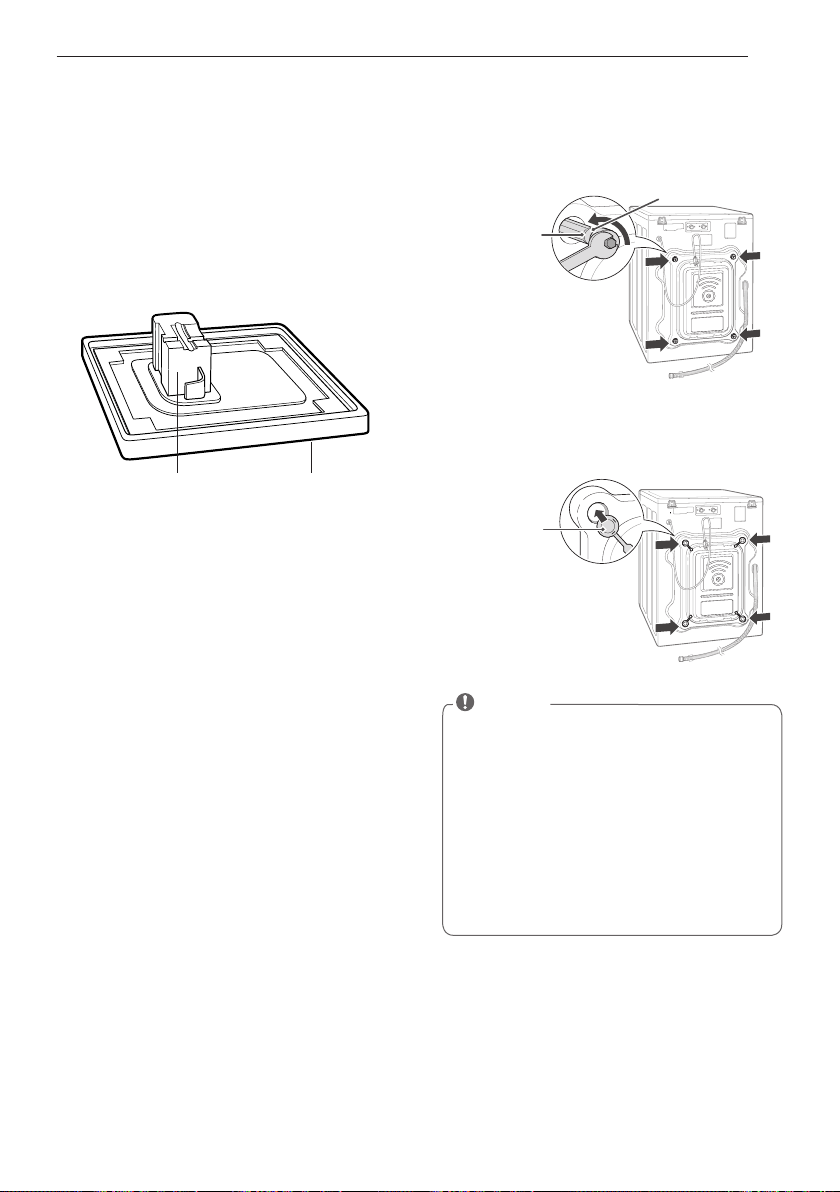
Space requirements
You must allow sufficient space for water lines,
the drain line, and airflow.
Installing on a floor
Install the washing machine on a solid floor
that is strong and rigid enough to support the
weight of the washing machine, even when
fully loaded, without flexing or bouncing. If
the floor has too much flex, you may need to
reinforce it to make it more rigid. If the floor
is not solid, it may cause severe vibration and
noise.
1
Clean the floor before installation.
- Make sure to select solid and smooth
ground.
2
Two or more people are needed for moving
and unpacking the washing machine.
3
Allow for sufficient space between the walls
and the washing machine for installation.
Checking and choosing the
proper location
29
3
/4”
(75.6 cm)
51”
(129.7 cm)
4”
(10 cm)
22
1
/4”
(57 cm)
27”
(68.6 cm)
1”
(2.5 cm)
1”
(2.5 cm)
INSTALLATION INSTRUCTIONS
NOTE
• Be sure to allow for wall, door, or floor
moldings that may increase the required
clearances.
NOTE
• The floor must be strong and rigid enough
to support the weight of the washer, when
fully loaded, without flexing or bouncing. If
your floor has too much flex, you may need
to reinforce it to make it more rigid.
A floor that is adequate for a top-loading
washer may not be rigid enough for a front
loading washer, due to the difference in the
spin speed and direction. If the floor is not
solid, your washer may vibrate and you may
hear and feel the vibration throughout your
house.
• Before installing the washer, make sure
the floor is clean, dry and free of dust, dirt,
water and oils so the washer feet can not
slide easily. Leveling feet that can move or
slide on the floor can contribute to excess
vibration and noise due to poor contact
with the floor.
13
INSTALLATION INSTRUCTIONS
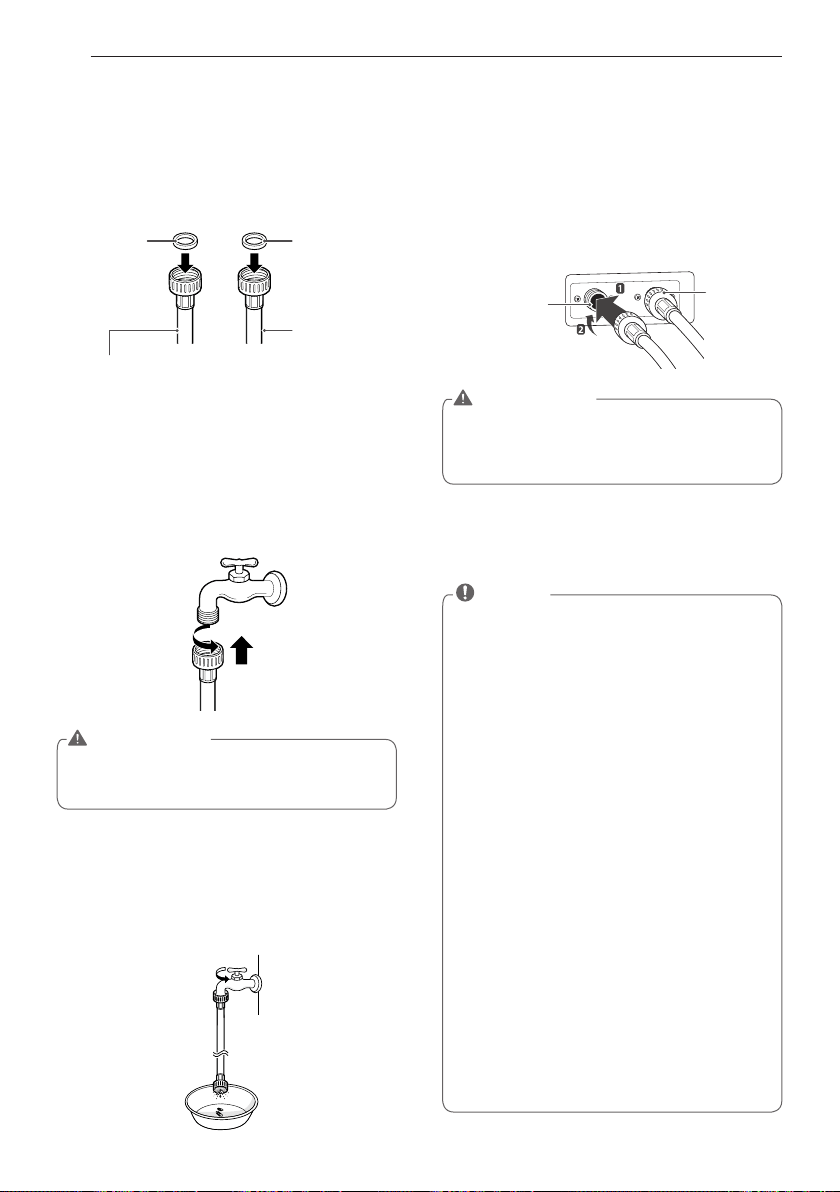
Foam Tub Support Carton Base
1
Remove the bottom two shipping bolts
with the wrench (included) to fully loosen
all four shipping bolts by turning them
counterclockwise and then pulling them out.
2
Locate the four hole caps included in the
accessory pack and install them in the
shipping bolt holes.
Unpacking and removing
shipping bolts
When removing the washer from the carton
base, be sure to remove the foam drum
support in the middle of the carton base.
If you must lay the washer down to remove
the base packaging materials, always lay it
carefully on its side.
DO NOT lay the washer on its front or back.
Shipping
bolt
Retainer
Cap
NOTE
• Save the bolt assemblies for future use. To
prevent damage to internal components,
DO NOT transport the washer without
reinstalling the shipping bolts.
• Failure to remove shipping bolts and retain-
ers may cause severe vibration and noise,
which can lead to permanent damage to
the washer. The cord is secured to the
back of the washer with a shipping bolt to
help prevent operation with shipping bolts
in place.
14
INSTALLATION INSTRUCTIONS
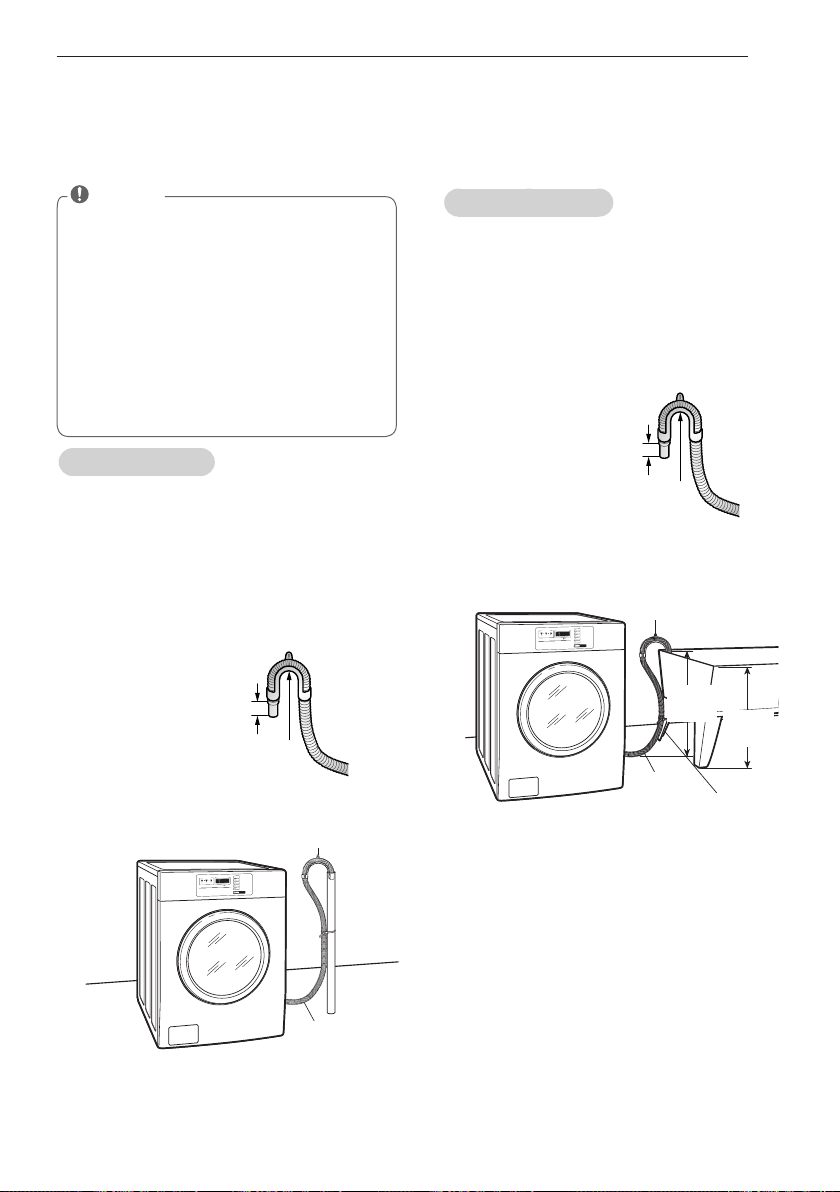
Connecting the water lines
1
Check the rubber seals on both sides of the
hose.
- Insert a rubber seal into the threaded
fittings on each hose to prevent leaking.
2
Connect the water supply hoses to the HOT
and COLD water faucets tightly by hand and
then tighten another 2/3 turn with pliers.
- Connect the blue hose to a cold water
faucet and the red hose to a hot water
faucet.
4
Connect the hoses to the water inlets tightly
by hand and then tighten another 2/3 turn
with pliers.
- Connect the blue hose to the cold water
inlet and the red hose to the hot water
inlet.
5
Check for leaks by turning on the faucets.
- If water leaks, check steps 1 to 4 again.
3
After connecting inlet hose to water faucets,
turn on the water faucets to flush out
foreign substances (dirt, sand, sawdust)
in the water lines. Let water drain into a
bucket, and check the water temperature.
Cold water
inlet
Hot water
inlet
WARNING
• Do not overtighten. Damage to the cou-
pling can result.
WARNING
• Do not overtighten the hoses.
Overtightening can damage the valves
resulting in leaking and property damage.
NOTE
• For your safety, and for extended product
life, use only authorized components. The
manufacturer is not responsible for product
malfunction or accidents caused by the
use of separately purchased unauthorized
parts.
• Use new hoses when you install the
washing machine. Do not reuse old hoses.
Use only the inlet hoses provided with the
washer. LG does not recommend the use
of aftermarket hoses.
• Periodically check the hoses for cracks,
leaks and wear, and replace the hoses
every 5 years.
• Do not stretch the water hoses intentionally,
and make sure that they are not crushed by
other objects.
• Water supply pressure must be between
14.5 PSI and 116 PSI (100~800 kPa). If the
water supply pressure is more than 116
PSI, a pressure reducing valve must be
installed.
• To provide optimum washing performance
the hot water temperature should be set at
120-135°F (48-57°C) and the cold at 60°F
(15°C).
Rubber
seal
Water hose
(To water inlet on the
washing machine)
Rubber
seal
Water hose
(To faucet)
15
INSTALLATION INSTRUCTIONS
Connecting the drain line
Secure the drain hose in place to prevent
moving and leaking.
Using a standpipe
1
Clip the end of the hose into the elbow
bracket.
- Connect the elbow bracket within 4 inches
(10 cm) from the end of the drain hose.
If the drain hose is extended more than
4 inches (10 cm) beyond the end of the
elbow bracket, mold or microorganisms
could spread to the inside of the washer.
Using a laundry tub
1
Clip the end of the hose into the elbow
bracket.
- Connect the elbow bracket within 4 inches
(10 cm) from the end of the drain hose.
If the drain hose is extended more than
4 inches (10 cm) beyond the end of the
elbow bracket, mold, or microorganisms
could spread to the inside of the washer.
2
Hang the end of the drain hose over the side
of the laundry tub.
3
Use a tie strap to secure the drain hose in
place.
Elbow Bracket
Drain Hose
No more than
4 inches (10 cm)
Elbow Bracket
No more than
4 inches (10 cm)
Elbow Bracket
Drain Hose
Elbow
Bracket
Tie Strap
Laundry Tub
max. 96”
(2.4 m)
2
Insert the end of the drain hose into the
standpipe.
3
Use a tie strap to secure the drain hose in
place.
NOTE
• The drain hose should be properly secured.
Failure to properly secure the drain hose
can result in flooding and malfunction.
• Total height of the hose end should not
exceed 96 inches (244.8 cm) from the bot-
tom of the washer.
• The drain must be installed in accordance
with any applicable local codes and regula-
tions.
• Make sure that the water lines are not
stretched, pinched, crushed, or kinked.
max. 96”
(2.4 m)
16
INSTALLATION INSTRUCTIONS
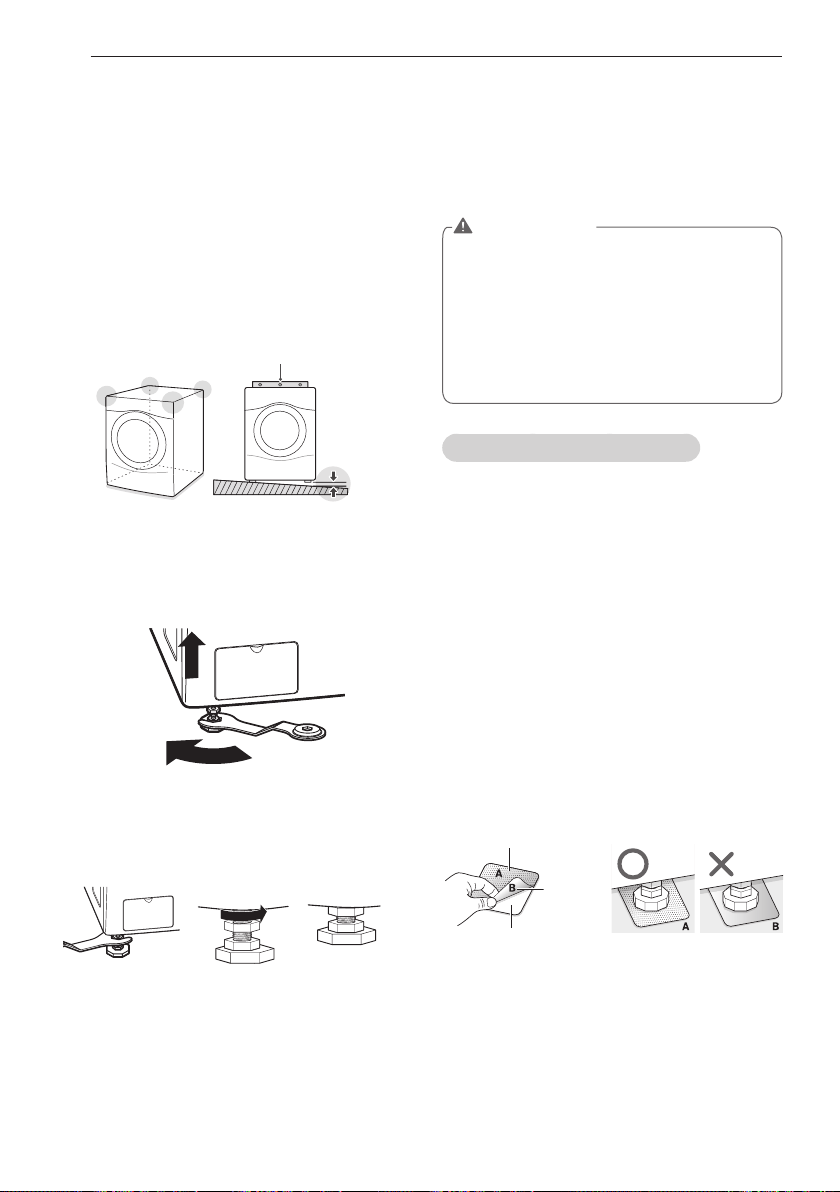
Leveling the washing machine
The washer tub of your new washing machine
spins at very high speeds. To minimize vibration,
noise, and unwanted movement, the floor must
be perfectly level and solid.
1
Check the washing machine’s level.
- Check the precise level by rocking the top
edges of the washing machine or placing
a level on the washing machine. The slope
beneath the washing machine must not
exceed 1°, and all four leveling feet must
rest firmly on the floor.
2
Turn the lower leveling feet clockwise to
level the washing machine.
- Turning the lower leveling feet clockwise
raises the washing machine.
3
Turn the locknuts counterclockwise and
tighten them when the washing machine is
level.
4
Check the washing machine’s level again.
- Push or rock the top edges of the washing
machine gently to make sure that the
washing machine does not rock.
- If the washing machine rocks, repeat steps
1 to 3.
Using non-skid pads (optional)
If you install the washing machine on a slippery
surface, it may move because of excessive
vibration. Incorrect leveling may cause
malfunction through noise and vibration. In the
event of this, lay the non-skid pads under the
leveling feet and adjust the level.
1
Clean the floor to attach the non-skid pads.
- Use a dry rag to remove and clean foreign
objects or moisture. If moisture remains,
the non-skid pads may slip.
2
Adjust the level after placing the washing
machine in the installation area.
3
Place the adhesive side of the non-skid pad
on the floor.
- It is most effective to install the non-skid
pads under the front legs. If it is hard to
place the pads under the front legs, place
them under the back legs.
4
Check the washing machine’s level again.
- Push or rock the top edges of the washing
machine gently to make sure that the
washing machine does not rock. If the
washing machine rocks, level the washing
machine again.
Level
1°
Raise
Tighten all 4 lock
nuts securely
using the wrench.
Remove
backing
This side up
Adhesive
side
WARNING
• Using the washing machine without level-
ing, it may result in malfunction caused
by the production of excess vibration and
noise.
• Use the leveling feet only when you level
the washing machine. If you raise the level-
ing feet unnecessarily, it may cause abnor-
mal vibration of the washing machine.

17
PREPARATION
Check all pockets to make sure that they are
u
empty.
- Items such as clips, matches, pens, coins,
and keys can damage both your washer
and your clothes.
Close zippers, hooks, and drawstrings
u
to prevent these items from snagging or
tangling on other clothes.
Pretreat heavily stained areas before
u
washing.
- Doing so will produce clean, stain-free
results.
Combine large and small items in a load.
u
Load large items first.
Large items should not be more than half of
u
the total washload.
The washer can be fully loaded, but the
u
drum should not be tightly packed with
items.
- The door of the washer should close easily.
Do not wash single items, except for bulky
u
items such as blankets. Make sure to wash
laundry in similar types of loads.
- Washing a single small item may result in
the tub becoming unbalanced, vibrating,
making a noise.
Do not wash waterproof clothes.
u
- This may cause abnormal vibration or may
cause the load to bounce, which could
damage the tub.
Check if there are any other foreign objects
u
in the door seal and take extra care that
clothes do not get caught there.
- Foreign objects in the door seal may stain
clothes, and water may leak if clothes get
caught in the door seal.
Wash underwear or small, light items in a
u
laundry net.
- Small, light items may get caught in the
door seal, and a brassiere hook may
damage other items or the tub.
Brush heavy soil, dust, or hair off fabrics
u
before washing.
- Laundry may not wash clean if there is
dirt or sand on the fabrics, or they may be
damaged due to particles rubbing against
sheer fabrics.
Wash blankets individually.
u
- Washing more than one blanket together
may produce unclean results due to
tangling or an unbalanced load.
Always separate fabrics according to their
u
colors and wash them separately to prevent
colors from running.
- Fabrics may damage or become stained
due to fabric dyes running or due to foreign
objects transferring from one fabric to
another.
PREPARATION
Precautions for fabric care before wash cycle
Read and observe the following to prevent shrinkage or damage to clothes.
18
PREPARATION
Category Label Directions
Washing
Hand Wash
Machine Wash,
Normal Cycle
Use Permanent Press/
Wrinkle Resistant
washing machine
setting (which has
a cool down or cold
spray before the
reduced spin)
Use Gentle/Delicate
washing machine
setting (slow agitation
and/ or reduced wash
time).
Do Not Wash
Do Not Wring
Water
Temperature
Hot
Warm
Cold/Cool
Bleach
symbols
Any Bleach (When
Needed)
Only Non-Chlorine
Bleach
(When Needed)
Do Not Bleach
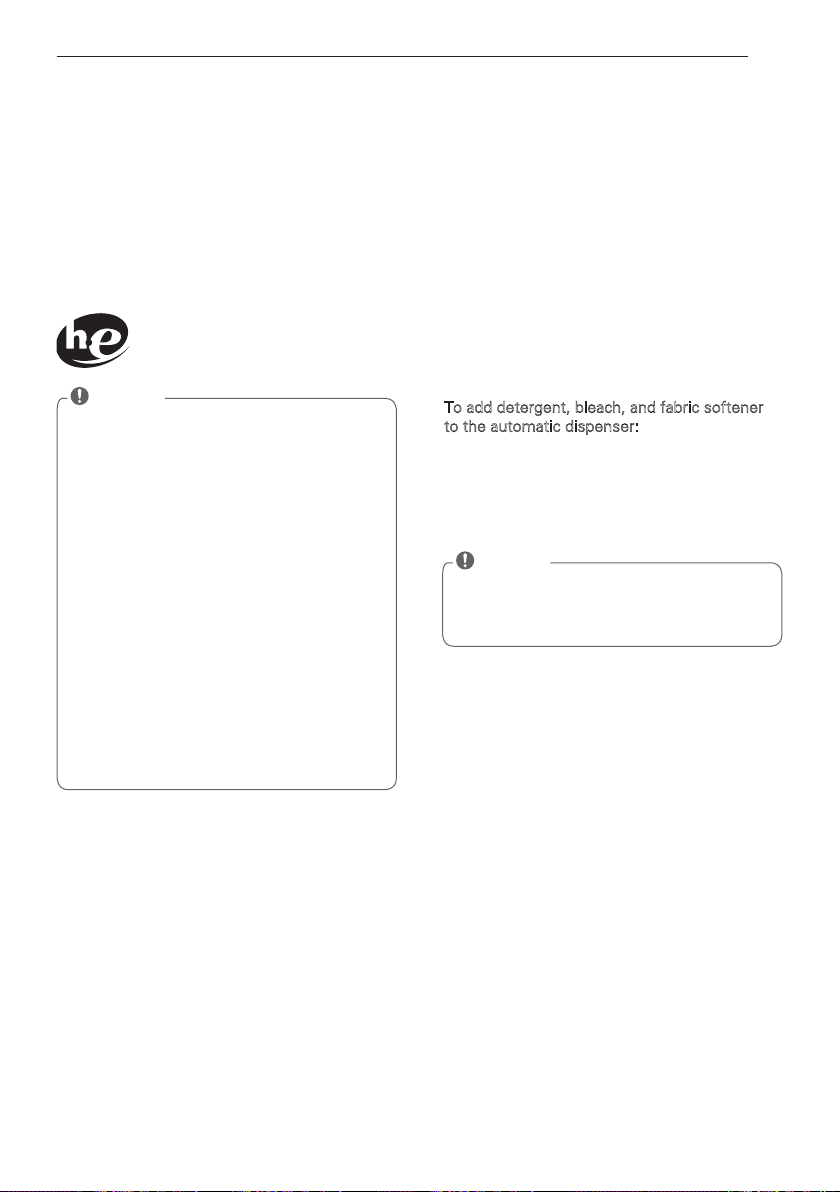
Fabric care labels
Most articles of clothing feature fabric care
labels that include instructions for proper care.
Colors
Whites / Lights / Darks
Soil
Heavy / Normal / Light
Fabric
Delicates / Easy Care / Sturdy
Cottons
Lint
Lint Producers / Lint Collectors
Sorting laundry
It is recommended that you sort laundry into
similar loads that are washable in the same
cycle.
Refer to the following chart for sorting clothes
19
PREPARATION
About the dispenser
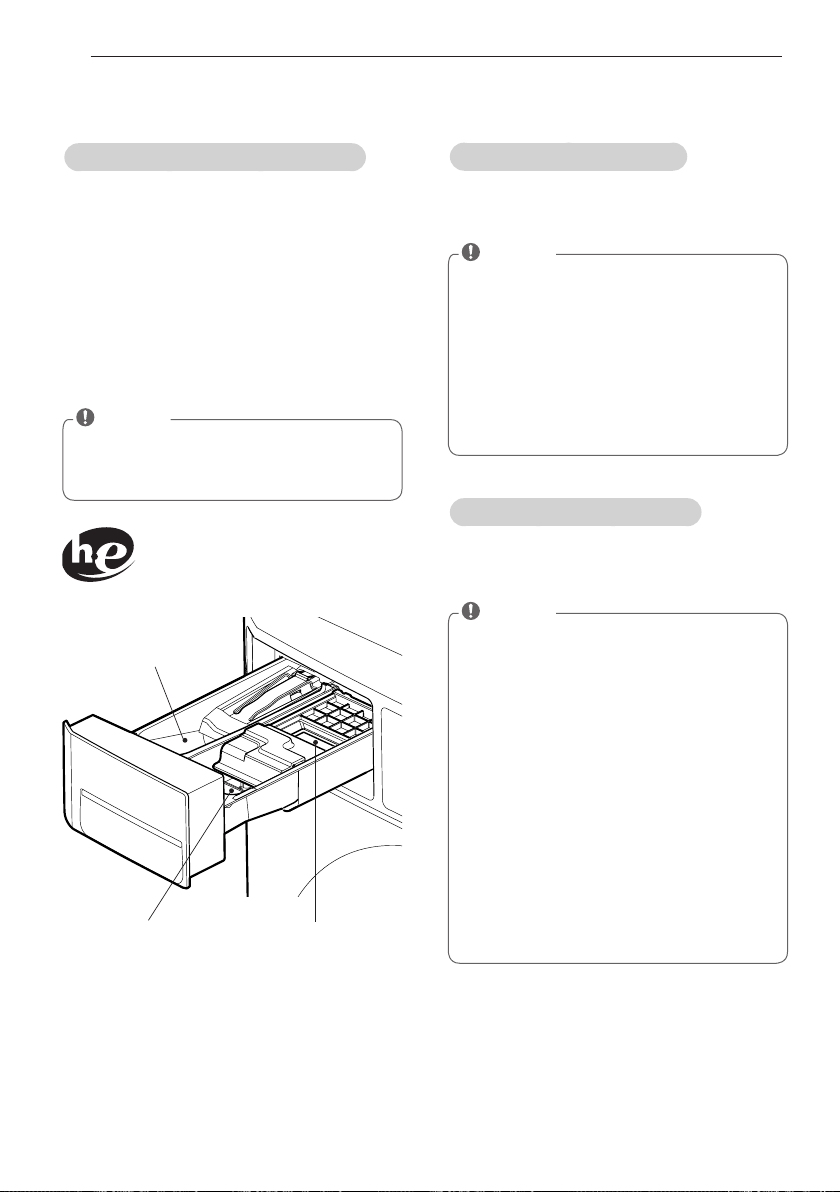
The automatic dispenser consists of three
compartments which hold:
• Liquid chlorine bleach.
• Liquid fabric softener.
• Liquid and powdered detergent and color-
safe bleach for main wash.
All laundry products can be added at once
in their respective dispenser compartments.
They will be dispensed at the appropriate time
for the most effective cleaning.
After adding the laundry products to the
dispenser, close the dispenser cover.
To add detergent, bleach, and fabric softener
to the automatic dispenser:
1. Open the dispenser cover.
2. Load the laundry products into the
appropriate compartments.
3. Slowly close the dispenser cover to avoid
early dispensing of the laundry products.
Using detergent/fabric softener
Recommended detergent
Make sure to use HE (High-Efficiency)
detergent for front-loading washing machines.
HE detergents dissolve more efficiently
and produce fewer suds to ensure efficient
washing and rinsing. Use the correct amount
of detergent as indicated on the label of the
detergent packaging.
Designed specially to use only
HE (High-Efficiency) detergent
NOTE
• Only use HE detergents, since using a
regular detergent will produce excessive
suds.
• HE detergents produce fewer suds,
dissolve more efficiently to improve
washing and rinsing performance, and help
to keep the interior of your washer clean.
• Use less detergent for soft water.
• Wipe up any spills immediately, as liquids
could damage the finish and the control
panel of the washing machine.
• Using too much detergent can cause
a build-up in the tub resulting in
unsatisfactory performance and machine
malfunction.
• If you use a detergent that does not
dissolve easily or a detergent with high
viscosity, it will leave a residue on the tub,
which may not rinse properly.
NOTE
• It is normal for a small amount of water to
remain in the dispenser compartments at
the end of the cycle.
20
PREPARATION
Loading the dispenser
Main Wash Detergent Compartment
This compartment holds laundry detergent
for the main wash cycle, which is added to
the load at the beginning of the cycle. Always
use HE (High-Efficiency) detergent with your
washing machine.
Follow the detergent manufacturer's
instructions with respect to the amount of
detergent to use, and never use more than
the recommended amount. Using too much
detergent can result in detergent buildup in
clothing and the washer. Either powdered or
liquid detergent may be used.
Liquid Bleach Compartment
This compartment holds liquid chlorine bleach,
which will be dispensed automatically at the
proper time during the wash cycle.
Fabric Softener Compartment
This compartment holds liquid fabric softener,
which will be automatically dispensed during
the final rinse cycle.
Main Wash Detergent
Compartment
Liquid Chlorine
Bleach Compartment
Liquid Fabric
Softener Compartment
Designed specially to use only
HE (High-Efficiency) detergent
NOTE
• Liquid or powdered color-safe bleach may
be added to the main wash compartment
with detergent of the same type.
NOTE
• Do not add powdered or liquid color-safe
bleach to this compartment.
• Always follow the manufacturer’s recom-
mendations when adding bleach. Do not
exceed the maximum fill line. Using too
much bleach can damage fabrics.
• Never pour undiluted liquid chlorine bleach
directly onto the load or into the drum.
Fabric damage can occur.
NOTE
• Always follow the manufacturer’s recom-
mendations when adding fabric softener.
Do not exceed the maximum fill line. Using
too much fabric softener may result in
stained clothes.
• Dilute concentrated fabric softeners with
warm water. Do not exceed the maximum
fill line.
• Never pour fabric softener directly onto the
load or into the drum.
• Do not add the fabric softener sheets to
this compartment.
• Do not add ‘fabric sheet softener’ into the
dispenser draw as it is likely to cause water
to leak out. If ‘fabric sheet softener’ has
been added, please pull out the dispenser
draw and remove.
21
OPERATING YOUR WASHER
OPERATING YOUR WASHER
❋
Do not work any button and stop the washer
(When the washer is operating) or (when a
cycle is in progress)
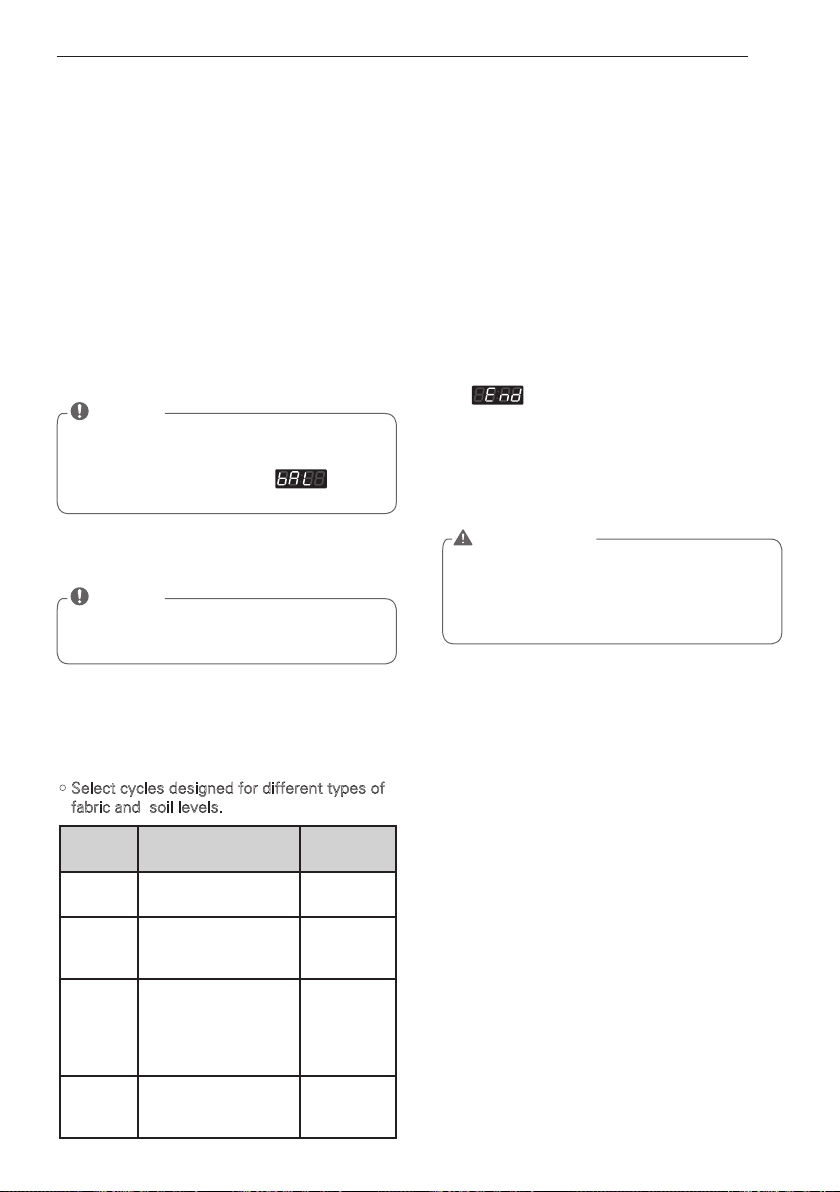
1. Ready mode
1) Coin / Card type
– The cycle LEDs flash at the same time,
when the price of cycles are equal.
2) OPL type
– The cycle LEDs is lit at the same time,
and displayed PUSH.
4. Add super wash
Wash time or rinse cycle can be added
when additional coin is inserted or a valid
cash card is entered.
5. Change course
You cannot change the cycle while the
machine is running.
6. Cycle finish
The machine stops and LED display shows
with beeper sound.
2.
Insert card/coin (not for OPL type)
Insert a cash card that has a sufficient balance.
The card balance should be more than the
programmed vend price for a selected cycle.
3. Select the cycle
Press the desired button and press the
Start button. The display LED will show the
remaining time and the selected cycle starts.
• Select cycles designed for different types of
fabric and soil levels.
• Insert a sufficient amount of change that
is more than the programmed vend price
for the selected cycle.
CYCLE Fabric type
Wash/Rinse
Temp.
Hot
Cotton, linen, towels,
shirts, sheets
Hot / Cold
Warm
Cotton, mixed loads,
work clothes, jeans,
shirts
Warm /
Cold
Cold
Cotton, dress shirts,
pants, wrinkle-free
clothing, cotton/
poly blend clothing,
tablecloths
Cold / Cold
Delicates
Dress shirts, blouses,
nylons, sheer or
lacey garments
Cold / Cold
NOTE
• When the card balance is not enough,
machine displays the card balance for 5
seconds and then displays
mes-
sage repetitively
NOTE
• The machine will not start until sufficient
coins are inserted.
WARNING
• To reduce the risk of fire, electric shock, or
injury to persons, read the IMPORTANT
SAFETY INSTRUCTIONS before operating
this appliance.
22
PROGRAMMING MODE
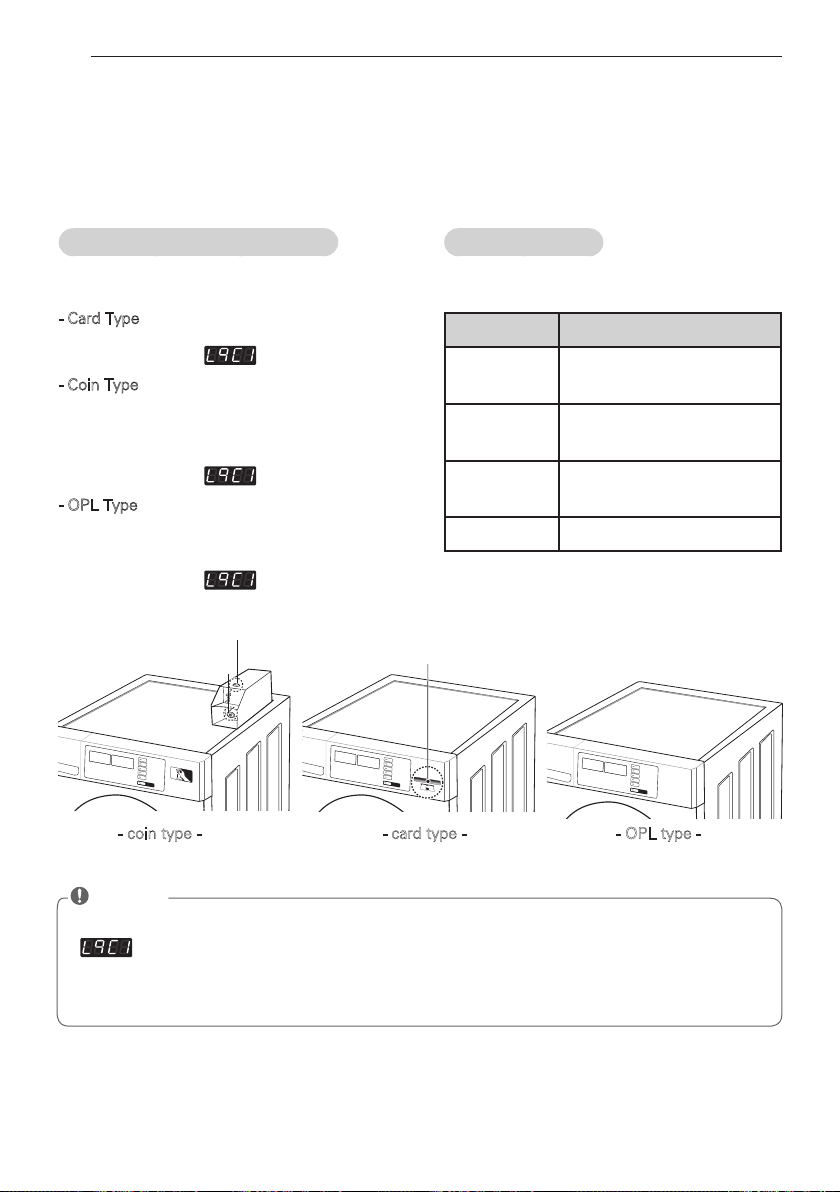
Coin Box Key
- coin type - - card type - - OPL type -
Insert Debit Card
How to enter Programming mode
You can enter programming mode only for Idle
state and pause state.
- Card Type
1) Insert service card.
2) Display will show .
- Coin Type
1) Dissemble upper coin box key.
2) Take out the coin drop from the coin box.
3) Turn on/off the toggle switch at the back of
the coin box.
4) Display will show .
- OPL Type
1) Push the Hot & Cold button at the same time.
2) Push the Warm button 3 times.
3) Push the Start button.
4) Display will show .
How to use button
You can change Washer vend price, cycle time
and Cycle parameters, etc.
: You can check machine information or change setting on Program setup, Collect Information Data,
Diagnostic Test.
There are two methods that you can enter programming mode.
PROGRAMMING MODE
Coin Vault
Openings close
Press Button Description
Hot
Move to upper level or
Comes back to Idle State
Warm
Move to the mode in the
same level (+)
Cold
Move to the modes in the
same level (-)
Start Enter the selected mode
NOTE
• If you turn on the power without connecting meter case for the first time, the machine display
.
• When the machine is shipped from the factory, it is set in the coin type. You can change Card/
Coin type by button. (For more information refer to SETUP mode.)
• The machine will display PUSH for OPL type
23
PROGRAMMING MODE
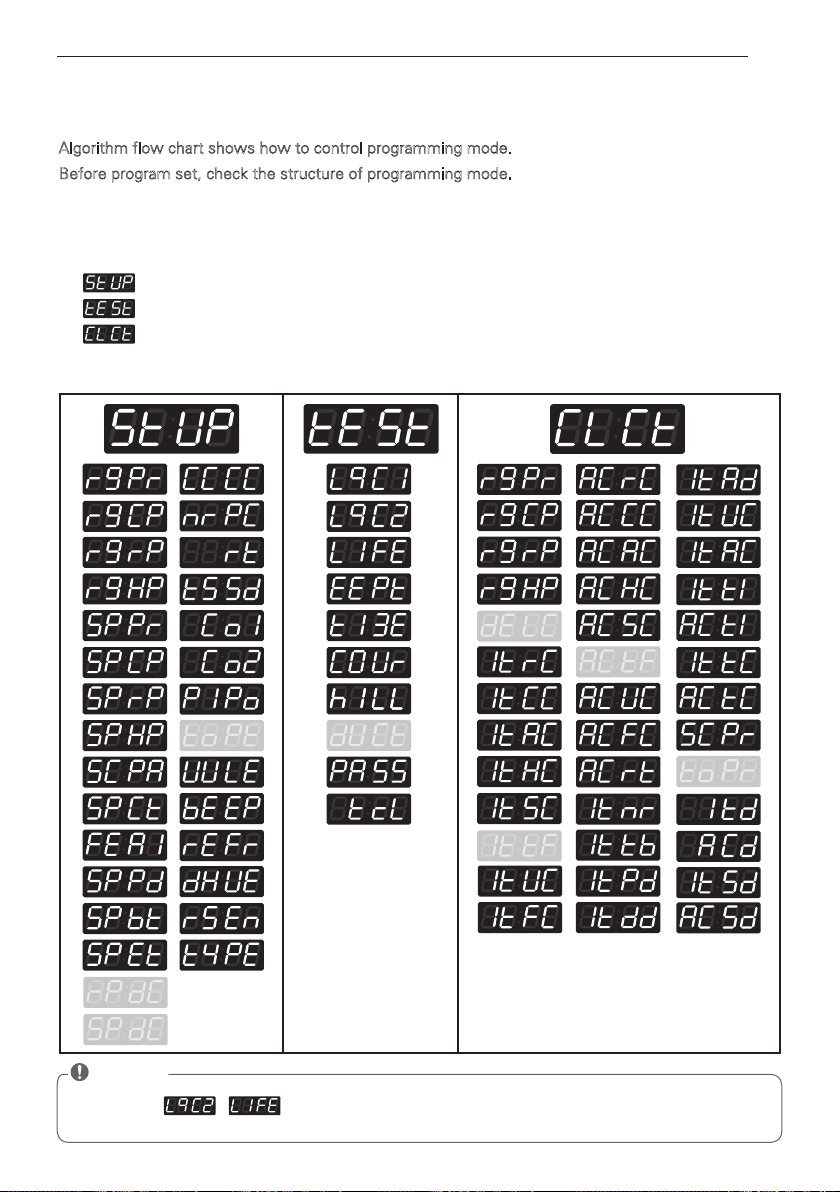
Algorithm flow chart shows how to control programming mode.
Before program set, check the structure of programming mode.
1. Turn on/off toggle switch or Insert service card, for entering set up mode.
2. Press Hot button to move to the upper level.
3. Press Warm (+) or Cold (-) button if you want to be at the same level.
4. Press Start button to enter the details of Set up or Diagnostic Tests.
is to set price value, time value, vend type, etc.
consists of line test, reset, free cycle, and kill cycle.
is to collect the usage data.
Card / Coin type
NOTE
• Do not use , .
• It is used only in inspecting the machine.
Structure of Programming mode
24
PROGRAMMING MODE
OPL type
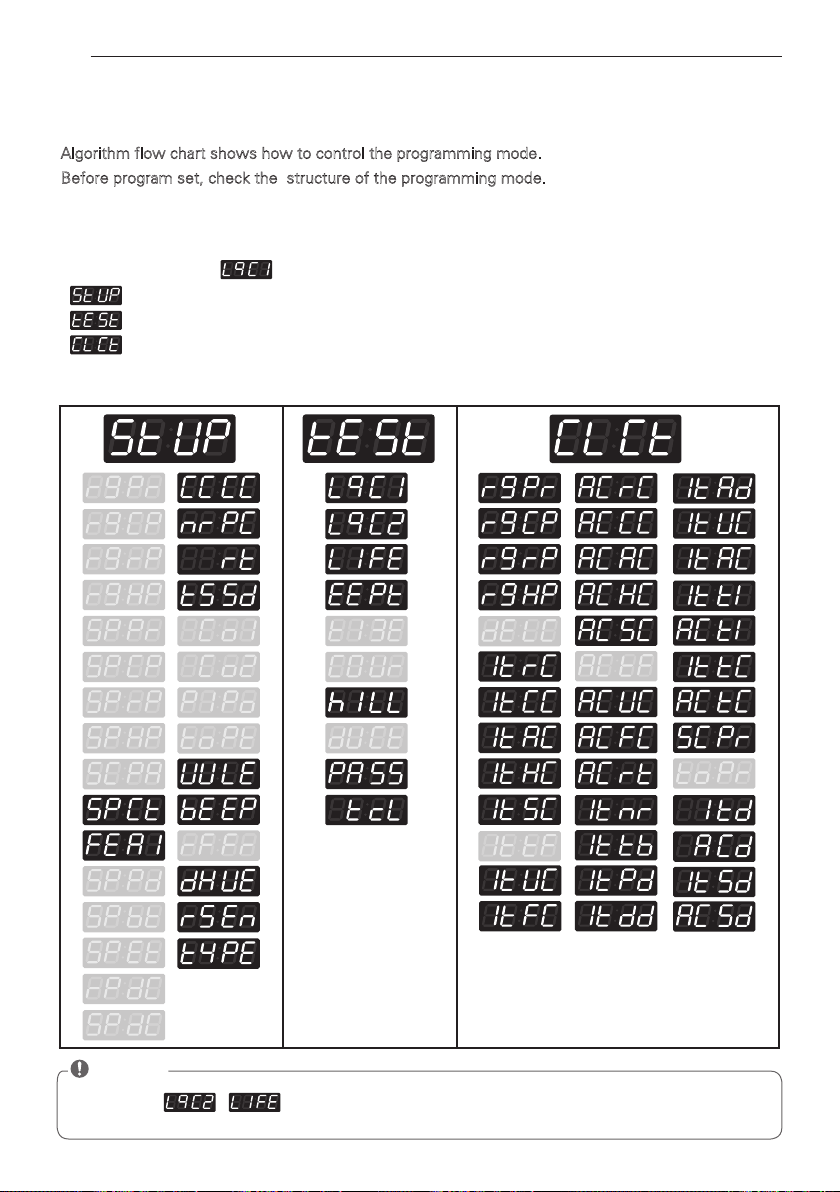
Algorithm flow chart shows how to control the programming mode.
Before program set, check the structure of the programming mode.
The method of entering set up mode.
1) Push the Hot & Cold button at the same time.
2) Push the Warm button 3 times.
3) Push the Start button.
4) Display will show .
is to set price value, time value, vend type, etc.
consists of line test, reset, free cycle, and kill cycle.
is to collect the usage data.
Structure of Programming mode
NOTE
• Do not use , .
• It is used only in inspecting the machine.
25
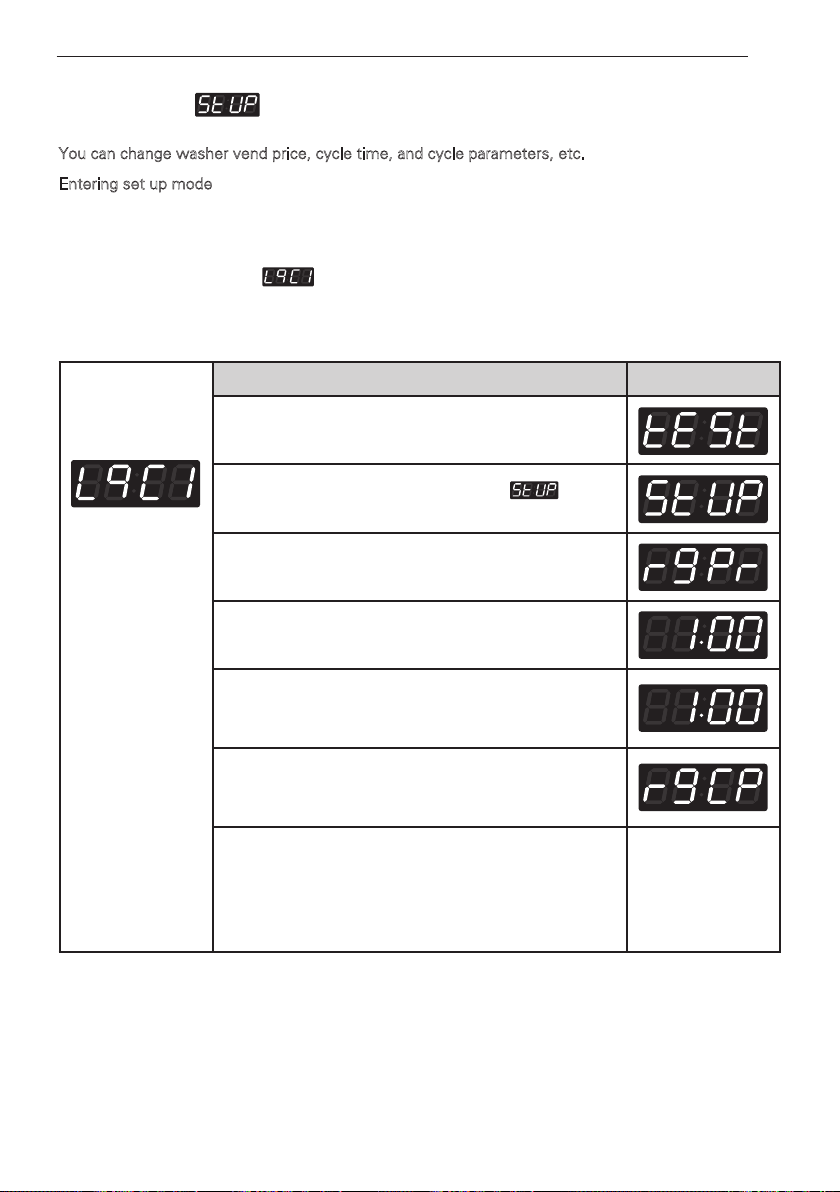
PROGRAMMING MODE - SETUP MODE
Setup Mode (display)
You can change washer vend price, cycle time, and cycle parameters, etc.
Entering set up mode
- Coin type – Turn on/off toggle switch.
- Card type – Insert the service card.
- OPL type – 1) Push the Hot & Cold button at the same time.
2) Push the Warm button 3 times.
- Then, the washer displays .
1. How to change regular price.
Entering set up
mode.
You will see LqC1
Button Display
Press the
Hot
button.
Press the
Warm
or the
Cold
button until appears
in the display.
Press the
Start
button.
Press the
Start
button.
Display previous regular price.
Press
Warm(+)
or
Cold(-)
button to set the regular price.
(The vend price can be set from 0 to 9.95 in 5¢
increments.)
Press the
Start
button.
The machine sets up the regular price, then advances
to the next process automatically.
1. Continue to set up the next price.
2. Stop the change of setup value and go back to ready
mode.
• Coin type - Turn on/off toggle switch.
• Card type - Pull the service card.
• OPL type/Coin type - Push the Hot button twice
26
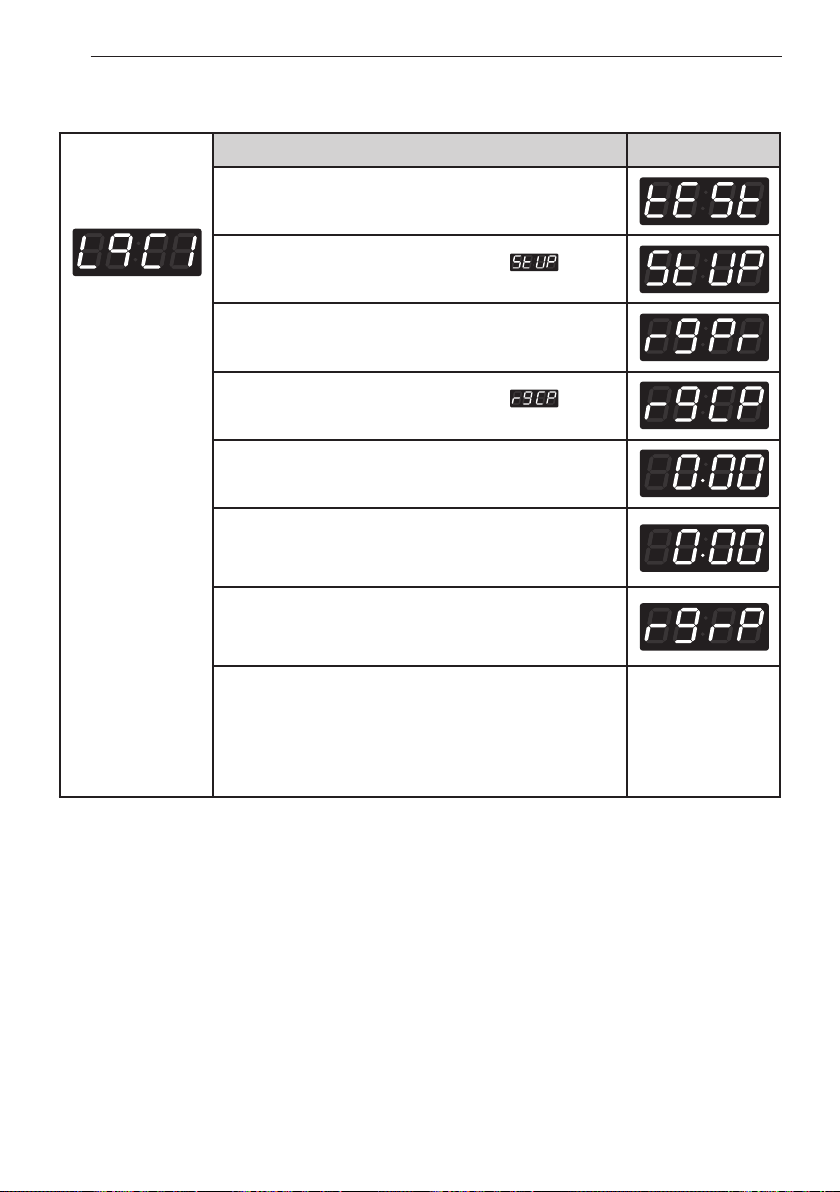
PROGRAMMING MODE - SETUP MODE
Entering set up
mode.
You will see LqC1
Button Display
Press the
Hot
button.
Press the
Warm
or the
Cold
button until appears
in the display.
Press the
Start
button.
Press the
Warm
or the
Cold
button until appears
in the display.
Press the
Start
button.
Display previous regular cold price.
Press
Warm(+)
or
Cold(-)
button to set the regular cold
price. (The vend price can be set from $0.00 to $9.95 in
5¢ increments.)
Press the
Start
button.
The machine sets up the regular cold price, then
advances to the next process automatically.
1. Continue to set up the next price.
2. Stop the change of setup value and go back to ready
mode.
• Coin type - Turn on/off toggle switch.
• Card type - Pull the service card.
• OPL type - Push the Hot button twice.
2. How to change regular delicates price.
27
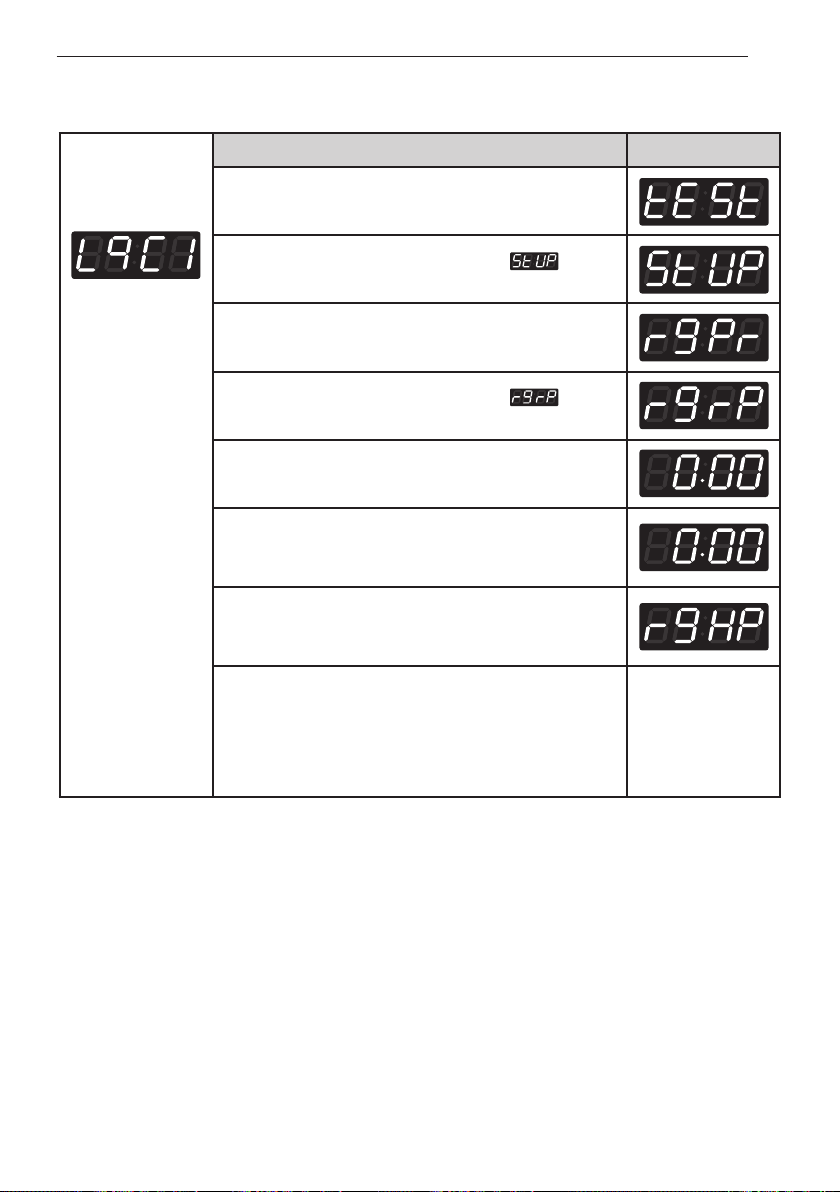
PROGRAMMING MODE - SETUP MODE
Entering set up
mode.
You will see LqC1
Button Display
Press the
Hot
button.
Press the
Warm
or the
Cold
button until appears
in the display.
Press the
Start
button.
Press the
Warm
or the
Cold
button until appears
in the display.
Press the
Start
button.
Display previous regular warm price.
Press
Warm(+)
or
Cold(-)
button to set the regular warm
price. (The vend price can be set from $0.00 to $9.95 in
5¢ increments.)
Press the
Start
button.
The machine sets up the regular warm price, then
advances to the next process automatically.
1. Continue to set up the next price.
2. Stop the change of setup value and go back to ready
mode.
• Coin type - Turn on/off toggle switch.
• Card type - Pull the service card.
• OPL type - Push the Hot button twice.
3. How to change regular warm & cold price
28
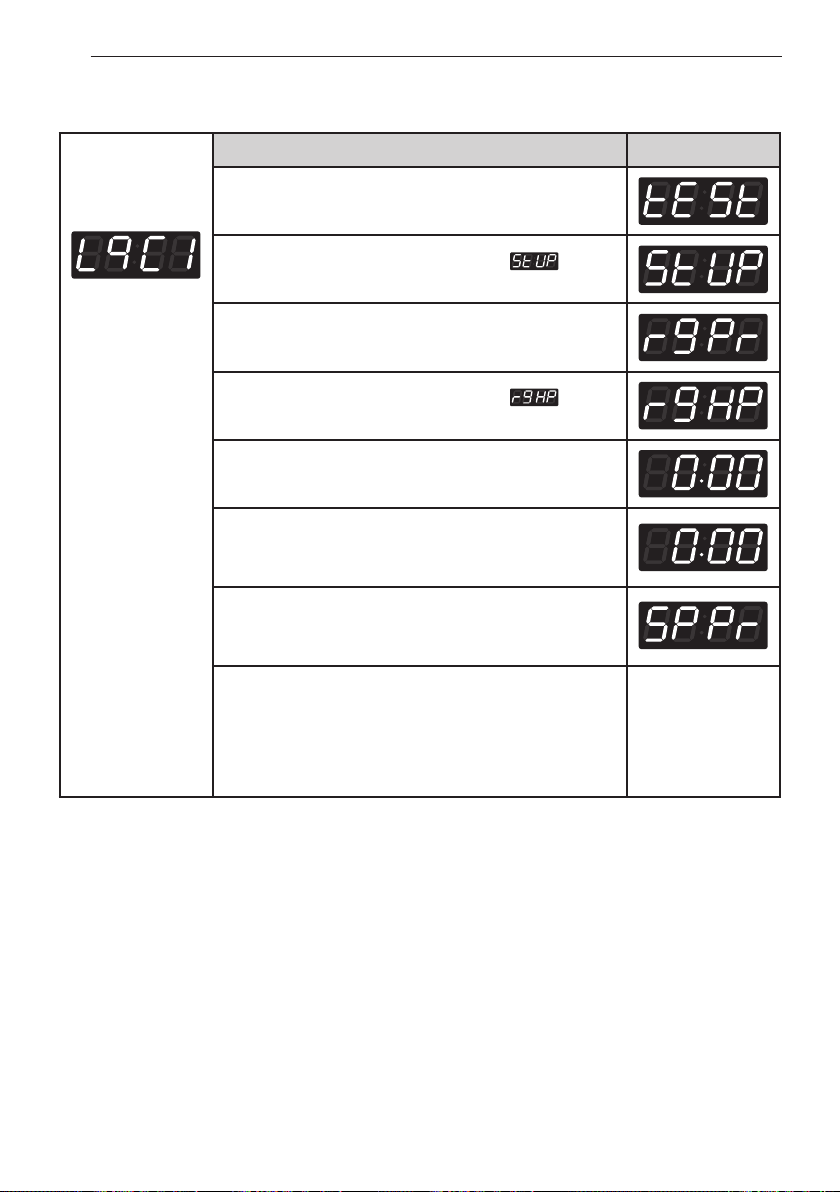
PROGRAMMING MODE - SETUP MODE
Entering set up
mode.
You will see LqC1
Button Display
Press the
Hot
button.
Press the
Warm
or the
Cold
button until appears
in the display.
Press the
Start
button.
Press the
Warm
or the
Cold
button until appears
in the display.
Press the
Start
button.
Display previous regular hot price.
Press
Warm(+)
or
Cold(-)
button to set the regular hot
price. (The vend price can be set from $0.00 to $9.95 in
5¢ increments.)
Press the
Start
button.
The machine sets up the regular hot price, then
advances to the next process automatically.
1. Continue to set up the next price.
2. Stop the change of setup value and go back to ready
mode.
• Coin type - Turn on/off toggle switch.
• Card type - Pull the service card.
• OPL type - Push the Hot button twice.
4. How to change regular hot price
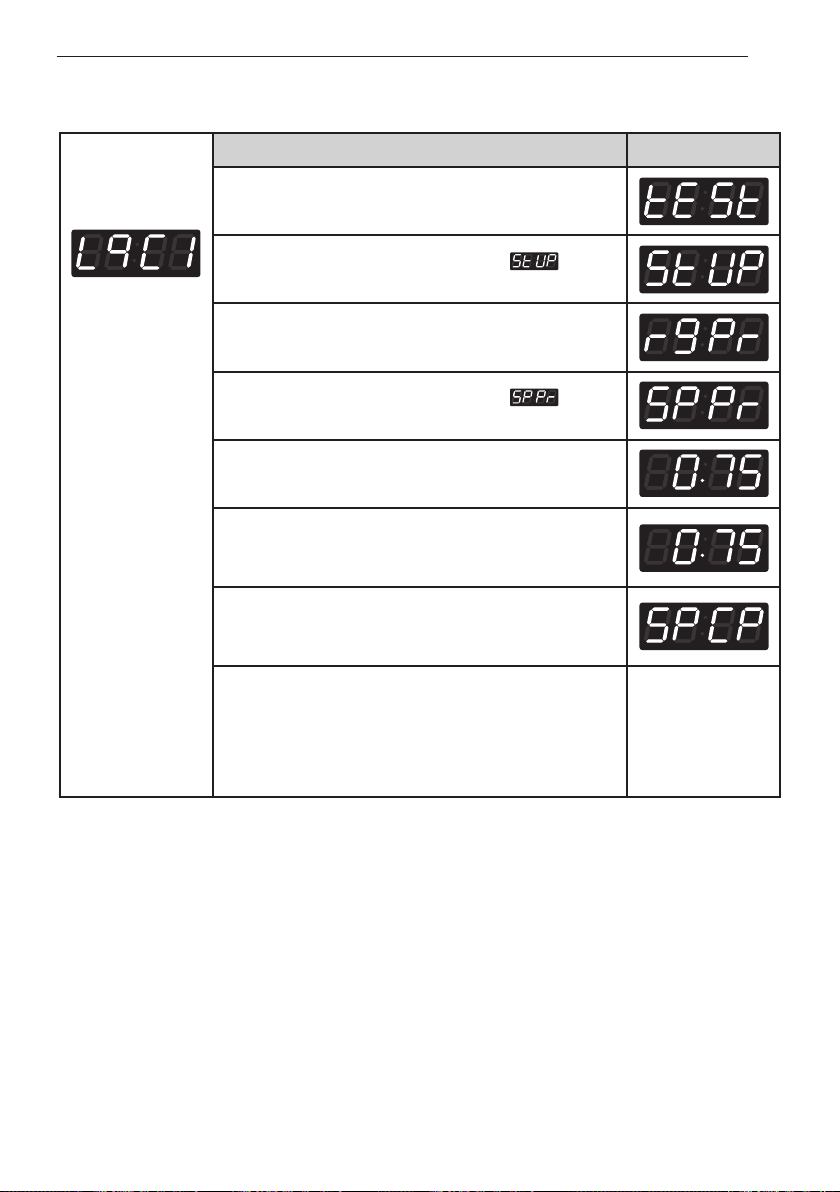
29
PROGRAMMING MODE - SETUP MODE
Entering set up
mode.
You will see LqC1
Button Display
Press the
Hot
button.
Press the
Warm
or the
Cold
button until appears
in the display.
Press the
Start
button.
Press the
Warm
or the
Cold
button until appears
in the display.
Press the
Start
button.
Display previous special price.
Press
Warm(+)
or
Cold(-)
button to set a special price.
(The vend price can be set from $0.00 to $9.95 in 5¢
increments.)
Press the
Start
button.
The machine sets up the special price, then advances
to the next process automatically.
1. Continue to set up the next price.
2. Stop the change of setup value and go back to ready
mode.
• Coin type - Turn on/off toggle switch.
• Card type - Pull the service card.
• OPL type - Push the Hot button twice.
5. How to change special price
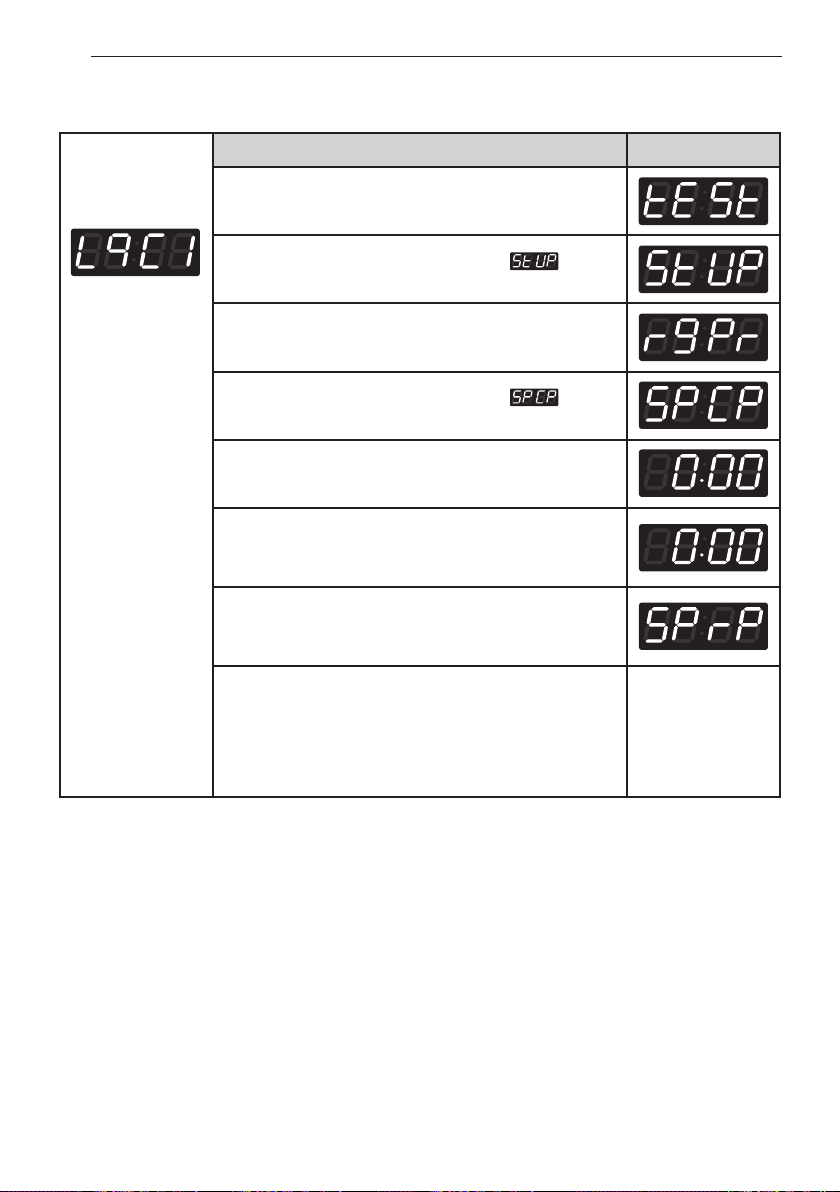
30
PROGRAMMING MODE - SETUP MODE
Entering set up
mode.
You will see LqC1
Button Display
Press the
Hot
button.
Press the
Warm
or the
Cold
button until appears
in the display.
Press the
Start
button.
Press the
Warm
or the
Cold
button until appears
in the display.
Press the
Start
button.
Display previous special cold price.
Press
Warm(+)
or
Cold(-)
button to set the special cold
price. (The vend price can be set from $0.00 to $9.95 in
5¢ increments.)
Press the
Start
button.
The machine sets up the special cold price, then
advances to the next process automatically.
1. Continue to set up the next price.
2. Stop the change of setup value and go back to ready
mode.
• Coin type - Turn on/off toggle switch.
• Card type - Pull the service card.
• OPL type - Push the Hot button twice.
6. How to change special delicates price
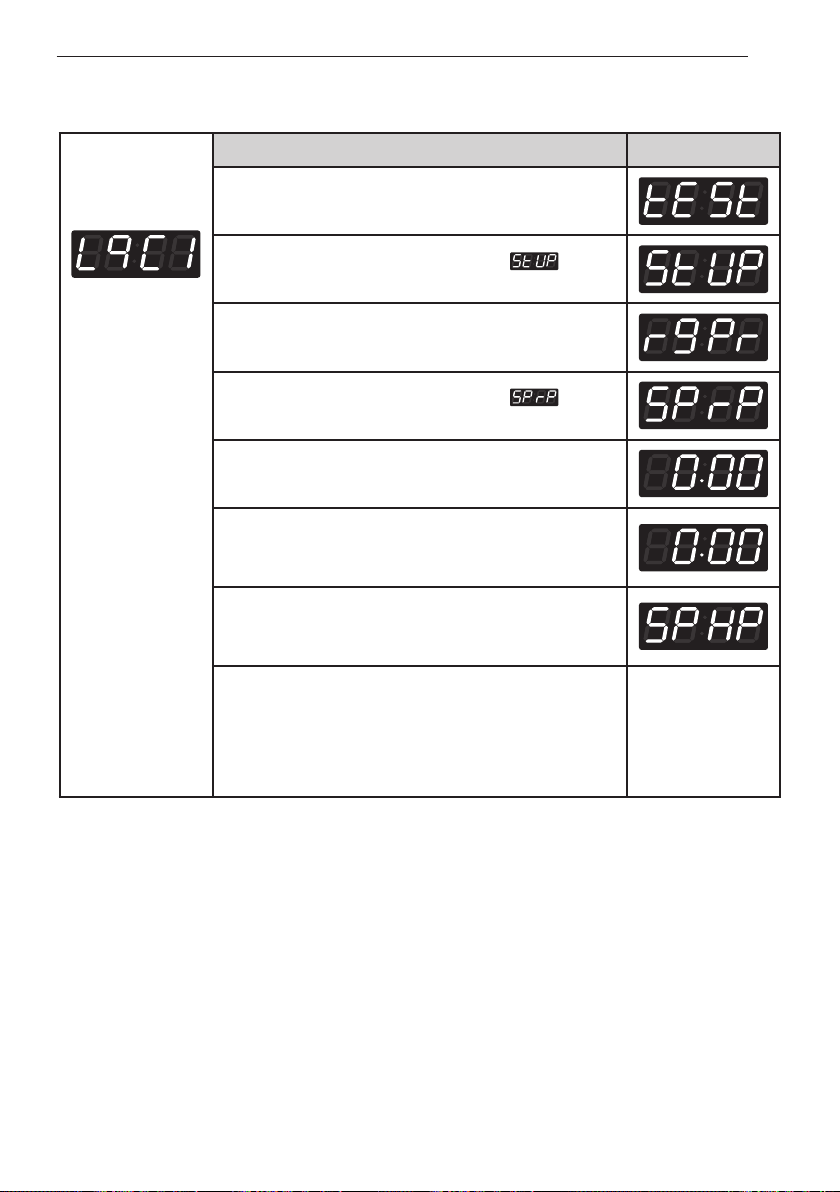
31
PROGRAMMING MODE - SETUP MODE
Entering set up
mode.
You will see LqC1
Button Display
Press the
Hot
button.
Press the
Warm
or the
Cold
button until appears
in the display.
Press the
Start
button.
Press the
Warm
or the
Cold
button until appears
in the display.
Press the
Start
button.
Display previous special warm price.
Press
Warm(+)
or
Cold(-)
button to set the special warm
price. (The vend price can be set from $0.00 to $9.95 in
5¢ increments.)
Press the
Start
button.
The machine sets up the special warm price, then
advances to the next process automatically.
1. Continue to set up the next price.
2. Stop the change of setup value and go back to ready
mode.
• Coin type - Turn on/off toggle switch.
• Card type - Pull the service card.
• OPL type - Push the Hot button twice.
7. How to change special warm & cold price
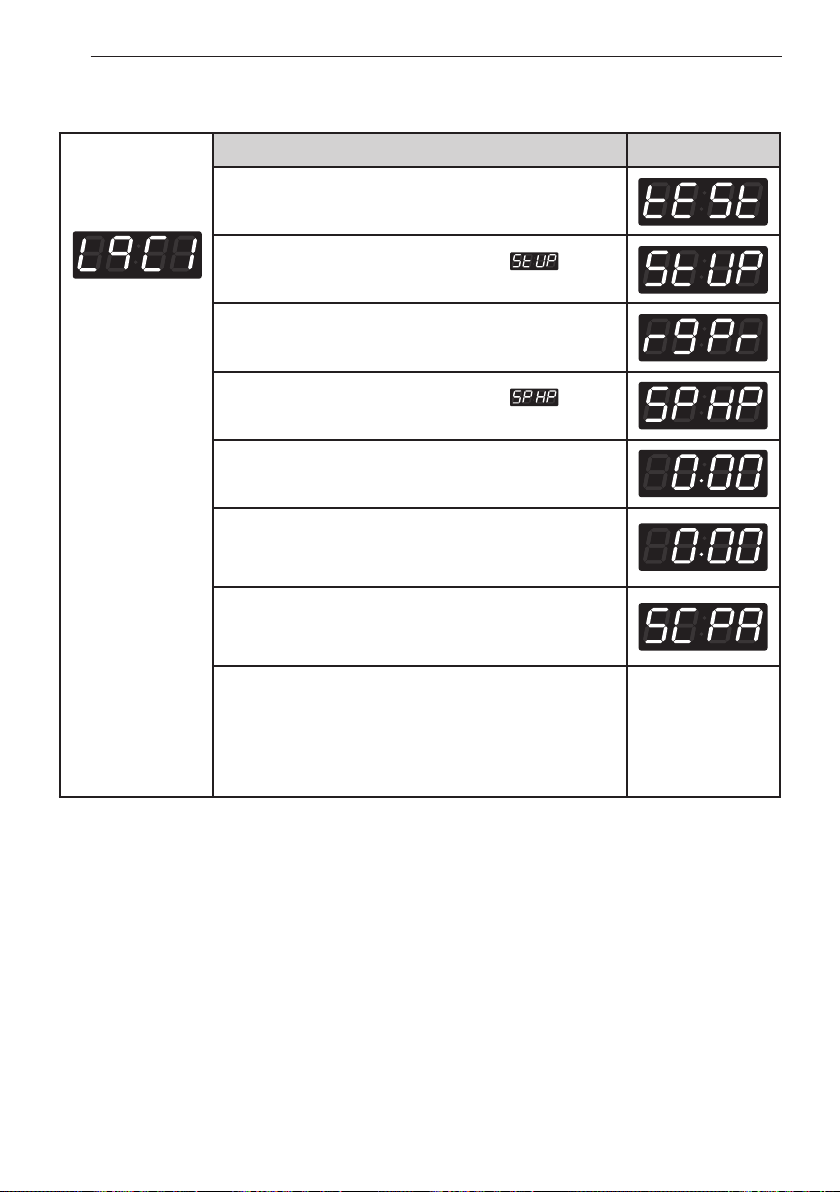
32
PROGRAMMING MODE - SETUP MODE
Entering set up
mode.
You will see LqC1
Button Display
Press the
Hot
button.
Press the
Warm
or the
Cold
button until appears
in the display.
Press the
Start
button.
Press the
Warm
or the
Cold
button until appears
in the display.
Press the
Start
button.
Display previous special hot price.
Press
Warm(+)
or
Cold(-)
button to set the special hot
price. (The vend price can be set from $0.00 to $9.95 in
5¢ increments.)
Press the
Start
button.
The machine sets up the special hot price, then
advances to the next process automatically.
1. Continue to set up the next price.
2. Stop the change of setup value and go back to ready
mode.
• Coin type - Turn on/off toggle switch.
• Card type - Pull the service card.
• OPL type - Push the Hot button twice.
8. How to change special hot price
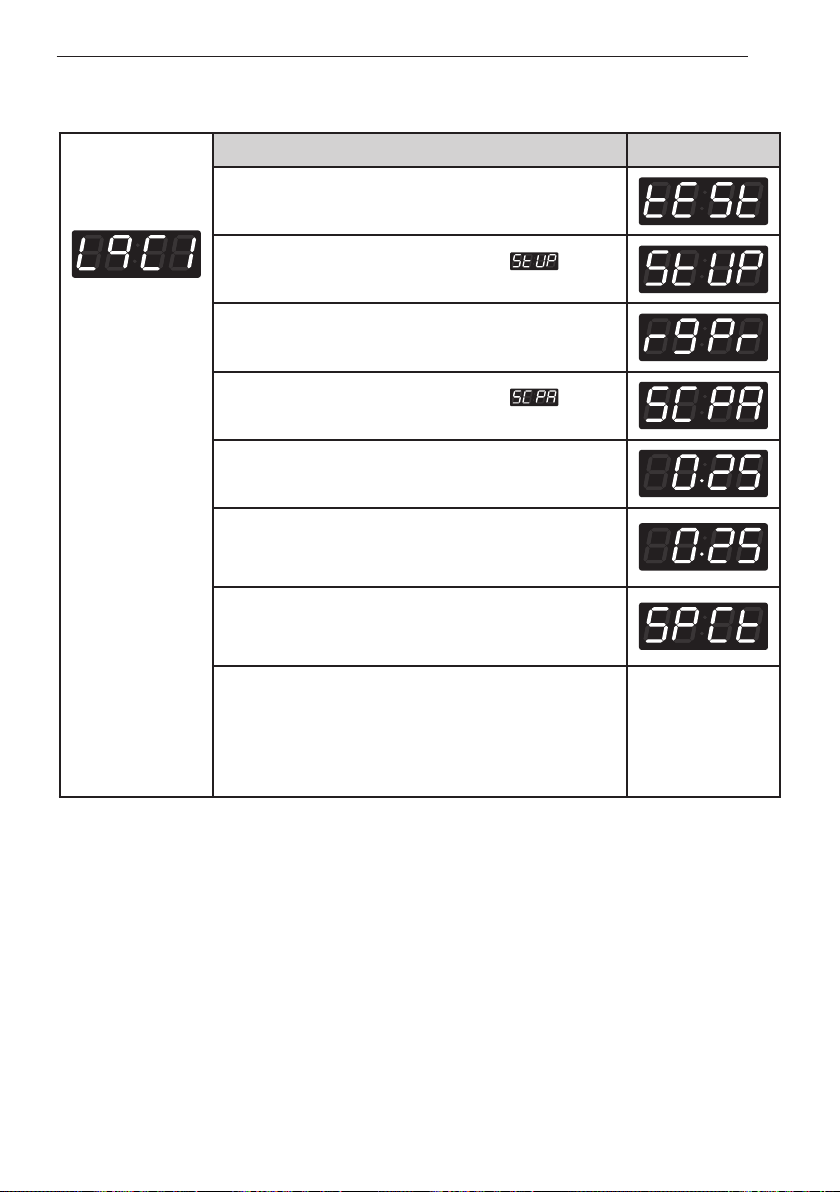
33
PROGRAMMING MODE - SETUP MODE
Entering set up
mode.
You will see LqC1
Button Display
Press the
Hot
button.
Press the
Warm
or the
Cold
button until appears
in the display.
Press the
Start
button.
Press the
Warm
or the
Cold
button until appears
in the display.
Press the
Start
button.
Display previous add super wash price.
Press
Warm(+)
or
Cold(-)
button to set add super wash
price. (The vend price can be set from $0.00 to $9.95 in
5¢ increments.)
Press the
Start
button.
The machine sets up the add super wash price, then
advances to the next process automatically.
1. Continue to set up the next mode.
2. Stop the change of setup value and go back to ready
mode.
• Coin type - Turn on/off toggle switch.
• Card type - Pull the service card.
• OPL type - Push the Hot button twice.
9. How to change add super wash price
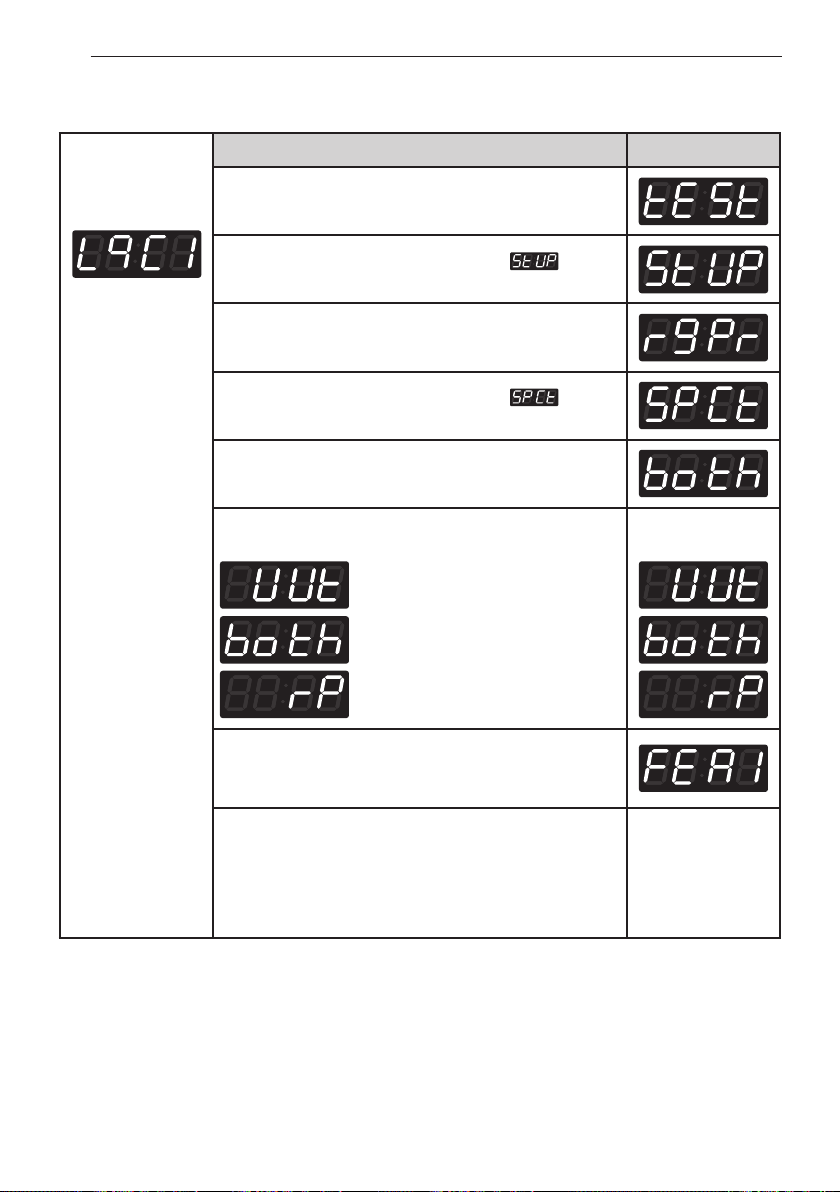
34
PROGRAMMING MODE - SETUP MODE
Entering set up
mode.
You will see LqC1
Button Display
Press the
Hot
button.
Press the
Warm
or the
Cold
button until appears
in the display.
Press the
Start
button.
Press the
Warm
or the
Cold
button until appears
in the display.
Press the
Start
button.
Display previous add super wash type.
Press
Warm
or
Cold
button and then select the add
super wash type you want.
Wash time increase.
Both (Wash time increase and
rinsing once more.)
Rinsing once more.
Press the
Start
button.
The machine sets up the add super wash type, then
advances to the next process automatically.
1. Continue to set up the next mode.
2. Stop the change of setup value and go back to ready
mode.
• Coin type - Turn on/off toggle switch.
• Card type - Pull the service card.
• OPL type - Push the Hot button twice.
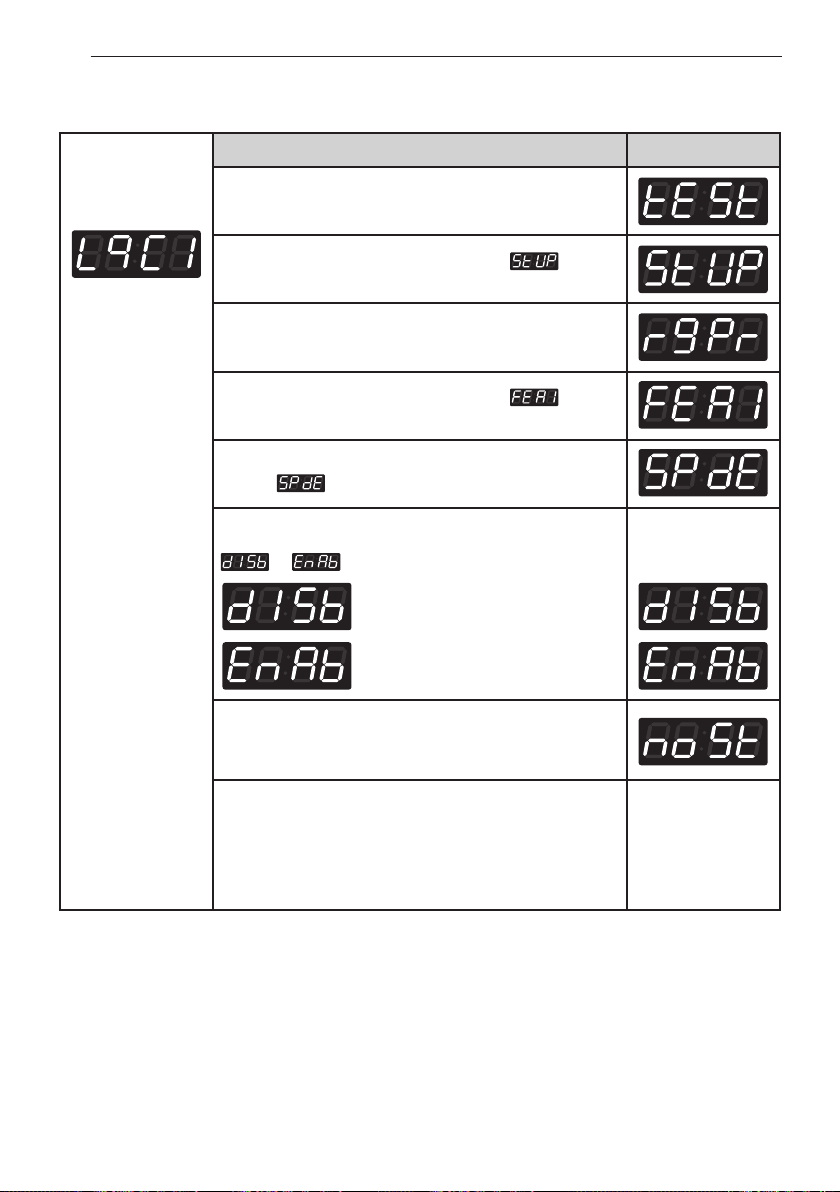
10. How to change add super wash type
35
PROGRAMMING MODE - SETUP MODE
Entering set up
mode.
You will see LqC1
Button Display
Press the
Hot
button.
Press the
Warm
or the
Cold
button until appears
in the display.
Press the
Start
button.
Press the
Warm
or the
Cold
button until appears
in the display.
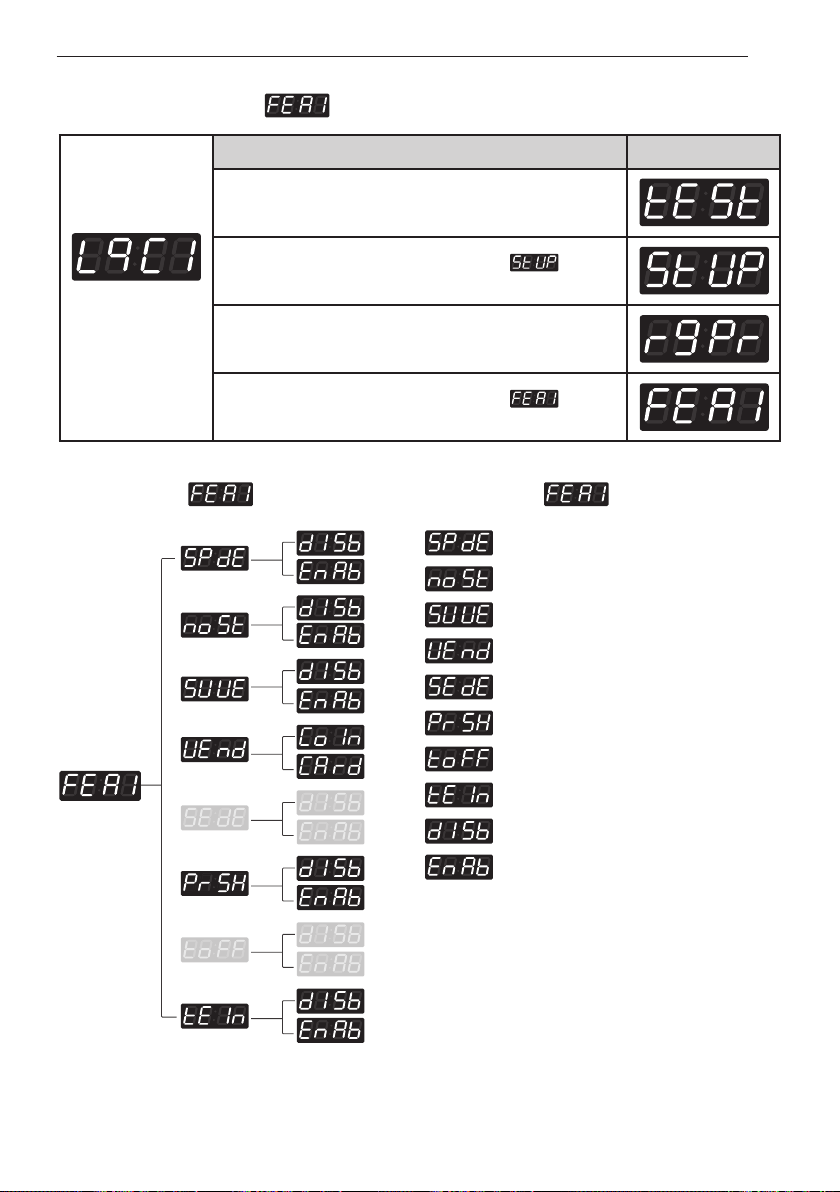
11. How to enter the
• Special price days apply or not
• Non-stop wash apply or not
• Add super wash apply or not
• Select vend type
• Sense dry apply or not (only for dryer)
• Pre-wash apply or not
• Top off apply or not (only for dryer)
• Twin spray apply or not
• Disable
• Enable
Structure of Content of
36
PROGRAMMING MODE - SETUP MODE
Entering set up
mode.
You will see LqC1
Button Display
Press the
Hot
button.
Press the
Warm
or the
Cold
button until appears
in the display.
Press the
Start
button.
Press the
Warm
or the
Cold
button until appears
in the display.
Press the
Start
button.
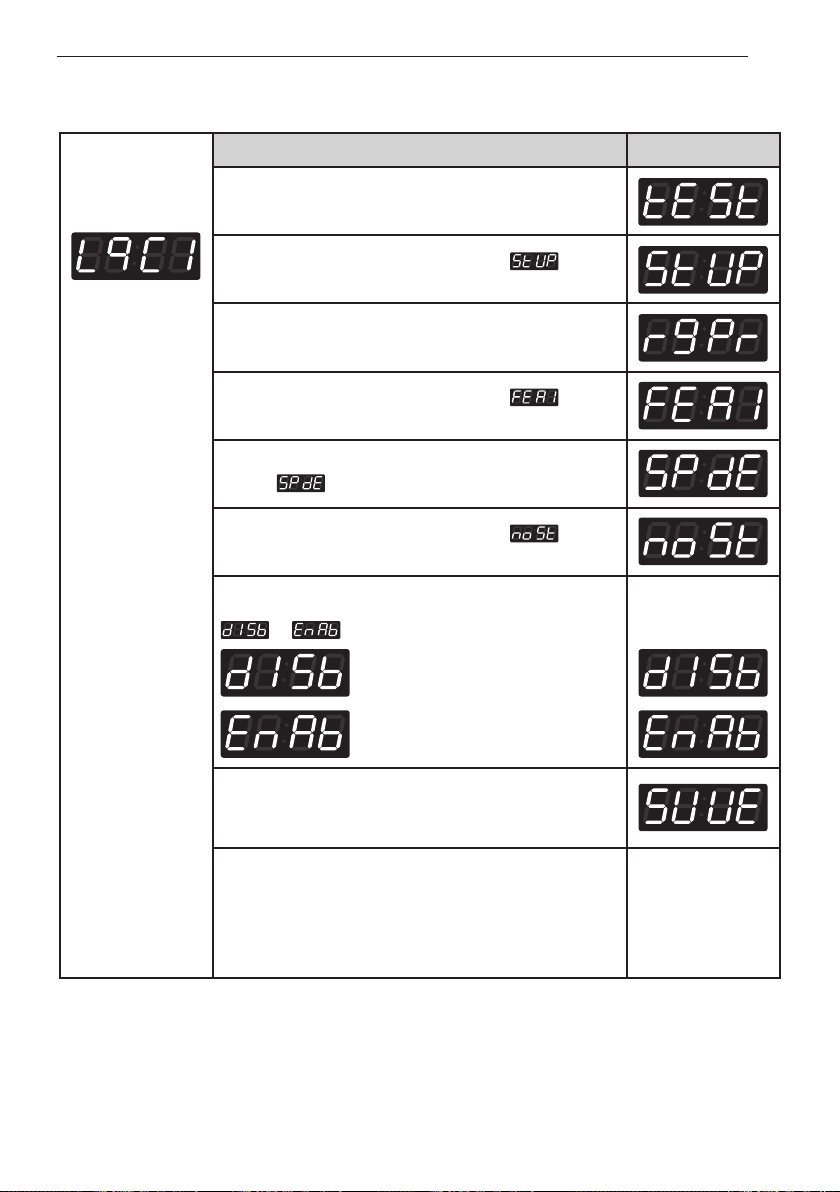
Display .
Press the
Start
button.
Press
Warm
or
Cold
button and then select
or
.
Disable
Enable
One or the other
will display.
Press the
Start
button.
The machine sets up the special price day, then
advances to the next process automatically.
1. Continue to set up the next mode.
2. Stop the change of setup value and go back to ready
mode.
• Coin type - Turn on/off toggle switch.
• Card type - Pull the service card.
• OPL type - Push the Hot button twice.
11-1. Special price day setup
37
PROGRAMMING MODE - SETUP MODE
Entering set up
mode.
You will see LqC1
Button Display
Press the
Hot
button.
Press the
Warm
or the
Cold
button until appears
in the display.
Press the
Start
button.
Press the
Warm
or the
Cold
button until appears
in the display.
Press the
Start
button.
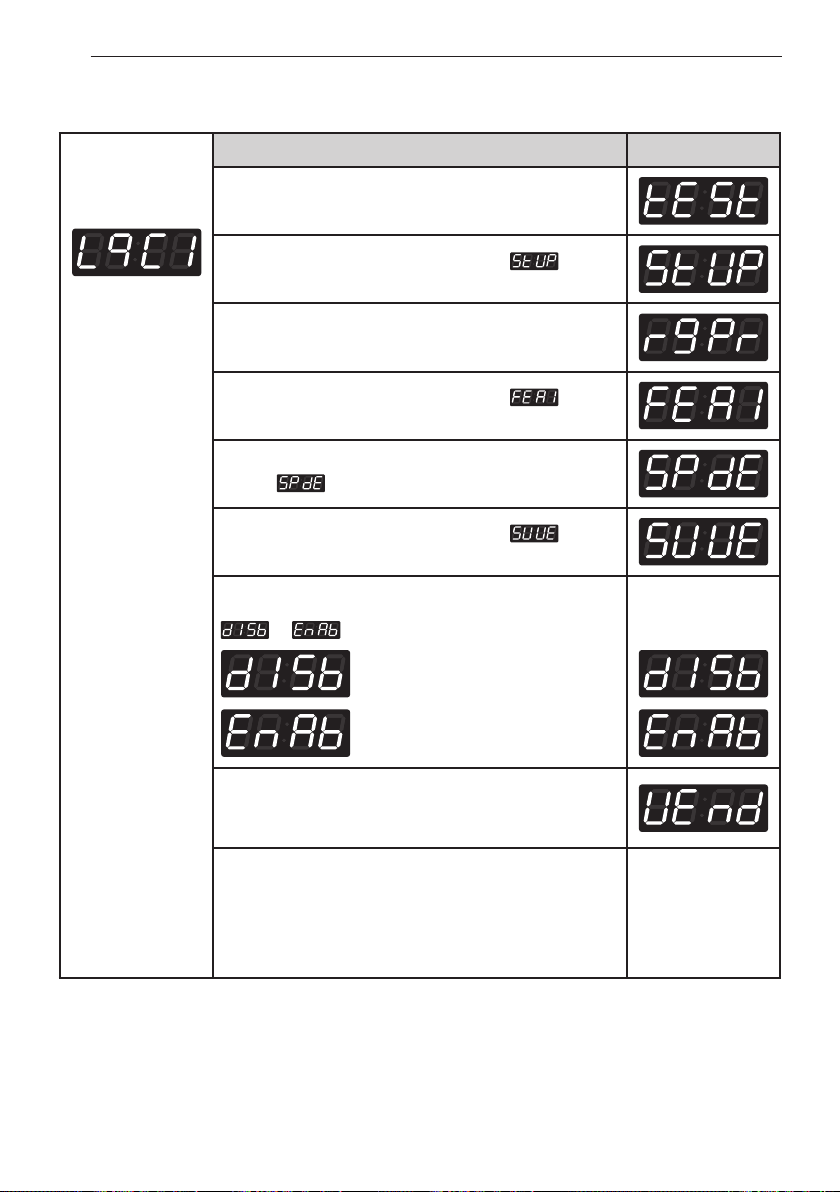
Display .
Press the
Warm
or the
Cold
button until appears
in the display.
Press the
Start
button.
Press
Warm
or
Cold
button and then select
or
.
Disable
Enable
One or the other
will display.
Press the
Start
button.
The machine sets up the add super wash application,
then advances to the next process automatically.
1. Continue to set up the next mode.
2. Stop the change of setup value and go back to ready
mode.
• Coin type - Turn on/off toggle switch.
• Card type - Pull the service card.
• OPL type - Push the Hot button twice.
11-2. Non-stop rinse
38
PROGRAMMING MODE - SETUP MODE
Entering set up
mode.
You will see LqC1
Button Display
Press the
Hot
button.
Press the
Warm
or the
Cold
button until appears
in the display.
Press the
Start
button.
Press the
Warm
or the
Cold
button until appears
in the display.
Press the
Start
button.
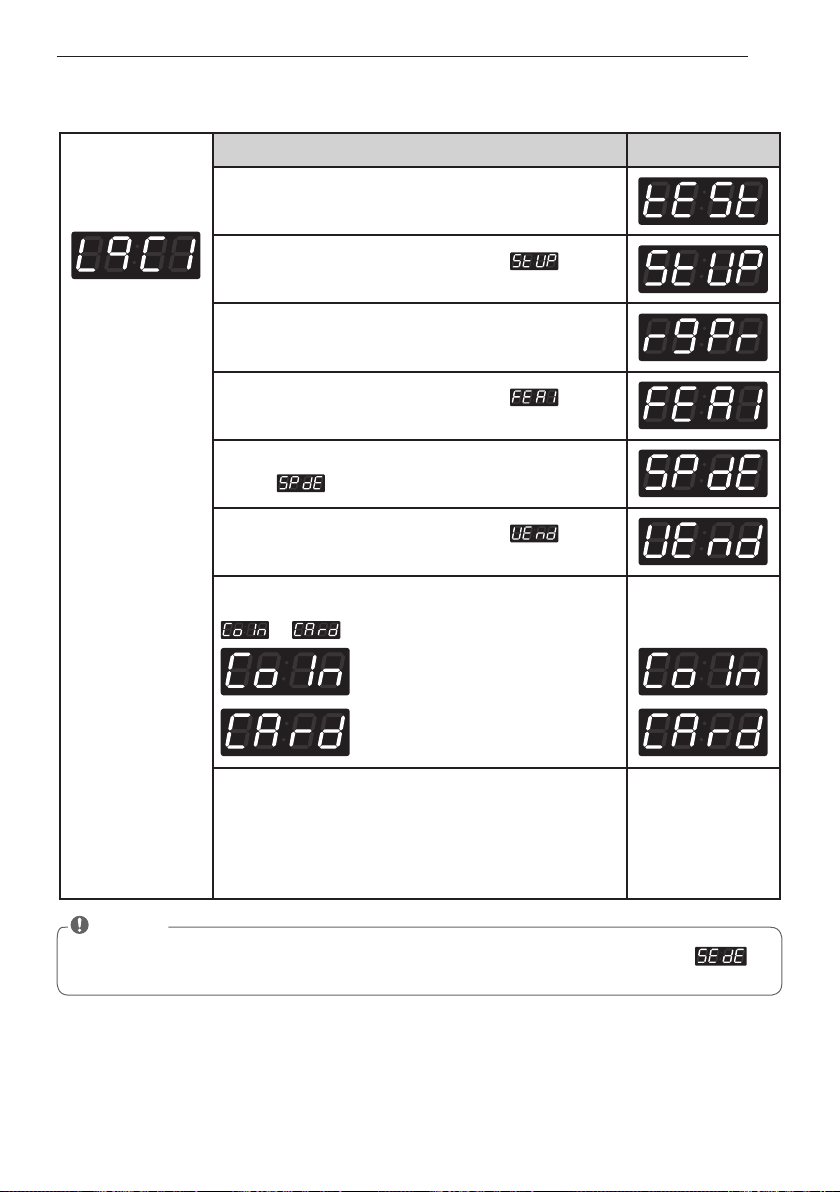
Display .
Press the
Warm
or the
Cold
button until appears
in the display.
Press the
Start
button.
Press
Warm
or
Cold
button and then select
or
.
Disable
Enable
One or the other
will display.
Press the
Start
button.
The machine sets up the add super wash application,
then advances to the next process automatically.
1. Continue to set up the next mode.
2. Stop the change of setup value and go back to ready
mode.
• Coin type - Turn on/off toggle switch.
• Card type - Pull the service card.
• OPL type - Push the Hot button twice.
11-3. Add super wash setup
39
PROGRAMMING MODE - SETUP MODE
Entering set up
mode.
You will see LqC1
Button Display
Press the
Hot
button.
Press the
Warm
or the
Cold
button until appears
in the display.
Press the
Start
button.
Press the
Warm
or the
Cold
button until appears
in the display.
Press the
Start
button.
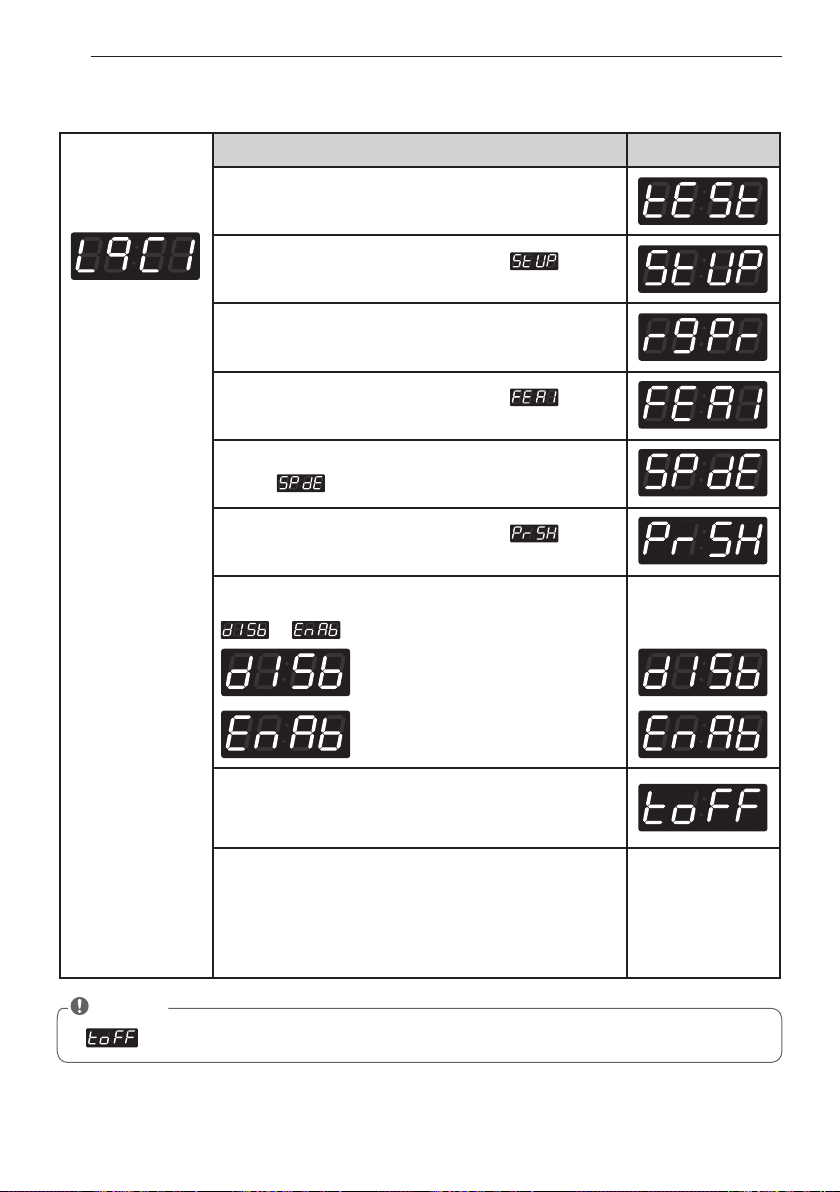
Display .
Press the
Warm
or the
Cold
button until appears
in the display.
Press the
Start
button.
Press
Warm
or
Cold
button and then select
or
.
Coin type
Card type
One or the other
will display.
1.Continue to set up the next mode.
2. Stop the change of setup value and go back to ready
mode.
• Coin type - Turn on/off toggle switch.
• Card type - Pull the service card.
• OPL type - Push the Hot button twice.
11-4. Vend type setup - card type or coin type setup
NOTE
• After setting the Value to VEND, vend type is changed directly without power on/off
(Sense dry) is not available in washer
40
PROGRAMMING MODE - SETUP MODE
Entering set up
mode.
You will see LqC1
Button Display
Press the
Hot
button.
Press the
Warm
or the
Cold
button until appears
in the display.
Press the
Start
button.
Press the
Warm
or the
Cold
button until appears
in the display.
Press the
Start
button.
Display .
Press the
Warm
or the
Cold
button until appears
in the display.
Press the
Start
button.
Press
Warm
or
Cold
button and then select
or
.
Disable
Enable
One or the other
will display.
Press the
Start
button.
The machine sets up the pre-wash, then advances to
the next process automatically.
1. Continue to set up the next mode.
2. Stop the change of setup value and go back to ready
mode.
• Coin type - Turn on/off toggle switch.
• Card type - Pull the service card.
• OPL type - Push the Hot button twice.
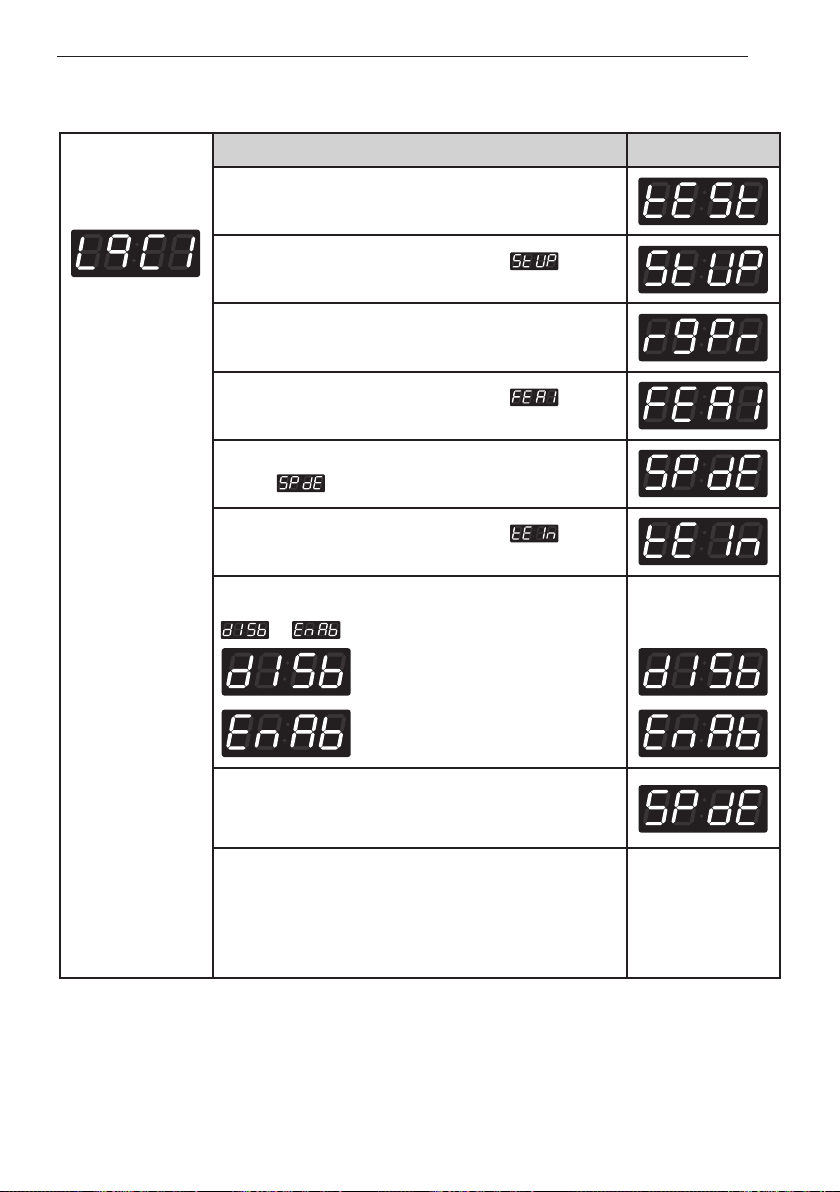
11-5. Pre-wash set up
NOTE
• (top off) is not available in washer (Only for dryer)
41
PROGRAMMING MODE - SETUP MODE
Entering set up
mode.
You will see LqC1
Button Display
Press the
Hot
button.
Press the
Warm
or the
Cold
button until appears
in the display.
Press the
Start
button.
Press the
Warm
or the
Cold
button until appears
in the display.
Press the
Start
button.
Display .
Press the
Warm
or the
Cold
button until appears
in the display.
Press the
Start
button.
Press
Warm
or
Cold
button and then select
or
.
Disable
Enable
One or the other
will display.
Press the
Start
button.
The machine sets up the pre-wash, then advances to
the next process automatically.
1. Continue to set up the next mode.
2. Stop the change of setup value and go back to ready
mode.
• Coin type - Turn on/off toggle switch.
• Card type - Pull the service card.
• OPL type - Push the Hot button twice.
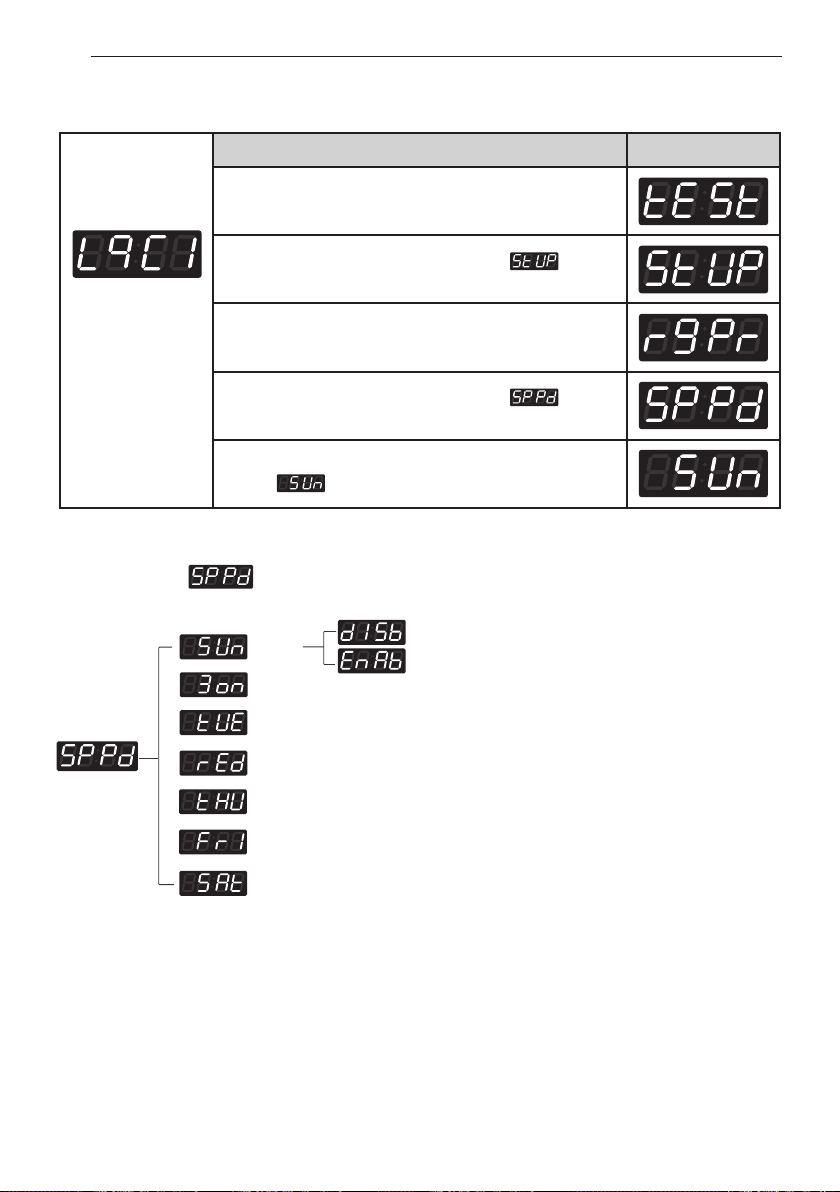
11-6. Twin spray set up
42
PROGRAMMING MODE - SETUP MODE
Entering set up
mode.
You will see LqC1
Button Display
Press the
Hot
button.
Press the
Warm
or the
Cold
button until appears
in the display.
Press the
Start
button.
Press the
Warm
or the
Cold
button until appears
in the display.
Press the
Start
button.
Display .
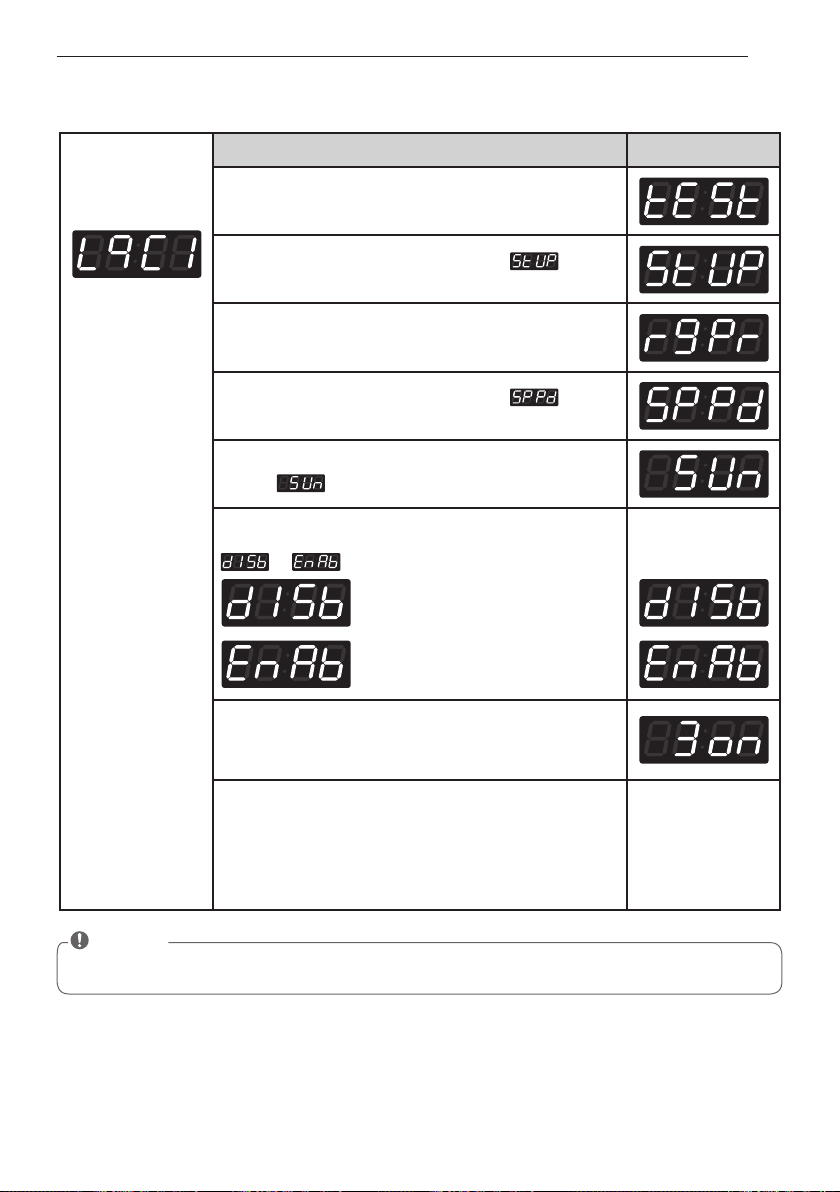
12. How to enter the special price day
Structure of
Sunday
Monday
Tuesday
Wednesday
Thursday
Friday
Saturday
43
PROGRAMMING MODE - SETUP MODE
Entering set up
mode.
You will see LqC1
Button Display
Press the
Hot
button.
Press the
Warm
or the
Cold
button until appears
in the display.
Press the
Start
button.
Press the
Warm
or the
Cold
button until appears
in the display.
Press the
Start
button.
Display .
Press the
Start
button.
Press
Warm
or
Cold
button and then select
or
.
Disable
Enable
One or the other
will display.
Press the
Start
button.
The machine sets up the special price day (Sunday),
then advances to the next process automatically.
1. Continue to set up the next mode.
2. Stop the change of setup value and go back to ready
mode.
• Coin type - Turn on/off toggle switch.
• Card type - Pull the service card.
• OPL type - Push the Hot button twice.
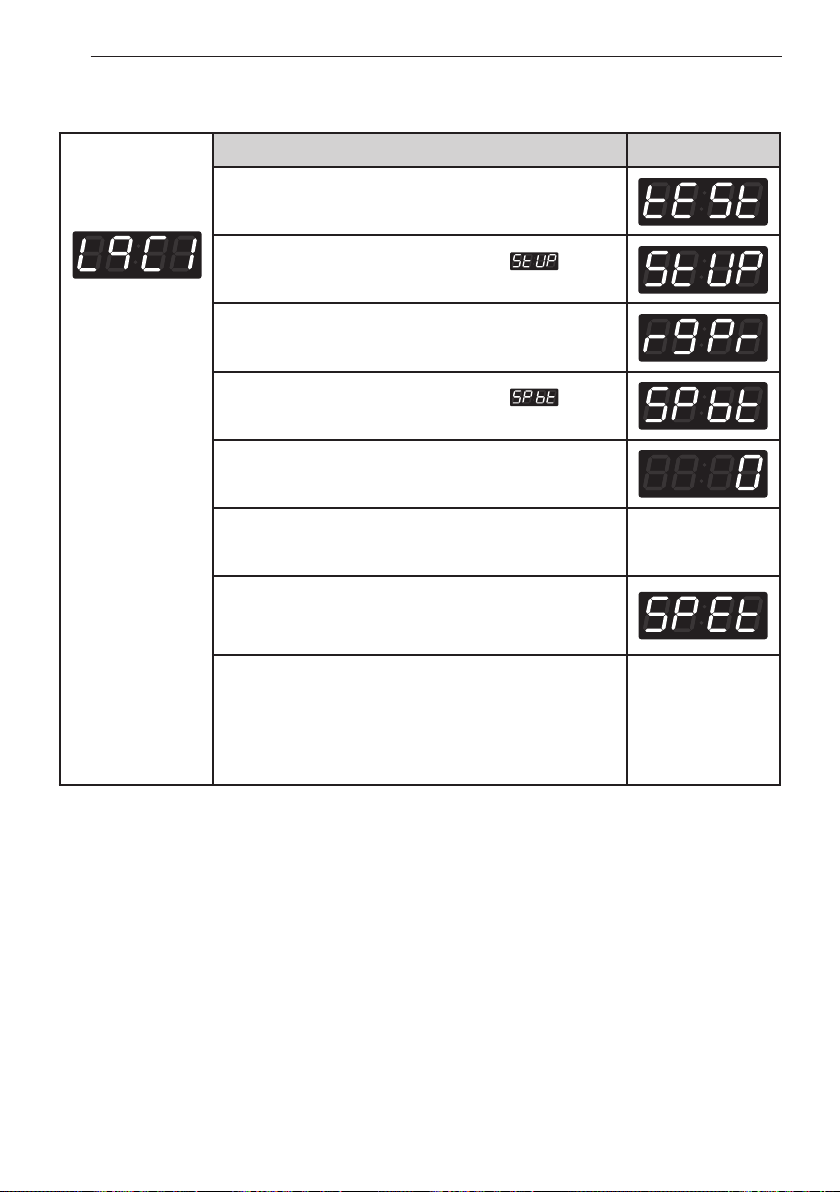
12-1. How to change to Sunday
NOTE
• As explained on the previous page, similarly, other days can be set up by the same method.
44
PROGRAMMING MODE - SETUP MODE
Entering set up
mode.
You will see LqC1
Button Display
Press the
Hot
button.
Press the
Warm
or the
Cold
button until appears
in the display.
Press the
Start
button.
Press the
Warm
or the
Cold
button until appears
in the display.
Press the
Start
button.
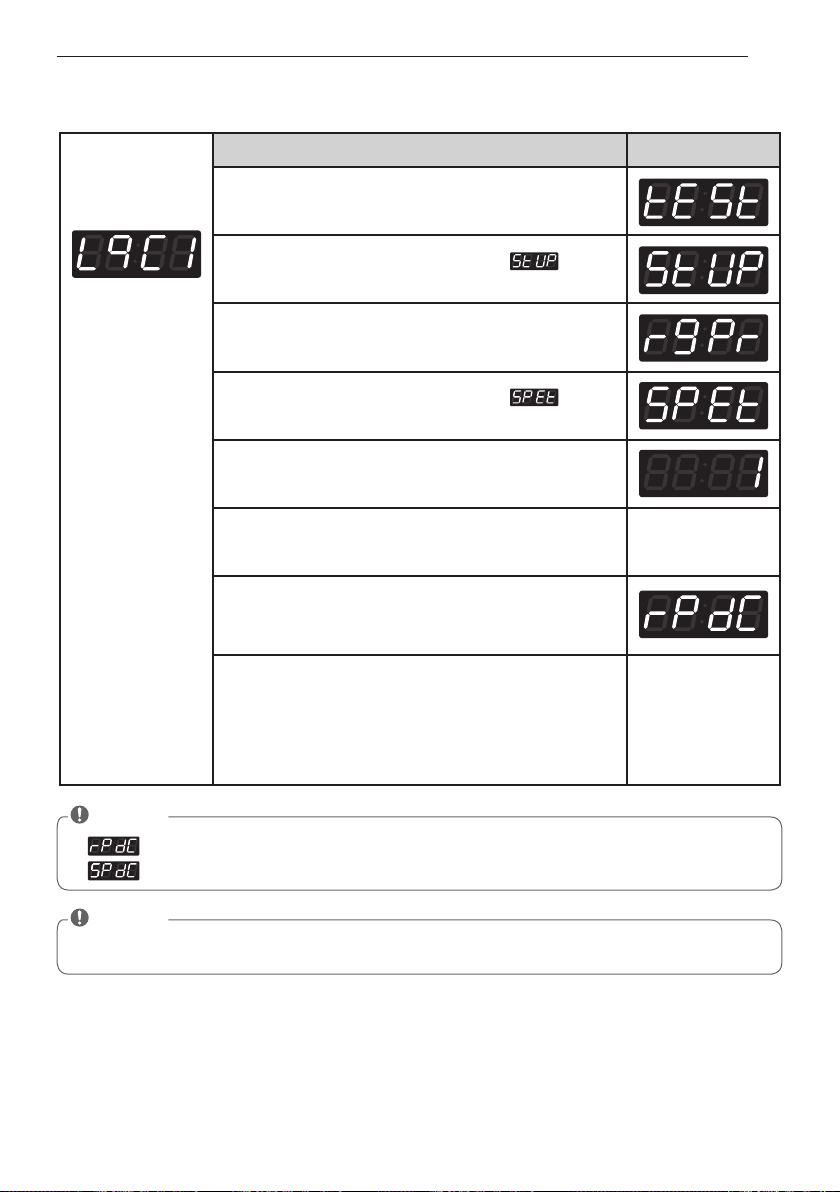
Display previous special price beginning time.
Press
Warm(+)
or
Cold(-)
button to select time between
0
and
23
.
Press the
Start
button.
The machine sets up the special price beginning time,
then advances to the next process automatically.
1. Continue to set up the next mode.
2. Stop the change of setup value and go back to ready
mode.
• Coin type - Turn on/off toggle switch.
• Card type - Pull the service card.
• OPL type - Push the Hot button twice.
13. Special price beginning time setup
45
PROGRAMMING MODE - SETUP MODE
Entering set up
mode.
You will see LqC1
Button Display
Press the
Hot
button.
Press the
Warm
or the
Cold
button until appears
in the display.
Press the
Start
button.
Press the
Warm
or the
Cold
button until appears
in the display.
Press the
Start
button.
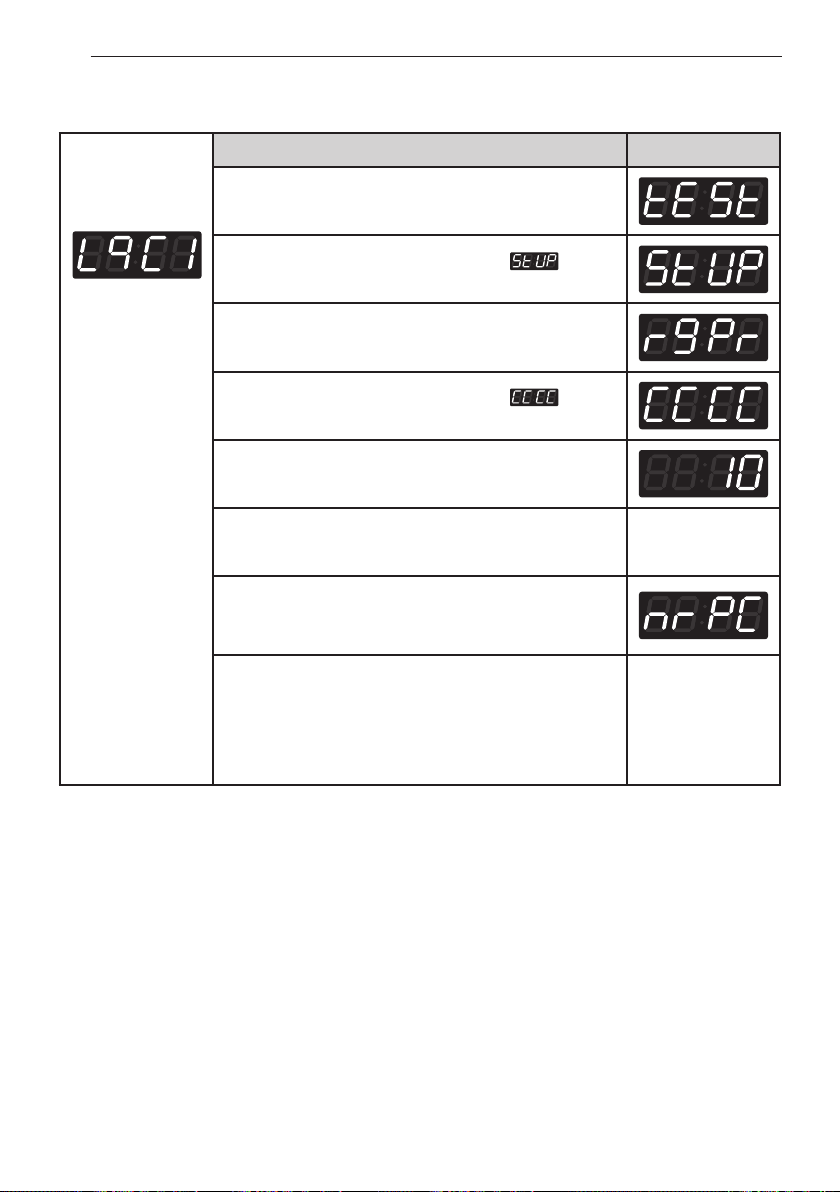
Display previous Special Price ending time.
Press
Warm(+)
or
Cold(-)
button to select time between
1
and
24
.
Press the
Start
button.
The machine sets up the special price ending time, then
advances to the next process automatically.
1. Continue to set up the next mode.
2. Stop the change of setup value and go back to ready
mode.
• Coin type - Turn on/off toggle switch.
• Card type - Pull the service card.
• OPL type - Push the Hot button twice.
14. Special price ending time setup
NOTE
• (regular priced dryer cycle time) is not available in washer.
• (special priced dryer cycle time) is not available in washer.
NOTE
• When setting up a special price period, the ending time must be later than the beginning time.
46
PROGRAMMING MODE - SETUP MODE
Entering set up
mode.
You will see LqC1
Button Display
Press the
Hot
button.
Press the
Warm
or the
Cold
button until appears
in the display.
Press the
Start
button.
Press the
Warm
or the
Cold
button until appears
in the display.
Press the
Start
button.
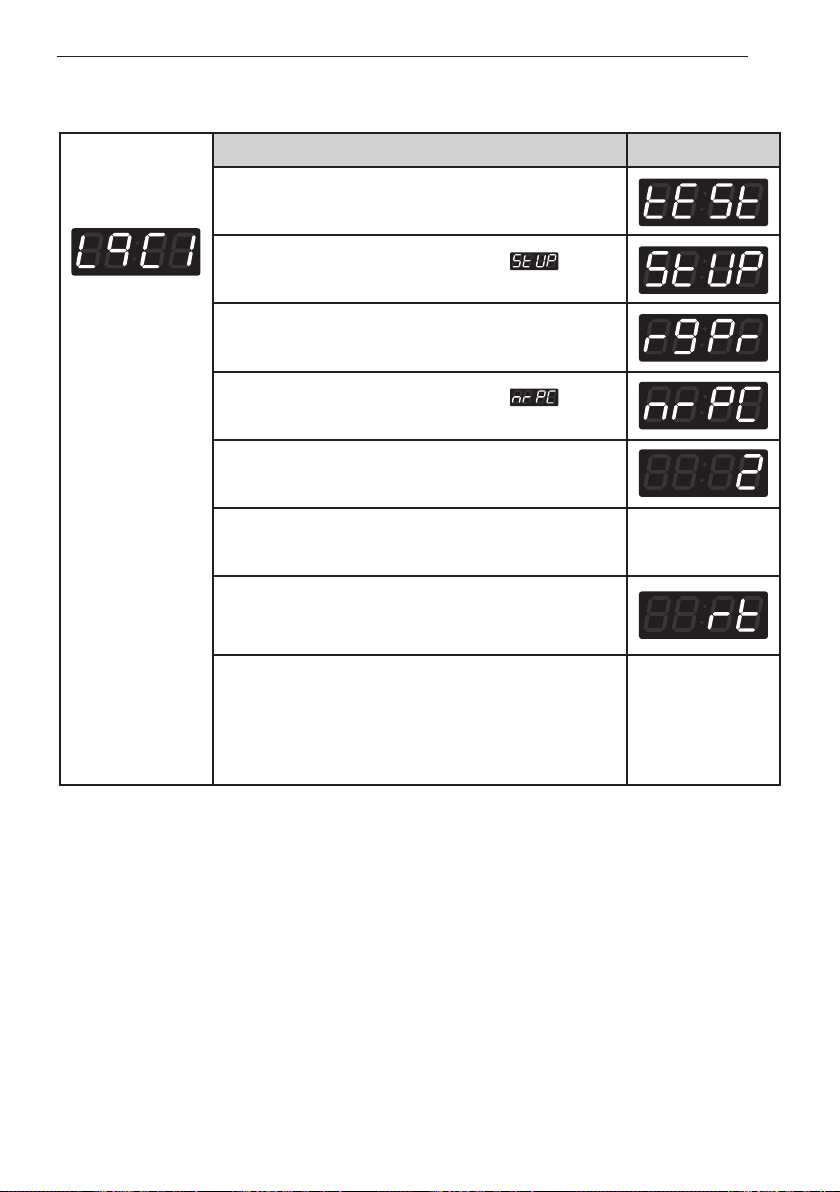
Display previous wash time.
Press
Warm(+)
or
Cold(-)
button to select wash time.
(Maximum 15 minutes, Minimum 5 minutes.)
Press the
Start
button.
The machine sets up the wash time, then advances to
the next process automatically.
1. Continue to set up the next mode.
2. Stop the change of setup value and go back to ready
mode.
• Coin type – Turn on/off toggle switch.
• Card type – Insert the service card.
• OPL type – Push the Hot button twice.
15. Washing time set up
47
PROGRAMMING MODE - SETUP MODE
Entering set up
mode.
You will see LqC1
Button Display
Press the
Hot
button.
Press the
Warm
or the
Cold
button until appears
in the display.
Press the
Start
button.
Press the
Warm
or the
Cold
button until appears
in the display.
Press the
Start
button.
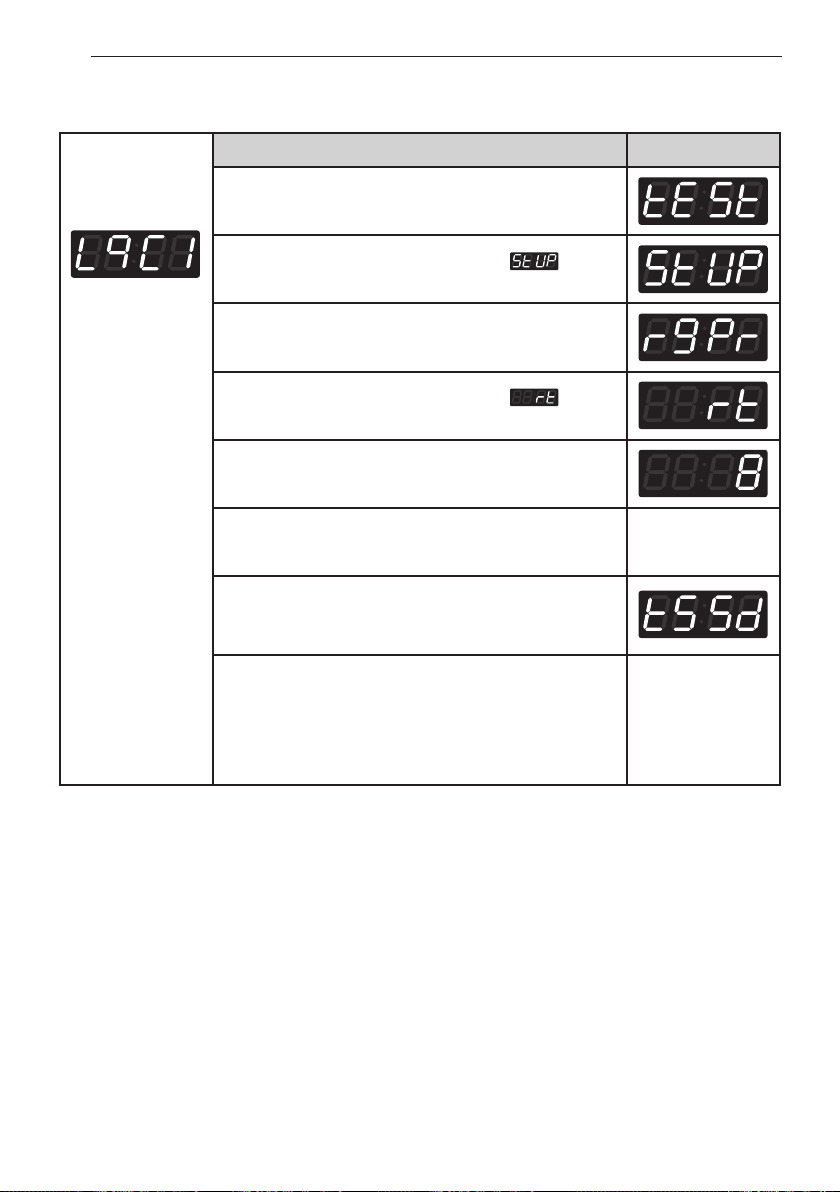
Display previous rinsing times per cycle.
Press
Warm(+)
or
Cold(-)
button to select rinsing times
per cycle. (Max 5, Min 1)
Press the
Start
button.
The machine sets up the rinsing times per cycle, then
advances to the next process automatically.
1. Continue to set up the next mode.
2. Stop the change of setup value and go back to ready
mode.
• Coin type – Turn on/off toggle switch.
• Card type – Insert the service card.
• OPL type – Push the Hot button twice.
16. Rinsing times per cycle
48
PROGRAMMING MODE - SETUP MODE
Entering set up
mode.
You will see LqC1
Button Display
Press the
Hot
button.
Press the
Warm
or the
Cold
button until appears
in the display.
Press the
Start
button.
Press the
Warm
or the
Cold
button until appears
in the display.
Press the
Start
button.
Display previous rinsing time.
Press
Warm(+)
or
Cold(-)
button to select rinse cycle.
(Max 15min, Min 8min)
Press the
Start
button.
The machine sets up the rinsing time, then advances to
the next process automatically.
1. Continue to set up the next mode.
2. Stop the change of setup value and go back to ready
mode.
• Coin type – Turn on/off toggle switch.
• Card type – Insert the service card.
• OPL type – Push the Hot button twice.
17. Rinsing time setup

49
PROGRAMMING MODE - SETUP MODE
Entering set up
mode.
You will see LqC1
Button Display
Press the
Hot
button.
Press the
Warm
or the
Cold
button until appears
in the display.
Press the
Start
button.
Press the
Warm
or the
Cold
button until appears
in the display.
Press the
Start
button.
Display previous top spin speed.
Press
Warm(+)
or
Cold(-)
button to select top spin
speed. (0~3)
Press the
Start
button.
The machine sets up the top spin speed, then advances
to the next process automatically.
1. Continue to set up the next mode.
2. Stop the change of setup value and go back to ready
mode.
• Coin type – Turn on/off toggle switch.
• Card type – Insert the service card.
• OPL type – Push the Hot button twice.
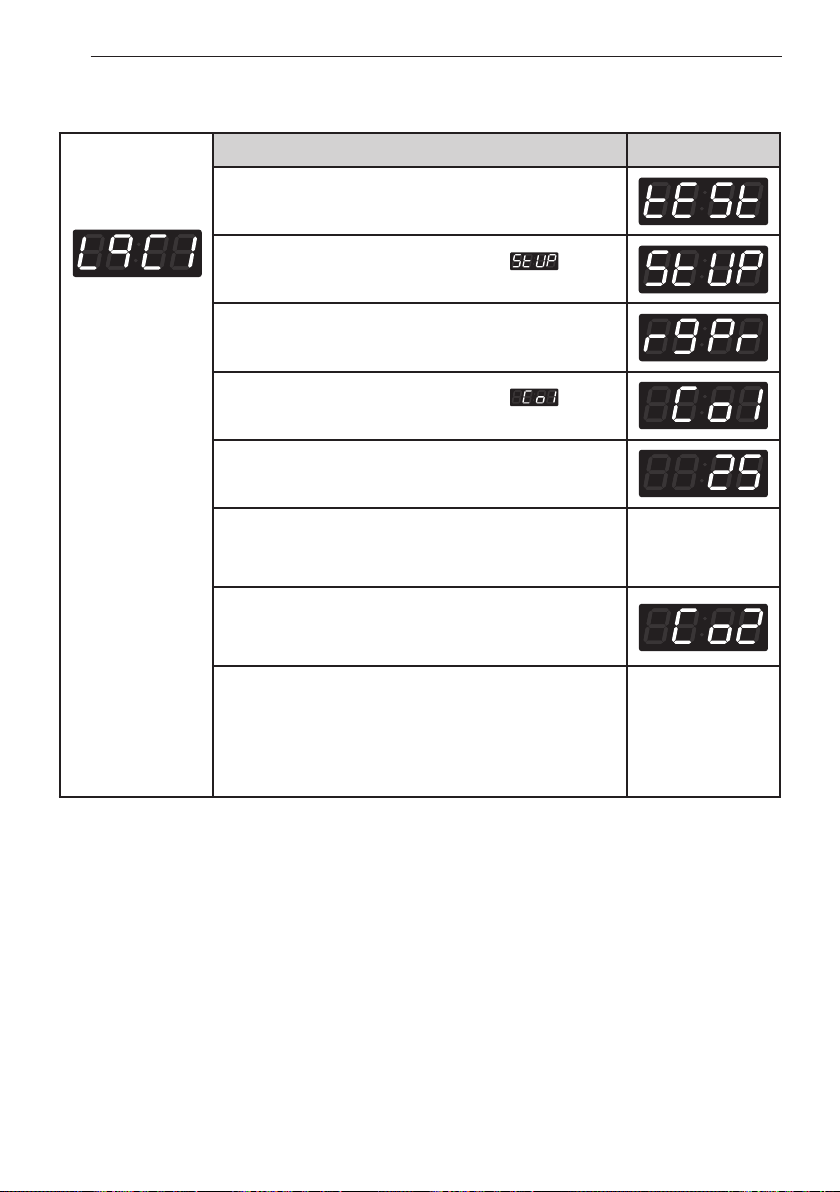
18. Top spin speed – final spin time depends on RPM
NOTE
• Top spin speed
0 : 1150 rpm
1 : 1000 rpm
2 : 800 rpm
3 : 700 rpm
50
PROGRAMMING MODE - SETUP MODE
Entering set up
mode.
You will see LqC1
Button Display
Press the
Hot
button.
Press the
Warm
or the
Cold
button until appears
in the display.
Press the
Start
button.
Press the
Warm
or the
Cold
button until appears
in the display.
Press the
Start
button.
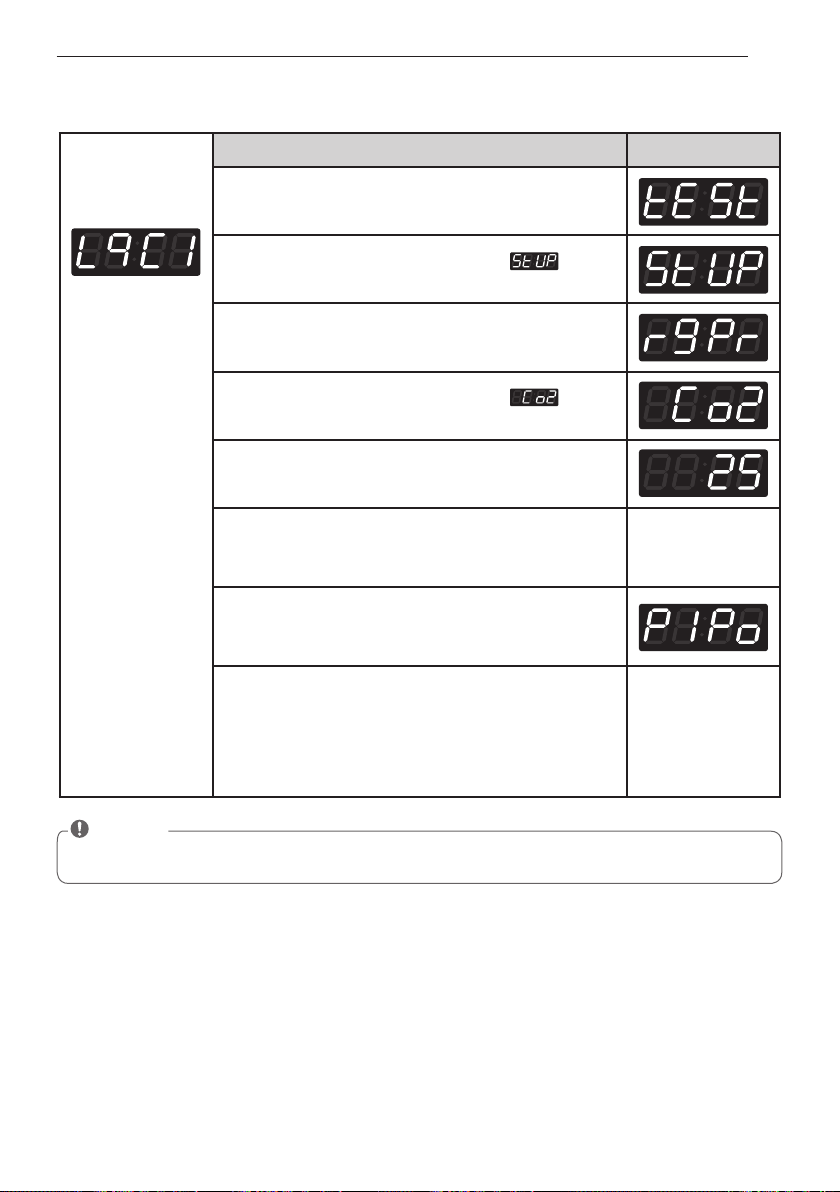
Display previous coin 1 value.
Press
Warm(+)
or
Cold(-)
button to select value of coin 1
(The value can be set from $0.00 to $9.95 in 25¢
increments.)
Press the
Start
button.
The machine sets up the value of coin 1, then advances
to the next process automatically.
1. Continue to set up the next price.
2. Stop the change of setup value and go back to ready
mode.
• Coin type - Turn on/off toggle switch.
• Card type - Pull the service card.
• OPL type – Push the Hot button twice.
19. Value of coin 1
51
PROGRAMMING MODE - SETUP MODE
Entering set up
mode.
You will see LqC1
Button Display
Press the
Hot
button.
Press the
Warm
or the
Cold
button until appears
in the display.
Press the
Start
button.
Press the
Warm
or the
Cold
button until appears
in the display.
Press the
Start
button.
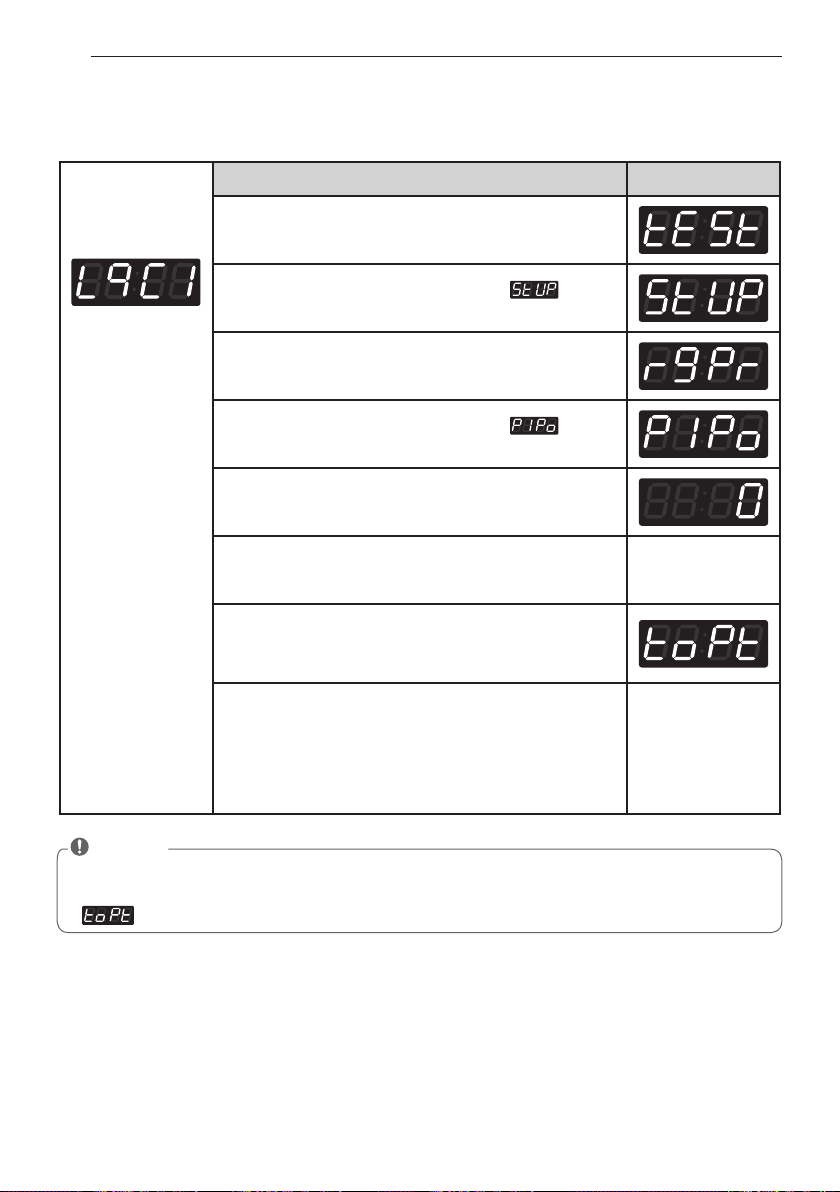
Display previous Coin 2 value.
Press
Warm(+)
or
Cold(-)
button to select value of coin 2.
(The value can be set from $0.00 to $9.95 in 5¢
increments.)
Press the
Start
button.
The machine sets up the value of Coin 2, then advances
to the next process automatically.
1. Continue to set up the next mode.
2. Stop the change of setup value and go back to ready
mode.
• Coin type - Turn on/off toggle switch.
• Card type - Pull the service card.
• OPL type - Push the Hot button twice.
20. Value of coin 2
NOTE
• Coin 2 is available for E-suds system
52
PROGRAMMING MODE - SETUP MODE
Entering set up
mode.
You will see LqC1
Button Display
Press the
Hot
button.
Press the
Warm
or the
Cold
button until appears
in the display.
Press the
Start
button.
Press the
Warm
or the
Cold
button until appears
in the display.
Press the
Start
button.
Display previous penny increment pricing offset.
Press
Warm(+)
or
Cold(-)
button to select value of PIPo.
(0~4)
Press the
Start
button.
The machine sets up the value of PIPo, then advances
to the next process automatically.
1. Continue to set up the next mode.
2. Stop the change of setup value and go back to ready
mode.
• Coin type - Turn on/off toggle switch.
• Card type - Pull the service card.
• OPL type - Push the Hot button twice.
21. Penny increment pricing offset
This represents the cent increment price offset used when debit card is setup.
NOTE
• Penny Increment Pricing Offset is available only in card type.
(It hasn’t affected the coin type’s price setting.)
(top off time) is not available in washer.
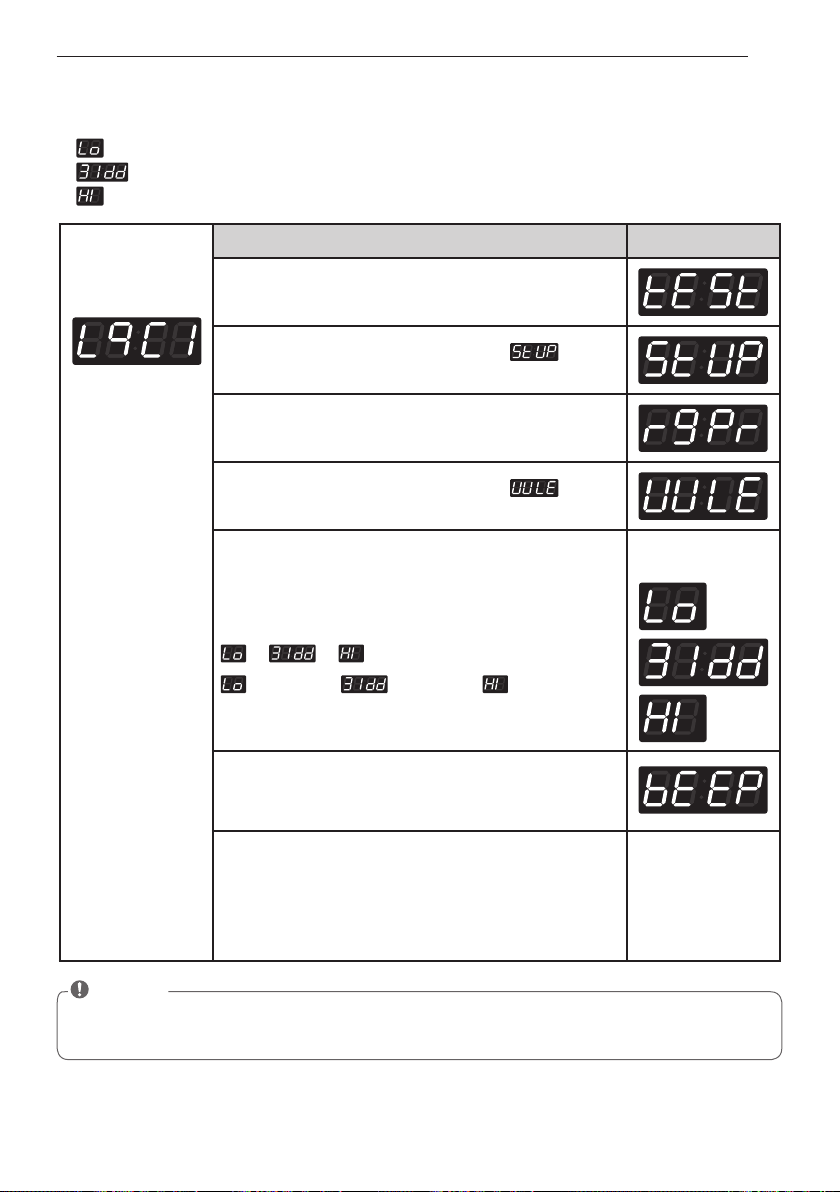
53
PROGRAMMING MODE - SETUP MODE
Entering set up
mode.
You will see LqC1
Button Display
Press the
Hot
button.
Press the
Warm
or the
Cold
button until appears
in the display.
Press the
Start
button.
Press the
Warm
or the
Cold
button until appears
in the display.
Press the
Start
button.
Press
Warm(+)
or
Cold(-)
button and then select
or or
23.8 [KHz] 23.5 [KHz] 23.0 [KHz]
One or the other
will display.
Press the
Start
button.
The machine sets up the value of water level, then
advances to the next process automatically.
1. Continue to set up the next mode.
2. Stop the change of setup value and go back to ready
mode.
• Coin type – Turn on/off toggle switch.
• Card type – Insert the service card.
• OPL type – Push the Hot button twice.
22. How to change the water level
You can change the water level by selecting two options.
1. indicate water level 23.8 [KHz]
2. indicate water level 23.5 [KHz]
3. indicate water level 23.0 [KHz]
NOTE
• This function can be set only at the machine. It cannot be managed via the setup card.
(It is not applied in setup card.)
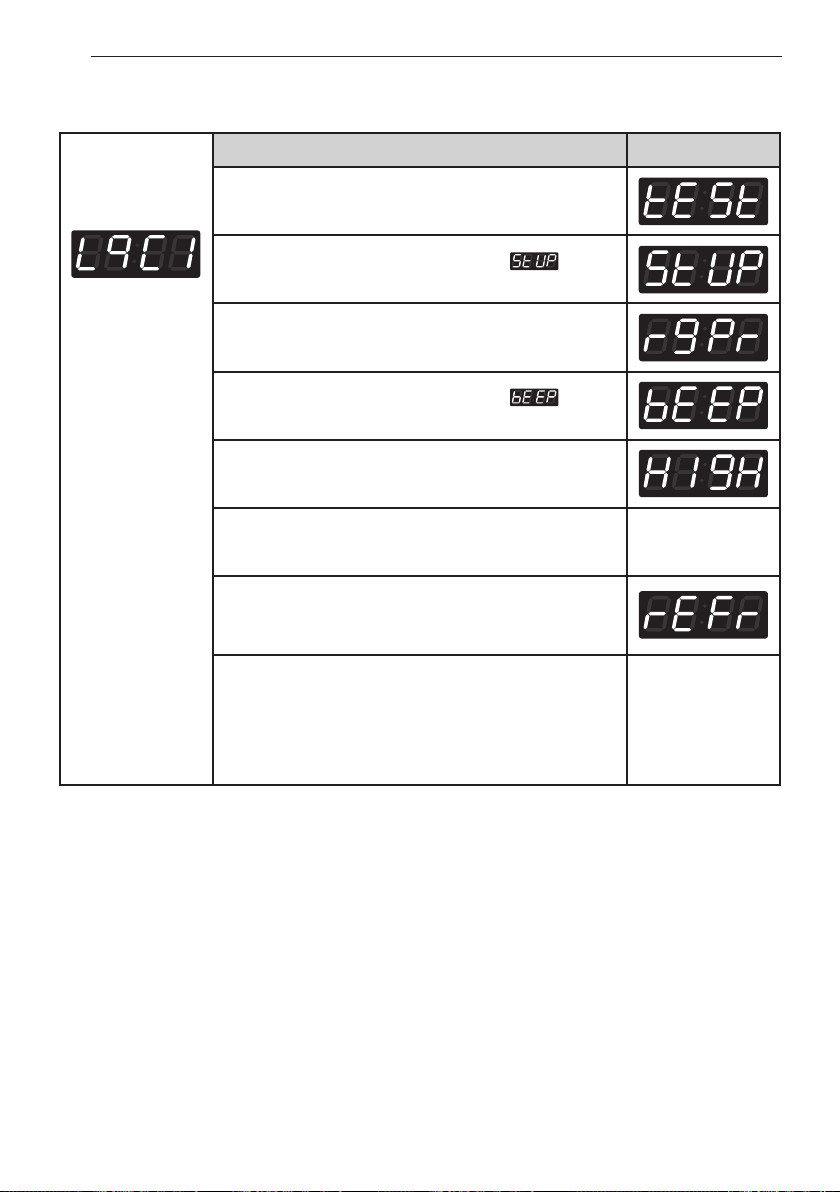
54
PROGRAMMING MODE - SETUP MODE
Entering set up
mode.
You will see LqC1
Button Display
Press the
Hot
button.
Press the
Warm
or the
Cold
button until appears
in the display.
Press the
Start
button.
Press the
Warm
or the
Cold
button until appears
in the display.
Press the
Start
button.
Display previous value.
Press
Warm(+)
or
Cold(-)
button to select
High or Low or Off.
Press the
Start
button.
The machine sets up the beep volume, then advances
to the next process automatically.
1. Continue to set up the next mode.
2. Stop the change of setup value and go back to ready
mode.
• Coin type – Turn on/off toggle switch.
• Card type – Insert the service card.
• OPL type – Push the Hot button twice.
23. Beep volume
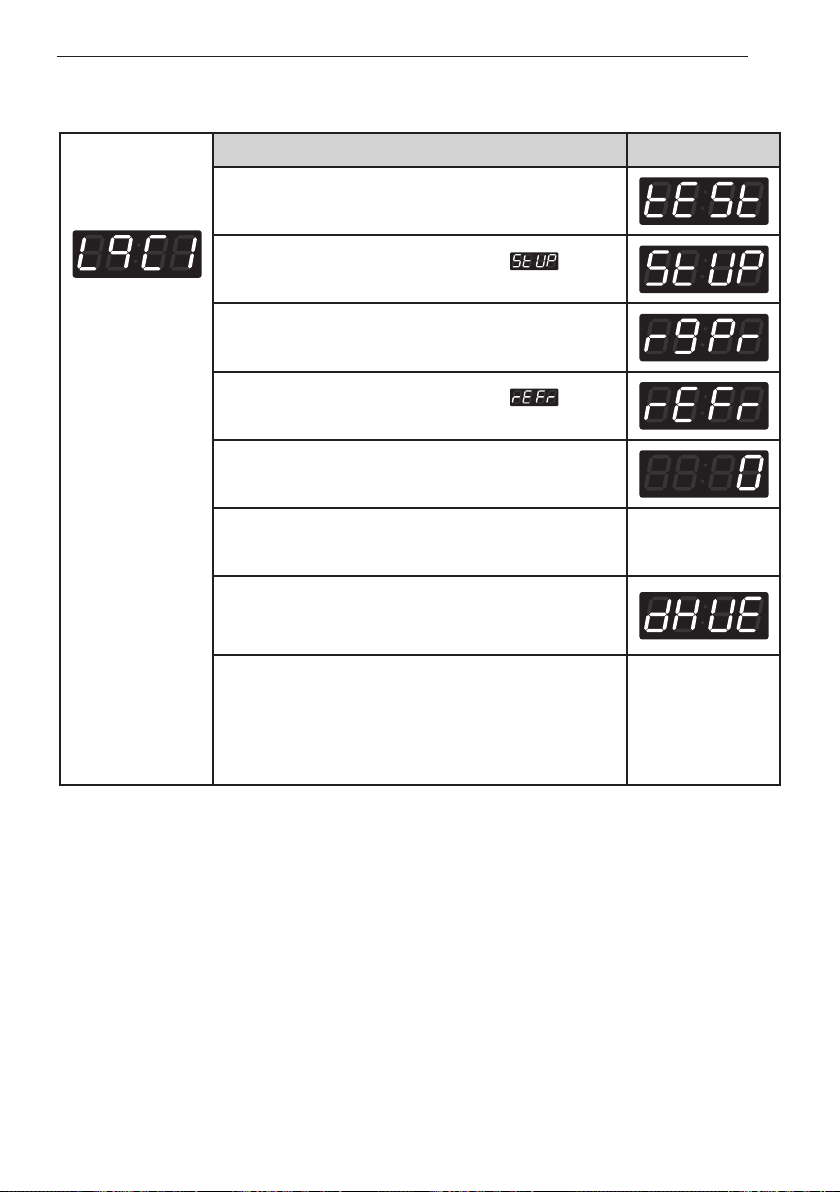
55
Programming mode - setuP mode
Entering set up
mode.
You will see LqC1
Button Display
Press the
Hot
button.
Press the
Warm
or the
Cold
button until
appears
in the display.
Press the
Start
button.
Press the
Warm
or the
Cold
button until
appears
in the display.
Press the
Start
button.
Display previous value.
Press
Warm(+)
or
Cold(-)
button to select button to
select time between
0 ~ 180
.
Press the
Start
button.
The machine sets up the time to keep the coin, then
advances to the next process automatically.
1. Continue to set up the next mode.
2. Stop the change of setup value and go back to ready
mode.
• Coin type - Turn on/off toggle switch.
• Card type - Pull the service card.
• OPL type - Push the Hot button twice.
24. Time to keep the coin (Use only for coin type)
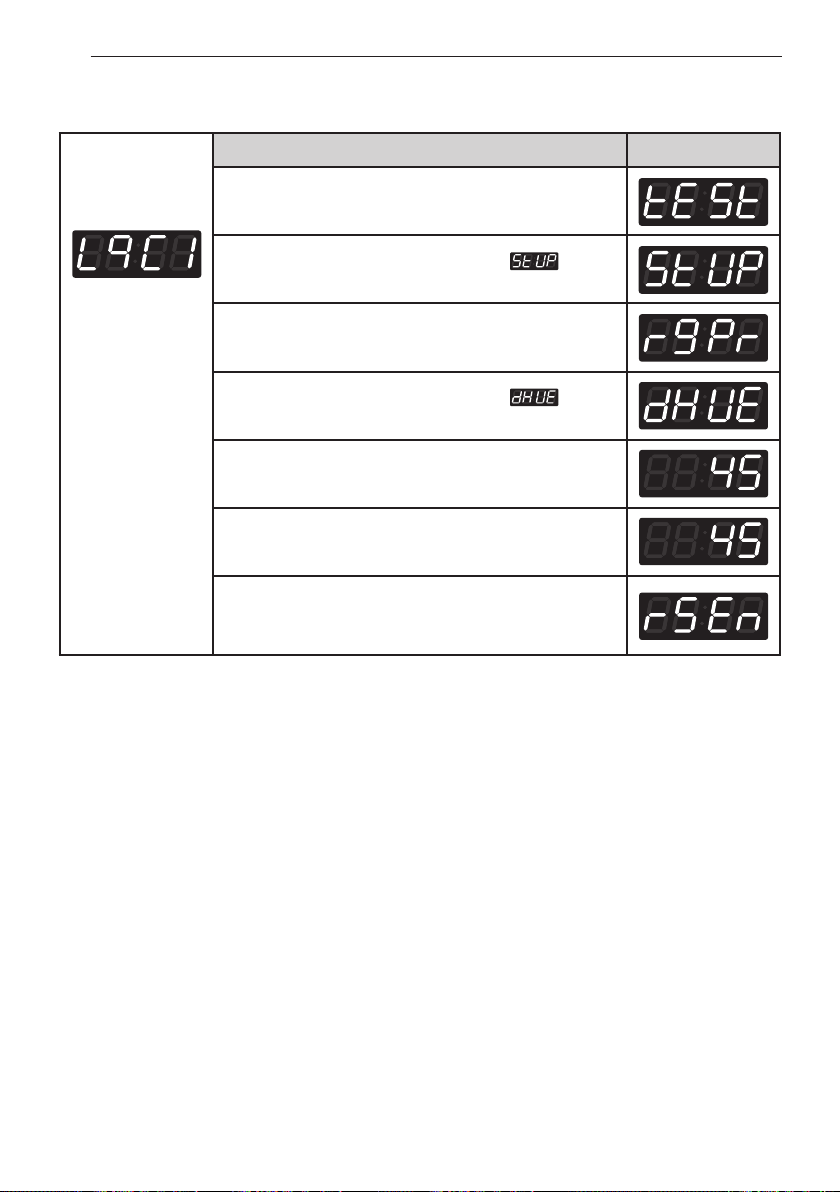
56
PROGRAMMING MODE - SETUP MODE
Entering set up
mode.
You will see LqC1
Button Display
Press the
Hot
button.
Press the
Warm
or the
Cold
button until appears
in the display.
Press the
Start
button.
Press the
Warm
or the
Cold
button until appears
in the display.
Press the
Start
button.
Display default drop count.
Press
Warm
or
Cold
button to select time between
25
and
45
. (Unit of drop count : 5)
Press the
Start
button.
The machine sets up the drop count, then advances to
the next process automatically.
25. How to setting drop count
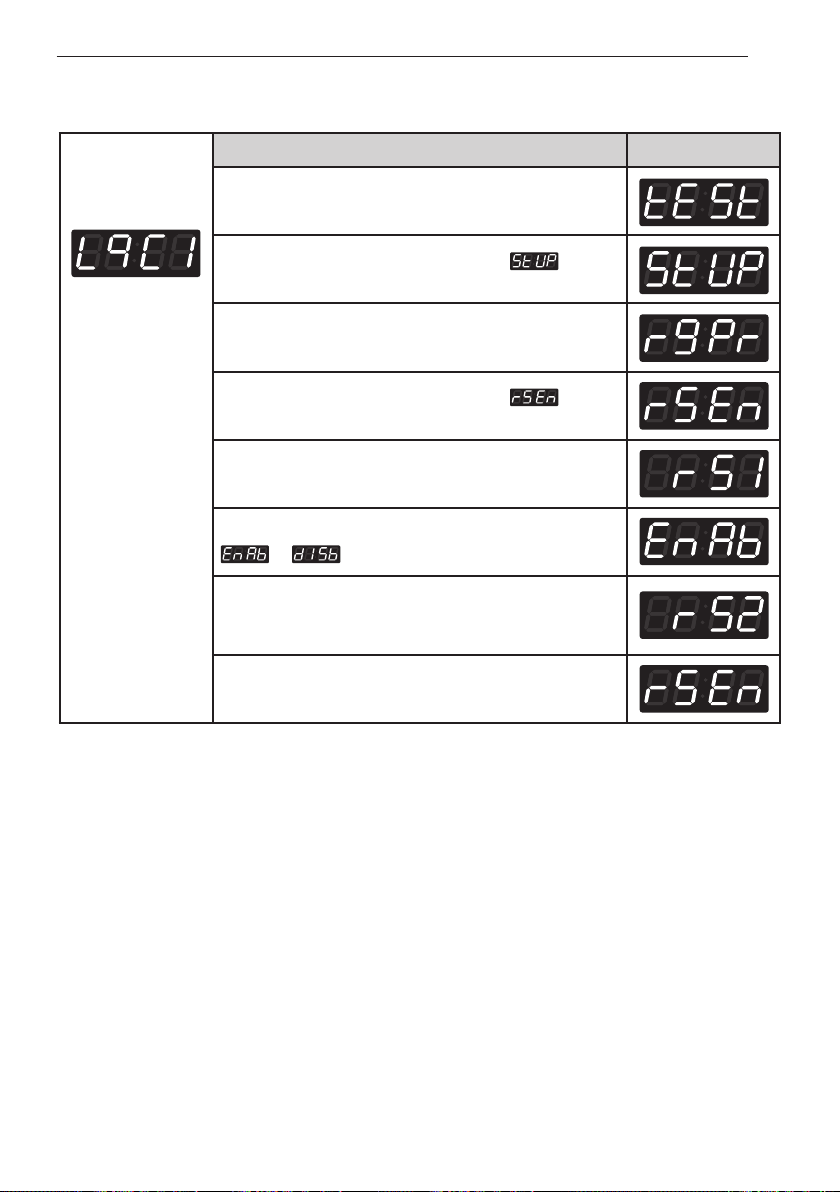
57
PROGRAMMING MODE - SETUP MODE
26. How to setting rinse spin enable
Entering set up
mode.
You will see LqC1
Button Display
Press the
Hot
button.
Press the
Warm
or the
Cold
button until appears
in the display.
Press the
Start
button.
Press the
Warm
or the
Cold
button until appears
in the display.
Press the
Start
button.
Display step of rinse.(rs1~rs5)
Press the
Warm
or the
Cold
button to select risne spin
or .
Press the
Start
button.
The machine sets up the rinse spin and display next
step of rinse.
Press the
Hot
button. The machine sets up the rinse
spin.
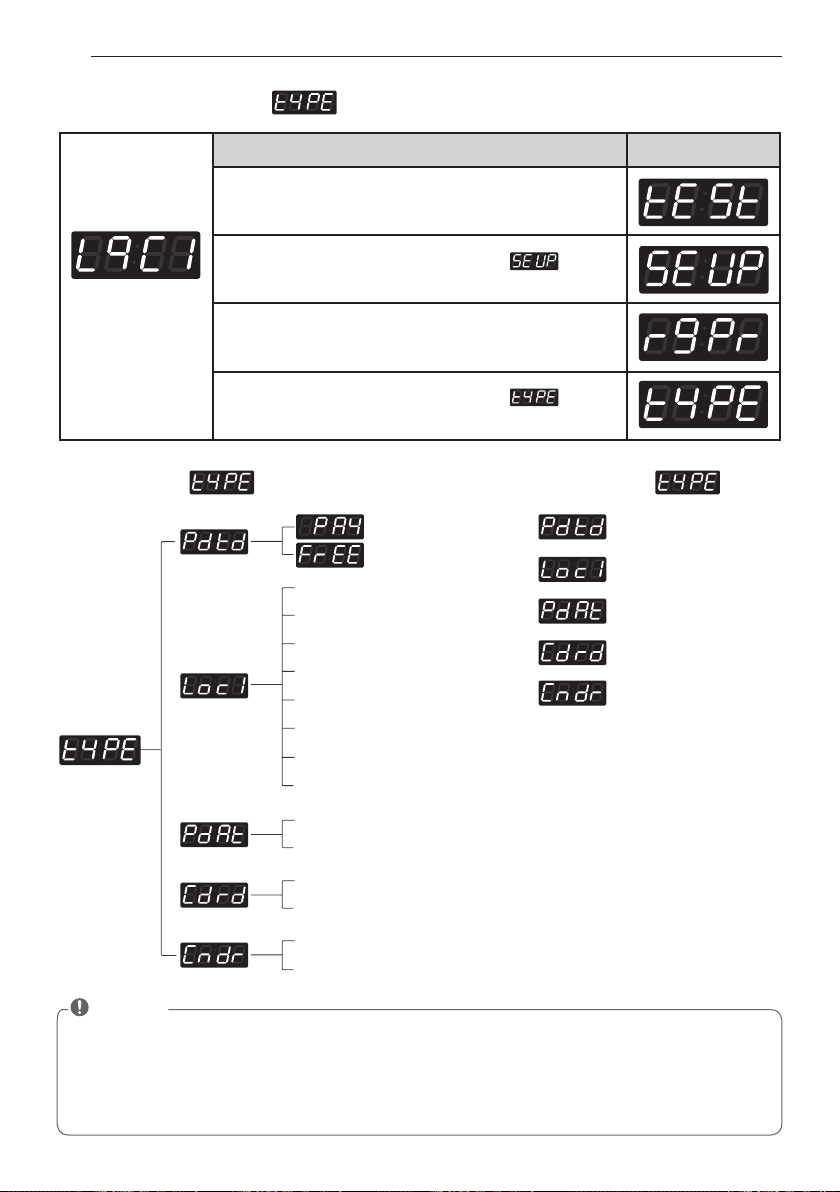
58
PROGRAMMING MODE - SETUP MODE
Entering set up
mode.
You will see LqC1
Button Display
Press the
Hot
button.
Press the
Warm
or the
Cold
button until appears
in the display.
Press the
Start
button.
Press the
Warm
or the
Cold
button until appears
in the display.
27. How to enter the
• Product type
• Currency choice
• PDA type
• Card reader type
• Coin drop type
Structure of Content of
0 EUK (England)
1 EAP (Australia)
2 ELC (USA)
3 EPN (China)
4 KOR (Korea)
5 EJP (Japan)
6 ECI (Canada)
7 GSC (Philippines)
0 (Pharos)
1 (HP)
0 (Greenwald)
1 (ESD)
0 (ESD, Greenwald, Munzprufer)
1 (Korea)
NOTE
• Pay means card or coin type.
• Default type is coin type.
If you want to change coin type to card type, you need to setup vend type in fea1. (refer to FEA1
function)
• Free means OPL type.
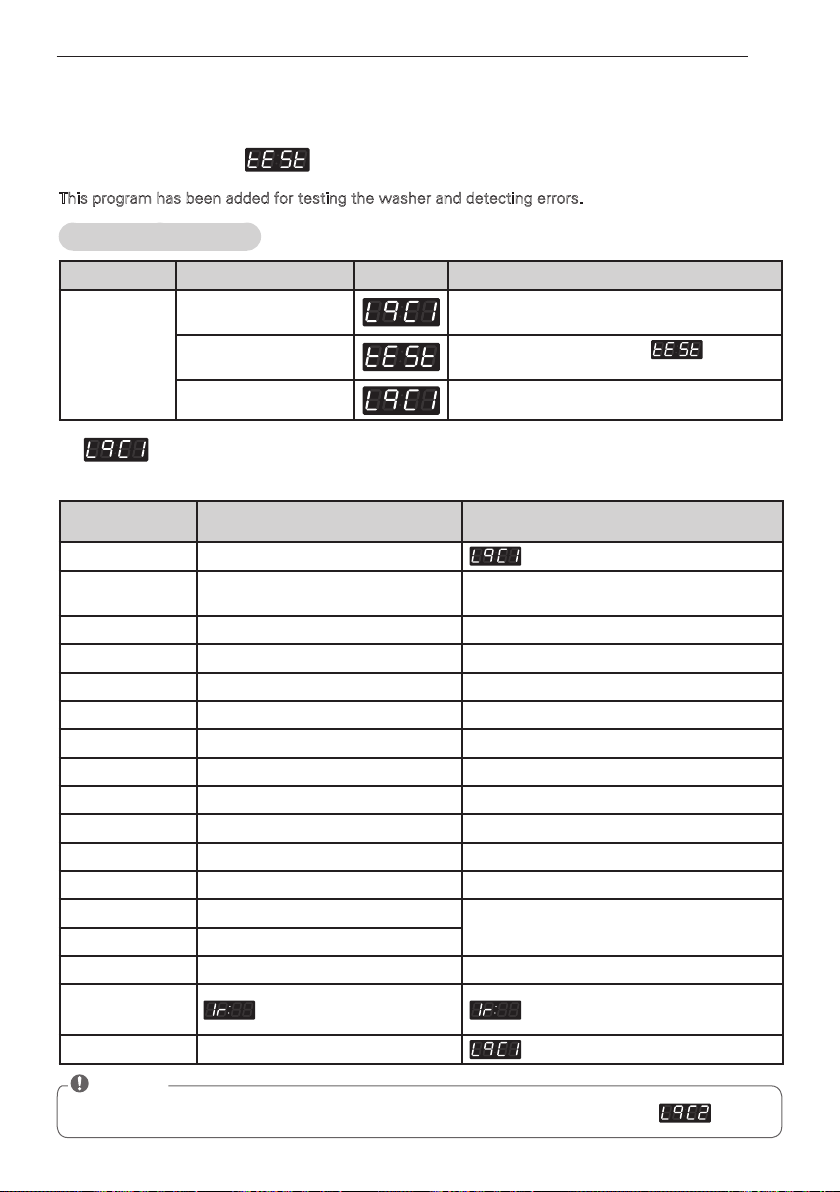
59
PROGRAMMING MODE - TEST MODE
PROGRAMMING MODE -
TEST MODE
Diagnostic tests: (display)
This program has been added for testing the washer and detecting errors.
1.
According to pressing Start button, test move to the next step.
Entering the test mode
Data Name Button Display Description
Entering
the test mode
1. Entering
programming mode
Insert service card (card type), turn on/off
toggle switch (Coin type).
2. Hot
Press the Hot button. Then appears
in the display.
3. Start Enter the diagnostic test mode.
Number of times the
START button is pressed
Check Point Display
None
1 time
Turns on all lamps and locks the
door
Displays 1U:XX, 1g:XX and 12:X0
alternately (Version)
2 times Tumble Clockwise. rpm (40~50)
3 times Low Speed Spin rpm (600)
4 times High Speed Spin rpm (1150)
5 times Inlet valve for main water turns on. Water level frequency (255~)
6 times Inlet valve for hot wash turns on. Water level frequency (255~)
7 times Inlet valve for softener turns on. Water level frequency (255~)
8 times Inlet valve for bleach turns on. Water level frequency (255~)
9 times Tumble counter clockwise. rpm (40~50)
10 times Turn on Circulation Pump. Water level frequency (255~)
11 times Drain Pump turns on. Water level frequency (255~)
12 times Turns on all lamps.
Displays 1U:XX, 1g:XX and 12:X0
alternately
13 times Button Checks.
14 times High Speed Spin rpm (1150)
15 times PDA Signal Check
this function is not applied in this
machine
16 times
NOTE
• Make sure the drum is empty when a diagnostic test is performed. Do not use
.
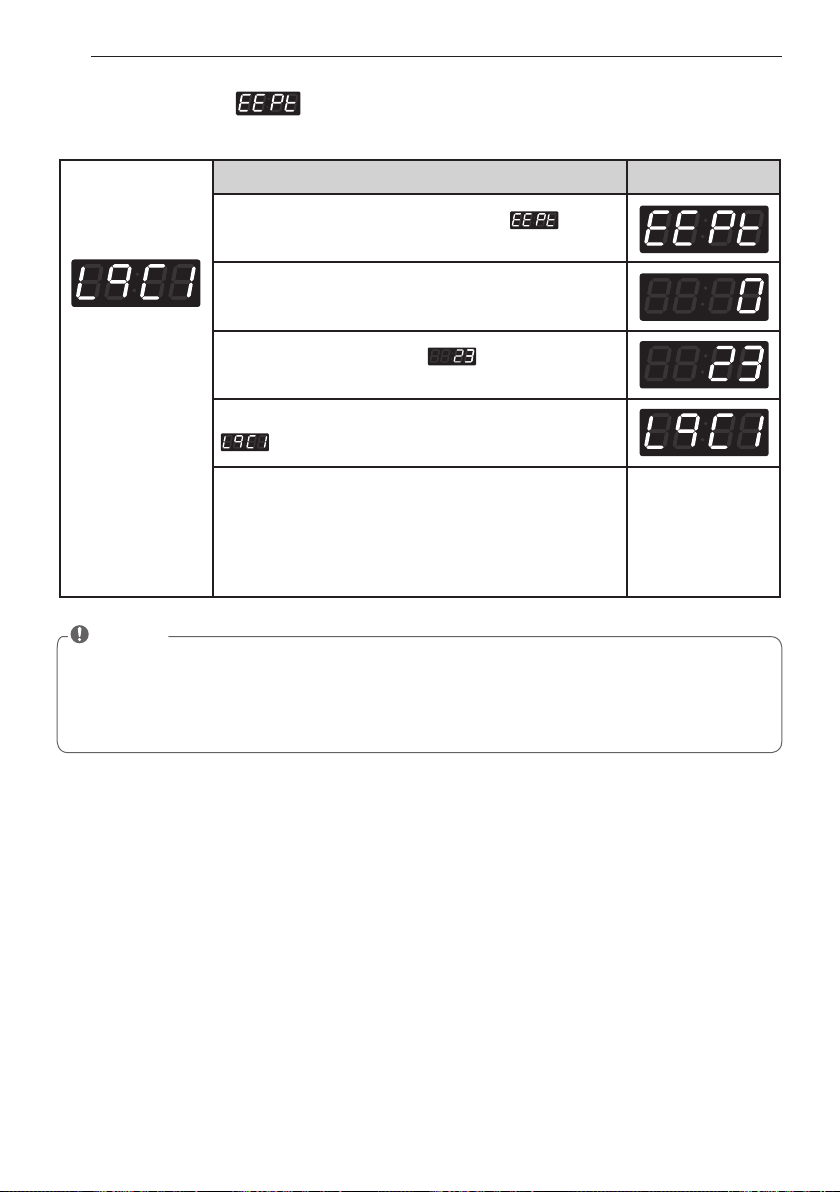
60
PROGRAMMING MODE - TEST MODE
Entering set up
mode.
You will see LqC1
Button Display
Press the
Warm
or the
Cold
button until appears
in the display.
Press the
Start
button.
Press the
Warm
button until appears in the
display.
Press the
Start
button, then factory reset is done.
is displayed.
1. Continue to set up the next mode.
2. Stop the change of setup value and go back to ready
mode.
• Coin type – Turn on/off toggle switch.
• Card type – Insert the service card.
• OPL type – Push the Hot button twice.
2. Factory reset -
After factory reset, machine information is changed to the default value.
NOTE
• Washing time 10 minutes
• Rinse cycle twice
• Top spin speed 1000 rpm
• Add SUPER WASH 3 minutes extra wash and one extra rinse
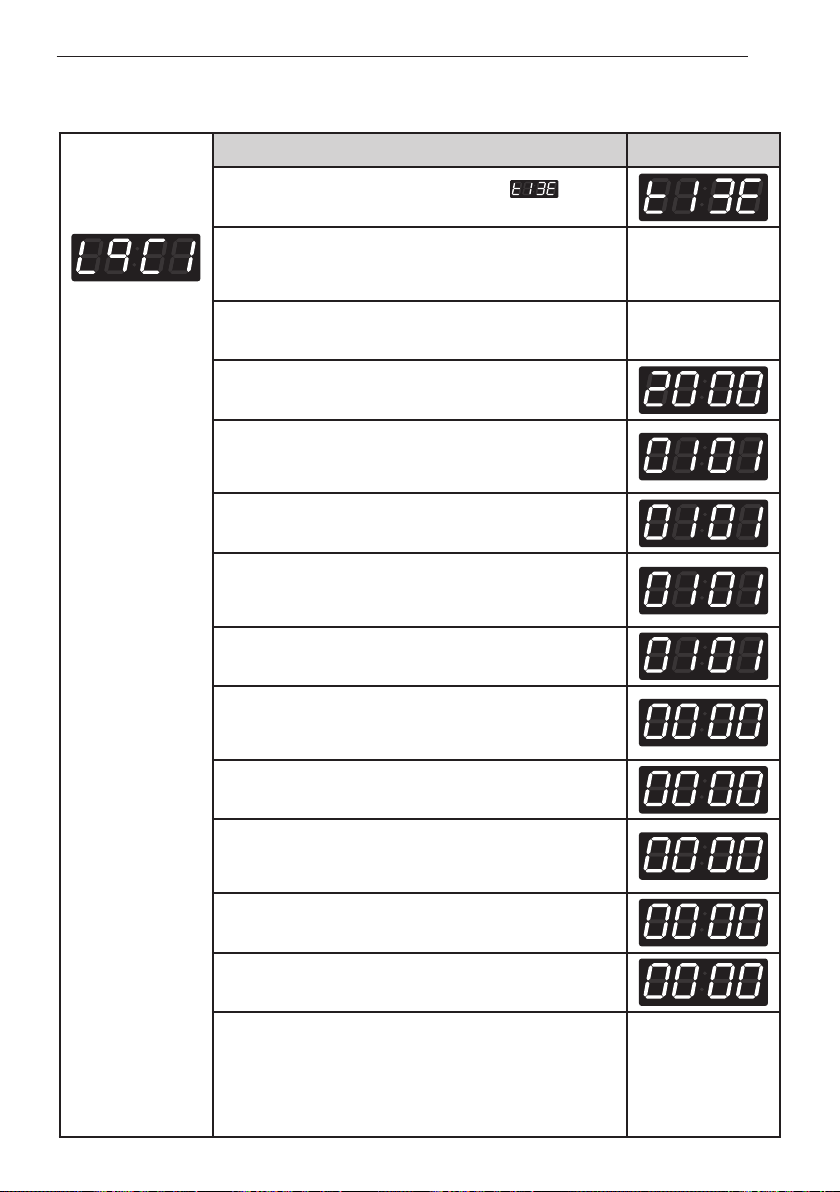
61
PROGRAMMING MODE - TEST MODE
Entering set up
mode.
You will see LqC1
Button Display
Press the
Warm
or the
Cold
button until appears
in the display.
Press the
Start
button.
The display will cycle through 2000 --> 0101 --> Sat -->
0000 repeatedly.
Press the
Start
button.
Press
Warm (+)
or
Cold (-)
button to select year
between 2000 and 2099.
Press the
Start
button.
The machine sets up the year, then advances to the
next process automatically.
Press
Warm (+)
or
Cold (-)
button to select a month
between 01 and 12.
Press the
Start
button.
The machine sets up the month, then advances to the
next process automatically.
Press
Warm (+)
or
Cold (-)
button to select the day
between 01 and 31.
Press the
Start
button.
The machine sets up the day, then advances to the next
process automatically.
Press
Warm (+)
or
Cold (-)
button to select the hour
between 00 and 23.
Press the
Start
button.
The machine sets up the hour, then advances to the
next process automatically.
Press
Warm (+)
or
Cold (-)
button to select minute
between 00 and 59.
Press the
Start
button.
The machine sets up the minute.
1. Continue to set up the next mode.
2. Stop the change of setup value and go back to ready
mode.
• Coin type - Turn on/off toggle switch.
• Card type - Pull the service card.
• OPL type - Push the Hot button twice.
3. Time set up
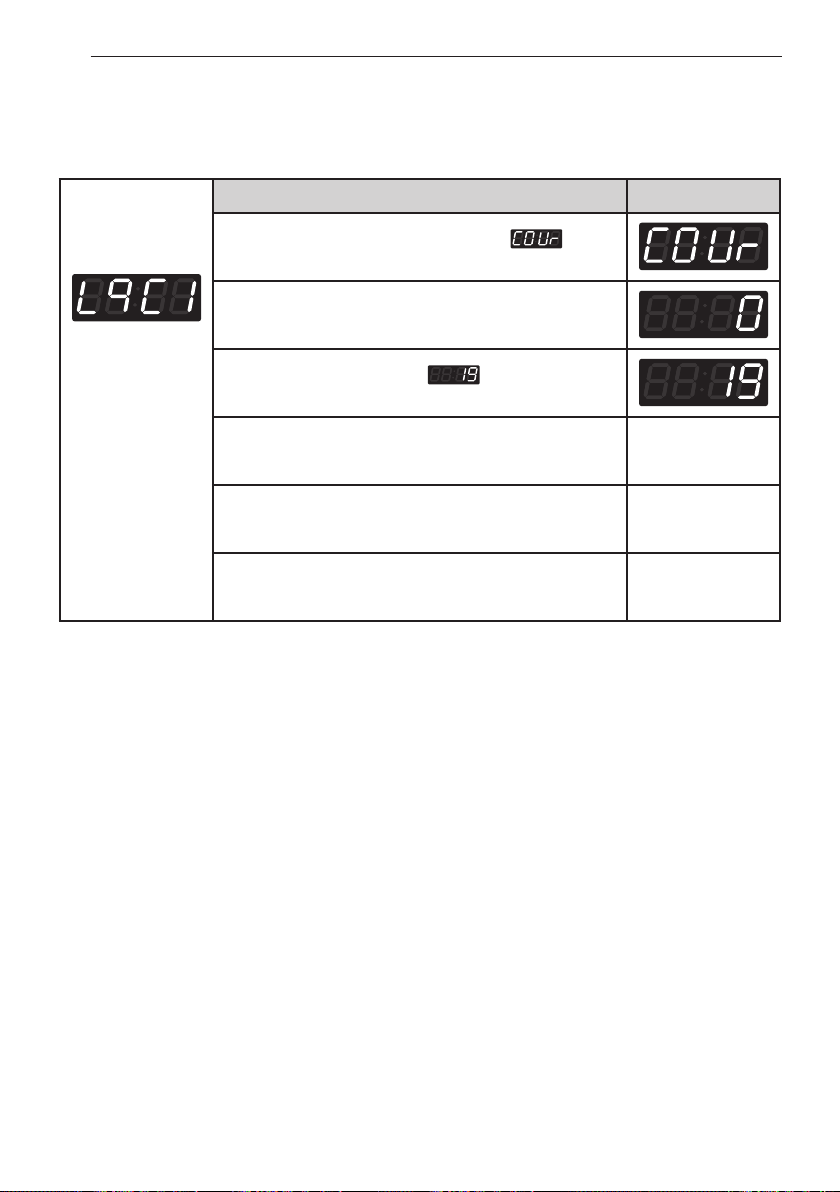
62
Programming mode - TesT mode
Entering set up
mode.
You will see LqC1
Button Display
Press the
Warm
or the
Cold
button until
appears in the display.
Press the
Start
button.
Press the
Warm
button until
appears in the
display.
Press the
Start
button.
Go back to ready mode.
Select the cycle you desire.
Press the
Start
button.
Display will show the remaining time and Start.
4. Courtesy cycle
A courtesy cycle is like a complimentary cycle given to the customer when the washer goes out of
order after the customer has made the payment to wash clothes.
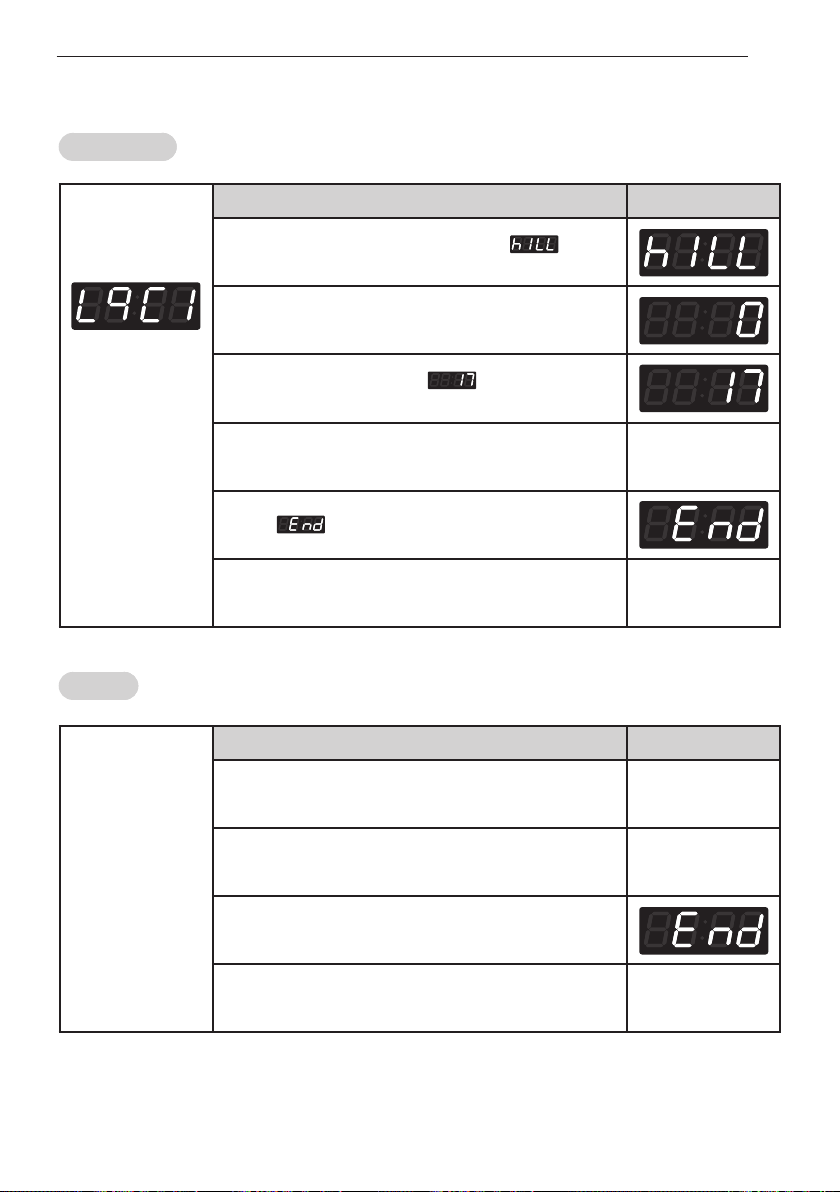
63
PROGRAMMING MODE - TEST MODE
Entering set up
mode.
You will see LqC1
Button Display
Press the
Warm
or the
Cold
button until appears
in the display.
Press the
Start
button.
Press the
Warm
button until appears in the
display.
Press the
Start
button.
Start drain and display spin time.
Display spin time
Display with beeping.
Go back to ready mode.
Insert cycle kill
card.
Description Display
Display spin time. Spin Time
Begin to drain. Spin Time
Remove cycle kill card.
Go back to ready mode.
5. Cycle Kill
Coin / OPL type
Card type
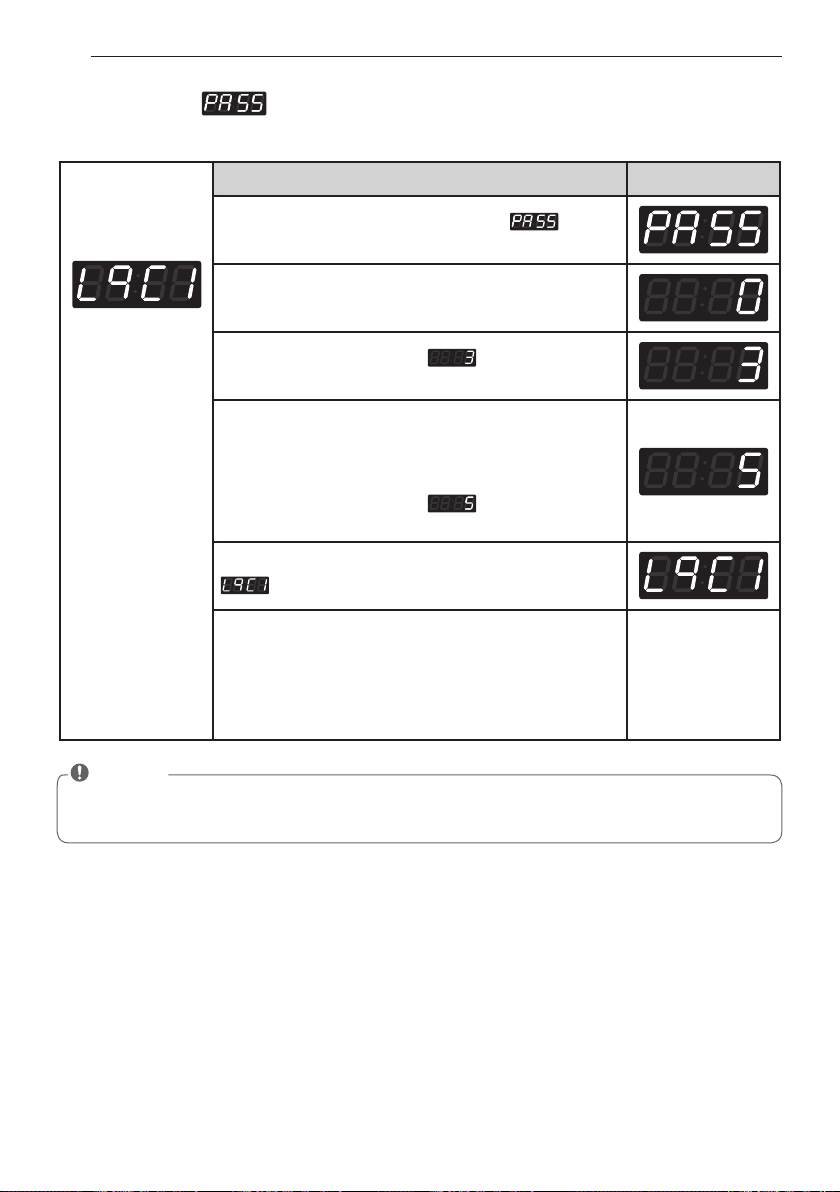
64
PROGRAMMING MODE - TEST MODE
Entering set up
mode.
You will see LqC1
Button Display
Press the
Warm
or the
Cold
button until appears
in the display.
Press the
Start
button.
Press the
Warm
button until appears in the
display.
Set up the number you want
By pressing
Warm
or the
Cold
button.
For example, If you want to change password number
to No. 5.
Press the
Warm
button until appears in the
display.
Press the
Start
button, then Password change is done.
is displayed.
1. Continue to set up the next price.
2. Stop the change of setup value and go back to ready
mode.
• Coin type - Turn on/off toggle switch.
• Card type - Pull the service card.
• OPL type – Push the Hot button twice.
6. Password -
How to change the password.
NOTE
• Default password is 3.
If you want to change the password, you must know the present password.
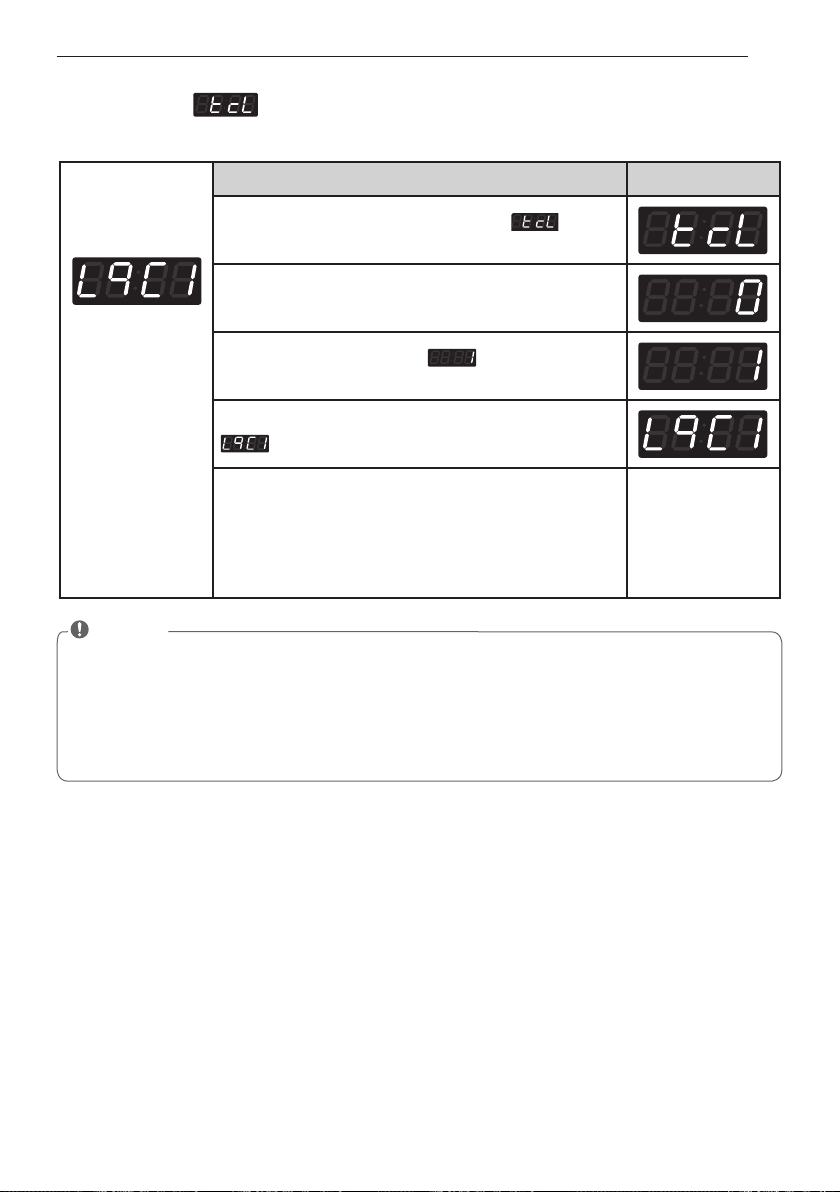
65
PROGRAMMING MODE - TEST MODE
Entering set up
mode.
You will see LqC1
Button Display
Press the
Warm
or the
Cold
button until appears
in the display.
Press the
Start
button.
Press the
Warm
button until appears in the
display.
Press the
Start
button, then tub clean reset is done.
is displayed.
1. Continue to set up the next price.
2. Stop the change of setup value and go back to ready
mode.
• Coin type - Turn on/off toggle switch.
• Card type - Pull the service card.
• OPL type – Push the Hot button twice.
7. Tub clean -
To clean up the tub, please run the TUB CLEAN cycle.
NOTE
• Never load laundry while using TUB CLEAN. The laundry may be damaged or become contami-
nated. Make sure to clean the washer tub when it is empty.
• Leave the door open after finishing the laundry to keep the tub clean.
• TUB CLEAN should be repeated monthly.
• Safely and conveniently secure the door slightly ajar with a magnetic door plunger. This will
promote air circulation and allow the interior of the machine to dry.
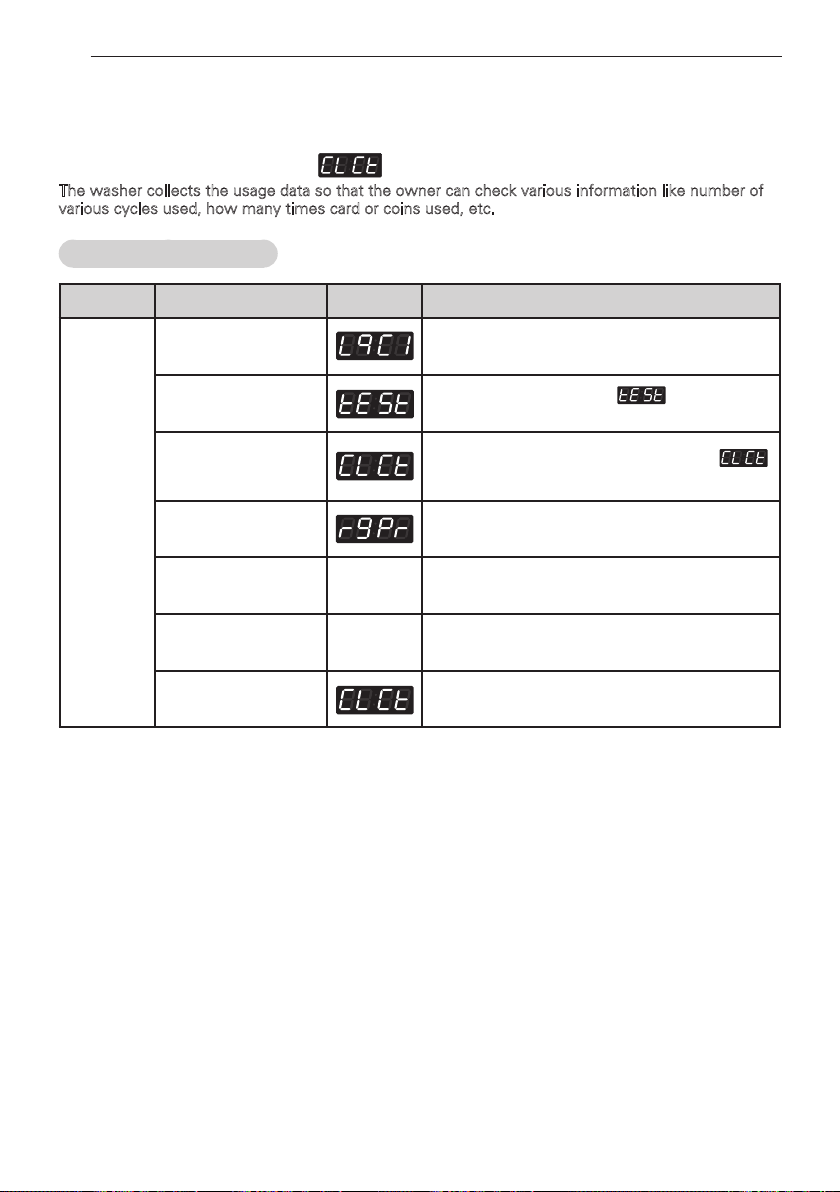
66
PROGRAMMING MODE - COLLECT MODE
PROGRAMMING MODE -
COLLECT MODE
Collect information data : (display)
The washer collects the usage data so that the owner can check various information like number of
various cycles used, how many times card or coins used, etc.
Entering the collect mode
Data Name
Button Display Description
Entering
the collect
mode
1.
Entering the
programming mode.
Insert service card (card type), turn on/off
toggle switch (coin type).
2.
Hot
Press the
Hot
button until appears in the
display.
3. Warm(+), Cold(-)
Press the
Warm (+), Cold (-)
button until
appears in the display.
4. Start
Enter the Collect information data.
5. Warm(+), Cold(-)
xxxx
Move to each data list that you want to check
by pressing with
Warm (+)
or
Cold (-)
button.
6. Start
xxxx
Display the value of selected data list
7. Hot
Move to upper level or Comes back to Idle State
❖
Check the collect information reference to the follow lists. The lists are displayed by abbreviations.
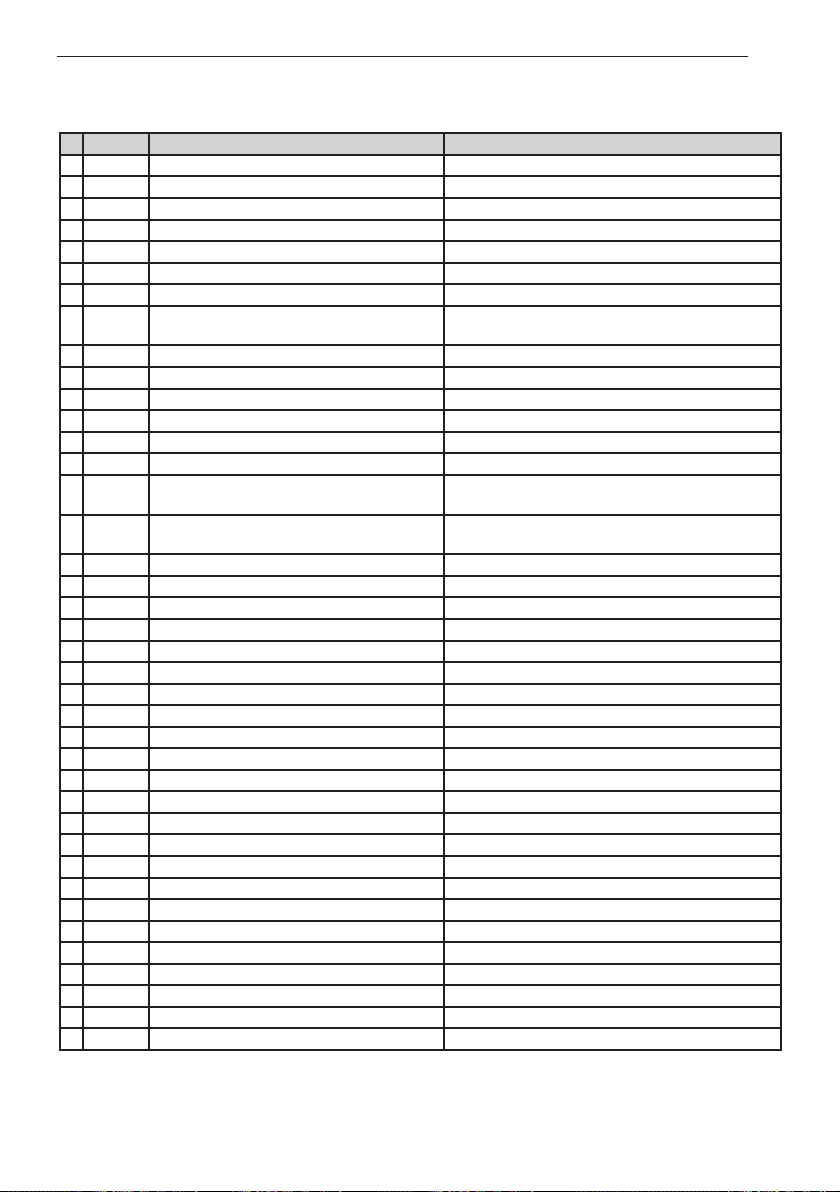
67
PROGRAMMING MODE - COLLECT MODE
No.
Abbreviation
Meaning Description
1
rgPr Regular Price 0~199 nickels ($0.00 ~ $9.95)
2
rgCP Regular Delicates Price 0~199 nickels ($0.00 ~ $9.95)
3
rgrP Regular Warm & Cold Price 0~199 nickels ($0.00 ~ $9.95)
4
rgHP Regular Hot Price 0~199 nickels ($0.00 ~ $9.95)
5
dELC Dryer Moisture Sense 0: disable 1: enable
6
ItrC Interval Regular Cycles Number of Regular cycles ( 0~65535 )
7
ItCC Interval Regular Delicates Cycles (60°C NORMAL ) Number of Regular Cold cycles ( 0~65535 )
8
ItAC
Interval Regular Warm & Cold Cycles
(75°C HOT, PERM. PRESS )
Number of Regular Warm cycles ( 0~65535 )
9
ItHC Interval Regular Hot Cycles (90°C MEDICAL) Number of Regular Hot cycles ( 0~65535 )
10
ItSC Interval Super Cycles Number of Super cycles ( 0~65535 ) ( Washer Only)
11
IttF Interval Topoff Cycles Number of Topoff cycles ( 0~65535 ) (Dryer Only)
12
ItUC Interval Service Cycles Number of Service cycles (0~65535)
13
ItFC Interval Token Cycles Number of Token cycles (0~65535)
14
ACrC Accumulated Regular Cycles Number of Regular cycles ( 0~65535 )
15
ACCC
Accumulated Regular Delicates Cycles
(60°C NORMAL)
Number of Regular Cold cycles ( 0~65535 )
16
ACAC
Accumulated Regular Warm & Cold Cycles
(75°C HOT, PERM. PRESS )
Number of Regular Warm cycles ( 0~65535 )
17
ACHC Accumulated Regular Hot Cycles (90°C MEDICAL) Number of Regular Hot cycles ( 0~65535 )
18
ACSC Accumulated Super Cycles Number of Super cycles ( 0~65535 ) (Washer Only)
19
ACtF Accumulated Topoff Cycles Number of Topoff cycles ( 0~65535 ) (Dryer Only)
20
ACUC Accumulated Service Cycles Number of Service cycles ( 0~65535 )
21
ACFC Accumulated Token Cycles Number of Token cycles (0~65535)
22
ACrt Accumulated Run Time Number of Running minutes ( 0~65535 )
23
Itnr Interval No Runs Money inserted, but no run
24
Ittb Interval Trouble Cycles No money, but ran
25
ItPd Interval Power Downs Number of power down
26
Itdd Interval Unauthorized Service Door Openings Number of Unauthorized Service Door Openings ( 0~ 255)
27
ItAd Interval Authorized Service Door Openings Number of Authorized Service Door Openings ( 0~255)
28
ItUC Interval Unauthorized Coin Vault Openings Number of Authorized Service Door Openings ( 0~255)
29
ItAC Interval Authorized Coin Vault Openings Number of Authorized Coin Vault Openings (0~255)
30
Ittl Interval Total Income Amount of money cycle($ 0 ~ $ 65535)
31
ACtl Accumulated Total Income Amount of money cycle($ 0 ~ $ 65535)
32
IttC Interval Total Cycles Number of Total cycle($ 0 ~ $ 65535)
33
ACtC Accumulated Total Cycles Number of Total cycle($ 0 ~ $ 65535)
34
SCPr Super Cycle Price $0.00 ~ $9.95
35
toPr Top Off Price $0.00 ~ $9.95
36
Itd Interval Money Amount of money for regular cycle($ 0 ~ $ 65535)
37
Acd Accumulated Money Amount of money for regular cycle($ 0 ~ $ 65535)
38
ItSd Interval Superwash Money Amount of money for superwash cycle($ 0 ~ $ 65535)
39
ACSd Accumulated Superwash Money Amount of money for superwash cycle($ 0 ~ $ 65535)
❊
Interval Cycles (Interval means Since last data collecting)
❊
Accumulated Cycles (Accumulated means Total cycles in washer/dryer's life time not include service cycles or trouble cycles)
❊
Authorized: Service Door Openings with PDA Communication (Open Service door Within 20 seconds After communicating with PDA)
❊
Unauthorized: Service Door Openings without PDA Communication
❊
These items (No. 30~33) are not applied this program
Collect Mode Data lists
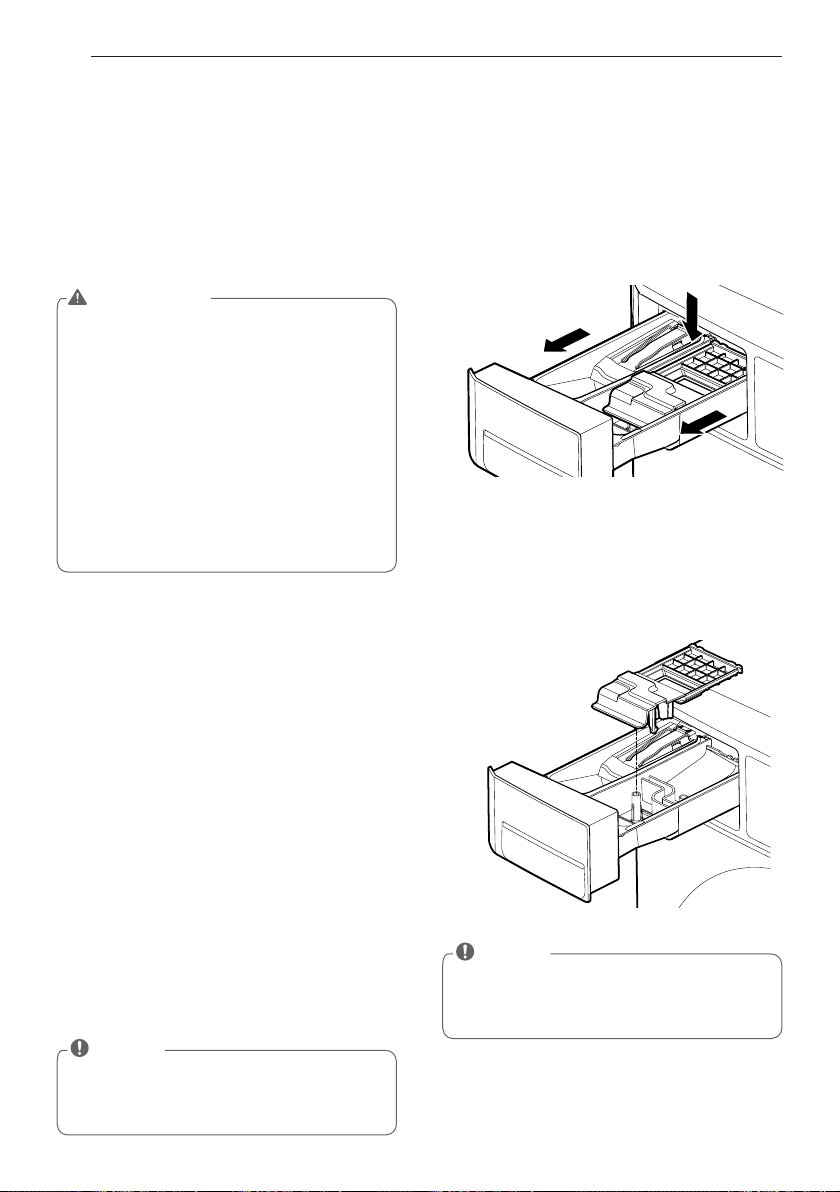
68
MAINTENANCE
Cleaning the Dispenser
1. The dispenser should be cleaned periodically
to remove buildup from detergent and other
laundry products.
2. Remove the inserts from the drawer, and
clean them with warm water and a soft cloth
or brush to remove any residue or buildup.
Wipe out the inside of the drawer opening
with a damp cloth. Reassemble the drawer
and reinstall in the drawer opening.
Storing the Washer
If the washer will not be used for an extended
period of time and is in an area that could be
exposed to freezing temperatures:
1. Turn off water supply tap.
2. Disconnect hoses from water supply and
drain water from hoses.
3. Plug the power cord into a properly grounded
electrical outlet.
4. Add 1 gallon of nontoxic recreational vehicle
(RV) antifreeze to the empty wash drum.
Close door.
5. Select the spin cycle and let washer spin for
1 minute to drain out all the water.
6. Unplug the power cord, dry the drum interior
with a soft cloth, and close the door.
7. Remove the inserts from the dispenser.
Drain any water in compartments and dry the
compartments.
8. Store the washer in an upright position.
9. To remove the antifreeze from the washer
after storage, run washer through a complete
cycle using detergent.
Do not add laundry!
MAINTENANCE
Care after wash
After the cycle is finished, wipe the door and the
inside of the door seal to remove any moisture.
Leave the door open to dry the washer tub
interior. Wipe the body of the washing machine
with a dry cloth to remove any moisture
WARNING
• Unplug the washer before cleaning to
avoid the risk of electric shock. Failure
to follow this warning can cause serious
injury,fire, electrical shock or death.
• Never use harsh chemicals, abrasive
cleaners, or solvents to clean the washer.
They will damage the finish.
• Do not use volatile substances (benzene,
paint thinner, alcohol, acetone, etc.) or
detergents with strong chemical compo-
nents when cleaning the washing machine.
Doing so may cause discoloration or dam-
age to the machine, or it may cause a fire.
NOTE
• Not all of the RV antifreeze will be expelled.
• Weekly cleaning of the detergent dispenser
will ensure problem free operation.
NOTE
• Do not use anything other than water
to clean the drawer, inserts, and drawer
opening.
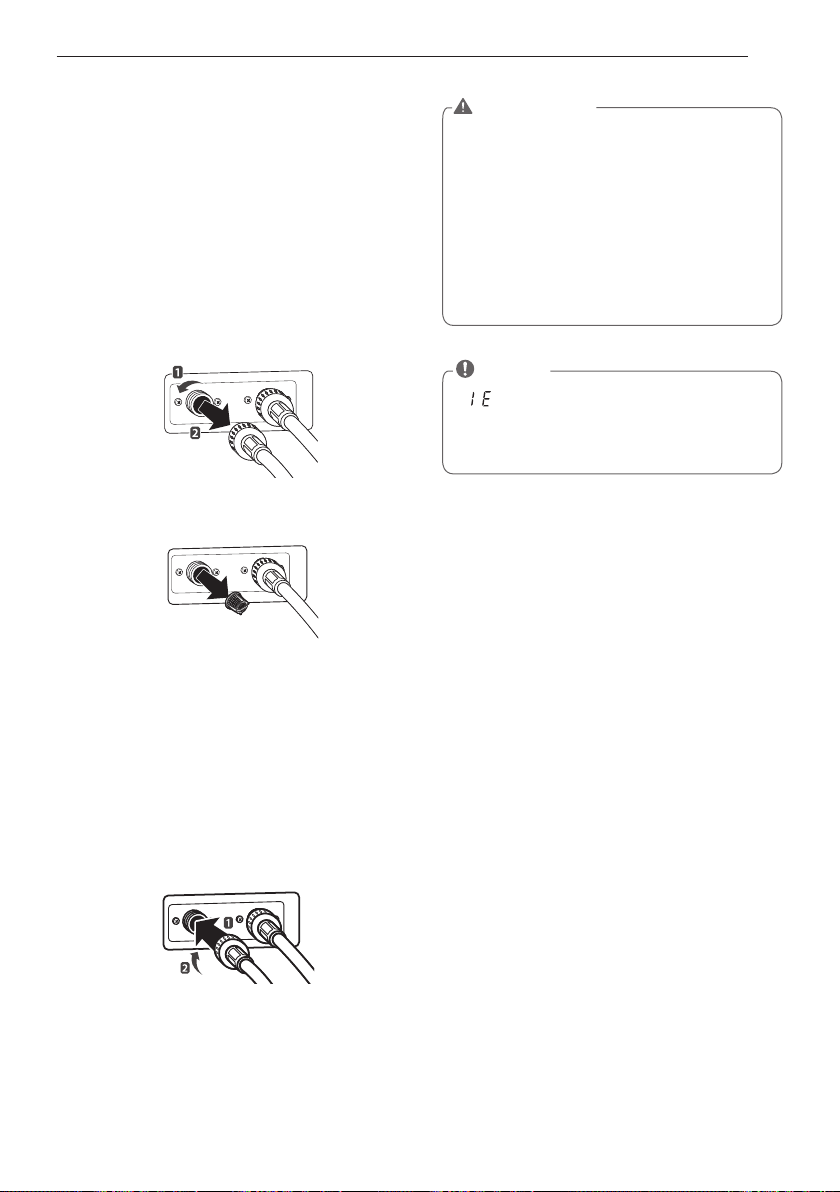
69
MAINTENANCE
Cleaning the water inlet filters
Clean the water inlet filters periodically to
prevent clogging. Take extra care to clean the
water inlet filters for areas using hard water.
Water may not be supplied if there are foreign
objects, such as rust, sand, or stones in the
water inlet filters.
1
Pull out the plug to turn off the washing
machine.
2
Turn off the faucets connected with the
water inlets.
3
Remove the water inlet hoses.
4
Pull out the water inlet filter.
5
Remove foreign objects from the water filter
inlet.
- Soak the water filter inlets in white vinegar
or a lime scale remover or use a toothbrush
to remove foreign objects and rinse
thoroughly.
6
Press the water filter inlets back into place.
7
Reattach the water lines to the washing
machine.
Inlet Filter
WARNING
• Unplug the power cord and turn off the
faucets before cleaning. Failure to do so
may cause electric shock.
• Do not use the washing machine without
the inlet filters. If you use the washing
machine without the inlet filters it will
cause leaks and malfunction.
• If you use the washing machine in an area
with hard water, the inlet filter may clog
due to lime buildup.
NOTE
• message will blink on the display
when the water pressure in the detergent
drawer is weak or an inlet filter is clogged
with dirt. Clean the inlet filter.
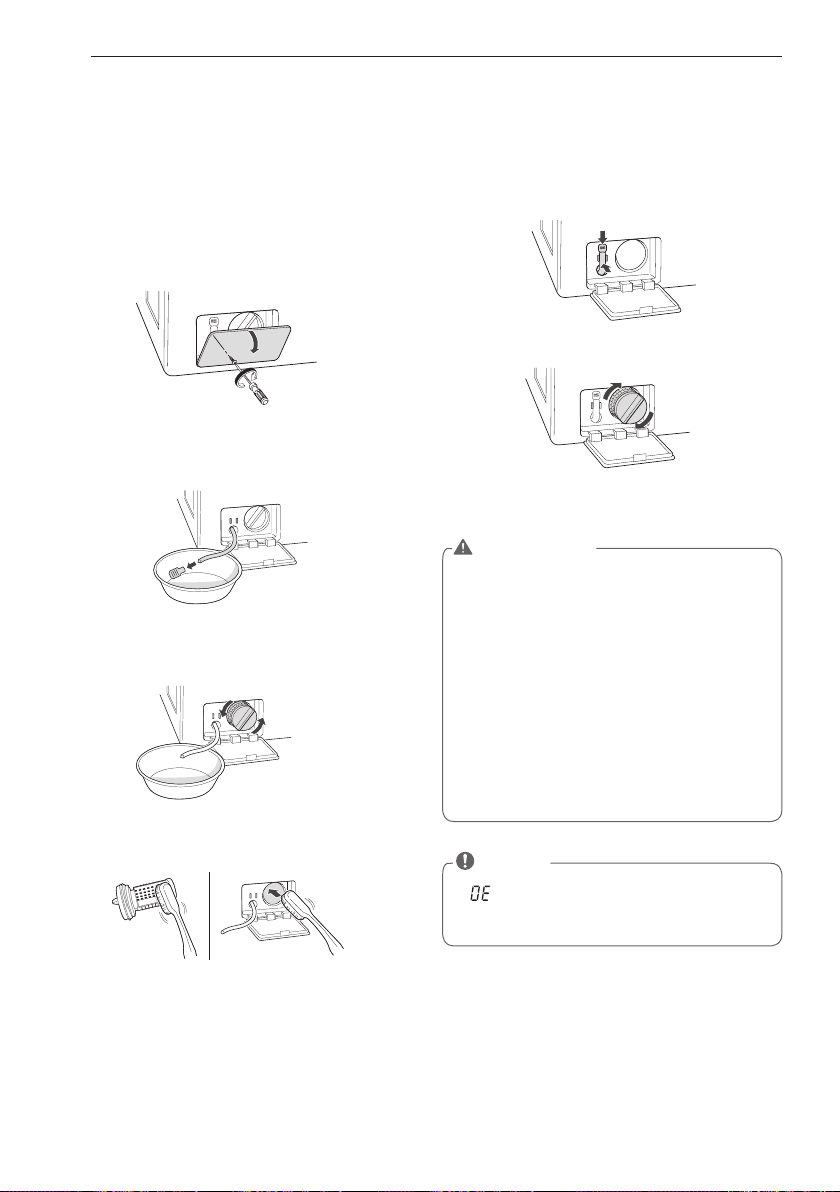
70
MAINTENANCE
Cleaning the drain pump filter
The washing machine fails to drain if the drain
pump filter is clogged. Periodically clean the
drain filter to prevent clogging with foreign
objects.
1
Pull out the plug to turn off the washing
machine.
2
Open the drain pump filter cover.
3
Unclip the drain hose and remove the plug
from the drain hose to drain the remaining
water.
4
Twist the pump filter counterclockwise to
remove.
5
Clean the pump filter and opening.
6
Recap the plug onto the drain hose and
reattach the drain hose.
7
Insert the drain pump filter.
8
Close the drain pump filter cover.
WARNING
• Make sure to pull out the plug before
cleaning. Failure to do so may cause
electric shock.
• Opening the drain filter will result in water
overflowing if there is water in the washer
tub. Make sure to check if the water is
completely drained before opening the
drain filter.
• If you use the washing machine with the
drain filter reassembled incorrectly after
cleaning it, or if you use the machine
without the filter, it may cause leaks or
malfunction of the washing machine.
NOTE
• message will blink when the drain
pump filter is clogged with dirt. Clean the
drain pump filter.
71
MAINTENANCE
Clean the door seal
Clean the door seal once a month to prevent
build-up of dirt in the door seal.
1
Wear rubber gloves and protective goggles.
2
Dilute 3/4 cup (177 ml) of liquid chlorine
bleach in 1 gallon (3.8 L) of water.
3
Soak a sponge or a soft cloth in this diluted
solution and wipe down all around the door
seal.
4
Wipe any moisture with a dry towel or cloth
after cleaning.
5
Leave the door open to allow the door seal to
dry completely.
1 Add tub cleaner or lime scale remover into
the detergent dispenser drawer.
- Do not exceed the maximum detergent limit
line when you add it. Detergent may remain
in the washer tub after cleaning.
- When you use liquid chlorine bleach, load it
into the liquid chlorine bleach compartment.
When you use a powdered cleaner, add it
into the main wash detergent compartment.
- When you use cleaning tablets, place them
directly into the washer tub. (Do not add
cleaning tablets to the drawer.)
2 Do operate tub clean. (please refer to 58
page about tub)
Clean the drum, TUB CLEAN
Using the washing machine in a humid space
for a long period of time may lead to a buildup
of black mold and germs in the air inside the
washer tub and affect your health. If you clean
the washer tub regularly on a monthly basis
using TUB CLEAN it will keep the washer tub
clean for hygienic use.
CAUTION
• Cleaning the door seal with an undiluted
solution may cause malfunction of the
door seal and washing machine parts.
NOTE
• Never load laundry while using TUB
CLEAN. The laundry may damage or
become contaminated.
Make sure to clean the washer tub when
it is empty.
• Leave the door open after finishing the
laundry to keep the tub clean.
• TUB CLEAN should be repeated monthly.
• Safely and conveniently secure the door
slightly ajar with a magnetic door plunger.
This will promote air circulation and allow
the interior of the machine to dry.
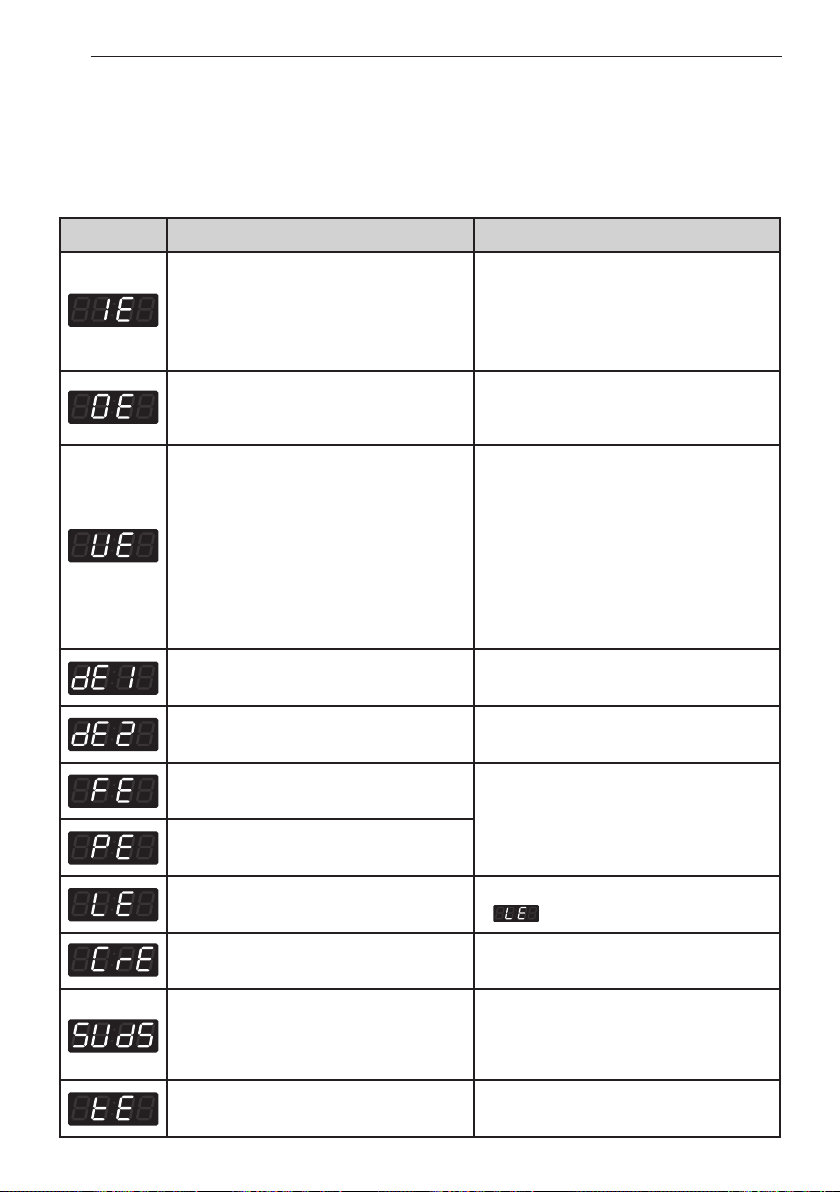
72
ERROR MODE
ERROR MODE
Meaning of Error Codes that LED displays during occurrence of
problem.
Problem Possible Cause Solution
• Water supply is not adequate in area.
• Water supply taps are not completely
open.
• Water inlet hose is bent.
• The filter of the inlet hose clogged.
Check another tap in the house.
Fully open tap.
Straighten hose.
Check the filter of the inlet hose.
• Drain hose is bent
or clogged.
• The drain filter is clogged.
Clean and straighten the drain hose.
Clean the drain filter.
• Load is too small.
• Load is out of balance.
• The appliance has an imbalance
detection and correction system. If
individual heavy articles are loaded (bath
mat, bath robe, etc.) and the imbalance
is too great, after several attempts
to restart the spin cycle the machine
will stop and the error code will be
displayed.
Add 1~2 similar items to help
balance the load.
Rearrange load to allow proper spinning.
• Is the door opened or not completely
closed?
Close the door completely.
✽
If it will not open, call for service.
• Door lock is broken. Check the door switch.
• The water overfills due to a faulty water
valve.
Close the water tap.
Unplug the power plug.
Call for service.
• The water level sensor malfunction.
• Overload in motor. Restart the cycle after 30 minutes.
If is not released, call for service.
• Disconnection of card reader cable. Check the card reader wire.
• Too much detergent is used. This is not an error. It indicates a suds
removal routine.
It will clear and restart the cycle when
the suds are gone.
Unplug the power plug and call for
service.
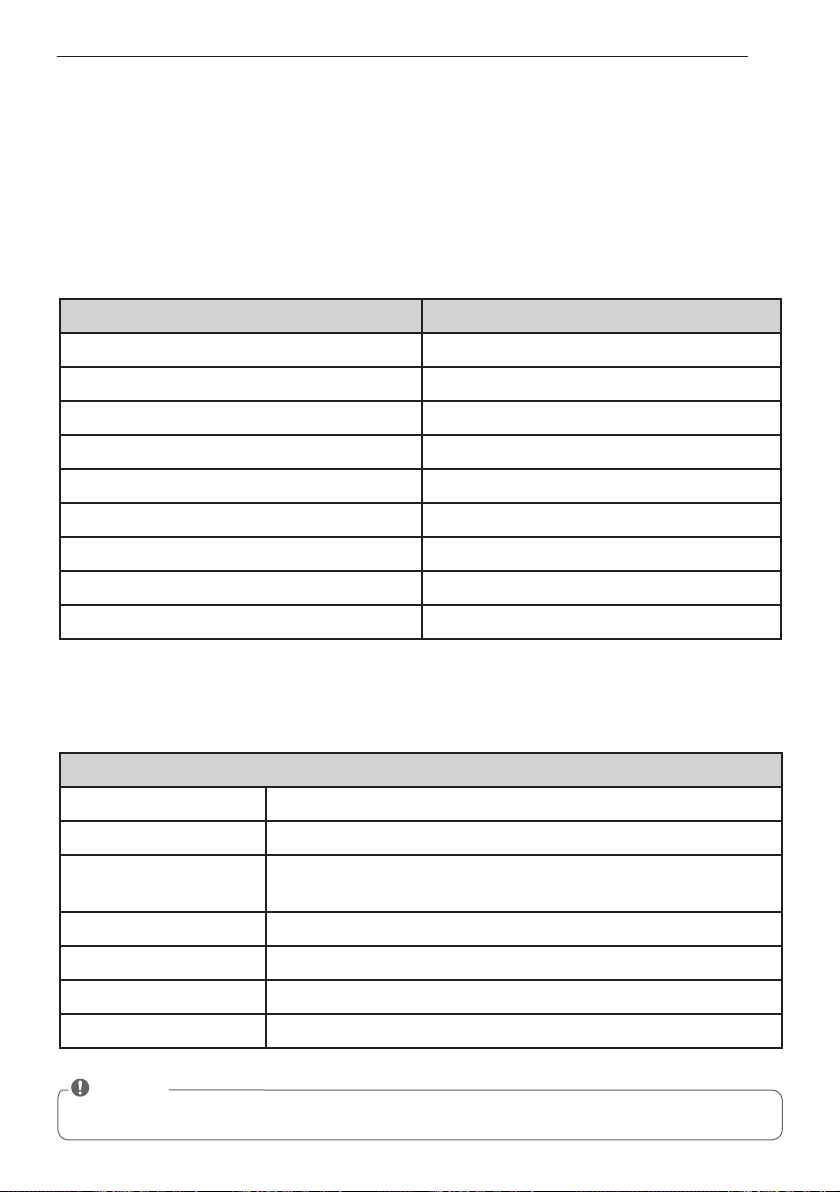
73
POWER FAIL RECOVERY & DEFAULT WASHER SETTINGS & SPECIFICATIONS
POWER FAIL RECOVERY
In case of power failure, the machine stops running but the time display remains on, showing the
time just before power failure.
DEFAULT WASHER SETTINGS
SPECIFICATIONS
Default Settings Default
Wash Time (Minutes) 10 Minutes
Rinse Time (Minutes) 16 Minutes
Spin Time (Minutes) 10 Minutes
Rinsing times Twice
Coin #1 Value 25¢
Coin #2 Value (E-suds) 25¢
Vend Price $1.00
Add super wash price 25¢
Top Spin speed 1000 rpm
Model GCWP1069***
Name Front-loading Washing Machine
Power supply 120 V~ 60 Hz
Size
686 mm (W) X 767 mm (D) X 983 mm (H), 129.1 cm (D with door open)
27”(W) X 30
1
/
5
”(D) X 38
11
/
16
”(H), 50
13
/
16
”(D with door open)
Weight 190 lbs. (87 kg)
Wash capacity 3.63 cu.ft (IEC:4.2 cu.ft)
Spin speed 1150 rpm max.
Permissible water pressure 14.5~116 psi (100~800 kPa)
NOTE
• Specifications subject to change by manufacturer.

MEMO

MEMO