P/NO : MMBB0392501(1.1)
H
Printed in China
*AFN75675601*
MN180_Light_Cover_Ver1.0_111108.qxd 2011.11.8 11:41 AM Page 1

Copyright ©2011 LG Electronics, Inc. All rights reserved.
LG and the LG logo are registered trademarks of LG
Group and its related entities. All other trademarks are the
property of their respective owners.
By selecting a rate plan and activating your phone, you agree
to the metroPCS Terms and Conditions of Service available at
metropcs.com.
Al seleccionar un plan y activar su teléfono, usted acuerda a los
términos y condiciones de servicio disponible en metropcs.com.
MN180_Light_Cover_Ver1.0_111108.qxd 2011.11.8 11:41 AM Page 2

Table of Contents
1
Table of Contents
Table of Contents 1
Phone Overview 2
Menus Overview 3
Getting Started with Your
Phone 4
The Battery 4
Installing the Battery 4
Removing the Battery 4
Charging the Battery 5
Entering and Editing
Information 6
Text Input 6
Key Functions 6
Phone Menus 7
Safety 15
TIA Safety Information 15
Antenna Care 15
Phone Operation 15
Tips on Efficient Operation 15
Driving 15
Electronic Devices 16
Pacemakers 16
Persons with pacemakers: 16
Hearing Aids 16
Consumer Information on
SAR 17
Limited Warranty
Statement 20
MN180_Light_Eng_Ver1.0_100902.qxd 9/8/10 2:46 PM Page 1

Phone Overview
2
Phone Overview
Earpiece
LCD Screen
Left Soft Key
Headset Jack
Camera Key
Camera Lens
Speaker
Charger/
Accessory Port
Volume Keys
Navigation Keys
OK Key
Voice Command
PWR/END Key
Lock Mode Key
CLR Key
Favorites/
Right Soft Key
SEND Key
Alphanumeric
Keypad
Vibrate Only
Key
Speakerphone Key
MN180_Light_Eng_Ver1.0_100902.qxd 9/8/10 2:46 PM Page 2

Menus Overview
3
Menus Overview
Messaging
1. New Text Message
2. New Picture
Message
3. Email
4. IM
5. Inbox
6. Outbox
5. Drafts
6. Voicemail
9. Web Message
0. Templates
*. Settings
#.Delete All
Call History
1. Missed Calls
2. Received Calls
3. Dialed Calls
4. All Calls
5. Call Timer
6. Data Counter
Contacts
1. New Contact
2. Contact List
3. Favorites
4. Groups
5. Metro411
6. Speed Dials
7. My vCard
@metro App
Store
MetroWEB
Multimedia
1. Take Photo
2. Record Voice
3. Images
4. Audios
Voice Command
1. Start Command
2. Command Mode
3. Announce Alert
4. Train Word
5. Best Match
My Schedule
1. Calendar
2. Notepad
3. Alarm Clock
My Menu
Bluetooth
1. Paired Devices
2. Power
3. My Visibility
4. My Bluetooth Info
Tools
1. Ez Tip Calc
2. Calculator
3. World Clock
4. Stopwatch
5. Unit Converter
Settings
1. Sound
2. Display
3. Security
4. Call Settings
5. System
6. Memory
7. Phone Info
MN180_Light_Eng_Ver1.0_100902.qxd 9/8/10 2:46 PM Page 3
The Battery
The phone comes with a
rechargeable battery. The battery
charge level is shown at the top
right of the LCD screens when
the phone is on.
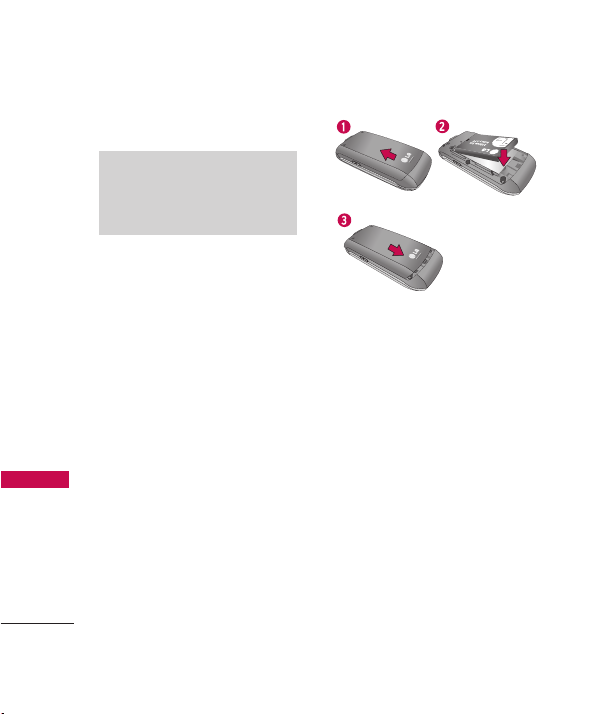
Installing the Battery
Remove the battery cover by
pressing down below the LG logo
and sliding the cover up (see
figure 1). Insert the top of the
battery into the battery
compartment, making sure to
align the battery contacts with
the phone terminals, and push
the battery down until it clicks
into place (2). Align the battery
cover then slide it downward
until it clicks into place (3).
Removing the Battery
Turn the phone off. Slide the
battery cover upward to remove
it. Remove the battery from the
battery compartment by lifting
the bottom of the battery using
the fingertip cutout.
Note
It is important to fully charge the
battery before initial use of the
phone.
Getting Started with Your Phone
4
Getting Started with Your Phone
MN180_Light_Eng_Ver1.0_100902.qxd 9/8/10 2:46 PM Page 4
5
Getting Started with Your Phone
Charging the Battery
Use the charger provided with
your phone. To charge your
phone:
Warning! Use only the charger
provided with the phone. Using
any charger other than the one
included with the MN180 may
damage your phone or battery.
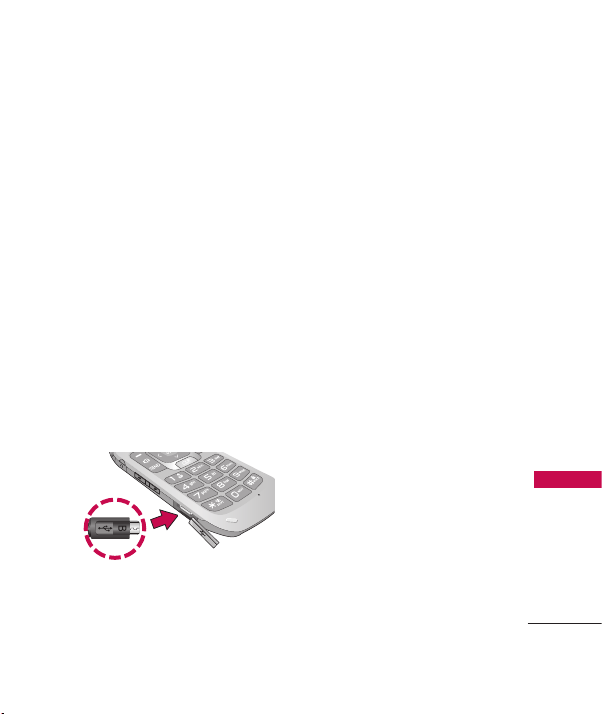
1. Gently uncover the
charger/accessory port, then
plug the end of the adapter
into the phone’s charger port
and the other end into an
electrical outlet.
The charge time varies
depending upon the battery
level.
Notice
Please make sure that the 'B' Side faces up
before inserting a charger or data cable into
the charger port of your phone.
MN180_Light_Eng_Ver1.0_100902.qxd 9/8/10 2:46 PM Page 5
6
Text Input
While entering text, the following
options are available:
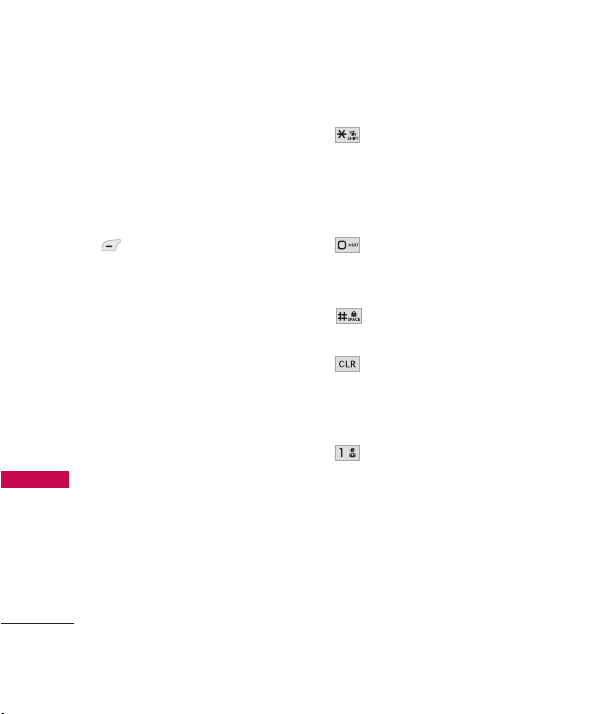
Key Functions
Left Soft Key:
Press to change the text
input mode to one of the
following:
T9Word: T9WORD/
T9Word/ T9word
Abc: ABC/ Abc/ abc
12 3
Symbols
Shift Key: Press to change
the text capitalization.
T9Word
: T9Word ->
T9WORD -> T9word
Abc : Abc -> ABC -> abc
Next: In T9word mode,
press to select the next
matching word.
Space: Press to complete
a word and insert a space.
Clear: Press to delete a
single space or character.
Press and hold to delete
all of the message.
Punctuation: Press to
enter punctuation marks
or some of the available
special characters.
Entering and Editing Information
Entering and Editing Information
MN180_Light_Eng_Ver1.0_100902.qxd 9/8/10 2:46 PM Page 6
7
Phone Menus
Phone Menus
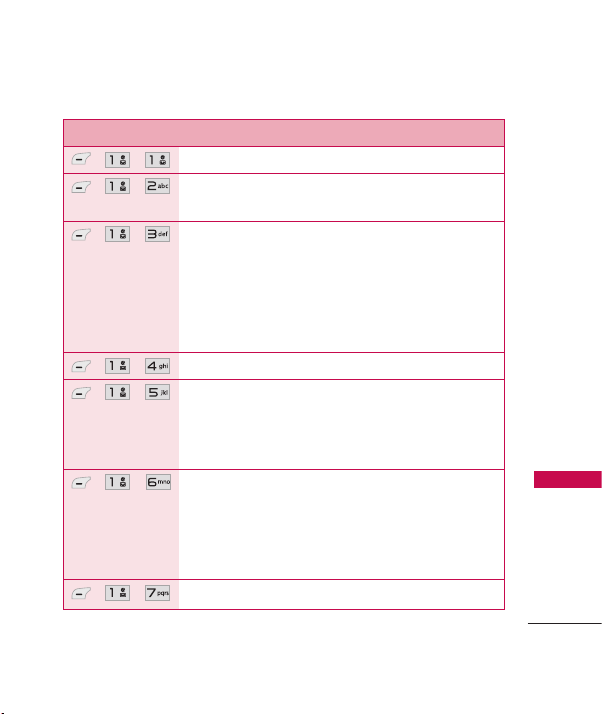
Menu Description
, ,
Allows you to send text and e-mail messages.
, ,
Allows you to send messages with text, images,
and audio clips.
, ,
Allows you to send an email via your favorite email
provider. Don't miss an important email. Thanks to
Email, you can get your emails on your phone,
while you're on the go. Email works with many
providers, including Yahoo! Mail, AOL Mail,
Hotmail and more.
, ,
Allows you to send and receive Instant Messages.
, ,
Use this menu to view received messages. Up to
700 messages (500 SMS, 100 MMS, and 100
MMS notification messages) can be stored in this
folder.
, ,
View the contents of sent messages and verify
whether the transmission was successful or not (if
verification is supported by network). Up to 100
sent messages(50 SMS + 50 MMS) can be stored
in the Outbox folder.
, ,
This folder contains saved message drafts.
MN180_Light_Eng_Ver1.0_100902.qxd 9/8/10 2:46 PM Page 7

8
Phone Menus
Phone Menus
Menu Description
, ,
Allows you to hear new voice messages recorded in
your voice mail box. Your phone will alert you
when you receive a new voice message.
, ,
Allows you to view any received web messages or
alerts.
, ,
Allows you to display, edit, and add templates.
These templates allow you to reduce manual text
input into messages.
, ,
Allows you to configure settings for Messaging.
, ,
Allows you to erase the messages stored in your
Inbox, Sent, or Drafts folders. You can also erase
all messages at the same time.
, ,
Allows you to view the most recent missed calls;
up to 40 entries.
, ,
Allows you to view the most recent received calls;
up to 40 entries.
, ,
Allows you to view the most recent dialed calls; up
to 40 entries.
, ,
Allows you to view a list of the most recently
missed, received and dialed calls.
MN180_Light_Eng_Ver1.0_100902.qxd 9/8/10 2:46 PM Page 8

9
Phone Menus
Menu Description
, ,
Allows you to view the duration of the different
call types.
, ,
Allows you to view the amount of received and
sent data.
, ,
Allows you to add a new contact to your Contact
List.
, ,
Allows you to view your Contact List.
, ,
Allows you to add Contact entries or Contact
groups to your list of Favorites to easily view, call,
or send messages.
, ,
Allows you to add a new group, change the name
of a group, delete a group, or send a message to
everyone in the selected group.
, ,
Get directory assistance information quickly and
easily with one of these MetroPCS Directory
Assistance Services.
, ,
Allows you to view your Speed Dials list, designate
new Speed Dials, or remove Speed Dials
designations entered in your Contacts.
MN180_Light_Eng_Ver1.0_100902.qxd 9/8/10 2:46 PM Page 9
10
Phone Menus
Phone Menus
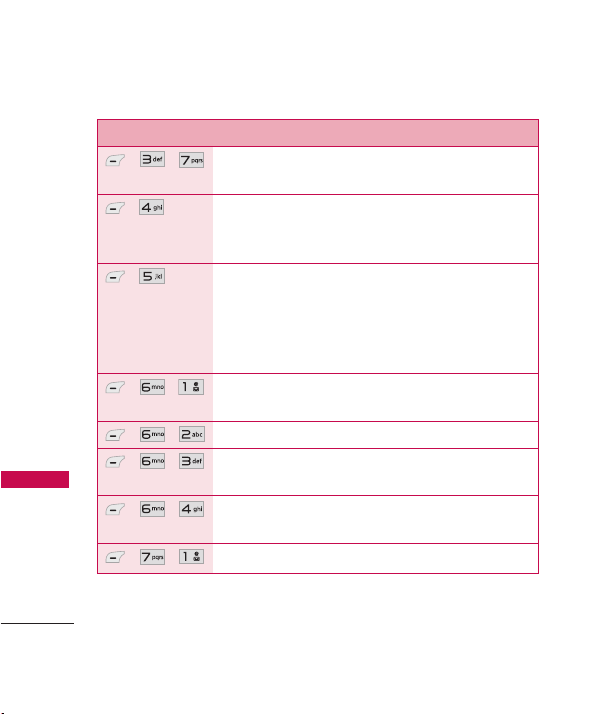
Menu Description
, ,
Allows you to view and edit your vCard, which you
can then send to others via Bluetooth.
,
Allows you to download new applications from the
@metro App Store
. You can also access any
downloaded applications on the
my apps
tab.
,
MetroWeb allows you to view Internet content.
Access and selections within this feature are
dependent upon your service provider. For specific
information on Web access through your phone,
contact your service provider.
, ,
Allows you to use the built-in camera and take
pictures.
, ,
Allows you to record a new sound.
, ,
Allows you to view and manage images stored in
the phone.
, ,
Allows you to access saved audio clips and record
new ones.
, ,
Starts the phone's Voice Command feature.
MN180_Light_Eng_Ver1.0_100902.qxd 9/8/10 2:46 PM Page 10
11
Phone Menus
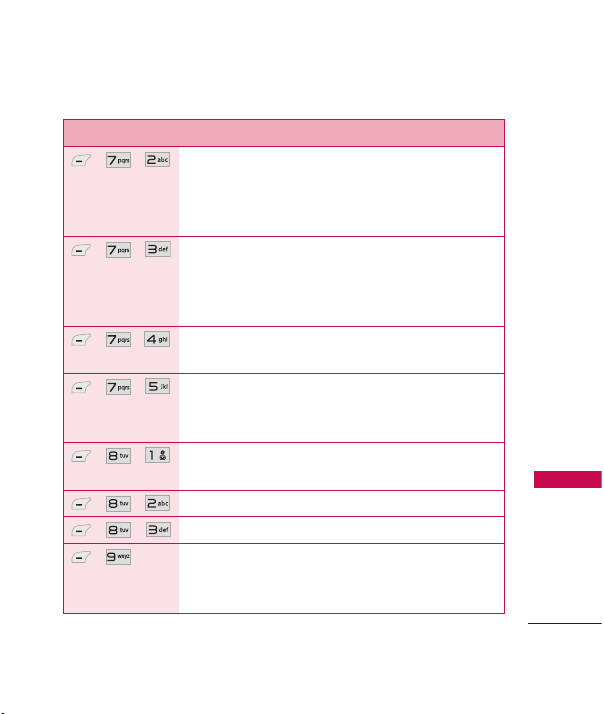
Menu Description
, ,
Allows you to set Command Mode to Normal or
Speed (The Speed setting allows you to access and
use the Voice Command functions more quickly with
a faster non-verbal prompt).
, ,
Allows you to customize Announce Alert.
Announce Alert lets your hear more information
about an incoming call or message instead of, or
along with, your ringtone.
, ,
Allows your to train words for improved Voice
Command responses.
, ,
Allows you to choose whether the phone displays
only the closest match or up to 4 of the closest
matches when using the "Call" function.
, ,
Allows you to store and access your My Schedule
Calendar.
, ,
Allows you to add, read, edit, and erase notes.
, ,
Allows you to set up to five alarms.
,
Allows you quick access to your favorite menus or
functions. A maximum of 12 shortcuts can be set
in My Menu.
MN180_Light_Eng_Ver1.0_100902.qxd 9/8/10 2:46 PM Page 11

12
Phone Menus
Phone Menus
Menu Description
, ,
Allows you to view devices paired to the phone
and establish and pair new devices to the phone.
, ,
Allows you to set Bluetooth power to On/Off.
, ,
Allows you to set the visibility of your Bluetooth
function.
, ,
Allows you to view information regarding the
Bluetooth functionality.
, ,
Allows you to quickly and easily calculate the tip
and total amount of a bill by inputting the bill
amount, the tip percentage, and dividing it by the
number of people paying.
, ,
Allows you to perform simple mathematical
calculations.
, ,
Allows you to determine the current time in
another time zone or city.
, ,
Allows you to use your phone as a stopwatch.
, ,
Allows you to convert units of Currency, Area,
Length, Mass, Temperature, Volume and Velocity to
other measurements.
MN180_Light_Eng_Ver1.0_100902.qxd 9/8/10 2:46 PM Page 12
13
Phone Menus
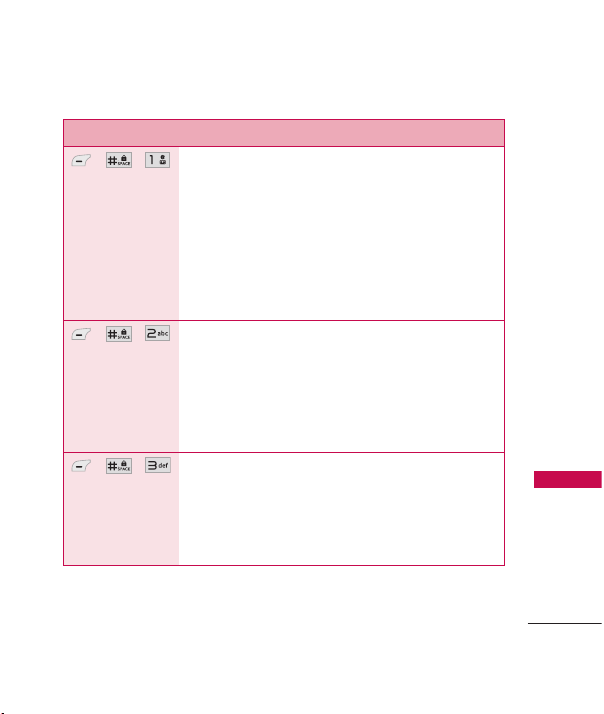
Menu Description
, ,
Options to customize your phone's sounds.
1.1 Ringers 1.2. Volume
1.3. Message Alerts 1.4. Alert Type
1.5. Service Alerts
1.5.1 Minute Beep 1.5.2 Call Connect
1.5.3 Back to Top 1.5.4 Low Battery
1.5.5 Roam Alert 1.6. Power On/Off Tone
1.7 Flip Tone
, ,
Options to customize your phone's display screen.
2.1 Shortcuts Display 2.2 Wallpaper
2.3 Banner 2.4 Backlight
2.5 Menu Style 2.6 Languages (Idiomas)
2.7 Clocks & Calendar 2.8 Font Settings
2.9 Name Match for Dialing
, ,
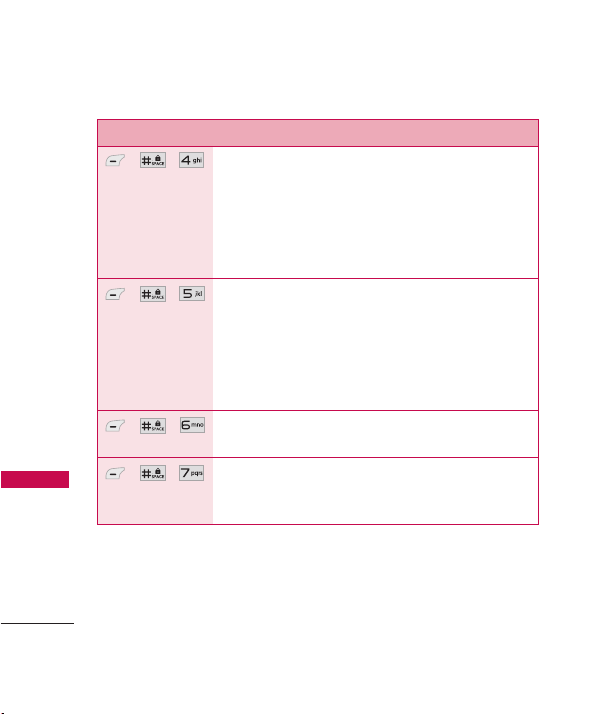
The Security menu allows you to secure the phone
electronically.
3.1 Lock Phone 3.2 Auto Device Lock
3.3 Restrictions 3.4 Emergency Numbers
3.5 Change Lock Code 3.6 Reset Default
MN180_Light_Eng_Ver1.0_100902.qxd 9/8/10 2:46 PM Page 13
14
Phone Menus
Phone Menus
Menu Description
, ,
The Call Settings menu allows you to designate
how the phone handles both incoming and
outgoing calls.
4.1 Answer Options 4.2 Auto Retry
4.3 One-Touch Dial 4.4 Airplane Mode
4.5 TTY Mode
, ,
The System menu allows you to designate specific
system network settings.
5.1 Network
5.1.1 System Select 5.1.2 Set NAM
5.1.3 Serving System
5.2 Location
, ,
Allows you to check the memory status of your
phone.
, ,
The Phone Info menu provides you with specific
information pertaining to your handset and
software.
MN180_Light_Eng_Ver1.0_100902.qxd 9/8/10 2:46 PM Page 14

Safety
TIA Safety Information
The following is the complete
TIA Safety Information for
wireless handheld phones.
Antenna Care
Use only the supplied or an
approved replacement antenna.
Unauthorized antennas,
modifications, or attachments
could damage the phone and
may violate FCC regulations.
Phone Operation
NORMAL POSITION: Hold the
phone as you would any other
telephone with the antenna
pointed up and over your
shoulder.
Tips on Efficient Operation
For your phone to operate
most efficiently:
Don’t touch the antenna
unnecessarily when the phone is
in use. Contact with the antenna
affects call quality and may cause
the phone to operate at a higher
power level than otherwise
needed.
Driving
Check the laws and regulations
on the use of wireless phones in
the areas where you drive and
always obey them. Also, if using
your phone while driving, please
observe the following:
●
Give full attention to driving --
driving safely is your first
responsibility;
●
Use hands-free operation, if
available;
●
Pull off the road and park
before making or answering a
call if driving conditions or the
law require it.
15
Safety
MN180_Light_Eng_Ver1.0_100902.qxd 9/8/10 2:46 PM Page 15

Safety
16
Safety
Electronic Devices
Most modern electronic
equipment is shielded from RF
signals. However, certain
electronic equipment may not be
shielded against the RF signals
from your wireless phone.
Pacemakers
The Health Industry
Manufacturers Association
recommends that a minimum
separation of six (6) inches be
maintained between a handheld
wireless phone and a pacemaker
to avoid potential interference
with the pacemaker. These
recommendations are consistent
with the independent research
by and recommendations of
Wireless Technology Research.
Persons with pacemakers:
●
Should ALWAYS keep the
phone more than six (6)
inches from their pacemaker
when the phone is turned ON;
●
Should not carry the phone in
a breast pocket;
●
Should use the ear opposite
the pacemaker to
minimize the potential for
interference;
●
Should turn the phone OFF
immediately if there is any
reason to suspect that
interference is taking place.
Hearing Aids
Some digital wireless phones may
interfere with some hearing aids.
In the event of such interference,
you may want to consult your
service provider (or call the
customer service line to discuss
alternatives).
MN180_Light_Eng_Ver1.0_100902.qxd 9/8/10 2:46 PM Page 16

Safety
17
Consumer Information
on SAR
(Specific Absorption Rate)
This Model Phone Meets the
Government’s Requirements for
Exposure to Radio Waves.
Your
wireless phone is a radio
transmitter and receiver. It is
designed and manufactured not
to exceed the emission limits for
exposure to radiofrequency (RF)
energy set by the Federal
Communications Commission
(FCC) of the U.S. Government.
These FCC exposure limits are
derived from the
recommendations of two expert
organizations, the National
Counsel on Radiation Protection
and Measurement (NCRP) and
the Institute of Electrical and
Electronics Engineers (IEEE). In
both cases, the
recommendations were
developed by scientific and
engineering experts drawn from
industry, government, and
academia after extensive reviews
of the scientific literature related
to the biological effects of RF
energy.
The exposure Limit for wireless
mobile phones employs a unit of
measurement known as the
Specific Absorption Rate, or SAR.
The SAR is a measure of the rate
of absorption of RF energy by
the human body expressed in
units of watts per kilogram
(W/kg). The FCC requires
wireless phones to comply with a
safety limit of 1.6 watts per
kilogram (1.6 W/kg). The FCC
exposure limit incorporates a
substantial margin of safety to
give additional protection to the
public and to account for any
variations in measurements.
Tests for SAR are conducted
using standard operating
positions specified by the FCC
MN180_Light_Eng_Ver1.0_100902.qxd 9/8/10 2:46 PM Page 17

Safety
18
Safety
with the phone transmitting at its
highest certified power level in all
tested frequency bands.
Although SAR is determined at
the highest certified power level,
the actual SAR level of the phone
while operating can be well below
the maximum value. Because the
phone is designed to operate at
multiple power levels to use only
the power required to reach the
network, in general, the closer
you are to a wireless base station
antenna, the lower the power
output.
Before a phone model is available
for sale to the public, it must be
tested and certified to the FCC
that it does not exceed the limit
established by the government-
adopted requirement for safe
exposure. The tests are
performed in positions and
locations (e.g., at the ear and
worn on the body) as required
by the FCC for each model.
This device was tested for typical
body-worn operations with the
back of the phone kept 0.79
inches (2.0 cm) between the
user’s body and the back of the
phone. To comply with FCC RF
exposure requirements, a
minimum separation distance of
0.79 inches (2.0 cm) must be
maintained between the user s
body and the back of the phone.
Third-party belt-clips, holsters,
and similar accessories
containing metallic components
should not be used. Body-worn
accessories that cannot maintain
0.79 inches (2.0 cm) separation
distance between the user's
body and the back of the phone,
and have not been tested for
typical body-worn operations
may not comply with FCC RF
exposure limits and should be
avoided.
The FCC has granted an
Equipment Authorization for this
MN180_Light_Eng_Ver1.0_100902.qxd 9/8/10 2:46 PM Page 18

Safety
19
model phone with all reported
SAR levels evaluated as in
compliance with the FCC RF
emission guidelines.
The highest SAR value for this
model phone when tested for
use at the ear is 0.77 W/kg and
when worn on the body, as
described in this user’s manual, is
0.47 W/kg. While there may be
differences between SAR levels of
various phones and at various
positions, they all meet the
government requirement for safe
exposure.
SAR information on this model
phone is on file with the FCC
and can be found under the
Display Grant section of
http://www.fcc.gov/oet/ea/fccid/
after searching for the FCC ID.
To find information that pertains
to a particular model phone, this
site uses the phone FCC ID
number which is usually printed
somewhere on the case of the
phone. Sometimes it may be
necessary to remove the battery
pack to find the number. Once
you have the FCC ID number for
a particular phone, follow the
instructions on the website and
it should provide values for
typical or maximum SAR for a
particular phone.
Additional information on
Specific Absorption Rates (SAR)
can be found on the Cellular
Telecommunications Industry
Association (CTIA) website at
http://www.ctia.org/
*In the United States and
Canada, the SAR limit for mobile
phones used by the public is 1.6
watts/kg (W/kg) averaged over
one gram of tissue. The standard
incorporates a substantial margin
of safety to give additional
protection for the public and to
account for any variations in
measurements.
MN180_Light_Eng_Ver1.0_100902.qxd 9/8/10 2:46 PM Page 19

Limited Warranty Statement
20
Limited Warranty Statement
1. WHAT THIS WARRANTY
COVERS:
LG offers you a limited warranty
that the enclosed subscriber unit
and its enclosed accessories will
be free from defects in material
and workmanship, according to
the following terms and
conditions:
(1) The limited warranty for the
product extends for TWELVE
(12) MONTHS beginning on
the date of purchase of the
product with valid proof of
purchase, or absent valid
proof of purchase, FIFTEEN
(15) MONTHS from date of
manufacture as determined
by the unit’s manufacture
date code.
(2) The limited warranty extends
only to the original
purchaser of the product
and is not assignable or
transferable to any
subsequent purchaser/end
user.
(3) This warranty is good only
to the original purchaser of
the product during the
warranty period as long as it
is in the U.S, including
Alaska, Hawaii, U.S.
Territories and Canada.
(4) The external housing and
cosmetic parts shall be free
of defects at the time of
shipment and, therefore,
shall not be covered under
these limited warranty terms.
(5) Upon request from LG, the
consumer must provide
information to reasonably
prove the date of purchase.
(6) The customer shall bear the
cost of shipping the product
to the Customer Service
MN180_Light_Eng_Ver1.0_100902.qxd 9/8/10 2:46 PM Page 20

Limited Warranty Statement
21
Department of LG. LG shall
bear the cost of shipping
the product back to the
consumer after the
completion of service under
this limited warranty.
2. WHAT THIS WARRANTY
DOES NOT COVER:
(1) Defects or damages
resulting from use of the
product in other than its
normal and customary
manner.
(2)
Defects or damages from
abnormal use, abnormal
conditions, improper
storage, exposure to
moisture or dampness,
unauthorized modifications,
unauthorized connections,
unauthorized repair, misuse,
neglect, abuse, accident,
alteration, improper
installation, or other acts
which are not the fault of
LG, including damage caused
by shipping, blown fuses,
spills of food or liquid.
(3) Breakage or damage to
antennas unless caused
directly by defects in
material or workmanship.
(4) That the Customer Service
Department at LG was not
notified by consumer of the
alleged defect or
malfunction of the product
during the applicable limited
warranty period.
(5) Products which have had the
serial number removed or
made illegible.
(6) This limited warranty is in
lieu of all other warranties,
express or implied either in
fact or by operations of law,
statutory or otherwise,
MN180_Light_Eng_Ver1.0_100902.qxd 9/8/10 2:46 PM Page 21

Limited Warranty Statement
22
Limited Warranty Statement
including, but not limited to
any implied warranty of
marketability or fitness for a
particular use.
(7) Damage resulting from use
of non-LG approved
accessories.
(8) All plastic surfaces and all
other externally exposed
parts that are scratched or
damaged due to normal
customer use.
(9) Products operated outside
published maximum ratings.
(10)Products used or obtained
in a rental program.
(11)Consumables (such as
fuses).
3. WHAT LG WILL DO:
“LG will, at its sole option, either
repair, replace or refund the
purchase price of any unit that
does not conform to this limited
warranty. LG may choose at its
option to use functionally
equivalent re-conditioned,
refurbished or new units or parts
or any units. In addition, LG will
not re-install or back-up any
data, applications or software
that you have added to your
phone. It is therefore
recommended that you back-up
any such data or information
prior to sending the unit to LG
to avoid the permanent loss of
such information.”
4. STATE LAW RIGHTS:
No other express warranty is
applicable to this product. THE
DURATION OF ANY IMPLIED
WARRANTIES, INCLUDING THE
IMPLIED WARRANTY OF
MARKETABILITY, IS LIMITED TO
THE DURATION OF THE
EXPRESS WARRANTY HEREIN.
MN180_Light_Eng_Ver1.0_100902.qxd 9/8/10 2:46 PM Page 22

Limited Warranty Statement
23
LG SHALL NOT BE LIABLE FOR
THE LOSS OF THE USE OF THE
PRODUCT, INCONVENIENCE,
LOSS OR ANY OTHER
DAMAGES, DIRECT OR
CONSEQUENTIAL, ARISING
OUT OF THE USE OF, OR
INABILITY TO USE, THIS
PRODUCT OR FOR ANY
BREACH OF ANY EXPRESS OR
IMPLIED WARRANTY,
INCLUDING THE IMPLIED
WARRANTY OF MARKETABILITY
APPLICABLE TO THIS
PRODUCT.
Some states do not allow the
exclusive limitation of incidental
or consequential damages or
limitations on how long an
implied warranty lasts; so these
limitations or exclusions may not
apply to you. This warranty gives
you specific legal rights and you
may also have other rights which
vary from state to state.
5. HOW TO GET WARRANTY
SERVICE:
To obtain warranty service,
please call or fax to the following
telephone numbers from
anywhere in the continental
United States:
Tel. 1-800-793-8896 or Fax.
1-800-448-4026
Or visit http://us.lgservice.com.
Correspondence may also be
mailed to:
LG Electronics Service- Mobile
Handsets
P.O. Box 240007, Huntsville, AL
35824
DO NOT RETURN YOUR
PRODUCT TO THE ABOVE
ADDRESS
. Please call or write
for the location of the LG
authorized service center nearest
you and for the procedures for
obtaining warranty claims.
MN180_Light_Eng_Ver1.0_100902.qxd 9/8/10 2:46 PM Page 23

MEMO
MN180_Light_Eng_Ver1.0_100902.qxd 9/8/10 2:46 PM Page 24

MEMO
MN180_Light_Eng_Ver1.0_100902.qxd 9/8/10 2:46 PM Page 25

Contenido
1
Contenido
Contenido 1
Descripción general del
teléfono 2
Descripción general de los
menús 3
Cómo empezar con su
teléfono 4
La batería 4
Instalación de la batería 4
Retirando la batería 4
Cargar la batería 4
Introducir y editar
información 6
Introducción de texto 6
Funciones de las teclas 6
Menús del Teléfono 7
Seguridad 16
Información de seguridad de la
TIA 16
Cuidado de la antena 16
Funcionamiento del teléfono 16
Sugerencias para un funcionamiento
más eficiente 16
Manejo 16
Dispositivos electrónicos 17
Marcapasos 17
Las personas con marcapasos: 17
Aparatos para la sordera 18
Información al consumidor
sobre la SAR 18
Declaración De Garantía
Limitada 22
MN180_Light_Spa_Ver1.0_100902.qxd 9/8/10 2:48 PM Page 1

Descripción general del teléfono
2
Descripción general del teléfono
Auricular
Pantalla LCD
Tecla suave
izquierda
Conector
para auricular
Tecla
Cámara
Lente de la
cámara
Altavoz
Puerto para
cargador/accesorios
Teclas de
volumen
Teclas de
navegación
Tecla OK
Tecla Comando de Voz
Tecla PWR/END
Tecla Modo de
bloqueo
Tecla CLR
Tecla Favoritos/
Tecla suave Derecha
Tecla SEND
Teclado
alfanumérico
Tecla Sólo
Vibrar
Tecla Altavoz
MN180_Light_Spa_Ver1.0_100902.qxd 9/8/10 2:48 PM Page 2

Descripción general de los menús
3
Descripción general de los menús
Mensajería
1. Nuevo Mensaje
Te xt o
2. Nuevo Mensaje Foto
3. Email
4. MI
5. Entrada
6. Enviados
7. Borradores
8. Correo de Voz
9. Msj. De Web
0. Texto Rápido
*. Ambiente
*. Borrar Todos
Lista de Llamadas
1. Llamadas Perdidas
2. Llamadas de
Entrada
3. Llamadas de Salida
4. Todas las Llamadas
5. Tiempo de Uso
6. Contador de Datos
Contactos
1. Nuevo Contacto
2. Lista de Contactos
3. Favoritos
4. Grupos
5. Metro411
6. Marcado Veloz
7. Mi vCard
@metro App
Store
MetroWEB
Multimedia
1. Tomar Foto
2. Grabar Voz
3. Imágenes
4. Audios
Comando de Voz
1. Iniciar Comando
2. Modo de Comando
3. Anunciar Alertas
4. Entrenar Palabra
5. Mejor Coincidencia
Mi Horario
1. Calendario
2. Nota
3. Reloj de Alarma
Mi Menú
Bluetooth
1. Aparatos
Emparejados
2. Energía
3. Mi Visibilidad
4. Mi Info de
Bluetooth
Herramientas
1. Calc de Proprina EZ
2. Calculadora
3. Reloj Mundial
4. Cronómetro
5. Convertidor de
Unidades
Ambiente
1. Sonido
2. Pantalla
3. Seguridad
4. Config. de Llamada
5. Sistema
6. Memoria
7. Info. de Tel
MN180_Light_Spa_Ver1.0_100902.qxd 9/8/10 2:48 PM Page 3

Cómo empezar con su teléfono
4
Cómo empezar con su teléfono
La batería
El teléfono viene con una batería
recargable. El nivel de carga de la
batería se muestra en la parte
superior derecha de la pantalla
LCD cuando el teléfono está
encendido.
Instalación de la batería
Retire la tapa de la batería
oprimiendo debajo del logotipo
LG y deslícela hacia arriba (vea la
figura 1). Inserte la parte
superior de la batería dentro del
compartimiento, asegúrese de
alinear los contactos de la
batería con los terminales del
teléfono y oprima la batería hacia
abajo hasta que escuche un clic
(vea la figura 2). Alinee la tapa
de la batería y deslícela hacia
abajo hasta que escuche un clic
(vea la figura 3).
Retirando la batería
Apague el teléfono y deslice la
tapa de la batería hacia arriba
para retirarla. Retire la batería del
compartimiento de batería
usando la abertura y levantando
la parte inferior.
Nota
Es importante cargar la batería
completamente antes de usar el
teléfono por primera vez.
MN180_Light_Spa_Ver1.0_100902.qxd 9/8/10 2:48 PM Page 4
5
Cómo empezar con su teléfono
Cargar la batería
Use el cargador incluido con su
teléfono. Para cargar su teléfono:
¡Advertencia! Sólo use el
cargador que viene incluido con
el teléfono. El uso de cualquier
cargador distinto del que viene
incluido con el MN180 puede
dañar el teléfono o la batería.
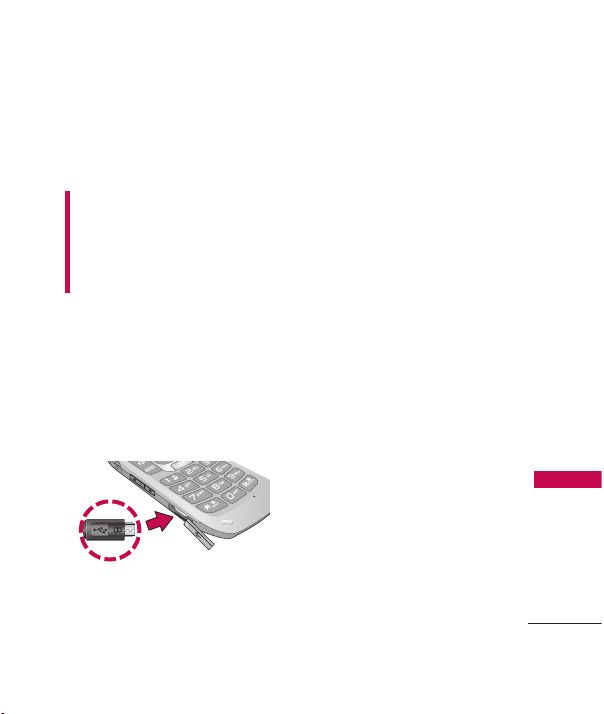
1. Destape el puerto para
cargador/accesorios, luego
conecte el extremo del
adaptador al puerto para
cargador del teléfono y el otro
extremo a una toma de
corriente eléctrica.
El tiempo de carga varía
dependiendo en el nivel de la
batería.
Aviso
Asegúrese de que el lado 'B' esté orientado
hacia arriba antes de insertar el cargador o
cable de datos en el puerto para cargador
de su teléfono.
MN180_Light_Spa_Ver1.0_100902.qxd 9/8/10 2:48 PM Page 5
Introducir y editar información
6
Introducir y editar información
Introducción de texto
Cuando introduce texto, las
siguientes opciones son
disponibles:
Funciones de las teclas
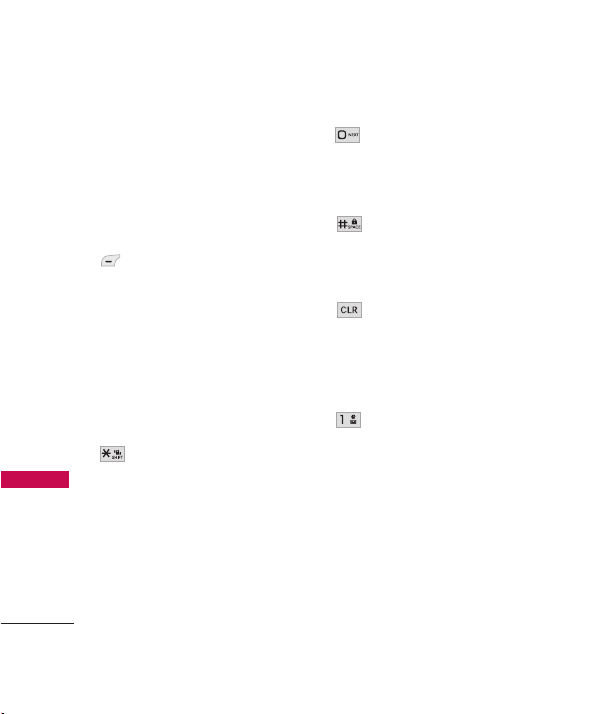
Tecla suave izquierda:
Oprima para cambiar el
modo de entrada de texto
a uno de los siguientes:
-
Pala.T9
(PALA.T9/
Pala.T9/ pala.T9)
-
Abc
(ABC/ Abc/ abc)
-
12 3
-
Símbolos
Mayúscula
: Oprima para
cambiar la capitalización
de texto.
- Pala.T9
: Pala.T9 ->
PALA.T9 -> pala.T9
-
Abc:
Abc -> ABC -> abc
Siguiente
: En modo Pala.
T9, oprima para
seleccionar la siguiente
palabra coincidente.
Espacio
: En modo Pala.
T9, oprima para terminar
una palabra o introducir
un espacio.
Borrar
: Oprima para
borrar un solo espacio o
carácter. Manténgala
oprimida para borrar todo
el mensaje.
Puntuación
: Oprima para
introducir signos de
puntuación o algunos
caracteres especiales
disponibles.
MN180_Light_Spa_Ver1.0_100902.qxd 9/8/10 2:48 PM Page 6
Menús del Teléfono
7
Menús del Teléfono
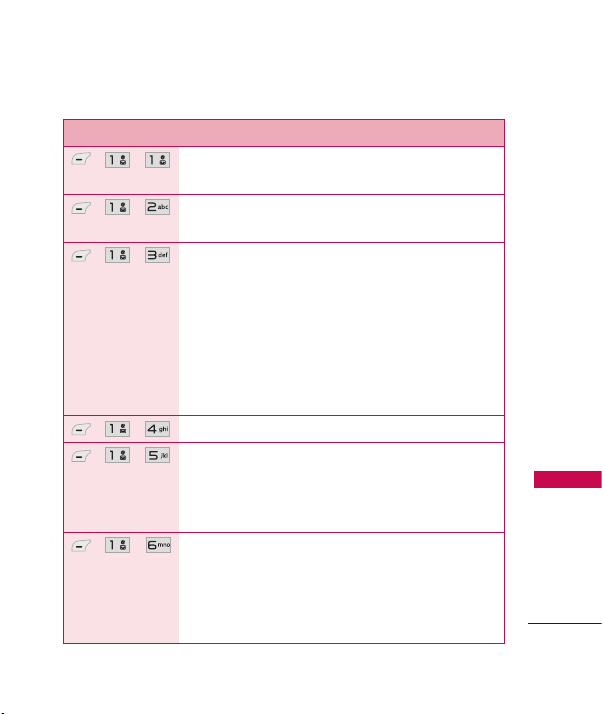
Menú Descripciones
, ,
Le permite enviar mensajes de texto y de correo
electrónico.
, ,
Le permite enviar mensajes con texto, imágenes y
clips de audio.
, ,
Le permite mandar correos electrónicos a través de
su proveedor de correo electrónico favorito. No
pierda un mensaje de correo electrónico
importante. Gracias a Email, puede recibir sus
mensajes de correo electrónico en su teléfono
mientras está viajando. Email funciona con muchos
proveedores, incluidos Yahoo! Mail, AOL Mail,
Hotmail y más.
, ,
Le permite enviar y recibir mensajes instantáneos.
, ,
Usa este menú para ver mensajes recibidos. Hasta
700 mensajes (500 SMS, 100 MMS, y 100
mensajes de notificación MMS) pueden ser
guardados en esta carpeta.
, ,
Vea el contenido de los mensajes enviados y
compruebe si la transmisión fue con éxito (si la
verificación es soportada por la red). Hasta 100
mensajes enviados (50 SMS y 50 MMS) pueden
ser guardados en esta carpeta.
MN180_Light_Spa_Ver1.0_100902.qxd 9/8/10 2:48 PM Page 7
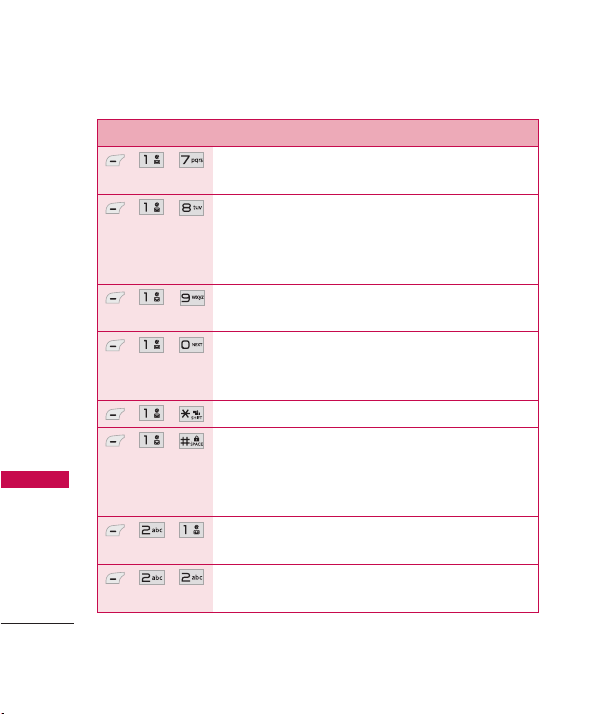
Menús del Teléfono
Menús del Teléfono
8
Menú Descripciones
, ,
Esta carpeta muestra los mensajes borradores
guardados.
, ,
Le permite oir los mensajes de voz nuevos
grabados en su buzón de correo de voz. El
teléfono le alerta cuando recibe un mensaje de voz
nuevo.
, ,
Permite ver los mensajes de web o alertas
recibidas.
, ,
Le permite mostrar, editar y agregar texto rápido.
Este texto rápido le ayuda a reducir la entrada de
texto manual en los mensajes.
, ,
Le permite configurar los ajustes de mensajería.
, ,
Le permite borrar todos los mensajes de texto
guardados en las carpetas Entrada, Enviados o
Borradores. También puede borrar todos los
mensajes al mismo tiempo.
, ,
Le permite ver las llamadas perdidas más recientes.
Puede tener hasta 40 entradas.
, ,
Le permite ver las llamadas recibidas más recientes.
Puede tener hasta 40 entradas.
MN180_Light_Spa_Ver1.0_100902.qxd 9/8/10 2:48 PM Page 8

9
Menús del Teléfono
Menú Descripciones
, ,
Le permite ver las llamadas marcadas más
recientes. Puede tener hasta 40 entradas.
, ,
Le permite ver la lista de las llamadas más recientes
perdidas, recibidas y marcadas.
, ,
Le permite ver la duración de los diferentes tipos
de llamadas.
, ,
Le permite ver la cantidad de datos recibidos y
transmitidos.
, ,
Le permite agregar un contacto nuevo a su Lista de
Contactos.
, ,
Le permite ver su Lista de Contactos.
, ,
Permite agregar entradas de Contacto o grupos de
Contacto a su lista de Favoritos para fácilmente ver,
llamar o enviar mensajes.
, ,
Le permite agregar un grupo nuevo, cambiar el
nombre de un grupo, borrar todo un grupo y
enviar un mensaje a todos los contactos en el
grupo seleccionado.
MN180_Light_Spa_Ver1.0_100902.qxd 9/8/10 2:48 PM Page 9

Menús del Teléfono
10
Menús del Teléfono
Menú Descripciones
, ,
Obtenga asistencia de información de directorio
rápido y fácilmente con uno de estos Servicios de
Asistencia de Directorio de MetroPCS.
, ,
Le permite ver su lista de Marcado Veloz, o
designar un nuevo Marcado Veloz o eliminar un
Marcado Veloz introducido en sus Contactos.
, ,
Permite ver y editar su vCard, la cual puede enviar
a otros vía Bluetooth.
,
Le permite descargar aplicaciones nuevas del
servicio
@metro App Store
. También puede
acceder a cualquier aplicación descargada en la
ficha
my apps.
,
MetroWEB le permite ver el contenido del
Internet. Acceso y selecciones en esta función son
dependiente del proveedor de servicio. Para
información específica acerca de acceso a la Web a
través de su teléfono, comuniquese con su
proveedor de servicio.
, ,
Le permite usar la cámara del teléfono para tomar
fotos.
, ,
Le permite grabar un sonido nuevo.
MN180_Light_Spa_Ver1.0_100902.qxd 9/8/10 2:48 PM Page 10
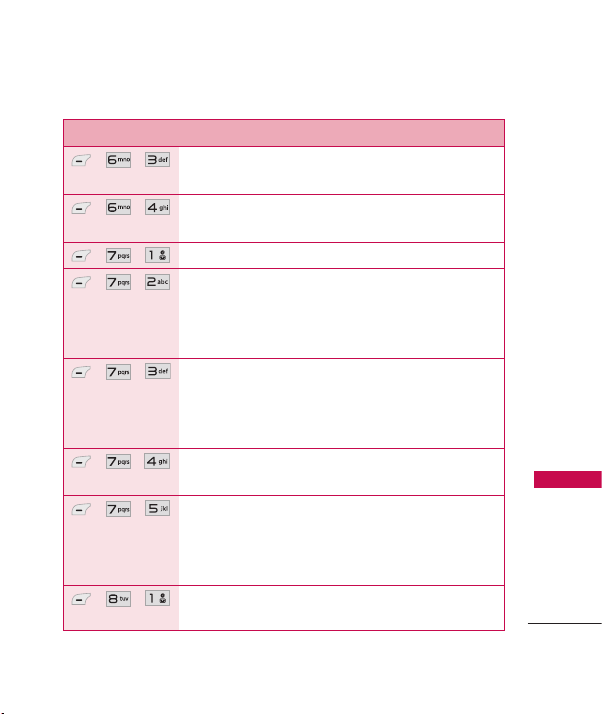
11
Menús del Teléfono
Menú Descripciones
, ,
Le permite ver y administrar imágenes
almacenados en el teléfono.
, ,
Le permite acceder a clips de audio guardados en
su teléfono y grabar nuevos clips.
, ,
Inícia la función del teléfono Comandos de Voz.
, ,
Le permite establecer el Modo de Comando a
Normal o Veloz. (La opción de Veloz le permite
acceder a las funciones de Comando de Voz más
rápido con una solicitación no-verbal.)
, ,
Le permite personalizar la función de Anunciar
Alertas. Anunciar Alertas le permite oír mas
información sobre las llamadas entrantes y
mensajes, en vez de sólo el timbre.
, ,
Le permite entrenar sus palabras para mejorar las
respuestas de Comando de Voz.
, ,
Le permite elegir si el teléfono muestra sólo la
coincidencia más cercana o hasta 4 de las
coincidencias más cercanas al usar la funcion
Llamar.
, ,
Le permite almacenar y acceder a su Calendario de
Mi Horario.
MN180_Light_Spa_Ver1.0_100902.qxd 9/8/10 2:48 PM Page 11
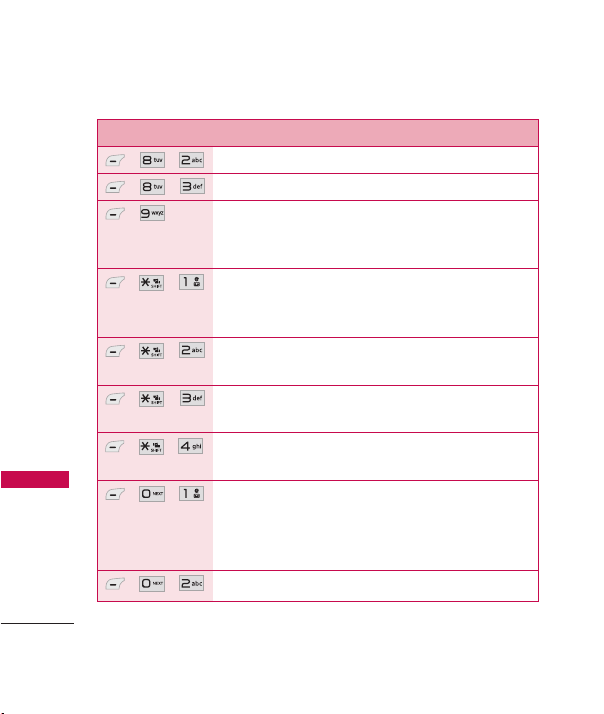
Menús del Teléfono
12
Menús del Teléfono
Menú Descripciones
, ,
Le permite leer, agregar, editar y borrar notas.
, ,
Le permite fijar hasta cinco alarmas.
,
Le permite acceso rápido a sus menús y funciones
favoritas. El número máximo de atajos que se
pueden fijar son 12.
, ,
Le permite ver los aparatos que están emparejados
y que establezca un nuevo emparejamiento con
otro aparato.
, ,
Le permite establecer el estado de Bluetooth como
Encendido/ Apagado.
, ,
Le permite establecer la visibilidad de su función
Bluetooth.
, ,
Le permite ver la información de la funcionalidad
Bluetooth.
, ,
Le permite calcular la propina de una cuenta
rápido y fácilmente usando la cantidad total de
dinero, el porcentaje de propina y dividiendo por
el número de personas pagando.
, ,
Le permite hacer cálculos matemáticos sencillos.
MN180_Light_Spa_Ver1.0_100902.qxd 9/8/10 2:48 PM Page 12
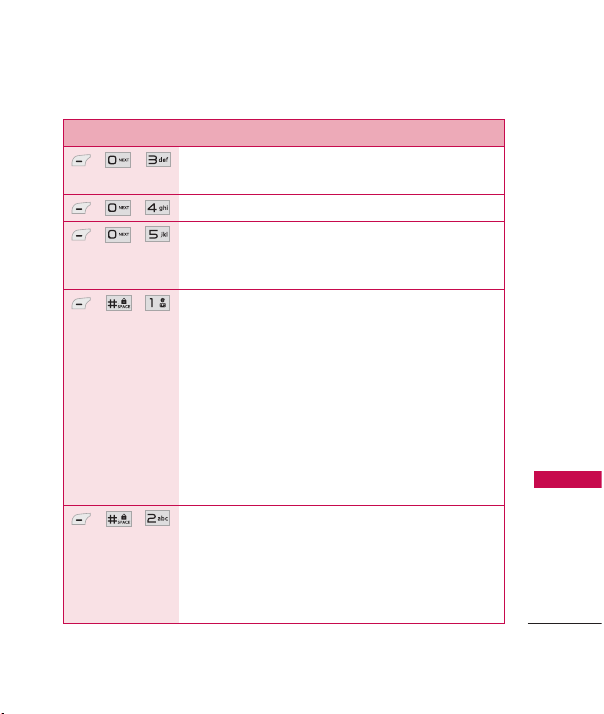
13
Menús del Teléfono
Menú Descripciones
, ,
Le permite determinar la hora actual en otra zona
horaria u otra ciudad.
, ,
Le permite usar su teléfono como cronómetro.
, ,
Le permite convertir unidades de Moneda, Área,
Longitud, Masa, Temperatura, Volumen y Velocidad
a otras unidades.
, ,
Opciones para personalizar los sonidos del
teléfono.
1.1 Timbres 1.2. Volumen
1.3. Alertas de Mensaje 1.4. Tipo de Alerta
1.5. Alertas de Servicio
1.5.1 Bip de Minuto 1.5.2 Conex. de Llam
1.5.3 Regreso a Arriba1.5.4 Batería Baja
1.5.5 Alerta de Roam
1.6. Tono de Encender/ Apagar
1.7 Tono de Filp
, ,
Opciones para personalizar la pantalla del
teléfono.
2.1 Mostrar Atajos 2.2 Papel Tapiz
2.3 Pancarta 2.4 Luz de Fondo
2.5 Estilo de Menú 2.6 Idiomas (Languages)
MN180_Light_Spa_Ver1.0_100902.qxd 9/8/10 2:48 PM Page 13
Menús del Teléfono
14
Menús del Teléfono
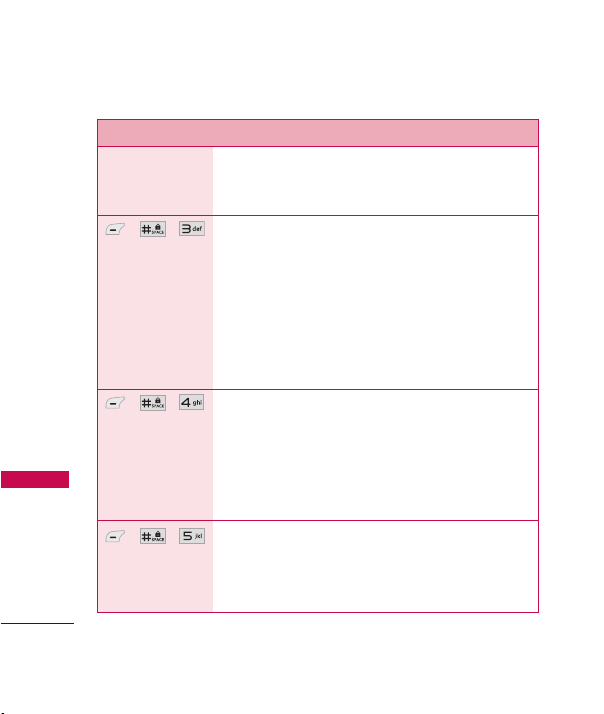
Menú Descripciones
2.7 Relojes & Calendario
2.8 Configuraciones de Fuente
2.9 Coincidencia de Nombre Marc
, ,
El menú de Seguridad le permite asegurar el
teléfono electrónicamente.
3.1 Bloquear Teléfono
3.2 Auto Bloqueo del Aparato
3.3 Restricciones
3.4 Números de Emergencia
3.5 Cambiar Cód. de Bloq
3.6 Restablecer Config.
, ,
El menú de Config. de Llamada le permite decidir
cómo el teléfono maneja las llamadas.
4.1 Opcns de Contestar 4.2 Auto-Reintentar
4.3 Marcación de 1 Toque
4.4 Modo Avión
4.5 Modo TTY
, ,
El menú Sistema le permite designar
configuraciones específicas de red del sistema.
5.1 Red
5.1.1 Selección de Sistema
MN180_Light_Spa_Ver1.0_100902.qxd 9/8/10 2:48 PM Page 14
15
Menús del Teléfono
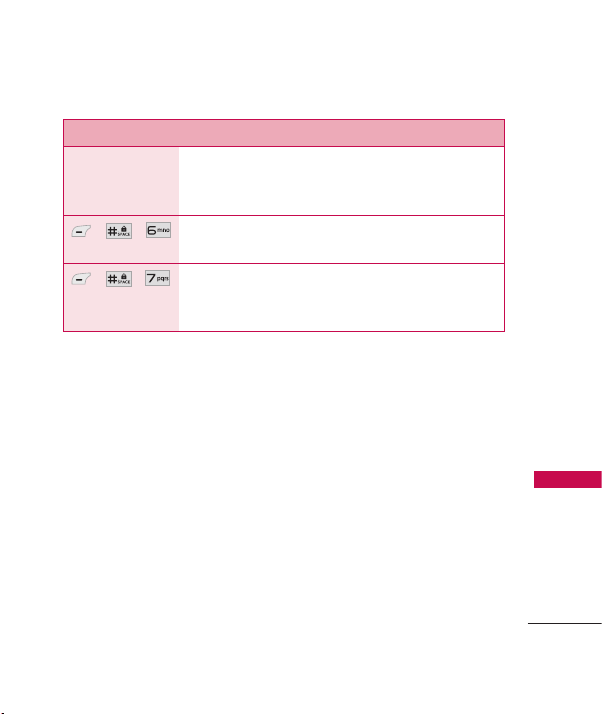
Menú Descripciones
5.1.2 Fijar NAM
5.1.3 Sistema de Servicio
5.2 Ubicación
, ,
Le permite comprobar el estado de la memoria de
su teléfono.
, ,
El menú Info de Tel le proporciona información
concreta respecto al modelo del teléfono y al
software.
MN180_Light_Spa_Ver1.0_100902.qxd 9/8/10 2:48 PM Page 15

Seguridad
16
Seguridad
Información de
seguridad de la TIA
Lo que sigue es la Información
completa de seguridad de la TIA
(Asociación de la Industria de las
Telecomunicaciones) sobre
teléfonos inalámbricos de mano.
Cuidado de la antena
Utilice solamente la antena
incluida o una antena de
reemplazo aprobada. Las antenas,
modificaciones o accesorios no
autorizados pueden dañar el
teléfono y violar los reglamentos
de la FCC.
Funcionamiento del teléfono
POSICIÓN NORMAL: Sostenga el
teléfono como cualquier otro
teléfono con la antena apuntando
hacia arriba por sobre su hombro.
Sugerencias para un
funcionamiento más eficiente
Para que su teléfono funcione
con la máxima eficiencia:
No toque la antena
innecesariamente cuando esté
usando el teléfono. El contacto
con la antena afecta la calidad de
la llamada y puede ocasionar que
el teléfono funcione a un nivel de
potencia mayor que el que
necesitaría de otro modo.
Manejo
Compruebe las leyes y
reglamentos referidos al uso de
teléfonos inalámbricos en las
áreas donde usted maneja y
cúmplalas siempre. Igualmente, si
va a usar el teléfono mientras
maneja, por favor tenga presente
lo siguiente:
MN180_Light_Spa_Ver1.0_100902.qxd 9/8/10 2:48 PM Page 16

17
Seguridad
●
Preste toda su atención a
conducir: manejar con
seguridad es su primera
responsabilidad;
●
Use la operación a manos
libres, si la tiene;
●
Salga del camino y
estaciónese antes de hacer o
recibir una llamada si las
condiciones de manejo o la
ley así lo demandan.
Dispositivos electrónicos
La mayoría del equipo electrónico
moderno está blindado contra las
señales de RF. Sin embargo,
algunos equipos electrónicos
pueden no estar blindados contra
las señales de RF de su teléfono
inalámbrico.
Marcapasos
La Asociación de Fabricantes de
la Industria Médica recomienda
una separación mínima de quince
(15) centímetros o seis (6)
pulgadas entre el teléfono
inalámbrico de mano y un
marcapasos para evitar la posible
interferencia con éste. Estas
recomendaciones son coherentes
con las investigaciones
independientes y las
recomendaciones de
Investigación en tecnología
inalámbrica.
Las personas con marcapasos:
●
SIEMPRE deben mantener el
teléfono a más de quince
centímetros (seis pulgadas)
del marcapasos cuando el
teléfono esté encendido;
●
No deben llevar el teléfono en
un bolsillo del pecho;
MN180_Light_Spa_Ver1.0_100902.qxd 9/8/10 2:48 PM Page 17

Seguridad
18
Seguridad
●
Deben usar la oreja opuesta al
marcapasos para reducir al
mínimo la posibilidad de
interferencia;
●
Deben apagar el teléfono de
inmediato si tienen motivo
para sospechar que está
ocurriendo una interferencia.
Aparatos para la sordera
Algunos teléfonos inalámbricos
digitales pueden interferir con
algunos aparatos para la sordera.
En caso de presentarse tal
interferencia, es recomendable
que consulte con su proveedor
de servicio (o llame a la línea de
servicio al cliente para comentar
las opciones a su alcance).
Información al
consumidor sobre la
SAR
(Tasa de Absorción Específica,
Specific Absorption Rate)
Este modelo de teléfono
cumple los requisitos del
gobierno sobre exposición a las
ondas radiales.
Su teléfono
inalámbrico es esencialmente un
transmisor y receptor de radio.
Ha sido diseñado y fabricado
para no sobrepasar los límites de
emisión en cuanto a exposición a
energía de radiofrecuencia (RF)
establecidos por la Comisión
Federal de Comunicaciones
(FCC) del gobierno de EE.UU.
Estos límites de exposición de la
FCC derivan de las
recomendaciones de dos
organizaciones expertas, el
Consejo Nacional para las
Mediciones y la Protección
contra Radiación (NCRP) y el
MN180_Light_Spa_Ver1.0_100902.qxd 9/8/10 2:48 PM Page 18

19
Seguridad
Instituto de Ingenieros Eléctricos
y Electrónicos (IEEE). En ambos
casos, las recomendaciones
fueron desarrolladas por
científicos y expertos en
ingeniería provenientes de la
industria, el gobierno y
academias después de revisiones
extensivas de la literatura
científica relacionada con los
efectos biológicos de la energía
de RF. El límite de exposición
para los teléfonos móviles
inalámbricos emplea una unidad
de medida conocida como la
Tasa de Absorción Específica o
SAR. La SAR es una medida de la
tasa de absorción de energía de
RF por el cuerpo humano
expresada en unidades de watts
por kilogramo (W/kg). La FCC
requiere que los teléfonos
inalámbricos cumplan con un
límite de seguridad de 1.6 watts
por kilogramo (1.6 W/kg). El
límite de exposición de la FCC
incorpora un margen sustancial
de seguridad para dar protección
adicional al público y para dar
cuenta de las variaciones en las
mediciones.
Las pruebas de SAR se llevan a
cabo usando posiciones de
operación estándar especificadas
por la FCC con el teléfono
transmitiendo a su nivel de
potencia certificado más elevado
en todas las bandas de
frecuencia probadas. Aunque la
SAR se determina al máximo nivel
de potencia certificado, el nivel
de SAR real del teléfono mientras
está en funcionamiento puede
ser bien por debajo del valor
máximo. Debido a que el
teléfono ha sido diseñado para
funcionar en múltiples niveles de
potencia para usar sólo la
potencia requerida para llegar a
la red, en general cuanto más
cerca se encuentre de una
antena de estación base
MN180_Light_Spa_Ver1.0_100902.qxd 9/8/10 2:48 PM Page 19

Seguridad
20
Seguridad
inalámbrica, más baja será la
salida de potencia.
Antes de que un modelo de
teléfono esté disponible para la
venta al público, debe ser
probado y certificado ante la
FCC de que no excede el límite
establecido por el requisito
adoptado por el gobierno para
una exposición segura. Las
pruebas se realizan en posiciones
y ubicaciones (por ejemplo, en el
oído y usado en el cuerpo),
según lo requerido por la FCC
para cada modelo. Este
dispositivo fue probado para
operaciones típicas usado en el
cuerpo con la parte posterior del
teléfono a 0.6 pulgadas entre el
cuerpo del usuario y la parte
posterior del teléfono. Para
cumplir con los requisitos de
exposición de RF de la FCC,
debe mantenerse una distancia
de separación mínima de 0.79
pulgadas (2.0 cm) entre el
cuerpo del usuario y la parte
posterior del teléfono. No deben
usarse sujetadores de cinturón,
fundas y otros accesorios de
terceros que contengan
componentes metálicos. Los
accesorios usados sobre le
cuerpo que no pueden mantener
una distancia de separación de
0.79 pulgadas (2.0 cm) entre el
cuerpo del usuario y la parte
posterior del teléfono, y que no
han sido probados para
operaciones típicas de uso en el
cuerpo pueden no cumplir con
los límites de exposición de RF
de la FCC y deben evitarse.
La FCC ha otorgado una
Autorización de Equipos para
este modelo de teléfono con
todos los niveles de SAR
informados evaluados en
cumplimiento con las pautas de
emisión de RF de la FCC. El valor
más elevado de la SAR para este
modelo de teléfono cuando se
MN180_Light_Spa_Ver1.0_100902.qxd 9/8/10 2:48 PM Page 20

21
Seguridad
probó para ser usado en el oído
es de 0.77 W/kg y cuando se lo
usa sobre el cuerpo, según lo
descrito en este manual del
usuario es de 0.47 W/kg. Si bien
pueden existir diferencias entre
niveles de SAR de diversos
teléfonos y en varias posiciones,
todos cumplen con el requisito
del gobierno para una exposición
segura.
La información de la SAR sobre
este modelo de teléfono está
archivada en la FCC y puede
encontrarse en la sección Display
Grant de
http://www.fcc.gov/oet/ea/fccid/
después de buscar la ID de FCC.
Para buscar información
correspondiente a un modelo de
teléfono en particular, el sitio usa
el número de ID de FCC del
teléfono que generalmente está
impreso en algún lugar en la
cubierta del teléfono. A veces
puede ser necesario quitar las
baterías para encontrar el
número. Una vez que tiene el
número de ID de la FCC para un
teléfono en particular, siga las
instrucciones en el sitio Web, el
cual deberá proveer valores para
una SAR máxima o típica para un
teléfono en particular.
Puede encontrar información
adicional sobre Tasas de
Absorción Específicas en el sitio
Web de la Asociación de
Industrias de Telecomunicaciones
Celulares (CTIA) en
http://www.ctia.org/
*En los E.E.U.U. y Canadá, el
límite de SAR de los teléfonos
celulares usados por el público
es de 1.6 watts/kg (W/kg)
promediados sobre un gramo de
tejido. El estándar incluye un
margen sustancial de seguridad
para dar una protección adicional
al público y para tomar en
cuenta cualquier variación en las
mediciones.
MN180_Light_Spa_Ver1.0_100902.qxd 9/8/10 2:48 PM Page 21

22
1. LO QUE CUBRE ESTA
GARANTÍA:
LG le ofrece una garantía limitada
de que la unidad de suscriptor
adjunta y sus accesorios
incluidos estaran libres de
defectos de materiales y mano
de obra segun los terminos y
condiciones siguientes:
(1) La garantía limitada del
producto se prolonga
durante DOCE (12) MESES
contado a partir de la fecha
de adquisicion del producto.
El periodo de garantía
restante QUINCE (15)
MESES de la unidad que se
esta reparando o
sustituyendo se determinara
mediante la presentacion del
recibo de ventas original por
la compra de la unidad.
(2) La garantía limitada se
extiende solo al comprador
original del producto y no
es asignable ni transferible a
ningun otro comprador o
usuario final subsecuentes.
(3) Esta garantía solo es buena
para el comprador original
del producto durante el
periodo de garantía siempre
que sea en los EE.UU.,
incluidos Alaska, Hawaii, los
territorios de los EE.UU. y
todas las provincias
canadienses.
(4) La carcasa externa y las
partes cosmeticas estaran
libres de defectos al
momento de la distribucion,
y por tanto no estaran
cubiertas por los terminos
de esta garantía limitada.
Declaración De Garantía Limitada
Declaración De Garantía Limitada
MN180_Light_Spa_Ver1.0_100902.qxd 9/8/10 2:48 PM Page 22

23
Declaración De Garantía Limitada
(5) A solicitud de LG, el
consumidor debera aportar
informacion aceptable para
probar la fecha de compra.
(6) El cliente se hara cargo del
costo de envio del producto
al Departamento de servicio
al cliente de LG. LG se hara
cargo del costo de envio del
producto de vuelta al
consumidor despues de
realizar el servicio segun
esta garantía limitada.
2. LO QUE NO CUBRE ESTA
GARANTÍA:
(1) Defectos o danos producto
del uso del producto de una
forma distinta de la normal y
acostumbrada.
(2) Defectos o danos producto
de un uso anormal,
condiciones anormales,
almacenamiento inadecuado,
exposicion a humedad o
agua, modificaciones no
autorizadas, conexiones no
autorizadas, reparacion no
autorizada, mal uso,
negligencia, abuso,
accidentes, alteraciones,
instalacion incorrecta o
cualquier otro acto que no
sea responsabilidad de LG,
incluido el dano causado
por la transportacion,
fusibles fundidos y derrames
de alimentos o liquidos.
(3) Rotura o danos a las antenas
a menos que hayan sido
ocasionadas directamente
por defectos en los
materiales o mano de obra.
(4) El consumidor debe notificar
al Departamento de servicio
al cliente de LG el supuesto
defecto o desperfecto del
producto durante el periodo
de garantía limitada
aplicable para hacer efectiva
MN180_Light_Spa_Ver1.0_100902.qxd 9/8/10 2:48 PM Page 23

24
la garantía.
(5) Productos a los que se haya
eliminado el numero de
serie, o en los que este sea
ilegible.
(6) Esta garantía limitada se
otorga en lugar de cualquier
otra garantía, explícita o
implícita, de hecho o por lo
dispuesto en las leyes,
establecido por ellas o
implicado, incluso, aunque
de manera enunciativa y no
limitativa, cualquier garantía
implícita de comerciabilidad
o adecuacion para un uso en
particular.
(7) Danos resultantes del uso
de accesorios no aprobados
por LG.
(8) Todas las superficies de
plastico y todas las demas
piezas externas expuestas
que se rayen o danen debido
al uso normal por parte del
cliente.
(9) Productos que hayan sido
puestos en funcionamiento
por encima de las
limitaciones maximas
indicadas.
(10) Productos utilizados u
obtenidos en un programa
de arrendamiento.
(11) Consumibles (como seria el
caso de los fusibles).
Declaración De Garantía Limitada
Declaración De Garantía Limitada
MN180_Light_Spa_Ver1.0_100902.qxd 9/8/10 2:48 PM Page 24

25
Declaración De Garantía Limitada
3. LO QUE HARÁ LG:
LG, a su exclusivo criterio,
reparará, reemplazará o
rembolsará el precio de compra
de cualquier unidad que no
cumpla con la presente garantía
limitada. LG puede, a su elección,
optar por usar partes o unidades
nuevas, restauradas o
reacondicionadas equivalentes en
cuanto a funcionalidad. Además,
LG no reinstalará o realizará
copias de seguridad de ningún
dato, aplicación o software que
el usuario haya agregado al
teléfono. Por lo tanto, se
recomienda que usted realice
una copia de seguridad de todo
dato o información de ese tipo
antes de enviar la unidad a LG,
de modo de evitar una pérdida
permanente de esa información.
4. DERECHOS DE LA LEY
ESTATAL:
No se aplica a este producto
ninguna otra garantía explícita.
LA DURACION DE CUALQUIER
GARANTÍA IMPLÍCITA,
INCLUIDA LA GARANTÍA
IMPLÍCITA DE
COMERCIABILIDAD, SE LIMITA A
LA DURACION DE LA
GARANTÍA EXPLÍCITA AQUI
INDICADA. LG NO TENDRA
RESPONSABILIDAD LEGAL POR
LA PERDIDA DEL USO DE ESTE
PRODUCTO, LAS
INCOMODIDADES, PERDIDAS
O CUALQUIER OTRO DANO,
DIRECTO O CONSECUENCIAL,
QUE SE PRODUZCA POR EL
USO O LA INCAPACIDAD DE
USAR ESTE PRODUCTO, NO
POR LA VIOLACION DE
CUALQUIER GARANTÍA
EXPLÍCITA O IMPLÍCITA,
INCLUIDA LA GARANTÍA
MN180_Light_Spa_Ver1.0_100902.qxd 9/8/10 2:48 PM Page 25

Declaración De Garantía Limitada
26
Declaración De Garantía Limitada
IMPLÍCITA DE
COMERCIABILIDAD APLICABLE
A ESTE PRODUCTO.
Algunos paises no permiten la
excluyente de limitación de
daños incidentales o
consecuenciales, o las
limitaciones sobre la duración de
la garantía implícita, de modo
que es posible que estas
limitaciones o exclusiones no se
le apliquen a usted. Esta garantía
le concede derechos legales
concretos y es posible que
tambien tenga otros derechos,
que varian de estado a estado.
5. CÓMO OBTENER SERVICIO
POR LA GARANTÍA:
Para obtener servicio de esta
garantía llame al siguiente
teléfono desde cualquier
ubicacion continental de los
E.E.U.U.
Tel. 1-800-793-8896 o
Fax. 1-800-448-4026
O visite ht
tp://us.lgservice.com.
También puede enviar
correspondencia a:
LG Electronics Service- Mobile
Handsets,
P.O. Box 240007, Huntsville, AL
35824
NO DEVUELVA SU PRODUCTO
A LA DIRECCIÓN ARRIBA
INDICADA. Llame o escriba para
conocer la ubicación del centro
de servicio autorizado LG más
cercano a usted y los
procedimientos necesarios para
presentar una reclamación por
garantía.
MN180_Light_Spa_Ver1.0_100902.qxd 9/8/10 2:48 PM Page 26

MEMO
MN180_Light_Spa_Ver1.0_100902.qxd 9/8/10 2:48 PM Page 27

MEMO
MN180_Light_Spa_Ver1.0_100902.qxd 9/8/10 2:48 PM Page 28