PRELIMINARY
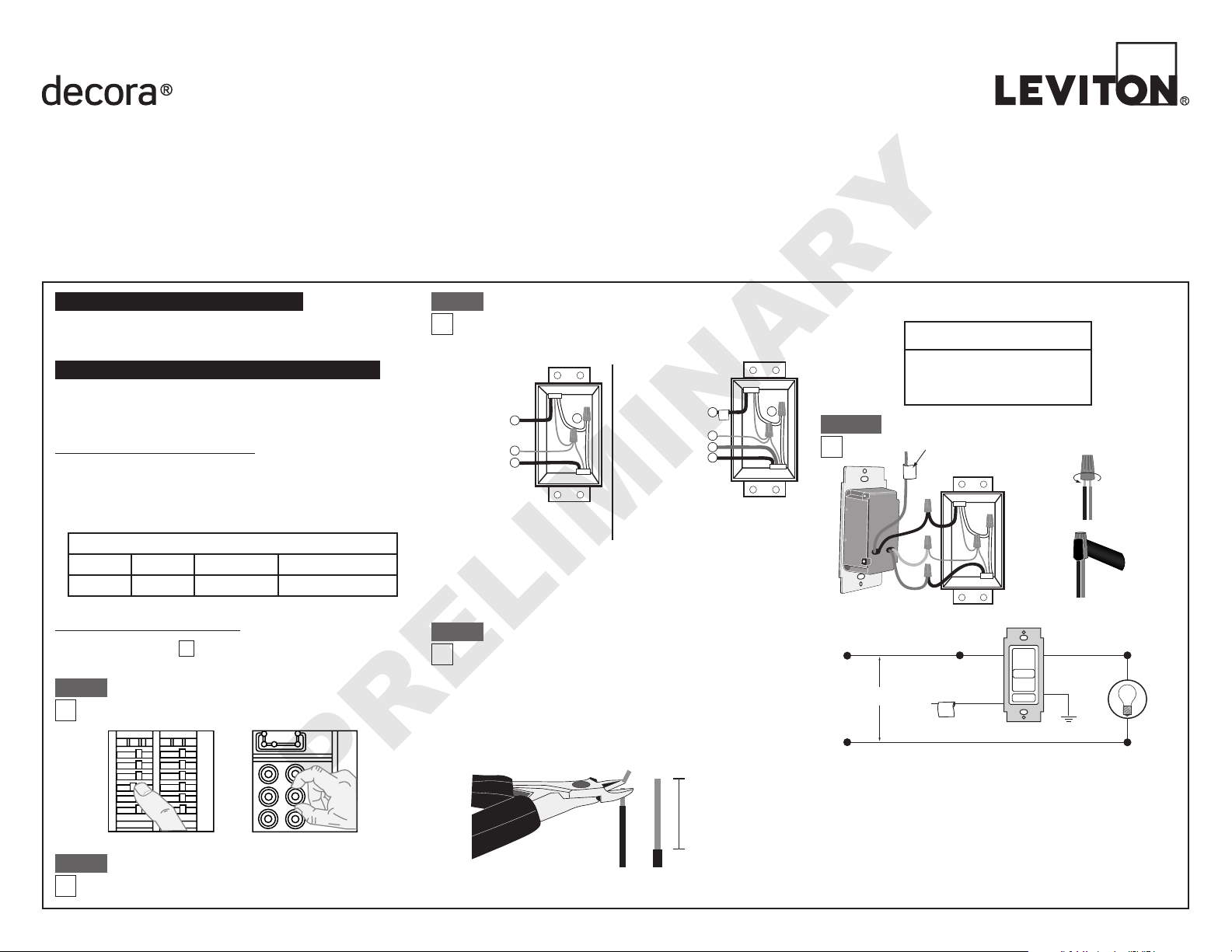
Single-Pole Wiring Application:
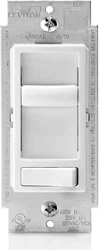
LED/Compact Fluorescent/Incandescent Slide Dimmer
Single Pole (One Location) or 3-Way (Two Location)
Cat. No. 6674-P – LED/CFL 150W, Incandescent 600W
120VAC, 60Hz
INSTALLATION INSTRUCTIONS
DI-000-06674-02A-X2
Identifying your wiring application
(most common):
NOTE: If the wiring in the wall box does not resemble any of
these configurations, consult an electrician.
Step 3
Step 4
Removing existing switch: Remove existing
wallplate and switch mounting screws. Carefully pull switch
from wall box. DO NOT remove wires attached to the
switch at this time.
Step 2
Tools needed to install your Dimmer
Slotted/Philips Screwdriver Electrical Tape Pliers
Pencil Cutters Ruler
Installing Dimmer by itself or with other devices
If installing Dimmer in a single device application, proceed with the
INSTALLING YOUR DIMMER section. If installing Dimmer in a
multi-device application, proceed as follows:
WARNING: To avoid fire, shock, or death; TURN OFF
POWER at circuit breaker or fuse and test that power is off
before wiring!
ONOFF
ONOFF
ONOFF
ONOFF
ONOFF
ONOFF
ONOFFONOFF
ONOFF
ONOFF
ONOFF
ONOFF
Step 1
INSTALLING YOUR DIMMER
NOTE: Use check boxes when Steps are completed.
√
MULTI-DEVICE APPLICATION:
In incandescent multi-dimmer installations, the reduction of the dimmer’s
capacity is required. Refer to the chart for maximum load per dimmer.
No derating is required for use in Dimmable CFL or dimmable LED multi-
dimmer installations.
MAXIMUM LOAD PER DIMMER FOR MULTI-DEVICE (Incandescent)
Cat. No. Single Two Devices More than 2 Devices
6674-P
600W 500W 400W
Insert wires
straight
then twist
clockwise
Electrical Tape
Step 5a
Connect wires per WIRING DIAGRAM as follows:
Screw wire nuts on clockwise making sure no bare conductors show
below the wire connectors. Secure each connector with electrical tape.
•
Green dimmer Ground lead to Green or bare copper wire in wall box.
• Black dimmer lead to any wall box wire removed from old switch.
• Red dimmer lead without insulating label to remaining wall box wire.
• Remaining Red dimmer lead should have Red insulation label affixed.
Proceed to Step 6.
NOTE: If insulating label is not affixed to Red lead, use a small wire nut
or electrical tape to cap off. Proceed to Step 6.
Black
Red
Neutral
Green
Ground
Red
This wire is used in 3-way installations only.
For single pole installations,
do not remove this insulating label.
Hot (Black)
Neutral (White)
Black
White
Line 120VAC, 60 Hz
Black
Red
Dimmer
Green Ground
Load
Red
Insulating
Label
WIRE CONNECTOR / # OF COND.
COMBINATION CHART
1- #12 w/ 1 to 3 #14, #16 or #18
2- #12 w/ 1 or 2 #16 or #18
1- #14 w/ 1 to 4 #16 or #18
2- #14 w/ 1 to 3 #16 or #18
For non-standard wiring applications, refer to
Wire Nut and Connector Size Chart
WARNINGS AND CAUTIONS:
• TO AVOID FIRE, SHOCK, OR DEATH; TURN OFF POWER at circuit breaker or fuse and test that power is off
before wiring or servicing fixture!
• Tobeinstalledand/orusedinaccordancewithappropriateelectricalcodesandregulations.
• Ifyouareunsureaboutanypartoftheseinstructions,consultanelectrician.
• Toavoidoverheatingandpossibledamagetothisdeviceandotherequipment,DO NOT install to control a
receptacle, a motor- or a transformer-operated appliance, or any other lighting sources than those specified.
• Usethisdevicewith copper or copper clad wire only.
WARNINGS AND CAUTIONS:
• Useonlyone(1)dimmerina3-or4-waycircuit.Theswitch(es)willturnthelightonatthe
brightness level selected at the dimmer.
•
Use with compatible dimmable LED, CFL bulbs, incandescent or 120V halogen fixtures only.
For a complete list of compatible LED and CFL bulbs refer to www.leviton.com.
• WhenmultiplebulbsareusedwithonedimmerDO NOT mix bulb types. All bulbs shall be either LED; CFL or
incandescent. Using the same make/model of each bulb will enhance dimmer performance.
Single Pole
1. Line (Hot)
2. Neutral
3. Ground
4. Load
IMPORTANT: For 3-Way applications, note that one of the screw terminals
from the old switch being removed will usually be a different color (Black)
or labeled Common. Tag that wire with electrical tape and identify as the
common (Line or Load) in both the dimmer wall box and 3-way wall box.
2
3
1
4
2
4
1
5
3
3-Way
1. Line or Load
(See note below)
2. Neutral
3. Ground
4. First Traveler – note color
5. Second Traveler – note color
Preparing and connecting wires:
Strip gage
Cut
(if necessary)
5/8"
• Makesurethattheendsofthewiresfromthewallboxarestraight
(cut if necessary).
• Remove5/8"(1.6cm)ofinsulationfromeachwireinthewallbox
(shown).
•
For Single-Pole Application, go to Step 5a.
• For 3-Way Application, go to Step 5b.
PRELIMINARY
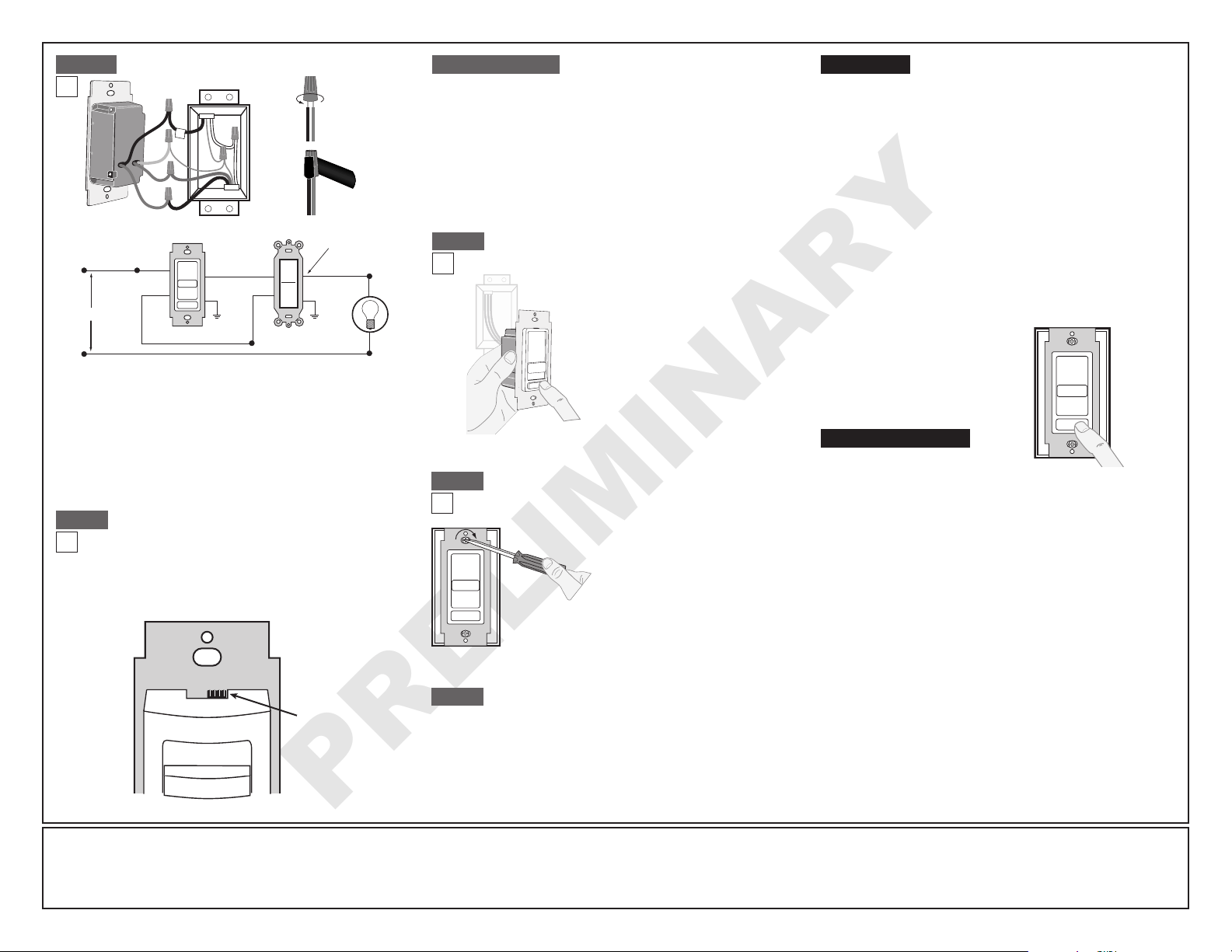
3-Way Wiring Application:
Connect wires per WIRING DIAGRAM as follows:
Screw wire nuts on clockwise making sure no bare conductors show
below the wire connectors. Secure each connector with electrical tape.
•
Green dimmer Ground lead to Green or bare copper wire in wall box.
• Black dimmer lead to tagged (common) wall box wire identified when
removing old switch.
• Remove Red insulating label from Red lead.
• Any Red dimmer lead to any of the remaining wall box wires.
• Remaining Red dimmer lead to remaining wall box wire.
Black
Tag
Red
Red
Neutral
Ground
Green
DI-000-06674-02A-X2
Insert wires
straight
then twist
clockwise
Electrical Tape
Step 5b
Setting Minimum Light Level (Programming mode)
1. Ensure the dimmer is set to the OFF position.
2. Set the bulb selector switch to the LED/Incandescent position.
3. Push rocker switch to ON position.
4. Set the bulb selector switch to the CFL position.
5. Raise or lower the slide control level to achieve the desired minimum
light level.
6.
Set the bulb selector switch back to LED/Incandescent position.
7. A momentary flash of the bulb will occur confirming the new setting.
8. Push rocker switch to the OFF position.
9. For dimmable CFL lamps you must return the bulb selector to the CFL
position.
Dimmer Bulb Selector Switch:
Cat. No. 6674-P is pre-set at the factory with the bulb
selector switch set to LED/Incandescent. For CFL bulb
applications the switch should be moved to the position
marked CFL. The lamp selector slide switch is also used to
adjust the minimum light level when dimming. Information on
this feature is found under OPERATION.
Step 6
Step 6 continued
OPERATION
• Lights Flickering
- Lamp has a bad connection.
- Wires not secured firmly with wire connectors.
• CFL and LED flickers at low end of dimming range
- Increase the low end of the dimming range.
Operation Section - setting minimum light level.
• CFL or LED bulb flickers throughout dimming range
- Please refer to recommended dimmable LED bulbs and CFL bulbs
at www.leviton.com.
• Light does not turn ON
- Circuit breaker or fuse has tripped.
- Lamp is burned out.
- Lamp Neutral connection is not wired.
NOTE: If further information is needed in identifying the HOT wire in
a 3-Way application, go to Leviton's website at www.leviton.com.
TROUBLESHOOTING
LIMITED 5 YEAR WARRANTY AND EXCLUSIONS
Leviton warrants to the original consumer purchaser and not for the benefit of anyone else that this product at the time of its sale by Leviton is free of defects in materials and workmanship under normal and proper use for five years from the purchase date. Leviton’s
only obligation is to correct such defects by repair or replacement, at its option, if within such five year period the product is returned prepaid, with proof of purchase date, and a description of the problem to Leviton Mfg. Co., Inc. 201 North Service Road, Melville,
N.Y. 11747. This warranty excludes and there is disclaimed liability for labor for removal of this product or reinstallation. This warranty is void if this product is installed improperly or in an improper environment, overloaded, misused, opened, abused, or altered in any
manner, or is not used under normal operating conditions or not in accordance with any labels or instructions. There are no other or implied warranties of any kind, including merchantability and fitness for a particular purpose, but if any implied warranty is
required by the applicable jurisdiction, the duration of any such implied warranty, including merchantability and fitness for a particular purpose, is limited to five years. Leviton is not liable for incidental, indirect, special, or consequential damages, including without
limitation, damage to, or loss of use of, any equipment, lost sales or profits or delay or failure to perform this warranty obligation. The remedies provided herein are the exclusive remedies under this warranty, whether based on contract, tort or otherwise.
For Technical Assistance Call: 1-800-824-3005 (U.S.A. Only)
www.leviton.com
ON: Push rocker switch ON.
OFF: Push rocker switch OFF.
BRIGHTEN: Raise slider control lever to
desired level of light.
DIM: Lower slider control lever.
Dimmer Mounting:
TURN OFF POWER AT CIRCUIT BREAKER OR FUSE.
Step 8
Installation may now be completed by
carefully positioning all wires to provide
roominwallboxfordimmer.Mount
dimmer into box with mounting screws
supplied. Attach Decora
®
wallplate.
Testing your Dimmer prior to mounting in wall
box:
• Restorepoweratcircuitbreakeror
fuse.
• CarefullyholdingDimmerasshown
proceed as follows:
Slide control lever to highest
postion. If lights are not ON, press
rocker. Lights should turn ON to
brightest level.
If lights do not turn ON, refer to
the TROUBLESHOOTING section.
Step 7
3-Way Switch
Common Terminal
(Black Screw)
Hot (Black)
Neutral (White)
Black
White
Line 120VAC, 60 Hz
Black
Dimmer
Green
Ground
Green
Ground
Load
Red
Red
©2011LevitonMfg.Co.,Inc.
Restore Power: Restore power at circuit breaker or fuse.
Installation is complete.
Step 9
NOTE: If using the dimmer in a 3-way application, the lights will turn ON
at brightness set on dimmer's slide control lever. The lighting level can be
controlled from the dimmer location and can be switched ON/OFF from
either the dimmer or switch location.
LED/Incandescent Mode: The selector switch is pre-set at the factory
to this mode. Use this mode for dimmable LED bulbs and incandescent/
halogen bulbs. To avoid flickering at the low end of the dimming range you
can pre-set the minimum light level. See OPERATION to manually program
the minimum light level.
CFL Mode:
To be used for dimmable CFL bulbs only. In this mode the dimmer
provides a pre-set kick-start to aid the lamp in starting. To avoid flickering at
the low end of the dimming range you can pre-set the minimum light level. See
OPERATION
to manually program the minimum light level.
Bulb Selector
Switch
CFL LED/INC
TOP