ENGLISH ESPAÑOL
OWNER’S MANUAL
ELECTRIC CONVECTION BUILT-IN OVEN
www.thesignaturekitchen.com
UPWS3044ST
MFL51224512_00

2
TABLE OF CONTENTS
TABLE OF CONTENTS
3 IMPORTANT SAFETY INSTRUCTIONS
8 PRODUCT OVERVIEW
8 Accessories
9 Oven Overview
1 0 Control Panel Overview
11 FEATURES
1 1 Clock
1 2 Timer ON/OFF
1 2 Convection Auto Conversion
1 3 Oven Temperature Adjustment
1 4 Language
1 4 Preheating Alarm Light
1 4 Beeper Volume
1 4 Fahrenheit or Celsius
1 4 Oven Light
1 5 Lockout
1 5 Start Time(Delayed Timed Cook)
1 6 Cook Time(Timed Cook)
17 USING THE OVEN
1 7 Before Using the Oven
17 Removing and Replacing the Oven Racks
18 Bake
18 Convection Bake
19 Roast
20 Convection Roast
20 Crisp Convection
21 Broil
22 Recommended Broiling Guide
23 Broiling Tips
24 Warm
24 Proof
25 Meat Probe
26 SMART FUNCTIONS
29 MAINTENANCE
29 Self Clean
29 Setting Self Clean
30 Setting Self Clean with a Delayed Start
31 SpeedClean™
31 Cleaning Tips
32 SpeedClean™ Instruction Guide
33 Cleaning the Exterior
34 Changing the Oven Light
35 Removing and Replacing the Oven Door
36 TROUBLESHOOTING
36 FAQ s
38 Before Calling for Service
41 WARRANTY
3
IMPORTANT SAFETY INSTRUCTIONS
ENGLISH
IMPORTANT SAFETY INSTRUCTIONS
Read and follow all instructions before using your oven to prevent the risk of re, electric
shock, personal injury, or damage when using the oven. This guide does not cover all
possible conditions that may occur. Always contact your service agent or manufacturer
about problems that you do not understand.
Download this owner's manual at: www.thesignaturekitchen.com
This is the safety alert symbol. This symbol alerts you to potential hazards
that can result in property damage and/or serious bodily harm or death.
All safety messages will follow the safety alert symbol and either the word
WARNING or CAUTION. These words mean:
WARNING
Indicates a hazardous situation which, if not avoided, could result in death or serious injury.
CAUTION
Indicates a hazardous situation which, if not avoided, could result in minor or moderate
injury.
SAFETY PRECAUTIONS
y Be certain your appliance is properly installed and grounded by a qualied technician.
y Do not repair or replace any part of the appliance unless specically recommended in the
manual.
y All other servicing should be referred to a qualied technician.
y Always disconnect power to appliance before servicing by unplugging, removing the fuse or
switching o the circuit breaker.
y DO NOT TOUCH HEATING ELEMENTS OR INTERIOR SURFACES OF OVEN.
Heating elements may be hot even though they are dark in color. Interior surfaces of an oven
become hot enough to cause burns. During and after use, do not touch or let clothing or
other ammable materials contact heating elements or interior surfaces of oven until they
have had sucient time to cool. Other surfaces of the appliance may become hot enough to
cause burns. Among these surfaces are oven vent openings and surfaces near these openings,
oven doors, and windows of oven doors.
y Use care when opening door.
Let hot air or steam escape before you remove or replace food in the oven.
y Do not heat unopened food containers.
Build-up of pressure may cause containers to burst and result in injury.
4
IMPORTANT SAFETY INSTRUCTIONS
SAFETY PRECAUTIONS
(CONT.)
y Keep oven vent ducts unobstructed.
The oven vent could become hot during oven use. Never block this
vent and never place plastic or heat-sensitive items on or near the
vent.
y Be certain all packing materials are removed from the appliance before operating.
Keep plastics, clothes, and paper away from parts of the appliance that may become hot.
y DO NOT force the door open. This can damage the automatic door locking system.
Use care when opening the oven door after the self-cleaning cycle. Stand to the side of
the oven when opening the door to allow hot air or steam to escape. The oven may still
be VERY HOT.
y DO NOT use a steel-wool pad. It will scratch the surface.
y DO NOT use harsh etching, abrasive cleaners or sharp metal scrapers to clean
the oven door glass since they can scratch the surface. This may result in the glass
shattering.
y Be careful when removing and lifting the door.
y DO NOT lift the door by the handle. The door is very heavy.
y DO NOT step or sit on the oven door. Be sure to follow proper installation instructions.
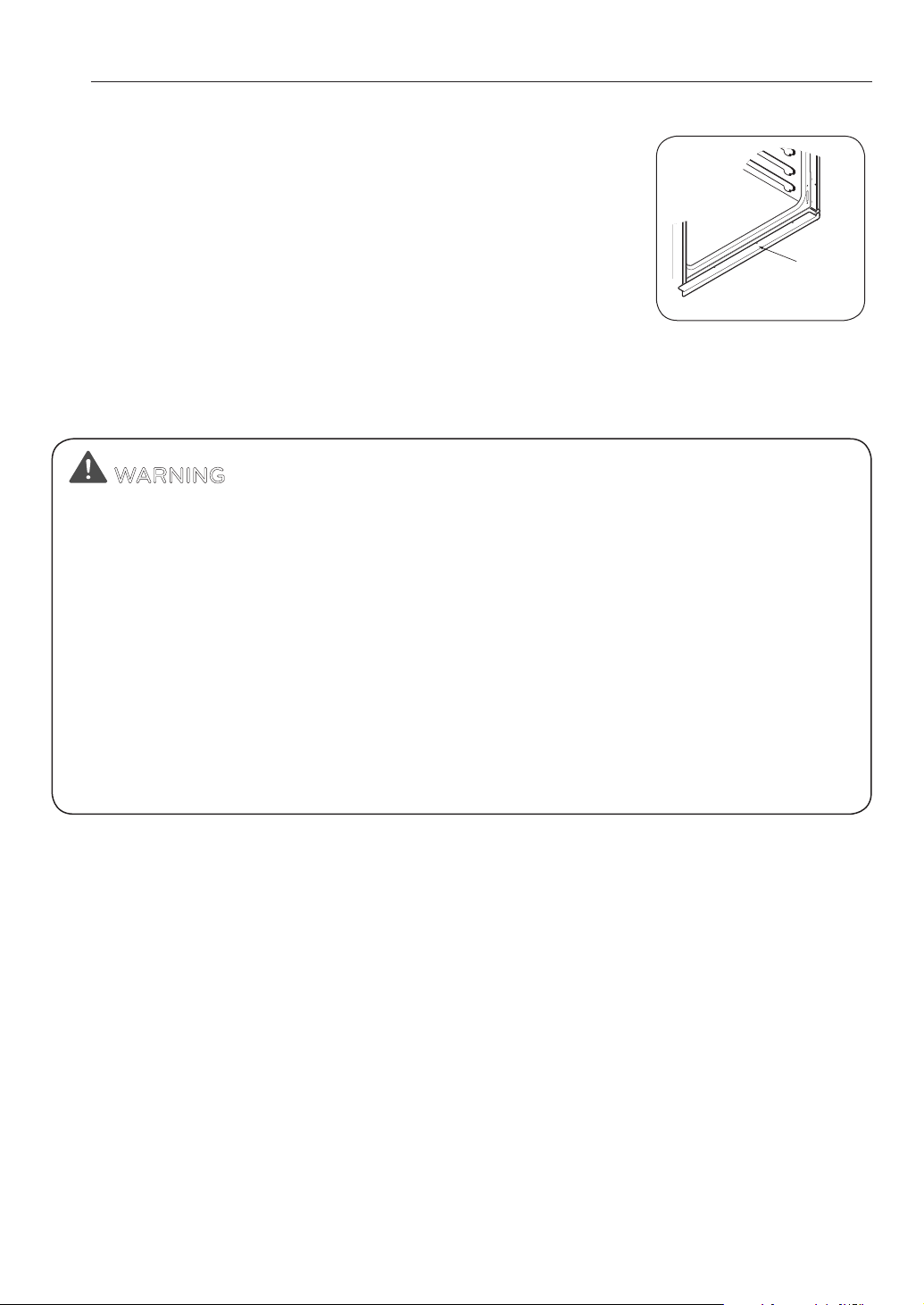
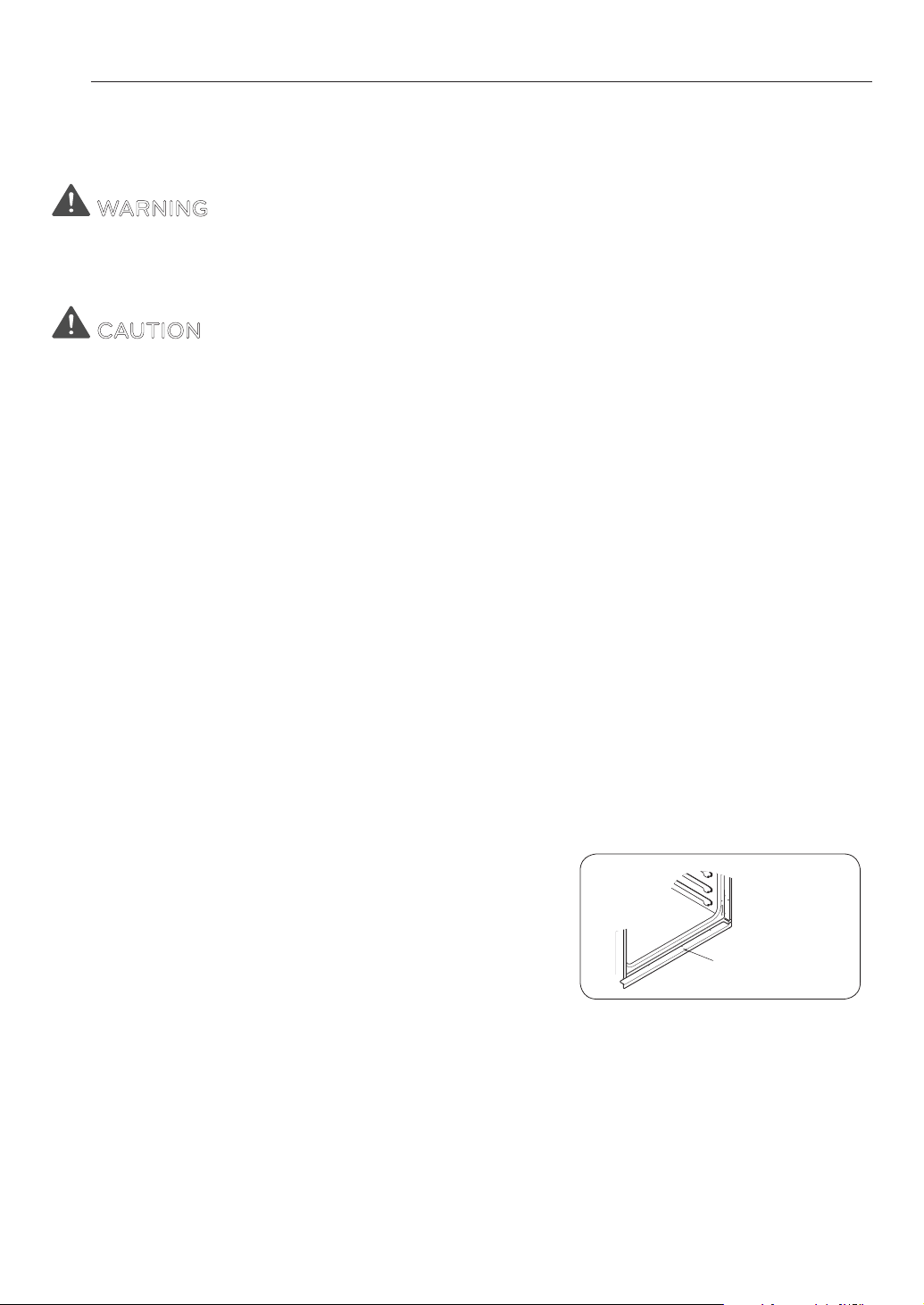
NOTE:
For proper operation vent trim must be installed.
Metal bottom
trim (Vent)
WARNING
y NEVER use your appliance for warming or heating the room.
y DO NOT use water on grease res. Should an oven re occur, leave the oven door
closed and turn the oven o. If the re continues, throw baking soda on the re or use
a re extinguisher.
y Use dry pot holders only. Moist or damp pot holders on hot surfaces may result in
burns from steam. Do not let the pot holder touch hot heating elements. Do not use a
towel or other bulky cloth.
y Do not use the oven or the drawer for storage. Flammable materials should not be
stored in or on an oven.
y Wear proper apparel. Loose-tting or hanging garments should never be worn
while using the appliance.
y Before using the Wi-Fi, you should check the substance in the cavity.
5
IMPORTANT SAFETY INSTRUCTIONS
ENGLISH
ELECTRICAL SAFETY
y Protective Liners. Do not use aluminum foil or any other material to line the oven bottoms.
Improper installation of these liners may result in a risk of electric shock or re.
y Do Not allow aluminum foil or the meat probe to contact heating elements.
y DO NOT line the oven walls, racks, bottom, or any other part of the oven with
aluminum foil or any other material. Doing so will disrupt heat distribution, produce poor
baking results and cause permanent damage to the oven interior (aluminum foil will melt to
the interior surface of the oven.)
y Before replacing your oven light bulb, switch o the electrical power to the oven at
the main fuse or circuit breaker panel. Failure to do so can result in severe personal injury,
death, or electrical shock.
SAFETY DURING USE
y Oven Racks. Always place oven racks in the desired position while the oven is cool.
y Always use pot holders or oven mitts when removing food from the oven.
Hot cookware or plates can cause burns.
y Use caution with the TIMED BAKE or DELAYED TIMED BAKE features. Use the
automatic timer when cooking cured or frozen meats and most fruits and vegetables.
Foods that can easily spoil, such as milk, eggs, sh, meat or poultry, should be chilled
in the refrigerator rst. Even when chilled, they should not stand in the oven for more
than 1 hour before cooking begins, and should be removed promptly when cooking is
completed. Eating spoiled food can result in sickness from food poisoning.
y Should an oven re occur, leave the oven door closed and turn the oven o. If the re
continues, throw baking soda on the re or use a re extinguisher.
y DO NOT put water or our on the re. Flour may be explosive and water can cause a grease
re to spread and cause personal injury.
y DO NOT use the broiler pan without the grid. DO NOT cover the grid with aluminum
foil.
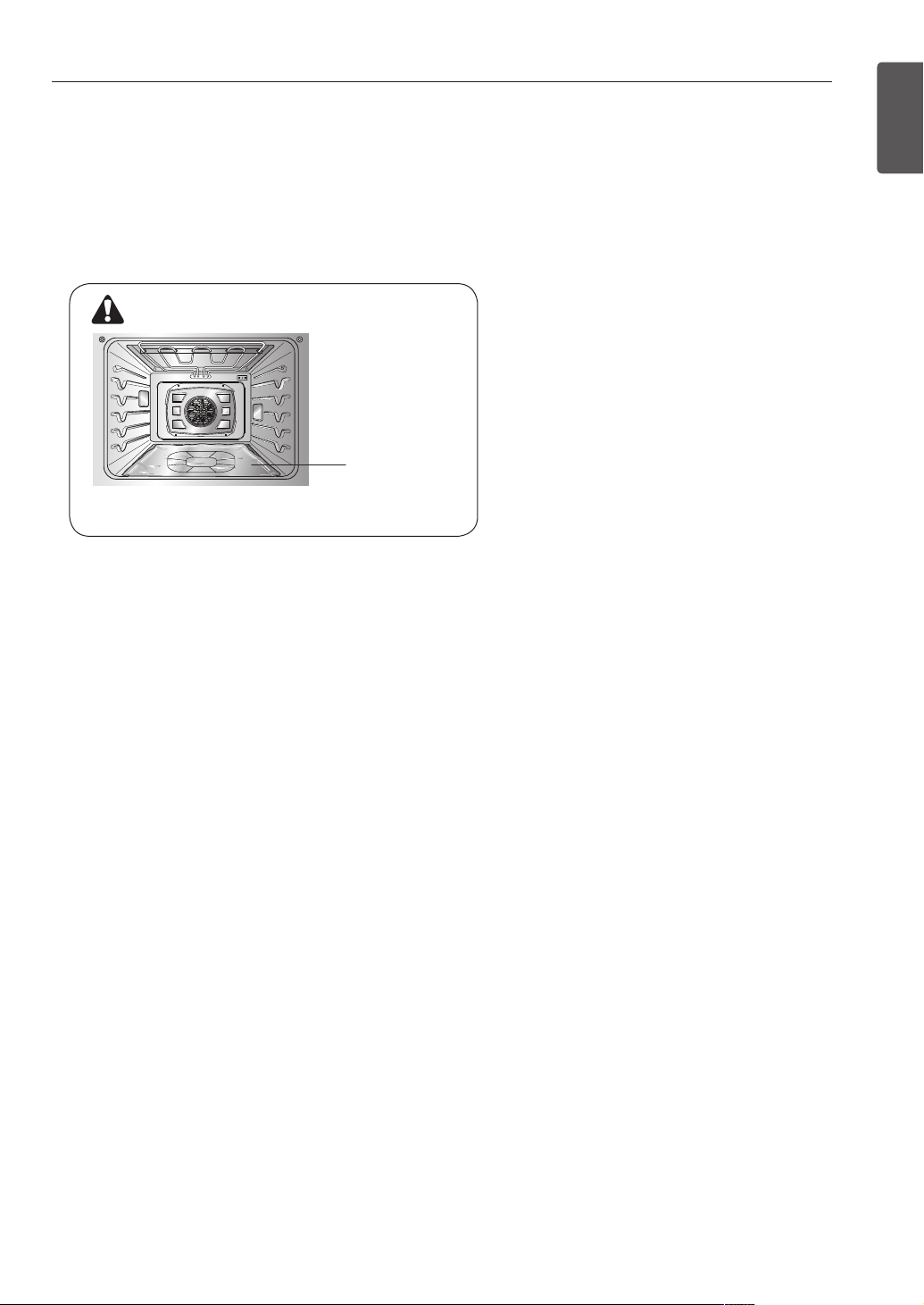
No Aluminum foil
WARNING
• DO NOT place aluminum foil directly on the
oven bottom.
6
IMPORTANT SAFETY INSTRUCTIONS
CHILD SAFETY
WARNING
y Children should be kept away from the oven.
y Accessory parts will become hot when the broiler is in use.
CAUTION
y Children should not be left alone or unattended in an area where the appliance is
in use. Children should never be allowed to sit or stand on any part of the appliance.
y DO NOT leave small children unattended near the appliance. During the self-
cleaning cycle, the outside of the oven can become very hot to the touch.
SAFETY WHEN CLEANING
y Do not clean the door gasket. The door gasket is essential for a good seal. Care should be taken
not to rub, damage, or move the gasket.
y Do not use oven cleaners. No commercial oven cleaner or oven liner protective coating of any
kind should be used in or around any part of the oven.
y Before self cleaning the oven, remove broiler pan, all oven racks, meat probe and any other
utensils from the oven cavity.
y Never keep pet birds in the kitchen. The health of birds is extremely sensitive to the fumes
released during an oven self-clean cycle. Fumes may be harmful or fatal to birds. Move birds to a
well-ventilated room.
y Important instruction : In the event the self clean error code F is displayed, and error melody
sounds, the oven is malfunctioning in the self clean mode. Switch o the electrical power to the
main fuse or breaker and have the appliance serviced by a
qualied technician.
y Make sure oven lights are cool before cleaning. Clean
only parts listed in manual.
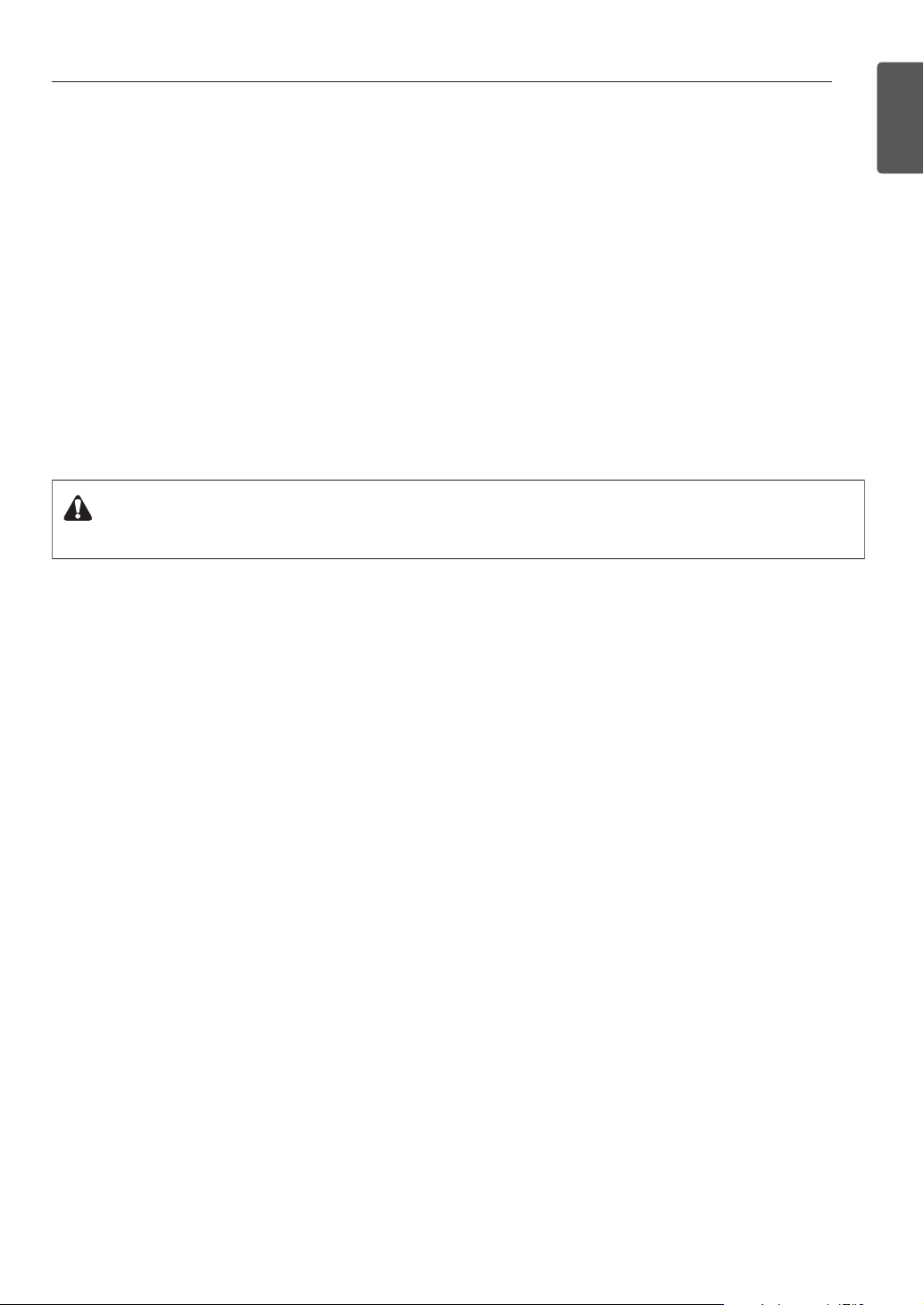
y DO NOT block the oven vent during operation. This can
damage the electric parts of the oven. Air must be able
to move freely. The metal bottom trim (vent) should be
properly assembled on the front bottom of the oven before
installing the oven door.
Metal bottom trim
(Vent)
7
IMPORTANT SAFETY INSTRUCTIONS
ENGLISH
COOK MEAT AND POULTRY THOROUGHLY
To protect against food-borne illnesses, cook meat and poultry thoroughly. The USDA has indicated
the following as safe minimum internal temperatures for consumption:
y Ground beef: 160 °F
y Poultry: 165 °F
y Beef, veal, pork, or lamb: 145 °F
y Fish/seafood: 145°F
CALIFORNIA SAFE DRINKING WATER AND TOXIC ENFORCEMENT ACT
WARNING:
This product contains chemicals known to the State of California to cause cancer
and birth defects or other reproductive harm. Wash hands after handling.
8
PRODUCT OVERVIEW
PRODUCT OVERVIEW
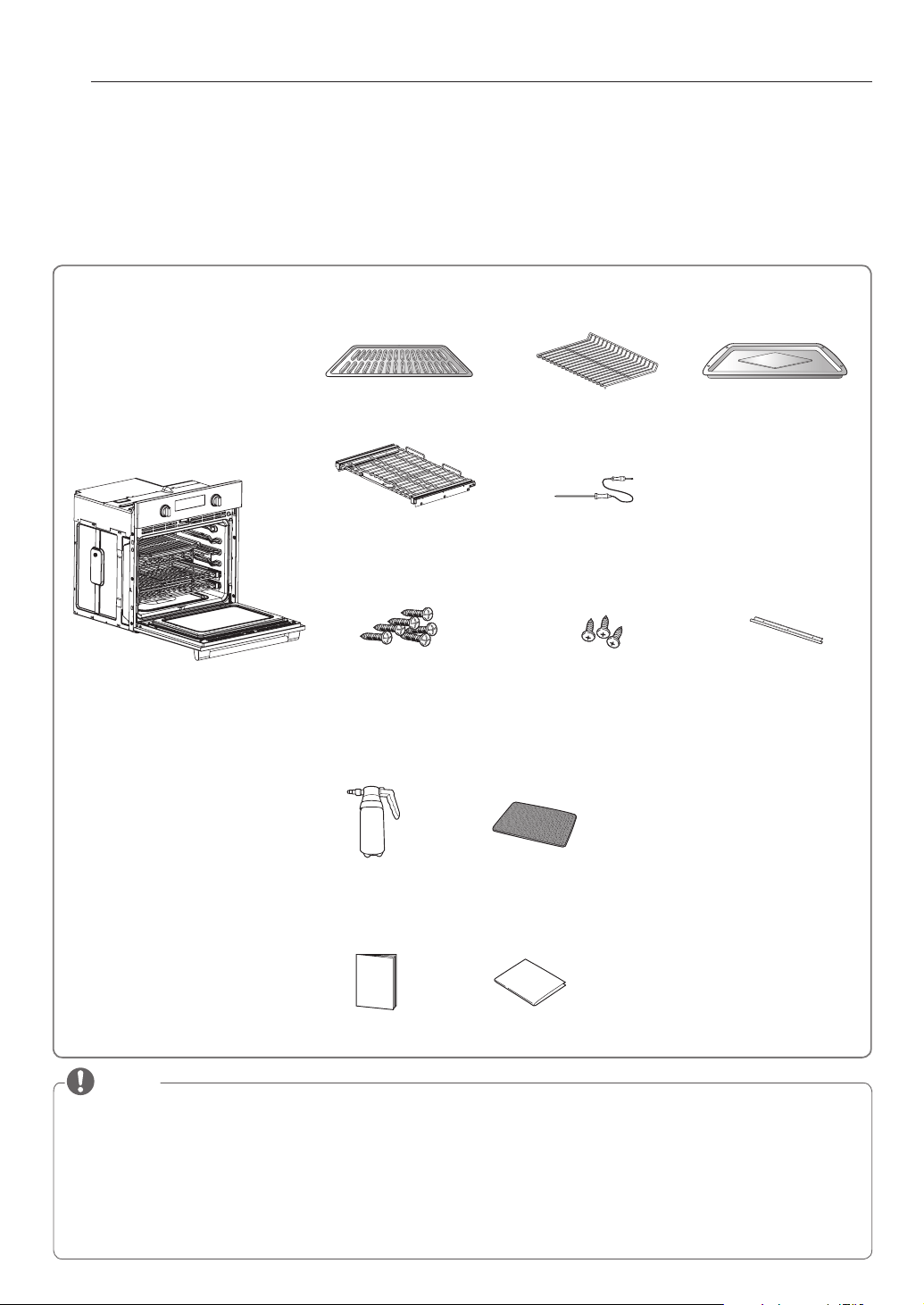
ACCESSORIES
Make sure that all parts are included after purchasing this product.
NOTE
y
Contact SIGNATURE KITCHEN SUITE Customer Service if any accessories are missing.
y
For your safety and for extended product life, only use authorized components.
y
The manufacturer is not responsible for product malfunction or accidents caused by the use of separately purchased,
unauthorized components.
y
The images in this guide may be different from the actual components and accessories, which are subject to change by the
manufacturer without prior notice for product improvement purposes.
y
Do not remove telescoping rack on the base packing. Telescoping racks are wrapped separately to the top and bottom of the
oven.
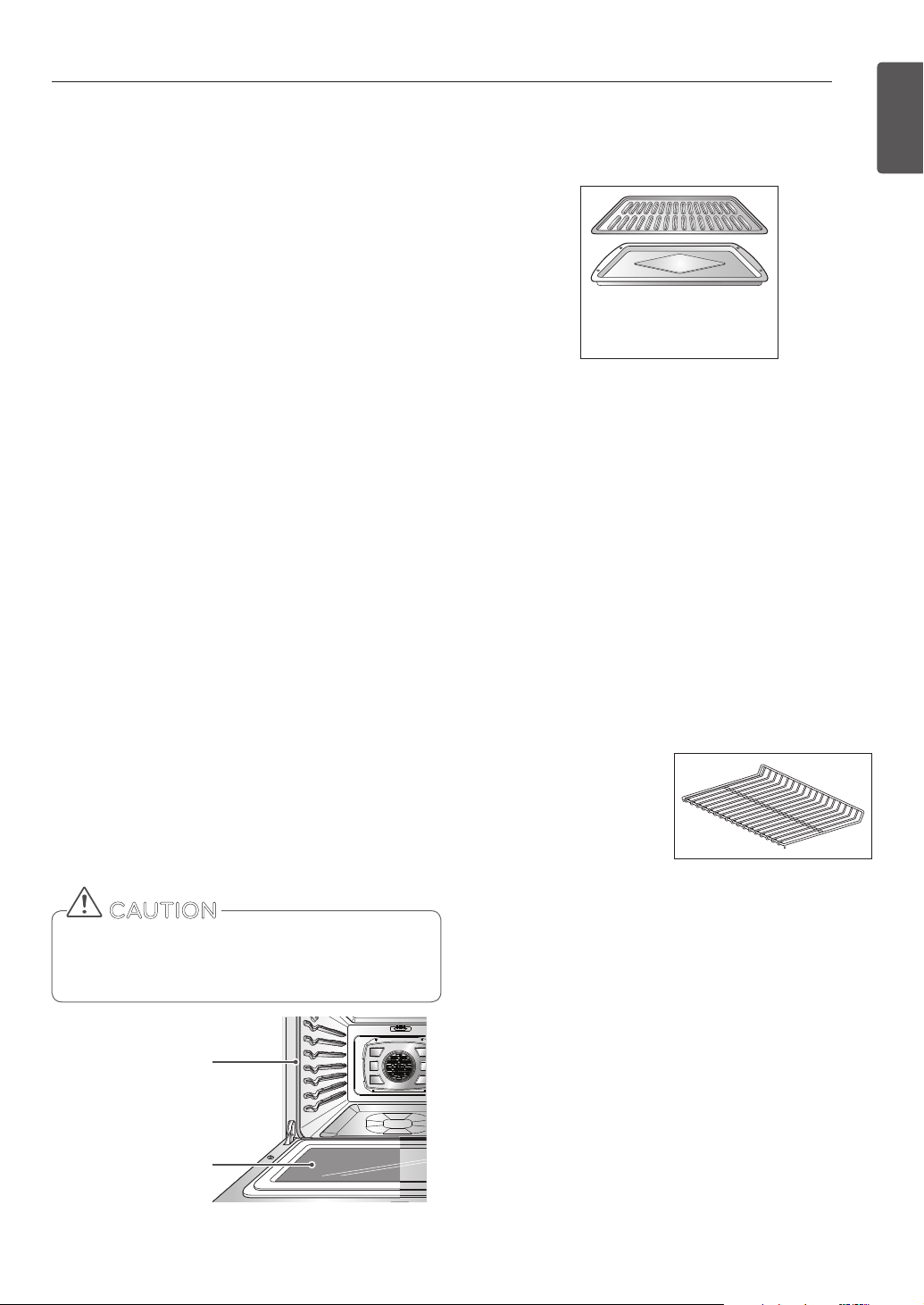
Electric convection built-in oven
Grid
Telescoping rack (2 ea)
6 wood screws for mounting
(4 needed for installation
and 2 extras)
3 Screws For Bottom Trim
(3 needed for installation)
Metal Bottom Trim
Accessories for Installation
Accessories for Cooking
Spray bottle (1ea)
Owner’s manual
Manuals
Accessories for SpeedClean™
Non scratch
Scouring Pad (1ea)
Installation manual
Heavy duty racks
(Standard Rack)
(1 ea)
Meat probe
Broiler pan
9
PRODUCT OVERVIEW
ENGLISH
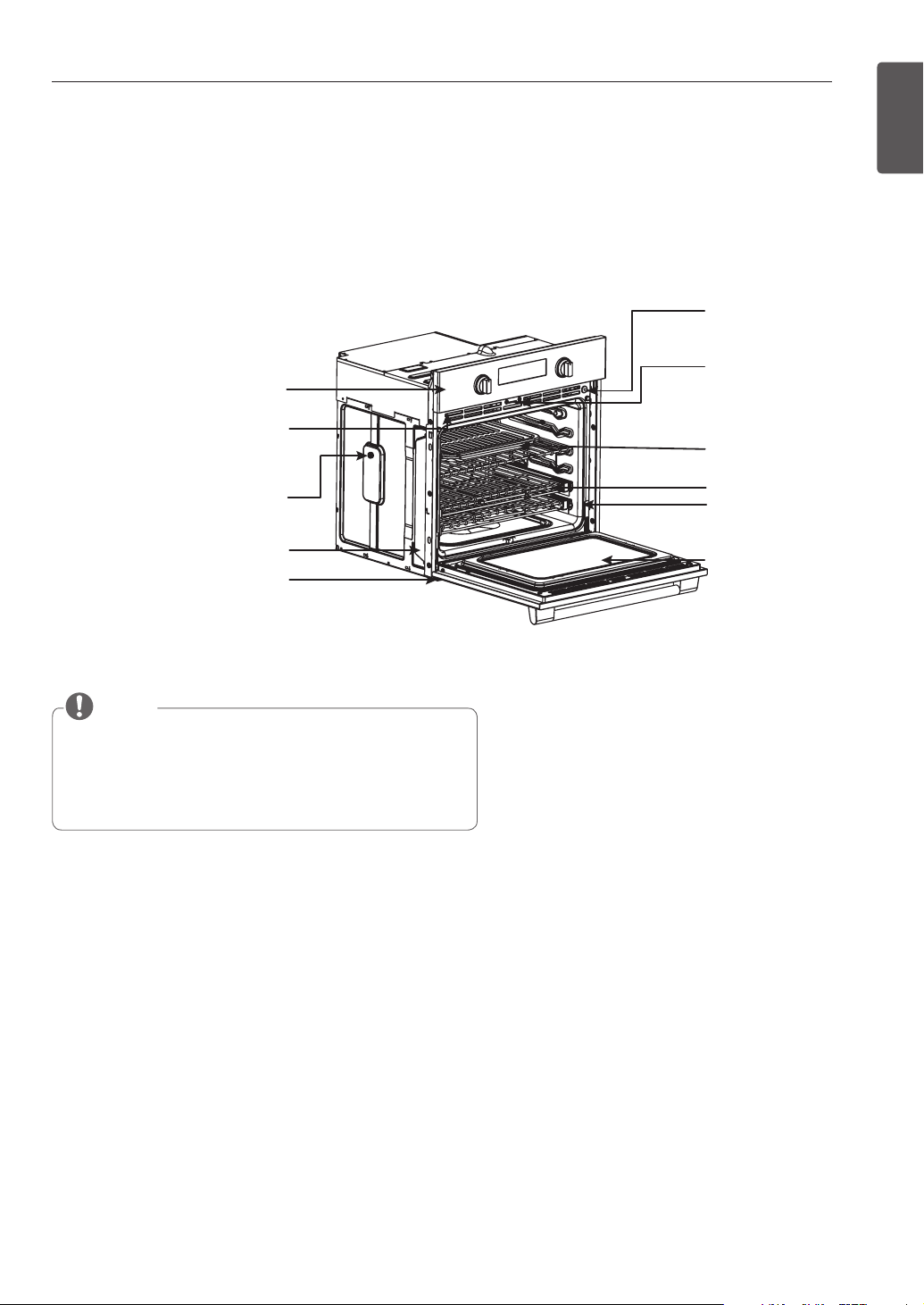
OVEN OVERVIEW
Make sure to understand the name and function of each part.
* Throughout this manual, the features and appearance may vary depending on your model.
NOTE
y
The model and serial number can be verified at the rating label.
y
Glide Shut™ Door: The Soft Closing feature controls the oven
door mechanism. A system that employs new generation hinges
to gently accompany the oven door, preventing it from abruptly
closing, so it closes softly and quietly.
Control panel
Rating label
model and serial
number plate
Spacer (2 ea)
- One on each side
Metal bottom trim
(vent)
Glide Shut™ Door damper (1ea)
Door switch
Door latch
Broiler pan & Grid
Standard racks (2 ea)
Oven door
Gasket
10
PRODUCT OVERVIEW
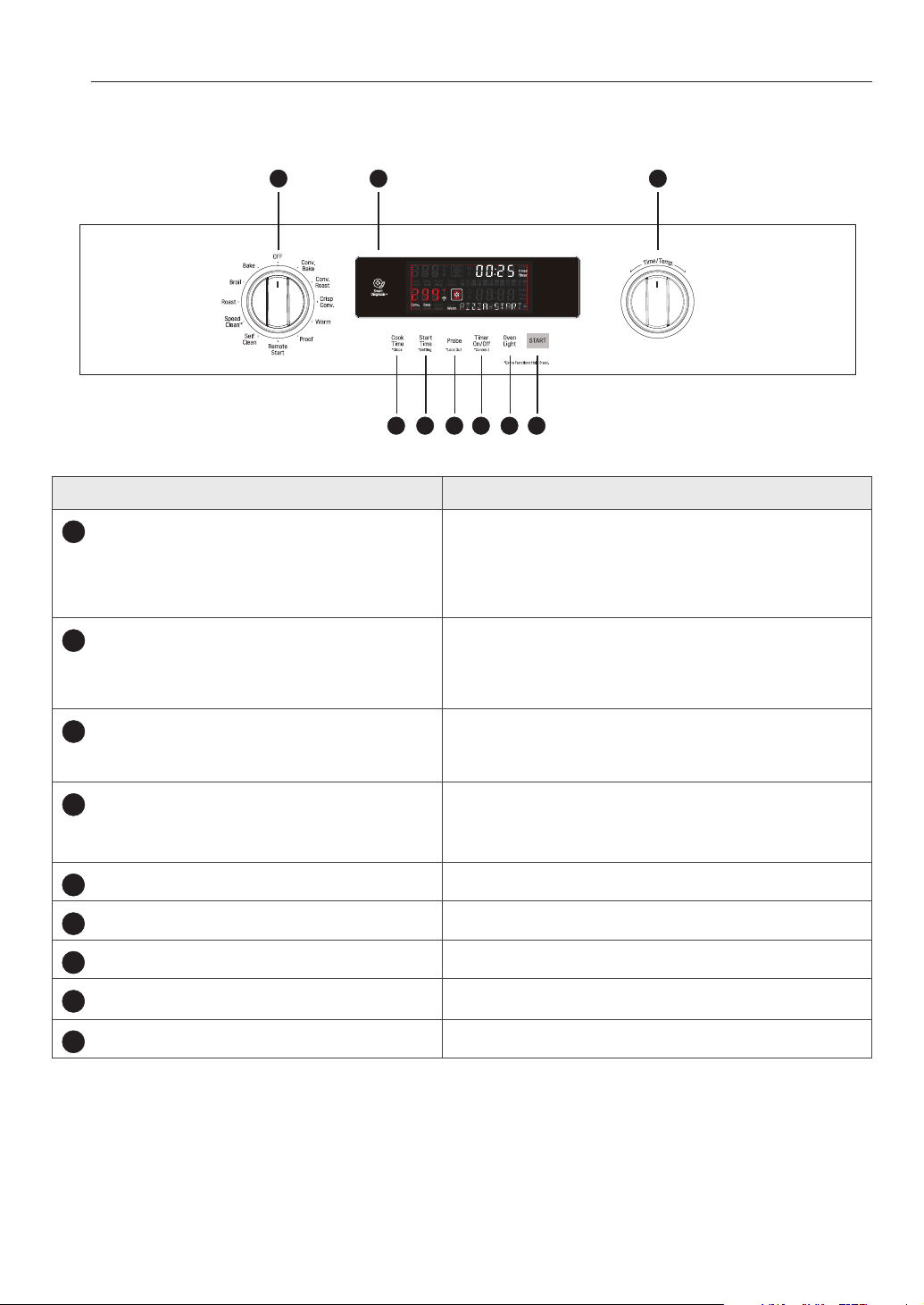
CONTROL PANEL OVERVIEW
Name Description
1
Cook Time
*Clock
- Press button and turn the Time/Temp knob to set the
desired amount of time for food to cook. The oven shuts o
when the set cooking time runs out.
- Press and hold the button for three seconds to set the time
of day.
2
Start Time
*Setting
- Press button and turn the Time/Temp knob to set the
delayed start time. The oven starts at the set time.
- Press and hold button for three seconds to select and adjust
oven settings.
3
Probe
*Lockout
-Press button to select probe function.
- Press and hold button for three seconds to activate to active
LOCKOUT.
4
Timer On/O
*Connect
- Press button to set or cancel timer on oven.
- Press and hold button for three seconds to connect it to a
Wi-Fi network.
5
Oven Light
Press button to turn oven light on/o.
6
Start
Press button to start all oven features.
7
Smart Diagnosis
Use during the Smart Diagnosis feature.
8
Oven Mode Knob
Turn knob to select oven operating mode.
9
Time/Temp Knob
Turn knob to set temperature or cook time for oven.
1 2 3 4 5 6
98 7
11
FEATURES
ENGLISH
FEATURES
CLOCK
The clock must be set to the correct time of day in
order for the automatic oven timing functions to work
properly.
1. Set both Oven Mode knobs to the OFF position.
2. Press and hold COOK TIME for 3 seconds.
3. Turn the Time/Temp knob to select the desired
time. Turn the knob clockwise to increase the time
and counterclockwise to decrease the time.
4. Press START to enter the time and start the clock.
Setting the Hour Mode on the Clock
(12 or 24 hours)
The control is set to use a 12-hour clock. To change it to a
24-hour time clock, follow the steps below.
1. Set both Oven Mode knobs to the OFF position.
2. Press and hold START TIME for 3 seconds.
3. Turn the Time/Temp knob to set the desired hour
mode on the clock.
4. Press START to accept the change.
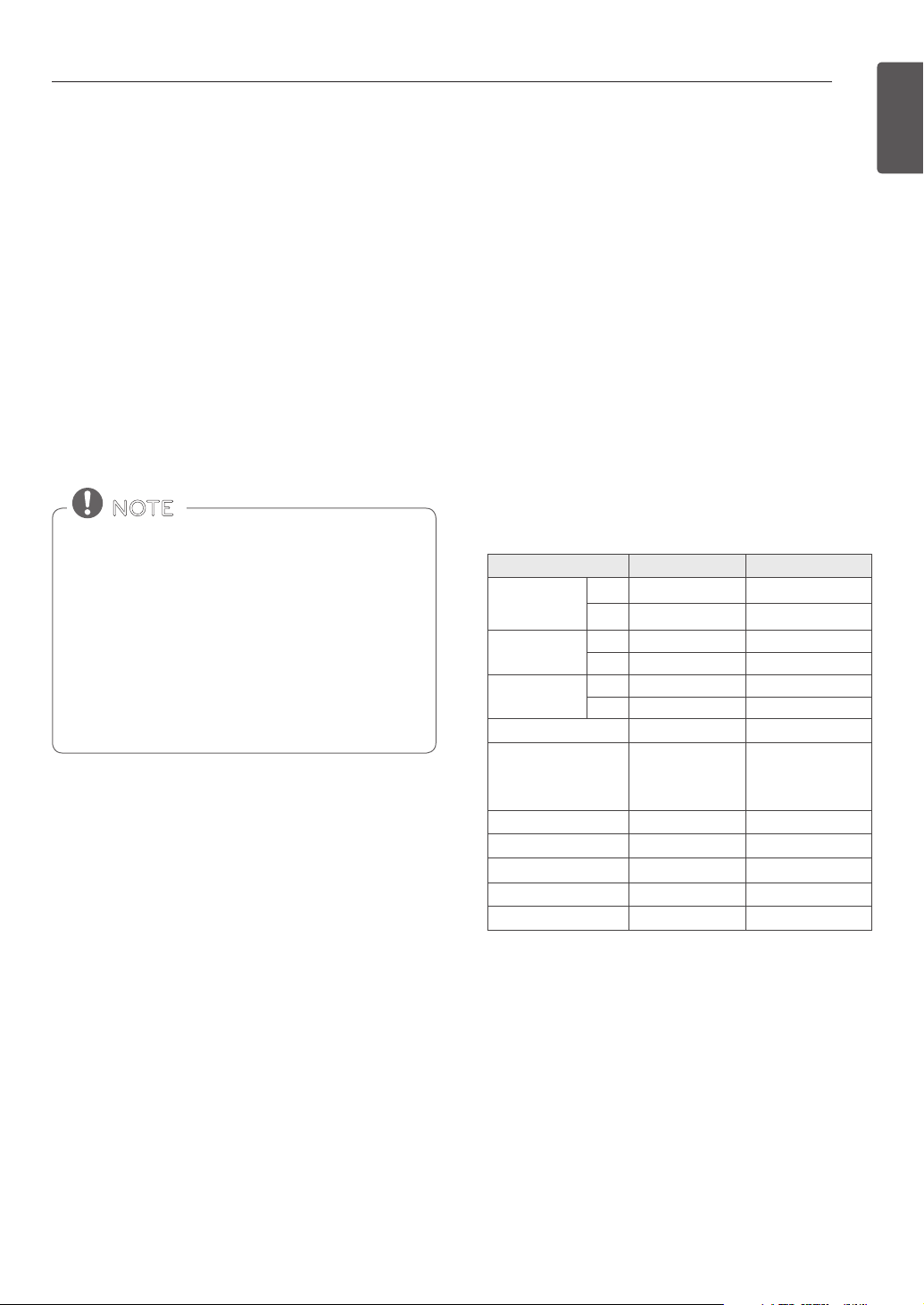
Minimum and Maximum Default Settings
All of the features listed have a minimum and a
maximum time or temperature setting that can be
entered into the control. A beep sounds each time a
control button is pressed.
Two short tones sound if the entry of the temperature
or time is below the minimum or above the maximum
setting for the feature.
Power Outage
If the time ashes on the display, there may have
been a power outage. Reset the clock. Touch any
button or turn any knob once to reset. Enter the
correct time of day by turning the Time/Temp knob.
Press START.
• The time of day cannot be changed during a
Timed Baking or Self Clean cycle.
• To check the time of day when the display is
showing other information, press CLOCK.
• The display reverts to the original setting if START
is not pressed within 25 seconds of the clock being
set.
• If the display time is blinking, there may have been
a power failure. Reset the time.
NOTE
FEATURE MIN. TEMP. /TIME MAX. TEMP. / TIME
CLOCK TIME
12 Hr. 1:00 Hr. / Min. 12:59 Hr. / Min.
24 Hr. 0:00 Hr. / Min. 23:59 Hr. / Min.
TIMER
12 Hr. 0:01 Min. 11:59 Hr. / Min.
24 Hr. 0:01 Min. 11:59 Hr. / Min.
COOKING TIME
12 Hr. 0:01 Min. 11:59 Hr. / Min.
24 Hr. 0:01 Min. 11:59 Hr. / Min.
BAKE/ROAST
170°F / 80°C 550°F / 285°C
CONVECTION BAKE
/CONVECTION ROAST
/CRISP CONVECTION
170°F / 80°C 550°F / 285°C
BROIL Full/Center
Low (350°F) High (550°F)
SELF CLEAN TIME 3Hr. 5Hr.
PROOF 0:01 Min. 11:59 Hr. / Min.
WARM
Low (140°F) High (200°F)
PROBE
80 °F / 27°C 210 °F / 100°C
12
FEATURES
TIMER ON/OFF
The TIMER ON/OFF serves as an extra timer in the kitchen
that beeps when the set time has run out. It does not start
or stop cooking. The TIMER ON/OFF feature can be used
during any of the other oven control functions. The timers
can be operated independently of each other.
Setting the Timer
1. Set both Oven Mode knobs to the OFF position.
2. Press either the TIMER ON/OFF. 0:00 with
HR
inside
it appears and TIMER ashes in the display.
3. Turn the Time/Temp knob to set the desired time.
Turn the knob clockwise to increase the time and
counterclockwise to decrease the time.
4. Press the TIMER ON/OFF to start the timer. The
display shows the set time counting down.
5. When the set time runs out End shows in the
display. The indicator tones sound every 15 seconds
until the TIMER ON/OFF is pressed.
6. To cancel the timer, press the TIMER ON/OFF once.
The display will return to the time of day.
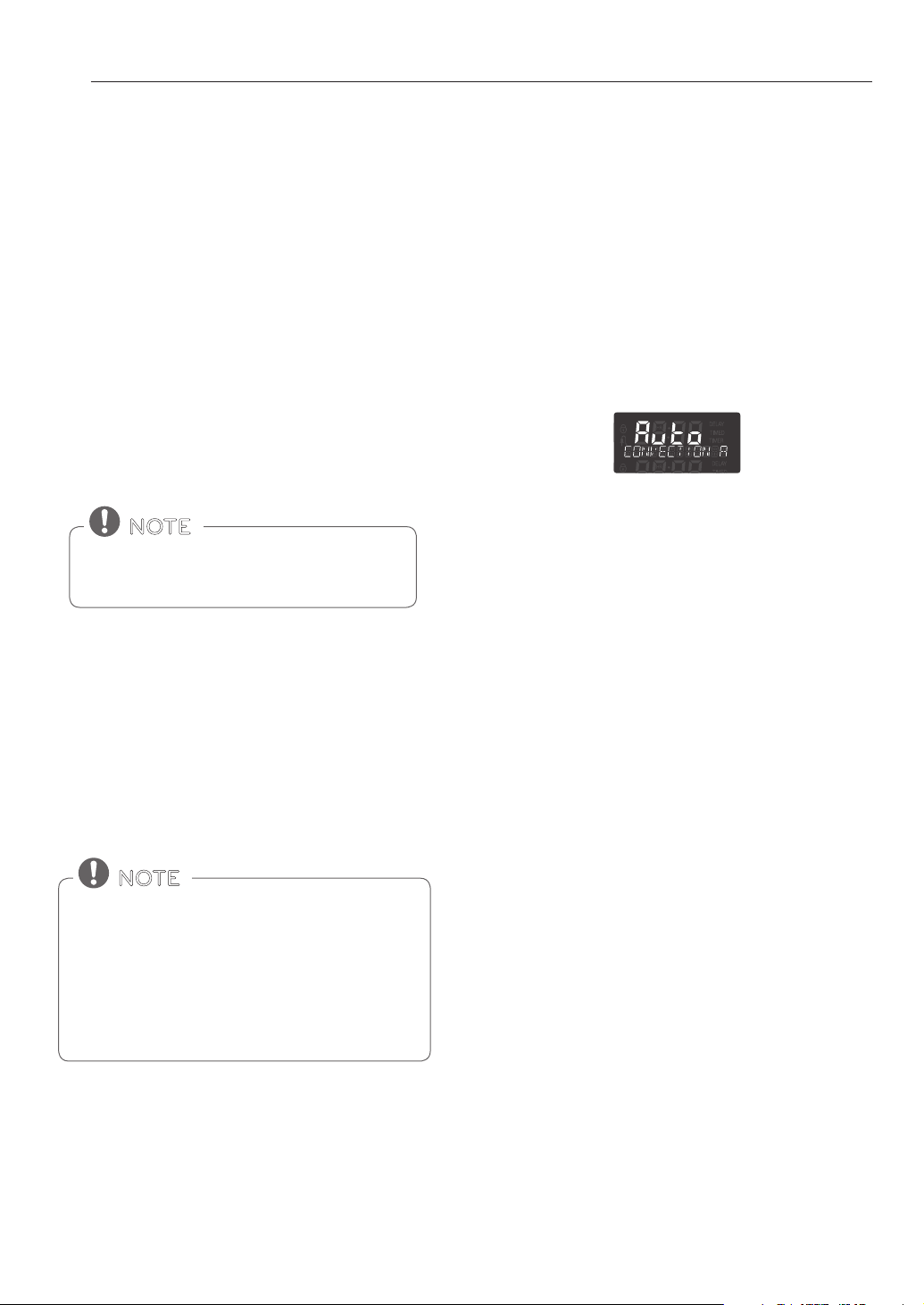
CONVECTION AUTO CONVERSION
When cooking using the convection mode (Conv. Bake,
Conv. Roast, and Crisp Conv.), the oven temperature is
automatically reduced by 25°F(14°C). The display will
show the changed temperature.
This feature is called auto conversion. Your oven comes
with this feature enabled.
To disable the auto conversion feature, do the following:
1. Set both Oven Mode knobs to the OFF position.
2. Press and hold START TIME for 3 seconds. Then
press START TIME once. Auto appears in the display.
3. Turn the Time/Temp knob to enable or disable the
feature.
4. Press START to accept the change.
If the TIMER ON/OFF is not pressed, the timer
returns to the time of day.
NOTE
If the remaining time is not shown in the display,
recall the remaining time by pressing the TIMER
ON/OFF.
- Press the TIMER ON/OFF once to set the time in
hours and minutes.
- Press the TIMER ON/OFF twice to set the time in
minutes and seconds.
NOTE
13
FEATURES
ENGLISH
• This adjustment will not aect the broiling or Self
Clean temperatures. The adjustment will be
retained in memory after a power failure. The oven
temperature can be increased (+) or decreased (-)
as much as 35°F or 19°C.
• Once the temperature is increased or decreased,
the display will show the adjusted temperature
until it readjusts.
• The thermostat adjustment for Bake will also aect
Convection Bake, Convection Roast, Roast or Crisp
Convection.
NOTE
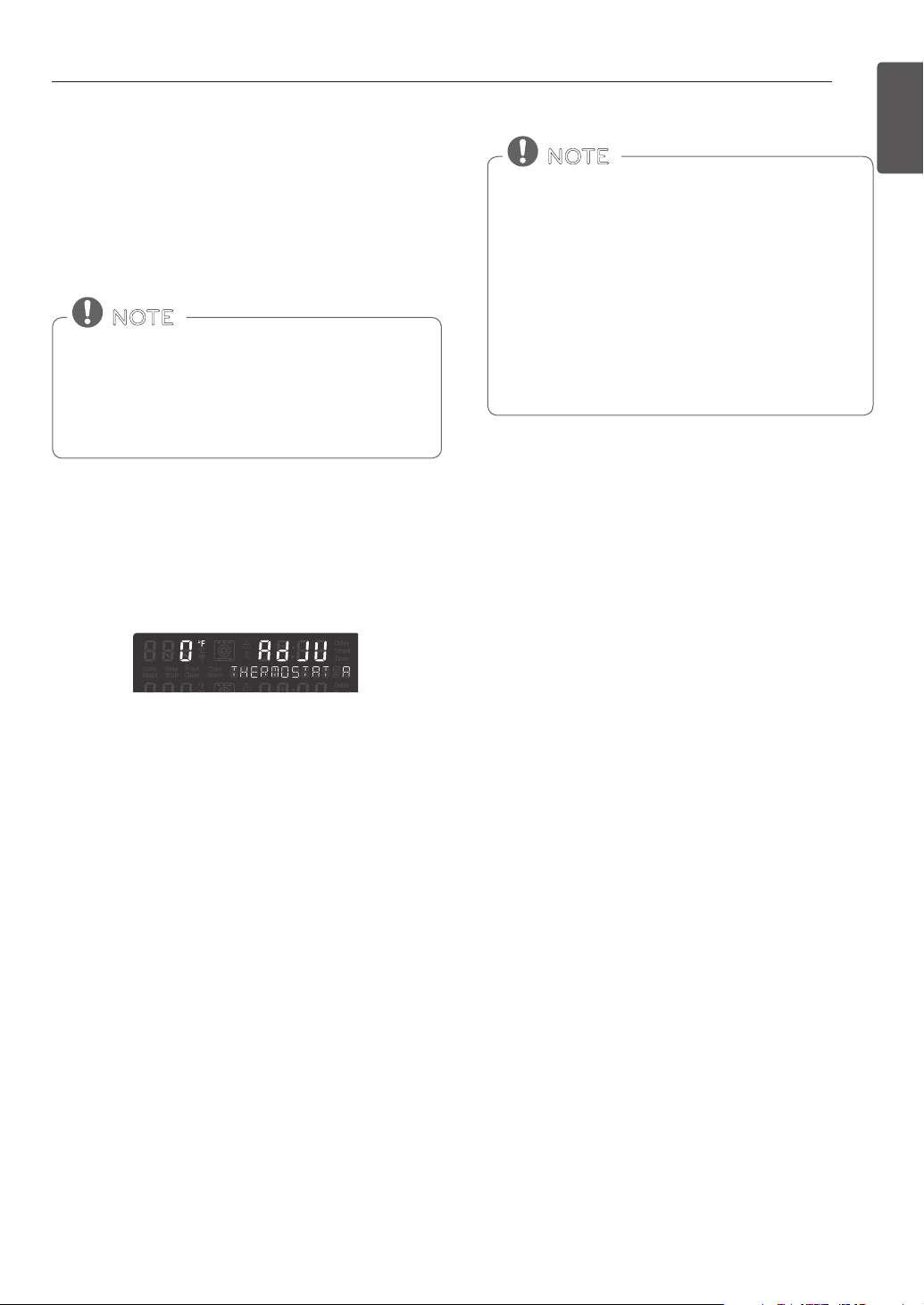
OVEN TEMPERATURE ADJUSTMENT
Don't use thermometers, such as those found in
grocery stores, to check the temperature setting of
the oven. Instead, begin by raising or lowering the
thermostat 15°F (8°C). Try the oven for a week with
the new setting and adjust again if needed, using
the rst adjustment as a gauge.
NOTE
1. Set Oven Mode knobs to the OFF position.
2. Press and hold START TIME for 3 seconds. Then
press START TIME repeatedly until AdJU appears in
the display.
3. Turn the Time/Temp knob to set the amount of
temperature adjustment desired. Press START TIME
to toggle between positive and negative values.
Example : To increase the thermostat by 15 degrees,
turn the knob clockwise to select 15.
To decrease the thermostat by 15 degrees, turn the
knob clockwise to select 15, then press START TIME
to select a negative value (-15).
4. Press START to accept the change.
Adjusting the Oven Temperature
This oven may cook dierently than the one it replaced.
Use the oven for a few weeks to become more familiar
with it before changing the thermostat settings.
If the oven consistently undercooks or overcooks follow
these instructions to adjust the thermostat.
14
FEATURES
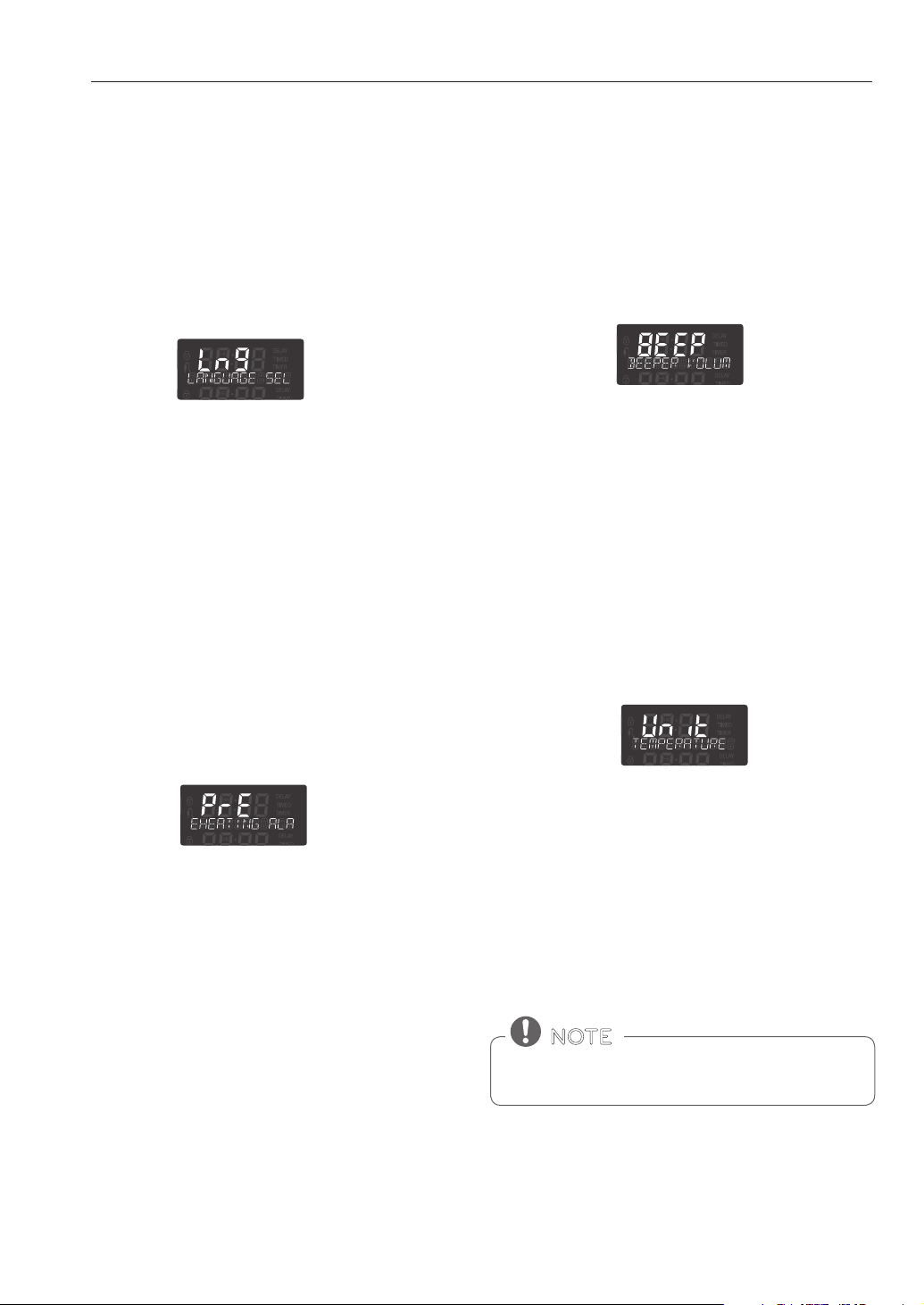
BEEPER VOLUME
The beeper volume can be adjusted to three possible
volume levels, Hi, Low and O.
1. Set Oven Mode knobs to the OFF position.
2. Press and hold START TIME for 3 seconds. Then
press START TIME repeatedly until BEEP appears in
the display.
3. Turn the Time/Temp knob to select the desired
volume.
4. Press START to accept the change.
LANGUAGE
The default language of the display is English. It can be
changed to Spanish or French.
1. Set Oven Mode knobs to the OFF position.
2. Press and hold START TIME for 3 seconds. Then
press START TIME repeatedly until Lng appears in
the display.
3. Turn the Time/Temp knob to set the desired
language.
4. Press START to accept the change.
PREHEATING ALARM LIGHT
When the oven reaches its set-temperature, the
preheating alarm light ashes until the oven door is
opened. You can activate or deactivate the preheating
alarm light.
1. Set oven mode knobs to the OFF position.
2. Press and hold START TIME for 3 seconds. Then
press START TIME repeatedly until PrE appears in
the display.
3. Turn the Time/Temp knob to enable or disable the
feature.
4. Press START to accept the change.
FAHRENHEIT OR CELSIUS
The oven control is set by default to display the Fahren-
heit temperature scale. To display the Celsius scale, follow
these instructions.
1. Set Oven Mode knobs to the OFF position.
2. Press and hold START TIME for 3 seconds. Then
press START TIME repeatedly until Unit appears in
the display.
3. Turn the Time/Temp knob to select °F (Fahrenheit) or
°C (Celsius).
4. Press START to accept the change.
OVEN LIGHT
The interior oven light automatically turns ON when the
door is opened. The oven light can also be manually
turned ON or OFF by pressing OVEN LIGHT.
The oven light cannot be turned on if the Self Clean
function is active.
NOTE
15
FEATURES
ENGLISH
LOCKOUT
The Lockout feature automatically locks the oven door
and prevents most oven controls from being turned on. It
does not disable the clock, timer or the interior oven light.
1. Set Oven Mode knobs to the OFF position.
2. Press and hold PROBE for 3 seconds.
3. The lock melody sounds, OVEN LOCKOUT appears
in the display and DOOR LOCKED will icker in the
display.
4. Once the oven door is locked, the DOOR LOCKED
indicator stops ickering and remains on along with
the lock icon.
5. To deactivate the Lockout feature, press and hold
PROBE for 3 seconds. The unlock melody sounds
and UNLOCKING appears in the display until the
controls are unlocked.
START TIME (Delayed Timed COOK)
The automatic timer of the DELAYED TIMED COOK
function turns the oven ON and OFF at the time you
select. This feature can only be used with the BAKE,
ROAST, CONV. BAKE, CONV. ROAST, CRISP CONV. and SELF
CLEAN modes.
The oven continues to cook for the set amount of time
and then turns o automatically when the cooking time
has elapsed.
y END and the time of day shows in the display.
y The cook end indicator tone sounds every 60
seconds until the Oven Mode knob is turned to the
OFF position.
y When WARM is set, the warming function starts after
the set cook time ends.
Setting the Oven to Delayed Start
The following example is to Bake at 300°F and start baking
at 4:30. Make sure the clock is set for the correct time of
day.
1. Turn the Oven Mode knob to select the BAKE mode.
350°F appears in the display.
2. Turn the Time/Temp knob to set the desired
temperature.
For this example, turn the Time/Temp knob
counterclockwise until 300°F appears in the display.
3. Press START TIME.
4. Set the start time: Turn the Time/Temp knob
clockwise until 4:30 appears in the display.
5. Press START. A short beep sounds and the oven
begins baking.
• Use the automatic timer when cooking cured or
frozen meats and most fruits and vegetables. Foods
that can easily spoil, such as milk, eggs, sh, meat
or poultry, should be chilled in the refrigerator.
Even when chilled, they should not stand in the
oven for more than 1 hour before cooking begins,
and should be removed promptly when cooking is
completed.
• Eating spoiled food can result in sickness from food
poisoning.
CAUTION
• To cancel the DELAYED TIMED COOK function, turn
the Oven Mode knob to the OFF position.
• To change the cooking time, repeat steps 3-4 and
press START.
• If your oven clock is set as a 12-hour clock, you can
delay the cook time for 12 hours. If your oven clock
is set as a 24-hour clock, you can delay the cook
time for 24 hours.
NOTE
16
FEATURES
COOK TIME (TIMED COOK)
The oven turns on immediately and cooks for a selected
length of time. At the end of the cooking time, the oven
turns o automatically.
Setting the Timed Cook Function
The following example is to Bake at 300°F for 30 minutes.
1. Set the clock for the correct time of day.
2. Turn the Oven Mode knob to select BAKE. 350°F
appears in the display.
3. Set the oven temperature.
For this example, turn the Time/Temp knob coun-
terclockwise to select 300°F.
4. Press COOK TIME. TIMED ashes. BAKE, 0:00 and
300°F appears in the display.
5. Set the desired baking time.
For this example, turn the Time/Temp knob clock-
wise until 30:00 appears in the display.
6. Press START. The oven turns on, and the display
shows the cooking time countdown. The oven
continues to cook for the set amount of time, then
turns o automatically, unless the WARM function
is set. Refer to the Setting the WARM Function,
page 23.
• During the preheating mode, the convection fan
operates constantly to circulate the hot air. The
convection fan turns o automatically after the
preset temperature is attained.
• After any cooking cycle has been completed
cooling fans operate to protect the control panel.
This is normal.
NOTE
To set the WARM function to engage at the end
of the timed cook cycle, follow steps 1-4 and then
press WARM. WARM appears in the display.
NOTE
When the cooking time has elapsed:
1. END OF CYCLE and the time of day show in the
display. The oven shuts o automatically.
2. The control continues to sound the cook end
melody every minute until the Oven Mode knob is
moved to any position.
Changing the Cook Time while Operating the
Oven
This example is to change the cook time from
30 minutes to 1 hour and 30 minutes.
1. Press COOK TIME.
2. Set the new baking time.
For this example, turn the Time/Temp knob clock-
wise until 01
HR
:30 appears in the display.
3. Press START to accept the change, or wait
10 seconds without pressing and the display resets
to the original cooking time.
Baking time can be set for any amount of time from
1 minute to 11 hours and 59 minutes.
NOTE
17
USING THE OVEN
ENGLISH
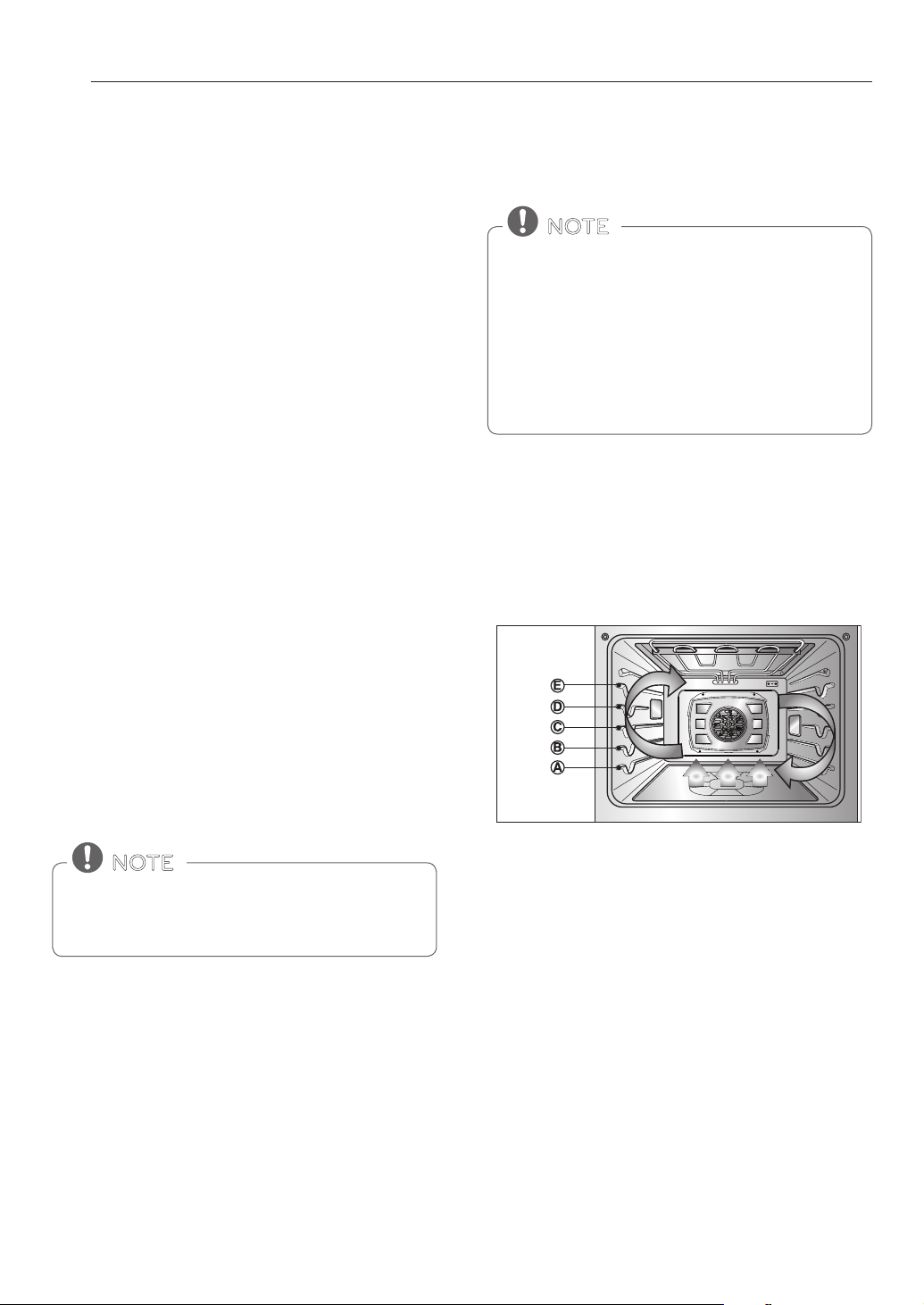
Rack and Pan Placement
A
B
C
D
E
If cooking on two racks:
Place standard oven racks in positions B and D.
Place the cookware as shown below. If baking with more
than one pan, place the pans so that each one has at least
1” to 1 ½” of air space around them.
Oven Vent
y Areas near the vent may become hot during operation
and may cause burns.
y Do not block the vent opening at the bottom of the
oven.
y Avoid placing plastics near the vent as heat may distort
or melt the plastic.
y It is normal for steam to be visible when cooking foods
with high moisture.
USING THE OVEN
BEFORE USING THE OVEN
REMOVING AND REPLACING THE
OVEN RACKS
Removing the Racks
1. While wearing oven mitts, grasp the oven rack.
2. Pull the rack straight out until it stops.
3. Lift up the front of the rack.
4. Pull out the rack.
Replacing the Racks
:
1. While wearing oven mitts, place the end of the rack
on the support.
2. Tilt the front end of the rack up.
3. Push the rack in.
4. Check that the rack is properly in place.
Standard Rack
(Position D)
Standard Rack
(Position B)
Multiple rack baking
• The temperature registered by an oven
thermometer may dier from the actual set oven
temperature.
• It is normal for the convection fan to run while
preheating during a regular bake cycle.
• The convection fan motor may run periodically
during a regular bake cycle.
NOTE
• Replace oven racks before turning the oven on to
prevent burns.
• DO NOT cover the racks with aluminum foil, or any
other material, or place anything on the bottom of
the oven. Doing so will result in poor baking and
may damage the oven bottom.
• Only arrange oven racks when the oven is cool.
CAUTION
Type of Food Rack Position
Angel food cake, frozen pies A
Bundt or pound cakes B
Biscuits, muns, brownies, cookies,
cupcakes, layer cakes, pies
C
Casseroles C
Turkey, roasts, or ham A
Frozen pizza C
Roast chicken B
Standard Rack
(position C)
Single rack baking
18
USING THE OVEN
BAKE
Setting the BAKE mode
1. Turn the Oven Mode knob to select the BAKE mode.
2. Set the oven temperature. For example, turn the
Time/Temp knob clockwise until 375°F appears in
the display.
3. Press START.
The word PREHEATING and 100°F appears in the
display. As the oven preheats the temperature is
displayed in 5-degree increments. Once the oven
reaches the desired temperature, a tone sounds.
PREHEATING
Place the food in the oven after preheating. Preheating is
necessary for better cooking results.
4. When cooking is nished, turn the Oven Mode knob
to the OFF position.
5. Remove the food from the oven.
Changing the Temperature while Baking
Baking Tips
Follow the recipe or convection food directions for
baking temperature, time, and rack position. Baking time
and temperature will vary depending on the ingredients,
size, and shape of the baking pan used.
y For best results, food should be placed on a single
rack with at least 1” to 1 1/2” of air space between the
pans and oven walls.
y Check for doneness at the minimum time.
y Use metal bakeware (with or without a nonstick
nish), heatproof glass-ceramic, ceramic or other
bakeware recommended for oven use.
y Dark metal pans or nonstick coatings will cook faster
with more browning. Insulated bakeware will slightly
lengthen the cooking time for most foods.
Use BAKE to prepare foods such as pastries, breads and
casseroles. The oven can be programmed to bake at
any temperature from 170°F (80°C) to 550°F (285°C). The
default temperature is 350°F (175°C).
CONVECTION BAKE
Benets of Convection Bake
y Some foods cook up to 25 to 30% faster, saving
time and energy.
y Even cooking results during multiple rack baking.
y No special pans or bakeware needed.
Convection baking uses a fan to circulate the oven’s heat
evenly and continuously within the oven. This improved
heat distribution allows for even cooking and excellent
results using multiple racks at the same time. Foods
cooked on a single oven rack will generally cook faster
and more evenly with Convection Bake. Multiple oven
rack cooking may slightly increase cook times for some
foods, but the overall result is time saved. Breads and
pastries brown more evenly.
The oven bottom has a porcelain-enamel nish.
To make cleaning easier, protect the oven bottom
from excessive spillovers by placing a cookie sheet
on the rack below the rack you are cooking on.
This is particularly important when baking a fruit
pie or other foods with a high acid content. Hot fruit
llings or other foods that are highly acidic may
cause pitting and damage to the porcelain-enamel
surface and should be wiped up immediately.
NOTE
It is normal for the convection fan to operate
periodically throughout a normal bake cycle. This is
to ensure even baking results.
NOTE
1. Turn the Time/Temp knob to reset the oven
temperature.
For example, turn the knob clockwise to reset the
temperature from 375°F to 425°F.
2. Press START.
Tips for Convection Baking
y Time saved will vary depending on the amount and
type of food to be cooked. Cookies and biscuits
should be baked on pans with no sides or very low
sides to allow heated air to circulate around the food.
Food baked on pans with a dark nish will cook faster.
y When using Convection Bake with a single rack, place
the oven rack in position C. If cooking on multiple
racks, place the oven racks in positions B and D.
y Cookies, muns, biscuits and other quickbreads give
very good results when using multiple racks.
19
USING THE OVEN
ENGLISH
ROAST
Use the ROAST mode to cook large cuts of meat.
Setting the ROAST Mode
The heating elements and a fan turn o immediately
when the door is opened. They turn on again
approximately 1 seconds after the door is closed.
Turn the Oven Mode knob to the OFF position to
cancel Convection Bake at any time.
NOTE
It is normal for cooling fans to run after any cooking
cycle is complete, to protect the control panel.
NOTE
• The heating elements turn o immediately
when the door is opened. They turn on again in
approximately 1 seconds after the door is closed.
• When preparing meats for roasting, use the broiler
pan and grid. The broiler pan catches grease spills
and the grid helps prevent grease splatters.
• Turn the Oven Mode knob to the OFF position to
cancel Roast at any time.
NOTE
Changing the Temperature while Roasting
1. Turn the Time/Temp knob to reset the oven tem-
perature.
For example, turn the knob clockwise to reset the
temperature from 375°F to 425°F.
2. Press START.
1. Turn the Oven Mode knob to select the ROAST
mode. 350°F (175°C) appears in the display.
2. Set the oven temperature in the display.
For example, turn the Time/Temp knob clockwise to
set the temperature to 375°F.
3. Press START.
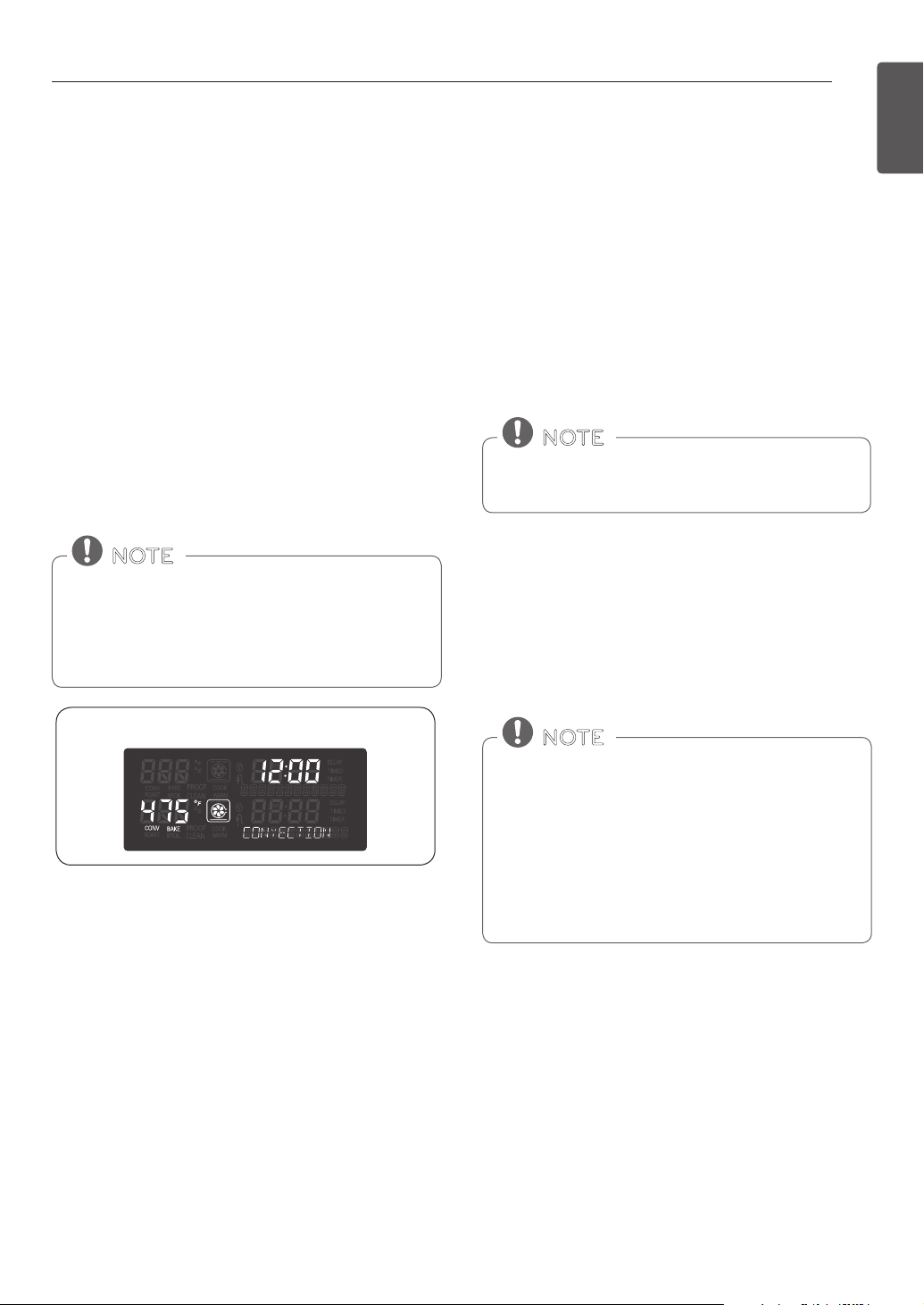
Setting the CONVECTION BAKE Mode
1. Turn the Oven Mode knob to select the CONV. BAKE
mode. 350°F (175°C) appears in the display.
2. Set the oven temperature.
For example, turn the Time/Temp knob clockwise to
set the temperature to 375°F.
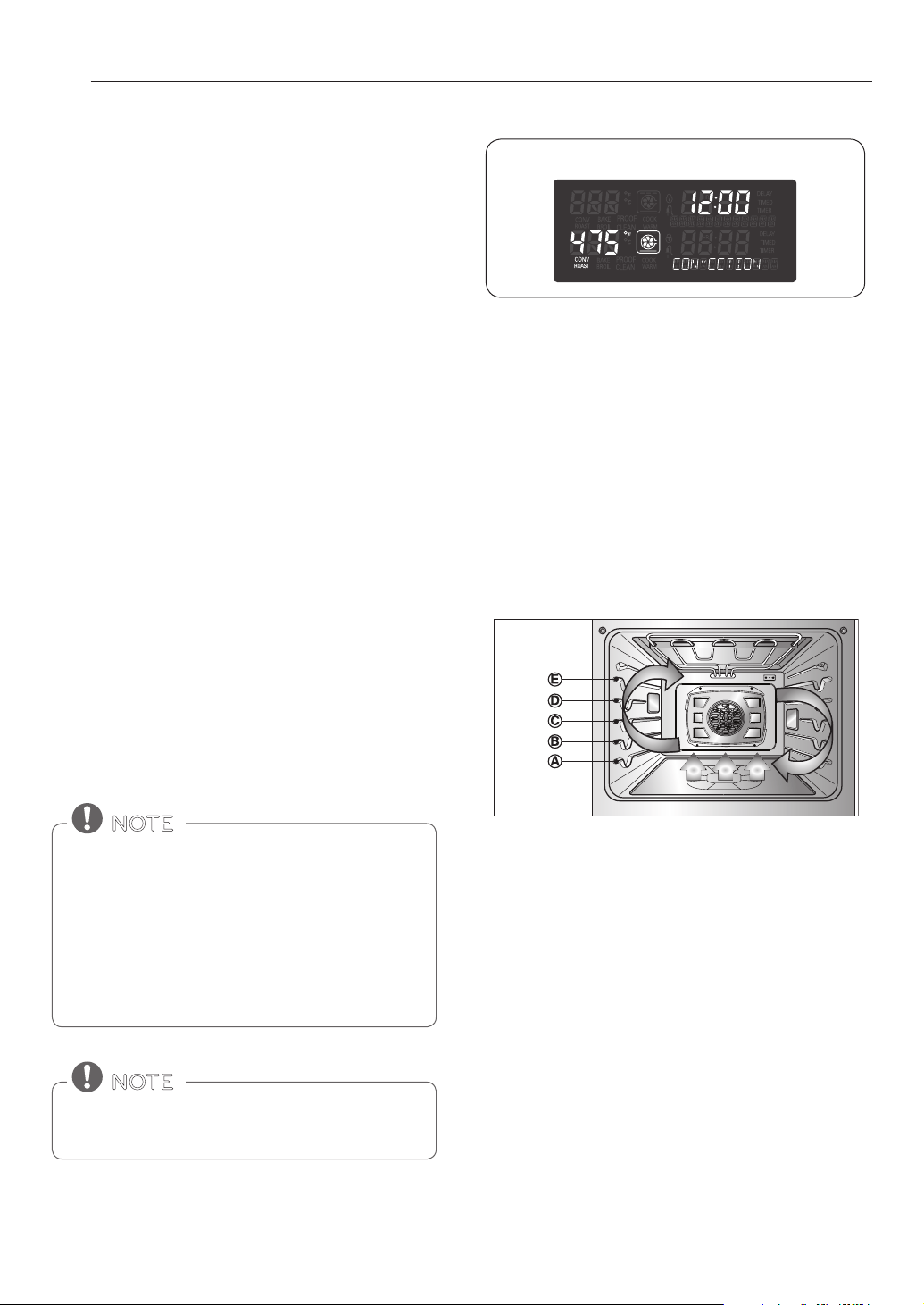
3. Press START. The display shows CONV BAKE and
the converted temperature starting at 100°F (35°C).
As the oven preheats, the display shows increasing
temperatures in 5-degree increments. Once the oven
reaches the desired adjusted temperature, a tone
sounds. The display shows the auto converted oven
temperature (reduced by 25°F or 14°C).
4. Turn the Oven Mode knob to the OFF position to
cancel Convection Bake at any time.
Displays for the CONV. BAKE mode
20
USING THE OVEN
CONVECTION ROAST
The Convection Roast mode is designed to give
optimum cooking performance for roasting meats and
poultry. Preheating is not necessary for meats and
poultry. Heated air circulates around the food from all
sides, sealing in juices and avors. Foods are crispy
brown on the outside while staying moist on the
inside. Convection Roast is especially good for large
tender cuts of meat.
Setting the CONVECTION ROAST Mode
1. Turn the Oven Mode knob to select the CONV.
ROAST mode. 350°F (175°C) appears in the display.
2. Set the oven temperature. For example, turn the
Time/Temp knob clockwise to set the temperature
to 375°F.
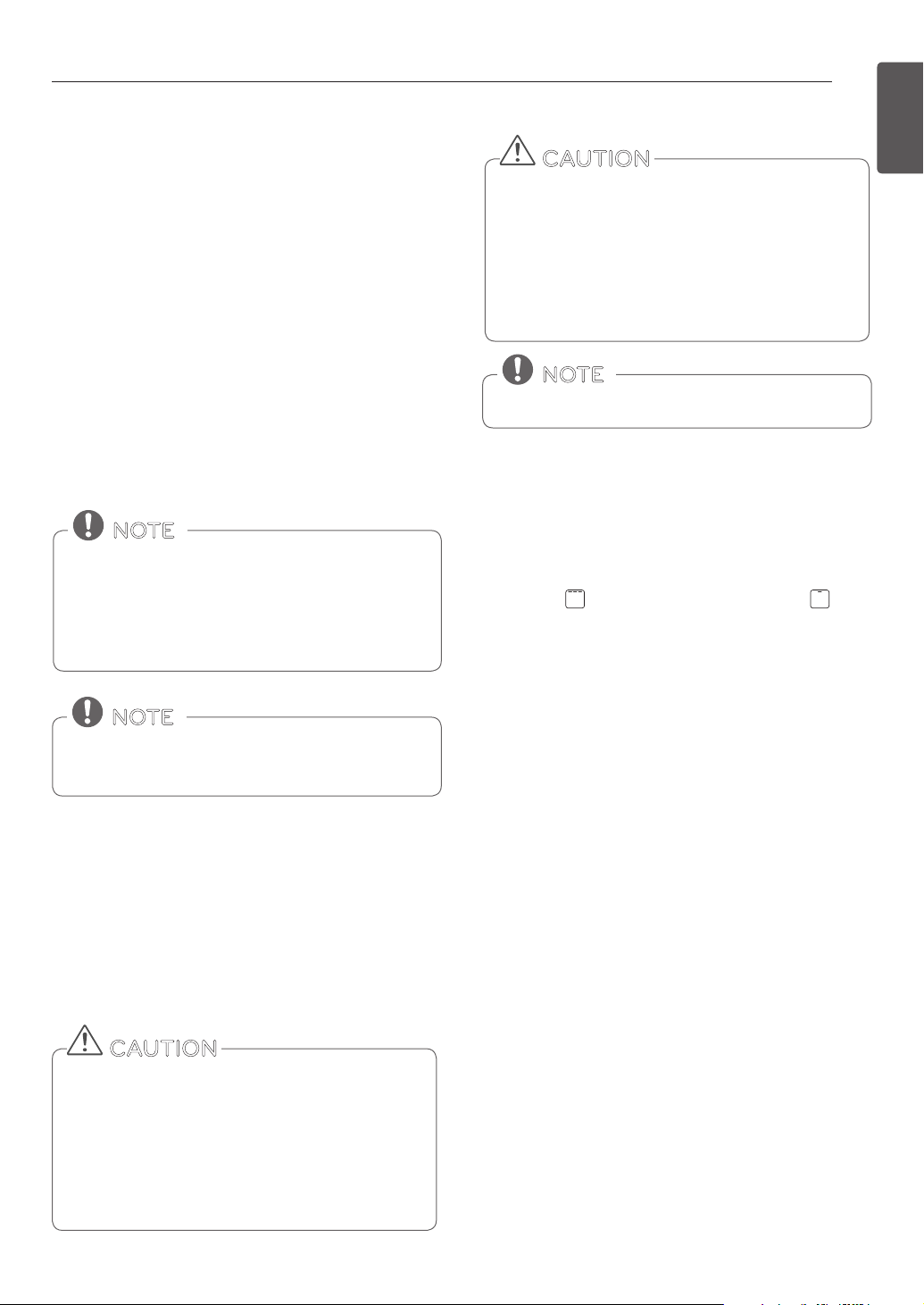
3. Press START. The display shows CONV ROAST and
the temperature, starting at 100°F (35°C). As the
oven preheats, the display shows the increasing
temperature in 5-degree increments. Once the
oven reaches the adjusted set temperature, a tone
sounds. The display shows the auto-converted
oven temperature (reduced by 25°F or 14°C), CONV
ROAST, and the fan icon.
4. Turn the Oven Mode knob to the OFF position to
cancel Convection Roast at any time.
The heating elements and a fan turn o immediately
when the door is opened. They turn on again in
approximately 1 seconds after the door is closed.
When preparing meats for roasting, use the broiler
pan and grid. The broiler pan catches grease spills
and the grid helps prevent grease splatters. Adjust
the Oven Mode knob to the OFF position to cancel
the Convection Roast feature at any time.
NOTE
It is normal for cooling fans to run after any cooking
cycle is complete, to protect the control panel.
NOTE
CRISP CONVECTION
Benets of Crisp Convection:
The crisp convection mode is best for light colored and
delicate baked goods like cakes, tarts, cookies, pu
pastries, scones, muns, biscuits, yeast-free breads, etc.
The hot air circulated by the fan continually distributes
heat more evenly than the natural movement of air
in a standard thermal oven. This movement of hot air
cooks foods more evenly, crisping surfaces while sealing
in moisture and yielding crustier breads. The crisp
convection heating element heats up faster, reducing
cooking time by as much as 30 percent.
Tips for Crisp Convection
y Time saved will vary depending on the amount and
type of food to be cooked. Choose cookie sheets
without sides and roasting pans with very low sides
to allow heated air to circulate around the food. Food
baked on pans with a dark nish will cook faster.
y When using Crisp Convection with a single rack, place
the oven rack in position C. If cooking on multiple
racks, place the oven racks in positions B and D.
y It is important to uncover foods so that surfaces of
food remain exposed to the circulating air, allowing
browning and crisping.
y Keep heat loss to a minimum by only opening the
oven door when necessary.
Displays for the CONV. ROAST mode
21
USING THE OVEN
ENGLISH
BROIL
Broiling uses an intense, radiant heat to cook food. Both the
inner and outer broil elements heat during full broiling. Only
the inner broil element heats during center broiling. The
element(s) cycle on and o at intervals to maintain the oven
temperature. The meat probe cannot be used with this mode.
Keep the oven door closed while broiling. Let the oven
preheat for approximately ve minutes before cooking food.
• DO NOT use a broiler pan without a grid. Oil can
cause a grease re.
• DO NOT cover the grid and broiler pan with
aluminum foil. Doing so will cause a re.
• Always use a broiler pan and grid for excess fat and
grease drainage. This will help to reduce splatter,
smoke, and are-ups.
CAUTION
• Should an oven re occur, leave the oven door
closed and turn the oven o. If the re continues,
throw baking soda on the re or use a re
extinguisher.
• DO NOT put water or our on the re.
- Flour may be explosive and water can cause a
grease re to spread and cause personal injury.
CAUTION
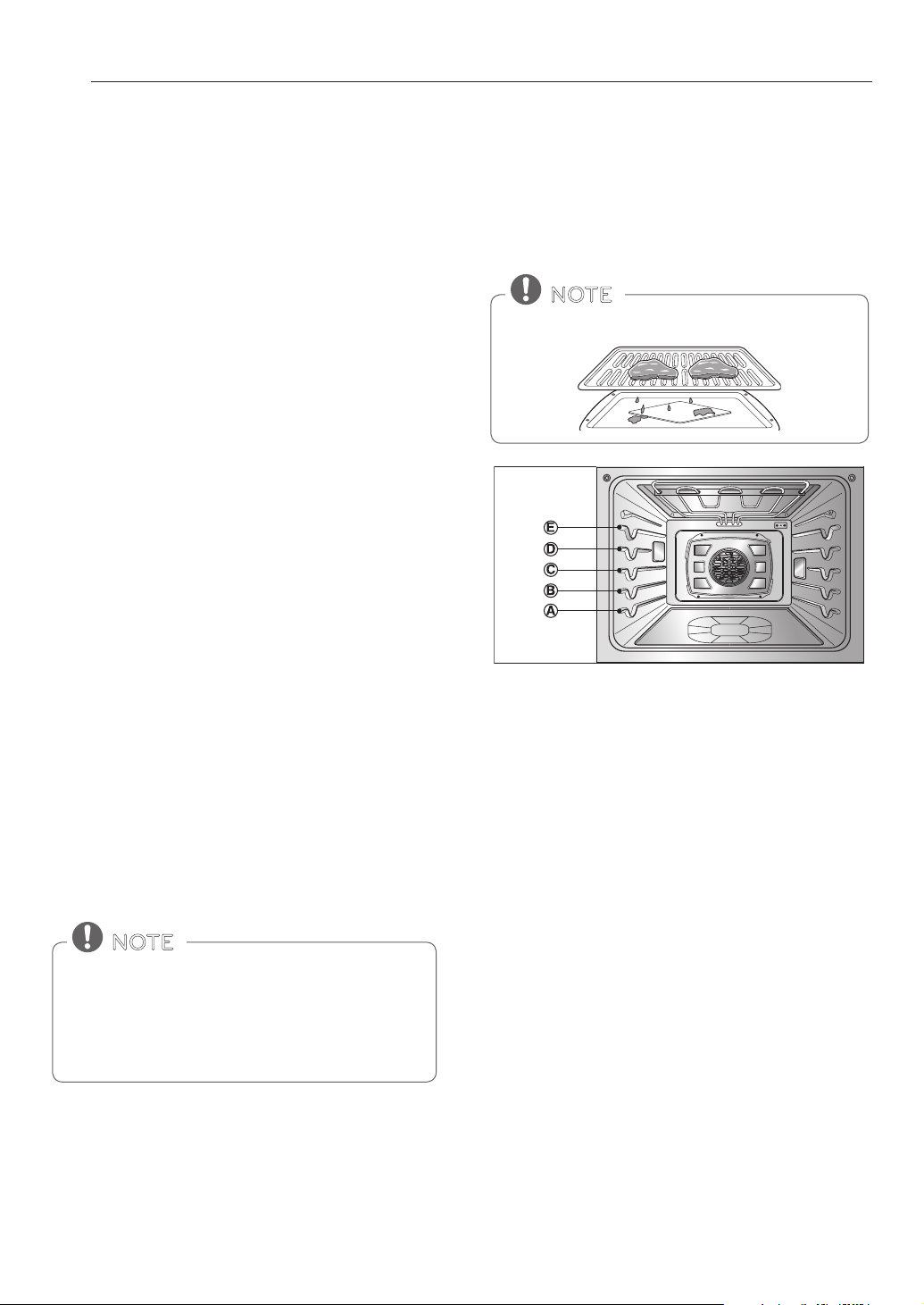
1. Place food on the broiler pan grid.
2. Turn the Oven Mode knob to select the BROIL
mode. HIGH -- PRESS START OR ENTER LEVEL / LOW -
HIGH appears in the display.
3. Turn the Time/Temp knob to select between
Full Broil (High,Med,Low) and Center Broil
(High,Med,Low). Full Broil uses all of the broil heaters
and Center Broil uses only the center broil heater to
broil.
4. Press START.
5. If using Broil, it is best to let the oven preheat for
approximately ve minutes before cooking food.
Broil on one side until food is browned ; turn and
broil on the other side.
6. When broiling is nished, turn the Oven Mode knob
to the OFF position to cancel Broil at any time.
Setting the Crisp Convection Mode
1. Turn the Oven Mode knob to select the CRISP
CONV. mode. 350°F (175°C) appears in the display.
2. Set the oven temperature. For example, turn the
Time/Temp knob clockwise to set the temperature
to 375°F.
3. Press START. The display shows CONV and the
temperature, starting at 100°F (35°C). As the
oven preheats, the display shows the increasing
temperature in 5-degree increments. Once the
oven reaches the adjusted set temperature, a tone
sounds. The display shows the auto-converted oven
temperature (reduced by 25°F or 14°C).
4. Turn the Oven Mode knob to the OFF position to
cancel Crisp Convection at any time.
The heating elements and a fan turn o immediately
when the door is opened. They turn on again in
approximately 1 seconds after the door is closed.
Turn the Oven Mode knob to the OFF position to
cancel Crisp Convection at any time.
NOTE
It is normal for cooling fans to run after any cooking
cycle is complete, to protect the control panel.
NOTE
Your oven is designed for CLOSED DOOR broiling.
NOTE
Setting the BROIL Mode
22
USING THE OVEN
Smoking
Due to the intense heat associated with broiling, it is
normal to experience smoke during the cooking process.
This smoke is a natural by-product of searing and should
not cause you to worry. If you are experiencing more
smoke than you are comfortable with, use the following
tips to reduce the amount of smoke in your oven.
1. Always use a broiler pan. Do not use saute pans or
regular baking sheets for safety reasons.
2. NEVER use a broiler pan that is not thoroughly
cleaned and at room temperature at the beginning
of cooking.
3. ALWAYS run your cooktop ventilation system or vent
hood during broiling.
4. Keep the interior of your oven as clean as possible.
Leftover debris from prior meals can burn or catch
re.
5. Avoid fatty marinades and sugary glazes. Both of
these will increase the amount of smoke you
experience. If you would like to use a glaze, apply it
at the very end of cooking.
6. If you are experiencing signicant smoke with any
food item, consider:
y Lowering the broiler to the LO setting.
y Lowering the rack position to cook the food further
away from the broiler.
y Using the HI broil setting to achieve the level of
searing you desire, and then either switching to the
LO broil setting, or switching to the BAKE function.
7. As a rule, fattier cuts of meat and sh will produce
more smoke than leaner items.
8. Adhere to the recommended broil settings and
cooking guidelines in the chart on the following
page whenever possible.
RECOMMENDED BROILING GUIDE
The size, weight, thickness, starting temperature, and
your preference of doneness will aect broiling times.
The following guide is based on meats at refrigerator
temperature.
Always use a broiler pan and grid when broiling.
NOTE
The heating element(s) turn o immediately
when the door is opened. They turn on again
approximately 1 seconds after the door is closed.
Turn the Oven Mode knob to the OFF position to
cancel Broil at any time.
NOTE
23
USING THE OVEN
ENGLISH
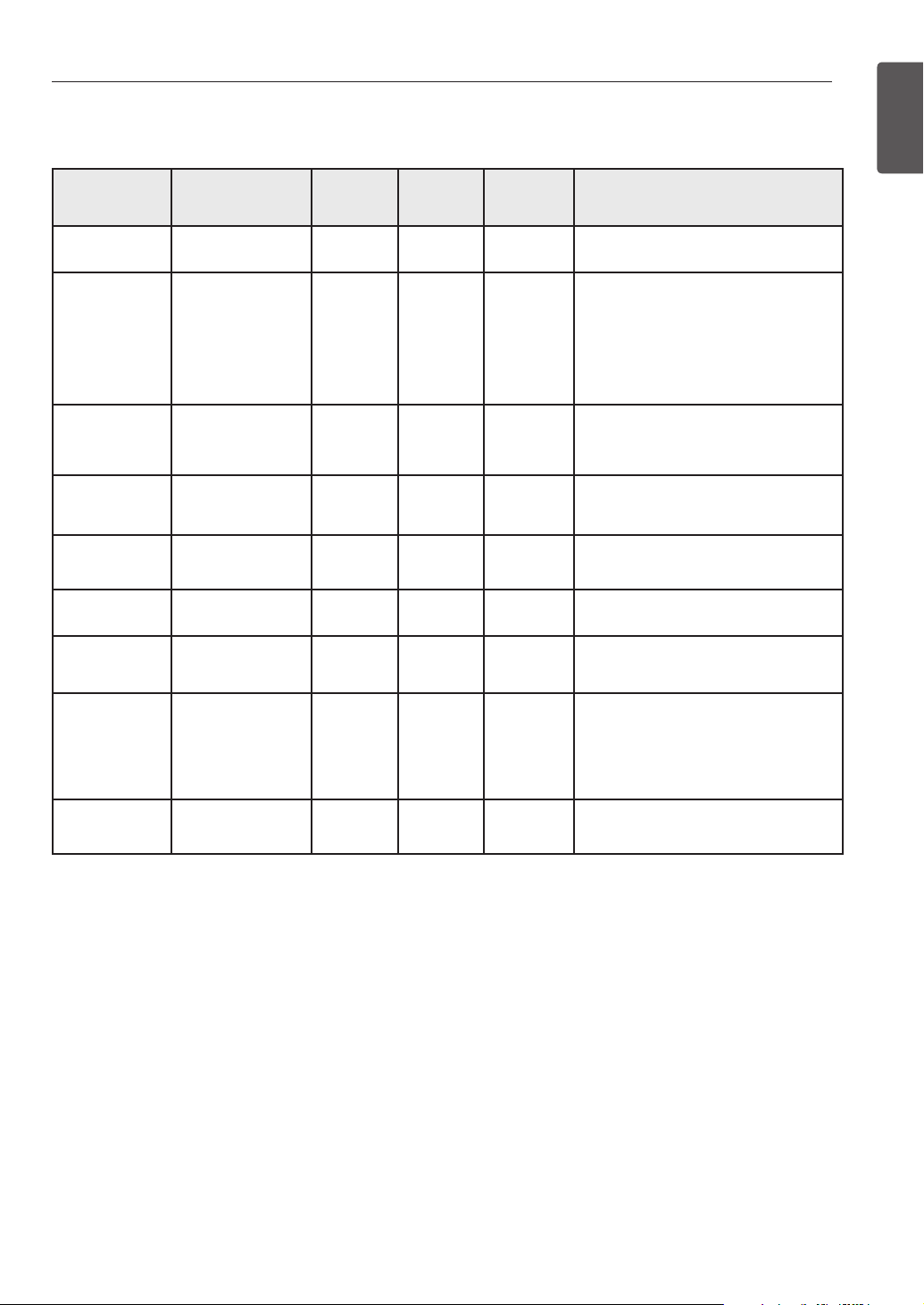
Broiling Chart
Food Quantity and/ or
Thickness
Rack
Position
First Side
Time
(min.)
Second
Side
Time (min.)
Comments
Ground Beef
1 lb. (4 patties)
1/2 to 3/4” thick
E 4-6 3-4 Space evenly. Up to 8 patties may be
broiled at once.
Beef Steaks
Rare
Medium
Well Done
Rare
Medium
Well Done
1” thick
1 to 1-1/2 lbs.
1-1/2” thick
2 to 2-1/2 lbs.
D
D
D
D
D
D
6
7
8
10
12
14
2–3
2–3
3–4
4–6
4–8
8–10
Steaks less than 1” thick cook through
before browning. Pan frying is
recommended. Remove fat.
Chicken
1 whole cut up
2 to 2-1/2 lbs.,
split lengthwise
2 Breasts
C
C
20
20
6–8
6–10
Broil skin-side-down rst.
Lobster Tails
2–4
10 to 12 oz. each
C 12-14 Do not turn
over.
Cut through back of shell. Spread open.
Brush with melted butter before broiling
and after half of broiling time.
Fish Fillets
1/4 to 1/2” thick D or E 5-6 3–4 Handle and turn very carefully. Brush with
lemon butter before and during cooking,
if desired.
Ham Slices
(precooked)
1/2” thick D 5 3–5 Increase time 5 to 10 minutes per side for
1-1/2” thick or home-cured ham.
Pork Chops
Well Done
2 (1/2” thick)
2 (1” thick) about
1 lb.
D or E
D or E
7
9-10
6–8
7–9
Remove fat.
Lamb Chops
Medium
Well Done
Medium
Well Done
2 (1” thick) about 10
to 12 oz.
2 (1-1/2” thick) about
1 lb.
D
D
D
D
6
8
11
13
4–6
7–9
9
9–11
Remove fat.
Salmon
Steaks
2 (1” thick)
4 (1” thick) about
1 lb.
D or E
D or E
8
9
3–4
4–6
Grease pan. Brush steaks with melted
butter.
Broiling Tips
Beef
y Steaks and chops should always be allowed to rest for
ve minutes before being cut into and eaten. This allows
the heat to distribute evenly through the food and
creates a more tender and juicy result.
y Pieces of meat that are thicker than two inches should
be removed from the refrigerator 30 minutes prior to
cooking. This will help them cook more quickly and
evenly, and will produce less smoke when broiling.
Cooking times will likely be shorter than the times
indicated in the Broiling Chart.
y For bone-in steaks or chops that have been Frenched (all
meat removed from around the bone), wrap the exposed
sections of bone in foil to reduce burning.
Seafood
y When broiling skin-on sh, always use the Medium broil
setting and always broil the skin side last.
y Seafood is best consumed immediately after cooking.
Allowing seafood to rest after cooking can cause it to dry
out.
y It is a good idea to rub a thin coating of oil on the surface
of the broiling pan before cooking to reduce sticking,
especially with sh and seafood. You can also use a light
coating of non-stick pan spray.
Vegetables
y Toss vegetables lightly in oil before cooking to improve
browning.
24
USING THE OVEN
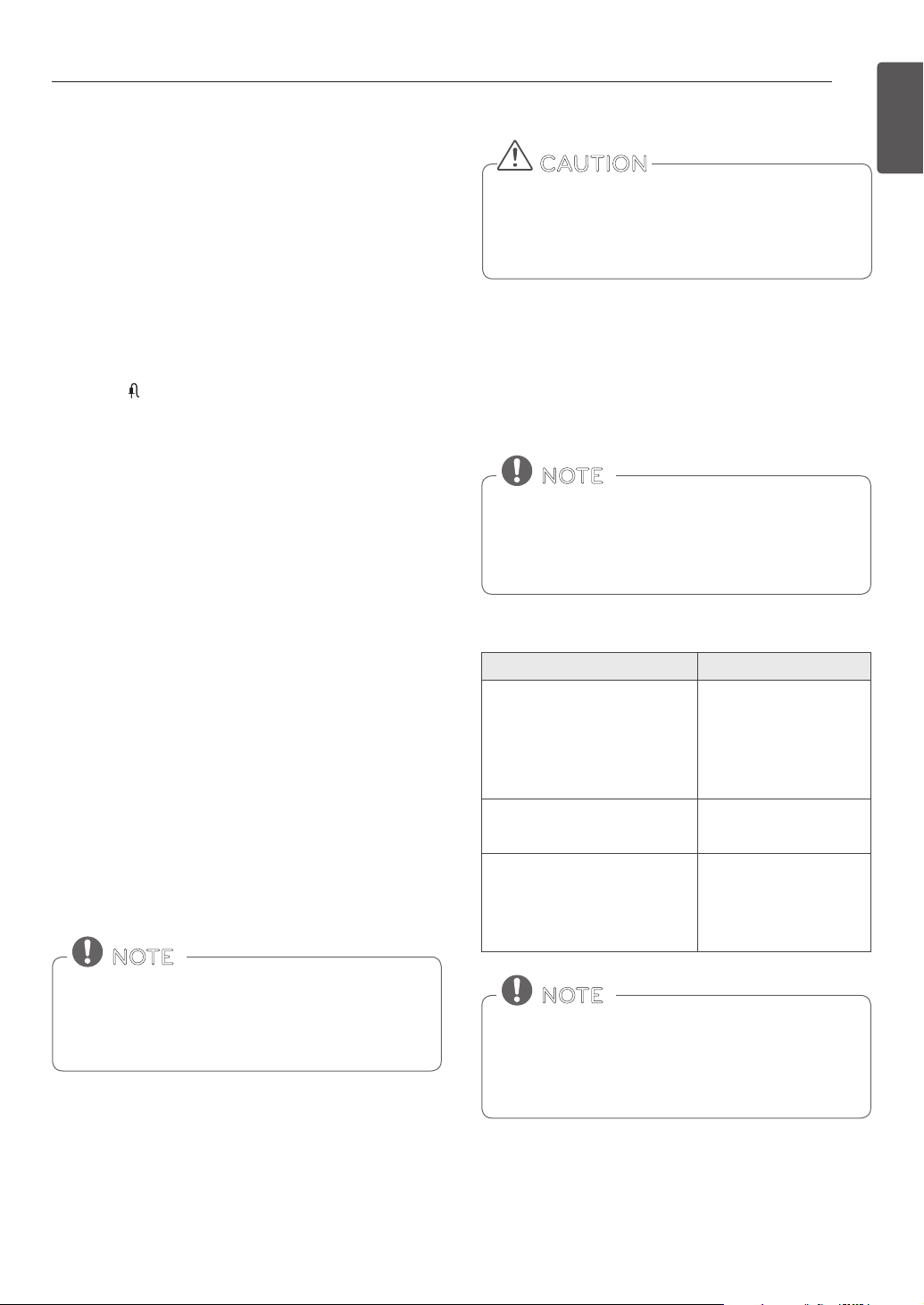
PROOF
The Proof feature maintains a warm environment for
rising yeast-leavened products before baking.
Setting the PROOF Mode
This feature maintains a warm oven for rising yeast-
leavened products before baking.
1. Turn the Oven Mode knob to select the PROOF
mode.
2. Press START. The proof feature automatically
provides the optimum temperature for the proof
process, and therefore does not have a temperature
adjustment.
3. When proong is nished, turn the Oven Mode knob
to the OFF position.
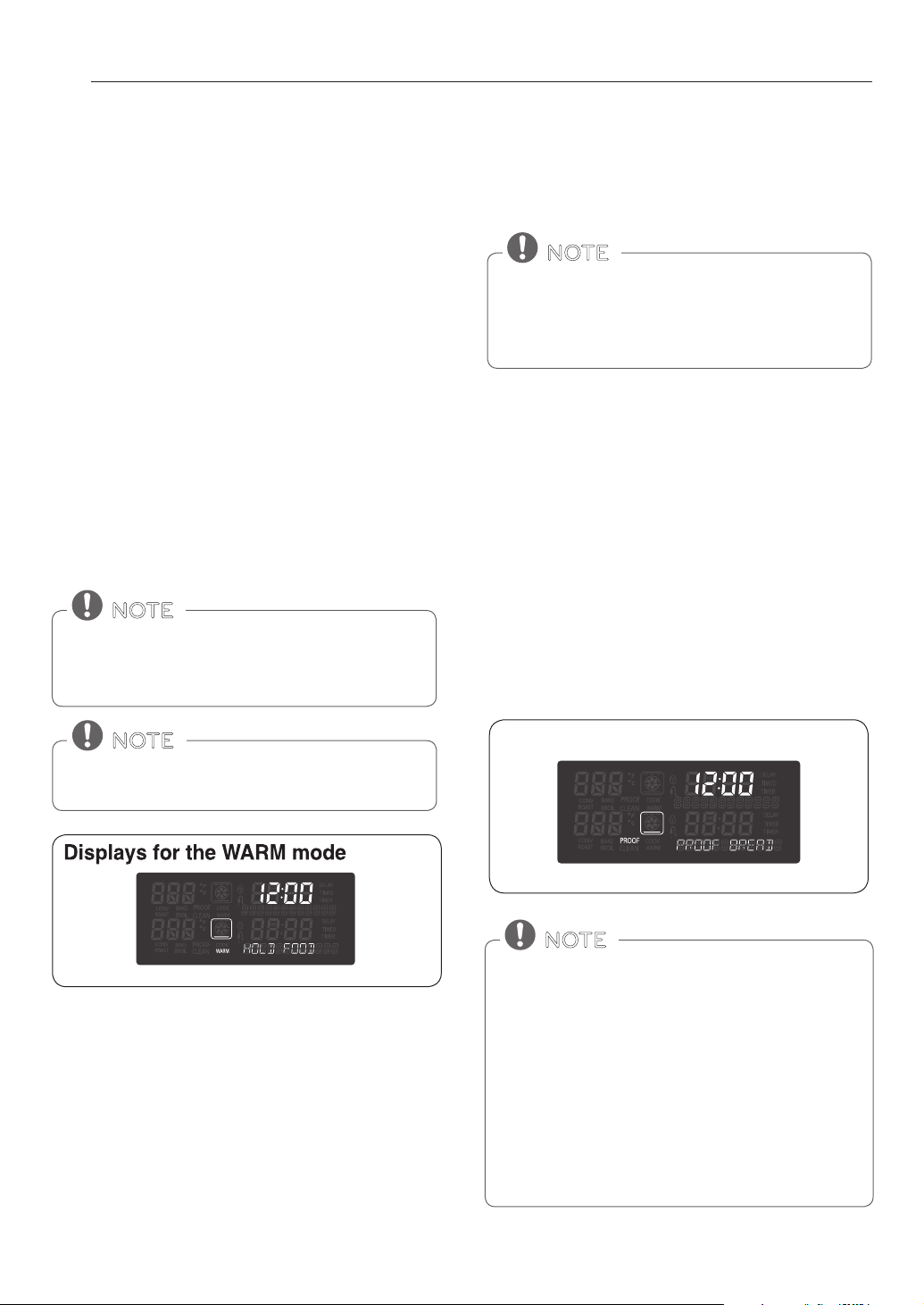
WARM
The WARM mode maintains an oven temperature of
200°F (93°C) or less. Use the Warm mode to keep cooked
food at serving temperature for up to three hours after
the end of the cooking cycle. Do not use the Warm mode
to try to cook food or reheat cold food.
The Warm mode can be used alone or after Timed Cook
or Delayed Timed Cook cycles.
Setting the WARM Mode
1. Turn the Oven Mode knob to select the WARM
mode.
2. Turn the Time/Temp knob to select from High,
Medium, or Low temperature levels.
3. Press START.
4. Turn the Oven Mode knob to the OFF position to
cancel Warm at any time.
The warm feaure has three temperature levels :
High=200 °F, Med=170 °F, Low=140 °F
(High=93.3 °C, Med=76.7 °C, Low=60 °C)
NOTE
For best results, cover the dough with a cloth or with
plastic wrap (the plastic may need to be anchored
underneath the container so the oven fan does not
blow it o).
NOTE
The WARM function is intended to keep food warm.
Do not use it to cool food down.
NOTE
• To avoid lowering the oven temperature and
lengthening proong time, do not open the oven
door unnecessarily. Check bread products early to
avoid over proong.
• Do not use the proong mode for warming
food or keeping food hot. The proong oven
temperature is not hot enough to keep foods at
safe temperatures. Use the WARM feature to keep
food warm. Proong doesn't operate when the
oven is above 125°F(52°C). OVEN IS HOT shows in
the display.
NOTE
Display for the PROOF mode
25
USING THE OVEN
ENGLISH
MEAT PROBE
The meat probe accurately measures the internal
temperature of meat, poultry and casseroles. It should
not be used during the broiling, self cleaning, warming
or proong mode. Always unplug and remove the meat
probe from the oven before removing food. Before using,
insert the probe into the center of the thickest part of
meat or into the inner thigh or breast of poultry, away
from fat or bone. Place food in the oven and connect the
meat probe to the jack. Keep the probe as far away from
heat sources as possible. Close the oven door. The meat
probe icon ashes and a warning beep sounds until the
probe is removed if the oven starts cooking without the
probe temperature being set.
Using the Meat Probe Feature
1. Turn the Oven Mode knob to select the ROAST
mode. 350°F (175°C) appears in the display.
2. Set the oven temperature. For example, turn the
Time/Temp knob clockwise to set the temperature
to 375°F.
3. Press START or PROBE. PRESS START OR ENTER PROBE
TEMP / 80F – 210F appears in the display.
4. Set the probe temperature. For example, turn
the Time/Temp knob clockwise to set the probe
temperature to 160°F.
5. Press START.
The default probe temperature is 150˚F (65˚C), but can
be changed to any temperature between 80˚F (27˚C)
and 210˚F (100˚C). The display shows the changing
probe temperature. When the set probe temperature is
reached, the oven shuts o automatically.
Changing the Probe Temperature while Cooking
1. Press PROBE.
2. Set the probe temperature by turning the Time/Temp
knob.
3. Press START.
Calculating a total cooking time by weight is no
longer necessary using this feature. The following
chart is recommended for setting the probe
temperature.
NOTE
Turn the Oven Mode knob to cancel Meat Probe at
any time. To avoid breaking the probe, make sure
food is completely defrosted before inserting the
probe.
NOTE
- The meat probe can't be used with the Broil, Self
Clean, SpeedClean™, Warm, or Proof modes.
- While the meat probe mode is running, COOK TIME
does not respond.
NOTE
Always use an oven mitt to remove the temperature
probe. Do NOT touch the broil element.
- Failure to follow this warning can result in severe
personal injury.
CAUTION
Recommended Probe Temperatures
Doneness Probe Temp.
Beef, Lamb and Veal
Rare
Medium Rare
Medium
Well Done
130°F (54°C)
140°F (60°C)
150°F (66°C)
160°F (71°C)
Pork
Well Done 170°F (77°C)
PouItry
Breast, Well Done
Thigh, Well Done
Stung, Well Done
170°F (77°C)
180°F (82°C)
165°F (74°C)

26
SMART FUNCTIONS
Search for the SIGNATURE KITCHEN SUITE application
from the Google Play Store on a smart phone. Follow
instructions to download and install the application.
SMART FUNCTIONS
Application Installation
PRODUCT REGISTRATION
1. Run the SIGNATURE KITCHEN SUITE application on a
smart phone.
2. Create an account and sign in.
3. Select Register.
4. Select Oven.
5. Follow the instructions on the smart phone to register
the appliance and connect it to a Wi-Fi network.
y To verify the Wi-Fi connection, check the Wi-Fi icon
on the control panel is lit.
USING THE WI-FI FUNCTION
Communicate with the appliance from a smart phone
using the convenient smart features.
Using the Application
1. Select the appliance in the application and connect it
to a Wi-Fi network.
2. Select the menu on the upper right side to access
settings and features.
SpeedClean™
Allows you to set SpeedClean™ alerts, read the
instruction guide, and simulate and compare energy
consumption when using SpeedClean™ versus self-
clean cycles.
Smart Diagnosis™
This function provides useful information for diagnosing
and solving issues with the appliance based on the
pattern of use.
Settings
Allows the user to change oven settings, including
the hour mode, preheat alarm light, beeper volume,
temperature units, convection auto conversion,
thermostat adjustment and language.
Remote Start
You can control remotely such as oven pre-heating and
oven stop. After opening and closing the door, place the
mode dial back to Remote Start within 30 sec.
Monitoring
This function helps you recognize the current status,
remaining time, cook settings and end time on the
screen.
Push Alert
Once the push alert is turned on, the current status of
the appliance is informed. The alert is activated when
SIGNATURE KITCHEN SUITE application is on or not.
Timer
You can set the timer from the app.
IMPORTANT : Features could be added or deleted
when the SIGNATURE KITCHEN SUITE application
is updated. Data saved on the SIGNATURE KITCHEN
SUITE application could be deleted when the application
is updated or your smart phone is changed.
• SIGNATURE KITCHEN SUITE is not responsible
for any network connection problems or any
faults, malfunctions, or errors caused by network
connection.
• The machine supports 2.4 GHz Wi-Fi networks only.
• If the appliance is having trouble connecting to the
Wi-Fi network, it may be too far from the router.
Purchase a Wi-Fi repeater (range extender) to
improve the Wi-Fi signal strength.
• The Wi-Fi connection may not connect or may
be interrupted because of the home network
environment.
• The network connection may not work properly
depending on the internet service provider.
• The surrounding wireless environment can make
the wireless network service run slowly.
• This information is current at the time of publication.
The application is subject to change for appliance
improvement purposes without notice to users.
• Before using the Wi-Fi, you should check the
substance in the cavity.
• After opening and closing the door, place the mode
dial back to Remote Start within 30 sec.
NOTE
27
SMART FUNCTIONS
ENGLISH
Open Source Software Notice
Information
To obtain the source code under GPL, LGPL, MPL and
To obtain the source code under GPL, LGPL, MPL,
and other open source licenses, that is contained
in this product, please visit http://opensource.
thesignaturekitchen.com. In addition to the source code,
all referred license terms, warranty disclaimers and
copyright notices are available for download.
SIGNATURE KITCHEN SUITE will also provide open
source code to you on CD-ROM for a charge covering
the cost of performing such distribution (such as the cost
of media, shipping, and handling) upon email request to
opensource@thesignaturekitchen.com. This offer is valid
for three (3) years from the date on which you purchased
the product.
FCC NOTICE (FOR TRANSMITTER
MODULE CONTAINED IN THIS
PRODUCT)
This equipment has been tested and found to comply
with the limits for a Class B digital device, pursuant to
Part 15 of the FCC Rules. These limits are designed
to provide reasonable protection against harmful
interference in a residential installation. This equipment
generates, uses, and can radiate radio frequency energy
and, if not installed and used in accordance with the
instructions, may cause harmful interference to radio
communications. However, there is no guarantee that
interference will not occur in a particular installation. If
this equipment does cause harmful interference to radio
or television reception, which can be determined by
turning the equipment off and on, the user is encouraged
to try to correct the interference by one or more of the
following measures:
- Reorient or relocate the receiving antenna.
- Increase the separation between the equipment and
the receiver.
- Connect the equipment to an outlet on a circuit
different from that to which the receiver is connected.
- Consult the dealer or an experienced radio/TV
technician for help.
This device complies with part 15 of the FCC Rules.
Operation is subject to the following two conditions:
1) this device may not cause harmful interference and
2) this device must accept any interference received,
including interference that may cause undesired
operation of the device.
Any changes or modications in construction of this
device which are not expressly approved by the party
responsible for compliance could void the user’s authority
to operate the equipment.
FCC RF RADIATION EXPOSURE
STATEMENT
This equipment complies with FCC radiation exposure
limits set forth for an uncontrolled environment. This
transmitter must not be co-located or operating in
conjunction with any other antenna or transmitter.
This equipment should be installed and operated with
minimum distance 20 cm (7.8 inches) between the
antenna and your body. Users must follow the specic
operating instructions for satisfying RF exposure
compliance.
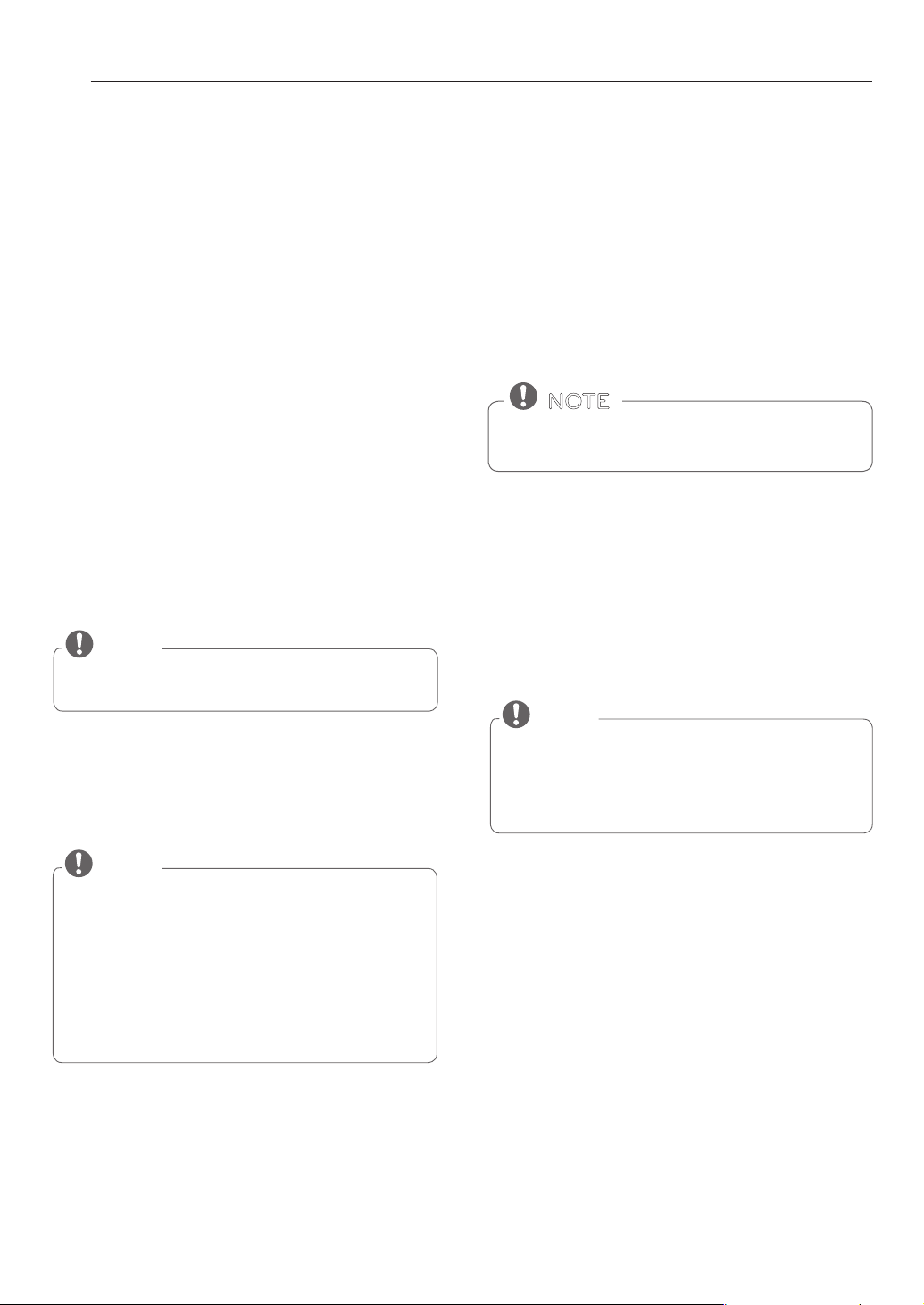
Wireless module (LCW-003) Specicatons
Frequency Range 2412 ~ 2462 MHz
Output Power
(max.)
IEEE 802.11 b : 14 dBm
IEEE 802.11 g : 15 dBm
IEEE 802.11 n : 14 dBm
28
SMART FUNCTIONS
USING SMART DIAGNOSIS™
Should you experience any problems with the appliance,
it has the capability of transmitting data to a smart
phone using the SIGNATURE KITCHEN SUITE application
or via the phone to the SIGNATURE KITCHEN SUITE call
center.
Smart Diagnosis™ can not be activated unless the
appliance is connected to power. If the appliance is
unable to turn on, then troubleshooting must be done
without using Smart Diagnosis™.
SMART DIAGNOSIS™ USING A
SMART PHONE
1. Open the SIGNATURE KITCHEN SUITE application on
the smart phone.
2. Select the appliance and then the menu on upper
right side.
3. Select the Smart Diagnosis, then press Start Smart
Diagnosis button.
NOTE
y
If the diagnosis fails several times, use the following
instructions.
4. Select the Audible Diagnosis.
5. Follow the instructions on the smart phone.
6. Keep the phone in place until the tone transmission
has nished. View the diagnosis on the phone.
NOTE
y
The Smart Diagnosis™ function depends on the local
call quality.
y
The communication performance will improve and
you can receive better service if you use the home
phone.
y
If the Smart Diagnosis™ data transfer is poor due to
poor call quality, you may not receive the best Smart
Diagnosis™ service.
NOTE
y
For best results, do not move the phone while the
tones are being transmitted.
y
If the call center agent is not able to get an accurate
recording of the data, you may be asked to try again.
SMART DIAGNOSIS™ THROUGH THE
CALL CENTER
1. Call the SIGNATURE KITCHEN SUITE call center at:
1-855-790-6655.
2. When instructed to do so by the call center agent,
hold the mouthpiece of your phone over the Smart
Diagnosis™ logo on the machine. Hold the phone
no more than one inch from (but not touching) the
machine.
3. Press and hold the Start button for three seconds.
4. Keep the phone in place until the tone transmission
has nished. This takes about 6 seconds and the
display will count down the time.
5. Once the countdown is over and the tones have
stopped, resume your conversation with the call
center agent, who will then be able to assist you in
using the information transmitted for analysis.
Do not touch any other buttons or icons on the dis-
play screen.
NOTE
29
MAINTENANCE
ENGLISH
MAINTENANCE
SELF CLEAN
The self clean cycle uses extremely hot temperatures
to clean the oven cavity. While running the Self Clean
cycle, you may notice smoking or an odor. This is normal;
especially if the oven is heavily soiled.
During Self Clean, the kitchen should be well-ventilated
to minimize the odors from cleaning.
• DO NOT leave small children unattended near the
appliance. During the Self Clean cycle, the outside
of the oven can become very hot to touch.
• If you have pet birds, move them to another well-
ventilated room. The health of some birds is
extremely sensitive to the fumes given o during
the Self Clean cycle of any oven.
• DO NOT line the oven walls, racks, bottom or
any other part of the oven with aluminum foil
or any other material. Doing so will destroy heat
distribution, produce poor baking results and cause
permanent damage to the oven interior (aluminum
foil will melt to the interior surface of the oven).
• DO NOT force the door open. This can damage the
automatic door locking system. Use care when
opening the oven door after the Self Clean cycle.
Stand to the side of the oven when opening the
door to allow hot air or steam to escape. The oven
may still be VERY HOT.
CAUTION
Before starting Self Clean:
• Remove the oven racks, broiler pan, broiler grid, all
cookware, aluminum foil or any other material from
the oven.
• The kitchen should be well-ventilated to minimize
the odors from cleaning.
• Wipe any heavy spillovers on the bottom of the
oven.
• Make sure that the oven light bulb cover is in place
and the oven light is o.
• The oven light cannot be turned on during a self
clean cycle. The oven light cannot be turned on
until the oven temperature has cooled below 500˚F
(260˚C) after a self clean cycle is complete.
• Remove oven racks and accessories before starting
the self clean cycle.
• If oven racks are left in the oven cavity during the
self clean cycle, they will discolor and become
dicult to slide in and out.
• Clean the frame of the oven and door with hot
soapy water. Rinse well.
• Do not clean the gasket. The berglass material of
the oven door gasket cannot withstand abrasion.
• It is essential for the gasket to remain intact. If you
notice it becoming worn or frayed, replace it.
• Wipe up any heavy spillovers on the oven bottom.
• Make sure that the oven light bulb cover is in place
and the oven light is o.
NOTE
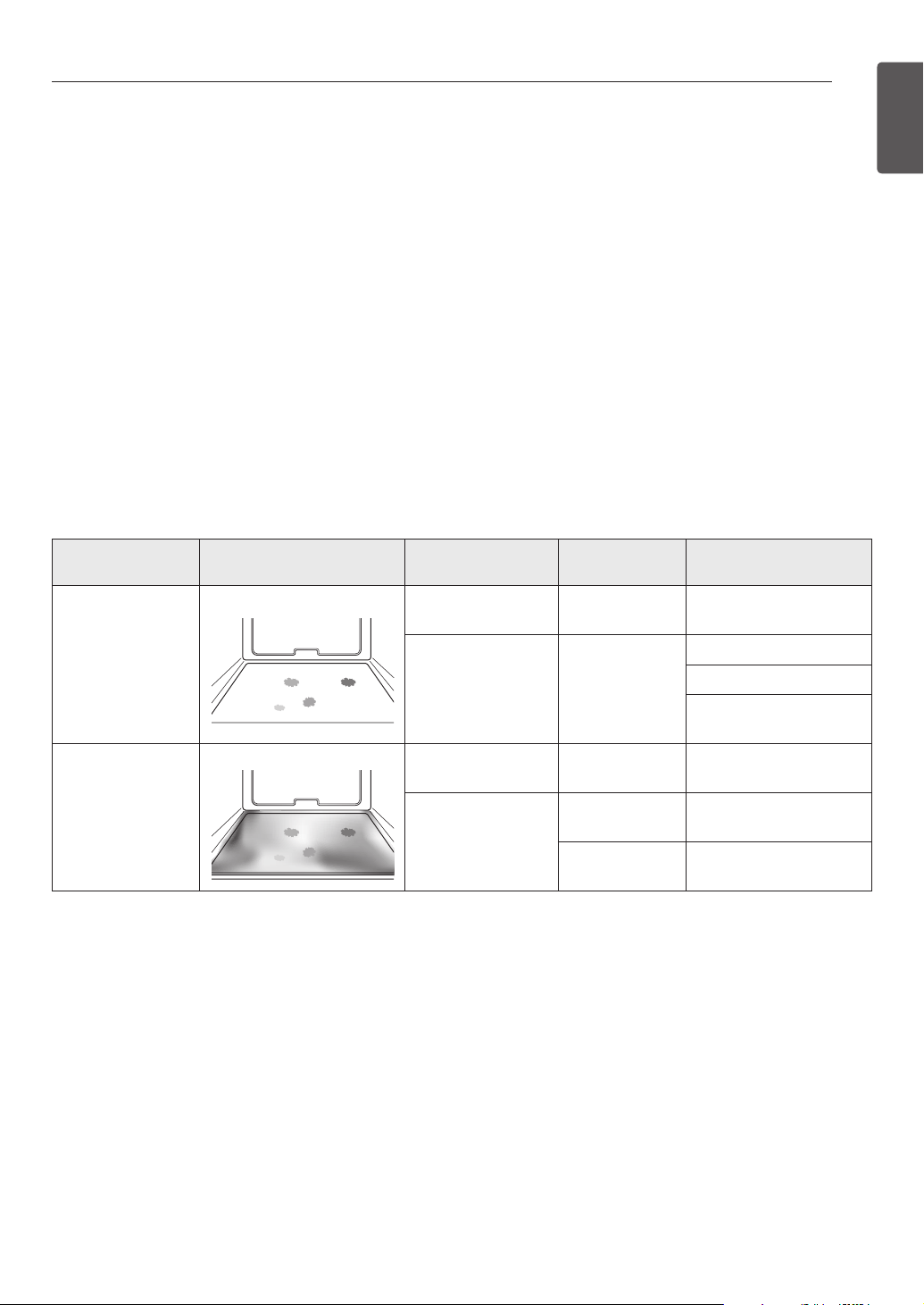
Setting Self Clean
The Self- Clean function has cycle times of 3, 4, or 5 hours.
Self Clean Soil Guide
Soil Level Cycle Setting
lightly soiled oven cavity 3 Hour Self Clean
moderately soiled oven cavity 4 Hour Self Clean
heavily soiled oven cavity 5 Hour Self Clean
1. Remove all racks and accessories from the oven.
2. Turn the Oven Mode knob to select the
SELF CLEAN mode. The oven defaults to
the recommended four-hour self clean for a
moderately soiled oven. Turn the Time/Temp. knob
to adjust the self clean time from 3 to 5 hours.
3. Press START.
4. Once the Self Clean is set, the oven door locks
automatically and the lock icon displays. You will
not be able to open the oven door until the oven
has cooled. The lock releases automatically when
the oven has cooled.
30
MAINTENANCE
Setting Self Clean with a Delayed
Start
1. Remove all racks and accessories from the oven.
2. Turn the Oven Mode knob to select the SELF CLEAN
mode. The oven defaults to the recommended
four-hour self clean for a moderately soiled oven.
Turn the Time/Temp knob to select the self clean
time from 3 to 5 hours.
3. Press START TIME.
4. Turn the Time/Temp knob to enter the time of day
you would like the Self Clean to start.
5. Press START.
During Self Clean
y The self clean cycle uses extremely hot temperatures
to clean the oven cavity. While running the Self Clean
cycle, you may notice smoking or an odor.
This is normal, especially if the oven is heavily soiled.
y As the oven heats, you may hear sounds of metal parts
expanding and contracting. This is normal and will not
damage the oven.
y Do not force the oven door open when LOCKED is
displayed. The oven door will remain locked until the
oven temperature has cooled. Forcing the door open
will damage the door.
After the Self Clean Cycle
y The oven door will remain locked until the oven
temperature has cooled.
y You may notice some white ash in the oven. Wipe it
o with a damp cloth or a soap-lled steel wool pad
after the oven cools. If the oven is not clean after one
clean cycle, repeat the cycle.
y If oven racks were left in the oven and do not slide
smoothly after a clean cycle, wipe racks and rack
supports with a small amount of vegetable oil to
make them glide more easily.
y Fine lines may appear in the porcelain because it went
through heating and cooling. This is normal and will
not aect performance.
It may become necessary to cancel or interrupt a
self clean cycle due to excessive smoke or re in the
oven. To cancel the Self Clean function, turn the
Oven Mode knob to the OFF position.
NOTE
DO NOT force the oven door open when the lock
icon is displayed. The oven door will remain locked
until the oven temperature has cooled. Forcing the
door open will damage the door.
CAUTION
• The Self Clean cycle cannot be started if the
Lockout feature is active.
• Once the Self Clean cycle is set, the oven door will
lock automatically. You will not be able to open
the oven door until the oven is cooled. The lock
will release automatically.
• Once the door has been locked, the LOCKED
indicator light will stop ashing and remain on.
Allow about 15 seconds for the oven door lock to
activate.
• If the clock is set for a 12 hour display (default) the
Delayed Self Clean can never be set to start more
than 12 hours in advance.
NOTE
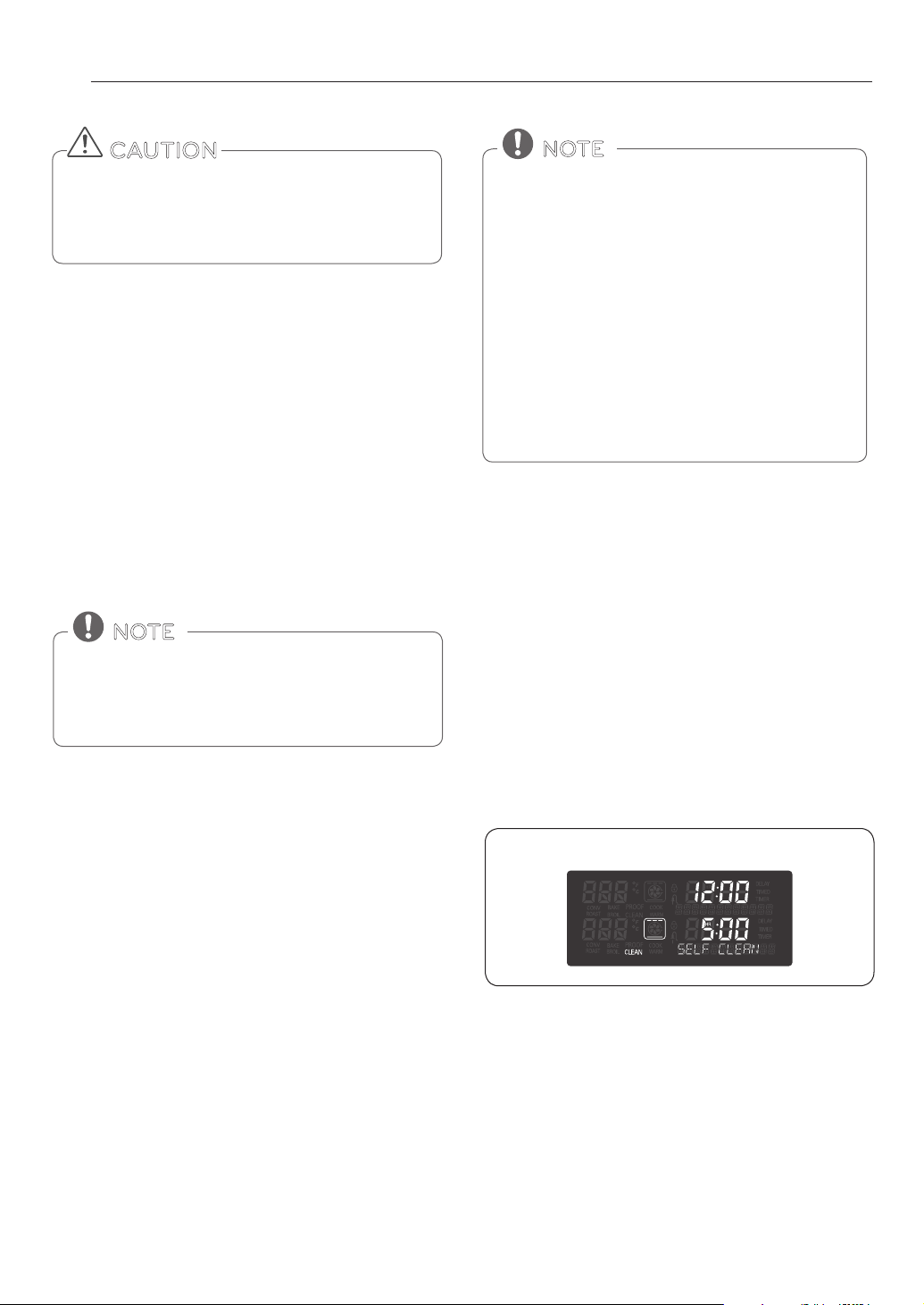
Displays for the SELF CLEAN mode
31
MAINTENANCE
ENGLISH
SpeedClean™
SIGNATURE KITCHEN SUITE'S new oven with SpeedClean™
enamel technology provides two cleaning options for the
oven interior. The SpeedClean™ feature takes advantage of
SIGNATURE KITCHEN SUITE'S new enamel to help lift soils
without harsh chemicals, and it runs using ONLY WATER for
just 10 minutes in low temperatures to help loosen LIGHT
soils before hand-cleaning.
While SpeedClean™ is quick and effective for small and LIGHT
soils, the Self Clean feature can be used to remove HEAVY
built up soils. The intensity and high heat of the Self Clean
cycle may result in smoke which will require the opening up
of windows to provide ventilation. Compared to the more
intense Self Clean process, your SIGNATURE KITCHEN SUITE
oven gives you the option of cleaning with LESS HEAT, LESS
TIME, and virtually NO SMOKE OR FUMES.
CLEANING TIPS
•
Allow the oven to cool to room temperature before using
the SpeedClean™ cycle. If your oven cavity is above 150°F
(65°C), “OVEN IS HOT- - PLEASE WAIT” will appear in the
display, and the SpeedClean™ cycle will not be activated
until the oven cavity cools down.
•Aplasticspatulacanbeusedasascrapertoscrapeoffany
chunks or debris before and during oven cleaning.
•Usingtheroughsideofanon-scratchscouringpadmay
help to take off burnt-on stains better than a soft sponge or
towel.
•Certainnon-scratchscrubbingsponges,suchasthosemade
of melamine foam, available at your local stores, can also
help improve cleaning.
•Theovenshouldbelevel to ensure that the bottom surface
of the oven cavity is entirely covered by water at the begin-
ning of the SpeedClean™ cycle.
•Forbestresults,usedistilledorfilteredwater.Tapwatermay
leave mineral deposits on the oven bottom.
•Soilbakedonthroughseveralcookingcycleswillbemore
difficult to remove with the SpeedClean™ cycle.
•DonotopentheovendoorduringtheSpeedClean™cycle.
Water will not get hot enough if the door is opened during
the cycle.
•Forhardtoreachareassuchasthebacksurfaceofthe
bottom oven, it is better to use the Self Clean cycle.
* The Self Clean cycle can be used for soil that has been built up over time.
When needed, your oven still provides the Self Clean option
for longer, more thorough cleaning for heavier, built up soils.
BENEFITS OF SpeedClean™
• Helps loosen light soils before hand-cleaning
• SpeedClean™ only uses water; no chemical cleaners
• Makes for a better Self Clean experience
- Delays the need for a Self Clean cycle
- Minimizes smoke and odors
- Can allow shorter Self Clean time
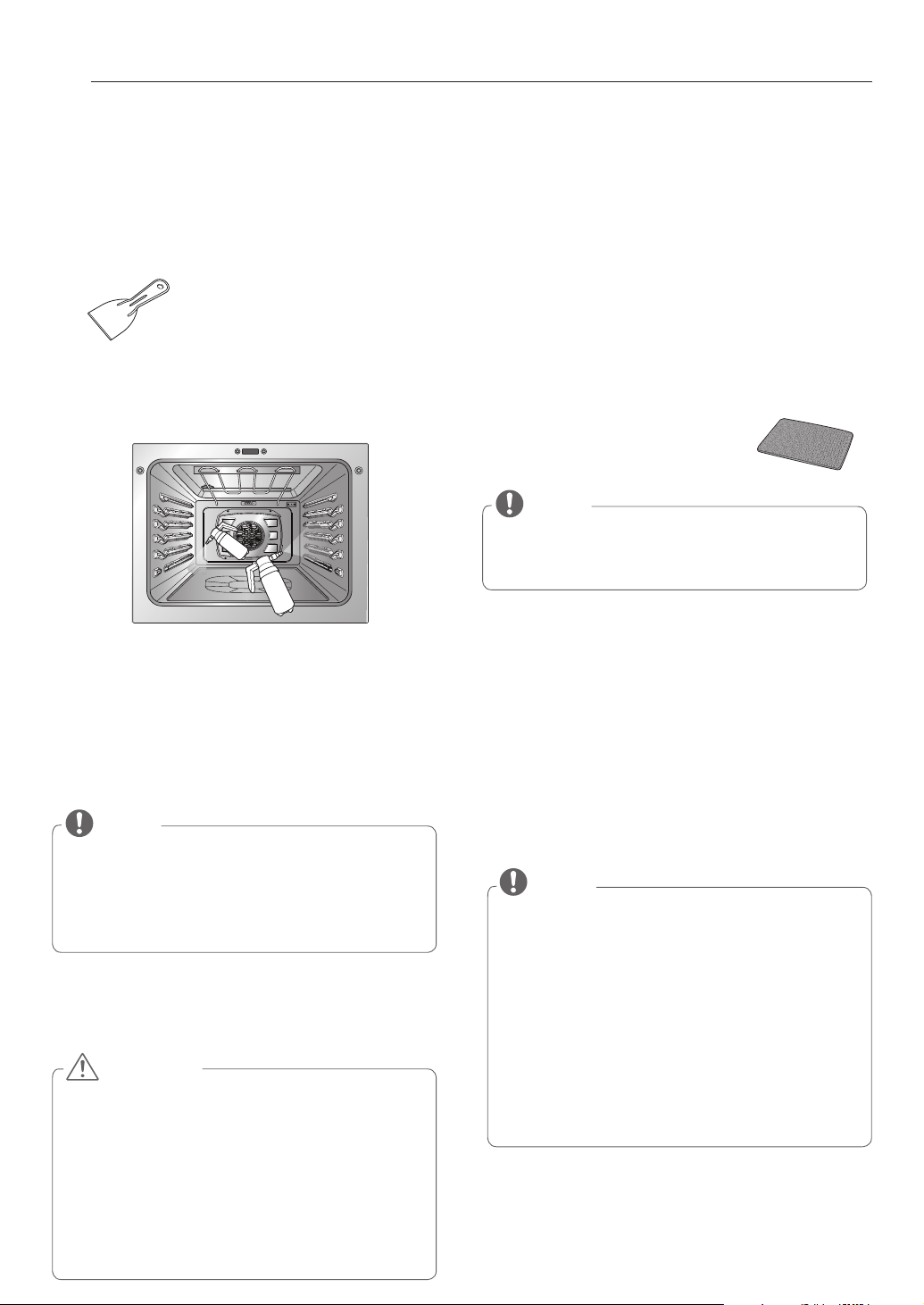
Suggested
Cleaning Method
Example of Oven Soiling Soil Pattern Types of Soils
Common Food Items That
Can Soil Your Oven
SpeedClean™
Small drops or spots
Cheese or other
ingredients
Pizza
Light splatter Fat/grease
Steaks, broiled
Fish, broiled
Meat roasted at low
temperatures
Self Clean*
Medium to heavy
splatter
Fat/grease
Meat roasted at high
temperatures
Drops or spots
Filling or
Sugar based soils
Pies
Cream or tomato
sauce
Casseroles
WHEN TO USE SpeedClean™
32
MAINTENANCE
SpeedClean™ INSTRUCTION GUIDE
1. Remove oven racks and accessories from the oven.
2. Scrape off and remove any burnt-on debris with a plastic
scraper.
3. Fill a spray bottle with 1¼ cups (10 oz or 300 ml) of water
and use the spray bottle to thoroughly spray the inside
surfaces of the oven.
4. Use at least ¼ cup (2oz or 50 ml) of the water to com-
pletely saturate the soil on both the walls and in the
corners of the oven.
5. Spray or pour the remaining 1 cup (8 oz or 250 ml) of
water onto the bottom center of the oven cavity. The
indentation on the oven bottom should be fully covered
to submerge all soils. Add water if necessary.
6. Close the oven door.
Turn the Oven Mode knob to select the SpeedClean™
mode.
Press START.
7. A tone will sound at the end of the 10-minute cycle.
adjust the Oven Mode knob to OFF position to clear the
display and end the tone.
8. After the cleaning cycle and during hand-cleaning,
enough water should remain on the oven bottom to
completely submerge all soils. Add water if necessary.
Place a towel on the floor in front of the oven to capture
any water that may spill out during hand-cleaning.
9. Clean the oven cavity immediately after the
SpeedClean™ cycle by scrubbing with a wet, non-scratch
scouring sponge or pad. (The scouring side will not
scratch the finish.) Some water may spill into the bottom
vents while cleaning, but it will be
captured in a pan under the oven
cavity and will not hurt the burner.
10. Once the oven cavity is cleaned, wipe any excess water
with a clean dry towel. Replace racks and any other ac-
cessories.
11. If some light soils remain, repeat the above steps,
making sure to thoroughly soak the soiled areas. If
stubborn soils remain after multiple SpeedClean™
cycles, run the Self Clean cycle. Be sure that the oven
cavity is empty of oven racks and other accessories, and
that the oven cavity surface is dry before running the
Self Clean cycle. Consult the Self Clean section of your
owner’s manual for further details.
y
Some surfaces may be hot after the SpeedClean™
cycle.Wear rubber gloves while cleaning to prevent
burns.
y
During the SpeedClean™ cycle, the oven bottom be-
comes hot enough to cause burns. Wait until the cycle
is over before wiping the inside surface of the oven.
Failure to do so may result in burns.
y
Avoid leaning or resting on the oven door glass while
cleaning the oven cavity.
CAUTION
NOTE
Use the "mist" setting on the spray bottle for better
coverage. The entire 1¼ cup (10oz or 300 ml) of water
should be used for each oven cavity cleaned.
Do not spray water directly on the door. Doing so will
result in water dripping to the floor.
NOTE
y
If you forget to saturate the inside of the oven with
water before starting SpeedClean™, turn the Oven
Mode knob to the OFF position to end the cycle. Wait
for the oven to cool to room temperature and then
spray or pour water into the oven and start another
SpeedClean™ cycle.
y
The cavity gasket may be wet when the SpeedClean™
cycle finishes. This is normal. Do not clean the gasket.
y
If mineral deposits remain on the oven bottom after
cleaning, use a cloth or sponge soaked in vinegar to
remove them.
Suggested plastic scrapers:
•Hard plastic spatula
•Plastic pan scraper
•Plastic paint scraper
•Old credit card
NOTE
DO NOT use any steel scouring pads, abrasive pads or
cleaners as these materials can permanently damage the
oven surface.
33
MAINTENANCE
ENGLISH
CLEANING THE EXTERIOR
Painted and Decorative Trim
For general cleaning, use a cloth with hot soapy water.
For more dicult soils and built-up grease, apply a liquid
detergent directly onto the soil. Leave it on for 30 to 60
minutes. Rinse with a damp cloth and dry. Do not use
abrasive cleaners.
Stainless Steel Surfaces
To avoid scratches, do not use steel wool pads.
1. Place a small amount of stainless steel appliance
cleaner or polish on a damp cloth or paper towel.
2. Clean a small area, rubbing with the grain of the
stainless steel if applicable.
3. Dry and bu with a clean, dry paper towel or soft
cloth.
4. Repeat as necessary.
Oven door
y Use soapy water to thoroughly clean the oven door.
Rinse well. DO NOT immerse the door in water.
y You may use a glass cleaner on the outside glass of the
oven door. DO NOT spray water or glass cleaner on the
door vents.
y DO NOT use oven cleaners, cleaning powders, or harsh
abrasive cleaning materials on the outside of the oven
door.
y DO NOT clean the oven door gasket. The oven door
gasket is made of a woven material that is essential for
a good seal. Care should be taken not to rub, damage,
or remove this gasket.
Do not use harsh cleaners or harsh abrasive cleaning
materials on the outside of the oven door. Doing so
can cause damage.
CAUTION
Do not hand clean
oven door gasket
Remove any
debris from door
Broiler Pan and Grid
y Do not store a soiled broiler pan or grid anywhere in
the oven.
y Do not clean the broiler pan or grid in a self cleaning
mode.
y Remove the grid from the pan. Carefully pour out the
grease from the pan into a proper container.
y Wash and rinse the broiler pan and grid in hot water
with a soap-lled or plastic scouring pad.
y If food has burned on, sprinkle the grid with cleaner
while hot and cover with wet paper towels or a
dishcloth. Soaking the pan will remove burned-on
foods.
y Both the broiler pan and grid may be cleaned with a
commercial oven cleaner or in the dishwasher.
Do not store a soiled
broiler pan and grid
anywhere in the oven.
Oven Racks
Remove the oven racks
before operating the
selfclean cycle. Leaving
the racks in place could
cause discoloration.
If the racks are cleaned in
the self-clean cycle, their
color will turn slightly blue and nish will be dull. After
the self-clean cycle is complete and the oven has cooled,
rub the sides of the racks with wax paper or a cloth
containing a small amount of oil. This will make the racks
glide more easily into the rack tracks.
Oven Cavity
DO NOT use oven cleaners.
NEVER wipe a warm or hot porcelain surface with a damp
sponge; it may cause chipping or crazing (tiny hairlike
cracks). Food spills should be cleaned when the oven
cools. At high temperature, foods react with porcelain
and a permanent dull spot can result. When cleaning a
spot, use only non-abrasive cleaners or scrubbers.
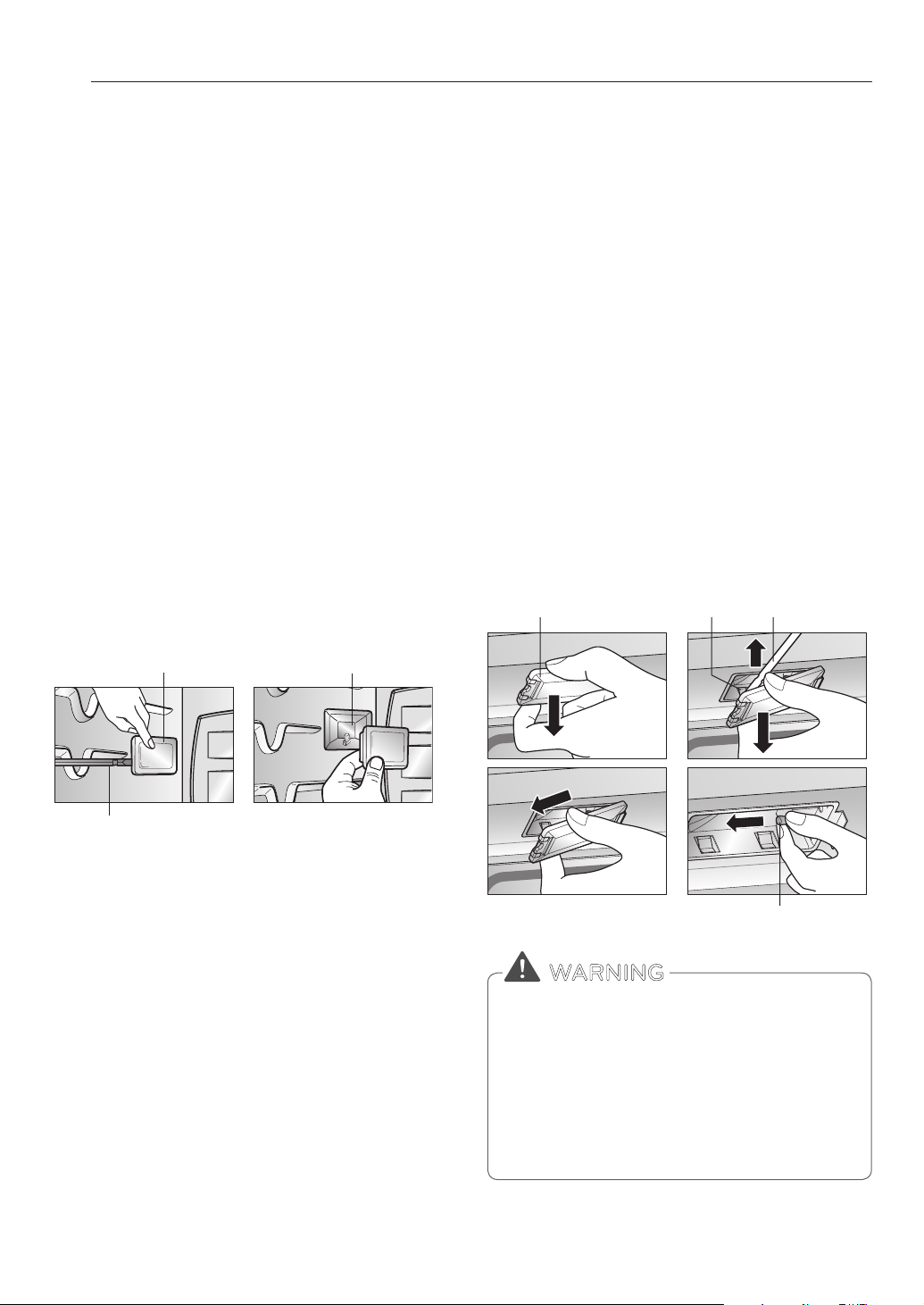
34
MAINTENANCE
CHANGING THE OVEN LIGHT
The oven light is a standard 10-watt halogen bulb for
ovens.
To replace lamps located on the side wall:
• Make sure oven and bulb are cool.
1. Unplug oven or disconnect power.
2. Remove oven racks.
3. Slide a at blade screwdriver between the housing
and the glass light cover.
4. Support the glass light cover with two ngers to
prevent the cover from falling to the bottom of the
oven.
5. Gently twist the screwdriver blade to loosen the
glass light cover and remove it.
6. Remove bulb from socket.
7. Replace bulb, replace light cover by snapping back
into place.
8. Plug in oven or reconnect power.
To replace a lamp located on the top wall:
• Make sure oven and bulb are cool.
1. Unplug oven or disconnect power.
2. Remove oven racks.
3. Slide a at blade screwdriver between the housing
and the glass light cover.
4. Support the glass light cover with two ngers to
prevent the cover from falling to the bottom of the
oven.
5. Gently twist the screwdriver blade to loosen the
glass light cover and remove it.
6. Remove bulb from socket.
7. Replace bulb, replace light cover by snapping back
into place and push the clip to hold the glass light
cover tightly.
8. Plug in oven or reconnect power.
Glass Light Cover
Flat blade screwdriver
Housing
Glass Light Cover
Flat Blade screwdriver
Flat Blade
screwdriver
Bulb
Clip
y
Before replacing the oven light bulb, DISCONNECT
the electrical power to the oven at the main fuse or
circuit breaker panel.
− Failure to do so can result in severe personal injury,
death, or electrical shock.
y
Make sure oven and bulb are cool.
y
Wear gloves while changing the oven light. Glass
fragments from broken bulbs can cause risk of injury.
WARNING
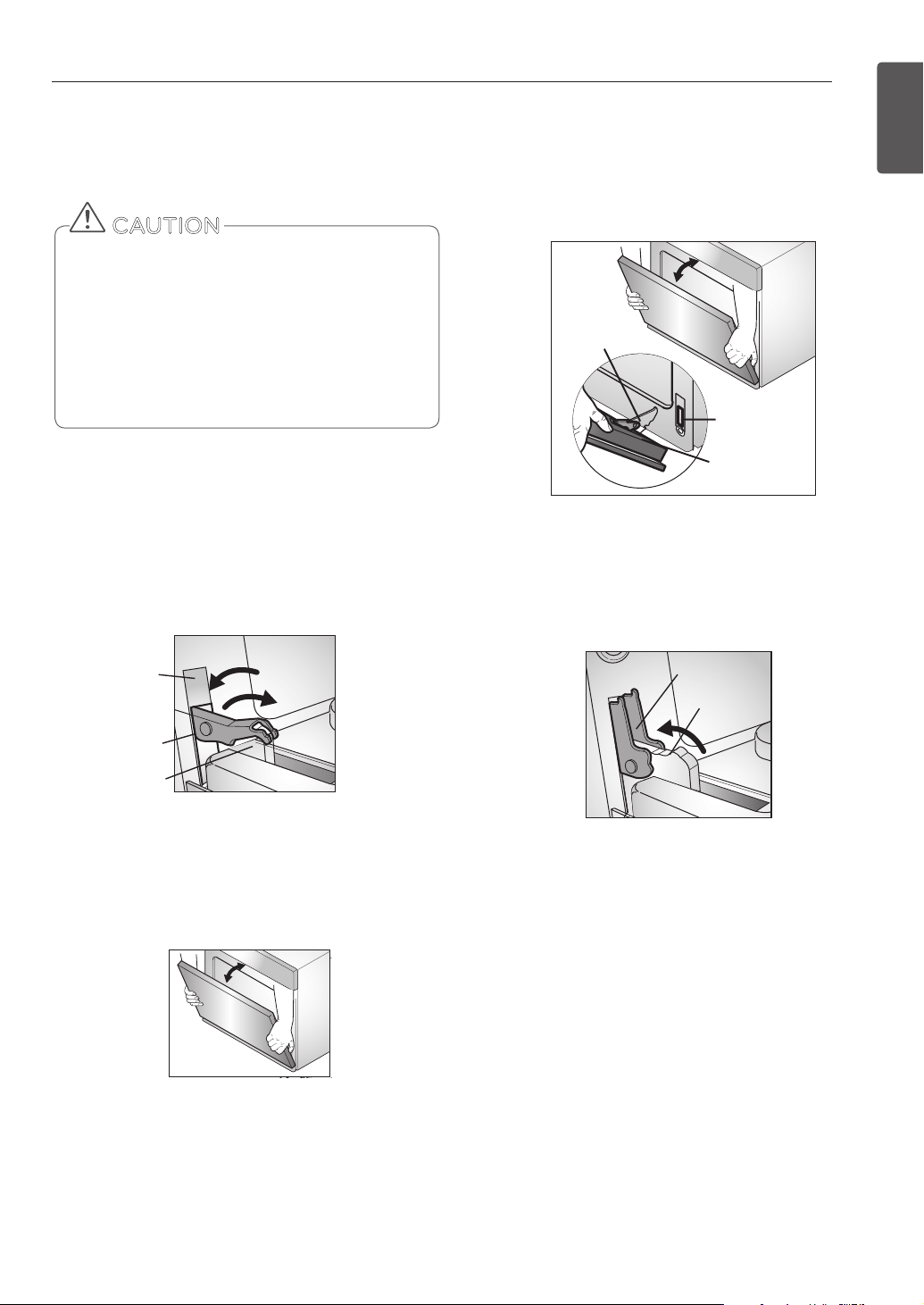
35
MAINTENANCE
ENGLISH
Replacing the Oven Door
1. Firmly grasp both sides of the door at the top.
2. With the door at the same angle as the removal
position, seat the indentation of the hinge arm into
the bottom edge of the hinge slot. The notch in the
hinge arm must be fully seated into the bottom of
the slot.
3. Fully open the door. If the door will not fully open,
the indentation is not seated correctly in the bottom
edge of the slot.
4. Push the hinge locks down toward the bottom of
the door to the locked position. Close the oven door.
Push hinge locks up to lock
Hinge arm
Hinge lock
Hinge arm
Indentation
Bottom
edge of
slot
Hinge arm
Hinge lock
Hinge arm
Indentation
Bottom
edge of
slot
REMOVING AND REPLACING THE
OVEN DOOR
• The door is very heavy. Be careful when removing
and lifting the door.
• DO NOT lift the door by the handle.
• DO NOT hit the glass with pots, pans, or any other
object.
• Scratching, hitting, jarring or stressing the glass
may weaken its structure, causing an increased risk
of breakage at a later time.
CAUTION
Removing the Oven Door
1. Fully open the door. Pull the hinge locks away from
the oven interior, until they are fully unlocked. A
tool, such as a small at-blade screwdriver, may be
required.
2. Firmly grasp both sides of the door at the top. Close
the door to the removal position (approximately ve
degrees from fully closed).
3. Lift the door up and out until the hinge arm is clear
of the slot. Put the door on the oor.
Pull hinge locks down to unlock
Slot
about 5˚
Lock
Unlock
Hinge
lock
Hinge
arm
Removal Position
Slot
about 5˚
Lock
Unlock
Hinge
lock
Hinge
arm

36
TROUBLESHOOTING
FAQs
My new oven doesn’t cook like my old
one. Is there something wrong with the
temperature settings?
No, Your oven has been factory tested and calibrated.
For the rst few uses, follow your recipe times and
temperatures carefully. If you still think your new oven is
too hot or too cold, you can adjust the oven temperature
yourself to meet your specic cooking needs. Refer to the
Oven Temperature Adjustment section , page 13, for easy
instructions on how to adjust your thermostat.
Is it normal to hear a clicking noise coming
from the back of my oven when I am using
it?
Your new oven is designed to maintain a tighter control
over your oven’s temperature. You may hear your oven’s
heating elements “click” on and o more frequently on
your new oven. This is a NORMAL operation.
During convection cooking the fan stops
when I open the door. Is that normal?
Yes, this is normal. When the door is opened, the
convection fan will stop until the door is closed.
Can I use aluminum foil to catch drippings
in my oven cavity?
Never use aluminum foil to line the bottom or sides of the
oven. The foil will melt and stick to the bottom surface
of the oven, and will not be removable. Use a sheet pan
placed on a lower oven rack to catch drippings instead.
(If foil has already melted onto the bottom of the oven, it
will not interfere with the oven’s performance.)
Can I use aluminum foil on the racks?
Do not cover racks with aluminum foil. Covering entire
racks with foil restricts air ow, leading to poor cooking
results. Use a sheet pan lined with foil under fruit pies or
other acidic or sugary foods to prevent spillovers from
damaging the oven nish.
Can I leave my racks in the oven when
running a Self Clean cycle?
No. Although it will not damage the racks, it will discolor
them and may make them hard to slide in and out during
use. Remove all items from the oven before starting a Self
Clean cycle.
What should I do if my racks are sticky and
have become hard to slide in and out?
Over time, the racks may become hard to slide in and out.
Apply a small amount of olive oil to the ends of the racks.
This will work as a lubricant for easier gliding.
Should I broil with the door open or closed?
Your electric oven isn't designed for open door broiling.
If you broil with the oven door open, it can damage the
oven knobs and display.
Foil may be used to wrap food in the oven, but do
not allow the foil to come into contact with the
exposed heating/broiling elements in the oven. The
foil could melt or ignite, causing smoke, re, or injury.
CAUTION
TROUBLESHOOTING

37
TROUBLESHOOTING
ENGLISH
Why aren't the function buttons working?
Make sure that the oven is not in Lockout mode. The lock
symbol will show in the display if Lockout is activated.
To deactivate Lockout, press and hold the PROBE button
for three seconds. The unlock melody will sound and
UNLOCKING will appear in the display until the controls
are unlocked.
My oven is still dirty after running the
SpeedClean™ cycle. What else should I do?
The SpeedClean™ cycle only helps to loosen light soils
in your oven to assist in hand-cleaning of your oven.
It does not automatically remove all soils after the
cycle. Some scrubbing of your oven is required after
running the SpeedClean™ cycle.
I tried scrubbing my oven after running
SpeedClean™, but some soils still remain.
What can I do?
The SpeedClean™ feature works best when the soils
are fully soaked and submerged in water before
running the cycle and during hand-cleaning. If soils
are not suciently soaked in water, it can negatively
aect the cleaning performance. Repeat the SpeedClean™
process using sucient water. Sugar-based and certain
greasy soils are especially hard to clean. If some
stubborn soils remain, use the Self Clean feature to
thoroughly clean your oven.
Soils on my oven walls are not coming off.
How can I get my walls clean?
Soils on the side and rear walls of your oven may be
more dicult to fully soak with water. Try repeating the
SpeedClean™ process with more than the ¼ cup (2 oz
or 50 ml) spray recommended.
Will SpeedClean™ get all of the soils and
stains out completely?
It depends on the soil type. Sugar-based and certain
grease stains are especially hard to clean. Also, if stains are
not suciently soaked in water, this can negatively aect
cleaning performance. If stubborn or built-up stains
remain, use the Self Clean feature. Refer to the Self
Clean section of your owner's manual.
Are there any tricks to getting some of the
stubborn soils out?
Scraping the soils with a plastic scraper before and during
hand-cleaning is recommended. Fully saturating soils
with water is also recommended.
However, certain types of soils are harder to clean than
others. For these stubborn soils, the Self Clean cycle is
recommended. Consult the Self Clean section of your
owner's manual for details.
Is it safe for my convection fan, broil
burner or heater element to get wet during
SpeedClean™?
Yes. The convection fan, broiler burner or heater element
may get a little wet during cleaning. However, direct
spray onto the broil burner and heater elements is not
necessary because these are self-cleaning during regular
use.
Do I need to use all 1-1/4 cups (10 oz or
300 ml) of water for SpeedClean™?
Yes. It is highly recommended that 1 cup (8 oz or 250
ml) of water be sprayed or poured on the bottom
and an additional 1/4cup (2 oz or 50 ml) of water be
sprayed on walls and other soiled areas to fully saturate
the soils for better cleaning performance.
I see “smoke” coming out of my oven's
vents during SpeedClean™.
Is this normal?
This is normal. This is not smoke. It is actually water vapor
(steam) from the water in the oven cavity. As the oven
heats briey during SpeedClean™, the water in the cavity
evaporates and escapes through the oven vents.
How often should I use SpeedClean™?
SpeedClean™ can be performed as often as you wish.
SpeedClean™ works best when your oven is LIGHTLY
soiled from such things as LIGHT grease splatter and
small drops of cheese. Please refer to the SpeedClean™
section in your owner's manual for more information.
What is required for SpeedClean™?
A spray bottle lled with 1¼ cups (10 oz or 300 ml) of
water, a plastic scraper, a nonscratch scrubbing pad and
a towel. You should not use abrasive scrubbers such
as heavy-duty scouring pads or steel wool. Except for
a towel, all of the materials you need are included in a
special cleaning kit with your new oven.

38
TROUBLESHOOTING
BEFORE CALLING FOR SERVICE
Before you call for service, review this list. It may save you time and expense.
The list includes common occurrences that are not the result of defective workmanship or materials in this appliance.
Problem Possible Causes / Solutions
Oven control beeps
and displays any F
error code.
y Electronic control has detected a fault
condition. Touch any button and turn
any knob once to clear the display and
stop the beeping. Reprogram oven.
If fault reoccurs, record fault number.
Clear the display and stop the beeping,
then contact a qualied service
technician.
Oven will not work y Plug on oven is not completely inserted in the electrical outlet.
- Make sure electrical plug is plugged into a live, properly grounded outlet.
y A fuse in your home may be blown or the circuit breaker tripped.
- Replace the fuse or reset the circuit breaker.
y Oven controls improperly set.
Instructions for setting cooking modes start on page 18.
Instructions for adjusting oven settings start on page 11 .
y Oven too hot.
- Allow the oven to cool to below locking temperature.
Appliance does not
operate.
y Make sure cord is plugged correctly into outlet. Check circuit breakers.
y Service wiring is not complete. Contact your appliance service person for assistance.
y Power outage. Check house lights to be sure. Call your local electric company for
service.
Oven light does not
work.
y Replace or tighten bulb. See Changing the Oven Light , page 34.
Oven smokes excessively
during broiling.
y Control not set properly. Follow instructions under Broil, page 21.
y Meat too close to the element. Reposition the rack to provide proper clearance
between the meat and the element. Preheat broil element for searing.
y Meat not properly prepared. Remove excess fat from meat. Cut remaining fatty edges
to prevent curling, but do not cut into lean.
y Insert on broiler pan wrong side up and grease not draining. Always place grid on the
broiler pan with ribs up and slots down to allow grease to drip into pan.
y Grease has built up on oven surfaces. Regular cleaning is necessary when broiling
frequently. Old grease or food spatters cause excessive smoking.
CODE CAUSE
F-3 Key held down too long or
shorted key
F-19 No heating

39
TROUBLESHOOTING
ENGLISH
Problem Possible Causes / Solutions
Food does not bake or roast
properly
y Oven controls improperly set.
- See the instructions for setting Bake, Convection Bake, Roast, and Convection Roast
modes, pages 18-21.
y Rack position is incorrect or the rack is not level.
- See Rack and Pan Placement, page 17.
y Incorrect cookware or cookware of improper size being used.
- the tips on pages 17, 18, and 20.
y Oven sensor needs to be adjusted.
- See Oven Temperature Adjustment, page 13.
Food does not broil
properly
y Oven controls improperly set.
- See the Broil section, page 21.
y Improper rack position being used.
- See the Broiling Guide, page 21-23.
y Cookware not suited for broiling.
- Use the broiling pan and grid that came with your oven.
y Aluminum foil has been used on the broiling pan, grid has not been tted properly,
or slits are not on correct side.
- See the Broil section, page 21.
y In some areas the power (voltage) may be low.
- Preheat the broil element for 10 minutes.
- See the Broil section, page 21.
Oven temperature too hot or
too cold
y Oven Sensor needs to be adjusted.
- Oven Temperature Adjustment, page 13.
Oven will not self clean y The oven temperature is too high to set a self-clean operation.
- Allow the oven to cool and reset the controls.
y Oven controls improperly set.
- See the Self Clean section, page 29.
y A self-clean cycle cannot be started if oven door is open.
Crackling or popping sound y This is the sound of the metal heating and cooling during both the cooking and
cleaning functions.
- This is normal.
Excessive smoking during a
self clean cycle
y Excessive soil.
- Set the Oven Mode knob to the OFF position. Open the windows to rid the room of
smoke. Wait until the self-clean mode is cancelled. Wipe up the excess soil and reset
the clean.
Oven door does not open
after a self clean cycle
y Oven is too hot.
- Allow the oven to cool below locking temperature.

40
TROUBLESHOOTING
Problem Possible Causes / Solutions
Oven not clean after a self
clean cycle
y Oven controls not properly set.
- See the self-clean section, page 29-30.
y Oven was heavily soiled.
- Clean up heavy spillovers before starting the clean cycle. Heavily soiled ovens may
need to self-clean again or for a longer period of time.
DOOR LOCKED icon is on
when you want to cook
y The oven door is locked because the temperature inside the oven has not dropped
below the locking temperature.
- Adjust the Oven Mode knob to OFF position. Allow the oven to cool.
Burning or oily odor emitting
from the vent
y This is normal in a new oven and will disappear in time.
- To speed the process, set a self-clean cycle for a minimum of 3 hours. See the self-
clean section, page 29-30.
Cooling fan continues to run
after oven is turned o
y The fan turns o automatically when the electronic components have cooled
suciently.
- This is normal.
Warm air venting into
kitchen after oven has been
turned o.
y Warm air exhaust is needed to maintain and cool down oven temperatures. It turns
o automatically when the heat cools to a safe temperature.
- This is normal.
Wi network does not
connect properly.
y If the appliance is having trouble connecting to the Wi-Fi network, it may be too
far from the router. Purchase a Wi-Fi repeater (range extender) to improve the Wi-Fi
signal strength.
y The Wi-Fi connection may not connect or may be interrupted because of the home
network environment.
y The network connection may not work properly depending on the internet service
provider.
y The surrounding wireless environment can make the wireless network service run
slowly.
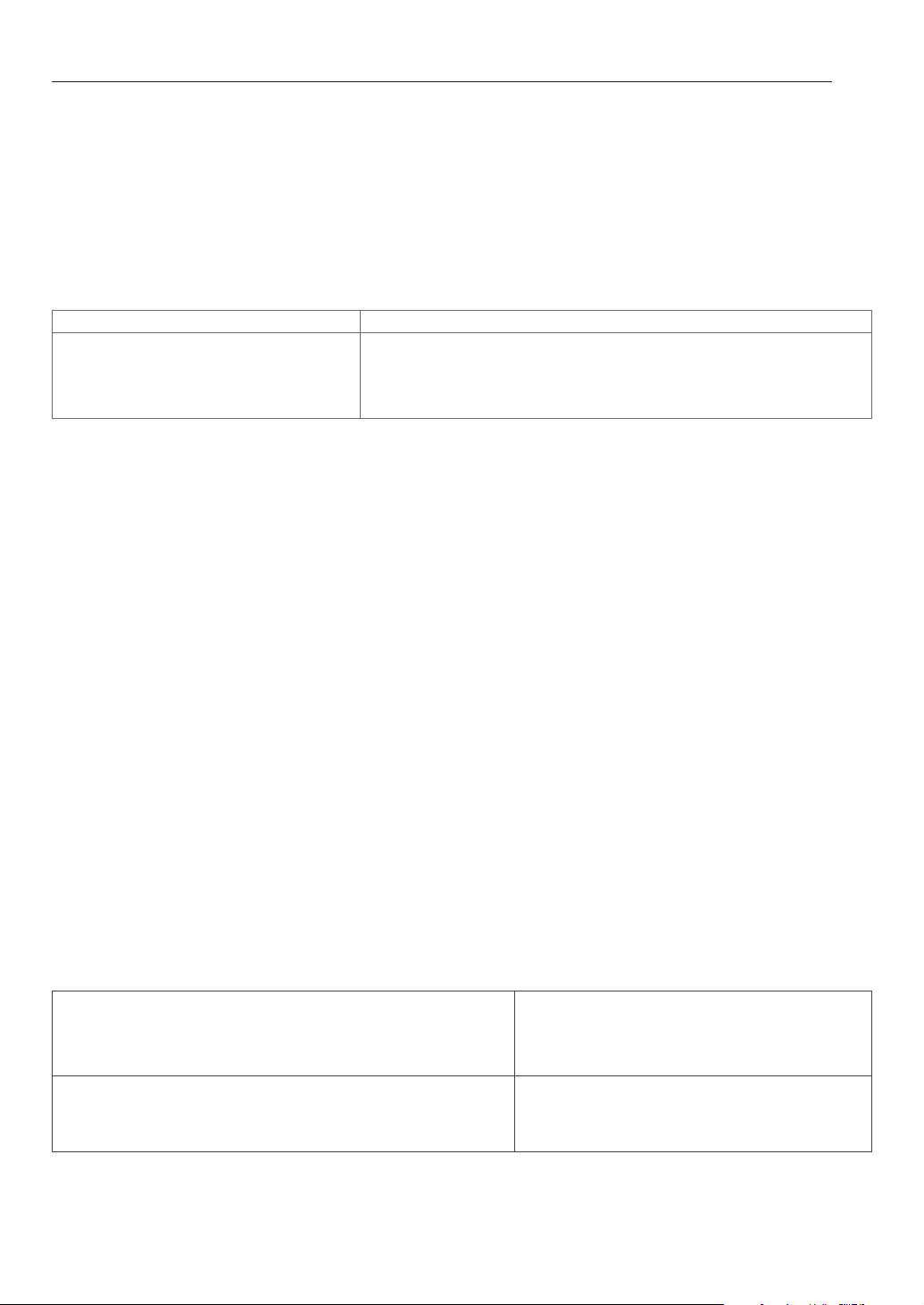
41
WARRANTY
WARRANTY (USA)
SIGNATURE KITCHEN SUITE will repair or replace your product, at SIGNATURE KITCHEN SUITE'S option, if it proves to be
defective in material or workmanship under normal use, during the warranty period set forth below, eective from the date
of original consumer purchase of the product. This limited warranty is good only to the original purchaser of the product
and eective only when used in the U.S.A.
WARRANTY PERIOD
HOW SERVICE IS HANDLED
Three Years
From the date of the original purchase.
Any part of the oven that fails due to a defect in materials or work-
manship. During this full three-years warranty, SIGNATURE KITCHEN
SUITE will also provide, free of charge, all labour and in-home
service to replace the defective part.
THIS WARRANTY IS IN LIEU OF ANY OTHER WARRANTIES, EXPRESS OR IMPLIED, INCLUDING WITHOUT LIMITATION, ANY
WARRANTY OF MERCHANTABILITY OR FITNESS FOR A PARTICULAR PURPOSE. TO THE EXTENT ANY IMPLIED WARRANTY
IS REQUIRED BY LAW, IT IS LIMITED IN DURATION TO THE EXPRESS WARRANTY PERIOD ABOVE. SIGNATURE KITCHEN
SUITE WILL NOT BE LIABLE FOR ANY CONSEQUENTIAL, INDIRECT, OR INCIDENTAL DAMAGES OF ANY KIND, INCLUDING
LOST REVENUES OR PROFITS, IN CONNECTION WITH THE PRODUCT. SOME STATES DO NOT ALLOW LIMITATION ON HOW
LONG AN IMPLIED WARRANTY LASTS OR THE EXCLUSION OF INCIDENTAL OR CONSEQUENTIAL DAMAGES, SO THE ABOVE
LIMITATIONS OR EXCLUSIONS MAY NOT APPLY TO YOU.
THIS LIMITED WARRANTY DOES NOT APPLY TO:
1. Service calls to correct the installation of your appliance, to instruct you how to use your appliance, to replace house
fuses or correct house wiring, or to replace owner-accessible light bulbs.
2. Repairs when your appliance is used in other than normal, single-family household use.
3. Pickup and delivery. Your appliance is designed to be repairable in the home.
4. Damage resulting from accident, alteration, misuse, abuse, re, ood, improper installation, acts of God, or use of prod-
ucts not approved by SIGNATURE KITCHEN SUITE Corporation.
5. Repairs to parts or systems resulting from unauthorized modications made to the appliance.
6. Replacement parts or repair labour costs for units operated outside the United States.
7. Any labour costs during the limited warranty period.
This warranty is extended to the original purchaser for products purchased for home use within the U.S.A. In Alaska, the
warranty excludes the cost of shipping or service calls to your home. Some states do not allow the exclusion or limitation of
incidental or consequential damages, so this exclusion or limitation may not apply to you. This warranty gives you specic
legal rights, and you may also have other rights which vary from state to state. To know what your legal rights are, consult
your local or state consumer aairs or your state’s Attorney General.
CUSTOMER ASSISTANCE INFORMATION:
To Prove Warranty Coverage Retain your Sales Receipt to prove date of
purchase.
A copy of your Sales Receipt must be submitted at
the time warranty service is provided.
To Obtain the Nearest Authorized Service Center or Sales Dealer,
or to Obtain Product, Customer, or Service Assistance
Call 1-855-790-6655 (Phone answered 24
hours - 365 days a year) and choose the appropri-
ate prompt from the menu; or visit our website at:
www.thesignaturekitchen.com

ESPAÑOL
P/No.: MFL51224512_00
MANUAL DEL PROPIETARIO
HORNO ELÉCTRICO DE CONVECCIÓN EMPOTRADO
www.thesignaturekitchen.com
UPWS3044ST

2
ÍNDICE
ÍNDICE
3
IMPORTANTES INSTRUCCIONES DE
SEGURIDAD
8
DESCRIPCIÓN GENERAL DE LOS
PRODUCTOS
8 Accesorios
9 Descripción general de la cocina
1 0 Descripción general del panel de control
11
CARACTERÍSTICAS
1 1 Reloj
1 2 Timer on/off (Temporizador encendido/
apagado)
1 2 Conversión automática de convección
1 3 Ajustes para la temperatura del horno
1 4 Idioma
1 4 Luz de alarma de precalentamiento
1 4 Volumen de la alerta sonora
1 4 Fahrenheit o Celsius
1 4 Luz del horno
1 5 Bloqueo
1 5 Hora de inicio(cocción temporizada
retardada)
1 6 Tiempo de cocción (cocción temporizada)
17
USO DEL HORNO
17 Antes de usar el horno
17 Sacar y volver a colocar los estantes del
horno
18 Bake (Horneado)
18 Convection bake (horneadd por convección)
19 Rostizar
20 Convection roast (asado por convección)
20 Convección tostar
21 Broil (asado a la parrilla)
22 Guía recomedada de asado a la parrilla
23 Consejos para el Asado a la Parrilla
24 Calentar
24 Leudar
25 Sonda para carne
26
SMART FUNCTIONS
FUNCIONES INTELIGENTES)
29
MANTENIMIENTO
29 Auto-limpieza
29 Configuración de la Auto-limpieza
30 Configuración de la Auto-limpieza con un
Inicio Retardado
31 SpeedClean™
31 Consejos de limpieza
32 Guía de instrucción SpeedClean™
33 Limpieza Exterior
34 Reemplazo de la luz del horno
35 Sacar y volver a colocar la puerta del horno y
el cajón
36
RESOLUCIÓN DE PROBLEMAS
36 PREGUNTAS FRECUENTES
37 ANTES DE LLAMAR AL SERVICIO
41
GARANTÍA
3
IMPORTANTES INSTRUCCIONES DE SEGURIDAD
ESPAÑOL
IMPORTANTES INSTRUCCIONES DE SEGURIDAD
Lea y siga todas las instrucciones antes de usar su horno para evitar riesgos de incendios,
descargas eléctricas, lesiones a las personas o daños al utilizar la cocina. Esta guía no
incluye todas las situaciones posibles que se podrían producir. Siempre comuníquese
con su agente de servicio técnico o con el fabricante cuando haya problemas que no
comprenda.
Usted puede descargar el manual de usuario en www.thesignaturekitchen.com
Este es el símbolo de alerta de seguridad. Este símbolo lo alerta sobre los
posibles riesgos que pueden causar daños a la propiedad y/o lesiones físicas
graves o la muerte. Todos los mensajes de seguridad estarán precedidos por el
símbolo de alerta de seguridad y la palabra «ADVERTENCIA» o «PRECAUCIÓN».
Estas palabras signican:
ADVERTENCIA
Indica una situación peligrosa que, de no evitarse, podría causar la muerte o lesiones
graves.
PRECAUCIÓN
Indica una situación peligrosa que, de no evitarse, podría causar una lesión menor o
moderada.
PRECAUCIONES DE SEGURIDAD
y Asegúrese de que un técnico calicado realice una correcta instalación y puesta a tierra
del aparato.
y No repare o reemplace ninguna pieza del aparato a menos que se lo señale
especícamente en este manual.
y Cualquier otro servicio debe realizarlo un técnico calicado.
y Siempre desconecte la energía al artefacto antes de efectuar servicios ya sea
desenchufándolo, quitando el fusible o apagando el interruptor de circuitos.
y
NO TOQUE ELEMENTOS CALENTADORES O SUPERFICIES INTERIORES DEL HORNO.
Los elementos calentadores pueden estar calientes aunque tengan un color oscuro.
Las superficies internas de un horno se calientan lo suficiente como para provocar
quemaduras. Durante y después del uso, no toque o permita que vestimenta u otros
materiales inflamables entren en contacto con los elementos calentadores o superficies
interiores del horno hasta que haya pasado el tiempo suficiente para que se enfríen.
Otras superficies del aparato pueden calentarse lo suficiente como para provocar
quemaduras. Entre esas superficies se encuentran las aberturas de ventilación del horno
y las superficies cercanas a dichas aberturas, las puertas del horno y las ventanas de las
puertas del horno.
y
Tenga cuidado al abrir la puerta. Deje salir el aire o vapor caliente antes de quitar o
colocar alimentos en el horno.
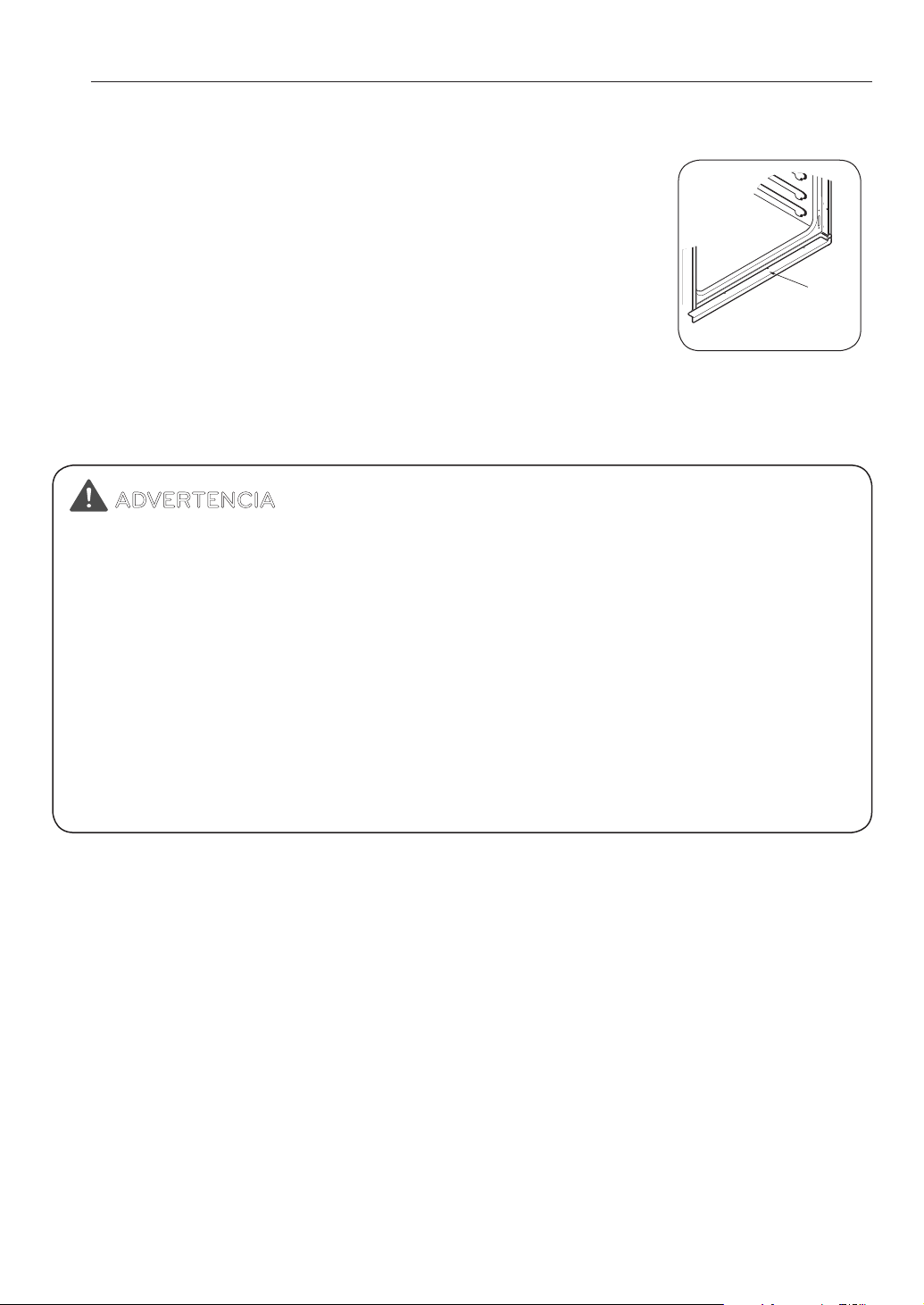
4
IMPORTANTES INSTRUCCIONES DE SEGURIDAD
PRECAUCIONES DE SEGURIDAD
(CONT.)
y
No caliente recipientes de comida sin abrir. La presión
acumulada puede hacer que el recipiente explote y provoque
lesiones.
y
Mantenga despejados los conductos de ventilación del
horno. La ventilación del horno puede calentarse durante el
uso del horno. Nunca obstruya esta ventilación y nunca coloque
elementos de plástico o sensibles al calor sobre o cerca de la
ventilación.
NOTA:
Para una operación adecuada, debe instalarse un reborde de ventilación.
y
Asegúrese de quitar todos los materiales de empaquetado del aparato antes de
ponerlo en funcionamiento. Mantenga plásticos, ropa y papel alejados de las piezas del
aparato que puedan calentarse.
y
NO fuerce la puerta del horno. Esto puede dañar el sistema automático de bloqueo de
la puerta. Tenga cuidado al abrir la puerta del horno después del ciclo de auto-limpieza.
Párese a un lado del horno cuando abra la puerta para que salga el aire o vapor caliente. El
horno puede seguir MUY CALIENTE.
y
NO utilice una esponjilla de lana acero. Se RAYARÁ la superficie.
y
NO utilice limpiadores abrasivos fuertes o raspadores de metal afilados para limpiar
el vidrio de la puerta del horno ya que pueden rayar la superficie. Puede provocar la
rotura del vidrio.
y
Tenga cuidado al quitar y levantar la puerta.
y
NO levante la puerta de la manija. La puerta es muy pesada.
y
NO se pare o siente sobre la puerta del horno. Asegurese de seguir las instrucciones de
instalacion apropiadas.
Reborde inferior
de metal
(ventilación)
ADVERTENCIA
y
NUNCA use su electrodoméstico para calentar la habitación.
y
NO utilice agua en incendios de grasa. Si ocurre un incendio dentro del horno, deje
cerrada la puerta y apague el horno. Si el incendio continúa, arroje bicarbonato de sodio
o utilice un extintor de incendios.
y
Sólo utilice agarraderas secas. Las agarraderas húmedas o mojadas sobre superficies
calientes pueden provocar quemaduras de vapor. No permita que la agarradera toque
los elementos de calentamiento. No use una toalla u otra tela gruesa.
y
No almacene elementos dentro o sobre el aparato. Los materiales inflamables no
deben almacenarse dentro de un horno o cerca de elementos de superficie.
y
Utilice ropa adecuada. Nunca debe utilizar ropa suelta o que cuelgue mientras utiliza
este electrodoméstico.
y
Antes de usar la red Wi-Fi, debe revisar la sustancia en la cavidad.
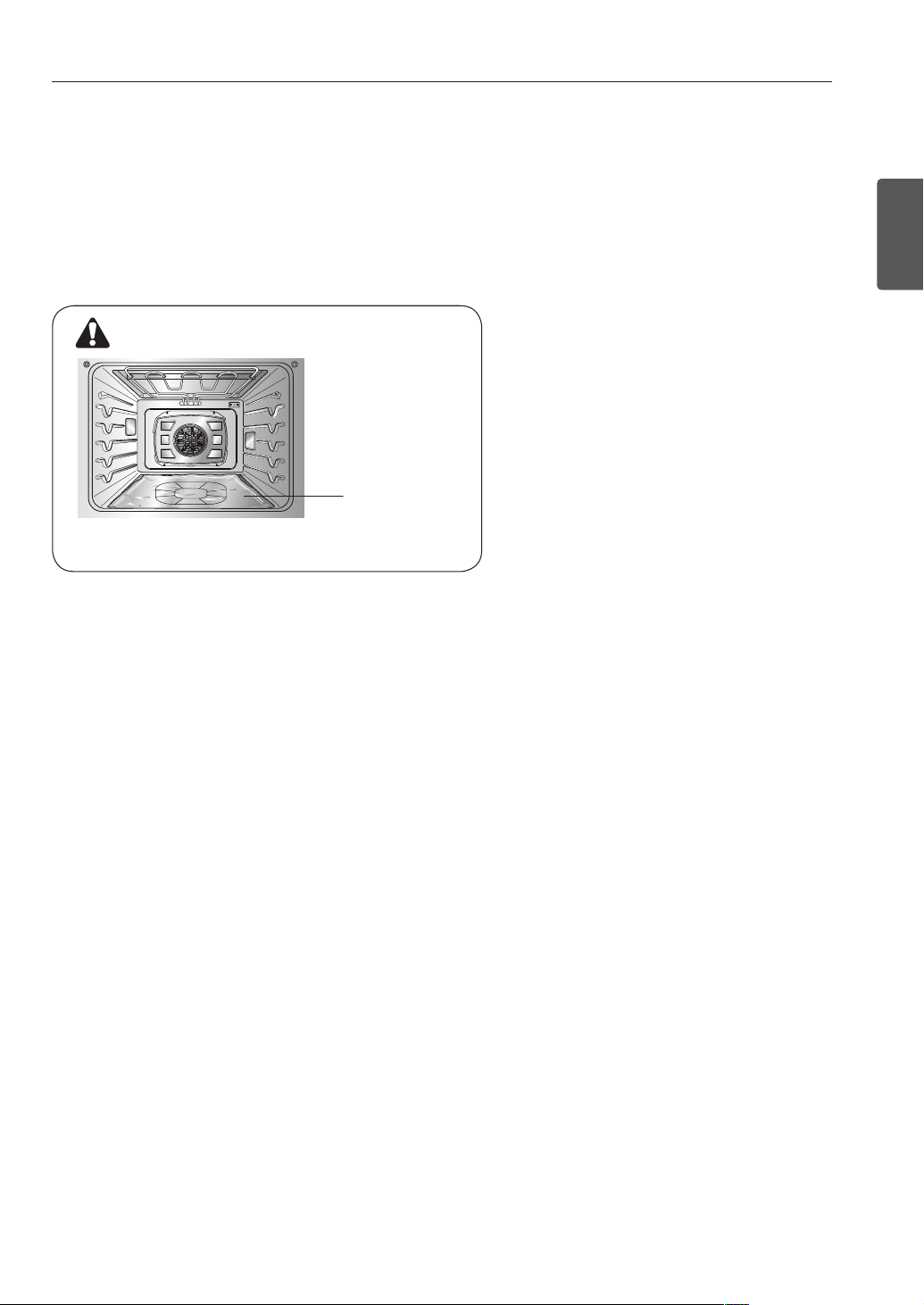
5
IMPORTANTES INSTRUCCIONES DE SEGURIDAD
ESPAÑOL
SEGURIDAD ELÉCTRICA
y
Revestimientos protectores. No utilice papel de aluminio u otro material para revestir la parte
inferior del horno. Una instalación inadecuada de estos revestimientos puede provocar un
riesgo de descarga eléctrica o de incendio.
y
No permita que el papel de aluminio o la sonda para carne entren en contacto con los
elementos calentadores.
y
NO recubra las paredes, bandejas, fondo o cualquier otra pieza del horno con papel de
aluminio o cualquier otro material. Hacerlo afectará la distribución de calor, producirá un
horneado pobre y provocará un daño permanente al interior del horno (el papel de aluminio se
derretirá hacia la superficie interna del horno).
y
Antes de reemplazar la bombilla de luz del horno, desconecte la alimentación de energía
al horno desde el panel principal de fusibles o del interruptor de circuitos. No hacerlo
puede provocar lesiones personales graves, la muerte o una descarga eléctrica.
SEGURIDAD DURANTE SU USO
y
Bandejas del horno. Siempre coloque las bandejas del horno en la posición deseada
mientras el horno está frío.
y
Siempre use agarraderas o guantes de cocina cuando quite alimentos del horno. Usted
puede quemarse ya que los recipientes y los platos estarán calientes.
y
Tenga cuidado al utilizar las características TIMED BAKE (horneado con temporizador) o
DELAYED TIMED BAKE (horneado con temporizador con retraso). Utilice el temporizador
automático cuando cocine carnes curadas o congeladas y la mayoría de las frutas y
vegetales. Los alimentos que pueden estropearse fácilmente, como leche, huevos,
pescado, carne de res o de ave, deben primero enfriarse en el refrigerador. Aún cuando
se encuentren fríos, no deben estar en el horno por más de 1 hora antes del comienzo de la
cocción y deben quitarse rápidamente cuando finalice la cocción. Consumir comida en mal
estado puede provocar intoxicación por alimentos.
y
Si ocurre un incendio dentro del horno, deje cerrada la puerta y apague el horno. Si el
incendio continúa, arroje bicarbonato de sodio o utilice un extintor de incendios.
y
NO eche agua o harina sobre el incendio. La harina puede ser explosiva y el agua puede
propagar un incendio de grasa y provocar lesiones personales.
y
NO utilice la asadera sin la rejilla. NO cubra la rejilla con papel de aluminio.
Papel de aluminio
ADVERTENCIA
• NO coloque papel de aluminio directamente
en la parte inferior del horno

6
IMPORTANTES INSTRUCCIONES DE SEGURIDAD
SEGURIDAD DE LOS NIÑOS
ADVERTENCIA
y
Los niños siempre deben estar alejados del horno.
y
Los accesorios se calientan cuando la bandeja está en uso.
PRECAUCIÓN
y
No hay que dejar a los niños solos o desatendidos en el área donde se está
utilizando el aparato. Nunca debe permitirse que los niños se sienten o se paren en
cualquier parte de este electrodoméstico.
y
NO deje niños pequeños desatendidos cerca del aparato. Durante el ciclo de auto-
limpieza, la parte exterior del horno puede calentarse mucho.
SEGURIDAD AL LIMPIAR
y
No limpie la junta de la puerta. La junta de la puerta es esencial para un buen sellado.
Debe tenerse cuidado de no refregar, dañar o mover la junta.
y
No utilice limpiadores de horno. No debe utilizarse ningún limpiador comercial o
revestimiento protector de ninguna clase dentro o alrededor de ninguna pieza del
horno.
y
Antes de la auto-limpieza del horno. Quite la asadera, todas las bandejas del horno,
sonda para carne y cualquier otro utensilio del horno.
y
Nunca tenga pájaros como mascotas en la cocina. La salud de los pájaros es
extremadamente sensible al humo liberado durante el ciclo de auto-limpieza del
horno. El humo puede ser dañino o fatal para los pájaros. Procure llevar a sus aves a otra
habitación bien ventilada.
y
Instrucción importante: Si apareciera un código F de error de auto-limpieza, y sonidos
de melodía de error, el horno no funciona bien en el modo de auto-limpieza. Desconecte
la energía eléctrica del fusible principal o interruptor y llame a un técnico calificado.
y
Asegúrese de que las luces del horno estén frías antes de la limpieza. Limpie
únicamente las piezas enumeradas en el manual.
y
NO obstruya la ventilación del horno durante
el funcionamiento. Esto puede dañar las piezas
eléctricas del horno. El aire debe poder desplazarse
libremente. El reborde inferior de metal (ventilación)
debe colocarse correctamente en la parte frontal
inferior del horno antes de instalar la puerta del horno.
Reborde inferior
de metal (Ventila)
7
IMPORTANTES INSTRUCCIONES DE SEGURIDAD
ESPAÑOL
COCINAR BIEN LA CARNE Y LAS AVES
Para evitar enfermedades transmitidas por los alimentos, cocine bien la carne y las aves.
La USDA ha indicado las siguientes temperaturas internas mínimas como seguras para el
consumo.
y
Carne molida de vaca: 160° F
y
Aves 165° F
y
Carne de vaca, ternera, cerdo o cordero: 145° F
y
Pescado/Frutos del Mar 145° F.
ACTO DE REFORZAMIENTO DE LA INGESTA SEGURA DE AGUA LIBRE
DE TOXICOS
ADVERTENCIA:
Este producto contiene químicos conocidos por el estado de
California por causar cáncer, malformaciones de nacimiento u otros daños reproductivos.
Lávese bien las manos después de su manipulación.
cáncer.
Lávese
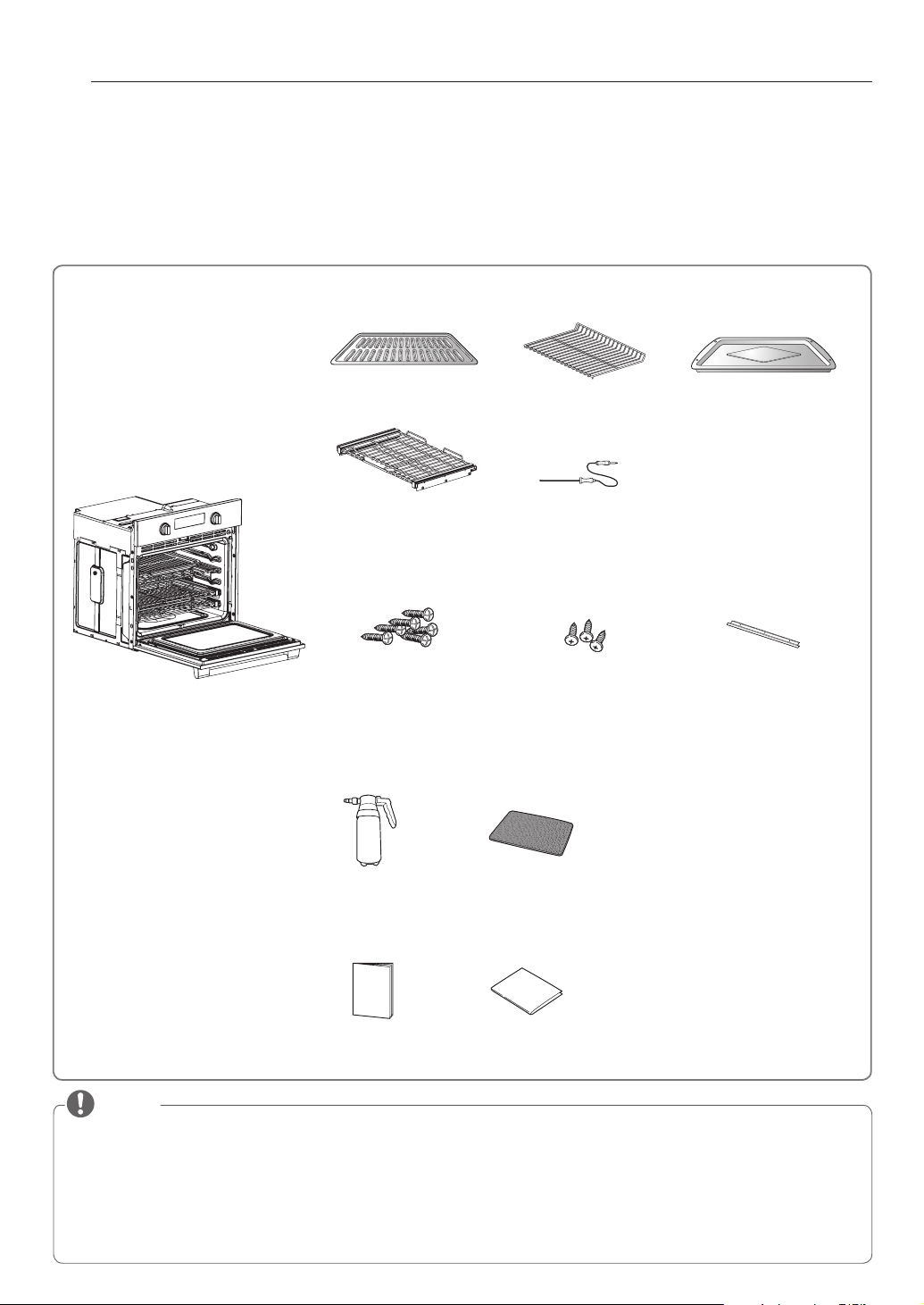
8
DESCRIPCIÓN GENERAL DE LOS PRODUCTOS
DESCRIPCIÓN GENERAL DE LOS PRODUCTOS
ACCESORIOS
Asegúrese de que todas las piezas estén incluidas antes de comprar el producto.
NOTA
y
Comuníquese con el Centro de Atención al Cliente de SIGNATURE KITCHEN SUITE en caso de que falte algún accesorio.
y
Por su seguridad y para lograr una óptima durabilidad del producto, utilice únicamente componentes autorizados.
y
El fabricante no será responsable por el mal funcionamiento del producto o por accidentes causados por el uso de componentes o
piezas no autorizadas, compradas por separado.
y
Las imágenes incluidas en esta guía pueden diferir de los componentes y accesorios reales, y pueden ser sujetas a modificaciones
por parte del fabricante a los fines de mejora del producto sin necesidad de previo aviso.
y
No quite el estante telescópico ubicado en el empaque de la base. Los estantes telescópicos se fijan de forma separada en las
partes superior e inferior del horno.
HORNO ELÉCTRICO DE CONVECCIÓN EMPOTRADO
Botella con
Atomizador
(1 de cada uno)
Manual del usuario
Manual
Accesorios para Limpieza
Esponja limpiadora
que no raya
(1 de cada uno)
Manual de
instalación
Accesorios para la instalación
Accesorios para cocinar
Rejilla
Grille télescopique
(2 cada uno)
Bandejas de servicio pesado
(Estante estandar)
(1 cada uno)
Sonde Thermique
Asadera
6 tornillos para madera
para montaje
(4 necesarios para la
instalación y 2 extra)
3 tornillos para el
reborde inferior
(3 necesarios para la
instalación)
Reborde inferior de metal

9
DESCRIPCIÓN GENERAL DE LOS PRODUCTOS
ESPAÑOL
DESCRIPCIÓN GENERAL DE LA COCINA
Asegúrese de entender los nombres y función de cada pieza.
* A lo largo de este manual, las características y apariencia del producto pueden variar dependiendo de su modelo.
NOTA
y
El modelo y número de serie se pueden verificar en la valoración de la etiqueta.
y
Glide Shut™ Door: La función de cierre suave controla el mecanismo de la puerta
del horno. Un sistema que emplea bisagras de nueva generación para acompañar
suavemente la puerta del horno, evitando que se cierre bruscamente, de modo
que se cierra suavemente y en silencio.
Panel de control
Placa de características,
el modelo y número de serie
Espaciador (2 cada uno)
- Uno en cada lado
Reborde inferior de metal
(Ventila)
Interruptor de la puerta
Traba de la puerta
Bandejas estándar (2 cada uno)
Junta
Asadera y rejilla
Puerta del horno
Glide Shut™ Door apagador (1 cada uno)
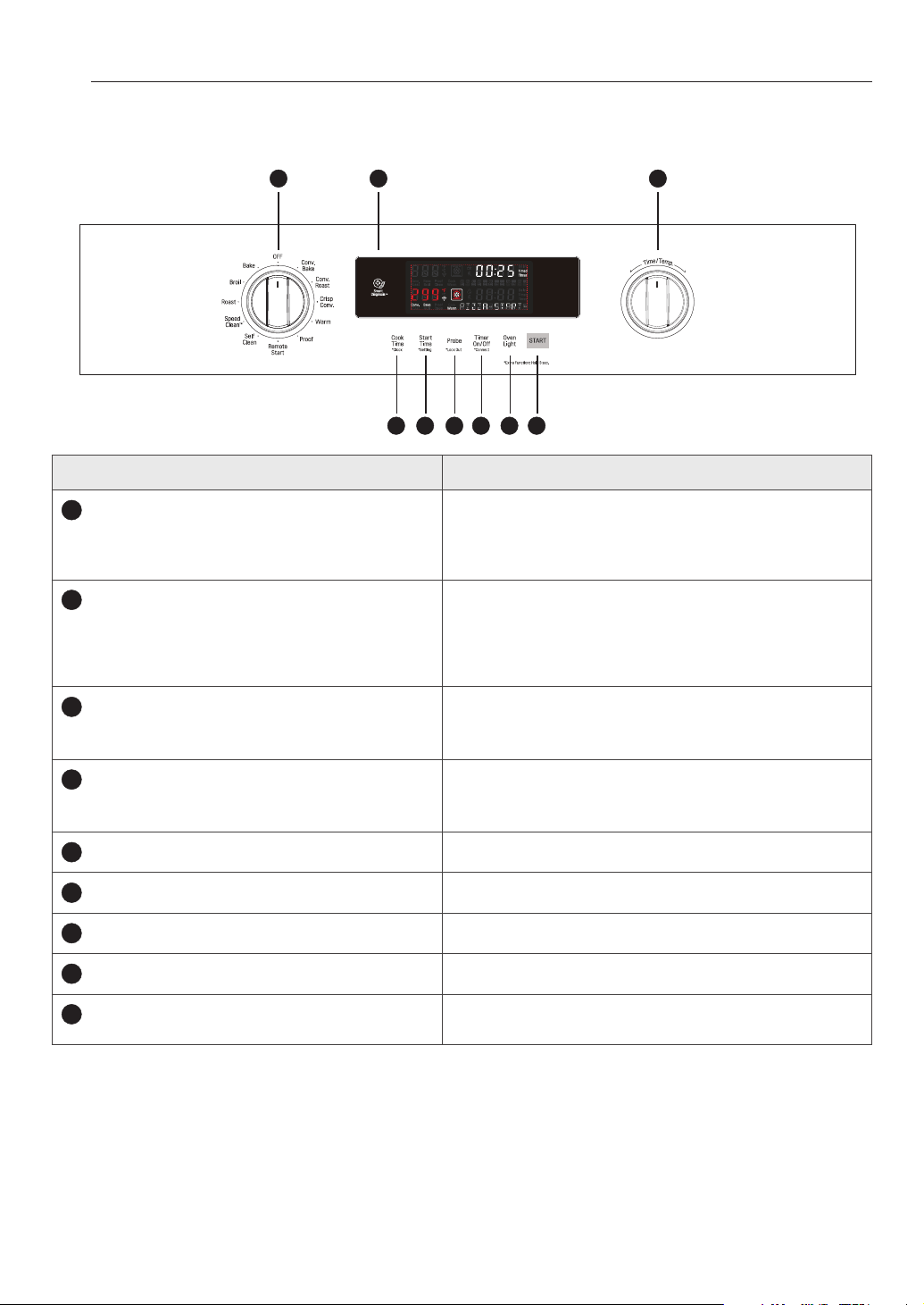
10
DESCRIPCIÓN GENERAL DE LOS PRODUCTOS
DESCRIPCIÓN GENERAL DEL PANEL DE CONTROL
Name Description
1
COOK TIME (Tiempo de cocción)
*CLOCK(Reloj)
- Presione el botón y gire la perilla Time / Temp para establecer la cantidad
de tiempo deseado para los alimentos se cocinen. El horno se apaga cuando
el tiempo de cocción se agote.
- Mantenga el presionado el botón por 3 segundos para fijar la hora del día.
2
START TIME (Tiempo de inicio)
*SETTING (Ajustes)
- Presione el botón y gire la perilla TIME/TEMP (Tiempo/Temperatura)
para ajustar la hora de inicio. El horno comienza a la hora previamente
establecida.
- Mantenga presionado el botón por tres segundos para seleccionar y ajustar
las configuraciones del horno.
3
PROBE(Sonda)
*LOCKOUT(Bloqueo)
- Presione este botón para seleccionar la función PROBE.
- Mantenga presionado el botón por 3 segundos para activar la función
LOCKOUT.
4
TIMER ON/OFF (Temporizador encendido / apagado)
*Connect(Conectarlo)
- Pulse el botón para ajustar o cancelar el temporizador en el horno.
- Mantenga presionado el botón por 3 segundos para conectarlo a una red
Wi-Fi.
5
OVEN LIGHT
Presione este botón para encender y apagar la luz de horno.
6
START (Inicio)
Presione este botón para iniciar todas las funciones del horno.
7
SMART DIAGNOSE(Diagnóstico inteligente)
Uso durante la función de Smart Diagnosis.
8
OVEN MODE KNOB (Perilla de modo del horno superior)
Gire la perilla para seleccionar el modo de funcionamiento del horno.
9
Time/Temp KNOB
Gire la perilla para ajustar la temperatura o el tiempo de cocción para el
horno.
1 2 3 4 5 6
98 7
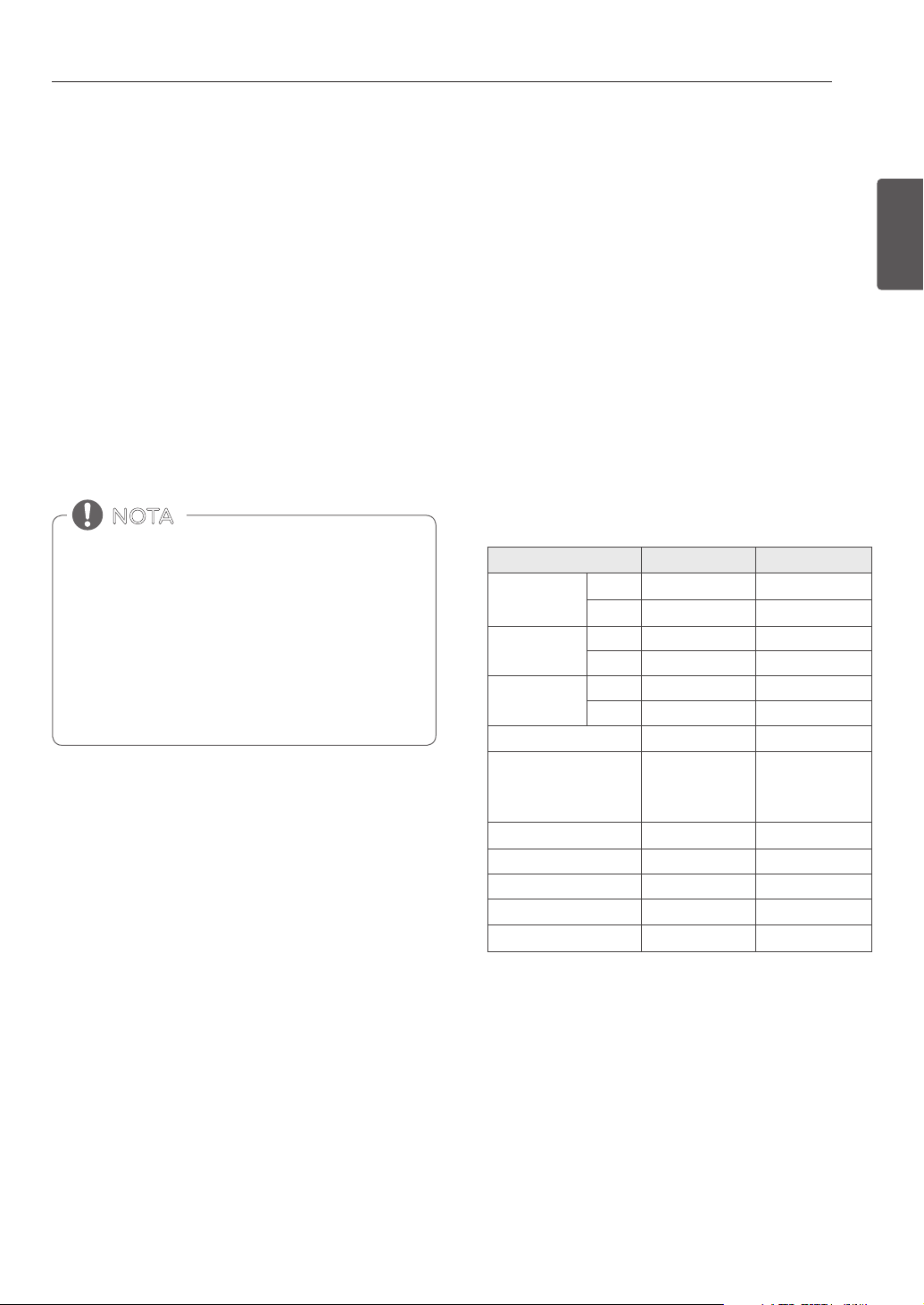
11
CARACTERÍSTICAS
ESPAÑOL
CARACTERÍSTICAS
RELOJ
Debe configurarse el reloj con la hora correcta del día en
el orden correcto para que las funciones de temporización
automática del horno funcionen correctamente.
1. Colocar ambas perrillas de modo del horno en la posición
OFF.
2. Mantenga pulsado COOK TIME durante 3 segundos.
3. Gire la perilla Time/Temp superior o inferior para
seleccionar el tiempo deseado. Gire el mando hacia la
derecha para aumentar el tiempo y hacia la izquierda para
disminuir el tiempo.
4. Presione START (iniciar). Esto ingresa la hora e inicia el
reloj.
• No puede modificarse la hora del día durante el
Horneado Temporizado o un ciclo de Auto-Limpieza.
• Para ver la hora del día cuando la pantalla está
mostrando otra información, presione CLOCK.
• La pantalla vuelve a su configuración original sí START
no es presionado dentro del rango de 25 segundos
después de de haber configurado el tiempo.
• Si la hora de la pantalla está parpadeando, podría
haberse producido una interrupción eléctrica. Vuelva a
configurar la hora.
NOTA
Configurar el modo horario en el reloj
(12 o 24 horas.)
Su control está configurado para usar un reloj de 12 horas. Si
usted prefiere tener un reloj de 24 horas, siga los siguientes
pasos.
1. Colocar ambas perrillas de modo del horno inferior y
superior en la posición OFF.
2. Mantenga pulsado START TIME durante 3 segundos.
3. Gire la perilla Time/Temp al modo horario deseado en el
reloj.
4. Presione START (iniciar) para aceptar el cambio.
Corte de energía
Si puede verse una hora destellando en la pantalla, se ha
experimentado un corte de energía. Reconfigure el reloj.
Presione cualquier botón o gire cualquier perilla para
reconfigurar. Ingrese la hora correcta presionando los botones
numéricos adecuados. Presione START (iniciar).
Configuraciones Predeterminadas Mínimas y
Máximas
Todas las características enumeradas tienen una configuración
de tiempo o temperatura máxima que puede ingresarse en
el control. Suena un pitido cada vez que se pulsa un botón de
control.
dos tonos cortos sonará si la entrada de la temperatura o el
tiempo están por debajo del mínimo o por encima del máximo
de las configuraciones para la función.
FEATURE MIN. TEMP. /TIME MAX. TEMP. / TIME
RELOJ DE TIEMPO
12 Hr. 1:00 Hr. / Min. 12:59 Hr. / Min.
24 Hr. 0:00 Hr. / Min. 23:59 Hr. / Min.
TIMER
12 Hr. 0:01 Min. 11:59 Hr. / Min.
24 Hr. 0:01 Min. 11:59 Hr. / Min.
PREPARACION DE
TIEMPO
12 Hr. 0:01 Min. 11:59 Hr. / Min.
24 Hr. 0:01 Min. 11:59 Hr. / Min.
HORNEAR/ROSTIZAR
170
°F
/ 80
°C
550
°F
/ 285
°C
CONVECCIÓN PARA HORNEAR
/ROSTIZADO POR CONVECCIÓN
/CONVECCIÓN TOSTAR
170
°F
/ 80
°C
550
°F
/ 285
°C
ASAR Lleno / Centro
Low (350
°F
) High (550
°F
)
AUTO LIMPIEZA 3Hr. 5Hr.
PRUEBA 0:01 Min. 11:59 Hr. / Min.
TIBIO
Low (140
°F
) High (200
°F
)
SONDA
80
°F
/ 27
°C
210
°F
/ 100
°C

12
CARACTERÍSTICAS
TIMER ON/OFF (TEMPORIZADOR
ENCENDIDO/APAGADO)
TIMER ON/OFF sirve como temporizador adicional en al cocina y
emitirá una señal acústica cuando se haya agotado el tiempo. No
se inicia o deja de cocinar. La función TIMER ON/OFF se puede
usar durante cualquiera de las funciones de control del horno.
El temporizador se puede utilizar de forma independiente para
cada uno de ellos.
Configuración del Temporizador
1. Colocar ambas perrillas de modo del horno en la posición
OFF.
2. Presione TIMER ON/OFF, y en la pantalla aparecerá 0:00
con las siglas
HR
también TIMER parpadeará en la pantalla.
3. Gire la perilla Time/Temp para ajustar la hora deseada.
Gire el mando hacia la derecha para aumentar el tiempo y
hacia la izquierda para disminuir el tiempo.
4. Presiona TIMER ON/OFF para iniciar el temporizador. En
la pantalla aparecerá el tiempo ajustado en decremento.
5. Cuando el tiempo configurado haya terminado, End (fin)
aparecerá en la pantalla. Los tonos del indicador sonarán
cada 15 segundos hasta que se pulse TIMER ON/OFF.
6. Para cancelar el temporizador, presione TIMER ON/OFF.
En la pantalla aparecerá la hora del día.
CONVERSIÓN AUTOMÁTICA DE
CONVECCIÓN
Al cocinar con “ciclo de convección” Conv. Bake, Conv.
Roast, and Crisp Conv. la temperatura del horno se reduce
automáticamente a 25°F(14°C). La pantalla mostrará el
cambio de temperatura.A esta característica se le llama
AUTO CONVERSION (conversión automática).
Su estufa viene con esta característica activada.
Para desactivar la función de conversión automática, haga lo
siguiente.
1. Colocar ambas perrillas de modo del horno inferior y
superior en la posición OFF.
2. Mantenga presionado por tres segundos START TIME.
Después presione START TIME una vez. Auto aparecerá en
la pantalla.
3. Gire la perilla Time/Temp para activar o desactivar la
función.
4. Presione START para aceptar el cambio.
Si el botón TIMER ON/OFF no es presionado, el
temporizador volverá automáticamente a la hora del
día.
NOTA
Si no se muestra el tiempo restante en la pantalla,
recupérelo pulsando TIMER ON/OFF.
- Presione TIMER ON/OFF una vez para establecer el
tiempo en horas y minutos.
- Presione TIMER ON/OFF dos veces para ajustar el
tiempo en minutos y segundos.
NOTA

13
CARACTERÍSTICAS
ESPAÑOL
No utilice termometros, como los que se venden en las
tiendas, para verificar la configuracion de temperatura del
horno. En su lugar, empezar por subir o bajar el termostato
(8 ° C) 15 ° F. Pruebe el horno durante una semana con el
nuevo ajuste y ajuste de nuevo si es necesario, utilizando
el primer ajuste como un indicador.
NOTA
AJUSTES PARA LA TEMPERATURA
DEL HORNO
Este horno puede cocinar de manera diferente al que reemplazó.
Utilice el horno durante unas semanas para familiarizarse
más con él antes de cambiar los ajustes del termostato. Si el
horno constantemente no cocina completamente o deja la
comida recocida siga las siguientes instrucciones para ajustar el
termostato.
Ajustar la Temperatura del Horno
1. Colocar ambas perrillas de modo del horno en la posición
OFF.
2. Mantenga presionado por tres segundos START TIME.
Después presione START TIME varias veces hasta que
AdJU aparezca en la pantalla.
3. Gire la perilla Time/Temp a para establecer el monto de
ajuste de la temperatura deseada. Presione START TIME
para alternar entre valores positivos y negativos.
Ejemplo: Para aumentar el termostato en 15 grados, gire
la perilla hacia la derecha para seleccionar 15.
Para bajar el termostato en 15 grados, gire la perilla hacia
la derecha para seleccionar 15, a continuación, pulse
START TIME para seleccionar un valor negativo (-15).
4. Presione START para aceptar el cambio.
• Este ajuste no afectará las temperaturas de asado o Auto-
Limpieza. El ajuste se guardará en la memoria incluso
ante la falta de suministro eléctrico. La temperatura del
horno puede aumentarse (+) o disminuirse (-) hasta 35°F
o 19°C.
• Una vez que se aumente o disminuya la temperatura, la
pantalla mostrará la temperatura ajustada hasta que se
ajuste nuevamente.
• El ajuste del termostato para Bake (horneado) también
afectará el horneado por convección, el rostizado por
convección, rostizar o convección tostar.
NOTA
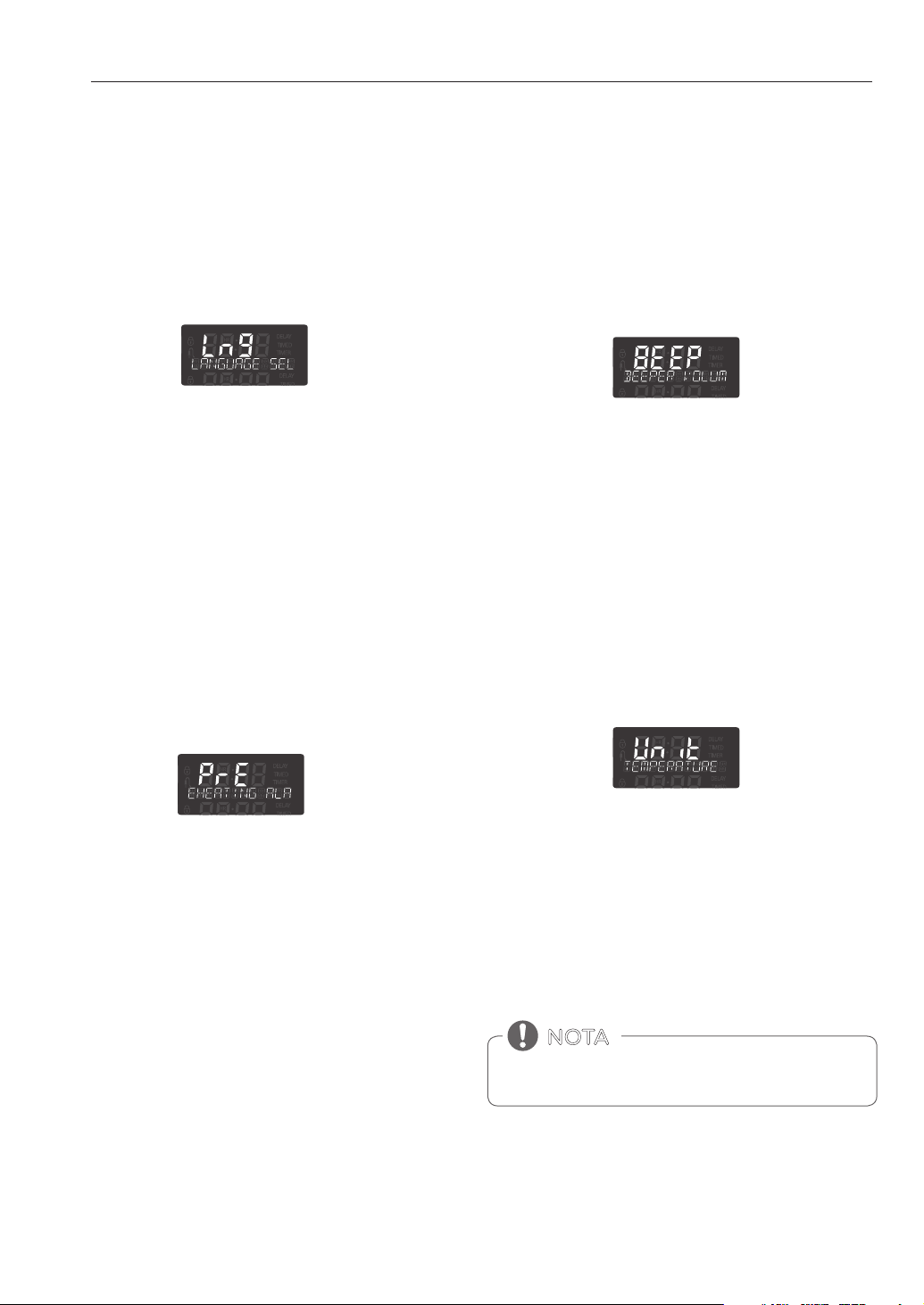
14
CARACTERÍSTICAS
LUZ DE ALARMA DE
PRECALENTAMIENTO
Cuando el horno alcanza su temperatura programada, la luz
de alarma de precalentamiento parpadeará hasta que se abra
la puerta del horno. Usted puede activar o desactivar la luz de
alarma de precalentamiento.
1. Colocar ambas perrillas de modo del horno en la posición
OFF.
2. Mantenga presionado por tres segundos START TIME.
Después presione START TIME varias veces hasta que PrE
aparezca en la pantalla.
3. Gire la perilla Time/Temp para activar o desactivar la
función.
4. Presione START (iniciar) para aceptar el cambio.
IDIOMA
El idioma predeterminado de la pantalla es el inglés. Puede
cambiarse a español o francés.
1. Colocar ambas perrillas de modo del horno en la posición
OFF.
2. Mantenga presionado por tres segundos START TIME.
Después presione START TIME varias veces hasta que Lng
aparezca en la pantalla.
3. Gire la perilla Time/Temp para ajustar el idioma deseado.
4. Presione START (iniciar) para aceptar el cambio.
VOLUMEN DE LA ALERTA SONORA
El volumen de la alarma se puede ajustar a tres posibles niveles
de volumen, Alto, Bajo y Apagado.
1. Colocar ambas perrillas de modo del horno en la posición
OFF.
2. Mantenga presionado el boton START TIME. Despues
presione START TIME varias veces hasta que BEEP
aparezca en la pantalla.
3. Gire la perilla Time/Temp para seleccionar el volumen
deseado.
4. Presione START (iniciar) para aceptar el cambio.
1. Colocar ambas perrillas de modo del horno en la posición
OFF.
2. Mantenga presionado START TIME por 3 segundos.
Después presione START TIME varias veces hasta que
Unit aparezca en la pantalla.
3. Gire la perilla Time/Temp para seleccionar °F(Fahrenheit)
o °C(Celsius).
4. Presione START (iniciar) para aceptar el cambio deseado.
FAHRENHEIT O CELSIUS
El control del horno se está configurado por defecto para
mostrar la escala de temperatura Fahrenheit. Para mostrar la
escala Celsius, siga estas instrucciones.
LUZ DEL HORNO
La luz interior del horno se enciende automáticamente cuando
se abre la puerta. También puede encenderse y apagarse
manualmente la luz del horno presionando el botón OVEN
LIGHT.
No se puede encender la luz del horno si esta activada la
funcion Auto-limpieza.
NOTA
15
CARACTERÍSTICAS
ESPAÑOL
BLOQUEO
La función de bloqueo bloquea el horno automáticamente y
evita que la mayoría de los controles del horno se activen. No
desactiva el reloj, el temporizador ni la luz interior del horno.
1. Colocar ambas perrillas de modo del horno en la posición
OFF.
2. Mantenga presionado PROBE por 3 segundos.
3. La melodía de bloqueo se escuchará, OVEN LOCKOUT
aparecerá en la pantalla y DOOR LOCKED parpadeará en la
pantalla.
4. Una vez que la puerta esté bloqueada, el indicador DOOR
LOCKED dejará de parpadear y permanecerá junto con el
ícono de bloqueo.
.
5. Para desactivar la funció Horno, presione y mantenga
PROBE durante tres segundos. Sonará la melodía de
desbloqueo, y UNLOCKING aparecerá en la pantalla hasta
que se desbloqueen los controles.
Ajustando el horno a comienzo retrasado
El ejemplo siguiente es para hornear a 300 ° F y empezar a
hornear a las 4:30. Asegúrese de que el reloj está ajustado para
la hora correcta del día.
1. Gire la perilla de modo del horno superior o inferior
para seleccionar el modo BAKE. 350°F aparecerá en la
pantalla.
2. Gire la perilla Time/Temp para ajustar la temperatura
deseada.
Por ejemplo: Gire la perilla Time/Temp hacia la izquierda
hasta que 300 ° F aparezca en la pantalla.
3. Presione START TIME.
4. Fije el tiempo de inicio: Gire la perilla Time/Temp en
sentido derecho hasta que 4:30 aparezca en la pantalla.
5. Presione START. Se escuchará un tono corto y el horno
comenzará a hornear.
HORA DE INICIO (COCCIÓN
temporizada retardada)
El temporizador automático de la función COCCIÓN
TEMPORIZADA RETARDADA ENCENDERÁ y APAGARÁ el horno
en el horario que usted seleccione. Esta función puede utilizarse
únicamente con los: Modos HORNEAR, HORNEADO POR
CONVECCIÓN y ASADO POR CONVECCIÓN.
El horno continuará cocinando por la cantidad de tiempo
congurada y luego se apagará automáticamente. Cuando haya
transcurrido el tiempo de cocción:
y
END y la hora del día se mostrará en la pantalla.
y
El tono indicador de finalización de cocción sonará cada 60
segundos hasta que la perrilla del horno superior o inferior
se encuentre en la posición OFF.
y
Cuando se configura WARM, la función calentar se activa
luego de cocinar por el tiempo establecido.
• Para cancelar la función COCCIÓN TEMPORIZADA
RETARDADA, gire la perilla OVEN MODE hasta la posición
OFF.
• Para cambiar el horario de cocción, repita los pasos 3-4 y
presione START.
• Si el reloj de su horno está congurado en 12 horas,
usted podrá postergar el horario de cocción hasta
12 horas. Si el reloj de su horno está congurado en
24 horas, usted podrá postergar el horario de cocción
hasta 24 horas.
NOTA
• Utilice el reloj temporizador automático al cocinar
carnes crudas o congeladas y la mayoría de las frutas y
vegetales. Los alimentos que pueden descomponerse
fácilmente como la leche, huevos, pescado, carne o aves
deben ser enfriados en el refrigerador. Incluso cuando
han sido enfriados, no deben permanecer en el horno
durante más de 1 hora antes de iniciar la cocción, y se los
debe retirar rápidamente luego de que la cocción haya
terminado.
• Ingerir alimentos en mal estado puede producir
intoxicaciones.
PRECAUCIÓN
16
CARACTERÍSTICAS
TIEMPO DE COCCIÓN (COCCIÓN
TEMPORIZADA)
El horno se enciende inmediatamente y cocina los alimentos
durante un período de tiempo seleccionado. Al finalizar el
tiempo de cocción, el horno se apaga automáticamente.
Configuración de la función COCCIÓN
TEMPORIZADA
El ejemplo siguiente es para hornear a 300 ° F durante 30
minutos.
1. Ajuste el reloj en la hora correcta del día.
2. Gire la perilla de modo del horno para seleccionar BAKE,
aparecerá 350°F en la pantalla.
3. Fije al temperatura del horno.
Para este ejemplo, gire la perilla Time/Temp hacia la
izquierda para seleccionar 300 ° F.
4. Presione COOK TIME (tiempo de cocción). TIMED
(temporizado) destellará en la pantalla. BAKE (hornear),
0:00 y 300°F aparecerán en la pantalla.
5. Configure el tiempo de horneado deseado.
Para este ejemplo, gire la perilla Time/Temp hacia la
derecha hasta 30:00 aparece en la pantalla.
6. Presione START (iniciar). El horno se encenderá, y en la
pantalla podrá verse la cuenta regresiva de cocción. El
horno continuará cocinando por el tiempo programado,
luego se apagará de manera automática, a menos que se
configure la característica WARM (calentar). Consulte la
sección Cómo configurar la característica WARM (calentar)
en la página 23.
Para configurar la función CALENTAR para que se active al
finalizar el ciclo de cocción temporizada, repita los pasos
1-4 y luego presione el botón WARM. Aparecerá WARM
en la pantalla. (Remítase a la sección «CALENTAR» en la
página anterior)
NOTA
Cuando haya transcurrido el tiempo de cocción:
• END OF CYCLE (fin de ciclo) y la hora actual aparecerán
en la pantalla. El horno se apagará automáticamente.
• El control seguirá haciendo sonar la melodía de fin de
cocción una vez por minuto hasta que la perilla del
horno sea girada a cualquier posición.
Para cambiar el tiempo de cocción mientras el horno
está en funcionamiento
Este ejemplo es para cambiar el tiempo de cocción de
30 minutos a 1 hora y 30 minutos.
1. Presione COOK TIME (tiempo de cocción).
2. Establecer el nuevo tiempo de cocción.
Para este ejemplo, gire la perilla de TIME/TEMP en sentido
horario hasta la 01
HR
:30 aparezca en la pantalla.
3. Presione START para aceptar el cambio o espere
10 segundos sin presionar y la pantalla se reiniciará a su
tiempo original de cocción.
El tiempo de horneado puede programarse con cualquier
cantidad de tiempo entre 1 minuto hasta 11 horas y 59
minutos.
NOTA
• Durante el modo de precalentamiento, el ventilador de
convección funciona constantemente para hacer circular
el aire caliente. El ventilador de convección se apaga
automáticamente después de alcanzar la temperatura
predeterminada.
• Después de finalizado cualquier ciclo de cocción, se
encenderán ventiladores de refrigeración para proteger
el panel de control. Esto es normal.
NOTA
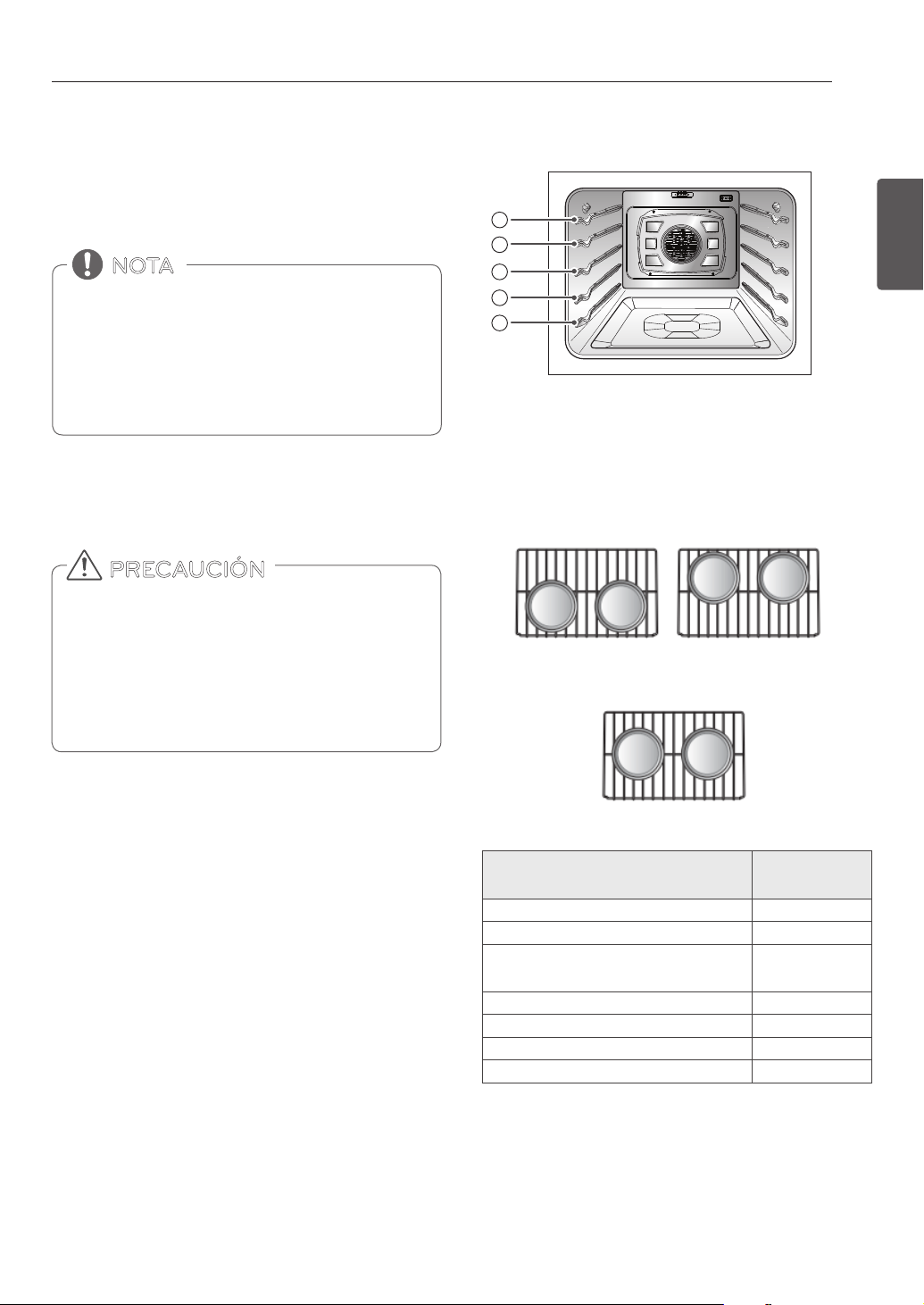
17
USO DEL HORNO
ESPAÑOL
Colocación del Estante y la Bandeja
Si usted cocina con dos estantes
Coloque los estantes estandar en las posiciones B y D.
Coloque los utensilios de cocina, como se muestra en la figura
abajo. Si está horneando con más de una bandeja, colóquelas
de forma tal que cada una tenga al menos entre 1” y 1 1/2” de
espacio de aire alrededor.
USO DEL HORNO
ANTES DE USAR DEL HORNO
SACAR Y VOLVER A COLOCAR LOS
ESTANTES DEL HORNO
• Volver a colocar los estantes del horno antes de encender
el horno para evitar quemaduras.
• NO cubra los estantes con papel de aluminio o cualquier
otro material, ni coloque nada sobre el fondo del horno.
Hacerlo podría causar un horneado deficiente y podría
dañar la parte inferior del horno.
• Acomode los estantes del horno únicamente cuando el
horno este frío.
PRECAUCIÓN
Retirar los estantes
1. Usando guantes de cocina, agarre el estante del horno.
2. Tire del estante hacia afuera en forma recta hasta que haga
tope.
3. Levante la parte delantera del estante.
4. Tire del estante hacia afuera.
Volver a colocar los estantes:
1. Usando guantes de cocina, coloque el extremo del estante
en el soporte.
2. Incline el extremo delantero del estante hacia arriba.
3. Empuje el estante hacia adentro.
4. Controle que el estante esté colocado correctamente.
Estante estandar
(Posicion B)
Estante estandar
(Posicion D)
Horneado con parrillas múltiples
• La temperatura registrada por un termómetro de horno
puede diferir del ajuste de la temperatura real del horno.
• Es normal que el ventilador de convección funcione
mientras se precalienta durante un ciclo de horneado
regular.
• El motor del ventilador de convección se puede ejecutar
periódicamente durante un ciclo de horneado regular.
NOTA
A
B
C
D
E
Estante estandar
(Posicion C)
hornear solo rack
Venteo del horno
y Las zonas cercanas al venteo pueden calentarse durante el
funcionamiento y podría causar quemaduras.
y No bloquee el oricio del venteo.
y Evite colocar plásticos cerca del venteo ya que el calor podría
deformar o derretir el plástico.
y Es normal que se observe vapor cuando se está cocinando
comidas muy húmedas.
Tipo de alimento
Posicion de la
bandeja
Pastel “Angel food”, pasteles congelados A
Pasteles Bundt o de libra B
Bizcochos, muffins, brownies, galletas,
magdalenas, pasteles de capas, pasteles
C
Estofados C
Pavo, asado o jamon A
Pizza congelada C
Pollo rostizado B
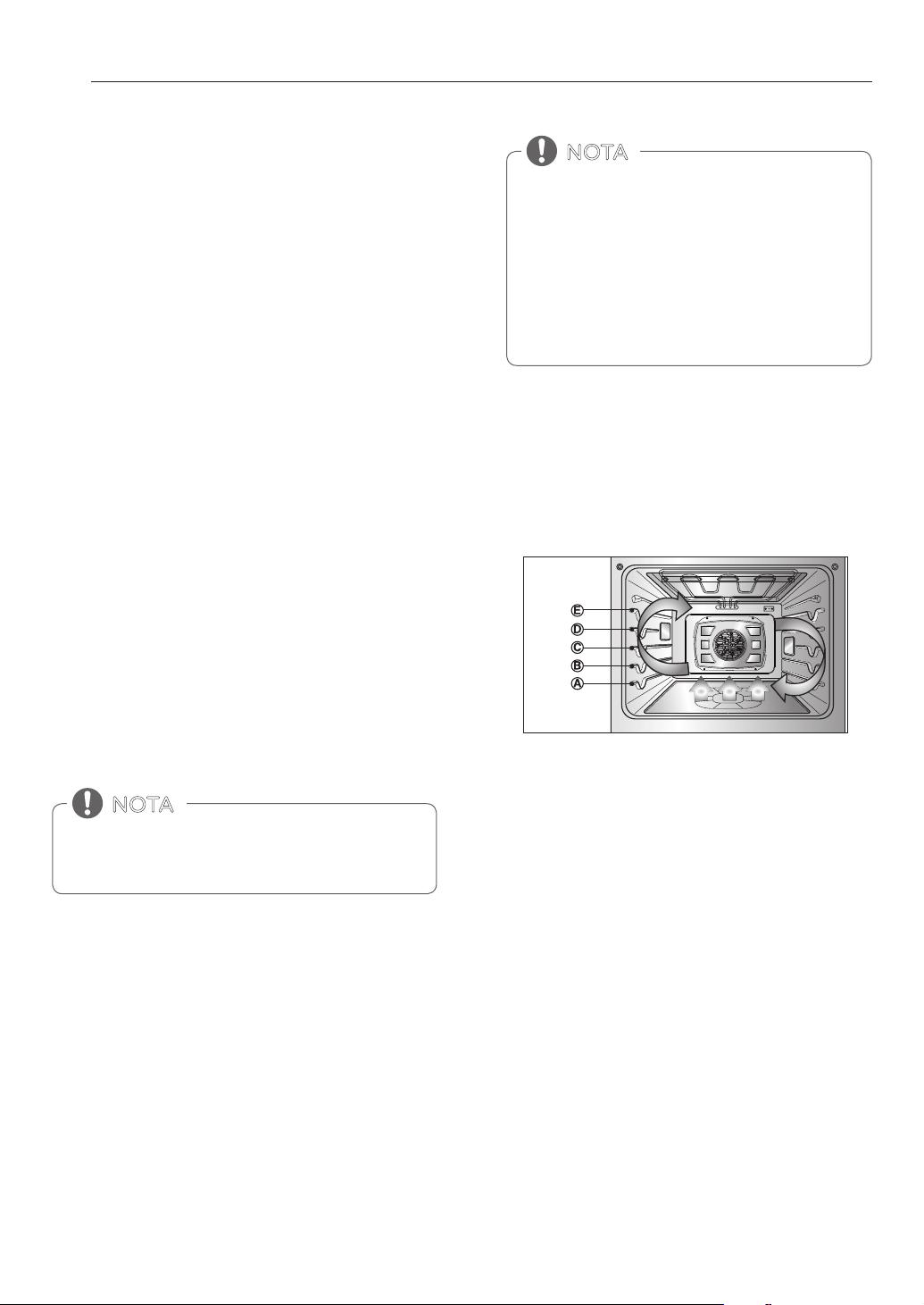
18
USO DEL HORNO
BAKE (HORNEADO)
BAKE se usa para preparar alimentos tales como pastelería
panes, cazuelas. Puede programarse el horno para que hornee a
cualquier temperatura desde 170° F (80° C) hasta 550°F (285° C). La
temperatura predeterminada es de 350° F (175° C).
Configuración de la función BAKE
1. Gire la perrilla de modo del horno en la posición BAKE.
2. Fije la temperatura.
Por ejemplo, gire la perilla Time/Temp hacia la derecha hasta
que aparezca 375 ° F en la pantalla.
3. Presione START.
La palabra 'PREHEAT' y 100 ° F aparece en la pantalla. A medida que
el horno se precaliente, se muestra la temperatura que aumenta
de a 5-grados Una vez que el horno alcanza la temperatura
configurada, suena un tono y la luz del horno parpadea.
PRECALIENTA
Coloque los alimentos en el horno después del precalentamiento.
El precalentamiento es necesario para obtener mejores resultados
de cocción.
4. Cuando haya terminado, gire la perilla de modo del horno a la
posición OFF.
5. Quite los alimentos del horno.
CONVECTION BAKE
(HORNEADO POR CONVECCIÓN)
La parte inferior tiene un acabado de esmalte
porcelanizado. Para hacer la limpieza más fácil proteja
ésta parte de derramamientos mediante una charola
para el cocinado de galletas. Esto es particularmente
importante cuando se hornea una tarta de frutas u
otras comidas con alto grado de acidez. Los rellenos de
fruta u otras comidas con alto grado de acidez, pueden
llegar a causar pequeños agujeros y dañar la superficie
del esmalte porcelanizado y deben de ser limpiados
inmediatamente.
NOTA
Cambiar la temperatura durante el Horneado
1. Gire la perilla Time/Temp a restablecer la temperatura del
horno. Por ejemplo, gire la perilla hacia la derecha para
restablecer la temperatura de 375 ° F a 425 ° F.
2. Presione START.
Es normal que el ventilador de convección se active
periódicamente durante un ciclo de horneado normal.
Esto es para asegurar resultados de horneado parejos.
NOTA
Beneficios del horneado por conveccion
Consejos para el Horneado por Convección
y
Las reducciones de tiempo varían en base a la cantidad
y clase de alimentos que se cocinarán. Las galletas y
bizcochos deben hornearse en recipientes sin lados o con
lados muy bajos para permitir que el aire caliente circule
alrededor de los alimentos. Los alimentos horneados
en recipientes con un acabado oscuro se cocinan más
rápido.
y
Cuando utilice el horneado por convección con una sola
bandeja, coloque la bandeja del horno en la posición C.
Si cocina con bandejas múltiples, coloque las bandejas en
la posición B y D.
y
Las galletas, muffins, bizcochos y otros panes rápidos
dan muy buenos resultados cuando se utilizan bandejas
múltiples.
El horneado por convección utiliza un ventilador para hacer
circular el calor del horno en forma pareja y continua dentro
del horno. Esta distribución de calor mejorada permite
unacocción pareja y resultados excelentes utilizando
bandejas múltiples al mismo tiempo. Los alimentos cocidos
en una bandeja de horno única generalmente se cocinan
más rápido y en forma más pareja con el horneado por
convección. La cocción con bandejas múltiples puede
incrementar un poco los tiempos de cocción de algunos
alimentos, pero el resultado total es el ahorro de tiempo. Los
panes y los pastelitos se doran en forma más pareja.
y
Algunos alimentos se cocinan hasta un 25-30% más
rápido, lo que ahorra tiempo y energía.
y
Horneado en bandejas múltiples.
y
No se necesitan recipientes de horneado especiales.
Consejos para el Horneado
Siga la receta o las instrucciones de cocción por convección para
temperatura de horneado, tiempo, y posición de la bandeja. El
tiempo y temperatura de horneado varían dependiendo de los
ingredientes, tamaño y forma de los recipientes de horneado.
y
Para obtener los mejores resultados, hornee los alimentos.
Alimentos en una sola bandeja con un mínimo de 1 a 11/2” de
espacio entre los recipientes y las paredes del horno.
y
Verifique el grado de cocción cuando se haya cumplido el
tiempo mínimo.
y
Utilice recipientes de cocción de metal (con o sin un acabado
antiadherente), vidrio-cerámica resistente al calor, cerámica u
otros recipientes de horneado recomendados para horno.
y
Los recipientes de metal oscuro o los revestimientos
antiadherentes cocinan más rápido y doran mejor Los
recipientes con aislación prolongan ligeramente el tiempo de
cocción en la mayoría de los alimentos.
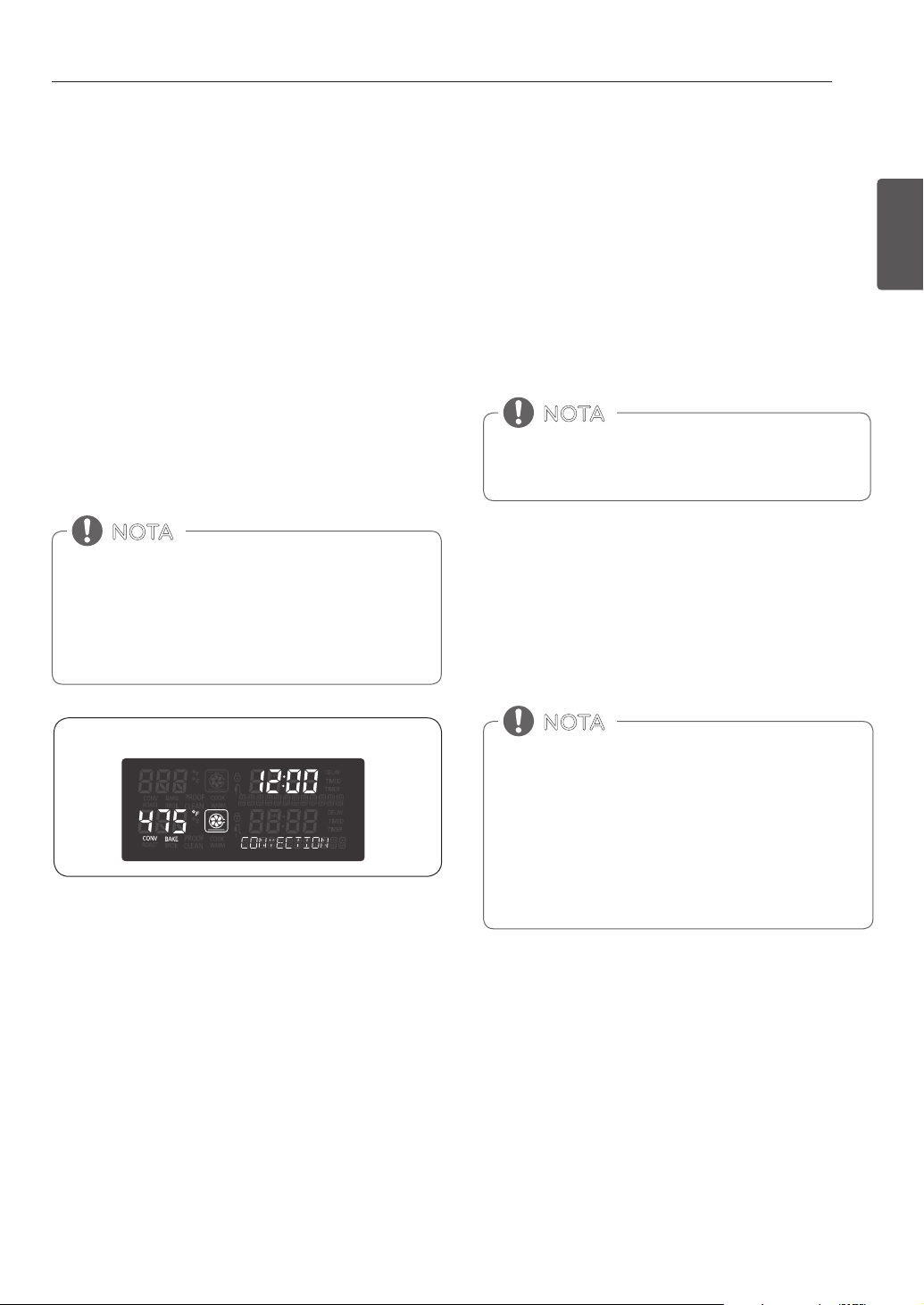
19
USO DEL HORNO
ESPAÑOL
Cambio de la temperatura duramne el Rostizado
Después de finalizado cualquier ciclo de cocción, se
encenderán ventiladores de refrigeración para proteger el
panel de control. Esto es normal.
NOTA
• Los elementos calentadores se apagan inmediatamente
cuando se abre la puerta. Se volveran a encender
aproximadamente 1 segundos despues de que se cierre
la puerta.
• Cuando prepare carnes para rostizar, utilice la asadera y
la rejilla. La asadera retiene derrames de grasa y la rejilla
ayuda a evitar salpicaduras de grasa.
• Gire la perilla de modo del horno hasta la posicion OFF
para cancelar Roast (rostizar) en cualquier momento.
NOTA
Los elementos calentadores y un ventilador se apagan
inmediatamente cuando se abre la puerta. Se volverán a
encender aproximadamente 1 segundos después de que
se cierre la puerta. Gire la perilla OVEN MODE del horno
hasta la posición OFF para cancelar Convection Bake
(horneado por convección) en cualquier momento.
NOTA
Pantallas del modo de convección para hornear
1. Gire la perilla de Time/Temp (Tiempo / Temperatura) para
restablecer la temperatura del horno.
Por ejemplo, gire las manecillas hacia la derecha para
reiniciar la temperatura de 375 ° F a 425 ° F.
2. Presione START.
Configuración de la función CONVECTION BAKE
1. Gire la perilla de modo del horno para seleccionar la
función CONV. BAKE, 350°F aparecerá en la pantalla.
2. Fije la temperatura.
Por ejemplo, Gire la perilla Time/Temp en dirección de las
manecillas del reloj hasta 375°F.
3. Presione START (iniciar). En la pantalla podrá verse
CONV BAKE (Convección para hornear) y la temperatura
convertida comenzando a 100°F(35°C). A medida que se
precalienta el horno, la pantalla mostrará la temperatura
en aumentos de 5 grados. Una vez que el horno
alcance la temperatura deseada, sonará una alarma.
La pantalla mostrará la temperatura del horno auto
convertida(reducida por 25 ° F o 14 ° C).
4. Gire la perilla de modo a la posición OFF para cancelar el
horneado por convección en cualquier momento.
ROSTIZAR
El horno puede programarse para rostizar.
Para configurar la característica de rostizado
1. Gire la perilla de modo del horno para seleccionar la
función ROAST, 350°F aparecerá en la pantalla.
2. Ajuste la temperatura.
Por ejemplo, Gire la perilla Time/Temp en dirección de las
manecillas del reloj hasta 375°F.
3. Presione START.

20
USO DEL HORNO
Los elementos calentadores y un ventilador se apagan
inmediatamente cuando se abre la puerta. Se volverán a
encender aproximadamente 1 segundos después de que
se cierre la puerta.
Cuando prepare carnes para rostizar, utilice la asadera y
la rejilla. La asadera retiene derrames de grasa y la rejilla
ayuda a evitar salpicaduras de grasa. Gire la perilla OVEN
MODE del horno hasta la posición OFF para cancelar
Convection Roast (rostizado por convección) en cualquier
momento.
NOTA
Es normal que los ventiladores de enfriamiento empiecen
a funcionar después del termino de un ciclo de cocción,
para proteger el panel de control.
NOTA
Pantalla del modo ROSTIZADO por CONVECCIÓN
CONVECTION ROAST
(ASADO POR CONVECCIÓN)
Esta característica de rostizado por convección se encuentra
diseñada para brindar un desempeño de cocción óptimo
para rostizar carnes de res y de ave. No es necesario utilizar el
precalentamiento para carnes de res y de ave. El aire caliente
circula alrededor de los alimentos por todos los lados, sellando
los jugos y sabores. Las comidas quedan doradas y crujientes
por afuera y jugosas por dentro. El rostizado por convección es
especialmente bueno para cortes de carne grandes y tiernos.
Configuración de la función CONVECTION ROAST
1. Gire la perilla de modo del horno para seleccionar la
función CONV. ROAST, 350°F aparecerá en la pantalla.
2. Ajuste la temperatura.
Por ejemplo, Gire la perilla Time/Temp en dirección de las
manecillas del reloj hasta 375°F.
3. Presione START (iniciar). En la pantalla podrá verse CONV
ROAST (rostizado por convección) y la temperatura
convertida comenzando a 100°F(35°C). A medida que se
precalienta el horno, la pantalla mostrará la temperatura
en aumentos de 5 grados. Una vez que el horno alcance
la temperatura deseada, sonará una alarma. La pantalla
mostrará la temperatura del horno auto convertida
(reducida por 25 ° F o 14 ° C), CONV ROAST (Rostizado por
convección) el ícono del ventilador.
4. Gire la perilla de modo del horno a la posición OFF para
cancelar Convection Roast (Rostizado) en cualquier
momento.
CONVECCIÓN TOSTAR
Beneficios de la convección tostar:
La característica de convección tostar es mejor para productos
horneados claros y delicados tales como pasteles, tarteletas,
galletas, hojaldres, scones, muffins, bizcochos, panes sin
levadura, etc. El aire caliente que circula mediante un ventilador
distribuye el calor más uniformemente que el movimiento
natural del aire en un horno térmico estándar. Este movimiento
de aire caliente mantiene la cocción de los alimentos más
uniforme, sellando la humedad y generado panes con una
corteza más gruesa. El elemento de calentamiento por
convección tostar calienta más rápido, reduciendo el tiempo de
cocción hasta un 30 por ciento.
Consejos para una convección tostar
y
Las reducciones de tiempo varían en base a la cantidad y clase
de alimentos que se cocinarán. Elija bandejas para galletas
sin lados y asaderas con lados muy bajos para permitir que el
aire caliente circule alrededor de los alimentos. Los alimentos
horneados en recipientes con un acabado oscuro se cocinan
más rápido.
y
Cuando utilice la convección tostar con una sola bandeja,
coloque la bandeja del horno en la posición C. Si cocina con
bandejas múltiples, coloque las bandejas del horno en la
posición B y D.
y
Es importante destapar los alimentos para que las
supercies de los alimentos permanezcan expuestas
al aire que circula, por lo que los alimentos quedarán
dorados y crujientes.
y
Mantenga la pérdida de calor a un mínimo al abrir el horno
sólo cuando sea necesario.
21
USO DEL HORNO
ESPAÑOL
Los elementos calentadores y un ventilador se apagan
inmediatamente cuando se abre la puerta. Se volverán a
encender aproximadamente 1 segundos después de que
se cierre la puerta.
Gire la perilla de modo del horno a la posición OFF para
cancelar la función convección tostar en el momento que
desee.
NOTA
Es normal que los ventildores de enfriamiento empiecen a
funcionar después del termino de un ciclo de cocción, para
proteger el panel de control.
NOTA
Ajuste del modo de Convección tostar
1. Gire la perilla de modo del horno para selccionar la
función CRISP CONV. 350°F aparecerá en la pantalla.
2. Ajuste la temperatura.
Por ejemplo, Gire la perilla Time/Temp en dirección de las
manecillas del reloj hasta 375°F.
3. Presione START (iniciar). En la pantalla podrá verse
CONV. y la temperatura convertida comenzando a
100°F. A medida que se precalienta el horno, la pantalla
mostrará la temperatura en aumentos de 5 grados.
Una vez que el horno alcance la temperatura deseada,
sonará una alarma. La pantalla mostrará la temperatura
autoconvertida del horno (reducida en un 25 ° F o 14 ° C)
4. Gire la perilla de modo del horno a la posición OFF para
cancelar la función convección tostar.
Ajuste del modo ASADO A LA PARRILLA
1. Coloque los alimentos sobre la rejilla de la asadera.
2. Gire la perilla de modo del horno para seleccionar la
función BROIL, "ALTA -- PRESIONE -START- O INGRESE NIVEL
/ BAJA - ALTA" aparecerá en la pantalla.
3. Gire la perilla Time/Temp para seleccionar entre Full Broil
(Asado Completo) (High(Alto),Med(Medio),Low(Ba
jo)) y Center Broil (Asado Central) (High(Alto),Med(M
edio),Low(Bajo)) Full Broil (Asado Completo) Usa todos
los asadores y el Center Broil (Asado Central) Usa solo el
asador central.
4. Presione START.
5. Si se usa la función de Asado a la Parrilla, es mejor permitir
que el horno se precaliente durante cinco minutos antes
de cocinar los alimentos. Ase un lado del alimento hasta
que se dore, dé vuelta y cocine el otro lado del alimento.
6. Cuando el asado haya terminado, gire la perilla de modo
del horno hasta la posición OFF para cancelar esta función
en el momento que desee.
BROIL (ASADO A LA PARRILLA)
El asado utiliza un calor intenso y radiante para cocinar los
alimentos. Los elementos de asado tanto internos como externos
se calientan durante el asado completo. Sólo el elemento
de asado interno se calienta durante el asado de centro. Los
elementos se encienden y apagan a intervalos para mantener la
temperatura del horno. La sonda de carne no puede utilizarse en
este modo.
Esta cocina ha sido diseñada para asar con la puerta
abierta. La puerta tiene una posición de tope para asar. Es mejor
permitir que el horno se precaliente durante cinco minutos antes
de cocinar los alimentos.
• NO utilice una asadera sin una rejilla. El aceite puede
provocar un incendio por grasa.
• NO cubra la rejilla y la asadera con papel de aluminio.
Hacerlo provocará un incendio.
• Utilice siempre una asadera y rejilla para el drenaje del
exceso de grasa. Esto ayudará a reducir las salpicaduras,
el humo, y las llamaradas.
PRECAUCIÓN
• Si ocurre un incendio dentro del horno, deje cerrada la
puerta y apague el horno. Si el incendio continúa, arroje
bicarbonato de sodio o utilice un extintor de incendios.
• NO eche agua o harina sobre el incendio.
• La harina puede ser explosiva y el agua puede propagar
un incendio de grasa y provocar lesiones personales.
PRECAUCIÓN
Su horno esta disenado para asado con PUERTA CERRADA
.
NOTA
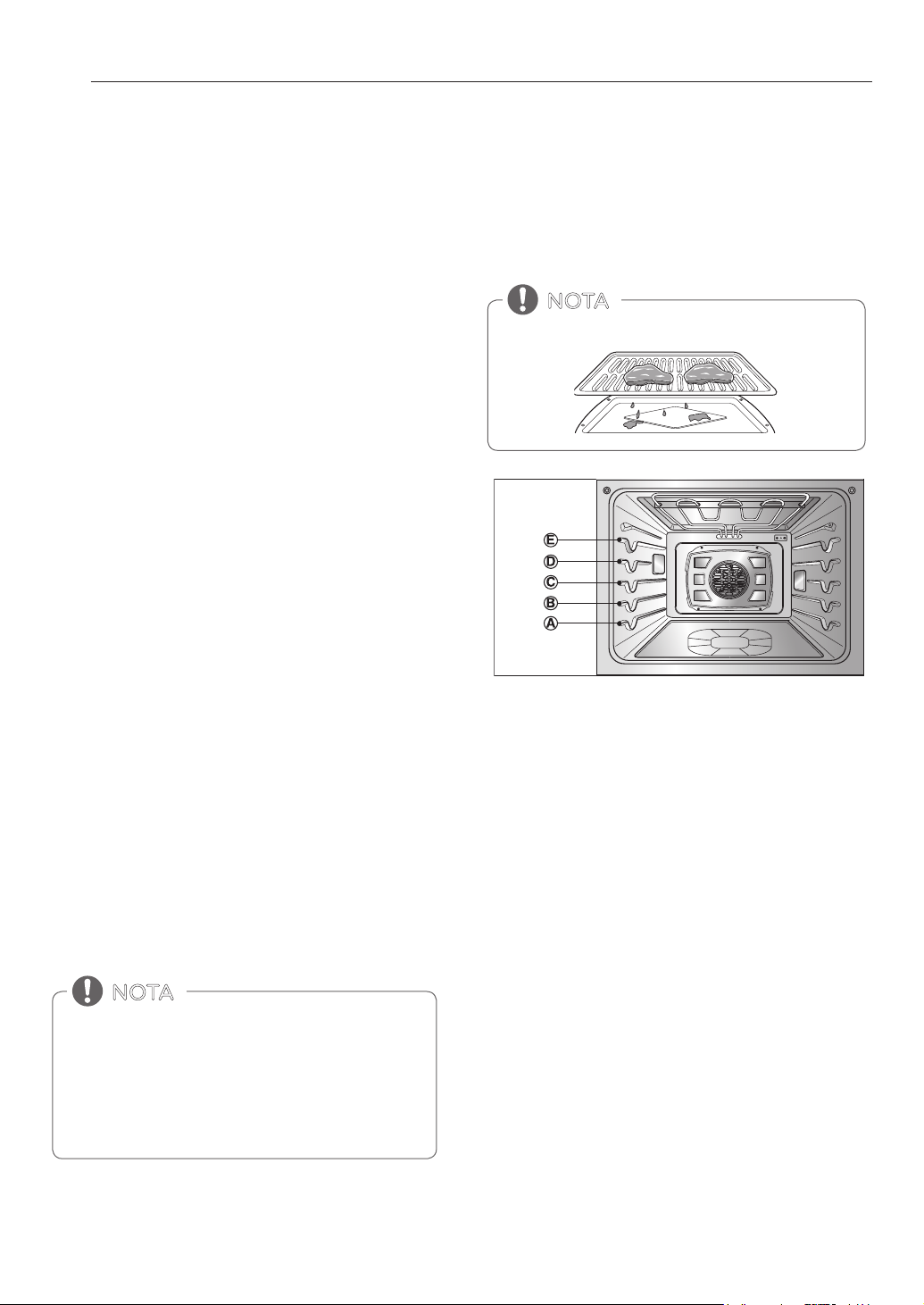
22
USO DEL HORNO
Humo
Debido al calor intenso relacionado con el asado, es normal
notar humo durante el proceso de cocción. Este humo es un
resultado natural del sellado y no debería preocuparle. Si usted
nota una cantidad de humo que lo hace sentir incómodo, siga
los siguientes consejos para reducir la cantidad de humo en su
horno.
1. Utilice siempre una asadera. No utilice sartenes para saltear
o bandejas para horno convencionales por cuestiones de
seguridad.
2. NUNCA utilice una asadera que no esté completamente
limpia y a temperatura ambiente al iniciar la cocción.
3. SIEMPRE ponga en funcionamiento el sistema de
ventilación de su estufa o campana de ventilación, durante
el asado.
4. Mantenga el interior de su horno tan limpio como
sea posible. Los restos de comidas anteriores pueden
quemarse o prenderse fuego.
5. Evite las marinadas grasosas y los glaseados azucarados.
Ambos aumentarán la cantidad de humo que usted
percibirá. Si usted desea realizar un glaseado, aplíquelo al
final de la cocción.
6. Si usted nota una cantidad importante de humo con
cualquier alimento, pruebe:
y
Bajar el asador a la configuración LO (baja).
y
Bajar la posición del estante para cocinar los alimentos
más lejos del asador.
y
Use la configuración de asado HI (alta) para lograr el nivel
de sellado deseado y luego cambie a la configuración de
asado LO (baja), o cambie a la función BAKE (hornear).
7. Como regla general, los cortes más grasosos de carne y
pescado producirán más humo que los elementos más
magros.
8. Siga las configuraciones de asado a la parrilla
recomendadas y pautas de cocina en el cuadro de la
página siguiente siempre que sea posible.
GUÍA RECOMENDADA DE ASADO
A LA PARRILLA
El tamaño, peso, espesor, temperatura inicial y su preferencia en
relación al punto de cocción, afectarán los tiempos de asado. La
siguiente guía se basa en carnes a temperatura del refrigerador.
Utilice siempre una asadera y la rejilla al asar.
NOTA
Los elementos calentadores se apagan inmediatamente
cuando se abre la puerta. Se volveran a encender
aproximadamente 1 segundos despues de que se cierre la
puerta.
Gire la perilla OVEN MODE del horno hasta la posicion OFF
para cancelar BROIL (ASADO A LA PARRILLA) en cualquier
momento.
NOTA
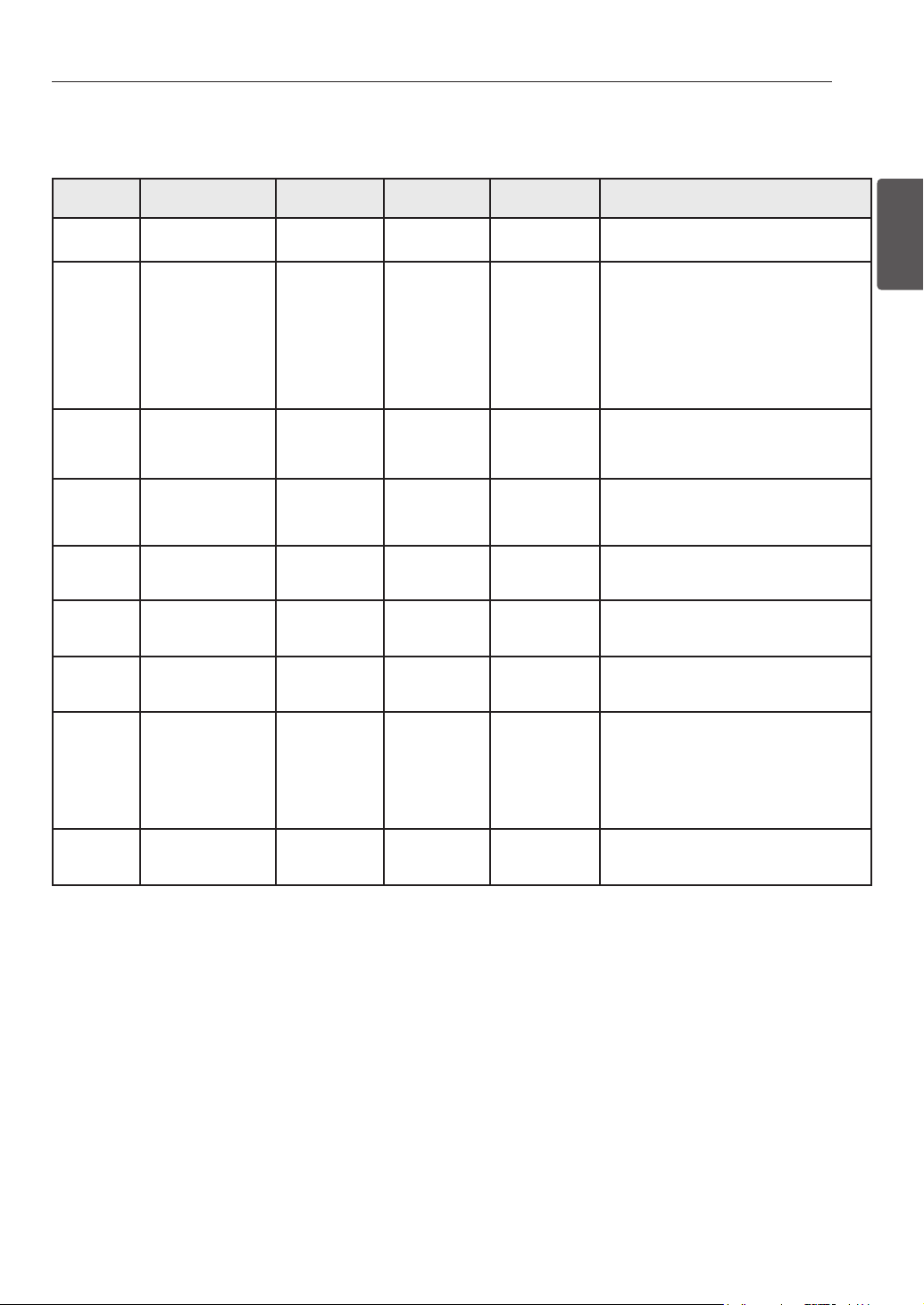
23
USO DEL HORNO
ESPAÑOL
Cuadro de Asado a la Parrilla
Alimento Cantidad y/o
Grosor
Posición de
la bandeja
Primer lado
Tiempo (min.)
Segundo lado
Tiempo (min.)
Comentarios
Carne picada
Bien cocida
1 lb. (4 hamburguesas)
Grosor de 1/2 a 3/4”
D o E 5–7 4–5 Espaciar uniformemente. Pueden asarse hasta 8
hamburguesas al mismo tiempo.
Filetes de
carne de res
Jugoso
Medio
Bien cocido
Jugoso
Medio
Bien cocido
Grosor de 1"
1 a 1-1/2 lbs.
Grosor de 1-1/2”
2 a 2-1/2 lbs.
D
D
D
D
D
D
6
7
8
10
12
14
2–3
2–3
3–4
4–6
6–8
8–10
Los filetes de menos de 1” de grosor se cocinan
antes de dorarse. Se recomienda freír en sartén.
Retire la grasa.
Pollo 1 entero cortado
2 a 2-1/2 lbs.,
cortado a lo largo
2 pechugas
C
C
20
20
6–8
6–10
Asar sobre el lado de la piel primero.
Colas de
langosta
2–4
10 a 12 oz. cada una
C 12–14 No las dé vuelta. Corte a través de la caparazón. Abra y extienda.
Pinte con mantequilla derretida antes de asar y
después de la mitad del tiempo de asado.
Filetes de
pescado
Grosor de 1/4 a 1/2” D o E 5–6 3–4 Manipule y gire con mucho cuidado. Pinte con
mantequilla y limón antes y durante la cocción si
así lo desea.
Rebanadas
de jamón
(precocido)
Grosor de 1/2” D 5 3–5 Aumente el tiempo de 5 a 10 minutos por lado
para un jamón curado en casa de 1-1/2” de
grosor.
Chuletas de
cerdo
Bien cocidas
2 (grosor de 1/2”)
2 (grosor de 1”)
alrededor de 2 lb.
D o E
D o E
7
9–10
6–8
7–9
Retire la grasa.
Chuletas
de cordero
Medio
Bien cocidas
Medio
Bien cocido
2 (grosor de 1”)
alrededor de 10 a 12
oz.
2 (grosor de 1- 1/2”)
alrededor de 1 lb.
D
D
D
D
6
8
11
13
4–6
7–9
9
9–11
Retire la grasa.
Filetes de
salmón
2 (grosor de 1”)
4 (grosor de 1”)
alrededor de 1 lb.
Do E
D o E
8
9
3–4
4–6
Aceite la sartén. Pinte los filetes con mantequilla
derretida.
Consejos para el Asado a la Parrilla
Carne vacuna
y
Siempre debe dejarse descansar el lomo y las costillas durante
cinco minutos antes de cortalo y comerlo. Esto permite que
el calor se distribuya en forma pareja en toda la comida y
brindando un resultado más tierno y jugoso.
y
Piezas de carne que son más gruesas de dos pulgadas deben
ser retirados de la nevera 30 minutos antes de la cocción. Esto
ayudará a que se cocinen más rápidamente y en forma más
pareja y se producirá menos humo al asarlos. Los tiempos
de cocción serán probablemente más corto que los tiempos
indicados en la Tabla para asar.
y
Los cortes de lomo con hueso y costillas con corte francés (en
el que se saca toda la carne de alrededor del hueso), envolver
las secciones expuestas del hueso con papel de aluminio para
reducir el quemado.
Frutos del Mar
y
Al asar pescado con piel, siempre use la configuración de asado
a la parrilla Media y siempre ase el lado de la piel al final.
y
Es mejor consumir los frutos del mar inmediatamente después
de cocinarlos. Si se deja descansar los frutos del mar después de
cocinarlos la comida se secará.
y
Es una buena idea frotar una delgada capa de aceite sobre la
superficie de la asadera antes de cocinar para evitar que se
peguen especialmente los pescados y mariscos. Puede utilizar
una delgada capa de rocío anti-adherente para frituras.
Vegetales
y
Mezcle sus vegetales levemente con aceite antes de cocinarlos
para lograr un mejor dorado.
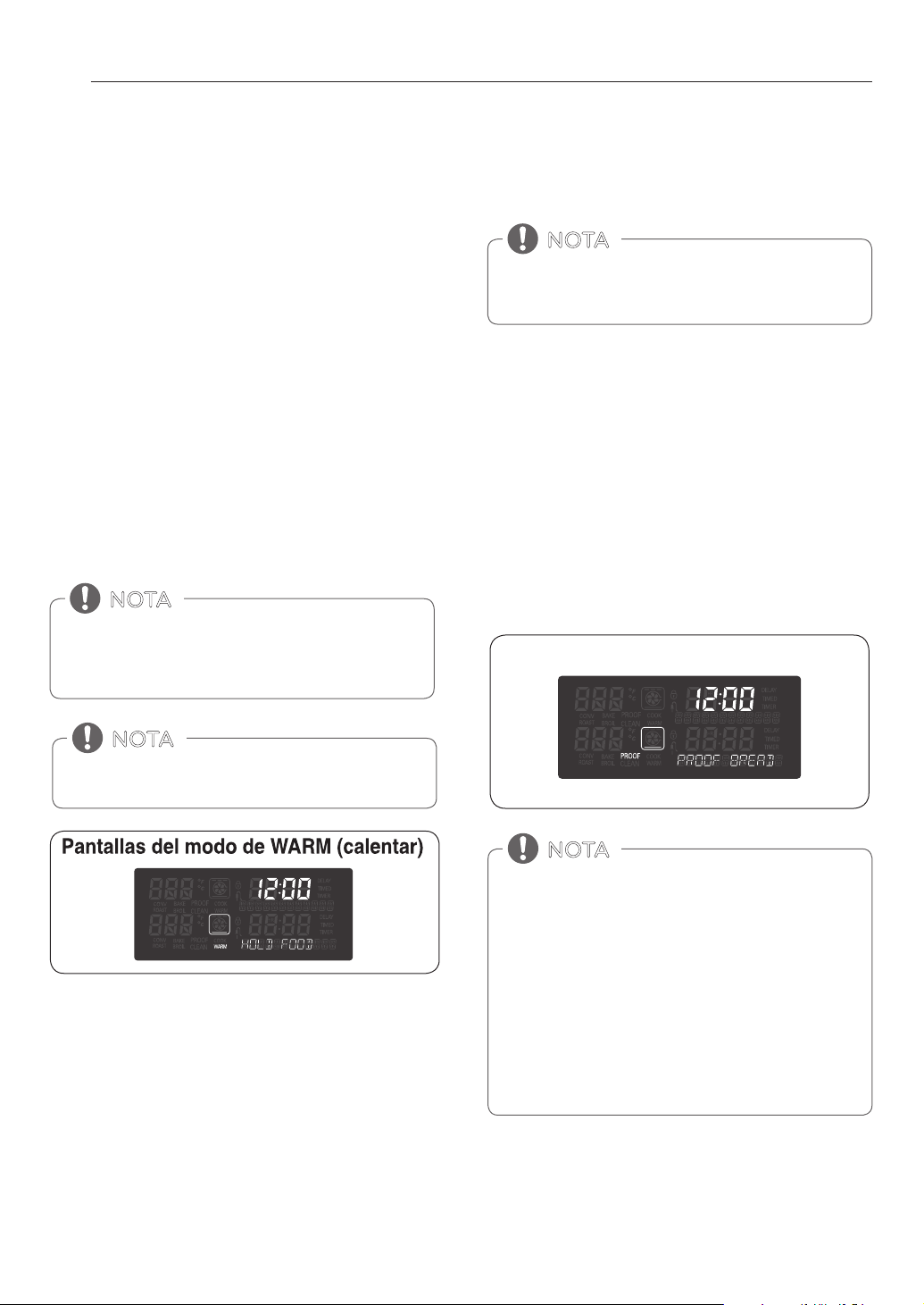
24
USO DEL HORNO
CALENTAR
La función WARM mantendrá la temperatura del horno menor a
los 200°F (93°C). Utilice el modo de calentamiento para mantener
los alimentos cocinados a temperatura de servicio de hasta tres
horas después del final del ciclo de cocción. No utilice el modo
de calentamiento para tratar de cocinar alimentos o calentar
alimentos fríos.
El modo de calentamiento se puede usar sola o después de
Cocción programada o ciclos Cocción programada diferidas.
Configuración de la función CALENTAR
1. Gire la perilla de modo del horno para seleccionar la
función WARM.
2. Gire al perilla Time/Temp para seleccionar el nivel de
temperatura High (Alto), Medium (Medio) o Low (Bajo)
3. Presione START.
4. Gire la perilla a la función de calentar(WARM) de modo
horno a la posición OFF para cancelar la función calentar
en cualquier momento.
LEUDAR
La característica de leudado mantiene un medio tibio que
resulta útil para leudar productos con levadura antes de
hornear.
Configuración de la función LEUDAR
Gire la perilla OVEN MODE para seleccionar la función WARM/
PROOF (calentar/leudar).
1. Gire la perilla de modo del horno para seleccionar la
función PROOF (leudar).
2. Presione START (iniciar). La característica de leudado
brinda automáticamente la temperatura óptima para el
proceso de leudado, y por lo tanto no existe un ajuste de
temperatura.
3. Cuando haya finalizado la función de leudar (PROOF) gire la
perilla del horno a la posición OFF.
La caracteristica de calentar cuenta con tres niveles de
temperatura:
Alta=200°F, Med=170°F, Baja=140°F
(Alta=93.3°C, Med=76.7°C, Baja =60°C)
NOTA
La función CALENTAR está pensada para mantener la
comida caliente. No la utilice para enfriar los alimentos
NOTA
Para mejores resultados, cubra la masa con un paño o un
envoltorio plástico (el plástico puede colocarse debajo del
recipiente para que el ventilador del horno no lo desplace).
NOTA
• Para evitar bajar la temperatura del horno y prolongar
el tiempo de leudado, no abra la puerta del horno
innecesariamente. Controle los panificados pronto para
evitar una fermentación excesiva.
• No utilice el modo de fermentación para calentar la
comida o mantener la comida caliente. La temperatura
de fermentación del horno no es lo suficientemente alta
como para mantener la comida a temperaturas seguras.
Utilice la función CALENTAR para mantener la comida
caliente. La fermentación no se realizará cuando el horno
esté por encima de los 125°F(52°C). "OVEN IS HOT" (El
horno está caliente) se mostrará en la pantalla.
NOTA
Pantalla del modo LEUDAR
25
USO DEL HORNO
ESPAÑOL
SONDA PARA CARNE
La sonda para carne mide con precisión la temperatura
interna de la carne de res, de ave y de los estofados. No debe
utilizarse durante las características de asado, autolimpieza,
calentamiento, leudado o banco de recetas. Siempre desenchufe
y quite la sonda para carne del horno
cuando saque la comida. Antes de utilizarla, introduzca la sonda
en el centro de la parte más gruesa de la carne de res o dentro
del muslo o pechuga de la carne de ave, alejada de la grasa o
huesos. Coloque la comida en el horno y conecte la sonda para
carne en el enchufe. Mantenga la sonda lo más lejos posible de
una fuente de calor. Cierre la puerta del horno. El ícono de la
sonda para carne destellará y sonará un pitido de advertencia
hasta que se quite la sonda si el horno comienza a cocinar sin
configurar la temperatura de la sonda.
Usando la función de la sonda de carne
1. Gire la perilla de modo del horno para seleccionar la
función ROAST, 350°F (175°C) aparecerá en la pantalla.
2. Ajuste la temperatura.
Por ejemplo, Gire la perilla Time/Temp en dirección de las
manecillas del reloj hasta 375°F.
3. Presione START o PROBE. ‘PRESS START OR ENTER
PROBE TEMP / 80F – 210F’ aparecerá en la pantalla.
4. Ajuste la temperatura.
Por ejemplo, Gire la perilla Time/Temp en dirección de las
manecillas del reloj hasta 160°F.
5. Presione START.
La temperatura predeterminada de la sonda es de 150°F
(65°C), pero puede cambiarse a cualquier temperatura entre
80°F (27°C) y 210°F (100°C). La pantalla mostrará la nueva
temperatura de la sonda. Cuando se alcanza la temperatura
configurada de la sonda, el horno se apaga automáticamente y
Ciclo terminado aparecerá en la. pantalla.
Cambio de la sonda de temperatura durante la
cocción
1. Presione PROBE.
2. Ajuste la temperatura de la sonda girando el mando
Time/Temp.
3. Presione START.
Al utilizar esta característica ya no hace falta calcular
el tiempo de cocción total por peso. Se recomienda la
siguiente tabla para configurar la temperatura de la sonda
NOTA
Gire la perilla de modo del horno para cancelar la función
de sonda para carne cuando usted lo desee.
NOTA
- La sonda de la carne no se puede utilizar con el
Broil(asado), Self Clean(auto limpieza), SpeedClean™,
Warm(Cálido) o Proof(Leudar) modos.
- Mientras la función sonda para de carne se está
ejecutando, COOK TIME no puede ser activada.
NOTA
Siempre use una agarradera para quitar la sonda de
temperatura. NO toque el elemento asador.
- El incumplimiento de esta advertencia puede
resultar en lesiones personales graves.
CAUTION
Tabla de recomendacion para la temeratura de
la sonda
Nivel de cocción Temp. de la sonda
Carne de res, cordero y ternera
Jugosa
Poco cocida
Media
Bien cocida
130°F (54°C)
140°F (60°C)
150°F (66°C)
160°F (71°C)
Cerdo
Bien cocida 170°F (77°C)
Carne de ave
Pechuga, bien cocida
Muslo, bien cocido
Relleno, bien cocido
170°F (77°C)
180°F (82°C)
165°F (74°C)
26
SMART FUNCTIONS(FUNCIONES INTELIGENTES)
Busque la aplicación de SIGNATURE KITCHEN SUITE en Google
Play Store con un smartphone. Siga las instrucciones para
descargar e instalar la aplicación.
FUNCIONES
INTELIGENTES
Instalación de la aplicación
REGISTRO DEL PRODUCTO
1. Ejecute la aplicación de SIGNATURE KITCHEN SUITE en
un smartphone.
2. Cree una cuenta e inicie sesión.
3. Seleccione Registrar.
4. Seleccione Horno.
5. Siga las instrucciones del smartphone para registrar el
aparato y conectarlo a una red Wi-Fi.
y
Para verificar la conexión Wi-Fi, compruebe que
el icono del Wi-Fi del panel de control esté
encendido.
USO DE LA FUNCIÓN WI-FI
Comuníquese con el aparato desde un smartphone
utilizando las convenientes funciones inteligentes.
Uso de la aplicación
1. Seleccione el aparato en la aplicación y conéctelo a
una red Wi-Fi.
2. Seleccione el menú de la parte superior derecha para
acceder a ajustes y funciones.
SpeedClean™
Permite configurar alertas de SpeedClean™, leer la guía de
instrucciones, y simular y comparar el consumo de energía al
utilizar SpeedClean™ frente a los ciclos de autolimpieza.
Smart Diagnosis™
Esta función brinda información útil para diagnosticar y
resolver problemas con el aparato conforme a su patrón de
uso.
Conguración
Permite al usuario cambiar la configuración del horno,
incluso el modo de la hora, la luz de la alarma de
precalentamiento, el volumen del indicador sonoro, las
unidades de la temperatura, la conversión automática a
convección el ajuste del termostato y el idioma.
Remote Start (Inicio remoto)
Puede controlar con control remoto el precalentado y
detener las operaciones del horno. Luego de abrir y cerrar la
puerta, coloque el selector de modo nuevamente en Remote
Start dentro de los 30 segundos.
MONITOREO
Esta función le permite observar el estado actual, el tiempo
restante, los ajustes de cocción y el tiempo de finalización en
la pantalla.
ALERTA AUTOMÁTICA
Cuando se activa la alerta automática, se informa el estado
actual del aparato. La alerta se activa independientemente
de que la aplicación SIGNATURE KITCHEN SUITE esté
encendida o no.
Temporizador
Puede configurar el temporizador desde la aplicación.
IMPORTANTE:
Es posible que se añadan o eliminen
funciones en las actualizaciones de la aplicación SIGNATURE
KITCHEN SUITE Los datos guardados en la aplicación
SIGNATURE KITCHEN SUITE se pueden borrar al actualizar la
aplicación o cambiar el teléfono.
• SIGNATURE KITCHEN SUITE no se hace responsable
de problemas de conexión de la red ni de fallas,
mala operación o errores causados por la conexión
de la red.
• La máquina solo admite redes Wi-Fi de 2.4 GHz.
• Si el aparato tiene problemas para conectarse a la
red Wi-Fi, es posible que se encuentre demasiado
lejos del router. Adquiera un repetidor Wi-Fi
(extensor de alcance) para mejorar la intensidad de
la señal Wi-Fi.
• Es posible que la conexión Wi-Fi no se conecte o se
interrumpa debido al entorno de la red doméstica.
• Según el proveedor de servicios de Internet,
la conexión de la red puede no funcionar
correctamente.
• El entorno inalámbrico circundante puede hacer que
el servicio de red inalámbrica funcione lentamente.
• Esta información está actualizada en el momento de
su publicación. La aplicación está sujeta a cambios
con fines de mejorar el aparato sin previo aviso a los
usuarios.
• Antes de usar la red Wi-Fi, debe revisar la sustancia
en la cavidad.
• Luego de abrir y cerrar la puerta, coloque el selector
de modo nuevamente en Remote Start dentro de
los 30 segundos.
NOTA

27
SMART FUNCTIONS(FUNCIONES INTELIGENTES)
ESPAÑOL
Información del aviso de software de
código abierto
Para obtener el código fuente correspondiente GPL, LGPL,
MPL y otras licencias de código abierto que contiene este
producto, visite http://opensource.thesignaturekitchen.com.
Además del código fuente, podrá descargar las condiciones
de las licencias, exención de responsabilidad de la garantía y
avisos de copyright.
SIGNATURE KITCHEN SUITE también le proporcionará código
abierto en CDROM por un importe que cubre los gastos de
su distribución (como el soporte, el envío y la manipulación)
previa solicitud por correo electrónico a opensource@
thesignaturekitchen.com. Esta oferta es válida durante tres (3)
años a partir de la fecha de adquisición del producto.
AVISO DE LA FCC (PARA
EL MÓDULO TRANSMISOR
CONTENIDO EN ESTE PRODUCTO)
Este equipo fue probado y se determinó que cumple
con los límites para los dispositivos digitales de Clase B,
en conformidad con la parte 15 de las normas de la FCC.
Estos límites están diseñados para ofrecer una protección
razonable contra interferencias dañinas en una instalación
residencial. Este equipo genera, usa y puede emitir energía
de radiofrecuencia y, si no se instala y utiliza de acuerdo con
las instrucciones, podría causar interferencias dañinas a las
comunicaciones por radio. Sin embargo, no se garantiza
que dicha interferencia no pueda ocurrir en instalaciones
particulares. Si este equipo causa interferencia dañina a la
recepción de radio o televisión, que se puede determinar
encendiendo y apagando el equipo, se aconseja al usuario
intentar corregir la interferencia realizando alguna de las
siguientes acciones:
- Reoriente o reubique la antena receptora.
- Aumente la separación entre el equipo y el receptor.
- Conecte el equipo a una toma de corriente en un circuito
diferente del utilizado por el receptor.
- Solicite ayuda a su vendedor o a un técnico especialista
en radio o TV.
Este dispositivo cumple con la parte 15 de las normas de la
FCC. La operación está sujeta a las dos siguientes condiciones:
1) este dispositivo no debe causar interferencia dañina, y
2) este dispositivo debe aceptar cualquier interferencia
recibida, incluso aquellas que pudieran causar un
funcionamiento no deseado del dispositivo.
Cualquier cambio o modificación en la construcción de
este dispositivo que no cuente con la aprobación expresa
de la parte responsable del cumplimiento puede anular la
autorización del usuario para operar este equipo.
DECLARACIÓN SOBRE EXPOSICIÓN
A LA RADIACIÓN DE RF DE LA FCC
Este equipo cumple con los límites de exposición a
la radiación de la FCC establecidos para entornos no
controlados. Este transmisor no se debe ubicar ni operar
junto con ninguna otra antena ni transmisor.
El equipo se debe instalar y operar con una distancia mínima
de 20cm (7.8pulg.) entre la antena y su cuerpo. Los usuarios
deben seguir las instrucciones de operación específicas de
manera tal de cumplir con las normas de exposición a la RF.
Especificaciones del módulo inalámbrico
(LCW-003)
Rango de frecuencia 2412 ~ 2462 MHz
Potencia de salida
(max.)
IEEE 802.11 b : 14 dBm
IEEE 802.11 g : 15 dBm
IEEE 802.11 n : 14 dBm

28
SMART FUNCTIONS(FUNCIONES INTELIGENTES)
USO DE SMART DIAGNOSIS™
Si tiene algún problema con el aparato, este puede
transmitir datos a un smartphone utilizando la aplicación
de SIGNATURE KITCHEN SUITE o llamando por teléfono al
centro de atención de SIGNATURE KITCHEN SUITE.
Smart Diagnosis™ no puede activarse a menos que
se conecte el aparato a la alimentación eléctrica. Si el
aparato no enciende, deberá resolver el problema sin
usar Smart Diagnosis™.
SMART DIAGNOSIS™ CON UN
TELÉFONO INTELIGENTE
1. Abra la aplicación de SIGNATURE KITCHEN SUITE en
el smartphone.
2. Seleccione el artefacto y luego el menú en la parte
superior del lado derecho.
3. Seleccione Smart Diagnosis y, a continuación,
presione el botón Inicie Smart Diagnosis.
NOTA
y
Si el diagnóstico falla en reiteradas oportunidades,
siga las instrucciones a continuación.
4. Seleccione Diagnóstico en audio.
5. Siga las instrucciones en el teléfono inteligente.
6. Mantenga el teléfono allí hasta que la transmisión
de tonos haya terminado. Vea el diagnóstico en el
teléfono.
NOTA
y
La calidad de la función Smart Diagnosis™ depende de
la calidad de la llamada local.
y
El resultado de la comunicación será mejor y usted
podrá recibir un mejor servicio si usa el teléfono fijo
de su casa.
y
En caso de que la transferencia de datos de Smart
Diagnosis™ sea deficiente debido a la mala calidad
de la llamada, es posible que usted no reciba el mejor
servicio de Smart Diagnosis™.
NOTA
y
Para mejores resultados, no retire el teléfono mientras
los tonos se están transmitiendo.
y
Si el agente de servicio no puede obtener los datos de
forma exacta mediante la transmisión, le pedirá que
intente otra vez.
DIAGNÓSTICO INTELIGENTE
MEDIANTE EL CENTRO DE SERVICIO
TELÉFONICO.
1. Llame al centro de servicio telefónico SIGNATURE
KITCHEN SUITE : 1-855-790-6655.
2. Cuando el agente de servicio se lo indique, sujete
el teléfono frente el logotipo de diagnostico
inteligente SIGNATURE KITCHEN SUITE. Mantenga
sujeto el teléfono no más de una pulgada lejos de la
máquina (sin tocarla).
3. Presione y mantenga presionado el botón START
durante 3 segundos.
4. Mantenga el teléfono en la posición indicada hasta
que el tono de transmisión haya terminado. Esto
toma aproximadamente 6 segundos y después una
cuenta regresiva aparecerá en la pantalla.
5. Una vez que la cuenta regresiva haya terminado y
los tonos hayan finalizado, reanude la conversación
con el agente de servicio, quien estará habilitado
para asistirle mediante el análisis de la información
transmitida.
No presione ningún otro botón o icono en la
pantalla.
NOTA
29
MANTENIMIENTO
ESPAÑOL
MANTENIMIENTO
AUTO-LIMPIEZA
El ciclo de auto-limpieza utiliza temperaturas extremadamente
elevadas para limpiar la cavidad del horno. Al ejecutar el ciclo de
Auto-Limpieza, puede percibir humo u olores. Esto es normal;
especialmente si el horno está muy sucio.
Durante la Auto-Limpieza, la cocina debe estar bien ventilada
para minimizar los olores de la limpieza.
• NO deje a niños pequeños sin supervisión cerca del
electrodoméstico. Durante el ciclo de auto-limpieza, la
parte externa de la estufa puede estar muy caliente al
tacto.
• Si usted tiene aves domésticas, trasládelas a otro
ambiente bien ventilado. La salud de algunas aves es
extremadamente sensible a los gases liberados durante
un ciclo de auto-limpieza de cualquier estufa.
• NO cubra las paredes del horno, estantes, parte inferior o
cualquier otra parte de la estufa con papel de aluminio o
cualquier otro material. Hacerlo arruinará la distribución
del calor, producirá malos resultados en la cocción y
provocará un daño permanente en el interior del horno (el
papel de aluminio se derretirá en la superficie interior del
horno).
• NO fuerce la puerta del horno para abrirla. Esto podría
dañar el sistema de bloqueo automático de la puerta.
Abra la puerta del horno con cuidado luego del ciclo de
Auto-Limpieza. Manténgase a un costado del horno al
abrir la puerta para permitir que escape el aire caliente o
el vapor. El horno podría estar aún MUY CALIENTE.
PRECAUCIÓN
Antes de iniciar la Auto-Limpieza:
• Quite los estantes del horno, la asadera, la rejilla para
asado a la parrilla, todos los recipientes de cocción, el
papel de aluminio y cualquier otro material del horno.
• La cocina debe estar bien ventilada para minimizar los
olores de la limpieza.
• Limpie los derrames grandes de la parte inferior del
horno.
• Asegúrese de que la cubierta de la bombilla del horno
esté colocada y que la luz del horno esté apagada.
• No se puede encender la luz del horno durante un ciclo
de auto-limpieza. No se puede encender la luz del horno
hasta que la temperatura del horno haya descendido por
debajo de los 500˚F (260˚C) luego de que haya finalizado
un ciclo de auto-limpieza.
• Retire los estantes del horno y los accesorios antes de
iniciar un ciclo de auto-limpieza.
• Si se dejan los estantes del horno en la cavidad del horno
durante un ciclo de auto-limpieza, se decolorarán y será
difícil deslizarlos hacia adentro y hacia afuera.
• Limpie el marco de la cocina y la puerta con agua
jabonosa caliente. Enjuague bien.
• No limpie la junta. El material de fibra de vidrio de la
junta de la puerta del horno no soporta una limpieza
abrasiva.
• Es esencial que la junta permanezca intacta. Si usted
nota que se está desgastando o deshilachando,
reemplácela.
• Limpie los derrames grandes de la parte inferior del
horno.
• Asegúrese de que la cubierta de la bombilla del horno
esté colocada y que la luz del horno esté apagada.
NOTA
Configuración de la Auto-limpieza
La función de Auto-Limpieza tiene ciclos que pueden durar 3, 4,
o 5 horas.
Guía de Suciedad para la Auto-limpieza
Nivel de Suciedad Configuración del Ciclo
Cavidad del horno levemente sucia Auto-limpieza de 3 Horas
Cavidad del horno
moderadamente sucia
Auto-limpieza de 4 Horas
Cavidad del horno muy sucia Auto-limpieza de 5 Horas
1. Extraiga todos los estantes y accesorios del horno.
2. Gire la perilla de modo del horno para seleccionar la
función SELF CLEAN. En forma predeterminada, el horno
realiza la auto-limpieza recomendada de cuatro horas
para un horno moderadamente sucio. Gire la perilla Time/
Temp para seleccionar el tiempo de autolimpieza, de 3 a
5 horas.
3. Presione START.
4. Una vez que esté configurada la auto-limpieza, la puerta
del horno se bloqueará automáticamente y aparecerá
en la pantalla el ícono de bloqueo. No podrá abrir la
puerta del horno hasta que el horno este frío. El bloqueo
se liberará automáticamente cuando el horno se haya
enfriado.
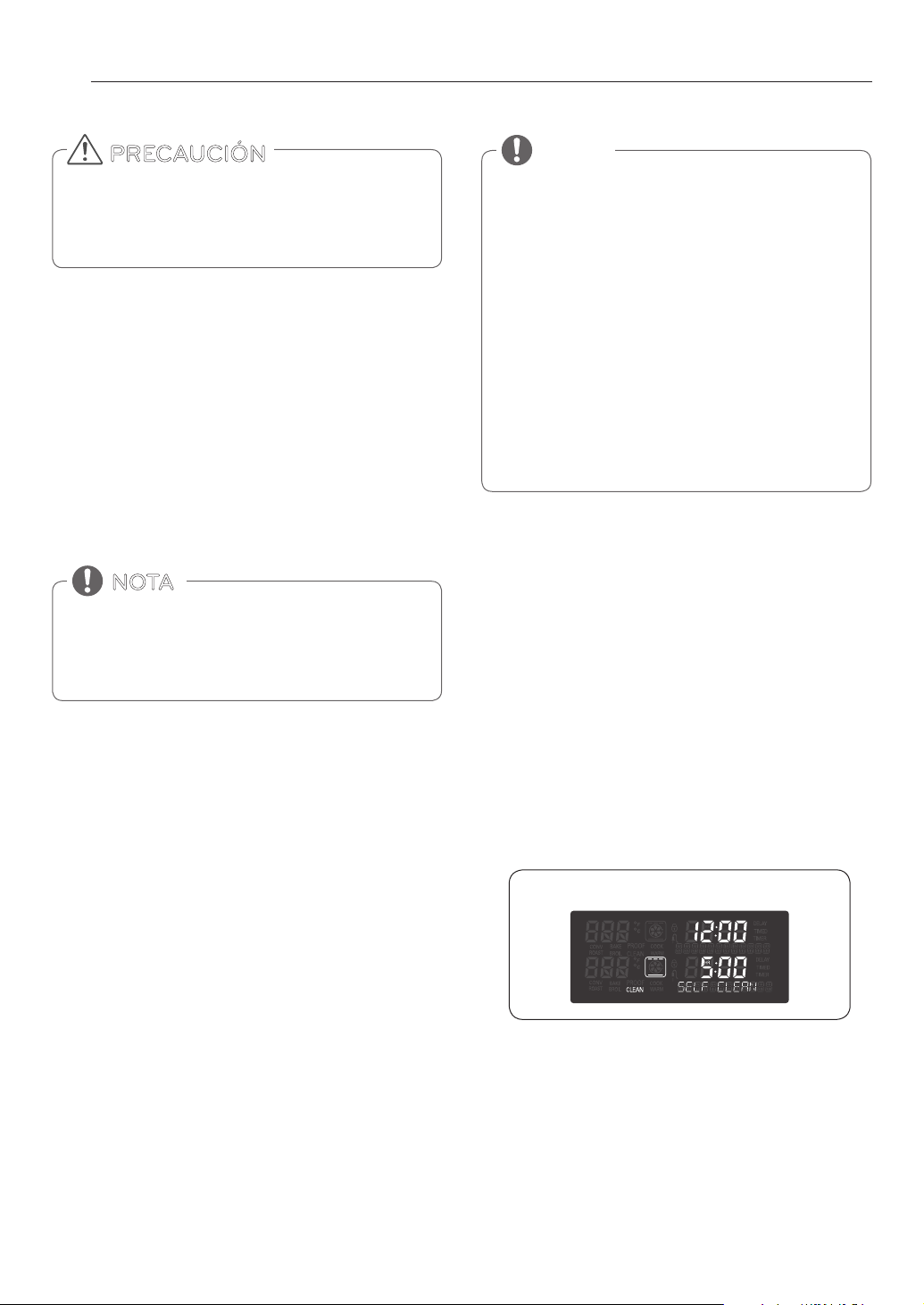
30
MANTENIMIENTO
Configuración de la Auto-limpieza
con un Inicio Retardado
1. Extraiga todos los estantes y accesorios del horno.
2. Gire la perilla de modo del horno para seleccionar la función
SELF CLEAN. El horno mostrará el tiempo predeterminado
para la limpieza de un horno moderadamente sucio,
4 horas. Gire la perilla Time/Temp para seleccionar el
tiempo de autolimpieza, de 3 a 5 horas.
3. Presione START TIME.
4. Gire la perilla Time/Temp para seleccionar la hora del día a
la cual desee la función de auto limpieza inicie.
5. Presione START.
Durante La Auto-Limpieza
y
El ciclo de auto-limpieza utiliza temperaturas
extremadamente elevadas para limpiar la cavidad del horno.
Al ejecutar el ciclo de Auto-Limpieza, puede percibir humo
u olores. Esto es normal; especialmente si el horno está muy
sucio.
y
A medida que el horno se caliente, podría oír sonidos de
partes metálicas que se expanden y contraen. Esto es normal
y no dañará el horno.
y
NO fuerce la puerta del horno para abrirla cuando aparezca
en la pantalla LOCKED (BLOQUEADO). La puerta del horno
continuará bloqueada hasta que haya descendido la
temperatura del horno. Si fuerza la puerta para abrirla, se
dañará la puerta.
Luego del Ciclo de Auto-Limpieza
y
La puerta del horno continuará bloqueada hasta que haya
descendido la temperatura del horno.
y
Es posible que note algo de ceniza blanca en el horno.
Límpiela con un paño húmedo o una esponja de lana de
acero enjabonada luego de que el horno se enfríe. Si el
horno no queda limpio después de un ciclo de limpieza,
repita el ciclo,
y
Si se hubieran dejado estantes del horno dentro del horno
y no se deslizan suavemente luego de un ciclo de auto-
limpieza, limpie los estantes y los soportes de los estantes
con una pequeña cantidad de aceite vegetal para que se
deslicen más fácilmente.
y
Es posible que aparezcan delgadas líneas en la porcelana
porque pasó del calor al frío. Esto es normal y no afectará el
funcionamiento. Cuidado y limpieza
NO fuerce la puerta del horno para abrirla cuando aparezca
en la pantalla el ícono de bloqueo. La puerta del horno
continuará bloqueada hasta que haya descendido la
temperatura del horno. Si fuerza la puerta para abrirla, se
dañará la puerta.
PRECAUCIÓN
Podría ser necesario cancelar o interrumpir un ciclo de
auto-limpieza debido a la presencia de humo excesivo
o fuego en el horno. Para cancelear la función de auto
limpieza, gire la perilla de modo del horno hasta la posición
OFF.
NOTA
• No se puede activar el ciclo de Auto-Limpieza si la
Función Bloqueo está activa.
• Una vez que esté configurada la auto-limpieza, la puerta
del horno se bloqueará automáticamente. No podrá
abrir la puerta del horno hasta que el horno esté frío. El
bloqueo se liberará automáticamente cuando el horno se
haya enfriado.
• Una vez que la puerta se ha bloqueado, La luz
indicadora de BLOQUEO (LOCKED) dejará de parpadear
y permanecerá encendida. Espere aproximadamente 15
segundos para que el bloqueo de la puerta del horno se
active.
• Si el reloj está configurado en la pantalla de 12 horas
(predeterminado) no se puede configurar la Auto-
Limpieza Retardada para que empiece más de 12 horas
adelante.
NOTA
Pantalla del modo de AUTO-LIMPIEZA
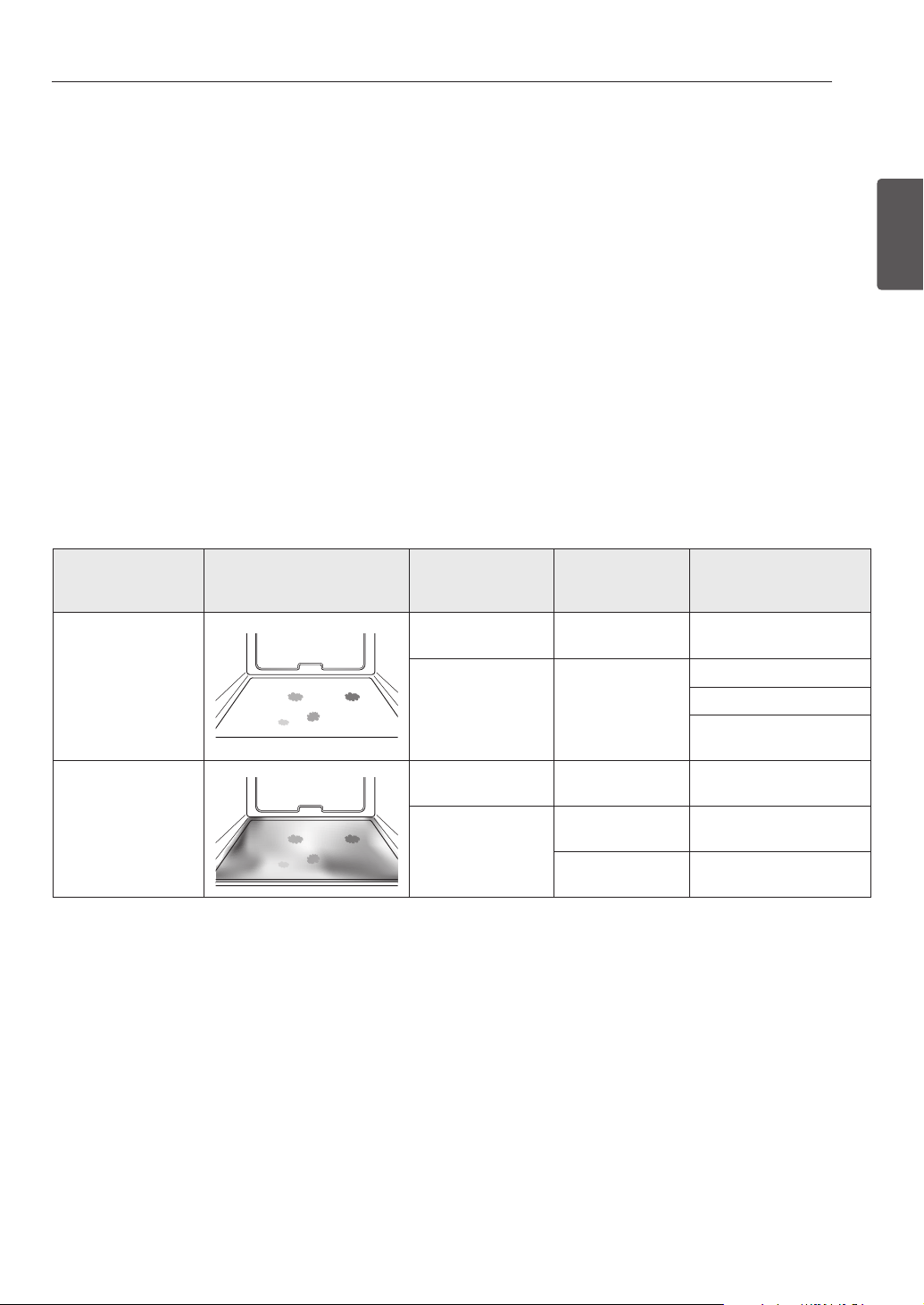
31
MANTENIMIENTO
ESPAÑOL
SpeedClean™
El nuevo horno de SIGNATURE KITCHEN SUITE con tecnología
SpeedClean™ le otorga dos opciones de limpieza para el interior
de su estufa. La función SpeedClean™ toma ventaja de la nueva
tecnología de esmalte de SIGNATURE KITCHEN SUITE para ayudar
a remover suciedades sin químicos severos, y funciona tan solo
usando AGUA por tan solo 10 minutos a bajas temperaturas
para ayudar a soltar suciedades LIJERAS antes de ser limpiadas
manualmente.
Mientras que SpeedClean™ es rápido y efectivo para pequeñas
y LIJERAS suciedades, la función de auto-limpieza (Self Clean)
puede ser usada para remover suciedades PESADAS acumuladas.
La intensidad y alto calor del ciclo de auto-limpieza (Self Clean)
puede tener como resultado humo que hará que se requiera abrir
ventanas para proveer ventilación.
En comparación con el proceso
de auto-limpieza más intensa (Self Clean), su horno SIGNATURE
KITCHEN SUITE le ayudará a limpiar con un MENOR CALOR, MENOR
TIEMPO, y prácticamente SIN HUMO O GASES.
CONSEJOS DE LIMPIEZA
•Permitaqueelhornoseenfríeatemperaturaambienteantes
de usar el ciclo SpeedClean™. Si la cavidad de su horno esta
por arriba de los 150°F (65°C). "OVEN IS HOT- - PLEASE WAIT”
aparecerá en la pantalla y el ciclo SpeedClean™ no se activará
hasta que la cavidad se enfríe totalmente.
•Unaespátuladeplásticosepuedeutilizarparadesprender
trozos o desechos antes y durante la limpieza del horno.
•Usandoelladoásperodeunaesponjaabrasivapuedeayudara
quitar las manchas de quemado mejor que una esponja suave o
una toalla.
•Algunasesponjas,comolasdeespumademelamina,
disponibles en su tienda local también puede ayudar a mejorar
la limpieza.
•Laestufadebeestarniveladaparaasegurarquetodala
superficie de la parte inferior del horno sea cubierta por agua al
principio del ciclo SpeedClean™.
•Paramejoresresultadosuseaguapurificadaoaguafiltrada.El
agua de la llave puede dejar depósitos minerales en la parte
inferior.
•Lasuciedadhorneadadurantemuchosciclosdecocinadoserá
más difícil de remover mediante el ciclo SpeedClean™.
•NoabralapuertadelhornoduranteelcicloSpeedClean™.El
agua en el horno no se calentará totalmente al abrirse la puerta.
•EsmejorusarlafunciónSelfCleanparaáreasdifícilesdealcanzar
como el fondo de la cavidad.
* El ciclo de auto-limpieza (Self Clean) se puede utilizar para suciedad que se ha construido con el tiempo.
Cuando sea necesario, su estufa sigue ofreciendo la opción de
auto-limpieza (Self Clean) durante más tiempo, recomendada
para la limpieza completa del horno, suciedad acumulada y
difícil de remover.
BENEFICIOS DE SpeedClean™
• Ayuda a aflojar suciedad ligera antes de su limpieza manual.
• SpeedClean™ solo necesita agua sin productos químicos de
limpieza.
• Mejora su experiencia de auto-limpieza (Self Clean)
- Minimiza la necesidad de auto-limpieza (Self Clean)
- Reduce la cantidad de humos y olores
- Se puede utilizar un tiempo más corto de auto-limpieza
(Self Clean)
Métodos de Limpieza
Sugeridos
Ejemplos de Suciedad
del Horno
Patrones de
Suciedad
Tipo de Suciedad
Alimentos comunes que
pueden ensuciar su
Horno
SpeedClean™
Pequeñas Gotas
o Manchas
Queso u otros
ingredientes
Pizza
Salpicadura Ligera Manteca / Grasas
Steak a la Parrilla
Pescado Asado
Asados de Carne Baja
Temperatura
Self Clean*
Salpicadura
Moderada o Excesiva
Manteca / Grasas
Asados de Carne Alta
Temperatura
Gotas o Manchas
Relleno o Suciedad
a base de azúcar
Pasteles o Tartas
Crema o Salsa de
Tomate
Cacerolas
CUANDO USAR SpeedClean™
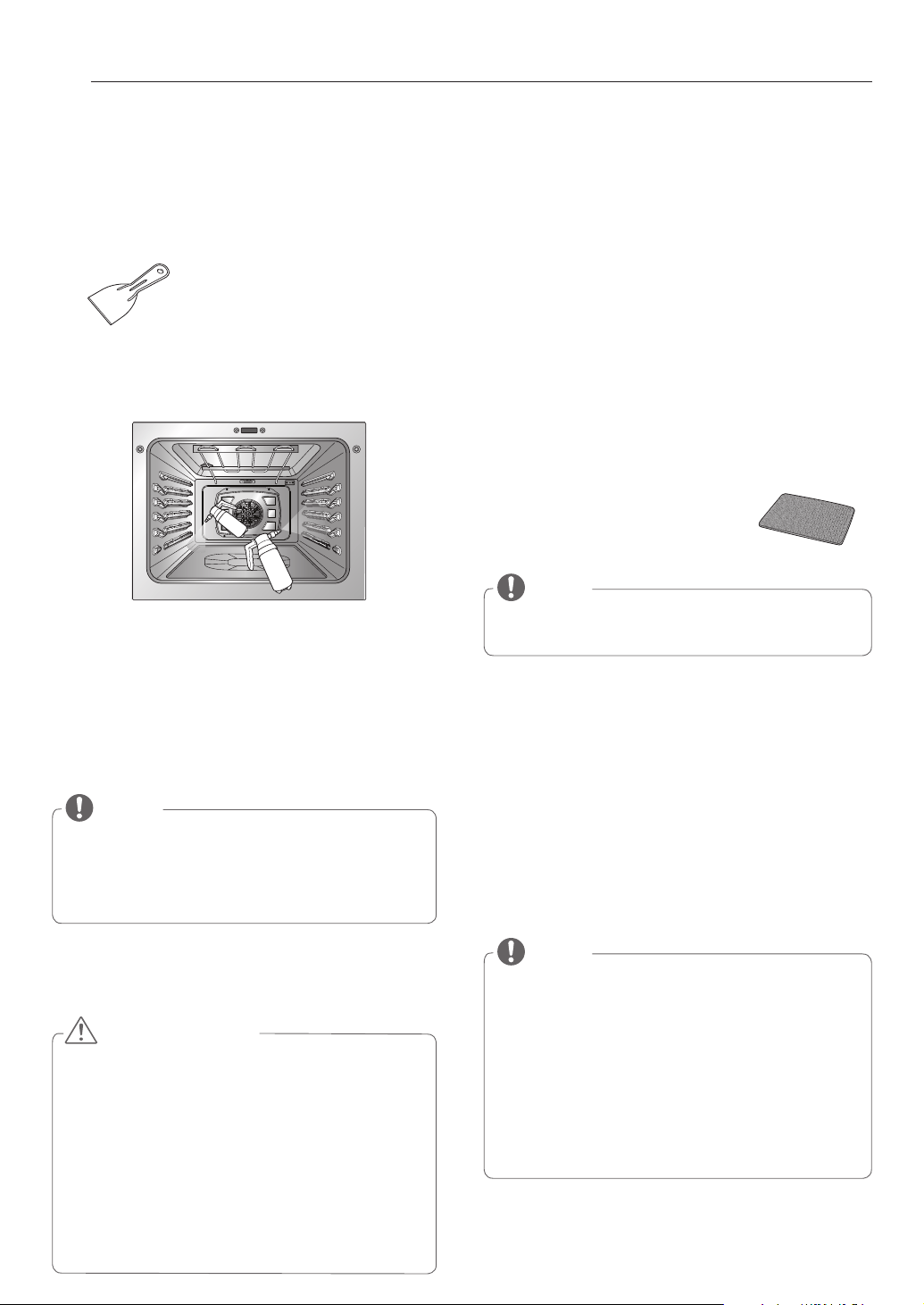
32
MANTENIMIENTO
GUÍA DE INSTRUCCIÓN SpeedClean™
1. Retire bandejas y accesorios del horno.
2. Talle y remueva cualquier resto quemado con la espátula de
plástico.
3. Llene el rociador con 1 ¼ de taza (10 oz o 300 ml) de agua y
úselo para rociar completamente las superficies internas del
horno.
4. Use al menos ¼ de taza (2 oz o 50 ml) de agua para saturar
completamente la suciedad en las paredes y esquinas del
horno.
5. Rocíe o vierta la restante 1 taza (8 oz o 250 ml) de agua sobre
el centro de la base de la cavidad. El desnivel en la parte
inferior debe estar completamente cubierto de tal manera
que las suciedades queden sumergidas. Añada agua si es
necesario.
6. Cierre la puerta del horno.
Gire la perilla de modo del horno para seleccionar la función
SpeedClean™.
Presione START.
7. Un tono sonará al final del ciclo de 10 minutos. Ajustar la
perilla de modo del horno en OFF posición para borrar la
pantalla y termina el tono
8. Después del ciclo de limpieza y durante la limpieza a mano,
suficiente agua debe de permanecer en la base del horno
de tal maneta que todas la suciedades queden sumergidas
completamente. Añada agua si es necesario. Ponga una toalla
en el suelo enfrente del horno para capturar cualquier liquido
que se derrame durante la limpieza a mano de su horno.
9. Limpie la cavidad del horno inmediatamente después del
ciclo SpeedClean™ frotando con una esponja mojada contra
ralladuras o una fibra. (El lado fibroso no dañará el acabado
superficial), algo de agua podría derramarse dentro de
las ventanas del la base durante la
limpieza, sin embargo el agua será
atrapada por una cacerola debajo de la
cavidad y no dañará los quemadores.
10. Una vez que la cavidad del horno se encuentre limpia,
remueva el exceso de agua con una toalla limpia y seca.
Vuelva a colocar las bandejas y accesorios del horno.
11. Si algunas manchas ligeras permanecen, repita los pasos
anteriores, asegurándose de empapar a fondo las áreas
sucias. Si quedan manchas rebeldes después de múltiples
ciclos SpeedClean™, ejecute el ciclo de auto-limpieza (Self
Clean). Asegúrese de que la cavidad del horno está vacío
de bandejas y accesorios del horno, y que la superficie de la
cavidad del horno está seca antes del ciclo de auto-limpieza
(Self Clean). Consulte la sección Self Clean del manual de
usuario para obtener más detalles.
y
Es mejor usar guantes de goma durante la limpieza
del horno para prevenir accidentes inesperados como
quemaduras y lastimaduras.
y
Durante el ciclo de SpeedClean™, la parte inferior del horno
se caliente lo suficiente como para causar quemaduras.
Espere hasta que el ciclo termine (20 minutos) antes de
limpiar el interior de la superficie del horno. El no seguir
ésta indicación puede llegar a causar quemaduras.
y
No empuje hacia abajo la puerta de vidrio directamente
cuando limpie el horno. El vidrio de la puerta puede
debilitarse y romperse con facilidad bajo cualquier mínimo
impacto.
PRECAUCIÓN
NOTA
Use el ajuste de niebla en la botella con atomizado para una
mejor cobertura. 1 1/4 taza completa (10 oz o 300 ml) de
agua se debe utilizar para cada cavidad del horno. No rocié
agua directamente sobre la puerta. Si lo hace, goteará agua
y caerá en el piso.
NOTA
y
Si la función SpeedClean™ comienza sin agua, Gire la
perilla de modo del horno a la posición OFF. Espere a que
al estufa se enfríe a temperatura ambiente antes de rociar
o poner agua dentro de la cavidad y comenzar otro ciclo.
y
Cuando termine el ciclo de SpeedClean™, el empaque de
la cavidad puede estar mojado. Esto es normal. No limpie
el empaque.
y
Si depósitos minerales se quedan en la parte de abajo
del horno después de la limpieza, use un trapo o esponja
sumergida previamente en vinagre para removerles.
Espátulas de Plástico Sugeridas:
• Paleta de plástico duro
• Espátula de plástico de cocina
• Espátula de plástico para pintura
• Tarjeta de crédito antigua
NOTA
NO use estropajos de acero, estropajos abrasivos o
limpiadores ya que estos materiales pueden dañar.
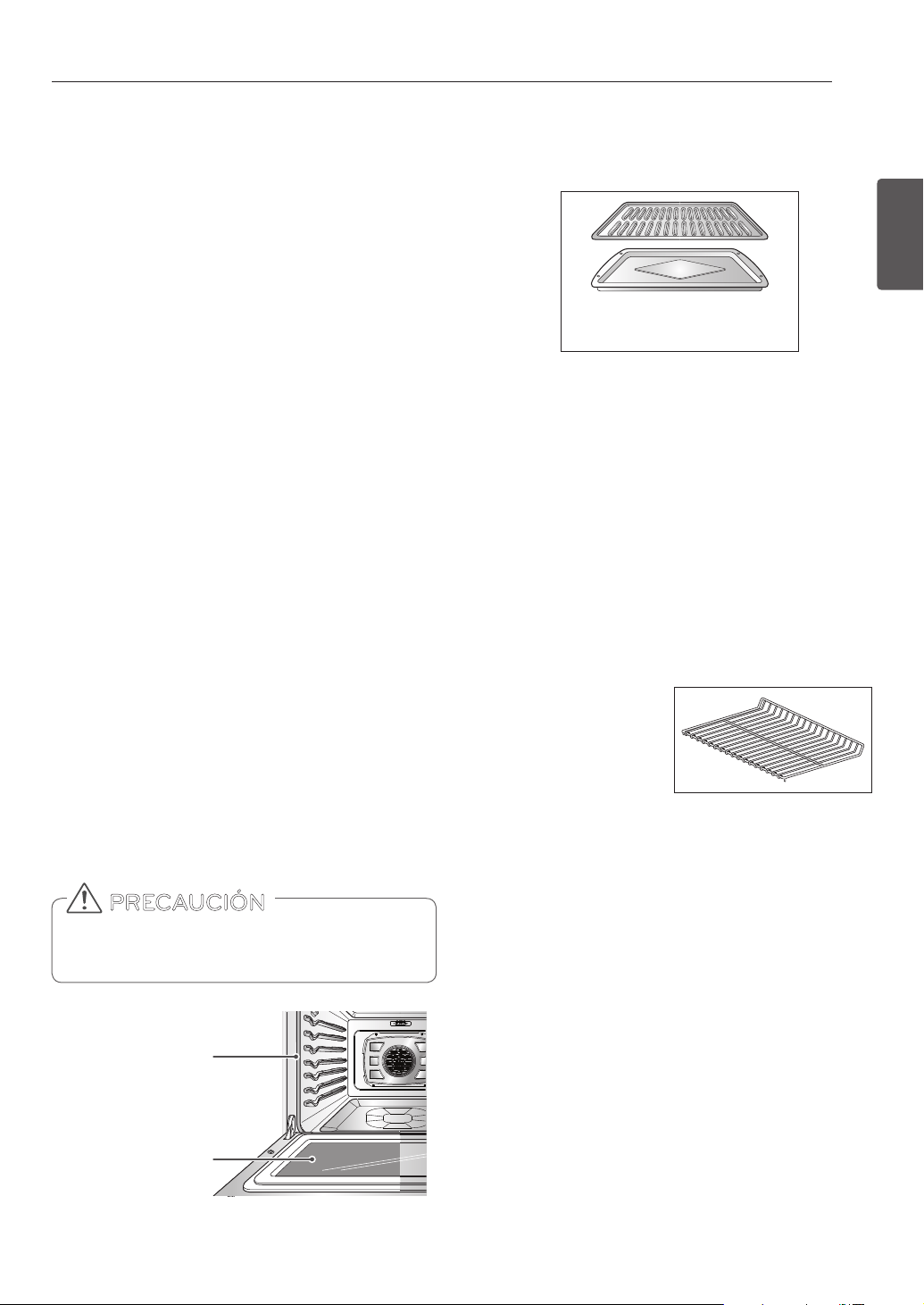
33
MANTENIMIENTO
ESPAÑOL
Asadera y Rejilla
No guarde una asadera con
rejillas sucias dentro del horno.
y
No guarde una asadera o rejilla sucia en ninguna parte del
horno.
y
No limpie la asadera o la rejilla en el modo auto-limpieza.
y
Quite la rejilla de la asadera. Con cuidado, vuelque la grasa
de la asadera en un recipiente adecuado.
y
Lave y enjuague la asadera y la parrilla en agua caliente con
una esponja enjabonada o una esponja de plástico.
y
Si se hubiera quemado comida, salpique la parrilla con
limpiador mientras todavía este caliente y cubra con toallas
de papel húmedas o un repasador. Sumerja la asadera para
quitar la comida quemada.
y
Tanto la asadera como la parrilla pueden lavarse con un
limpiador de hornos comercial o en el lavavajillas.
LIMPIEZA EXTERIOR
Revestimiento Pintado y Decorativo
Para la limpieza general, utilice un paño con agua caliente
jabonosa. Para suciedades más difíciles y grasa acumulada,
aplique detergente líquido directamente sobre la suciedad.
Déjelo actuar de 30 a 60 minutos. Enjuague con un paño
empapado y seque. No utilice limpiadores abrasivos.
Superficies de Acero Inoxidable
Para evitar rayones, no utilice esponjas de lana de acero.
1. Coloque una pequeña cantidad de limpiador de
electrodomésticos de acero inoxidable o lustre en un paño
húmedo o paño de papel.
2. Limpie un área pequeña, frotando en el sentido del grano
del acero inoxidable, si corresponde.
3. Seque y sacuda con un paño de papel limpio y seco o un
paño suave.
4. Repite cuantas veces sea necesario.
Puerta del horno
y
Use agua jabonosa para limpiar completamente la puerta del
horno. Enjuague bien. NO sumerja la puerta en agua.
y
Puede utilizar limpiavidrios en el vidrio externo de la puerta
del horno. NO rocíe agua o limpiavidrios en los venteos de la
puerta.
y
NO utilice limpiadores de horno, polvos limpiadores, o
materiales ásperos de limpieza abrasiva en el lado externo de
la puerta del horno.
y
NO limpie la junta de la puerta del horno. La junta de la
puerta del horno está confeccionada en un material tejido
que es esencial para un buen sellado. Debe tenerse cuidado
de no frotar, dañar, o quitar esta junta.
No utilice limpiadores ásperos o materiales ásperos de
limpieza abrasiva en el lado externo de la puerta del
horno. Hacerlo podría provocar daños.
PRECAUCIÓN
No limpie a mano
el empaque de la
puerta del horno
Elimine cualquier
residuo de la puerta
Bandejas del horno
Quite las bandejas del horno
antes de operar el ciclo de
auto-limpieza. Dejar las
bandejas en su lugar puede
provocar decoloracion. Si las
bandejas se limpian en el ciclo
de auto-limpieza, el color se
volvera ligeramente azul y el acabado quedara opaco. Despues
de que haya finalizado el ciclo de auto-limpieza y que el horno
se haya enfriado, frote los lados de las bandejas con papel
encerado o un pano con una pequena cantidad de aceite. Esto
hara que las bandejas se deslicen mas facilmente por las guias.
Cavidad del horno
NO utilice limpiadores para horno. NUNCA limpie una
superficie de porcelana tibia o caliente con una esponja
humeda; esto provocara saltado o agrietamiento
(rajaduras pequenas del tamano de un cabello). Los
derrames de alimentos deben limpiarse cuando el
horno se enfria. A temperaturas elevadas, los alimentos
reaccionan con la porcelana y pueden provocarse
marchas opacas permanentes. Cuando limpie una
mancha, utilice limpiadores o estropajos no abrasivos.
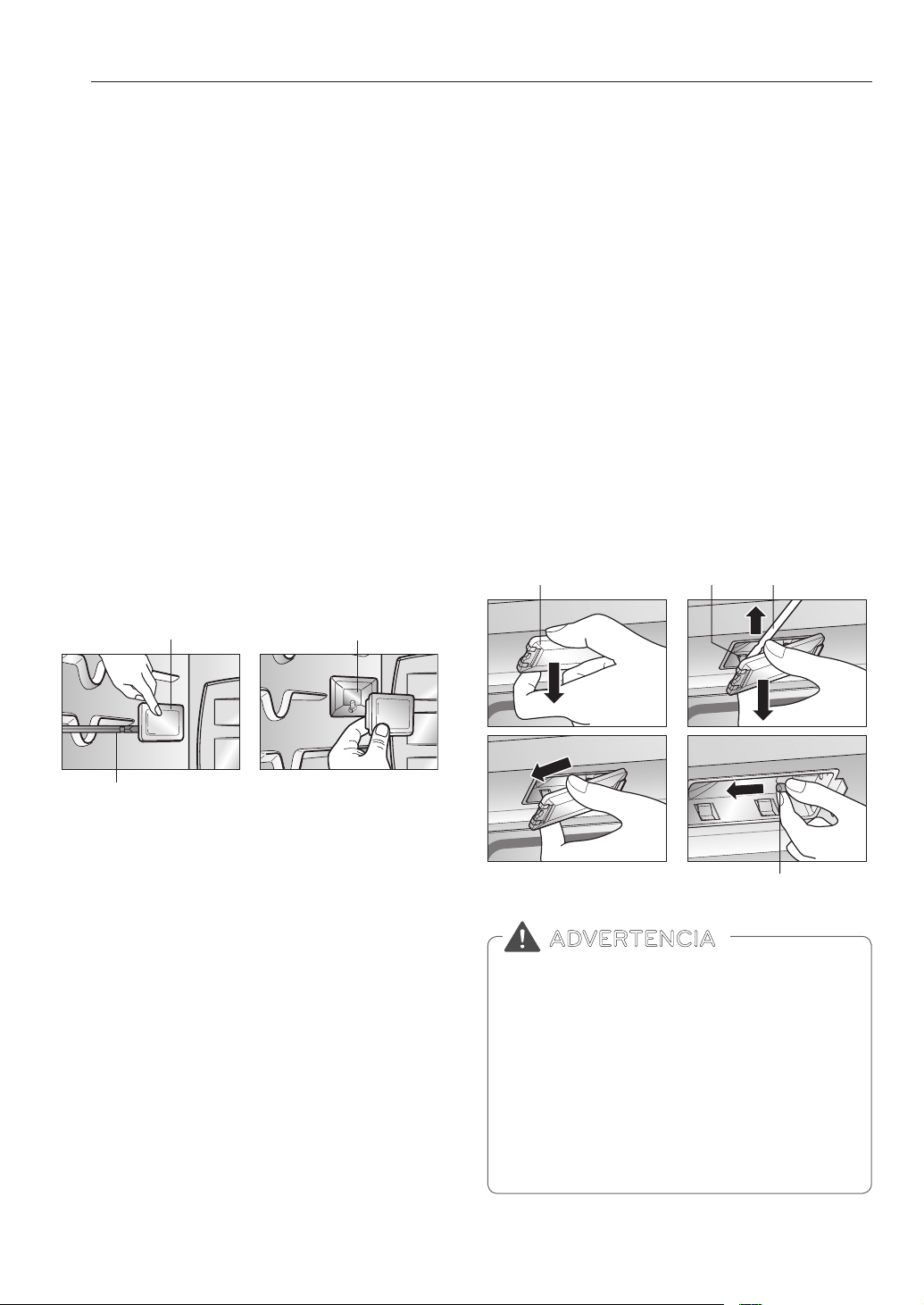
34
MANTENIMIENTO
Para reemplazar una lámpara ubicada en la pared
superior:
• Asegúrese de que el horno y la bombilla no estén
calientes.
1. Desenchufe el horno o desconecte la energía.
2. Quite las bandejas del horno.
3. Deslice un destornillador plano entre la carcasa y la tapa
de vidrio de la luz.
4. Sostenga la tapa de vidrio de la luz con dos dedos para que
no caiga a la parte inferior del horno.
5. Con suavidad gire el destornillador para aflojar la tapa de
vidrio de la luz y eliminarlo.
6. Quite la bombilla del enchufe.
7. Reemplace la bombilla, vuelva a colocar la tapa de la luz
trabándola en su lugar y empuje el gancho para sostener
bien la tapa de vidrio.
8. Enchufe el horno o vuelva a conectar la energía.
REEMPLAZO DE LA LUZ DEL
HORNO
LLa luz del horno es una bombilla halógena estándar de 10
vatios para hornos.
Para reemplazar las lámparas ubicadas en la pared
lateral:
• Asegúrese de que el horno y la bombilla no estén
calientes.
1. Desenchufe el horno o desconecte la energía.
2. Quite las bandejas del horno.
3. Deslice un destornillador plano entre la carcasa y la tapa
de vidrio de la luz.
4. Sostenga la tapa de vidrio de la luz con dos dedos para que
no caiga a la parte inferior del horno.
5. Con suavidad gire el destornillador para aflojar la tapa de
vidrio de la luz y eliminarlo.
6. Quite la bombilla del enchufe.
7. Cambie la bombilla, vuelva a colocar la tapa de la luz
ajustándola en su lugar a presión.
8. Enchufe el horno o vuelva a conectar la energía.
Tapa de vidrio de la luz
Tapa de vidrio de la luz
Destornillador plano
Destornillador plano
Carcasa
CarcasaGancho
Tapa de vidrio de la luz
Flat Blade screwdriver
Destornillador
plano
Bombilla
Gancho
y
Antes de reemplazar la bombilla del horno,
DESCONECTE la alimentación de energía del
horno desde el panel principal de fusibles o del
interruptor de circuitos.
− No hacerlo puede provocar lesiones personales
graves, la muerte o una descarga electrica.
y
Asegúrese de que el horno y la bombilla no estén
calientes.
y
Usar guantes mientras se cambia el foco lampara
del horno. Pedazos de vidrio de un foco quedabrado
pueden causar lesiones.
ADVERTENCIA
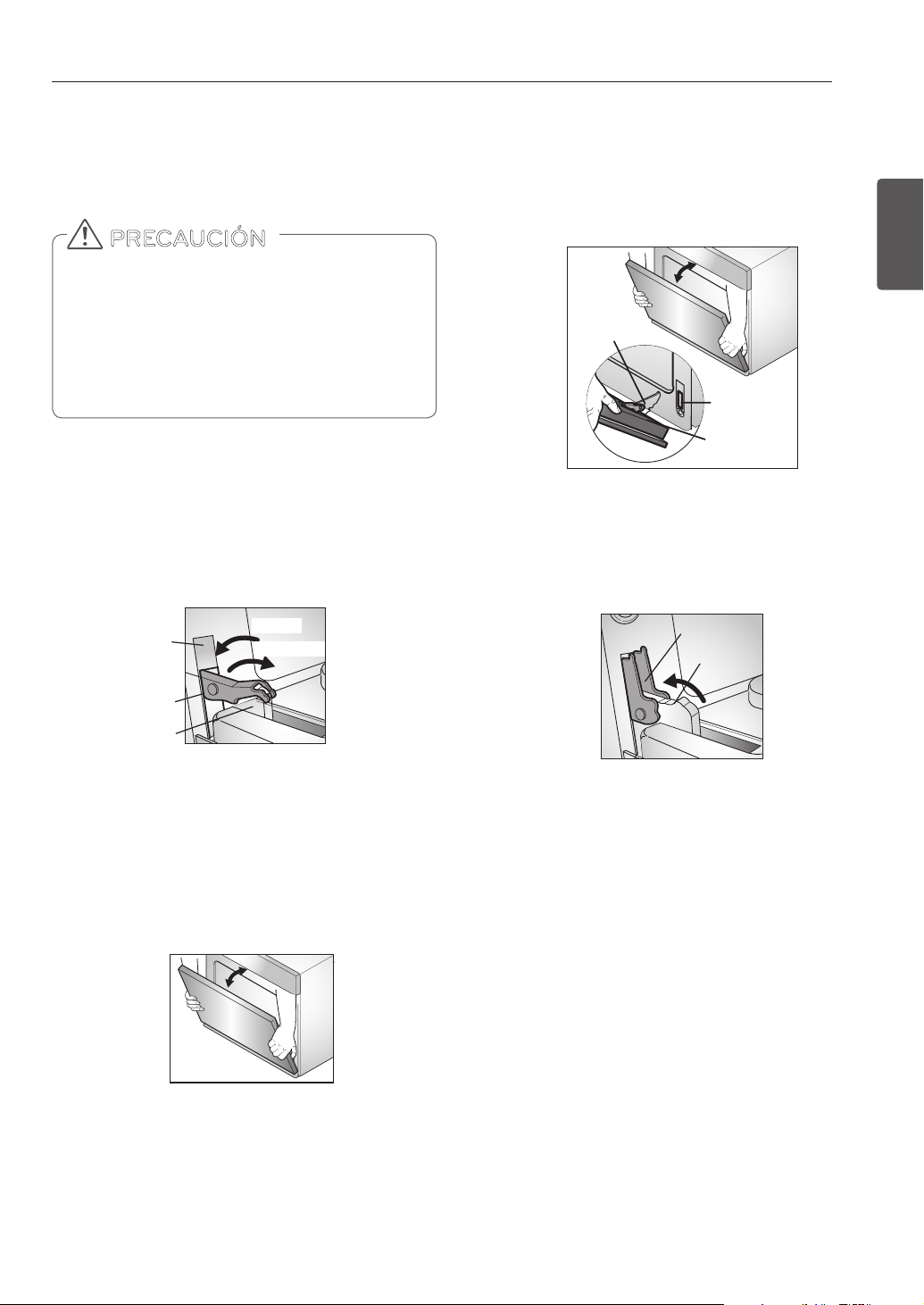
35
MANTENIMIENTO
ESPAÑOL
Volver a colocar la puerta del horno
1. Sostenga firmemente de la parte superior ambos lados de
la puerta.
2. Con la puerta en el mismo ángulo que la posición de
extracción, coloque la Muesca del brazo de la bisagra en el
borde inferior de la ranura de la bisagra. La Muesca en el
brazo de la bisagra debe estar completamente asentado
en la parte inferior de la ranura.
3. Abra completamente la puerta. Si la puerta no se
abre completamente, la Muesca no está posicionada
correctamente en el borde inferior de la ranura.
4. Empuje los seguros de la bisagra hacia arriba contra el
marco frontal de la cavidad del horno hasta la posición de
bloqueo. Cierre la puerta del horno.
SACAR Y VOLVER A COLOCAR LA
PUERTA DEL HORNO Y EL CAJÓN
• La puerta es muy pesada. Tenga cuidado al remover y
levantar la puerta.
• NO levante la puerta de la manija.
• NO golpee el vidrio con ollas, sartenes o cualquier otro
objeto.
• Los rayones, golpes, choques bruscos o el tensado del
vidrio podrían debilitar su estructura, causando mayor
riesgo de rotura en el futuro.
PRECAUCIÓN
Sacar la puerta del horno
1. Abra completamente la puerta.Tire de los seguros de
la bisagra hacia el marco de la puerta, en la posición de
desbloqueo. Una herramienta, tal como un pequeño
desarmador de punta plana, puede ser necesario.
2. Sostenga firmemente de la parte superior ambos lados de
la puerta. Cierre la puerta hasta la posición de remoción
(aproximadamente cinco grados). Que está entre en la
posición de paro de horno y completamente cerrada.
3. Levante la puerta hacia arriba y hacia afuera hasta que
el brazo de la bisagra haya salido de la ranura. Ponga la
puerta en el suelo.
Tirar de los seguros de la bisagra hacia
abajo para desbloquear.
Posición para Remover
Aproximadamente 5°
Brazo de
la bisagra
Ranura
Traba de
la bisagra
Traba de la
bisagra
Brazo de
la bisagra
Muesca
Extremo
inferior de
la ranura
Bloqueo
Desbloqueo
Brazo de
la bisagra
Brazo de
la bisagra
Ranura
Traba de
la bisagra
Traba de la
bisagra
Brazo de
la bisagra
Muesca
Extremo
inferior de
la ranura
Bloqueo
Desbloqueo
Brazo de
la bisagra
Brazo de
la bisagra
Ranura
Traba de
la bisagra
Traba de la
bisagra
Brazo de
la bisagra
Muesca
Extremo
inferior de
la ranura
Bloqueo
Desbloqueo
Brazo de
la bisagra
Brazo de
la bisagra
Ranura
Traba de
la bisagra
Traba de la
bisagra
Brazo de
la bisagra
Muesca
Extremo
inferior de
la ranura
Bloqueo
Desbloqueo
Brazo de
la bisagra
Empuje los seguros de la bisagra hacia arriba
para bloquear.

36
RESOLUCIÓN DE PROBLEMAS
Mi nuevo horno no cocina como el viejo.
¿Hay algún problema con la configuración
de la temperatura?
No, Su horno está previamente probado y calibrado de fabrica.
Para los primeros usos, siga los tiempos y temperaturas de
sus recetas cuidadosamente. Si usted todavía cree que su
nuevo horno es demasiado caliente o demasiado frío, usted
puedes ajustar la temperatura del horno para cumplir con
las necesidades de cocción que requiera. Consulte la sección
“Ajustes para la Temperatura del Horno” para obtener
instrucciones sencillas sobre cómo ajustar su termostato.
¿Es normal escuchar un ruido que proviene
de la parte trasera de mi horno cuando lo
estoy usando?
Su nueva estufa está diseñada para mantener un estricto control
de la temperatura de su horno. Usted puede escuchar un "clic“ al
encendido y apagado de los elementos de calentamiento de su
horno con frecuencia en su nueva estufa. Este funcionamiento es
normal en su nueva estufa.
Durante la cocción por convección el
ventilador se detiene cuando abro la puerta.
¿Es eso normal?
Sí, es normal. Cuando se abre la puerta, el ventilador de
convección se detendrá hasta que la puerta se cierre.
¿Puedo usar papel de aluminio para retener
los goteos en la cavidad de mi horno?
Nunca use papel aluminio para el fondo o los lados del horno. La
lámina se fundirá, se pegará en la superficie inferior del horno, y
no podrá ser removido. Utilice una bandeja sobre la rejilla inferior
del horno para atrapar la grasa en su lugar (Sí el papel aluminio
ya se ha fundido en la superficie inferior del horno, no interferirá
con el rendimiento de este)
¿Puedo usar papel de aluminio en los
estantes?
No cubra bastidores con papel de aluminio. Cubriendo bastidores
completos con papel restringe el flujo de aire, lo que lleva a
resultados de cocción pobres. Utilice una bandeja forrada con
papel de aluminio debajo de pasteles de frutas u otros alimentos
ácidos o azucarados para evitar derrames dañen el acabado del
horno.
¿Puedo dejar mis estantes en el horno
cuando se está ejecutando un ciclo de Auto-
Limpieza?
No. Si bien no dañará los estantes, los decolorará y podría
dificultar su deslizamiento hacia afuera y hacia adentro durante
su uso. Retire todos los elementos del horno antes de iniciar un
ciclo de Auto-Limpieza.
¿Qué debo hacer si mis estantes están
pegajosos y se ha vuelto difícil deslizarlos
hacia adentro y hacia afuera?
Con el tiempo es posible que sea difícil deslizar los estantes hacia
adentro y hacia afuera. Aplique una pequeña cantidad de aceite
de oliva en los extremos de los estantes. Esto funcionará como un
lubricante para un deslizamiento más fácil.
¿Debo asar a la parrilla con el horno abierto
o cerrado?
Su cocina eléctrica ha sido diseñada para asar con la puerta
abierta. Si se utiliza la función asar (Broil) con la puerta abierta,
puede dañar los mandos del horno y de la pantalla.
PREGUNTAS FRECUENTES
RESOLUCIÓN DE PROBLEMAS
El aluminio se puede utilizar para envolver los alimentos en
el horno, pero no permita que la hoja entre en contacto con
los elementos de calefacción / asar expuestas en el horno.
La lámina podría derretirse o inflamarse y provocar humo,
fuego o lesiones.
PRECAUCIÓN

37
RESOLUCIÓN DE PROBLEMAS
ESPAÑOL
¿Por qué no funcionan los botones de
funciones?
Asegúrese de que la estufa no esté en el modo Lockout
(Bloqueo). El símbolo de bloqueo
se mostrará en la pantalla
si la función Bloqueo de Horno está activada. Para desactivar
la función Bloqueo, presione y mantenga el botón PROBE
durante tres segundos. Sonará la melodía de desbloqueo, y
UNLOCKING (DESBLOQUEO) aparecerá en la pantalla hasta que
se desbloqueen los controles.
Mi estufa sigue sucia después de ejecutar el
ciclo SpeedClean™. ¿Qué más debo hacer?
El ciclo SpeedClean™ sólo ayuda a aflojar la suciedad ligera
del horno de su estufa con el fin de ayudar a la limpieza manual
de su horno. Esto no elimina automáticamente todas las
manchas después del ciclo. Después de ejecutar el ciclo
SpeedClean™ se requiere tallar el horno de su estufa.
He intentado tallar mi horno después
de ejecutar SpeedClean™, pero algunas
manchas permanecen intactas. ¿Qué puedo
hacer?
La función SpeedClean™ trabaja de la mejor manera cuando
la suciedades están completamente saturadas o sumergidas
en agua antes de comenzar el ciclo de limpieza y durante la
limpieza a mano. Si las suciedades no están completamente
saturadas en agua, el desempeño de limpieza puede verse
afectado negativamente. Repita el proceso SpeedClean™ usando
suficiente agua. Las suciedades cuyo principal contenido
es azúcar y grasas son especialmente difíciles de limpiar. Si
permanecen algunas suciedades difíciles de quitar, use la función
de auto-limpieza (Self Clean) para limpiar completamente su
horno.
La suciedad en la pared de mi horno no se
limpia. ¿Cómo puedo tener mis paredes
limpias?
Las suciedades en las paredes laterales y traseras de su horno
quizá sean más difíciles de sumergirse en agua. Se recomienda
que trate repitiendo el proceso SpeedClean™ rociando más
de 1/4 de taza (2 oz o 50 ml) de agua.
¿La función SpeedClean™ limpiara toda la
suciedad y las manchas por completo?
Depende del tipo de suciedad. Las suciedades cuyo principal
contenido es azúcar y grasa son especialmente difíciles de
limpiar. También, si las suciedades no están lo suficientemente
sumergidas en agua, el desempeño de la limpieza puede verse
afectado negativamente. Si suciedades difíciles de quitar o
suciedades acumuladas permanecen en el horno, use la
función de auto-limpieza (Self Clean). Refiérase a la sección
auto-limpieza (Self Clean) de su manual de usuario.
¿Hay algún truco para limpiar algunas de las
manchas rebeldes?
Se recomienda raspar la suciedad con una espátula de plástico
antes y durante la limpieza manual. Se recomienda saturar la
suciedad con agua. Sin embargo, ciertos tipos de suciedad son
más difíciles de limpiar que otros.
Para estas manchas rebeldes, se recomienda la función de
autolimpieza (Self Clean). Consulte la sección Self Clean del
manual de usuario para obtener más detalles.
¿Es seguro que mi ventilador de convección,
asador o elemento de calentamiento se
moje durante SpeedClean™?
Si. El ventilador de convección, el asador o el elemento de
calentamiento pueden llegar a mojarse un poco durante la
limpieza. Sin embargo, rociar directamente en el asador o los
elementos calentadores no es necesario ya éstos se auto-limpian
durante el uso común.
¿Necesito usar todas las 1-1/4 de taza (10 oz
o 300 ml) de agua para SpeedClean™?
Si. Es altamente recomendado que se rocíe o vierta 1 taza (8 oz o
250 ml) de agua en la base y que se rocíen 1/4 de taza (2 oz o 50
ml) adicionales de agua en las paredes y otras áreas sucias para
saturar las suciedades para un mejor desempeño de limpieza.
Veo "humo" que sale de la chimenea de la
hornilla de mi estufa durante SpeedClean™.
Es esto normal?
Esto es normal. Esto no es "humo". En realidad, es vapor de agua
(vapor) proveniente del agua en la cavidad del horno. A medida
que el horno se calienta brevemente durante SpeedClean™,
el agua de la cavidad se evapora y se escapa a través de la
chimenea de la hornilla de su estufa.
¿Con qué frecuencia debo usar
SpeedClean™?
La función SpeedClean™ puede ejecutarse tan seguido como
usted desee. La función SpeedClean™ trabaja de la mejor
manera cuando su horno esta LIJERAMENTE sucio de cosas como
manchas de grasa LIJERA y pequeñas gotas de queso. Por favor
refiérase a la sección SpeedClean™ en su manual de usuario para
más información.
¿Se puede usar SpeedClean™ en ambos
hornos?
Una botella llena con 1 ¼ de taza (10 oz o 300ml) de agua, una
espátula de plástico, una fibra anti-rayas, y una toalla. No debe
de usar fibras abrasivas como fibras de uso rudo o de acero. A
excepción de la toalla, todos los materiales que necesita están
incluidos en el kit especial con su nueva estufa.
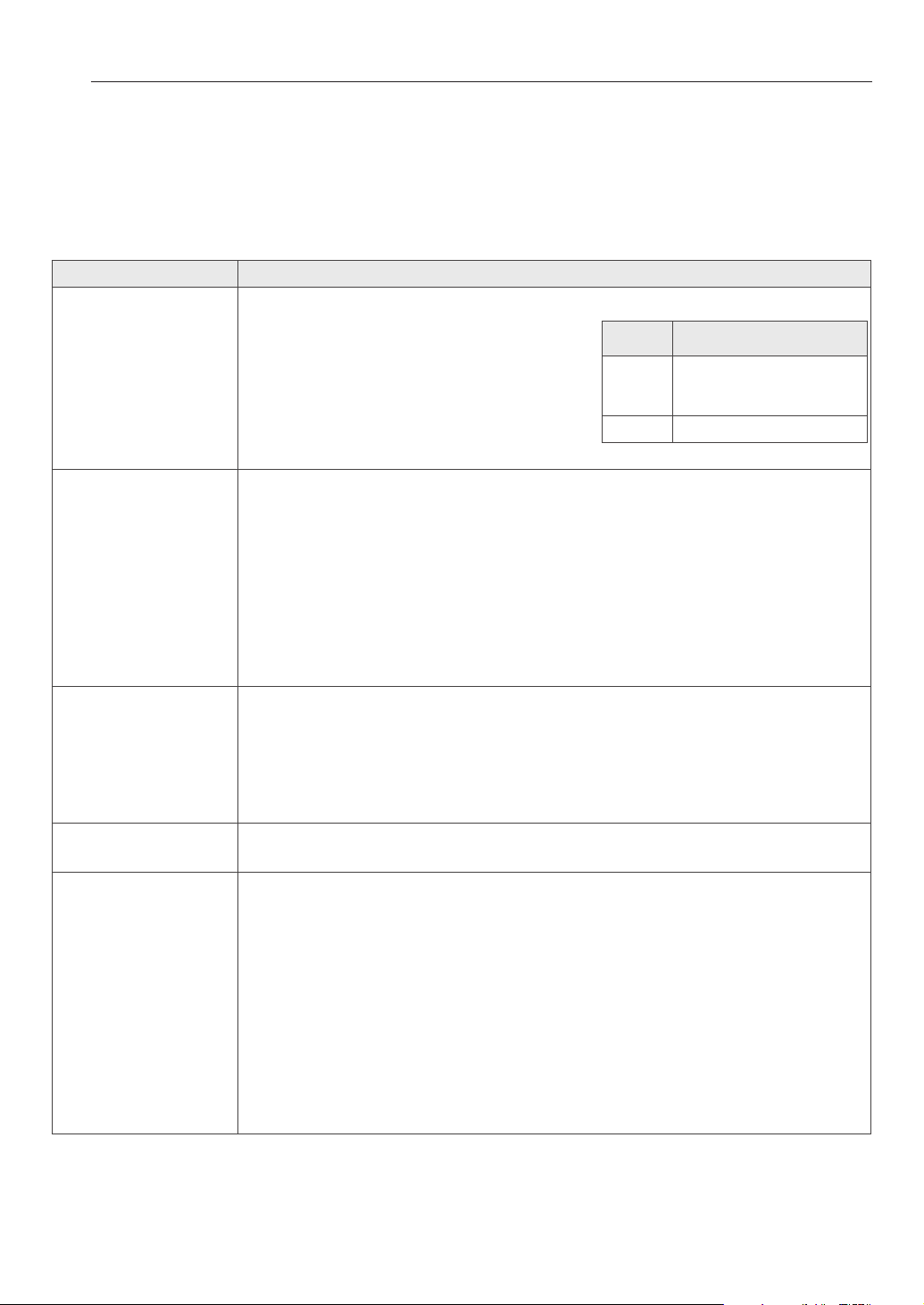
38
RESOLUCIÓN DE PROBLEMAS
ANTES DE LLAMAR AL SERVICIO
Antes de acudir al servicio, revise esta lista. Esto le podría ahorrar tiempo y gastos. La lista incluye los incidentes más
comunes que no son el resultado de defectos de materiales o fabricación de este artefacto.
Problema Causas / Soluciones posibles
El control del horno emite
un pitido y muestra un
error de código F.
y
El control eléctrico ha detectado una condición de falla.
Gire la perilla de modo del horno superior o inferior
hasta la posición OFF.
para borrar la pantalla y detener el pitido.
Reprograme el horno. Si la falla vuelve a producirse,
registre el número de falla. Gire la perilla de modo del
horno superior o inferior hasta la posición OFF.
y comuníquese con un técnico calificado.
El aparato no funciona.
y
El enchufe del horno no está introducido del todo en el tomacorriente.
- Verifique que el enchufe eléctrico esté conectado a un tomacorriente con tensión y adecuada
conexión a tierra.
y
Un fusible puede haberse quemado o el interruptor de circuitos puede haber saltado.
- Cambie el fusible o reconfigure el interruptor de circuitos.
y
Los controles del horno están mal configurados.
- Las instrucciones para configurar los modos de cocción comienzan en la página 18.
- Instrucciones para el ajuste de la configuración del horno comienzan en la página 11.
y
El horno está muy caliente.
- Deje que el horno se enfríe por debajo de la temperatura de bloqueo.
El aparato no funciona.
y
Asegúrese de que el cable esté bien enchufado en un tomacorriente. Verifique los interruptores de
circuitos.
y
El cableado de servicio no está completo. Para obtener asistencia, comuníquese con el
reparador del aparato.
y
Corte de energía. Controle las luces de su hogar para asegurarse. Llame a la compañía de
servicio eléctrico local.
La luz del horno no
funciona.
y
Reemplace o ajuste la bombilla. Consulte Cambio de la Luz del horno, en la página 34.
El horno produce humo
excesivo durante el asado.
y
Los controles no están configurados correctamente. Sigas la instrucciones Broil (Asado a la parrilla),
página 21.
y
La carne se encuentra muy cerca del elemento. Cambie la posición de la bandeja para
brindar un espacio adecuado entre la carne y el elemento. Precaliente el elemento de
asado para sellar los jugos.
y
No se ha preparado bien la carne. Quite el exceso de grasa de la carne. Corte los costados
restantes de grasa para evitar que se enrulen, pero no la deje sin nada de grasa.
y
La asadera está mal colocada y la grasa no escurre. Siempre coloque la rejilla sobre la asa-
dera con las estrías hacia arriba y las ranuras hacia abajo para que la grasa chorree dentro
de la asadera.
y
Se ha acumulado grasa en las supercies del horno. Es necesaria una limpieza regular
cuando se asa frecuentemente. Grasa o salpicaduras antiguas provocan humo excesivo.
CÓDIGO CAUSA
F-3 Tecla presionada por mucho
tiempo o tecla en corto
circuito
F-19 El horno no calienta

39
RESOLUCIÓN DE PROBLEMAS
ESPAÑOL
Problema Causas / Soluciones posibles
Los alimentos no se hornean o
rostizan correctamente
y
Los controles del horno están mal configurados.
- Ver las instrucciones para configurar Bake, horneado por convección, asado, y los modos de asado
por convección, páginas 18-21.
y
La posición de la bandeja es incorrecta o no está nivelada.
- Ver rack y Pan de Colocación, página 17.
y
Se están utilizando recipientes de cocción incorrectos o de tamaño inapropiado.
- Ver bandeja y recipiente de horneado en las páginas 17, 18, 20.
y
El sensor del horno debe ajustarse.
- Ver Ajuste la temperatura del horno, página 13.
Los alimentos no se asan de
manera adecuada
y
Los controles del horno están mal configurados.
- Vea la sección de asado, página 21.
y
Se está usando una posición de bandeja inadecuada.
- Consulte la Guía de asado, página 21-23.
y
Los recipientes no son los adecuados para asar.
- Use la asadera y rejilla que vinieron con su horno.
y
El papel metálico usado en la asadera y la rejilla no se ha colocado de manera correcta y no se
han realizado los cortes recomendados.
- Vea la sección de asado, página 21.
y
En algunas regiones la electricidad (voltaje) puede ser baja.
- Precaliente el elemento de asado durante 10 minutos.
- Ver la Guía de asado, página 21.
La temperatura del horno es
muy alta o muy baja
y
El sensor del horno debe ajustarse.
- Ajustes de temperatura del Horno, página 13.
El horno no efectúa la auto-
limpieza
y
La temperatura del horno está muy elevada para configurar la función de auto-limpieza.
- Deje que el horno se enfríe y vuelva a configurar los controles.
y
Los controles del horno están mal configurados.
- Vea la sección de autolimpieza, página 29.
y
No puede iniciarse un ciclo de auto-limpieza si la puerta está abierta.
Ruido de crujidos o chasquidos
y
Es el sonido del metal calentándose y enfriándose durante las funciones de cocción y limpieza.
- Esto es normal.
Humo excesivo durante un ciclo
de auto-limpieza
y
Suciedad excesiva.
- Gire la perilla de modo de horno (OVEN MODE) hasta la posición OFF. Abra las ventanas para
que salga el humo. Espere hasta que se cancele el modo de auto-limpieza. Limpie el exceso de
suciedad y vuelva a configurar el ciclo de limpieza.
La puerta del horno no se
abre después de un ciclo de
autolimpieza.
y
El horno está muy caliente.
- Deje que el horno se enfríe por debajo de la temperatura de bloqueo.

40
RESOLUCIÓN DE PROBLEMAS
Problema Causas / Soluciones posibles
El horno no queda limpio
después de un ciclo de
autolimpieza
y
Los controles del horno no están configurados correctamente.
- Ver la sección auto-limpieza, página 29-30.
y
El horno estaba muy sucio.
- Limpie los derrames más rebeldes antes de iniciar el ciclo de limpieza. Los hornos muy sucios
pueden necesitar una nueva auto-limpieza o una limpieza más prolongada.
El ícono DOOR LOCKED
(puerta bloqueada) se
enciende cuando desea
cocinar.
y
La puerta del horno está bloqueada porque la temperatura dentro del horno no ha descendido
por debajo de la temperatura de bloqueo.
- Gire la perilla de modo de horno (OVEN MODE) hasta la posición OFF. Deje enfriar el horno.
Un olor a quemado o a aceite
sale de la ventilación
y
Esto es normal en un horno nuevo y desaparece con el tiempo.
- Para acelerar el proceso, configure un ciclo de auto-limpieza durante un mínimo de 3 horas.
Ver la sección auto-limpieza, página 29-30.
El ventilador de refrigeración
siguen funcionando después
de que se apaga el horno
y
El ventilador se apaga automáticamente cuando los componentes electrónicos se han enfriado
lo suficiente.
- Esto es normal.
Sale aire caliente de la
ventilación después de que se
apaga el horno.
y
Se necesita una salida del aire caliente para mantener y reducir las temperaturas del horno. Se
apaga automáticamente cuando la temperatura baja a un nivel seguro.
- Esto es normal.
Red Wi-Fi no se conectarlo
correctamente
y
Si el aparato tiene problemas para conectarse a la red Wi-Fi, es posible que se encuentre
demasiado lejos del router. Adquiera un repetidor Wi-Fi (extensor de alcance) para mejorar la
intensidad de la señal Wi-Fi.
y
Es posible que la conexión Wi-Fi no se conecte o se interrumpa debido al entorno de la red
doméstica.
y
Según el proveedor de servicios de Internet, la conexión de la red puede no funcionar
correctamente.
y
El entorno inalámbrico circundante puede hacer que el servicio de red inalámbrica funcione
lentamente.
41
GARANTÍA
GARANTÍA (EE. UU.)
SIGNATURE KITCHEN SUITE reparará o reemplazará su producto, a discreción de SIGNATURE KITCHEN SUITE, si se comprueba que los
materiales o su confección presentaban defectos con el uso normal, durante el período de garantía establecido a continuación, vigente
a partir de la fecha de compra del producto por parte del comprador original. Esta garantía es válida únicamente para el comprador
original del producto y tendrá validez únicamente cuando se use en los EE. UU.
PERÍODO DE GARANTÍA COMO SÉ MANEJA EL SERVICIO TÉCNICO
Tres años
A partir de la fecha original de compra.
Cualquier parte del horno que falle debido a materiales o confección
defectuosos. Durante esta garantía completa durante tres años,
SIGNATURE KITCHEN SUITE además brindará, sin cargo, la mano de obra y
servicio técnico en el domicilio para reemplazar la parte defectuosa.
ESTA GARANTÍA REEMPLAZA CUALQUIER OTRA GARANTÍA, EXPRESA O IMPLÍCITA, INCLUYENDO AUNQUE SIN LIMITACIÓN, CUALQUIER
GARANTÍA DE COMERCIABILIDAD O APTITUD PARA UN PROPÓSITO DETERMINADO. CUANDO LA LEY NO EXIJA NINGUNA GARANTÍA
EXPLÍCITA, LA DURACIÓN DE LA MISMA SE ENCUENTRA LIMITADA AL PERÍODO DE GARANTÍA EXPRESA INDICADO ANTERIORMENTE.
SIGNATURE KITCHEN SUITE NO SERÁ RESPONSABLE POR LOS DAÑOS EMERGENTES, INDIRECTOS O DIRECTOS, DE NINGÚN TIPO,
INCLUYENDO LA PÉRDIDA DE INGRESOS O GANANCIAS, EN RELACIÓN AL PRODUCTO. ALGUNOS ESTADOS NO PERMITEN LIMITACIONES
EN CUANTO A LA DURACIÓN DE UNA GARANTÍA O LA EXCLUSIÓN DE LOS DAÑOS INCIDENTALES O EMERGENTES, POR LO TANTO, LAS
LIMITACIONES ANTERIORES PODRÍAN NO APLICARSE.
ESTA GARANTÍA LIMITADA NO INCLUYE:
1. Llamadas al servicio técnico para corregir la instalación de su electrodoméstico, para enseñarle a usar su producto, para reemplazar
los fusibles de la vivienda o corregir el cableado de la vivienda o para reemplazar bombillas de luz de fácil acceso para el usuario.
2. Las reparaciones cuando su electrodoméstico se use para otro fin diferente del uso normal para un hogar de una sola familia.
3. Recogida y entrega. Su electrodoméstico está diseñado para ser reparado en el hogar.
4. Daños causados por accidentes, modificaciones, uso indebido, abuso, incendios, inundaciones, instalación inadecuada, desastres
naturales o el uso de productos no aprobados por SIGNATURE KITCHEN SUITE Corporation.
5. Las reparaciones de partes o sistemas como resultado de modificaciones no autorizadas realizadas al electrodoméstico.
6. Reemplazo de partes o costo de mano de obra para unidades usadas fuera de los Estados Unidos.
7. Todos los costos de mano de obra durante el período de garantía limitada.
Se extiende la presente garantía al comprador original para aquellos productos comprados para uso domiciliario dentro de los EE.
UU. En Alaska, la garantía excluye los gastos de envío o las llamadas por parte del servicio técnico a su domicilio. Algunos estados no
permiten exclusiones o limitaciones de los daños incidentales o emergentes, por lo tanto, esta exclusión o limitación podría no aplicarse.
La presente garantía le otorga derechos legales específicos, es posible que usted tenga otros derechos que pueden variar entre estados.
Para conocer cuáles son sus derechos, consulte con su oficina de consumo estatal o local o con el Procurador General de su estado.
CENTRO DE ASISTENCIA AL CLIENTE:
Para Demostrar la Cobertura de la Garantía Conserve su Comprobante de Venta para demostrar
la fecha de compra.
Debe enviar una copia de su Comprobante de Venta en
el momento en que se presta servicio técnico bajo la
garantía.
Para Conocer el Centro de Servicios Técnicos Autorizado o Representante
de Ventas más Cercano, o para Obtener Asistencia por Producto, Cliente o
Servicio Técnico.
Llame al 1-855-790-6655 (Atendido las 24 horas, los 365
días del año) y elija la opción correcta del menú; o visite
nuestro sitio web en: www.thesignaturekitchen.com

Customer Information Center
For inquires or comments, call;
1-855-790-6655 USA
Printed in Korea