
WARNING: This product contains chemicals known to the State of California to cause cancer and birth defects or other
reproductive harm. Wash hands after handling.

2
ENG
ENGLISH
TABLE OF CONTENTS
TABLE OF CONTENTS
3 LICENSES
4 ASSEMBLING AND
PREPARING
4 Accessories
5 OptionalAccessories
6 PartsandButtons
7 ConnectingtheStand
8 ConnectingtheSpeaker
9 UsingtheIRReceiver
9 PortraitLayout
10 MountingonaWall
12 REMOTE CONTROL
14 MAKING CONNECTIONS
15 RGBConnection
16 HDMIConnection
16 IRReceiverConnection
17 USBConnection
17 LANConnection
18 USING THE MONITOR
18 UsingtheInputList
18 AdjustingAspectRatio
20 ENTERTAINMENT
20 UsingtheNetwork
20 - ConnectingtoaWiredNetwork
21 - NetworkStatus
22 UsingtheMyMedia
22 - ConnectingUSBstoragedevices
24 - BrowsingFiles
26
27 - ViewingMovies
30 - ViewingPhotos
32 - ListeningtoMusic
35 - ViewingtheContentsList
36 CUSTOMIZING SETTINGS
36 AccessingMainMenus
37 - PICTURESettings
40 - AUDIOSettings
41 - TIMESettings
42 - OPTIONSettings
43 - NETWORKSettings
44 TROUBLESHOOTING
46 SPECIFICATIONS
59 IR CODES
60 CONTROLLING THE MULTIPLE
PRODUCT
60 ConnectingtheCable
60 RS-232CConfigurations
60 CommunicationParameter
61 CommandReferenceList
63 Transmission/ReceivingProtocol

ENGLISH
3
LICENSES
LICENSES
Supportedlicensesmaydifferbymodel.Formoreinformationofthelicenses,visitwww.lg.com.
ThetermsHDMIandHDMIHigh-DefinitionMultimediaInterface,andthe
HDMIlogoaretrademarksorregisteredtrademarksofHDMILicensingLLC
intheUnitedStatesandothercountries.
ManufacturedunderlicensefromDolbyLaboratories.Dolbyandthedouble-D
symbolaretrademarksofDolbyLaboratories.
ABOUTDIVXVIDEO:DivX®isadigitalvideoformatcreatedbyDivX,LLC,a
subsidiaryofRoviCorporation.ThisisanofficialDivXCertified®devicethat
haspassedrigoroustestingtoverifythatitplaysDivXvideo.Visitdivx.comfor
moreinformationandsoftwaretoolstoconvertyourfilesintoDivXvideos.
ABOUTDIVXVIDEO-ON-DEMAND:ThisDivXCertified®devicemustbe
registeredinordertoplaypurchasedDivXVideo-on-Demand(VOD)movies
Toobtainyourregistrationcode,locatetheDivXVODsectioninyourdevice
setupmenu.
Gotovod.divx.comformoreinformationonhowtocompleteyourregistration.
DivXCertified®toplayDivX®videouptoHD1080p,includingpremium
content.
DivX®,DivXCertified®andassociatedlogosaretrademarksofRovi
Corporationoritssubsidiariesandareusedunderlicense.
CoveredbyoneormoreofthefollowingU.S.patents:7,295,673;7,460,668;
7,515,710;7,519,274
4
ENG
ENGLISH
ASSEMBLING AND PREPARING
ASSEMBLING AND PREPARING
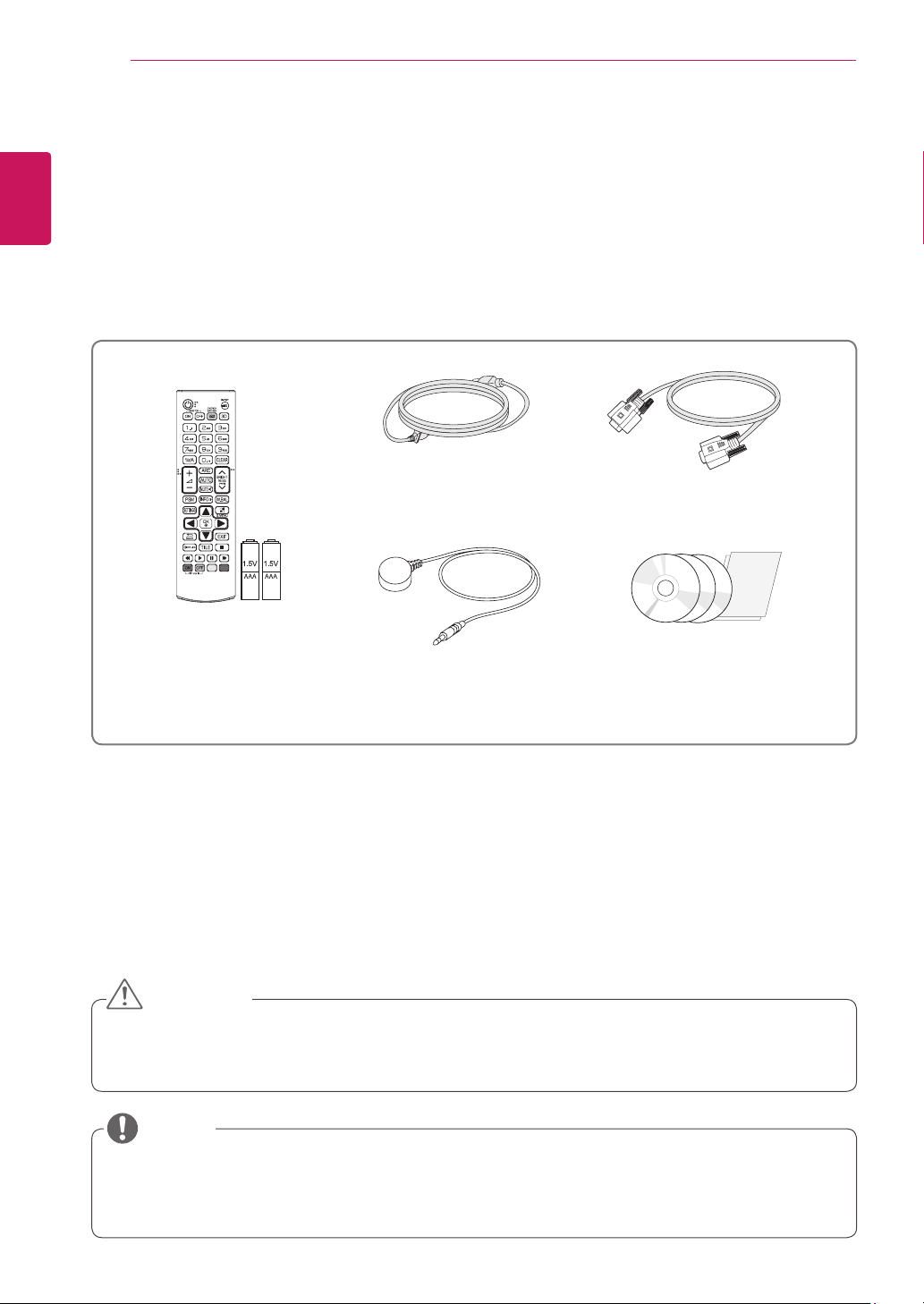
Accessories
Checkyourproductboxforthefollowingitems.Ifthereareanymissingaccessories,contactthelocal
dealerwhereyoupurchasedyourproduct.Theillustrationsinthismanualmaydifferfromtheactualproduct
andaccessories.
Donotuseanypirateditemstoensurethesafetyandproductlifespan.
Anydamagesorinjuriesbyusingpirateditemsarenotcoveredbythewarranty.
Theaccessoriessuppliedwithyourproductmayvarydependingonthemodel.
Productspecificationsorcontentsinthismanualmaybechangedwithoutpriornoticeduetoupgrade
ofproductfunctions.
CAUTION
NOTE
Remote Control and
Batteries
Power Cord
CD (Owner's Manual,
SuperSign Program/ Manual)/
Cards
D-sub 15-pin Signal Cable
IR Receiver
5
ENG
ENGLISH
ASSEMBLING AND PREPARING
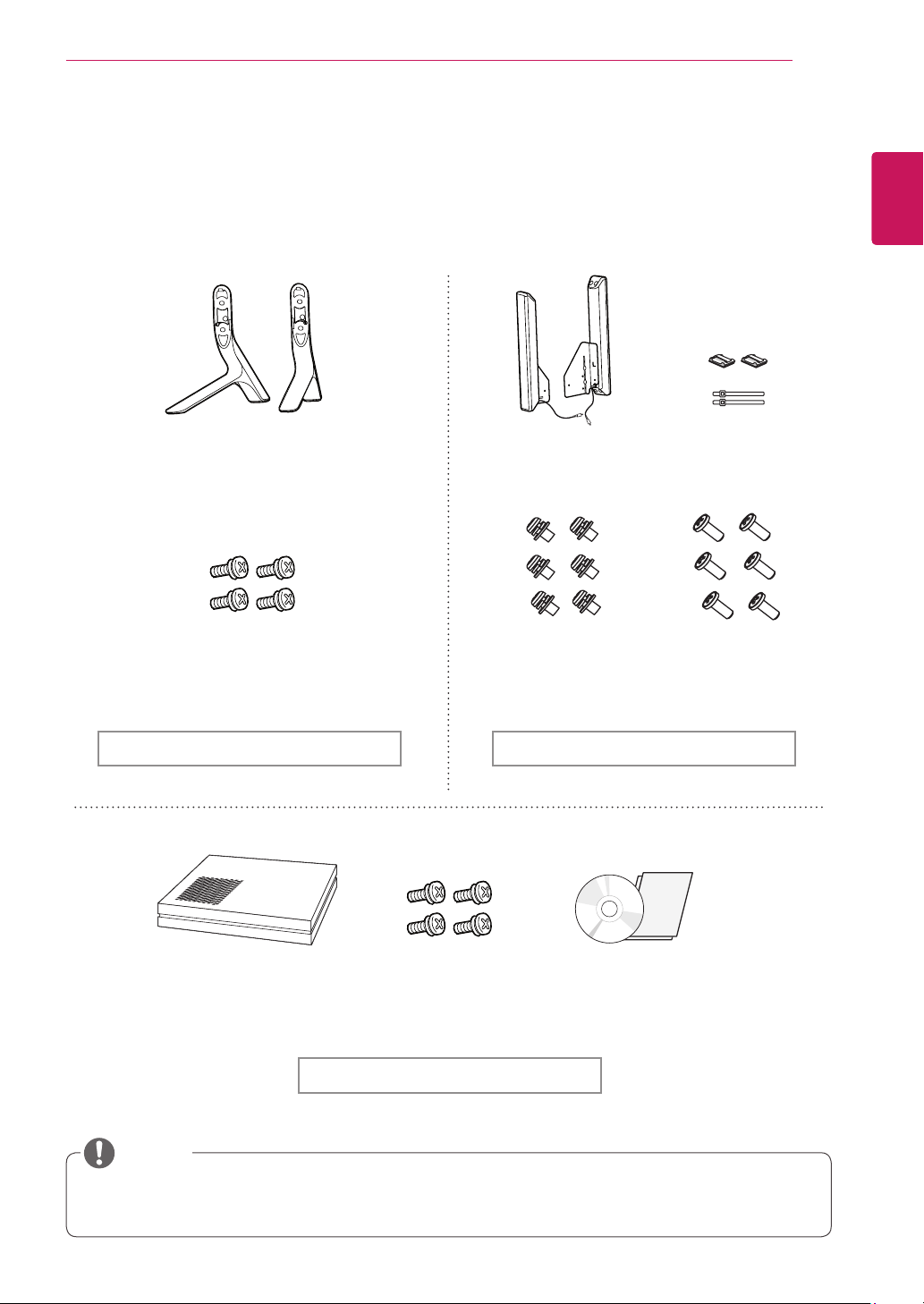
Optional Accessories
Withoutpriornotice,optionalaccessoriesaresubjecttochangetoimprovetheperformanceoftheproduct,
andnewaccessoriesmaybeadded.Theillustrationsinthismanualmaydifferfromtheactualproductand
accessories.
Cableholder/cabletiemaynotbeavailableinsomeareasorforsomemodels.
Optionalaccessoriesarenotincludedforallmodels.
NOTE
Stand
ST-321T (32LS33A)
ST-421T (42LS33A)
ST-471T
(47LS33A)
(55LS33A)
Cable holder/
Cable Tie
Screws
Diameter4.0mmxPitch0.7mm
xLength14mm(IncludedSpring
Washer)
Speaker
SP-2100
Stand kit Speaker kit
Screws CD(Owner's Manual)/
Cards
Media Player
MP500/ MP700
Media Player kit
Screws
Diameter4.0mmxPitch
0.7mmxLength8mm
(IncludedSpringWasher)
Screws
Diameter4.0mmx
Pitch1.6mmxLength
10mm
6
ENG
ENGLISH
ASSEMBLING AND PREPARING
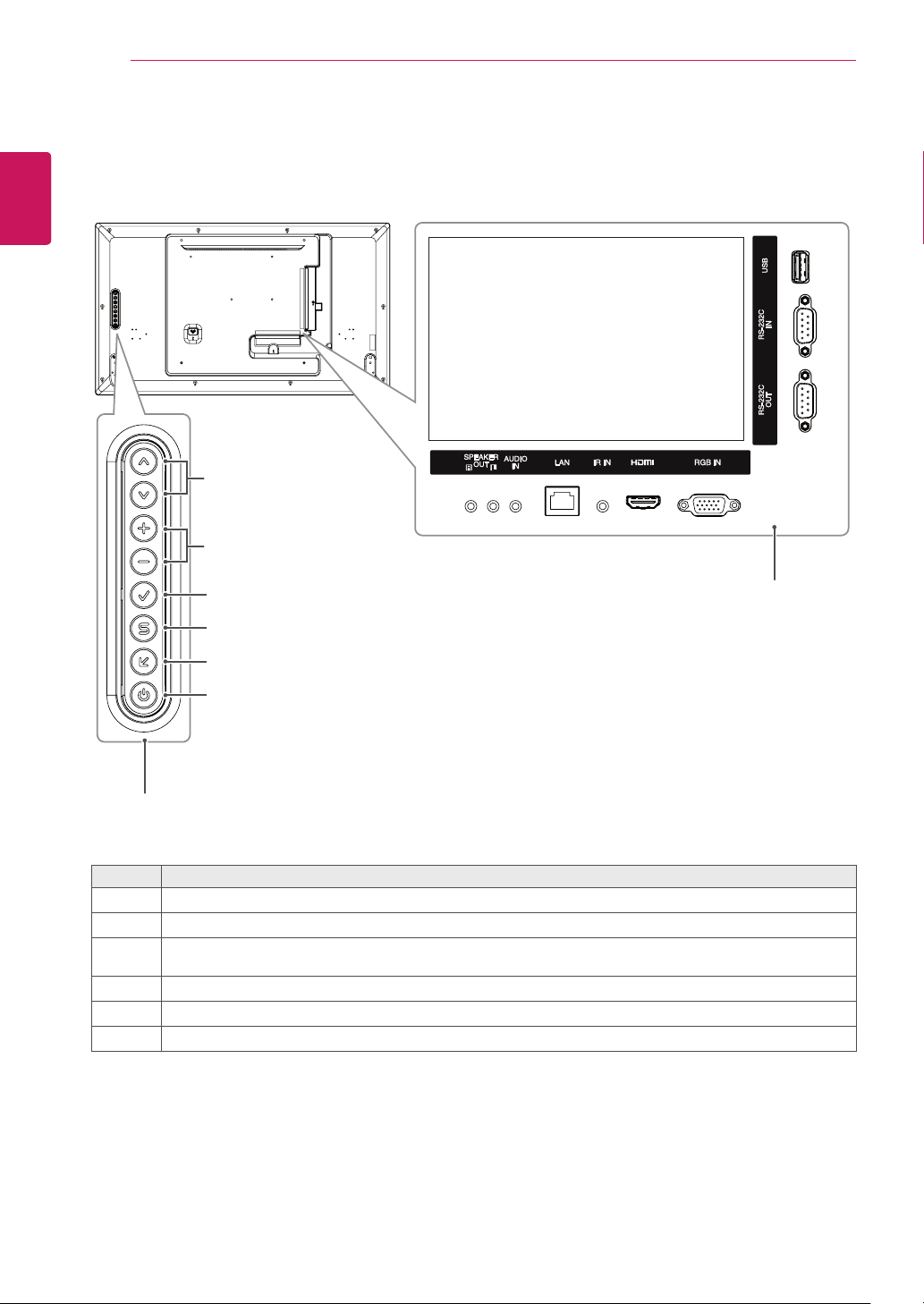
Parts and Buttons
Connection Panel
Screen Buttons
No. Description
1
Movestheselectionupanddown.
2
Adjuststhevolumelevel.
3
Displaysthecurrentsignalandmode.
Pressthisbuttontoadjustthescreenautomatically(availableonlyinRGBmode)
4
Accessesthemainmenus,orsavesyourinputandexitsthemenus.
5
Changestheinputsource.
6
Turnsthepoweronoroff.
1
2
6
5
4
3
7
ENG
ENGLISH
ASSEMBLING AND PREPARING
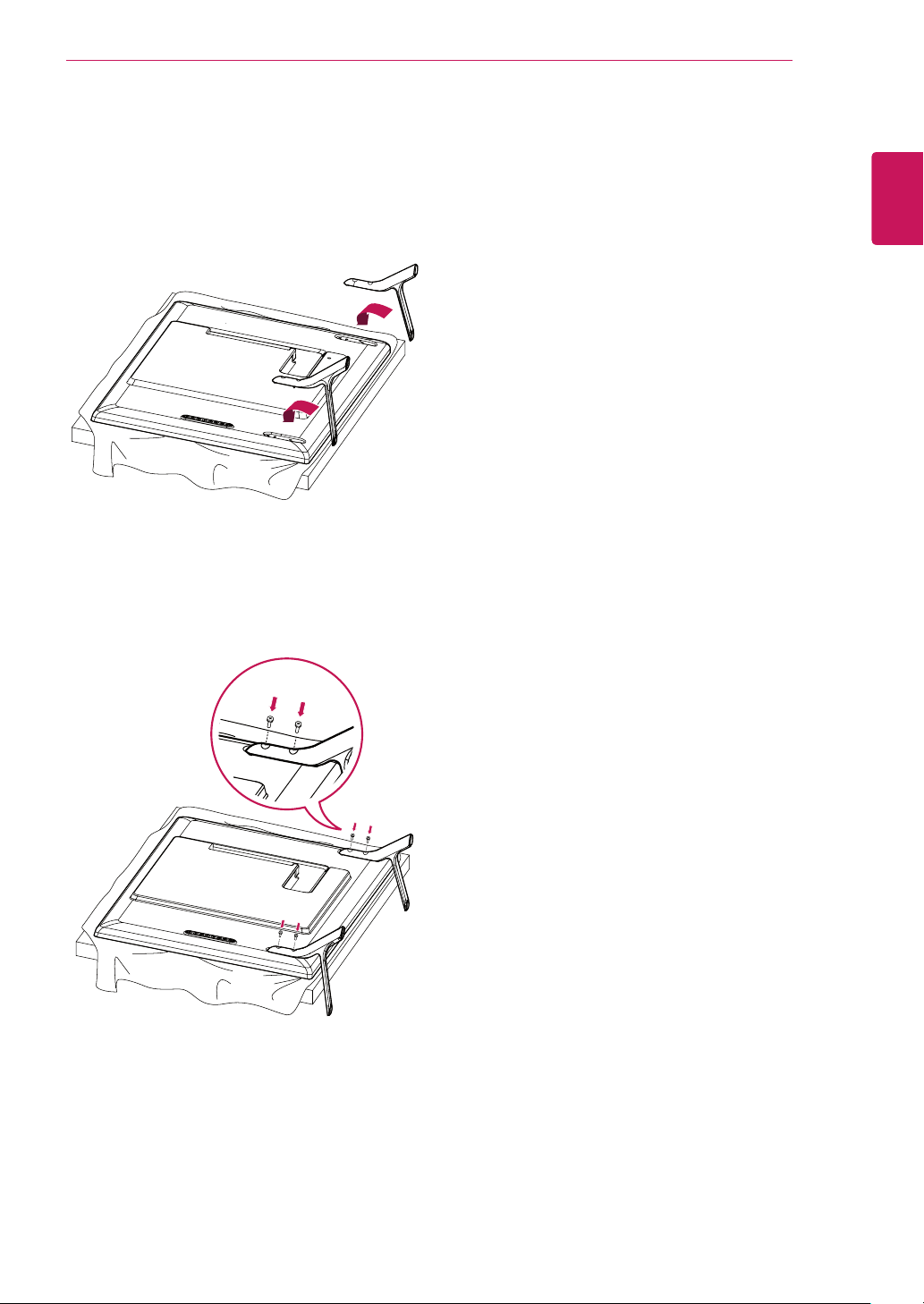
2
Usethescrewstosecurethestandontherear
sideoftheproductasshowninthediagram.
Connecting the Stand
-Onlyonsomemodels.
1
Placeasoftclothonthetableandputthe
productwiththescreenfacingdownward.
8
ENG
ENGLISH
ASSEMBLING AND PREPARING
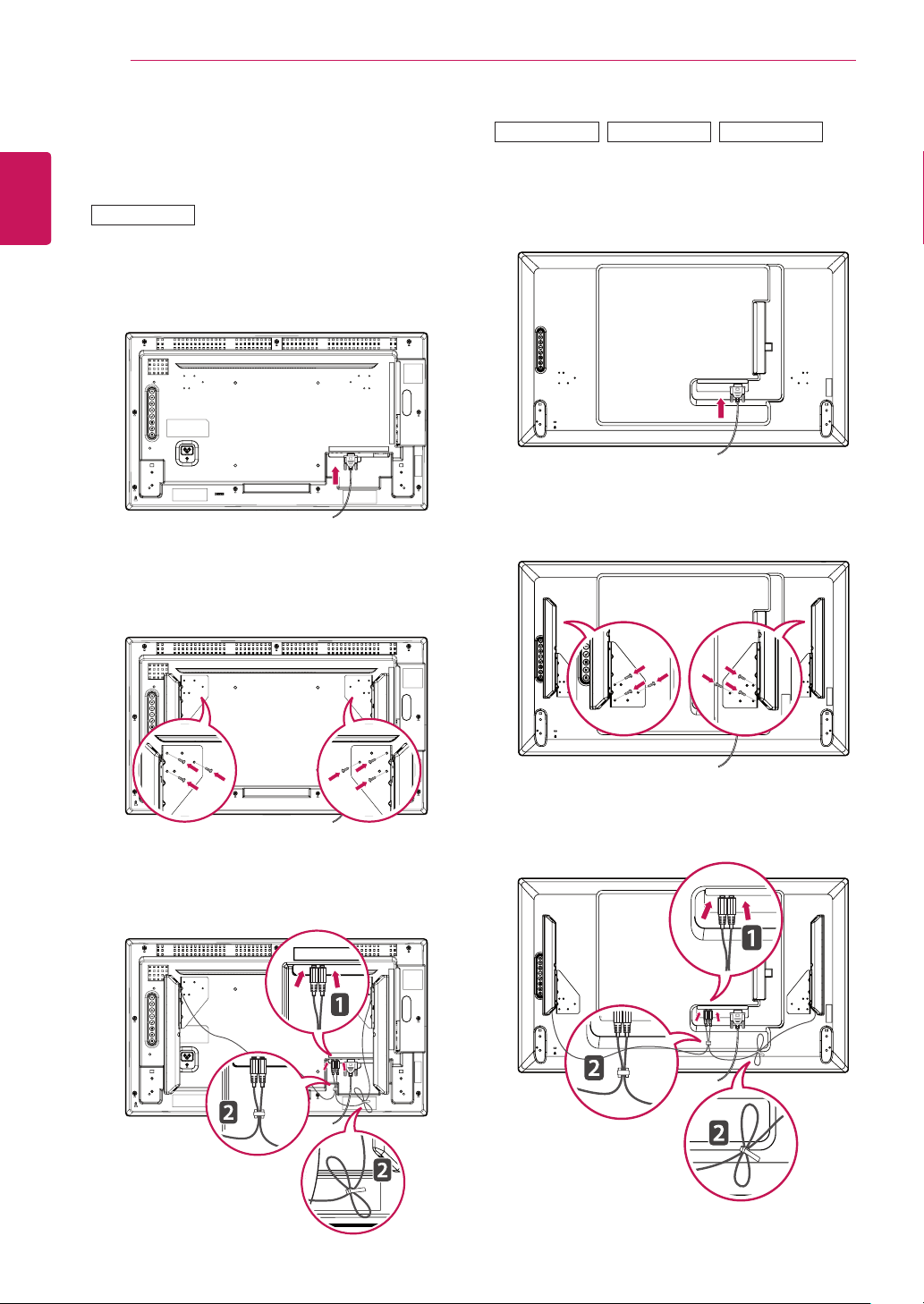
Connecting the Speaker
-Onlyonsomemodels.
3
Thenconnectthespeakercable.Afterinstalling
yourspeakers,useholdersandcabletiesto
organizethespeakercables.
3
Thenconnectthespeakercable.Afterinstalling
yourspeakers,useholdersandcabletiesto
organizethespeakercables.
2
Mountthespeakerbyusingascrewasshown
inthefollowing.Makesurethepowercableis
disconnected.
2
Mountthespeakerbyusingascrewasshown
inthefollowing.Makesurethepowercableis
disconnected.
42LS33A
32LS33A
47LS33A 55LS33A
1
Connecttheinputsignalcabletothemonitor
beforeinstallingthespeakers.Useacabletie
toorganizethecables.
1
Connecttheinputsignalcabletothemonitor
beforeinstallingthespeakers.Useacabletie
toorganizethecables.
9
ENG
ENGLISH
ASSEMBLING AND PREPARING
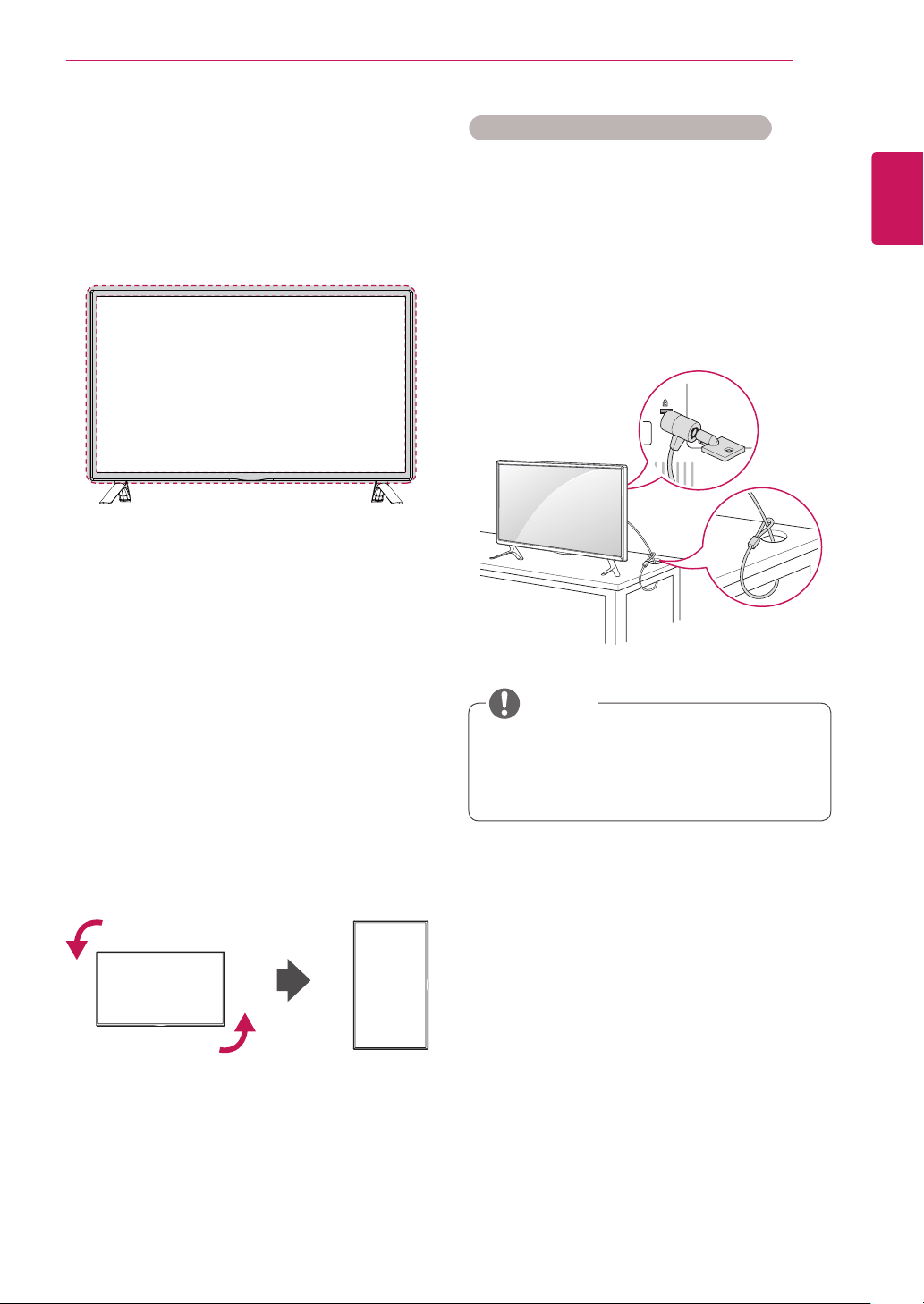
Portrait Layout
Toinstallinportraitmode,rotatetheset
counterclockwise90degreeswhenlookingatfrom
thefront.
Using the Kensington security system
TheKensingtonsecuritysystemconnectoris
locatedatthebackofthemonitorset.Formore
informationofinstallationandusing,refertothe
manualsuppliedwiththeKensingtonsecurity
systemorvisit
http://www.kensington.com
.
ConnecttheKensingtonsecuritysystemcable
betweenthemonitorsetandatable.
TheKensingtonsecuritysystemisoptional.
Youcanobtainadditionalaccessoriesfrom
mostelectronicsstores.
NOTE
Using the IR Receiver
Thisallowsaremotecontrolsensortobeplaced
inacustomlocation.TheIRreceiverismadewith
amagnet.Youcanattachittothemonitoredge.
10
ENG
ENGLISH
ASSEMBLING AND PREPARING
Mounting on a Wall
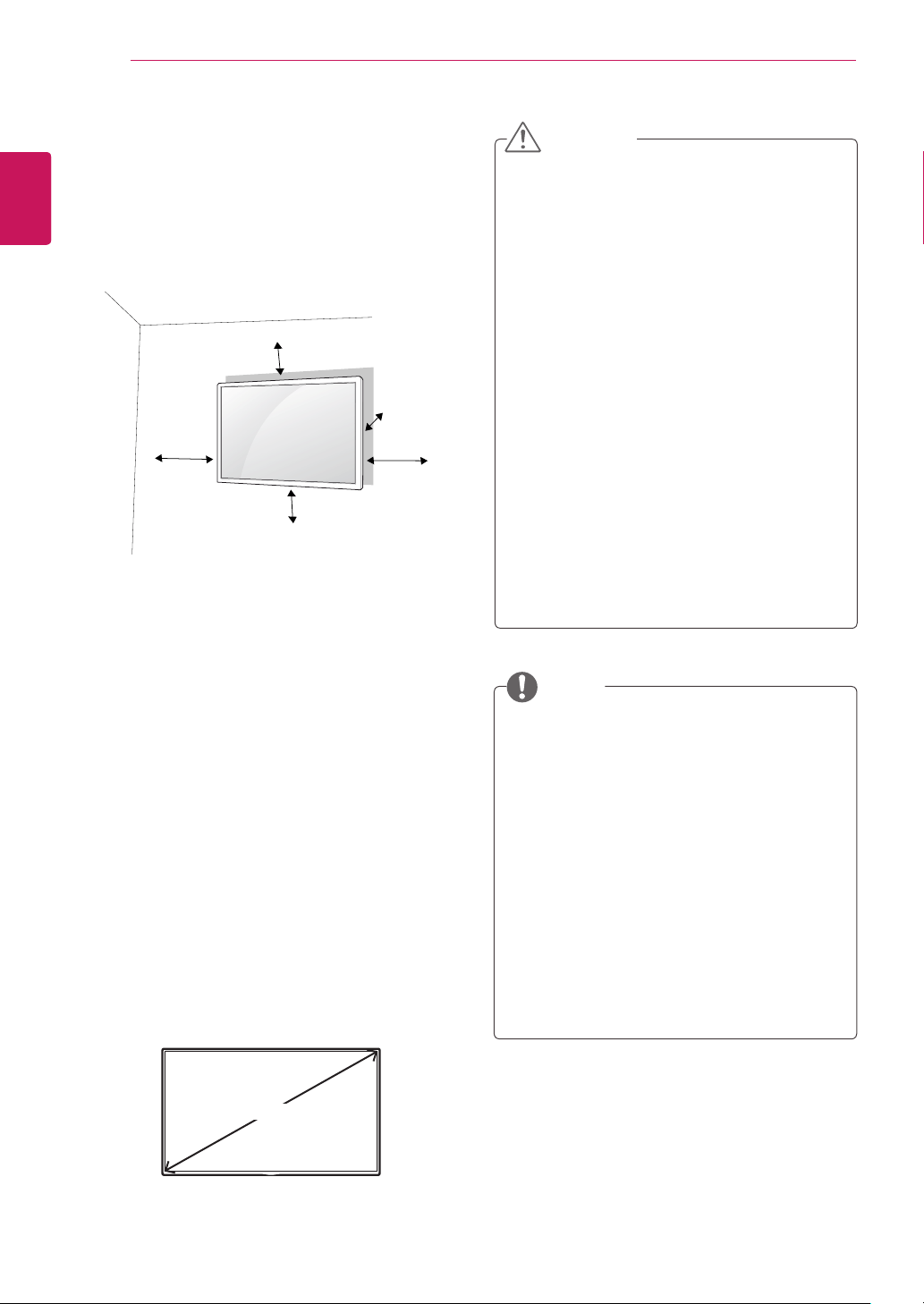
Forproperventilation,allowaclearanceof10
cmoneachsideandfromthewall.Detailed
installationinstructionsareavailablefromyour
dealer,seetheoptionalTiltWallMountingBracket
InstallationandSetupGuide.
10cm
10cm
10cm
10cm
10cm
Ifyouintendtomountthemonitortoawall,attach
aWallmountinginterface(optionalparts)tothe
backoftheset.
Whenyouinstallthemonitorusingawallmounting
interface(optionalparts),attachitcarefullysoit
willnotfall.
1
Please,useawallmountandscrewsin
accordancewithVESAStandards.
2
Ifyouusescrewslongerthanstandard,the
monitormightbedamagedinternally.
3
Ifyouuseimproperscrews,theproductmight
bedamagedanddropfrommountedposition.
Inthiscase,LGElectronicsisnotresponsible
fordamage.
4
PleaseuseVESAstandardasbelow.
785mmorgreater
*Fasteningscrew:Diameter6.0mmxPitch1.0
mmxLength10mm
Disconnectthepowercordfirst,andthen
moveorinstallthemonitorset.Otherwise
electricshockmayoccur.
Ifyouinstallthemonitorsetonaceilingor
slantedwall,itmayfallandresultinsevere
injury.
UseanauthorizedLGwallmountand
contactthelocaldealerorqualified
personnel.
Donotovertightenthescrewsasthismay
causedamagetothemonitorsetandvoid
yourwarranty.
Usethescrewsandwallmountsthatmeet
theVESAstandard.Anydamagesorinjuries
bymisuseorusinganimproperaccessory
arenotcoveredbythewarranty.
Topreventinjury,thisapparatusmustbe
securelyattachedtothewallinaccordance
withtheinstrallationinstructions.(Thisonly
pertainstoAustraliaandNewZealand.)
Thewallmountkitincludesaninstallation
manualandnecessaryparts.
Thewallmountbracketisoptional.Youcan
obtainadditionalaccessoriesfromyourlocal
dealer.
Thelengthofscrewsmaydifferdepending
onthewallmount.Besuretousetheproper
length.
Formoreinformation,refertotheinstructions
suppliedwiththewallmount.
Thewarrantywillnotcoveranydamages
causedbyusingtheproductinan
excessivelydustyenvironment.
CAUTION
NOTE
785mm
11
ENG
ENGLISH
ASSEMBLING AND PREPARING
Securing the product to a wall (optional)
(Dependingonmodel)
Ifaproductisnotpositionedinasufficiently
stablelocation,itcanbepotentially
hazardousduetofalling.Manyinjuries,
particularlytochildren,canbeavoidedby
takingsimpleprecautionssuchas:
»
Usingcabinetsorstandsrecommended
bythemanufactureroftheproduct.
»
Onlyusingfurniturethatcansafely
supporttheproduct.
»
Ensuringtheproductisnotoverhanging
theedgeofthesupportingfurniture.
»
Notplacingtheproductontallfurniture
(forexample,cupboardsorbookcases)
withoutanchoringboththefurnitureand
theproducttoasuitablesupport.
»
Notstandingtheproductonclothorother
materialsplacedbetweentheproduct
andsupportingfurniture.
»
Educatingchildrenaboutthedangersof
climbingonfurnituretoreachtheproduct
oritscontrols.
WARNING
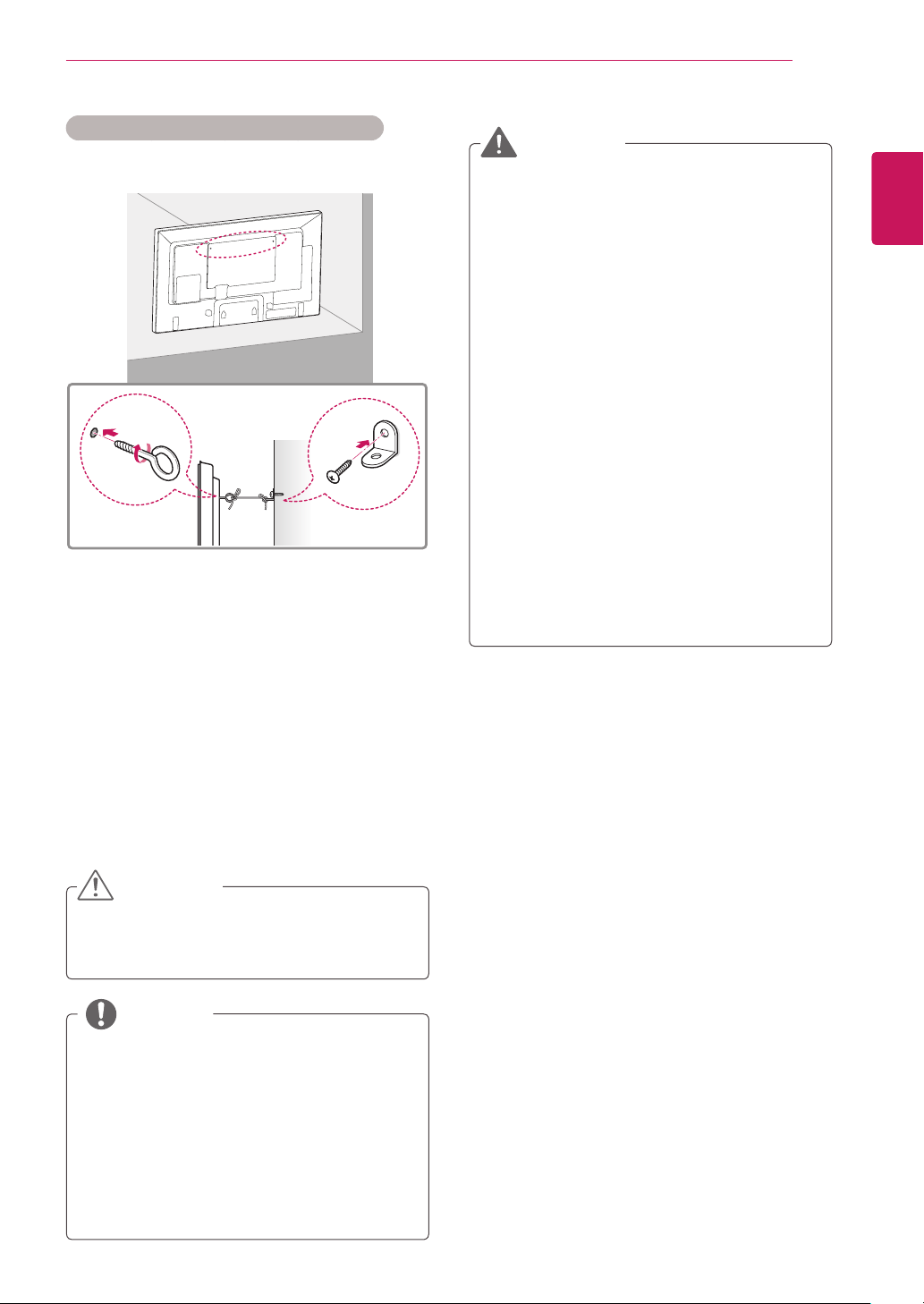
1
Insertandtightentheeye-bolts,or
p
roduct
bracketsandboltsonthebackofthe
p
roduct.
-Ifthereareboltsinsertedattheeye-bolts
position,removetheboltsfirst.
2
Mountthewallbracketswiththeboltstothe
wall.
Matchthelocationofthewallbracketandthe
eye-boltsontherearofthe
p
roduct.
3
Connecttheeye-boltsandwallbracketstightly
withasturdyrope.
Makesuretokeeptheropehorizontalwiththe
flatsurface.
NOTE
Makesurethatchildrendonotclimbonor
hangonthe
p
roduct.
Useaplatformorcabinetthatisstrongand
largeenoughtosupportthe
p
roductsecurely.
Brackets,boltsandropesareoptional.You
canobtainadditionalaccessoriesfromyour
localdealer.
Theillustrationshowsageneralexampleof
installationandmaylookdifferentfromthe
actualproduct.
CAUTION
12
ENG
ENGLISH
REMOTE CONTROL
REMOTE CONTROL
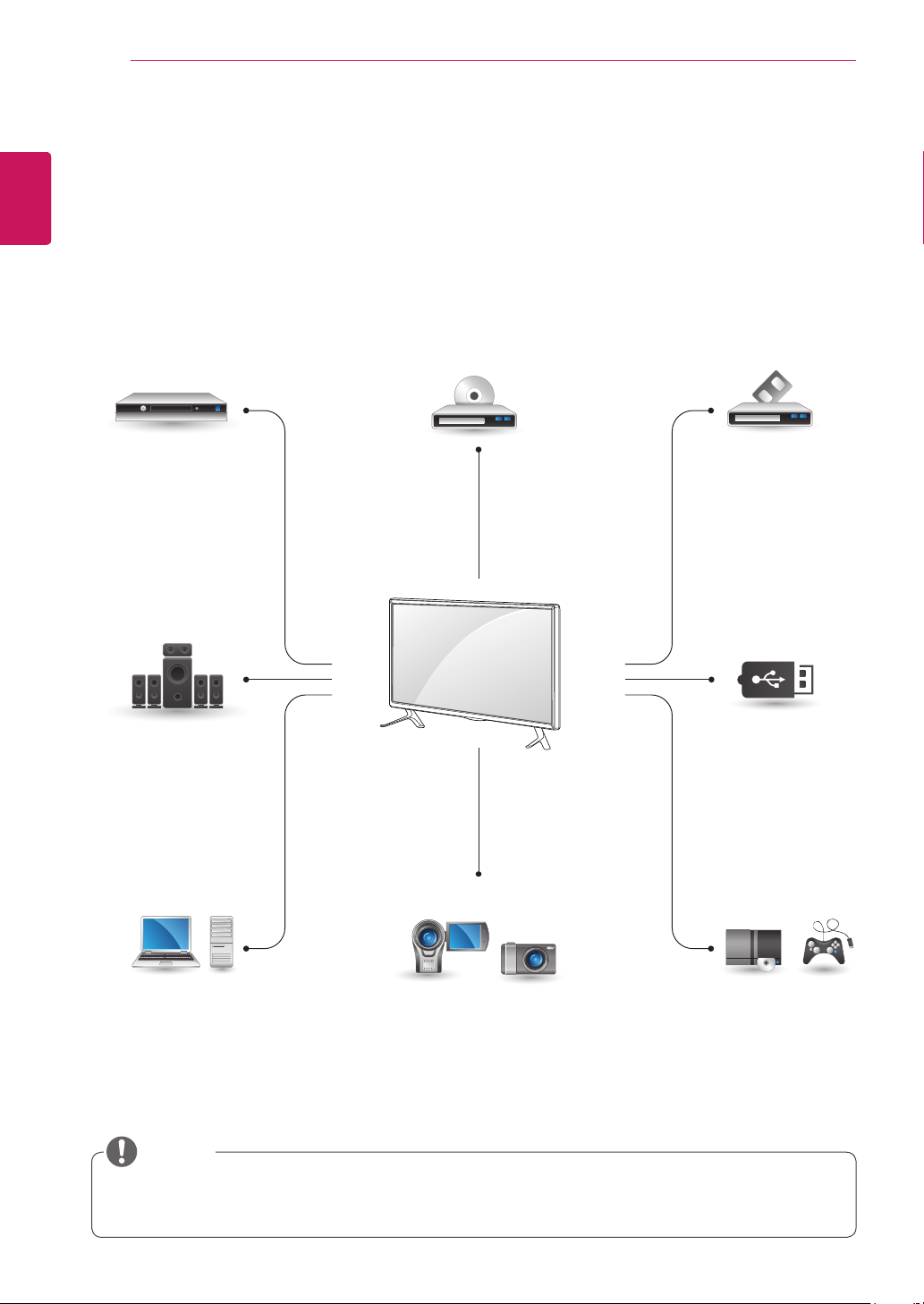
Thedescriptionsinthismanualarebasedonthebuttonsoftheremotecontrol.Pleasereadthismanual
carefullyandusethemonitorsetcorrectly.
Toreplacebatteries,openthebatterycover,replacebatteries(1.5VAAA)matching and endstothe
labelinsidethecompartment,andclosethebatterycover.
Toremovethebatteries,performtheinstallationactionsinreverse.
Donotmixoldandnewbatteries,asthis
maydamagetheremotecontrol.
Makesuretopointtheremotecontroltothe
remotecontrolsensoronthemonitorset.
CAUTION
ID
BACK
TILE
ON
OFF
EXIT
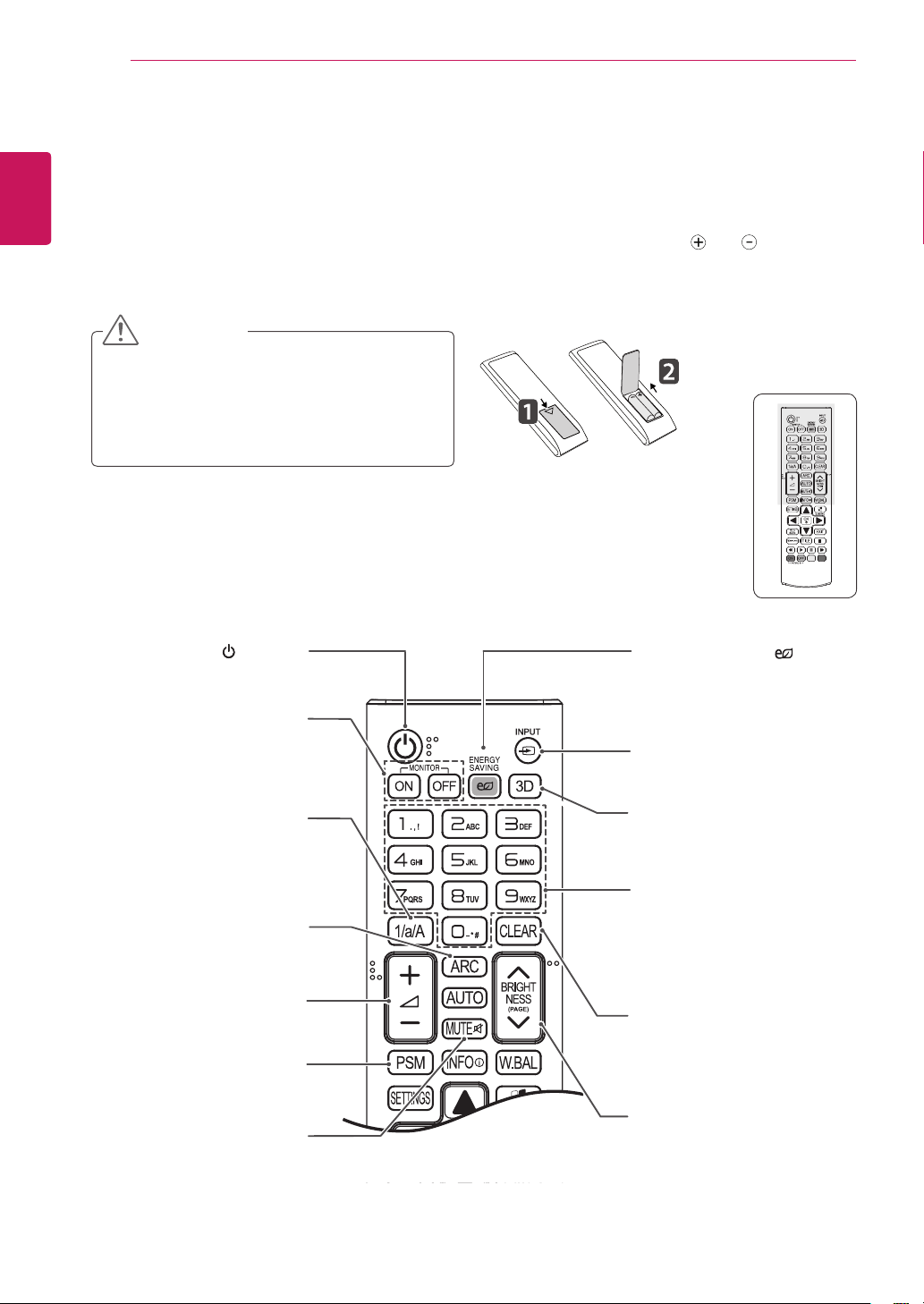
(POWER)
Turnsthemonitorsetonoroff.
1/a/A Button
Togglesbetweennumerical
andalphabetical.
ENERGY SAVING( )
Adjuststhebrightnessof
thescreentoreduceenergy
consumption.
INPUT
Selectstheinputmode.
3D
Thisbuttonselectionisnot
applicable.
Number and Alphabet buttons
Entersnumericaloralphabetical
charactersdependingonthe
setting.
CLEAR
Deletestheenterednumerical
oralphabeticalcharacter.
PSM
SelectsthePictureStatus
Mode.
MUTE
Mutesallsounds.
ARC
SelectstheAspectRatio
Mode.
Volume Up / Down
Adjuststhevolumelevel.
BRIGHTNESS Key
Adjustthebrightnessby
pressingtheUpandDown
buttonsontheremotecontrol.
InUSBmode,theOSDmenu
hasthePagefunctiontomove
tothenextfilelist.
MONITOR ON
Turnonthemonitor.
MONITOR OFF
Turnoffthemonitor.
13
ENG
ENGLISH
REMOTE CONTROL
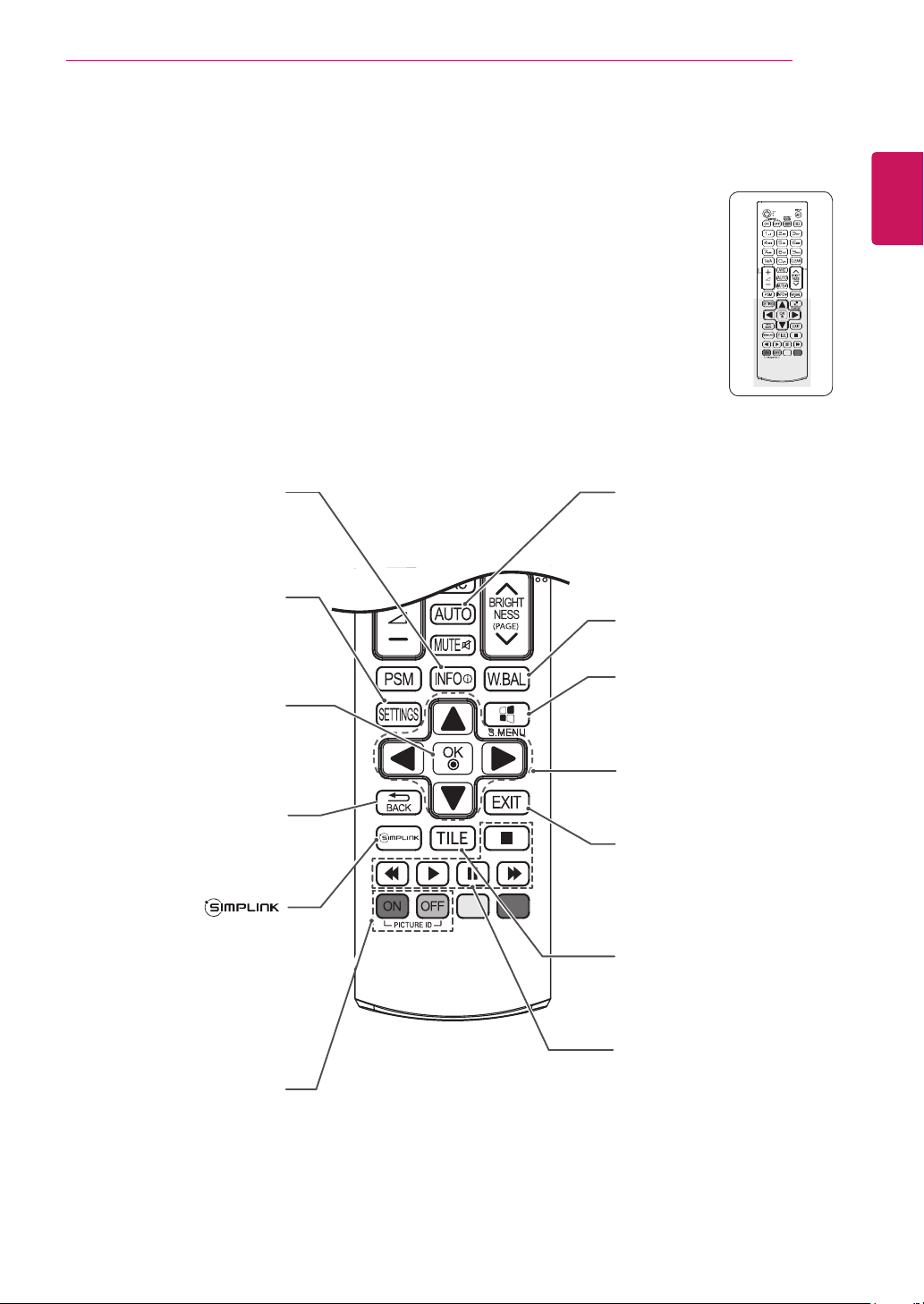
W.BAL
Thisbuttonselectionisnot
applicable.
Navigation Buttons
Scrollsthroughmenusor
options.
S.MENU
(SuperSignMenuKey)
Thisbuttondoesnotapplyto
thismodel.
EXIT
Clearsallon-screendisplays
andreturnstoMonitorset
viewingfromanymenu.
TILE
Thisbuttonselectionisnot
applicable.
INFO
ⓘ
Viewstheinformationofthe
currentlyprogramandthe
screen.
SETTINGS
Accessesthemainmenus
orsavesyourinputandexit
menus.
OK
Selectsmenusoroptionsand
confirmsyourinput.
BACK
Allowstheusertomoveback
onestepinuserinteraction
function.
Allowsyoutocontrolvarious
multimediadevicessimply
byusingtheremotecontrol
throughtheSimpLinkmenu.
(Itmaynotbesupported
dependingonthemodel.)
USB Menu control buttons
Controlsmediaplayback.
ID ON/OFF
WhenthenumberofPicture
IDisequaltoSetIDyoucan
controlthemonitorwhich
youwantinthemultidisplay
condition.
AUTO
Automaticallyadjustspicture
positionandminimizesimage
instability.(RGBinputonly)
14
ENG
ENGLISH
MAKING CONNECTIONS
HDMI
RGB
HDMI
LAN
HDMI
HDMI
HDMI
HDMI
MAKING CONNECTIONS
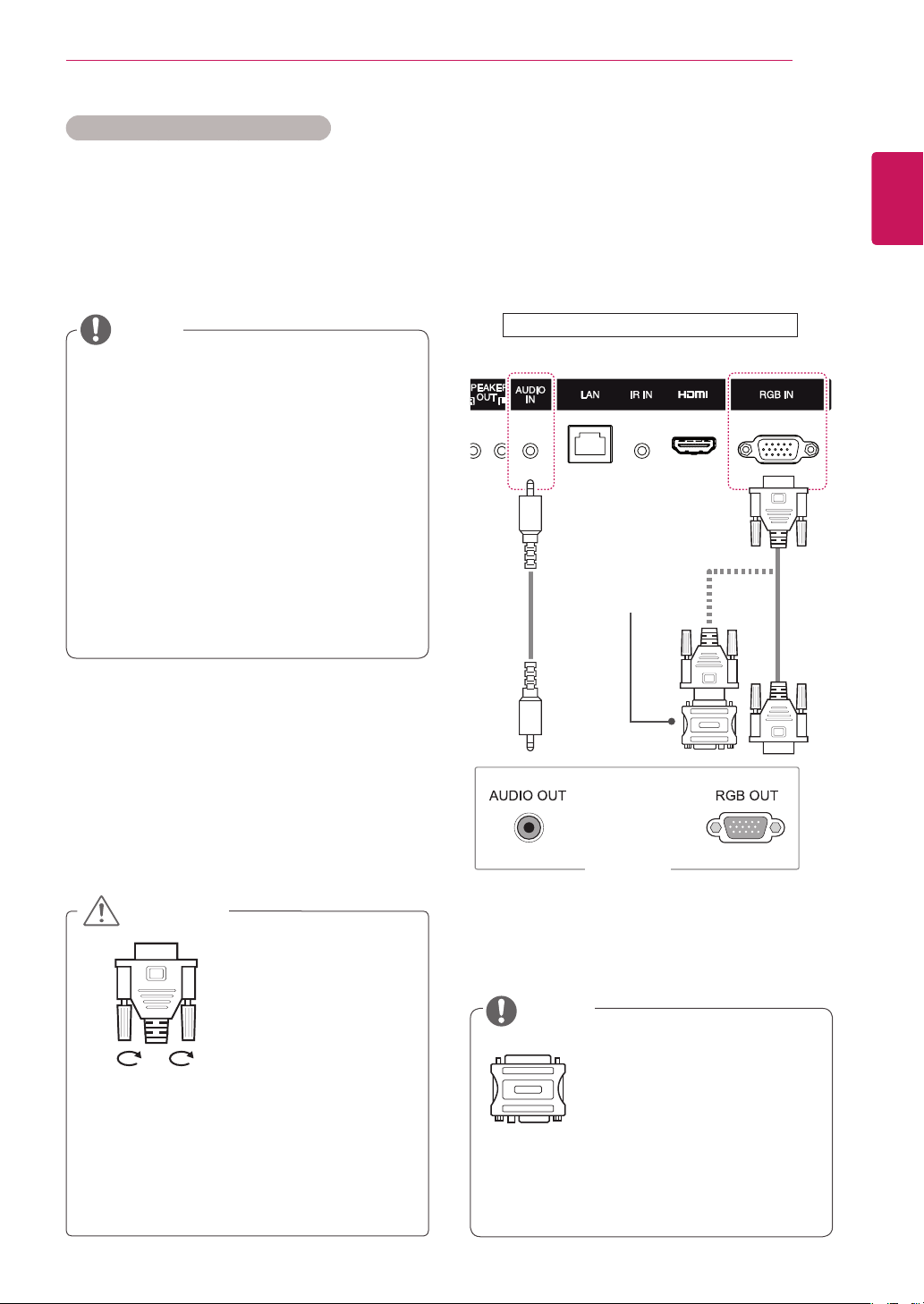
Connectvariousexternaldevicestotheportsonthemonitorset’sbackpanel.
1
Findanexternaldeviceyouwanttoconnecttoyourmonitorsetshownonthefollowingillustration.
2
Checktheconnectiontypeoftheexternaldevice.
3
Gototheappropriateillustrationandchecktheconnectiondetails.
Ifyouconnectagamingdevicetothemonitorset,usethecablesuppliedwiththegamingdevice.
Itisrecommendedyoutousetheoptionalspeakerprovided.
HD Receiver DVD VCR
USB
PC
Camcorder/Camera
Gaming device
Speaker
NOTE
15
ENG
ENGLISH
MAKING CONNECTIONS
YourmonitorsupportsthePlug&Play*feature.
*Plug&Play:APCwillhaveabuilt-indriverfor
themonitor,noextrasoftwareisneeded.
NOTE
Connectthesignal
inputcableandtighten
itbyturningthescrews
clockwise.
Usethestandard
Macintoshadaptersince
anincompatibleadapter
isavailableinthemarket.
(Differentsignalingsystem)
Donotpressthescreenwithyourfingerfor
alongtimeasthismayresultintemporary
distortiononthescreen.
Avoiddisplayingafixedimageonthescreen
foralongperiodoftimetopreventimage
burn.Useascreensaverifpossible.
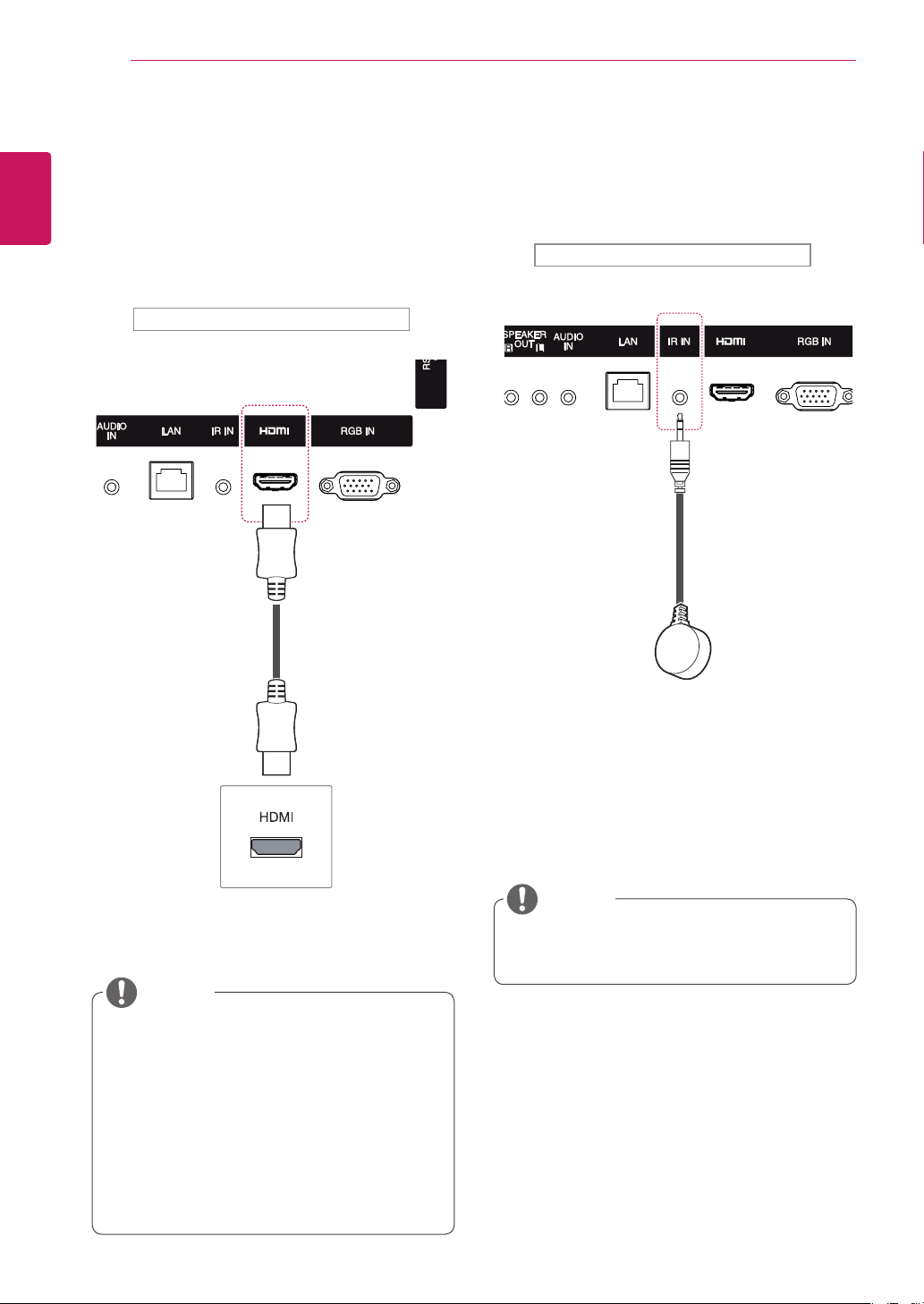
RGB Connection
TransmitsananalogvideosignalfromyourPCto
themonitor.ConnectthePCandthemonitorwith
the15-pinsignalcableasshownanfollowing
illustration.SelectRGBinput.Totransmitanaudio
signal,connectanoptionalaudiocable.
Applecomputersmayrequireanadapterto
connecttothismonitor.Callorvisittheirweb
siteformoreinformation.
ItisrecommendedyouuseanHDMI
connectionforthebestimagequality.
Useashieldedsignalinterfacecable,such
asD-sub15-pinsignalcableandDVI/HDMI
cable,withaferritecoretomaintainstandard
compliancefortheproduct.
Ifyouturnthemonitorsetonwhenthesetis
cold,thescreenmayflicker.Thisisnormal.
Somered,green,orbluespotsmayappear
onthescreen.Thisisnormal.
IfyouuseacablelongerthantheD-sub15-
pinsignalcableprovided,certainimages
mayappearblurry.
CAUTION
NOTE
Instructions for connecting to PC
PC/MAC
MacintoshAdapter
(notincluded)
(not
included)
Backoftheproduct.
16
ENG
ENGLISH
MAKING CONNECTIONS
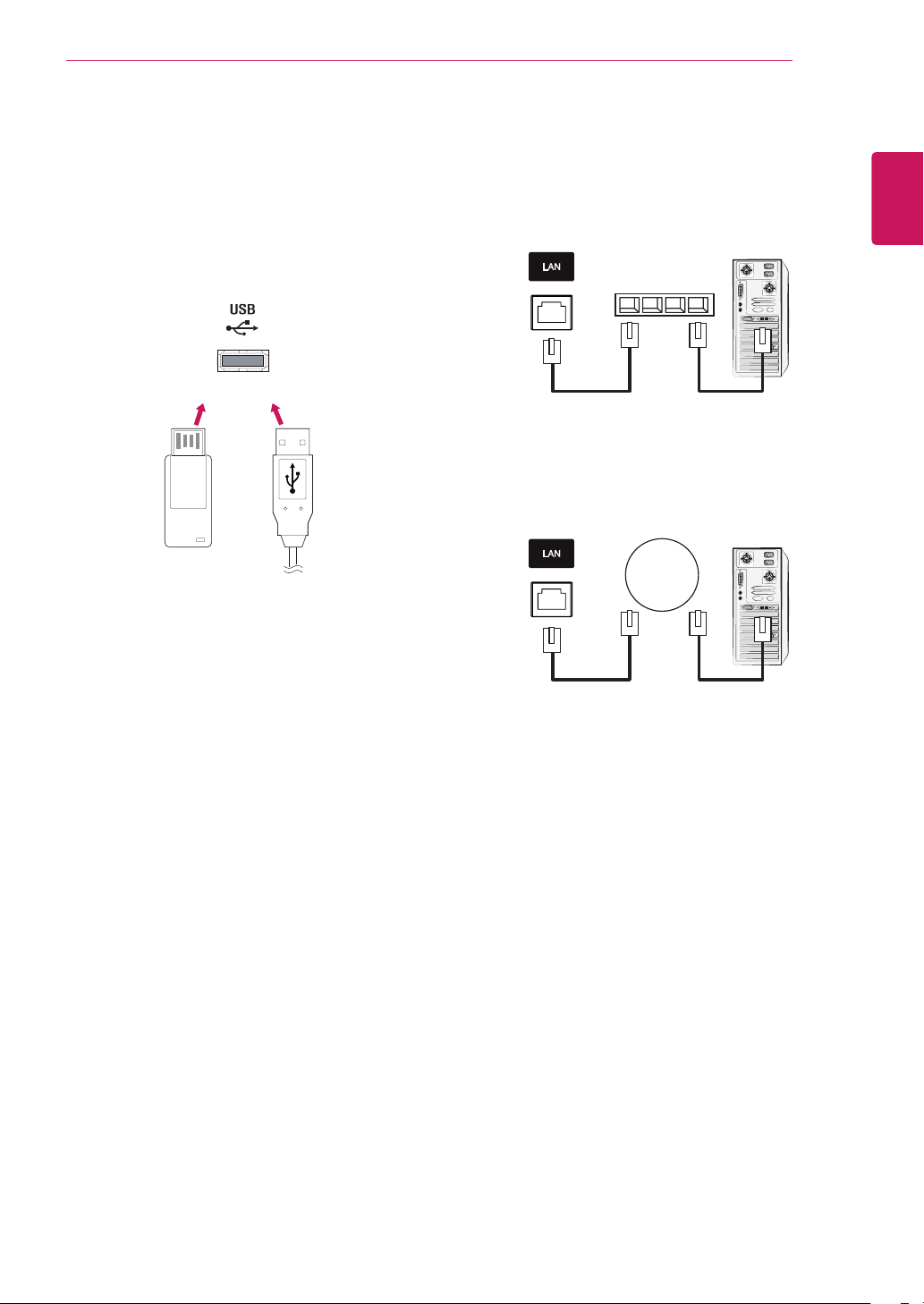
IR Receiver Connection
AllowstheuseofawiredremoteorIRreceiver
extension.
Backoftheproduct.
Makesurethepowercableisdisconnected.
NOTE
HDMI Connection
Transmitsdigitalvideoandaudiosignalsfrom
yourPCorexternaldevicetothemonitor.Connect
thePCortheexternaldeviceandtheMonitor
usingtheHDMIcableasshowninthefollowing
diagrams.SelecttheHDMIinputafterconnecting.
UseaHighSpeedHDMI™Cable.
PleasecheckthePCenvironmentifyou
cannothearaudioinHDMImode.SomePCs
requireyoutomanuallychangethedefault
audiooutputtoHDMI.
IfyouwanttouseHDMI-PCmode,youmust
settheinputlabeltoPCmode.
WhenHDMIPCisused,acompatiblity
problemmightoccur.
NOTE
Backoftheproduct.
(notincluded)
17
ENG
ENGLISH
MAKING CONNECTIONS
LAN ConnectionUSB Connection
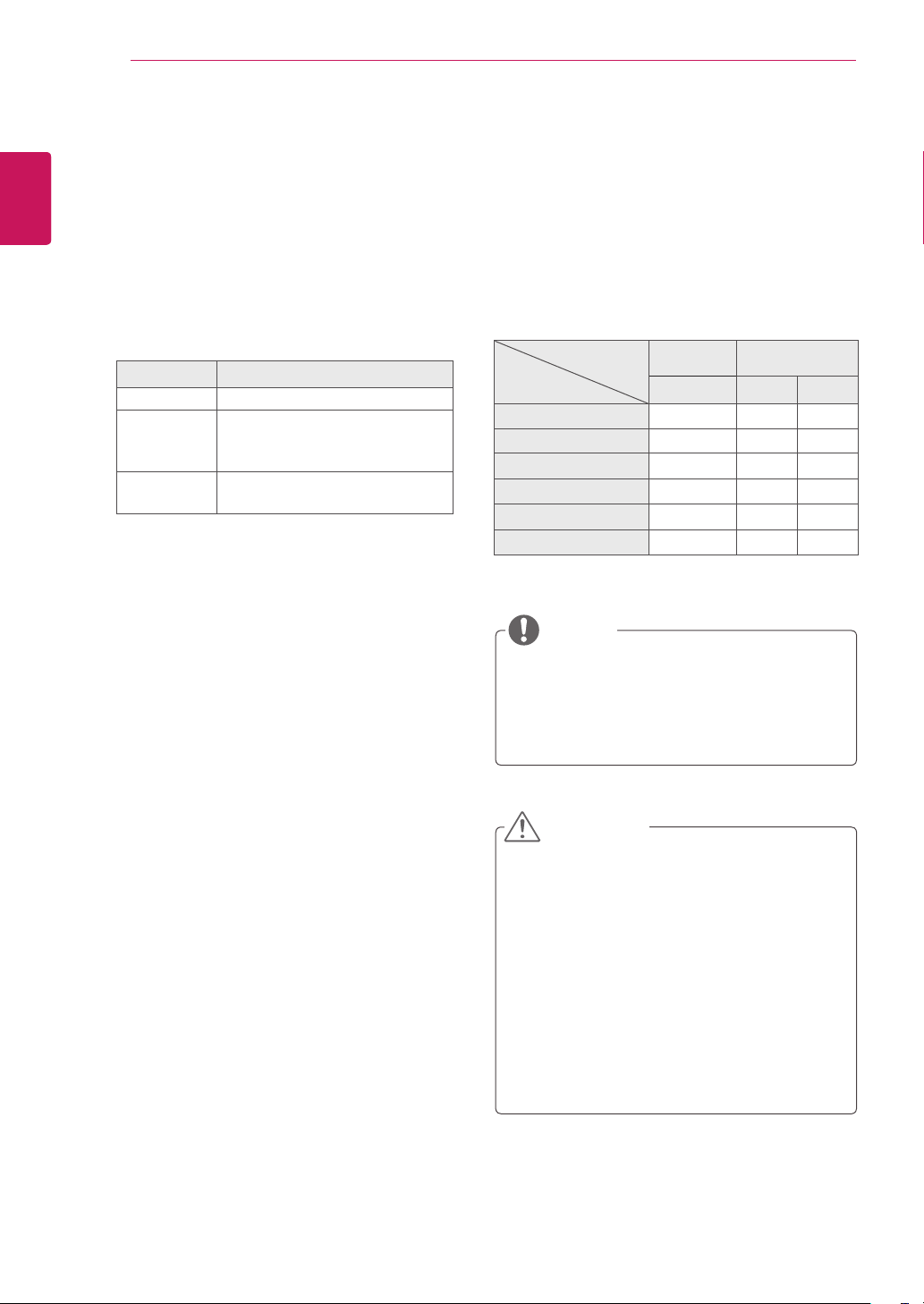
ConnectaUSBstoragedevicesuchassUSB
flashmemory,externalharddrive,MP3playeror
aUSBmemorycardreadertothemonitorsetand
accesstheUSBmenutousevariousmultimedia
files.
or
Network
A
Usingarouter(Switch)
Monitor
PC
Switch
Monitor
PC
B
UsingtheInternet.
18
ENG
ENGLISH
USING THE MONITOR
Using the Input List
1
PressINPUTtoaccesstheInput List.
2
Pressthenavigationbuttonstoscrolltooneof
theinputmodeandpressOK.
Input mode Description
RGB ViewaPCdisplayonthescreen
HDMI WatchcontentsinaPC,DVD
ofdigitalset-topboxotherhigh
definitiondevices
USB Playsthemultimediafilesavedin
theUSB.
USING THE MONITOR
Youcanalsochangetheimagesizeby
accessingthemainmenus.
TheJustScanmodeoperateswhenavideo
signalhasresolutionof720porhigher.
NOTE
Adjusting Aspect Ratio
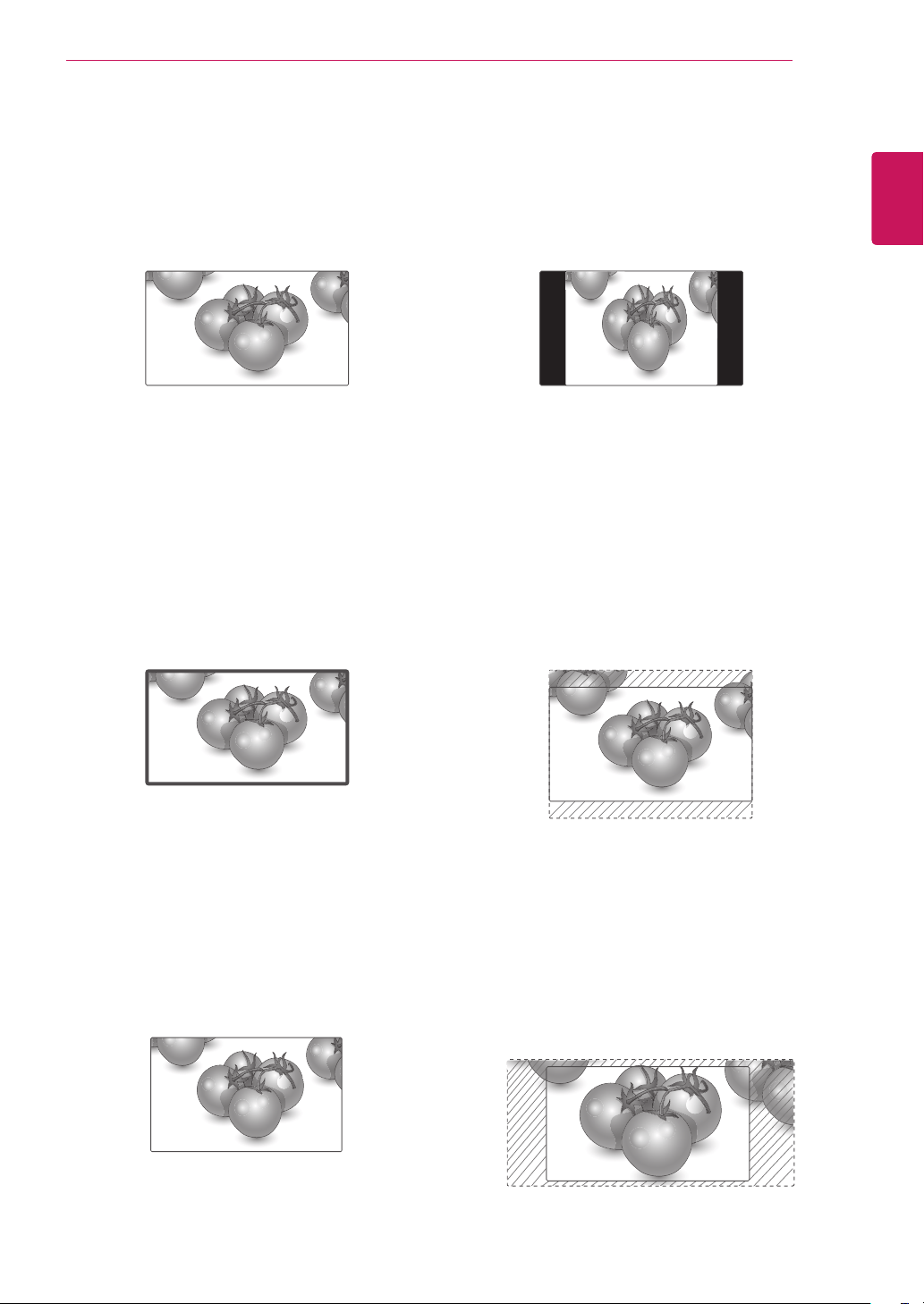
Resizetheimagetoviewtheimageatitsoptimal
sizebypressingARC whileyouarewatching
monitorset.
MODE
Aspect Ratio
RGB HDMI
PC DTV PC
16:9
o o o
Just Scan
x o x
Set By Program
x o x
4:3
o o o
Zoom
x o x
Cinema Zoom
x o x
Ifafixedimagedisplaysonthescreenfora
longperiodoftime,itwillbeimprintedand
becomeapermanentdisfigurementonthe
screen.Thisisimageburnorburn-inandnot
coveredbythewarranty.
Ifyoudon'tuseyourmonitor,turnthepower
offorsetascreensaverprogramfromthe
PCorthesystemtopreventimageretention.
Iftheaspectratioissetto4:3foralong
periodoftime,imageburnmayoccuronthe
letterboxedareaofthescreen.
CAUTION
19
ENG
ENGLISH
USING THE MONITOR
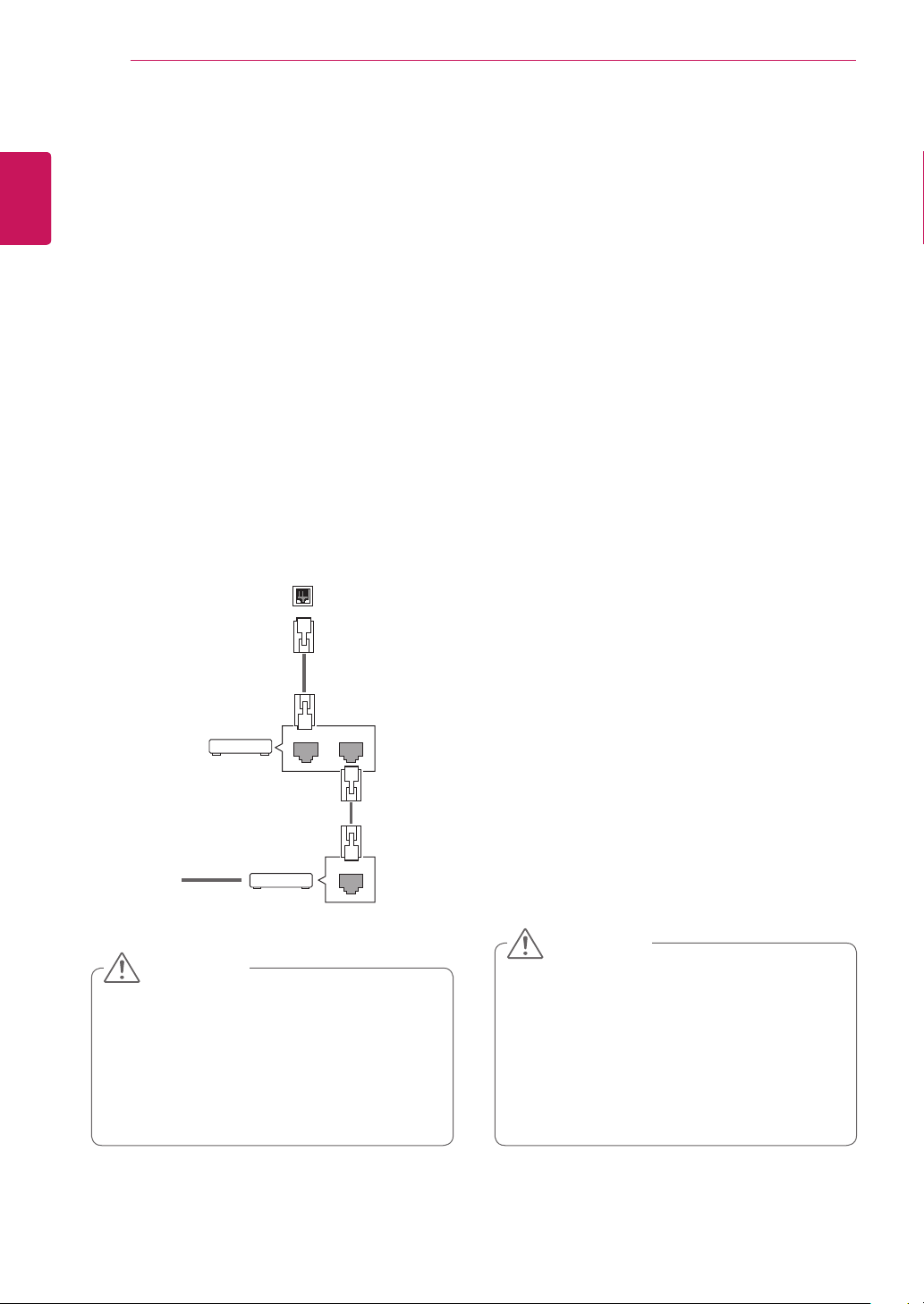
-4:3 :Thisselectionwillallowyoutoviewa
picturewithanoriginal4:3aspectratio,black
barswillappearonboththeleftandrightofthe
screen.
-Zoom :Thisselectionwillallowyoutoviewthe
picturewithoutanyalteration,whilefillingthe
entirescreen.However,thetopandbottomof
thepicturewillbecropped.
-Cinema Zoom 1 :ChooseCinemaZoom
whenyouwanttoenlargethepictureincorrect
proportion.Note:Whenenlargingorreducing
thepicture,theimagemaybecomedistorted.
-16:9 :Thisselectionwillallowyoutoadjustthe
picturehorizontally,inlinearproportion,tofillthe
entirescreen(usefulforviewing4:3formatted
DVDs).
-Just Scan :ThisSelectionwillallowyouview
thepictureofbestqualitywithoutlossoforiginal
pictureinhighresolutionimage.Note:Ifthereis
noiseinoriginalPicture,Youcanseethenoise
attheedge.
- Set By Program :Dependingontheinputvideo
signalscreenchangesautomaticallyto4:3or
16:9.
Just Scan
Set By Program
20
ENG
ENGLISH
ENTERTAINMENT
ENTERTAINMENT
Using the Network
Connecting to a Wired Network
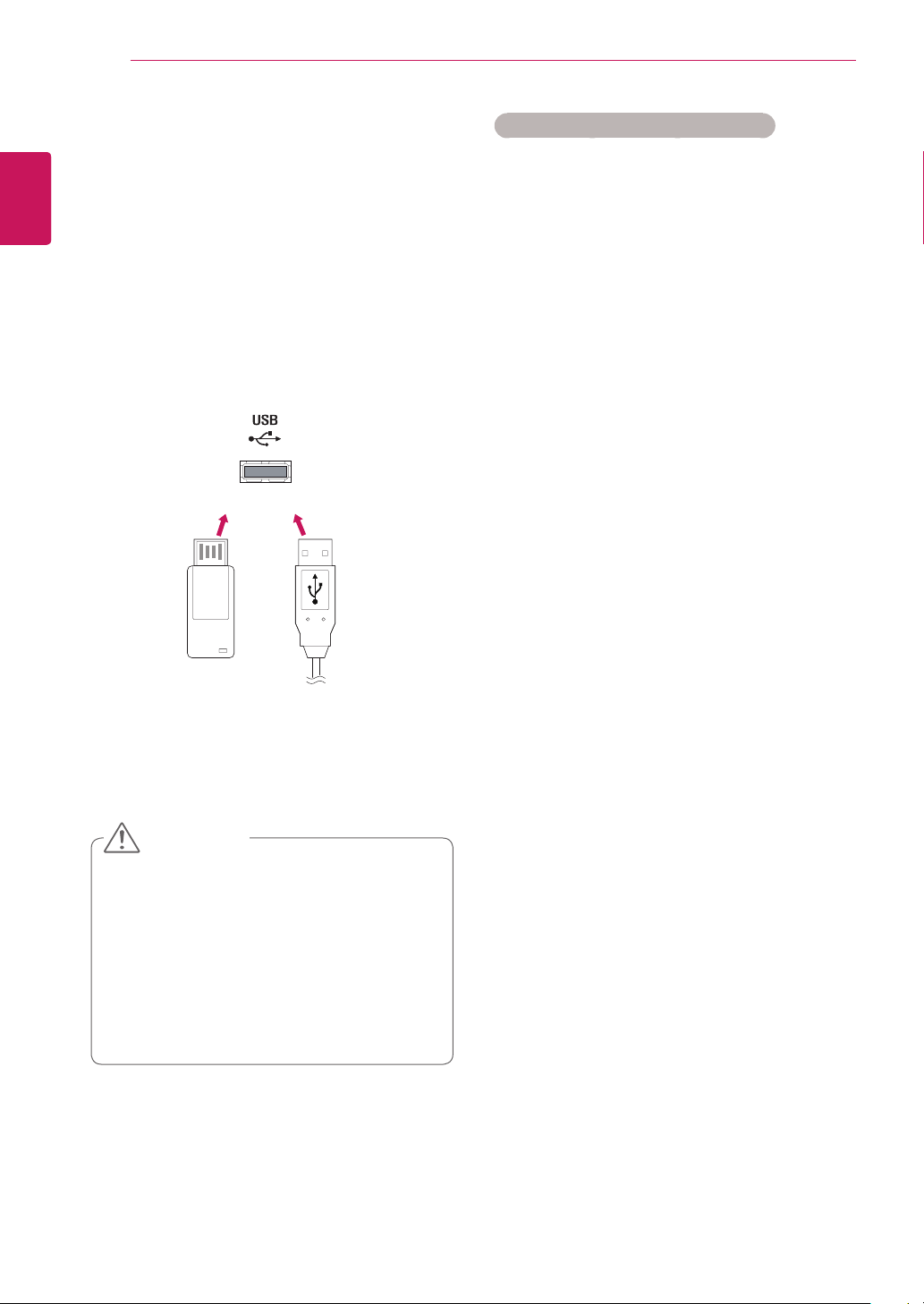
Connectthedisplaytoalocalareanetwork(LAN)
viatheLANportasshowninthefollowingillustra-
tionandsetupthenetworksettings.
Onlysupportswirednetworkconnection.
Aftermakingaphysicalconnection,asmall
numberofhomenetworksmayrequirethedisplay
networksettingstobeadjusted.Formosthome
networks,thedisplaywillconnecttoautomatically
withoutanyadjustments.
Fordetailinformation,contactyourinternetpro-
viderorroutermanual.
Donotconnectamodularphonecabletothe
LANport.
Sincetherearevariousconnectionmeth-
ods,pleasefollowthespecificationsofyour
telecommunicationcarrierorinternetservice
provider.
Networksettingmenuwillnotbeavail-
ableuntilthedisplayconnectedtophysical
network.
Sincetherearevariousconnectionmeth-
ods,pleasefollowthespecificationsofyour
telecommunicationcarrierorinternetservice
provider.
Tosetupthenetworksettings:(Evenifyourdis-
playhasalreadyconnectedautomatically,running
setupagainwillnotharmanything),
1 PressSETTINGStoaccessthemainmenus.
2 PressthenavigationbuttonstoscrolltoNET-
WORKandpressOK.
3 PressthenavigationbuttonstoselectNetwork
SettingandpressOK.
4 Ifyoualreadysetnetworksetting,select
Resetting.Thenewconnectionsettingsresets
thecurrentnetworksettings.
5 SelectIP Auto SettingorIP Manual Setting.
-IfselectingIP Manual Setting,pressthe
navigationandNumberbuttons.IPaddresses
willneedtobeinputmanually.
-IP Auto Setting:Selectthisifthereisa
DHCPserver(Router)onthelocalareanet-
work(LAN)viawiredconnection,thedisplay
willautomaticallybeallocatedanIPaddress.
Ifyou’reusingabroadbandrouterorbroad-
bandmodemthathasaDHCP(Dynamic
HostConfigurationProtocol)serverfunction.
TheIPaddresswillautomaticallybedeter-
mined.
6 Whenyouarefinished,pressEXIT.
LAN
Router
LAN WAN
Cable modem
ETHERNET
@
Internet
Internet
CAUTION
CAUTION

21
ENG
ENGLISH
ENTERTAINMENT
IfyouwanttoaccesstheInternetdirectlyon
yourdisplay,theInternetconnectionshould
alwaysbeon.
IfyoucannotaccesstheInternet,check
thenetworkconditionsfromaPConyour
network.
WhenyouuseNetwork Setting,checkthe
LANcableorcheckifDHCPintherouteris
turnedon.
Ifyoudonotcompletethenetworksettings,
thenetworkmaynotworkproperly.
Tips for Network setting
UseastandardLANcablewiththisdisplay.
Cat5orbetterwithaRJ45connector.
Manynetworkconnectionproblemsduringset
upcanoftenbefixedbyre-settingtherouter
ormodem.Afterconnectingthedisplaytothe
homenetwork,quicklypoweroffand/ordiscon-
nectthepowercableofthehomenetwork
routerorcablemodem.Thenpoweronand/or
connectthepowercableagain.
Dependingontheinternetserviceprovider
(ISP),thenumberofdevicesthatcanreceive
internetservicemaybelimitedbytheapplica-
bletermsofservice.Fordetails,contactyour
ISP.
LGisnotresponsibleforanymalfunctionofthe
displayand/ortheinternetconnectionfeature
duetocommunicationerrors/malfunctionsas-
sociatedwithyourinternetconnection,orother
connectedequipment.
LGisnotresponsibleforproblemswithinyour
internetconnection.
Youmayexperienceundesiredresultsifthe
networkconnectionspeeddoesnotmeetthe
requirementsofthecontentbeingaccessed.
Someinternetconnectionoperationsmaynot
bepossibleduetocertainrestrictionssetby
theInternetserviceprovider(ISP)supplying
yourInternetconnection.
AnyfeeschargedbyanISPincluding,without
limitation,connectionchargesareyourrespon
sibility.
A10Base-Tor100Base-TXLANportis
requiredwhenusingawiredconnectiontothis
display.Ifyourinternetservicedoesnotallow
forsuchaconnection,youwillnotbeableto
connectthedisplay.
ADSLmodemisrequiredtouseDSLservice
andacablemodemisrequiredtousecable
modemservice.Dependingontheaccess
methodofandsubscriberagreementwithyour
ISP,youmaynotbeabletousetheinternet
connectionfeaturecontainedinthisdisplayor
youmaybelimitedtothenumberofdevices
youcanconnectatthesametime.(IfyourISP
limitssubscriptiontoonedevice,thisdisplay
maynotbeallowedtoconnectwhenaPCis
alreadyconnected.)
Theuseofaroutermaynotbeallowedorits
usagemaybelimiteddependingonthepoli-
ciesandrestrictionsofyourISP.Fordetails,
contactyourISPdirectly.
Network Status
1 PressSETTINGStoaccessthemainmenus.
2 PressthenavigationbuttonstoscrolltoNET-
WORKandpressOK.
3 PressthenavigationbuttonstoselectNetwork
Status.
4 PressOKtocheckthenetworkstatus.
5 Whenyouarefinished,pressEXIT.
Option Description
Setting Returntothenetworksettingmenu.
Test
Testthecurrentnetworkstatusafterset-
tingthenetwork.
Close Returntothepreviousmenu.
NOTE
22
ENG
ENGLISH
ENTERTAINMENT
Tips for using USB storage devices
OnlyaUSBstoragedeviceisrecognizable.
IftheUSBstoragedeviceisconnected
throughaUSBhub,thedeviceisnotrecog-
nizable.
AUSBstoragedeviceusinganautomatic
recognitionprogrammaynotberecognized.
AUSBstoragedevicewhichusesitsown
driverwillnotberecognized.
TherecognitionspeedofaUSBstorage
devicemaydependoneachdevice.
Pleasedonotturnoffthedisplayorunplug
theUSBdevicewhentheconnectedUSB
storagedeviceisworking.Whensucha
deviceissuddenlyseparatedorunplugged,
thestoredfilesortheUSBstoragedevice
maybedamaged.
PleasedonotconnecttheUSBstorage
devicewhichwasartificiallymaneuveredon
thePC.Thedevicemaycausetheproductto
malfunction.OnlyuseaUSBstoragedevice
whichhasnormalmusicfiles,imagefiles
ormoviefiles.
PleaseuseonlyaUSBstoragedevicewhich
wasformattedasaFAT32filesystem,NTFS
filesystembywiththeWindowsoperating
system.Incaseofastoragedeviceformat-
tedwithadifferentutilityprogrammewhich
isnotsupportedbyWindows,itmaynotbe
recognized.
PleaseconnectpowertoaUSBstoragede-
vice(over0.5A)whichrequiresanexternal
powersupply.Ifnot,thedevicemaynotbe
recognized.
PleaseconnectaUSBstoragedevicewith
thecableincludedbythedevicemaker.
SomeUSBstoragedevicesmaynotbesup-
portedoroperatesmoothly.
FilealignmentmethodofUSBstoragedevic-
esissimilartoWindowXPandthemonitor
canrecognizeupto100Englishcharacters.
Besuretobackupimportantfilessincedata
storedonaUSBmemorydevicemaybe
damaged.Wewillnotberesponsibleforany
dataloss.
DonotturnthedisplayofforremoveaUSB
storagedevicewhileMYMEDIAmenuis
activated,asthiscouldresultinlossoffiles
ordamagetotheUSBstoragedevice.
BackupyourfilessavedonaUSBstorage
devicefrequently,asyoumayloseordam-
agethefilesandthismaybenotcoveredby
thewarranty.
or
CAUTION
Using the My Media
Connecting USB storage devices
ConnectUSBstoragedevicessuchasaUSB
flashmemory,externalharddrivetothedisplay
andusemultimediafeatures.
ConnectaUSBflashmemoryorUSBmemory
cardreadertotheDisplayasshownonthefollow-
ingillustration.The My Mediascreenappears.

23
ENG
ENGLISH
ENTERTAINMENT
IftheUSBHDDdoesnothaveanexternal
powersource,theUSBdevicemaynotbe
detected.Sobesuretoconnecttheexternal
powersource.
-Pleaseuseapoweradaptorforanexternal
powersource.
IfyourUSBmemorydevicehasmultiple
partitions,orifyouuseaUSBmulti-card
reader,youcanuseupto4partitionsorUSB
memorydevices.
IfaUSBmemorydeviceisconnectedtoa
USBmulti-cardreader,itsvolumedatamay
notbedetected.
IftheUSBmemorydevicedoesnotwork
properly,disconnectandreconnectit.
HowfastaUSBmemorydeviceisdetected
differsfromdevicetodevice.
IftheUSBisconnectedinStandbyMode,
thatdrivewillautomaticallybeloadedwhen
thedisplayisturnedon.
Therecommendedcapacityis1TBorless
foraUSBexternalharddiskand32GBor
lessforUSBmemory.
Anydevicewithmorethantherecommend-
edcapacitymaynotworkproperly.
IfaUSBexternalharddiskwithaEnergy
Savingfunctiondoesnotwork,turnthe
harddiskoffandonagaintomakeitwork
properly.
USBstoragedevicesbelowUSB2.0are
supportedaswell.Buttheymaynotwork
properlywithvideos.
Amaximumof999foldersorfilescanbe
recognizedunderonefolder.
ItisrecommendedyouuseacertifiedUSB
storagedeviceandcable.Otherwise,aUSB
storagedevicemaynotbedetectedora
playbackerrormayoccur.
OnlyaUSBmemorydevicecanbeused
toplaybackthefilesdistributedandstored
bySuperSignManager.AUSBharddiskor
multi-cardreaderwillnotwork.
OnlyanFAT32fileformattedstoragedevice
canplaybackthefilesdistributedandstored
bySuperSignmanager.
AUSB3.0storagedevicemaynotwork.
24
ENG
ENGLISH
ENTERTAINMENT
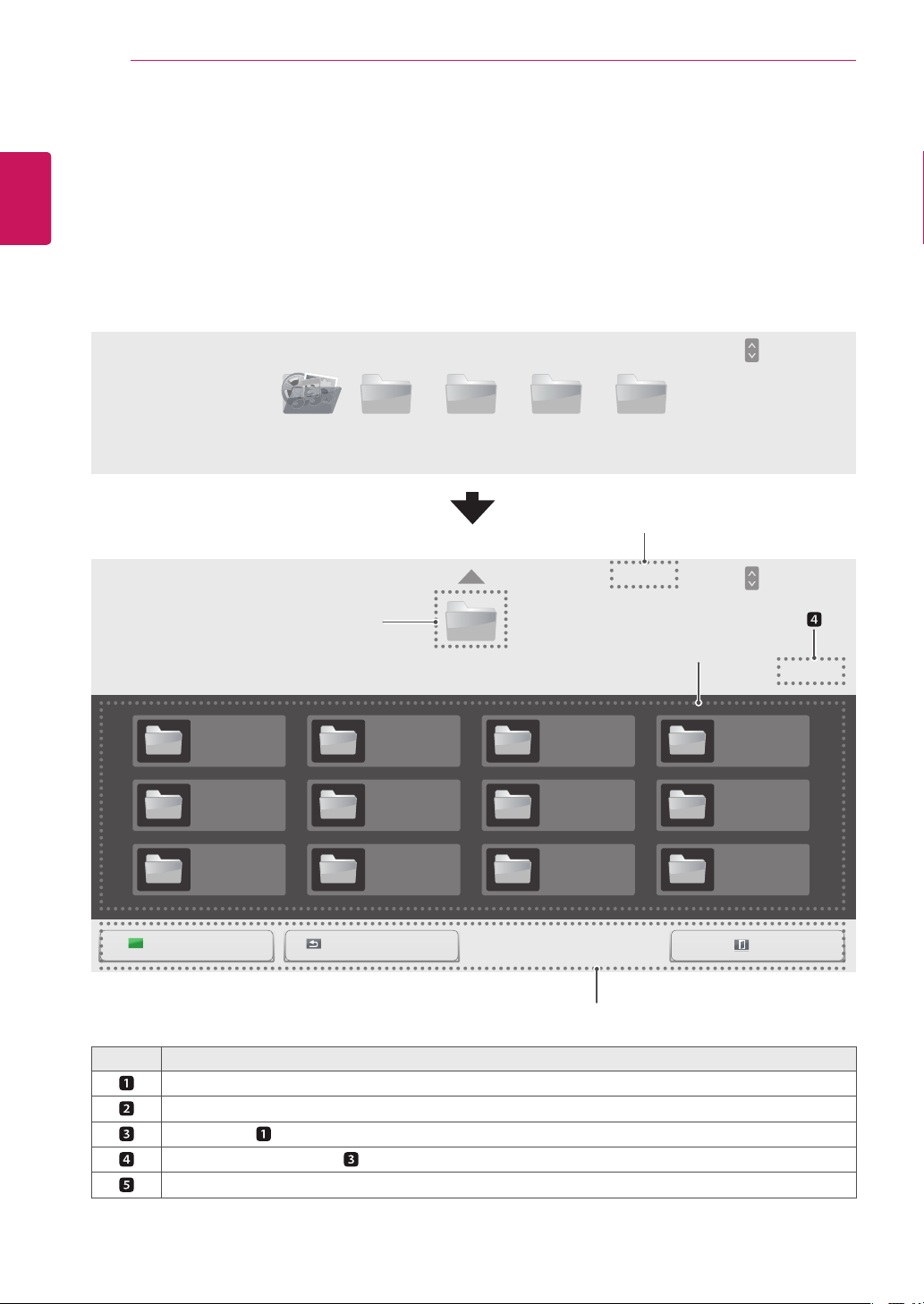
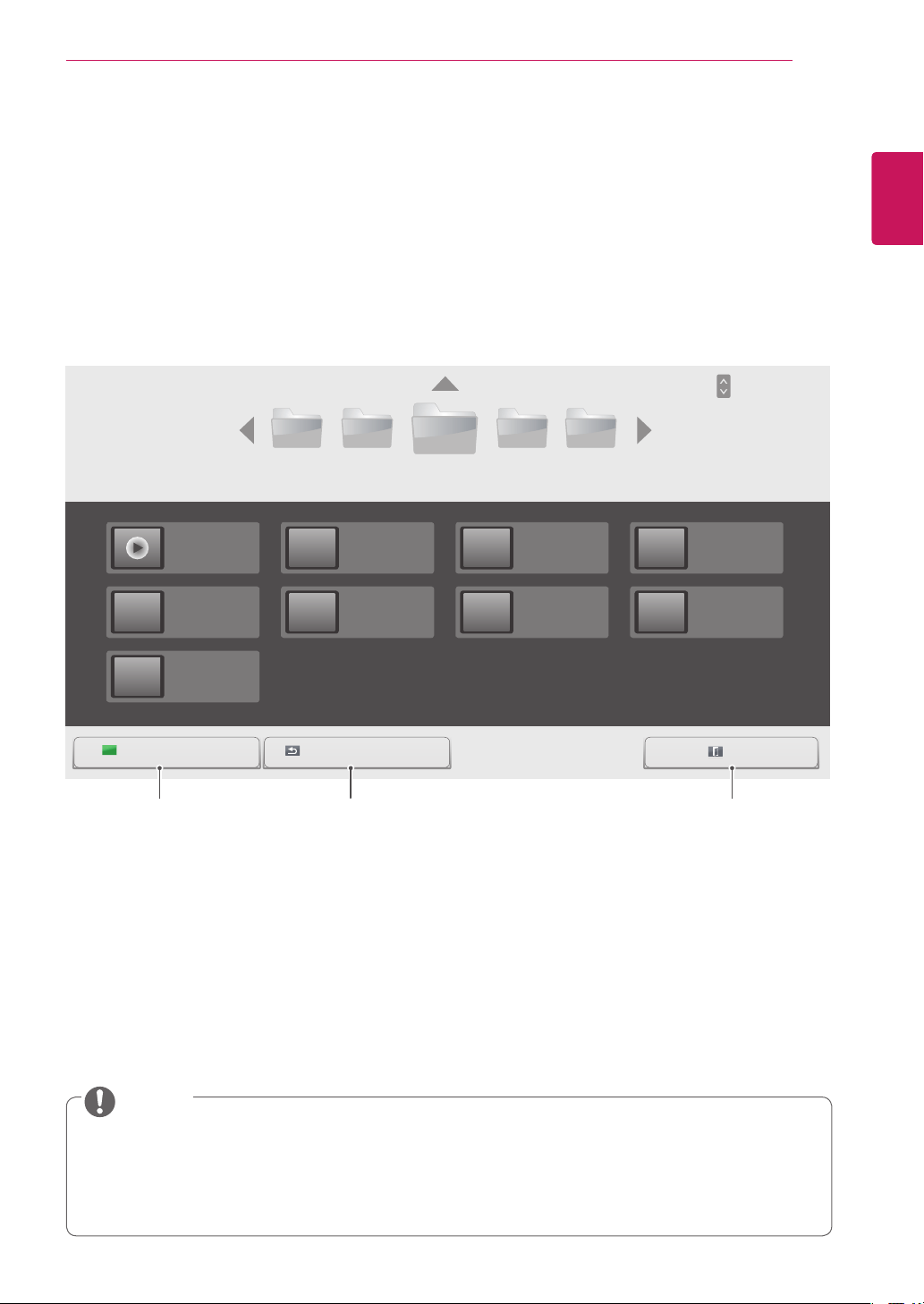
Browsing Files
BrowsefilessavedinaUSBstoragedevice.
1
PressSETTINGStoaccessthemainmenu.
2
PressthesearchbuttontoscrolltoMY MEDIAandpressOK.
3
PresstheSearchbuttontogototheMovie List,Photo List,Music List,orContent Listthatyouwant,
andpressOK.
No. Description
Returnstothepreviouslevel.
Currentpage/totalpagesofthefolderabove
Loweritemof
Currentpage/totalpagesof
Remotecontrolbutton
MovieListAllMedia
USB-
USB-
001
005
009
002
006
010
003
007
011
004
008
012
PhotoList
Drive1
MusicList ContentsList
Page1/1
Page1/1
All Media
All Media
Page1/1
Page1/1
ExitGotorootfolder Gotoupperfolder
Page ChangePAGE
Page ChangePAGE
3
1
2
5

25
ENG
ENGLISH
ENTERTAINMENT
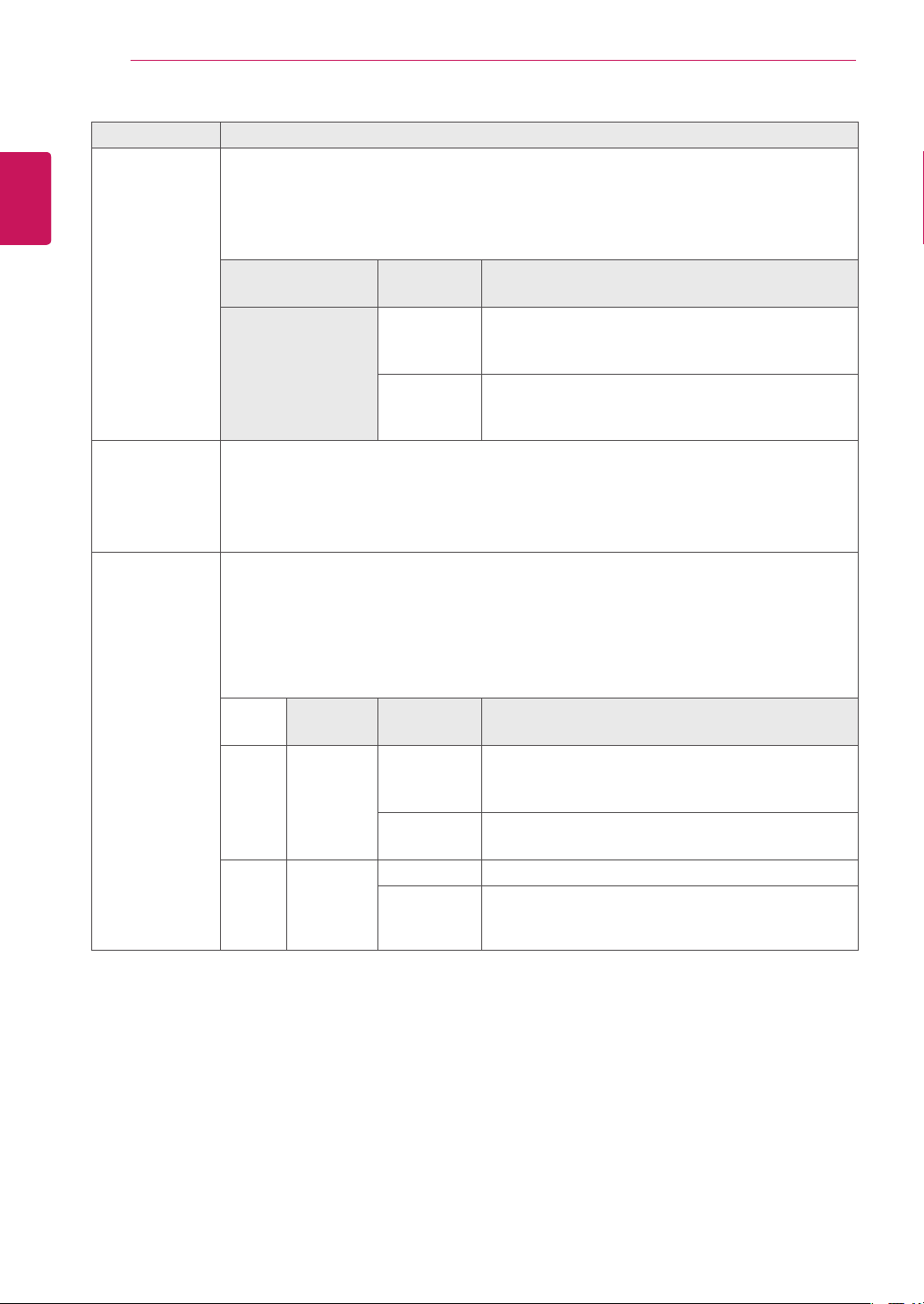
Type Supported file format
Movie Codec MediaContainer Profile
Video MPEC1/MPEC2 DAT,MPG,MPEG,
DVD,TS,TP
1920X1080@30I
MPEG4
(Divx3.11,Divx4.12,
Divx5.x,Divx6,DivxHD,
Xvid1.01,Xvid1.01,
Xvid1.02,Xvid1.03,
Xvid1.10-beta1/2)
AVI,DIVX,MP4,MKV,
TS,TRP
1920X1080@30P
H.264 AVI,MP4,MKV,TS,
TRP,TP
1920X1080@30P
Audio MP3 MP3 32kbpsto320kbps(Bitrate)
32kHzto48kHz(Samplerate)
AC3 AC3 32kbpsto640kbps(Bitrate)
32kHz,44.1kHz,48kHz(Sample
rate)
MPEG MPA 32kbpsto448kbps(Bitrate)
32kHzto48kHz(Samplerate)
AAC,HEAAC M4A 24kbpsto3844kbps(Bitrate)
8kHzto96kHz(Samplerate)
LPCM AIF,WAV 1.41Mbpsto9.6Mbps(Bitrate)
Multi-channel44.1kHz,88.2
kHz(Samplerate),
48kHz,96kHz(Samplerate)
Stereo176.4kHz,192
kHz(Samplerate)
Bitrate:within32kbpsto320kbps(MP3)
ExternalSubtitleformat:*.smi/*.srt/*.sub(MicroDVD,Subviewer1.0/2.0)/*.ass/*.ssa/*.txt(TMPlayer)/*.
psb(PowerDivX)
InternalSubtitleformat:only,XSUB(ItisthesubtitleformatusedinDivX6files)
Supported file format
26
ENG
ENGLISH
ENTERTAINMENT
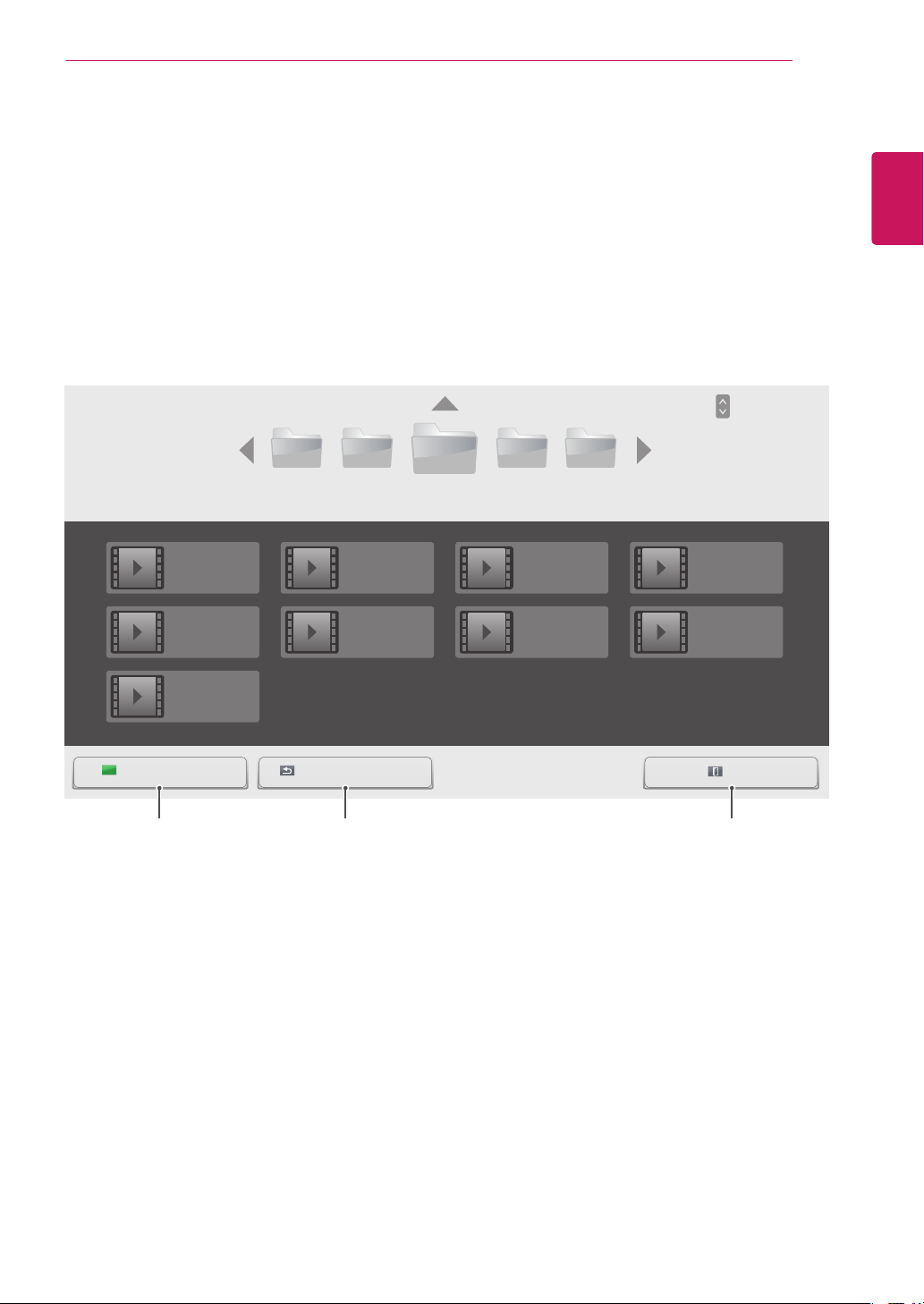
Type Supported file format
Photo JPEG
Baseline:64x64to15360x8640
Progressive:64x64to1920x1440
YoucanplayJPEGfilesonly.
Non-supportedfilesaredisplayedintheformofpredefinedicon.
File
Extensions
Item Profile
jpeg
jpg
jpe
supported
fileformat
SOF0:baseline
SOF1:ExtendSequential
SOF2:Progressive
photosize
Min:64x64
Max-NormalType:15360(W)x8640(H)
ProgressiveType:1920(W)x1440(H)
Music MP3
Bitrate32to320
SamplingrateMPEG1Layer3:32kHz,44.1kHz,48kHz
SamplingrateMPEG2Layer3:16kHz,22.05kHz,24kHz
SamplingrateMPEG2.5Layer3:8kHz,11.025kHz,12kHz
Content
(whenusing
SuperSignMan-
ager)
FileExtensions:*.cts/*.cse
Movie
File Extensions:*.mpg/*.mpeg/*.dat/*.ts/*.trp/*.tp/*.vob/*.mp4/*.mov/*.mkv/*.avi/*.asf/*.wmv/*.
avi(motionJPEG)/*.mp4(motionJPEG)/*.mkv(motionJPEG)
Video format:MPEG1,MPEG2,MPEG4,H.264/AVC,DivX3.11,DivX4.12,DivX5.x,DivX6,
Xvid1.00,Xvid1.01,Xvid1.02,Xvid1.03,Xvid1.10-beta1/2,JPEG,VC1(WVC1/WMV3)
Audio format:MP2,MP3,DolbyDigital,LPCM,AAC,HE-AAC,LPCM,ADPCM,WMA,MP3
File
Extensions
Item Profile
Photo JPEG
JPG
PNG
BMP
supported
fileformat
SOF0:baseline
SOF1:ExtendSequential
SOF2:Progressive
Photosize
Min:64x64
MaxType:1366x768
Music MP3 Bitrate 32kbpsto320kbps
Samplingrate 32kHz,44.1kHz,48kHz(MPEG1L3)
16kHz,22.05kHz,24kHz(MPEG2L3)
8kHz,11.025kHz,12kHz(MPEG2.5L3)
27
ENG
ENGLISH
ENTERTAINMENT
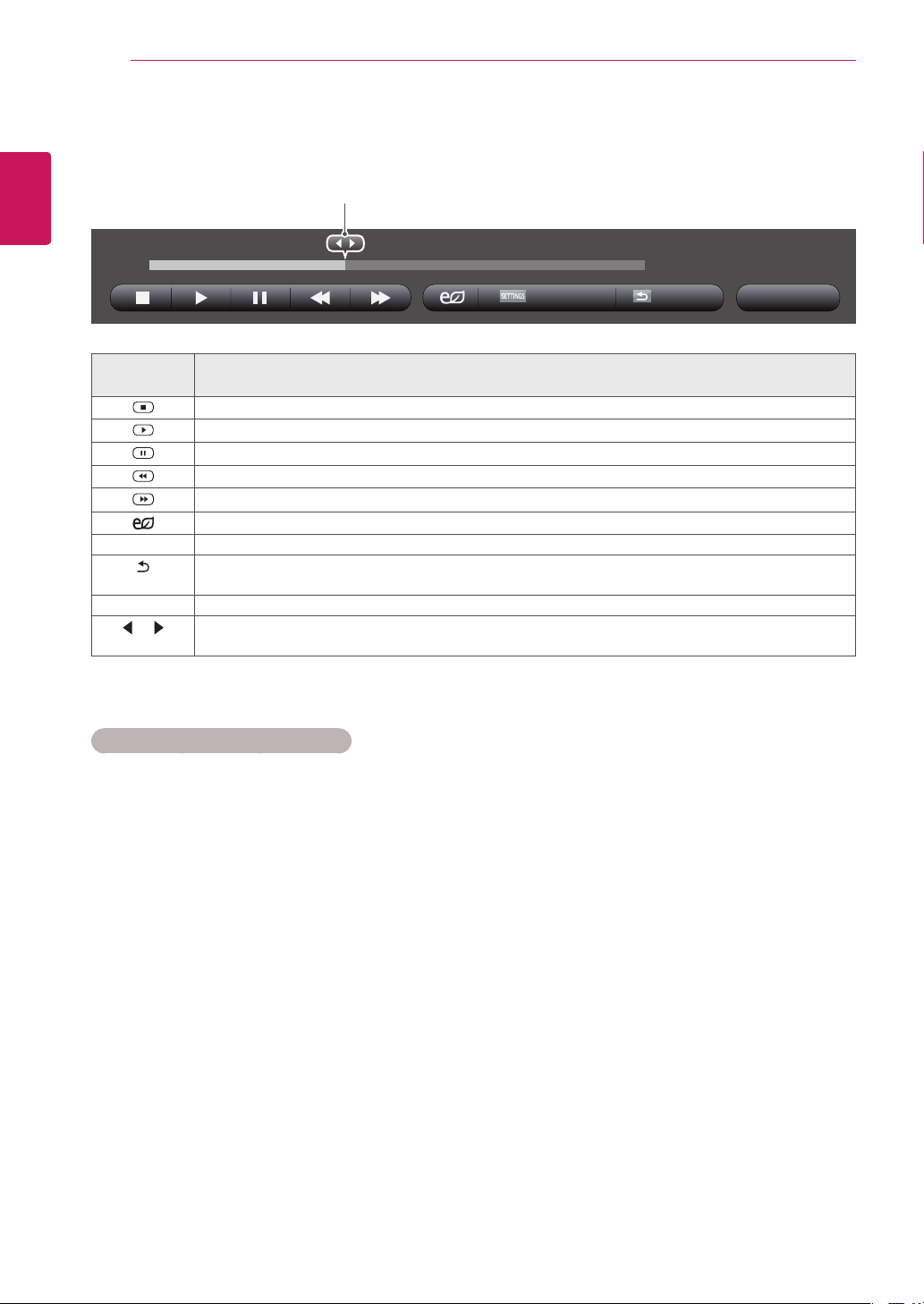
Viewing Movies
PlaysmoviefilessavedintheUSBstoragedevice.
1
PressSETTINGStoaccessthemainmenu.
2
PressthenavigationbuttontoscrolltoMY MEDIAandpressOK.
3
PressthenavigationbuttontoscrolltoMovie ListandpressOK.
4
PressthenavigationbuttonstoscrolltoafolderyouwantandpressOK.
5
PressthenavigationbuttonstoscrolltoafileyouwantandpressOK.
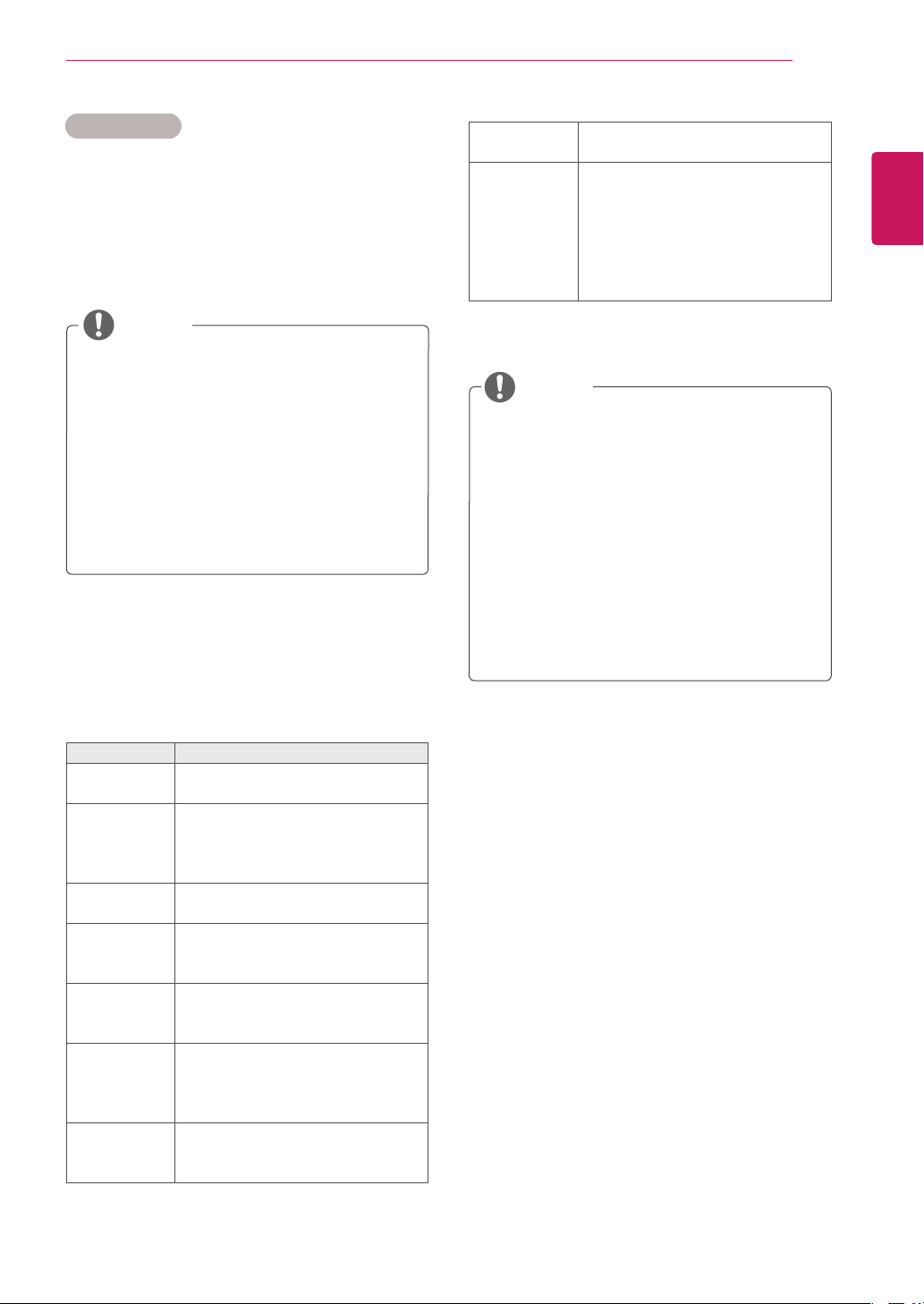
USB-
003002001 004 005
Page1/3
Movie List
Page1/1
ExitGotorootfolder Gotoupperfolder
HR1.mp4
01:00:00
HR5.mp4
01:09:00
HR9.mp4
03:05:00
HR2.mp4
01:03:00
HR6.mp4
03:00:00
HR3.mp4
01:05:00
HR7.mp4
03:01:00
HR4.mp4
01:07:00
HR8.mp4
03:03:00
Returnstothehome
screenofMyMedia.
Returnstothepreviousscreen. ExitsMyMedia.
Page ChangePAGE
28
ENG
ENGLISH
ENTERTAINMENT
Tips for using playing video files
Someuser-createdsubtitlesmaynotwork
properly.
Somespecialcharactersarenotsupported
insubtitles.
HTMLtagsarenotsupportedinsubtitles.
Subtitlesinlanguagesotherthanthesup-
portedlanguagesarenotavailable.
Thescreenmaysuffertemporaryinterrup-
tions(imagestoppage,fasterplayback,etc.)
whentheaudiolanguageischanged.
Adamagedmoviefilemaynotbeplayed
correctly,orsomeplayerfunctionsmaynot
beusable.
Moviefilesproducedwithsomeencoders
maynotbeplayedcorrectly.
Ifthevideoandaudiostructureofrecorded
fileisnotinterleaved,eithervideooraudiois
outputted.
HDvideoswithamaximumof
1920x1080@25/30Por1280x720@50/60P
aresupported,dependingontheframe.
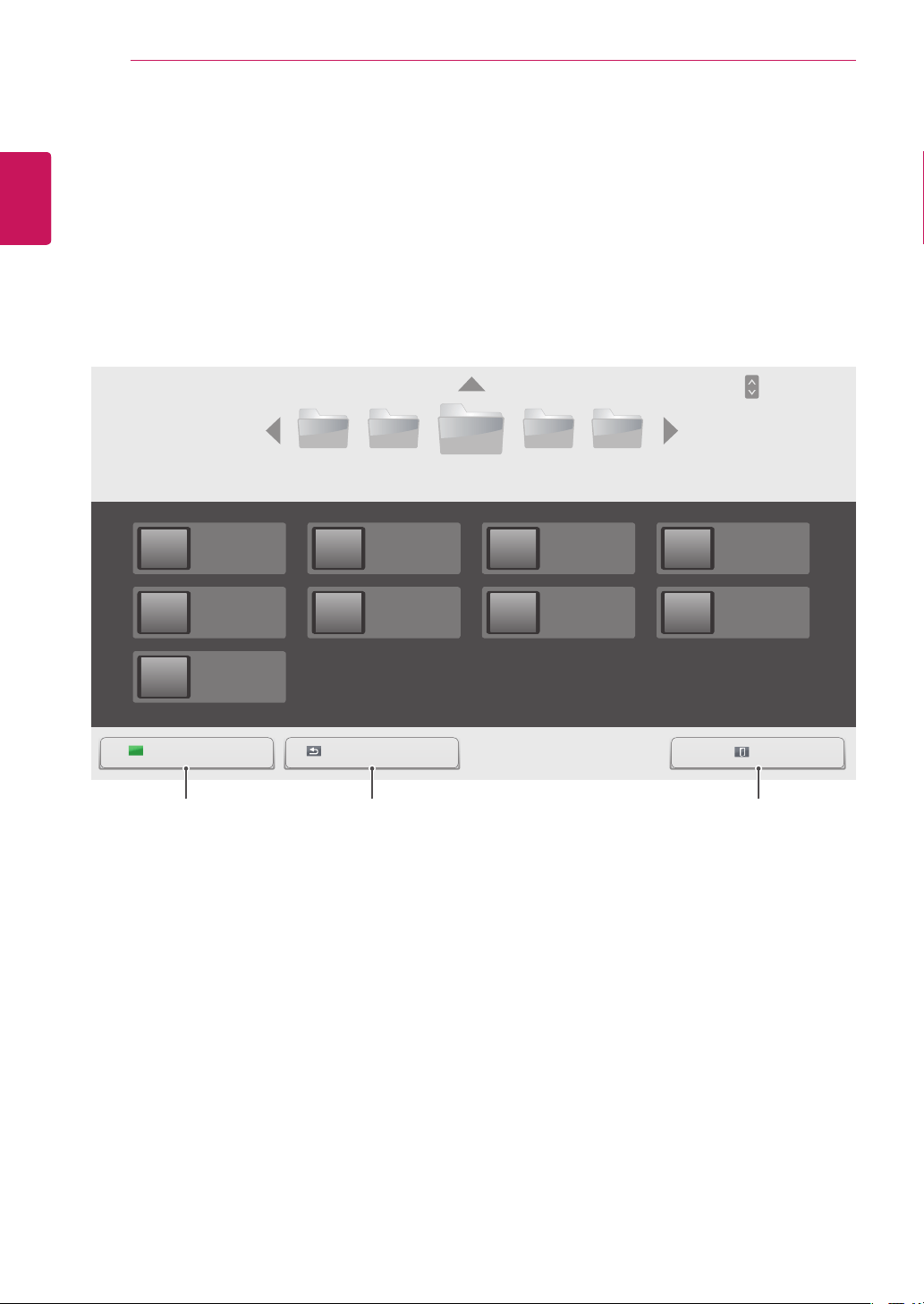
Remote
button
Description
Stopstheplayback.
Playsavideo.
Pausesorresumestheplayback.
Scansbackwardinafile.
Scansforwardinafile.
Adjuststhescreenbrightnesstosaveenergy.
SETTINGS ShowtheOptionmenu.
BACK
Hidethemenuonthefull-sizedscreen.
EXIT ReturnstoMovie List.
or
Skipstospecificpointsinafileduringplayback.Thetimeofaspecificpointwillappearonthestatus
bar.Insomefiles,thisfunctionmaynotworkproperly.
00:42:03 /01:03:00
6 Duringmovieplayback,pressOKtoaccessthefollowingsettings.
Option Hide Exit
Selectsthedesiredpointandplays.
Videoswithresolutionshigherthan
1920X1080@25/30Por1280x720@50/60P
maynotworkproperlydependingonthe
frame.
Moviefilesotherthanthespecifiedtypesand
formatsmaynotworkproperly.
Maxbitrateofplayablemoviefileis20Mbps.
(only,MotionJPEG:10Mbps)
Wedonotguaranteesmoothplaybackof
profilesencodedlevel4.1orhigherinH.264/
AVC.
DTSAudiocodecisnotsupported.
Amoviefilemorethan30GBinfilesizeis
notsupportedforplayback.
ADivXmoviefileanditssubtitlefilemustbe
locatedinthesamefolder.
Avideofilenameanditssubtitlefilename
mustbeidenticalforittobedisplayed.
PlayingavideoviaaUSBconnectionthat
doesn’tsupporthighspeedmaynotwork
properly.
FilesencodedwithGMC(GlobalMotion
Compensation)maynotbeplayed.
29
ENG
ENGLISH
ENTERTAINMENT
Video options
1 PressSETTINGStoaccessthePop-Up
menus.
2 PressthenavigationbuttonstoscrolltoSet
Video Play.,Set Video. or Set Audio. and
pressOK.
TheoptionvalueschangedinMovie List
donotaffectPhoto Listor Music List.
Therefore,theyarenotaffectedbyoption
valueschangedinPhoto ListorMusic List.
TheoptionvalueschangedinPhoto List
andMusic Listdoaffecteachother.
Whenreplayingthevideofileafterstopping,
youcanplayfromwhereitstoppedprevi-
ously.
NOTE
Only10,000ofsyncblockscanbesupported
withinthesubtitlefile.
Whenplayingavideo,youcanadjustthe
picturesizebypressingtheARCbutton.
Subtitlesinyourlanguageareonlysup-
portedwhentheOSDmenuisalsointhis
language.
Thecodepageoptionsmaybedisabledde-
pendingonthelanguageofthesubtitlefiles.
Selecttheappropriatecodepageforthe
subtitlefiles.
Menu Description
Picture Size Selectsyourdesiredpicture
formatduringmovieplay.
Audio
Language
ChangestheLanguageGroupofthe
audioduringmovieplay.Files
withasingleaudiotrackcannotbe
selected.
Subtitle
Language
Turnon/offthesubtitle.
Language ActivatedforSMIsubtitleand
canselectthelanguagewithinthe
subtitle.
Code Page Canselectthefontforsubtitle.
Whensettodefault,samefontas
generalmenuwillbeused.
Sync Adjuststhetimesynchronisationof
thesubtitlefrom-10secsto+10secs
bystepsof0.5secsduringmovie
play.
Position Changesthepositionofthe
subtitleeitherupordownduring
movieplay.
NOTE
SelectSet Video Play.toaccessthefollowing
menus:
Size SelectsyourdesiredSubtitlesize
duringmovieplay.
Repeat Turnon/offrepeatfunctionof
movieplayback.Whenturnedon,the
filewithinthefolderwillbeplayed
backrepeatedly.Evenwhenthe
repeatedplaybackisturnedoff,itcan
runtheplaybackifthefilenameis
similartothepreviousfile.
FormoredetailsabouttheSet Video.menu,see
theCUSTOMIZE SETTINGSsection.Seepage37.
FormoredetailsabouttheSet Audio.menu,see
theCUSTOMIZE SETTINGSsection.Seepage40.
30
ENG
ENGLISH
ENTERTAINMENT
Viewing Photos
ViewimagefilessavedintheUSBstoragedevice.
1
PressSETTINGStoaccessthemainmenu.
2
PressthenavigationbuttontoscrolltoMY MEDIAandpressOK.
3
PressthenavigationbuttontoscrolltoPhoto ListandpressOK.
4
PressthenavigationbuttonstoscrolltoafolderyouwantandpressOK.
5
PressthenavigationbuttonstoscrolltoafileyouwantandpressOK.
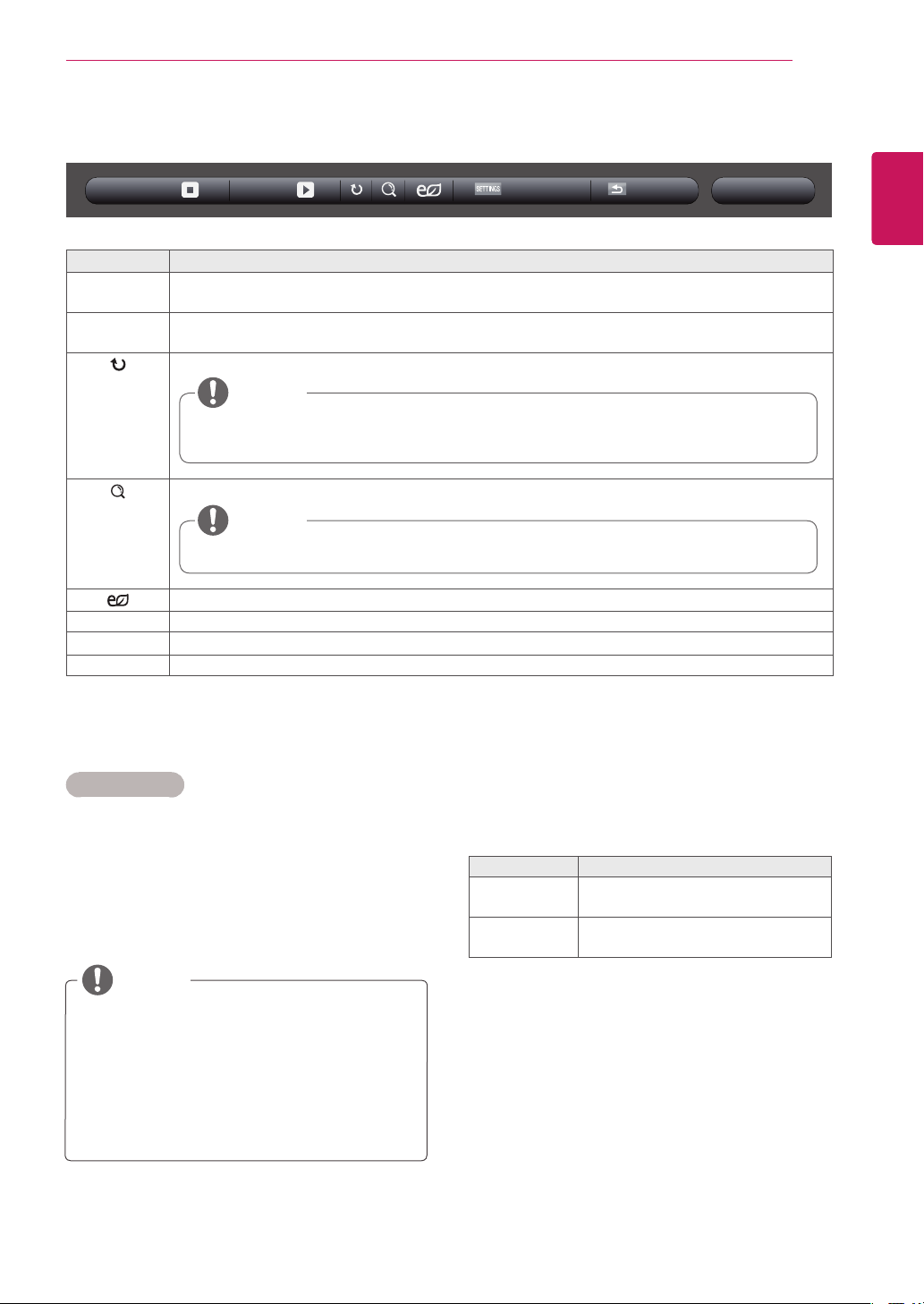
USB-
003002001 004 005
Page1/3
Photo List
Page1/1
ExitGotorootfolder Gotoupperfolder
HR1.jpg
01/23/2014
HR5.jpg
02/21/2014
HR9.jpg
02/21/2014
HR2.jpg
01/23/2014
HR6.jpg
02/21/2014
HR3.jpg
01/23/2014
HR7.jpg
02/21/2014
HR4.jpg
01/23/2014
HR8.jpg
02/21/2014
Page ChangePAGE
Returnstothehome
screenofMyMedia.
Returnstothepreviousscreen. ExitsMyMedia.
31
ENG
ENGLISH
ENTERTAINMENT
Photo options
1 PressSETTINGStoshowtheOptionmenus.
2 PressthenavigationbuttonstoscrolltoSet
Photo View., Set Video. or Set Audio. and
pressOK.
TheoptionvalueschangedinMovie List
donotaffectPhoto Listor Music List.
Therefore,theyarenotaffectedbyoption
valueschangedinPhoto ListorMusic List.
TheoptionvalueschangedinPhoto List
andMusic Listdoaffecteachother.
NOTE
Menu Description
Slideshow Startsorstopsaslideshowwithselectedphotos.Iftherearenoselectedphotos,allphotossavedin
thecurrentfolderdisplayduringaslideshow.Tosetaslideshowspeed,selectOption.
BGM Turnsthebackgroundmusiconoroff.Tosetthebackgroundmusicfolder,selectOption.
YoucanadjustoptionbySETTINGSbuttonontheremotecontrol.
Rotatesphotosclockwise(90°,180°,270°,360°).
Enlargesthephotoby100%,200%or400%.
Adjuststhescreenbrightnesstosaveenergy.
Option Todisplaytheoptions
Hide Hidestheoptionwindow.Todisplaytheoptions,pressOK.
Exit ReturntoPhoto List.
Thesupportedphotosizeislimited.Youcannotrotateaphotoiftheresolutionofthe
rotatedwidthislargerthanthesupportedresolutionsize.
Photoswitharesolutionof960x540orlesscannotbeenlarged.
NOTE
NOTE
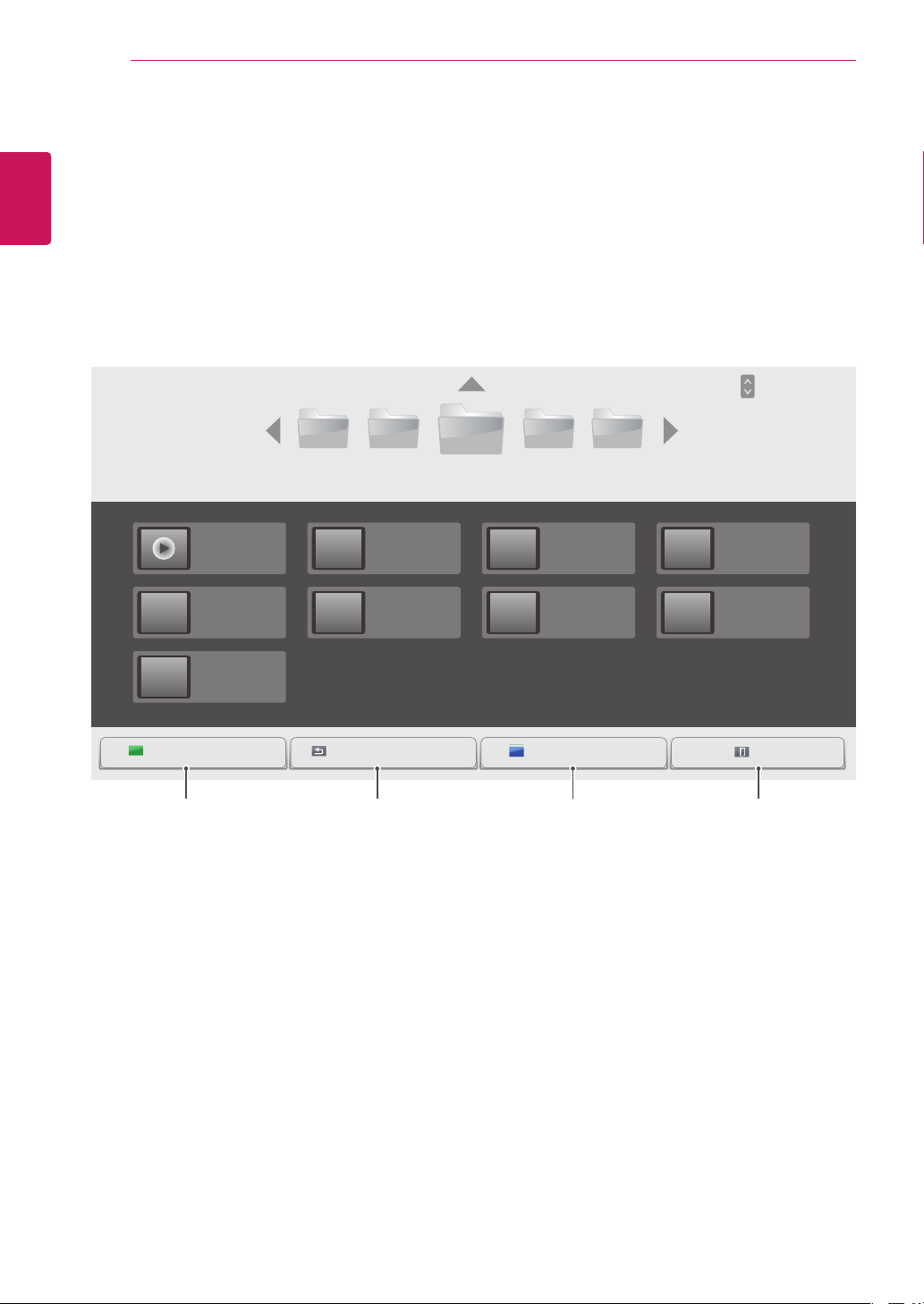
6 Whileviewingphotos,youcanaccessthefollowingsettings.
Option
BGMSlideshow
Hide Exit
SelectSetting Photo View. toaccessthefollow-
ingmenus:
FormoredetailsabouttheSet Video.menu,see
theCUSTOMIZE SETTINGSsection.Seepage37.
FormoredetailsabouttheSet Audio.menu,see
theCUSTOMIZE SETTINGSsection.Seepage40.
Menu Description
Slide Speed Selectaslideshowspeed.
(Options:Fast,MediumorSlow.)
BGM Selectsamusicfolderfortheback-
groundmusic.
32
ENG
ENGLISH
ENTERTAINMENT
Listening to Music
PlaysmusicfilessavedintheUSBstoragedevice.
1
PressSETTINGStoaccessthemainmenu.
2
PressthenavigationbuttontoscrolltoMY MEDIAandpressOK.
3
PressthenavigationbuttontoscrolltoMusic ListandpressOK.
4
PressthenavigationbuttonstoscrolltoafolderyouwantandpressOK.
5
PressthenavigationbuttonstoscrolltoafileyouwantandpressOK.
USB-
003002001 004 005
Page1/3
Music List
Page1/1
ExitGotorootfolder OpenMusicPlayerGotoupperfolder
HR1.mp3
03:03
HR5.mp3
02:03
HR9.mp3
02:21
HR2.mp3
05:03
HR6.mp3
04:03
HR3.mp3
09:03
HR7.mp3
06:03
HR4.mp3
04:03
HR8.mp3
05:03
Opensthesettings
windowformusic.
Thisfeatureisactivated
onlyduringplayback.
Page ChangePAGE
Returnstothehome
screenofMyMedia.
Returnstothe
previousscreen.
ExitsMyMedia.
33
ENG
ENGLISH
ENTERTAINMENT
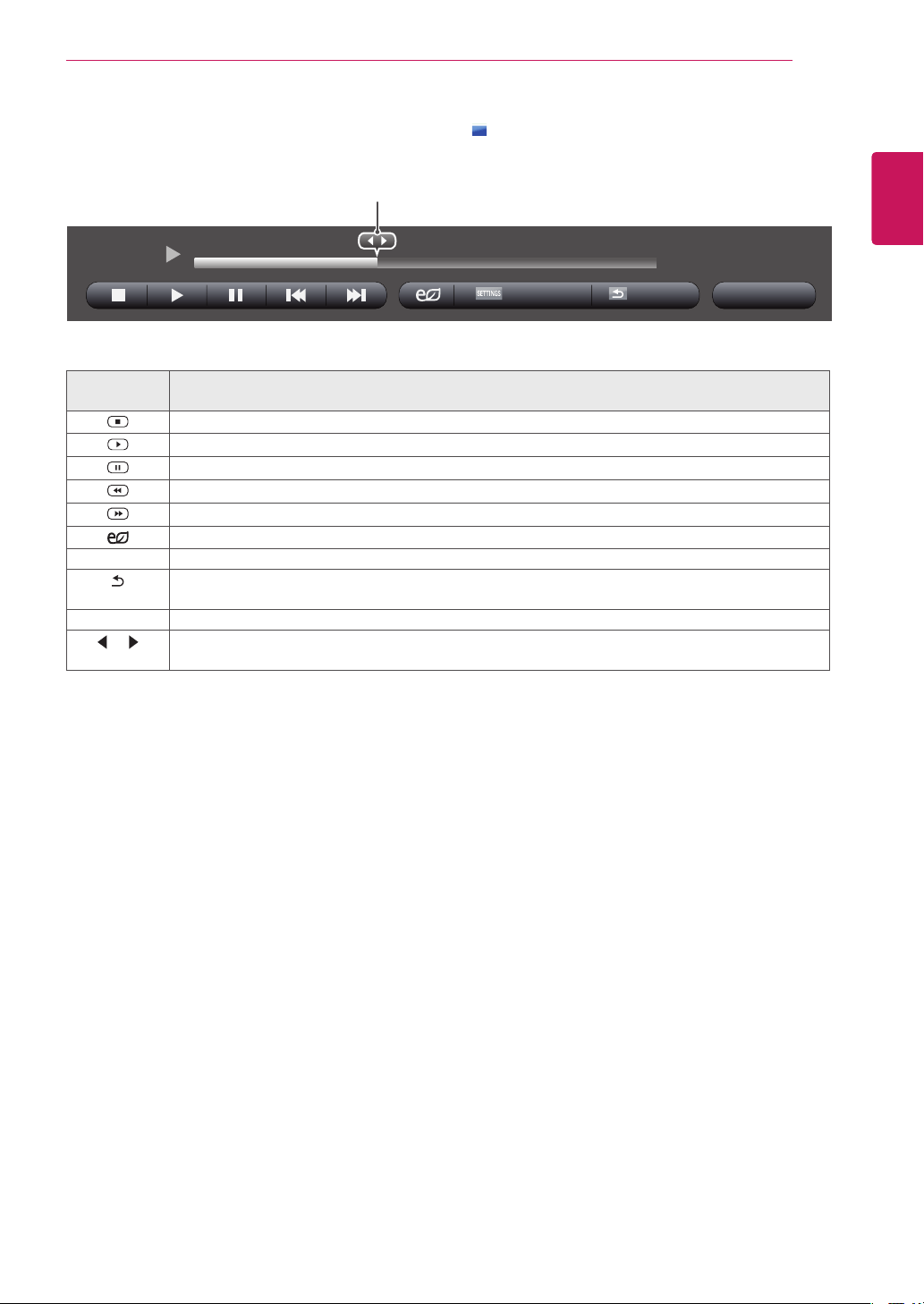
Remote
button
Description
StopsplayingbackthefileandmovesbacktotheMusic List.
Playsamusicfile.
Pausesorresumesplayback.
Skipstothepreviousfile.
Skipstothenextfile.
Adjuststhescreenbrightnesstosaveenergy.
SETTINGS ShowtheOptionmenu.
BACK
Hidestheoptionwindow.
Todisplaytheoptions,pressOK.
EXIT ReturntoMusic List.
or
Skipstospecificpointsinafileduringplayback.Thetimeofaspecificpointwillappearonthestatus
bar.Insomefiles,thisfunctionmaynotworkproperly.
01:40 / 03:03
6 Duringmusicplayback,pressOKorthebluebutton( )toaccessthefollowingsettings.
Option Hide Exit
HR1.mp3
Selectsthedesiredpointandplays.
34
ENG
ENGLISH
ENTERTAINMENT
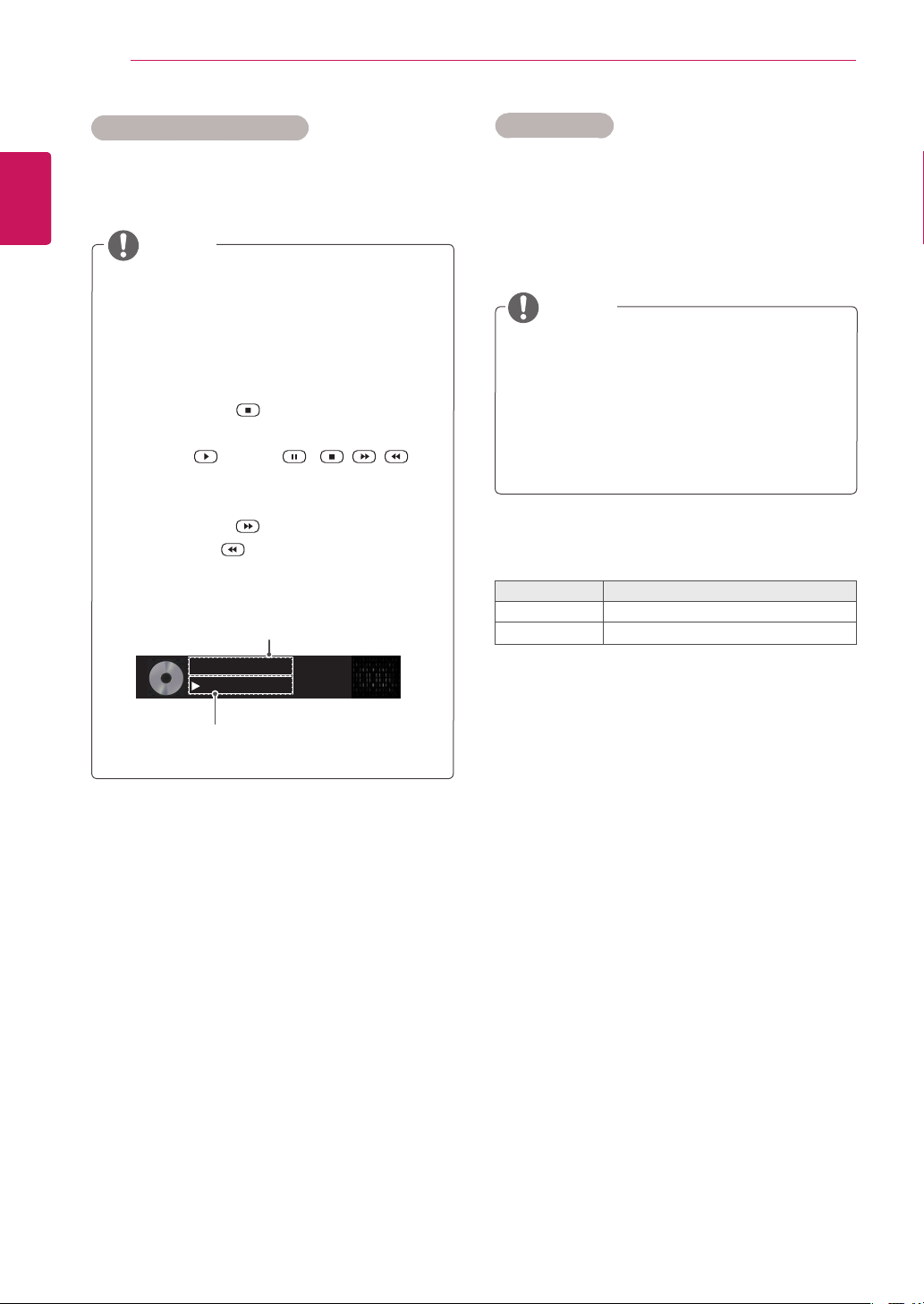
Timeelapsed/Duration
002.B02.mp3
00:31/04:04
filename
Adamagedorcorruptedmusicdoesnotplay
butdisplays00:00inplaytime.
Amusicdownloadedfromapaidservicewith
copyrightprotectiondoesnotstartbutdis-
playsinappropriateinformationinplaytime.
IfyoupressOK, buttons,screensaveris
stopped.
ThePLAY( ),Pause( ), , ,
buttonsontheremotecontrolarealsoavail-
ableinthismode.
Youcanusethe buttontoselectthenext
musicandthe buttontoselecttheprevi-
ousmusic.
Tips for playing music files
ThisunitcannotsupporttheID3Tag
embeddedMP3files.
NOTE
1 PressSETTINGStoaccessthepop-upmenus.
2 PressthenavigationbuttonstoscrolltoSet Au-
dio Play. or Set Audio. andpressOK.
Music options
TheoptionvalueschangedinMovie List
donotaffectPhoto Listor Music List.
Therefore,theyarenotaffectedbyoption
valueschangedinPhoto ListorMusic List.
TheoptionvalueschangedinPhoto List
andMusic Listdoaffecteachother.
WhenyouselecttheSet Audio Play,
NOTE
FormoredetailsabouttheSet Audio.menu,see
theCUSTOMIZE SETTINGSsection.Seepage40.
Menu Description
Repeat Repeatsthemusicplayback.
Random
Playsrandommusictracks.
35
ENG
ENGLISH
ENTERTAINMENT
Viewing the Contents List
PlaysbackthestoredfilesusingtheExportoptioninSuperSign Manager.
1
PressSETTINGStoaccessthemainmenu.
2
PressthenavigationbuttontoscrolltoMY MEDIAandpressOK.
3
PressthenavigationbuttontoscrolltoContents ListandpressOK.
4
PressthenavigationbuttonstoscrolltoafolderyouwantandpressOK.
5
PressthenavigationbuttonstoscrolltoafileyouwantandpressOK.
USB -
003002001 004 005
Page 1/3
Contents List
Page 1/1
ExitGotorootfolder Gotoupperfolder
HR1.cts
01/01/2014
HR5.cts
01/01/2014
HR9.cts
01/01/2014
HR2.cts
01/01/2014
HR6.cts
01/01/2014
HR3.cts
01/01/2014
HR7.cts
01/01/2014
HR4.cts
01/01/2014
HR8.cts
01/01/2014
WhileplayingmediafilesfromContents List,onlytheBACK,EXIT,orvolumebuttonareavailable.
SelectingtheBACKorEXITbuttonstopsplayingmediafilesandreturnstotheContents List.
IfthereistheAutoPlayfolderintheUSBdeviceanditsfilesareinsupportedformats,theycanbe
playedbackautomaticallywhentheUSBdeviceisconnectedtothemonitor.
NOTE
Page ChangePAGE
Returnstothehome
screenofMyMedia.
Returnstothepreviousscreen. ExitsMyMedia.
36
ENG
ENGLISH
CUSTOMIZING SETTINGS
CUSTOMIZING SETTINGS
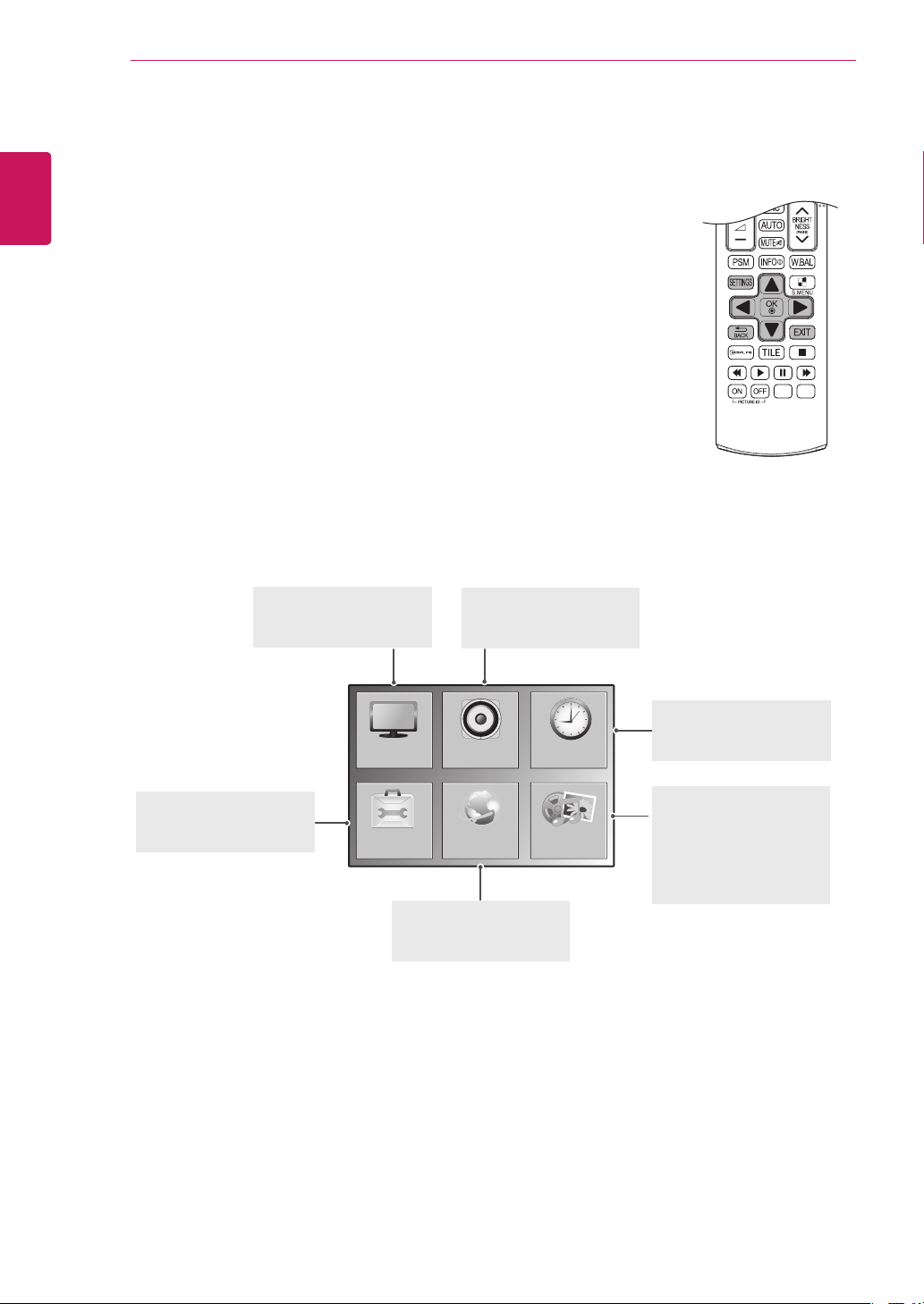
Accessing Main Menus
1
PressSETTINGStoaccessthemainmenus.
2
Pressthenavigationbuttonstoscrolltooneofthefollowingmenusand
pressOK.
3
Pressthenavigationbuttonstoscrolltothesettingoroptionyouwant
andpressOK.
4
Whenyouarefinished,pressEXIT.
Whenyoureturntothepreviousmenu,pressBACK.
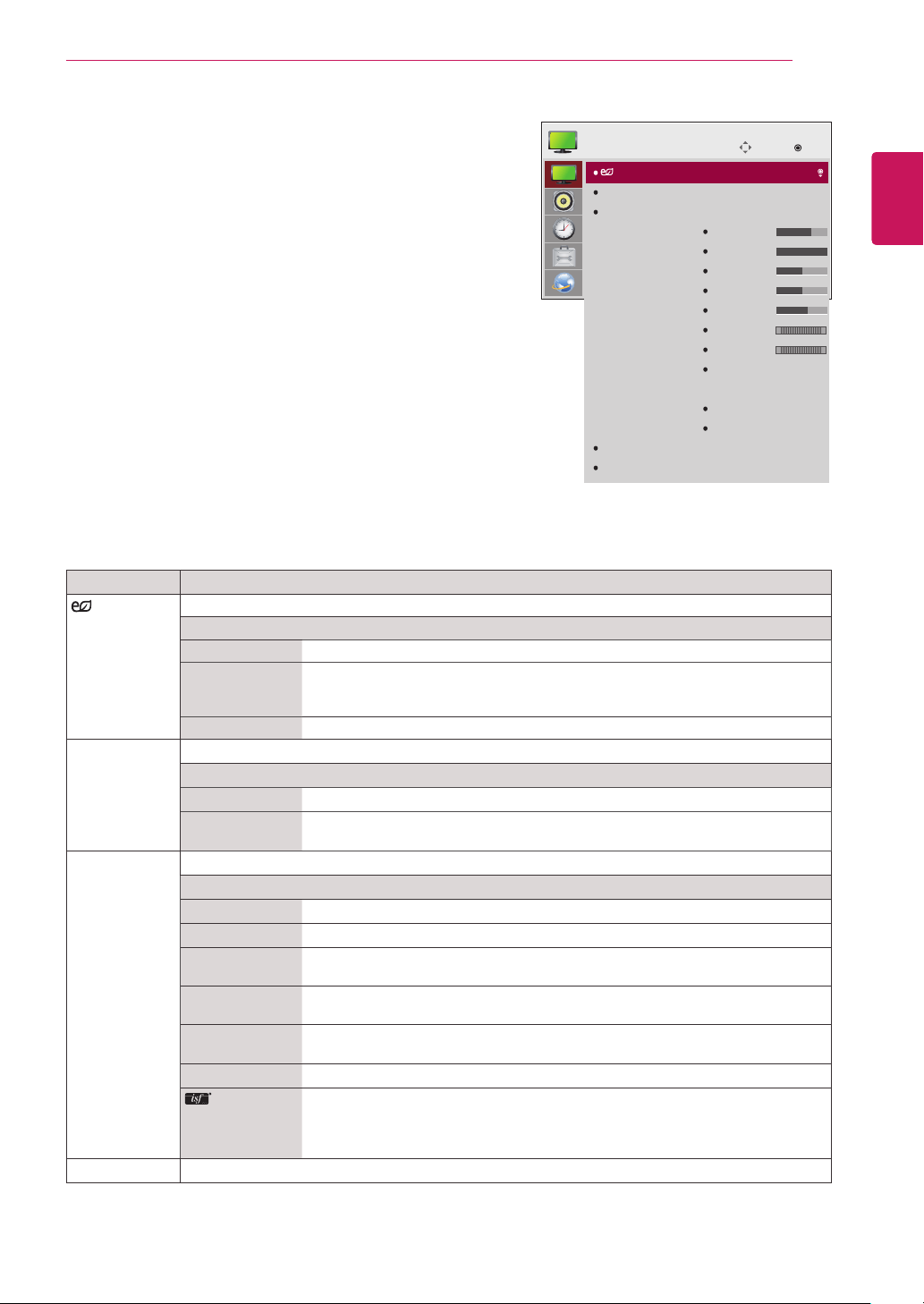
OPTION
PICTURE
NETWORK
AUDIO TIME
MY MEDIA
PICTURE
Adjuststheimagesize,
quality,oreffect.
AUDIO
Adjuststhesoundquality,
effect,orvolumelevel.
NETWORK
Setsupthenetwork
setting.
OPTION
Customizesthegeneral
settings.
TIME
Setsthetime,date,or
Timerfeature.
MY MIDIA
Displayandplaymovie,
photoandmusiccontents
storedonyourUSBor
Signagedevice(Internal
storagedevice).
37
ENG
ENGLISH
CUSTOMIZING SETTINGS
PICTURE Settings
1
PressSETTINGStoaccessthemainmenus.
2
PressthenavigationbuttonstoscrolltoPICTUREand
pressOK.
3
Pressthenavigationbuttonstoscrolltothesettingor
optionyouwantandpressOK.
-Toreturntothepreviouslevel,pressBACK.
4
Whenyouarefinished,pressEXIT.
Whenyoureturntothepreviousmenu,press
BACK.
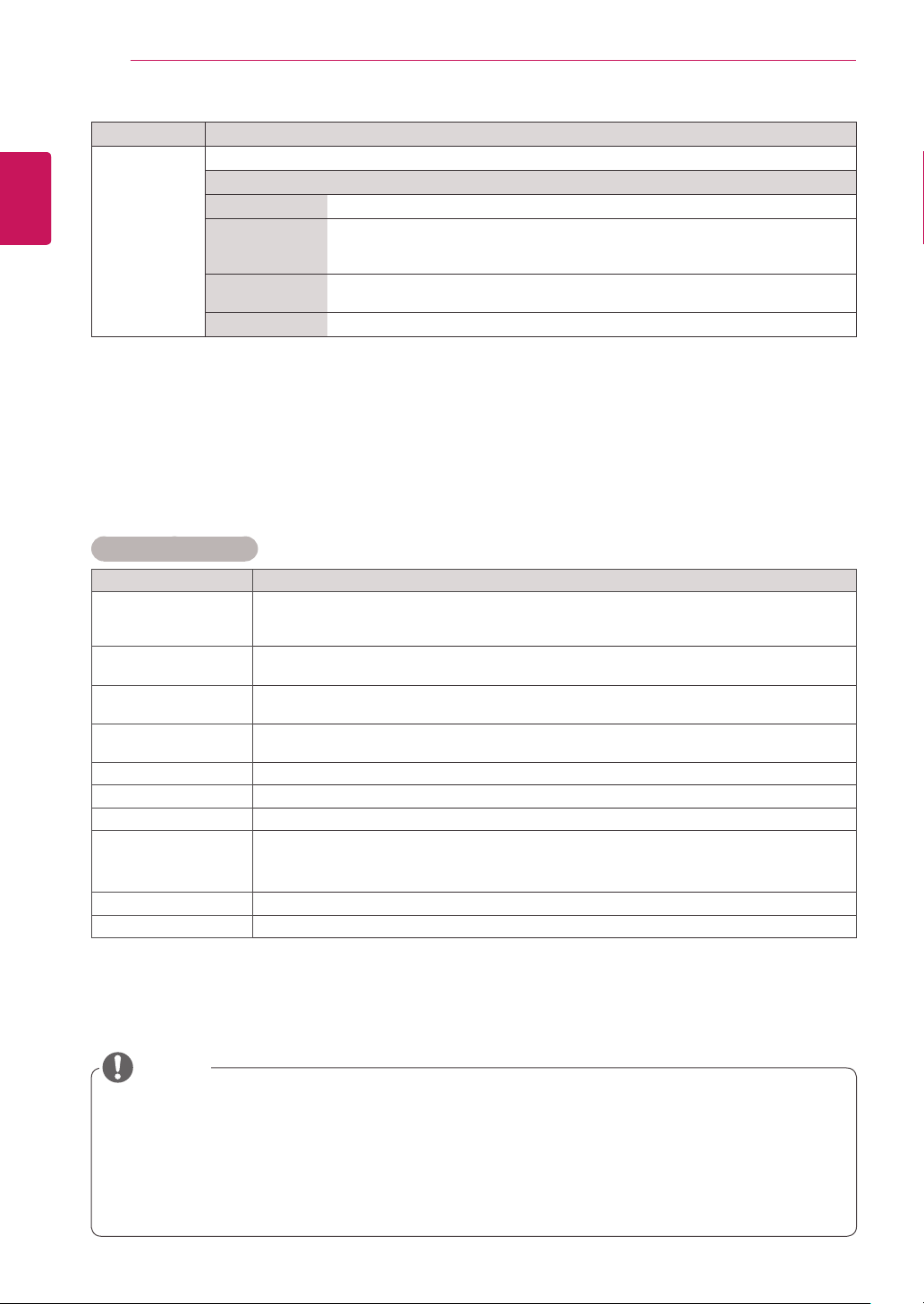
Theavailablepicturesettingsaredescribedinthefollowing:
Setting Description
Energy
Saving
Setstoautomaticallyadjustthescreenbrightnesscorrespondingtothesurroundings.
Level
Off DisablesEnergySavingfunction.
Minimum/
Medium/
Maximum
Selectsthebrightnesslevelofthebacklight.
Screen Off Thescreenturnsoffin3seconds.
Smart Energy
Saving
Adjuststhebacklightandcontrastdependingonthescreenbrightness.
Level
Off DisablestheSmartEnergySavingfunction.
On EnablestheSmartEnergySavingfunctiontosavepowerconsumptionasmuch
asthevaluesetinthesmartenergysavingrate.
Picture Mode Selectsthepicturemodeoptimizedfortheviewingenvironmentortheprogramme.
Mode
Vivid Heightenscontrast,brightnessandsharpnesstodisplayvividimages.
Standard Displaysimagesinstandardlevelsofcontrast,brightnessandsharpness.
Eco TheEnergySaverfeaturechangessettingsonthemonitortoreducepower
consumption.
Cinema Optimizesthevideoimageforacinematiclooktoenjoymoviesasifyouareina
movietheater.
Sport Optimizesthevideoimageforhighanddynamicactionsbyemphasizingprimary
Colorssuchaswhite,grass,orskyblue.
Game OptimizesthevideoimageforafastgamingscreensuchasPCsorgames.
Expert1·2
Menuforadjustingpicturequalitythatallowsexpertsandamateurstoenjoythe
bestMonitorviewing.ThismenuisISF-certifiedandprovidedforpicturetuning
experts.(ISFlogocanonlybeusedonISF-certifiedMonitorunits.)
ISFccc:ImagingScienceFoundationCertifiedCalibrationControl
Aspect Ratio Changestheimagesizetoviewimagesatitsoptimalsize.
Move
OK
PICTURE
Energy Saving
Smart Energy Saving
Picture Mode
Aspect Ratio
Screen
: Off (User)
: Off
: Standard
Backlight
Contrast
Brightness
Sharpness
Color
Tint
Color Temp.
Advanced Control /
Expert Control
Picture Option
Picture Reset
: 16:9
70
100
50
50
60
0
0
R G
W C
38
ENG
ENGLISH
CUSTOMIZING SETTINGS
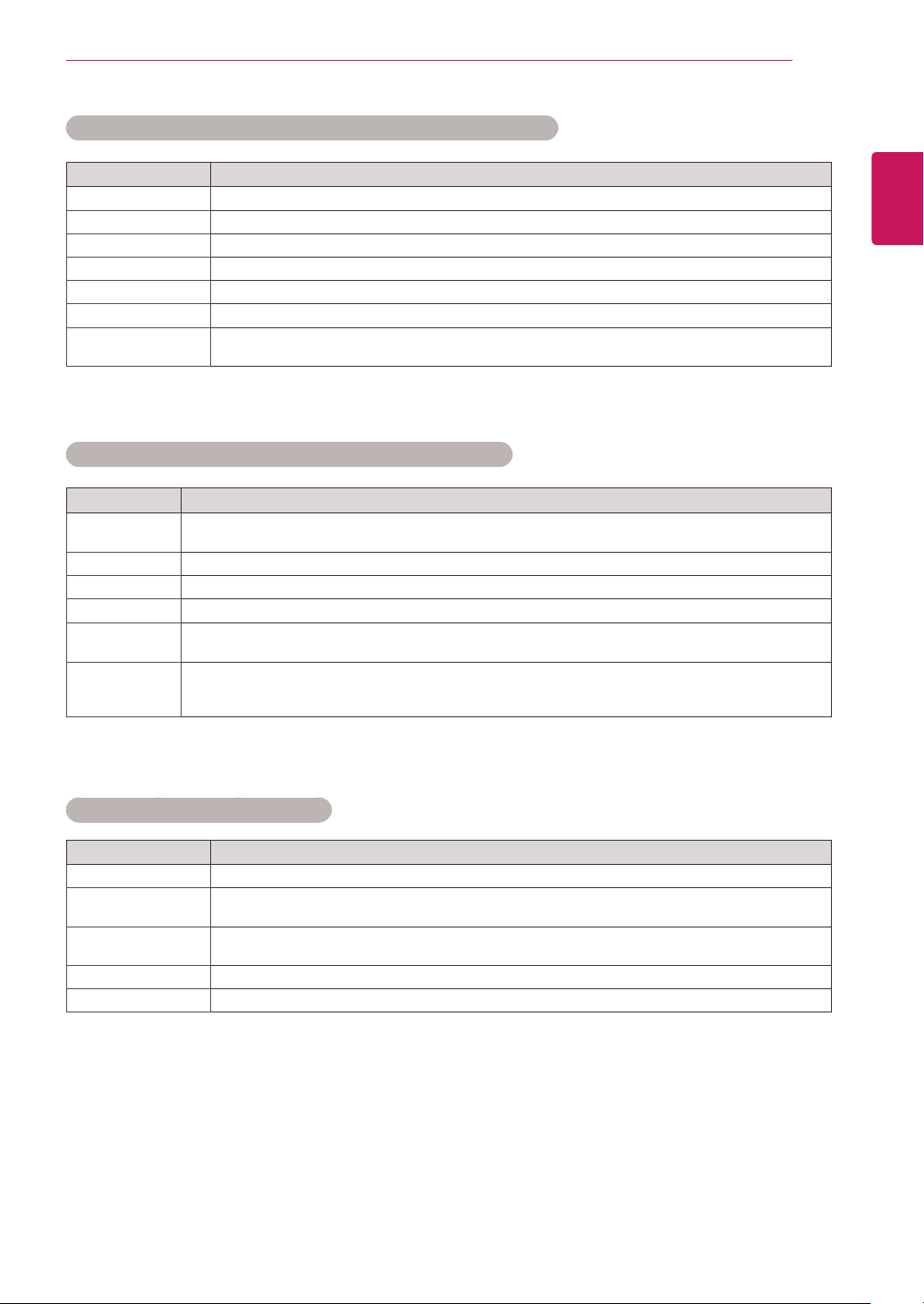
Basic image options
Setting Description
Backlight AdjuststhebrightnessofthescreenbycontrollingtheLCDbacklight.Ifyoudecreasethe
brightnesslevel,thescreenbecomesdarkerandthepowerconsumptionwillbereduced
withoutanyvideosignalloss.
Contrast Increasesordecreasesthegradientofthevideosignal.YoumayuseContrastwhenthe
brightpartofthepictureissaturated.
Brightness Adjuststhebaselevelofthesignalinthepicture.YoumayuseBrightnesswhenthedarkpart
ofthepictureissaturated.
Sharpness Adjuststhelevelofcrispnessintheedgesbetweenthelightanddarkareasofthepicture.
Thelowerthelevel,thesoftertheimage.
Color Adjustsintensityofallcolors.
Tint Adjuststhebalancebetweenredandgreenlevels.
Color Temp . SettowarmtoenhancehotterColorssuchasred,orsettocooltomakepicturebluish.
Advanced Control/
Expert Control
YoucanadjustthepictureforeachPicture Mode,oradjustthepicturesettingsaccordingto
aspecificpictureimage.First,selectadesired Picture Mode.
*ThisoptionisunavailableifPicture ModeissettoVivid.
Picture Option Setsadditionalpictureoption.
Picture Reset Restorestheoptionstothedefaultsetting.
Setting Description
Screen
(In RGB
Mode Only)
CustomizesthePCdisplayoptionsinRGBmode.
Option
Resolution Selectsaproperresolution.
Auto Configure Setstoadjustthescreenposition,clock,andphaseautomatically.
Thedisplayedimagemaybeunstableforafewsecondswhiletheconfigurationis
inprogress.
Position/Size/
Phase
Adjuststheoptionswhenthepictureisnotclear,especiallywhencharactersare
shaky,aftertheautoconfiguration.
Reset Restorestheoptionstothedefaultsetting.
Whenyouselectapicturemode,relatedmenusaresetautomatically.
WhenusingtheSmartEnergySavingfunction,thescreenmaylooksaturatedinthewhiteareaofa
stillimage.
IfEnergySavingissettoMinimum,Medium,orMaximum,theSmartEnergySavingfunctionis
disabled.
NOTE
39
ENG
ENGLISH
CUSTOMIZING SETTINGS
Setting Description
Dynamic
Contrast
Adjuststhecontrasttotheoptimallevelaccordingtothebrightnessoftheimage.
(Functionworksinthefollowingmode-HDMI-DTV)
Color Gamut Selectstherangeofcoloursthatcanbeexpressed.
Edge Enhancer Showscleareranddistinctiveyetnaturaledgesofthevideo.
Color Filter FiltersaspecificcolourspectruminRGBcolourstofine-tunecoloursaturationandhueaccurately.
Color
Temperature
Adjuststheoveralltoneofthescreenasdesired.InExpertmode,detailedfine-tuningcanbesetvia
Gammamethod,etc.
Colour
Management
System
Thisisasystemthatexpertsusewhentheyadjustcolourwithatestpattern.Theycanselectfrom
sixcolourareas(Red/Green/Blue/Cyan/Magenta/Yellow)withoutaffectingothercolours.For
normalimages,adjustmentsmaynotresultinnoticeablecolourchanges.
Advanced Control - Picture Mode (Standard/ Eco/ Sport/ Game)
Expert Control - Picture Mode (Cinema/ Expert1/ Expert2)
Setting Description
Dynamic Contrast Adjuststhecontrasttotheoptimallevelaccordingtothebrightnessoftheimage.
Dynamic Color Adjustscolorformorenatural-lookingcolors.
Color Gamut Selectstherangeofcoloursthatcanbeexpressed.
Skin Color SkinColorspectrumcanbeseparatelysettoimplementtheskinColorasdefinedbytheuser.
Sky Color Skycolorissetseparately.
Grass Color Naturalcolorspectrum(meadows,hills,etc.)canbeseparatelyset.
Gamma Setsthegradationcurveaccordingtotheoutputofthepicturesignalinrelationtotheinput
signal.
Setting Description
Noise Reduction Reducesscreennoiseinthevideo.
MPEG Noise
Reduction
Reducesnoisecausedbycompressingdigitalvideo.
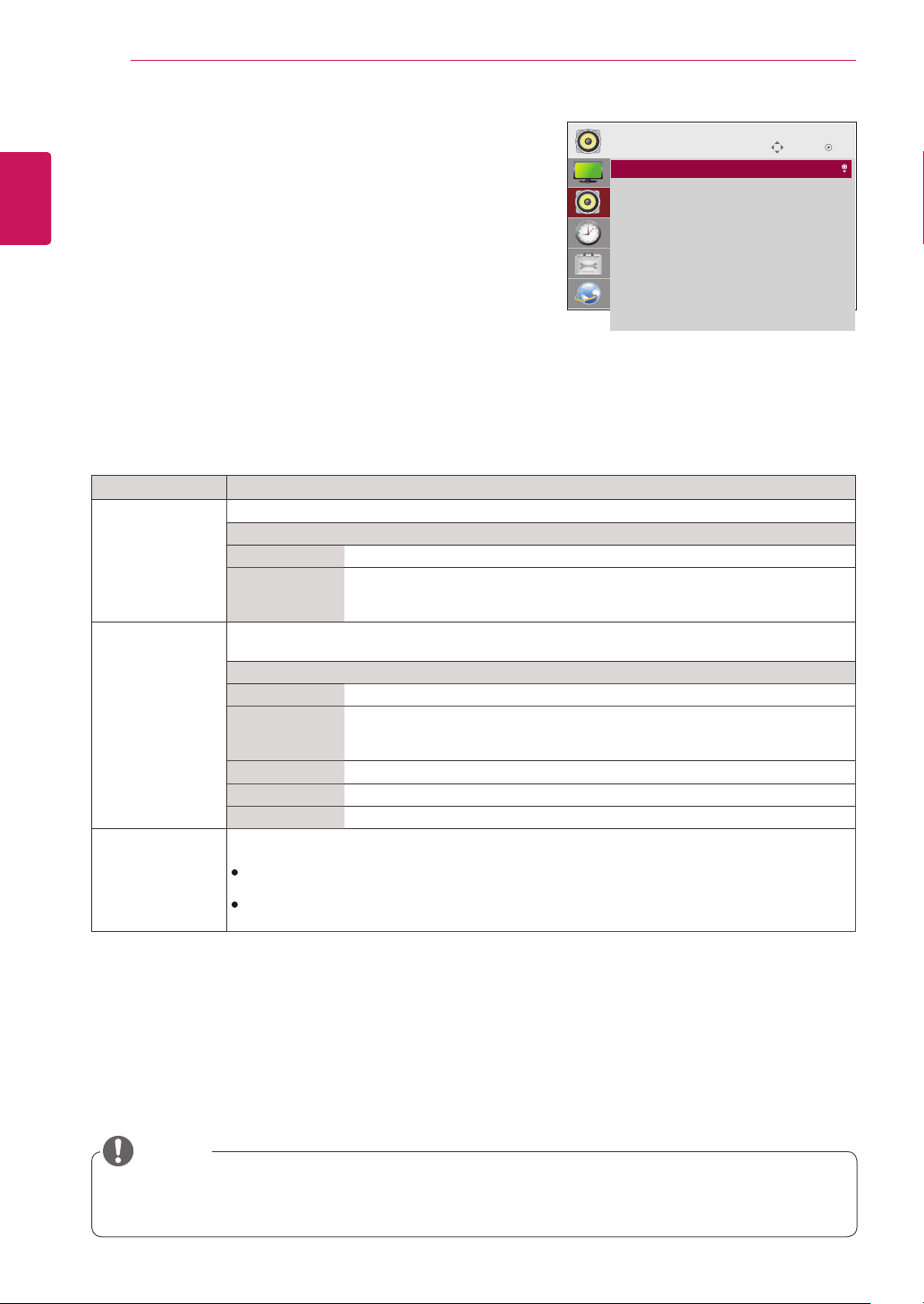
Black Level Adjuststhebrightnessordarknessofthescreentosuittheblacklevelofthepictureinputusing
thedegreeofdarkness(blacklevel)ofthescreen.
Real Cinema Optimizesthescreenformovieviewing.
Motion Eye Care Adjustsscreenbrightnesstopreventeyeglare.(Dependingonmodel)
Picture Option - HDMI(DTV) Mode
40
ENG
ENGLISH
CUSTOMIZING SETTINGS
AUDIO Settings
1
PressSETTINGStoaccessthemainmenus.
2
PressthenavigationbuttonstoscrolltoAUDIOandpress
OK.
3
Pressthenavigationbuttonstoscrolltothesettingor
optionyouwantandpressOK.
-Toreturntothepreviouslevel,pressBACK.
4
Whenyouarefinished,pressEXIT.
Whenyoureturntothepreviousmenu,pressBACK.
Theavailableaudiooptionsaredescribedinthefollowing:
Setting Description
Sound Mode AllowsoptimizedsoundforcustomMonitorinstallation.
Mode
Standard Suitableforalltypesofvideo.
News/ Music/
Cinema/ Sport/
Game
Setsaudiooptimizedforaspecificgenre.
Sound Effect theusercanselectvarioussoundeffects.
-Sound EffectfunctionisavailableonlyforStandardmodeinSound Modemenu.
Level
Clear Voice ll Boostsvoiceclarity.
Virtual
Surround
LG’sproprietaryaudioprocessingtechnologyallows5.1ch-likesurroundsound
fromtwospeakers.
-IfClear Voice llissettoOn,Virtual Surroundwillnotbechosen.
Equalizer AdjuststhevolumetoalevelofyourchoiceusingtheEqualizer.
Balance Adjustsleft/rightaudiobalance.
Reset YoucanresetthesettingsundertheSoundEffectsmenu.
AV Sync. Adjust Synchronizesvideoandaudiodirectlywhentheydonotmatch.
IfyousetAVSync.toON,youcanadjustthesoundoutputtothescreenimage.
Speaker:Adjuststhesynchronizationofthesoundfromthespeakers.The"-"buttonmakesthe
soundoutputfasterandthe"+"buttonslowerthanthedefaultvalue.
Bypass:Theaudioofanexternaldevicewithoutaudiodelay.Audiomaybeoutputbeforevideo
asittakestimetoprocessvideoinputintotheMonitor.
Somemodelsmaynothavebuilt-inspeakers.Inthatcase,youneedtoconnectexternalspeakersto
listentosound.
NOTE
Move
OK
AUDIO
• Sound Mode : Standard
• Sound Effect
• AV Sync. Adjust : Off
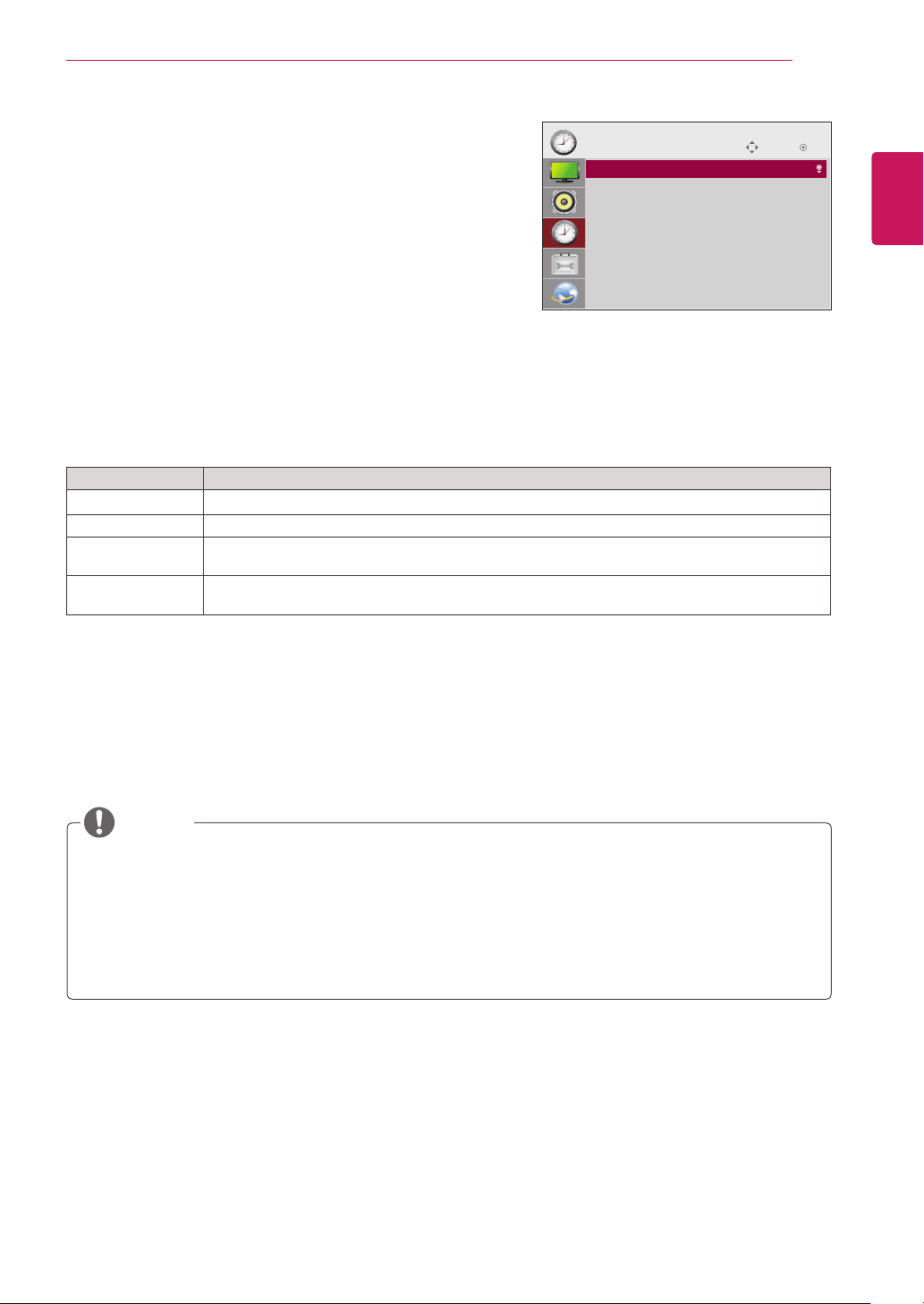
41
ENG
ENGLISH
CUSTOMIZING SETTINGS
TIME Settings
1
PressSETTINGStoaccessthemainmenus.
2
PressthenavigationbuttonstoscrolltoTIMEandpressOK.
3
Pressthenavigationbuttonstoscrolltothesettingoroption
youwantandpressOK.
-Toreturntothepreviouslevel,pressBACK.
4
Whenyouarefinished,pressEXIT.
Whenyoureturntothepreviousmenu,pressBACK.
Theavailabletimesettingsaredescribedinthefollowing:
Setting Description
Clock Setsthetimefeature.
On/Off Time Setsthetimetoturnonoroffthemonitorset.
Auto Off(15Min.) IfAuto-offisactiveandthereisnoinputsignal,thesetswitchestooffmodeautomaticallyafter15
minutes.
Automatic
Standby
Ifthemonitorisleftunattendedforasetperiodoftime,itautomaticallygoesintostandbymode.
OffTime/OnTimecanbesavedforuptosevenschedules;themonitoristurnedonoroffatthepreset
timeintheschedulelist.Ifmultiplepresettimesarestoredintheschedulelist,thisfunctionworksatthe
nearesttimefromthecurrenttime.
Oncetheonorofftimeisset,thesefunctionsoperatedailyatthepresettime.
Whenthescheduledpower-onandpower-offtimesarethesame,thepower-offtimehaspriorityoverthe
power-ontimeifthesetisturnedon,andviceversaifthesetisturnedoff.
NOTE
Move OK
TIME
• Clock
• Off Time : Off
• On Time : Off
• Auto Off(15Min.) : Off
• Automatic Standby : Off
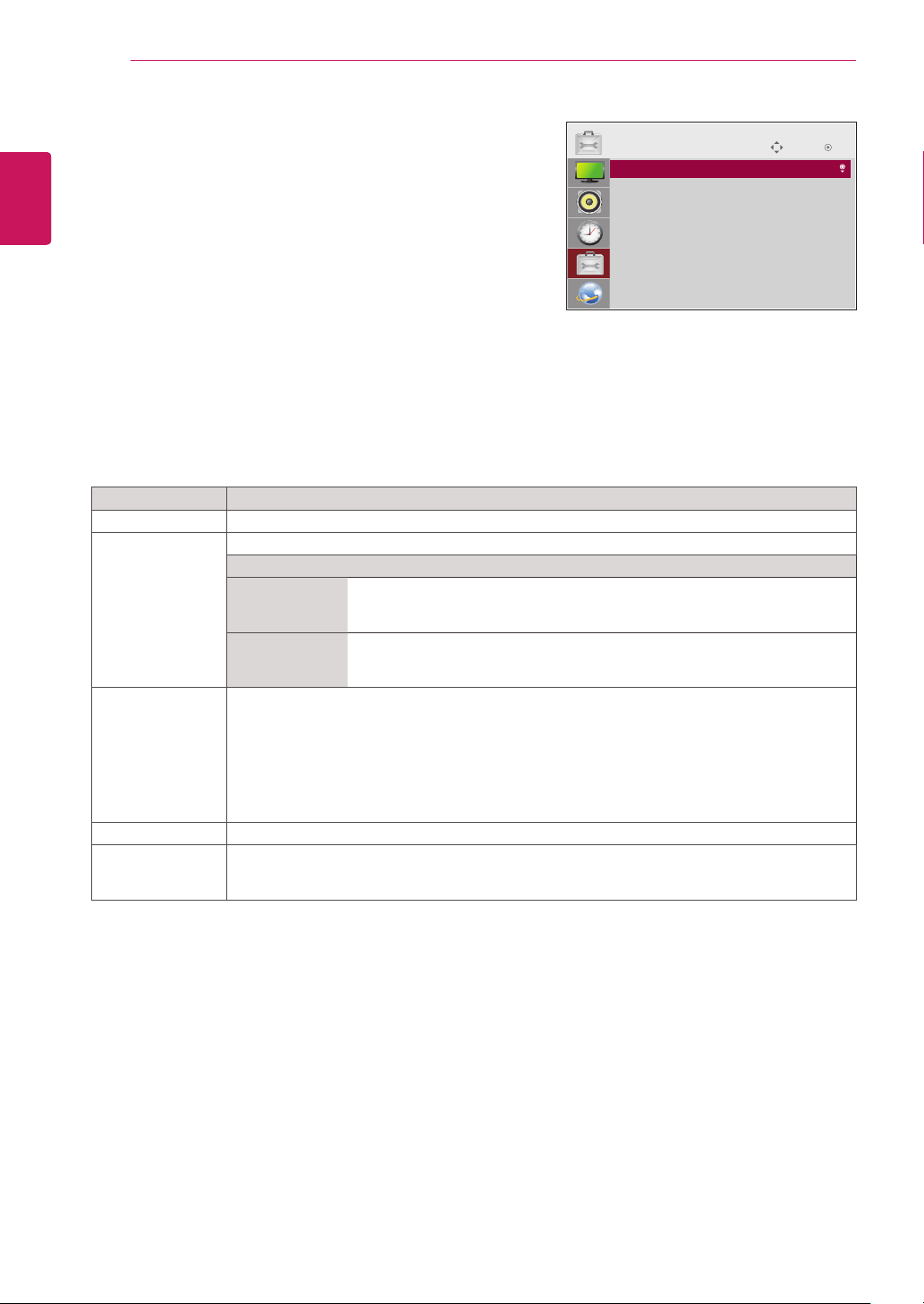
42
ENG
ENGLISH
CUSTOMIZING SETTINGS
OPTION Settings
1
PressSETTINGStoaccessthemainmenus.
2
PressthenavigationbuttonstoscrolltoOPTIONandpress
OK.
3
Pressthenavigationbuttonstoscrolltothesettingoroption
youwantandpressOK.
-Toreturntothepreviouslevel,pressBACK.
4
Whenyouarefinished,pressEXIT.
Whenyoureturntothepreviousmenu,pressBACK.
Theavailableoptionsettingsaredescribedinthefollowing:
Setting Description
Language Selectsalanguageforthedisplaytext.
ISM Method Thisfunctionremovesimagestickingwhichiscausedbyprolongeddisplayofstaticimages.
Setting
Normal Minimizesimagestickingbygraduallyloweringthebrightnesswhen
displayingstaticimagesandbyincreasingthebrightnesswhendisplaying
movingimages.
Color Wash Removesimagestickingbymovingeverypixelinacertainpatternonthe
screenforaspecificperiodoftime.Pleaseusethisfunctiontoremove
temporaryimagesticking.
DivX(R) VOD RegistersorreleasesDivX.
ChecksDivXRegistrationCodeforplayingDivX-protectedvideos.
Registerathttp://vod.divx.com.
UsesRegistrationCodetorentorpurchasemoviesatwww.divx.com/vod.
*Rented/purchasedDivXfilescannotbeplayediftheDivXRegistrationCodeofadifferentdevice
isused.UseonlytheDivXRegistrationCodegrantedtothisdevice.
*ConvertedfilesnotconformingtotheDivXCodecStandardmaynotplayormayproduce
abnormalimagesandsound.
Initial Setting Deletesalloptionalsettingsandreturnstoinitialdefaultmode.
Set ID YoucanassignauniqueSetIDNO(nameassignment)toeachproductwhenseveralproducts
areconnectedfordisplay.Specifythenumber(1to255)usingthebuttonandexit.Usethe
assignedSetIDtoindividuallycontroleachproductusingtheProductControlProgram.
Move OK
OPTION
• Language
• ISM Method : Normal
• DivX(R) VOD
• Initial Setting
• Set ID : 1
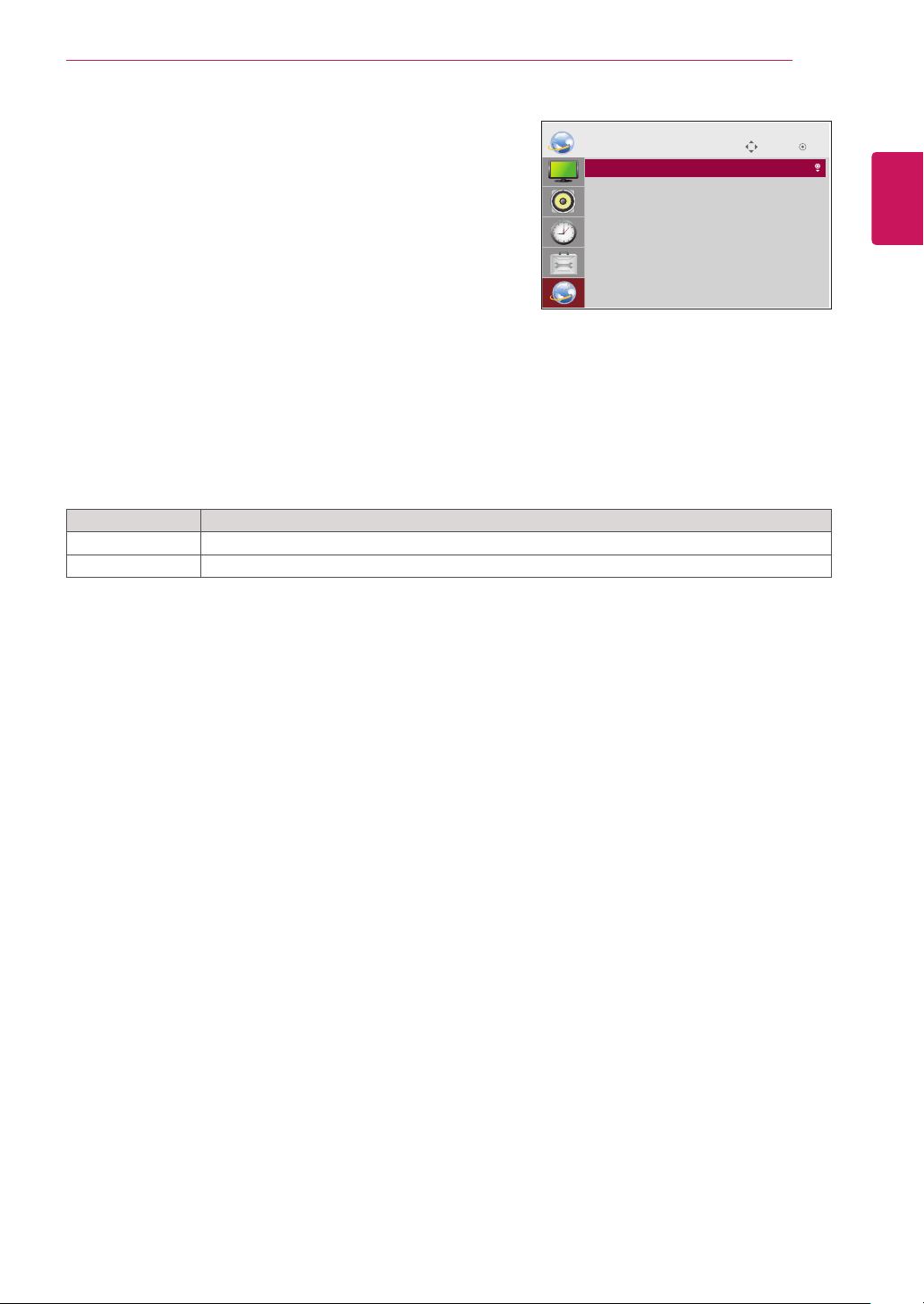
43
ENG
ENGLISH
CUSTOMIZING SETTINGS
Setting Description
Network Setting Configurethenetworksettings.
Network Status Displaythenetworkstatus.
NETWORK Settings
1
PressSETTINGStoaccessthemainmenus.
2
PressthenavigationbuttonstoscrolltoNETWORKand
pressOK.
3
Pressthenavigationbuttonstoscrolltothesettingoroption
youwantandpressOK.
-Toreturntothepreviouslevel,pressBACK.
4
Whenyouarefinished,pressEXIT.
Whenyoureturntothepreviousmenu,pressBACK.
Theavailableoptionsettingsaredescribedinthefollowing:
Move OK
NETWORK
• Network Setting
• Network Status
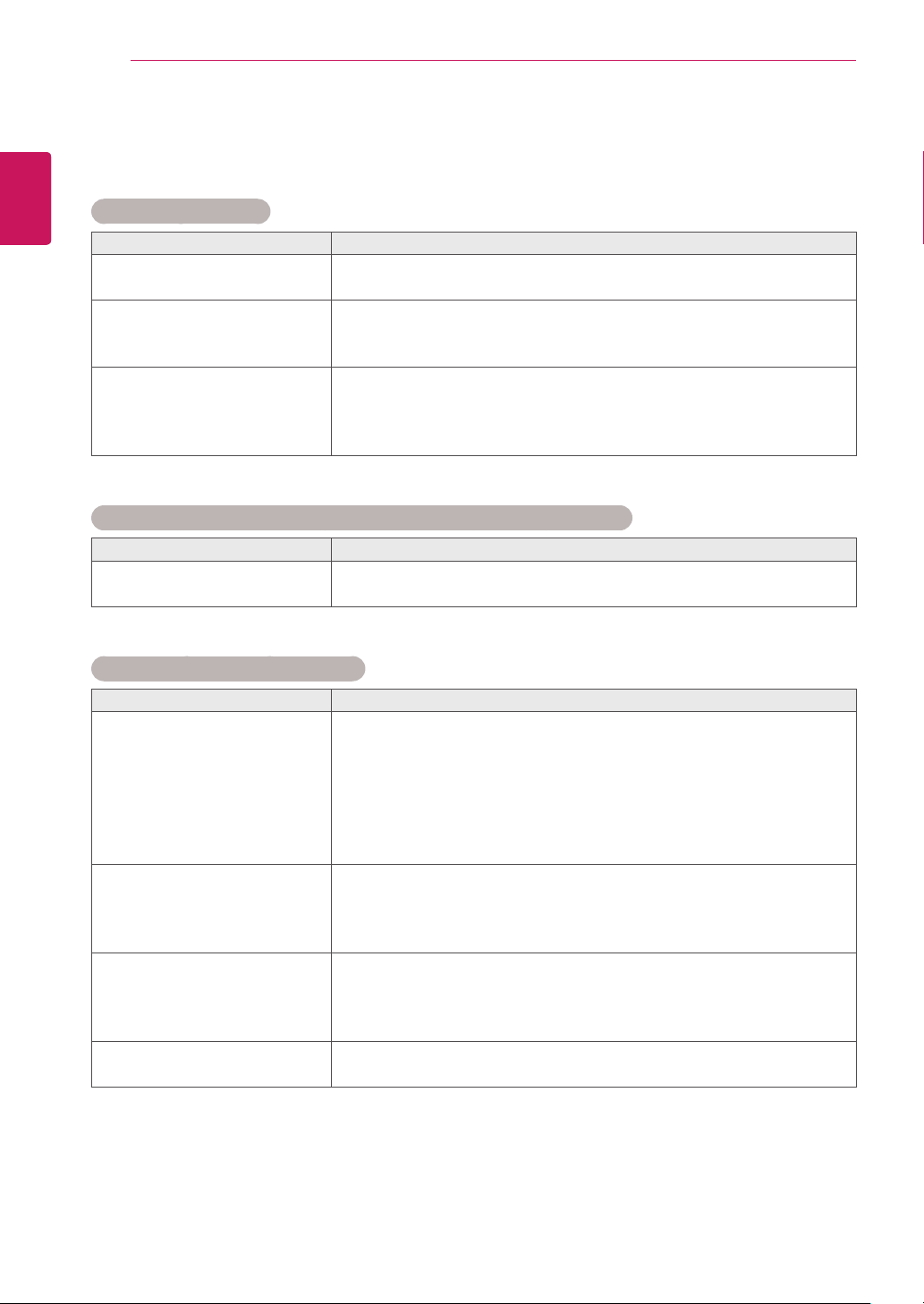
44
ENG
ENGLISH
TROUBLESHOOTING
TROUBLESHOOTING
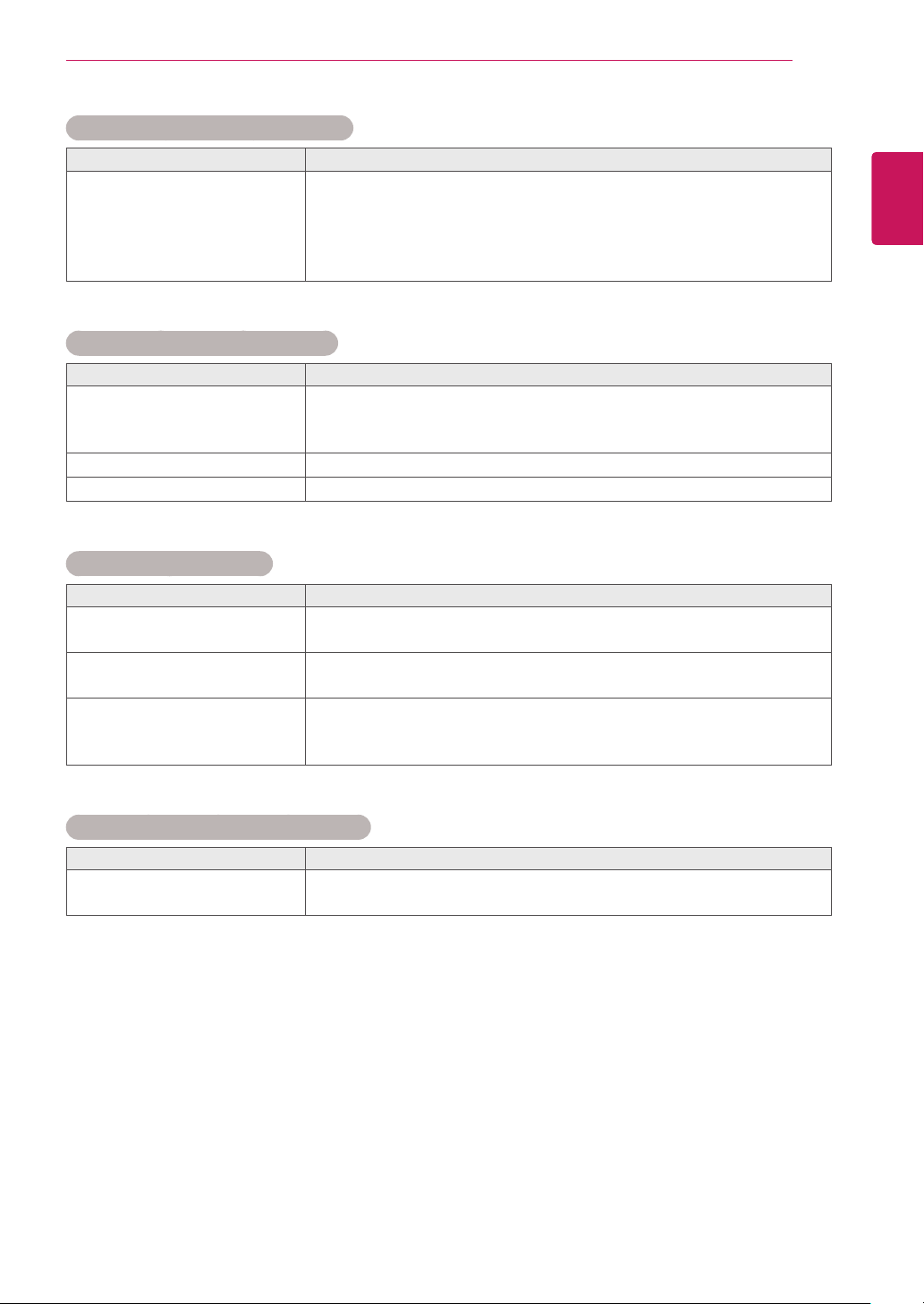
No image is displayed
Problem Resolution
Istheproductpowercord
connected?
Seeifthepowercordisproperlyconnectedtotheoutlet.
DoestheOutofrangemessage
appear?
ThesignalfromthePC(videocard)isoutoftheverticalorhorizontal
frequencyrangeoftheproduct.Adjustthefrequencyrangeby
referringtotheSpecificationsinthismanual.
DoestheChecksignalcable
messageappear?
ThesignalcablebetweenPCandproductisnotconnected.Check
thesignalcable.
Pressthe'INPUT'menuintheremoteControltochecktheinput
signal.
'Unknown Product' message appears when the product is connected.
Problem Resolution
Didyouinstallthedriver?
Seeiftheplug&playfunctionissupportedbyreferringtothevideo
cardusermanual.
The screen image looks abnormal.
Problem Resolution
Isthescreenpositionwrong?
D-Subanalogsignal-Pressthe"AUTO"buttonintheremotecontrol
toautomaticallyselecttheoptimalscreenstatusthatfitsintothe
currentmode.Ifadjustmentisnotsatisfactory,select[PICTURE]-
[Screen]-[Position]inOSDmenu.
Seeifthevideocardresolutionandfrequencyaresupportedbythe
product.Ifthefrequencyisoutofrange,settotherecommended
resolutionintheControlPanel"Display"Settingmenu.
Dothinlinesappearonthe
backgroundscreen?
D-Subanalogsignal-Pressthe"AUTO"buttonintheremotecontrol
toautomaticallyselectanoptimalscreenstatusthatfitsintothe
currentmode.Ifadjustmentisnotsatisfactory,select[PICTURE]-
[Screen]-[Size]inOSDmenu.
Horizontalnoiseappearsorthe
characterslookblurred.
D-Subanalogsignal-Pressthe"AUTO"buttonintheremotecontrol
toautomaticallyselectanoptimalscreenstatusthatfitsintothe
currentmode.Ifadjustmentisnotsatisfactory,select[PICTURE]-
[Screen]-[Phase]inOSDmenu.
Thescreenisdisplayed
abnormally.
Theproperinputsignalisnotconnectedtothesignalport.Connect
thesignalcablethatmatcheswiththesourceinputsignal.
45
ENG
ENGLISH
TROUBLESHOOTING
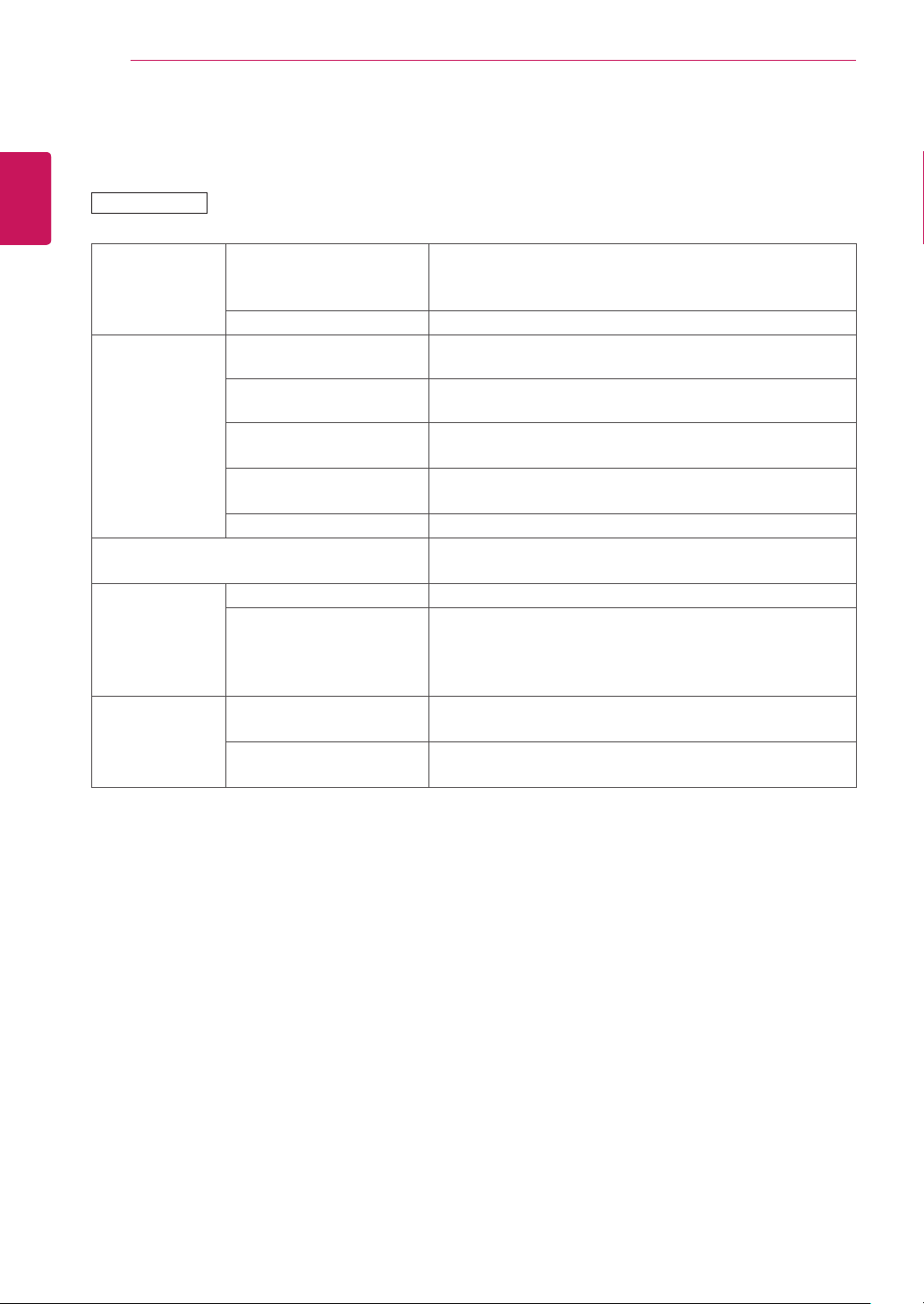
After-image appears on the product.
Problem Resolution
After-imageappearswhenthe
productisturnedoff.
Ifyouuseafixedimageforalongtime,thepixelsmaybedamaged
quickly.Usethescreen-saverfunction.
Whenadarkimageisdisplayedonthescreenafteranimagewith
highcontrast(blackandwhiteorgray),thismaycauseimagesticking.
ThisisnormalforLCDscreen.
The audio function does not work.
Problem Resolution
Nosound?
Seeiftheaudiocableisconnectedproperly.
Adjustthevolume.
Seeifthesoundissetproperly.
Soundistoodull.
Selecttheappropriateequalizesound.
Soundistoolow.
Adjustthevolume.
Screen color is abnormal.
Problem Resolution
Screenhaspoorcolorresolution
(16colors).
Setthenumberofcolorstomorethan24bits(truecolor)Select
ControlPanel-Display-Settings-ColorTablemenuinWindows.
Screencolorisunstableor
mono-colored.
Checktheconnectionstatusofthesignalcable.Or,re-insertthePC
videocard.
Doblackspotsappearonthe
screen?
Severalpixels(red,green,whiteorblackcolor)mayappearonthe
screen,whichcanbeattributabletotheuniquecharacteristicsofthe
LCDpanel.ItisnotamalfunctionoftheLCD.
The operation does not work normally.
Problem Resolution
Thepowersuddenlyturnedoff.
IsOffTimerset?
Checkthepowercontrolsettings.Powerinterrupted.
46
ENG
ENGLISH
SPECIFICATIONS
SPECIFICATIONS
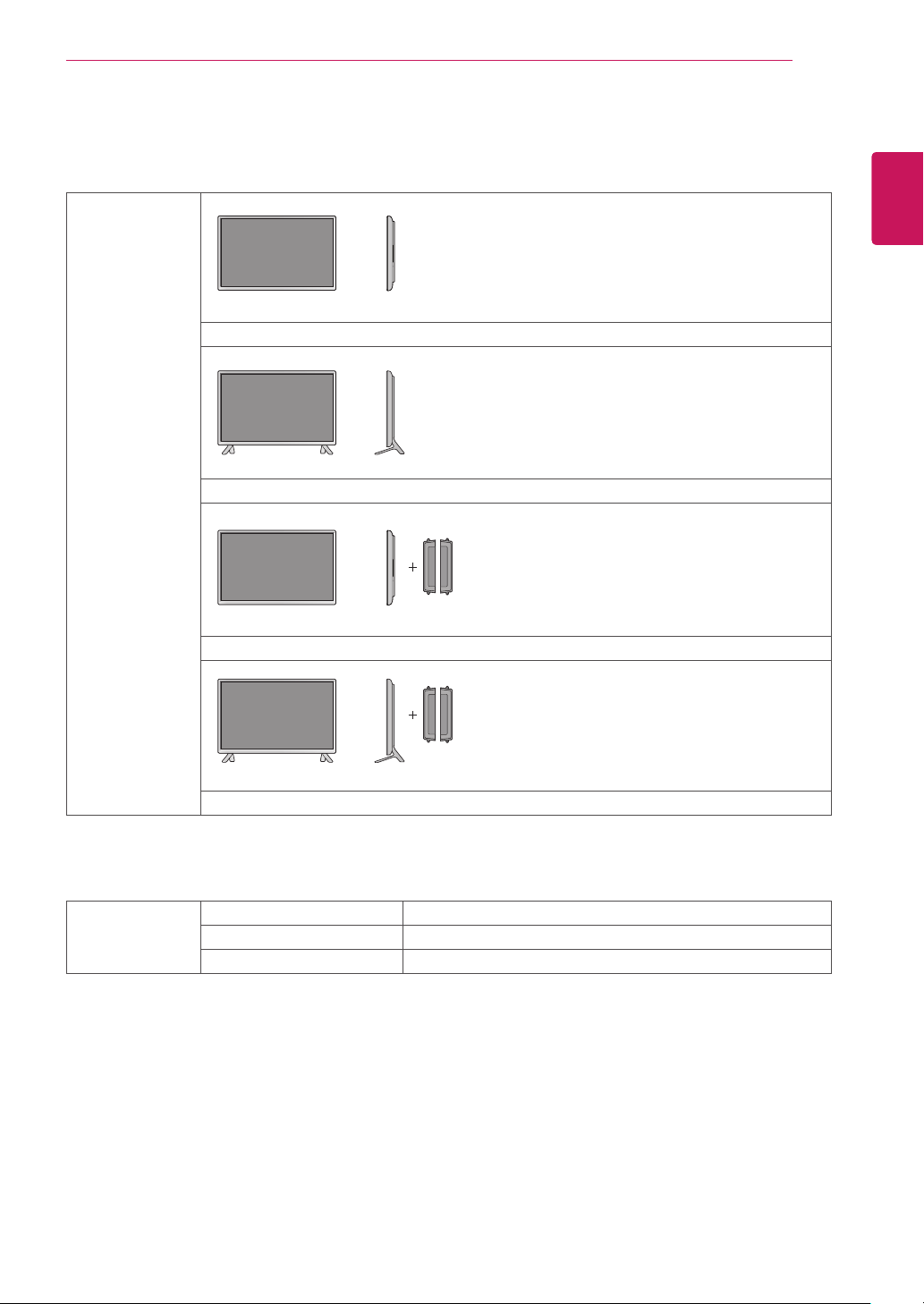
LCDPanel ScreenType 32"class(31.5"/80.0cmdiagonal)
WideTFT(ThinFilmTransistor)
LCD(LiquidCrystalDisplay)Panel.
PixelPitch 0.36375mm(H)x0.36375mm(V)
VideoSignal Max.Resolution 1920x1080@60Hz
-ItmaynotbesupporteddependingontheOSorvideocardtype.
RecommendedResolution 1920x1080@60Hz
-ItmaynotbesupporteddependingontheOSorvideocardtype.
HorizontalFrequency RGB:30kHzto83kHz
HDMI:30kHzto83kHz
VerticalFrequency RGB:50Hzto75Hz
HDMI:50Hzto60Hz
SynchronizationType SeparateSync,Digital
InputConnector 15-pinD-Sub,HDMI,AudioIn,SpeakerOut,IR,USB,
RS-232C,LAN
Power RatedVoltage AC100-240V~50/60Hz1.3A
PowerConsumption OnMode:55WTyp.
SleepMode(RGB):≤0.5W
SleepMode(HDMI):≤0.7W
OffMode:≤0.5W
Environmental
conditions
OperatingTemperature
OperatingHumidity
0°Cto40°C
10%to80%
StorageTemperature
StorageHumidity
-20°Cto60°C
5%to95%
Productspecificationsshownabovemaybechangedwithoutpriornoticeduetoupgradeofproduct
functions.
32LS33A
47
ENG
ENGLISH
SPECIFICATIONS
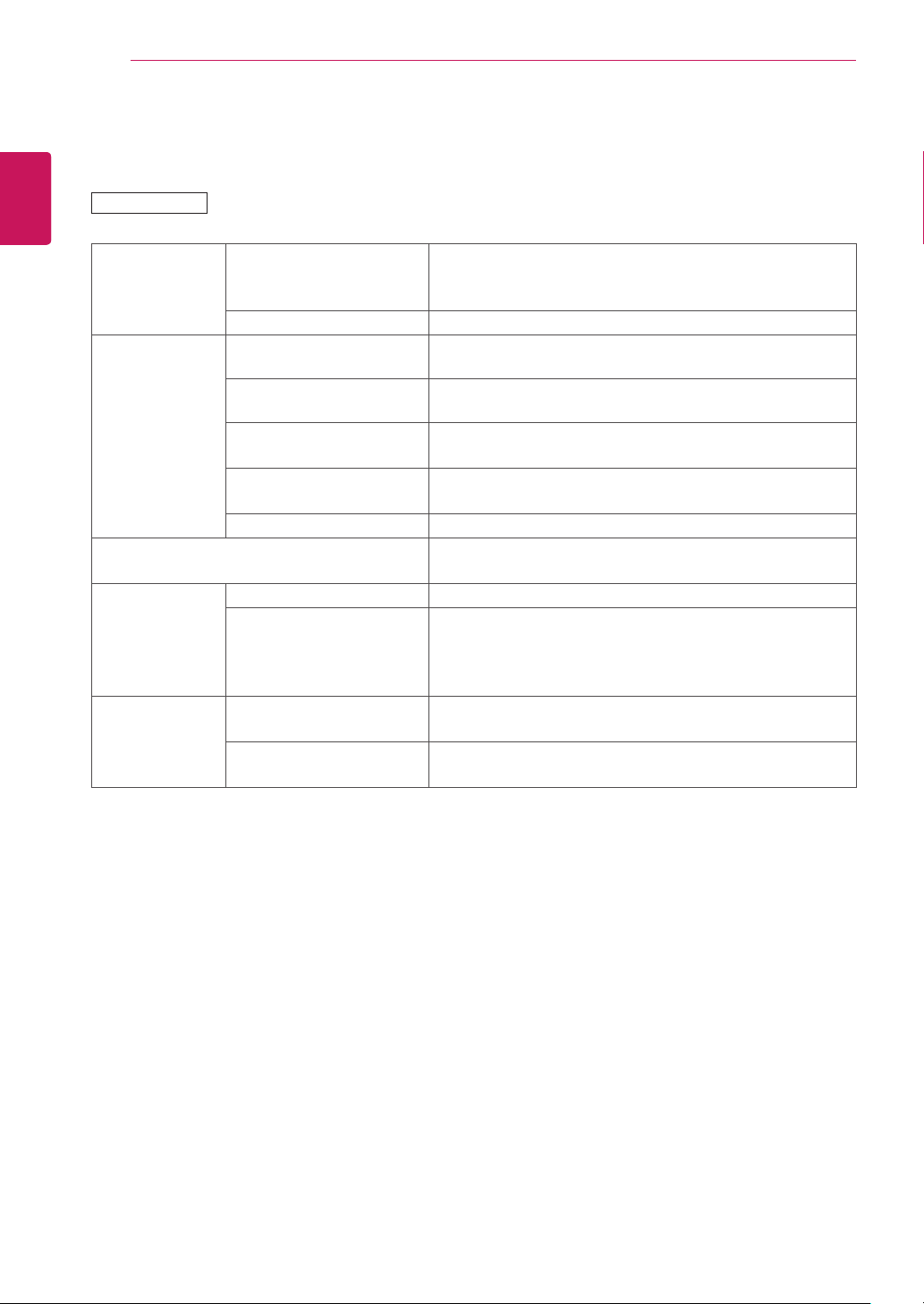
Dimensions
(WidthxHeightx
Depth)/Weight
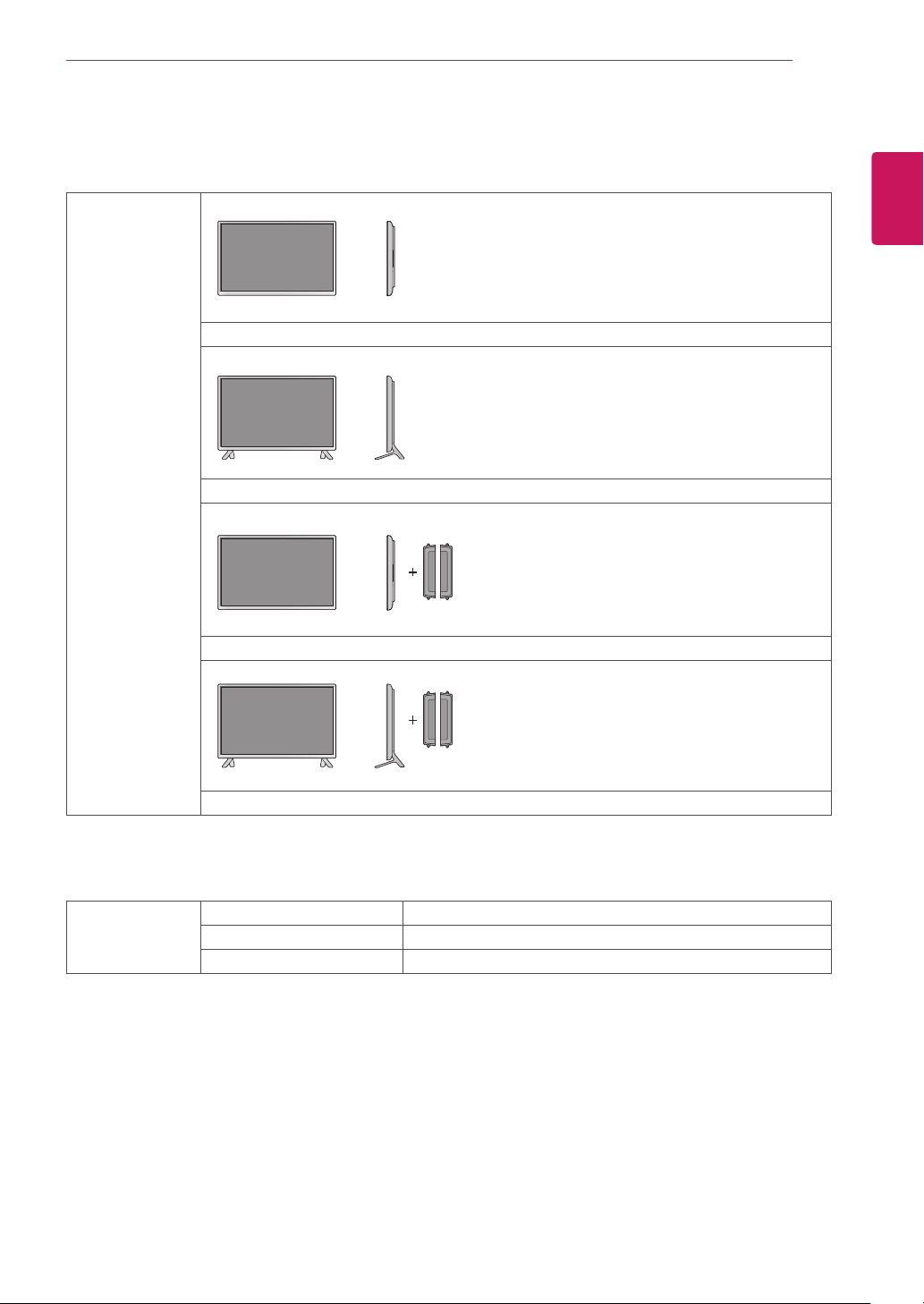
730.9mmx430.1mmx55.5mm/5.6kg
730.9mmx480.2mmx207mm/5.8kg
730.9mmx430.1mmx105.1mm/6.4kg
730.9mmx480.2mmx207mm/6.6kg
* Applicable only for models that support the speakers
Audio RMSAudioOutput 10W+10W(R+L)
InputSensitivity 0.7Vrms
SpeakerImpedance 8Ω
Productspecificationsshownabovemaybechangedwithoutpriornoticeduetoupgradeofproduct
functions.
48
ENG
ENGLISH
SPECIFICATIONS
42LS33A
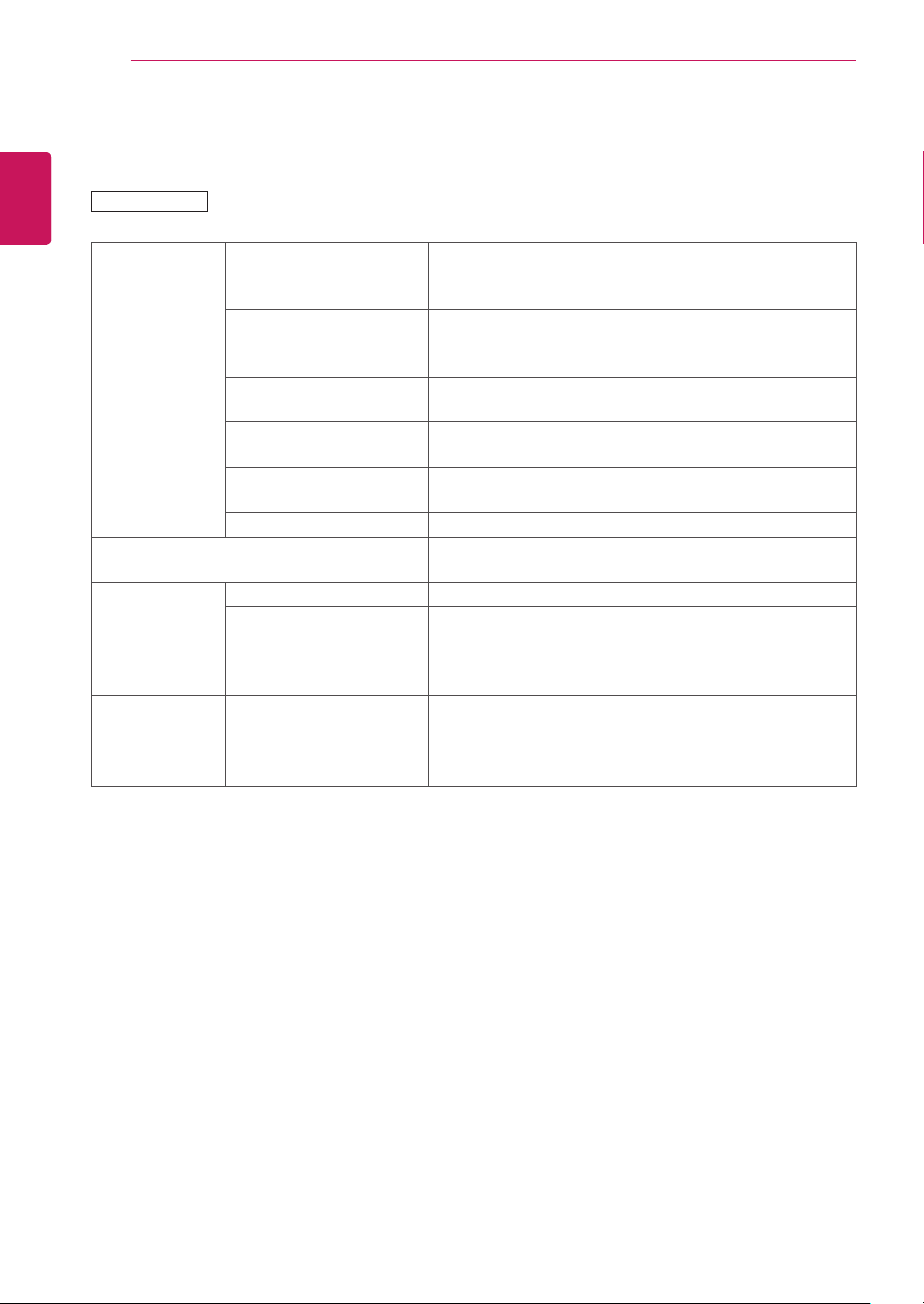
LCDPanel ScreenType 42"class(42.0"/106.7cmdiagonal)
WideTFT(ThinFilmTransistor)
LCD(LiquidCrystalDisplay)Panel.
PixelPitch 0.4833mm(H)x0.4833mm(V)
VideoSignal Max.Resolution 1920x1080@60Hz
-ItmaynotbesupporteddependingontheOSorvideocardtype.
RecommendedResolution 1920x1080@60Hz
-ItmaynotbesupporteddependingontheOSorvideocardtype.
HorizontalFrequency RGB:30kHzto83kHz
HDMI:30kHzto83kHz
VerticalFrequency RGB:50Hzto75Hz
HDMI:50Hzto60Hz
SynchronizationType SeparateSync,Digital
InputConnector 15-pinD-Sub,HDMI,AudioIn,SpeakerOut,IR,USB,
RS-232C,LAN
Power RatedVoltage AC100-240V~50/60Hz1.2A
PowerConsumption OnMode:80WTyp.
SleepMode(RGB):≤0.5W
SleepMode(HDMI):≤0.7W
OffMode:≤0.5W
Environmental
conditions
OperatingTemperature
OperatingHumidity
0°Cto40°C
10%to80%
StorageTemperature
StorageHumidity
-20°Cto60°C
5%to95%
Productspecificationsshownabovemaybechangedwithoutpriornoticeduetoupgradeofproduct
functions.
49
ENG
ENGLISH
SPECIFICATIONS
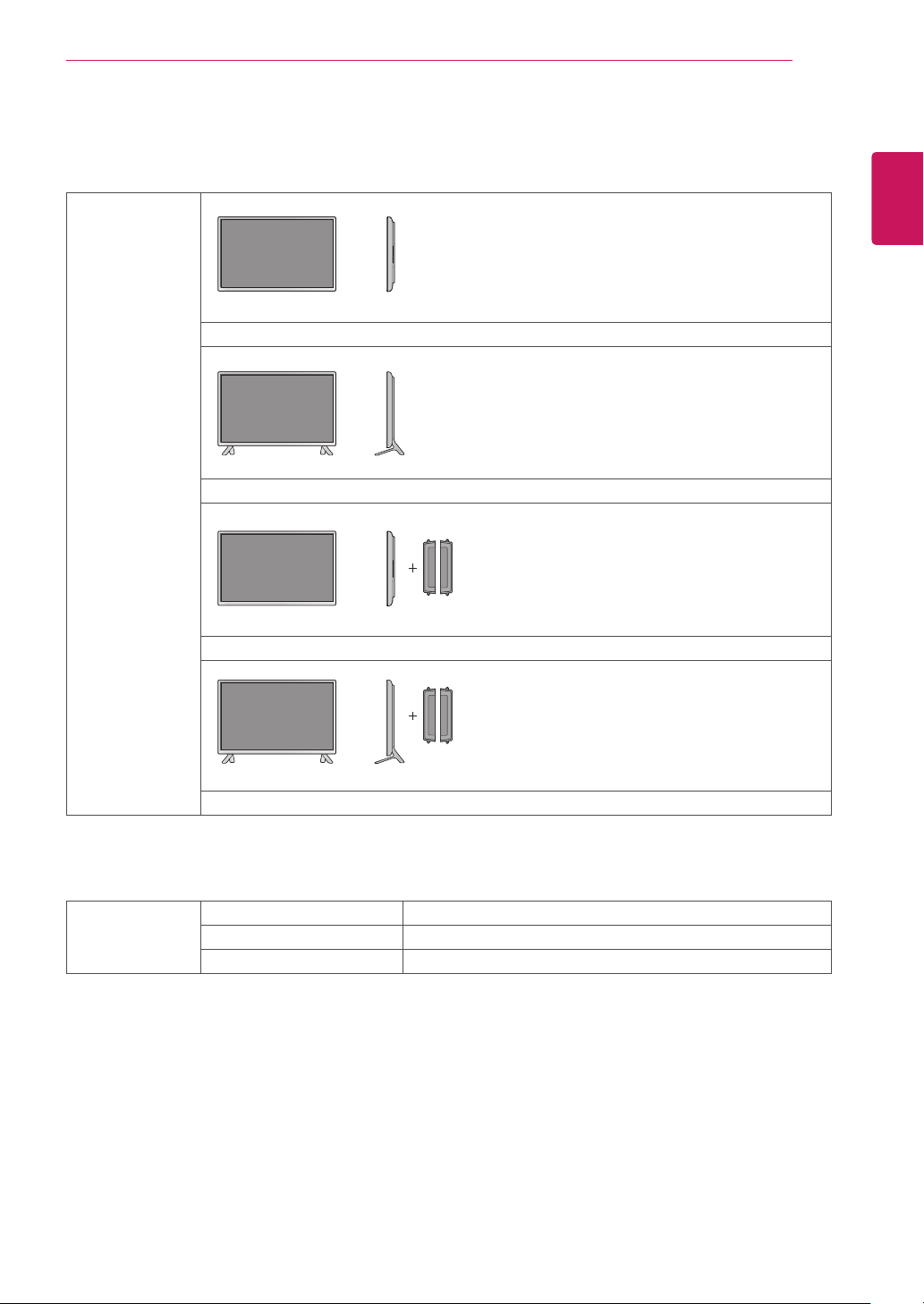
Dimensions
(WidthxHeightx
Depth)/Weight
959.5mmx559mmx55.5mm/9.1kg
959.5mmx610.8mmx218mm/9.3kg
959.5mmx559mmx91mm/9.9kg
959.5mmx610.8mmx218mm/10.1kg
* Applicable only for models that support the speakers
Audio RMSAudioOutput 10W+10W(R+L)
InputSensitivity 0.7Vrms
SpeakerImpedance 8Ω
Productspecificationsshownabovemaybechangedwithoutpriornoticeduetoupgradeofproduct
functions.
50
ENG
ENGLISH
SPECIFICATIONS
47LS33A
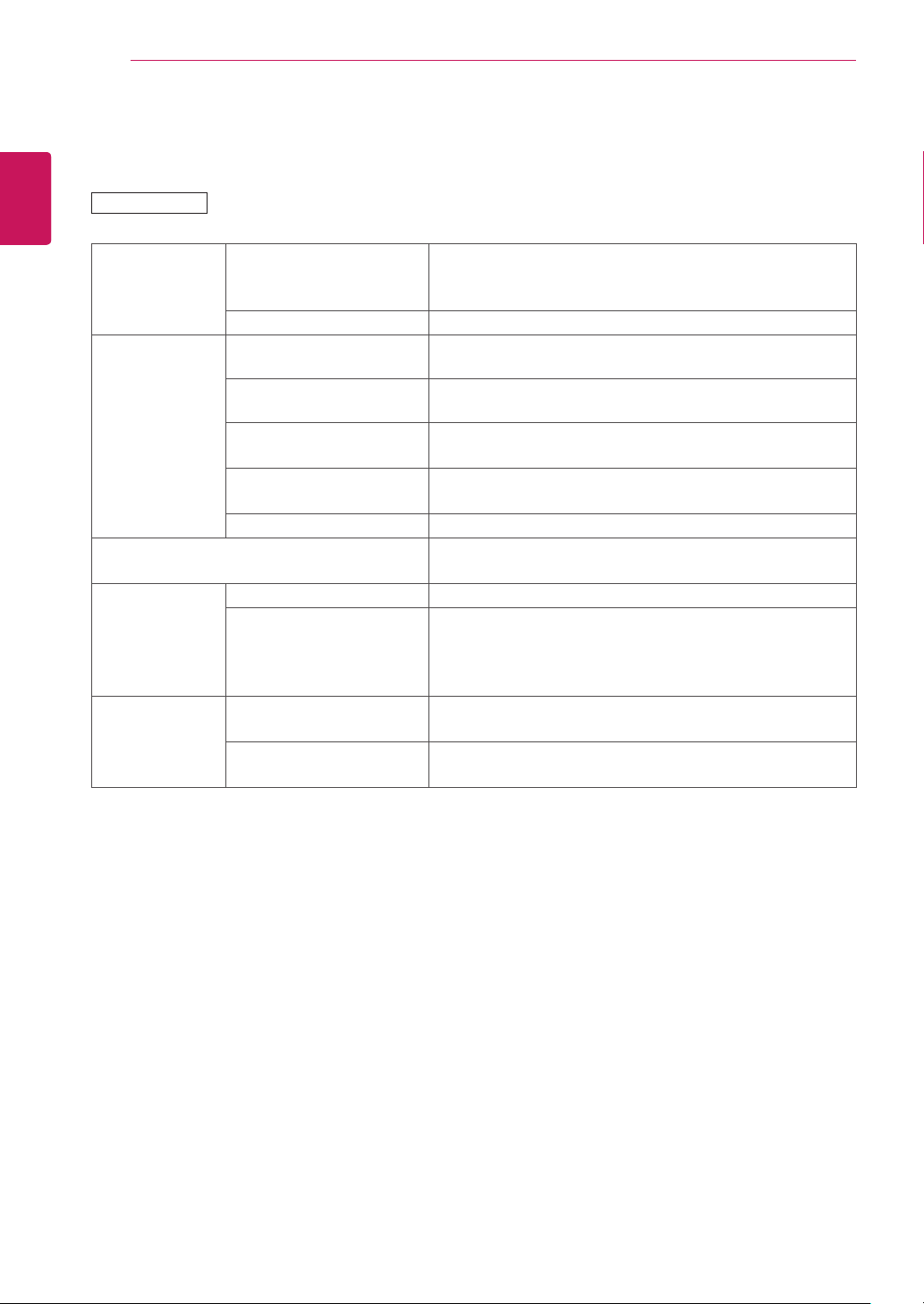
LCDPanel ScreenType 47"class(46.9"/119.2cmdiagonal)
WideTFT(ThinFilmTransistor)
LCD(LiquidCrystalDisplay)Panel.
PixelPitch 0.5415mm(H)x0.5415mm(V)
VideoSignal Max.Resolution 1920x1080@60Hz
-ItmaynotbesupporteddependingontheOSorvideocardtype.
RecommendedResolution 1920x1080@60Hz
-ItmaynotbesupporteddependingontheOSorvideocardtype.
HorizontalFrequency
RGB:30kHzto83kHz
HDMI:30kHzto83kHz
VerticalFrequency RGB:50Hzto75Hz
HDMI:50Hzto60Hz
SynchronizationType SeparateSync,Digital
InputConnector 15-pinD-Sub,HDMI,AudioIn,SpeakerOut,IR,USB,
RS-232C,LAN
Power RatedVoltage AC100-240V~50/60Hz1.3A
PowerConsumption OnMode:83WTyp.
SleepMode(RGB):≤0.5W
SleepMode(HDMI):≤0.7W
OffMode:≤0.5W
Environmental
conditions
OperatingTemperature
OperatingHumidity
0°Cto40°C
10%to80%
StorageTemperature
StorageHumidity
-20°Cto60°C
5%to95%
Productspecificationsshownabovemaybechangedwithoutpriornoticeduetoupgradeofproduct
functions.
51
ENG
ENGLISH
SPECIFICATIONS
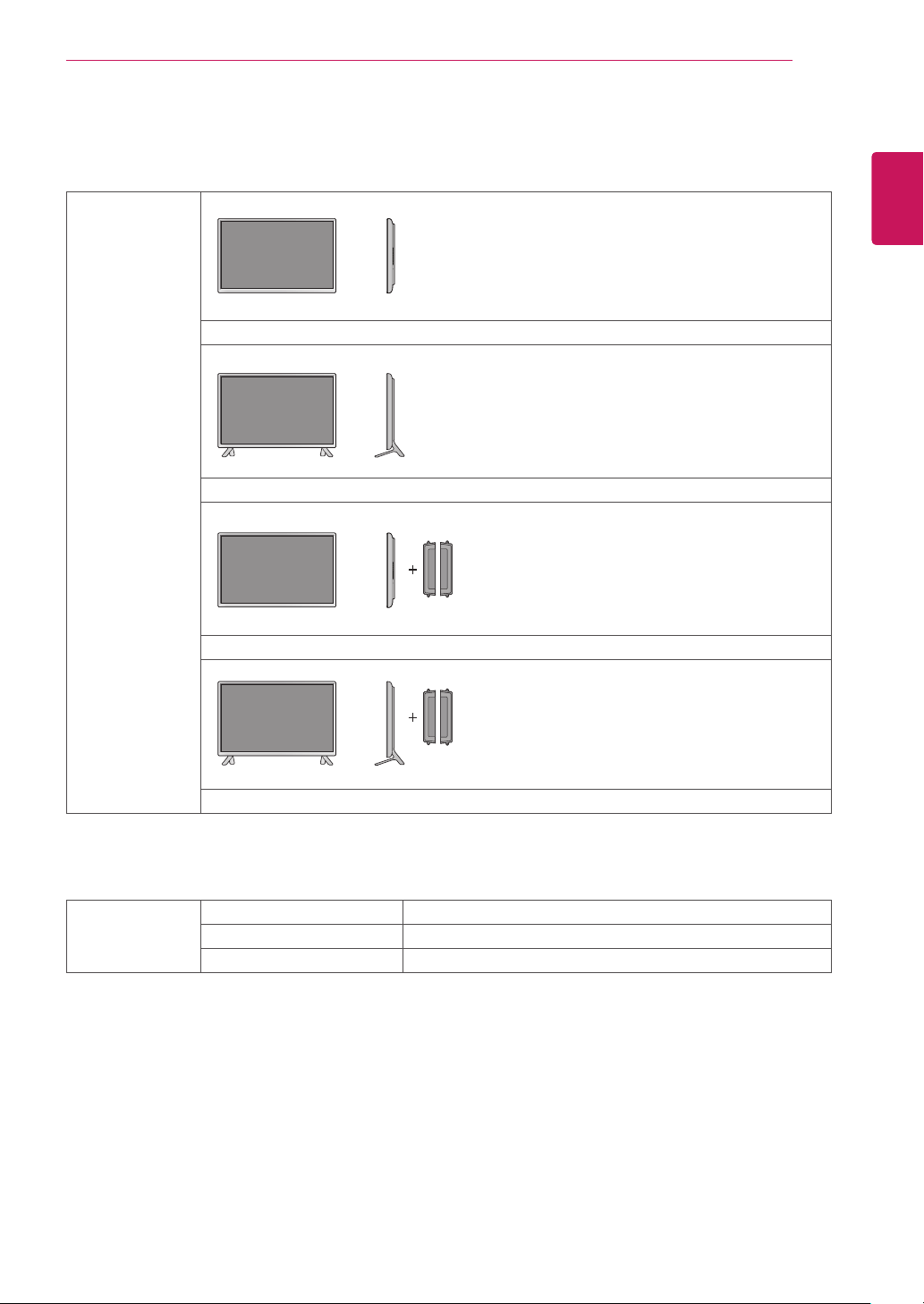
Dimensions
(WidthxHeightx
Depth)/Weight
1071mmx621.6mmx55.8mm/12.2kg
1071mmx675.1mmx247mm/12.5kg
1071mmx621.6mmx90.4mm/13.0kg
1071mmx675.1mmx247mm/13.3kg
* Applicable only for models that support the speakers
Audio RMSAudioOutput 10W+10W(R+L)
InputSensitivity 0.7Vrms
SpeakerImpedance 8Ω
Productspecificationsshownabovemaybechangedwithoutpriornoticeduetoupgradeofproduct
functions.
52
ENG
ENGLISH
SPECIFICATIONS
55LS33A
LCDPanel ScreenType 55"class(54.6"/138.7cmdiagonal)
WideTFT(ThinFilmTransistor)
LCD(LiquidCrystalDisplay)Panel.
PixelPitch 0.630mm(H)x0.630mm(V)
VideoSignal Max.Resolution 1920x1080@60Hz
-ItmaynotbesupporteddependingontheOSorvideocardtype.
RecommendedResolution 1920x1080@60Hz
-ItmaynotbesupporteddependingontheOSorvideocardtype.
HorizontalFrequency RGB:30kHzto83kHz
HDMI:30kHzto83kHz
VerticalFrequency RGB:50Hzto75Hz
HDMI:56Hzto60Hz
SynchronizationType SeparateSync,Digital
InputConnector 15-pinD-Sub,HDMI,AudioIn,SpeakerOut,IR,USB,
RS-232C,LAN
Power RatedVoltage AC100-240V~50/60Hz1.5A
PowerConsumption OnMode:105WTyp.
SleepMode(RGB):≤0.5W
SleepMode(HDMI):≤0.7W
OffMode:≤0.5W
Environmental
conditions
OperatingTemperature
OperatingHumidity
0°Cto40°C
10%to80%
StorageTemperature
StorageHumidity
-20°Cto60°C
5%to95%
Productspecificationsshownabovemaybechangedwithoutpriornoticeduetoupgradeofproduct
functions.
53
ENG
ENGLISH
SPECIFICATIONS
Dimensions
(WidthxHeightx
Depth)/Weight
1240.9mmx717.2mmx56.8mm/17.8kg
1240.9mmx770.8mmx247mm/18.1kg
1240.9mmx717.2mmx91.4mm/18.6kg
1240.9mmx770.8mmx247mm/18.9kg
* Applicable only for models that support the speakers
Audio RMSAudioOutput 10W+10W(R+L)
InputSensitivity 0.7Vrms
SpeakerImpedance 8Ω
Productspecificationsshownabovemaybechangedwithoutpriornoticeduetoupgradeofproduct
functions.
54
ENG
ENGLISH
SPECIFICATIONS
Dimensions
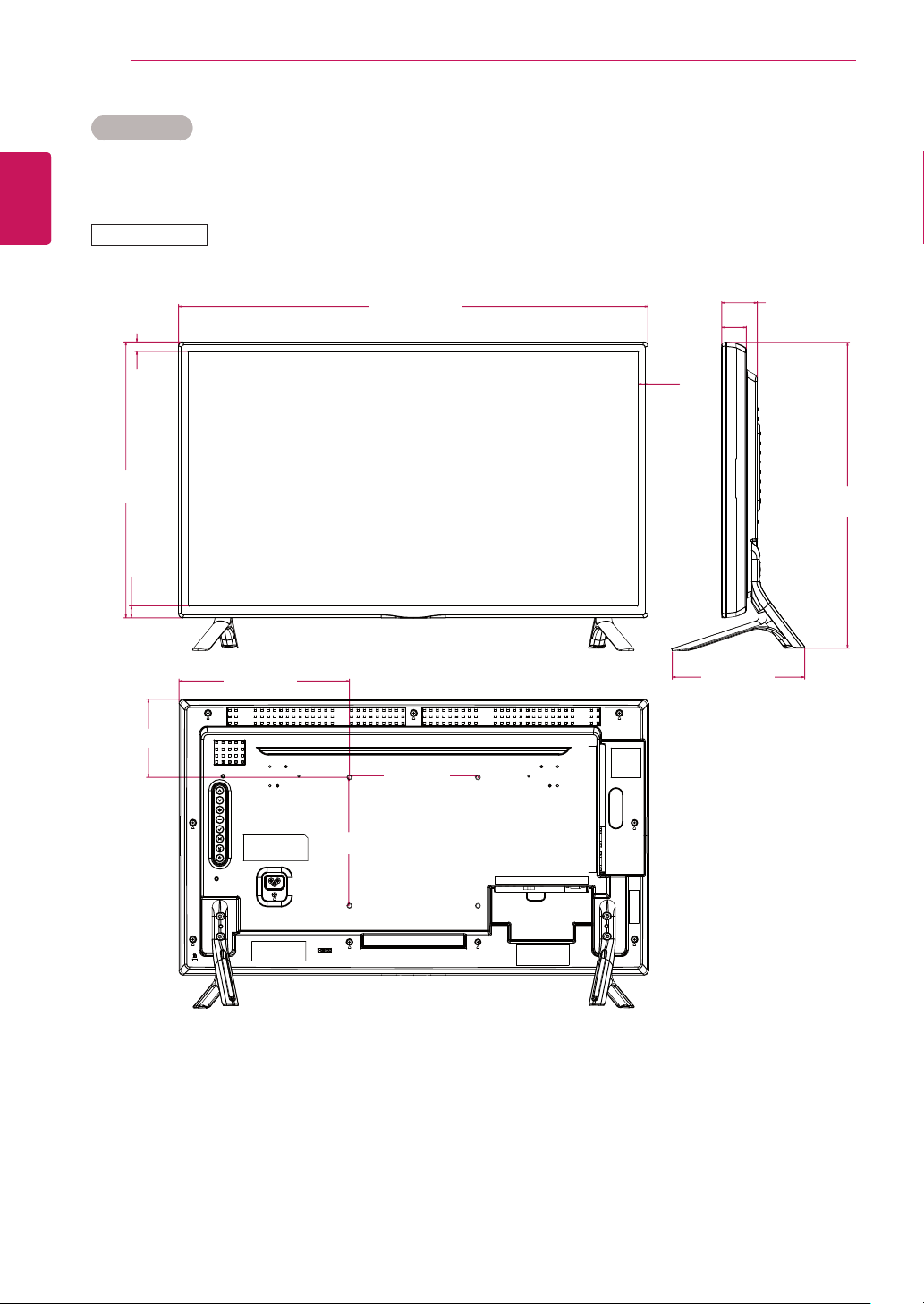
Theillustrationsinthismanualmaydifferfromtheactualproductandaccessories.
PleaseseetheMountingonaWallsectionforsizesofscrews.(Seepage10.)
32LS33A
Productspecificationsshownabovemaybechangedwithoutpriornoticeduetoupgradeofproduct
functions.
(Unit:mm)
19
14.6
121.7
15.1
18.6
730.9
430.1
480.2
207
265.4
200
200
55.5
38.5
55
ENG
ENGLISH
SPECIFICATIONS
Dimensions
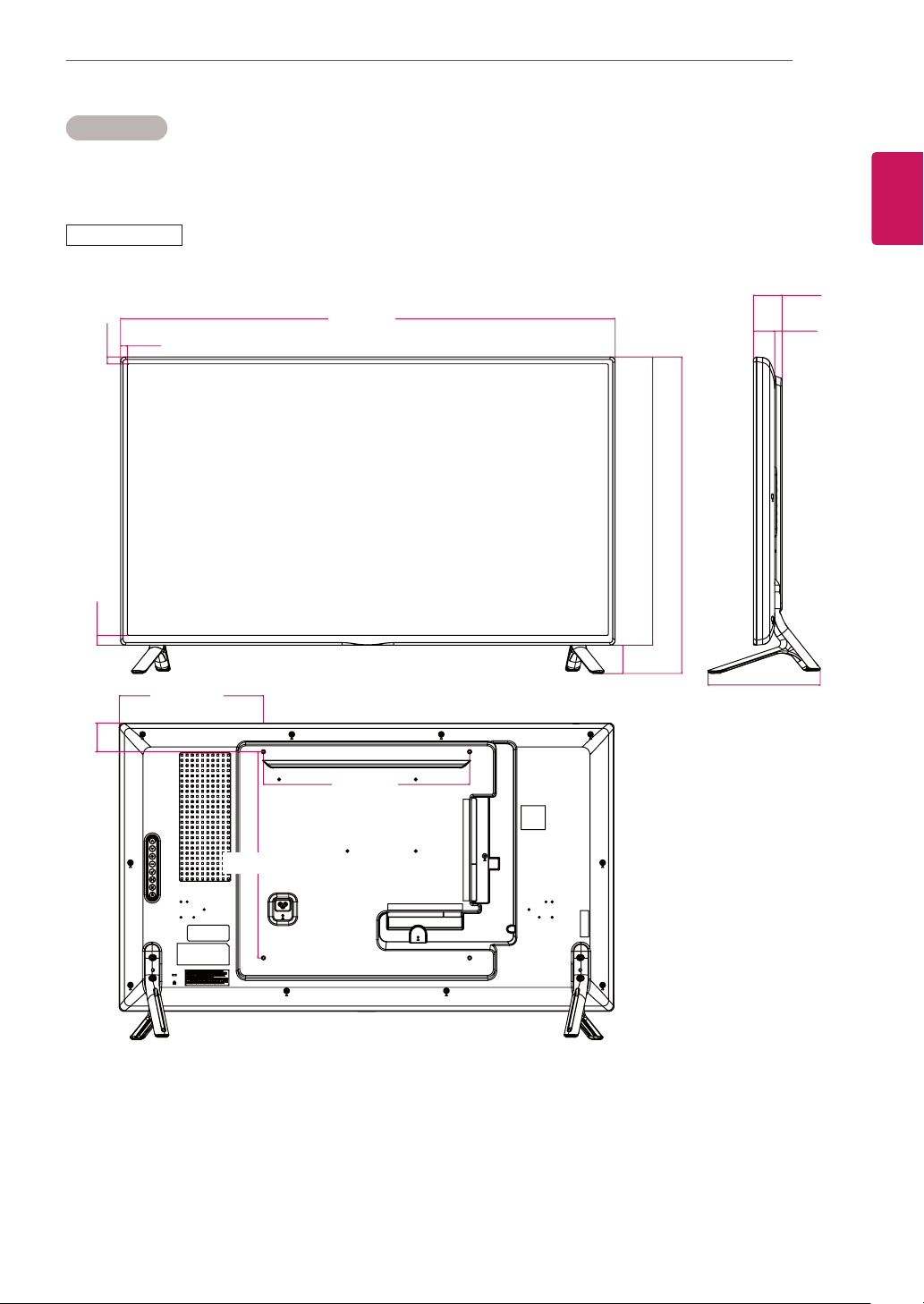
Theillustrationsinthismanualmaydifferfromtheactualproductandaccessories.
PleaseseetheMountingonaWallsectionforsizesofscrews.(Seepage10.)
42LS33A
Productspecificationsshownabovemaybechangedwithoutpriornoticeduetoupgradeofproduct
functions.
(Unit:mm)
279.8
400
400
55.8
55.5
41.5
218
959.5
13.3
13.3
559
610.8
18.8
56
ENG
ENGLISH
SPECIFICATIONS
Dimensions
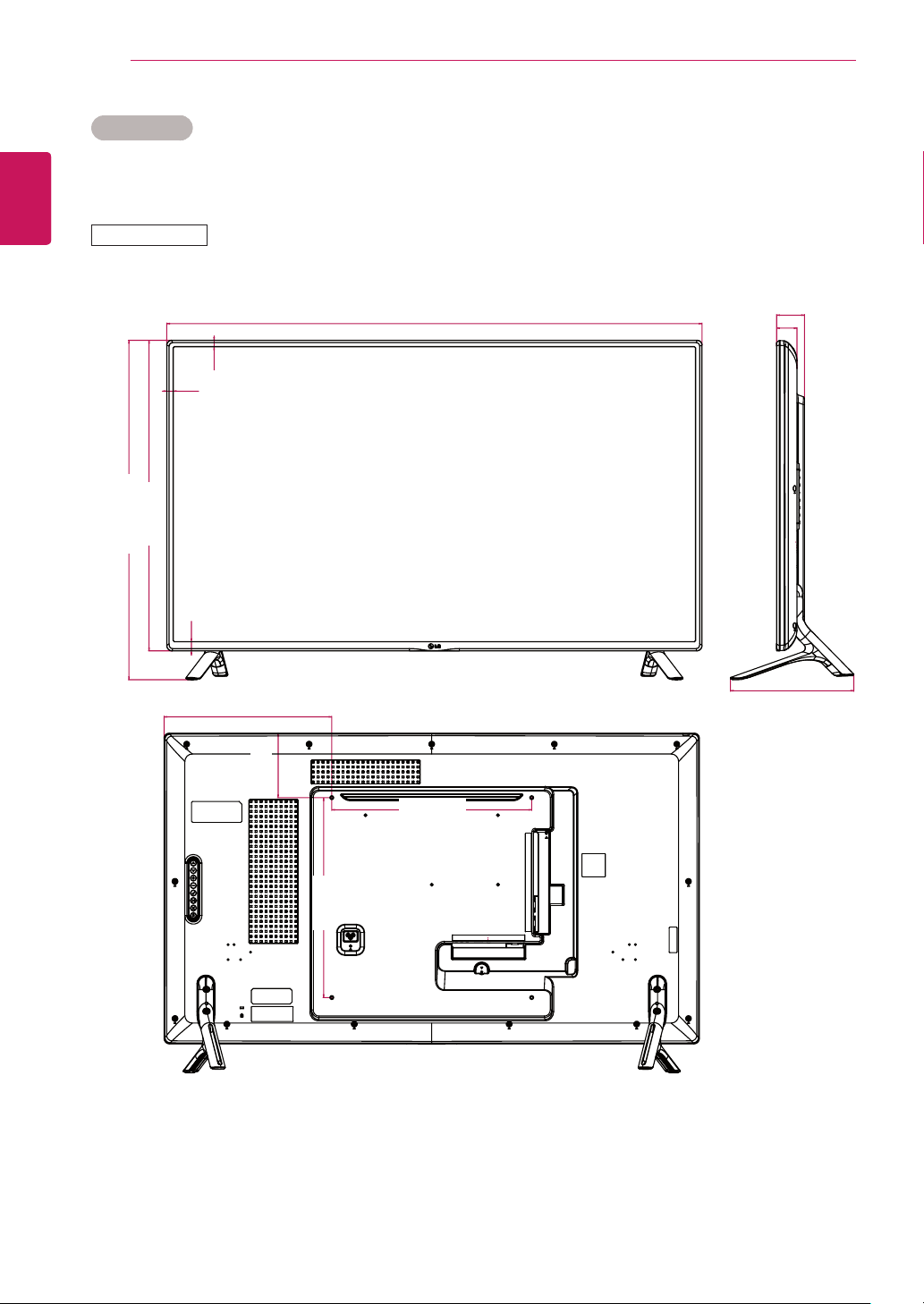
Theillustrationsinthismanualmaydifferfromtheactualproductandaccessories.
PleaseseetheMountingonaWallsectionforsizesofscrews.(Seepage10.)
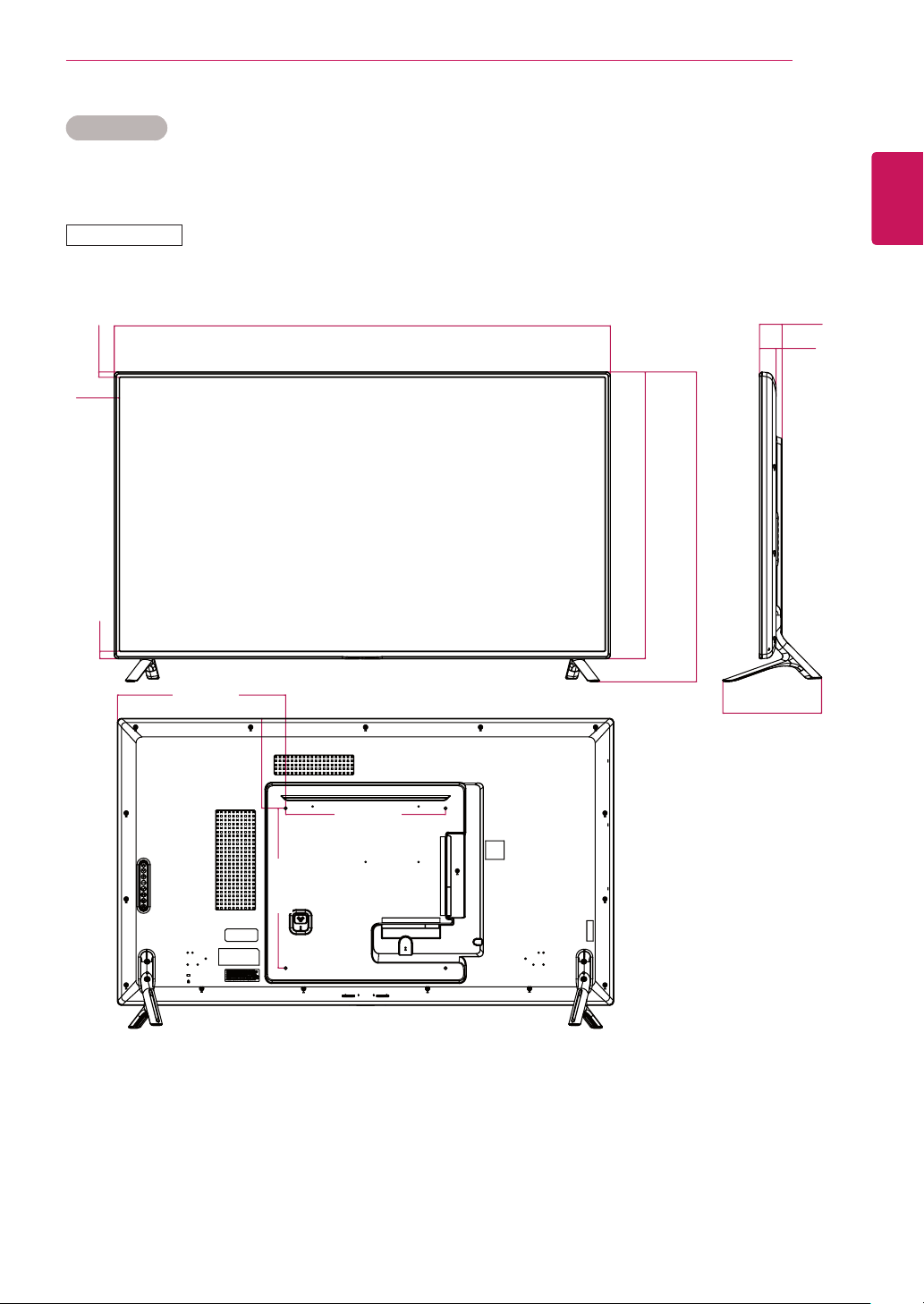
47LS33A
Productspecificationsshownabovemaybechangedwithoutpriornoticeduetoupgradeofproduct
functions.
(Unit:mm)
400
129
335.5
400
55.8
40.8
247
1071
13.2
13.2
18.7
19
621.6
675.1
57
ENG
ENGLISH
SPECIFICATIONS
Dimensions
Theillustrationsinthismanualmaydifferfromtheactualproductandaccessories.
PleaseseetheMountingonaWallsectionforsizesofscrews.(Seepage10.)
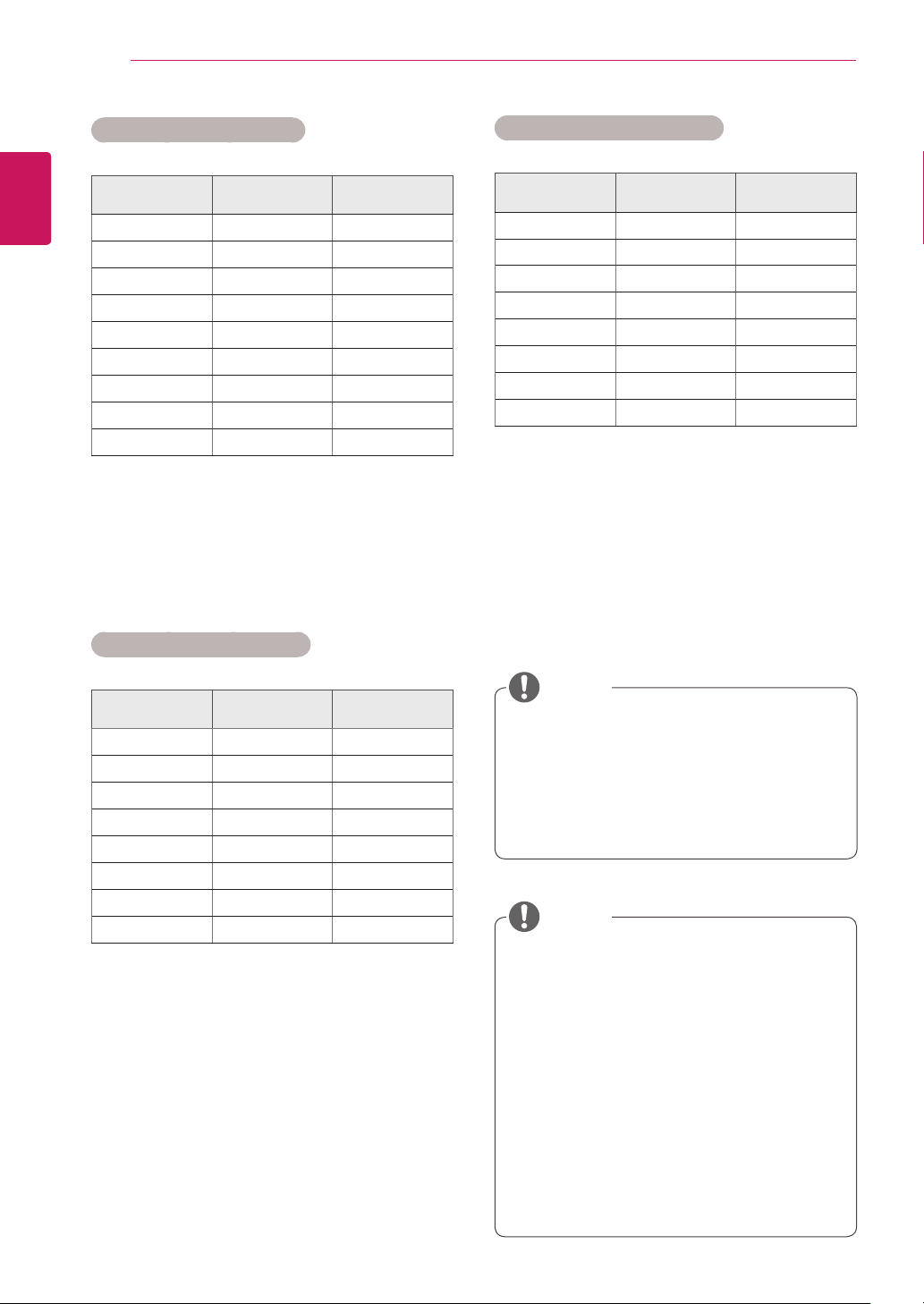
55LS33A
Productspecificationsshownabovemaybechangedwithoutpriornoticeduetoupgradeofproduct
functions.
(Unit:mm)
224.6
400
400
420.5
56.8
41.8
247
1240.9
13.2
13.218.7
717.2
770.8
58
ENG
ENGLISH
SPECIFICATIONS
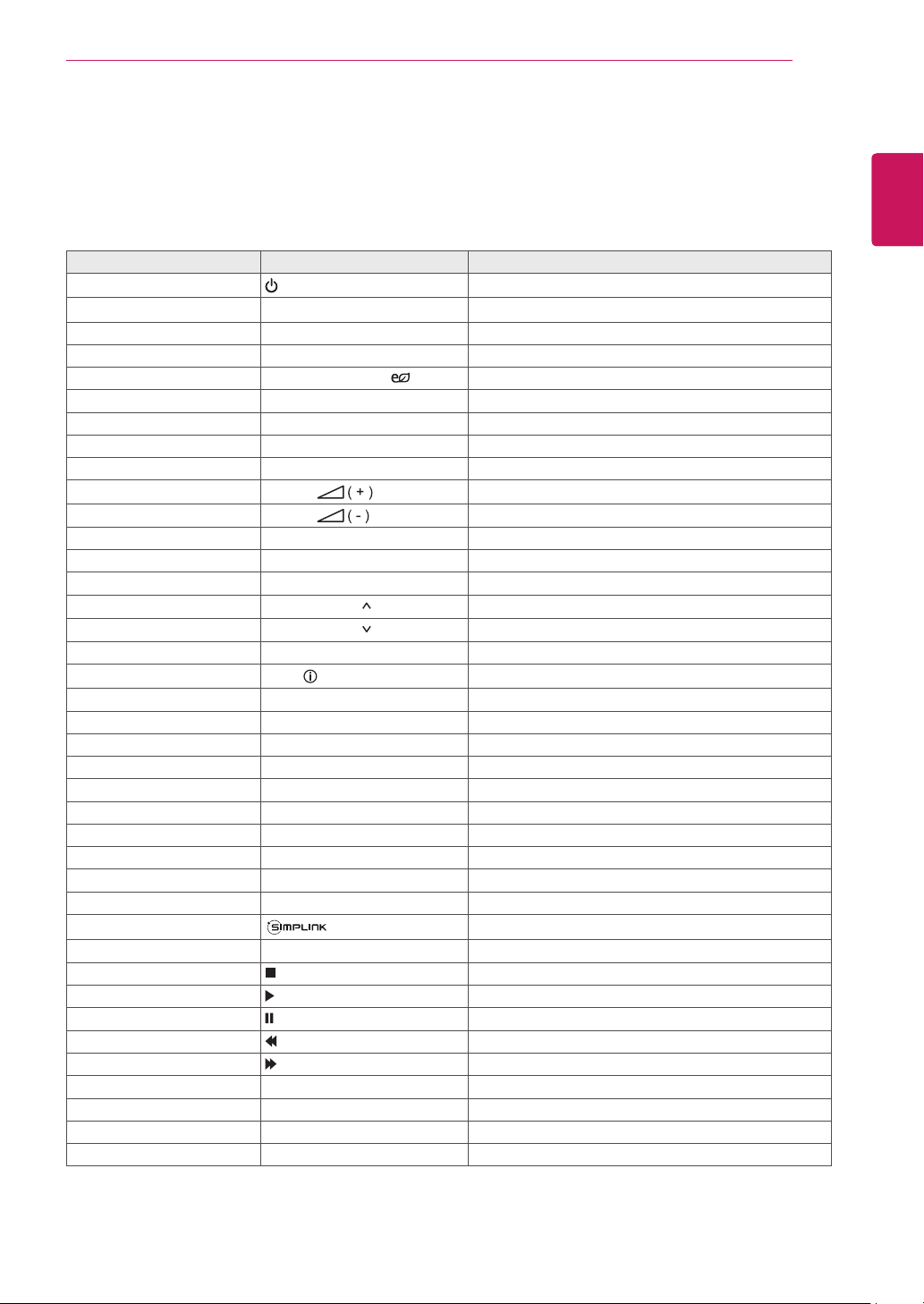
PCresolutionsavailableastheinputlabel
optioninRGBandHDMIinputmode:640
x480/60Hz,1280x720/60Hz,1920x
1080/60HzandDTVresolutions:480p,
720p,1080p.
NOTE
Verticalfrequency:Toenabletheuserto
watchtheproductdisplay,screenimage
shouldbechangedtensoftimesevery
secondlikeafluorescentlamp.Thevertical
frequencyorrefreshrateisthetimesof
imagedisplaypersecond.TheunitisHz.
Horizontalfrequency:Thehorizontalinterval
isthetimetodisplayoneverticalline.When
1isdividedbythehorizontalinterval,the
numberofhorizontallinesdisplayedevery
secondcanbetabulatedasthehorizontal
frequency.TheunitiskHz.
NOTE
RGB (PC) supported mode
Resolution
Horizontal
Frequency(kHz)
Vertical
Frequency(Hz)
720x400 31.468 70.8
640x480 31.469 59.94
800x600 37.879 60.317
1024x768 48.363 60
1280x720 44.772 59.855
1280x960 60 60
1152x864 57.717 59.934
1280x1024 63.981 60.02
1920x1080 67.5 60
HDMI (PC) supported mode
Resolution
Horizontal
Frequency(kHz)
Vertical
Frequency(Hz)
640x480 31.469 59.94
800x600 37.879 60.317
1024x768 48.363 60
1280x720 44.772 59.855
1366x768 47.7 60
1280x1024 63.981 60.02
1680x1050 65.290 59.954
1920x1080 67.5 60
HDMI (DTV) supported mode
Resolution
Horizontal
Frequency(kHz)
Vertical
Frequency(Hz)
480/60P 31.5 60
576/50P 31.25 50
720/50P 37.5 50
720/60P 45 60
1080/50i 28.1 50
1080/60i 33.75 60
1080/50P 56.25 50
1080/60P 67.5 60
59
ENG
ENGLISH
IR CODES
IR CODES
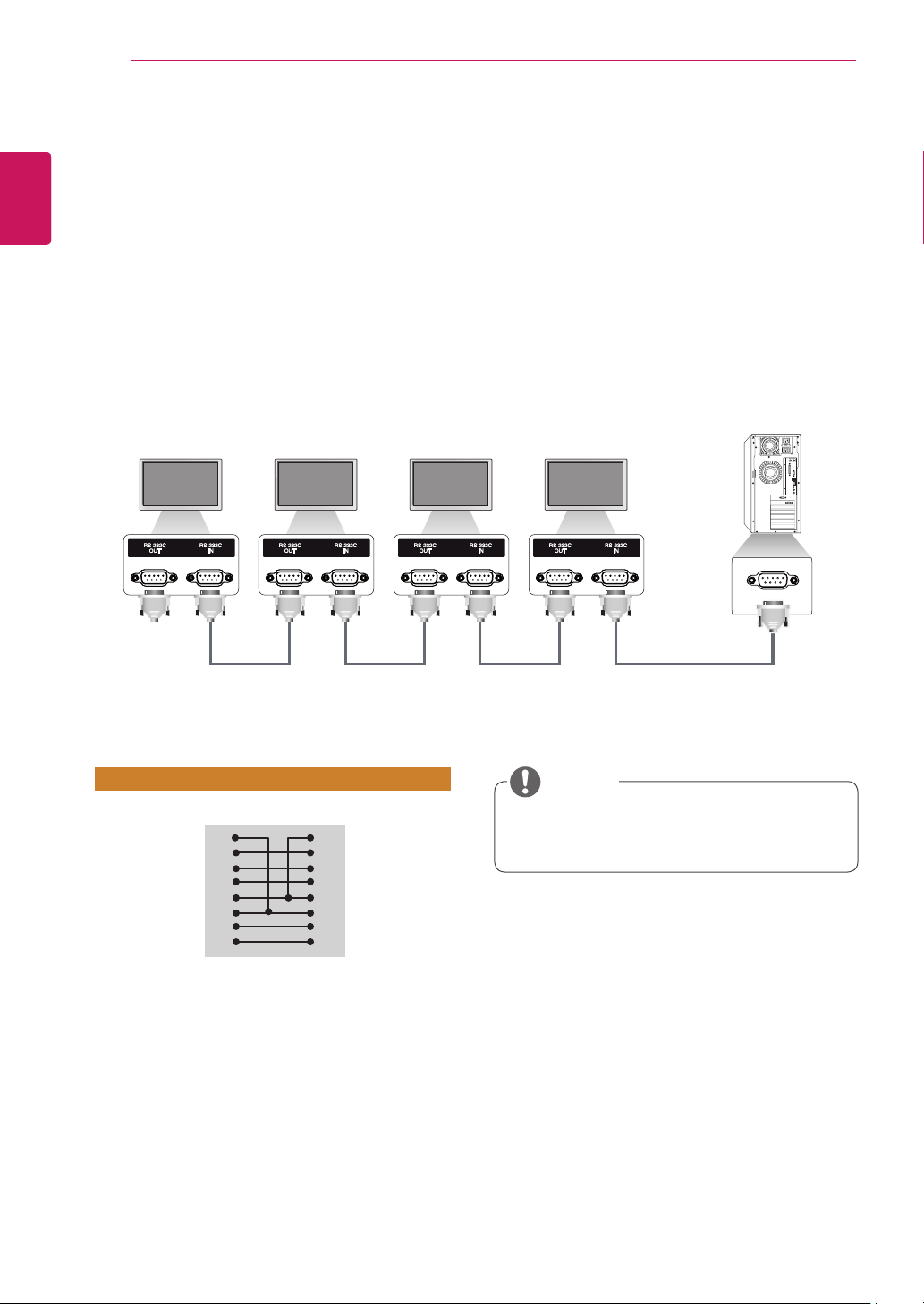
AllmodelsdonotsupporttheHDMI/USBfunction.
Somekeycodesarenotsupporteddependingonthemodel.
Code (Hexa) Function Note
08
Power
R/CBUTTON
0B INPUT R/CBUTTON
C4 MONITORON R/CBUTTON
C5 MONITOROFF R/CBUTTON
95 ENERGYSAVING( ) R/CBUTTON
DC 3D R/CBUTTON
10to19 NumberKey0to9 R/CBUTTON
53 1/a/A R/CBUTTON
2F CLEAR R/CBUTTON
02
Volume
R/CBUTTON
03
Volume
R/CBUTTON
79 ARC R/CBUTTON
99 AUTO R/CBUTTON
09 MUTE R/CBUTTON
E0 BRIGHTNESS (PageUP) R/CBUTTON
E1 BRIGHTNESS (PageDown) R/CBUTTON
4D PSM R/CBUTTON
AA
INFO
R/CBUTTON
5F W.BAL R/CBUTTON
43 SETTINGS R/CBUTTON
40 Up▲ R/CBUTTON
41 Down▼ R/CBUTTON
07 Left◄ R/CBUTTON
06 Right► R/CBUTTON
3F S.MENU R/CBUTTON
44 OK R/CBUTTON
28 BACK R/CBUTTON
5B EXIT R/CBUTTON
7E R/CBUTTON
7B TILE(TileMode) R/CBUTTON
B1 R/CBUTTON
B0 R/CBUTTON
BA R/CBUTTON
8F R/CBUTTON
8E R/CBUTTON
72 RedKey(PICTUREIDON) R/CBUTTON
71 GreenKey(PICTUREIDOFF) R/CBUTTON
63 YellowKey R/CBUTTON
61 BlueKey R/CBUTTON
60
ENG
ENGLISH
CONTROLLING THE MULTIPLE PRODUCT
CONTROLLING THE MULTIPLE PRODUCT
UsethismethodtoconnectseveralproductstoasinglePC.Youcancontrolseveralproductsata
timebyconnectingthemtoasinglePC.
IntheOptionmenu,SetIDmustbebetween1and255withoutbeingduplicated.
Connecting the Cable
ConnecttheRS-232Ccableasshowninthepicture.
TheRS-232CprotocolisusedforcommunicationbetweenthePCandproduct.Youcanturnthe
producton/off,selectaninputsourceoradjusttheOSDmenufromyourPC.
Communication Parameter
BaudRate:9600BPS
DataLength:8bit
ParityBit:None
StopBit:1bit
FlowControl:None
CommunicationCode:ASCIIcode
Useacrossed(reverse)cable
RS-232C Configurations
Whenusing3-wireconnections(non-
standard),anIRdaisychaincannotbeused.
NOTE
8-WireConfigurations(Cross-overRS-232Ccable)
PC Set
D-Sub9D-Sub9
(Female)(Female)
DCD
RXD
TXD
GND
DTR
DSR
RTS
CTS
DCD
TXD
RXD
GND
DSR
DTR
CTS
RTS
1
2
3
5
4
6
7
8
1
3
2
5
6
4
8
7
Monitor1Monitor2Monitor3Monitor4
PC
RS-232CCable(notincluded)

61
ENG
ENGLISH
CONTROLLING THE MULTIPLE PRODUCT
Command Reference List
COMMAND
DATA
(Hexadecimal)
1 2
01 Power k a 00to01
02 Selectinput x b See[Selectinput]
03 Aspectratio k c See[Aspectratio]
04 Energysaving j q See[Energysaving]
05 Picturemode d x See[Picturemode]
06 Contrast k g 00to64
07 Brightness k h 00to64
08 Sharpness k k 00to64
09 Color k i 00to64
10 Tint k j 00to64
11 Colortemperature x u 00to64
12 Hposition f q 00to64
13 Vposition f r 00to64
14 Hsize f s 00to64
15 AutoConfig. j u 01
16 Balance k t 00to64
17 SoundMode d y See[Soundmode]
18 Mute k e 00to01
19 Volume k f 00to64
20 Clock1(year/month/day) f a See[Clock1]
21 Clock2(hour/minute/second) f x See[Clock2]
22 Offtimeschedule f c 00to01
23 Ontimeschedule f b 00to01
24 Offtimer(repeatmode/time) f e SeeOfftimer
25 Ontimer(repeatmode/time) f d SeeOntimer
26 Ontimerinput f u See[Ontimerinput]
27 AutomaticStandby m n 00to01
28 Autooff f g 00to01
29 Language f i See[Language]
30 ISMmethod j p See[ISMmethod]
31 Reset f k 00to02
32 Currenttemperature d n FF
33 Key m c See[Key]
34 Timeelapsed d l FF
35 Productserialnumber f y FF
36 Softwareversion f z FF
37 Whitebalanceredgain j m 00toFE
38 Whitebalancegreengain j n 00toFE
39 Whitebalancebluegain j o 00toFE
40 Backlight m g 00to64
41 Screenoff k d 00to01

62
ENG
ENGLISH
CONTROLLING THE MULTIPLE PRODUCT
DuringUSBoperationssuchasDvixorEMF,allcommandsexceptPower(ka)andKey(mc)arenot
executedandtreatedasNG.
Somecommandsarenotsupporteddependingonthemodel.
The‘ff’commandwhichshowsthestatusofacertaincommanddoesnotdisplaytheOSDasthe
resultinordertobecompatiblewithSuperSignprogram.
NOTE

63
ENG
ENGLISH
CONTROLLING THE MULTIPLE PRODUCT
Transmission / Receiving Protocol
Transmission
[Command1][Command2][][SetID][][Data][Cr]
*[Command1] Identifiesthefactorysettingandtheusersettingmodes.
*[Command2] Controlsmonitors.
*[SetID] Usedforselectingasetyouwanttocontrol.AuniquesetIDcanbeassignedto
eachsetrangingfrom1to255(01HtoFFH)underSettingsintheOSDmenu.
Selecting'00H'forsetIDallowsthesimultaneouscontrolofallconnectedmoni-
tors.
*[Data] Transmitscommanddata.
Datacountmayincreasedependingonthecommand.
*[Cr] CarriageReturn.Correspondsto'0x0D'inASCIIcode.
*[] WhiteSpace.Correspondsto'0x20'inASCIIcode.
Acknowledgement
[Command2][][SetID][][OK/NG][Data][x]
*TheProducttransmitsanACK(acknowledgement)basedonthisformatwhenreceivingnormaldata.At
thistime,ifthedataisFF,itindicatesthepresentstatusdata.Ifthedataisindatawritemode,itreturns
thedataofthePCcomputer.
*IfacommandissentwithSetID'00'(=0x00),thedataisreflectedtoallmonitorsandtheydonotsendan
acknowledgement(ACK).
*Ifthedatavalue'FF'issentincontrolmodeviaRS-232C,thecurrentsettingvalueofafunctioncanbe
checked(onlyforsomefunctions).
*Somecommandsmaynotbesupportedonsomemodels.

64
ENG
ENGLISH
CONTROLLING THE MULTIPLE PRODUCT
01. Power (Command: k a)
Controlsthepoweron/offoftheset.
Transmission
[k][a][][SetID][][Data][Cr]
Data 00:Off
01:On
Acknowledgement
[a][][SetID][][OK/NG][Data][x]
*Onlywhenthemonitorisfullypoweredon,the
acknowledgementsignalisreturnedproperly.
*Theremaybeadelaybetweenthetransmission
andacknowledgementsignals.
02. Select input (Command: x b)
Selectsaninputsignal.
Transmission
[x][b][][SetID][][Data][Cr]
Data 60:RGB
90:HDMI(HDMI1)(DTV)
A0:HDMI(HDMI1)(PC)
Acknowledgement
[b][][SetID][][OK/NG][Data][x]
*Someinputsignalsmaynotbesupportedonsome
models.
03. Aspect ratio (Command: k c)
Adjuststheaspectratio.
Transmission
[k][c][][SetID][][Data][Cr]
Data 01:4:3
02:16:9
04:Zoom(HDMI)(DTV)
06:Autoratio(HDMI)(DTV)
09:Original(≥720p)(HDMI)(DTV)
10to1F:Cinemazoom1to16(HDMI)(DTV)
*Availabledatatypesdifferdependingontheinputsignal.
Formoreinformation,seetheaspectratiosectionofthe
owner'smanual.
*Theaspectratiomaydifferdependingonthemodel's
inputconfiguration.
Acknowledgement
[c][][SetID][][OK/NG][Data][x]
04. Energy saving (Command: j q)
Setstheenergysavingfunction.
Transmission
[j][q][][SetID][][Data][Cr]
Data 00:Off
01:Minimum
02:Medium
03:Maximum
04:Automatic
05:Screenoff
Acknowledgement
[q][][SetID][][OK/NG][Data][x]
**Thismaynotbesupportedonsomemodels.
05. Picture mode (Command: d x)
Selectsapicturemode.
Transmission
[d][x][][SetID][][Data][Cr]
Data 00:Vivid
01:Standard
02:Cinema
03:Sport
04:Game
05:Expert1
06:Expert2
08:Eco
Acknowledgement
[x][][SetID][][OK/NG][Data][x]
06. Contrast (Command: k g)
Adjuststhescreencontrast.
Transmission
[k][g][][SetID][][Data][Cr]
Data 00to64:Contrast0to100
Acknowledgement
[g][][SetID][][OK/NG][Data][x]

65
ENG
ENGLISH
CONTROLLING THE MULTIPLE PRODUCT
07. Brightness (Command: k h)
Adjuststhescreenbrightness.
Transmission
[k][h][][SetID][][Data][Cr]
Data 00to64:Brightness0to100
Acknowledgement
[h][][SetID][][OK/NG][Data][x]
08. Sharpness (Command: k k)
Adjuststhescreensharpness.
Transmission
[k][k][][SetID][][Data][Cr]
Data 00to32:Sharpness0to50
Acknowledgement
[k][][SetID][][OK/NG][Data][x]
09. Color (Command: k i)
Adjuststhescreencolor.
Transmission
[k][i][][SetID][][Data][Cr]
Data 00to64:Color0to100
Acknowledgement
[i][][SetID][][OK/NG][Data][x]
10. Tint (Command: k j)
Adjuststhescreentint.
Transmission
[k][j][][SetID][][Data][Cr]
Data 00to64:Tintred50togreen50
Acknowledgement
[j][][SetID][][OK/NG][Data][x]
11. Color temperature (Command: x u)
Adjuststhescreencolortemperature.
Transmission
[x][u][][SetID][][Data][Cr]
Data 00to64:Warm50tocool50
Acknowledgement
[u][][SetID][][OK/NG][Data][x]
12. H position (Command: f q)
Adjuststhehorizontalpositionofthescreen.
ThisfunctionisonlyavailablewhentheTileModeis
settoOff.
*Theoperationalrangevariesdependingonthe
RGBinputresolution.
(OnlyavailableinRGB-PCinputmode)
Transmission
[f][q][][SetID][][Data][Cr]
Data 00to64:Min-50(left)tomax50(right)
Acknowledgement
[q][][SetID][][OK/NG][Data][x]

66
ENG
ENGLISH
CONTROLLING THE MULTIPLE PRODUCT
13. V position (Command: f r)
Adjuststheverticalpositionofthescreen.
ThisfunctionisonlyavailablewhentheTileModeis
settoOff.
*Theoperationalrangevariesdependingonthe
RGBinputresolution.
(OnlyavailableinRGB-PCinputmode)
Transmission
[f][r][][SetID][][Data][Cr]
Data 00to64:Min-50(down)tomax50(up)
Acknowledgement
[r][][SetID][][OK/NG][Data][x]
14. H size (Command: f s)
Adjuststhehorizontalsizeofthescreen.
ThisfunctionisonlyavailablewhentheTileModeis
settoOff.
*Theoperationalrangevariesdependingonthe
RGBinputresolution.
(OnlyavailableinRGB-PCinputmode)
Transmission
[f][s][][SetID][][Data][Cr]
Data 00to64:Min-50(small)tomax50(large)
Acknowledgement
[s][][SetID][][OK/NG][Data][x]
15. Auto Config. (Command: j u)
Automaticallycorrectspositionandshakingofthe
picture.
(OnlyavailableinRGB-PCinputmode)
Transmission
[j][u][][SetID][][Data][Cr]
Data01:Execution
Acknowledgement
[u][][SetID][][OK/NG][Data][x]
16. Balance (Command: k t)
Adjuststhesoundbalance.
Transmission
[k][t][][SetID][][Data][Cr]
Data 00to64:Left50toright50
Acknowledgement
[t][][SetID][][OK/NG][Data][x]
17. Sound mode (Command: d y)
Selectsasoundmode.
Transmission
[d][y][][SetID][][Data][Cr]
Data 01:Standard
02:Music
03:Cinema
04:Sport
05.Game
07.News
Acknowledgement
[y][][SetID][][OK/NG][Data][x]
18. Mute (Command: k e)
Mutes/unmutesthesound.
Transmission
[k][e][][SetID][][Data][Cr]
Data 00:Mute
01:Unmute
Acknowledgement
[e][][SetID][][OK/NG][Data][x]

67
ENG
ENGLISH
CONTROLLING THE MULTIPLE PRODUCT
19. Volume (Command: k f)
Adjuststheplaybackvolume.
Transmission
[k][f][][SetID][][Data][Cr]
Data 00to64:Volume0to100
Acknowledgement
[f][][SetID][][OK/NG][Data][x]
20. Clock 1 (year/month/day) (Command: f a)
AdjuststheClock1(year/month/day)value.
Transmission
[f][a][][SetID][][Data1][][Data2][][Data3][Cr]
Data1 00to14:Year2010to2040
Data2 01to0C:JanuarytoDecember
Data3 01to1F:1stto31st
*Enter"fa[SetID]ff"toviewtheClock1(year/
month/day)settings.
Acknowledgement
[a][][SetID][][OK/NG][Data1][Data2][Data3][x]
21. Clock 2 (hour/minute/second) (Command: f x)
AdjuststheClock2(hour/minute/second)value.
Transmission
[f][x][][SetID][][Data1][][Data2][][Data3][Cr]
Data1 00to17:00to23hours
Data2 00to3B:00to59minutes
Data3 00to3B:00to59seconds
*Enter"fa[SetID]ff"toviewtheClock2(hour/min-
ute/second)settings.
**ThisfunctionisonlyavailablewhenClock1(year/
month/day)isset.
Acknowledgement
[x][][SetID][][OK/NG][Data1][Data2][Data3][x]
22. Off time schedule (Command: f c)
Enables/disablestheontimeschedule.
Transmission
[f][c][][SetID][][Data][Cr]
Data 00:Off
01:On
Acknowledgement
[c][][SetID][][OK/NG][Data][x]
23. On time schedule (Command: f b)
Enables/disablestheontimeschedule.
Transmission
[f][b][][SetID][][Data][Cr]
Data 00:Off
01:On
Acknowledgement
[b][][SetID][][OK/NG][Data][x]

68
ENG
ENGLISH
CONTROLLING THE MULTIPLE PRODUCT
24. Off timer (repeat mode/time) (Command: f e)
Configurestheofftime(repeatmode/time)settings.
Transmission
[f][e][][SetID][][Data1][][Data2][][Data3][Cr]
Data1
1.F1toF7(readingdata)
F1:Readthe1stofftimerdata
F2:Readthe2ndofftimerdata
F3:Readthe3rdofftimerdata
F4:Readthe4thofftimerdata
F5:Readthe5thofftimerdata
F6:Readthe6thofftimerdata
F7:Readthe7thofftimerdata
2.E1toE7(deletingoneindex),E0(deletingall
indexes)
E0:Eraseallofftimersetting
E1:Erasethe1stofftimersetting
E2:Erasethe2ndofftimersetting
E3:Erasethe3rdofftimersetting
E4:Erasethe4thofftimersetting
E5:Erasethe5thofftimersetting
E6:Erasethe6thofftimersetting
E7:Erasethe7thofftimersetting
3.01to0C(settingthedayoftheweekforofftimer)
01:Once
02.Daily
03:Mon-Fri
04:Mon-Sat
05:Sat-Sun
06.EverySunday
07.EveryMonday
08.EveryTuesday
09.EveryWednesday
0A.EveryThursday
0B.EveryFriday
0C.EverySaturday
Data2 00to17:00to23hours
Data3 00to3B:00to59minutes
*ToreadordeletetheOffTimelist,setFFHfor
[Data2]and[Data3].
Example1:fe01f1ffff-Readthe1stindexdata
fromofftimer.
Example2:fe01e1ffff-Deletethe1stindexdata
fromofftimer.
Example3:fe01040203-SetsOffTimerto02:03
forMonday-Saturday.
*ThisfunctionisonlyavailablewhenClock1(year/
month/day)andClock2(hour/minute/second)are
set.
Acknowledgement
[e][][SetID][][OK/NG][Data1][Data2][Data3][x]
25. On timer (repeat mode/time) (Command: f d)
Configurestheontime(repeatmode/time)settings.
Transmission
[f][d][][SetID][][Data1][][Data2][][Data3][Cr]
Data1
1.F1toF7(readingdata)
F1:Readthe1stontimerdata
F2:Readthe2ndontimerdata
F3:Readthe3rdontimerdata
F4:Readthe4thontimerdata
F5:Readthe5thontimerdata
F6:Readthe6thontimerdata
F7:Readthe7thontimerdata
2.E1toE7(deletingoneindex),E0(deletingall
indexes)
E0:Eraseallontimersetting
E1:Erasethe1stontimersetting
E2:Erasethe2ndontimersetting
E3:Erasethe3rdontimersetting
E4:Erasethe4thontimersetting
E5:Erasethe5thontimersetting
E6:Erasethe6thontimersetting
E7:Erasethe7thontimersetting
3.01to0C(settingthedayoftheweekfortheon
timer)
01:Once
02.Daily
03:Mon-Fri
04:Mon-Sat
05:Sat-Sun
06.EverySunday
07.EveryMonday
08.EveryTuesday
09.EveryWednesday
0A.EveryThursday
0B.EveryFriday
0C.EverySaturday
Data2 00to17:00to23hours
Data3 00to3B:00to59minutes
*Toreadordeleteanontimerlistyouhaveset,
[Data2][Data3]mustbesettoFFH.
Example1:fd01f1ffff-Readthe1stindexdata
fromontimer.
Example2:fd01e1ffff-Deletethe1stindexdata
fromontimer.
Example3:fd01040203-Setontimerat02:03on
MondaytoSaturday.
*ThisfunctionisonlyavailablewhenClock1(year/
month/day)andClock2(hour/minute/second)are
set.
Acknowledgement
[d][][SetID][][OK/NG][Data1][Data2][Data3][x]

69
ENG
ENGLISH
CONTROLLING THE MULTIPLE PRODUCT
26. On timer input (Command: f u)
Addsanewscheduleentrybyselectinginputforthe
currentontimersetting.
Transmission
[f][u][][SetID][][Data1][Cr]
[f][u][][SetID][][Data1][Data2][Cr]
Data(addingschedule)
60:RGB
90:HDMI(HDMI1)
Data1
1.f1htof7h(readingdata)
F1:Selectthe1stscheduleinputsource
F2:Selectthe2ndscheduleinputsource
F3:Selectthe3rdscheduleinputsource
F4:Selectthe4thscheduleinputsource
F5:Selectthe5thscheduleinputsource
F6:Selectthe6thscheduleinputsource
F7:Selectthe7thscheduleinputsource
Data2
1.ffh(readingdata)
Toreadthescheduleinput,enterFFHfor[Data2].
Ifnoscheduleisavailablefor[Data1]whenattempt-
ingtoreadorchangethescheduledata,thetextNG
willbedisplayedandtheoperationwillfail.
(Example1:fu0160-Moveexistingschedule
entriesdownoneroweachandsaveRGBasinput
sourceforthe1stscheduleentry.)
(Example2:fu01f1ff-Readthe1stscheduleinput
data.)
*Thisfunctionisonlysupportedwhen1(year/month/
date),2(hour/minute/second)andOnTime(repeat
mode/time)areset.
**Inputmaynotbesupportedonsomemodels.
Acknowledgement
[u][][SetID][][OK/NG][Data][x]
[u][][SetID][][OK/NG][Data1][Data2][x]
27. Automatic standby (Command: m n)
Configurestheautomaticstandbysettings.
Transmission
[m][n][][SetID][][Data][Cr]
Data 00:Off(Willnotturnoffafter4/6/8hours)
01:4hours(Offafter4hours)
02:6hours(Offafter6hours)
03:8hours(Offafter8hours)
Acknowledgement
[n][][SetID][][OK/NG][Data][x]
28. Auto off (Command: f g)
Configurestheautomaticoffsettings.
Transmission
[f][g][][SetID][][Data][Cr]
Data00:Off(Willnotturnoffafter15minutes)
01:15minutes(Offafter15minutes)
Acknowledgement
[g][][SetID][][OK/NG][Data][x]
29. Language (Command: f i)
SetstheOSDlanguage.
Transmission
[f][i][][SetID][][Data][Cr]
Data 00:Czech
01:Danish
02:German
03:English
04:Spanish(Europe)
05:Greek
06:French
07:Italian
08:Dutch
09:Norwegian
0A:Portuguese
0B:Portuguese(Brazil)
0C:Russian
0D:Finnish
0E:Swedish
0F:Korean
10:Chinese(Cantonese)
11:Chinese(Mandarin)
Acknowledgement
[i][][SetID][][OK/NG][Data][x]
30. ISM method (Command: j p)
SelectsanISMMethodoption.
Transmission
[j][p][][SetID][][Data][Cr]
Data 08:Standard
20:Colorwash
Acknowledgement
[p][][SetID][][OK/NG][Data][x]

70
ENG
ENGLISH
CONTROLLING THE MULTIPLE PRODUCT
31. Reset (Command: f k)
ResetssettingsforPicture,ScreenandAudioor
restoresfactorysettings.
(ScreenresetcanonlybeperformedinRGBinput
mode.)
Transmission
[f][k][][SetID][][Data][Cr]
Data 00:Picturereset
01:Screenreset
02:Initialsettings(factoryreset)
Acknowledgement
[k][][SetID][][OK/NG][Data][x]
32. Current temperature (Command: d n)
Checkstheinsidetemperaturevalue.
Transmission
[d][n][][SetID][][Data][Cr]
DataFF:Checkstatus
Acknowledgement
[n][][SetID][][OK/NG][Data][x]
[n][][SetID][][OK/NG][Data1][Data2][Data3][x]
*Temperatureisdisplayedasahexadecimalvalue.
33. Key (Command: m c)
SendsakeycodefortheIRremotecontrol.
Transmission
[m][c][][SetID][][Data][Cr]
Data IR_KEY_CODE
Acknowledgement
[c][][SetID][][OK/NG][Data][x]
Forkeycodes,seeIRCodes.
* Some key codesmaynotbe supportedon some
models.
34. Time elapsed (Command: d l)
Checkstheelapsedtime.
Transmission
[d][l][][SetID][][Data][Cr]
Data FF:Readstatus
Acknowledgement
[l][][SetID][][OK/NG][Data][x]
*Thedatareceivedisshownasahexadecimal
value.
35. Product serial number (Command: f y)
Checkstheserialnumberoftheproduct.
Transmission
[f][y][][SetID][][Data][Cr]
Data FF:Checkproductserialnumber
Acknowledgement
[y][][SetID][][OK/NG][Data][x]
*DataisinASCIIcode.
36. Software version (Command: f z)
Checksthesoftwareversionoftheproduct.
Transmission
[f][z][][SetID][][Data][Cr]
Data FF:Checksoftwareversion
Acknowledgement
[z][][SetID][][OK/NG][Data][x]

71
ENG
ENGLISH
CONTROLLING THE MULTIPLE PRODUCT
37. White balance red gain (Command: j m)
Adjuststhewhitebalanceredgainvalue.
Transmission
[j][m][][SetID][][Data][Cr]
Data00toFE:Redgain0to254
Acknowledgement
[m][][SetID][][OK/NG][Data][x]
38. White balance green gain (Command: j n)
Adjuststhewhitebalancegreengainvalue.
Transmission
[j][n][][SetID][][Data][Cr]
Data00toFE:Greengain0to254
Acknowledgement
[n][][SetID][][OK/NG][Data][x]
39. White balance blue gain (Command: j o)
Adjuststhewhitebalancebluegainvalue.
Transmission
[j][o][][SetID][][Data][Cr]
Data00toFE:Bluegain0to254
Acknowledgement
[o][][SetID][][OK/NG][Data][x]
40. Backlight (Command: m g)
Adjuststhebacklightbrightness.
Transmission
[m][g][][SetID][][Data][Cr]
Data 00to64:Backlightbrightness0to100
Acknowledgement
[g][][setID][][OK/NG][Data][x]
**Thismaynotbesupportedonsomemodels.
41. Screen off (Command: k d)
Turnsthescreenonoroff.
Transmission
[k][d][][SetID][][Data][Cr]
Data 00:Turnsthescreenon
01:Turnsthescreenoff
Acknowledgement
[d][][SetID][][OK/NG][Data][x]

Make sure to read the Safety Precautions
before using the product.
Keep the Owner's Manual (CD) in an
accessible place for future reference.
The model and serial number of the SET is
located on the back and one side of the SET.
Record it below should you ever need service.
MODEL
SERIAL
Temporarynoiseis normalwhenpoweringONor
OFFthisdevice.
WARNING-This is a classAproduct.Inadomestic
e n v i r o n m e nt t h i s p r o du c t ma y c a u s e rad i o
interferenceinwhichcasetheusermayberequired
totakeadequatemeasures.
To obtain the source code under GPL, LGPL,
MPL and other open source licenses, that is
contained in this product, please visit http://
opensource.lge.com.
In addition to the source code, all referred
license terms, warranty disclaimers and
copyright notices are available for download.
LG Electronics will also provide open source
code to you on CD-ROM for a charge covering
the cost of performing such distribution (such
as the cost of media, shipping, and handling)
upon email request to opensource@lge.com.
This offer is valid for three (3) years from the
date on which you purchased the product.