

2
en-us
Table of Contents
Use and care manual
9 Safety Definitions 3
IMPORTANT SAFETY INSTRUCTIONS 4
Proper Installation and Maintenance 4
Fire Safety 5
Burn Prevention 6
Child Safety 7
Cleaning Safety 7
Cookware Safety 7
Proposition 65Warning 8
]
Causes of damage 9
7
Environmental protection 9
Tips for saving energy 9
*
Familiarizing yourself with your appliance 10
Oven 10
Displays and controls 11
Symbols 11
Colors and display 12
Standby 12
Activate appliance 12
Automatic door opening 12
Additional information ( and ) 12
Cooling fan 13
Program selection positions 13
Accessories 15
Special accessories 15
K
Before using the appliance for the first time 16
Setting the language 16
Setting the time format 16
Setting the time 16
Setting the date format 16
Setting the date 16
Setting the temperature unit 16
Completing initial set-up 16
Heating up the oven 16
Cleaning accessories 16
1
Operating the appliance 17
Oven interior 17
Inserting the rack 17
Turning on 17
Quick heat 18
Safety shut-off 18
O
Timer functions 18
Launching the timer menu 18
Timer 18
Stopwatch 19
Cooking time 19
End of cooking time 20
F
Sabbath mode and Yom Tov mode 21
Sabbath mode 21
Yom Tov mode 22
n
Automatic programs 23
Information on the settings 23
Selecting a dish 23
Applying settings for dishes 23
Calling up the last automatic programs used 24
Ž
Personal recipes 24
Recording a recipe 24
Programming a recipe 25
Entering a name 25
Starting a recipe 25
Change recipe 26
Deleting a recipe 26
@
Core temperature probe 26
Inserting the core temperature probe into the food 27
Setting the core temperature 27
Core temperature guidelines 28
:
Rotisserie spit 30
Preparation 30
Switching on the rotisserie spit 30
Switching off the rotisserie spit 31
v
Roasting function 31
A
Childproof lock 32
Activating the child lock 32
Deactivating the child lock 32
o
Home Connect 32
Setting Up 32
Remote Start 33
Home Connect settings 34
Remote Diagnostics 34
Information on Data Protection 35
Declaration of Conformity 35
Wi-Fi
®
Module 35

3
Safety Definitions en-us
Q
Basic settings 36
D
Cleaning and maintenance 39
Cleaning agents 39
Removing the plug-in grid 40
.
Pyrolysis (self-cleaning) 40
Preparing the pyrolytic self-cleaning feature 41
Starting self-clean (pyrolysis) 41
Cleaning the Accessories with the Pyrolytic Self-cleaning
Feature 41
3
Troubleshooting 42
Power cut 42
Demo mode 42
Replacing the oven lamp 43
4
Customer service 44
J
Tables and tips 45
Vegetables 46
Side dishes and dishes 47
Fish 50
Meat 51
Poultry 54
Grilling and roasting 55
Baked goods 56
Dough proving (leaving to rise) 61
Desserts 62
Defrosting 63
Preserving 64
Disinfecting 64
Drying 64
Baking stone 65
Roasting dish 66
Acrylamide in foodstuffs 67
Additional information on products, accessories,
replacement parts and services can be found at
www.gaggenau.com and in the online shop
www.gaggenau.com/zz/store
9 Safety Definitions
Safety Definitions
9 WARNING
This indicates that death or serious injuries may
occur as a result of non-observance of this
warning.
9 CAUTION
This indicates that minor or moderate injuries may
occur as a result of non-observance of this
warning.
NOTICE
This indicates that damage to the appliance or property
may occur as a result of non-compliance with this
advisory.
Note: This alerts you to important information and/or
tips.

9 IMPORTANT SAFETY INSTRUCTIONS
READ AND SAVE THESE INSTRUCTIONS
4
IMPORTANT SAFETY INSTRUCTIONS
READ AND SAVE THESE INSTRUCTIONS
9 WARNING
When properly cared for, your new
appliance has been designed to be
safe and reliable. Read all
instructions carefully before use.
These precautions will reduce the
risk of burns, electric shock, fire,
and injury to persons. When using
kitchen appliances, basic safety
precautions must be followed,
including those in the following
pages.
Proper Installation and Maintenance
Have the installer show you the location
of the circuit breaker or fuse. Mark it for
easy reference.
This appliance must be properly installed
and grounded by a qualified technician.
Connect only to properly grounded outlet.
Refer to Installation Instructions for
details.
This appliance is intended for normal
family household use only. It is not
approved for outdoor use. See the
Statement of Limited Product Warranty. If
you have any questions, contact the
manufacturer.
Do not store or use corrosive chemicals,
vapors, flammables or nonfood products
in or near this appliance. It is specifically
designed for use when heating or
cooking food. The use of corrosive
chemicals in heating or cleaning will
damage the appliance and could result in
injury.
Do not operate this appliance if it is not
working properly, or if it has been
damaged. Contact an authorized servicer.
Do not obstruct oven vents.
Do not repair or replace any part of the
appliance unless specifically
recommended in this manual. Refer all
servicing to an authorized servicer.
9 WARNING
Risk of burns!
To avoid risk of injury, turn off the
interior light before cleaning the
oven to allow the bulbs to cool down.
The bulbs can become very hot when
switched on. Keep the light off while
cleaning the oven.
9 WARNING
Make sure the appliance and lights
are cool and power to the appliance
has been turned off before replacing
the light bulb(s). Failure to do so
could result in electrical shock or
burns. The lenses (if equipped) must
be in place when using the
appliance. The lenses (if equipped)
serve to protect the light bulb from
breaking. The lenses (if equipped)
are made of glass. Handle carefully
to avoid breaking. Broken glass can
cause an injury.

5
9 IMPORTANT SAFETY INSTRUCTIONS
READ AND SAVE THESE INSTRUCTIONS
9 WARNING
Light socket is live when door is
open if main power supply is not
turned off.
Fire Safety
9 WARNING
NEVER cover any slots, holes or
passages in the oven bottom or
cover an entire rack with materials
such as aluminum foil. Doing so
blocks air flow through the oven.
Aluminum foil linings may also trap
heat, causing a fire hazard.
If materials inside an oven or warming
drawer should ignite, keep door closed.
Turn off the appliance and disconnect the
circuit at the circuit breaker box.
9 WARNING
Use this appliance only for its
intended use as described in this
manual. NEVER use this appliance
as a space heater to heat or warm
the room. Doing so may result in
overheating the appliance. Never use
the appliance for storage.
Always have a working smoke detector
near the kitchen.
In the event that personal clothing or hair
catches fire, drop and roll immediately to
extinguish flames.
Have an appropriate fire extinguisher
available, nearby, highly visible and easily
accessible near the appliance.
Smother flames from food fires other than
grease fires with baking soda. Never use
water on cooking fires.
9 WARNING
TO REDUCE THE RISK OF INJURY
TO PERSONS IN THE EVENT OF A
GREASE FIRE, OBSERVE THE
FOLLOWING:
1. SMOTHER FLAMES with a close-
fitting lid, cookie sheet, or metal
tray, then turn off the burner. BE
CAREFUL TO PREVENT BURNS.
If the flames do not go out
immediately, EVACUATE AND
CALL THE FIRE DEPARTMENT.
2. NEVER PICK UP A FLAMING PAN
– You may be burned.
3. DO NOT USE WATER, including
wet dishcloths or towels – a
violent steam explosion will result.
4. Use an extinguisher ONLY if:
– You know you have a Class ABC
extinguisher, and you already
know how to operate it.
– The fire is small and contained
in the area where it started.
– The fire department is being
called.
– You can fight the fire with your
back to an exit.

9 IMPORTANT SAFETY INSTRUCTIONS
READ AND SAVE THESE INSTRUCTIONS
6
Burn Prevention
DO NOT TOUCH HEATING ELEMENTS
OR INTERIOR SURFACES OF OVEN -
Heating elements may be hot even though
they are dark in color. Interior surfaces of
an oven become hot enough to cause
burns. During and after use, do not touch,
or let clothing, potholders, or other
flammable materials contact heating
elements or interior surfaces of oven until
they have had sufficient time to cool.
Other surfaces of the appliance may
become hot enough to cause burns.
Among these surfaces are oven vent
openings, surfaces near these openings
and oven doors.
Exercise caution when opening the
appliance. Standing to the side, open the
door (or drawer) slowly and slightly to let
hot air and/or steam escape. Keep your
face clear of the opening and make sure
there are no children or pets near the
unit. After the release of hot air and/or
steam, proceed with your cooking. Keep
doors shut unless necessary for cooking
or cleaning purposes. Do not leave open
doors unattended.
9 WARNING
Risk of burns!
The inside of the appliance door
becomes very hot during operation.
Always open the appliance door as
far as it will go. Ensure that the
appliance door does not swing back.
Avoid contact with the inside of the
appliance door.
Do not heat or warm unopened food
containers. Build-up of pressure may
cause the container to burst and cause
injury.
Use caution when cooking foods with
high alcohol content (e.g. rum, brandy,
bourbon) in the oven. Alcohol evaporates
at high temperatures. There is a risk of
burning as the alcohol vapors may catch
fire in the oven. Use only small quantities
of alcohol in foods, and open the oven
door carefully.
Always place oven racks in desired
location while oven is cool. Always use
oven mitts, when the oven is warm. If a
rack must be moved while oven is hot, do
not let potholder contact the heating
elements.
9 CAUTION
To avoid possible injury or damage
to the appliance, ensure rack is
installed exactly per installation
instructions and not backwards or
upside down.
Always use dry potholders. Moist or damp
potholders on hot surfaces may result in
burns from steam. Do not let potholder
touch hot heating elements. Do not use a
towel or other bulky cloth.
Secure all loose garments, etc. before
beginning. Tie long hair so that it does
not hang loose, and do not wear loose
fitting clothing or hanging garments, such
as ties, scarves, jewelry, or dangling
sleeves.

7
9 IMPORTANT SAFETY INSTRUCTIONS
READ AND SAVE THESE INSTRUCTIONS
Child Safety
When children become old enough to use
the appliance, it is the responsibility of
the parents or legal guardians to ensure
that they are instructed in safe practices
by qualified persons.
Do not allow anyone to climb, stand, lean,
sit, or hang on any part of an appliance,
especially a door, warming drawer, or
storage drawer. This can damage the
appliance, and the unit may tip over,
potentially causing severe injury.
Do not allow children to use this
appliance unless closely supervised by
an adult. Children and pets should not be
left alone or unattended in the area where
the appliance is in use. They should never
be allowed to play in its vicinity, whether
or not the appliance is in use.
9 CAUTION
Items of interest to children should
not be stored in an appliance, in
cabinets above an appliance or on
the backsplash. Children climbing
on an appliance to reach items could
be seriously injured.
Cleaning Safety
IMPORTANT SAFETY NOTICE: The
California Safe Drinking Water and Toxic
Enforcement Act requires the Governor of
California to publish a list of substances
known to the state to cause cancer, birth
defects or other reproductive harm, and
requires businesses to warn customers of
potential exposure to such substances.
The burning of gas cooking fuel and the
elimination of soil during self-cleaning
can generate some by-products which are
on the list. To minimize exposure to these
substances, always operate this unit
according to the instructions contained in
this booklet and provide good ventilation.
When self-cleaning, confirm that the door
locks and will not open. If the door does
not lock, do not run Self-Clean. Contact
service.
Wipe out excessive spillage before self-
cleaning the oven.
Birds have very sensitive respiratory
systems. Keep pet birds out of the
kitchen or other rooms where kitchen
fumes could reach them. During self-
clean, fumes are released that may be
harmful to birds. Other kitchen fumes
such as overheating margarines and
cooking oils may also be harmful.
Keep oven free from grease build up.
Cookware Safety
NOTICE
Do not place food directly on oven
bottom.
Follow the manufacturer’s directions
when using cooking or roasting bags.
Do not clean parts or accessories in the
self-clean oven.

9 IMPORTANT SAFETY INSTRUCTIONS
READ AND SAVE THESE INSTRUCTIONS
8
9 WARNING
Risk of electric shock!
Use of a wrong core temperature
probe can damage the insulation.
Use only the core temperature probe
intended for this appliance.
Proposition 65Warning:
This product may contain a chemical
known to the State of California, which
can cause cancer or reproductive harm.
Therefore, the packaging of your product
may bear the following label as required
by California:
&DQFHUDQG5HSURGXFWLYH+DUPZZZ3:DUQLQJVFDJRY
67$7(2)&$/,)251,$352326,7,21:$51,1*
:$51,1*

9
Causes of damage en-us
]
Causes of damage
Causes of damage
NOTICES:
▯ Accessories, foil, baking paper or cookware on the
bottom of the oven interior: do not place any
accessories on the bottom of the oven interior. Do not
line the bottom of the oven interior with any type of foil
or baking paper. Do not place cookware on the bottom
of the oven interior when a temperature above 122°F
(50 °C) is set. This produces a build-up of heat.
Baking and roasting times are no longer correct and
the enamel is damaged.
▯ Water in the hot oven interior: Never pour water into
the hot oven interior. Steam is produced. Damage to
the enamel can arise due to the temperature change.
▯ Do not leave moist groceries in a closed oven for an
extended period of time. It can lead to corrosion
inside the oven.
▯ Fruit juice can leave stains in the oven. Always remove
fruit juice immediately when safe to touch, and wipe
up first with a damp and then a dry cloth.
▯ Cooling with the appliance door open: only allow the
oven cavity to cool when it is closed. Even if the
appliance door is only open a little, front panels of
adjacent units could be damaged over time.
▯ Highly soiled door seal: the appliance door will no
longer close properly during operation if the door seal
is highly soiled. Adjoining furniture fronts may be
damaged. Always keep the door seal clean.
▯ Appliance door as a seat or storage surface: do not
stand, sit or hang on the appliance door. Do not place
any cookware or accessories on the appliance door.
▯ Inserting accessories: depending on the appliance
type, accessories can scratch the door pane when
closing the appliance door. Always slide accessories
fully into the oven interior.
▯ Do not hold or carry the appliance by the door handle.
The door handle cannot carry the weight of the device
and could break off.
7
Environmental protection
Environmental protection
Unpack the appliance and dispose of the packaging in
an environmentally friendly manner.
Tips for saving energy
▯ Open the appliance door as little as possible while
cooking, baking or roasting.
▯ Use dark, black-painted or enameled baking forms.
These absorb the heat particularly well.
▯ It is best to bake several cakes in succession. The
oven is still warm. This shortens the baking time for
the second cake. You can also slide in two loaf tins
next to each other.
▯ In the hot air mode, you can bake simultaneously on
several levels.
▯ For longer cooking times, you can switch off the oven
10minutes before the end of the cooking time and you
can use the residual heat to finish cooking.
10
en-us Familiarizing yourself with your appliance
*
Familiarizing yourself with your
appliance
Familiari zing yourself with your appliance
You will get to know your new appliance here. We
explain the control panel and the individual controls to
you. You are informed about the oven interior and
accessories.
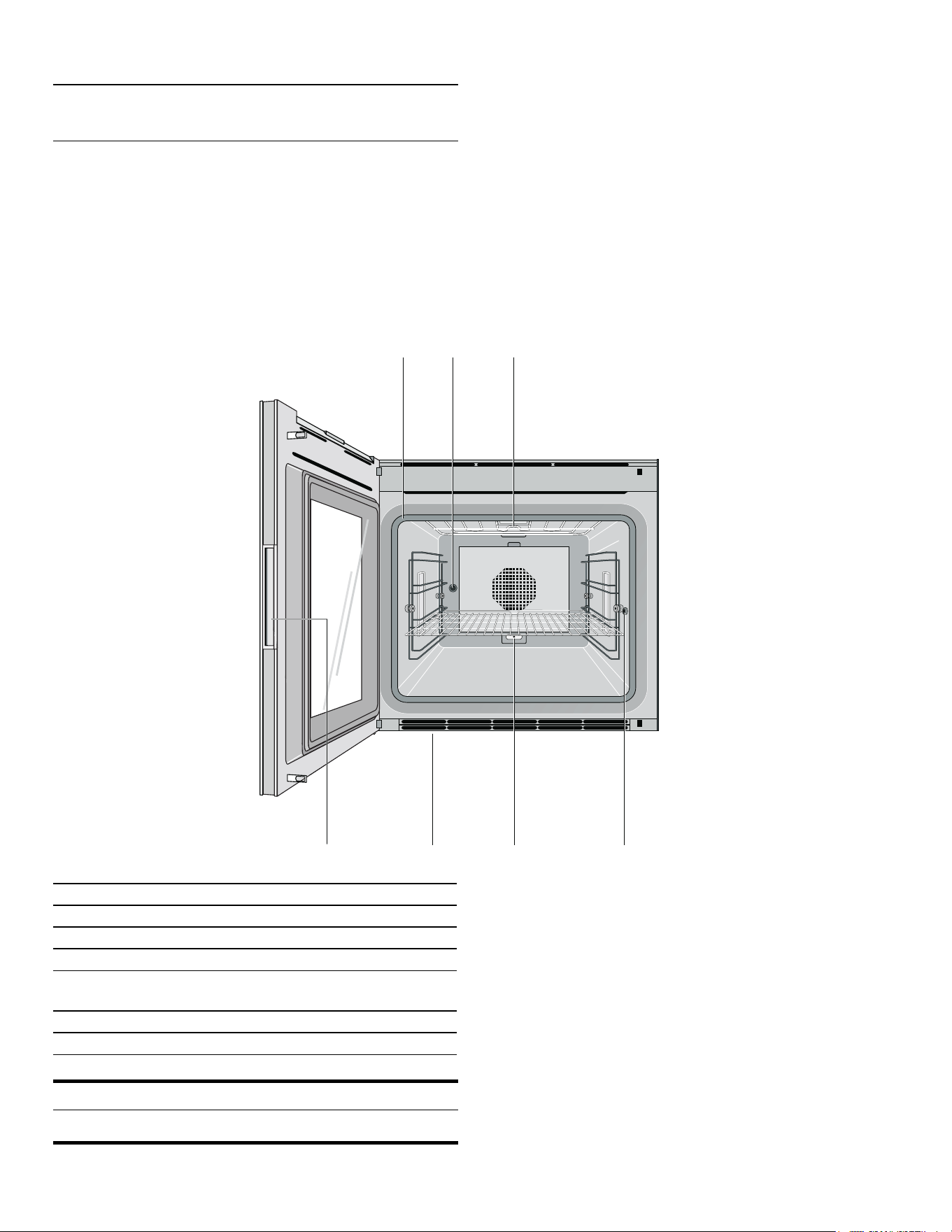
Oven
NOTICE
Do not place food directly on oven bottom.
Do not obstruct oven vents.
1 Door seal
2 Rotisserie spit drive
3 Grill heating element
4 Socket for core temperature probe
5 Socket for additional heating element
(special acessory for baking stone and roaster)
6 Oven vents
7 Recessed handle
11
Familiarizing yourself with your appliance en-us
Displays and controls
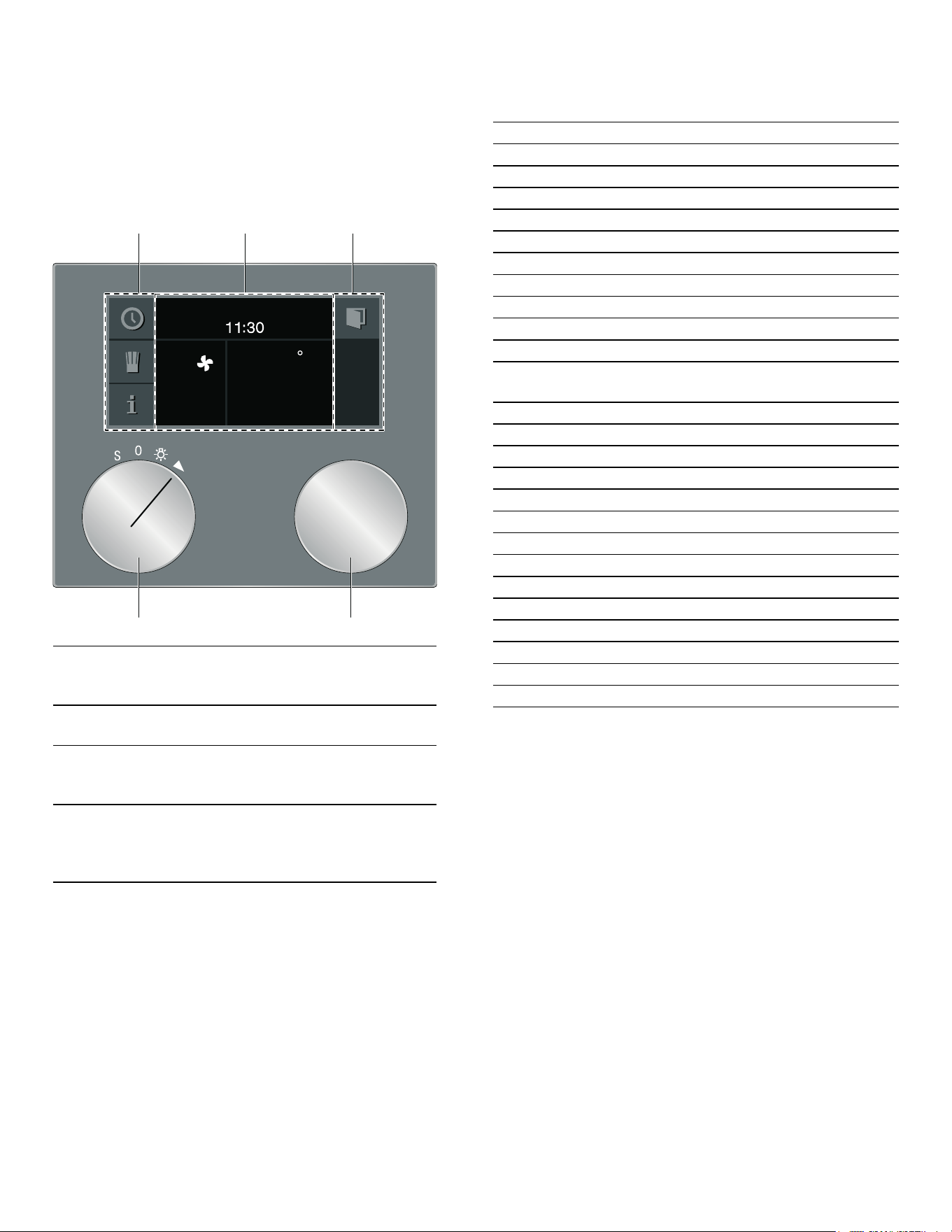
These instructions apply to different versions of the
appliance. Slight deviations are possible depending on
the appliance type.
Operation is identical for all appliance versions.
--------
Symbols
--------
1 Control panel These areas are touch-sensi-
tive. Touch a symbol to select
the applicable function.
2 Display The display shows current set-
tings and options, for example.
3 Rotary selector With the rotary selector you
can select the temperature
and make other settings.
4 Program
selector
With the program selector,
you can select the heating
function, the cleaning function
or the basic settings.
)
Symbol Function
I Start
Ø Stop
H Pause/end
' Cancel
Ž Delete
™ Confirm/save settings
C Selection arrow
! Open appliance door
( Launching additional information
’ Quick heating with status indicator
i Calling up automatic programs or individual
recipes
g Recording a menu
% Edit settings
4 Enter a name
l Delete letters
0 Child lock
M Launching the timer menu
/ Launching the Sabbath mode
° Demo mode
+ Core temperature probe
m Start rotisserie spit
, Stop rotisserie spit
¤ Start pre-roast stage
£ End pre-roast stage
E Network connection (Home Connect)
12
en-us Familiarizing yourself with your appliance
Colors and display
Colors
The various colors serve to guide you in the various
adjustment situations.
Presentation
The presentation of symbols, values or the entire display
changes depending on the situation.
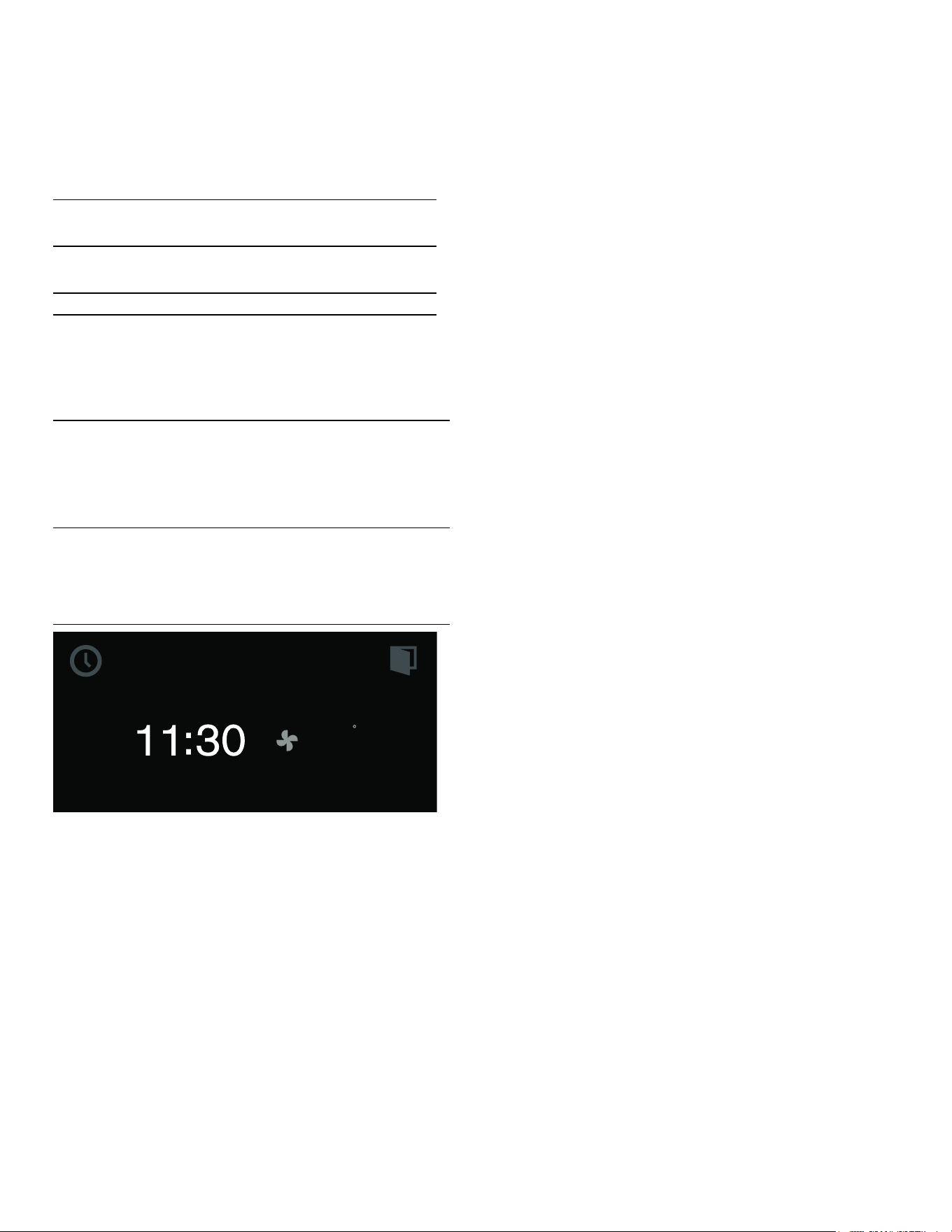
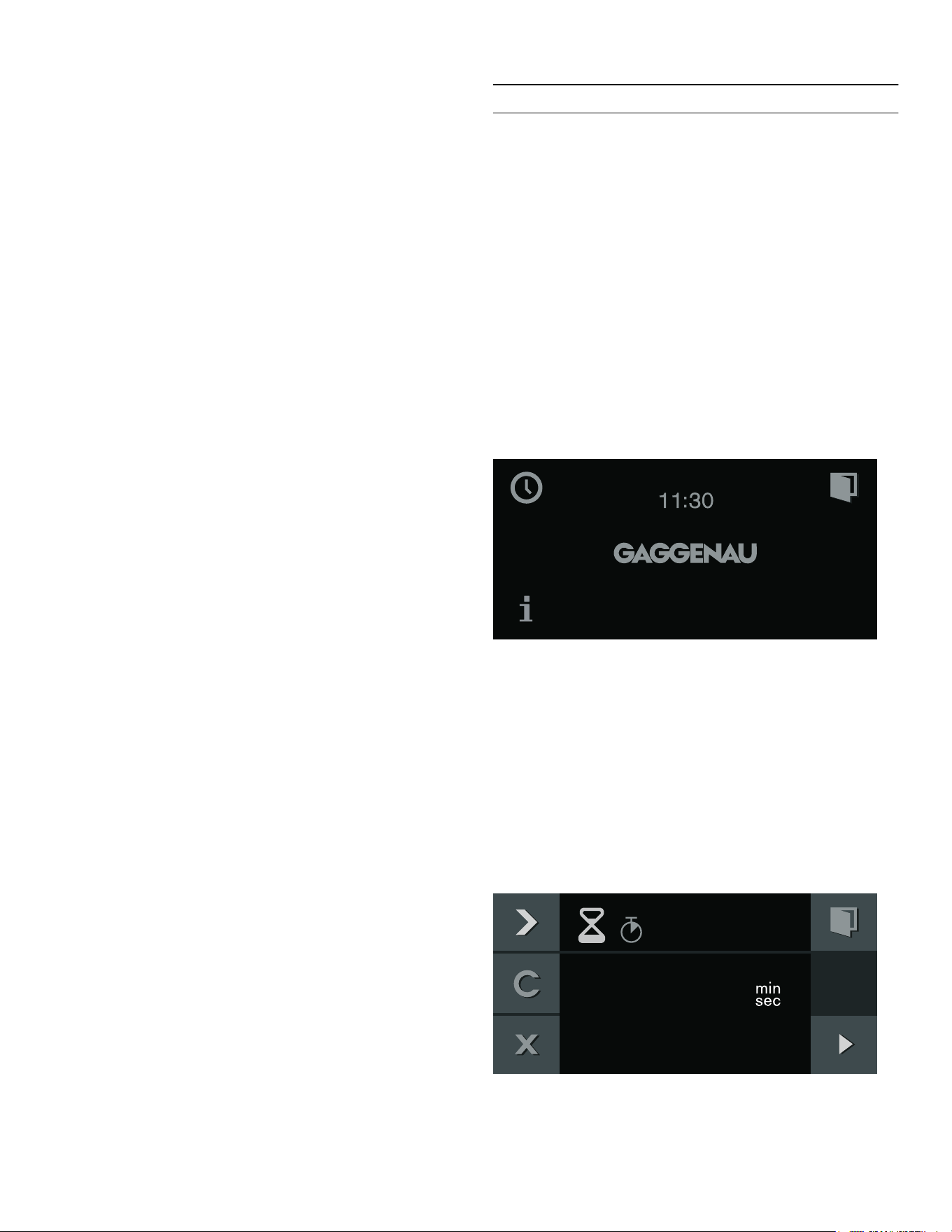
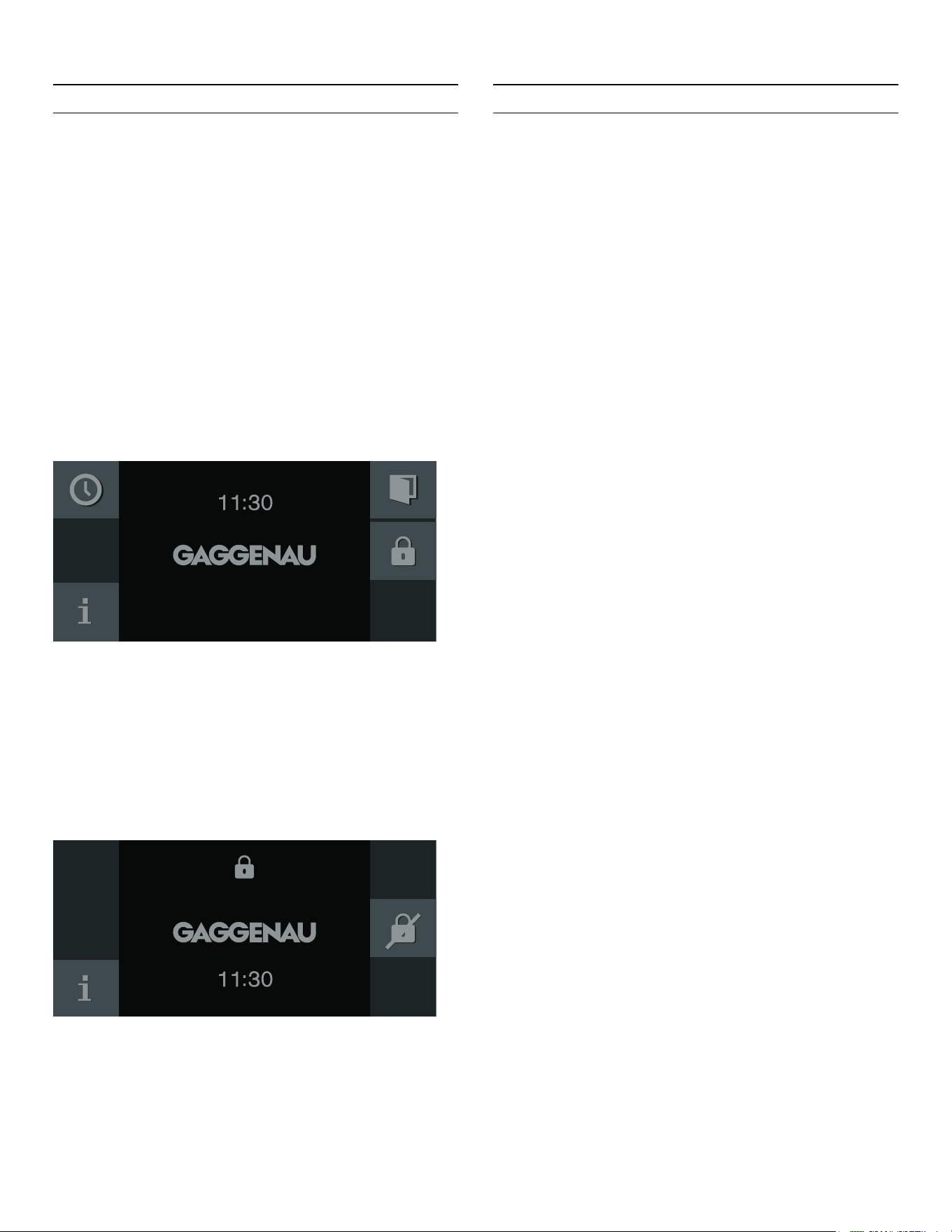
Standby
The appliance switches to standby mode if no function is
set or the childproof lock is activated.
The brightness of the control panel is dimmed in standby
mode.
Notes
▯ Different things can be displayed in standby mode.
The default setting is the GAGGENAU logo and the
time.
▯ The brightness of the display depends on the vertical
viewing angle.
▯ You can change the display and the brightness at any
time in the basic settings. ~ "Basic settings"
on page 36
Activate appliance
In order to exit standby mode, you can either
▯ Set the function selector,
▯ Touch a control panel,
▯ or open or close the door.
Now you can set the desired function. Read the
appropriate chapters to learn how to set functions.
Notes
▯ If "Standby screen = off" is selected in the factory
setting, you must turn the function selector to exit the
standby mode.
▯ The standby display appears again if you have not
made any settings for a long while after activation.
▯ The cooking compartment lighting goes out after a
little while if the door is open.
Automatic door opening
When you touch the ! symbol, the appliance door
springs open and you can open it fully with the handle
recess at the side.
Automatic door opening does not work when the child
lock is activated or in the event of a power failure. You
can open the door manually with the handle recess at the
side.
Additional information ( and )
By touching the ( symbol, you can call up additional
information. For example, information on the type of
heating set or on the current temperature of the cooking
compartment.
Note: During continuous operation after heating up,
slight deviations in temperature are normal.
The ) symbol appears for important information and
indicates that an action is required. Important information
on safety and operating status is also occasionally
displayed automatically. These messages disappear
automatically after a few seconds, or must be confirmed
with ™.
With Home Connect messages, the Home Connect
status additionally appears in the ). You will find more
information about this in the section entitled ~ "Home
Connect" on page 32.
Orange First settings
Main functions
Blue Basic settings
Cleaning
White Adjustable values
Zoom The display of the setting you are just
changing is enlarged.
Just before it elapses, a duration that
is just elapsing is enlarged (e.g. the
last 60seconds in the case of timers).
Minimized
display screen
After a short time, the display screen
is minimized and only the most
important things are displayed. This
function is the default and can be
modified in the basic settings.
)

13
Familiarizing yourself with your appliance en-us
Cooling fan
Your appliance has a cooling fan. The cooling fan
switches on during operation. Depending on the
appliance version, the warm air escapes above or under
the door.
After removing cooked food, keep the door closed until
the appliance cools down. The appliance door must not
be left ajar, as adjoining kitchen furniture may be
damaged. The cooling fan continues to run for a while
and then switches off automatically.
9 CAUTION
Do not cover up the ventilation slots. Otherwise,
the appliance will become overheated.
Program selection positions
Position Function/type of heat-
ing
Temperature Application
0 Off position
ž Light Turn on the oven cavity light. Access to other func-
tions, e.g. automatic programs, individual recipes,
remote start (Home Connect).
2 H
Convection
120- 550°F (50- 300°C)
Default temperature
340°F (170°C)
Convection: For cakes, cookies and baked casseroles
on several levels.
The fan in the rear wall of the oven distributes the heat
evenly throughout the oven cavity.
3 I
Economy
120- 550°F (50- 300°C)
Default temperature
340°F (170°C)
Energy-saving convection mode for cakes, meat,
baked casseroles, and gratins. The convenience fea-
tures (e.g. the oven lighting) remain off. The oven tem-
perature can only be displayed while the oven is
heating up. Do not preheat the oven.
Place the food into the cold, empty oven cavity and
start the stated cooking time. Keep the oven door
closed during cooking to prevent heat escaping from
the oven.
4 N
Top +
bottom heat
120- 550°F (50- 300°C)
Default temperature
340°F (170°C)
For cakes in pans or sheet cakes, baked casseroles,
roasting.
5 O
Top +
Y bottom heat
120- 550°F (50- 300°C)
Default temperature
340°F (170°C)
For sheet cakes, cookies, cakes with meringue, grill-
ing, and baked casseroles with gratin.
Very well-suited for a situation when the food should
be heated from above toward the end of preparation.
6 P
Top heat
120- 550°F (50- 300°C)
Default temperature
340°F (170°C)
Targeted heat from above, for example grilling cake
topped with fruit and meringue.

14
en-us Familiarizing yourself with your appliance
7 M
Y top +
bottom heat
120- 550°F (50- 300°C)
Default temperature
340°F (170°C)
For cheesecake, bread in loaf pans, dishes in a water
bath (e.g. egg custard, crème brûlée). For roasting
without a lid and warming up foods (foods dry out
less).
Very well-suited for a situation when the food should
be heated from above toward the end of preparation.
8 L
Bottom heat
120- 550°F (50- 300°C)
Default temperature
340°F (170°C)
For the final baking stage (such as for moist cakes
topped with fruit), for preserving, for dishes in a water
bath.
9 K
Convection + bottom
heat
120- 550°F (50- 300°C)
Default temperature
340°F (170°C)
Additional heat from below for moist cakes, such as
cake topped with fruit.
10 J
Convection + Y bottom
heat
120- 550°F (50- 300°C)
Default temperature
340°F (170°C)
For high baked casseroles, lasagne, onion tart, egg
dishes (e.g. tortillas, farmers' omelettes).
11 Z
Broil + circulated air
120- 550°F (50- 300°C)
Default temperature
430°F (220°C)
Even, all-round heating for meat, poultry and whole
fish.
12 Q
Broil
120- 550°F (50- 300°C)
Default temperature
430°F (220°C)
To grill flat pieces of meat, sausages or fillets of fish.
Cooking "au gratin."
13 S
Economy broil
120- 550°F (50- 300°C)
Default temperature
430°F (220°C)
Only the center part of the grill heating element is
heated. Energy-saving grilling for small amounts.
14 T
Baking stone function
120- 550°F (50- 300°C)
Default temperature
480°F (250°C)
Can only be used with the baking stone and heating
element (optional accessories).
Baking stone heated from below for crisp stone-baked
pizza, bread or rolls.
15 U
Roaster function
120- 430°F (50- 220°C)
Default temperature
360°F (180°C)
Can only be used with the roaster, pull-out system and
heating element (optional accessories).
Heatable cast iron roasting pan for large quantities of
meat, baked casseroles or holiday roasts.
16 V
Dough proofing
85- 120°F (30- 50°C )
Default temperature
100°F (38°C)
Proofing: For yeast dough and sourdough.
Dough will proof considerably more quickly than at
room temperature. The optimal temperature setting for
yeast dough is 100°F (38°C).
17 W
Defrosting
100- 140°F (40- 60°C)
Default temperature
115°F (45°C)
Even, gentle defrosting.
For vegetables, meat, fish and fruit.
18 X
Keeping warm
85- 250°F (30- 120°C)
Default temperature
160°F (70°C)
Keeping food warm, pre-heating crockery.
S t
Basic settings
The basic settings of your appliance can be adjusted
individually.
œ
Pyrolytic cleaning
905°F (485°C) Self-cleaning
Position Function/type of heat-
ing
Temperature Application
15
Familiarizing yourself with your appliance en-us
Accessories
Use only the accessories included or obtainable from
after-sales service. It has been specially adapted to your
appliance. Make sure you always insert accessories into
the interior the right way round.
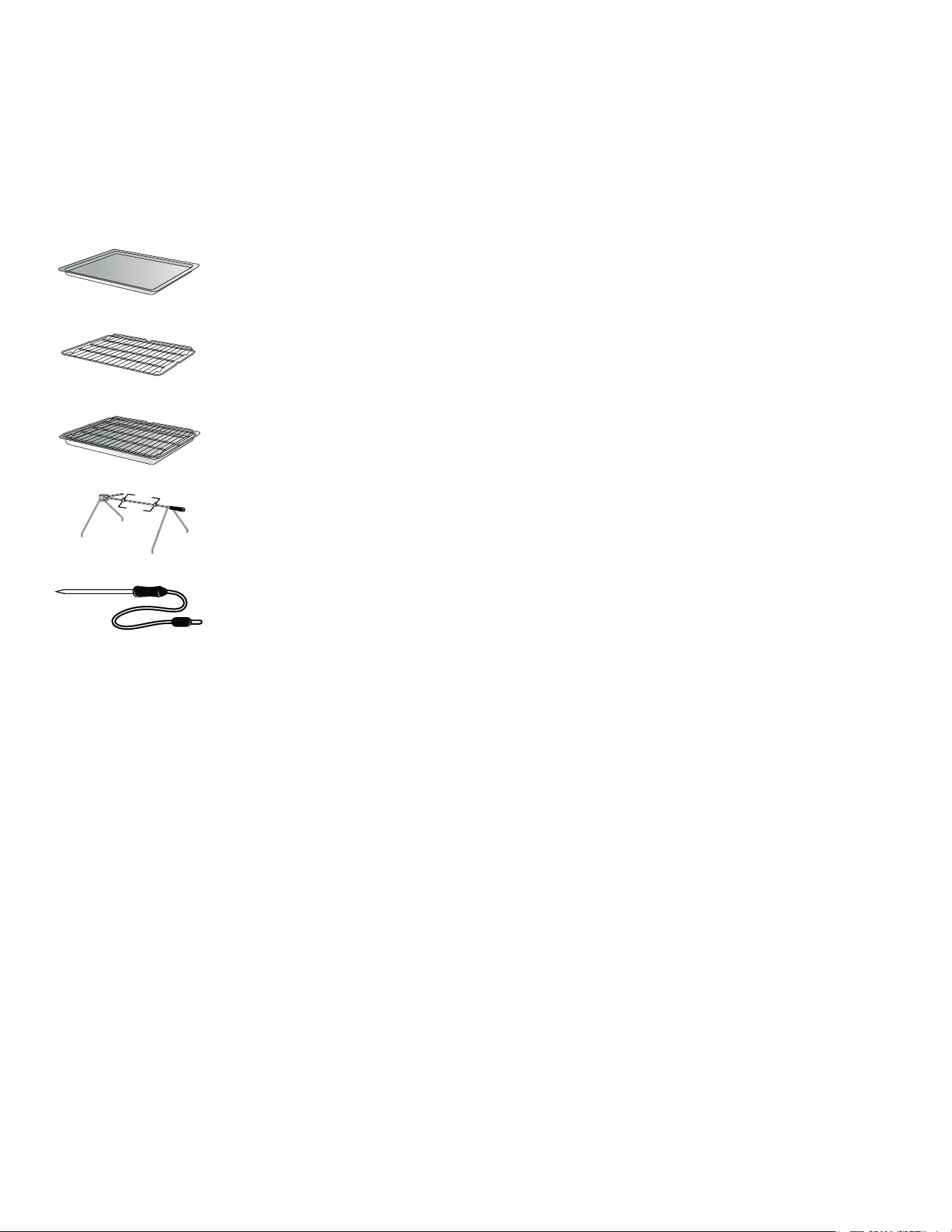
Your appliance comes with the following accessories:
Special accessories
You can order the following accessories from your
specialist dealer:
Use the accessories only as indicated. The manufacturer
assumes no liability for incorrect usage of the
accessories.
Remove any accessories that are not required during
operation from the cooking compartment. Bush for the
additional heating element at the back of the cooking
compartment: Always leave the cover in during normal
operation without the additional heating element.
Baking tray, enameled
Wire grill tray
Grill tray with wire rack
Rotisserie spit
Plug-in core temperature
probe
BA 018165 Pull-out system
Fully extendable telescopic pull-out rack
and pyrolysis-proof cast frame
BA 028115 Baking tray, enameled, 3¼" (30 mm)
deep
BA 038165 Wire rack, chrome-plated, with feet
BA 058115 Heating element for baking stone and
roaster
BA 058133 Baking stone
Including heating element and pizza
paddle (order heating element separately
BS 020002 Pizza paddle, set of 2
GN 340230 GN 2/3cast aluminum roaster,
height 61/2” (165 mm), non-stick
(Order heating element and pull-out
system separately)

16
en-us Before using the appliance for the first time
K
Before using the appliance for
the first time
Before using the appliance for the fi rst time
In this chapter, you can find out what you must do
before using your oven to prepare food for the first time.
First read the section entitled.
The appliance must be completely installed and
connected.
After connecting the appliance to the power supply, the
"Initial settings "menu will be displayed. Now you can now
configure your new appliance for initial set-up.
Notes
▯ The "Initial settings" menu will appear only after the
appliance has been connected to a power supply and
switched on for the first time, or if the appliance has
not been connected to a power supply for a number of
days.
Once the appliance has been connected to a power
supply, the GAGGENAU logo will appear first for
approximately 30seconds. The "Initial settings" menu
will then appear automatically.
▯ You can change the settings at any time in the basic
settings. ~ "Basic settings" on page 36
Setting the language
The default language appears in the display.
1. Select the desired display language with the rotary
selector.
2. Confirm with ™.
Setting the time format
the two possible formats 24h and AM/PM appear in the
display. The default format is 24h.
1. Set the required format with the rotary selector.
2. Confirm with ™.
Setting the time
The time appears in the display.
1. Set the required time with the rotary selector.
2. Confirm with ™.
Setting the date format
The three possible formats D.M.Y, D/M/Y and M/D/Y
appear in the display. The D.M.Y is the default.
1. Set the required format with the rotary selector.
2. Confirm with ™.
Setting the date
The default date appears in the display. The day setting is
already active.
1. Set the required day with the rotary selector.
2. Switch to the month setting with the C symbol.
3. Set the month with the rotary selector.
4. Switch to the year setting with the C symbol.
5. Set the year with the rotary selector.
6. Confirm with ™.
Setting the temperature unit
The two possible units °C and °F will appear on the
display. The default unit is °C.
1. Use the rotary selector to select the unit you require.
2. Press ™ to confirm.
Completing initial set-up
"Initial set-up complete" will appear on the display.
Press ™ to confirm.
The appliance will switch to standby mode and the
standby display will appear. The appliance is now ready
to use.
Heating up the oven
Make sure that there is no leftover packaging in the
cooking compartment.
To eliminate the new-appliance smell, heat up the oven
with it empty and the door closed. One hour with hot
air H at 200 °C is ideal for this.
Cleaning accessories
Before using accessories for the first time, thoroughly
clean them with hot soapy water and a soft dish cloth.
17
Operating the appliance en-us
1
Operating the appliance
Operating the appliance
Oven interior
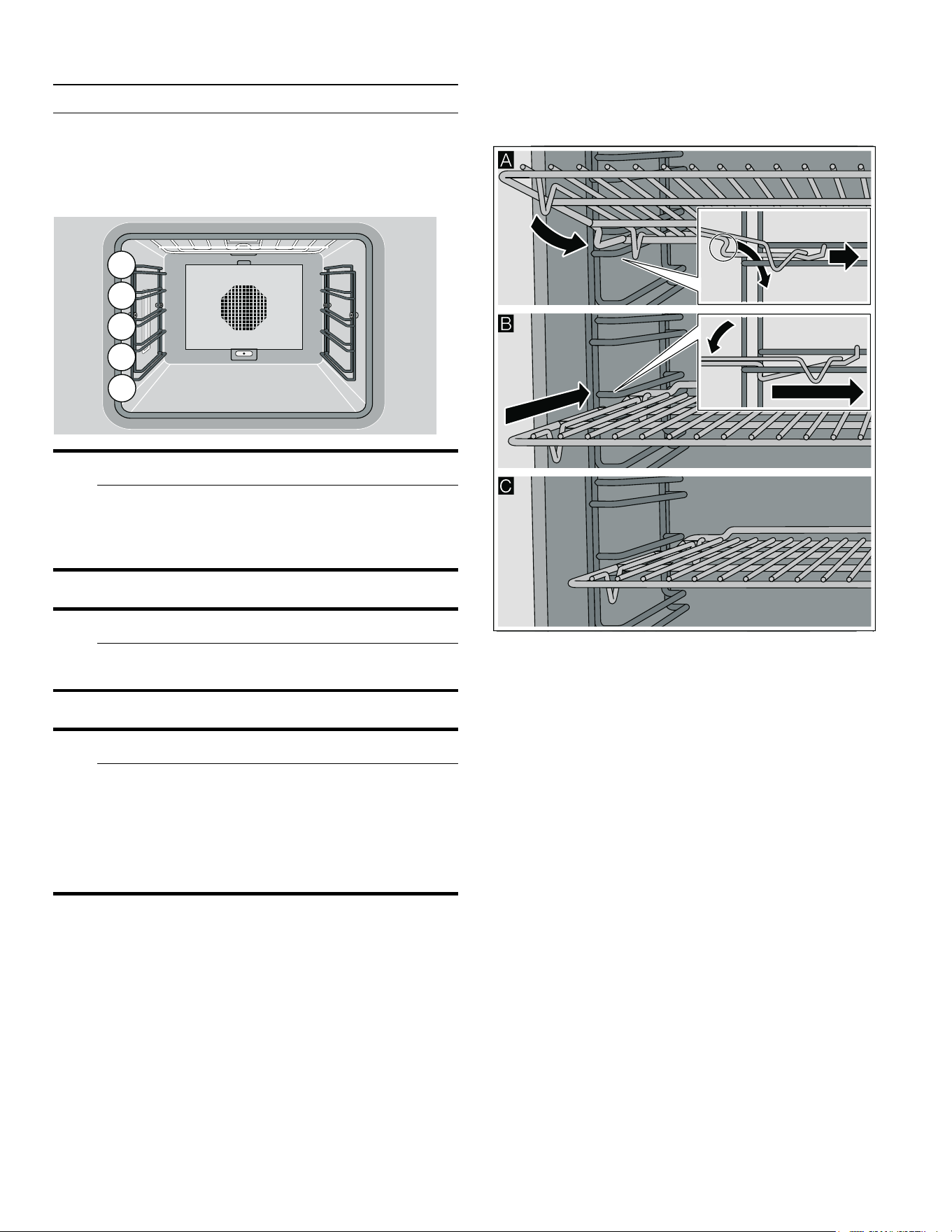
The cooking compartment has five shelf levels.
9 CAUTION
Do not place anything on the cooking compartment
floor. Do not cover it with aluminium foil. A build-up
of heat could damage the appliance or cause
injury.
9 CAUTION
Do not slide any accessories between the shelf
positions, or they may tip.
9 WARNING
Risk of burns!
The inside of the appliance door becomes very hot
during operation. Always open the appliance door
as far as it will go. Ensure that the appliance door
does not swing back. Avoid contact with the inside
of the appliance door.
Inserting the rack
The accessories feature a rack stop function. The rack
stop function prevents tilting of accessories when pulling
them out. You must insert accessories in the oven interior
correctly so that tilt protection will work.
Inserting the rack
1. Tilt the rack to guide the rack stop in between the rails
of the rack holders ¨. The rack stop has to face
downwards.
2. Lower the rack and slide it into the oven, so that the
rack stop can engage ©. Make sure the rack’s safety
rod is at the rear and top ª.
Turning on
1. Set the required heating mode using the function
selector. The chosen heating mode and the default
temperature are displayed.
2. If you want to change the default temperature:
set the required temperature with the rotary selector.
The preheating symbol ’ appears on the display. The
bar continuously shows the preheating status. When the
set temperature is reached, a signal sounds and the
preheating symbol ’ goes off.
Note: The oven interior lighting stays switched off at a
temperature setting below 160° F (70°C).
Switching off:
Turn the function selector to 0.
18
en-us Timer functions
Quick heat
With the "Quick heat" function, your appliance reaches
the desired temperature particularly quickly in the top
heat, bottom heat, and top/bottom heat types of heating.
To ensure an even cooking result, do not place your food
in the cooking compartment until "Quick heat" is
complete and the ’ heat-up symbol goes out.
Note: The "Quick heat" function is preset in the factory
settings. In the basic settings, you can select ’ Quick
heat or “ Heat-up.~ "Basic settings" on page 36
Safety shut-off
For your protection, the appliance has a safety shut-off
feature. Every heating operation is switched off after
12hours if the appliance is not operated during this time.
A message appears in the display.
Exception:
programming with the long-term timer.
Turn the program selection to 0, after which you can
operate the appliance in the manner to which you are
accustomed.
O
Timer functions
Timer functions
In the timer menu, set:
Š Timer
p Stopwatch
6 Cooking time (not in the idle state)
5 Cooking time end (not in the idle state)
Launching the timer menu
You can launch the timer menu from any mode. Only from
the factory settings, program selection is set to S, the
time menu is not available.
Touch the M symbol.
The timer menu appears.
Timer
The timer runs independently of the other appliance
functions. You can enter a maximum of 90minutes.
Setting the timer
1. Call up the Timer menu.
The "Timer" function Š is displayed.
2. Turn the rotary selector to set the desired time.
3. Start with I.
7LPHU
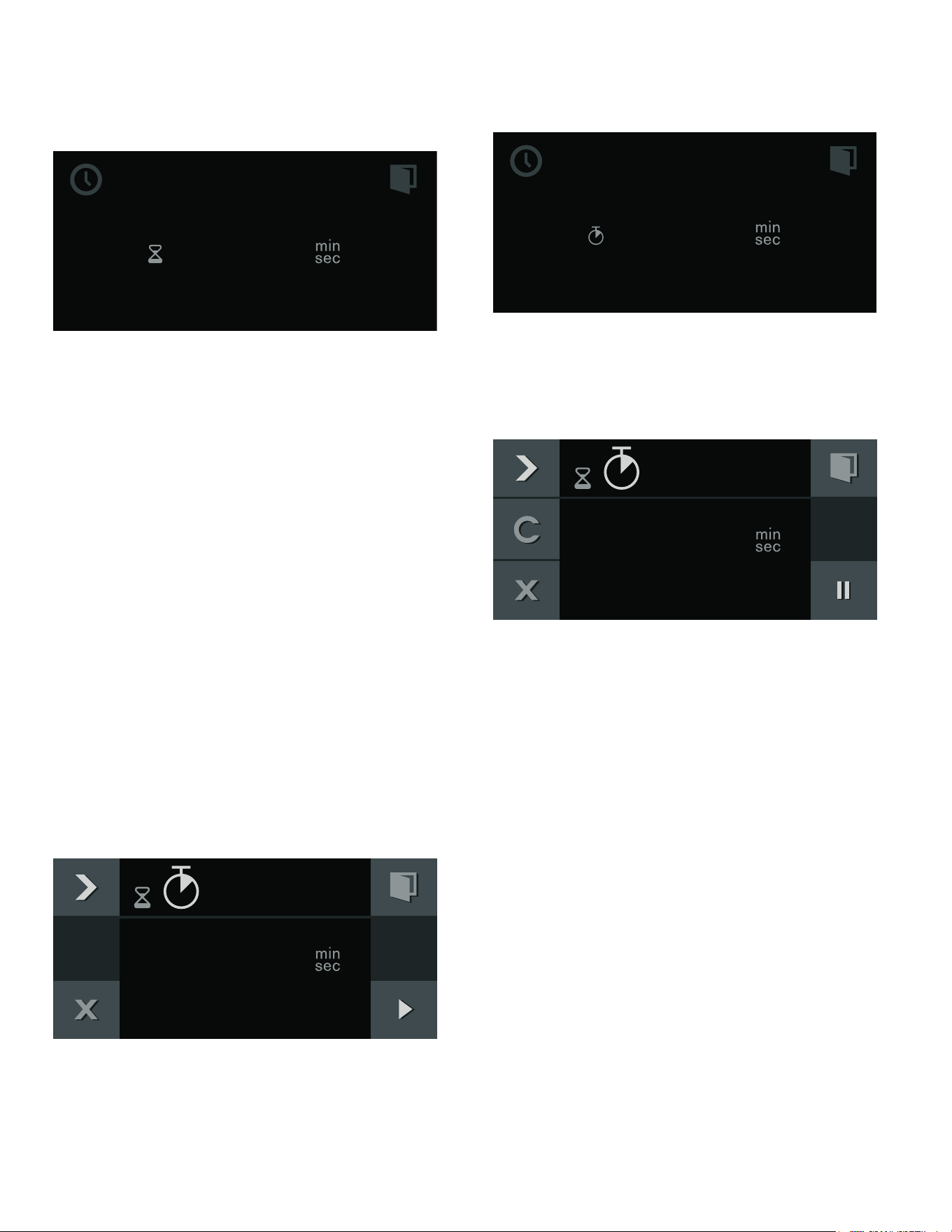
19
Timer functions en-us
The Timer menu closes and the timer starts to run. The
symbol for the timer Š appears on the display and the
time can be seen counting down.
A signal sounds once the time has elapsed. The audible
signal ceases if you touch the ™ symbol.
You can exit the Timer menu at any time by touching the '
symbol. This way, the settings are lost.
Suspend timer:
Call up the Timer menu. Select the "Timer" function with
C, select Š, and touch the H symbol. To let the timer run
on, touch the I symbol.
Switch off the timer early:
Call up the Timer menu. Select the "Timer" function with
C, select Š, and touch the Ž symbol.
Stopwatch
The stopwatch runs independently of the other appliance
functions.
The stopwatch counts up from 0seconds to 90minutes.
It has a pause function. Therefore, you can stop the timer
in between times.
Starting the stopwatch
1. Launch the timer menu.
2. With C, select the "Stopwatch" function p.
3. Start with I.
The timer menu is closed and the time runs. The p
symbol and the elapsing timer are shown in the display.
Stopping and restarting the stopwatch
1. Launch the timer menu.
2. With C, select the "Stopwatch" function p.
3. Touch the H symbol.
The time stops. The symbol changes to Start I again.
4. Start with I.
The time continues to run. Once 90minutes have been
reached, the display pulsates and a signal sounds. It
goes off when you touch the ™ symbol. The p symbol
disappears from the display. The operation has ended.
Switching off the stopwatch:
Launch the timer menu. With C, select the "Stopwatch"
function p and touch the Ž symbol.
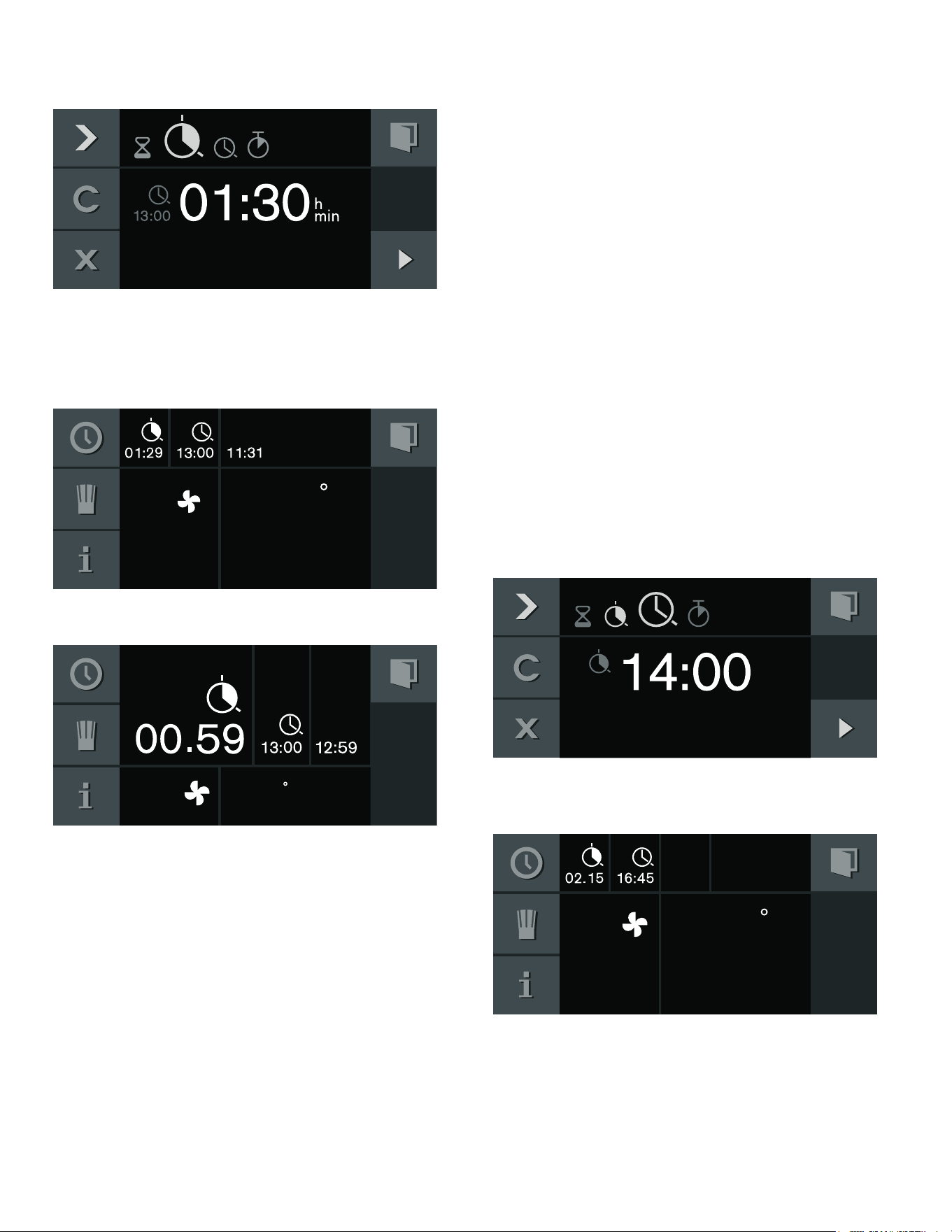
Cooking time
If you set a cooking time for your meal, the appliance
switches off heating automatically after this time has
elapsed.
You can set a cooking time from 1minute to 23:59hours.
Setting the cooking time
You have set the heating function and temperature and
you have placed your dish in the oven interior.
1. Touch the M symbol.
2. With C, select the "Cooking time" function 6.
6WRSZDWFK
6WRSZDWFK
20
en-us Timer functions
3. Set the required cooking time with the rotary selector.
4. Start with I.
The appliance starts. The timer menu is closed. The
temperature, the operating mode, the remaining cooking
time and the end of the cooking time appear in the
display.
One minute before expiration of the cooking time, the
expiring cooking time is enlarged in the display.
The appliance switches off after expiration of the cooking
time. The 6 pulsates and a signal sounds. It goes off
prematurely if you touch the ™ symbol, open the
appliance door or set the program selection to 0.
Interrupting the cooking time:
Launch the timer menu. With C, select the "Cooking
time" function 6. With H interrupt the cooking time. With
I continue the cooking time.
Changing the cooking time:
Launch the timer menu. With C, select the "Cooking
time" function 6. Set the cooking time with the rotary
selector. Start with I.
Clearing the cooking time:
Launch the timer menu. With C, select the "Cooking
time" function 6. Clear the cooking time with Ž. Return
to normal operation with '.
Canceling the entire operation:
Set the program selection to 0.
Note: You can also change the heating function and
temperature during the cooking time.
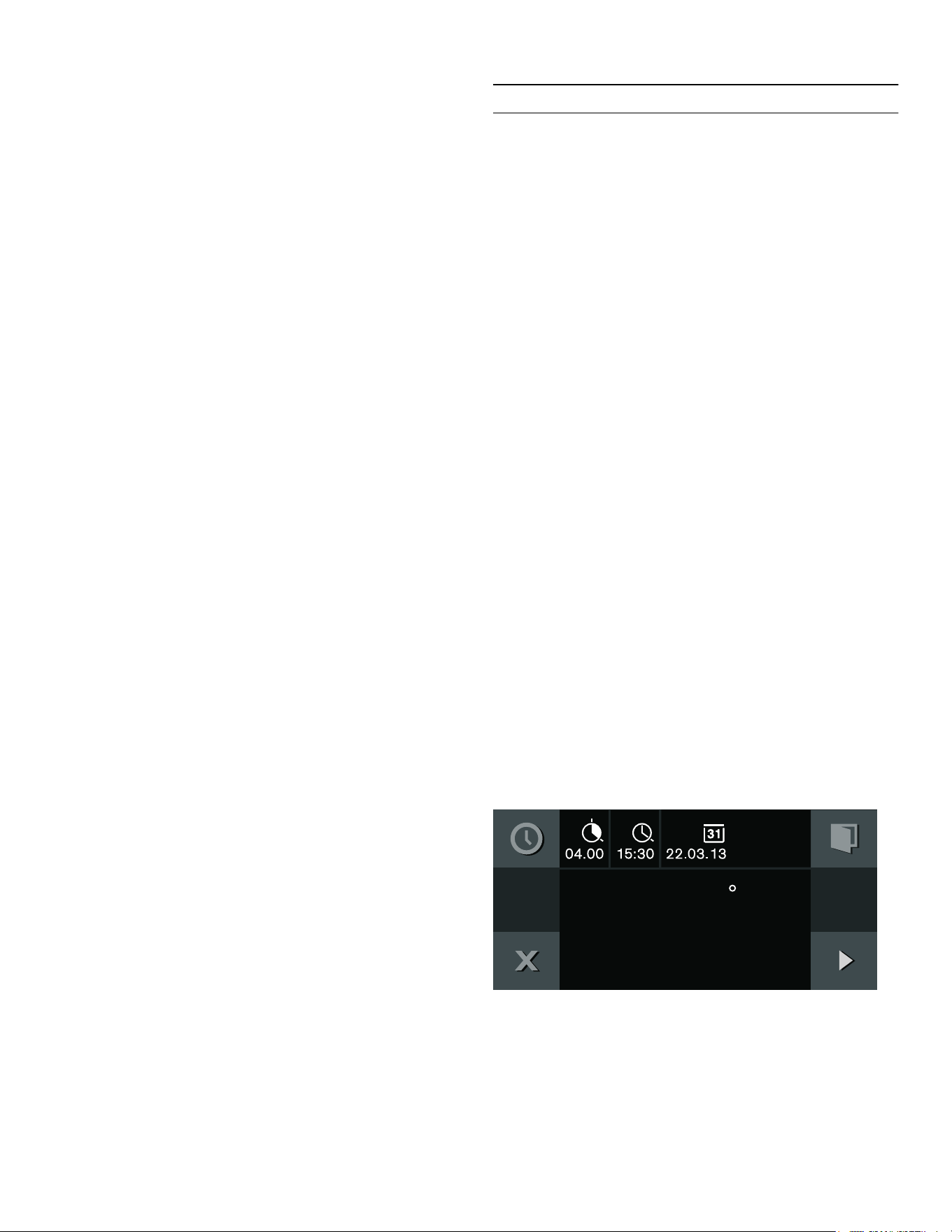
End of cooking time
You can defer the end of the cooking time until later.
Example: it is 2pm. The meal takes 40minutes to cook. It
should be ready by 3.30pm.
Enter the cooking time and shift the end of the cooking
time to 3.30pm. The electronic circuitry calculates the
starting time. The appliance starts automatically at
2:50pm and switches off at 3.30pm.
Note that easily perishable foodstuffs must not be left in
the oven for too long.
Shifting the end of the cooking time
You have set the heating function, the temperature and
the cooking time.
1. Touch the M symbol.
2. With C, select the "End of cooking time" function 5.
3. Set the required cooking time end with the rotary
selector.
4. Start with I.
The appliance assumes a waiting mode. The operating
mode, the temperature, the cooking time and the end of
the cooking time appear in the display. The appliance
starts at the calculated time and switches off
automatically when the cooking time has elapsed.
Note: If the 6 symbol flashes: you have not set a cooking
time. Always set a cooking time first.
&RRNLQJ7LPH
)
)
&RRNLQJWLPHHQG
)
21
Sabbath mode and Yom Tov mode en-us
The appliance switches off after expiration of the cooking
time. The 5 pulsates and a signal sounds. It goes off
prematurely if you touch the ™ symbol, open the
appliance door or set the program selection to 0.
Changing the cooking time end:
Launch the timer menu. With C, select "End of cooking
time" 5. Set the required cooking time end with the
rotary selector. Start with I.
Canceling the entire operation:
Set the program selection to 0.
F
Sabbath mode and Yom Tov mode
Sabbath mode and Yom Tov mode
Sabbath mode
With this function, the appliance maintains a temperature
between 120and 450°F (50and 230°C) with the
convection heating function.
You can keep dishes warm for up to 74hours without
having to switch on or off.
Note that easily perishable foodstuffs must not be left in
the oven for too long.
Note: You must activate the Sabbath mode in the factory
setting in order to operate the mode.
Follow these steps:
1. Set the program selector to S.
2. Select "Factory setting" with the rotary selector.
3. Confirm by touching the ™ symbol.
4. Rotate the selector to Sabbath mode :.
5. Confirm by touching the ™ symbol.
6. Rotate the selector to “activate”.
7. Corfirm by touching the ™ symbol.
8. Turn the oven off.
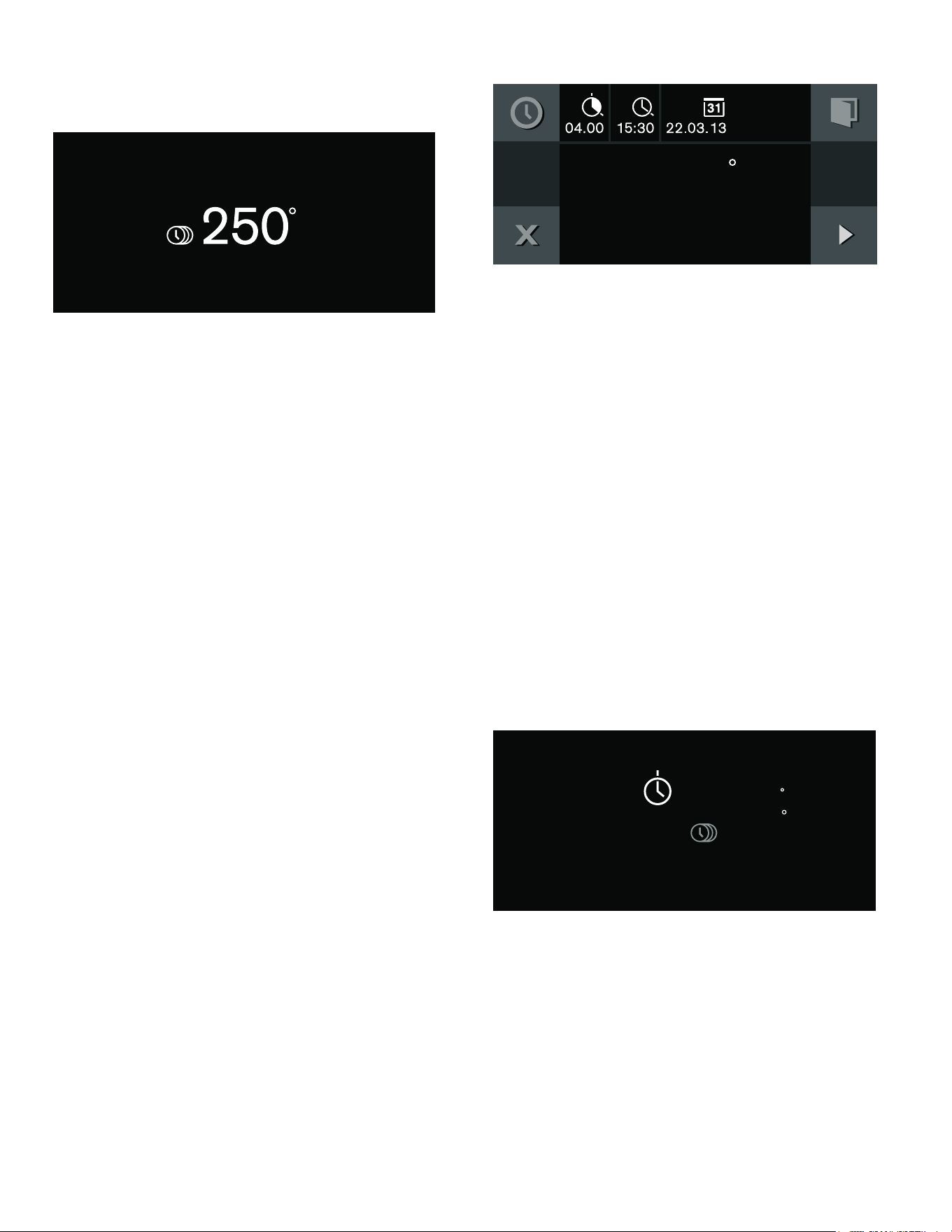
Setting the Sabbath mode
1. Set the program selector to ž.
2. Touch the / symbol.
The suggested value of 24h at 185° F (85°C) appears
in the display. Start with I
- or -
Change the cooking time and the temperature.
3. Changing the cooking time 6:
Touch the $ symbol. Set the preferred cooking time
with the rotary selector. You can set up to 74hours.
Confirm by touching the ™ symbol. Then changing
the temperature becomes an option.
4. Changing the temperature:
Set the required temperature with the rotary selector.
5. Start with I .
6DEEDWKPRGH
)
22
en-us Sabbath mode and Yom Tov mode
The appliance starts. / and the temperature appear in
the display. The Sabbath screen will appear as shown.
The oven and display lighting is off. The control panel is
blocked and no tone can be heard when you touch it.
The appliance no longer heats after expiry of the time.
The display is blank. Set the program selector to 0.
Switching off:
To cancel the operation, set the program selector to 0.
Yom Tov mode
With this function, the appliance is programmed to
perform in three stages.
Stage 1and 2can be programmed for a maximum total
duration of 74hours. The duration of Step 3is 1hour
and cannot be modified.
Stage 1: maintains a warm temperature of 122° F (50°C)
in the convection heating function. The interior oven
lights remain off through this stage.
Stage 2: the appliance raises to a desired temperature
setting and maintains a temperature between 120and
450° F (50-230°C). For warming and cooking foods in
the convection heating function. The desired time can be
adjusted for this stage. The interior oven lights will be on
during this time.
Stage 3: maintains a warm temperature of 122° F (50°C)
in the convection heating function for 1 hour after stage
2has ended. The interior oven lights will be on during
this time.
Note that easily perishable foodstuffs must not be left in
the oven for too long.
Setting the Yom Tov mode
1. Set the program selector to ž .
2. Touch the / symbol.
The suggested value of 24h at 185° F (85°C) appears
in the display.
To set Stage 2cooking time with rotary selector:
1. Touch the $ symbol to adjust the duration of Stage
2cooking time 6 .
2. Set the desired Stage 2cooking time with the rotary
selector.
3. Touch the C symbol to adjust the end of Stage
2cooking time 5 .
4. Select the end time with the rotary selector.
5. Change the date if needed by touching the C symbol
to V .
6. Rotate the selector to the desired date.
7. Confirm settings by touching the ™ symbol.
To set Stage 2temperature:
1. Rotate selector to desired Stage 2temperature.
2. Start with I .
The temperatures of Stage 1and Stage 2appear in the
display. The remaining time to the beginning of Stage 2is
counted down in the display. The Yom Tov screen will
appear as shown.
The program will begin with the pre-set warm temperature
without light, then advance to the programmed
temperature with light until the end of the set date and
time, and then maintain the pre-set warm temperature for
60 minutes.
The appliance no longer heats after expiry of the time.
The display is blank. Set the program selector to 0.
Switching off:
To cancel the operation, set the program selector to 0.
)
6DEEDWKPRGH
)
)
)
Æ

23
Automatic programs en-us
n
Automatic programs
Automatic programs
You can prepare a wide range of food using the
automatic programs. The appliance will choose the
optimal setting for you.
To achieve good results, the cooking compartment must
not be too hot for the type of food you have selected. If it
is, a message will appear on the display. Allow the
appliance to cool and then try again.
Information on the settings
▯ The cooking result depends on the quality of the food
and the size and type of cookware. For an optimal
cooking result, only use food that is in good condition
and meat that is chilled to refrigerator temperature.
For frozen food, use food straight out of the freezer
only.
▯ The automatic program suggests a temperature, type
of heating and cooking time.
▯ For some dishes, you will be required to enter the
weight. It is not possible to set weights outside of the
intended weight range.
▯ For some dishes, you will be asked to enter desired
level of browning, the thickness of the food and/or the
cooking level of the meat or vegetables.
▯ For some dishes, the cooking compartment is
preheated empty. Place the food in the cooking
compartment once the preheating is complete and a
message appears in the display.
▯ Your preferred settings will be shown next time as a
suggestion.
Core temperature probe
For some recipes, you will need the core temperature
probe. Use the core temperature probe for these recipes.
~ "Core temperature probe" on page 26
Selecting a dish
The following categories are available. One or more
dishes are listed beside each category.
Categories:
▯ Vegetables
▯ Oven dishes
▯ Fish
▯ Meat and poultry
▯ Bread, pizza and cake
▯ Drying
▯ Dough
Applying settings for dishes
You are guided through the entire setting process. Follow
the instructions in the display.
Use the rotary selector to scroll through the individual
levels.
1. Set the function selector to ž.
2. Touch the i symbol. Press ™ to confirm.
3. Use the rotary selector to select the category and
press ™ to confirm.
4. Use the rotary selector to select the required dish and
press ™ to confirm.
The possible settings appear in the display. For many
dishes, you can change the settings to suit your
needs.
For some dishes, you must set the weight.
Tip: By pressing the * symbol, you can receive
information about accessories and preparation
methods.
5. Press ™ to confirm the required settings. Follow the
directions on the display. Press I to start.
The cooking time will count down on the display.
Once the cooking time has elapsed, an audible signal
sounds. The appliance stops heating up. Turn the
function selector to 0.
9 WARNING
Risk of scalding!
Hot steam can escape when you open the
appliance door. Open the appliance door with
caution. Keep children away.
Opening the appliance door affects the cooking result.
Open the appliance door only briefly. The automatic
program is interrupted and continues to run after closing
the appliance door.
Adding extra cooking time
After the cooking time has ended, you can leave some
dishes to continue cooking if you are not satisfied with
the cooking result.
A query appears on the display, which asks if you want to
continue cooking.
1. Press ™ to confirm.
2. Select a single or double cooking time, depending on
requirements.
3. Press I to start.
4. If the "Continue cooking" function has ended, turn the
function selector to 0.
24
en-us Personal recipes
Changing and canceling
After starting the appliance, the settings can no longer
be changed.
If you want to cancel the operation, turn the function
selector to 0.
Calling up the last automatic programs
used
The last five dishes with the selected settings are saved.
You have the option of saving these dishes with the
selected settings as individual recipes. ~ "Personal
recipes" on page 24
1. Set the function selector to ž.
i is displayed.
2. Touch the i symbol.
3. Use the rotary selector to select "Last automatic
programs" and press ™ to confirm.
4. Use the rotary selector to select the required dish and
press ™ to confirm.
5. Enter a name for the dish and save. ~ "Entering a
name" on page 25
Ž
Personal recipes
Personal recipes
You can save up to 50individual recipes. You can record
a recipe. You can assign these recipes a name so that
you can fall back on them quickly and conveniently if you
need them.
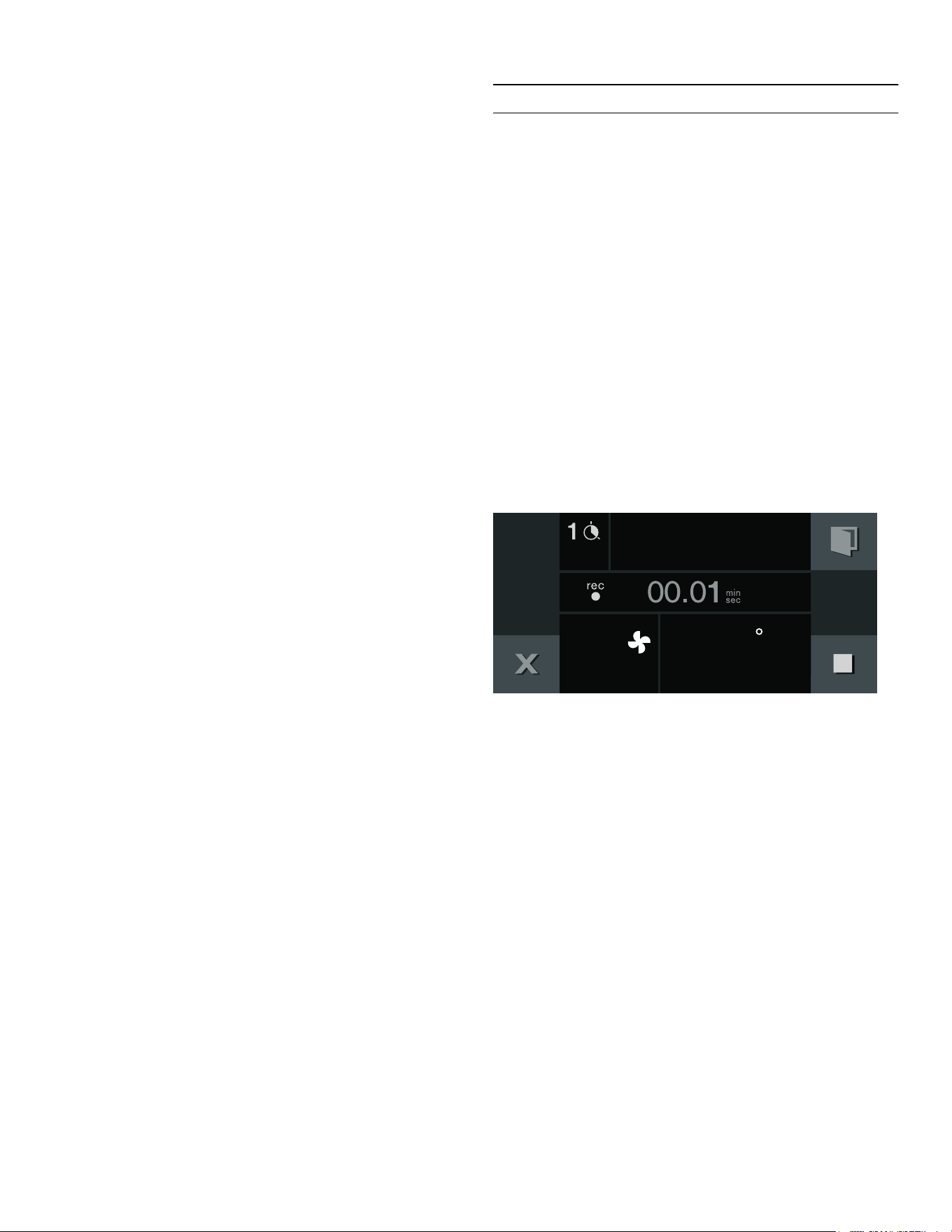
Recording a recipe
It is possible to set up to 5phases consecutively while
recording at the same time.
1. Set the function selector to ž.
2. Touch the i symbol.
3. Use the rotary selector to select "Individual recipes"
and press ™ to confirm.
4. Use the rotary selector to select a free memory
location.
5. Touch the g symbol.
6. Set the desired temperature with the rotary selector.
7. The cooking time is recorded.
8. Recording another phase:
Set the program selection to the required heating
function. Set the required temperature with the rotary
selector. A new phase begins.
9. Once the appliance has achieved the desired cooking
result, touch the & symbol to end the recipe.
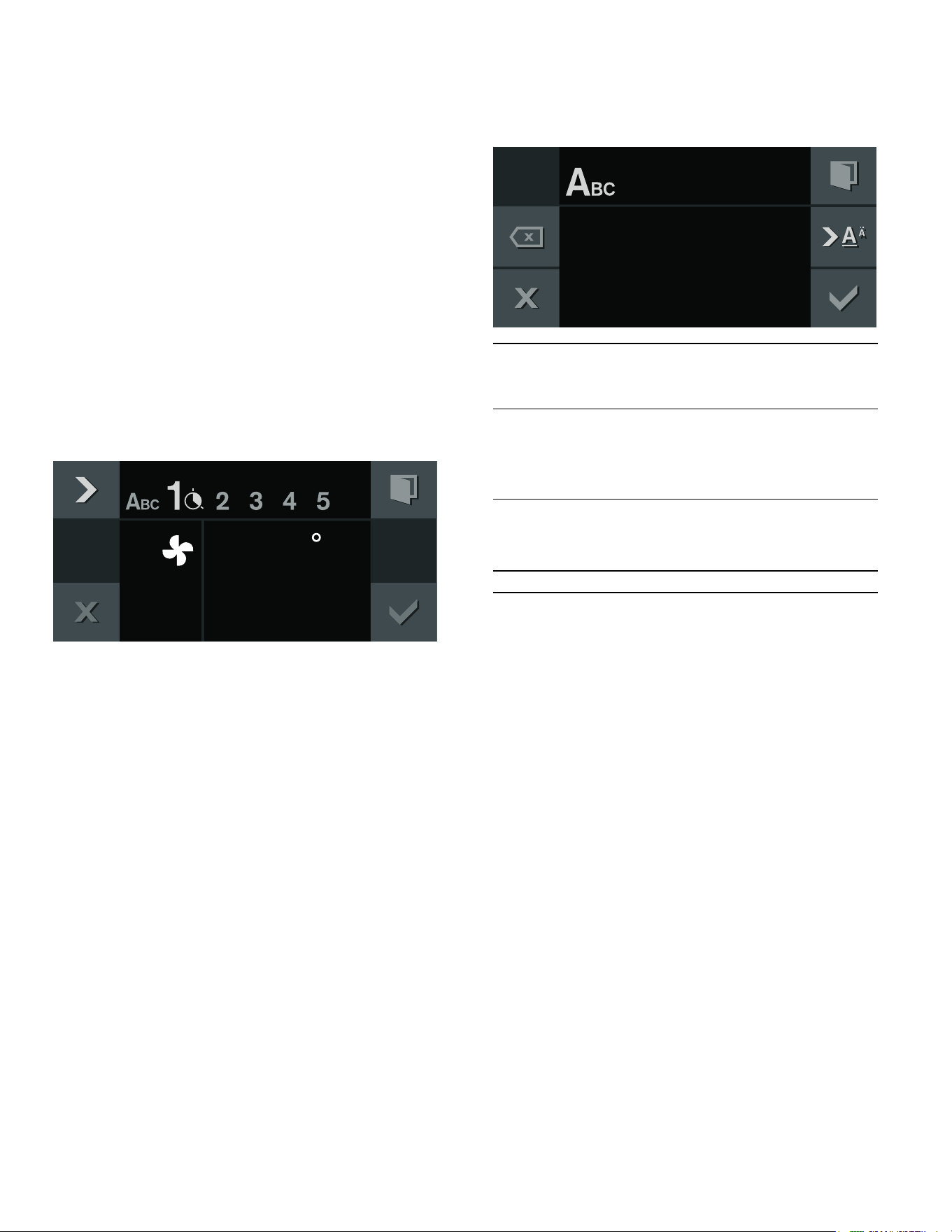
10. Enter the name under "ABC". ~ "Entering a name"
on page 25
Notes
▯ Recording a phase does not begin until the appliance
has reached the set temperature.
▯ Every phase must last at least one minute.
▯ During the first minute you can change the heating
function or the temperature.
Enter the core temperature for a phase:
Insert the core temperature probe in the socket in the
oven interior. Set the heating function and temperature.
Touch the + symbol. With the rotary selector, enter the
required temperature and confirm it with +.
)
25
Personal recipes en-us
Programming a recipe
You have the option of programming and saving up to five
phases of preparation.
1. Set the function selector to ž.
2. Touch the i symbol.
3. Use the rotary selector to select "Individual recipes"
and press ™ to confirm.
4. Choose a free storage location with the rotary
selector.
5. Touch the % symbol.
6. Enter the name under "ABC". ~ "Entering a name"
on page 25
7. Choose the first phase with the C symbol.
The heating function and temperature set at the start
are displayed. You can change the heating function
and temperature with the rotary selectors.
8. Choose the time setting with the C symbol.
9. Set the required cooking time with the rotary selector.
10. Choose the next phase with the C symbol.
- or -
Preparation is complete, end input.
11. Save with ™.
- or -
Cancel with ' and quit the menu.
Enter the core temperature for a phase:
Choose the next phase with the C symbol. Set the
heating function and temperature. Touch the + symbol.
With the rotary selector, enter the required temperature
and confirm it with +.
Note: For phases for which a core temerature has been
programmed you cannot set a cook time.
Entering a name
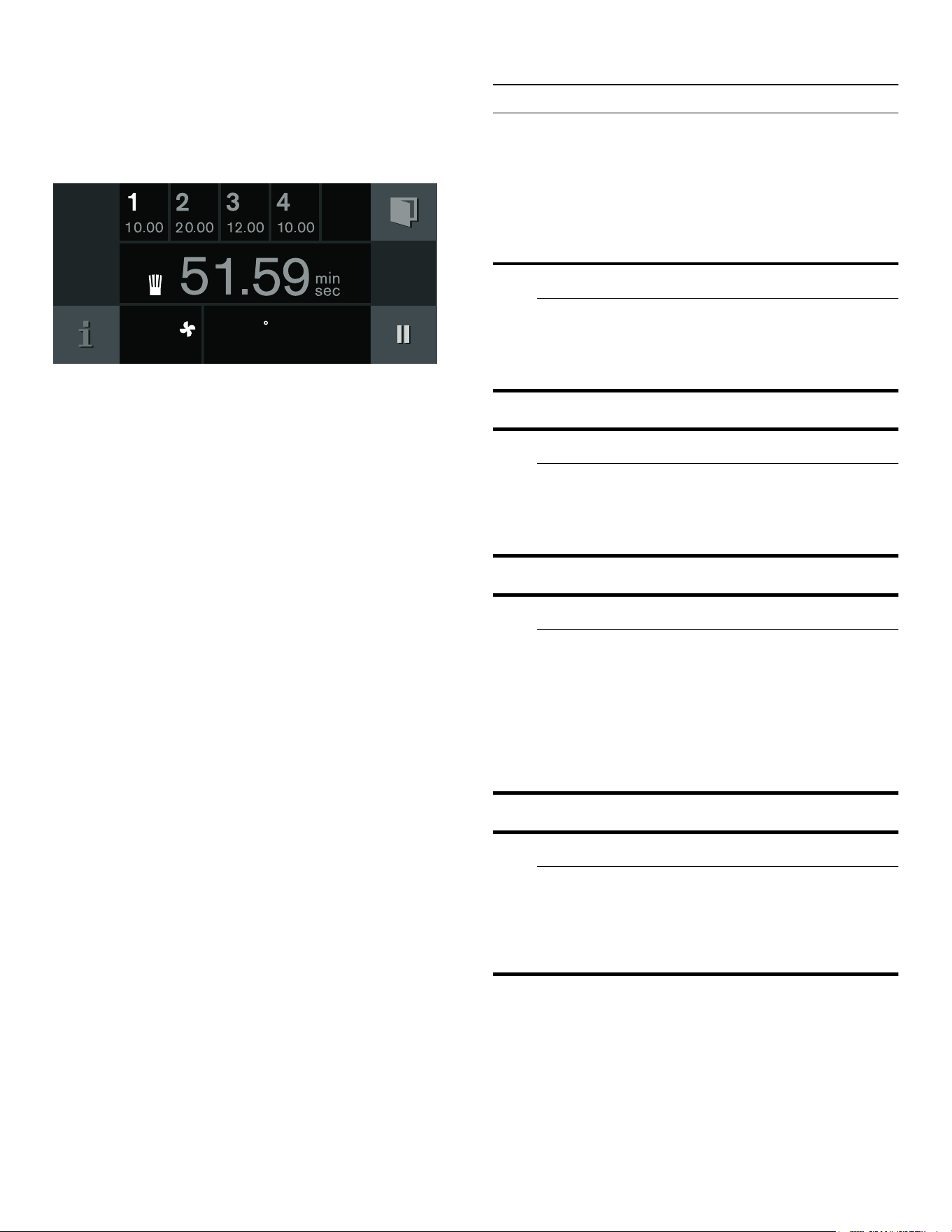
1. Enter the recipe's name under "ABC".
2. Save with ™.
- or -
Cancel with ' and quit the menu..
Note: For entering a name, Latin characters, certain
special characters and numbers are available.
Starting a recipe
1. Set the function selector to ž.
2. Touch the i symbol.
3. Use the rotary selector to select "Individual recipes"
and press ™ to confirm.
4. Use the rotary selector to select the desired recipe.
)
Rotary
selector
Selecting letters
A new word always beings with an
upper case letter.
4 Press briefly: cursor to the right
Press long: switch to diacritics and
special characters
Press twice: insert line space
5 Press briefly: cursor to the right
Press long: switch to normal characters
Press twice: insert line space
l Clear letters
$B
26
en-us Core temperature probe
5. Press I to start.
The operation begins. The cooking time starts
counting down.
The settings for each phase are shown in the display.
Notes
▯ The cooking time does not start counting down until
the appliance has reached the set temperature.
▯ You can use the rotary selector to change the
temperature while the recipe is in progress. This does
not change the saved recipe.
Change recipe
You can change the settings of a recorded or
programmed recipe.
1. Set the function selector to ž.
2. Touch the i symbol.
3. Use the rotary selector to select "Individual recipes"
and press ™ to confirm.
4. Use the rotary selector to select the desired recipe.
5. Touch the % symbol.
6. Use the C symbol to select the desired phase.
The programmed heating type, temperature, and
cooking time are displayed. You can change the
settings with the rotary selector or the function
selector.
7. Save with ™.
- or -
Cancel with ' and exit the menu.
Deleting a recipe
1. Set the function selector to any type of heating.
The i symbol is displayed.
2. Touch the i symbol.
3. Use the rotary selector to select the desired recipe.
4. Delete the recipe with Ž.
5. Confirm with ™.
@
Core temperature probe
Core temperature probe
The core temperature probe makes it possible to cook
with exact precision. It measures the temperature inside
the food being cooked. When the required core
temperature has been reached, the probe switches off
automatically, ensuring that all food is cooked perfectly.
9 WARNING
Risk of electric shock!
Use of a wrong core temperature probe can
damage the insulation. Use only the core
temperature probe intended for this appliance.
9 WARNING
Risk of burns!
The oven interior and the core temperature probe
become very hot. Use oven mitts to plug and
unplug the core temperature probe.
9 CAUTION
Damage to the core temperature probe:
Do not use the core temperature probe with the
heating modes “Broil” or “Economy Broil”. Before
using the heating modes “Broil” or “Economy
Broil”, remove the core temperature probe from the
oven cavity. It is possible to use the heating mode
“Broil + Circulated Air” at temperatures up to
480° F (250 °C).
9 CAUTION
Damage to the core temperature probe:
The core temperature probe may be damaged at
temperatures above 480° F (250 °C). When using
the core temperature probe, never set the
temperature above 480° F (250 °C).
)
27
Core temperature probe en-us
Inserting the core temperature probe
into the food
Insert the core temperature probe into the food before
you place the food in the oven cavity.
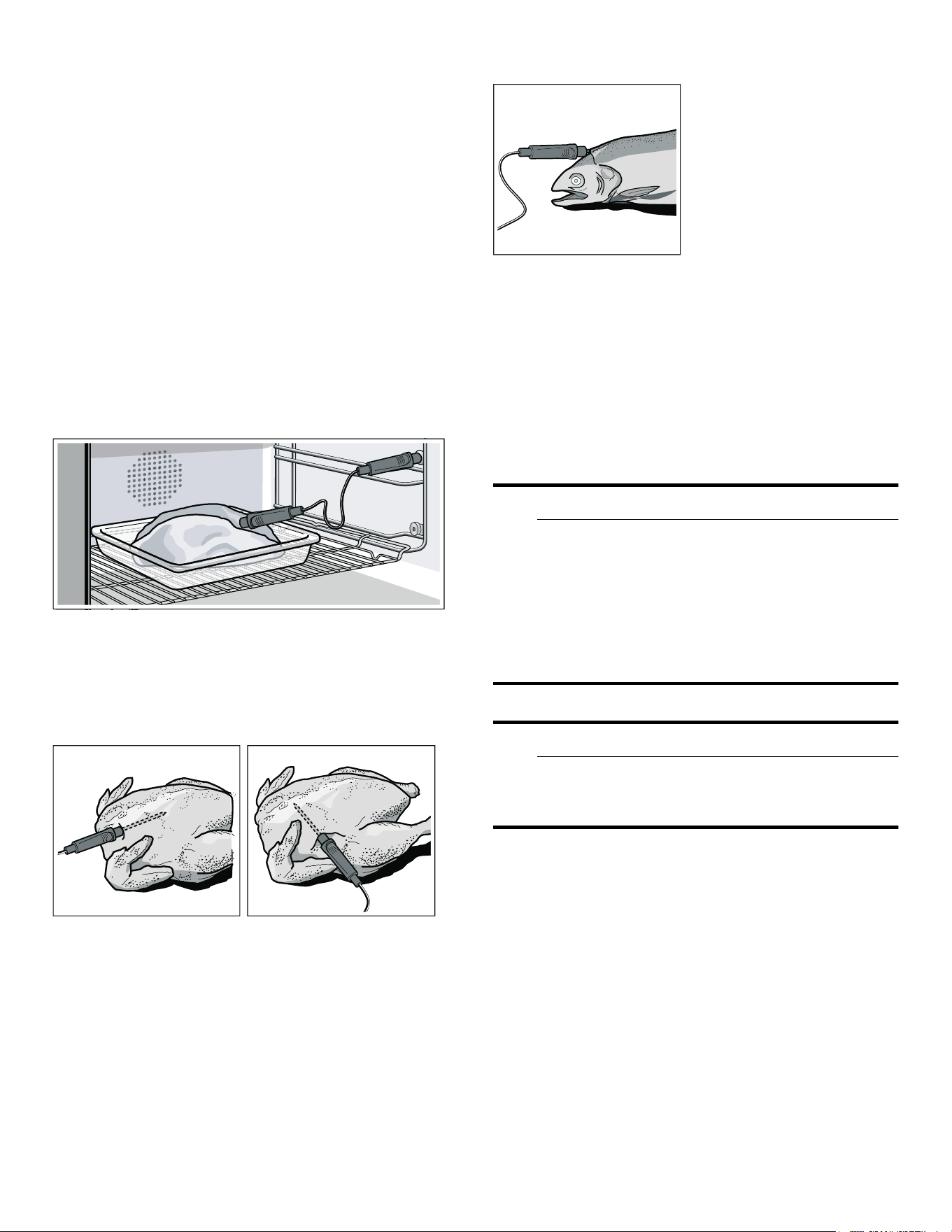
The core temperature probe has three measuring points.
Insert the core temperature probe as far as possible.
Ensure that the middle measuring point is inserted in the
food. It must not be inserted in the fat or be touching the
ovenware or bones.
Meat: For large pieces of meat, insert the core
temperature probe at an angle from above as far as it will
go into the meat.
For relatively thin pieces of meat, insert the meat probe
from the side at the thickest point.
If there is more than one piece of meat, insert the core
temperature probe into the middle of the thickest piece.
Poultry: Insert the core temperature probe as far as it will
go into the thickest point in the breast. Depending on its
structure, insert the core temperature probe into the
poultry crossways or lengthways. With poultry, make sure
that the tip of the core temperature probe does not
protrude into the cavity in the middle of the bird.
Fish: Insert the core temperature probe behind the head
as far as it will go towards the spine. Place the whole fish
onto the wire rack and prop it up in the swimming
position using half a potato.
Turning the food: If you want to turn the food, do not
remove the core temperature probe. Once you have
turned the food, check that the core temperature probe is
correctly positioned in the food.
If you remove the core temperature probe during
operation of the appliance, all settings are reset and you
have to apply them again.
Setting the core temperature
9 CAUTION
Damage to the core temperature probe:
The core temperature probe may be damaged if the
distance between the grill heating element and the
core temperature probe is too small. Make sure
that the distance between the grill heating element
and the core temperature probe or the cable of the
core temperature probe is a few centimeters. The
meat may expand during the cooking process.
9 CAUTION
Damage to the core temperature probe:
Do not trap the cable of the core temperature
probe in the appliance door.
1. Insert the food to cook in the cooking compartment
with a core temperature probe inserted. Insert the
core temperature probe into the socket in the top right
of the cooking compartment and close the appliance
door.
2. Turn the function selector to the desired heating type.
3. Use the rotary selector to set the cooking
compartment temperature.
4. Touch the + symbol. Use the rotary selector to
change the set core temperature for the food and
confirm with +.
The core temperature set must be higher than the
current core temperature.

28
en-us Core temperature probe
5. The appliance heats with the set heating type.
The display indicates the current temperature, and
below that the set core temperature.
You can change the set core temperature at any time.
6. After preheating, the display shows an estimated
cooking time approx. 5–20minutes into the cooking
time. Touch the ( symbol to display the current core
temperature.
Once the set core temperature is reached, a signal
sounds. Cooking is automatically ended. Confirm with ™
and turn the function selector to 0.
Estimated cooking time
After preheating, if the appliance has a temperature
setting above 100°C, when the core temperature probe
is inserted, the display shows an estimated cooking time
approx. 5–20minutes into the cooking time.
The estimated cooking time is continually updated. The
longer the cooking process lasts, the more precise the
estimated cooking time becomes. Do not open the
appliance door; this distorts the estimated cooking time.
The estimated cooking time is displayed in normal
operation and in the automatic program.
The current core temperature is shown in the display
when you touch the ( symbol.
The estimated cooking time display can be deactivated in
the basic settings so that the current core temperature is
shown instead.~ "Basic settings" on page 36
Notes
▯ The measurable range is 15°C to 99°C. Outside the
measurable range, "--°C" is displayed for the current
core temperature.
▯ If you leave the food in the cooking compartment for
some time after cooking, the core temperature will
continue to rise somewhat due to the residual heat in
the cooking compartment.
▯ If you set programs with the core temperature probe
and the cooking timer at the same time, the appliance
switches off whichever program reaches the entered
value first.
Changing the set core temperature
Touch the + symbol. Use the rotary selector to change
the set core temperature for the food and confirm with
+.
Deleting the set core temperature
Touch the + symbol. Delete the set core temperature
with Ž. The appliance continues heating in normal
cooking mode.
Core temperature guidelines
Use chilled food only, not frozen food. The details given
in the table are guidelines. Results depend on the quality
and composition of the food.
For hygiene reasons, critical foodstuffs such as fish and
game should reach a core temperature of 143- 158° F
(62– 70°C); for poultry and minced meat this should be
as high as 176 - 185° F (80– 85°C).
Food Core temperature
guideline
Beef
Sirloin, tenderloin, entrecôte
very rare
rare
medium
well-done
113- 117°F
(45- 47 °C)
122- 126°F
(50- 52 °C)
137- 140°F
(58- 60 °C)
158- 167°F
(70- 75 °C)
Roast beef 176- 185°F
(80- 85 °C)
Pork
Pork roast 162- 176°F
(72- 80 °C)
Pork loin
medium
well-done
149- 158°F
(65- 70 °C)
167°F (75 °C)
Meat loaf 185°F (85 °C)
Fillet of pork 149- 158°F
(65- 70 °C)
Veal
Veal roast, well-done 167- 176°F
(75- 80 °C)
Breast of veal, stuffed 167- 176°F
(75- 80 °C)
Saddle of veal
medium
well-done
137- 140°F
(58- 60 °C)
149- 158°F
(65- 70 °C)
Fillet of veal
rare
medium
well-done
122- 126°F
(50- 52 °C)
137- 140°F
(58- 60 °C)
158- 167°F
(70- 75 °C)

29
Core temperature probe en-us
Game
Saddle of venison 140- 157°F
(60- 70 °C)
Leg of venison 158- 167°F
(70- 75 °C)
Venison loin steaks 149- 158°F
(65- 70 °C)
Saddle of hare or rabbit 149- 158°F
(65- 70 °C)
Poultry
Chicken 195°F (90 °C)
Guinea fowl 175- 185°F
(80- 85 °C)
Goose, turkey, duck 185- 195°F
(85- 90 °C)
Duck breast
medium
well-done
131- 140°F
(55- 60 °C)
158- 176°F
(70- 80 °C)
Ostrich steak 140- 149°F
(60- 65 °C)
Lamb
Leg of lamb
medium
well-done
140- 149°F
(60- 65 °C)
158- 176°F
(70- 80 °C)
Saddle of lamb
medium
well-done
131- 140°F
(55- 60 °C)
149- 167°F
(65- 75 °C)
Mutton
Leg of mutton
medium
well-done
158- 167°F
(70- 75 °C)
176- 185°F
(80- 85 °C)
Saddle of mutton
medium
well-done
158- 167°F
(70- 75 °C)
176°F (80°C)
Fish
Fillet 144- 149°F
(62- 65 °C)
Whole 149°F (65 °C)
Terrine 144- 149°F
(62- 65 °C)
Food Core temperature
guideline
Other provisions
Bread 205°F (96 °C)
Paté 162- 167°F
(72- 75 °C)
Terrine 140- 158°F
(60- 70 °C)
Foie gras 113°F (45°C)
Food Core temperature
guideline
30
en-us Rotisserie spit
:
Rotisserie spit
Rotisseri e spit
Using the rotisserie spit, you can prepare large roasts
such as rolled roast and poultry particularly well. The
meat becomes crispy and brown all round.
You can use the rotisserie spit in all modes of operation.
You achieve the best results with the "Broil" or "Top heat"
heating functions.
9 CAUTION
Do not use the temperature probe in combination
with the rotisserie spit.
Preparation
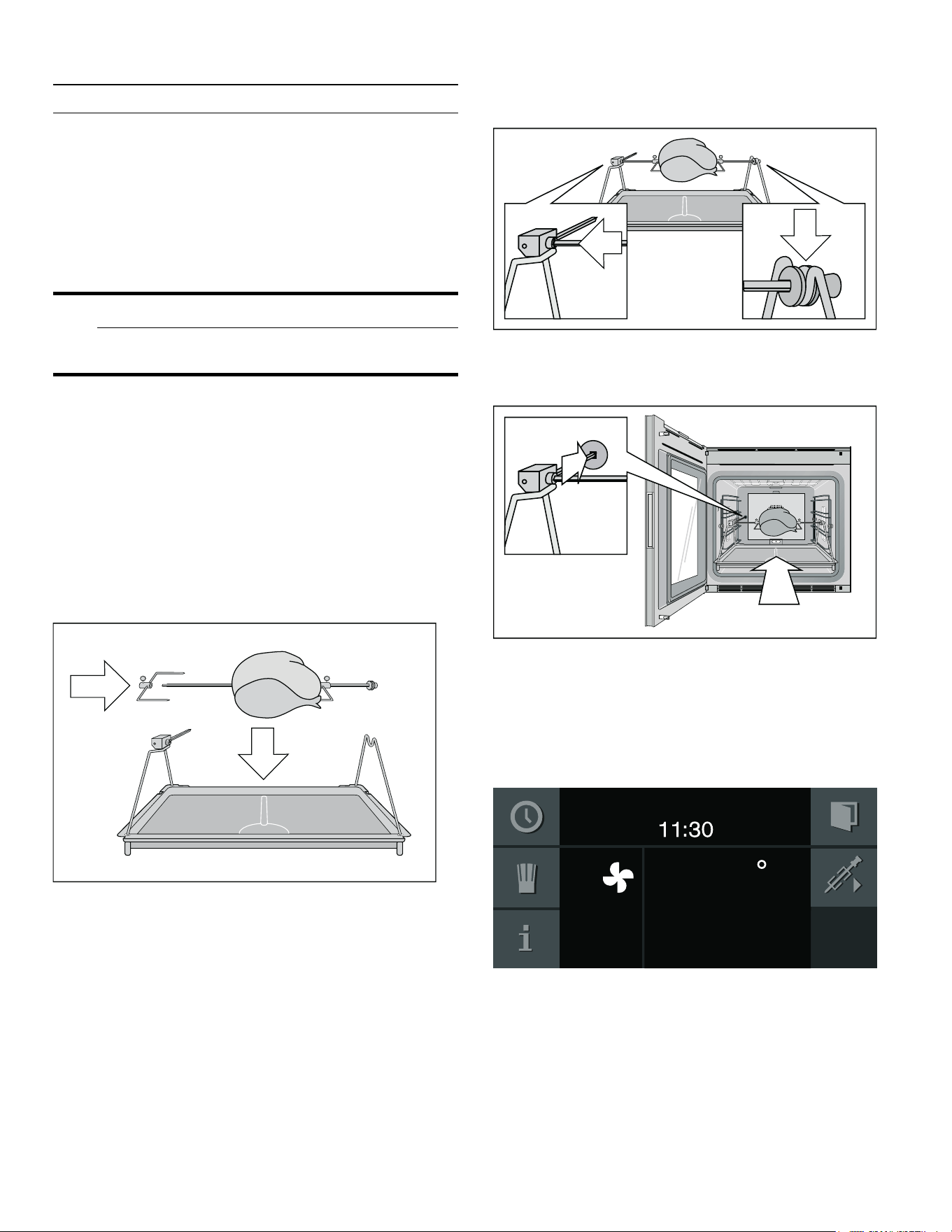
1. Insert both supports in the sockets on the grill tray.
The drive is on the left.
2. Plug the right retaining clip onto the rotisserie spit
and screw it in firmly.
3. Place the food you want to cook on the rotisserie
spit's center. Secure protruding parts (e.g. wings) to
make sure they do not touch the grill heating element.
4. Plug the left retaining clip onto the rotisserie spit and
screw it in firmly.
5. Place the rotisserie spit on the supports. Latch the
square shaft into the drive section.
6. Insert the rotisserie spit in the lowest insertion level in
the oven. The drive spindle must engage in the
opening on the oven's rear wall.
Switching on the rotisserie spit
1. Set the required temperature and heating function.
2. Touch the m symbol. The rotisserie spit is switched
on.
)
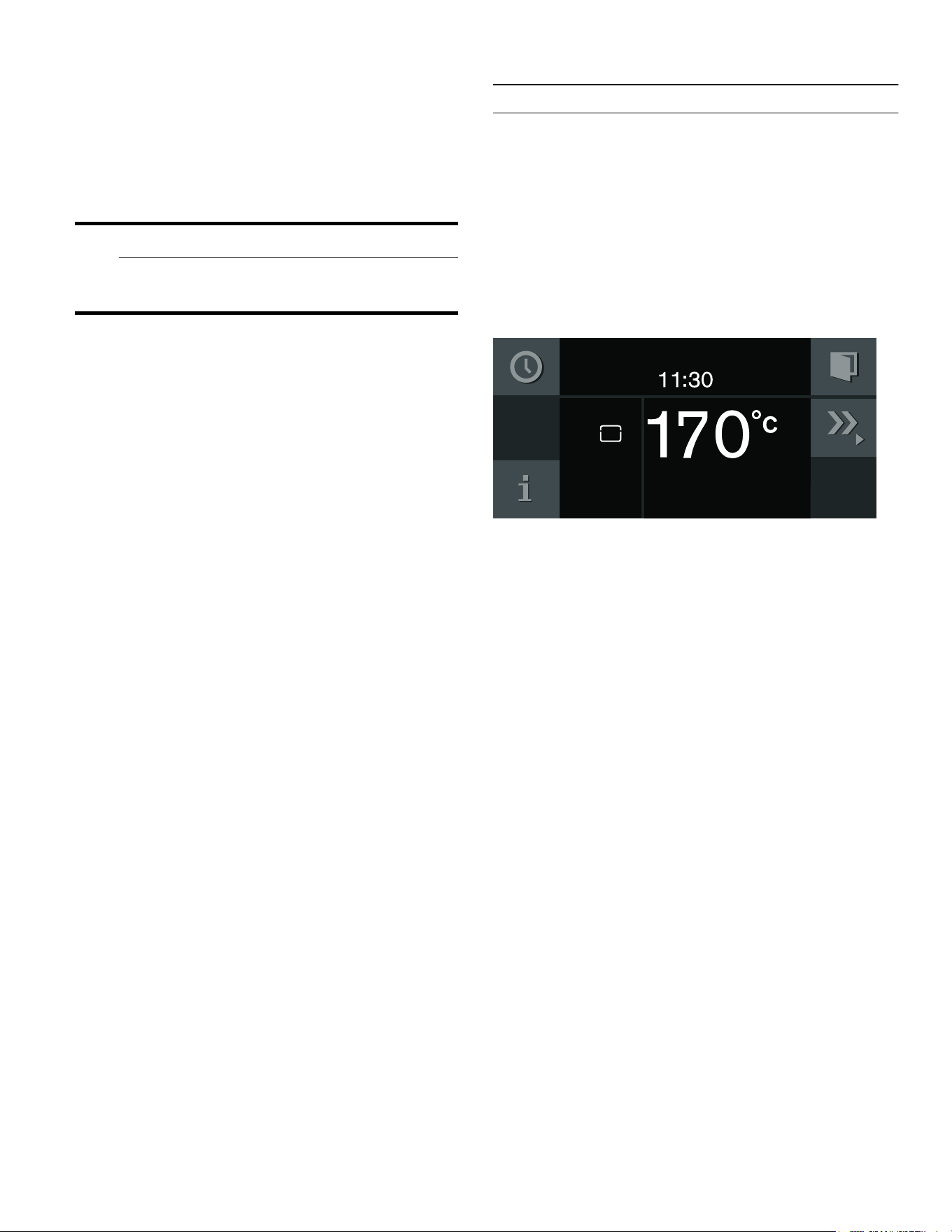
31
Roasting function en-us
Switching off the rotisserie spit
1. Touch the , symbol. The rotisserie spit's drive stops.
2. Switch off the oven with the program selection.
3. Take out the grill tray with the rotisserie spit and place
them on a stable, heat-resistant surface.
9 WARNING
Risk of burns!
Use a glove to remove them.
4. Screw on the handle at the side to remove the
rotisserie spit.
Notes
▯ Use the rotisserie spit at oven temperatures up to
480° F (250°C) only.
▯ Do not clean the drive part of the rotisserie spit in a
dishwasher.
v
Roasting function
Roasting function
Only when set to the "Roaster function" type of heating.
You will need a roaster, pull-out system and heating
element – these are optional accessories.
In the pre-roast stage, the oven heats at full power for
approx. 3minutes. This way, you can cook steaks quickly.
Touch the ¤ symbol. The pre-roast stage starts up. You
can also set the pre-roast feature several times one after
another.
To end the pre-roast stage early, touch £.
32
en-us Childproof lock
A
Childproof lock
Childproof lock
The appliance has a panel lock to make sure children
cannot operate it inadvertently.
Notes
▯ You must set the child lock in the factory setting to
"Available"~ "Basic settings" on page 36
▯ If there is a power cut while the child lock is activated,
it may be deactivated when the power returns.
Activating the child lock
Requirement:
Program selector is set to 0.
Touch the 0 symbol for at least 6seconds.
The child lock is activated. The standby screen appears.
The 0 appears at the top of the display.
Deactivating the child lock
Requirement:
Program selector is set to 0.
Touch the 1 symbol for at least 6seconds.
The child lock is deactivated. You can switch on the
appliance in the usual manner.
o
Home Connect
Home Connect
This appliance can be networked and also controlled
remotely using a mobile device. The Home Connect app
offers extra functions that complement the networked
appliance perfectly. If the appliance is not connected to
your home network, it can be operated as usual via the
display.
The availability of the Home Connect function depends
on the availability of Home Connect services in your
country. Home Connect services are not available in
every country. You can find more information on this at
www.home-connect.com.
Notes
▯ Ensure that you follow the safety instructions in this
instruction manual and that you comply with these
even when you are away from home and are operating
the appliance via the Home Connect app. You must
also follow the instructions in the Home Connect app.
▯ Operating the appliance directly from the appliance
always takes priority. It is not possible to operate the
appliance using the Home Connect app during this
time.
▯ Refer to the Home Connect documents supplied for
more information.
Setting Up
To configure settings via Home Connect, you will need to
have installed the Home Connect app on a mobile device.
Your appliance will also need to be connected to your
home network and to the Home Connect app. You can
choose between the following connection types:
▯ Connection via LAN cable: The appliance is
connected to the home network automatically
following confirmation on the appliance.
▯ Connection via Wi-Fi: Establish the connection to your
home network and then the connection to the Home
Connect app.
Note: The app will guide you through the entire
registration process. In case of doubt, follow the
instructions in the app.
Installing the app
Install the Home Connect app on your mobile device (e.g.
tablet PC or smartphone).
1. On your mobile device, go to the App Store (Apple
devices) or the Google Play Store (Android devices).
2. Enter the search term "Home Connect".

33
Home Connect en-us
3. Select the Home Connect app and install it on your
mobile device.
4. Launch the app and set up Home Connect access.
The app will guide you through the registration
process.
Connecting the appliance to your home network (LAN)
The appliance must be connected to your home network
using a LAN cable.
The network connection will be established automatically
when the appliance is connected to the mains electricity
supply for the first time and put into operation.
Connecting the appliance to your home network (Wi-Fi
with WPS)
Requirements:
▯ Your router must have a WPS button. You will find
information about this in the manual for your router.
▯ You need to be able to access your router.
1. In the basic settings, select ¯ "Home Connect".
2. Touch the % symbol.
3. Turn the rotary selector to "Wi-Fi".
4. Confirm by touching the ™ symbol.
A message about the WPS function will appear.
5. Touch the ™ symbol to continue.
6. Turn the rotary selector to "Automatic (WPS)".
7. Touch the ™ symbol to start the connection process.
8. Press the WPS button on the router within the next
2 minutes.
If the display shows "Network connection successful",
the connection process is complete. Follow the
instructions in the app.
Connecting the appliance to your home network (Wi-Fi
without WPS)
1. In the basic settings, select ¯ "Home Connect".
2. Touch the % symbol.
3. Turn the rotary selector to "Wi-Fi".
4. Confirm by touching the ™ symbol.
A message about the WPS function will appear.
5. Touch the ™ symbol to continue.
6. Turn the rotary selector to "Manual".
7. Touch the ™ symbol to start the connection process.
The appliance will set up its own "Home Connect" Wi-
Fi network to which the tablet or smartphone must be
connected.
8. Follow the instructions in the app.
If the display shows "Network connection successful",
the connection process is complete. Follow the
instructions in the app.
Connecting the appliance to the app
Connect your appliance to the app when setting up Home
Connect or connect your appliance to an additional
Home Connect account. The Home Connect app can be
installed on any number of mobile devices, which can
then be connected to the appliance.
Requirements:
▯ The appliance is connected to your home network.
▯ The Home Connect app has been installed on the
mobile device.
1. To connect an additional account, select "Home
Connect" in the basic settings.
2. Use the rotary selector to select "Connect to app".
3. Touch the % symbol and start the connection process
with ™.
4. Follow the instructions in the app.
If the display shows "Connection to app successful", the
connection process is complete.
Remote Start
Remote start must be activated in order to start and
operate your appliance via the Home Connect app. If
remote start is deactivated, only the appliance operating
modes can be displayed in the Home Connect app and
appliance settings can be implemented.
The remote start is automatically deactivated if the
appliance door is opened.
When you start the oven using a type of heating on the
appliance itself, remote start is activated automatically.
You can now make changes or start a new program from
your mobile device.
Activating remote start
1. Set the function selector to ž.
2. Touch the × symbol.
× appears next to the ( symbol.
Remote start is now activated. You can now use the
mobile end device to start a type of heating via the app
and transfer the required settings to the appliance.
To deactivate the remote start: Touch the í symbol.
34
en-us Home Connect
Home Connect settings
Home Connect can be adapted to your specific needs at
any time.
Note: You will find the Home Connect settings in the
basic settings for your appliance. Which settings the
display shows will depend on whether Home Connect
has been set up and whether the appliance is connected
to your home network.
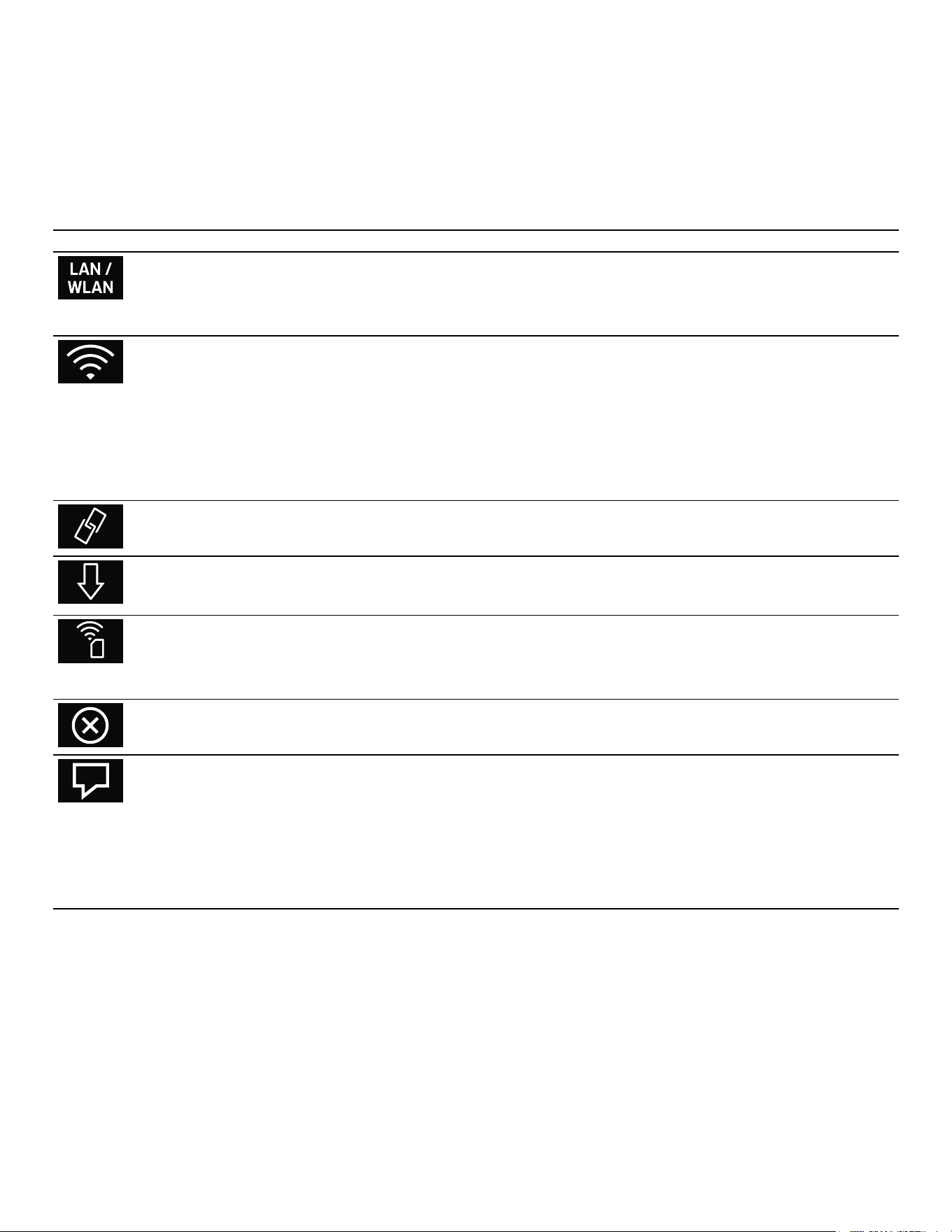
--------
Remote Diagnostics
If a fault occurs, Customer Support can use remote
diagnostics to access your appliance.
Contact Customer Support, make sure that your
appliance is connected to the Home Connect server and
check whether the remote diagnostics service is
available in your country.
Note: For more information and to check whether the
remote diagnostics service is available in your country,
please visit the Help & Support area of the Home
Connect website for your country: www.home-
connect.com
Basic setting Possible settings Explanation
Connection type LAN/Wi-Fi You can switch between connection types (LAN cable and
Wi-Fi).
Follow the instructions for setting up the relevant connec-
tion type.~ "Setting Up" on page 32
Connecting Connect/disconnect Switch the network connection on or off as required
(e.g. for holiday).
Network information is retained after the appliance is
switched off.After switching on the appliance, you will need
to wait for a few seconds while it reconnects to the net-
work.
In networked standby mode, the appliance requires
max. 2 W.
Connect to app Start the connection process between the app and the
appliance.
Software update As soon as a new software version is available, a message
appears in the display. You can install the new software in
the Home Connect menu Í.
Remote control Activate/deactivate Access the appliance's functions via the Home Connect
app.
When deactivated, only the appliance's operating statuses
will be displayed in the app.
Delete network set-
tings
All network settings can be deleted from the appliance at
any time.
Appliance informa-
tion
The display shows:
▯ MAC address COM module
▯ Serial number of the appliance
▯ Software version
You can view more information – such as the SSID (network
name), although this depends on the connection type – by
touching the arrow button.

35
Home Connect en-us
Information on Data Protection
When your appliance is connected to a WLAN network
that is connected to the Internet for the first time, your
appliance transmits the following categories of data to
the Home Connect server (initial registration):
▯ Unique appliance identification (consisting of
appliance codes as well as the MAC address of the
installed Wi-Fi communication module).
▯ Security certificate of the Wi-Fi communication
module (to ensure a secure data connection).
▯ The current software and hardware version of your
appliance.
▯ Status of any previous resetting to factory settings.
This initial registration prepares the Home Connect
functions for use and is only required when you want to
use these Home Connect functions for the first time.
Note: Ensure that the Home Connect functions can be
used only in conjunction with the Home Connect app.
Information on data protection can be accessed in the
Home Connect app.
Declaration of Conformity
Gaggenau Hausgeräte GmbH hereby declares that the
appliance with Home Connect functionality meets the
basic requirements and other relevant provisions of
Directive 2014/53/EU.
A detailed RED Declaration of Conformity can be found
online at www.gaggenau.com among the additional
documents on the product page for your appliance.
2.4GHz band: max. 100mW
5GHz band: max. 100mW
Wi-Fi
®
Module
FCC/IC Statements
Model: COM2
FCC ID: 2AHES-COM2
IC: 21152-COM2
The Home Connect module is a communication device
designed to provide communication between appliances
and smart devices.
This module is integrated at the factory, under direct
control of BSH Home Appliances Corporation, and is not
user servicable or upgradable. At least 7
7
/
8
inch (20 cm)
separation distance should be maintained from device to
user.
FCC COMPLIANCE STATEMENT
9 CAUTION
Changes or modifications not expressly approved
could void your authority to use this equipment.
This device complies with Part 15of the FCC Rules.
Operation to the following two conditions:
1. This device may not cause harmful interference, and
2. This device must accept any interference received,
including interference that may cause undesired
operation.
INDUSTRY CANADA STATEMENT
This device complies with Industry Canada license-
exempt RSS standard(s).
Operation is subject to the following two conditions:
1. This device may not cause interference, and
2. This device must accept any interference, including
interference that may cause undesired operation of
the device.
Operation in the band 5150-5250MHz is only for indoor
use to reduce the potential for harmful interference to co-
channel mobile satellite systems.
y
BE BG CZ DK DE EE IE EL
ES FR HR IT CY LV LT LU
HU MT NL AT PL PT RO SI
SK FI SE UK NO CH TR
5 GHz WLAN (Wi-Fi): For indoor use only
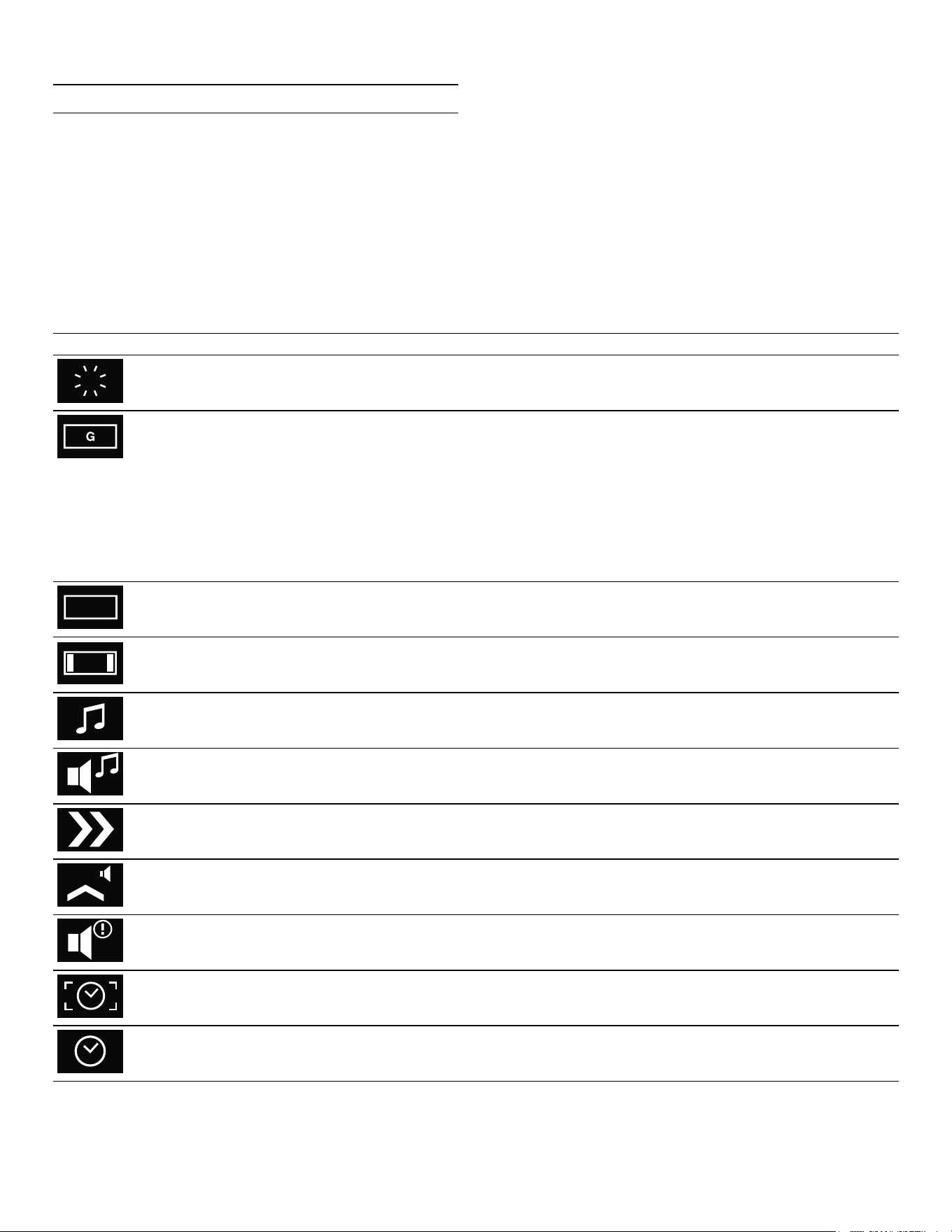
36
en-us Basic settings
Q
Basic settings
Basic settings
In the general settings, you can adapt your appliance
individually.
1. Set the program selector to S.
2. Select "General setting" with the rotary selector.
3. Touch the ™ symbol.
4. Set the required general setting with the rotary
selector.
5. Touch the % symbol.
6. Set the general setting with the rotary selector.
7. Save with ™ or cancel with ' and quit the current
general setting.
8. Turn the program selector to 0 to quit the general
setting menu.
Changes are saved.
Basic setting Possible settings Explanation
Brightness Stages 1, 2, 3, 4, 5*, 6, 7, 8 Setting display brightness
Standby screen On*/Off
- Clock
- Clock + GAGGENAU logo*
- Date
- Date + GAGGENAU logo
- Clock + date
- Clock + date + GAGGENAU logo
Appearance of the standby screen.
Off: no display. Use this setting to reduce the
standby consumption of your appliance.
On: several displays can be set, confirm "On"
with ™ and choose the desired display with
the rotary selector.
The selection is displayed.
Display screen Minimized*/Standard When ‘Minimized’ is set, only the most import-
ant details are displayed after a short time.
Touchpad color Gray*/White Select the color of symbols on the touchpads
Touchpad tone Tone 1*/Tone 2/Off Select the signal tone when touching a touch-
pad
Touchpad volume Levels 1, 2, 3, 4, 5*, 6, 7, 8 Sets the volume of the touchpad tone
Quick heat On*/off With quick heat, the required temperature is
reached particularly quickly.
Preheating signal On*/Off The signal tone sounds when the required tem-
perature is reached during preheating.
Signal volume Levels 1, 2, 3, 4, 5*, 6, 7, 8 Sets the volume of the signal tone
Time format AM/PM / 24h* Time display in 24or 12-hour format
Time Current time Setting the time
37
Basic settings en-us
Daylight savings Manual*/Automatic Automatic time changeover when changing
daylight savings time. If automatic: setting of
the month, day and week when the time is to
be changed. To be set separately for summer
and winter time.
Date format D.M.Y*
D/M/Y
M/D/Y
Setting the date format
Date Current date Setting the date. Switch between the year/
month/day with the C symbol.
Temperature unit °C* / °F Setting the temperature unit
Weight unit kg*/oz. Set the weight unit
Language German* / French [...] / English US
/ English
Selecting the language for the text display
Note:
The system will restart if the language is
changed. This process takes a few seconds.
The basic settings menu is then closed.
Factory settings Restore appliance to factory set-
tings
Confirm the question "Delete all individual set-
tings and restore appliance to factory set-
tings?" with ™ or cancel with '.
Note:
When restoring factory settings, the personal
recipes are also deleted.
After restoring the factory settings, you will
see the "Initial settings" menu.
Demo mode On/Off* For presentation purposes only. The appliance
does not heat in the demo mode, but all other
functions are available.
The "Off" setting must be activated for normal
operation. The setting is only possible in the
first three minutes after connecting the appli-
ance.
Sabbath mode Not available*/Available Available: Sabbath mode can be set.
Display estimated
cooking time with
core temperature
probe
On*/off On: Estimated cooking time is shown in the
display when the core temperature probe is
used.
Door lock Off*/On The door lock prevents unintentional opening
of the appliance door. When "On" is set, you
must touch the " symbol for several seconds
before the door opens.
Childproof lock Not available*/Available Available: The childproof lock can be acti-
vated. ~ "Childproof lock" on page 32
Q

38
en-us Basic settings
--------
Home network Ø Connection type
Ö Connection
Î Connect to app
Í Software update
· Remote control
‡ Delete network settings
* Appliance information
Settings for the connection to the home net-
work and the mobile devices.
Different setting options will be displayed
depending on the connection status.
* Factory settings

39
Cleaning and maintenance en-us
D
Cleaning and maintenance
Cleaning and maintenance
If taken care of and cleaned conscientiously, your
appliance will stay beautiful and intact for a long time.
Here we explain how to take care of and clean your
appliance correctly.
9 WARNING
Risk of electrical shock!
Moisture entering the appliance can cause an
electrical shock. Don't use a high-pressure cleaner
or steam cleaner.
9 WARNING
Risk of burns!
▯ To avoid risk of injury, never touch the inside
surfaces of the oven interior or heating
elements. These surfaces are extremely hot
after use. Always allow the appliance to cool
down before touching or cleaning the interior.
▯ Always turn off the interior light before cleaning
the oven to allow the bulbs to cool down. The
bulbs can become very hot when switched on.
Keep the light off while cleaning the oven.
▯ Keep children away.
9 WARNING
Risk of injury!
Scratched glass in the appliance door can burst.
Do not use any glass scrapers or strong or
abrasive cleaning agents.
9 WARNING
Do not clean the appliance while it is still hot.
Some cleaners produce noxious fumes when
applied to a hot surface. Wet clothes and sponges
can cause burns from steam.
Cleaning agents
Pay attention to the information in the table to ensure that
the various surfaces are not damaged by incorrect
cleaning agents.
Do not use any
▯ sharp or abrasive cleaning agents
▯ metal or glass scrapers to clean the glass on the
appliance door.
▯ metal or glass scrapers to clean the door seal.
▯ hard abrasive pads or cleaning sponges.
Thoroughly rinse out new sponge cloths before use.
Area Cleaning agent
Door panels Glass cleaner: Clean with a soft cloth
or a microfiber cloth.
Do not use a glass scraper.
Display Wipe down using a microfiber cloth or
a slightly damp cloth.
Do not wipe with a wet cloth.
Stainless steel Hot soapy water: Clean with a dish
cloth and dry with a soft cloth.
Remove flecks of lime scale, grease,
starch, and albumin (e.g., egg white)
immediately. Corrosion can form
under such flecks. Special stainless
steel cleaning agents are available
from customer service or from special-
ist retailers.
Aluminum Clean with a mild window cleaning
agent. Using a window cloth or a lint-
free microfiber cloth, wipe over the
surfaces lightly in a horizontal direc-
tion.
Cooking com-
partment
Hot soapy water: Clean with a dish
cloth and dry with a soft cloth.
Very dirty cook-
ing compart-
ment
Cleaning gel spray for ovens (order
number 00311860from customer ser-
vice or in the online shop).
Please note:
▯ Must not come into contact with
the door seal.
▯ Leave for no more than 12 hours.
▯ Do not use on hot surfaces.
▯ Rinse thoroughly with water.
▯ Observe the manufacturer's
instructions.
Glass cover for
the cooking
compartment
light
Hot soapy water: Clean with a dish
cloth.
Door seal
Do not remove.
Hot soapy water: Clean with a dish
cloth, do not scour.
Do not use a metal or glass scraper
for cleaning.
Core tempera-
ture sensor
Wipe with a damp cloth.
Do not place in the dishwasher.
Accessories Hot soapy water: Soak and clean with
a dish cloth or brush.
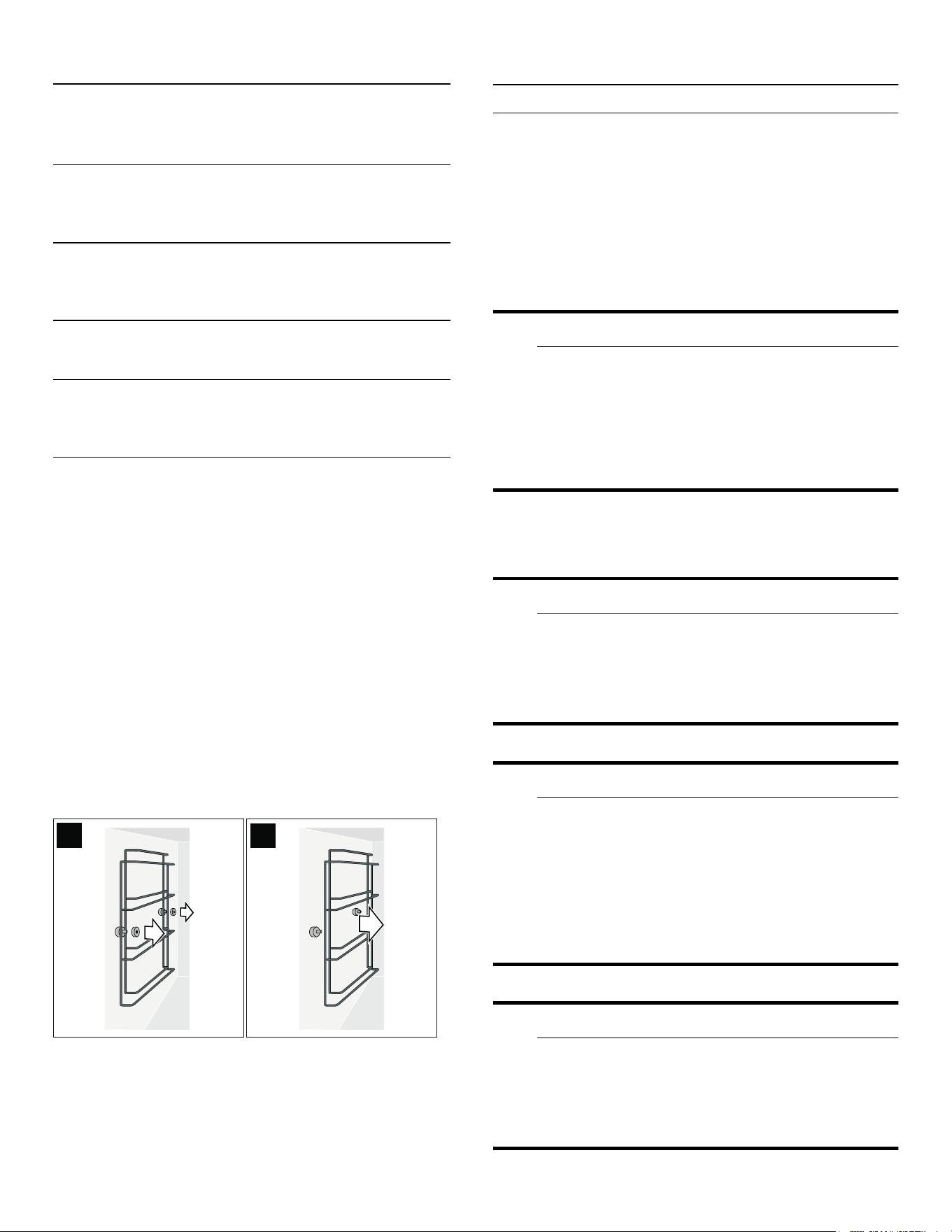
40
en-us Pyrolysis (self-cleaning)
Microfiber cloth
The honeycomb microfiber cloth is particularly suitable
for cleaning sensitive surfaces such as glass, glass
ceramic, stainless steel or aluminum (product no.
00460770, also available from our online online shop). It
removes liquid and greasy deposits in one go.
Removing the plug-in grid
The plug-in grids can be removed for cleaning.
Removing the plug-in grids
1. Put a dish towel in the cooking compartment to
protect the enamel from scratches.
2. Loosen the knurled screws (Figure A).
3. Remove the plug-in grids (Figure B).
You can clean the plug-in grids in the dishwasher.
Hooking in the plug-in grids
1. Attach the plug-in grids all around: longer side toward
the top. The right and left grids are identical.
2. Tighten the knurled screws.
.
Pyrolysis (self-cleaning)
Pyrolysis (self-cleaning)
During self-clean (pyrolysis), the oven heats up to 905°F
(485°C). Thus, remainders from roasting, grilling or
baking are burnt up and all you have to do is wipe the ash
out of the interior.
Self-clean (pyrolysis) takes three hours. You can move the
self-clean switch-off time (for example, if you would like it
to run at night).
9 WARNING
During the elimination of soil during self-cleaning,
small amounts of Carbon Monoxide can be created
and the fiberglass insulation could give off very
small amounts of formaldehyde during the first
several cleaning cycles. To minimize exposure to
these substances, provide good ventilation with an
open window, or use a ventilation fan or hood.
Wipe out excessive spillage before self-cleaning the
oven.
9 WARNING
Risk of fire!
The appliance becomes very hot during pyrolytic
self-cleaning. Never hang flammable items such as
dishcloths on the door handle. Keep the front of
the appliance clear. Keep children away.
9 WARNING
Severe health risk!
The appliance becomes very hot during pyrolytic
self-cleaning. The non-stick coatings on trays and
forms are destroyed and toxic gases are produced.
Never leave trays and forms with non-stick coatings
in the oven during pyrolytic self-cleaning. Only
leave enameled accessories in oven during self-
clean cycle.
9 WARNING
Risk of burns!
The oven interior becomes very hot during pyrolytic
cleaning. Never open the appliance door or the
latching hook by hand. Allow the appliance to cool
down. Keep children away.
Plug-in grids Dishwasher, see section
~ "Removing the plug-in grid"
on page 40
Rotary spit
(not available
with all oven
models)
Hot soapy water: Clean with a dish
cloth or brush.
Do not soak or clean the rotary spit
drive in the dishwasher.
Telescopic
shelf
(Optional
accessory)
Hot soapy water: Clean with a dish
cloth or brush.
Do not soak or clean in the dish-
washer.
Baking stone
(Optional
accessory)
Clean burnt-on residues with a brush.
Never clean the baking stone when it
is wet.
Roasting dish
(Optional
accessory)
Hot soapy water: Soak and clean with
a dish cloth or brush.
Do not clean the roasting dish in the
dishwasher.
Area Cleaning agent
$
%

41
Pyrolysis (self-cleaning) en-us
9 WARNING
Risk of burns!
; The appliance will become very hot on the
outside during the cleaning function. Never touch
the appliance door. Allow the appliance to cool
down. Keep children away from the appliance.
Do not clean parts or accessories in the self-clean oven.
Preparing the pyrolytic self-cleaning
feature
9 CAUTION
Risk of fire! Loose food remnants, fat and meat
juices may catch fire. Wipe the cooking
compartment with a damp cloth.
▯ Remove the worst soiling and food residues from the
oven.
▯ Clean the door seals, the inside of the door and the
glass pane by hand as these parts are not cleaned
during the pyrolytic self-cleaning cycle.
▯ Remove any loose parts from inside the cooking
compartment. The plug-in grids are pyrolysis-proof.
Make sure that nothing is left inside the cooking
compartment.
▯ Bush for the additional heating element at the back of
the cooking compartment: Make sure that the cover is
in the bush.
▯ Close the oven door.
Starting self-clean (pyrolysis)
1. Set the program selector to S.
2. The œ symbol is displayed. Confirm with ™.
3. The turn-off time for when the self-clean (pyrolysis)
will be completed is displayed. If preferred, the turn-
off time can be changed with the rotary selector.
Confirm with ™.
4. Remove all accessories and coarse soiling from the
oven interior. Confirm with ™.
5. Start with I. The cleaning time counts down on the
screen. If the turn-off time was changed, the time until
the self-clean (pyrolysis) starts counts down on the
screen. The oven light remains off.
After 3 hours, a signal sounds. A message will appear on
the screen. Once the appliance is cool, wipe out the
remaining ash from the oven with a damp cloth.
Note: The oven door is locked for your safety. After
cooling down, the door is unlocked as soon as the
temperature has dropped below 390 °F (200 °C).
Depending on the type of soiling, white deposits may
remain on the enamel surfaces. These deposits are
residue from the food and are harmless. They do not
affect how the appliance works. If required, you can
remove these residues using lemon juice and a soft cloth.
Cleaning the Accessories with the
Pyrolytic Self-cleaning Feature
Gaggenau baking trays and broiler pans are coated with
pyrolysis-resistant enamel. For optimal results when
cleaning the oven, we recommend removing all
accessories from the oven before initiating the pyrolytic
self-cleaning feature. This is the only way to achieve even
heat distribution.
If you wish to remove burnt-on residue from your baking
tray or broiler pan with the pyrolytic self-cleaning cycle,
please observe the following instructions:
Notes
▯ Remove the worst soiling, meat juices, and food
residues before initiating the pyrolytic self-cleaning
cycle. Food residues, grease, and meat juices may
catch fire during the pyrolytic self-cleaning cycle.
▯ Slide only one baking tray or broiler pan onto the
lowest rack in the oven.
▯ Push the baking tray or broiler pan in as far as it will
go.
▯ Wire rack, rotisserie spit, cast iron roaster, baking
stone, core temperature sensor, or other accessories
must not be cleaned in the pyrolytic self-cleaning
cycle.
▯ Broiler pans with stainless steel bushings can
discolor during the pyrolytic self-cleaning cycle. This
does not affect its usability.
3\URO\LV
_
)

42
en-us Troubleshooting
3
Troubleshooting
Troubleshooting
You can often easily eliminate problems that may occur
on your own. Before calling Customer Service, take into
account the following information.
9 WARNING
Risk of electric shock!
Improper repairs are dangerous. Only an
authorized servicer may perform repairs and may
replace damaged plug and connections. Remove
the power plug or turn off the circuit breaker or
fuse in the fuse box if the appliance is damaged or
not working. Call Customer Service.
--------
Power cut
Your appliance can bridge a power cut of a few seconds.
Operation continues.
If the power cut was for a longer period and the
appliance was in operation, a message appears in the
display. Operation is interrupted.
Set the function selector to 0, then the appliance can be
operated again as usual.
Demo mode
The demo mode is activated if the ° symbol appears in
the display. The appliance does not heat up.
Briefly disconnect the appliance from the mains (switch
off the domestic fuse or the circuit-breaker in the fuse
box). Then deactivate the demo mode within 3minutes in
the factory setting.~ "Basic settings" on page 36
Disruption Possible cause Solution
Appliance not working, no display Plug not inserted Connect the appliance to the electricity
mains
Power failure Check whether other kitchen appliances
are working
Fuse defective Check in the fuse box whether the fuse
for the appliance is in working order
Operating error Switch off the fuse for the appliance in
the fuse box and switch it on again after
about 10seconds
Appliance cannot be started Appliance door is not quite closed Close appliance door
Appliance is not working, display is
not responding. 0 appears in the
display.
Child lock activated Deactivate child lock (see section enti-
tled ‘Child lock’)
Appliance switches off automati-
cally
Safety deactivation: the appliance
has not been operated for longer
than 12hours
Confirm the message with ™, switch off
the appliance and set it again.
Appliance does not heat up, °
appears in the display
Appliance is in the demo mode Deactivate demo mode in the basic set-
tings
Error message "Exxx" If an error message appears, turn the
program selection to 0; if the display
goes off, it was a one-time problem. If the
problem occurs repeatedly or if the dis-
play stops, please contact after-sales
service and inform them of the error
code.

43
Troubleshooting en-us
Replacing the oven lamp
You can replace the oven lamps. You can obtain
replacement lamps after-sales service or from trade
dealers. Use the same type of halogen bulbs only.
▯ Top lamp:
60 W/230 V/G9
▯ Side lamp: 10 W/12 V/G4
9 WARNING
Risk of electric shock!
When you replace the oven interior lamp, the
contacts of the lamp holder are live. Before
replacing the lamp, remove the power plug or
deactivate the circuit breaker or fuse in the fuse
box.
9 WARNING
Risk of burns!
Lamps become very hot when switched on. There
is still a risk of burning your skin for some time
after they have been switched off. Allow lamps to
cool down before replacing them.
Note: Always use a dry cloth to remove the halogen lamp
from its packaging. This lengthens the lamp's useful life.
Replacing the top oven lamp
1. Undo the screw on the lamp cover. The lamp cover
folds down.
2. Take out the halogen lamp. Insert the new halogen
lamp.
3. Fold up and screw down the lamp cover.
4. Switch on the fuse in the fuse box again.
Replacing the side oven lamp
1. Place a dishcloth in the oven to avid damage.
2. Undo the knurled screws on the slide-in rack. Remove
the slide-in rack.
3. Press the top retaining spring to the side. Remove the
glass cover.
4. Take out the halogen lamp. Insert the new halogen
lamp.
5. Insert the glass cover at the bottom into the retaining
spring and latch it at the top. The beveled side of the
glass cover must point toward the oven.
6. Remove the dishcloth from the oven.
7. Switch on the fuse in the fuse box again.
Replacing the glass cover
The glass cover in the oven must be replaced if it is
damaged. You can obtain covers from after-sales service.
Always specify the E number and the FD number of your
appliance.
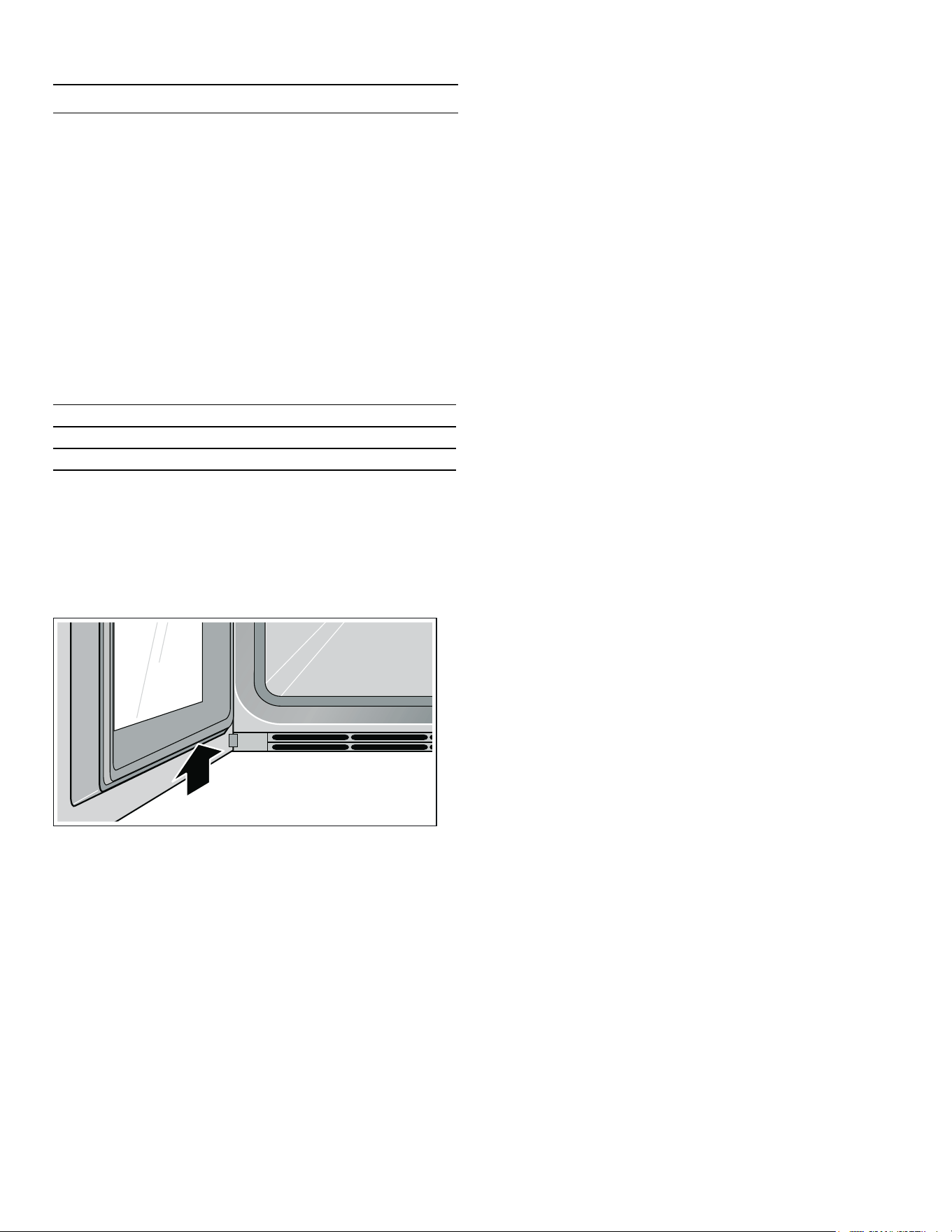
44
en-us Customer service
4
Customer service
Customer service
If your appliance needs repairs, our customer service is
there for you. We work hard to help solve problems
quickly and without unnecessary service calls, getting
your appliance back up and running correctly in the least
amount of time possible.
When you call, please indicate the product number
(E-Nr.) and serial number (FD-Nr.) so that we can support
you in a qualified manner. You will find the type plate with
these numbers on the bottom of the appliance. To avoid
having to search for a long time when you need it, you
can enter your appliance data and the customer support
telephone number here.
Please read the use and care instructions provided with
your appliance. Failure to do so may result in an error in
using the appliance. This could result in a service call
that instead of fixing a mechanical issue is only needed
for customer education. Such calls are not covered by the
appliance warranty.
Please find the contact data of all countries in the
enclosed customer service list.
To book a service visit and product advice
E-Nr. FD-Nr.
Customer Service O
USA 8774424436
toll-free
CANADA 8774424436
toll-free

45
Tables and tips en-us
J
Tables and tips
Tables and tips
Notes
▯ Always preheat the appliance.
This will produce the best cooking results. The
cooking times specified refer to a preheated
appliance.
▯ The values specified are intended as a guide. The
actual cooking times depend on the quality and
temperature of the food before cooking and the
weight and thickness of the food to be cooked.
▯ The tables list temperature and/or time ranges. Try the
lowest value to start. You can always choose a longer
time next time if need be.
A lower temperature results in more even browning. If
necessary, set a higher temperature.
▯ The specifications refer to average quantities for four
people. If you would like to prepare more, you should
calculate a longer cooking time.
▯ Use the cookware specified. If you use other
cookware, cooking times may be longer or shorter.
▯ You may use any heat-resistant cookware. Place the
cookware in the center of the wire rack. For large
roasts, you can also use the grill or glass tray.
▯ Do not place too many items close together on the
wire racks or baking trays. This guarantees optimal
heat circulation.
▯ Open the door of the preheated oven for a short time
only when placing food inside the cooking
compartment.
▯ The details for the level refer to the slide-in level from
below for appliances with 4slide-in levels. The values
in brackets refer to appliances with 5slide-in levels.
▯ When removing glass cookware from the oven, set it
down on a dry hot pad, never on a cold or wet surface.
Otherwise, the glass may crack.
▯ Some operating modes are not available with all oven
models or only with special accessories.
▯ Eco hot air:
Energy-saving hot air mode for cakes, meats,
casseroles, and gratins. Residual heat is optimally
used. Convenience functions remain switched off (e.g.
the interior lighting). The cooking compartment
temperature can only be displayed while the appliance
is heating up. Do not preheat the oven.
Make sure that the cooking compartment is cold and
that there is nothing already in there when you place
the food inside. Then start the specified cooking time.
Always keep the appliance door closed when cooking.
This prevents heat loss.
▯ Full surface grill and full surface grill + circulated air:
In these operating modes, there may be a temperature
difference between the temperature you have set and
the actual temperature inside the oven. This is
because grilling and browning are fast cooking
processes that require high temperatures.
Consequently, for browning and roasting, a higher
temperature than is actually needed on the surface of
the food is selected.

46
en-us Tables and tips
Vegetables
▯ Vegetables from the oven are a good alternative to
vegetables from the pan. The flavors are concentrated
and the roasting aromas make them very aromatic.
Furthermore, very little fat is required for preparation.
▯ Wash the vegetables and mix them in a bowl with a
little oil. Place in a heat-resistant pan or distribute
evenly in the glass/grill tray.
▯ During cooking, stir at least once. After cooking,
adjust the spices and flavor to taste with fresh herbs.
▯ Vegetables are suitable as warm or cold appetizers or
vegetarian main dishes, or also as side dishes to be
served with fish and meat.
▯ For small portions (for 2-3people), use an ovenproof
dish and place it on the wire rack. Otherwise the food
will burn or dry out in the glass/wire tray.
▯ Always follow the manufacturer's instructions for pre-
cooked and frozen products.
Dish Accessories Level Temperature
in °F (°C)
Type of
heating
Cooking
time
in min.
Comments
Vegetable skew-
ers
Wire rack +
Grill tray
3(4) 430(220) Q 24* Cut wooden skewers short or soak in
water overnight so they do not burn.
Recipe tip: Peppers, onions, corn (pre-
cooked), cherry tomatoes, zucchini
Green asparagus,
grilled
Glass/grill
tray
3(4) 570(300) Q 6–10* Recipe tip: Season with onions, oil, vin-
egar, salt, and pepper.
Root vegetables Glass/grill
tray
3(4) 390(200) H 30* Recipe tip: Season carrots, celery,
rutabagas and red beets with oil, salt,
and pepper.
3(4) 480(250) Q 15–20*
Pumpkin pieces Glass/grill
tray
3(4) 390(200) H 30* Recipe tip: Season with oil, garlic, gin-
ger, cumin, salt, and pepper.
Antipasti Glass/grill
tray
3(4) 390(200) H 30* Recipe tip: Drizzle balsamic vinegar
over the vegetables while they are still
hot, and season them.
3(4) 480(250) Q 15–20*
Escalivada
(Mediterranean
oven-roasted veg-
etables)
Ovenproof
dish
4(5) 480(250) Q 15* Recipe tip: Aubergines, onions, toma-
toes, peppers, oil. Delicious hot or
cold.
Ratatouille Glass/grill
tray
3(4) 390(200) N 30–40* Recipe tip: Sprinkle with parmesan just
before serving.
Oven-roasted
tomatoes
Ovenproof
dish
2(3) 250(120) H 60 Recipe tip: Place cherry tomatoes or
sliced tomatoes, rosemary, and garlic
into the baking dish and drizzle with oil
and a little honey.
If you wish, you can blanch the toma-
toes and peel them beforehand.
Chicory Ovenproof
dish
2(3) 355(180) H 25–30 Recipe tip: Halve, season, wrap in
boiled ham, pour cream or béchamel
sauce over the top and sprinkle with
cheese.
2(3) 375(190) I 45–50 No need to preheat; do not open appli-
ance door.
Stuffed pep-
pers,Stuffed pep-
pers,
vegetarian
Ovenproof
dish/roast-
ing dish
2(3) 390(200) N 30–34 Recipe tip: Stuff with boiled rice, soft
wheat or lentils and onions, cheese,
herbs and seasoning/spices.
* Turn the food halfway through the cooking time.

47
Tables and tips en-us
Side dishes and dishes
▯ The best side dishes from the oven are based on
potatoes, for example potatoes au gratin. However,
other outstanding side dishes can also be prepared in
the oven, which normally are prepared in the pan (e.g.
potato pancakes or fried potatoes). The advantages of
this tye of preparation: you can prepare larger
quantities at once, the cooking smells are distributed
less in the room, and you can prepare the dishes with
less fat.
▯ Another versatile side dish from the oven is cheese.
Cheese is an especially good addition to vegetarian
dishes, or you can prepare the cheese as an appetizer
or finger food.
▯ Dishes that are suited for preparation in the oven are
especially dishes that are gratinated, such as
casseroles and gratins. Suitable also are dishes with a
dough base, e.g. pizza or tarte flambée, and egg
dishes such as tortillas.
▯ For small portions (for 2-3people), use an ovenproof
dish and place it on the wire rack. Otherwise the food
will burn or dry out in the glass/wire tray.
▯ Always follow the manufacturer's instructions for pre-
cooked and frozen products.
Stuffed cour-
gettes,
vegetarian
Glass/grill
tray
2(3) 355(180) H 25 Recipe tip: Stuff with grated carrot,
spring onion, goats' cheese, garlic,
thyme, salt and pepper and sprinkle
with parmesan.
Vegetable bake Ovenproof
dish
2(3) 390(200) N 20–30 Pre-cook/blanch vegetables and other
ingredients.
Veggie burgers,
frozen
Baking tray
+ grease-
proof paper
2(3) 430(220) H 12–15*
Dish Accessories Level Temperature
in °F (°C)
Type of
heating
Cooking
time
in min.
Comments
* Turn the food halfway through the cooking time.
Dish Accessories Level Temperature
in °F (°C)
Type of
heating
Cooking
time
in min.
Comments
Side dishes
Potatoes on a
bed of coarse salt
Ovenproof
dish
2(3) 390(200) N 40–60* Fill the ovenproof dish with 2 cm of sea
salt. Place small potatoes in the dish
with their skins on and brush them with
olive oil.
Potato wedges Baking tray
+
Grease-
proof paper
2(3) 390(200) H 15* Recipe tip: Cut the potatoes into
wedges and season them with olive oil,
paprika and salt.
Chips,
fresh
Baking tray
+
Grease-
proof paper
3(4) 390(200) H 15–20* Recipe tip: Cover with a little oil; sea-
son with salt and paprika or curry pow-
der after cooking.
Chips,
frozen
Baking tray
+
Grease-
proof paper
3(4) 430(220) H 14*
Potato gratin Ovenproof
dish
2(3) 355(180) H 35
2(3) 375(190) I 55–60 No need to preheat; do not open appli-
ance door.
* Turn the food halfway through the cooking time.

48
en-us Tables and tips
Potato pancakes Baking tray 2(3) 345(175) H 20–30* Oil the baking tray liberally, squeeze
out the excess liquid from the potato
pancake mixture and brush with a little
oil. Turn once.
2(3) 390(200) N 20–30*
Roasted potatoes Grill tray 2(3) 355(180) H 30–45* Low-fat preparation. Distribute evenly
on the grill tray, mix several times.
Goats' cheese in a
bacon blanket
Glass tray/
baking tray
2(3) 430(220) H 8–10 Fresh goat's cheese or goat camem-
bert works well.
3(4) 430(220) Q 8–10
Goat's cheese
with honey
Glass tray/
baking tray
2(3) 390(200) H 8 Recipe tip: Drizzle lavender honey over
the goat's cheese or goat camembert
and sprinkle with pine nuts.
3(4) 390(200) Q 8
Baked camem-
bert,
breaded, fresh
Baking tray
+ grease-
proof paper
2(3) 355(180) H 15–20 Bake until the breadcrumb coating
rises in the centre.
Baked camem-
bert,
breaded, frozen
Baking tray
+ grease-
proof paper
2(3) 355(180) H 15–20 Bake until the breadcrumb coating
rises in the centre.
2(3) 390(200) N 15
Mozzarella sticks,
frozen
Baking tray
+ grease-
proof paper
2(3) 355(180) H 10
Feta Baking tray 2(3) 480(250) Z 12 Recipe tip: Place in a baking dish with
oil, tomatoes, onions, garlic and rose-
mary and season with salt and pepper.
Oven-baked
cheese, fresh
Baking tray 2(3) 355(180) H 20 After 10minutes, cut a cross into the
soft cheese and break open. If possi-
ble, the baking dish should be not
much larger than the cheese so that
the cheese does not run.
Dishes
Tortilla Ovenproof
dish
2(3) 320(160) H 40 Recipe tip: With paprika, olives, onion,
Serrano ham and Manchego cheese.
Farmers' omelette Ovenproof
dish
2(3) 320(160) H 40 Recipe tip: With green and white
asparagus; also add gravlax.
Frittata Ovenproof
dish
2(3) 375(190) N 45–50 Recipe tip: with spinach, onions, and
shrimp.
Enchiladas,
grilled
Glass dish/
grill tray
2(3) 390(200) N 15–20
Lasagne Ovenproof
dish
2(3) 345(175) H 35 Recipe tip: classic or vegetarian with
grilled vegetables and Buffalo mozza-
rella.
2(3) 355–375
(180–190)
I 55–60 No need to preheat; do not open appli-
ance door.
Macaroni cheese Ovenproof
dish
2(3) 355/430
(180/220)
H 10–20 For a cheesy crust, increase the tem-
perature to 220 °C after 10min. and
let brown for 10min.
Dish Accessories Level Temperature
in °F (°C)
Type of
heating
Cooking
time
in min.
Comments
* Turn the food halfway through the cooking time.

49
Tables and tips en-us
Cheese spätzle
(Swabian noodle
dish)
Ovenproof
dish
2(3) 355/430
(180/220)
H 30 Gradually layer the freshly-cooked
spätzle in the baking dish, sprinkling
each layer with cheese.
Finally, top with cheese and roasted
onions and increase the temperature
to 220°C for 5min.
Spring rolls,
frozen
Baking tray
+
Grease-
proof paper
2(3) 435(225) H 18–20*
Mini spring rolls,
frozen
Baking tray
+
Grease-
proof paper
2(3) 435(225) H 10*
Pizza, fresh Baking tray 2(3) 445–
480(230–
250)
N 10–15 Lightly oil the baking tray.
Pizza, pre-baked Baking tray
+
Grease-
proof paper
2(3) 445(230) H 6–8
2(3) 445(230) N 6–8
Pizza, frozen Wire rack 2(3) 390(200) H 11–13
2(3) 445(230) N 11–13
American pizza
(deep pan),
frozen
Baking tray 2(3) 390(200) N 20–24 Do not preheat.
Tarte flambée,
fresh
Baking tray 2(3) 480(250) N 8–10 Recipe tip: Traditional or with goat's
cheese, Parma ham, figs and spring
onions.
Tarte flambée,
pre-baked
Baking tray
+
Grease-
proof paper
2(3) 250 H 7
Tarte flambée,
frozen
Wire rack 2(3) 390(200) H 10–12
2(3) 445(230) N 8–10
Quiche Tart tin or
dish
2(3) 390(200) N 20+ 20 Pre-bake crust for 20min., pour mix-
ture into the crust, and bake another
20min.
Onion tart Baking tray 2(3) 390(200) N 30–40
Dish Accessories Level Temperature
in °F (°C)
Type of
heating
Cooking
time
in min.
Comments
* Turn the food halfway through the cooking time.

50
en-us Tables and tips
Fish
▯ Fish should (for hygienic reasons) have a core
temperature of at least 144- 158°F (62- 70 °C) after
cooking. This is also the ideal cooking point.
▯ Only salt the fish after cooking. Thus the natural
aroma is retained and less water is removed from the
fish.
▯ Oil the wire rack and baking tray a little bit, then the
fish will not stick.
▯ For fillets with skin: if you place the fish skin-side up,
the structure and aroma will be retained better.
▯ Cut wooden skewers short or soak in water overnight
before skewering the ingredients so they do not burn.
▯ Always follow the manufacturer's instructions for pre-
cooked and frozen products.
Dish Accessories Level Temperature
in °F (°C)
Type of
heating
Cooking
time
in min.
Comments
Shrimp skewers,
fresh
Wire rack +
Grill tray
3(4) 355(180) Q 10*
Shrimp skewers,
frozen
Wire rack +
Grill tray
3(4) 355(180) Q 12*
Fish kebabs Wire rack +
Grill tray
3(4) 390(200) Q 12* Use firm types of fish, e.g. salmon, coley,
ocean perch and cod.
Trout, whole Baking tray 3(4) 380–
430(200–
220)
Q 16* Recipe tip: Stuff with lemon, garlic, and
parsley.
Sea bream, whole Wire rack +
Grill tray
3(4) 380–
430(200–
220)
Q 20–25* Recipe tip: Stuff with lemon, garlic and
thyme, or use mint for a summery touch.
Make a diagonal incision into the skin of
the sea bream.
Baking tray 3(4) 345(175) H 20–25*
Salmon steak Wire rack +
Grill tray
3(4) 480(250) Z 10–12 Recipe tip: Marinate in a mixture of lime,
salt, pepper, and garlic.
Baking tray 2(3) 390(200) H 10–12
Tuna steak Baking tray 3(4) 450(230) Z 8–10 Recipe tip: Season Asian-style with soy
sauce, sesame oil, ginger, honey, garlic,
chili, and coriander seeds.
Fish fingers,
frozen
Baking tray
+ grease-
proof paper
2(3) 430
(220) H 15–17*
Squid rings,
frozen
Baking tray
+ grease-
proof paper
2(3) 430(220) N 8–12
* Turn the food halfway through the cooking time.

51
Tables and tips en-us
Meat
▯ Use the core temperature sensor so that you can
monitor the core temperature more easily. Information
and optimum target temperatures can be found in the
section entitled ~ "Core temperature probe"
on page 26.
▯ Leaving meat to rest: Let meat rest for a further 10-
15minutes after cooking. This gives the meat a
chance to "relax". The circulation of the meat juice
slows down and there is less loss of juice when
cutting into the meat. Large pieces of meat, such as
roasts, can rest in the oven. Smaller ones, e.g. steaks,
should rest outside the oven wrapped in aluminum
foil.
▯ For small portions (2- 3people), use a heat-resistant
pan so that the food does not burn or dry out.
▯ Use the grill tray or the roasting dish for a large roast
and for types of preparation that generate a lot of
liquid for roasting.
▯ For best results, leave meat to marinate overnight and
remove it before roasting or grilling, e.g. using the
back of a knife or a spoon. Otherwise, the herbs and
spices will burn.
▯ If the roast gets too dark and the crust is burned in
places, reduce the temperature the next time and
check the rack level.
▯ If the roast is cooked but the sauce is burned on, next
time use a smaller roasting dish and add more liquid.
If the sauce is too watery, next time use a larger
roasting dish and add less liquid.
Dish Accessories Level Temperature
in °F (°C)
Type of
heating
Cooking
time
in min.
Observations
Beef
Roast beef
(3.3 lb /1.5kg)
Glass/grill
tray
2(3) 355(180) H 90- 120*
Rump steak,
medium rare
(1.1 lb /500 g)
Glass/grill
tray
2(3) 390(200) H 30 Core temperature 150° F (65 °C)
2(3) 390(200) I 45- 50 Core temperature 150° F (65 °C).
No need to preheat; do not open
appliance door.
Roast beef/sirloin
(2.2 lb /1kg) - rare
Glass/grill
tray
2(3) 445/ 355
(230/ 180)
H 25- 35** Recipe tip: tastes very good with
Béarnaise sauce or sliced cold
with remoulade and roasted pota-
toes.
- medium Glass/grill
tray
2(3) 445/ 355
(230/ 180)
H 35- 45**
- well-done Glass/grill
tray
2(3) 445/ 355
(230/ 180)
H 50- 60**
Pork
Fillet of pork,
whole
Glass/grill
tray
2(3) 445/ 355
(230/ 180)
H 20- 25** Recipe tip: marinate with oil, gar-
lic, and parsley.
Fillet of pork
(0.6lb /250 g)
Glass/grill
tray
2(3) 355(180) H 30 Core temperature 160° F (70 °C).
2(3) 355(180) I 40- 45 Core temperature 160° F (70 °C).
No need to preheat; do not open
appliance door.
Pork medallions Glass/grill
tray
2(3) 355(180) H 12- 15* Recipe tip: shortly before remov-
ing, put a piece of butter and a
rosemary sprig in the glass/grill
tray and continue cooking in the
oven.
Pork roast - joint
(2.2 lb /1kg)
Glass/grill
tray
2(3) 445/ 355
(230/ 180)
H 45- 50**
* First cook thoroughly in a pan/roasting dish on the burner.
** Brown the meat at high temperature, after 15- 20min. switch back to a lower temperature.
*** Cook meat at a low temperature, set the temperature higher for the last 15- 20min.

52
en-us Tables and tips
Pork roast - neck
(3.3 lb /1.5kg)
Glass/grill
tray
2(3) 445/ 355
(230/ 180)
H 85- 95**
2(3) 445/ 355
(230/ 180)
Z 70- 80**
Pork roast with
crust
(3.3 lb /1.5kg)
Wire rack +
Grill tray
2(3) 355/ 390
(180/ 200)
Z 60- 70***
Pork knuckles Wire rack +
Grill tray
2(3) 300/ 390
(150/ 200)
Z 40- 45*** Cut roughly into skin so that it
gets crusty.
Smoke-cured pork
(2.2 lb /1kg)
Glass/grill
tray
2(3) 355/ 320
(180/ 160)
H 50- 60**
Rolled pork Glass/grill
tray
2(3) 445/ 355
(230/ 180)
H 65- 70***
Wire rack +
Grill tray
2(3) 445/ 355
(230/ 180)
Z 75- 80***
Veal
Veal roast
(3.3 lb /1.5kg)
Glass/grill
tray, roasting
dish
2(3) 355(180) H 50- 60*
Veal knuckle Glass/grill
tray, roasting
dish
2(3) 300/ 355
(150/ 180)
Z 50- 60***
Veal loin Glass/grill
tray, roasting
dish
2(3) 320- 340
(160- 170)
H 20
Stuffed breast of
veal
Glass/grill
tray, roasting
dish
2(3) 250- 265
(120- 130)
H 120
Game
Wild boar roast Glass/grill
tray, roasting
dish
2(3) 340(170) H 60- 90* Recipe tip: marinate overnight in
oil, garlic, mustard, and herbes de
Provence.
Leg of venison Glass/grill
tray, roasting
dish
2(3) 340- 355
(170- 180)
H 60- 80
Saddle of venison Glass/grill
tray, roasting
dish
2(3) 330- 345
(165- 175)
H 20
2(3) 330- 345
(165- 175)
N 20- 25
Saddle of hare or
rabbit
Glass/grill
tray, roasting
dish
2(3) 355(180) H 15- 25* Recipe tip: marinate in garlic,
rosemary, olive oil, and high-
qualitty balsamic vinegar.
Dish Accessories Level Temperature
in °F (°C)
Type of
heating
Cooking
time
in min.
Observations
* First cook thoroughly in a pan/roasting dish on the burner.
** Brown the meat at high temperature, after 15- 20min. switch back to a lower temperature.
*** Cook meat at a low temperature, set the temperature higher for the last 15- 20min.

53
Tables and tips en-us
Leg of lamb
- medium
Glass/grill
tray, roasting
dish
2(3) 355- 375
(180- 190)
H 100* Recipe tip: marinate overnight in
olive oil, garlic, rosemary, and
lemon peel.
- well-done Glass/grill
tray, roasting
dish
2(3) 355- 375
(180- 190)
H 120*
Knuckle of lamb Glass/grill
tray, roasting
dish
2(3) 355- 390
(180- 200)
H 35- 45
Miscellaneous
Meatballs
(2.8 oz /80g
each)
Baking tray +
greaseproof
paper
2(3) 390(200) H 30- 35 The flatter the meatballs are, the
quicker they will cook. Well-suited
for large quantities.
Meatballs, cooked
(2.8 oz /80g
each)
Baking tray +
greaseproof
paper
2(3) 390(200) H 20 Well-browned and yet juicy meat-
balls: first cook in the pan and
then put in the oven.
Meatballs
(0.8oz /25g
each)
Baking tray +
Greaseproof
paper
2(3) 390(200) H 25- 30 Recipe tip: very good for further
combinations, e.g. meatballs with
tomato sauce, Swedish meatballs,
Königsberger meatballs.
Meatballs, cooked
(0.8oz /25g
each)
Baking tray +
Greaseproof
paper
2(3) 390(200) H 15 Recipe tip: put meatballs of lamb
or rabbit on a skewer and serve
with minted yogurt or fig mustard.
Head cheese,
fresh
(1.5 lb /700g)
Wire rack +
Grill tray
2(3) 320(160) H 60 Use core temperature sensor
(core temperature 153°F (67°C).
Bacon strips, thin Baking tray +
Greaseproof
paper
3(4) 355(180) H 8- 10 After taking out, let drip on a
paper towel.
Bacon strips, thick Baking tray +
Greaseproof
paper
3(4) 375(190) H 8- 12
Stuffed peppers
with ground meat
Ovenproof
dish/roast-
ing dish
2(3) 345(175) H 55- 60 Recipe tip: fill with ground meat
and cook in tomato sauce.
Dish Accessories Level Temperature
in °F (°C)
Type of
heating
Cooking
time
in min.
Observations
* First cook thoroughly in a pan/roasting dish on the burner.
** Brown the meat at high temperature, after 15- 20min. switch back to a lower temperature.
*** Cook meat at a low temperature, set the temperature higher for the last 15- 20min.

54
en-us Tables and tips
Poultry
▯ For better results, use the core temperature sensor.
Do not place it in the middle (hollow space), but rather
between the belly and upper thigh. For notes and
optimal target temperatures, see chapter ~ "Core
temperature probe" on page 26
▯ Poultry will turn out particularly crispy and brown if
you baste it towards the end of the roasting time with
butter, salted water, drippings or orange juice.
▯ When cooking duck or goose, pierce the skin on the
underside of the wings to allow the fat to run out.
▯ Use a roasting dish or another heat-resistant pan for
dishes that generate a lot of liquid for roasting. The
same applies if a lot of fat can run out of the food, e.g.
with roast goose.
Dish Accessories Level Temperature
in °F (°C)
Type of
heating
Cooking
time
in min.
Observations
Duck, whole
(3.3- 4.4lb
/1.5- 2kg)
Wire rack +
Grill tray/
roasting dish
2(3) 320/ 355
(160/ 180)
N 75* Recipe tip: fill with oranges, apples
or dried fruit.
Duck breast Roasting
dish/oven-
proof dish
2(3) 320 (160) H 25- 35 Tear skin roughly.
Goose, whole
(11lb /5kg)
Wire rack +
Grill tray/
roasting dish
2(3) 320/ 375
(160/ 190)
H 110- 130* Recipe tip: fill with apples, onions,
and marjoram and pierce.
2(3) 320/ 375
(160/ 190)
N 110- 130*
Turkey hen, whole Wire rack +
Grill tray/
roasting dish
2(3) 320/ 375
(160/ 190)
H 120- 180*
2(3) 320/ 375
(160/ 190)
N 120- 180*
Chicken, whole Wire rack +
Grill tray
2(3) 375(190) H 70- 80 Preheat
2(3) 375(190) Z 70- 80
Chicken, legs and
thighs
Wire rack +
Grill tray
3(4) 430(220) Q 30** Recipe tip: Asian marinade with soy
sauce, honey, chili, garlic, ginger,
cumin, lime rub, coriander.
3(4) 430(220) Z 30**
Chicken legs Wire rack +
Grill tray
3(4) 430(220) Q 30** After turning, the side with more skin
should be up; this way, it gets crispy.
Marinate with oil, rosemary, lime
wedges, and garlic.
3(4) 430(220) Z 30**
Chicken breast Wire rack +
Grill tray
2(3) 390(200) H 20- 25 Recipe tip: before cooking, rub with
Tandoori paste.
2(3) 390(200) I 50 No need to preheat; do not open
appliance door.
Chicken nuggets,
frozen
Baking tray +
Greaseproof
paper
2(3) 390(200) H 15**
Breast of quail Baking sheet 3(4) 430(220) Z 10- 12 Baste with oil and spices, e.g.
paprika, thyme, juniper, and garlic.
Quail, whole
(0.3lb
/150g each)
Wire rack +
Grill tray
3(4) 390(200) Z 20- 25 Baste with oil and spices, e.g.
paprika, thyme, juniper, garlic.
* Cook meat at a low temperature, set the temperature higher for the last 15- 20min.
** Turn food halfway through the cooking time.

55
Tables and tips en-us
Grilling and roasting
▯ Do not grill food with the oven door open.
▯ Use the grill tray with inlaid shelf for grilling
(depending on the version, accessory or special
accessory). Pour approximately 100ml water into the
grill tray; this will catch the meat juices so that the
oven stays clean. If you pour in too much water, this
may alter the cooking result because too much steam
will be produced.
▯ The pieces of food to be grilled should be of roughly
the same thickness (at least 2to 3cm). This will allow
them to brown evenly and remain succulent and juicy.
Never add salt to meat before grilling it. Place the
pieces to be grilled directly on the wire rack.
▯ If you use wooden skewers, these can burn. In order
to prevent this, cut the skewers as short as possible or
soak them overnight in water before spearing the
ingredients, or use metal skewers.
▯ For small quantities, use the energy-saving "Compact
grill" heating function. With this heating function, only
the center part of the grill is heated. Place the food to
be grilled in the middle of the wire rack.
Dish Accessories Level Recommended
temperaturein
°F (°C)
Type of
heating
Cooking
time in
min.
Comments
Pork belly,
sliced
Wire rack +
grill tray
2(3) 445(230) Q 18- 20*
2(3) 445(230) Z 18- 20*
Shish kebab Wire rack +
grill tray
3(4) 375(190) Z 16*
Bratwurst (Ger-
man sausage)
Wire rack +
grill tray
3(4) 520(270) Q 10*
Merguez sausage Wire rack +
grill tray
3(4) 480(250) Z 12*
Spare ribs,
pre-cooked
Wire rack +
grill tray
3(4) 390–430
(200–220)
Q 24*
3(4) 390–430
(200–220)
Z 24*
Spare ribs,
raw
Wire rack +
grill tray
3(4) 430(220) Q 40* Recipe tip: Place in a mixture of oil,
mustard, balsamic vinegar, honey,
garlic, Worcester sauce, tomato
purée and Tabasco sauce.
3(4) 430(220) Z 30*
Chicken satay Wire rack +
grill tray
3(4) 480(250) Z 10- 14* Serve with satay sauce.
Halloumi cheese
(Grill cheese)
Wire rack +
grill tray
3(4) 480(250) Z 5- 8 Halloumi is a firm cheese that is
used in Turkish and Greek cuisine. It
is very well-suited for grilling.
Toasting bread
(Appliance width:
24 in / 60 cm)
Wire rack 3 390(200) Q 2:30- 3 Preheat for up to 5 minutes. Stay by
the appliance so that the toast does
not brown too much. Do not grill
food with the oven door open.
Toasting bread
(Appliance width:
30 in /76 cm)
Wire rack 4 390(200) Q 2- 2:30 Preheat for up to 5 minutes. Stay by
the appliance so that the toast does
not brown too much. Do not grill
food with the oven door open.
Toast Hawaii Baking tray +
greaseproof
paper
3(4) 375(190) Z 8- 10**
* Turn the food halfway through the cooking time.
** Brown to the level you require.

56
en-us Tables and tips
Baked goods
▯ We recommend dark pans of metal since these absorb
the heat better. Place the pan in the middle of the wire
rack.
▯ For sheet cakes without greaseproof paper, oil the
pan slightly.
▯ Small baked items such as cream puffs, cookies or
pastries can be baked on two levels, 1+3or 2+4.
▯ If you bake on several levels it is normal that the trays
are not done at the same time. Leave the lower trays
bake a little longer or put them in the oven earlier the
next time.
▯ Before cutting, let the baked goods cool on a rack.
▯ If the baked goods are too dark on the bottom: insert
one level higher, select a lower temperature.
If the baked goods are too dark on the top: insert one
level lower, select a lower temperature, and extend the
baking time a bit.
▯ If the cake is too dry, set the temperature a little
higher. If the cake is not cooked on the inside, set the
temperature a little lower.
Baking times cannot be shortened by selecting a
higher temperature; it is better to select a somewhat
lower temperature.
▯ If the cake collapses: use less liquid or set the
temperature 50°F (10°C) lower. Do not open the
oven door too soon.
▯ The cake rises only in the middle: grease the edges of
the pan.
▯ If the cookies are hard to take off the sheet, insert the
sheet in the hot oven again and remove the cookies
while they are still warm.
▯ If the cake does not come out of the pan when yhou
turn it over, use a knife to loosen the cake around the
edges. Turn the cake pan upside down again and
cover it several times with a cold, wet cloth. Next time,
grease the pan well and sprinkle some bread crumbs
into it.
▯ Always follow the manufacturer's instructions for pre-
cooked and frozen products.
Croque monsieur Baking tray +
greaseproof
paper
3(4) 375(190) Z 8- 11**
Croutons Baking tray 2(3) 355(180) H 15* Recipe tip: Mix fresh white bread
with olive oil, garlic and rosemary
leaves.
Do not use too much oil, and do not
pour it on until you are ready to serve
so that the bread cubes do not get
soggy. Turn several times.
Browning
meringue
Springform
cake tin
2(3) 430–480
(220–250)
Q 4- 5** Stay by the appliance so that the
meringue does not brown too much.
Dried plums
wrapped in bacon
Baking tray +
greaseproof
paper
3(4) 390(200) Q 8- 10 Also tastes good with dates or apri-
cots.
Dish Accessories Level Recommended
temperaturein
°F (°C)
Type of
heating
Cooking
time in
min.
Comments
* Turn the food halfway through the cooking time.
** Brown to the level you require.

57
Tables and tips en-us
Dish Accessories Level Temperature
in °F (°C)
Type of
heating
Cooking
time
in min.
Comments
Cake
Cheesecake Springform
cake tin
1(2) 320–330
(160–165)
H 70- 75
1(2) 320–330
(160–165)
N 70- 75
1(2) 320–330
(160–165)
K 85- 90
1(2) 320–330
(160–165)
M 80- 90
1(2) 320–330
(160–165)
J 40- 45 Cheesecake with half quark filling.
Sponge cake Springform
cake tin
2(3) 320–340
(160–170)
H 50- 60
2(3) 320–340
(160–170)
N 50- 60
Loaf cakes Loaf tin 2(3) 320–340
(160–170)
H 60- 65 To ensure even browning, place the tin
lengthwise in the cooking compart-
ment.
2(3) 320–340
(160–170)
N 55- 60
Bundt cake,
Ring cake
Ring cake
tin
1(2) 330(165) H 30 Recipe tip: Classic Bundt cake or with
bacon and walnuts.
1(2) 340(170) I 55 No need to preheat; do not open appli-
ance door.
Tray bakes Baking tray 2(3) 330–340
(165–170)
H 20- 30 Oil the baking sheet slightly.
2(3) 330–340
(165–170)
N 40- 50
Swiss roll Baking tray
+
greaseproof
paper
2(3) 375(190) H 6 Place dough on greaseproof paper
sprinkled with sugar, then roll up.
Sponge base Springform
cake tin
2(3) 330–345
(165–175)
H 30- 35 Line a springform cake tin with grease-
proof paper.
Yeast tray bake Baking tray 2(3) 330(165) H 30- 35 Recipe tip: Top with plums, figs or
onions and bacon.
2(3) 330(165) N 30- 35
Fruit flan on a
shortcake base
Tart tin or
dish
2(3) 330(165) H 40- 50 Recipe tip: Top with strawberries or
with apricots and marzipan.
2(3) 340(170) N 40- 50
2(3) 330(165) K 45- 55
Tart Tart tin or
dish
2(3) 375(190) H 30- 40 French flan with a shortcake base, e.g.
tarte aux pommes, tarte tatin, tarte au
chocolat, tarte au citron.
2(3) 375(190) N 30- 40
2(3) 375(190) K 40- 45
2(3) 375(190) M 45- 50 For light-colored tart tins or dishes.
Puff pastry strudel Baking tray
+ grease-
proof paper
2(3) 390(200) H 20- 25 Recipe tip: Fill with custard and cher-
ries or apples.
* Pre-heat the appliance to the specified temperature. When putting in the food to be cooked, switch back to the sec-
ond specified temperature.
** Deactivate the "Rapid heating" function in the basic settings ~ "Basic settings" on page 36

58
en-us Tables and tips
Apple pie
(Appliance width:
24 in / 60 cm)
8” (20 cm)
springform
cake tin
2 320**
(160**)
H 90- 105 Preheat
8” (20 cm)
springform
cake tin
1 320**
(160**)
N 90- 100 Preheat
Apple pie
(Appliance width:
30 in / 76 cm)
8” (20 cm)
springform
cake tin
3 320**
(160**)
H 85- 100 Preheat
8” (20 cm)
springform
cake tin
2 320**
(160**)
N 100-
110
Preheat
Water sponge
cake
(Appliance width:
24 in / 60 cm)
10¼"
(26 cm)
springform
cake tin
2 320**
(160**)
H 22- 30 Preheat
10¼"
(26 cm)
springform
cake tin
2 320**
(160**)
N 20- 30 Preheat
Water sponge
cake
(Appliance width:
30 in / 76 cm)
10¼"
(26 cm)
springform
cake tin
3 320**
(160**)
H 22- 30 Preheat
10¼"
(26 cm)
springform
cake tin
3 320**
(160**)
N 25- 30 Preheat
Small baked items
Cream puffs,
eclairs
Baking tray
+ grease-
proof paper
2(3) 355(180) H 35 Recipe tip: Fill with vanilla cream,
chocolate mousse, fruit or mocha
cream.
2(3) 355(180) N 40
2(3) 355(180) K 35
Biscuits,
Viennese whirls
Baking tray 2(3) 160- 170 H 15
2(3) 160- 170 N 18
Small baked puff-
pastry items
Baking tray
+
greaseproof
paper
2(3) 390(200) H 15- 20
Filled puff pastry
parcels
Baking tray
+
greaseproof
paper
3(4) 390(200) H 15 Recipe tip: Fill with ham and cheese or
apples and raisins.
Puff pastry Baking tray
+
greaseproof
paper
3(4) 390(200) H 15 Recipe tip: With sesame seed, poppy,
sugar topping.
Dish Accessories Level Temperature
in °F (°C)
Type of
heating
Cooking
time
in min.
Comments
* Pre-heat the appliance to the specified temperature. When putting in the food to be cooked, switch back to the sec-
ond specified temperature.
** Deactivate the "Rapid heating" function in the basic settings ~ "Basic settings" on page 36

59
Tables and tips en-us
Puff pastry twists Baking tray
+
greaseproof
paper
3(4) 390(200) H 15 Recipe tip: With ham, cheese, nuts.
Puff pastry slices Baking tray
+
greaseproof
paper
2(3) 390(200) H 15- 20 Recipe tip: Serve with custard and/or
fruit.
Waffle biscuits Baking tray
+
greaseproof
paper
2(3) 285(140) H 8- 10 Shape the dough while it is still hot,
e.g. into horns or rolls for dessert.
Breadsticks Baking tray
+
greaseproof
paper
2(3) 320(160) H 30 Sprinkle with sea salt, rosemary, curry
powder, sesame seeds or caraway
seeds.
Cookies (0.7 oz /
20 g each)
Baking tray
+
greaseproof
paper
2(3) 345(175) H 12- 14 With chocolate, raisins, nuts, or lemon.
Brownies Baking tray
+
greaseproof
paper
2(3) 250(120) H 60 After baking, cut into squares. The low
temperature means that the brownies
retain a slightly sticky consistency in
the middle.
2(3) 355(180) I 40- 45 No need to preheat; do not open appli-
ance door.
Muffins Muffin tray/
paper
cases
2(3) 320(160) H 25- 30 With chocolate, nuts, or raisins.
2(3) 345(175) N 25- 30
2(3) 320–330
(160–165)
O 25- 30
Small cakes
(Appliance width:
24 in / 60 cm)
Glass tray 2 300**
(150**)
H 25- 30 Preheat
Baking tray
Glass tray
3
1
300**
(150**)
H 28- 32 Preheat
Application on two levels
Glass tray 3 320**
(160**)
N 20- 25 Preheat
Small cakes
(Appliance width:
30 in / 76 cm)
Glass tray 3 300**
(150**)
H 26- 32 Preheat
Baking tray
Glass tray
4
2
300**
(150**)
H 30- 32 Preheat
Application on two levels
Glass tray 4 320**
(160**)
N 23- 24 Preheat
Dish Accessories Level Temperature
in °F (°C)
Type of
heating
Cooking
time
in min.
Comments
* Pre-heat the appliance to the specified temperature. When putting in the food to be cooked, switch back to the sec-
ond specified temperature.
** Deactivate the "Rapid heating" function in the basic settings ~ "Basic settings" on page 36

60
en-us Tables and tips
Viennese whirls
(Appliance width:
24 in / 60 cm)
Baking tray 2 285**
(140**)
H 35- 40 Preheat
Baking tray
Glass tray
3
1
285**
(140**)
H 35- 40 Preheat
Application on two levels
Baking tray 2 285**
(140**)
N 26- 30 Preheat
Viennese whirls
(Appliance width:
30 in / 76 cm)
Baking tray 3 285**
(140**)
H 30- 35 Preheat
Baking tray
Glass tray
4
2
285**
(140**)
H 30- 40 Preheat
Application on two levels
Baking tray 3 285**
(140**)
N 30- 35 Preheat
Bread, rolls
Multi-grain bread Baking tray
+
greaseproof
paper
2(3) 390/340*
(200/170*)
H 40- 50
2(3) 390/340*
(200/170*)
N 40- 50
2(3) 390/330*
(200/165*)
O 45- 50
Sourdough bread Baking tray 2(3) 390/355*
(200/180*)
N 50- 60
Olive-tomato
bread
Baking tray 2(3) 390/340*
(200/170*)
N 40- 50
Bread, in loaf pan Loaf tin 2(3) 345(175) N 40- 45
Baguette,
pre-baked
Baking tray
+
greaseproof
paper
2(3) 430(220) N 10- 12
Ciabatta,
pre-baked
Baking tray
+
greaseproof
paper
2(3) 375(190) N 12- 14
2(3) 355(180) H 12- 14
Flatbread Baking tray
+
greaseproof
paper
2(3) 390(200) H 15- 20 The cooking time depends on the size
and thickness of the flatbread.
2(3) 410(210) N 15- 20
Foccacia Baking tray
+
greaseproof
paper
2(3) 410(210) N 15- 20 Top with various ingredients, e.g.
herbs, sea salt, olives, anchovies,
onions, ham, tomatoes, or cheese.
Garlic/herb
baguette
Baking tray
+
greaseproof
paper
2(3) 390(200) N 8- 10
Dish Accessories Level Temperature
in °F (°C)
Type of
heating
Cooking
time
in min.
Comments
* Pre-heat the appliance to the specified temperature. When putting in the food to be cooked, switch back to the sec-
ond specified temperature.
** Deactivate the "Rapid heating" function in the basic settings ~ "Basic settings" on page 36

61
Tables and tips en-us
Dough proving (leaving to rise)
▯ Place the bowl with the dough on the wire rack. Select
the "dough proofing" heating function.
▯ For large quantities, e.g. bread, set the temperature to
100- 105°F (38- 40°C). This way, the dough rises
evenly from the middle to the edges.
▯ For small quantities of dough, for noodles or rolls, you
can set the temperature to 105- 115°F (40- 45°C).
▯ The suggested cooking time is only a guideline. Let
the dough proof until its volume has doubled.
▯ If the dough does not rise, you have used too little
yeast or not kneaded the dough enough.
Puff pastry strudel Baking tray
+
greaseproof
paper
2(3) 390(200) H 20- 25 Recipe tip: Fill with sheep's milk
cheese and feta.
Plaited loaf Baking tray
+
greaseproof
paper
2(3) 330(165) H 20
2(3) 340(170) I 30- 35 No need to preheat; do not open appli-
ance door.
Rolls,
pre-baked
Baking tray
+
greaseproof
paper
2(3) 410(210) N 8- 10
2(3) 390(200) H 8- 10
Rolls,
frozen
Baking tray
+
greaseproof
paper
2(3) 355(180) H 10- 12
2(3) 390(200) N 10- 12
Rolls,
fresh (1.7 oz /
50 g each)
Baking tray
+
greaseproof
paper
2(3) 480/390*
(250/200*)
N 15- 20
Pretzel products,
frozen
Baking tray
+
greaseproof
paper
2(3) 390(200) H 10- 12
Croissants,
frozen
Baking tray
+
greaseproof
paper
2(3) 340(170) N 15- 25
Dish Accessories Level Temperature
in °F (°C)
Type of
heating
Cooking
time
in min.
Comments
* Pre-heat the appliance to the specified temperature. When putting in the food to be cooked, switch back to the sec-
ond specified temperature.
** Deactivate the "Rapid heating" function in the basic settings ~ "Basic settings" on page 36
Dish Accessories Level Temperature
in °F (°C)
Type of
heating
Cooking
time
in min.
Observations
Dough Bowl 2(3) 100(38) V 25- 45 e.g. yeast dough, natural fementation
starter, sourdough, dumplings

62
en-us Tables and tips
Desserts
▯ Oven-cooked desserts are very easy to prepare – you
just have to put it in the oven. This preparation method
is well-suited for larger quantities, for example if you
have guests.
▯ Oven-cooked desserts are generally eaten warm, and
are particularly enjoyable during the cooler months.
Dish Accessories Level Temperature
in °F (°C)
Type of
heating
Cooking
time
in min.
Observations
Apple Crumble Ovenproof
dish
2(3) 390(200) H 35- 40 Apple casserole with streusel, also
tastes very good when made with ber-
ries or mirabelles.
2(3) 390(200) O 25- 30 For soft types of apples.
2(3) 390(200) M 25- 30 For firm types of apples.
Baked apples Ovenproof
dish
2(3) 375- 390
(190- 200)
H 20- 30 Recommendation: use cooking apples,
e.g. Boskop. These are especially well-
suited for cooking and baking.
Summer variant: fill with ricotta, lemon,
honey, cardamom, vanilla, and pine
nuts.
Compote Glass /
grill tray
2(3) 320- 355
(160- 180)
H 30- 40 e.g. apricots or assorted berries
Do not add any liquid, stir several
times. Season with honey, fresh vanilla
or cinnamon.
2(3) 390(200) N 30- 40
Clafouti Ovenproof
dish
2(3) 375(190) H 30- 35 French dessert: classic with cherries,
also tastes very good when made with
berries or mirabelles.
2(3) 390(200) I 55 No need to preheat; do not open appli-
ance door.
Sweet bake Ovenproof
dish
2(3) 320- 355
(160- 180)
H 30- 40 e.g. semolina, quark or rice pudding
Bread pudding,
cherry cake
Ovenproof
dish
2(3) 300(150) H 50- 55 e.g. with cherries or apricots
Crepes with
quark filling
Ovenproof
dish
2(3) 355- 375
(180- 190)
H 8- 10 Austrian specialty: pancakes, filled
with quark and raisins, topped with
cream and baked.
Meringue Baking tray
+ grease-
proof paper
2(3) 210(100) H 150 Spread out as flat as possible so that
the mass dries all the way through.

63
Tables and tips en-us
Defrosting
▯ For this, use the "defrost" heating function.
▯ The defrost values specified are intended as a guide.
The defrost time depends on the size, weight, and
shape of the food to be defrosted: freeze your foods
flat or separately. This shortens the defrost time.
▯ Slide the wire rack with the frozen food into the
second shelf level (in the third shelf level if there are
five shelf levels). Slide the grill tray underneath to
catch any excess liquid.
▯ Remove the food from the packaging before
defrosting.
▯ Only defrost the quantity that you need right away.
▯ Please consider: defrosted food will not last as long
as frozen food and will spoil more quickly than fresh
food. Prepare defrosted food immediately and cook it
thoroughly.
▯ After half the defrost time has elapsed, turn the meat
or fish. Separate defrosted food in pieces, e.g. berries
or pieces of meat. Fish does not have to defrost all the
way; it is sufficient if the surface is soft enough to
take up the spices.
▯ The oven is not suited for defrosting whole chickens
and roasts; this takes a long time. It is much faster to
defrost such foods in the steam oven.
9 WARNING
Health risk!
When defrosting food from animal sources, you
must remove the liquid that escapes during
defrosting. It must never come into contact with
other food. Bacteria could be transferred.
Slide the glass/grill tray under the food. Pour away
the excess liquid collected from the meat and
poultry. Then clean the sink and rinse with plenty of
water. Clean the glass/grill tray in hot soapy water
or in the dishwasher.
After defrosting, operate the oven for 15 minutes
using Hot air at 355°F (180°C).
Dish Accessories Level Temperature
in °F (°C)
Type of
heating
Cooking
time
in min.
Observations
Berries
(1.1lb / 500 g)
Glass /
grill tray
2(3) 120–130
(50–55)
W 25- 30
Vegetables
(1.1 lb /500 g)
Glass /
grill tray
2(3) 120–130
(50–55)
W 30- 50 The defrosting time depends on the
portioning. Small vegetables such
as peas and beans defrost faster
than blocks of spinach or whole
cauliflower.
Chicken legs
(0.4 lb / 200 g
each)
Wire rack 2(3) 120–130
(50–55)
W 45- 50
Fish fillet
(0.3 lb / 150 g
each)
Wire rack 2(3) 115–120
(45–50)
W 45- 50
Prawns Wire rack 2(3) 115–120
(45–50)
W 20- 25

64
en-us Tables and tips
Preserving
▯ If possible, cook food immediately after purchase or
harvesting. Longer storage decreases the vitamin
content and can cause spoilage.
▯ Only use fruit and vegetables in good condition.
▯ The oven is not suited for preserving meat.
▯ Check and clean the canning jars, rubber rings,
clamps, and springs carefully.
▯ Place the canning jars in a heat-resistant container
with water. Make sure that they do not touch. The
water level must reach at least three quarters of the
way up to the top of the contents of the jars.
▯ Open the cooking compartment door after the
cooking time has elapsed. Do not remove the canning
jars from the cooking compartment until they have
cooled down completely.
▯ Store the preserves in a cool, dark and dry place, e.g.
in a pantry. Once the jars have been opened, use the
contents up quickly and store in the refrigerator.
Disinfecting
▯ Before canning, the jars should be disinfected in the
oven in order to prevent spoilage. Only this way is it
possible to store canned goods for a longer time and
outside the refrigerator.
▯ Disinfect empty jars at 212°F (100°C) hot air for at
least 20minutes. The lids and seals for the jars can be
disinfected simultaneously in boiling water so that
they do not dry out in the dry heat in the oven.
Drying
▯ Drying is a preservation method with which, through
the feeding in of dry heat, up to 50% of the liquid in
food is removed. At the same time, the flavor becomes
more intense.
▯ The thicker the food is, the longer the drying process
takes. Drying is the fastest and most energy-saving
method if you want to cut food into slices.
▯ Place the prepared food on a roasting dish or tray
covered with greaseproof paper. During the drying
process, turn the food every now and then.
▯ The duration depends on the thickness of the food
and the natural moisture in the food since drying
tomatoes takes longer than drying mushrooms.
▯ If you would like to dry on two levels simultaneously,
use levels 1and 3(or 2and 4).
Dish Accessories Level Temperature
in °F (°C)
Type of
heating
Cooking
time
in min.
Observations
Fruit Wire rack 1(2) 300–320
(150–160)
N 35- 40 in closed canning jars
Vegetables Wire rack 1(2) 375–390
(190–200)
N 60- 120 in closed canning jars
Dish Accessories Level Temperature
in °F (°C)
Type of
heating
Cooking time
in min.
Observations
Disinfecting Wire rack 2(3) 212(100) H 20- 25 Canning jars, baby bottles
Dish Accessories Level Temperature
in °F (°C)
Type of
heating
Cooking
time in hours
Observations
Sliced mushrooms Wire rack +
greaseproof
paper
2(3) 120- 140
(50- 60)
H 3- 4
Apple rings Wire rack +
greaseproof
paper
2(3) 120- 160
(50- 70)
H 5- 8

65
Tables and tips en-us
Baking stone
▯ You will need a baking stone and heating element –
these are optional accessories.
▯ Whether you are baking crispy pizza or fresh bread,
with the baking stone, you will achieve results that are
comparable to, or even exceed, those that you would
get from a massive stone oven because you are able
to precisely control the baking temperature.
▯ Depending on the size, you can also place several
pizzas, rolls or other baked goods on the baking stone
at the same time.
▯ You can bake several pizzas in succession. This may
increase the baking time per pizza by approx. 1-
3minutes.
▯ When baking bread, we recommend that you use the
core temperature sensor. Wait 10- 15 minutes after
baking has begun before inserting the core
temperature sensor into the thickest part of the bread.
The sensor measures the internal temperature of the
baked goods and switches the oven off when the set
core temperature has been reached.
▯ When dough is baked, it needs to be able to expand
without the surface breaking apart. This can be
achieved by pricking it several times with a fork or by
making a cut with a knife.
▯ The temperatures and times given in the cooking table
are guideline values. Always follow the manufacturer's
instructions for pre-cooked and frozen products.
Quartered toma-
toes
Wire rack +
greaseproof
paper
2(3) 140- 160
(60- 70)
H 7- 8 Remove the core from the toma-
toes; otherwise the drying time
is longer.
Herbs Wire rack +
greaseproof
paper
2(3) 120- 140
(50- 60)
H 1½ - 2 e.g. chives, parsley, sage
Dish Accessories Level Temperature
in °F (°C)
Type of
heating
Cooking
time in hours
Observations
Dish Accessories Level Temperature
in °F (°C)
Type of
heating
Cooking
time
in min.
Comments
Rolls, fresh
(1.7oz /50g
each)
Baking stone 1 480/390*
(250/200*)
T 15–20
Flatbread Baking stone 1 140(210) T 15 Cooking time depends on the size
and thickness of the flatbread
Foccacia Baking stone 1 140(210) T 15 Top with various ingredients, e.g.
herbs, sea salt, olives, anchovies,
onions, ham, tomatoes, or cheese.
Multi-grain bread Baking stone 1 345(175) T 45
Sourdough bread Baking stone 1 480/390*
(250/200*)
T 50–60
Olive-tomato
bread
Baking stone 1 345(175) T 45
Pizza, fresh Baking stone 1 525(275) T 5–8 The cooking time varies depending
on the type and thickness of the
dough and topping.
Pizza, frozen Baking stone 1 445(230) T 8–10 The cooking time varies depending
on the thickness of the dough.
Observe the manufacturer's instruc-
tions.
* Pre-heat the appliance to the specified temperature. Turn the temperature down when placing the food in the oven.

66
en-us Tables and tips
Roasting dish
▯ You will need a roaster, pull-out system and heating
element – these are optional accessories.
▯ In the roasting dish, you can also braise large pieces
of meat easily and cook large quantities.
▯ Food is easy to prepare and can be kept warm in the
oven. Your kitchen will look clean and tidy, the
cooktop will not be dirty, and there will be fewer
cooking odors because the dish was cooked in the
oven.
▯ The non-stick coating enables you to roast using very
little fat.
Tip: Instead of adding the fat to the roasting dish, oil
the meat. This ensures that the heat is transferred
directly to the meat.
▯ Cooking liquids reduce down quickly. Make sure there
is always sufficient cooking liquid. For a cooking time
of 30minutes, add approx. ½ l liquid.
▯ When roasting in a sauce, always ensure the sauce
remains runny and add cooking liquid.
▯ In addition, follow the instructions in the instruction
manual for the roasting dish.
Tarte flambée,
fresh
Baking stone 1 570(300) T 3–4 Recipe tip: Traditional or with goat's
cheese, Parma ham, figs and spring
onions.
Tarte flambée,
frozen
Baking stone 1 480(250) T 4–5
Dish Accessories Level Temperature
in °F (°C)
Type of
heating
Cooking
time
in min.
Comments
* Pre-heat the appliance to the specified temperature. Turn the temperature down when placing the food in the oven.
Dish Accessories Level Temperature
in °F (°C)
Type of
heating
Cooking
time in min.
Observations
Chicken breast Roasting
dish
1 390(200) U Searing
+ 15- 20
Before inserting the food, also heat
the roasting dish with the roasting
function. Then insert the core tem-
perature sensor.
Beef goulash Roasting
dish
1 430/265–285*
(220/130–
140*)
U Searing
+ 60- 120
Sear onions and meat; use the roast-
ing setting for this. Pour in liquid and
turn heat down, depending on the
type of meat, cook for 60 -
120minutes.
Ossobuco Roasting
dish
1 430/285*
(220/140*)
U Searing
+ 60- 90
Sear meat and vegetables; use the
roasting setting for this. Pour in liquid
and turn heat down, cook covered for
60- 90minutes. Turn once.
Viennese boiled
beef
Roasting
dish
1 430/265*
(220/130*)
U Searing
+ 210- 240
Sear halved onions, add vegetables
briefly and fill up with liquid. Bring to
a boil, season, and add beef. The
meat should be completely covered
with liquid. Put roasting lid on and
continue cooking at 265°F (130°C).
Venison ragout Roasting
dish
1 430/265- 285*
(220/130-
140*)
U Searing
+ 60- 100
Sear meat and other ingredients; use
the roasting setting for this. Pour in
liquid and turn heat down, depending
on the type of meat and size of the
pieces of meat, cook for 60- 100min-
utes.
** Brown the meat at high temperature, switch back to a lower temperature for further cooking.

67
Tables and tips en-us
Acrylamide in foodstuffs
Which foods are affected?
Acrylamide is mainly produced in grain and potato
products that are heated to high temperatures, such as
chips, fries, toast, rolls, bread, fine baked goods
(cookies, gingerbread, Christmas spice cookies).
Roulades Roasting
dish
1 430/250*
(220/120*)
U Searing
+ 60- 90
Sear roulades portion by portion; use
the roasting setting for this.
Tortillas Roasting
dish
1 345(175) U Searing
+ 10- 15
Sear all ingredients but for the eggs
in the roasting dish, then pour the
eggs over the top and continue cook-
ing until the tortilla is firm.
Farmers'
omelette
Roasting
dish
1 345(175) U Searing
+ 10- 15
Sear all ingredients but for the eggs
in the roasting dish, then pour the
eggs over the top and continue cook-
ing until the farmers' omelette is firm.
Stuffed pep-
pers,
vegetarian
Roasting
dish
1 390(200) U 30 Recipe tip: fill with cooked rice, Ebly
wheat or lentils and onions, cheese,
herbs and spices.
Chili con carne Roasting
dish
1 430/265*
(220/ 130*)
U Searing
+ 60- 90
Dish Accessories Level Temperature
in °F (°C)
Type of
heating
Cooking
time in min.
Observations
** Brown the meat at high temperature, switch back to a lower temperature for further cooking.
Tips for keeping acrylamide to a minimum when pre-
paring food
General Keep cooking times as short as possi-
ble. Cook food until it is golden
brown, but not too dark. Large, thick
pieces of food contain less acryl-
amide.
Baking With hot air at max. 355° F (180°C).
Cookies Egg or egg yolk reduces the produc-
tion of acrylamide. Spread out a sin-
gle layer evenly on the baking tray.
Oven
French fries
Cook at least 400 g at once on a bak-
ing tray so that the fries do not dry
out.

*DJJHQDX
%6++RPH$SSOLDQFH&RUSRUDWLRQ
0DLQ6WUHHW6XLWH
,UYLQH&$
ZZZJDJJHQDXFRPXV
%6++RPH$SSOLDQFHV
*DJJHQDX+DXVJHUlWH*PE+
&DUO:HU\6WUDH
0QFKHQ
*(50$1<
*9001453685*
9001453685 (991010)
en-us