Register your product and get support at
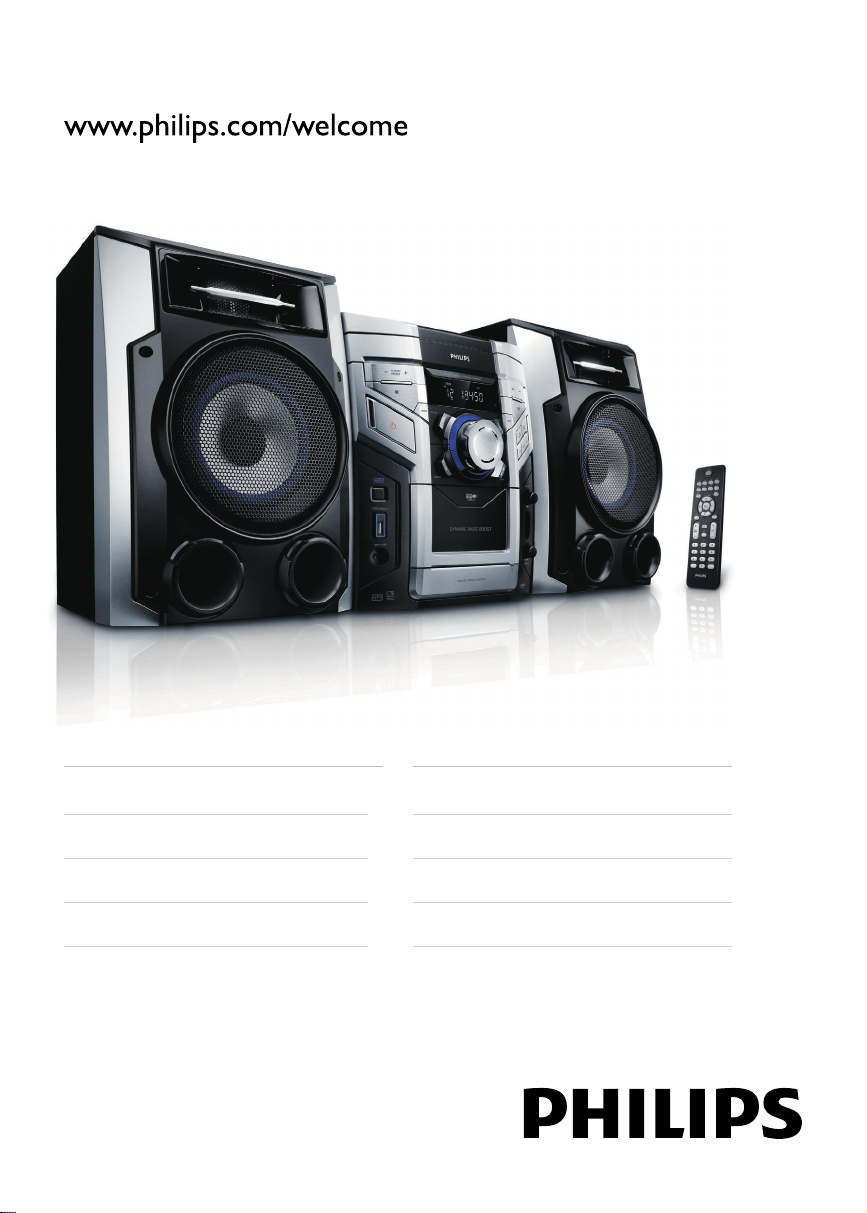
FWM387/12
EN User manual
DA Brugervejledning
DE Benutzerhandbuch
ES Manual del usuario
FR Mode d’emploi
IT Manuale utente
NL Gebruiksaanwijzing
SV Användarhandbok
FWM387_DFU_ENG_12.indd 1FWM387_DFU_ENG_12.indd 1 1/16/2009 11:06:38 AM1/16/2009 11:06:38 AM

EN
1
English
Contents
1 Important 2
Safety 2
Notice 3
2 Your Mini Hi-Fi System 5
Introduction 5
What’s in the box 5
Overview of the main unit 6
Overview of the remote control 8
3 Get started 10
Connect speakers 10
Connect FM antenna 10
Connect MW antenna 10
Connect power 11
Prepare the remote control 11
Auto install radio stations 11
Set clock 12
Turn on 12
4 Play 13
Play disc 13
Play from USB 13
Play tape 13
Play from an external device 14
5 Play options 15
Repeat and random play 15
Program tracks 15
Display play information 15
6 Adjust volume level and sound effect 16
Adjust volume level 16
Mute sound 16
Boost sound power 16
Select a preset sound effect 16
Enhance bass 16
Incredible surround 16
Customize sound for room acoustics 16
7 Listen to radio 17
Tune to a radio station 17
Program radio stations automatically 17
Program radio stations manually 17
Select a preset radio station 17
FM stations with RDS 17
8 Record 18
Auto record from CD to tape 18
Record from radio to tape 18
9 Other features 19
Set the alarm timer 19
Set the sleep timer 19
Karaoke 19
10 Product information 20
Specifi cations 20
USB playability information 20
Supported MP3 disc formats 21
Maintenance 21
11 Troubleshooting 22
FWM387_DFU_ENG_12.indd 章节1:1FWM387_DFU_ENG_12.indd 章节1:1 1/16/2009 11:06:47 AM1/16/2009 11:06:47 AM

2 EN
1 Important
Safety
a Read these instructions.
b Keep these instructions.
c Heed all warnings.
d Follow all instructions.
e Do not use this apparatus near water.
f Clean only with dry cloth.
g Do not block any ventilation openings.
Install in accordance with the
manufacturer’s instructions.
h Do not install near any heat sources
such as radiators, heat registers, stoves,
or other apparatus (including amplifi ers)
that produce heat.
i Protect the power cord from being
walked on or pinched, particularly at
plugs, convenience receptacles, and
the point where they exit from the
apparatus.
j Only use attachments/accessories
specifi ed by the manufacturer.
k Use only with the cart, stand, tripod,
bracket, or table specifi ed by the
manufacturer or sold with the apparatus.
When a cart is used, use caution when
moving the cart/apparatus combination
to avoid injury from tip-over.
l Unplug this apparatus during lightning
storms or when unused for long periods
of time.
m Refer all servicing to qualifi ed service
personnel. Servicing is required when
the apparatus has been damaged in any
way, such as power-supply cord or plug
is damaged, liquid has been spilled or
objects have fallen into the apparatus,
the apparatus has been exposed to rain
or moisture, does not operate normally,
or has been dropped.
n Battery usage CAUTION – To prevent
battery leakage which may result in
bodily injury, property damage, or
damage to the unit:
Install all batteries correctly, + and - •
as marked on the unit.
Do not mix batteries (old and new •
or carbon and alkaline, etc.).
Remove batteries when the unit is •
not used for a long time.
o Apparatus shall not be exposed to
dripping or splashing.
p Do not place any sources of danger on
the apparatus (e.g. liquid fi lled objects,
lighted candles).
q This product may contain lead and
mercury. Disposal of these materials
may be regulated due to environmental
considerations. For disposal or recycling
information, please contact your local
authorities or the Electronic Industries
Alliance: www.eiae.org.
r Where the MAINS plug or an appliance
coupler is used as the disconnect device,
the disconnect device shall remain
readily operable.
FWM387_DFU_ENG_12.indd 章节1:2FWM387_DFU_ENG_12.indd 章节1:2 1/16/2009 11:06:48 AM1/16/2009 11:06:48 AM
EN 3
English
Warning
Never remove the casing of this apparatus. •
Never lubricate any part of this apparatus. •
Never place this apparatus on other electrical •
equipment.
Keep this apparatus away from direct sunlight, naked •
fl ames or heat.
Never look into the laser beam inside this apparatus. •
Ensure that you always have easy access to the power •
cord, plug or adaptor to disconnect this apparatus
from the power.
Notice
This product complies with the radio
interference requirements of the European
Community.
This product complies with the requirements
of the following directives and guidelines:
2004/108/EC + 2006/95/EC.
Any changes or modifi cations made to this
device that are not expressly approved by
Philips Consumer Lifestyle may void the user’s
authority to operate the equipment.
The making of unauthorized copies of
copy-protected material, including computer
programs, fi les, broadcasts and sound
recordings, may be an infringement of
copyrights and constitute a criminal offence.
This equipment should not be used for such
purposes.
Recycling
Your product is designed and manufactured
with high quality materials and components,
which can be recycled and reused.
When you see the crossed-out wheel bin
symbol attached to a product, it means the
product is covered by the European Directive
2002/96/EC:
Never dispose of your product with other
household waste. Please inform yourself about
the local rules on the separate collection of
electrical and electronic products. The correct
disposal of your old product helps prevent
potentially negative consequences on the
environment and human health.
Your product contains batteries covered by
the European Directive 2006/66/EC, which
cannot be disposed of with normal household
waste.
When you see the crossed-out wheel bin
symbol with the chemical symbol ‘Pb’, it
means that the batteries comply with the
requirement set by the directive for lead:
Please inform yourself about the local rules on
separate collection of batteries. The correct
Pb
FWM387_DFU_ENG_12.indd 章节1:3FWM387_DFU_ENG_12.indd 章节1:3 1/16/2009 11:06:48 AM1/16/2009 11:06:48 AM
4 EN
disposal of batteries helps prevent potentially
negative consequences on the environment
and human health.
Environmental information
All unnecessary packaging has been omitted.
We have tried to make the packaging easy to
separate into three materials: cardboard (box),
polystyrene foam (buffer) and polyethylene
(bags, protective foam sheet.)
Your system consists of materials which can
be recycled and reused if disassembled by
a specialized company. Please observe the
local regulations regarding the disposal of
packaging materials, exhausted batteries and
old equipment.
Windows Media and the Windows logo are
trademarks, or registered trademarks of
Microsoft Corporation in the United States
and/or other countries.
This apparatus includes this label:
Norge
Typeskilt fi nnes på apparatens underside.
Observer: Nettbryteren er sekundert
innkoplet. Den innebygde netdelen er
derfor ikke frakoplet nettet så lenge
apparatet er tilsluttet nettkontakten.
For å redusere faren for brann eller
elektrisk støt, skal apparatet ikke utsettes
for regn eller fuktighet.
FWM387_DFU_ENG_12.indd 章节1:4FWM387_DFU_ENG_12.indd 章节1:4 1/16/2009 11:06:49 AM1/16/2009 11:06:49 AM
EN 5
English
2 Your Mini Hi-Fi
System
Congratulations on your purchase, and
welcome to Philips! To fully benefi t from the
support that Philips offers, register your product
at www.Philips.com/welcome.
Introduction
With this unit, you can enjoy audio from discs,
tapes, USB devices, external devices, or radio
stations.
For your convenience, you can load up to 3
discs at once.
To enrich sound, this unit offers you these
sound effects:
MAX sound for instant power boost•
Digital Sound Control (DSC)•
Dynamic Bass Boost (DBB)•
Incredible surround (IS)•
Virtual Ambience-based Control (VAC)•
The unit supports the following media formats:
What’s in the box
Check and identify the contents of your
package:
Main unit x 1•
AC power cable x 1•
Loudspeaker box x 2•
Remote control with 2 AAA batteries•
FM wire antenna x 1•
MW loop antenna x 1•
MP3 link cable x 1 •
FWM387_DFU_ENG_12.indd 章节1:5FWM387_DFU_ENG_12.indd 章节1:5 1/16/2009 11:06:50 AM1/16/2009 11:06:50 AM
6 EN
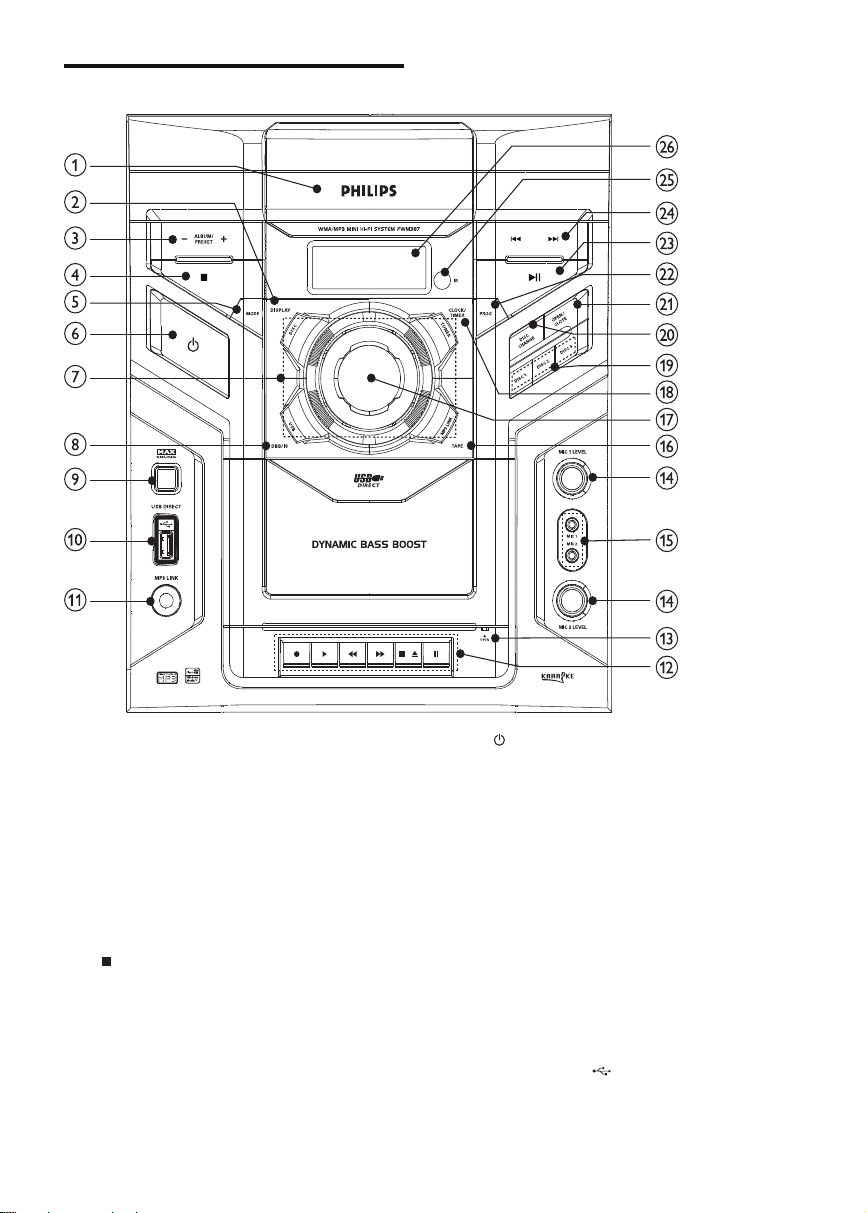
Overview of the main unit
a Disc compartment door
b DISPLAY
Select display information.•
c ALBUM/PRESET+/-
Skip to the previous/next album.•
Select a preset radio station.•
Adjust time.•
Select 12 hour or 24 hour format.•
d
Stop play or erase a program.•
e MODE
Select repeat play or random play.•
f
Turn on the unit, switch to standby •
mode, or switch to Eco Power
Standby.
g Source selection keys
Select a source.•
h DBB/IS
Turn on or off dynamic bass •
enhancement.
Turn on or off incredible surround.•
i MAX SOUND
Turn on or off instant power boost •
for sound.
j USB DIRECT
Jack for a USB mass storage device. •
FWM387_DFU_ENG_12.indd 章节1:6FWM387_DFU_ENG_12.indd 章节1:6 1/16/2009 11:06:50 AM1/16/2009 11:06:50 AM

EN 7
English
k MP3 LINK
Audio input jack (3.5mm ) for an •
external audio device.
l Tape deck operation
•
Start to record.
•
Start tape play.
•
/
Fast rewind/wind the tape.
•
Stop the tape play or open the tape
door.
•
Pause tape play or pause recording.
m OPEN
Pull to open the tape button cover.•
n MIC LEVEL 1/2
Adjust microphone volume.•
o MIC 1/2
Jack for a microphone.•
p TAPE
Select the tape source.•
q VOLUME
Adjust volume.•
r CLOCK / TIMER
Set the clock.•
Set the alarm timer.•
s DISC 1/2/3
Select a disc.•
t DISC CHANGE
Change a disc.•
u OPEN/CLOSE
Open or close the disc •
compartment.
v PROG
Program tracks.•
Program radio stations.•
w
Start or pause play.•
x
/
Skip to the previous/next track.•
Search within a track/ disc/USB.•
Tune to a radio station.•
Adjust time.•
y iR
Remote sensor.•
z Display panel
Show current status.•
FWM387_DFU_ENG_12.indd 章节1:7FWM387_DFU_ENG_12.indd 章节1:7 1/16/2009 11:06:53 AM1/16/2009 11:06:53 AM
8 EN
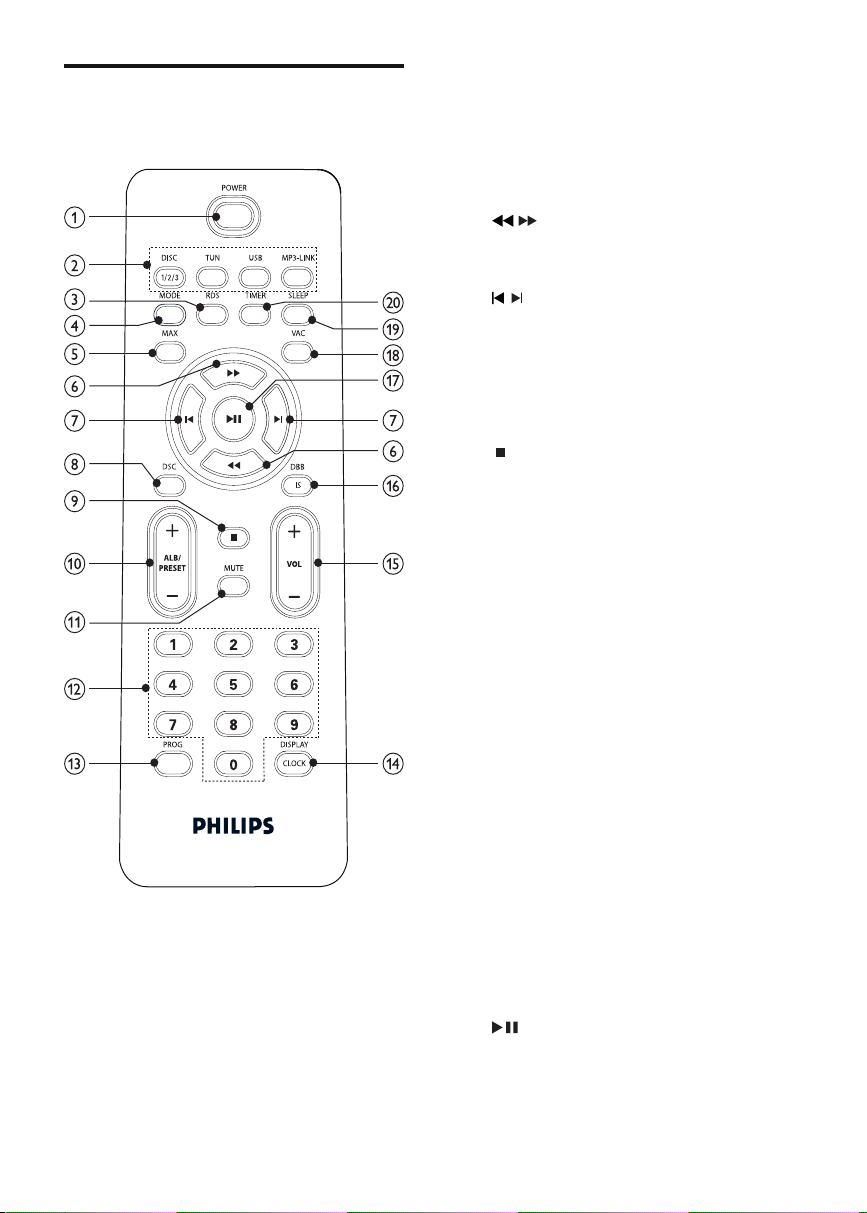
Overview of the remote
control
a POWER
Turn on the unit, switch to standby •
mode, or switch to Eco Power
Standby.
b Source selection keys
Select a source.•
c RDS
Select RDS broadcast information.•
d MODE
Select repeat play or random play.•
e MAX
Turn on or off instant power boost •
for sound.
f
/
Search within a track/ disc/USB.•
Tune to a radio station.•
g
/
Skip to the previous/next track.•
Adjust time.•
h DSC
Select a preset sound equalizer •
setting.
i
Stop play or erase a program.•
j ALB/PRESET+/-
Skip to the previous/next album.•
Select a preset radio station.•
Adjust time.•
k MUTE
Mute volume.•
l Numeric keypad
Select a track from a disc directly.•
m PROG
Program tracks.•
Program radio stations.•
n DISPLAY / CLOCK
Select display information.•
Set the clock.•
o VOL +/-
Adjust volume.•
p DBB/IS
Turn on or off dynamic bass •
enhancement.
Turn on or off incredible surround.•
q
Start or pause play.•
FWM387_DFU_ENG_12.indd 章节1:8FWM387_DFU_ENG_12.indd 章节1:8 1/16/2009 11:06:55 AM1/16/2009 11:06:55 AM

EN 9
English
r VAC
Select an ambience-based equaliser •
setting.
s SLEEP
Set the sleep timer.•
t TIMER
Set the alarm timer.•
FWM387_DFU_ENG_12.indd 章节1:9FWM387_DFU_ENG_12.indd 章节1:9 1/16/2009 11:06:56 AM1/16/2009 11:06:56 AM
10 EN
3 Get started
Caution
Use of controls or adjustments or performance of •
procedures other than herein may result in hazardous
radiation exposure or other unsafe operation.
Always follow the instructions in this chapter in
sequence.
If you contact Philips, you will be asked for the
model and serial number of this apparatus. The
model number and serial number are on the
back of the apparatus. Write the numbers here:
Model No. __________________________
Serial No. ___________________________
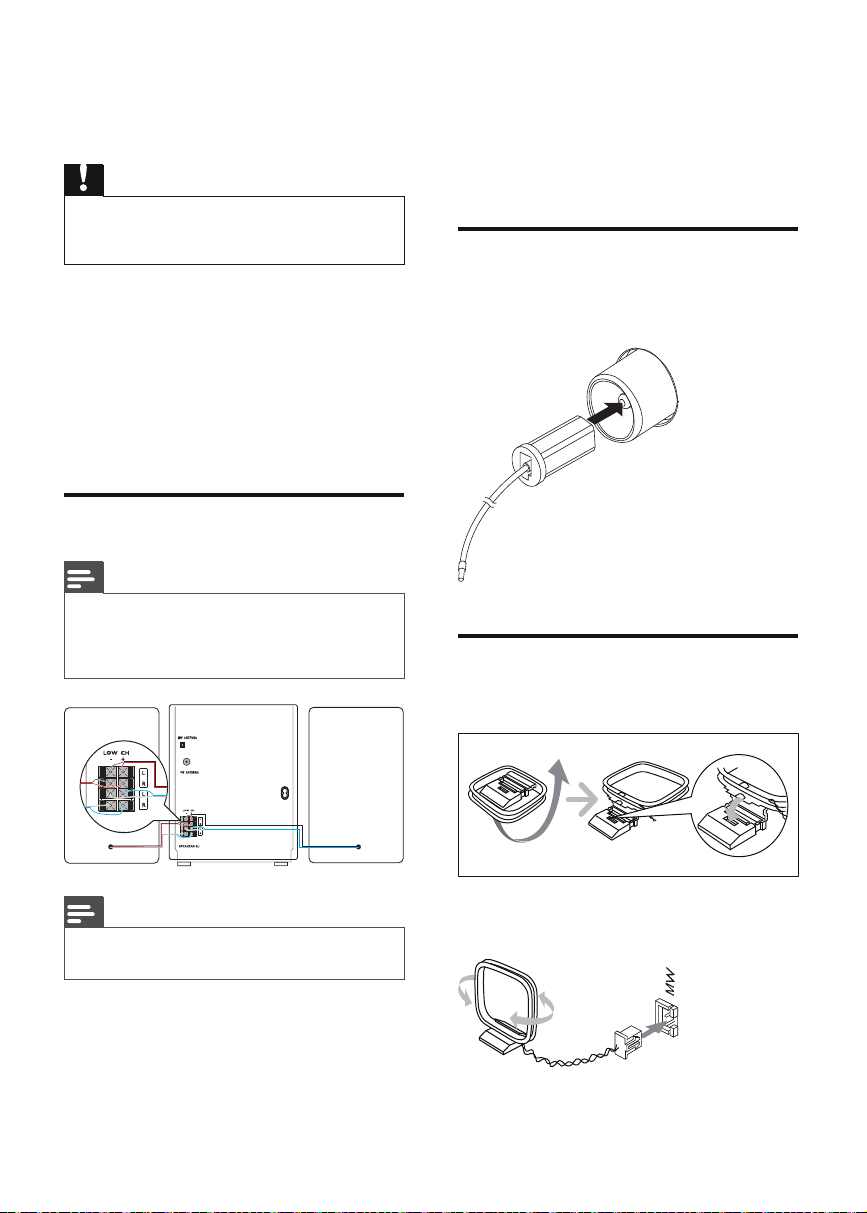
Connect speakers
Note
For optimal sound, use the supplied speakers only. •
• Connect only speakers with impedance that is the
same or higher than the supplied speakers. (see
‘Speakers’ on page 20 )
Note
Ensure that the colors of the speaker wires and •
terminals are matched.
1 Hold down the socket fl ap.
2 Insert the stripped part of the wire
completely.
Insert the right speaker wires to “ • R ”,
left speaker wires to “ L ”.
Insert the red wires and blue wires •
to “ + ”, black wires to “ - ”.
3 Release the socket fl ap.
Connect FM antenna
1 Connect the supplied FM antenna to the
FM jack on the back of the main unit.
Connect MW antenna
1 Prepare the MW loop antenna.
2 Connect the MW loop antenna to the
MW jack on the back of the main unit.
FWM387_DFU_ENG_12.indd 章节1:10FWM387_DFU_ENG_12.indd 章节1:10 1/16/2009 11:06:56 AM1/16/2009 11:06:56 AM
EN 11
English
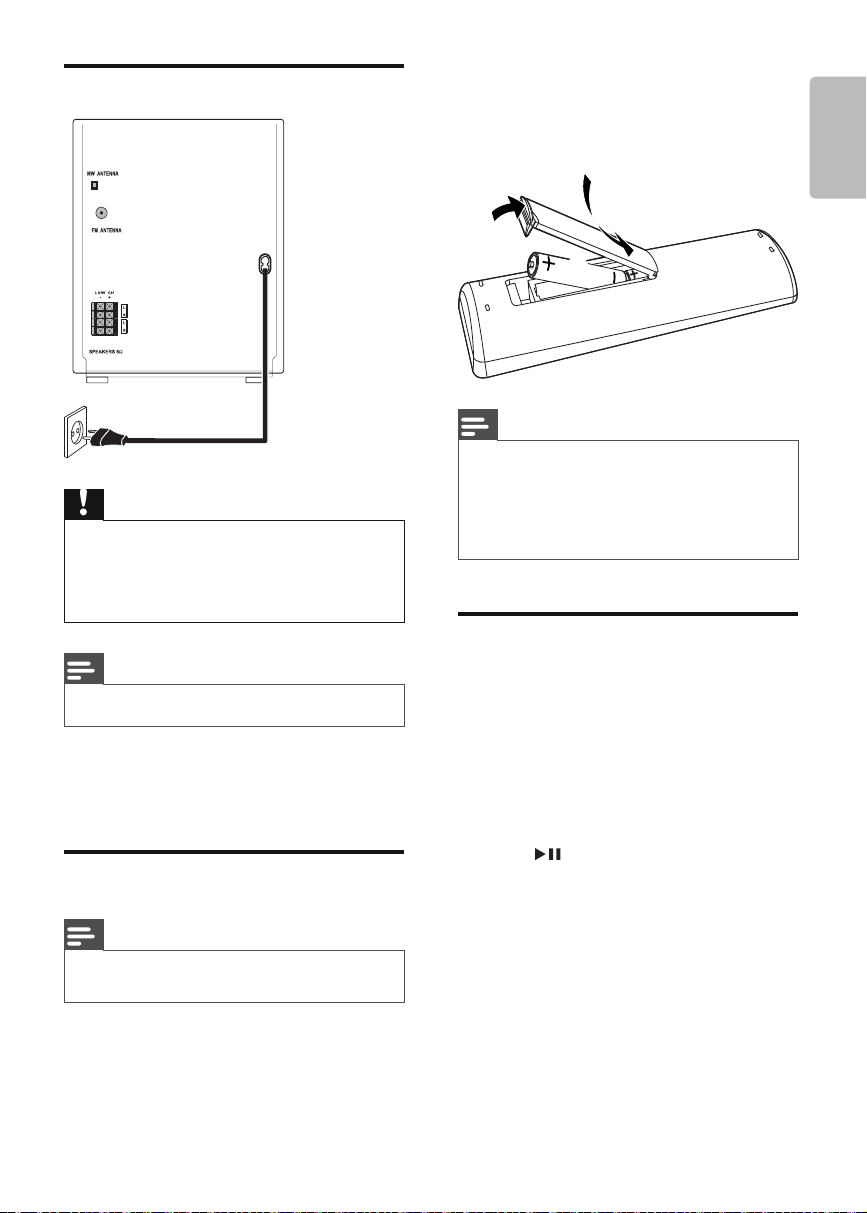
Connect power
Caution
Risk of product damage! Ensure that the power supply •
voltage corresponds to the voltage set on the voltage
selector on the back of the unit.
Before connecting the AC power cord, ensure you •
have completed all other connections.
Note
The type plate is located on the back of the main unit. •
1 Connect the AC power cable to:
the main unit.•
the wall socket.•
Prepare the remote control
Note
Risk of explosion! Keep batteries away from heat, •
sunshine or fi re. Never discard batteries in fi re.
To replace the remote control battery:
1 Open the battery compartment.
2 Insert 2 AAA batteries with correct
polarity (+/-) as indicated.
3 Close the battery compartment.
Note
If you are not going to use the remote control for a •
long time, remove the batteries.
Do not use old and new or different types of batteries •
in combination.
Batteries contain chemical substances, so they should •
be disposed of properly.
Auto install radio stations
When you connect power and no radio
stations are stored, the unit automatically begins
to store radio stations.
1 Connect the unit to the power supply.
[AUTO INSTALL - PRESS PLAY] (auto »
install - press the PLAY button) is
displayed.
2 Press on the main unit to start
installation.
[AUTO] (auto) is displayed. »
The unit automatically stores radio »
stations with suffi cient signal strength.
When all the available radio stations »
are stored, the fi rst preset radio station
is broadcast automatically.
3
1
2
FWM387_DFU_ENG_12.indd 章节1:11FWM387_DFU_ENG_12.indd 章节1:11 1/16/2009 11:06:57 AM1/16/2009 11:06:57 AM
12 EN
Set clock
1 In the standby mode, press DISPLAY/
CLOCK to activate the clock setting
mode.
The 12 hour or 24 hour format is »
displayed.
2 Press ALB/PRESET+/- repeatedly to
select 12 hour or 24 hour format.
3 Press DISPLAY/CLOCK to confi rm.
The clock digits are displayed and »
begin to blink.
4 Press ALB/PRESET+/- to set the hour.
5 Press / to set the minute.
6 Press DISPLAY/CLOCK to confi rm.
Tip
To view the clock during play, press • DISPLAY/CLOCK .
Turn on
1 Press POWER .
The unit switches to the last selected »
source.
Switch to standby
1 Press POWER to switch the unit to
standby mode.
The backlight on the display panel »
turns off.
The clock (if set) appears on the »
display panel.
To switch the unit to Eco Power Standby
mode:
1 Press and hold POWER for more than 2
seconds.
The backlight on the display panel »
turns off.
FWM387_DFU_ENG_12.indd 章节1:12FWM387_DFU_ENG_12.indd 章节1:12 1/16/2009 11:06:58 AM1/16/2009 11:06:58 AM
EN 13
English
4 Play
Play disc
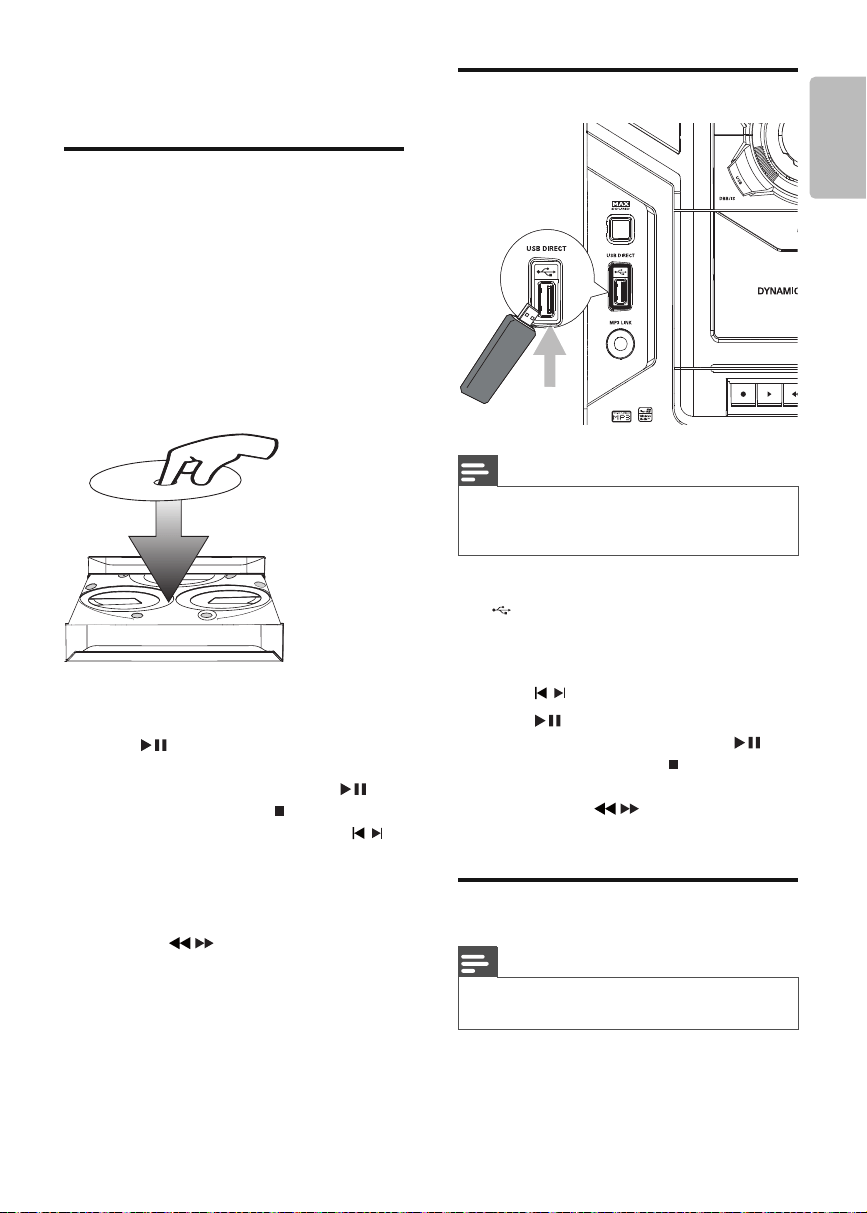
1 Press DISC 1/2/3 to select the disc
source.
2 Press OPEN/CLOSE on the main unit to
open the disc compartment.
3 Load up to two discs on the disc trays,
with the printed side facing up
To load the third disc, press • DISC
CHANGE on the main unit to rotate
to the disc tray.
4 Press OPEN/CLOSE on the main unit to
close the disc compartment.
5 Press to start play.
To select a disc, press • DISC 1/2/3 .
To pause/resume play, press •
.
To stop play, press •
.
To select another track, press •
/ or
press a numeric button.
To select an album, press • ALB/
PRESET+/- .
To search within a track, press and •
hold
/ , then release to resume
normal play.
2
2
1
1
Play from USB
Note
• Ensure that the USB device contains playable audio
contents for supported formats. (see ‘USB playability
information’ on page 20 )
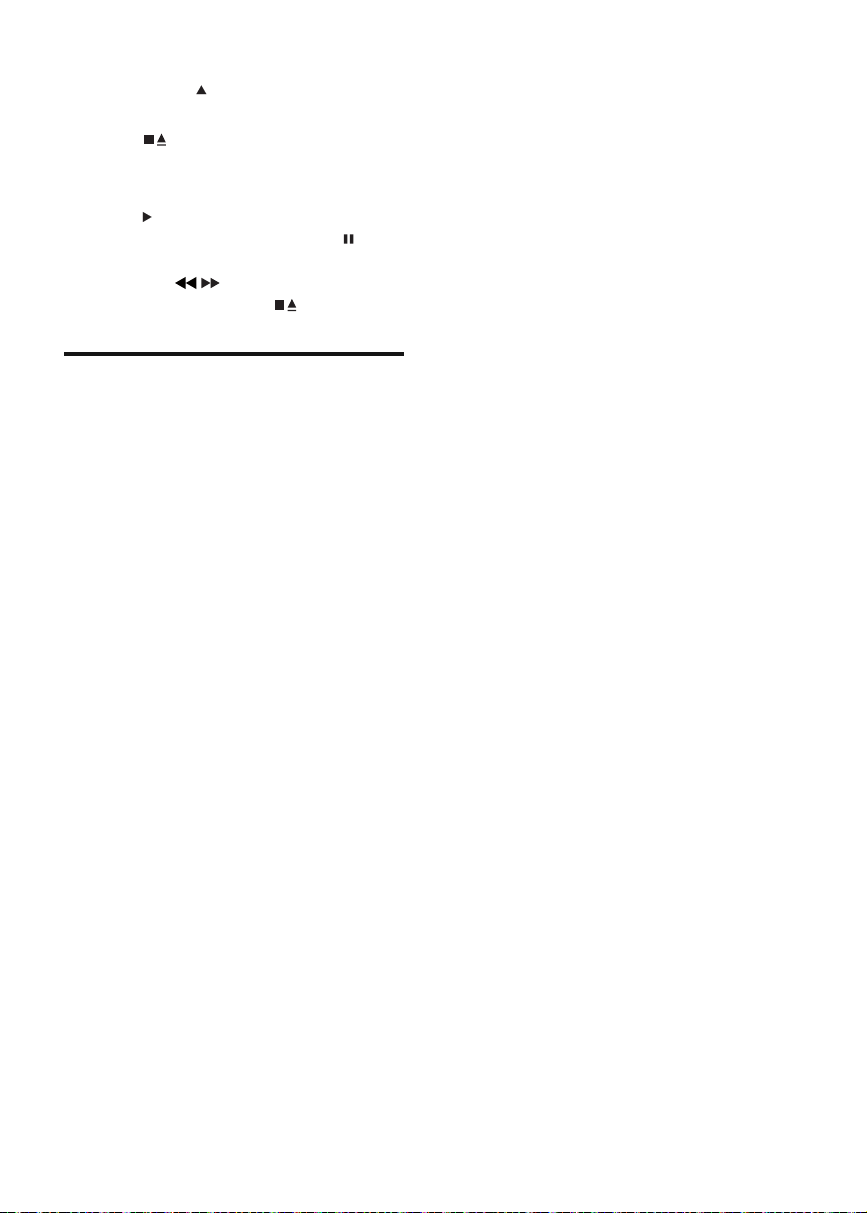
1 Insert the USB plug of the device into the
socket.
2 Press USB to select the USB source.
3 Press ALB/PRESET+/- to select a folder.
4 Press / to select an audio fi le.
5 Press to start play.
To pause/resume play, press •
.
To stop play, press •
.
To search within an audio fi le, press •
and hold
/ , then release to
resume normal play.
Play tape
Note
When you play or record a tape, the sound source •
cannot be changed.
1 Press TAPE on the main unit to select the
tape source.
FWM387_DFU_ENG_12.indd 章节1:13FWM387_DFU_ENG_12.indd 章节1:13 1/16/2009 11:06:58 AM1/16/2009 11:06:58 AM
14 EN
2 Pull at OPEN on the front panel to
open the tape button cover.
3 Press to open the tape door.
4 Load the tape with the open side
downward and the full spool to the left.
5 Press to start play.
To pause/resume play, press •
.
To fast rewind or wind the tape, •
press
/ .
To stop play, press •
.
Play from an external device
You can also listen to an external audio device
through this unit.
1 Press MP3-LINK to select the MP3 link
source.
2 Connect the supplied MP3 link cable to:
the • MP3 LINK jack (3.5mm) on the
unit.
the headphone jack on an external •
device.
3 Start to play the device (see the device
user manual).
FWM387_DFU_ENG_12.indd 章节1:14FWM387_DFU_ENG_12.indd 章节1:14 1/16/2009 11:07:01 AM1/16/2009 11:07:01 AM
EN 15
English
5 Play options
Repeat and random play
1 Press MODE repeatedly to select:
•
: the current track is played
repeatedly.
•
: all tracks are played repeatedly.
•
: all tracks are played
randomly and repeatedly.
•
: all tracks are played randomly.
2 To return to normal play, press MODE
repeatedly until play mode is no longer
displayed.
Tip
Shuffl e play cannot be selected when you play •
programmed tracks.
Program tracks
You can program a maximum of 40 tracks.
1 At CD/USB mode, in the stop position,
press PROG to activate the program
mode.
[PROG] (program) blinks on the »
display.
2 For MP3/WMA tracks, press ALB/
PRESET+/- to select an album.
3 Press / to select a track number, then
press PROG to confi rm.
4 Repeat steps 2 to 3 to select and store all
tracks to program.
5 Press to play the programmed tracks.
During play, [PROG] (program) is »
displayed.
To erase the program, in the stop •
position, press
.
Display play information
1 During play, press DISPLAY/CLOCK
repeatedly to select different play
information.
FWM387_DFU_ENG_12.indd 章节1:15FWM387_DFU_ENG_12.indd 章节1:15 1/16/2009 11:07:02 AM1/16/2009 11:07:02 AM
16 EN
6 Adjust volume
level and sound
effect
Note
MAX sound and DSC (Digital Sound Control) cannot •
be activated at the same time.
Adjust volume level
1 During play, press VOL +/- to increase/
decrease the volume level.
Mute sound
1 During play, press MUTE to mute/unmute
sound.
Boost sound power
MAX SOUND gives an instant boost to the
sound power .
1 Press MAX to turn on or off the sound
power boost.
If MAX sound is activated, MAX is »
displayed.
Select a preset sound effect
The DSC (Digital Sound Control) enables you
to enjoy special sound effects.
1 During play, press DSC repeatedly to
select:
[JAZZ] (jazz)•
[ROCK] (rock)•
[TECHNO] (techno)•
[OPTIMAL] (optimal)•
Enhance bass
The best DBB (Dynamic Bass Enhancement)
setting is generated automatically for each
DSC selection. You can manually select the
DBB setting that best suits your listening
environment.
1 During play, press DBB/IS repeatedly to
select:
DBB 1•
DBB 2•
DBB 3•
DBB off •
If DBB is activated, » DBB is displayed.
Incredible surround
You can enhance audio with a virtual surround
sound effect.
1 Press and hold DBB/IS to turn on or off
the incredible surround.
If the incredible surround is activated, »
[INC SURR] (incredible surround) is
displayed.
Customize sound for room
acoustics
1 During play, press VAC repeatedly to
select a type of listening environment:
[HALL] (hall)•
[CINEMA] (cinema)•
[CONCERT] (concert)•
FWM387_DFU_ENG_12.indd 章节1:16FWM387_DFU_ENG_12.indd 章节1:16 1/16/2009 11:07:03 AM1/16/2009 11:07:03 AM

EN 17
English
7 Listen to radio
Tune to a radio station
1 Press TUN repeatedly to select FM or
MW.
2 Press and hold / for more than 2
seconds.
[SEARCH] (search) is displayed. »
The radio tunes to a station with »
strong reception automatically.
3 Repeat step 2 to tune to more stations.
To tune to a weak station, press •
/ repeatedly until you fi nd optimal
reception.
Program radio stations
automatically
You can program a maximum of 40 preset
radio stations.
1 In the tuner mode, press and hold PROG
for more than 2 seconds to activate
automatic program mode.
[AUTO] (auto) is displayed. »
All available stations are programmed »
in the order of waveband reception
strength.
The fi rst programmed radio station is »
broadcast automatically.
Program radio stations
manually
You can program a maximum of 40 preset
radio stations.
1 Tune to a radio station. (see ‘Tune to a
radio station’ on page 17 )
2 Press PROG to activate program mode.
[PROG] (program) blinks on the »
display.
3 Press ALB/PRESET+/- to allocate a
number to this radio station, then press
PROG to confi rm.
The preset number and the frequency »
of the preset station are displayed.
4 Repeat the above steps to program other
stations.
Tip
To overwrite a programmed station, store another •
station in its place.
Select a preset radio station
1 In tuner mode, press ALB/PRESET+/- to
select a preset number.
Tip
Position the antenna as far as possible from TV, VCR •
or other radiation source.
For optimal reception, fully extend and adjust the •
position of the antenna.
FM stations with RDS
Radio Data System (RDS) is a service that
sends additional broadcast information along
with FM stations.
If you listen to a FM station with RDS signal,
“RDS” is displayed.
Display RDS information
1 For a FM station with RDS, press RDS
repeatedly to display various broadcast
information.
FWM387_DFU_ENG_12.indd 章节1:17FWM387_DFU_ENG_12.indd 章节1:17 1/16/2009 11:07:03 AM1/16/2009 11:07:03 AM

18 EN
8 Record
Note
To record, use only “Normal” (IEC type I) tapes on •
which the write-protect notches (tabs) are not broken.
When you play or record a tape, the sound source •
cannot be changed.
Auto record from CD to
tape
1 Select the disc source.
2 Load a disc.
3 Pull at OPEN on the front panel to
open the tape button cover.
4 Press to open the tape door.
5 Load the tape with the open side
downward and the full spool to the left.
6 Press to start recording.
Disc play starts automatically from the »
beginning of the disc.
To pause recording, press •
. To
resume recording, press this button
again.
To stop recording, press •
.
Record a section of a disc to tape
1 During disc play, press and hold / to
search, then release the button.
To select a track, press •
/ .
2 Press to pause disc play.
3 Load a tape.
4 Press to start recording.
Disc play resumes automatically. »
To pause recording, press •
. To
resume, press this button again.
To stop recording, press •
.
Record from radio to tape
1 Tune to the desired radio station. (see
‘Tune to a radio station’ on page 17 )
2 Pull at OPEN on the front panel to
open the tape button cover.
3 Press to open the tape door.
4 Load a tape.
5 Press to start recording.
To pause recording, press •
. To
resume, press this button again.
To stop recording, press •
.
Tip
The best recording level is set automatically. Change of •
volume and sound effect does not affect recording.
The quality of recorded sound can differ depending on •
the source and the tape used.
FWM387_DFU_ENG_12.indd 章节1:18FWM387_DFU_ENG_12.indd 章节1:18 1/16/2009 11:07:04 AM1/16/2009 11:07:04 AM
EN 19
English
9 Other features
Set the alarm timer
This unit can be used as an alarm clock. The
disc, radio or USB is activated to play at a
preset time.
1 Ensure that you have set the clock
correctly. (see ‘Set clock’ on page 12 )
2 Press POWER to switch to standby
mode.
3 Press and hold TIMER for more than 2
seconds.
A prompt to select the source is »
displayed.
4 Press DISC 1/2/3 , or TUN or USB to
select a source.
5 Press TIMER to confi rm.
The clock digits are displayed and »
begin to blink.
6 Press ALB/PRESET+/- to set the hour.
7 Press / to set the minute.
8 Press TIMER to confi rm.
The timer is set and activated. »
To deactivate or re-activate an alarm timer
1 When the unit is turned on, press TIMER
repeatedly.
If the timer is activated, »
is displayed.
If the timer is deactivated, »
disappears.
Note
In MP3 link mode, the alarm timer cannot be set. •
Tip
If disc/USB source is selected and the audio cannot be •
played, tuner is activated automatically.
Set the sleep timer
This unit can switch to standby automatically
after a set period of time.
1 When the unit is turned on, press SLEEP
repeatedly to select a set period of time
(in minutes).
When sleep timer is activated, »
is
displayed.
To deactivate sleep timer
1 Press SLEEP repeatedly until [OFF] (off)
is displayed.
When sleep timer is deactivated, »
disappears on the display.
Karaoke
You can connect a microphone (not supplied)
and sing along with a music source.
1 Turn MIC LEVEL 1/2 to the minimum
level.
2 Connect a microphone to the MIC 1/2
jack of the unit.
3 Press DISC 1/2/3 , or TUN , or USB , or
MP3-LINK to select the source, and start
play.
4 Sing through the microphone.
To adjust the volume of the source, •
press VOL +/- .
To adjust the volume of the •
microphone, turn MIC LEVEL 1/2 .
FWM387_DFU_ENG_12.indd 章节1:19FWM387_DFU_ENG_12.indd 章节1:19 1/16/2009 11:07:05 AM1/16/2009 11:07:05 AM
20 EN
10 Product
information
Note
Product information is subject to change without prior •
notice.
Specifi cations
Amplifi er
Total output power 240W RMS
Frequency response 60 - 16kHz
Signal-to- noise ratio >67dB A (IEC)
Aux input 500mV/1000mV
Disc
Laser type Semiconductor
Disc diameter 12cm/8cm
Support disc CD-DA, CD-R, CD-
RW, MP3-CD, WMA-
CD
Audio DAC 24Bits / 44.1kHz
Total harmonic
distortion
<1.5%
Frequency
response
60Hz -16kHz (44.1kHz)
S/N ratio >60dBA
Tuner
Tuning range FM: 87.5 - 108MHz;
MW: 531 - 1602kHz
Tuning gr id 50KHz (FM); 9KHz (MW)
Number of
presets
40
FM 75ohm wire
MW loop antenna
Speakers
Speaker Impedance 6ohm
Woofer 2 x 5.25”
Tweeter 2 x 1.75”
Dimensions (W x H
x D)
249 x 344 x
250mm
Weight 3.58kg each
General information
AC power 220 - 230V~,
50Hz
Operation power
consumption
120W
Standby power consumption <15W
Eco Standby power
consumption
1W
USB direct Version 2.0/1.1
Dimensions
Main Unit (W x H x D)
265 x 310 x
403mm
Weight (without speakers) 6.09kg
USB playability information
Compatible USB devices:
USB fl ash memory (USB 2.0 or USB 1.1)•
USB fl ash players (USB 2.0 or USB 1.1)•
memory cards (requires an additional •
card reader to work with this unit)
FWM387_DFU_ENG_12.indd 章节1:20FWM387_DFU_ENG_12.indd 章节1:20 1/16/2009 11:07:06 AM1/16/2009 11:07:06 AM
EN 21
English
Supported formats:
USB or memory fi le format FAT12, •
FAT16, FAT32 (sector size: 512 bytes)
MP3 bit rate (data rate): 32-320 Kbps and •
variable bit rate
WMA v9 or earlier•
Directory nesting up to a maximum of 8 •
levels
Number of albums/ folders: maximum 99•
Number of tracks/titles: maximum 999•
ID3 tag v2.0 or later•
File name in Unicode UTF8 (maximum •
length: 128 bytes)
Unsupported formats:
Empty albums: an empty album is an •
album that does not contain MP3/WMA
fi les, and is not be shown in the display.
Unsupported fi le formats are skipped. For •
example, Word documents (.doc) or MP3
fi les with extension .dlf are ignored and
not played.
AAC, WAV, PCM audio fi les•
DRM protected WMA fi les (.wav, .m4a, •
.m4p, .mp4, .aac)
WMA fi les in Lossless format•
Supported MP3 disc formats
ISO9660, Joliet•
Maximum title number: 999 (depending •
on fi le name length)
Maximum album number: 99•
Supported sampling frequencies: 32 kHz, •
44.1kHz, 48 kHz
Supported Bit-rates: 32-320 (kbps), •
variable bit rates
ID3 tag v2.0 or later•
Directory nesting up to a maximum of 8 •
levels
Maintenance
Clean the cabinet
Use a soft cloth slightly moistened with a mild •
detergent solution. Do not use a solution
containing alcohol, spirits, ammonia or abrasives.
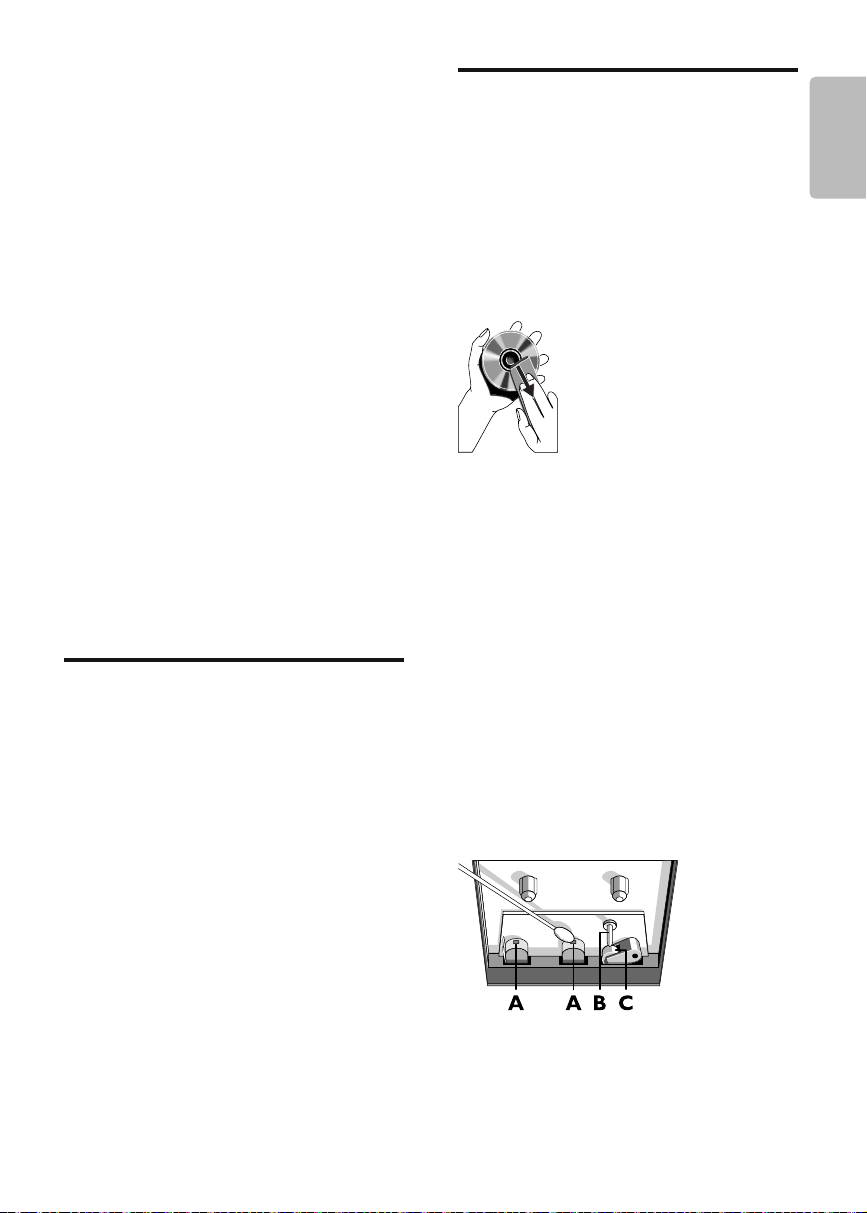
Clean discs
When a disc becomes dirty, clean it with •
a cleaning cloth. Wipe the disc from the
centre out.
Do not use solvents such as benzene, thinner, •
commercially available cleaners, or antistatic
spray intended for analogue records.
Clean the disc lens
After prolonged use, dirt or dust may •
accumulate at the disc lens. To ensure
good play quality, clean the disc lens
with Philips CD lens cleaner or any
commercially available cleaner. Follow the
instructions supplied with cleaner.
Clean the heads and the tape paths
To ensure good recording and play •
quality, clean the heads A , the capstan(s)
B , and pressure roller(s) C after every 50
hours of tape operation.
Use a cotton swab slightly moistened •
with cleaning fl uid or alcohol.
You can also clean the heads by playing a •
cleaning tape once.
Demagnetise the heads
Use a demagnetising tape available at •
your dealer.
FWM387_DFU_ENG_12.indd 章节1:21FWM387_DFU_ENG_12.indd 章节1:21 1/16/2009 11:07:07 AM1/16/2009 11:07:07 AM

22 EN
11 Troubleshooting
Warning
Never remove the casing of this apparatus. •
To keep the warranty valid, never try to repair
the system yourself.
If you encounter problems when using this
apparatus, check the following points before
requesting service. If the problem remains
unsolved, go to the Philips web site (www.
philips.com/welcome). When you contact
Philips, ensure that the apparatus is nearby
and the model number and serial number are
available .
No power
Ensure that the AC power plug of the •
unit is connected properly.
Ensure that there is power at the AC •
outlet.
To save power, the unit switches to •
standby automatically 15 minutes after
a play reaches the end and no control is
operated.
No sound or poor sound
Adjust the volume. •
Check that the speakers are connected •
correctly.
Check if the stripped speaker wires are •
clamped.
Left and right sound outputs reversed
Check the speaker connections and •
location.
No response from the unit
Disconnect and reconnect the AC power •
plug, then turn on the unit again.
Remote control does not work
Before you press any function button, •
fi rst select the correct source with the
remote control instead of the main unit.
Reduce the distance between the remote •
control and the unit.
Insert the batteries with their polarities •
(+/– signs) aligned as indicated.
Replace the batteries. •
Aim the remote control directly at the •
sensor on the front of the main unit.
No disc detected
Insert a disc. •
Check if the disc is inserted upside down. •
Wait until the moisture condensation at •
the lens has cleared.
Replace or clean the disc. •
Use a fi nalized CD or correct format disc. •
Cannot display some fi les in USB device
The number of folders or fi les in the USB •
device has exceeded a certain limit. This
phenomenon is not a malfunction.
The formats of these fi les are not •
supported.
USB device not supported
The USB device is incompatible with the •
unit. Try another one.
Poor radio reception
Increase the distance between the unit •
and your TV or VCR.
If the signal is too weak, adjust the •
antenna or connect an external antenna
for better reception.
Clock/timer setting erased
Power has been interrupted or the power •
cord has been disconnected.
Reset the clock/timer. •
Timer does not work
Set the clock correctly. •
Switch on the timer. •
FWM387_DFU_ENG_12.indd 章节1:22FWM387_DFU_ENG_12.indd 章节1:22 1/16/2009 11:07:08 AM1/16/2009 11:07:08 AM
© 2009 Koninklijke Philips Electronics N.V.
All rights reserved.
Document order number:
FWM387_BOOK1.indb 章节2:2FWM387_BOOK1.indb 章节2:2 2009-1-14 16:10:092009-1-14 16:10:09