1
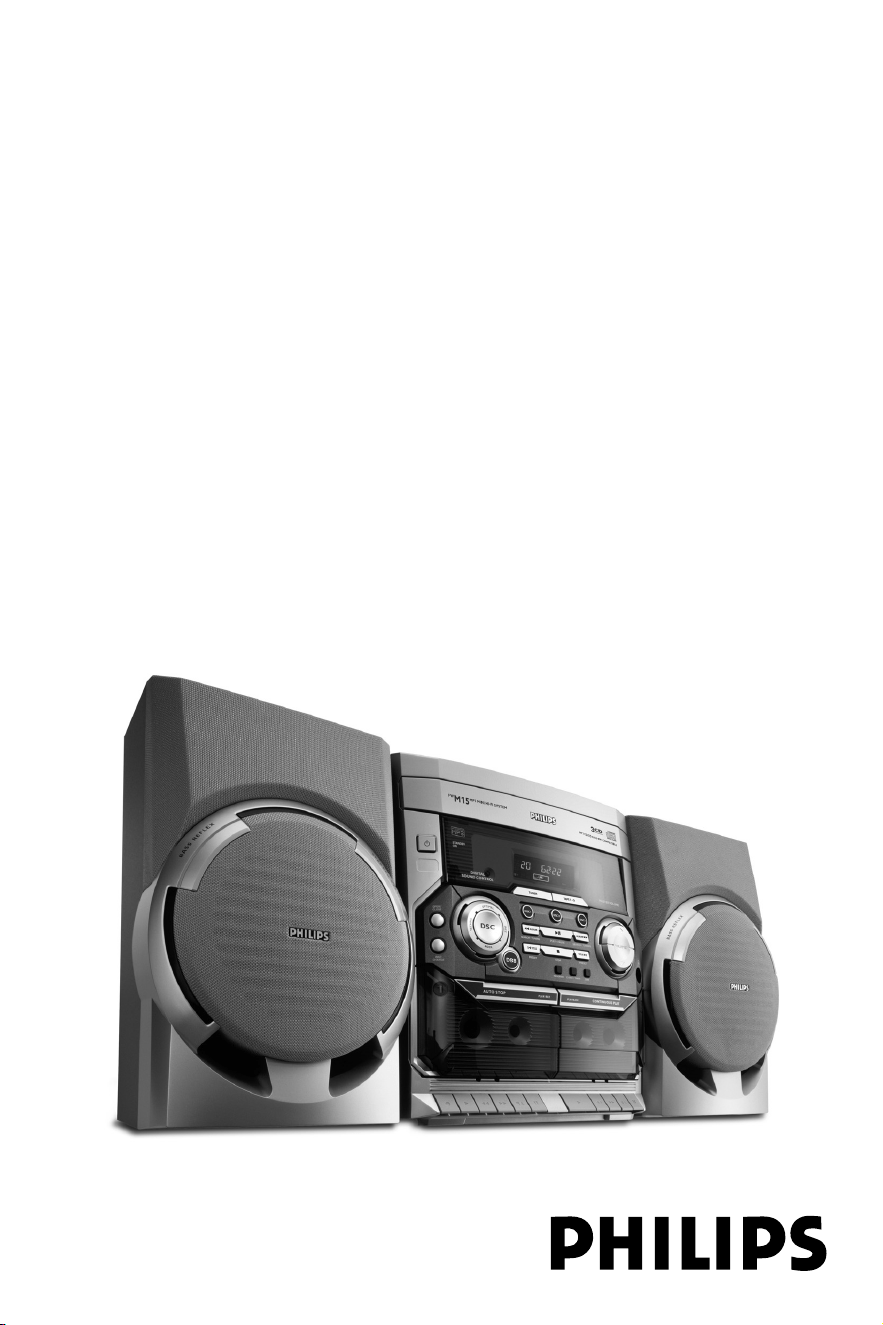
FWM15
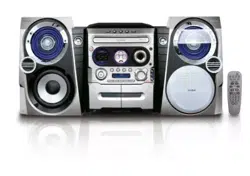
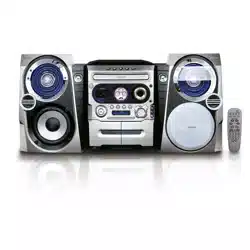
Mini HiFi System
User manual
Manuel d'utilisation
Manual del usuario
Benutzerhandücher
Gebruikershandleidingen
Manuale per l'utente
Användarhandböckerna
Brugermanual
Käyttöoppaita
Manual do usuário
PG 001-028_FWM15_22-ENG 23/11/04, 10:561
2
Important notes for users in the
U.K.
Mains plug
This apparatus is fitted with an approved 13
Amp plug. To change a fuse in this type of plug
proceed as follows:
1 Remove fuse cover and fuse.
2 Fix new fuse which should be a BS1362 5 Amp,
A.S.T.A. or BSI approved type.
3 Refit the fuse cover.
If the fitted plug is not suitable for your socket
outlets, it should be cut off and an appropriate
plug fitted in its place.
If the mains plug contains a fuse, this should
have a value of 5 Amp. If a plug without a fuse
is used, the fuse at the distribution board
should not be greater than 5 Amp.
Note: The severed plug must be disposed of to
avoid a possible shock hazard should it be
inserted into a 13 Amp socket elsewhere.
How to connect a plug
The wires in the mains lead are coloured with
the following code: blue = neutral (N),
brown = live (L).
¶ As these colours may not correspond with the
colour markings identifying the terminals in
your plug, proceed as follows:
– Connect the blue wire to the terminal
marked N or coloured black.
– Connect the brown wire to the terminal
marked L or coloured red.
– Do not connect either wire to the earth
terminal in the plug, marked E (or e) or
coloured green (or green and yellow).
Before replacing the plug cover, make certain
that the cord grip is clamped over the sheath
of the lead - not simply over the two wires.
Copyright in the U.K.
Recording and playback of material may
require consent. See Copyright Act 1956 and
The Performer’s Protection Acts 1958 to 1972.
Norge
Typeskilt finnes på apparatens underside.
Observer: Nettbryteren er sekundert
innkoplet. Den innebygde netdelen er
derfor ikke frakoplet nettet så lenge
apparatet er tilsluttet nettkontakten.
For å redusere faren for brann eller elektrisk
støt, skal apparatet ikke utsettes for regn eller
fuktighet.
Italia
DICHIARAZIONE DI CONFORMITA’
Si dichiara che l’apparecchio FWM15 Philips
risponde alle prescrizioni dell’art. 2 comma 1 del
D.M. 28 Agosto 1995 n. 548.
Fatto a Eindhoven
Philips Consumer Electronics
Philips, Glaslaan 2
5616 JB Eindhoven, The Netherlands
CAUTION
Use of controls or adjustments or
performance of procedures other than
herein may result in hazardous
radiation exposure or other unsafe
operation.
PG 001-028_FWM15_22-ENG 23/11/04, 10:562
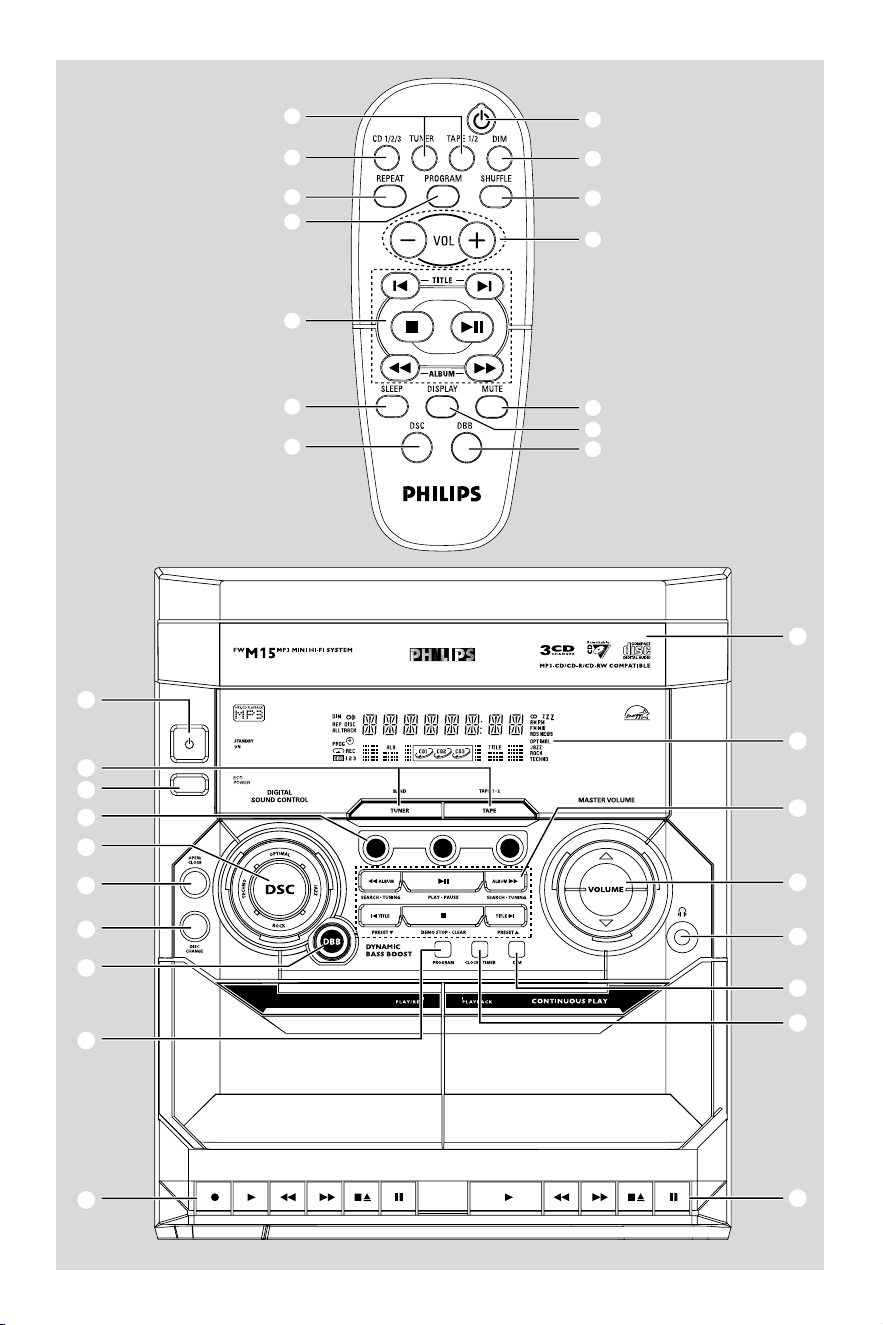
3
4
(
^
™
5
9
2
£
#
)
¡
%
8
&
2
1
3
6
5
7
0
!
9
8
4
$
%
&
*
^
@
#
CD1
CD2
CD3
PG 001-028_FWM15_22-ENG 23/11/04, 10:573
4
DK
Advarsel: Usynlig laserstråling ved åbning
når sikkerhedsafbrydere er ude af funktion.
Undgå utsættelse for stråling.
Bemærk: Netafbryderen er sekundært
indkoblet og ofbryder ikke strømmen fra
nettet. Den indbyggede netdel er derfor
tilsluttet til lysnettet så længe netstikket
sidder i stikkontakten.
S
Klass 1 laseraparat
Varning! Om apparaten används på annat
sätt än i denna bruksanvisning specificerats,
kan användaren utsättas för osynlig
laserstrålning, som överskrider gränsen för
laserklass 1.
Observera! Stömbrytaren är sekundärt
kopplad och bryter inte strömmen från
nätet. Den inbyggda nätdelen är därför
ansluten till elnätet så länge stickproppen
sitter i vägguttaget.
SF
Luokan 1 laserlaite
Varoitus! Laitteen käyttäminen muulla
kuin tässä käyttöohjeessa mainitulla tavalla
saattaa altistaa käyttäjän
turvallisuusluokan 1 ylittävälle
näkymättömälle lasersäteilylle.
Oikeus muutoksiin varataan. Laite ei
saa olla alttiina tippu-ja roiskevedelle.
Huom. Toiminnanvalitsin on kytketty
toisiopuolelle, eikä se kytke laitetta irti
sähköverkosta. Sisäänrakennettu verkko-
osa on kytkettynä sähköverkkoon aina
silloin, kun pistoke on pistorasiassa.
(for tuner installation)
PG 001-028_FWM15_22-ENG 23/11/04, 10:574
5
English
Français
Português
EspañolDeutschNederlandsItalianoSvenskaDanskSuomi
Polski
Index
English ------------------------------------------------ 6
Français -------------------------------------------- 29
Español --------------------------------------------- 52
Deutsch --------------------------------------------- 75
Nederlands ---------------------------------------- 98
Italiano -------------------------------------------- 121
Svenska ------------------------------------------- 144
Dansk --------------------------------------------- 167
Suomi --------------------------------------------- 190
Português ---------------------------------------- 213
----------------------------------------- 236
PG 001-028_FWM15_22-ENG 23/11/04, 10:575

6
English
Contents
General Information
Supplied accessories ............................................ 7
Acknowledgement ............................................... 7
Environmental information ................................ 7
Safety information ................................................ 7
Preparations
Rear connections ............................................. 8–9
Power
Antennas connection
Speakers connection
Inserting batteries into the remote
control .................................................................... 9
Controls
Controls on the system and remote
control ........................................................... 10–11
Basic Functions
Plug and Play ........................................................ 12
Demonstration mode ........................................ 13
Switching the system on ................................... 13
Switching the system to standby mode ........ 13
Switching the system to Eco Power
standby mode (< 0.5 Watt) .............................. 13
Dim mode ............................................................ 13
Volume control ................................................... 14
Sound control ..................................................... 14
DSC (Digital Sound Control)
DBB (Dynamic Bass Boost)
CD/MP3-CD Operations
Discs for playback .............................................. 15
About MP3 disc ........................................... 15–16
Loading discs ....................................................... 16
Playing discs ......................................................... 16
Replacing discs during playback ...................... 16
Selecting a desired track/passage .................... 17
Selecting a desired Album/Title
(MP3 disc only) ................................................... 17
Repeat play .......................................................... 17
Random playa
Programming the disc tracks .................... 17–18
Erasing the programme ..................................... 18
Radio Reception
Tuning to radio stations .................................... 19
Storing preset radio stations .................... 19–20
Automatic preset programming
Manual preset programming
Tuning to preset radio stations ....................... 20
Erasing a preset radio station .......................... 20
Ta pe Operation/Recording
Loading tape ........................................................ 21
Playing tapes ........................................................ 21
Rewinding/Fast forwarding ............................... 22
General information on recording ................. 22
Preparation for recording ................................ 22
One touch recording......................................... 22
CD Synchronised start recording .................. 23
Dubbing tapes ..................................................... 23
Clock/Timer
View clock............................................................ 24
Clock setting ....................................................... 24
Timer setting ................................................ 24–25
Deactivating the timer
Activating the timer
Sleep timer setting ............................................. 25
Specifications ........................................... 26
Maintenance.............................................. 27
Troubleshooting ............................. 27–28
PG 001-028_FWM15_22-ENG 23/11/04, 10:576
7
English
General Information
This product complies with the radio
interference requirements of the European
Community.
Supplied accessories
–2 speaker boxes
– remote control
– MW loop antenna
– FM wire antenna
Acknowledgement
Energy Star
As an ENERGY STAR
R
Partner, Philips has
determined that this product
meets the ENERGY STAR
R
guidelines for energy efficiency.
Environmental information
All unnecessary packaging has been omitted.
We have tried to make the packaging easy to
separate into three materials: cardboard (box),
polystyrene foam (buffer) and polyethylene (bags,
protective foam sheet).
Your system consists of materials which can be
recycled and reused if disassembled by a
specialised company. Please observe the local
regulations regarding the disposal of packaging
materials, exhausted batteries and old
equipment.
Safety information
● Before operating the system, check that the
operating voltage indicated on the typeplate (or
the voltage indication beside the voltage
selector) of your system is identical with the
voltage of your local power supply. If not, please
consult your dealer.
● Place the system on a flat, hard and stable
surface.
● Place the system in a location with adequate
ventilation to prevent internal heat build-up in
your system. Allow at least 10 cm (4 inches)
clearance from the rear and the top of the unit
and 5 cm (2 inches) from each side.
● The ventilation should not be impeded by
covering the ventilation openings with items,
such as newspapers, table-cloths, curtains, etc.
● Do not expose the system, batteries or discs to
excessive moisture, rain, sand or heat sources
caused by heating equipment or direct sunlight.
● No naked flame sources, such as lighted candles,
should be placed on the apparatus.
● No objects filled with liquids, such as vases, shall
be placed on the apparatus.
● The lens may cloud over when the system is
suddenly moved from cold to warm
surroundings, making it impossible to play a disc.
Leave the system in the warm environment until
the moisture evaporates.
● The mechanical parts of the set contain self-
lubricating bearings and must not be oiled or
lubricated.
● When the system is switched to Standby
mode, it is still consuming some power.
To disconnect the system from the
power supply completely, remove the AC
power plug from the wall socket.
PG 001-028_FWM15_22-ENG 23/11/04, 10:577
8
English
Preparations
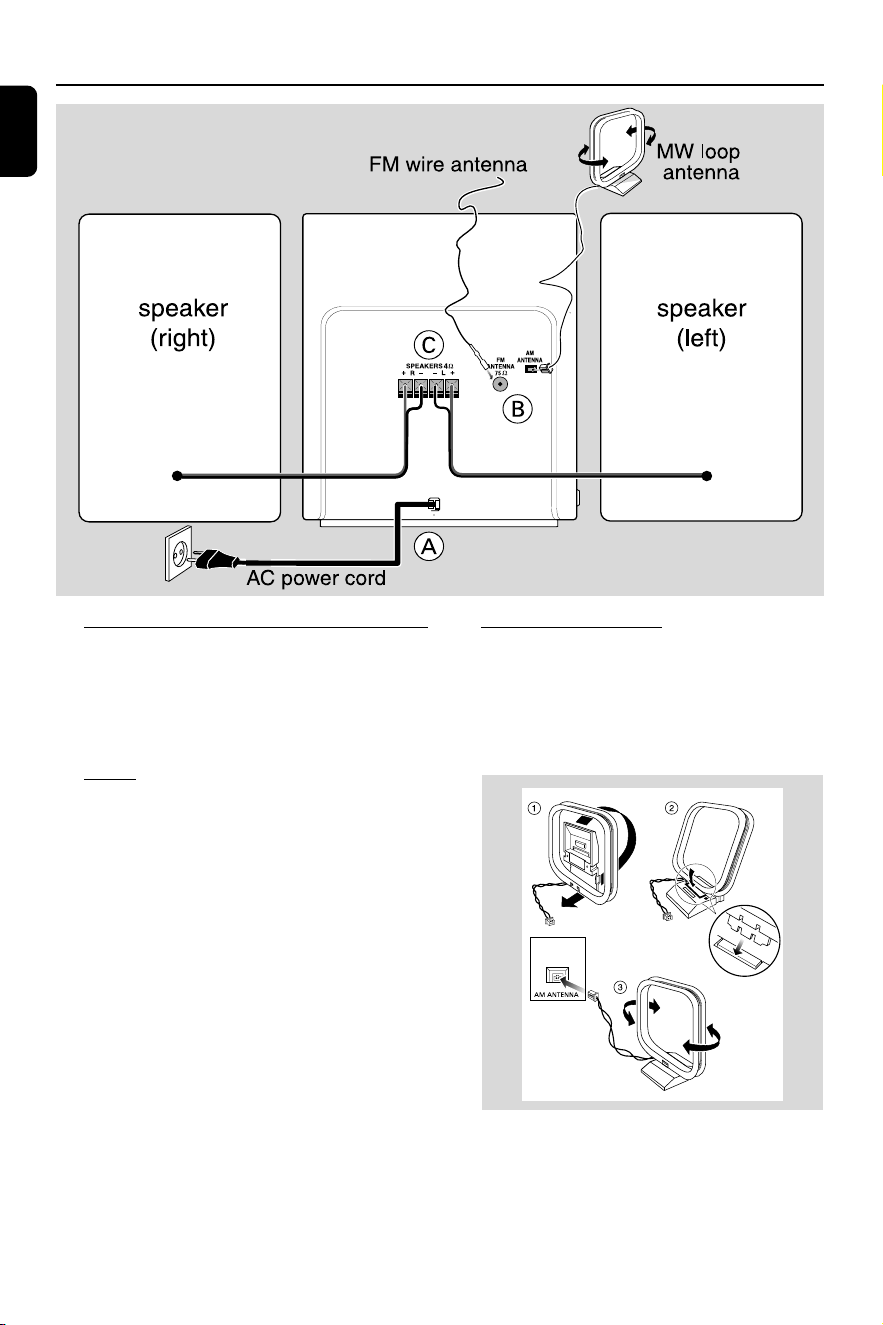
Rear connections
The type plate is located at the rear of the
system.
For users in the U.K.: please follow the
instructions on page 2.
A Power
Before connecting the AC power cord to the
wall outlet, ensure that all other connections
have been made.
WARNING!
–For optimal performance, use only the
original power cable.
–Never make or change any connections
with the power switched on.
B Antennas Connection
Connect the supplied AM loop antenna and FM
antenna to the respective terminals. Adjust the
position of the antenna for optimal reception.
MW Antenna
Fix the claw
to the slot
● Position the antenna as far as possible from a TV,
VCR or other radiation source.
PG 001-028_FWM15_22-ENG 23/11/04, 10:578
9
English
Preparations
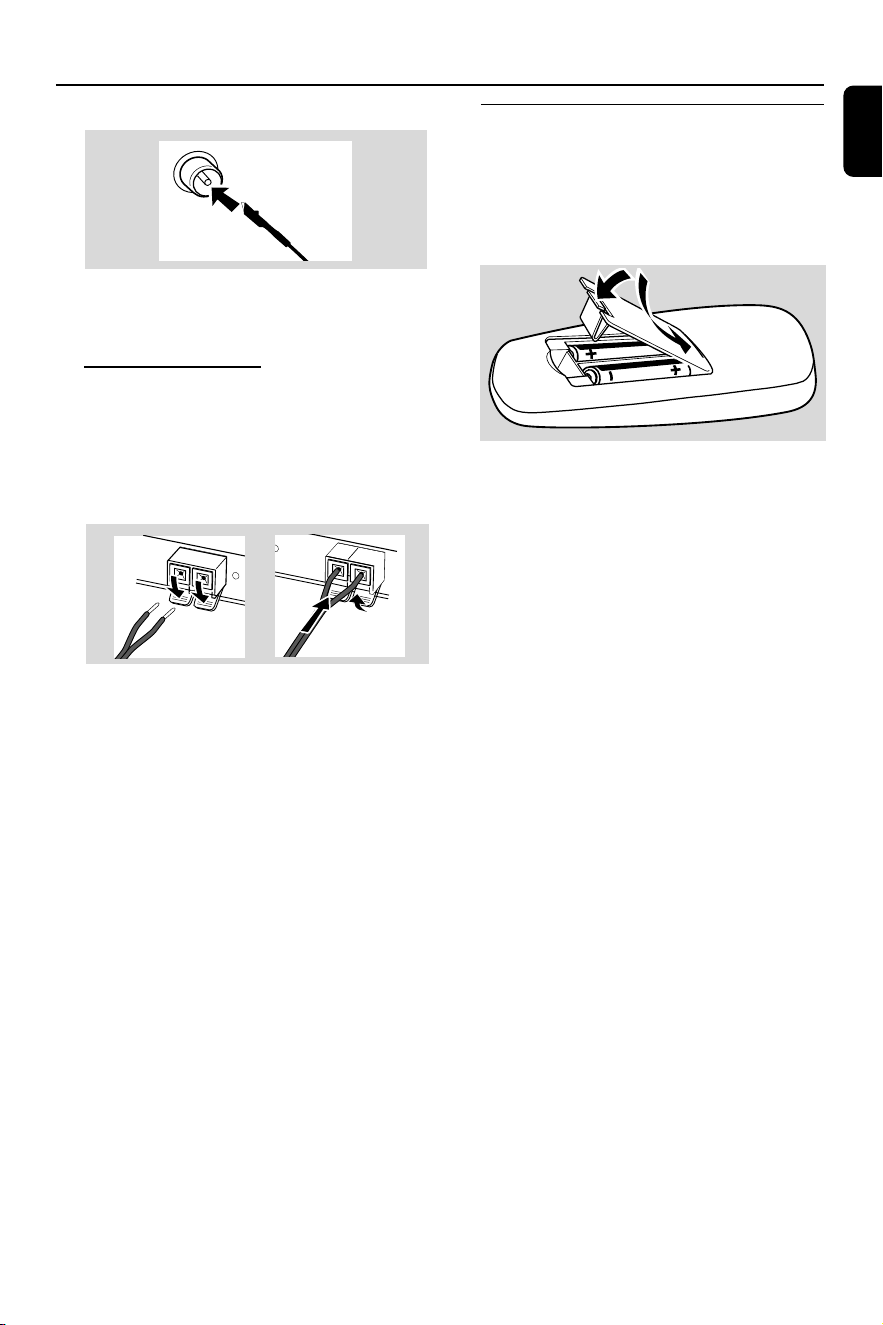
FM Antenna
● For better FM stereo reception, connect an
outdoor FM antenna to the FM ANTENNA
terminal.
C Speakers Connection
Front Speakers
Connect the speaker wires to the SPEAKERS
terminals, right speaker to "R" and left speaker to
"L", coloured (marked) wire to "+" and black
(unmarked) wire to "-".
● Fully insert the stripped portion of the speaker
wire into the terminal as shown.
Notes:
–For optimal sound performance, use the
supplied speakers.
– Do not connect more than one speaker to any
one pair of +/- speaker terminals.
– Do not connect speakers with impedance lower
than the speakers supplied. Please refer to the
SPECIFICATIONS section of this manual.
Inserting batteries into the
remote control
Insert two batteries type R03 or AAA (not
supplied) into the remote control with the
correct polarity as indicated by the "+" and
"-" symbols inside the battery compartment.
CAUTION!
– Remove batteries if they are exhausted
or will not be used for a long time.
– Do not use old and new or different
types of batteries in combination.
– Batteries contain chemical substances, so
they should be disposed off properly.
2
1
PG 001-028_FWM15_22-ENG 23/11/04, 10:579

10
English
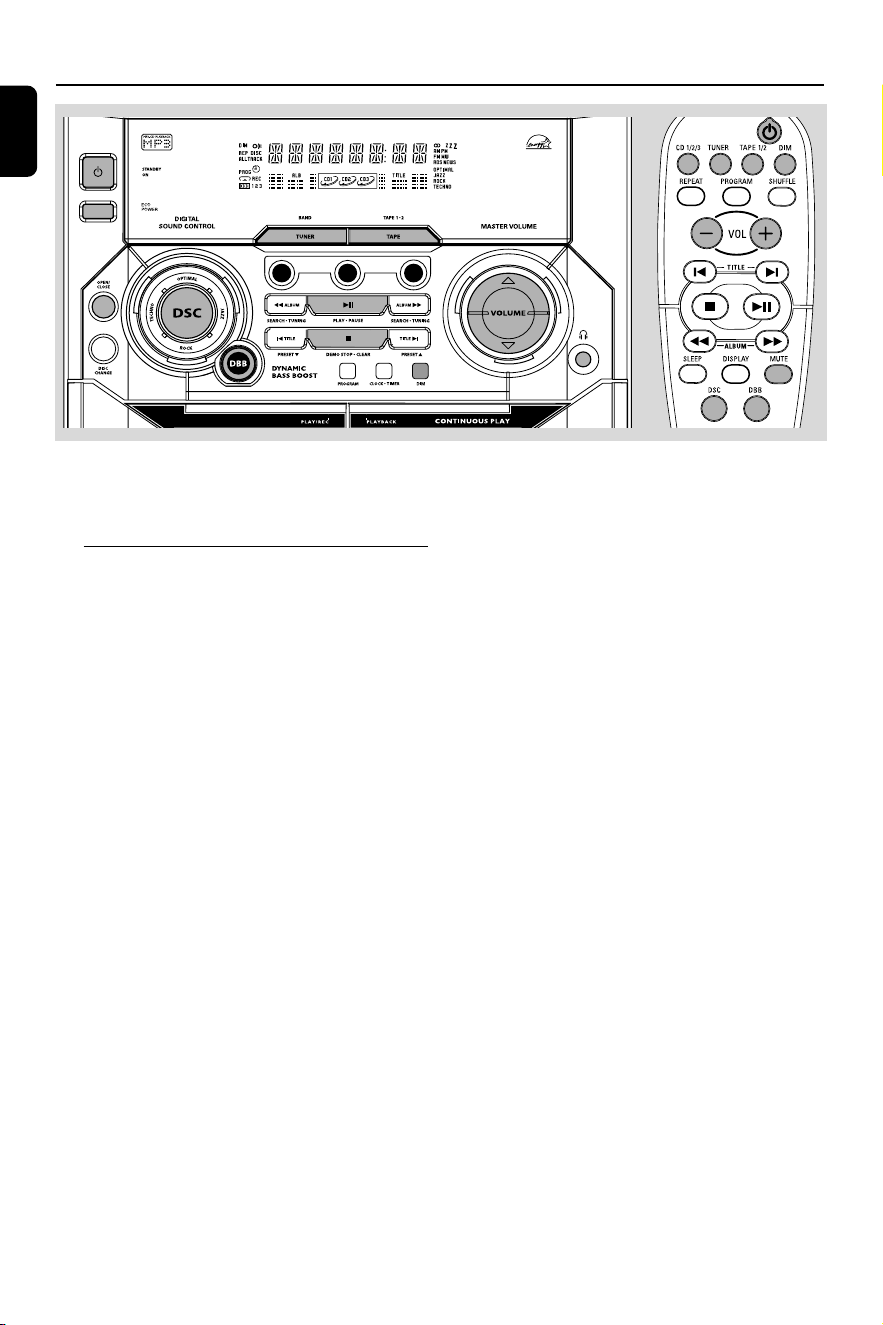
Controls (illustrations on page 3)
Controls on the system and
remote control
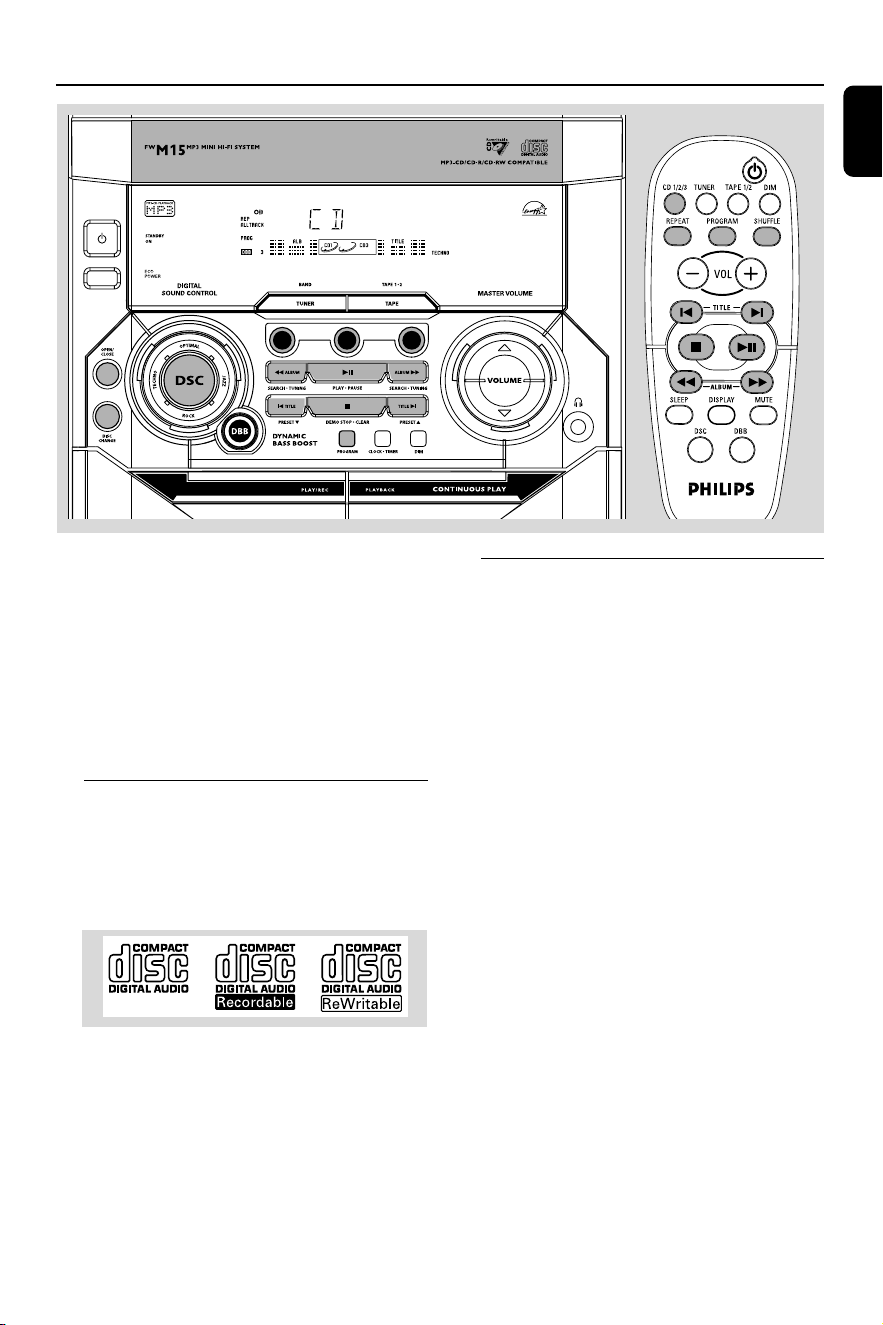
1
STANDBY ON y
– to switch the system on or to standby mode.
2 TUNER (BAND)
– to select waveband : FM or MW.
TAPE (TAPE 1•2)
– to select tape mode.
3 ECO POWER
– to switch the system on or to Eco Power
standby mode.
4 CD 1/ CD 2/ CD 3 (CD 1/2/3)
– to select disc tray 1, 2 or 3.
5 DSC (DIGITAL SOUND CONTROL)
– to select the desired sound effect :
JAZZ, ROCK, TECHNO or OPTIMAL.
6 CD OPEN/CLOSE
– to open or close the disc tray.
7 DISC CHANGE
–to change disc(s).
8 DBB (DYNAMIC BASS BOOST)
– to select the desired bass boost level.
9 PROGRAM
for CD ................. to programme disc tracks.
for Tuner ............. to programme preset radio
stations.
for Clock ............ to select 12- or 24-hour clock
mode.
0 Ta pe deck 1 operation
â .......................... to start recording.
É .......................... to start playback.
à / á ............... to rewind or fast forward.
70 ........................ to stop playback/recording or to
open the tape door.
Å .......................... to interrupt playback or
recording.
! Ta pe deck 2 operation
É .......................... to start playback.
à / á ............... to rewind or fast forward.
70 ........................ to stop playback or to open the
tape door.
Å .......................... to interrupt playback.
@ CLOCK•TIMER
– to view the clock, set the clock or set the timer.
# DIM
– to select different brightness for the display
screen : DIM 1, DIM 2, DIM 3 or DIM OFF.
$ n
– to connect headphones.
% MASTER VOLUME v w (VOL +/-)
– to increase or decrease the volume.
^ Mode Selection
PLAY•PAUSE ÉÅ
for CD/MP3-CD…to start or interrupt playback.
for Plug & Play…(on the system only) to initiate
and start plug & play mode.
SEARCH•TUNING à (ALBUM)
SEARCH•TUNING á (ALBUM)
for MP3-CD ..... to select previous/next album.
for CD ................. to search backward/forward.
for Tuner ............. to tune to a lower or higher
radio frequency.
for Clock ............ (on the system only) to set the
hour.
STOP•CLEAR / DEMO STOP Ç
for CD/MP3-CD…to stop playback or to clear a
programme.
for Tuner ............. (on the system only) to stop
programming or to erase a
selected preset.
for Demo ........... (on the system only) to activate/
deactivate the demonstration.
for Clock ............ (on the system only) to exit clock
setting or cancel timer.
for Plug & Play…(on the system only) to exit plug
& play mode.
PG 001-028_FWM15_22-ENG 23/11/04, 10:5710

11
English
PREV í / PRESET 4 (TITLE)
NEXT ë / PRESET3 (TITLE)
for MP3-CD ..... to select previous/next title.
for CD ................. to skip to the beginning of the,
previous, or next track.
for Tuner ............. to select a preset radio station.
for Clock ............ (on the system only) to set the
minute.
& Display screen
– to view the current status of the system.
* Disc tray
( REPEAT
– to playback track(s)/disc(s)/programme
repeatedly.
) SHUFFLE
– to playback all available tracks/programme of the
current disc in random order.
¡ MUTE
– to interrupt or resume sound reproduction.
™ SLEEP
– to activate/deactivate or set the sleep timer.
£ B
– to switch the system to standby mode.
– to switch the system to Eco Power standby
mode.
Notes for remote control:
– First, select the source you wish to
control by pressing one of the source select
keys on the remote control (CD 1/2/3 or
TUNER, for example).
– Then select the desired function (
É
,
í
,
ë
, for example).
Controls
PG 001-028_FWM15_22-ENG 23/11/04, 10:5711
12
English
Basic Functions
IMPORTANT!
Before you operate the system, complete
the preparation procedures.
Plug and Play (for tuner installlation)
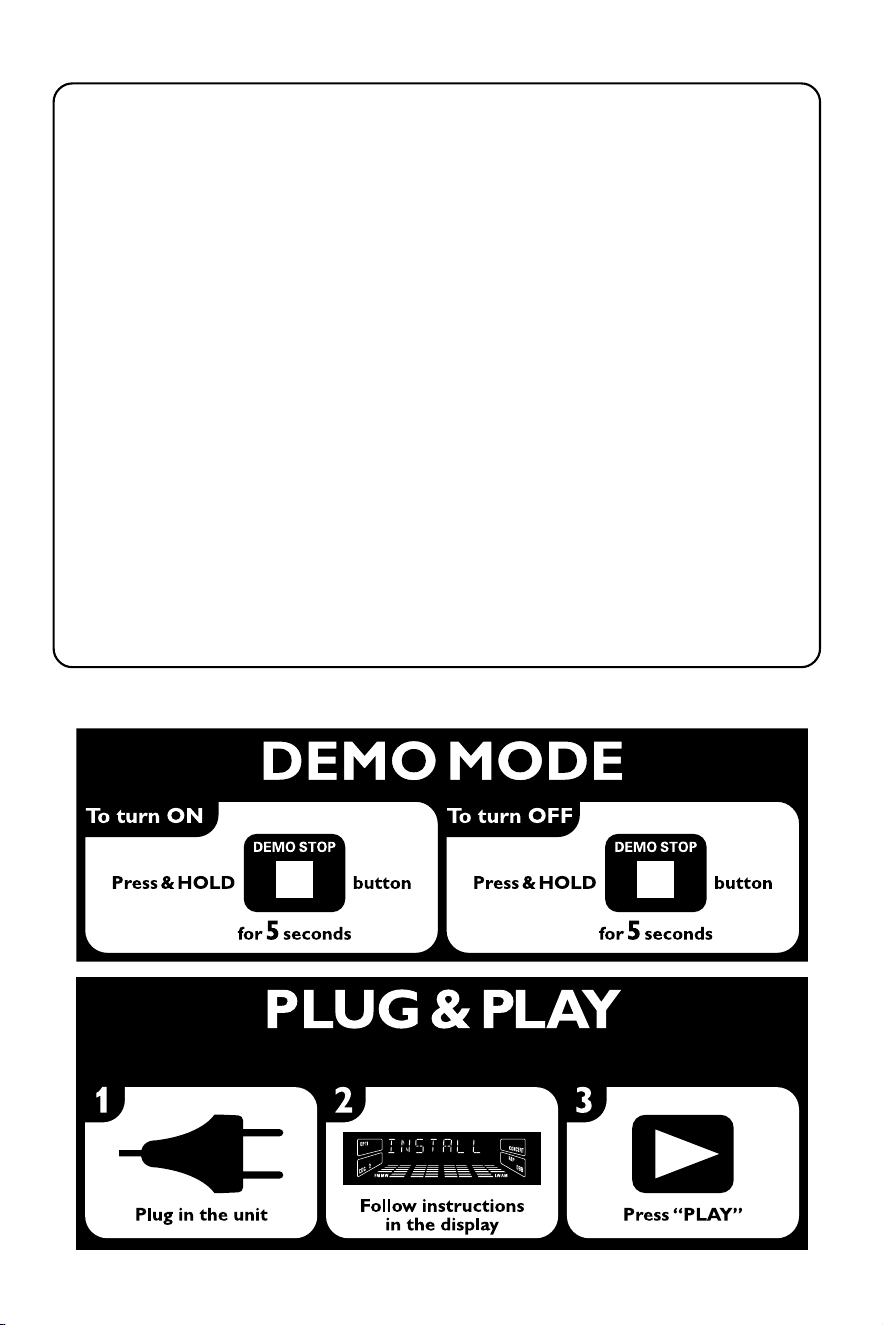
Plug and Play allows you to store all available
radio stations automatically.
First time setup/power up
1 When you turn on the main supply, "AUTO
INSTALL - PRESS PLAY" is displayed.
2 PressÉÅ on the system to start installation.
➜ "INSTALL" is displayed, followed by "TUNER"
and "AUTO".
➜ PROG starts flashing.
➜ All available radio stations with sufficient signal
strength will be stored automatically, starting
from FM and followed by MW band.
➜ When all the available radio stations are
stored or the memory for 40 presets are used,
the last preset radio station will be played.
To reinstall Plug and Play
1 In standby or demonstration mode, press and
holdÉÅ on the system until "AUTO INSTALL
- PRESS PLAY" is displayed.
2 PressÉÅ again to start installation.
➜ All previously stored radio stations will be
replaced.
To exit without storing the Plug and Play
● Press Çon the system.
➜ If you do not complete the Plug and Play
installation, the function will be restarted when
you next turn on the main supply again.
Notes:
– When the power is turned on, the disc tray may
open and close to initialise the system.
– If no stereo frequency is detected during
Plug and Play, "CHECK ANTENNA" will be
displayed.
– During Plug and Play, if no button is pressed
within 15 seconds, the system will exit Plug and
Play mode.
CD1
CD2
CD3
PG 001-028_FWM15_22-ENG 23/11/04, 10:5712
13
English
Demonstration mode
The system has a demonstration mode that
shows the various features offered by the system.
To activate the demonstration
● In standby mode, press and holdÇon the
system until "WELCOME" is displayed.
➜ The demonstration will begin.
To deactivate the demonstration
● Press and holdÇon the system until
"DEMO OFF" is displayed.
➜ The system will switch to standby mode.
Note:
– If you have not deactivated the demonstration,
it will resume five seconds after the system
switches to Eco Power standby or standby mode.
Switching the system on
In standby/demonstration mode
● Press STANDBY ON to switch on the last
selected source.
● Press CD 1/2/3, TUNER or
TAPE (TAPE 1/2).
● Press OPEN/CLOSE.
In Eco Power standby mode
● Press ECO POWER to switch on the last
selected source.
● Press CD 1/2/3, TUNER or TAPE 1/2 on the
remote control.
Switching the system to standby
mode
In demonstration mode
● Press and hold Ç on the system.
In any other source mode (except Eco
Power standby mode)
● Press STANDBY ON (or B on the remote
control).
➜ The clock will appear on the display when the
system is in standby mode.
Switching the system to Eco
Power standby mode (< 0.5 Watt)
● Press ECO POWER (or press and hold B on
the remote control).
➜ "ECO PWR" is displayed, then the display
screen will go blank.
➜ The low power ECO POWER LED will be
lighted.
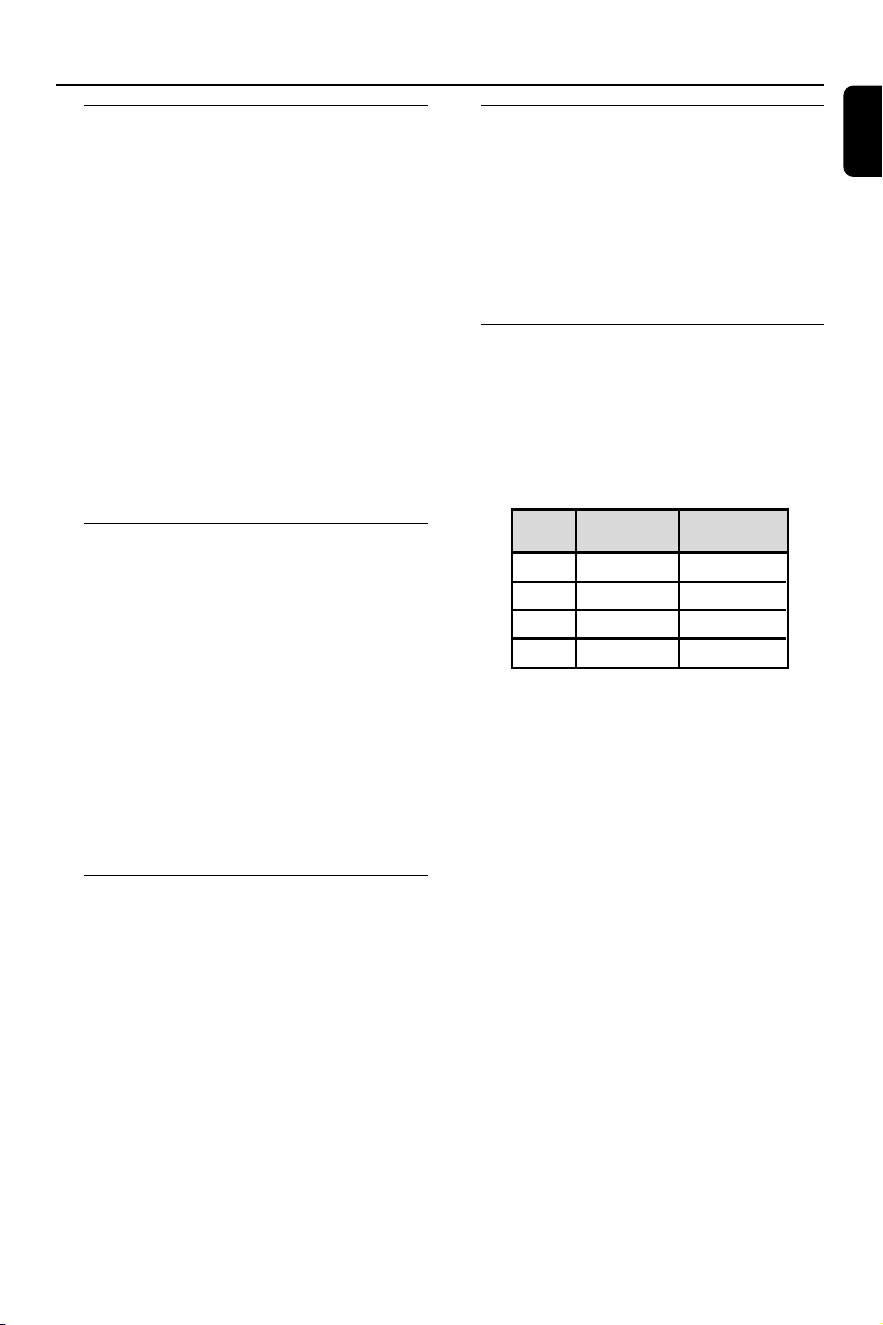
Dim mode
You can select the desired brightness for the
display.
● In any source mode (except standby mode),
press DIM MODE repeatedly to select : DIM 1,
DIM 2, DIM 3 or DIM OFF.
➜ DIM is shown, except for DIM OFF mode.
DIM
mode
1
2
3
OFF
Brightness
normal
half
half
normal
Spectrum
Analyser
off
on
off
on
Note:
– In standby mode, pressing DIM MODE to select
half or full brightness for clock display.
Basic Functions
PG 001-028_FWM15_22-ENG 23/11/04, 10:5713
14
English
Volume control
Press MASTER VOLUME v or w (VOL
+ or - on the remote control) to increase
or decrease the volume level.
To listen through the headphones
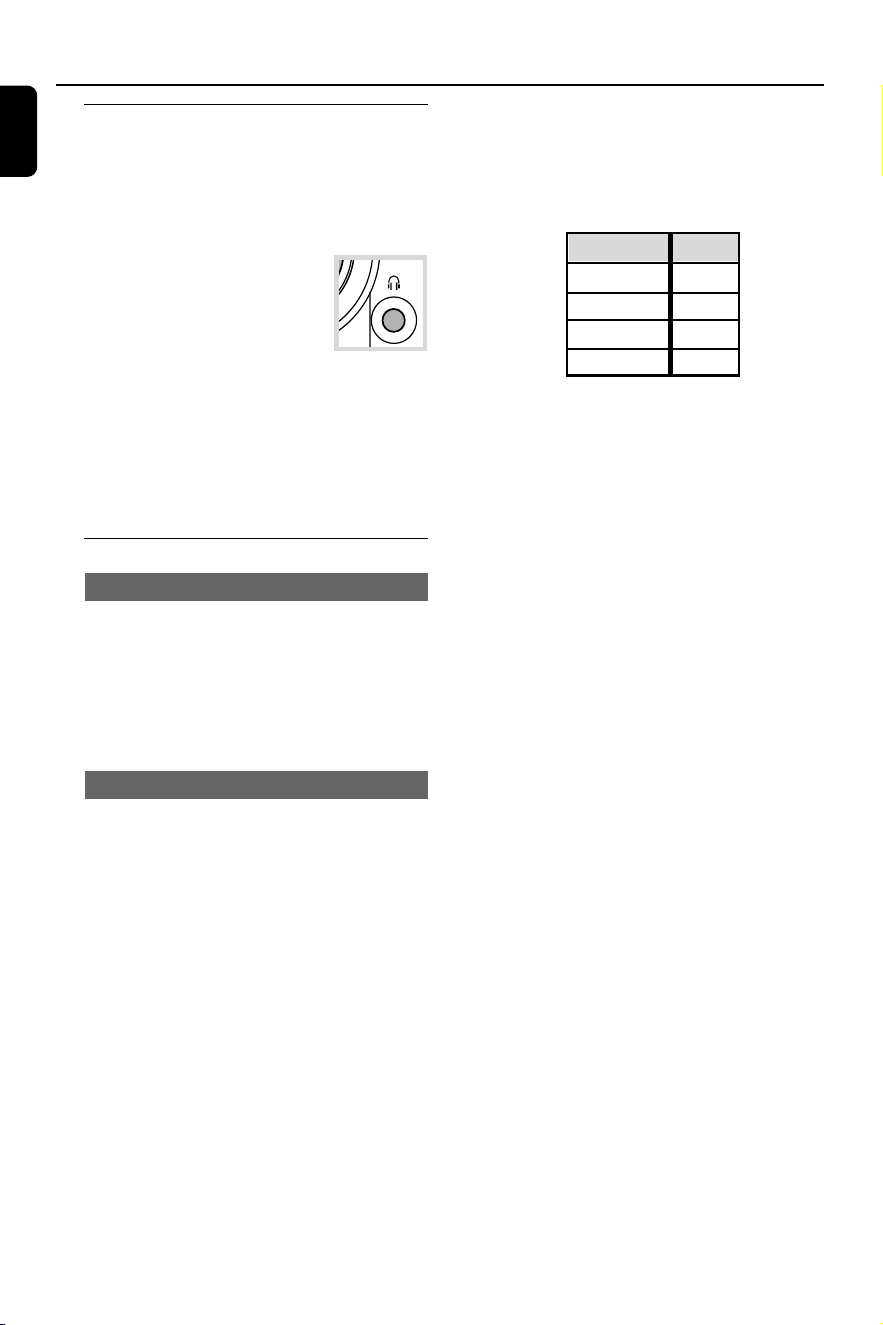
● Connect the headphones plug to
the n socket at the front of the
system.
➜ The speakers will be muted.
To switch off the volume temporarily
● Press MUTE on the remote control.
➜ Playback will continue without sound and
"MUTE" is displayed.
● To restore the volume, press MUTE again or
increase the volume level.
Sound control
DSC (Digital Sound Control)
The DSC feature enables you to enjoy special
sound effects that have preset equaliser settings,
providing the best music reproduction.
● Press DSC to select : JAZZ, ROCK, TECHNO or
OPTIMAL.
➜ The selected DSC is shown.
DBB (Dynamic Bass Boost)
There are three DBB settings to enhance the
bass response.
● Press DBB repeatedly to select a bass boost
level.
➜ “DBB 1 (or 2/3)” and the respective bass
boost level are shown.
To deactivate DBB
● Press DBB repeatedly until “DBB OFF” is
displayed.
Note:
– Some discs or tapes might be recorded in high
modulation, which causes a distortion at high
volume. If this occurs, switch off DBB or reduce
the volume.
Basic Functions
Automatic DSC-DBB selection
The best DBB setting is generated automatically
for each DSC selection. You can manually select
the DBB setting that best suits your listening
environment.
DSC
JAZZ
ROCK
TECHNO
OPTIMAL
DBB
off
on (3)
on (3)
on (2)
PG 001-028_FWM15_22-ENG 23/11/04, 10:5714
15
English
CD/MP3-CD Operations
IMPORTANT!
– This system is designed for regular
discs. Therefore, do not use any
accessories such as disc stabiliser rings or
disc treatment sheets, etc., as offered on
the market, because they may jam the
changer mechanism.
– Do not load more than one disc into
each tray.
Discs for playback
This system is able to play :
– All pre-recorded audio CDs
– All finalised audio CDR and audio
CDRW discs
– MP3-CDs (CD-ROMs with MP3 tracks)
About MP3 disc
Supported formats
– ISO9660, Joliet, Multisession
– Max. track number plus album is 255
– Max. nested directory is 8 levels
– The max. album number is 32
– The max. MP3 programme track number is 99
– Supported VBR bit-rate
– Supported sampling frequencies for MP3 disc
are: 32 kHz, 44.1 kHz, 48 kHz
– Supported Bit-rates of MP3 disc are: 32, 64,
96, 128, 192, 256 (kbps)
Making your own MP3-CD
1 Rip the music from your own Digital Audio CDs
or download legal MP3 music from the Internet.
2 Record (“burn”) the music on CD-R(W) disc
with your home PC. Make sure to use a
recording speed not faster than indicated on the
CD-R(W) and avoid running other programme
simultaneously on your PC during the recording
process.
CD1
CD2
CD3
PG 001-028_FWM15_22-ENG 23/11/04, 10:5715
16
English
CD/MP3-CD Operations
Sound Quality
Ta ke note that MP3-CD compilations should
best contain only MP3 tracks (*.mp3). To
achieve a good MP3 quality, a bit rate of
128 kbps is recommended.
Loading discs
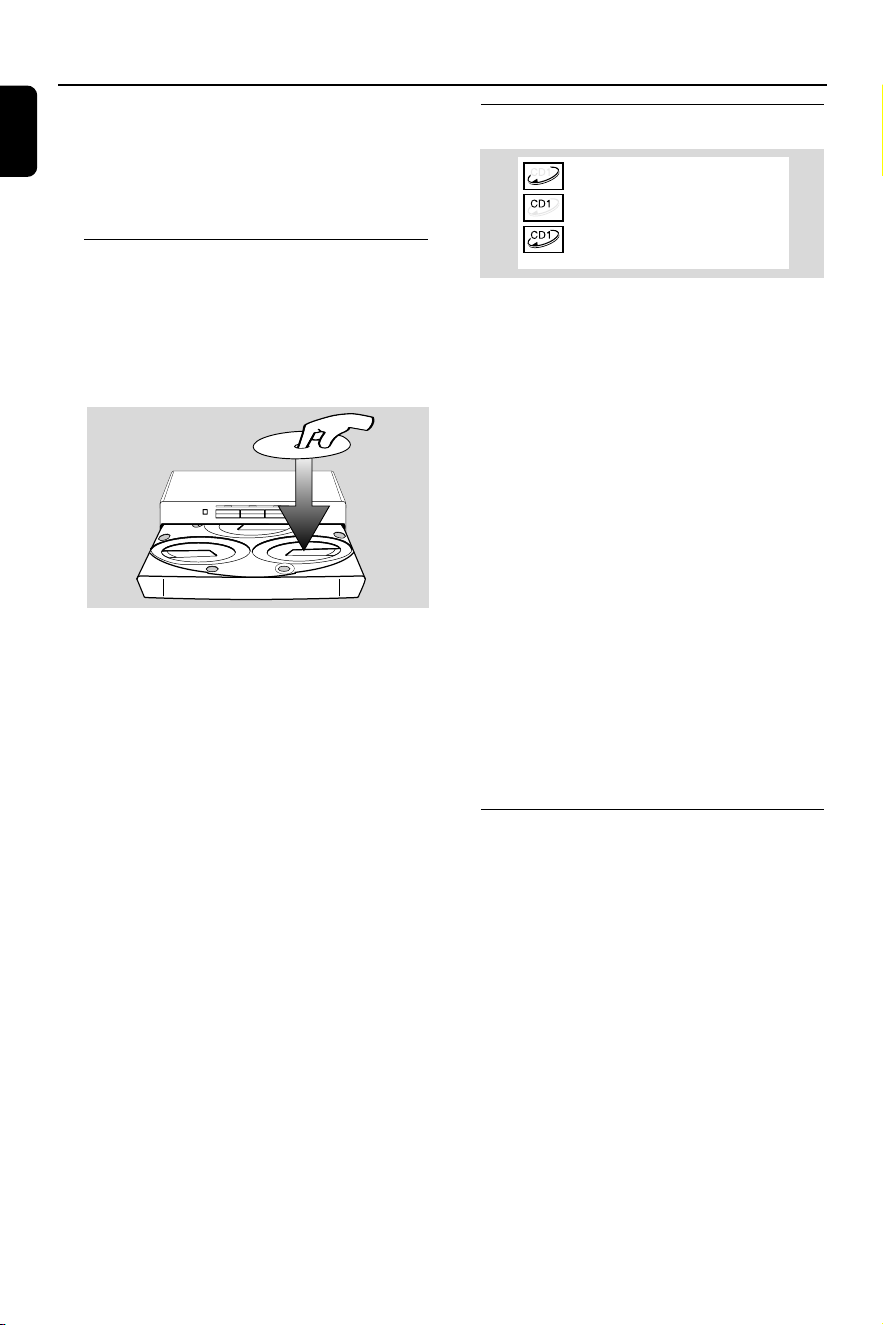
1 Press OPEN/CLOSE to open the disc tray.
2 Load up to two discs on the individual disc trays.
To load the third disc, press DISC CHANGE.
➜ The disc tray will rotate until the empty tray
is ready for loading.
3
CD CHANGER
CLOCK
.
TIMER
VOLUME
DEMO
PRESET TUNING
SHUFFLE
TIMER
PLAY
MODE
SIDE
SET CLOCK
TIMER SET
BAND
RECORD
DUBBING
CD TAPE
PROGRAM
CLEAR
RDS
MODE
1
2
3
TIMER
DBB
PROGRAM
AMPM
SHUFFLE
FMMW
LWSW
STEREO
NR
FRONT
BACK
RECORD
HSD
2
2
1
DISC CHANGE
DISC 1 DISC 2 DISC 3
OPEN•CLOSE
1
3 Press OPEN/CLOSE to close the disc tray.
➜ "READING" is displayed. The selected disc
tray, total number of tracks and the playing time
will appear on the display.
➜ For MP3 disc, the name of the first album will
be scrolled through the display once and
followed by "AXX TXXX".
Notes:
– Load the discs with the label side facing up.
–For MP3 disc, the disc reading time may exceed
10 seconds due to the large number of songs
compiled into one disc.
Playing discs
a disc is loaded in the disc tray
the current selected disc tray is empty
the current selected disc tray is loaded
or playing
To play all discs on the disc tray
● PressÉÅ .
➜ All the available discs will play once, then stop.
➜ During playback, the selected disc tray, track
number and elapsed playing time of the current
track are displayed.
➜ For MP3 disc, TITLE is shown. For mixed
mode discs, only one mode will be selected for
playback depending on the recording format.
To play the selected disc only
● In CD mode, press CD 1, CD 2 or CD 3 on
the system.
➜ The selected disc will play once, then stop.
To interrupt playback
● PressÉÅ.
➜ The current track time flashes.
● To resume playback, pressÉÅ again.
To stop playback
● Press Ç.
Replacing discs during playback
1 Press DISC CHANGE.
➜ The disc tray will open without interrupting
current playback.
2 To change the inner disc, press DISC
CHANGE again.
➜ "DISC CHANGE" is displayed and the disc
will stop playing.
➜ The disc tray will close to retrieve the inner
disc, then reopen with the inner disc accessible.
PG 001-028_FWM15_22-ENG 23/11/04, 10:5716

17
English
Selecting a desired track/passage
To search for a particular passage during
playback
1 Press à or á until the desired passage is
located.
To select a desired track
● Press í or ë repeatedly until the desired
track is displayed.
● If playback is stopped, pressÉÅ to start
playback.
Selecting a desired Album/Title
(MP3 disc only)
To select a desired album
● Press ALBUM -/+ (à or á) repeatedly.
➜ ALB starts flashing and the album’s name will
scroll through the display once.
To select a desired title
● Press TITLE -/+ repeatedly (í / ë).
➜ TITLE starts flashing and the title’s name will
scroll through the display once.
Note:
– The album and title will only be displayed once
when selected. To view again, press the respective
DISPLAY button on the remote control.
Repeat play
You can select and change the various play
modes before or during playback.
1 Press REPEAT on the remote control
repeatedly to select :
➜ "TRACK" – to repeat playback of the current
track.
➜ "DISC" – to repeat playback of the current
disc.
➜ "PROGRAM" – to repeat playback of the
programmed tracks.
2 To resume normal playback, press REPEAT
until "REPEAT OFF" is displayed.
➜ REP is shown, except for REPEAT OFF mode.
Notes:
– During programme play mode, it is not possible
to repeat playback the current disc (Repeat Disc
mode).
–Pressing theÇ button will cancel all repeat
modes.
Random play
● Press SHUFFLE on the remote control to turn
on/off the shuffle mode.
➜ If activated, SHUFFLE is shown and the
repeat mode (if any) will be cancelled.
➜ Random play will start from the current disc
tray.
➜ If programme mode is active, only the
programmed tracks will be played in random
order.
Programming the disc tracks
Programming tracks is possible when playback is
stopped. Up to 99 tracks can be stored in the
memory in any order.
1 Load the desired discs on the disc tray (refer to
“Loading discs”).
2 Press CD 1/2/3 to select a disc.
3 Press STOPÇ to go to stop mode.
4 Press PROG to start programming.
➜ PROG starts flashing.
CD/MP3-CD Operations
PG 001-028_FWM15_22-ENG 23/11/04, 10:5717

18
English
Erasing the programme
● Press Ç once when playback is stopped or
twice during playback.
➜ PROG disappears and "PROGRAM CLEARED"
is displayed.
Note:
– The programme will be erased when the system
is disconnected from the power supply or when the
disc tray is opened.
For Recording, please refer to “Tape
Operation/Recording”.
CD/MP3-CD Operations
5 Press í or ë repeatedly to select the desired
track.
● For MP3 disc, press ALBUM -/+ and
TITLE -/+ to select the desired album and
title for programming.
6 Press PROG to store the track.
● Repeat steps 5–6 to store other tracks.
7 To end programming, press Ç once.
➜
PROG stays and the programme mode
remains active.
➜ The total number of tracks programmed and
the total playing time are displayed.
➜ For MP3 disc, total playing time will not be
shown.
8 To start programme play, pressÉÅ.
➜ "PLAY PROGRAM" is displayed.
Notes:
– It is not possible to create a programme with
MP3 tracks from multiple CDs, or combined with
normal audio tracks.
– If the total playing time is more than "
99:59
"
then "
--:--
" is displayed instead of the total
playing time.
– If you attempt to programme more than 99
tracks, "FULL" is displayed.
– During programming, if no button is pressed
within 20 seconds, the system will exit the
programme mode automatically.
To review the programme
● Stop playback and pressí or ë repeatedly.
● To exit review mode, press Ç.
PG 001-028_FWM15_22-ENG 23/11/04, 10:5718
19
English
Radio Reception
Tuning to radio stations
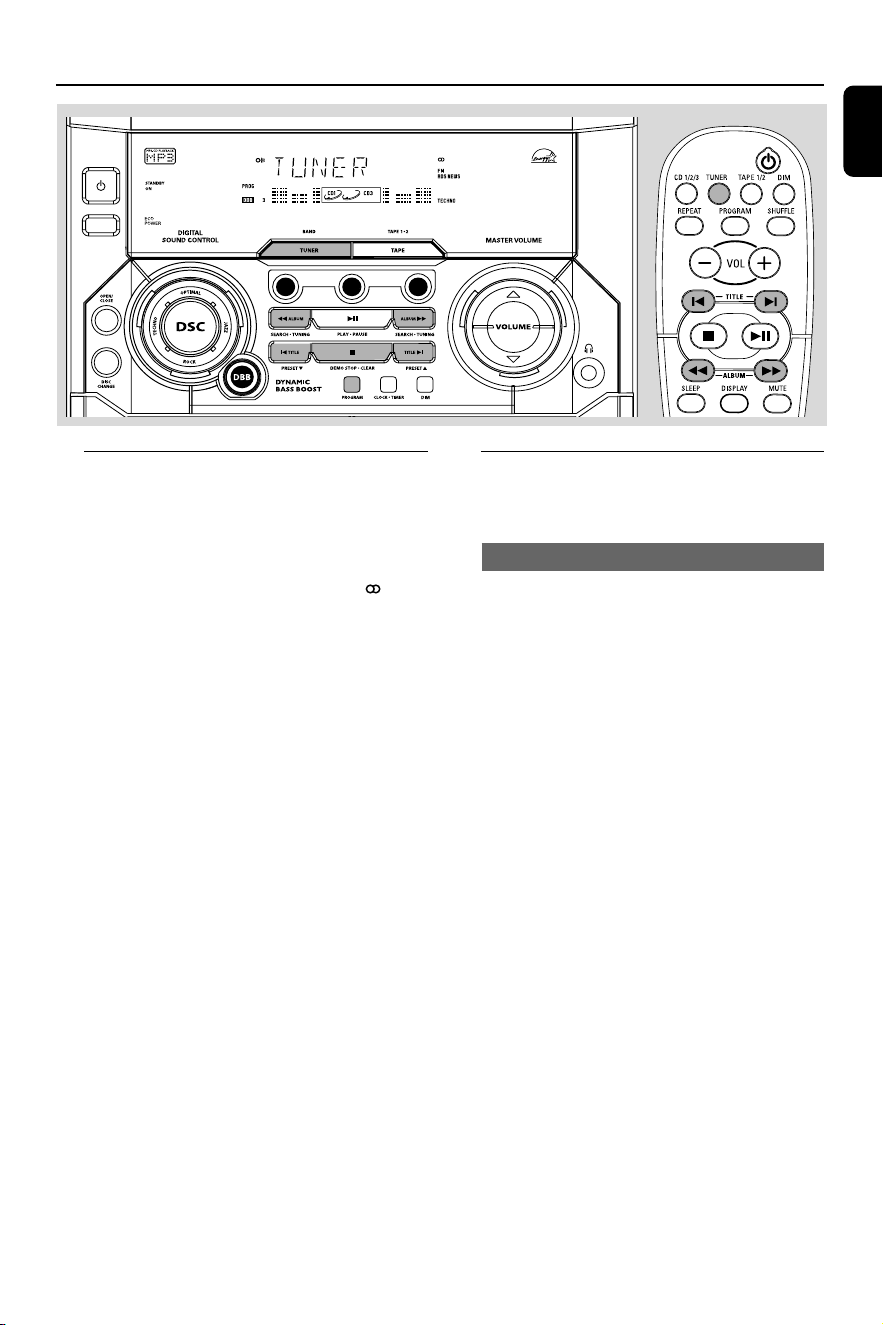
1 Press TUNER to select TUNER mode.
➜ "TUNER" is displayed. A few seconds later, the
current radio frequency will appear on the
display.
➜ If an FM station is received in stereo, is
displayed.
2 Press TUNER again to select the desired
waveband : FM or MW.
3 Press and hold à or á until the frequency
indication starts to change, then release.
➜ The display will show "SEARCH" until a radio
station with sufficient signal strength is found.
4 Repeat step 3 if necessary until you find the
desired radio station.
● To tune to a weak station, press à or á briefly
and repeatedly until optimal reception found.
Storing preset radio stations
You can store up to 40 preset radio stations in
the memory.
Automatic Preset Programming
● Plug and Play setting (refer to “Basic Functions -
Plug and Play”).
OR
1 Press TUNER to select TUNER mode.
To begin automatic preset from a desired
preset number
● Press í or ë to select the desired preset
number.
➜ If a radio station has been stored in one of
the presets, it will not be stored again under
another preset number.
2 Press and hold PROGRAM until "AUTO" is
displayed.
➜ PROG starts flashing.
➜ All available radio stations with sufficient signal
strength will be stored automatically, starting
from FM and followed by MW band.
➜ When all the available radio stations are
stored or the memory for 40 presets are used,
the last preset radio station will be played.
CD1
CD2
CD3
PG 001-028_FWM15_22-ENG 23/11/04, 10:5719

20
English
To stop storing the automatic preset
● Press PROGRAM or Ç on the system.
Note:
– If no preset number is selected, automatic preset
will begin from preset (1) and all your former
presets will be overridden.
Manual Preset Programming
1 Tune to your desired radio station (refer to
“Tuning to radio stations”).
2 Press PROGRAM.
➜ PROG starts flashing.
➜ The next available preset number is displayed
for selection.
To store the radio station to another
preset number
● Press í or ë to select the desired preset
number.
3 Press PROGRAM again to store the radio
station.
➜ PROG disappears.
● Repeat steps 1–3 to store other radio stations.
To exit manual preset mode
● Press Ç on the system.
Notes:
– If you attempt to store more than 40 preset
radio stations, "FULL" is displayed.
– During programming, if no key is pressed within
20 seconds, the system will exit the programme
mode automatically.
Tuning to preset radio stations
● Once you’ve programmed the radio stations,
press í or ë to select the desired preset
number.
➜ The preset number, radio frequency, and
waveband are displayed.
Radio Reception
Erasing a preset radio station
1 Press í or ë to select the preset radio station
to be erased.
2 Press and hold Çon the system until “PRESET
DELETED” is displayed.
➜ The deleted radio frequency remains on the
display.
➜ The preset numbers of all other preset radio
stations in the band with higher numbers are
also decreased by one.
● Repeat steps 1–2 to erase other preset radio
stations.
For Recording, please refer to “Tape
Operation/Recording”.
PG 001-028_FWM15_22-ENG 23/11/04, 10:5720
21
English
Ta pe Operation/Recording
CD1
CD2
CD3
IMPORTANT!
– Before playing a tape, check and tighten
slack tape with a pencil. Slack tape may get
jammed or may burst in the mechanism.
– C-120 tape is extremely thin and is easily
deformed or damaged. It is not
recommended for use in this system.
– Store the tapes at room temperature and
do not put them too close to a magnetic
field (for example, a transformer, TV or
speaker).
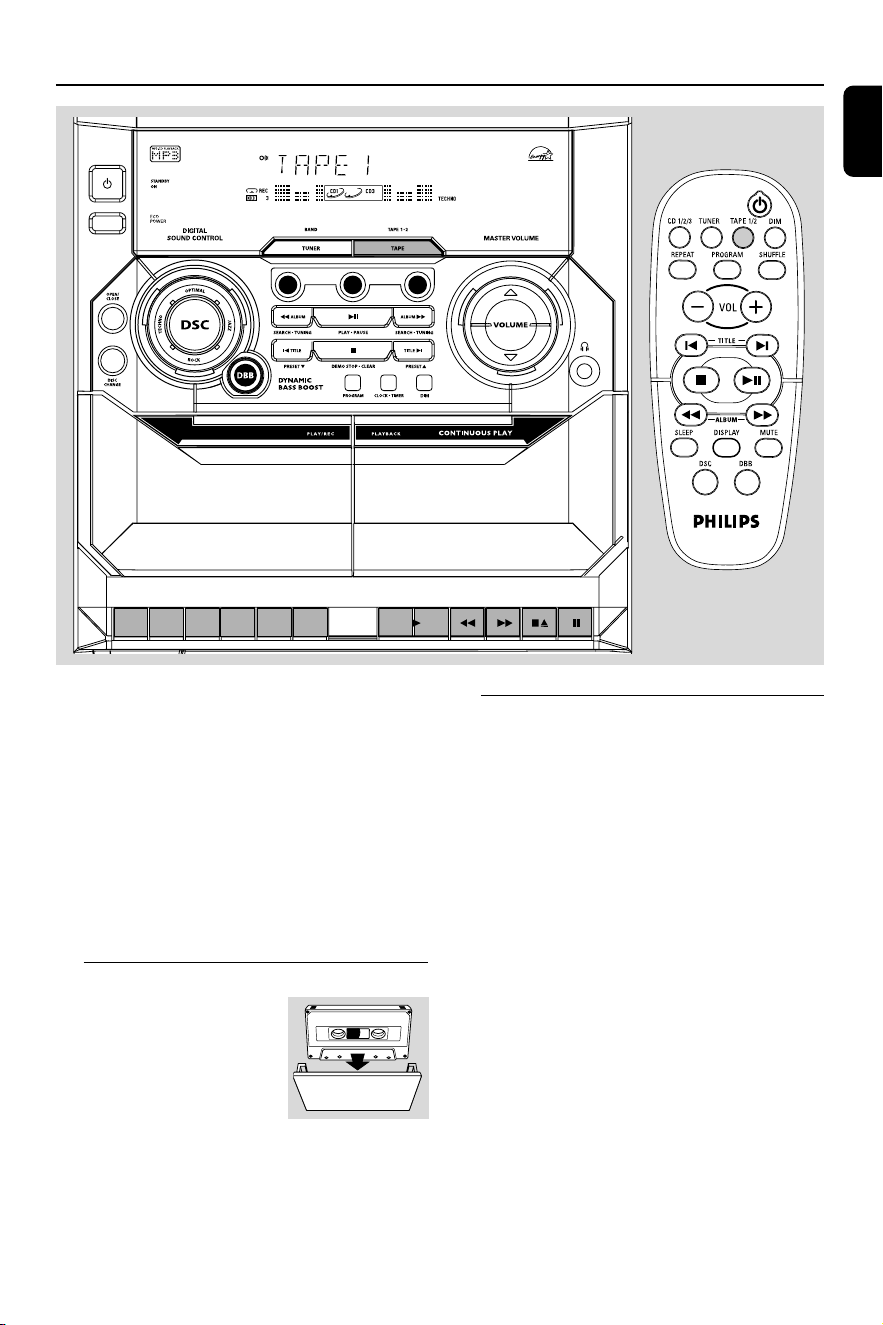
Loading tape
1 Press TAPE to select TAPE
mode.
➜ "TAPE" is displayed.
2 Press 70 to open the tape
deck door.
3 Load the tape with the open side downward and
full spool to the left.
4 Close the tape deck door.
Playing tapes
To playback a selected tape deck
● PressÉ on tape deck 1 or 2.
➜ The tape will stop at the end of playback.
Continuous playback of two tapes
1 Load the tapes in tape deck 1 and 2.
2 PressÉ on tape deck 2.
3 Press Å on tape deck 1, followed byÉ .
➜ Playback will begin from tape deck 2 and
continue with tape deck 1. It will stop at the end
of tape deck 1.
To interrupt playback
● Press Å.
● To resume playback, press Å again.
To stop playback
● Press 70.
PG 001-028_FWM15_22-ENG 23/11/04, 10:5721
22
English
Fast forwarding/rewinding
1 Press à or á until you reach your desired
passage.
2 Press 70 to stop rewinding/fast forwarding.
Notes:
During fast forwarding/rewinding, the keys will
not be released at the end of a tape. To switch
off the set, make sure the cassette keys are
also released.
General information on
recording
● For recording, use only tape of IEC type I
(normal tape).
● The recording level is set automatically, regardless
of the position of the Volume, DBB, DSC and so
forth.
● The tape is secured at both ends with leader
tape. At the beginning and end of the tape,
nothing will be recorded for six to seven
seconds.
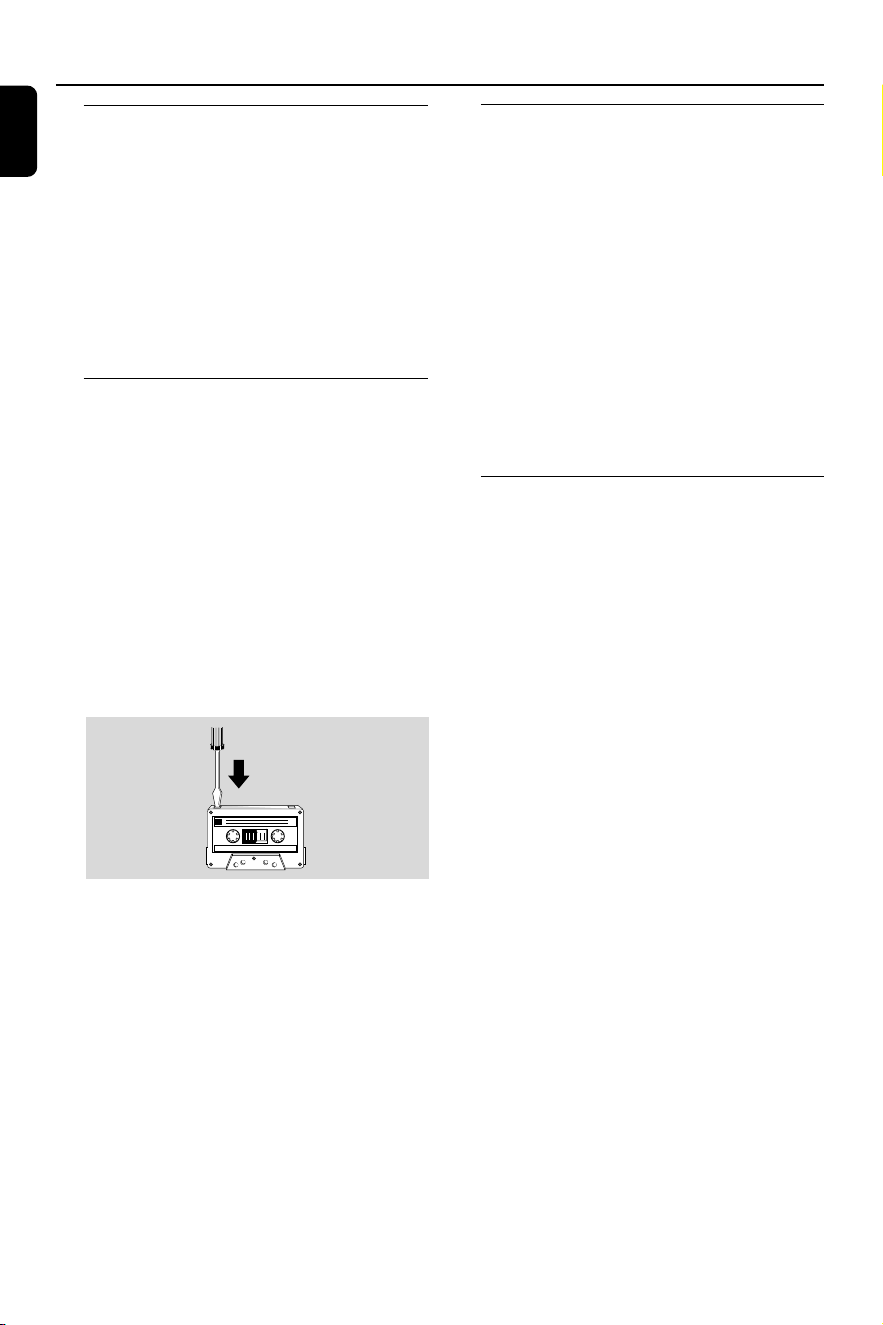
● To prevent accidental recording, break out the
tab on the left shoulder of the tape side you
want to protect.
IMPORTANT!
– Recording is permissible if copyright or
other rights of third parties are not
infringed upon.
– Recording is possible only on tape deck 1.
Preparation for recording
1 Load a recordable tape into tape deck 1 with full
spool to the left.
2 Prepare the source to be recorded.
CD 1/2/3 – load the disc(s).
TUNER – tune to the desired radio station.
TAPE – load the prerecorded tape into tape
deck 2 with the full spool to the left.
When recording is in progress
➜
REC starts flashing.
● It is not possible to listen to another source.
● It is not possible to activate the timer function
during recording or tape dubbing.
One touch recording
1 Press CD 1/2/3 or TUNER to select the
source.
2 Start playback of the selected source.
3 Press ● on tape deck 1 to start recording.
To stop recording
● Press 70 on tape deck 1.
Ta pe Operation/Recording
PG 001-028_FWM15_22-ENG 23/11/04, 10:5722

23
English
Ta pe Operation/Recording
CD Synchronised start recording
1 Press CD 1/2/3 to select the disc.
● You can programme the tracks in the order you
want them to be recorded (refer to “CD
Operation - Programming the disc tracks”).
2 Press ● on tape deck 1 to start recording.
➜ The disc will start playback automatically.
To stop recording
● Press 70 on tape deck 1, then press Ç to stop
disc playback.
Dubbing tapes
1 Load the prerecorded tape in tape deck 2.
● Make sure both tapes have their full spool to the
left.
2 Press Å on tape deck 1 and followed by ●.
3 PressÉ on tape deck 2.
➜ Recording will start automatically.
● Dubbing of tapes is possible on one side of the
tape only. To continue recording on the reverse
side, at the end of side A, flip the tape to side B
and repeat the procedure.
To stop dubbing
● Press 70 on tape deck 1 and 2.
Notes:
– Dubbing of tapes is possible only from tape
deck 2 to tape deck 1.
–To ensure good dubbing, use tapes of the same
length.
PG 001-028_FWM15_22-ENG 23/11/04, 10:5723
24
English
Clock/Timer
CD1
CD2
CD3
IMPORTANT!
When in Eco Power standby mode, it is not
possible to show the clock time or set the
clock/timer function.
View clock
The clock (if it is set) will be shown in standby
mode.
To view the clock in any source mode
(CD or TUNER for example)
● Press CLOCK•TIMER.
➜ The clock is displayed for a few seconds.
➜ If the clock has not been set, "--:--" is
displayed.
Clock setting
The clock can be set in either 12-hour or
24-hour mode ("12:00 AM" or "00:00" for
example)
1 In standby or view clock mode, press
CLOCK•TIMER once. In other source mode,
press CLOCK•TIMER twice.
2 Press PROGRAM repeatedly to select clock
mode.
➜ "12:00 AM" or "00:00" starts flashing.
3 Press à or á on the system repeatedly to set
the hour.
4 Press í or ë on the system repeatedly to set
the minute.
5 Press CLOCK•TIMER again to store the
setting.
➜ The clock starts working.
To exit without storing the setting
● Press Çon the system.
Notes:
– The clock setting will be cancelled when the
power cord is disconnected or if a power failure
occurs.
– During clock setting, if no button is pressed
within 90 seconds, the system will exit clock setting
mode automatically.
Timer setting
The system can switch on to CD or TUNER
mode automatically at a preset time, serving as
an alarm to wake you up.
IMPORTANT!
– Before setting the timer, ensure that the
clock is set correctly.
– The timer will always be switched on
after it has been set.
– The timer will not start if a recording is in
progress.
– The volume of the timer will increase
gradually to the last tuned volume level. If
the last tuned volume level is too low, the
set will then increase to a predetermined
minimum audible level.
PG 001-028_FWM15_22-ENG 23/11/04, 10:5724
25
English
1 Press and hold CLOCK•TIMER for more than
two seconds to select timer mode.
➜ "12:00 AM" or "00:00" or the last timer
setting starts flashing.
➜
starts flashing.
2 Press CD 1/2/3 or TUNER to select the
desired source.
➜ “CD1 [or 2, 3] XX:XX" indicates the CD
mode is selected.
➜ “TU XX:XX” indicates the Tuner mode is
selected.
● Before setting timer, make sure the music source
has been prepared.
CD 1/2/3 – Load the disc(s).
TUNER – tune to the desired radio station.
3 Press à or á on the system repeatedly to set
the hour for the timer to start.
4 Press í or ë on the system repeatedly to set
the minute for the timer to start.
5 Press CLOCK•TIMER to store the timer.
➜ "TIMER ON" is displayed, followed by the set
timer "XX:XX" and the selected source.
➜ remains on the display.
● At the preset time, the selected source will play.
To exit without storing the setting
● Press Çon the system.
Notes:
– When the preset time is reached and the
selected disc tray is empty, the next available disc
will be selected. If all the disc trays are not
available, Tuner will be selected automatically.
– During timer setting, if no button is pressed
within 90 seconds, the system will exit timer
setting mode automatically.
Deactivating the timer
1 Press and hold CLOCK•TIMER for more than
two seconds.
2 Press Ç on the system to cancel the timer.
➜ "CANCEL" is displayed and the disappears.
Activating the timer (for the same
preset time and source)
1 Press and hold CLOCK•TIMER for more than
two seconds.
2 Press CLOCK•TIMER again to store.
➜ The last set timer information is displayed for
a few seconds and
is shown.
Sleep timer setting
The sleep timer enables the system to switch to
standby mode automatically at a preset time.
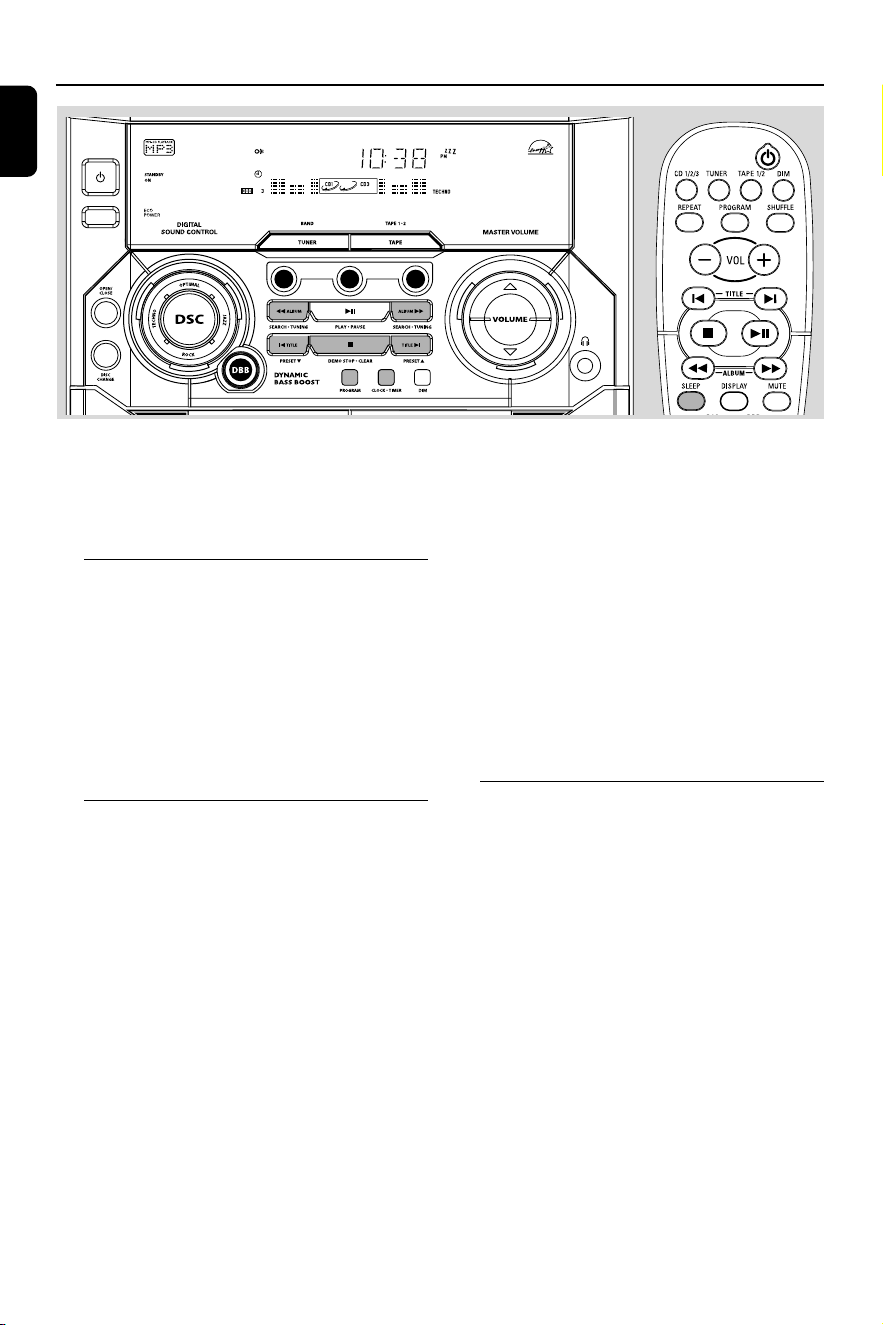
1 Press SLEEP on the remote control repeatedly
to select a preset time.
➜ The selections are as follows (time in
minutes):
15 ™ 30 ™ 45 ™ 60 ™ 90 ™ 120 ™
OFF ™ 15 …
➜ "SLEEP XX" or "OFF" is displayed. "XX" is
the time in minutes.
2 When you reach the desired length of time, stop
pressing the SLEEP button.
➜ is shown, except for "OFF" mode.
➜ The sleep timer is now set. Before the system
switches to standby mode, a countdown of 10
seconds is displayed.
"SLEEP 10" ™ "SLEEP 9".... ™ "SLEEP 1"
™ "SLEEP"
To check the remaining length of time
after sleep timer is activated
● Press SLEEP once.
To change the preset sleep timer
● Press SLEEP again while the remaining sleep
timer is shown.
➜ The display will show the next sleep timer
options.
To deactivate the sleep timer
● Press SLEEP repeatedly until "OFF" is displayed,
or press the STANDBY ON button.
Clock/Timer
PG 001-028_FWM15_22-ENG 23/11/04, 10:5825

26
English
Specifications
AMPLIFIER
Output power ...................................... 2 x 20 W MPO
..................................................................... 2 x 10 W RMS
(1)
Signal-to-noise ratio .......................... ≥ 67 dBA (IEC)
Frequency response .......................... 50 – 15000 Hz
Impedance loudspeakers ......................................... 4 Ω
Impedance headphones ................. 32 Ω – 1000 Ω
(1)(4Ω, 1 kHz, 10% THD)
CD PLAYER
Number of programmable tracks ......................... 99
Frequency response .......................... 20 – 20000 Hz
Signal-to-noise ratio ....................................... ≥ 75 dBA
Channel separation .......................... ≥ 60 dB (1 kHz)
Total harmonic distortion ........................... < 0.003%
RADIO RECEPTION
FM wave range ................................... 87.5 – 108 MHz
MW wave range ................................ 531 – 1602 kHz
Number of presets ........................................................ 40
Antenna
FM ....................................................................... 75 Ω wire
MW ............................................................ Loop antenna
TAPE PLAYER
Frequency response
Normal tape (type I) ...... 80 – 12500 Hz (8 dB)
Signal-to-noise ratio
Normal tape (type I) ................................. ≥ 48 dBA
Wow and flutter ......................................... ≤ 0.4% DIN
SPEAKERS
System .................................... double port bass reflex
Impedance ........................................................................ 4 Ω
Dimensions (w x h x d) . 200 x 310 x 235 (mm)
Weight ................................................................ 1.8 kg each
GENERAL
Material/finish ................................................. Polystyrene
AC Power ..................................... 220 – 230 V / 50 Hz
Power Consumption
Active ......................................................................... 40 W
Standby .................................................................. ≤ 16 W
Eco Power Standby ....................................... < 0.5 W
Dimensions (w x h x d) .. 265 x 310 x 330 (mm)
Weight (without speakers) ................................ 4.6 kg
Specifications and external appearance are
subject to change without notice.
PG 001-028_FWM15_22-ENG 23/11/04, 10:5826
27
English
Maintenance
Cleaning the Cabinet
● Use a soft cloth slightly moistened with a mild
detergent solution. Do not use a solution
containing alcohol, spirits, ammonia or abrasives.
Cleaning Discs
● When a disc becomes dirty,
clean it with a cleaning cloth.
Wipe the disc from the centre
out. Do not wipe in circular
motion.
● Do not use solvents such as
benzene, thinner, commercially
available cleaners, or antistatic spray intended for
analogue records.
Cleaning the disc lens
● After prolonged use, dirt or dust may
accumulate at the disc lens. To ensure good
playback quality, clean the disc lens with Philips
CD Lens Cleaner or any commercially available
cleaner. Follow the instructions supplied with
cleaner.
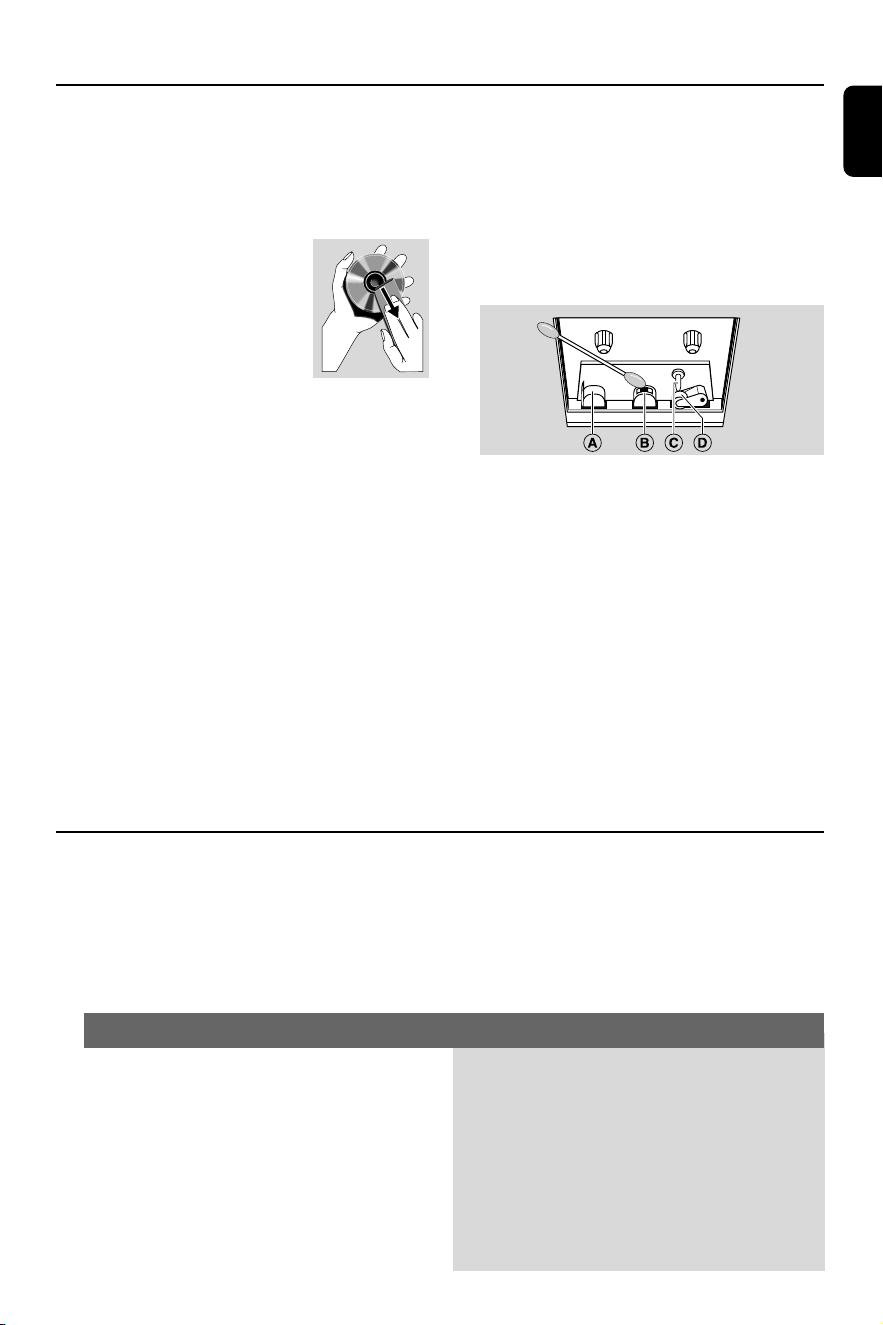
Cleaning the Heads and the Tape Paths
● To ensure good recording and playback quality,
clean the heads A and B, the capstan(s) C,
and pressure roller(s) D after every 50 hours
of tape operation.
● Use a cotton swab slightly moistened with
cleaning fluid or alcohol.
● You also can clean the heads by playing a
cleaning tape once.
Demagnetising the heads
● Use a demagnetising tape available at your
dealer.
WARNING
Under no circumstances should you try to repair the system yourself, as this will
invalidate the warranty. Do not open the system as there is a risk of electric shock.
If a fault occurs, first check the points listed below before taking the system for repair. If
you are unable to remedy a problem by following these hints, consult your dealer or
Philips for help.
“NO DISC” is displayed.
“DISC NOT FINALIZED” is displayed.
✔ Insert a disc.
✔ Check if the disc is inserted upside down.
✔ Wait until the moisture condensation at the lens
has cleared.
✔ Replace or clean the disc, see “Maintenance”.
✔ Use a finalised CD-RW or CD-R.
Problem
Solution
Troubleshooting
PG 001-028_FWM15_22-ENG 23/11/04, 10:5827

28
English
Radio reception is poor.
Recording or playback cannot be made.
The system does not react when buttons
are pressed.
Sound cannot be heard or is of poor
quality.
The left and right sound outputs are
reversed.
The remote control does not function
properly.
The timer is not working.
Not all lighted buttons are showing light.
The Clock/Timer setting is erased.
The system displays features
automatically.
✔ If the signal is too weak, adjust the antenna or
connect an external antenna for better
reception.
✔ Increase the distance between the Mini HiFi
System and your TV or VCR.
✔ Clean deck parts, see “Maintenance”.
✔ Use only NORMAL (IEC I) tape.
✔ Apply a piece of adhesive tape over the missing
tab space.
✔ Remove and reconnect the AC power plug and
switch on the system again.
✔ Adjust the volume.
✔ Disconnect the headphones.
✔ Check that the speakers are connected correctly.
✔ Check if the stripped speaker wire is clamped.
✔ Check the speaker connections and location.
✔ Select the source (CD 1/2/3 or TUNER, for
example) before pressing the function button
(É,í,ë).
✔ Reduce the distance between the remote
control and the system.
✔ Insert the batteries with their polarities
(+/- signs) aligned as indicated.
✔ Replace the batteries.
✔ Point the remote control directly towards the IR
sensor.
✔ Set the clock correctly.
✔ Press and hold CLOCK•TIMER to switch on the
timer.
✔ If recording or tape dubbing is in progress, stop
recording.
✔ Press DIM to select DIM OFF display mode.
✔ Power has been interrupted or the power cord
has been disconnected. Reset the clock/timer.
✔ Press and hold Çon the system to switch off
the demonstration.
Problem
Solution
PG 001-028_FWM15_22-ENG 23/11/04, 10:5828