Use & Care Manual Coffee Maker
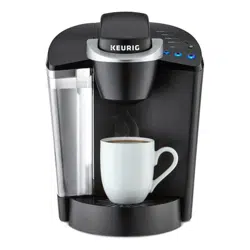
FEATURES
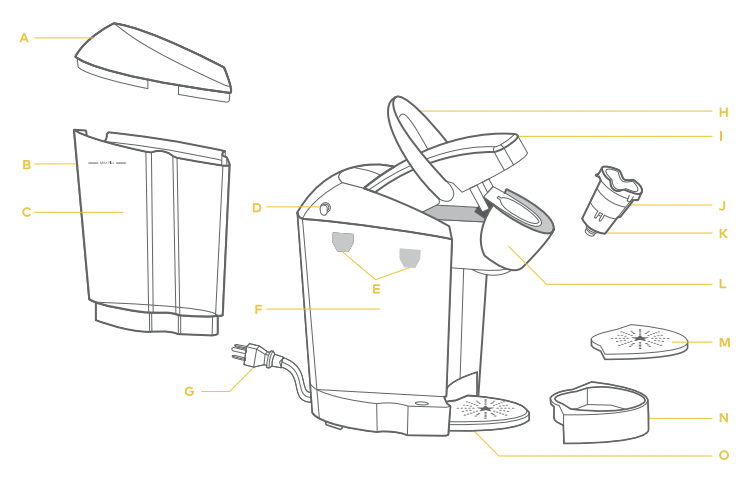
A. Water Reservoir Lid
B. MAX Fill
C. Water Reservoir
D. Vent
E. Water Reservoir Lock Tab Slots
F. Housing
G. Power Cord
H. Handle
I. Lid
J. K-Cup Pod Holder (F and G are the K-Cup Pod Holder Assembly)
K. Funnel
L. K-Cup Pod Assembly Housing
M. Drip Tray Plate
N. Drip Tray
O. Drip Tray Base
CONTROLS & INDICATORS
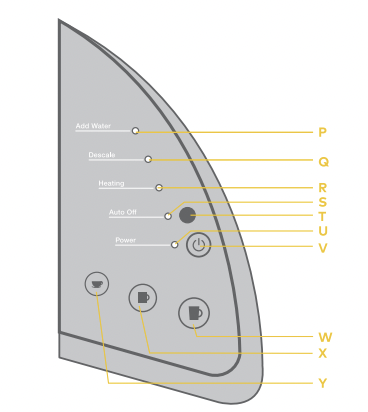
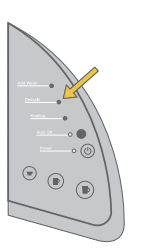
P. Add Water Light (Blue)
Q. Descale Light (Red)
R. Heating Light (Red)
S. Auto Off Light (Green)
T. Auto Off Button
U. Power Light (Green)
V. Power Button
W. Large Mug Button
X. Small Mug Button
Y. Small Cup Button
UNPACKING INSTRUCTIONS
- 1. Place brewer box on a large steady surface (such as a table or countertop) or on the floor. Open the box.
- 2. Remove enclosed literature.
- 3. Turn the box on its side with front of box face down.
- 4. Reach into the box and grasp the plastic bag that contains the brewer.
- 5. Carefully pull the plastic bag (and packaging materials) toward you and out of the box. The brewer will still be encased in the polyfoam and be on its side.
- 6. Remove the top polyfoam packaging material.
- 7. Carefully lift brewer off of the bottom polyfoam and place it upright on a flat. steady surface.
- 8. Lift plastic bag off of brewer.
- 9. Record the serial number for this brewer on page 5 of this guide. The serial number can be found on the bottom of the brewer box or on the brewer behind the Drip Tray (when removed).
- 10. Place the brewer upright on a flat. steady surface. Remove tape holding Water Reservoir in place.
We recommend you save all packing materials in case future shipping of the product is necessary.
IMPORTANT: You cannot use your Keurig brewer until it has been set up for its first use.
NOTE: If brewer has been exposed to temperatures below freezing. allow brewer at least two hours to reach room temperature before brewing. A frozen or extremely cold brewer will not operate.
WARNING: Keep all plastic bags away from children.
LET'S GET BREWING!
SETUP
- 1. Unwrap cord and plug the brewer into a grounded outlet. Remove all pieces of packing tape.
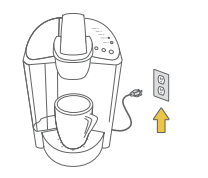
- 2. Place a large mug (10 oz. minimum) on the Drip Tray Plate.
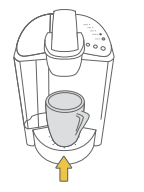
- 3. Remove the Water Reservoir from brewer by first removing Lid from Reservoir. then lifting Reservoir straight up and away from brewer (may be tight). Rinse with fresh water. Fill Water Reservoir with bottled or filtered water so that the water is to and not beyond the MAX FILL line.
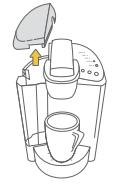
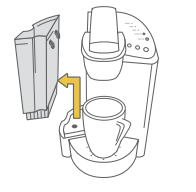
- 4. Place Water Reservoir base into the left side of the brewer and be sure the Water Reservoir Lock Tabs engage with the brewer. Replace Lid on Water Reservoir.
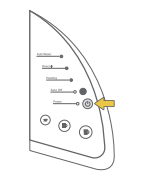
- 5. Press Power Button found on upper right panel of the brewer. The green Power Light will illuminate.
NOTE: A K-Cup pod should not be used for this sequence.
NOTE: If the Water Reservoir is empty or not in place on the brewer. the blue Add Water Light will illuminate. The Small Mug Button will not be activated until water is added to the Water Reservoir.
- 6. The brewer will automatically fill with water and then the water will be heated. This will take about 4 minutes. During the heating period. the red Heating Light will illuminate. Once the water is heated. the red Heating Light will turn off and the Small Cup. Small Mug. and Large Mug Buttons will illuminate.
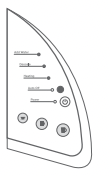
NOTE: Do not lift Handle during this heating period.
NOTE: You may see small amounts of water coming from the Vent and dripping into the Water Reservoir during this and subsequent heating this is normal.
- 7. Lift and lower the Handle. Press the Small Mug Button to start a cleansing brew. Pour the hot water into the sink.
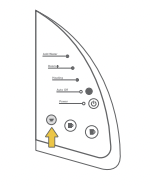
- 8. The brewer may take 15 seconds to reheat water between brews during which time the red Heating Light may be illuminated. When the water has heated. the red Heating Light will turn off. The one-time setup process is now complete and you are ready to brew!
BREW YOUR FIRST CUP
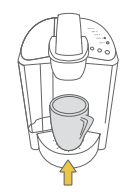
- 1. The green Power Light will illuminate to indicate the brewer is powered on. Place acup or mug on the Drip Tray Plate.
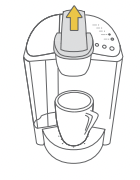
- 2. Lift the Handle and the K-Cup pod Holder will open toward you. Select a K-Cup pod.
NOTE: Do not remove the foil lid or puncture the K-Cup pod.
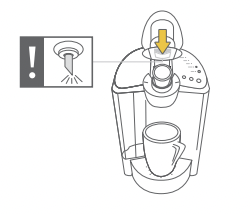
- 3. Place a K-Cup pod in the K-Cup Pod Holder. Lower the Handle completely to close the Lid.
CAUTION: There are two sharp needles that puncture the K-Cup pod. one above the K-Cup Pod Holder and the other in the bottom of the K-Cup Pod Holder. To avoid risk of injury. do not put your fingers in the K-Cup Pod Holder.
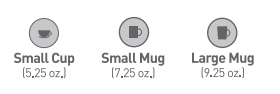
- 4. Select your brew size: The Small Cup choice will yield a 5.25 oz. serving. the Small Mug will yield a 7.25 oz. serving and the Large Mug will yield a 9.25 oz. serving. The blue Brew Button you choose will remain illuminated while brewing.
NOTE: If you do not push a Brew Button in 60 seconds. the Brew Buttons will be disabled to prevent accidental activation. Re-activate the Brew Buttons by lifting and lowering the Handle completely.
CAUTION: There is extremely hot water in the K-Cup Pod Holder during the brew process. To avoid risk of injury. do not lift the Handle or open the K-Cup Pod Assembly Housing during the brew process.
- 5. There may be a short pause before the brewing process begins. The entire brew process lasts for approximately 1 minute and ends with a burst of air to remove all liquid from the K-Cup pod Lift the Handle and dispose of the used K-Cup pod.
CAUTION: K-Cup pod will be hot.
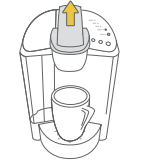
6. Enjoy your first cup of gourmet coffee. tea. or hot cocoa from your Keurig brewer!
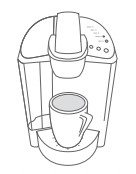
7. The red Heating Light may be illuminated as the water is heated for the next brew cycle. The brewer will be ready for use in approximately 15 seconds.
NOTE: During this period. your brewer will prepare for the next brew. The pump may make a vibrating sound. This is normal.
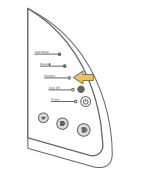
CONTROLS & INDICATORS (LED CONTROL CENTER)
PROGRAMMING AUTO OFF TIMER FEATURE
To set the brewer to turn off two hours after the last brew follow the steps below.
1. Press the Power Button to turn on the brewer.
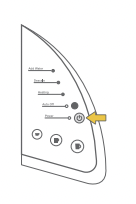
2. Press the black Auto Off Button to turn on the Auto Off Timer feature. The green Auto Off Light will illuminate
When the Auto Off Timer is enabled. your brewer will automatically turn off two hours after your last brew.
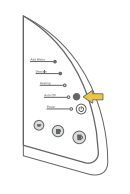
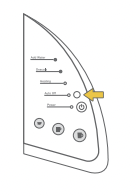
3. To disable the Auto Off Timer. simply press the black Auto Off Button again and the green Auto Off Light will turn off.
CARING FOR YOUR BREWER
CLEANING EXTERNAL PARTS
CLEANING THE BREWER EXTERIOR
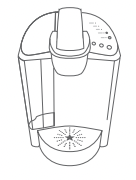
Keep your Keurig’ Classic Series brewer looking its best by cleaning the exterior from time to time. Just clean with a damp. soapy. lint-free. non-abrasive cloth. Never immerse the brewer in water or other liquids.
CLEANING THE DRIP TRAY
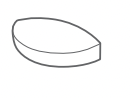
The Drip Tray can accumulate up to 8 ounces of overflow. The Drip Tray and the Drip Tray Plate should occasionally be rinsed clean. To remove the Drip Tray. simply slide it toward you. keeping it level at all times to avoid spilling. Clean with a damp. soapy. lint-free. non-abrasive cloth.
CLEANING THE K-CUP POD HOLDER ASSEMBLY
Cleaning the Parts The K-Cup Pod Holder Assembly can be placed onto the top shelf of a dishwasher. NOTE: Use low temperature cycles in the dishwasher. To remove from the brewer. lift the Handle and grasp the top of the K-Cup Pod Holder with one hand while pushing up on the bottom of the K-Cup Pod Holder from underneath with the other until it releases. After cleaning. align the K-Cup Pod Holder with the opening using the two front ribs as a guide and snap into place from the top.
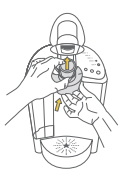
Cleaning the Funnel
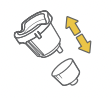
The Funnel can be removed from the K-Cup Pod Holder by pulling on it until it pops off. The Funnel is dishwasher safe. To replace it. just snap it back onto the K-Cup Pod Holder Assembly.
Cleaning the Exit Needle
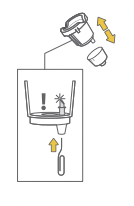
The Exit Needle is located on the inside bottom of the K-Cup Pod Holder Assembly. Should a clog arise due to coffee grinds. it can be cleaned using a paper clip or similar tool. Remove K-Cup Pod Holder Assembly and detach Funnel. Insert the paper clip into the Exit Needle to loosen the clog and push it out. The K-Cup Pod Holder is dishwasher safe.
CAUTION: There are sharp needles that puncture the K-Cup pod above the K-Cup Pod Holder and in the bottom of the K-Cup Pod Holder. To avoid risk of injury. do not put your fingers in the K-Cup Pod
Assembly Housing.
CLEANING THE WATER RESERVOIR & WATER RESERVOIR LID
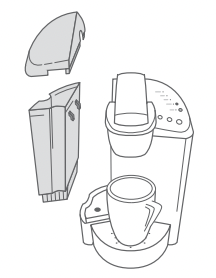
The Water Reservoir Lid and Water Reservoir should be periodically inspected and cleaned.
The Water Reservoir Lid or Water Reservoir should not be put into the dishwasher. They should be cleaned with a damp. soapy. non-abrasive cloth and rinsed thoroughly. Do not dry the inside of the Water Reservoir with a cloth as lint may remain.
To clean the filter screen at the base of your Water Reservoir. empty the Water Reservoir and follow one or all of the following procedures.
NOTE: If you are using a water filter inside the Water Reservoir. remove it before cleaning.
1. Rinse the filter screen with the strong force of water from your faucet.
2. If you have a sprayer. aim the water spray at the filter screen.
3. Fill the Water Reservoir with approximately two inches of clean water and agitate (shake) the Water Reservoir.
Empty the Water Reservoir then fill it with clean water and return it to the brewer. If needed. repeat above procedures.
CAUTION: Please rinse the Water Reservoir thoroughly after cleaning. This will ensure that no cleaners or cleaning solutions remain in this area as they may contaminate the water supply in the brewer.
DESCALING YOUR BREWER
Depending on the mineral content of your water. calcium deposits or scale may build up in your brewer. Scale is non toxic but if left unattended can hinder brewer performance.
descaling your brewer every 3-6 months helps maintain the heating element. and other internal parts that come in contact with water. Calcium deposits may build up faster. making it necessary to descale more often.
You should promptly descale if the red Descale Light is illuminated. However. even if the red Descale Light is not illuminated you should continue to descale your brewer every 3-6 months. Properly follow the descaling procedure.
DESCALING PROCEDURE
Before you begin. you will need a large ceramic mug. fresh water. descale solution. and access to a sink. Do not use a paper cup.
- Empty the water from the Water Reservoir. If there is a Keurig Water Filter. remove and set aside. Disable “Auto Off" features. if necessary (refer to page 14).
STEP 1: FIRST DESCALING SOLUTION RINSE
- Press the Power Button to power the brewer off.
- Pour the entire bottle of Keurig Descaling Solution into the Water Reservoir.
- Then fill the empty bottle with water and pour into the Water Reservoir. Press the Power Button to turn the brewer back on.
- Place a large mug on the Drip Tray Plate and run a cleansing brew using the largest brew size. Do not use a K-Cup pod. Pour the contents of the mug into the sink.
STEP 2: SECOND DESCALING SOLUTION RINSE
- Repeat the brew process without a K-Cup pod. until ADD WATER is indicated. Let brewer stand for at least 30 minutes while still on.
- After 30 minutes. discard any residual solution and rinse the Water Reservoir thoroughly.
STEP 3: FRESH WATER RINSE
- Ensure the Water Reservoir is filled with fresh water to and not beyond the MAX FILL line.
- Place a large mug on the Drip Tray Plate and run a cleansing brew using the largest brew size. Do not use a K-Cup pod. Pour the contents of the mug into the sink.
- Repeat brew process until you have completed at least 12 brews using the largest brew size. You may need to refill the Water Reservoir at least one time during this process.
NOTE: If the red Descale Light is still illuminated after completing the procedure. repeat the descaling procedure above.
NOTE: The cleaning action of Keurig Descaling Solution may result in a foam dispensed from the brewer. This is natural. as the solution is reacting with the scale inside. For a brewer that is heavily scaled. the brewer may not fill properly after the descaler is added. If this occurs. you may see only a small or no output dispensed followed by the sound of air blowing out. If this occurs:
- Turn off and unplug the brewer.
- If there is Keurig Descaling Solution in the Water Reservoir. discard the contents. rinse the Water Reservoir thoroughly and refill with water.
- Plug the brewer back in. power on. and repeat the Step 3 Fresh Water
- Rinse cycle. The brewer should begin to function normally as the solution is rinsed out and the scale is removed. If problem persists. allow brewer to sit unplugged for at least 30 minutes before continuing with the rinse.
SERVICE
Beyond these recommended cleaning and maintenance procedures. this brewer is not user serviceable. For service. please refer to the Warranty section of this guide.
STORAGE
Empty the Water Reservoir before storing and take care to ensure that you store your brewer in a safe and frost free environment. Please be sure to store your brewer in its upright position to avoid water leakage from the inner tank. If you store the brewer in a cold environment. you run the risk of water freezing inside the brewer and causing damage. When you prepare to use it after storage. we recommend rinsing the Water Reservoir with fresh water and running three cleansing brews without a K-Cup pod.
If you plan to move your brewer to a different location. turn the brewer off. unplug it and empty the Water Reservoir. If your brewer has been in an environment below freezing. please be sure to let it warm to room temperature for at least 2 hours before using.
TROUBLESHOOTING
BREWER DOES NOT HAVE POWER
- Plug brewer into an independent outlet.
- Check to be sure that it is plugged in securely.
- Plug into a different outlet.
- Reset your home's circuit breaker. if necessary.
- Make sure that the Power Button has been turned on and the green Power Light is illuminated.
BREWER WILL NOT BREW
- After placing the K-Cup pod in the K-Cup Pod Holder. make sure that the Handle is pushed down securely and the blue Brew Buttons are flashing.
- If the blue Add Water Light is illuminated. add water to Water Reservoir. Fill to and not beyond the MAX FILL line. Make sure the Water Reservoir is seated properly in its base.
- If the blue Add Water Light continues to be illuminated even after refilling. contact Customer Service at 1.866.901.BREW (2739).
- If the blue Add Water Light. red Heating Light. and Small Mug Button are all flashing simultaneously. see next situation.
BLUE ADD WATER LIGHT. RED HEATING LIGHT. AND SMALL MUG BUTTON ARE ALL FLASHING SIMULTANEOUSLY
- Completely remove the Water Reservoir and thoroughly clean (refer to page 17). Ensure the Water Reservoir is filled to and not beyond the MAX FILL line. Return it to the brewer and ensure it is seated properly. then press the flashing Small Mug Button.
- If you have completed the above procedure two times and the situation persists. contact Customer Service at 1.866.901. BREW (2739).
BREWING A PARTIAL CUP
- The Exit Needle may be clogged (refer to page 16).
- Clean K-Cup Pod Holder if necessary and rinse under faucet (refer to page 16).
- The Water Reservoir may have been removed during brewing. Replace the Water Reservoir and perform a cleansing brew without a K-Cup pod.
- If the red Descale Light is illuminated. descale the brewer (refer to page 19).
- If you have repeated the descale procedure on your brewer two times and it is still only brewing a partial cup. contact Customer Service at 1.866.901.BREW (2739).
BREWER SHUTS OFF AUTOMATICALLY
- Check to make sure that the Auto Off Timer feature has not been enabled. If the green Auto Off Light is illuminated. press the black Auto Off Button to disable the Auto Off Timer feature.
WATER APPEARS IN THE BREWER BASE WITH THE WATER RESERVOIR REMOVED
- It is normal for a small amount of water (less than 10 ml) to collect if the Water Reservoir is not seated for a period of time. This will not affect the operation of the brewer.
- Use clean cloth or paper towel to absorb the water.
- Return the Water Reservoir back to the brewer base (refer to page 17).
If any problems persist. contact Customer Service at 1.866.901.BREW (2739)
HELPFUL HINTS
 PLUG BREWER INTO ITS OWN GROUNDED OUTLET
If the electric circuit is overloaded with other appliances. your brewer may not function properly. The brewer should be operated on its own circuit. separate from other appliances.
KEEP YOUR BREWER TURNED “ON”
To brew a fresh cup of coffee. tea. or hot cocoa anytime you want. keep your brewer turned “ON" all the time. However. you can set the brewer to automatically turn off two hours after your last brew. Follow the simple instructions on page 14 to make using the brewer convenient for you.
FOR THE BEST TASTING GOURMET COFFEE. TEA. OR HOT COCOA. KEURIG RECOMMENDS USING BOTTLED OR FILTERED WATER
Water quality varies from place to place. If you notice an undesirable taste in your cup of coffee. tea. or hot cocoa (such as chlorine or other mineral tastes) we recommend you consider using bottled water or water from a filtration system.
For best results. carefully follow manufacturer's instructions when using any water filtration system.
CUSTOMIZE THE SIZE. FLAVOR & BREW THAT'S PERFECT FOR YOU
With the choice of over 500 varieties of K-Cup pods and 3 brew sizes (Small Cup 5.25 oz. Small Mug-7.25 oz. and Large Mug-9.25 oz.). your Keurig brewer gives you endless options to customize the size. flavor and brew that's perfect for you.
REMOVE K-CUP POD AFTER USE
Please see page 12 for brewing instructions.
BREWING INTO A TRAVEL MUG
To brew into a travel mug. simply remove the Drip Tray Assembly and place the travel mug on the Drip Tray Base.
DESCALE BREWER REGULARLY
Please see pages 19 for instructions.