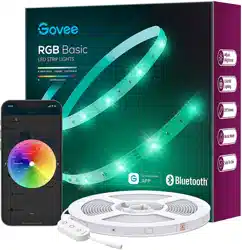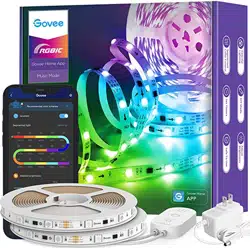
Model:H6126
User Manual
RGBIC LED Strip Lights
English 01
Deutsch 07
Français 13
Español 19
Italiano 25
日本語
31
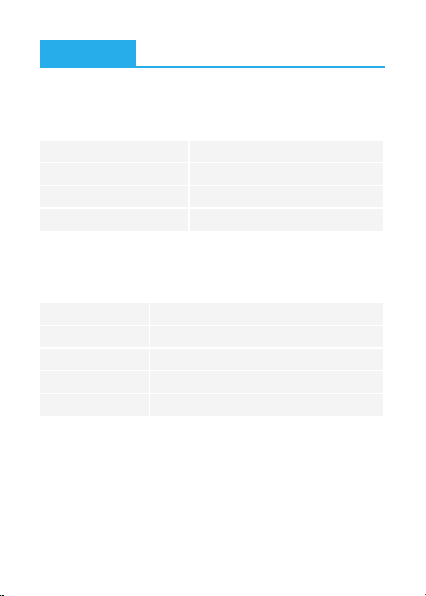
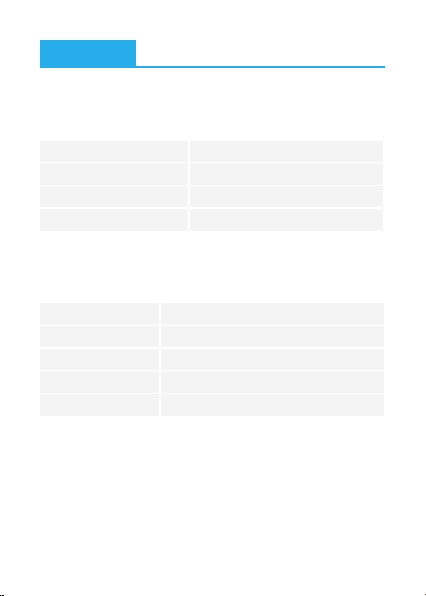
a. Unpack the box and check all items listed in the packing list.
❶
Preparation Before Installing
Installing Your Strip Lights
English
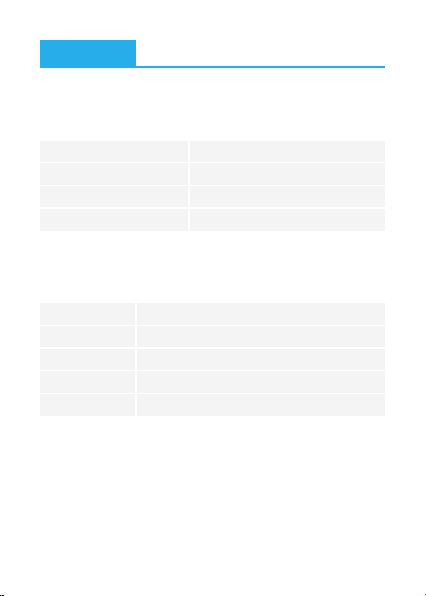
Length
Lighting Color
Waterproof
Control Method
Power Supply
2x5m/2x16.4ft
RGBIC
No
App & Control Box
Adapter 12V
Specifications
Strip Lights
Power Adapter
User Manual
Service Card
2
1
1
1
At a Glance
01
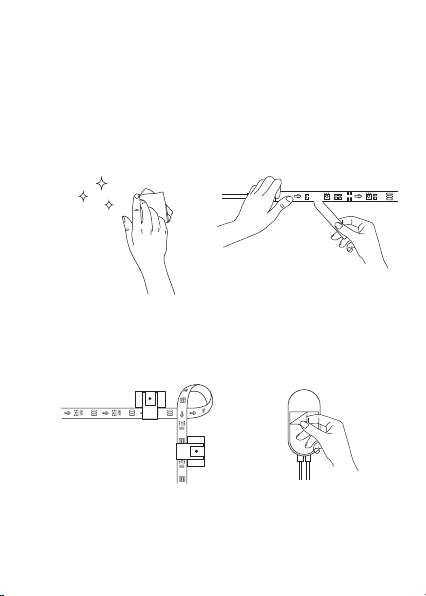
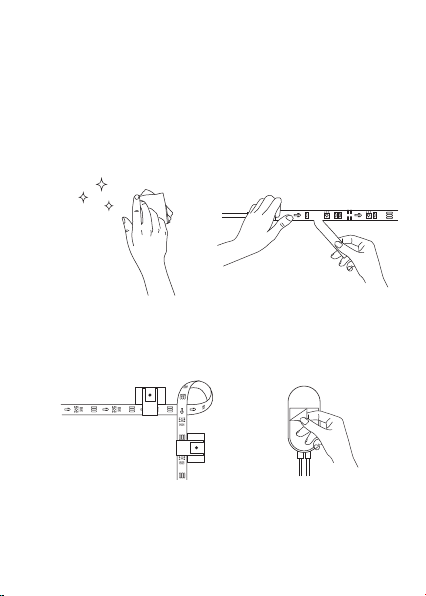
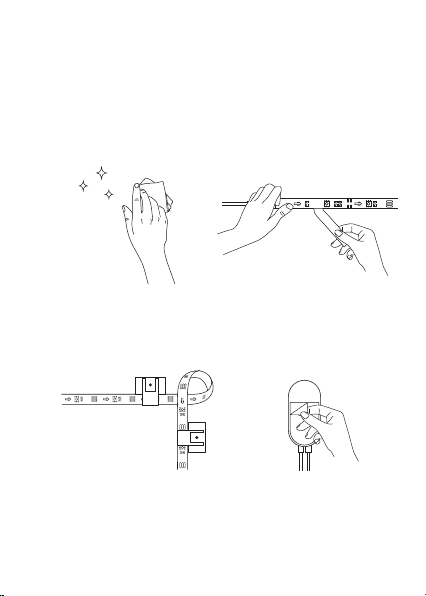
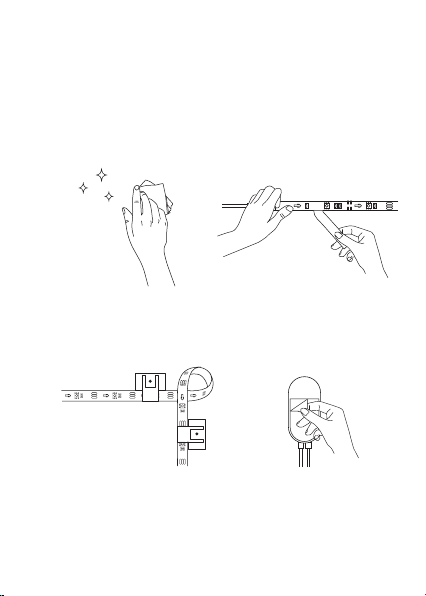
a.Wipe the surface to make
sure it's clean and dry.
b. Peel off the protective film on
the tape, stick the strip on and
press over it firmly.
c. Reinforce via clips around
corners.
❷
Installing Steps
d. Connect the power brick to the
strip and the adapter. Peel off
the protective film on the tape
to stick it on.
Plug the adapter into the power outlet to check whether the
lights turn on.
b.
02
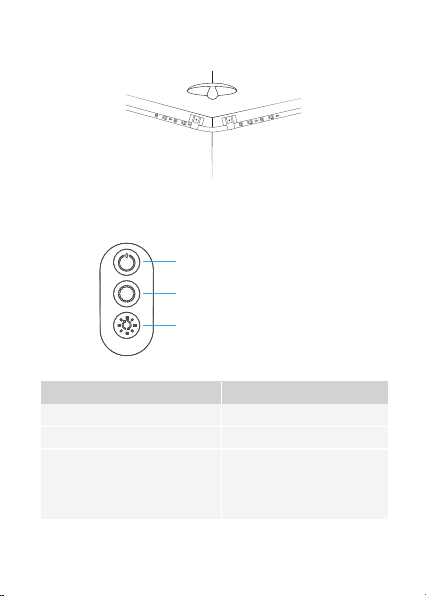
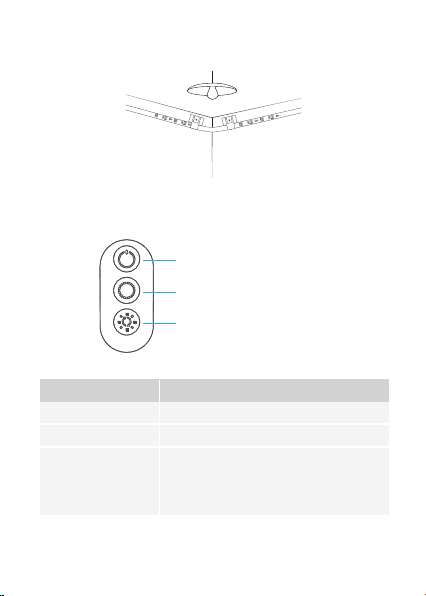
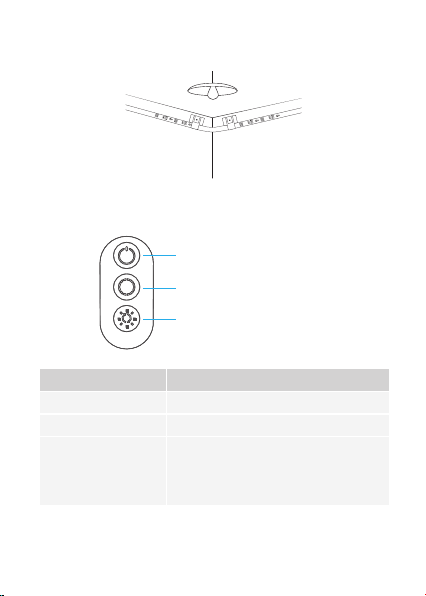
Controlling with the Control Box
On/Off
Color Changing
Music Mode/
Brightness Adjusting
Button Function
Turn the light on/off.
Press to cycle through 9 colors.
Press to enter music mode.
Press and hold to cycle through
the 6 brightness levels.
On/Off
Color Changing
Music Mode/Brightness Adjusting
e.Power on the strip lights and begin using.
03
Govee Home
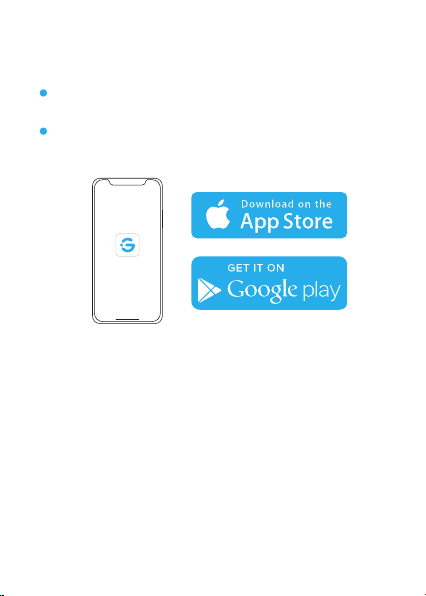
Downloading the Govee Home App
Download the Govee Home app from App Store (iOS devices) or
Google Play (Android devices).
Notice: You need a smartphone running iOS 9.3 (or above) or
Android 4.4 (or above).
Connecting the Strip Lights to the App
❶ Turn on Bluetooth in your mobile phone;
❷
Open Govee Home app and tap “+” icon in the top right corner;
❸
Select “H6126” in the device list;
04

a.
b.
c.
Make sure the installation surface is clean and dry.
Firmly press over the strip after sticking.
Reinforce the installation via more clips and tapes.
Troubleshooting
❶
The adhesive tape is not strong enough.
❷
The control box doesn’t work.
Re-plug in the adapter port and try again.
a.
b.
c.
d.
e.
f.
Do not skip Bluetooth connection in the app.
Make sure Bluetooth in your mobile phone has been turned on.
It may be caused by incompatibility between the phone system
and the app. Please change a mobile phone and connect again.
Re-power on the strip and re-turn on Bluetooth in your phone
to try again.
Keep the distance between the strip and the phone less than
1m/3.28ft while connecting.
Keep obstructions between the strip and the phone as few as
possible.
❸
Cannot connect to Bluetooth.
❹
The strip doesn’t match the same color./Some lamp beads don’t
light up.
Please contact Govee support team in time for return.
05
❺
The strip lights don't work.
a.
b.
Pull out every connective part of the strip lights and firmly
re-connect them.
Tap On/Off button on the control box or app to check
whether it is a strip quality issue.
Customer Service
Warranty: 12-Month Limited Warranty
Support: Lifetime Technical Support
Email: [email protected]
Official Website: www.govee.com
@Govee
@Govee
@Goveeofficial
@Govee
6
a.
b.
Please keep the control box close to the sound source.
Clean up the sound picking hole on the control box.
Cannot sync to the music beat.
06
a.Packen Sie die Schachtel aus und überprüfen Sie alle in der
Packliste aufgeführten Artikel.
❶
Vorbereitung vor der Installation
Installieren Sie Ihre Lichtleiste
Deutsch
Länge
Beleuchtungsfarbe
Wasserdicht
Kontrollmethode
Energieversorgung
Spezifikationen
LED-Streifen Licht
Steuerbox
Adapter
Servicekarte
2
1
1
1
Überblick
2*5m/2*16.4ft
RGBIC
Nein
App & Steuerbox
Adapter 12V
07
Schalten Sie das Lichtband ein und prüfen Sie, ob es aufleuchtet.
b.
Wischen Sie die Oberfläche
ab, um sie sauber und
trocken zu halten.
❷
Installationsschritte
a.
b.Ziehen Sie die Schutzfolie vom
Klebeband ab, kleben Sie den
Streifen auf und drücken Sie ihn
fest an.
c. Verstärken Sie über Clips
um Ecken.
d.Ziehen Sie die Schutzfolie von
der Steuerbox ab und kleben
Sie sie auf.
08
e.Schalten Sie das Lichtband ein und verwenden.
Steuern mit der Steuerbox
Ein/ Aus
Farbwechsel
Musikmodus /
Helligkeitsanpassung
Drucktaste Funktion
Schalten Sie das Licht ein / aus.
Drücken Sie, um durch 9 Farben zu blättern.
Drücken Sie, um den Musikmodus zu
starten. Halten Sie gedrückt, um die
6-stufige Helligkeit zu durchlaufen.
Ein/ Aus
Farbwechsel
Musikmodus / Helligkeitsanpassung
09
Govee Home
Herunterladen der Govee Home App
Sie die GoveeHome-App aus dem App Store (iOS-Geräte) oder von
Google Play (Android-Geräte) herunter.
Hinweis: Sie benötigen ein Smartphone mit iOS 9.3 (oder höher)
oder Android 4.4 (oder höher).
Anschließen der Lichtleiste an die App
❶
Schalten Sie Bluetooth auf Ihrem Mobiltelefon ein.
❷
Öffnen Sie Govee Home, tippen Sie oben rechts auf das Symbol "+" .
❸
Wählen Sie in der Geräteliste “H6126”.
10

Fehlerbehebung
❶
❷
Das Klebeband ist nicht stark genug.
a.
b.
c.
Stellen Sie sicher, dass die Installationsfläche sauber und trocken ist.
Drücken Sie nach dem Aufkleben fest auf den Streifen.
Verstärken Sie die Installation durch weitere Clips und Bänder.
a.
b.
c.
d.
e.
f.
Überspringen Sie nicht die Bluetooth-Verbindung in der App.
Stellen Sie sicher, dass Bluetooth in Ihrem Mobiltelefon
aktiviert ist.
Dies kann durch Inkompatibilität zwischen dem Telefonsystem
und der App verursacht werden. Bitte wechseln Sie ein
Mobiltelefon und stellen Sie erneut eine Verbindung her.
Schalten Sie den Strip wieder ein und schalten Sie Bluetooth
wieder in Ihrem Telefon ein, um es erneut zu versuchen.
Halten Sie beim Anschließen den Abstand zwischen dem
Streifen und dem Telefon auf weniger als 1 m.
Halten Sie die Hindernisse zwischen dem Streifen und dem
Telefon so gering wie möglich.
Das Kontrollkästchen funktioniert nicht.
Stecken Sie den Adapteranschluss wieder ein und versuchen Sie es
noch einmal.
❸
Es kann keine Verbindung zu Bluetooth hergestellt werden.
11
❹
Der Streifen entspricht nicht der gleichen Farbe. / Einige
Lampenperlen leuchten nicht auf.
Bitte kontaktieren Sie das Govee-Support-Team rechtzeitig für die
Rücksendung.
❺
Das Lichtband funktioniert nicht.
a.
b.
Ziehen Sie jeden Verbindungsteil der Lichtleiste heraus und
schließen Sie sie wieder fest an.
Tippen Sie im Kontrollkästchen oder in der App auf die
Schaltfläche Ein / Aus, um zu überprüfen, ob es sich um ein
Problem mit der Streifenqualität handelt.
Die Kundenbetreuung
Warranty:12-Monate Beschränkte Garantie
Support:Lifetime Technische Unterstützung
Email:[email protected]
Offiziell Website:www.govee.com
@Govee
@Govee
@Goveeofficial
@Govee
6
a.
b.
Bitte halten Sie die Steuerbox in der Nähe der Schallquelle.
Reinigen Sie das Schallaufnahmeloch am Steuerkasten.
Kann nicht mit dem Musik-Beat synchronisiert werden.
12
a.Déballez la boîte et vérifiez tous les éléments énumérés dans la
liste d'emballage.
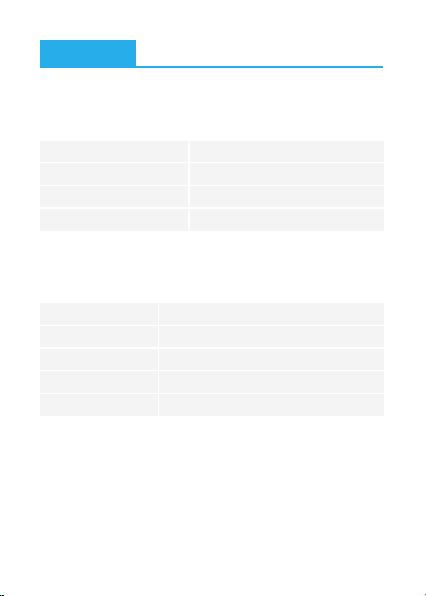
❶
Préparation avant l'installation
Installez votre Ruban LED
Français
Longueur
Couleur
Étanche
Méthode de Contrôle
Alimentation électrique
Spécifications
Kit de Ruban LED
Boîte de Contrôle
Adaptateur
Carte de Service
2
1
1
1
Schéma
2x5m/2x16.4ft
RGBIC
NON
App & Boîtier de Commande
Adaptateur 12V
13
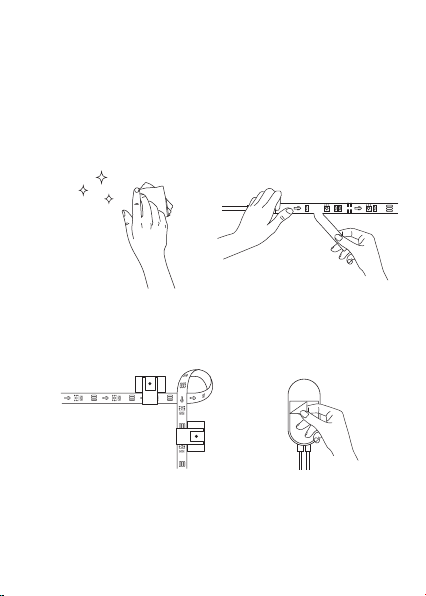
b.Allumez la bande LED et vérifiez si elle s’allume.
a.Essuyez la surface pour la
garder propre et sèche;
❷
Étapes d’installation
b. Retirez le film protecteur de la
bande, collez la bande et
appuyez fermement dessus;
c. Renforcez le ruban par des
clips autour des coins;
d.Enlevez le colle du boîtier de
commande et le collez;
14
e.Allumez la bande LED et commencez à l'utiliser.
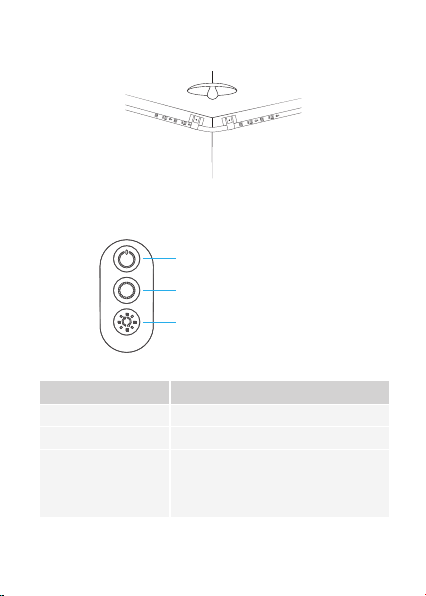
Controllez avec le boîtier de commande
On/Off
Changement du Couleur
Mode Musique /
Réglage de la
Luminosité
Bouton Fonction
Allumer / Éteindre la lumière.
Appuyez pour changer parmi les 9 couleurs
Appuyez pour activer le Mode Musique.
Appuyez et maintenez pour changer la
luminosité à 6 niveaux.
On/Off
Changement du Couleur
Mode Musique / Réglage de la Luminosité
15
Téléchargez l’App «Govee Home»
Téléchargez l'app «Govee Home» sur l'App Store (appareils iOS)
ou sur Google Play (appareils Android).
Avis: Vous avez besoin d'un portable fonctionnant sous iOS 9.3
(ou supérieur) ou Android 4.4 (ou supérieur).
Govee Home
Connectez la bande LED à l’App
«Govee Home»
❶
Ouvrez le Bluetooth dans votre portable;
❷
Ouvrez l'app Govee Home et appuyez sur l'icône "+" dans le coin
supérieur droit;
❸ Sélectionnez "H6126" dans la liste des appareils;
16

Dépannage
❶
❷
Le ruban adhésif n'est pas assez solide.
a.
b.
c.
Assurez-vous que la surface d'installation est propre et sèche.
Appuyez fermement sur la bande après l'avoir collée.
Renforcez l'installation en utilisant plus de clips et de rubans
adhésifs.
a.
b.
c.
d.
e.
f.
Ne sautez pas la connexion Bluetooth dans l'app.
Vérifiez que la fonction Bluetooth de votre portable est activée.
Téléphone pas compatible. Veuillez changer de téléphone et
vous connecter à nouveau.
Rallumer la bande et réactiver le Bluetooth dans votre téléphone
pour essayer à nouveau.
Maintenez la distance entre la bande et le téléphone à moins de
1m pendant la connexion.
Maintenez les obstacles entre la bande et le téléphone aussi peu
que possible.
Le boîtier de contrôle ne fonctionne pas.
Rebranchez le port de l'adaptateur et réessayez.
Ne peut pas se connecter au Bluetooth.
❸
17
6
a.
b.
Veuillez garder le boîtier de contrôle près de la source sonore.
Nettoyez le trou de prise de son sur le boîtier de contrôle
Ne peut pas se synchroniser avec le rythme de la musique.
b.
5
La bande LED ne fonctionne pas.
a. Retirez toutes les parties connectives de la bande LED et
rebranchez-les fermement.
Appuyez sur le bouton On/Off de la boîte de contrôle ou de
l'app pour vérifier s'il s'agit d'un problème de qualité de la
bande.
La bande ne correspond pas à la même couleur / certaines perles
du ruban ne s'allument pas.
Veuillez contacter l'équipe de Govee à temps pour le retour.
❹
Service Clientèle
Garantie: Garantie limitée de 12 mois
Support:Technique de support à vie
Email : [email protected]
Site officiel : www.govee.com
@Govee
@Govee
@Goveeofficial
@Govee
18
a.
Desempaquete la caja y verifique todos los artículos
enumerados en la lista de empaque;
19
❶
Preparación antes de la instalación
Instalación de su tira de luz
Español
Longitud
Color de Iluminación
Impermeable
Manera de Control
Fuente de Alimentación
Especificaciones
Tira de Luz LED
Caja de Control
Adaptador
Tarjeta de Servicio
2
1
1
1
En un vistazo
2x5m/2x16.4ft
RGBIC
NO
Aplicación & Caja de Control
Adaptador 12V
20
a.Limpie la superficie para
mantenerla limpia y seca;
b.Encienda la luz de tira y verifique si se enciende.
❷
Pasos de instalación
b.Retire la película protectora de la
cinta, pegue la tira y presione
firmemente sobre ella;
c. Refuerce a través de clips
alrededor de las esquinas;
d.Retire la película protectora de la
caja de control y péguela;
21
e.Encienda la tira de luz y empieza a usarla.
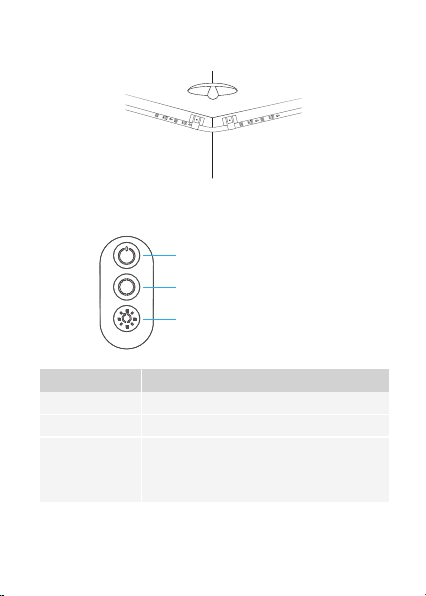
Controlando con la caja de control
Encender/Apagar
Cambio de Color
Modo de Música/
Ajuste de Brillo
Botón Función
Enciende/apaga la luz.
Presione para recorrer 9 colores.
Presione para ingresar al modo de música.
Mantenga presionado para recorrer el brillo
de 6 niveles.
Encender/Apagar
Cambio de Color
Modo de Música/Ajuste de Brillo
22
Descargar la aplicación de Govee
Home
Descargue la aplicación de Govee Home de la App Store (para
dispositivos iOS) o Google Play (para dispositivos Android).
Aviso: Necesita un teléfono inteligente con iOS 9.3 (o superior) o
Android 4.4 (o superior).
Conectar a APP
❶
Encienda el Bluetooth en su teléfono móvil;
❷
Abra la aplicación Govee Home y toque el icono "+" en la esquina
superior derecha;
Govee Home
❸
Seleccione "H6126" en la lista de dispositivos;

23
Solución de problemas
❶
❷
La cinta adhesiva no es lo suficientemente fuerte.
a.
b.
c.
Asegúrese de que la superficie de instalación esté limpia y seca.
Presione firmemente la tira después de pegarla.
Reforzar la instalación a través de más clips y cintas.
❸
a.
b.
c.
d.
e.
f.
No omita la conexión del Bluetooth en la aplicación.
Asegúrese de que el Bluetooth en su teléfono móvil esté
encendido.
Puede ser causado por una incompatibilidad entre el sistema
telefónico y la aplicación. Cambie un teléfono móvil y conéctese
nuevamente.
Vuelva a encender la tira y vuelva a encender el Bluetooth en su
teléfono para volver a intentarlo.
Mantenga la distancia entre la tira y el teléfono a menos de 1 m/
3.28ft mientras se conecta.
Mantenga las obstrucciones entre la tira y el teléfono lo menos
posible.
La caja de control no funciona.
Vuelva a enchufar el puerto del adaptador e inténtelo nuevamente.
No se puede conectar al Bluetooth.
24
❹
❺
La tira no coincide con el mismo color. / Algunas cuentas de
lámpara no se iluminan.
Póngase en contacto con el equipo de soporte de Govee a tiempo
para la devolución.
6
La tira de luz no funciona.
a.
b.
Saque todas las partes conectivas de la tira de luz y vuelva a
conectarlas firmemente.
Pulse el botón de encendido/apagado en la caja de control o
aplicación para verificar si se trata de un problema de calidad
de la tira.
a.
b.
Mantenga la caja de control cerca de la fuente de sonido.
Limpie el orificio de recogida de sonido en la caja de control.
No se puede sincronizar con el ritmo de la música.
Servicio de atención al cliente
Warranty:12-Garantía limitada de un mes
Support:Lifetime Soporte técnico
Email:[email protected]
Oficial Website:www.govee.com
@Govee
@Govee
@Goveeofficial
@Govee
a.Disimballare la scatola e controllare tutti gli articoli elencati nella
lista di imballaggio;
❶
Preparazione Prima dell'Installazione
Installazione della Striscia di Luci LED
Italiano
Lunghezza
Colore di Luci
Impermeabilità
Modo di controllo
Alimentazione Elettrica
Specifiche
Striscia di Luci LED
Scatola di Controllo
Adattatore
Carta di Servizio
2
1
1
1
Manuale d'Uso
2x5m/2x16.4ft
RGBIC
NO
App e Scatola di Controllo
Adattatore 12V
25
26
a.Pulire la superficie per
renderla pulita e asciutta;
b.Accendi la striscia di luci LED e controlla se si accende.
❷
Procedura di Installazione
b. Staccare la pellicola protettiva dal
nastro, attaccare la striscia e
premerla con forza;
c. Rinforzare intorno agli
angoli con le clip;
d. Staccare la pellicola protettiva
sulla scatola di controllo e
incollarla;
27
e.Accendere la striscia di luci LED e iniziare a usarla.
Controllo tramite quadro di comando
Acceso / Spento
Cambio Colore
Modalità Musica /
Regolazione Luminosità
Pulsante Funzione
Accende / Spegne la luce
Premere per scorrere tra 9 colori.
Premere per accedere alla modalità
musica. Tenere premuto per scorrere la
luminosità a 6 livelli.
Acceso / Spento
Cambio Colore
Modalità Musica / Regolazione Luminosità
28
Funzione
Scaricare dell'app Govee Home
Scarica l'app Govee Home dall'App Store (dispositivi iOS) o Google
Play (dispositivi Android).
Nota : è necessario uno smartphone con iOS 9.3 (oversioni
successive) o Android 4.4 (o versioni successive).
Collegare la striscia LED all'app
❶
Attivare il Bluetooth sul cellulare;
❷
Aprire l'app Govee Home e toccare l'icona "+" nell'angolo in alto a
destra;
Govee Home
❸
Selezionare “H6126” nella lista dei dispositivi;

29
Risoluzione dei problemi
La striscia non è dello stesso colore./Alcune luci non si accendono.
Contatta il team di supporto di Govee in tempo per il reso.
❹
❶
❷
Il nastro adesivo non è abbastanza forte.
a.
b.
c.
Assicurarsi che la superficie di installazione sia pulita e asciutta.
Premere con forza sopra la striscia dopo averlo incollato.
Rafforzare l'installazione tramite più clip e nastri.
a.
b.
c.
d.
e.
f.
Non saltare la connessione Bluetooth nell'app.
Assicurarsi che il Bluetooth nel cellulare sia attivo.
Potrebbe essere causato da incompatibilità tra il sistema
telefonico e l'app. Per favore cambiare cellulare e riprovare.
Riaccendere la striscia e riaccendere il Bluetooth nel telefono per
riprovare.
Mantenere la distanza tra la striscia e il telefono a meno di 1 m
durante la connessione.
Avere meno ostacoli possibile tra la striscia e il telefono.
La scatola di controllo non funziona.
Ricollegare la porta dell'adattatore e riprovare.
Impossibile connettersi a Bluetooth.
❸
30
❺
La luce luminosa non funziona.
a.
b.
Estrarre ogni parte connettiva della striscia e ricollegarla
saldamente.
Toccare il pulsante On / Off sulla scatola di controllo o sull'app
per verificare se si tratta di un problema di qualità della striscia.
a.
b.
Si prega di tenere la scatola di controllo vicino alla fonte sonora.
Pulire il foro di raccolta suono sulla scatola di controllo.
Impossibile sincronizzare con il ritmo della musica.
6
Servizio clienti
Garanzia: Garanzia limitata di 12 mesi
Supporto: Supporto tecnico a vita
Email: [email protected]
Sito web ufficiale:www.govee.com
@Govee
@Govee
@Goveeofficial
@Govee
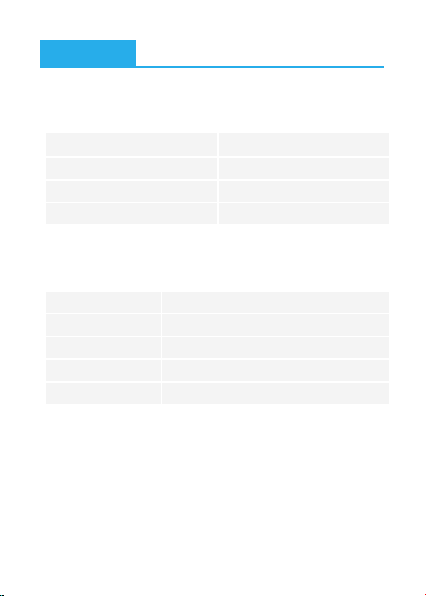
仕様
LEDテープライト
リモコン
日本語取扱説明書
サービスカード
2
1
1
1
長さ
カラー
防水
制御モード
電源
一覧
❶
a.
パッケージ内容はすべて揃っているかどうかことをご確認してください。
インストール前のご準備
インストール
日本語
2x5m/2x16.4ft
RGBIC
非防水
App &コントローラ
アダプター 12V
31
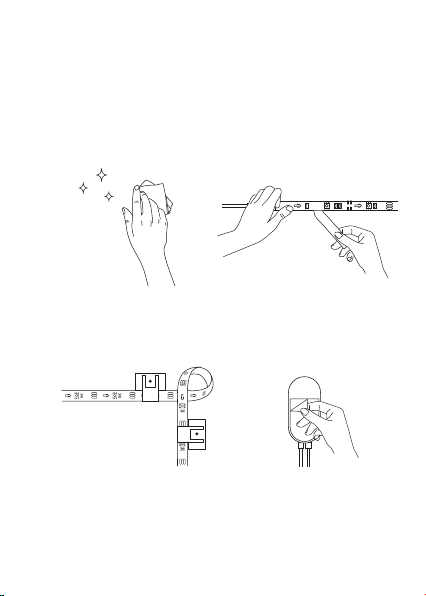
b.
テープライトに給電し、光りかどうかことをご確認してください。
a.
取り付けた表面をきれいに拭
いて、清潔で乾燥をお保ってく
ださい。
b.
3m 両面テープを剝がして、取り付
けた表面にテープライトをしっか
りと押してください。
c.
も し 角 が あ れ ば 、角 の 両 側 に ク
リックで固定してください。
❷
インストー ル 手 順
d.
コントローラにある3m 両面テー
プ を 剝 が し て 、取 り 付 け た と こ ろ に
粘 着してくだ さい 。
32
e.
テープライトに給電し、ご利用してください。
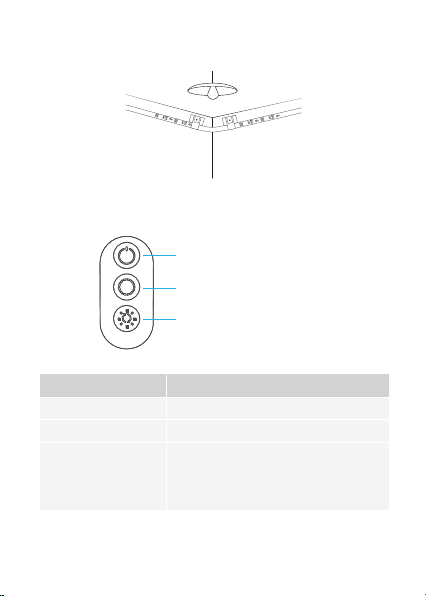
コントローラで操作
オン/オフ
カラー
ミュー ジックモ ード/
明るさ調節
ボタン 機能
ライトを オン / オフ に 切 り替 え ま す。
九種類の色を切り替えます。
押すとミュー ジックモ ードに 入ります。
六 レ ベ ル ラ イト の 明 る さ を 調 整し ま す。
オン/オフ
カラー
ミュージックモード/明るさ調節
33
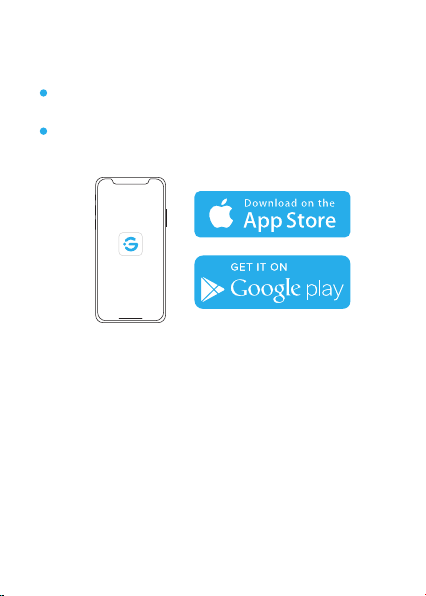
[Govee Home]アプリをダウンロード
[Govee Home]アプリはApp Store(IOSデバイス)あるいはGoogle Play(
Androidデバイス)からごダウンロードしてください。
ご注意:携帯電話はiOS 9.3、Android 4.3 あるいはそれ以上のシステムが必
要でございます。
アプリでコントロ ール
❶ 携帯電話でBluetoothをお開いてください。
❷
[Govee Home]アプリで右上にあるボタンを選択して下さい。
Govee Home
❸
“H6126”を選択して下さい。
34

a.
b.
c.
取り付けたところの表面に清潔、乾燥をお保ちください。
テープライトをしっかりと押してください。
クリップ で 固 定 してくだ さい 。
よくあ るご質 問とおすす め
❶
3m 両面テープの接着力は弱い
❷
a.
b.
c.
d.
e.
f.
[Govee Home]アプリでBluetoothに連続することをご確認してくださ
い。
携帯電話でBluetoothをオンにするかどかことをご確認してください。
[Govee Home]アプリは携帯電話に対応できないかもしれないが、ほ
かの携帯電話でもう一度お試してください。
電源を再度にオンにして、もう一度Bluetoothをオンにしてもう一度お
試してくだ さい 。
1メートル以内で携帯電話でコントローラしてください。
携帯電話とテープライトの間にできるだけ障害物を置かないでくだ
さい。
コントローラは使用できない
電源に再びに入れて、もう一度お試してみてください。
Bluetoothに連続できない
❸
一回に同じカラーで光らない、あるいは少数のLEDsは光らない
Goveeカスタマーにお問い合わせください。
❹
35
保証とアフターサービス
保証:12ヶ月の安心保証
アフターサービス:技術サポート
イーメール: [email protected]om
ホームページ: https://www.mingerlighting.com/
@Minger
@Minger
@Mingerofficial
❺
テープライトは使用できない
a.
b.
テープライトをもう一度組み合わせてみてください。
コントローラとアプリにあるオン/オフ ボタンを押して、テープライト
はよく点灯できるかどうかことをご確認してください。
a.
b.
コ ントロ ーラ は で きる だ け 音 に 近 づ いてくだ さい 。
コントローラにあるラッパをきれいにしてください。
ミュージックモードは使用できない
6
36
EU Compliance Statement:
Shenzhen Intellirocks Tech Co. Ltd. hereby declares that this device
is in compliance with the essential requirements and other relevant
provisions of the Directive 2014/53/EU.
A copy of the EU Declaration of Conformity is available online at
www.govee.com/
EU contact address:
BellaCocoolGmbH (E-mail: [email protected])
Pettenkoferstraße 18, 10247 Berlin,Germany
Compliance Information
EU-Compliance:
Hiermit erklärt Shenzhen Intellirocks Tech Co. Ltd., dass dieses
Gerät den wesentlichen Anforderungen und anderen einschlägigen
Bestimmungen der EU-Richtlinie 2014/53/EU entspricht.
Eine Kopie der EU-Konformitätserklärung finden Sie online auf
www.govee.com/
Kontaktadresse innerhalb der EU:
BellaCocoolGmbH (E-mail: [email protected])
Pettenkoferstraße 18, 10247 Berlin,Germany
Déclaration de conformité UE:
Par la présente, Shenzhen Intellirocks Tech Co. Ltd. déclare que cet
appareil est conforme aux principales exigences et autres clauses
pertinentes de la directive européenne 2014/53/EU.
Une copie de la déclaration de conformité UE est disponible sur le
site www.govee.com/
Adresse de contact pour l'UE :
BellaCocoolGmbH (E-mail: [email protected])
Pettenkoferstraße 18, 10247 Berlin,Germany
Environmentally friendly disposal
Old electrical appliances must not be disposed of together with the residual
waste, but have to be disposed of separately. The disposal at the communal
collecting point via private persons is for free. The owner of old appliances is
responsible to bring the appliances to these collecting points or to similar
collection points.With this little personal effort, you contribute to recycle
valuable raw materials and the treatment of toxic substances.
Declaración de cumplimiento UE:
Shenzhen Intellirocks Tech Co. Ltd. por la presente declara que este
dispositivo cumple los requisitos básicos y el resto de provisiones
relevantes de la Directiva 2014/53/EU.
Hay disponible online una copia de la Declaración de conformidad
UE en www.govee.com/
Dirección de contacto de la UE:
BellaCocoolGmbH (E-mail: [email protected])
Pettenkoferstraße 18, 10247 Berlin,Germany
Dichiarazione di conformità UE:
Shenzhen Intellirocks Tech Co. Ltd. dichiara che il presente
dispositivo è conforme ai requisiti essenziali e alle altre disposizioni
rilevanti della direttiva 2014/53/EU.
Una copia della dichiarazione di conformità UE è disponibile online
all'indirizzo Web www.govee.com/
Indirizzo di contatto UE:
BellaCocoolGmbH (E-mail: [email protected])
Pettenkoferstraße 18, 10247 Berlin,Germany
Govee is a trademark of Shenzhen Intellirocks Tech Co.Ltd.
Copyright ©2020 Shenzhen Intellirocks Tech Co.Ltd. All Rights
Reserved.

Umweltfreundliche Entsorgung
Elektro-Altgeräte dürfen nicht mit gewöhnlichem Abfall entsorgt werden
und müssen separat entsorgt werden. Die Entsorgung an kommunalen
Sammelstellen ist für Privatpersonen kostenlos.Die Eigentümer der
Altgeräte sind für den Transport zu den Sammelstellen verantwortlich.
Durch diesen geringen Aufwand können Sie zur Wiederverwertung von
wertvollen Rohmaterialien beitragen und dafür sorgen, dass umweltschädli-
che und giftige Substanzen ordnungsgemäß unschädlich gemacht werden.
Mise au rebut écologique
Les appareils électriques usagés ne doivent pas être éliminés avec les
déchets résiduels. Ils doivent être éliminés séparément. La mise au rebut au
point de collecte municipal par l'intermédiaire de particuliers est gratuite. Il
incombe au propriétaire des appareils usagés de les apporter à ces points
de collecte ou à des points de collecte similaires. Avec ce petit effort
personnel, vous contribuez au recyclage de matières premières précieuses
et au traitement des substances toxiques.
Tratamiento de residuos responsable con el medio ambiente
Los aparatos eléctricos viejos no pueden desecharse junto con los residuos
orgánicos, sino que deben ser desechados por separado. Existen puntos
limpios donde los ciudadanos pueden dejar estos aparatos gratis. El
propietario de los aparatos viejos es responsable de llevarlos a estos puntos
limpios o similares puntos de recogida. Con este pequeño esfuerzo estás
contribuyendo a reciclar valiosas materias primas y al tratamiento de
residuos tóxicos.
Smaltimento ecologico
I vecchi dispositivi elettrici non devono essere smaltiti insieme ai rifiuti
residui, ma devono essere smaltiti separatamente. Lo smaltimento da parte
di soggetti privati presso i punti di raccolta pubblici è gratis. È responsabilità
del proprietario dei vecchi dispositivi portarli presso tali punti di raccolta o
punti di raccolta analoghi. Grazie a questo piccolo impegno personale
contribuirete al riciclo di materie prime preziose e al corretto trattamento di
sostanze tossiche.

FCC and ISED Canada Statement
This device complies with Part 15 of the FCC Rules and Industry
Canada licence-exempt RSS standard(s). Operation is subject to the
following two conditions:
(1) This device may not cause harmful interference, and (2) This device
must accept any interference received, including interference that
may cause undesired operation.
Warning: Changes or modifications not expressly approved by the
party responsible for compliance could void the user's authority to
operate the equipment.
Le présent appareil est conforme aux CNR d'Industrie Canada
applicables aux appareils radio exempts de licence. L'exploitation est
autorisée aux deux conditions suivantes :
(1) l'appareil nedoit pas produire de brouillage, et
(2) l'utilisateur de l'appareil doit accepter tout brouillage radioélec-
trique subi, même si le brouillage est susceptible d'en compromettre
le fonctionnement."
NOTE: This equipment has been tested and found to comply with the
limits for a Class B digital device, pursuant to Part 15 of the FCC Rules.
These limits are designed to provide reasonable protection against
harmful interference in a residential installation. This equipment
generates uses and can radiate radio frequency energy and, if not
installed and used in accordance with the instructions, may cause
harmful interference to radio communications. However, there is no
guarantee that interference will not occur in a particular installation. If
this equipment does cause harmful interference to radio or television
reception, which can be determined by turning the equipment off and
on, the user is encouraged to try to correct the interference by one or
more of the following measures:
Reorient or relocate the receiving antenna.
Increase the separation between the equipment and receiver.
Connect the equipment into an outlet on a circuit different from that
to which the receiver is connected.
Consult the dealer or an experienced radio/TV technician for help.
1.
2.
3.
4.
FCC and IC Radiation Exposure
Statement
836-6126-23502
This equipment complies with FCC and IC radiation exposure limits
set forth for an uncontrolled environment. This equipment should
be installed and operated with minimum distance 20cm between
the radiator & your body.
la distance entre l'utilisation et l'appareil ne doit pas être inférieure
à 20 cm.
1.Do not connect the rope light to the supply while it is in the packing or wound
onto a reel;
2.Do not use the rope light when covered or recessed into a surface;
3.Do not open or cut the rope light;
Non-user replaceable light sources
Not intended for illumination. Only used for creating ambiance.
Frequency
Maximum Power
2.4GHz (BLE)
<10dBm
www.govee.com
For FAQs and more information,
please visit: