PORTAbLE AIR
CONDITIONER
USER’ S GUIDE & INSTALLATION INSTRUCTIONS
Please retain this owner’s manual for future
reference.
Read and follow all safety rules and instructions
before using this product.
GUIDE DE L’ UTILISATEUR ET
INSTRUCTIONS D’ INSTALLATION
Veuillez conserver ce manuel de l’utilisateur
pour référence future.
Lisez et suivez toutes les règles et les
instructions relatives à la sécurité avant
d’utiliser ce produit.
To contact LG Electronics, 24 hours a day,
7
days a week:
1-800-243-0000(US)
1-888-542-2623(Canada)
Or visit us on the Web at: us.lge.com
P
our contacter LG Electronics, 24 heures
par jour, 7 jours par semaine, appelez le :
1-800-243-0000(US)
1-888-542-2623(Canada)
Ou visitez-nous sur le Web à l’adresse :
us.lge.com
Para comunicarse con LG Electronics,
24 horas al día, 7 días a la semana:
1-800-243-0000
O visítenos en la Web en: us.lge.com
model/modèle/modelo
LP1200DXR
P/No. MFL36812504
CLImATISEUR
mObILE
GUÍ A DE USUARIO E
INSTRUCCIONES DE INSTALACIÓ N
Guarde este manual de usuario para referencia
futura. Lea y siga todas
las reglas e instrucciones de seguridad antes
de utilizar este producto.
ACONDICIONADOR
DE AIRE PORTÁTIL
English
Français
Español
2
I N T RO D U C T I O N
IMPORTANT SAFETY INSTRUCTIONS
Basic Safety Precautions . . . . . . . . . . . . . . . . . . . 3, 4
Electrical Safety . . . . . . . . . . . . . . . . . . . . . . . . . . . 4, 5
PARTS AND FEATURES
Key Parts and Components . . . . . . . . . . . . . . . . . . . 6
Control Panel and Remote . . . . . . . . . . . . . . . . . . . . 7
INSTALLATION INSTRUCTIONS
Preparing for Installation . . . . . . . . . . . . . . . . . . . . . 13
Attaching the Hose and Diffuser . . . . . . . . . . . . . . . 14
Attaching the Rain Shield . . . . . . . . . . . . . . . . . . . . 14
Window Vent Panel and Extensions . . . . . . . . . . . . 15
Installation in Vertical Sliding Windows. . . . . . . 16, 17
Installation in Casement Windows . . . . . . . . . . 18, 19
TROUBLESHOOTING
Before Calling for Service. . . . . . . . . . . . . . . . . 23, 24
WARRANTY
Product Registration Information . . . . . . . . . . . . . 25
Congratulations on your purchase
and welcome to the LG family.
Your new LG Air Conditioner
combines high-efficiency operation
with portable convenience.
By following the operating and care
instructions in this manual, your air
conditioner will provide you with
many years of reliable service.
THANK YOU!
HOW TO USE
Before Using Your Air Conditioner . . . . . . . . . . . . 8, 9
Using the Controls. . . . . . . . . . . . . . . . . . . . . . . 10–12
CARE AND CLEANING
Cleaning the Case . . . . . . . . . . . . . . . . . . . . . . . . . . 20
Cleaning the Air Filter . . . . . . . . . . . . . . . . . . . . . . . 20
Emptying the Water Collection Tank . . . . . . . . . . . . 21
Using the Optional Drain Hose . . . . . . . . . . . . . 21, 22
Storing the Air Conditioner . . . . . . . . . . . . . . . . . . . 22
I m P O RTA N T S A F E T Y I N S T RU C T I O N S
READ ALL INSTRUCTIONS BEFORE USE
3
English
WARNING This symbol indicates the possibility of death or serious injury.
CAUTION This symbol indicates the possibility of injury or damage to property.
Your safety and the safety of others is very important.
We have provided many important safety messages in this manual and on your appliance. Always read and
obey all safety messages.
This is the safety alert symbol.
This symbol alerts you to potential hazards that can kill or hurt you and others.
All safety messages will follow the safety alert symbol and either the word “WARNING” or “CAUTION”.
These words mean:
WARNING Toreducetheriskoffire,electricshock,orinjury
topersonswhenusingthisappliance,followbasicprecautions,includingthefollowing:
• Do not attempt to repair or replace any part
of your air conditioner unless it is specifically
recommended in this manual. All other services
should be referred to a qualified technician.
• If the power cord becomes worn or damaged,
the cord should only be replaced by a qualified
service technician using genuine replacement
parts.
• The air conditioner should be plugged into its
own grounded 15A, 60 Hz., 120 VAC circuit.
• Do not plug other appliances into the same
outlet; it can overload the circuit and cause a fire
or electric shock.
• Do not remove the round grounding prong from
the plug. It can result in the risk of electric shock.
• This air conditioner is not designed for use by
young children. Young children should be
supervised to ensure that they do not play with
or climb on the air conditioner.
• Be sure all packaging materials are removed
from the air conditioner before use. It can result
in personal injury.
• Do not disassemble or modify the air conditioner
or the power cord. It can result in the risk of
electric shock or fire.
• Do not place the power cord or air conditioner
near a heater, radiator, or other heat source. It
can result in the risk of electric shock or fire.
• Do not use this or any appliance near flammable
gases or liquids or other combustibles, such as
gasoline, benzene, thinner, etc. It can result in
the risk of electric shock or fire.
• Make sure the power cord is plugged firmly and
completely into the outlet. It can result in the risk
of electric shock or fire.
• Do not start or stop operation by plugging in or
unplugging the power cord. It can result in the
risk of electric shock.
• If the air conditioner is making unusual sounds
or is emitting smoke or an unusual odor, unplug
it immediately. It can result in the risk of electric
shock or fire.
• Do not use if the electrical socket is loose or
damaged. It can result in the risk of electric
shock or fire.
• Do not operate with wet hands or in a damp
environment. It can result in the risk of electric
shock.
• Do not use this or any electrical appliance if you
smell gas. It can result in the risk of fire or
explosion.
• Turn off and unplug the air conditioner before
cleaning to avoid the risk of electric shock.
• Do not clean the unit with water. Water can enter
the unit and damage the insulation, creating a
shock hazard. If water enters the unit, unplug it
immediately and contact Customer Service. It
can result in the risk of electric shock.
• Use two or more people to lift and install the
unit. Failure to do so can cause back injury or
other injuries.
BASIC SAFETY PRECAUTIONS
4
I m P O RTA N T S A F E T Y I N S T RU C T I O N S
READ ALL INSTRUCTIONS BEFORE USE
• To avoid possible cuts, avoid contacting the
metal parts of the air conditioner when removing
or reinstalling the filter. It can result in the risk of
personal injury.
• Do not block the air inlet or outlet of the air
conditioner. Reduced air flow will result in poor
performance and could damage the unit.
• Always grasp the plug when plugging in or
unplugging the air conditioner. Never unplug by
pulling on the cord. It can result in result in the
risk of electrical shock and damage.
• Always turn off and unplug the air conditioner
when it will not be used for extended period of
time. This conserves energy and reduces the
chance of accidents.
• Secure the wheels with blocks to prevent the air
conditioner from rolling on smooth floors.
• Install the air conditioner on a sturdy, level floor
capable of supporting up to 110 lbs (50 kg).
Installation on a weak or unlevel floor can result
in result in the risk of property damage and
personal injury.
• Make sure the air conditioner is the correct size
for the area you wish to cool. Using an air
conditioner that is the wrong size can waste
energy and damage the air conditioner.
• Close all doors and windows to the room for
most efficient operation.
• To prevent damage to the surface finish, use only
a soft cloth to clean the air conditioner. Do not
use wax, thinner, or a strong detergent.
• To prevent spills and property damage, be sure
to drain the air conditioner properly.
• To prevent the coils from freezing, do not
operate the air conditioner if the room
temperature is below 65°F (18°C).
• Do not position the air conditioner so that
pets or house plants are exposed to the
direct air flow. It can result in the risk of injury
to pets or house plants.
• This air conditioner is designed for normal
household use. Do not use for cooling pets,
foods, precision machinery, or art objects.
• Do not drink the water from the drain pan.
Dispose of it properly outdoors or down
the drain.
• Do not operate air conditioner without the filter
securely in place. Operation without the filter
could damage the unit.
• Clean the filter every two weeks, or more often
if needed.
• If you eat the liquid from the batteries, brush your
teeth and see doctor. Do not use the remote if
the batteries have leaked. The chemicals in
batteries could cause burns or other health
hazard.
• If the liquid from the batteries gets onto your skin
or clothes, wash it well with clean water. Do not
use the remote if the batteries have leaked. The
chemicals in batteries could cause burns or other
health hazard.
BASIC SAFETY PRECAUTIONS
CAUTION Toreducetheriskoffire,electricshock,orinjurytopersonswhen
usingthisappliance,followbasicprecautions,includingthefollowing:
ELECTRICAL SAFETY
WARNING
ElectricalShockHazard
Failuretofollowtheseinstructionscanresult
indeath,fire,orelectricalshock.
• Thisunitmustbeproperlygrounded.
• Donot,underanycircumstances,cutor
removethegroundprong.
• Ifyoudonothaveaproperlygrounded
outlet,orifthereisanydoubtthattheoutlet
isnotproperlygrounded,aqualified
electricianshouldchecktheoutletand
circuit,and,ifnecessary,installaproperly
groundedoutlet.
• Thisairconditionermustbeplugged
intoagrounded60Hz,120VACoutlet
protectedbya15amptimedelayfuse
orcircuitbreaker.
• Thisairconditionermustbeinstalledin
accordancewithnationalwiringcodes.
• Donotalterormodifytheplugorcord
ofthisairconditioner.If the power cord
becomes worn or damaged, the cord should
only be replaced by a qualified service
technician using genuine replacement parts.
• Donotuseanextensioncord.
5
English
I m P O RTA N T S A F E T Y I N S T RU C T I O N S
READ ALL INSTRUCTIONS BEFORE USE
PREFERRED
GROUNDING METHOD
Ensure proper
ground exists
before use.
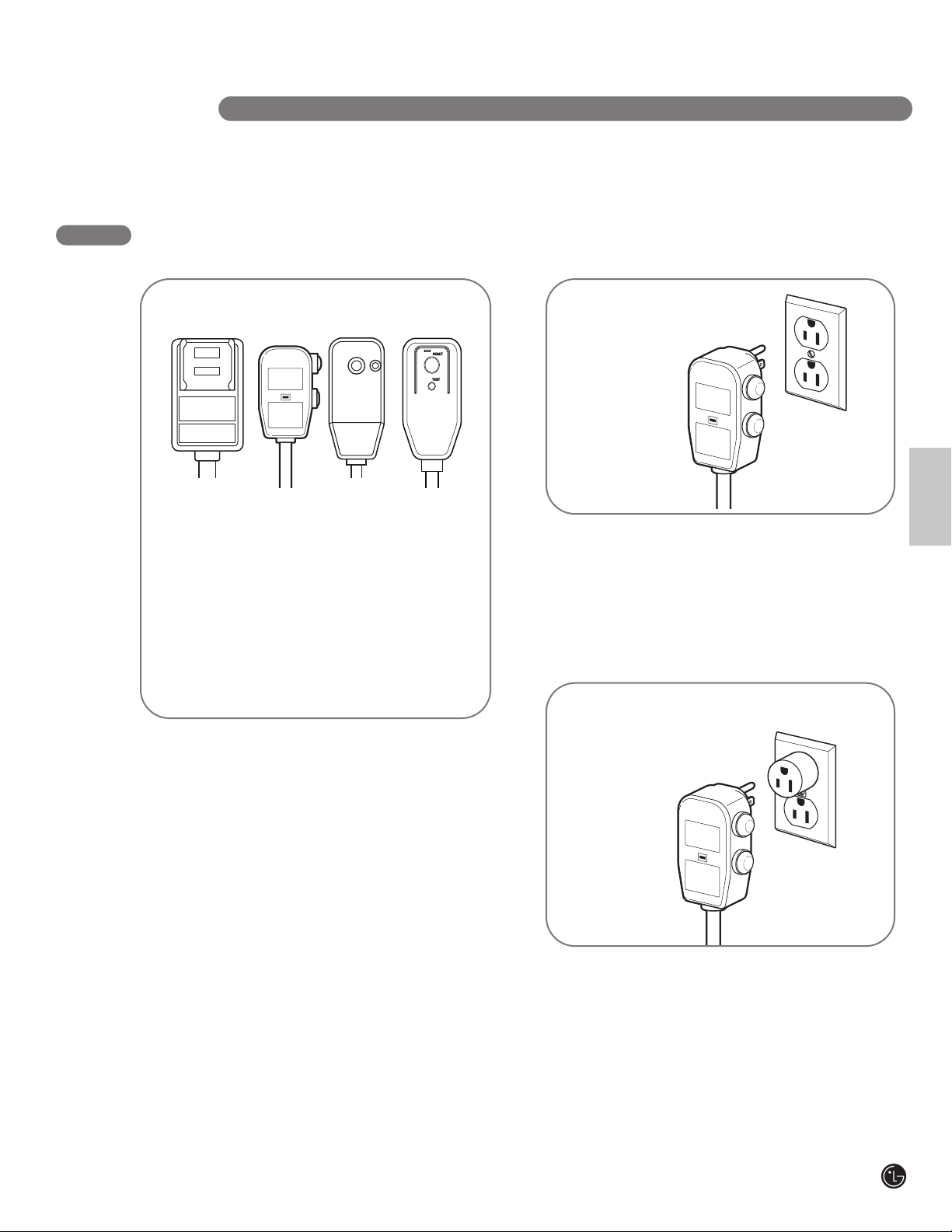
For additional safety, the power cord features an
integrated circuit breaker. Test and reset buttons
are provided on the plug case.
The circuit breaker should be tested periodically
by pressing the TEST button then the RESET
button. If the TEST button does not cause the
circuit breaker to trip, or if the RESET button will
not stay engaged, unplug the air conditioner
immediately and contact your LG service
technician.
INTEGRATED CIRCUIT BREAKER
RESET
TEST
RESET
TEST
R
ESET
TEST
ELECTRICAL SAFETY
Duetopotentialsafetyhazards,theuseof
anadapterplugisstronglydiscouraged.
For temporary connections, use only a
UL-listed adapter. Ensure that the large slot
in the adapter is aligned with the large slot
in the outlet.
To prevent damage to the adapter’s ground
terminal, hold the adapter in place while
plugging in or unplugging the air conditioner.
• Attachingtheadaptergroundterminalto
thewallreceptaclecoverscrewdoesnot
groundtheapplianceunlessthecover
screwismetalandnotinsulated,andthe
wallreceptacleisgroundedthroughthe
housewiring.
• Frequentconnectionanddisconnection
candamagethegroundterminalonthe
adapter.Neveruseabrokenordamaged
adapter.
TEMPORARY GROUNDING METHOD
(Useofadapter
plugsnot
permitted
inCanada)
Ensure proper
ground exists
before use.
SAVETHESEINSTRUCTIONS

6
1
2
3
4
5
6
7
PA RT S A N D F E AT U R E S
KEY PARTS AND COMPONENTS
CONTROL PANEL AND DISPLAY
Easy-to-read digital display shows the set
temperature and indicator lights show the
operating mode. Simple push buttons make
changing settings quick and easy.
MOTORIZED AIR DISCHARGE
The adjustable louvered air discharge opens
automatically when the air conditioner is turned
on, and closes when it is turned off. It can also
be set to oscillate to distribute air more evenly
through the room.
INFRARED REMOTE CONTROL
The remote control allows you to adjust the
temperature and operate most functions of the
air conditioner from across the room. A clip is
included for convenient storage.
HOSE AND DIFFUSER
Use the diffuser and hose to connect the air
conditioner to the window installation kit to vent
exhaust air outside.
FILTER COVER AND FILTER
Filter cover clips in place for easy access to the
air filter.
INTEGRATED HANDLES
Integrated handles provide a convenient grip
when lifting the air conditioner.
SWIVELING CASTERS
Swiveling casters allow you to move the air
conditioner easily on most floor surfaces.
BOTTOM DRAIN PORT
Before moving the unit, drain the internal water
collection tank completely by using bottom drain
port.
MULTI-SPEED FANS
The air conditioner features two multi-speed
fans: a circulation fan for moving air inside
the room, and an exhaust fan to vent hot
air outdoors through the hose and diffuser.
POWER SUPPLY CORD HOLDER
Wrap power supply cord around the holders for
your convenience.
UPPER DRAIN PORT
When FL appears on the display, press AUTO
CLEAN button, it will drain out the water
collected in internal tank through upper drain
port.
1
2
5
6
7
10
10
11
8
8
Power
Temp
Fan Speed
Timer Mode
Energy
Saver
Auto
Swing
3
9
9
10
11
4

7
English
CONTROL PANEL AND REMOTE
PA RT S A N D F E AT U R E S
2
1 3 4
5
8
6
7
1
2
3
4
5
6
7
POWER ON/OFF
Turns the air conditioner on and off. When turning on,
a rising tone will sound to confirm. When turning off,
a descending tone will sound.
AUTO CLEAN
• The AUTO CLEAN function is used to remove
moisture from the heat exchangers and helps
prevent odor from forming. This function can be
activated from the control panel only.
• When FL appears on the display, press AUTO
CLEAN button, it will drain out the water collected
in internal tank through upper drain port.
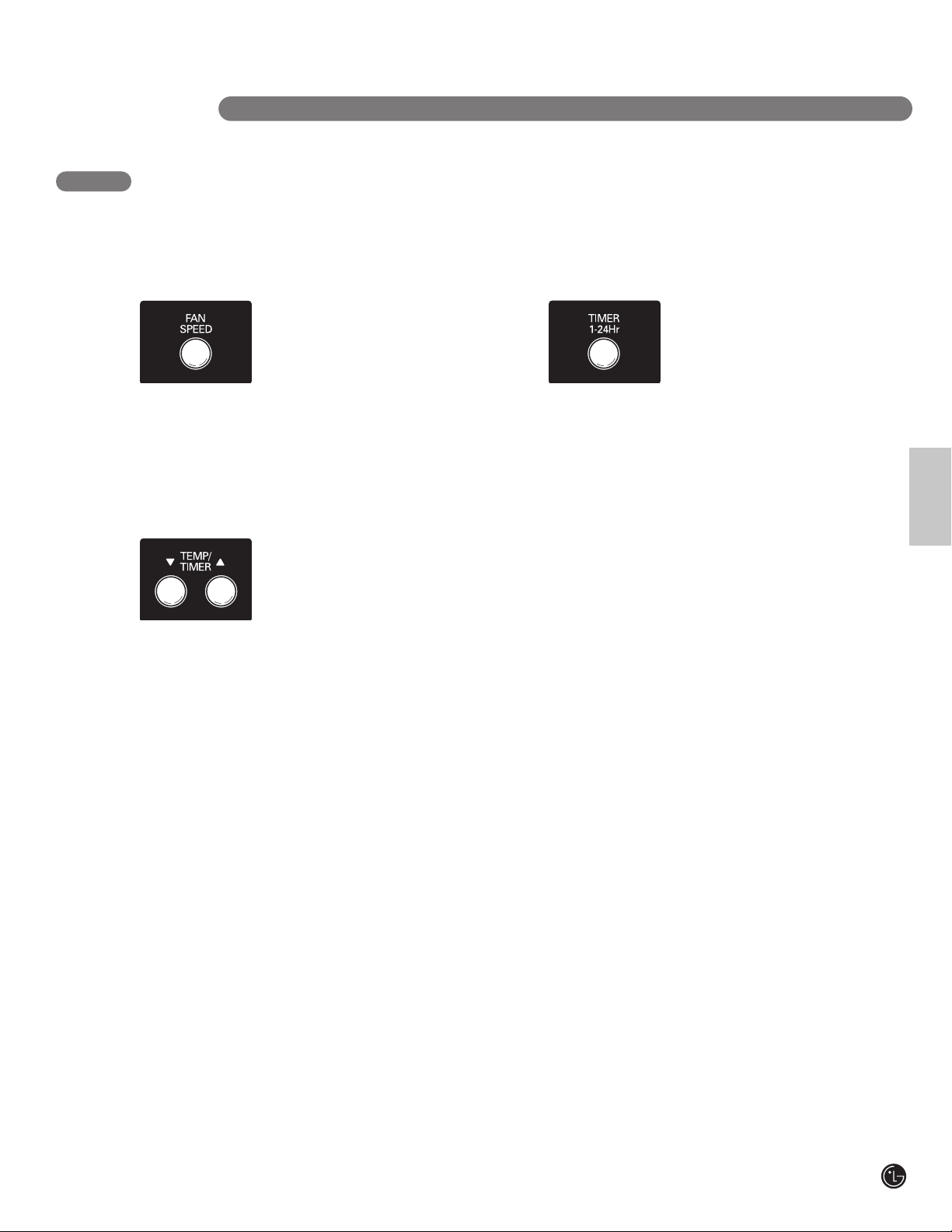
FAN SPEED
Adjusts the circulation fan speed between low (F1),
medium (F2), and high (F3).
MODE
Switches the air conditioner between COOL, FAN,
and DRY modes. The respective indicator in the
display will light to show the active mode.
DIGITAL DISPLAY AND INDICATORS
Digital display shows the set temperature in degrees
Fahrenheit, fan speed, or the selected TIMER delay.
Indicators will light to show active mode and
additional settings. The WATER FULL indicator will
light to indicate when the internal water drain tank
needs to be emptied.
TEMP/TIMER
▲
/
▼
Use these buttons to adjust the set temperature up or
down, or to adjust the timer delay time.
TIMER 1–24 Hr
Allows you to set a delay from 1 to 24 hours that will
turn the air conditioner on or off automatically.
Power
Temp
Fan Speed
Timer Mode
Energy
Saver
Auto
Swing
1
6
3
4
9
7
8
Operation of functions is the same when using the remote or the
control panel, unless otherwise stated.
For detailed instructions on each function, see the following pages.
8
9
ENERGY SAVER
Activates the ENERGY SAVER mode. In this mode,
the fans will only run when the compressor is running.
AUTO SWING
Sets the motorized air discharge to oscillate,
improving air circulation in the room. This function
can only be activated from the remote control.
8
H O W TO U S E
Refer to the Installation Instructions included in
this manual before using the air conditioner.
Once the air conditioner has been properly
assembled and installed:
Plug the power cord into its own dedicated
properly grounded outlet. You will hear a
tone to confirm that the conditioner is
plugged in. Do not plug other appliances
into the same outlet; it could overload the
outlet and create a fire hazard.
Make sure the air conditioner and cord is
positioned where it does not create a
tripping hazard and will receive adequate
ventilation. Do not place it directly next to
furniture or objects that could block the
vent openings.
Make sure that any items that could be
blown over or damaged by the airflow from
the fan are out of the airflow path.
BEFORE USING YOUR AIR CONDITIONER
PREPARING FOR OPERATION
1
2
3
• Do not remain in the direct airflow from the air
conditioner for extended periods of time.
• To prevent damage or injury to pets and
plants, make sure they are not exposed to
direct airflow from the air conditioner.
• When used at the same time as stoves,
fireplaces, and other combustion devices,
make sure there is a sufficient flow of fresh air
into the room. Do not use in tightly enclosed
spaces with these types of devices.
• This air conditioner is intended for household
use as a consumer comfort appliance. Do not
use it as a precision climate control system,
or for purposes such as cooling precision
equipment, food, pets, plants, artwork, etc.
Such items could be damaged.
• Do not bend the hose downward when
window installation kit is not applied. It may
cause failure of air conditioner or performance
deterioration.
IMPORTANT:
Remove and store packing materials for reuse.
Remove any shipping tape before using the
air conditioner. If the tape leaves behind any
adhesive, rub a small amount of liquid dish
soap onto it and wipe with a damp cloth. Do
NOT use sharp instruments, alcohol, thinners,
or abrasive cleaners to remove adhesive.
They could damage the finish.
UNPACKING THE AIR CONDITIONER
9
English
Be sure to note
proper polarity!
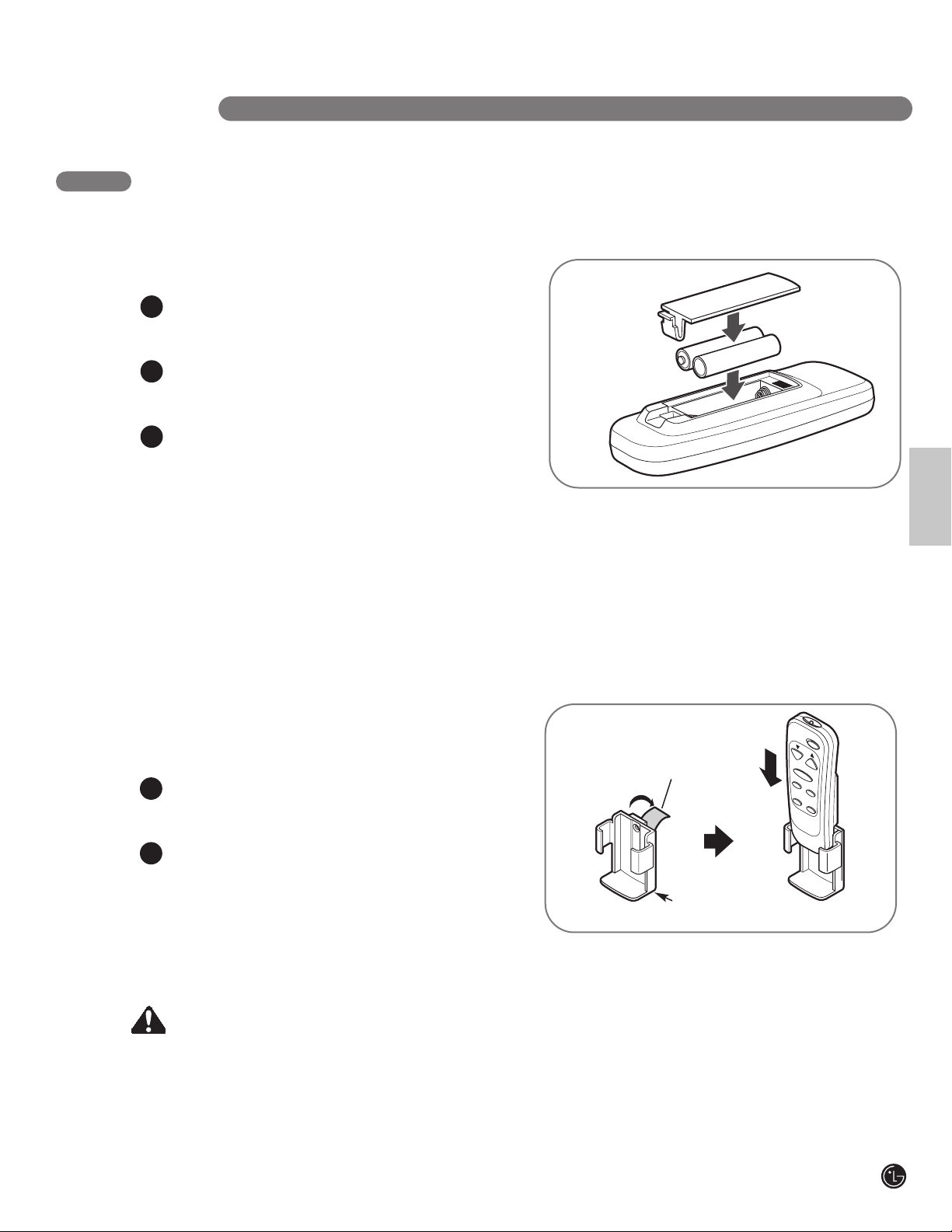
Before using your remote, install the provided
AAA batteries:
Press in the locking tab on the battery cover
on the back of the remote and remove the
cover.
Insert two new alkaline AAA batteries into
the battery compartment, being sure to note
the proper polarity.
Reattach the battery cover, making sure the
locking tab clicks into place.
NOTES:
• Use only alkaline batteries. Do not use
rechargeable batteries.
• When replacing batteries, always replace both
batteries with new batteries. Do not mix old
and new batteries.
• If the air conditioner will not be used for an
extended period of time, remove the batteries
from the remote.
INSERTING BATTERIES IN THE REMOTE
1
2
3
+
-
+
-
BEFORE USING YOUR AIR CONDITIONER
Remote clip
Your air conditioner includes a storage clip for
convenient storage of the remote control. Attach
it to a wall or to the side of the air conditioner to
keep the remote readily at hand.
Peel off the backing paper from the
adhesive tab. Press the holder firmly
into place.
Slide the remote into place for storage.
NOTE:
• If attaching the clip to the air conditioner,
attach it only to the side. Do not block the
inlets or vents.
ATTACHING THE REMOTE CLIP
1
2
H O W TO U S E
Remove adhesive
backing
CAUTION
•
Iftheliquidfromthebatteriesgetsontoyourskinorclothes,washitwellwithcleanwater.
Do not use the remote if the batteries have leaked.
• Ifyoueattheliquidfromthebatteries,brushyourteethandseedoctor.
The chemicals in batteries could cause burns or other health hazards.

10
Press the POWER button to turn the air
conditioner ON or OFF. When you turn the air
conditioner on, an ascending
tone will play and the display
will show the set temperature
and any special mode setting
indicators. The air discharge
on the front of the air conditioner will
automatically open.
When turning the air conditioner off, you will
hear a descending tone and the air discharge
on the front of the air conditioner will close.
Any control settings such as Mode, Set
Temperature, Auto Swing, etc. will be retained
in memory when the power is off.
NOTE:When turned on after being unplugged,
the air conditioner will automatically reset to
COOL mode, with a temperature setting of 72°F.
Any settings will need to be re-entered.
USING THE CONTROLS
POWER
Control panel buttons shown. Operation
using the remote control is the same, unless
specifically noted. NOTE: The remote sensor is
located next to the display on the control panel.
Always point the remote at the sensor. The
remote may not work if the sensor is in bright
light or if there is not a clear path between the
remote and the sensor.
Press the MODE button to select the operating
mode (COOL, FAN, or DRY) for the air
conditioner. The indicator
lamp next to the selected
mode will light.
The default setting is COOL.
Press the MODE button to
change to FAN, press again to change to DRY,
and again to return to COOL.
MODE
Mode Features
COOL Compressor runs and cools the room. Use the
TEMP/TIMER ▲ / ▼ and FAN buttons to set the
desired temperature and circulation fan speed.
FAN Fan circulates air but compressor does not run.
Use the FAN button to set the desired fan speed.
DRY Dry mode is used to remove humidity from the room
without additional cooling. Once the set temperature
is reached, the compressor and circulation fan turns
off and only the exhaust fan will run. Fan speed is
pre-set and cannot be adjusted.
H O W TO U S E
11
English
H O W TO U S E
Pressing the FAN SPEED button cycles the
circulation fan speed from low (F1) to medium
(F2) to high (F3). The selected
fan speed will be shown in the
display. The function can be
used in either COOL or FAN
modes. When changing fan
speeds, there is a brief delay before the fan
motor changes speed.
FAN SPEED
In COOL and DRY modes, the TEMP/TIMER ▲ / ▼
buttons adjust the set temperature up to 86°F or
down to 60°F, in one degree
increments. The temperature is
in degrees Fahrenheit. It can
NOT be switched to degrees
Celsius.
When the TIMER function is selected, use the
TEMP/TIMER ▲ / ▼ buttons to adjust the delay
time from 1 to 24 hours, in one hour increments.
If you press and hold the TEMP/TIMER ▲ / ▼
buttons, the set temperature or time will change
automatically after a few seconds.
NOTE:The displayed temperature is the SET
temperature, not the room temperature. In
COOL or DRY mode, the thermostat in the air
conditioner will run the compressor until the
set temperature is reached, then cycle the
compressor on and off to maintain the set
temperature.
TEMP/TIMER
▲
/
▼
USING THE CONTROLS
When the TIMER function is selected, you can set
the air conditioner to either automatically turn
OFF or turn ON after a delay of
up to 24 hours. The display will
show 0. Use the TEMP/TIMER ▲ /
▼ buttons to adjust the delay
time from 1 to 24 hours, in one
hour increments.
To set an automatic off delay, press the TIMER
button while the air conditioner is running and
use the TEMP/TIMER ▲ / ▼ buttons to adjust the
delay time. The timer indicator will light. The air
conditioner will automatically turn OFF after the
set delay.
To set an automatic on delay, press the TIMER
button while the air conditioner is off and use
the TEMP/TIMER ▲ / ▼ buttons to adjust the
delay time. The timer indicator will light and the
display will show the number of hours remaining
until the unit is set to come on. The air
conditioner will automatically turn ON
after the set delay.
To cancel the Timer function, set the display to
“0”. If you press and hold the TEMP/TIMER ▲ /
▼ buttons.
NOTE:Do not unplug the air conditioner when
using the timer function.
TIMER 1-24 Hr
12
USING THE CONTROLS
H O W TO U S E
Under normal operation, the exhaust fan cycles
on and off with the compressor, and the
circulation fan runs at the set
speed.
The ENERGY SAVER mode helps
reduce power consumption by
automatically turning off the
circulation fan as well as the exhaust fan when
the compressor is off. The air conditioner will
automatically cycle both fans on and off with the
compressor as needed for cooling.
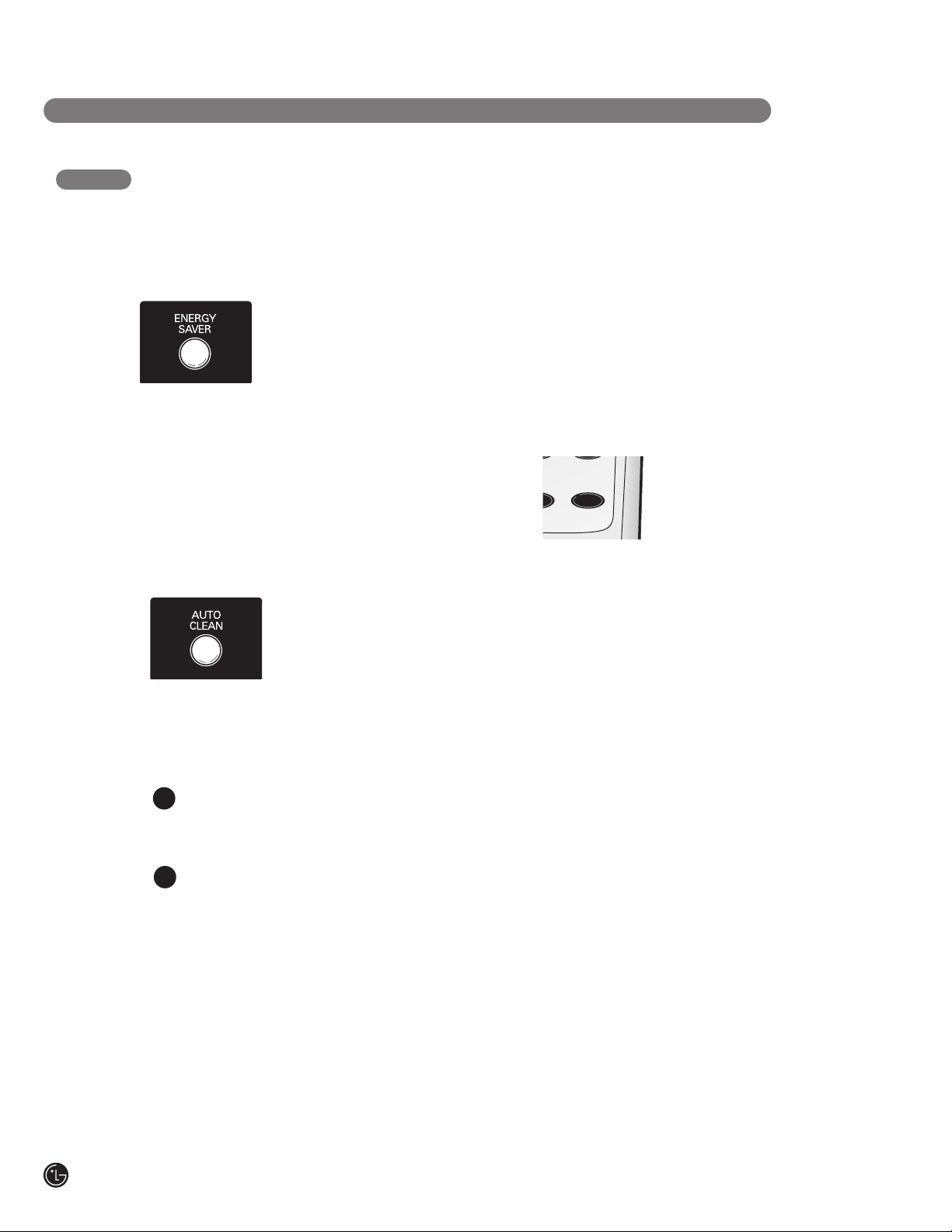
ENERGY SAVER
• To turn the AUTO CLEAN function on, press the
AUTO CLEAN button while the air conditioner is
running in COOL or DRY
mode. This function can only
be selected from the control
panel; it is not available from
the remote. It must be set
each time you wish to run the AUTO CLEAN
function.
AUTO CLEAN is used to remove moisture from
the heat exchange coils. This helps prevent the
formation of mildew and odors.
To use AUTO CLEAN:
With the air conditioner running in COOL
or DRY mode, press the AUTO CLEAN
button.
The indicator will light.
Press the POWER button to turn the air
conditioner off. AUTO CLEAN will run
the circulation and exhaust fans with the
compressor off for a few minutes after
the power is turned off.
To cancel AUTO CLEAN, or to stop an
AUTO CLEAN cycle in process, simply press
the AUTO CLEAN button again. The AUTO CLEAN
function will not operate if the air conditioner is
already off.
• When FL appears on the display, press AUTO
CLEAN button, it will drain out the water
collected in internal tank through upper drain
port. See the Care and Cleaning section.
AUTO CLEAN
1
2
AUTO SWING function can only be activated with
the remote. When this function is on, the air
discharge will oscillate to
circulate air more evenly
through the room. To turn this
function off, simply press the
AUTO SWING button with the
remote again. This setting will stay in memory,
even if the power is turned off.
With AUTO SWING off, you may also manually
adjust the air discharge to the desired position.
It will maintain this position until the air
conditioner is turned off or AUTO SWING
is activated.
AUTO SWING
Power
Temp
F
an Speed
Timer Mode
Energy
Saver
Auto
Swing

13
English
I N S TA L L AT I O N I N S T RU C T I O N S
PREPARING FOR INSTALLATION
WARNING Theairconditionerisheavy!Usetwoormorepeopleto
liftandinstalltheunit!Failuretodosocouldresultinbackinjuryorotherinjuries.
The following components are used for window venting.
Not all components are used for every installation.
EXHAUST COMPONENTS
Window Installation Kit
(includes 2 Window Vent
Panel and 2 Extension
Panels)
Flexible Venting Hose
Diffuser
4 Type A Screws
10 Type B Screws
Security Bracket
1 Type B Foam Seal
(non-adhesive)
2 Type A Foam Seals
(adhesive)
Vent Panel
Large
Extension
Panel
Extension
Vent Panel
Small
Extension
Panel
2 Type C Foam Seals
(Adhesive type-Shorter)
14
I N S TA L L AT I O N I N S T RU C T I O N S
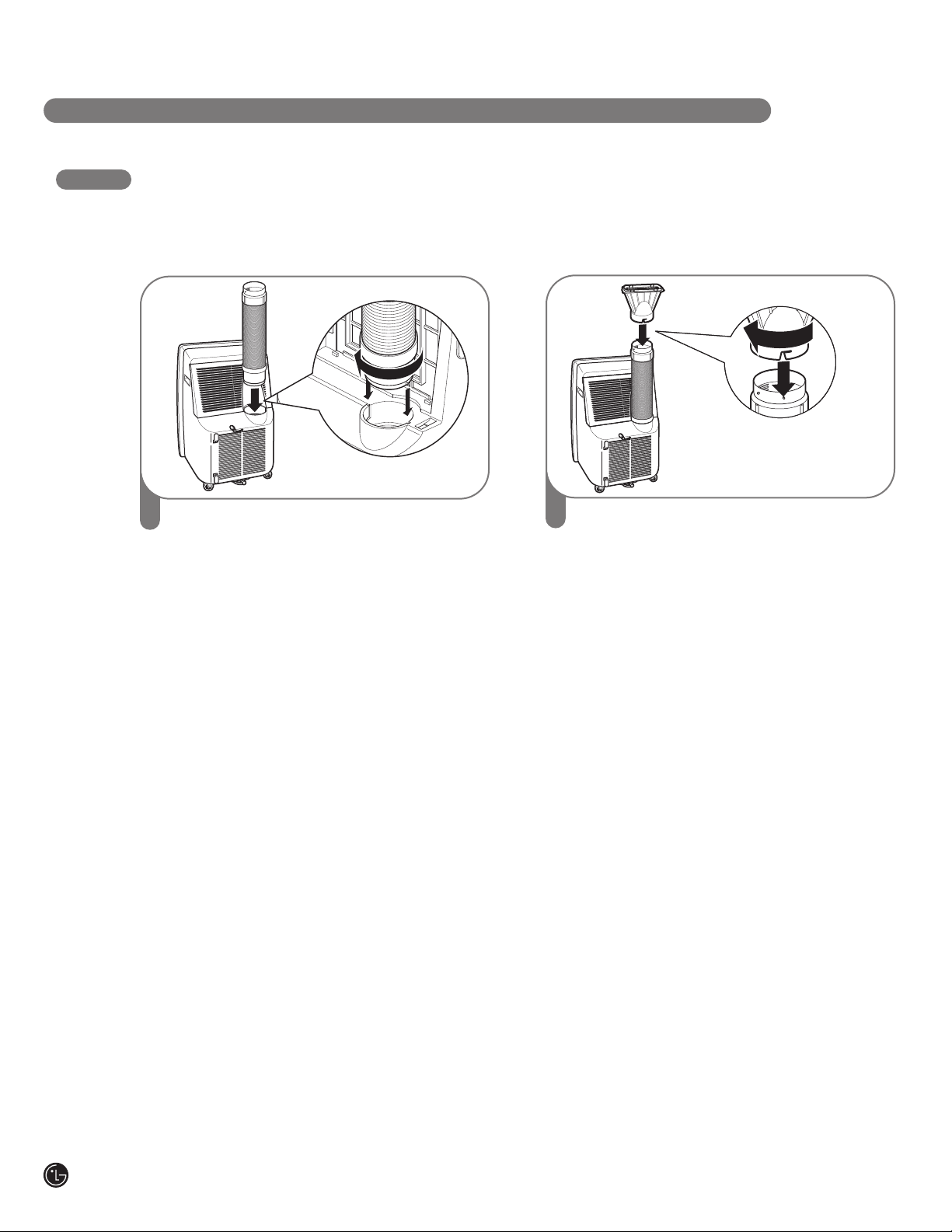
ATTACHING THE HOSE AND DIFFUSER
NOTE: The air conditioner is shipped with the hose installed. The hose may be removed for cleaning
and storage, if necessary. Simply reverse the steps below to remove.
1
Insert the large adapter end of the hose into
the hole on the back of the air conditioner.
Align the pins on the connector with the
slots in the hole. Twist slightly clockwise
until it locks into place.
2
Fit the round end of the diffuser over the
small adapter end of the hose. Align the
slots on the diffuser with the pins on the
hose. Twist slightly clockwise to lock
into place.

15
English
I N S TA L L AT I O N I N S T RU C T I O N S
WINDOW VENT PANEL AND EXTENSIONS
The window installation kit allows you to install the air conditioner in most vertical-sliding windows 18"
to 48" wide, or casement-style windows from 18" to 48" high.
For an 18" window opening, use the window
vent panel by itself.
For window openings from 18
1
⁄4" to 24",
use the window vent panel and the small
extension panel.
For window openings from 24" to 29",
use the window vent panel and the large
extension panel.
For window openings from 29" to 36", use the
window vent panel and both extension panels.
Vent
Panel
Small
extension
panel
Vent
Panel
18"
18"
Vent
Panel
18
1
⁄4" − 24"
18
1
⁄4" − 24"
Small extension
panel
Vent
Panel
Large
extension
panel
Vent
Panel
24" − 29"
Large extension
panel
Vent
Panel
24" − 29"
Large
extension
panel
Vent
Panel
29" − 36"
Large extension
panel
Vent
Panel
29" − 36"
Small
extension
panel
Small
extension
panel
For window openings from 36″ to 48″, use both
vent panels and both extension panels.
Large
extension
panel
Vent
Panel
36" − 48"
Large
extension
panel
Extension vent
panel
Extension vent
panel
Vent
Panel
36" − 48"
Small
extension
panel
Small
extension
panel

16
I N S TA L L AT I O N I N S T RU C T I O N S
Foam seal A
(Adhesive type)
Foam seal C
(Adhesive type-shorter)
Sellante de espuma A
(Tipo adhesivo)
Tipo C de sellado con espuma
(tipo adhesivo-más corto).
Joints en Mousse A
(Adhesive type)
Joints en Mousse C
(Plus court de type adhésif)
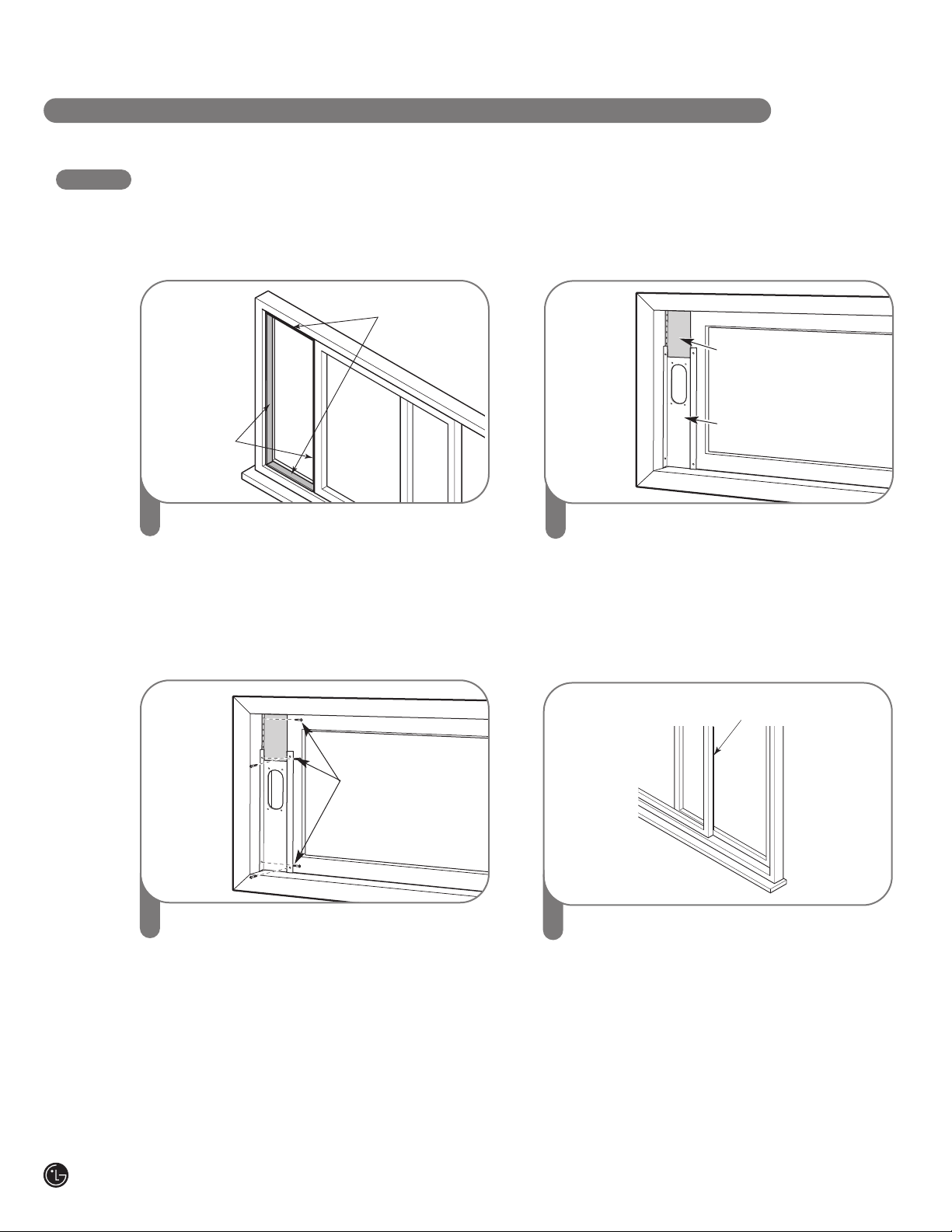
INSTALLATION IN VERTICAL SLIDING WINDOWS
NOTE: The window installation kit can be used with vertical sliding windows between 18"
and 48" wide.
1
Cut the foam seal A(adhesive type) &
C(adhesive type-shorter) to the proper
length, and attach it to the window sash and
frame.
2
Insert the vent panel assembly, including
extension panels, if needed, into the window
opening. Extend the extension panels, if
used.
Foam seal B
(Non-adhesive type)
Sellado con espuma B
(tipo no adhesivo)
Joints en Mousse B
(Non adhésif)
4
Cut the foam seal B(Non-adhesive type) to
the window width. Stuff the foam seal B
between the glass and the window to
prevent air and insects from getting into the
room.
3
Carefully lower the window. Secure the vent
panel in place with 4 type B screws, plus
one screw for each extension:
Vent panel only: 4 type B screws
Vent panel and
one extension: 5 type B screws
Vent panel and
two extensions: 6 type B screws
Two vent panels and
two extensions: 9 type B screws
Type B screws
Extension panel
(if required)
Vent
Panel
17
English
INSTALLATION IN VERTICAL SLIDING WINDOWS
I N S TA L L AT I O N I N S T RU C T I O N S
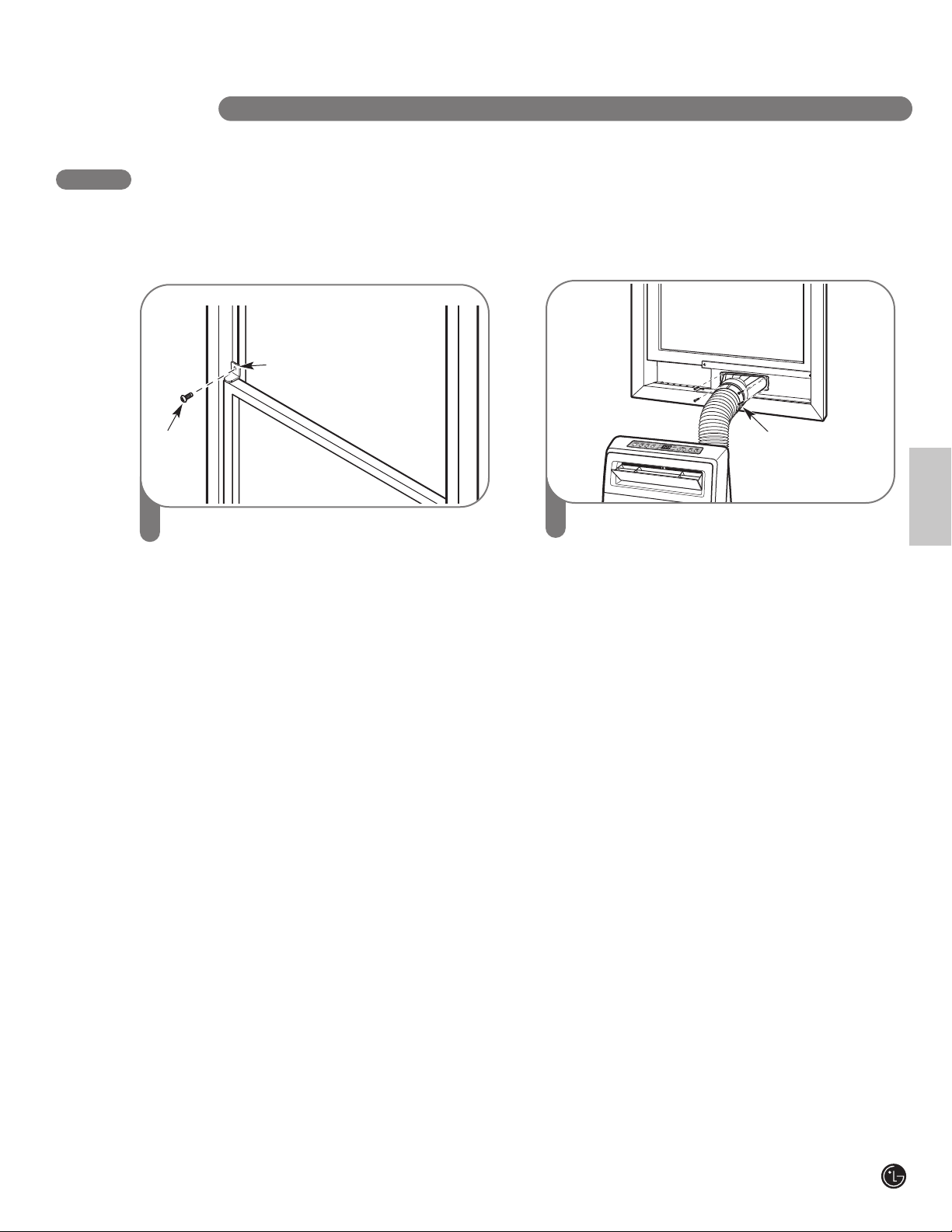
5
Install the security bracket with a type B
screw, as shown.
Type B
screw
Security Bracket
6
Insert the oval end of the diffuser into the
window installation kit until the locking tabs
engage. Secure in place with four Type A
screws.
Type A screws
18
INSTALLATION IN CASEMENT STYLE WINDOWS
NOTE: The window installation kit can be used with casement windows between 18
ʺ
and 48
ʺ
tall.
Foam seal A
(Adhesive type)
Foam seal C
(Adhesive
type-shorter)
Joints en
Mousse A
(Type adhésif)
Joints en
Mousse C
(plus court de
type adhésif)
Sellado con
espuma A
(tipo adhesivo)
Sellado con
espuma C
(tipo adhesivo-
más corto)
1
Cut the foam seal A(adhesive type) &
C(adhesive type-shorter) to the proper
length, and attach it to the window sash and
frame.
2
Insert the vent panel assembly, including
extension panels, if needed, into the window
opening. Extend the extension panels, if
used.
Foam seal B
(Non-adhesive type)
Sellado con espuma B
(tipo adhesivo)
Joints en Mousse B
(Non adhésif)
4
Cut the foam seal B(Non-adhesive type) to
the window height. Stuff the foam seal B
between the glass and the window to
prevent air and insects from getting into the
room.
3
I N S TA L L AT I O N I N S T RU C T I O N S
Extension panel
(if required)
Vent
Panel
Type B screws
Carefully close the window. Secure the vent
panel in place with 4 type B screws, plus
one screw for each extension:
Vent panel only: 4 type B screws
Vent panel and
one extension: 5 type B screws
Vent panel and
two extensions: 6 type B screws
Two vent panels and
two extensions: 9 type B screws

19
English
6
Insert the oval end of the diffuser into the
window installation kit until the locking tabs
engage. Secure in place with four of the
included screws.
Type A screws
I N S TA L L AT I O N I N S T RU C T I O N S
5
Install the window security bracket with a
type B screw, as shown.
Type B screw
Security
bracket
INSTALLATION IN CASEMENT STYLE WINDOWS
20
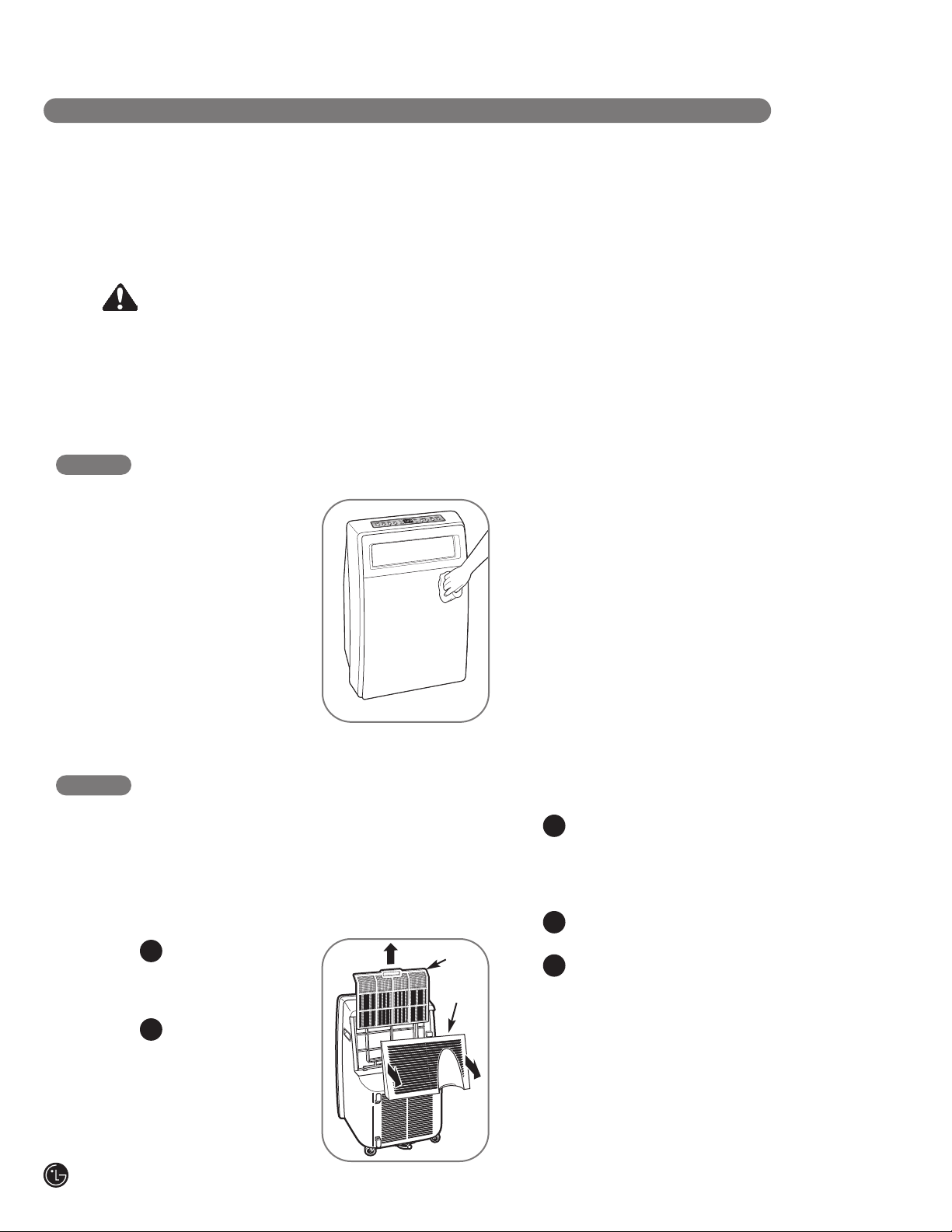
CLEANING THE CASE
Wipe the case with a
slightly damp cloth, then
wipe dry with a dry cloth
or towel.
• Topreventdamagetothefinish,donotuse
gasoline,benzene,thinner,etc.,orany
abrasivecleanserstocleantheair
conditioner;theymaydamagethefinish.
• Neverpourwaterontoorintotheunit;it
coulddamageinternalcomponentsand
createashockandfirehazard.
C A R E A N D C L E A N I N G
CLEANING THE AIR FILTER
The air filter should be cleaned every two weeks;
depending on indoor air quality, more frequent
cleaning may be needed. A dirty air filter will
decrease airflow and reduce efficiency.
Donotoperatetheairconditionerwithout
theairfilterinplace.
Grasp the two grips
on the filter cover
panel and pull back
to open the cover.
Lift out the air filter
by the handle.
Use a vacuum cleaner to clean the filter. If
the filter is heavily soiled, it can be washed
in warm water using a mild detergent.
Donotuseharshcleanersorveryhot
water.Donotwashinadishwasher.
Allow the filter to dry completely before
reinstalling.
Reinsert the filter, making sure that the
bottom of the filter is between the tabs and
the coil guard. Reinstall the filter cover,
making sure it clips into place.
Filter
Cover
1
3
2
Your air conditioner is designed for year-round
operation with only minimal cleaning and
maintenance.
For maximum efficiency, it is recommended
that you have the cooling coils inspected and
cleaned annually. Your local LG Authorized
Service Center can provide this inspection
and cleaning service for a nominal fee.
WARNING
• Unplugtheairconditionerbeforecleaningorperforminganymaintenanceorservicing.
• Becarefulwhencleaningcoilsorremovingorreinstallingthefilter—thecoolingfins
aresharp!
Failuretofollowtheaboveprecautionscouldresultinelectricalshockorpersonalinjury.
Filter
4
5

21
English
C A R E A N D C L E A N I N G
EMPTYING THE WATER COLLECTION TANK
When the internal water collection tank is full, FL
will appear in the display and the air conditioner
will turn off until the tank is emptied.
Unplug the air conditioner, disconnect
the exhaust hose from the back, and move
the air conditioner to a suitable drain
location or outdoors. You may also place
a pan under the drain that will hold up
to 1 quart of water.
Remove the drain cap from the drain outlet.
Once the water collection tank is drained,
reinstall the drain cap, making sure it is
on securely.
Place the air conditioner in the desired
location, reconnect the exhaust hose, and
plug in the air conditioner.
NOTES:
•When turned on after being unplugged, the air
conditioner will automatically reset to COOL
mode, with a temperature setting of 72°F.
•The air conditioner features a drain pump for
increased operating efficiency.
• Make sure to use a bucket with a minimum
capacity of 0.5 gallon.
Drain
Cap
1
2
Drain Outlet
3
4
When the internal water collection tank is full. FL
will appear in the display and the air conditioner
will turn off until the tank is emptied.
Place a suitable bucket under the upper drain
port.
Remove the drain cap.
Press the Auto Clean button.
Wait till water is drained out completely.
Replace the cap, make sure it is on securely.
Reset your settings.
L
O
O
K
Using the bottom drain port
Using the upper drain port
Upper drain
port
Drain cap
1
2
3
4
5
6
22
C A R E A N D C L E A N I N G
STORING THE AIR CONDITIONER
If the air conditioner will not be used for an
extended period of time:
Drain the water collection tank completely
and leave the bottom drain cap off long
enough to allow any residual water to drain
out. Once the tank is completely drained
and no more water flows out, reinstall the
cap.
Remove and clean the filter, allow it to dry
completely, then reinstall it.
Remove the batteries from the remote.
Store the air conditioner in a cool, dry
location, away from direct sunlight, extreme
temperatures, and excessive dust.
Before using the air conditioner again:
Make sure the filter and drain cap are
in place.
Check the cord to make sure it is in good
condition, with no cracks or damage.
Place new batteries in the remote.
Install the air conditioner as described in the
Installation Instructions.
1
2
3
1
2
3
4
4
23
English
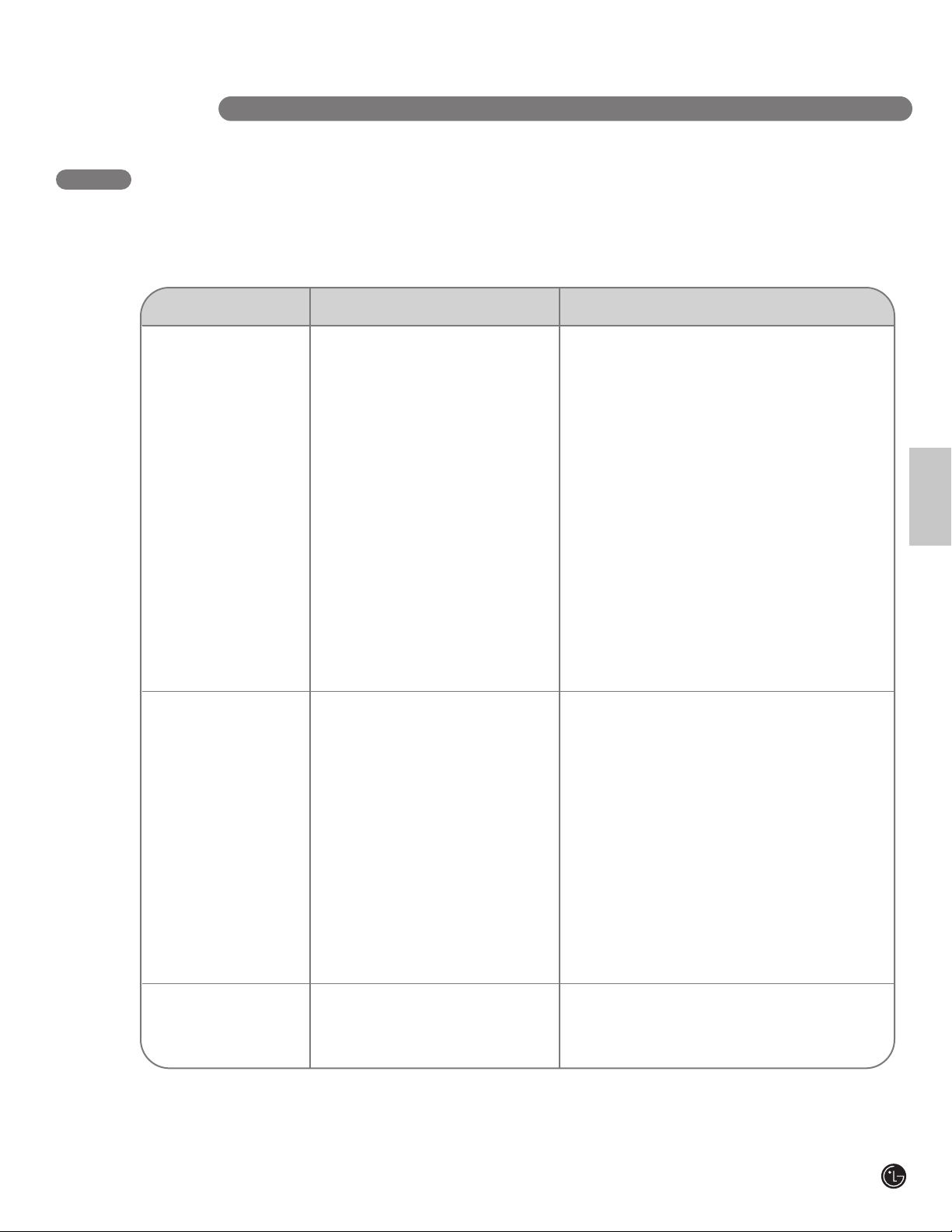
BEFORE CALLING FOR SERVICE
T RO U b L E S H O OT I N G
Problem PossibleCauses Solutions
Air conditioner will • The air conditioner plug is • Make sure electrical plug is plugged completely into a
not start not completely inserted in live, properly grounded outlet.
the electrical outlet.
• The house fuse is blown or the • Replace the fuse or reset the circuit breaker. Make sure
circuit breaker has tripped. that there are no other appliances on the same circuit.
• Power failure. • If a power failure occurs, turn the power OFF. When
power is restored, wait 3 minutes before restarting the
air conditioner.
• The integrated circuit breaker in the • Press the RESET button on the air conditioner plug.
plug has tripped. If the reset button will not stay engaged, unplug the air
conditioner and contact a qualified service technician.
• FL appears in the display. • The water collection tank is full. Drain the tank and
reset your settings.
See the Care and Cleaning section.
• Room temperature is less than the • This is normal. The air conditioner automatically
set temperature. shuts off when the room equals or is less than the
set temperature. Adjust the temperature setting,
if needed.
Air conditioner does • Airflow is restricted. • Make sure there is sufficient clearance around the
not cool properly air conditioner and that the air inlet and outlet are
not blocked by furniture, curtains, etc.
• The air filter is dirty. • Clean the air filter at least every two weeks. See the
Care and Cleaning section.
• The room is very hot, or not enough • When first turned on, allow the air conditioner
time allowed for cooling. sufficient time to cool the room.
• Cold air is escaping. • Check for open furnace floor registers or cold air
returns, or open windows or doors.
• Cooling coils have iced up. • In especially hot, humid weather and when the air
conditioner is running frequently or for extended
periods, ice can form on the cooling coils, blocking
air flow. Set the controls to High Fan (F3) or High
Cool (F3), and set to a warmer temperature.
Air conditioner runs • Area to be cooled is too large for • Consult your dealer for the air conditioner capacity
too often or too long the air conditioner. necessary to cool the desired area.
• Doors or windows are open. • Make sure doors and windows are closed.
Before you call for service, review this list. It may save you time and expense. This list includes common
occurrences that are not the result of a defect in workmanship or materials.

24
T RO U b L E S H O OT I N G
BEFORE CALLING FOR SERVICE
Problem PossibleCauses Solutions
Code appears in
the display:
F1, F2, or F3 • Air conditioner is in FAN mode • This is normal. The air conditioner is working properly.
and the number shown is the set
fan speed.
FL • The water collection tank is full. • Empty the water collection tank. See the
Care and Cleaning section.
CH01 • Short or open circuit in the indoor • Unplug the air conditioner and contact your authorized
air thermostat. LG service center.

25
English
LGELECTRONICS,INC.
PORTABLEAIRCONDITIONERLIMITEDWARRANTY—USA
Should your LG Portable Air Conditioner prove to be defective in material or workmanship under normal use during the warranty period listed below,
effective from the date of original consumer purchase of the product, LG Electronics will replace the defective part(s). Replacement parts will meet intended
fit and function of the original part. Replacement parts are warranted for the unexpired portion of the original warranty period. This limited warranty is good
only to the original purchaser of the product and effective only when used in the United States of America.
No other warranty is applicable to this product. THIS WARRANTY IS IN LIEU OF ANY OTHER WARRANTY, EXPRESS OR IMPLIED, INCLUDING
WITHOUT LIMITATION, ANY WARRANTY OF MERCHANTABILITY OR FITNESS FOR A PARTICULAR PURPOSE. TO THE EXTENT ANY IMPLIED WARRANTY
IS REQUIRED BY LAW, IT IS LIMITED IN DURATION TO THE EXPRESS WARRANTY PERIOD ABOVE. NEITHER THE MANUFACTURER NOR ITS U.S.
DISTRIBUTOR SHALL BE LIABLE FOR ANY INCIDENTAL, CONSEQUENTIAL, INDIRECT, SPECIAL, OR PUNITIVE DAMAGES OF ANY NATURE, INCLUDING
WITHOUT LIMITATION, LOST REVENUES OR PROFITS, OR ANY OTHER DAMAGE WHETHER BASED IN CONTRACT, TORT, OR OTHERWISE. Some states
and/or territories do not allow the exclusion or limitation of incidental or consequential damages or limitations on how long an implied warranty lasts, so the
above exclusion or limitation may not apply to you. This warranty gives you, the original purchaser, specific legal rights and you may also have other rights
that vary from state to state or territory to territory.
WARRANTYPERIOD:
For the Period of: LG Will Replace:
One year from date Any part of the LGE Portable Air Conditioner which fails due to a defect in materials or workmanship. During this full
of original purchase one-year warranty, LGE will also provide, free of charge, all labor and on-site service to replace the defective part.
Five years from date Any part of the sealed refrigerating system (the compressor, condensor, evaporator, and all connecting tubing)
of original purchase which fails due to a defect in materials or workmanship. During this full five-year sealed refrigerating system
warranty, LGE will also provide, free of charge, all labor and on-site service to replace the defective part.
Five years from date For the second through the fifth year from the date of original purchase, LGE will replace certain parts that fail due
of original purchase to a defect in materials or workmanship. Parts covered are fan motors, switches, thermostats, heater, heater
protectors, compressor overload, solenoids, circuit boards, auxiliary controls, thermistors, frost controls, ICR pump,
capacitors, varistors, and indoor blower bearing. During this limited four-year parts warranty, you will be
responsible for any labor or on-site service costs.
THIS LIMITED WARRANTY DOES NOT APPLY TO:
1. Service calls to your home for delivery or pick-up, installation,
instruction, replacement of house fuses, connection of house wiring
or plumbing, or to correct unauthorized repairs.
2. Failure of product to perform during power failures and interruptions
or inadequate electrical service.
3. Damage caused by transportation or handling.
4. Damage caused to the product by accident, vermin, lightning, winds,
fire, floods, or acts of God.
5. Damages caused by leaky or broken water pipes, frozen water pipes,
restricted drain lines, or inadequate or interrupted water supply.
6. Damages caused by inadequate supply of air.
7. Damages caused by operating the product in a corrosive
atmosphere.
8. Repairs when your LG product is used in other than normal, single-
family household use or contrary to the instructions described in the
product User’s Guide.
9. Damage resulting from accident, alteration, misuse, abuse, or
improper installation, repair, or maintenance. Improper repair includes
the use of parts not approved or specified by LG.
10.Normal maintenance as described in the User’s Guide, such as
cleaning or replacing filters, cleaning coils, etc.
11.Use of accessories or components that are not compatible with this
product.
12.Products with altered or removed serial numbers.
13.Changes in the appearance of the product that do not affect product
performance.
14.Increases in utility costs and additional utility expenses.
The cost of repair or replacement under these excluded
circumstances shall be borne by the consumer.
TOCONTACTLGELECTRONICSBYMAIL:
LG Customer Interactive Center
P. O. Box 240007
201 James Record Road
Huntsville, Alabama 35824
ATTN: CIC
Product Registration Information
Model Number: ____________________________________
Serial Number:______________________________________
You can find these numbers on a label on the side of the
air conditoner.
Date of Purchase: __________________________________
Dealer’s Name: ____________________________________

P/No. MFL36812504
Printed in Korea