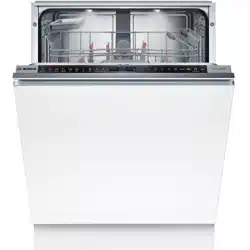
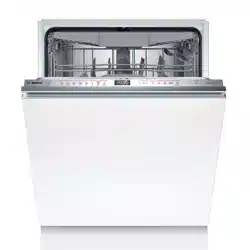
To ensure proper operation, connect the appliance to the power and water supply correctly. Observe the specified criteria and the installation instructions.
Scope of supply
After unpacking all parts, check for any damage in transit and completeness of the delivery.
If you have any complaints, contact the dealer who sold you the appliance or our Customer Service.
Note: The appliance was tested at the factory to check it is in working order. It is possible that water has left marks on the appliance. These marks will disappear after the first wash cycle.
The delivery consists of the following:
Dishwasher
Operating instructions
Installation Instructions
Warranty
Installation material
Steam guard plate
Mains cable
Quick reference guide
Installing and connecting the appliance
You can position your built-under or integrable appliance in a fitted kitchen between wooden and plastic walls. If you subsequently install your dishwasher as a free-standing appliance, you must stop it from tipping over, e.g. by screwing it to the wall or installing it under a continuous worktop that is securely connected to adjacent cabinets.
"Follow the safety instructions."
"Follow the instructions for electrical connection."
Check the Scope of supply and the condition of the appliance.
Consult the installation instructions for the installation dimensions required.
Make the appliance level using the height-adjustable feet. Make sure that the appliance is standing on the floor securely.
"Install the drainage connection."
"Install the drinking water connection."
Connect the appliance to the power supply.
Drainage connection
Connect your appliance to drainage connection so dirty water is discharged via the wash cycle.
Installing the drainage connection
Consult the installation instructions supplied for the steps required here.
Connect the wastewater hose to the outlet connection of the siphon using the enclosed parts.
When doing so, check that the wastewater hose is not kinked, crushed or twisted.
Also check that there is no cover in the drainage system preventing the wastewater from being discharged.
Drinking water connection
Connect your appliance to a drinking water connection.
Installing the drinking water connection
Note: If you are replacing the appliance, you must use a new water supply hose.
Consult the installation instructions supplied for the steps required here.
Connect the appliance to the drinking water connection using the enclosed parts.Observe the “Technical data”
When doing so, check that the drinking water connection is not kinked, crushed or twisted.
Electrical connection
Connect your appliance to the power supply.
Connecting the appliance to the electricity supply
Notes
Follow the "Safety instructions"
Connect the appliance to alternating current only, in the range of 220 - 240 V and 50 Hz or 60 Hz.
Please note that the water safety system is only functional if there is a power supply.
Insert the non-heating appliance plug of the power cable into the appliance.
Insert the mains plug of the appliance into a nearby socket. The connection data for the appliance can be found on the rating plate.
Check that the mains plug is inserted properly
Familiarising yourself with your appliance
Appliance
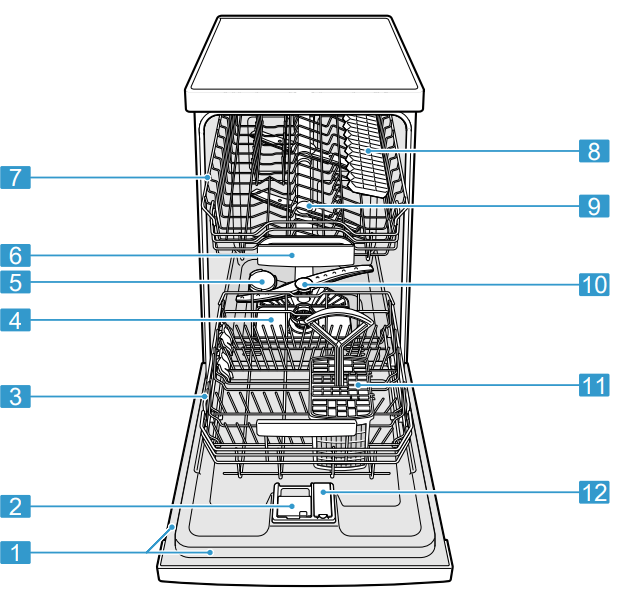
You can find an overview of the parts of your appliance here.
1. Rating plate
Rating plate with E number and FD number.
The data you need for Customer Service
2. Detergent dispenser Detergent
3. Bottom basket Bottom basket
4. Filter system
5. Dispenser for special salt Add the special salt to the dispenser for special salt. → "Water softening system"
6. Tablet collecting tray During the wash cycle tablets automatically fall out of the detergent dispenser into the tablet collecting tray where they can fully dissolve.
7. Top basket Top basket
8. Cutlery shelf
9. Upper spray arm
The upper spray arm washes the tableware in the top basket.
If the tableware has not been washed properly, clean the spray arms. → "Cleaning spray arms"
10. Lower spray arm The lower spray arm washes the tableware in the bottom basket. If the tableware has not been washed properly, clean the spray arms. → "Cleaning spray arms"
11. Cutlery basket
12. Dispenser for rinse aid
Add rinse aid for the Rinse aid system
Controls
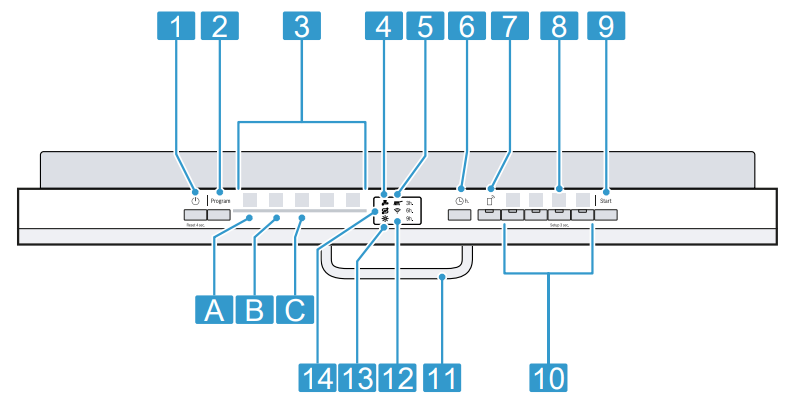
The controls are used to configure all functions of your appliance and to obtain information about the operating status.
With some buttons you can perform different functions.
1. ON/OFF buttonand reset button
2. Programme button
3. Programme
4. Water supply display Display for water supply lights up
5. Programme sequence display The programme sequence display shows the current cycle of the appliance, e.g. washing.
6. Timer programming
7. Remote Start
8. button If you press for approx. 3 seconds, you can open the basic settings.
9. Start button
10. Programme buttons and additional functions
11. Door opener
12. WLAN display
13. Rinse aid refill indicator
14. Special salt refill indicator
Programmes
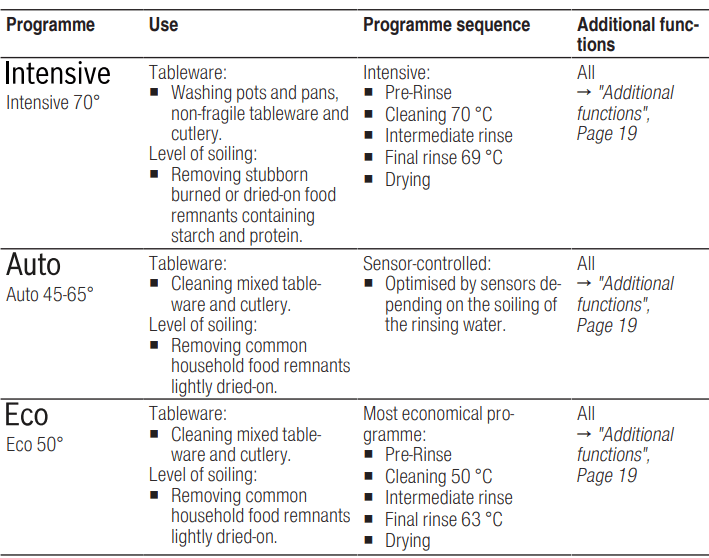
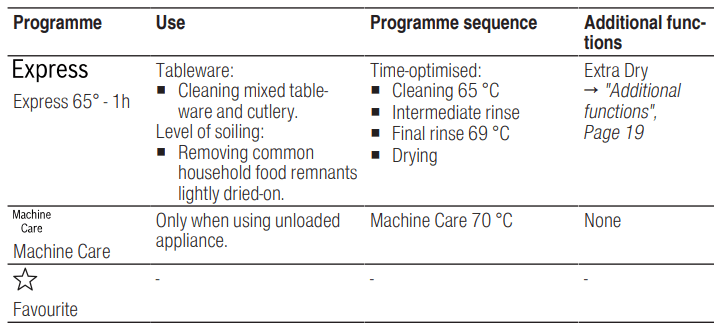
You can find an overview of the programmes that can be selected here.Different programmes, which can be found on the control panel of your appliance, are available depending on the appliance configuration. The running time may vary depending on the programme selected. The running time depends on the water temperature, the quantity of tableware, the level of soiling and the Additional function selected. The runtime will change if the rinse aid system is switched off or rinse aid needs to be added. The consumption values can be found in the quick reference guide. The consumption values relate to normal conditions and a water hardness of 9 - 20 °E. Different influencing factors suc
Note: The relatively long running time in the Eco 50 ° programme is due to longer soaking and drying times. This results in optimal consumption values
Information for test institutes
Test institutes are provided with information for comparability tests, e.g. according to EN60436.
These are the conditions for conducting the tests, however they are not the results or consumption values.
The product number (E-Nr.) and the production number (FD) are required here. They can be found on the rating plate on the appliance door.
Additional functions
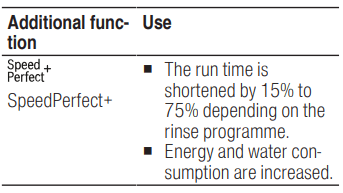
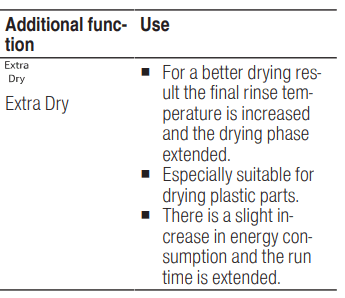
You can find an overview of the additional functions that can be selected here. Different additional functions, which can be found on the control panel of your appliance, are available depending on the appliance configuration.
Features
You can find an overview of the possible features of your appliance and how to use them here.
These features depend on the model of your appliance.
1 Top basket
Arrange cups and glasses in the top basket.
Knife shelf
You can adjust the height of the top basket to make room for larger items of tableware.
Adjusting top basket with side levers
To wash large items of tableware in the baskets, adjust the shelf position of the top basket.
1. Pull out the top basket.
2. To prevent the basket from suddenly dropping down, hold the side of the basket by the top edge.
3. Press in the levers on the right and left on the outside of the basket.
The basket can then slip down slightly.
4. Raise or lower the basket evenly to the right level. → "Basket heights"
Check that the basket is level on both sides.
5. Slide the basket back in.
Bottom basket
Arrange pans and plates in the bottom basket.
Cutlery basket
Large plates up to a diameter of 31/34 cm can be arranged as shown.
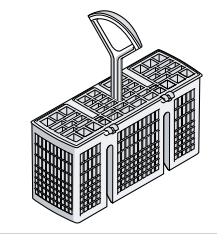
Cutlery basket
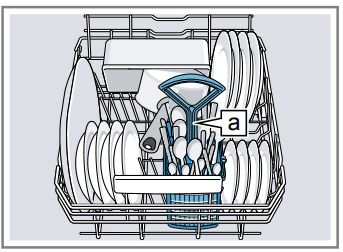
Arrange cutlery in the cutlery basket, always without sorting it and with the sharp points downwards.
Etagere
Use the etagere and space underneath for small cups and glasses or for large items of cutlery, e.g. wooden spoons or serving cutlery.
If you do not need the etagere, you can fold it up.
Baking sheet spray head
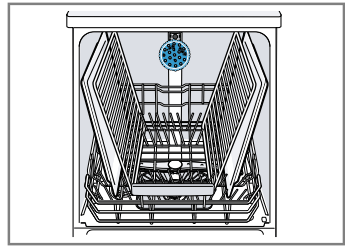
Use the baking sheet spray head to clean large items of tableware, e.g. trays, grilles and plates.
Arrange max. 2 baking sheets and 2 grilles as shown to ensure that the spray jet can reach all parts.
Note: Check that the appliance is always operated with the top basket or the baking sheet spray head..
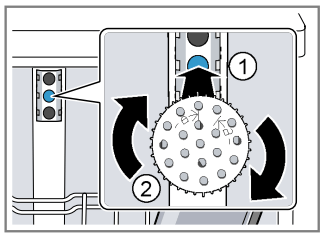
Inserting baking sheet spray head
Use the baking sheet spray head instead of the top basket to clean large trays, grilles and plates.
1. Remove top basket.
2. Insert the baking sheet spray head in the holder 1 and turn to the right 2 .
The baking sheet spray head clicks into position.
Water softening system
Hard water leaves limescale on the tub and tableware and parts of the appliance may become blocked. To ensure good dishwashing results, you can treat the water with special salt and the water softening system. To avoid damage to the appliance, water with a hardness above 9 °E must be softened.
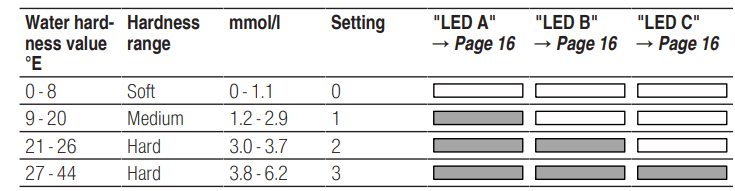
Overview of water hardness settings
You can find an overview of the water hardness values that can be selected here.
You can find out how hard your water is from your local water company or by using a water hardness tester.
Note: Set the water hardness determined on your appliance. → "Setting water softening system"
With a water hardness of 0 - 8 °E you can dispense with special salt and switch off the water softening system. → "Switching off water softening system"
Setting water softening system
Set the water hardness on your appliance.
1. Determine the water hardness and the appropriate setting value. → "Overview of water hardness settings"
2. Press .
3. To open the appliance settings, press for 3 seconds. flashes in the display.
4. Press repeatedly until the right water hardness has been set.
0, 1, 2 or 3 LEDs will light up accordingly. → "Overview of water hardness settings",
The factory setting is level 1 ("LED A" ).
5. To save the settings, press for 3 seconds.
Special salt
You can use special salt to soften water.
Adding special salt
If the special salt refill indicator lights up, add special salt to the dispenser for special salt just before the programme starts. The amount of special salt required depends on the water hardness: the higher the water hardness, the greater the amount of special salt required.
ATTENTION!
Detergent may damage the water softening system.
▶Only fill the dispenser of the water softening system with special dishwasher salt.
Special salt can damage the tub due to corrosion.
▶To make sure that any special salt that escapes is washed out of the tub, add the special salt to the dispenser for special salt immediately before the programme starts.
1. Unscrew the lid of the dispenser for special salt and remove.
2. On initial start-up: Fill the dispenser right up with water.
3. Note: Only use special salt for dishwashers.
Do not use salt tablets.
Do not use table salt.
Add the special salt to the dispenser.
Funnel
Fill the dispenser right up with special salt. The water in the dispenser is displaced and forced out.
4. Place the lid back on the dispenser and turn to close.
Switching off water softening system
If you find the special salt refill indicator irritating, e.g. when using combined detergents with salt replacement substances, you can switch the salt refill indicator off.
Note
To avoid damage to the appliance, only switch off the water softening system in the following cases:
The water hardness is max. 26 °E and you are using combined detergents with salt replacement substances. According to manufacturers, combined detergents with salt replacement substances can generally only be used up to a water hardness of 26 °E without adding special salt.
The water hardness is 0 - 8 °E. You do not need to use special salt.
Press
To open the appliance settings, press for 3 seconds. flashes in the display.
Press repeatedly until no LED lights up (level 0). → "Overview of water hardness settings",
To save the settings, press for 3 seconds.
The water softening system is switched off and the salt refill indicator is deactivated.
Regeneration of the water softening system
In order to obtain fault-free function of the water softening system, the appliance performs reheating of the water softening system at regular intervals.Regeneration of the water softening system takes place before the end of the main rinse cycle in all programmes. It will increase the run time and consumption values, e.g. water and electricity
Rinse aid system
You can use the rinse aid system and rinse aid to get tableware and glasses rinsed perfectly without marks.
Rinse aid
For optimum drying results, use rinse aid.
Only use rinse aid for domestic dishwashers.
Adding rinse aid
If the rinse aid refill indicator lights up, top up with rinse aid. Only use rinse aid for domestic dishwashers.
1. Press the catch on the lid of the dispenser for rinse aid 1 and lift 2
2. Add rinse aid up to the max mark. max
3. If rinse aid spills out, remove it from the tub.
Spilled rinse aid can cause excessive frothing during the wash cycle.
4. Close the lid of the dispenser for rinse aid.
The lid clicks into position.
Setting the amount of rinse aid
If there are streaks or water marks on tableware, change the amount of rinse aid.
1. Press .
2. To open the appliance settings, press for 3 seconds. flashes in the display.
3. Press repeatedly until flashes.
4. Press repeatedly until the right amount of rinse aid has been set.
0, 1, 2 or 3 LEDs will light up accordingly.
The factory setting is level 2
A low setting adds less rinse aid during the wash cycle and reduces streaking on tableware.
A higher setting adds more rinse aid during the wash cycle, reduces water marks and improves the drying result
5. To save the settings, press for 3 seconds.
Switching rinse aid system off
If you find the rinse aid refill indicator irritating, e.g. when using combined detergents with a rinse aid component, you can switch the rinse aid system off.
Tip: The function of rinse aid is limited with combined detergents. You will generally get better results using rinse aid.
1. Press .
2. To open the appliance settings, press for 3 seconds. flashes in the display.
3. Press repeatedly until flashes.
4. Press repeatedly until no "LED" lights up (level 0).
5. To save the settings, press for 3 seconds.
The rinse aid system is switched off and the rinse aid refill indicator is deactivated.
Detergent
Find out which detergents are suitable for your appliance.
Suitable detergents
Only use detergents that are suitable for dishwashers. Both separate and combined detergents are suitable. For optimum washing and drying results, use separate detergent, adding Special salt and Rinse aid separately.
Modern, powerful detergents mainly use a low-alkaline formulation with enzymes. Enzymes break down starch and remove protein. Oxygenbased bleaching agents are generally used to remove coloured marks, e.g. tea or ketchup.
Note: Follow the manufacturer's instructions for each detergent.
Tabs
Tabs are suitable for all cleaning functions and do not need to be measured out. With shorter Programmes tabs sometimes do not dissolve entirely and leave residues of detergent. This may impair the cleaning effect.
Powder detergent
Powder detergent is recommended for shorter Programmes. The dosage can be adjusted to the level of soiling.
Liquid detergent
Liquid detergent works faster and is recommended for shorter Programmes without PreRinse. Sometimes liquid detergent may leak out despite the detergent dispenser being closed. This is not a fault and is non-critical if you remember the following:
Only choose a programme without PreRinse.
Do not select timer programming for starting the programme.
The dosage can be adjusted to the level of soiling.
Tip: Suitable detergents are available online via our website or from Customer Services .
Separate detergents
Separate detergents are products that do not contain components other than detergent, e.g. powder detergent or liquid detergent.
With powder and liquid detergent the dosage can be individually adjusted to the level of soiling of the tableware.
For better washing and drying results and to avoid damage to the appliance, please additionally use Special salt and Rinse aid
Combined detergent
Besides conventional separate detergents, a number of products are available with additional functions.
These products contain not only detergent but also rinse aid and salt replacement substances (3in1) and, depending on the combination (4in1, 5in1, ...), additional components such as glass protection or stainless steel cleaner.
According to manufacturers, combined detergents generally only function up to a water hardness of 26 °E.
With a water hardness above 26 °E you will need to add special salt and rinse aid. For the best washing and drying results we recommend using special salt and rinse aid from a water hardness of 17 °E. If you are using combined detergent, the washing programme is adjusted automatically to ensure the best possible washing and drying result.
Unsuitable detergents
Do not use detergent which could cause damage to the appliance or present a risk to health.
Detergent Description
Hand washing-up liquid
Hand washing-up liquid can cause increased frothing and damage the appliance.
Detergent containing chlorine
Chlorine residue on tableware may present a risk to health.
Adding detergent
1. To open the detergent dispenser, press the locking latch.
2. Add the detergent to the dry detergent dispenser.
If you are using tablets, one is enough. Insert the tablets in a horizontal position.
If you are using powder or liquid detergent, follow the manufacturer's instructions and quantities for dosage in the detergent dispenser. 20 ml – 25 ml detergent is sufficient for normal soiling. If tableware is only lightly soiled, slightly less than the amount of detergent specified is usually sufficient.
3. Close the lid of the detergent dispenser.
The lid clicks into position.
The detergent dispenser will open automatically at the optimum time during the programme. Powder or liquid detergent will spread around the washing tank and dissolve there. Tablets will fall into the tablet collecting tray and dissolve in the right dosage. In order to ensure that tablets can dissolve evenly, do not place any other objects in the tablet collecting tray.
Cleaning and servicing
To keep your appliance working efficiently for a long time, it is important to clean and maintain it carefully.
Cleaning the tub
WARNING
Risk of harm to health!
Using detergents containing chlorine may result in harm to health.
▶ Never use detergents containing chlorine.
Remove any coarse soiling in the interior with a damp cloth.
Add detergent to the detergent dispenser.
Select the programme with the highest temperature.→ "Programmes"
Start the programme without tableware.
Cleaning products
Only use suitable cleaning products to clean your appliance.→ "Safe use"
Tips on appliance care
Follow the tips on appliance care to make sure your appliance functions properly at all times.
Wipe the door seals, the front of the dishwasher and the control panel regularly using a damp cloth and washing-up liquid.
This ensures the parts of the appliance will remain clean and hygienic.
If the appliance is not going to be used for a while, leave the door slightly ajar.
This will prevent unpleasant odour
Filter system
The filter system removes coarse soiling from the dishwashing cycle.
Micro filter
Fine filter
Coarse filter
Cleaning filters
Soiling in the dishwashing water may block the filters.
1. After each wash check the filters for residue.
2. Turn the coarse filter anticlockwise 1 and remove the filter system 2 .
Check that no foreign objects fall into the sump.
3. Pull down the micro filter to remove.
4. Press the locking catches 1 together and lift the coarse filter out 2.
5. Clean the filter elements under running water.
Carefully clean the rim of dirt between the coarse and the fine filter.
6. Re-assemble the filter system.
Make sure that the locking catches on the coarse filter click into position.
7. Insert the filter system into the appliance and turn the coarse filter clockwise.
Make sure that the arrow markings match up.
Cleaning spray arms
Limescale and soiling in the dishwashing water may block the nozzles and bearings on the spray arms.Clean the spray arms regularly.
1. Unscrew the upper spray arm 1 and pull down to remove 2 .
2. Pull up the lower spray arm to remove.
3. Check the outlet nozzles on the spray arms for blockages under running water and remove any foreign bodies.
4. Insert the lower spray arm.
The spray arm clicks into position.
5. Insert the upper spray arm and screw it firmly in place
Troubleshooting
You can rectify minor faults on your appliance yourself. Read the troubleshooting information before contacting after-sales service. This will avoid unnecessary costs.
WARNING
Risk of electric shock!
Improper repairs are dangerous.
Repairs to the appliance should only be carried out by trained specialist staff.
Only use genuine spare parts when repairing the appliance.
If the power cord of this appliance is damaged, it must be replaced with a special connection cable, which is available from the manufacturer or his Customer Service
Error code / Fault display / Signal
Display for water supply lights up
Supply hose is kinked.▶ Install the supply hose without kinks.
Water tap is turned off.▶ Turn on the water tap.
Water tap is jammed or furred up.▶ Turn on the water tap.
Filter in the water supply is blocked.
Switch off the appliance.
Pull out the mains plug.
Turn off the water tap.
Unscrew the water connection.
Remove the filter from the supply hose
Clean the filter.
Re-insert the filter in the supply hose.
Screw the water connection back on.
Check the water connection for leaks.
Restore the power supply.
Switch the appliance on.
Wastewater hose is blocked or kinked.
Reposition the wastewater hose without kinks.
Remove residues.
Siphon connection is still sealed.▶ Check the connection to the siphon and open if necessary.
Cover of the wastewater pump is loose.▶ Secure the cover of the Wastewater pump
Display "Check water supply" flashes
A technical fault is present.
Press.
Unplug the appliance or switch off the fuse.
Wait at least 2 minutes.
Insert the mains plug of the appliance in a socket or switch on the fuse.
Switch the appliance on.
If the problem occurs again:
Press
Turn off the water tap.
Pull out the mains plug.
Contact Customer Service → Page 55 and give the error code.
Displays flash
Appliance door is not closed properly.
▶ Close the appliance door.
Arrange the tableware so that no parts project beyond the basket and prevent the appliance door from closing properly
Washing results
Tableware is not dry.
No rinse aid used or dosage set too low.
Add Rinse aid.
Set the amount of rinse aid to be dispensed. → "Setting the amount of rinse aid"
Programme or programme option has no drying phase, or the drying phase is too brief
▶ "Select a programme with drying, e.g. intensive, strong or ECO programme." → Page 18 Some option buttons decrease the drying result, e.g varioSpeed
Water collects in recesses of the tableware or cutlery.
▶ Position tableware at an angle where possible.
The combined detergent used has a poor drying performance.
Use rinse aid to improve drying performance.
Use a different combined detergent with a better drying performance.
Extra Dry not activated to improve drying performance.
▶ Activate Extra Dry.
Tableware removed too early or drying process not yet ended.
Wait until the programme ends.
Only remove tableware 30 minutes after the programme has ended.
Rinse aid used has a limited drying performance.
▶ Use a name-brand rinse aid. Eco products may have limited effectiveness.
Plastic tableware is not dry.
Not a fault. As plastic does not store heat so well, it also does not dry as well.
▶ No remedial action possible.
Cutlery is not dry.
Cutlery not arranged properly in the cutlery basket or cutlery drawer.
Droplets can form on the cutlery contact points.
1. "Arrange cutlery individually where possible."
2. Avoid points of contact.
Appliance interior still wet after wash cycle.
Not a fault. The condensation drying principle causes water droplets in the tub – they are indeed desirable here. The moisture in the air condenses on the inside walls, runs off and is pumped out.
No action required.
Remnants of food on tableware.
Tableware was placed too close together.
Arrange tableware with sufficient space in between. The spray jets must reach the surfaces of the tableware.
Avoid points of contact.
Spray arm rotation is blocked.▶ Arrange tableware so that it does not obstruct spray arm rotation.
Spray arm nozzles are blocked.▶ Clean the Spray arms .
Filters are soiled.▶ Clean the filters. → "Cleaning filters"
Filters are inserted incorrectly and/or not engaged.
Insert the filters properly. → "Filter system"
Engage the filters.
Washing programme selected too weak.▶ Select a more intensive washing programme. → "Programmes"
Tableware has been precleaned too intensely. The sensors chose a weaker programme. Stubborn soiling cannot be entirely removed. ▶ Only remove large remnants of food and do not prerinse tableware.
Tall narrow receptacles in corner areas are not rinsed adequately.▶ Do not position tall narrow receptacles at too great an angle or in corner areas.
Top baskets on right and left are not set to same height.▶ Set the top baskets on the left and right to the same level. → "Top basket"
Detergent residue in the appliance
Lid of the detergent dispenser is blocked by items of tableware parts and will not open.
Arrange tableware in the top basket tableware so the tab collecting tray is not obstructed by tableware. → "Arrange tableware" Items of tableware are blocking the dispenser lid.
Do not place tableware or fragrance dispensers in the tablet collecting tray.
The lid of the detergent dispenser is blocked by the tab and will not open.▶ Position the tab in the detergent dispenser crosswise, not vertically.
Tabs are used in the quick or short programme. Dissolving time of the tab is not attained.▶ Select a more intensive Programme or use Powder detergent.
Washing effect and dissolving performance are reduced after a prolonged storage time or detergent is very lumpy.▶ Change your detergent
Water marks on plastic parts.
Due to laws of physics droplet formation on plastic surfaces is unavoidable. After drying water marks are visible.
▶ Select a more intensive programme.
▶ Position tableware at an angle. → "Arrange tableware"
▶ Use rinse aid. → "Rinse aid"
▶ Set the water softening system higher.
Wipeable or water-soluble coatings are present inside the appliance or on the door.
Detergent substances are deposited there. These coatings cannot generally be removed with chemicals.
▶ Change your detergent .
▶ Clean the appliance mechanically.
White coating is deposited in the appliance interior.
Set the water softening system correctly. In most cases you will need to increase the setting.
Change your detergent if required.
Special salt dispenser is not screwed tight.▶ Screw the special salt dispenser tight.
Stubborn white coatings are present on tableware, inside the appliance or the door.
Detergent substances are deposited there. These coatings cannot generally be removed with chemicals.
▶ Change your detergent .
▶ Clean the appliance mechanically.
The hardness range is set incorrectly or the water hardness is greater than 44 °E (6,2 mmol/l).
▶ Set the Water softening system to the water hardness or add special salt.
3in1/organic/eco detergent is not effective enough.
▶ Set the Water softening system to the water hardness and use separate detergents (proprietary detergent, special salt, rinse aid).
Too little detergent is being used.
▶ Increase the amount of detergent used or changeDetergent .
Washing programme selected too weak.
▶ Select a more intensive washing programme.
▶ Adjust the sensitivity of the sensors.
Tea residue or lipstick marks on tableware.
Washing temperature is too low.▶ Select a programme with a higher washing temperature.
Too little detergent is being used or is unsuitable.▶ Use a suitable Detergent and follow the manufacturer's instructions for the amount to be used.
Tableware has been precleaned too intensely. The sensors chose a weaker programme. Stubborn soiling cannot be entirely removed.▶ Only remove large remnants of food and do not prerinse tableware.
Coloured coatings(blue, yellow, brown) that are difficult or impossible to remove are present inside the appliance or on stainless steel tableware.
The formation of films is due to substances contained in vegetables (cabbage, celery, potatoes, noodles, etc.) or tap water (manganese). ▶ Clean the appliance.
You can remove deposits with Mechanical cleaning or a machine cleaning product. It may not always be possible to completely remove deposits but they are harmless to health.
The formation of films is due to metal components on silver or aluminium tableware. ▶ Clean the appliance.
You can remove deposits with Mechanical cleaning or a machine cleaning product. It may not always be possible to completely remove deposits but they are harmless to health.
Coloured deposits (yellow, orange, brown) that are easy to remove are present inside the appliance (mainly at the bottom).
The formation of films is due to ingredients of food remnants and tap water (limescale) "soaplike".
Check the setting of the water softening system.→ "Setting water softening system"
Add special salt.→ "Adding special salt"
If you are using combined detergents (tabs), activate the water softening system.
Follow the information about detergents. → "Information on detergents"
Plastic parts inside the appliance are discoloured.
Plastic parts inside the appliance may become discoloured during the life of the dishwasher.▶ Discolouration can come about and will not impair functioning of the appliance.
Plastic parts are discoloured.
Washing temperature is too low.▶ Select a programme with a higher washing temperature.
Tableware has been precleaned too intensely. The sensors chose a weaker programme. Stubborn soiling cannot be entirely removed.▶ Only remove large remnants of food and do not prerinse tableware.
Removable streaks are present on glasses, glassware with a metallic appearance and cutlery.
Amount of rinse aid to be dispensed is set too high.▶ Set the rinse aid system to a lower setting.
No rinse aid has been added.▶ → "Adding rinse aid"
Removable streaks are present on glasses, glassware with a metallic appearance and cutlery.
Detergent residue is present in the final rinse. Lid of the detergent dispenser is blocked by tableware items and will not open fully.
Arrange tableware in the top basket tableware so the tab collecting tray is not obstructed by tableware. → "Arrange tableware" Items of tableware are blocking the dispenser lid.
Do not place tableware or fragrance dispensers in the tablet collecting tray.
Tableware has been precleaned too intensely. The sensors chose a weaker programme. Stubborn soiling cannot be entirely removed.
▶ Only remove large remnants of food and do not prerinse tableware.
▶ Adjust the sensitivity of the sensors.Irreversible clouding of glassware.
Glasses are not dishwasher-proof, only suitable for dishwashers.
▶ Use dishwasher-proof glasses.
▶ Avoid a lengthy steam phase (standing time after wash cycle ends).
▶ Use a programme with a lower temperature.
▶ Set the softening system to the water hardness.
▶ Use detergent with a glass protection component.
Rust spots on cutlery.
Cutlery is not sufficiently rust-resistant. Knife blades are often more severely affected.▶ Use rust-resistant tableware.
Cutlery may also rust if washed together with rusting items.▶ Do not wash rusting items.
Salt content in washing water is too high.
Remove any spilled special salt from the tub.
Screw the cap of the special salt dispenser on tight.
Detergent residue is present in the detergent dispenser or the tablet collecting tray.
Spray arms were blocked by tableware so detergent was not rinsed out.▶ Check that the spray arms are not blocked and can rotate freely.
Detergent dispenser was damp when detergent was added.▶ Only add detergent to a detergent dispenser when dry
Excessive formation of foam occurs.
Hand washing-up liquid is present in dispenser for rinse aid.▶ Immediately add rinse aid to the dispenser. → "Adding rinse aid"
Rinse aid has been spilled.▶ Remove the rinse aid with a cloth.
Detergent or appliance care product used causes excessive foaming.▶ Change the brand of detergent.
Home Connect problem
Connection to home network is not established.
WLAN on router is not active. ▶ Check the wireless network connection of your router.
WLAN display is flashing.
Connection to home network is not available. ▶ Activate the wireless network connection on your router.
Home Connect cannot be implemented correctly.
Home Connect set incorrectly. ▶ Please consult the documents supplied for Home Connect.
Technical fault is present. ▶ Please consult the information about support in the documents supplied for Home Connect.
Information on display panel
Special salt refill indicator lights up.
Insufficient special salt.▶ Add Special salt
Sensor does not detect special salt tablets.▶ Do not use special salt tablets.
Refill indicator for special salt does not light up.
Water softening system is switched off.▶ Setting water softening system
Refill indicator for rinse aid lights up.
Insufficient rinse aid.
Add Rinse aid
Set the amount of rinse aid to be dispensed. → "Setting the amount of rinse aid"
Refill indicator for rinse aid does not light up.
Rinse aid system is switched off.▶ → "Setting the amount of rinse aid"
Malfunctions
Water is left in the appliance at the end of the programme.
Filter system or area under the filters is blocked.
Clean the Filters
Clean the Wastewater pump
Programme has not yet ended.▶ Wait until the programme ends or cancel the programme with reset.▶ → "Terminate programme"
Appliance cannot be switched on or operated.
Appliance functions have failed.
Pull out the mains plug or switch off the fuse.
Wait at least 2 minutes.
Connect the appliance to the power supply.
Switch the appliance on.
Appliance does not start.
The mains fuse has tripped. ▶ Check the relevant fuse.
Mains cable is not inserted.
Check whether the socket works.
Check whether the mains cable is properly inserted in the socket and on the rear of the appliance.
Appliance door is not closed properly.▶ Close the appliance door.
Programme starts automatically.
You did not wait until programme ended.▶ → "Terminate programme"
Appliance stops during the programme or cuts out.
Appliance door is not closed properly.▶ Close the appliance door.
Power and/or water supply has been interrupted.
Check the power supply.
Check the water supply.
Top basket is pressing against inner door and preventing appliance door from being closed securely.
▶ Check whether the rear panel of the appliance is being pressed in by a socket or hose holder that has not been removed.
▶ Arrange the tableware so that no parts project beyond the basket and prevent the appliance door from closing properly.
Mechanical damage
Appliance door can not be closed.
Door lock has been activated.▶ Close the appliance door with greater force.
Door cannot be closed due to installation method.▶ Check whether the appliance has been installed properly. When closed, the appliance door, its decor or attached parts should not knock against adjacent cabinets or the worktop.
Lid on the detergent dispenser cannot be closed.
Detergent dispenser or lid are blocked by sticky detergent residue.▶ Remove detergent residue.
Noise
Filling valves making knocking noises.
Caused by the domestic installation. No appliance fault present. Does not affect functioning of the appliance.▶ Can only be remedied in the domestic installation.
Knocking or rattling noise.
Spray arm is striking tableware.▶ Arrange tableware so that the spray arms do not strike tableware.
With a small load the water jets directly strike against the tub.
▶ Distribute the tableware evenly.
▶ Load the appliance with more tableware.
Light items of tableware move about during the wash cycle.▶ Position light items of tableware securely.
Clean wastewater pump
Large remnants of food or foreign bodies can block the wastewater pump. As soon as the washing water no longer drains properly, the wastewater pump must be cleaned.
WARNING
Risk of injury!
Sharp and pointed objects or fragments of glass may block the waste water pump and cause injury.
Remove any foreign bodies carefully.
Disconnect the appliance from the power supply.
Remove the top and bottom basket.
Remove the filter system.
Scoop out any water. Use a sponge if necessary.
Prise off the pump cover using a spoon and grip it by the crosspiece.
Lift the pump cover inwards at an angle and remove.
Remove any remnants of food and foreign bodies in the area of the impeller.
Insert the pump cover 1 and press down 2 . The pump cover clicks into position.
#1 Can I do a “rinse only” on half a load (then do a full program when it’s full)?
Model SPV2HKX39G does not have a pre rinse or half load option.
#2 I've just taken delivery of this and won't be fitting it for a few weeks. I just openned it to check inside and it would not stay open. It feels like there is a very strong spring forcing the door to close. Is this a fault?
This is normal and because you do not have the weight of the decor door yet attached. Once this is fitted it will be okay.
#3 Can you confirm that this dishwasher requires a cold water feed?
We can confirm that all our dishwashers require a cold water feed.
#4 The images show a very glossy "finished" looking front to the dishwasher, with no obvious way of fixing your own decor door to the front. Please could you confirm how the decor door would be fixed?
This is a integrated appliance which will require your own decor door to be fixed, the door you can see is for illustration purposes only.
 and reset button

 button If you press





 .
. flashes in the display.
 for 3 seconds.
-68313.png)

 flashes in the display.
 for 3 seconds.

 .
. flashes in the display.
 flashes.
 for 3 seconds.
 repeatedly until flashes.


 .
.

 The pump cover clicks into position.