PCS
Service
www.sprintpcs.com
Copyright
ⓒ
2002
Sprint
Spectrum
L.P.
All
rights
reserved.
No
reproduction
in
whole
or
in
part
without
prior
written
approval.
Sprint,
the
diamond
logo,
and
all
other
trademarks
listed
herein
are
trademarks
of
Sprint
Communications
Company
L.P.,
used
under
license.
Printed
in
the
U.S.A.
8.SendingandReceivingMessages....................24
SettingUpVoicemail...............................24
RetrievingVoicemailMessages.......................24
AccessingVoicemailFromAnotherPhone
. . . . . . . . . . . . . .
.24
DisplayingTextMessages............................24
9.PCSServiceFeatures...............................25
CallWaiting......................................25
CallForwarding...................................25
Three-WayCalling.................................26
PCS
Voice
CommandSM
..............................27
10.YourPhone'sSpecialFeatures.......................28
11.AccessoriesforYourPhone..........................29
HowtoOrder.....................................29
12.PerformanceandSafety.............................30
Important
Information
About
Your
Phone
and
Service
. . . .
.30
MaintainingSafeUseofandAccesstoYourPhone
. . . . . . . .
.31
CaringfortheBattery...............................34
Acknowledging
Special
Precautions
and
the
FCC
Notice
. . .
.35
13.
Terms
and
Conditions
&
Warranty
Information
. . . . . . . . .
.36
TermsandConditionsofServices.....................36
Manufacturer'sWarranty............................55
Table
of
Contents
HowtoUseThisGuide....................................i
Getting
Advanced
Phone
and
Service
Information
. . . . . . . . . .
.ii
GettingStarted..........................................1
BasicsofYourPCSPhone................................13
1.YourNewPCSPhone................................14
YourPhone'sFeatures..............................15
2.TurningYourPhoneOnandOff........................16
TurningYourPhoneON.............................16
TurningYourPhoneOFF............................16
3.UsingtheBatteryandCharger........................17
InstallingandRemovingtheBattery....................17
ChargingtheBattery...............................17
4.MakingandAnsweringCalls.........................18
MakingCalls......................................18
AnsweringCalls...................................18
SignalStrength....................................18
5.ControllingYourRoamingExperience.
. . . . . . . . . . . . . . .
.19
SettingYourPhone'sRoamMode......................19
CallGuard.......................................20
FeatureAvailability.................................20
6.InternalPhoneBook................................21
SavingPhoneNumbers.............................21
FindingPhoneNumbers............................21
MakingaCallFromYourInternalPhoneBook
. . . . . . . . . . .
.21
7.ChangingYourPhone'sSettings......................22
ChangingtheOnscreenTextGreeting..................22
Adjusting
the
Ringer,
Earpiece,
and
Key
Beep
Volume
. . . . .
.22
AdjustingVolumeDuringaConversation
. . . . . . . . . . . . . .
.22
TTYUseWithPCSServiceFromSprint.
. . . . . . . . . . . . . . .
.23

8.SendingandReceivingMessages....................24
SettingUpVoicemail...............................24
RetrievingVoicemailMessages.......................24
AccessingVoicemailFromAnotherPhone
. . . . . . . . . . . . . .
.24
DisplayingTextMessages............................24
9.PCSServiceFeatures...............................25
CallWaiting......................................25
CallForwarding...................................25
Three-WayCalling.................................26
PCS
Voice
CommandSM
..............................27
10.YourPhone'sSpecialFeatures.......................28
11.AccessoriesforYourPhone..........................29
HowtoOrder.....................................29
12.PerformanceandSafety.............................30
Important
Information
About
Your
Phone
and
Service
. . . .
.30
MaintainingSafeUseofandAccesstoYourPhone
. . . . . . . .
.31
CaringfortheBattery...............................34
Acknowledging
Special
Precautions
and
the
FCC
Notice
. . .
.35
13.
Terms
and
Conditions
&
Warranty
Information
. . . . . . . . .
.36
TermsandConditionsofServices.....................36
Manufacturer'sWarranty............................55
Table
of
Contents
HowtoUseThisGuide....................................i
Getting
Advanced
Phone
and
Service
Information
. . . . . . . . . .
.ii
GettingStarted..........................................1
BasicsofYourPCSPhone................................13
1.YourNewPCSPhone................................14
YourPhone'sFeatures..............................15
2.TurningYourPhoneOnandOff........................16
TurningYourPhoneON.............................16
TurningYourPhoneOFF............................16
3.UsingtheBatteryandCharger........................17
InstallingandRemovingtheBattery....................17
ChargingtheBattery...............................17
4.MakingandAnsweringCalls.........................18
MakingCalls......................................18
AnsweringCalls...................................18
SignalStrength....................................18
5.ControllingYourRoamingExperience.
. . . . . . . . . . . . . . .
.19
SettingYourPhone'sRoamMode......................19
CallGuard.......................................20
FeatureAvailability.................................20
6.InternalPhoneBook................................21
SavingPhoneNumbers.............................21
FindingPhoneNumbers............................21
MakingaCallFromYourInternalPhoneBook
. . . . . . . . . . .
.21
7.ChangingYourPhone'sSettings......................22
ChangingtheOnscreenTextGreeting..................22
Adjusting
the
Ringer,
Earpiece,
and
Key
Beep
Volume
. . . . .
.22
AdjustingVolumeDuringaConversation
. . . . . . . . . . . . . .
.22
TTYUseWithPCSServiceFromSprint.
. . . . . . . . . . . . . . .
.23

i
How
to
Use
This
Guide
Welcome
--
you've
made
the
right
choice
The
advantages
of
Sprint
are
as
clear
as
each
wireless
call
you
make.
With
PCS
Service,
we
give
you
what
you
really
want
from
a
wireless
service
provider
--
clear
calls,
easy-to-understand
service
plans,
and
self-servicing
options
for
managing
your
account.
All
this
is
designed
to
make
your
life
easier
and
worry
free.
We
know
you're
eager
to
start
using
your
phone
right
away
and
this
guide
is
divided
into
two
sections
that
are
designed
to
help
you
do
just
that.
The
first
section
will
guide
you
through
the
steps
required
to set
up
your
PCS
Service.
It
includes
blanks
so
you
can
write
down
important
information
that
you'll
want
to
remember.
Things
like
your
new
PCS
Phone
Number,
information
about
your
service
plan,
and
your
first
invoice.
The
second
section
will
guide
you
through
the
basics
of
your
phone
and
service
with
quick,
easy-to-follow
instructions.
And
if
you
want
to
learn
more
about
your
phone,
just
visit
us
online
at
www.sprintpcs.com
and
log
on.
Then,
click
on
"Claire's
Directory
for
Service
Solutions."
There
you'll
find
a
complete
phone
user's
guide
that
includes
all
the
advanced
features
of
your
phone
and
service.
1
2

ii
Getting
Advanced
Phone
and
Service
Information
This
guide
covers
the
basics,
but
your
phone
is
capable
of
performing
a
variety
of
advanced
services.
To
learn
how
to
use
all
the
advanced
features
of
your
phone
and
service,
visit
www.sprintpcs.com
and
log
on.
Then,
click
on
"Claire's
Directory
for
Service
Solutions."
There
you'll
have
access
to
your
complete
phone
user's
guide.
Your
online
phone
user's
guide
provides
information
on
basic
and
advanced
features
and
services,
such
as:
?
Learning
Advanced
Dialing
Options
?
Managing
Call
History
?
Using
Advanced
Messaging
?
Using
Advanced
Internal
Phone
Book
Options
?
Using
Your
Phone's
Advanced
Settings
?
Setting
Your
Phone's
Security
?
Using
the
Personal
Organizer
?
Understanding
Your
Phone's
Internal
Menu
?
And
More
1
Getting
Started
Activating
and
Using
PCS
Service

ii
Getting
Advanced
Phone
and
Service
Information
This
guide
covers
the
basics,
but
your
phone
is
capable
of
performing
a
variety
of
advanced
services.
To
learn
how
to
use
all
the
advanced
features
of
your
phone
and
service,
visit
www.sprintpcs.com
and
log
on.
Then,
click
on
"Claire's
Directory
for
Service
Solutions."
There
you'll
have
access
to
your
complete
phone
user's
guide.
Your
online
phone
user's
guide
provides
information
on
basic
and
advanced
features
and
services,
such
as:
?
Learning
Advanced
Dialing
Options
?
Managing
Call
History
?
Using
Advanced
Messaging
?
Using
Advanced
Internal
Phone
Book
Options
?
Using
Your
Phone's
Advanced
Settings
?
Setting
Your
Phone's
Security
?
Using
the
Personal
Organizer
?
Understanding
Your
Phone's
Internal
Menu
?
And
More
1
Getting
Started
Activating
and
Using
PCS
Service

3
Getting Started
2
Getting
Started
3
PCS
Service
Areas
Interested
in
where
you
can
use
your
new
phone?
Check
out
the
most
up-to-date
coverage
maps
at
www.sprintpcs.com.
4
Your
PCS
Account
Password
My
Account
Password
is:________________________
You'll
use
this
number
when
managing
your
account
on
www.sprintpcs.com
and
with
PCS
Customer
Service
Solutions.
Your
default
password
is
the
last
four
digits
of
your
Social
Security
number.
1
Have
these
things
ready
before
you
call
to
activate
?
Your
PCS
Phone
(Make
sure
it's
fully
charged)
?
Your
Social
Security
number
or
your
driver's
license
number
?
Your
Electronic
Serial
Number
(also
known
as
ESN;
refer
to
step
5
to
locate
the
number)
?
The
city
and
state
where
your
phone
will
be
primarily
used
?Apen2
Setting
up
your
service
---
You
choose
the
way
The
two
fastest
ways:
?
Visit
us
online
at
activate.sprintpcs.com.
?
From
your
PCS
Phone,
press
.
You
can
also:
?
Use
a
phone
other
than
your
PCS
Phone
--
dial
1-888-715-4588.

3
Getting Started
2
Getting
Started
3
PCS
Service
Areas
Interested
in
where
you
can
use
your
new
phone?
Check
out
the
most
up-to-date
coverage
maps
at
www.sprintpcs.com.
4
Your
PCS
Account
Password
My
Account
Password
is:________________________
You'll
use
this
number
when
managing
your
account
on
www.sprintpcs.com
and
with
PCS
Customer
Service
Solutions.
Your
default
password
is
the
last
four
digits
of
your
Social
Security
number.
1
Have
these
things
ready
before
you
call
to
activate
?
Your
PCS
Phone
(Make
sure
it's
fully
charged)
?
Your
Social
Security
number
or
your
driver's
license
number
?
Your
Electronic
Serial
Number
(also
known
as
ESN;
refer
to
step
5
to
locate
the
number)
?
The
city
and
state
where
your
phone
will
be
primarily
used
?Apen2
Setting
up
your
service
---
You
choose
the
way
The
two
fastest
ways:
?
Visit
us
online
at
activate.sprintpcs.com.
?
From
your
PCS
Phone,
press
.
You
can
also:
?
Use
a
phone
other
than
your
PCS
Phone
--
dial
1-888-715-4588.

5
Getting Started
6
PCS
Clear
Pay
Program
(This
section
may
not
apply
to
you.
If
not,
skip
to
section
7.)
You
are
on
the
PCS
Clear
Pay
Program.
Easy
steps
to
follow
to
help
keep
you
enjoying
your
new
PCS
Service:
?
Dial
from
your
PCS
Phone
(normal
airtime
charges
will
apply)
or
log
on
to
www.sprintpcs.com
to
find
out
how
many
minutes
you
have
currently
used
within
your
service
plan.
If
you
have
exceeded
the
minutes
in
your
plan
or
you
have
a
past
due
balance,
you
should
make
a
payment
to
keep
your
service
turned
on.
There
are
two
easy
payment
options:
?
Make
a
payment
at
any
Western
Union
location
using
the
Swiftpay
form.
To
find
the
nearest
location,
dial
from
your
PCS
Phone.
(Transaction
fee
applies;
payment
is
credited
to
your
account
within
12
hours.)
--or--
?
Dial
from
your
PCS
Phone
(posting
time
is
12
hours).
How
we
will
help
you
keep
your
service
turned
on:
?
In
the
event
that
your
service
has
been
turned
off,
you
will
receive
a
text
message
stating:
"Your
PCS
Service
has
been
turned
off.
Press
to
make
a
payment
and
turn
service
on."
4
Getting
Started5
Finding
Your
Phone's
ESN
If
you
set
up
service
using
your
PCS
Phone,
the
network
automatically
communicates
the
ESN
to
us.
You'll
only
need
this
number
when
you're
setting
up
service
online
at
activate.sprintpcs.com
or
calling
us
from
a
phone
other
than
your
new
PCS
Phone.
The
ESN,
or
Electronic
Serial
Number,
is
an
11-digit
number
written
on
the
barcode
sticker
attached
to
the
phone.
To
find
it,
remove
the
phone's
battery.
ESN:
________________________________________
After
writing
down
the
ESN,
replace
the
battery
and
turn
on
your
phone
by
holding
down
the
key
for
a
few
seconds.

5
Getting Started
6
PCS
Clear
Pay
Program
(This
section
may
not
apply
to
you.
If
not,
skip
to
section
7.)
You
are
on
the
PCS
Clear
Pay
Program.
Easy
steps
to
follow
to
help
keep
you
enjoying
your
new
PCS
Service:
?
Dial
from
your
PCS
Phone
(normal
airtime
charges
will
apply)
or
log
on
to
www.sprintpcs.com
to
find
out
how
many
minutes
you
have
currently
used
within
your
service
plan.
If
you
have
exceeded
the
minutes
in
your
plan
or
you
have
a
past
due
balance,
you
should
make
a
payment
to
keep
your
service
turned
on.
There
are
two
easy
payment
options:
?
Make
a
payment
at
any
Western
Union
location
using
the
Swiftpay
form.
To
find
the
nearest
location,
dial
from
your
PCS
Phone.
(Transaction
fee
applies;
payment
is
credited
to
your
account
within
12
hours.)
--or--
?
Dial
from
your
PCS
Phone
(posting
time
is
12
hours).
How
we
will
help
you
keep
your
service
turned
on:
?
In
the
event
that
your
service
has
been
turned
off,
you
will
receive
a
text
message
stating:
"Your
PCS
Service
has
been
turned
off.
Press
to
make
a
payment
and
turn
service
on."
4
Getting
Started5
Finding
Your
Phone's
ESN
If
you
set
up
service
using
your
PCS
Phone,
the
network
automatically
communicates
the
ESN
to
us.
You'll
only
need
this
number
when
you're
setting
up
service
online
at
activate.sprintpcs.com
or
calling
us
from
a
phone
other
than
your
new
PCS
Phone.
The
ESN,
or
Electronic
Serial
Number,
is
an
11-digit
number
written
on
the
barcode
sticker
attached
to
the
phone.
To
find
it,
remove
the
phone's
battery.
ESN:
________________________________________
After
writing
down
the
ESN,
replace
the
battery
and
turn
on
your
phone
by
holding
down
the
key
for
a
few
seconds.

7
Getting Started
Voice
Usage:
PCS
Free
&
Clear
Area-Wide
Plans
Total
Voice
Minutes
in
my
PCS
Free
&
Clear
Area-Wide
Plan:
________________________________
?
Anytime
Minutes:
__________________________
?
Night
&
Weekend
Minutes
(M-Th
9pm-7am,
F
9pm-M
7am):
______________
Monthly
service
charge:
$
______________________
Each
additional
voice
minute
(overage):
__________¢
Other:
________________________________________
Long
distance
is
included
in
my
plan:
Ye
s
No
Per-minute
charge
for
calls
made
while
traveling
outside
my
extended
calling
area:
______________________¢
Per-minute
charge
for
roaming
calls:
______________¢
Note:
Your
agreement
for
wireless
service
with
Sprint
is
made
up
of
the
Service
Plan
you
choose
and
the
Terms
and
Conditions
of
Services
which
can
be
found
on
page
36
of
this
guide.
6
Getting
Started
?
The
first
time
your
service
has
been
turned
off
you
will
be
connected
to
a
live
PCS
Clear
Pay
Program
Specialist
who
will
explain
why
your
service
has
been
turned
off.
You
will
be
asked
to
pay
your
balance
to
get
your
service
turned
back
on
(payment
will
be
credited
and
service
turned
back
on
within
12
hours).
?
For
any
additional
times
that
your
service
has
been
turned
off,
you
will
be
connected
to
our
automated
payment
process.
You
will
have
to
pay
your
balance
to
have
your
service
turned
back
on
(payment
will
be
credited
and
service
turned
back
on
within
12
hours).
7
Understanding
Your
PCS
Service
Plan
Voice
Usage:
PCS
Free
&
Clear
Plans
Total
Voice
Minutes
in
my
PCS
Free
&
Clear
Plan:
_____
?
Anytime
Minutes:
__________________________
?
Night
&
Weekend
Minutes
(M-Th
9pm-7am,
F
9pm-M
7am):
____________________
Monthly
service
charge:
$
______________________
Each
additional
voice
minute
(overage):
__________¢
Other:________________________________________
Long
distance
is
included
in
my
plan:
Ye
s
No

7
Getting Started
Voice
Usage:
PCS
Free
&
Clear
Area-Wide
Plans
Total
Voice
Minutes
in
my
PCS
Free
&
Clear
Area-Wide
Plan:
________________________________
?
Anytime
Minutes:
__________________________
?
Night
&
Weekend
Minutes
(M-Th
9pm-7am,
F
9pm-M
7am):
______________
Monthly
service
charge:
$
______________________
Each
additional
voice
minute
(overage):
__________¢
Other:
________________________________________
Long
distance
is
included
in
my
plan:
Ye
s
No
Per-minute
charge
for
calls
made
while
traveling
outside
my
extended
calling
area:
______________________¢
Per-minute
charge
for
roaming
calls:
______________¢
Note:
Your
agreement
for
wireless
service
with
Sprint
is
made
up
of
the
Service
Plan
you
choose
and
the
Terms
and
Conditions
of
Services
which
can
be
found
on
page
36
of
this
guide.
6
Getting
Started
?
The
first
time
your
service
has
been
turned
off
you
will
be
connected
to
a
live
PCS
Clear
Pay
Program
Specialist
who
will
explain
why
your
service
has
been
turned
off.
You
will
be
asked
to
pay
your
balance
to
get
your
service
turned
back
on
(payment
will
be
credited
and
service
turned
back
on
within
12
hours).
?
For
any
additional
times
that
your
service
has
been
turned
off,
you
will
be
connected
to
our
automated
payment
process.
You
will
have
to
pay
your
balance
to
have
your
service
turned
back
on
(payment
will
be
credited
and
service
turned
back
on
within
12
hours).
7
Understanding
Your
PCS
Service
Plan
Voice
Usage:
PCS
Free
&
Clear
Plans
Total
Voice
Minutes
in
my
PCS
Free
&
Clear
Plan:
_____
?
Anytime
Minutes:
__________________________
?
Night
&
Weekend
Minutes
(M-Th
9pm-7am,
F
9pm-M
7am):
____________________
Monthly
service
charge:
$
______________________
Each
additional
voice
minute
(overage):
__________¢
Other:________________________________________
Long
distance
is
included
in
my
plan:
Ye
s
No

9
Getting Started
8
Your
New
PCS
Phone
Number
PCS
Phone
Number
9
Understanding
Your
PCS
Invoice
?
Your
first
invoice
will
arrive
within
a
few
days.
?
Your
first
invoice
will
reflect
the
following
charges:
Your
first
full
month
of
service,
which
is
your
monthly
recurring
charge
of
$______
Additional
charges
such
as
taxes,
roaming,
voice
or
data
overage,
or
premium
data
services
Charges
for
additional
options
you
opt
to
subscribe
to:
$______
Your
one-time
non-refundable
activation
fee
of
$______
?
Approximate
total
of
first
invoice
$______
8
Getting
Started
PCS
Advantage
AgreementSM:
I
have
agreed
to
a
PCS
Advantage
Agreement.
___
1
Year
___
2
Year
I
have
opted
not
to
sign
a
PCS
Advantage
Agreement.
$______
Monthly
fee
Additional
options
I
choose
to
subscribe
to:
PCS
Voice
Command
at
$______
per
month
PCS
Add-a-PhoneSM
at
$______
per
month
PCS
to
PCS
CallingSM
at
$______
per
month
PCS
Equipment
Replacement
at
$______
per
month
Roadside
Rescue
at
$______
per
month
Sprint
Residential
Long
Distance

9
Getting Started
8
Your
New
PCS
Phone
Number
PCS
Phone
Number
9
Understanding
Your
PCS
Invoice
?
Your
first
invoice
will
arrive
within
a
few
days.
?
Your
first
invoice
will
reflect
the
following
charges:
Your
first
full
month
of
service,
which
is
your
monthly
recurring
charge
of
$______
Additional
charges
such
as
taxes,
roaming,
voice
or
data
overage,
or
premium
data
services
Charges
for
additional
options
you
opt
to
subscribe
to:
$______
Your
one-time
non-refundable
activation
fee
of
$______
?
Approximate
total
of
first
invoice
$______
8
Getting
Started
PCS
Advantage
AgreementSM:
I
have
agreed
to
a
PCS
Advantage
Agreement.
___
1
Year
___
2
Year
I
have
opted
not
to
sign
a
PCS
Advantage
Agreement.
$______
Monthly
fee
Additional
options
I
choose
to
subscribe
to:
PCS
Voice
Command
at
$______
per
month
PCS
Add-a-PhoneSM
at
$______
per
month
PCS
to
PCS
CallingSM
at
$______
per
month
PCS
Equipment
Replacement
at
$______
per
month
Roadside
Rescue
at
$______
per
month
Sprint
Residential
Long
Distance
Press
*
on
your
PCS
Phone
and
Claire
will
respond
with
the
following:
?
A
summary
of
your
rate
plan
?
Minutes
and/or
megabytes
remaining
in
your
plan
for
the
current
invoice
cycle
?
Information
about
your
most
recent
invoice
?
When
your
last
payment
was
received
?
The
option
to
make
a
payment
*Normal
airtime
charges
will
apply
when
calling
.
Welcome
and thank
you
for
choosing
Sprint.
11
Getting Started
10
Getting
Started10
Quick,
easy
options
to
manage
your
account
With
PCS
Customer
Service
Solutions,
you
can
visit
www.sprintpcs.com
or
use
your
PCS
Phone
to
access
Claire,
your
virtual
service
representative.
She'll
guide
you
to
the
information
you
need.
Visit
www.sprintpcs.com
Once
you
log
on,
you
can:
?
View
the
details
of
your
PCS
Service
Plan
?
Find
out
how
many
minutes
you
have
used
and
how
many
minutes
are
remaining
in
your
plan
?
View
your
current
and
previous
three
months
invoices,
including
the
call
detail
?
Click
on
"Claire's
Directory
For
Service
Solutions"
to:
?
Make
a
payment
?
Find
out
about
PCS
Products
and
Services
?
Learn
how
to
set
up
your
voicemail
and
more

Press
*
on
your
PCS
Phone
and
Claire
will
respond
with
the
following:
?
A
summary
of
your
rate
plan
?
Minutes
and/or
megabytes
remaining
in
your
plan
for
the
current
invoice
cycle
?
Information
about
your
most
recent
invoice
?
When
your
last
payment
was
received
?
The
option
to
make
a
payment
*Normal
airtime
charges
will
apply
when
calling
.
Welcome
and thank
you
for
choosing
Sprint.
11
Getting Started
10
Getting
Started10
Quick,
easy
options
to
manage
your
account
With
PCS
Customer
Service
Solutions,
you
can
visit
www.sprintpcs.com
or
use
your
PCS
Phone
to
access
Claire,
your
virtual
service
representative.
She'll
guide
you
to
the
information
you
need.
Visit
www.sprintpcs.com
Once
you
log
on,
you
can:
?
View
the
details
of
your
PCS
Service
Plan
?
Find
out
how
many
minutes
you
have
used
and
how
many
minutes
are
remaining
in
your
plan
?
View
your
current
and
previous
three
months
invoices,
including
the
call
detail
?
Click
on
"Claire's
Directory
For
Service
Solutions"
to:
?
Make
a
payment
?
Find
out
about
PCS
Products
and
Services
?
Learn
how
to
set
up
your
voicemail
and
more
13
Basics
of
Your
PCS
Phone
13
Basics
of
Your
PCS
Phone

Your
Phone's
Features
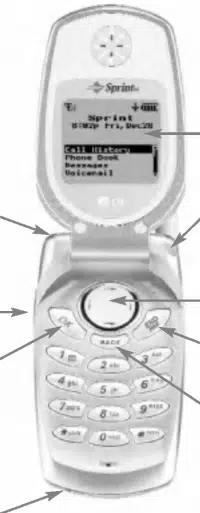
1.
Headset
Jack:
Provides
connection
for
an
optional
headset.
2.
Volume
Button:
Adjust
the
ringer
volume
during
standby
mode
or
voice
volume
during
a
call.
3.
OK:
Lets
you
place
or
answer
a
call,
select
highlighted
menu
items,
and
confirm
actions.
4.
AC
Adapter
Jack:
Provides
connection
for
the
AC
adapter
charger.
5.
Display
Screen:
Displays
phone
status
icons
and
menu
items.
6.
Power
On
Indicator/LED:
Flashes
when
phone
is
powering
up.
Also
flashes
to
alert
you
to
incoming
calls,
messages,
and
scheduler
alarms.
7.
Navigation
Key:
Scrolls
through
menus
and
displays
the
next
or
previous
menu
option.
Also
acts
as
a
shortcut
key
for
your
internal
phone
book
(left)
and
voicemail
box
(right).
8.
End
(Power):
Lets
you
power
the
phone
on
or
off,
end
calls,
or
return
to
standby
mode
from
any
screen.
9.
Back
(Clear):
Lets
you
clear
an
entry
or
back
up
within
a
menu.
15
Basics
14
Basics
Your
New
PCS
Phone
1.
Headset
Jack
2.
Volume
Button
4.
AC
Adapter
Jack
5.
Display
Screen
6.
Power
On
Indicator/LED
3.
OK
7.
Navigation
Key
8.
End
(Power)
9.
Back
(Clear)

Your
Phone's
Features
1.
Headset
Jack:
Provides
connection
for
an
optional
headset.
2.
Volume
Button:
Adjust
the
ringer
volume
during
standby
mode
or
voice
volume
during
a
call.
3.
OK:
Lets
you
place
or
answer
a
call,
select
highlighted
menu
items,
and
confirm
actions.
4.
AC
Adapter
Jack:
Provides
connection
for
the
AC
adapter
charger.
5.
Display
Screen:
Displays
phone
status
icons
and
menu
items.
6.
Power
On
Indicator/LED:
Flashes
when
phone
is
powering
up.
Also
flashes
to
alert
you
to
incoming
calls,
messages,
and
scheduler
alarms.
7.
Navigation
Key:
Scrolls
through
menus
and
displays
the
next
or
previous
menu
option.
Also
acts
as
a
shortcut
key
for
your
internal
phone
book
(left)
and
voicemail
box
(right).
8.
End
(Power):
Lets
you
power
the
phone
on
or
off,
end
calls,
or
return
to
standby
mode
from
any
screen.
9.
Back
(Clear):
Lets
you
clear
an
entry
or
back
up
within
a
menu.
15
Basics
14
Basics
Your
New
PCS
Phone
1.
Headset
Jack
2.
Volume
Button
4.
AC
Adapter
Jack
5.
Display
Screen
6.
Power
On
Indicator/LED
3.
OK
7.
Navigation
Key
8.
End
(Power)
9.
Back
(Clear)

Using
the
Battery
and
Charger
Installing
and
Removing
the
Battery
To
install,
insert
the
battery
into
the
opening
on
the
back
of
the
phone
and
gently
press
down
until
the
latch
snaps
into
place.
To
remove,
make
sure
the
power
is
off.
Press
the
battery
release
latch
up
and
remove
the
battery
from
the
phone
at
a
45-degree
angle.
Charging
the
Battery
It is
vital
that
you
use
only
Sprint-approved
AC
adapter
chargers.
Use
of
unauthorized
accessories
could
damage
your
phone
and
invalidate
your
warranty.
To
use
the
AC
adapter
charger
provided
with
your
phone:
1.
Plug
the
AC
adapter
into
the
electrical
outlet.
2.
Insert
the
round
end
of
the
adapter
into
the
AC
adapter
jack
on
the
bottom
of
the
phone.
(Make
sure
the
battery
is
installed.)
A
beep
lets
you
know
the
adapter
is
attached
to
the
phone
(unless
the
phone
is
in
Silent
Mode).
As
the
phone
charges,
the
battery
icon
continually
displays
a
progression
from
empty
(
)
to
full
(
).
It
takes
about
three
hours
to
fully
recharge
a
completely
rundown
battery.
17
Basics
16
Basics
Turning
Your
Phone
On
and
Off
Turning
Your
Phone
ON
1.
Fully
extend
the
antenna
to
receive
the
best
reception.
2.
Press
and
hold
.
The
phone
will
display
"Searching
for
Service"
until
it
locates
a
signal,
then
it
will
automatically
enter
standby
mode
--
the
phone's
idle
state.
At
this
point,
you're
ready
to
begin
making
and
receiving
calls.
Turning
Your
Phone
OFF
Press
and
hold
until
the
screen
displays
a
powering
off
message
(for
example,
"LG
Goodbye!").

Using
the
Battery
and
Charger
Installing
and
Removing
the
Battery
To
install,
insert
the
battery
into
the
opening
on
the
back
of
the
phone
and
gently
press
down
until
the
latch
snaps
into
place.
To
remove,
make
sure
the
power
is
off.
Press
the
battery
release
latch
up
and
remove
the
battery
from
the
phone
at
a
45-degree
angle.
Charging
the
Battery
It is
vital
that
you
use
only
Sprint-approved
AC
adapter
chargers.
Use
of
unauthorized
accessories
could
damage
your
phone
and
invalidate
your
warranty.
To
use
the
AC
adapter
charger
provided
with
your
phone:
1.
Plug
the
AC
adapter
into
the
electrical
outlet.
2.
Insert
the
round
end
of
the
adapter
into
the
AC
adapter
jack
on
the
bottom
of
the
phone.
(Make
sure
the
battery
is
installed.)
A
beep
lets
you
know
the
adapter
is
attached
to
the
phone
(unless
the
phone
is
in
Silent
Mode).
As
the
phone
charges,
the
battery
icon
continually
displays
a
progression
from
empty
(
)
to
full
(
).
It
takes
about
three
hours
to
fully
recharge
a
completely
rundown
battery.
17
Basics
16
Basics
Turning
Your
Phone
On
and
Off
Turning
Your
Phone
ON
1.
Fully
extend
the
antenna
to
receive
the
best
reception.
2.
Press
and
hold
.
The
phone
will
display
"Searching
for
Service"
until
it
locates
a
signal,
then
it
will
automatically
enter
standby
mode
--
the
phone's
idle
state.
At
this
point,
you're
ready
to
begin
making
and
receiving
calls.
Turning
Your
Phone
OFF
Press
and
hold
until
the
screen
displays
a
powering
off
message
(for
example,
"LG
Goodbye!").

Controlling
Your
Roaming
Experience
Your
phone
is
single-band,
which
means
you
can
make
and
receive
calls
while
on
the
enhanced
Sprint
Nationwide
PCS
Network
and
you
can
also
roam
on
other
digital
networks
wherewe've
implemented
roaming
agreements
with
other
carriers.
To
learn
more
about
roaming,
visit
www.sprintpcs.com.
Your
phone
has
several
features
that
let
you
control
your
roaming
experience.
Setting
Your
Phone's
Roam
Mode
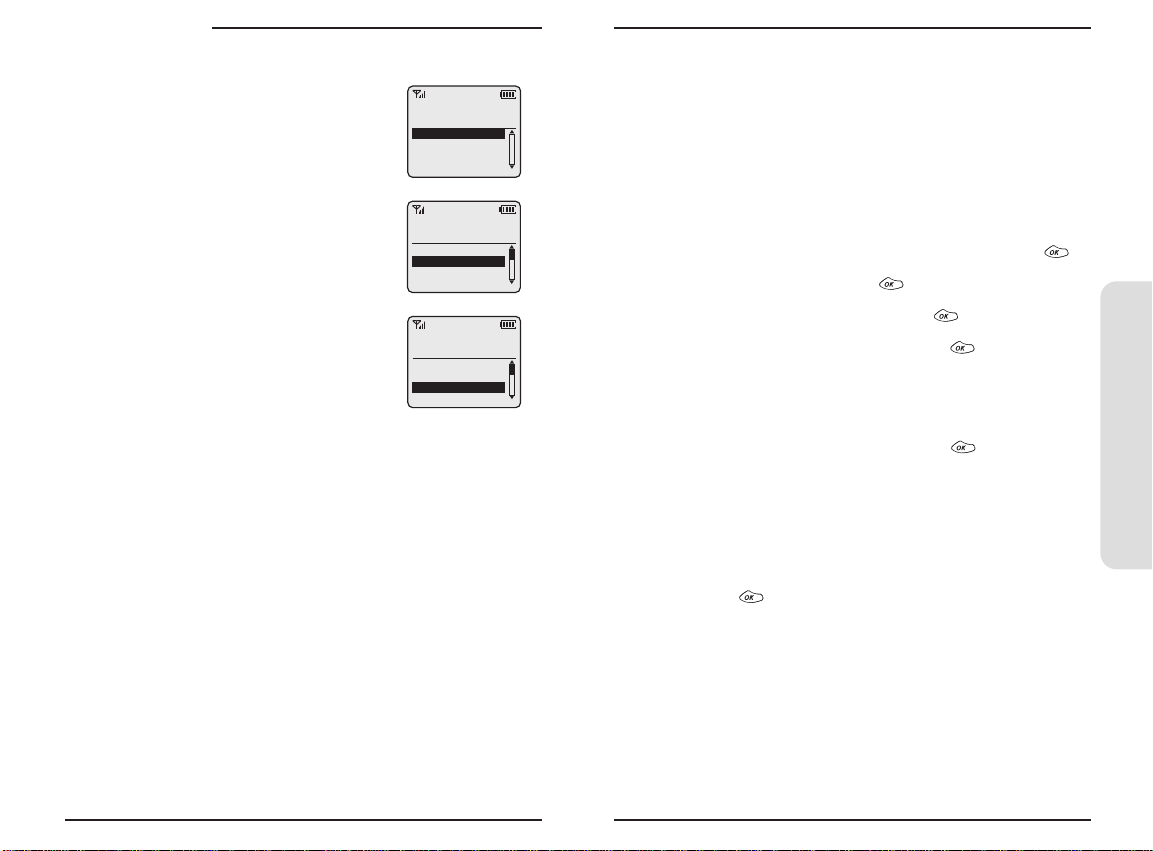
1.
From
the
main
menu,
highlight
Settings
and
press
.
2.
Highlight
Roaming
and
press
.
3.
Highlight
Set
Mode
and
press
.
4.
To
select
an
option,
highlight
it
and
press
.
Sprint
Only:
Lets
you
make
and
receive
calls
only
on
the
enhanced
Sprint
Nationwide
PCS
Network
and
prevents
roaming.
Automatic:
Searches
for
alternate
wireless
networks
when
PCS
Service
is
not
available.
19
Basics
18
Basics
Making
and
Answering
Calls
Making
Calls
1.
Make
sure
your
phone
is
on.
2.
Enter
a
phone
number.
If
you
make
a
mistake
while
dialing,
press
to
erase
one
digit
at
a
time
or
press
and
hold
to
erase
the
entire
number.
3.
Press
.
4.
When
you're
finished
with
the
call,
press
.
Answering
Calls
1.
Make
sure
your
phone
is
on.
If
your
phone
is
off,
incoming
calls
go
to
voicemail.
2.
When
your
phone
rings
or
vibrates,
answer
the
call
by
pressing
.
Depending
on
your
settings,
you
may
also
answer
the
call
by
opening
the
phone
or
by
pressing
any
key.
3.
To
end
the
call,
you
can
close
the
phone,
press
,
or
highlight
End
Call
and
press
.
Note:
If
using
an
optional
headset,
closing
the
phone
will
not
disconnect
the
call.
Signal
Strength
Call
quality
is
always
best
when
the
antenna
is
fully
raised.
If
you're
inside
a
building,
being
near
a
window
may
give
you
better
reception.
You
can
see
the
strength
of
your
signal
by
the
signal
indicator
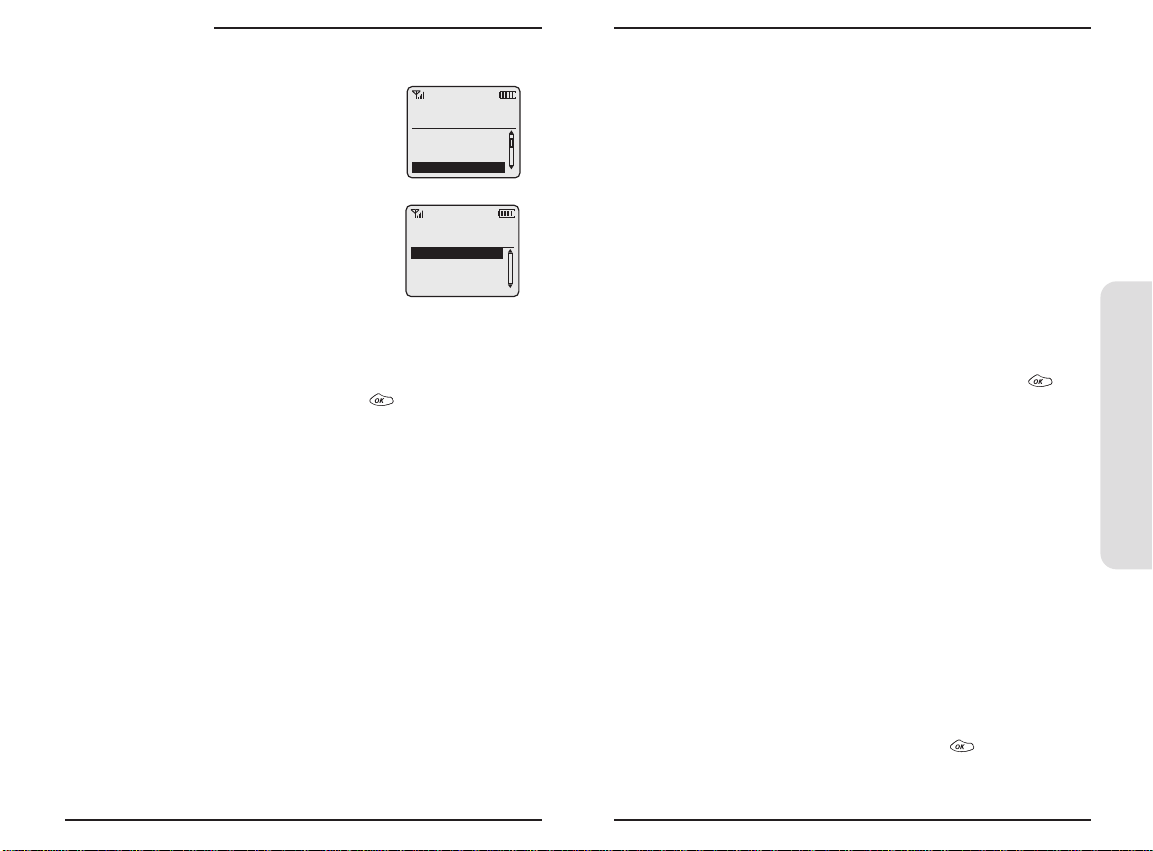
(
)
on
your
phone's
display
screen.

Controlling
Your
Roaming
Experience
Your
phone
is
single-band,
which
means
you
can
make
and
receive
calls
while
on
the
enhanced
Sprint
Nationwide
PCS
Network
and
you
can
also
roam
on
other
digital
networks
wherewe've
implemented
roaming
agreements
with
other
carriers.
To
learn
more
about
roaming,
visit
www.sprintpcs.com.
Your
phone
has
several
features
that
let
you
control
your
roaming
experience.
Setting
Your
Phone's
Roam
Mode
1.
From
the
main
menu,
highlight
Settings
and
press
.
2.
Highlight
Roaming
and
press
.
3.
Highlight
Set
Mode
and
press
.
4.
To
select
an
option,
highlight
it
and
press
.
Sprint
Only:
Lets
you
make
and
receive
calls
only
on
the
enhanced
Sprint
Nationwide
PCS
Network
and
prevents
roaming.
Automatic:
Searches
for
alternate
wireless
networks
when
PCS
Service
is
not
available.
19
Basics
18
Basics
Making
and
Answering
Calls
Making
Calls
1.
Make
sure
your
phone
is
on.
2.
Enter
a
phone
number.
If
you
make
a
mistake
while
dialing,
press
to
erase
one
digit
at
a
time
or
press
and
hold
to
erase
the
entire
number.
3.
Press
.
4.
When
you're
finished
with
the
call,
press
.
Answering
Calls
1.
Make
sure
your
phone
is
on.
If
your
phone
is
off,
incoming
calls
go
to
voicemail.
2.
When
your
phone
rings
or
vibrates,
answer
the
call
by
pressing
.
Depending
on
your
settings,
you
may
also
answer
the
call
by
opening
the
phone
or
by
pressing
any
key.
3.
To
end
the
call,
you
can
close
the
phone,
press
,
or
highlight
End
Call
and
press
.
Note:
If
using
an
optional
headset,
closing
the
phone
will
not
disconnect
the
call.
Signal
Strength
Call
quality
is
always
best
when
the
antenna
is
fully
raised.
If
you're
inside
a
building,
being
near
a
window
may
give
you
better
reception.
You
can
see
the
strength
of
your
signal
by
the
signal
indicator
(
)
on
your
phone's
display
screen.

Internal
Phone
Book
Saving
Phone
Numbers
1.
Enter
a
phone
number
from
standby
mode.
2.
Highlight
Save
and
press
.
3.
Select
a
label
by
highlighting
it
and
press
.
4.
Enter
a
name
for
entry
or
select
an
existing
entry
and
press
.
5.
Press
to
save
the
new
entry.
Finding
Phone
Numbers
1.
Enter
one
or
more
digits
from
standby
mode.
2.
Highlight
Find
and
press
.
3.
To
display
the
Internal
Phone
Book
entry
that
contains
the
phone
number,
highlight
the
entry
and
press
.
4.
To
dial
the
number,
press
again.
Making
a
Call
From
Your
Internal
Phone
Book
1.
From
the
main
menu,
highlight
Phone
Book
and
press
.
2.
Highlight
Find
Name
and
press
.
Shortcut:
Press
the
navigation
key
left
to
list
entries.
3.
Highlight
the
entry
you
want
to
call
and
press
.
4.
Press
again
to
dial
the
entry's
default
number
or
highlight
the
number
you
want
to
call,
press
to
display
the
number,
and
press
again
to
dial
it.
21
Basics
20
Basics
Call
Guard
Call
Guard
reminds
you
when
you
are
making
or
receiving
a
roaming
call
and
requires
you
to
take
additional
steps
before
placing
or
answering
roaming
calls.
These
additional
steps
are
not
required
when
you
make
or
receive
calls
while
on
the
enhanced
Sprint
Nationwide
PCS
Network.
To
Turn
Call
Guard
On
or
Off:
1.
From
the
main
menu,
highlight
Settings
and
press
.
2.
Highlight
Roaming
and
press
.
3.
Highlight
Call
Guard
and
press
.
4.
Highlight
On
or
Off
and
press
.
To Place
Roaming
Calls
With
Call
Guard
On:
1.
From
standby
mode,
dial
1+area
code+seven
digit
number
and
press
.
2.
Highlight
Roam
Call
and
press
.
To
Answer
Incoming
Calls
With
Call
Guard
On:
Highlight
Answer
and
press
.
Feature
Availability
You
can
make
and
receive
calls
while
roaming.
You
will
have
access
to
voicemail
while
roaming.
Other
features
which
are
standard
on
the
enhanced
Sprint
Nationwide
PCS
Network,
such
as
Call
Waiting
and
PCS
Voice
Command,
are
unavailable
while
roaming.

Internal
Phone
Book
Saving
Phone
Numbers
1.
Enter
a
phone
number
from
standby
mode.
2.
Highlight
Save
and
press
.
3.
Select
a
label
by
highlighting
it
and
press
.
4.
Enter
a
name
for
entry
or
select
an
existing
entry
and
press
.
5.
Press
to
save
the
new
entry.
Finding
Phone
Numbers
1.
Enter
one
or
more
digits
from
standby
mode.
2.
Highlight
Find
and
press
.
3.
To
display
the
Internal
Phone
Book
entry
that
contains
the
phone
number,
highlight
the
entry
and
press
.
4.
To
dial
the
number,
press
again.
Making
a
Call
From
Your
Internal
Phone
Book
1.
From
the
main
menu,
highlight
Phone
Book
and
press
.
2.
Highlight
Find
Name
and
press
.
Shortcut:
Press
the
navigation
key
left
to
list
entries.
3.
Highlight
the
entry
you
want
to
call
and
press
.
4.
Press
again
to
dial
the
entry's
default
number
or
highlight
the
number
you
want
to
call,
press
to
display
the
number,
and
press
again
to
dial
it.
21
Basics
20
Basics
Call
Guard
Call
Guard
reminds
you
when
you
are
making
or
receiving
a
roaming
call
and
requires
you
to
take
additional
steps
before
placing
or
answering
roaming
calls.
These
additional
steps
are
not
required
when
you
make
or
receive
calls
while
on
the
enhanced
Sprint
Nationwide
PCS
Network.
To
Turn
Call
Guard
On
or
Off:
1.
From
the
main
menu,
highlight
Settings
and
press
.
2.
Highlight
Roaming
and
press
.
3.
Highlight
Call
Guard
and
press
.
4.
Highlight
On
or
Off
and
press
.
To Place
Roaming
Calls
With
Call
Guard
On:
1.
From
standby
mode,
dial
1+area
code+seven
digit
number
and
press
.
2.
Highlight
Roam
Call
and
press
.
To
Answer
Incoming
Calls
With
Call
Guard
On:
Highlight
Answer
and
press
.
Feature
Availability
You
can
make
and
receive
calls
while
roaming.
You
will
have
access
to
voicemail
while
roaming.
Other
features
which
are
standard
on
the
enhanced
Sprint
Nationwide
PCS
Network,
such
as
Call
Waiting
and
PCS
Voice
Command,
are
unavailable
while
roaming.

TTY
Use
With
PCS
Service
From
Sprint
A
TTY
(also
known
as
a
TDD
or
Text
Telephone),
is
a
telecommunications
device
that
allows
people
who
are
deaf
or
hard
of
hearing,
or
who
have
speech
or
language
disabilities,
to
communicate
via
a
telephone.
Your
phone
is
compatible
with
select
TTY
devices.
Please
check
with
the
manufacturer
of
your
TTY
device
for
connectivity
information
and
to
ensure
that
the
TTY
device
supports
digital
wireless
transmission.
When
establishing
your
PCS
Service,
please
call
PCS
Customer
Service
SolutionsSM
via
the
state
Telecommunications
Relay
Service
(TRS)
by
first
dialing
.
Then
provide
the
state
TRS
with
this
number:
866-727-4889.
To
enable
or
disable
TTY
mode:
1.
Dial
,
highlight
Save,
and
press
.
2.
Highlight
Enable
or
Disable
and
press
.
A
message
will
display
confirming
your
choice
and
your
phone
will
return
to
standby
mode.
IMPORTANT
NOTICE:
Sprint
recommends
that
TTY
users
make
emergency
calls
by
other
means
including
Telecommunications
Relay
Services
(TRS),
analog
cellular,
and
landline
communications.
Wireless
TTY
calls
to
911
may
be
corrupted
when
received
by
public
safety
answering
points
(PSAPs)
rendering
some
communications
unintelligible.
For
additional
information
and
instructions
regarding
TTY
use,
please
see
the
Online
User's
Guide
at
www.sprintpcs.com.
23
Basics
22
Basics
Changing
Your
Phone's
Settings
You
can
customize
many
aspects
of
your
phone's
functionality,
from
display
and
sounds
to
messaging
and
security,
through
the
Settings
menu.
Below
are
just
a
few
examples
of
how
to
navigate
and
use
the
Settings
menu.
Changing
the
Onscreen
Text
Greeting
1.
From
the
main
menu,
highlight
Settings
and
press
.
2.
Highlight
Display
and
press
.
3.
Highlight
Greeting
and
press
.
4.
Highlight
Change
and
press
.
5.
Press
and
hold
to
clear
the
current
greeting
and
use
the
keypad
to
enter
a
new
greeting.
6.
Highlight
Save
and
press
.
Adjusting
the
Ringer,
Earpiece,
and
Key
Beep
Volume
1.
From
the
main
menu,
highlight
Settings
and
press
.
2.
Highlight
Sounds
and
press
.
3.
Highlight
Audio
Volume
and
press
.
4.
Select
Ringer,
Earpiece,
Key
Beep,
or
PWR
On/Off
and
press
.
5.
Highlight
a
volume
setting
and
press
.
Adjusting
Volume
During
a
Conversation
Press
the
volume
keys
on
the
side
of
your
phone
during
the
call.

TTY
Use
With
PCS
Service
From
Sprint
A
TTY
(also
known
as
a
TDD
or
Text
Telephone),
is
a
telecommunications
device
that
allows
people
who
are
deaf
or
hard
of
hearing,
or
who
have
speech
or
language
disabilities,
to
communicate
via
a
telephone.
Your
phone
is
compatible
with
select
TTY
devices.
Please
check
with
the
manufacturer
of
your
TTY
device
for
connectivity
information
and
to
ensure
that
the
TTY
device
supports
digital
wireless
transmission.
When
establishing
your
PCS
Service,
please
call
PCS
Customer
Service
SolutionsSM
via
the
state
Telecommunications
Relay
Service
(TRS)
by
first
dialing
.
Then
provide
the
state
TRS
with
this
number:
866-727-4889.
To
enable
or
disable
TTY
mode:
1.
Dial
,
highlight
Save,
and
press
.
2.
Highlight
Enable
or
Disable
and
press
.
A
message
will
display
confirming
your
choice
and
your
phone
will
return
to
standby
mode.
IMPORTANT
NOTICE:
Sprint
recommends
that
TTY
users
make
emergency
calls
by
other
means
including
Telecommunications
Relay
Services
(TRS),
analog
cellular,
and
landline
communications.
Wireless
TTY
calls
to
911
may
be
corrupted
when
received
by
public
safety
answering
points
(PSAPs)
rendering
some
communications
unintelligible.
For
additional
information
and
instructions
regarding
TTY
use,
please
see
the
Online
User's
Guide
at
www.sprintpcs.com.
23
Basics
22
Basics
Changing
Your
Phone's
Settings
You
can
customize
many
aspects
of
your
phone's
functionality,
from
display
and
sounds
to
messaging
and
security,
through
the
Settings
menu.
Below
are
just
a
few
examples
of
how
to
navigate
and
use
the
Settings
menu.
Changing
the
Onscreen
Text
Greeting
1.
From
the
main
menu,
highlight
Settings
and
press
.
2.
Highlight
Display
and
press
.
3.
Highlight
Greeting
and
press
.
4.
Highlight
Change
and
press
.
5.
Press
and
hold
to
clear
the
current
greeting
and
use
the
keypad
to
enter
a
new
greeting.
6.
Highlight
Save
and
press
.
Adjusting
the
Ringer,
Earpiece,
and
Key
Beep
Volume
1.
From
the
main
menu,
highlight
Settings
and
press
.
2.
Highlight
Sounds
and
press
.
3.
Highlight
Audio
Volume
and
press
.
4.
Select
Ringer,
Earpiece,
Key
Beep,
or
PWR
On/Off
and
press
.
5.
Highlight
a
volume
setting
and
press
.
Adjusting
Volume
During
a
Conversation
Press
the
volume
keys
on
the
side
of
your
phone
during
the
call.

PCS
Service
Features
Call
Waiting
To
respond
to
an
incoming
call
while
you're
on
a
call:
Highlight
Flash
and
press
.
This
puts
the
first
call
on
hold
and
answers
the
second
call.
To
switch
between
calls,
highlight
Flash
and
press
again.
--or--
Press
to
end
your
first
call.
To
answer
the
incoming
call,
highlight
Answer
and
press
.
Call
Forwarding
Call
Forwarding
lets
you
forward
your
calls
to
another
number.
You
can
still
make
calls
from
your
phone
while
this
is
activated.
There
is
a
per
call
charge
for
this
service.
To
activate:
1.
Press
.
2.
Enter
the
area
code
and
phone
number
to
which
your
calls
should
be
forwarded.
3.
Press
.
You
will
hear
three
short
dial
tones
confirming
the
activation
of
Call
Forwarding.
To
deactivate:
1.
Press
.
2.
Press
.
You
will
hear
three
short
dial
tones
confirming
the
deactivation.
25
Basics
24
Basics
Sending
and
Receiving
Messages
Setting
Up
Voicemail
1.
Press
and
hold
.
2.
Follow
the
system
prompts
to
create
your
pass
code
and
record
your
greeting.
Retrieving
Voicemail
Messages
Press
and
hold
.
Follow
the
system
prompts.
Accessing
Voicemail
From
Another
Phone
1.
Dial
your
PCS
Phone
Number.
2.
Press
when
voicemail
answers.
3.
Enter
your
pass
code.
Displaying
Text
Messages
1.
From
the
main
menu,
highlight
Messages
and
press
.
2.
Highlight
Page/Text
or
a
custom
folder
and
press
.
An
asterisk
(*)
before
a
folder
indicates
an
unread
message.
3.
Highlight
the
message
you
want
to
display
and
press
.
Press
the
navigation
key
down
to
display
additional
text.

PCS
Service
Features
Call
Waiting
To
respond
to
an
incoming
call
while
you're
on
a
call:
Highlight
Flash
and
press
.
This
puts
the
first
call
on
hold
and
answers
the
second
call.
To
switch
between
calls,
highlight
Flash
and
press
again.
--or--
Press
to
end
your
first
call.
To
answer
the
incoming
call,
highlight
Answer
and
press
.
Call
Forwarding
Call
Forwarding
lets
you
forward
your
calls
to
another
number.
You
can
still
make
calls
from
your
phone
while
this
is
activated.
There
is
a
per
call
charge
for
this
service.
To
activate:
1.
Press
.
2.
Enter
the
area
code
and
phone
number
to
which
your
calls
should
be
forwarded.
3.
Press
.
You
will
hear
three
short
dial
tones
confirming
the
activation
of
Call
Forwarding.
To
deactivate:
1.
Press
.
2.
Press
.
You
will
hear
three
short
dial
tones
confirming
the
deactivation.
25
Basics
24
Basics
Sending
and
Receiving
Messages
Setting
Up
Voicemail
1.
Press
and
hold
.
2.
Follow
the
system
prompts
to
create
your
pass
code
and
record
your
greeting.
Retrieving
Voicemail
Messages
Press
and
hold
.
Follow
the
system
prompts.
Accessing
Voicemail
From
Another
Phone
1.
Dial
your
PCS
Phone
Number.
2.
Press
when
voicemail
answers.
3.
Enter
your
pass
code.
Displaying
Text
Messages
1.
From
the
main
menu,
highlight
Messages
and
press
.
2.
Highlight
Page/Text
or
a
custom
folder
and
press
.
An
asterisk
(*)
before
a
folder
indicates
an
unread
message.
3.
Highlight
the
message
you
want
to
display
and
press
.
Press
the
navigation
key
down
to
display
additional
text.

PCS
Voice
CommandSM
With
PCS
Voice
Command,
,
you
can
call
a
number
just
by
saying
a
name.
Get
started
by
setting
up
your
Personal
Address
Book
1.
Press
.
The
first
time
you
use
it,
you
will
hear
a
tutorial
before
moving
on
to
the
next
step.
2.
You'll
hear
a
tone
followed
by
the
prompt
"Ready."
Say
"Add
Name"
to
begin
setting
up
your
Personal
Address
Book.
Making
a
call
with
PCS
Voice
Command
1.
Press
.
2.
You'll
hear
a
tone
followed
by
the
prompt
"Ready."
3.
After
the
prompt,
say
"Call"
and
the
name
of
the
person
or
the
number
you
want
called.
4.
Your
request
will
be
repeated
and
you
will
be
asked
to
verify.
Say
"Yes"
to
call
the
number
or
person.
Say
"No"
to
cancel.
Accessing
information
using
PCS
Voice
Command
1.
Press
.
2.
Say
"Call
the
Web."
3.
Choose
from
a
listing
of
information
categories
like
email,
news,
weather,
sports,
and
more.
27
Basics
26
Basics
Three-Way
Calling
Talk
to
two
different
people
at
the
same
time.
When
using
this
feature,
the
normal
airtime
rates
will
be
charged
for
each
of
the
two
calls.
1.
Enter
a
number
you
wish
to
call
and
press
.
2.
Once
you
have
established
the
connection,
highlight
Dial
3-Way
Call
and
press
to
put
the
first
call
on
hold.
3.
Dial
the
second
number
you
wish
to
call
and
press
.
4.
When
you're
connected
to
the
second
party,
highlight
Flash
and
press
to
begin
your
three-way
call.
During
a
three-way
call,
keep
the
following
tips
in
mind:
If
one
of
the
people
you
called
hangs
up,
you
and
the
remaining
caller
stay
connected.
If
you
highlight
Flash
and
press
after
the
three-way
call
is
established,
the
second
party
you
called
will
be
disconnected.
If
you
initiated
the
call
and
are
the
first
to
hang
up,
all
three
callers
will
be
disconnected.

PCS
Voice
CommandSM
With
PCS
Voice
Command,
,
you
can
call
a
number
just
by
saying
a
name.
Get
started
by
setting
up
your
Personal
Address
Book
1.
Press
.
The
first
time
you
use
it,
you
will
hear
a
tutorial
before
moving
on
to
the
next
step.
2.
You'll
hear
a
tone
followed
by
the
prompt
"Ready."
Say
"Add
Name"
to
begin
setting
up
your
Personal
Address
Book.
Making
a
call
with
PCS
Voice
Command
1.
Press
.
2.
You'll
hear
a
tone
followed
by
the
prompt
"Ready."
3.
After
the
prompt,
say
"Call"
and
the
name
of
the
person
or
the
number
you
want
called.
4.
Your
request
will
be
repeated
and
you
will
be
asked
to
verify.
Say
"Yes"
to
call
the
number
or
person.
Say
"No"
to
cancel.
Accessing
information
using
PCS
Voice
Command
1.
Press
.
2.
Say
"Call
the
Web."
3.
Choose
from
a
listing
of
information
categories
like
email,
news,
weather,
sports,
and
more.
27
Basics
26
Basics
Three-Way
Calling
Talk
to
two
different
people
at
the
same
time.
When
using
this
feature,
the
normal
airtime
rates
will
be
charged
for
each
of
the
two
calls.
1.
Enter
a
number
you
wish
to
call
and
press
.
2.
Once
you
have
established
the
connection,
highlight
Dial
3-Way
Call
and
press
to
put
the
first
call
on
hold.
3.
Dial
the
second
number
you
wish
to
call
and
press
.
4.
When
you're
connected
to
the
second
party,
highlight
Flash
and
press
to
begin
your
three-way
call.
During
a
three-way
call,
keep
the
following
tips
in
mind:
If
one
of
the
people
you
called
hangs
up,
you
and
the
remaining
caller
stay
connected.
If
you
highlight
Flash
and
press
after
the
three-way
call
is
established,
the
second
party
you
called
will
be
disconnected.
If
you
initiated
the
call
and
are
the
first
to
hang
up,
all
three
callers
will
be
disconnected.

Accessories
for
Your
Phone
Standard
Battery
Provides
up
to
two-and-a-half
(2.5)
hours
of
continuous
talk
time
or
up
to
six
(6)
days
of
continuous
standby
time.
Extended
Battery
Provides
up
to
four
(4)
hours
of
continuous
talk
time
or
up
to
ten
(10)
days
of
continuous
standby
time.
Vehicle
Power
Adapter
Charges
your
phone
in
your
vehicle
using
the
cigarette
lighter
adapter.
Travel
Charger
Compact
and
lightweight,
it's
a
convenient
way
to
charge
your
phone
while
traveling.
How
to
Order
These
and
other
accessories
are
available
for
purchase
at
your
local
Sprint
Store.
You
can
also
call
the
PCS
Accessory
Hotline
(1-800-974-2221)
or
visit
www.sprintpcs.com.
Next
day
delivery
is
offered
in
select
areas.
29
Basics
28
Basics
Your
Phone's
Special
Features
External
Display
Your
phone's
external
LCD
display
lets
you
see
who's
calling
without
opening
the
phone.
Silent
Mode
You
may
silence
all
of
your
phone's
sounds
by
pressing
and
holding
the
volume
down
button
on
the
side
of
the
phone
while
the
phone
is
open
in
standby
mode.
To
restore
sound,
press
and
hold
the
volume
up
button
with
the
phone
open
in
standby
mode.

Accessories
for
Your
Phone
Standard
Battery
Provides
up
to
two-and-a-half
(2.5)
hours
of
continuous
talk
time
or
up
to
six
(6)
days
of
continuous
standby
time.
Extended
Battery
Provides
up
to
four
(4)
hours
of
continuous
talk
time
or
up
to
ten
(10)
days
of
continuous
standby
time.
Vehicle
Power
Adapter
Charges
your
phone
in
your
vehicle
using
the
cigarette
lighter
adapter.
Travel
Charger
Compact
and
lightweight,
it's
a
convenient
way
to
charge
your
phone
while
traveling.
How
to
Order
These
and
other
accessories
are
available
for
purchase
at
your
local
Sprint
Store.
You
can
also
call
the
PCS
Accessory
Hotline
(1-800-974-2221)
or
visit
www.sprintpcs.com.
Next
day
delivery
is
offered
in
select
areas.
29
Basics
28
Basics
Your
Phone's
Special
Features
External
Display
Your
phone's
external
LCD
display
lets
you
see
who's
calling
without
opening
the
phone.
Silent
Mode
You
may
silence
all
of
your
phone's
sounds
by
pressing
and
holding
the
volume
down
button
on
the
side
of
the
phone
while
the
phone
is
open
in
standby
mode.
To
restore
sound,
press
and
hold
the
volume
up
button
with
the
phone
open
in
standby
mode.

consisting
of
the
existing
ANSI/IEEE
standard
and
the
guidelines
published
by
the
National
Council
of
Radiation
Protections
and
Measurements
(NCRP).
Maintaining
Your
Phone's
Peak
Performance
There
are
several
simple
guidelines
to
operating
your
phone
properly
and
maintaining
safe,
satisfactory
service.
Hold
the
phone
with
the
antenna
raised,
fully-extended
and
over
your
shoulder.
Try
not
to
hold,
bend
or
twist
the
phone's
antenna.
Don't
use
the
phone
if
the
antenna
is
damaged.
Speak
directly
into
the
mouthpiece.
Avoid
exposing
your
phone
and
accessories
to
rain
or
liquid
spills.
If
your
phone
does
get
wet,
immediately
turn
the
power
off
and
remove
the
battery.
If
it's
inoperable,
return
it
to
a
SprintStore
or
call
PCS
Customer
Service
Solutions
for
service.
Note:
For
the
best
care
of
your
phone,
only
Sprint
Authorized
Personnel
should
service
your
phone
and
accessories.
Faulty
service
may
void
the
warranty.
Maintaining
Safe
Use
of
and
Access
to
Your
Phone
FAILURE
TO
FOLLOW
THE
INSTRUCTIONS
OUTLINED
MAY
LEAD
TO
SERIOUS
PERSONAL
INJURY
AND
POSSIBLE
PROPERTY
DAMAGE
Using
Your
PhoneWhile
Driving
Talking
on
your
phone
while
driving
(or
operating
the
phone
without
a
hands-free
device)
is
prohibited
in
some
jurisdictions.
Laws
vary
as
to
specific
restrictions.
Remember
that
safety
always
comes
first.
When
using
your
phone
in
the
car:
Get
to
know
your
phone
and
its
features,
such
as
speed
dial
and
redial.
When
available,
use
a
hands-free
device.
Position
your
phone
within
easy
reach.
31
Basics
30
Basics
Performance
and
Safety
Important
Information
About
Your
Phone
and
Service
Keeping
Tabs
on
Signal
Strength
The
quality
of
each
call
you
make
or
receive
depends
on
the
signal
strength
in
your
area.
Your
phone
informs
you
of
the
current
signal
strength
by
displaying
a
number
of
bars
next
to
the
signal
strength
icon.
The
more
bars
displayed,
the
stronger
the
signal.
If
you're
inside
a
building,
being
near
a
window
may
give
you
better
reception.
Understanding
the
Power
Save
Feature
If
your
phone
is
unable
to
find
a
signal
after
15
minutes
of
searching,
a
Power
Save
feature
is
automatically
activated.
If
your
phone
is
active,
it
periodically
rechecks
service
availability
or
you
can
check
it
yourself
by
pressing
any
key.
Anytime
the
Power
Save
feature
is
activated,
a
message
displays
on
the
screen.
When
a
signal
is
found,
your
phone
returns
to
standby
mode.
Understanding
How
Your
Phone
Operates
Your
phone
is
basically
a
radio
transmitter
and
receiver.
When
it's
turned
on,
it
receives
and
transmits
radio
frequency
(RF)
signals.
When
you
use
your
phone,
the
system
handling
your
call
controls
the
power
level.
This
power
can
range
from
0.006
watts
to
0.2
watts
in
digital
mode.
Knowing
Radio
Frequency
Safety
The
design
of
your
phone
complies
with
updated
NCRP
standards
described
below.
To
further
limit
RF
exposure,
you
can
limit
the
duration
of
your
calls
and
operate
your
phone
in
the
most
power-
efficient
manner.
In
1991-92,
the
Institute
of
Electrical
and
Electronics
Engineers
(IEEE)
and
the
American
National
Standards
Institute
(ANSI)
joined
in
updating
ANSI's
1982
standard
for
safety
levels
with
respect
to
human
exposure
to
RF
signals.
More
than
120
scientists,
engineers
and
physicians
from
universities,
government
health
agencies
and
industries
developed
this
updated
standard
after
reviewing
the
available
body
of
research.
In
1993,
the
Federal
Communications
Commission
(FCC)
adopted
this
updated
standard
in
a
regulation.
In
August
1996,
the
FCC
adopted
a
hybrid
standard

consisting
of
the
existing
ANSI/IEEE
standard
and
the
guidelines
published
by
the
National
Council
of
Radiation
Protections
and
Measurements
(NCRP).
Maintaining
Your
Phone's
Peak
Performance
There
are
several
simple
guidelines
to
operating
your
phone
properly
and
maintaining
safe,
satisfactory
service.
Hold
the
phone
with
the
antenna
raised,
fully-extended
and
over
your
shoulder.
Try
not
to
hold,
bend
or
twist
the
phone's
antenna.
Don't
use
the
phone
if
the
antenna
is
damaged.
Speak
directly
into
the
mouthpiece.
Avoid
exposing
your
phone
and
accessories
to
rain
or
liquid
spills.
If
your
phone
does
get
wet,
immediately
turn
the
power
off
and
remove
the
battery.
If
it's
inoperable,
return
it
to
a
SprintStore
or
call
PCS
Customer
Service
Solutions
for
service.
Note:
For
the
best
care
of
your
phone,
only
Sprint
Authorized
Personnel
should
service
your
phone
and
accessories.
Faulty
service
may
void
the
warranty.
Maintaining
Safe
Use
of
and
Access
to
Your
Phone
FAILURE
TO
FOLLOW
THE
INSTRUCTIONS
OUTLINED
MAY
LEAD
TO
SERIOUS
PERSONAL
INJURY
AND
POSSIBLE
PROPERTY
DAMAGE
Using
Your
PhoneWhile
Driving
Talking
on
your
phone
while
driving
(or
operating
the
phone
without
a
hands-free
device)
is
prohibited
in
some
jurisdictions.
Laws
vary
as
to
specific
restrictions.
Remember
that
safety
always
comes
first.
When
using
your
phone
in
the
car:
Get
to
know
your
phone
and
its
features,
such
as
speed
dial
and
redial.
When
available,
use
a
hands-free
device.
Position
your
phone
within
easy
reach.
31
Basics
30
Basics
Performance
and
Safety
Important
Information
About
Your
Phone
and
Service
Keeping
Tabs
on
Signal
Strength
The
quality
of
each
call
you
make
or
receive
depends
on
the
signal
strength
in
your
area.
Your
phone
informs
you
of
the
current
signal
strength
by
displaying
a
number
of
bars
next
to
the
signal
strength
icon.
The
more
bars
displayed,
the
stronger
the
signal.
If
you're
inside
a
building,
being
near
a
window
may
give
you
better
reception.
Understanding
the
Power
Save
Feature
If
your
phone
is
unable
to
find
a
signal
after
15
minutes
of
searching,
a
Power
Save
feature
is
automatically
activated.
If
your
phone
is
active,
it
periodically
rechecks
service
availability
or
you
can
check
it
yourself
by
pressing
any
key.
Anytime
the
Power
Save
feature
is
activated,
a
message
displays
on
the
screen.
When
a
signal
is
found,
your
phone
returns
to
standby
mode.
Understanding
How
Your
Phone
Operates
Your
phone
is
basically
a
radio
transmitter
and
receiver.
When
it's
turned
on,
it
receives
and
transmits
radio
frequency
(RF)
signals.
When
you
use
your
phone,
the
system
handling
your
call
controls
the
power
level.
This
power
can
range
from
0.006
watts
to
0.2
watts
in
digital
mode.
Knowing
Radio
Frequency
Safety
The
design
of
your
phone
complies
with
updated
NCRP
standards
described
below.
To
further
limit
RF
exposure,
you
can
limit
the
duration
of
your
calls
and
operate
your
phone
in
the
most
power-
efficient
manner.
In
1991-92,
the
Institute
of
Electrical
and
Electronics
Engineers
(IEEE)
and
the
American
National
Standards
Institute
(ANSI)
joined
in
updating
ANSI's
1982
standard
for
safety
levels
with
respect
to
human
exposure
to
RF
signals.
More
than
120
scientists,
engineers
and
physicians
from
universities,
government
health
agencies
and
industries
developed
this
updated
standard
after
reviewing
the
available
body
of
research.
In
1993,
the
Federal
Communications
Commission
(FCC)
adopted
this
updated
standard
in
a
regulation.
In
August
1996,
the
FCC
adopted
a
hybrid
standard

Note:
Always
turn
off
the
phone
in
health
care
facilities
and
request
permission
before
using
the
phone
near
medical
equipment.
Turning
Off
Your
Phone
Before
Flying
Turn
off
your
phone
before
boarding
any
aircraft.
To
prevent
possible
interference
with
aircraft
systems,
the
U.S.
Federal
Aviation
Administration
(FAA)
regulations
require
you
to
have
permission
from
a
crew
member
to
use
your
phone
while
the
plane
is
on
the
ground.
To
prevent
any
risk
of
interference,
FCC
regulations
prohibit
using
your
phone
while
the
plane
is
in
the
air.
Turning
Off
Your
Phone
in
Dangerous
Areas
To
avoid
interfering
with
blasting
operations,
turn
your
phone
off
when
in
a
blasting
area
or
in
other
areas
with
signs
indicating
two-way
radios
should
be
turned
off.
Construction
crews
often
use
remote-
control
RF
devices
to
set
off
explosives.
Turn
your
phone
off
when
you're
in
any
area
that
has
a
potentially
explosive
atmosphere.
Although
it's
rare,
your
phone
and
accessories
could
generate
sparks.
Sparks
can
cause
an
explosion
or
fire,
resulting
in
bodily
injury
or
even
death.
These
areas
are
often,
but
not
always,
clearly
marked.
They
include:
Fueling
areas
such
as
gas
stations.
Below
deck
on
boats.
Fuel
or
chemical
transfer
or
storage
facilities.
Areas
where
the
air
contains
chemicals
or
particles
such
as
grain,
dust
or
metal
powders.
Any
other
area
where
you
would
normally
be
advised
to
turn
off
your
vehicle's
engine.
Note:
Never
transport
or
store
flammable
gas,
liquid
or
explosives
in
the
compartment
of
your
vehicle
that
contains
your
phone
or
accessories.
Restricting
Children's
Access
to
Your
Phone
Your
phone
is
not
a
toy.
Do
not
allow
children
to
play
with
it
as
they
could
hurt
themselves
and
others,
damage
the
phone
or
make
calls
that
increase
your
phone
bill.
33
Basics
32
Basics
Let
the
person
you
are
speaking
to
know
you
are
driving;
if
necessary,
suspend
the
call
in
heavy
traffic
or
hazardous
weather
conditions.
Do
not
take
notes
or
look
up
phone
numbers
while
driving.
Dial
sensibly
and
assess
the
traffic;
if
possible,
place
calls
when
stationary
or
before
pulling
into
traffic.
Do
not
engage
in
stressful
or
emotional
conversations
that
may
divert
your
attention
from
the
road.
Dial
911
to
report
serious
emergencies.
It's
free
from
your
wireless
phone.
Use
your
phone
to
help
others
in
emergencies.
Call
roadside
assistance
or
a
special
non-emergency
wireless
number
when
necessary.
Tip:
Purchase
an
optional
Hands-Free
Car
Kit.
Following
Safety
Guidelines
To
operate
your
phone
safely
and
efficiently,
always
follow
any
special
regulations
in
a
given
area.
Turn
your
phone
off
in
areas
where
use
is
forbidden
or
when
it
may
cause
interference
or
danger.
Using
Your
Phone
Near
Other
Electronic
Devices
Most
modern
electronic
equipment
is
shielded
from
radiofrequency
(RF)
signals.
However,
RF
signals
from
wireless
phones
may
affect
inadequately
shielded
electronic
equipment.
RF
signals
may
affect
improperly
installed
or
inadequately
shielded
electronic
operating
systems
and/or
entertainment
systems
in
motor
vehicles.
Check
with
the
manufacturer
or
their
representative
to
determine
if
these
systems
are
adequately
shielded
from
external
RF
signals.
Also
check
with
the
manufacturer
regarding
any
equipment
that
has
been
added
to
your
vehicle.
Consult
the
manufacturer
of
any
personal
medical
devices,
such
as
pacemakers
and
hearing
aids,
to
determine
if
they
are
adequately
shielded
from
external
RF
signals.

Note:
Always
turn
off
the
phone
in
health
care
facilities
and
request
permission
before
using
the
phone
near
medical
equipment.
Turning
Off
Your
Phone
Before
Flying
Turn
off
your
phone
before
boarding
any
aircraft.
To
prevent
possible
interference
with
aircraft
systems,
the
U.S.
Federal
Aviation
Administration
(FAA)
regulations
require
you
to
have
permission
from
a
crew
member
to
use
your
phone
while
the
plane
is
on
the
ground.
To
prevent
any
risk
of
interference,
FCC
regulations
prohibit
using
your
phone
while
the
plane
is
in
the
air.
Turning
Off
Your
Phone
in
Dangerous
Areas
To
avoid
interfering
with
blasting
operations,
turn
your
phone
off
when
in
a
blasting
area
or
in
other
areas
with
signs
indicating
two-way
radios
should
be
turned
off.
Construction
crews
often
use
remote-
control
RF
devices
to
set
off
explosives.
Turn
your
phone
off
when
you're
in
any
area
that
has
a
potentially
explosive
atmosphere.
Although
it's
rare,
your
phone
and
accessories
could
generate
sparks.
Sparks
can
cause
an
explosion
or
fire,
resulting
in
bodily
injury
or
even
death.
These
areas
are
often,
but
not
always,
clearly
marked.
They
include:
Fueling
areas
such
as
gas
stations.
Below
deck
on
boats.
Fuel
or
chemical
transfer
or
storage
facilities.
Areas
where
the
air
contains
chemicals
or
particles
such
as
grain,
dust
or
metal
powders.
Any
other
area
where
you
would
normally
be
advised
to
turn
off
your
vehicle's
engine.
Note:
Never
transport
or
store
flammable
gas,
liquid
or
explosives
in
the
compartment
of
your
vehicle
that
contains
your
phone
or
accessories.
Restricting
Children's
Access
to
Your
Phone
Your
phone
is
not
a
toy.
Do
not
allow
children
to
play
with
it
as
they
could
hurt
themselves
and
others,
damage
the
phone
or
make
calls
that
increase
your
phone
bill.
33
Basics
32
Basics
Let
the
person
you
are
speaking
to
know
you
are
driving;
if
necessary,
suspend
the
call
in
heavy
traffic
or
hazardous
weather
conditions.
Do
not
take
notes
or
look
up
phone
numbers
while
driving.
Dial
sensibly
and
assess
the
traffic;
if
possible,
place
calls
when
stationary
or
before
pulling
into
traffic.
Do
not
engage
in
stressful
or
emotional
conversations
that
may
divert
your
attention
from
the
road.
Dial
911
to
report
serious
emergencies.
It's
free
from
your
wireless
phone.
Use
your
phone
to
help
others
in
emergencies.
Call
roadside
assistance
or
a
special
non-emergency
wireless
number
when
necessary.
Tip:
Purchase
an
optional
Hands-Free
Car
Kit.
Following
Safety
Guidelines
To
operate
your
phone
safely
and
efficiently,
always
follow
any
special
regulations
in
a
given
area.
Turn
your
phone
off
in
areas
where
use
is
forbidden
or
when
it
may
cause
interference
or
danger.
Using
Your
Phone
Near
Other
Electronic
Devices
Most
modern
electronic
equipment
is
shielded
from
radiofrequency
(RF)
signals.
However,
RF
signals
from
wireless
phones
may
affect
inadequately
shielded
electronic
equipment.
RF
signals
may
affect
improperly
installed
or
inadequately
shielded
electronic
operating
systems
and/or
entertainment
systems
in
motor
vehicles.
Check
with
the
manufacturer
or
their
representative
to
determine
if
these
systems
are
adequately
shielded
from
external
RF
signals.
Also
check
with
the
manufacturer
regarding
any
equipment
that
has
been
added
to
your
vehicle.
Consult
the
manufacturer
of
any
personal
medical
devices,
such
as
pacemakers
and
hearing
aids,
to
determine
if
they
are
adequately
shielded
from
external
RF
signals.

Acknowledging
Special
Precautions
and
the
FCC
Notice
FCC
Notice
This
phone
may
cause
TV
or
radio
interference
if
used
in
close
proximity
to
receiving
equipment.
The
FCC
can
require
you
to
stop
using
the
phone
if
such
interference
cannot
be
eliminated.
Vehicles
using
liquefied
petroleum
gas
(propane
or
butane)
must
comply
with
the
National
Fire
Protection
Standard
(NFPA-58).
For
a
copy
of
this
standard,
contact
the
National
Fire
Protections
Association,
One
Batterymarch
Park,
Quincy,
MA
02269,
Attn:
Publication
Sales
Division.
Cautions
Any
changes
or
modifications
to
your
phone
not
expressly
approved
in
this
document
could
void
your
warranty
for
this
equipment
and
void
your
authority
to
operate
this
equipment.
Only
use
approved
batteries,
antennas
and
chargers.
Although
your
phone
is
quite
sturdy,
it
is
a
complex
piece
of
equipment
and
can
be
broken.
Avoid
dropping,
hitting,
bending
or
sitting
on
it.
Body-Worn
Operation
To
maintain
compliance
with
FCC
RF
exposure
guidelines,
if
you
wear
a
handset
on
your
body,
use
the
Sprint
approved
carrying
case,
holster
or
other
accessory.
If
you
do
not
use
a
body-worn
accessory,
ensure
the
antenna
is
at
least
7/16
inch
(1.5
centimeters)
from
your
body
when
transmitting.
Use
of
non-Sprint
approved
accessories
may
violate
FCC
RF
exposure
guidelines.
For
more
information
about
RF
exposure,
visit
the
FCC
Web
site
at
www.fcc.gov.
35
Basics
34
Basics
Caring
for
the
Battery
Protecting
Your
Battery
The
guidelines
listed
below
help
you
get
the
most
out
of
your
battery's
performance.
Use
only
Sprint-approved
batteries
and
desktop
chargers.
These
chargers
are
designed
to
maximize
battery
life.
Using
other
batteries
or
chargers
voids
your
warranty
and
may
cause
damage.
In
order
to
avoid
damage,
charge
the
battery
only
in
temperatures
thatrangefrom32ºFto113ºF(0ºCto45ºC).
Don't
use
the
battery
charger
in
direct
sunlight
or
in
high
humidity
areas,
such
as
the
bathroom.
Never
dispose
of
the
battery
by
incineration.
Keep
the
metal
contacts
on
top
of
the
battery
clean.
Don't
attempt
to
disassemble
or
short-circuit
the
battery.
The
battery
may
need
recharging
if
it
has
not
been
used
for
a
long
period
of
time.
It's
best
to
replace
the
battery
when
it
no
longer
provides
acceptable
performance.
It
can
be
recharged
hundreds
of
times
before
it
needs
replacing.
Don't
store
the
battery
in
high
temperature
areas
for
long
periods
of
time.
It's
best
to
follow
these
storage
rules:
Less
than
one
month:
4ºFto140ºF(-20ºCto60ºC)
More
than
one
month:
4ºFto113ºF(-20ºCto45ºC)
Disposal
of
Lithium
Ion
(LiIon)
Batteries
For
safe
disposal
options
of
your
LiIon
batteries,
contact
your
nearest
Sprint
authorized
service
center.
Special
Note:
Be
sure
to
dispose
of
your
battery
properly.
In
some
areas,
the
disposal
of
batteries
in
household
or
business
trash
may
be
prohibited.
Note:
For
safety,
do
not
handle
a
damaged
or
leaking
LiIon
battery.

Acknowledging
Special
Precautions
and
the
FCC
Notice
FCC
Notice
This
phone
may
cause
TV
or
radio
interference
if
used
in
close
proximity
to
receiving
equipment.
The
FCC
can
require
you
to
stop
using
the
phone
if
such
interference
cannot
be
eliminated.
Vehicles
using
liquefied
petroleum
gas
(propane
or
butane)
must
comply
with
the
National
Fire
Protection
Standard
(NFPA-58).
For
a
copy
of
this
standard,
contact
the
National
Fire
Protections
Association,
One
Batterymarch
Park,
Quincy,
MA
02269,
Attn:
Publication
Sales
Division.
Cautions
Any
changes
or
modifications
to
your
phone
not
expressly
approved
in
this
document
could
void
your
warranty
for
this
equipment
and
void
your
authority
to
operate
this
equipment.
Only
use
approved
batteries,
antennas
and
chargers.
Although
your
phone
is
quite
sturdy,
it
is
a
complex
piece
of
equipment
and
can
be
broken.
Avoid
dropping,
hitting,
bending
or
sitting
on
it.
Body-Worn
Operation
To
maintain
compliance
with
FCC
RF
exposure
guidelines,
if
you
wear
a
handset
on
your
body,
use
the
Sprint
approved
carrying
case,
holster
or
other
accessory.
If
you
do
not
use
a
body-worn
accessory,
ensure
the
antenna
is
at
least
7/16
inch
(1.5
centimeters)
from
your
body
when
transmitting.
Use
of
non-Sprint
approved
accessories
may
violate
FCC
RF
exposure
guidelines.
For
more
information
about
RF
exposure,
visit
the
FCC
Web
site
at
www.fcc.gov.
35
Basics
34
Basics
Caring
for
the
Battery
Protecting
Your
Battery
The
guidelines
listed
below
help
you
get
the
most
out
of
your
battery's
performance.
Use
only
Sprint-approved
batteries
and
desktop
chargers.
These
chargers
are
designed
to
maximize
battery
life.
Using
other
batteries
or
chargers
voids
your
warranty
and
may
cause
damage.
In
order
to
avoid
damage,
charge
the
battery
only
in
temperatures
thatrangefrom32ºFto113ºF(0ºCto45ºC).
Don't
use
the
battery
charger
in
direct
sunlight
or
in
high
humidity
areas,
such
as
the
bathroom.
Never
dispose
of
the
battery
by
incineration.
Keep
the
metal
contacts
on
top
of
the
battery
clean.
Don't
attempt
to
disassemble
or
short-circuit
the
battery.
The
battery
may
need
recharging
if
it
has
not
been
used
for
a
long
period
of
time.
It's
best
to
replace
the
battery
when
it
no
longer
provides
acceptable
performance.
It
can
be
recharged
hundreds
of
times
before
it
needs
replacing.
Don't
store
the
battery
in
high
temperature
areas
for
long
periods
of
time.
It's
best
to
follow
these
storage
rules:
Less
than
one
month:
4ºFto140ºF(-20ºCto60ºC)
More
than
one
month:
4ºFto113ºF(-20ºCto45ºC)
Disposal
of
Lithium
Ion
(LiIon)
Batteries
For
safe
disposal
options
of
your
LiIon
batteries,
contact
your
nearest
Sprint
authorized
service
center.
Special
Note:
Be
sure
to
dispose
of
your
battery
properly.
In
some
areas,
the
disposal
of
batteries
in
household
or
business
trash
may
be
prohibited.
Note:
For
safety,
do
not
handle
a
damaged
or
leaking
LiIon
battery.

may
decide
not
to
provide
Services
to
you
for
any
lawful
reason.
We
may
request
that
you
provide
us
with
any
information
we
reasonably
require
to
determine
whether
you
qualify
for
Services.
Services
in
some
areas
are
managed
and
provided
under
contract
with
Sprint
by
independent
Affiliates
with
access
to
the
Sprint
Nationwide
PCS
Network.
Some
Services
may
not
be
available
or
may
operate
differently
in
certain
Affiliate
markets.
Credit
Verification.
You
must
have
and
keep
satisfactory
credit
to
receive
and
continue
to
receive
Services.
We
will
verify
your
credit
before
agreeing
to
provide
Services
to
you
and
we
may
verify
your
credit
at
any
time
while
we
provide
Services
to
you.
Credit
verification
may
include
a
review
of
credit
reports
that
we
receive
from
commercially
available
credit
bureaus.
We
may
require
a
guarantee
of
payment
by
an
individual
or
entity
approved
by
us.
If
at
any
time
we
determine,
in
our
sole
discretion,
that
payment
for
Services
may
not
be
made
when
due,
we
may
suspend
Services
to
your
phone
and
require
that
you
provide
payment
on
account
or
a
guarantee
of
payment
before
we
resume
Services
to
your
phone.
Changes
to
Agreement.
We
may
change
this
Agreement
at
any
time
(but
see
PCS
Service
Plan).
Any
changes
to
the
Terms
are
effective
when
we
publish
the
revised
Terms.
If
you
use
our
Services
or
make
any
payment
to
us
on
or
after
the
effective
date
of
the
changes,
you
accept
the
changes.
If
you
do
not
accept
the
changes,
you
may
terminate
Services
(but
see
Termination
and
Changing
Service
Plans).
For
purposes
of
the
Agreement,
"use"
includes
keeping
the
right
to
access
the
Sprint
Nationwide
PCS
Network
by
not
terminating
Services.
You
may
not
modify
the
Agreement
except
for
your
PCS
Service
Plan
(see
Termination
and
Changing
Service
Plans).
Service
Plan.
You
may
be
eligible
for
a
fixed
length
PCS
Service
Plan
("Term
Service
Plan")
or
for
a
month-to-month
Service
Plan
("Non-
Term
Service
Plan").
We
determine
the
Service
Plan
for
which
you
qualify.
We
may
offer
non-identical
Service
Plans
to
different
individuals
or
entities.
Services
and
coverage
under
some
Service
Plans
may
be
more
limited
than
available
under
other
Service
Plans.
Your
Service
Plan
sets
out
the
charges
for
Services
and
is
your
Service
Plan
until
that
Service
Plan
is
changed,
you
switch
to
a
different
Service
Plan,
or
your
Services
terminate.
Your
Service
Plan
may
37
Basics
36
Basics
Terms
and
Conditions
&
Warranty
Information
Terms
and
Conditions
of
Services
(Effective
as
of
August
1,
2002
until
replaced)
Thanks
for
choosing
Sprint.
These
terms
and
conditions
are
part
of
your
agreement
with
Sprint
for
PCS
Services.
For
the
most
current
version
of
the
terms
and
conditions,
please
visit
our
Web
site
at
www.sprintpcs.com
or
call
PCS
Customer
Service
SolutionsSM
at
1-888-211-4PCS,
because
the
terms
and
conditions
included
with
your
PCS
Phone
may
not
be
the
most
current
version.
If
you
activated
PCS
Services
before
the
effective
date
of
these
terms
and
conditions,
these
terms
and
conditions
replace
and
supersede
any
previous
terms
and
conditions.
If
you
have
questions
about
your
PCS
Services,
call
PCS
Customer
Service
SolutionsSM
at
1-888-211-4PCS
(4727)
or
visit
our
Web
site
at
www.sprintpcs.com.
Para
solicitar
esta
literatura
en
espanol,
por
favor
contactar
a
1-888-211-4PCS
(4727).
Agreement.
Your
agreement
("Agreement")
with
Sprint
Spectrum
L.P.
and
any
of
its
Affiliates
doing
business
as
Sprint
providing
PCS
Services
("Services")
to
you
is
made
up
of
these
Terms
and
Conditions
of
Service
("Terms")
and
the
Service
Plan
that
we
agree
to
provide
you.
Your
"Service
Plan"
is
described
in
our
marketing
materials,
and
includes
the
rates
and
features
we
set
for
that
Service
Plan.
We
use
the
words
"we,"
"us,"
"our"
or
"Sprint
"
to
refer
to
Sprint
Spectrum
L.P.
and
its
Affiliates
doing
business
as
Sprint
in
these
Terms.
When
you
activate
PCS
Services
or
attempt
to
use
our
PCS
Services
(including,
without
limitation,
attempting
to
place
a
call
on
the
Sprint
Nationwide
PCS
Network
,
or
off
the
Sprint
Nationwide
PCS
Network
when
roaming,
including
"911"
or
similar
calls),
you
accept
the
Agreement.
Provision
of
Service.
Your
purchase
of
PCS
Phones
or
other
equipment
does
not
mean
that
we
must
provide
Services
to
you.
We

may
decide
not
to
provide
Services
to
you
for
any
lawful
reason.
We
may
request
that
you
provide
us
with
any
information
we
reasonably
require
to
determine
whether
you
qualify
for
Services.
Services
in
some
areas
are
managed
and
provided
under
contract
with
Sprint
by
independent
Affiliates
with
access
to
the
Sprint
Nationwide
PCS
Network.
Some
Services
may
not
be
available
or
may
operate
differently
in
certain
Affiliate
markets.
Credit
Verification.
You
must
have
and
keep
satisfactory
credit
to
receive
and
continue
to
receive
Services.
We
will
verify
your
credit
before
agreeing
to
provide
Services
to
you
and
we
may
verify
your
credit
at
any
time
while
we
provide
Services
to
you.
Credit
verification
may
include
a
review
of
credit
reports
that
we
receive
from
commercially
available
credit
bureaus.
We
may
require
a
guarantee
of
payment
by
an
individual
or
entity
approved
by
us.
If
at
any
time
we
determine,
in
our
sole
discretion,
that
payment
for
Services
may
not
be
made
when
due,
we
may
suspend
Services
to
your
phone
and
require
that
you
provide
payment
on
account
or
a
guarantee
of
payment
before
we
resume
Services
to
your
phone.
Changes
to
Agreement.
We
may
change
this
Agreement
at
any
time
(but
see
PCS
Service
Plan).
Any
changes
to
the
Terms
are
effective
when
we
publish
the
revised
Terms.
If
you
use
our
Services
or
make
any
payment
to
us
on
or
after
the
effective
date
of
the
changes,
you
accept
the
changes.
If
you
do
not
accept
the
changes,
you
may
terminate
Services
(but
see
Termination
and
Changing
Service
Plans).
For
purposes
of
the
Agreement,
"use"
includes
keeping
the
right
to
access
the
Sprint
Nationwide
PCS
Network
by
not
terminating
Services.
You
may
not
modify
the
Agreement
except
for
your
PCS
Service
Plan
(see
Termination
and
Changing
Service
Plans).
Service
Plan.
You
may
be
eligible
for
a
fixed
length
PCS
Service
Plan
("Term
Service
Plan")
or
for
a
month-to-month
Service
Plan
("Non-
Term
Service
Plan").
We
determine
the
Service
Plan
for
which
you
qualify.
We
may
offer
non-identical
Service
Plans
to
different
individuals
or
entities.
Services
and
coverage
under
some
Service
Plans
may
be
more
limited
than
available
under
other
Service
Plans.
Your
Service
Plan
sets
out
the
charges
for
Services
and
is
your
Service
Plan
until
that
Service
Plan
is
changed,
you
switch
to
a
different
Service
Plan,
or
your
Services
terminate.
Your
Service
Plan
may
37
Basics
36
Basics
Terms
and
Conditions
&
Warranty
Information
Terms
and
Conditions
of
Services
(Effective
as
of
August
1,
2002
until
replaced)
Thanks
for
choosing
Sprint.
These
terms
and
conditions
are
part
of
your
agreement
with
Sprint
for
PCS
Services.
For
the
most
current
version
of
the
terms
and
conditions,
please
visit
our
Web
site
at
www.sprintpcs.com
or
call
PCS
Customer
Service
SolutionsSM
at
1-888-211-4PCS,
because
the
terms
and
conditions
included
with
your
PCS
Phone
may
not
be
the
most
current
version.
If
you
activated
PCS
Services
before
the
effective
date
of
these
terms
and
conditions,
these
terms
and
conditions
replace
and
supersede
any
previous
terms
and
conditions.
If
you
have
questions
about
your
PCS
Services,
call
PCS
Customer
Service
SolutionsSM
at
1-888-211-4PCS
(4727)
or
visit
our
Web
site
at
www.sprintpcs.com.
Para
solicitar
esta
literatura
en
espanol,
por
favor
contactar
a
1-888-211-4PCS
(4727).
Agreement.
Your
agreement
("Agreement")
with
Sprint
Spectrum
L.P.
and
any
of
its
Affiliates
doing
business
as
Sprint
providing
PCS
Services
("Services")
to
you
is
made
up
of
these
Terms
and
Conditions
of
Service
("Terms")
and
the
Service
Plan
that
we
agree
to
provide
you.
Your
"Service
Plan"
is
described
in
our
marketing
materials,
and
includes
the
rates
and
features
we
set
for
that
Service
Plan.
We
use
the
words
"we,"
"us,"
"our"
or
"Sprint
"
to
refer
to
Sprint
Spectrum
L.P.
and
its
Affiliates
doing
business
as
Sprint
in
these
Terms.
When
you
activate
PCS
Services
or
attempt
to
use
our
PCS
Services
(including,
without
limitation,
attempting
to
place
a
call
on
the
Sprint
Nationwide
PCS
Network
,
or
off
the
Sprint
Nationwide
PCS
Network
when
roaming,
including
"911"
or
similar
calls),
you
accept
the
Agreement.
Provision
of
Service.
Your
purchase
of
PCS
Phones
or
other
equipment
does
not
mean
that
we
must
provide
Services
to
you.
We

that
authorized
by
us,
or
transfer
the
Number
to
any
other
individual
or
entity.
Phone
Activation
Fee.
You
may
be
required
to
pay
a
non-refundable
phone
activation
fee
when
you
activate
a
new
Number,
have
us
switch
a
Number
to
a
different
phone,
have
your
current
Number
changed,
we
activate
a
different
phone
on
your
existing
account
or
your
Service
Plan
says
so.
Details
on
any
applicable
phone
activation
fee
are
set
out
in
your
Service
Plan
or
can
be
obtained
by
calling
PCS
Customer
Service
Solutions.
Charges.
For
most
forms
of
wireless
Service,
your
usage
will
be
charged
from
the
time
you
first
initiate
contact
between
your
phone
or
other
wireless
device
and
the
network
until
the
network
connection
is
broken,
whether
or
not
you
are
successful
in
connecting
with
the
service
with
which
you
seek
to
connect,
even
if
the
connection
is
later
broken
or
dropped.
An
exception
is
that
you
are
not
charged
for
voice
calls
that
are
not
completed.
You
are
charged
for
completed
calls
to
your
Number
from
the
time
shortly
before
the
phone
starts
ringing
until
the
call
is
terminated
by
either
party.
You
will
be
charged
peak
rates
for
the
entire
duration
of
calls
initiated
during
the
peak
time
periods
applicable
to
your
Service.
You
will
be
charged
off-peak
rates
for
the
entire
duration
of
calls
initiated
during
the
off-peak
time
periods
applicable
to
your
Service.
In
addition
to
these
usage
charges,
you
may
be
charged
for
recurring
monthly
service
charges,
applicable
local
and
long-distance
toll
charges,
other
usage
charges,
connection
fees,
roaming
charges,
directory
assistance,
call
completion
charges,
account
review
and
management
charges
optional
features
you
select
at
an
extra
cost,
and
taxes
and
other
regulatory-related
charges.
Charges
for
most
Services
are
incurred
in
one-minute
increments,
with
partial
minutes
of
use
rounded
up
to
the
next
highest
minute.
You
must
pay,
by
each
invoice
due
date,
all
charges
for
Services
provided
to
the
Number
for
each
phone
or
other
equipment
that
our
records
show
you
activated,
no
matter
who
actually
uses
or
has
possession
of
the
phone
or
other
equipment
at
the
time
Services
are
provided.
PCS
Vision
(Third
Generation)
Wireless
Charges.
For
PCS
Vision
wireless
services,
you
will
be
charged,
on
a
per
kilobyte
basis,
for
Web
access,
whether
sent
or
received
by
your
PCS
Phone
or
other
wireless
device,
rather
than
for
airtime
used,
even
for
certain
PCS
Vision
voice
39
Basics
38
Basics
require
that
you
make
a
deposit,
prepayment,
or
a
series
of
deposits
or
prepayments,
or
be
subject
to
an
account
spending
limit,
before
Services
are
activated
or
maintained.
Changing
Service
Plans.
If
you
are
on
a
Non-Term
Service
Plan,
you
may
change
to
a
different
Service
Plan
for
which
you
qualify.
Any
change
is
effective
at
the
start
of
your
next
full
invoicing
cycle
unless
otherwise
specified
by
us
at
the
time
that
you
place
your
change
order.
If
you
change
or
add
a
different
Service
Plan
or
service
feature
and
the
change
is
effective
prior
to
the
start
of
your
next
full
invoicing
cycle,
you
will
be
invoiced
a
prorated
amount.
We
may
require
a
service
charge
for
implementing
any
change
directed
by
you
as
well
as
the
Service
Plan
or
optional
service
features
you
select.
If
you
are
on
a
Term
Service
Plan,
your
ability
to
change
to
another
Service
Plan
may
be
limited
and
we
may
require
you
to
pay
a
termination
fee
as
set
out
in
your
Service
Plan.
Use
of
Services
and
Equipment;
Availability.
You
must
be
at
least
18
years
old
to
subscribe
to
our
Services.
We
may
require
you
to
provide
proof
of
your
age
and
identity.
If
you
are
under
18
years
old
you
may
be
eligible
for
certain
Services
that
have
Account
Spending
Limits
if
a
person
18
years
or
older
is
also
named
as
a
subscriber
on
the
Account.
Services
and
equipment
may
not
be
used
for
any
unlawful,
fraudulent
or
abusive
purpose.
By
requesting
Services,
you
agree
that
you
will
not
use
Services
and
equipment
in
any
unlawful,
fraudulent
or
abusive
manner.
You
may
not
resell
or
lease
Services
or
equipment
to
anyone.
Services
are
available
within
the
operating
range
of
the
Sprint
Nationwide
PCS
Network.
Coverage
and
quality
of
Services
may
be
affected
by
conditions
within
or
beyond
our
control,
including
atmospheric,
geographic,
or
topographic
conditions.
We
do
not
guarantee
that
there
will
be
no
interruptions
or
delays
in
Services.
Your
PCS
Phone
will
not
accept
the
services
of
any
wireless
provider
other
than
Sprint
(but
see
Roaming).
Number.
We
assign
a
phone
number
("Number")
to
the
phone
or
other
equipment
used
by
you
on
the
Sprint
Nationwide
PCS
Network.
We
may
change
the
Number
without
compensation
by
giving
you
prior
notice.
You
do
not
own
the
Number.
You
may
not
modify
the
Number
we
program
into
any
phone
or
other
equipment,
transfer
or
duplicate
the
Number
to
any
phone
or
other
equipment
other
than

that
authorized
by
us,
or
transfer
the
Number
to
any
other
individual
or
entity.
Phone
Activation
Fee.
You
may
be
required
to
pay
a
non-refundable
phone
activation
fee
when
you
activate
a
new
Number,
have
us
switch
a
Number
to
a
different
phone,
have
your
current
Number
changed,
we
activate
a
different
phone
on
your
existing
account
or
your
Service
Plan
says
so.
Details
on
any
applicable
phone
activation
fee
are
set
out
in
your
Service
Plan
or
can
be
obtained
by
calling
PCS
Customer
Service
Solutions.
Charges.
For
most
forms
of
wireless
Service,
your
usage
will
be
charged
from
the
time
you
first
initiate
contact
between
your
phone
or
other
wireless
device
and
the
network
until
the
network
connection
is
broken,
whether
or
not
you
are
successful
in
connecting
with
the
service
with
which
you
seek
to
connect,
even
if
the
connection
is
later
broken
or
dropped.
An
exception
is
that
you
are
not
charged
for
voice
calls
that
are
not
completed.
You
are
charged
for
completed
calls
to
your
Number
from
the
time
shortly
before
the
phone
starts
ringing
until
the
call
is
terminated
by
either
party.
You
will
be
charged
peak
rates
for
the
entire
duration
of
calls
initiated
during
the
peak
time
periods
applicable
to
your
Service.
You
will
be
charged
off-peak
rates
for
the
entire
duration
of
calls
initiated
during
the
off-peak
time
periods
applicable
to
your
Service.
In
addition
to
these
usage
charges,
you
may
be
charged
for
recurring
monthly
service
charges,
applicable
local
and
long-distance
toll
charges,
other
usage
charges,
connection
fees,
roaming
charges,
directory
assistance,
call
completion
charges,
account
review
and
management
charges
optional
features
you
select
at
an
extra
cost,
and
taxes
and
other
regulatory-related
charges.
Charges
for
most
Services
are
incurred
in
one-minute
increments,
with
partial
minutes
of
use
rounded
up
to
the
next
highest
minute.
You
must
pay,
by
each
invoice
due
date,
all
charges
for
Services
provided
to
the
Number
for
each
phone
or
other
equipment
that
our
records
show
you
activated,
no
matter
who
actually
uses
or
has
possession
of
the
phone
or
other
equipment
at
the
time
Services
are
provided.
PCS
Vision
(Third
Generation)
Wireless
Charges.
For
PCS
Vision
wireless
services,
you
will
be
charged,
on
a
per
kilobyte
basis,
for
Web
access,
whether
sent
or
received
by
your
PCS
Phone
or
other
wireless
device,
rather
than
for
airtime
used,
even
for
certain
PCS
Vision
voice
39
Basics
38
Basics
require
that
you
make
a
deposit,
prepayment,
or
a
series
of
deposits
or
prepayments,
or
be
subject
to
an
account
spending
limit,
before
Services
are
activated
or
maintained.
Changing
Service
Plans.
If
you
are
on
a
Non-Term
Service
Plan,
you
may
change
to
a
different
Service
Plan
for
which
you
qualify.
Any
change
is
effective
at
the
start
of
your
next
full
invoicing
cycle
unless
otherwise
specified
by
us
at
the
time
that
you
place
your
change
order.
If
you
change
or
add
a
different
Service
Plan
or
service
feature
and
the
change
is
effective
prior
to
the
start
of
your
next
full
invoicing
cycle,
you
will
be
invoiced
a
prorated
amount.
We
may
require
a
service
charge
for
implementing
any
change
directed
by
you
as
well
as
the
Service
Plan
or
optional
service
features
you
select.
If
you
are
on
a
Term
Service
Plan,
your
ability
to
change
to
another
Service
Plan
may
be
limited
and
we
may
require
you
to
pay
a
termination
fee
as
set
out
in
your
Service
Plan.
Use
of
Services
and
Equipment;
Availability.
You
must
be
at
least
18
years
old
to
subscribe
to
our
Services.
We
may
require
you
to
provide
proof
of
your
age
and
identity.
If
you
are
under
18
years
old
you
may
be
eligible
for
certain
Services
that
have
Account
Spending
Limits
if
a
person
18
years
or
older
is
also
named
as
a
subscriber
on
the
Account.
Services
and
equipment
may
not
be
used
for
any
unlawful,
fraudulent
or
abusive
purpose.
By
requesting
Services,
you
agree
that
you
will
not
use
Services
and
equipment
in
any
unlawful,
fraudulent
or
abusive
manner.
You
may
not
resell
or
lease
Services
or
equipment
to
anyone.
Services
are
available
within
the
operating
range
of
the
Sprint
Nationwide
PCS
Network.
Coverage
and
quality
of
Services
may
be
affected
by
conditions
within
or
beyond
our
control,
including
atmospheric,
geographic,
or
topographic
conditions.
We
do
not
guarantee
that
there
will
be
no
interruptions
or
delays
in
Services.
Your
PCS
Phone
will
not
accept
the
services
of
any
wireless
provider
other
than
Sprint
(but
see
Roaming).
Number.
We
assign
a
phone
number
("Number")
to
the
phone
or
other
equipment
used
by
you
on
the
Sprint
Nationwide
PCS
Network.
We
may
change
the
Number
without
compensation
by
giving
you
prior
notice.
You
do
not
own
the
Number.
You
may
not
modify
the
Number
we
program
into
any
phone
or
other
equipment,
transfer
or
duplicate
the
Number
to
any
phone
or
other
equipment
other
than

charges
for
a
call
completed
from
your
Number
using
the
PCS
Voice
Command
feature
begin
when
you
press
or
activate
the
TALK
or
similar
key(s)
and
end
when
your
call
is
terminated
by
hitting
the
END
key
or
by
returning
to
the
PCS
Voice
Command
platform.
If
you
initiate
and
complete
another
call
without
leaving
the
PCS
Voice
Command
platform,
a
separate
charge
for
that
call
will
begin
from
the
time
the
previous
call
was
terminated.
Airtime
and
applicable
long
distance
charges
will
be
applied
to
the
entire
length
of
a
completed
call
initiated
from
PCS
Voice
Command.
Using
Directory
Assistance
to
input
names
into
your
PCS
Voice
Command
address
book
will
incur
additional
charges.
Details
on
charges
for
the
PCS
Voice
Command
feature
can
be
found
in
the
marketing
materials
for
this
feature,
by
visiting
www.sprintpcs.com
or
by
calling
PCS
Customer
Service
Solutions.
Invoicing.
Invoicing
cycles
are
approximately
30
days
in
length.
Invoicing
cycles
and
dates
may
change
from
time
to
time.
Except
as
otherwise
provided
in
your
Service
Plan,
monthly
recurring
charges
(MRCs)
are
invoiced
one
invoicing
cycle
in
advance.
Charges
for
Services
are
usually
invoiced
as
soon
as
possible
after
the
charges
accrue.
We
may,
however,
invoice
you
for
usage
and
charges
occurring
before
the
invoicing
cycle
being
invoiced,
if
they
were
not
previously
invoiced.
If
you
are
invoiced
for
usage
incurred
during
a
prior
invoicing
cycle,
those
minutes
will
be
applied
to
your
Service
Plan
minutes
for
the
current
invoicing
cycle.
However,
if
you
change
your
PCS
Service
Plan
between
the
time
the
usage
was
incurred
and
the
beginning
of
the
current
invoicing
cycle,
those
minutes
from
the
prior
invoicing
cycle
will
be
charged
at
the
rate
per
minute
for
usage
over
included
minutes
provided
in
the
Service
Plan
in
effect
at
the
time
the
usage
was
incurred.
Additional
Terms
for
Premium
Services.
Access
to
and
downloading
of
premium
content
is
not
included
with
PCS
Vision
services.
Certain
PCS
Vision
services
(e.g.,
games,
ringers
and
screen
savers)
contain
mostly
premium
services
content.
Your
invoice
will
not
separately
identify
the
number
of
kilobytes
attributable
to
your
use
of
specific
sites,
sessions
or
services
used.
You
will
be
charged
for
Premium
Services
at
the
rates
and
charges
specified
at
the
time
of
access
or
download,
in
addition
to
data
usage
charges
you
will
incur
while
connected
to
the
Sprint
Nationwide
PCS
Network.
You
will
be
41
Basics
40
Basics
services.
As
long
as
your
PCS
Phone
or
other
wireless
device
is
connected
to
the
enhanced
(Third
Generation)
Sprint
Nationwide
PCS
Network,
you
will
be
incurring
data
usage
charges.
You
cannot
receive
incoming
calls
while
using
third
generation
services.
Data
packet
usage
will
be
measured
in
kilobytes
and
will
be
rounded
up
to
the
next
whole
kilobyte.
Kilobyte
usage
will
be
rounded
up
to
the
next
full
cent.
Rounding
up
will
occur
at
the
end
of
each
separate
session
or
each
clock
hour
(at
the
top
of
each
hour),
if
the
session
spans
more
than
1
clock
hour.
When
traveling
on
the
Vision
network,
a
session
may
be
ended
and
new
session
initiated,
although
no
interruption
to
the
actual
data
session
will
occur.
Each
individual
session
will
be
rounded
up.
The
number
of
data
packets
used
and
charged
to
you
will
vary
widely,
depending
upon
the
specific
PCS
Vision
wireless
application
or
other
service
you
use
and
the
amount
of
data
used
in
the
specific
application
or
service.
You
will
be
charged
for
data
exchanges
initiated
by
other
Internet
users
as
well
as
those
you
initiate.
Estimates
of
data
usage,
for
example,
the
size
of
downloadable
files,
will
vary
from
what
you
actually
use.
You
will
be
charged
for
additional
data
used
in
transporting
and
routing
on
the
network.
If
you
use
a
Premium
Service
(including
services
provided
by
third
parties
but
for
which
you
are
billed
on
your
PCS
Invoice),
you
will
be
charged
for
data
used
in
transport
and
routing
in
addition
to
the
charge
for
the
Premium
Service.
You
will
be
charged
for
partial
and
interrupted
data
downloads
or
other
use,
including
re-sent
data,
and
for
unsuccessful
attempts
to
reach
Web
sites
and
use
other
applications
and
services,
including
those
resulting
from
dropped
network
connections.
Your
invoice
will
not
separately
identify
the
number
of
kilobytes
attributable
to
your
use
of
specific
sites,
sessions
or
services
used.
Specific
additional
information
about
PCS
Vision
wireless
services,
including
pricing,
included
kilobytes
and
combining
with
other
PCS
Service
Plans,
is
available
in
our
standard
sales
collateral
for
PCS
Vision
wireless
Service
Plans
or
at
www.sprintpcs.com.
PCS
Voice
CommandSM
.
PCS
Voice
CommandSM
is
an
optional
service
that
allows
you
to
place
calls
by
using
speech
recognition
technology.
Calls
to
911
or
similar
emergency
numbers
cannot
be
placed
through
the
PCS
Voice
Command
feature.
Airtime
and
applicable
long
distance

charges
for
a
call
completed
from
your
Number
using
the
PCS
Voice
Command
feature
begin
when
you
press
or
activate
the
TALK
or
similar
key(s)
and
end
when
your
call
is
terminated
by
hitting
the
END
key
or
by
returning
to
the
PCS
Voice
Command
platform.
If
you
initiate
and
complete
another
call
without
leaving
the
PCS
Voice
Command
platform,
a
separate
charge
for
that
call
will
begin
from
the
time
the
previous
call
was
terminated.
Airtime
and
applicable
long
distance
charges
will
be
applied
to
the
entire
length
of
a
completed
call
initiated
from
PCS
Voice
Command.
Using
Directory
Assistance
to
input
names
into
your
PCS
Voice
Command
address
book
will
incur
additional
charges.
Details
on
charges
for
the
PCS
Voice
Command
feature
can
be
found
in
the
marketing
materials
for
this
feature,
by
visiting
www.sprintpcs.com
or
by
calling
PCS
Customer
Service
Solutions.
Invoicing.
Invoicing
cycles
are
approximately
30
days
in
length.
Invoicing
cycles
and
dates
may
change
from
time
to
time.
Except
as
otherwise
provided
in
your
Service
Plan,
monthly
recurring
charges
(MRCs)
are
invoiced
one
invoicing
cycle
in
advance.
Charges
for
Services
are
usually
invoiced
as
soon
as
possible
after
the
charges
accrue.
We
may,
however,
invoice
you
for
usage
and
charges
occurring
before
the
invoicing
cycle
being
invoiced,
if
they
were
not
previously
invoiced.
If
you
are
invoiced
for
usage
incurred
during
a
prior
invoicing
cycle,
those
minutes
will
be
applied
to
your
Service
Plan
minutes
for
the
current
invoicing
cycle.
However,
if
you
change
your
PCS
Service
Plan
between
the
time
the
usage
was
incurred
and
the
beginning
of
the
current
invoicing
cycle,
those
minutes
from
the
prior
invoicing
cycle
will
be
charged
at
the
rate
per
minute
for
usage
over
included
minutes
provided
in
the
Service
Plan
in
effect
at
the
time
the
usage
was
incurred.
Additional
Terms
for
Premium
Services.
Access
to
and
downloading
of
premium
content
is
not
included
with
PCS
Vision
services.
Certain
PCS
Vision
services
(e.g.,
games,
ringers
and
screen
savers)
contain
mostly
premium
services
content.
Your
invoice
will
not
separately
identify
the
number
of
kilobytes
attributable
to
your
use
of
specific
sites,
sessions
or
services
used.
You
will
be
charged
for
Premium
Services
at
the
rates
and
charges
specified
at
the
time
of
access
or
download,
in
addition
to
data
usage
charges
you
will
incur
while
connected
to
the
Sprint
Nationwide
PCS
Network.
You
will
be
41
Basics
40
Basics
services.
As
long
as
your
PCS
Phone
or
other
wireless
device
is
connected
to
the
enhanced
(Third
Generation)
Sprint
Nationwide
PCS
Network,
you
will
be
incurring
data
usage
charges.
You
cannot
receive
incoming
calls
while
using
third
generation
services.
Data
packet
usage
will
be
measured
in
kilobytes
and
will
be
rounded
up
to
the
next
whole
kilobyte.
Kilobyte
usage
will
be
rounded
up
to
the
next
full
cent.
Rounding
up
will
occur
at
the
end
of
each
separate
session
or
each
clock
hour
(at
the
top
of
each
hour),
if
the
session
spans
more
than
1
clock
hour.
When
traveling
on
the
Vision
network,
a
session
may
be
ended
and
new
session
initiated,
although
no
interruption
to
the
actual
data
session
will
occur.
Each
individual
session
will
be
rounded
up.
The
number
of
data
packets
used
and
charged
to
you
will
vary
widely,
depending
upon
the
specific
PCS
Vision
wireless
application
or
other
service
you
use
and
the
amount
of
data
used
in
the
specific
application
or
service.
You
will
be
charged
for
data
exchanges
initiated
by
other
Internet
users
as
well
as
those
you
initiate.
Estimates
of
data
usage,
for
example,
the
size
of
downloadable
files,
will
vary
from
what
you
actually
use.
You
will
be
charged
for
additional
data
used
in
transporting
and
routing
on
the
network.
If
you
use
a
Premium
Service
(including
services
provided
by
third
parties
but
for
which
you
are
billed
on
your
PCS
Invoice),
you
will
be
charged
for
data
used
in
transport
and
routing
in
addition
to
the
charge
for
the
Premium
Service.
You
will
be
charged
for
partial
and
interrupted
data
downloads
or
other
use,
including
re-sent
data,
and
for
unsuccessful
attempts
to
reach
Web
sites
and
use
other
applications
and
services,
including
those
resulting
from
dropped
network
connections.
Your
invoice
will
not
separately
identify
the
number
of
kilobytes
attributable
to
your
use
of
specific
sites,
sessions
or
services
used.
Specific
additional
information
about
PCS
Vision
wireless
services,
including
pricing,
included
kilobytes
and
combining
with
other
PCS
Service
Plans,
is
available
in
our
standard
sales
collateral
for
PCS
Vision
wireless
Service
Plans
or
at
www.sprintpcs.com.
PCS
Voice
CommandSM
.
PCS
Voice
CommandSM
is
an
optional
service
that
allows
you
to
place
calls
by
using
speech
recognition
technology.
Calls
to
911
or
similar
emergency
numbers
cannot
be
placed
through
the
PCS
Voice
Command
feature.
Airtime
and
applicable
long
distance

rate
of
5%
per
month
or
at
the
highest
rate
allowed
by
law.
Acceptance
of
late
or
partial
payments
(even
if
marked
"paid
in
full")
does
not
waive
our
right
to
collect
all
amounts
that
you
owe
us.
If
your
Service
has
been
suspended
due
to
non-payment,
you
may
be
charged
a
reactivation
fee.
Disputed
Charges.
You
must
raise
any
dispute
that
you
have
about
any
charges
invoiced
to
you
within
15
days
of
the
date
of
the
invoice
or
you
have
accepted
the
invoice.
You
may
notify
us
of
any
dispute
by
notifying
PCS
Customer
Service
Solutions.
Calls
to
our
sales
or
general
business
offices
are
not
notice
of
a
dispute.
If
disputed
invoice
procedures
are
described
on
the
invoice,
you
must
follow
them.
Termination.
Non-Term
Service
Plan.
If
you
are
on
a
Non-Term
Service
Plan
you
may
terminate
Services
at
any
time
by
giving
us
notice.
Subject
to
the
terms
of
this
Agreement,
we
may
terminate
Services
at
any
time,
with
or
without
notice.
If
your
Service
has
been
suspended
due
to
non-payment,
you
may
be
charged
a
reactivation
fee.
We
may
deactivate
any
Number
before
you
receive
notice
of
termination
without
liability
to
you.
Termination
by
either
of
us
may
be
with
or
without
cause.
Termination.
Term
Service
Plan.
If
you
are
on
a
Term
Service
Plan
(1)
your
ability
to
terminate
Services
before
the
end
of
the
term
is
limited,
(2)
your
ability
to
change
to
another
Service
Plan
before
the
end
of
the
term
may
be
limited,
and
may
result
in
a
termination
or
activation
fee,
(3)
you
may
be
required
to
pay
a
termination
fee,
(4)
we
may
not
terminate
Services
without
cause
before
the
end
of
the
term
and
(5)
if
we
terminate
Services
for
cause
before
the
end
of
the
term,
you
may
be
required
to
pay
a
termination
fee.
No
termination
fee
is
charged
if
you
terminate
a
Term
Service
Plan
within
14
days
of
activation
of
your
PCS
Phone.
During
the
term
we
must
give
each
other
notice
to
terminate
Services.
At
and
after
the
expiration
of
the
term,
you
may
terminate
Services
at
any
time
by
giving
us
notice
and
we
may
subject,
to
this
Agreement,
terminate
Services
at
any
time,
with
or
without
notice.
Termination.
General.
Regardless
of
whether
you
have
a
Non-Term
or
a
Term
Service
Plan,
we
may
terminate
or
suspend
Services
to
you
without
liability
(1)
if
you
breach
any
provision
of
this
Agreement
43
Basics
42
Basics
charged
for
partial
and
interrupted
data
downloads
or
other
use,
including
data
that
is
resent,
and
for
unsuccessful
attempts
to
reach
Web
sites
and
use
other
applications
and
services,
including
those
resulting
from
dropped
network
connections.
We
provide
no
warranties
and
make
no
representations
or
claims
with
regard
to
the
third
party
Premium
Services.
In
certain
instances,
subject
to
the
terms
of
the
content
purchased,
we
may
delete
premium
and
non-
premium
items
downloaded
to
available
storage
areas
(e.g.,
your
vault)
including
any
pictures,
games
and
other
content.
We
may
impose
a
dollar
or
other
limit
on
use
of
Premium
Services
including
a
limit
the
amount
of
Premium
Service
charges
that
you
will
be
allowed
to
incur
in
a
specific
timeframe
(month,
week,
day,
or
other
time
period).
We
may
suspend
your
use
of
Premium
Services
without
prior
consent
or
notice
if
we
have
reason
to
suspect
fraudulent
or
unauthorized
use
of
your
Premium
Services
account,
but
we
make
no
assurances
that
we
will
suspend
your
account.
Payment.
If
you
have
authorized
payment
for
Services
or
equipment
by
credit
card
or
by
debiting
a
bank
account,
no
additional
notice
or
consent
is
required
before
we
invoice
the
credit
card
or
debit
the
bank
account
for
all
amounts
due
to
us
or
billed
by
us
on
behalf
of
a
third
party.
You
must
promptly
notify
us
of
any
change
in
your
invoicing
address
or
of
the
credit
card
or
bank
account
used
for
payment.
We
reserve
the
right
to
require
payment
by
money
order,
cashier's
check
or
other
secured
form
of
payment.
If
we
take
action
to
receive
payment
beyond
invoicing
you
for
charges
for
Services
or
equipment,
you
must
pay
our
costs
and
expenses
of
collection,
including
attorneys'
fees
and
expenses,
the
fees
of
any
collection
agency
and
court
costs.
If
we
act
as
an
invoicing
agent
for
a
third-party
service
provider,
payments
received
are
first
applied
to
amounts
due and
owing
to
us
and
any
remaining
amounts
are
applied
to
sums
due and
owing
to
the
third-party
service
provider.
We
may
charge
an
additional
fee for
any
check
or
other
negotiable
instrument
endorsed
by
you
and
returned
unpaid
by
a
financial
institution
for
any
reason.
You
may
be
charged
fees
for
certain
methods
of
payment.
Late
Payment
Charges.
Payment
is
past
due
if
we
do
not
receive
it
by
the
due
date
shown
on
your
invoice.
Any
payment
for
Services
and
equipment
not
made
when
due
accrues
late
charges
until
paid
at
the

rate
of
5%
per
month
or
at
the
highest
rate
allowed
by
law.
Acceptance
of
late
or
partial
payments
(even
if
marked
"paid
in
full")
does
not
waive
our
right
to
collect
all
amounts
that
you
owe
us.
If
your
Service
has
been
suspended
due
to
non-payment,
you
may
be
charged
a
reactivation
fee.
Disputed
Charges.
You
must
raise
any
dispute
that
you
have
about
any
charges
invoiced
to
you
within
15
days
of
the
date
of
the
invoice
or
you
have
accepted
the
invoice.
You
may
notify
us
of
any
dispute
by
notifying
PCS
Customer
Service
Solutions.
Calls
to
our
sales
or
general
business
offices
are
not
notice
of
a
dispute.
If
disputed
invoice
procedures
are
described
on
the
invoice,
you
must
follow
them.
Termination.
Non-Term
Service
Plan.
If
you
are
on
a
Non-Term
Service
Plan
you
may
terminate
Services
at
any
time
by
giving
us
notice.
Subject
to
the
terms
of
this
Agreement,
we
may
terminate
Services
at
any
time,
with
or
without
notice.
If
your
Service
has
been
suspended
due
to
non-payment,
you
may
be
charged
a
reactivation
fee.
We
may
deactivate
any
Number
before
you
receive
notice
of
termination
without
liability
to
you.
Termination
by
either
of
us
may
be
with
or
without
cause.
Termination.
Term
Service
Plan.
If
you
are
on
a
Term
Service
Plan
(1)
your
ability
to
terminate
Services
before
the
end
of
the
term
is
limited,
(2)
your
ability
to
change
to
another
Service
Plan
before
the
end
of
the
term
may
be
limited,
and
may
result
in
a
termination
or
activation
fee,
(3)
you
may
be
required
to
pay
a
termination
fee,
(4)
we
may
not
terminate
Services
without
cause
before
the
end
of
the
term
and
(5)
if
we
terminate
Services
for
cause
before
the
end
of
the
term,
you
may
be
required
to
pay
a
termination
fee.
No
termination
fee
is
charged
if
you
terminate
a
Term
Service
Plan
within
14
days
of
activation
of
your
PCS
Phone.
During
the
term
we
must
give
each
other
notice
to
terminate
Services.
At
and
after
the
expiration
of
the
term,
you
may
terminate
Services
at
any
time
by
giving
us
notice
and
we
may
subject,
to
this
Agreement,
terminate
Services
at
any
time,
with
or
without
notice.
Termination.
General.
Regardless
of
whether
you
have
a
Non-Term
or
a
Term
Service
Plan,
we
may
terminate
or
suspend
Services
to
you
without
liability
(1)
if
you
breach
any
provision
of
this
Agreement
43
Basics
42
Basics
charged
for
partial
and
interrupted
data
downloads
or
other
use,
including
data
that
is
resent,
and
for
unsuccessful
attempts
to
reach
Web
sites
and
use
other
applications
and
services,
including
those
resulting
from
dropped
network
connections.
We
provide
no
warranties
and
make
no
representations
or
claims
with
regard
to
the
third
party
Premium
Services.
In
certain
instances,
subject
to
the
terms
of
the
content
purchased,
we
may
delete
premium
and
non-
premium
items
downloaded
to
available
storage
areas
(e.g.,
your
vault)
including
any
pictures,
games
and
other
content.
We
may
impose
a
dollar
or
other
limit
on
use
of
Premium
Services
including
a
limit
the
amount
of
Premium
Service
charges
that
you
will
be
allowed
to
incur
in
a
specific
timeframe
(month,
week,
day,
or
other
time
period).
We
may
suspend
your
use
of
Premium
Services
without
prior
consent
or
notice
if
we
have
reason
to
suspect
fraudulent
or
unauthorized
use
of
your
Premium
Services
account,
but
we
make
no
assurances
that
we
will
suspend
your
account.
Payment.
If
you
have
authorized
payment
for
Services
or
equipment
by
credit
card
or
by
debiting
a
bank
account,
no
additional
notice
or
consent
is
required
before
we
invoice
the
credit
card
or
debit
the
bank
account
for
all
amounts
due
to
us
or
billed
by
us
on
behalf
of
a
third
party.
You
must
promptly
notify
us
of
any
change
in
your
invoicing
address
or
of
the
credit
card
or
bank
account
used
for
payment.
We
reserve
the
right
to
require
payment
by
money
order,
cashier's
check
or
other
secured
form
of
payment.
If
we
take
action
to
receive
payment
beyond
invoicing
you
for
charges
for
Services
or
equipment,
you
must
pay
our
costs
and
expenses
of
collection,
including
attorneys'
fees
and
expenses,
the
fees
of
any
collection
agency
and
court
costs.
If
we
act
as
an
invoicing
agent
for
a
third-party
service
provider,
payments
received
are
first
applied
to
amounts
due and
owing
to
us
and
any
remaining
amounts
are
applied
to
sums
due and
owing
to
the
third-party
service
provider.
We
may
charge
an
additional
fee for
any
check
or
other
negotiable
instrument
endorsed
by
you
and
returned
unpaid
by
a
financial
institution
for
any
reason.
You
may
be
charged
fees
for
certain
methods
of
payment.
Late
Payment
Charges.
Payment
is
past
due
if
we
do
not
receive
it
by
the
due
date
shown
on
your
invoice.
Any
payment
for
Services
and
equipment
not
made
when
due
accrues
late
charges
until
paid
at
the

services
if
your
unpaid
usage
exceeds
$125
or
another
amount
to
be
determined
by
your
past
credit
or
usage
history.
If
we
require
a
deposit
for
you
to
establish
or
keep
Services
as
a
PCS
Clear
Pay
Program
customer,
we
will
hold
the
deposit
as
partial
guarantee
of
payment
for
Services
(see
Deposits,
below).
Contact
PCS
Customer
Service
Solutions
for
information
about
authorized
methods
of
making
these
payments.
We
may
charge
you
a
fee for
calls
that
involve
our
live
customer
care
services.
If
we
provide
Services
to
you
on
as
a
PCS
Clear
Pay
Program
basis,
Services
and
coverage
may
be
limited
in
certain
ways.
You
must
pay
all
charges
for
Services
whether
or
not
your
Services
are
suspended
or
terminated.
Deposits.
If
we
require
a
deposit
for
you
to
establish
or
keep
Services,
we
will
hold
the
deposit
as
partial
guarantee
of
payment
for
Services.
We
may
change
the
deposit
amount
at
any
time
to
reflect
revised
estimated
monthly
charges
based
upon
your
usage.
A
deposit
may
not
be
used
to
pay
any
invoice
(unless
it
is
used
to
pay
a
final
invoice)
or
delay
payment.
The
deposit
amount,
the
length
of
time
we
hold
the
deposit
and
changes
to
the
deposit
amount
are
determined
based
on
your
credit
and
payment
history.
The
rate
of
interest,
if
any,
on
the
deposit
is
subject
to
change.
We
may
mix
deposits
with
our
other
funds.
If
Services
are
terminated
for
any
reason,
we
may,
without
notice
to
you,
apply
your
deposit
toward
payment
of
outstanding
charges
and
return
any
excess
to
you
at
your
last
known
address
within
75
days
after
termination
of
Services.
If
the
U.S.
Postal
Service
cannot
deliver
the
money
to
you
and
returns
it
to
us,
we
will
hold
it
for
you
for
one
year
from
the
date
of
return
and,
during
that
period,
we
may
charge
a
servicing
fee
against
the
deposit
balance.
Any
money
held
during
this
one-year
period
will
not
accrue
interest
for
your
benefit.
You
forfeit
any
portion
of
the
money
left
after
the
one-year
period.
PCS
Wireless
Web
and
Voice
Portal
Services.
PCS
Wireless
Web
Services
are
part
of
the
Services
that
can
be
obtained
through
Sprint.
PCS
Wireless
Web
Services
may
not
be
immediately
available
in
some
PCS
Affiliate
markets.
Use
of
PCS
Wireless
Web
Services
requires
a
wireless
Internet-ready
PCS
Phone
or
certain
other
equipment
(or
both)
and
is
subject
to
any
memory,
storage
or
other
limitation
in
the
phone
or
other
equipment.
The
Caller
ID
blocking
feature
is
not
45
Basics
44
Basics
(including
if
you
fail
to
pay
any
charges
for
Services),
or
(2)
if
you
fail
to
pay
any
charges
due
us
for
equipment
or
otherwise.
If
you
promptly
cure
the
breach,
we
may,
but
are
not
obligated
to,
reactivate
Services
to
you.
You
must
pay
all
charges
for
(a)
Services
provided
before
termination
of
a
Number,
(b)
equipment,
regardless
of
who
terminates
Services
and
(c)
a
reactivation
fee,
if
we
agree
to
reactivate
Services
to
you.
If
Services
are
terminated
before
the
end
of
your
current
invoicing
cycle
(i)
the
monthly
recurring
charge
is
not
prorated
to
the
date
of
termination,
and
(ii)
you
will
not
receive
a
credit
or
refund
for
any
unused
minutes
in
your
Service
Plan.
Account
Spending
Limit.
If
we
agree
to
provide
Services
to
you
on
an
Account
Spending
Limit
basis,
we
will
tell
you
your
Account
Spending
Limit
before
we
start
Services
to
your
Number,
or
as
reasonably
practicable
after
the
limit
is
imposed.
If
we
require
a
deposit
for
you
to
establish
or
keep
Services
on
an
Account
Spending
Limit
basis,
we
will
hold
the
deposit
as
partial
guarantee
of
payment
for
Services
(see
Deposits).
Charges
for
Services
accrue
against
your
Account
Spending
Limit
as
they
are
incurred.
We
may
charge
an
initial
ASL
start
up
fee.
We
may
charge
a
monthly
ASL
service
fee,
in
addition
to
your
recurring
monthly
service
charge.
We
may
suspend
Services
to
your
Number
without
prior
notice
to
you
when
your
account
balance
reaches
your
Account
Spending
Limit.
Services
are
restored
when
you
have
paid
any
past
due
balance
and
pay
a
specified
minimum
amount
to
reduce
your
account
balance
below
your
Account
Spending
Limit.
We
may
change
this
minimum
amount
at
any
time
upon
notice
to
you.
You
may
pay
any
past
due
balance
and
the
minimum
amount
by
any
method
authorized
by
Sprint.
Contact
PCS
Customer
Service
Solutions
for
information
about
authorized
methods
of
making
these
payments.
We
may
charge
you
a
fee
for
calls
that
involve
our
live
customer
care
services.
If
we
provide
Services
to
you
on
an
Account
Spending
Limit
basis,
Services
and
coverage
may
be
limited
in
certain
ways.
You
must
pay
all
charges
for
Services
even
if
they
exceed
the
amount
of
your
Account
Spending
Limit.
PCS
Clear
Pay
Program.
If
we
agree
to
provide
Services
to
you
as
a
PCS
Clear
Pay
Program
customer,
we
may
suspend
Services
to
your
Number
without
prior
notice
to
you
immediately
when
your
bill
becomes
past
due.
Even
if
your
bill
is
not
past
due,
we
may
suspend

services
if
your
unpaid
usage
exceeds
$125
or
another
amount
to
be
determined
by
your
past
credit
or
usage
history.
If
we
require
a
deposit
for
you
to
establish
or
keep
Services
as
a
PCS
Clear
Pay
Program
customer,
we
will
hold
the
deposit
as
partial
guarantee
of
payment
for
Services
(see
Deposits,
below).
Contact
PCS
Customer
Service
Solutions
for
information
about
authorized
methods
of
making
these
payments.
We
may
charge
you
a
fee for
calls
that
involve
our
live
customer
care
services.
If
we
provide
Services
to
you
on
as
a
PCS
Clear
Pay
Program
basis,
Services
and
coverage
may
be
limited
in
certain
ways.
You
must
pay
all
charges
for
Services
whether
or
not
your
Services
are
suspended
or
terminated.
Deposits.
If
we
require
a
deposit
for
you
to
establish
or
keep
Services,
we
will
hold
the
deposit
as
partial
guarantee
of
payment
for
Services.
We
may
change
the
deposit
amount
at
any
time
to
reflect
revised
estimated
monthly
charges
based
upon
your
usage.
A
deposit
may
not
be
used
to
pay
any
invoice
(unless
it
is
used
to
pay
a
final
invoice)
or
delay
payment.
The
deposit
amount,
the
length
of
time
we
hold
the
deposit
and
changes
to
the
deposit
amount
are
determined
based
on
your
credit
and
payment
history.
The
rate
of
interest,
if
any,
on
the
deposit
is
subject
to
change.
We
may
mix
deposits
with
our
other
funds.
If
Services
are
terminated
for
any
reason,
we
may,
without
notice
to
you,
apply
your
deposit
toward
payment
of
outstanding
charges
and
return
any
excess
to
you
at
your
last
known
address
within
75
days
after
termination
of
Services.
If
the
U.S.
Postal
Service
cannot
deliver
the
money
to
you
and
returns
it
to
us,
we
will
hold
it
for
you
for
one
year
from
the
date
of
return
and,
during
that
period,
we
may
charge
a
servicing
fee
against
the
deposit
balance.
Any
money
held
during
this
one-year
period
will
not
accrue
interest
for
your
benefit.
You
forfeit
any
portion
of
the
money
left
after
the
one-year
period.
PCS
Wireless
Web
and
Voice
Portal
Services.
PCS
Wireless
Web
Services
are
part
of
the
Services
that
can
be
obtained
through
Sprint.
PCS
Wireless
Web
Services
may
not
be
immediately
available
in
some
PCS
Affiliate
markets.
Use
of
PCS
Wireless
Web
Services
requires
a
wireless
Internet-ready
PCS
Phone
or
certain
other
equipment
(or
both)
and
is
subject
to
any
memory,
storage
or
other
limitation
in
the
phone
or
other
equipment.
The
Caller
ID
blocking
feature
is
not
45
Basics
44
Basics
(including
if
you
fail
to
pay
any
charges
for
Services),
or
(2)
if
you
fail
to
pay
any
charges
due
us
for
equipment
or
otherwise.
If
you
promptly
cure
the
breach,
we
may,
but
are
not
obligated
to,
reactivate
Services
to
you.
You
must
pay
all
charges
for
(a)
Services
provided
before
termination
of
a
Number,
(b)
equipment,
regardless
of
who
terminates
Services
and
(c)
a
reactivation
fee,
if
we
agree
to
reactivate
Services
to
you.
If
Services
are
terminated
before
the
end
of
your
current
invoicing
cycle
(i)
the
monthly
recurring
charge
is
not
prorated
to
the
date
of
termination,
and
(ii)
you
will
not
receive
a
credit
or
refund
for
any
unused
minutes
in
your
Service
Plan.
Account
Spending
Limit.
If
we
agree
to
provide
Services
to
you
on
an
Account
Spending
Limit
basis,
we
will
tell
you
your
Account
Spending
Limit
before
we
start
Services
to
your
Number,
or
as
reasonably
practicable
after
the
limit
is
imposed.
If
we
require
a
deposit
for
you
to
establish
or
keep
Services
on
an
Account
Spending
Limit
basis,
we
will
hold
the
deposit
as
partial
guarantee
of
payment
for
Services
(see
Deposits).
Charges
for
Services
accrue
against
your
Account
Spending
Limit
as
they
are
incurred.
We
may
charge
an
initial
ASL
start
up
fee.
We
may
charge
a
monthly
ASL
service
fee,
in
addition
to
your
recurring
monthly
service
charge.
We
may
suspend
Services
to
your
Number
without
prior
notice
to
you
when
your
account
balance
reaches
your
Account
Spending
Limit.
Services
are
restored
when
you
have
paid
any
past
due
balance
and
pay
a
specified
minimum
amount
to
reduce
your
account
balance
below
your
Account
Spending
Limit.
We
may
change
this
minimum
amount
at
any
time
upon
notice
to
you.
You
may
pay
any
past
due
balance
and
the
minimum
amount
by
any
method
authorized
by
Sprint.
Contact
PCS
Customer
Service
Solutions
for
information
about
authorized
methods
of
making
these
payments.
We
may
charge
you
a
fee
for
calls
that
involve
our
live
customer
care
services.
If
we
provide
Services
to
you
on
an
Account
Spending
Limit
basis,
Services
and
coverage
may
be
limited
in
certain
ways.
You
must
pay
all
charges
for
Services
even
if
they
exceed
the
amount
of
your
Account
Spending
Limit.
PCS
Clear
Pay
Program.
If
we
agree
to
provide
Services
to
you
as
a
PCS
Clear
Pay
Program
customer,
we
may
suspend
Services
to
your
Number
without
prior
notice
to
you
immediately
when
your
bill
becomes
past
due.
Even
if
your
bill
is
not
past
due,
we
may
suspend

generation
wireless
phones
and
devices.
Check
the
materials
accompanying
your
phone
or
device
to
determine
which
applications
and
services
it
will
support.
PCS
Vision
Services
are
not
available
when
roaming
off
the
Sprint
Nationwide
PCS
Network.
PCS
Vision
Services
may
not
be
currently
available
in
some
Affiliate
areas.
Sprint
is
not
responsible
for
any
opinions,
advice,
statements,
services
applications
or
other
information
provided
by
third
parties
and
accessible
through
PCS
Vision
Services.
Neither
Sprint
nor
its
vendors
or
licensors
guarantees
the
accuracy,
completeness
or
usefulness
of
information
that
is
obtained
through
the
PCS
Vision
Services.
You
are
responsible
for
evaluating
such
content.
Use
of
certain
PCS
Vision
Services,
including
some
messaging
services,
may
result
in
the
disclosure
to
others
of
your
email
address
and
other
information
about
you
in
connection
with
your
Internet
usage.
Your
accessing
of,
or
use
of,
third
party
sites
or
services
accessible
through
PCS
Vision
Services
may
require
the
disclosure
of
information
about
you,
subject
to
the
policies
ofthose
sites
and
services.
You
consent
to
receiving
advertising,
warnings,
alerts
and
other
messages,
including
broadcast
messages.
Your
access
to
PCS
Vision
Services
is
controlled
by
a
password.
Taxes
and
Other
Regulatory-Related
Charges.
We
invoice
you
for
taxes,
fees
and
other
charges
levied
by
federal,
state
or
local
authorities,
or
foreign
government
on
Services.
We
also
assess
charges
associated
with
regulatory
mandates
and
obligations,
such
as
Universal
Service
and
Enhanced
911
service.
If
you
claim
any
tax
exemption,
you
must
provide
us
with
a
valid
tax-exempt
document.
Any
tax
exemption
applies
only
from
the
date
we
receive
a
valid
tax-
exempt
document.
Roaming.
Calls
made
outside
of
your
Home
Service
Area
and
off
of
the
Sprint
Nationwide
PCS
Network
are
"roaming"
calls.
Your
PCS
Phone
is
specifically
designed
and
engineered
to
work
only
on
the
Sprint
Nationwide
PCS
Network.
It
works
on
another
CDMA
PCS
provider's
system
only
when
a
roaming
agreement
is
in
place
between
Sprint
and
the
other
providers.
If
your
PCS
Phone
is
a
dual-mode
phone,
it
works
on
both
a
CDMA
PCS
provider's
system
(in
addition
to
the
Sprint
Nationwide
PCS
Network)
and
a
wireless
analog
47
Basics
46
Basics
available
when
using
PCS
Wireless
Web
Services.
For
data
calls
(including
PCS
Wireless
Web
and
Voice
Portal
calls)
that
are
attempted,
but
not
completed,
you
are
charged
for
the
time
during
which
the
network
attempts
to
connect
the
call.
You
are
charged
for
time
spent
connected
to
the
PCS
Wireless
Web
or
Voice
Portal,
including
time
spent
browsing
on
the
Internet
or
Voice
Portal
and
reviewing
or
scrolling
through
Internet
information
on-line
while
still
connected
to
the
Sprint
Nationwide
PCS
Network.
Not
all
Internet
sites
can
be
accessed
and
you
may
receive
an
error
message
if
you
attempt
to
access
a
site
that
cannot
be
accessed
through
PCS
Wireless
Web
Services.
You
are
also
charged
for
PCS
Wireless
Web
connections
to
review
your
PCS
account
information.
PCS
Wireless
Web
Services
and
Voice
Portal
calls
may
not
be
available
when
you
are
roaming
off
the
Sprint
Nationwide
PCS
Network.
PCS
Wireless
Web
Services
are
not
available
to
you
if
you
are
on
a
PCS
Prepaid
Service
Plan.
If
you
receive
Services
on
an
Account
Spending
Limit
basis,
you
may
be
limited
in
the
PCS
Wireless
Web
and
Voice
Portal
Services
available
to
you.
Call
PCS
Customer
Service
Solutions
or
visit
our
Web
site
at
www.sprintpcs.com
for
availability
and
equipment
compatibility
information.
Specific
additional
information
about
PCS
Wireless
Web
Services
and
Voice
Portal
Services,
including
pricing,
included
minutes
and
combining
with
other
Service
Plans,
is
available
in
our
standard
sales
collateral
for
PCS
Wireless
Web
Services
and
Voice
Portal
Services
or
at
www.sprintpcs.com.
Sprint
is
not
a
publisher
of
third
party
content
that
can
be
accessed
through
PCS
Wireless
Web
Services
or
Voice
Portal
Services.
Sprint
is
not
responsible
for
any
opinions,
advice,
statements,
services
or
other
information
provided
by
third
parties
and
accessible
through
PCS
Wireless
Web
Services
or
Voice
Portal
Services.
Neither
Sprint
nor
its
vendors
or
licensors
guarantees
the
accuracy,
completeness
or
usefulness
of
information
that
is
obtained
through
the
PCS
Wireless
Web
Services
or
Voice
Portal
Services.
You
are
responsible
for
evaluating
such
content.
Other
Terms
Applicable
to
PCS
Vision
Usage.
Use
of
PCS
Vision
Services
requires
the
purchase
of
separate
third
generation
wireless
compatible
phone
or
other
device
and
is
subject
to
any
software,
memory,
storage
or
other
limitation
in
the
phone
or
other
equipment.
Not
all
applications
and
services
work,
or
work
the
same,
on
all
third

generation
wireless
phones
and
devices.
Check
the
materials
accompanying
your
phone
or
device
to
determine
which
applications
and
services
it
will
support.
PCS
Vision
Services
are
not
available
when
roaming
off
the
Sprint
Nationwide
PCS
Network.
PCS
Vision
Services
may
not
be
currently
available
in
some
Affiliate
areas.
Sprint
is
not
responsible
for
any
opinions,
advice,
statements,
services
applications
or
other
information
provided
by
third
parties
and
accessible
through
PCS
Vision
Services.
Neither
Sprint
nor
its
vendors
or
licensors
guarantees
the
accuracy,
completeness
or
usefulness
of
information
that
is
obtained
through
the
PCS
Vision
Services.
You
are
responsible
for
evaluating
such
content.
Use
of
certain
PCS
Vision
Services,
including
some
messaging
services,
may
result
in
the
disclosure
to
others
of
your
email
address
and
other
information
about
you
in
connection
with
your
Internet
usage.
Your
accessing
of,
or
use
of,
third
party
sites
or
services
accessible
through
PCS
Vision
Services
may
require
the
disclosure
of
information
about
you,
subject
to
the
policies
ofthose
sites
and
services.
You
consent
to
receiving
advertising,
warnings,
alerts
and
other
messages,
including
broadcast
messages.
Your
access
to
PCS
Vision
Services
is
controlled
by
a
password.
Taxes
and
Other
Regulatory-Related
Charges.
We
invoice
you
for
taxes,
fees
and
other
charges
levied
by
federal,
state
or
local
authorities,
or
foreign
government
on
Services.
We
also
assess
charges
associated
with
regulatory
mandates
and
obligations,
such
as
Universal
Service
and
Enhanced
911
service.
If
you
claim
any
tax
exemption,
you
must
provide
us
with
a
valid
tax-exempt
document.
Any
tax
exemption
applies
only
from
the
date
we
receive
a
valid
tax-
exempt
document.
Roaming.
Calls
made
outside
of
your
Home
Service
Area
and
off
of
the
Sprint
Nationwide
PCS
Network
are
"roaming"
calls.
Your
PCS
Phone
is
specifically
designed
and
engineered
to
work
only
on
the
Sprint
Nationwide
PCS
Network.
It
works
on
another
CDMA
PCS
provider's
system
only
when
a
roaming
agreement
is
in
place
between
Sprint
and
the
other
providers.
If
your
PCS
Phone
is
a
dual-mode
phone,
it
works
on
both
a
CDMA
PCS
provider's
system
(in
addition
to
the
Sprint
Nationwide
PCS
Network)
and
a
wireless
analog
47
Basics
46
Basics
available
when
using
PCS
Wireless
Web
Services.
For
data
calls
(including
PCS
Wireless
Web
and
Voice
Portal
calls)
that
are
attempted,
but
not
completed,
you
are
charged
for
the
time
during
which
the
network
attempts
to
connect
the
call.
You
are
charged
for
time
spent
connected
to
the
PCS
Wireless
Web
or
Voice
Portal,
including
time
spent
browsing
on
the
Internet
or
Voice
Portal
and
reviewing
or
scrolling
through
Internet
information
on-line
while
still
connected
to
the
Sprint
Nationwide
PCS
Network.
Not
all
Internet
sites
can
be
accessed
and
you
may
receive
an
error
message
if
you
attempt
to
access
a
site
that
cannot
be
accessed
through
PCS
Wireless
Web
Services.
You
are
also
charged
for
PCS
Wireless
Web
connections
to
review
your
PCS
account
information.
PCS
Wireless
Web
Services
and
Voice
Portal
calls
may
not
be
available
when
you
are
roaming
off
the
Sprint
Nationwide
PCS
Network.
PCS
Wireless
Web
Services
are
not
available
to
you
if
you
are
on
a
PCS
Prepaid
Service
Plan.
If
you
receive
Services
on
an
Account
Spending
Limit
basis,
you
may
be
limited
in
the
PCS
Wireless
Web
and
Voice
Portal
Services
available
to
you.
Call
PCS
Customer
Service
Solutions
or
visit
our
Web
site
at
www.sprintpcs.com
for
availability
and
equipment
compatibility
information.
Specific
additional
information
about
PCS
Wireless
Web
Services
and
Voice
Portal
Services,
including
pricing,
included
minutes
and
combining
with
other
Service
Plans,
is
available
in
our
standard
sales
collateral
for
PCS
Wireless
Web
Services
and
Voice
Portal
Services
or
at
www.sprintpcs.com.
Sprint
is
not
a
publisher
of
third
party
content
that
can
be
accessed
through
PCS
Wireless
Web
Services
or
Voice
Portal
Services.
Sprint
is
not
responsible
for
any
opinions,
advice,
statements,
services
or
other
information
provided
by
third
parties
and
accessible
through
PCS
Wireless
Web
Services
or
Voice
Portal
Services.
Neither
Sprint
nor
its
vendors
or
licensors
guarantees
the
accuracy,
completeness
or
usefulness
of
information
that
is
obtained
through
the
PCS
Wireless
Web
Services
or
Voice
Portal
Services.
You
are
responsible
for
evaluating
such
content.
Other
Terms
Applicable
to
PCS
Vision
Usage.
Use
of
PCS
Vision
Services
requires
the
purchase
of
separate
third
generation
wireless
compatible
phone
or
other
device
and
is
subject
to
any
software,
memory,
storage
or
other
limitation
in
the
phone
or
other
equipment.
Not
all
applications
and
services
work,
or
work
the
same,
on
all
third

evidence
of
the
loss
or
theft
(for
example,
a
police
report
or
sworn
statement).
If
the
equipment
is
later
found,
we
may
require
that
you
exchange
it
for
another
phone
or
other
equipment
before
we
reactivate
Services
(if
we
do
reactivate
Services),
as
well
as
require
you
to
pay
a
reactivation
fee.
We
will
deactivate
Services
to
any
Number
without
prior
notice
to
you
if
we
suspect
any
unlawful
or
fraudulent
use
of
the
Number.
You
agree
to
cooperate
reasonably
with
us
in
investigating
suspected
unlawful
or
fraudulent
use.
Caller
ID.
If
you
do
not
want
people
you
call
to
receive
the
Number
assigned
to
your
phone,
you
must
call
PCS
Customer
Service
Solutions
for
information
about
automatic
Caller
ID
blocking.
The
Number
assigned
to
your
phone
can
be
blocked
on
a
per-call
basis
by
dialing
*67
+
Destination
Number
+
TALK
(or
similar
key),
but
Caller
ID
delivery
resumes
on
the
next
call
you
make.
Caller
ID
display
on
incoming
calls
to
your
Number
depends
on
receiving
the
information
from
the
calling
party.
TTY
Access.
A
TTY
(also
known
as
TDD
or
Text
Telephone)
is
a
telecommunications
device
that
allows
people
who
are
deaf
or
hard
of
hearing,
or
who
have
speech
or
language
disabilities,
to
communicate
by
telephone.
TTY
doesn't
work
with
all
PCS
Phones.
If
you
have
a
PCS
TTY-capable
phone,
it
may
not
function
effectively,
or
at
all,
when
attempting
911
calls
due
to
the
equipment
or
software of
the
answering
agency.
Therefore,
a
TTY
device
should
not
be
relied
on
for
911
calls.
Pay-Per-Call
Service.
We
will
not
complete
calls
from
your
Number
to
900,
976
and
similar
numbers
for
pay-per-call
services.
International
Calling.
You
may
be
limited
in
the
international
destinations
that
you
can
call
with
Services.
You
should
contact
PCS
Customer
Service
Solutions
for
information
about
international
destinations
that
you
cannot
call.
Limitation
of
Liability.
Except
as
otherwise
provided
in
this
section,
our
sole
liability
to
you
for
any
loss
or
damage
arising
out
of
providing
or
failing
to
provide
Services
(including
mistakes,
omissions,
interruptions,
delays,
errors,
or
defects)
does
not
exceed
(1)
in
cases
related
to
a
specific
piece
of
equipment,
the
prorated
MRC
for
Services
to
the
piece
of
equipment
during
the
affected
period,
or
(2)
in
cases
49
Basics
48
Basics
telecommunications
provider's
system
only
when
roaming
agreements
are
in
place
between
Sprint
and
the
other
providers.
If
we
do
not
have
a
roaming
agreement
in
place,
you
may
be
able
to
place
roaming
calls
"manually"
by
using
a
valid
credit
card.
If
there
is
a
gap
or
other
interruption
of
coverage
within
a
PCS
coverage
area
that
prevents
connection
with
the
Sprint
Nationwide
PCS
Network
and
your
dual-band
phone
is
set
to
roam
automatically
when
outside
PCS
coverage,
you
may
incur
roaming
fees
within
a
PCS
coverage
area.
Certain
features
are
not
available
when
roaming.
Roaming
rates
may
be
different
fromand
higher
than
the
rates
you
pay
for
calls
within
your
Sprint
PCS
Local
Service
Area
and
on
the
Sprint
Nationwide
PCS
Network.
When
roaming,
you
are
subject
to
the
limitation
of
liability
provisions
and
other
applicable
rules
imposed by
the
roaming
service
provider.
Interruption
of
Service.
We
may
give
credit
for
a
continuous
interruption
of
Services
for
more
than
24
hours
on
a
case-by-case
basis.
Interruptions
caused
by
your
negligent
or
willful
actions,
or
by
failure
of
equipment
or
service
not
provided
by
us,
or
by
causes
beyond
our
reasonable
control,
do
not
qualify
for
credit.
We
may
provide
you
with
an
airtime
credit
of
one
minute
for
a
call
that
is
disconnected
because
of
transmission
limitations
caused
by
atmospheric,
geographic
or
topographic
conditions
and
that
you
redial
within
one
minute
of
disconnection.
You
must
notify
us
within
24
hours
of
the
disconnection
to
request
credit.
Phones
and
Other
Equipment.
Phonesand
other
equipment
may
be
purchased
and
returned
as
provided
in
the
purchase
documents.
We
are
not
the
manufacturer
of
the
phones
or
other
equipment.
The
only
warranties
on
the
phones
or
other
equipment
are
any
limited
warranties
extended
by
the
manufacturers.
We
have
no
liability
in
connection
with
the
phones
and
other
equipment
or
for
the
manufacturers'
acts
or
omissions.
Lost
or
Stolen
Equipment.
If
your
phone
or
other
equipment
is
lost
or
stolen,
you
must
notify
us
by
calling
PCS
Customer
Service
Solutions.
You
are
responsible
for
all
charges
for
Services
provided
to
the
Number
for
the
lost
or
stolen
equipment
before
you
notify
us
of
the
loss
or
theft.
We
will
deactivate
Services
to
the
Number
upon
notification
to
us
of
any
loss
or
theft.
You
may
be
required
to
provide

evidence
of
the
loss
or
theft
(for
example,
a
police
report
or
sworn
statement).
If
the
equipment
is
later
found,
we
may
require
that
you
exchange
it
for
another
phone
or
other
equipment
before
we
reactivate
Services
(if
we
do
reactivate
Services),
as
well
as
require
you
to
pay
a
reactivation
fee.
We
will
deactivate
Services
to
any
Number
without
prior
notice
to
you
if
we
suspect
any
unlawful
or
fraudulent
use
of
the
Number.
You
agree
to
cooperate
reasonably
with
us
in
investigating
suspected
unlawful
or
fraudulent
use.
Caller
ID.
If
you
do
not
want
people
you
call
to
receive
the
Number
assigned
to
your
phone,
you
must
call
PCS
Customer
Service
Solutions
for
information
about
automatic
Caller
ID
blocking.
The
Number
assigned
to
your
phone
can
be
blocked
on
a
per-call
basis
by
dialing
*67
+
Destination
Number
+
TALK
(or
similar
key),
but
Caller
ID
delivery
resumes
on
the
next
call
you
make.
Caller
ID
display
on
incoming
calls
to
your
Number
depends
on
receiving
the
information
from
the
calling
party.
TTY
Access.
A
TTY
(also
known
as
TDD
or
Text
Telephone)
is
a
telecommunications
device
that
allows
people
who
are
deaf
or
hard
of
hearing,
or
who
have
speech
or
language
disabilities,
to
communicate
by
telephone.
TTY
doesn't
work
with
all
PCS
Phones.
If
you
have
a
PCS
TTY-capable
phone,
it
may
not
function
effectively,
or
at
all,
when
attempting
911
calls
due
to
the
equipment
or
software of
the
answering
agency.
Therefore,
a
TTY
device
should
not
be
relied
on
for
911
calls.
Pay-Per-Call
Service.
We
will
not
complete
calls
from
your
Number
to
900,
976
and
similar
numbers
for
pay-per-call
services.
International
Calling.
You
may
be
limited
in
the
international
destinations
that
you
can
call
with
Services.
You
should
contact
PCS
Customer
Service
Solutions
for
information
about
international
destinations
that
you
cannot
call.
Limitation
of
Liability.
Except
as
otherwise
provided
in
this
section,
our
sole
liability
to
you
for
any
loss
or
damage
arising
out
of
providing
or
failing
to
provide
Services
(including
mistakes,
omissions,
interruptions,
delays,
errors,
or
defects)
does
not
exceed
(1)
in
cases
related
to
a
specific
piece
of
equipment,
the
prorated
MRC
for
Services
to
the
piece
of
equipment
during
the
affected
period,
or
(2)
in
cases
49
Basics
48
Basics
telecommunications
provider's
system
only
when
roaming
agreements
are
in
place
between
Sprint
and
the
other
providers.
If
we
do
not
have
a
roaming
agreement
in
place,
you
may
be
able
to
place
roaming
calls
"manually"
by
using
a
valid
credit
card.
If
there
is
a
gap
or
other
interruption
of
coverage
within
a
PCS
coverage
area
that
prevents
connection
with
the
Sprint
Nationwide
PCS
Network
and
your
dual-band
phone
is
set
to
roam
automatically
when
outside
PCS
coverage,
you
may
incur
roaming
fees
within
a
PCS
coverage
area.
Certain
features
are
not
available
when
roaming.
Roaming
rates
may
be
different
fromand
higher
than
the
rates
you
pay
for
calls
within
your
Sprint
PCS
Local
Service
Area
and
on
the
Sprint
Nationwide
PCS
Network.
When
roaming,
you
are
subject
to
the
limitation
of
liability
provisions
and
other
applicable
rules
imposed by
the
roaming
service
provider.
Interruption
of
Service.
We
may
give
credit
for
a
continuous
interruption
of
Services
for
more
than
24
hours
on
a
case-by-case
basis.
Interruptions
caused
by
your
negligent
or
willful
actions,
or
by
failure
of
equipment
or
service
not
provided
by
us,
or
by
causes
beyond
our
reasonable
control,
do
not
qualify
for
credit.
We
may
provide
you
with
an
airtime
credit
of
one
minute
for
a
call
that
is
disconnected
because
of
transmission
limitations
caused
by
atmospheric,
geographic
or
topographic
conditions
and
that
you
redial
within
one
minute
of
disconnection.
You
must
notify
us
within
24
hours
of
the
disconnection
to
request
credit.
Phones
and
Other
Equipment.
Phonesand
other
equipment
may
be
purchased
and
returned
as
provided
in
the
purchase
documents.
We
are
not
the
manufacturer
of
the
phones
or
other
equipment.
The
only
warranties
on
the
phones
or
other
equipment
are
any
limited
warranties
extended
by
the
manufacturers.
We
have
no
liability
in
connection
with
the
phones
and
other
equipment
or
for
the
manufacturers'
acts
or
omissions.
Lost
or
Stolen
Equipment.
If
your
phone
or
other
equipment
is
lost
or
stolen,
you
must
notify
us
by
calling
PCS
Customer
Service
Solutions.
You
are
responsible
for
all
charges
for
Services
provided
to
the
Number
for
the
lost
or
stolen
equipment
before
you
notify
us
of
the
loss
or
theft.
We
will
deactivate
Services
to
the
Number
upon
notification
to
us
of
any
loss
or
theft.
You
may
be
required
to
provide

NO
CONSEQUENTIAL
OR
OTHER
DAMAGES.
UNDER
NO
CIRCUMSTANCES
ARE
WE
LIABLE
FOR
ANY
INCIDENTAL,
CONSEQUENTIAL,
PUNITIVE
OR
SPECIAL
DAMAGES
OF
ANY
NATURE
WHATSOEVER
ARISING
OUT
OF
OR
IN
CONNECTION
WITH
PROVIDING
OR
FAILING
TO
PROVIDE
SERVICES,
PHONES
OR
OTHER
EQUIPMENT
USED
IN
CONNECTION
WITH
THE
SERVICES,
INCLUDING,
WITHOUT
LIMITATION,
LOST
PROFITS,
LOSS
OF
BUSINESS,
OR
COST
OF
REPLACEMENT
PRODUCTS
AND
SERVICES.
THIS
SECTION
SURVIVES
TERMINATION
OF
THIS
AGREEMENT.
Indemnification.
You
indemnify
and
defend
us,
our
partners,
directors,
officers,
employees
and
agents
from
and
against
any
claim,
action,
damage,
liability
and
expense
arising
out
of
or
in
connection
with:
(1)
your
acts
or
omissions
that
occur
in
connection
with
your
use
of
the
Services
or
equipment
used
in
connection
with
the
Services,
and
(2)
any
communications
you
make
or
receive
using
the
Services.
This
indemnification
extends
to
and
includes
any
attorney's
fees
and
costs
incurred
by
us
arising
from
any
actions
or
claims
to
which
this
indemnification
applies,
or
from
the
contesting
of
the
applicability
of
this
provision.
This
section
survives
termination
of
this
Agreement.
MANDATORY
ARBITRATION
OF
DISPUTES.
ANY
CLAIM,
CONTROVERSY
OR
DISPUTE
OF
ANY
KIND
BETWEEN
THE
CUSTOMER
AND
THE
COMPANY
AND/OR
ANY
OF
ITS'
EMPLOYEES,
AGENTS,
AFFILIATES
OR
OTHER
REPRESENTATIVES,
WHETHER
SOUNDING
IN
CONTRACT,
STATUTE,
OR
TORT,
INCLUDING
FRAUD,
MISREPRESENTATION,
FRAUDULENT
INDUCEMENT,
OR
ANY
OTHER
LEGAL
OR
EQUITABLE
THEORY
AND
REGARDLESS
OF
THE
DATE
OF
ACCRUAL
OF
SUCH
CLAIM,
CONTROVERSY
OR
DISPUTE
SHALL
BE
RESOLVED
BY
FINAL
AND
BINDING
ARBITRATION
AS
PRESCRIBED
IN
THIS
SECTION.
THE
FEDERAL
ARBITRATION
ACT,
NOT
STATE
LAW,
GOVERNS
THE
QUESTION
OF
WHETHER
A
CLAIM
IS
SUBJECT
TO
ARBITRATION.
HOWEVER,
NOTHING
CONTAINED
IN
THIS
ARBITRATION
PROVISION
SHALL
PRECLUDE
THE
CUSTOMER
FROM
RESOLVING
ANY
CLAIM,
CONTROVERSY
OR
DISPUTE
IN
SMALL
CLAIMS
COURT
HE
OR
SHE
OTHERWISE
WOULD
HAVE
THE
RIGHT
TO
PURSUE.
51
Basics
50
Basics
not
related
to
a
specific
piece
of
equipment,
the
prorated
MRCs
for
Services
to
you
during
the
affected
period.
Neither
we
nor
our
vendors,
suppliers
or
licensors
are
liable
for
any
damage
arising
out
of
or
in
connection
with:
a)
any
act
or
omission
of
any
telecommunications
service
or
other
service
provider
other
than
us;
b)
any
directory
listing;
c)
any
dropped
calls
or
inability
to
place
or
receive
calls;
d)
any
interruption
of
Services,
including
interruptions
caused
by
equipment
or
facilities
failure
or
shortages,
transmission
limitations
or
system
capacity
limitations;
e)
traffic
or
other
accidents,
or
any
health-related
claims
allegedly
arising
from
the
use
of
Services,
phones,
equipment
or
accessories
used
in
connection
with
the
Services;
f)
the
use
of
PCS
Wireless
Web
Services
and
PCS
Vision
applications
and
services,
including
the
accuracy
or
reliability
of
any
information
obtained
from
the
Internet
using
PCS
Wireless
Web
Services
or
from
Voice
Portal
Services,
PCS
Vision
Services
or
Internet
services,
content
or
applications
not
supported
by
Sprint
Nationwide
PCS
Network;
g)
any
late
or
failed
message
delivery;
h)
any
interruption
or
failure
of
911
or
E911
emergency
services
or
identification
of
the
Number,
address
or
name
associated
with
any
person
accessing
or
attempting
to
access
emergency
services
from
your
phone;
i)
the
installation
or
repair
of
any
products
or
equipment
by
parties
who
are
not
our
authorized
employees
or
agents;
j)
events
due
to
factors
beyond
our
control,
including
acts
of
God
(including,
without
limitation,
weather-related
phenomena,
fire
or
earthquake),
war,
riot,
strike,
or
orders
of
governmental
authority;
k)
any
act
or
omission
of
any
third
party
or
independent
contractor
that
offers
products
or
services
in
conjunction
with
or
through
the
Services;
or
l)
your
negligent
or
intentional
act
or
omission.

NO
CONSEQUENTIAL
OR
OTHER
DAMAGES.
UNDER
NO
CIRCUMSTANCES
ARE
WE
LIABLE
FOR
ANY
INCIDENTAL,
CONSEQUENTIAL,
PUNITIVE
OR
SPECIAL
DAMAGES
OF
ANY
NATURE
WHATSOEVER
ARISING
OUT
OF
OR
IN
CONNECTION
WITH
PROVIDING
OR
FAILING
TO
PROVIDE
SERVICES,
PHONES
OR
OTHER
EQUIPMENT
USED
IN
CONNECTION
WITH
THE
SERVICES,
INCLUDING,
WITHOUT
LIMITATION,
LOST
PROFITS,
LOSS
OF
BUSINESS,
OR
COST
OF
REPLACEMENT
PRODUCTS
AND
SERVICES.
THIS
SECTION
SURVIVES
TERMINATION
OF
THIS
AGREEMENT.
Indemnification.
You
indemnify
and
defend
us,
our
partners,
directors,
officers,
employees
and
agents
from
and
against
any
claim,
action,
damage,
liability
and
expense
arising
out
of
or
in
connection
with:
(1)
your
acts
or
omissions
that
occur
in
connection
with
your
use
of
the
Services
or
equipment
used
in
connection
with
the
Services,
and
(2)
any
communications
you
make
or
receive
using
the
Services.
This
indemnification
extends
to
and
includes
any
attorney's
fees
and
costs
incurred
by
us
arising
from
any
actions
or
claims
to
which
this
indemnification
applies,
or
from
the
contesting
of
the
applicability
of
this
provision.
This
section
survives
termination
of
this
Agreement.
MANDATORY
ARBITRATION
OF
DISPUTES.
ANY
CLAIM,
CONTROVERSY
OR
DISPUTE
OF
ANY
KIND
BETWEEN
THE
CUSTOMER
AND
THE
COMPANY
AND/OR
ANY
OF
ITS'
EMPLOYEES,
AGENTS,
AFFILIATES
OR
OTHER
REPRESENTATIVES,
WHETHER
SOUNDING
IN
CONTRACT,
STATUTE,
OR
TORT,
INCLUDING
FRAUD,
MISREPRESENTATION,
FRAUDULENT
INDUCEMENT,
OR
ANY
OTHER
LEGAL
OR
EQUITABLE
THEORY
AND
REGARDLESS
OF
THE
DATE
OF
ACCRUAL
OF
SUCH
CLAIM,
CONTROVERSY
OR
DISPUTE
SHALL
BE
RESOLVED
BY
FINAL
AND
BINDING
ARBITRATION
AS
PRESCRIBED
IN
THIS
SECTION.
THE
FEDERAL
ARBITRATION
ACT,
NOT
STATE
LAW,
GOVERNS
THE
QUESTION
OF
WHETHER
A
CLAIM
IS
SUBJECT
TO
ARBITRATION.
HOWEVER,
NOTHING
CONTAINED
IN
THIS
ARBITRATION
PROVISION
SHALL
PRECLUDE
THE
CUSTOMER
FROM
RESOLVING
ANY
CLAIM,
CONTROVERSY
OR
DISPUTE
IN
SMALL
CLAIMS
COURT
HE
OR
SHE
OTHERWISE
WOULD
HAVE
THE
RIGHT
TO
PURSUE.
51
Basics
50
Basics
not
related
to
a
specific
piece
of
equipment,
the
prorated
MRCs
for
Services
to
you
during
the
affected
period.
Neither
we
nor
our
vendors,
suppliers
or
licensors
are
liable
for
any
damage
arising
out
of
or
in
connection
with:
a)
any
act
or
omission
of
any
telecommunications
service
or
other
service
provider
other
than
us;
b)
any
directory
listing;
c)
any
dropped
calls
or
inability
to
place
or
receive
calls;
d)
any
interruption
of
Services,
including
interruptions
caused
by
equipment
or
facilities
failure
or
shortages,
transmission
limitations
or
system
capacity
limitations;
e)
traffic
or
other
accidents,
or
any
health-related
claims
allegedly
arising
from
the
use
of
Services,
phones,
equipment
or
accessories
used
in
connection
with
the
Services;
f)
the
use
of
PCS
Wireless
Web
Services
and
PCS
Vision
applications
and
services,
including
the
accuracy
or
reliability
of
any
information
obtained
from
the
Internet
using
PCS
Wireless
Web
Services
or
from
Voice
Portal
Services,
PCS
Vision
Services
or
Internet
services,
content
or
applications
not
supported
by
Sprint
Nationwide
PCS
Network;
g)
any
late
or
failed
message
delivery;
h)
any
interruption
or
failure
of
911
or
E911
emergency
services
or
identification
of
the
Number,
address
or
name
associated
with
any
person
accessing
or
attempting
to
access
emergency
services
from
your
phone;
i)
the
installation
or
repair
of
any
products
or
equipment
by
parties
who
are
not
our
authorized
employees
or
agents;
j)
events
due
to
factors
beyond
our
control,
including
acts
of
God
(including,
without
limitation,
weather-related
phenomena,
fire
or
earthquake),
war,
riot,
strike,
or
orders
of
governmental
authority;
k)
any
act
or
omission
of
any
third
party
or
independent
contractor
that
offers
products
or
services
in
conjunction
with
or
through
the
Services;
or
l)
your
negligent
or
intentional
act
or
omission.

Choice
of
Law;
Jurisdiction.
This
Agreement
is
governed
by
and
must
be
construed
under
federal
lawand
the
laws
of
the
State
of
Kansas,
without
regard
to
choice
of
law
principles.
You
agree
to
submit
yourself
to
the
personal
jurisdiction
of
the
courts
in
the
State
of
Kansas.
General.
If
either
of
us
does
not
enforce
any
right
or
remedy
available
under
this
Agreement,
that
failure
is
not
a
waiver
of
the
right
or
remedy
for
any
other
breach
or
failure
by
the
other
party.
Our
waiver
of
any
requirement
in
any
one
instance
is
not
a
general
waiver
of
that
requirement
and
does
not
amend
this
Agreement.
If
any
part
of
this
Agreement
is
held
invalid
or
unenforceable,
that
part
is
interpreted
consistent
with
Applicable
Laws
as
nearly
as
possible
to
reflect
the
original
intentions
of
the
parties
and
the
rest
of
this
Agreement
remains
in
full
force
and
effect.
Section
headings
are
for
descriptive
purposes
only
and
are
not
used
to
interpret
this
Agreement.
You
may
not
assign
this
Agreement
to
any
other
person
or
entity
without
our
prior
written
approval.
This
Agreement
(including
any
referenced
documents
and
attachments)
makes
up
the
entire
agreement
between
you
and
us
and
replaces
all
prior
written
or
spoken
agreements,
representations,
promises
or
understandings
between
you
and
us.
The
provisions
of
this
Agreement
that
are
contemplated
to
be
enforceable
after
the
termination
of
this
Agreement
survive
termination
of
this
Agreement.
This
Agreement
is
subject
to
any
applicable
federal
and
state
law
(collectively,
"Applicable
Laws").
If
there
is
a
conflict,
the
Service
Plan
(including
any
Term
Service
Plan)
controls
over
the
Terms.
53
Basics
52
Basics
A
single
arbitrator
engaged
in
the
practice
of
law
will
conduct
the
arbitration.
The
arbitrator
will
be
selected
according
to
the
rules
of
the
American
Arbitration
Association
or
JAMS
or,
alternatively,
may
be
selected
by
agreement
of
the
parties,
who
shall
cooperate
in
good
faith
to
select
the
arbitrator.
The
arbitration
will
be
conducted
by,
and
under
the
then-applicable
rules
of
the
American
Arbitration
Association
or
JAMS,
as
applicable.
All
expedited
procedures
prescribed
by
the
applicable
rules
will
apply.
Any
required
hearing
fees
and
costs
shall
be
paid
by
the
parties
as
required
by
the
applicable
rules
or
as
required
by
applicable
law,
but
the
arbitrator
shall
have
the
power
to
apportion
such
costs
as
the
arbitrator
deems
appropriate.
The
arbitrator's
decision
and
award
will
be
final
and
binding,
and
judgment
on
the
award
rendered
by
the
arbitrator
may
be
entered
in
any
court
with
jurisdiction.
If
any
party
files
a
judicial
or
administrative
action
asserting
a
claim
that
is
subject
to
arbitration
and
another
party
successfully
stays
such
action
or
compels
arbitration,
the
party
filing
that
action
must
pay
the
other
party's
costs
and
expenses
incurred
in
seeking
such
stay
or
compelling
arbitration,
including
attorney's
fees.
Notices.
You
may
get
our
current
address
for
written
notice
by
calling
PCS
Customer
Service
Solutions.
Written
notice
to
you
is
sent
to
your
last
known
address
in
our
invoicing
records.
Written
notice
is
deemed
delivered
3
days
after
deposit
in
the
U.S.
mail,
postage
prepaid,
and
properly
addressed.
Unless
required
by
this
Agreement
or
Applicable
Laws,
(1)
you
may
notify
us
by
calling
PCS
Customer
Service
Solutions,
and
(2)
we
may
notify
you
by
leaving
a
message
for
you
on
your
PCS
Phone,
answering
machine
or
with
your
answering
service.
Notice
addresses
may
be
changed
by
giving
notice
as
provided
in
this
section.

Choice
of
Law;
Jurisdiction.
This
Agreement
is
governed
by
and
must
be
construed
under
federal
lawand
the
laws
of
the
State
of
Kansas,
without
regard
to
choice
of
law
principles.
You
agree
to
submit
yourself
to
the
personal
jurisdiction
of
the
courts
in
the
State
of
Kansas.
General.
If
either
of
us
does
not
enforce
any
right
or
remedy
available
under
this
Agreement,
that
failure
is
not
a
waiver
of
the
right
or
remedy
for
any
other
breach
or
failure
by
the
other
party.
Our
waiver
of
any
requirement
in
any
one
instance
is
not
a
general
waiver
of
that
requirement
and
does
not
amend
this
Agreement.
If
any
part
of
this
Agreement
is
held
invalid
or
unenforceable,
that
part
is
interpreted
consistent
with
Applicable
Laws
as
nearly
as
possible
to
reflect
the
original
intentions
of
the
parties
and
the
rest
of
this
Agreement
remains
in
full
force
and
effect.
Section
headings
are
for
descriptive
purposes
only
and
are
not
used
to
interpret
this
Agreement.
You
may
not
assign
this
Agreement
to
any
other
person
or
entity
without
our
prior
written
approval.
This
Agreement
(including
any
referenced
documents
and
attachments)
makes
up
the
entire
agreement
between
you
and
us
and
replaces
all
prior
written
or
spoken
agreements,
representations,
promises
or
understandings
between
you
and
us.
The
provisions
of
this
Agreement
that
are
contemplated
to
be
enforceable
after
the
termination
of
this
Agreement
survive
termination
of
this
Agreement.
This
Agreement
is
subject
to
any
applicable
federal
and
state
law
(collectively,
"Applicable
Laws").
If
there
is
a
conflict,
the
Service
Plan
(including
any
Term
Service
Plan)
controls
over
the
Terms.
53
Basics
52
Basics
A
single
arbitrator
engaged
in
the
practice
of
law
will
conduct
the
arbitration.
The
arbitrator
will
be
selected
according
to
the
rules
of
the
American
Arbitration
Association
or
JAMS
or,
alternatively,
may
be
selected
by
agreement
of
the
parties,
who
shall
cooperate
in
good
faith
to
select
the
arbitrator.
The
arbitration
will
be
conducted
by,
and
under
the
then-applicable
rules
of
the
American
Arbitration
Association
or
JAMS,
as
applicable.
All
expedited
procedures
prescribed
by
the
applicable
rules
will
apply.
Any
required
hearing
fees
and
costs
shall
be
paid
by
the
parties
as
required
by
the
applicable
rules
or
as
required
by
applicable
law,
but
the
arbitrator
shall
have
the
power
to
apportion
such
costs
as
the
arbitrator
deems
appropriate.
The
arbitrator's
decision
and
award
will
be
final
and
binding,
and
judgment
on
the
award
rendered
by
the
arbitrator
may
be
entered
in
any
court
with
jurisdiction.
If
any
party
files
a
judicial
or
administrative
action
asserting
a
claim
that
is
subject
to
arbitration
and
another
party
successfully
stays
such
action
or
compels
arbitration,
the
party
filing
that
action
must
pay
the
other
party's
costs
and
expenses
incurred
in
seeking
such
stay
or
compelling
arbitration,
including
attorney's
fees.
Notices.
You
may
get
our
current
address
for
written
notice
by
calling
PCS
Customer
Service
Solutions.
Written
notice
to
you
is
sent
to
your
last
known
address
in
our
invoicing
records.
Written
notice
is
deemed
delivered
3
days
after
deposit
in
the
U.S.
mail,
postage
prepaid,
and
properly
addressed.
Unless
required
by
this
Agreement
or
Applicable
Laws,
(1)
you
may
notify
us
by
calling
PCS
Customer
Service
Solutions,
and
(2)
we
may
notify
you
by
leaving
a
message
for
you
on
your
PCS
Phone,
answering
machine
or
with
your
answering
service.
Notice
addresses
may
be
changed
by
giving
notice
as
provided
in
this
section.

Manufacturer's
Warranty
Customer
Limited
Warranty
SPRINT
SPECTRUM,
L.P.,
(Sprint)
offers
you
a
limited
warranty
that
the
enclosed
subscriber
unit
(Product),
including
accessories
in
the
product
package,
will
be
free
from
defects
in
material
or
workmanship
as
follows:
1.
SUBSCRIBER
UNIT
A.
SPRINT
ONE
(1)
YEAR
LIMITED
WARRANTY.
For
a
period
of
one
(1)
year
from
the
date
of
purchase,
Sprint
will,
at
its
option,
either
pay
the
parts
and
labor
charges
to
any
authorized
PCS
Phone
service
facility
to
repair
or
replace
a
defective
Product
(with
new
or
rebuilt
parts/replacements).
After
this
one
(1)
year
period,
you
must
pay
all
parts,
shipping
and
labor
charges.
B.
REPAIRS:
For
a
period
equal
to
the
remainder
of
the
original
limited
warranty
period
on
an
original
Product
or
for
the
180
days
after
the
date
of
repair/replacement,
whichever
is
longer,
Sprint
will
repair
or
replace
(with
new
or
rebuilt
replacements)
defective
parts
or
Product
used
in
the
repair
or
replacement
of
the
original
Product
under
this
Limited
Warranty.
Proof
of
purchase
in
the
form
of
a
bill
of
sale
or
receipted
invoice
or
warranty
repair
document
which
is
evidence
that
the
Product
is
within
the
warranty
period
must
be
presented
to
obtain
warranty
service.
This
limited
warranty
is
not
transferable
to
any
third
party,
including
but
not
limited
to
any
subsequent
purchaser
or
owner
of
the
Products.
Transfer
or
resale
of
a
Product
will
automatically
terminate
warranty
coverage
with
respect
to
the
Products.
This
limited
warranty
does
not
cover
and
is
void
with
respect
to
the
following:
(i)
Products
which
have
been
improperly
installed,
repaired,
maintained
or
modified
(including
the
antenna);
(ii)
Products
which
have
been
subjected
to
misuse
(including
Products
used
in
conjunction
with
hardware
electrically
or
mechanically
incompatible
or
used
with
accessories
not
supplied
by
Sprint),
abuse,
accident,
physical
damage,
abnormal
operation,
improper
handling
and
storage,
neglect,
exposure
to
fire,
water
or
excessive
moisture
or
dampness
or
extreme
changes
in
climate
or
temperature;
(iii)
55
Basics
54
Basics
The
following
provisions
are
not
generally
applicable
and
apply
only
to
customers
whose
Service
Plans
include
these
terms:
Traveling.
If
you
are
making
or
receiving
calls
outside
your
Home
Service
Area
but
on
the
Sprint
Nationwide
PCS
Network,
you
may
be
charged
for
Services
at
a
"travel"
rate
for
both
outgoing
and
incoming
traveling
calls.
Long
distance
charges
may
not
be
included
in
the
travel
rate.
Traveling
charges
do
not
apply
if
you
subscribe
to
a
Home
Rate
USA
plan
or
to
both
Toll-Free
USA
and
Home
Rate
USA.
(See
Home
Rate
USA
and
Toll-Free
USA
for
more
information.)
You
do
not
have
to
register
your
Number
when
traveling
outside
your
Home
Service
Area.
Home
Rate
USA.
This
service
lets
you
make
or
receive
calls
from
anywhere
on
the
Sprint
Nationwide
PCS
Network
at
your
Home
Service
Area
airtime
rates.
Toll-Free
USA.
This
service
lets
you
call
from
anywhere
on
the
Sprint
Nationwide
PCS
Network
to
anywhere
in
the
United
States,
Puerto
Rico
and
the
U.S.
Virgin
Islands
and
be
charged
at
your
Home
Service
Area
airtime
rates,
with
no
additional
long
distance
charges.
If
you
have
Home
Rate
USA
but
do
not
have
Toll-Free
USA,
and
if
you
make
a
long
distance
call
outside
of
your
defined
local
calling
area,
you
are
invoiced
for
the
long
distance
charges.

Manufacturer's
Warranty
Customer
Limited
Warranty
SPRINT
SPECTRUM,
L.P.,
(Sprint)
offers
you
a
limited
warranty
that
the
enclosed
subscriber
unit
(Product),
including
accessories
in
the
product
package,
will
be
free
from
defects
in
material
or
workmanship
as
follows:
1.
SUBSCRIBER
UNIT
A.
SPRINT
ONE
(1)
YEAR
LIMITED
WARRANTY.
For
a
period
of
one
(1)
year
from
the
date
of
purchase,
Sprint
will,
at
its
option,
either
pay
the
parts
and
labor
charges
to
any
authorized
PCS
Phone
service
facility
to
repair
or
replace
a
defective
Product
(with
new
or
rebuilt
parts/replacements).
After
this
one
(1)
year
period,
you
must
pay
all
parts,
shipping
and
labor
charges.
B.
REPAIRS:
For
a
period
equal
to
the
remainder
of
the
original
limited
warranty
period
on
an
original
Product
or
for
the
180
days
after
the
date
of
repair/replacement,
whichever
is
longer,
Sprint
will
repair
or
replace
(with
new
or
rebuilt
replacements)
defective
parts
or
Product
used
in
the
repair
or
replacement
of
the
original
Product
under
this
Limited
Warranty.
Proof
of
purchase
in
the
form
of
a
bill
of
sale
or
receipted
invoice
or
warranty
repair
document
which
is
evidence
that
the
Product
is
within
the
warranty
period
must
be
presented
to
obtain
warranty
service.
This
limited
warranty
is
not
transferable
to
any
third
party,
including
but
not
limited
to
any
subsequent
purchaser
or
owner
of
the
Products.
Transfer
or
resale
of
a
Product
will
automatically
terminate
warranty
coverage
with
respect
to
the
Products.
This
limited
warranty
does
not
cover
and
is
void
with
respect
to
the
following:
(i)
Products
which
have
been
improperly
installed,
repaired,
maintained
or
modified
(including
the
antenna);
(ii)
Products
which
have
been
subjected
to
misuse
(including
Products
used
in
conjunction
with
hardware
electrically
or
mechanically
incompatible
or
used
with
accessories
not
supplied
by
Sprint),
abuse,
accident,
physical
damage,
abnormal
operation,
improper
handling
and
storage,
neglect,
exposure
to
fire,
water
or
excessive
moisture
or
dampness
or
extreme
changes
in
climate
or
temperature;
(iii)
55
Basics
54
Basics
The
following
provisions
are
not
generally
applicable
and
apply
only
to
customers
whose
Service
Plans
include
these
terms:
Traveling.
If
you
are
making
or
receiving
calls
outside
your
Home
Service
Area
but
on
the
Sprint
Nationwide
PCS
Network,
you
may
be
charged
for
Services
at
a
"travel"
rate
for
both
outgoing
and
incoming
traveling
calls.
Long
distance
charges
may
not
be
included
in
the
travel
rate.
Traveling
charges
do
not
apply
if
you
subscribe
to
a
Home
Rate
USA
plan
or
to
both
Toll-Free
USA
and
Home
Rate
USA.
(See
Home
Rate
USA
and
Toll-Free
USA
for
more
information.)
You
do
not
have
to
register
your
Number
when
traveling
outside
your
Home
Service
Area.
Home
Rate
USA.
This
service
lets
you
make
or
receive
calls
from
anywhere
on
the
Sprint
Nationwide
PCS
Network
at
your
Home
Service
Area
airtime
rates.
Toll-Free
USA.
This
service
lets
you
call
from
anywhere
on
the
Sprint
Nationwide
PCS
Network
to
anywhere
in
the
United
States,
Puerto
Rico
and
the
U.S.
Virgin
Islands
and
be
charged
at
your
Home
Service
Area
airtime
rates,
with
no
additional
long
distance
charges.
If
you
have
Home
Rate
USA
but
do
not
have
Toll-Free
USA,
and
if
you
make
a
long
distance
call
outside
of
your
defined
local
calling
area,
you
are
invoiced
for
the
long
distance
charges.

DETERMINED
BY
SPRINT
THAT
THERE
IS
NO
FAULT
WITH
THE
PRODUCT
ITSELF.
REPAIR
OR
REPLACEMENT,
AS
PROVIDED
BY
THE
WARRANTY,
IS
YOUR
SOLE
AND
EXCLUSIVE
REMEDY
FOR
BREACH
OF
THE
LIMITED
WARRANTY.
TO
THE
EXTENT
PERMITTED
BY
APPLICABLE
LAW,
SPRINT
MAKES
NO
OTHER
WARRANTIES
OF
ANY
KIND,
EXPRESS
OR
IMPLIED,
WITH
RESPECT
TO
THE
PRODUCTS
FOR
A
PARTICULAR
PURPOSE
OR
AGAINST
INFRINGEMENT
WITHIN
THE
TIME
PERIOD
SPECIFIED
IN
THE
LIMITED
WARRANTY
OF
MERCHANTABILITY
OR
FITNESS
FOR
A
PARTICULAR
PURPOSE
ON
THIS
PRODUCT
IS
LIMITED
IN
DURATION
TO
THE
DURATION
OF
THIS
WARRANTY.
Some
States
do
not
allow
the
exclusion
or
limitation
of
incidental
or
consequential
damages,
or
allow
limitations
on
how
long
an
implied
warranty
lasts,
so
the
above
limitations
or
exclusions
may
not
apply
to
you.
This
limited
warranty
gives
you
specific
legal
rights,
and
you
may
also
have
other
rights
which
vary
from
State
to
State.
For
other
Warranty
Service
Information,
please
call
PCS
CUSTOMER
SERVICE
SOLUTIONS
at
1-888-211-4727.
57
Basics
56
Basics
Products
operated
outside
published
maximum
ratings;
(iv)
cosmetic
damage;
(v)
Products
on
which
warranty
stickers
or
Product
serial
numbers
have
been
removed,
altered,
or
rendered
illegible;
(vi)
customer
instruction:
(vii)
cost
of
installation,
removal
or
reinstallation;
(viii)
signal
reception
problems
(unless
caused
by
defect
in
material
and
workmanship):
(ix)
damage
as
the
result
of
fire,
flood,
acts
of
God
or
other
acts
which
are
not
the
fault
of
Sprint
and
which
the
Product
is
not
specified
to
tolerate,
including
damage
caused
by
mishandling
and
blown
fuses;
(x)
consumables
(such
as
fuses);
or
(xi)
any
Products
which
have
been
opened,
repaired,
modified
or
altered
by
anyone
other
than
Sprint
or
a
PCS
Authorized
Service
Center.
This
warranty
does
not
cover
customer
education,
instruction,
installation,
set
up
adjustments,
or
signal
reception
problems.
This
warranty
is
valid
only
in
the
United
States.
USE
WITH
ACCESSORIES
NOT
SUPPLIED
BY
SPRINT
OR
OTHERWISE
NOT
EXPRESSLY
AUTHORIZED
BY
SPRINT
MAY
BE
DANGEROUS.
SPRINT
SPECIFICALLY
DISCLAIMS
LIABILITY,
AND
SHALL
HAVE
NO
OBLIGATION
TO
PROVIDE
TO
BUYER
ANY
OTHER
REMEDY,
FOR
ANY
AND
ALL
DIRECT,
INDIRECT,
SPECIAL,
GENERAL,
INCIDENTAL
OR
CONSEQUENTIAL
DAMAGES,
INCLUDING,
BUT
NOT
LIMITED
TO
LOSS
OF
PROFITS,
LOSS
OF
SALES,
LOSS
OF
USE
OF
THE
PRODUCT,
OR
ANTICIPATED
PROFITS
ARISING
OUT
OF
USE
OF
OR
INABILITY
TO
USE
ANY
PRODUCT
(FOR
EXAMPLE,
WASTED
AIRTIME
CHARGES
DUE
TO
THE
MALFUNCTION
OF
A
PRODUCT),
DAMAGE
DUE
TO
IMPROPER
OPERATION
OR
MAINTENANCE,
INSTALLATION,
CONNECTION
TO
IMPROPER
VOLTAGE
SUPPLY,
OR
ATTEMPTED
REPAIR
OF
THE
PRODUCT
BY
ANYONE
OTHER
THAN
A
FACILITY
AUTHORIZED
BY
SPRINT.
THIS
WARRANTY
DOES
NOT
COVER
PRODUCTS
SOLD
AS
IS
OR
WITH
ALL
FAULTS,
OR
CONSUMABLES,
(SUCH
AS
FUSES).
THIS
WARRANTY
DOES
NOT
APPLY
WHEN
THE
MALFUNCTION
RESULTS
FROM
USE
OF
THE
PRODUCT
IN
CONJUNCTION
WITH
ACCESSORIES,
PRODUCTS
OR
ANCILLARY
OR
PERIPHERAL
EQUIPMENT
NOT
SUPPLIED
BY
OR
EXPRESSLY
AUTHORIZED
FOR
USE
BY
SPRINT,
AND
WHERE
IT
IS

DETERMINED
BY
SPRINT
THAT
THERE
IS
NO
FAULT
WITH
THE
PRODUCT
ITSELF.
REPAIR
OR
REPLACEMENT,
AS
PROVIDED
BY
THE
WARRANTY,
IS
YOUR
SOLE
AND
EXCLUSIVE
REMEDY
FOR
BREACH
OF
THE
LIMITED
WARRANTY.
TO
THE
EXTENT
PERMITTED
BY
APPLICABLE
LAW,
SPRINT
MAKES
NO
OTHER
WARRANTIES
OF
ANY
KIND,
EXPRESS
OR
IMPLIED,
WITH
RESPECT
TO
THE
PRODUCTS
FOR
A
PARTICULAR
PURPOSE
OR
AGAINST
INFRINGEMENT
WITHIN
THE
TIME
PERIOD
SPECIFIED
IN
THE
LIMITED
WARRANTY
OF
MERCHANTABILITY
OR
FITNESS
FOR
A
PARTICULAR
PURPOSE
ON
THIS
PRODUCT
IS
LIMITED
IN
DURATION
TO
THE
DURATION
OF
THIS
WARRANTY.
Some
States
do
not
allow
the
exclusion
or
limitation
of
incidental
or
consequential
damages,
or
allow
limitations
on
how
long
an
implied
warranty
lasts,
so
the
above
limitations
or
exclusions
may
not
apply
to
you.
This
limited
warranty
gives
you
specific
legal
rights,
and
you
may
also
have
other
rights
which
vary
from
State
to
State.
For
other
Warranty
Service
Information,
please
call
PCS
CUSTOMER
SERVICE
SOLUTIONS
at
1-888-211-4727.
57
Basics
56
Basics
Products
operated
outside
published
maximum
ratings;
(iv)
cosmetic
damage;
(v)
Products
on
which
warranty
stickers
or
Product
serial
numbers
have
been
removed,
altered,
or
rendered
illegible;
(vi)
customer
instruction:
(vii)
cost
of
installation,
removal
or
reinstallation;
(viii)
signal
reception
problems
(unless
caused
by
defect
in
material
and
workmanship):
(ix)
damage
as
the
result
of
fire,
flood,
acts
of
God
or
other
acts
which
are
not
the
fault
of
Sprint
and
which
the
Product
is
not
specified
to
tolerate,
including
damage
caused
by
mishandling
and
blown
fuses;
(x)
consumables
(such
as
fuses);
or
(xi)
any
Products
which
have
been
opened,
repaired,
modified
or
altered
by
anyone
other
than
Sprint
or
a
PCS
Authorized
Service
Center.
This
warranty
does
not
cover
customer
education,
instruction,
installation,
set
up
adjustments,
or
signal
reception
problems.
This
warranty
is
valid
only
in
the
United
States.
USE
WITH
ACCESSORIES
NOT
SUPPLIED
BY
SPRINT
OR
OTHERWISE
NOT
EXPRESSLY
AUTHORIZED
BY
SPRINT
MAY
BE
DANGEROUS.
SPRINT
SPECIFICALLY
DISCLAIMS
LIABILITY,
AND
SHALL
HAVE
NO
OBLIGATION
TO
PROVIDE
TO
BUYER
ANY
OTHER
REMEDY,
FOR
ANY
AND
ALL
DIRECT,
INDIRECT,
SPECIAL,
GENERAL,
INCIDENTAL
OR
CONSEQUENTIAL
DAMAGES,
INCLUDING,
BUT
NOT
LIMITED
TO
LOSS
OF
PROFITS,
LOSS
OF
SALES,
LOSS
OF
USE
OF
THE
PRODUCT,
OR
ANTICIPATED
PROFITS
ARISING
OUT
OF
USE
OF
OR
INABILITY
TO
USE
ANY
PRODUCT
(FOR
EXAMPLE,
WASTED
AIRTIME
CHARGES
DUE
TO
THE
MALFUNCTION
OF
A
PRODUCT),
DAMAGE
DUE
TO
IMPROPER
OPERATION
OR
MAINTENANCE,
INSTALLATION,
CONNECTION
TO
IMPROPER
VOLTAGE
SUPPLY,
OR
ATTEMPTED
REPAIR
OF
THE
PRODUCT
BY
ANYONE
OTHER
THAN
A
FACILITY
AUTHORIZED
BY
SPRINT.
THIS
WARRANTY
DOES
NOT
COVER
PRODUCTS
SOLD
AS
IS
OR
WITH
ALL
FAULTS,
OR
CONSUMABLES,
(SUCH
AS
FUSES).
THIS
WARRANTY
DOES
NOT
APPLY
WHEN
THE
MALFUNCTION
RESULTS
FROM
USE
OF
THE
PRODUCT
IN
CONJUNCTION
WITH
ACCESSORIES,
PRODUCTS
OR
ANCILLARY
OR
PERIPHERAL
EQUIPMENT
NOT
SUPPLIED
BY
OR
EXPRESSLY
AUTHORIZED
FOR
USE
BY
SPRINT,
AND
WHERE
IT
IS

Notes
________________________________________________________
________________________________________________________
________________________________________________________
________________________________________________________
________________________________________________________
________________________________________________________
________________________________________________________
________________________________________________________
________________________________________________________
________________________________________________________
________________________________________________________
________________________________________________________
________________________________________________________
_____________________________________________________
_____________________________________________________
_____________________________________________________
_____________________________________________________

Servicio
PCS
www.sprintpcs.com
Derechos
de
autor
ⓒ
2002
Sprint
Spectrum
L.P.
Todos
los
derechos
reservados.
No
se
permite
la
reproduccion
total
o
parcial
sin
permiso
previo
escrito.
Sprint
y
el
logo
del
diamante
son
marcas
registradas
de
Sprint
Communications
Company
L.P.
Todas
las
demas
marcas
registradas
son
propiedad
de
sus
respectivos
duenos.
Impreso
en
EE.UU.

8.Comoenviaryrecibirmensajes......................24
Comoactivarelcorreodevoz........................24
Comoescucharlosmensajesdecorreodevoz
. . . . . . . . . . .
.24
Como
acceder
al
correo
de
voz
desde
otro
telefono
. . . . . . .
.24
Comovermensajestextos...........................24
9.FuncionesdelservicioPCS..........................25
Llamadasenespera................................25
TransferenciadeLlamadas...........................25
Llamadaenconferencia.............................26
PCS
Voice
CommandSM
..............................27
10.Funcionesespecialesdesutelefono.
. . . . . . . . . . . . . . . .
.28
11.Accesoriosparasutelefono.........................29
Comoordenarlos..................................29
12.RendimientoySeguridad............................30
Informacion
importante
sobre
su
telefono
y
servicio
. . . . . .
.30
Recomendacionesdeseguridadyacceso
. . . . . . . . . . . . . .
.31
Cuidadodelabateria...............................34
PrecaucionesespecialesyavisodelaFCC
. . . . . . . . . . . . . .
.35
13.
Terminos
y
Condiciones
e
Informacion
de
garantia
. . . .
.37
Terminosycondicionesdelosservicios
. . . . . . . . . . . . . . .
.37
Garantiadelfabricante..............................56
Indice
ComousarestaguiaComousarestaguia....................i
Comoencontrarinformacionavanzada.....................ii
Comoempezar...........................................1
FuncionesbasicasdesuTelefonoPCS....................13
1.SunuevoTelefonoPCS..............................14
Funcionesdesutelefono............................15
2.Comoencenderyapagarsutelefono..................16
Paraencendereltelefono............................16
Paraapagarsutelefono..............................16
3.Comousarlabateriayelcargador....................17
Comoinstalaryremoverlabateria.....................17
Comocargarlabateria..............................17
4.Comohaceryrecibirllamadas.......................18
Comohacerllamadas...............................18
Comocontestarllamadas............................18
Niveldelasenal...................................18
5.Comocontrolarelroaming...........................19
Comoconfigurarelmododeroaming..................19
LafuncionCallGuard...............................20
Disponibilidaddefunciones.........................20
6.DirectorioTelefonico...............................21
Comoguardarnumerostelefonicos....................21
Comobuscarnumerostelefonicos.....................21
Como
hacer
una
llamada
desde
el
Directorio
Telefonico
. . .
.21
7.
Comocambiarlasopcionesdesutelefono
. . . . . . . . . . . .
.22
Comocambiarelsaludodetextoenlapantalla
. . . . . . . . . .
.22
Comoajustarelvolumen............................22
Comoajustarelvolumenduranteunallamada
. . . . . . . . . . .
.22
ElusodeTTYconelservicioPCSdeSprint
. . . . . . . . . . . . .
.23

8.Comoenviaryrecibirmensajes......................24
Comoactivarelcorreodevoz........................24
Comoescucharlosmensajesdecorreodevoz
. . . . . . . . . . .
.24
Como
acceder
al
correo
de
voz
desde
otro
telefono
. . . . . . .
.24
Comovermensajestextos...........................24
9.FuncionesdelservicioPCS..........................25
Llamadasenespera................................25
TransferenciadeLlamadas...........................25
Llamadaenconferencia.............................26
PCS
Voice
CommandSM
..............................27
10.Funcionesespecialesdesutelefono.
. . . . . . . . . . . . . . . .
.28
11.Accesoriosparasutelefono.........................29
Comoordenarlos..................................29
12.RendimientoySeguridad............................30
Informacion
importante
sobre
su
telefono
y
servicio
. . . . . .
.30
Recomendacionesdeseguridadyacceso
. . . . . . . . . . . . . .
.31
Cuidadodelabateria...............................34
PrecaucionesespecialesyavisodelaFCC
. . . . . . . . . . . . . .
.35
13.
Terminos
y
Condiciones
e
Informacion
de
garantia
. . . .
.37
Terminosycondicionesdelosservicios
. . . . . . . . . . . . . . .
.37
Garantiadelfabricante..............................56
Indice
ComousarestaguiaComousarestaguia....................i
Comoencontrarinformacionavanzada.....................ii
Comoempezar...........................................1
FuncionesbasicasdesuTelefonoPCS....................13
1.SunuevoTelefonoPCS..............................14
Funcionesdesutelefono............................15
2.Comoencenderyapagarsutelefono..................16
Paraencendereltelefono............................16
Paraapagarsutelefono..............................16
3.Comousarlabateriayelcargador....................17
Comoinstalaryremoverlabateria.....................17
Comocargarlabateria..............................17
4.Comohaceryrecibirllamadas.......................18
Comohacerllamadas...............................18
Comocontestarllamadas............................18
Niveldelasenal...................................18
5.Comocontrolarelroaming...........................19
Comoconfigurarelmododeroaming..................19
LafuncionCallGuard...............................20
Disponibilidaddefunciones.........................20
6.DirectorioTelefonico...............................21
Comoguardarnumerostelefonicos....................21
Comobuscarnumerostelefonicos.....................21
Como
hacer
una
llamada
desde
el
Directorio
Telefonico
. . .
.21
7.
Comocambiarlasopcionesdesutelefono
. . . . . . . . . . . .
.22
Comocambiarelsaludodetextoenlapantalla
. . . . . . . . . .
.22
Comoajustarelvolumen............................22
Comoajustarelvolumenduranteunallamada
. . . . . . . . . . .
.22
ElusodeTTYconelservicioPCSdeSprint
. . . . . . . . . . . . .
.23

i
Como
usar
esta
guia
Bienvenido
---
usted
tomo
la
decision
correcta
Las
ventajas
de
Sprint
son
tan
claras
como
cada
llamada
que
usted
haga.
Con
el
servicio
PCS
le
damos
lo
que
usted
realmente
espera
de
un
servicio
de
telefonia
movil,
llamadas
claras,
planes
de
servicio
faciles
de
entender
y
opciones
de
auto
servicio
para
administrar
su
cuenta.
Todo
esto
ha
sido
creado
para
hacer
su
vida
mas
facil
y
sin
preocupaciones.
Sabemos
que
esta
ansioso
de
empezar
a
usar
su
telefono
de
inmediato,
y
esta
guia
esta
dividida
en
dos
secciones
que
han
sido
disenadas
para
ayudarle
a
hacerlo.
La
primera
seccion
le
guiara
a
traves
de
los
pasos
requeridos
para
activar
su
servicio
PCS. Se
incluyen
espacios
en
blanco
para
que
pueda
escribir
informacion
importante
que
le
daremos
y
que
querra
recordar,
como
su
nuevo
numero
de
telefono
PCS,
informacion
sobre
su
plan
de
servicio
y
su
primera
factura.
La
segunda
seccion
le
ensenara
las
funciones
basicas
de
su
telefono
y
su
servicio,
mediante
instrucciones
rapidas
y
faciles
de
seguir.
Y
si
quiere
saber
mas,
solo
visitenos
en
www.sprintpcs.com
y
registrese.
Luego
haga
clic
en
"Claire's
Directory
for
Service
Solutions."
Alli
encontrara
una
guia
del
usuario
completa
de
su
telefono
que
incluye
una
seccion
sobre
todas
las
funciones
avanzadas
de
su
telefono
y
servicio.
1
2

ii
Como
encontrar
informacion
avanzada
sobre
su
telefono
y
su
servicio
Esta
guia
cubre
las
funciones
basicas,
pero
su
telefono
es
capaz
de
brindar
una
variedad
de
servicios
avanzados.
Para
aprender
a
utilizar
todas
las
funciones
avanzadas
de
su
telefono
y
servicio,
visite
www.sprintpcs.com
y
registrese.
Luego
haga
clic
en
"Claire's
Directory
for
Service
Solutions."
Alli
tendra
acceso
a
la
guia
de
usuario
completa
de
su
telefono
y
podra
tomar
una
orientacion
sobre
su
telefono.
La
guia
del
usuario
en
linea
le
dara
informacion
sobre
funciones
y
servicios
basicos
y
avanzados,
los
cuales
incluyen
instrucciones
e
informacion
sobre:
?
Opciones
avanzadas
de
marcado
de
numeros
?
Como
manejar
las
listas
de
llamadas
?
Funciones
avanzadas
de
mensajes
?
Funciones
avanzadas
del
directorio
telefonico
?
Como
usar
la
programacion
avanzada
?
Funciones
de
seguridad
?
Manejo
de
informacion
personal
?
Como
interpretar
el
menu
interno
de
su
telefono
?ymas
1
Como
empezar
Como
activar
y
usar
servicio
PCS

ii
Como
encontrar
informacion
avanzada
sobre
su
telefono
y
su
servicio
Esta
guia
cubre
las
funciones
basicas,
pero
su
telefono
es
capaz
de
brindar
una
variedad
de
servicios
avanzados.
Para
aprender
a
utilizar
todas
las
funciones
avanzadas
de
su
telefono
y
servicio,
visite
www.sprintpcs.com
y
registrese.
Luego
haga
clic
en
"Claire's
Directory
for
Service
Solutions."
Alli
tendra
acceso
a
la
guia
de
usuario
completa
de
su
telefono
y
podra
tomar
una
orientacion
sobre
su
telefono.
La
guia
del
usuario
en
linea
le
dara
informacion
sobre
funciones
y
servicios
basicos
y
avanzados,
los
cuales
incluyen
instrucciones
e
informacion
sobre:
?
Opciones
avanzadas
de
marcado
de
numeros
?
Como
manejar
las
listas
de
llamadas
?
Funciones
avanzadas
de
mensajes
?
Funciones
avanzadas
del
directorio
telefonico
?
Como
usar
la
programacion
avanzada
?
Funciones
de
seguridad
?
Manejo
de
informacion
personal
?
Como
interpretar
el
menu
interno
de
su
telefono
?ymas
1
Como
empezar
Como
activar
y
usar
servicio
PCS

3
Area
de
servicio
PCS
¿Quiere
saber
donde
puede
usar
su
nuevo
telefono?
Vea
los
mapas
de
cobertura
recientemente
actualizados
en
www.sprintpcs.com.
4
La
clave
numerica
de
su
cuenta
PCS
La
clave
de
mi
cuenta
es:
________________________
usted
usara
este
numero
cuando
maneje
su
cuenta
en
www.sprintpcs.com.
La
clave
predeterminada
sera
los
cuatro
ultimos
digitos
de
su
numero
de
Seguro
Social.
3
Como empezar
2
Como
empezar1
Tenga
lo
siguiente
a
mano
antes
de
llamar
para
activar
?
Su
telefono
PCS
(Asegurese
de
que
este
cargado)
?
Su
numero
de
Seguro
Social
o
su
numero
de
licencia
de
conducir
?
Su
numero
de
serial
electronico
(tambien
conocido
como
ESN;
Vea
el
paso
5
para
localizar
el
numero)
?
La
ciudad
y
el
estado
donde
principalmente
se
usara
su
telefono
?
Un
boligrafo2
Como
activar
el
servicio
---
Usted
escoge
la
forma
Las
dos
formas
mas
rapidas:
?
Visitenos
en
Internet
en
activate.sprintpcs.com.
?
Desde
su
telefono
PCS,
presione
.
Usted
tambien
puede:
?
Usar
otro
telefono
en
ves
de
su
PCS--
marque
1-888-715-4588.

3
Area
de
servicio
PCS
¿Quiere
saber
donde
puede
usar
su
nuevo
telefono?
Vea
los
mapas
de
cobertura
recientemente
actualizados
en
www.sprintpcs.com.
4
La
clave
numerica
de
su
cuenta
PCS
La
clave
de
mi
cuenta
es:
________________________
usted
usara
este
numero
cuando
maneje
su
cuenta
en
www.sprintpcs.com.
La
clave
predeterminada
sera
los
cuatro
ultimos
digitos
de
su
numero
de
Seguro
Social.
3
Como empezar
2
Como
empezar1
Tenga
lo
siguiente
a
mano
antes
de
llamar
para
activar
?
Su
telefono
PCS
(Asegurese
de
que
este
cargado)
?
Su
numero
de
Seguro
Social
o
su
numero
de
licencia
de
conducir
?
Su
numero
de
serial
electronico
(tambien
conocido
como
ESN;
Vea
el
paso
5
para
localizar
el
numero)
?
La
ciudad
y
el
estado
donde
principalmente
se
usara
su
telefono
?
Un
boligrafo2
Como
activar
el
servicio
---
Usted
escoge
la
forma
Las
dos
formas
mas
rapidas:
?
Visitenos
en
Internet
en
activate.sprintpcs.com.
?
Desde
su
telefono
PCS,
presione
.
Usted
tambien
puede:
?
Usar
otro
telefono
en
ves
de
su
PCS--
marque
1-888-715-4588.

5
Como
encontrar
el
numero
ESN
Si
usted
activa
su
servicio
usando
su
telefono
PCS,
la
red
le
indicara
automaticamente
el
numero
ESN.
Usted
solo
necesitara
este
numero
cuando
establezca
su
servicio
en
el
Internet
en
activate.sprintpcs.com
o
cuando
nos
llame
desde
un
telefono
distinto
a
su
nuevo
telefono
PCS.
El
numero
de
serial
electronico,
o
ESN,
es
un
numero
de
11
digitos
escrito
en
la
etiqueta
del
codigo
de
barras
que
esta
pegada
al
telefono.
Para
encontrarlo,
retire
la
bateria
del
telefono.
ESN:
________________________________________
Despues
de
anotar
el
ESN,
coloque
de
nuevo
la
bateria
y
encienda
el
telefono,
presionando
la
tecla
por
unos
segundos.
5
Como empezar
6
Programa
PCS
Clear
Pay
(Esta
seccion
podria
no
aplicar
a
usted.
En
ese
caso,
pase
a
la
seccion
7.)
Esta
usted
en
el
programa
PCS
Clear
Pay.
Pasos
sencillos
para
ayudarle
a
disfrutar
su
nuevo
servicio
PCS
?
Marque
desde
su
Telefono
PCS
(aplican
cargos
de
uso
normal)
o
entre
a
www.sprintpcs.com
para
saber
cuantos
minutos
o
cuanta
informacion
(si
es
el
caso)
ha
usado
en
su
plan
de
servicio.
Si
se
ha
pasado
de
los
minutos
o
informacion
en
su
plan,
o
tiene
saldo
pendiente,
debera
hacer
un
pago
para
mantener
activo
su
servicio.
Existen
dos
opciones
sencillas
para
pagar:
?
Haga
un
pago
en
cualquier
sucursal
de
Western
Union
usando
la
forma
Swiftpay.
Para
saber
cual
es
la
sucursal
mas
cercana,
marque
desde
su
telefono
PCS.
(Aplican
cargos
de
transaccion,
el
pago
se
acreditara
a
su
cuenta
dentro
de
12
horas.)
--o--
?
Marque
desde
su
telefono
PCS
(tiempo
para
la
acreditacion:
12
horas).
Como
le
ayudaremos
a
mantener
su
servicio
activo
:
?
En
el
caso
de
que
su
servicio
haya
sido
desactivado,
recibira
un
mensaje
de
texto
diciendo:
"Your
PCS
service
has
been
turned
off.
Press
to
make
a
payment
and
turn
service
on."
("Su
servicio
PCS
ha
sido
desactivado.
Marque
para
hacer
un
pago
y
volver
a
activar
el
servicio.")
4
Como
empezar

5
Como
encontrar
el
numero
ESN
Si
usted
activa
su
servicio
usando
su
telefono
PCS,
la
red
le
indicara
automaticamente
el
numero
ESN.
Usted
solo
necesitara
este
numero
cuando
establezca
su
servicio
en
el
Internet
en
activate.sprintpcs.com
o
cuando
nos
llame
desde
un
telefono
distinto
a
su
nuevo
telefono
PCS.
El
numero
de
serial
electronico,
o
ESN,
es
un
numero
de
11
digitos
escrito
en
la
etiqueta
del
codigo
de
barras
que
esta
pegada
al
telefono.
Para
encontrarlo,
retire
la
bateria
del
telefono.
ESN:
________________________________________
Despues
de
anotar
el
ESN,
coloque
de
nuevo
la
bateria
y
encienda
el
telefono,
presionando
la
tecla
por
unos
segundos.
5
Como empezar
6
Programa
PCS
Clear
Pay
(Esta
seccion
podria
no
aplicar
a
usted.
En
ese
caso,
pase
a
la
seccion
7.)
Esta
usted
en
el
programa
PCS
Clear
Pay.
Pasos
sencillos
para
ayudarle
a
disfrutar
su
nuevo
servicio
PCS
?
Marque
desde
su
Telefono
PCS
(aplican
cargos
de
uso
normal)
o
entre
a
www.sprintpcs.com
para
saber
cuantos
minutos
o
cuanta
informacion
(si
es
el
caso)
ha
usado
en
su
plan
de
servicio.
Si
se
ha
pasado
de
los
minutos
o
informacion
en
su
plan,
o
tiene
saldo
pendiente,
debera
hacer
un
pago
para
mantener
activo
su
servicio.
Existen
dos
opciones
sencillas
para
pagar:
?
Haga
un
pago
en
cualquier
sucursal
de
Western
Union
usando
la
forma
Swiftpay.
Para
saber
cual
es
la
sucursal
mas
cercana,
marque
desde
su
telefono
PCS.
(Aplican
cargos
de
transaccion,
el
pago
se
acreditara
a
su
cuenta
dentro
de
12
horas.)
--o--
?
Marque
desde
su
telefono
PCS
(tiempo
para
la
acreditacion:
12
horas).
Como
le
ayudaremos
a
mantener
su
servicio
activo
:
?
En
el
caso
de
que
su
servicio
haya
sido
desactivado,
recibira
un
mensaje
de
texto
diciendo:
"Your
PCS
service
has
been
turned
off.
Press
to
make
a
payment
and
turn
service
on."
("Su
servicio
PCS
ha
sido
desactivado.
Marque
para
hacer
un
pago
y
volver
a
activar
el
servicio.")
4
Como
empezar

7
Como empezar
Uso
de
servicios
de
voz:
Planes
PCS
Free
&
Clear
de
Area
Amplia
Total
de
minutos
de
voz
en
su
Plan
PCS
Free
&
Clear
de
Area
Amplia:
___________________________________
?
Minutos
a
cualquier
hora:
____________________
?
Minutos
para
noches
y
fines
de
semana
(L-J
9pm-7am,
V
9pm-L
7am):
________________
Cargo
de
servicio
mensual:
$
____________________
Cada
minuto
adicional:
________________________¢
Otro:
________________________________________
Larga
distancia
esta/
no
esta
incluida
en
mi
plan.
Cargo
por
minuto
para
llamadas
hechas
fuera
de
su
area
de
llamadas
extendida:
________________________¢
Cargo
por
minuto
para
llamadas
de
roaming:
______¢
Nota:
Su
acuerdo
con
Sprint
para
el
servicio
movil
se
compone
del
plan
de
servicio
que
escoja
y
los
Terminos
y
Condiciones
de
Servicio,
mismos
que
puede
encontrar
en
la
pagina37
de
esta
guia.
6
Como
empezar
?
La
primera
vez
que
su
servicio
sea
desactivado,
sera
conectado
a
un
especialista
del
programa
PCS
Clear
Pay
que
le
explicara
por
que
fue
desactivado
su
servicio.
Se
le
pedira
pagar
el
saldo
en
su
cuenta
para
poder
reactivar
el
servicio
(el
pago
sera
acreditado
y
el
servicio
sera
reactivado
dentro
de
12
horas).
?
La
proxima
vez
que
su
servicio
sea
desactivado,
sera
conectado
a
nuestro
proceso
automatizado
de
pago.
Debera
pagar
su
saldo
para
que
su
servicio
sea
reactivado
(el
pago
sera
acreditado
y
el
servicio
sera
reactivado
dentro
de
12
horas).
7
Conozca
su
plan
de
servicio
PCS
Uso
de
servicios
de
voz:
Plan
PCS
Free
&
Clear
Total
de
minutos
de
voz
en
su
plan
de
servicio
PCS:
____
?
Minutos
a
cualquier
hora:
____________________
?
Minutos
para
noches
y
fines
de
semana
(L-J
9
p.m.
-
7
a.m.,
V
9
p.m.
-
L
7
a.m.):
________________
Cargo
de
servicio
mensual:
$
____________________
Cada
minuto
adicional:
________________________¢
Otro:
________________________________________
Larga
distancia
esta/
no
esta
incluida
en
mi
plan.

7
Como empezar
Uso
de
servicios
de
voz:
Planes
PCS
Free
&
Clear
de
Area
Amplia
Total
de
minutos
de
voz
en
su
Plan
PCS
Free
&
Clear
de
Area
Amplia:
___________________________________
?
Minutos
a
cualquier
hora:
____________________
?
Minutos
para
noches
y
fines
de
semana
(L-J
9pm-7am,
V
9pm-L
7am):
________________
Cargo
de
servicio
mensual:
$
____________________
Cada
minuto
adicional:
________________________¢
Otro:
________________________________________
Larga
distancia
esta/
no
esta
incluida
en
mi
plan.
Cargo
por
minuto
para
llamadas
hechas
fuera
de
su
area
de
llamadas
extendida:
________________________¢
Cargo
por
minuto
para
llamadas
de
roaming:
______¢
Nota:
Su
acuerdo
con
Sprint
para
el
servicio
movil
se
compone
del
plan
de
servicio
que
escoja
y
los
Terminos
y
Condiciones
de
Servicio,
mismos
que
puede
encontrar
en
la
pagina37
de
esta
guia.
6
Como
empezar
?
La
primera
vez
que
su
servicio
sea
desactivado,
sera
conectado
a
un
especialista
del
programa
PCS
Clear
Pay
que
le
explicara
por
que
fue
desactivado
su
servicio.
Se
le
pedira
pagar
el
saldo
en
su
cuenta
para
poder
reactivar
el
servicio
(el
pago
sera
acreditado
y
el
servicio
sera
reactivado
dentro
de
12
horas).
?
La
proxima
vez
que
su
servicio
sea
desactivado,
sera
conectado
a
nuestro
proceso
automatizado
de
pago.
Debera
pagar
su
saldo
para
que
su
servicio
sea
reactivado
(el
pago
sera
acreditado
y
el
servicio
sera
reactivado
dentro
de
12
horas).
7
Conozca
su
plan
de
servicio
PCS
Uso
de
servicios
de
voz:
Plan
PCS
Free
&
Clear
Total
de
minutos
de
voz
en
su
plan
de
servicio
PCS:
____
?
Minutos
a
cualquier
hora:
____________________
?
Minutos
para
noches
y
fines
de
semana
(L-J
9
p.m.
-
7
a.m.,
V
9
p.m.
-
L
7
a.m.):
________________
Cargo
de
servicio
mensual:
$
____________________
Cada
minuto
adicional:
________________________¢
Otro:
________________________________________
Larga
distancia
esta/
no
esta
incluida
en
mi
plan.

9
Como empezar
8
Su
nuevo
numero
de
telefono
Su
nuevo
numero
de
telefono
PCS
9
Entendiendo
su
factura
PCS
?
Su
primera
factura
llegara
enunos
dias.
?
En
su
primera
factura
apareceran
los
siguientes
cambios:
Su
primer
mes
completo
de
servicio,
sera
su
cargo
mensual
de
$______
Cambios
adicionales
tales
como
impuestos,
roaming,
sobreuso
de
voz
e
informacion,
o
servicios
de
informacion
de
alta
calidad
Cargos
por
opciones
adicionales
a
las
que
escogio
suscribirse
por:
$______
Su
cargo
de
una
sola
vez,
no
reembolsable,
por
concepto
de
activacion
$______
?
Total
aproximado
de
la
primera
factura
$______
8
Como
empezar
Acuerdo
PCS
Advantage
AgreementSM:
He
aceptado
el
acuerdo
PCS
Advantage
Agreement.
___
1
Ano
___
2
Ano
He
decidido
no
firmar
un
acuerdo
PCS
Advantage
Agreement.
$______
Tarifa
mensual
Quiero
suscribirme
a
las
siguientes
opciones
adicionales
PCS
Voice
Command
por
$______
al
mes
PCS
Add-a-PhoneSM
por
$______
al
mes
PCS
a
PCS
CallingSM
por
$______
al
mes
PCS
Equipment
Replacement
por
$______
al
mes
Roadside
Rescue
por
$______
al
mes
Larga
distancia
residencial
Sprint

9
Como empezar
8
Su
nuevo
numero
de
telefono
Su
nuevo
numero
de
telefono
PCS
9
Entendiendo
su
factura
PCS
?
Su
primera
factura
llegara
enunos
dias.
?
En
su
primera
factura
apareceran
los
siguientes
cambios:
Su
primer
mes
completo
de
servicio,
sera
su
cargo
mensual
de
$______
Cambios
adicionales
tales
como
impuestos,
roaming,
sobreuso
de
voz
e
informacion,
o
servicios
de
informacion
de
alta
calidad
Cargos
por
opciones
adicionales
a
las
que
escogio
suscribirse
por:
$______
Su
cargo
de
una
sola
vez,
no
reembolsable,
por
concepto
de
activacion
$______
?
Total
aproximado
de
la
primera
factura
$______
8
Como
empezar
Acuerdo
PCS
Advantage
AgreementSM:
He
aceptado
el
acuerdo
PCS
Advantage
Agreement.
___
1
Ano
___
2
Ano
He
decidido
no
firmar
un
acuerdo
PCS
Advantage
Agreement.
$______
Tarifa
mensual
Quiero
suscribirme
a
las
siguientes
opciones
adicionales
PCS
Voice
Command
por
$______
al
mes
PCS
Add-a-PhoneSM
por
$______
al
mes
PCS
a
PCS
CallingSM
por
$______
al
mes
PCS
Equipment
Replacement
por
$______
al
mes
Roadside
Rescue
por
$______
al
mes
Larga
distancia
residencial
Sprint

11
Como empezar
Oprima
*
desde
su
telefono
PCS
y
Claire
le
dara
lo
siguiente:
?
Un
resumen
de
su
plan
?
Minutos
y/o
Unidades
de
Informacion
(Data
Units)
restantes
en
su
plan
para
el
ciclo
de
facturacion
actual
?
Informacion
sobre
su
factura
mas
reciente
?
Cuando
fue
recibido
su
ultimo
pago
?
La
opcion
de
hacer
un
pago
*Aplican
cargos
de
uso
normal
cuando
llame
al
.
Bienvenido
y
gracias
por
escoger
Sprint.
10
Como
empezar10
Opciones
faciles
y
rapidas
para
administrar
su
cuenta
Con
PCS
Customer
Service
Solutions
puede
visitar
www.sprintpcs.com
o
usar
su
telefono
PCS
para
tener
acceso,
en
ingles,
a
Claire,
su
representante
virtual.
Ella
le
guiara
hacia
la
informacion
que
necesite.
Visit
www.sprintpcs.com
Una
vez
que
se
registre,
podra:
?
Ver
los
detalles
de
su
plan
de
servicio
PCS
?
Saber
cuantos
minutos
ha
usado
y
cuantos
quedan
en
su
plan
?
Ver
su
factura
actual
y
las
de
3
meses
anteriores,
incluyendo
detalles
de
las
llamadas
?
Haga
clic
en
"Claire's
Directory
For
Service
Solutions"
para:
?
Hacer
un
pago
?
Conocer
mas
productos
y
servicios
de
PCS
?
Aprender
como
programar
su
correo
de
voz
y
mucho
mas

11
Como empezar
Oprima
*
desde
su
telefono
PCS
y
Claire
le
dara
lo
siguiente:
?
Un
resumen
de
su
plan
?
Minutos
y/o
Unidades
de
Informacion
(Data
Units)
restantes
en
su
plan
para
el
ciclo
de
facturacion
actual
?
Informacion
sobre
su
factura
mas
reciente
?
Cuando
fue
recibido
su
ultimo
pago
?
La
opcion
de
hacer
un
pago
*Aplican
cargos
de
uso
normal
cuando
llame
al
.
Bienvenido
y
gracias
por
escoger
Sprint.
10
Como
empezar10
Opciones
faciles
y
rapidas
para
administrar
su
cuenta
Con
PCS
Customer
Service
Solutions
puede
visitar
www.sprintpcs.com
o
usar
su
telefono
PCS
para
tener
acceso,
en
ingles,
a
Claire,
su
representante
virtual.
Ella
le
guiara
hacia
la
informacion
que
necesite.
Visit
www.sprintpcs.com
Una
vez
que
se
registre,
podra:
?
Ver
los
detalles
de
su
plan
de
servicio
PCS
?
Saber
cuantos
minutos
ha
usado
y
cuantos
quedan
en
su
plan
?
Ver
su
factura
actual
y
las
de
3
meses
anteriores,
incluyendo
detalles
de
las
llamadas
?
Haga
clic
en
"Claire's
Directory
For
Service
Solutions"
para:
?
Hacer
un
pago
?
Conocer
mas
productos
y
servicios
de
PCS
?
Aprender
como
programar
su
correo
de
voz
y
mucho
mas

13
Funciones
basicas
de
su
Telefono
PCS

13
Funciones
basicas
de
su
Telefono
PCS

Funciones
de
su
telefono
1.
Conector
de
audifono:
Le
permite
conectar
un
audifono
opcional.
2.
Tecla
de
volumen:
Ajusta
el
volumen
del
timbre
en
modo
de
espera
o
el
volumen
de
voz
durante
una
llamada.
3.
Tecla
OK:
Le
permite
hacer
o
responder
una
llamada
y
seleccionar
las
opciones
del
menu.
4.
Porto
AC
adaptador:
Le
permite
conectar
el
cargador
AC
adaptador.
5.
Pantalla:
Muestra
los
iconos
del
telefono
y
la
lista
del
menu.
6.
Indicador
de
encendido/LED:
Muestra
una
luz
intermitente
cuando
el
telefono
esta
encendido.
Tambien
muestra
un
luz
intermitente
para
avizarle
sobre
llamadas
entrantes,
mensajes,
y
alarmas
de
agenda.
7.
Tecla
de
navegacion:
Recorre
los
menus
y
muestra
la
opcion
siguiente/anterior
de
un
menu.
Tambien
funciona
como
tecla
de
atajo
para
tener
acceso
al
directorio
(izquierda)
y
correo
voz
(derecho).
8.
End
(Encendido/Apagado):
Le
permite
encender
o
apagar
el
telefono,
terminar
una
llamada,
o
regresar
al
modo
de
espera
desde
cualquier
pantalla.
9.
Tecla
Back:
Le
permite
borrar
un
registro
o
retroceder
dentro
de
un
menu.
15
Basics
14
Funciones
basicas
Su
nuevo
Telefono
PCS
1.
Conector
de
audifono
2.
Tecla
de
volumen
7.
Tecla
de
navegacion
8.
End
(Encendido/
Apagado)
9.
Tecla
Back
(Borrar)
3.
Tecla
OK
4.
Porto
AC
adaptador
5.
Pantalla
6.
Indicador
de
encendido/LED

Funciones
de
su
telefono
1.
Conector
de
audifono:
Le
permite
conectar
un
audifono
opcional.
2.
Tecla
de
volumen:
Ajusta
el
volumen
del
timbre
en
modo
de
espera
o
el
volumen
de
voz
durante
una
llamada.
3.
Tecla
OK:
Le
permite
hacer
o
responder
una
llamada
y
seleccionar
las
opciones
del
menu.
4.
Porto
AC
adaptador:
Le
permite
conectar
el
cargador
AC
adaptador.
5.
Pantalla:
Muestra
los
iconos
del
telefono
y
la
lista
del
menu.
6.
Indicador
de
encendido/LED:
Muestra
una
luz
intermitente
cuando
el
telefono
esta
encendido.
Tambien
muestra
un
luz
intermitente
para
avizarle
sobre
llamadas
entrantes,
mensajes,
y
alarmas
de
agenda.
7.
Tecla
de
navegacion:
Recorre
los
menus
y
muestra
la
opcion
siguiente/anterior
de
un
menu.
Tambien
funciona
como
tecla
de
atajo
para
tener
acceso
al
directorio
(izquierda)
y
correo
voz
(derecho).
8.
End
(Encendido/Apagado):
Le
permite
encender
o
apagar
el
telefono,
terminar
una
llamada,
o
regresar
al
modo
de
espera
desde
cualquier
pantalla.
9.
Tecla
Back:
Le
permite
borrar
un
registro
o
retroceder
dentro
de
un
menu.
15
Basics
14
Funciones
basicas
Su
nuevo
Telefono
PCS
1.
Conector
de
audifono
2.
Tecla
de
volumen
7.
Tecla
de
navegacion
8.
End
(Encendido/
Apagado)
9.
Tecla
Back
(Borrar)
3.
Tecla
OK
4.
Porto
AC
adaptador
5.
Pantalla
6.
Indicador
de
encendido/LED

Funciones basicas
Como
usar
la
bateria
y
el
cargador
Como
instalar
y
remover
la
bateria
Inserte
la
bateria
en
la
apertura
trasera
del
telefono
y
presione
suavemente
hacia
abajo
hasta
que
el
pestillo
se
ajuste
en
su
sitio.
Para
remover
la
bateria
asegurese
de
que
el
telefono
este
apagado.
Presione
hacia
arriba
el
pestillo
de
la
bateria
y
retire
la
bateria
del
telefono
en
un
angulo
de
45
grados.
Como
cargar
la
bateria
Es
vital
que
utilice
unicamente
el
cargador
AC
adaptador
o
el
adaptador
para
el
encendedor
del
auto,
aprobados
por
Sprint
para
cargar
su
bateria.
El
uso
de
un
cargador
de
baterias
incorrecto
puede
causar
dano
al
telefono
y
anular
la
garantia.
Para
usar
el
cargador
AC
adaptador
incluido
con
su
telefono:
1.
Conecte
el
cargador
AC
adaptador
a
un
tomacorriente.
2.
Conecte
el
otro
extremo
del
cargador
AC
adaptador
a
la
parte
inferior
de
su
telefono
con
la
bateria
instalada.
Un
tono
le
indicara
que
la
bateria
se
esta
conectado
al
cargador.
Cuando
esta
cargando,
la
pantalla
muestre
el
indicador
de
la
bateria
desde
vano
(
)
a
lleno
(
).
Generalmente
toma
cerca
de
3
horas
para
recargar
una
bateria
completamente
descargada.
17
16
Funciones
basicas
Como
encender
y
apagar
su
telefono
Para
encender
el
telefono
1.
Extienda
la
antena
completamente
para
obtener
la
mejor
recepcion.
2.
Presione
y
mantenga
presionado
.
Una
vez
que
el
telefono
se
encienda,
vera
"Buscando
el
servicio"
mientras
su
telefono
busca
una
senal.
Cuando
su
telefono
encuentre
una
senal,
entrara
automaticamente
en
el
modo
de
espera
--
el
estado
inactivo
de
su
telefono.
Desde
este
momento,
esta
listo
para
comenzar
a
hacer
y
recibir
llamadas.
Para
apagar
su
telefono
Presione
y
mantenga
presionado
hasta
que
vea
el
mensaje
del
apagado
(por
ejemplo,
"LG
Adios!").

Funciones basicas
Como
usar
la
bateria
y
el
cargador
Como
instalar
y
remover
la
bateria
Inserte
la
bateria
en
la
apertura
trasera
del
telefono
y
presione
suavemente
hacia
abajo
hasta
que
el
pestillo
se
ajuste
en
su
sitio.
Para
remover
la
bateria
asegurese
de
que
el
telefono
este
apagado.
Presione
hacia
arriba
el
pestillo
de
la
bateria
y
retire
la
bateria
del
telefono
en
un
angulo
de
45
grados.
Como
cargar
la
bateria
Es
vital
que
utilice
unicamente
el
cargador
AC
adaptador
o
el
adaptador
para
el
encendedor
del
auto,
aprobados
por
Sprint
para
cargar
su
bateria.
El
uso
de
un
cargador
de
baterias
incorrecto
puede
causar
dano
al
telefono
y
anular
la
garantia.
Para
usar
el
cargador
AC
adaptador
incluido
con
su
telefono:
1.
Conecte
el
cargador
AC
adaptador
a
un
tomacorriente.
2.
Conecte
el
otro
extremo
del
cargador
AC
adaptador
a
la
parte
inferior
de
su
telefono
con
la
bateria
instalada.
Un
tono
le
indicara
que
la
bateria
se
esta
conectado
al
cargador.
Cuando
esta
cargando,
la
pantalla
muestre
el
indicador
de
la
bateria
desde
vano
(
)
a
lleno
(
).
Generalmente
toma
cerca
de
3
horas
para
recargar
una
bateria
completamente
descargada.
17
16
Funciones
basicas
Como
encender
y
apagar
su
telefono
Para
encender
el
telefono
1.
Extienda
la
antena
completamente
para
obtener
la
mejor
recepcion.
2.
Presione
y
mantenga
presionado
.
Una
vez
que
el
telefono
se
encienda,
vera
"Buscando
el
servicio"
mientras
su
telefono
busca
una
senal.
Cuando
su
telefono
encuentre
una
senal,
entrara
automaticamente
en
el
modo
de
espera
--
el
estado
inactivo
de
su
telefono.
Desde
este
momento,
esta
listo
para
comenzar
a
hacer
y
recibir
llamadas.
Para
apagar
su
telefono
Presione
y
mantenga
presionado
hasta
que
vea
el
mensaje
del
apagado
(por
ejemplo,
"LG
Adios!").

Funciones basicas
Como
controlar
el
roaming
Su
telefono
es
de
banda
sola,
lo
que
significa
que
usted
puede
hacer
o
recibir
llamadas
mientras
este
dentro
de
la
Red
Nacional
PCS
de
Sprint
y
tambien
trasladarse
a
otras
redes
digitales
donde
tengamos
acuerdos
de
roaming
con
otros
proveedores.
Para
mas
detalles
sobre
el
roaming,
visite
www.sprintpcs.com.
Su
telefono
tiene
varias
funciones
que
le
permiten
controlar
la
forma
en
que
utiliza
el
roaming.
Como
configurar
el
modo
de
roaming
1.
Desde
el
menu
principal,
resalte
Ajustes
y
presione
.
2.
Resalte
Roaming
y
presione
.
3.
Resalte
Ajustar
Modo
y
presione
.
4.
Para
seleccionar
una
opcion,
resalte
y
presione
.
Sprint
Only:
Le
permite
hacer
y
recibir
llamadas
solamente
en
la
Red
Nacional
PCS
de
Sprint
y
evita
el
roaming.
Automatico:
Busca
por
redes
moviles
alternas
cuando
el
Servicio
Sprint
no
esta
disponible.
1918
Funciones
basicas
Como
hacer
y
recibir
llamadas
Como
hacer
llamadas
1.
Asegurese
de
que
el
telefono
este
encendido.
2.
Marque
un
numero
telefonico.
Si
comete
un
error
mientras
marca,
presione
para
borrar
un
digito
a
la
vez
o
presione
y
mantenga
presionado
para
borrar
todo
el
numero.
3.
Presione
.
4.
Cuando
termine,
presione
.
Como
contestar
llamadas
1.
Asegurese
de
que
el
telefono
este
encendido.
Si
su
telefono
esta
apagado,
las
llamadas
entrantes
iran
al
correo
de
voz.
2.
Cuando
su
telefono
suene
o
vibre,
responda
la
llamada
presionando
.
3.
Para
desconectar
la
llamada,
puede
cerrar
el
telefono
presionar
o
resaltar
Terminar
llamada
y
presionar
.
Nivel
de
la
senal
La
calidad
del
sonido
de
su
telefono
siempre
sera
mejor
mientras
la
antena
se
encuentre
totalmente
extendida.
Si
se
encuentra
dentro
de
un
edificio,
la
recepcion
podria
ser
mejor
junto
a
una
ventana.
Usted
podra
verificar
el
nivel
de
la
senal
mediante
el
indicador
(
)
de
la
pantalla
de
su
telefono.

Funciones basicas
Como
controlar
el
roaming
Su
telefono
es
de
banda
sola,
lo
que
significa
que
usted
puede
hacer
o
recibir
llamadas
mientras
este
dentro
de
la
Red
Nacional
PCS
de
Sprint
y
tambien
trasladarse
a
otras
redes
digitales
donde
tengamos
acuerdos
de
roaming
con
otros
proveedores.
Para
mas
detalles
sobre
el
roaming,
visite
www.sprintpcs.com.
Su
telefono
tiene
varias
funciones
que
le
permiten
controlar
la
forma
en
que
utiliza
el
roaming.
Como
configurar
el
modo
de
roaming
1.
Desde
el
menu
principal,
resalte
Ajustes
y
presione
.
2.
Resalte
Roaming
y
presione
.
3.
Resalte
Ajustar
Modo
y
presione
.
4.
Para
seleccionar
una
opcion,
resalte
y
presione
.
Sprint
Only:
Le
permite
hacer
y
recibir
llamadas
solamente
en
la
Red
Nacional
PCS
de
Sprint
y
evita
el
roaming.
Automatico:
Busca
por
redes
moviles
alternas
cuando
el
Servicio
Sprint
no
esta
disponible.
1918
Funciones
basicas
Como
hacer
y
recibir
llamadas
Como
hacer
llamadas
1.
Asegurese
de
que
el
telefono
este
encendido.
2.
Marque
un
numero
telefonico.
Si
comete
un
error
mientras
marca,
presione
para
borrar
un
digito
a
la
vez
o
presione
y
mantenga
presionado
para
borrar
todo
el
numero.
3.
Presione
.
4.
Cuando
termine,
presione
.
Como
contestar
llamadas
1.
Asegurese
de
que
el
telefono
este
encendido.
Si
su
telefono
esta
apagado,
las
llamadas
entrantes
iran
al
correo
de
voz.
2.
Cuando
su
telefono
suene
o
vibre,
responda
la
llamada
presionando
.
3.
Para
desconectar
la
llamada,
puede
cerrar
el
telefono
presionar
o
resaltar
Terminar
llamada
y
presionar
.
Nivel
de
la
senal
La
calidad
del
sonido
de
su
telefono
siempre
sera
mejor
mientras
la
antena
se
encuentre
totalmente
extendida.
Si
se
encuentra
dentro
de
un
edificio,
la
recepcion
podria
ser
mejor
junto
a
una
ventana.
Usted
podra
verificar
el
nivel
de
la
senal
mediante
el
indicador
(
)
de
la
pantalla
de
su
telefono.

Funciones basicas
Directorio
Telefonico
Como
guardar
numeros
telefonicos
1.
Desde
el
modo
de
espera,
marque
el
numero
telefonico.
2.
Resalte
Guardar
y
presione
.
3.
Resalte
una
etiqueta
y
presione
.
4.
Introduzca
un
nombre
para
el
registro
o
seleccione
un
registro
existente
y
presione
.
5.
Presione
para
guardar
el
registro.
Como
buscar
numeros
telefonicos
1.
Introduzca
uno
o
mas
digitos.
2.
Resalte
Buscar
y
presione
.
3.
Para
ver
el
registro
del
Directorio
telefonico
que
contiene
ese
numero,
resalte
el
registro
y
presione
.
4.
Para
marcar
el
numero,
presione
otra
vez.
Como
hacer
una
llamada
desde
el
Directorio
Telefonico
1.
Desde
el
modo
de
espera,
resalte
Directorio
y
presione
.
2.
Resalte
Buscar
Nombre
y
presione
.
Nota:
Tambien
puede
presionar
la
tecla
navegador
hacia
la
izquierda
para
buscar
nombres.
3.
Resalte
el
registro
que
quiere
llamar
y
presione
.
Presione
otra
vez
para
llamar
al
numero
telefonico
del
registro.
21
20
Funciones
basicas
La
funcion
Call
Guard
Le
recuerda
cuando
esta
haciendo
o
recibiendo
una
llamada
de
roaming
y
requiere
que
usted
tome
pasos
adicionales
antes
de
hacer
o
recibir
llamadas.
Estos
pasos
adicionales
no
son
necesarios
cuando
usted
hace
o
recibe
llamadas
dentro
de
la
Red
Nacional
PCS
de
Sprint.
Para
activar
Call
Guard
1.
Desde
el
menu
principal,
resalte
Ajustes
y
presione
.
2.
Resalte
Roaming
y
presione
.
3.
Resalte
Proteccion
Llam.
y
presione
.
4.
Resalte
Encender
o
Apagar
y
presione
.
Para
hacer
llamadas
de
roaming
con
Call
Guard
1.
Desde
el
menu
principal,
marque
1+codigo
de
area+numero
de
7
digitos
y
presione
.
2.
Seleccione
Roam
Call.
Para
contestar
llamadas
con
la
funcion
Call
Guard
activada
Desde
el
menu
principal,
resalte
Responder
y
presione
.
Disponibilidad
de
funciones
Usted
puede
hacer
y
recibir
llamada
mientras
hace
roaming.
Usted
puede
acceder
a
su
correo
de
voz
mientras
hace
roaming.
Algunas
funciones
que
son
estandar
como
llamada
en
espera,
PCS
Voice
Command
y
PCS
Vision
no
estan
disponibles
mientras
esta
roaming.

Funciones basicas
Directorio
Telefonico
Como
guardar
numeros
telefonicos
1.
Desde
el
modo
de
espera,
marque
el
numero
telefonico.
2.
Resalte
Guardar
y
presione
.
3.
Resalte
una
etiqueta
y
presione
.
4.
Introduzca
un
nombre
para
el
registro
o
seleccione
un
registro
existente
y
presione
.
5.
Presione
para
guardar
el
registro.
Como
buscar
numeros
telefonicos
1.
Introduzca
uno
o
mas
digitos.
2.
Resalte
Buscar
y
presione
.
3.
Para
ver
el
registro
del
Directorio
telefonico
que
contiene
ese
numero,
resalte
el
registro
y
presione
.
4.
Para
marcar
el
numero,
presione
otra
vez.
Como
hacer
una
llamada
desde
el
Directorio
Telefonico
1.
Desde
el
modo
de
espera,
resalte
Directorio
y
presione
.
2.
Resalte
Buscar
Nombre
y
presione
.
Nota:
Tambien
puede
presionar
la
tecla
navegador
hacia
la
izquierda
para
buscar
nombres.
3.
Resalte
el
registro
que
quiere
llamar
y
presione
.
Presione
otra
vez
para
llamar
al
numero
telefonico
del
registro.
21
20
Funciones
basicas
La
funcion
Call
Guard
Le
recuerda
cuando
esta
haciendo
o
recibiendo
una
llamada
de
roaming
y
requiere
que
usted
tome
pasos
adicionales
antes
de
hacer
o
recibir
llamadas.
Estos
pasos
adicionales
no
son
necesarios
cuando
usted
hace
o
recibe
llamadas
dentro
de
la
Red
Nacional
PCS
de
Sprint.
Para
activar
Call
Guard
1.
Desde
el
menu
principal,
resalte
Ajustes
y
presione
.
2.
Resalte
Roaming
y
presione
.
3.
Resalte
Proteccion
Llam.
y
presione
.
4.
Resalte
Encender
o
Apagar
y
presione
.
Para
hacer
llamadas
de
roaming
con
Call
Guard
1.
Desde
el
menu
principal,
marque
1+codigo
de
area+numero
de
7
digitos
y
presione
.
2.
Seleccione
Roam
Call.
Para
contestar
llamadas
con
la
funcion
Call
Guard
activada
Desde
el
menu
principal,
resalte
Responder
y
presione
.
Disponibilidad
de
funciones
Usted
puede
hacer
y
recibir
llamada
mientras
hace
roaming.
Usted
puede
acceder
a
su
correo
de
voz
mientras
hace
roaming.
Algunas
funciones
que
son
estandar
como
llamada
en
espera,
PCS
Voice
Command
y
PCS
Vision
no
estan
disponibles
mientras
esta
roaming.

Funciones basicas
El
uso
de
TTY
con
el
servicio
PCS
de
Sprint
Un
TTY
(tambien
llamado
TDD
o
Telefono
de
Texto)
es
un
aparato
que
les
permite
comunicarse
por
telefono
a
las
personas
sordas
o
con
problemas
auditivos,
o
a
quienes
tienen
algun
impedimento
del
habla
o
del
lenguaje.
Su
telefono
es
compatible
con
ciertos
aparatos
TTY.
Por
favor
pregunte
al
fabricante
de
su
TTY
por
informacion
de
conexion
y
para
asegurarse
de
que
el
aparato
TTY
es
apto
para
transmision
movil
digital.
Cuando
inicie
su
servicio
PCS,
por
favor
llame
a
Soluciones
de
Servicio
al
Cliente
PCS,
a
traves
de
los
Servicios
de
Retransmision
de
Telecomunicaciones
(TRS,
por
sus
siglas
en
ingles)
de
su
estado,
marcando
.
Luego,
proporcione
al
TRS
el
siguiente
numero:
866-727-4889.
Para
encender
o
apagar
el
modo
TTY:
1.
Presione
,
resalte
Guardar
y
presione
.
2.
Resalte
Disponible
o
Desactivado
y
presione
.
AVISO
IMPORTANTE:
Sprint
recomienda
que
los
usuarios
de
TTY
hagan
llamadas
de
emergencia
a
traves
de
otros
medios
como
son
los
Servicios
de
Retransmision
de
Telecomunicaciones
(TRS),
celulares
analogicos
o
lineas
terrestres
de
comunicaciones.
Las
llamadas
moviles
al
911
podrian
ser
alteradas
cuando
se
reciben
de
puntos
de
atencion
a
la
seguridad
publica
(PSAPs),
haciendo
que
parte
de
la
comunicacion
no
sea
clara.
Para
informacion
adicional
e
instrucciones
sobre
el
uso
de
TTY,
por
favor
consulte
la
guia
del
usuario
en
linea
en
www.sprintpcs.com.
2322
Funciones
basicas
Como
cambiar
las
opciones
de
su
telefono
Como
cambiar
el
saludo
de
texto
en
la
pantalla
1.
Desde
el
menu
principal,
resalte
Ajustes
y
presione
.
2.
Resalte
Pantalla
y
presione
.
3.
Resalte
Saludos
y
presione
.
4.
Resalte
Cambiar
y
presione
.
5.
Presione
para
borrar
el
saludo.
6.
Introduzca
el
saludo,
resalte
Guardar
y
presione
.
Como
ajustar
el
volumen
1.
Desde
el
menu
principal,
resalte
Ajustes
y
presione
.
2.
Resalte
Sonidos
y
presione
.
3.
Resalte
Vol.
de
Audio
y
presione
.
4.
Resalte
Timbre,
Audifono,
Bip
Tecla,
o
Enc./Apa.
y
presione
.
5.
Resalte
el
nivel
de
volumen
y
presione
.
Como
ajustar
el
volumen
durante
una
llamada
Presione
las
teclas
de
volumen
a
un
lado
de
su
telefono
durante
la
llamada.

Funciones basicas
El
uso
de
TTY
con
el
servicio
PCS
de
Sprint
Un
TTY
(tambien
llamado
TDD
o
Telefono
de
Texto)
es
un
aparato
que
les
permite
comunicarse
por
telefono
a
las
personas
sordas
o
con
problemas
auditivos,
o
a
quienes
tienen
algun
impedimento
del
habla
o
del
lenguaje.
Su
telefono
es
compatible
con
ciertos
aparatos
TTY.
Por
favor
pregunte
al
fabricante
de
su
TTY
por
informacion
de
conexion
y
para
asegurarse
de
que
el
aparato
TTY
es
apto
para
transmision
movil
digital.
Cuando
inicie
su
servicio
PCS,
por
favor
llame
a
Soluciones
de
Servicio
al
Cliente
PCS,
a
traves
de
los
Servicios
de
Retransmision
de
Telecomunicaciones
(TRS,
por
sus
siglas
en
ingles)
de
su
estado,
marcando
.
Luego,
proporcione
al
TRS
el
siguiente
numero:
866-727-4889.
Para
encender
o
apagar
el
modo
TTY:
1.
Presione
,
resalte
Guardar
y
presione
.
2.
Resalte
Disponible
o
Desactivado
y
presione
.
AVISO
IMPORTANTE:
Sprint
recomienda
que
los
usuarios
de
TTY
hagan
llamadas
de
emergencia
a
traves
de
otros
medios
como
son
los
Servicios
de
Retransmision
de
Telecomunicaciones
(TRS),
celulares
analogicos
o
lineas
terrestres
de
comunicaciones.
Las
llamadas
moviles
al
911
podrian
ser
alteradas
cuando
se
reciben
de
puntos
de
atencion
a
la
seguridad
publica
(PSAPs),
haciendo
que
parte
de
la
comunicacion
no
sea
clara.
Para
informacion
adicional
e
instrucciones
sobre
el
uso
de
TTY,
por
favor
consulte
la
guia
del
usuario
en
linea
en
www.sprintpcs.com.
2322
Funciones
basicas
Como
cambiar
las
opciones
de
su
telefono
Como
cambiar
el
saludo
de
texto
en
la
pantalla
1.
Desde
el
menu
principal,
resalte
Ajustes
y
presione
.
2.
Resalte
Pantalla
y
presione
.
3.
Resalte
Saludos
y
presione
.
4.
Resalte
Cambiar
y
presione
.
5.
Presione
para
borrar
el
saludo.
6.
Introduzca
el
saludo,
resalte
Guardar
y
presione
.
Como
ajustar
el
volumen
1.
Desde
el
menu
principal,
resalte
Ajustes
y
presione
.
2.
Resalte
Sonidos
y
presione
.
3.
Resalte
Vol.
de
Audio
y
presione
.
4.
Resalte
Timbre,
Audifono,
Bip
Tecla,
o
Enc./Apa.
y
presione
.
5.
Resalte
el
nivel
de
volumen
y
presione
.
Como
ajustar
el
volumen
durante
una
llamada
Presione
las
teclas
de
volumen
a
un
lado
de
su
telefono
durante
la
llamada.

Funciones basicas
Funciones
del
servicio
PCS
Llamadas
en
espera
Para
responder
a
una
llamada
entrante
mientras
esta
en
una
llamada:
Resalte
Flash
y
presione
.
Esto
colocara
a
la
primera
llamada
en
espera
y
le
permitira
contestar
la
segunda
llamada.
Para
alternar
entre
las
llamadas,
resalte
Flash
y
presione
otra
vez.
--o--
Presione
para
terminar
la
primera
llamada.
Para
contestar
la
llamada
entrante,
presione
.
Transferencia
de
Llamadas
Le
permite
transferir
sus
llamadas
a
otro
numero.
Usted
aun
podra
hacer
llamadas
desde
su
telefono
con
esta
funcion
activada.
Este
servicio
tiene
un
cargo
por
llamada.
Como
activarlo
1.
Presione
.
2.
Introduzca
el
codigo
de
area
y
el
numero
telefonico
al
que
quiera
transferir
sus
llamadas.
3.
Presione
.Usted
escuchara
tres
tonos
cortos
confirmando
la
activacion
de
la
transferencia
de
llamadas.
Como
desactivarlo
1.
Presione
.
2.
Presione
.
Usted
escuchara
tres
tonos
cortos
confirmando
la
desactivacion.
2524
Funciones
basicas
Como
enviar
y
recibir
mensajes
Como
activar
el
correo
de
voz
1.
Presione
por
unos
segundos.
2.
Siga
las
instrucciones
del
sistema
para
crear
su
clave
numerica
y
grabar
su
saludo.
Como
escuchar
los
mensajes
de
correo
de
voz
Presione
por
unos
segundos.
Siga
las
instrucciones
del
sistema.
Como
acceder
al
correo
de
voz
desde
otro
telefono
1.
Llame
a
su
numero
de
Telefono
PCS.
2.
Presione
cuando
conteste
el
correo
de
voz.
3.
Introduzca
su
clave
numerica.
Como
ver
mensajes
textos
1.
Desde
el
menu
principal,
resalte
Mensajes
y
presione
.
2.
Resalte
Biper/Texto
y
presione
.
3.
Resalte
una
carpeta
que
tenga
un
mensaje
nuevo
y
presione
.
Un
asterisco
(*)
antes
de
la
carpeta
indica
que
el
mensaje
no
ha
sido
leido.
4.
Resalte
el
mensaje
que
quiera
ver
y
presione
.
Presione
la
tecla
de
navegacion
hacia
abajo
para
ver
texto
adicional.

Funciones basicas
Funciones
del
servicio
PCS
Llamadas
en
espera
Para
responder
a
una
llamada
entrante
mientras
esta
en
una
llamada:
Resalte
Flash
y
presione
.
Esto
colocara
a
la
primera
llamada
en
espera
y
le
permitira
contestar
la
segunda
llamada.
Para
alternar
entre
las
llamadas,
resalte
Flash
y
presione
otra
vez.
--o--
Presione
para
terminar
la
primera
llamada.
Para
contestar
la
llamada
entrante,
presione
.
Transferencia
de
Llamadas
Le
permite
transferir
sus
llamadas
a
otro
numero.
Usted
aun
podra
hacer
llamadas
desde
su
telefono
con
esta
funcion
activada.
Este
servicio
tiene
un
cargo
por
llamada.
Como
activarlo
1.
Presione
.
2.
Introduzca
el
codigo
de
area
y
el
numero
telefonico
al
que
quiera
transferir
sus
llamadas.
3.
Presione
.Usted
escuchara
tres
tonos
cortos
confirmando
la
activacion
de
la
transferencia
de
llamadas.
Como
desactivarlo
1.
Presione
.
2.
Presione
.
Usted
escuchara
tres
tonos
cortos
confirmando
la
desactivacion.
2524
Funciones
basicas
Como
enviar
y
recibir
mensajes
Como
activar
el
correo
de
voz
1.
Presione
por
unos
segundos.
2.
Siga
las
instrucciones
del
sistema
para
crear
su
clave
numerica
y
grabar
su
saludo.
Como
escuchar
los
mensajes
de
correo
de
voz
Presione
por
unos
segundos.
Siga
las
instrucciones
del
sistema.
Como
acceder
al
correo
de
voz
desde
otro
telefono
1.
Llame
a
su
numero
de
Telefono
PCS.
2.
Presione
cuando
conteste
el
correo
de
voz.
3.
Introduzca
su
clave
numerica.
Como
ver
mensajes
textos
1.
Desde
el
menu
principal,
resalte
Mensajes
y
presione
.
2.
Resalte
Biper/Texto
y
presione
.
3.
Resalte
una
carpeta
que
tenga
un
mensaje
nuevo
y
presione
.
Un
asterisco
(*)
antes
de
la
carpeta
indica
que
el
mensaje
no
ha
sido
leido.
4.
Resalte
el
mensaje
que
quiera
ver
y
presione
.
Presione
la
tecla
de
navegacion
hacia
abajo
para
ver
texto
adicional.

Funciones basicas
PCS
Voice
CommandSM
Con
el
servicio
PCS
Voice
Command,
usted
puede
llamar
a
un
numero
con
solo
decir
el
nombre.
Comience
creando
su
Directorio
Telefonico
Personal
1.
Presione
.
La
primera
vez
que
lo
use,
escuchara
unas
instrucciones,en
ingles,
antes
de
pasar
al
proximo
paso.
2.
Escuchara
un
tono
y
la
palabra
"Ready".
Diga
"Add
Name"
para
comenzar
a
crear
su
Directorio
Telefonico
Personal.
Como
hacer
una
llamada
con
PCS
Voice
Command
1.
Presione
.
2.
Escuchara
un
tono
y
la
palabra
"Ready".
3.
Despues
de
la
instruccion,
diga
"Call"
y
el
nombre
de
la
persona
o
el
numero
al
que
quiere
llamar.
4.
Su
peticion
sera
repetida
y
se
le
pedira
que
verifique.
Diga
"Yes"
para
llamar
al
numero
o
la
persona.
Diga
"No"
para
cancelar.
Como
acceder
a
informacion
con
PCS
Voice
Command
1.
Presione
.
2.
Diga
en
ingles
"Call
the
Web".
3.
Escoja
de
un
listado
de
categorias
de
informacion
como
email,
news,
weather,
sports
y
mas.
27
26
Funciones
basicas
Llamada
en
conferencia
Hable
con
dos
personas
diferentes
al
mismo
tiempo.
Cuando
use
esta
funcion,
las
tarifas
normales
de
llamadas
se
cargaran
a
cada
una
de
las
dos
llamadas.
1.
Marque
el
numero
que
quiere
llamar
y
presione
.
2.
Una
vez
que
establezca
la
conexion,
resalte
Llam.
de
3
lineas
y
presione
.
Esto
pondra
la
primera
llamada
en
espera.
3.
Marque
el
segundo
numero
que
quiere
llamar
y
presione
.
4.
Cuando
se
conecte
a
la
segunda
llamada,
resalte
Flash
y
presione
una
vez
mas
para
comenzar
su
conferencia.
Si
una
de
las
personas
que
llamo
cuelga,
usted
seguira
conectado
a
la
otra
llamada.
Despues
de
establecer
la
llamada
en
conferencia,
si
usted
resalte
Flash
y
presione
,
la
segunda
llamada
se
desconectara.
Si
usted
inicio
la
llamada
y
cuelga
primero,
las
dos
llamadas
se
desconectaran.

Funciones basicas
PCS
Voice
CommandSM
Con
el
servicio
PCS
Voice
Command,
usted
puede
llamar
a
un
numero
con
solo
decir
el
nombre.
Comience
creando
su
Directorio
Telefonico
Personal
1.
Presione
.
La
primera
vez
que
lo
use,
escuchara
unas
instrucciones,en
ingles,
antes
de
pasar
al
proximo
paso.
2.
Escuchara
un
tono
y
la
palabra
"Ready".
Diga
"Add
Name"
para
comenzar
a
crear
su
Directorio
Telefonico
Personal.
Como
hacer
una
llamada
con
PCS
Voice
Command
1.
Presione
.
2.
Escuchara
un
tono
y
la
palabra
"Ready".
3.
Despues
de
la
instruccion,
diga
"Call"
y
el
nombre
de
la
persona
o
el
numero
al
que
quiere
llamar.
4.
Su
peticion
sera
repetida
y
se
le
pedira
que
verifique.
Diga
"Yes"
para
llamar
al
numero
o
la
persona.
Diga
"No"
para
cancelar.
Como
acceder
a
informacion
con
PCS
Voice
Command
1.
Presione
.
2.
Diga
en
ingles
"Call
the
Web".
3.
Escoja
de
un
listado
de
categorias
de
informacion
como
email,
news,
weather,
sports
y
mas.
27
26
Funciones
basicas
Llamada
en
conferencia
Hable
con
dos
personas
diferentes
al
mismo
tiempo.
Cuando
use
esta
funcion,
las
tarifas
normales
de
llamadas
se
cargaran
a
cada
una
de
las
dos
llamadas.
1.
Marque
el
numero
que
quiere
llamar
y
presione
.
2.
Una
vez
que
establezca
la
conexion,
resalte
Llam.
de
3
lineas
y
presione
.
Esto
pondra
la
primera
llamada
en
espera.
3.
Marque
el
segundo
numero
que
quiere
llamar
y
presione
.
4.
Cuando
se
conecte
a
la
segunda
llamada,
resalte
Flash
y
presione
una
vez
mas
para
comenzar
su
conferencia.
Si
una
de
las
personas
que
llamo
cuelga,
usted
seguira
conectado
a
la
otra
llamada.
Despues
de
establecer
la
llamada
en
conferencia,
si
usted
resalte
Flash
y
presione
,
la
segunda
llamada
se
desconectara.
Si
usted
inicio
la
llamada
y
cuelga
primero,
las
dos
llamadas
se
desconectaran.

Funciones basicas
Accesorios
para
su
telefono
Bateria
estandar
Le
proporciona
hasta
2.5
horas
continuas
de
conversacion
o
hasta
6
dias
continuas
en
tiempo
de
espera
en
modo
digital.
Bateria
extendida
Le
proporciona
hasta
4
horas
continuas
de
conversacion
o
hasta
10
dias
continuas
en
tiempo
de
espera
en
modo
digital.
Adaptador
para
el
encendedor
del
vehiculo
Carga
el
telefono
en
su
vehiculo
utilizando
el
conector
para
el
encendedor
de
cigarrillos.
Cargador
de
viaje
Compacto
y
ligero,
es
unamanera
muy
comoda
de
cargar
su
telefono
mientras
esta
de
viaje.
Como
ordenarlos
Adquieralos
en
su
tienda
Sprint
mas
cercana.
Tambien
puede
llamar
a
PCS
Accessory
Hotline
(1-800-974-2221)
o
visitar
www.sprintpcs.com.
Se
ofrece
entrega
al
dia
siguiente
en
algunas
areas
seleccionadas.
2928
Funciones
basicas
Funciones
especiales
de
su
telefono
Pantalla
externa
La
pantalla
LCD
externa
de
su
telefono
le
permite
ver
quien
esta
llamando
sin
tener
que
abrirla
tapa.
Modo
silencioso
Usted
puede
silenciar
todos
los
sonidos
de
su
telefono
presionando
y
manteniendo
primido
el
boton
del
volumen
que
se
encuentra
a
un
costado
de
su
telefono.
Todos
los
sonidos
se
restableceran
la
proxima
vez
que
su
telefono
sea
encendido,
o
simplemente
puede
presionar
y
mantener
oprimido
el
boton
del
volumen
para
regresar
al
modo
normal.

Funciones basicas
Accesorios
para
su
telefono
Bateria
estandar
Le
proporciona
hasta
2.5
horas
continuas
de
conversacion
o
hasta
6
dias
continuas
en
tiempo
de
espera
en
modo
digital.
Bateria
extendida
Le
proporciona
hasta
4
horas
continuas
de
conversacion
o
hasta
10
dias
continuas
en
tiempo
de
espera
en
modo
digital.
Adaptador
para
el
encendedor
del
vehiculo
Carga
el
telefono
en
su
vehiculo
utilizando
el
conector
para
el
encendedor
de
cigarrillos.
Cargador
de
viaje
Compacto
y
ligero,
es
unamanera
muy
comoda
de
cargar
su
telefono
mientras
esta
de
viaje.
Como
ordenarlos
Adquieralos
en
su
tienda
Sprint
mas
cercana.
Tambien
puede
llamar
a
PCS
Accessory
Hotline
(1-800-974-2221)
o
visitar
www.sprintpcs.com.
Se
ofrece
entrega
al
dia
siguiente
en
algunas
areas
seleccionadas.
2928
Funciones
basicas
Funciones
especiales
de
su
telefono
Pantalla
externa
La
pantalla
LCD
externa
de
su
telefono
le
permite
ver
quien
esta
llamando
sin
tener
que
abrirla
tapa.
Modo
silencioso
Usted
puede
silenciar
todos
los
sonidos
de
su
telefono
presionando
y
manteniendo
primido
el
boton
del
volumen
que
se
encuentra
a
un
costado
de
su
telefono.
Todos
los
sonidos
se
restableceran
la
proxima
vez
que
su
telefono
sea
encendido,
o
simplemente
puede
presionar
y
mantener
oprimido
el
boton
del
volumen
para
regresar
al
modo
normal.

Funciones basicas
industria
crearon
esta
norma
actualizada
despues
de
analizar
los
estudios
y
las
investigaciones
disponibles.
En
1993,
la
Comision
Federal
de
Comunicaciones
estadounidense
(FCC,
siglas
en
ingles)
adopto
esta
norma
actualizada
y
la
incorporo
en
un
reglamento.
En
agosto
de
1996,
la
FCC
adopto
una
norma
hibrida
que
consiste
de
la
norma
ANSI/IEEE
y
los
lineamientos
publicados
por
el
Consejo
Nacional
de
Medidas
y
Proteccion
de
Radiacion
Estadounidense
(NCRP,
siglas
en
ingles).
Como
mantener
el
optimo
rendimiento
de
su
telefono
Hay
varias
reglas
sencillas
paraoperar
su
telefono
adecuadamente
y
mantener
un
servicio
seguro
y
satisfactorio.
Sostenga
el
telefono
con
la
antena
apuntando
hacia
arriba
y
por
encima
del
hombro.
No
toque,
doble
ni
tuerza
la
antena
del
telefono
en
ningun
momento.
No
use
un
telefono
que
tenga
la
antena
danada.
Hable
directamente
hacia
el
microfono.
Evite
exponer
el
telefono
y
sus
accesorios
a
lluvia
o
liquidos.
Si
su
telefono
se
moja,
apaguelo
inmediatamente
y
remueva
la
bateria.
Si
no
funciona,
regreselo
a
una
Tienda
Sprint.
Nota:
Para
el
mejor
cuidado
de
su
telefono,
solo
personal
autorizado
por
Sprint
debera
prestar
servicio
a
su
telefono
y
accesorios.
Reparaciones
defectuosas
anularan
la
garantia.
Recomendaciones
de
seguridad
y
acceso
EL
INCUMPLIMIENTO
DE
ESTAS
INSTRUCCIONES
PODRIA
OCASIONAR
LESIONES
PERSONALES
GRAVES
Y
POSIBLES
DANOS
A
LA
PROPIEDAD.
Como
usar
su
telefono
mientras
conduce
Hablar
por
telefono
al
conducir
es
ilegal
en
algunos
estados.
Incluso
donde
no
lo
es,
podria
distraer
su
atencion
del
camino.
Recuerde
que
la
seguridad
es
lo
primero.
Cuando
use
su
telefono
en
el
auto:
Familiaricese
con
su
telefono
y
sus
funciones,
como
marcado
abreviado
y
remarcado.
Cuando
este
disponible,
use
un
adaptador
de
manos
libres.
Coloque
su
telefono
en
un
sitio
de
facil
acceso.
31
30
Funciones
basicas
Rendimiento
y
Seguridad
Informacion
importante
sobre
su
telefono
y
servicio
Vigile
el
nivel
de
la
senal
La
calidad
de
cada
llamada
que
haga
o
reciba
depende
de
la
potencia
que
la
senal
tenga
en
el
area
donde
se
encuentre.
Su
telefono
siempre
le
ofrece
una
indicacion
visual
de
cuan
potente
es
la
senal
en
donde
se
encuentra,
mediante
las
barras
del
icono
de
potencia
de
la
senal.
Mientras
mas
lineas
tenga,
la
senal
sera
mas
potente.
Si
se
encuentra
dentro
de
un
edificio,
la
recepcion
podria
ser
mejor
junto
a
una
ventana.
Como
funciona
el
modo
de
ahorro
de
energia
Si
esta
tratando
de
usar
su
telefono
PCS
en
un
lugar
donde
la
senal
es
demasiado
debil,
la
funcion
de
ahorro
de
energia
se
activara
automaticamente
para
conservar
bateria
cuando
no
pueda
encontrar
la
senal
por
15
minutos.
Si
el
telefono
esta
encendido,
volvera
a
buscar
la
senal
periodicamente
para
determinar
si
el
servicio
ya
esta
disponible
o
bien,
puede
hacerlo
manualmente
con
solo
presionar
cualquier
tecla.
Aparecera
un
mensaje
en
la
pantalla
en
todo
momento
en
que
el
ahorro
de
energia
este
activado.
Cuando
consiga
una
senal,
el
telefono
volvera
al
modo
de
espera.
Entienda
como
funciona
su
telefono
Basicamente,
su
telefono
es
un
transmisor
y
receptor
de
radio.
Cuando
esta
encendido,
recibe
y
trasmite
senales
de
radiofrecuencia
(RF).
Cuando
esta
en
uso,
el
sistema
que
maneja
la
llamada
controla
el
nivel
de
potencia.
Este
nivel
puede
variar
entre
0.01
μ
watts
a
0.2
watts
en
modo
digital.
Seguridad
relativa
a
la
radiofrecuencia
El
diseno
de
su
telefono
es
de
conformidad
con
estas
normas
NCRP
descritas
abajo.
Si
desea
limitar
su
exposicion
a
la
radiofrecuencia
aun
mas
que
lo
recomendado
en
la
norma
actualizada,
puede
optar
por
controlar
la
duracion
de
las
llamadas
y
usar
el
telefono
en
la
forma
mas
eficiente
posible.
En
1991
-
92,
El
Instituto
Estadounidense
de
Ingenieros
os
Electricos
y
Electronicos
(
IEEE,
siglas
en
ingles)
y
el
Instituto
Estadounidense
de
Normas
Nacionales
(ANSI,
siglas
en
ingles)
se
unieron
con
el fin
de
actualizar
la
norma
1982
de
ANSI
relativa
a
los
niveles
de
seguridad
correspondientes
a
la
exposicion
humana
a
las
senales
de
radiofrecuencia.
Mas
de
120
cientificos,
ingenieros
y
medicos
de
universidades,
entidades
medicas
gubernamentales
y
la

Funciones basicas
industria
crearon
esta
norma
actualizada
despues
de
analizar
los
estudios
y
las
investigaciones
disponibles.
En
1993,
la
Comision
Federal
de
Comunicaciones
estadounidense
(FCC,
siglas
en
ingles)
adopto
esta
norma
actualizada
y
la
incorporo
en
un
reglamento.
En
agosto
de
1996,
la
FCC
adopto
una
norma
hibrida
que
consiste
de
la
norma
ANSI/IEEE
y
los
lineamientos
publicados
por
el
Consejo
Nacional
de
Medidas
y
Proteccion
de
Radiacion
Estadounidense
(NCRP,
siglas
en
ingles).
Como
mantener
el
optimo
rendimiento
de
su
telefono
Hay
varias
reglas
sencillas
paraoperar
su
telefono
adecuadamente
y
mantener
un
servicio
seguro
y
satisfactorio.
Sostenga
el
telefono
con
la
antena
apuntando
hacia
arriba
y
por
encima
del
hombro.
No
toque,
doble
ni
tuerza
la
antena
del
telefono
en
ningun
momento.
No
use
un
telefono
que
tenga
la
antena
danada.
Hable
directamente
hacia
el
microfono.
Evite
exponer
el
telefono
y
sus
accesorios
a
lluvia
o
liquidos.
Si
su
telefono
se
moja,
apaguelo
inmediatamente
y
remueva
la
bateria.
Si
no
funciona,
regreselo
a
una
Tienda
Sprint.
Nota:
Para
el
mejor
cuidado
de
su
telefono,
solo
personal
autorizado
por
Sprint
debera
prestar
servicio
a
su
telefono
y
accesorios.
Reparaciones
defectuosas
anularan
la
garantia.
Recomendaciones
de
seguridad
y
acceso
EL
INCUMPLIMIENTO
DE
ESTAS
INSTRUCCIONES
PODRIA
OCASIONAR
LESIONES
PERSONALES
GRAVES
Y
POSIBLES
DANOS
A
LA
PROPIEDAD.
Como
usar
su
telefono
mientras
conduce
Hablar
por
telefono
al
conducir
es
ilegal
en
algunos
estados.
Incluso
donde
no
lo
es,
podria
distraer
su
atencion
del
camino.
Recuerde
que
la
seguridad
es
lo
primero.
Cuando
use
su
telefono
en
el
auto:
Familiaricese
con
su
telefono
y
sus
funciones,
como
marcado
abreviado
y
remarcado.
Cuando
este
disponible,
use
un
adaptador
de
manos
libres.
Coloque
su
telefono
en
un
sitio
de
facil
acceso.
31
30
Funciones
basicas
Rendimiento
y
Seguridad
Informacion
importante
sobre
su
telefono
y
servicio
Vigile
el
nivel
de
la
senal
La
calidad
de
cada
llamada
que
haga
o
reciba
depende
de
la
potencia
que
la
senal
tenga
en
el
area
donde
se
encuentre.
Su
telefono
siempre
le
ofrece
una
indicacion
visual
de
cuan
potente
es
la
senal
en
donde
se
encuentra,
mediante
las
barras
del
icono
de
potencia
de
la
senal.
Mientras
mas
lineas
tenga,
la
senal
sera
mas
potente.
Si
se
encuentra
dentro
de
un
edificio,
la
recepcion
podria
ser
mejor
junto
a
una
ventana.
Como
funciona
el
modo
de
ahorro
de
energia
Si
esta
tratando
de
usar
su
telefono
PCS
en
un
lugar
donde
la
senal
es
demasiado
debil,
la
funcion
de
ahorro
de
energia
se
activara
automaticamente
para
conservar
bateria
cuando
no
pueda
encontrar
la
senal
por
15
minutos.
Si
el
telefono
esta
encendido,
volvera
a
buscar
la
senal
periodicamente
para
determinar
si
el
servicio
ya
esta
disponible
o
bien,
puede
hacerlo
manualmente
con
solo
presionar
cualquier
tecla.
Aparecera
un
mensaje
en
la
pantalla
en
todo
momento
en
que
el
ahorro
de
energia
este
activado.
Cuando
consiga
una
senal,
el
telefono
volvera
al
modo
de
espera.
Entienda
como
funciona
su
telefono
Basicamente,
su
telefono
es
un
transmisor
y
receptor
de
radio.
Cuando
esta
encendido,
recibe
y
trasmite
senales
de
radiofrecuencia
(RF).
Cuando
esta
en
uso,
el
sistema
que
maneja
la
llamada
controla
el
nivel
de
potencia.
Este
nivel
puede
variar
entre
0.01
μ
watts
a
0.2
watts
en
modo
digital.
Seguridad
relativa
a
la
radiofrecuencia
El
diseno
de
su
telefono
es
de
conformidad
con
estas
normas
NCRP
descritas
abajo.
Si
desea
limitar
su
exposicion
a
la
radiofrecuencia
aun
mas
que
lo
recomendado
en
la
norma
actualizada,
puede
optar
por
controlar
la
duracion
de
las
llamadas
y
usar
el
telefono
en
la
forma
mas
eficiente
posible.
En
1991
-
92,
El
Instituto
Estadounidense
de
Ingenieros
os
Electricos
y
Electronicos
(
IEEE,
siglas
en
ingles)
y
el
Instituto
Estadounidense
de
Normas
Nacionales
(ANSI,
siglas
en
ingles)
se
unieron
con
el fin
de
actualizar
la
norma
1982
de
ANSI
relativa
a
los
niveles
de
seguridad
correspondientes
a
la
exposicion
humana
a
las
senales
de
radiofrecuencia.
Mas
de
120
cientificos,
ingenieros
y
medicos
de
universidades,
entidades
medicas
gubernamentales
y
la

Funciones basicas
Nota:
Apague
el
telefono
cuando
se
encuentre
en
instalaciones
medicas
y
pida
permiso
antes
de
utilizar
el
telefono
cerca
de
equipo
medico.
Apague
el
telefono
antes
de
volar
Debe
apagar
el
telefono
antes
de
abordar
cualquier
aeronave.
Para
prevenir
posibles
interferencias
con
los
sistemas
de
aviacion,
los
reglamentos
de
la
Administracion
Federal
de
Aviacion
Estadounidense
(FAA,
siglas
en
ingles)
requieren
que
obtenga
el
permiso
de
un
miembro
de
la
tripulacion
para
usar
el
telefono
mientras
el
avion
esta
en
tierra.
Para
prevenir
cualquier
riesgo
de
interferencia,
los
reglamentos
de
la
FCC
prohiben
el
uso
del
telefono
a
bordo
de
aviones
que
estan
en
vuelo.
Apague
el
telefono
en
areas
peligrosas
Para
evitar
interferir
con
operaciones
de
detonacion,
debe
apagar
el
telefono
cuando
se
encuentre
en
una
zona
de
detonacion
o
en
otras
areas
donde
haya
letreros
que
indiquen
que
deben
apagarse
los
radios
de
dos
vias,
ya
que
las
cuadrillas
de
construccion
usan
dispositivos
de
radiofrecuencia
controlados
a
distancia
para
detonar
los
explosivos.
Apague
el
telefono
cuando
se
encuentre
en
cualquier
area
que
tenga
una
atmosfera
potencialmente
explosiva.
Sucede
muy
rara
vez,
pero
el
telefono
o
sus
accesorios
podrian
generar
chispas,
mismas
que
podrian
ocasionar
una
explosion
o
un
incendio
y
esto
podria
tener
como
consecuencia
lesiones
corporales
o
incluso
la
muerte.
En
estas
areas
a
menudo
hay
letreros
indicativos,
pero
no
siempre.
Estas
areas
incluyen
lugares
como:
Estaciones
de
combustible,
gasolineras
Bajo
cubiertas
de
botes
Areas
en
las
que
el
aire
contiene
quimicos
o
particulas
como
polvo
de
grano,
tierra
o
metal
Areas
where
the
air
contains
chemicals
or
particles
such
as
grain,
dust
or
metal
powders.
Cualquier
otra
area
en
la
que
normalmente
seria
aconsejable
apagar
el
motor
de
su
vehiculo
Nota:
Nunca
transporte
liquidos
inflamables,
gases
o
materiales
explosivos
o
inflamables
en
el
mismo
compartimiento
de
su
vehiculo
donde
esten
su
telefono
y
accesorios.
3332
Funciones
basicas
Hagale
saber
a
la
persona
con
quien
habla
que
usted
esta
conduciendo;
si
es
necesario,
suspenda
la
llamada
en
trafico
pesado
o
condiciones
climaticas
peligrosas.
No
tome
notas
o
busque
numeros
telefonicos
mientras
conduce.
Este
pendiente
del
trafico
al
marcar;
si
es
posible
haga
las
llamadas
cuando
no
se
este
moviendo
o
antes
de
entrar
al
trafico.
Evite
conversaciones
angustiosas
o
emocionales
que
puedan
distraer
su
atencion
del
camino.
Marque
911
para
reportar
emergencias
serias.
Es
gratis
desde
su
telefono movil.
Use
su
telefono
para
ayudar
a
otros
en
emergencias.
Cuando
sea
necesario
llame
al
servicio
de
asistencia
en
carreteras
u
otros
numeros
especiales.
Consejo:
Adquiera
el
adaptador
de
manos
libres
para
el
automovil.
Cumplimiento
con
las
normas
de
seguridad
Para
usar
el
telefono
segura
y
eficientemente,
siempre
debe
seguir
todas
las
indicaciones
especiales
de
un
area
determinada.
Apaguelo
en
las
areas
donde
su
uso
este
prohibido,
o
cuando
pueda
ocasionar
interferencia
o
peligro.
Uso
de
su
telefono
cerca
de
otros
aparatos
electronicos
La
mayoria
de
los
equipos
electrodomesticos
modernos
estan
blindados
contra
las
senales
de
radiofrecuencia
(RF).
Sin
embargo,
las
senales
RF
de
telefonos
moviles
podrian
afectar
a
equipos
electronicos
inadecuadamente
blindados.
Las
senales
de
radiofrecuencia
del
telefono
podrian
afectar
los
sistemas
de
su
vehiculo,
incluyendo
sistemas
de
entretenimiento
inadecuadamente
instalados
o
blindados.
Debe
verificar
con
los
fabricantes
para
determinar
si
sus
sistemas
estan
blindados
adecuadamente
contra
senales
de
radiofrecuencia
externas
y
con
los
fabricantes
de
todo
equipo
que
se
haya
instalado
subsecuentemente
a
su
vehiculo.
Debe
consultar
al
fabricante
de
todo
aparato
medico
personal,
como
marcapasos
y
audifonos,
para
determinar
si
estan
adecuadamente
blindados
contra
senales
de
radiofrecuencia.

Funciones basicas
Nota:
Apague
el
telefono
cuando
se
encuentre
en
instalaciones
medicas
y
pida
permiso
antes
de
utilizar
el
telefono
cerca
de
equipo
medico.
Apague
el
telefono
antes
de
volar
Debe
apagar
el
telefono
antes
de
abordar
cualquier
aeronave.
Para
prevenir
posibles
interferencias
con
los
sistemas
de
aviacion,
los
reglamentos
de
la
Administracion
Federal
de
Aviacion
Estadounidense
(FAA,
siglas
en
ingles)
requieren
que
obtenga
el
permiso
de
un
miembro
de
la
tripulacion
para
usar
el
telefono
mientras
el
avion
esta
en
tierra.
Para
prevenir
cualquier
riesgo
de
interferencia,
los
reglamentos
de
la
FCC
prohiben
el
uso
del
telefono
a
bordo
de
aviones
que
estan
en
vuelo.
Apague
el
telefono
en
areas
peligrosas
Para
evitar
interferir
con
operaciones
de
detonacion,
debe
apagar
el
telefono
cuando
se
encuentre
en
una
zona
de
detonacion
o
en
otras
areas
donde
haya
letreros
que
indiquen
que
deben
apagarse
los
radios
de
dos
vias,
ya
que
las
cuadrillas
de
construccion
usan
dispositivos
de
radiofrecuencia
controlados
a
distancia
para
detonar
los
explosivos.
Apague
el
telefono
cuando
se
encuentre
en
cualquier
area
que
tenga
una
atmosfera
potencialmente
explosiva.
Sucede
muy
rara
vez,
pero
el
telefono
o
sus
accesorios
podrian
generar
chispas,
mismas
que
podrian
ocasionar
una
explosion
o
un
incendio
y
esto
podria
tener
como
consecuencia
lesiones
corporales
o
incluso
la
muerte.
En
estas
areas
a
menudo
hay
letreros
indicativos,
pero
no
siempre.
Estas
areas
incluyen
lugares
como:
Estaciones
de
combustible,
gasolineras
Bajo
cubiertas
de
botes
Areas
en
las
que
el
aire
contiene
quimicos
o
particulas
como
polvo
de
grano,
tierra
o
metal
Areas
where
the
air
contains
chemicals
or
particles
such
as
grain,
dust
or
metal
powders.
Cualquier
otra
area
en
la
que
normalmente
seria
aconsejable
apagar
el
motor
de
su
vehiculo
Nota:
Nunca
transporte
liquidos
inflamables,
gases
o
materiales
explosivos
o
inflamables
en
el
mismo
compartimiento
de
su
vehiculo
donde
esten
su
telefono
y
accesorios.
3332
Funciones
basicas
Hagale
saber
a
la
persona
con
quien
habla
que
usted
esta
conduciendo;
si
es
necesario,
suspenda
la
llamada
en
trafico
pesado
o
condiciones
climaticas
peligrosas.
No
tome
notas
o
busque
numeros
telefonicos
mientras
conduce.
Este
pendiente
del
trafico
al
marcar;
si
es
posible
haga
las
llamadas
cuando
no
se
este
moviendo
o
antes
de
entrar
al
trafico.
Evite
conversaciones
angustiosas
o
emocionales
que
puedan
distraer
su
atencion
del
camino.
Marque
911
para
reportar
emergencias
serias.
Es
gratis
desde
su
telefono movil.
Use
su
telefono
para
ayudar
a
otros
en
emergencias.
Cuando
sea
necesario
llame
al
servicio
de
asistencia
en
carreteras
u
otros
numeros
especiales.
Consejo:
Adquiera
el
adaptador
de
manos
libres
para
el
automovil.
Cumplimiento
con
las
normas
de
seguridad
Para
usar
el
telefono
segura
y
eficientemente,
siempre
debe
seguir
todas
las
indicaciones
especiales
de
un
area
determinada.
Apaguelo
en
las
areas
donde
su
uso
este
prohibido,
o
cuando
pueda
ocasionar
interferencia
o
peligro.
Uso
de
su
telefono
cerca
de
otros
aparatos
electronicos
La
mayoria
de
los
equipos
electrodomesticos
modernos
estan
blindados
contra
las
senales
de
radiofrecuencia
(RF).
Sin
embargo,
las
senales
RF
de
telefonos
moviles
podrian
afectar
a
equipos
electronicos
inadecuadamente
blindados.
Las
senales
de
radiofrecuencia
del
telefono
podrian
afectar
los
sistemas
de
su
vehiculo,
incluyendo
sistemas
de
entretenimiento
inadecuadamente
instalados
o
blindados.
Debe
verificar
con
los
fabricantes
para
determinar
si
sus
sistemas
estan
blindados
adecuadamente
contra
senales
de
radiofrecuencia
externas
y
con
los
fabricantes
de
todo
equipo
que
se
haya
instalado
subsecuentemente
a
su
vehiculo.
Debe
consultar
al
fabricante
de
todo
aparato
medico
personal,
como
marcapasos
y
audifonos,
para
determinar
si
estan
adecuadamente
blindados
contra
senales
de
radiofrecuencia.

Funciones basicas
Desecho
de
baterias
de
iones
de
litio
(Lilon)
Para
el
desecho
seguro
de
sus
baterias
de
iones
de
Litio,
contacte
su
servicio
autorizado
Sprint
mas
cercano.
Nota
especial:
Asegurese
de
desechar
su
bateria
adecuadamente.
En
algunas
areas,
el
botar
baterias
en
la
basura
de
su
hogar
o
negocio
puede
estar
prohibido.
Nota:
Por
razones
seguridad,
no
toque
una
bateria
de
iones
de
Litio
danada
o
con
filtraciones.
Precauciones
especiales
y
aviso
de
la
FCC
Aviso
de
FCC
(Federal
Communications
Commission)
El
telefono
podria
ocasionar
interferencia
a
televisores
o
radios
si
se
usa
muy
cerca
del
equipo
receptor.
La
FCC
podria
requerirle
que
abandone
el
uso
del
telefono
si
dicha
interferencia
no
pudiera
eliminarse.
Los
vehiculos
que
usan
gas
licuado
de
petroleo
(como
propano
o
butano)
deben
cumplir
con
la
Norma
Estadounidense
de
Proteccion
contra
Incendios
(NFPA-58).
Para
obtener
una
copia
de
esta
norma,
comuniquese
con
la
National
Fire
Protection
Association,
One
Batterymarch
Park,
Quincy,
MA
02269,
Attn.:
Publication
Sales
Division.
Precauciones
Cualquier
cambio
o
modificacion
a
su
telefono
que
no
este
aprobado
expresamente
en
este
documento
podria
invalidar
la
garantia
para
este
equipo
e
invalidar
su
autorizacion
para
usar
este
equipo.
Use
unicamente
baterias,
antenas
y
cargadores
aprobados.
El
uso
de
cualquier
accesorio
no
autorizado
podria
ser
peligroso
e
invalidara
la
garantia
del
telefono
si
dicho
accesorio
ocasionara
danos
o
un
defecto
en
el
telefono.
Aunque
el
telefono
es
bastante
resistente,
es
una
compleja
pieza
de
hardware
y
puede
romperse.
Evite
dejarlo
caer,
golpearlo,
doblarlo
o
sentarse
sobre
el.
3534
Funciones
basicas
Restriccion
del
acceso
de
los
ninos
al
telefono
Los
ninos
no
deben
jugar
con
el
telefono.
Podrian
lastimarse
o
lastimar
a
otras
personas,
danar
el
telefono
o
hacer
llamadas
que
aumenten
sus
cobros.
Cuidado
de
la
bateria
Como
proteger
su
bateria
Los
lineamientos
de
abajo
le
ayudaran
a
sacar
el
mayor
provecho
de
su
bateria.
Use
unicamente
baterias
y
cargadores
de
escritorio
aprobados
por
Sprint.
Estos
cargadores
estan
disenados
para
maximizar
la
vida
de
la
bateria.
Usar
otras
baterias
o
cargadores
invalidara
su
garantia
y
podria
ocasionar
danos.
Para
evitar
danos,
cargue
la
bateria
solo
en
temperaturas
de
32°Fa113°F(0°Ca45°C).
No
use
el
cargador
de
bateria
donde
le
de
directamente
el
sol
o
en
areas
sumamente
humedas
como
banos.
Nunca
use
la
incineracion
para
desechar
las
baterias.
Mantenga
limpios
los
contactos
metalicos
de
la
base
de
la
bateria.
No
trate
de
desarmar
ni
causar
un
corto
circuito
a
la
bateria.
Podria
ser
necesario
cargar
la
bateria
si
no
se
ha
usado
por
largos
periodos
de
tiempo.
Es
recomendable
cambiar
la
bateria
cuando
deje
de
funcionar
aceptablemente.
Puede
cargarse
cientos de
veces
antes
de
que
necesite
cambiarse.
No
guarde
la
bateria
en
temperaturas
altas
durante
mucho
tiempo.
Siga
las
siguientes
normas
de
almacenamiento:
Menosdeunmes:-4ºFa140ºF(-20ºCa60ºC)
Masdeunmes:-4ºFa113ºF(-20ºCa45ºC)

Funciones basicas
Desecho
de
baterias
de
iones
de
litio
(Lilon)
Para
el
desecho
seguro
de
sus
baterias
de
iones
de
Litio,
contacte
su
servicio
autorizado
Sprint
mas
cercano.
Nota
especial:
Asegurese
de
desechar
su
bateria
adecuadamente.
En
algunas
areas,
el
botar
baterias
en
la
basura
de
su
hogar
o
negocio
puede
estar
prohibido.
Nota:
Por
razones
seguridad,
no
toque
una
bateria
de
iones
de
Litio
danada
o
con
filtraciones.
Precauciones
especiales
y
aviso
de
la
FCC
Aviso
de
FCC
(Federal
Communications
Commission)
El
telefono
podria
ocasionar
interferencia
a
televisores
o
radios
si
se
usa
muy
cerca
del
equipo
receptor.
La
FCC
podria
requerirle
que
abandone
el
uso
del
telefono
si
dicha
interferencia
no
pudiera
eliminarse.
Los
vehiculos
que
usan
gas
licuado
de
petroleo
(como
propano
o
butano)
deben
cumplir
con
la
Norma
Estadounidense
de
Proteccion
contra
Incendios
(NFPA-58).
Para
obtener
una
copia
de
esta
norma,
comuniquese
con
la
National
Fire
Protection
Association,
One
Batterymarch
Park,
Quincy,
MA
02269,
Attn.:
Publication
Sales
Division.
Precauciones
Cualquier
cambio
o
modificacion
a
su
telefono
que
no
este
aprobado
expresamente
en
este
documento
podria
invalidar
la
garantia
para
este
equipo
e
invalidar
su
autorizacion
para
usar
este
equipo.
Use
unicamente
baterias,
antenas
y
cargadores
aprobados.
El
uso
de
cualquier
accesorio
no
autorizado
podria
ser
peligroso
e
invalidara
la
garantia
del
telefono
si
dicho
accesorio
ocasionara
danos
o
un
defecto
en
el
telefono.
Aunque
el
telefono
es
bastante
resistente,
es
una
compleja
pieza
de
hardware
y
puede
romperse.
Evite
dejarlo
caer,
golpearlo,
doblarlo
o
sentarse
sobre
el.
3534
Funciones
basicas
Restriccion
del
acceso
de
los
ninos
al
telefono
Los
ninos
no
deben
jugar
con
el
telefono.
Podrian
lastimarse
o
lastimar
a
otras
personas,
danar
el
telefono
o
hacer
llamadas
que
aumenten
sus
cobros.
Cuidado
de
la
bateria
Como
proteger
su
bateria
Los
lineamientos
de
abajo
le
ayudaran
a
sacar
el
mayor
provecho
de
su
bateria.
Use
unicamente
baterias
y
cargadores
de
escritorio
aprobados
por
Sprint.
Estos
cargadores
estan
disenados
para
maximizar
la
vida
de
la
bateria.
Usar
otras
baterias
o
cargadores
invalidara
su
garantia
y
podria
ocasionar
danos.
Para
evitar
danos,
cargue
la
bateria
solo
en
temperaturas
de
32°Fa113°F(0°Ca45°C).
No
use
el
cargador
de
bateria
donde
le
de
directamente
el
sol
o
en
areas
sumamente
humedas
como
banos.
Nunca
use
la
incineracion
para
desechar
las
baterias.
Mantenga
limpios
los
contactos
metalicos
de
la
base
de
la
bateria.
No
trate
de
desarmar
ni
causar
un
corto
circuito
a
la
bateria.
Podria
ser
necesario
cargar
la
bateria
si
no
se
ha
usado
por
largos
periodos
de
tiempo.
Es
recomendable
cambiar
la
bateria
cuando
deje
de
funcionar
aceptablemente.
Puede
cargarse
cientos de
veces
antes
de
que
necesite
cambiarse.
No
guarde
la
bateria
en
temperaturas
altas
durante
mucho
tiempo.
Siga
las
siguientes
normas
de
almacenamiento:
Menosdeunmes:-4ºFa140ºF(-20ºCa60ºC)
Masdeunmes:-4ºFa113ºF(-20ºCa45ºC)

Funciones basicas
Terminos
y
Condiciones
e
Informacion
de
garantia
Terminos
y
condiciones
de
los
servicios
(Efectivo
a
partir
del
1
de
agostode
2002
hasta
que
sea
reemplazado)
Gracias
por
elegir
Sprint.
Estos
terminos
y
condiciones
son
parte
de
su
acuerdo
con
Sprint
para
los
Servicios
PCS.
Para
obtener
una
version
actualizada
de
los
terminos
y
condiciones,
por
favor
visitenos
en
la
red
en
www.sprintpcs.com
o
llame
a
Soluciones
de
Servicio
al
Cliente
PCS,
al
1-888-211-4PCS,
ya
que
los
terminos
y
condiciones
incluidos
con
su
Telefono
PCS
puede
que
no
sean
los
mas
recientes.
Si
usted
activo
sus
Servicios
PCS
antes
de
la
fecha
en
que
estos
terminos
y
condiciones
entren
en
vigor,
estos
terminos
y
condiciones
remplazan
e
invalidan
a
los
anteriores.
Si
tiene
preguntas
acerca
de
sus
Servicios
PCS,
llame
a
Soluciones
de
Servicio
al
Cliente
PCS,
al
1-888-211-4PCS
(4727)
o
visitenos
en
el
Internet
en
www.sprintpcs.com.
Acuerdo.
Su
acuerdo
("Acuerdo")
con
Sprint
Spectrum
L.P.
y
con
cualquiera
de
sus
afiliados
operando
bajo
el
nombre
comercial
de
Sprint
que
le
proveen
Servicios
PCS
("Servicios")
esta
constituido
por
estos
Terminos
y
Condiciones
del
Servicio
("Terminos")
y
el
Plan
de
Servicio
que
acordemos
proveerle.
Su
"Plan
de
Servicio"
esta
descrito
en
nuestros
materiales
promocionales
e
incluye
las
tarifas
y
funciones
establecidas
por
nosotros
para
dicho
plan.
Utilizamos
las
palabras
"nosotros",
"nuestros"
o
"Sprint"
para
referirnos
a
Sprint
Spectrum
L.P.
o
por
cualquiera
de
sus
afiliados
operando
bajo
el
nombre
comercial
de
Sprint.
Usted
acepta
este
acuerdo,
cuando
activa
los
Servicios
PCS
o
intenta
utilizar
nuestros
Servicios
PCS
(incluso,
sin
que
apliquen
restricciones,
al
tratar
de
hacer
una
llamada
dentro
de
la
Red
Nacional
PCS
de
Sprint,
o
fuera
de
la
Red
Nacional
PCS
de
Sprint
cuando
este
fuera
del
area
de
servicio,
incluyendo
llamadas
al
911
o
llamadas
similares).
Prestacion
de
Servicio.
La
compra
de
Telefonos
PCS
u
otro
equipo
no
implica
que
tengamos
que
prestarle
Servicios.
Podemos
decidir
no
proveerle
Servicios
por
cualquier
razon
legal.
Podemos
solicitarle
que
nos
provea
con
cualquier
informacion
que
razonablemente
necesitemos
37
36
Funciones
basicas
Operacion
del
telefono
pegado
a
su
cuerpo
Este
artefacto
fue
tratado
para
tipica
operacion
del
telefono
pegado
a
su
cuerpo
utilizando
el
clip
de
cinturon
(Modelo:
SCP-02HR/US)
lo
que
provee
2.2
cm
de
separacion
entre
su
cuerpo.
Para
mantener
el
cumplimiento
de
las
normas
de
la
FCC
sobre
exposicion
a
RF,
el
uso
del
telefono
pegado
al
cuerpo
esta
restringido
a
pasadores
de
cinturon,
arnes,
o
accesorios
similares
que
no
tengan
componentes
metalicos
en
el
ensamblado
y
que
proporcionen
por
lo
menos
2.2
cm
de
separacion
entre
el
artefacto,
incluyendo
su
antena
ya
sea
extendida
o
guardada,
y
el
cuerpo
del
usuario.
El
uso
de
accesorios
no
aprobados
por
Sprint
podrian
violar
las
normas
de
la
FCC
sobre
exposicion
a
radiofrecuencia
(RF).
Para
mas
informacion
sobre
la
exposicion
a
RF,
visite
el
Web
site
de
la
FCC
en
www.fcc.gov.

Funciones basicas
Terminos
y
Condiciones
e
Informacion
de
garantia
Terminos
y
condiciones
de
los
servicios
(Efectivo
a
partir
del
1
de
agostode
2002
hasta
que
sea
reemplazado)
Gracias
por
elegir
Sprint.
Estos
terminos
y
condiciones
son
parte
de
su
acuerdo
con
Sprint
para
los
Servicios
PCS.
Para
obtener
una
version
actualizada
de
los
terminos
y
condiciones,
por
favor
visitenos
en
la
red
en
www.sprintpcs.com
o
llame
a
Soluciones
de
Servicio
al
Cliente
PCS,
al
1-888-211-4PCS,
ya
que
los
terminos
y
condiciones
incluidos
con
su
Telefono
PCS
puede
que
no
sean
los
mas
recientes.
Si
usted
activo
sus
Servicios
PCS
antes
de
la
fecha
en
que
estos
terminos
y
condiciones
entren
en
vigor,
estos
terminos
y
condiciones
remplazan
e
invalidan
a
los
anteriores.
Si
tiene
preguntas
acerca
de
sus
Servicios
PCS,
llame
a
Soluciones
de
Servicio
al
Cliente
PCS,
al
1-888-211-4PCS
(4727)
o
visitenos
en
el
Internet
en
www.sprintpcs.com.
Acuerdo.
Su
acuerdo
("Acuerdo")
con
Sprint
Spectrum
L.P.
y
con
cualquiera
de
sus
afiliados
operando
bajo
el
nombre
comercial
de
Sprint
que
le
proveen
Servicios
PCS
("Servicios")
esta
constituido
por
estos
Terminos
y
Condiciones
del
Servicio
("Terminos")
y
el
Plan
de
Servicio
que
acordemos
proveerle.
Su
"Plan
de
Servicio"
esta
descrito
en
nuestros
materiales
promocionales
e
incluye
las
tarifas
y
funciones
establecidas
por
nosotros
para
dicho
plan.
Utilizamos
las
palabras
"nosotros",
"nuestros"
o
"Sprint"
para
referirnos
a
Sprint
Spectrum
L.P.
o
por
cualquiera
de
sus
afiliados
operando
bajo
el
nombre
comercial
de
Sprint.
Usted
acepta
este
acuerdo,
cuando
activa
los
Servicios
PCS
o
intenta
utilizar
nuestros
Servicios
PCS
(incluso,
sin
que
apliquen
restricciones,
al
tratar
de
hacer
una
llamada
dentro
de
la
Red
Nacional
PCS
de
Sprint,
o
fuera
de
la
Red
Nacional
PCS
de
Sprint
cuando
este
fuera
del
area
de
servicio,
incluyendo
llamadas
al
911
o
llamadas
similares).
Prestacion
de
Servicio.
La
compra
de
Telefonos
PCS
u
otro
equipo
no
implica
que
tengamos
que
prestarle
Servicios.
Podemos
decidir
no
proveerle
Servicios
por
cualquier
razon
legal.
Podemos
solicitarle
que
nos
provea
con
cualquier
informacion
que
razonablemente
necesitemos
37
36
Funciones
basicas
Operacion
del
telefono
pegado
a
su
cuerpo
Este
artefacto
fue
tratado
para
tipica
operacion
del
telefono
pegado
a
su
cuerpo
utilizando
el
clip
de
cinturon
(Modelo:
SCP-02HR/US)
lo
que
provee
2.2
cm
de
separacion
entre
su
cuerpo.
Para
mantener
el
cumplimiento
de
las
normas
de
la
FCC
sobre
exposicion
a
RF,
el
uso
del
telefono
pegado
al
cuerpo
esta
restringido
a
pasadores
de
cinturon,
arnes,
o
accesorios
similares
que
no
tengan
componentes
metalicos
en
el
ensamblado
y
que
proporcionen
por
lo
menos
2.2
cm
de
separacion
entre
el
artefacto,
incluyendo
su
antena
ya
sea
extendida
o
guardada,
y
el
cuerpo
del
usuario.
El
uso
de
accesorios
no
aprobados
por
Sprint
podrian
violar
las
normas
de
la
FCC
sobre
exposicion
a
radiofrecuencia
(RF).
Para
mas
informacion
sobre
la
exposicion
a
RF,
visite
el
Web
site
de
la
FCC
en
www.fcc.gov.

Funciones basicas
puede
requerir
que
usted
efectue
un
deposito,
pago
previo,
o
una
serie
de
depositos
o
pagos
previos,
o
que
usted
este
sujeto
a
un
limite
de
gastos
en
su
cuenta,
antes
de
que
los
Servicios
se
activen
o
mantengan.
Cambio
de
Plan
de
Servicio.
Si
usted
esta
en
un
Plan
de
Servicio
Sin
Termino,
usted
puede
cambiar
a
un
Plan
de
Servicio
diferente
para
el
cual
usted
califique.
Cualquier
cambio
es
efectivo
al
comienzo
del
proximo
ciclo
de
facturacion,
a
menos
que
especifiquemos
lo
contrario
al
momento
de
usted
someter
el
cambio
en
su
orden.
Si
usted
cambia
o
anade
un
Plan
de
Servicio
o
una
funcion
diferente,
y
el
cambio
entra
en
vigor
antes
de
comenzar
su
proximo
ciclo
de
facturacion,
se
le
facturara
una
cantidad
prorrateada.
Podriamos
requerirle
un
cargo
por
servicio
por
implementar
cualquier
cambio
solicitado
por
usted
asi
como
el
Plan
de
Servicio
o
las
funciones
opcionales
que
usted
seleccione.
Si
usted
esta
en
un
Plan
de
Servicio
con
Termino,
su
capacidad
para
cambiar
a
otro
Plan
de
Servicio
es
limitada
y
podemos
requerirle
que
pague
una
cuota
de
cancelacion
tal
como
establece
su
Plan
de
Servicio.
Uso
de
Servicios
y
Equipo;
Disponibilidad.
Debe
tener
al
menos
18
anos
de
edad
para
subscribirse
a
nuestros
Servicios.
Podriamos
solicitar
prueba
de
su
edad
e
identidad.
Si
es
menor
de
18
anos
podria
ser
elegible
para
ciertos
Servicios
que
tienen
Account
Spending
Limits
(Cuentas
con
Limite
de
Gastos)
si
una
persona
de
18
anos
o
mas
tambien
aparece
como
suscriptor
de
dicha
Cuenta.
Los
servicios
y
equipos
no
pueden
utilizarse
para
propositos
ilegales,
fraudulentos
o
abusivos
.
Al
solicitar
los
Servicios,
usted
esta
de
acuerdo
en
que
no
utilizara
los
Servicios
y
el
equipo
de
forma
ilegal,
fraudulenta
o
abusiva.
No
puede
revender
o
alquilar
los
Servicios
o
el
equipo
a
persona
alguna.
Los
Servicios
estan
disponibles
dentro
del
area
de
operaciones
de
la
Red
Nacional
PCS
de
Sprint.
La
cobertura
y
la
calidad
de
los
Servicios
pueden
verse
afectados
por
circunstancias
fuera
de
nuestro
control,
tales
como
condiciones
atmosfericas,
geograficas
o
topograficas.
No
garantizamos
que
no
habra
interrupciones
o
demoras
en
los
Servicios.
Su
Telefono
PCS
no
aceptara
los
servicios
de
otro
proveedor
de
telefonia
movil
que
no
sea
Sprint
(pero
vea
"Roaming").
Numero.
Asignamos
un
numero
telefonico
("Numero")
al
telefono
o
cualquier
otro
equipo
utilizado
por
usted
en
la
Red
Nacional
PCS
de
Sprint.
Podemos
cambiar
el
Numero
sin
tener
que
compensarlo,
con
previa
notificacion.
El
Numero
no
es
de
su
propiedad.
Usted
no
puede
3938
Funciones
basicas
para
determinar
si
usted
cumple
con
los
requisitos
para
recibir
Servicios.
En
algunas
areas,
los
servicios
son
administrados
y
provistos
bajo
contrato
con
Sprint
por
afiliados
independientes
con
acceso
a
la
Red
Nacional
PCS
de
Sprint.
Algunos
servicios
podrian
no
estar
disponibles
u
operar
de
otro
modo
en
ciertos
mercados
afiliados.
Verificacion
de
Credito.
Usted
debe
tener
y
mantener
un
credito
satisfactorio
para
recibir
y
continuar
recibiendo
Servicios.
Verificaremos
su
credito
antes
de
acceder
a
prestarle
Servicios
y
podemos
verificar
su
credito
en
cualquier
momento
mientras
le
prestamos
Servicios.
La
verificacion
de
credito
puede
incluir
la
revision
de
informes
de
credito
que
recibamos
de
agencias
privadas
de
investigacion
de
credito.
Podemos
exigirle
garantia
de
pagopor
parte
de
un
individuo
o
entidad
aprobada
por
nosotros.
Si
en
algun
momento
determinamos,
a
discrecion
nuestra,
que
usted
no
ha
podido
efectuar
el
pago
por
Servicios
al
vencimiento,
podemos
suspender
su
Servicio
telefonico
y
requerirle
que
efectue
el
pago
a
su
cuenta
o
una
garantia
de
pago,
antes
de
que
restablezcamos
su
Servicio
telefonico.
Cambios
al
Acuerdo.
Podemos
cambiar
este
Acuerdo
en
cualquier
momento
(pero
vea
al
Plan
de
Servicio
PCS).
Cualquier
cambio
a
los
Terminos
entrara
en
vigor
cuando
publiquemos
los
Terminos
revisados.
Si
usted
utiliza
nuestros
Servicios
o
efectua
algun
pago
en,
o
despues
de
la
fecha
efectiva
de
los
cambios,
estara
aceptando
dichos
cambios.
Si
usted
no
acepta
los
cambios,
puede
cancelar
los
Servicios
(pero
vea
Cancelacion
y
Cambio
de
Plan
de
Ser
vicio
PCS).
Para
efectos
del
Acuerdo,
"utilizar"
incluye
conservar
el
derecho
de
acceso
a
la
Red
Nacional
PCS
de
Sprint
al
no
cancelar
los
Servicios.
Usted
no
puede
modificar
el
Acuerdo
a
excepcion
de
su
Plan
de
Servicio
PCS.
(vea
Cancelacion
y
Cambio
de
Plan
de
Servicio).
Plan
de
Servicio.
Usted
puede
ser
elegible
para
un
Plan
de
Servicio
PCS
por
tiempo
fijo
("Plan
de
Servicio
con
Termino")
o
para
un
Plan
de
Servicio
de
mes
a
mes
("Plan
de
Servicio
Sin
Termino").
Nosotros
determinamos
el
Plan
de
Servicio
para
el
cual
usted
califica.
Podemos
ofrecer
Planes
de
Servicio
"no
identicos"
a
diferentes
individuos
o
entidades.
Los
servicios
y
coberturas
bajo
algunos
Planes
de
Servicio
pueden
ser
mas
limitados
que
bajo
otros
Planes
de
Servicio.
Su
Plan
de
Servicio
establece
los
cargos
por
Servicios
y
constituye
su
Plan
de
Servicio
hasta
que
dicho
Plan
de
Servicio
cambie,
usted
cambie
a
un
Plan
de
Servicio
diferente,
o
sus
Servicios
terminen.
Su
Plan
de
Servicio

Funciones basicas
puede
requerir
que
usted
efectue
un
deposito,
pago
previo,
o
una
serie
de
depositos
o
pagos
previos,
o
que
usted
este
sujeto
a
un
limite
de
gastos
en
su
cuenta,
antes
de
que
los
Servicios
se
activen
o
mantengan.
Cambio
de
Plan
de
Servicio.
Si
usted
esta
en
un
Plan
de
Servicio
Sin
Termino,
usted
puede
cambiar
a
un
Plan
de
Servicio
diferente
para
el
cual
usted
califique.
Cualquier
cambio
es
efectivo
al
comienzo
del
proximo
ciclo
de
facturacion,
a
menos
que
especifiquemos
lo
contrario
al
momento
de
usted
someter
el
cambio
en
su
orden.
Si
usted
cambia
o
anade
un
Plan
de
Servicio
o
una
funcion
diferente,
y
el
cambio
entra
en
vigor
antes
de
comenzar
su
proximo
ciclo
de
facturacion,
se
le
facturara
una
cantidad
prorrateada.
Podriamos
requerirle
un
cargo
por
servicio
por
implementar
cualquier
cambio
solicitado
por
usted
asi
como
el
Plan
de
Servicio
o
las
funciones
opcionales
que
usted
seleccione.
Si
usted
esta
en
un
Plan
de
Servicio
con
Termino,
su
capacidad
para
cambiar
a
otro
Plan
de
Servicio
es
limitada
y
podemos
requerirle
que
pague
una
cuota
de
cancelacion
tal
como
establece
su
Plan
de
Servicio.
Uso
de
Servicios
y
Equipo;
Disponibilidad.
Debe
tener
al
menos
18
anos
de
edad
para
subscribirse
a
nuestros
Servicios.
Podriamos
solicitar
prueba
de
su
edad
e
identidad.
Si
es
menor
de
18
anos
podria
ser
elegible
para
ciertos
Servicios
que
tienen
Account
Spending
Limits
(Cuentas
con
Limite
de
Gastos)
si
una
persona
de
18
anos
o
mas
tambien
aparece
como
suscriptor
de
dicha
Cuenta.
Los
servicios
y
equipos
no
pueden
utilizarse
para
propositos
ilegales,
fraudulentos
o
abusivos
.
Al
solicitar
los
Servicios,
usted
esta
de
acuerdo
en
que
no
utilizara
los
Servicios
y
el
equipo
de
forma
ilegal,
fraudulenta
o
abusiva.
No
puede
revender
o
alquilar
los
Servicios
o
el
equipo
a
persona
alguna.
Los
Servicios
estan
disponibles
dentro
del
area
de
operaciones
de
la
Red
Nacional
PCS
de
Sprint.
La
cobertura
y
la
calidad
de
los
Servicios
pueden
verse
afectados
por
circunstancias
fuera
de
nuestro
control,
tales
como
condiciones
atmosfericas,
geograficas
o
topograficas.
No
garantizamos
que
no
habra
interrupciones
o
demoras
en
los
Servicios.
Su
Telefono
PCS
no
aceptara
los
servicios
de
otro
proveedor
de
telefonia
movil
que
no
sea
Sprint
(pero
vea
"Roaming").
Numero.
Asignamos
un
numero
telefonico
("Numero")
al
telefono
o
cualquier
otro
equipo
utilizado
por
usted
en
la
Red
Nacional
PCS
de
Sprint.
Podemos
cambiar
el
Numero
sin
tener
que
compensarlo,
con
previa
notificacion.
El
Numero
no
es
de
su
propiedad.
Usted
no
puede
3938
Funciones
basicas
para
determinar
si
usted
cumple
con
los
requisitos
para
recibir
Servicios.
En
algunas
areas,
los
servicios
son
administrados
y
provistos
bajo
contrato
con
Sprint
por
afiliados
independientes
con
acceso
a
la
Red
Nacional
PCS
de
Sprint.
Algunos
servicios
podrian
no
estar
disponibles
u
operar
de
otro
modo
en
ciertos
mercados
afiliados.
Verificacion
de
Credito.
Usted
debe
tener
y
mantener
un
credito
satisfactorio
para
recibir
y
continuar
recibiendo
Servicios.
Verificaremos
su
credito
antes
de
acceder
a
prestarle
Servicios
y
podemos
verificar
su
credito
en
cualquier
momento
mientras
le
prestamos
Servicios.
La
verificacion
de
credito
puede
incluir
la
revision
de
informes
de
credito
que
recibamos
de
agencias
privadas
de
investigacion
de
credito.
Podemos
exigirle
garantia
de
pagopor
parte
de
un
individuo
o
entidad
aprobada
por
nosotros.
Si
en
algun
momento
determinamos,
a
discrecion
nuestra,
que
usted
no
ha
podido
efectuar
el
pago
por
Servicios
al
vencimiento,
podemos
suspender
su
Servicio
telefonico
y
requerirle
que
efectue
el
pago
a
su
cuenta
o
una
garantia
de
pago,
antes
de
que
restablezcamos
su
Servicio
telefonico.
Cambios
al
Acuerdo.
Podemos
cambiar
este
Acuerdo
en
cualquier
momento
(pero
vea
al
Plan
de
Servicio
PCS).
Cualquier
cambio
a
los
Terminos
entrara
en
vigor
cuando
publiquemos
los
Terminos
revisados.
Si
usted
utiliza
nuestros
Servicios
o
efectua
algun
pago
en,
o
despues
de
la
fecha
efectiva
de
los
cambios,
estara
aceptando
dichos
cambios.
Si
usted
no
acepta
los
cambios,
puede
cancelar
los
Servicios
(pero
vea
Cancelacion
y
Cambio
de
Plan
de
Ser
vicio
PCS).
Para
efectos
del
Acuerdo,
"utilizar"
incluye
conservar
el
derecho
de
acceso
a
la
Red
Nacional
PCS
de
Sprint
al
no
cancelar
los
Servicios.
Usted
no
puede
modificar
el
Acuerdo
a
excepcion
de
su
Plan
de
Servicio
PCS.
(vea
Cancelacion
y
Cambio
de
Plan
de
Servicio).
Plan
de
Servicio.
Usted
puede
ser
elegible
para
un
Plan
de
Servicio
PCS
por
tiempo
fijo
("Plan
de
Servicio
con
Termino")
o
para
un
Plan
de
Servicio
de
mes
a
mes
("Plan
de
Servicio
Sin
Termino").
Nosotros
determinamos
el
Plan
de
Servicio
para
el
cual
usted
califica.
Podemos
ofrecer
Planes
de
Servicio
"no
identicos"
a
diferentes
individuos
o
entidades.
Los
servicios
y
coberturas
bajo
algunos
Planes
de
Servicio
pueden
ser
mas
limitados
que
bajo
otros
Planes
de
Servicio.
Su
Plan
de
Servicio
establece
los
cargos
por
Servicios
y
constituye
su
Plan
de
Servicio
hasta
que
dicho
Plan
de
Servicio
cambie,
usted
cambie
a
un
Plan
de
Servicio
diferente,
o
sus
Servicios
terminen.
Su
Plan
de
Servicio

Funciones basicas
informacion
usada,
ya
sea
enviada
o
recibida
por
su
Telefono
PCS
u
otro
equipo
electronico
movil.
Esto
es
en
lugar
del
tiempo
de
uso,
incluso
para
algunos
servicios
de
voz
de
tercera
generacion.
Mientras
su
Telefono
PCS
u
otro
equipo
movil
este
conectado
a
la
Red
Nacional
PCS
de
Sprint
superior
(Tercera
Generacion),
se
le
cobrara
el
uso
de
informacion.
No
podra
recibir
llamadas
mientras
use
los
servicios
de
tercera
generacion.
El
uso
de
informacion
sera
medido
en
kilobytes
y
sera
redondeado
al
siguiente
kilobyte.
El
uso
de
kilobytes
sera
redondeado
al
proximo
centavo.
El
redondeo
se
hara
al
final
de
cada
sesion
separada
o
a
cada
hora
del
reloj
(al
final
de cada
hora),
si
la
sesion
pasara
de
1
hora
del
reloj.
Cuando
viaje
en
la
red
Vision,
una
sesion
puede
ser
terminada
y
una
nueva
iniciada,
aunque
no
ocurrira
ninguna
interrupcion
de
la
sesion
de
informacion.
Cada
sesion
individual
sera
redondeada.
La
cantidad
de
paquetes
de
informacion
usados
y
cobrados
varian
dependiendo
de
los
programas
especificos
PCS
Vision
o
de
otros
servicios
que
use,
y
de
la
cantidad
de
informacion
usada
en
el
programa
o
servicio
especifico.
Se
le
cobraran
los
intercambios
de
informacion
iniciados
por
otros
usuarios
de
Internet,
como
tambien
los
que
usted
inicie.
Los
estimados
de
uso
de
informacion,
por
ejemplo,
el
tamano
de
los
archivos
bajados,
variaran
de
los
que
realmente
use.
Se
le
cobrara
la
informacion
usada
en
la
transportacion
dentro
de
la
red.
Si
usa
un
Servicio
de
Primera
(incluyendo
servicios
ofrecidos
por
terceros
pero
que
le
son
cobrados
a
usted
ensu
Factura
PCS),
se
le
cobrara
por
informacion
usada
en
la
transportacion
y
distribucion
ademas
del
cargo
por
servicios
premium.
Se
le
cobrara
cuando
baje
informacion
parcial
o
interrumpida
u
otro
uso,
incluyendo
informacion
reenviada,
y
por
intentos
fallidos
de
entrar
a
sitios
Web
y
el
uso
de
otros
programas
y
servicios,
incluyendo
aquellos
que
resulten
de desconexiones de
red.
Su
factura
no
mostrara
separadamente
la
cantidad
de
kilobytes
que
hayan
sido
usados
en
sitios,
sesiones
o
servicios
especificos.
Informacion
adicional
sobre
los
servicios
moviles
PCS
Vision,
incluyendo
precios,
kilobytes
incluidos
y
otros
Planes
de
Servicio
PCS,
esta
incluida
en
nuestro
material
impreso
de
los
Planes
de
Servicio
PCS
Vision
o
en
www.sprintpcs.com.
Marcado
por
Voz.
PCS
Voice
Command
es
un
servicio
opcional
que
le
permite
hacer
llamadas
por
medio
de
tecnologia
de
reconocimiento
de
la
voz.
No
se
pueden
hacer
llamadas
al
911
u
otros
numeros
de
emergencia
similares
por
medio
de
la
funcion
de
Marcado
por
Voz.
41
40
Funciones
basicas
modificar
el
Numero
que
programemos
en
cualquier
telefono
u
otro
equipo,
transferir
o
duplicar
el
Numero
a
otro
telefono
o
equipo
que
no
este
autorizado
por
nosotros
o,
transferir
el
Numero
a
cualquier
otro
individuo
o
entidad.
Cargo
por
Activacion
del
Telefono.
Se
le
podria
requerir
el
pago
de
un
cargo,
no
reembolsable,
por
concepto
de
activacion
del
telefono,
cuando
usted
active
un
Numero
nuevo,
cuando
solicite
que
le
cambiemos
el
Numero
a
un
telefono
diferente,
cuando
activemos
un
telefono
diferente
en
su
cuenta
actual
o
cuando
lo
establece
su
Plan
de
Servicio.
Los
detalles
de
cada
cargo
aplicable
para
la
activacion
del
telefono
apareceran
en
su
Plan
de
Servicio,
o
los
puede
obtener
llamando
a
Servicio
al
Cliente
de
PCS.
Cargos.En
la
mayor
parte
de
los
Servicios
moviles,
los
cargos
por
tiempo
de
uso
comienzan
al
iniciarse
el
contacto
entre
su
telefono
u
otro
equipo
movil
y
la
red
hasta
que
se
rompe
la
conexion
con
la
red,
independientemente
de
que
haya
logrado
conectarse
con
el
servicio
deseado,
aun
si
dicha
conexion
se
rompe
o
interrumpe
posteriormente.
La
excepcion
es
que
no
se
cargan
las
llamadas
de
voz
que
no
sean
completadas.
Los
cargos
por
llamadas
completadas
hechas
a
su
Numero
comienzan
desde
justo
antes
de
que
su
telefono
comience
a
sonar
hasta
que
la
llamada
es
terminada
por
cualquiera
de
las
partes.
Las
llamadas
iniciadas
fuera
de
horas
picos
se
le
facturaran
bajo
la
tarifa
de
llamadas
fuera
de
horas
pico
que
aplica
a
su
Servicio.
Ademas
de
estos
cargos
por
uso,
se
le
podran
cobrar
cargos
mensuales
recurrentes
por
servicios,
cargos
aplicables
por
llamadas
locales
y
de
larga
distancia,
cargos
por
uso,
cargos
por
conexion,
cargos
por
"roaming",
cargos
por
asistencia
con
el
directorio
telefonico,
cargos
por
llamada
completada,
funciones
opcionales
que
usted
seleccione
a
un
costo
adicional,
impuestos
y
otros
arbitrios
gubernamentales.
Los
cargos
por
la
mayoria
de
los
Servicios
son
facturados
en
incrementos
de
un
minuto,
con
las
fracciones
de
minuto
redondeadas
al
minuto
siguiente.
En
cada
fecha
de
vencimiento
de
la
factura,
usted
tiene
que
pagar
todos
los
cargos
por
Servicios
prestados
al
Numero
por
cada
telefono
o
equipo
activado
por
usted,
de acuerdo
a
nuestros
registros,
independientemente
de
quien
utilice
o
tenga
en
su
posesion
el
telefono
o
equipo
en
el
momento
en
que
dichos
Servicios
sean
prestados.
PCS
Vision
(Tercera
Generacion)
Cargos
por
Servicio
Movil.
Los
servicios
moviles
PCS
Vision
le
seran
cobrados
por
kilobyte
de

Funciones basicas
informacion
usada,
ya
sea
enviada
o
recibida
por
su
Telefono
PCS
u
otro
equipo
electronico
movil.
Esto
es
en
lugar
del
tiempo
de
uso,
incluso
para
algunos
servicios
de
voz
de
tercera
generacion.
Mientras
su
Telefono
PCS
u
otro
equipo
movil
este
conectado
a
la
Red
Nacional
PCS
de
Sprint
superior
(Tercera
Generacion),
se
le
cobrara
el
uso
de
informacion.
No
podra
recibir
llamadas
mientras
use
los
servicios
de
tercera
generacion.
El
uso
de
informacion
sera
medido
en
kilobytes
y
sera
redondeado
al
siguiente
kilobyte.
El
uso
de
kilobytes
sera
redondeado
al
proximo
centavo.
El
redondeo
se
hara
al
final
de
cada
sesion
separada
o
a
cada
hora
del
reloj
(al
final
de cada
hora),
si
la
sesion
pasara
de
1
hora
del
reloj.
Cuando
viaje
en
la
red
Vision,
una
sesion
puede
ser
terminada
y
una
nueva
iniciada,
aunque
no
ocurrira
ninguna
interrupcion
de
la
sesion
de
informacion.
Cada
sesion
individual
sera
redondeada.
La
cantidad
de
paquetes
de
informacion
usados
y
cobrados
varian
dependiendo
de
los
programas
especificos
PCS
Vision
o
de
otros
servicios
que
use,
y
de
la
cantidad
de
informacion
usada
en
el
programa
o
servicio
especifico.
Se
le
cobraran
los
intercambios
de
informacion
iniciados
por
otros
usuarios
de
Internet,
como
tambien
los
que
usted
inicie.
Los
estimados
de
uso
de
informacion,
por
ejemplo,
el
tamano
de
los
archivos
bajados,
variaran
de
los
que
realmente
use.
Se
le
cobrara
la
informacion
usada
en
la
transportacion
dentro
de
la
red.
Si
usa
un
Servicio
de
Primera
(incluyendo
servicios
ofrecidos
por
terceros
pero
que
le
son
cobrados
a
usted
ensu
Factura
PCS),
se
le
cobrara
por
informacion
usada
en
la
transportacion
y
distribucion
ademas
del
cargo
por
servicios
premium.
Se
le
cobrara
cuando
baje
informacion
parcial
o
interrumpida
u
otro
uso,
incluyendo
informacion
reenviada,
y
por
intentos
fallidos
de
entrar
a
sitios
Web
y
el
uso
de
otros
programas
y
servicios,
incluyendo
aquellos
que
resulten
de desconexiones de
red.
Su
factura
no
mostrara
separadamente
la
cantidad
de
kilobytes
que
hayan
sido
usados
en
sitios,
sesiones
o
servicios
especificos.
Informacion
adicional
sobre
los
servicios
moviles
PCS
Vision,
incluyendo
precios,
kilobytes
incluidos
y
otros
Planes
de
Servicio
PCS,
esta
incluida
en
nuestro
material
impreso
de
los
Planes
de
Servicio
PCS
Vision
o
en
www.sprintpcs.com.
Marcado
por
Voz.
PCS
Voice
Command
es
un
servicio
opcional
que
le
permite
hacer
llamadas
por
medio
de
tecnologia
de
reconocimiento
de
la
voz.
No
se
pueden
hacer
llamadas
al
911
u
otros
numeros
de
emergencia
similares
por
medio
de
la
funcion
de
Marcado
por
Voz.
41
40
Funciones
basicas
modificar
el
Numero
que
programemos
en
cualquier
telefono
u
otro
equipo,
transferir
o
duplicar
el
Numero
a
otro
telefono
o
equipo
que
no
este
autorizado
por
nosotros
o,
transferir
el
Numero
a
cualquier
otro
individuo
o
entidad.
Cargo
por
Activacion
del
Telefono.
Se
le
podria
requerir
el
pago
de
un
cargo,
no
reembolsable,
por
concepto
de
activacion
del
telefono,
cuando
usted
active
un
Numero
nuevo,
cuando
solicite
que
le
cambiemos
el
Numero
a
un
telefono
diferente,
cuando
activemos
un
telefono
diferente
en
su
cuenta
actual
o
cuando
lo
establece
su
Plan
de
Servicio.
Los
detalles
de
cada
cargo
aplicable
para
la
activacion
del
telefono
apareceran
en
su
Plan
de
Servicio,
o
los
puede
obtener
llamando
a
Servicio
al
Cliente
de
PCS.
Cargos.En
la
mayor
parte
de
los
Servicios
moviles,
los
cargos
por
tiempo
de
uso
comienzan
al
iniciarse
el
contacto
entre
su
telefono
u
otro
equipo
movil
y
la
red
hasta
que
se
rompe
la
conexion
con
la
red,
independientemente
de
que
haya
logrado
conectarse
con
el
servicio
deseado,
aun
si
dicha
conexion
se
rompe
o
interrumpe
posteriormente.
La
excepcion
es
que
no
se
cargan
las
llamadas
de
voz
que
no
sean
completadas.
Los
cargos
por
llamadas
completadas
hechas
a
su
Numero
comienzan
desde
justo
antes
de
que
su
telefono
comience
a
sonar
hasta
que
la
llamada
es
terminada
por
cualquiera
de
las
partes.
Las
llamadas
iniciadas
fuera
de
horas
picos
se
le
facturaran
bajo
la
tarifa
de
llamadas
fuera
de
horas
pico
que
aplica
a
su
Servicio.
Ademas
de
estos
cargos
por
uso,
se
le
podran
cobrar
cargos
mensuales
recurrentes
por
servicios,
cargos
aplicables
por
llamadas
locales
y
de
larga
distancia,
cargos
por
uso,
cargos
por
conexion,
cargos
por
"roaming",
cargos
por
asistencia
con
el
directorio
telefonico,
cargos
por
llamada
completada,
funciones
opcionales
que
usted
seleccione
a
un
costo
adicional,
impuestos
y
otros
arbitrios
gubernamentales.
Los
cargos
por
la
mayoria
de
los
Servicios
son
facturados
en
incrementos
de
un
minuto,
con
las
fracciones
de
minuto
redondeadas
al
minuto
siguiente.
En
cada
fecha
de
vencimiento
de
la
factura,
usted
tiene
que
pagar
todos
los
cargos
por
Servicios
prestados
al
Numero
por
cada
telefono
o
equipo
activado
por
usted,
de acuerdo
a
nuestros
registros,
independientemente
de
quien
utilice
o
tenga
en
su
posesion
el
telefono
o
equipo
en
el
momento
en
que
dichos
Servicios
sean
prestados.
PCS
Vision
(Tercera
Generacion)
Cargos
por
Servicio
Movil.
Los
servicios
moviles
PCS
Vision
le
seran
cobrados
por
kilobyte
de

Funciones basicas
web,
secciones
o
servicios
especificos.
Se
le
cobrara
por
los
Servicios
Premium
basado
en
las
tarifas
y
cargos
especificados
al
momento
del
acceso
o
al
bajar
informacion
de
Internet,
ademas
de
los
cargos
por
uso
de
informacion
en
los
que
usted
incurrira
mientras
este
conectado
a
la
Red
Nacional
PCS
de
Sprint.
Usted
sera
facturado
por
aquella
informacion,
parcial
o
interrumpida,
bajada
del
Internet
y
por
otros
usos,
incluyendo
informacion
reciente
y
por
intentos
fallidos
de
acceder
a
sitios
web
y
por
el
uso
de
otras
aplicaciones
y
servicios,
incluyendo
aquellas
que
resulten
de
la
caida
de
las
conexiones
en
la
Red.
Nosotros
no
ofrecemos
garantias
y
no
hacemos
representaciones
o
reclamos
con
respecto
a
los
Servicios
Premium
de
terceros.
En
ciertas
ocasiones,
podriamos
borrar
contenido
premium
y
no
premium
bajados
del
Internet
para
hacer
disponible
areas
de
almacenaje
(por
ejemplo,
su
caja
de
seguridad)
incluyendo
cualquier
fotos,
juegos
y
otros
contenidos.
Podriamos
imponer
un
dolar
u
otro
limite
en
el
uso
de
Servicios
Premium
incluyendo
un
limite
en
la
cantidad
de
cargos
por
Servicios
Premium
a
los
que
se
le
permitira
incurrir
en
un
periodo
especifico
(un
mes,
una
semana,
un
dia
u
otro
periodo).
Podriamos
suspender
su
uso
de
Servicios
Premium
sin
previo
consentimiento
o
aviso,
si
tenemos
razones
para
sospechar
de
fraudulencia
o
uso
sin
autorizacion
de
su
cuenta
de
Servicios
Premium,
pero
no
esto
significa
que
suspenderemos
su
cuenta.
Pago.
Si
esta
autorizado
para
efectuar
su
pago
por
Servicios
o
equipo
a
traves
de
tarjeta
de
credito
o
de
debito
a
su
cuenta
bancaria,
no
se
requiere
notificacion
adicional
antes
de
que
facturemos
la
tarjeta
de
credito
o
debitemos
la
cuenta
bancaria
por
la
cantidad
que
nos
adeude
o
facturado
por
nosotros
a
nombre
de
terceros.
Usted
tiene
que
notificarnos
prontamente
de
todo
cambio
en
su
direccion
de
facturacion,
en
la
tarjeta
de
credito
o
en
la
cuenta
bancaria
utilizada
para
el
pago.
Nos
reservamos
el
derecho
de
requerir
el
pago
a
traves
de
giro,
cheque
certificado
o
cualquier
otra
forma
de
pago
asegurado.
Si
para
obtener
el
pago
tenemos
que
hacer
gestiones
de
cobro
que
vayan
mas
alla
de
facturar
los
cargos
por
Servicios
o
equipo,
usted
tiene
que
pagar
nuestros
costos
razonables
y
gastos
de
cobro,
incluyendo
honorarios
y
gastos
de
abogado,
honorarios
de
agencia
de
cobros
y
gastos
del
tribunal.
Si
actuamos
como
agentes
de
facturacion
a
nombre
de
terceros,
o
de
otro
proveedor
de
ser
vicio,
los
pagos
recibidos
son
primero
aplicados
a
las
cantidades
vencidas
y
adeudadas
4342
Funciones
basicas
Los
cargos
por
tiempo
de
llamada
y
larga
distancia
aplicables
a
las
llamadas
completadas
desde
su
Numero
utilizando
la
funcion
de
Marcado
por
Voz
comienzan
al
oprimir
o
activar
la
tecla
TALK
o
similar
y
terminan
al
desconectar
su
llamada
oprimiendo
la
tecla
END
o
al
volver
a
la
plataforma
de
Marcado
por
Voz.
Si
usted
inicia
y
completa
una
llamada
subsiguiente
sin
abandonar
la
plataforma
de
Marcado
por
Voz,
un
cargo
separado
por
dicha
llamada
comenzara
desde
el
momento
en
que
termine
la
llamada
anterior.
Los
cargos
por
tiempo
de
llamada
y
larga
distancia
aplicaran
por
todo
el
tiempo
que
duren
las
llamadas
completadas
que
se
inicien
por
medio
de
la
funcion
de
Marcado
por
Voz.
Si
utiliza
el
servicio
de
asistencia
con
el
directorio
telefonico
para
ingresar
nombres
en
su
directorio
de
Marcado
por
Voz,
incurrira
en
cargos
adicionales.
Puede
obtener
mas
detalles
sobre
los
cargos
de
la
funcion
de
Marcado
por
Voz
en
los
materiales
de
ventas
de
dicha
funcion
visitando
www.sprintpcs.com
o
llamando
a
Soluciones
de
Servicio
al
Cliente
PCS.
Facturacion.
Los
ciclos
de
facturacion
son
de
aproximadamente
30
dias.
Los
ciclos
y
fechas
de
facturacion
pueden
cambiar
cada
cierto
tiempo.
A
menos
de
que
su
Plan
de
Servicio
exprese
lo
contrario,
los
cargos
mensuales
recurrentes
(CMRs)
se
facturan
con
un
ciclo
de
facturacion
por
adelantado.
Los
Cargos
por
Servicios,
generalmente
se
facturan
lo
mas
pronto
posible
luego
de
que
los
cargos
se
acumulen.
Nosotros
podemos,
sin
embargo,
facturarle
por
el
uso
en
que
incurra
antes
del
cierre
del
ciclo
de
facturacion
en
curso,
si
no
ha
sido
facturado
anteriormente.
Si
a
usted
se
le
factura
por
minutos
de
uso
pertenecientes
a
un
periodo
de
facturacion
anterior,
esos
minutos
se
aplicaran
a
los
minutos
de
su
Plan
de
Servicio
para
el
ciclo
de
facturacion
en
curso.
Sin
embargo,
si
durante
el
periodo
transcurrido
entre
el
uso
de
dichos
minutos
y
el
inicio
del
ciclo
de
facturacion
actual
usted
cambiase
de
Plan
de
Servicio
PCS,
esos
minutos
le
seran
cargados
de acuerdo
a
la
tarifa
por
minutos
adicionales
descrita
en
el
Plan
de
Servicio
que
estaba
en
efecto
cuando
los
minutos
fueron
utilizados.
Terminos
adicionales
para
los
Servicios
Premium.
El
acceso
al
contenido
"premium",
incluyendo
al
bajado
del
Intenet,
no
esta
incluido
con
los
servicios
PCS
Vision.
Ciertos
servicios
PCS
Vision
(Juegos,
timbres
y
protectores
de
pantalla)
tienen
en
su
mayoria
contenido
"premium".
Su
factura
no
identificara
separadamente
el
numero
de
kilobytes
atribuibles
a
su
uso
de
sitios

Funciones basicas
web,
secciones
o
servicios
especificos.
Se
le
cobrara
por
los
Servicios
Premium
basado
en
las
tarifas
y
cargos
especificados
al
momento
del
acceso
o
al
bajar
informacion
de
Internet,
ademas
de
los
cargos
por
uso
de
informacion
en
los
que
usted
incurrira
mientras
este
conectado
a
la
Red
Nacional
PCS
de
Sprint.
Usted
sera
facturado
por
aquella
informacion,
parcial
o
interrumpida,
bajada
del
Internet
y
por
otros
usos,
incluyendo
informacion
reciente
y
por
intentos
fallidos
de
acceder
a
sitios
web
y
por
el
uso
de
otras
aplicaciones
y
servicios,
incluyendo
aquellas
que
resulten
de
la
caida
de
las
conexiones
en
la
Red.
Nosotros
no
ofrecemos
garantias
y
no
hacemos
representaciones
o
reclamos
con
respecto
a
los
Servicios
Premium
de
terceros.
En
ciertas
ocasiones,
podriamos
borrar
contenido
premium
y
no
premium
bajados
del
Internet
para
hacer
disponible
areas
de
almacenaje
(por
ejemplo,
su
caja
de
seguridad)
incluyendo
cualquier
fotos,
juegos
y
otros
contenidos.
Podriamos
imponer
un
dolar
u
otro
limite
en
el
uso
de
Servicios
Premium
incluyendo
un
limite
en
la
cantidad
de
cargos
por
Servicios
Premium
a
los
que
se
le
permitira
incurrir
en
un
periodo
especifico
(un
mes,
una
semana,
un
dia
u
otro
periodo).
Podriamos
suspender
su
uso
de
Servicios
Premium
sin
previo
consentimiento
o
aviso,
si
tenemos
razones
para
sospechar
de
fraudulencia
o
uso
sin
autorizacion
de
su
cuenta
de
Servicios
Premium,
pero
no
esto
significa
que
suspenderemos
su
cuenta.
Pago.
Si
esta
autorizado
para
efectuar
su
pago
por
Servicios
o
equipo
a
traves
de
tarjeta
de
credito
o
de
debito
a
su
cuenta
bancaria,
no
se
requiere
notificacion
adicional
antes
de
que
facturemos
la
tarjeta
de
credito
o
debitemos
la
cuenta
bancaria
por
la
cantidad
que
nos
adeude
o
facturado
por
nosotros
a
nombre
de
terceros.
Usted
tiene
que
notificarnos
prontamente
de
todo
cambio
en
su
direccion
de
facturacion,
en
la
tarjeta
de
credito
o
en
la
cuenta
bancaria
utilizada
para
el
pago.
Nos
reservamos
el
derecho
de
requerir
el
pago
a
traves
de
giro,
cheque
certificado
o
cualquier
otra
forma
de
pago
asegurado.
Si
para
obtener
el
pago
tenemos
que
hacer
gestiones
de
cobro
que
vayan
mas
alla
de
facturar
los
cargos
por
Servicios
o
equipo,
usted
tiene
que
pagar
nuestros
costos
razonables
y
gastos
de
cobro,
incluyendo
honorarios
y
gastos
de
abogado,
honorarios
de
agencia
de
cobros
y
gastos
del
tribunal.
Si
actuamos
como
agentes
de
facturacion
a
nombre
de
terceros,
o
de
otro
proveedor
de
ser
vicio,
los
pagos
recibidos
son
primero
aplicados
a
las
cantidades
vencidas
y
adeudadas
4342
Funciones
basicas
Los
cargos
por
tiempo
de
llamada
y
larga
distancia
aplicables
a
las
llamadas
completadas
desde
su
Numero
utilizando
la
funcion
de
Marcado
por
Voz
comienzan
al
oprimir
o
activar
la
tecla
TALK
o
similar
y
terminan
al
desconectar
su
llamada
oprimiendo
la
tecla
END
o
al
volver
a
la
plataforma
de
Marcado
por
Voz.
Si
usted
inicia
y
completa
una
llamada
subsiguiente
sin
abandonar
la
plataforma
de
Marcado
por
Voz,
un
cargo
separado
por
dicha
llamada
comenzara
desde
el
momento
en
que
termine
la
llamada
anterior.
Los
cargos
por
tiempo
de
llamada
y
larga
distancia
aplicaran
por
todo
el
tiempo
que
duren
las
llamadas
completadas
que
se
inicien
por
medio
de
la
funcion
de
Marcado
por
Voz.
Si
utiliza
el
servicio
de
asistencia
con
el
directorio
telefonico
para
ingresar
nombres
en
su
directorio
de
Marcado
por
Voz,
incurrira
en
cargos
adicionales.
Puede
obtener
mas
detalles
sobre
los
cargos
de
la
funcion
de
Marcado
por
Voz
en
los
materiales
de
ventas
de
dicha
funcion
visitando
www.sprintpcs.com
o
llamando
a
Soluciones
de
Servicio
al
Cliente
PCS.
Facturacion.
Los
ciclos
de
facturacion
son
de
aproximadamente
30
dias.
Los
ciclos
y
fechas
de
facturacion
pueden
cambiar
cada
cierto
tiempo.
A
menos
de
que
su
Plan
de
Servicio
exprese
lo
contrario,
los
cargos
mensuales
recurrentes
(CMRs)
se
facturan
con
un
ciclo
de
facturacion
por
adelantado.
Los
Cargos
por
Servicios,
generalmente
se
facturan
lo
mas
pronto
posible
luego
de
que
los
cargos
se
acumulen.
Nosotros
podemos,
sin
embargo,
facturarle
por
el
uso
en
que
incurra
antes
del
cierre
del
ciclo
de
facturacion
en
curso,
si
no
ha
sido
facturado
anteriormente.
Si
a
usted
se
le
factura
por
minutos
de
uso
pertenecientes
a
un
periodo
de
facturacion
anterior,
esos
minutos
se
aplicaran
a
los
minutos
de
su
Plan
de
Servicio
para
el
ciclo
de
facturacion
en
curso.
Sin
embargo,
si
durante
el
periodo
transcurrido
entre
el
uso
de
dichos
minutos
y
el
inicio
del
ciclo
de
facturacion
actual
usted
cambiase
de
Plan
de
Servicio
PCS,
esos
minutos
le
seran
cargados
de acuerdo
a
la
tarifa
por
minutos
adicionales
descrita
en
el
Plan
de
Servicio
que
estaba
en
efecto
cuando
los
minutos
fueron
utilizados.
Terminos
adicionales
para
los
Servicios
Premium.
El
acceso
al
contenido
"premium",
incluyendo
al
bajado
del
Intenet,
no
esta
incluido
con
los
servicios
PCS
Vision.
Ciertos
servicios
PCS
Vision
(Juegos,
timbres
y
protectores
de
pantalla)
tienen
en
su
mayoria
contenido
"premium".
Su
factura
no
identificara
separadamente
el
numero
de
kilobytes
atribuibles
a
su
uso
de
sitios

Funciones basicas
cancelamos
los
Servicios
por
alguna
causa
antes
del
fin
del
termino,
se
le
podria
requerir
el
pago
de
un
cargo
de
cancelacion.
No
se
le
cobrara
un
cargo
de
cancelacion,
si
usted
cancela
un
Plan
de
Servicio
con
Acuerdo
dentro
de
los
primeros
14
dias
de
la
activacion
de
su
Telefono
PCS.
Durante
el
periodo,
cada
parte
debe
notificar
a
la
otra
sobre
la
cancelacion
de
los
Servicios.
En
y
luego
de
la
expiracion
del
termino,
usted
puede
cancelar
los
Servicios
en
cualquier
momento
al
notificarnos
previamente,
y
nosotros
podemos
cancelar
los
Servicios
en
cualquier
momento,
con
o
sin
previo
aviso,
sujeto
a
este
Acuerdo.
Cancelacion.
General.
Independientemente
de
si
usted
tiene
un
Plan
de
Servicio
con
o
sin
Termino,
nosotros
podemos
cancelar
o
suspender
su
Servicio
sin
obligacion
(1)
si
usted
viola
alguna
estipulacion
de
este
Acuerdo
(incluso
si
usted
no
cumple
con
el
pago
de
cualquier
cargo
por
Servicio)
o
(2)
si
usted
no
cumple
con
el
pago
de
cualquier
cargo
adeudado
a
nosotros
por
equipo
u
otros.
Si
usted
rectifica
la
violacion
prontamente,
otros
podemos,
pero
no
estamos
obligados
a
reactivarle
los
Servicios.
Usted
tiene
que
pagar
todos
los
cargos
por
(a)
Servicios
previstos
antes
de
la
cancelacion
de
un
Numero
y
(b)
equipo,
independientemente
de
quien
termina
los
Servicios.
Si
los
Servicios
son
cancelados
antes
de
que
termine
su
ciclo
actual
de
facturacion,
(i)
El
cargo
mensual
recurrente
no
prorrateado
a
la
fecha
de
cancelacion,
y
(ii)
usted
no
recibira
credito
o
reembolso
por
los
minutos
que
queden
sin
utilizar
de
su
Plan
de
Servicios.
Cuenta
Account
Spending
Limit.
Si
nosotros
acordamos
proveerle
Servicios
bajo
los
terminos
de
una
Cuenta
con
Limite
de
Gastos,
le
notificaremos
el
limite
de
gastos
de
su
cuenta
antes
de
comenzar
a
prestarle
Servicios
a
su
Numero,
o
tan
pronto
sea
razonablemente
viable
despues
de
establecido
el
limite.
Si
le
requerimos
un
deposito
para
que
establezca
o
mantenga
los
Servicios
en
una
Cuenta
con
Limite
de
Gastos,
retendremos
el
deposito
como
garantia
parcial
de
pago
por
dichos
Servicios
(vea
Depositos).
Los
Cargos
por
Servicios
se
acumulan
en
su
Cuenta
con
Limite
de
Gastos,
a
medida
que
incurre
en
ellos.
Podemos
cobrar
una
tarifa
inicial
de
ASL.
Podemos
cargar
una
tarifa
mensual
por
servicio
ASL
ademas
de
su
cargo
mensual
recurrente.
Podemos
suspender
Servicios
a
su
Numero
sin
notificarle
previamente
cuando
el
balance
de
su
cuenta
llegue
al
limite
de
gastos
de
su
cuenta.
Los
servicios
seran
restablecidos
cuando
haya
pagado
cualquier
saldo
vencido
y
pague
una
cantidad
minima
para
reducir
su
balance
a
menos
del
Limite
de
Gastos
de
su
Cuenta.
Podemos
cambiar
esta
cantidad
4544
Funciones
basicas
a
nosotros
y
cualquier
cantidad
restante
sera
aplicada
a
las
sumas
vencidas
o
adeudadas
a
dicho
proveedor
de
servicio.
Podemos
facturarle
un
cargo
adicional
por
cada
cheque
u
otro
instrumento
negociable
endosado
por
usted
y
devuelto
sin
cobrar,
por
cualquier
motivo,
por
una
institucion
financiera.
Se
le
podria
cobrar
un
cargo
adicional
por
ciertos
metodos
de
pago.
Cargos
por
Demora
en
el
Pago.
El
pago
esta
vencido
si
no
lo
hemos
recibido
para
la
fecha
de
vencimiento
especificada
en
la
factura.
Cualquier
pago
por
Servicios
y
equipo
que
no
se
haya
efectuado
para
la
fecha
de
vencimiento,
acumula
cargos
por
demora
al
5%
de
interes
mensual,
o
a
la
tasa
maxima
permitida
por
ley.
La
aceptacion
de
pagos
con
demora
o
parciales
(aun
cuando
esten
marcados
"pagado
en
su
totalidad")
no
elimina
nuestro
derecho
a
cobrar
todas
las
cantidades
que
usted
nos
adeude.
Si
su
Servicio
es
suspendido
por
falta
de
pago,
podrian
cobrarsele
cargos
de
reactivacion.
Cargos
Disputables.
Usted
tiene
que
presentar
cualquier
disputa
que
tenga
acerca
de
cualquier
cargo
facturado
a
usted
dentro
de
los
15
dias
posteriores
a
la
fecha
de
facturacion,
o
usted
habra
aceptado
la
factura.
Usted
puede
notificarnos
cualquier
disputa
llamando
a
Soluciones
de
Servicio
al
Cliente
PCS.
Las
llamadas
a
nuestras
oficinas
generales
o
de
ventas
no
constituyen
notificacion
de
una
disputa.
Si
los
procedimientos
de
disputa
estan
descritos
en
la
factura,
usted
debe
seguirlos.
Cancelacion.
Plan
de
Servicio
sin
Termino.
Si
usted
tiene
un
Plan
de
Servicio
sin
Termino
puede
cancelar
los
Servicios
en
cualquier
momento
al
notificarnos
previamente.
Bajo
este
Acuerdo,
nosotros
podemos
cancelar
los
Servicios
en
cualquier
momento,
con
o
sin
previo
aviso.
Nosotros
podemos,
sin
que
constituya
una
obligacion
hacia
usted,
desactivar
cualquier
Numero
antes
de
que
reciba
notificacion
de
dicha
cancelacion.
La
cancelacion
por
parte
de
cualquiera
de
las
partes
podra
ser
con
o
sin
causa.
Cancelacion.
Plan
de
Servicio
con
Termino.
Si
usted
esta
bajo
un
Plan
de
Servicio
con
Termino,
(1)
su
capacidad
para
cancelar
los
Servicios
antes
del
fin
del
termino
es
limitada,
(2)
un
cambio
a
otro
Plan
de
Servicio
antes
del
fin
del
termino
puede
ser
limitada,
y
puede
resultar
en
cargos
por
cancelacion
o
activacion,
(3)
a
usted
se
le
puede
requerir
el
pago
de
un
cargo
de
cancelacion,
(4)
no
podemos
cancelar
sus
Servicios,
sin
causa,
antes
del
fin
del
termino,
y
(5)
si
nosotros

Funciones basicas
cancelamos
los
Servicios
por
alguna
causa
antes
del
fin
del
termino,
se
le
podria
requerir
el
pago
de
un
cargo
de
cancelacion.
No
se
le
cobrara
un
cargo
de
cancelacion,
si
usted
cancela
un
Plan
de
Servicio
con
Acuerdo
dentro
de
los
primeros
14
dias
de
la
activacion
de
su
Telefono
PCS.
Durante
el
periodo,
cada
parte
debe
notificar
a
la
otra
sobre
la
cancelacion
de
los
Servicios.
En
y
luego
de
la
expiracion
del
termino,
usted
puede
cancelar
los
Servicios
en
cualquier
momento
al
notificarnos
previamente,
y
nosotros
podemos
cancelar
los
Servicios
en
cualquier
momento,
con
o
sin
previo
aviso,
sujeto
a
este
Acuerdo.
Cancelacion.
General.
Independientemente
de
si
usted
tiene
un
Plan
de
Servicio
con
o
sin
Termino,
nosotros
podemos
cancelar
o
suspender
su
Servicio
sin
obligacion
(1)
si
usted
viola
alguna
estipulacion
de
este
Acuerdo
(incluso
si
usted
no
cumple
con
el
pago
de
cualquier
cargo
por
Servicio)
o
(2)
si
usted
no
cumple
con
el
pago
de
cualquier
cargo
adeudado
a
nosotros
por
equipo
u
otros.
Si
usted
rectifica
la
violacion
prontamente,
otros
podemos,
pero
no
estamos
obligados
a
reactivarle
los
Servicios.
Usted
tiene
que
pagar
todos
los
cargos
por
(a)
Servicios
previstos
antes
de
la
cancelacion
de
un
Numero
y
(b)
equipo,
independientemente
de
quien
termina
los
Servicios.
Si
los
Servicios
son
cancelados
antes
de
que
termine
su
ciclo
actual
de
facturacion,
(i)
El
cargo
mensual
recurrente
no
prorrateado
a
la
fecha
de
cancelacion,
y
(ii)
usted
no
recibira
credito
o
reembolso
por
los
minutos
que
queden
sin
utilizar
de
su
Plan
de
Servicios.
Cuenta
Account
Spending
Limit.
Si
nosotros
acordamos
proveerle
Servicios
bajo
los
terminos
de
una
Cuenta
con
Limite
de
Gastos,
le
notificaremos
el
limite
de
gastos
de
su
cuenta
antes
de
comenzar
a
prestarle
Servicios
a
su
Numero,
o
tan
pronto
sea
razonablemente
viable
despues
de
establecido
el
limite.
Si
le
requerimos
un
deposito
para
que
establezca
o
mantenga
los
Servicios
en
una
Cuenta
con
Limite
de
Gastos,
retendremos
el
deposito
como
garantia
parcial
de
pago
por
dichos
Servicios
(vea
Depositos).
Los
Cargos
por
Servicios
se
acumulan
en
su
Cuenta
con
Limite
de
Gastos,
a
medida
que
incurre
en
ellos.
Podemos
cobrar
una
tarifa
inicial
de
ASL.
Podemos
cargar
una
tarifa
mensual
por
servicio
ASL
ademas
de
su
cargo
mensual
recurrente.
Podemos
suspender
Servicios
a
su
Numero
sin
notificarle
previamente
cuando
el
balance
de
su
cuenta
llegue
al
limite
de
gastos
de
su
cuenta.
Los
servicios
seran
restablecidos
cuando
haya
pagado
cualquier
saldo
vencido
y
pague
una
cantidad
minima
para
reducir
su
balance
a
menos
del
Limite
de
Gastos
de
su
Cuenta.
Podemos
cambiar
esta
cantidad
4544
Funciones
basicas
a
nosotros
y
cualquier
cantidad
restante
sera
aplicada
a
las
sumas
vencidas
o
adeudadas
a
dicho
proveedor
de
servicio.
Podemos
facturarle
un
cargo
adicional
por
cada
cheque
u
otro
instrumento
negociable
endosado
por
usted
y
devuelto
sin
cobrar,
por
cualquier
motivo,
por
una
institucion
financiera.
Se
le
podria
cobrar
un
cargo
adicional
por
ciertos
metodos
de
pago.
Cargos
por
Demora
en
el
Pago.
El
pago
esta
vencido
si
no
lo
hemos
recibido
para
la
fecha
de
vencimiento
especificada
en
la
factura.
Cualquier
pago
por
Servicios
y
equipo
que
no
se
haya
efectuado
para
la
fecha
de
vencimiento,
acumula
cargos
por
demora
al
5%
de
interes
mensual,
o
a
la
tasa
maxima
permitida
por
ley.
La
aceptacion
de
pagos
con
demora
o
parciales
(aun
cuando
esten
marcados
"pagado
en
su
totalidad")
no
elimina
nuestro
derecho
a
cobrar
todas
las
cantidades
que
usted
nos
adeude.
Si
su
Servicio
es
suspendido
por
falta
de
pago,
podrian
cobrarsele
cargos
de
reactivacion.
Cargos
Disputables.
Usted
tiene
que
presentar
cualquier
disputa
que
tenga
acerca
de
cualquier
cargo
facturado
a
usted
dentro
de
los
15
dias
posteriores
a
la
fecha
de
facturacion,
o
usted
habra
aceptado
la
factura.
Usted
puede
notificarnos
cualquier
disputa
llamando
a
Soluciones
de
Servicio
al
Cliente
PCS.
Las
llamadas
a
nuestras
oficinas
generales
o
de
ventas
no
constituyen
notificacion
de
una
disputa.
Si
los
procedimientos
de
disputa
estan
descritos
en
la
factura,
usted
debe
seguirlos.
Cancelacion.
Plan
de
Servicio
sin
Termino.
Si
usted
tiene
un
Plan
de
Servicio
sin
Termino
puede
cancelar
los
Servicios
en
cualquier
momento
al
notificarnos
previamente.
Bajo
este
Acuerdo,
nosotros
podemos
cancelar
los
Servicios
en
cualquier
momento,
con
o
sin
previo
aviso.
Nosotros
podemos,
sin
que
constituya
una
obligacion
hacia
usted,
desactivar
cualquier
Numero
antes
de
que
reciba
notificacion
de
dicha
cancelacion.
La
cancelacion
por
parte
de
cualquiera
de
las
partes
podra
ser
con
o
sin
causa.
Cancelacion.
Plan
de
Servicio
con
Termino.
Si
usted
esta
bajo
un
Plan
de
Servicio
con
Termino,
(1)
su
capacidad
para
cancelar
los
Servicios
antes
del
fin
del
termino
es
limitada,
(2)
un
cambio
a
otro
Plan
de
Servicio
antes
del
fin
del
termino
puede
ser
limitada,
y
puede
resultar
en
cargos
por
cancelacion
o
activacion,
(3)
a
usted
se
le
puede
requerir
el
pago
de
un
cargo
de
cancelacion,
(4)
no
podemos
cancelar
sus
Servicios,
sin
causa,
antes
del
fin
del
termino,
y
(5)
si
nosotros

Funciones basicas
direccion
mas
reciente,
dentro
de
los
75
dias
siguientes
a
la
cancelacion
de
los
Servicios.
Si
el
dinero
es
devuelto
a
nosotros
por
el
Servicio
Postal
de
los
EE.UU.,
lo
conservaremos
para
usted
por
un
ano
a
partir
de
la
fecha
de
devolucion
y
podemos
cobrar
un
cargo
mensual
por
servicio
contra
el
balance
de
dicho
deposito.
Cualquier
dinero
retenido
durante
este
periodo
de
un
ano,
no
acumulara
interes
para
su
beneficio.
Perdera
cualquier
porcion
del
dinero
restante
luego
de
transcurrido
el
periodo
de
un
ano.
Servicios
Wireless
Web
y
Voice
Portal.
Los
Servicios
Wireless
Web
(Internet
movil)
son
parte
de
los
servicios
que
pueden
ser
obtenidos
a
traves
de
Sprint.
Los
Servicios
de
Wireless
Web
puede
que
no
esten
disponibles
de
inmediato
en
algunos
de
los
mercados
afiliados
PCS.
El
uso
de
los
Servicios
de
Wireless
Web
requiere
un
telefono
movil
con
compatibilidad
para
datos
u
otro
tipo
de
equipo
(o
ambos)
y
esta
sujeto
a
cualquier
limitacion
de
memoria,
almacenaje
u
otra
limitacion
en
el
telefono
u
otro
equipo
utilizado.
La
obstruccion
del
Identificador
de
llamada
no
esta
disponible
mientras
usa
los
Servicios
de
Wireless
Web.
Para
llamadas
de
datos,
(incluyendo
llamadas
de
Wireless
Web
y
el
servicio
de
portal
de
voz
Voice
Portal)
que
no
puedan
ser
completadas,
se
le
facturara
por
el
tiempo
que
la
red
utilice
tratando
de
lograr
la
conexion.
Se
le
facturara
por
el
tiempo
que
pase
conectado
al
Internet
movil
o
al
portal
de
voz,
revisando
y
desplazando
informacion
del
Internet
en
pantalla,
mientras
este
conectado
a
la
Red
Nacional
PCS
de
Sprint.
No
puede
tener
acceso
a
todos
los
sitios
en
el
Internet
y
podria
recibir
un
mensaje
indicandole
que
ha
ocurrido
un
error
si
trata
de
conectarse
a
un
sitio
al
cual
no
se
puede
lograr
acceso
por
medio
de
los
Servicios
Wireless
Web.
Tambien
se
le
factura
por
conexiones
a
Wireless
Web
hechas
para
revisar
informacion
de
su
cuenta
PCS.
Actualmente,
los
Servicios
Wireless
Web
y
llamadas
de
datos
de
Voice
Portal
puede
que
no
esten
disponibles
mientras
este
roaming
fuera
de
la
Red
Nacional
PCS
de
Sprint.
Si
tiene
uno
de
los
Planes
de
Servicio
Prepagado,
los
Planes
de
Servicios
Wireless
Web
no
estan
disponibles
para
usted.
Si
recibe
servicios
por
medio
de
una
Cuenta
con
Limite
de
Gastos,
puede
que
existan
limitaciones
en
los
Servicios
Wireless
Web
y
servicios
de
Voice
Portal
disponibles
para
usted.
Llame
al
Soluciones
de
Servicio
al
Cliente
PCS
o
visitenos
en
el
Internet
en
www.sprintpcs.com
para
obtener
informacion
sobre
disponibilidad
y
equipos
compatibles.
Informacion
adicional
especifica
sobre
Servicios
Wireless
Web
y
Voice
47
46
Funciones
basicas
minima
en
cualquier
momento
con
previa
notificacion
a
usted.
Usted
puede
pagar
cualquier
balance
vencido
y
cantidad
minima
por
medio
de
cualquier
metodo
autorizado
por
Sprint.
Llame
a
Soluciones
de
Servicio
al
Cliente
PCS
para
obtener
informacion
acerca
de
los
metodos
autorizados
para
realizar
estos
pagos.
Podemos
cobrarle
una
tarifa
por
llamadas
para
hablar
con
un
miembro
del
personal
de
Atencion
al
Cliente.
Si
le
prestamos
Servicios
bajo
una
Cuenta
con
Limite
de
Gastos,
los
Servicios
y
coberturas
pueden
tener
ciertas
limitaciones.
Usted
tiene
que
pagar
todos
los
cargos
por
Servicios
aunque
estos
excedan
el
limite
de
gastos
de
su
cuenta.
Programa
PCS
Clear
Pay.
Si
acordamos
prestarle
Servicios
como
cliente
de
Clear
Pay
podriamos
suspender
los
Servicio
a
su
Numero
sin
aviso
previo
tan
pronto
venza su
factura.
Aunque
su
factura
no
este
vencida,
nosotros
podemos
suspender
el
servicio
si
el
uso
que
ha
dejado
de
pagar
excede
$125
u
otra
cantidad
a
ser
determinada
por
su
credito
anterior
o
historial
de
uso.
Si
le
requerimos
un
deposito
para
establecer
o
mantener
el
Servicio
como
cliente
Clear
Pay,
nosotros
mantendremos
el
deposito
como
garantia
parcial
de
pago
por
los
Servicios
(
vea
Depositos,
abajo).
Contacte
a
Soluciones
de
Servicio
al
Cliente
PCS
para
obtener
informacion
sobre
los
metodos
autorizados
para
hacer
estos
pagos.
Podemos
cobrarle
una
tarifa
por
llamadas
para
hablar
con
un
miembro
del
personal
de
Atencion
al
Cliente.
Si
le
prestamos
Servicios
bajo
una
cuenta
Clear
Pay,
los
Servicios
y
coberturas
pueden
tener
ciertas
limitaciones.
Usted
tiene
que
pagar
todos
los
Cargos
por
Servicios
independientemente
de
que
sus
servicios
sean
suspendidos
o
cancelados.
Depositos.
Si
requerimos
un
deposito
para
poder
establecer
o
mantener
los
Servicios,
retendremos
el
deposito
como
garantia
parcial
de
pago
por
Servicios.
Podemos
cambiar
el
monto
del
deposito
en
cualquier
momento
para
reflejar
los
cargos
mensuales
proyectados,
basandonos
en
su
uso.
No
se
puede
utilizar
un
deposito
para
pagar
una
factura
(a
menos
que
sea
utilizado
para
pagar
la
factura
final)
o
retrasar
el
pago.
La
cantidad
del
deposito,
el
periodo
de
tiempo
que
retendremos
el
deposito
y
los
cambios
a
la
cantidad
del
deposito,
seran
determinados
por
su
credito
e
historial
de
pago.
La
tasa
de
interes
del
deposito
esta
sujeta
a
cambios.
Podemos
unir
los
depositos
a
nuestros
otros
fondos.
Si
por
cualquier
razon
los
Servicios
son
cancelados,
podemos,
sin
previa
notificacion,
aplicar
su
deposito
al
pago
de
cargos
pendientes
y
cualquier
excedente
le
sera
devuelto
a
su

Funciones basicas
direccion
mas
reciente,
dentro
de
los
75
dias
siguientes
a
la
cancelacion
de
los
Servicios.
Si
el
dinero
es
devuelto
a
nosotros
por
el
Servicio
Postal
de
los
EE.UU.,
lo
conservaremos
para
usted
por
un
ano
a
partir
de
la
fecha
de
devolucion
y
podemos
cobrar
un
cargo
mensual
por
servicio
contra
el
balance
de
dicho
deposito.
Cualquier
dinero
retenido
durante
este
periodo
de
un
ano,
no
acumulara
interes
para
su
beneficio.
Perdera
cualquier
porcion
del
dinero
restante
luego
de
transcurrido
el
periodo
de
un
ano.
Servicios
Wireless
Web
y
Voice
Portal.
Los
Servicios
Wireless
Web
(Internet
movil)
son
parte
de
los
servicios
que
pueden
ser
obtenidos
a
traves
de
Sprint.
Los
Servicios
de
Wireless
Web
puede
que
no
esten
disponibles
de
inmediato
en
algunos
de
los
mercados
afiliados
PCS.
El
uso
de
los
Servicios
de
Wireless
Web
requiere
un
telefono
movil
con
compatibilidad
para
datos
u
otro
tipo
de
equipo
(o
ambos)
y
esta
sujeto
a
cualquier
limitacion
de
memoria,
almacenaje
u
otra
limitacion
en
el
telefono
u
otro
equipo
utilizado.
La
obstruccion
del
Identificador
de
llamada
no
esta
disponible
mientras
usa
los
Servicios
de
Wireless
Web.
Para
llamadas
de
datos,
(incluyendo
llamadas
de
Wireless
Web
y
el
servicio
de
portal
de
voz
Voice
Portal)
que
no
puedan
ser
completadas,
se
le
facturara
por
el
tiempo
que
la
red
utilice
tratando
de
lograr
la
conexion.
Se
le
facturara
por
el
tiempo
que
pase
conectado
al
Internet
movil
o
al
portal
de
voz,
revisando
y
desplazando
informacion
del
Internet
en
pantalla,
mientras
este
conectado
a
la
Red
Nacional
PCS
de
Sprint.
No
puede
tener
acceso
a
todos
los
sitios
en
el
Internet
y
podria
recibir
un
mensaje
indicandole
que
ha
ocurrido
un
error
si
trata
de
conectarse
a
un
sitio
al
cual
no
se
puede
lograr
acceso
por
medio
de
los
Servicios
Wireless
Web.
Tambien
se
le
factura
por
conexiones
a
Wireless
Web
hechas
para
revisar
informacion
de
su
cuenta
PCS.
Actualmente,
los
Servicios
Wireless
Web
y
llamadas
de
datos
de
Voice
Portal
puede
que
no
esten
disponibles
mientras
este
roaming
fuera
de
la
Red
Nacional
PCS
de
Sprint.
Si
tiene
uno
de
los
Planes
de
Servicio
Prepagado,
los
Planes
de
Servicios
Wireless
Web
no
estan
disponibles
para
usted.
Si
recibe
servicios
por
medio
de
una
Cuenta
con
Limite
de
Gastos,
puede
que
existan
limitaciones
en
los
Servicios
Wireless
Web
y
servicios
de
Voice
Portal
disponibles
para
usted.
Llame
al
Soluciones
de
Servicio
al
Cliente
PCS
o
visitenos
en
el
Internet
en
www.sprintpcs.com
para
obtener
informacion
sobre
disponibilidad
y
equipos
compatibles.
Informacion
adicional
especifica
sobre
Servicios
Wireless
Web
y
Voice
47
46
Funciones
basicas
minima
en
cualquier
momento
con
previa
notificacion
a
usted.
Usted
puede
pagar
cualquier
balance
vencido
y
cantidad
minima
por
medio
de
cualquier
metodo
autorizado
por
Sprint.
Llame
a
Soluciones
de
Servicio
al
Cliente
PCS
para
obtener
informacion
acerca
de
los
metodos
autorizados
para
realizar
estos
pagos.
Podemos
cobrarle
una
tarifa
por
llamadas
para
hablar
con
un
miembro
del
personal
de
Atencion
al
Cliente.
Si
le
prestamos
Servicios
bajo
una
Cuenta
con
Limite
de
Gastos,
los
Servicios
y
coberturas
pueden
tener
ciertas
limitaciones.
Usted
tiene
que
pagar
todos
los
cargos
por
Servicios
aunque
estos
excedan
el
limite
de
gastos
de
su
cuenta.
Programa
PCS
Clear
Pay.
Si
acordamos
prestarle
Servicios
como
cliente
de
Clear
Pay
podriamos
suspender
los
Servicio
a
su
Numero
sin
aviso
previo
tan
pronto
venza su
factura.
Aunque
su
factura
no
este
vencida,
nosotros
podemos
suspender
el
servicio
si
el
uso
que
ha
dejado
de
pagar
excede
$125
u
otra
cantidad
a
ser
determinada
por
su
credito
anterior
o
historial
de
uso.
Si
le
requerimos
un
deposito
para
establecer
o
mantener
el
Servicio
como
cliente
Clear
Pay,
nosotros
mantendremos
el
deposito
como
garantia
parcial
de
pago
por
los
Servicios
(
vea
Depositos,
abajo).
Contacte
a
Soluciones
de
Servicio
al
Cliente
PCS
para
obtener
informacion
sobre
los
metodos
autorizados
para
hacer
estos
pagos.
Podemos
cobrarle
una
tarifa
por
llamadas
para
hablar
con
un
miembro
del
personal
de
Atencion
al
Cliente.
Si
le
prestamos
Servicios
bajo
una
cuenta
Clear
Pay,
los
Servicios
y
coberturas
pueden
tener
ciertas
limitaciones.
Usted
tiene
que
pagar
todos
los
Cargos
por
Servicios
independientemente
de
que
sus
servicios
sean
suspendidos
o
cancelados.
Depositos.
Si
requerimos
un
deposito
para
poder
establecer
o
mantener
los
Servicios,
retendremos
el
deposito
como
garantia
parcial
de
pago
por
Servicios.
Podemos
cambiar
el
monto
del
deposito
en
cualquier
momento
para
reflejar
los
cargos
mensuales
proyectados,
basandonos
en
su
uso.
No
se
puede
utilizar
un
deposito
para
pagar
una
factura
(a
menos
que
sea
utilizado
para
pagar
la
factura
final)
o
retrasar
el
pago.
La
cantidad
del
deposito,
el
periodo
de
tiempo
que
retendremos
el
deposito
y
los
cambios
a
la
cantidad
del
deposito,
seran
determinados
por
su
credito
e
historial
de
pago.
La
tasa
de
interes
del
deposito
esta
sujeta
a
cambios.
Podemos
unir
los
depositos
a
nuestros
otros
fondos.
Si
por
cualquier
razon
los
Servicios
son
cancelados,
podemos,
sin
previa
notificacion,
aplicar
su
deposito
al
pago
de
cargos
pendientes
y
cualquier
excedente
le
sera
devuelto
a
su

Funciones basicas
Impuestos
y
otros
Arbitrios
Gubernamentales.
Le
facturamos
por
impuestos,
cargos
relacionados
con
impuestos
y
otros
cargos
exigidos
por
autoridades
federales,
estatales
o
locales,
o
de
gobiernos
extranjeros,
por
los
Servicios.
Tambien
estimamos
cargos
pertinentes
a
leyes
regulatorias
u
obligaciones
como
el
Servicio
Universal
y
el
servicio
911
Mejorado.
Si
usted
reclama
cualquier
exencion
contributiva,
usted
tiene
que
proveernos
con
un
documento
valido
de
exoneracion
contributiva.
Cualquier
exencion
contributiva
aplica
solo
a
partir
de
la
fecha
en
que
recibamos
el
documento
valido
de
exoneracion
de
impuestos.
Roaming.
Las
llamadas
hechas
fuera
de
su
Area
de
Servicio
Local
y
fuera
de
la
Red
Nacional
PCS
de
Sprint
son
llamadas
"de
roaming".
Su
Telefono
PCS
esta
especificamente
disenado
y
construido
para
funcionar
solo
en
la
Red
Nacional
PCS
de
Sprint.
Funciona
con
otros
proveedores
CDMA
PCS
unicamente
cuando
hay
un
acuerdo de
"roaming"
entre
Sprint
y
otros
proveedores.
Si
su
Telefono
PCS
es
un
telefono
de
modo
dual,
funciona
tanto
con
el
sistema
de
un
proveedor
CDMA
PCS
(ademas
de
en
el
Red
Nacional
PCS
de
Sprint)
como
con
un
proveedor
con
sistema
movil
analogico
de
telecomunicaciones,
solo
cuando
se
han
establecido
acuerdos
de
roaming
entre
Sprint
y
los
otros
proveedores.
Si
no
tenemos
un
acuerdo de
roaming
establecido,
es
probable
que
usted
pueda
realizar
llamadas
"manualmente"
utilizando
una
tarjeta
de
credito
valida.
Si
ocurre
un
lapso
u
otra
interrupcion
de
la
cobertura
dentro
del
area
de
cobertura
de
Sprint
que
impide
la
conexion
con
la
Red
Nacional
PCS
de
Sprint
y
su
telefono
de
modo
dual
esta
ajustado
para
hacer
roaming
automatico
cuando
se
encuentra
fuera
del
area
de
cobertura
de
PCS,
puede
incurrir
en
cargos
de
roaming
dentro
del
area
de
cobertura
de
PCS.
Ciertas
funciones
no
estan
disponibles
durante
el
roaming.
Las
tarifas
de
roaming
pueden
ser
diferentes
o
mas
altas
que
las
tarifas
que
usted
paga
por
llamadas
dentro
de
su
Area
de
Servicio
Local
PCS
y
en
la
Red
Nacional
PCS
de
Sprint.
Los
cargos
por
roaming
seran
facturados
de
acuerdo
a
las
practicas
del
proveedor
del
servicio
de
roaming.
Cuando
usted
este
de
roaming,
quedara
sujeto
a
la
limitacion
de
las
responsabilidades
estipuladas
y
a
otras
reglas
aplicables
impuestas
por
el
proveedor
del
servicio
de
roaming.
Interrupcion
del Servicio.
Podemos
dar
un
credito
por
la
interrupcion
continua
de
Servicios
que
dure
mas
de
24
horas,
dependiendo
del
caso.
Las
interrupciones
causadas
por
acciones
negligentes
o
deliberadas
de
su
parte,
o
por
fallas
en
un
equipo
o
servicio
que
no
sea
provisto
por
4948
Funciones
basicas
Portal,
incluyendo
precios,
minutos
incluidos
y
combinaciones
con
otros
Planes
de
Servicio,
esta
disponible
en
el
material
de
venta
impreso
de
los
Servicios
Wireless
Web
y
Voice
Portal
o
en
www.sprintpcs.com.
Sprint
no
es
el
editor
de
informacion
publicada
por
terceros
a
la
que
se
pueda
lograr
acceso
por
medio
de
los
Servicios
Wireless
Web
o
Voice
Portal.
Sprint
no
es
responsable
de
cualquier
opinion,
consejo,
declaraciones,
servicios
u
otra
informacion
provista
por
terceros
y
que
sea
accesible
por
medio
de
los
Servicios
Wireless
Web
y
Voice
Portal.
Ni
Sprint,
sus
proveedores
o
representantes
autorizados
no
garantiza
la
veracidad,
integridad
o
utilidad
de
la
informacion
obtenida
a
traves
de
los
Servicios
Wireless
Web
o
Voice
Portal.
Usted
es
responsable
de
evaluar
dicho
contenido.
Otros
Terminos
aplicables
al
uso
de
PCS
Vision
Wireless.
El
uso
de
los
servicios
moviles
PCS
Vision
requiere
la
compra,
por
separado,
de
un
telefono
movil
compatible
con
tercera
generacion
y
esta
sujeto
a
cualquier
restriccion
de
software,
memoria,
almacenaje
o
del
telefono
u
otro
equipo.
No
todos
los
programas
o
servicios
funcionan,
o
no
funcionan
igual
en
todos
los
telefonos
o
equipos
de
tercera
generacion.
Revise
los
materiales
que
vienen
con
su
telefono
o
equipo
para
saber
cuales
programas
y
servicios
son
compatibles.
Los
servicios
moviles
PCS
Vision
no
estan
disponibles
fuera
de
la
Red
Nacional
PCS
de
Sprint.
Los
servicios
moviles
PCS
Vision
podrian
no
estar
al
momento
disponibles
es
algunas
areas.
Sprint
no
se
hace
responsable
por
opiniones,
consejos,
declaraciones,
programas
u
otra
informacion
ofrecida
por
terceros
y
que
sea
accesible
a
traves
de
los
servicios
moviles
PCS
Vision.
Ni
Sprint
ni
sus
proveedores
o
licenciatarios
garantizan
la
precision,
complexion
o
capacidad
de
uso
de
informacion
obtenida
a
traves
de
los
servicios
PCS
Vision.
Usted
es
responsable
de
evaluar
tal
informacion.
El
uso
de
ciertos
servicios
PCS
Vision,
incluyendo
algunos
servicios
de
mensajeria,
podrian
resultar
en
la
revelacion
de
su
direccion
de
correo
electronico
y
otra
informacion
acerca
de
usted
en
relacion
con
su
uso
de
Internet.
Su
acceso
a,
o
uso
de
sitios
o
servicios
de
terceros
a
traves
de
PCS
Vision
puede
requerir
la
revelacion
de
informacion
sobre
usted,
sujeta
a
las
politicas
de
esos
sitios
y
servicios.
Usted
acepta
recibir
publicidad,
avisos,
alarmas
y
otros
mensajes,
incluyendo
mensajes
de
radio
o
teletransmitidos.
Su
acceso
a
los
servicios
PCS
Vision
esta
controlado
por
una
contrasena.

Funciones basicas
Impuestos
y
otros
Arbitrios
Gubernamentales.
Le
facturamos
por
impuestos,
cargos
relacionados
con
impuestos
y
otros
cargos
exigidos
por
autoridades
federales,
estatales
o
locales,
o
de
gobiernos
extranjeros,
por
los
Servicios.
Tambien
estimamos
cargos
pertinentes
a
leyes
regulatorias
u
obligaciones
como
el
Servicio
Universal
y
el
servicio
911
Mejorado.
Si
usted
reclama
cualquier
exencion
contributiva,
usted
tiene
que
proveernos
con
un
documento
valido
de
exoneracion
contributiva.
Cualquier
exencion
contributiva
aplica
solo
a
partir
de
la
fecha
en
que
recibamos
el
documento
valido
de
exoneracion
de
impuestos.
Roaming.
Las
llamadas
hechas
fuera
de
su
Area
de
Servicio
Local
y
fuera
de
la
Red
Nacional
PCS
de
Sprint
son
llamadas
"de
roaming".
Su
Telefono
PCS
esta
especificamente
disenado
y
construido
para
funcionar
solo
en
la
Red
Nacional
PCS
de
Sprint.
Funciona
con
otros
proveedores
CDMA
PCS
unicamente
cuando
hay
un
acuerdo de
"roaming"
entre
Sprint
y
otros
proveedores.
Si
su
Telefono
PCS
es
un
telefono
de
modo
dual,
funciona
tanto
con
el
sistema
de
un
proveedor
CDMA
PCS
(ademas
de
en
el
Red
Nacional
PCS
de
Sprint)
como
con
un
proveedor
con
sistema
movil
analogico
de
telecomunicaciones,
solo
cuando
se
han
establecido
acuerdos
de
roaming
entre
Sprint
y
los
otros
proveedores.
Si
no
tenemos
un
acuerdo de
roaming
establecido,
es
probable
que
usted
pueda
realizar
llamadas
"manualmente"
utilizando
una
tarjeta
de
credito
valida.
Si
ocurre
un
lapso
u
otra
interrupcion
de
la
cobertura
dentro
del
area
de
cobertura
de
Sprint
que
impide
la
conexion
con
la
Red
Nacional
PCS
de
Sprint
y
su
telefono
de
modo
dual
esta
ajustado
para
hacer
roaming
automatico
cuando
se
encuentra
fuera
del
area
de
cobertura
de
PCS,
puede
incurrir
en
cargos
de
roaming
dentro
del
area
de
cobertura
de
PCS.
Ciertas
funciones
no
estan
disponibles
durante
el
roaming.
Las
tarifas
de
roaming
pueden
ser
diferentes
o
mas
altas
que
las
tarifas
que
usted
paga
por
llamadas
dentro
de
su
Area
de
Servicio
Local
PCS
y
en
la
Red
Nacional
PCS
de
Sprint.
Los
cargos
por
roaming
seran
facturados
de
acuerdo
a
las
practicas
del
proveedor
del
servicio
de
roaming.
Cuando
usted
este
de
roaming,
quedara
sujeto
a
la
limitacion
de
las
responsabilidades
estipuladas
y
a
otras
reglas
aplicables
impuestas
por
el
proveedor
del
servicio
de
roaming.
Interrupcion
del Servicio.
Podemos
dar
un
credito
por
la
interrupcion
continua
de
Servicios
que
dure
mas
de
24
horas,
dependiendo
del
caso.
Las
interrupciones
causadas
por
acciones
negligentes
o
deliberadas
de
su
parte,
o
por
fallas
en
un
equipo
o
servicio
que
no
sea
provisto
por
4948
Funciones
basicas
Portal,
incluyendo
precios,
minutos
incluidos
y
combinaciones
con
otros
Planes
de
Servicio,
esta
disponible
en
el
material
de
venta
impreso
de
los
Servicios
Wireless
Web
y
Voice
Portal
o
en
www.sprintpcs.com.
Sprint
no
es
el
editor
de
informacion
publicada
por
terceros
a
la
que
se
pueda
lograr
acceso
por
medio
de
los
Servicios
Wireless
Web
o
Voice
Portal.
Sprint
no
es
responsable
de
cualquier
opinion,
consejo,
declaraciones,
servicios
u
otra
informacion
provista
por
terceros
y
que
sea
accesible
por
medio
de
los
Servicios
Wireless
Web
y
Voice
Portal.
Ni
Sprint,
sus
proveedores
o
representantes
autorizados
no
garantiza
la
veracidad,
integridad
o
utilidad
de
la
informacion
obtenida
a
traves
de
los
Servicios
Wireless
Web
o
Voice
Portal.
Usted
es
responsable
de
evaluar
dicho
contenido.
Otros
Terminos
aplicables
al
uso
de
PCS
Vision
Wireless.
El
uso
de
los
servicios
moviles
PCS
Vision
requiere
la
compra,
por
separado,
de
un
telefono
movil
compatible
con
tercera
generacion
y
esta
sujeto
a
cualquier
restriccion
de
software,
memoria,
almacenaje
o
del
telefono
u
otro
equipo.
No
todos
los
programas
o
servicios
funcionan,
o
no
funcionan
igual
en
todos
los
telefonos
o
equipos
de
tercera
generacion.
Revise
los
materiales
que
vienen
con
su
telefono
o
equipo
para
saber
cuales
programas
y
servicios
son
compatibles.
Los
servicios
moviles
PCS
Vision
no
estan
disponibles
fuera
de
la
Red
Nacional
PCS
de
Sprint.
Los
servicios
moviles
PCS
Vision
podrian
no
estar
al
momento
disponibles
es
algunas
areas.
Sprint
no
se
hace
responsable
por
opiniones,
consejos,
declaraciones,
programas
u
otra
informacion
ofrecida
por
terceros
y
que
sea
accesible
a
traves
de
los
servicios
moviles
PCS
Vision.
Ni
Sprint
ni
sus
proveedores
o
licenciatarios
garantizan
la
precision,
complexion
o
capacidad
de
uso
de
informacion
obtenida
a
traves
de
los
servicios
PCS
Vision.
Usted
es
responsable
de
evaluar
tal
informacion.
El
uso
de
ciertos
servicios
PCS
Vision,
incluyendo
algunos
servicios
de
mensajeria,
podrian
resultar
en
la
revelacion
de
su
direccion
de
correo
electronico
y
otra
informacion
acerca
de
usted
en
relacion
con
su
uso
de
Internet.
Su
acceso
a,
o
uso
de
sitios
o
servicios
de
terceros
a
traves
de
PCS
Vision
puede
requerir
la
revelacion
de
informacion
sobre
usted,
sujeta
a
las
politicas
de
esos
sitios
y
servicios.
Usted
acepta
recibir
publicidad,
avisos,
alarmas
y
otros
mensajes,
incluyendo
mensajes
de
radio
o
teletransmitidos.
Su
acceso
a
los
servicios
PCS
Vision
esta
controlado
por
una
contrasena.

Funciones basicas
Acceso
TTY.
Un
TTY
(tambien
llamado
TDD
o
Telefono
de
Texto)
es
un
aparato
que
les
permite
comunicarse
por
telefono
a
las
personas
sordas
o
con
problemas
auditivos,
o
a
quienes
tienen
algun
impedimento
del
habla
o
del
lenguaje.
TTY
no
funciona
con
todos
los
Telefonos
PCS.
Si
usted
tiene
un
Telefono
PCS
con
capacidad
para
TTY,
podria
no
funcionar
correctamente
o
no
funcionar
del
todo
cuando
llame
al
911,
debido
al
equipo
o
software
de
la
agencia
contestadora.
Por
lo
tanto,
un
aparato
TTY
no
es
confiable
para
llamadas
al
911.
Servicio
pagado
por
telefono
Pay-Per-Call.
No
conectaremos
llamadas
desde
su
Numero
a
numeros
900,
976,
o
similares,
para
serevicios
en
los
que
se
paga
por
llamadas.
Llamadas
Internacionales.
Puede
que
sus
Servicios
tengan
un
limite
en
los
destinos
internacionales
adonde
puede
llamar.
Usted
debe
llamar
a
Soluciones
de
Servicio
al
Cliente
PCS
para
informacion
acerca
de
los
destinos
internacionales
a
los
que
no
puede
llamar.
Limite
de
Responsabilidades.
Con
excepcion
de
lo
especificado
en
esta
seccion,
nuestra
unica
responsabilidad
hacia
usted,
por
cualquier
perdida
o
dano
que
surja
de
la
prestacion
de
Servicios
o
la
falta
los
mismos
(incluyendo
errores,
omisiones,
interrupciones,
demoras,
faltas
o
defectos)
no
excede,
(1)
en
casos
relacionados
a
un
equipo
en
particular,
el
cargo
recurrente
prorrateado
mensualmente
por
Servicios
a
dicho
equipo,
durante
el
periodo
afectado
o
(2)
en
casos
no
relacionados
con
un
equipo
en
particular,
el
cargo
recurrente
prorrateado
mensualmente
por
Servicios
prestados
a
usted
durante
el
periodo
afectado.
Ni
nosotros,
ni
nuestras
tiendas,
suplidores
o
representantes
autorizados
somos
responsables
por
cualquier
dano
que
ocurra
a
causa
de
o
en
relacion
a:
a)
cualquier
acto
u
omision
de
otro
servicio
de
telecomunicaciones
u
otro
proveedor
que
no
seamos
nosotros;
b)
cualquier
listado
de
directorio;
c)
llamadas
cortadas
o
la
imposibilidad
de
hacer
o
recibir
llamadas;
d)
cualquier
interrupcion
en
el
Servicio,
incluyendo
interrupciones
causadas
por
fallas
o
por
falta
de
equipo;
limitaciones
en
la
transmision
o
limitaciones
en
la
capacidad
del
sistema;
e)
trafico
u
otro
accidente,
o
cualquier
reclamo
por
motivos
de
salud
que
se
alega
surgen
del
uso
de
los
Servicios,
telefonos,
equipo
o
accesorios
utilizados
en
relacion
a
dichos
servicios;
51
50
Funciones
basicas
nosotros,
o
por
causas
fuera
de
nuestro
control
razonable,
no
califican
para
credito.
Le
podemos
ofrecer
credito
por
un
minuto
de
tiempo
de
llamada
cuando
una
llamada
que
se
desconecte
por
limitaciones
en
la
transmision
a
causa
de
condiciones
atmosfericas,
geograficas
o
topograficas
y
que
usted
haya
vuelto
a
marcar
dentro
de
un
minuto
de
la
desconexion.
Para
solicitar
el
credito,
nos
tiene
que
notificar
dentro
de
las
24
horas
de
la
desconexion.
Telefonos
y
otros
Equipos.
Los
telefonos
y
otros
equipos
pueden
ser
comprados
y
devueltos
segun
lo
especificado
en
los
documentos
de
compra.
Nosotros
no
somos
los
fabricantes
de
los
telefonos
ni
de
los
demas
equipos.
Las
unicas
garantias
de
los
telefonos
y
otros
equipos
son
las
garantias
limitadas
ofrecidas
por
los
fabricantes.
No
tenemos
responsabilidad
alguna
respecto
a
los
telefonos
y
demas
equipos
y/o
por
los
actos
u
omisiones
de
los
fabricantes.
Equipo
Perdido
o
Robado.
Si
su
telefono
u
otro
equipo
se
pierde
o
es
robado,
usted
tiene
que
notificarnos
llamando
a
Soluciones
de
Servicio
al
Cliente
PCS.
Usted
es
responsable
por
todo
cargo
por
Servicios
prestados
al
Numero
del
equipo
perdido
o
robado
antes
de
la
notificacion
de
perdida
o
robo.
Desactivaremos
los
Servicios
al
Numero
luego
de
que
nos
notifique
de
la
perdida
o
robo.
Puede
que
se
le
requiera
que
presente
evidencia
de
la
perdida
o
robo
(por
ejemplo,
informe
de
la
policia
o
afidavit).
Si
el
equipo
es
encontrado
posteriormente,
puede
que
le
pidamos
que
lo
cambie
por
otro
telefono
u
otro
equipo
antes
de
reactivar
los
Servicios
(si
reactivamos
el
Servicio),
asi
como
requerirle
que
pague
un
cargo
por
reactivacion.
Desactivaremos
los
Servicios
a
cualquier
Numero
sin
notificarle
previamente
si
sospechamos
el
uso
ilegal
o
fraudulento
del
Numero.
Usted
esta
de
acuerdo
con
cooperar
razonablemente
con
nosotros
en
la
investigacion
de
la
sospecha
de
uso
ilegal
o
fraudulento.
Identificador
de
Llamada.
Si
usted
no
desea
que
la
persona
a
la
que
usted
llama
sepa
el
Numero
asignado
a
su
telefono,
tiene
que
llamar
a
Soluciones
de
Servicio
al
Cliente
PCS
para
informacion
acerca
de
la
obstruccion
del
Identificador
de
Llamada.
El
Numero
asignado
a
su
telefono
puede
ser
obstruido
en
cada
llamada
al
presionar
*67
+
numero
a
llamar
+TALK
(o
una
tecla
similar),
pero
el
Identificador
de
Llamada
vuelve
a
funcionar
en
la
proxima
llamada
que
realice.
Lo
que
aparece
en
pantalla
con
el
Identificador
de
Llamada,
depende
de
la
informacion
recibida
de
quien
origina
la
llamada.

Funciones basicas
Acceso
TTY.
Un
TTY
(tambien
llamado
TDD
o
Telefono
de
Texto)
es
un
aparato
que
les
permite
comunicarse
por
telefono
a
las
personas
sordas
o
con
problemas
auditivos,
o
a
quienes
tienen
algun
impedimento
del
habla
o
del
lenguaje.
TTY
no
funciona
con
todos
los
Telefonos
PCS.
Si
usted
tiene
un
Telefono
PCS
con
capacidad
para
TTY,
podria
no
funcionar
correctamente
o
no
funcionar
del
todo
cuando
llame
al
911,
debido
al
equipo
o
software
de
la
agencia
contestadora.
Por
lo
tanto,
un
aparato
TTY
no
es
confiable
para
llamadas
al
911.
Servicio
pagado
por
telefono
Pay-Per-Call.
No
conectaremos
llamadas
desde
su
Numero
a
numeros
900,
976,
o
similares,
para
serevicios
en
los
que
se
paga
por
llamadas.
Llamadas
Internacionales.
Puede
que
sus
Servicios
tengan
un
limite
en
los
destinos
internacionales
adonde
puede
llamar.
Usted
debe
llamar
a
Soluciones
de
Servicio
al
Cliente
PCS
para
informacion
acerca
de
los
destinos
internacionales
a
los
que
no
puede
llamar.
Limite
de
Responsabilidades.
Con
excepcion
de
lo
especificado
en
esta
seccion,
nuestra
unica
responsabilidad
hacia
usted,
por
cualquier
perdida
o
dano
que
surja
de
la
prestacion
de
Servicios
o
la
falta
los
mismos
(incluyendo
errores,
omisiones,
interrupciones,
demoras,
faltas
o
defectos)
no
excede,
(1)
en
casos
relacionados
a
un
equipo
en
particular,
el
cargo
recurrente
prorrateado
mensualmente
por
Servicios
a
dicho
equipo,
durante
el
periodo
afectado
o
(2)
en
casos
no
relacionados
con
un
equipo
en
particular,
el
cargo
recurrente
prorrateado
mensualmente
por
Servicios
prestados
a
usted
durante
el
periodo
afectado.
Ni
nosotros,
ni
nuestras
tiendas,
suplidores
o
representantes
autorizados
somos
responsables
por
cualquier
dano
que
ocurra
a
causa
de
o
en
relacion
a:
a)
cualquier
acto
u
omision
de
otro
servicio
de
telecomunicaciones
u
otro
proveedor
que
no
seamos
nosotros;
b)
cualquier
listado
de
directorio;
c)
llamadas
cortadas
o
la
imposibilidad
de
hacer
o
recibir
llamadas;
d)
cualquier
interrupcion
en
el
Servicio,
incluyendo
interrupciones
causadas
por
fallas
o
por
falta
de
equipo;
limitaciones
en
la
transmision
o
limitaciones
en
la
capacidad
del
sistema;
e)
trafico
u
otro
accidente,
o
cualquier
reclamo
por
motivos
de
salud
que
se
alega
surgen
del
uso
de
los
Servicios,
telefonos,
equipo
o
accesorios
utilizados
en
relacion
a
dichos
servicios;
51
50
Funciones
basicas
nosotros,
o
por
causas
fuera
de
nuestro
control
razonable,
no
califican
para
credito.
Le
podemos
ofrecer
credito
por
un
minuto
de
tiempo
de
llamada
cuando
una
llamada
que
se
desconecte
por
limitaciones
en
la
transmision
a
causa
de
condiciones
atmosfericas,
geograficas
o
topograficas
y
que
usted
haya
vuelto
a
marcar
dentro
de
un
minuto
de
la
desconexion.
Para
solicitar
el
credito,
nos
tiene
que
notificar
dentro
de
las
24
horas
de
la
desconexion.
Telefonos
y
otros
Equipos.
Los
telefonos
y
otros
equipos
pueden
ser
comprados
y
devueltos
segun
lo
especificado
en
los
documentos
de
compra.
Nosotros
no
somos
los
fabricantes
de
los
telefonos
ni
de
los
demas
equipos.
Las
unicas
garantias
de
los
telefonos
y
otros
equipos
son
las
garantias
limitadas
ofrecidas
por
los
fabricantes.
No
tenemos
responsabilidad
alguna
respecto
a
los
telefonos
y
demas
equipos
y/o
por
los
actos
u
omisiones
de
los
fabricantes.
Equipo
Perdido
o
Robado.
Si
su
telefono
u
otro
equipo
se
pierde
o
es
robado,
usted
tiene
que
notificarnos
llamando
a
Soluciones
de
Servicio
al
Cliente
PCS.
Usted
es
responsable
por
todo
cargo
por
Servicios
prestados
al
Numero
del
equipo
perdido
o
robado
antes
de
la
notificacion
de
perdida
o
robo.
Desactivaremos
los
Servicios
al
Numero
luego
de
que
nos
notifique
de
la
perdida
o
robo.
Puede
que
se
le
requiera
que
presente
evidencia
de
la
perdida
o
robo
(por
ejemplo,
informe
de
la
policia
o
afidavit).
Si
el
equipo
es
encontrado
posteriormente,
puede
que
le
pidamos
que
lo
cambie
por
otro
telefono
u
otro
equipo
antes
de
reactivar
los
Servicios
(si
reactivamos
el
Servicio),
asi
como
requerirle
que
pague
un
cargo
por
reactivacion.
Desactivaremos
los
Servicios
a
cualquier
Numero
sin
notificarle
previamente
si
sospechamos
el
uso
ilegal
o
fraudulento
del
Numero.
Usted
esta
de
acuerdo
con
cooperar
razonablemente
con
nosotros
en
la
investigacion
de
la
sospecha
de
uso
ilegal
o
fraudulento.
Identificador
de
Llamada.
Si
usted
no
desea
que
la
persona
a
la
que
usted
llama
sepa
el
Numero
asignado
a
su
telefono,
tiene
que
llamar
a
Soluciones
de
Servicio
al
Cliente
PCS
para
informacion
acerca
de
la
obstruccion
del
Identificador
de
Llamada.
El
Numero
asignado
a
su
telefono
puede
ser
obstruido
en
cada
llamada
al
presionar
*67
+
numero
a
llamar
+TALK
(o
una
tecla
similar),
pero
el
Identificador
de
Llamada
vuelve
a
funcionar
en
la
proxima
llamada
que
realice.
Lo
que
aparece
en
pantalla
con
el
Identificador
de
Llamada,
depende
de
la
informacion
recibida
de
quien
origina
la
llamada.

Funciones basicas
usted
haga
o
reciba
utilizando
los
Servicios.
Esta
indemnizacion
se
extiende
a,
e
incluye
todo
honorario
legal
y
los
gastos
en
que
incurramos
a
raiz
de
cualquier
acto
o
reclamo
que
aplique
a
esta
indemnizacion,
o
al
disputar
la
aplicabilidad
de
esta
estipulacion.
Esta
seccion
sobrevive
la
cancelacion
de
este
Acuerdo.
MEDIACION
DE
DISPUTAS.
CUALQUIER
RECLAMO,
CONTROVERSIA
O
DISPUTA
DE
CUALQUIER
TIPO
ENTRE
EL
CLIENTE
Y
LA
COMPANIA
Y/O
CUALQUIERA
DE
SUS
EMPLEADOS,
AGENTES
O
NEGOCIOS
AFILIADOS
U
OTROS
REPRESENTANTES
YA
SEA
EN
CONTRATO,
ESTATUTO
O
AGRAVIO,
INCLUYENDO
FRAUDE,
INTERPRETACION
FALSA,
O
CUALQUIER
TEORIA
LEGAL
Y
SIN
IMPORTAR
LA
FECHA
EN
QUE
ENTRE
ENVIGOR
DE
DICHO
RECLAMO,
CONTROVERSIA
O
DISPUTA
SERA
RESUELTA
POR
MEDIACION
FINAL
Y
OBLIGATORIA
COMO
SE
PRESCRIBE
EN
ESTA
SECCION.
LA
LEY
FEDERAL
DE
ARBITRAJE
Y
NO
LA
LEY
ESTATAL,
RIGE LA
CUESTION
DE
SI
UN
RECLAMO
ESTA
SUJETO
A
MEDIACION
O
NO.
SIN
EMBRAGO,
NADA
CONTENIDO
EN
LA
ESTIPULACION
DE
ESTA
MEDIACION
DEBE
EXCLUIR
AL
CLIENTE
DE
RESOLVER
CUALQUIER
RECLAMO,
CONTROVERSIA
O
DISPUTA
EN
LA
CORTE
DE
RECLAMOS
MENORES,
DE
LO
CONTRARIO
EL
O
EL
TRENDRA
EL
DERECHO
A
PROCEDER.
Un
solo
mediador
que
ejerza
el
derecho
conducira
el
arbitraje.
El
mediador
sera
seleccionado,
de acuerdo
a
los
procedimientos
de
la
American
Arbitration
Association
o
JAMS,
o
alternativamente,
puede
ser
seleccionado
por
una
acuerdo
entre
las
partes,
quienes
deberan
cooperar
en
buena
fe
para
seleccionar
el
mediador.
El
arbitraje
sera
conducido
bajo
las
reglas
de
la
American
Arbitration
Association
o
JAMS
tal
y
como
se
aplican.
Aplicaran
todos
los
procedimientos
en
curso
prescritos
por
las
reglas.
Cualquier
cargo
y
costos
por
audiencia
debe
ser
pagado
por
las
partes
como
lo
exigen
las
reglas
o
como
lo
requiere
la
ley,
pero
el
mediador
tiene
el
poder
de
distribuir
dichos
costos
como
el
mediador
considere
apropiado.
La
decision
y
adjudicacion
del
mediador
sera
final
y
obligatoria
y
la
decision
sobre
el
monto
adjudicado
por
el
mediador
podra
ser
sometido
a
cualquier
tribunal
con
jurisdiccion.
Si
cualquiera
de
las
partes
presenta
accion
judicial
o
administrativa
sosteniendo
el
derecho
a
un
reclamo
sujeto
a
arbitraje
y
otra
parte
5352
Funciones
basicas
f)
el
uso
de
los
servicios
Wireless
Web,
y
programas
y
servicios
PCS
Vision,
incluyendo
la
exactitud
o
confiabilidad
de
cualquier
informacion
obtenida
del
Internet
al
utilizar
los
servicios
Wireless
Web
o
Voice
Portal,
o
servicios
PCS
Vision
o
de
Internet,
contenido
o
aplicaciones
de
Internet
que
no
sean
apoyados
por
Sprint;
g)
cualquier
fallo
o
demora
en
la
transmision
de
mensajes;
h)
cualquier
interrupcion
o
falla
de
los
servicios
de
emergencia
911
y
E911
o
la
identificacion
del
Numero,
direccion
o
nombre
asociado
con
cualquier
persona
que
logre
acceso
o
que
este
tratando
de
lograr
acceso
a
servicios
de
emergencia
desde
su
telefono;
i)
la
instalacion
o
reparacion
de
cualquier
producto
o
equipo
por
parte
de
personas
que
no
sean
nuestros
empleados
o
representantes
autorizados;
j)
eventos
causados
por
factores
fuera
de
nuestro
control,
incluso
situaciones
de
fuerza
mayor
(que
incluyen,
sin
limitarse
a,
fenomenos
atmosfericos,
fuego
o
terremoto),
guerras,
motines,
huelgas
o
por
ordenes
de
autoridades
gubernamentales;
k)
eventos
cualquier
acto
u
omision
por
parte
de
terceros
o
de
cualquier
contratista
independiente
que
ofrezca
productos
o
servicios,
en
conjunto
con
o
por
medio
de
los
Servicios;
o
l)
por
acto
u
omision
negligente
de
su
parte.
DANOS
NO
CONSECUENCIALES
Y
OTROS
DANOS.
BAJO
NINGUNA
CIRCUNSTANCIA
SOMOS
RESPONSABLES
POR
CUALQUIER
DANO
INCIDENTAL,
RESULTANTE,
PUNITIVO
O
DANOS
ESPECIALES
DE
NINGUNA
INDOLEQUE
SURJAN
DE,
O
RELACIONADOS
CON,
LA
PRESTACION
O
FALTA
DE
SERVICIOS,
TELEFONOS
U
OTRO
EQUIPO
UTILIZADO
EN
RELACION
A
DICHOS
SERVICIOS
INCLUYENDO,
SIN
LIMITARSE
A,
LA
PERDIDA
DE
GANANCIAS,
PERDIDA
DE
NEGOCIOS
O
EL
COSTO
DE
REEMPLAZAR
PRODUCTOS
Y
SERVICIOS.
ESTA
SECCION
SOBREVIVE
LA
CANCELACION
DE
ESTE
ACUERDO.
Indemnizacion.
Usted
es
responsable
por
la
indemnizacion
y
defensa
de
nosotros,
nuestros
socios,
directores,
oficiales,
empleados
y
representantes,
de
y
contra
todo
reclamo,
accion,
dano,
responsabilidad
y
gasto
que
surja
a
causa
de
o
en
relacion
con:
(1)
sus
actos
u
omisiones
relacionados
con
el
uso
de
los
Servicios
o
los
equipos
utilizados
en
relacion
con
dichos
Servicios,
o
(2)
cualquier
comunicacion
que

Funciones basicas
usted
haga
o
reciba
utilizando
los
Servicios.
Esta
indemnizacion
se
extiende
a,
e
incluye
todo
honorario
legal
y
los
gastos
en
que
incurramos
a
raiz
de
cualquier
acto
o
reclamo
que
aplique
a
esta
indemnizacion,
o
al
disputar
la
aplicabilidad
de
esta
estipulacion.
Esta
seccion
sobrevive
la
cancelacion
de
este
Acuerdo.
MEDIACION
DE
DISPUTAS.
CUALQUIER
RECLAMO,
CONTROVERSIA
O
DISPUTA
DE
CUALQUIER
TIPO
ENTRE
EL
CLIENTE
Y
LA
COMPANIA
Y/O
CUALQUIERA
DE
SUS
EMPLEADOS,
AGENTES
O
NEGOCIOS
AFILIADOS
U
OTROS
REPRESENTANTES
YA
SEA
EN
CONTRATO,
ESTATUTO
O
AGRAVIO,
INCLUYENDO
FRAUDE,
INTERPRETACION
FALSA,
O
CUALQUIER
TEORIA
LEGAL
Y
SIN
IMPORTAR
LA
FECHA
EN
QUE
ENTRE
ENVIGOR
DE
DICHO
RECLAMO,
CONTROVERSIA
O
DISPUTA
SERA
RESUELTA
POR
MEDIACION
FINAL
Y
OBLIGATORIA
COMO
SE
PRESCRIBE
EN
ESTA
SECCION.
LA
LEY
FEDERAL
DE
ARBITRAJE
Y
NO
LA
LEY
ESTATAL,
RIGE LA
CUESTION
DE
SI
UN
RECLAMO
ESTA
SUJETO
A
MEDIACION
O
NO.
SIN
EMBRAGO,
NADA
CONTENIDO
EN
LA
ESTIPULACION
DE
ESTA
MEDIACION
DEBE
EXCLUIR
AL
CLIENTE
DE
RESOLVER
CUALQUIER
RECLAMO,
CONTROVERSIA
O
DISPUTA
EN
LA
CORTE
DE
RECLAMOS
MENORES,
DE
LO
CONTRARIO
EL
O
EL
TRENDRA
EL
DERECHO
A
PROCEDER.
Un
solo
mediador
que
ejerza
el
derecho
conducira
el
arbitraje.
El
mediador
sera
seleccionado,
de acuerdo
a
los
procedimientos
de
la
American
Arbitration
Association
o
JAMS,
o
alternativamente,
puede
ser
seleccionado
por
una
acuerdo
entre
las
partes,
quienes
deberan
cooperar
en
buena
fe
para
seleccionar
el
mediador.
El
arbitraje
sera
conducido
bajo
las
reglas
de
la
American
Arbitration
Association
o
JAMS
tal
y
como
se
aplican.
Aplicaran
todos
los
procedimientos
en
curso
prescritos
por
las
reglas.
Cualquier
cargo
y
costos
por
audiencia
debe
ser
pagado
por
las
partes
como
lo
exigen
las
reglas
o
como
lo
requiere
la
ley,
pero
el
mediador
tiene
el
poder
de
distribuir
dichos
costos
como
el
mediador
considere
apropiado.
La
decision
y
adjudicacion
del
mediador
sera
final
y
obligatoria
y
la
decision
sobre
el
monto
adjudicado
por
el
mediador
podra
ser
sometido
a
cualquier
tribunal
con
jurisdiccion.
Si
cualquiera
de
las
partes
presenta
accion
judicial
o
administrativa
sosteniendo
el
derecho
a
un
reclamo
sujeto
a
arbitraje
y
otra
parte
5352
Funciones
basicas
f)
el
uso
de
los
servicios
Wireless
Web,
y
programas
y
servicios
PCS
Vision,
incluyendo
la
exactitud
o
confiabilidad
de
cualquier
informacion
obtenida
del
Internet
al
utilizar
los
servicios
Wireless
Web
o
Voice
Portal,
o
servicios
PCS
Vision
o
de
Internet,
contenido
o
aplicaciones
de
Internet
que
no
sean
apoyados
por
Sprint;
g)
cualquier
fallo
o
demora
en
la
transmision
de
mensajes;
h)
cualquier
interrupcion
o
falla
de
los
servicios
de
emergencia
911
y
E911
o
la
identificacion
del
Numero,
direccion
o
nombre
asociado
con
cualquier
persona
que
logre
acceso
o
que
este
tratando
de
lograr
acceso
a
servicios
de
emergencia
desde
su
telefono;
i)
la
instalacion
o
reparacion
de
cualquier
producto
o
equipo
por
parte
de
personas
que
no
sean
nuestros
empleados
o
representantes
autorizados;
j)
eventos
causados
por
factores
fuera
de
nuestro
control,
incluso
situaciones
de
fuerza
mayor
(que
incluyen,
sin
limitarse
a,
fenomenos
atmosfericos,
fuego
o
terremoto),
guerras,
motines,
huelgas
o
por
ordenes
de
autoridades
gubernamentales;
k)
eventos
cualquier
acto
u
omision
por
parte
de
terceros
o
de
cualquier
contratista
independiente
que
ofrezca
productos
o
servicios,
en
conjunto
con
o
por
medio
de
los
Servicios;
o
l)
por
acto
u
omision
negligente
de
su
parte.
DANOS
NO
CONSECUENCIALES
Y
OTROS
DANOS.
BAJO
NINGUNA
CIRCUNSTANCIA
SOMOS
RESPONSABLES
POR
CUALQUIER
DANO
INCIDENTAL,
RESULTANTE,
PUNITIVO
O
DANOS
ESPECIALES
DE
NINGUNA
INDOLEQUE
SURJAN
DE,
O
RELACIONADOS
CON,
LA
PRESTACION
O
FALTA
DE
SERVICIOS,
TELEFONOS
U
OTRO
EQUIPO
UTILIZADO
EN
RELACION
A
DICHOS
SERVICIOS
INCLUYENDO,
SIN
LIMITARSE
A,
LA
PERDIDA
DE
GANANCIAS,
PERDIDA
DE
NEGOCIOS
O
EL
COSTO
DE
REEMPLAZAR
PRODUCTOS
Y
SERVICIOS.
ESTA
SECCION
SOBREVIVE
LA
CANCELACION
DE
ESTE
ACUERDO.
Indemnizacion.
Usted
es
responsable
por
la
indemnizacion
y
defensa
de
nosotros,
nuestros
socios,
directores,
oficiales,
empleados
y
representantes,
de
y
contra
todo
reclamo,
accion,
dano,
responsabilidad
y
gasto
que
surja
a
causa
de
o
en
relacion
con:
(1)
sus
actos
u
omisiones
relacionados
con
el
uso
de
los
Servicios
o
los
equipos
utilizados
en
relacion
con
dichos
Servicios,
o
(2)
cualquier
comunicacion
que

Funciones basicas
representacion,
promesa
o
entendimiento
entre
ambos.
Las
estipulaciones
de
este
Acuerdo
que
se
consideran
aplicables
luego
de
terminado
este
Acuerdo,
sobreviven
a
la
cancelacion
de
este
Acuerdo.
Este
acuerdo
esta
sujeto
a
cualquier
ley
federal
y
estatal
aplicable
(colectivamente,
"Leyes
Aplicables").
Si
hay
algun
conflicto,
el
Plan
de
Servicio
(incluyendo
cualquier
Plan
de
Servicio
por
Termino)
Prevalece
sobre
los
terminos.
Las
siguientes
estipulaciones
generalmente
no
son
aplicables
y
solo
aplican
a
los
clientes
cuyos
Planes
de
Servicio
incluyen
estos
terminos:
Viajes.
Si
usted
esta
haciendo
o
recibiendo
llamadas
fuera
del
Area
de
Servicio
Local,
pero
se
encuentra
dentro
de
la
Red
Nacional
PCS
de
Sprint,
puede
que
los
Servicios
se
le
facturen
con
tarifa
"de
viaje"
para
las
llamadas,
hechas
y
recibidas
durante
el
viaje.
Puede
que
los
cargos
de
larga
distancia
no
esten
incluidos
en
la tarifa
de
viaje.
Los
cargos
de
viaje
no
aplican
si
usted
se
suscribe
a
un
plan
con
Home
Rate
USA
o
a
ambas
tarifas
Toll-Free
USA
y
Home
Rate
USA.
(Vea
Home
Rate
USA
y
Toll-Free
USA,
para
mas
informacion.)
Usted
no
tiene
que
registrar
su
Numero
cuando
viaja
fuera
de
su
Area
de
Servicio
Local.
Home
Rate
USA.
Este
servicio
le
permite
hacer
o
recibir
llamadas
desde
cualquier
lugar
en
la
Red
Nacional
PCS
de
Sprint
a
los
precios
de
su
Area
de
Servicio
Local.
Toll-Free
USA.
Este
servicio
le
permite
llamar
desde
cualquier
lugar
de
la
Red
Nacional
PCS
de
Sprint
a
cualquier
lugar
en
los
Estados
Unidos,
Puerto
Rico
y
las
Islas
Virgenes
de
EE.UU
y
ser
facturado
a
las
tarifas
de
su
Area
de
Servicio
Local,
sin
cargos
de
larga
distancia
adicionales.
Si
usted
tiene
Home
Rate
USA,
pero
no
Toll-Free
USA,
y
usted
realiza
una
llamada
de
larga
distancia
fuera
de
su
area
de
llamadas
locales
estipulada,
usted
sera
facturado
por
los
cargos
de
larga
distancia.
5554
Funciones
basicas
tiene
exito
en
impedir
esta
accion
o
impone
el
arbitraje,
la
parte
que
presenta
dicha
accion
debe
pagar
los
costos
y
gastos
en
los
que
la
otra
parte
incurra
para
impedir
dicha
accion
o
imponer
el
arbitraje,
incluyendo
los
costos
legales.
Notificaciones.
Usted
puede
obtener
nuestra
direccion
actual
para
notificarnos
por
escrito
al
llamar
a
Soluciones
de
Servicio
al
Cliente
PCS.
Las
notificaciones
escritas
por
parte
nuestra
seran
enviadas
a
su
direccion
mas
reciente,
de
acuerdo
a
nuestros
registros
de
facturacion.
Las
notificaciones
escritas
se
estiman
como
entregadas
3
dias
despues
de
haber
sido
depositadas
en
el
correo
de
los
EE.UU.,
con
sobre
pre-dirigido
y
timbrado.
A
menos
que
sea
requerido
por
este
Acuerdo
o
por
las
Leyes
Aplicables,
(1)
usted
puede
notificarnos
llamando
a
Soluciones
de
Servicio
al
Cliente
PCS,
y
(2)
nosotros
podemos
notificarle
a
usted
dejandole
un
mensaje
en
su
Telefono
PCS,
maquina
contestadora
o
su
servicio
de
mensajes.
La
direccion
donde
usted
desea
recibir
notificaciones
puede
ser
cambiada
con
previo
aviso,
segun
especificado
en
esta
seccion.
Seleccion
de
la
Ley;
Jurisdiccion.
Este
Acuerdo
esta
gobernado
por,
y
constituido
bajo,
la
ley
federal
y
las
leyes
del
estado
de
Kansas
sin
tomar
en
consideracion
los
principios
de
seleccion
de
la
ley.
Usted
esta
de acuerdo
en
someterse
a
la
jurisdiccion
personal
de
las
cortes
del
estado
de
Kansas.
General.
Si
ninguno
de
nosotros
hace
valer
algun
derecho
o
recurso
contemplado
en
este
Acuerdo,
esa
omision
no
constituye
una
renuncia
al
derecho
o
recurso
en
caso
de
cualquier
otra
violacion
o
falta
de
la
otra
parte.
Nuestra
renuncia
a
cualquier
estipulacion,
en
cualquier
instancia,
no
constituye
una
renuncia
general
a
dicha
estipulacion
y
no
enmienda
este
Acuerdo.
Si
cualquier
parte
de
este
Acuerdo
se
considera
sin
validez
o
es
incumplible,
esa
parte
es
interpretada
como
consistente
con
las
Leyes
Aplicables,
tan
fielmente
como
sea
posible,
para
reflejar
las
intenciones
originales
de
las
partes,
y
el
resto
de
este
Acuerdo
retiene
toda
su
fuerza
y
efecto.
Los
encabezados
de
las
secciones
tienen
unicamente
un
proposito
descriptivo
y
no
se
utilizan
para
interpretar
este
Acuerdo.
Usted
no
puede
asignar
este
Acuerdo
a
otra
persona
o
entidad
sin
nuestra
aprobacion
previa
por
escrito.
Este
Acuerdo
(incluyendo
todo
documento
de
referencia
y
anexos)
constituye
el
compromiso
legal
entre
usted
y
nosotros
y
reemplaza
todo
acuerdo
escrito
o
verbal,

Funciones basicas
representacion,
promesa
o
entendimiento
entre
ambos.
Las
estipulaciones
de
este
Acuerdo
que
se
consideran
aplicables
luego
de
terminado
este
Acuerdo,
sobreviven
a
la
cancelacion
de
este
Acuerdo.
Este
acuerdo
esta
sujeto
a
cualquier
ley
federal
y
estatal
aplicable
(colectivamente,
"Leyes
Aplicables").
Si
hay
algun
conflicto,
el
Plan
de
Servicio
(incluyendo
cualquier
Plan
de
Servicio
por
Termino)
Prevalece
sobre
los
terminos.
Las
siguientes
estipulaciones
generalmente
no
son
aplicables
y
solo
aplican
a
los
clientes
cuyos
Planes
de
Servicio
incluyen
estos
terminos:
Viajes.
Si
usted
esta
haciendo
o
recibiendo
llamadas
fuera
del
Area
de
Servicio
Local,
pero
se
encuentra
dentro
de
la
Red
Nacional
PCS
de
Sprint,
puede
que
los
Servicios
se
le
facturen
con
tarifa
"de
viaje"
para
las
llamadas,
hechas
y
recibidas
durante
el
viaje.
Puede
que
los
cargos
de
larga
distancia
no
esten
incluidos
en
la tarifa
de
viaje.
Los
cargos
de
viaje
no
aplican
si
usted
se
suscribe
a
un
plan
con
Home
Rate
USA
o
a
ambas
tarifas
Toll-Free
USA
y
Home
Rate
USA.
(Vea
Home
Rate
USA
y
Toll-Free
USA,
para
mas
informacion.)
Usted
no
tiene
que
registrar
su
Numero
cuando
viaja
fuera
de
su
Area
de
Servicio
Local.
Home
Rate
USA.
Este
servicio
le
permite
hacer
o
recibir
llamadas
desde
cualquier
lugar
en
la
Red
Nacional
PCS
de
Sprint
a
los
precios
de
su
Area
de
Servicio
Local.
Toll-Free
USA.
Este
servicio
le
permite
llamar
desde
cualquier
lugar
de
la
Red
Nacional
PCS
de
Sprint
a
cualquier
lugar
en
los
Estados
Unidos,
Puerto
Rico
y
las
Islas
Virgenes
de
EE.UU
y
ser
facturado
a
las
tarifas
de
su
Area
de
Servicio
Local,
sin
cargos
de
larga
distancia
adicionales.
Si
usted
tiene
Home
Rate
USA,
pero
no
Toll-Free
USA,
y
usted
realiza
una
llamada
de
larga
distancia
fuera
de
su
area
de
llamadas
locales
estipulada,
usted
sera
facturado
por
los
cargos
de
larga
distancia.
5554
Funciones
basicas
tiene
exito
en
impedir
esta
accion
o
impone
el
arbitraje,
la
parte
que
presenta
dicha
accion
debe
pagar
los
costos
y
gastos
en
los
que
la
otra
parte
incurra
para
impedir
dicha
accion
o
imponer
el
arbitraje,
incluyendo
los
costos
legales.
Notificaciones.
Usted
puede
obtener
nuestra
direccion
actual
para
notificarnos
por
escrito
al
llamar
a
Soluciones
de
Servicio
al
Cliente
PCS.
Las
notificaciones
escritas
por
parte
nuestra
seran
enviadas
a
su
direccion
mas
reciente,
de
acuerdo
a
nuestros
registros
de
facturacion.
Las
notificaciones
escritas
se
estiman
como
entregadas
3
dias
despues
de
haber
sido
depositadas
en
el
correo
de
los
EE.UU.,
con
sobre
pre-dirigido
y
timbrado.
A
menos
que
sea
requerido
por
este
Acuerdo
o
por
las
Leyes
Aplicables,
(1)
usted
puede
notificarnos
llamando
a
Soluciones
de
Servicio
al
Cliente
PCS,
y
(2)
nosotros
podemos
notificarle
a
usted
dejandole
un
mensaje
en
su
Telefono
PCS,
maquina
contestadora
o
su
servicio
de
mensajes.
La
direccion
donde
usted
desea
recibir
notificaciones
puede
ser
cambiada
con
previo
aviso,
segun
especificado
en
esta
seccion.
Seleccion
de
la
Ley;
Jurisdiccion.
Este
Acuerdo
esta
gobernado
por,
y
constituido
bajo,
la
ley
federal
y
las
leyes
del
estado
de
Kansas
sin
tomar
en
consideracion
los
principios
de
seleccion
de
la
ley.
Usted
esta
de acuerdo
en
someterse
a
la
jurisdiccion
personal
de
las
cortes
del
estado
de
Kansas.
General.
Si
ninguno
de
nosotros
hace
valer
algun
derecho
o
recurso
contemplado
en
este
Acuerdo,
esa
omision
no
constituye
una
renuncia
al
derecho
o
recurso
en
caso
de
cualquier
otra
violacion
o
falta
de
la
otra
parte.
Nuestra
renuncia
a
cualquier
estipulacion,
en
cualquier
instancia,
no
constituye
una
renuncia
general
a
dicha
estipulacion
y
no
enmienda
este
Acuerdo.
Si
cualquier
parte
de
este
Acuerdo
se
considera
sin
validez
o
es
incumplible,
esa
parte
es
interpretada
como
consistente
con
las
Leyes
Aplicables,
tan
fielmente
como
sea
posible,
para
reflejar
las
intenciones
originales
de
las
partes,
y
el
resto
de
este
Acuerdo
retiene
toda
su
fuerza
y
efecto.
Los
encabezados
de
las
secciones
tienen
unicamente
un
proposito
descriptivo
y
no
se
utilizan
para
interpretar
este
Acuerdo.
Usted
no
puede
asignar
este
Acuerdo
a
otra
persona
o
entidad
sin
nuestra
aprobacion
previa
por
escrito.
Este
Acuerdo
(incluyendo
todo
documento
de
referencia
y
anexos)
constituye
el
compromiso
legal
entre
usted
y
nosotros
y
reemplaza
todo
acuerdo
escrito
o
verbal,

Funciones basicas
inadecuado,
negligencia,
exposicion
al
fuego,
agua
o
humedad
excesiva
o
cambios
extremos
en
el
clima
o
la
temperatura;
(iii)
Productos
operados
excediendo
la
clasificacion
maxima
de acuerdo
a
lo
publicado;
(iv)
dano
cosmetico;
(v)
Productos
en
los
cuales
las
etiquetas
de
garantia
o
los
numeros
de
serie
hayan
sido
eliminados,
alterados
o
vuelto
ilegibles;
(vi)
educacion
del
consumidor;
(vii)
costo
de
instalacion,
remocion
o
reinstalacion:
(viii)
problemas
con
la
recepcion
de
la
senal
(a
menos
que
sean
causados
por
defecto
en
el
material
y
mano
de
obra);
(ix)
danos
como
resultado
de
fuego,
inundaciones,
situaciones
de
fuerza
mayor
u
otros
eventos
fuera
del
control
de
Sprint
y
los
cuales
quedan
fuera
de
las
especificaciones
de
tolerancia del
Producto,
incluyendo
el
dano
producido
por
mal
manejo
y
fusibles
fundidos;
(x)
consumibles
(como
fusibles);
o
(xi)
cualquier
producto
que
haya
sido
abierto,
reparado,
modificado
o
alterado
por
otro
que
no
sea
Sprint
o
un
centro
de
servicio
autorizado
de
Sprint.
Esta
garantia
no
cubre
la
educacion
del
consumidor,
instruccion,
instalacion,
ajustes
iniciales,
o
problemas
con
la
recepcion
de
la
senal.
Esta
garantia
solo
es
valida
en
los
Estados
Unidos,
Puerto
Rico
y
las
Islas
Virgenes
de
los
EE.UU.
EL
USO
CON
ACCESORIOS
QUE
NO
HAYAN
SIDO
PROPORCIONADOS
POR
SPRINT
PCS
O
AUTORIZADOS
EXPRESAMENTE
POR
SPRINT
PUEDE
SER
PELIGROSO.
SPRINT
ESPECIFICAMENTE
DESAUTORIZA
CUALQUIER
RESPONSABILIDAD
Y
NO
TIENE
OBLIGACION
DE
PROPORCIONARLE
AL
COMPRADOR
CUALQUIER
OTRO
REMEDIO,
PARA
CUALQUIER
O
TODOS
LOS
DANOS
DIRECTOS,
INDIRECTOS,
ESPECIALES,
GENERALES,
INCIDENTALES
O
DE
CONSECUENCIA,
INCLUYENDO
PERO
NO
LIMITADOS
A
LA
PERDIDA
DE
GANANCIAS,
PERDIDA
DE
VENTAS,
PERDIDA
DE
USO
DEL
PRODUCTO
O
DE
GANANCIAS
ANTICIPADAS
QUE
SURJAN
DEL
USO
O
LA
IMPOSIBILIDAD
DE
PODER
USAR
CUALQUIER
PRODUCTO
(POR
EJEMPLO,
TIEMPO
PARA
HABLAR
DESPERDICIADO
DEBIDO
AL
FUNCIONAMIENTO
DEFICIENTE
DE
UN
PRODUCTO),
DANO
CAUSADO
POR
LA
OPERACION
O
MANTENIMIENTO
INADECUADO,
INSTALACION,
CONEXION
A
UNA
FUENTE
DE
VOLTAJE
57
56
Funciones
basicas
Garantia
del
fabricante
Garantia
limitada
del
cliente
SPRINT
SPECTRUM,
L.P.
(Sprint)
le
ofrece
la
garantia
limitada
para
la
unidad
del
subscriptor
(Producto)
adjunta,
incluyendo
los
accesorios
contenidos
en
el
envase
del
producto,
de
que
estaran
libres
de
defectos
en
el
material
o
la
mano
de
obra
tal
y
como
se
describe
abajo:
1.
UNIDAD
DEL
SUBSCRIPTOR:
A.
GARANTIA
LIMITADA
DE
UN
ANO
DE
SPRINT:
Por
un
periodo
de
un
ano
a
partir
de
la
fecha
de
compra,
Sprint
tiene
la
opcion
de
pagar
los
cargos
por
piezas
y
mano
de
obra
a
cualquier
centro
de
servicio
de
telefonos
PCS
autorizado
para
reparar
o
reemplazar
un
Producto
defectuoso
(con
piezas/
repuestos
nuevos
o
reconstruidos).
Luego
de
transcurrido
este
periodo
de
un
ano,
usted
debera
pagar
todos
los
cargos
por
piezas,
flete
y
mano
de
obra.
B.
REPARACIONES:
Por
un
periodo
igual
al
periodo
restante
de
la
garantia
limitada
original
en
un
Producto
original
o
por
180
dias
luego
de
la
fecha
de
reparacion/reemplazo,
el
que
dure
mas
tiempo,
Sprint
reparara
o
reemplazara
(con
repuestos
nuevos
o
reconstruidos)
las
piezas
defectuosas
o
el
Producto
utilizado
para
reparar
el
Producto
original
bajo
los
terminos
de
esta
Garantia
Limitada.
Un
comprobante
de
compra
como
un
recibo
o
factura
de
venta
o
un
documento
de
reparacion
bajo
la
garantia,
el
cual
sirva
de
evidencia
de
que
el
Producto
esta
dentro
del
periodo
de
garantia,
debera
presentarse
para
obtener
servicio
bajo
la
garantia.
Esta
Garantia
Limitada
no
es
transferible
a
terceros,
incluyendo
pero
no
limitandose
a
la
compra
o
propietarios
subsecuentes
de
los
Productos.
La
transferencia
o
reventa
del
Producto
automaticamente
cancela
la
cobertura
de
la
garantia
respecto
a
los
Productos.
Esta
garantia
limitada
no
cubre
y
es
nula
en
cuanto
a:
(i)
Productos
que
hayan
sido
instalados,
reparados,
mantenidos
o
modificados
incorrectamente
(incluyendo
la
antena);
(ii)
Productos
que
hayan
sido
usados
inadecuadamente
(incluyendo
Productos
usados
con
equipo
electrico
o
mecanicamente
incompatible
o
utilizado
con
accesorios
que
no
hayan
sido
proporcionados
por
Sprint),
abuso,
accidente,
dano
fisico,
operacion
irregular,
manejo
y
almacenamiento

Funciones basicas
inadecuado,
negligencia,
exposicion
al
fuego,
agua
o
humedad
excesiva
o
cambios
extremos
en
el
clima
o
la
temperatura;
(iii)
Productos
operados
excediendo
la
clasificacion
maxima
de acuerdo
a
lo
publicado;
(iv)
dano
cosmetico;
(v)
Productos
en
los
cuales
las
etiquetas
de
garantia
o
los
numeros
de
serie
hayan
sido
eliminados,
alterados
o
vuelto
ilegibles;
(vi)
educacion
del
consumidor;
(vii)
costo
de
instalacion,
remocion
o
reinstalacion:
(viii)
problemas
con
la
recepcion
de
la
senal
(a
menos
que
sean
causados
por
defecto
en
el
material
y
mano
de
obra);
(ix)
danos
como
resultado
de
fuego,
inundaciones,
situaciones
de
fuerza
mayor
u
otros
eventos
fuera
del
control
de
Sprint
y
los
cuales
quedan
fuera
de
las
especificaciones
de
tolerancia del
Producto,
incluyendo
el
dano
producido
por
mal
manejo
y
fusibles
fundidos;
(x)
consumibles
(como
fusibles);
o
(xi)
cualquier
producto
que
haya
sido
abierto,
reparado,
modificado
o
alterado
por
otro
que
no
sea
Sprint
o
un
centro
de
servicio
autorizado
de
Sprint.
Esta
garantia
no
cubre
la
educacion
del
consumidor,
instruccion,
instalacion,
ajustes
iniciales,
o
problemas
con
la
recepcion
de
la
senal.
Esta
garantia
solo
es
valida
en
los
Estados
Unidos,
Puerto
Rico
y
las
Islas
Virgenes
de
los
EE.UU.
EL
USO
CON
ACCESORIOS
QUE
NO
HAYAN
SIDO
PROPORCIONADOS
POR
SPRINT
PCS
O
AUTORIZADOS
EXPRESAMENTE
POR
SPRINT
PUEDE
SER
PELIGROSO.
SPRINT
ESPECIFICAMENTE
DESAUTORIZA
CUALQUIER
RESPONSABILIDAD
Y
NO
TIENE
OBLIGACION
DE
PROPORCIONARLE
AL
COMPRADOR
CUALQUIER
OTRO
REMEDIO,
PARA
CUALQUIER
O
TODOS
LOS
DANOS
DIRECTOS,
INDIRECTOS,
ESPECIALES,
GENERALES,
INCIDENTALES
O
DE
CONSECUENCIA,
INCLUYENDO
PERO
NO
LIMITADOS
A
LA
PERDIDA
DE
GANANCIAS,
PERDIDA
DE
VENTAS,
PERDIDA
DE
USO
DEL
PRODUCTO
O
DE
GANANCIAS
ANTICIPADAS
QUE
SURJAN
DEL
USO
O
LA
IMPOSIBILIDAD
DE
PODER
USAR
CUALQUIER
PRODUCTO
(POR
EJEMPLO,
TIEMPO
PARA
HABLAR
DESPERDICIADO
DEBIDO
AL
FUNCIONAMIENTO
DEFICIENTE
DE
UN
PRODUCTO),
DANO
CAUSADO
POR
LA
OPERACION
O
MANTENIMIENTO
INADECUADO,
INSTALACION,
CONEXION
A
UNA
FUENTE
DE
VOLTAJE
57
56
Funciones
basicas
Garantia
del
fabricante
Garantia
limitada
del
cliente
SPRINT
SPECTRUM,
L.P.
(Sprint)
le
ofrece
la
garantia
limitada
para
la
unidad
del
subscriptor
(Producto)
adjunta,
incluyendo
los
accesorios
contenidos
en
el
envase
del
producto,
de
que
estaran
libres
de
defectos
en
el
material
o
la
mano
de
obra
tal
y
como
se
describe
abajo:
1.
UNIDAD
DEL
SUBSCRIPTOR:
A.
GARANTIA
LIMITADA
DE
UN
ANO
DE
SPRINT:
Por
un
periodo
de
un
ano
a
partir
de
la
fecha
de
compra,
Sprint
tiene
la
opcion
de
pagar
los
cargos
por
piezas
y
mano
de
obra
a
cualquier
centro
de
servicio
de
telefonos
PCS
autorizado
para
reparar
o
reemplazar
un
Producto
defectuoso
(con
piezas/
repuestos
nuevos
o
reconstruidos).
Luego
de
transcurrido
este
periodo
de
un
ano,
usted
debera
pagar
todos
los
cargos
por
piezas,
flete
y
mano
de
obra.
B.
REPARACIONES:
Por
un
periodo
igual
al
periodo
restante
de
la
garantia
limitada
original
en
un
Producto
original
o
por
180
dias
luego
de
la
fecha
de
reparacion/reemplazo,
el
que
dure
mas
tiempo,
Sprint
reparara
o
reemplazara
(con
repuestos
nuevos
o
reconstruidos)
las
piezas
defectuosas
o
el
Producto
utilizado
para
reparar
el
Producto
original
bajo
los
terminos
de
esta
Garantia
Limitada.
Un
comprobante
de
compra
como
un
recibo
o
factura
de
venta
o
un
documento
de
reparacion
bajo
la
garantia,
el
cual
sirva
de
evidencia
de
que
el
Producto
esta
dentro
del
periodo
de
garantia,
debera
presentarse
para
obtener
servicio
bajo
la
garantia.
Esta
Garantia
Limitada
no
es
transferible
a
terceros,
incluyendo
pero
no
limitandose
a
la
compra
o
propietarios
subsecuentes
de
los
Productos.
La
transferencia
o
reventa
del
Producto
automaticamente
cancela
la
cobertura
de
la
garantia
respecto
a
los
Productos.
Esta
garantia
limitada
no
cubre
y
es
nula
en
cuanto
a:
(i)
Productos
que
hayan
sido
instalados,
reparados,
mantenidos
o
modificados
incorrectamente
(incluyendo
la
antena);
(ii)
Productos
que
hayan
sido
usados
inadecuadamente
(incluyendo
Productos
usados
con
equipo
electrico
o
mecanicamente
incompatible
o
utilizado
con
accesorios
que
no
hayan
sido
proporcionados
por
Sprint),
abuso,
accidente,
dano
fisico,
operacion
irregular,
manejo
y
almacenamiento

Notas
________________________________________________________
________________________________________________________
________________________________________________________
________________________________________________________
________________________________________________________
________________________________________________________
________________________________________________________
________________________________________________________
________________________________________________________
________________________________________________________
________________________________________________________
________________________________________________________
________________________________________________________
_____________________________________________________
_____________________________________________________
_____________________________________________________
_____________________________________________________
58
Funciones
basicas
INADECUADA,
O
EL
INTENTO
DE
REPARACION
DEL
PRODUCTO
POR
OTROS
QUE
NO
SEAN
UNA
INSTALACION
AUTORIZADA
POR
SPRINT.
ESTA
GARANTIA
NO
CUBRE
PRODUCTOS
VENDIDOS
"TAL
COMO
ESTAN"
O
CON
TODOS
LOS
DEFECTOS
QUE
TENGAN,
O
CONSUMIBLES
(COMO
FUSIBLES).
ESTA
GARANTIA
NO
APLICA
CUANDO
EL
DESPERFECTO
RESULTA
DEL
USO
DEL
PRODUCTO
EN
CONJUNTO
CON
ACCESORIOS,
PRODUCTOS
O
EQUIPO
AUXILIAR
O
PERIFERICO
QUE
NO
HAYA
SIDO
PROPORCIONADO
O
EXPRESAMENTE
AUTORIZADO
POR
SPRINT
PARA
SU
USO,
Y
CUANDO
SPRINT
DETERMINA
QUE
NO
EXISTE
UNA
FALLA
EN
EL
PRODUCTO
EN
SI.
LA
REPARACION
O
REEMPLAZO,
COMO
SE
ENTIENDE
EN
LA
GARANTIA,
ES
EL
UNICO
Y
EXCLUSIVO
RECURSO
CON
QUE
CUENTA
USTED
ENCASO
DE
INCUMPLIMIENTO
DE
LA
GARANTIA
LIMITADA.
EN
LA
MEDIDA
EN
QUE
LO
PERMITE
LA
LEY
EN
VIGOR,
SPRINT
NO
OFRECE
GARANTIAS
DE
NINGUNA
OTRA
INDOLE,
EXPRESAS
O
IMPLICITAS,
EN
CUANTO
A
LOS
PRODUCTOS
PARA
UN
PROPOSITO
EN
PARTICULAR
O
CONTRA
EL
INCUMPLIMIENTO
DURANTE
EL
PERIODO
DE
TIEMPO
ESPECIFICADO
EL
LA
GARANTIA
LIMITADA
DE
COMERCIALIZACION
O
LA
ADECUACION,
PARA
UN
PROPOSITO
EN
PARTICULAR,
EN
ESTE
PRODUCTO
ESTA
LIMITADA
EN
SU
DURACION
A
LA
DURACION
DE
ESTA
GARANTIA.
Algunos
estados
no
permiten
la
exclusion
o
limitacion
de
danos
incidentales
o
de
consecuencia,
ni
permiten
limitaciones
en
cuanto
a
la
duracion
de
una
garantia
implicita,
por
tanto
la
limitacion
o
exclusion
anterior
podria
no
aplicar
en
su
caso.
Esta
garantia
limitada
le
da
el
derechos
legales
especificos.
Usted
tembien
podria
tener
otros
derechos
los
cuales
varian
dependiendo
del estado.
Para
mas
informacion
sobre
el
Servicio
de
Garantias,
por
favor
llame
a
SOLUCIONES
DE
SERVICIO
AL
CLIENTES
DE
PCS
al
1-800-211-4727.
Esta
traduccion
es
un
servicio
para
referencia
de
nuestros
clientes
de
habla
hispana.
De
existir
discrepancias
entre
la
version
en
espanol
y
la
version
en
ingles,
debera
usarse
la
version
en
ingles.

Notas
________________________________________________________
________________________________________________________
________________________________________________________
________________________________________________________
________________________________________________________
________________________________________________________
________________________________________________________
________________________________________________________
________________________________________________________
________________________________________________________
________________________________________________________
________________________________________________________
________________________________________________________
_____________________________________________________
_____________________________________________________
_____________________________________________________
_____________________________________________________
58
Funciones
basicas
INADECUADA,
O
EL
INTENTO
DE
REPARACION
DEL
PRODUCTO
POR
OTROS
QUE
NO
SEAN
UNA
INSTALACION
AUTORIZADA
POR
SPRINT.
ESTA
GARANTIA
NO
CUBRE
PRODUCTOS
VENDIDOS
"TAL
COMO
ESTAN"
O
CON
TODOS
LOS
DEFECTOS
QUE
TENGAN,
O
CONSUMIBLES
(COMO
FUSIBLES).
ESTA
GARANTIA
NO
APLICA
CUANDO
EL
DESPERFECTO
RESULTA
DEL
USO
DEL
PRODUCTO
EN
CONJUNTO
CON
ACCESORIOS,
PRODUCTOS
O
EQUIPO
AUXILIAR
O
PERIFERICO
QUE
NO
HAYA
SIDO
PROPORCIONADO
O
EXPRESAMENTE
AUTORIZADO
POR
SPRINT
PARA
SU
USO,
Y
CUANDO
SPRINT
DETERMINA
QUE
NO
EXISTE
UNA
FALLA
EN
EL
PRODUCTO
EN
SI.
LA
REPARACION
O
REEMPLAZO,
COMO
SE
ENTIENDE
EN
LA
GARANTIA,
ES
EL
UNICO
Y
EXCLUSIVO
RECURSO
CON
QUE
CUENTA
USTED
ENCASO
DE
INCUMPLIMIENTO
DE
LA
GARANTIA
LIMITADA.
EN
LA
MEDIDA
EN
QUE
LO
PERMITE
LA
LEY
EN
VIGOR,
SPRINT
NO
OFRECE
GARANTIAS
DE
NINGUNA
OTRA
INDOLE,
EXPRESAS
O
IMPLICITAS,
EN
CUANTO
A
LOS
PRODUCTOS
PARA
UN
PROPOSITO
EN
PARTICULAR
O
CONTRA
EL
INCUMPLIMIENTO
DURANTE
EL
PERIODO
DE
TIEMPO
ESPECIFICADO
EL
LA
GARANTIA
LIMITADA
DE
COMERCIALIZACION
O
LA
ADECUACION,
PARA
UN
PROPOSITO
EN
PARTICULAR,
EN
ESTE
PRODUCTO
ESTA
LIMITADA
EN
SU
DURACION
A
LA
DURACION
DE
ESTA
GARANTIA.
Algunos
estados
no
permiten
la
exclusion
o
limitacion
de
danos
incidentales
o
de
consecuencia,
ni
permiten
limitaciones
en
cuanto
a
la
duracion
de
una
garantia
implicita,
por
tanto
la
limitacion
o
exclusion
anterior
podria
no
aplicar
en
su
caso.
Esta
garantia
limitada
le
da
el
derechos
legales
especificos.
Usted
tembien
podria
tener
otros
derechos
los
cuales
varian
dependiendo
del estado.
Para
mas
informacion
sobre
el
Servicio
de
Garantias,
por
favor
llame
a
SOLUCIONES
DE
SERVICIO
AL
CLIENTES
DE
PCS
al
1-800-211-4727.
Esta
traduccion
es
un
servicio
para
referencia
de
nuestros
clientes
de
habla
hispana.
De
existir
discrepancias
entre
la
version
en
espanol
y
la
version
en
ingles,
debera
usarse
la
version
en
ingles.