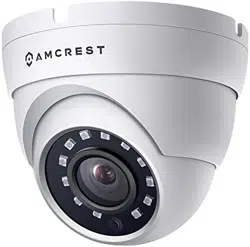

1080P Dome Outdoor HDCVI Camera
AMC1080DM36-W
User Manual
Version 1.0.0.

2
Contents
Welcome ................................................................................................................................................................ 3
Important Safeguards and Warnings ....................................................................................................................... 3
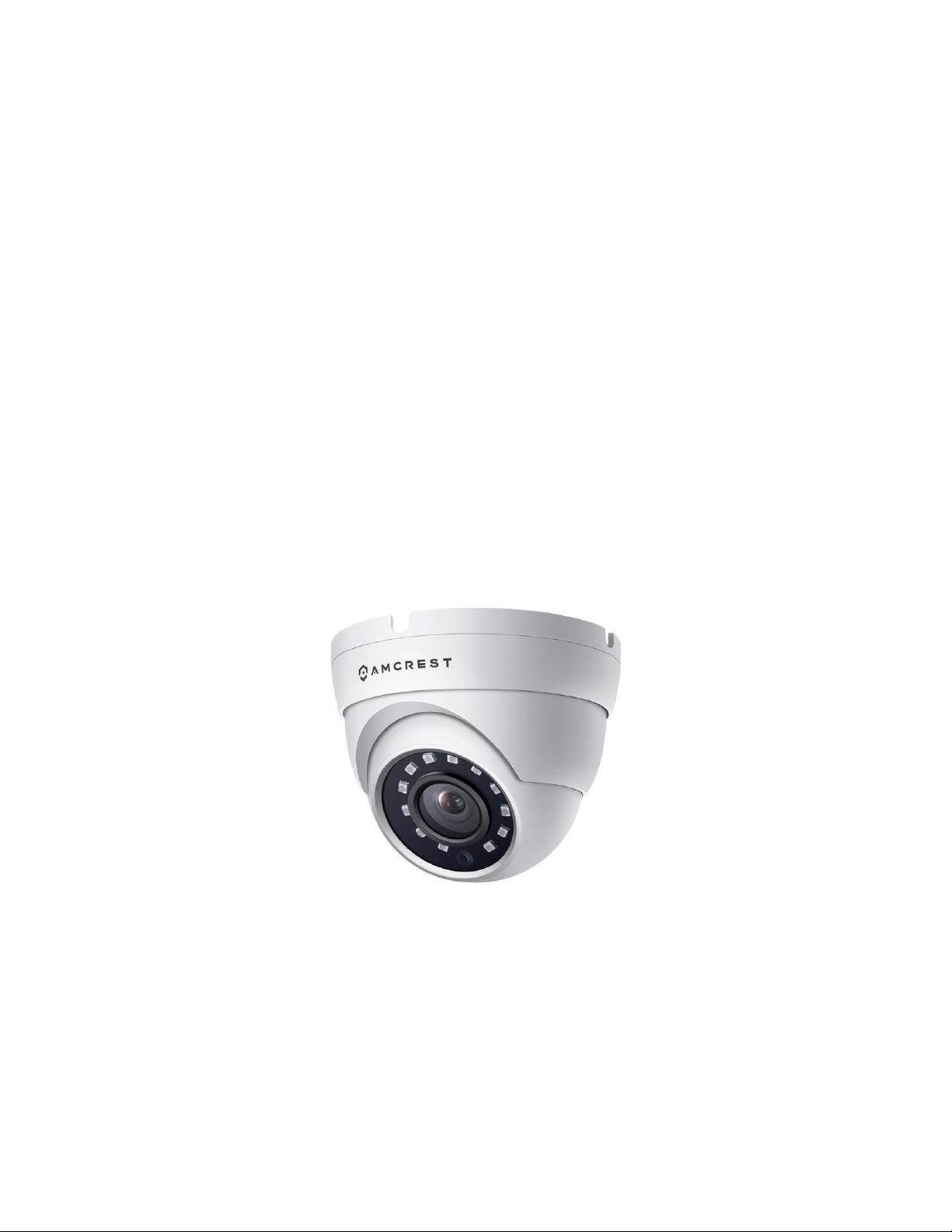
Product Introduction .............................................................................................................................................. 4
Features ................................................................................................................................................................. 4
Installation ............................................................................................................................................................. 4
Connection ............................................................................................................................................................. 5
Technical Specifications .......................................................................................................................................... 5
FCC Statement ....................................................................................................................................................... 6
IC Warning Statement ............................................................................................................................................ 7
Appendix A: Toxic or Hazardous Materials or Elements ........................................................................................... 7

3
Welcome
Thank you for purchasing an Amcrest camera!
This user manual is designed to be a reference tool for the installation and operation of your camera. Here you can
find information about the camera’s features and functions, as well as information to aid in troubleshooting.
Many of the setup and installation sections have corresponding videos on YouTube. To access the setup videos,
please go to http://amcrest.com/videos.
For access to other support related materials and information, please visit us at http://amcrest.com/support
Call Amcrest Support using one of the following numbers:
Toll free: (888)212-7538
International Callers (Outside of the US): +1-713-893-9656
USA: 713-893-8956
Canada: 437-888-0177
UK: 203-769-2757
Email Amcrest Customer Support: https://amcrest.com/contacts
Important Safeguards and Warnings
1. Electrical Safety
All installation and operation should conform to your local electrical safety codes. The product must be grounded
to reduce the risk of electrical shock. We assume no liability or responsibility for any fires or electrical shock caused
by improper handling or installation.
2. Transportation Security
Heavy stress, violent vibrations, and excess moisture should not occur during transportation, storage, and
installation of the device.
3. Installation
Handle the device with care. Do not apply power to the camera before completing installation. Do not place
objects on top of the camera.
4. Repair Professionals
All the examination and repair work should be performed by a qualified service engineer. We are not liable for any
problems caused by unauthorized modifications or user attempted repair.
5. Environment
The camera should be kept in a cool, dry place away from direct sunlight, flammable materials, explosive
substances, etc. This product should be transported, stored, and used only in the specified environments as stated
above. Do not aim the camera at a strong light source as it may cause overexposure of the picture or affect the
longevity of the camera’s sensors. Ensure the camera is in a well-ventilated area to prevent overheating.
4
6. Operation and Maintenance
Do not touch the camera sensor or lens directly. To clean dust or dirt off the lens, use an air blower or a microfiber
cloth.
7. Accessories
Be sure to use only the accessories recommended by the manufacturer. Before installation, please open the
package and check to make sure that all the components are present. Contact the retailer that you purchased from
or Amcrest directly if anything is broken or missing in the package.
Product Introduction
This series of camera is adopted with CMOS image sensors that provide high performance, high megapixel
resolution that supports 1080P video. It supports monitoring signals and audio via a coaxial transmission and
standard BNC connection and built in microphone. Transmission distances can range more than 500m (1640ft) @
1080P. This series can also support CVI/TVI/AHD/Analog output as well as recognize high speed, long distance, and
real time video transmissions.
Features
• 1/3 CMOS
• 1080P @30fps
• 2D NR, Smart IR Control
• DC12V, 2.0A
Installation
Before physically installing your camera, make sure the mounting surface can support up to 3x the weight of the
camera.
1) Remove the base portion of the camera by twisting it and remove it from the top portion of the bracket.
2) Locate the position in which you would like to place your camera and using the base of the camera, mark
the installation holes with a marker on the mounting surface. These holes will be used to drill the holes needed to
mount your camera.
5
3) Using a drill bit that is the same diameter or slightly smaller diameter than the included drywall wall
anchors, drill the 4 holes and insert the wall anchors into the holes.
Note: The wall anchors should be in the same bag as the screws and a designed to secure the screws onto the
mounting surface.
4) Attach the power cable and BNC cabling to the camera. (If you are running the cables through a mounting
surface, use a 1” paddle bit to bore a hole for the cables.)
5) Place the base of the camera on the wall anchors lining the holes to the mounting surface. Then, using a
Phillips head screwdriver, secure the screws and base of the camera to the mounting surface.
Note: To adjust the camera, you can loosen the adjustment screws near the base of the camera. Adjust the
position as desired and tighten when complete.
Connection
To connect your camera to your DVR, please follow the steps provided below:
Step 1: Connect a BNC (coaxial) cable to the video out connection of your camera.
Step 2: Connect the male end of the DC power connector of the BNC (coaxial) cable to the female end of the power
connector of the camera.
Step 3: Connect the BNC (coaxial) cable to a video out channel on the back of your DVR.
Step 4: Connect the male end of the DC power connector of the power adapter to the female end of the power
connector of the BNC (coaxial) cable. Plug in the power adapter to apply power to the camera.
For more information on the installation process described, refer to the image below for more details.
Technical Specifications
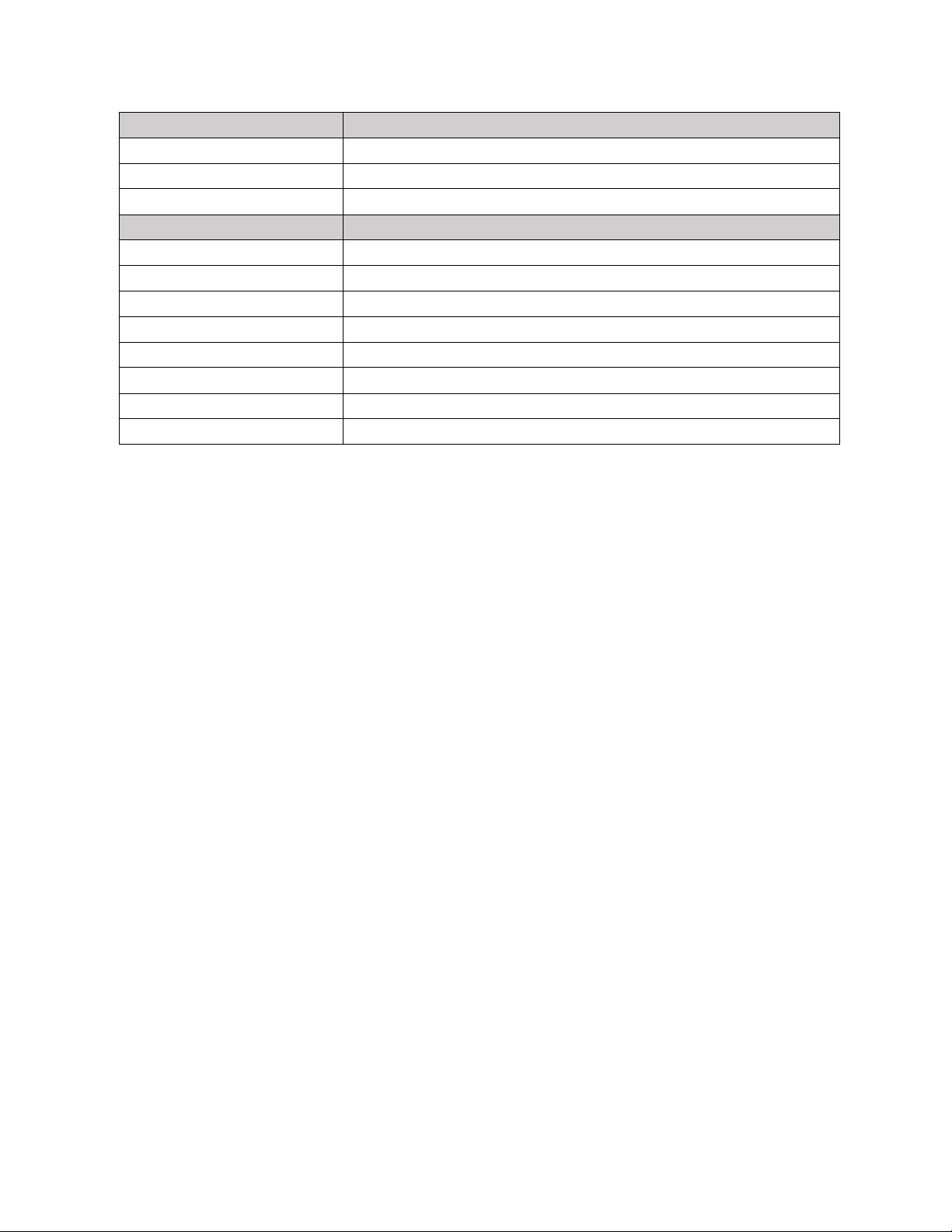
Model
Camera
Image Sensor
1/2.7" 2Megapixel CMOS
Effective Pixels
1920(H)×1080(V)
Electronic Shutter Speed
1/25~1/100000s, 1/30~1/100000s
Video Frame Rate
25/50fps@720P; 25fps@1080P, 30/60fps@720P; 30fps@1080P
Synchronization
Internal
Min. Illumination
0.02Lux/F2.0, 0Lux IR on
Video Output
1-channel BNC high definition video output/ CVBS standard definition video
output (Can switch)
Camera Features
Max. IR LEDs Length
30m, Smart IR
Backlight Compensation
DWDR
Day/Night
Auto(ICR) / Color / B/W
Noise Reduction
2D
OSD Menu
Support
6
Lens
Audio Interface
3.6mm
Angle of View
H: 89.9º
Mount Type
M12
General
Power Supply
DC12V, 2.0A
Power Consumption
Max 2.8W
Working Environment
-40°C~+60°C / Less than 95%RH (no condensation)
Transmission Distance
Over 500m via 75-3 coaxial cable
Ingress Protection
IP67
Dimensions
Φ93.4mm×79.7mm
Weight
0.33kg
Material
Metal
FCC Statement
1. This device complies with Part 15 of the FCC Rules. Operation is subject to the following two conditions:
(1) this device may not cause harmful interference, and (2) this device must accept any interference received,
including interference that may cause undesired operation.
2. The user’s manual or instruction manual for an intentional or unintentional radiator shall caution the user
that changes, or modifications not expressly approved by the party responsible for compliance could void the
user's authority to operate the equipment. In cases where the manual is provided only in a form other than paper,
such as on a computer disk or over the Internet, the information required by this section may be included in the
manual in that alternative form, provided the user can reasonably be expected to have the capability to access
information in that form.
3. (b) For a Class B digital device or peripheral, the instructions furnished the user shall include the following
or similar statement, placed in a prominent location in the text of the manual: NOTE: This equipment has been
tested and found to comply with the limits for a Class B digital device, pursuant to Part 15 of the FCC Rules. These
limits are designed to provide reasonable protection against harmful interference in a residential installation. This
equipment generates, uses, and can radiate radio frequency energy and, if not installed and used in accordance
with the instructions, may cause harmful interference to radio communications. However, there is no guarantee
that interference will not occur in a particular installation. If this equipment does cause harmful interference to
radio or
television reception, which can be determined by turning the equipment off and on, the user is encouraged to try
to correct the interference by one or more of the following measures:
-- Reorient or relocate the receiving antenna.
-- Increase the separation between the equipment and receiver.
-- Connect the equipment into an outlet on a circuit different from that to which the receiver is connected.
-- Consult the dealer or an experienced radio/TV technician for help.
4. RF exposure warning: This equipment must be installed and operated in accordance with provided
instructions and the antenna(s) used for this transmitter must be installed to provide a separation distance of at
least 20 cm from all persons and must not be co-located or operating in conjunction with any other antenna or
7
transmitter. End-users and installers must be provided with antenna installation instructions and transmitter
operating conditions for satisfying RF exposure compliance.
IC Warning Statement
This device complies with Industry Canada’s license-exempt RSSs. Operation is subject to the following two
conditions:
(1) This device may not cause interference; and (2) This device must accept any interference, including interference
that may cause undesired operation of the device. Le présent appareil est conforme aux CNR d'Industrie Canada
applicables aux appareils radio exempts de licence. L'exploitation est autorisée aux deux conditions suivantes : (1)
l'appareil ne doit pas produire de brouillage, et (2) l'utilisateur de l'appareil doit accepter tout brouillage
radioélectrique subi, même si le brouillage est susceptible d'en compromettre le fonctionnement. This
equipment complies with IC RSS-102 radiation exposure limits set forth for an uncontrolled environment. This
equipment should be installed and operated with a minimum distance of 20cm between the radiator and any part
of your body. Pour se conformer aux exigences de conformité CNR 102 RF exposition, une distance de séparation
d'au moins 20 cm doit être maintenue entre l'antenne de cet appareil ettoutes les personnes.
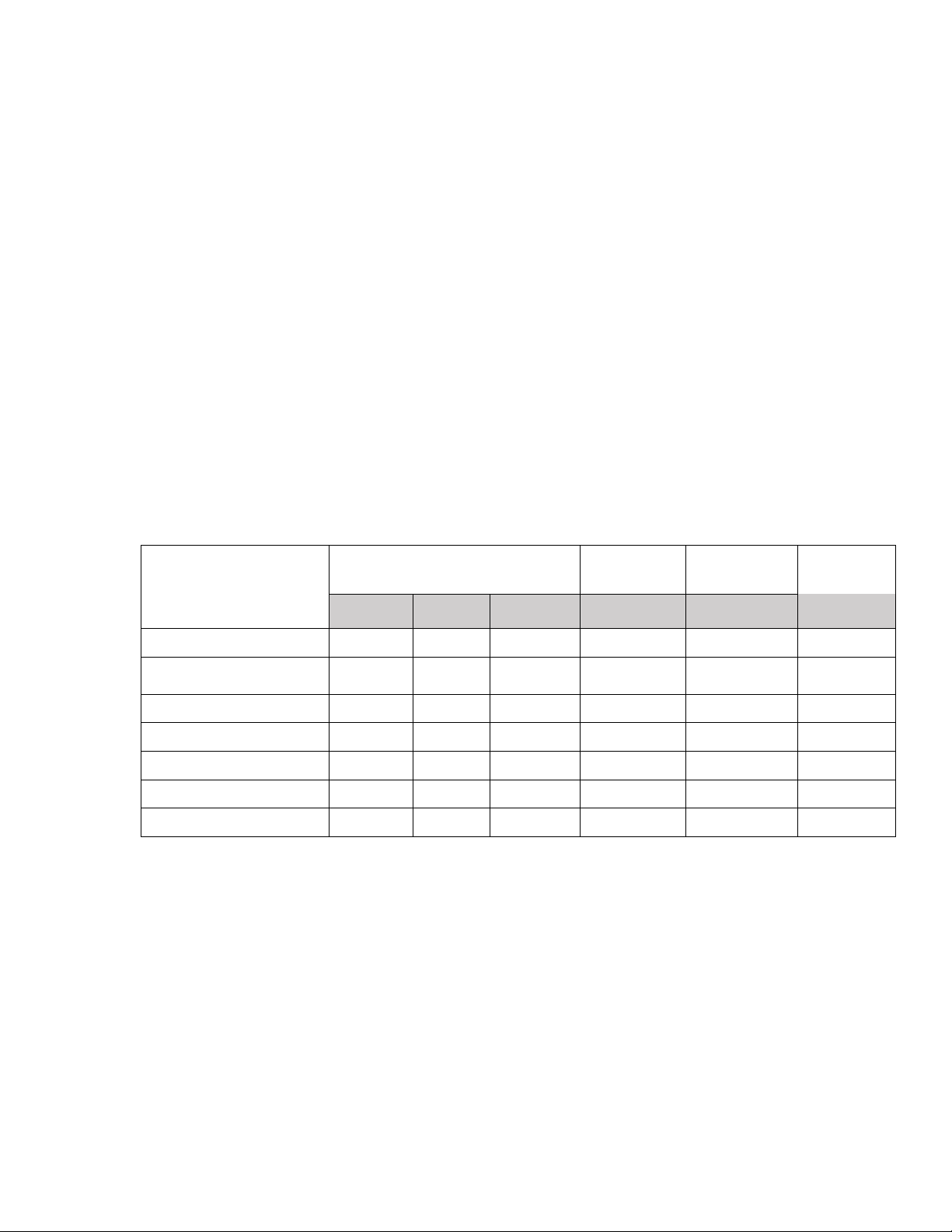
Appendix A: Toxic or Hazardous Materials or Elements
Component
Name
Toxic or Hazardous Materials or
Elements
Pb
Hg
Cd
Cr VI
PBB
PBDE
Sheet Metal (Case)
○
○
○
○
○
○
Plastic Parts (Panel)
○
○
○
○
○
○
Circuit Board
○
○
○
○
○
○
Fastener
○
○
○
○
○
○
Wire and Cable/Ac Adapter
○
○
○
○
○
○
Packing Material
○
○
○
○
○
○
Accessories
○
○
○
○
○
○
O: Indicates that the concentration of the hazardous substance in all homogeneous materials in the parts is below
the relevant threshold of the SJ/T11363-2006 standard.
X: Indicates that the concentration of the hazardous substance of at least one of all homogeneous materials in the
parts is above the relevant threshold of the SJ/T11363-2006 standard. During the environmental-friendly use
period (EFUP) period, the toxic or hazardous substance or elements contained in products will not leak or mutate
so that the use of these (substances or elements) will not result in any severe environmental pollution, any bodily
injury or damage to any assets. The consumer is not authorized to process such kind of substances or elements,
please return to the corresponding local authorities to process according to your local government statutes.
O: Indicates that the concentration of the hazardous substance in all homogeneous materials in the parts is below
the relevant threshold of the SJ/T11363-2006 standard.

8
X: Indicates that the concentration of the hazardous substance of at least one of all homogeneous materials in the
parts is above the relevant threshold of the SJ/T11363-2006 standard. During the environmental-friendly use
period (EFUP) period, the toxic or hazardous substance or elements contained in products will not leak or mutate
so that the use of these (substances or elements) will not result in any severe environmental pollution, any bodily
injury or damage to any assets. The consumer is not authorized to process such kind of substances or elements,
please return to the corresponding local authorities to process according to your local government statutes.
Note:
To view setup videos for many of the steps outlined in this guide, go to http://amcrest.com/videos
• This document is for reference only. Slight differences may be found in the user interface.
• All the designs and software here are subject to change without prior written notice.
• All trademarks and registered trademarks mentioned are the properties of their respective owners.
To contact Amcrest support, please do one of the following:
Visit https://amcrest.com/contacts and use the email form.
Call Amcrest Support using one of the following numbers: Toll Free US: (888) 212-7538
International Callers (Outside of US): +1-713-893-8956
USA: 713-893-8956
Canada: 437-888-0177
UK: 203-769-2757
Email Amcrest Customer Support https://amcrest.com/contacts
Copyright Amcrest
©
2020