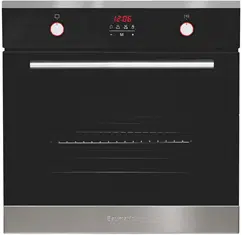
ww
1
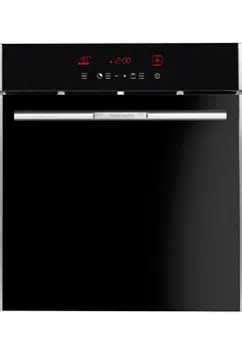
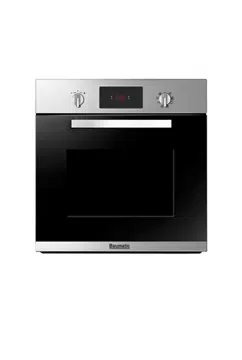
BO638.5SS / P650.5SS
60 cm Multifunction
self-cleaning pyrolytic
built-in oven
User Manual for your Baumatic
BO638.5SS / P650.5SS
Multifunction self-cleaning
pyrolytic built-in oven.
NOTE: This User Instruction Manual contains important
information, including safety & installation points, which will
enable you to get the most out of your appliance. Please keep it
in a safe place so that it is easily available for future reference; for
you or any person not familiar with the operation of the appliance.
JW 11/12/12
2

3
Contents
Environmental note 4
Important safety information 5 – 7
Specifications 8 - 10
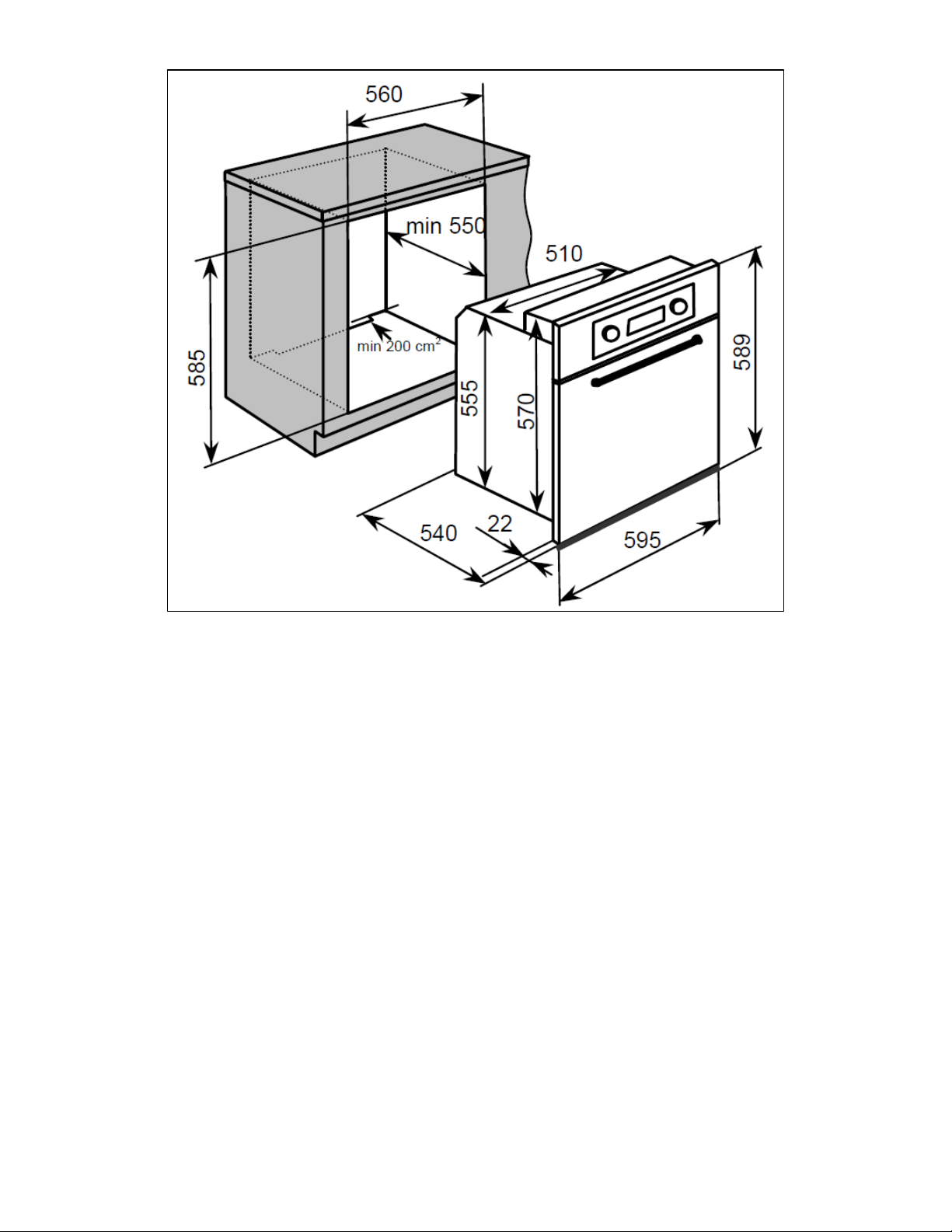
Product and aperture dimensions 8
Product specifications 8
Standard accessories 8
Optional extra 8
Electrical details 9
Cooling fan 9
Control panel 10
Oven programmer/timer display 10
Setting and using the oven 11 - 18
Initial power-up 11
Setting the time of day 11
Before first use 12
The oven timer 12
Setting the minute minder function 13
Setting the duration function 14
Selecting the end cook function 15
Setting the start and end time function 16 – 17
Cancelling a timer function 17 - 18
Adjusting the audible signal 18
Locking the oven door 18
Selecting a cooking function and temperature 19 - 24
Selecting an oven function 19
Oven functions 19 - 20
Thermostat control knob 21
Cooking function default temperature table 22
Cooking guidelines 23
Warnings 23 - 24
Cleaning and maintenance 25 - 28
Pyrolytic cleaning 25 - 26
General cleaning instructions 26
Removing the oven door for cleaning 27 - 28
Replacing the oven bulb 29
Installation 29 – 32
Electrical connection 29 - 30
Installing the oven into the kitchen cabinet 31
Positioning the appliance 31
Ventilation requirements 32
My appliance isn’t working correctly 33 – 35
Contact details 39
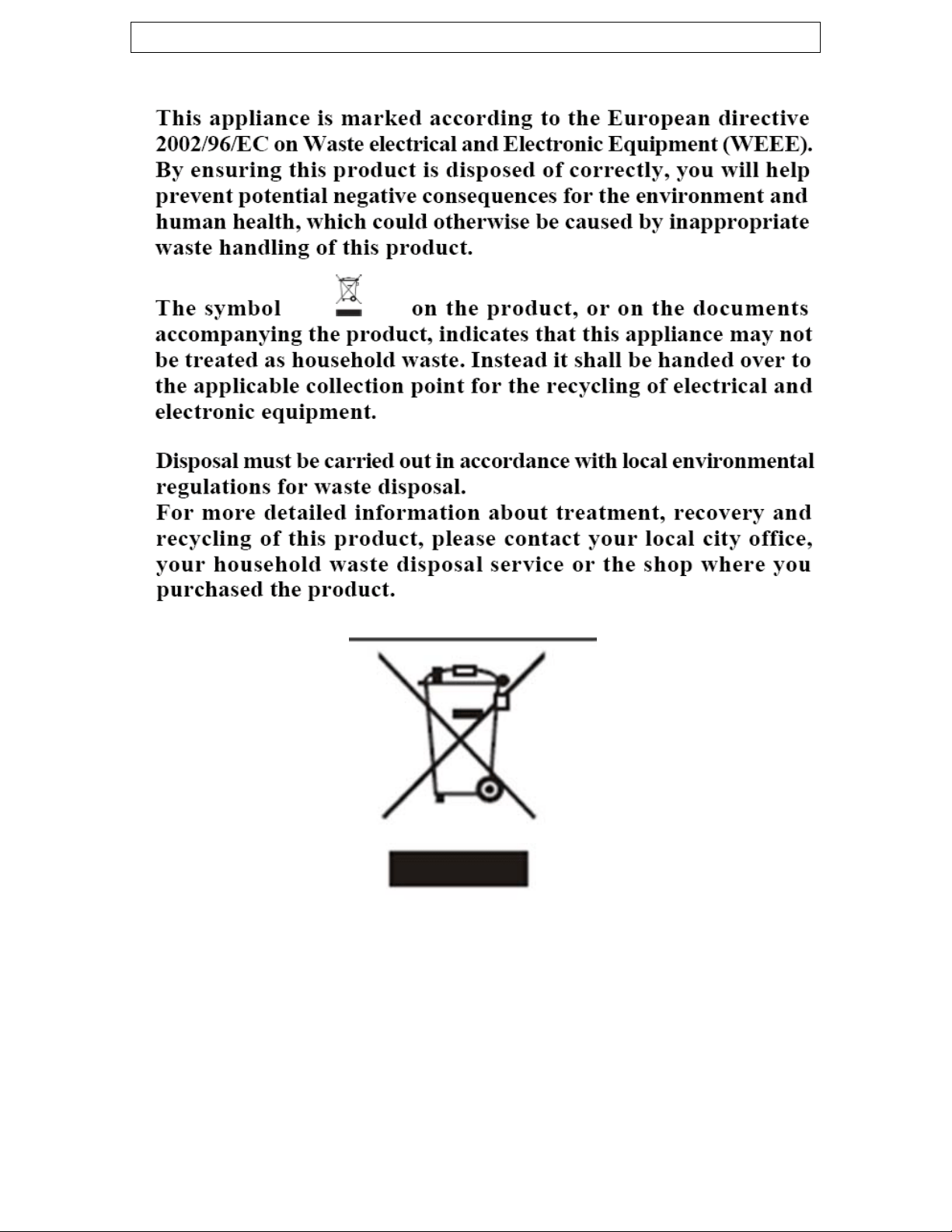
Environmental note
4
o The packaging materials that Baumatic uses are environmentally
friendly and can be recycled.
all packaging material with due regard for the
environment.
o Please discard

5
IMPORTANT SAFETY INFORMATION
Your safety is of the utmost importance to Baumatic.
Please make sure that you read this instruction booklet
before attempting to install or use the appliance. If you
are unsure of any of the information contained in this
ooklet, please contact the Baumatic Advice Line.
eneral Information
ambient temperature
scolouration at
han 4mm to the appliance, will be the
ormation given in the installation instructions
t of Baumatic Ltd.
Guarantee. The foregoing does not
affect your statutory rights.
atic service
engineers or their authorised service agents.
b
G
o This appliance is designed for domestic household use and can
be built into a standard kitchen cabinet or housing unit.
o IMPORTANT: The adjacent furniture or housing and all
materials used in the installation must be able to withstand a
minimum temperature of 85°C above the
of the room it is located in, whilst in use.
o Certain types of vinyl or laminate kitchen furniture are
particularly prone to heat damage or di
temperatures below the guidelines given above.
o Any damage caused by the appliance being installed in
contravention of this temperature limit, or by placing adjacent
cabinet materials closer t
liability of the owner.
o For use in leisure accommodation vehicles, please refer to
the appropriate inf
for this appliance.
o The use of this appliance for any other purpose or in any other
environment without the express agreemen
will invalidate any warranty or liability claim.
o Your new appliance is guaranteed against electrical or
mechanical defects, subject to certain exclusions that are noted
in Baumatic’s Conditions Of
o Repairs may only be carried out by Baum

6
arning and safety instructions
ill
become hot during use and retain heat after operation.
hild Safety
appliance and not allowed
to touch the appliance at any time.
se ensure that they are kept under close supervision
at all times.
eneral Safety
en it is open, as this can cause damage to the oven
door hinges.
o Do not leave heated oil or fat unattended, as this is a fire risk.
ly on the base of the
oven cavity, or line it with aluminium foil.
to come into contact
with areas on the appliance that get hot.
e appliance to heat the room it is located in or to
dry clothing.
o Do not install the appliance next to curtains or soft furnishings.
e appliance
or result in injury to the person lifting the appliance.
W
o This appliance complies with all current European safety
legislation. Baumatic do wish to emphasise that this compliance
does not remove the fact that the appliance surfaces w
C
o Baumatic strongly recommend that babies and young children
are prevented from being near to the
o If it is necessary for younger family members to be in the
kitchen, plea
G
o Do not place heavy objects on the oven door or lean on the
oven door wh
o Do not place pans or baking trays direct
o Do not allow electrical fittings or cables
o Do not use th
o Do not attempt to lift or move cooking appliances by using the
oven door or handle, as this may cause damage to th

7
leaning
o Cleaning of the oven should be carried out on a regular basis.
using this appliance and when
following the cleaning procedure.
cleaning procedure (except for the
Pyrolytic cleaning function).
Installation
in accordance with
he manufacturer’s instructions.
a result of improper
use or installation of this appliance.
periods of time, then additional ventilation may be
required.
any doubt
about the amount of ventilation that you will require.
eclaration of conformity
o This appliance complies with the following European Directives:
(EC) N° 1935/2004 regarding “materials in contact
with food”
e directives comply with 93/68/EEC regarding CE
marking.
ce
must be used by a trained person for domestic purposes only.
C
o Great care should be taken whilst
o IMPORTANT: The appliance must be disconnected from the
mains before following the
This appliance must be correctly installed by a
suitably qualified person, strictly
t
o Baumatic Ltd. declines any responsibility for injury or
damage, to person or property, as
o Heat, steam and moisture will be created during use of the
appliance, take care to avoid injury and ensure that the room is
adequately ventilated. If the appliance is going to be used for
prolonged
o Please consult with your qualified installer if you are in
D
- 2006/95/EC regarding “low voltage”
- 2004/108/EC regarding “electromagnetic disturbances”
- Regulation
o The abov
o The manufacturer declares that the oven is built using certified
materials and requires the appliance to be installed in
accordance with the standards currently in force. This applian
8
8
pecifications S
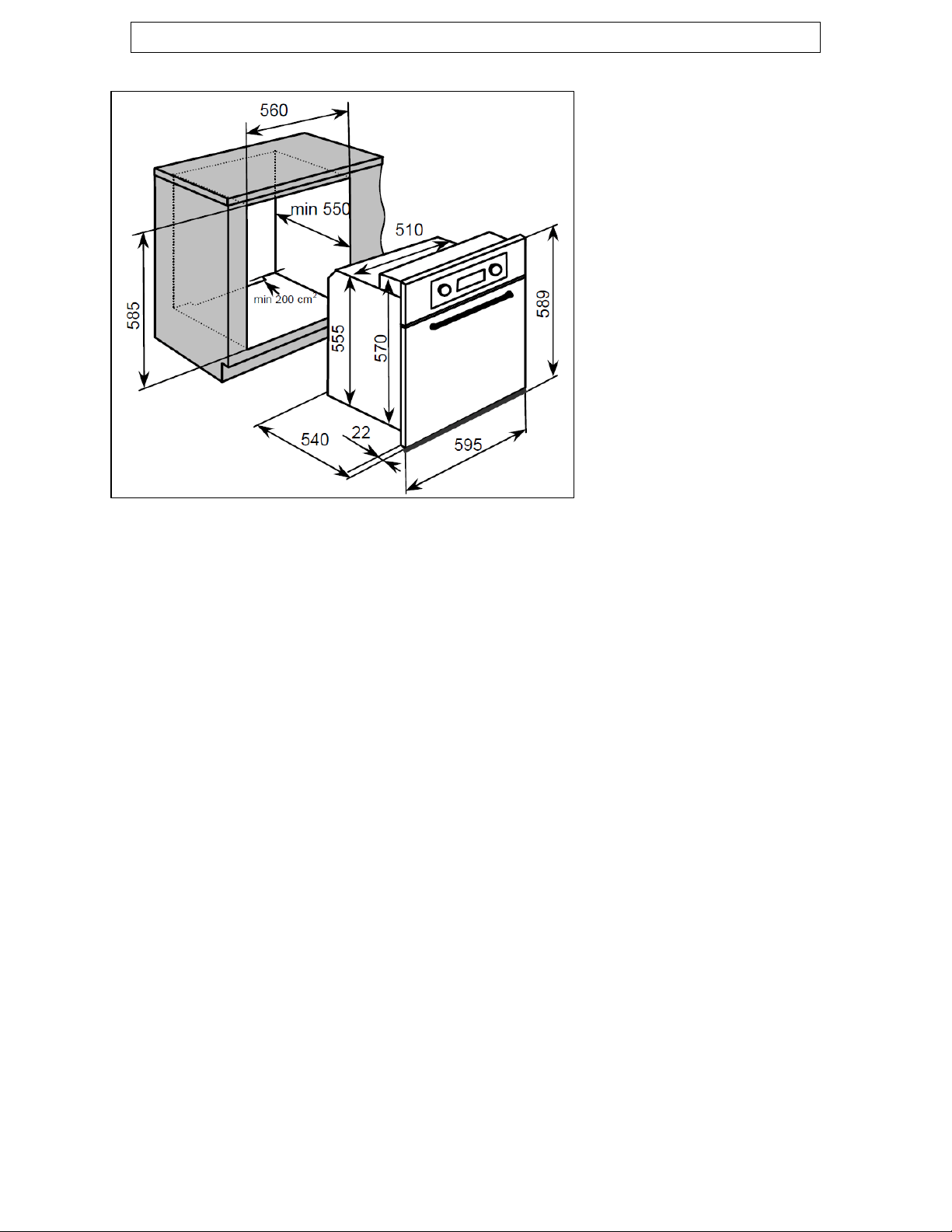
Product Dimensi
ons
mm
epth: 550 mm (min)
)
s
litres
rammer
en in pyrolytic mode)
door
BPS2 Pizza stone
Height: 589 mm
Width: 595 mm
Depth: 540
Aperture dimensions
Height: 585 mm
Width: 560 mm
D
Product specifications
o 8 Functions (BO638.5SS
o 10 Functions (P650.5SS)
o Energy efficiency class: A
o Gross oven capacity: 63 litre
o Net oven capacity: 54
o LED full prog
Oven light o
o Cooling fan
o Automatic safety door-lock (wh
o Triple-glazed removable
o Mark resistant coating
Standard accessories
o Enamelled baking tray
o Safety shelves (x2)
Optional extra
o

9
lectrical details
ated Voltage: 230 - 240 V. 50 - 60 Hz
Supply Connection:
ed outlet with 3mm
contact gap.
ax Rated Inputs: 2.60 kW (BO638.5SS)
Supply Connection:
ed outlet with 3mm
contact gap.
ax Rated Inputs: 3.20 kW (P650.5SS)
:
ven Light Bulb: 25 W/500°C screw type pygmy
ooling fan
f the oven stable and the external
surface temperature lower.
oven has been
switched on for and at how high a temperature.
the oven door and looking on the right hand side of
e oven chassis.
odel Number ……………………………….
erial Number ……………………………….
ate of Purchase ……………………………….
E
R
13A (BO638.5SS) double pole
switched fus
M
16A (P650.5SS) double pole
switched fus
M
Mains Supply Lead 3 x 1.5 mm²
O
C
o A tangential cooling fan is fitted inside of this appliance, to make
the internal temperature o
o After you have finished cooking and switched off the oven, the
cooling fan will continue to run for a period of time afterwards.
The length of time will depend on how long the
For future reference please record the following information which can
be found on the rating plate and the date of purchase which can be
found on your sales invoice. The rating plate for your oven can be
located by opening
th
M
S
D
10
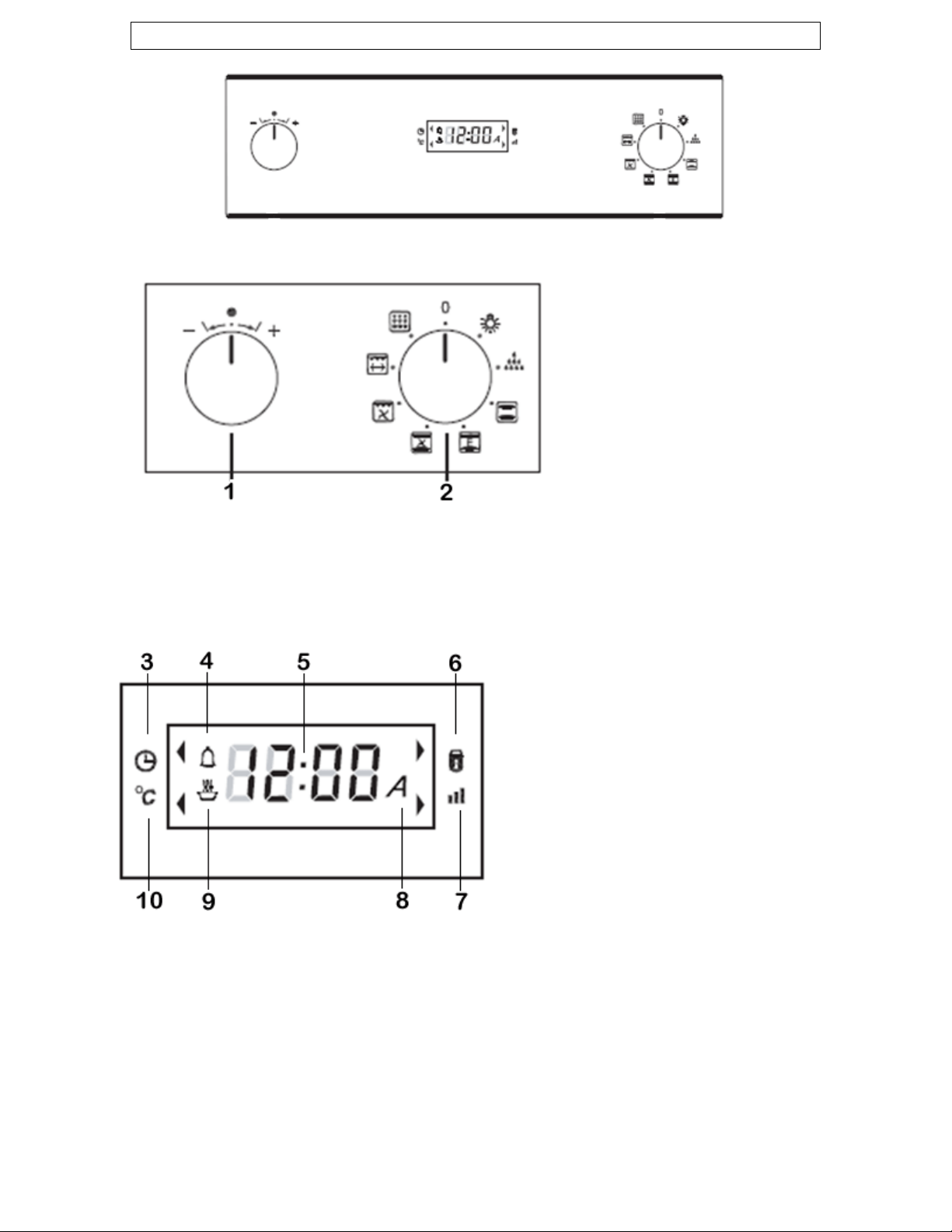
ontrol Panel C
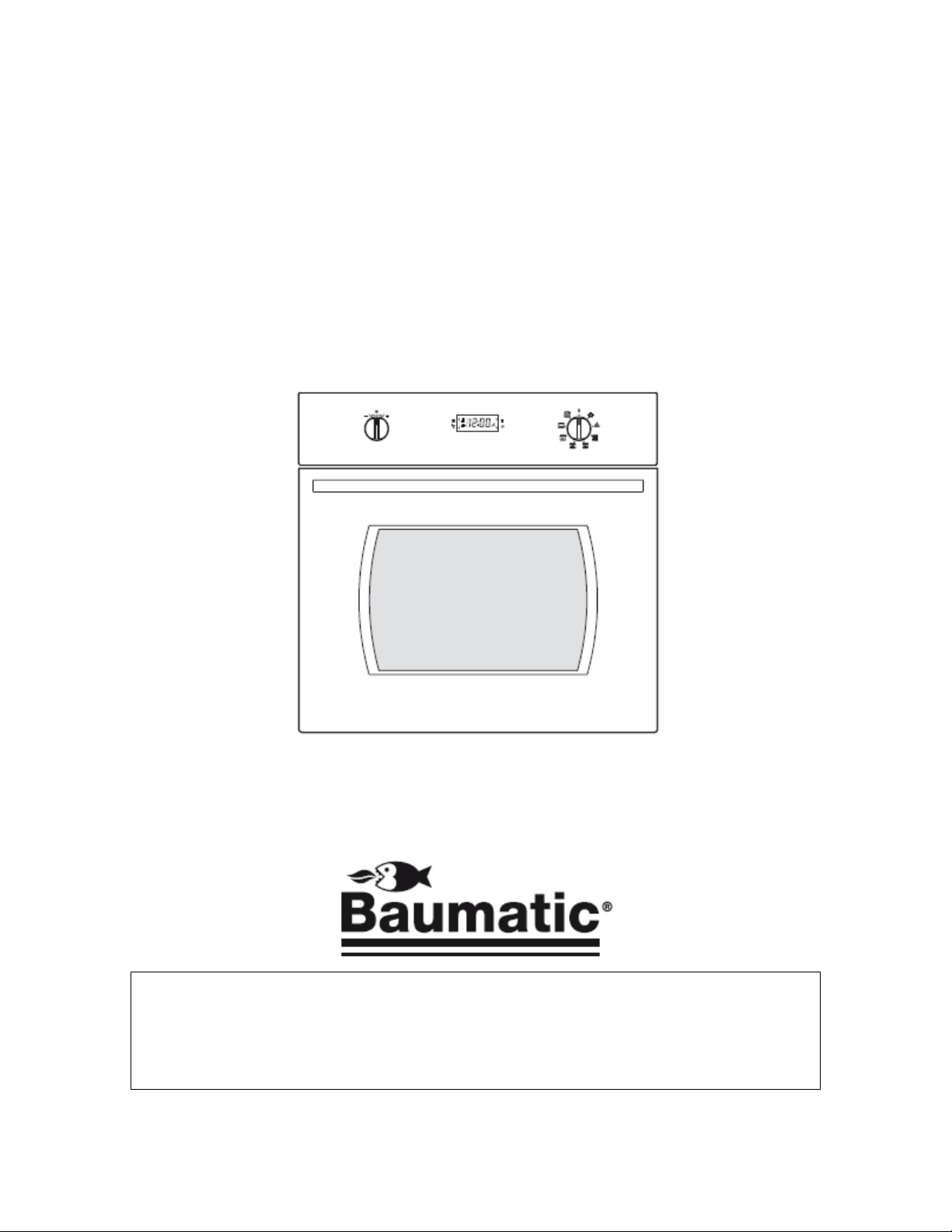
Oven control knobs
roduct may differ slightly)
ol knob
Oven function selector knob
bol
lay
bol
mbol
10) Heating / hot symbol
(For reference only, actual
p
1) Temperature and timer contr
2)
Oven timer LED display
3) Clock/Timer symbol
4) Minute minder sym
5) LED digit disp
6) Lock symbol
7) Pre-heat / audible level sym
8) Automatic cooking sy
9) Oven in use symbol

11
nitial set-up of your oven I
Power-up
When your oven is connected to the power supply for the first time (or
after a power cut), the oven will perform a self-test to check that the
latch mechanisms of the door lock are functioning properly. This safety
feature of the Pyrolytic oven will last approximately 30 seconds.
uring this operation the door lock symbol (6) will flash. Do not trD
o
y to
k symbol (6) has turned off.
first
the oven function selector knob
(plus) to increase the time
nd
, and then
r is selected, the minute minder symbol will be displayed
”)
rough the units by
o the left or right.
pen the oven door until the door loc
Setting the time of day
After your appliance is connected to your mains supply for the
time, you must set the time of day before you can use the oven.
When the oven is connected to your mains supply for the first timeo
(or after a power cut), the digits on the LED display (5) will flash.
NOTE: In order to set the time of day,
(2) must be in the off (“0”) position.
o Whilst the digits are flashing, use the control knob (1) to adjust
the time. Turn the control knob right
and left (minus) to decrease the time.
When you start adjusting the time, the time of hour will flash ao
can be set first. You can then proceed to set the time of minute.
o Push the control knob to change between hours and minutes.
o When the correct time of day is shown on the LED display, release
the control knob (1) and wait a few seconds. The whole time of
day will flash in the LED display (5) for a few seconds
the time will stop flashing and the oven is ready to use.
IMPORTANT: Pushing the control knob (1) will toggle between
the time of day and the minute minder. When the minute
minde
(4).
NOTE: You can set the time of day at any time by following the
steps outlined above. The selector knob must be in the off (“0
position and you change the time by using the control knob.
NOTE: You can adjust the unit value by turning the control knob
once per unit. You can also scroll quickly th
holding the control knob t

12
from
the manufacturing process, you should select the fan oven function
You should make sure that any windows in the room are left open
It is advisable for you not to remain in the room whilst the burning
You should leave the oven on maximum setting for 30 – 40
s cooled, it should then be cleaned with
warm soapy water, using either a sponge or soft cloth. No abrasive
parts of the oven should be cleaned with warm soapy water,
using either a sponge or soft cloth. No abrasive cleaners should be
recommend that an appropriate stainless steel cleaner
and polish is regularly used on the stainless steel surfaces of this
appliance.
Before first use
o To remove any residue from the oven that may have been left
and set the thermostat to its maximum temperature setting.
o It is perfectly normal for a smell to be produced during this process.
o
during this process.
o
off process is taking place.
o
minutes.
o After the oven cavity ha
cleaners should be used.
o Outer
used.
o We would
Timer functions
The minute minder function
The minute minder function is a countdown time that can be set on the
ven. When the countdown time has finished, an audible signal will
Press the control knob (1) once or until the minute minder symbol
use the control knob (1) to adjust
the time. Turn the knob right (plus) to increase the time and left
30 minutes. The minimum countdown time that
o
sound.
o
(4) is displayed.
o Whilst the digits are flashing,
(minus) to decrease the time.
o The default time is
can be set is 1 minute; the maximum countdown time is 240
minutes (4 hours).

13
h and
can be set first. You can then proceed to set the time of minute.
seconds. The whole countdown
time will flash in the LED display (5) for a few seconds, and then
OTE: After a few seconds the LED display will return to showing the
n time, an audible signal will sound and
the minute minder symbol will flash. The audible signal will sound
use whilst using the minute
inder function, the oven WILL NOT switch off at the end of
RTANT: Pushing the control knob (1) will toggle between
he time of day and the minute minder. When the minute
inder is selected, the minute minder symbol will be displayed
his function will allow you to set a countdown time similar to the
me (Duration timer).
s.
o When you start adjusting the time, the hour of time will flas
o Push the control knob to change between hours and minutes.
o When the correct time is shown on the LED display, release the
control knob (1) and wait a few
the time will stop flashing. The minute minder will be set and will
begin its countdown immediately.
N
time of day, but the minute minder symbol (4) will still be activated
and displayed in the LED screen (5).
o At the end of the countdow
for a few minutes before switching off, or you can silence it by
pressing the control knob.
IMPORTANT: If the oven is in
m
the countdown time. YOU MUST turn the oven function selector
knob to the OFF position (“0”).
IMPO
t
m
(4).
The duration timer function (semi-automatic cooking)
T
minute minder function, however the oven will switch off at the end of
the cooking ti
o Place the food that you want to cook inside of the oven and close
the door.
o Select an oven function and cooking temperature using the relevant
control knob
o Press down the control knob (1) to toggle through the timer
functions.
o When “dur” appears on the LED display you have selected the
duration timer.

14
Whilst ”dur” is flashing, use the control knob (1) to adjust the time.
The default time is 30 minutes. The minimum countdown time that
h and
can be set first. You can then proceed to set the time of minute.
seconds. The whole countdown
time will flash in the LED display (5) for a few seconds, and then
a few seconds the LED display will return to showing the
me of day, but the timer symbol (3), oven in use symbol (9), and
e automatic cooking symbol (8) and
the oven in use symbol (9) will flash. The audible signal will sound
IMPORTANT: Remember to turn the oven function selector knob to
the off position (“0”) after each use.
o
Turn the knob right (plus) to increase the time and left (minus) to
decrease the time.
o
can be set is 1 minute; the maximum countdown time is 240
minutes (4 hours).
o When you start adjusting the time, the hour of time will flas
o Push the control knob to change between hours and minutes.
o When the correct time is shown on the LED display, release the
control knob (1) and wait a few
the time will stop flashing. The duration timer will be set and will
begin its countdown immediately.
NOTE: After
ti
the automatic cooking symbol (8) will still be activated in the LED
display (5).
o At the end of the countdown time the oven will stop heating, an
audible signal will sound and th
for a few minutes before switching off or you can silence it by
pressing the control knob (1).
o

15
tic function, however
stead of setting a countdown time, you select the time of day that
Place the food that you want to cook inside of the oven and close
Select an oven function and cooking temperature using the relevant
Press down the control knob (1) to toggle through the timer
When “end” appears on the LED display you have selected the end
he control knob (1) to adjust the
time. Turn the knob right (plus) to increase the time and left
time of day. The minimum
countdown time that can be set is 1 minute; the maximum
When you start adjusting the time, the hour of time will flash and
.
) and wait a few seconds. The end time will flash in
the LED display (5) for a few seconds, and then the end time will
of day, but the timer symbol (3), oven in use symbol (9), and
e automatic cooking symbol (8) will be activated in the LED display
l flash. The audible signal will sound
for a few minutes before switching off or you can silence it by
tor knob to
the off position (“0”) after each use.
The end of cooking function
This function is similar to the semi-automa
in
you want the oven to switch off at (End timer).
o
the door.
o
control knobs.
o
functions.
o
of cooking timer.
o Whilst ”end” is flashing, use t
(minus) to decrease the time.
o The default time is the current
countdown time is up to 24 hours.
o
can be set first. You can then proceed to set the time of minute
o Push the control knob to change between hours and minutes.
o When the correct end time is shown on the LED display, release the
control knob (1
stop flashing.
NOTE: After a few seconds the LED display will return to showing the
time
th
(5).
o At the end of the countdown time the oven will stop heating, an
audible signal will sound and the automatic cooking symbol (8) and
the oven in use symbol (9) wil
pressing the control knob (1).
o IMPORTANT: Remember to turn the oven function selec

16
his function will allow you to set the time of day that you want the
Place the food that you want to cook inside of the oven and close
Select an oven function and cooking temperature using the relevant
Press down the control knob (1) to toggle through the timer
When “dur” appears on the LED display you have selected the
adjust the
duration (time) you want to cook for. Turn the knob right (plus) to
30 minutes. The minimum countdown time that
can be set is 1 minute; the maximum countdown time is 240
When you start adjusting the time, the hour of time will flash and
.
ountdown
time will flash in the LED display (5) for a few seconds, and then
IMMEDIATELY press the control knob until “end” appears briefly
control knob (1) to adjust the end
time. Turn the knob right (plus) to increase the time and left
time of day. The minimum
countdown time that can be set is 1 minute; the maximum
When you start adjusting the time, the hour of time will flash and
.
The start and end time function (automatic cooking)
T
oven to switch off at and how long you want the oven to cook for.
o
the door.
o
control knobs.
o
functions.
o
duration timer.
o Whilst ”dur” is flashing, use the control knob (1) to
increase the time and left (minus) to decrease the time.
o The default time is
minutes (4 hours).
o
can be set first. You can then proceed to set the time of minute
o Push the control knob to change between hours and minutes.
o When the correct time is shown on the LED display, release the
control knob (1) and wait a few seconds. The whole c
the time will stop flashing. The duration timer will be set.
o
on the LED display before showing a calculated end of cooking time.
o Whilst ”end” is flashing, use the
(minus) to decrease the time.
o The default time is the current
countdown time is up to 24 hours.
o
can be set first. You can then proceed to set the time of minute

17
) and wait a few seconds. The end time will flash in
the LED display (5) for a few seconds, and then the end time will
return to showing the
me of day, but the timer symbol (3) and the automatic cooking
ance will automatically calculate what time of day it needs
to switch the oven on at, so that it runs for the cooking time that
When the oven switches on, the oven in use symbol (9) will appear
l flash. The audible signal will sound
for a few minutes before switching off or you can silence it by
IMPORTANT: Remember to turn the oven function selector knob to
the off position (“0”) after each use.
ancelling the end of cooking, semi-automatic, and automatic
semi-automatic, end of cooking and automatic timer
functions by turning the oven function selector knob (2) to the off
e the control knob (1) to select a new
(start/end/duration) time, or reduce the time to “0:00” to cancel
nction please
ensure that the timer symbol (3) and the automatic cooking
symbol (8) are no longer light on the display.
o Push the control knob to change between hours and minutes.
o When the correct end time is shown on the LED display, release the
control knob (1
stop flashing.
NOTE: After a few seconds the LED display will
ti
symbol (8) will be activated in the LED display.
o The appli
you set.
o
on the LED display, as well as the automatic cooking symbol.
o At the end of the countdown time the oven will stop heating, an
audible signal will sound and the automatic cooking symbol (8) and
the oven in use symbol (9) wil
pressing the control knob (1).
o
C
timer functions
o You can cancel
position (“0”).
o You can also us
the timer function.
o IMPORTANT: If you have cancelled a timer fu

18
You can use the control knob (1) to select a new time, or reduce
Press the control knob (1) once or until the minute minder symbol
use the control knob (1) to adjust
the time. Turn the knob right (plus) to increase the time and left
(minus) to decrease the time.
he volume of the audible signal has 3 levels, low, medium and high.
MPORTANT: The oven timer/programmer must not be in any
Then use the control knob (1) to turn the audible volume up or
You can view the level of volume by looking at the audible level
When you are satisfied you can turn the selector knob back to the
MPORTANT: The buzzer will be silent between 22:00 and
8:00.
You can manually lock and unlock the oven door (except during
The locking symbol (6) will flash when the door is locking or
The locking symbol will be light statically when the door is locked.
Cancelling the minute minder function
o
the time to “0:00” to cancel the timer function.
o
(4) is displayed.
o Whilst the digits are flashing,
Adjusting the volume of the audible signal
T
To adjust the volume, you should proceed as follows:-
I
form of countdown mode.
o Select the oven light function using the selector knob (2)
o
down (plus or minus)
o
symbol (7).
o
off position (“0”).
I
0
Locking the Oven
o
Pyrolytic mode) by depressing the control knob (1) for 3 seconds.
o
unlocking.
o
19
tion and temperature Selecting a cooking func
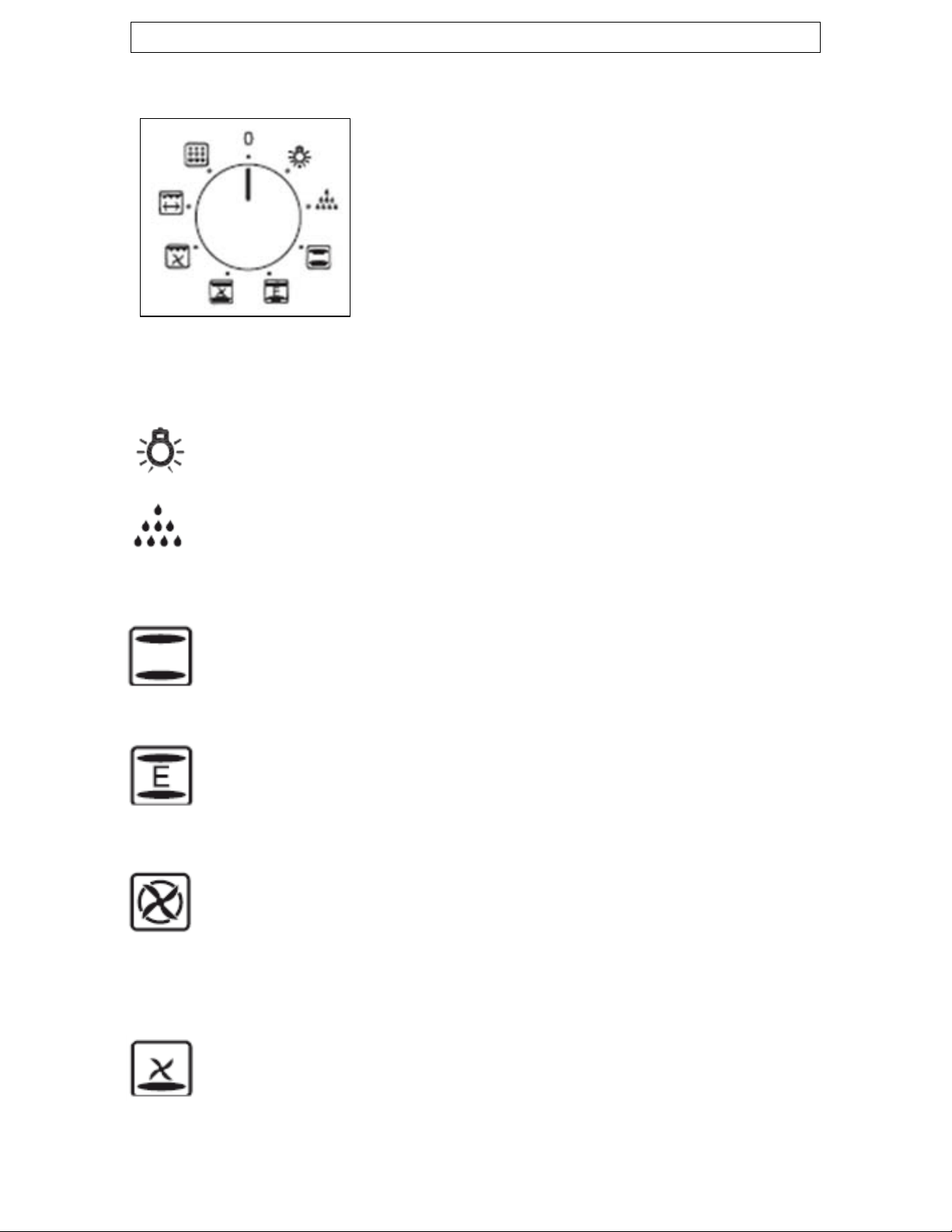
Selecting an oven function
o The oven function selector knob should
be used to select the particular mode of
cooking that you require. The appliance
will utilise different elements within the
oven cavity, depending on the oven
function that you select.
rence only and may differ slightly from your model)
f
d
nd on the room temperature, the quantity and
cooking, with heat from
r the cooling fan will only turn on when the oven
aneously on different shelves,
g the heat.
(Image is for refe
Oven unctions
OVEN LIGHT: Separate light control which allows the light to
be switched on, even when the oven is switched off.
DEFROST MODE: The fan runs without heat to reduce the
efrosting time of frozen foods. The time required to defrost the
od will depefo
type of food. Always check food packaging for the defrosting
instructions.
CONVENTIONAL OVEN (top and lower element): This
method of cooking provides traditional
the top and lower elements. This function is suitable for
roasting and baking on one shelf only.
ECO-BAKE (top and lower element): This method of
cooking provides traditional conventional oven heating,
oweve
h
surfaces reach a high temperature. This saves energy but will
increase cooking times.
FAN OVEN: This method of cooking uses the circular element
while the heat is distributed by the fan. This results in a faster
and more economical cooking process. The fan oven allows
food to be cooked simult
preventing the transmission of smells and tastes from one dish
onto another. (P650.5SS ONLY)
BOTTOM ELEMENT AND FAN: This method of cooking uses
the bottom element only while the fan is circulatin
For delicate dishes and heating pre-cooked food. It is also
suitable for sterilising preserving jars. (P650.5SS ONLY)
20
sures a
st and even distribution of the heat. Suitable for light and
uitable where quick
rowning is required and “sealing” the juices in, such as
which directs heat
ds onto the food. Suitable for grilling small portions of
downwards
nto the food. This function is suitable for grilling medium or
to approximately 500°C.
he resultant ash deposits can be wiped away with a soft damp
cloth once the oven has cooled down.
Once you have selected your desired oven function, the LED display
ven in use symbol (9) will be displayed. This symbol
will not be displayed when you have selected the oven light or
en temperature (as outlined on the next page) and, if
required, a timer function (see setting and using the oven timer
section).
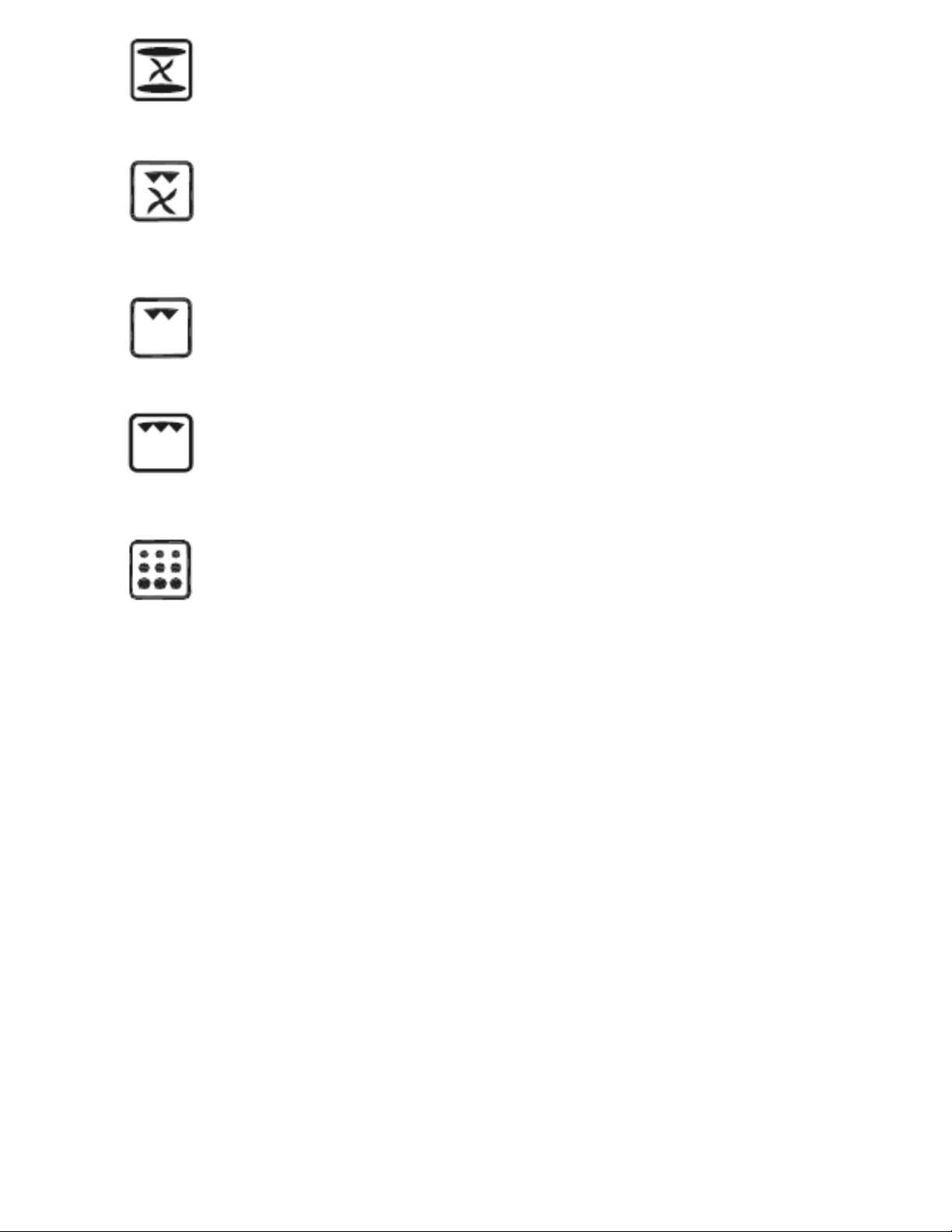
CONVENTIONAL OVEN AND FAN: This method of cooking
provides traditional cooking with heat from the top and the
lower element, it also utilises the circulation fan. This en
fa
delicate baking, such as pastries. (BO638.5SS ONLY)
FAN AND GRILL: This method of cooking utilises the top
element in conjunction with the fan, which helps to provide a
quick circulation of heat. This function is s
b
steaks, hamburgers, some vegetables etc.
HALF GRILL: This cooking method is normal grilling, utilising
the inner part only of the top element,
downwar
bacon, toast, meat etc. (P650.5SS ONLY)
FULL GRILL: This method of cooking utilises the inner and
outer parts of the top element, which directs heat
o
large portions of sausages, bacon, steaks, fish etc.
PYROLYTIC CLEANING: This function cleans the oven cavity
by raising the inner oven temperature
T
o
will show the word “ON” for a few seconds.
o If you have selected an oven function which uses any heating
elements, the o
defrost mode.
o After selecting your desired function you can then choose your
desired ov

21
Thermostat
ture
of the oven. It is possible to regulate the
The temperature that you select will appear on
to
increase the temperature, and left, towards the
g the control knob
nce per unit, or you can scroll quickly through the units by
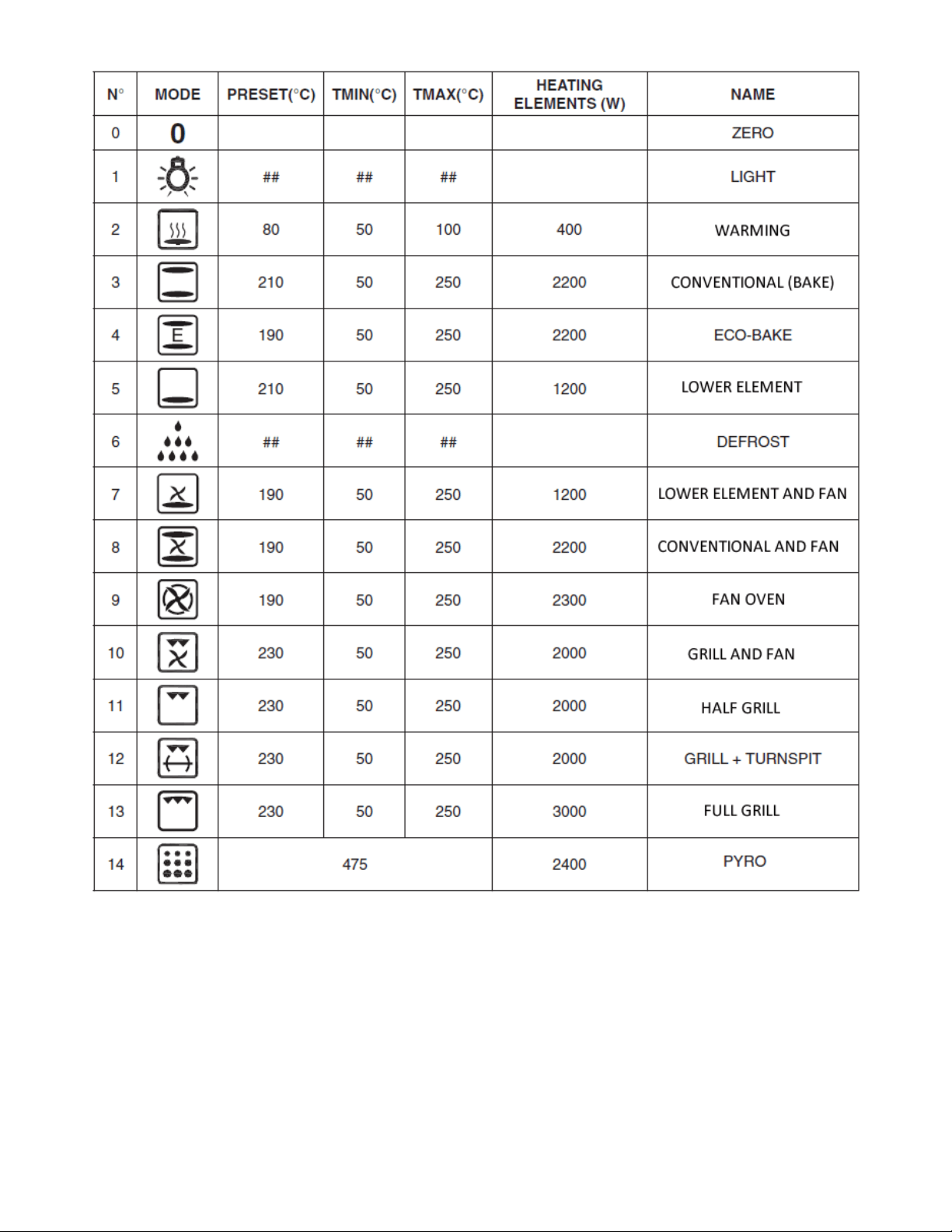
electing an oven function, the default oven temperature will
be displayed for that particular cooking mode (see table on next
ppears in the display for about 5 seconds
whenever the control knob (1) is pressed or when a new function
l start to
flash on the LED display. When the oven has reached the set
ou should not place food inside the cavity, until the correct
function selector knob to the “0” (OFF) position to
stop any activity within the oven. The display will show “OFF” for a
few seconds.
HAVE PRESET
EMPERATURES. PLEASE SEE THE NEXT PAGE FOR THE
MPORTANT: ALWAYS TURN THE OVEN FUNCTION SELECTOR
NOB TO THE OFF POSITION (“0”) AFTER EACH USE.
control knob
o The control knob sets the required tempera
temperature within a range of 50 - 250°C.
o
the LED display.
o Turn the knob right, towards the plus symbol
minus symbol to decrease the temperature.
NOTE: You can adjust the unit value by turnin
o
holding the control knob to the left or right.
o When s
page).
o The temperature a
has been selected.
o As soon as the oven starts, the preheating symbol (7) wil
temperature the preheating symbol light will remain fixed.
Y
cooking temperature has been reached.
o Turn the oven
WARNING: ALL OVEN FUNCTIONS (EXCEPT OVEN LIGHT AND
DEFROST MODE) WILL START HEATING THE OVEN AS SOON AS
SELECTED. THE OVEN FUNCTIONS
T
COOKING FUNCTION TEMPERATURE TABLE.
I
K
22
Cooking function temperature table

23
Cooking guidelines
temperatures and times can be
varied to suit personal preference.
n given on the food packaging for this particular mode of
cooking.
g time given on the food packaging by at least ten
minutes.
ven if you are baking no
matter what oven function you are using.
10% from the information given for
conventional oven cooking.
ns on the food packaging advise that you can
“cook from frozen”.
t any accessories that are not required are
removed from the oven.
oven and leave gaps
between the trays to allow air to circulate.
Try to open the door as little as possible to view the dishes.
The oven light will remain on during cooking.
arnings
sing any of the cooking
functions, including the grill functions.
igh reflectivity of the
foil could potentially damage the grill element.
o Please refer to the information given on food packaging for
guidance on cooking temperatures and times. Once familiar with
the performance of your appliance,
o If you are using the fan oven function, then you should follow the
informatio
o You should pre-heat the oven and not place food inside of it until
the oven operating light has gone off. You can choose not to pre-
heat when using the fan oven mode; however you should extend
the cookin
o IMPORTANT: You should pre-heat the o
o If there is no guidance given on the food packaging specifically for
cooking in fan oven mode, you can generally reduce the cooking
time and temperature by
o Make sure that frozen foods are thoroughly thawed before cooking,
unless the instructio
o Before cooking, check tha
o Place cooking trays in the centre of the
o
o
W
o Keep the oven door closed when u
o Do not use aluminium foil to cover the grill pan or heat items
wrapped in aluminium foil under the grill. The h
24
You should also never line the base of your oven with aluminium
king, never place pans or cookware directly onto the
bottom of your oven. They should always be placed on the shelves
e oven
become extremely hot during operation, avoid touching them
Important: Be careful when opening the door, to avoid contact
the baking and NOT for removing it from the oven cavity. When
The enamelled baking tray handle should not be left in position
Warning: Accessible parts may become hot during use. Young
children should be kept well away from the oven when it is in use.
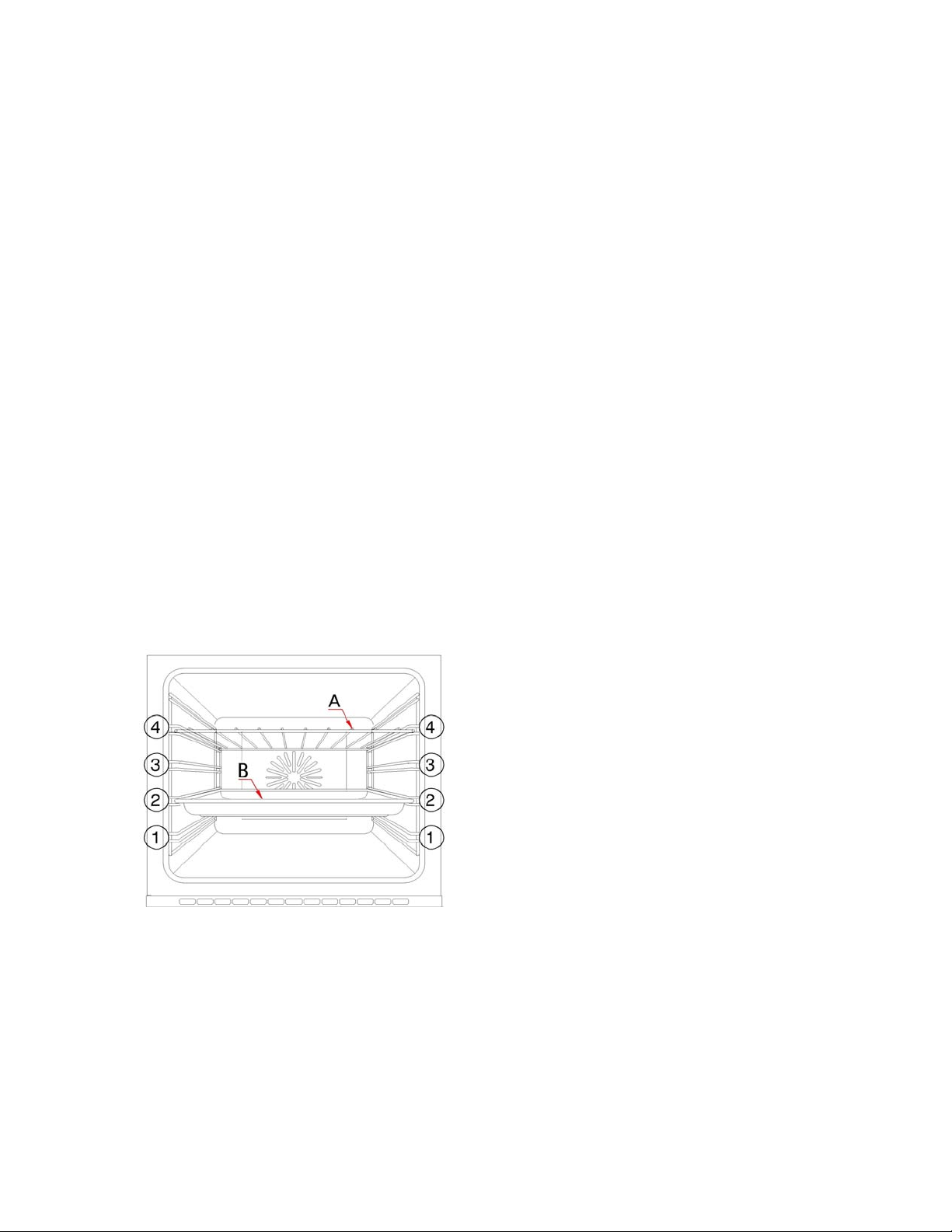
our oven will come supplied with
ure:
A) Safety shelf (x2)
B) Enamelled baking tray
The numbers 1 – 4, indicate the different shelf positions that you
You should use the shelf position(s) that you find are best suited to
your personal cooking preferences.
o
foil.
o During coo
provided.
o The grill heating element and other internal components of th
inadvertently when handling the food which you are grilling.
o
with hot parts of the oven and steam.
o The enamelled baking tray handle should only be used to reposition
removing the baking tray, you should ALWAYS use an oven glove.
o
when the appliance is switched on.
o
Shelf positions
Y
the following oven furnit
(
(
o
can utilise within the oven.
o
Cleaning and maintenance
External cleaning operations must only be carried out
d below should be
followed AT LEAST once a month or more frequently if there have
been food spillages inside of the cavity.
escopic
on
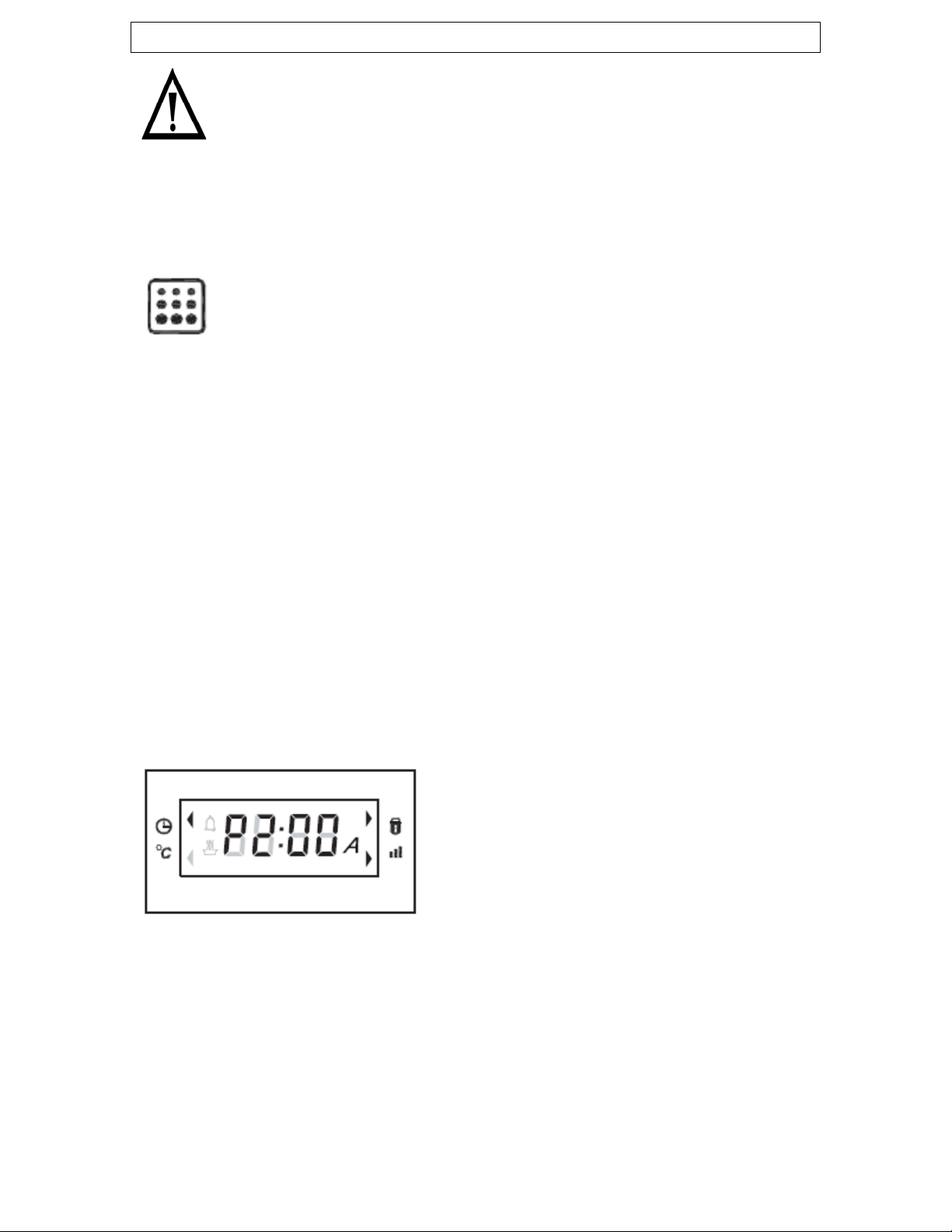
(P1:30 will
appear on the LED display
avily soiled.
en it is
locked.
when the oven is cool and with the applianc
e
disconnected from your mains supply.
o The oven should be thoroughly cleaned before it is operated for the
first time. The pyrolytic cleaning process liste
Pyrolytic cleaning
IMPORTANT: All accessories (including the telo
runners, if present) must be removed from inside the oven
before commencing the pyrolytic cleaning function.
o The oven should not be left unattended when the pyrolytic
cleaning cycle is in progress.
o All major food residues must be removed from the oven
before starting this function.
Select the pyrolytic cleaning function by turning the oven functio
selector knob to the cleaning symbol (as shown on page 19/20).
The LED display will show “475°” for a few seconds.
A cleaning period of 90 minutes is automatically set o
(5)). This should be sufficient if the
completed on a weekly basis.
o The length of cleaning cycle can be
increased or decreased by using the
control knob (1). For example it
may be necessary to increase the
duration if the oven is he
pyrolytic cleaning cycle is
The duration can be changed from 1
hour (min) to 3 hours (max).
o The oven timer functions will still apply to the pyrolytic function.
Therefore, the pyrolytic cleaning cycle can be delayed.
o On this oven function the oven temperature will rise to 475°C.
o The oven door will automatically lock during the pyrolytic cycle to
ensure user safety. The door lock symbol (6) will flash when the
door is locking or unlocking, and will be on statically wh
25

26
ill show “P---“
and the automatic cooking symbol (8) will continue to flash until
d until the oven temperature has
fallen below the safety threshold. When the oven has cooled
ill flash when the door is locking or
nlocking, will be on statically when it is locked, and will be off
ash deposits. For best
cleaning results, you should not allow the oven to get completely
MPORTANT: Remember to turn the oven function selector knob to
mportant: Please note that you should not attempt to open the door
ntil the cleaning cycle has fully completed as outlined above.
e oven should only be cleaned with warm soapy
water, using either a sponge or soft cloth. No abrasive cleaners
recommend that an appropriate stainless steel cleaner
and polish is regularly used on the stainless steel surfaces of this
n cleaner on your appliance, then you
must check with the manufacturer of the cleaner that it is suitable
liance by a cleaning
roduct will not be fixed by Baumatic free of charge, even if the
ppliance is within the guarantee period.
o During pyrolytic cleaning, the oven light will not switch on.
o At the end of the pyrolytic cycle the LED display w
the selector knob is turned to the “0” (off) position.
o The oven door will remain locke
sufficiently the door will unlock.
The door lock symbol (6) w
u
when the door is unlocked.
o When the oven has reached a warm temperature, you should use a
soft damp cloth to wipe out the resultant
cold before wiping away the ash deposits.
I
the off position (“0”) after each use.
I
u
General cleaning information
o Never clean any of the oven surfaces by steam cleaning.
o Outer parts of th
should be used.
o We would
appliance.
o If you use any form of ove
for use on your appliance.
Any damage that is caused to the app
p
a
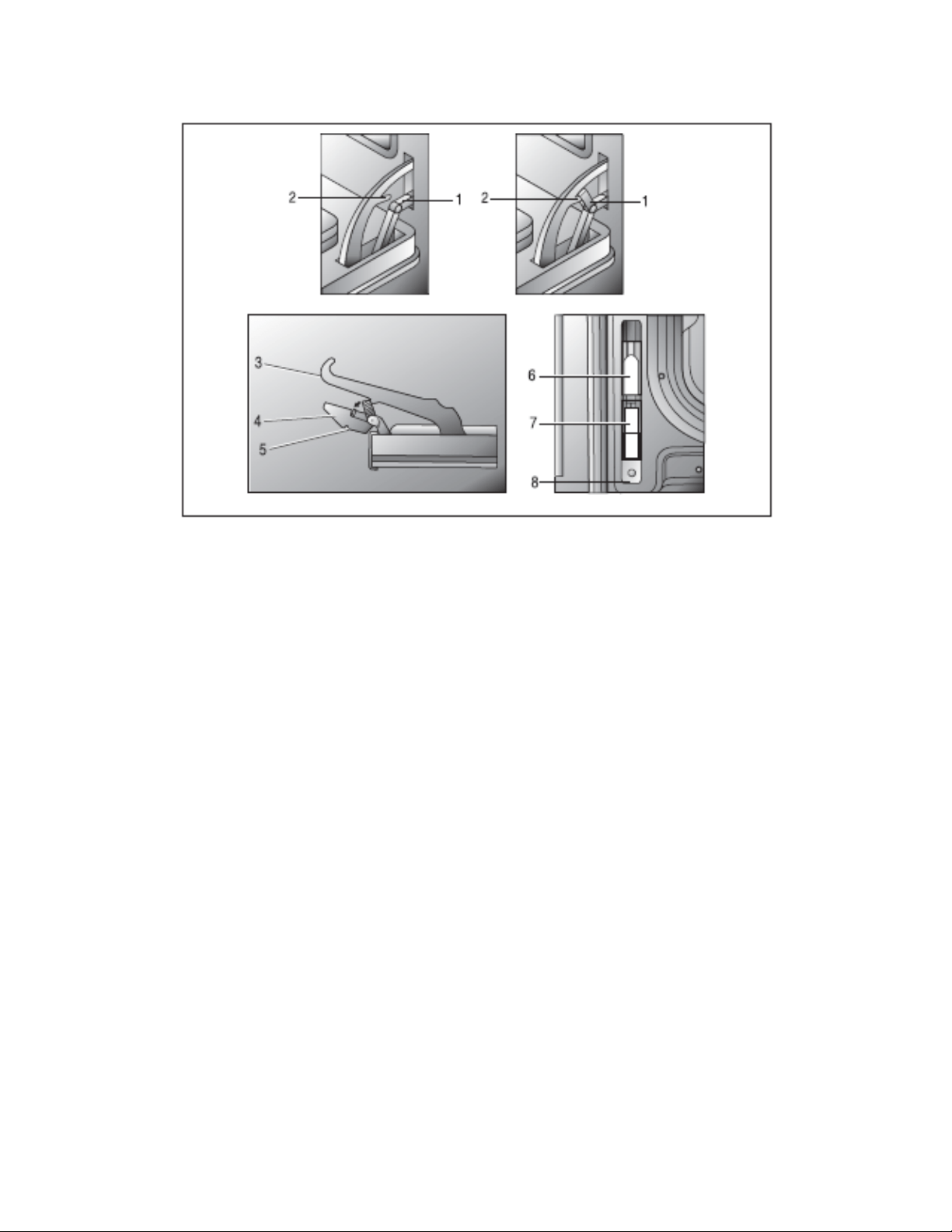
Removing the oven door for cleaning
To facilitate the cleaning of the oven/door the door can be removed as
follows:-
27
o Hold the door firmly with two hands on either side, and gently lift
MPORTANT: Do not support the door by holding the door
ake sure that the door is supported
at all times and that you place the door on some padded
l amount of detergent. The cloth MUST
NOT have come into contact with any form of cleaning product
o To refit the door you should follow the steps on the following
page:
o Open the door completely.
o Lift the lower hinge bracket (1) into the upper hinge hook (2).
the front of the door until it becomes free from the oven cavity.
I
handle. Grasp the sides of the door only.
o IMPORTANT: You should m
material whilst cleaning it.
o The oven door and door glass should only be cleaned using a
damp cloth and a smal
or chemical previously.
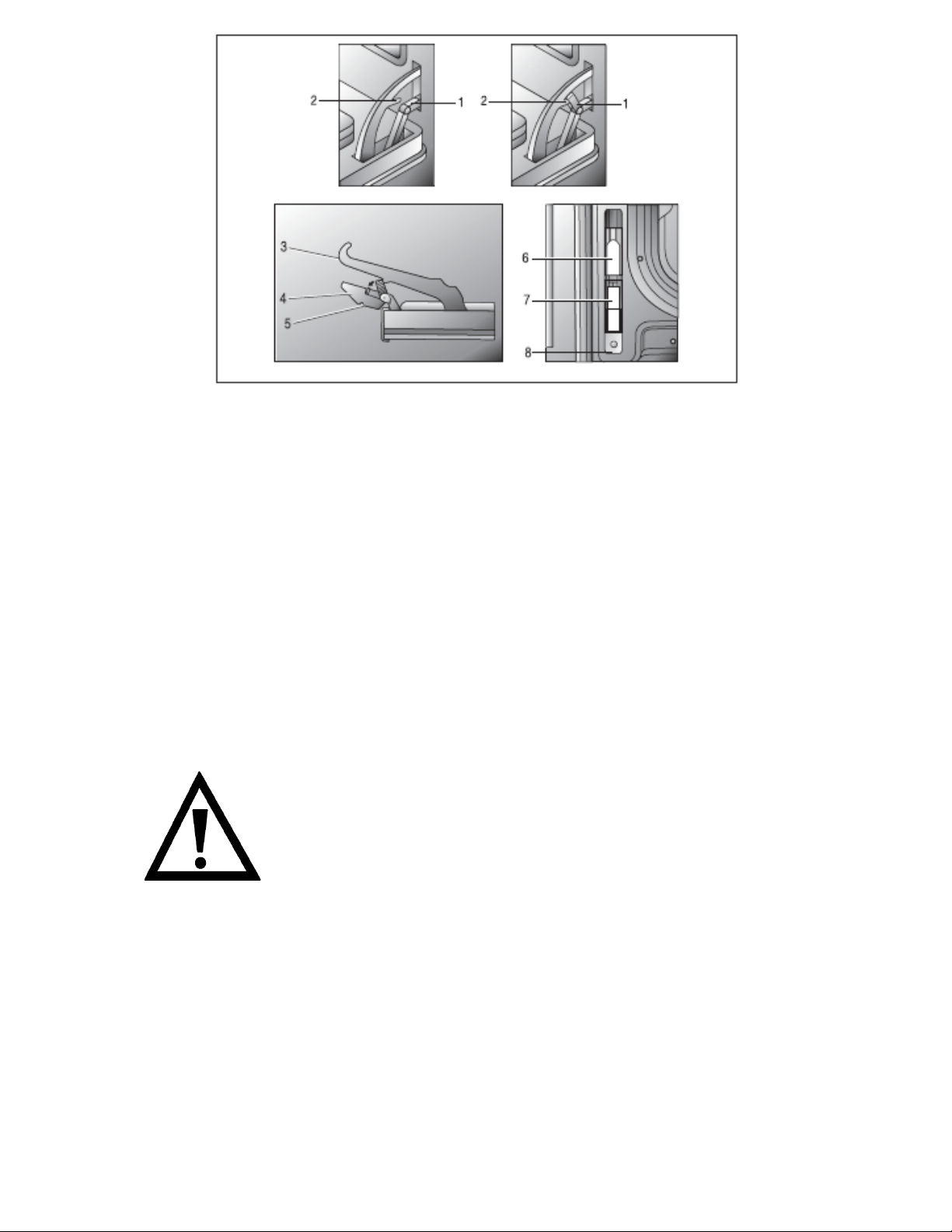
o Insert the upper hinge (3) into the upper slots (6)
o Insert the lower hinge (4) into the lower slots (7)
o The lower hinge clip (5) must hook onto the lower slot of the
oven cavity
o Move the lower hinge bracket (1) off the upper hinge hook (2)
back down into its original position as part of the lower hinge.
o Close and open the door slowly to check that the hinge
mechanism is functioning correctly.
IMPORTANT: Keep the door supported at all times to prevent
any damage being done while performing this process.
o Take care not to dislodge the hinge locking
system when removing the door, as the hinge
mechanism has a strong spring.
o Do not immerse the door in water at any time.
28
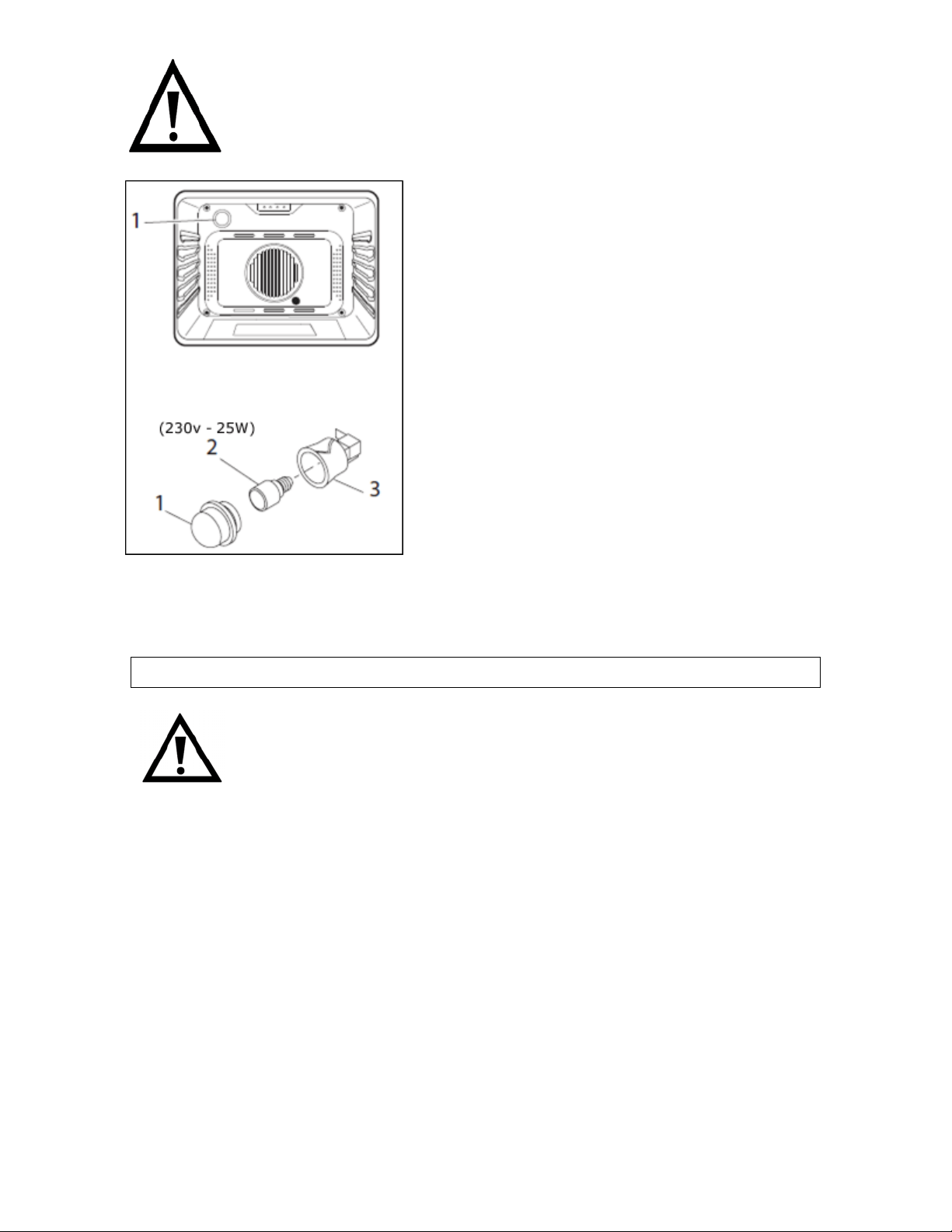
Replacing the oven bulb
IMPORTANT: The oven must be disconnected from
your mains supply before you attempt to either
remove or replace the oven bulb.
o Remove all oven shelves and the
drip tray.
29
holder (3).
with a 25W
500°C, screw type pygmy.
o Do not use any other type of bulb.
lamp cover back into
position.
NSTALLATION
o Remove the light cover (1) by
unscrewing it anti-clockwise.
o Unscrew the bulb (2) anti-
clockwise and remove it from its
o Replace the bulb
o Place the
I
The installation must be carried out by a suitably
qualified person, in accordance with the current
ersion of the following.
and Safety Standards or their European Norm
ulations (issued by the Department of the
ndards (issued by the Scottish Development
Electricity At Work Regulations.
n the rating plate corresponds with your mains supply
oltage.
ARNING: THIS APPLIANCE MUST BE EARTHED.
v
o UK Regulations
Replacements.
o Building Reg
Environment).
o Building Sta
Department).
o IEE Wiring Regulations.
o
Before connecting the appliance, make sure that the supply voltage
marked o
v
W
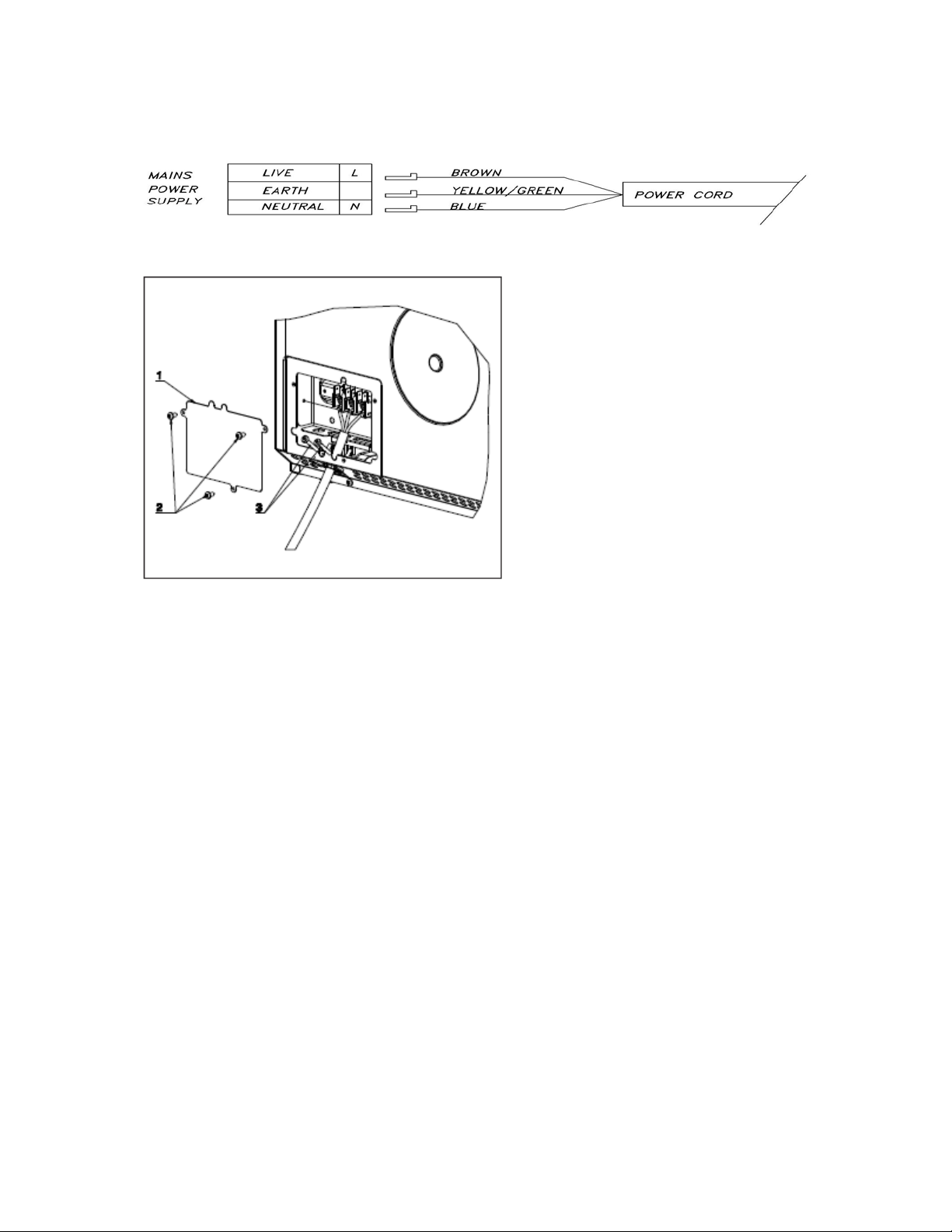
o This appliance should be wired into a 13A (BO638.5SS) / 16A
(P650.5SS) double pole switched fused spur outlet, having 3 mm
contact separation and placed in an easily accessible position
adjacent to the appliance. The spur outlet must still be
accessible even when your oven is located in its housing.
30
terminal block cover
again (2).
nductor must always be 10 mm longer than the
line conductors.
e temperature of the mains
supply cable does not exceed 50°C.
which can be obtained from the
Baumatic Spares Department.
o To connect the oven power
cord, loosen and remove
the cover (1) on the
terminal block, in order to
gain access to the contacts
inside. Make the
connection, securing the
cords in place with the
cable clamp provided (3)
and then immediately close
the
o If you have to change the oven power cord, the earthing
(yellow/green) co
o Care must be taken to ensure that th
o If the mains supply cable is damaged, then it must be replaced
by an appropriate replacement
31
nstalling the oven into the kitchen cabinet
ositioning the appliance
e fitting the oven into is
of the size given in the above diagram.
wn in the “Ventilation requirements” section on the
next page.
t the rear panel of the furniture housing unit has been
removed.
I
P
o Ensure that the aperture that you will b
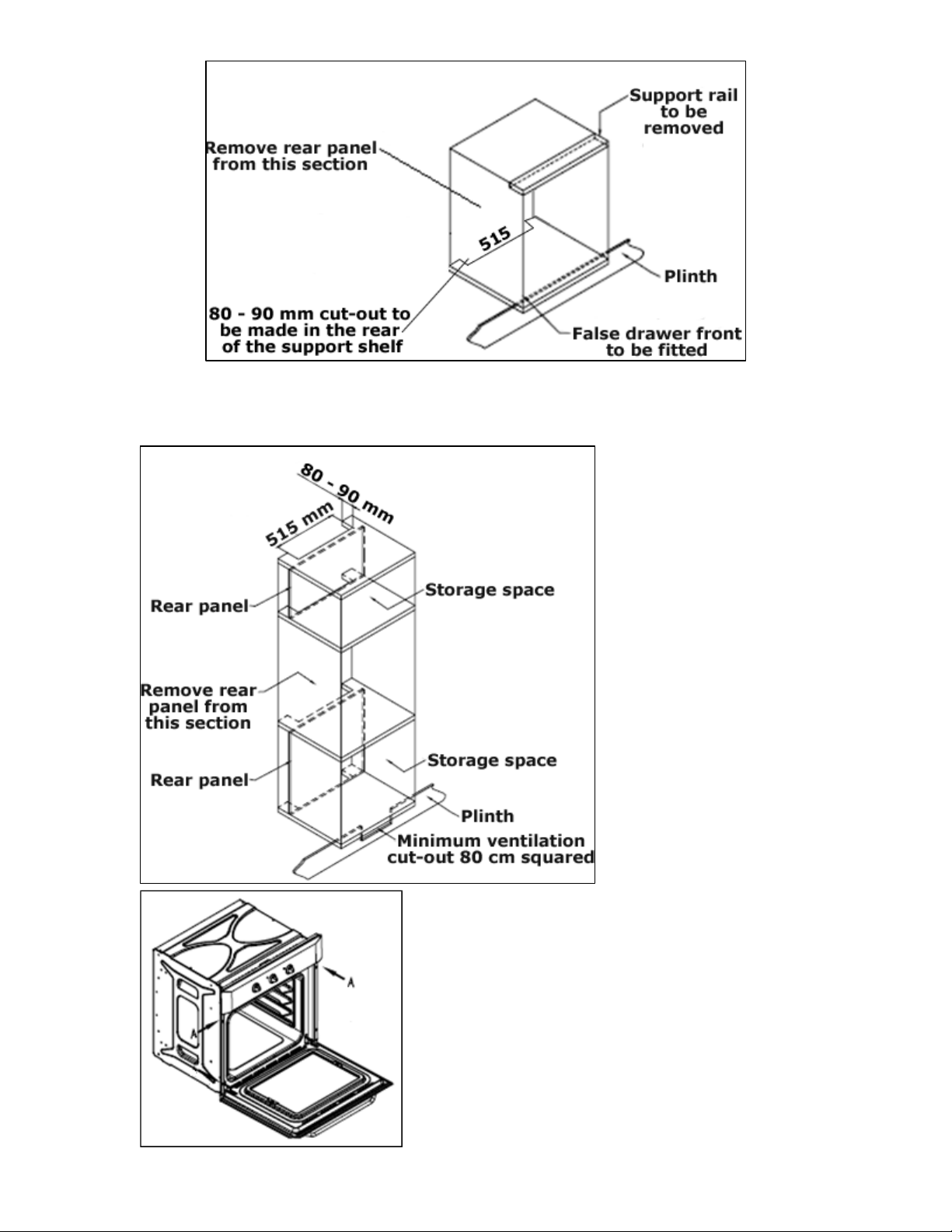
o The oven must be fitted into an oven housing with the ventilation
cut-outs sho
o Ensure tha
32
entil
nts for the
.
ousing unit).
and into the housing unit.
V ation requirements
igure shows the ventilation and cut-out requireme(F
installation of the appliance into a standard kitchen unit)
(Figure shows the
ventilation and cut-
out requirements for
the installation of the
ppliance into a tall a
h
o Ensure that the oven has been
securely fixed into the housing unit.
The fixing of the oven into the
housing is made by using the
screws provided. These should be
screwed through the oven cabinet

33
My appliance isn’t working correctly
o The oven isn’t coming on.
Check that the oven is in manual operation mode.
u have selected a cooking function and a cooking
There appears to be no power to t
he oven and grill.
pliance has been connected to the electrical mains
supply correctly.
Check that the mains fuses are in working order.
e appliance into manual operation mode have been
The grill function works but the main oven does not.
not working, or cuts out for
long periods of time during use.
Once cool, check
g properly.
My food is not cooking properly.
erature by plus or minus
esults.
My food is not cooking evenly.
Check that the oven has been installed correctly and is level.
that the correct temperatures and shelf positions are being
used.
*
C* heck that yo
temperature.
o
C* heck that the ap
*
* Check that the operating instructions for setting the time of day and
putting th
followed.
o
* Check that you have selected the correct cooking function.
The grill and top oven element iso
A* llow the oven to cool for approximately 2 hours.
whether the appliance is again workin
o
* Ensure that you are selecting the correct temperature and the
correct cooking function for the food that you are cooking. It may
be appropriate to adjust your cooking temp
10°C, to achieve the best cooking r
o
*
C* heck

34
he oven bulb” section.
Steam and condensation is a natural by product of cooking any food
tion in the oven cavity and forming between
the oven door glasses. This is not necessarily a sign that the oven is
Do not leave food in the oven to cool after it has been cooked and
Use a covered container, where practical, when cooking to reduce
the amount of condensation that forms.
uld take note of
e error code, disconnect your appliance from the mains supply, and
en contact Customer Care, reporting the error code.
o The oven light is not working.
* Refer to page 29 and follow the “Replacing t
o I am getting condensation in my oven.
*
with high water content, such as frozen food, chicken etc.
* You may get condensa
not working correctly.
*
the oven has been switched off.
*
Error codes:
If an abnormal condition is detected by the appliance for more than
one minute then a failure occurs. The oven will disable itself and
display an error code. The error code will show the letter “E” followed
by a number, for example “E1”, and the oven will also emit a warning
signal. If your appliance displays an error code you sho
th
th

35
uld disconnect it
ur mains supply and then contact Baumatic
3
te that if an engineer is asked to attend whilst the product is
nder guarantee and finds that the problem is not the result of an
essary repair. If your appliance is installed in such a
ay that an engineer is concerned that damage will be caused
n,
ealed in with sealant, have wooden obstructions placed in
en completed.
MPORTANT: Baumatic Ltd. operates a policy of continuous
provement and reserves the right to adjust and modify its
roducts without prior notification.
IMPORTANT: If your appliance appears not to be
operating correctly, then you sho
from yo
6911.
Customer Care on telephone number (0118) 93
DO NOT ATTEMPT TO REPAIR THE APPLIANCE YOURSELF.
Please no
u
appliance fault, then you may be liable for the cost of the call out
charge.
The appliance must be accessible for the engineer to perform
any nec
w
to the appliance or your kitchen, then he will not complete a
repair.
This includes situations where appliances have been tiled i
s
front of the appliance, like plinths. Or any installation other
than the one specified by Baumatic Ltd. has be
Please refer to the conditions of guarantee that appear on the
warranty card that you receive with the appliance.
I
im
p

36

37

38

39
United Kingdom
d., Baumatic Lt
Baumatic Buildings,
6 Bennet Road,
Reading, Berkshire
RG2 0QX
United Kingdom
Sales Telephone
(0118) 933 6900
Sales Fax
0118) 931 0035 (
Customer Care Telephone
(0118) 933 6911
Customer Care Fax
(0118) 986 9124
Spares Telephone
01235) 437244 (
Advice Line Telephone
(0118) 933 6933
E-mail:
tic.co.uk
uk
atic.co.uk
customercare@bauma
ic.co.spares@baumat
echnical@baumt
Website:
ww.baumaticw .co.uk
epublic of Ireland
ervice Telephone
R
S
-890 812 724
pares Telephone
1
S
91 756 771
zech Republic
r.o.
60 01 Liberec 4
ublic
200
lovakia
11 03 Bratislava - Staré Mesto
k
ermany
20 52 Herford
hland
-0
R.L.
ia Galvani N.3
mpodarsego (PD)
olland
B.V.
2
1333 MS ALMERE
Nederland
+3136 549 1555
www.baumatic.nl
C
Baumat
ic CR spol s.
Lípovà 665
4
Czech Rep
+420 483 577
www.baumatic.cz
S
Baumatic Slovakia, s.r.o.
Panenská 34
8
Slovakia
+421 255 640 618
www.baumatic.s
G
Baumatic Gmbh
Lilienthalstrasse 1
3
Deutsc
+49 5221 694 99
www.baumatic.de
Italy
Baumatic Italia S.
V
35011 Ca
+3904 9920 2297
www.baumatic.it
H
0
Baumatic Benelux
Grindzuigerstraat 2

40