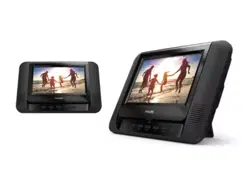
Register your product and get support at
www.philips.com/welcome
Always there to help you
Brugervejledning 25
Gebruiksaanwijzing 69
Manuale utente 113
Användarhandbok 157
User manual 3
Benutzerhandbuch 47
Mode d'emploi 91
Manual del usuario 135
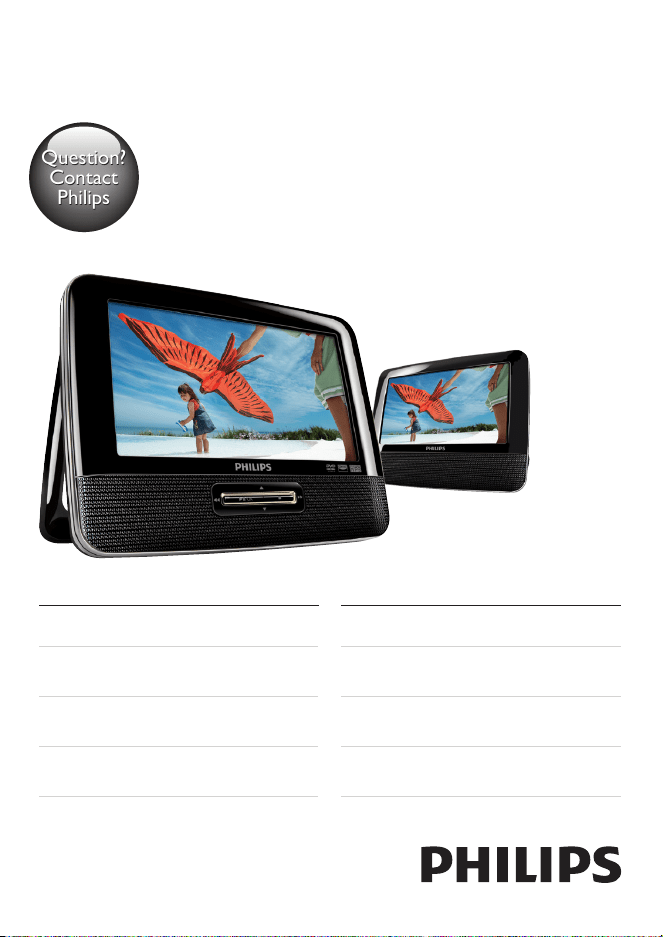
PD7022
Question?
Contact
Philips
Question?
Contact
Philips
PD7022_12_UM_Book1_V4.0.indb 1 12/24/2013 1:50:42 PM

PD7022_12_UM_Book1_V4.0.indb 2 12/24/2013 1:50:42 PM

3EN
Contents
1 Important 5
Safety and notice 5
Safety 5
Compliance 6
Care of the environment 7
Copyright 8
Warranty 9
2 Your portable DVD player 10
Introduction 10
What's in the box 10
Overview of the main unit 11
Overview of the second screen 13
3 Get started 14
Preparation 14
Connect the second screen 15
Connect power 15
4 Use your player 17
Switch on/off 17
Select OSD language 17
Play discs 17
Play options 18
English
PD7022_12_UM_Book1_V4.0.indb 3 12/24/2013 1:50:42 PM

5EN
1 Important
Safety and notice
Read and understand all instructions before you use this product. If damage is
caused by failure to follow the instructions, the warranty does not apply.
Safety
Only use attachments/accessories specied by the manufacturer.
The product shall not be exposed to dripping or splashing.
Do not place any sources of danger on the product (e.g. liquid lled objects,
lighted candles).
Batteries (battery pack or batteries installed) shall not be exposed to excessive
heat such as sunshine, re or the like.
Danger of explosion if battery is incorrectly replaced. Replace only with the same
or equivalent type.
Modication of the product could result in hazardous radiation of EMC or
other unsafe operation.
Warning
• Where the MAINS plug or an appliance coupler is used as the disconnect device, the disconnect
device shall remain readily operable.
English
PD7022_12_UM_Book1_V4.0.indb 5 12/24/2013 1:50:42 PM
6 EN
Warning
• Never remove the casing of this product.
• Never lubricate any part of this product.
• Never place this product on other electrical equipment.
• Keep this product away from direct sunlight, naked ames or heat.
• Never look into the laser beam inside this product.
• Ensure that you always have easy access to the power cord, plug or adaptor to disconnect the
product from the power.
Hearing safety
A pleine puissance, l’écoute prolongée du baladeur peut endommager l’oreille
de l’utilisateur.
Warning
• To prevent possible hearing damage, do not listen at high volume levels for long periods.
The maximum output voltage of the player is not greater than 150 mV.
Compliance
This product complies with the radio interference requirements of the European
Community.
PD7022_12_UM_Book1_V4.0.indb 6 12/24/2013 1:50:43 PM
7EN
This apparatus includes this label:
Note
• The type plate is located on the bottom of the product.
Care of the environment
Environmental information
All unnecessary packaging has been omitted. We have tried to make the packaging
easy to separate into three materials: cardboard (box), polystyrene foam (buffer)
and polyethylene (bags, protective foam sheet.)
Your system consists of materials which can be recycled and reused if
disassembled by a specialized company. Please observe the local regulations
regarding the disposal of packaging materials, and old equipment.
Your product is designed and manufactured with high quality materials and
components, which can be recycled and reused.
When this crossed-out wheeled bin symbol is attached to a product it means that
the product is covered by the European Directive 2002/96/EC.
Please inform yourself about the local separate collection system for electrical and
electronic products.
English
PD7022_12_UM_Book1_V4.0.indb 7 12/24/2013 1:50:44 PM
8 EN
Please act according to your local rules and do not dispose of your old products
with your normal household waste. Correct disposal of your old product helps to
prevent potential negative consequences for the environment and human health.
Your product contains batteries covered by the European Directive 2006/66/EC,
which cannot be disposed with normal household waste.Please inform yourself
about the local rules on separate collection of batteries because correct disposal
helps to prevent negative consequences for the environmental and human health.
Copyright
This item incorporates copy protection technology that is protected by U.S.
patents and other intellectual property rights of Rovi Corporation. Reverse
engineering and disassembly are prohibited.
Specications are subject to change without notice. Trademarks are the property
of Koninklijke Philips Electronics N.V or their respective owners. Philips reserves
the right to change products at any time without being obliged to adjust earlier
supplies accordingly.
Manufactured under license from Dolby Laboratories.
Dolby and the double-D symbol are trademarks of Dolby Laboratories.
ABOUT DIVX VIDEO: DivX
®
is a digital video format created by DivX.LLC, a
subsidiary of Rovi Corporation. This is an ofcial DivX Certied
®
device that plays
DivX video. Visit divx.com for more information and software tools to convert
your les into DivX videos.
PD7022_12_UM_Book1_V4.0.indb 8 12/24/2013 1:50:46 PM

9EN
ABOUT DIVX VIDEO-ON-DEMAND: This DivX Certied
®
device must be
registered in order to play purchased DivX Video-on-Demand (VOD) movies.
To obtain your registration code, locate the DivX VOD section in your device
setup menu. Go to vod.divx.com for more information on how to complete your
registration.
Warranty
• Never attempt to repair the product, this could lead to the risk of injury,
damage to the product and will void your warranty.
• Use the product and accessories only as intended by the manufacturer. The
caution sign printed on the back of the product indicates risk of electric
shock.
• Never remove the cover of the product. Always contact Philips Customer
Support for service or repairs.
• Any operation expressly prohibited in this manual, or any adjustments and
assembly procedures not recommended or authorized in this manual shall
void the warranty.
English
PD7022_12_UM_Book1_V4.0.indb 9 12/24/2013 1:50:46 PM

10 EN
2 Your portable DVD player
Congratulations on your purchase, and welcome to Philips! To fully benet from
the support that Philips offers, register your product at www.philips.com/welcome.
Introduction
Your portable DVD player plays digital video discs that conform to the universal
DVD Video standard. With it, you can play movies with true cinema picture quality
and stereo or multi-channel sound (depending on disc and playback set-up).
You can also select sound track, subtitle languages, and different angle of view
(again depending on DVD disc). Besides, you can restrict the play of discs that are
not suitable for children.
You can play the following discs on the DVD player (including CD-R, CD-RW,
DVD±R and DVD±RW):
• DVD-Video
• Video CD
• Audio CD
• MP3 CD
• DivX
• Discs with JPEG les
What's in the box
Check and identify the contents of your package:
• Main unit x 1
• Second screen x 1
• AC power adaptor x 1, ASUC12E-090080 (Philips)
• Car adaptor x 1
• AV cable x 2
• Fastening strap x 2
• User Manual x 1
PD7022_12_UM_Book1_V4.0.indb 10 12/24/2013 1:50:46 PM
11EN
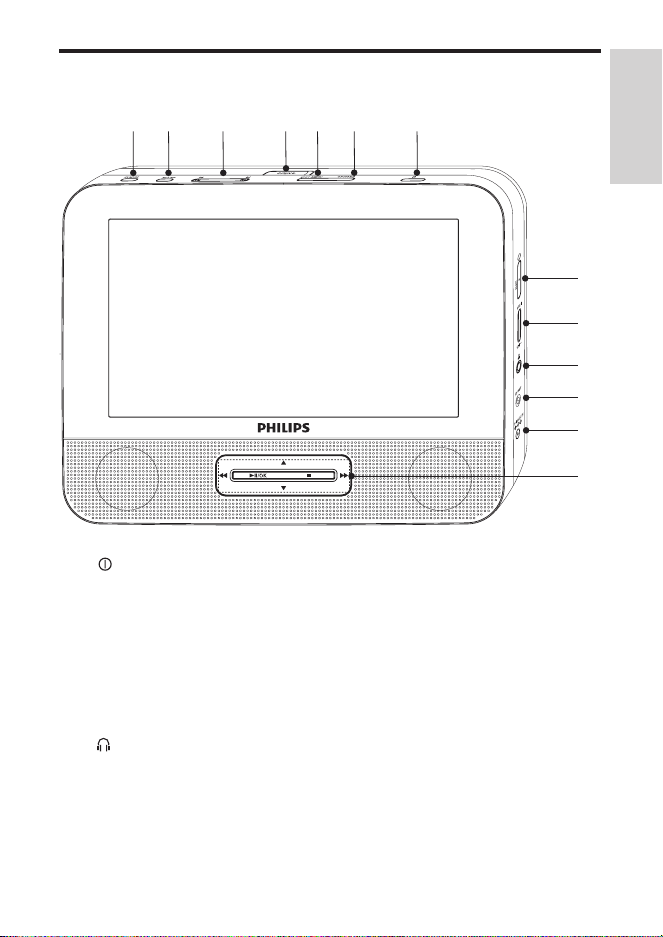
Overview of the main unit
a
• Turns on/off DVD player.
b RESET
• When the player hangs up, press it with a ball-point pen or similar tool
to reset the player.
c VOL +/-
• Increases or decreases volume.
d
• Headphone jack.
e AV OUT
• Audio/video output jack.
ahi jklm
b
c
d
e
f
g
English
PD7022_12_UM_Book1_V4.0.indb 11 12/24/2013 1:50:47 PM

12 EN
f DC IN
• Power supply socket.
g , , ,
• Navigates menus.
,
• Searches backward/forward at different speeds.
/OK
• Conrms an entry or selection.
• Starts, pauses or resumes disc play.
• Stops disc play.
h AV MODE
• Switches between PAL and NTSC mode.
i SETUP
• Accesses or exits the setup menu.
j ,
• Skips to the previous or next title, chapter, or track.
k OPEN
• Opens the disc compartment.
l DISC MENU
• For DVD, accesses or exits disc menu.
• For VCD, turns on or off PBC (Playback Control) mode.
• For VCD version 2.0 or SVCD with PBC turned on, returns to the
menu.
m OPTIONS
• Accesses options relating to the current activity or selection.
PD7022_12_UM_Book1_V4.0.indb 12 12/24/2013 1:50:51 PM
13EN
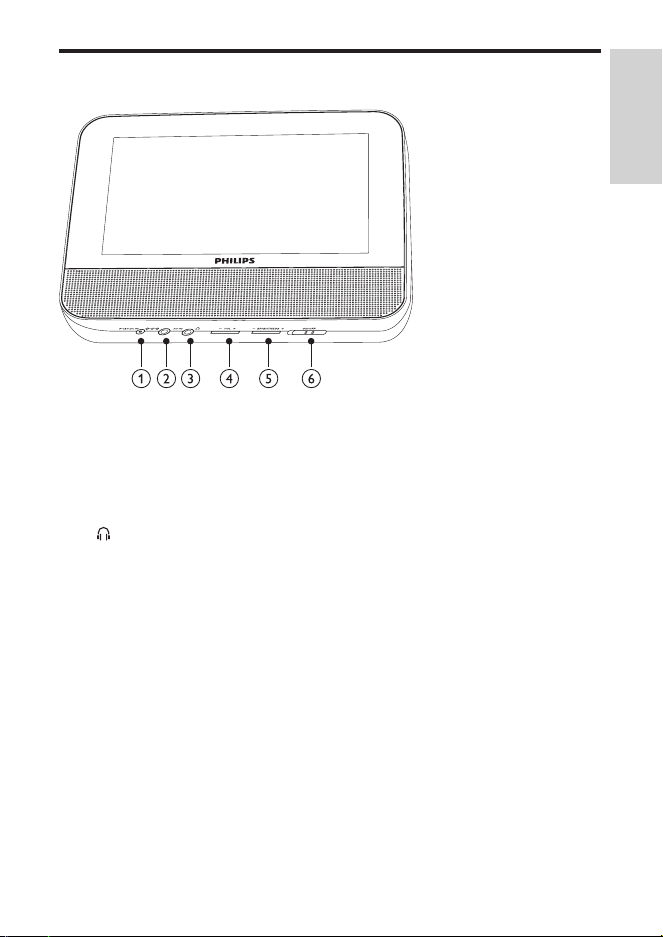
Overview of the second screen
a DC IN
• Power supply socket.
b AV IN
• Audio/video input jack.
c
• Headphone jack.
d VOL -/+
• Decreases or increases volume.
e BRIGHTNESS -/+
• Adjusts screen brightness.
f OFF/ON
• Turns off/on the second screen.
English
PD7022_12_UM_Book1_V4.0.indb 13 12/24/2013 1:50:52 PM
14 EN
3 Get started
Caution
• Use the controls only as stated in this user manual.
• Always follow the instructions in this chapter in sequence.
If you contact Philips, you will be asked for the model and serial number of your
player. The model number and serial number are on the bottom of your player.
Write the numbers here:
Model No. __________________________
Serial No. ___________________________
Preparation
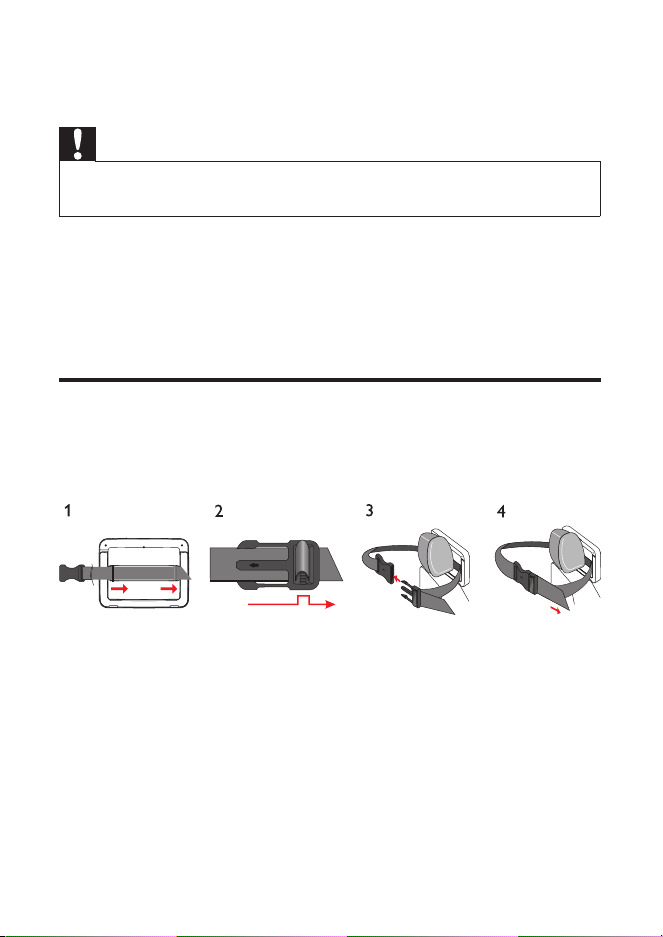
To use the player in a car, attach the main unit and the second screen to the back
of the front seat headrests.
1 Pull the strap through the loops on the back of the main unit.
2 Hold the buckle with the marked arrow facing you, then attach the buckle
to the strap.
3 Position the main unit at the back of the headrest, then fasten the buckle.
4 Pull the strap to secure the main unit to the headrest.
• To attach the second screen, repeat the above steps.
PD7022_12_UM_Book1_V4.0.indb 14 12/24/2013 1:50:53 PM
15EN
Connect the second screen
Caution
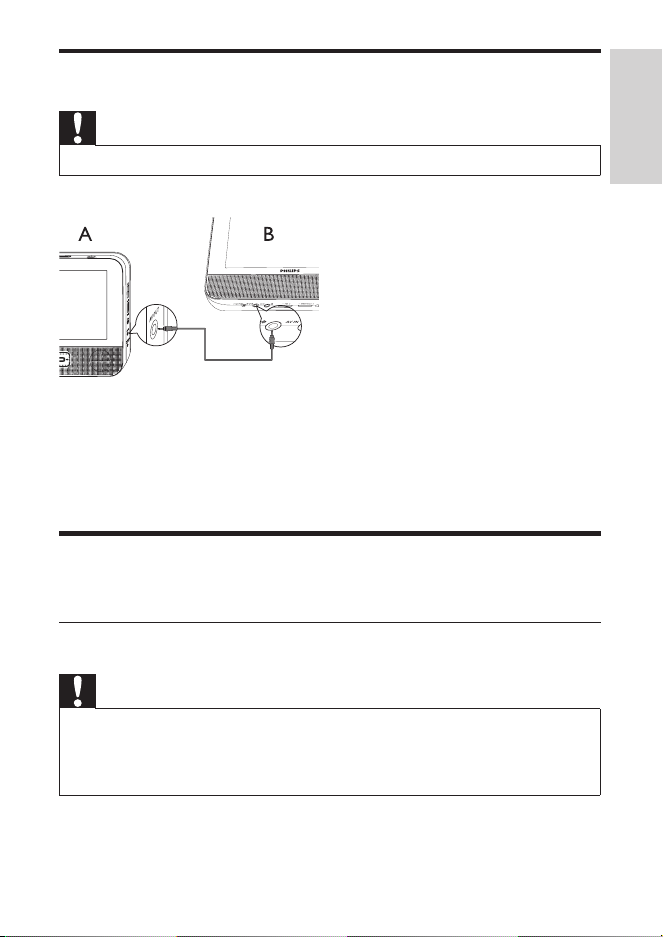
• Turn off your player before you connect the second screen.
A: main unit; B: second screen
1 Connect the supplied AV cable to:
• the AV OUT jack on the main unit.
• the AV IN jack on the second screen.
Connect power
Connect power through car adaptor
Caution
• Risk of product damage! Ensure that the power supply voltage corresponds to the voltage pointed
on the back or the underside of the player.
• Risk of electric shock! When you unplug the AC adaptor, always pull the plug from the socket.
Never pull the cable.
English
PD7022_12_UM_Book1_V4.0.indb 15 12/24/2013 1:50:54 PM
16 EN
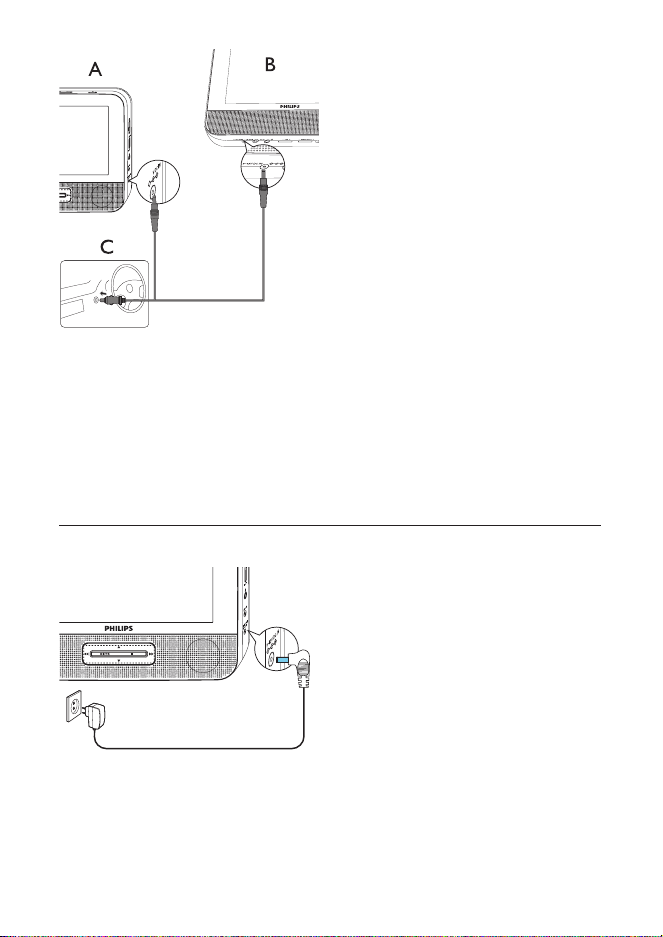
A: main unit; B: second screen; C: car cigarette lighter
1 Connect one end of the double-connector end of the AC cable to the DC
IN jack on the main unit.
2 Connect the other end of the double-connector end of the AC cable to the
DC IN jack on the second screen.
3 Connect the one-connector end to the car cigarette lighter socket.
Connect power through the AC adaptor
1 Connect the AC adaptor cable to:
• the DC IN jack on the main unit.
• the power outlet.
PD7022_12_UM_Book1_V4.0.indb 16 12/24/2013 1:50:56 PM
17EN
4 Use your player
Switch on/off
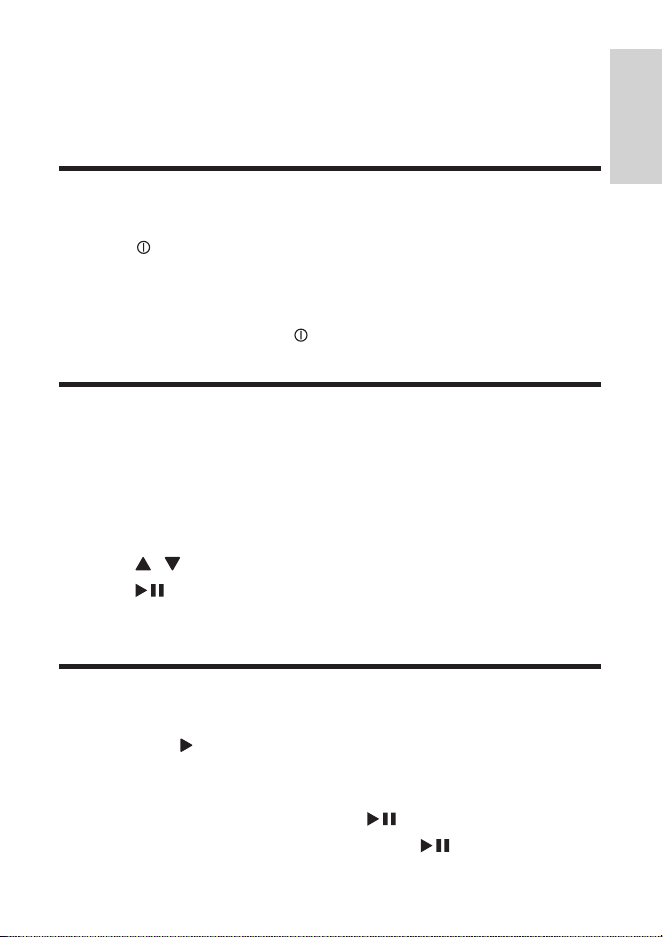
1 Press to switch on the player.
• To switch on the second screen, slide the OFF/ON switch on the
second screen to the ON position. To switch off, slide the OFF/ON
switch to the OFF position.
2 To switch off the player, press .
Select OSD language
You can select a different language for the onscreen display text.
1 Press SETUP.
» The setup menu is displayed.
2 Select [General] > [Language].
3 Press / to select a language.
4 Press /OK to conrm.
5 Press SETUP to exit.
Play discs
1 Slide OPEN on the main unit.
2 Insert the disc with label side facing up.
3 Push down to close the disc compartment.
» Play starts automatically. If not, press /OK.
• If a menu appears, select an item, then press /OK to start play.
English
PD7022_12_UM_Book1_V4.0.indb 17 12/24/2013 1:50:57 PM

18 EN
• To pause, press /OK. Press again to resume play.
• To stop, press twice.
• To select the previous/next item, press or .
• To start search within video/audio, press or once or more.
Play options
1 During play, press OPTIONS to select some play options.
2 Follow the on-screen instructions.
PD7022_12_UM_Book1_V4.0.indb 18 12/24/2013 1:50:57 PM
19EN
5 Adjust settings
Set the main unit
To maximize your play experience, use SETUP to ne tune your settings.
1 Press SETUP.
» The setup menu is displayed.
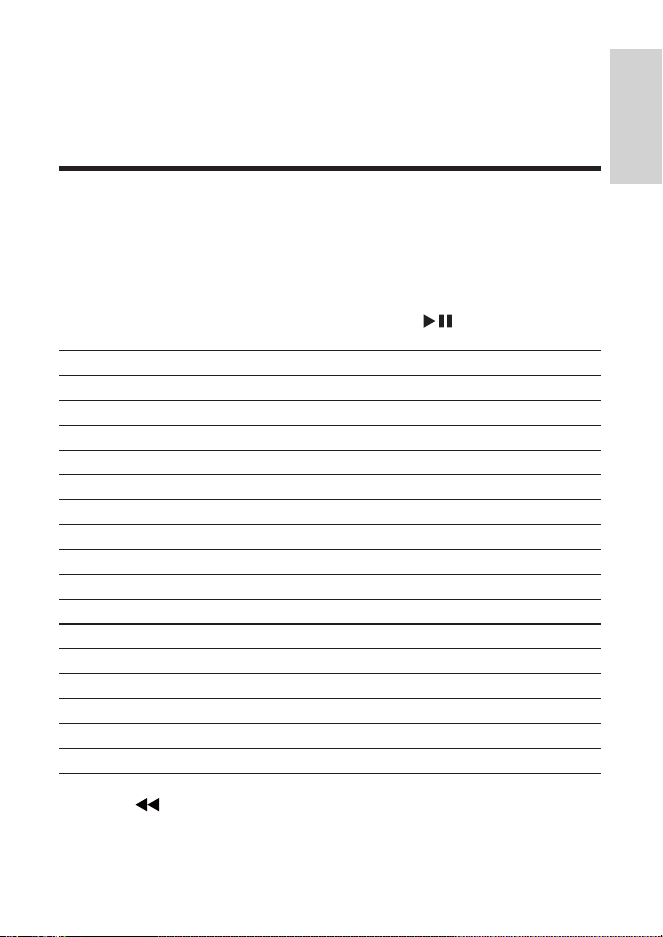
2 Use navigation keys to select an option and press /OK to conrm.
[General]
[Language] Select on-screen display language
[PBC settings] Set playback control function on/off.
[Power save] Set power saving mode.
[DivX (VOD)] Get DivX registration code.
[DivX subtitles] Select DivX subtitle language.
[Parental(DVD)] Select parental options.
[Set password] Change existing password (3308 by default).
[Factory settings] Restore factory settings.
[Video]
[LCD Display] Set screen display aspect ratio.
[TV standard] Set video output format to TV system.
[Brightness] Adjust screen brightness.
[Contrast] Adjust screen contrast.
[ Audio]
[Dolby] Set Dolby output.
[Version] Check the version information.
3 Press to go back to the previous menu.
4 Press SETUP to exit.
English
PD7022_12_UM_Book1_V4.0.indb 19 12/24/2013 1:50:57 PM

20 EN
Set the second screen
You can also set the second screen.
• To adjust volume level for the second screen, press VOL -/+ on the second
screen.
• To adjust the brightness of the second screen, press BRIGHTNESS -/+ on
the second screen.
PD7022_12_UM_Book1_V4.0.indb 20 12/24/2013 1:50:58 PM
21EN
6 Use more of your player
Connect additional equipment
Caution
• Turn off your player before connecting to any additional equipment.
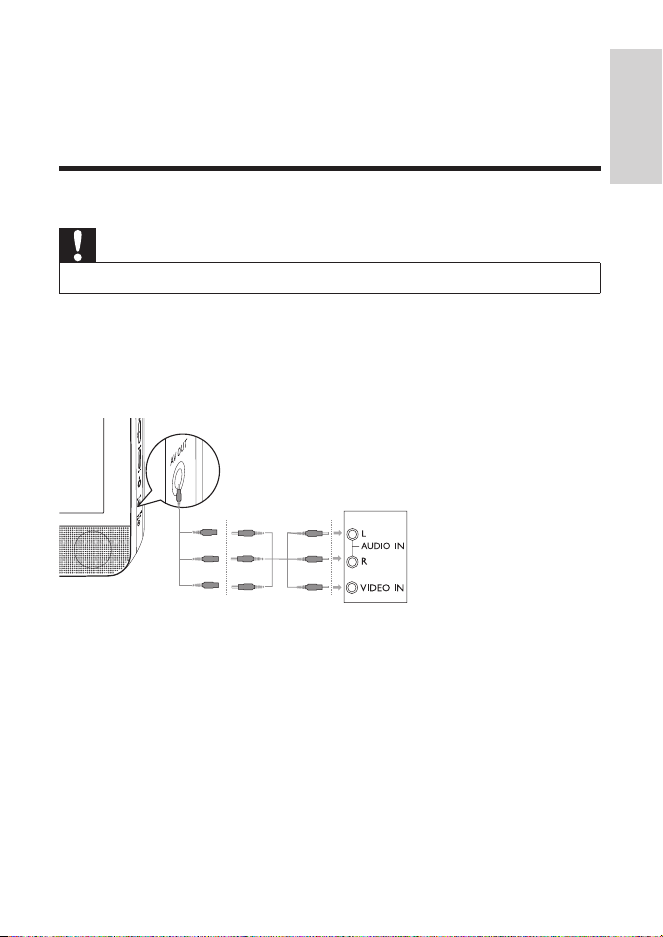
You can connect the player to a TV or an amplier to enjoy DVDs or Karaoke.
Match the color of the AV cables (the AV cable connected to TV is not supplied)
with the jacks: the yellow cable is for the yellow video jack, the red/white cable is
for the red/white audio jacks.
TV
not supplied
English
PD7022_12_UM_Book1_V4.0.indb 21 12/24/2013 1:50:58 PM
22 EN
7 Product information
Note
• Product information is subject to change without prior notice.
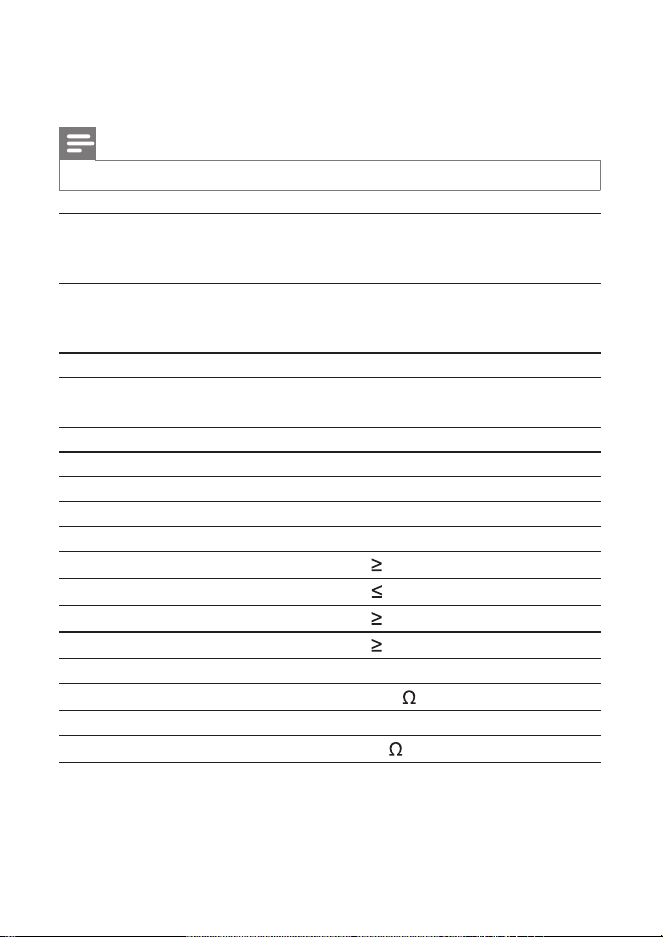
Dimensions
- Main unit
- Second screen
200 x 155 x 39 mm
200 x 155 x 21 mm
Weight
- Main unit
- Second screen
0.7 kg
0.4 kg
AC Power adaptor ASUC12E-090080 (Philips)
Power supply Input: 100-240V 50/60Hz 0.3A
Output: DC 9V 0.8A
Power consumption 9 W
Operating temperature range 0-45°C
Laser wavelength 650 nm
Video system NTSC & PAL
Frequency response 20Hz-20KHz ± 1dB
Signal/noise ratio
80 dB
Audio distortion + noise
-80 (1KHz)
Channel separation
80 dB
Dynamic range
80 dB
Audio out (analog audio) Output level: 2V ± 10%
Load impedance
10 K
Video out Output level: 1Vp - p ± 20%
Load impedance
75
PD7022_12_UM_Book1_V4.0.indb 22 12/24/2013 1:50:59 PM

23EN
8 Troubleshooting
Warning
• Risk of electric shock. Never remove the casing of the player.
To keep the warranty valid, never try to repair the system yourself.
If you encounter problems when using the player, check the following points
before requesting service. If the problem remains unsolved, register your player
and get support at www.philips.com/support. When you contact Philips, ensure
that your apparatus is nearby and the model number and serial number are
available.
No power
• Ensure that both plugs of the mains cord are properly connected.
• Ensure that there is power at the car cigarette lighter or AC outlet.
No sound
• Ensure that the AV cable is connected correctly.
Distorted picture
• Clean the disc. With a clean, soft, lint-free cloth, wipe the disc outwards from
the center.
• Make sure that the video output format of the disc is compatible with the TV.
• Change the video output format to match your TV or program.
• The LCD is manufactured using high precision technology. You may, however,
see tiny black points and/or bright points(red, blue, green) that continuously
appear on the LCD. This is a normal result of the manufacturing process and
does not indicate a malfunction.
Cannot play disc
• Ensure the disc label is upwards.
• Clean the disc. With a clean, soft, lint-free cloth, wipe the disc outwards from
the center.
• Check if the disc is defective by trying another disc.
Not work properly or freeze up
• Press RESET with a ball-point pen or similar tool to switch off the player, and
press to restart.
English
PD7022_12_UM_Book1_V4.0.indb 23 12/24/2013 1:51:00 PM

24 EN
The player feels warm
• When the player is in use for a long period of time, its surface will be heated.
This is normal.
PD7022_12_UM_Book1_V4.0.indb 24 12/24/2013 1:51:00 PM

PD7022_12_UM_Book1_V4.0.indb 2 12/24/2013 1:50:42 PM

Specifications are subject to change without notice
© 2014 Koninklijke Philips Electronics N.V.
All rights reserved.
PD7022_12_UM_ERP_V4.0_wk1552.2
PD7022_12_UM_Book1_V4.0.indb 180 12/24/2013 1:52:45 PM