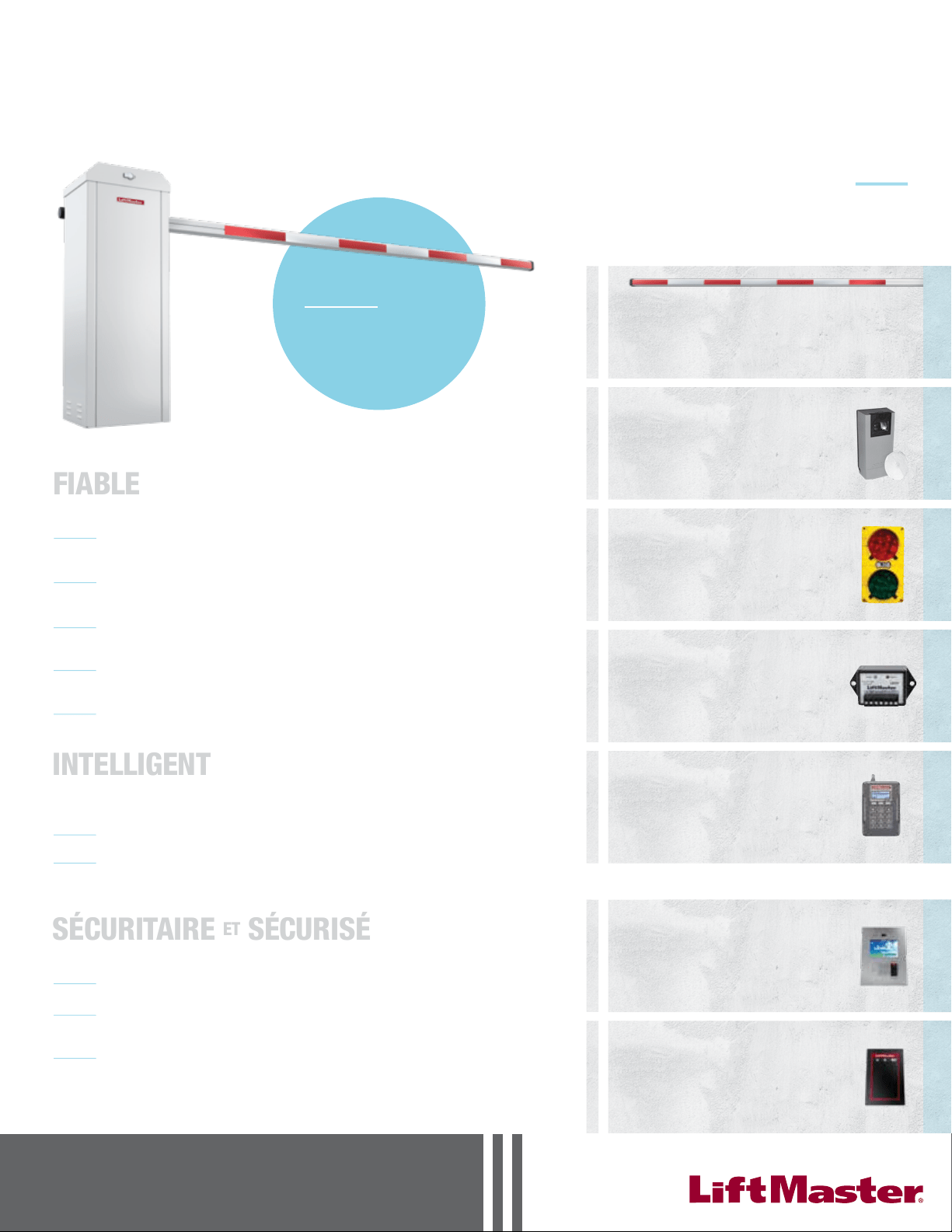
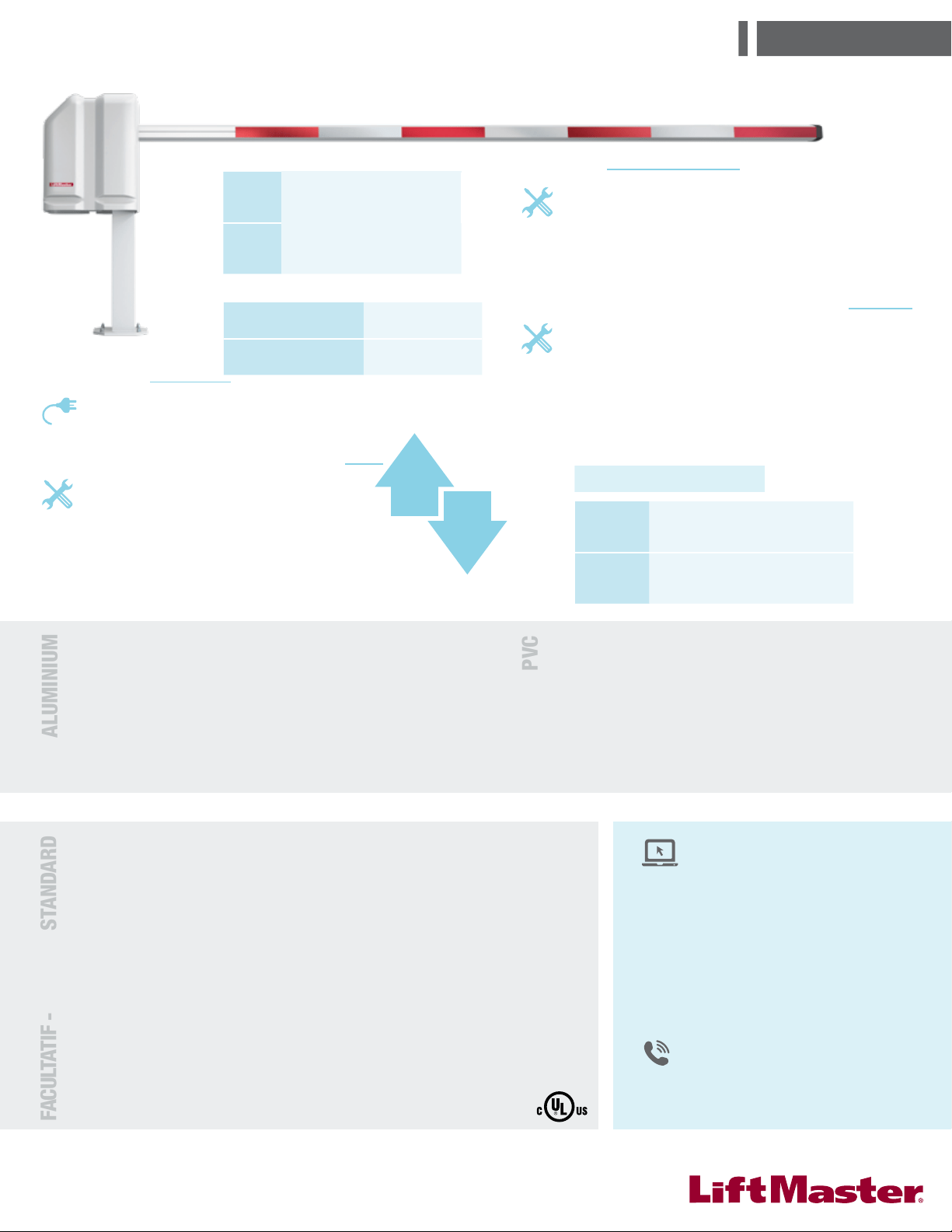
MADCBB, MATDCBB,
MASDCBB, & MASTDCBB
HEAVY-DUTY DC BARRIER GATE OPERATOR
OWNER'S MANUAL
RADIO
RECEIVER
INCLUDED
IMPORTANT: Read and understand Warranty Page first. Batteries (included) MUST be connected for proper
operation of operator. Use (2) LiftMaster 12 Vdc 7AH (Part # MBAT).
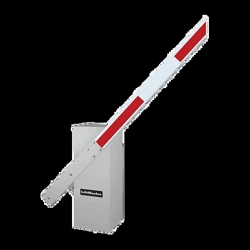
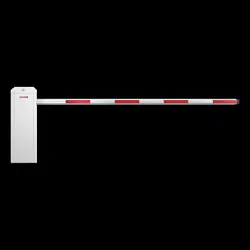
MEGA ARM &
MEGA SPRINT
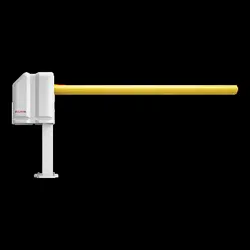
MEGA ARM TOWER &
MEGA SPRINT TOWER
The Chamberlain Group, Inc.
845 Larch Avenue
Elmhurst, Illinois 60126-1196
www.liftmaster.com
2
SAFETY 2-4
Safety Symbol and Signal Word Review 2
UL325 Model Classifications 3
Safety Installation Information 4
INTRODUCTION 5
Features 5
Tools Needed 5
Operator Specifications 5
INSTALLATION 6-7
Install the Concrete Pad and Conduit 6
Attach the Operator to the Concrete Pad 7
Install the Barrier Arm 7
WIRING 8-11
Power Wiring 8
Input Commands Connections 9
Accessory and Relay Connections 10
Battery Installation 10
Primary/Second Wiring 11
INSTALL THE RECEIVER 12
FEATURES AND FUNCTIONS 13-14
S1 DIP Switches 13
S2 DIP Switches 14
ADJUSTMENTS 15
Instant Reverse Device (IRD) 15
Adjust the Barrier Arm 15
OPERATION AND MAINTENANCE 15-16
Important Safety Instructions 15
General Service 16
Shear Pin Replacement 16
Battery 16
ADDITIONAL FEATURES 17-20
Suggested Loop Sensor Locations 17
Trap Instructions 18
Sequence Access Management System (SAMS) with "Memory" 19
Control Board Layout 20
TROUBLESHOOTING 21
Battery Checkout 21
Gate Not Operating 21
Troubleshooting Chart 21
REPAIR PARTS 22
Part Numbers and Descriptions 22
Parts Shipped 22
Mega Arm Tower Unique Parts List 22
Mega Arm Options Parts List 22
ACCESSORIES 23
WARRANTY POLICY 24
TABLE OF CONTENTS
When you see these Safety Symbols and Signal Words on the following pages, they
will alert you to the possibility of serious injury or death if you do not comply with
the warnings that accompany them. The hazard may come from something
mechanical or from electric shock. Read the warnings carefully.
When you see this Signal Word on the following pages, it will alert you to the
possibility of damage to your gate and/or the gate operator if you do not comply
with the cautionary statements that accompany it. Read them carefully.
IMPORTANT
NOTE:
• BEFORE attempting to install, operate or maintain the operator, you must read and
fully understand this manual and follow all safety instructions.
• DO NOT attempt repair or service of your commercial door and gate operator
unless you are an Authorized Service Technician.
SAFETY » SAFETY SYMBOL AND SIGNAL WORD REVIEW
MECHANICAL
ELECTRICAL
WARNING: This product can expose you to chemicals including
lead, which are known to the State of California to cause cancer or
birth defects or other reproductive harm. For more information go to
www.P65Warnings.ca.gov
3
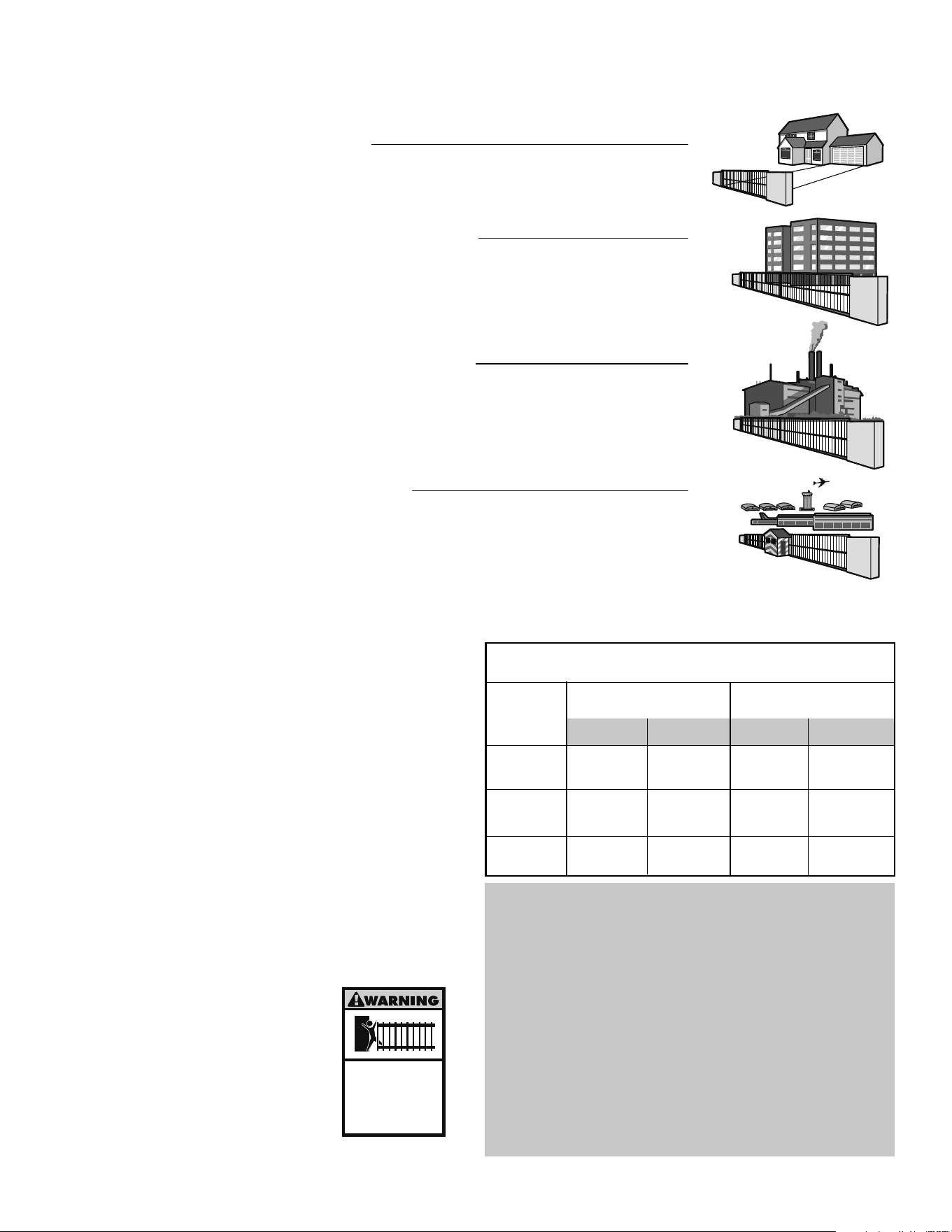
CLASS I – RESIDENTIAL VEHICULAR GATE OPERATOR
A vehicular gate operator (or system) intended for use in a home of one-to four single family dwellings, or a garage or
parking area associated therewith.
I
II
III
IV
CLASS II – COMMERCIAL/GENERAL ACCESS VEHICULAR GATE OPERATOR
A vehicular gate operator (or system) intended for use in a commercial location or building such as a multi-family housing unit
(five or more single family units) hotel, garage, retail store or other building servicing the general public.
CLASS III – INDUSTRIAL/LIMITED ACCESS VEHICULAR GATE OPERATOR
A vehicular gate operator (or system) intended for use in a industrial location or building such as a factory or loading dock
area or other location not intended to service the general public.
CLASS IV – RESTRICTED ACCESS VEHICULAR GATE OPERATOR
A vehicular gate operator (or system) intended for use in a guarded industrial location or building such as an airport security
area or other restricted access locations not servicing the general public, in which unauthorized access is prevented via
supervision by security personnel.
SAFETY ACCESSORY SELECTION
All UL325 compliant LiftMaster gate operators will accept external entrapment
protection devices to protect people from motorized gate systems. UL325 requires
that the type of entrapment protection correctly matches each gate application.
Below are the six types of entrapment protection systems recognized by UL325 for
use on this operator.
ENTRAPMENT PROTECTION TYPES
Type A: Inherent obstruction sensing system, self-contained within the operator.
This system must sense and initiate the reverse of the gate within two
seconds of contact with a solid object.
Type B1: Connections provided for a non-contact device, such as a photoelectric eye
can be used as a secondary protection.
Type B2: Connections provided for a contact sensor. A contact device such as a gate
edge can be used for secondary protection.
Type C: Inherent adjustable clutch or pressure relief valve.
Type D: Connections provided for a control requiring continuous pressure to
operate the operator open and close.
Type E: Built-in audio alarm. Examples include sirens, horns or buzzers.
NOTE: UL requires that all installations must have
warning signs placed in plain view on both sides of the
gate to warn pedestrians of the dangers of motorized
gate systems.
Moving Gate Can Cause
Injury or Death
KEEP CLEAR! Gate may move at any
time without prior warning.
Do not let children operate the gate or
play in the gate area.
This entrance is for vehicles only.
Pedestrians must use separate entrance
The chart above illustrates the entrapment protection requirements for each of the
four UL325 classes.
In order to complete a proper installation you must satisfy the entrapment
protection chart shown above. That means that the installation must have one
primary means of entrapment protection and one independent secondary means of
entrapment protection. Both primary and secondary entrapment protection
methods must be designed, arranged or configured to protect against entrapments
in both the open and close directions of gate travel.
For Example: For a slide gate system that is installed on a single-family
residence (UL325 Class I) you must provide the following: As your primary type of
entrapment protection you must provide Type A inherent (built into the operator)
entrapment sensing and at least one of the following as your secondary
entrapment protection: Type B1- Non-contact sensors such as photoelectric eyes,
Type B2- Contact sensors such as gate edges or Type D- Constant pressure control.
Class
I & II
Class III
Class IV
A, B1, B2, C or D A, B1, B2, C, D or
E
A, B1, B2, D or EA, B1, B2 or D
A, B1 or B2 A, B1, B2, D or E
A, B1, B2 or C
A, B1, B2, or C
A or C
B1, B2 or D
A
Slide Gate Operator
Swing & Gate Barrier
(Arm) Operator
UL325
Installation
Class
Primary
Type
Secondary
Type
Secondary
Type
Primary
Type
A, B1, B2, C, D
or E
SAFETY » UL325 MODEL CLASSIFICATIONS
GATE OPERATOR ENTRAPMENT PROTECTION
UL325 MODEL CLASSIFICATIONS
UL325 ENTRAPMENT PROTECTION REQUIREMENTS

4
1. Vehicular gate systems provide convenience and security. Gate systems are comprised of many component parts. The gate operator is only one component. Each gate
system is specifically designed for an individual application.
2. Gate operating system designers, installers and users must take into account the possible hazards associated with each individual application. Improperly designed,
installed or maintained systems can create risks for the user as well as the bystander. Gate systems design and installation must reduce public exposure to potential
hazards.
3. A gate operator can create high levels of force in its function as a component part of a gate system. Therefore, safety features must be incorporated into every design.
Specific safety features include:
• Gate Edges • Guards for Exposed Rollers • Photoelectric Sensors
• Screen Mesh • Vertical Posts • Instructional and Precautionary Signage
4. Install the gate operator only when:
a. The operator is appropriate for the construction and the usage class of the gate.
b. All openings of a horizontal slide gate are guarded or screened from the bottom of the gate to a minimum of 4' (1.2 m) above the ground to prevent a
2-1/4" (6 cm) diameter sphere from passing through the openings anywhere in the gate, and in that portion of the adjacent fence that the gate covers in the
open position.
c. All exposed pinch points are eliminated or guarded, and guarding is supplied for exposed rollers.
5. The operator is intended for installation only on gates used for vehicles. Pedestrians must be supplied with a separate access opening. The pedestrian access opening
shall be designed to promote pedestrian usage. Locate the gate such that persons will not come in contact with the vehicular gate during the entire path of travel of the
vehicular gate.
6. The gate must be installed in a location so that enough clearance is supplied between the gate and adjacent structures when opening and closing to reduce the risk of
entrapment. Swinging gates shall not open into public access areas.
7. The gate must be properly installed and work freely in both directions prior to the installation of the gate operator.
8 Controls intended for user activation must be located at least six feet (6') away from any moving part of the gate and where the user is prevented from reaching over,
under, around or through the gate to operate the controls. Outdoor or easily accessible controls shall have a security feature to prevent unauthorized use.
9. The Stop and/or Reset (if provided separately) must be located in the line-of-sight of the gate. Activation of the reset control shall not cause the operator to start.
10. A minimum of two (2) WARNING SIGNS shall be installed, one on each side of the gate where easily visible.
11. For a gate operator utilizing a non-contact sensor:
a. Reference owner’s manual regarding placement of non-contact sensor for each type of application.
b. Care shall be exercised to reduce the risk of nuisance tripping, such as when a vehicle trips the sensor while the gate is still moving.
c. One or more non-contact sensors shall be located where the risk of entrapment or obstruction exists, such as the perimeter reachable by a moving gate or barrier.
12. For a gate operator utilizing a contact sensor such as an edge sensor:
a. One or more contact sensors shall be located where the risk of entrapment or obstruction exists, such as at the leading edge, trailing edge and post mounted both
inside and outside of a vehicular horizontal slide gate.
b. One or more contact sensors shall be located at the bottom edge of a vehicular vertical lift gate.
c. A hard wired contact sensor shall be located and its wiring arranged so the communication between the sensor and the gate operator is not subject to mechanical
damage.
d. A wireless contact sensor such as the one that transmits radio frequency (RF) signals to the gate operator for entrapment protection functions shall be located
where the transmission of the signals are not obstructed or impeded by building structures, natural landscaping or similar obstruction. A wireless contact sensor
shall function under the intended end-use conditions.
e. One or more contact sensors shall be located on the inside and outside leading edge of a swing gate. Additionally, if the bottom edge of a swing gate is greater
than 6" (152 mm) above the ground at any point in its arc of travel, one or more contact sensors shall be located on the bottom edge.
f. One or more contact sensors shall be located at the bottom edge of a vertical barrier (arm).
SAFETY » SAFETY INSTALLATION INFORMATION
5
• Full service controller with eight inputs and LED indicators for loops, card reader,
radio, etc.
• Reversible arm direction for right or left handed operation.
• Instant Reverse Device (IRD) monitor senses obstructions during motion.
• Fail safe (auto open on AC power failure).
• Raise gate input memory will memorize multiple vehicles – ideal for bar code
scanners and AVI.
• Ability to STOP arm in close travel if tail-gating is sensed at close loop.
• Anti-tail gate alarm - fires K1 relay to trigger a warning device when tail-gating is
sensed.
• SAMS with “memory” - allows Mega Arm to open a slide/swing gate first then
raises arm.
• Dynamic motor braking to preserve arm positioning.
• Direct drive gear reducer eliminates many parts that might otherwise fail.
• State of the art MOSFET motor drive technology, NO contactors or relays.
• Soft start and stop in open and close travel motions.
• No limit switches to fail - uses magnetic (Hall Effect) sensors to monitor arm
position.
• Maximum Run Timer for motor with anti-tamper protection in closing direction.
• Each operator configurable as primary or second operator.
• LED diagnostics for easy troubleshooting.
• Adjustable Timer-To-Close with on/off selection.
• Transient voltage protection on all inputs.
• Wrench or Socket Set
• Phillips Head Screwdriver
• C Clamps
FEATURES
INTRODUCTION » FEATURES + TOOLS NEEDED + OPERATOR SPECIFICATIONS
• Level
• Small Screwdriver
• T25 Torx Head Screwdriver
TOOLS NEEDED
During assembly, installation, and adjustment of the operator, the tools listed below may be needed.
This model is intended for use in vehicular gate applications.
• High torque 24 volt Permanent Magnet DC motor
• On 120 Vac installations, unswitched duplex outlet gives convenient supply
for 120 Vac accessories
• Built in battery run - inherent 24 Vdc backup power with regulated 24 Vdc
for accessories
• Capable of being powered from 120 or 230 Vac, or UL Listed Class 2 Solar
Power
• Break away mount design for the 12-15 foot x 3 inch tubular aluminum
barrier arm
• Heater option MUST be used if temperature is 30° or below. Heater option
available for 120 Vac operators ONLY. Refer to Accessories page.
• All rust proof aluminum construction with white powder coat baked on
enamel. Molded Polyethylene UV stabilized cover never needs wax or paint
(excludes towers).
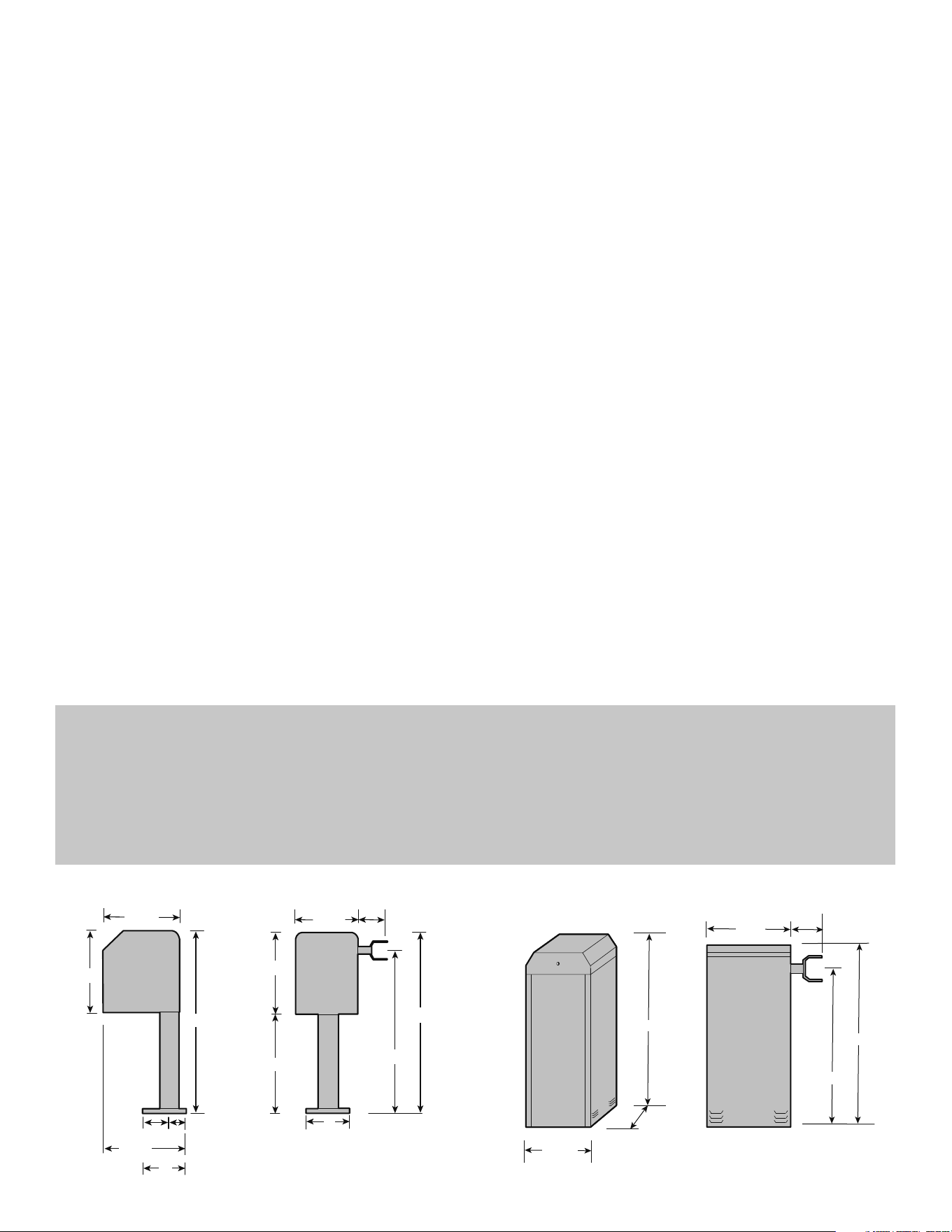
OPERATOR SPECIFICATIONS
FRONT VIEW
41-1/2"
20-1/4"
15-3/4"
9"
41-1/2"
20-1/4"
8"
13-1/2"
21-1/2"
3-1/2"
36-1/2"
17-1/2"
4"5"
SIDE VIEW
MEGA ARM PEDESTAL
MEGA ARM TOWER
42"
13-1/2"
14-1/4"
36-1/2"
42"
13-1/2"
3-1/2"
FRONT VIEW
SIDE VIEW
6
INSTALL THE CONCRETE PAD AND
CONDUIT
Check the national and local building codes before installation.
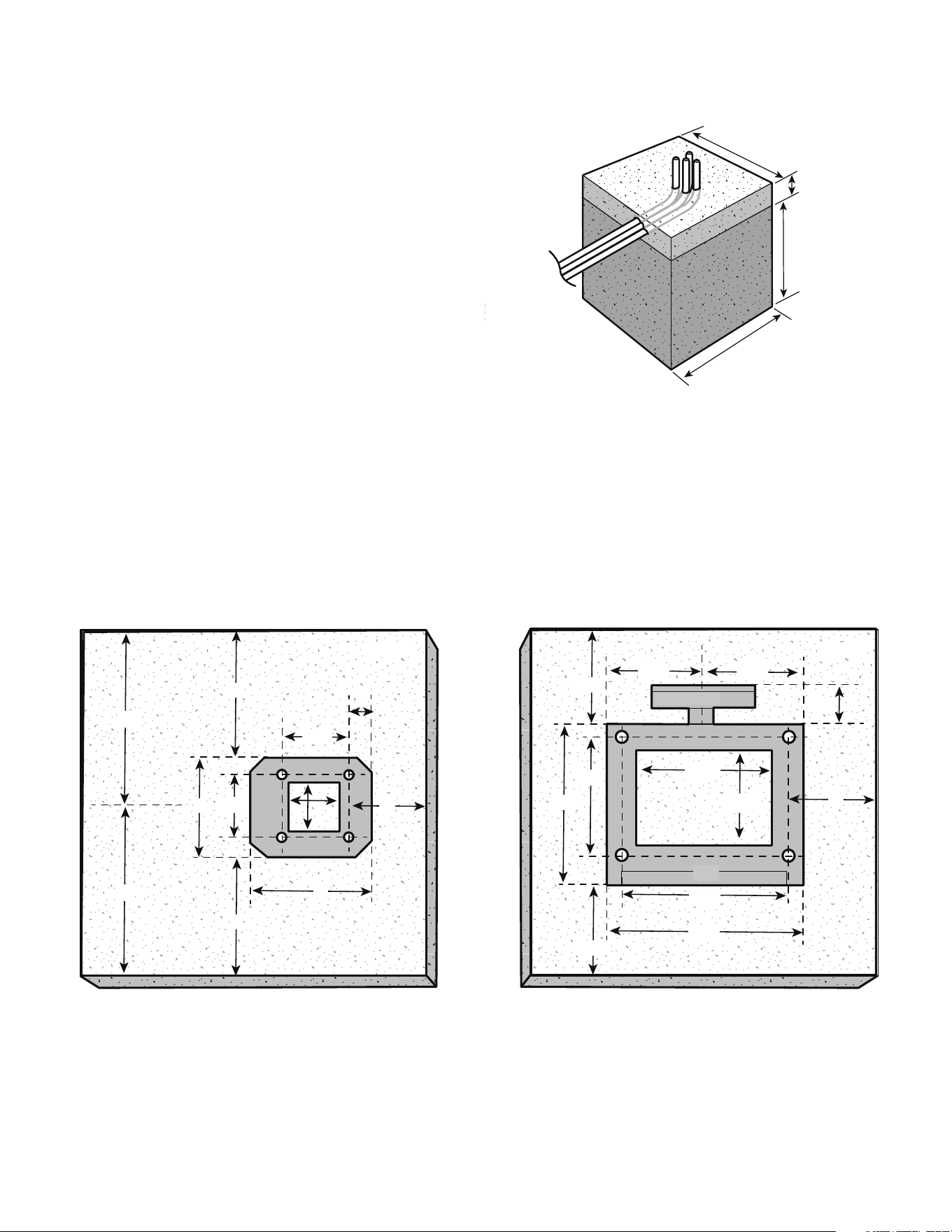
Layout the concrete pad for the operator. The concrete pad should be
approximately 24" x 24" x 24" in order to ensure proper and stable operation.
The pad should be 6" above the finished grade or even with top of curb (if
applicable). NOTE: Pad should always extend below frost line in regions where
ground will freeze.
Install the conduit. The conduits should be installed to fit the 3-1/2" x
3-1/2" opening in the pedestal base plate or the 10-1/4" x 8-1/4" opening in
the tower base plate. The operator should be centered on the pad and spaced
approximately 6" from the edge of the pad on drive way side (in order to get
the most reach out of arm). Install conduits for the 120/230 Vac main power,
low voltage control wiring, and one or two extra for loop sensor leads. Conduit
size should be limited to 1/2" when possible to reduce crowding if more than
four are needed. All conduits must be UL approved.
Pour a concrete pad (reinforced concrete is recommended).
INSTALLATION » INSTALL THE CONCRETE PAD AND CONDUIT
1
2
24"
24"
18"
6"
3
TOP VIEW OF PEDESTAL FOOTPRINT TOP VIEW OF TOWER FOOTPRINT
8"
12"
12"
8"
8"
5-1/2"
3-1/2"
5-1/2"
6"
9"
2"
5-1/4"
5-1/4"
13-1/2"
3-1/2"
7-1/8"
7-1/8"
10-1/4"
8-1/4"
9-7/8"
12-1/4"
14-1/4"
(door)
(gate arm bracket)
(concrete pad)
(concrete pad)
6"
7
INSTALLATION » ATTACH THE OPERATOR TO THE CONCRETE PAD
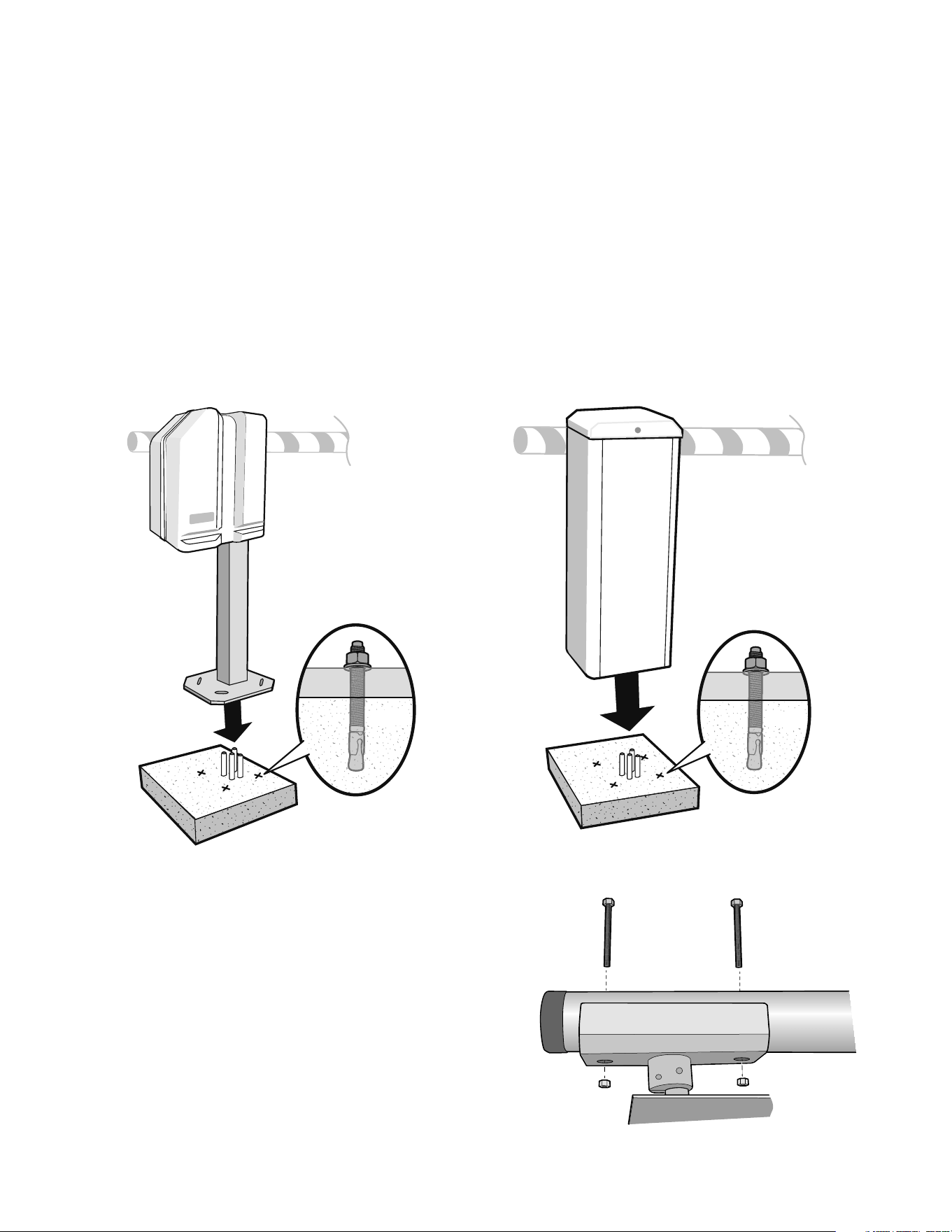
ATTACH THE OPERATOR TO THE
CONCRETE PAD
Position the operator on the concrete pad and mark the mounting
holes.
Install 1/2" x 6" wedge anchors in the location of the mounting
holes. The wedge anchors should be installed with approximately 1-1/4"
showing above the concrete pad in order to allow for the 1/2" thick base plate
as well as washers for leveling.
Attach the operator to the concrete pad with appropriate fasteners.
1
2
3
1/2" x 6"
1/2" x 6"
(base plate)
(base plate)
PEDESTAL INSTALLATION TOWER INSTALLATION
(Barrier Arm)
(Gate Arm Bracket)
(Operator)
INSTALL THE BARRIER ARM
Line up the holes in the barrier arm with the slotted holes in gate arm bracket.
Insert the bolts through the barrier arm and gate arm bracket.
Secure with the flat washers and nylon nuts (It is recommended to use ONLY
nylon nuts).
1
2
3
8
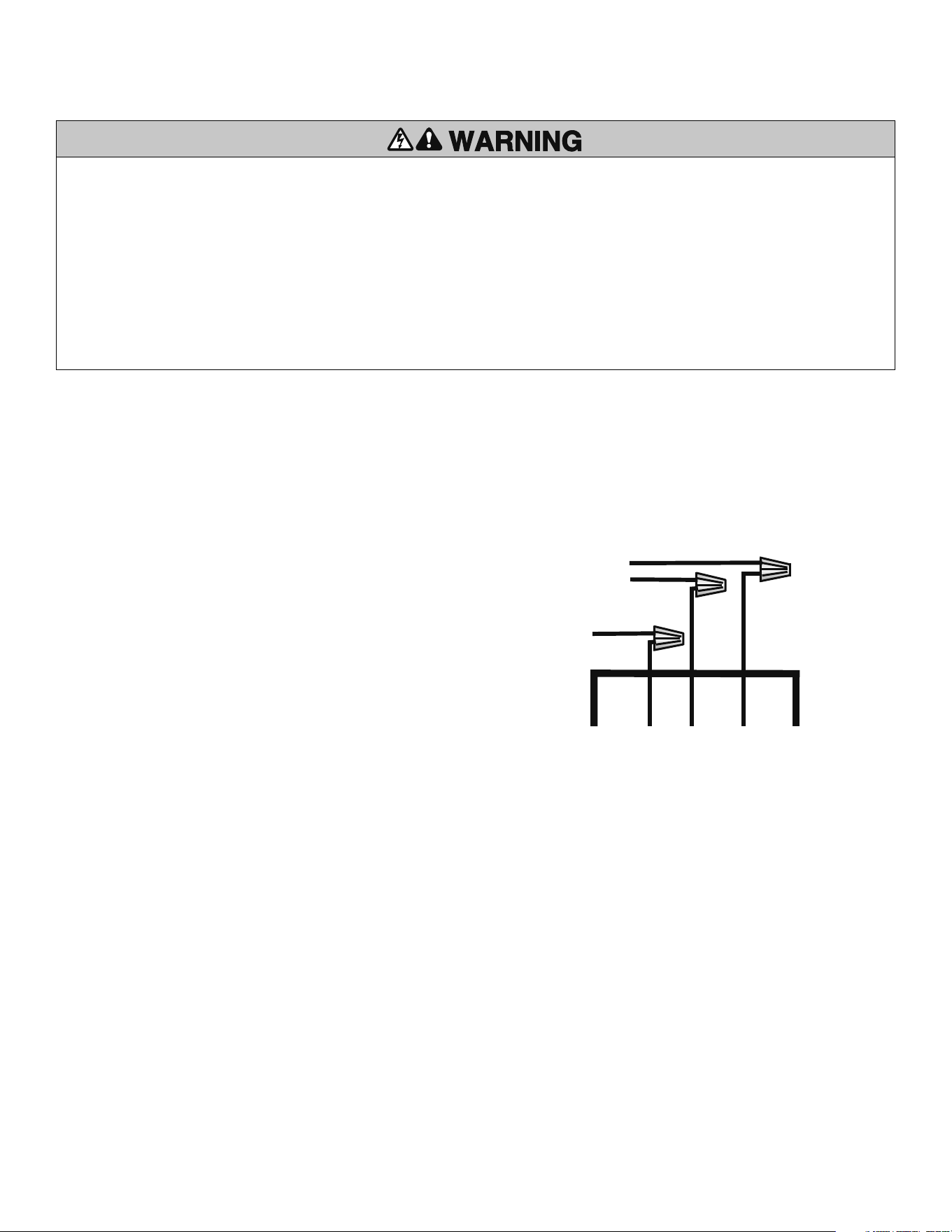
Use UL approved 14AWG (or larger) 600 volt insulated wire only.
NOTE: Do not connect the batteries until instructed.
120 VAC
Ensure your main power is OFF before connecting the AC power.
The AC wiring should be connected to the wires exiting the conduit or pedestal
post. Connect AC power to the operator:
• Connect the black wire to the incoming 120 Vac hot lead.
• Connect the white wire to the incoming neutral lead.
• Connect the green wire to the ground.
Do not connect any of the AC power wires directly to the control board.
230 VAC
The 120 to 230 Vac conversion kit will need to be purchased for 230 Vac operation.
See Accessories page.
Pedestal
Version
Top End of 4" x 4" Tube
120 VAC
Neutral
Green
White
Black
Ground
120 Vac
WIRING » POWER WIRING
To reduce the risk of SEVERE INJURY or DEATH:
• ANY maintenance to the operator or in the area near the operator MUST NOT
be performed until disconnecting the electrical power and locking-out the power
via the operator power switch. Upon completion of maintenance the area MUST
be cleared and secured, at that time the operator may be returned to service.
• Disconnect power at the fuse box BEFORE proceeding. Operator MUST be
properly grounded and connected in accordance with local electrical codes.
NOTE: The operator should be on a separate fused line of adequate capacity.
• ALL electrical connections MUST be made by a qualified individual.
• DO NOT install any wiring or attempt to run the operator without consulting the
wiring diagram. We recommend that you install an optional reversing edge
BEFORE proceeding with the control station installation.
• ALL power wiring should be on a dedicated circuit and well protected. The
location of the power disconnect should be visible and clearly labeled.
• ALL power and control wiring MUST be run in separate conduit.
• BEFORE installing power wiring or control stations be sure to follow ALL
specifications and warnings described below. Failure to do so may result in
SEVERE INJURY to persons and/or damage to operator.
POWER WIRING
1
3
2
9
WIRING »
INPUTS
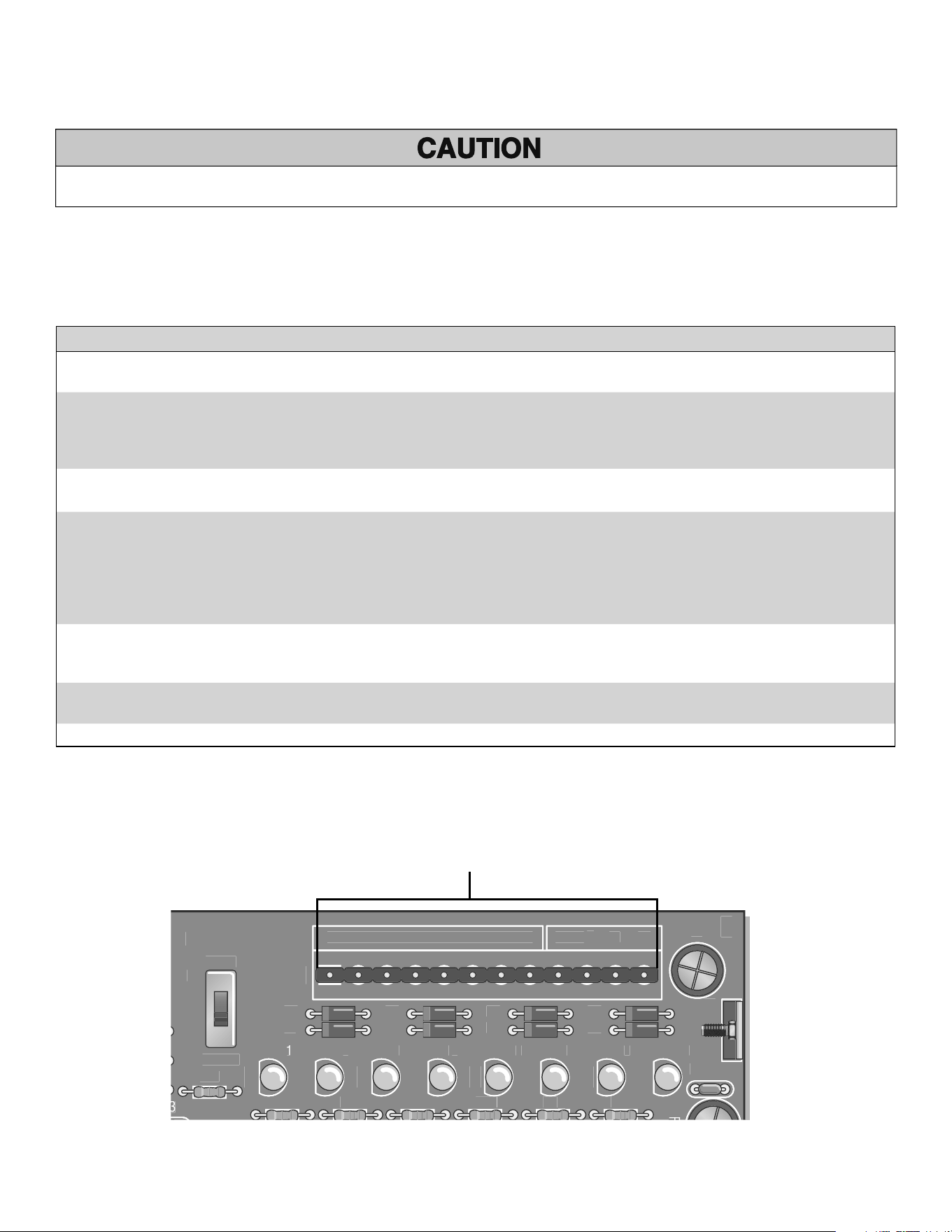
The J5 terminal strip is used for controlling the barrier arm with various accessories such as receivers, loop detectors, access controls, and push button stations. Use common
and normally open contacts from devices connected to these inputs. The J5 terminal strip is located on the top of the control board. Make connections to the appropriate points
for the desired operation. Wires should be UL approved 600 volt rated and at least 18 AWG. They are to be routed through the upper grommet in chassis to avoid chafing. All
external control devices must have normally open dry contacts.
NOTE: Above inputs are tied to LED indicators to show input command activity.
J5
S3
Q
2
T2
1234
5
6
7
8
91
Ø
11
12
T
1
O
PEN
1
D1
5
3
O
PEN
2
D1
6
O
PEN
3
D17
AUX
4
D1
8
S
AFET
Y
5
D1
9
C
L
OS
E
6
D22
BA
CK
7
D2
3
S
HAD
OW
8
D24
O
PE
N
C
L
OSE
MANUA
L
T4
T
3
T6
T
5
T8
T
7
C
15
F
C
1
8
U18
R2
1
R24 R
35
R4
1
R46
6
R5
R
Ø
R
61
C
1
6
J5 Wiring Inputs on the control board
DO NOT connect ANY device which would deliver ANY voltage of ANY kind to these terminals.
INPUTS (J5 TERMINAL STRIP)
TERMINAL INPUT EXPLANATION
1,2,3 OPEN These inputs will trigger gate open when pulsed or hold gate open with maintained contact. When released gate
will close if closing timer is on or if close input is given.
4 AUXILIARY OPEN Same as 1, 2 and 3 with S2 switch 6 off. With S2-6 DIP switch in the ON position, the Multiple Vehicle Memory
will activate, with inputs on terminal 4 and Common (COM) on the J5 terminal strip. Use with laser scanners or
card readers and (transmitters with timed anti-pass back). With S1 switch 5 on, this input becomes a momentary
pulse open, pulse close.
5 SAFETY This input is generally not used with the MEGA ARM. If used its function is to make gate reverse and go back to the
open position if it was closing. Input is disabled when gate is closed.
6 CLOSE When used with a vehicle detector, it is recommended that the presence contacts (N.O. & C.) be used for the
close input. This input will close gate after input is applied and then removed. It will stop the open cycle and
reverse gate to close. EXAMPLE: Car crosses over close loop before arm reaches full open position- gate will
reverse and close. NOTE: The close input also acts as a safety-stop in that if gate is closing and a tailgater is
sensed at the close input, the gate WILL STOP its closing motion and not continue to close until the close input is
removed or gate is re-opened.
7 BACK-AWAY (FREE EXIT) This input is used as a free exit input to open gate. When input is active, gate will open and close immediately
once input is removed. EXAMPLE: Car pulls up to exit loop, gate opens; car “backs-away” from exit loop and
gate closes.
8 SHADOW (SAMS) Used to monitor an auxiliary open limit switch of another operator in the same lane. SAMS with memory
feature, see page 19.
9,10,11,12 COMMON These are the commons (0 Vdc) to be used to activate above inputs.
10
ACCESSORY AND RELAY CONNECTIONS
These terminals will provide battery backed power to 24 Vdc devices and are located
at the bottom of the control board at J4 terminals 1 and 2. Terminal 1 is 24 Vdc (+)
and number 2 is 0 Vdc (-). Peripheral CLASS 2 low voltage devices that require
24 Vdc power maybe connected here (500 ma. maximum).
EXAMPLE: Vehicle detector, radio receiver.
WIRING » ACCESSORY AND RELAY CONNECTIONS + BATTERY INSTALLATION
24VA
C
XF
M
ACC+
PW
R
C
N
C
N
O
A
ux
R
e
l
a
y
DC
1
1
K1
D11
D12
R13
D14
U1
9
J
4
F3
J
1
ACC–
B
AT
–
B
AT
–
M
O
V
B
AT
+
+
–
+
–
Black Lead
Jumper
12 VDC Battery
12 VDC Battery
Red Lead
BATTERY INSTALLATION
CONNECTING THE BATTERY LEADS - ALWAYS CONNECT AC POWER BEFORE
INSTALLING BATTERIES.
Connect AC power BEFORE installing batteries.
Install two new, fully charged 12 volt DC batteries on shelf next to motor.
Connect red lead from the operator control board to the positive (RED +)
terminal of one battery.
Connect the black lead from the operator control board to the (BLACK -)
terminal of the OTHER battery.
Connect the jumper (provided) between the remaining terminals of each
battery if one is not already in place.
IMPORTANT: Do not run operator without installing the batteries.
Replace batteries in pairs using LiftMaster MBAT or 29-NP712 batteries. Failure to
install batteries correctly will cause damage and will not be covered by warranty.
Relay Connection Terminals on the J4 Terminal Block
24 Vdc (+)
0 Vdc (-)
S1-6 S1-8 RESULT
OFF OFF Relay will fire (latch) when gate is not closed.
ON OFF Relay will fire when arm is pushed up off of limit
switch (use with slip clutch option) and fires relay
when a tail-gate is detected by the close loop -
ANTI TAIL-GATE ALARM.
OFF ON Relay will pulse relay when arm reaches full
open position.
ON ON Relay will only pulse when input is given to J5
1,2,3 inputs. (Refer to pages 14-15.)
AUX LIMIT
S
1
J
2
1
R1
S
1
D
8
1
2
S2
1
2
D1
Ø
RELAY OUTPUT K1 - (OPTIONAL)
S1-6
S1-8S1 DIP Switch Block
1
2
3
4
5
The K1 Relay (optional) and terminal strip (J1) are used for auxiliary devices such as
Counters, Alarms,Buzzers, and SAMS (Sequence Access Management System).
11
WIRING » PRIMARY/SECOND WIRING
PRIMARY/SECOND WIRING
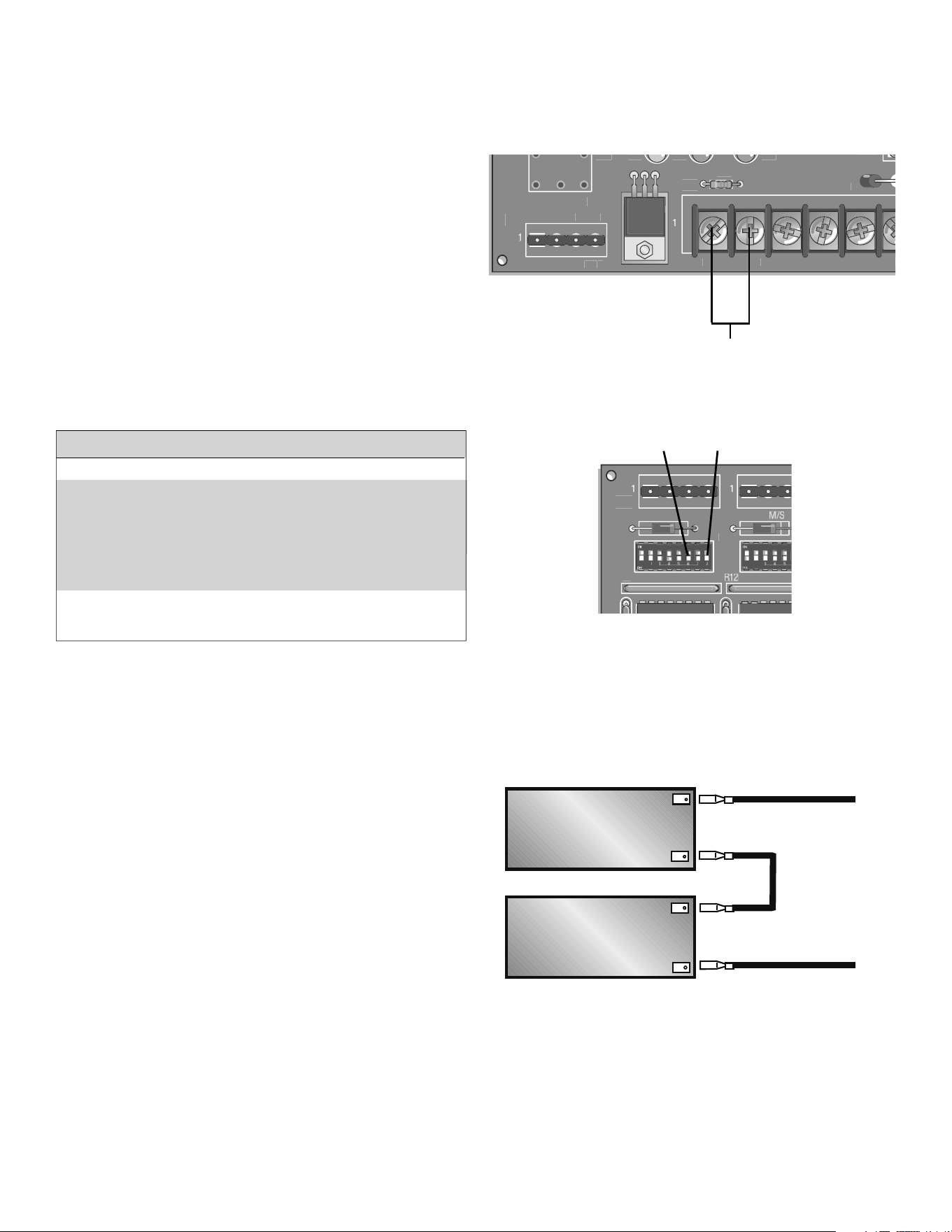
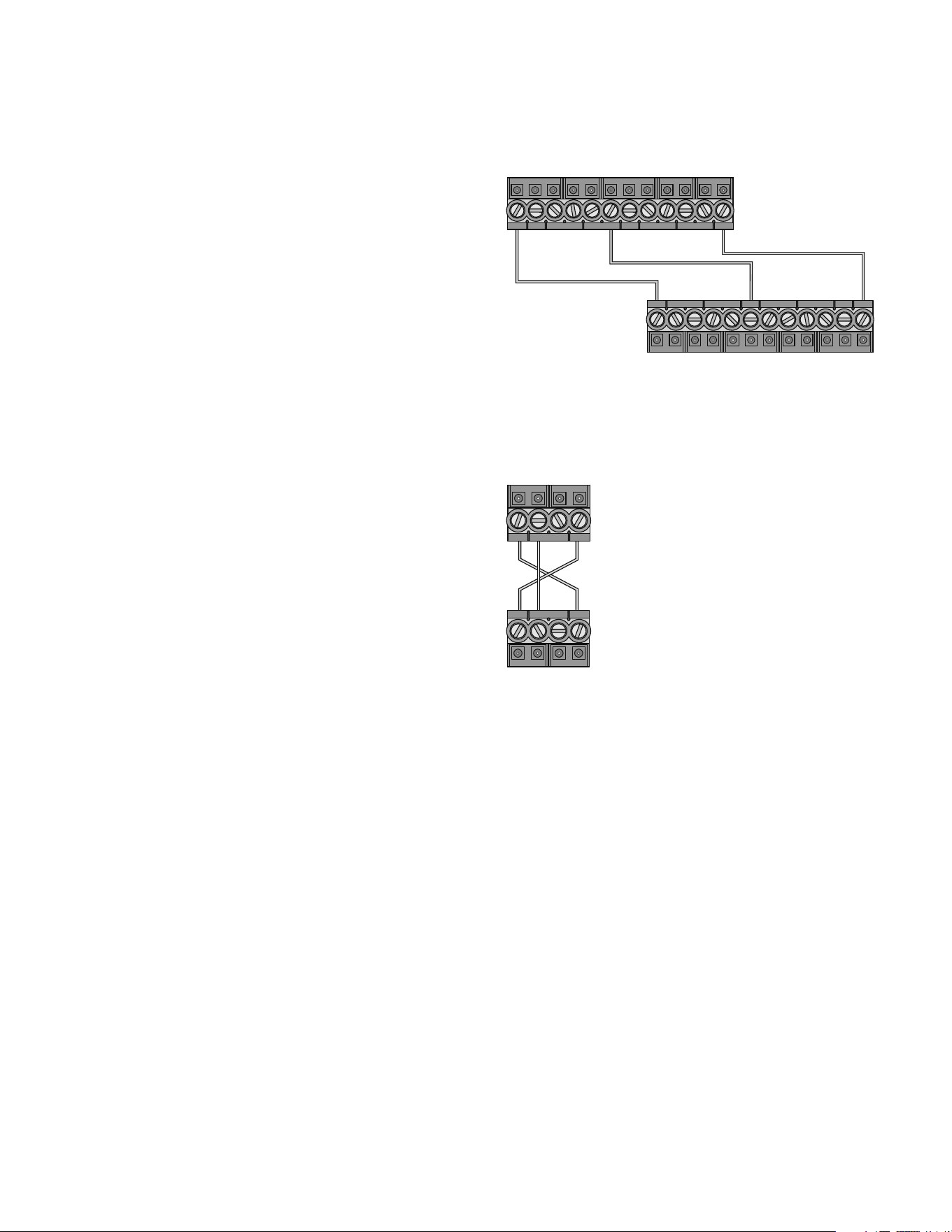
In a primary/second configuration, either operator can be the primary.
Choose an operator to be the primary and then direct all control wiring to it
(also install vehicle detectors and receivers in it).
At the primary, any input (at J5) with control wires (detectors, receivers,
keypads, timers, etc.) to it must also be run to the same terminals of the
second. Along with these control wires, both operators MUST share a common
ground connection from chassis to chassis (or from common to common, i.e.,
primary gate J5 terminal #12 to second gate J5 terminal #12).
EXAMPLE: If only open and close are used at primary then three wires will
run between gates (Figure 1).
If it is required that if one gate senses an obstruction, the other reverses also,
then 3 additional wires must be run between the primary J3 and second J3
(Figure 2). These connections are for transmitting IRD (obstruction signals)
between both operators. This will allow the primary or second to inform the
other that a closing obstruction has occurred and for it to reverse and open.
SET switches on S2, 1-8 the same on both gates.
1
2
3
123 45 678 9101112
12 34 567 89101112
RX GND TX
RX GND TX
12 34
12 34
Common
Primary J5
Second J5
Primary J3
Second J3
Close
Open
IRD - Obstruction Signal Connections
Terminal 1 of Primary must go to terminal 4
of Second and terminal 1 of Second must go
to terminal 4 of Primary. Terminal 2 of
Primary must go to terminal 2 of Second.
FIGURE 1
FIGURE 2
12
NOTICE: To comply with FCC and or Industry Canada (IC) rules, adjustment or modifications of this receiver and/or transmitter
are prohibited, except for changing the code setting or replacing the battery. THERE ARE NO OTHER USER SERVICEABLE PARTS.
Tested to Comply with FCC Standards FOR HOME OR OFFICE USE. Operation is subject to the following two conditions: (1) this
device may not cause harmful interference, and (2)this device must accept any interference received, including interference
that may cause undesired operation.
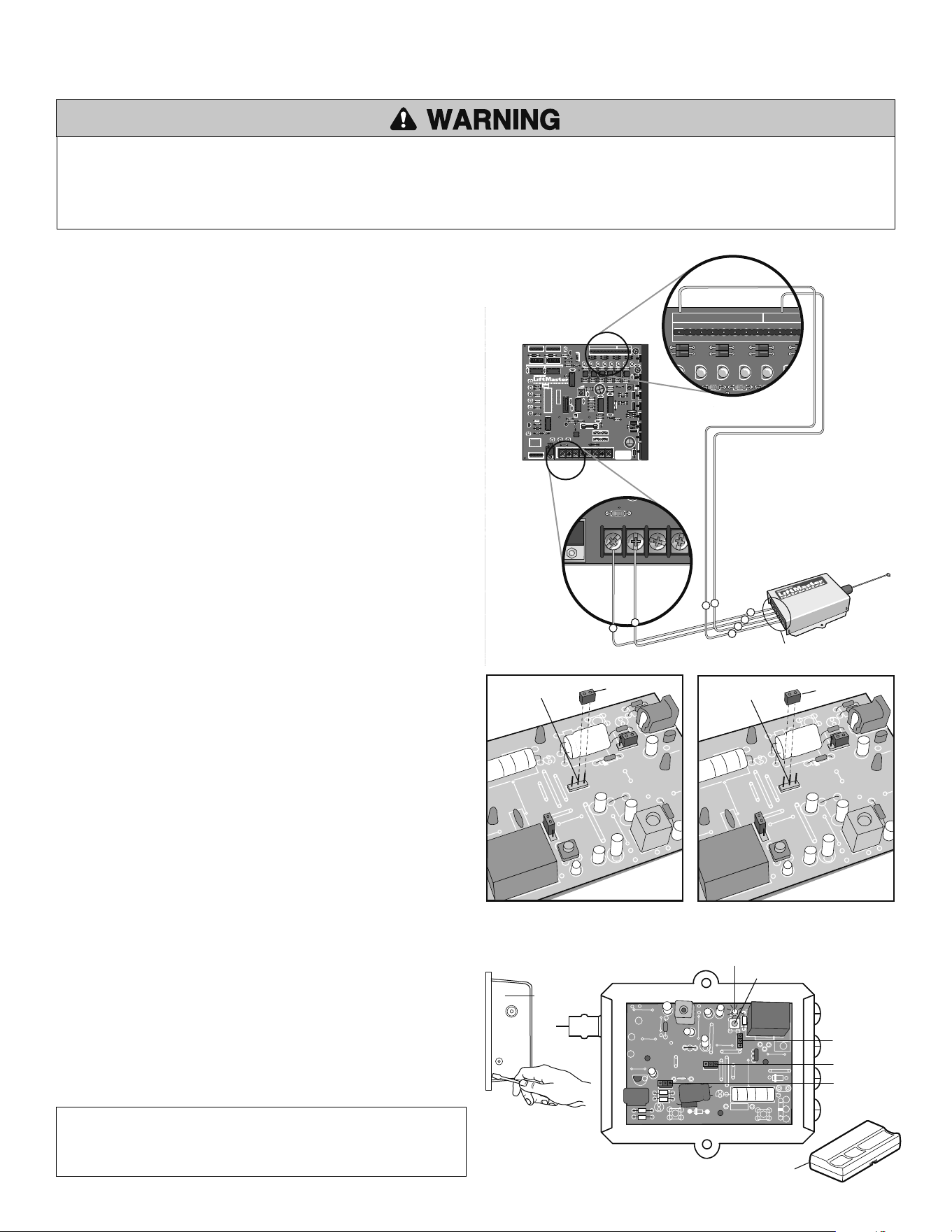
WIRING THE RECEIVER
Contacts 1 and 2 on the receiver terminal strip are for power. The power terminals
are unpolarized. Connect terminals 1 and 2 to the accessory power terminals on the
J4 terminal strip at the bottom of the control board (Figure 1).
Contacts 3 and 4 on the receiver terminal strip are for a common and a relay.
Connect terminals 3 and 4 to terminals 1 and 10 on the J5 terminal strip at the top
of the control board.
NOTE: Auxiliary Pin 4 can be used for push to open/push to close functionality.
SET SECURITY MODE
The Universal Receiver can be used with up to 15 rolling code remotes or passwords
in HIGH security mode. Alternately, it can be used with up to 31 of any type remote
in NORMAL security mode, including any combination of rolling code, billion code
(390 MHz only), or dip switch remotes.
The jumper must be set at the HIGH position for the receiver to operate in HIGH
security mode. It must be set at NORMAL position to operate at the NORMAL mode
(Figure 2).
When changing from NORMAL to HIGH security mode, any previous remote codes
must be erased. Repeat Steps 2 and 3 in the Programming Section below to
reprogram the receiver for each remote control in use.
The receiver is factory set at HIGH.
PROGRAMMING THE REMOTE TO THE RECEIVER
Pry open the front panel of receiver case with a coin or a screwdriver.
Re-connect power to opener (Figure 3).
Press and release the “learn” button on the receiver. The learn indicator light
will glow steadily for 30 seconds.
Within 30 seconds, press and hold the button on the hand-held remote that
you wish to operate your gate.
The operator will now operate when the push button on either the receiver or the
remote control is pressed.
Repeat Steps 2 and 3 for each remote control that will be used to operate the gate.
TO ERASE ALL REMOTE CONTROL CODES
Press and hold the “learn” button on the receiver panel until the indicator light
turns off (about 6 seconds). All remote codes are now erased.
Follow the steps above to reprogram each remote control.
HBEAT BAT LO AC POWER
CNCNO
Aux Relay
R2 R11
D1
DC
1
K1
D11 D12
R13
D14
U19
J4
F3
F4
F1
F2
1A DC
IRD1
R63
BAT– MOV
MOTOR
UX LIMITS
J3
J5
M/S
JP2
S3
1
Q2
T2
1234567891
Ø
11 12
T1
OPEN 1
D15
C7
X2
C19
C2
C3
C4
U4
R12
OPEN 2
D16
R3
Ø
OPEN 3
D17
AUX 4
D18
SAFETY 5
D19
CLOSE 6
D22
BACK 7
D23
SHADOW 8
D24
OPEN
CLOSE
MANUAL
R1
Ø
R9
R38
R15
R37
C8
C2
Ø
C12
U12
U1
Ø
+
R8
R7
R6
R5 U2
U3
CPU
U5
U6
U7
X1
R4
R3
T4
T3
T6
T5
T8
T7
C15
C2
D27
Q6
Q5
F5
C22
C18
U18
2345678
S2
12345678
D1
Ø
R14
R18
R21
R24
R36
R42
R47
R53
R35 R41 R46 R5
Ø
R61
C16
R17
R16
D29
Q4
D28
D26
C6
D25 – B2
U8 U9
U16
U11 U13 U14 U15
D9
R23
R22
R26
R25
R19
B1
R2
Ø
C5
+
+
R34
R33
R4
Ø
R39
R45
R44
R58
DX3
R49
R48
R43
R51
WARNING FOR
CONTINUOUS
PROTECTION
AGAINST FIRE
REPLACE ONLY
WITH THE SAME
TYPE AND RATING
OF FUSE
R43
R6
Ø
R59
D21
D2
Ø
R62
DX1
TR
DX4
R57
R56
C13
DX2
R55
24VAC XFMRACC+
HBEAT BAT LO AC POWER
PWR
CNCNO
Aux Relay
R2 R11
D1
Q1
DC
1
1
K1
D11 D12
R13
D14
U19
J4
F3
F4
F1
F2
1A DC
IRD1
R63
J1
ACC– BAT–
BAT– MOV
BAT+ MOTOR
MOTOR
AUX LIMITS
1
J2
J3
J5
M/S
JP2
S3
1
Q2
T2
1234567891
Ø
11 12
T1
OPEN 1
D15
C7
X2
C19
D7
OLS
R1
U1
C2
C3
C4
C1
U4
R12
S1
D6
OPEN
D5
BRAKE
D4
CLOSE
D3
CLS
D2
IRD
OPEN 2
D16
R3
Ø
OPEN 3
D17
AUX 4
D18
SAFETY 5
D19
CLOSE 6
D22
BACK 7
D23
SHADOW 8
D24
OPEN
CLOSE
MANUAL
R1
Ø
R9
R38
R15
R37
C8
C2
Ø
C12
U12
U1
Ø
+
R8
R7
R6
R5 U2
U3
CPU
U5
U6
U7
X1
R4
R3
D8
T4
T3
T6
T5
T8
T7
C15
C2
D27
Q6
Q5
F5
C22
C18
U18
12345678
S2
12345678
D1
Ø
R14
R18
R21
R24
R36
R42
R47
R53
R35 R41 R46 R5
Ø
R61
C16
R17
R16
D29
Q4
D28
D26
C6
D25 – B2 +
U8 U9
U16
U11 U13 U14 U15
D9
R23
R22
R26
R25
R19
B1
R2
Ø
C5
+
+
R34
R33
R4
Ø
R39
R45
R44
R58
DX3
R49
R48
R43
R51
WARNING FOR
CONTINUOUS
PROTECTION
AGAINST FIRE
REPLACE ONLY
WITH THE SAME
TYPE AND RATING
OF FUSE
R43
R6
Ø
R59
D21
D2
Ø
R62
DX1
TR
DX4
R57
R56
C13
DX2
R55
ACC+
HBEAT BAT LO AC POWER
1
D11 D12
R13
D14
U19
J4
ACC– BAT–
BAT– MOV
BAT+
+
–
10
1
2
3
4
1
J4
J5
P1 to J4 Accessory Power
P2 to J4 Accessory Power
P3 to J5 Terminal 1
P4 to J5 Terminal 10
FIGURE 3
Security Mode Terminals
HIGH
SECURITY MODE
Jumper
Security Mode Terminals
NORMAL
SECURITY MODE
Jumper
Security Mode
Power Supply Jumper
OPENING RECEIVER
Connect Antenna
24V
12V
HIGH
NORM
C
P2
M
OPEN RECEIVER
Indicator Light
Output Duration
Terminals
(Not Provided)
Learn Button
FIGURE 2
FIGURE 1
P1-P4
J5
INSTALL THE RECEIVER » INSTALL THE RECEIVER
To prevent possible SERIOUS INJURY or DEATH from a moving gate or garage door:
• ALWAYS keep remote controls out of reach of children. NEVER permit children to operate, or play with remote control transmitters.
• Activate gate or door ONLY when it can be seen clearly, is properly adjusted, and there are no obstructions to door travel.
• ALWAYS keep gate or garage door in sight until completely closed. NEVER permit anyone to cross path of moving gate or door.
1
2
3
J4
INSTALL THE RECEIVER
1
13
FEATURES AND FUNCTIONS » S1 DIP SWITCHES
AUX LIMIT
S
1
J2
J
M/S
1
R1
U4
R12
S
1
D8
12345678
S
2
1
2
3
4567
8
D1
Ø
R
ABCDE
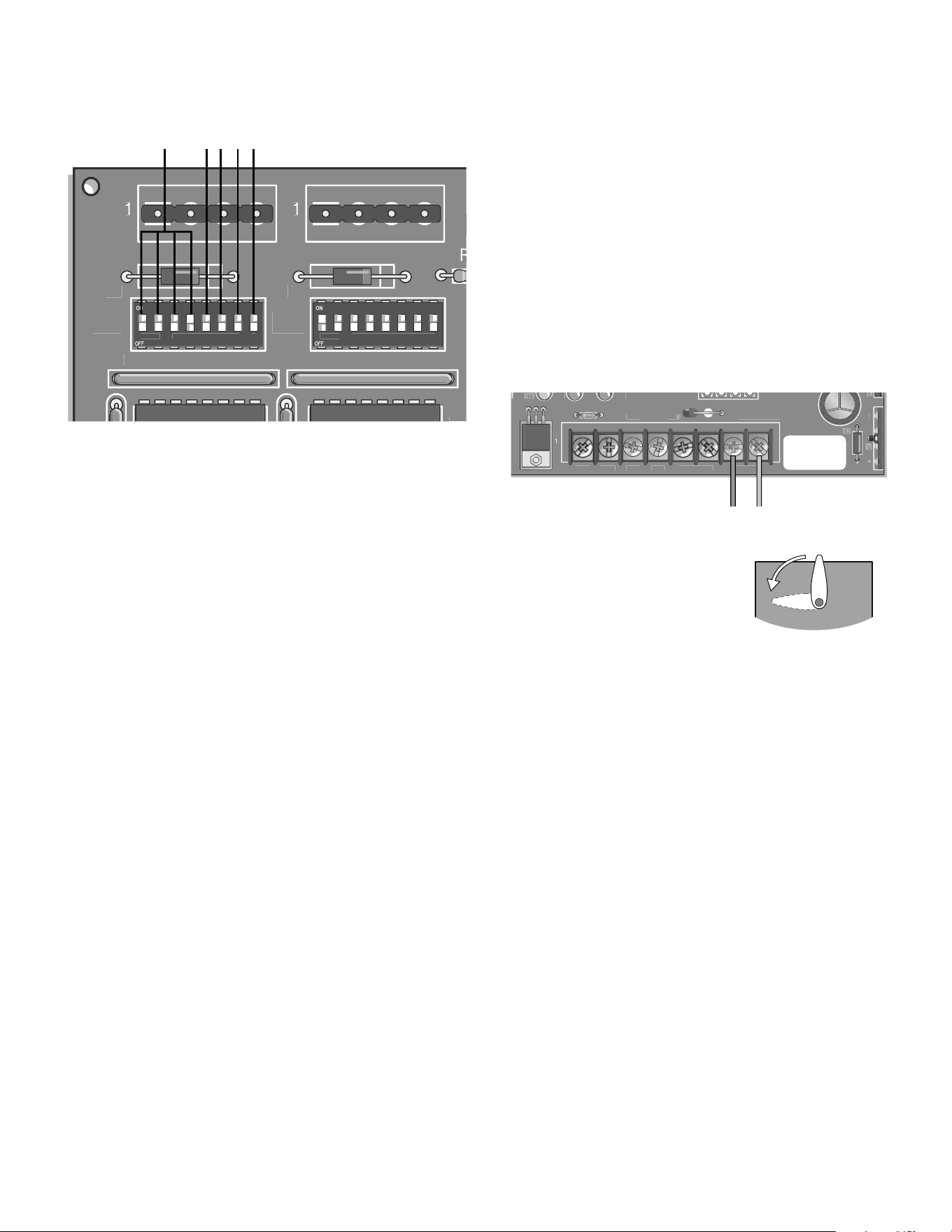
FAST RUN TIMER (FULL SPEED RUN TIMER)
DIP Switch S1-1 to S1-4
When the gate operator activates, it ramps up and slows down for a fixed
amount of time, but will run at full speed for variable amounts of time
depending upon the settings of the S1-1 to S1-4 DIP switches.
Each DIP switch represents increments of 1/8 second.
When DIP switches S1-1, S1-2 and S1-3 are in the ON position, the Fast Run
Timer is set to 2-3/8 seconds by factory default.
When DIP switches S1-1 to S1-4 are set in the OFF position, the full speed run
time is 1-1/2 seconds.
The longer the operator runs at full speed, the less ramp up and slow down
time. When adjusting, make sure the Fast Run Timer settings DO NOT overrun
the slow down time.
SINGLE BUTTON FUNCTION (INCLUDING PULSE RADIO RECEIVER
OPEN/CLOSE)
DIP Switch S1-5
With S1-5 DIP switch in the ON position, the Single Button Function (Command
to Open/Command to Close) will activate, with inputs on terminal 4 and
Common (COM) on the J5 terminal strip. Any of the terminals 9-12 on the J5
terminal strip can be used for common.
When using this feature with the radio receiver (provided), move the radio
wire from terminal 1 to terminal 4 on the J5 terminal strip.
CLUTCH OPTION
DIP Switch S1-6
With S1-6 DIP switch in the ON position, and using the Clutch Option; when the
barrier arm is manually forced UP (OPEN), the barrier arm will automatically
CLOSE.
If the Close Loop detects tailgating, the K1 Relay will activate. If an anti-
tailgating alarm is wired into terminal strip (J1), an alarm will sound.
NOTE: When using the Clutch Option, turn DIP switches S1-6 and S2-7 to the
ON position (Auto Close). When this feature is activated the barrier arm will
CLOSE by the timer whenever it is forced UP (OPEN).
A
B
C
HANDING THE BARRIER ARM
DIP Switch S1-7
The J4 Motor Wiring is controlled by DIP switch S1-7. The Handing of the
Barrier Arm may be changed from right-hand to left-hand operation by
reversing the factory default motor connections.
NOTE: Right-hand or left-hand operation is determined by facing the
control board with the barrier arm in the CLOSED position. If the barrier arm
is to the right, it is set for right-hand gate operation.
1. Disconnect power to the operator.
2. For left-hand operation reverse the motor wires on J4-7 (blue wire) and
J4-8 (orange wire) (see below).
3. Set DIP switch S1-7 to the ON position.
4. Turn the motor pulley until the barrier
arm is to the left.
5. Turn the Limit Cam so the Limit Cam is
parallel to the arm and just behind the
limit sensor.
6. Connect power to the operator.
K1 RELAY (OPTIONAL)
DIP Switch S1-8
Auxiliary devices such as Counters, Alarms, Buzzers, and SAMS (Sequence
Access Management System), can be wired into the K1 Relay and terminal
strip (J1).
When S1-8 DIP switch is in the OFF position, the K1 Relay will activate
throughout the OPEN cycle.
When S1-8 DIP switch is in the ON position, the K1 Relay will be activated
briefly until the OPEN LIMIT (OLS) is reached.
E
D
S1 Dip Switch Block
S1 DIP SWITCHES
2
4VAC XFM
R
A
CC
+
1
D
1
2
R13
D
1
4
U1
9
J
4
F3
ACC
–
B
AT
–
B
AT
–
MO
B
AT
+
M
OTO
R
M
OTOR
Blue
Orange
CAM POSITION
(Control Board)
14
FEATURES AND FUNCTIONS » S2 DIP SWITCHES
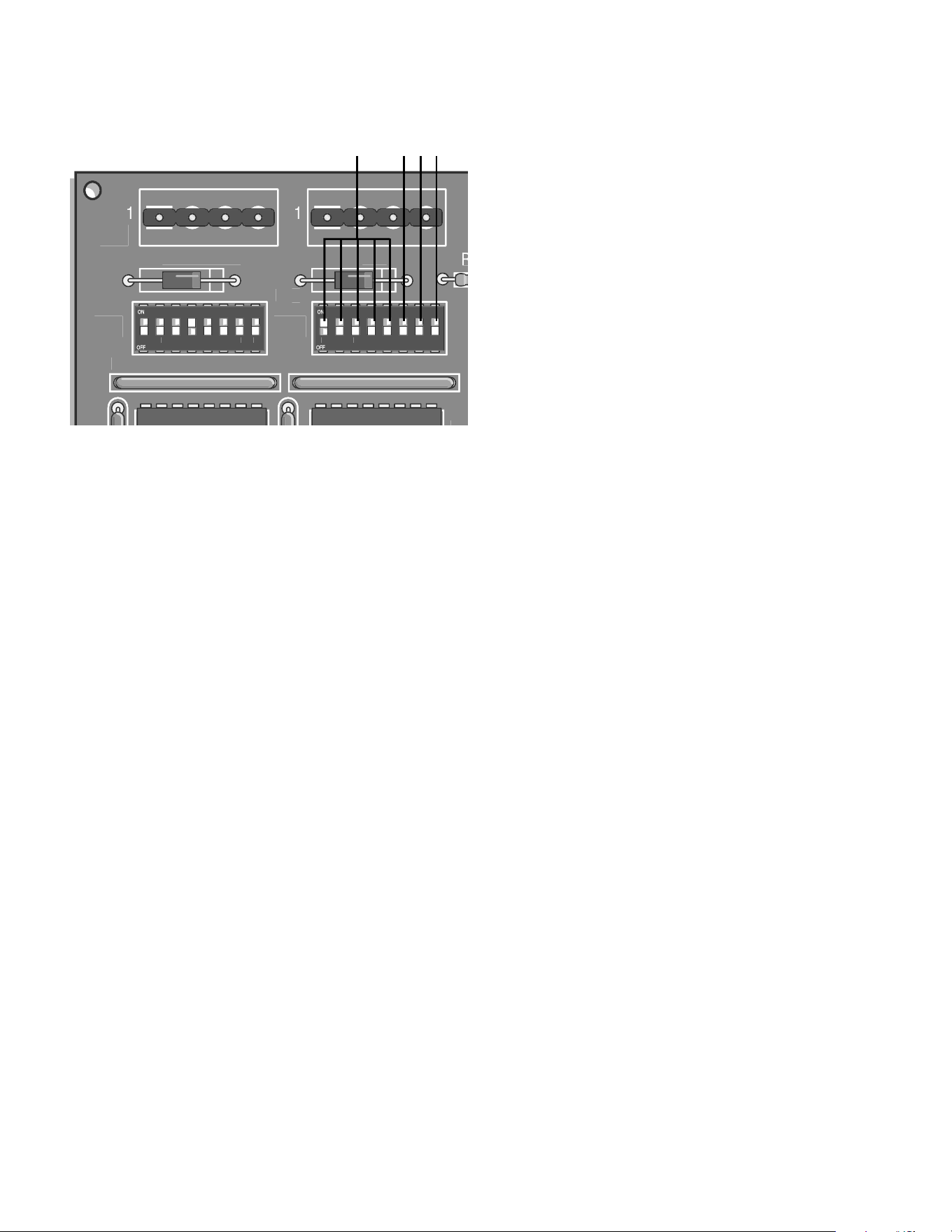
TIMER-TO-CLOSE
DIP Switch S2-1 to S2-5
The S2-1 to S2-5 DIP switches will set the period of time the gate remains
opened after reaching the OPEN position.
Each DIP switch represents the number of seconds the gate will remain OPEN
before CLOSING. With the S2-3 DIP switch in the ON (factory default) position,
there are 4 seconds to allow a vehicle enough time to move out of the path of
the closing barrier arm.
Turning multiple switches ON will combine the amount of time the barrier arm
remains OPEN.
The maximum hold OPEN time is 32 seconds.
To de-activate this feature turn S2-7 DIP switch to the OFF position.
F
A
UX LIMIT
S
1
J2
J
M
/
S
1
R1
U4
R12
S
1
D8
12
3456
7
8
S2
12
345678
D1
Ø
R
FGHI
S2 Dip Switch Block
S2 DIP SWITCHES
MULTIPLE VEHICLE MEMORY
DIP Switch S2-6
With S2-6 DIP switch in the ON position, the Multiple Vehicle Memory will
activate, with inputs on terminal 4 and Common (COM) on the J5 terminal
strip. Any of the terminals 9-12 on the J5 terminal strip can be used for
common.
NOTE: With Multiple Vehicle Memory activated, the barrier arm will remain
OPEN until the pre-authorized number of vehicles pass over the Close Loop.
AUTO CLOSE
DIP Switch S2-7
The S2-7 DIP switch (Auto Close) should be activated in case one or more of
the pre-authorized vehicles DO NOT pass through the gate. The barrier arm
will close after the set amount of time elapses and the count memory is reset
to zero.
FAIL SAFE (AUTO OPEN ON AC POWER FAILURE)
DIP Switch S2-8
With S2-8 DIP switch in the ON position, the barrier arm will automatically
OPEN approximately 15 seconds after a loss of power. Once the power has
been restored the operator will resume normal operation after any input.
With S2-8 DIP switch in the OFF position, the barrier arm will resume normal
operation until the batteries drop below 50% at which time the barrier arm will
OPEN and remain opened until the batteries are fully charged.
I
H
G
15
ADJUSTMENTS » INSTANT REVERSE DEVICE (IRD) + INSTALL THE BARRIER ARM
To reduce the risk of SERIOUS INJURY or DEATH:
• Disconnect power BEFORE performing ANY adjustments near drive shaft.
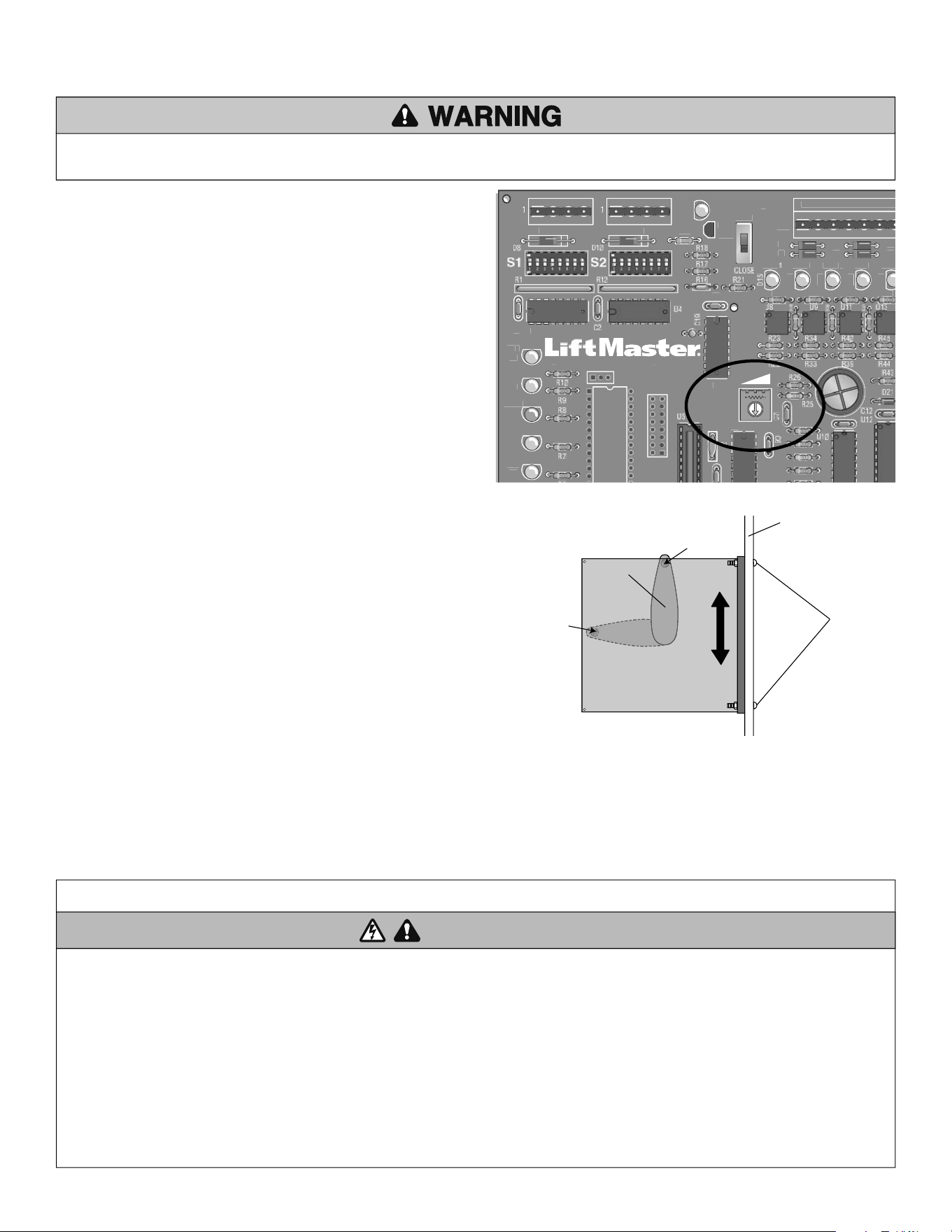
ADJUST THE BARRIER ARM
The arm should be level in the HORIZONTAL POSITION. If the arm is not level it can
be adjusted by sliding the control board and/or adjusting the limit cam. The control
board has two sensors on the back of the control board that sense when the limit
cam has reached the open and close limit.
• If the arm is closing too far: Loosen the control board screws and slide the
control board UP to increase the time it takes for the limit cam to travel between
each sensor.
• If the arm is not closing far enough: Loosen the control board screws and
slide the control board DOWN to decrease the time it takes for the limit cam to
travel between each sensor.
• If the arm is not stopping at the limits: Move the limit cam closer to the
control board by loosening the set screw on the limit cam.
After any adjustment open and close the arm to test if the arm is level. Ensure the
limit cam set screw and control board screws are tight when adjustments are done.
IRD
1
AU
X LIMIT
S
1
J
2
J3
J
5
M
/S
S3
1
Q2
T2
1
2
3
4
567
T1
O
PEN
1
X2
D7
O
L
S
U1
C3
C1
D6
O
PEN
D5
B
RAKE
D4
CLOS
E
D3
C
L
S
O
PEN
2
D
1
6
O
PEN
3
D1
7
A
UX
4
D18
S
AFE
T
D19
O
PEN
MAN
U
A
L
U6
U
7
X1
T4
T3
T6
T
5
R1
4
R24
R35
R41
R46
6
Location of limit sensor
Location of limit sensor
Limit Cam
(Control Board)
Control Board
Screws
(Operator Chassis)
INSTANT REVERSE DEVICE (IRD)
Adjustments to be done by qualified service persons only.
The instant reverse device is an internal circuit that continuously monitors the
motor's current for increased draw in order to detect obstructions. If the arm
is obstructed while closing the arm will reverse to the open position, time out
(using the time delay set at S-2 switches 1-5) and then close. If arm is
obstructed while opening, the arm will stop, time out (using the time delay set
at S-2 switches 1-5) and then close.
Turning the IRD1 right (clockwise more sensitive), or left (counter clockwise
less sensitive) in small increments will allow sensitivity adjustments (IF ARM
DOES NOT REVERSE, DO NOT CONTINUE TO FORCE).
Place an obstruction in the path of the arm. Adjust sensitivity so that
consistent reversal occurs when the arm hits the obstruction. If the gate
stops while opening then the IRD is TOO sensitive.
NOTE: Instant reverse device (IRD) should be tested monthly to ensure proper
operation.
1
IMPORTANT SAFETY INSTRUCTIONS
To reduce the risk of SEVERE INJURY or DEATH:
1. READ AND FOLLOW ALL INSTRUCTIONS.
2. NEVER let children operate or play with gate controls. Keep the remote
control away from children.
3. ALWAYS keep people and objects away from the gate. NO ONE SHOULD
CROSS THE PATH OF THE MOVING GATE.
4. Test the gate operator monthly. The gate MUST reverse on contact with a
rigid object or stop when an object activates the non-contact sensors. After
adjusting the force or the limit of travel, retest the gate operator. Failure to
adjust and retest the gate operator properly can increase the risk of INJURY
or DEATH.
5. Use the emergency release ONLY when the gate is not moving.
6. KEEP GATES PROPERLY MAINTAINED. Read the owner’s manual. Have a
qualified service person make repairs to gate hardware.
7. The entrance is for vehicles ONLY. Pedestrians MUST use separate entrance.
8. Disconnect ALL power BEFORE performing ANY maintenance.
9. ALL maintenance MUST be performed by a LiftMaster professional.
10.
SAVE THESE INSTRUCTIONS.
WARNING
WARNING
WARNING WARNING
OPERATION AND MAINTENANCE » IMPORTANT SAFETY INSTRUCTIONS
NOTES:
• In some cases, additional adjustments may be required after the belt wears in.
• To prevent entrapment, allow for two (2) feet minimum clearance past end of
arm when in down position.
16
OPERATION AND MAINTENANCE » GENERAL SERVICE + SHEAR PIN REPLACEMENT + BATTERY
To avoid SERIOUS PERSONAL INJURY or DEATH from electrocution, disconnect ALL electric power BEFORE performing ANY maintenance.
Check at the intervals listed in the following chart:
GENERAL SERVICE
• If the belt is loose or needs replacement, adjust with 4 bolts that support motor
to allow 1/4" play.
• Battery voltage should be 27.5 +0.05, -0 Vdc disconnected (set with R63,
shown on the Control Board Layout page ).
◆ Repeat ALL procedures.
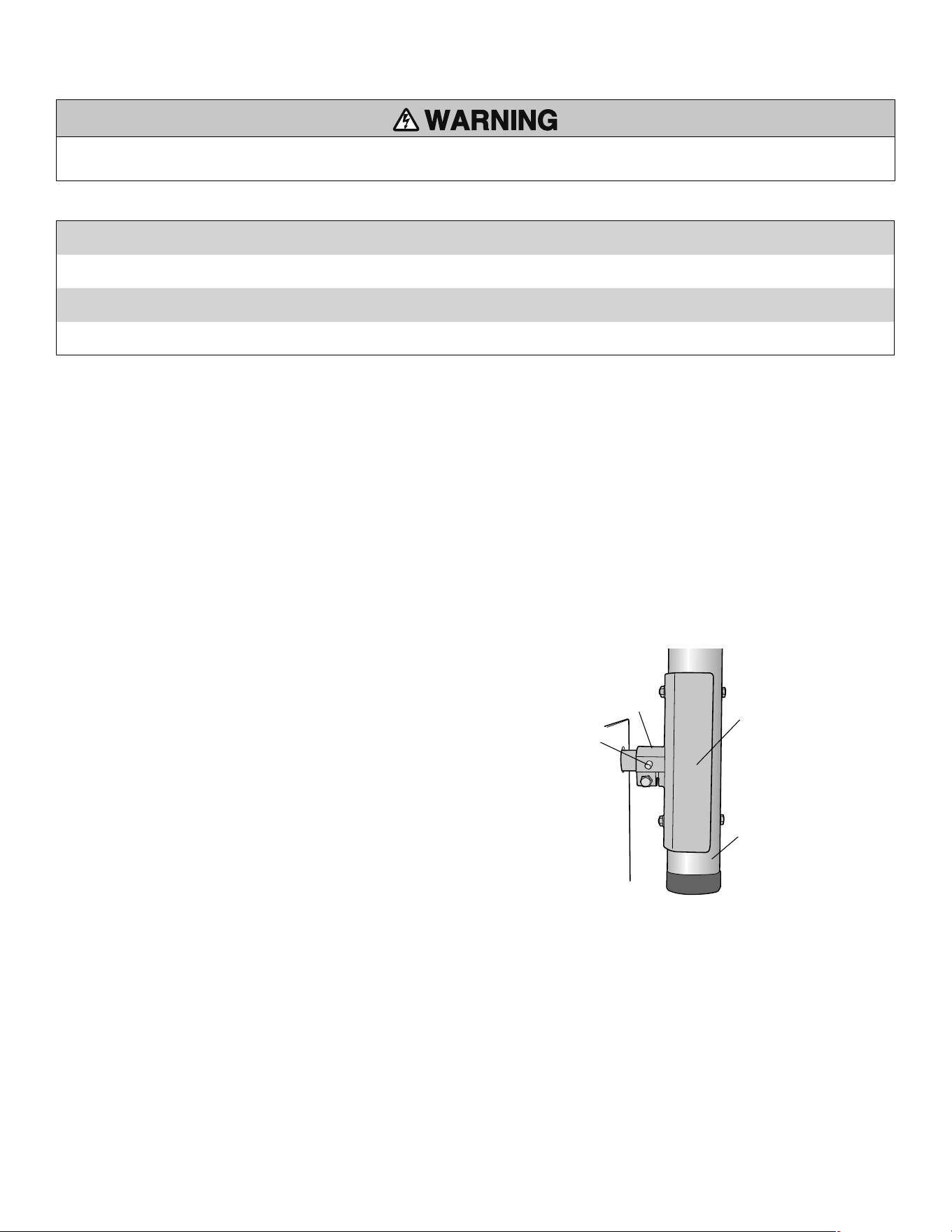
1. Turn the S3 Manual Open switch to OPEN on the control board to rotate gate
arm bracket to the up position.
2. Disconnect AC power and disconnect batteries.
3. Remove the gate arm bracket and pieces in collar.
4. Drive out pin pieces with hammer and punch (Solid sharp blows are better than
light ones).
5. Reinstall gate arm bracket.
6. Lightly oil the new pin and insert into collar.
7. Fully seat pin in shaft by tapping on large end.
8. Reinstall the barrier arm if required.
9. Connect AC power and batteries.
10. Turn off S3 Manual Open switch to CLOSE to put gate into operation.
SHEAR PIN REPLACEMENT
If gate arm is vandalized and the tapered pin in the output shaft has been sheared, it must be replaced correctly and with the right pin type. Replacement must be done by
always punching out the pin (or pieces) from the small end only. If drilling is required, DO NOT DAMAGE THE SHAFT, use a drill bit smaller than the small hole size of the pin.
(Correct pin (P/N MA013) is a 2" pin with a number 6 taper only.)
NEVER USE A BOLT AS A TEMPORARY FIX, THIS WILL DAMAGE THE SHAFT AND COLLAR.
BATTERY
BATTERY DISPOSAL
Replaced batteries must be treated as a hazardous waste and disposed of in
accordance with State, Local and Federal Regulations. See the battery manufacturer’s
Material Safety Data Sheets (01-30839 “MSDS Sheets, Battery, Standard”).
BATTERY REPLACEMENT
Service Kits are available for battery replacement. Please contact Technical Support
(see back of this document for contact information). Replace the batteries with
LiftMaster P/N MBAT batteries. Replace in pairs.
BATTERY MAINTENANCE / TESTING
The batteries are maintenance free. However, to ensure proper and safe operation, it is
recommended that the batteries be replaced every two years. Battery testing is
conducted automatically. See the Battery Test Description section for manually
initiating the battery test.
BATTERY HANDLING / STORAGE
Refer to the battery manufacturer’s Material Safety Data Sheets (01-30839 “MSDS
Sheets, Battery, Standard”). LiftMaster does not recommend storage of batteries in
the field. Batteries are intended for immediate use.
(Operator)
Gate Arm Bracket
Barrier Arm
Shear Pin
Collar
ITEM PROCEDURE EVERY 3 MONTHS EVERY 6 MONTHS EVERY 12 MONTHS EVERY 24 MONTHS
Fasteners Check and tighten as required
●
◆
Bearings and Shafts Check for wear and lubricate
●
◆
Battery Maintenance Replace batteries.
◆
●
17
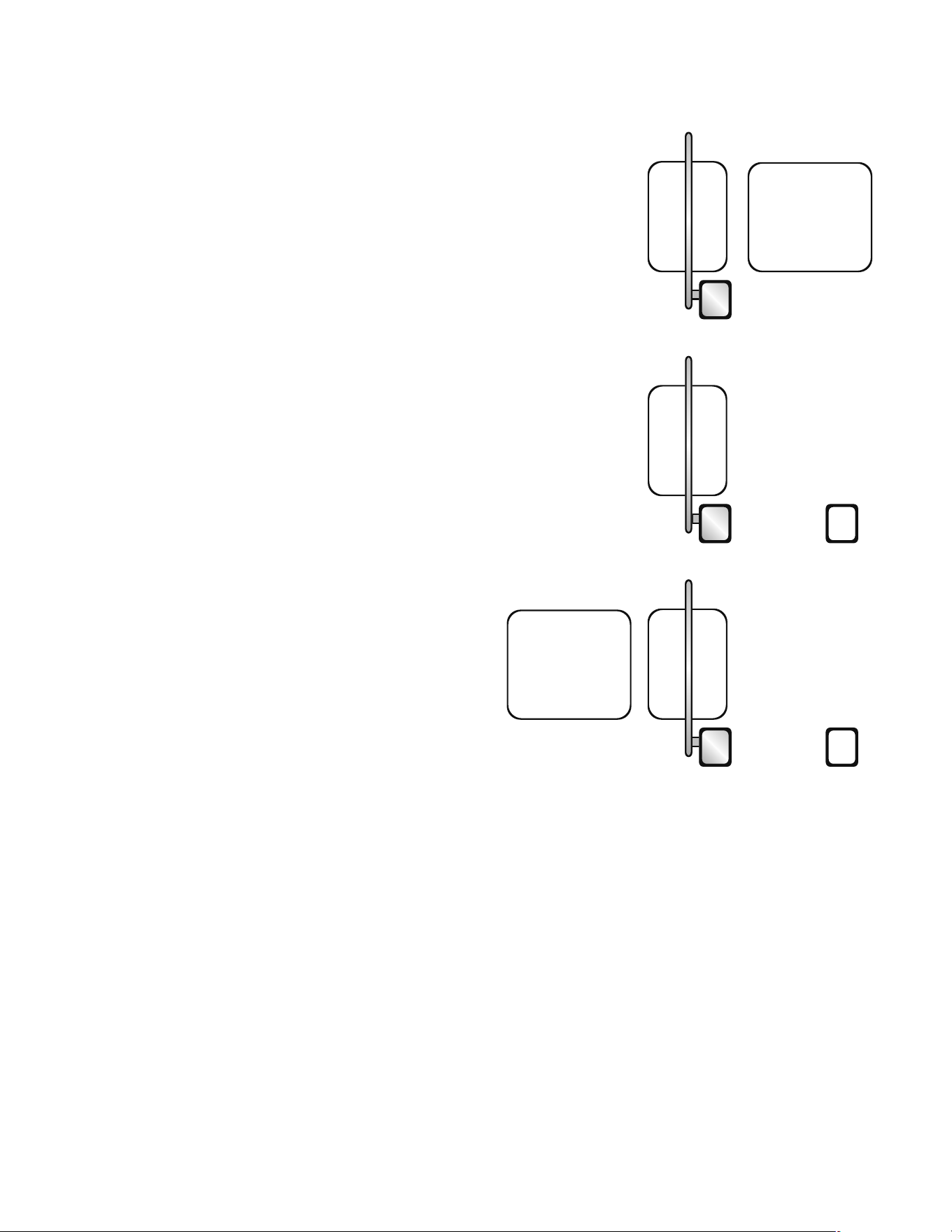
SUGGESTED LOOP SENSOR LOCATIONS
Do not allow control devices to be within 10 feet of gate or operator.
RECOMMENDATIONS:
• If vehicle detectors are used to open or close the gate, use of the presence
contacts are recommended. Using the pulse contacts will REDUCE the gate’s safe
operation.
• If closing timer is to be used, use ONLY on a dedicated free exit.
• Close loop must be centered under gate arm.
FREE EXIT ON VEHICLE APPROACH
Gate will open when sensed by exit loop and then close once the close loop is
cleared. If the vehicle pulls up to the exit loop and then backs away, it will close.
Space between loops will be 4 to 10 feet.
Terminal #7 is backaway (free exit).
Terminal #6 is close input.
ENTRY WITH ACCESS CONTROL DEVICE
Gate will open when activated by an access control device. When vehicle passes and
clears close loop, gate will close.
NOTE: If a second vehicle tail-gates and is sensed at the close loop, gate will stop its
closing motion until loop is cleared again.
Terminal #6 is close input.
Terminals #1, 2, and 3 are open inputs.
DUAL DIRECTION AS ENTRY OR FREE EXIT
Dual direction is a combination of both of the above configurations to provide the
ability for traffic to enter or exit in the same lane.
Space between loops will be 4 to 10 feet.
Back Away Loop
(Free Exit)
Back Away Loop
(Free Exit)
Mega Arm
Mega Arm
Mega Arm
Close
Loop
Close
Loop
Close
Loop
Card Reader
Tele-entry
Radio Control
Card Reader
Tele-entry
Radio Control
ADDITIONAL FEATURES » SUGGESTED LOOP SENSOR LOCATIONS
18
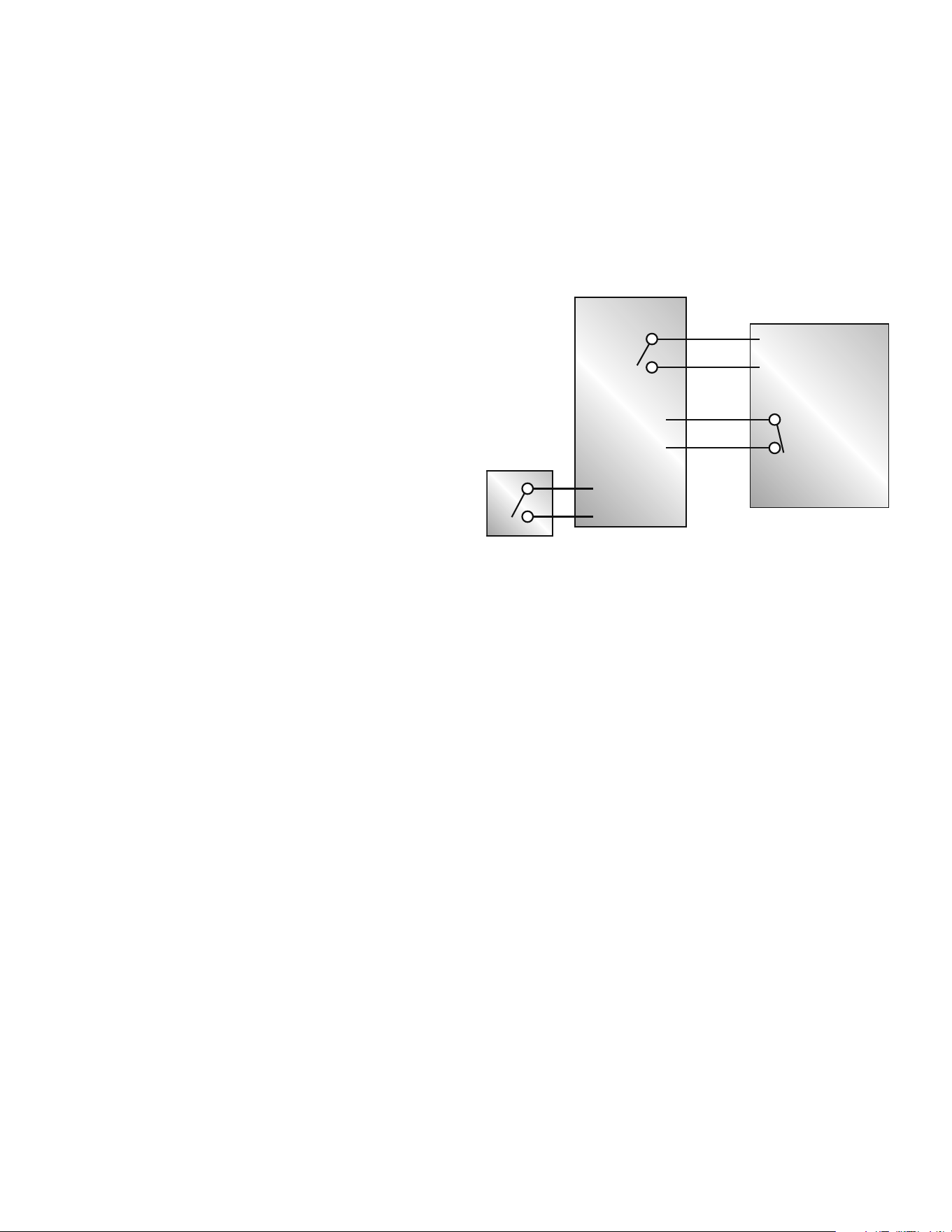
INSTALL THE K1 AUXILIARY RELAY AND CONNECTOR AT MEGA ARM
CONNECTED TO THE ACCESS DEVICE
1. Press the relay into the K1 location ensuring the pins are properly aligned.
2. Press the connector into the J1 connector pins.
INSTALL THE K1 AUXILIARY RELAY AND CONNECTOR AT THE SECOND
1. Press the relay into the K1 location ensuring the pins are properly aligned.
2. Press the connector into the J1 connector pins.
WIRE THE CONNECTIONS BETWEEN THE OPERATORS
1. Connect the Normally open output (NO) of the K1 relay on the trap operator to
the OPEN input (J5 - term#2) of the second operator.
2. Connect the common output (C) of the K1 relay of the trap operator to the
common of the second operator (J5 - term#12).
3. Connect the Normally open output (NO) of the K1 relay on the second operator
to the INTERLOCK input of the trap operator (J5 - term#8).
4. Connect the common output (C) (J5 - term#12) of the second operator to the
common of the trap operator (J5 - term#12).
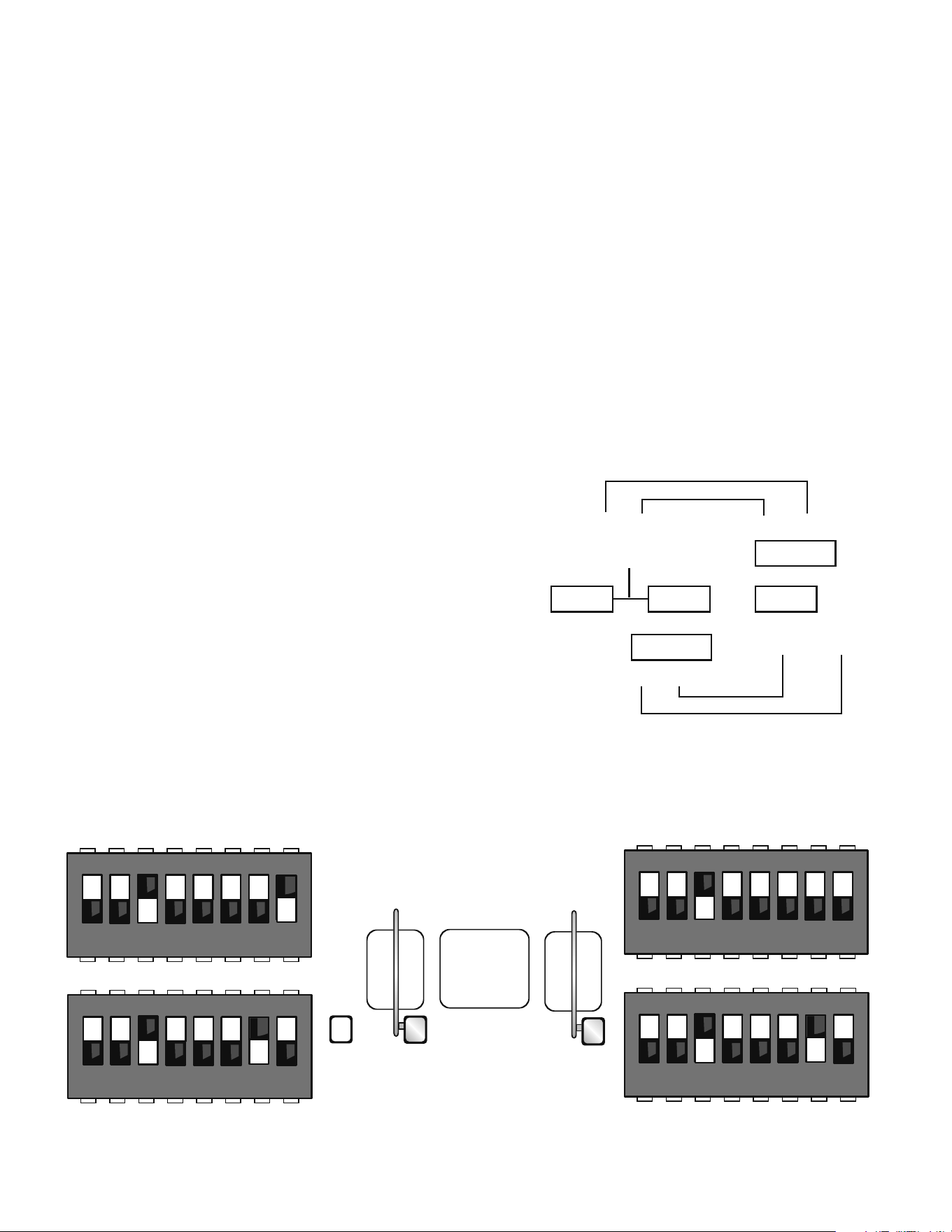
SET THE DIP SWITCHES AT THE TRAP OPERATOR
1. Set switch bank S1 to 00100001 where 1 is up and 0 is down.
2. Set switch bank S2 to 00100010 where 1 is up and 0 is down.
SET THE DIP SWITCHES AT THE SECOND OPERATOR
1. Set switch bank S1 to 00100000 where 1 is up and 0 is down.
2. Set switch bank S2 to 00100010 where 1 is up and 0 is down.
S1
1
ON
2345678
1
ON
2345678
Close
Loop
S2
OFF
ON ON ON ON ON ON ON
ON ON ON ON ON ON
OFF OFF
1
ON
2345678
1
ON
2345678
S1
S2
OFF
OFF
ON ON ON ON ON ON
OFF OFF
ON ON ON ON ON ON
RECONNECT THE POWER AND TEST
1. Reconnect the DC power by replacing the neutral (Black) wire to the battery
terminal.
2. Reconnect the AC Power to the operator.
3. To test, activate the following sequence of inputs:
• Open the trap gate using the access device.
• When the trap gate is open, activate the close loop on the trap operator.
The trap gate will close and the second gate should open.
• When the second gate is open, activate the close loop on the second
operator. The second gate should close.
Mega ARM Operator
Trap Operator
S1 S1
S2 S2
TRAP CONFIGURATION
Must use trap kit. See Mega Arm Options Parts List
Mega Arm
Mega Arm Trap
Close
Loop
Close Loop Trap
Close Loop
Trap
Card Reader
Tele-entry
Radio Control
S1-6 OFF
S1-8 OFF
S1-6 OFF
S1-8 ON
C NC NO DC
C NC NO DC
Opener
Common
Interlock
OPEN
Trap
TES
TRAP SET UP
C
K1
MA MA
ADDITIONAL FEATURES » TRAP INSTRUCTIONS
TRAP INSTRUCTIONS
19
SAMS WITH OTHER OPERATORS
REQUIRES THE K1 RELAY OPTION (Order SAMS KIT)
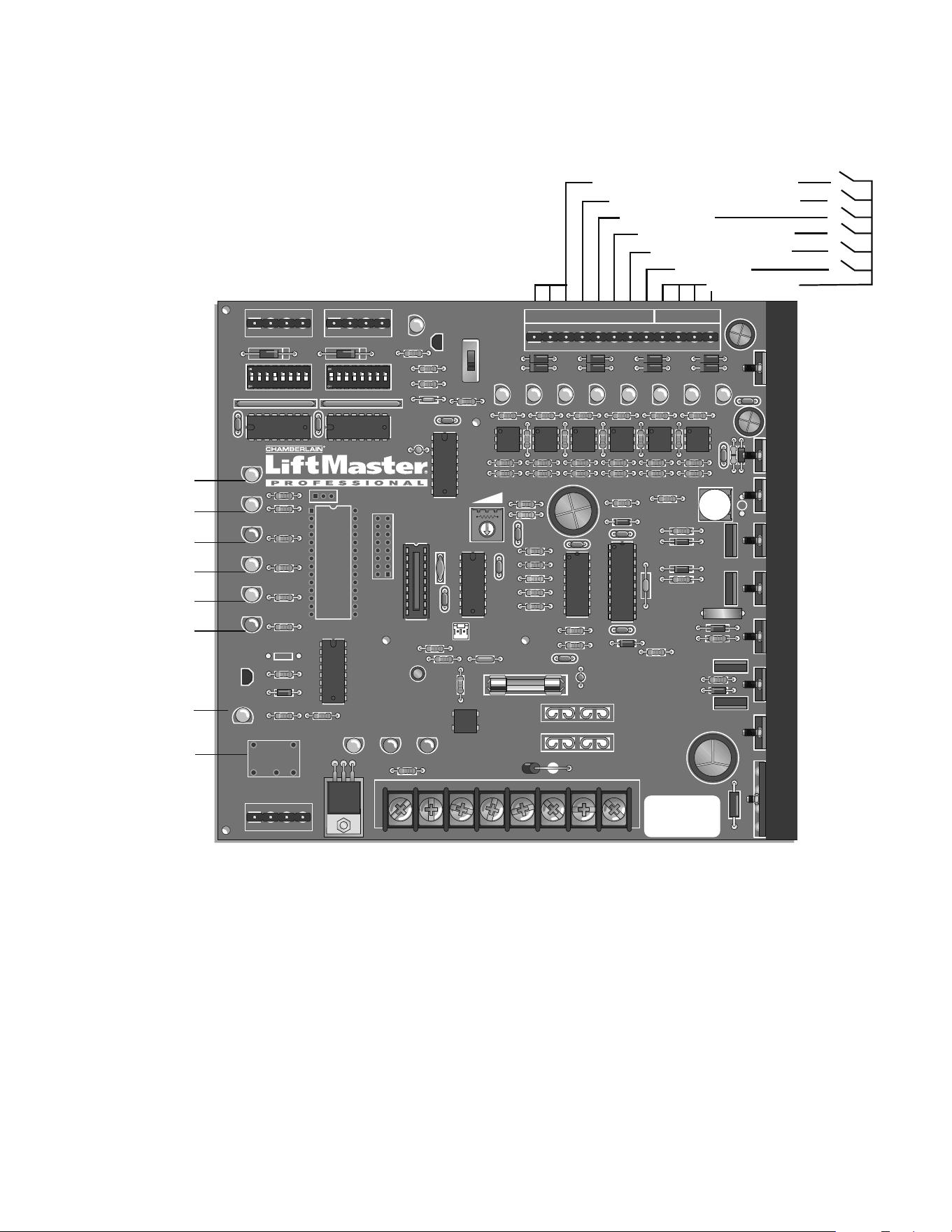
This feature allows a logical interface between the MEGA ARM barrier gate and a
swing, slide, etc. gate operator (or MTC-31). All that is required is 4 wires between the
MEGA ARM barrier gate and the other operator. It will be necessary to have one set
of dedicated/isolated dry contacts - {C. and N.C.} COMMON and NORMALLY CLOSED
be available at the other operator’s OPEN LIMIT SWITCH. Most operators will require
that this EXTRA limit switch be added to their open limit switch assembly.
OPERATION
A one second pulse from access control device to the MEGA ARM will energize its K1
relay sending an open signal to the other operator causing it to open. However, the
MEGA ARM’s barrier arm will not raise yet. When the other operator reaches its full
open limit switch, this will open the COMMON and NORMALLY CLOSED contact on the
EXTRA open limit switch. This will allow the original signal from your access control
device (that was stored in memory) to now raise the barrier arm. As long as the
other operator is in the full open position, any additional open pulse sent will in turn
energize the MEGA ARM’s K1 relay to send another open signal to the other
operator as well as cause the arm to raise again if it has closed via a car crossing
the MEGA ARM’s close loop.
WIRING:
1. Run 2 wires from the other operator’s isolated common & normally closed
contacts of its open limit switch to the MEGA ARM J5#8 and one of the
commons J5, #9-12.
2. Run 2 wires from the MEGA ARM’s K1 relay (common & normally open) to the
other operators common and open input. (WARNING: Max of 30 VOLTS at .5
amps through relay). J5 #8 was the unused SHADOW LOOP input on the MEGA
ARM. NOTE: A separate open device (24 hour timer, toggle switch) can be run
to the other operator to control it without raising the gate arm. Tampering with
the other operator’s safety loops, safety edges and reverse sensors WILL NOT
cause the arm to raise if one tripped. The arm will only raise if an intended
open signal was sent to the MEGA ARM.
NOTES:
• For motorized teeth, vertical pivot or overhead operator, leave S1-6, S1-8 OFF
(this will keep the K1 relay latched down until the arm reaches the down
position. This will keep the other gate operator locked open or teeth locked
down until the arm closes completely).
• In this mode, if the arm senses an impact, the K1 relay will stay energized
holding open (or teeth down) the other operator until the arm times out and
closes.
NOTE: Insert a jumper across the JP2 terminal to allow the SAMS feature to work
with the multiple vehicle memory count selection, use the K1 relay to open the
sequenced gate (S1-5 off, S2-6 on, jumper across JP2). This allows gate to store
input counts via J5 #4 but not raise the arm until the sequenced slide or swing gate
has fully opened.
K1 Relay
C
C
Access Device
Open Input
NO
NC
Other Operator
(Slide, Swing, Teeth, etc.)
S1, #6 and #8 (ON) = K1 Relay PULSE only.
S1, #6 and #8 (OFF) = K1 Relay LATCH only.
J5 #11
J5 #8
Extra Open Limit
Switch
ADDITIONAL FEATURES » SEQUENCE ACCESS MANAGEMENT SYSTEM (SAMS) WITH "MEMORY"
SEQUENCE ACCESS MANAGEMENT
SYSTEM (SAMS) WITH "MEMORY"
20
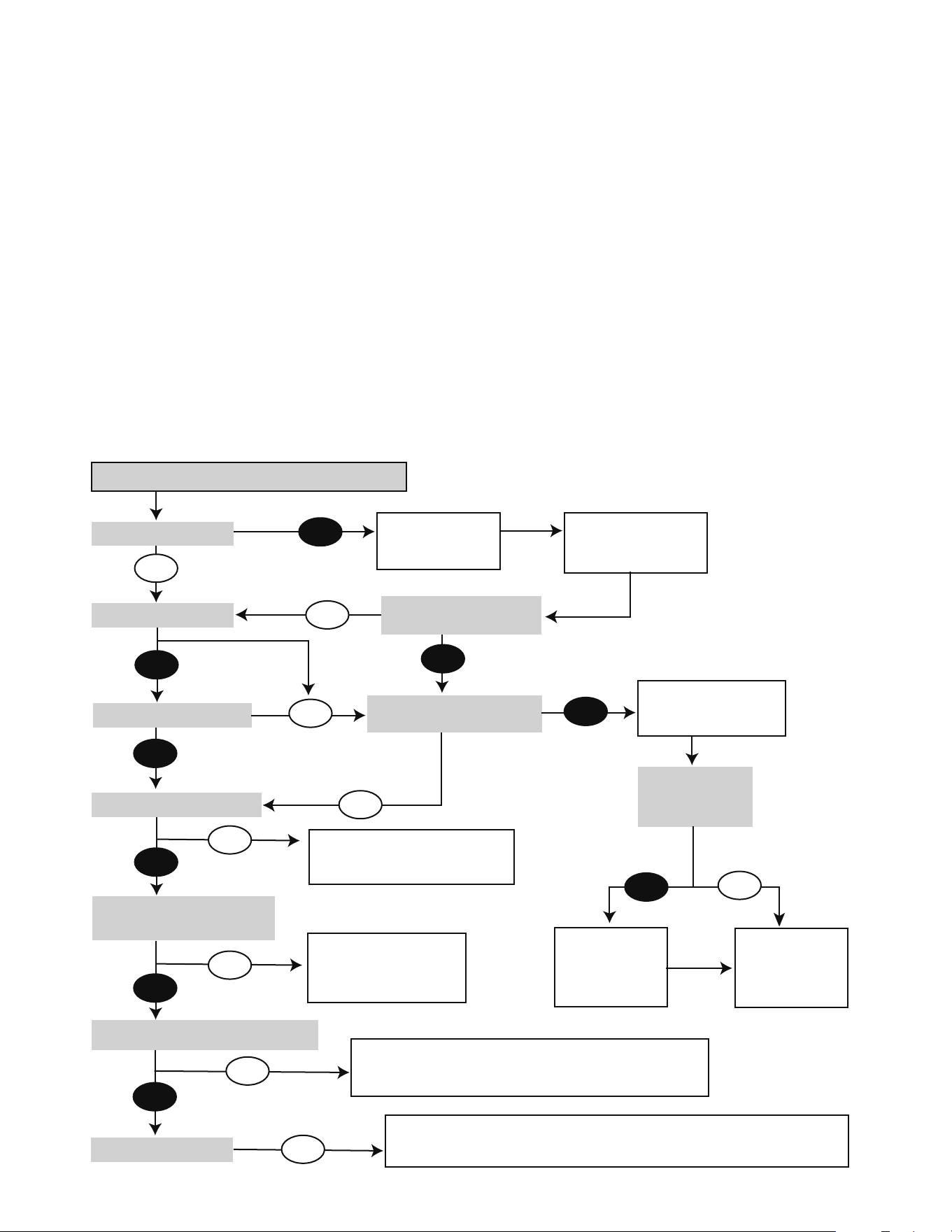
INPUT LOCATIONS
Accessory power is 24 Vdc regulated rated at 500 ma. [1/2 amp].
NOTE: J5 #8 is now the SAMS with memory input (see page 13).
D11: Heart beat. Shows that processor and program are running properly.
D12: Battery status. See diagnostic procedures.
D14: AC power indicator. Shows that AC power is present.
S3: Manual open. To allow gate to be opened or closed during service of operator. Keep in the “Close” position for normal operation.
F3: 10 amp ATO type fuse for 24 Vac input power. (UL listed fuse only.)
F4: 15 amp ATO type fuse for 24 Vdc battery input power. (UL listed fuse only.)
24VAC XFMRACC+
HBEAT BAT LO AC POWER
PWR
CNCNO
Aux Relay
R2 R11
D1
Q1
DC
1
1
K1
D11 D12
R13
D14
U19
J4
F3
F4
F1
F2
1A DC
IRD1
R63
J1
ACC– BAT–
BAT– MOV
BAT+ MOTOR
MOTOR
AUX LIMITS
1
J2
J3
J5
M/S
JP2
S3
1
Q2
T2
1234567891
Ø
11 12
T1
OPEN 1
D15
C7
X2
C19
D7
OLS
R1
U1
C2
C3
C4
C1
U4
R12
S1
D6
OPEN
D5
BRAKE
D4
CLOSE
D3
CLS
D2
IRD
OPEN 2
D16
R3
Ø
OPEN 3
D17
AUX 4
D18
SAFETY 5
D19
CLOSE 6
D22
BACK 7
D23
SHADOW 8
D24
OPEN
CLOSE
MANUAL
R1
Ø
R9
R38
R15
R37
C8
C2
Ø
C12
U12
U1
Ø
+
R8
R7
R6
R5 U2
U3
CPU
U5
U6
U7
X1
R4
R3
D8
T4
T3
T6
T5
T8
T7
C15
C2
D27
Q6
Q5
F5
C22
C18
U18
1 2 3 4 5 6 7 8
S2
1 2 3 4 5 6 7 8
D1
Ø
R14
R18
R21
R24
R36
R42
R47
R53
R35 R41 R46 R5
Ø
R61
C16
R17
R16
D29
Q4
D28
D26
C6
D25 – B2 +
U8 U9
U16
U11 U13 U14 U15
D9
R23
R22
R26
R25
R19
B1
R2
Ø
C5
+
+
R34
R33
R4
Ø
R39
R45
R44
R58
DX3
R49
R48
R43
R51
WARNING FOR
CONTINUOUS
PROTECTION
AGAINST FIRE
REPLACE ONLY
WITH THE SAME
TYPE AND RATING
OF FUSE
R43
R6
Ø
R59
D21
D2
Ø
R62
DX1
TR
DX4
R57
R56
C13
DX2
R55
Open Gate Inputs - Reader, Push Button
Aux Open / Reset (Pulse Open/Close)
Close Gate Input - Close Loop
Back Away - Free Exit Loop
Commons - 0 Vdc
Shadow Loop
Safety Loop Input
K1 Relay Terminals
(Optional)
Relay (Optional)
Relay Indicator
Obstruction Sense (IRD and MRT)
Close Limit Sensor
Close Drivers On
Motor Brake On
Open Drivers On
Open Limit Sensor
24 Vdc (Regulated)
YEL
YEL
RED
ORG
BLU
BLK
ADDITIONAL FEATURES » CONTROL BOARD LAYOUT + INPUT LOCATIONS
CONTROL BOARD LAYOUT
21
WARNING - DISCONNECT BATTERIES AND AC POWER BEFORE
SERVICING ANY MECHANICAL OR MOVING COMPONENTS.
BATTERY CHECKOUT
When the batteries become weak the gate will begin to run noticeably slower.
NOTE: Batteries should only be checked when you are sure they have had
adequate time to fully charge.
1. Turn off the AC power and run gate for 5 to 10 cycles while observing low
battery indicator LED D12. If LED 12 comes ON, batteries are too weak to
function properly. If LED 12 does not light, then voltage should be checked as
they still maybe near failure. Correct voltage is approximately 24.5 Vdc.
NOTE: If LED D12 does light, gate will open to conserve batteries in this test
or in a real power loss, even if mode switch 8 on S2 is off.
Return of AC power will clear low battery indicator. Correct charge voltage is 27.5
Vdc with batteries not connected (set with R63, shown on the Control Board Layout
page).
TROUBLESHOOTING » BATTERY CHECKOUT + GATE NOT OPERATING
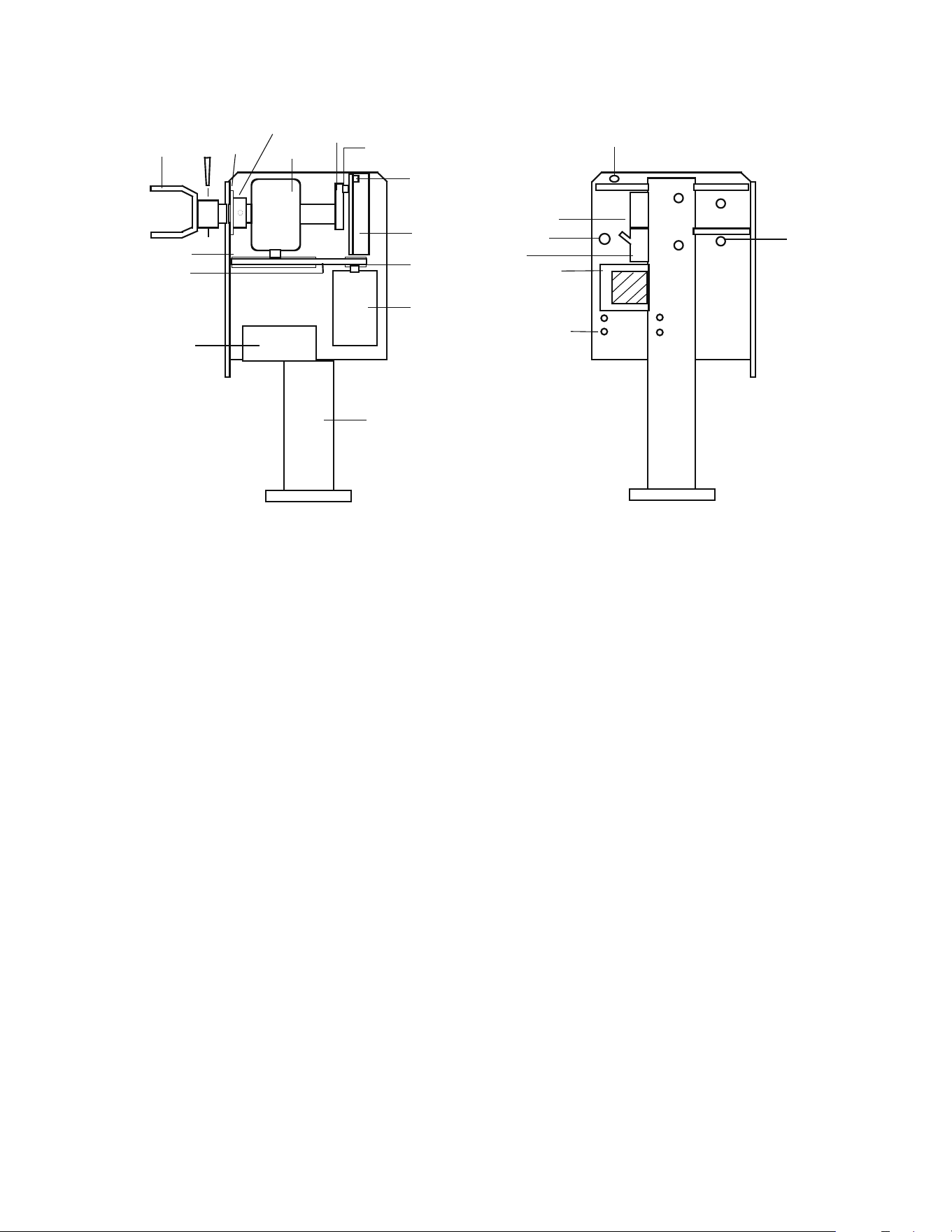
GATE NOT OPERATING
GATE WILL NOT OPERATE.
Check the battery
connections.
Clear the active input to allow the
gate to open.
Clear the active input to
allow the gate to close.
The max timer (MRT) has expired. Remove AC and battery power then reapply to reset.
Inspect the belt for slippage and verify the fast run timer settings are correct.
Make sure the gate is not binding, then adjust the IRD.
Verify the gate reverses when obstructed.
Check fuse F4
Replace if blown.
Is the AC power
LED on now?
Check fuse F3,
Replace if blown.
Allow operator to
charge before
operation.
Restore AC power and/or
turn AC power switch ON.
Is the HBEAT flashing now?
Is the AC PWR LED on?
Is the HBEAT flashing?
Yes
Yes
Yes
No
Is the “BAT LO” LED on?
Is S2-8 (open on AC fail) on?
Is the shadow input active?
Is the Safety, Backaway, or
Open input active?
Does the IRD light while operating?
Is the IRD flashing?
No
No
No
Yes
No
Yes
No
No
No
No
Yes
Yes
Yes
No
Yes
22
PART NUMBERS AND DESCRIPTIONS
ITEM PART NUMBER DESCRIPTION
1 MA001 Controller
2 MA002 Removable Connector
3 MA003 DC Motor - 24 Vdc
4 MBAT 12 Vdc 7AH Battery
2 required
5 MA005 Gear Reducer 60:1
6 MA006 Aluminum Chassis
7 MA007 Drive Belt
8 MA008 Reducer Pulley
9 MA009 Motor Pulley
10 MA010 Gate Arm Bracket
11 MA011 Magnet
12 MA012 Cam Arm
13 MA013 Shear Pin
ITEM PART NUMBER DESCRIPTION
14 MA014 Bolt and Nut (4) Motor
15 MA015 Transformer
16 MA016 120 Vac Duplex Outlet
(120 Vac Only)
17 MA017 Bolt and Nut (4) Reducer
19 MA019 On/Off Switch
* MA020 Operator Cover for Mega Arm
(Not Tower)
* MA021 Nylon Arm Nuts (2)
* MA022 Arm Bolts (2)
* MA023 Gate Arm - 12'
* 73A3 Filter Module
* 74-31243 Surge Suppressor
20 MA036 Collar
21 MA037 Nylon Washer
( * ) parts not shown
1
2
3
4
5
6
7
8
9
10
11
12
13
14
15
16
17
18
18
19
20
21
PARTS SHIPPED
ITEM QTY
MEGA ARM Operator 1
Controller 1
Operator Cover 1
Installation and Service Manual 1
Arm Bolts with Washers 2
Nylon Nuts 10
7AH Batteries 2
MEGA ARM TOWER UNIQUE PARTS LIST
ITEM PART NUMBER DESCRIPTION
* MA020T Operator Cover for Mega Arm Tower
* MA020D Operator Door for Mega Arm Tower
NOTE: Mega Arm Tower not shown
MEGA ARM OPTIONS PARTS LIST
ITEM PART NUMBER DESCRIPTION
* 71-TRAP Trap option
* 71-SPRINT Sprint option
* 71-TRAPSP Sprint Trap option
REPAIR PARTS » PART NUMBERS AND DESCRIPTIONS + PARTS SHIPPED + MEGA ARM TOWER UNIQUE PARTS LIST
+ MEGA ARM OPTIONS PARTS LIST
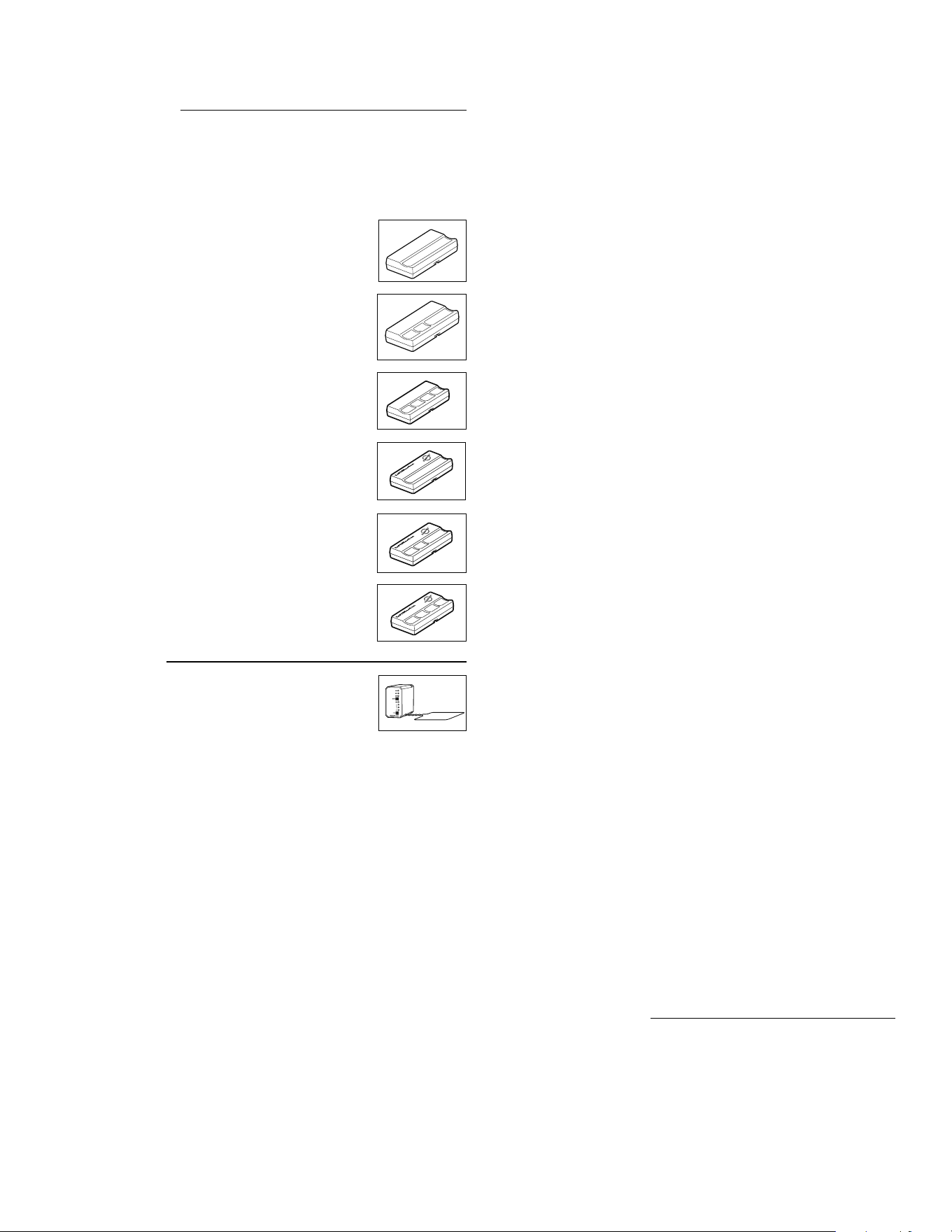
23
OPEN
OPEN
OPEN
OPEN
OPEN
OPEN
SECURITY✚
®
SINGLE BUTTON REMOTE CONTROL
Includes visor clip. Model 371LM
SECURITY✚
®
4-BUTTON REMOTE CONTROL
Includes visor clip. Model 374LM
PASSPORT
TM
1-BUTTON REMOTE CONTROL
Includes visor clip. Model CPT13.
PASSPORT
TM
3-BUTTON REMOTE CONTROL
Includes visor clip. Model CPT33
PASSPORT
TM
4-BUTTON REMOTE CONTROL
Includes visor clip. Model CPT43
24 VDC LOOP DETECTOR
Model A24
WIRING HARNESS
For the A24. Model A57
HEATER KIT
500 watt with thermostat (MAT and MATS only). Model UN201
SLIP CLUTCH OPTION
For Mega Arm Gear Box. Model MA005C
K1 RELAY OUTPUT OPTION
Model MA200
SAMSKIT
Includes required relay and limits.
ALUMINUM ARM
White, 12' x 3" diameter with warning labels. Model MA023
ALUMINUM ARM:
12' x 3" diameter with yellow/black stripes. Model MA024
ALUMINUM ARM
12' x 3" diameter with reflective yellow/black stripes. Model MA024R
(Highly Recommended)
NYLON ARM NUTS
(Pkg. of 50). Model MA021
NYLON ARM NUTS
(Pkg. of 50), thin. Model MA021A
ADAPTER COLLARS
For padded arm option (2 included). Model MA031
ROUND PADDED ARM
12' x 4" diameter, yellow (requires MA031). Model MA025
REPLACEMENT PAD:
12' x 4" diameter, yellow. Model MA026
REPLACEMENT ARM TUBE
12' x 2" diameter. Model MA027
ROUND PADDED ARM
14' x 4" diameter, yellow (requires MA031). Model MA028
REPLACEMENT PAD
14' x 4", yellow. Model MA029
REPLACEMENT ARM TUBE
14' x 4". Model MA030
COUNTER WEIGHT
Required for all 15' arms. Model MA117
ALUMINUM GATE ARM
15' x 3" with yellow/black stripes (requires MA117). Model MA116
ALUMINUM GATE ARM
15' x 3" with reflective yellow/black stripes (requires MA117). Model MA116R
ALUMINUM GATE ARM
White, 15' x 3" (requires MA117). Model MA115
ARTICULATING PVC (FOLDING) ARM
9' with hardware kit. Model MA034 (Highly Recommended)
HARDWARE KIT
(Only for MA034). Model MA033
PVC ARM: 9'
(Only for MA034). Model MA035
ARTICULATION ALUMINUM (FOLDING) ARM:
10' without hardware kit, with yellow/black stripes. Model MA024-10
SPRINT GATE ARM
8' Padded Safety Arm, yellow. Model SP8
REPLACEMENT ARM TUBE
Model SP8 TUBE
REPLACEMENT PAD
Yellow. Model SP8 PAD
SECURITY✚
®
3-BUTTON REMOTE CONTROL
Includes visor clip. Model 373LM
OPEN
SPRINT OPERATORS ONLY
MA230VKIT
Includes surge suppressor, wire jumper, duplex box covers and detailed instructions.
ACCESSORIES
Chamberlain offers a variety of LiftMaster Security
✚
®
and Passport
™
remote
controls to satisfy your application needs. Single-button to 4-button, visor or key
chain. Additionally, Passport
™
remote controls are ideal for integration with
Telephone Entry and Access Control Systems. Contact your authorized LiftMaster
dealer for details.
REMOTE CONTROLS
MISCELLANEOUS

© 2011, The Chamberlain Group, Inc.
01-60162H All Rights Reserved
(YOU MUST READ, UNDERSTAND AND AGREE WITH ALL ITEMS IN THE LIMITED WARRANTY)
LiftMaster warrants the MEGA ARM-UL to be free of defects in workmanship and materials for a period of 2 years for electronics and mechanical components and
includes a 10 year corrosion perforation warranty on the cover and chassis. Warranty will begin from the date of purchase.
LiftMaster reserves the right of final determination as to the existence and causes of any defect or failure. Any part or parts found to be defective and are returned to
LiftMaster within the warranty period, shall at our option be repaired or replaced free of charge F.O.B. the factory. Freight is not included at any time on gate arms and
chassis. ONLY UPS ground freight is included during the first year of warranty.
The warranty will not apply the following circumstances which are considered beyond our control.
Mis-use, vandalism, accident, neglect, unauthorized repairs or modifications, acts of God (lightning, floods, insect damage, etc.), power surges, units subjected to corrosive
environments, incorrect installation or application, the batteries or incorrect battery installation, operation without or failure to use correct battery type, damage to arm
bracket and/or gear reducer due to use of incorrect arm.
The warranty set forth above is entirely exclusive and no other warranty whether written or oral, is expressed or implied. LiftMaster specifically disclaims any and all implied
warranties, merchantability or fitness for a particular purpose. It is the purchasers sole and exclusive responsibility to determine whether or not the equipment will be suitable
for a particular purpose. In no event shall LiftMaster, inc. be held liable for direct, indirect, incidental, special, consequential damages or loss of profits whether based on
contract, tort, or any other legal theory during the course of the warranty or at any time there after. The installer and/or end user agree to assume all responsibility for all
liability in use of this product, releasing LiftMaster of all liability.
WARNING! MEGA ARM NOT FOR USE WITH BICYCLES OR PEDESTRIANS. YOU MUST PROVIDE APPROPRIATE SIGNAGE BEFORE ACTIVATING THE
UNIT. NEVER ALLOW CHILDREN TO PLAY NEAR OR OPERATE AUTOMATIC GATES.
IN ORDER TO INSTALL AND USE THE MEGA ARM, YOU MUST UNDERSTAND AND BE IN FULL UNCONDITIONAL AGREEMENT WITH ALL STIPULATIONS OUTLINED ABOVE. IF YOU
ARE NOT IN FULL AGREEMENT, DO NOT PUT UNIT INTO OPERATION. IF OPERATOR IS PUT INTO OPERATION THIS WILL BE CONFIRMATION THAT YOU ARE IN FULL
UNCONDITIONAL AGREEMENT WITH ALL OF THE ABOVE STIPULATIONS.
Materials, components, features and specifications are subject to change without notice.
WARRANTY POLICY
HOW TO ORDER REPAIR PARTS
OUR LARGE SERVICE ORGANIZATION
SPANS AMERICA
INSTALLATION AND SERVICE INFORMATION
SIMPLY DIAL OUR TOLL FREE NUMBER:
1-800-528-2806
www.liftmaster.com
WHEN ORDERING REPAIR PARTS, ALWAYS GIVE THE FOLLOWING INFORMATION:
• PART NUMBER
• PART NAME
• MODEL NUMBER
ADDRESS ORDERS TO:
THE CHAMBERLAIN GROUP, INC.
Technical Support Group
6050 S. Country Club Road
Tucson, Arizona 85706