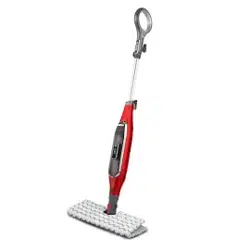
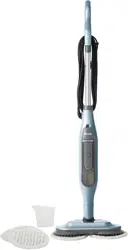
When assembling your Steam Mop there may be a little water in or around the water tank. This is because we test all our Steam Mops before you buy them, so you get a quality Shark® Genius™ Steam Pocket® Mop System.
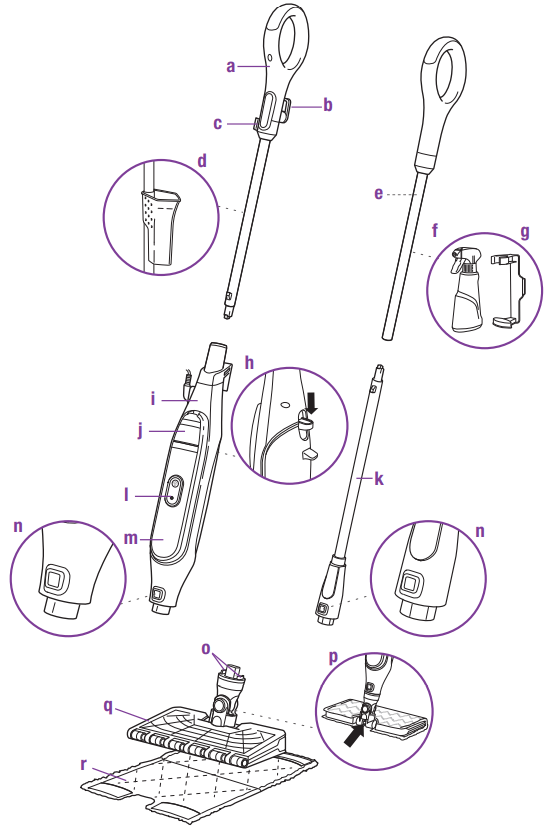
Steam Mop Handle
Quick-Release Cord Holder
Cord Management Clip
Filling Flask (clips to Steam Mop pole)
Spray Pocket™ Mop Handle
Spray Bottle
Spray Bottle Clip
Steam Mop Pad Release Button
Steam Mop Body
Water Tank Lid
Spray Pocket Mop
Steam Button
Water Tank
Mop Head Release Button
Secondary Release Buttons
Steam Blaster™ Nozzle
Genius Mop Head
Dirt Grip™ Pad
Assembling Your Steam Pocket® Mop
WARNING: Always make sure the Steam Mop is UNPLUGGED when not in use. Never fill the Steam Mop or attach the mop head when the Steam Mop is plugged into an electrical outlet. Unplug from the electrical outlet and allow to cool before you fill the Steam Mop, or attach or remove the head. To prolong the life of your Steam Mop, we recommend using distilled water. Make sure you add only water to the tank. Chemicals or cleaning solutions (including vinegar) may damage the Steam Mop and could be unsafe for you and your family.
STEAM MOP ASSEMBLY
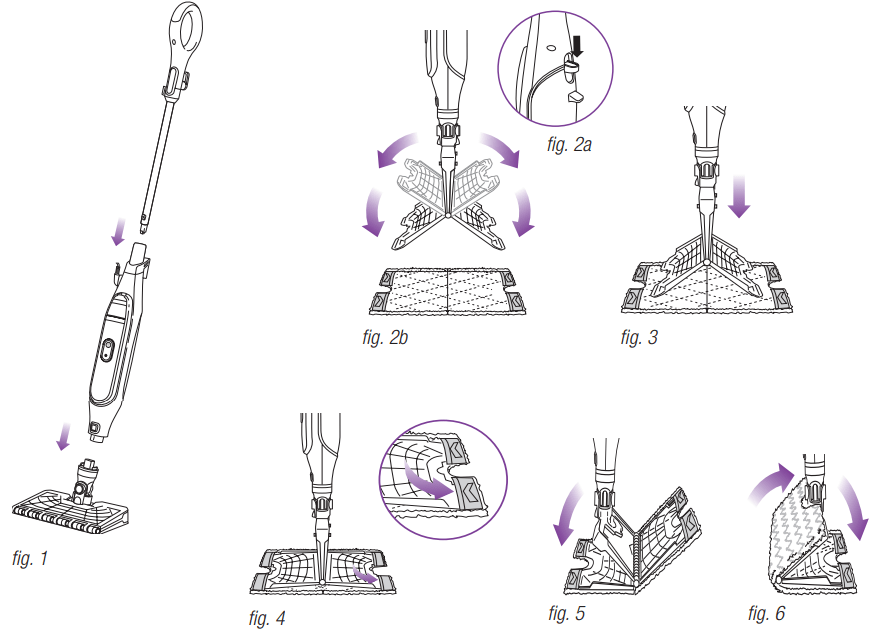
Insert the Steam Mop handle into the Steam Mop body. Push the handle in until you hear it click into place. (fig. 1)
Slide the Genius™ Mop Head into the Steam Mop body. Push until you hear it click securely into place. (fig. 1) To detach the Genius Mop Head, press the release button and slide off.
To attach the Dirt Grip™ pad, spread the pad on the floor with the pocket side up. Center the Genius Mop Head above the pad, then press the pad release button on the back of the Steam Mop body (fig. 2a). Both sides of the Genius Mop Head will drop open (fig. 2b). Slip the Genius Mop Head’s four corner tabs into the four corner pockets of the pad (fig. 3 and fig. 4). Gently press one side of the Genius Mop Head to the floor until that side clicks into place (fig. 5). Repeat on the other side (fig. 6).
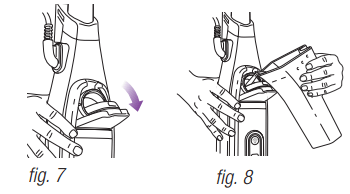
Pull down on the water tank lid to open (fig. 7).
Use the filling flask to pour water into the water tank (fig. 8). Water can be poured into the tank directly. Do not overfill past the water line on the fill flask. Press the water tank lid firmly to close it.
Using Your Steam Pocket® Mop
IMPORTANT: Make sure you do not use the Steam Mop without attaching a Dirt Grip™ pad and adding water to the water tank first. When you are using the Steam Mop for the first time, it might take longer than the normal 30 seconds to start steaming.
IMPORTANT: Do not use on unsealed wood or unglazed ceramic floors. On surfaces that have been treated with wax and on some no-wax floors, the sheen may be removed by the heat and steam action. Test an isolated area of the surface to be cleaned before proceeding. Check the use and care instructions from the floor manufacturer.
NOTE: To prolong the life of your Steam Mop, we recommend using distilled water.
NOTE: Sweep or vacuum your floors prior to cleaning with your Steam Mop.
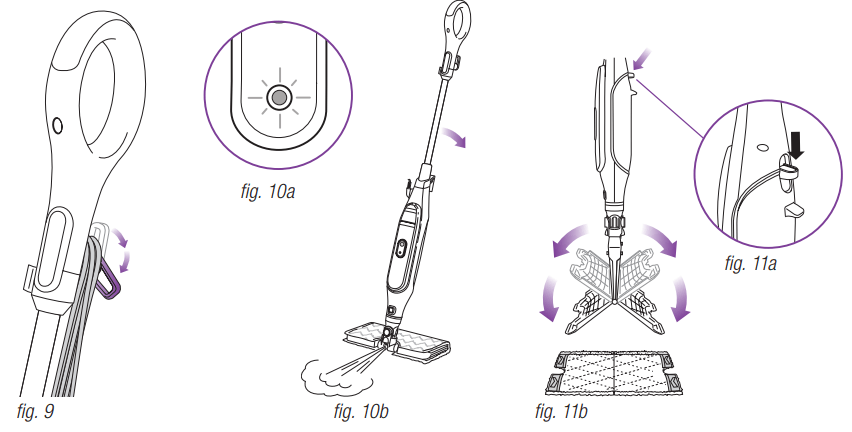
1. Twist the Quick-Release Cord Holder to unwrap the power cord completely (fig. 9). Plug into an electrical outlet.
2. When it's first plugged in, the unit will be in Standby mode. When in Standby, the blue light below the Steam Button will blink (fig. 10a).
3. When ready to activate steam, press the Steam Button on the Steam Mop body to activate. The blue light will stop blinking and will glow steadily.
4. Clean your floors with a forward and backward motion.
5. When you need an extra burst of steam to clean a stuck-on stain, you can use the Steam Blaster™ feature. Flip the head over so that it is behind the mop body, then tilt the mop handle down. This will cause the the Steam Blaster (fig. 10b) to emit a concentrated blast of steam onto the stain.
CAUTION: While in Steam Blaster mode, do not leave stationary for more than one minute.
CAUTION: Do not scrub any one area for an extended period of time.
6. To stop the Steam Blaster spray, simply raise the handle. You can then flip the mop head back into its original position and continue cleaning.
7. When finished mopping, press the Steam Control button. The blue light will blink, indicating that the unit is in Standby mode. Once in Standby mode, unplug the unit.
8. To remove the Dirt Grip pad, simply lift the Steam Mop straight up by the handle until the Genius™ Mop Head is hanging straight down. Press the Release button on the back of the Steam Mop body (fig 11a), and both sides of the head will drop open, releasing the pad (fig 11b).
9. Once the Dirt Grip pad has been released, close the Genius Mop Head. To close, gently press one side of the Genius Mop Head to the floor until that side clicks into place. Repeat on the other side.
10. When the water tank is empty, the Steam Mop will stop producing steam. You can refill the water tank at any time as long as the Steam Mop is unplugged. Follow the water tank filling instructions on page 6.
NOTE: Please wait 2 to 3 minutes for the Steam Mop to cool off before switching the mop head. Never leave the Steam Mop with a damp/wet Dirt Grip pad on any floor for an extended period of time.
Automatic Steam Control
SETTING
IDEAL FOR THESE SEALED SURFACES
RECOMMENDED USAGE
1 setting Automatic Steam Control
Laminate
Hardwood
Marble
Tile
Stone
Cleaning sealed surfaces and large areas
Basic, everyday cleaning
Removing spots and smaller messes
Cleaning moderate and heavy traffic areas
Steam Blaster™
For an extra burst of steam, you can use the Steam Blaster feature. Follow the instructions found on the “Using your Steam Pocket® Mop” page.
TO SANITIZE* WITH THE STEAM MOP USING THE GENIUS™ MOP HEAD AND THE DIRT GRIP™ PAD:
Attach a clean Dirt Grip pad to the Genius Mop Head.
Press the Steam Button on the mop body to activate.
Wait 30 seconds for the unit to begin producing steam.
Start mopping on an appropriate sealed hard-floor surface with a forward and backward motion. After three minutes, your unit is ready to be used to sanitize.
Using a forward and backward motion, move the unit over the area you seek to sanitize. Repeat at least 15 times.
* Sanitization studies were conducted under controlled test conditions. Household conditions and results may vary. Genius Mop Head only when used with Steam Mop. Not in Steam Blaster™ mode.
Caring for Your Steam Pocket® Mop
AFTER USE AND STORAGE
Press the Steam Control button until the light below starts start to blink, indicating that you are in Standby mode. Unplug the cord from the outlet and place the Steam Mop into the upright position. Let it cool.
To remove the Dirt Grip™ pad, lift the Steam Mop straight up by the handle until the Genius™ Mop Head is hanging straight down. Press the Release button on the back of the Steam Mop body, and both sides of the Genius Mop Head will drop open, releasing the pad. Once the pad has been released, close the Genius Mop Head.
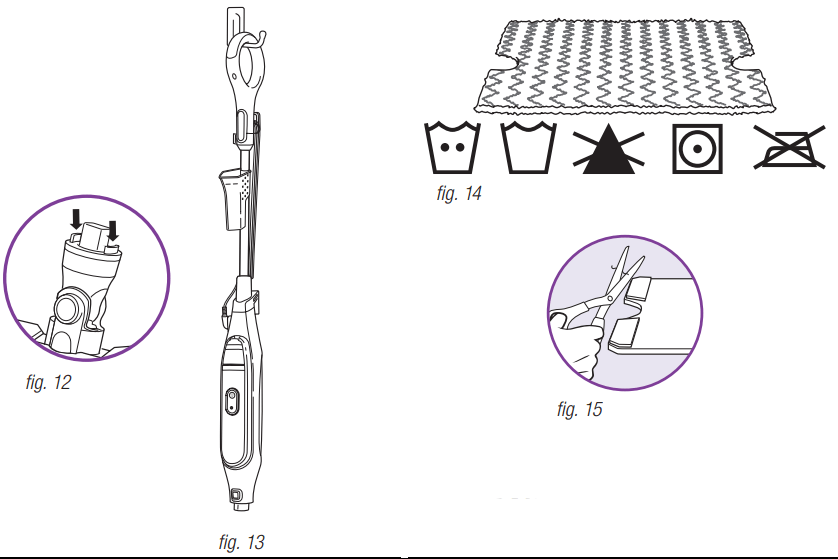
If the Genius Mop Head is not attached to the mop, the pad can still be removed. Press the two red secondary pad release buttons located on the sides of the Genius Mop Head post to release the pad (fig. 12).
Empty the water tank before storing. To empty the tank, hold the Steam Mop beside a sink. Open the water tank lid, then lean the unit over the sink. Let the water drain out, then close the lid.
To store the Steam Mop, wait until after it has cooled and the steam has been released. Then remove the Genius Mop Head and hang the Steam Mop by its handle on a large hook (not included) (fig. 13).
Store the filling flask by attaching it to the top handle pole of the Steam Mop.
DIRT GRIP PAD CARE INSTRUCTIONS
Care
Machine-wash the Dirt Grip pads separately with warm water using liquid detergent.
NEVER USE BLEACH, POWDERED DETERGENT, OR FABRIC SOFTENERS as they may damage or leave a coating on the Dirt Grip pads that will reduce their cleaning performance and absorbency. Dirt Grip pads should be line-dried or tumble-dried on a low setting, as this will extend the life of the microfiber fabric (fig. 14).
Loose fibers can indicate wearing of the microfiber fabric. Do not pull the loose fibers, as this can cause the weave to come undone. Simply trim the loose fibers with scissors (fig. 15).
Replacement Dirt Grip pads
For best cleaning results, we recommend replacing your Dirt Grip pads every 3 to 4 months following normal use. As with any fabric, dirt particles, grease, friction, and repeated washing can cause the fibers to break down, and you may notice an increase in the effort needed to push or pull the Steam Mop.
Assembling and Using Your Spray Pocket™ Mop
ASSEMBLY
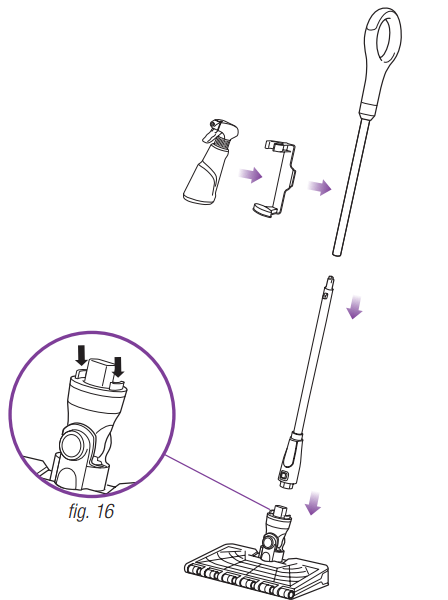
Slide the Genius™ Mop Head post into the Spray Pocket Mop body until you hear it click securely into place. Next, slide the Spray Pocket Mop handle into the Spray Pocket Mop body until it clicks securely into place. Attach the spray bottle and clip to the mop handle.
To attach the Dirt Grip™ pad, spread the pad on the floor with the pocket side up. Center the Genius Mop head above the pad, then press the pad release button on the back of the Spray Pocket Mop body (fig. 16). Both sides of the head will drop open. Slip the Genius Mop Head’s four corner tabs into the four corner pockets of the pad. Gently press one side of the head to the floor until that side clicks into place. Flip the head over and repeat on the other side.
To remove the Dirt Grip pad, lift the Spray Pocket Mop straight up by the handle until the Genius Mop Head is hanging straight down. Press the pad release button on the back of the mop body, and both sides of the Genius Mop Head will drop open, releasing the pad.
To remove the Genius Mop Head, press the mop head release button on the Spray Pocket Mop body.
If the Genius Mop Head is not attached to the mop, the pad can still be removed. Press the two red secondary pad release buttons located on the sides of the Genius Mop Head post to release the pad.
USE
The Spray Pocket Mop is a ready-to-grab floor cleaner that is great for quick, everyday cleaning jobs. Attach the Genius Mop Head and a pad, and you're ready to quickly wipe away spills and dirt.
The spray bottle clips onto the handle of the Spray Pocket Mop for easy use, and can be stored there when not in use. The bottle comes pre-filled with cleaner. You can refill the bottle with the cleaner of your choice.
Troubleshooting Guide
PROBLEM
POSSIBLE REASONS & SOLUTIONS
The Steam Mop isn’t producing any steam.
The Steam Mop should be securely plugged into an electrical outlet. Check your fuse or circuit breaker or try a different outlet.
Make sure the water tank is full, the unit is plugged in, and the light below the Steam Button is solid.
If the light below the Steam Button is not illuminated, try a different electrical outlet.
If light below the Steam Button is blinking, the Steam Mop is in Standby. If the light below the Steam Button is solid, wait 30 seconds for the unit to warm up.
The Steam Mop is producing intermittent steam.
Make sure the water tank is full.
I am getting streaky/ cloudy floors.
The Dirt Grip™ pad might be dirty. If it is, flip it over to the clean side or change it entirely. If you washed the Dirt Grip pad with powdered detergent, then it could be damaged and require replacement.
This could also be an indication of soap or grease residue that has accumulated on the floor. As the Steam Mop uses only a small amount of water, it may not be enough to rinse off the accumulation of residue that the steam is bringing to the surface. We suggest rinsing the floor with nothing but water, letting it dry, and then steam mopping again with a clean Dirt Grip pad. One or more rinses will generally remove the residue.
A more stubborn case may require you to rinse the floor with a mix of one part vinegar and two parts water* (but DO NOT put any cleaning solutions or chemicals into the Steam Mop's water tank.)
*Please consult your flooring manufacturer’s care and maintenance instructions before applying any cleaning products or solutions.
It’s really hard for me to push/pull the Steam Mop.
The Steam Mop might be hard to push/pull if the Dirt Grip pad isn’t wet enough. It should get easier to push/pull the Steam Mop after it’s been running for a few minutes.
An overly dirty pad could also result in a harder push/pull experience. We recommend flipping the pad over or using a clean pad.
Frequently Asked Questions
QUESTION
ANSWER
Can I use the Steam Mop on carpets?
No, the Steam Mop is not designed for carpet cleaning.
What surfaces can I use the Steam Mop on?
The Steam Mop is designed for use on all sealed hard-floor surfaces. We recommend that you first test an isolated area of the floor surface to be cleaned as well as review the use and care instructions from your floor manufacturer.
WARNING: Do not use on leather, wax-polished furniture, synthetic fabrics, velvet, or other delicate, steam-sensitive materials.
NOTE: On surfaces treated with wax and on some no-wax floors, the sheen may be removed by the heat or steam action of the unit. Test an isolated area of flooring first to see if sheen is affected.
Can I put something other than water in the water tank of the Steam Mop?
DO NOT add cleaning solutions, scented perfumes, oils, or any other chemicals to the water used in this appliance, as this may damage the unit or make it unsafe for use. We recommend using distilled water in your Steam Mop.
The Steam Mop is designed for use on all sealed hard-floor surfaces. We recommend that you first test an isolated area of the floor surface to be cleaned as well as review the use and care instructions from your floor manufacturer.
#3 Can I put something other than water in the water tank of the Steam Mop?
DO NOT add cleaning solutions, scented perfumes, oils, or any other chemicals to the water used in this appliance, as this may damage the unit or make it unsafe for use. We recommend using distilled water in your Steam Mop