Please read this entire manual carefully
before operating your new recumbent
stepper and save it for future use.
User manual
Register your product and get support at
www.philips.com/welcome
PTE7000MS
ReCare
Recumbent stepper
7.0 S

Thank you for your recent purchase of the Philips physical rehabilitation
recumbent stepper, 7.0 S.
Philips physical therapy and exercise solutions provide simple, reliable
products that oer the most relevant feedback to caregivers and
users to achieve best-in-class outcomes and empower individuals to
build condence in rebuilding and maintaining healthy lifestyles and
keep in touch with their communities.
Your new product has been manufactured by one of the world’s leading
medical product manufactures. It is backed by one of the most
comprehensive warranties in the industry. Through our dealers,
distributors and manufacturer’s representatives, we will do all we
can to provide many years of successful and prosperous ownership.
Your warranty and service needs will be addressed either through your
regional sales representative or our highly trained service technicians.
It is their responsibility to provide you with both the technical
knowledge and access to service personnel to make your ownership
experience more informed, and resolve any issues quickly.
Product registration
Register your product and get support at :
www.philips.com/welcome
This will ensure we have all your details quickly at hand in dealing with
any after sales support. For fastest support visit us online for chat and
self service solution at :
www.philips.com/support
Philips therapy solutions
Delivering better outcomes

Contents
Important safety instructions 5
Important electrical information
Important operation instructions 9
Application specication 10
Operating principle 12
Signicant physical characteristics 12
8
Signicant performance characteristic
13
Intended user prole 14
Operating the 7.0 S 15

36
40
57
61
Features 17
Operation of your new stepper 21
Data transfer software instructions 33
Using a heart rate transmitter
Assembly instructions for 7.0 S
Maintenance
Operating the 7.0 S 15
Specications
65Description of packaging symbols

5
Attention
Read all instructions in this manual before using this device.
Danger
To reduce the risk of electric shock disconnect your from the
electrical outlet prior to cleaning and/or service work.
Warning
• Do not modify this equipment without authorization of the
manufacturer.
• To reduce the risk of burns, re, electric shock, or injury to persons,
install the unit on a at level surface with access to a 100 to
240-volt AC, 50/60 Hz, 15-amp outlet. The unit should be the only
appliance in the electrical circuit.
• Use this device only for it’s intended use as described in this
manual.
• Keep children away from the device. There are moving parts, obvious
pinch points and other caution areas that can cause harm.
• Except as instructed for use of the device, keep hands away from all
moving parts.
Important
safety
instructions

6
• Keep the electrical cord away from heated surfaces and out of all
travel lanes and do not operate the bike if the cord or plug is
damaged.
• Never drop or insert any object into any openings.
• Do not use outdoors.
• To disconnect, turn all controls to the o position then remove the
plug from the outlet.
• This device is designed for commercial use and will meet the
demands of orthopedic, sports wellness and general conditioning
programs.
• Do not attempt to use your bike for any purpose other than for the
purpose it is intended.
• The pulse sensors are not medical devices. Various factors, including
the user’s movement, may aect the accuracy of heart rate readings.
The pulse sensors are intended only as exercise aids in determining
heart rate trends in general.
• Heart rate monitoring system may be inaccurate. Over exercise may
result in injury or death. If you feel faint stop exercising immediately.
• Ensure there is a minimum space on the sides of the bike of two feet
for proper operation, easy access and to prevent possible injuries to
others standing or walking nearby. There should be a minimum of at
least one foot of free space at the front and rear of the unit.

7
• Do not use any after market parts on this device, other than those
recommended by Philips.
• Do not attempt any servicing or adjustments other than those
described in this manual. All else must be left to trained service
personnel familiar with electro-mechanical equipment and authorized
under the laws of the country in question to carry out maintenance
and repair work.
• Installation and assembly of this product should be performed by
trained personnel only.
• To avoid injury please observe all minimum and maximum seat
adjustment settings.

8
Warning
• Never remove any cover without rst disconnecting AC power. If
voltage varies by 10% or more outside of specied range (100 to
240V), the performance of your device may be aected. Such
conditions are not covered under your warranty. If you suspect the
voltage is low, contact your local power company or a licensed
electrician for proper testing.
• Never expose this bike to rain or moisture. This product is not
designed for use outdoors, near a pool or spa, or in any other high
humidity environment.
• The 7.0 S is not protected against the ingress of water or particulate
matter.
• The 7.0 S is not suitable for use in an oxygen rich environment.
• If not stated otherwise Philips devices are designed for operation in
normal climatic surroundings:
- Temperature: + 10° ... + 36° C
- Relative humidity: 30 ... 90 % (non condensing)
- Air pressure: 700 ... 1060 mbar
- Maximum operating altitude: approx. 10,000 feet (3000m), with
out pressurization
- Transport and store the devices at a temperature of – 20° ...
+ 50° C.
Important
electrical
information

9
• Never use the device during an electrical storm. Surges may occur in
your facility power supply that could damage the unit’s components.
• All users should have medical clearance before starting any rigorous
exercise program. This is especially important for persons with a
history of heart disease or other high risk factors.
• The user should adjust the seat to a position that is comfortable
during exercise. The console has a program in the setup menu that
can aid in setting the correct seat position.
• Start at a safe exercise level. Do not allow the user to be over
exerted. Symptoms to watch for, but not limited to, are: shortness of
breath or diculty in breathing, pain or discomfort, feeling faint.
• Make sure the user warms up and cools down properly to avoid over
taxing the cardio vascular system. Allow three to ve minutes of
warm up and cool down during each exercise session.
Important
operation
instructions

10
Medical purpose
• Patient warm up before physical therapy session.
• Have the patient pedal to improve range of motion after
knee/hip/ankle surgery.
• Allow patients to perform cardiovascular exercise.
Intended patient population
• There is no particular restriction on age, gender, height and nationality.
• Maximal patient’s weight is 200kg.
• Patient must be ambulatory.
• Patient should have medical clearance before starting any rigorous
exercise program. This is especially important for person with a history
of heart disease or other high risk factors.
Intended part of the body or type of tissue applied to or
interacted with:
• Contact site: hands, feet, and trunk
• Condition: should not have any trauma
Application
specication

11
Intended conditions of use
• Environment including hygienic requirements
- General: intended for indoors use. This product is not designed
for use outdoors, near a pool or spa, or in any other high humidity
environment.
-Conditions of visibility:
Ambient luminance: standard ambient room lighting is sucient.
Viewing distance: 1 m
Viewing angle: 120°
- Physical
Temperature range: 10°C ~ 36°C
Relative humidity range: 30% R.H. ~ 90% R.H., non condensing
- Hygienic requirements: there is no particular restriction on
hygienic requirements.
• Frequency of use
- Dependㄍnt on therapist’s plan.
• Location
- Intended for hospital use, clinic use, home use and research in
academic institutions.
• Mobility
- The product is intended to be xed.
2
3
1

12
The patient pushes the pedals with their feet and the arms with their
hands. The operator can increase the workload using the Up and
Down Key on the console. When the workload change is requested a
gear motor moves permanent magnets closer or further from the
aluminum ywheel creating more or less resistance.
Operating
principle
Please refer to Features of 7.0 S manual.
Signicant
physical
characteristics

13
Please refer to ”Unique uses for the 7.0 S” in Operating
the 7.0 S.
Signicant
performance
characteristic

14
Intended operator
• There is no particular restriction on age, gender, height, weight,
ability and culture.
• Education: University or above
• Knowledge: The operator should read the user’s manual before use.
• Discipline: The operator should receive training from the manufacturer
before use.
• Experience: The operator must have experience in physical therapy.
• Background: The operator must be a major in physical therapy.
• Professional competence: The operator should have the physical
therapist license.
Intended installer
• There is no particular restriction on age, gender, height, weight,
ability and culture.
• Education: High School or above
• Knowledge: The installer shall be able to manipulate this product
properly.
• Discipline: The installer shall be given a specic training by
manufacturer.
• Experience: The installer must have experience in product assembly
and disassembly.
• Background: The installer must be electro-mechanically trained.
• Professional competence: Normal vision ability required.
Intended
user
prole

15
The recumbent stepper is intended to be used in aiding in the
physical rehabilitation process for patients with orthopedic and
neurological problems. Also used in sports medicine, wellness and
general conditioning programs.
Typical applications for this type of product are
• Patient warm up before physical therapy session.
• Have the patient pedal to improve range of motion after
knee/hip/ankle surgery.
• Allow patients to perform cardiovascular exercise.
Unique uses for the 7.0 S
• Self adjustable step length allows patients to pedal in smaller range of
knee motion, from 5 degrees to full range.
• Arms are linked to the foot pedals for ease of coordination. Arms can
also be used alone without stepping with feet.
• Symmetry program measures balance between left and right pedal
and/or arm stroke. Graphical Bio-feedback display motivates patients
to maintain even power symmetry between left and right legs.
If measuring arms only the graph and power readings will be reversed.
Operating
the 7.0 S

16
Other features of the 7.0 S
• Work range up to 750 watts.
• Indexed seat positioning accommodates users from 147 cm to 200 cm
(4’ 10” to 6’ 7”)
• Heart Rate monitoring using the hand grips or optional heart rate
chest-strap.
Heart rate measurements are not for medical use
The heart rate function on this product is not a medical device and
should not be relied on when accurate readings are necessary. Some
people, including those in a cardiac rehab program, may benet from
using an alternate heart rate monitoring system like a chest or wrist
strap. Various factors, including movement of the user, may aect the
accuracy of your heart rate reading. The heart rate reading is intended
only as an exercise aid for measuring heart rate trends in general.
17
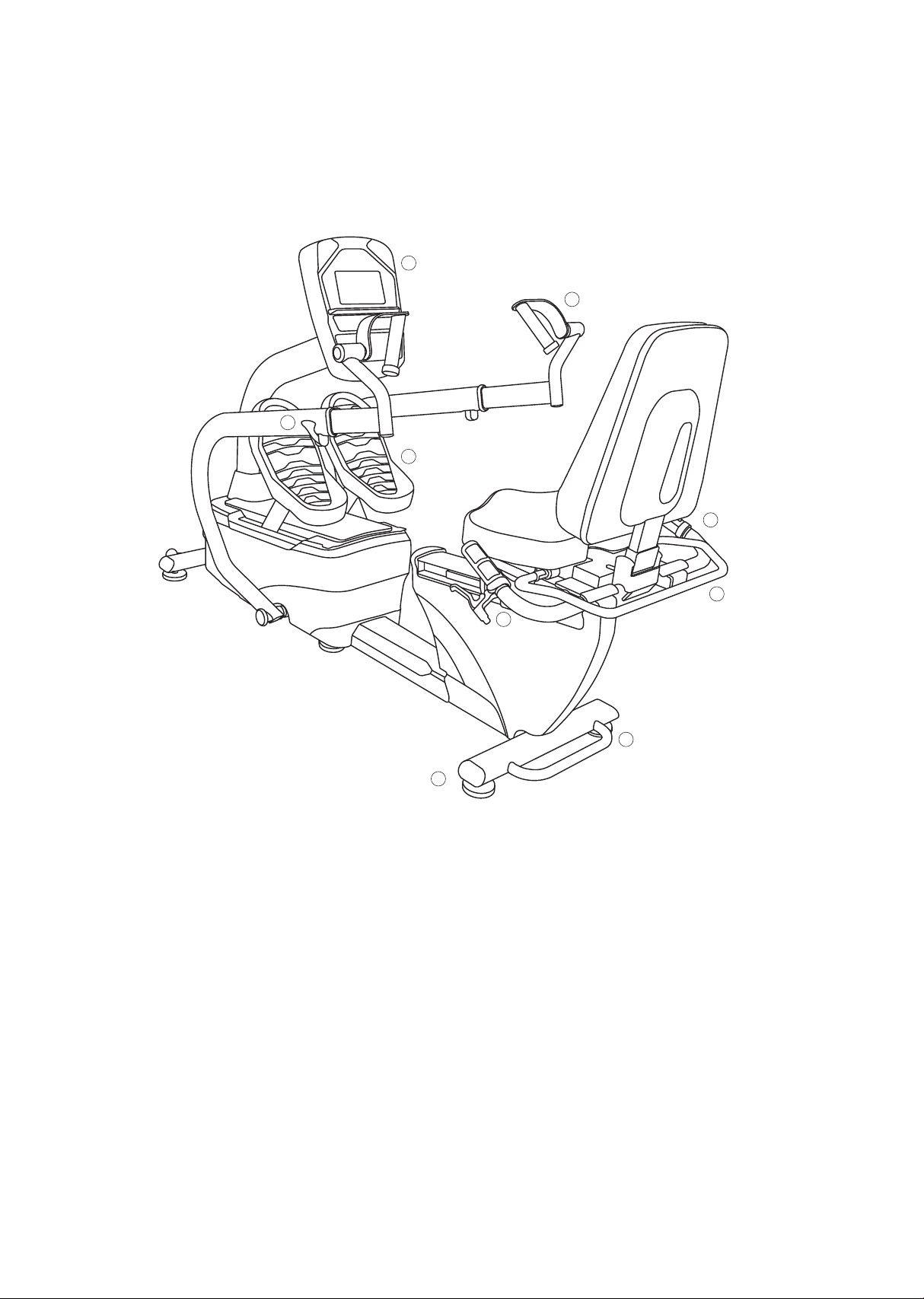
7.0 S Recumbent stepper
Parts and adjustments
1. Electronic console
2. Upper body rotating handles
3. Quick release lever
4. Cushioned footplates with straps
5. Lifting handle for transport
6. Leveling glides
7. Seat angle adjustment
8. Seat swivel adjustment
9. Seat position adjustment
Optional parts (not shown)
2.2 Lower extremity bi-lateral stabilization set
2.3 Hand / wrist stabilization set
Features
5
6
8
2
3
4
7
1
9

18
The 7.0 S is an easy product to set up and use, from the adjustments to
the intuitive interface. This section explains how to set up, adjust and
operate your 7.0 S.
Leveling the 7.0 S
• Once the 7.0 S is assembled, and placed on a at level oor, it may
be necessary to adjust the leveling glides on the bottom of the unit
to ensure proper stability of the 7.0 S. Use a 1/2” wrench to loosen
the top nut of the levelers. Make sure the two center levelers are
screwed all the way in. Adjust the 4 corner levelers by hand as necessary
to remove any wobble in the unit. Unscrew the 2 center levelers until
they touch the oor. Then tighten all the top nuts against the
bottom of the stabilizer tubes. Make sure the bottom nut remains
cinched against the leveling foot.
Connecting to A.C. power
• The 7.0 S uses a universal switching power supply. You can plug the
7.0 S power supply into any A.C. power source from 100 to 240 volts,
50 to 60 Hz. The A.C. input is located in the front of the unit.
Seat adjustments
Seat position number
lines up with front
edge of seat carriage
Seat back angle
indicator
Lift handle to rotate
seat. Lower handle to
activate latch

19
Adjusting the seat fore / aft position
• Squeeze the brake handle located on the left side handle bar. Move
the seat to the desired position and lower the handle. Move the
seat slightly until the seat lock clicks in place. There is a numbered
scale located on the aluminum seat slide tube for repeatable settings.
Seat position is indicated by the front of the seat carriage lining up
with the number on the scale.
Adjusting the seat back angle
• To adjust the seat back angle, squeeze the brake handle located on
the right side handle bar and move the seat back to the desired
position. There is a numbered scale located just below the seat
back cushion for repeatable settings.
Rotating the swivel seat
• Lift the handle behind the seat to disengage the latch. Rotate the
seat to the desired position; lower the handle when approaching
position to activate latch. The seat will latch into place every 45
degrees.
20
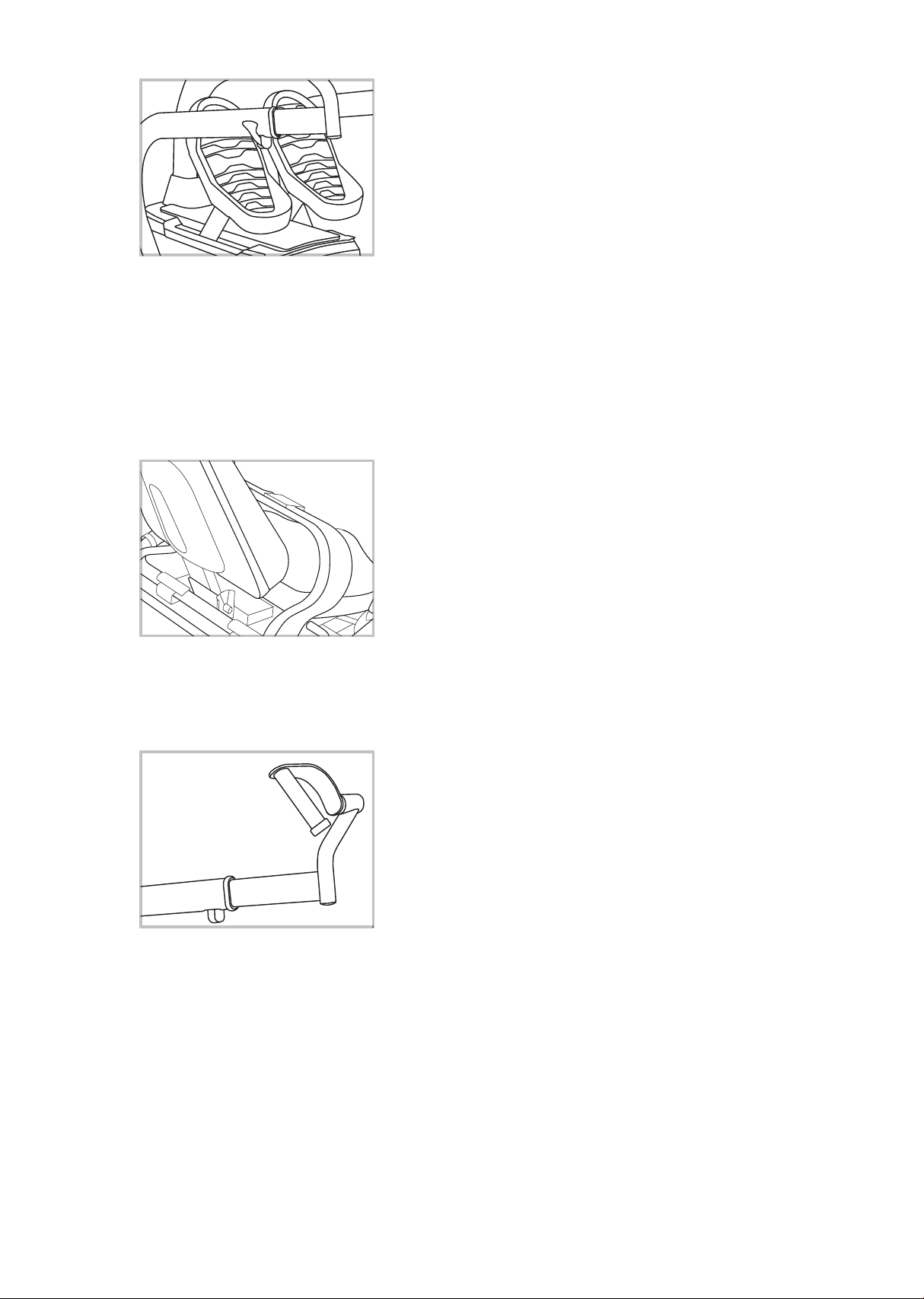
Pedal strap adjustment
• The ankle and foot Velcro straps are
easily opened and closed for quick
patient set up. Remove the ankle strap
from the chrome ring. Loosen the foot
strap enough so the patient’s foot can
slide under. Once the foot is in the correct
position reattach the ankle strap and
adjust both straps for a snug t.
Seat belt adjustment
• Simply snap the buckles together and
adjust the strap to the desired t.
Rotating handle
• Handles rotate to allow wrist patients to
use upper body without discomfort.
21
7.0 S electronic console
Power on
When initially powered on the console will perform an internal
self-test. During this time all the lights will turn on for a short time.
The message window will then show a software version (i.e. VER 1.0)
and the Time window will display the total hours the unit has been
used to date.
Operation
of your
new stepper
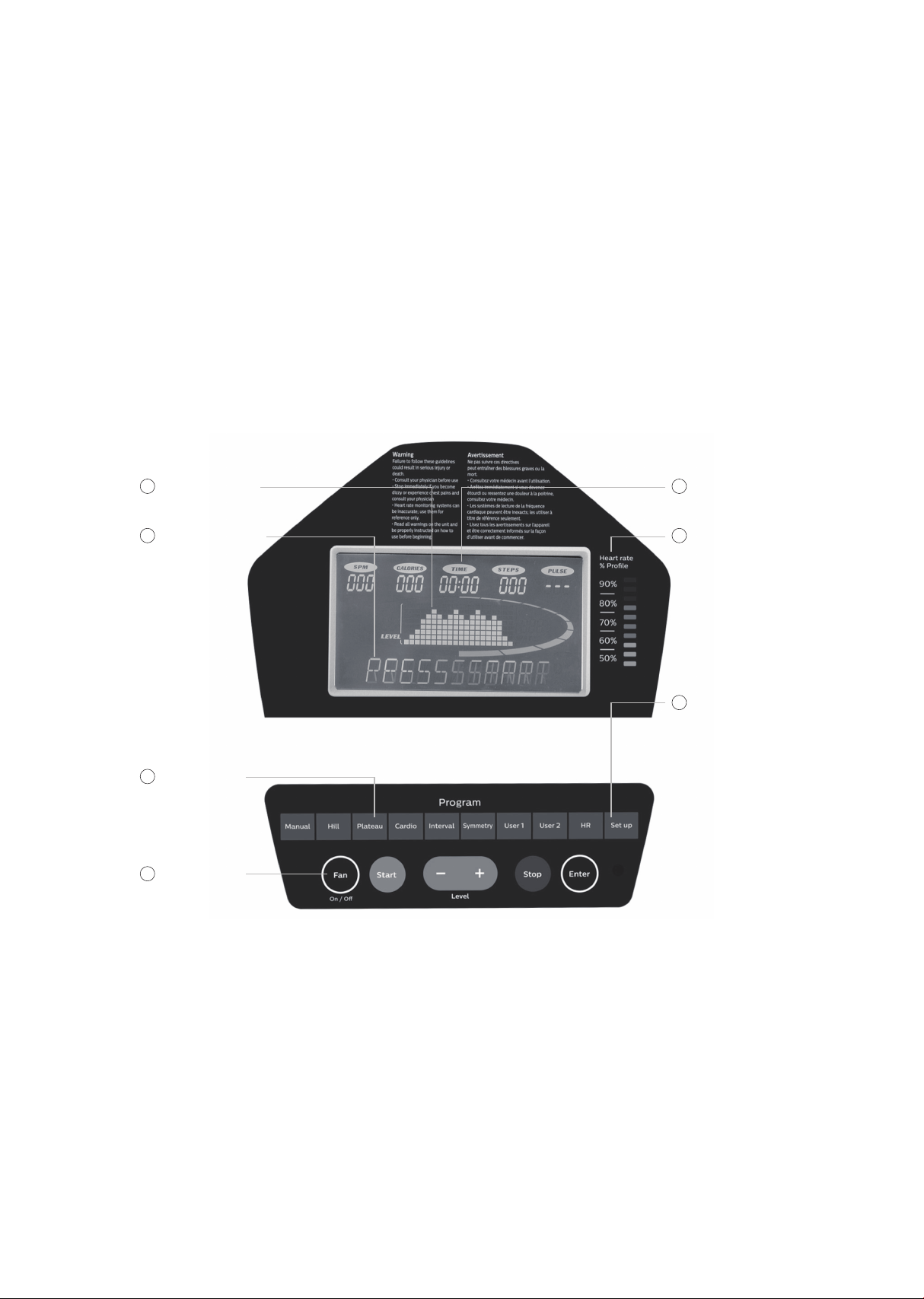
Program keys
2
Message window
3
Function keys
4
Graphic display
1
Data displays
5
HR percent
prole
6
Set Up key
7

22
The odometer will remain displayed for only a few seconds then the
console will go to the start up display, also known as idle Mode. The
message window will be scrolling the start up message. You may now
begin to use the 7.0 S.
The console will automatically power down after 20 minutes of
inactivity. Press any key to wake the console up again.
Always disconnect the main power when the 7.0 S is not in use.
Console operation
Set up key
The set up key function will allow you to set seat and arm adjustments
for various patient heights and customize the settings of the 7.0 S.
When the Set Up key is pressed the rst option in the menu appears.
Use the up/down arrows to scroll through the menu and press the enter
key to select an option.
Set up menu
• Position (seat and arm position setting)
User may input their height in inches (or centimeters if unit is set to
metric measurements, see page 33) and the software will calculate
the position for the seat and arms. This feature is intended to aid in
patient set up but may not be the nal settings as patient’s body
symmetry may vary slightly.
• Track or step graph
The segmented track surrounding the prole display area can be set
to display as a track or a foot position indicator. During any program
press the Symmetry key to switch the display.

23
Quick start
This is the quickest way to start an exercise session. After the console
powers up you just press the start key to begin; this will initiate the
quick start mode. In quick start, the time will count up from zero, all
workout data will start to accrue and the workload may be adjusted
manually by pressing the up or down key. The dot matrix will display a
workload level at the lowest resistance. As you increase the workload
more rows will light indicating a harder workout. The unit will get harder
to pedal as the rows increase.
The graphic display has 20 columns of lights with each column
representing 1 minute in the quick start program (time per column
can be modied in other programs). At the end of the 20th column (or
20 minutes of work) the display will wrap around and restart at the rst
column again. There are 20 levels of resistance displayed in 8 rows of
lights.
Basic information
The graphics display (dot matrix) is used for displaying work proles
and the symmetry graph. When you begin a program the dot matrix will
display a workload prole. The prole indicates the dierent resistance
level changes during a program. The peak resistance level can be set
during program setup. The peak setting can be adjusted during your
workout also. When adjusting the peak level during a program the
prole picture will not change, but the message window will display
your new level setting.
The data display windows provide exercise information during a session.
Information includes: spm (steps per minute), calories, time, steps
(total step count) and pulse. Resistance level and watt
measurements are displayed on either side of the graphic display.
The message window is the main display for programming instructions
and relevant measurements during a program. The measurement data
shown varies depending on the program. Measurements include:
average watts (left and right leg), METS, symmetry and segment time.

24
To the right of the Dot matrix display is a Heart Rate Bar Graph. Simply
grasping the hand pulse sensors, or wearing a heart rate chest belt
transmitter, will start the heart rate measurement function (this may
take a few seconds). The Pulse window will display the heart rate in
beats per minute. The Bar Graph represents the percentage of
maximum heart rate. NOTE: Enter the correct age in Set Up for the Bar
Graph to be accurate. Refer to Heart Rate section for details about
these features.
Function keys
The stop/reset key provides several functions.
• Pressing the stop/reset key once during a program will pause the
program. To resume the exercise session just press the start key.
• If the stop/reset button is pressed twice during a workout the
program will end and a summary of information for the exercise
session will be displayed.
• If the stop/reset key is held down for 3 seconds the console will
perform a complete reset.
• During data entry for a program the stop/reset key performs a
previous screen function. This allows you to go back one step in the
programming each time you press the stop/reset key.
• The enter key is used for entering data during programming and is
also used to scroll through dierent data in the message window
during exercise.
The program keys may be used to preview each program when in the
idle mode. Press each program key to preview what the program prole
looks like. To begin a program press the corresponding program key and
then press the enter key to select the program.
The program keys also function as a number key pad when you are in
the data-setup mode. If you are entering new data such as time, age,
weight etc., you can use these keys to enter the numbers quickly. The
manual key would enter the number 1, hill key is number 2, etc.

25
Selecting and customizing programs
When you enter a program you have the option of modifying the
settings. If you want to begin without entering new settings just press
the start key. This will bypass the programming of data and take you
directly to the start of the program. If you want to change the settings
just follow the instructions in the message window. If you start a
program without changing the settings the data from the set up
menu will be used.
Manual
The manual program works as the name implies, manually. This
means that you control the workload yourself, not the computer. To
start the manual program follow the instructions below or just press
the manual button then the enter button and follow the directions in
the message window.
• Press the manual key then press the enter key.
• The message window will prompt you to enter the age, weight and
time for the program. You may enter the age using the up and down
keys or the numeric key pad then press the enter key to accept and
proceed to the next screen.
• Now you are nished editing the settings and can begin the program
by pressing the start key. You can also go back and modify your set
tings by pressing the enter key. Note: at any time during the editing of
data you can press the stop key to go back one level, or screen.
• During the manual program you will be able to scroll through the data
in the message window by pressing the enter key.
• When the program ends you may press start to begin the same
program again or stop to exit the program, or you can save the
program you just completed as a custom program by pressing the
user keys and following the instructions in the message window.

26
Preset programs
The semi-recumbent seated stepper has four preset exercise programs
that have been designed for a variety of workout goals. The initial
built-in level of diculty for each program is set to a relatively easy
level. You may adjust the level of diculty (max level) for each program
before beginning.
The proles shown in the dot matrix are merely pictures of the whole
prole and will not change in size when the work level keys are
pressed. When setting up a program you will enter the maximum
resistance setting for the peak of the prole. During the program the
resistance levels will change as the prole progresses. When the level
up key is pressed to request more resistance the prole picture will
not change, but the workload will increase. The message window will
display the level setting for the current segment and also the maximum
level for the peak of the prole. Pressing the work keys actually
change the peak level of the program not the current segment level.
You may need to change the peak setting several times before the
current segment increases.

27
Hill
The Hill program simulates going up and down a hill. The resistance
in the pedals will steadily increase and then decrease during the
program.
Plateau
The Plateau program provides a steady state exercise with warm up
and cool down periods.
Cardio
The Cardio program is designed to increase Cardio vascular function.
This is exercise for heart and lungs. It will build up heart muscle and
increase blood ow and lung capacity. This is achieved by incorporating
a higher level of exertion with slight uctuations in work.
Interval
The Interval program takes you through high levels of intensity followed
by periods of low intensity. This program increases endurance by
depleting oxygen levels followed by periods of recovery to replenish
oxygen. The cardio vascular system gets programmed to use oxygen
more eciently this way.

28
Programming preset programs
• Select the desired program button then press the enter key.
• The message window will prompt you to enter the age, weight, time
and max level for the program. You may enter the age using the up
and down keys or the numeric key pad then press the enter key to
accept and proceed to the next screen. Max level refers to the top
resistance level setting for the program.
• Now you are nished editing the settings and can begin the program by
pressing the start key. You can also go back and modify your
settings by pressing the enter key. Note: at any time during the
editing of data you can press the stop key to go back one level, or
screen.
• During the manual program you will be able to scroll through the
data in the message window by pressing the enter key.
• When the program ends you may press start to begin the same
program again or stop to exit the program, or you can save the
program you just completed as a custom program by pressing the
user keys and following the instructions in the message window.
User programs
The User 1 & 2 programs allow you to build and save a custom program.
You can build your own custom program by following the instructions
below or you can save any other preset program you complete as a
custom program. The User program allows you to further personalize
it by adding your facility name.

29
Designing and saving a new program
• Press either user key. The message window will show a welcome
message; if you had previously saved a program the message will
contain the name you gave it. Then press the enter key to begin
programming.
• When you press enter, the message window will show “name – a”, if
there is no name saved. If the name “custom workout” had been
previously saved the message window will show “name – custom
workout” and the c in custom will be blinking. If there is a name
saved you can change it or you may press the stop key to keep the
name and continue to the next step. If you want to enter a name
use the up and/or the down key to change the rst letter then press
enter to save the rst letter and continue to the next letter. When
you have nished entering the name press the stop key to save the
name and continue to the next step.
• The message window will ask you to enter an age. You may enter an
age, using the up and down keys or the numeric key pad, then press
the enter key to accept the new number and proceed on to the next
screen.
• You are now asked to enter a weight. You may adjust the weight
number using the up and down keys or the numeric key pad then
press enter to continue.
• Next is time. You may adjust the time and press enter to continue.
• Now you are asked to adjust the max level. This is the peak exer-
tion level you will experience during the program. Adjust the level
and then press enter.
• Now the rst column will be blinking and you are asked to adjust
the level for the rst segment of the workout. When you nish
adjusting the rst segment, or if you don’t want to change, then
press enter to continue to the next segment.
• The next segment will show the same level as the previously adjust-
ed segment. Repeat the same process as the last segment then
press enter. Continue this process until all twenty four segments
have been set.

30
• The message window will then tell you to press enter to save the
program. After saving the program the message window says “new
program saved” then will give you the option to start or modify the
program. Pressing stop will exit to the start up screen.
• During the facility program you will be able to scroll through the data
in the message window by pressing the enter key.
Running a saved program
• Press user key then enter
• Enter time then press start to begin program.

31
Symmetry
The symmetry program may aid in achieving a more balanced exercise
stroke for patients with bi-lateral deciencies, such as stroke patients
and post-op knee patients. The program will measure the left and right
power through the pedal range. The dot matrix display will show a graph
indicating the leg power symmetry so the user has a visual feedback to
aid in improving the involved limb’s strength. The program will also work
for upper body only. When pushing the handles, the graph will be
reversed (left side will actually be displaying right arm information). It
will be correct if the patient is pulling.
• Press the symmetry key then press the enter key.
• The message window will prompt you to enter the age, weight and
time for the program. You may enter the age using the up and down
keys or the numeric key pad then press the enter key to accept and
proceed to the next screen.
• Now you are nished editing the settings and can begin by pressing
the start key. You can also go back and modify your settings by
pressing the enter key. Note: at any time during the editing of data you
can press the stop key to go back one level, or screen. During the pro-
gram you will be able to scroll through the data (watts, symmetry,
METS) in the message window by pressing the enter key.
For best results
The symmetry program starts at level 1 and the resistance needs to
be increased manually by pressing the up arrow. Make sure to set the
resistance to a level where the patient is doing enough work to
generate a meaningful measurement. It is recommended to set the
resistance as high as the patient can perform without discomfort, but
low enough so they can complete full pedal strokes. Very low resistance
settings result in erratic or inconsistent measurements.
32
Biofeedback graph
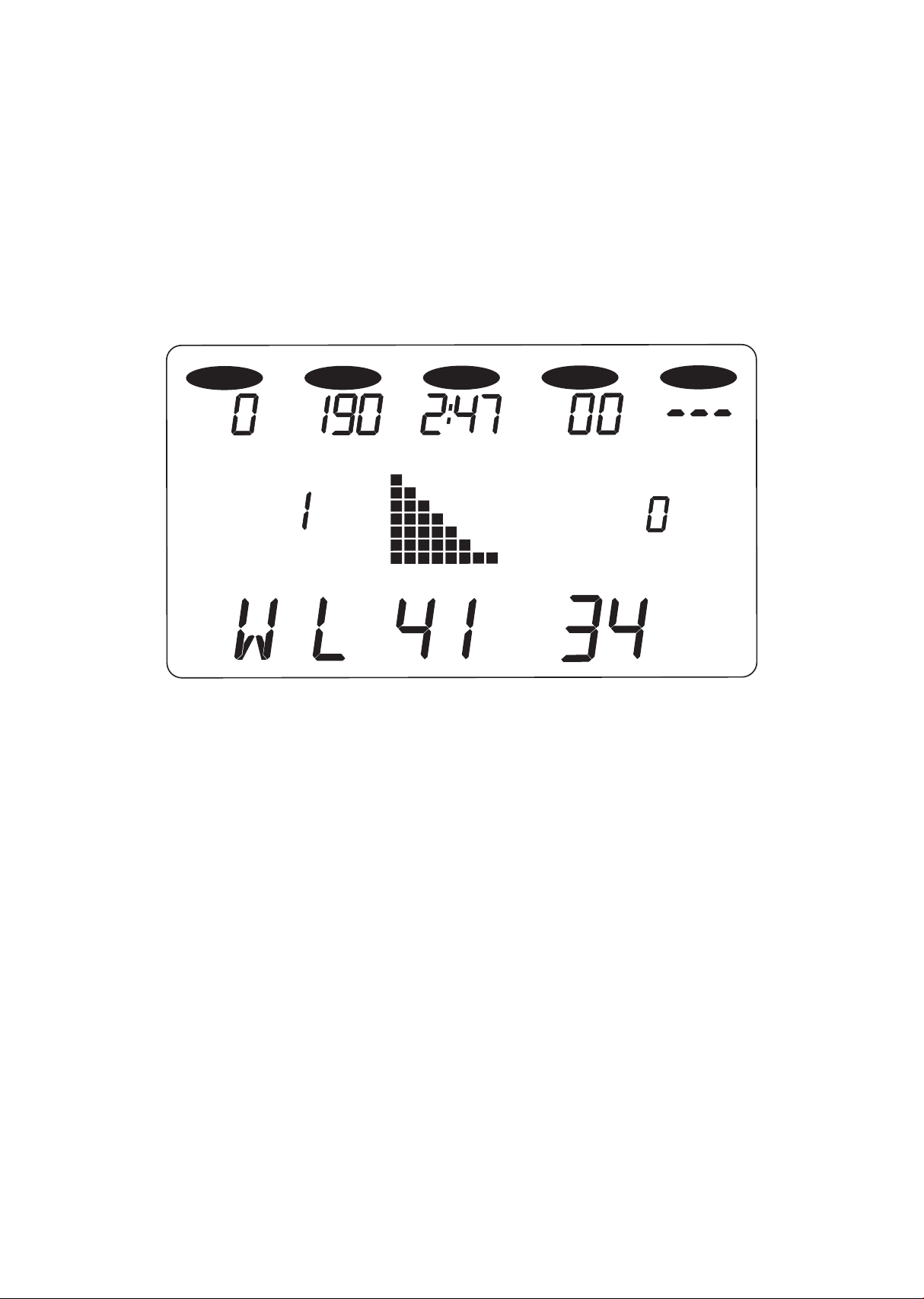
Below is a sample picture showing the symmetry graph. In the message
window there is an average watt measurement and it is indicating that
the left leg is producing more power than the right leg, 41 vs. 34 watts.
The graph reects the higher wattage of the left leg. If the power is
equal in both legs only two dots would be lit on the bottom center of
the graphic screen. Press the Enter key to view the Symmetry data.
Note: the symmetry program uses a power table and velocity
measurements to generate the watt readings; they are not from direct
force measurements.
SPM
TIME
STEPS
PULSE
CALORIES
LEVEL WATTS
33
• Works with newer 7.0 T, 7.0 S, 7.5 S, 7.0 R and 7.0 U consoles with
USB ports on the back
• The software works with Windows 10, 7 and XP series, with
.Net Framework 2.0.
• The output for the data is in a .CSV le format.
• http://www.dyaco.com/software
Please follow the website instructions to download software.
• Use a USB cable (type a to type b, illustrated to the right) to connect
the product and the computer.
Step 1.
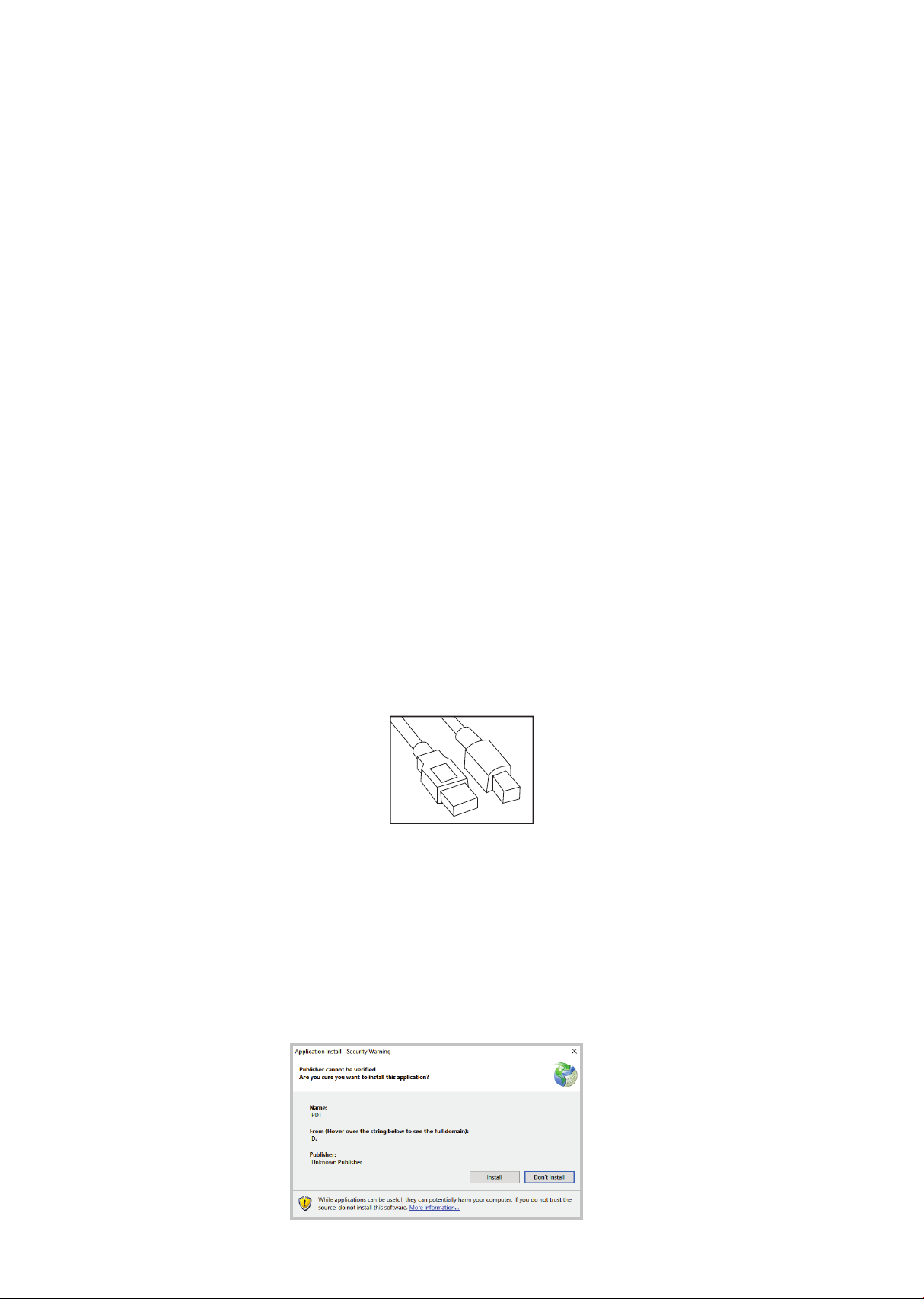
Download the software from the link (http://www.dyaco.com/software)
and connect the console of the product to the computer via USB
cable. Click "Install" when you see the pop-up window as below
during installation.
Data transfer
software
instructions
34
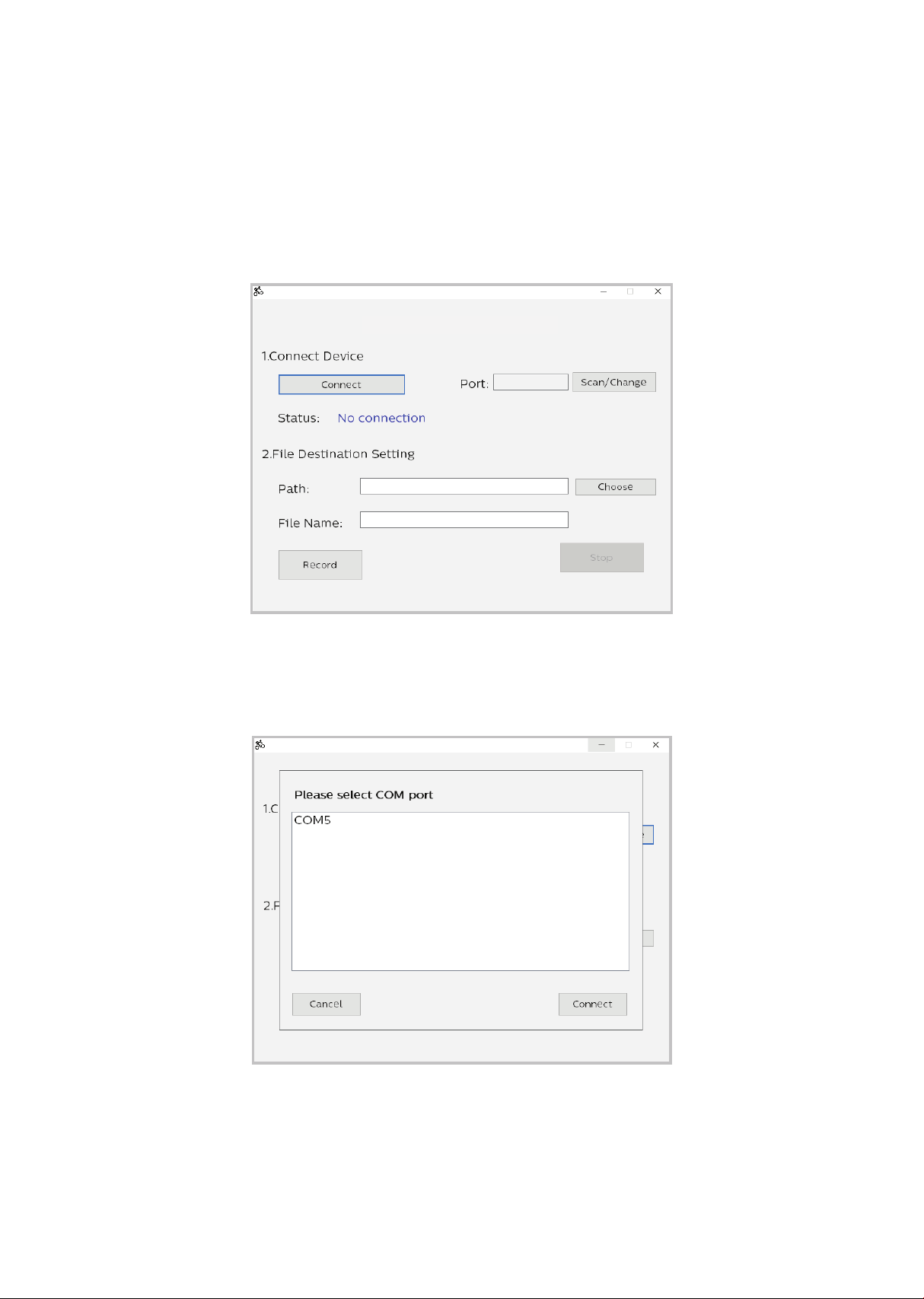
Step 2.
Click "Connect" or "Change" to select the connecting port (left gure).
After clicking the "Change", or connecting to the wrong port, the COM
port selection window pops up (right gure). Select the correct COM port
and click "Connect".
Selecting COM port
Pop-up COM port selection window
Date Transfer V1.0
Date Transfer V1.0
Date Transfer V1.0
35
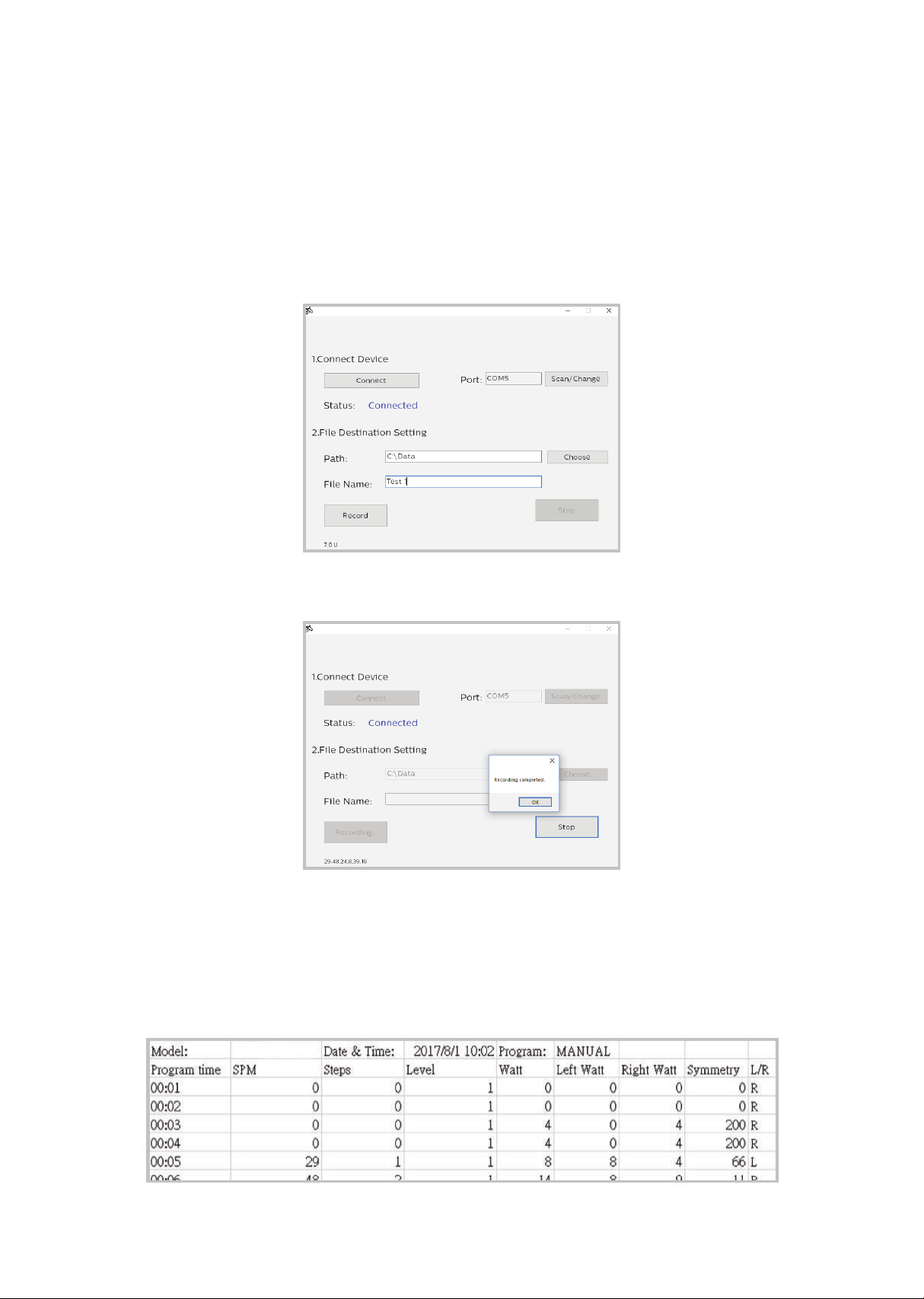
Step 3.
After the status shows “Connected” and the product model name to
the right, choose the le path and create the le name for saving the
data. Click the “Record” button to start collecting data. Click “Stop” or
quit the program from the console of the product to stop the data
collection process. The saved data can be found at the assigned
destination.
Step 4.
The le is saved in .CSV format, which can be opened by Microsoft
Excel. Example shown below.
Click record button
Data Transfer V1.0
Data Transfer V1.0
7.0 S
Recording complete
Data Transfer V1.0
Data Transfer V1.0
7.0 S

36
Note: The chest strap transmitter is not a standard part, but is a
separate purchase. Most transmitters that operate at 5kHz frequen-
cy will also work.
How to wear your wireless chest strap transmitter?
• Attach the transmitter to the elastic strap using the locking parts.
• Adjust the strap as tightly as possible as long as the strap is not too
tight to remain comfortable.
• Position the transmitter with the logo centered in the middle of your
body facing away from your chest (some people must position the
transmitter slightly left of center). Attach the nal end of the elastic
strap by inserting the round end and, using the locking parts, secure
the transmitter and strap around your chest.
• Position the transmitter immediately below the pectoral muscles.
Using
a heart rate
transmitter

37
• Sweat is the best conductor to measure very minute heart beat
electrical signals. However, plain water can also be used to pre-wet
the electrodes (2 black square areas on the reverse side of the belt
and either side of transmitter). It’s also recommended that you wear
the transmitter strap a few minutes before your work out. Some users,
because of body chemistry, have a more dicult time in achieving a
strong, steady signal at the beginning. After “warming up”, this problem
lessens. As noted, wearing clothing over the transmitter/strap doesn’t
aect performance.
• Your workout must be within range - distance between transmitter
/ receiver – to achieve a strong steady signal. The length of range may
vary somewhat but generally stay close enough to the console to
maintain good, strong, reliable readings. Wearing the transmitter
immediately against bare skin assures you of proper operation. If you
wish, you may wear the transmitter over a shirt. To do so, moisten the
areas of the shirt that the electrodes will rest upon.
Note: The transmitter is automatically activated when it detects
activity from the user’s heart. Additionally, it automatically deacti-
vates when it does not receive any activity. Although the transmitter
is water resistant, moisture can have the eect of creating false sig-
nals, so you should take precautions to completely dry the transmit-
ter after use to prolong battery life (estimated transmitter battery life
is 2500 hours). If your chest strap has a replaceable battery the
replacement battery is CR2032.

38
Erratic operation
Caution! Do not use the 7.0 S for heart rate control unless a steady,
solid actual heart rate value is being displayed. High, wild, random
numbers being displayed indicate a problem.
Areas to look at for interference, which may cause erratic heart rate
• Microwave ovens, TVs, small appliances, etc.
• Fluorescent lights.
• Some household security systems.
• Perimeter fence for a pet.
• Some people have problems with the transmitter picking up a signal
from their skin. If you have problems try wearing the transmitter upside
down. Normally the transmitter will be oriented so the logo is right side
up.
• The antenna that picks up your heart rate is very sensitive. If there is an
outside noise source, turning the whole machine 90 degrees may
de-tune the interference.
• If there is another person wearing a chest strap within 1 meter, it will
interfere.
• If you continue to experience problems contact your dealer.
Heart rate program operation
To start the HR program follow the instructions below or just press
the HR key then the Enter button and follow the directions in the
message window.
• Press the HR key then press the Enter key.
• The message window will ask you to enter your Age. You may enter
your Age, using the Up and Down keys or the numeric key pad, then
press the Enter key to accept the new number and proceed on to the
next screen.

39
• You are now asked to enter your Weight. You may adjust the Weight
number using the Up and Down keys or the numeric key pad, then
press enter to continue.
• Next is Time. You may adjust the Time and press enter to continue.
• Now you are asked to adjust the Heart rate Level. This is the heart rate
level you will experience during the program. Adjust the level and then
press enter.
• Now you are nished editing the settings and can begin your workout
by pressing the Start key. You can also go back and modify your
settings by pressing the Enter key. NOTE: At any time during the
editing of data you can press the Stop key to go back one level, or
screen.
• If you want to increase or decrease the workload at any time during the
program press the Up or Down key. This will allow you to change your
target heart rate at any time during the program.
• During the HR program you will be able to scroll through the data inthe
message window by pressing the adjacent Display key.
• When the program ends you may press Start to begin the same
program again or Stop to exit the program or you can save the
program you just completed as a custom user program by pressing the
Facility key and following the instructions in the message window.
40
Hardware
Step 1.
Assembly
instructions
for 7.0 S
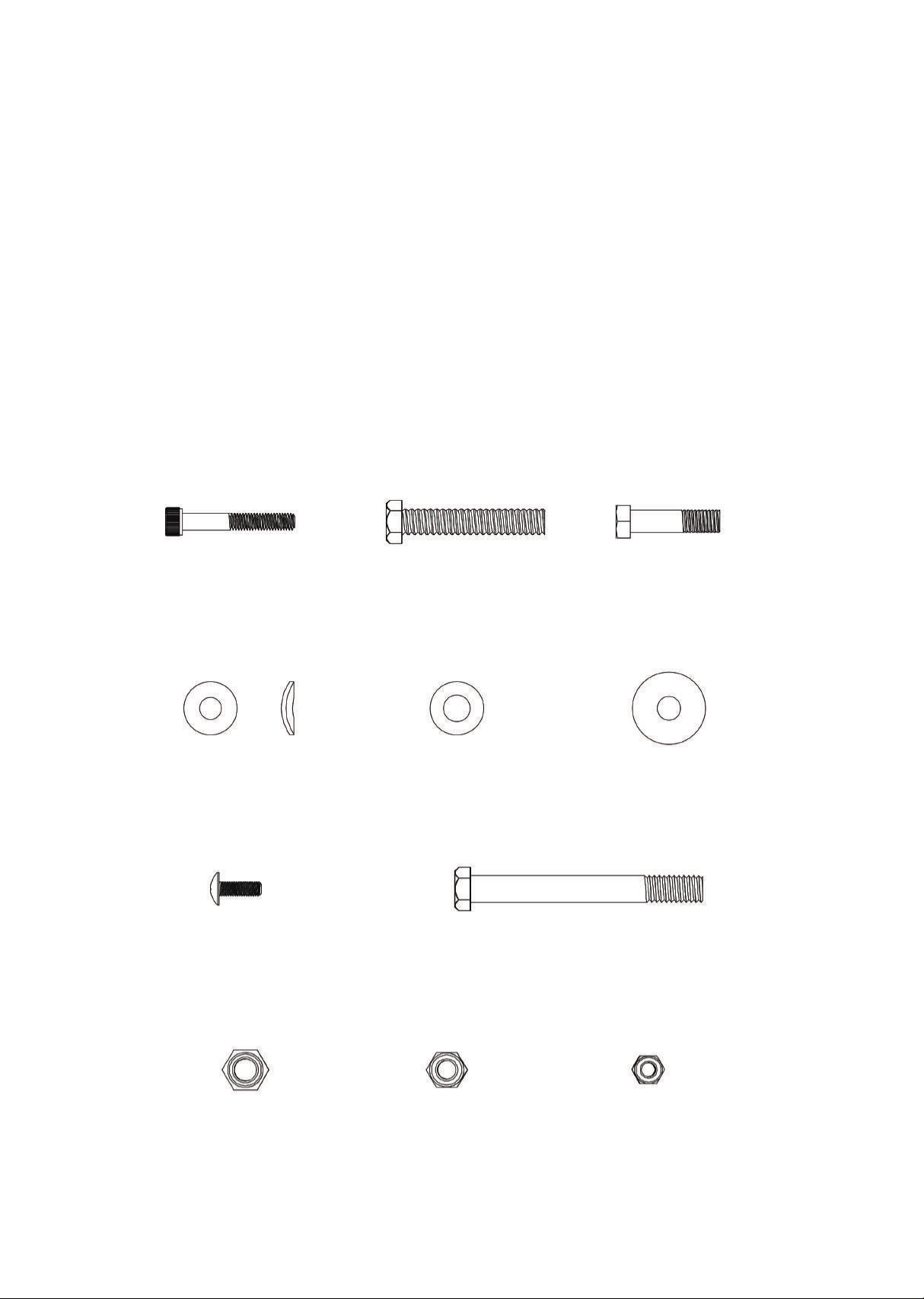
#129- M6 x 40L
(2PCS)
#185-5/16" x 19 x 1.5T
(4PCS)
#181-M5 x 15L
(12PCS)
#190-3/8" x 7T
(6PCS)
#193-5/16" x 6T
(1PC)
#187-M6 x 6T
(2PCS)
#140-3/8" x 3-1/4"
(2PCS)
#170-3/8" x 30 x 3T
(8PCS)
#173-8.5 x 26 x 2T
(2PCS)
#132- 3/8" x 2"
(4PCS)
#135- 5/16" x 1-1/4"
(1PC)
41
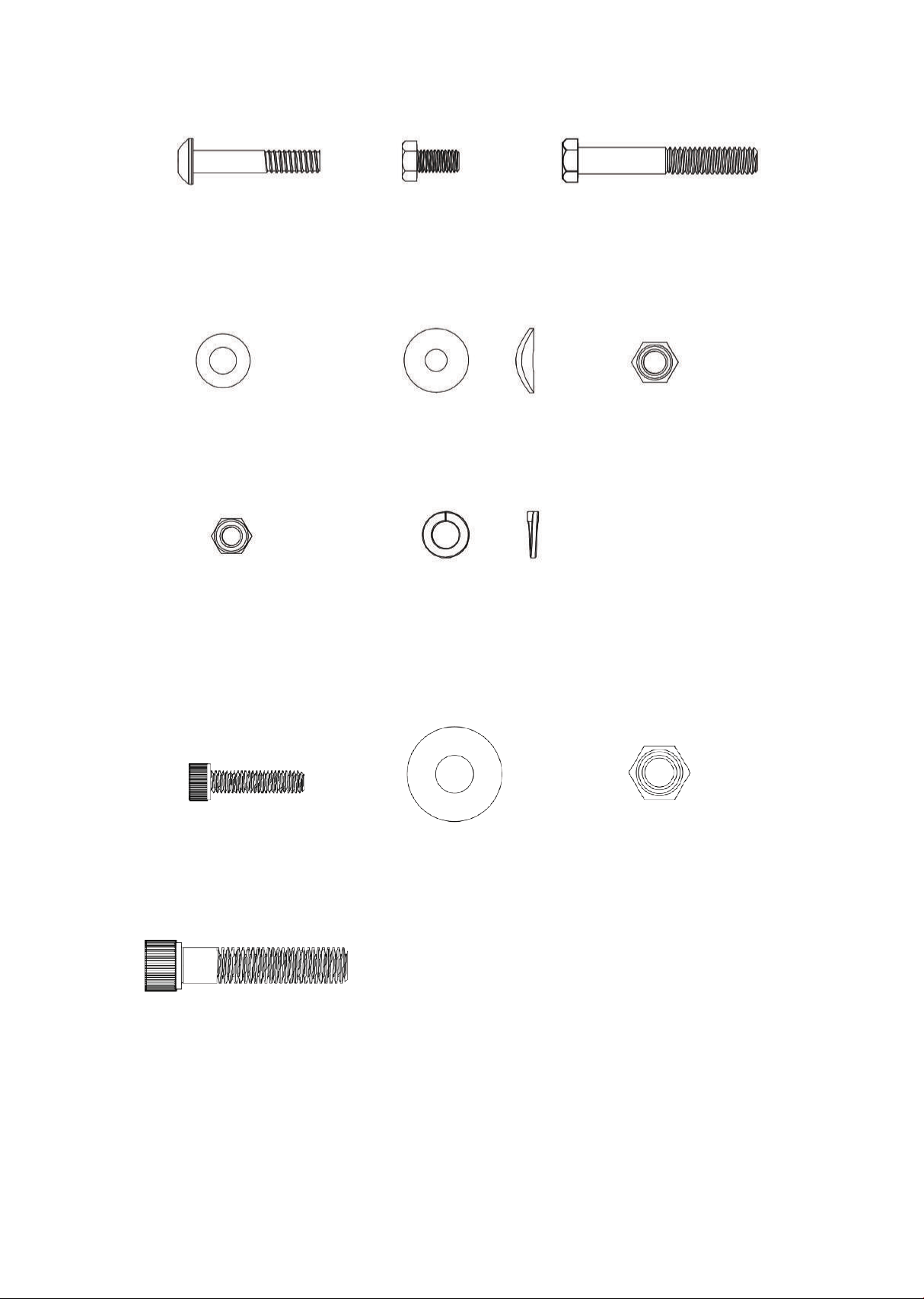
Step 2.
#152-5/16" x 1-3/4"
(2PCS)
#153-M8 x 16L
(2PCS)
#154-3/8" x 2-1/2"
(2PCS)
#170-3/8" x 30 x 3T
(2PCS)
#193-5/16" x 6T
(2PCS)
#194-3/8" x 2T
(2PCS)
#184-8 x 23 x 1.5T
(2PCS)
#190-3/8" x 7T
(2PCS)
Step 3.
#122-M6 x 25L
(4PCS)
#197-3/8" x 1-3/4"
(2PCS)
#167-10 x 25 x 2T
(2PCS)
#190-3/8" x 7T
(2PCS)
42
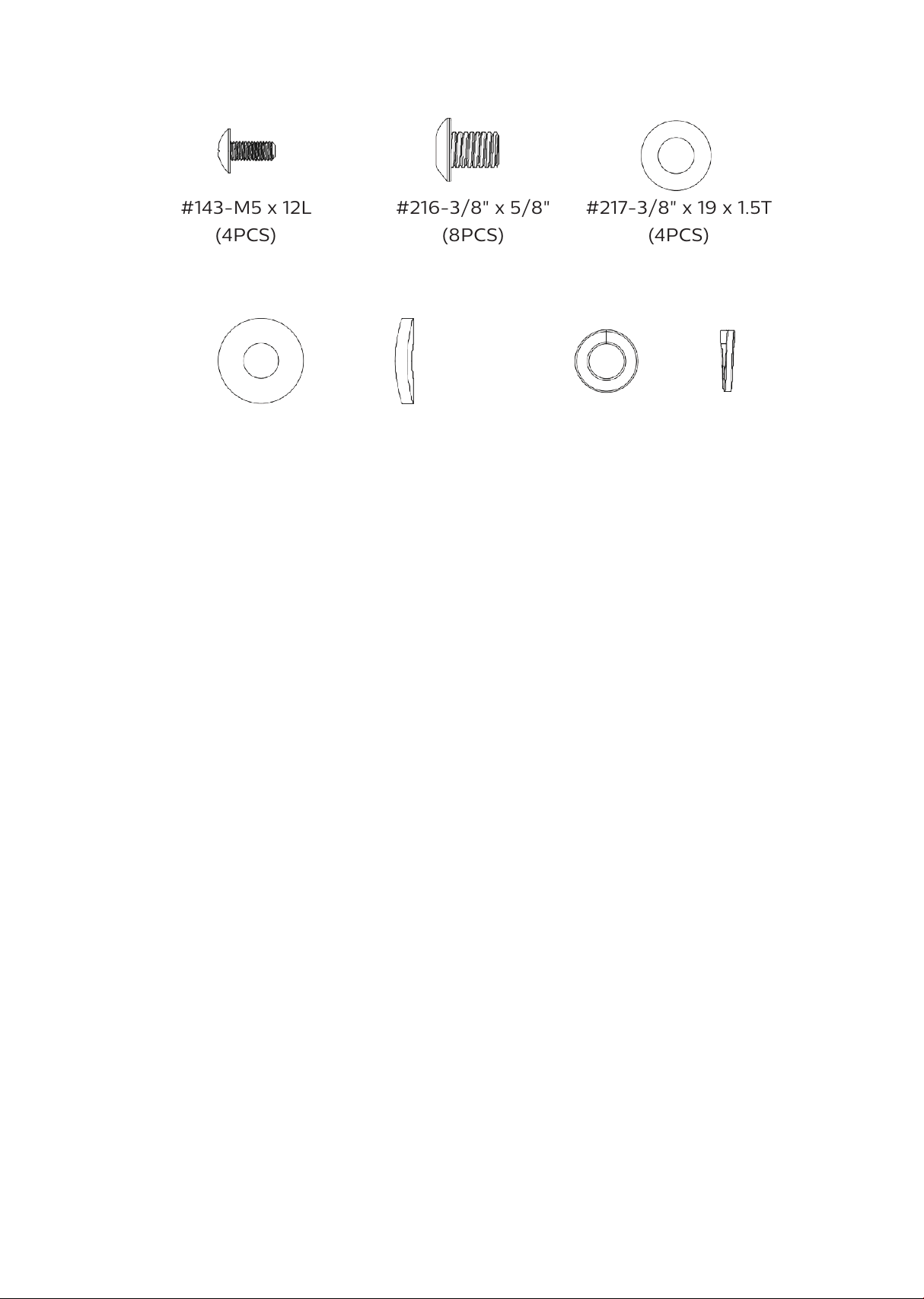
#143-M5 x 12L
(4PCS)
#218-3/8" x 23 x 3.0T
(4PCS)
#243-M10 x 2T
(8PCS)
#216-3/8" x 5/8"
(8PCS)
#217-3/8" x 19 x 1.5T
(4PCS)
Step 4.

43
Assembly
Read each step’s instructions and study the drawing carefully to become
familiar with all the parts and procedures before beginning each step.
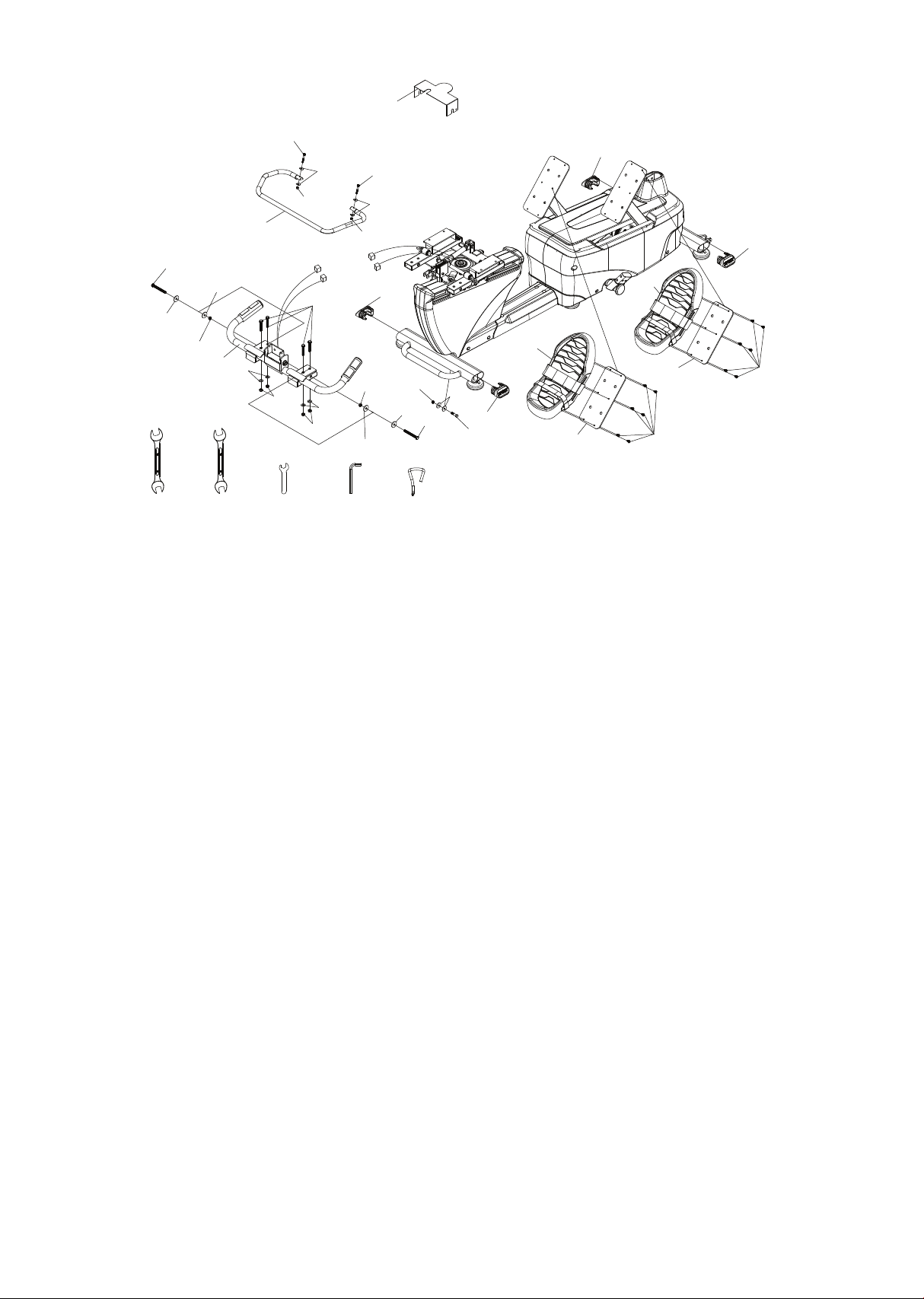
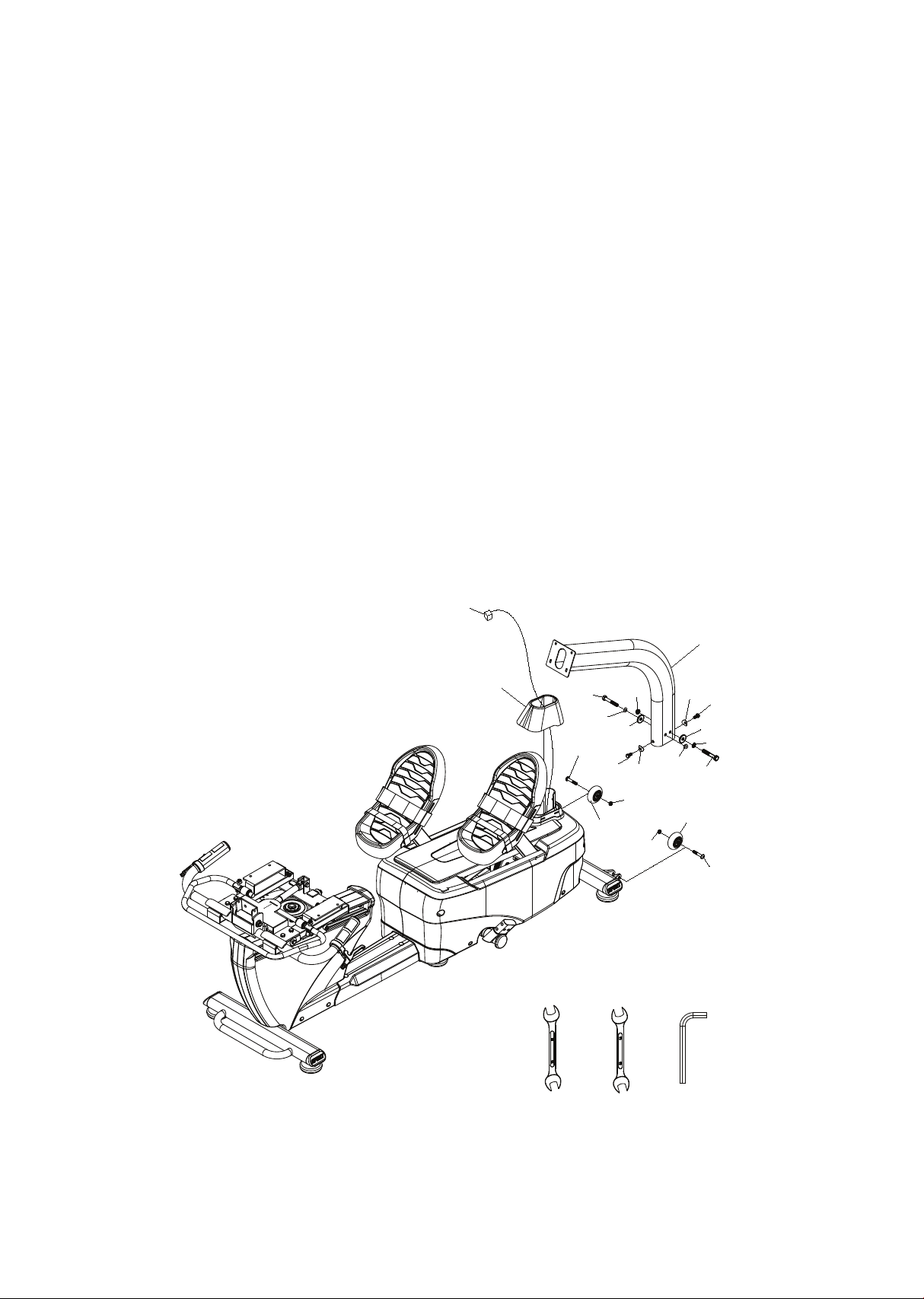
Step 1. Pedals, seat latch handle and handle bar assembly
• This section is easier if you slide the seat carriage (20) all the way back
before starting. Slide the handle bar assembly (17) onto the receiving
tubes of the seat frame (20). Secure the handle bar assembly starting
with the two 3/8” x 3-1/4” bolts (140) (install from the inside hole of
the receiving tube), four at washers (170) and two nylon nuts (190).
Install the safety cover (108) and seat belts (233) onto bolts before
assembling washers and nuts. Install the four 3/8” x 2” bolts (132) from
the top side of the tubes and assemble the four 3/8” at washers (170)
and 3/8” nylon nuts (190).
• Attach the end of the seat back gas shock (109) to the seat back angle
adjustment bracket of the handle bar assembly (17) using 5/16” x 1-1/4”
bolt (135), two 5/16” at washers (173) and 5/16” nylon nut (193).
• Assemble swivel seat latch handle (22) to the seat assembly (20) with
the two 6mm x 40mm bolts (129), four 6mm curved washers (185) and
two 6mm nylon nuts (187).
• Plug the hand pulse connectors from the handle bars into the mating
connectors of the seat carriage.
• Assemble the rubber isolators (82) and pedals (28) to the pedal foot
plates with six m5 phillips screws (181) per side.
• Press the four stabilizer end caps (31) into the stabilizer tubes. May tap
in with a rubber mallet.
44
1 08
1 93
1 73
1 35
22
1 7
1 40
1 70
1 90
1 32
1 70
1 90
1 70
1 90
1 90
1 70
1 40
31
31
1 85
1 87
1 87
1 85
1 29
1 29
31
31
28
28
82
82
1 81
1 81
1 70
1 70
209 21 0 21 1 21 2 243
45
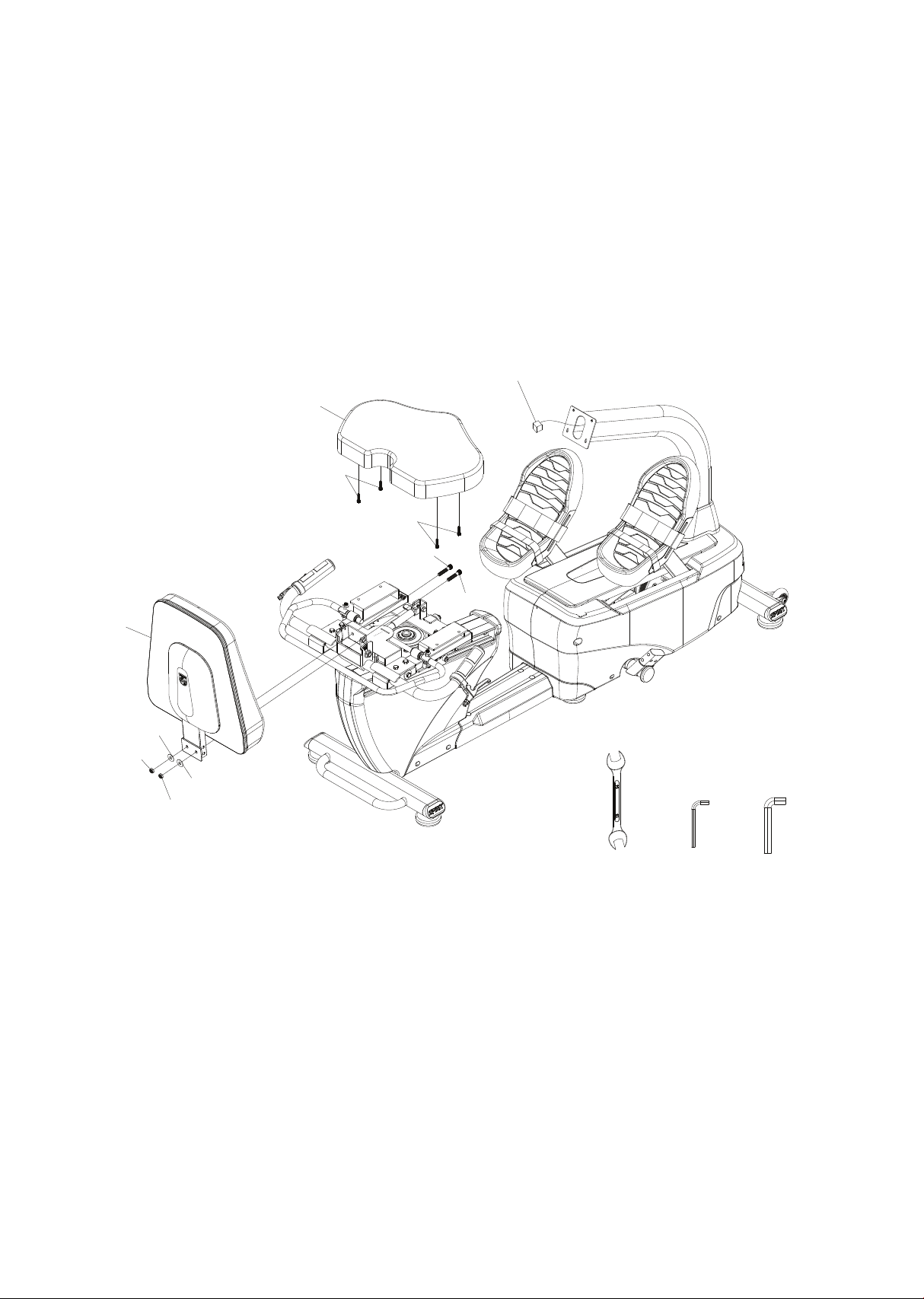
Step 2. Console mast & transport wheels assembly
• Install the transport wheels (77) using the 5/16” x 1-3/4” bolts (152) and
5/16” nylon nuts (193).
• Slide the console mast cover (74) onto the console mast (2); be sure
the cover orientation on the mast is correct otherwise it won’t clip in
place later.
• Snake the computer cable through the console mast and slide the
mast onto the receiving brackets. Make sure the cable does not get
pinched in between the mast and bracket.
• Fasten the mast with the two 3/8” x 2-1/2” bolts (154), 3/8” split
washers (194) and 3/8” at washers (170) from the left side of the mast
and secure with the two 3/8” nylon nuts (190). Install the two 8mm x
16mm bolts (153) and curved washers (184) through the front and rear
holes in the mast.
74
2
77
1 54
1 53
1 84
1 93
1 93
77
1 52
1 84
1 53
computer cable
209 21 0 21 2
1 54
1 54
1 94
1 90
1 70
1 70
1 90
1 94
46
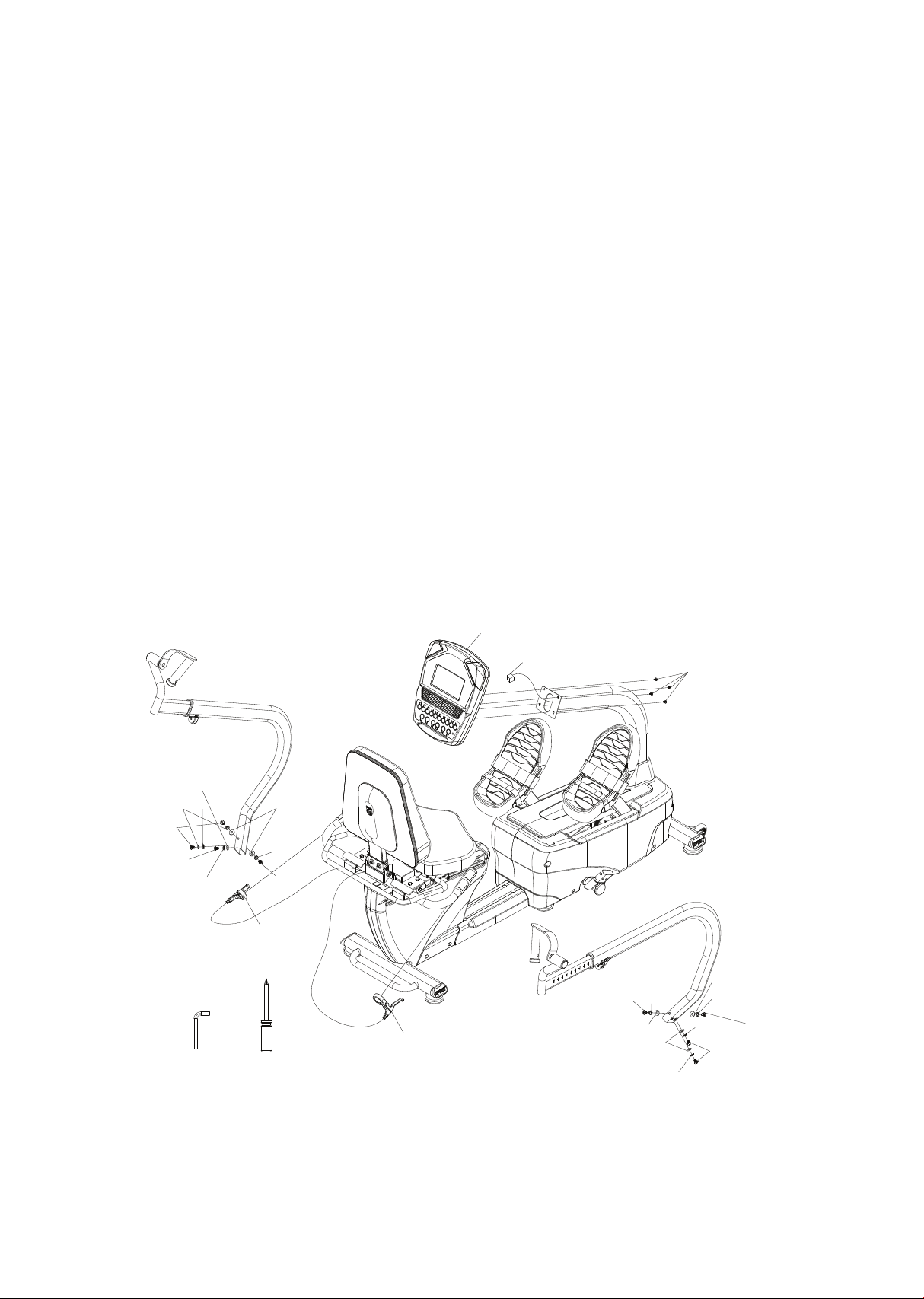
Step 3. Seat back and bottom cushion assembly
• Slide the seat back assembly (94) into the seat back angle adjustment
bracket and secure with the two 3/8” x 1-3/4” bolts (197), 3/8” washers
(167) and 3/8” nuts (190).
• Assemble the seat cushion (93) onto the seat frame with four m6 bolts
(122).
computer cable
93
1 97
1 22
1 22
1 97
94
1 67
1 67
1 90
1 90
21 0 21 2 21 3
47
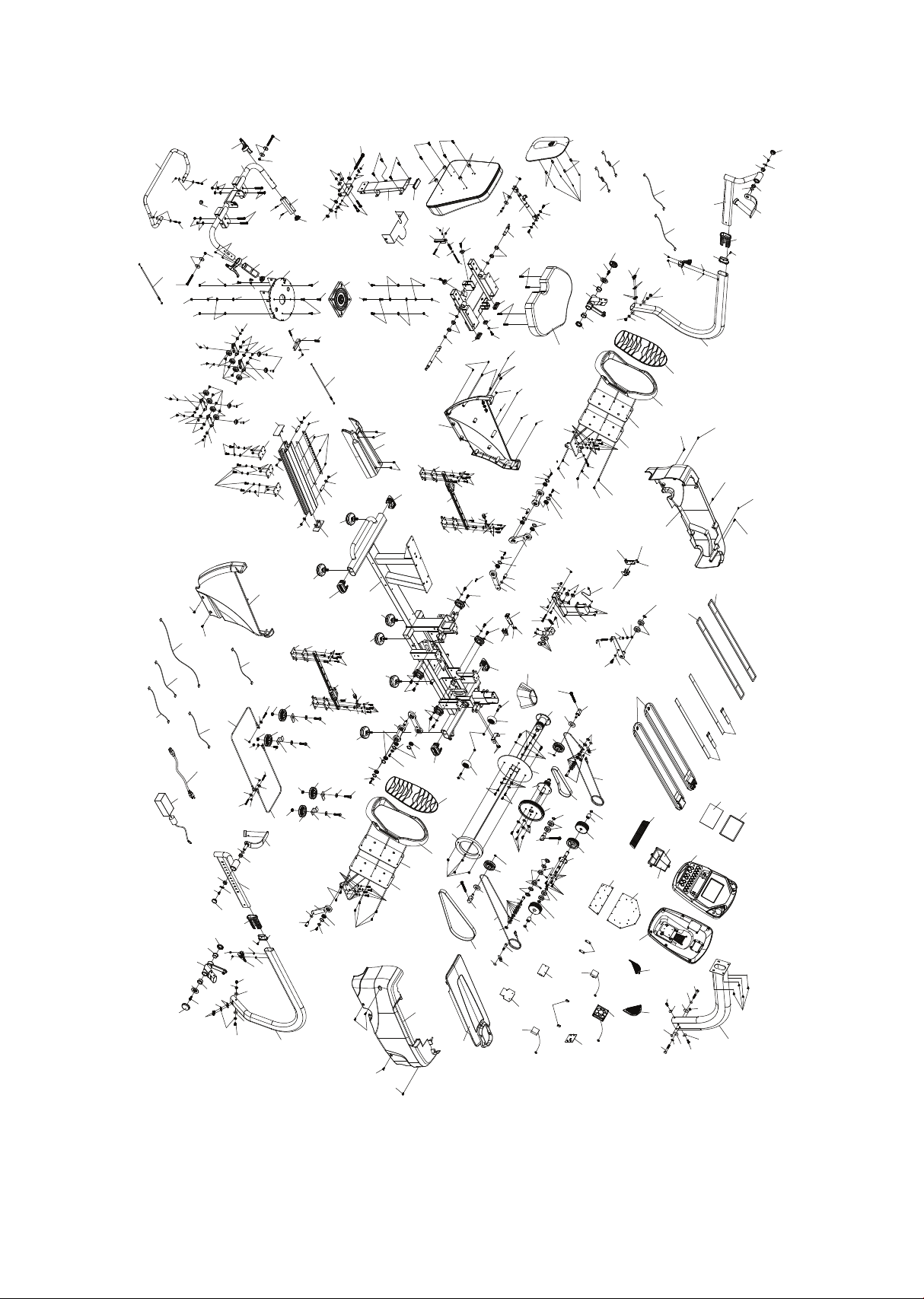
Step 4. Console and arm assembly
• Connect the computer cable into the back of the console and install
the console (29) onto the console mast and secure with the four 5mm
x 12mm screws (143).
• Install the left and right arms (3&4) and secure with the 3/8” x 5/8”
bolts (216) and use the 3/8” at washers (217) and 3/8” split washers
(243) on the sides of the arms and the 3/8” curved washers (218) on
the front and rear of the arms. Tighten the bolts very securely so the
arms do not loosen up during use.
• Remove the allen screws from the lever clamps (111), t them onto the
handle bar (17) and secure with the allen screws. Make sure the levers
are positioned under the hand position and they are adjusted so the
patient can comfortably reach them during use. The release levers are
labeled left and right; the left lever with gray cable is for the fore/aft
seat adjustment and the right lever with black cable is for the seat
back angle.
computer cable
21 6
21 7
21 8
21 6
21 6
1 1 1
1 43
21 6
21 8
21 8
21 6
21 7
21 6
29
243
243
243
243
243
243
243
1 1 1
208 21 4
48
Exploded view drawing
1 81
1 81
1 81
1 81
1 81
1 99
1 79
1 99
1 21
1 65
1 62
82
1 1 8
72
1 55
1 55
1 55
1 55
1 41
80
222
1 47
1 47
204
55
1 0
1 91
1 63
1 66
1 25
64
44
1 43
201
1 1
49
49
1 23
1 39
1 64
1 64
1 39
1 64
1 44
48
62
1 87
45
221
80
1 47
1 47
31
58
1 24
1 24
1 66
1 66
1 24
1 24
1 66
58
1 66
1 3
1 20
1 76
205
57
1 2
1 20
41
205
57
57
1 76
1 20
1 76
57
1 81
205
234
1 75
236
1 06
1 06
235
8
42
76
216
218
216
217
218
216
216
70
1 25
67
50
50
52
215
93
74
1 52
77
1 93
1 52
1 1 9
1 64
1 4
33
1 99
1 1 9
1 1 9
1 1 9
1 1 9
1 68
1 1 9
1 1 9
32
63
51
51
63
69
1 41
1 43
1 41
220
1 41
1 41
1 41
1 41
1
31
31
30
30
30
30
30
30
31
81
1 43
77
60
1 30
53
1 95
46
202
1 66
1 37
1 26
1 26
1 91
46
202
1 95
53 38
37
47
251
54
203
36
204
56
1 65
1 20
204
9
35
36
203
54
73
2
1 84
1 53
1 84
1 53
1 20
1 76
205
57
1 2
41
204
55
1 30
39
40
34
1 20
61
58
1 66
58
1 24
1 66
1 24
57
205
1 76
1 20
205
57
1 38
1 38
33
1 99
1 64
1 1 9
1 4
1 1 9
1 1 9
1 38
1 38
1 67
1 67
79
79
63
51
63
51
32
1 1 9
1 1 9
1 68
1 1 9
1 1 9
1 67
1 67
79
79
46
46
1 92
1 92
46
1 92
46
1 92
1 25
1 33
1 76
1 72
1 33
1 87
1 87
1 33
235
1 3
6
5
82
1 1 8
28
28
57
205
1 76
1 20
1 81
1 21
1 65
1 79
1 81
1 06
7
1 06
236
1 75
234
42
76
237
216
218
218
216
217
216
215
52
50
50
67
1 25
70
26
25
27
47
251
1 30
1 55
1 55
1 55
71
68
1 43
1 43
75
1 43
1 43
1 9
1 9
86
1 46
1 58
87
99
1 58
1 46
83
1 76
1 76
83
1 76
1 46
1 76
1 46
85
85
85
1 58
1 58
1 58
1 78
1 66
1 34
1 78
1 78
1 66
1 34
1 66
1 60
1 61
1 61
1 89
1 89
1 51
1 51
90
90
1 8L
1 8L
1 01
1 01
207
207
207
1 8R
1 8R
90
90
1 77
1 77
1 86
1 00
1 00
1 00
1 00
1 86
1 77
1 61
1 77
1 61
1 51
1 51
1 01
1 01
95
1 31
84
1 69
1 87
1 34
1 34
1 34
1 1 0
1 34
1 34
1 34
1 93
1 93
1 93
1 72
1 72
1 72
1 72
1 72
1 93
1 93
1 93
1 93
1 5
23
1 48
92
88
89
89
1 1 1
1 32
1 83
1 83
1 83
96
1 70
1 70
1 70
1 70
1 90
1 90
22
1 29
1 29
1 85
1 85
1 87
1 87
1 90
1 90
1 40
1 40
1 7
1 08
1 04
1 27
1 1 6
1 1 61 90
1 67
1 45
1 68
1 07
1 68
1 07
1 45
1 74
1 98
1 97
94
1 09
1 22
1 22
1 1 7
20
1 1 7
98
1 06
203
203
203
1 06
24
1 01
1 50
1 50
1 01
84
200
1 87
1 88
1 31
1 68
1 05
1 57
1 01
1 50
1 66
1 93
1 73
1 35
1 36
1 72
1 36
243
243
243
243
243
243
21
219
1 1 1
57
1 44
1 93
1 93
1 72
245
244
246
246
245
1 69
1 69
1 69
1 69
249
249
247
247
1 68
1 68
1 56
1 56
66
4
3
1 56
1 68
1 68
1 56
66
250
250
250
1 89
1 87
1 76
1 76
27
43
252
1 68
1 68
1 72
258
259
252
259
252
1 1 2
233
232
232
231
231
230
229
224
226
223
225
228
227
239
240
241
1 02
251
252
247
247
261
261
1 76
1 76
1 90
1 90
1 70
1 70
1 94
1 94
1 54
1 54
237
1 43
29-8
29-1 0
29-5
29-7
29-1
29-6
29-4
29-1 5
29-1 6
29-3
29-1 7
29-1 4
29-9
29-1 3
29-1 2
29-1 1
29-2
29-1 8
29-1 9
205
1 41
97
262
263
262
263
1 44
1 49
1 49
1 44
1 6

49
7.0 S parts list
Item Description Qty
1
2
3
4
5
6
7
8
9
10
11
12
13
14
15
16
17
18l
18r
19
20
21
22
23
24
25
26
27
28
29
30
31
32
Main frame
Console mast
Swing arm (r)
Swing arm (l)
Pedal plate (r)
Pedal plate (l)
Swing arm(r)
Swing arm(l)
Drive pulley
Idler bracket
Brake motor bracket
Lower linkage a
Lower linkage b
Rubber cushion bracket
Seat carriage
Seat back bracket
Handle bar
Seat wheel adjustment plate (l)
Seat wheel adjustment plate (r)
Seat stop assembly
Rotate seat assembly
Seat back bracket
Seat rotation release lever
Cantilever anchor assembly
Adjusting lever
Front connecting cable
Rear connecting cable
Drive cable
Pedal
Console assembly
Rubber foot
End cap, oval stabilizer tube
Linear slider
1
1
1
1
1
1
1
1
1
1
1
2
2
2
1
1
1
2
2
2
1
1
1
1
1
1
1
2
2
1
6
4
2

50
Item Description Qty
33
34
35
36
37
38
39
40
41
42
43
44
45
46
47
48
49
50
51
52
53
54
55
56
57
58
60
61
62
63
64
66
67
Rubber cushion
Passive wheel
Drive wheel
Cable guide wheel
Belt (8pj), 584mm
Belt (8pj), 1032mm
Adjustable idler wheel axle
Drive pulley
Lower linkage
Sleeve, swing arm
Flywheel mass
Gear motor
Braking magnet
Roller
Cable spring
Gear motor spring
Steel cable roller
Plastic bushing
Rubber pad
Flywheel axle set collar (r)
Cable guide wheel axle
One way bearing
Ball bearing (6203)
ball bearing (6003)
ball bearing (6902)
mounted bearing
Aluminum disc drive pulley
Aluminum brake disc
Magnet bracket
Rubber isolation mount
Gear motor cable
Quick release lever
Cup washers
2
1
1
2
1
1
1
1
2
2
1
1
4
6
2
1
2
4
4
2
2
2
4
2
10
4
1
1
1
4
1
2
2

51
Item Description Qty
68
69
70
71
72
73
74
75
76
77
79
80
81
82
83
84
85
86
87
88
89
90
92
93
94
95
96
97
98
99
100
101
102
Rear shroud (r)
Rear shroud (l)
End cap
Shroud (r)
Shroud (l)
Top cover
Console mast cover
Bottom step cover
End cap, swing arm
Transportation wheel
Shroud bracket
Sensor bracket
Shroud xing plate
Pedal isolation rubber
Seat stop axle
Seat position latch
Backing plate
Aluminum track
Rack, seat position
Hand pulse w/cable assembly (l)
Button head plug
Seat track wheel
Hand pulse w/cable assembly (r)
Seat cushion
Seat back
Spring, 12.9 x 30
Hgp wire grommet
Seat back cover
Adjusting lever rotate axle (l)
Seat track xing plate
Sleeve
Pu wheel
Steel cable
1
1
2
1
1
1
1
1
2
2
4
2
1
2
2
2
3
1
1
1
2
8
1
1
1
1
1
1
1
1
4
7
1

52
Item Description Qty
104
105
106
107
108
109
110
111
112
116
117
118
119
120
121
122
123
124
125
126
127
129
130
131
132
133
134
135
136
137
138
139
140
Square end cap
Spring, 13.5 x 60l
Powder metal sleeve
Scale arrowhead
Safety cover
Locking gas cylinder
Rotating plate, seat
Release lever (left)
steel cable
Powder metal sleeve
Square end cap
Pedal foam cushion
Socket head cap bolt, m5
×
p0.8
×
25
Socket head cap bolt, m6
×
1.0
×
15l
Socket head cap bolt, m6
×
1.0
×
20l
Socket head cap bolt, m6
× p
1.0
×
25l
Socket head cap bolt, m6
×
1.0
×
55l
Socket head cap bolt, m8 × p1.25 × 12l
Socket head cap bolt, m8 × p1.25 × 20l
Socket head cap bolt, m6
×
1.0
×
12l
Socket head cap bolt, m12 ×
p
1.75 × 120l
Socket head cap bolt, m6 × p1.0 × 40l
Socket head cap bolt, m10
×
1.5
×
75l
Socket head cap bolt, m6 × 38mm
Hex head bolt, 3/8" × 2"
Hex head bolt, m6
×
1.0
×
40l
Hex head bolt, 5/16"
×
3/4"
Hex head bolt, 5/16" × unc18 × 1-1/4", 12l
Hex head bolt, 5/16"
×
5/8"
Hex head bolt, m8
×
1.25
×
25l
Hex head bolt, m10
×
1.5
×
40l
Socket head cap bolt, m5
×
p0.8
×
12
Hex head bolt, 3/8" × 3-1/4"
1
1
8
2
1
1
1
2
1
2
2
2
24
14
8
4
1
8
4
4
1
2
3
2
4
3
14
1
2
4
4
4
2

53
Item Description Qty
141
143
144
145
146
147
148
149
150
151
152
153
154
155
156
157
158
160
161
162
163
164
165
166
167
168
169
170
172
173
174
175
176
Phillips head self-tapping screw, ø3.5 × 12
Phillips head screw, m5 × p0.8 × 12l
Phillips head screw, m5 × p0.8 × 20l
Phillips head screw, m5 × 6l
Phillips head screw, m6 × 10l
Phillips head screw, m4 × 10l
Hex head bolt, 5/16" × unc18 × 3/4"
Button head socket bolt, m8 × p1.25 × ×20l
Button head socket bolt, m8 × p1.25 × 25l
Button head socket bolt, m6 × 10l
Button head socket bolt, 5/16" × 1-3/4"
Hex head bolt, m8 × 1.25 × 16l
Hex head bolt, 3/8" × unc16 × 2-1/2" × 27l
Phillips head screw, m5 × 12l
Phillips head screw, m5 × 6l
Phillips head screw, m5 × p0.8 × 70
Flat head phillips screw, m5 × 0.8 × 12l
Flat phillips head screw, m5 × 0.8 × 10l
Flat head phillips screw, m6 × 10l
Eye bolt, m6xp1.0
×
57l
J bolt, m8
×
p1.25
×
80l
Split washer, 5mm
Split washer, 6mm
Split washer, 8mm
Flat washer, 10mm
×
25mm
Flat washer, 5mm × 12mm × 1.0t
Flat washer, 1/4" × 13 × 1t
Flat washer, 3/8" × 30 × 3.0t
Flat washer, 8.5mm × 18mm
Flat washer, 8.5mm × 26mm
Flat washer, 1/2" × 1"
Socket head cap bolt, m6 × 1.0 × 10l
Flat washer, ø6 × ø19 × 3.0t
12
1
2
1
1
1
1
1
2
2
4
2
1
2
2
2
3
1
1
1
2
8
1
1
1
1
1
1
1
1
4
7
1

54
Item Description Qty
177
178
179
181
183
184
185
186
187
188
189
190
191
192
193
194
195
197
198
199
200
201
202
203
204
205
207
208
209
210
211
212
213
Flat washer, 1/4"
×
16
×
1.0t
Flat washer, 5/16"
×
16mm
×
1.5t
Flat washer, 6.6mm
×
12mm
Phillips head screw, m5
×
p0.8
×
15l
Self tapping screw, 3mm
×
20mm
Curved washer, 8mm
×
23mm
Curved washer, 5/16"
×
3/4"
Knurled lock washer, 8mm
×
18mm
Nyloc nut, m6
×
p1.0
×
6t
Nyloc nut, m5
×
5.0t
Nyloc nut, m8
×
7t
Nyloc nut, 3/8"
Nyloc nut, m8
×
p1.25
×
6t
Nyloc nut, m10
×
p1.5
×
8t
Nyloc nut, 5/16"
×
unc18
Split washer, 3/8"
Flat washer, 45mm
×
21.8mm
Socket head cap bolt, 3/8" × unc16 × 1-3/4"
Nyloc nut, m12
×
p1.75
×
8t
Nut, m6
×
5t
Nut, m5
×
p0.8
×
4t
E-clip, 5mm
C-clip, 10mm
C-clip, 16mm
C-clip, 17mm
Inner snap ring, 28mm
Nut, m6 × 19l
L allen wrench, m6
Wrench, 12/14mm
Wrench, 13/14mm
Wrench, 10mm
L allen wrench, m5
L allen wrench, m8
4
6
8
12
4
2
4
4
8
1
5
10
5
4
13
2
2
2
1
4
1
2
2
5
4
10
4
1
1
1
1
1
1

55
Item Description Qty
214
215
216
217
218
219
220
221
222
223
224
225
226
227
228
229
230
231
232
233
234
235
236
237
239
240
241
242
243
244
245
246
247
Phillips head screw driver
Swing arm drive weldment
Button head socket bolt, 3/8" × unc16 × 5/8"
Flat washer, 3/8"
Curved washer, 3/8"
Wire grommet
Dummy plug
Optical sensor board, encoder
Optical sensor board, rpm
Computer console cable
Encoder cable
Dc power cable
Optical sensor cable
Hand pulse cable, upper
Hand pulse cable, lower
Power adapter, 12vdc
Power adapter line cord
Foot strap, narrow
Foot strap, wide
Seat belt
Round end cap
Swivel handle
Swivel handle range limiter
Self tapping screw, 5 mm× 16l
Hand pulse wire
Hand pulse wire
Connecting wire
Short phillips head screw driver
Split washer,10mm x 2.0t
Axle set collar
Nylon washer, ø18 × ø32 × 1.5t
Set screw, m5 × 10m/m
Rotate axle
1
2
8
4
4
2
1
1
1
1
1
1
1
1
1
1
1
2
2
1
2
2
2
2
1
1
1
1
8
2
4
4
4

56
Item Description Qty
249
250
251
252
258
259
261
262
263
Wave washer, ø17
Flat washer, 5/16" × ø20 × 3.0t
Bolt, m8 × 10 × 30l
Nylon washer, ø10 × ø24 × 3.0t
Sleeve
Powder metal bearing
Flat washer, 3/8" × ø20 × 2.0t
2
4
4
14
1
2
2
1
1
Snap connector, male(4.7x14x16
Snap connector, female(5.5x20x11.9)

57
• Wipe down all areas in the sweat path with a damp cloth after each
use to prevent rust.
• Check the pedal to make sure they are tight (monthly).
• If a squeak, thump, clicking or rough feeling develops the main
cause is most likely one of two reasons:
- The hardware was not suciently tightened during assembly. All
bolts that were installed during assembly need to be tightened as
much as possible. It may be necessary to use a larger wrench than
the one provided if you cannot tighten the bolts suciently.
I cannot stress this point enough; 90% of calls to the service
department for noise issues can be traced to loose hardware.
- The crank arm nut and/or the pedals need to be retightened.
• If squeaks or other noises persist, check that the unit is properly
leveled. There are 2 leveling pads on the bottom of the rear
stabilizer, use a ½” wrench (or adjustable wrench) to adjust the
levelers.
Maintenance menu in console software
The console has built in maintenance/diagnostic software. The software
will allow you to change the console settings from English to Metric and
turn o the beeping of the speaker when a key is pressed for example. To
enter the Maintenance menu (may be called Engineering mode,
depending on version) press and hold down the Start, Stop and Enter
keys. Keep holding the keys down for about 5 seconds and the message
window will display “Engineering mode”. Press the enter button to access
the menu below:
Maintenance

58
• Key Test
• LCD test
• Functions
- Sleep mode – on
- Pause mode - on (If pause mode is o then console will remained
Paused indenitely, unless Stop or Start is pressed again).
- Odometer reset
- Units – English or Metric
• Service
- Motor test
Runs resistance motor from level 1~20 and then 20~1.
Position sensor value is shown in STEPS data window.
- Sensor Test
SPM window shows reector sensor #1 signal (1 or 0)
CALORIES window shows reector sensor #2 signal
TIME window show Left step position counter
STEPS window show Right step position counter
PULSE window show speed sensor signal (on or o)
5
2
3
4
1
2
1

59
Error messages
• EEPROM Error – Solution for this is to replace the console (Note:
this is the only error message)
• Motor Error – Press stop to enter idle mode – This error means the
motor that controls resistance did not respond a s expected. If the
error occurs press stop. The console will return to the idle mode. You
can then use the console but there will be no resistance changes.
You may try to disconnect the power to the 7.0 S for one minute and
re-connect. This may solve the problem, but if it does not call
service.
Troubleshooting
Below are common problems and basic checks to solve them. If these
tips do not solve your problem then call your local distributor for
service)
No power
• Make sure the A.C. outlet has power (90~240VAC) and the line cord
is plugged in securely to the AC adapter.
• Check the connection of the DC power wire from the adapter where
it enters the 7.0 S.
• Make sure all connectors in back of the console are securely seated
in place.

60
Console programs do not start
• Perform Keypad test in Maintenance mode
• If you cannot access the test, and the keys seem to have no aect
when pressed, then the keypad has malfunctioned.
Program starts but no data registers when 7.0 S is pedaled
• Check that the connectors are properly seated in the back of the
consoles.
• Perform the Sensor tests in Maintenance mode. If one of the
sensors does not b.work it needs replacement. If both sensors do
not work then it could be a bad b.console or both sensors are bad.
Symmetry and/or watt measurement is incorrect
• Perform the sensor tests in Maintenance Mode
Cannot adjust seat fore/aft or back angle, or seat
adjustments will not lock in place
Adjust the thumb nuts located to the rear of the seat adjustment
levers. If the cables attached to the levers stretch it is possible the
latch for the seat will not disengage, or engage, properly. Adjusting
the thumb nut can remedy this.
Clicking noise when pedaling
• Make sure the pedal is tightened properly.
• Make sure the swing arms are securely tightened where they attach
to the 7.0 S.
• Check that the leveling feet on the bottom of the 7.0 S are adjusted
properly.
One pedal has no resistance but the other does
• The drive cable has jumped o of the pulley system.

61
7.0 S
Dimensions
Length : 67” (172cm)
Width : 30” (77cm)
Height : 48” (122cm)
Weight
257.4 lbs. (117 kg)
Patient weight capacity
440 Lbs. (200 Kgs.)
Input power
12 VDC, 2.74 Amps
External power supply
Sinpro model # HPU32A-105, 30 watt power supply
Input: 100-240V ~: 50/60 Hz: 0.6–0.4A
Output: 12 VDC, 2.74 A
Input to output: 2MOPP
Fuse rating
No user replaceable fuse
Resistance
Isokinetic with 20 levels of eort
Work load
5 watts up to 650 watts
Specications
Readouts
Time and Segment time remaining,
RPM, Watts (Left and Right), METS,
Symmetry Index, Heart Rate, Calories,
Work Level
Disposal
Reference should be made to local
regulations concerning the disposal of
this product at the end of useful life.

62
Certications
TUV listed to ANSI/AAMI ES60601-1:2005+A2 (R2012) +A1,
CAN/CSA-C22.2
No. 60601-1:14, CE conformity to EN 60601-1 EMC, Compliance to EN
60601-1-2
Classication
Class II measuring, Type BF, ordinary equipment, continuous
operation. This product is classed as ordinary equipment according to
IEC/EN/UL60601-1 and is NOT protected against the ingress of water.
Manufacturer
63
Guidance and manufacturer’s declaration –
electromagnetic compatibility
The 7.0 S is intended for use in the electromagnetic environment specied below. The customer or
the user of the 7.0 S should assure that it is used in such an environment.
Emissions test Compliance Electromagnetic environment –
guidance
RF emissions
CISPR 11
Group 1 The 7.0 S uses RF energy only for
its internal function. Therefore, its RF
emissions are very low and are not
likely to cause any interference in
nearby electronic equipment.
RF emissions
CISPR 11
Class B The 7.0 S is suitable for use in all
establishments, including domestic
establishments
Immunity test IEC 60601
test level
Compliance level
Electromagnetic environment –
guidance
Electrostatic
discharge (ESD)
IEC 61000-4-2
±6 kV contact
±8 kV air
±6 kV contact
±8 kV air
Floors should be wood, concrete or
ceramic tile. If oors are covered with
synthetic material, the relative
humidity should be at least 30 %.
Power
frequency
(50/60 Hz)
magnetic eld
IEC 61000-4-8
3 A/m
3 A/m
Power frequency magnetic elds
should be at levels characteristic of a
typical location in a typical
commercial or hospital environment.
Radiated RF
IEC 61000-4-3
3 V/m
80 MHz to 2,5 GHz
3 V/m
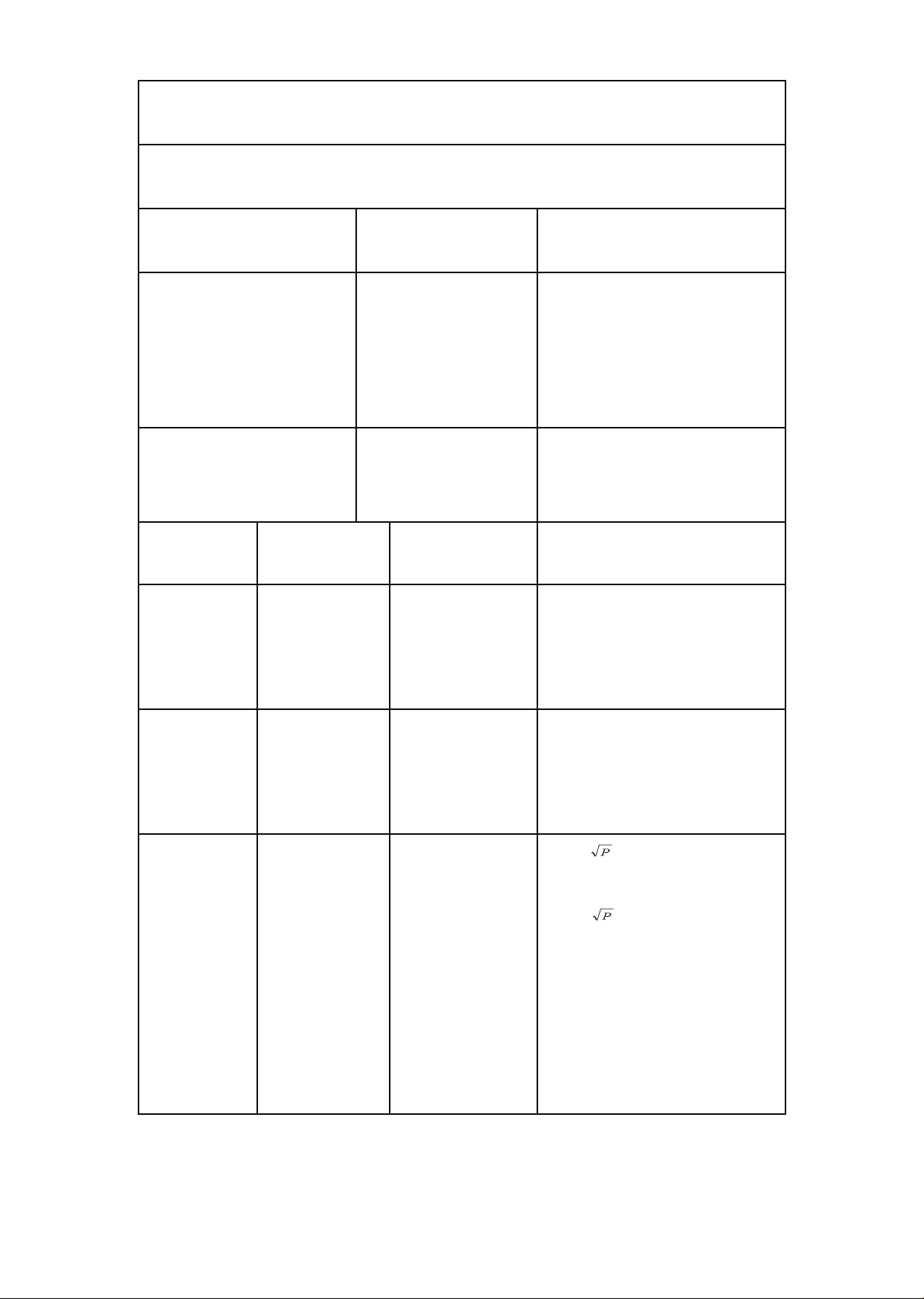
d = 1,2
80 MHz to 800 MHz
d = 2,3 800 MHz to 2,5 GHz
Where P is the maximum output
power rating of the transmitter in
watts (W) according to the transmitter
manufacturer and d is the
recommended separation distance in
meters (m).

64
Immunity test IEC 60601
test level
Compliance level
Electromagnetic environment –
guidance
Electrical fast
transient/burst
IEC 61000-4-4
+/-2 kV for power
supply lines
+/-1 kV for
input/output lines
+/-2 kV for power
supply lines
+/-1 kV for
input/output lines
Mains power quality should be that
of a typical commercial or hospital
environment.
Note
• If the device is interfered by power or signal cable, image quality
may be reduced or abnormally displayed. Such kind of interference
images could be easily identied and dierentiated from the
physiological characteristics of patient and longer clinical time
consumed but wouldn’t have any diagnostic accuracy issue.
• If there is a certain frequency of image interference, there is a need
of isolation or ltering of the RF signal.

65
Description
of packaging
symbols
Package contains fragile electronic equipment.
Care should be used when handling.
The product inside the packaging could be easily
damaged if dropped or handled without care and
attention. The contents are fragile!
Do not use forklift truck here.
Do not use Spade truck here.
Do not use Razorback truck here.
Hand truck only.
Indicates that the package is heavy and two or more
people are required to lift.
Warning
Warning

66
Indicates that an object is capable of being recycled
- not that the object has been recycled or will be
accepted in all recycling collection systems.
Top. This side up.

67
Warranty
commercial
Frame
Lifetime
Drive motor
10 years
Parts
3 years
Labor
3 years
Wear items
6 months
EMS brake
5 years
Product warranty
Dyaco Commercial & Medical North America LLC (hereinafter
“Dyaco”), the manufacturer of the Philips Professional Series Physical
Therapy Products (hereinafter “Products”) warrants all of the Prod-
ucts and their components listed below for the periods of time set
out on this page below from the date of sale, as determined by sale
receipt, or in the absence of a sales receipt, eighteen (18) months
from the original factory shipping date. During the applicable war-
ranty periods, Dyaco’s responsibilities under these warranties include
providing, at no charge, new or remanufactured parts, as determined
by Dyaco at its sole and absolute discretion, and covering the cost of
labor deemed necessary by Dyaco, at its sole and absolute discretion,
to remedy faults giving rise to applicable warranty claims. The war-
ranty periods set out below are subject to the performance of proper
care and maintenance, as set out in this user manual, by the original
purchaser of the equipment. Warranties are not transferable.
* Wear items are rubber hand grips, pedals, console overlay and drive belt
Normal responsibilities of the facility
The facility is responsible for the items listed below
• The warranty registration must be completed online to validate the
manufacturer’s limited warranty.
• Proper use of the tness equipment in accordance with the instruc-
tions provided in this manual.
• Proper installation in accordance with instructions provided with
the tness equipment and with all local electric codes.

68
• Proper connection to a grounded power supply of sucient voltage,
replacement of blown fuses, repair of loose connections or defects
in house or facility wiring.
• Expenses for making the tness equipment accessible for servicing,
including any item that was not part of the tness equipment at the
time it was shipped from the factory.
• Damages to the tness equipment nish during shipping,
installation or following installation.
• Routine maintenance of this unit as specied in this manual.
Exclusions
This warranty does not cover the following:
• Consequential, collateral, or incidental damages such as property
damage and incidental expenses resulting from any breach of this
written or any implied warranty. Note: Some states do not allow the
exclusion or limitation of incidental or consequential damages, so
this limitation or exclusion may not apply to you.
• Service call reimbursement to the consumer. Service call
reimbursement to the dealer that does not involve malfunction or
defects in workmanship or material, for units that are beyond the
warranty period, for units that are beyond the service call
reimbursement period, or units not requiring component
replacement.
• Damages caused by services performed by persons other than
authorized Dyaco service companies, use of parts other than
original Dyaco parts, or external causes such as alterations,
modications, abuse, misuse, accident, improper maintenance,
inadequate power supply.
• Products with original serial numbers that have been removed or
altered.
• Products that have been; sold, transferred, bartered, or given to a
third party.
• Products that are used as store display models.
• Products that do not have a warranty registration on le at Dyaco.
Dyaco reserves the right to request proof of purchase if no warranty
record exists for the product.

69
• Manufacturer, distributor, or the Licensor shall not be responsible or
liable of any direct, indirect, general, special, punitive, incidental or
consequential damages; loss of or damage to property; claims of
third parties; loss of life; personal injury (including further injury, or
re-injury), and any other losses or damages of any kind or character,
arising out of or in connection with the use of Biophysical Agents by
the facilities or clinicians. The facilities or clinicians that select,
prescribe, and implement the use of Biophysical Agents will assume
the related responsibility.
• Denitions of “ Biophysical agents ” : Biophysical agents are a broad
group of agents that use various forms of energy and are intended
to assist muscle force generation and contraction; decrease
unwanted muscular activity; maintain strength after injury or
surgery; modulate or decrease pain; reduce or eliminate edema;
improve circulation; decrease inammation, connective tissue
extensibility, or restriction associated with musculoskeletal injury or
circulatory dysfunction; increase joint mobility, muscle performance,
and neuromuscular performance.
• Physical therapists select, prescribe, and implement the use of
biophysical agents when the examination ndings, diagnosis, and
prognosis indicate the use of these agents to reduce risk factors
and complications; enhance health, wellness, or tness; enhance or
maintain physical performance; or prevent or remediate
impairments in body functions and structures, activity limitations, or
participation restrictions. The use of biophysical agents in the
absence of other interventions should not be considered to be
physical therapy unless there is documentation that justies the
necessity of their exclusive use.
• Use of the products in any way other than described within
products’ operation manual, either intentionally or by error.
• Damages due to improper storage or transport or other causes not
solely attributable to Manufacturer.
• The exact amount of indemnication or cost arising out of breach of
this written or any implied warranty shall be fairly negotiated by
both you and Manufacturer.
• This warranty is expressly in lieu of all other warranties expressed or
implied, including the warranties of merchantability and/or tness
for a particular purpose.

70
Service
Keep your bill of sale. Twenty four (24) months from the date on the
bill of sale or eighteen (18) months from the date of factory shipping
as determined by the serial number establishes the warranty period
should service be required. If service is performed, it is in your best
interest to obtain and keep all receipts. This written warranty gives
you specic legal rights. You may also have other rights that vary from
state to state. Service under this warranty must be obtained by fol-
lowing these steps, in order:
• Contact your selling authorized Dyaco dealer. OR
• Contact your local authorized Dyaco service organization.
• If there is a question as to where to obtain service, contact our
service department at 1-866-869-4409.
• Dyaco’s obligation under this warranty is limited to repairing or
replacing, at Dyaco’s option, the product through one of our
authorized service centers. All repairs must be preauthorized by
Dyaco. If the product is shipped to a service center freight charges
to and from the service center will be the customer’s responsibility.
For replacement parts shipped while the product is under warranty,
the customer will be responsible for shipping and handling charges.
• The owner is responsible for adequate packaging upon return to
Dyaco. Dyaco is not responsible for damages in shipping. Make all
freight damage claims with the appropriate freight carrier. Do not
ship any unit to our factory without a return authorization number.
All units arriving without a return authorization number will be
refused.
• For any further information, or to contact our service department by
email, or phone call, and also please refer to website for additional
information:
- Consumer care service email address: [email protected]om
- Consumer care service phone number: 1-886-869-4409
Product features or specications as described or illustrated are
subject to change without notice. All warranties are made by
Dyaco Commercial & Medical North America LLC. This warranty
applies only in the 48 contiguous United States.
Note: This warranty does not apply to Alaska or Hawaii.

2019© Dyaco Commercial & Medical North America LLC. All right reserved.
The Philips trademark and the Philips Shield Emblem are registered trademarks of Koninklijke Philips N.V. used under license.
This product has been manufactured by and is sold under the responsibility of Dyaco Commercial & Medical North America LLC,
and Dyaco Commercial & Mediacl North America LLC is the warrantor in relation to this product.