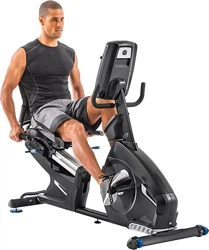
ASSEMBLY MANUAL / OWNER’S MANUAL
™
.
2
Important Safety Instructions 3
Safety Warning Labels / Serial Number 4
6SHFL¿FDWLRQV
%HIRUH$VVHPEO\
Parts 6
Hardware 7
Tools 7
Assembly 8
Moving the Machine 18
Leveling the Machine 19
Features 20
Console Features 21
Contact Heart Rate (CHR) 24
Operations 26
Adjustments 26
Power Up / Idle Mode 26
Initial Setup 27
Quick Start Program 27
8VHU3UR¿OHV
3UR¿OH3URJUDPV
Pausing or Stopping 32
Results / Cool Down Mode 32
GOAL TRACK Statistics 32
Console Setup Mode 34
0DLQWHQDQFH
Maintenance Parts 36
Troubleshooting 37
1DXWLOXV,QFZZZQDXWLOXVLQWHUQDWLRQDOFRP_1DXWLOXV,QF&HQWHUSRLQW3DUNZD\*URYHSRUW2+86$_3ULQWHGLQ&KLQD_
1DXWLOXV,QF_1DXWLOXVWKH&DPORJR1DXWLOXV'XDO7UDFN%RZÀH[6FKZLQQDQG8QLYHUVDODUHWUDGHPDUNVRZQHGE\RUOLFHQVHGWR1DXWLOXV
Inc., which are registered or otherwise protected by common law in the United States and other countries.
ORIGINAL MANUAL - ENGLISH VERSION ONLY
TABLE OF CONTENTS
To validate warranty support, keep the original proof of purchase and record the following information:
Serial Number __________________________
Date of Purchase ____________________
To register your product warranty, contact your local distributor.
For details regarding product warranty or if you have questions or problems with your product, please contact
\RXUORFDO1DXWLOXVGLVWULEXWRU7R¿QG\RXUORFDOGLVWULEXWRUJRWRwww.nautilusinternational.com
3
IMPORTANT SAFETY INSTRUCTIONS
This icon means a potentially hazardous situation which, if not avoided, could result in death or serious injury.
Obey the following warnings:
Read and understand all warnings on this machine.
Carefully read and understand the Assembly instructions.
• Keep bystanders and children away from the product you are assembling at all times.
• Do not connect power supply to the machine until instructed to do so.
• Do not assemble this machine outdoors or in a wet or moist location.
0DNHVXUHDVVHPEO\LVGRQHLQDQDSSURSULDWHZRUNVSDFHDZD\IURPIRRWWUDI¿FDQGH[SRVXUHWRE\VWDQGHUV
• Some components of the machine can be heavy or awkward. Use a second person when doing the assembly steps
involving these parts. Do not do steps that involve heavy lifting or awkward movements on your own.
• Set up this machine on a solid, level, horizontal surface.
• Do not try to change the design or functionality of this machine. This could compromise the safety of this machine and
will void the warranty.
• If replacement parts are necessary, use only genuine Nautilus replacement parts and hardware. Failure to use
genuine replacement parts can cause a risk to users, keep the machine from operating correctly and void the
warranty.
• Do not use until the machine has been fully assembled and inspected for correct performance in accordance with the
Manual.
5HDGDQGXQGHUVWDQGWKHFRPSOHWH0DQXDOVXSSOLHGZLWKWKLVPDFKLQHEHIRUH¿UVWXVH.HHSWKH0DQXDOIRUIXWXUH
reference.
• Do all assembly steps in the sequence given. Incorrect assembly can lead to injury or incorrect function.
Before using this equipment, obey the following warnings:
Read and understand the complete Manual. Keep the Manual for future reference.
Read and understand all warnings on this machine. If at any time the Warning labels become loose, unreadable or dislodged,
contact your local distributor for replacement labels.
• Children must not be let on or near to this machine. Moving parts and other features of the machine can be dangerous
to children.
• Not intended for use by anyone under 14 years of age.
&RQVXOWDSK\VLFLDQEHIRUH\RXVWDUWDQH[HUFLVHSURJUDP6WRSH[HUFLVLQJLI\RXIHHOSDLQRUWLJKWQHVVLQ\RXU
chest, become short of breath, or feel faint. Contact your doctor before you use the machine again. Use the values
calculated or measured by the machine’s computer for reference purposes only.
%HIRUHHDFKXVHH[DPLQHWKLVPDFKLQHIRUORRVHSDUWVRUVLJQVRIZHDU'RQRWXVHLIIRXQGLQWKLVFRQGLWLRQ0RQLWRU
the Seat, Pedals, and Crank Arms closely. Contact your local distributor for repair information.
• 0D[LPXPXVHUZHLJKWOLPLWNJOEV'RQRWXVHLI\RXDUHRYHUWKLVZHLJKW
• This machine is for home use only.
'RQRWZHDUORRVHFORWKLQJRUMHZHOU\7KLVPDFKLQHFRQWDLQVPRYLQJSDUWV'RQRWSXW¿QJHUVRURWKHUREMHFWVLQWR
PRYLQJSDUWVRIWKHH[HUFLVHHTXLSPHQW
• Set up and operate this machine on a solid, level, horizontal surface.
• Make the Pedals stable before you step on them. Use caution when you step on and off the machine.
• Disconnect all power before servicing this machine.
• Do not operate this machine outdoors or in moist or wet locations. Keep the foot pedals clean and dry.
4
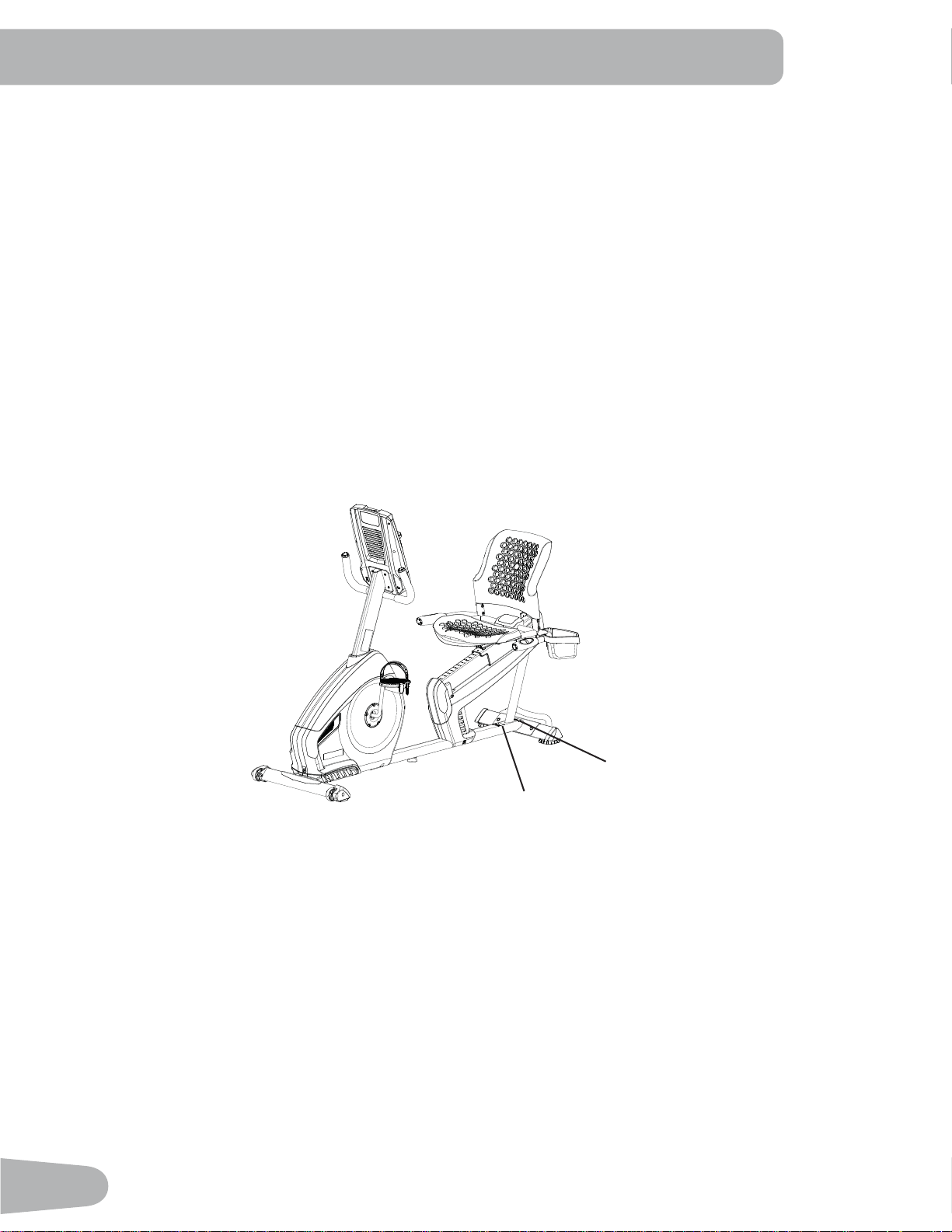
SAFETY WARNING LABELS AND
SERIAL NUMBER
Serial Number
3URGXFW6SHFL¿FDWLRQ
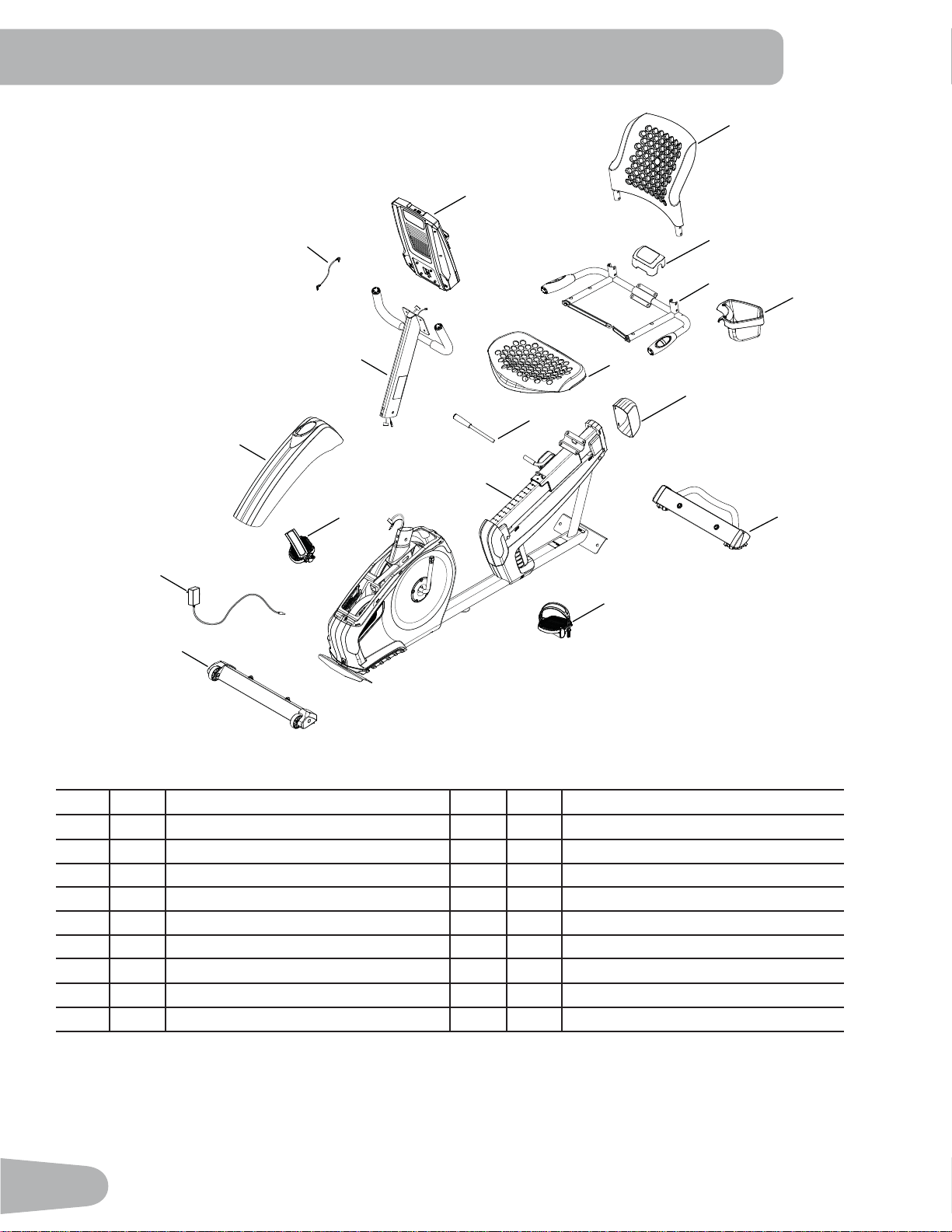
• Keep at least 0.6 m (24”) on each side of the machine clear. This is the recommended safe distance for access and
passage around and emergency dismounts from the machine. Keep third parties out of this space when machine is in
use.
'RQRWRYHUH[HUW\RXUVHOIGXULQJH[HUFLVH2SHUDWHWKHPDFKLQHLQWKHPDQQHUGHVFULEHGLQWKLVPDQXDO
• Correctly adjust and safely engage all Positional Adjustment Devices. Make sure that the Adjustment Devices do not
hit the user.
([HUFLVHRQWKLVPDFKLQHUHTXLUHVFRRUGLQDWLRQDQGEDODQFH%HVXUHWRDQWLFLSDWHWKDWFKDQJHVLQVSHHGDQG
resistance level can occur during workouts, and be attentive in order to avoid loss of balance and possible injury.
• This appliance is not intended for use by persons (including children) with reduced physical, sensory or mental
FDSDELOLWLHVRUODFNRIH[SHULHQFHDQGNQRZOHGJHXQOHVVWKH\KDYHEHHQJLYHQVXSHUYLVLRQRULQVWUXFWLRQFRQFHUQLQJ
use of the appliance by a person responsible for their safety.
• Children should be supervised to ensure that they do not play with the appliance.
5
SPECIFICATIONS
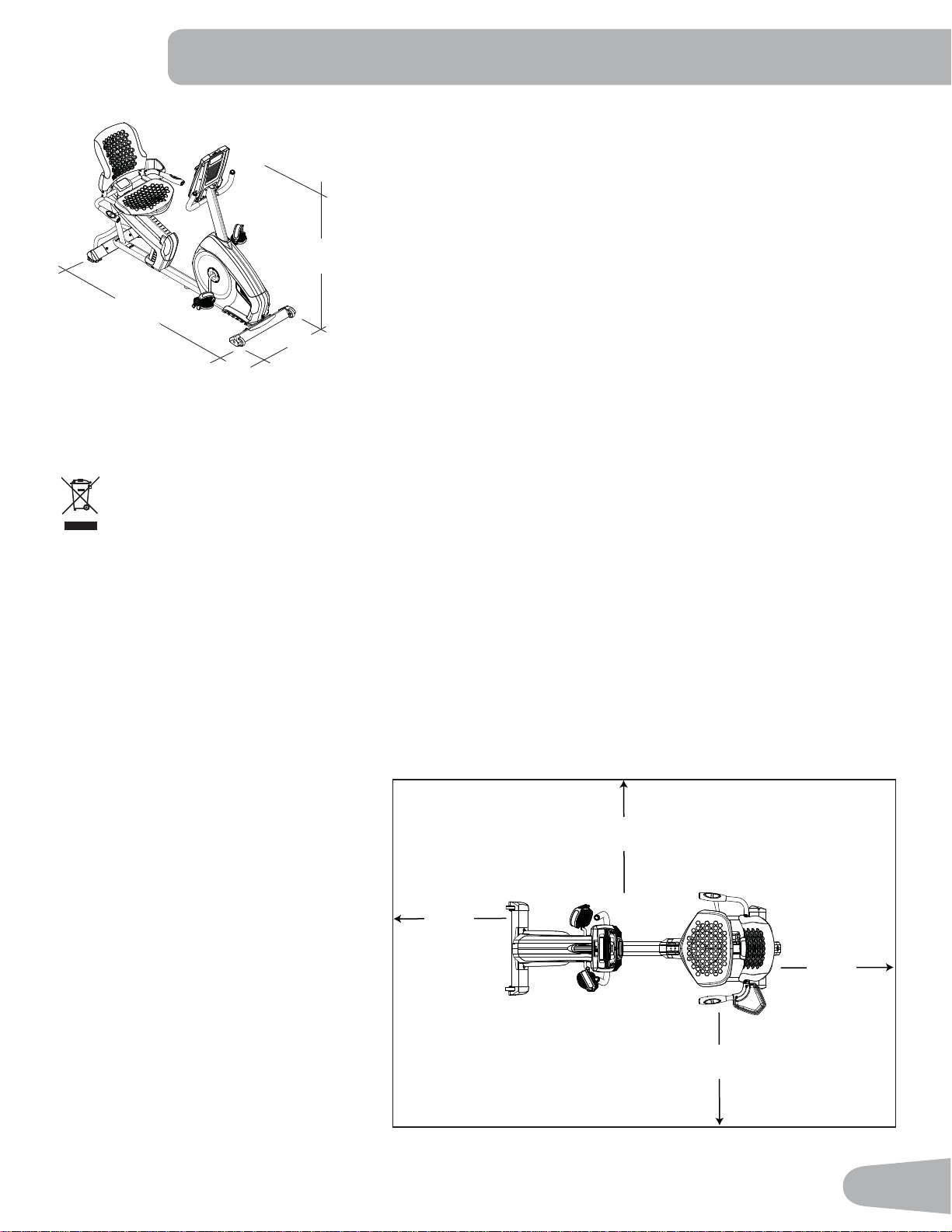
Maximum User Weight: 136 kg (300 lbs.)
Total Surface Area (footprint) of equipment: 11,912 cm
2
(1848 in
2
)
Machine Weight: 38.2 kg (84.2 lbs.)
Power Requirements:
,QSXW9ROWDJH 9$&+]$
2XWSXW9ROWDJH 9'&$
126 cm
(49.6”)
165.9 cm
(65.3”)
71.8 cm
(28.3”)
DO NOT dispose of this product as refuse. This product is to be recycled. For proper disposal of this product,
please follow the prescribed methods at an approved waste center.
Before Assembly
Select the area where you are going to set up and operate your machine. For safe operation, the location must be on a
KDUGOHYHOVXUIDFH$OORZDZRUNRXWDUHDRIDPLQLPXPP[P´[´
Basic Assembly Tips
Follow these basic points when you
assemble your machine:
• Read and understand the “Important
Safety Instructions” before assembly.
• Collect all the pieces necessary for
each assembly step.
• Using the recommended wrenches,
turn the bolts and nuts to the right
(clockwise) to tighten, and the left
(counterclockwise) to loosen, unless
instructed otherwise.
• When attaching 2 pieces, lightly lift
and look through the bolt holes to help
insert the bolt through the holes.
• The assembly can require 2 people.
2.9m ( 114” )
2m
( 77” )
0.6m
( 24” )
0.6m
( 24” )
0.6m
( 24” )
0.6m
( 24” )
6
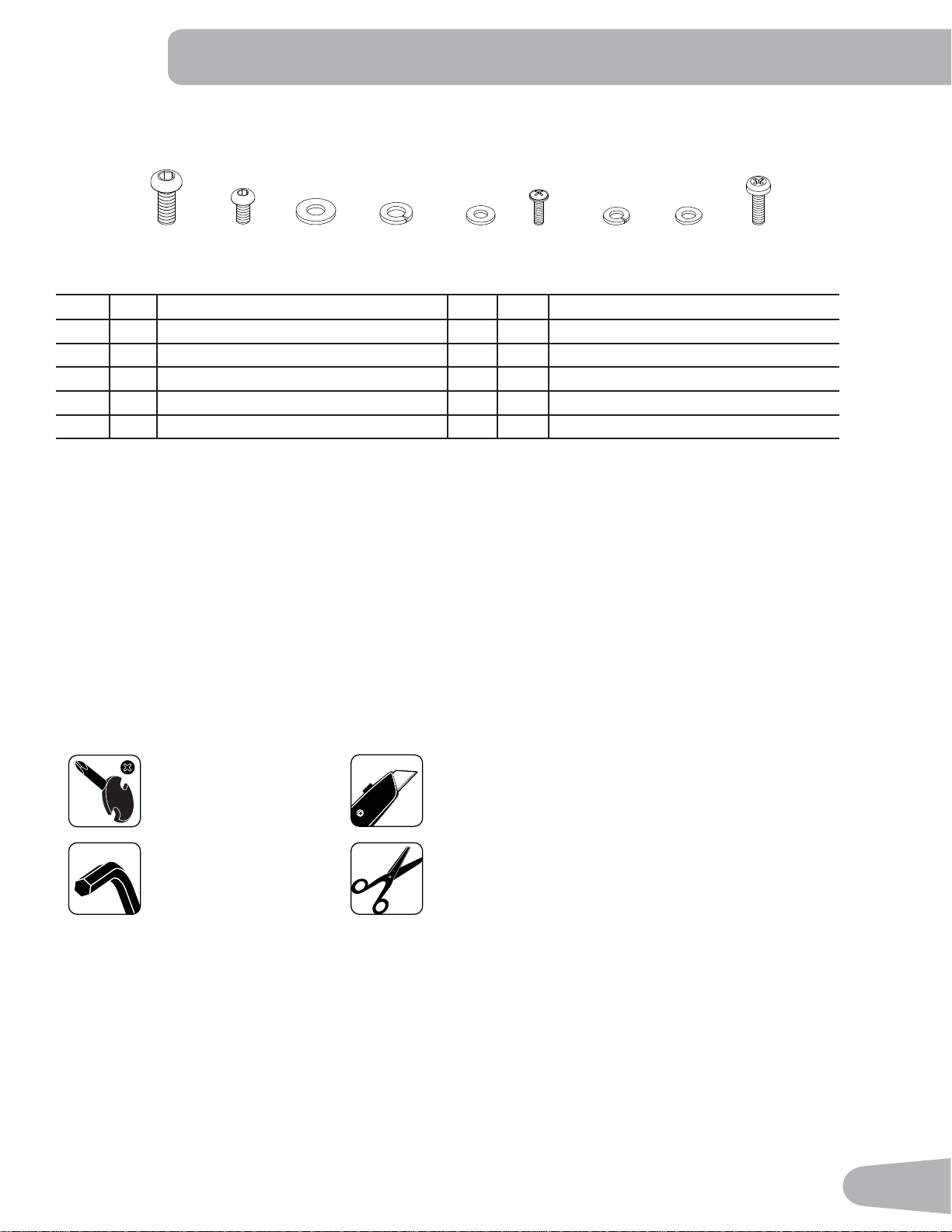
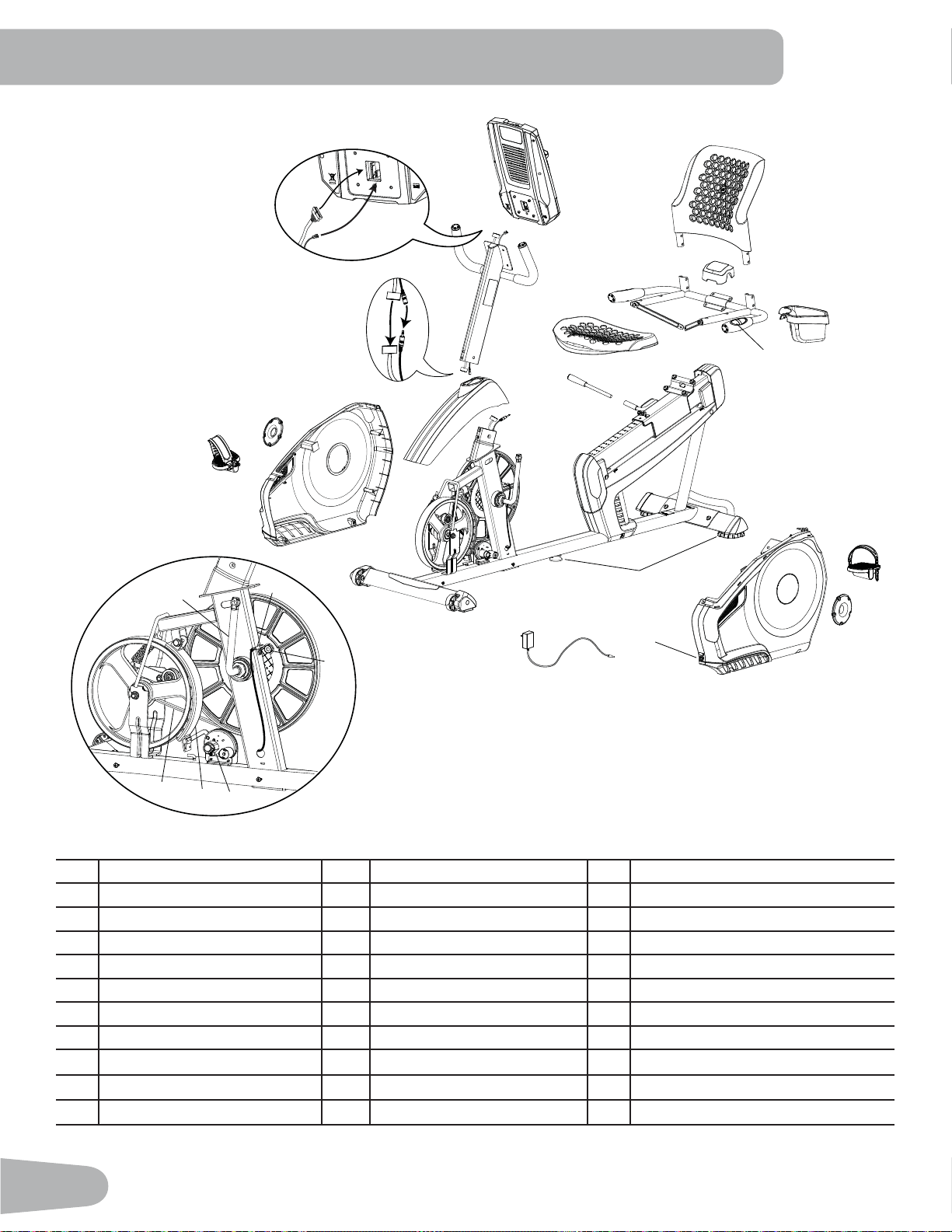
PARTS
Item Qty Description Item Qty Description
1 1 Console 10 1 Rear Stabilizer
2 1 Water Bottle Holder 11 1 Left Pedal
3 1 Seat Back 12 1 Front Stabilizer
4 1 Seat Cover 13 1 Right Pedal
1 Seat Frame Assembly 14 1 Top Shroud
6 1 Seat Bottom 1 Console Mast
7 1 Seat Adjustment Handle 16 1 MP3 Cord
8 1 Frame 17 1 AC Adapter
9 1 Seat Rail End Cap
17
15
14
12
16
9
1
7
13 (R)
11 (L)
4
3
5
10
2
6
8
7
HARDWARE / TOOLS
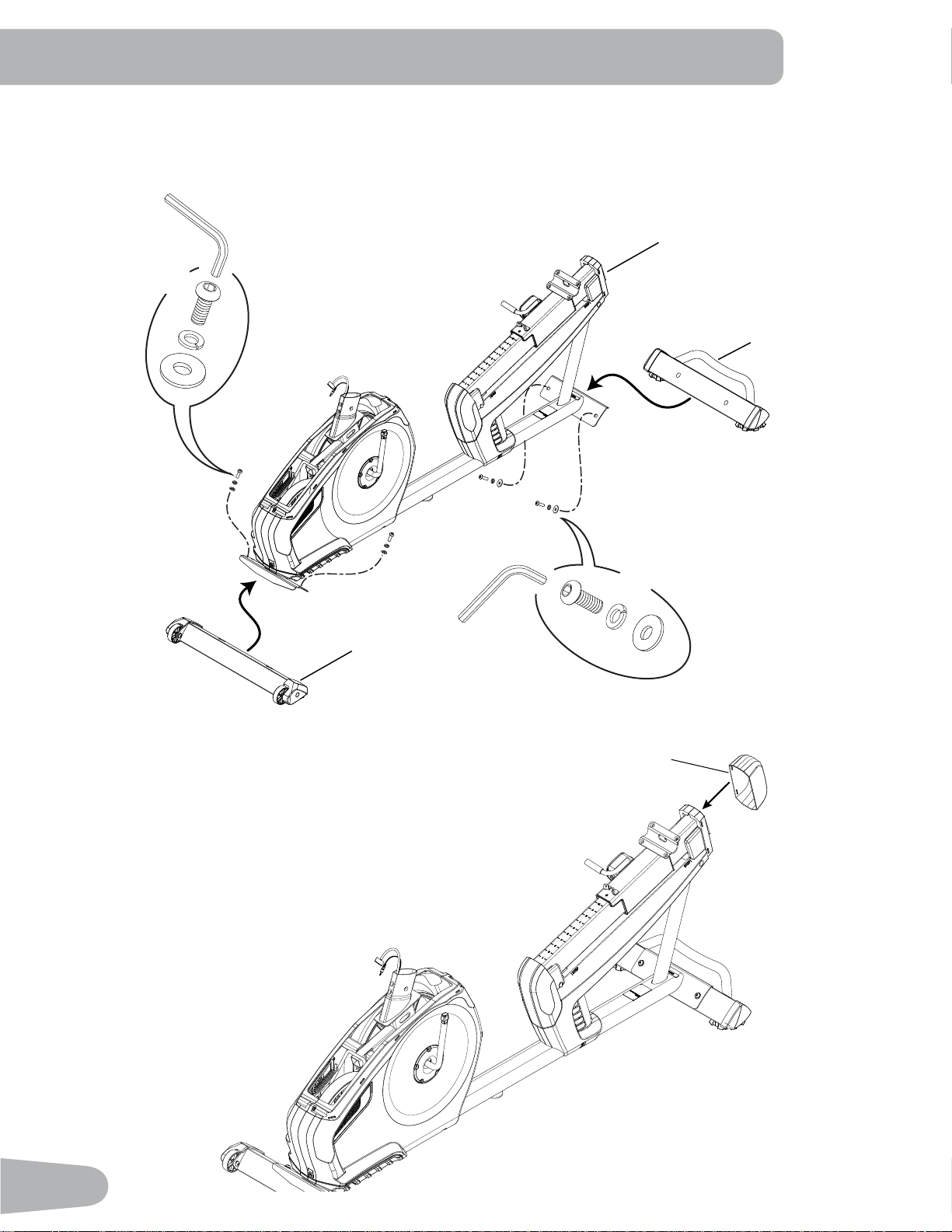
Tools
Included Not Included
(recommended)
4 mm
6 mm
Item Qty Description Item Qty Description
A8%XWWRQ+HDG+H[6FUHZ0[ F23KLOOLSV+HDG6FUHZ0[
B10%XWWRQ+HDG+H[6FUHZ0[ G 14 Lock Washer, M6
C 8 Flat Washer, M8 H 4 Curved Washer, M6
D 8 Lock Washer, M8 I 4 3KLOOLSV+HDG6FUHZ0[
E 10 Flat Washer, M6
ABC D EF
GH
I
8
ASSEMBLY
1a. Attach Stabilizers to Frame
Note: Hardware(*) is pre-installed on the stabilizers and not on Hardware Card. Make sure transport wheels on
the front stabilizer point forward.
1b. Attach the Seat Rail End Cap to the Frame Assembly
*
6mm
*
*
X2
*
6mm
*
*
X2
12
8
10
9
9
A
C
D
6mm
X4
B
E
G
4mm
X2
5
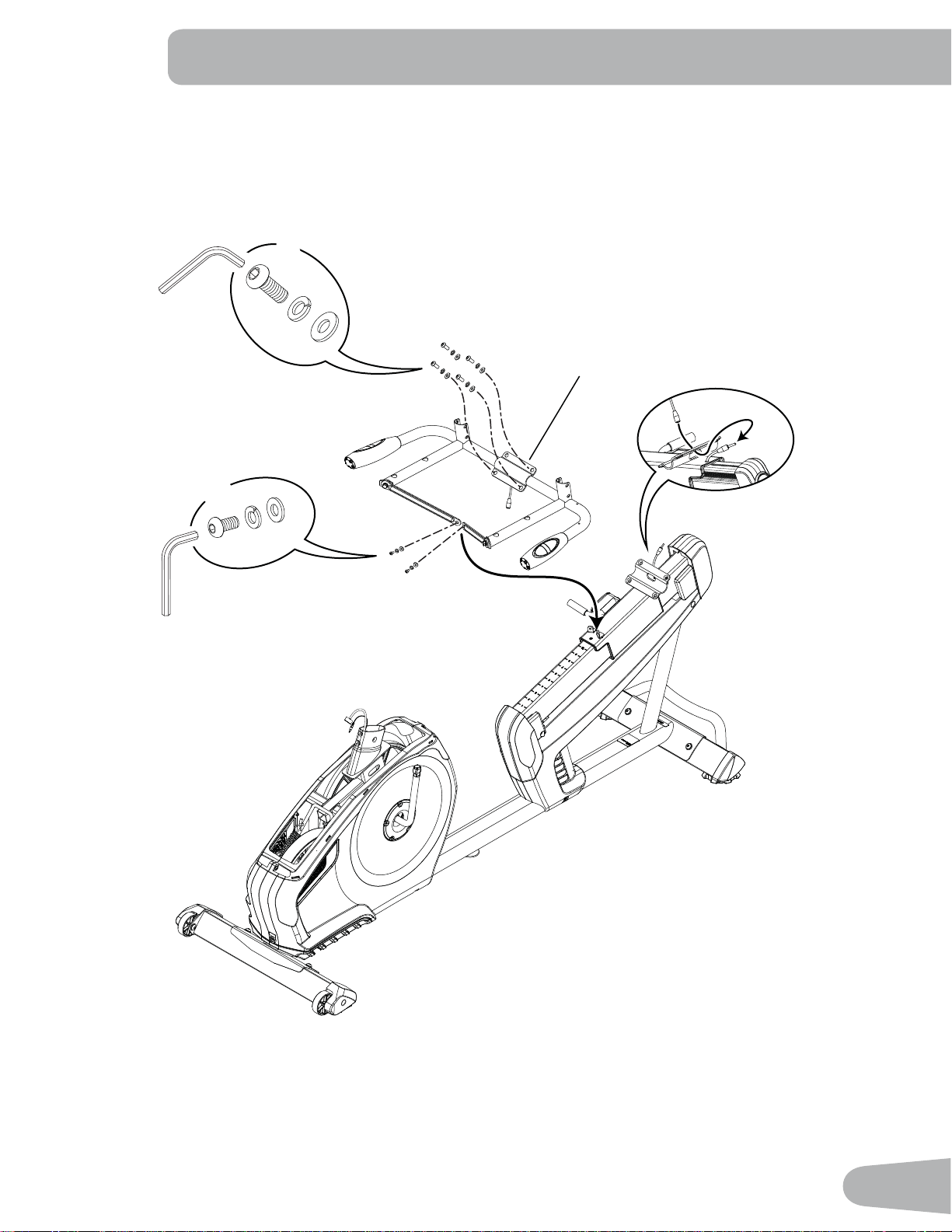
2. Attach the Seat Frame Assembly to the Seat Rail
NOTICE: Do not crimp the Heart Rate Cable. Once all hardware has been inserted, be sure to fully tighten it.
10
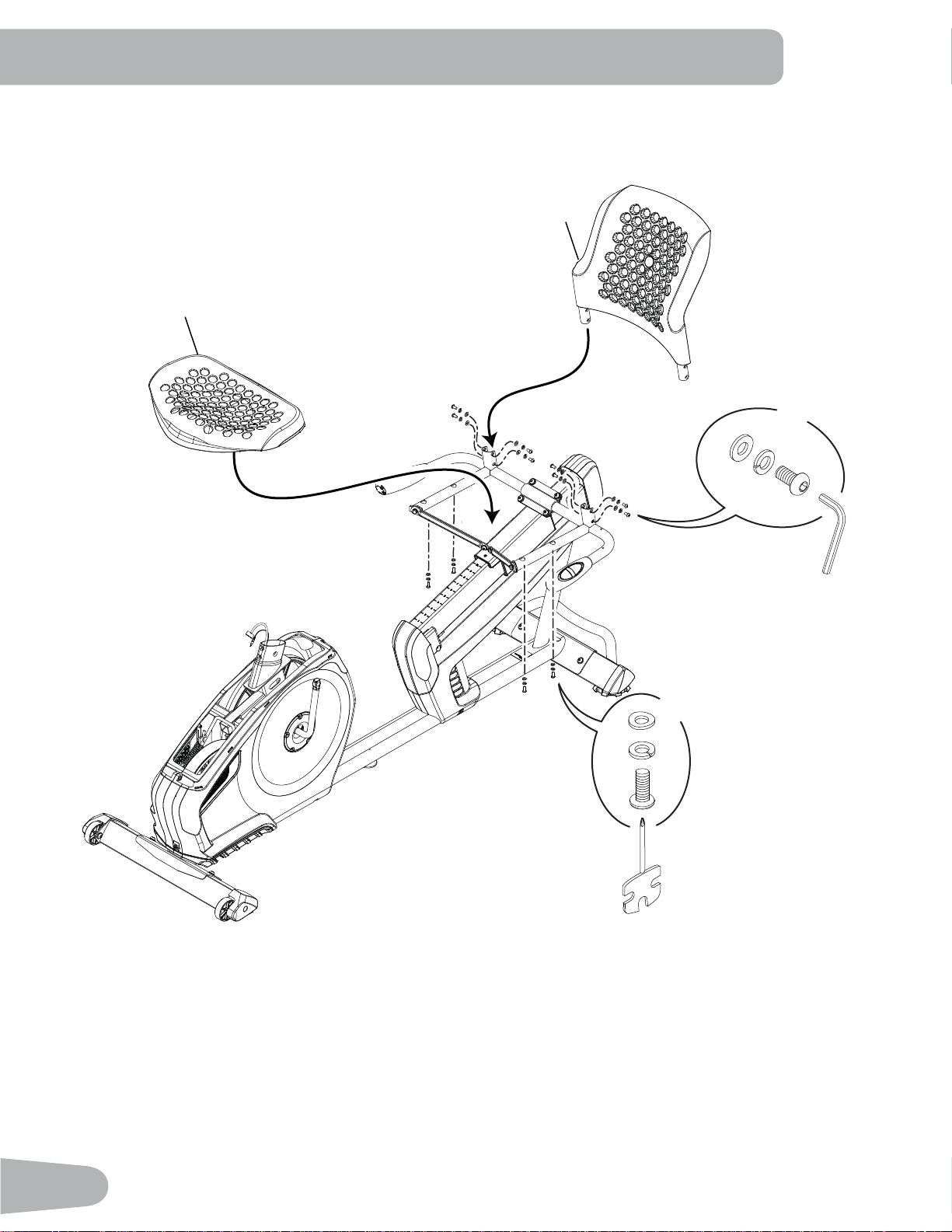
3. Attach Seat Pads to Seat Frame Assembly
3
6
X8
4mm
B
E
G
H
X4
#2
G
I
11
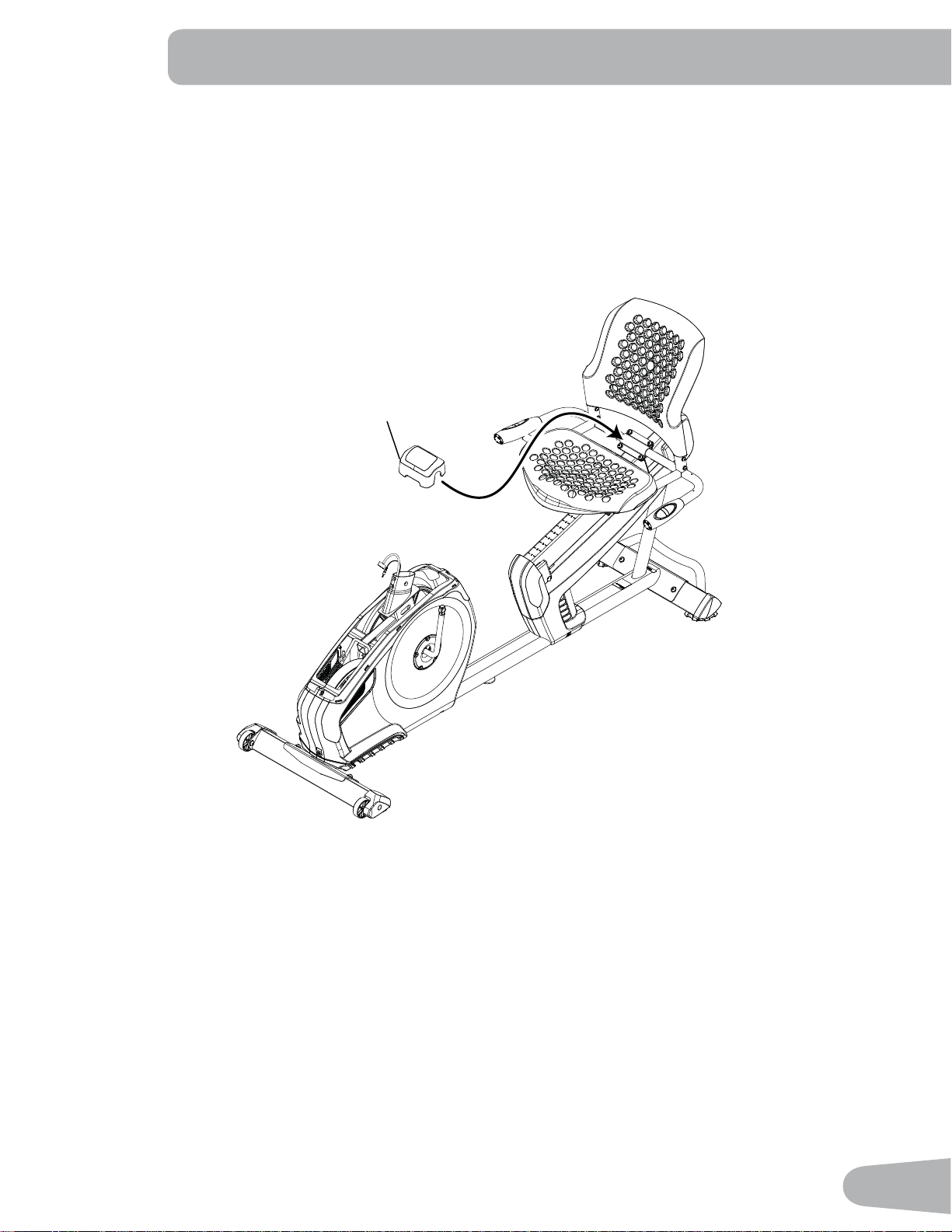
4. Attach Cover to Frame Assembly
4
12
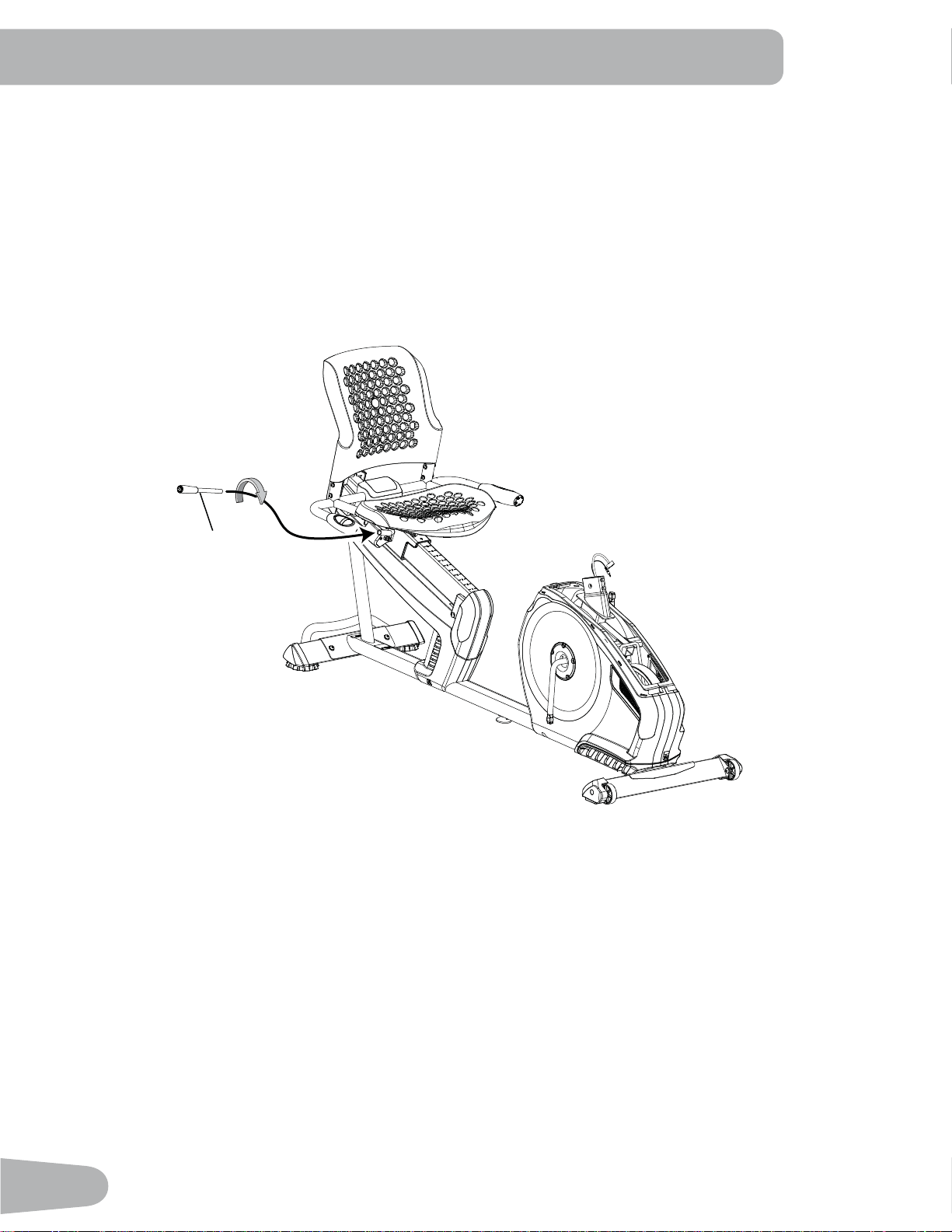
5. Attach Seat Adjustment Handle to Frame Assembly
7
13
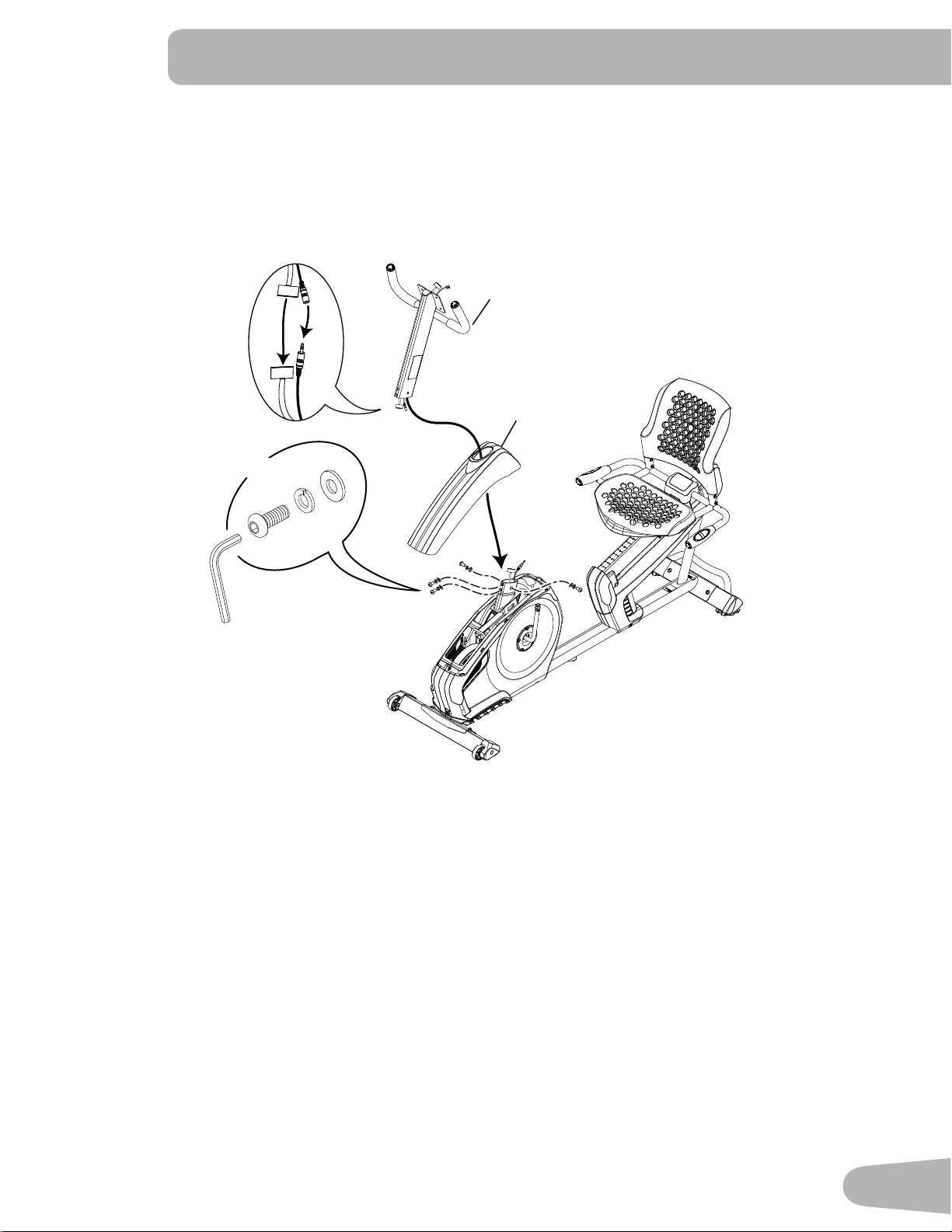
6. Connect the Cables and Attach the Console Mast to Frame Assembly
NOTICE: Do not crimp Console Cables.
A
C
6mm
X4
16
14
D
14
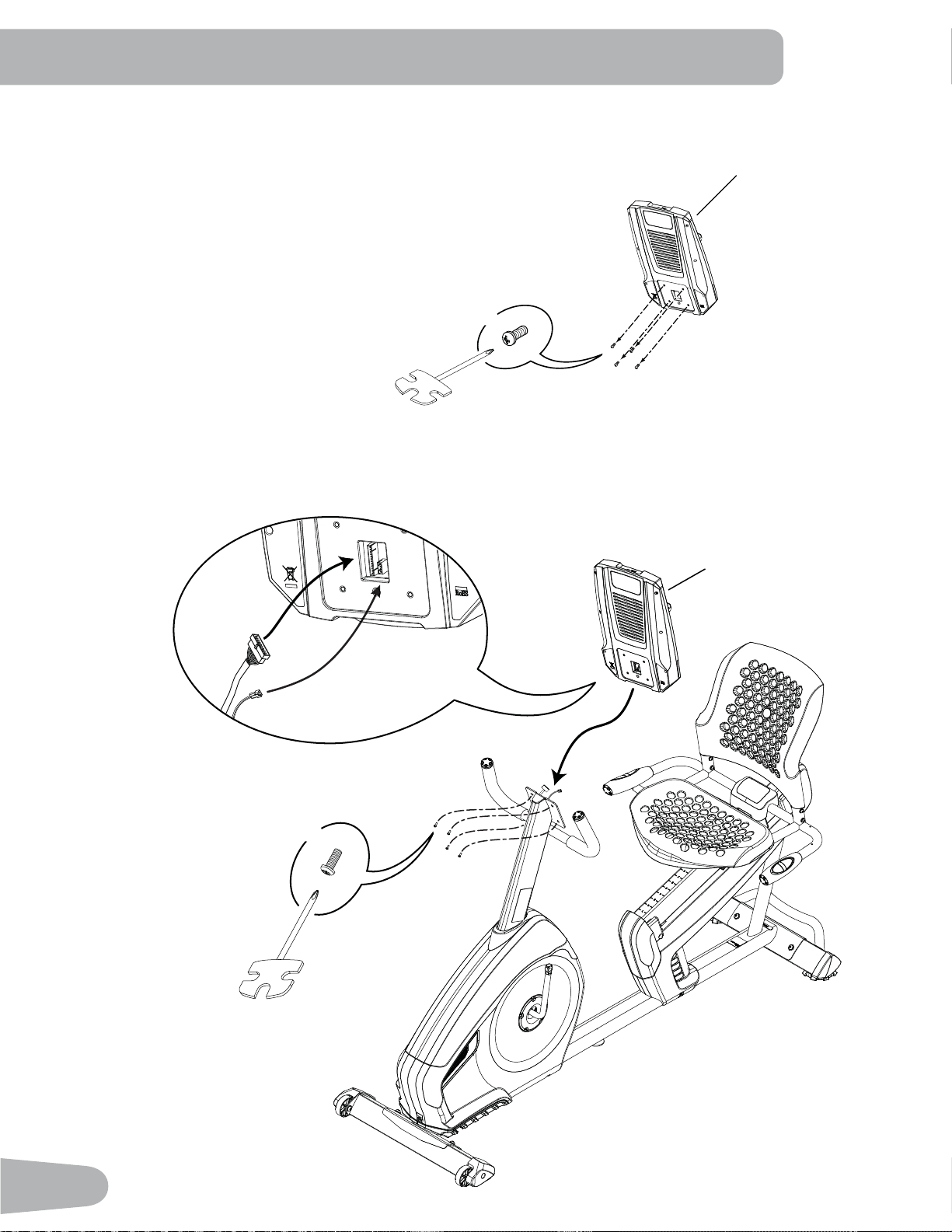
7. Remove Hardware from Console
Note: Hardware (*) is pre-installed and not on the Hardware Card.
1
*
X4
8. Connect Cables and Attach Console to Frame Assembly
NOTICE: Align the clips on the cable connectors and make sure the connectors lock. Do not crimp cables.
X4
#2
*
1
15
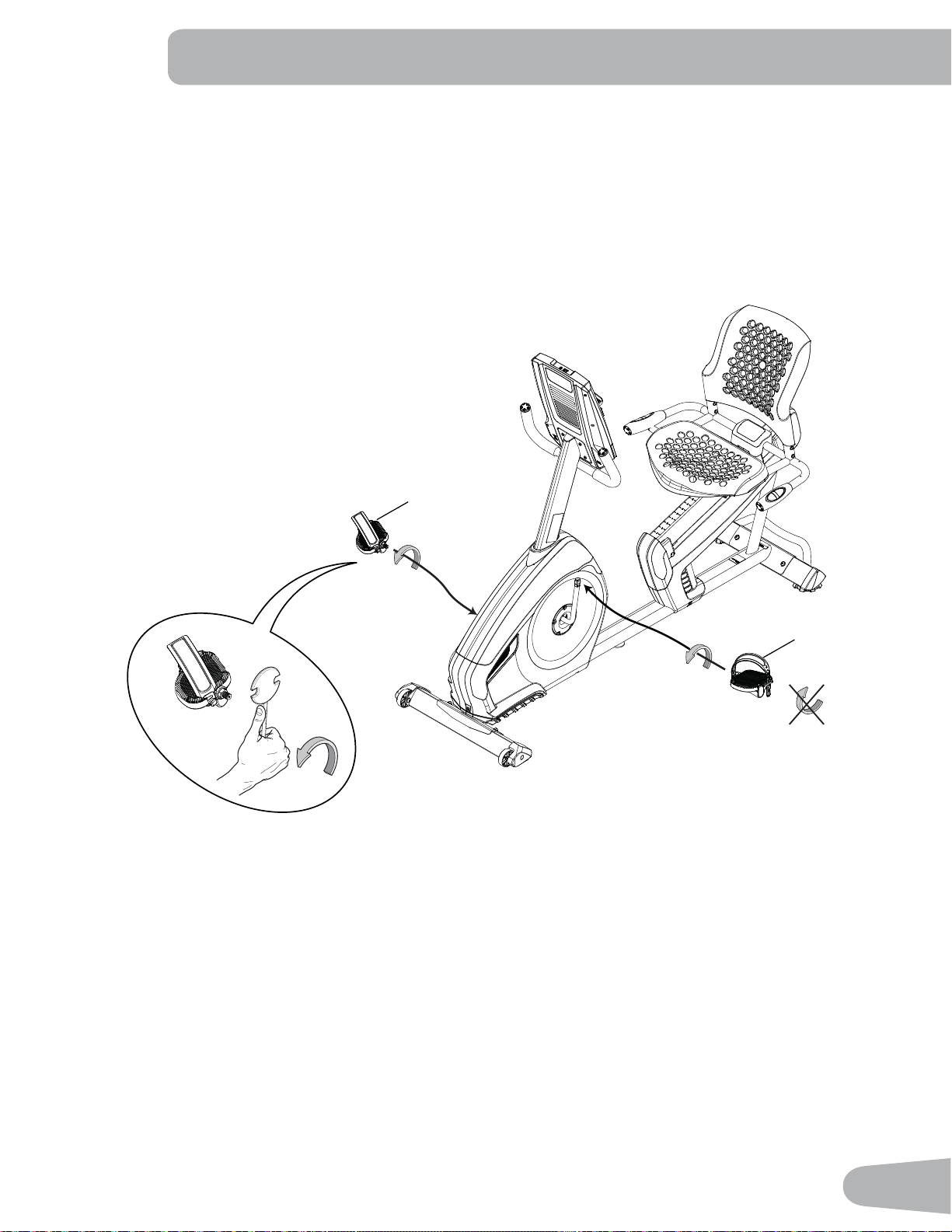
9. Attach Pedals to Frame Assembly
NOTICE: The Left Pedal is reverse-threaded. Be sure to attach Pedals on the proper side of the Bike. Orientation
is based from a seated position on the bike. The Left Pedal has an “L”, the Right Pedal an “R”.
13 (R)
11 (L)
16
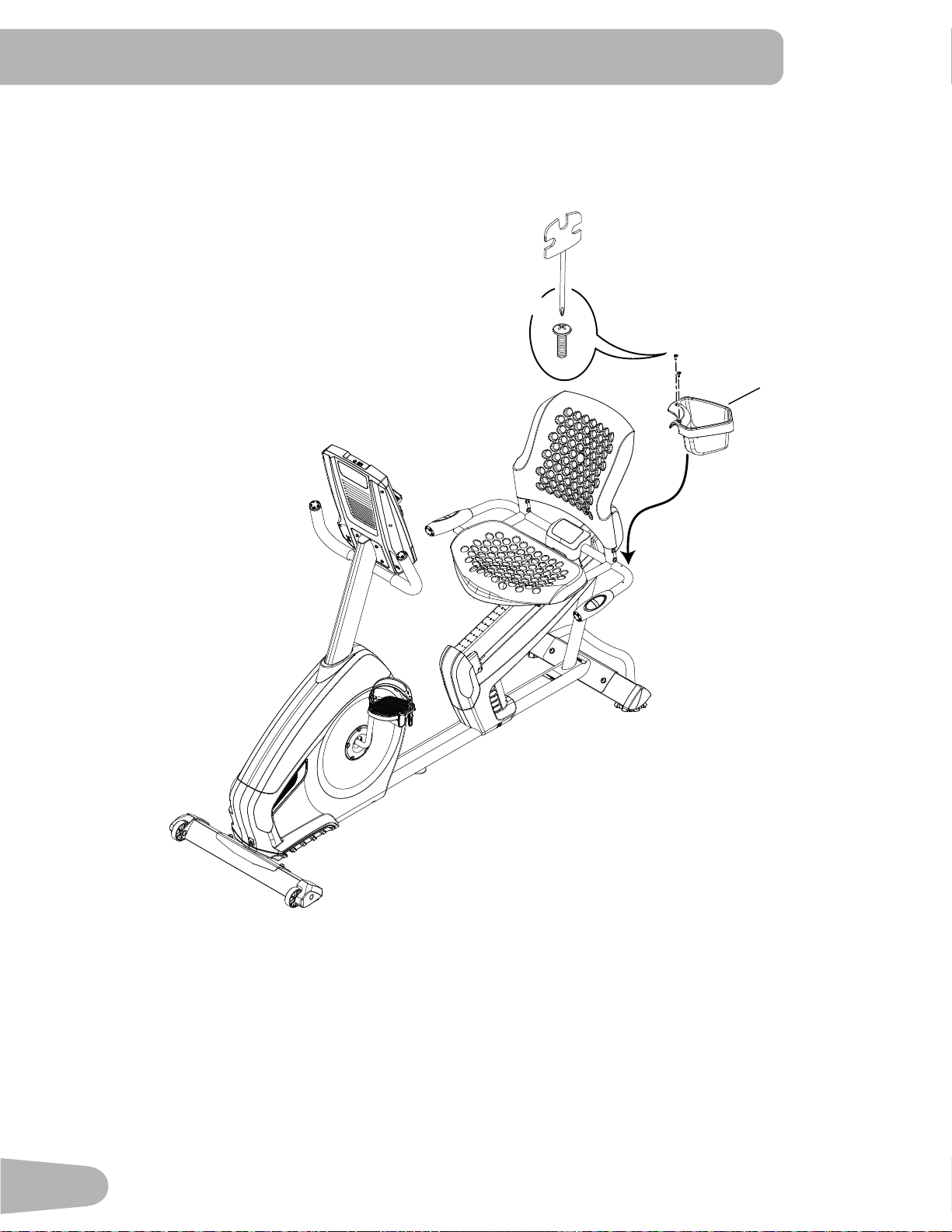
10. Attach Water Bottle Holder to Frame Assembly
2
X2
F
#2
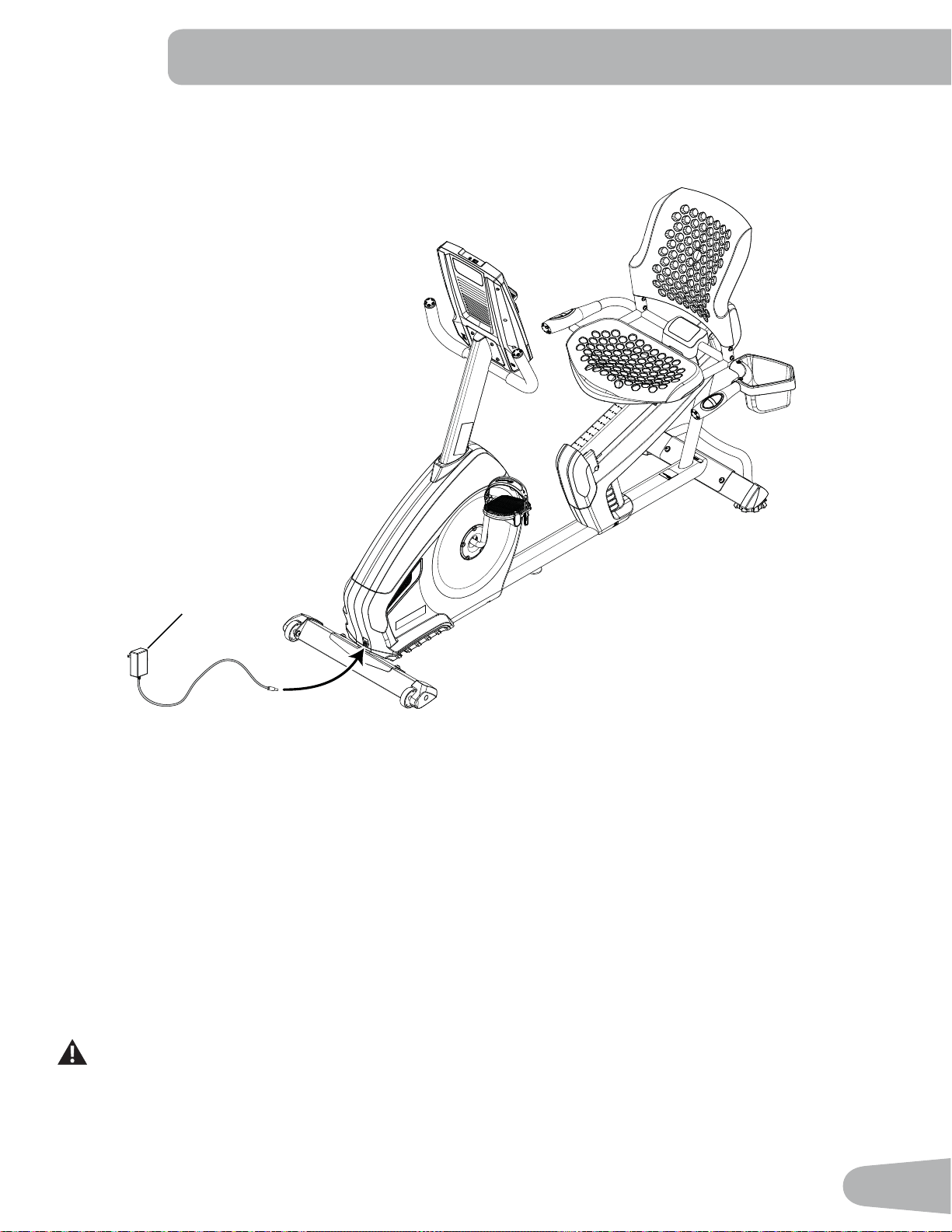
17
11. Connect AC Adapter to Frame Assembly
12. Final Inspection
Inspect your machine to ensure that all hardware is tight and components are properly assembled.
Be sure to record the serial number in the field provided at the front of this manual.
Do not use until the machine has been fully assembled and inspected for correct performance in accor-
dance with the Owner’s Manual.
17
18
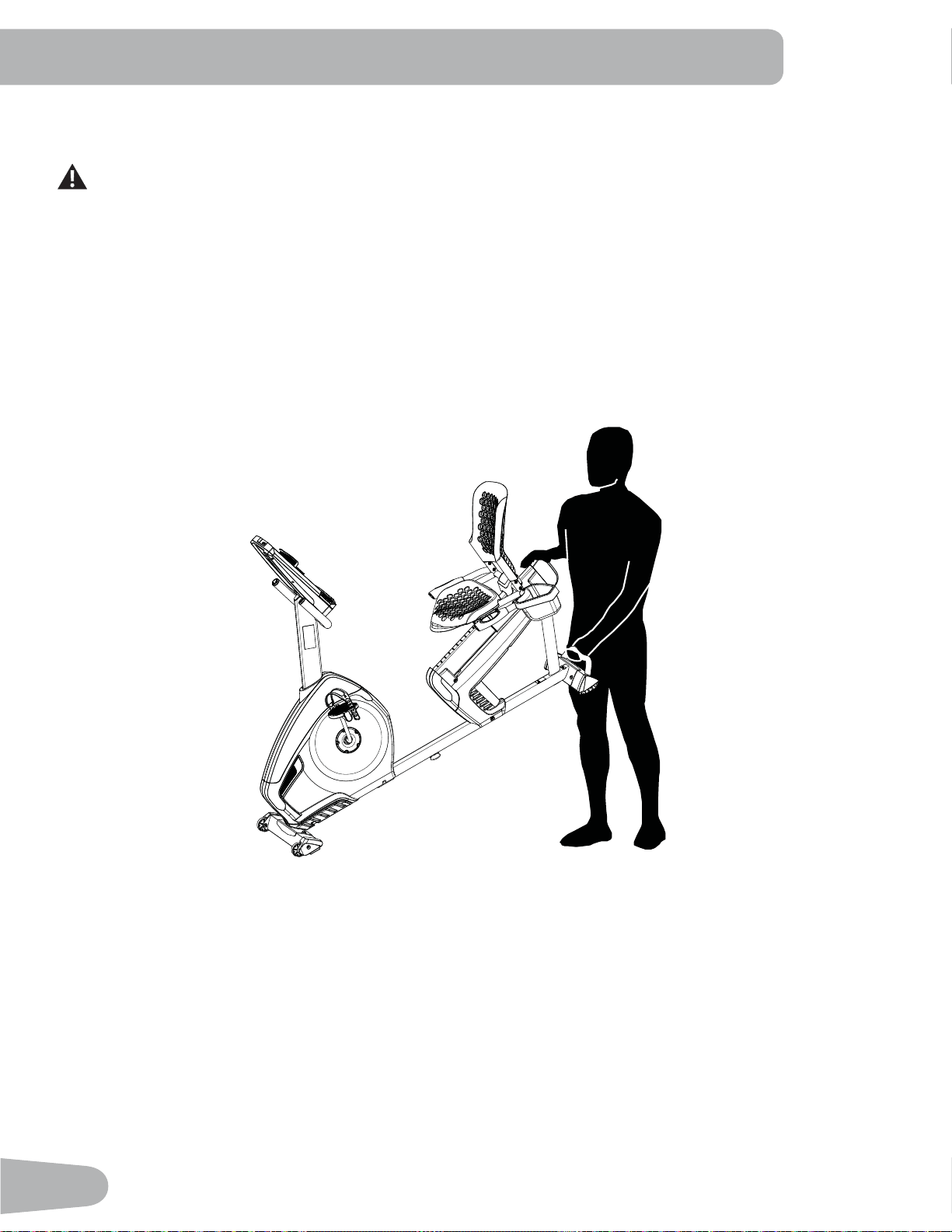
Moving the Bike
The machine may be moved by one or more persons depending on their physical abilities and capacities.
0DNHVXUHWKDW\RXDQGRWKHUVDUHDOOSK\VLFDOO\¿WDQGDEOHWRPRYHWKHPDFKLQHVDIHO\
1. Remove the power cord.
2. Use the Transport Handle to carefully lift the machine onto the transport rollers.
3. Push the machine into position.
4. Carefully lower the machine into position.
NOTICE: Be careful when you move the bike. Abrupt motions can affect the computer operation.
BEFORE YOU START
19
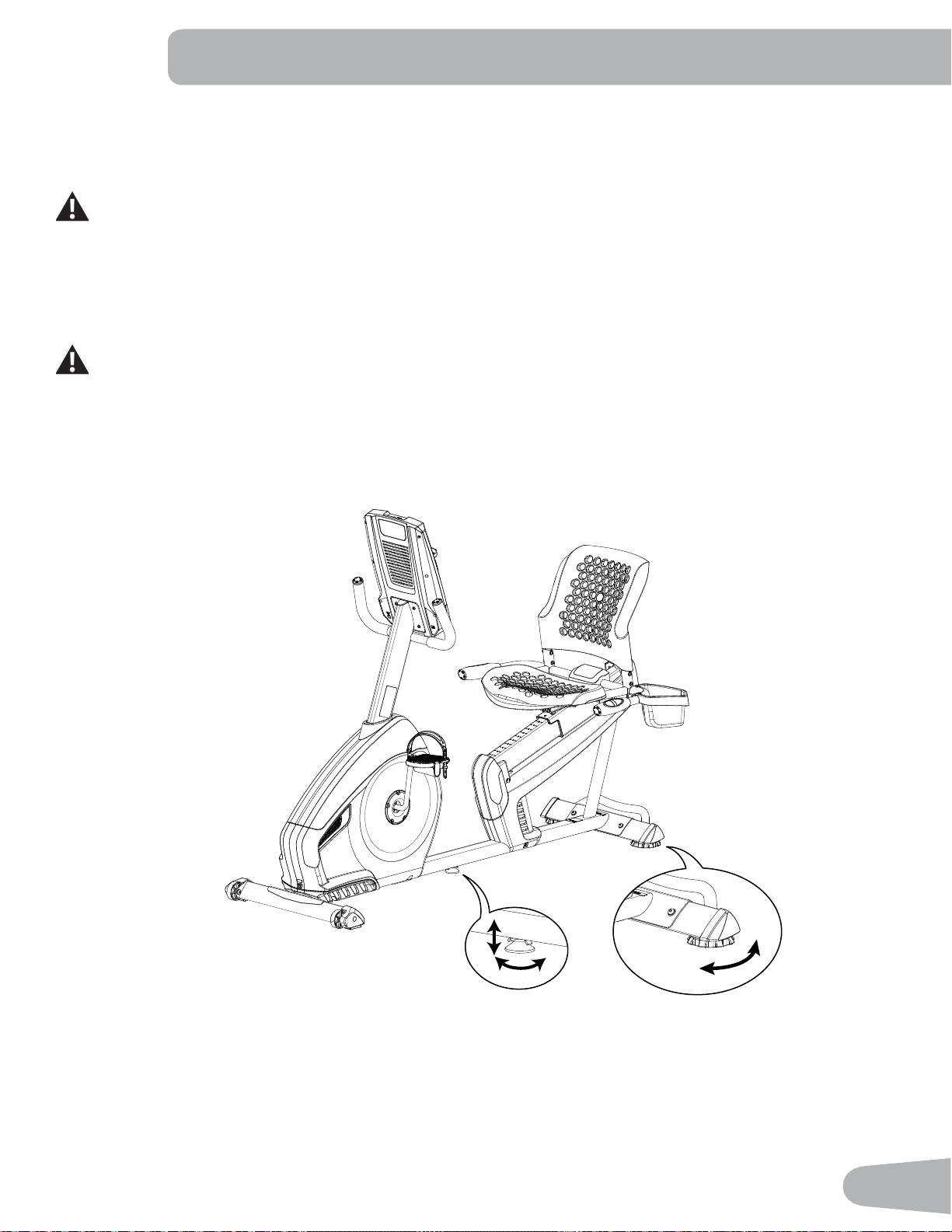
Leveling the Bike
Levelers are found on each side of the Rear Stabilizer and on the Frame Rail. On the Rear Stabilizer, turn the knob to
adjust the stabilizer foot.
Do not adjust the levelers to such a height that they detach or unscrew from the machine. Injury to you or
damage to the machine can occur.
To adjust the leveler on the Frame Rail:
1. Loosen the upper locking nut.
2. Turn the leveler to adjust the height.
Do not adjust the levelers to such a height that they detach or unscrew from the machine. Injury to you or
damage to the machine can occur.
3. Tighten the upper locking nut to lock the leveler.
0DNHVXUHWKHELNHLVOHYHODQGVWDEOHEHIRUH\RXH[HUFLVH
20
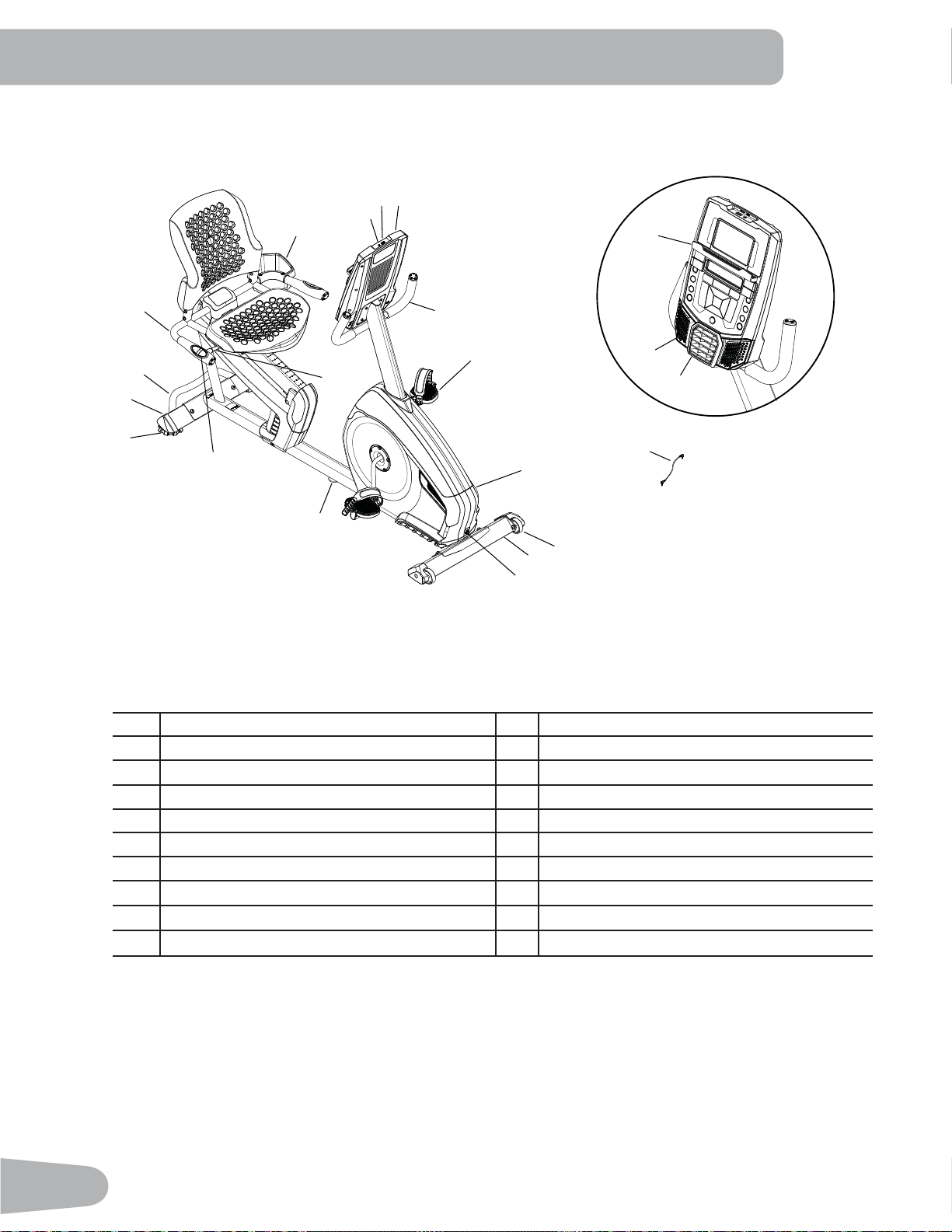
FEATURES
Q
P
R
S
A
O
L
K
J
F
M
G
G
F
E
I
H
N
D
O
B
C
A
A Console K Transport Wheels
B MP3 Input L Fully Shrouded Flywheel
C USB Port M Pedal
D Water Bottle Holder N Seat Adjustment Handle
E Transport Handle O Handlebar, Upright
F Stabilizer P Speakers
G Leveler Q Fan
H Handlebar, Side R Media Tray
I Contact Heart Rate (CHR) Sensors S MP3 Cord
J Power Connector
WARNING! Use the values calculated or measured by the machine’s computer for reference purposes
only. The heart rate displayed is an approximation and should be used for reference only.
Over exercising may result in serious injury or death. If you feel faint stop exercising
immediately.
21
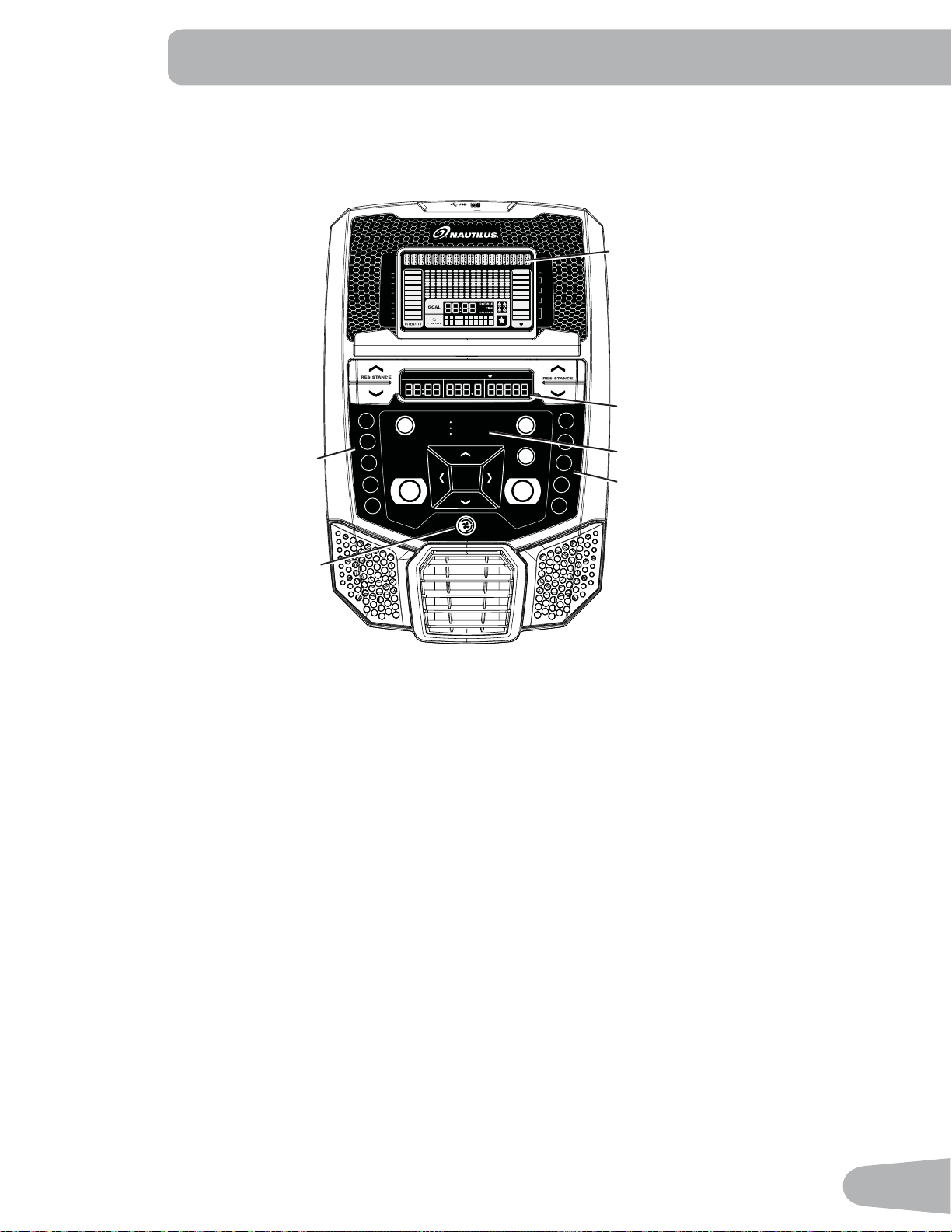
Console Features
The Console provides important information about your workout and lets you control the resistance levels while you
H[HUFLVH7KH&RQVROHIHDWXUHVWKH1DXWLOXV'XDO7UDFNGLVSOD\ZLWKWRXFKFRQWUROEXWWRQVWRQDYLJDWH\RXWKURXJKWKH
H[HUFLVHSURJUDPV
Keypad Functions
Resistance Increase (c) button- Increases the workout resistance level
Resistance Decrease (d) button- Decreases the workout resistance level
QUICK START button- Begins a Quick Start workout
86(5EXWWRQ6HOHFWVD8VHUSUR¿OH
PROGRAMS button- Selects a category and workout program
PAUSE / END button- Pauses an active workout, ends a paused workout, or goes back to the previous screen
*2$/75$&.EXWWRQ'LVSOD\VWKH:RUNRXW7RWDOVDQG$FKLHYHPHQWVIRUWKHVHOHFWHG8VHU3UR¿OH
Increase (c) button- Increases a value (age, time, distance, or calories) or moves through options
Left (e) button- Displays different workout values during a workout, and moves through options
2.EXWWRQ6WDUWVD3URJUDPZRUNRXWFRQ¿UPVLQIRUPDWLRQRUUHVXPHVDSDXVHGZRUNRXW
Right (f) button- Displays different workout values during a workout, and moves through options
Decrease (d) button- Decreases a value (age, time, distance, or calories) or moves through options
TIMESPEED DISTANCE LEVEL CALORIESRPM HEART RATE
MPH km/h Hr MIN AVG MILES KM AVG BPM AVG
DISTANCE
LAST 7 DAYS
LAST WORKOUT
CURRENT WORKOUT
QUICK START PAUSE/END
PROGRAMS
GOAL TRACK
USER
1
18
9
5
20
16
7
3
OK
4
12
100%
Anaerobic
80-90%
Aerobic
70-80%
Fat burn
50-70%
Warm up
Less than
50%
1
2
3
4
5
6
7
8
9
10
Upper Display
Lower Display
Resistance Level Quick Buttons
Resistance Level Quick Buttons
Achievement Indicator Lights
Fan
22
FAN button- Controls 3-speed fan
Resistance Level Quick Buttons- Shifts the resistance levels to the setting quickly during a workout
Achievement Indicator Lights- when a workout result is reviewed, the achievement indicator light will activate
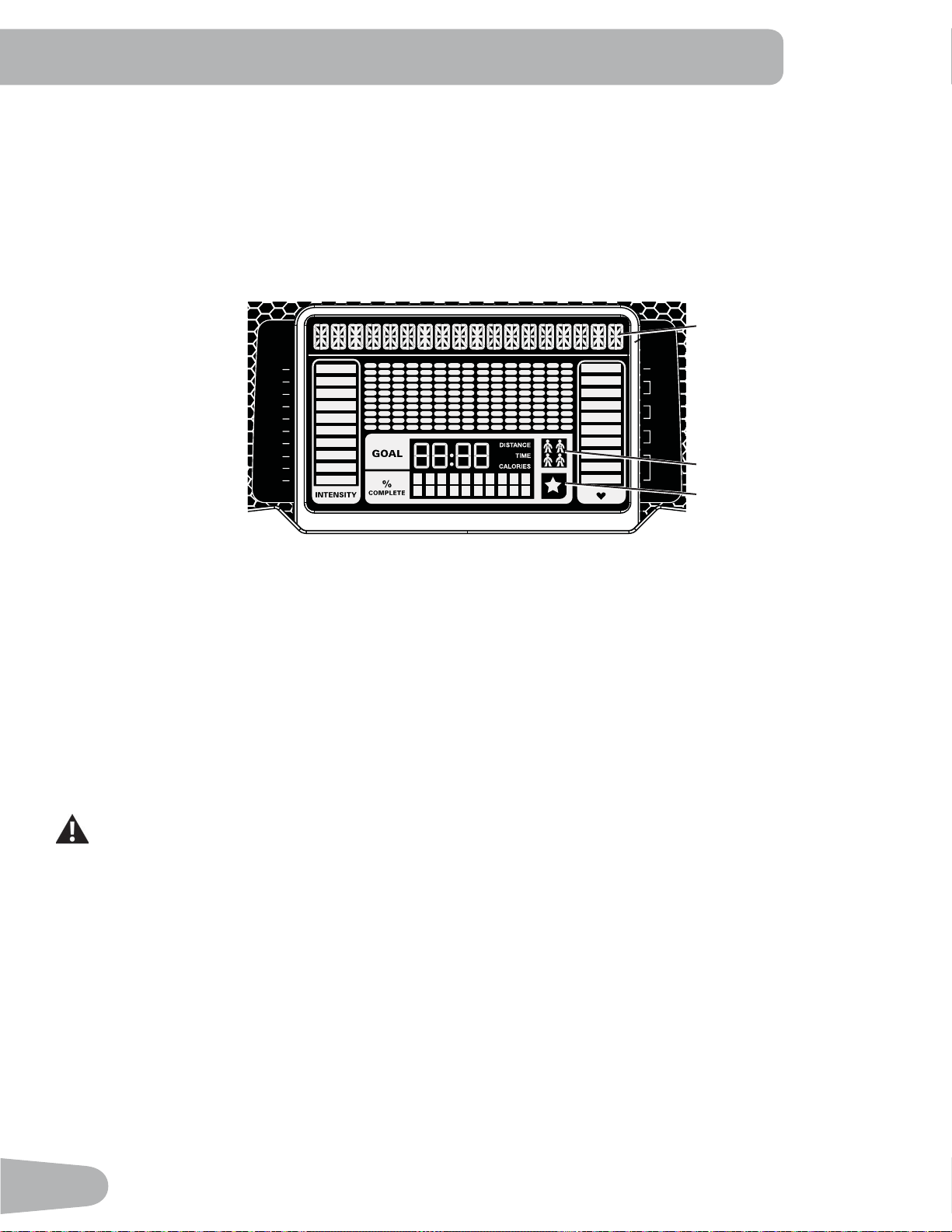
Nautilus Dual Track™ Display
Upper Display Data
Program Display
7KH3URJUDP'LVSOD\VKRZVLQIRUPDWLRQWRWKH8VHUDQGWKHJULGGLVSOD\DUHDVKRZVWKHFRXUVHSUR¿OHIRUWKHSURJUDP
(DFKFROXPQLQWKHSUR¿OHVKRZVRQHLQWHUYDOZRUNRXWVHJPHQW7KHKLJKHUWKHFROXPQWKHKLJKHUWKHUHVLVWDQFHOHYHO
7KHÀDVKLQJFROXPQVKRZV\RXUFXUUHQWLQWHUYDO
Intensity Display
The Intensity Display shows the level of work at that moment based on the current resistance level.
Heart Rate Zone Display
The Heart Rate Zone shows which zone the current heart rate value falls into for the current User. These Heart Rate
Zones can be used as a workout guide for a certain target zone (anaerobic, aerobic, or fat burn).
Consult a physician before you start an exercise program. Stop exercising if you feel pain or tightness in
your chest, become short of breath, or feel faint. Contact your doctor before you use the machine again.
The heart rate displayed on the console is an approximation and should be used for reference only.
Note: If no heart rate is detected, the display will be blank.
Goal Display
The Goal Display shows the currently selected type of goal (Distance, Time or Calories), the current value to achieve the
goal, and the percent completed toward the goal.
User Display
7KH8VHU'LVSOD\VKRZVZKLFK8VHU3UR¿OHLVFXUUHQWO\VHOHFWHG
100%
Anaerobic
80-90%
Aerobic
70-80%
Fat burn
50-70%
Warm up
Less than
50%
1
2
3
4
5
6
7
8
9
10
User Display
Achievement Display
Program Display
23
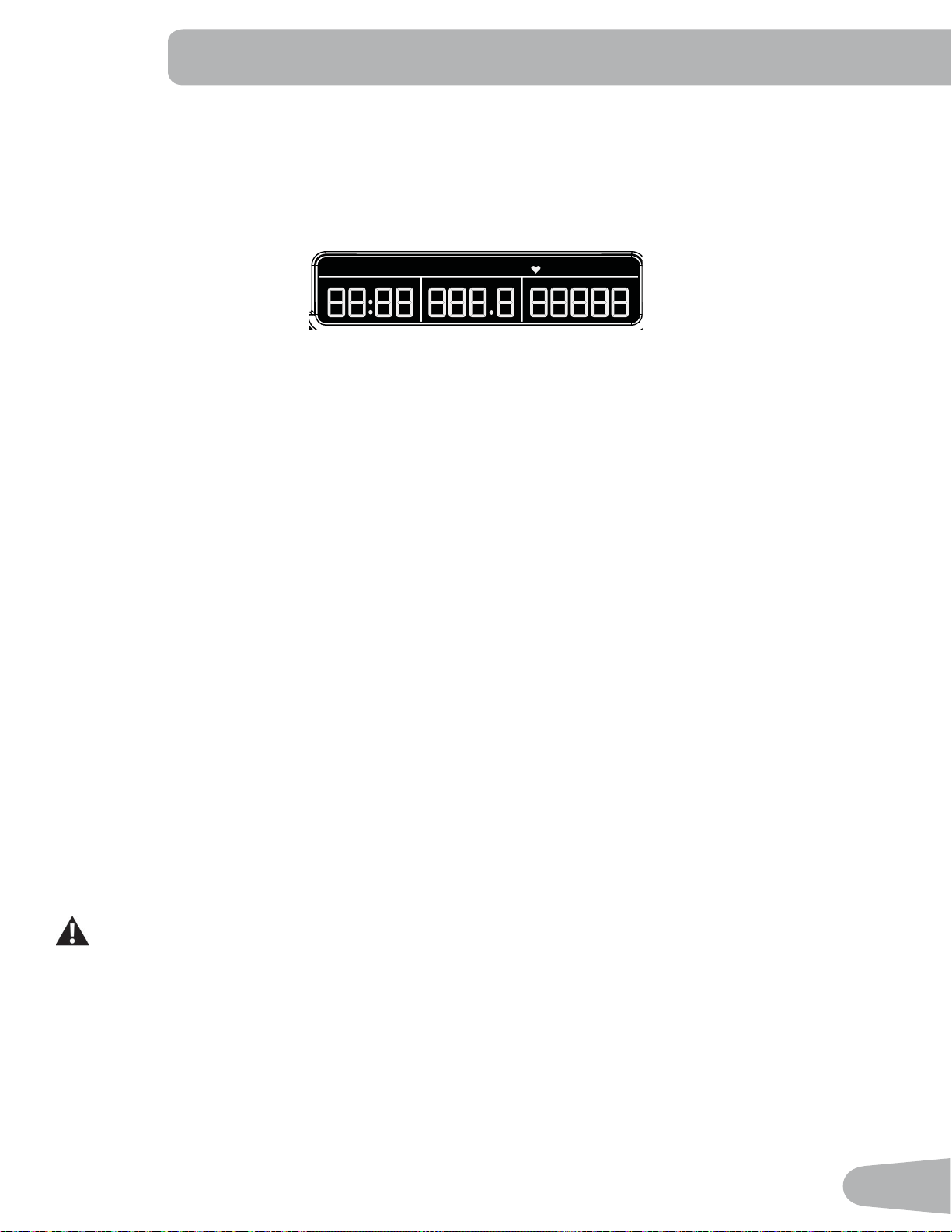
Achievement Display
The Achievement Display activates when a workout goal is reached or a workout milestone is surpassed from past
workouts. The Console display will congratulate and inform the User of their achievement, along with a celebratory sound.
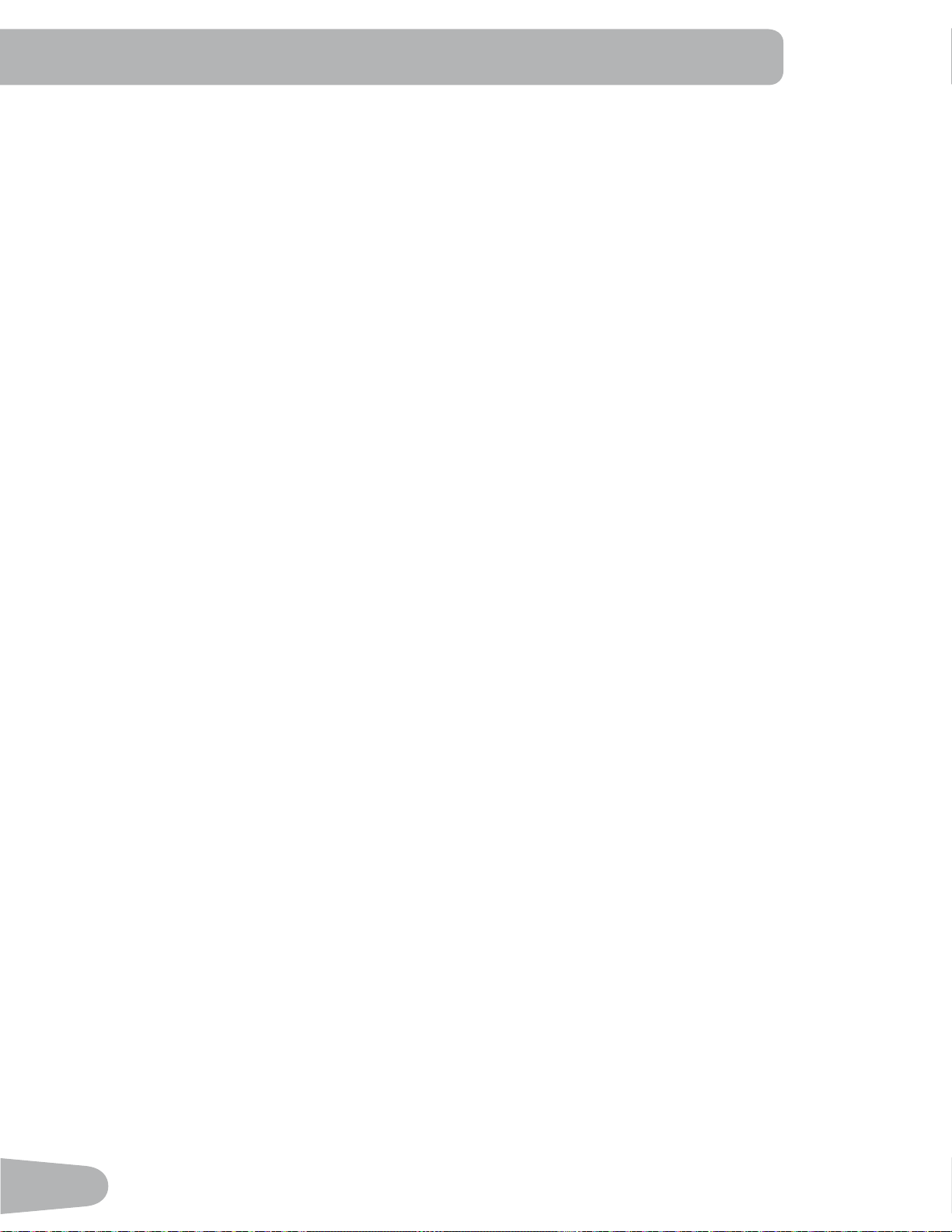
Lower Display Data
7KH/RZHU'LVSOD\VKRZVWKH:RUNRXW9DOXHVDQGFDQEHFXVWRPL]HGIRUHDFK8VHU&RQVXOWWKH³(GLW8VHU3UR¿OH´
section of this manual).
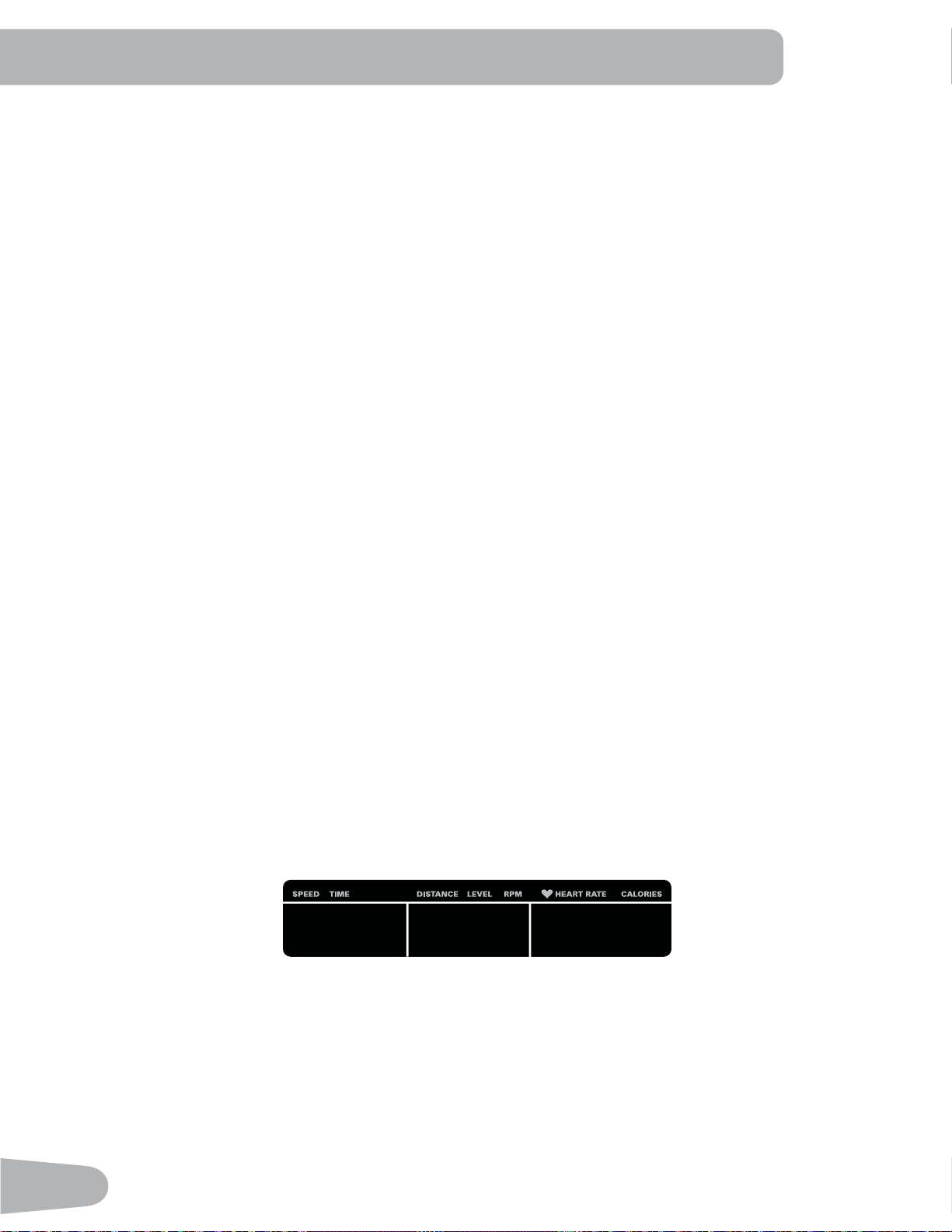
Speed
7KH6SHHGGLVSOD\¿HOGVKRZVWKHPDFKLQHVSHHGLQPLOHVSHUKRXUPSKRUNLORPHWHUVSHUKRXUNPK
Time
7KH7,0(GLVSOD\¿HOGVKRZVWKHWRWDOWLPHFRXQWRIWKHZRUNRXWWKHDYHUDJH7LPHIRUWKH8VHU3UR¿OHRUWKHWRWDORSHUD
tional time of the machine.
Note: ,ID4XLFN6WDUWZRUNRXWLVSHUIRUPHGIRUPRUHWKDQPLQXWHVDQGVHFRQGVWKHXQLWVIRU7LPHZLOOVKLIW
to hours and minutes ( 1 hour, 40 minutes ).
Distance
The Distance display shows the distance count (miles or km) in the workout.
Note: To change the measurement units to English Imperial or metric, refer to the “Console Setup Mode” section in this
manual.
Level
The LEVEL display shows the current resistance level in the workout.
RPM
7KH530GLVSOD\¿HOGVKRZVWKHSHGDOUHYROXWLRQVSHUPLQXWH530
Heart Rate (Pulse)
The Heart Rate display shows the beats per minute (BPM) from the heart rate monitor. When a heart rate signal is re-
FHLYHGE\WKH&RQVROHWKHLFRQZLOOÀDVK
Consult a physician before you start an exercise program. Stop exercising if you feel pain or tightness in
your chest, become short of breath, or feel faint. Contact your doctor before you use the machine again.
The heart rate displayed is an approximation and should be used for reference only.
Calories
7KH&DORULHVGLVSOD\¿HOGVKRZVWKHHVWLPDWHGFDORULHVWKDW\RXKDYHEXUQHGGXULQJWKHH[HUFLVH
TIMESPEED DISTANCE LEVEL CALORIESRPM HEART RATE
MPH km/h Hr MIN AVG MILES KM AVG BPM AVG
DISTANCE
24
USB Charging
If a USB Device is attached to the USB Port, the Port will attempt to charge the Device. The power supplied from the USB
Port may not be enough to operate the Device and charge it at the same time.
Contact Heart Rate Sensors
Contact Heart Rate (CHR) sensors send your heart rate signals to the Console. The CHR sensors are the stainless steel
parts of the Handlebars. To use, put your hands comfortably around the sensors. Be sure that your hands touch both the
WRSDQGWKHERWWRPRIWKHVHQVRUV+ROG¿UPEXWQRWWRRWLJKWRUORRVH%RWKKDQGVPXVWPDNHFRQWDFWZLWKWKHVHQVRUVIRU
the Console to detect a pulse. After the Console detects four stable pulse signals, your initial pulse rate will be shown.
2QFHWKH&RQVROHKDV\RXULQLWLDOKHDUWUDWHGRQRWPRYHRUVKLIW\RXUKDQGVIRUWRVHFRQGV7KH&RQVROHZLOOQRZ
YDOLGDWHWKHKHDUWUDWH0DQ\IDFWRUVLQÀXHQFHWKHDELOLW\RIWKHVHQVRUVWRGHWHFW\RXUKHDUWUDWHVLJQDO
• Movement of the upper body muscles (including arms) produces an electrical signal (muscle artifact) that can interfere
with pulse detection. Slight hand movement while in contact with the sensors can also produce interference.
• Calluses and hand lotion may act as an insulating layer to reduce the signal strength.
• Some Electrocardiogram (EKG) signals generated by individuals are not strong enough to be detected by the sensors.
• 7KHSUR[LPLW\RIRWKHUHOHFWURQLFPDFKLQHVFDQJHQHUDWHLQWHUIHUHQFH
If your heart rate signal ever seems erratic after validation, wipe off your hands and the sensors and try again.
Heart Rate Calculations
<RXUPD[LPXPKHDUWUDWHXVXDOO\GHFUHDVHVIURP%HDWV3HU0LQXWH%30LQFKLOGKRRGWRDSSUR[LPDWHO\%30E\
DJH7KLVIDOOLQKHDUWUDWHLVXVXDOO\OLQHDUGHFUHDVLQJE\DSSUR[LPDWHO\RQH%30IRUHDFK\HDU7KHUHLVQRLQGLFDWLRQ
WKDWWUDLQLQJLQÀXHQFHVWKHGHFUHDVHLQPD[LPXPKHDUWUDWH,QGLYLGXDOVRIWKHVDPHDJHFRXOGKDYHGLIIHUHQWPD[LPXP
KHDUWUDWHV,WLVPRUHDFFXUDWHWR¿QGWKLVYDOXHE\FRPSOHWLQJDVWUHVVWHVWWKDQE\XVLQJDQDJHUHODWHGIRUPXOD
<RXUDWUHVWKHDUWUDWHLVLQÀXHQFHGE\HQGXUDQFHWUDLQLQJ7KHW\SLFDODGXOWKDVDQDWUHVWKHDUWUDWHRIDSSUR[LPDWHO\
BPM, whereas highly trained runners may have readings of 40 BPM or lower.
The Heart Rate table is an estimate of what Heart Rate Zone (HRZ) is effective to burn fat and improve your cardiovas-
cular system. Physical conditions vary, therefore your individual HRZ could be several beats higher or lower than what is
shown.
7KHPRVWHI¿FLHQWSURFHGXUHWREXUQIDWGXULQJH[HUFLVHLVWRVWDUWDWDVORZSDFHDQGJUDGXDOO\LQFUHDVH\RXULQWHQVLW\
XQWLO\RXUKHDUWUDWHUHDFKHVEHWZHHQ±RI\RXUPD[LPXPKHDUWUDWH&RQWLQXHDWWKDWSDFHNHHSLQJ\RXUKHDUW
rate in that target zone for over 20 minutes. The longer you maintain your target heart rate, the more fat your body will
burn.
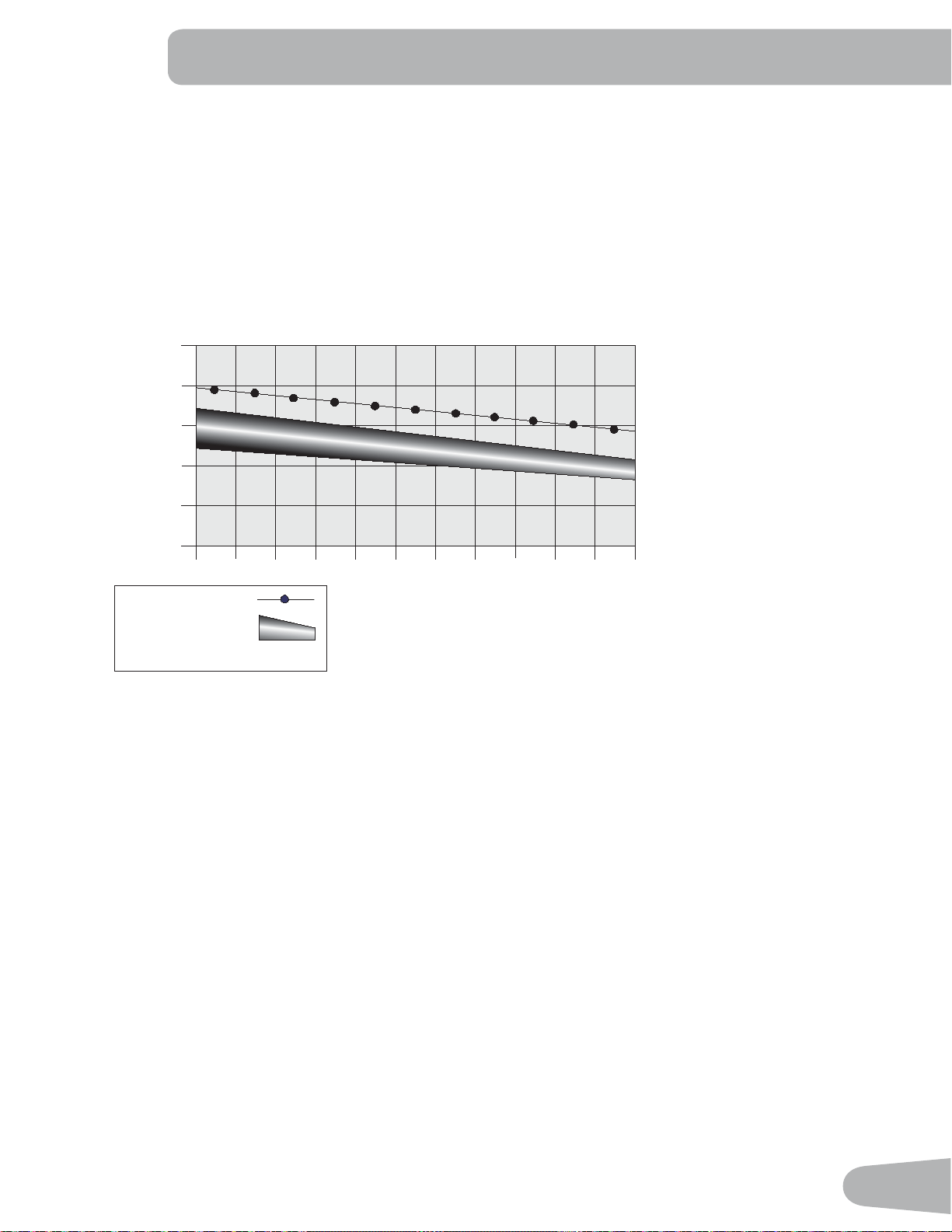
25
The graph is a brief guideline, describing the generally suggested target heart rates based on age. As noted above, your
optimal target rate may be higher or lower. Consult your physician for your individual target heart rate zone.
Note:$VZLWKDOOH[HUFLVHVDQG¿WQHVVUHJLPHQVDOZD\VXVH\RXUEHVWMXGJPHQWZKHQ\RXLQFUHDVH\RXUH[HUFLVHWLPH
or intensity.
20-24
FAT-BURNING TARGET HEART RATE
Heart Rate BPM (beats per minute)
Age
25-29
0
50
100
150
200
250
30-34 35-39 40-44 45-49 50-54 55-59 60-64 65-69 70+
196
191
186
181
176
171
166
161
156
151
146
167
162
158
154
150
145
141
137
133
128
126
Maximum Heart Rate
Target Heart Rate Zone
(keep within this range
for optimum fat-burning)
11 8
11 5
11 2
109
106
103
100
97
94
91
88
26
OPERATIONS
What to Wear
:HDUUXEEHUVROHGDWKOHWLFVKRHV<RXZLOOQHHGWKHDSSURSULDWHFORWKHVIRUH[HUFLVHWKDWDOORZ\RXWRPRYHIUHHO\
How Often Should You Exercise
Consult a physician before you start an exercise program. Stop exercising if you feel pain or tightness in
your chest, become short of breath, or feel faint. Contact your doctor before you use the machine again.
Use the values calculated or measured by the machine’s computer for reference purposes only. The heart
rate displayed on the console is an approximation and should be used for reference only.
• 3 times a week for 30 minutes each day.
• Schedule workouts in advance and try to follow the schedule.
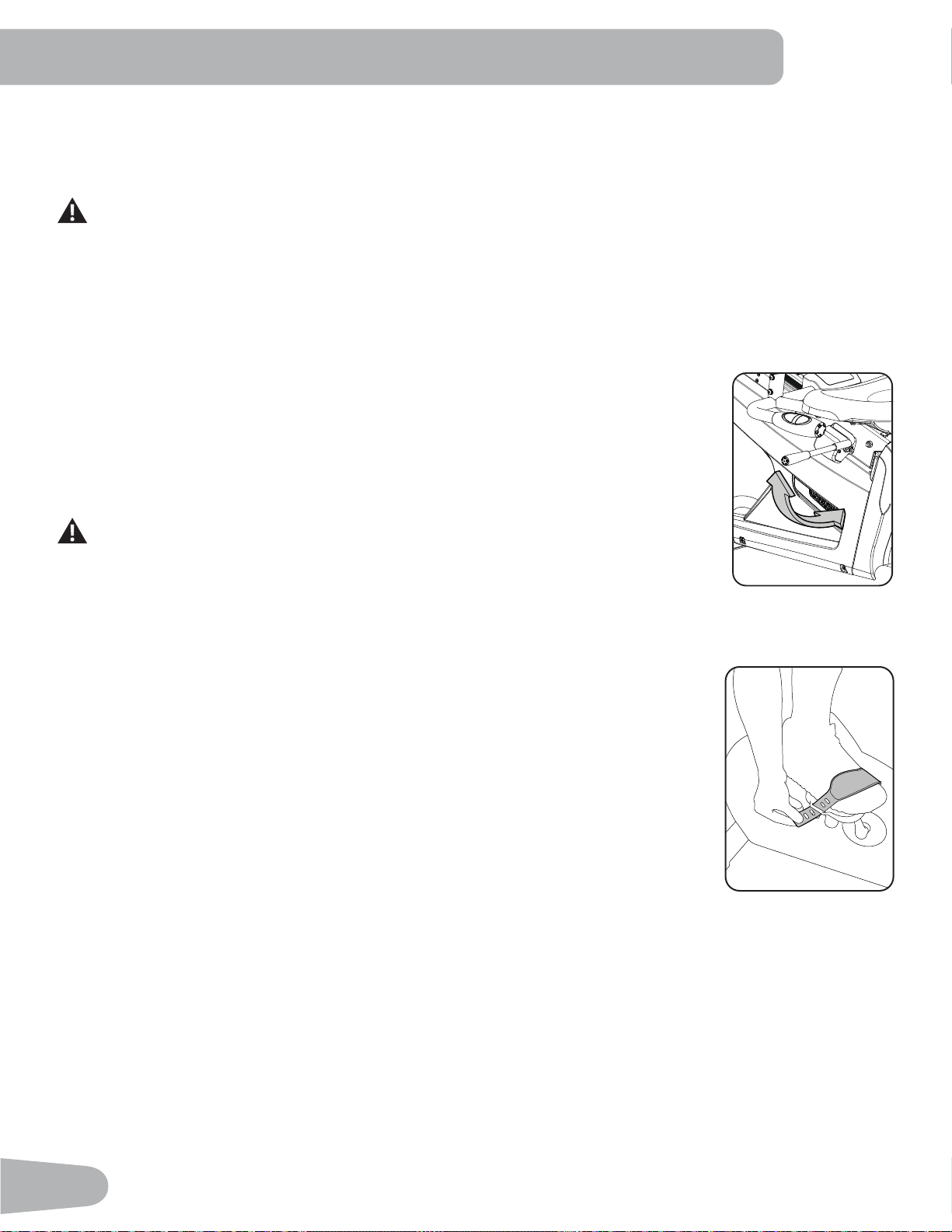
Seat Adjustment
&RUUHFWVHDWSODFHPHQWHQFRXUDJHVH[HUFLVHHI¿FLHQF\DQGFRPIRUWZKLOHUHGXFLQJWKHULVNRI
injury.
1. With a Pedal in the forward position, place the ball of your foot over the center of it. Your leg
should be bent slightly at the knee.
2. If your leg is too straight or your foot cannot touch the Pedal, move the seat forward. If your
leg is bent too much, move the seat toward the back.
Step off the bike before you adjust the seat.
3. Push down on the Seat Adjustment Handle, and adjust the seat to the desired height.
4. Pull up the Seat Adjustment Handle to engage the locking mechanism. Be sure that the
handle is fully engaged.
Foot Position / Pedal Strap Adjustment
)RRWSHGDOVZLWKVWUDSVSURYLGHVHFXUHIRRWLQJWRWKHH[HUFLVHELNH
1. Rotate the Pedals until one can be reached.
2. Put the ball of each foot on the Pedals.
3. Fasten the strap over the shoe.
4. Repeat for the other foot.
%HVXUHWRHVDQGNQHHVSRLQWGLUHFWO\IRUZDUGWRHQVXUHPD[LPXP3HGDOHI¿FLHQF\3HGDOVWUDSV
can be left in position for subsequent workouts.
Power-Up / Idle Mode
The Console will enter Power-Up / Idle Mode if it is plugged into a power source, any button is pushed, or if it receives a
signal from the RPM sensor as a result of pedaling the machine.
Auto Shut-Off (Sleep Mode)
,IWKH&RQVROHGRHVQRWUHFHLYHDQ\LQSXWLQDSSUR[LPDWHO\PLQXWHVLWZLOODXWRPDWLFDOO\VKXWRII7KH/&'GLVSOD\LVRII
while in Sleep Mode.
Note: The Console does not have an On/Off switch.

27
Initial Setup
'XULQJWKH¿UVWSRZHUXSWKH&RQVROHVKRXOGEHVHWXSZLWKWKHGDWHWLPHDQG\RXUSUHIHUUHGPHDVXUHPHQWXQLWV
'DWH3XVKWKH,QFUHDVH'HFUHDVHEXWWRQVWRDGMXVWWKHFXUUHQWO\DFWLYHYDOXHÀDVKLQJ3XVKWKH/HIW5LJKWEXWWRQV
to change which segment is the currently active value (month / day / year).
2. Push OK to set.
7LPH3XVKWKH,QFUHDVH'HFUHDVHEXWWRQVWRDGMXVWWKHFXUUHQWO\DFWLYHYDOXHÀDVKLQJ3XVKWKH/HIW5LJKWEXWWRQV
to change which segment is the currently active value (hour / minute / AM or PM).
4. Push OK to set.
8QLWVRI0HDVXUHPHQW3XVKWKH,QFUHDVH'HFUHDVHEXWWRQVWRDGMXVWEHWZHHQ³0,/(6´,PSHULDO(QJOLVKRU³.0´
(metric).
6. Push OK to set. The Console goes back to the Power-Up / Idle Mode screen.
Note: To adjust these selections, consult the “Console Set-Up Mode” section.
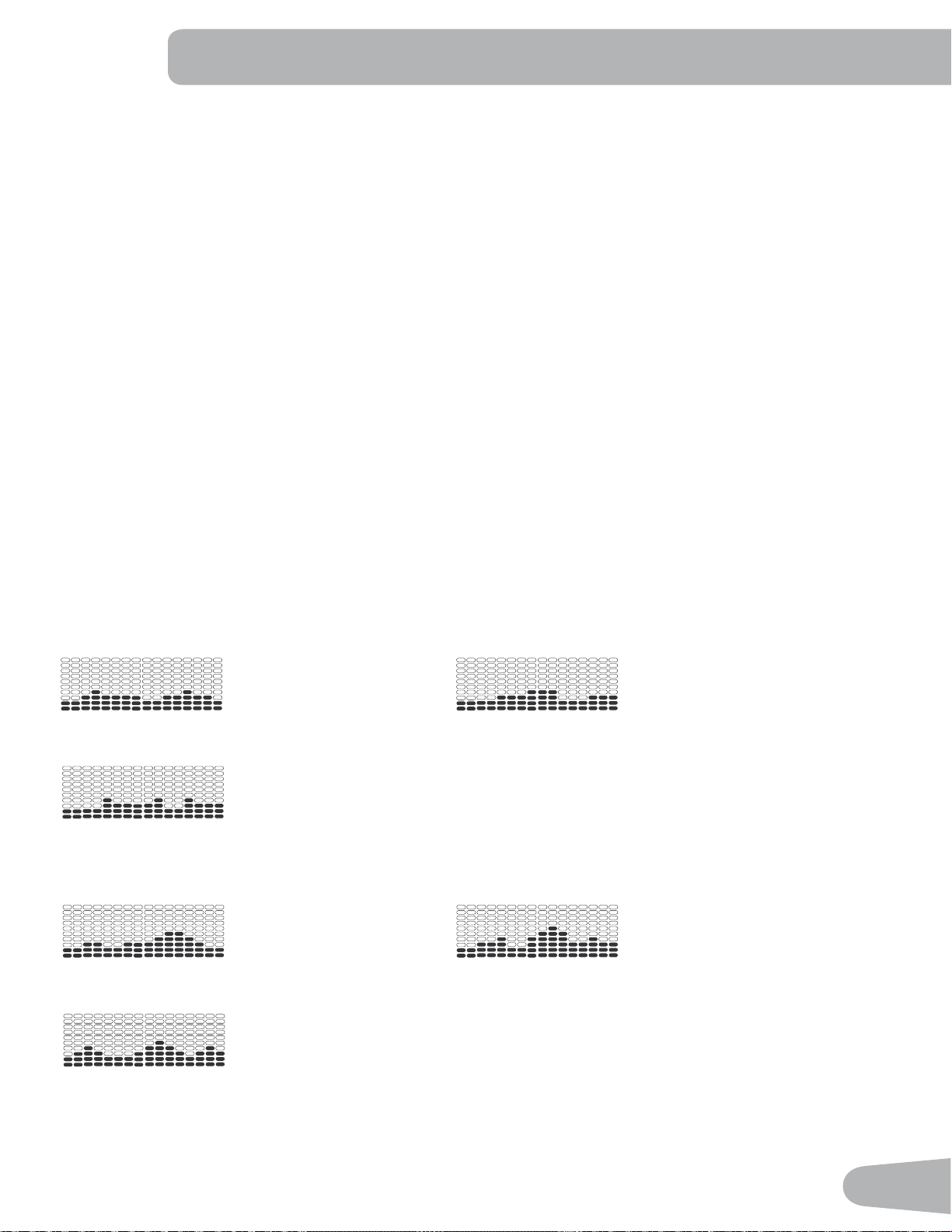
Quick Start ( Manual ) Program
The Quick Start ( Manual ) program lets you start a workout without entering any information.
During a Manual Workout, each column represents a 2 minute time period. The active column will advance across the
VFUHHQHYHU\PLQXWHV,IWKHZRUNRXWODVWVIRUPRUHWKDQPLQXWHVWKHDFWLYHFROXPQLV¿[HGRQWKHIDUWKHVWFROXPQRQ
the right and pushes the previous columns off the display.
1. Sit on the machine.
3XVKWKH8VHUEXWWRQWRVHOHFWWKHFRUUHFW8VHUSUR¿OH,I\RXGRQRWKDYHD8VHUSUR¿OHVHWXS\RXFDQVHOHFWD8VHU
SUR¿OHWKDWKDVQRFXVWRPL]HGGDWDGHIDXOWYDOXHVRQO\
3. Push the QUICK START button to start the Manual program.
4. To change the resistance level, push the Resistance Increase/Decrease buttons. The current interval and future
intervals are set to the new level. The default Manual resistance level is 4. The time will count up from 00:00.
Note: ,ID0DQXDOZRUNRXWLVSHUIRUPHGIRUPRUHWKDQPLQXWHVDQGVHFRQGVWKHXQLWVIRU7LPHZLOOVKLIWWR
hours and minutes ( 1 hour, 40 minutes ).
:KHQGRQHZLWK\RXUZRUNRXWVWRSSHGDOLQJDQGSXVK3$86((1'WRSDXVHWKHZRUNRXW3XVK3$86((1'DJDLQ
to end the workout.
Note: The workout results are recorded to the current User Profile.
User Profiles
The Console lets you store and use 2 User profiles. The User profiles automatically record the workout results for each
workout, and allow the workout data to be reviewed.
The User profile stores the following data:
• Name—up to 10 characters
• Age
• Weight
• Height
• Gender
• Preferred Workout Values
Select a User Profile
(YHU\ZRUNRXWLVVDYHGWRD8VHU3UR¿OH%HVXUHWRVHOHFWWKHSURSHU8VHU3UR¿OHEHIRUHVWDUWLQJDZRUNRXW7KHODVW8VHU
that completed a workout will be the default user.
28
8VHU3UR¿OHVDUHDVVLJQHGWKHGHIDXOWYDOXHVXQWLOWKH\DUHFXVWRPL]HGE\HGLWLQJ%HVXUHWRHGLWWKH8VHU3UR¿OHIRUPRUH
accurate calorie and heart rate information.
)URPWKH3RZHU8S0RGHVFUHHQSXVKWKH8VHUEXWWRQWRVHOHFWRQHRIWKH8VHU3UR¿OHV7KH&RQVROHZLOOGLVSOD\WKH
QDPHRIWKH8VHU3UR¿OHDQGWKH8VHU3UR¿OH,FRQ
Edit User Profile
1. From the Power-Up Mode screen, push the User button WRVHOHFWRQHRIWKH8VHU3UR¿OHV.
2. Push the OK button to select it.
3. The Console display shows the EDIT prompt and the current User Profile name. Push OK to start the Edit User 3UR¿OH
option.
7RH[LWWKH(GLW8VHU3UR¿OHRSWLRQSXVKWKH3$86((1'EXWWRQDQGWKHFRQVROHZLOOJREDFNWRWKHPower-Up Mode
screen.
4. The Console display shows the NAME prompt and the current User Profile name.
Note: The User name will be blank if this is the first edit. The name of a User Profile is limited to 10 characters.
The currently active segment will flash. Use the Increase/Decrease buttons to move through the alphabet and blank
space (found between A and Z). To set each segment, use the Left(e) or Right(f) buttons to shift between segments.
Push the OK button to accept the displayed User name.
7RHGLWWKHRWKHU8VHUGDWD(',7$*((',7:(,*+7(',7+(,*+7(',7*(1'(5XVHWKH,QFUHDVH'HFUHDVH
buttons to adjust, and push OK to set each entry.
6. The Console display shows the SCAN prompt. This option controls how the workout values are displayed in the Lower
Display during a workout. The “OFF” setting allows the user to push the RIGHT or LEFT buttons to view the other
workout value channels when desired. The “ON” setting allows the Console to automatically display the workout value
channels every 6 seconds.
The default is “OFF”.
Push the OK button to set how the workout values are displayed.
7. The Console display shows the EDIT LOWER DISPLAY prompt. This option allows you to customize which Workout
Values are displayed during a workout.
7KH/RZHU'LVSOD\ZLOOVKRZDOORIWKHZRUNRXWYDOXHVZLWKWKHDFWLYH:RUNRXW9DOXHÀDVKLQJ7KH8SSHU'LVSOD\
shows the active value setting: “ON” or “OFF”. Push the Increase(c) or Decrease(d) buttons to hide the active
workout value, and push the Left(e) or Right(f) buttons to shift the active workout value.
Note: to show a hidden workout value, repeat procedure and change Upper Display value to “ON” for that value.
When done with customizing the Lower Display, push the OK button to set it.
Hr
8. The Console will go to the Power-Up Mode screen with the user selected.
Reset a User Profile
1. From the Power-Up Mode screen, push the User button WRVHOHFWRQHRIWKH8VHU3UR¿OHV.
2. Push the OK button to select it.
29
3. The Console display shows the current User Profile name and the EDIT prompt. Push the Increase(c) or Decrease(d)
buttons to change the prompt.
Note: 7RH[LWWKH(GLW8VHU3UR¿OHRSWLRQSXVKWKH3$86((1'EXWWRQDQGWKHFRQVROHZLOOJREDFNWRWKHPower-Up
Mode screen.
4. The Console display shows the RESET prompt and the current User Profile name. Push OK to start the Reset User
3UR¿OHRSWLRQ
The Console will now confirm the request to reset the User profile (the default selection is ‘NO’). Push the Increase(c)
or Decrease(d) buttons to adjust the selection.
6. Push OK to make your selection.
7. The Console will go to the Power-Up Mode screen.
Changing Resistance Levels
Push the Resistance Level Increase(c) or Decrease(d) buttons to change the resistance level at any time in a workout
program. To rapidly change the resistance level, push the desired Resistance Level Quick Button. The Console will adjust
to the selected resistance level of the quick button.
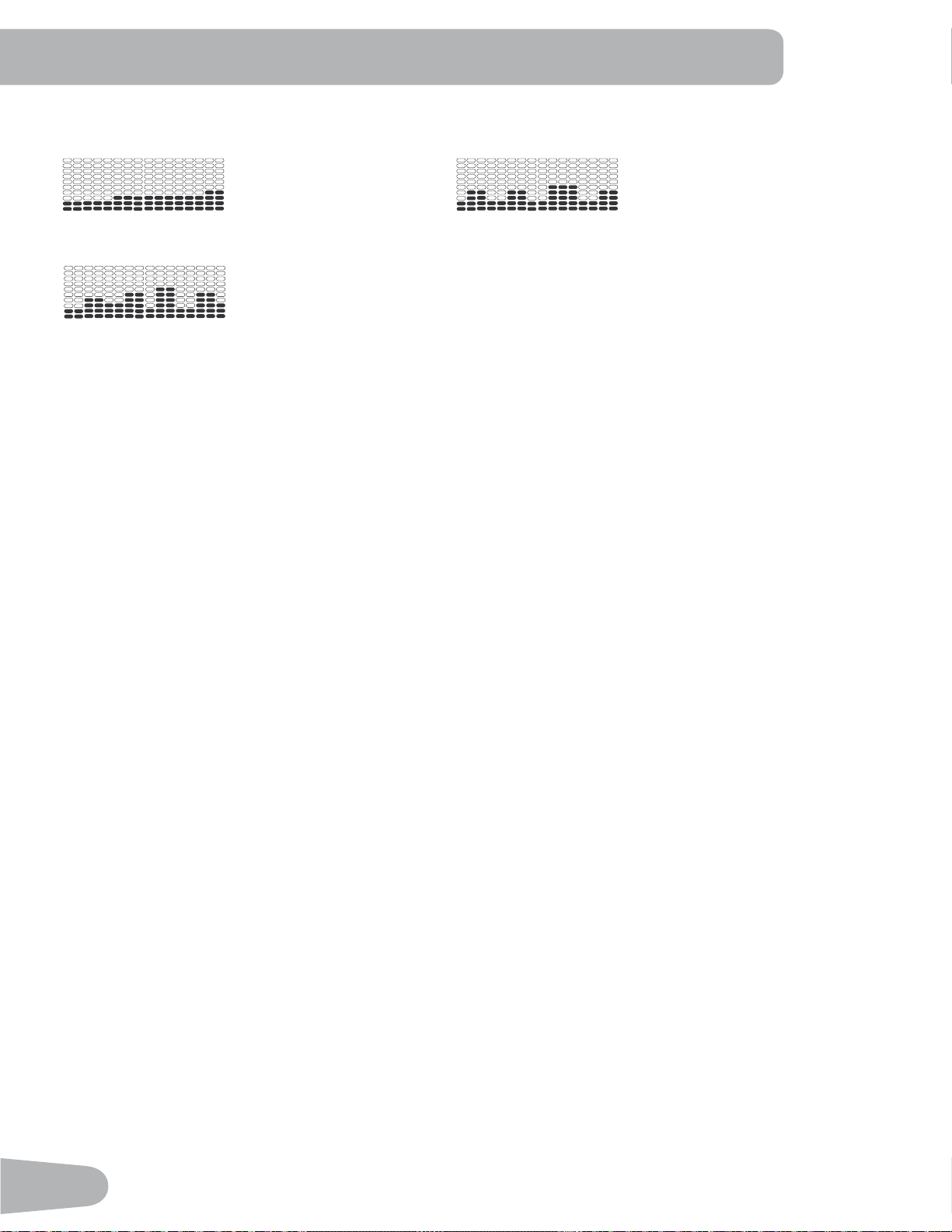
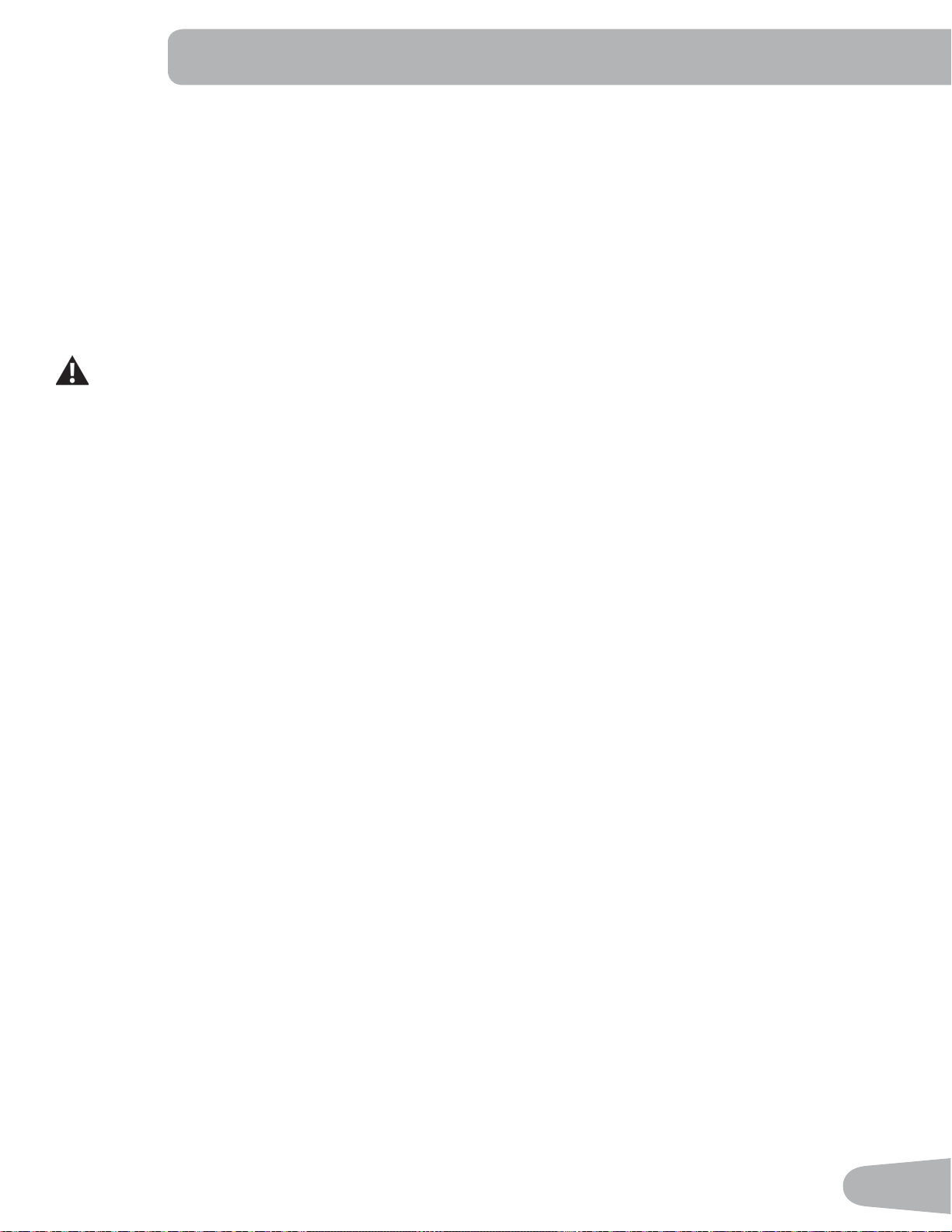
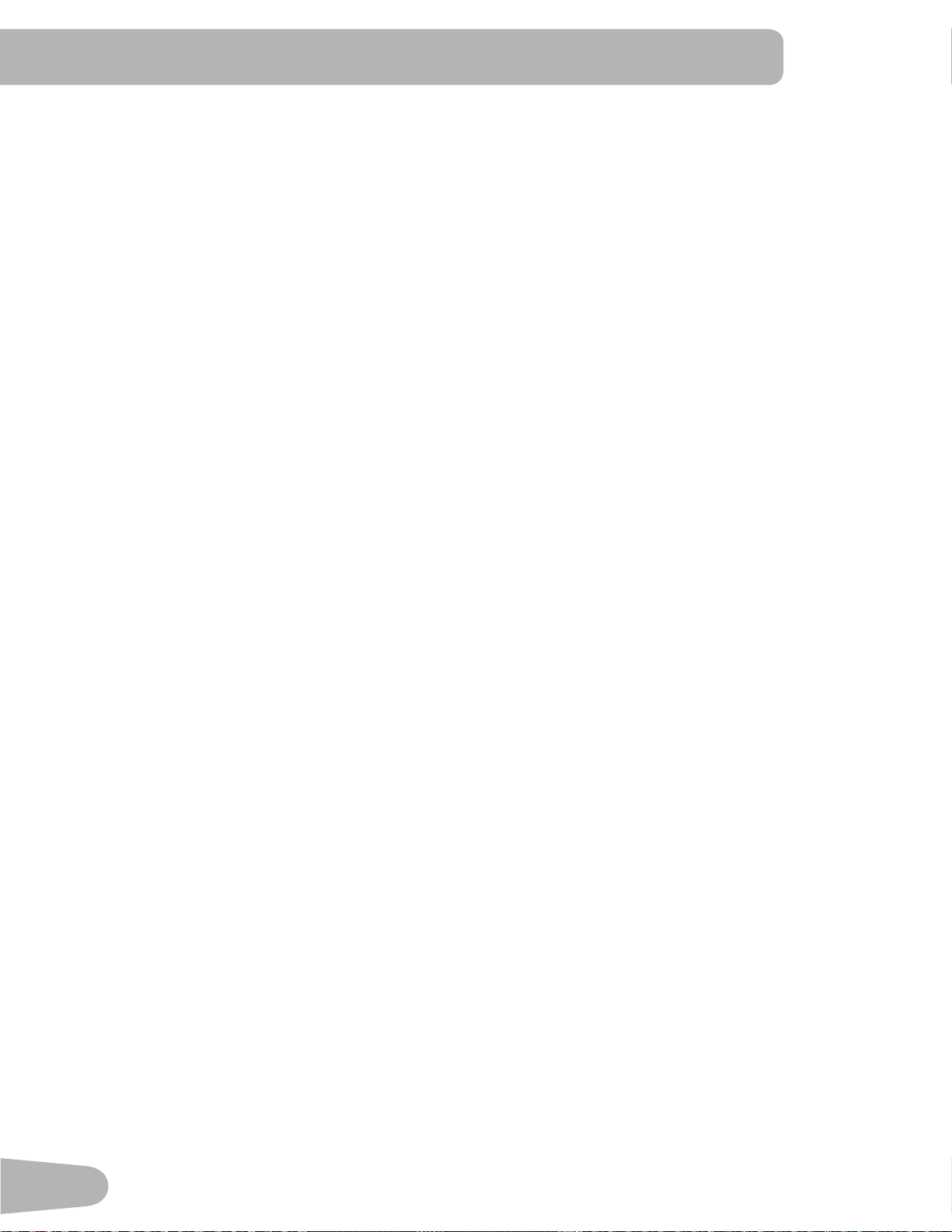
Profile Programs
7KHVHSURJUDPVDXWRPDWHGLIIHUHQWUHVLVWDQFHDQGZRUNRXWOHYHOV7KH3UR¿OH3URJUDPVDUHRUJDQL]HGLQWR&DWHJRULHV
(Fun Rides, Mountains, and Challenges).
Note:2QFHD8VHUYLHZVDOOWKH&DWHJRULHVWKH\ZLOOEHH[SDQGHGWRGLVSOD\WKH3URJUDPVZLWKLQHDFKRIWKH
Categories.
FUN RIDES
Rolling Hills Ride in the Park
Easy Tour
MOUNTAINS
Pike’s Peak Mount Hood
Pyramids
30
CHALLENGES
Uphill Finish Cross-Training
Interval
Workout Profile and Goal Program
7KH&RQVROHOHWV\RXVHOHFWWKH3UR¿OH3URJUDPDQGW\SHRI*RDOIRU\RXUZRUNRXW'LVWDQFH7LPHRU&DORULHVDQGVHW
the Goal value.
1. Sit on the machine.
3XVKWKH8VHUEXWWRQWRVHOHFWWKHFRUUHFW8VHUSUR¿OH
3. Push the Programs button.
4. Push the Left(e) or Right(f) buttons to select a Category of Workout.
3XVKWKHIncrease(c) or Decrease(d) buttons to select a Profile Workout, and push OK.
6. Use the Increase(c) or Decrease(d) buttons to select a type of Goal (Distance, Time or Calories), and push OK.
7. Use the Increase(c) or Decrease(d) buttons to adjust the workout value.
8. Push OK to begin the goal-oriented workout. The GOAL value will count down as the value for percent completed
increases.
Note: During a Calories Goal, each column is for a 2 minute time period. The active column will advance across the
VFUHHQHYHU\PLQXWHV,IWKHZRUNRXWODVWVIRUPRUHWKDQPLQXWHVWKHDFWLYHFROXPQZLOO¿[WRWKHODVWULJKW
column and push the previous columns off the display.
Fitness Test Program
7KH)LWQHVV7HVWPHDVXUHVWKHLPSURYHPHQWVRI\RXUSK\VLFDO¿WQHVVOHYHO7KHWHVWFRPSDUHV\RXUSRZHURXWSXWLQ
:DWWVWR\RXUKHDUWUDWH$V\RXU¿WQHVVOHYHOLPSURYHV\RXUSRZHURXWSXWZLOOLQFUHDVHDWDJLYHQKHDUWUDWH
Note: The Console must be able to read the heart rate information from the Contact Heart Rate (CHR) sensors to work
correctly.
<RXFDQVWDUWWKH)LWQHVV7HVWIURPWKH)(('%$&.FDWHJRU\7KH)LWQHVV7HVWSURJUDP¿UVWSURPSWV\RXWRVHOHFW\RXU
¿WQHVVOHYHO²%HJLQQHU³%(*´RU$GYDQFHG³$'9´7KH&RQVROHZLOOXVHWKH$JHDQG:HLJKWYDOXHVIRUWKHVHOHFWHG
8VHU3UR¿OHWRFDOFXODWHWKH)LWQHVV6FRUH
Start to workout and hold the Heart Rate Sensors. When the test starts, the intensity of the workout slowly increases. This
means you will work harder, and as a result, your heart rate increases. The intensity continues to increase automatically
XQWLO\RXUKHDUWUDWHUHDFKHVWKH³7HVW=RQH´7KLV]RQHLVLQGLYLGXDOO\FRPSXWHGWREHQHDUSHUFHQWRIWKHPD[LPXP
KHDUWUDWHRI\RXU8VHU3UR¿OH:KHQ\RXUHDFKWKH7HVW=RQHWKHPDFKLQHKROGVWKHLQWHQVLW\VWHDG\IRUPLQXWHV
This lets you reach a stable condition (where your heart rate becomes steady). At the end of the 3 minutes, the Console
measures your heart rate and the power output. These numbers, along with information about your age and weight, are
computed to produce a “Fitness Score”.
Note: Fitness Test scores should only be compared to your previous scores and not to other User Profiles.
Compare your Fitness Scores to see your improvement.
31
Heart Rate Control (HRC) Workout Programs
The Heart Rate Control (HRC) programs let you set a heart rate goal for your workout. The program monitors your heart
rate in beats per minute (BPM) from the Contact Heart Rate (CHR) sensors on the machine or from a Heart Rate Monitor
(HRM) chest strap, and adjusts the workout to keep your heart rate in the selected zone.
Note: The console must be able to read the heart rate information from the CHR sensors or HRM for the HRC program
to work correctly.
The Target Heart Rate programs use your age and other User information to set the Heart Rate Zone values for your
workout. The console display then gives prompts for you to set up your workout:
1. Select the Heart Rate Control workout level: BEGINNER ( “BEG” ) or ADVANCED ( “ADV” ) and push OK.
2. Push the Increase(c) or Decrease(d) buttons to selectWKHSHUFHQWDJHRIPD[LPXPKHDUWUDWH±±
±±
Consult a physician before you start an exercise program. Stop exercising if you feel pain or tightness in
your chest, become short of breath, or feel faint. Contact your doctor before you use the machine again.
Use the values calculated or measured by the machine’s computer for reference purposes only. The heart
rate displayed on the console is an approximation and should be used for reference only.
3. Push the Increase(c) or Decrease(d) buttons to select the Goal type, and push OK.
4. Push the Increase(c) or Decrease(d) buttons to set the goal value for the workout.
Note: Be sure to allow time for your heart rate to reach the desired heart rate zone when setting the goal.
3XVK2.WRVWDUWWKHZRUNRXW
Custom Program
The Custom Program lets you set the resistance level for each interval and select type of Goal (Distance, Time or Calo-
ULHVWRFUHDWHDSHUVRQDOL]HGZRUNRXW2QHFXVWRPZRUNRXWLVDYDLODEOHIRUHDFK8VHU3UR¿OH
1. Sit on the machine.
3XVKWKH8VHUEXWWRQWRVHOHFWWKHFRUUHFW8VHUSUR¿OH
3. Push the Programs button.
4. Push the Increase(c) or Decrease(d) buttons to select Custom Program, and push OK.
7KH&RQVROHVKRZV+HDUW5DWH&RQWURO7RVHOHFW+HDUW5DWH&RQWUROSXVK2.
To continue in the Custom Program, push the Left(e) button and the Console shows Custom Program again. Push OK.
6. To edit the Custom Program, use the Right(fEXWWRQWRPRYHWRWKHQH[WLQWHUYDODQGXVHWKH,QFUHDVHc) or
Decrease(d) buttons to adjust the resistance values. Push the OK button to accept the displayed values.
7. Use the Increase(c) or Decrease(d) buttons to select a type of Goal (Distance, Time or Calories), and push OK.
8. Use the Increase(c) or Decrease(d) buttons to adjust the workout value.
9. Push OK to start the workout. The GOAL value will count down as the value for percent completed increases.
Changing a Workout Program During a Workout
The Console allows a different Workout Program to be started from an active workout.
1. From an active workout, push PROGRAMS.
2. Push the Increase(c) or Decrease(d) buttons to select the desired workout program, and push OK.
3. Push the Increase(c) or Decrease(d) buttons to select the Goal type, and push OK.
4. Push the Increase(c) or Decrease(d) buttons to set the value for the workout.
32
3XVK2.WRVWRSWKHDFWLYHZRUNRXWDQGVWDUWWKHQHZZRUNRXW
7KHSUHYLRXVZRUNRXWYDOXHVDUHVDYHGWRWKH8VHU3UR¿OH
Pausing or Stopping
The Console will go into Pause Mode if the user stops pedaling and pushes PAUSE/END during a workout, or there is no
530VLJQDOIRUVHFRQGVXVHUQRWSHGDOLQJ7KH&RQVROHZLOOF\FOHWKURXJKDVHULHVRIPHVVDJHVWKDWFKDQJHHYHU\
seconds:
- WORKOUT PAUSED
- PEDAL TO CONTINUE (if a bike) / STRIDE TO CONTINUE (if an elliptical)
- PUSH END TO STOP
During a paused workout, you can use the Increase/Decrease buttons to move through the result channels manually.
1. Stop pedaling and push the PAUSE/END button to pause your workout.
2. To continue your workout, push OK or start pedaling.
To stop the workout, push the PAUSE/END button. The Console will go into Results / Cool Down mode.
Results / Cool Down Mode
After a workout the GOAL display shows 03:00 and then starts to count down. During this Cool Down period, the Console
VKRZVWKH:RUNRXW5HVXOWV$OOZRUNRXWVH[FHSW4XLFN6WDUWKDYHDPLQXWH&RRO'RZQSHULRG
The LCD display shows the Current Workout values in three channels:
a.) TIME (total), DISTANCE (total), and CALORIES (total)
b.) SPEED (average), RPM (average), and HEART RATE (average)
c.) TIME (average), LEVEL (average), and CALORIES (average).
Push the Left(e) or Right(f) buttons to move through the result channels manually.
During the Cool Down period, the Resistance Level will adjust to a third of the average Level of the workout. The Cool
Down resistance level can be adjusted with the Resistance Increase and Decrease buttons, but the Console will not dis-
play the value.
You can push PAUSE/END to stop the Results / Cool Down period and go back to Power-Up Mode. If there is no RPM or
HR signal, the Console automatically goes into Sleep Mode.
GOAL TRACK Statistics (and Achievements)
7KHVWDWLVWLFVIURPHYHU\ZRUNRXWDUHUHFRUGHGWRD8VHU3UR¿OH
7KH1DXWLOXV'XDO7UDFN&RQVROHVKRZVWKH*RDO7UDFNZRUNRXW6WDWLVWLFVRQWKH/RZHU'LVSOD\LQWKUHHFKDQQHOV
a.) TIME (total), DISTANCE (total), and CALORIES (total)
b.) SPEED (average), RPM (average), and HEART RATE (average)
c.) TIME (average), DISTANCE (average) / or LEVEL (average) *, and CALORIES (average)
* If the Goal Track Statistic is a single workout, LEVEL (average) is displayed. If the Goal Track Statistic is a
combination of multiple workouts, DISTANCE (average) is displayed instead of LEVEL (average).
33
7RYLHZWKH*2$/75$&.VWDWLVWLFVRID8VHU3UR¿OH
1. From the Power-Up screen, SXVKWKH8VHUEXWWRQWRVHOHFWWKHFRUUHFW8VHUSUR¿OH
2. Push the GOAL TRACK button. The Console will display the LAST WORKOUT values and activate the corresponding
Achievement light.
Note: Goal Track statistics can be viewed even during a workout. Push GOAL TRACK and the LAST WORKOUT values
ZLOOEHGLVSOD\HG7KHZRUNRXWYDOXHVIRUWKHFXUUHQWZRUNRXWZLOOEHKLGGHQH[FHSWIRUWKH*2$/GLVSOD\3XVK
GOAL TRACK again to return to the Power-Up screen.
3. Push the Increase(c) buttonWRPRYHWRWKHQH[W*2$/75$&.VWDWLVWLF³/$67'$<6´7KH&RQVROHZLOOGLVSOD\WKH
FDORULHVEXUQWRQWKHGLVSOD\FDORULHVSHUVHJPHQWIRUWKHSUHYLRXVVHYHQGD\VDORQJZLWKWKHZRUNRXWYDOXHWRWDOV
Use the Left(e) or Right(f) buttons to move through all the workout statistic channels.
4. Push the Increase(c) button to move to “BMI”, or %RG\0DVV,QGH[. The Console will display the BMI value based on
the User settings. %HVXUHWKHKHLJKWYDOXHLVFRUUHFWIRU\RXU8VHU3UR¿OHDQGWKHZHLJKWYDOXHLVFXUUHQW
The BMI Measurement is a useful tool that shows the relationship between weight and height that is associated with body
fat and health risk. The table below gives a general rating for the BMI score:
Underweight %HORZ
Normal ±
Overweight ±
Obesity 30.0 and above
Note: The rating may overestimate body fat in athletes and others who have a muscular build. It may also underesti-
mate body fat in older persons and others who have lost muscle mass.
&RQWDFW\RXUGRFWRUIRUPRUHLQIRUPDWLRQDERXW%RG\0DVV,QGH[%0,DQGWKHZHLJKWWKDWLVDSSURSULDWHIRU\RX
Use the values calculated or measured by the machine’s computer for reference purposes only.
3XVKWKH Increase(c) button to move to the “SAVE TO USB - OK?” prompt. Push OK and the “ARE YOU SURE?
-NO” prompt will display. Push the Increase(c) button to change it to yes and push OK. The Console will display the
“INSERT USB” prompt. Insert a USB Flash Drive into the USB Port. The Console will record the Statistics to the USB
Flash Drive.
The Console will display “SAVING”, and then “REMOVE USB” when it is safe to remove the USB Flash Drive.
Note:3XVKWKH3$86((1'EXWWRQWRIRUFHDQH[LWIURPWKH³6$9,1*´SURPSW
6. Push the Increase(c) button to move to the “CLEAR WORKOUT DATA -OK?” prompt. Push OK, and the “ARE YOU
SURE? - NO” prompt will display. Push the Increase(c) button to change to the “ARE YOU SURE? - YES” display, and
push OK. The user workouts have been reset.
7. Push GOAL TRACK to return to the Power-Up screen.
34
CONSOLE SETUP MODE
The Console Setup Mode lets you input the date and time, set the units of measurement to either English or Metric,
change the machine type, control the sound settings ( on/ off), or see maintenance statistics (Error Log and Run Hours –
for service technician use only).
1. Hold down the PAUSE/END button and Right button together for 3 seconds while in the Power-Up Mode to go into
the Console Setup Mode.
Note:3XVK3$86((1'WRH[LWWKH&RQVROH6HWXS0RGHDQGUHWXUQWRWKH3RZHU8S0RGHVFUHHQ
2. The Console display shows the Date prompt with the current setting. To change, push the Increase/Decrease buttons
WRDGMXVWWKHFXUUHQWO\DFWLYHYDOXHÀDVKLQJ3XVKWKH/HIW5LJKWEXWWRQVWRFKDQJHZKLFKVHJPHQWLVWKHFXUUHQWO\
active value (month / day / year).
3. Push OK to set.
4. The Console display shows the Time prompt with the current setting. Push the Increase/Decrease buttons to adjust
WKHFXUUHQWO\DFWLYHYDOXHÀDVKLQJ3XVKWKH/HIW5LJKWEXWWRQVWRFKDQJHZKLFKVHJPHQWLVWKHFXUUHQWO\DFWLYHYDOXH
(hour / minute / AM or PM).
3XVK2.WRVHW
6. The Console display shows the Units prompt with the current setting. To change, push OK to start the Units option.
Push the Increase/Decrease buttons to change between “MILES” (Imperial English units) and “KM” (metric units).
Note: If the units change when there is data in User Statistics, the statistics convert to the new units.
7. Push OK to set.
8. The Console display shows the Machine Type prompt with the current setting. Push the Increase/Decrease buttons to
change between “BIKE” and Elliptical (“ELIP”).
9. Push OK to set.
10. The Console display shows the Sound Settings prompt with the current setting. Push the Increase/Decrease buttons
to change between “ON” and “OFF”.
11. Push OK to set.
12. The Console display shows the TOTAL RUN HOURS for the machine.
)RUWKHQH[WSURPSWSXVKWKH2.EXWWRQ
14. The Console display shows the Software Version prompt.
)RUWKHQH[WSURPSWSXVKWKH2.EXWWRQ
16 . The Console will display the Power-Up Mode screen.
35
MAINTENANCE
Read all maintenance instructions fully before you start any repair work. In some conditions, an assistant is required to do
the necessary tasks.
Equipment must be regularly examined for damage and repairs. The owner is responsible to make sure that
regular maintenance is done. Worn or damaged components must be repaired or replaced immediately.
Only manufacturer supplied components can be used to maintain and repair the equipment.
If at any time the Warning labels become loose, unreadable or dislodged, contact your local distributor for
replacement labels.
Disconnect all power to the machine before you service it.
Daily: %HIRUHHDFKXVHH[DPLQHWKHH[HUFLVHPDFKLQHIRUORRVHEURNHQGDPDJHGRUZRUQSDUWV
'RQRWXVHLIIRXQGLQWKLVFRQGLWLRQ5HSDLURUUHSODFHDOOSDUWVDWWKH¿UVWVLJQRIZHDURUGDPDJH
After each workout, use a damp cloth to wipe your machine and Console free of moisture.
Note:$YRLGH[FHVVLYHPRLVWXUHRQWKH&RQVROH
NOTICE: If necessary, only use a mild dish soap with a soft cloth to clean the Console. Do not clean
with a petroleum based solvent, automotive cleaner, or any product that contains ammonia.
Do not clean the Console in direct sunlight or at high temperatures. Be sure to keep the
Console free of moisture.
Weekly: Clean the machine to remove any dust, dirt, or grime from the surfaces. Check for smooth seat
slider operation. If needed, apply a very thin coating of silicone lube to ease operation.
Silicone lubricant is not intended for human consumption. Keep out of reach of
children. Store in a safe place.
Note: Do not use petroleum based products.
Monthly
or after 20 hours:
Check pedals and crank arms and tighten as necessary. Make sure all bolts and screws are tight.
Tighten as necessary.
36
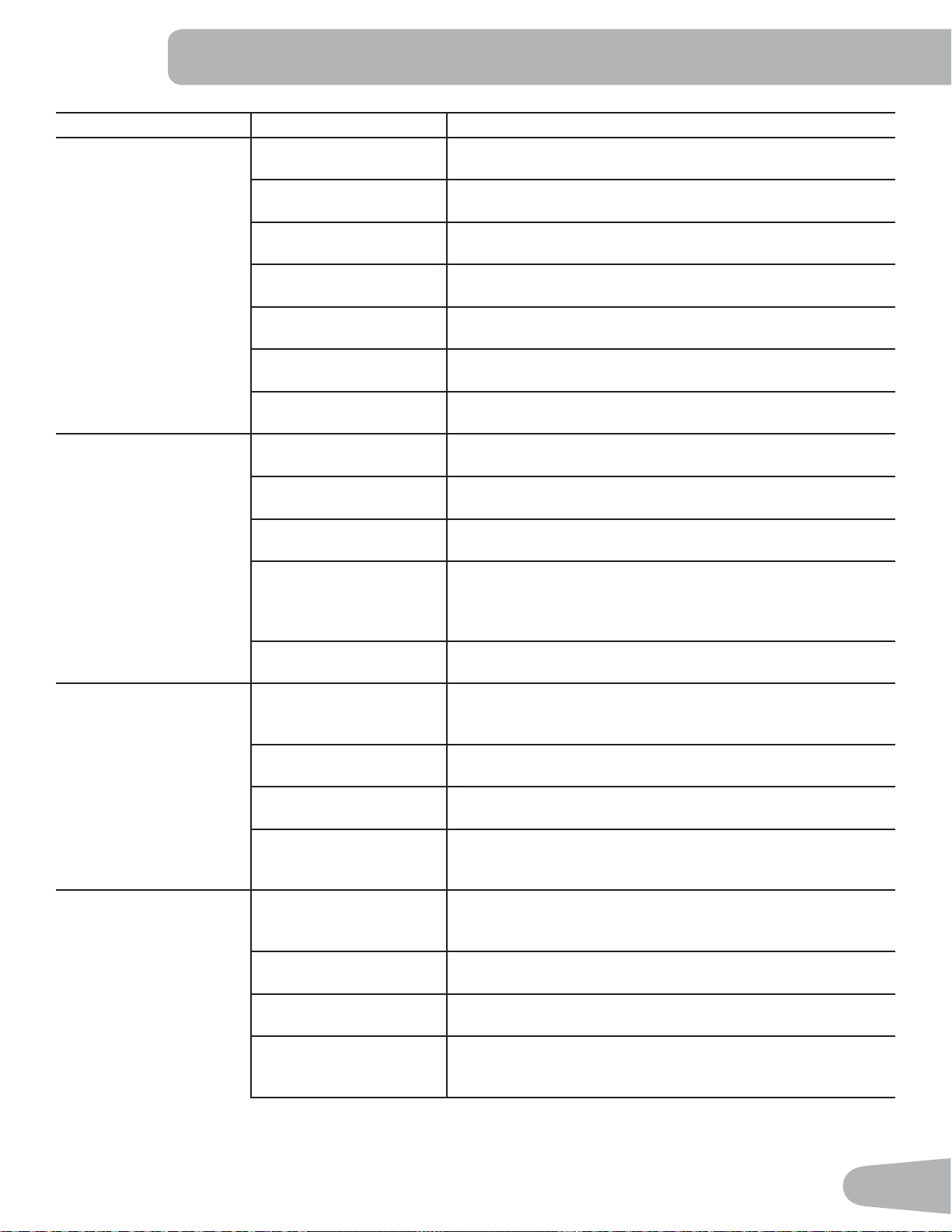
Maintenance Parts
A
S
T
U
V
B
C
D
E
F
G
H
I
J
K
L
M
N
N
O
P
Q
R
T
V
W
X
Y
Z
AA
BB
CC
DD
FF
EE
R
GG
GG
A Console L Stabilizer, Front W Contact Heart Rate Sensor (CHR)
B Console Mast M Transport Wheel X Flywheel
C Seat Back N Pedals Y Drive Pulley
D Seat Cover O Shroud, Right Z Servo Motor
E Water Bottle Holder P Shroud, Upper AA Brake Assembly
F Handlebar, Side Q Shroud, Left BB Drive Belt
G Seat Bottom R Crank Arm CC Speed Sensor Magnet
H Seat Adjustment Handle S Console Cable, Lower DD Speed Sensor
I Frame Assembly T Console Cable, Upper EE Power Inlet
J Rear Stabilizer U Heart Rate Cable, Lower FF AC Adapter
K Leveler V Heart Rate Cable, Upper GG Cover, Crank Disc
37
TROUBLESHOOTING
Condition/Problem Things to Check Solution
No display/partial display/
unit will not turn on
Check electrical (wall)
outlet
Make sure unit is plugged into a functioning wall outlet.
Check connection at front
of unit
Connection should be secure and undamaged. Replace
adapter or connection at unit if either are damaged.
Check data cable integrity All wires in cable should be intact. If any are visibly crimped or
cut, replace cable.
Check data cable
connections/orientation
Be sure cable is connected securely and oriented properly.
Small latch on connector should line up and snap into place.
Check console display for
damage
Check for visual sign that console display is cracked or other-
wise damaged. Replace Console if damaged.
Console Display ,I&RQVROHRQO\KDVSDUWLDOGLVSOD\DQGDOOFRQQHFWLRQVDUH¿QH
replace the Console.
If the above steps do not resolve the problem, contact you local
distributor for further assistance.
Unit operates but Contact
HR not displayed
HR cable connection at
Console
Be sure cable is connected securely to Console.
+5FDEOHER[FRQQHFWLRQ Be sure cables from handlebars and cable to Console are
secure and undamaged.
Sensor grip Be sure hands are centered on HR sensors. Hands must be
kept still with relatively equal pressure applied to each side.
Dry or calloused hands 6HQVRUVPD\KDYHGLI¿FXOW\ZLWKGULHGRXWRUFDOORXVHGKDQGV
A conductive electrode cream (heart rate cream) can help
make better conduct. These are available on the web or at
PHGLFDORUVRPHODUJHU¿WQHVVVWRUHV
Static Handlebar If tests reveal no other issues, Static Handlebar should be
replaced.
No speed/RPM reading,
Console displays “Please
Pedal” error code
Check data cable integrity All wires in cable should be intact. If any are cut or crimped,
replace cable.
Check data cable
connections/orientation
Be sure cable is connected securely and oriented properly.
Small latch on connector should line up and snap into place.
Check magnet position
(requires shroud removal)
Magnet should be in place on pulley.
Check Speed Sensor
(requires shroud removal)
Speed sensor should be aligned with magnet and connected to
data cable. Realign sensor if necessary. Replace if there is any
damage to the sensor or the connecting wire.
Resistance does not
change (machine turns on
and operates)
Batteries (if equipped) Replace batteries and check for proper operation.
Check Console Check for visual sign that Console is damaged. Replace Con-
sole if damaged.
Check data cable integrity All wires in cable should be intact. If any are visibly crimped or
cut, replace cable.
Check data cable
connections/orientation
Be sure cable is connected securely and oriented properly.
Reseat all connections. Small latch on connector should line up
and snap into place.
38
Condition/Problem Things to Check Solution
Check Servo Motor
(requires shroud removal)
If magnets move, adjust until they are within the proper range.
Replace Servo Motor if not functioning properly.
If the above steps do not resolve the problem, contact Cus-
tomer Care for further assistance.
Console shuts off (enters
sleep mode) while in use
Check electrical (wall)
outlet
Make sure unit is plugged into a functioning wall outlet.
Check connection at front
of unit
Connection should be secure and undamaged. Replace
adapter or connection at unit if either are damaged.
Check data cable integrity All wires in the cable should be intact. If any are cut or crimped,
replace cable.
Check data cable
connections/orientation
Be sure cable is connected securely and oriented properly.
Small latch on connector should line up and snap into place.
Reset machine Unplug unit from electrical outlet for 3 minutes. Reconnect to
outlet.
Check magnet position
(requires shroud removal)
Magnet should be in place on pulley.
Check Speed Sensor
(requires shroud removal)
Speed sensor should be aligned with magnet and connected to
data cable. Realign sensor if necessary. Replace if there is any
damage to the sensor or the connecting wire.
Fan will not turn on or will
not turn off
Check data cable integrity All wires in cable should be intact. If any are cut or crimped,
replace cable.
Check data cable
connections/orientation
Be sure cable is connected securely and oriented properly.
Small latch on connector should line up and snap into place.
Reset machine Unplug unit from electrical outlet for 3 minutes. Reconnect to
outlet.
Fan will not turn on, but
Console operates
Check for blockage of fan 8QSOXJXQLWIURPHOHFWULFDORXWOHWIRUPLQXWHV5HPRYHPDWH-
rial from fan. If necessary, detach the Console to help with
removal. Replace the Console if unable to remove blockage.
Unit rocks/does not sit
level
Check leveler adjustment Adjust levelers until machine is level.
Check surface under unit $GMXVWPHQWPD\QRWEHDEOHWRFRPSHQVDWHIRUH[WUHPHO\XQ-
even surfaces. Move machine to level area.
3HGDOVORRVHXQLWGLI¿FXOW
to pedal
Check pedal to crank
connection
Pedal should be tightened securely to crank. Be sure connec-
tion is not cross threaded.
Clicking sound when
pedaling
Check pedal to crank arm
connection
Remove pedals. Make sure there is no debris on threads, and
reinstall the pedals.
Seat Assembly shifts /
squeaks when in use
Hardware Check hardware that attaches Seat assembly, and fully tighten
hardware.

39

Nautilus™ %RZÀH[™ Schwinn™ 8QLYHUVDO™
(
EN
™
™